#graphics-cards
1 messages · Page 33 of 1
 solid glacier
 fading glacier

 lone pond
Does the version of the 6400 matter, like the specific vendor?
 odd siren
O.o
lone pond
fading glacier
are we talking about the amd gpus?
yes
fading glacier
6400 is a crap card, you can get a used 1060 for less and it will give you more performance
dont waste money on that
same applies for the 6500
last gen cards starts at the 6600 fo real
everything below that should be used market territory
lone pond
fading glacier
6400 is a crap card, you can get a used 1060 for less and it will give you more ...
I already have a 570, that has issues
I just want something with native hdmi
and like similar enough perf
fading glacier
a 6400 should end as a downgrade
lone pond
and it being lp/75w is cool to me 🤷♀️
fading glacier
sidegrade at best
lone pond
fading glacier
a 6400 should end as a downgrade
not really looking for an upgrade
if my 570 worked fine and had native hdmi
I'd be keeping it
fading glacier
well, at least you now know it
in that case go ahead, as for your question... no, brands wont matter on that card
lone pond
alright
 hasty sphinx
fading glacier
same applies for the 6500
hasty sphinx
fading glacier
same applies for the 6500
That 6500/580 8gb be holding up to MWII though.
 velvet grail
Do intel GPUs actually boost only in dx12 games or is it all about drivers and optimization? Cuz a750 for 250€ looks noice and apparently performs almost as good as 3060
 vital oriole
that's not true, all gpus run at boost clock no matter what load lol
velvet grail
No... Didn't mean boots in term of clocks. My bad, I meant as performance boost cuz I saw many benchmarks and compared to other graphics card (like the 3060) it easily beats in terms of performance but apparently it does only in dx12 games
Basically what I saw is 3060<a750 (dx 12 & vulkan)
And 3060>a750 (dx11 or lower)
 heady turtle
They've gotten some huge perf games recently in dx11 and 9 I think it is, deff a valid choice but only if you're okay with the drivers being bleh and don't mind tinkering and you basically have to have resizeable bar
heady turtle
Woah this data is really weird

 fallen thorn
can anyone help me i have a 600 watt power unit and i am looking for a gpu that can run escape from tarkov and rust but is on the budget side
i have a gtx 1650 currently
fallen thorn
ive got a evga psu and i have a i5 9600kf for cpu
heady turtle
what model though, evga like most power supply companies they make some great ones, some terrible ones and some okay ones
fading glacier
and your budget for a gpu? 😛
 keen nacelle
Best case scenario it's bq br or gq
fallen thorn
heady turtle
what model though, evga like most power supply companies they make some great on...
let me check the box quick
keen nacelle
Worst it's w1 or b1
fallen thorn
it says 80 standard
fallen thorn
why whats wrong with it
heady turtle
its just a very bad power supply
fallen thorn
what makes it bad
heady turtle

The EVGA 500W will have a tough time delivering full load at areas with 115V input because its bridge rectifier is not bolted on a heatsink. According to the specs, this bridge rectifier cannot exceed 3A at 100 degrees Celsius without a heatsink. (https://pdf1.alldatasheet.com/datasheet-pdf/view/263282/HY/GBU1006.html)
📀 Model number: EVGA 500W...
keen nacelle
It catches fire very easily
fallen thorn
Mine doesnt look like that though
heady turtle
under any load you would want a graphic card to pull although i had one for years on a like 150w gpu i would try sell it for cheap and just buy a new one and a slightly worse possible gpu
heady turtle
fallen thorn
Mine doesnt look like that though
you can send me a dm of the pic if you want
actually
you just ranked up
you can send here
fallen thorn
nevermind it is mine
 wicked hound
Always remember from now on, it's always about  . Lots of reputable companies make bad products, some even potentially dangerous. The W and N series from EVGA are some truly bad PSUs.
heady turtle
whats your country and budget
wicked hound
Also what's the budget for the replacement PSU? Might help if you can return current one.
keen nacelle
Could you sell the 1650 to add to the budget?
fallen thorn
nah the budget is the 1650
fallen thorn
sounds good then
keen nacelle
I'd try for a used 2070/super/5700/xt
fallen thorn
okay
keen nacelle
Idk the market in the UK though
So that could be overshooting
1080 is probably doable
fallen thorn
okay ill try
wicked hound
fallen thorn
nah the budget is the 1650
Is that 1650 or 1650S? If non S, seems like the 6500xt is in your budget and is equal to 1650S.
vital oriole
not worth it
fallen thorn
im not sure then
heady turtle
fallen thorn
uk and about 150 pounds to 200
Honestly save a bit more or sell your 1650 and add that money on top
vital oriole
^
fallen thorn
i might
heady turtle
The one you have is honestly the best gpu you can get for 200 because you'll hardly get an upgrade
fallen thorn
i just need a gpu that run escape from tarkov
heady turtle
About £300 is where you'll actually see a big increase (assuming new)
And you wouldn't get that much for a 1650 btw maybe like £80
 faint zealot
so im finding conflicting answers online. i just got a 4090 gaming x trio and im using the 12vhpwr corsair cable with a RM1000x. atm it works, but ive read that i should have the 1200w model to get the full 600w from the cable... will running the 1000w with that cable limited the voltage for the card? like i said ive been gaming with it for a week and haven't noticed anything. i just dont want to ruin the GPU lol
fallen thorn
its a 100 pounds
heady turtle
fallen thorn
what about a rx 570
basically same gpu perf wise
vital oriole
people are just playing it too safe
faint zealot
ya i know 1000w is plenty, just didnt know if the cable would mess with it.
faint zealot
since im not using that stupid pig tail thing they give you
vital oriole
that works too, but like corsair's 12vhpwr works okay
just like any connectors like these, you only have to make sure it's connected properly
faint zealot
ya it is, not pressed on glass and fully seated
vital oriole
you're good then
faint zealot
thank you, just wasnt sure since people are back and forth on it. i believe corsair says the 12vhpwr needs 1200w for 4090 but its been working fine for me with the 1000w. just didnt want to damage the card in anyway
wicked hound
faint zealot
so im finding conflicting answers online. i just got a 4090 gaming x trio and im...
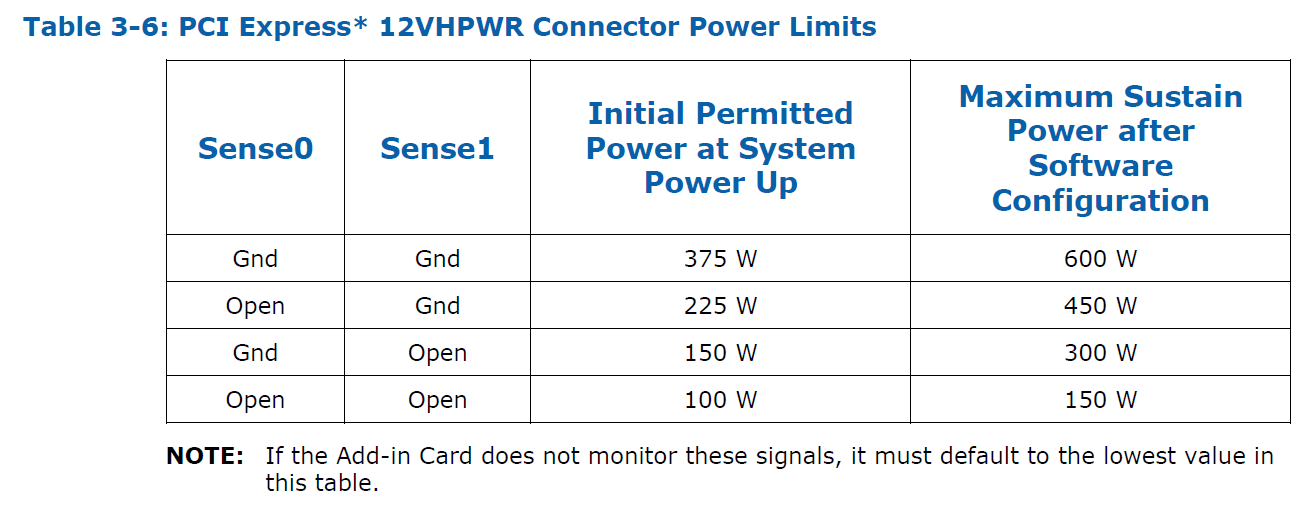
The 12+4P cable has two sense cables to detect the rating the plugged in cable is. If no sense pins are there the connector is limited to 150w, if one sense pin (in left?) is there the connector is limited to 300w, if one sense pin (in right?) is there the connector is limited to 450w, if both sense pins are there the connector is limited to 600w. The wattage limit is based on giving a current limit and is device controller (controlled by GPU). If you want to know the config, send a pic of the cable at GPU.
faint zealot
wicked hound
The 12+4P cable has two sense cables to detect the rating the plugged in cable i...
atm i am at work, i can certainly snap a pic of it when i get home though.
tbh im just not used to owning anything like the 4090. usually get the (70) cards or mid gaming cards, which i never really worried about the psu wattage as much. and now since the 30 and 40 series with the pig tail adapter and central connector, using the 12vhpwr cable is easier to work with and looks cleaner.
wicked hound


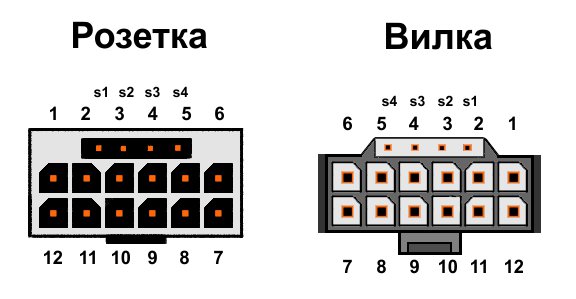
^ The left is pinout from the 12phpwr connector, which is what you probably want to use when thinking about perspective. The right is pinout from the cable itself, but the cable will be facing away from you so pinout will be inverted (which makes it same as left).
 ancient crystal
Rozetka? Vilka? (Sorry, I read Cyrillic but don't understand the language here)
 languid heart
I have the silver stone HELA 850R it has that built pin
ancient crystal
I don't have a 12 pin connector but it's probably just 2x 6pin
 random walrus
ancient crystal
Rozetka? Vilka? (Sorry, I read Cyrillic but don't understand the language here)
random walrus
ancient crystal
Rozetka? Vilka? (Sorry, I read Cyrillic but don't understand the language here)
I cant read it either but it looks like left is the female (on gpu) and right is male (cable)
 vapid bramble
Should I use AMD Adrenalin or just the software that came with my card?
 sonic mural
What card?
 last barn

http://ncix.com/search/?categoryid=0&q=mars+2
It's huge. It's here. The dual GTX 580 Mars 2 graphics card is the highest performing single card on the market today. It's also the most expensive....
guys look at this latest tech!
 livid idol
What's been up with Youtube recommending such old videos lately
2/3 things on my feed are from 3+ years ago
I had to scroll down just to get today's videos
lone pond
Got a mobile 3060. Pretty neat. Around 5% lower performance than a normal 3060 at stock, and about 5% better than a normal 3060 when overclocked. Ofc overclock to overclock a normal one would still win. Either way, for a 55w part it's extremely impressive
 fading glacier
a repurposed 3060m hmmm... i think you will have a rough time getting drivers on that
livid idol
Is that related to those GPUs that they found were using used parts sold as new?
I know it was something to do with no name brands on Ali
livid idol
Huh. Well it worked for others why not.
odd siren

lone pond
vital oriole
ya, just no official drivers for ya
wouldn't you just use the 3060m ones? 🤔
lone pond
that's an interesting thing to exist tho
livid idol
Different PCI ID so no regular drivers will detect it
vital oriole
^
 livid idol
You could in theory but you'd kill the perf
odd siren
I mean it's cockamamy enough at this point already lol
 oak rivet
Can't you just use the drivers you would use on the laptop?
vital oriole
like i said
odd siren
Nope
vital oriole
no
odd siren
As been said the pci id wouldn't pop up
livid idol
vital oriole
you can just mod latest official bios
Nvidia makes them encrypt the vbios though, nearly impossible to mod them now
livid idol
It's been that way for years
vital oriole
but somehow the chinese managed to make one lol
odd siren
But if you took the eprom out of the laptop as well and swapped it 
vital oriole
it's not latest driver but it works
well it would probably brick the card if we do that
odd siren
You're doing bga with the card anyway
livid idol
Driver mods are easier than vbios mods, all they really need to do is add their PCI ID to the list with a couple flags
livid idol
Assuming there isn't critical bugs with their implementation of the hardware yeah
vital oriole
also there's this thing of people flashing diff vbios of same gpu from different laptops
just to get extra boost wattage
i don't think it's safe tbh, the vrms might not be made up to the task of providing extra juice
and stock power adapter won't be able to supply enough power
lone pond
Can't you manually power limit if that serves to be an issue
vital oriole
nah, not that easily on laptops
livid idol
I wonder if throttlestop would do that in this case
solid glacier
Whats a program to test my ram if its bad or not
fading glacier
memtest?
lone pond
^
wicked hound
livid idol
Nvidia makes them encrypt the vbios though, nearly impossible to mod them now
"encrypted" is just a few specially placed checksums. Certain things like powertables can sometimes if not always be modded if you want to spend the time looking for the checksum locations and the area they are looking at.
Already a few confirmed cases of successful PL vBIOS mods
fallen thorn
is the rx 580 or 590 good?
fallen thorn
is it a upgrade from a gtx 1650 cuz i can get a 2nd hand one for 120 and a rx 590 for 140
or i can get a rx 580 for 95
vital oriole
it is an upgrade, but i would just save up for something better
oak rivet
aim for a 3060 under 300 or 6600xt
vital oriole
even a 6600 is a big upgrade
i don't think someone with a 1650 will benefit much going higher
odd siren
Granted the monitor they're probably using yeah
vital oriole
^
lone pond
fading glacier
a repurposed 3060m hmmm... i think you will have a rough time getting drivers on...
Nope, it's really simple actually. You just mod an inf file, although I cba to do it myself so I let the guy who runs the frankenGPU project do it
lone pond
vital oriole
you can only use custom driver made by the sellers you buy from on aliexpress
Not true
vital oriole
it would work, but how well i don't know
it's still a weird gpu
weird issues might pop up, and nvidia isn't obligated to fix it
cause it's not in laptops like they're supposed to be
lone pond
vital oriole
weird issues might pop up, and nvidia isn't obligated to fix it
Right, but they haven't thus far and I'm currently running the latest Nvidia driver release. I'm inclined to believe that it'll work as well as a laptop 3060 does provided Nvidia doesn't go out of their way to lock them out
vital oriole
i would say the same too
some people might not like it, but im definitely one of those willing to risk
lone pond
You missed an opportunity then, I got mine for $150, shipped from US too so it only took a few days to arrive
Seller had like 30 of them, presumably relics of the LHR era
vital oriole
i don't have a pc in need of a gpu, haha
lone pond
Neither did I lol, I just thought it was cool. I daily an rx 6800 so I'll probably end up giving/lending it to a friend
lone pond
Yeh, closer to $200 ish iirc, but still not bad if you need/want Nvidia features
vital oriole
still fine considering the price of full fat 3060
vital oriole
tho used 3060s are around $200 here too
lone pond
Oh really? I only ever see them for $250-275
vital oriole
it's good value for countries where 3060 are still 400+ i guess
ya
here in thailand i see $200 used 3060 fairly often
160 for 2060
lone pond
The $50-75 extra you'd pay here a bad premium considering the extra vram though - if you need it that is. But you can get them for $200 then I don't think I'd bother with the 3060m's 😅
languid heart
anyone here have a 4070 Ti build?
languid heart
Did you build around it or add it to an existing build?
I have the Suprim X and it’s 13.3” in length and like 3.5 slots lol
 frail pasture
languid heart
Did you build around it or add it to an existing build?
frail pasture
languid heart
Did you build around it or add it to an existing build?
existing build
fading glacier
any atx case should fit it
unless your card is beyond 330mm, any atx case should work
 harsh sun
fading glacier
any atx case should fit it
harsh sun
fading glacier
any atx case should fit it
So mid ATX is fine?
Because I'm wondering about upgrading too to 4070 in the future from my 2060
fading glacier
you need to compare the gpu clearance of your case with the length of the 4070 you are about to buy
a little research will help more than you think
fading glacier
always research everything before making a purchase and try to think on any future possibilities
harsh sun
Yeah, I don't want to jump into it right away
fading glacier
in my case, my budget allowed me to went a little overboard, so im practically covered for a lot of customization in the future if i want it... my case: 5000xd airflow
harsh sun
I was going to link my PC build to you guys to see if I need to make an upgrade to my PC before getting it, is it okay if I do that now?
 harsh sun
Yeah but for some reason it can't look up my case
fading glacier
so you are one of.... them
harsh sun
Which is an ATX mid tower
 harsh sun
Oh wait forgot to include my current GPU
Part List - Intel Core i5-11400F, GeForce RTX 2060 SUPER
fading glacier
word
fading glacier
harsh sun
https://pcpartpicker.com/list/Vph9Dq
nice build you got there
harsh sun
I have this PC build. Was thinking of either trying to upgrade to an 3060ti, RX6700, or beyond
Thanks!
Its an prebuilt lol
fading glacier
indeed, beautiful case.... but the price... oh boi
fading glacier
harsh sun
I have this PC build. Was thinking of either trying to upgrade to an 3060ti, RX6...
yeah 4070ti perform as a 3090, will be a fine choice
ofc that will depend on your pocket 😛
harsh sun
Yeaaah
fading glacier
you can get the same performance from a 6900xt for like 200usd less
fading glacier
if you need the vram, yeah by all means 3090
harsh sun
fading glacier
you can get the same performance from a 6900xt for like 200usd less
Hmm interesting
fading glacier
4070ti have the same performance, but 12gb is an insult in 2023 for that price
as the 3090
harsh sun
And as an PC newb, switching brand doesn't hurt my PC right?
harsh sun
Oh snap, the 6900 is def cheaper
fading glacier
it is, and almost the same performance
and that one is about as good as the 3090ti
almost as good
livid idol
You'd only get less RT performance but that's worth saving $100+ to me
And those that do rarely use it well
harsh sun
Ah okay
livid idol
Yeah considering it's just an upgrade from DX9 to DX12
ancient crystal
Vega 64 for $130. I'm poor and I need an acceptable GPU with a realistic price in the $150 range. Is there a GPU in this range better than that?
livid idol
You could get a 6500XT for $150 but you should only get that if you have a PCIe 4.0 system
ancient crystal
I will, yes
odd siren
That'd be worse than a vega 64 tho
I don't feel like you could do better for 130
Maybe an a750 used?
odd siren
Perf wise they'll be similar but you'd have av1 and better support
6500XT is much worse than a vega 64
ancient crystal
Yeah, it's also not used
 orchid loom
livid idol
You'd only get less RT performance but that's worth saving $100+ to me
orchid loom
livid idol
You'd only get less RT performance but that's worth saving $100+ to me
No RT 
ancient crystal
Oh it would be
livid idol
odd siren
Maybe an a750 used?
No they're more expensive on eBay than new lol
odd siren
Ehhhh
Weirdge
Everything intel arc is weirdge
Like the whole thing is a preliminary Aussie experience
ancient crystal
Vega 64 seems like a good move, then
AMD is still supporting with drivers, I think
fading glacier
might? or will be? you should check everything with a ruler
that will save you some pennies
i did that the frist time when i planned to buy the 3060ti
literally i took a ruler and measured my whole case to decide
perfect fit on my sff... just 8mm left
solid glacier
Part List - Intel Core i7-12700KF, Radeon RX 6900 XT, Phanteks Eclipse G360A ATX Mid Tower
Heres my build
i already have evrything
fading glacier
 solid glacier
 fading glacier
so, whats the problem? clearance for the gpu?
there is plenty of room in your case
you should handle the cable management better tho
its... no words
fading glacier
still.... i dont see the issue that demands another case
solid glacier
well like the hot air
fading glacier
that is solved with better airflow
solid glacier
seems like it stays in there longer than it should since i only have 1 exhaust and 3 instake what if i add 3 intake fans on the bottom
fading glacier
get 2 exhaust fans on top
if you get more intakes you will have a lot of hot air recycled inside
you need more exhaust pal
solid glacier
i mean on 1440p gaming max settings in apex my gpu reahes 67-70c hotspot 91c
fading glacier
6 intakes and 1 exhaust sounds horrible for thermals
a bigger case will not get you lower temps
good airflow will
solid glacier
Alright so get 2 more exhaust fans?
solid glacier

 fossil talon
fading glacier
6 intakes and 1 exhaust sounds horrible for thermals
fossil talon
fading glacier
6 intakes and 1 exhaust sounds horrible for thermals
That poor exhaust fan lol
fading glacier
solid glacier
https://media.discordapp.net/attachments/790033653442150460/1074192526027792454/...
no, get 2 exhausts on top
top
solid glacier
Bet artic fans good?>
fading glacier
you dont need more air coming inside
you need to exhaust hot air quickly
p12s are bae
solid glacier

ARCTIC P12 PST CO 56.3 CFM 120 mm Fan (ACFAN00121A)
odd siren
Better case won't help because there aren't many better cases than a g360a for airflow 1) and 2) you should try repasting your gpu in case of bad paste contact
solid glacier
This is the current exhaust fan i have
fading glacier
odd siren
Better case won't help because there aren't many better cases than a g360a for a...
my 5000XD begs to differ

odd siren
If you think the case is causing issues open up the side panel and try playing for a bit
In the event something happens we once again go back to gpu deshroud and repaste
fading glacier
3 intakes and 1 exhaust is the reason for that hot air recycled inside your case
odd siren
I have a friend who uses the same case and gpu and his temps never breach 80C
fading glacier
you can play with 3 intakes and 2 exhaust to have a slightly positive pressure as well
but 3 to 1.... no no
odd siren
3 to 1 is fine
solid glacier
Well my temps dont reach 80c at all max it reaches is 70c but my hotspot on my gpu reaches 91c
fading glacier
is fine but could be better :3
solid glacier
oh weird
odd siren
Cos he deshrouded and repasted
No that's just the far better solution
Cheaper and far more effective
It's like water cooling but without the drama of water
fading glacier
every one of us will have to deshroud and repaste at some point
its like car manteinance
odd siren
It's mainly gigabyte just tends to send really dodgy paste out of the box
You could even do this with arctic p12's
And 50c of zipties
fading glacier
good thing i run on trios
odd siren
Honestly gigabyte cards are fine
fading glacier
maybe you are right, still i dont like their aesthetics... too... boxy
odd siren
But $15 and you could drop that gpu's temps by up to 10C
Way way better than forking out for a new case
 odd siren
Grab that nt-h2 as well and drop it a little further
solid glacier
odd siren
Way way better than forking out for a new case
what about better than 2 more exhaust fans
odd siren
No
solid glacier
isnt repasting a gpu hard.. bc if u miss a spot your screwed
odd siren
It's not hard to paste the whole gpu die
solid glacier
what if u add to much lol
odd siren
Too much won't do anything
fading glacier
its never too much with thermal paste
odd siren
I do too much on purpose
fading glacier
too little is the problem
solid glacier
is one tube of NT-H2 gonna be enough
odd siren
Yes
fading glacier
you can spread it using an old credit card
odd siren
More than enough
fading glacier
so you dont miss a spot
odd siren
This is what you want it to look like

You can't see the die at all
The silver square? Cover every bit
Easy to do
Just wipe the old stuff off clean then get to it
solid glacier
is that a gpu?
odd siren
Ye
fading glacier
yers
odd siren
That's the die covered in paste
solid glacier
waht if u got those pins paste to?
fading glacier
those arent pins
odd siren
Nothing happens
solid glacier
oh easy then
odd siren
Yes ez
solid glacier
how many pads do mine have?
I mean i have thermal paste here 2 different kinds but ill order the Nh just to be safe
odd siren
Idk how many pads that 6900xt has
Just be gentle opening it up
Pry very slowly
It'll keep the pads good
Once you're past that it's literally easy as cake
fading glacier
you need to help yourself as well by googling that like: "how many thermal pads a gigabyte 6900xt have?"
just in case one is ripped in the opening process
solid glacier
ripped? if it is what happens then lol
solid glacier
for sure
odd siren
What pastes do you have rn
oak rivet
omg i wonder what cpu i need to be gpu bound in gotham knights
even with dldsr at 1440p ultra i cant reach 50% gpu usage in this game
livid idol
7000X3D time
random walrus
oak rivet
even with dldsr at 1440p ultra i cant reach 50% gpu usage in this game
usage % numbers aint everything though
well actually idk about gpu. i know cpu usage stats can be misleading
livid idol
CPU yes but GPU you want to aim for 90-100%
oak rivet
If the game had frame generation and I had a 40 series gpu probably could just cope with that 
livid idol
Frame gen can't help you if the CPU is the bottleneck
At least, not if I understand it right which is possible I don't
oak rivet
Frame gen increases fps even when cpu bound
livid idol
Entirely possible
But I hope you're getting at least 100 fps without the frame gen or the AI frames will be super noticeable
oak rivet

Benchmarking GPUs in Hogwarts Legacy is useful, but can also be misleading because the CPU can easily be the limiting factor in performance, especially with ray tracing enabled and in certain locations in the game. Here I explain the issues and benchmark a wide variety of GPU at a variety of graphics settings and resolutions in the demanding (on...
You can see around 60 to more then 100
With frame gen on even when the 7700x was heavily limiting 4090 in that area
livid idol
Oh I've seen what a 💩 show that game is already don't worry
 livid idol
3080 10GB getting 4 fps 1% lows at 1440p ultra rt
 velvet radish
doesnt the game have a big memory leak problem?
fallen thorn
is the gtx 980 better then the gtx 1650?
heady turtle
Yes
hasty sphinx
@oak rivet @frozen owl @little sleet @rugged crater
https://gamerant.com/hogwarts-legacy-pc-stuttering-fix/
This fixed all stuttering for me. The game is now 100% playable with RT enabled on my 3080 12gb.

Game Rant
A workaround to Hogwarts Legacy's PC optimization issues surfaces online, giving many players relief from their choppy framerates.
 frozen owl
hasty sphinx
<@1029306874887155783> <@790269110008676464> <@408037951604391937> <@14716217461...
frozen owl
hasty sphinx
<@1029306874887155783> <@790269110008676464> <@408037951604391937> <@14716217461...
Mine works fine 
hasty sphinx
frozen owl
Mine works fine <:pepe_hmm:974755017925992518>
What gpu do you have?
How far are you into the game?
 rugged crater
My wife hasn’t had any issues. I’m firing mine up now
She may not even have RT enabled, idk
hasty sphinx
frozen owl
3090 and 15%
This is with RT on?
rugged crater
But she’s so Friggin overjoyed it doesn’t matter for her
hasty sphinx
rugged crater
She may not even have RT enabled, idk
yeah I had no issues with RT off
frozen owl
I don't use rt cause it didn't look any different to me
hasty sphinx
frozen owl
I don't use rt cause it didn't look any different to me
RT in this game makes it look quite a bit different.
like.. I'm disappointed that I didn't get to use RT the whole 33 hours I've played so far.
hasty sphinx
rugged crater
But she’s so Friggin overjoyed it doesn’t matter for her
hella fun game
rugged crater
hasty sphinx
hella fun game
Go to sleep
hasty sphinx
rugged crater
Go to sleep
can't. Now that RT is working for me.. I'm reinvigorated.
hasty sphinx
I mean no problem in that. I'm assuming since someone found a workaround that they will throw a patch out soon enough that'll incorporate the fix.
odd siren
hasty sphinx
<@1029306874887155783> <@790269110008676464> <@408037951604391937> <@14716217461...
Brilliant, hopefully this makes it's way to drivers
oak rivet
hasty sphinx
I mean no problem in that. I'm assuming since someone found a workaround that th...
Do you have this white leaves issue?

Or is it amd only
hasty sphinx
oak rivet
Do you have this white leaves issue?
 hasty sphinx
oak rivet
Rdna3 issue then
hasty sphinx
oak rivet
Rdna3 issue then
Aside from the performance issues until now.. I haven't had any graphical error issues.
oak rivet
 hasty sphinx
The game (minus optimization) is really well done.
rugged crater
hasty sphinx
can't. Now that RT is working for me.. I'm reinvigorated.
Game recommended all medium settings with RT off for my 3060ti. It gave my wife the same recommendations for 2060s
hasty sphinx
rugged crater
Game recommended all medium settings with RT off for my 3060ti. It gave my wife ...
You might apply those tweaks just because anyways.
oak rivet
It seems to be doing that recommendation based on the vram of a card
rugged crater
Imma leave it as is for now. I’ll mess around with the settings after I’ve gotten into it a bit. This way I have a baseline for what it looks like/how it runs
oak rivet
Recommended 1080ti high but medium for 3060ti
hasty sphinx
rugged crater
Imma leave it as is for now. I’ll mess around with the settings after I’ve gotte...
for sure. the first hour or 2 of the game run smooth as heck, but you hit a certain point and then the stuttering starts.
oak rivet
The open world section?
hasty sphinx
oak rivet
The open world section?
pretty much.. after the beginning "mission"
trying not to spoil lol
 solemn glen
Does anyone have any hands on experience with the MSI Ventus 4070ti? I’m thinking about getting it and I’d love to just hear some info from people who have it personally. Thanks!
solid glacier
Would i be getting a big perforamnce difference if i get the 5800x3d cpu i have a i7-12700kf
solid glacier
Alright just asking bc i cant get warzone to smooth out its freezing every other sec fps is like 70
goes from 180 to 70 to 40 etc then back up again
random walrus
Try capping fps and see if that helps
fading glacier
plus warzone is terribly optimized, so you know
low settings for a smooth gameplay
ifyou are trying high or higher... well.. stutter fest
random walrus
also make sure ram is set to xmp speeds
fading glacier
thing is, spending more money just to get good warzone experience is an exercise in uselessness
just lower the settings
the differences are so minor and the performance will go up big time
a 12700kf/6900xt is a beast machine
warzone is awfully optimized as i said before
solid glacier
random walrus
also make sure ram is set to xmp speeds
In bios they are
alright ill try low settings
solid glacier
fading glacier
thing is, spending more money just to get good warzone experience is an exercise...
do i turn this off or leave it on

 little sleet
hasty sphinx
<@1029306874887155783> <@790269110008676464> <@408037951604391937> <@14716217461...
little sleet
hasty sphinx
<@1029306874887155783> <@790269110008676464> <@408037951604391937> <@14716217461...
i mean, ive been fine with my game with my 10gb 3080 at all ultra with rtx aside form the frame drop if i use mouse and keyboard and do high movements
been playing on a controller though and have been fine at pretty much constant 100+ frames aside from loading zones
little sleet
oak rivet
Do you have this white leaves issue?
there are seasons in the game so id probably assume it loaded winter/christmas leaves for those and nothing else or it just be amd moment
fading glacier
loaded the no-textures season
hasty sphinx
little sleet
been playing on a controller though and have been fine at pretty much constant 1...
ah I see. I originally thought playing on a controller would be better, but after playing with kb/m.. I don't know how ya'll can do it lol
hasty sphinx
little sleet
been playing on a controller though and have been fine at pretty much constant 1...
Just curious how you are managing 100+ fps in open world with ultra everything.. I'm not even hitting 80fps on my 3080 12gb. I get the no frame drops with controller, but even me sitting still and no fast movements.
little sleet
idk, it just is
hasty sphinx

little sleet
thats what i was managing as well before this update they did for better optimization and fixes
hasty sphinx
the only way I can manage 100+ is if I have my rtx off
little sleet
guess power of anime then cause i have the yeston 3080
hasty sphinx
pffft LOL
little sleet
waifu really does give +80% perf
rn im trying to finish all the other side quests and other challenges
already finished campaign
hasty sphinx
little sleet
already finished campaign
same last night. I'm currently doing all the side stuff.
how many hours : % done?
little sleet
i have 70% complete of challenges
hasty sphinx
playtime on your save file?
little sleet
31
hasty sphinx
I'm sitting at 34h/59%. I spent a good bit of time in the room of requirment though
several hours xD
little sleet
supposedly its suppose to take like 70 hours to 100% the game but i feel as though you can do it faster
hasty sphinx
little sleet
supposedly its suppose to take like 70 hours to 100% the game but i feel as thou...
Oh I'm sure you can if you have the knowledge of where everything is.
What type of spellslinger are you?
little sleet
what spells i have equipped and currently using?
hasty sphinx
pretty much yeah
little sleet
confringo, expelliarmus, crucio, and avada kedavra
hasty sphinx
I see.
little sleet
literally chain 1 shot like 10 enemies if i want to
hasty sphinx
I set up with imperio and lead into a crucio.. I cast momentum and then flipendo.. all the mobs should be cursed.. I then follow up on the crucioed mob with confringo / diffindo / bombarda. That's enough to pretty well kill the whole group with the dark arts tree and some into the spells tree. I use avada for the super big groups or on the big enemies.
super fun playstyle
little sleet
i was using imperio instead of confringo for a bit because of the spell upgrade where anyone that gets damaged by them they also get cursed but if you leave them alone for too long and the timer on the spell goes away, they pretty much regain all their health
unless that wasnt intentional and they fixed it in the update but i havent looked at the update in depth to see if that was a problem or not
hasty sphinx
must have been a bug. I haven't experienced that at all. I like to imperio the trolls when they are with a few underlings or another troll xD
Flipendo on a troll is noice too
little sleet
ye thats what i was doing with imperio, using it on trolls or whoever the strongest enemy was in the group. best for cursing multiple targets would be the archer goblins that are just way in the back and theyll just shoot everyone
hasty sphinx
little sleet
ye thats what i was doing with imperio, using it on trolls or whoever the strong...
for sure. I honestly tend to do an underling and then crucio the biggest guy and toss a bunch of basics at it.. with the talent that spread the curse on when they get hit.. it will really curse a large group quickly.
I also use accio/levioso/glacius/expelliarmus for CC if super need be..
random walrus
!ask
Oh
That used to be a command no?
Maybe I'm imagining things
?ask
Anyways https://dontasktoask.com
 random walrus
 humble herald
Anyone on
humble herald
Anyone on
Yeah what's up
random walrus
humble herald
Can I kill a gpu if I over use it
If it somehow overheats yes
Like, above 100deg C
Should throttle or turn off before that happens though
To kill it probably would need to go up to 125C at least
fading glacier
and that is extremely rare on today's protections
it will shut down first to avoid damage
solid glacier
What can cause my screen to freeze? like when i watch a yt video and make it full screen it freezes for a few secs or when i open up roblox it does, But i dont freeze in games
@livid idol Fps issues are back "/
odd siren
Did you repaste yet
solid glacier
no but my temps are even better now
but my fps issues are back lmfao
wtf iv legit didnt do anything
Soo
Is that gold peice suppose to be short
 livid idol
That's fine
solid glacier
Short on both sides
Alright
Idk what my problem is then
Back to fps issues a#
And my browsers starting to freeze again
It has to be my SSD or ram
solid glacier
solid glacier
Is that gold peice suppose to be short
This is my gpu btw
It’s the only short one though..
Found the issue

I’m screwed
hasty sphinx
solid glacier
Mine is like that. My gpu works just fine.
solid glacier
Yea but I’m getting FPS poor pefoqmnxe issues again, isnt smooth anymore
So I’m guessing it’s my ram once again brand new set
Or idfk
At this point I’ll sell the pc and build a whole new one
odd siren
Did you do the ram test
solid glacier
on testmem5?
odd siren
Mhm
vital oriole
google it
solid glacier
only getting 130 fps now
Gonna have to rma my gpu again or idk

Does this look right>
livid idol
Yes
solid glacier
Yea idk then
I dropped 80 fps..? Randomly
Can’t get to 220 and isn’t smooth
Wtf
hasty sphinx
solid glacier
Can’t get to 220 and isn’t smooth
Have you DDU?
hasty sphinx
possibly driver got borked.
solid glacier
It was fine literally all day today and when i went to play it was bad, reseated my gpu (my black piece on my mobo broke off so idk if my gpu being put in like that is causing me to drop fps?)
I’ll try DDU
I csnt find a link for testmem5
hasty sphinx
solid glacier
I csnt find a link for testmem5
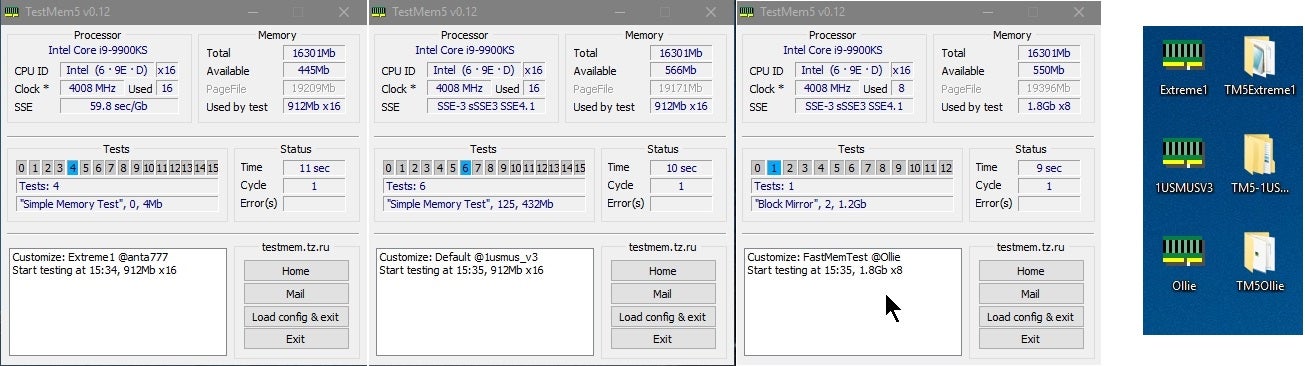
Overclock.net
Hello everybody
I am just making a very light tutorial with a collection of custom config files and a DOWNLOAD LINK for TM5 v0.12
anta777 absolut config Official Intel DDR4 24/7 Memory Stability Thread
None of the work is mine but it seems like a pretty good and fast testing app
hasty sphinx
solid glacier
I csnt find a link for testmem5

GitHub
C# WPF to automate HCI MemTest. Contribute to integralfx/MemTestHelper development by creating an account on GitHub.
hasty sphinx
solid glacier
Which one
the github is most up to date I believe.
solid glacier
Just DDU gonna head to bed I’ll lyk if I still have the problems
solid glacier
hasty sphinx
the github is most up to date I believe.
After DDU still no luck, fps issues are still here
Randomly it was working fine for a d whole week since I restarted the whole thing and now it’s back to being bad

 solid glacier
hasty sphinx
https://www.overclock.net/threads/memory-testing-with-testmem5-tm5-with-custom-c...
solid glacier
hasty sphinx
https://www.overclock.net/threads/memory-testing-with-testmem5-tm5-with-custom-c...
this downloads in a mega wtf

@hasty sphinx bro
Its my mouse
solid glacier
its like 3 years old so it makes since
hyperx pulsfiresurge
the software makes my mouse move at 60hz
hasty sphinx
solid glacier
its like 3 years old so it makes since
I guess? I have a mouse that's 5 years old. Sounds like it just the software then.
Is there no new software for it? Can you use the mouse without the software?
odd that it just all of a sudden started acting up?
If you haven't already, here is a firmware update for the mouse.
If that doesn't work then you can also try resetting the mouse.
 solid glacier
Yea i reset the mouse and when i do its fixes
harsh sun
So from what I read about the 4060, is it even worth upgrading to that if just another 3070?
livid idol
Only if you really, REALLY like ray tracing or want to use DLSS 3.0
fading glacier

odd siren

fading glacier
keep in mind that the 4060 prolly take months to reach the market... likely june at the very least
worth the wait?
harsh sun
I can wait, I'm not in the hurry for an new GPU and the summer was my targeted date anyways
So I'm just window shopping lol
keen nacelle
harsh sun
So from what I read about the 4060, is it even worth upgrading to that if just a...
Depends on what you're on rn
Imo if 3070, not at all
oak rivet

TechSpot
Trusted leaker kopite7kimi posted his latest information on the specs for the desktop GeForce RTX 4060 this week, and they look remarkably similar to the laptop variant....
harsh sun
keen nacelle
Depends on what you're on rn
2060 super
So I guess the 4060 would be like an small upgrade
fading glacier
kinda
oak rivet
It would be a substantial upgrade if it performs like a 3070
fading glacier
not tiny, but not major either
yeah a 3070 could give you the same performance rn
oak rivet
I think it might fall short of the 3070 and into a 3060ti
harsh sun
lmao
fading glacier
auch
oak rivet
But at 115w that seems pretty efficient for performance like that
fading glacier
yeah 60ti or 3070 if you can run the extra mile
you can bump to 6800xt if you dont care about rt
for the same price
keen nacelle
harsh sun
2060 super
4060 would be a decent upgrade
Depending on price of it, would be worth to consider 3080/6800xt used
odd siren
2060 super is a very nice card tbh
oak rivet
Around 3060 perf is good to be at nowadays 👍
fading glacier
not tiny, but not major either
odd siren
2060S isn't far off a 3060 at all
oak rivet
Ye
odd siren
In fact it's pretty much a sidegrade
harsh sun
odd siren
2060 super is a very nice card tbh
It is I love it
livid idol
odd siren
In fact it's pretty much a sidegrade
esp with the 2060 12gb being a thing
wicked hound
livid idol
Only if you really, REALLY like ray tracing or want to use DLSS 3.0
Is there any leaks that prove RT is going to perf better on 4060? Historically speaking it should match whatever Nvidia puts it up against in both raster and RT (2080S vs 3060Ti, 2080TI vs 3070, 3090 half Ti vs 4070Ti). The only saving grace the 4060 has is DLSS3 frame gen, which in the perfect world can help the heavy RT perf hit (prolly wont do well cuz latency and artifact issues).
oak rivet
wicked hound
Is there any leaks that prove RT is going to perf better on 4060? Historically s...
portal rtx 3060 had a lead over 2080ti iirc
probably how the game implements it
fading glacier
yup, that's why we believe it will be a 3070 contender at most
wicked hound
oak rivet
portal rtx 3060 had a lead over 2080ti iirc
Sounds like an outlier with todays games, bad implantation for Turing support or smth. With proper optimizations for all RT cards it might be possible to get smth of similar effects, but idk to that degree. Tho I cant say it's really worth worrying about given I havent seen other games show that behavior.
oak rivet
if the 3070ti had more vram it probably would have outpaced the 2080ti in the last few games
oak rivet
after watching the tpu screenshot i really hope i can atleast squeeze the reflections in
solid glacier
bruh wth is using 50% cpu when im only watching twitch

 ivory herald
Helps if yor click on the cpu header
solid glacier
i do
fading glacier
alder lake is pretty efficient anyway, it will throw the task manager to an e-core if you are not looking 😛
so dont worry 🙂
solid glacier
alot of issues peeps been having
vital oriole
it's all solved lol
ivory herald
If I had Ecores would be on Win11 probably, plus dodging any tpm/bitlocker bs. After some more benching, might go 11 soon anyways
livid idol
11 has been fine in my testing. Virtually identical fps, and I neutered M$ data collection
vital oriole
same here in my almost 1 year experience
oak rivet
If fps was much lower on 11 that would have been a valid point otherwise I don't see much reason to not just get 11
livid idol
Privacy is a big issue for a lot of people. M$ has been on a trend of ramping up their data collection every iteration since Win 8.
The good news is it's easy to neuter it so it's not sending all your "anonymous" data to M$ for advertising purposes
oak rivet
 livid idol
Yeah I mean at 1440p ultra (which the 3060 can sometimes do) you'll run out of VRAM fast
We see the 3080 10GB running out of memory and losing to the 3060 12GB in the new Hogwarts game
vital oriole
i think hogwarts looks great even on low anyway
livid idol
It'll look even better once performance issues are addressed
vital oriole
thing can run on 1050ti lmao
with fsr on at 1080p that is
but it's still not good on the high end cards
hasty sphinx
vital oriole
but it's still not good on the high end cards
you just have to mess with the pool size.
then it'll work correctly for all cards.
ancient crystal
Question: since I couldn't afford a GPU for my system along with other things, I got a "GeForce 210" - anyone know if it'll drive a monitor at 2560x1440?
Not games
Just having access to said resolution for windows
I made the mistake of getting a CPU with no integrated graphics
ancient crystal
It says it does 2560x1600: this is higher
vital oriole
1920x2000 for hdmi
ancient crystal
1920x1080 would be the choice for a modern display
 pine rapids
Are there any major bugs with the 7900 xtx? Debating if I should pick one up over the 4080
odd siren
not really no
some have a power idle issue but really that's it
<owns one
if you were doing something specific with it like Blender that would be a good reason for me to say otherwise to one
pine rapids
How's temps?
pine rapids
If I pick one up I plan on getting something similar to the reference model due to size
odd siren
reference is honestly fine just a little noisy
pine rapids
Ik fe 4080s run p darn cool
hmm, might pick one up over the 4080 tbh
I do use broadcaster a lot for noise suppression but ig I can get voicemeter or some
pine rapids
O I didn't know
odd siren
but less overhead compared to nvidia GFE
pine rapids
Havent looked into amd cards since I had a 5700xt
odd siren
pine rapids
O I didn't know
most people don't 💀
pine rapids
I got like 2 days to decide
If I can find a 7900xtx for 999 it'd be an easy decision
odd siren
yeah standard price isn't easy
asrock has an aib one for 1069 iirc
phantom gaming?
It'd be a pretty good one
pine rapids
Aslong as it's not longer than 323mm it'll work
odd siren
330 lol
pine rapids

odd siren
could waterblock it ig but be sorta pointless at that stage
pine rapids
Ye
oak rivet
Was wondering what was the amd equivalent of reflex?
Using it on games which have it makes it feel soo smoth ngl
fading glacier
 fading glacier
try it yourself if yours is giving you problems
oak rivet
Some peeps reporting this fixed the white foliage issue in hogwarts
oak rivet

Get an 83% discount on Private Internet Access using my link https://www.piavpn.com/DanielOwen and 4 months free!
With GPU prices coming down for some GPUs, going up for others, and new GPUs coming out soon, it can be a confusing market. You should not look based on MSRP, but instead look at which GPU offers the best performance at the actual p...
seems like the a750 is holdings its 249$ price strong
oak rivet
vital oriole
intel officially announced it
well lot of nvidia and amd cards dont really hold their msrp lol
 proud halo
Msi mpg velox case, comes with a vertical mounting bracket but no riser cable? What's the most economical riser cable for that setup?
heady turtle
oak rivet
well lot of nvidia and amd cards dont really hold their msrp lol
Amd hards are heavily under msrp for last gen
odd siren
The hards

 hasty sphinx
frozen owl
https://tenor.com/view/now-you-listen-here-my-buddy-president-garrison-canadian-...
hasty sphinx
frozen owl
https://tenor.com/view/now-you-listen-here-my-buddy-president-garrison-canadian-...
 lone pond
alright
lone pond
lone pond
alright
Would it be worth giving the intel cards a look or is it still too early?
seemed compelling to me with the more recent drivers and it seems they have at least slightly fixed performance issues with older games [which I do tend to like to play quite a bit of]
livid idol
lone pond
Would it be worth giving the intel cards a look or is it still too early?
For educational purposes and testing, go for it. Still too soon to recommend as a daily driver but give that a few months at the pace they're going.
They still need to revert the change to the drivers so they don't run all the settings through an osd
heady turtle
Or if you don't mind tinkering/want a really cheap av1 encoder
livid idol
Oh totally. I'm getting A380 just for the AV1 as soon as Plex supports it.
 hasty monolith
Should i update to the latest amd drivers i didnt hear any issues with them
heady turtle
oak rivet
A380 is like 150$?
Literally pointless for just the av1 encoder tho
random walrus
oak rivet
A380 is like 150$?
This little guy is $140 plus a game bundle
https://www.newegg.com/asrock-arc-a380-a380-cli-6g/p/N82E16814930076?
Unfortunately it seems they changed the games in the bundle
 civic lance
solid glacier
civic lance
solid glacier
There are quite a few people saying that they can't boot into windows after installing the latest AMD drivers on PCs with RX 6000 series GPUs. Other people claim its a windows issue. If its a windows issue, why isn't it happening with RX 7000 series cards?
 hot bough
What are the perks of AV1 encoding?
odd siren
Much better quality at a lower bitrate than the commonly adopted h.265 iirc
Also check this out

pcgamer
But so far, that only applies to synthetic tests.

Should preface not to install the new amd driver yet
It's giving people bricked windows installs atm
Pls do
I want brick house
1 ram stick every 30 bricks

fading glacier
oak rivet
For 100$ more the a750 is soo much stronger ngl
no need for a "stronger" gpu if your only goal is to use the av1 encoder 😛
lone pond
I hear a lot of people complain that Blender doesn't work well with RDNA2, maybe I'm getting it wrong for something else but is this true?
livid idol
It works but not as well as nvidia
With current pricing you can get an AMD card that's a tier above the equivalent priced Nvidia card and that should make up the performance difference, but there's still a few weird bugs to be wary of.
solid glacier
Soo am i switching to windows 11 or
livid idol
Do you want to?
It's purely personal preference at this point, unless you have Intel with E-cores
There's plenty of guides to debloat and neuter data collection on Win 11 by now too
solid glacier
livid idol
It's purely personal preference at this point, unless you have Intel with E-core...
i got i7-12700kf so it would prolly be there best to switch no?
I havent debloated my windows 10 pro and neuter data yet idk if its worth it
livid idol
Yes Windows 10 still has some issues with e-cores so 11 is recommended
solid glacier
Will there be a difference in gaming wise? or nah
livid idol
Depends on the game but it's possible you'll get more performance
Because again, e-cores
solid glacier
Yea true just kinda nervous to, heard people keep getting blue screened a ton and reinstalling windows 11 alot
livid idol
No more than any other version of Windows
livid idol
solid glacier
I havent debloated my windows 10 pro and neuter data yet idk if its worth it
Again personal preference. M$ does like to sell some of your data but if you're like me and don't care then no need really.
solid glacier
hmm yea idc as much lol
 umbral granite
What’s the next GPU worth upgrading to if you have 3070?
oak rivet
3080 has a healthy gain or 6800xt and upwards from Amd
vital oriole
i would just keep it depending on what you play and what res you play at
oak rivet
odd siren
Much better quality at a lower bitrate than the commonly adopted h.265 iirc

False alarm
DL2 perf uplift came way before the 23.2.1 driver
Initial test was on 15 oct 2022
DL2 got a perf boost with 22.11.2 driver, this came after our initial bench runs.
 Twitter
·
odd siren
oak rivet
https://twitter.com/FlorinMusetoiu/status/1626159936827805696
Twitter
·
odd siren
oak rivet
https://twitter.com/FlorinMusetoiu/status/1626159936827805696
22.11.2 to 23.2.1
That dude's claiming game increases which is what no one else was saying at all
The claims were for 3dmark synthetics
 molten river
I want to buy a gaming monitor, I have to spend 500. One of 34 inches or 39 -from 144gz to 165gz-or 240gz.
let me know which one is better.thank you.
[21:30]
also i have a rtx 3060 TI
heady turtle
molten river
I want to buy a gaming monitor, I have to spend 500. One of 34 inches or 39 -fro...
Personally i would go that large unless you're basically using it at tv viewing distance because ultrawide 1440p is closer to like 4k rather than 1440p
Imo it really requires a 3080 or above
Unless you're playing like really old games or something
 ashen marten
I want to upgrade my gpu, I have a 2060 rn I believe. But I want to get a better one
which one would you guys recommend? I would love to run games in ultra
keen nacelle
ashen marten
which one would you guys recommend? I would love to run games in ultra
resolution, country, budget, and what cpu and psu do you have
 wooden fern
Is the arc a750/770 a good buy or should I wait for better drivers first
oak rivet
wooden fern
Is the arc a750/770 a good buy or should I wait for better drivers first
Some extreme anomalies in some games but when it works it works pretty well
wooden fern
okay because I was thinking on reccommending it to a friend

 graceful flicker
@solid glacier #peripherals-and-displays
livid idol
wooden fern
okay because I was thinking on reccommending it to a friend
I still wouldn't recommend it as a daily driver GPU personally. There's still some major issues to be fixed, like their driver settings running through an OSD.
solid glacier
livid idol
Again personal preference. M$ does like to sell some of your data but if you're ...
That means i have to unistall my msi drivers for windows 11 if i update to it corect? and my bios?
solid glacier
?

Check out the Viper V765 Mechanical Gaming Keyboard here, and thanks to Viper Gaming for sponsoring today's video! https://amzn.to/3mH1CAc
Microsoft just keeps marching to the sound of their own drum, and to be honest, we let it happen. Today I'm going to show you a quick and easy way to Debloat Windows 11, Disable Telemetry, and keep both Micr...
Should i do this?
livid idol
solid glacier
That means i have to unistall my msi drivers for windows 11 if i update to it co...
No? Drivers for 11 are usually the same as 10.
As far as bios you just need to have tpm and secure boot on while you install. You can/should disable them after.
solid glacier
Alright so i should see if I have Tpm/secure boot on before I install?

 teal cairn
I'm going to be honest. Windows 11 is good if u just playing some games and stuff like that. I'm one who doesn't care about my info being sold anyway lol. You could get my info online for like 40-50 bucks nowadays anyway. Performance between windows 10 and 11 is nearly identical if that's a concern
Also I didn't really read everything but that's my take on windows 11
vital oriole
Telemetry still exists on win 10
By default you're getting tracked anyway, unless you manually disable and block it
livid idol
Yep. 11 just made it slightly harder to stop the tracking and added more types of tracking.
vital oriole
Sadly I have to go back to 10 cause I hacked my way to run on my old cpu
And its behavior with the cpu usage has been reducing my perf greatly, cause it's been using the first core at full load 24/7
civic lance
When playing Cyberpunk 2077, my graphics card draws 660 watts. The only other game that used that much power is Quake RTX.
 wicked hound
teal cairn
That's why I don't get the hate around it
wicked hound
teal cairn
That's why I don't get the hate around it
Two main reasons (and three if semi-non-trustworthy companies):
-Data leaks can happen. Could allow for random doxxing, which may end up not so well for some people.
-Companies can take data out of context and use it against you. Google has done this to an unfortunate father over their daughters health inspection (cant go into details as NE Server isnt an ideal place to talk about it, but should be able to find the story online with what I've said).
-Companies can purposely leak info such as phone numbers to spammers. This has happened before with somewhat well known companies.
civic lance
odd siren
What card?
3090 Kingpin
hot bough
Yea makes sense then.
fading glacier
no, it does not
unless he set up to eat that much, the card should behave as a 3090
and it seems that he doesnt set up the card to eat that much 😛
hot bough
Thought it was common for 3090s to suck up that much power if OC?
fading glacier
no
they eat as much as 500w stock, you can oc the kinpin to draw more ofc, but our friend here seems like he didnt set up that and the card is drawing that much by itself
hot bough
I see.
solid glacier
SSD
 solid glacier
livid idol
That's one way yeah
solid glacier
livid idol
That's one way yeah
Can’t find TPM
 oak rivet
i mean it seems normal if he maxed out the power limit slider
heady turtle
solid glacier
Can’t find TPM
Tried using the search bar?
solid glacier
Yes
heady turtle
What cpu and motherboard is it?
oak rivet

GitHub
Tweak DLL for NVIDIA DLSS, allows forcing DLAA mode & overriding DLSS3.1 presets. - GitHub - emoose/DLSSTweaks: Tweak DLL for NVIDIA DLSS, allows forcing DLAA mode & overriding DLSS...
use dlss but without the upscaling part
solid glacier
heady turtle
What cpu and motherboard is it?
Msi z690 pro ddr-4 A i7-12700kf
solid glacier
oak rivet
https://github.com/emoose/DLSSTweaks
This towards me@or no
oak rivet
do you have a rtx gpu then maybe otherwise 🤷♂️
solid glacier
Amd
solid glacier
I’m only@switching to windows 11 to see if that solves my issues
livid idol
solid glacier
Can’t find TPM
It's under security, trusted computing
fading glacier
oak rivet
do you have a rtx gpu then maybe otherwise 🤷♂️
6900xt if i recall correctly


 livid idol
solid glacier
livid idol
solid glacier
TPM is on
solid glacier
Cool so@im good to update?
solid glacier
livid idol
TPM is on
Win11 is done installing now is there anything I should do after installing it? Like any e core thing or turn stuff on or off
why did it download nvidia stuff lol-


my voltage
so now what
u pdated to win11 for nothing lmao
 civic lance
fading glacier
they eat as much as 500w stock, you can oc the kinpin to draw more ofc, but our ...
civic lance
fading glacier
they eat as much as 500w stock, you can oc the kinpin to draw more ofc, but our ...
The stock KP 3090 BIOS is a 520 watt limit. I have the XOC BIOS on the card. It draws 600-700 watts in port Royal.
fading glacier
then whats the issue? o.O
solid glacier
livid idol
TPM is on
^
civic lance
fading glacier
then whats the issue? o.O
I never said there was an issue. I was just surprised at how much power it draws in those two games. The power draw is much lower in mot games.
fading glacier
ahhhhhhhhhhhhhhhhh
that explains a lot xD
well quake rt is pretty demanding 😛
cyberpunk as well xD ill try it someday 😛
solid glacier
Updating to windows 11 didn’t help😅
fading glacier
solid glacier
u pdated to win11 for nothing lmao
not for nothing anyway xD
win11 handle the e-cores efficiently
solid glacier
Is there anything I should turn on or off since doing win11?
fading glacier
no
solid glacier
How do@Ik the e cores are running correctly
solid glacier
Oh alright cool yea idk what the problem is then lol gonna i guess pay powergpu 150$ for 2 hours of tech support/pc optimization
livid idol
solid glacier
why did it download nvidia stuff lol-
Physx is separate from Nvidia drivers. It's just for physics processing on GPU.
fading glacier
even on radeon gpus?
livid idol
Yes
fading glacier
😮
livid idol
It just runs in software mode instead of hardware
fading glacier
the more you know
solid glacier
Ohh
Yea idk what the problem is gonna pay powergpu 150$ to see if they can figure it out
livid idol
First try disabling tpm
I know it can cause issues on AMD but idk about Intel. Worth a try.
livid idol
solid glacier
Security device support disabled
fading glacier
run a game
solid glacier
Alright, what if it’s my gpu bc my mobo thing tjay secures the gpu broke off? How do Ik it’s registering the whole@gpu
From GPU Z right?
Running a game rj
Rn
fading glacier
gpuz will tell you if the card is using the full 16 lanes
livid idol
It's got nothing to do with the slot latch
solid glacier
Turning that thing off made me not be able@to sign in
It won’t let me lol
Yea gonna have to turn that thing back on
livid idol
You should be able to log in with your password instead of your pin
solid glacier
It won’t
livid idol
Curse you M$ and your need to solve problems that don't exist causing more problems
solid glacier
My m$ was fine lol
livid idol
It's M$ that's enforcing the tpm requirement which is known to cause stuttering in Ryzen 5000
livid idol
That pin recovery screen should send a recovery key to your email to reset your pin
Was it not?
solid glacier
nope i click set up my pin and it goes right back to this
i turned tmp back on and im back in my windows and my pin worked but if i turn tmp back off its prolly gonnashwo taht pin thing
It doesnt give me the option to sign in with my microsoft password
maybe this?




 livid idol
It's running system accounts in the background
solid glacier
oo
solid glacier
boom
im in

wth is this
xD
i had terminal off for some reason so i turned it back on before restart and now this popped up
solid glacier
livid idol
Might want to get your email out of there
^
livid idol
Powershell is similar to Linux terminals. An evolved Command Prompt if you will.
livid idol
Yep