#graphics-cards
1 messages · Page 3 of 1
 heady turtle
Of?
 livid idol
If you dig into those benchmarks the settings are meant to exaggerate differences between what they're comparing
Like who runs a 6950 XT at 1080p medium
 toxic sparrow
heady turtle
Of?
toxic sparrow
heady turtle
Of?
the power color 6950 for $750 on amazon open box vs the Asrock ?
heady turtle
Yeah it's a pretty good deal
 silver moat
Hey guys. Taking my gpu apart for the first time to redo thermal paste. Having some trouble tho:
How would I access that screw to take it off?
There are 3 others like it
One of them is kind of in the open so I took that out, other two are fully in
My card is a gigabyte 2080 super oc
 modest reef
I don't think you need to remove those, it looks like it's just holding the backplate
silver moat
Ah ok
modest reef
Just be careful of wires, etc. But you should be able to gently twist pull the cooler off of the PCB
Not completely twist, but enough to separate the thermal paste

In diesem Video werfen wir einen Blick unter den Kühler der GIGABYTE RTX 2080 GAMING OC 8G und schauen uns einige Bauteile und den Kühler genauer an.
Das vollständige Review seht ihr hier unter:
Folge uns auf:
Twitter DE: https://twitter.com/HardwareInsider
Facebook DE: https://www.facebook.com/Hardwareinside/
Google+: https://goo.gl/vV7pES
...
Looks like the guy had to put in a pretty good effort to get the cooler off
modest reef
You bet
silver moat
I’m trying that but it doesn’t seem to budge. Saw another vid and this guy took them out with a different driver: https://youtu.be/pMJr5MFCxms
Would anyone happen to know what type of screw driver I would use for this
 hasty sphinx
That thing was brand new lol. I unsealed it and everything.
 jaunty mango
 why can’t my post office be faster
hasty sphinx
jaunty mango
<:why:885682319426486272> why can’t my post office be faster
I get impatient as well. lol
modest reef
silver moat
Would anyone happen to know what type of screw driver I would use for this
Did you remove this screw?
 jaunty mango
hasty sphinx
I get impatient as well. lol
jaunty mango
hasty sphinx
I get impatient as well. lol
It was supposed to arrive at 10:30-:2:45
It’s 4
hasty sphinx
jaunty mango
It was supposed to arrive at 10:30-:2:45
hm says 5:15 for me
jaunty mango
It’s aight
hasty sphinx
I hate when that happens
 keen nacelle
its been a thing for a while
 rustic pulsar
is it good? for the price ofc
keen nacelle
no
livid idol
It's worse than the rx 570
 normal hawk
livid idol
It's worse than the rx 570
normal hawk
livid idol
It's worse than the rx 570
its basically the same at a lower wattage and is easier to cool.
Watching a benchmark of 8 games, the 570 is up to 15 degrees higher the whole time at the same settings. with roughly the same performance.
and honestly if these are the 2 you're looking at I'm guessing you'll vsync and just target 60fps which makes the 6400 a better option at the same price due to the lower wattage.
If I was building a 1080p console for 60fps gaming. I'd go with the 6400 because of newer features. such as Open GL 4.6 instead of 4.5
Pairing it with a AMD CPU as well for SAM would make it a much better option too.
So then its a debate between prices, and new vs used.
 sonic mural
normal hawk
Watching a benchmark of 8 games, the 570 is up to 15 degrees higher the whole ti...
sonic mural
normal hawk
Watching a benchmark of 8 games, the 570 is up to 15 degrees higher the whole ti...
Sam and rebar same thing tho
So you could def pair with a Intel too and get the same results
normal hawk
sonic mural
Sam and rebar same thing tho
Sam is better than rebar by a few frames.
sonic mural
Got a link to testing?
Maybe in like 500fps type of games it's within a couple of fps like margin of error
Sas may be neat when that's a thing
Sadly alot of the testing out there compares Nvidia to amd, rebar to Sam, but it's not reliable testing at all for comparing rebar and sam
normal hawk
What I was just looking at might be skewed due to 12900k just being better in general.
The performance they end up at is the same. But Sam increased performance more to get it to that point if that makes any sense?
sonic mural
Nvidia stuff with Rebar/Sam at like 3070ti and up will def see a smaller % increase than the Radeons in that range for sure
AMD just doesn't have as fast of vram as Nvidia got
Even the 6950xt only has gddr6 non x, because someone didn't get an exclusive deal with micron for g6x
That slower vram loves ReSam (yes that's what I'm calling it now)
normal hawk
😂
 lone pond
6900xt is still up with the 3090ti in fps soo who cares
 wheat crag
I was gaming on my tv and I would my screen would artifact n stuff but when I switched the hdmi cable it stopped, is there any reason behind it?
I think the hdmi cable I was using before was sorta old
livid idol
Probably just a bad cable yeah
Older ones especially might not meet newer standards
Which is a problem really only on 4k TVs
wheat crag
Well I was playing at 4k lol
I think the cable was like made before 2013 or something
It just looks old
livid idol
Oof yeah that's definitely before HDMI officially supported 4k standards
I think you needed a HDMI 2.0 cable at least for 4k60
They only finished the spec for that at the end of 2013, cables didn't use it for a while after
wheat crag
livid idol
I think you needed a HDMI 2.0 cable at least for 4k60
I found an hdmi cable and it seemed to work fine
Not sure if it’s hdmi 2.0 but I’m pretty sure it is
livid idol
Sometimes you get a 1.4 rated cable that works at 2.0 speed
2.1 is trickier, needs better signal integrity to push that 4k120
wheat crag
Kinda wish my tv had a dp plug
wheat crag
Yea but most things plugging into the tv is hdmi
wheat crag
 odd siren
Just get a huge monitor
odd siren
Just get a huge monitor
Too expensive
livid idol
odd siren
Just get a huge monitor
C1 OLED?
wheat crag
Might as well go 8k
odd siren
wheat crag
Too expensive
Eh? FO48U was always cheaper than CX/C1
Oh I guess in the scheme of things if it's just a normal tv
wheat crag
Oh, I don’t my monitors that well
livid idol
There's little difference between monitors and TVs in reality
Just feature sets for intended use case
livid idol
wheat crag
Like same ms response time n stuff
Have you seen the response times on OLED TVs?
odd siren
Think of the bigger monitors like barebones tv's and it makes a lot more sense
odd siren
Oled's have the fastest gtg iirc?
livid idol
Here's the C2, possibly one of their best rated anything https://www.rtings.com/tv/reviews/lg/c2-oled

RTINGS.com
The LG C2 OLED is a high-end TV, and it's the successor to the very popular LG C1 OLED. OLED TVs like the C2 are self-emissive, meaning unlike LCD panels found o...

 wheat crag
Dang .2ms
 quaint osprey
no one saw what I did, wrong chat
 idle idol
Looks like AMD dropped a pretty good driver yesterday.
OpenGL optimizations 2x better performance.
sonic mural
After looking at the abysmal arc drivers, any new driver from amd or Nvidia seems incredible to me lmao
livid idol
sonic mural
After looking at the abysmal arc drivers, any new driver from amd or Nvidia seem...
Recent leaks are saying there's basically a schism in Intel right now. There's the marketing team playing everything up, they're the ones that are taking to tech tubers, and then there's the engineers and C-suite. They're having tons of issues with battlemage and considering cancelling celestial altogether.
livid idol
Yes but unsurprising
livid idol
They really did try to rush things. I can't see anyone going from zero to competitive in the duopoly in 2 years.
sonic mural
livid idol
Recent leaks are saying there's basically a schism in Intel right now. There's t...
Did you see intels earnings report for Q2?
livid idol
The one where they're trying to play off missing their target as a good thing?
 solemn panther
They're just optimizing their drivers for only a handful of games which I see as another major problem
livid idol
That and apparently alchemist can't be fixed enough by drivers, there's fundamental issues
Their optimization strategy makes sense in general, focus on more recent technology like vulkan and DX12, and work backwards focusing on more popular games.
heady turtle
Congrats whatcha do?
 dense cliff
Yall think switching from a 3070ti to a 6900xt would be an upgrade or a sidegrade? Trying to use the 3070ti for the Index but not getting the frame times i need to run games like Beatsaber and Half-Life: Alyx at 120hz native headset res.
hasty sphinx
dense cliff
Yall think switching from a 3070ti to a 6900xt would be an upgrade or a sidegrad...
What headset has 120hz native?
dense cliff
Valve index
hasty sphinx
Ah
heady turtle
dense cliff
Yall think switching from a 3070ti to a 6900xt would be an upgrade or a sidegrad...
Definitely an upgrade but if you have a 3070 ti I'd wait til next gen comes out
hasty sphinx
@heady turtle I'm breaking down and putting my GPU in here in a bit.
heady turtle
Owo
hasty sphinx
heady turtle
Owo
Which one? I know the one says recommended, but...

 fading glacier
im pretty sure the last one have the upgraded opengl for minecraft, but should contain the same as the recommended one
hasty sphinx
ok, and I don't play lamecraft  so I'll just go for recommended one.
fading glacier
um, last time i checked it says only on mc, maybe im wrong

hmmm you are right foxxy, minecraft was an example
 vital oriole
it boosts anything opengl ya
fading glacier
maybe it boost optimization on others opengl games
vital oriole
and mc saw biggest gains
hasty sphinx
fading glacier
maybe it boost optimization on others opengl games
Then I'll grab that one because I play RuneScape sometimes
not that a 6950xt will have any trouble running it max anyways
vital oriole
they rewrote the entire opengl library in the driver
heady turtle
hasty sphinx
Which one? I know the one says recommended, but...
The optional
hasty sphinx
@heady turtle so it seems that I will in fact have to get a cable to plug my GPU into my mobo to control the lighting.
heady turtle
Interesting
hasty sphinx
This card is 10c cooler than the TUF 3080 12gb running the same games.
heady turtle
Well
hasty sphinx
fans are def louder though. I can hear them
hasty sphinx
oh?
heady turtle
@magic wing knows more
hasty sphinx
The game I'm playing now was 67c on the 3080.

so not sure how that correlates with this.
this is the AMD GPU
The hotspot on the 3080 would get to about 78-80c
 heady turtle
He tryna compare 3080 and 6950 temps but i was saying they read different
hasty sphinx
I know that junction is middle of die
 magic wing
On nvidia is vram
hasty sphinx
and that the "reg" temp is the edge
oh
ok, so which temp should I be keeping an eye on?
the junction?
magic wing
Amd says 105 is limit for tjmax
hasty sphinx
magic wing
Amd says 105 is limit for tjmax
and that's this one?
 magic wing
hasty sphinx
and that's this one?
magic wing
hasty sphinx
and that's this one?
Ye
hasty sphinx
ok. so can I say that one is compareable to the temp of the 3080? or is it still different?
the AMD Adrenaline is saying it's 78c while HWiNFO is saying it's 67c
heady turtle
Oh that would do it
hasty sphinx
hasty sphinx
the AMD Adrenaline is saying it's 78c while HWiNFO is saying it's 67c
I still don't understand this. At idle Adrenaline is saying Junction is 45c, but HWiNFO is saying it's at 50c, but hotspot is at 45c..
livid idol
Hwinfo probably is reporting junction as hotpot. The 50c is another part of the die.
hasty sphinx
livid idol
Hwinfo probably is reporting junction as hotpot. The 50c is another part of the ...
So I should just pay attention to the hotspot temp in hwinfo?
livid idol
I just go by whatever is the highest
hasty sphinx
I see.. well my sensor panel only has option for the "regular" temp and hotspot temp.
and the hotspot temp on the sensor panel correlates with the junction temp in the adrenaline software
livid idol
Well whichever is usually the highest choose that
hasty sphinx
but the junction in hwinfo is higher than the hotspot or junction
so I guess I just am trying to figure out which is the true one. I know go with the higher one.. but
I never paid attention to hotspot on the nvidia gpu
livid idol
They poll at different rates so they'll get slightly different readings
hasty sphinx
I know that earlier in hwinfo the hotspot was higher than the junction, but now it's the other way around
so just trippy.
I don't like not knowing exactly which one is the one I should really be watching out for.
I watch my temps like a hawk though.
That being said.. what can I use for an in game overlay like afterburner/rivatuner?
I'd just use afterburner, but every time I start it.. it resets my fan curve in the amd software even though afterburner fan curve is disabled.
livid idol
AMD has an overlay built into adrenalin
hasty sphinx
hm.
hasty sphinx
that opens a sidebar
ctrl shift O
it's on the right top of my screen though and doesn't seem to be a way to move it
I need it in the top left.
otherwise it's in my way
livid idol
I know it's possible to move, I've seen it top left before
hasty sphinx
welp I just did something I have no idea how to revert
nvm
well I haven't figured out how to change the location of the thingy, but I did find a useful tool that helped me calibrate my screen a bit 😛
so much easier on the eyes
alright figured it out.
it's kinda not easy to find certain things. You'd think this stuff would be all together
 ivory herald
AMD drivers often a bit of a meme for good reason(s). 
vital oriole
lol
sonic mural
better than being a Nvidiot...
odd siren
Easier installation process compared to any time I try install an nvidiot
But we'll see I'm still green to the process (pun not intended)
sonic mural
also adrenaline rocks (other than the beyond crap voltage offset slider)
compared to 2005 era nvcp + GFE
sonic mural
if that was the case, thatd make two of us 😄
ivory herald
 Try harder, lol. p.s. afterburner and/or RTSS ftw.
 sonic mural
ivory herald
<:Question:859974771612450817> Try harder, lol. p.s. afterburner and/or RTSS ft...
sonic mural
ivory herald
<:Question:859974771612450817> Try harder, lol. p.s. afterburner and/or RTSS ft...
i said era
just cause something came out sooner than it looks like, it still can be era
mad becuz you dont got no adrenaline 😎
 ivory herald
That's for the simpletons 
 quaint gull
anyone run a 6950xt?
ivory herald
quaint gull
anyone run a 6950xt?
@hasty sphinx & @toxic sparrow (LastDon still waiting to receive theres)
quaint gull
ivory herald
<@913267599779971133> & <@215549857241366528> <:kekleo:971095797062074378> (La...
Im pretty happy with mine but the new driver isnt good
ivory herald
Mainly just a moderately OC'd 6900, but indeed they perform good. Yea fresh AMD drivers usually a bit poopoo, but they mature well.
rustic pulsar
@mighty island ^
 mighty island
ty
 carmine rapids
I don't know how to feel about Intel Arc, I've heard both positive and negatives about it and there is so many silly rumors too going around with it also
heady turtle
Nothing promising so far tbh
And it was caught cheating in timespy with specific improvements for it
magic wing
quaint gull
Im pretty happy with mine but the new driver isnt good
Which one?
 wicked hound
heady turtle
And it was caught cheating in timespy with specific improvements for it
wicked hound
heady turtle
And it was caught cheating in timespy with specific improvements for it
Questionable, we dont know what exactly the settings do. It could be specific workload enhancements that is more seen in workstation stuff. Also has said setting been tested in all games?
heady turtle
Oh intel basically confirmed they where cheating in timespy
After they where caught they added an option to "turn off benchmark optimizations" or something
Yes compared to similarly ranked timespy gpus it sucks in games
wicked hound
Welp
wheat crag
is battle front 2 dx12 poorly optimized? When i try to load into the campaign with dx12 the game just crashes
sonic mural
heady turtle
Yes compared to similarly ranked timespy gpus it sucks in games
Tbf that's partially thanks to intels "incredible" drivers
heady turtle
wheat crag
is battle front 2 dx12 poorly optimized? When i try to load into the campaign wi...
Probably not, a lot of dx12/dx11 games aren't ported well and run better on dx11
hasty sphinx
ivory herald
<:Question:859974771612450817> Try harder, lol. p.s. afterburner and/or RTSS ft...
I decided to ditch the adrenalin overlay because I figured out how to use hwinfo with rtss
the adrenalin overlay is.. alright, but it just doesn't have what I want.
wicked hound
HWiNFO + RTSS is 
hasty sphinx
wicked hound
HWiNFO + RTSS is <:weggChefKiss:904600580419387413>
Is there a way to like rename the sensors that show up in the rtss overlay?
these
 heady turtle
Ye
Should be able to rename them
In the section where you select what goes on screen
lone pond
What would you say is the minimum teraflops for a GPU needing to work 8K raw in realtime?
hasty sphinx
heady turtle
In the section where you select what goes on screen
Doesn't seem to allow me from that screen. The only way I've figured out is if I rename them from the main sensors window.
Which.. is ok I guess
vital oriole
lone pond
What would you say is the minimum teraflops for a GPU needing to work 8K raw in ...
teraflops means nothing honestly, it has no standard way of measurement
lone pond
then how do I respond to someone asking "What would you say is the minimum GPU needed to work 8K raw in realtime?"
vital oriole
Well
If they mean editing
3090 minimum
If it's just pictures, nah. Even igpu will do just fine
heady turtle
lone pond
What would you say is the minimum teraflops for a GPU needing to work 8K raw in ...
4090 ti
When it comes out
There's no good gpu for 8k raw in games
Oh for rendering it's different
wicked hound
heady turtle
After they where caught they added an option to "turn off benchmark optimization...
Had to leave due to work. But still wanted to expand on this. They called it Advanced Optimization or smth. Is it confirmed that it doesn't actually improve compute perf? Vega was amazing on Compute but pretty meh at gaming, which made it great for synthetics.
wicked hound
lone pond
then how do I respond to someone asking "What would you say is the minimum GPU...
We're assuming you mean video "rendering" (realtime scrubbing I assume you mean) and not 3d rendering?
lone pond
wicked hound
We're assuming you mean video "rendering" (realtime scrubbing I assume you mean)...
yeah. Colour grading to be more specific
heady turtle
wicked hound
Had to leave due to work. But still wanted to expand on this. They called it Adv...
Afaik that settings only improves in some benchmarks for games
hasty sphinx
I'm experiencing major random framedrops with this 6950xt that I didn't experience before with 1650s/2070s/3080 12gb.
it's only a split second, but it's happened at least 20 times in the last hour
like my fps drops from 225 fps to 0 for a split second and I can see/feel it in game
heady turtle
hasty sphinx
I'm experiencing major random framedrops with this 6950xt that I didn't experien...
Did you ddu?
hasty sphinx
heady turtle
Did you ddu?
before I installed yeah, I haven't since I started experiencing these drops no
heady turtle
Worth a shot
hasty sphinx
alright I'll do that
modest reef
https://www.reddit.com/r/radeon/comments/rvqw44/guide_to_fixing_amd_gpu_stuttering_issues/
See if this helps

reddit
21 votes and 4 comments so far on Reddit
Lol
hasty sphinx
modest reef
https://www.reddit.com/r/radeon/comments/rvqw44/guide_to_fixing_amd_gpu_stutteri...
Thank you. I will give it a shot.
That actually makes a lot of sense.
 hasty sphinx
odd siren
Poor reo
hasty sphinx
odd siren
Poor reo

hasty sphinx
modest reef
https://www.reddit.com/r/radeon/comments/rvqw44/guide_to_fixing_amd_gpu_stutteri...
This sadly did not help 😦
hasty sphinx
hm, after a little googling, it looks like it could be my RAM oc
I might drop to xmp and see if that fixes the stuttering
but my current ram oc is stable..
oh well I'm gonna check anyways
I still have yet to ddu
sheesh I can feel the difference between 3200 and 4000
fading glacier
more stable or more sloweR?
hasty sphinx
slower
I just started pc up
hm
odd
cpuz shows my ram as still oced.
Odd that it was a slow startup.
hasty sphinx
It seems stuttering is common with the 6000 series
fading glacier
but yeah ddu and rollback to recommended driver should fix that
hasty sphinx
Yeah I'm gonna try the recommended one.
hasty sphinx
idk why I don't just listen to @heady turtle when he tells me to do something. DDU/rollback to recommended drivers worked.
heady turtle
Cool glad to help


 heady turtle

lone pond
how do I check exactly what graphics card I have
 lone pond
ok thanks

 heady turtle
hasty sphinx
Will this be ok? I'm at 35c ambient with gpu fans at 75% and case fans at 100% l...
heady turtle
hasty sphinx
Will this be ok? I'm at 35c ambient with gpu fans at 75% and case fans at 100% l...
Looks fine
odd siren
Only 80 hotspot?
heady turtle
odd siren
Only 80 hotspot?
About 15c delta so sounds normal
odd siren
Oh i know just the label for that reading I was assuming hotspot
Just GPU kinda weird
But yeah seems fine
Time to pump 500W through it 
heady turtle
Amd label differently ye
odd siren
Nah even my 6600 reports it as hotspot for the name
hasty sphinx
heady turtle
Amd label differently ye
I labeled it GPU
it said hotsspot, but in rtss it wanted to usse the whole label
and I couldn't change it anywhere for rtss so I renamed the label in my sensors and it renamed it for rtss
hasty sphinx
odd siren
But yeah seems fine
that seems fine? jeeze it's 98f in my room right now lol
I was for sure this thing was gonna be overheating
odd siren
Overheating is one of the last things it'll do lol
Both this and the tuf cooler were good choices
Especially when that cooler is like nearly 4 slots thick omg lol
heady turtle
hasty sphinx
I labeled it GPU
Ah didn't know you could rename in hwinfo64
 modest reef
Only in final fantasy or everything?
modest reef
I kept reading that final fantasy is sensitive to oc'd GPUs, even if it's like that from the factory.
Try setting stock clocks and see if they helps at all
It's weird though, you'd think they'd test for this
hasty sphinx
hm. I've oced all the other gpus I've played it with
an it was fine after ddu/reinstall then 4 hours later a crash and stuttering again
I'll check out stock clocks, but not sure what those are
modest reef
Also, some dude had to uninstall FF and remove any game configs off his PC before it stopped stuttering
modest reef
reddit
7 votes and 33 comments so far on Reddit
Someone else mentioned RAM as well, saying it only stopped after he removed the XMP profile
hasty sphinx
I don't have it on xmp
I am oced though
but it was never an issue before
only on this 6950xt
I don't see how the ram would be an issue all of a sudden. but there might be something idk about
ivory herald
No xmp would be big sad. 
hasty sphinx
odd siren
maybe time to reinstall the window

fading glacier
 odd siren
@hasty sphinx


see if I find anything, it might just be specifically this game and amd
hasty sphinx
I really hope not because this is my favorite game lol
I am about to go try Apex though and see if there are any changes
odd siren
well I'm reading about a guy who tried reinstalling windows to no avail so don't try that I guess now 
odd siren

 odd siren

yea adrenalin has a factory reset button
i forget where rn cos I'm not at the 6600 macheen

odd siren
nah that's like a soft reset/soft reinstall lol
 median delta
alright SO, i want to record but i recently got an AMP gpu, how do i fix this?

i knew it was gonna come up but didnt feel like recording until now
wait i found an encoder setting, should i use H265 or H264
after internet research i think H264 seems like the option i should go with
problem resolved
hasty sphinx
hasty sphinx
loading apex now to see if it does it in that game
Not near as much stuttering, but there is some here and there.
I am experiencing an insane amount of suttering in Star Wars: The Last Jedi
keen nacelle
tried older drivers?
wicked hound
hasty sphinx
I thought it was referring to factory reset of windows lol
Have another drive that you can just shove Win on for testing clean Win? If not, have enough space on a current drive for new partition?
hasty sphinx
wicked hound
Have another drive that you can just shove Win on for testing clean Win? If not,...
I do have another ssd that has nothing on it.
wicked hound
Id try testing clean Win if that hasnt been done yet
hasty sphinx
wicked hound
Id try testing clean Win if that hasnt been done yet
I guess I just don't understand that yesterday I was playing on the 3080 12gb no issues whatsoever with any games. Then I install 6950xt and bam all issues
I think it's something to do with the gpu and not really anything else.
wicked hound
Well cant confirm it until clean set of software. Also if it do be faulty GPU, best to test in another system if it exists in your household
Added benefit of insta RMA usually
hasty sphinx
then I'm gpuless for however long that takes. lovely.
hasty sphinx
if I install windows on new SSD, will I be able to access my games from the SSD that already has windows?
wicked hound
hasty sphinx
then I'm gpuless for however long that takes. lovely.
Just use CPU to render everything. It works with blender so it must work with everything ||/s||
hasty sphinx
ok so I'd just stick my media drive in with the other ssd as main boot and install windows right?
wicked hound
hasty sphinx
ok so I'd just stick my media drive in with the other ssd as main boot and insta...
Ye
hasty sphinx
ok
ivory herald
unplug whichever drives* you aren't installing windows on is the safer way though.
fading glacier
and install just the bare minimum of drivers
wicked hound
Ideal to at least remove current main drive cuz of the two special partitions
hasty sphinx
ivory herald
unplug whichever drives* you aren't installing windows on is the safer way thoug...
that is so much work to do in a room that is 100f
I'm already so hot.
fading glacier
if that solves your problem then start reinstalling things one by one to catch the culprit if somehow the issue reappears
wicked hound
hasty sphinx
that is so much work to do in a room that is 100f
Three m2 drives or smth?
Actually, might be able to disable drives in BIOS
hasty sphinx
wicked hound
Three m2 drives or smth?
- but my ac broke yesterday and it's currently 110 out
fading glacier
yeah just use one drive and reinstall everything fresh, bare minimum of drivers and your target games
wicked hound
hasty sphinx
2. but my ac broke yesterday and it's currently 110 out
Turn the F into a K and it be nice and chilly
fading glacier
that will take you the whole sunday
hasty sphinx
fading glacier
yeah just use one drive and reinstall everything fresh, bare minimum of drivers ...
even reinstall my games?
fading glacier
everything
ivory herald
Also indeed later hooking up an old OS drive is no issue. red square is showing mine. - eventually I'll copy a bunch to the 6TB and format the old 1TB.
 hasty sphinx
that's going to take my whole flippin day off 😦
 cerulean rover
Repaste clean dust undervolt extra fans higher fan speed
fading glacier
undervolt and higher fan speed are the more easy ones
 gray bloom
should i repaste my gpu when i just got it like 8months ago?
fading glacier
you asked for tips
gray bloom
well just wondering if i should change it already but i do undervolt my gpu
fading glacier
that and increase the rpm of the fans
it will be louder but you will have lower temps... maybe
gray bloom
is it better to open the case of my pc or nah?
fading glacier
no
wicked hound
gray bloom
should i repaste my gpu when i just got it like 8months ago?
Stock paste is usually meh
wicked hound
gray bloom
is it better to open the case of my pc or nah?
Depends on case and heatsinks
gray bloom
fading glacier
open case will lead to more dust
i can always@clean it just lower temp more priority when my room is a desert😂
i have 9fans total
fading glacier
airflow
 fading glacier
if the airflow is ok then an open case will make no good, just more dust to your parts
which is bad
gray bloom
yeah probably i kinda opened my case for lower temps
now im kinda more expose to more heat that indid it
fading glacier
3080 is a warmy gpu anyway
hasty sphinx
@fading glacier Where can I find AMD driver 21.8.1?
er nvm
idk if that one will work
it says suppoer for 6600xt
livid idol
AMD has all their driver versions, you just have to search for them
hasty sphinx
nvm I see where it says compatible
livid idol
hasty sphinx
it says suppoer for 6600xt
That just means it added support for that GPU
hasty sphinx
livid idol
AMD has all their driver versions, you just have to search for them
that one only seems to be for win10?
idk, I'm so hot I can't think straight
livid idol
It should work on 11 too but won't be as optimized
hasty sphinx
ugh this is ridiculous with the gpu issues I have had with 2/2 "high end" gpus
if I'm paying this amount of money I expect my stuff to work out the box.
fading glacier
¯_(ツ)_/¯
gray bloom
msi afterburner good to undervolt right?
livid idol
Yeah you just use the v/f curve
livid idol
hasty sphinx
ugh this is ridiculous with the gpu issues I have had with 2/2 "high end" gpus
This is why I prefer midrange personally. High end stuff has the most issues in my experience too.
fading glacier
i prefer low/mid range cause.... im poor 😦
livid idol
gray bloom
yeah dont know how that works
This is aimed at miners but the info is the same for gaming, you just don't lower the power limit. https://youtu.be/YEexfskMWhM

Subscribe here: https://www.youtube.com/channel/UCYew10Lx91NaP52EwwT5z3A?sub_confirmation=1
Wanna buy us a beer?
ETH: 0xe0f2Ee80847A93d6F8B205D146C475B74880592A
RVN: RLAp4n6gLjxKnoGYncnwm3DBL3Z29xPYA1
Stress test while you're changing voltage using furmark so you can see if you drop it too low
 woeful stump
Bruh I leave the voltage of my gpu alone
Wattman keeps crashing so I just auto fan curve with msi and overclock
I drop it down 1 point it crashes
It's a mech oc. 5700xt. I did a repaste and that managed to help with temps a bit
livid idol
Oof that's a tough model to deal with
 quick lagoon

 fading glacier
and?
hasty sphinx
fading glacier
that or try reinstalling windows
After reinstalling windows and basically nothing else except essential stuff... Still stutter I'm still messing around with things I find online to see if there is a fix at all until B&Hphoto open their support in a couple hours
fading glacier
feel sadge for you pal 😦 rma is the only option now 😦
maybe next sapphire will be stable
hasty sphinx
fading glacier
feel sadge for you pal 😦 rma is the only option now 😦
I messed with some settings and now StarWars isn't aaaaas stuttery. FF7 remake has no stutter and neither does Assassins Creed Valhalla.
I'm going to try The Witcher 3 next since that's another open world style.
fading glacier
still, very rare to have that much stutter on your card, weird indeed
hasty sphinx
wheat crag
If u did maybe freesync will help
freesync is one of the things most recomended to turn OFF when stuttering on amd
fading glacier
this is just my opinion, but i hate when things need to be turned off on a game to work properly, especially if i bought a high end card 😦
still, if that solves your problem, then go ahead
wheat crag
I had to turn off dx12 on stbf2 with my card
hasty sphinx
I think I'm still going RMA. I don't have to have the 3080 turned into the UPS store until the 22nd, so that'll give me a couple weeks to not be GPUless
wheat crag
But I heard sbf2 dx12 runs like crap
hasty sphinx
yeah that is what I'm seeing is dx12 is crappy with amd
fading glacier
well dx12 is a software issue most of the time
hasty sphinx
so I feel it's most likely a driver issue vs a card issue.
fading glacier
some games have badly implemented dx12
hasty sphinx
wheat crag
<@913267599779971133> did u ever oc the card?
No, It's stock. put in my pc 2 days ago. There was stuttering out the gate with optional drivers, then I DDU and reinstalled with recommended drivers and stuttering went away completely, then 4 hours later my game crashed with a dx error and then the stuttering came back.
wheat crag
Did u install the latest drivers?
hasty sphinx
...
yes lol
it's literally been in my pc for 2 days. Why would I not install latest?
wheat crag
I thought u like installed recommended drivers
hasty sphinx
yeah that's what it's label as recommended
wheat crag
Prob a driver issue with games cause it’s amd
hasty sphinx
the newest release is the optional one
yeah AMD is not on my good list atm
kinda really blows.
fading glacier
180
wheat crag
It was off the top of my head
hasty sphinx
actually looking at their return policy it looks like I can get around that because it's defective
wheat crag
Lol
hasty sphinx
I'll exchange and if the next one isn't good either then I'll get refund
fading glacier
yup
hasty sphinx
and get a 3090ti or something XD
wheat crag
That sucks
fading glacier
what a chad
fading glacier
just a 3080 strix and some spare for mcdonalds
wheat crag
Well a 3090 strix open box was 1k
hasty sphinx
I just want a high end white gpu
around the 1200 mark becuase obv that's what I'm willing to spend lol
hasty sphinx
it's not all white though
wheat crag
hasty sphinx
around the 1200 mark becuase obv that's what I'm willing to spend lol
Maybe a 3090 tie but most 3090s is that price rn
wheat crag
Not about flexing the gpu lol
hasty sphinx
he means flex the price
fading glacier
but a 3090 is not worth over a 3080 price wise
wheat crag
Oh I’m stupid
wheat crag
fading glacier
but a 3090 is not worth over a 3080 price wise
The vram is useful if u use it
Or need it ig
fading glacier
other problem is the vam at the back D:
wheat crag
And a 3090 ti consumes like 500w
fading glacier
the 90ti have 0 ram on the back, so its better
wheat crag
That was suppose to solve vram heating issues
wheat crag
Reminds me a repad is recommended on those cards
fading glacier
800 bucks and some spare for a pepsi
hasty sphinx
fading glacier
just exchange, maybe its your card
had 2 options. Could exchange, but would take up to 3 weeks. Or refund and reorder with fastest shipping (again).
So, I took the refund. They are also paying for the return shipping
fading glacier
nice
yeah if you want a white build, then go for the 3090 white strix
or the yeston 😄
wheat crag
Could always custom with paint
fading glacier
im agaisnt the 3090 tho, but your money man
hasty sphinx
fading glacier
yeah if you want a white build, then go for the 3090 white strix
that one is $1900?
wheat crag
Just don’t do the fans
fading glacier
its at 1900? really i was thinking about 1300
fading glacier
not even the 90tis are at 1900 anymore
wheat crag
Wait nvm
wheat crag
fading glacier
its at 1900? really i was thinking about 1300
The non ti was 1300
hasty sphinx
non ti says 1900 lol
wheat crag
Well it was
hasty sphinx
even a normal strix 3090 is 1800
 steady nexus
Can someone tell me if I can fit this in my pc. ASUS Phoenix NVIDIA GeForce RTX 3060 V2 Gaming Graphics Card (PCIe 4.0, 12GB GDDR6, HDMI 2.1, DisplayPort 1.4a, Axial-tech Fan Design, Protective Backplate, Dual Ball Fan Bearings, Auto-Extreme) PH-RTX3060-12G-V2
wheat crag
Prob got rid of the discounts
fading glacier
whats your case?
steady nexus
Mid tower
wheat crag
Gotta be more specific but probably
fading glacier
yeah it will fit
hasty sphinx
ooooo
steady nexus
It is single
steady nexus
What CPU do you need for it?
fading glacier
steady nexus
It is single
yeah it will fit
wheat crag
And i5 11400 or 12400 will do fine
wheat crag
Prolly above 9th gen
wheat crag
There was no i9 befire it iirc
fading glacier
i ran a 3060ti on a 4770
pretty good
pcie gen bandwidth differences are very subtle to notice
wheat crag
They are
fading glacier
like 10 less fps on the worst cases
steady nexus
Hmm.
wheat crag
Between pcie 3 n 4
steady nexus
Is there like anything I need to install it into the motherboard
wheat crag
Idk bout pcie 2 n3 tho but I’d imagine it’s noticeably worse
steady nexus
I think it is a ATX
hasty sphinx
I noticed no difference in fps when I was testing my card between gen 3/4
fading glacier
wheat crag
Idk bout pcie 2 n3 tho but I’d imagine it’s noticeably worse
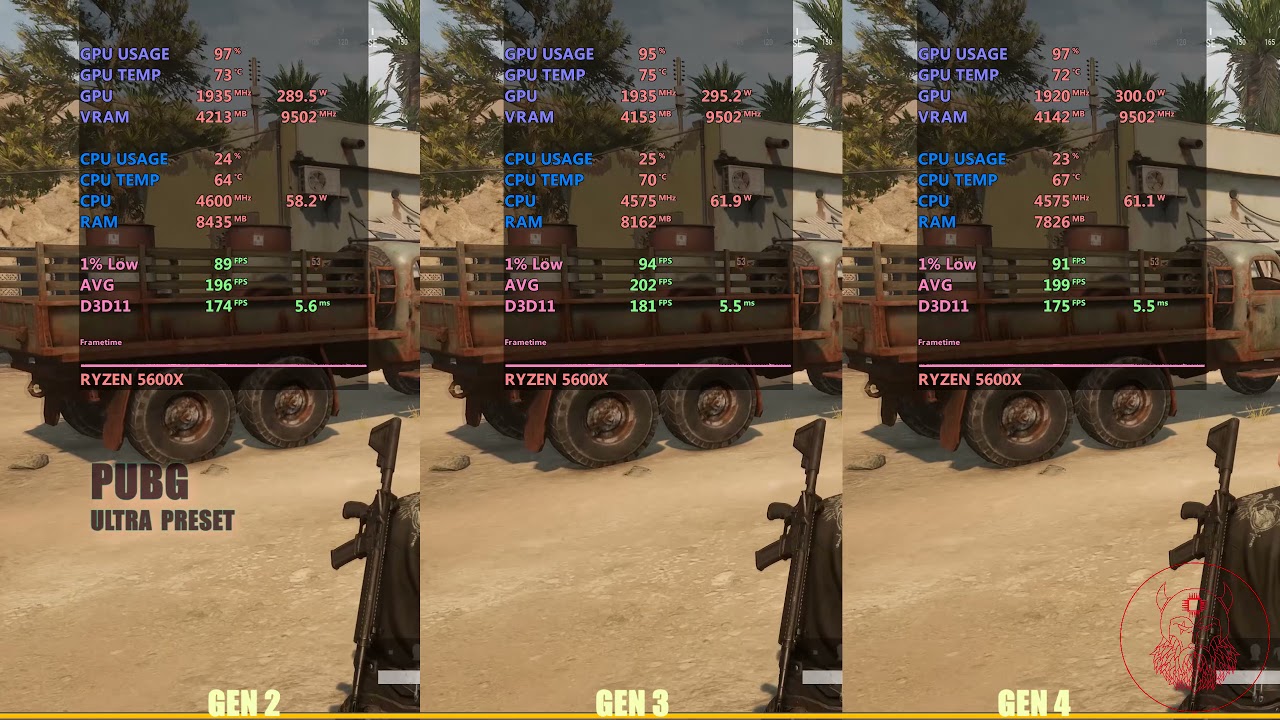
Pcie gen 2 vs gen 3 vs gen 4 - Gaming performance comparison test using NVidia rtx 3070ti.
Test system details
Room ambient Temp - 30 degrees
CPU - AMD R5 5600x stock speed
CPU Cooler - cooler master ml120 aio (amd)
GPU - Zot...
steady nexus
Yea r MID size
wheat crag
A mid atx should fit atx board
fading glacier
its barely noticeable
keen nacelle
Ye
fading glacier
6500xt its a special case, that card shouldnt exist
but for the rest pcie2 is like 5-10 fps lower than a gen 3/4 counterpart
gen 3 and 4 are so similar cause most of the current cards barely fill the pcie3 bandwidth
only the 3090 can go beyond to pcie4 if im not mistaken
fading glacier
even the 40 series will be pcie4
fading glacier
also pcie is backwards compatible, "only" is more of a commodity than a need
you can run the 3090 at pcie2 if you want and you will only lose like 10-12 fps
fading glacier
yup and on load it will fill the bandwidth available, full pcie2, half pcie3 most of the time
thing is, yes, your i9 is ok for your 3060
hasty sphinx
bleh. I feel sick to my stomach with how many issues I've had with the 3080 12gb and this 6950xt
fading glacier
man, your rig is cursed
hasty sphinx
my weekend was wasted trying to figure this out.

 velvet grail
Is it worth selling my 1070 for ~200/240 and getting a better card whenever prices drop by a lot, I have time til September to get a video card for my mini build and I was looking for a good mini GPU, maybe a 1070/ti / 1080 mini
wheat crag
Maybe, but there many 3070 and 3060 ti too
Like the zotac mini ones
And 200-240 sounds fine
Your choice to sell it tho
hasty sphinx
velvet grail
Is it worth selling my 1070 for ~200/240 and getting a better card whenever pric...
I doubt prices are going to drop much further.
velvet grail
hasty sphinx
I doubt prices are going to drop much further.
There's this one Italian website I'd use to sell and buy my new GPU, there prices are still bad, 1060 3gb for 150, (btw everything used), 1070's for 220...
 errant galleon
I bought an i9-11900k for (350$) and a 2060 (600$) would a 750w power supply be able to power both without being pushed?
fading glacier
yes
velvet grail
Yes
errant galleon
Lesgoo
hasty sphinx
errant galleon
I bought an i9-11900k for (350$) and a 2060 (600$) would a 750w power supply be ...
I"m sorry you bought a 11900k for 350
fading glacier
and a 2060 at 600
errant galleon
Yes
hasty sphinx
errant galleon
I got screenshots
no. I'm saying. I'm sorry that you did that
fading glacier
but 750 is good enough, even a 600w will do
velvet grail
Not a good deal but I guess you can't change that
wheat crag
12600k and a 3070/80 wasn’t an option ig?
errant galleon
Wym a 11900k is 350$ rn instead of 600$
hasty sphinx
and a 12600k is $300 and better
fading glacier
yeah 11900k and 2060 at those prices were really bad bad deals
 dreamy dragonBOT
 ivan b#1673 has been warned
Reason: Bad word usage
errant galleon
Freak it bruh its been 3 years that i had this pre built
velvet grail
Launch price for 11900k was 530$
fading glacier
you can get 6600xt and 3060s today below 400usd
oh, it s an old build, then pay no heed
wheat crag
errant galleon
Freak it bruh its been 3 years that i had this pre built
Oh if the parts came in a prebuilt then ig it’s fine
errant galleon
🤑
hasty sphinx
I assumed he bought them recently because the way he worded it.
errant galleon
My apologies
wheat crag
It’s alright lol
fading glacier
we are the ones to apologize, we rushed to conclussions
no big deal
🙂
750 is enough as i said, even a 600w will do on your build
fading glacier
but something is weird
wheat crag
errant galleon
What would be a good price for 3080
Below 800
fading glacier
errant galleon
What would be a good price for 3080
less than 800
vital oriole
3080 rn should be below 750 to be worth it imo
wheat crag
@errant galleon there r 3080s for 650 on evga bstock tho
wheat crag
Prob got the gpu 3 years ago
errant galleon
I heard my coworkers say prime day gpu s would be priced much lower than normal and I remember seeing a 3080 by zotac for 600$ but i didnt know if zotac is good. I only ever heard things EVGA and ASUS
 tropic remnant
 vital oriole
6500xt 8 gigs might no longer be limited by vram i guess
but the 4 pcie 4.0 lanes
eef
tropic remnant
Oh ya only 20$ more from the 4gb model
 fading glacier
cant blame you
heady turtle
hasty sphinx
So, I took the refund. They are also paying for the return shipping
Time to get 3080 12gb aorus master for 800$ 
vital oriole
i can get 1060 6 gigs for less
fading glacier
that card should have a pcie connector the size of a wifi card
wheat crag
Tbh I didn’t think amd would release anything lower then a 6700 xt when I 1st dropped lol
heady turtle
wheat crag
There was no i9 befire it iirc
Correct although the i9 11900k is a joke
heady turtle
steady nexus
Is there like anything I need to install it into the motherboard
Just take the pcie bracket covers off the case and slot the gpu in, then screw it in and connect the power cables
fading glacier
pato im scared D: dunno if my ak620 will have the lga1700 bracket D: bought 10 days ago D:
:S
heady turtle
errant galleon
I bought an i9-11900k for (350$) and a 2060 (600$) would a 750w power supply be ...
You got scammed on that 2060 man
Hard
fading glacier
but we dont know when he bought that one, he said a prebuilt 3 years ago, maybe he bought it at the high peak on the shortage
heady turtle
errant galleon
What would be a good price for 3080
800 is the going rate for good 3080 12gb models new
wheat crag
fading glacier
pato im scared D: dunno if my ak620 will have the lga1700 bracket D: bought 10 d...
U can always buy a bracket on Amazon for 20 bucks
Heard it drops temps by 5c
wheat crag
Oh I meant the frame
vital oriole
to help with 1700 cpus bending very slightly
wheat crag
The thing that improves the contact
vital oriole
it definitely helps
fading glacier
they killed grizzly with that review xD
wheat crag
 heady turtle
fading glacier
pato im scared D: dunno if my ak620 will have the lga1700 bracket D: bought 10 d...
heady turtle
fading glacier
pato im scared D: dunno if my ak620 will have the lga1700 bracket D: bought 10 d...
It will, ak620 came out after 12th gen
fading glacier
now grizzly must lower the price to remain ocmpetitive
vital oriole
grizzly one is pointlessly more expensive
sure there's less surface variance
but it makes very little difference
fading glacier
heady turtle
It will, ak620 came out after 12th gen
so those kits are meant for older coolers but they are compatible with ak620 as well right?
ufff i was getting afraid, i mean i bought mine after a restock 10 days ago
heady turtle
fading glacier
now grizzly must lower the price to remain ocmpetitive
Not gonna happen TG ones are made in Germany so they have to pay fair labour rates
fading glacier
it was out of stock, so im guessing those are fresh from the factory
heady turtle
fading glacier
so those kits are meant for older coolers but they are compatible with ak620 as ...
Uh idk exactly what kit you're talking about but yes
fading glacier
then im at ease now 😄
heady turtle
Yeah those are for older coolers although usually deepcool support would send you out a kit for free with proof of purchase
wheat crag
Do the frames install on top of the bracket or replace the bracket?
fading glacier
funny cause most reviews of the ak620 on youtube have the old lga1200 bracket on the unboxing part
that gave me the chills
fading glacier
wheat crag
Do the frames install on top of the bracket or replace the bracket?
replace
heady turtle
wheat crag
Do the frames install on top of the bracket or replace the bracket?
They replace the ILM
fading glacier
even the review on gn for the ak620 had the old lga1200 bracket only, im hoping mine being part of a new batch will come with the new 1700 brackets right out the box
heady turtle
heady turtle
https://images.app.goo.gl/xqiz7cEWasnm5nQN8
This level thing ^
heady turtle
fading glacier
even the review on gn for the ak620 had the old lga1200 bracket only, im hoping ...
They might have got a review sample
It should def have by now
fading glacier
👍
hasty sphinx
heady turtle
Time to get 3080 12gb aorus master for 800$ <:02sip:514207356322709516>
auros master?
 livid idol
Too bad that GPU is only halfway good on PCIe 4.0
 tropic remnant
20$ more for 4gb more and more frames how is that a trap?
livid idol
It's still worse than a 5 year old midrange GPU that you can get for far cheaper
vital oriole
^
tropic remnant
See we don't know that yet since the 8gb model isn't released right now
vital oriole
extra vram won't help a crap card much
livid idol
Right, and before the change it was comparable to the rx 570, now it could be the rx 580 gasp
fading glacier
4 pci lanes cripple very hard that card performance, no amount of vram can save that
vital oriole
vram isn't be all end all factor
fading glacier
if the card somehow gets 4 extra lanes then it will be a big improvement
vital oriole
not really, but it won't limit pcie 3.0 anymore 
and make it more suitable for what it is
budget gaming gpu
fading glacier
☝️
livid idol
I don't even have 4.0, with a X470
fading glacier
imagine that budget card on a 4770
yikes
most of the playerbase on steam still use 4th gen cpus
as an example
heady turtle
hasty sphinx
auros master?
Nope its Aorus
#tech-deals message
livid idol
I also find it hilarious that low end Ryzen 5000, brand new CPUs, don't have 4.0
fading glacier
affordables and deliver quite the punch, even today
vital oriole
it's laughable
fading glacier
those xx60s
vital oriole
amd laptops with 5000 series apus
also lacks pcie 4.0
6500m on that sounds like nightmare
heady turtle
vital oriole
I like how x60 nvidia gpus are still popular af
Always will be, it's the mid entry level
heady turtle
livid idol
I also find it hilarious that low end Ryzen 5000, brand new CPUs, don't have 4.0
And the g series
fading glacier
K e K
vital oriole
where's the new tech now?
fading glacier
was a good alterantive during the dark times
vital oriole
intel has it all on 11th gen and later
hasty sphinx
@fading glacier I did a dummy lol. I contacted B& H for a replacement, but it was Newegg I got the GPU from.  Anyways.. there is a Replacement Only Return Policy on the GPU 😦
heady turtle
vital oriole
also lacks pcie 4.0
Less important on a laptop tbh
hasty sphinx
So here's to hoping I don't have issues with a replacement
livid idol
heady turtle
Less important on a laptop tbh
Still that prevents things like multiple USB C 3.2 ports
heady turtle
hasty sphinx
<@367090380426182666> I did a dummy lol. I contacted B& H for a replacement, but...
Bruh how did you not check receipt 
vital oriole
but 5800h is very nice
hasty sphinx
heady turtle
Bruh how did you not check receipt <:facepalm:507186470025560064>
I have had very little sleep trying to figure this thing out.
vital oriole
6800h is the one i want but too expensive with ddr5
hasty sphinx
Don't yell at me!
fading glacier
im still wondering why you bought a tuf card in the first place instead of a strix
heady turtle
livid idol
Still that prevents things like multiple USB C 3.2 ports
Need pcie 4 for usb c 3.2? Also 3.2 is like the 10gb one?
vital oriole
would you guys think 5800h+3060 hp victus is worth it at 967? 
this is with 1tb sn550 included
fading glacier
20gbps is thunderbolt i guess
heady turtle
hasty sphinx
I have had very little sleep trying to figure this thing out.
I'm sure if next one still has issues they'll allow refund, surprised they won't allow refund now? Has it been over 30 days or something
vital oriole
laptop itself has 16 gigs of ram in dual channel and 512 gigs ssd
 dim ridge
hi
heady turtle
vital oriole
would you guys think 5800h+3060 hp victus is worth it at 967? <:thinkies:8078750...
Doe you outside of the us yeah pretty good
vital oriole
ya
fading glacier
16 gigs, 3060 and below 1000
vital oriole
sad
fading glacier
seems like a good deal to me
livid idol
heady turtle
Need pcie 4 for usb c 3.2? Also 3.2 is like the 10gb one?
You don't, but to have multiple without sacrificing other connectors? You need more lanes or faster lanes.
Also 3.2 gen 2 2x2 is 20 Gb
hasty sphinx
heady turtle
I'm sure if next one still has issues they'll allow refund, surprised they won't...
no it's been 4 days.
I vaguely remember seeing that was the return policy when I was checking out
I just didn't expect there to be an issue like this with it
I sure hope they'll allow refund if the next one has same issues
fading glacier
if not, then, sux to be you i guess 😦
hasty sphinx
I guess at that point I'd just have to wait it out and see if it's just a driver issue.
heady turtle
livid idol
You don't, but to have multiple without sacrificing other connectors? You need m...
I mean what can actually utilise that?
heady turtle
hasty sphinx
I sure hope they'll allow refund if the next one has same issues
But i mean even if you had to pay restock fee or something you should be able to return
And you could buy way cheaper 3080 12gb 😛
livid idol
heady turtle
I mean what can actually utilise that?
External SSDs on a hub with 10Gb Ethernet and HDMI out
heady turtle
Fair
hasty sphinx
heady turtle
But i mean even if you had to pay restock fee or something you should be able to...
with sold/ship from newegg there is no restock fee if returned within 30 days. So I assume that if I get a new one and it has same issues, I wouldn't have to pay restock.
hasty sphinx
heady turtle
And you could buy way cheaper 3080 12gb 😛
I NEED white.
keen nacelle
paint it yourself
hasty sphinx
painting white is not an option I'm willing to do. That is tacky.
livid idol
hasty sphinx
painting white is not an option I'm willing to do. That is tacky.
Hydro dip then
hasty sphinx
Just no. I'd rather spend a premium for an already white gpu than to take the work to make it white.
I already work to much as it is to have to take the time to do something like that
livid idol
Dipping is super easy and fast though
hasty sphinx
I was actually looking forward to enjoying these 2 days off because I'm so exhausted, but instead I spent it diagnosing a faulty card.
like last weekend.
I just wana play games D:
I've been up since 5am yesterday (it's 9:30am now) trying to figure this card out.
and I gotta go to work tonight so bed time soon
heady turtle
hasty sphinx
with sold/ship from newegg there is no restock fee if returned within 30 days. S...
But i thought you said you couldn't fet refund?
cerulean rover
Inb4 it was a software/game issue
hasty sphinx
cerulean rover
Inb4 it was a software/game issue
it's in some games but not others. The games that other people are having issues, I'm not. The games I'm having issues others are not.
so, just to put my mind at ease, I'm just gonna get a new one. If the issue is still there and newegg won't refund me then I'll just have to accept it.
otherwise.. can bet I'm gonna go team green
1650S/2070S/308012gb have had no issues with any of my games.
hasty sphinx
heady turtle
But i thought you said you couldn't fet refund?
unless it's labeled as replacement only.
 heady turtle
hasty sphinx
unless it's labeled as replacement only.
heady turtle
hasty sphinx
unless it's labeled as replacement only.
But yours luckily isn't?
Oof
Hopefully new one fixes anyway
hasty sphinx
I am hoping that they'd be good customer service and overlook that if new one doesn't fix the issue.
heady turtle
Yeah prolly
steady nexus
How do I get levels
heady turtle
Talk
lone pond
hasty sphinx
1650S/2070S/308012gb have had no issues with any of my games.
AMD DRIVERS are solid now tho it's not fx era anymore
We are kinda at that point you buy either vendor you can just start gaming
heady turtle
lone pond
AMD DRIVERS are solid now tho it's not fx era anymore
They know but they're having stuttering issues
ivory herald
hasty sphinx
bleh. I feel sick to my stomach with how many issues I've had with the 3080 12gb...
Should try a strix for a change.
 sage marsh
opinions on the intel graphics cards? as far as im aware the a770 is pretty good and i wanna run linux on a new pc, but im not sure if i should buy intel. i considered it in the first place because its speculated to be decently cheap for the performance it gives.
livid idol
They're not available to buy yet so we don't really have much info to go off of
keen nacelle
Amd cards are good for Linux I believe
livid idol
Yes AMD Linux drivers are better than Nvidia, better open source stuff and all
And the Intel drivers are going to be rough for a long time. And there's supposedly silicon level flaws in the hardware.
sage marsh
ah alright
 rugged thunder
Kinda wanna get a new gpu for myself for my bday
Any suggestions for a 6600 upgrade?
(Upgrading from it)
The 6700xt looks good
cerulean rover
what cpu and what psu?
rugged thunder
A 5600
I forget the exact psu
But I believe it's 650 watt bronze
Yeah
Current gpu only pulls 100 watts
Probably using less then 400 for the entire rig atm
I think ssd's use less power then HDDs
Dunno if a cpu upgrade would be of much benefit rn
cerulean rover
5600 fine for now, SSDs can draw less power
heady turtle
rugged thunder
But I believe it's 650 watt bronze
would wanna check model but yeah 6700xt probably
rugged thunder
cerulean rover
5600 fine for now, SSDs *can* draw less power
1 nvme
And two samsung SSDs
rugged thunder

Seems like a good price
It recommends a 650 watt psu

I hope the sale is on till my bday
odd siren
Which 650w do you have?
rugged thunder
Bronze, I forgot the exact brand
odd siren
If it's like a cx650f or tuf bronze it'll be alright

 cerulean rover
It's a relatively small jump, still decent performance increase though
rugged thunder
I feel like the 6600 was made with 1080p in mind, but has just enough horsepower to do 1440p
When the 6700xt was probably made with 1440p in mind
The GPU doesn't have to be solely amd
I'm just finding amd gpu's cheaper atm
Maybe I'm looking in the wrong places
odd siren
AMD just generally cheaper tho