#networks-security-and-home-servers
1 messages · Page 8 of 1
 real jackal
 olive mist

hmm
do you have details on the streaming pc?
what you could do is streamline a lot of this
and host the file server on the streaming pc
I'd only really use the router as a backup server
rather than as a main file server
real jackal
olive mist
do you have details on the streaming pc?
i can send you the specs on it if you want
 autumn nimbus
olive mist
autumn nimbus
olive mist
I wish discord had alt text
olive mist
sure
olive mist
autumn nimbus
I wish discord had alt text
discord should have markdown
autumn nimbus
true
olive mist
that way I can type $$ \int ^e^{2x} _x 5x dx $$
 feral eagle
depends how you want setup and level of isolation I suppose. for split networks some will use a central network switch and connect a second smaller switch on a separate vlan rather than whole other router. WAPs (Wireless Access Points) can also be setup with multiple wifi network available for example: wifi, wifi-guest, wifi-iot etc.
some people might want isolated vlans so devices on one network can't talk to devices on another network. like if you are running a public server you don't want that server to call to your private pcs in case it gets compromised
real jackal
olive mist
sure
https://pcpartpicker.com/list/vtF3t3 let me know if you can open the link. Although the ram is not that ram it is actually TEAMGROUP T-Force Delta RGB DDR4 32GB (2x16GB) 3600MHz (PC4-28800) CL18 Desktop Gaming Memory Module Ram TF4D432G3600HC18JDC01 - White
Part List - AMD Ryzen 9 5900X, Radeon RX 6800, Fractal Design Focus G ATX Mid Tower
olive mist
that is definitely capable of running a file server
all you have to do is plug in hdd
and set up samba
that has several advantages
If you have files that the streaming pc needs
it won't have to go through the network
it can grab them locally
and there's just going to be a lot less traffic in general
real jackal
feral eagle
depends how you want setup and level of isolation I suppose. for split networks ...
so it sounds like i need to make some changes then?
olive mist
We would need to know what your needs are
We can optimize your setup on a basic level
but other than that we can't do that much without more context
real jackal
olive mist
and there's just going to be a lot less traffic in general
would this change the method of how i transfer my files from my phone to the HDD on the network. Currently using cx file explorer and transfering them that way
olive mist
you'll be accessing files from a different address
if cx uses samba or nfs
in theory you just have to access the files from a different network address
feral eagle
having a NAS can be nice for that. for lighter files I just work on them straight from a nas. that way I can access on my desktop or laptop depending how mobile I have to be
olive mist
what you could also do
is you could virtualize your streaming pc
have one virtual machine running your streaming service
the other
actually errr
nvm bad advice
feral eagle
you getting complicated
olive mist
better idea
run something like openmediavault on the machine
then run the streaming service in docker
That's exactly how I run my nas
I have openmediavault hosting my nas
feral eagle
what streaming service is this btw?
olive mist
and on the same machine I have jellyfin running in docker
autumn nimbus
olive mist
I have openmediavault hosting my nas
I was thinking about truenas
olive mist
autumn nimbus
I was thinking about truenas
also a good choice
I'm a FOSS shill
so I use omv
also a debian shill
real jackal
olive mist
We would need to know what your needs are
So i have this set up currently to control what devices use what network. The AX6600 controls all devices in the house. The Ax3000 controls items in my office. Since the Ax6600 is a gaming router i thought maybe i should move that router to my office since that is were i have the gaming pc and streaming. However i am not sure if that will make a difference since there are already connected to the switch that is being provided internet by the Ax6600. I do know about nas, but after i saw the prices. I found out about USB ports on the back of wifi routers which i went that route. I also want to try a new set up because i want to try a home lab sever if that is possible. Sorry if this is a lot of words again lol
olive mist
So
real jackal
one other item i like to add when i was first setting up the HDD's to the second wifi router it took me awhile for both of them to show up on the network. It would either be one or the other or neither. Not sure if is the HDD's themselves or how i have the set up through the usb port
olive mist
I assume you don't want the office devices exposed to the whole network
Or alternatively it's just an AP
real jackal
olive mist
I assume you don't want the office devices exposed to the whole network
honestly doesn't bother me if they show up or not
feral eagle
homelab server and nas often used interchangeably but yes off the shelf NAS's are often pretty expensive (from people like qnap, synology, etc) Doesn't have to be expensive though I often used random retired office desktops as homelab servers. If you take a somewhat decent desktop laying around you can install a NAS software like TrueNAS Scale, Unraid, etc. essentially what they do is handle all the network storage, access permissions and services you run on the system. though some are a little more tricky to setup than others.
olive mist
Yeah that's the good thing about homelab
It's uh
Whatever you can cobble together
 real jackal
olive mist
Can the router be replaced with a switch
real jackal
olive mist
Can the router be replaced with a switch
which one?
olive mist
real jackal
which one?
The office one
Unless you're using it as a wireless AP as well
feral eagle
he is basically asking if all the office equipment can be run wired via ethernet
real jackal
olive mist
The office one
only for items in the office which is a printer. That is wireless, and a nintendo swtich for my son, and a ps4. Also my cell phone other then that nothing else.
olive mist
Yeah that can stay as a WAP
I'd probably move the HDDs onto the streaming pc
But otherwise that's fine as is tbh
feral eagle
my personal server I use mostly for streaming movies and shows, phone photo backups, password managers,and game servers
olive mist
I have a decentralized server setup because quad cores
Skylake's running the more cpu intensive tasks
Haswell for literally everything else
real jackal
feral eagle
my personal server I use mostly for streaming movies and shows, phone photo back...
this is also something i would like to try but no knowledge in making a server whatsoever
feral eagle
some are definitely easier than others, better to start one at a time. like my password manager I basically never touch because it always works but my photo backup I was fighting with 2 weeks ago because of an update that had breaking changes and ofc I didn't read the changelogs
olive mist
Yeah some services are pretty much just one docker compose file then you're done
Others can be really annoying
real jackal
olive mist
In your case you got a 5900x so
i also have the device that i no longer use. Can i use this for anything to start a personal server? Lenovo IdeaPad 3 15.6" FHDTouch-screen Laptop Notebook i3-1115G4 8GB 256GB SSD Grey Windows 11 Home S
real jackal
here are the specs for it
 olive mist
But tbh
real jackal
 olive mist
Might be more power efficient to just run everything on the 5900x
Seems like you got more than enough processing power on one machine
I'd only start offloading stuff to another machine if you're running into resource limitations
Kinda hard to saturate 24 threads
real jackal
well honestly no limitations that i am aware of. I kind of thought these could be a good chance to start some what of a home lab server by throwing the question out there. Cuz i find that kind of stuff interesting and wanted to see if what i currently have can be made into one maybe lol
olive mist
real jackal
well honestly no limitations that i am aware of. I kind of thought these could b...
You can have a very capable server for sure
The 5900x machine can run a loooot of stuff
Even my quad core skylake can run a lot
I've offloaded some of my applications to my haswells
Since I didn't really want a VM running on the skylake
That'd suck up a lot of processing power (running a debian vm with light docker apps and a resource sucking windows vm)
real jackal
olive mist
The 5900x machine can run a loooot of stuff
so one question since that is using for streaming would that effect the quality when i stream. Since the feed from my gaming pc goes into that machine through a capture card? Also in order to find the HDD's on the network would it be the same process of just making it a public device and mapping the drive?
also one more question any good videos to watch to learn more about setting up a home server?
olive mist
real jackal
so one question since that is using for streaming would that effect the quality ...
So you're offloading the streaming to the pc?
Are you streaming using the cpu? or do you have a gpu
A hardware (dgpu) would be faster than software (cpu)
olive mist
real jackal
so one question since that is using for streaming would that effect the quality ...
Yes
real jackal
olive mist
Are you streaming using the cpu? or do you have a gpu
Yes
The PC does have a GPU, but the feed is coming into the streaming PC through a capture card.
olive mist
Has to come from somewhere lol
If the capture card can keep up with the footage and doesn't do any compression
There should not be any quality loss
autumn nimbus
I've been watching hardware haven
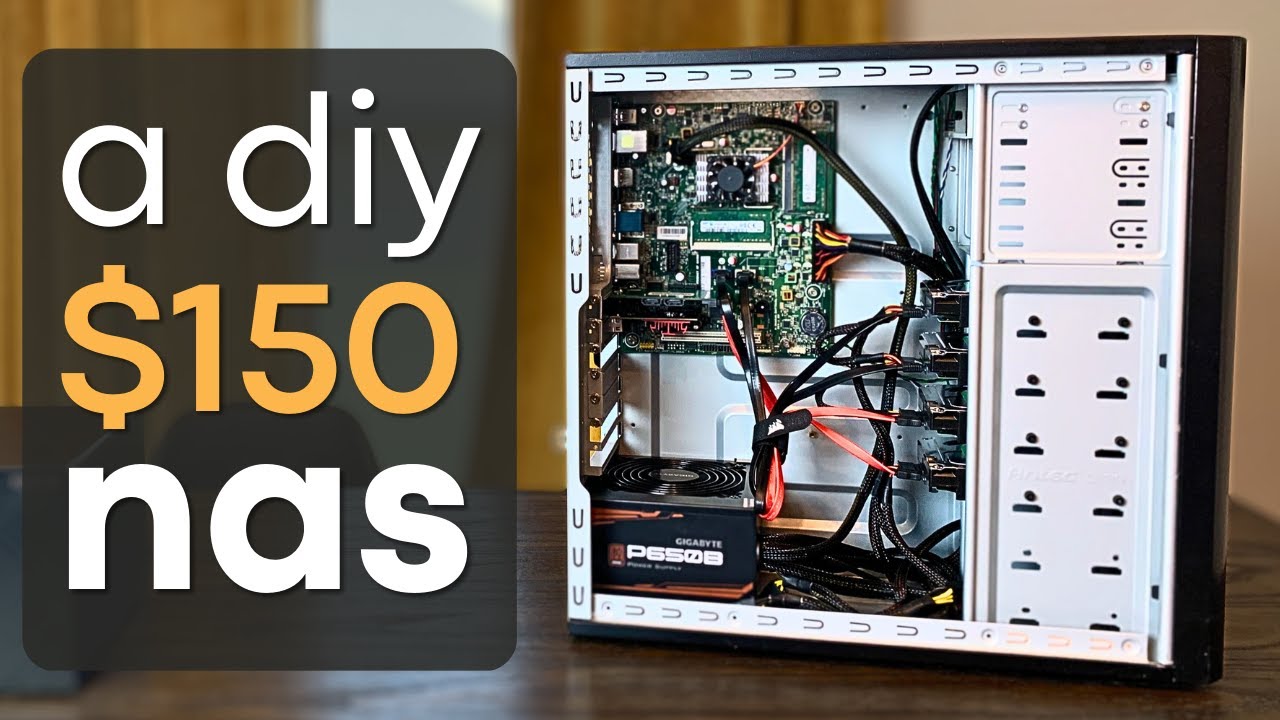
Make sure to check out the follow up video where I make some upgrades!
► https://youtu.be/i7ZPw-IuYG4
I needed a NAS, so I set out to build my own with primarily used PC components. How will it turn out? #nas #pcbuilding #homeserver
Some of the parts I used (affiliate links):
► PCIe to 4 Port Sata - https://amzn.to/3mWlChR
► PCIe to 2.5...
olive mist
real jackal
Also any good videos to watch learn more about a home lab server
Do it yourself is my advice
Install a os
Mess around with docker
Best way to learn really
feral eagle
well yeah but you might want to do just a little bit of research first lol
real jackal
ok thank you everyone for the advice 🙂
 karmic wedge
I use Docker all the time lol
I have a Proxmox server that's almost only Docker LXCs 💀
feral eagle
Docker is nice cuz you can experiment with configs on your laptop or desktop and just push it to a server easily once it is running well
karmic wedge
It's even nicer when you have a Proxmox server and you can just setup containers within Docker (that is, Docker containers within an LXC container lmao)
olive mist
karmic wedge
It's even nicer when you have a Proxmox server and you can just setup containers...
How well does that work
I just make a vm for docker
karmic wedge
Actually works super well
I have like three reliable LXC containers that are just Docker
olive mist
Ayyy
Finally got winapps setup
I will say
Winapps does not like tiling
Bruh

I hate windows
Straight up crashed when I tried to sign in

Turns out it's more stable if I just... run the rdp session instead of having the applet
I might just sign in to my apps using the rdp session and then use winapps
autumn nimbus
Now I need to flash something onto it
 autumn nimbus
karmic wedge
But I could be wrong. What's in it?
autumn nimbus
karmic wedge
But I could be wrong. What's in it?
absolutely nothing I formatted the drive earlier lol
I plan to put truenas or something like that
karmic wedge
I meant the other specs
autumn nimbus
non k
karmic wedge
Yeah TrueNAS looks ideal for that system, especially given the amount of drive bays
If you have a 3D printer, see if you can make 5.25"-to-3.5" drive bays and fit even more drives lol
autumn nimbus
I'll need a proper psu to get that many drives into it
karmic wedge
Worth it imo
What kinda of power does that PSU outage? (I can't read the side very well)
autumn nimbus
350, not much
karmic wedge
Yeah definitely upgrade that lmao
autumn nimbus
other way I could do it is by getting an external bay, but that's dollars that could go to psu
karmic wedge
Yeah I'd just get a cheap Corsair CX550M or something (idk if they still make those)
karmic wedge
That sounds like an okay price
Sounds properly adjusted for inflation lol. I remember getting mine for like $50 when I first got it. First PSU and it's still used for a server (I really should swap it though because it's seen A LOT of hardware configurations over the past nine years 💀)
autumn nimbus
for now all it's going to do is have a 1tb pool which isn't much lmao
2 1tb drives mirroring each other? idk
maybe I could do two pools with 4 drives
with a new psu
what I don't have currently is any mounting screws lmao
I ordered a screw/hardware box but it went out of stock and they canceled the order
autumn nimbus
it's ridiculous seeing computer screw kits that don't come in full multiples of drives
I don't want 10 hard drive screws, that just means I can mount two 
autumn nimbus
there really aren't that many decent psus available atm that have more than 6 sata powers

well maybe a silverstone essential
has 8
autumn nimbus
idk
essential is b on the spl
the one I looked at anyway
better than the other stuff I would consider
it's all c or c minus
tbf they are 40 or 50 bucks, essential is 70 or so
autumn nimbus
but muh power billz ,':)
olive mist
Well
Depends on how much it draws on average
If 99% of the time it's sitting idle
It's not going to be that bad
autumn nimbus
ideally I would like it to wake on lan when asked of, and otherwise just perform its disk health checks on a schedule
olive mist
Good idea for a backup server

 autumn nimbus
I was hoping the capture card would be fine for accessing the bios but it's really hit or miss :')
autumn nimbus
@olive mist :3

I plugged it directly into my computer
I was trying with the switch I got but it refused to deliver a web interface IP address when it was in between the two
I got it connected from wondows ICS so I assume it has internet access
olive mist
autumn nimbus
I was trying with the switch I got but it refused to deliver a web interface IP ...
Managed?
olive mist
That's peculiar
autumn nimbus
I guess I can't do that 😭
olive mist
It should just work
autumn nimbus
arggh
olive mist
What switch is it?
autumn nimbus
linksys se3005
autumn nimbus
I'm not sure
olive mist
Try setting a static ip on the server
autumn nimbus
do I gotta go look for that via windows or on the modem's gateway?
autumn nimbus
tru
when I had the switch in between the two computers, it said the cable was unplugged
when they were both socketed properly
olive mist
The switch said that?
Sounds like the switch is doing some shenanigans
Could be a switch issue
autumn nimbus
in the windows network connections
autumn nimbus
 autumn nimbus
on the ethernet thing, it was disconnected
autumn nimbus
ethernet directly lol
autumn nimbus
I didn't wanna put a wifi card in the server
don't have room for it to be wired :(
via modem
 autumn nimbus
like it takes the wifi signal and ethernets it?
olive mist
lil beryl just goes into the switch
I think what's happening
Is that there's no DHCP server
autumn nimbus
yeah probably
olive mist
Because you don't have a router doing router things here
My devices are still managed by the router's DHCP server
autumn nimbus
I was looking at someone's guide of setting up ICS and they said it should show a window that tells you the IP address of the shared internet
and that just didn't happen
olive mist
I mean
It's probably supposed to be connected to a network
I'd try hooking the server up to LAN
That'd probably fix most of your problems
autumn nimbus
yeah
it works as it is at least lol
only accessible via my computer I guess, but working
I hope the switch can still work at least
I can return it if not
the thing that people were saying was wrong was when somebody would use realtek nics that were on the motherboard and such, which this one is exactly that

Reddit
Explore this post and more from the DataHoarder community
like this
or rather when the same post was put on r truenas
 olive mist
I'm pretty sure it's a networking issue
Rather than a nic or switch issue
If you have a spare router
You can test it by plugging the switch into the router
And then connecting the two
autumn nimbus
no spare router </3
maybe I could plug my laptop and all in one computer into it downstairs
or another laptop
olive mist
autumn nimbus
maybe I could plug my laptop and all in one computer into it downstairs
You can probably use a laptop as a DHCP server
For a LAN
autumn nimbus
why not this puter :3
autumn nimbus
well it didn't dhcp anyway
olive mist
It's probably not set up as a DHCP server
Usually the router does that
Which... There is none
autumn nimbus
I'll have to test if the switch is working at least
olive mist
Yeah what you could do is set up a laptop as a DHCP server and plug everything into the switch
autumn nimbus
can take the switch and some puter downstiars and set them up at the modem
olive mist
The laptop should route the traffic
olive mist
autumn nimbus
can take the switch and some puter downstiars and set them up at the modem
That also works
 tardy flower
chat, is this a good router? gonna replace the spectrum router
https://www.amazon.com/ASUS-AX1800-Router-RT-AX1800S-Subscription-Free/dp/B09M9477NS/

The growing number of connected personal and IoT devices has led to an overall increase in network density that is pushing the limits of the current WiFi standard. RT-AX1800S is a 2x2 dual-band WiFi router that provides 80MHz bandwidth and 1024-QAM for dramatically faster wireless connections, gr...
autumn nimbus
My linksyst se3005v2 no worky </3
Tested to see if I could use Ethernet at my laptop through the switch from the modem
No sign of life
Just the blue led on the front of it blinking regularly with none of the ports blinking
I guess I need to talk to the seller about it and then arrange return
autumn nimbus
autumn nimbus
My linksyst se3005v2 no worky </3
I think the power supply that came with is inappropriate for it
though idk
the supply says 5.9v 1a
the switch says it's rated for 12v 0.5a
these things can't step up to 12v from 6v can they?
 glass moat
yeah that's a doubling in voltage
possible but usually the operating voltage range is within like a volt or 2 at most from a dc power supply unless explicitly said that it could do a wider range
which from what i see it doesn't
autumn nimbus
yep,,,
I had a 12v 1a ac adapter on hand from a yamaha keyboard, the switch is happy with it
karmic wedge
@olive mist @west cape Which MC version should I use?
Probably for Vanilla. I might make a BMC5 server later too though
@west cape send me a friend request. I wanna make a group with you, Vim, and I (for the MC server of course)
 west cape
karmic wedge
<@339248198084198401> <@308023772412116995> Which MC version should I use?
west cape
karmic wedge
<@339248198084198401> <@308023772412116995> Which MC version should I use?
Not a big deal as long as it’s not past 1.21.4
So I guess .4 why nit
west cape
karmic wedge
<@308023772412116995> send me a friend request. I wanna make a group with you, V...
Alr
karmic wedge
@limber hill
karmic wedge
@turbid sonnet come get this poop sniffer
 turbid sonnet
@karmic wedgeThanks
 hollow fractal
Any recommendations for 4 bay drive I have been looking not sure if I should go with tower or something smaller
Lots and lots of photos

I want to see if there is any safe remote versions so we can use it out of state
hollow fractal
So many pictures..
olive mist
I'm confused
Are you trying to digitise these photos and put it on a NAS?
Or is it just unrelated
hollow fractal
Putting them into a nas 4 bay but also digitizing them 😭 my sister is sorting them
hollow fractal
Ya pretty much
Photos going back to 1945 and older
We are basiccly doing Photos that we had and at my grandparents house because then we can give out to family and friends
So we have at lest a centralized?
Otherwise people will take pictures and never give them back and such
I'm trying to find a way remote access as well 😅 because the photos came from my grandparents house who passed away so there are photos of everyone
olive mist
hollow fractal
We are basiccly doing Photos that we had and at my grandparents house because th...
At that point you should just custom build one
Used optiplex + a couple of drives
Quite cheap
I'd look for a modern cpu though
To minimise power consumption
hollow fractal
I have drives it just the building part other being small compared to a full desktop
But price wise looks like desktop is cheaper
olive mist
hollow fractal
I have drives it just the building part other being small compared to a full des...
There's also practicality aspects to consider
Desktop is more flexible
hollow fractal
That as well
I just have to figure out how to set it up as a a nas because that stuff I have no clue like Linux or is there a another methods so anyone can turn it on and use it at home
olive mist
hollow fractal
I just have to figure out how to set it up as a a nas because that stuff I have ...
There's a lot of options
I personally use Openmediavault (Debian based)
But other people here might have other suggestions
feral eagle
actually I'm thinking about building a new server aiming for efficiency this time around
olive mist
feral eagle
actually I'm thinking about building a new server aiming for efficiency this tim...
n100? 👀
feral eagle
Maybe not that low power
olive mist
feral eagle
Maybe not that low power
Regular alder lake?
What's your current server
You might be able to get away with freq limiting it
feral eagle
Im on like ivy bridge i think
Lol
Rn i idle at ~140w. Im just going to move over the gpu and network cards
glass moat
idk what your gpu is but it's probably like a third of that power
olive mist
feral eagle
Im on like ivy bridge i think
Oh wtf
I'm on haswell and skylake
Yeah even upgrading to 6-8th gen would be decent
I recommend coffee lake because cheap 6 cores
feral eagle
glass moat
idk what your gpu is but it's probably like a third of that power
it's pretty efficient but ye gpu takes up a bit. intel a310
what if i used the 9900k in my desktop rn 😳
olive mist
feral eagle
it's pretty efficient but ye gpu takes up a bit. intel a310
Honestly could be mitigated by just getting a better cpu
If the iGPU doesn't matter as much you might be able get away with an older cpu
That also happens to be low power
feral eagle
I think rn i just do a lot of transcoding with the gpu
olive mist
feral eagle
I think rn i just do a lot of transcoding with the gpu
n100 might be best if you don't need the cpu tbh
feral eagle
I feel like that might be underpowered, at least in the ram sector but idk this is what I run

as well as a vm for music server
olive mist
Hmm
Yeah coffee lake would be a good alternative then
Not the most efficient but it's cheap
feral eagle
either way im gonna have to figure out what im gonna do about the drives
olive mist
Doesn't really solve the ram limitation issue
The chip's more powerful sure but ram is a bigger factor here
karmic wedge
Rip to this channel
 crisp shadow
Fr
west cape

west cape
What a waste of energy
https://www.youtube.com/watch?v=dhqoTku-HAA

HighYield x SemiAnalysis deep-dive into AI Datacenters, Gigawatt Megaclusters and the Hyperscaler race to AGI. How AI Datacenters Eat the World.
SemiAnalysis Datacenter Anatomy Series:
Part 1: https://semianalysis.com/2024/10/14/datacenter-anatomy-part-1-electrical/
Part 2: https://semianalysis.com/2025/02/13/datacenter-anatomy-part-2-cooling-s...
west cape
 gloomy stump
cats can't smoke
gloomy stump
cats can't smoke
 gloomy stump
west cape
https://nztcdn.com/files/6daf5d6f-0fce-44da-8153-cc1ea535ccd1.webp
gloomy stump
west cape
https://nztcdn.com/files/6daf5d6f-0fce-44da-8153-cc1ea535ccd1.webp
NOOOO!! D: DON'T DO IT CAT! HAVE CAT NIP INSTEAD
crisp shadow
west cape
What a waste of energy
https://www.youtube.com/watch?v=dhqoTku-HAA
All for a crap ton of approximate intelligence
west cape
crisp shadow
All for a crap ton of approximate intelligence
You are absolutely correct!

west cape
west cape
You are absolutely correct!

 toxic inlet
Any recommendations for a mesh system that doesn't have buffer bloat? Got three Google Mesh Pros (WiFi 6e version) right now, it's horrible when I'm on Zoom.
Internet is only gigabit, however I would prefer to have support for 2+ if it's not insanely expensive.
Or maybe there's an option I can change to try to fix it? Zoom just brings it to its knees.
glass moat
cat bong
 frosty rover
0.0
crisp shadow
@limber hill missed one
crisp shadow
who keeps sending stuff here
 fresh matrix
crisp shadow
who keeps sending stuff here
fresh matrix
crisp shadow
who keeps sending stuff here
Bots
crisp shadow
same as #no-mic-chat ig
glass moat
Bots send a single message in every channel they have perms for
Some server owners are making channels that insta Ban if you send something in it to get rid of those bots automatically
glass moat
lets have a channel at the very bottom of the channel list named "hell" and everyone that talks there is damned forever
crisp shadow
Nah cuz the bots go top to bottom
glass moat
True but I don't want to see the channel
Or actually
Maybe we can have it at the top of the list but hid it for anyone with regular or higher
Though...
Sometimes regular roles get hacked too
And even vip sometimes
I don't think I've seen any higher role get hacked though
Just vip and below
crisp shadow
Yeah idk why but it's always the nobodys
crisp shadow
@limber hill here and #no-mic-chat
crisp shadow
@turbid sonnet
hollow fractal
is Truenas scale a good os server for starters becuase if i'm doing everything by hand i might need help
someone suggested another linux one a while back but forgot which one i have never used anything linmux before
o wait nevermind it's TrueNAS Community Edition (CE) now
glass moat
hollow fractal
someone suggested another linux one a while back but forgot which one i have nev...
There's truenas, openmediavault, rockstore for open source
And then unraid for paid
hollow fractal
Ok thank you
glass moat
In terms of ease of starting.... I don't think any option is "hard" and they all have good documentation
hollow fractal
o ok thanks
feral eagle
Truenas isn’t too difficult to setup, just have to take the time to read through the documentation as mr man said
Maybe the most difficult thing would be file permissions if you are doing multi user?
hollow fractal
feral eagle
Truenas isn’t too difficult to setup, just have to take the time to read through...
And that's the issiue for me reading 💀
I'm the one type who does the quick setup then changes it later
I'm a visual learner so I have been watching YouTube videos
 humble lark
ive got a pretty long question. ive gotta start it with my reasoning though. Im setting up my laptop as a server for really whatever i wanna experiment with. truenas was the first option since almost everyone talks about it and having network storage would be pretty nice. i also heard that its got docker so you can install alot of other stuff if you want. in mind i only have game servers for testing right now. im looking around and it seems like other people dislike this configuration because of how much ram truenas needs. some recommend 16gb as a base but say that only 8 is actually needed. so instead of truenas i see people running truenas in proxmox. my main question is if i run truenas in proxmox then would the 8gb minimum allocated to it be exclusively for truenas?? whereas if i just ran truenas alone but used docker in it would the docker containers be able to pull from the 16gb pool of my laptop as needed?
feral eagle
Imo it would probably be more resource efficient to run truenas baremetal but the ram usage depends on your config. It is typically recommended to start with 16gb of ram or 8 as a bare minimum. The more storage you have in your zfs array the more ram is recommended and some features are also more ram intensive
Proxmox is nice but yes you would have to set up a vm for truenas that would lock in that ram as opposed to docker which shares resources with the host
real jackal
Hello, need some help what i can do with this laptop as far as for using it to start a server. It is a HP Notebook - 15-db0043nr. Processor: AMD A4-9125 (2.3GHz)
Graphics: AMD Radeon R3 Graphics
Memory: 4GB DDR4-1866 RAM
the hard drive is damaged cuz when i boot i get an error code that it is failing
i plan to replace it with a new 1TB plus i also want to add a 256 SSD since that is the max it can hold. I also plan to upgrade the RAM to 16GB. I wanted to see if maybe i can start a jellyfin server with this. OS would be TRUENAS. Also wanted to try mabye having it run pihole ad blocker, and maybe home assist
thoughts?
feral eagle
The most demanding app would be jellyfin which you may be able to use the gpu with. Though with only 2 drives, one needed for boot, you will not have redundancy in the event of a drive failure
Unless you want zfs or the nas storage capabilities of truenas. You might just want to run a hypervisor like proxmox and run the apps in a lxc container or vm. Both would have some learning curve to them
real jackal
so there is not an easy choice then
karmic wedge
You won't be able to run much with that. Even Windows would be a struggle to run
@real jackal If you really want to get into self hosting on the cheap, look into anything with an Intel N-series CPU. Go for something like an N100, N150, or N300
glass moat
real jackal
Hello, need some help what i can do with this laptop as far as for using it to s...
excavator athlon dual core.... i dont think it's worth upgrading
i agree with motor with recommending you buy a mini pc (something like a hp pro/elitedesk or such would be pretty good)
for a nas though, even mini pcs arent really ideal
karmic wedge
Yeah I'd just get a whole new PC. That laptop isn't even worth using for anything. It'll just cause more frustration than usability, no matter what you do with it lol
real jackal
ok thank you for advance
now i know not to put money into it lol
sounds like i should trash it then
real jackal
karmic wedge
You won't be able to run much with that. Even Windows would be a struggle to run
do you recommond any?
karmic wedge
Beeline S12 Pro. It comes with an N100. But you should also look at their other PCs to see if there's something that fits your specs requirements and budget better
real jackal
well i do have any specs requirements yet since i am just starting it
karmic wedge
TrueNAS would be a bit of a stretch for any starter server imo. But you should be able to run Jellyfin and an ad blocker with ease with that thing
real jackal
ok i will look into that
 glass moat
there isnt really much you can do with that
at least for most residential plans
just stream or something
it's honestly way overkill
 upbeat crag
glass moat
it's honestly way overkill
upbeat crag
glass moat
it's honestly way overkill
Yeah I know but it's only like 72$ a month including a streaming service
I'm saying only
Because it's considered cheap
For that kind of speed
glass moat
that's a pretty decent deal tbh
upbeat crag
Yeah I really don't need more than 1Gbps 2.5Gbps
But it's cool to download GTA 5 in 5 minutes lol
upbeat crag
glass moat
just stream or something
Yeah that's what I thought
I guess I could host a plex server and stream to multiple people at 4K at the same time
With that kind of speed
karmic wedge
upbeat crag
Do you have any ideas for what to do with:
Idk man that seems pretty slow ngl. Might be kinda hard to watch YouTube at 480p tbh
 blazing bluff
Not sure if this is the place to ask but I'm trying to switch ISP, does anyone have any tips on how to switch?
Like which websites I should use to shop for different providers
And buying vs renting modems
feral eagle
you could try a site like this https://broadbandnow.com/
hopefully they shouldn't be charging you rental fees. but regardless I would rather buy my own router then theirs since they are often really crappy
glass moat
buy like 99% of the time
fresh matrix
blazing bluff
Not sure if this is the place to ask but I'm trying to switch ISP, does anyone h...
What isp are you atm?
And where are you located?(general location, don’t doxx yourself)
blazing bluff
fresh matrix
What isp are you atm?
Spectrum in CA
It's really pricey 😭 It's like 90ish used to be like 50 ish for 300mbps? Now they are 400mbps but I feel like it's the same as 300mbps.
blazing bluff
feral eagle
hopefully they shouldn't be charging you rental fees. but regardless I would rat...
They are 😭 It's like 10$ per month
I'm getting fed up, I just haven't gotten to it because I was away from home for a bit, should have tried to switch sooner tbh.
 true venture
blazing bluff
Spectrum in CA
true venture
blazing bluff
Spectrum in CA
I personally love Spectrum.
I used it in Truckee, CA.
Pros/Cons:
- Very expensive
- Great customer service
- Reliable internet
- Good routers with a good UI in my experience.
true venture
blazing bluff
And buying vs renting modems
If you are switching I suggest Buying a router and the ISPs available to you will vary widely based on where you are at in California.
true venture
blazing bluff
They are 😭 It's like 10$ per month
Spectrum is charging you for a router???
I was paying about $100/mo for Unlimited 1Gbps in Truckee, California with them. No router fees other than the initial installation.
This was 2022.
 fervent stump
Hey y'all. I ain't too sure if this is the right place to ask, but I've been running a second router off my main router for years. I stopped for a few weeks because the LAN cable to the second router died. Now I set it up again but the main router has NO INTERNET, while the second router does work.
How the hell do I fix this?
The internet also goes out quite frequently on the secondary router.
glass moat
if you are bridging the network instead of using a dual nat, if you have 2 dhcp servers running, that may cause issues
i assume you want to use the 2nd router as a wap since you are connecting to both networks, so basically you have the first main router set as a router, then connect the 2nd router to the first with the lan ports, and disable the dhcp server on the 2nd router, and set it to be in the same subnet.
some routers have a mode you can switch to though, which then you enable access point mode and connect the cable to the wan port (though check the manual of the 2nd router to see if it wants something different)
fresh matrix
@fervent stump
fervent stump
glass moat
i assume you want to use the 2nd router as a wap since you are connecting to bot...
I dont have the manual for the second router, sadly. But I'll try everything you said tomorrow. It's currently 1am where I live and I've got to sleep lol. I'll keep ya posted if it works or not. Thank you!
glass moat
you should be able to find the manual online if you look up the model, but you probably wouldnt need to use it
 jovial bolt
Is SQM worth using on home network with constant lag spikes or should I look into buying a gaming router ?
I’m having constant I’m assuming buffer bloat where my ping will randomly jump from 40-60 ping to 200+ causing stuttering.
I’m on Ethernet and wifi seems to be better which is usually the other way around lol
glass moat
jovial bolt
Is SQM worth using on home network with constant lag spikes or should I look int...
short answer: "gaming" routers arent worth it, if possible, see if your current router supports openwrt or ddwrt, and use cake qos
if wifi is better, check your cable to see if you're using at least cat5e, cat5 had some crosstalk issues and some older installations may still have just cat5
you can test bufferbloat with an online tool
Waveform
Is bufferbloat causing issues with your internet connection? Run this test to find out.

 jovial bolt
glass moat
short answer: "gaming" routers arent worth it, if possible, see if your current ...
jovial bolt
glass moat
short answer: "gaming" routers arent worth it, if possible, see if your current ...
I get considered a caution logo for gaming, I use cat 6 cable and my router is a eero box
glass moat
jovial bolt
I get considered a caution logo for gaming, I use cat 6 cable and my router is a...
do you have a screenshot of the results though
 glass moat
Cable internet I presume? (coaxial)
Your unloaded (best case scenario) latency is a little higher than ideal, though you might not have the SQM setup on your router or it's not good enough
Make sure that it's set to games if possible to make sure your router priorities those packets
glass moat
jovial bolt
currently sqm on at this moment
try doing a test with it on and one with it off to see what difference it made
glass moat
i guess it might just be a bad sqm algo? it is strange that it didnt really make a difference
unless the bufferbloat is coming from the ISP
jovial bolt
that's why Im wondering if using a gaming router may help
glass moat
that could be a cause of consistent latency increases
gaming routers would unlikely make a difference
the site does recommend the eero 6 pro for their sqm so assuming yours even has a similar quality, then it might be an ISP issue
you could potentially call their tech support line about the latency increases under load so they could investigate on their end
feral eagle
and this is an eero router not ap right? I think they are one of the ones that make a lot of mesh systems
jovial bolt
Mine is the Eero 6
I have my regular router
Then it’s being I think bridged to the eero box
jovial bolt
glass moat
that could be a cause of consistent latency increases
I bought a router today to replace my eero one, does this seem better? Im getting a c still but all is passing
 glass moat
jovial bolt
I bought a router today to replace my eero one, does this seem better? Im gettin...
glass moat
jovial bolt
I bought a router today to replace my eero one, does this seem better? Im gettin...
Looking at the latencies, it had not improved by any significance, and could honestly be attributed to margin of error
If anything, the new router is worse (slightly higher loaded download latency, slightly lower download speed, higher latency spikes)
jovial bolt
glass moat
Looking at the latencies, it had not improved by any significance, and could hon...
Maybe it’s my Ethernet cable?
Maybe it’s not cat6
glass moat
jovial bolt
Maybe it’s my Ethernet cable?
You could try another cable in case
jovial bolt
other then that it has to be a isp issue which at that point I cant do anything
glass moat
But even if it's like cat5 not e, the symptoms of a bad cable is usually low speeds and potentially higher latency across the board, instead of 30 unloaded and 136 loaded
glass moat
Did you call the ISP
Usually it's an issue they can check on their end and fix within a day or 2 at most
jovial bolt
what should I tell them?
glass moat
Tell them that you're experiencing bufferbloat and have tried 2 different routers and there was little to no change to the loaded latencies, and then ask them to investigate if it's a problem on their end
glass moat
jovial bolt
and does lower or higher mean better
For latency/ping, lower is better
jovial bolt
so isn't my unloaded being low better then it was before though
glass moat
Unloaded means the most ideal but unrealistic test of latency with very small data packets to see how long it takes for a packet to go round trip from your browser to the test server
Loaded is a more realistic representation of latency by sending larger packets (like if you're streaming video or playing an online game)
jovial bolt
like playing games my ping seems to be more stable and a bit lower
but arc still lags but I think it may just be a game sided issue
but bufferbloat site still says I have it
so I'll have to call isp tmr I guess
luckily I only paid 25$ for it since it was on clearance
glass moat
jovial bolt
luckily I only paid 25$ for it since it was on clearance
To be perfectly honest, a $20 (even if the original price was like $40) router is typically pretty shit lol
glass moat
jovial bolt
This one is a ax3000
what model?
jovial bolt
glass moat
what model?
Linksys Hydra 6
glass moat
in that case there doesnt seem to be any glaring issues, though also relatively little test info on that specific router
jovial bolt
My guess is a isp issue
Maybe got us in a bad server or something maybe idk how it works
feral eagle
neat
 feral eagle
lol I have to brag when I can, I spent too much on networking equipment 😭
I have a symmetrical gigabit connection on fiber so the speed are pretty consistent
it's funny cuz I have a friend down the street from me with the same provider but their coax instead of fiber and he always complains about outages
 feral eagle
you typically only want dhcp
jovial bolt
idk what the best settings to use on this router and what to keep off
karmic wedge
If you don't know what you're doing, keep everything at their default settings
@jovial bolt ^^
(Life lesson for anything tbh)
I just realized that this was last month. Man I haven't been in this server for a while lmao
 noble berry
is the tplink ex920 axe7800 a good router? I want to replace my isp one and still keep one 2.5gig ethernet port and good wifi
found it used for 70€
jovial bolt
karmic wedge
How has it been?
better found out most of our wifi issues was related to a broken main line from our provider
jovial bolt
called and asked about any possible server issues and they sent a dude out and he saw the line broken and fixed it
our isp sucks
jovial bolt
eastlink
karmic wedge
man what is that 😭
karmic wedge
I've never heard of Eastlink. It's either Canadian-specific or just some local provider
glass moat
jovial bolt
better found out most of our wifi issues was related to a broken main line from ...
Pretty much what I expected NGL lmao
I think all Canadian ISPs are only in Canada?
jovial bolt
The new router did increase the speeds exponentially though
Yes they are
Besides bell
Pretty sure America has bell
I think
LOL
glass moat
I don't think so?
jovial bolt
probably not
My new router gave me some qos options
Manages the many devices better
glass moat
Apparently Bell used to be owned by at&t
But is currently owned by a Canadian company
By used to, I mean up till 1975
Was owned by at&t/American Bell from 1880 till 1975
feral eagle
Everyone used to be owned by at&t
noble berry
just realized if I change my isp router I won't have rj11 ports for the voip phone. is there a simple solution other than keeping the isp router connected to the new one?
glass moat
noble berry
just realized if I change my isp router I won't have rj11 ports for the voip pho...
that's tough
in your case, your router also acts as like a FXS gateway, and as far as i'm aware, there aren't really any drop in replacements for the isp provided one; you could buy 3rd party ones easily, but idk if your isp would sell anything like such
note that using like another service for the voip landline will often be cheaper than the ISP provided one
(from what i've seen here in canada, the isps are asking for anywhere around 15-20 dollars a month to add a landline)
and then the 3rd party may be as low as around 5 dollars a month
noble berry
in my case landline is included with the subscription. tbh I could just remove it since it gets used few times a year
I'll keep looking for cheap solutions if there are any
glass moat
noble berry
I'll keep looking for cheap solutions if there are any
You could ask the isp
They may not have a solution but they also might have one
noble berry
the isp customer support is rarely helpful and they take days to respond, I could use that time to look up solutions on my own
glass moat
Or you could do both
noble berry
I think I'll remove the landline phpne entirely anyways
I'll keep you updated on what I'll choose
glass moat
Alr
real jackal
Question what are some options I can do to provide more than 1.0gb to a laptop?
glass moat
real jackal
Question what are some options I can do to provide more than 1.0gb to a laptop?
Usb NICs I guess
Why do you want or need this though
real jackal
trying out networking and home server
i had a old hp laptop just laying around and i firgure i could use it to try out a home server without buying anything for now
glass moat
Gigabit speeds should be fine for most applications that you would use a laptop for honestly
real jackal
thought as much but i figure i ask wasn't sure if there was anything to improve from 1gb ethernet
thank you as always
glass moat
Usb NICs aren't expensive but if you're not limited by the gigabit port, you might as well just stick with it
real jackal
well i haven't started it yet i was just asking as for future proofing if i choice to contunie using it down the line
glass moat
Idk what your laptop specs are but especially for something like a Nas, which would benefit from higher networking speeds is much better on a desktop PC so that you can connect drives to it instead of using usb drives (which is more cursed and less reliable)
real jackal
The laptop would not be used for a Nas specs are bad for it I was thinking more simple apps like smart assist and maybe pihole just to start out and try
Plus it only has a 1tb hard drive and a 256 m.2 so not a lot of space for a nas
glass moat
real jackal
The laptop would not be used for a Nas specs are bad for it I was thinking more ...
Yeah both of those things would need not even 100mbps lol
crisp shadow
idrk if this is the correct channel but like wtf

changing the cable doesn't help
wifi is even worse

my dad consistently gets 400Mb/s both ways so i know it's my computer(keep in mind this is also after having to replace the mobo)
glass moat
crisp shadow
idrk if this is the correct channel but like wtf
try on like speedtest.net or the bufferbloat test becuase this doesnt really say much about packet loss or latency or whatnot
the latency it does mention is just the unloaded latency
also this is the right channel indeed
real jackal
Another question so I have a 2tb external hard connected to a tplink router. It's so my wife can pass photos and videos while in the home. This tp link router is getting Ethernet provided to by a tplink switch. The tplink switch is then getting Ethernet provided to it by another tplink router. That also provided wifi to mostly everything in the household. If I wanted to open a port for remote connection to that 2tb which router should I do that?
Hopefully this makes sense lol
glass moat
real jackal
Another question so I have a 2tb external hard connected to a tplink router. It'...
That depends on how you connected the 2nd router and if it's configured to be a repeater/ap or if it's being used as another NAT router, but assuming you did configure it so that you only need to port forward the main router, I would still recommend using tailscale over port forwarding as it's more secure
feral eagle
I second the use of a vpn like tailscale over opening ports for remote connections
real jackal
So how do you add tail scale to a router?
feral eagle
tailscale is the solution I prefer but tp link routers do not support software like that at least that I know of. if you have storage attached to the router it is essentially acting as a nas where I would prefer to do on a separate system or single board computer like a raspberry pi in which case you can use pretty much any software you like.
With the current setup you probably would have to opt to setup a openvpn or wireguard server on the router which many routers do support. then you just have to setup the client on the phone or laptop you are using remotely
from what I am seeing there is a section in the routers advanced settings called VPN Server which is where any of these options would be setup
this is a guide I found on tp links website: https://www.tp-link.com/us/support/faq/1239/
How to Setup OpenVPN on TP-Link Routers (Windows)
real jackal
Thank you very much greatly appreciate 🙏
glass moat
real jackal
So how do you add tail scale to a router?
i was thinking of you using the laptop as a tailscale subnet router https://tailscale.com/docs/features/subnet-routers

Tailscale
Use subnet routers to give devices outside your local network access to services within specific subnets. Extend your private network with Tailscale.
real jackal
Your right I could do that
noble berry
both 200€: rog ax11000 pro or asus be92u? both deliver excellent performance but I'm struggling to choose between the two. be92u has a few extra nice features but seems less stable as it's newer, idk if all issues have been solved yet
glass moat
noble berry
both 200€: rog ax11000 pro or asus be92u? both deliver excellent performance but...
wifi 7 routers in general are not worth it currently https://youtu.be/-5o_Qu3XToQ

Wi-Fi 7 routers promise game-changing speed, lower latency, and more stable connections. All thanks to features like Multi-Link Operation (MLO). But do these routers actually deliver on everything their marketing promises? We tested the MLO capabilities of 25 routers to see if the hype is justified, or if it’s all just marketing.
LINKS:
Fu...
noble berry
I don't really care about wifi 7. I know both get to ~1.6gbps on wifi 6 5ghz close range, which is enough plenty. I was mainly looking at other specs like the slightly more feature rich interface on the rog vs the extra 2.5g ports on the be92u
I've seen a few reports about stability on the be92u but no idea if software updates fixed anything so far
glass moat
noble berry
I've seen a few reports about stability on the be92u but no idea if software upd...
both support asus merlin firmware but neither support openwrt or ddwrt if that matters to you
noble berry
no, I'm ok with their stock firmware, it's good
feral eagle
these new wifi standards are evolving faster than the client devices are updating to support them
noble berry
I know, I'm just trying to figure out which ones best if they're both the same price
glass moat
noble berry
I know, I'm just trying to figure out which ones best if they're both the same p...
looks like the ax is rated for higher bandwidth than the be
 midnight loom
glass moat
wifi 7 routers in general are not worth it currently https://youtu.be/-5o_Qu3XTo...
midnight loom
glass moat
wifi 7 routers in general are not worth it currently https://youtu.be/-5o_Qu3XTo...
Exactly why i did not even bother with the newest wifi 7 routers. I snagged a 2021 Wifi 6 Asus Router on ebay that went for $200 new, got it for $40.
So much of what's come out in the last 5 years besides graphics cards has been the most minimal and unnoticeable of upgrades, see Peripheral Sales extreme slump from Mice to headsets, people realize that tech that came out 5 years ago is just as good as the stuff coming out now
Kind of like the apple phone, the only real point to upgrading at a certain point is so you can show off having the most expensive useless camera
glass moat
even things which would be a large upgrade are generally perfectly fine even if you don't
midnight loom
Ex: I hate the new solo pod headsets, I grabbed another brand new Jaybird X2 for $15, they retailed for $150 back when, sound is tuned still excellently compared to newer
Also Jaybird was a casualty of the Peripheral sales dropoff, nobody is buying headsets anymore when they last 5-10 years
glass moat
midnight loom
Ex: I hate the new solo pod headsets, I grabbed another brand new Jaybird X2 for...
I have no idea what specifics you're talking about but audio quality has basically plateaued for at least 20 years, if not more
Only things that have improved since then is just wireless audio fr
crisp shadow
so I think my parental control software might be a security hazard
my folks use qustudio to time-limit and monitor my usage(dw I understand exactly why I need it and they have nought but good intent)
however
when it locks me out
it signs me out of my google accounts
this is quite annoying as it means i have to relog everyday, but I think it's also backdoorable
qustudio isn't written very well, it's laggy, sometimes just straight up doesn't work, and it's not hard to exploit from what I've found
so it's not a stretch to presume that there are some holes in the security
anyone have knowledge of how the code woks and what vulnerabilities there are so I know where to cover my bases?
noble berry
glass moat
looks like the ax is rated for higher bandwidth than the be
just got the ax11000pro 👀
perhaps temporarily
glass moat
crisp shadow
anyone have knowledge of how the code woks and what vulnerabilities there are so...
i'm not familiar with any parental control software, but if you're sure that there's some serious security vulnerabilities (that don't require access to your LAN at least), it would be better to ask your parents to use some other software; i'm sure there's probably at least a few alternative options
crisp shadow
There are but they aren't free
feral eagle
No built in os parental controls?
glass moat
looks like there are a few flaws from this research study
 crisp shadow
feral eagle
No built in os parental controls?
crisp shadow
feral eagle
No built in os parental controls?
Nah
crisp shadow
glass moat
looks like there are a few flaws from this research study
Aight thx I'll pass it along
glass moat
Some of these proxies do not properly perform certifcate validation. For example, Qustodio and Dr. Web accepted intermediate certifcates signed with SHA1, despite the enhanced collision attack on SHA1 [42]
KidsPlace and Qustodio leak session authentication cookies via HTTP, with validity periods of one year and two hours respectively. Even with the 2-hour cookie in Qustodio, the attacker can easily access sensitive information about the child including the child’s current location, and history of movements. The attacker can also access remote control functions on the child phone, such as block all incoming/outgoing calls.
honestly, i don't think there needs to be like specific monitoring of apps and such
i think the ideal parental control would be to do 2 things
- set time limits using built in parental controls (which most modern devices have)
- set network filtering to block domains for the child client device
imo too much risk when you're using an online solution (especially free) to log everything your child is doing
only exception for the "free" is if it's FOSS
feral eagle
somehow I overloaded my router
 karmic wedge
bruh what did you do
feral eagle
I really don't know. happened when I was downloading a game, capped out at ~600mbps and then things started braking
probably something to do with how I have the vlans configured along with ips/ids running and a few VPNs running some of which are receiving data 24/7
fresh matrix
feral eagle
I really don't know. happened when I was downloading a game, capped out at ~600m...
 karmic wedge
@wind vigil What advice do you need?
karmic wedge
Lmao whoops
 quaint stirrup
At most 2 slots for HDD
1 SSD slot would be nice
and under 400 USD
or
12000 NTD
IDK about getting used stuff
karmic wedge
Ah gotcha. You mean a prebuilt NAS. Personally, I build my NASs. I'd consult Reddit to see what they'd say. They might say like Terramaster or Synology (probably Terramaster)
quaint stirrup
karmic wedge
Ah gotcha. You mean a prebuilt NAS. Personally, I build my NASs. I'd consult Red...
gotcha
karmic wedge
quaint stirrup
IDK about getting used stuff
For used stuff, you can go to https://serverpartdeals.com/

ServerPartDeals.com
Upgrade the datacenter with enterprise-grade storage at the best prices. Shop for hard drives and SSDs that will be fit for servers, business NAS, and RAID storage arrays.
quaint stirrup
karmic wedge
Ah gotcha. You mean a prebuilt NAS. Personally, I build my NASs. I'd consult Red...
A quick search tells me that Terramaster doesn't exist so some steps ona built NAS
?
karmic wedge
I forgot which prebuilt brands exist lol. Reddit probably has whole Excel document somewhere lol
feral eagle
not sure what exactly you are looking for but i'd also look at other options like qnap, ugreen, unifi, etc. synology has a history of trying to lock down what hard drives you can use and they ended up losing a lot of trust because of that
feral eagle
is anyone here familiar with hosting matrix servers? seems difficult to find any definitive info on it
crisp shadow
I want to
karmic wedge
Just use the LXC install
feral eagle
there is a lxc install of it?
karmic wedge
Synapse. Not barebones Matrix, but it runs off of Matrix
https://community-scripts.org/scripts/elementsynapse
Proxmox VE Helper-Scripts
Synapse is an open source Matrix homeserver implementation, written and maintained by Element. Matrix is the open standard for secure and interoperable real ti…
That's what I use (though, nobody in my friendgroup using it yet because we're still on Discord for now lol)
real jackal
question i have a tplink router that is acting like a nas it two external drive connected to it. I want to mount it my casaos server. I used the webiste GUI to add the drive, but i am unable have some of apps read from this drives. How do i fix that?
true venture
Assuming you have a NVMe drive for your OS and probably games, would you rather have A or B in addition and why is that?
A - 2x3.5" (35mm thick) and 2x2.5" (9.5mm thick)
B - 1x3.5" (35mm thick), and 6x2.5" drives (9.5mm thick)
@karmic wedge @feral eagle @crisp shadow @glass moat
This is for the Portable PC I am designing which is 26.713L in size.
true venture
glass moat
what are the 3.5" drives going to be?
HDDs, I personally don't use them but I am curious what folks who do use them use it for. All my storage is kept on high capacity nvme to conserve space.
glass moat
for a portable pc, i don't think hdds are needed to be considered due to their sensitivity to shocks
(kinetic shocks not electrical, though electrical would kill them as well probably lmao)
true venture
glass moat
(kinetic shocks not electrical, though electrical would kill them as well probab...
Gotcha, so just have one 3.5" slot for marketing purposes and if someone is trying to cheap out on bulk storage?
true venture
I've noticed that.
glass moat
honestly if you could fit 2 3.5" drives without making the case larger than the option with 1, then it's fine to put 2 since you could put a 2.5" drive in it instead
but if it does need to be bigger, then might as well do the option with 1 since it's not as common to use a hdd anymore
true venture
Both A and B have the same case size
glass moat
hmm
true venture
I am simply trying to maximize usage of the space between the PSU cage and front intake.
glass moat
you could also try making it so that you can either use 2 3.5" drives or have it be a slightly more smaller but stackable like 3 or 4 2.5" drive bay?
though it depends on what orientation it is in so that you can get airflow through it
true venture
Issue is there isn't enough length to put them flat and rotating it sideways vertical speaking, will block the CPU rad intake on the left. Rotating to the right may interfere with motherboard pins.
The front and top fan intakes will ensure the drives get some airflow
If I opt for only 2.5" drives I can squeeze in a dozen of them by laying them down flat though idk what someone is going to do with a dozen 2.5" drives in a portable PC.
@glass moat
glass moat
lmao
realistically, most users probably would only have a m.2 drive and that is enough
maybe just one more 2.5" drive if their mobo doesnt support it
true venture
Mind if I get your thoughts on the part support currently?
true venture
glass moat
realistically, most users probably would only have a m.2 drive and that is enoug...
Agreed, so I guess option B is the best balance then.
glass moat
yeah i guess
true venture
26.713L or 290x220.5x414mm
MOTHERBOARD:
- ATX
- mATX
- iTX
GRAPHICS CARD:
- 4 slots depth
- 155mm height (includes power cable)
- 384mm length
ADD-IN-CARDS
- Unlike the Meshroom s v2 this case has PCIe slots available when a full size (4 slot) GPU is in use. 7 to be exact. 2.5" and 3.5" drives affect the available length.
RADIATOR 120-360 side mounted:
- 402 length
- 85mm depth with fans.
- 125mm width
FANS:
- Top 2x120
- Front: 3x120
- Side: 3x120 (where the radiator goes)
COOLER HEIGHT:
- ~105mm with a 4 slot (80mm thick) GPU.
POWER SUPPLY:
- SFX
- SFX-L PSU
Storage:
- 6x 2.5"
- 1x 3.5"
@glass moat
The radiator and GPU are placed vertically and parallel with the front side panel to maximize space. The panel that's usually Tempered Glass to look at the parts for context.
What are your thoughts and do you see anywhere for improvement?
crisp shadow
true venture
Assuming you have a NVMe drive for your OS and probably games, would you rather ...
B
karmic wedge
true venture
Assuming you have a NVMe drive for your OS and probably games, would you rather ...
If the 2.5" drives are SSDs, I'd go with route B. 2.5" hard drives are much slower on average than 3.5" drives
true venture
Route B it is.
glass moat
karmic wedge
If the 2.5" drives are SSDs, I'd go with route B. 2.5" hard drives are much slow...
It could be whatever you want to put in it; they're just designing a portable PC case
Both options have more drive slots than anyone would use typically anyways
 gritty radish

Anyone have experience with these things? I loved it when the company hadn’t tanked yet. Any alternatives?
feral eagle
Can’t say I’ve heard of them. Was there something specific about them you liked?
gritty radish
feral eagle
Can’t say I’ve heard of them. Was there something specific about them you liked?
It was a hardware-based privacy and internet security plus ad-control device with network-wide functionality. It used some sort of tor feature to create anonymity for basically network shrouding in a massive network of fractured data.
It sped up our network by also blocking specific data and network access attempts from ad providers before they reached our computers.
Closest I’ve seen in Pangolin security. Pangolin’s not based on privacy as much as security... but Winston offered legit features for totally blocking Facebooks’s trashy bloat.
glass moat
gritty radish
It was a hardware-based privacy and internet security plus ad-control device wit...
you could use pihole plus mullvad vpn on the router (you'll need to use a router that supports openwrt or such, asus merlin firmware should also support it)
and make sure to also use a privacy browser such as mullvad browser or tor browser
feral eagle
I know a lot of openwrt based routers like on gl inet's product lines have built in vpn support, tor, dns based ad blocking with adguard, etc but somethings like ad blocking is better done from within the browser
glass moat
adguard/pihole ad blocking gets blocked by less sites in my experience
i go on some blogs and it detects my adblocker when i use a browser adblocker, but not when i use a dns adblocker
quaint stirrup
Anyone have reccomendations for a mini PC under 250 that has a PCIE X4 slot for a LP SD card reader ?
also Just intrested
how does one make a Homemade NAS
glass moat
cheapest way to do it would probably to get a HBA or DAS from ebay, and use an old office pc running truenas or other NAS os
i would recommend having at least 3 drives for any nas though so that you can use raid 5
raid 1 is not worth it typically because you'll only get half of the storage you pay for
and i also wouldn't recommend no form of redundancy
with 3 disk raid 5, you'll have 2/3 of the storage you paid for
though if you get 4 disks, you'll have 3/4 of the storage you paid for
quaint stirrup
glass moat
cheapest way to do it would probably to get a HBA or DAS from ebay, and use an o...
whats a DAS
glass moat
but the risk of 2 drives dying increases, so at some point of expanding the amount of disks you have, you should do raid 6, which is 2 drives worth of space used for parity data
DAS is direct attach storage
quaint stirrup
How does the softwere/ connection part work
glass moat
basically a dumb drive enclosure that connects to your pc, though a DAS typically does RAID on itself, which is sometimes less ideal
quaint stirrup
glass moat
basically a dumb drive enclosure that connects to your pc, though a DAS typicall...
Wait if I do that am I able to like connect to Mac or phones ?
glass moat
depends on the filesystem written to it ig
a das is definitely less convenient if you need to access the files from multiple devices and want it always online
it is best to use a HBA so that the NAS os can check the health of the drives, while on a DAS (that might be using raid) would only report as a single drive on the system, so if something fails, you might not be notified
quaint stirrup
This would be intresting to learn huh
glass moat
though it is worth noting that some enclosures have a JBOD (just a bunch of disks) mode which does report all the disks, but you need to specifically look for a DAS that has that feature
quaint stirrup
I might just get a prebuilt NAS and learn more of this in the future I'm ngl
I'm like
Busy for the next 2 years
glass moat
if you have an old pc you don't really use lying around that also isnt ancient (so that it is more efficent), getting a hba + like 3 drives should not be too expensive
the basic configuration for a NAS is very simple
the OS does it all for you pretty much
feral eagle
building a nas is essentially building a pc but with slightly different hardware to accomodate more drives, or network cards and such depending on what your needs are. for a basic nas setup really you just need a functioning pc and some drives
quaint stirrup
nor used stuff
glass moat
actually yeah most mobos support enough drives to not even need a hba
only like OEM ones don't or microatx ones
if you get an ATX mobo, chances are they have at least 4 sata ports
if not 8
feral eagle
yeah hba is nice if you need a lot of drive or use sas drives or something. problem with many drives is now you need to find a case to fit all of them lol
quaint stirrup
Jonsbo NV10 and Framework 12
glass moat
assuming you have a 3d printer
glass moat
quaint stirrup
I might just get a prebuilt NAS and learn more of this in the future I'm ngl
it's worth noting that getting a prebuilt nas typically does not include any drives outside of a small disk for OS (and sometimes it doesnt even have that)
you'd probably be spending like $200-300 on a small prebuilt NAS + another $500-800 on drives if you get higher capacity stuff
quaint stirrup
so like
feral eagle
that reminds me i 3d printed a phone holder for my car and it's holding up surprisingly well
glass moat
i wonder how long most 3d printed filaments hold up to UV exposure
feral eagle
damn, bots say you send message too fast
glass moat
there's probably tests out there
yeah they were listing things one message per item 💀
you should be listing things in new lines in the same message like
- here is item 1
- and this is item 2
- this is item 3
- and how about an item 4
- perchance
quaint stirrup
glass moat
you should be listing things in new lines in the same message like
- here is ite...
how do I do like the bulletpoint part though
glass moat
feral eagle
glass moat
i wonder how long most 3d printed filaments hold up to UV exposure
I am concerned about the heat in the summer but we'll see. I printed it out of petg-cf so maybe it can survive a bit longer?
glass moat
i have no idea about how different polymers react
feral eagle
I only remember bullet point is opt + 8 on mac, idk about windows. to line break you just hit shift+enter
quaint stirrup
So
- A620 ITX ? with 3400G
- https://www.jonsbo.com/en/products/N3.html in this
- Get some HDD
- Job done ?
乔思伯JONSBO
glass moat
it probably would be better than pla at least which is probably the worst for this
glass moat
quaint stirrup
So
- A620 ITX ? with 3400G
- https://www.jonsbo.com/en/products/N3.html in this...
needs a space directly after the -
quaint stirrup
quaint stirrup
So
- A620 ITX ? with 3400G
- https://www.jonsbo.com/en/products/N3.html in this...
So is this correct or ?
like how my thought process is making the NAS
glass moat
quaint stirrup
So
- A620 ITX ? with 3400G
- https://www.jonsbo.com/en/products/N3.html in this...
also yeah that seems like it would work as long as you find an ITX board with 8 sata ports
or you could get a 8 port sata HBA
quaint stirrup
glass moat
also yeah that seems like it would work as long as you find an ITX board with 8 ...
Surely there could be a adapter for it
Maybe I'll get a MATX one
glass moat
looking at pcpp, most sata ports on an am4 itx mobo is 4 sata ports, so you'll need an hba for that case
quaint stirrup
glass moat
looking at pcpp, most sata ports on an am4 itx mobo is 4 sata ports, so you'll n...
remind me what's a HBA again sorry
glass moat
host bus adapter
quaint stirrup
I see
glass moat
it basically adds more sata or sas ports to your pc
quaint stirrup
What about LGA 1700
glass moat
itx? or matx?
matx looks like it has a few boards out there with 8 sata ports
though realistically are you making your first nas have 8 drives?
quaint stirrup
glass moat
itx? or matx?
ITX
quaint stirrup
glass moat
matx looks like it has a few boards out there with 8 sata ports
though realisti...
na like 3 drives max
glass moat
ok if you only need 3-4 drive bays, then both am4 and lga1700 has itx mobos with 4 sata ports
any future expansion would require a hba
quaint stirrup
glass moat
ok if you only need 3-4 drive bays, then both am4 and lga1700 has itx mobos with...
Gotcha
- AM4 ITX ASROCK B550M ITX AC
- Jonsbo N2
- 300W PSU ?
- I need a OS reccomendatioN
- Does SSD work in a NAS like this ?
glass moat
yes, ssds will work, and would be faster
it is worth noting that SSDS tend to have a more... uhh how do you say this... similar lifespan? so normally in datacenters, ssds will have more importance with a staggered install so that they all have different ages, so they don't die all at once
hdds tend to die more randomly so deploying them at the same time is generally not an issue
quaint stirrup
I see
I was Just asking a double checking
OH THIS IS PERFECT
If i Have a ITX board NAS then that also means I get to have a PCIE SD card reader
glass moat
in terms of os.... maybe compare between truenas or openmediavault, both are free
glass moat
quaint stirrup
If i Have a ITX board NAS then that also means I get to have a PCIE SD card read...
hmm, though most itx boards only have a single pcie slot though no? an HBA if you want to expand in the future, will need to use the pcie slot
quaint stirrup
glass moat
in terms of os.... maybe compare between truenas or openmediavault, both are fre...
are does Linux Distors or ?
glass moat
also why don't you use a usb sd card reader? sd cards are slow enough that it will never be able to saturate the 5gbps interface of usb 3
quaint stirrup
glass moat
hmm, though most itx boards only have a single pcie slot though no? an HBA if yo...
Intresting I might just get a USB SD card readear
glass moat
quaint stirrup
are does Linux Distors or ?
they are linux based i believe
quaint stirrup
glass moat
they are linux based i believe
Do HDD models matter that much ?
glass moat
ideally you have NAS rated drives, which are meant for 24/7 operation in proximity with other drives
but for a small case like this, regular hdds should probably be fine
you just want them to all be the same size though
feral eagle
most servers run on linux distros, many are configured through webui's I really like truenas but it depends on what your needs are
glass moat
capacity
quaint stirrup
OH I'll just ripp the HDD from my PS4
glass moat
arent those hdds kinda small though in terms of capacity
Actually aren't they also 2.5" hdds
quaint stirrup
ye
glass moat
i'd probably avoid 2.4" hdds since they tend to be slower
glass moat
though it's also fine if you must ig
if you have mismatched drives though, assuming you go with my recommended raid 5 approach, you would be limited to the smallest drive for the raid pool
quaint stirrup
glass moat
though it's also fine if you must ig
Do you need to buy HDD from the same brands or >
glass moat
no
glass moat
glass moat
if you have mismatched drives though, assuming you go with my recommended raid 5...
if you don't need redundancy and have at least 1 backup of any important data, you could just do drive pooling instead of raid, which would give you the full storage of the drives, but if any one drive dies, all the data on that one drive will be lost

 glass moat
quaint stirrup
How does HDD health work ?
glass moat
quaint stirrup
How does HDD health work ?
there's not really any easy way to measure that, they just fail when they do
they show signs of drive failure but there's no like health bar that actually is accurate
it's either working perfectly, dying, or dead
the 3 states of hdds
quaint stirrup
Oh I'm using this to like
Save Camera photos
HDD once dead can be revived right ?
feral eagle
when hdd dead then hdd dead. in raid setups depending how you have it you can replace one and resilver it to the raid so everything is normal. if too many drives die at once though...
glass moat
reviving a hdd requires a donor hdd of the exact same model to take some parts out of to swap with the dead hdd
quaint stirrup
glass moat
reviving a hdd requires a donor hdd of the exact same model to take some parts o...
So how does one back up data ?
by saving it on another drive ?
glass moat
you'll expect to pay around $2k usd for this procedure
yes
ideally on a different drive on a different device
as a reminder, redundancy is not a replacement for backups
quaint stirrup
I see
glass moat
it just helps prevent data loss
quaint stirrup
So If I have 6 HDDs
3 HDDs should be used to backup data ?
quaint stirrup
Photos ARE irreplacable data
glass moat
yes
quaint stirrup
quaint stirrup
is there a diffrence between
3.5 HDD for NAS
or
Normal 3.5 HDD
Again
glass moat
if you fill up 3 drives with irreplacable data, then you'll need to have a 2nd copy (or even a 3rd copy) of all that data
glass moat
quaint stirrup
is there a diffrence between
3.5 HDD for NAS
or
Normal 3.5 HDD
there is a slight difference, though it is mainly that the hdd manufacturer validated it for use in a enclosure that is vibrating from all the other hdds in it, plus 24/7 use with alot more read and write cycles
glass moat
glass moat
if you fill up 3 drives with irreplacable data, then you'll need to have a 2nd c...
typically the way to go about this is the data you access most frequently would be stored in higher speed storage, like ssds
and the backups would be in slower storage, such as HDDs or archival tapes
SSDs/flash storage should not be used for backups though because of bit rot problems
quaint stirrup
glass moat
if you fill up 3 drives with irreplacable data, then you'll need to have a 2nd c...
and theortically In this build I'm only able to Connect to one PC at a time
glass moat
wdym?
glass moat
a nas can have as many devices connected to it at the same time as long as the cpu can handle all that throughput of data
quaint stirrup
glass moat
a nas can have as many devices connected to it at the same time as long as the c...
So if I carry this NAS to college maybe I can wirelessly connect to it on my laptop maybe ?
glass moat
the NAS os would be acting as a SAMBA server or uh... whatever windows's built in network storage standard was as well
depends on firewall rules in the college
quaint stirrup
well theortically it works right
glass moat
if you leave it at home (assuming you will still live at home) you should route the NAS onto tailscale so you can securely access your nas from outside of your home network
if you live in the dorms, you should also do that
most public networks have firewall rules that block connections such as a nas
quaint stirrup
glass moat
if you leave it at home (assuming you will still live at home) you should route ...
what's a tailscale
glass moat
most places don't block tailscale vpn though
glass moat
quaint stirrup
what's a tailscale
it's basically a service that allows you to put your lan stuff accessible from outside your lan, but securly as you do not need to port forward or any of that
you access your network via a vpn
and it's routed through tailscale's network
feral eagle
hello people, looking for security systems for a 30-40 camera deployment. I'm seeing most recommend Axis or Avigilon. Just wanted to see if anyone here had any thoughts
true venture
@karmic wedge @wide flume do you guys have experience setting up a minecraft server? I am having a hard time trying to figure out why my port forward is not working. I am able to connect with Localhost.
I am on a Vsol router and here's the area for port forwarding to my understanding.

Stard/End port and Source port are set to 25565
Server IP is set to my pc
Protocol I have set to TCP/UDP
It requires me to put a EXTERNAL IP PREFIX LENGTH so i set that to 24 per google's recommendation
 wide flume
Sorry, no
karmic wedge
true venture
<@263791870281383937> <@278694081440251905> do you guys have experience setting ...
Don't even bother with port forwarding. Just use Tailscale. Far more secure and miles easier to use
true venture
karmic wedge
Don't even bother with port forwarding. Just use Tailscale. Far more secure and ...
Gotcha.
true venture
karmic wedge
Don't even bother with port forwarding. Just use Tailscale. Far more secure and ...
I was recommended playitgg is that a good alternative as well?
Is tailscale linux only?
karmic wedge
true venture
I was recommended playitgg is that a good alternative as well?
It's good but it doesn't give you as much freedom
Though, it's easier to use if your server members aren't very technical
karmic wedge
true venture
Is tailscale linux only?
Pretty much all platforms
true venture
Do you mind helping me in a vc real quick?
I have the NeoForge server installed, just need to solve this port issue.
true venture
karmic wedge
It's good but it doesn't give you as much freedom
Though, it's easier to use if...
Can you elaborate on this? Is it not as simple as punching in a IP like a normal server in MC?
karmic wedge
Can't do vc now. But yes it's basically just like entering an IP address
Install Tailscale on the same machine you're running the MC server on and share your (MC) node to your friends. They'd just enter the node's IP address
Super simple. If you've done maybe like a week's worth of studying networking, Tailscale will be a breeze
true venture
karmic wedge
Install Tailscale on the same machine you're running the MC server on and share ...
Oh ok
I will use tailscale per your recommendation then
It works!
Thank you
karmic wedge
Perfect 👍
true venture
karmic wedge
Perfect 👍
this is the IP I copy and share yes?

I am connected to the server through it though my friends are not seeing the server.
karmic wedge
You have to share that node with your friends. They'll also install Tailscale during this process
That IP address isn't a public IP address btw
true venture
Oh they need to install it as well.
karmic wedge
Yes
true venture
I think I should use Playit then since they are by no means technical
karmic wedge
Might as well lol
true venture
yeah they are being pricks about getting tailscale
karmic wedge
Heaven forbid lollll
I feel that pain. One of my friends ended up buying a Realm for us to play on
Some of our friends are on console though (yes, this is BE)
true venture
Do you have any experience with PlayIt?
karmic wedge
Very little but it's way easier than Tailscale. Your friends won't have to use anything
I just like Tailscale for MC servers because it's free and mostly hosted yourself, also given that I already use it
true venture
karmic wedge
I just like Tailscale for MC servers because it's free and mostly hosted yoursel...
fair, I loved how simple it was to get going
karmic wedge
If you do any other self hosted projects, I highly recommend Tailscale
true venture
karmic wedge
Very little but it's way easier than Tailscale. Your friends won't have to use a...
any idea what's wrong?

PlayItGG
karmic wedge
I wouldn't know. I don't use PlayItGG lol
true venture
Got it working, me and 3 other friends were playing without issue.
feral eagle
Running a mc server i somehow convinced a lot of my friends to install tailscale. Not all of them are very technical but they all got it working without my help
crisp shadow
feral eagle
Running a mc server i somehow convinced a lot of my friends to install tailscale...
Tailscale screwed my internet
feral eagle
In what way did it manage to do that
feral eagle
well that doesn't sound right. you have an exit node enabled?
crisp shadow
Idk
Even after logging everything out of it, resetting dns, and deleting my account it still doesn't get close to 10
I would say it's a port issue but it started at almost exactly the same time I got it
feral eagle
hmm ye it sounds like it could be something else that happened to occur at the same time
crisp shadow
Oh and also it followed me onto my next mobo
And I know it's not a router or cable problem, wifi gets about 200 up and down, my dad gets 400 both ways, and I've tried it with a different cable
feral eagle
Windows?
crisp shadow
Yeah
glass moat
tailscale shouldn't really do that, something else definitely happened at the same time coincidentally
"followed me onto my next mobo" did you reinstall windows at all?
or at least reinstall wlan drivers
er
lan drivers
true venture
feral eagle
Running a mc server i somehow convinced a lot of my friends to install tailscale...
Some of my friends are so lazy they can't be bothered to put mods in a mod folder 🤦♂️
Literally spent like 20n asking me for a CurseForge pack code instead of spending 3m to download the 4 mods I sent him and put it in the mod folder which I provided instructions on how to do in CurseForge.
.
Side note, the server has been working great with PlayIt.gg. we've been playing the Medieval MMC5 Mod pack with some QoL mods for storage added. Y'all are welcome to join. Dm for the server ip cause I don't want to sent it in a massive public group.
There are 5 of us who play every day currently.
crisp shadow
true venture
Literally spent like 20n asking me for a CurseForge pack code instead of spendin...
Do I have enough
 true venture
crisp shadow
Do I have enough
true venture
crisp shadow
Do I have enough
Time in the mod pack?