#networks-security-and-home-servers
1 messages · Page 6 of 1
 olive mist
 glass moat
Lol
 karmic wedge
Aussie Broadband
 feral eagle
I though about getting one of these
glass moat
 nimble sigil
In laptops they're absolutely ass
nimble sigil
In laptops they're absolutely ass
yeah i'm not a big fan of mediatek wifi cards for pcs and laptops, they often suck, but they're fine in routers at least
honestly it seems like most consumer routers use mediatek lmao
also for openwrt specifically, mediatek is the preferred chip, since broadcom has a closed source driver and openwrt can't use it fully
though ddwrt has an agreement with broadcom and can use it fully
 noble berry
cool, I'm really tempted to get one to do some testing, does it have an option to change its own mac address when connected to a lan?
 odd epoch
It runs on openwrt so yes it should
They have a skin over it but it's still openwrt and you can flash luci
noble berry
fantastic
olive mist
Beryl AX cult???
 glacial trail
i try all and my leptop is work same before but this all node make somme truble for me ?
with the first node, Grass i make $400 but the app can stole my data ?
nimble sigil
@feral eagle yo sus links
feral eagle
ima just delete all of those since they were referral links anyway. but taking a peak I probably wouldn't trust any of those if you are serious about security/privacy
feral eagle
didn't look like it
 junior mulch
@nimble sigil do you remember salad
nimble sigil
I've had one or two
junior mulch
We were talking about it in techie chat but I couldn't screen the links 
junior mulch
You know how crypto mining works ye?
junior mulch
Same idea but you get clustered to work on ai training models instead of crypto coin hashes
nimble sigil
Ohh
nimble sigil
Bros tryna minnax his referral codes
junior mulch
Yeah kinda seems that way haha
nimble sigil
Yeah I wouldn't be comfortable with that since so much ai is trained on data that isn't consented
Or even like pirated
Lookin at you, meta
I mean Facebook
glass moat
tbf the sites did have the "ai" tld
which technically is a country tld but ai bros are all over it
karmic wedge
feral eagle
Vedal.ai
nah
 feral eagle
Lmao, he might just use it as a email
glass moat
127.37.59.168
 karmic wedge
 errant dagger
http://10.0.0.101/admin
errant dagger
http://10.0.0.101/admin
that's your private IP 💀
glass moat
karmic wedge
Fooled
glass moat
(loopback)
errant dagger
10.000.000.000 is private ip range
karmic wedge
glass moat
(loopback)
Is your loopback heavily subnetted and VLAN'd?
whose loopback has anything other than 127.0.0.1 💀
glass moat
Loopback range is the whole /8 
karmic wedge
bruh
glass moat
Idk why anybody would ever need like
karmic wedge
"I have your IP address it's 127.0.0.1"
glass moat
How many damn addresses are in a /8 for loopback
karmic wedge
I wanna put on a whiteboard somewhere in the school I work at "the campus's IP address is 127.0.0.1 go crazy"
glass moat
The thing is, that is a bit more recognizable than putting some random numbers within the loopback subnet
karmic wedge
True though
 barren vine
Hey does anyone know why my WiFi acts up when I connect a 2nd monitor?
glass moat
Either your monitor is throwing off a lot of interference or it's a coincidence
Or your monitor is acting as an emf shield if the ap is behind it somewhere
barren vine
I have disconnected the 2nd monitor since yesterday but my connection to my WiFi isn’t the same anymore.
karmic wedge
That sounds like Windows wonkiness
barren vine
I still get good ping in games I’m playing but my download and upload speeds are shot.
glass moat
On every device?
barren vine
Just my PC
I have a loose antenna connection on the back but it always worked just fine before but now I can’t tighten it anymore it seems like. I’m gonna take it apart soon & see what’s going on but I was just wondering if there is anything I can do before hand.
I also got a new desk with metal on it but my PC is on top of the desk so I’m not sure if that has anything to do with it. Cause I heard metal can act as an interference.
karmic wedge
Tighten the antenna
Honestly, that might be it. You were behind your PC to plug in the monitor's display connection anyways, probably knocking one of (maybe both?) antenna(s)
barren vine
I can tighten 1 antenna but no matter what I do to the other one it doesn’t want to tighten. I guess I just have to open it up.
Maybe the Wifi adapter isn’t attached to it anymore?
glass moat
barren vine
I can tighten 1 antenna but no matter what I do to the other one it doesn’t want...
maybe you've crossthreaded it?
barren vine
glass moat
maybe you've crossthreaded it?
I think amazon gave me a f’d up board
there is no cable going into the left antenna
Only the right one and it’s tied off
But I never had a problem until now which is weird
glass moat
barren vine
But I never had a problem until now which is weird
Maybe it was fine with one until there was a metal desk if that's new, or maybe the monitor placement is blocking the signal
Hard to guess from conjecture
barren vine
glass moat
Maybe it was fine with one until there was a metal desk if that's new, or maybe ...
My Pc is on top of the desk as well. Even though the metal is at the bottom will that still interfere?
glass moat
Depends on alot of factors
barren vine
Like what? If you don’t mind elaborating on that.
glass moat
Ap placement, other interference sources, client station placement
Really just physics
barren vine
I still have everything in the exact placement as before, just with a new desk. Everything went down hill after that 2nd monitor. I’ll move the desk somewhere else and use my old one again and see if that changes anything.
glass moat
See if taking the 2nd monitor off the desk fixes anything
errant dagger
glass moat
Idk why anybody would ever need like
u know 10.0.0.101/admin is a real ip for me 
t brings up my pihole
glass moat
Any IP between 0.0.0.1 255.255.255.255 is technically a real IP address
errant dagger
i would go on it but my phone keeps refusing to charge for what ever reason
barren vine
glass moat
See if taking the 2nd monitor off the desk fixes anything
Oh it’s no longer on desk anymore. I moved it since yesterday.
glass moat
Ah
See if moving the PC to another location makes it better
Or before that actually, try reinstalling your wifi chipset drivers
barren vine
I updated them yesterday. Should I rollback and then reinstall?
glass moat
Download the new drivers first, then delete the drivers on device manager, and reinstall
barren vine
Yeah I already had the newest ones, I just deleted them and now im on the previous version but now I noticed my wifi signal has increased but It wont let me connect to the network.
 viral fossil
I just got this AT&T extender in the mail and I can’t even scan the QR code. It detects it immediately but it just doesn’t want to let me scan it. I can’t login either because it keeps saying the login info is wrong. Any ideas?
odd epoch
viral fossil
I just got this AT&T extender in the mail and I can’t even scan the QR code. It ...
I'm not really familiar with those specific extenders. If the QR code is required to set it up and it's not working what I would do is contact AT&T technical support.
viral fossil
viral fossil
i was gonna but the dude seemed sus lol
indian accent, rushing me to get my account password. just had an attitude in general
odd epoch
I'd go with the support chat from the actual att website, it sounds like you called a number off of google and got a scammer. They do that a lot.
The real reps will NEVER ask for your password
"contact us" section, chat with a rep https://www.att.com/support/internet/

AT&T
Get help with your internet service, Wi-Fi gateways, and extenders. Find out how to fix common issues or contact us. AT&T has you covered with AT&T Internet support, troubleshooting, how-to articles, & videos.
Even if the 800 number on this page is the one you called, it's still possible your call was intercepted by a scammer
Oh and if you did give anyone your password you need to change that immediately or you'll lose access to your account and get new lines activated in random places charged to you
viral fossil
odd epoch
"contact us" section, chat with a rep https://www.att.com/support/internet/
went to customer support
they were useless
kept asking me stuff i didn’t know and my mom couldn’t figure out either
eventually just hung up
I logged in i just cant find anything on setting the damn thing up
viral fossil
4971
Found out that what i have won’t work and i’ll just need to get a powerline kit
odd epoch
Well for what it's worth at least https://www.att.com/idpassets/images/support/pdf/Wifi_Extender_QSG_Guide_English_Online.pdf
viral fossil
odd epoch
Well for what it's worth at least https://www.att.com/idpassets/images/support/p...
That was the problem, we couldnt extend it far enough to reach our rooms
What would be a good mix between good and budget for a powerline kit?
I remember being recommended this, but my parents wouldnt pay this much for it https://www.amazon.com/GL-iNet-GL-MT3000-Pocket-Sized-Wireless-Gigabit/dp/B0BPSGJN7T?th=1
glass moat
viral fossil
What would be a good mix between good and budget for a powerline kit?
ethernet over powerline i would save for a last resort scenario, as high voltage high frequency signals cause alot of interference (you will annoy the HAM radio operators in your area)
if possible, using a wired ethernet (or fiber) connection is always going to be the most ideal scenario, if you don't mind either running a cable through the walls and or attic, or through the house
if your house has concrete or stone internal walls, wireless networking is terrible for that since RF gets very much attenuated by concrete and such
if you're able to use wired ethernet, you would be able to continue to use that airties unit
however, if it costs extra each month to have that unit, return it and buy something else
like an old enterprise AP (make sure it works standalone, and isnt a lightweight ap that requires a controller)
viral fossil
well we rent the place, we can’t do many mods to it
if anything any
been asking for a new closet door and got told no 3 times
glass moat
rip
viral fossil
so wired isn’t gonna be an option for me
glass moat
it is* if you and your family don't mind a cable running within the house
viral fossil
they do
glass moat
oh well
odd epoch
Powerline kits aren't going to be cheaper than the router
viral fossil
odd epoch
Powerline kits aren't going to be cheaper than the router
yah ik
glass moat
also yeah powerline kits will end up costing more than that router you linked
viral fossil
yeah i know i asked about the router
glass moat
i do recommend the beryl ax, i have it and it's great
viral fossil
and sorry, what is it again?
glass moat
though i'm not sure how it would help you with your current situation
glass moat
viral fossil
and sorry, what is it again?
name of the router that you linked
viral fossil
glass moat
though i'm not sure how it would help you with your current situation
eh it’s worth a shot
any amount of better wifi is better than nothing
glass moat
did you manage to set up that airties
viral fossil
the what?
glass moat
the at&t extender
wifi extenders should be placed within range of the router, if you put it in the same room you want the connection to be, but you dont have signal, it won't work
it's a common mistake i see people make
viral fossil
we couldn’t put it anywhere else but the same room lol
and my stepdad was saying it would be too much of a signal it would be interfering with itself or something like that
and we’re tryna hit the basement
odd epoch
Your stepdad doesn't know how that works then lol
viral fossil
and the guys that helped set up our wifi were like “put it closest to the northwestern part of your house”
so now it sits right where my parents watch tv
i’m convinced it’s to hog the wifi
viral fossil
odd epoch
Your stepdad doesn't know how that works then lol
🤷
idk much about networking
he was in the navy and did security work so i just take his word for it
glass moat
i mean, his knowlege is somewhat true, but not the full story
wifi is allocated a few channels, and if 2 APs are broadcasting on the same channel, they will interfere
viral fossil
yeah that’s more similar to what he was saying
glass moat
but if you go to the next channel that doesn't overlap the first channel, it wont interfere at all pretty much
(for example, on 2.4ghz, the ideal spacing would be like channel 1, 5, 9, and 13)
viral fossil
right
glass moat
(except in north america, 13 is restricted, so you only get 1, 5, and 9)
odd epoch
An extender can be set so it broadcasts on a different channel from the main router, no interference then
viral fossil
I see
for now though my parents are just asking for powerline connectors and i dont think theyd wanna get a $100 USD one
odd epoch
Could do something like this so you get a wifi connection in the basement still https://www.newegg.com/trendnet-tpl-430ap-up-to-1-2gbps/p/N82E16833156558?Item=9SIAHFEBJ49640
viral fossil
odd epoch
Could do something like this so you get a wifi connection in the basement still ...
sent to my parents
ill lyk what they say
odd epoch
That one was only a single unit my bad, this one is the correct full kit https://www.newegg.com/tp-link-tl-wpa7617-kit-powerline-up-to-1000-mbps-ethernet-10-100-1000-mbps/p/N82E16833704613?Item=N82E16833704613
glass moat
is the threat of the US banning tp link still a worry
odd epoch
Boy I hope not because their archer series has been good for budget routers that have decent range

CNET
The company is reportedly under investigation for ties to Chinese cyberattacks.
I mean things like this are why I always use custom firmware
olive mist
What the hell are they smoking over there
That would give hundreds of thousands of businesses a lot of headaches
barren vine
Are these universal? Or is there a specific brand/type depending on motherboard?
 junior mulch
Mostly universal
barren vine
okay cool, is there anything I should avoid?
junior mulch
There's-
Not really anything else to say about this
I guess not cheap $2 temu versions
It's just wire to antennae
barren vine
Alright thanks!
odd epoch
barren vine
Are these universal? Or is there a specific brand/type depending on motherboard?
You just have to use the correct antenna, typically SMA male or SMA female but sometimes RP-SMA is used
 barren vine
Thank you
Would you happen to know the standard length? or what would be the best length for motherboard connection?
glass moat
measure with a string
odd epoch
There is no standard length of anything related to this
The only things that are standard are the actual connectors
barren vine
Are these any different other than size? Like are they the same type of u.fl connector?
 glass moat
barren vine
Are these any different other than size? Like are they the same type of u.fl con...
glass moat
barren vine
Are these any different other than size? Like are they the same type of u.fl con...
looks like one is m and one is f?
 barren vine
glass moat
looks like one is m and one is f?
barren vine
glass moat
looks like one is m and one is f?
thank you
barren vine
glass moat
looks like one is m and one is f?
Could you possibly link me to the right cable on amazon? I need a u.fl to rp-sma female but I’m realizing they all say (u.fl MHF1) So I’m guessing those aren’t the right ones?
glass moat
i believe they're the same standard?
glass moat
barren vine
Could you possibly link me to the right cable on amazon? I need a u.fl to rp-sma...
find the cheapest decent one and send it here and i'll take a look
barren vine
This is the white one in the pic but when I opened it I realized it was just a sma not a rp-sma so I don’t know if they’ll have different u.fl connecters for the wifi card.
 glass moat
barren vine
https://a.co/d/f4DdMq7
This is the white one in the pic but when I opened it I ...
glass moat
barren vine
https://a.co/d/f4DdMq7
This is the white one in the pic but when I opened it I ...
the u.fl connector on the wifi cards are always (at least the 20 or so different wifi cards i've seen) are male
barren vine
So I’m searching for the wrong cable?
All the ones on amazon seem to be like the white cable in the photo.
glass moat
barren vine
So I’m searching for the wrong cable?
No, the one you sent is right
You do need to make sure the antennas you buy or have are the same connector, sma or rp-sma
glass moat
barren vine
Can you tell what kind of cable the black one is?
The listing says
 barren vine
glass moat
The listing says
barren vine
glass moat
The listing says
The black one not the white one
The black cable is the one that came with the motherboard
and the white one is the one that didn’t work.
glass moat
barren vine
The black cable is the one that came with the motherboard
Oh, black cable is.... Actually, that might be MHF4
barren vine
Alright thank you!
I believe this is the correct one?

UFL to SMA M.2 NGFF U.FL to RP-SMA Female MHF4 IPX4 IPEX4 Ipex Connector Pigtail Antenna Extension Cable (10 inches (4 Pcs))
Some of the reviews say they are too small but I guess ima just take the chance and see.
 frank scroll
sorry for writing a book but I'm really derp with networking ngl
I'm running Pi-Hole on a 10700KF/Z590 Unify-X/GTX960 ("Pi") running Ubuntu
I enabled DHCP server in Pi-Hole on the web GUI thing
I followed the instructions on manually setting static IP on the Pi
it works in the sense that when I restart the Pi, the AT&T gateway assigns the same IP address everytime
but
one of the last install instructions tells me to disable the DHCP server on the AT&T gateway because--I believe at least?--the Pi is supposed to be in charge of assigning IP addresses
when DHCP is disabled on the AT&T gateway & I restart the Pi, it won't assign the static IP address
& everything gets borked
odd epoch
The pi-hole can control DHCP but it doesn't have to
I have it set to leave that to the router just in case my server is down, purely convenience
frank scroll
odd epoch
The pi-hole *can* control DHCP but it doesn't have to
well I just put on Amazon prime on my TV & heckin ads came up
odd epoch
Put more block lists
errant dagger
can u set a static ip on ubuntu ur self
frank scroll
odd epoch
I have it set to leave that to the router just in case my server is down, purely...
the thing is, I can't force the router to change the DNS
it's a stupid AT&T one that has DNS locked
so I need everything to go thru the Pi so that it can control the DNS
errant dagger
https://v.firebog.net/hosts/lists.php heres how to get list
errant dagger
frank scroll
so I need everything to go thru the Pi so that it can control the DNS
o nonono
frank scroll

GitHub
How to install a Pi Hole ad blocker on AT&T Fiber. Contribute to FlipperPA/at-t-pihole development by creating an account on GitHub.
I'm going based on this btw
 weary fog
my bad accidentally called u. the buttons on mobile discord are too small lol
frank scroll
errant dagger
o nonono
doesn't the Pi need to control all the DNS requests?
errant dagger
frank scroll
doesn't the Pi need to control all the DNS requests?
if u had a good router you would set dns request to go to the IP of the pihole
frank scroll
heck
I have an ASUS router I could use
but this heckin AT&T gateway doesn't let you bridge
errant dagger
i belive what happens is when you connect a device it ask router, HEY what dns server should i use?? and router goes, use 8.8.8.8, so your request go through 8.8.8.8
odd epoch
frank scroll
well I just put on Amazon prime on my TV & heckin ads came up
Oh and the pi-hole can't block ads that originate from the same server as the content you're viewing
errant dagger
and if u manualy change ur dns server on ur phone, then it uses what ever u tell it to use
odd epoch
So it can't block YT ads either
frank scroll
odd epoch
Oh and the pi-hole can't block ads that originate from the same server as the co...
ya I read that.. like the YouTube app can't be blocked
frank scroll
errant dagger
can confirm, youtube cant be blocked
it kind of can be with adguard
errant dagger
i had to whitelist a domain or els the vids would pause at 1min excatly
frank scroll
but you need adguard app
& you have to "share" videos from YouTube app to AdGuard's player
errant dagger
what ever u do, whitelist this

or els youtube videos broke
as for your router, you could just portfoward every single port from the isp modem to your router
frank scroll
This is how I avoid YouTube ads on mobile
 errant dagger
frank scroll
This is how I avoid YouTube ads on mobile
errant dagger
frank scroll
This is how I avoid YouTube ads on mobile
i dont even watch youtube on my phone kek~4 hell i dont watch realy any media on it

im more of a laptop tv guy
frank scroll
errant dagger
i dont even watch youtube on my phone [kek~4](https://cdn.discordapp.com/emojis/...
I use it when I go pick my son up from school lol
errant dagger
you use an android
 frank scroll
I'm cool with using AdGuard. It blocks all sorts of crap
I paid for it already for a year so might as well lol
so what am I accomplishing with this PiHole thing if it won't stop ads on any app? lol
errant dagger
frank scroll
so what am I accomplishing with this PiHole thing if it won't stop ads on any ap...
u know those annoying mobile game ads? it stops those
odd epoch
It also reduces network load, since you're not downloading as many ads, reducing page load times, and reducing resource usage on clients
It's also good for blocking ads on devices that can't normally block ads, like an iphone
frank scroll
errant dagger
u know those annoying mobile game ads? it stops those
Adguard does that too
frank scroll
odd epoch
It's also good for blocking ads on devices that can't normally block ads, like a...
ah okay
so wait, is the Pi-Hole working then?
for anything but the computer it's installed on I mean lol
also, what firewall do you all use?
ufw or whatever?
dunno if that runs on Ubuntu
glass moat
frank scroll
but this heckin AT&T gateway doesn't let you bridge
afaik DMZ does the same thing if you see that
frank scroll
De-Militarized Zone?
glass moat
yeah
frank scroll
not sure I have that on here ngl lol
odd epoch
DMZ also exposes all your ports to the Internet. No firewall on the router.
glass moat
but you'd be using the firewalls on the asus router
frank scroll

not sure I even needed to redact that since it's generic anyway
I disabled IPv6 @errant dagger
glass moat
which would pretty much do the same thing if you were just using the isp router as a bridge, since you'd be giving all the traffic to the specified device in the DMZ
frank scroll
wth is a Cascaded Router? lol
errant dagger
frank scroll
I disabled IPv6 <@929166408930189362>
did u set the ipv6 dns kek~4

 errant dagger
u have fiber
glass moat
frank scroll
wth is a Cascaded Router? lol
looks like it's used for basically making another dumb ap
frank scroll
errant dagger
did u set the ipv6 dns [kek~4](https://cdn.discordapp.com/emojis/770338921241640...
eehh should I?
can't remember rn
glass moat
seems like the setup process requires you to disable the dhcp server from the cascaded router
frank scroll
heck I didn't
 glass moat
seems like the setup process requires you to disable the dhcp server from the ca...
glass moat
glass moat
seems like the setup process requires you to disable the dhcp server from the ca...
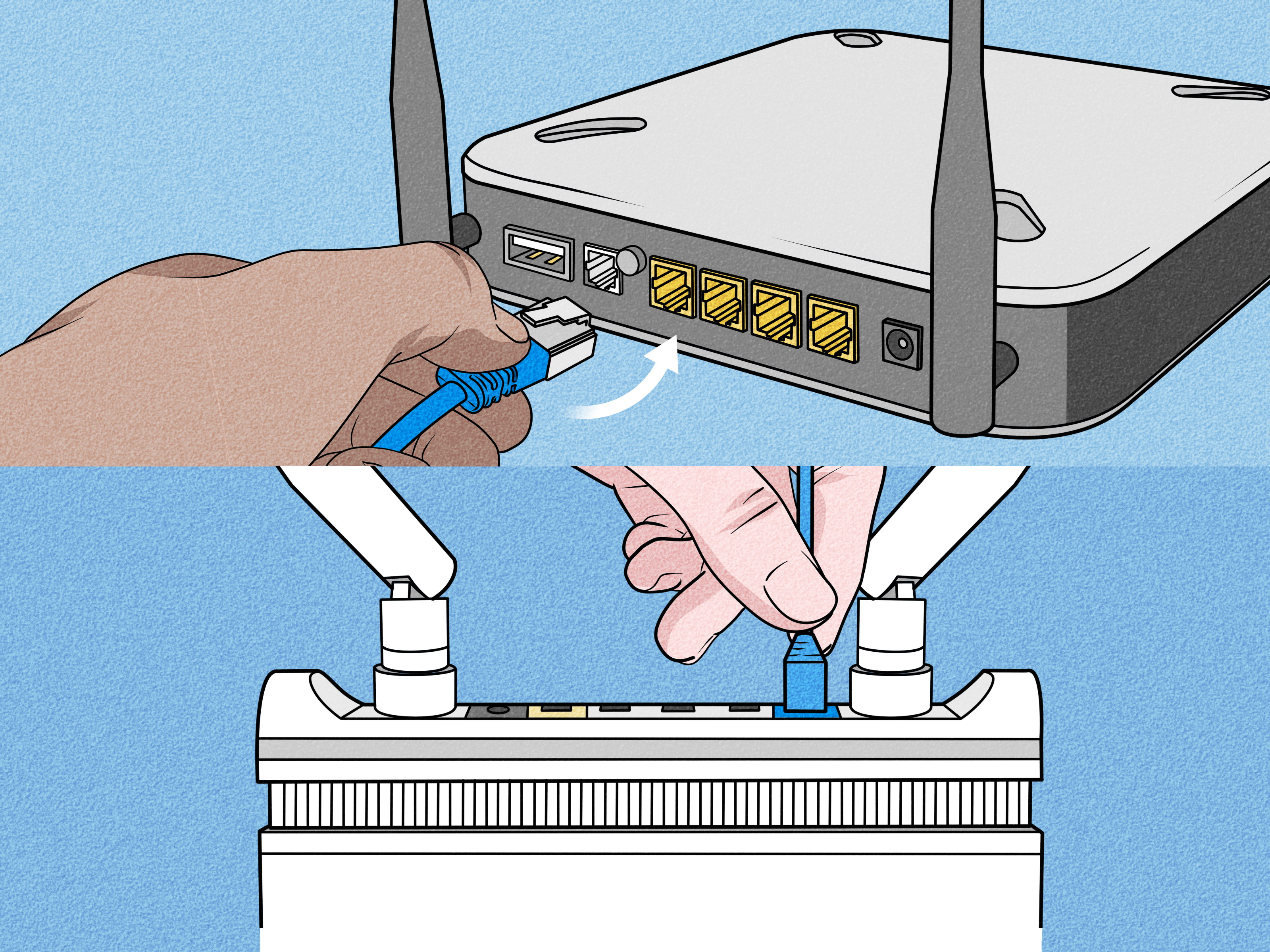
ok yeah https://www.wikihow.com/Cascade-Routers lol
wikiHow
A good way to expand your wired or wireless network is to cascade routers. A router cascade means that 2 or more routers are connected to each other through an Ethernet cable. There are 2 ways to cascade routers: connect an Ethernet port...
frank scroll
glass moat
ok yeah https://www.wikihow.com/Cascade-Routers lol
I wonder if I could cascade the ASUS
glass moat
it's not briding, it's just using the other router as an AP
errant dagger
frank scroll
ya that doesn't really accomplish the goals
glass moat
no, the isp router can keep dhcp, you do want 1 to be running
frank scroll
errant dagger
https://community.ui.com/questions/How-to-eliminate-ATandT-gateway-from-a-UniFi-...
lol looking at this now
heck it said this yesterday too
 odd epoch
You'd end up with a double NAT if you can't switch the ATT router to bridge
frank scroll
odd epoch
You'd end up with a double NAT if you can't switch the ATT router to bridge
that's always fun
odd epoch
Double NAT can be bad for games, increased latency and you'll never get host again
errant dagger
double nat can be done right tbh
my friend passes thorugh all the ports to his travel router which then he uses to connect his homelab

In this video I finally show you how to setup IP Passthrough on the ATT BGW320. It's fairly simple to do so long as you follow along closely.
✪Support the channel✪
https://www.amazon.com/shop/spxlabs
https://spxlabs.com/links
https://spxlabs.com/shop
http://ts.la/stefano66335
Visit
https://spxlabs.com
Chat
https://twitter.com/spxlabs
https:/...
ip passthrough
junior mulch
frank scroll
heck it said this yesterday too
They weren't working well a few weeks ago
odd epoch
It can be done sure but a lot of games will detect it and immediately disqualify you from being host
junior mulch
Waveform gives similar results
errant dagger
@frank scroll can u find anything with ippassthrough
errant dagger
odd epoch
It can be done sure but a lot of games will detect it and immediately disqualify...
damn, good thing iv never had that problem
frank scroll
oh I'm a clown
I just realized
the goofy fiber optic cable that connects to the modem thing doesn't connect to the gateway
it's just a regular ethernet port
errant dagger
frank scroll
it's just a regular ethernet port
yeah..
glass moat
odd epoch
You'd end up with a double NAT if you can't switch the ATT router to bridge
from all the sources i've seen online (from my 2 minutes of searching at least LMAO), outside of the old old at&t routers, and the 2 gigabit or higher plans where you get a sfp module that you can put into a different ONT, you won't be able to bridge or use your own router without double NAT
errant dagger
doesnt mean it will work on any old router tho
frank scroll
I thought it was that metal ethernet port looking thing
errant dagger
you HAVE to use atnt router
unless u do a bypass and all that


Let's bypass that big white AT&T BGW320 gateway with the WAS-110 and the 8311 community firmware!
frank scroll
It's like ONT or something?
 errant dagger
frank scroll
It's like ONT or something?
errant dagger
frank scroll
It's like ONT or something?
that cable ur plugged into goes to your ont
frank scroll
ya that comes from it
errant dagger
yes
glass moat
frank scroll
It's like ONT or something?
huh. that connector really does look like rj45 with the tab like that lmao
odd epoch
You could solve a lot of issues by using your own modem
frank scroll
errant dagger
https://www.youtube.com/watch?v=BluDAuSU1T4
I've seen a video where the dude had some little ethernet thing
odd epoch
I'm used to cable lol
frank scroll
you can get a modem that takes fiber?
errant dagger
odd epoch
I'm used to cable lol
cable is debatbaly less of a head ache
errant dagger
frank scroll
you can get a modem that takes fiber?
no
modems are only for cable intenet
frank scroll
the uh
errant dagger
your best solution is to look into a bypass
glass moat
also you wont be able to remove that from the ont, you'll need to either request (and probably get denied) getting the sfp module for that, or upgrade to a plan where the upgraded router has a removable sfp+ (which they might have changed to being soldered on, which my isp did)
also i highly dont recommend unplugging that fiber cable since you might get dust on it and then your connection is gonna be wack, and you would want to use the specific fiber cleaning things to prevent micro scratches in the cable
frank scroll
 glass moat
older versions of my fiber ont had a removable sfp for the fiber, but they updated it (probably to save costs) to it being non-removable, so rip
my isp requires you to be on a business plan in order to get the modules
errant dagger
frank scroll
i can invite you to a server full of people who do this networking stuff as a hobby and job if u like
frank scroll
so that's called an ONT then?
errant dagger
they will know excatly what u have to do
frank scroll
I'm down if they don't mind hearing a noob sound like a noob
I know that can be annoying haha
okay that's an "Optical Network Terminal"
errant dagger
frank scroll
okay that's an "Optical Network Terminal"
good thing nobody says that kek~4
frank scroll
okay now I'm caught up on that acronym lol
glass moat
lmao
frank scroll
better to be embarassed now than call it a modem 30 more times lol
like my good ole' ADSL from back in the day
glass moat
it's like saying Remote Authentication Dial-In User Service instead of RADIUS (did i even remember the acronym right, i had to memorize this for an exam once but idk if i still remember it properly lol )
frank scroll
errant dagger
https://www.youtube.com/watch?v=aShbl1JZMx8
I have IP passthrough enabled already I think
glass moat
real
errant dagger
frank scroll
I have IP passthrough enabled already I think
wanna try somthing, plug your router into the ethernet going to the atnt router and see if it works
frank scroll
P'hypertext Preprocessor
junior mulch
Philipino peso
glass moat
filipino caseoh?!
odd epoch
junior mulch
The p is silent
No, it's literally "PHP Hypertext Preprocessor" and that is what PHP stands for. It's a nested acronym.
frank scroll
 junior mulch

frank scroll
under the yellow is the mac address of the Pi (10700KF)
glass moat
PHP Hypertext Preprocessor Hypertext Preprocessor
frank scroll
fr? lol
glass moat
(nested once)
junior mulch
frank scroll
under the yellow is the mac address of the Pi (10700KF)
Prepare to be doxxed
I actually can almost read the whole thing tbh
LOL
frank scroll
junior mulch
Prepare to be doxxed
lol I dunno what I'm supposed to hide or anything anyway
errant dagger
frank scroll
fr? lol
more has been said, tldr, they might be forcing you to use their router if your using their ont
junior mulch
Mac address is a good one if you aren't using random mac
frank scroll
junior mulch
Mac address is a good one if you aren't using random mac
heck a couple of those letters aren't too easy to make out
odd epoch
It's like what MSI did with their MSI MEG naming, "Micro Star International Micro Star International Extreme Gaming"
glass moat
frank scroll
you didnt have to censor a mac address lol that's just the hardware identifier
honestly even if you dox your ip it doesnt even matter since it's going to likely change when you restart the ont
junior mulch
odd epoch
It's like what MSI did with their MSI MEG naming, "Micro Star International Micr...
GN had a rant and a half about this lmfao
frank scroll
errant dagger
more has been said, tldr, they might be forcing you to use their router if your ...
I mean... I've had two different gateways on it
both from them tho
errant dagger
frank scroll
I mean... I've had two different gateways on it
your own???
feral eagle
ima ddos you
frank scroll
them ya
errant dagger
if plugging your own doesnt work your best bet would be ip passthroguh mode and just plugging your router into the atnt router, make sure to disable wifi and the firewall on atnt tho
errant dagger
once passthough, firewall, etc is disabled, you pretend atnt doesnt exsist and you use ur own router
glass moat
frank scroll
I mean... I've had two different gateways on it
2 gateways? you got 2 public ips? 
frank scroll
glass moat
2 gateways? you got 2 public ips? <:HUH:1136825913229705287>
lol not simultaneously
errant dagger
errant dagger
once passthough, firewall, etc is disabled, you pretend atnt doesnt exsist and y...
VERY IMPORTANT
odd epoch
@errant dagger Had to delete the pics, sorry but they had naughty words
glass moat
13+ server moment
errant dagger
my fav naughty word
odd epoch
That one is fine lol
glass moat
no they said the poop word
errant dagger
glass moat
13+ server moment
iv seen pg13 movies say worst
glass moat
that starts with s
odd epoch
🫏
errant dagger
naked people in pg13 movies is fun
frank scroll
uh I think these are all my firewall options
 odd epoch
errant dagger
iv seen pg13 movies say worst
odd epoch
errant dagger
iv seen pg13 movies say worst
MPAA gives them leeway for exactly one of the designated swear words
glass moat
amazing
errant dagger
odd epoch
MPAA gives them leeway for exactly one of the designated swear words
i have a feeling its because the movies whre made in the 90s and such kek~4
odd epoch
Just ask deadpool and wolverine writers
errant dagger
white chicks was a fun movie to watch in class
errant dagger
odd epoch
Just ask deadpool and wolverine writers
they are rated r, u can pretty much do what ever u want
errant dagger
frank scroll
uh I think these are all my firewall options
seeing i have no idea what that is, id just ignore it and go to disabiling wireless
ur router will handel all that for u ❤️
if you want all your devices to connect to the new router with out having to set them up again, set the same ssid and password to your router that was used on atnt
unfortutnuly this is the way your going to have to do it cause atnt sucks as a isp
frank scroll
errant dagger
if you want all your devices to connect to the new router with out having to set...
ya I figured I'd have to do this tbh
errant dagger
after u DO ALL THAT, your finally set to configure ur dns to point too pihole ❤️
glass moat
ICMP is pinging (e.g. ping google.com)
SIP ALG is used for VoIP though is recommended to be disabled (apparently it is supposed to improve calls work but may cause call quality issues)
ESP ALG is used for the NAT, apparently for passing through VPNs?
ACL is access control list
honestly everything could just be set to off and you can probably use the default firewall settings of the asus (though do check which are on/off)
errant dagger
and of course do ur own research on ip pasthrough mode too
frank scroll
but if I
 errant dagger
frank scroll
but if I
errant dagger
frank scroll
but if I
what i just told you, ip passthrough mode

atnt is one of the only companys who mke this painful
frank scroll
so wait... I'd have to passthrough to the router that will then passthrough to the Pi thing?
glass moat
pihole doesnt handle traffic
errant dagger
all pihole does is handel dns request
pihole could fuction with a 10mbps link and have no issues
odd epoch
The second router would be able to set the DNS server and DHCP settings properly
errant dagger
i know too much
frank scroll
heck okay ig I'll have to do that mission lol
gotta rename the stinky wifi
heckers
rn I have pass through set to the Pi
errant dagger
ur confusing me
frank scroll
so I gotta get mac address of this router
errant dagger
u mean your dns server is set to pi
frank scroll
lol no DNS server cannot be changed
frank scroll
GitHub
How to install a Pi Hole ad blocker on AT&T Fiber. Contribute to FlipperPA/at-t-pihole development by creating an account on GitHub.
I did what this guy said to do
except I ran into a problem:
errant dagger
yeahh.. i wouldnt do that
just do the passthrough blah blah, set the dns server on your router and it should work
frank scroll
after I disable DHCP on the AT&T router, the static IP address I assigned to the Pi gets changed when I reconnect
errant dagger
just.. undo that
frank scroll
like it's not static anymore lol
glass moat
that guide doesnt need to be used once you do the ip passthrough, just set up pihole the normal way since you have a normal router
frank scroll
 glass moat
also yeah that guide is a little confusing to me lmao
errant dagger
glass moat
that guide doesnt need to be used once you do the ip passthrough, just set up pi...
a normal setup
the recomended setup
the setup that will get u the best support if it breaks
errant dagger
frank scroll
.. is it using pihole as the dhcp server
so it can handel the request
frank scroll
it's supposed to
errant dagger
yeahh just ignor that guy
 odd epoch
frank scroll
gotta rename the stinky wifi
odd epoch
frank scroll
gotta rename the stinky wifi
You can use the same name and passphrase as the old network on the new router and it'll be seamless, no config changes needed on clients
I'm still using my network info from 3 routers ago
glass moat
you do not want 2 conflicting dhcp servers on the same network, if you want to use the pihole dhcp server, make sure to turn off the dhcp server on your passthroughed router
glass moat
either method is fine, though the router is more likely to have better uptime than your pihole
errant dagger
yeah
odd epoch
Precisely
errant dagger
prob easier to troubleshoot too
pihole main feature isnt to do dhcp, the routers entire job is to route
the router should be telling PIhole whats going on, not the other way around
frank scroll
redacting all this crap is exhausting
 glass moat
to be fair, in corporations, you are more likely to see a dedicated dhcp server handling multiple subnets and such, with redundancy as well
frank scroll
makes me miss my trackball mouse fr
glass moat
but for a home/homelab setup, just use the built in dhcp server
frank scroll
glass moat
you do not want 2 conflicting dhcp servers on the same network, if you want to u...
if I do that, it doesn't assign the right static IP to the Pi
glass moat
frank scroll
redacting all this crap is exhausting
you dont need to redact the stuff honestly
odd epoch
frank scroll
redacting all this crap is exhausting
There's nothing we could do with a local IP address
glass moat
the mac address is somewhat useless as well
you just get to learn the vendor id

mmm yes apple made this device
errant dagger
yes yes
very nice
i remember in other serves mods would freak out if i even shown a local ip, let alone a mac
odd epoch
Right there's not a way to target a device on the Internet by mac address alone, you need a target network first and foremost
glass moat
"damn you got a broadcom? havent you heard they're money grubbers?!"
errant dagger
odd epoch
Right there's not a way to target a device on the Internet by mac address alone,...
and if they get into your network.. u have other problems
frank scroll
lol they're gonna steal my $50 or whatever I'm worth at this point
odd epoch
If they get into your network they can get the mac address just by listening to traffic
glass moat
💀
fr your local traffic is like a street vendor
everybody is just broadcasting out every few seconds lmao
frank scroll
okay so... I leave the DHCP to the router but then, what makes the other devices request the DNS From the Pi??
odd epoch
Plus you can actively scan a network with pings etc and most devices will reply
glass moat
you can install uhh wireshark (only do it on your own network, since it's illegal to sniff networks that you don't own) and you'll be able to see what anybody with an open source tool can see if they get access to your LAN
odd epoch
frank scroll
okay so... I leave the DHCP to the router but then, what makes the other devices...
The new router will be able to set the DHCP setting so it serves the local pi-hole as the primary DNS server
frank scroll
I thought the Pi handing out the IP addresses made them buddies or something
glass moat
99% of your traffic is probably encrypted, but you'll be able to see plaintext transmissions
such as if you have a ftp server, which will transmit credentials in plaintext
(very cool)
odd epoch
sftp superiority
frank scroll
lol I put it on anonymous mode to not see it
errant dagger
frank scroll
okay so... I leave the DHCP to the router but then, what makes the other devices...
you manually change the dns server on the router to use the pi
glass moat
well, that just simply means there's no authentication required lol
errant dagger
u have an asus right
frank scroll
yes. It's not a fancy one tho
 frank scroll
so doing this doesn't make all the other devices request the DNS set on the Pi?
 odd epoch
no it doesn't
errant dagger
frank scroll
so doing this doesn't make all the other devices request the DNS set on the Pi?
nope
frank scroll
oh crap I can do this on AP mode??
 errant dagger
frank scroll
oh crap I can do this on AP mode??
errant dagger
frank scroll
oh crap I can do this on AP mode??
use router mode
glass moat
btw you can either set a static lease on your dhcp server to reserve an address for a specific device (every device has a specific MAC, so you just bind it to that MAC), and it'll keep that
or you can change your dhcp server pool to be slightly smaller than your subnet, so you have a few address spaces that don't get automatically assigned, so you can set a static ip on the PI's side to be x ip with x gateway with x dns, and the dhcp server won't assign anything to it (since it isnt part of the dhcp pool)
errant dagger
im using ap mode sense im not using any ip passthroguh and what not
frank scroll
errant dagger
you change it here
lol RT-AX1800S is the exact router I have
errant dagger
lMFAO
nice
i just use it as an ap in my room, i let my xfinity modem router combo do the rest
the dns setting doesnt do anything, but they never remoed it from the ap mode settings
glass moat
errant dagger
i need to go sleep but helping people fun
also you should probably sleep vex if you have something to do tomorrow lol
errant dagger
i shou
frank scroll
ya don't let my networking ignorance keep you up haha
frank scroll
heck I know a lot more than I did like 48 hours ago at least
odd epoch
I ❤️ openwrt, super easy to config to use my pi-hole
 errant dagger
odd epoch
I ❤️ openwrt, super easy to config to use my pi-hole
errant dagger
odd epoch
I ❤️ openwrt, super easy to config to use my pi-hole
i have a router with open wrt but it does nothing
odd epoch
What do you mean "does nothing"
Doesn't that mean it's working if you don't notice it?
frank scroll
heck I really do miss my trackball mouse... I feel drawing a diagram coming on ngl
errant dagger
odd epoch
Doesn't that mean it's working if you don't notice it?
does noting as its not plugged in
lol
odd epoch
O
errant dagger
and i keep breaking it trying to make it run as an acceess point
i change something then loose acces to the panel
i cant even figure out how to change the subnet from 192 too 10
odd epoch
You need to designate an IP address to the interface you want to use for management
errant dagger
O
odd epoch
Once you set it to AP mode it won't have the same address
errant dagger
odd epoch
Once you set it to AP mode it won't have the same address
When I’m not tired, maybe something this weekend could you help me do that to it
frank scroll
so my surprise that it worked in AP mode was like uh, kinda right or something?
errant dagger
frank scroll
so my surprise that it worked in AP mode was like uh, kinda right or something?
If you run the Asus in AP mode it will not foward anything to Pihole
frank scroll
(not seeking validation, just that I'm starting to kinda get some of this lol)
odd epoch
It takes extra configuration that you don't need to do in the default router mode
errant dagger
errant dagger
If you run the Asus in AP mode it will not foward anything to Pihole
I learned this the hard way
frank scroll
btw today I checked my old crypto wallets
& found like $220
from the residual crap in there
you should all do that later lol
frank scroll
lol gn thanks for the help
glass moat
odd epoch
You need to designate an IP address to the interface you want to use for managem...
alternatively, set it up, change it to AP mode, and dont ever manage it ever again 
errant dagger
I wish
glass moat
actually, the gl-inet beryl has a button for this
if you dont set a management ip, you can still easily revert the ap mode by holding the reset button, which notably doesnt erase all your settings, but just switches it back to router mode
odd epoch
Huh, that's pretty nifty
odd epoch
How do you think the app finds the router
frank scroll
odd epoch
How do you think the app finds the router
lol it won't find it rn so I dunno
well it finds it but won't connect
I had it set up as AP so it could reach my son's computer
since the old AT&T gateway actually managed to suck more than this one
odd epoch
It finds the router by IP address, which needs to be a valid IP and on the same network as the management interface
Typically home routers will use the LAN ports as management interfaces
Or wifi
frank scroll
hmm maybe since DHCP is on for the Pi, I can't connect cuz it's double NATing rn lol
okay DHCP on Pi is now disabled
odd epoch
Do you have the asus router plugged in right now?
frank scroll
yes but I wanna connect it to the 5g LAN port
glass moat
wait, why would the pi be double NAT?
frank scroll
cuz only 1/4 is 5g or whatever
frank scroll
glass moat
wait, why would the pi be double NAT?
AT&T gateway & Pi both giving out IP addresses? I think?
since DHCP was enabled on both
errant dagger
I can’t sleep, disable dhcp on Pihole
odd epoch
glass moat
wait, why would the pi be double NAT?
It's double NAT because the ATT router won't go into bridge mode and we're adding the Asus router to the net to properly handle the DNS requests
errant dagger
Pihole does not need to do dhcp again
frank scroll
& I can't disable DHCP on the AT&T cuz then the Pi doesn't get the static IP address it's supposed to get oddly
frank scroll
errant dagger
I can’t sleep, disable dhcp on Pihole
I did
errant dagger
odd epoch
It's double NAT because the ATT router won't go into bridge mode and we're addin...
And its going into ip pass through so it gets rid of some the problems double nat has
frank scroll
okay let me go switch LAN ports so the ASUS router is connected to the fastest one so I can get to work here lol
ig I should then ran ethernet from the ASUS to this computer after that?
glass moat
isp routers are strange but did you make sure to try to assign the ip in the right subnet for the pi
maybe the at&t router is running in like 192.168.1.1/25 instead of /24 for whatever reason
odd epoch
You'll want to use the WAN port on the Asus and a LAN port on the ATT
frank scroll
glass moat
isp routers are strange but did you make sure to try to assign the ip in the rig...
it's 192.168.1.254. I was just on the little homepage thing in the browser
errant dagger
That’s what I do for my Asus, we conviently have the same one, only difference is he has to run router mode I run AP mode
glass moat
frank scroll
it's 192.168.1.254. I was just on the little homepage thing in the browser
if the at&t was running with a /25 netmask, then the usable network range would be 1-127
frank scroll
so wait... in AP mode, would any device connected to the ASUS router have its DNS requests handled by the ASUS router? wouldn't AP mean it just asks the main router to handle it?
frank scroll
glass moat
if the at&t was running with a /25 netmask, then the usable network range would ...
is that possibly why it won't assign 192.168.1.214 to the Pi when I disable DHCP on the AT&T gateway?
errant dagger
frank scroll
so wait... in AP mode, would any device connected to the ASUS router have its DN...
Nope
glass moat
it could be
glass moat
frank scroll
so wait... in AP mode, would any device connected to the ASUS router have its DN...
dns server is set by either the dhcp server or manually inputted
frank scroll
errant dagger
It ignores the dns settings I put
so was your PiHole doing anything for any device except itself?
errant dagger
frank scroll
so was your PiHole doing anything for any device except itself?
I’m not sure what your asking
glass moat
frank scroll
is that possibly why it won't assign 192.168.1.214 to the Pi when I disable DHCP...
btw you can figure out what the netmask is by seeing what ip the dhcp server assigned your pi (it would either be formatted as x.x.x.x x.x.x.x or x.x.x.x/x)
frank scroll
okay I guess the diagram is coming after all lmao
odd epoch
AP mode mostly disables routing functions and leaves switching functions on, so it becomes like a wireless switch
errant dagger
Instead of putting 8.8.8.8 in my dns settings of my phone, I put 10.0.0.101 my pihole
junior mulch
How do you guys set up pihole anyway
errant dagger
And it works, when you plugin your Asus, set it to router mode, configure your ssid, then manually change your dns server to the ip address of Pihole and your finished
errant dagger
It is
frank scroll
odd epoch
AP mode mostly disables routing functions and leaves switching functions on, so ...
in AP Mode, my ASUS Router would show itself & every other device connected to it as ethernet
when I went to AT&T 192...254 website thing
odd epoch
junior mulch
I hear it's pretty straightforward
Basically install it, give it a list of ad servers to block, and change router DNS setting
junior mulch
odd epoch
Basically install it, give it a list of ad servers to block, and change router D...
Install where
frank scroll
even in its current borked state, this Pi thing is apparenlty doing something
 odd epoch
junior mulch
Install where
odd epoch
junior mulch
Install where
Wherever you want, preferably a device with as close to 100% uptime as you can
Linux, windows, even mac can run it
frank scroll
junior mulch
Install where
connect to ethernet, set, & forget?
glass moat
frank scroll
is that possibly why it won't assign 192.168.1.214 to the Pi when I disable DHCP...
iirc pihole uses debian right? if you open a terminal you should probably be able to do ip addr and it should print the current addresses that the interfaces have currently
frank scroll
glass moat
iirc pihole uses debian right? if you open a terminal you should probably be abl...
I'm on ubuntu for the pi
glass moat
so debian
odd epoch
glass moat
iirc pihole uses debian right? if you open a terminal you should probably be abl...
If you use the pi-hole OS then yes but it can be run as a program on nearly any other OS
frank scroll
just to be clear, I'm running Pi-Hole on Ubuntu on a 10700KF/Z590 Unify-X/GTX960 system lol
glass moat
that's true
though ubuntu is still debian based
i believe ip addr is still the standard command for ubuntu to check interfaces?
junior mulch
frank scroll
connect to ethernet, set, & forget?
Oh so it's just a device that meddles on the network as a middleman?
frank scroll
I think I need a docker or something to see the Pi anywhere but the web browser
glass moat
or a pi
odd epoch
You can run it off an old android phone https://www.reddit.com/r/pihole/comments/dy0d8e/2_months_later_android_pihole_setup/?utm_source=share&utm_medium=ios_app&utm_name=iossmf
 junior mulch
A laptop without a battery sounds the most economical to me
frank scroll
fr?
glass moat
made for pi, runs on pretty much anything
frank scroll
I should've used my stupid SurfaceGo2 lmao
junior mulch
I would rather use something without a battery so ig I will consider it
But question
Does it add latency
glass moat
junior mulch
A laptop without a battery sounds the most economical to me
my friend hosted a jellyfin server with that lmfao
junior mulch
If it adds latency I don't want
glass moat
it shouldnt*
odd epoch
junior mulch
Does it add latency
No, in fact it's faster to connect to a local server than it is to request over the internet
frank scroll
oh but surfacego2 I have to get a usb c to ethernet port adapter which is why I didn't do it in the first place
feral eagle
speaking of which you guys think a pi should be fine for running some low traffic webserver, one being wordpress
junior mulch
odd epoch
No, in fact it's faster to connect to a local server than it is to request over ...
You still have to hop over the net to dns no?
odd epoch
No
glass moat
technically, but pihole does dns caching as well, so it can be near instant
junior mulch
I get it I answered my own question
Lmao
Hmm
I have an ancient laptop I could probably do this
odd epoch
DNS request is sent by device, router says "DNS server is here and forwards the request, pi-hole says "hey I know this one" and replies with the address
glass moat
most dns servers have caching tbf, it's to reduce load on the servers higher up in the line (e.g. the tld servers)
junior mulch
odd epoch
DNS request is sent by device, router says "DNS server is here and forwards the ...
And shorter distance is better
odd epoch
It can technically add latency the first time you access a web service
junior mulch
Yeah shorter hops
odd epoch
But it'll cache everything so that's a one time load
glass moat
one time until the TTL ends
odd epoch
At which time it'll refresh the cache iirc
 glass moat
you want the TTL to be like an hour in case a site suddenly changes ip for some reason or another (often times a cause from DDNS)
or actually, load balancing could be a cause as well
frank scroll
okay time to move around some cables
odd epoch
frank scroll
Yes, and any known ad server gets redirected to 0.0.0.0 and fails to load the ad
I have a decent blocklist if you want it
glass moat
i thought it went to loopback
though i guess that's not an important distinction
frank scroll
should probably hotspot my phone so I can let you all enjoy me breaking my home network live
junior mulch
Hmmm
frank scroll
odd epoch
I have a decent blocklist if you want it
lol that's step 50 I'm still on 1
junior mulch
I'll have to look into it later
odd epoch
Livestream network crashing lesgo
junior mulch
I don't have a spare pc atm
Not a standalone device anyway
Unless it uses battery which I do not want
frank scroll
wait do I need to like, uninstall Pi-Hole on Ubuntu or something?
odd epoch
No?
glass moat
get a cheap sbc (not a rpi since those are scalped to hell) but they're very energy efficent
something like a bananapi or smth
frank scroll
oh so it won't care if it gets a new static IP address as long as it gets a new static IP address?
odd epoch
junior mulch
Not a standalone device anyway
As long as it has nearly 100% uptime it doesn't matter, it uses very little resources
feral eagle
I thought the age of scalped pis was basically over
junior mulch
odd epoch
As long as it has nearly 100% uptime it doesn't matter, it uses very little reso...
My KS rig does that but idk if I want pihole on the same device as my stream server
odd epoch
frank scroll
oh so it won't care if it gets a new static IP address as long as it gets a new ...
Yeah the pi-hole doesn't care what the IP of the local device is, it simply gets a DNS request and responds
glass moat
they're still overpriced imo
feral eagle
well ye they can be pricey
odd epoch
You could even bind the pi-hole to one of the e-cores
frank scroll
junior mulch
I use my KS system for a few things
I've only ever used mine for hwbot tbh
junior mulch
odd epoch
You could even bind the pi-hole to one of the e-cores
That doesn't sound ideal to me
frank scroll
I'm on tethering rn
junior mulch
If I'm running something network based I would aim for dedicated thread
odd epoch
junior mulch
That doesn't sound ideal to me
Why not? One e-core is better than 2 router cores
glass moat
Anyway
I find it funny how many hoops we had to jump through to get pihole working for ggood
While in my dorm, with an OpenWRT router and a rpi5 (way overkill for this application) it took me more like 20 minutes to setup pihole, and that's only because I read every option available and also looked at the documentation
If I weren't doing my deep dive into pihole, it would've taken me more like 2 minutes to setup
odd epoch
junior mulch
Yes but you turn on a game with anti cheat and poof
My pihole is currently using 0.07% of the CPU... an E5 1650v2
junior mulch
odd epoch
My pihole is currently using 0.07% of the CPU... an E5 1650v2
Maybe I could run it off the KF rig
That's comically small tbf
odd epoch
Yeah I don't have any issues even when I'm using 100% CPU to transcode for Plex
Which is a higher load than you would see when gaming for sure
feral eagle
I tried to see if I could just plex on my main server but kept old system on since it's for testing. and man for some reason plex seems to hate running multiple instances on the same network
frank scroll
okay
wires moved
what a hecker
I probably could've waited on 2/4 of them but whatever
ehh now how to get to ASUS router settings
odd epoch
Is it reset to defaults?
odd epoch
Yes
Double NAT will only matter for certain services
Everything else should run normally
frank scroll
ah okay
I thought I'd have no access
I did get the wifi to connect from it tho
not sure why it didn't before
but the way to get on it isn't working so let me just factory reset real quick
glass moat
Double nat is an issue if you want to run a VPN server to access your LAN
Or port forwarding for servers (though technically possible)
And p2p file sharing won't work I believe
Also it would likely increase latency by a millisecond or 2
odd epoch
Most of these things are mitigated by running IP passthrough on the ATT router
glass moat
Has ggood figured out how to use that feature yet
odd epoch
Not sure, it's not exactly priority 1
frank scroll
sort of
glass moat
Fair
frank scroll
I had it set to passthrough to the Pi's MAC address
so while I may not understand it, at least I can find it in settings lol
odd epoch
Later on you should change that to the WAN mac address of the Asus router
glass moat
Are you unable to find the wan mac for the Asus router
I suspect that ggood might have been trying to input the wrong mac? So it wasn't working
odd epoch
Let's get the asus router working first
Then we can get the mac
We still haven't gotten into the config for that yet
frank scroll
this just appeared
 frank scroll
lol this has been a clusterheck because I can't have my computer connected to both
then I brilliantly named the wifi on the new router the name of the wifi on the old one
so I'm leaving it as [old name]-fix for now
it's activating or something from the app on my phone
so all I can do is wait for now
odd epoch
frank scroll
then I brilliantly named the wifi on the new router the name of the wifi on the ...
Yeah you can do that, but later once you actually have it running and can drop the ATT router completely lol
You'll want to disable wifi on the ATT router once that time comes, then you can rename the new wifi net
frank scroll
okay so default gateway from cmd>ipconfig brought me back to the AT&T router
frank scroll
192.168.1.254
client attached to the ASUS Router
via ethernet
the app says my "LAN IP" is 192.168.50.1 for the ASUS Router
WAN IP is 192.168.1.195
the LAN didn't get me on the router let me try the WAN
derp I'm still on AT&T router's wifi that's probably why lol
okay ya that did it lmao
okay so the next step should be:
(a) Connect to AT&T wifi so I can assign static IP Address 192.168.50.1 (LAN Address) to the ASUS router;
(b) Connect to AT&T wifi so I can assign static IP Address 192.168.1.195 (WAN Address) to the ASUS router;
(c) Connect to AT&T wifi so I can set IP Passthrough to the MAC address for the ASUS Router; OR
(d) Stay on Asus Router for...something?
or should I disable AT&T's DHCP server & see what the address is for this router after I reboot the darn thing
so I don't chase my tail like I have been lol
odd epoch
A) The ATT router doesn't care what the LAN address on the Asus router is
B) You can set a static IP to the WAN on the Asus router if you want, not required in this case unless you also enable DMZ
C) Yes set ATT router to passthrough to WAN mac, while you're there you can disable the wifi on ATT router
D) You shouldn't need to connect to the ATT router again for anything
frank scroll
okay let me see if I can find the MAC for this router without having to go check the bottom of it lol
frank scroll
btw do you disable IPv6 also?
odd epoch
Personally no I don't
frank scroll
oh nice I have the MAC address here on the ASUS router app on my phone
frank scroll
Just need a DNS for IPv6 also?
Okay connected to AT&T
time to disable everything lol
odd epoch
Basically yes you'd need to configure an ipv6 DNS and set the pi-hole as both ipv4 and ipv6 DNS in DHCP settings
 odd epoch
Google's ipv6 dns server if you want to use that
2001:4860:4860::8888
2001:4860:4860::8844
frank scroll
I was planning to use these if that's okay to do?
 frank scroll
odd epoch
Google's ipv6 dns server if you want to use that
`2001:4860:4860::8888`
`2001:4...
frank scroll
odd epoch
Google's ipv6 dns server if you want to use that
`2001:4860:4860::8888`
`2001:4...
should I disable all of AT&T's firewall crap so it doesn't interfere with the ASUS Router's?
odd epoch
Nah
frank scroll
everything to off?

ah okay nvm then
okay & I do want to disable DHCP on the AT&T Router again right?
odd epoch
More firewalls can only be a good thing imo, as long as they're not blocking something important by mistake
No you can leave DHCP on for the ATT router
odd epoch
In this case the routers are to be treated as 2 separate networks that happen to be connected
frank scroll
but ig it won't matter since nothing but the Asus router will go through the AT&T directly anymore
odd epoch
The DHCP on the Asus router will determine the settings for all devices connected to it
frank scroll
ah right got it
okay so not bothering with IP Allocation (static IP for the Asus Router)
no reason to disable DHCP
so ig all I need to do is take the wifi broadcasts offline
glass moat
frank scroll
no reason to disable DHCP
No reason to not disable DHCP rather?if the only device needed is going to get a static ip
frank scroll
okay both the 5g & the 2.4g AT&T gateway wifi are off
frank scroll
glass moat
No reason to not disable DHCP rather?if the only device needed is going to get a...
I ended up not setting a static IP for the ASUS router
glass moat
Oh
frank scroll
I just did IP Passthrough to the MAC address for the Asus Router
glass moat
I mean, you could save your current IP and subnet, set that as a static IP on the Asus, and disable DHCP
To be fair, leaving it on shouldn't affect performance either way, but at the same time it would make a bit more sense imo to use a static ip
odd epoch
frank scroll
I was planning to use these if that's okay to do?
Forgot to reply to this, but yes you could use the adguard DNS for another layer of blocking
frank scroll
does it matter since nothing but the router connects to the AT&T gateway? & the Pi-Hole will be connected to the ASUS Router so isn't that the only place I need a static IP Address?
odd epoch
Personally I wouldn't so if it blocks something I want then I have more control over it
glass moat
I feel like adguards block tables are rather concervative though, I find it to block less (ads) than even the default pihole tables
odd epoch
Yes you'll want the pihole to be static, nothing else is required but more static addresses doesn't hurt
frank scroll
uh what?
 odd epoch
The router would also tell clients "hey I can be a DNS too"
It should add the router IP as a backup DNS in case the pihole is down for example
frank scroll
lol soo leave it on yes?
odd epoch
I would yes
frank scroll
okay yes it is then
glass moat
But where would the router query for DNS 
odd epoch
The ATT router
Which it gets the address for via DHCP
And that router uses the ATT DNS
frank scroll
heck isn't that bad tho? lol
odd epoch
That's double nat in a nutshell
It's not too bad though, this is only as a backup
So you don't lose internet entirely if your pihole computer explodes
frank scroll
okay so this needs static IP
 odd epoch
yes
There's 3 schools of thought on what address to assign
- use the same one as the dhcp gave it, it doesn't matter
- give it a random IP to make it sliiiightly harder to find if a hacker gets in
- give it an easy to remember IP so you can access it more quickly via browser
On this network the only requirement will be that the address has the first 3 octets as 192.168.50, the last number can be dealer's choice
frank scroll
heck how do I access it? I think it still wants to be the old IP address & it's not like an app/program lol
odd epoch
The pihole? Enter the address in a browser with /admin at the end
frank scroll
oh wait pi-hole -r apparently I can reconfig
odd epoch
192.168.50.84/admin would pull up your pihole config from any device on the local net
frank scroll
you right lol
okay I'm setting static IP for Pi rn
so now I need to set Pi as the DNS for the ASUS Router?
or just IP Passthrough again...?
odd epoch
Yes, you should find the DNS settings under the DHCP section
frank scroll
 odd epoch
Assuming the person that designed the interface isn't insane
Yep set DNS server 1 to be your pihole
Leave server 2 as a backup
frank scroll
oh shoot I didn't actually add the static IP lol

 odd epoch
Yeah so what that'll do is if the machine running the pihole asks for a DHCP address, it'll get that one every time
It also reserves that address in the DHCP table so nothing else will get it
frank scroll
you can spoof a MAC address in Ubuntu just by going to Wired connection settings lol

there's no reason to do this is there?
odd epoch
Yep no reason, it'll just confuse the router
odd epoch
That's a good one to use if you're connecting to public wifi
odd epoch
Just makes it harder to track your movements from one place to another if the mac changes every time you reconnect to a net
frank scroll
do I need to install that uwf or whatever firewall on the pi system?
frank scroll
odd epoch
Just makes it harder to track your movements from one place to another if the ma...
ya but the cell towers probably give you away anyway if it came down to it
odd epoch
ufw? it should be installed by default on ubuntu
frank scroll
odd epoch
ufw? it should be installed by default on ubuntu
oh nvm then lol

right again haha
noice
odd epoch
You'd almost think I've done this before 🙃
odd epoch
Ok so for blocklists

GitHub
Primary Block Lists. Contribute to blocklistproject/Lists development by creating an account on GitHub.
frank scroll
oh wait I can add those from this computer
odd epoch
Yep
frank scroll
I was about to type out the URL lol
odd epoch
Personally what I do to avoid adding individual lists is use the everything.txt and then whitelist things I want to use that it blocked
frank scroll
what have you had to whitelist?
odd epoch
But you can add the different categories of lists if you prefer, there's no real limit to that
Whitelisted youtube.com, plex.tv, and s.click.aliexpress.com
frank scroll
ah okay
odd epoch
Also imgur on a wildcard
Fandom.com was also blocked for some reason, added as a wildcard too
frank scroll
fortnite has its own category? lol
frank scroll
odd epoch
Also imgur on a wildcard
do you do the thing where you change the "Hosts" file on your PC so it won't send telemetry data?
odd epoch
frank scroll
fortnite has its own category? lol
Yep that's mostly for school admins etc that want to keep people from gaming
frank scroll
ah gotcha
odd epoch
frank scroll
do you do the thing where you change the "Hosts" file on your PC so it won't sen...
No I disable telemetry in other ways
odd epoch
Plus windows freaks out if you touch a file that's in system32
gpedit in my case, plus debloat
frank scroll
lol ya it's perpetually crying in Windows Security
😭

wait so if I add, for example, Facebook, is it going to block facebook entirely or just Facebook's tracking crap?
odd epoch
It would block it entirely
odd epoch
But then you could whitelist facebook.com and whatever else, and leave the fake facebook pages, tracking, and ads enabled
odd epoch
Yes it does, that's why I had to whitelist youtube.com, www.youtube.com, and s.youtube.com
Because I'm lazy and used the everything.txt lol
frank scroll
I think if you use the Adguard version of YouTube, it doesn't block YouTube entirely
ya I can still play videos from YouTube
odd epoch
For me it worked on desktop but not on android
frank scroll
I should use Adguard's everything file ig
odd epoch
Did you update gravity to apply the block lists
frank scroll
yes on terminal pihole -g

Tom's Hardware
DistroWatch is one of the largest affected organizations.
odd epoch
Yes youtube video ads are served from the youtube server directly and can't be blocked this way
frank scroll
adguard player ftw
glass moat
frank scroll
so this is like what school admins would use lol
Yes, usually DNS based, though they'll use a more industry standard DNS than pihole, most likely bind9
frank scroll
so if you could manually set your DNS you could bypass it?
odd epoch
No they use forced DNS redirects
glass moat
*assuming they set it up correctly
odd epoch
But you can use a VPN, as long as that's not blocked too