
#Blood borne not working and unity giving blank errors
1 messages · Page 1 of 1 (latest)
 hidden crown
Click on the red error and see if more information is displayed at the bottom.
 vernal osprey
nope just blank
nothing shows
being very honset i dont think anybody can help with this
i think my unity is just a brick at this point
 quick rivet
Try reimporting it Again
Happened to me before and just kept reimporting it till it worked
vernal osprey
quick rivet
Try reimporting it Again
still not working
yea i think its pretty stuck
vernal osprey
guess theres no hope huh @crude zenith
 amber haven
There are still things you can try, and there’s always a solution.
vernal osprey
lovly
amber haven
Go to Package Manager and screenshot all the packages in your project.
I can have you try a lot of things, but I need to make sure that you’re going to try, because you seem to have given up.
 amber haven
As expected, your packages seem wrong, and you're missing a few dependencies.
Go to Assets > Reimport All and Help > Reset Packages To Defaults.
vernal osprey
alright doing so
amber haven
Send a screenshot of your Package Manager after every action.
 amber haven
That should fix corrupted packages, but you're still missing some dependencies.
vernal osprey
what am i missing
amber haven
[email protected]
[email protected]
Newtonsoft [email protected]
amber haven
Change the top left dropdown to Unity Registry and search for them, then change it back to In Project.
You could also try to remove all of the custom packages, and reinstall the Bloodborne SDK. It should install all of the dependencies from the custom packages.
It looks like packages were corrupted when creating a new project, and it prevented the dependencies of custom packages to install, thus being unable to compile.
amber haven
Oh, try restarting Unity then. It's probably a visual bug, that they're not showing.
The actions I told you to do should've reinstalled all the dependencies.
Screenshot the Package Manager once you've restarted Unity.
amber haven
I don't know what you mean by that.
vernal osprey
and show the package manger
amber haven
If you create a new project, then you'll more than likely have to repeat all the steps again.
vernal osprey
amber haven
If you create a new project, then you'll more than likely have to repeat all the...
fine with me
amber haven
You should probably also go to Edit > Clear All PlayerPrefs.
amber haven
I told you to clear your EditorPrefs last time, but there might be some PlayerPrefs that could possibly be causing issues.
 amber haven
It's still not showing the required dependencies.
Do you already have them installed?
vernal osprey
amber haven
Do you already have them installed?
yes
let me guess that was a bad idea?
amber haven
Open your project in the File Explorer and go to Library > PackageCache, then verify that packages [email protected], [email protected], and [email protected] are in there.
amber haven
Check your console for errors at this point because you at least for Bloodborne to show at the top.
vernal osprey
amber haven
Check your console for errors at this point because you at least for Bloodborne ...
yea theres tons
was about to say that
amber haven
Alright, screenshot all of them.
vernal osprey
 amber haven
Collapse them on the top left if you haven't already.
vernal osprey
lots of fun red signs
amber haven
Left click the first 2 errors once and see if more information is shown at the bottom.
amber haven
It's still not compiling, check your Api Compatibility Level* and Assembly Version Validation by going to Edit > Project Settings... > Player > Other Settings.
 amber haven
Disable Assembly Version Validation and restart Unity.
amber haven
What's your console look like?
vernal osprey
 amber haven
Bloodborne seems to be compiling now at least, looks like Newtonsoft.Json is working after disabling Assembly Version Validation.
What's your Package Manager look like?
vernal osprey
 amber haven
Try to manually remove Burst and Mathematics in your registry, then reinstall both of them.
vernal osprey
cant really get rid of them without getting rid of the sdk - base
amber haven
What's it saying?
vernal osprey
 amber haven
Get rid of the Base and Avatars then.
Don't get rid of Bloodborne because it won't let you if it's already compiled.
Bloodborne also doesn't rely on Burst or Mathematics.
vernal osprey
ok
amber haven
Restart Unity once you get rid of them and let me see your Package Manager again.

 amber haven
Collapse your errors if you haven't.
Then click on one of the VTable errors and check the information at the bottom.
I'm unable to tell where it's coming from, seems to be obfuscated.
 amber haven
No, reimport the latest release into the current project.
vernal osprey
yea i think the project is screwed
amber haven
Why? It should let you reimport.
amber haven
Those errors are normal when the SDK is missing.
That's why I'm telling you to reimport it.
It will also reimport Burst and Mathematics.
amber haven
Restart Unity.

 amber haven
The problem still seems to persist with Burst and Mathematics, and they're not letting you compile.
Go to C:\Program Files\Unity\Hub\Editor\2019.4.31f1\Editor\Data\Tools\RoslynScripts and open unity_csc.bat with a notepad, then screenshot what it looks like.
vernal osprey
cant open with notepad
amber haven
Also, sending your upm.log would help, it's found in C:\Users\Ace Asin\AppData\Local\Unity\Editor, change your user name.
vernal osprey
i cant open it with anything else
amber haven
You can't open unity_csc.bat with notepad?
 amber haven
Okay, that looks fine.
Send your upm.log file.
Send your Editor.log file too, it's in the same location as the other.
vernal osprey
oki
amber haven
Are you using the standalone version of Unity or Unity Hub? @vernal osprey
vernal osprey
unity hub
amber haven
When you create a new project on Unity Hub, screenshot the editor that's at the top.
Also, go to Installs on Unity Hub and screenshot your editor there.
vernal osprey
 amber haven
Okay, that might be an issue. It's what I found on your logs.
Uninstall the standalone version of Unity, and install it through Unity Hub.
Click the following link https://unity.com/releases/editor/whats-new/2019.4.31.
Make sure you install it through Unity Hub.
 amber haven
Did you uninstall the standalone version you had?
vernal osprey
yes
amber haven
Alright, that's good, let us hope that installing through Unity Hub works.
vernal osprey
ok well it seems it wont download
cause apparently
its still running
nvm
fixed it
amber haven
Check your Task Manager, go to Details, search for Unity, and end task in the future.
amber haven
Alright, go ahead and try to install again.
vernal osprey
ok its installed
amber haven
Create a new project as usual.
Let me see what your Installs looks like on Unity Hub.
vernal osprey
 amber haven
That looks good.
I found discrepancies in your log. A few things never finished compiling for some reason.
vernal osprey
hmm?
ok:3
were in
good news so far
no invisible errors on boot
should i try to import bloodborne
amber haven
Yeah, go ahead and import it.
amber haven
Send your new Editor.log.
If you're able to, backup the project and upload it somewhere, then send a shareable link so I can take a look at it.
vernal osprey
amber haven
If you're able to, backup the project and upload it somewhere, then send a share...
like get the project folder and make it a zip?
amber haven
vernal osprey
like get the project folder and make it a zip?
Yeah, the entire project folder.
Your latest log actually didn't fail to load anything.
Try restarting the project and check your console.
It also didn't deny any access, like your other one.
vernal osprey
now it cant open the project
amber haven
Are you getting a crash window?
amber haven
Check your console and Package Manager in the mean time.
vernal osprey
hold on
i think its about to work
its loading stuff
shite
we got blank errors again

 amber haven
Alright, let me take a look at the project and see what I can do.
If it works fine for me, then it might be a different issue.
vernal osprey
amber haven
If it works fine for me, then it might be a different issue.
😦
i have no idea what i could be
amber haven
Yeah, the project loads fine for me.
Send me your latest Editor.log again.
I'll compare the two of them since it's the exact project now.
vernal osprey
ok
amber haven
I'm gonna have you delete all of your editor preferences at this point.
Import the script and go to Examples/EditorPrefs/Clear all Editor Preferences.
vernal osprey
amber haven
Import the script and go to **Examples/EditorPrefs/Clear all Editor Preferences*...
confused on how to get here
amber haven
vernal osprey
confused on how to get here
Download and import the script I sent and it should allow you to go there.
vernal osprey
i did
amber haven
It's at the top.
amber haven
Send me your latest Editor.log.
Your last one looked good, but your latest one has errors, so it would be useful.
Let me see what's inside com.aceasin.bloodborne/Bloodborne/Cache.
Do you even have a Bloodborne/Cache folder?
 amber haven
Alright, just didn't see that it loaded it for you.
vernal osprey
thats the only thing that is supposed to be in there right
amber haven
Yeah, that's all.
vernal osprey
k
amber haven
Honestly, the main issue seems to be Burst.
vernal osprey
damn
amber haven
Go to Package Manager and update it to the latest, then restart Unity for now.
I'm just trying to figure out what's preventing it from loading.
amber haven
No, it's 1.4.11.
vernal osprey
at that already
amber haven
What about Mathematics?
vernal osprey
updated
amber haven
That one should be 1.2.6.
vernal osprey
yep
amber haven
Try to run Unity Hub as an administrator.
vernal osprey
oki
vernal osprey
amber haven
You're not using any VPN or anything, right?
nope
dont got anything on rn
amber haven
You could try to disable your anti-virus, Window Defender for example.
vernal osprey
amber haven
You could try to disable your anti-virus, Window Defender for example.
yea i cant
long story
trusted one of my friends
big mistake
ok
ran as admin
opened the project
bloodborne seems to work
but i still have blank errors
amber haven
Can you access the control panel?
vernal osprey
yes i can
amber haven
You already accepted the EULA?
I had you delete all of your editor preferences so you had to accept it again.
Clear your console. If the control panel is accessible, then those should go away.
 amber haven
Make sure that all windows are working fine.
vernal osprey
there fine
amber haven
Make sure that you're able to login and build. Upload something random just for testing.
vernal osprey
amber haven
Make sure that you're able to login and build. Upload something random just for ...
prefab error
already tried
amber haven
Oh, the useless prefab error that just tells you that there are other errors preventing you from building.
amber haven
Try to enter play mode.
 amber haven
From my experience those empty errors are definitely something, always something that's not supposed to be in the project.
Alright, I can have you try to go to Assets > Reimport All.
 amber haven
Go to Package Manager and update Visual Studio Editor to version 2.0.18.
vernal osprey
did it
amber haven
You should also probably just update all of your packages to 2019.4 verified.
amber haven
Yeah, try to reimport all.
 amber haven
Are you on the beta branch of Unity Hub?
vernal osprey
nope
amber haven
Join the beta channel by going to preferences and advanced.
I don't really see any differences in the log files, only that you have compiler command line arguments.
 amber haven
It's in Unity Hub.
amber haven
I'm still trying to figure out what's causing blank errors.
Check preferences, project location, and tell me what the default location is set to.
vernal osprey
 amber haven
Yeah, the drive is not the problem.
Go to C:\Program Files\Unity\Hub\Editor\2019.4.31f1\Editor\Data\Tools\RoslynScripts again and backup unity_csc.bat somewhere else, then delete it from there.
After you do that reopen your project.

 crude zenith
Did this work at all then
amber haven
No, some users get the blank errors randomly, then it starts to work again by itself.
crude zenith
Yeah I have the same issue that’s why I was wondering
amber haven
Still trying to figure out what's causing the blank errors.
vernal osprey
no more blanks
amber haven
crude zenith
Yeah I have the same issue that’s why I was wondering
It might work for you, but you'll have to try a lot of things.
 amber haven
crude zenith
Yeah I have the same issue that’s why I was wondering
amber haven
crude zenith
Yeah I have the same issue that’s why I was wondering
We got Bloodborne to work and display the Control Panel, but a blank error still remained which prevented building.
amber haven
vernal osprey
we got not more blanks for now
Let me see your Package Manager.
vernal osprey
 amber haven
I see that Mathematics is now showing.
Burst and Newtonsoft more than likely also compiled, they're just not showing.
crude zenith
amber haven
We got Bloodborne to work and display the Control Panel, but a blank error still...
My control panel works but you know
amber haven
vernal osprey
Are you able to access the control panel?
amber haven
Clear errors, then attempt to enter play mode.
vernal osprey
i cant
amber haven
Let me know which errors remain or appear.
vernal osprey
 amber haven
Restart Unity real quick.
If it's still there, then try creating an exclusion on Windows Defender/anti-virus for your project.
I would try those things before Assets > Reimport All.
Also, very quickly Window + R, then type regedit and search for HKCU\Software\Microsoft, then screenshot all the folders that start with the letter C, there should only be a few.
vernal osprey
 amber haven
Alright, nothing there.
Just put it in Library/ScriptAssemblies manually, located in your project.
vernal osprey
amber haven
Just put it in `Library/ScriptAssemblies` manually, located in your project.
im so confused were this is
amber haven
vernal osprey
im so confused were this is
It's in your project, the same place Assets and Packages is on your File Explorer.
vernal osprey
so i have one lib
amber haven
What do you mean?
amber haven
Go to Library/ScriptAssemblies in your File Explorer.
amber haven
Alright, compile your project and see if the error is gone.
vernal osprey
so reimport?
amber haven
No, just go back to your project and try to clear the error.
 amber haven
Are you able to enter play mode now?
vernal osprey
i am
amber haven
Is the control panel working?
vernal osprey
but the control panel is gone
vernal osprey
amber haven
Is the control panel working?
nope
amber haven
Interesting, it's like we fix an issue, but another one arises.
Go ahead and restart your editor.
This might honestly also be related to a virus because everything looks fine to me and it's still preventing you from importing some packages.
I would install Malwarebytes and run a quick scan just to be sure.
vernal osprey
amber haven
I would install Malwarebytes and run a quick scan just to be sure.
got mal already so
yes
amber haven
After you restart Unity, check your Package Manager.
vernal osprey
 amber haven
Send me your latest Editor.log while you run a Malwarebytes scan.
 amber haven
And no errors show up when attempting to enter play mode?
amber haven
vernal osprey
Oof, that's rough indeed.
 amber haven
Alright, quarantine and delete those detections, then restart your computer.
After the scan is complete of course.
amber haven
Open that project again.
You could also try to create a new project now that we’ve done changes.
amber haven
vernal osprey
still aint working<3
Are you still getting that test error?
amber haven
You could try to put the bat file back in C:\Program Files\Unity\Hub\Editor\2019.4.31f1\Editor\Data\Tools\RoslynScripts.
But that's probably going to cause blank errors again.
Are you running as administrator?
That test error is probably the blank error to be honest.
It's better to figure out how to fix the test error because at least it's not blank.
vernal osprey
nothing changes
amber haven
Can you disable your anti-virus temporarily?
vernal osprey
so
news
i think my anti virus removed the bat file
i had a copy
in my downloads now it gone:3
amber haven
Yeah, that's why I'm saying.
The anti-virus might be preventing some things.
It's fine. I could just write you one real quick.
But definitely do disable the anti-virus temporarily at least, because that's something that we haven't tried yet.
amber haven
Open your project and see if it copies the file fine.
Manually pasting the dll should’ve worked.
vernal osprey
amber haven
Manually pasting the dll should’ve worked.
which dll
cause i know through all of this
you have gave me two
vernal osprey
amber haven
I gave you a cs script and a dll.
your right
amber haven
Paste the dll in Library/ScriptAssemblies if it says it can’t copy it.
vernal osprey
done
amber haven
Go back to your project and let it compile.
 amber haven
vernal osprey
amber haven
vernal osprey
You paste it in there while your project was opened or closed?
vernal osprey
closed
vernal osprey
nope
amber haven
Here's the bat file.
Go put that back where it was.
I still think it might just be a virus, to be honest.
It just doesn't make sense when everything is fine, but it's failing to copy files and compile packages.
amber haven
Are you able to build?
 amber haven
Alright, let's see.
amber haven
That took quite a long time but we finally got it working.
amber haven
I'm guessing you did have a virus that was preventing compilation and after you ran Malwarebytes it removed it, but the bat file was missing since I told you to remove it before.
vernal osprey
yea
amber haven
And yes, there were some weird command line arguments on your log file that shouldn't have been there, which more than likely causes the compiler to fail.
The only thing that could insert command line arguments on every process would be a virus.
vernal osprey
damn
amber haven
Well, if it does happen again, try to do some of the fixes we already tried.
Other users have experienced blank errors that get fixed by themselves. The fact that they're blank could be anything, they're not the same error most of the time, and sometimes there is more than one.
amber haven
It’s all good, glad we finally got it fixed.
Thank you for providing with everything I needed and listening to instructions.
What we figured out will definitely be useful in the future.
amber haven
Yeah, I still think the main cause was one of the viruses you removed.
It could’ve been multiple factors since we tried a lot of things, but that was definitely the main one.
crude zenith
Wait so how did you fix it
amber haven
crude zenith
Wait so how did you fix it
We tried so many things, you’ll have to try the same things.
First of all, download and install Malwarebytes and run a scan. If any viruses are found, quarantine and delete them, then restart your computer.
Disable your anti-virus temporarily for the remainder.
Download and install Unity through Unity Hub. You only do this if you have the standalone version installed.
Run Unity Hub as administrator.
Create a new project with Unity Hub.
Delete all EditorPrefs and PlayerPrefs.
After all that we can see what else needs to be done.
Your blank error(s) could be different, so other steps might have to be taken.
hidden crown
Alternative of turning of your anti virus, you can make unity bypass ur anti virus
follow the highlighted boxes.

this can cause issues for you in the future as anything in the folder wont be marked as virus, even if theres one in there. so do it at your own risk or delete the exclusion afterwards
crude zenith
amber haven
We tried so many things, you’ll have to try the same things.

i try to upload
i get these tbh
crude zenith
😭
crude zenith
hidden crown
Alternative of turning of your anti virus, you can make unity bypass ur anti vir...
Can u help by any chance
hidden crown
with what exactly? Making unity am exception?
crude zenith
crude zenith
With this errors
hidden crown
crude zenith
looks like unity errors
tampered files cause this
you could try reinstalling unity thru the hub
crude zenith
How do I do that
crude zenith
hidden crown
tampered files cause this
you could try reinstalling unity thru the hub
Can u explain how to do that
hidden crown
Do you recall where you put your unity install?
will look something like this.
https://i.imgur.com/aftI653.png
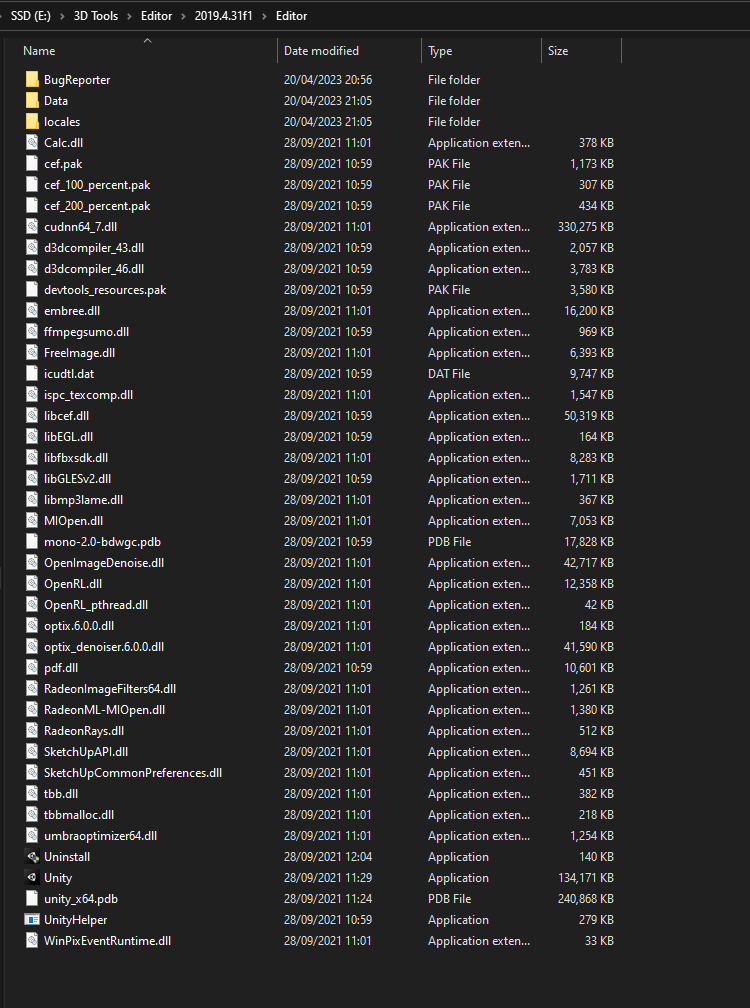
note file path will be different
hidden crown
No, just get the "Editer" folder and delete it
make sure to clear your recycle bin afterwards, along with both temp folders
crude zenith
Alright
C:\Program Files\Unity\Hub\Editor\2019.4.31f1\Editor\Unity.exe
this is my pathj
is this ok
crude zenith
hidden crown
make sure to clear your recycle bin afterwards, along with both temp folders
^
crude zenith
hidden crown
will look something like this.
https://i.imgur.com/aftI653.png
wrong reply , i mean this one
hidden crown
crude zenith
C:\Program Files\Unity\Hub\Editor\2019.4.31f1\Editor\Unity.exe
ok delete th e "2019.4.31f1" folder
crude zenith
hidden crown
ok delete th e "2019.4.31f1" folder

i dont know what tf happened here lol
delete them both i assume
hidden crown
yeah
crude zenith
hidden crown
yeah
done, now what
hidden crown
install it again thru the unity hub

 crude zenith
hidden crown
https://unity.com/releases/editor/archive
crude zenith
hidden crown
https://unity.com/releases/editor/archive
.

i didnt even add the sdk yet
and already blank error..
amber haven
amber haven
First of all, download and install Malwarebytes and run a scan. If any viruses a...
Make sure you follow the instructions on the pinned message before anything else. @crude zenith
amber haven
amber haven
I'm gonna have you delete all of your editor preferences at this point.
Check the pinned messages for the script that can delete all of your editor preferences.
crude zenith
amber haven
I'm gonna have you delete all of your editor preferences at this point.
so what do i do wiv this
amber haven
Import the script and go to Examples/EditorPrefs/Clear all Editor Preferences.
amber haven
Also go to Edit/Clear All PlayerPrefs.
 amber haven
What do you have imported in that project?
amber haven
That's a weird message to be getting when there's nothing in the project.
 amber haven
Oh, is it coming from the script?
crude zenith
yeah.
amber haven
Oh, it's fine.
crude zenith
i guess it just prints it when completed i assume.
amber haven
It says it right after clearing the preferences.
crude zenith
yeah
amber haven
I just took the example from Unity's docs.
crude zenith
Right
amber haven
Have you ran Malwarebytes yet?
amber haven
Did you already install it?
amber haven
Go to Task Manager and Details.
 amber haven
You checked on Details or Processes?
 amber haven
End task on everything related to Malwarebytes, then try to open it again.
If it still doesn't want to open, then you'll have to restart your computer.
 amber haven
crude zenith
Still not working
amber haven
crude zenith
Still not working
That’s definitely suspicious.
amber haven
I still think that most blank errors are related to viruses and the fact that you can’t open Malwarebytes just says something.
crude zenith
Can you help me then lol
amber haven
Try to rename the Malwarebytes executable.
crude zenith
Where is the location
amber haven
Go to wherever it’s located and rename it, then try to run it.
crude zenith
Oh Alr
amber haven
If there is malware preventing you from opening it, then renaming should work.
crude zenith
Leads to a shortcut
amber haven
It’s somewhere in your program files.

 amber haven
mbam.exe
crude zenith
rename to?

so this is what happens when i go to the website
can you sned the download link please
wait nvm
 amber haven
crude zenith
amber haven
crude zenith
Let me know when you finish running the scan.
crude zenith
amber haven
Let me know when you finish running the scan.
done
amber haven
crude zenith
done
Did it find anything?
 amber haven
You quarantined and deleted them?
You have to restart your computer after doing that.
amber haven
Go to C:\Program Files\Unity\Hub\Editor\2019.4.31f1\Editor\Data\Tools\RoslynScripts and open unity_csc.bat with Notepad.
crude zenith
Okay
setlocal

rem start with editor install layout
set CSC=%~dp0..\..\Tools\Roslyn\csc.exe

rem fall back to source tree layout
if not exist "%CSC%" set CSC=%~dp0..\..\csc\builds\Binaries\Windows\csc.exe

if not exist "%CSC%" (
    echo Failed to find csc.exe
    exit /b 1
)

"%CSC%" /shared %*
exit /b %ERRORLEVEL%

endlocal
this is what i get
crude zenith
amber haven
Go to `C:\Program Files\Unity\Hub\Editor\2019.4.31f1\Editor\Data\Tools\RoslynScr...
^
crude zenith
i just wanna upload my avi 😦
amber haven
crude zenith
```@ECHO OFF
setlocal
rem start with editor install layout
set CSC=%~dp0..\..\...
Move that file somewhere safe in your computer, then open Unity again.
crude zenith
ok
crude zenith
amber haven
Move that file somewhere safe in your computer, then open Unity again.

so like this
amber haven
crude zenith
Yeah, open Unity now, and let's see if the error is visible now.
crude zenith
alright
 amber haven
Are you able to enter play mode?
 amber haven
Go ahead and import Bloodborne SDK, let's see what happens.
crude zenith
ok ok
i gotta restart unity rq since it never loaded lol


i cleared it
thats the only error when adding bloodborne sdk
 amber haven
Alright, the main issue and blank error for you is the Temp/UnityEngine.UI.dll not being able to be copied.
crude zenith
also cant access control panel
crude zenith
amber haven
Alright, the main issue and blank error for you is the Temp/UnityEngine.UI.dll n...
yeah i suppose
i have no clue, your the expert lol
amber haven
It's alright, you can go ahead and put that bat file where it was before.
amber haven
Look at #faq (13) real quick and do that.
crude zenith
damn, i just closed unity.
amber haven
After that go to Package Manager and let me see all the packages in your project.
amber haven
Yeah, I just told you to remove it so I can figure out what the blank error was.
crude zenith
so want me to remove it again
then go back into unity
and then readd when inside?
amber haven
No, put the bat file back where it was.
 crude zenith
amber haven
It's alright, you can go ahead and put that bat file where it was before.
crude zenith
amber haven
It's alright, you can go ahead and put that bat file where it was before.
^
amber haven
Yeah, leave it there.
amber haven
Open Unity and look at #faq (13).
crude zenith
also, before i went to go to that faq thing, i opened unity and went console to check really quick and got that blank error if that matters at all
 amber haven
We already know what it is.
 amber haven
Go to your Package Manager and screenshot all your packages in your project.

 amber haven
Change the top left to In Project.
crude zenith

 amber haven
Update all of your packages.
crude zenith
alr
amber haven
Try uninstalling Unity UI and reinstalling it.
 amber haven
Yeah, remove it.
crude zenith
done
amber haven
Alright, change the top left to Unity Registry and search for it again so you can reinstall it.
 amber haven
I thought you removed it.
 amber haven
Restart your project.
amber haven
Check to see if you have Unity UI installed.
crude zenith
 amber haven
Manually place that in Library/ScriptAssemblies.
crude zenith
where's that, sorry if im very stupid
amber haven
Do it from the file explorer and while Unity is opened.
The path is located in your current project folder.
amber haven
Go back to your project, let it compile and try to enter play mode.
 amber haven
Look at your console.
Something's just not letting you copy from your temp folder.
You're probably gonna have to turn off your anti-virus and start Unity Hub as administrator.
crude zenith
its just blank errors.
amber haven
Yeah, it's an issue with something in your system, not Unity.
Turn off your anti-virus or add an exclusion for your project folder, then run Unity Hub as administrator.
amber haven
It's probably your Windows Defender, so try adding an exclusion to your project there.
 amber haven
What other antivirus provides are you using?
amber haven
Aside from Malwarebytes.
amber haven
Take a screenshot.
 amber haven
Go to Edit/Preferences/External Tools.
crude zenith
Yeah
amber haven
Make sure you check Embedded Packages, Local Packages, and Registry Packages, then hit the Regeneraate Project Files.
crude zenith
Ok done
amber haven
Clear and try to enter play mode.
 amber haven
Go to Assets/Reimport All.
amber haven
It's something on your system that's preventing you from copying temp files.
 amber haven
Open regedit and go to HKCU\Software\Microsoft, then screenshot all of the folders that start with the letter C. I just need to make sure that there's no auto processes running from there.
 amber haven
No, on the left side, look for the folders that start with C.
 amber haven
Nah, they look fine.
Honestly, remove that bat file again so we can see what the new errors are.
crude zenith
okay.
amber haven
Go here C:\Users\Ace Asin\AppData\Local\Unity\Editor and send me your Editor.log file.
You're gonna have to replace my username with yours.
 amber haven
Okay, we are getting somewhat somewhere now.
crude zenith
okay good
amber haven
Check to see if you have UnityEngine.TestRunner.dll in Library/ScriptAssemblies.
 crude zenith
done
amber haven
Reopen your project and see if Unity rebuilds it.
The problem is that it's not copying any libraries for some reason.

 amber haven
Okay, put the bat file back to it's original place.
crude zenith
done.
amber haven
Check that ScriptAssemblies folder.
 amber haven
Still empty, restart your project.

 amber haven
Those loaded at least.
amber haven
Are you able to enter mode?
crude zenith
 amber haven
I'm more worried about that blank error.
If the previous 2 blank errors were the ones that appeared on your ScriptAssemblies folder, then I wonder what that one is.
crude zenith
i could remove the .bat maybe
amber haven
Look at your Package Manager.
Make sure you have Mathematics and Burst installed in your project.
 amber haven
Change it to the Unity Registry on the top left.
 amber haven
Yeah, update it.
 amber haven
Are you able to enter play mode or still nothing?
crude zenith
amber haven
Are you able to enter play mode or still nothing?
yeah
nothing
wait wrong one

 amber haven
Oh yeah, right click on Burst and Reimport.
Do that for Mathematics as well, after Burst is done.
amber haven
You did it for both packages?
Are you able to enter play mode yet or are you still getting errors?
crude zenith
still erorrs.
crude zenith
amber haven
You did it for both packages?
yeah
amber haven
Screenshot them.
amber haven
Yeah, try to clear.
 amber haven
Honestly, at least the other ones are gone.
crude zenith
Yeah, espically the blank one
amber haven
Remove the VRChat SDK - Avatars package from the Package Manager.
Then reimport Bloodborne SDK and it should add it back.
crude zenith
Okay, should i redownload the sdk then import?
amber haven
Don't you already have it downloaded?
crude zenith
Yeah.
amber haven
Then use that one.
amber haven
Delete the VRChat SDK - Avatars package first though.
amber haven
No, it's fine.
crude zenith
amber haven
Delete the VRChat SDK - Avatars package first though.
Did that
crude zenith
yeah, i got you
amber haven
Alright, reimport Bloodborne SDK.
It will add back that package, let's just hope the errors go away.
amber haven
Check your console again.
 amber haven
Damn, those errors just keep coming back.
crude zenith
Yeah honestly.
amber haven
Right click on Unity UI and Reimport.
crude zenith
Alright.
from packages at bottom left right?
did that anyway, 1 error has disappeared.
 amber haven
I'm not sure which pacakge it might be.
crude zenith
I have no clue and i dont want to ruin it all tbh lol
could it be this one by any chance?
 amber haven
Try Newtonsoft.Json.
amber haven
You might as well just try all of them individually, except Bloodborne, VRChat SDK - Avatars, and VRChat SDK - Base.
crude zenith
So every single one?
amber haven
Yeah, every single one on the left side, except the ones I mentioned.
crude zenith
Alright
ill try the visual thing

i think i did it
idk
lol
i can go in play mode
 amber haven
Alright, that's very nice.
crude zenith
i just gotta add avatar and stuff
amber haven
Finally figured out how to fix it.
I guess you just have to individually reimport packages that failed to compile.
The reason you have to individually reimport is because if you reimport all it will restart Unity. The main issue is that you're failing to compile packages on startup.
crude zenith
Oh right, i understand what you mean.
honestly, even since that error came along, ive reinstalled unity 5 times and factory reset my pc once
amber haven
The main packages seem to be Test Framework and Unity UI.
Which is the last one your reimported?
Was it Visual Studio Code Editor or Visual Studio Editor?
 amber haven
Oh, alright.
 amber haven
It might be one of those again.
crude zenith
What one should i do.
amber haven
Try Test Framework, Unity UI, and Visual Studio Editor, in that order.
crude zenith
ok
so far Test Framework, Unity UI hasnt work
i did visual studio editor
and it did this

😦
amber haven
I think it brought back the others ones.
crude zenith
Yeah.
amber haven
Is your Visual Studio Editor updated?
amber haven
Newtonsoft Json should be at 2.0.2.
amber haven
Yeah, reimport all of the packages individually until the error goes away.
It's still just a temporary fix and not a permanent fix.
crude zenith
Is there a perm fix
i got rid of errors
it was the visual studio editor
i reimported
and got rid of them
amber haven
I still think it's related to a virus that's preventing you from compiling on startup, since it's messing with your command arguments it seems.
crude zenith
Yeah
amber haven
Has this issue been fixed after you factory reset before?
amber haven
I know that for sure factory resets fix it.
amber haven
It comes back because you probably keep getting the same malware.
crude zenith
How do i fix it, should i just factory reset again?
amber haven
It doesn't just randomly come back after factory resetting, just gotta be careful.
If you want a permanent fix, then you should in fact factory reset.
crude zenith
I mean just for now, i want to upload my avatar lol
amber haven
Because the reimport packages method is gonna get annoying after a while.
crude zenith
plus its also 8am and i should get to bed
amber haven
Yeah, for now use the temporary fix.
amber haven
Yeah, it's all good, glad we could figure a temporary fix for now at least.
amber haven
That’s good, that project should be fine now.
crude zenith
yeah i aint going through that again with another one
lol
well i tried.
i got a prefab dont exist error now.
and this is a paid avatar.

this was the main issue i was having tbh..
amber haven
I think those blank errors are the same ones again.
amber haven
Yeah, yours is just persistent.

