#eat
1 messages · Page 1 of 1 (latest)
 wet ivy
That's incredibly strange
 rugged blaze
the tleeporting
wet ivy
I'm using almost exactly the same code
wet ivy
Oh yeah... sorry XD
rugged blaze
no its fine lol 😄
                {

                    GameObject currentObject = collider.gameObject;

                    Vector2 placeYouWantToGo = transform.position;
                    Vector2 pos = currentObject.GetComponent<Edible>().pos;

                    float mag = (placeYouWantToGo - pos).magnitude;
                    float speed = Time.deltaTime * 8f;
                    float stepSize = speed / (mag * mag);
                    float orbitRadius = 2f;
                    float orbitSpeed = Time.time * 10f;

                    if (2 < mag)
                    {
                        pos += stepSize * (placeYouWantToGo - pos);
                    }
                    else
                    {
                        pos += speed * (placeYouWantToGo - pos);
                    }

                    Vector2 orbit = new Vector2(Mathf.Sin(orbitSpeed), Mathf.Cos(orbitSpeed)) * orbitRadius;

                    currentObject.transform.position = pos + orbit;
                    currentObject.GetComponent<Edible>().pos = pos;

}``` thats still my codethe edible is this
wet ivy
Pls could you write csharp after your three backticks
rugged blaze
using System.Collections.Generic;
using UnityEngine;

public class Edible : MonoBehaviour
{

    public Ability abilityToSet;
    public int healAmt;

    public Vector2 pos;

    void Start()
    {
        pos = gameObject.transform.position;
    }

}
```csharpokay
wet ivy
Thank you it just makes it easier to read
rugged blaze
how lol
wet ivy
Oh...
rugged blaze
😐
wet ivy
rugged blaze
```foreach (Collider2D collider in objects)
{
...
placeYouWantToGo is set to transform.position
wet ivy
Is this script attached to the object you want your spiralling things to go towards?
Oh okay
wet ivy
rugged blaze
how lol
Immediately after putting your three backticks to start the code block just write csharp
```csharp
rugged blaze
wet ivy
Immediately after putting your three backticks to start the code block just writ...
oh
uhh
wet ivy
```csharp
code stuff
```
rugged blaze
foreach (Collider2D collider in objects)
                {

                    GameObject currentObject = collider.gameObject;

                    Vector2 placeYouWantToGo = transform.position;
                    Vector2 pos = currentObject.GetComponent<Edible>().pos;

                    float mag = (placeYouWantToGo - pos).magnitude;
                    float speed = Time.deltaTime * 8f;
                    float stepSize = speed / (mag * mag);
                    float orbitRadius = 2f;
                    float orbitSpeed = Time.time * 10f;

                    if (2 < mag)
                    {
                        pos += stepSize * (placeYouWantToGo - pos);
                    }
                    else
                    {
                        pos += speed * (placeYouWantToGo - pos);
                    }

                    Vector2 orbit = new Vector2(Mathf.Sin(orbitSpeed), Mathf.Cos(orbitSpeed)) * orbitRadius;

                    currentObject.transform.position = pos + orbit;
                    currentObject.GetComponent<Edible>().pos = pos;

}```there
srry
rugged blaze
wait nvm i cant tell
rugged blaze
wet ivy
That's so strange
yeah
wet ivy
Can you please debug the pos aswell as the transform.position
rugged blaze
transform.pos of the object im eating?
wet ivy
Yeah
rugged blaze
POS: (10.7, 0.0)(11.1, 1.9, 0.0)

POS: (10.7, 0.0)(12.2, -1.3, 0.0)

POS: (10.7, 0.0)(12.1, -1.4, 0.0)

POS: (10.7, 0.0)(12.0, -1.5, 0.0)

POS: (10.7, 0.0)(11.9, -1.5, 0.0)

POS: (10.7, 0.0)(11.9, -1.6, 0.0)

POS: (10.7, 0.0)(11.8, -1.6, 0.0)

POS: (10.7, 0.0)(11.8, -1.7, 0.0)

POS: (10.7, 0.0)(11.7, -1.7, 0.0)

POS: (10.7, 0.0)(11.6, -1.8, 0.0)
Oh... XD
wet ivy
Oh yeah that's right
rugged blaze
oh
wet ivy
I forgot about the orbits
rugged blaze
wait but howcome it works for u tho?
rugged blaze
lol
it moves very slowly on the ground
then gets closer and slightly faster
then does a 360 spiln
and stops spinning and moves slowly onthe ground
but it did actually move towards me! :DDD
wet ivy
if (2 < mag)
        {
            pos += stepSize * (placeYouWantToGo - pos);
        }
        else
        {
            pos += mag / 2f * (placeYouWantToGo - pos);
        }
I think that should fix that
rugged blaze
what about the speed variable?
wet ivy
So it's teleporting because the orbit radius is too big I guess, just set it to like 0.1f or something
wet ivy
rugged blaze
what about the speed variable?
That if statement is purely to stop the glitching when it reaches the object so you can set the else to be whatever you want
wet ivy
rugged blaze
what about the speed var?
Wdym?
rugged blaze
wet ivy
Wdym?
well we never use it
wet ivy
We use it for stepSize
rugged blaze
oh
also i think it works
its just very fast
oh uhm
it works at start
then it like moved a lil
then instantly teleports to plr
wet ivy
if (>>>>thisvalue<<<<< < mag)
        {
            pos += stepSize * (placeYouWantToGo - pos);
        }
        else
        {
            pos += mag / 2f * (placeYouWantToGo - pos);
        }
Try making that value smaller
And also change the second equation to make it a bit smoother
I'll try and find a good middle ground
wet ivy
Try 0.1f
wet ivy
Awesome
rugged blaze
your an absolute legend ommgmgmgmg yeysyeyesyssses
wet ivy
I'm just glad we finally made it work
wet ivy
So if you want it to speed up more when it gets closer
You want to edit the stepsize equation and the denominator where it's like (mag * mag)
rugged blaze
whats pow?
wet ivy
power
rugged blaze
i do now vtho 🙂
wet ivy
Because 2^3 means 2 to the power of 3
wet ivy
So
If you increase x in Mathf.Pow(mag, x) then it will be insanely slow the further away you are but it will speed up super super quick when it's close to the object
rugged blaze
so
would this also work
((mag * mag) * 1.5f)
and would that make faster or slower?
wet ivy
Yeah but that's the same as just dividing the numerator by 1.5
That would make it go slower
But it wouldn't change it's acceleration at all
rugged blaze
okay
wet ivy
Of course you can always just go on desmos and write a few equations and see what you like the look of
wet ivy
Currently your velocity equation looks like this
 rugged blaze
😐
wet ivy
If you draw what you want your speed to look like I can try and make an equation

 rugged blaze
okay
wet ivy
But bare in mind
x is equivalent to the distance you are away so you need to think of this as the velocity of the object is when you're looking at the x axis far on the right and then it speeds up as x gets closer to 0
rugged blaze
yeah sooo
i like this number 😐
10000000000000000000000000000 as the numerator
😐
wet ivy
XD
rugged blaze
so how do i convert that into the code?
 rugged blaze
um i want it to start speeding up a little before
like
7
and then get faster and faster
 rugged blaze
😐
wet ivy
XD
rugged blaze
uh
wet ivy
If you say it works good then it works good right?
wet ivy
rugged blaze
Pow(mag, 0.85) and it jworks pretty good
In fact I'm pretty sure that would decelerate it
And leaving it at 1 will make it move at a constant speed
wet ivy
That will accelerate it yeah
rugged blaze
whatevs ill just fiddle you dont have to worry
wet ivy
Alright but if you want to try this
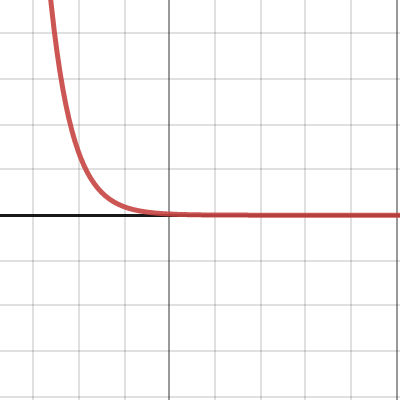
Desmos
It's good because the velocity doesn't go to infinity
wet ivy
Hmmm there won't be much point in converting e
wet ivy
But if you mean in the future if you want a new equation
rugged blaze
2.71828 but yeah
wet ivy
All you have to do is use mag as your x and make sure you multiply your equation by 1/mag
rugged blaze
wet ivy
But if you mean in the future if you want a new equation
that for me in the future
rugged blaze
wet ivy
All you have to do is use mag as your x and make sure you multiply your equation...
okay
wet ivy
rugged blaze
2.71828 but yeah
Yeah but you can just use Mathf.Exp(1)
rugged blaze
uhh
speed / (1/(mag * Mathf.Exp(mag - 7))) just makes it orbit where it is
but not come to the person
wet ivy
Oh no
rugged blaze
?
wet ivy
speed/(mag * Mathf.Exp(mag - 7))
rugged blaze
oh
wet ivy
Honestly, just get rid of speed and put whatever number you want there
rugged blaze
xD i put 1 and it tp directly behind me
wet ivy
Yes it will be very fast lmao
Oh and if it's way too slow when it's far away just add a constant to it
So you should end up with the equation
a/(mag * Mathf.Exp(b * mag - c)) + d
And changing all these variables to manipulate your velocity curve
And then the other variables like orbit radius and orbit speed should be pretty self explanatory 😄
rugged blaze
well
the a
i change and it tp super far away
or right behind me
the speed/(mag*mag) works better :||\
wet ivy
Hey do what you want
wet ivy
Whatever looks good
wet ivy
$\frac{0.002}{e^{\left(3x-7\right)}}+0.3$
Hmmm
0.002f/(mag * Mathf.Exp(3 * mag - 7)) + 0.3f
rugged blaze
its cause the 7 was way to big
wet ivy
You've got a spiralling edible now
rugged blaze
yes 🙂
wet ivy
Good luck with the rest of your game 😄
rugged blaze
thankyou :DDD