#thread
1 messages · Page 1 of 1 (latest)
 deep dagger
 lean torrent
Ok
deep dagger
Ok Im back, sorry someone called me
lean torrent
K
deep dagger
Anyways look in the unity editor in the top left @lean torrent
there should be something called file
lean torrent
Yeah
deep dagger
Open it, find build settings and then click add open scenes
lean torrent
Ok I clicked add open scenes
deep dagger
Basically it sets that game scene as scene 0. Remember how earlier I told you to write the SceneManager.LoadScene(0); and it had 0 in it? Now it opens that scene every time a collision is detected
lean torrent
Ah ok, when I clicked add open scenes I saw nothing happen is that normal or was something ment to happen?
deep dagger
So it reloads it. Do you have your game scene opened up?
lean torrent
The game itself, yes
deep dagger
Is there a little checkmark?
lean torrent
In scenes in build?
deep dagger
yep
lean torrent
I see a check next to scenes/samplescene
deep dagger
Sample scene is the game right?
lean torrent
I belive it is
deep dagger
You should notice a little 0 by it. Thats how the scene manager will know to load that scene when you ask it to load scene 0
 blazing kettle
you should rename that
lean torrent
Yeah a 0 on the right
blazing kettle
installing a package... and it has "sample Scene" in it, will probably delete / override your scene.
deep dagger
Yeah maybe rename it to whatever you want. Like flappy game
blazing kettle
or if you delete the library folder
lean torrent
How do I rename it? I am right clicking on it from the game itself and no option rename
blazing kettle
Just go to file -> Save As
lean torrent
Ah
deep dagger
Ok so after that, you have collision working, and a way to reload/restart the scene, whats next?
lean torrent
Well I haven’t actully tested the script yet.
Lets try that now.
Oh
We have a good and bad situation here
Whenever I start the game the ball falls to the ground
So it’s in a constant loop of restarting
And even when I move it to the ground
deep dagger
You don't have a way to move the ball correct? so gravity is going to drop it
lean torrent
Oh I forgot to enable my walk and jump script
One sec
Ah I see it now I don’t put the ball on the ground I put ihigher up for time to move it
Perfect
deep dagger
Is there anything else thats missing now?
lean torrent
Now another thing could I add the flappy bird poles randomly generated with simple code or will it take more complex code
And if not do I have to manually add them?
deep dagger
I can tell you that you can generate random positions using Random.Range,
lean torrent
Could that be applied to a 2d map?
deep dagger
let me find a snippit
lean torrent
K
deep dagger
IEnumerator Example()
{
int RandomNumber = Random.Range(1,10);
Debug.Log(RandomNumber);
yield return new WaitForSeconds(2);
StartCoroutine("Example")
}
@lean torrent This generates a random number between 1 and 10 every 2 seconds
lean torrent
So how do I implement that into Generation of poles
deep dagger
Do you know how to instantiate objects?
Basically instantiate would be equivalent of spawning them
lean torrent
Not really.
deep dagger
using UnityEngine;
using System.Collections;

public class Example : MonoBehaviour
{
    public GameObject prefab;
    void Start()
    {
            Instantiate(prefab, new Vector3(0,0,0));
    }
}
This code spawns a prefab at 0, 0, 0
lean torrent
So I’m gonna make its own seperate script. Do I attach it to an object?
deep dagger
Yes
lean torrent
Which object
deep dagger
If you want. Or create an empty game object
lean torrent
I’ll do that
So once I do that I don’t fully understand “how” it will spawn an object
deep dagger
Yeah its good that you asked since it can be a bit confusing
Instantiate is like a spawner. If you used /summon in minecraft youll know what I'm talking about
brb
lean torrent
K
deep dagger
lean torrent
K
You know what a prefab is right?
lean torrent
I belive it’s a thing that allows u to create and store a game object in it
deep dagger
Yeah its like a clone
Instantiate(prefab, new Vector3(0,0,0)); is basically what you need. the identity part isnt necessary
lean torrent
Wait I copied and pasted the code for the generation and it’s giving me an error message
deep dagger
whats the error?
lean torrent
“The referenced script on this behavior (Game object ‘GameObject’) is missing!
lean torrent
No
deep dagger
yeah ok double click the error
it takes you to where the error came from
don't mix up errors with warnings
lean torrent
It’s yellow text
deep dagger
errors are red and stop the game from working. Yellow warnings are just tips
lean torrent
Oh
deep dagger
that you can usually ignore
lean torrent
That’s good to know
deep dagger
yeah
lean torrent
Well when I pasted the script is it meant to do anything?
Or do I need to input certain information?
deep dagger
Instantiate(prefab, new Vector3(0,0,0));
Instantiate spawns an object
prefab is the object its going to spawn
and new Vector3 is the coordinates where its going to spawn the object
lean torrent
Yeah
lean torrent
Magic
deep dagger
So you can mix the 2 snippits together
lean torrent
I changed the code u sent me from vector 3 to vector 2 and now there is a red line under it.
deep dagger
Hmm did you take off a 0?
lean torrent
using UnityEngine;
using System.Collections;
public class Example : MonoBehaviour
{
public GameObject prefab;
void Start()
{
Instantiate(prefab, new Vector2(0, 0, 0), Quaternion.identity);
}
}
deep dagger
lean torrent
using UnityEngine;
using System.Collections;
public class Example : MonoBehavio...
Vector2(0,0)
lean torrent
O
lean torrent
So once I run the game this code will start generating stuff at 0,0
deep dagger
yes
Combining both snippits:
IEnumerator Example()
{
int RandomNumber = Random.Range(1,10);
Instantiate(prefab, new Vector2(0,RandomNumber));
yield return new WaitForSeconds(2);
StartCoroutine("Example")
}
what does it do?
lean torrent
It generates a random number then puts it in Vector3 coordinates?
deep dagger
yep
lean torrent
😮
deep dagger
every 2 seconds, it generates a random number, and spawns a prefab at 0 x and RandomNumber y
lean torrent
So how do I use that code to generate poles?
deep dagger
using UnityEngine;
using System.Collections.Generic;
using System.Collections;

public class Example: MonoBehaviour
{
    public GameObject prefab; // assign the prefab
    void Start()
    {
        StartCoroutine("Spawner")
    }
    IEnumerator Spawner()
    {
    int RandomNumber = Random.Range(1,10);
    Instantiate(prefab, new Vector2(0,RandomNumber));
    yield return new WaitForSeconds(2);
    StartCoroutine("Spawner");
    }
}
I copy and pasted that code and it’s redlining everything.
lean torrent
Still some redlines
deep dagger
Ok now
lean torrent
New vector 2, RandomNumber and Spawner are redlined
deep dagger
Then save it and try it. You should be able to tweak it since you understand the gist of it all
deep dagger
lean torrent
New vector 2, RandomNumber and Spawner are redlined
Just save it
deep dagger
Is it null reference?
deep dagger
lean torrent
Assets/Generation.cs(9,34): error CS1002 : ; expected
That means a semi colon was expected at line 9
Semi colons are ;
Do you know what the issue is from that?
lean torrent
Now it says Assets/Generation.cs(14,29): error CS1503: argument 2: cannot convert from UnityEngine.Vector2 to ‘UnityEngine,Transform”
deep dagger
Hmm
lean torrent
And yeah c# needs a semi colon after every line of code
deep dagger
lean torrent
Now it says Assets/Generation.cs(14,29): error CS1503: argument 2: cannot conver...
Ok lemme check on my unity, i was typing it all from my poor memory lol, i mightve messed something up
deep dagger
lean torrent
It’s ok
Ok while my unity is booting up, try new Transform(0, RandomNumber);
instead of new Vector2
lean torrent
Now only the word Transform is redlined
deep dagger
Save it
deep dagger
Yeah you should be able to figure it out :)
lean torrent
Ok now it says
CS1729: ‘Transform’ does not contain a constructor that takes 2 arguments
deep dagger
Hmm I'm gonna look up something
lean torrent
Ok
deep dagger
Maybe try quaternion idenitity
lean torrent
So what do I change, Transform?
deep dagger
Sorry Im trying things lol
lean torrent
It’s alright
deep dagger
Im mad it worked
Instantiate(prefab, new Vector2(0,RandomNumber), Quaternion.identity);
deep dagger
The only thing left now would be making the pipes move
lean torrent
lines 19, 2 CS0116 a namespace cannot directly contain members such as fields or methods
As an arrow
Error
deep dagger
lean torrent
lines 19, 2 CS0116 a namespace cannot directly contain members such as fields or...
Yeah you have something with the same name somewhere
lean torrent
Ok
deep dagger
Does it work or null reference lol
lean torrent
Works
deep dagger
Oo nice
lean torrent
I don’t see nothing generating tho
deep dagger
Do you have a prefab of the pipes?
lean torrent
I do not think so actully
deep dagger
Yeah you need to drag a prefab into the inspector of the pipespawner script
lean torrent
How the heck do I do that
deep dagger
Create a prefab first
deep dagger
I guess make an empty object and child 2 squares into it
Make both of them rectangles
So ones the top pipe and the other is the bottom
And then drag that empty object into the bottom project area where you kept all the scenes/scripts
Lemme know when you did it
deep dagger
then drag that prefab into the inspector
lean torrent
In the script?
lean torrent
So if I just dragged it out into the game nothing would appear right?
deep dagger
there should be a little empty box in the inspector, and drag the prefab in
not yet
Can you open the object with the spawner script in it?
lean torrent
Wait so I put the spawner script on the object
deep dagger
You need to put the spawner script on an empty object
and then a little box will be in the inspector
for the prefab
lean torrent
Ok when I make a game object and drag the script in it says, Can’t add script component “generation” because the script class cannot be found
deep dagger
lean torrent
Ok when I make a game object and drag the script in it says, Can’t add script co...
Is the class name also generation
public class generation: MonoBehaviour
the script name and class name have to match
lean torrent
Ok did it
deep dagger
remember to drag the prefab in
deep dagger
play
lean torrent
What was suppose to happen
lean torrent
It makes GameObject1 clone but when I focus on it nothing is there
deep dagger
Hmm is the game object the pipe prefab or the generator?
lean torrent
The game object is a game object and 2 squares
I can’t seem to see the squares either
deep dagger
Can you see it in the scene editor?
lean torrent
I’m gonna remake it
The prefab
Ok now it actully spawns it
In the center of my game
deep dagger
Yeah at 0 x
lean torrent
Only 1 pole is that right?
deep dagger
every 2 seconds?
deep dagger
Could you send the script here
lean torrent
using UnityEngine;
using System.Collections.Generic;
using System.Collections;
public class Generation : MonoBehaviour
{
public GameObject prefab; // assign the prefab
void Start()
{
StartCoroutine("Spawner");
}
IEnumerator Spawner()
{
int RandomNumber = Random.Range(1, 10);
Instantiate(prefab, new Vector2(0,RandomNumber),Quaternion.identity);
yield return new WaitForSeconds(2);
StartCoroutine("Spawner");
}
}
deep dagger
Hmm well it is instantiating it
lean torrent
And that is in play mode, whenever I turn it off the pole disappears
deep dagger
Yeah its supposed to only spawn the pipes in on play mode. The only thing left is to make the pipes move
lean torrent
Well am I supposed to move it manually in play mode 1 by 1?
deep dagger
lean torrent
Well am I supposed to move it manually in play mode 1 by 1?
You can do it through script, I gtg soon so I can make it
Also its working on my end
lean torrent
I think I might head out it’s 2am and My brain is not working
Wanna dm it to me?
deep dagger
I'll send it here, should probably take 2 mins
deep dagger
lean torrent
I see this error The variable prefab of generation has not been assigned
You need to assign the prefab in the inspector
deep dagger
Yeah and now drag the prefab into the generation script
lean torrent
What do you mean by drag it into the script?
deep dagger
lean torrent
What do you mean by drag it into the script?

Notice the health area in the inspector?
drag the prefab in there
deep dagger
Ok it should work

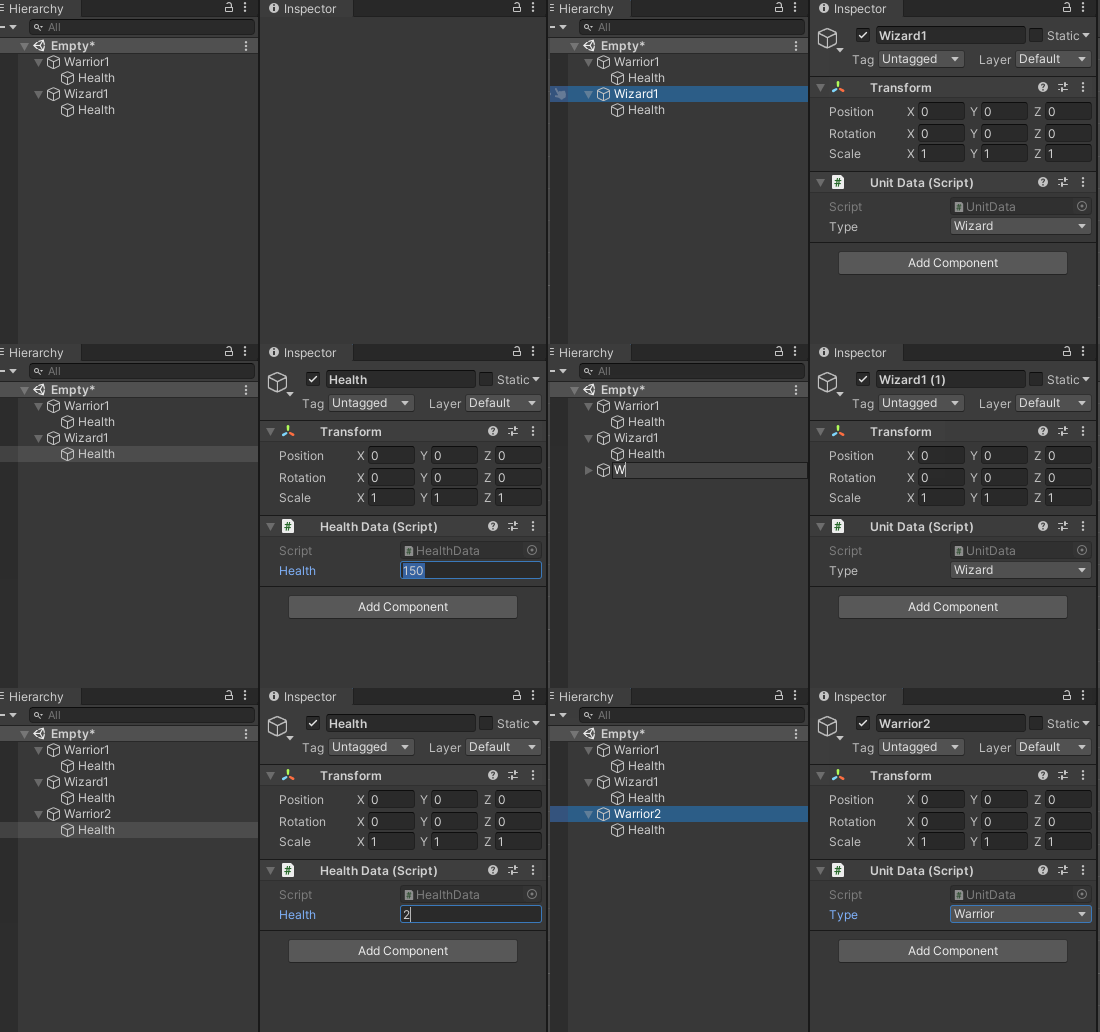 lean torrent
It says The Variable prefab of Generation has not been assigned
In red
But I can still load in play mode
deep dagger
No you need to drag it in, in the scene mode or whatever, not in play mode or it wont save
using System.Collections;
using System.Collections.Generic;
using UnityEngine;

public class Pipe : MonoBehaviour
{
    //YOU NEED A BOX COLLIDER2D ON THE PIPES
    void Start()
    {
        Destroy(gameObject, 7f); //Self Destructs after 7 seconds otherwise lots of lag
    }

    void Update()
    {
        transform.Translate(-Time.deltaTime * 1, 0, 0); // moves -1 x every second. You can change the 1 to a 2 or something to speed it up.
    }
}
Also theres the pipe script
You can tweak the timings and stuff
lean torrent
Ah
The inspector I just showed you was not in play mode
I’m not doing anything in play mode
deep dagger
StartCoroutine("Spawner"); this?
deep dagger
Is it yellow or red
lean torrent
The error itself was red but I’m able to enter play mode in the script it’s not red there’s a symbol near the 10 line
deep dagger
Ummm you can, but I don't know is lol
lean torrent
Still ain’t working
You know what
Since this is the dummy version of my flappy bird
I’m gonna install the pipes manually
And in my v2 version I’ll work on the scripts
It’s like 2:30 I can’t even think thank you very much and I’ll cya later
deep dagger
lean torrent
Since this is the dummy version of my flappy bird
From here, just create a new script called Pipe, paste the pipe code in, and drag it onto the pipes prefab
yeah and gn
lean torrent
@deep dagger I doubt I will ever see this but I presented janky flappy bird to my school with minor adjustments and they loved it
I told them how I’m starting to make new games and they said tomorrow you come up and present a new game concept
So whenever u see this thank you
deep dagger
Glad I could help! :)