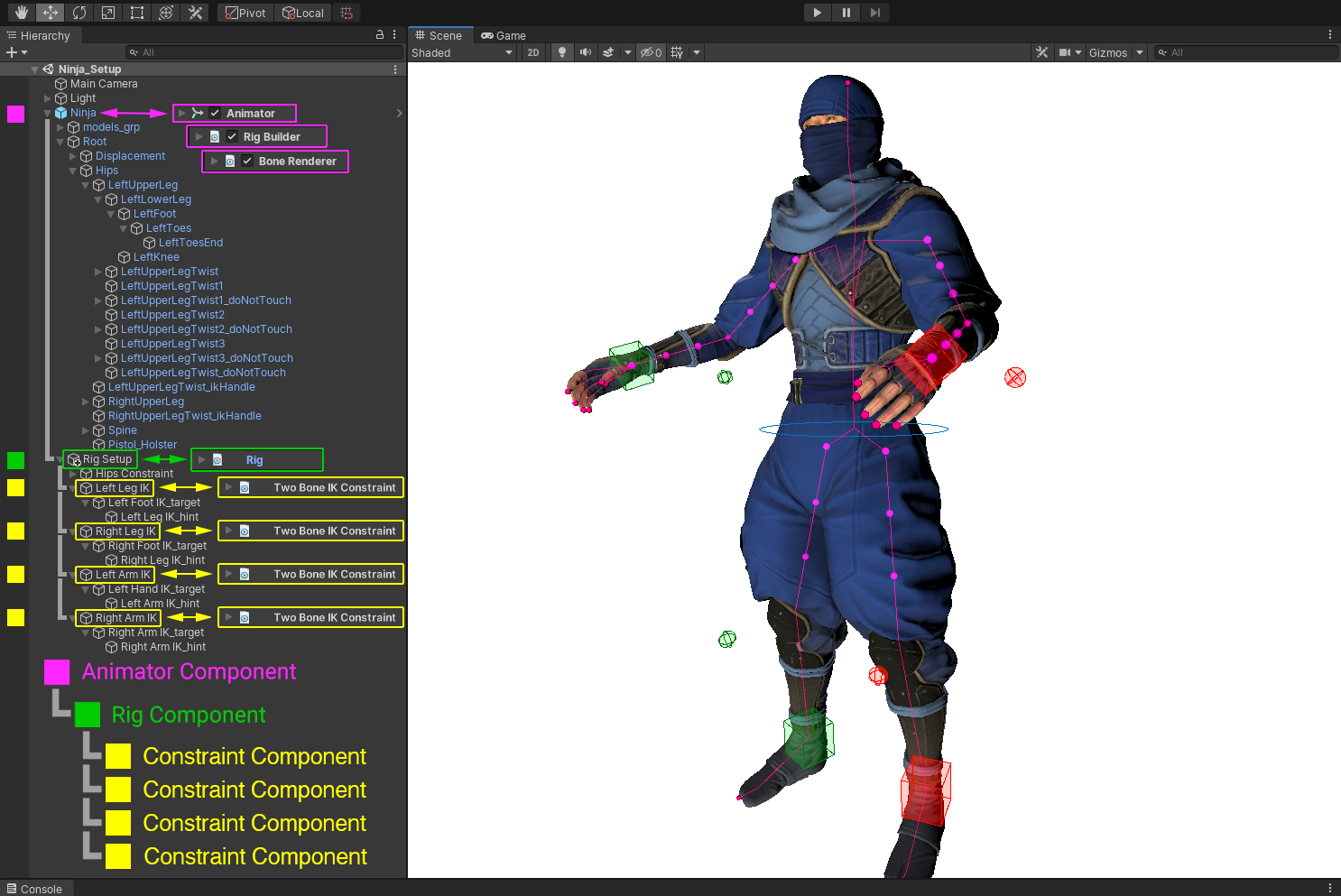
#heres the setup, the intended result is
1 messages · Page 1 of 1 (latest)
 random warren
The UI is trying to warn you that it is not right

The documentation I linked earlier
(https://docs.unity3d.com/Packages/com.unity.animation.rigging@1.4/manual/RiggingWorkflow.html)
starts off with clear images how it should be done
The first image shows the hierarchy
The second shows where to assign the Rig into Rig Builder
 delicate thicket
Thats a warning, not an error. that just says to remove the rig component but the documentation says to add it
the rig builder has the rig attached to it aswell
Do you know the system you are helping with?
I can remove it i guess, but then you'll just bug me to add it again lol
random warren
delicate thicket
Do you know the system you are helping with?
Yes
random warren
I can be wrong, but as far as I can see the setup you are showing does not match the example of the documentation
So that seems like a clear problem
delicate thicket
it has rig builder, and says nothing about two bone constraints actually.
delicate thicket
animator, rig builder, bone renderer all apart of the same object.
then the rig you drag into the rig builder which i did
then two bone constraints on multiple objects which i also did as a child of the parent.
random warren
Where is the Rig in your hierarchy?
Instructions say it should be a child of the Animator + Rig Builder transform
delicate thicket
where it normally is? as part of the prefab?
random warren
These components are hierarchy-dependent precisely
delicate thicket
then why do they have transform containers to reference each other?
ill move the components to a parent to test
random warren
delicate thicket
then why do they have transform containers to reference each other?
That is the reason why
Transform containers are used to confirm it all happens in the right way
Animators themselves modify their own transform hierarchies with parallelized code, and IK Rigging works in tandem with it so it has to follow these setup requirements to avoid circular logic and race conditions
I still believe all of this hassle could be avoided if you download the IK Rigging samples from the package manager and reference exactly how they did it
A lot of the time just figuring out why something doesn't work is not realistically happening
So all you can do is find something that verifiably works that's as simple as possible, and either work towards it or work off of it to make your setup
I probably had to deal with the same confusion when I started out
And keep having to deal with it as I keep learning new systems
But ultimately the only relevant difference between me and you is years of learning patience for facing the unknown
delicate thicket
better?

oh do the constraint objects have to be childs of the prefab container?
cause that would suck
random warren
delicate thicket
oh do the constraint objects have to be childs of the prefab container?
Yes
random warren
delicate thicket
cause that would suck
Why exactly?
delicate thicket
Cause then it'll probably break on reimport
 random warren
delicate thicket
Cause then it'll probably break on reimport
random warren
delicate thicket
Cause then it'll probably break on reimport
I'd expect not, if the hierarchy doesn't change, but not sure if it breaks anyway, or doesn't break even if it changes
Depending on what you're changing, if only the mesh you can import it separately and replace just the mesh of the prefab, if just animations you can use them from other soruces too
delicate thicket
poor guys legs broke
Like, here my logic is lost cause i made the animations using the constraints so them being static and in a weird pose makes no sense to me
random warren
They could be static if your IK target is not being moved in any way
You have to consider the Unity IK is totally ignorant of what IK you had previously
delicate thicket
Thats why the constraints tell unity what the setup is
delicate thicket
random warren
They could be static if your IK target is not being moved in any way
You have to...
but they are
random warren
Weird pose could be explained by a change in bone axis
Iirc Unity expects Z-forward bone chains, but between Blender and FBX that is ambiguous
delicate thicket
I mean, my rig always faces forward when importing into unity
so it should be forward in unity aswell
 delicate thicket
I thought that was what the pole target was for? to bend in the direction of it?
or the hint in unity ig
random warren
It is for bend direction
But because ultimately IK points a specific axis of a bone towards a calculated point, it has to work on the correct axis
I don't see evidence if that's the case in your case, but that comes to mind
Could have shown where the IK targets are in your video
It looks like they can be seen briefly at the end in scene view, and they seem static
delicate thicket
i mean, why are the bones completely stationary though?
random warren
I think the more relevant question here is why do you expect them to be moving
Which is why I want to see how the IK targets are moving
Also, I'm just assuming the IK setup is correct now, but I have not seen that either
You should test it by moving the IK target during play mode and having the leg follow it
It could be working for all we know, but if the hint remains stationary relative to the player controller, we would not know
delicate thicket
random warren
You should test it by moving the IK target during play mode and having the leg f...
I'm not sure if i can directly move bones in unity play mode
random warren
You'd move the target, not the bones
Animator controls its transform hierarchy
Rig hierarchy overrides the Animator hierarchy
random warren
delicate thicket
the target are bones though
That doesn't sound correct
delicate thicket
random warren
That doesn't sound correct
How else would i animate arm bending?
random warren
Source Objects are in the Rig hierarchy
The controlled bones are in the limb hierarchy
delicate thicket
 random warren
delicate thicket
https://streamable.com/ev694d
random warren
delicate thicket
https://streamable.com/ev694d
Here you are moving the Hint, which doesn't do anything unless there is bending as it determines bend direction
delicate thicket
thats what the hint or pole target is supposed to do.
it controls bend and arm rotation.
random warren
Additionally the Target is in the bone hierarchy, which I expect will not work
delicate thicket
random warren
Additionally the Target is in the bone hierarchy, which I expect will not work
but- you animate a character with bones? not game objects?
that doesn't make any sense
random warren
delicate thicket
but- you animate a character with bones? not game objects?
"Bones" are transforms which are gameobjects
Usually referring to limb hierarchies or specifically deform bones, as opposed to IK
Maybe you are asking how you can animate the IK targets with keyframes?
delicate thicket
random warren
"Bones" are transforms which are gameobjects
Usually referring to limb hierarchi...
Yes, thats how your supposed to do it.
you animate a character with bones.
random warren
delicate thicket
that doesn't make any sense
Your confusion probably is related to the hierarchy separation
The Rig hierarchy has to be totally separate because of the way it works on top of and overrides the limb hierarchy's transforms
delicate thicket
i can get using game objects for handles
that makes sense
but i just want bones to point toward other bones
random warren
Iirc Blender doesn't allow IK objects to be in the transform chain that is itself controlled by IK
That'd be circular logic
delicate thicket
random warren
Iirc Blender doesn't allow IK objects to be in the transform chain that is itsel...
bone, points toward other bone?
that isn't circular cause the target isn't attached to the object that is pointing to it
that would be circular
random warren
In your video it looks like your Target Hand.L is in the arm limb hierarchy
Or so I assume because it's not in view, and it's not in the Rig hierarchy
So the target would be attached to the object that is pointing to it
delicate thicket
Hand is the target, not the actual hand.
random warren
Where is it in the hierarchy
delicate thicket
it goes shoulder -> upperarm -> forearm -> handdriver (unused)
hand is attached to the master and is the arm target
forearm target is the pole target
its also attached to the master
random warren
delicate thicket
it goes shoulder -> upperarm -> forearm -> handdriver (unused)
So, it is in the limb hierarchy that is being controlled by IK, which is circular
Transform in a chain inherits values from it every parent, technically anyway
Regardless, Source transforms must be in the Rig hierarchy
delicate thicket
no? where is it circular?
the arm doesn't affect master or the hand
it doesn't give any data to them
theres no circle
random warren
delicate thicket
the arm doesn't affect master or the hand
It does
Every transform component is a function of its transform lineage
For the engine to know where a transform is, it has to be transformed by all its parents
"Transformed" meaning multiplied by the transform matrix to figure out its position, rotation and scale relative to scene origin
delicate thicket
What
random warren
That gets into the weeds of how Unity tracks changes to objects in a scene in memory and updates them in a performant way without causing breaks in the dependency chains
Which is interesting but rarely relevant
delicate thicket
either way its dumb.
I didn't know i needed to know computer science to animate
random warren
I don't know of a 3D engine that doesn't work this way
delicate thicket
blender doesn't, i feel it must be like black magic to you
if you see if your brain might actually explode when you realize things can actually be intuitive
random warren
delicate thicket
blender doesn't, i feel it must be like black magic to you
It does, and that becomes very much apparent when you have to use constraints like Transformation and Copy Transforms
For example when you need IK or other bone constraints work relative to a specific variety of local space
random warren
delicate thicket
I didn't know i needed to know computer science to animate
Really you do not
This whole misadventure occurs because you ignored the documentation's instructions to place Source objects in Rig hierarchy
delicate thicket
There's no reason for it to even need it to be there! Its a child of the object, its referenced in the parent, why does it still need more?
also, easy to miss.
random warren
delicate thicket
also, easy to miss.
It is not documentation's fault that you are constantly diverging from its instructions
And from mine as well
random warren
And even if the reason for things being the way they are is not apparent, or you do not like it, doesn't change there being a reason somewhere
Especially if the reason isn't really relevant to correct operation if you follow the steps
delicate thicket
The "reason" is irrelevant, its bad. It's just a bad way to do it
if it needs to be a child, why not actually throw up an error
That would be nice.
random warren
I agree that game engines like Unity should do a whole lot more to guide the user into the right workflows
Most of these systems do seem nonsensical for no good reason
And all that stems from is the underlying reasons not being communicated properly
delicate thicket
thank you
random warren
I have a long wishlist of how a game engine should work to avoid countless hours of trial and error ^^
random warren
But I'm not an engine coder or involved in that in any way so it's just a pipe dream
delicate thicket
would still be nice to hear, godot is open source people could always help with it
random warren
Practical reality is that engine coders are not communicators, or even UX designers
And even if Unity is actually above average in documentation and examples, having to develop learning and troubleshooting methods to deal with confounding unknowns is an essential skill for a dev and probably most of what you'll be doing
delicate thicket
that seems so weird to me.
game devs make giant systems, but none of them want to make an engine that doesn't suck.
random warren
It's a matter of perspective
The engine doesn't suck for them, because they understand it
And really it doesn't suck at all technically
Not understanding it is what sucks
If you or I were making tools, we would default to making them in a way that suits our purposes and makes sense to us
Which even if good would suck for others if we didn't put extra care and real expertise into UX and documentation as well
delicate thicket
I don't know who looked at how these systems import stuff and thought it was okay
all you have to do is simplify.
random warren
The challenge is you need someone who really understands what the user pain points are, and figure out the solutions
And probably bend the arms of programmers to get them to implement them ^^
Gets even more difficult when the engine has been built layer by layer for over 15 years
delicate thicket
So, just make sure you have any knowledge of the thing your making support for
I would just work on making importing better for godot
random warren
You change something, someone somewhere will miss the functionality you removed
Simplify something, it becomes too simple for someone
delicate thicket
what could you possibly want out of an importer rather than import your files based on a set of rules
random warren
And sometimes this stuff is just hard if not impossible to communicate effectively
Like that transformation matrix parenting stuff
random warren
delicate thicket
what could you possibly want out of an importer rather than import your files ba...
If only it was that simple
With exporting and importing you're working with file formats that themselves are separately developed, full of flaws and legacy code
Both that may be there for a reason to maintain compatibility across different 3D engines, and to deal with ambiguities between them
These engines are pretty much rocket science
If something seems nonsensical but made by a smarter person than us, chances are there's a technical reason we don't understand, or a legacy reason that can't be mitigated, or it's designed for a use case different from ours
And sometimes indeed it may be poorly communicated or even buggy
But at the end of the day all we have is the documentation, the resources we can search and our wits
Assuming you don't have the resources to pay an eye-watering hourly rate to have someone like me watch over
delicate thicket
man.
random warren
So sharpening our wits is typically all we can do
If you look at devs who actually get games made, they seem to either be the type who have really high technical expertise and have spent a lot of time studying and demystifying game engines
Or who don't really care if stuff makes sense or not, just getting things done rather than worrying about it being good, using whatever guides and samples they can scrounge
I'm in between, worrying about it being good and trying to make everything to make sense
And I get very little game development actually done
@delicate thicket Anyway, one question you probably still have is how do you animate the IK targets if they can't be in the limb hierarchy
The Rig hierarchy can be animated, and you might be able to include the Rig rig hierarchy and IK targets in the exported animations, so that you might even be able to re-use the IK bones directly from Blender
But I haven't done that or seen that done so I can't predict what gotchas there might be
Besides the obvious that you need to enable exporting non-deform bones
Something I'd do a very simple test for before trying to work the whole character into that workflow, naturally
delicate thicket
random warren
<@448017075688964096> Anyway, one question you probably still have is how do you...
why can't i just use bones?
random warren
delicate thicket
why can't i just use bones?
If by bones you mean limb bones, it's because IK must be in its own Rig hierarchy as we discussed at length
delicate thicket
Dude,
i think unity uses world coords not local for IK
i tried parenting the object to the bone, and while it moves all over the place the ik doesn't move
That makes this a total dead end
random warren
delicate thicket
so i use objects for targets, okay.
It helps to nail down the use of precise names for things
- Pretty much everything is an "object", that one doesn't hint what kind of object you are referring to
- "Transform" is an object with a position, rotation and scale
- "Gameobject" in Unity is a container of components that must always have a transform, so it can be used interchangeably with transform but may imply use of other components
- "Bone" is a transform used for rigging purposes, be it for skinned deformation or for IK, that one is not an exact term. In Blender bones are transforms contained by an Armature, which can be deform or IK, or something else. In Unity "armatures" or "bones" are not technically distinct, they are just transform/gameobject hierarchies, same as all other objects in your scene
random warren
delicate thicket
i think unity uses world coords not local for IK
That sounds like a wrong conclusion, IK doesn't use any coordinate system directly the way we see them as users
random warren
delicate thicket
i tried parenting the object to the bone, and while it moves all over the place ...
So, does that mean your Target transform is outside the Rig hierarchy again?
delicate thicket
ik has to be inside the hierarchy since the whole point is to point a bone somewhere on an animation
Sigh, i might just fork over the cash for final IK since i cannot stand this anymore lol
random warren
delicate thicket
ik has to be inside the hierarchy since the whole point is to point a bone somew...
That is not a practical requirement, even if it were technically possible
Seems the root of your problem is latching onto these assumptions
Even the importable sample of the 2-bone IK that I have been reminding you to get for quite a while now shows the same clip keyframing the IK targets in the Rig hierarchy and bones of the limb hierarchy at the same time
delicate thicket
random warren
That is not a practical requirement, even if it were technically possible
Seems ...
I have no idea what your saying sometimes
random warren
delicate thicket
I have no idea what your saying sometimes
Best to focus on what's unclear, rather than let it slide and misunderstanding to pile up
IK targets and poles can not be within the same bone hierarchy as the limbs controlled by IK, because of unimportant technical reasons
And they do not have to be inside the limb hierarchy
They can and should be in the Rig hierarchy next to the limb hierarchy
The Rig hierarchy's transforms aka bones can be keyframed by your animation clips
It seems you assume they cannot be keyframed
delicate thicket
random warren
IK targets and poles can not be within the same bone hierarchy as the limbs cont...
Wouldn't i still have to manually redo the animations though if we went that route
random warren
delicate thicket
Wouldn't i still have to manually redo the animations though if we went that rou...
You have to adjust the IK bones to export the same hierarchy as Animation Rigging expects
That's something I haven't had to do so I can't predict what challenges there might exactly be
But no, you don't have to "redo" the animations themselves or even the animator
delicate thicket
random warren
You have to adjust the IK bones to export the same hierarchy as Animation Riggin...
Wha
random warren
delicate thicket
Wha
If you want to benefit from my experience , you have to engage with my advice more than that
Give feedback constructively
If you are feeling overwhelmed or burned out, that is not necessarily anyone's fault as you are solving a complicated problem and learning new systems and complex concepts one after another
delicate thicket
so, export hierachy what do you mean by that
do you mean like, on unity backend
like when it looks at the object they can't be in the same heirachy
whats the limits on that
it can't be a parent, or it can't be a child of the other
cause they will share the same parent by guarentee
since they are all desended from the scene
random warren
I mean the animations and the armature you export from blender should save the same hierarchy as shown here:
 delicate thicket
yea i did that
Ik is working its just, the behavior is just not good enough
unity does like, snapping on when ik is enabled or not
since there seems to be a minimum distance for the target to travel or deviate from the intial position before IK solving kicks in
random warren
News to me that it works, good
delicate thicket
i thought it was broken cause the arms and legs were stuck
but ik might just be like that i guess.
random warren
delicate thicket
but ik might just be like that i guess.
Do you have an idea in mind how you could confirm that assessment
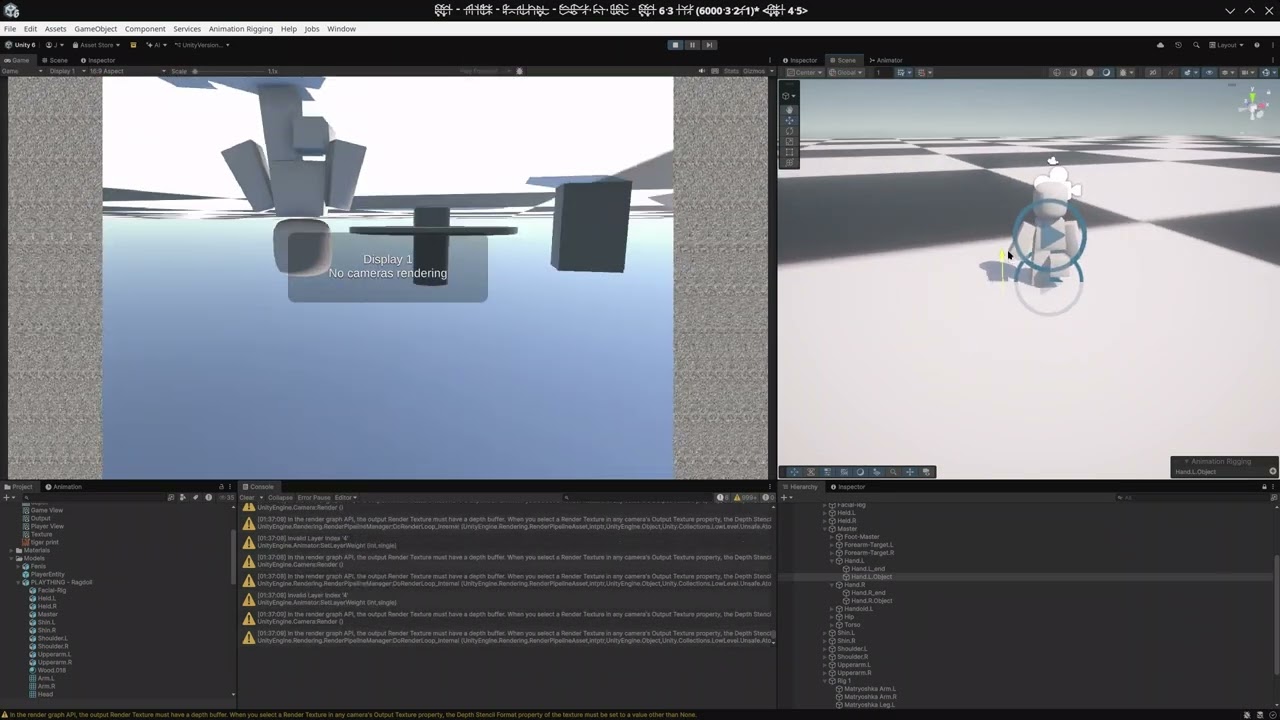 delicate thicket
random warren
Do you have an idea in mind how you could confirm that assessment
delicate thicket
random warren
Do you have an idea in mind how you could confirm that assessment
I mean, i moved the target a bit, i tried moving it really far away but it only started solving when the angle it would point in with ik was drastically different
also the shoulder got locked in place for some reason
maybe because the shoulder is only losely connected to the torso in the first place
or not at all now i guess since exports kill constraints, thats weird to think about.
wait this system might be complete bunk due to that.
shit
random warren
delicate thicket
I mean, i moved the target a bit, i tried moving it really far away but it only ...
So you have two theories you can verify
- Does IK actually have a "limit" for distance
- Are your character's bones actually ignoring the target movement
Otherwise you may go forward with the wrong idea of how the system works and get compounding problems
delicate thicket
the bones aren't ignoring it, its just kinda weird.
IK doesn't have a limit for distance it seems though, so thats good.
random warren
You could get insight on 2. by setting up the bone renderer again
delicate thicket
Oh for number 2 thats a guarentee, the bones are just static.
random warren
And set up other gizmos too
delicate thicket
should be in the vid, i don't know why it does that.
random warren
It hinders my ability to help that your IK constraint setup is now different form before, but I haven't seen which transforms it uses now for which purpose
delicate thicket
delicate thicket
should be in the vid, i don't know why it does that.
again that might be because the solvers are no longer connected to the root of the rig and it just panics
random warren
Yes
If you want your character's singular leg bone to just point at the target no matter the distance, it makes a lot more sense to me to use Multi-Aim Constraint instead
delicate thicket
how is it different?
random warren
In a 2-bone IK system neither of the two bones have to point towards the Target
The solver tries to bend them relative to each other so that given their lengths the tip of the last bone ends up at the Target
Multi-Aim just aims a bone towards a Target (or optionally several, hence the "multi")
delicate thicket
i mean, bending is still kinda in the equation, but pointing is the more important part. most bending is kinda already baked in and i won't have much of it
random warren
Why does your character have two bones per limb, if the model itself has only one anyway?
delicate thicket
ease of animating and for future proofing more complex skins
they still do very human movements
so they benefit from a human esk skeleton
random warren
Hmm the challenge there is that you have to consider all bones per limb when animating and making the animator, while you can't see them all
Your placeholder should visualize the most complex type of skin
delicate thicket
I wonder if i should've made my rig differently, but i can't really think of any better way to do it. My rig will still do very human like movements so they benefit from such a rig, but i also didn't feel like creating special bones for shrugging the shoulders and the likes cause honestly those are probably the hardest part to get right and work with during rigging and animation so i really didn't want to do that.
random warren
Also a lot of movement made for two-bone limbs doesn't translate well into one-bone
If the one-bone arm works by just using the upper arm bone for example, and your two-bone limb animation brings an item close to the character so upper arm and forearm both bend, so a limb using only the upper arm will no longer point towards the item or make contact with it at all
Same issue can occur with legs, for example when crouching, and in other unforeseen situations
It might not become a problem, but something to keep in mind
delicate thicket
The rig does have two bones.
random warren
Yes, but it makes testing harder if you can't see them
delicate thicket
well, i use bone renderer idk
random warren
Might not cause an issue, but also might so something to keep a mental pin on
delicate thicket
1 bone IK isn't even an ik is it? like it can't bend
random warren
Indeed, for that you'd use the aim constraint or something similar
But just using one of the two-bone limb's bones, as you've done, will work for most situations
delicate thicket
Like, my rig is basically 4 floating IK solvers attached to a torso with child of constaints.
random warren
As long as you're aware of the bones your placeholder doesn't show
And that some 2-bone motions can look weird with one-bone limbs, even if they're perfectly correct
delicate thicket
What exactly are you talking about? i said my rig uses two bones for the bending
random warren
Yes, but your character model doesn't
Like in the last video posted, we don't see what the bones are actually doing becuase your character model (nor bone renderer) doesn't include them
delicate thicket
do you want ALL bones in the bone renderer? most aren't important to the IK solving i was trying to debug
random warren
I want the bones we actually care about for the limb movement
So, two
And you should really look into setting up gizmos for the IK
delicate thicket
the gizmos are just the visual stuff which we see in scene view yea?
random warren
Related to that I want you to do me a favor
delicate thicket
okay
random warren
delicate thicket
okay
Get the package's samples
 delicate thicket
hmm, okay.
random warren
Go through all of the scenes and take a particular look at the 2-Bone IK example

It is what I was pointing you to on day 1
And it really seems you could've saved a whole day or maybe two of just being stuck if you had taken a time to study this example
delicate thicket
Then i wouldn't have understood what works, i would've just been copying
like most coding tutorials try when teaching people
and then i don't learn anything
Not like i learned anything here, most of unitys logic is "just because"
random warren
Not the same at all
Coding logic is "just because"
Which you first have to learn from example before you can improvise
It's like trying to write a for loop for the first time without looking up what a correct for loop looks like
delicate thicket
Coding logic isn't "just because" it has rules like the . part usually is about looking for something inside something else
and i didn't know till someone explictly told me
random warren
delicate thicket
Coding logic isn't "just because" it has rules like the . part usually is about ...
You have to learn the rules first
delicate thicket
random warren
Go through all of the scenes and take a particular look at the 2-Bone IK example
okay how do i look at these
oop found it
Bro she's cooked outta the box, this is not helping.
https://streamable.com/knf3n8

you can just pick up the rig and move it away from the body, the ik just does nothing.
random warren
delicate thicket
Bro she's cooked outta the box, this is not helping.
https://streamable.com/knf3...
Don't the IK always work in Play mode only?
This example is meant to be driven by the animation, so if you want to move the IK manually, either pause the animation through Animation window, or giving the Animator an empty state as default
delicate thicket
random warren
Don't the IK always work in Play mode only?
it doesn't seem to work in play mode either.
random warren
delicate thicket
it doesn't seem to work in play mode either.
By "doesn't work" you mean it doesn't even animate?
Sure you didn't make changes before entering play mode
random warren
delicate thicket
i mean the ik just does nothing when i move it
But it is animating?
 random warren
delicate thicket
https://streamable.com/2ng4xe
random warren
delicate thicket
https://streamable.com/2ng4xe
That is the position of the effector gizmo, not the IK transform
delicate thicket
what do you mean, the ik is a game object right?
this is an object under the folder "Root -> Rig -> IK-> LeftIK -> LeftIK hint"
like,,, what else would it be?
random warren
delicate thicket
what do you mean, the ik is a game object right?
Yes, but the little window is for setting up the gizmo
Meaning the editor only handle for visualizing and easily selecting the object
delicate thicket
What.
so is it a bone this time?
is it a number?
it would really suck if it was a number.
random warren
delicate thicket
so is it a bone this time?
If you recall my earlier explanation
bones are transforms
transforms are gameobjects
they're all objects
Nothing has changed suddenly but you're in the wrong window, changing the wrong variable
delicate thicket
so this is the ik object
this is the scene view, i'm moving the ik object.
how could i possibly be screwing this up
random warren
This is the position of the bone transform

this is for setting up the visual handle meant to make it easier for you to see and use the IK bone/transform

^ these do not have any tangible effect on where the bone is or what it does
Just how you see it in the editor
delicate thicket
So LeftIK number transforms, got it.
It doesn't work either.
I can't modify the Ik numbers since they're being controlled
i can move the rig still but that still does nothing
random warren
I also explained that
random warren
random warren
This example is meant to be driven by the animation, so if you want to move the ...
👆
delicate thicket
I'm so confused
so this sample is useless? i- WHAT
If i can't even see it work then what am i supposed to do with this
random warren
You can? That is my explanation how you can
delicate thicket
You are frying my brain here good sir
This sample is just the Ik being controlled by an animation, but i can't do anything with it. This is effectively not even ik its just a baked animation. Whats the point of IK if i can't move it around?
random warren
delicate thicket
You are frying my brain here good sir
A transform that's overridden by animation keyframes cannot be moved by you in the editor, as you probably have noticed before
-> So you have to stop the animation to be able to move them
But you cannot disable the Animator because IK is an extension of it
random warren
So you either
- Pause the animation using the Animation window
- Give the Animator an empty state and set it as default (or Jump to it during play mode)
Besides, for you it should good news that the Targets are driven by animation here
Because that's exactly what you wanted to figure out how to do earlier
And this is a controlled case of how to do it, and how it responds
delicate thicket
I guess.
random warren
If the example "doesn't work" you can be 99.99% sure you're just using it wrong in some way
If you encounter the same issue in your own character, you have little idea whether it's because of using it wrong, setting it up wrong, or one of your tests or other systems is interfering with it
And these examples are something others can easily test alongside you, unlike your own project
delicate thicket
Yea, you're right.
sorry i can be kinda hard to work with
i guess ill try to study this later
random warren
delicate thicket
sorry i can be kinda hard to work with
That is true, but really only when you rush past advice or resources
Despite that I can tell you are trying and want to improve, and are improving
Takes some real effort to get good at understanding this stuff when it's just one arbitrary or nonsensical seeming thing after another
delicate thicket
from what i see they just manually keyed the IK, but i want the targets to follow bones but it seems they can't exist in the same place.
Doesn't look like i can copy keys either from my animation bones to objects
so it seems the only option is to find some way to link them together without "breaking" unitys hierarchy.
random warren
delicate thicket
from what i see they just manually keyed the IK, but i want the targets to follo...
When you do IK animation in blender that's what you also do over there
But normally when exporting, those IK target bones get removed and the motion from IK constraints and other constraints gets baked into the limb bones' keyframes
random warren
delicate thicket
Doesn't look like i can copy keys either from my animation bones to objects
No, because keyframed transform properties are relative to parent transform, which is relative to its parent transform and so on
The IK target bones have different parent transforms in the armature than the limb bones, so their keyframed properties must be different also
random warren
delicate thicket
so it seems the only option is to find some way to link them together without "b...
Well, there are a bunch of options but not many good ones
The best like I suggested before is to export the armature with the Blender IK bones and using them again for Unity's IK constraints
delicate thicket
random warren
When you do IK animation in blender that's what you also do over there
But norma...
But ik isn't additive, it'll still work if you repair it.
delicate thicket
random warren
Well, there are a bunch of options but not many good ones
The best like I sugges...
But i can't? I need to use objects i thought
I tried plugging in the bones for the constraints and it didn't work
random warren
delicate thicket
But i can't? I need to use objects i thought
What do you mean by "objects"
Everything is an object
delicate thicket
Bones are just empty objects and they will work fine?
I guess your right
Hmm, i wonder what i did wrong then.
random warren
delicate thicket
Bones are just empty objects and they will work fine?
"Bone" has multiple possible meanings depending on context
#1457298414298595338 message
random warren
There's been more than a few times already when you refer to things by incorrect or inaccurate names
I'm not sure how you expect me to give accurate and correct answers in those situations
random warren
delicate thicket
But ik isn't additive, it'll still work if you repair it.
No idea how additiveness relates to the current issue
Animation clips can be additive, constraints in Unity cannot
And you should be specific what you mean by "repair"
delicate thicket
I exported a rig that had ik, it no longer has ik. Repair means to fix it, since it used to work
delicate thicket
random warren
No idea how additiveness relates to the current issue
Animation _clips_ can be a...
Wait does that mean Ik can't be additive at all? that might be why all the other bones in the ik chains were being set to have no animation.
random warren
delicate thicket
Wait does that mean Ik can't be additive at all? that might be why all the other...
- IK is an operation that moves the Source bone transforms relative to Target. Only the Target has animation keyframes in that situation
(This changes when baking and exporting animation from Blender, by default the IK targets are removed and the Source bone motion from them is converted into keyframes for the Source bones) - Additive animation deals with how two separate clips are combined if played at the same time, whether keyframed properties are interpolated or added together
- IK constraint is not a clip, nor animation by itself, so it can't be "added", as it's a calculation that works on top of the animator to override Source bone positions
- But an animation clip that moves the IK Targets can be additively blended with another clip
delicate thicket
ONLY the target, then that overwrites all animation from the shoulder which is annoying.
Still this feels like it should be doing something
The bones were converted to objects, so they have animation and those targets should be moving and affecting the rest of the character
I can move the bones which i couldn't do with the example, so that means the animation just ceases to function, but the animation is playing for the bones that aren't being controlled by IK
I'm so confused.
random warren
The bones were converted to objects, so they have animation
This makes no sense to say
Bones are "objects"
All objects can be animated
You can move a bone / a Transform if its position isn't overwritten by either an animation clip or by IK solver
delicate thicket
Yea i can see that, but why.
Where did the animation go
I move the constraint into the rig part and the arm just seizes up
I don't get it.
random warren
delicate thicket
I move the constraint into the rig part and the arm just seizes up
Move from where? What were you doing precisely
delicate thicket

like, if i move the constraints into the rig the animation just falls apart
I don't get why
random warren
delicate thicket
https://streamable.com/2ox1k1
Is Master the gameobject with the Rig component or Rig 1 the one with the Rig component?
Where are the constraint components in this hierarchy
Is Arm.R or Hand.R the Target?
Clicking through these with the inspector would go a long way to not have to make me guess and you not have to explain more
delicate thicket
Ill give a small clip of me doing it
 random warren
delicate thicket
https://streamable.com/xp2ep7
random warren
delicate thicket
https://streamable.com/xp2ep7
Right, the Targets like Hand.R are outside of the Rig component hierarchy, which is not how it's meant to be as per the instructions
delicate thicket
I can't move the bones though, that's against the rules.

So i need to copy the animation, paste keyframes, or completely break the prefab
random warren
You can if you unpack it like the warning says, but that will break the keyframes of those bones
Which is not my suggested solution
delicate thicket
What is your suggested solution
random warren
To set up the armature in blender and export it with the Rig constraint hierarchy and limb bone hierarchy already set up separately within the armature
delicate thicket
Is that a thing?
random warren
My only uncertainty with that method is if exporting automatically creates a root transform as a parent to both hierarchies between them and the Animator gameobject, in case Rig hierarchy must specifically be a child of the Animator
delicate thicket


I don't think thats a thing.
I can't just export the rig with a rig component, since it isn't a thing in blender and probably not even a thing in fbx
Like, all the bones are desended from the armature in blender
random warren
Only the right hierarchy
delicate thicket
but unity says haha no
random warren
This is what I'd try
Using this order of bones to set up IK in Blender
Then set the same bones to use Unity's IK components instead, after exporting

If it turns out that both Root and Rig get another "armature" transform between them and the Animator and that breaks it, there are still options but they get more technical
And who knows if there's a simpler way, I have not had to deal with this specific problem before
Not easy or fun to look for such a solution before you're familiar with the systems involved here, but it is one way to learn
delicate thicket
That's just a bone named rig, not an object?
If the rig isn't a special object, i could just make master hold the component
That is if you can add components to a prefab part
I could try renaming the master bone too, if it attaches the special component to an object named rig
random warren
delicate thicket
I could try renaming the master bone too, if it attaches the special component t...
Naming is not a requirement
At least I don't recall having to care about it nor seeing it in the docs
Where the components are in the transform hierarchy however is a requirement, and seems to be the same issue you keep running into
delicate thicket
random warren
This is what I'd try
Using this order of bones to set up IK in Blender
Then set ...
But in this example the targets are just another parent to the armature that cannot be moved
Like, what would this solve
Unless it can be fixed after export, or unless theres rules about where the rig object is placed in the prefab, i can't do anything,
Cause its a special object right? if it isn't i could just give the properties to a bone and this issue goes away
random warren
delicate thicket
But in this example the targets are just another parent to the armature that can...
The Targets are not a parent to the armature
They're parented under the armature, separate from the limb hierarchy, like the picture shows
delicate thicket
I mean, the targets are already seperated from the limb, they're targets and childs of the master. If i can't have a target be a child of the master HOO BOY do we have a problem on our hands and the nonsense keeps going
random warren
delicate thicket
Like, what would this solve
Your Targets would be outside the limb hierarchy, inside the Rig component's hierarchy, but also within the armature hierarchy
Meaning the animation clips made and exported with the armature should be able to keyframe the Targets
delicate thicket
What? the rig is a seperate object that's a child of everything else that is generated upon import. There is no way to place bones in a nonexistant object, and i can't move then after the prefab has been made.
It's a closed system, i can't do anything lol
random warren
delicate thicket
What? the rig is a seperate object that's a child of everything else that is gen...
It seems too often when I explain how you can do something your takeaway from it is "so that means it can't be done" 
And when I explain that you cannot do something you just keep doing it
delicate thicket
That's because your explanation makes no sense, i have no idea what you are talking about.
My understanding of this is that its a closed loop
random warren
What is?
delicate thicket
The rig is a special object that is generated by import yes? It isn't in my blender files and it makes no sense when armatures are the parent and not a child alongside the bones.
But the rig would need to contain the bones, but cannot be moved when the prefab has been created
random warren
"The bones" being Rig component and IK constraints?
Where do they need to be "moved"
delicate thicket
Uh, the bone targets need to be in the rig part to use constraints
And they cannot be moved
Hand.L and Hand.R
random warren
By "rig part" you mean Rig component's transform? Not the limb bones
delicate thicket
The Rig game object, the thing that the targets need to be a child of?
random warren
A child of
But yes
delicate thicket
yea
random warren
Where do you propose to move them to, and from where
delicate thicket
Uh- Id like to put the hand targets, into the rig game object, so they can be used in the Ik chain.
random warren
From where?
random warren
The Rig gameobject is also "in" the prefab so that's not by itself an issue
Rather that you may be trying to move them from a specific place in the prefab hierarchy?
delicate thicket
I'm sorry, did you not see the error message i sent you? "Children of a prefab instance cannot be moved"
 random warren
Did you not see my reply that you can move them if you unpack the prefab like the warning advises?
Just that I don't recommend it because there probably are more elegant solutions
And I'm not sure how it even helps, if the goal is to keep the keyframed motion of the 'imported' IK bones
delicate thicket
random warren
You can if you unpack it like the warning says, but that will break the keyframe...
You said it would break the keyframes
Then what is the solution here, i'm waiting please tell me.
random warren
Yes
That's why I suggested creating the armature and animations with the IK bones already in the right place
So there's no need to move anything
delicate thicket
deep breath Lets try this again.
The rig is a special object that is generated by import yes? It isn't in my blender files and it makes no sense when armatures are the parent and not a child alongside the bones.
random warren
I'm not sure what that means
delicate thicket
WHAT DO YOU MEAN
The rig game object, isn't a thing in blender. It was never real and unity just made it up.
I have no control on where it is placed
or what is inside it
random warren
It's generated to match the Armature object's hierarchy form blender
If the IK bones already exist as part of that hierarchy, I don't know of a reason why it wouldn't work when you add Rig and IK components to them
delicate thicket
before it appears in unity
random warren
delicate thicket
or what is inside it
You do, it's the Armature
Bone hierarchies are inside it
Those get converted to unity transform hierarchies one to one
delicate thicket
Everything is in the armature by default! You cannot spill the bones
The armature is an object, you HAVE to make bones inside of it they physically cannot exist anywhere else
therefore this is not my fault
i feel like i'm losing my mind here.
The rig game object is just a delusion unity creates for whatever reason to make this as stupid as possible
random warren
delicate thicket
The armature is an object, you HAVE to make bones inside of it they physically c...
Yes, like I explained originally that is not necessarily a problem but something to test
The Rig needs to be separate hierarchy from the hierarchy of the bones that its IK is controlling, and it needs to be under an Animator
But it shouldn't matter at all if they came from the same imported Armature
I predict it would only be an issue if the import process automatically places another parent transform between the two hierarchies and their Animator, and the Rig component specifically is required to be a direct child of the Animator
delicate thicket
This isn't a problem? we didn't have to do any of this?
Then why does the bones just fail to animate, i thought it was because they aren't a child of the rig
random warren
The last video you showed still had the two hierarchies mixed together
The Targets weren't under Rig hierarchy
delicate thicket
We are going in circles, THEY CANNOT BE THERE!
I just told you they cannot be moved!
I can't do this anymore.
random warren
delicate thicket
We are going in circles, THEY CANNOT BE THERE!
I just told you they cannot be m...
Like I said I didn't suggest moving them but having them in the correct placement already when making the Armature
Speaking of that I have good news and bad news
I had time to test my solution and it works exactly as I described
And it turns out it's not an issue that Rig component is not a direct child of Animator gameobject
When you create this kind of hierarchy in blender
 delicate thicket
But- the rig isn't an object.
random warren
It shows up in Unity exactly the same way:

Everything already where it's meant to be
delicate thicket
random warren
It shows up in Unity exactly the same way:
Thats just an bone converted to an object that's named rig
the real rig object is white, not part of the import prefab and has like a plus icon
If it was just a generic object, again this issue wouldn't exist.
random warren
That's not related to the issue at all
delicate thicket
What
random warren
The white name and green plus means it's a gameobject that has been added to a prefab as a local override
The gameobject itself is not "different" in any way
But one issue is that because it was added later, you couldn't have keyframed it in Blender
delicate thicket
If the game object is not special then why can't i just have the bones work by default
random warren
Obviously there was something wrong with your setup
delicate thicket
snicker yea, i know. The issue is that we physically couldn't fix it due to the prefab
random warren
Like Targets outside of Rig hierarchy as I kept mentioning
Later I also spotted Hints in the wrong hierarchies, and the same bone being used as both Mid and Tip of your two-bone IK
delicate thicket
Those hints weren't even being used, they're temp objects i used for testing
the vid i sent showed all the bones being used, which again can't be moved.
random warren
delicate thicket
*snicker* yea, i know. The issue is that we physically couldn't fix it due to th...
It was fundamentally the wrong way to use it
Target is not supposed to be a child of the limb that it controls
Whether you can move it into that hierarchy or not
Am I being unclear here
delicate thicket
YES!
random warren
How?
IK components go under Rig component
Which you never mix with the hierarchy the IK controls in any way
delicate thicket
Do you not get my logic here?
random warren
As far as I can tell you understand that
But just assume you have to use IK in some different way
delicate thicket
Bones can't be under rig object.
Game over.
The rig object doesn't exist before export and the bones can't be move after import
It's a catch 22.
random warren
What do you think a "bone" is
delicate thicket
DOES IT MATTER?
delicate thicket
no it doesn't??? they're all converted to objects at import
They might aswell be the same thing here
You are dodging my answers like a ninja
random warren
Do you mean that you assume you'd have to move the hand itself (or a Target that's parented to the hand) from the arm to the Rig hierarchy?
delicate thicket
I have to move the bone (now game object) into the rig game object
random warren
Why?
delicate thicket
Because the bones can't be used as an IK target unless they are there
random warren
delicate thicket
You are dodging my answers like a ninja
To me this feels like you're going on whole mental misadventures between sentences and assuming I'm fully aware of them
delicate thicket
because of unity thing
delicate thicket
random warren
To me this feels like you're going on whole mental misadventures between sentenc...
I tell you my answer and you just give me a question
That is unrelated
random warren
delicate thicket
Because the bones can't be used as an IK target unless they are there
So why is your IK target in the hand's hierarchy?
delicate thicket
Because its a bone, that i animated. And i want to use as a target.
Also, I told you they can't be moved
the bones can't be moved
listen to meee
random warren
delicate thicket
Because its a bone, that i animated. And i want to use as a target.
That's not possible because Target can't be in the hierarchy that it controls
Afaik that rule is not limited to Unity
random warren
Why is it an issue? That's not necessary for IK
Or for what you're trying to do either
delicate thicket
What do you mean, the tutorial says the targets HAVE to be there
Which means they need to be moved, but can't.
random warren
They don't need to be moved because they don't need to be in the wrong place to start with
Did you look at the pictures I posted
random warren
What's the "actual rig object" in precise terms
Because I really don't know what you're referring to by that
delicate thicket
The object created on import! the object NAMED rig that is special
cause you have to put the targets into it
and then it magically works or something
I don't actually know what it is because its purpose is abstract
random warren
The name could be anything
delicate thicket
On the tutorial and my imported asset it is named rig
yes, you can rename it thats cool.
LIke, objects don't have any info besides their name
I don't even know what metadata insanity is happening with it.
random warren
None? What makes you think there is
delicate thicket
Because putting the compnent objects into it magically makes the rig targets work
for no observable reason
random warren
Unity is only looking for components in specific places of the hierarchy
Because components can pass data between parents and children
delicate thicket
Is the rig object special or is it just a component
random warren
Just the component
The important part is it requires Animator and Rig Builder (with reference to it) as its parent
delicate thicket
I feel i should've been told that 5 moons ago
random warren
IK component looks for the Rig component above it in the hierarchy, and Target, Hint and other specified transforms below it (or at least within the Rig hierarchy but for best practices they should be there blow their own IK component)
random warren
delicate thicket
I feel i should've been told that 5 moons ago
I did tell you that a bit over a week ago and it says that on the docs but you have a bit of a tendency to rush past instructions and jump into conclusions
delicate thicket
You tried to modify the blender file and throw me on wild goose chases
random warren
Anyway, like in my screenshots when you build the correct kind of hierarchy in Blender you get it ready to go in Unity and only have to assign and set up the components without moving or renaming anything
delicate thicket
Then why are you even restructuring the blender file
why
What's wrong with my file if the rig component can be anywhere
random warren
delicate thicket
You tried to modify the blender file and throw me on wild goose chases
I believe it's a necessary step to use the IK with their targets in Unity which you had in Blender
delicate thicket
No, the step is to put the bones under the rig component.
random warren
delicate thicket
What's wrong with my file if the rig component can be anywhere
Not anywhere, it has to be separate from the limb bones (meaning any body part bones)
delicate thicket
what does that even mean
the targets have to be a child of the master, and the master doesn't have any body part weights or whatever
like, what does that even mean
all bones are "body part bones" they control the body
random warren
 random warren
Yes, luckily there isn't any reason you'd really need them to be mixed in the same hierarchy
delicate thicket
i just said the reason
random warren
You can use Blender's constraints to make the bones in IK hierarchy follow any bone in the limb hierarchy
delicate thicket
Master bone
I GUESS
But that makes this even harder for unity since it doesn't have those
random warren
In some situations yes
Blender's constraints are very advanced
But most of them are still beneficial even when baked
Back to the good news, with this workflow a Blender armature can be exported as a hierarchy that's compatible with Unity's equivalent IK and it works
But the bad news is it's a bit more complex than that because those IK constraints are not exactly compatible, those unforeseeable issues I cautioned about
delicate thicket
Works is relative, i still need to fix the shoulder and shin animations but we will try it
random warren
Mainly that Blender uses a "pole target" while Unity uses a "hint"
Those names alone don't mean anything but their difference is that they're opposites of each other
In Blender the arm's elbow/knee points away from the Pole Target, in Unity the elbow/knee points towards the Hint
So if you want the IK to work the same, you need to convert between the two in either engine
Blender won't require you to code such constraints yourself, but it'll only work with baked clips and when blending between them
Still would get benefits of IK though
And admittably this part is not easy unless you really understand these systems

In my setup I'm basically constraining an extra bone to always between the Target and the shoulder where the IK begins
Then using that as the reference position to remap the Hint bone's transform relative to Pole Target
(Despite the funny colors and appearances these are all just bones)

(wait forgot to show some constraints)


(^The final Track To and Copy Rotation are just for visual purposes, not functional)
These probably don't work as instructions, but more of a glimpse of what these kinds of IK systems often involve
It's not simple stuff
delicate thicket
Look better?

The hands, the arm hints, and the feet are are disconnected from the parents and use constraints instead.
random warren
Which one is the bone that's going to be the Rig hierarchy?
random warren
random warren
The blue one here
random warren
delicate thicket
I was just gonna attach the rig componet to the player entity
That wouldn't make it a child of the Animator & Rig builder components, and that wouldn't keep it separate from the limb bones
delicate thicket
Oh i see, you want a buffer.
random warren
Separated hierarchies
delicate thicket
 delicate thicket
None of them control a mesh
i just named them after the limb and not the target cause thats what people use to interface with the rig so it makes sense to just name it like that
random warren
A warning again though, before I did all the constraint stuff to mirror the Pole Target into Hint it was glitching too much to tell if it was working even halfway
The Hint is necessary for IK, and it has to be placed correctly
There also seems to be a bug with the Hint that if it's perfectly axis-aligned with the limb bones and/or the Target, two-bone IK will glitch out
Even if the setup is otherwise correct
delicate thicket
I wouldn't know how to fix an issue that has never existed before
random warren
This can occur for example when all bones involved have precisely the same vertical position
The fix is to move them just a little
delicate thicket
hmm they look spread apart enough
 delicate thicket
I'm just trying to reassign the targets and Unitys inspector just fricking freezes and dies
Can't even close it or save the project
I guess i have to change them in bursts or reopen before i do it
this is so dumb
delicate thicket
 delicate thicket

i just have no idea what's happening
random warren
delicate thicket
https://streamable.com/o4w980
Since the preview shows the blend tree working right, stands to reason the problem is something affecting the animation outside of the blend tree
Though the video doesn't show any clues of what's happening outside it or what steps lead to this issue
I'd expect this kind of symptom to come from changing the transform hierarchy in such a way that the keyframed transform properties no longer make sense (especially if done at runtime), or from faulty IK setup
But it may be hard to tell if your current setup is too complex for you to get clear clues from the tests
delicate thicket
I don't even have any ik running, atleast not for the legs
They're just frozen in their baked pose
delicate thicket
 random warren
delicate thicket
https://youtu.be/7N8KU3cLu9M
random warren
delicate thicket
https://youtu.be/7N8KU3cLu9M
I would select the animator gameobject and check the clips through animation window, that'll mark keyframed properties as "missing" if they've become disconnected by some of your modifications
But more importantly I notice the pose it's stuck in is different, so you did something that affected the problem and therefore is likely related to it
delicate thicket

spent a long time rebuilding parts of my rig to use parents instead of constraints without breaking anything and IK still doesn't work
delicate thicket
random warren
I would select the animator gameobject and check the clips through animation win...
I don't even know what the problem was here, i just ended up copying the entire file instead of just the rig cause i was too angry to figure out the issue
random warren
Parents instead of constraints in what way?
It doesn't look like you're using my suggested method, because you are trying to move the hierarchies around which my method would eliminate the need of
Again it's not visible from this video where the components are in hierachy or where the bones are in game window because they're not visualized, so I cannot really get a picture of what exactly you are doing or what the precise symptoms of the issue are
For example we can't see if the IK bones are not moving, or just the legs' deform bones
Also, this is the first time I see you are using a Humanoid Avatar
They have their own foot IK system separate from the Animation Rigging package
If there are conflicts or quirks to watch out for for using Animation Rigging with a Humanoid Avatar, I would not be able to warn you because I have no experience with Humanoid Avatars
But it's certainly one extra thing that's making your test setup more complex
random warren
delicate thicket
I don't even know what the problem was here, i just ended up copying the entire ...
Not knowing really is the root of the problem isn't it
To make something that works as you intend you have to test and learn the systems bit by bit
With multiple systems and multiple issues and multiple assumptions overlayed, you will not be able to find out what's breaking and what's working
I would not be able to find out that way either, at least not without spending an exorbitant amount of time
delicate thicket
random warren
Also, this is the first time I see you are using a Humanoid Avatar
They have the...
I'm not using a humanoid one, i imported my own skeleton as you can see in the transforms
also i mean i used parents instead of child of constraints, so now the rig one thing
random warren
delicate thicket
I'm not using a humanoid one, i imported my own skeleton as you can see in the t...
Right, my misinterpretation
random warren
delicate thicket
also i mean i used parents instead of child of constraints, so now the rig one t...
Parents of which transforms for what purpose? I think I am missing context
delicate thicket
the shoulders and the thighs were disconnected from the main body
my idea was that the disconnection was the problem with the IK
since it was replacing the whole rest of the chain
if i connected it to the torso it would work
but it doesn't and i am lost
"To make something that works as you intend you have to test and learn the systems bit by bit" Or you could make it obvious? make it as simple as possible and tell users about their system, but i keep running into stuff that makes no sense lol
random warren
IK that relies on chains of bones (like two-bone and chain) likely requires the bones to be hierarchically connected in the right order
delicate thicket
Yea, das why i fixed it
random warren
But more importantly, keyframes find their transforms and properties by their path in the hierarchy
So reparenting anything that's keyframed will cause the keys to become missing (which the Animation window will show warnings about)
delicate thicket
Firstly, why would they do that? Secondly i didn't move anything. I just moved the constraints into the player frame it doesn't even touch the player body.
random warren
Just guessing potential issues because I cannot directly see what the hierarchy is this time regarding components and keyframes
Keyframes do that because they are stored as explicit paths
Something like
Root/Hip/UpperLeg/LowerLeg.transform.rotation = *value*
delicate thicket
random warren
Just guessing potential issues because I cannot directly see what the hierarchy ...
is there something you want to see?
 random warren
delicate thicket
is there something you want to see?
random warren
delicate thicket
is there something you want to see?
Well, helpful information could be to expand the whole hierarchy, showing where Animator, Rig Builder, Rig and constraint components are, as well as which objects they are referencing
Seeing the bones with a bone renderer or another type of visualization when in motion would be very useful
Not just to me but to you, it's way harder to debug IK for bones you can't see
But currently it looks like you're cooking up your own solution, not the one I demonstrated to work, nor are you learning the IK with a simpler test setup, so I am not sure if I can help you on this route
delicate thicket

I just don't know what the solution is, i keep trying stuff on a logic hunch but nothings working. Unity is where logic goes to die
random warren
delicate thicket
https://streamable.com/n8jdp5
Two-bone IK Targets and Hints (Hand.R, Forearm-Target.R, Foot.L, Thigh-Target.L, etc) are not under the Rig component transform (stupid constraints)
I don't know how I can reiterate that they must be under it to work
PlayerBody has one Animator, but PLAYTHING - ragdoll has another Animator, that alone can break animations but with IK it also breaks the rule of Rig component's parent Animator having the Rig Builder component
delicate thicket
Thats right! i forgot about that
yea the player body animator does nothing
i was testing stuff but it has to be on the prefab
random warren
IK at this technical level is too complex to explain in an "obvious" way unless you're prepared to learn how the underlying tech works
The samples are the closest thing to an obvious guide, because if you do what they do it'll work the same way
But you start by doing something else entirely
delicate thicket
okay i moved it and the result is the same
 random warren
I don't know what you moved or where
Is the Rig Builder still on the wrong Animator?
random warren
Remember that the IK may still produce totally wrong results even when the setup is right, if the Targets or Hints have incorrect or unexpected scene positions (too far away, wrong side of limb, perfectly axis-aligned)
delicate thicket
 random warren
You should confirm what it is actually doing, using the visualizations I suggested
As well as testing the IK in the way I explained long ago, with an empty animator state that doesn't override any object positions, then moving the targets and hints around manually
It'd speed up your process a whole lot if you see what's happening rather than just seeing that "something" is happening
delicate thicket
Huh? you want the player to just slide around in a tpose and then move the targets?
Is there some kinda menu that shows IK numbers and how its evaluating or something
I'm confused
random warren
delicate thicket
Huh? you want the player to just slide around in a tpose and then move the targe...
That will give you an understanding if and how the IK works, separately from any keyframed motion
delicate thicket
I already know that it works like that. I've done that before.
random warren
From the video all we can tell is that the animation clips and IK are both moving the bones in some way
Don't you want to confirm how exactly each system is working in this instance?
Instead of just assuming it works like you hope
And then later being confused when slowly it turns out it actually didn't
delicate thicket
Right, silly me using my logic again. Why would IK work like in every other animation software
Sure, i can freeze the animations quickly
random warren
delicate thicket
Right, silly me using my logic again. Why would IK work like in every other anim...
Did you miss the part when I explained that two-bone IK in Unity and Blender are different by how they utilize the Hint?
But this is not even about that necessarily, what you want to confirm is what exactly the IK is doing, and is it moving the bones exactly as you would expect two-bone IK to move them
delicate thicket
The hint is just the pole target though
delicate thicket
So it bends in the other direction?
random warren
When I tested it, the IK broke completely if I used Pole Target as Hint, specifically when it was controlled by animated keyframes
I had to disable the animation with an empty state, then move the IK manually before it revealed that the setup was correct but the Hint was not
delicate thicket
Well the hints are bones i can't move them
random warren
By revealed I mean the chain of bones remained intact and correctly reached the Target
It was necessary to see all the bones to confirm that visually
delicate thicket
They would have to work like they do in blender
random warren
"Work" in what way?
delicate thicket
The bones face toward the pole target and so they bend in that direction
random warren
You can move the hint or any bone when an animation clip is not controlling it
delicate thicket
I don't remember how to disable the animator without breaking the thing, on the sample i just deleted all animations
but i can't really do that here
random warren
An empty state in the animator
Did you miss me mentioning that a few times already, or dismiss it for some logical reason?
delicate thicket
I did miss that i guess
I don't know what you are really saying most of the time
thats why i keep trying to confirm
My rig kinda dies without animations for some reasons, it sinks into the floor.

No idea why, might be because i made my rigs root be the absolute bottom. Animations do that correctly but maybe the object resets the origin to the middle
It's a whatever problem, doesn't really matter.
random warren
delicate thicket
I don't know what you are really saying most of the time
If something is not clear, you have to ask about it
That's why I ask even "stupid" questions to be absolutely sure, and you should too, because otherwise we both go ahead with wrong assumptions and totally talk past each other
random warren
delicate thicket
It's a whatever problem, doesn't really matter.
Indeed, the origin offset may be fixed by the clips, but you are specifically testing the IK
You still have no bone renderer
delicate thicket
I removed that a while ago when i was moving stuff around
random warren
The IK might even be moving bones, just not ones we can see
delicate thicket
But that isn't the issue we are trying to fix
we need to make some kinda compat layer for unity to use blender pole targets or something
cause unity doesn't have a value for rotating them i guess
random warren
delicate thicket
we need to make some kinda compat layer for unity to use blender pole targets or...
That's what the photoset and related explanation of the last link was about
delicate thicket
random warren
And admittably this part is not easy unless you really understand these systems
Oh, NO.
Okay uhhh,,, my idea is that i use a child of constraint and basically attach the second target to the first one with an offset maybe
That might work
random warren
It could
delicate thicket
Again, ideally i would want unity to just have a silder so you could just change that like in blender
that would be nice.
random warren
A lot of things would be nice
But ultimately in game dev you end up having to modify and make a lot of tools yourself
delicate thicket
augh
random warren
It goes a long way to having a curiosity of how this stuff is meant to work and why it works the way it does, rather than just frustration that it isn't as simple as it could and should be
delicate thicket
If you don't have frustration things won't ever get better
Thats why these systems still exist
random warren
Exporting, animations or IK are not unique in this sense at all
delicate thicket
They could all be better though
random warren
delicate thicket
If you don't have frustration things won't ever get better
Then you probably want a balanced diet of both
delicate thicket
Imagine trying to open a png and its flipped, monochrome, and 50x smaller
Thats basically what we are dealing with
random warren
Most of us have little to no impact in improving these tools, we just have our own projects to make
delicate thicket
I don't like that most art programs don't export layers but you can still use an image sequence
People do have impact, it's just they used it against you
you now have to maintain their closed software while they take money from you fixing their problems
random warren
Regardless of if you want to use the tools or for the tools to be better, you do need an analytical approach if you hope to get results or to produce actually good UX feedback
And eventually you do have to get into the weeds because it's not possible for an engine to be very smooth to use but also fit every user's own needs and unique intuition
Like, C# is not logical to someone who hasn't learned its logic
So visual scripting was offered to avoid that friction
But it then ends up hiding the harder concepts to protect the user from confusion, even if some problems can't be solved without them
If you want to improve the visual scripting to not have such a limitation but still be easy to use, you would have to have a good grasp of how it must interact with the fundamentals of the engine
"Doing X or Y with visual scripting is too hard" is just the very first step
delicate thicket
Unity is still not logical after learning this
Theres better ways to do it that already exist
You can't gaslight me into liking it, this sucks.
random warren
delicate thicket
Theres better ways to do it that already exist
I agree
But that has no effect on what we're doing currently
delicate thicket
'Things could be better' "WHO CARES! :D"
random warren
delicate thicket
You can't gaslight me into liking it, this sucks.
Not my intention
Rather if you spent less time and energy hating it I believe you would've reached this point two weeks ago
delicate thicket
All that time and energy was me bashing my head into it's systems
random warren
You can learn how it's meant to be used while acknowledging what flaws the process has
delicate thicket
yea, if i spent less just being unhappy and depressed about it, i could've been more productive
delicate thicket
random warren
You can learn how it's meant to be used while acknowledging what flaws the proce...
das what i'm trying to do
random warren
delicate thicket
All that time and energy was me bashing my head into it's systems
Going head first is the problem
I too had to learn there are better ways to get to the other side of a brick wall than that
delicate thicket
But the system is just kinda illogical, my brain is trying its hardest
random warren
Every system has its own logic, sometimes it clicks with your own, sometimes not
Going slow and testing assumptions one at a time helps
random warren
Over the years I've met the people who make the tools I use that frustrated me on many occasions
And what I learned in each case that they're way better software developers than me, using math and engine concepts way beyond me, and working under a lot of pressure and many technical constraints
random warren
delicate thicket
All of my assuptions were wrong
Genuinely not that bad of an assumption to have when learning a totally new system
At least test your assumptions, even the ones that seem obvious
90% of all issues of this type that I help with can be ultimately solved by:
"show me how it works while explaining how you think it works"
delicate thicket
Then call me the sin of wrath because i don't care how much experience they have, they made a bad system that is bad and my anger is pure.
I don't need to have these problems how things should work because i can fix them at any time, like the pole target is reversed? just move the pole angle slider!
That is a 2 second fix where in unity i have to spend an hour making new bones.
random warren
Unless your primary goal is just to be angry all the time I recommend keeping the anger in a kind of a jar, as a treat for later
The devs are fallible working with limited resources, and we are fallible working with limited resources
random warren
delicate thicket
Then call me the sin of wrath because i don't care how much experience they have...
For example I missed the "pole angle" slider entirely before you pointed it out
That means my convoluted constraint setup for reversing the pole was unnecessary after all
So, you can animate in blender with a reversed pole and it'll work directly in unity
delicate thicket
random warren
So, you can animate in blender with a reversed pole and it'll work directly in u...
ehh, no i still need to move it for unity
But ill figure something out
random warren
delicate thicket
ehh, no i still need to move it for unity
It doesn't seem I have to move it in my setup, so why should you?
delicate thicket
Because the pole target isn't parented to anything.
i would have to go in and mirror every frame for it
which would still not really work
it needs to be rotated along a nonexistant axis
which of course will complicate things
It might not even be possible.
if unity had pole angle though, then i could match it up with my blender bones easily
it doesn't really go both ways though.
random warren
Right, referring to converting your already authored clips to a different pole angle?
delicate thicket
ill make a small thing to see it it works.
random warren
You are right to do that
Starting with a simple test rig could have revealed this pitfall, which is why I recommend them
And means reversing the pole with constraints is still a viable option
In this instance I didn't study the tool carefully enough to notice the Pole Angle slider, just falsely assumed it wasn't there
As a result I did things in a much harder way
So I'm definitely not immune to this mistake either
delicate thicket
Yea, like the axis i would need to mirror the world space target on doesn't exist
 random warren
Just something you get better at
Same reason why rubberducking is useful for even seasoned programmers
delicate thicket
the pole target never rotates
maybe you could do a locked track that points to the chain and then flip it?
This is probably impossible though.
I would have to remake every single animation and the rig would be irreversibly changed.
random warren
My solution was the two extra IK bones you see in the images
The middle one is constrained to always be between the shoulder and the Target
Then the "Hint" which mirrors the position of Pole Target relative to the middle bone
delicate thicket
Ehh, i don't see how that would work
random warren
You may be able to copy the constraints from my images, or at least get a jist of which ones could be used as the same values may not work exactly with your rig
But it required a lot of trial and error
random warren
delicate thicket
Ehh, i don't see how that would work
It certainly seems to
delicate thicket
Oh my goodness
How many is that? I counted 10 constraints just to fix that single issue
If you wanna walk me through that be my guest
That is crazy
random warren
Result in Unity
Keyframes are only moving the Target and Hint, and it still appears the same way
delicate thicket
literal black magic
random warren
delicate thicket
If you wanna walk me through that be my guest
PoleMirror bone
- Copy Location "Position to Target": moves to IK Target
- Copy Location "Position to 50% Shoulder": Move to (tail) of Shoulder bone with 50% Influence, so as a result it's always at the halfway point between Target and Shoulder tip
- Limit Distance: Optional, prevents MirrorBone from overextending if Target is overextended
- Track To: Aligns -Z towards PoleTarget for later mirroring across its Z axis
- Locked Track: Optional, tilts the bone towards Target so it's planar with both Target and Shoulder which is nice, and could be useful for some other purpose
PoleTarget bone - Track To (not active, works alternatively to Copy Rotation but with reversed axis)
- Copy Rotation: Optional, aligns Pole Target with the mirror (which is nice visually but pole rotation is not actually used for anything)
Hint bone - Transformation: Mirrors by negating transform values using PoleMirror as its space, so it actually acts like a mirror
- Track To (not active, alternative to Copy Rotation but without tilt)
- Copy Rotation Optional, same as PoleTarget's Copy Rotation
So at the end of it PoleMirror's 1, 2 and 4 and HintBone's 1 are actually necessary
Two in total were inactive which I forgot in, though can have their uses

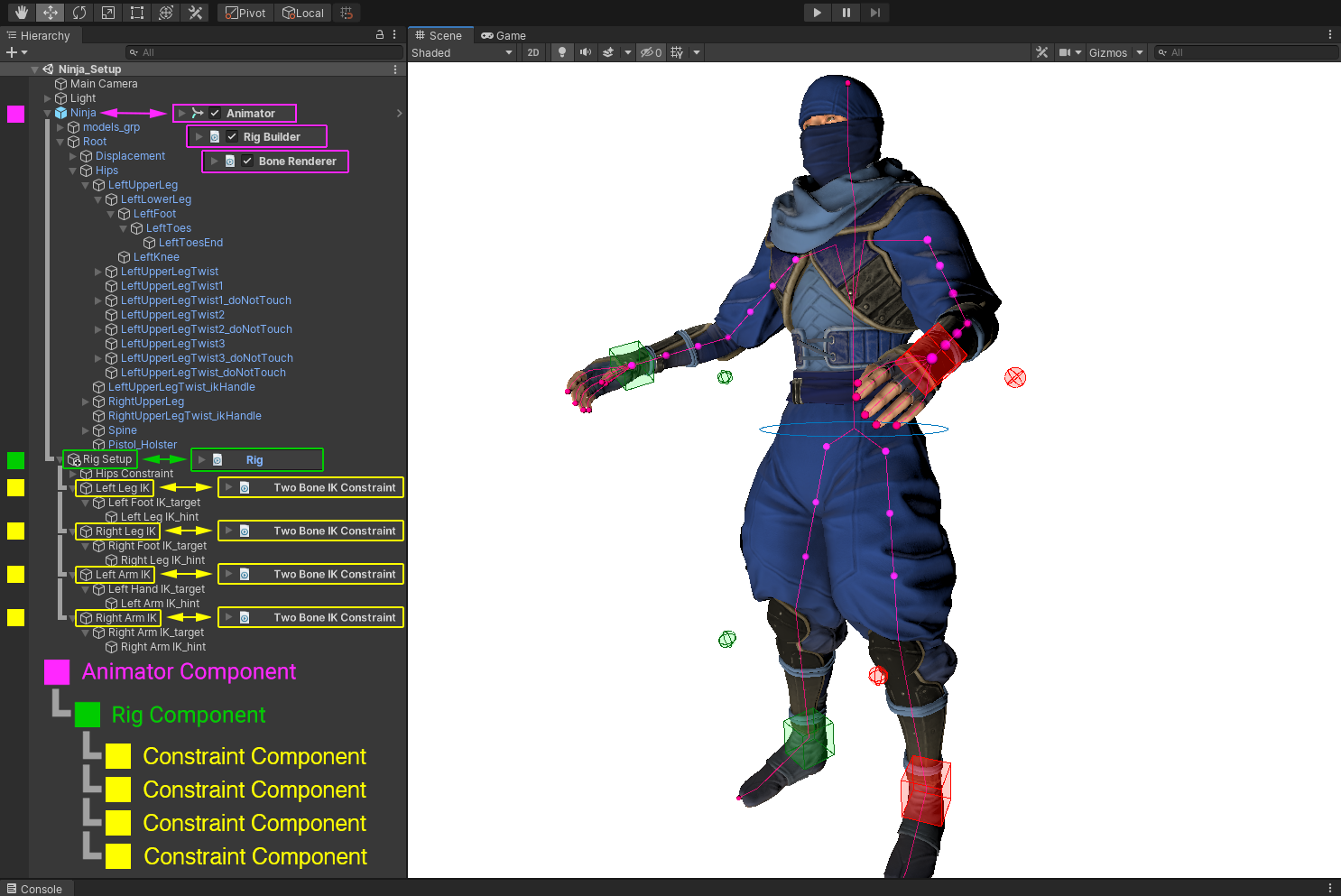 random warren
Looks about the same
As long as your shoulder bone's tip/tail is exactly where forearm begins
That is not guaranteed with all rigs
delicate thicket
it might...
delicate thicket
random warren
It certainly seems to
Hmm, I'm not sure if i'm doing this right.
delicate thicket
 delicate thicket
random warren
Looks about the same
As long as your shoulder bone's tip/tail is exactly where f...
delicate thicket
random warren
Looks about the same
As long as your shoulder bone's tip/tail is exactly where f...
like this?

theres actually two bones here, forgot to enable the other ones visibility
 random warren
Not sure if I can clearly see everything
Is the Target meant to be the Pole Target specifically?
IK Target should be at the hand / end of the chain
 delicate thicket
yea its the pole target
The normal targets are just called the hands, since they don't have any hands and because its the main bones animators interact with
random warren
delicate thicket
The normal targets are just called the hands, since they don't have any hands an...
"Main bones" meaning what?
delicate thicket
everything else is IK
random warren
You should use a separate IK bone as the Target
delicate thicket
 delicate thicket
random warren
You should use a separate IK bone as the Target
delicate thicket
random warren
You should use a separate IK bone as the Target
? the target is its own thing
okay i meant like
people use ik to move the whole arm
the forearm has the ik constraint
and the ik is part of that chain
random warren
Just confirming you're not using the arm's child hand bone as the IK target
delicate thicket
those are both ik and people don't need to touch em
delicate thicket
random warren
Just confirming you're not using the arm's child hand bone as the IK target
no no
That would break completely lol
random warren
Indeed
delicate thicket
random warren
What is the pole mirrors purpose and why does the target itself have constraints?
the pole target stays between the bone chain, in the middle, and then the hint uses the pole targets position to somehow mirror to the other side?
is there some kinda seesaw action happening where its just like a rotating pole in the middle with the target and hint at either end?