#``` void CrosshairDetect()
1 messages · Page 1 of 1 (latest)
 spice river
I think there's a way, with a raycast, to check which pixel maps to what object in your game world
Actually, I think this is the right implementation, because this accounts for varying distances and stuff
 solid hatch
But line lockAreaImage.rectTransform.rect.width/2 does not give the right radius
spice river
Here's a snippet that I have in my game to check where the player's cursor hits a plane:
public void OnAim(InputAction.CallbackContext context) {
  Vector2 InputAimPosition = context.action.ReadValue<Vector2>();

  if (Camera.main != null) { // yells at me when the game is closed
      Ray ray = Camera.main.ScreenPointToRay(InputAimPosition);

      if (aimPlane.Raycast(ray, out float distance)) {
          Vector3 aimPoint = ray.GetPoint(distance);
          // cursor position getting locked to Z by inputrelaimpos set
          InputAimDirection = MovementUtils.inXZ(aimPoint-cc.transform.position);
      }
  }
}
wait, have you looked into aim assist implementations? I imagine this is a well-defined task
solid hatch
spice river
wait, have you looked into aim assist implementations? I imagine this is a well-...
Never look into any aim assist implementations
I got this idea from Armor Core 6 and want to put it in my game
spice river
Actually, I think what you should be doing, ideally, is just base these calculations off of rotation. Check the orientation of your camera's view, compare that orientation to that of your camera and the targeted object, and if the difference between those angles are below a threshold, snap to that target.
I don't think you should be comparing any positions
solid hatch
I don't want to use angles because a cone does not fit perfectly into the Circle in the center.
spice river
I don't think the rotations necessarily have to be circular
I'm sure there's some manner of getting the range of rotation to fit an oblong shape
solid hatch
How would you do that?
 thin pewter
spice river
I don't think you should be comparing any positions
thin pewter
spice river
I don't think you should be comparing any positions
hi how come
solid hatch
round shape
spice river
@thin pewter because the raycast my or may not hit anything, and the position of the raycast hit could be any distance from the target. Maybe the target is 10m from you, but the raycast can hit something from 1m away or 1000m away.
In the code shared, the target is known, so you don't even have to try to find it with any raycasting. Even if you didn't know the target at function call, I think the performance would be fine if you just checked against some number of targets in the game world. But if you have like 100+ potential enemies, maybe performance becomes questionable
anyway, for a noncircular round shape, hmmm
solid hatch
spice river
<@883005376319082516> because the raycast my or may not hit anything, and the po...
"But if you have like 100+ potential enemies, maybe performance becomes questionable"
I just testing if the aim assists work. In the real game, the aim assist will pick the target closest to the center of the screen.
 final sentinel
Just gonna put something here if you are trying to do aim assist: just make the hit points bigger (if they are invisible) or make new hit points to use with aim assist that are bigger over the target
It's not laggy + It doesn't move the camera so it's not disorienting
If that's what you are doing
I just skimmed over
spice river
@solid hatch off the top of my head - I think you can find the yaw and the pitch between you and the target, and see if the vector made by those angles is outside of some oblong shape - see here
solid hatch
I thought this was what I was trying to do.
I convert the target World Position to the Screen Position and find the distance between the center of the Screen and the target.
And if the distance is less than the radius of the Lock Zone, than I know the target is in range. The crosshair hover on the target.
thin pewter
spice river
<@883005376319082516> because the raycast my or may not hit anything, and the po...
would limit the distance it works and have it not do anything if it dun hit anything
final sentinel
What if you just devided the actual lock radius thing size in the code so it doesn't go out of bounds, just goes in bounds because clearly it's getting the size too big for some reason, so maybe just test for a sweetspot in the division until it's correct?
Nobody is going to complain about a small bit of distance either way, so it's not like you need to worry, if anything, just make it go a little inside bounds, rather than outside, as that is better even if it's not perfectly on the circle
spice river
@final sentinel somebody already suggested that, and the math doesn't work out
final sentinel
spice river
<@927384507923963964> somebody already suggested that, and the math doesn't work...
Mb
Just one of the simpler options to do it
spice river
it doesn't produce the effect that you would think
final sentinel
What does it do then?
Cause i've done that type of division and it did work how i thought it did
spice river
the farther your camera is from the point, the farther off the box gets
honestly I don't understand the math of it, but it's a problem I ran into in one of my projects, and then I finally figured out how raycasting works
final sentinel
well I only read the original, and skimmed through previous said stuff here, so I'm only going based off the original and some of the messages here
solid hatch
final sentinel
What if you just devided the actual lock radius thing size in the code so it doe...
I could, and it worked. But if I change the window size, every thing go boom.
final sentinel
solid hatch
I could, and it worked. But if I change the window size, every thing go boom.
Oh, then you would have to calculate the actual screen size, and probably make settings for screen resolutions so it doesn't go further than that, it's how most games do it
thin pewter
solid hatch
I could, and it worked. But if I change the window size, every thing go boom.
have you set the ui scale mode to constant pixel size
solid hatch
final sentinel
Oh, then you would have to calculate the actual screen size, and probably make s...
This is the part I was struggling
final sentinel
solid hatch
This is the part I was struggling
Why?
solid hatch
thin pewter
have you set the ui scale mode to constant pixel size
no...
thin pewter
u should cause or else the ui wont change to fit different resolutions
wait i got mixed up mb lol
its scale with screen size
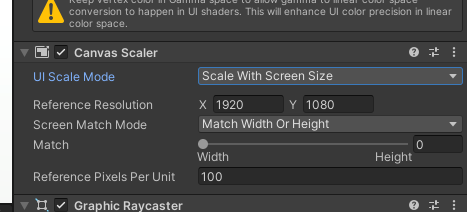 solid hatch
final sentinel
Oh, then you would have to calculate the actual screen size, and probably make s...
solid hatch
final sentinel
Oh, then you would have to calculate the actual screen size, and probably make s...
I don't know how to get the radius related to the Screen Position
thin pewter
the issue is that the ui changes sizes but the lock radius does not right
solid hatch
Ah
Oki
I change it to "Constant Pixel Size"
https://gyazo.com/56a2664fff6864f696fef6da97ebcf03

and It work
thin pewter
yay
solid hatch
Is there a way I can apply this to the "Scale With Screen Size" mode?
spice river
solid hatch
I change it to "Constant Pixel Size"
https://gyazo.com/56a2664fff6864f696fef6da9...
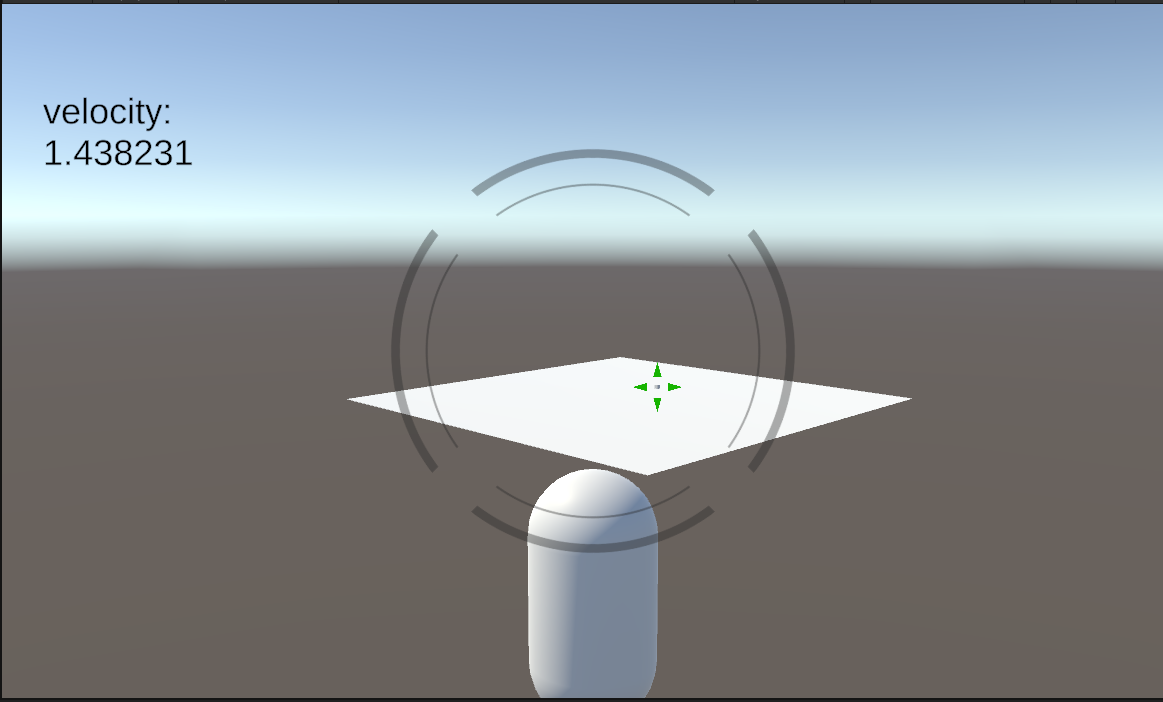
Does this still work if you're farther away?
 spice river
nice
thin pewter
solid hatch
Is there a way I can apply this to the "Scale With Screen Size" mode?
i think you could
you get the users screen resolution with Screen.currentResolution by the way
I think you could change the lock area size with that