#so if this object was near the camera,
1 messages · Page 1 of 1 (latest)
 coarse pewter
That would be the idea
Ideally I could have any meshes on the sky layer positioned on the camera without having to worry that objects in the scene would collide with the "sky objects", or about them hitting the camera's far clip plane without having to increase it a lot
Camera stacking could do that, but it'd also render them unnecessarily wherever they're covered by nearby objects, and having to ensure the secondary camera's properties always match is a bit of an extra effort
Secondarily if I could replace the scene sky mesh to one a more suitable one I could get by with that
 rigid viper
So the first issue is that opaques are drawn first then tranparents which is already a problem itself
Im pretty sure stencils can probably get you there
coarse pewter
I'm a bit confused how stencils are meant to be used with SG
Seems by now it isn't an official feature
But since I can have stencil shaders that only do that one stencil thing, I'm thinking of setting the scene sky to use one and test against that
rigid viper
Worst case is that the clouds probably won't be culled ever I suspect.
rigid viper

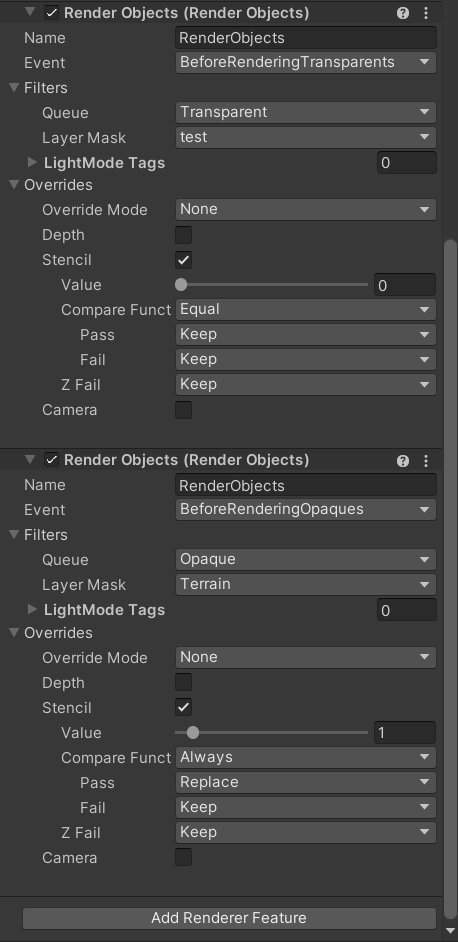

probably not optimal but that there renders transparents always under the opaque there and still allowing the skybox to render
I've no clue how culling works in this case if you were to stick the object at the camera. I think it just breaks frustum culling for it and it just renders anyway
so yeah, some extra overdraw in this case
coarse pewter
rigid viper
https://i.imgur.com/xeAdVtP.png
That's helpful
It also seems doing the opposite also works by replacing the sky with a stencil shader
