#Without knowing anything about the
1 messages · Page 1 of 1 (latest)
 hardy crystal
you'd have to analyze the particular mesh you are looking at
there's no guarantee about vertex ordering etc.
you'll have to do some analysis of the triangles to find the opposing triangles and pair them up
 strange dirge
 hardy crystal
basically - the vertex array is not enough. You need the triangles too.
strange dirge
i have both
hardy crystal
strange dirge
this is not a plane
this is some complicated math. What's the goal here?
strange dirge
i need to create tiles/cells out of the quads of that mesh
hardy crystal
seems backwards
I'd probably start with a grid and then project that grid onto the existing mesh.
strange dirge
the goal is to given a terrain mesh, create a path finding grid data
hardy crystal
strange dirge
the goal is to given a terrain mesh, create a path finding grid data
have you considered using NavMesh?
strange dirge
can't, the end result of the grid will be written to a specific file format so I can load into my game server
hardy crystal
why does that preclude NavMesh?
strange dirge
basically for each cell I need the 4 heights of its points + if its walkable or not
strange dirge
hardy crystal
why does that preclude NavMesh?
it's a remake of a 2003-ish game
 bronze nova
given an initial vertex, you can find all the trinagles that use it. Then check which of those triangles contains the the next point from your vertex list. repeat.
hardy crystal
Does slope etc matter?
strange dirge
nope
hardy crystal
Then it's basically just a graph of triangles. You can find adjacent triangles by those which share an edge
then all standard graph algorithms can be used
including A*, Djikstra's, etc...
strange dirge
the game uses A* to calculate paths, problem im trying to overcome is to given any mesh create the data in the format it understands
hardy crystal
How are you using A* without a graph
I'm going to assume you mean the A* pathfinding asset rather than the A* algorithm?
strange dirge
the algorithm
hardy crystal
hardy crystal
Then it's basically just a graph of triangles. You can find adjacent triangles b...
right so... this is how you make the graph
strange dirge
we are able to read the original game formats and those files have the graph
hardy crystal
go through all the triangles, build up an adjacency list
bronze nova
strange dirge
the game uses A* to calculate paths, problem im trying to overcome is to given a...
if you are building the mesh yourself, you can compute the neighbor offsets to the appropriate vertex. If your NOT, then you'll have to build that adjacency list before processing.
strange dirge
for context:
we load the cells this way
            for (int i = 0; i < width * height; i++)
            {
                Vector4 heights = new Vector4();
                heights[0] = data.ReadFloat() * 0.2f;         // height 1
                heights[1] = data.ReadFloat() * 0.2f;         // height 2
                heights[2] = data.ReadFloat() * 0.2f;         // height 3
                heights[3] = data.ReadFloat() * 0.2f;         // height 4
                cells[i].Heights = heights;
                cells[i].type = GAT.TYPE_TABLE[data.ReadUInt()];    // type
            }```
then we ask for a cell this way
    ```public GAT.Cell GetCell(double x, double y) {
        uint index = (uint) (Math.Floor(x) + Math.Floor(y) * gat.width);

        return gat.cells[index];
}```will look into that adjacency thing
bronze nova
strange dirge
will look into that adjacency thing
this is required by A* because it goes from neighbor cell to neighbor cell (neighbor is all we mean by "adjacency")
strange dirge
Im confused... the adjacency thing going to be responsible for giving me what I need to create the cells so I can input that into my A*, is that right?
bronze nova
yes, to go from mesh to cells. but also, in the A*, each cell needs to know which cells are its neighbors to compute the path.
@strange dirgelet me ask.. do you really need to start with the mesh itself? What if you started with a plain ol' rectange of x,y cells, to use in A*, (where neighbors are defined by their x,y index). Then after the path is computed, when you want to draw it, use the cell index to compute the appropriate position of the cell, on the mesh (using only the offets between a few verticies to detemine the draw/map size of each cell).
strange dirge
It makes sense
What I wanted to achieve was this, after it loads the ground plane it goes over each cell, split it into 16*16 chunks and creates a mesh overlay on top of the terrain to display the cell types

but it's only capable of doing that because the game files provides each cell 4 height points
and I'm unsure how to reverse that once I don't have the cell data and I suck at math
I dont really care about the mesh itself, I just need to be able to create a bunch of cells using the correct height data
bronze nova
hmmm.. I guess this depends a bunch of the format of the height data. e.g. is it provided in a 2d array (easy), or in a single array, row by row/column by column, totally random...
strange dirge
its in a 1 dimension array
strange dirge
strange dirge
for context:
we load the cells this way
``` //load the cells
for (in...
we load it sequentially (width * height) then to get the cell with (x + y * width) <- y is actually z
(idk if that's what you mean)
bronze nova
yep, thats exactly what I mean.. looks like row by row. So good you know how to transform an x,y coordinate into an array index. So neighbors of x,y are just (x-1,y) (x+1,y) (x,y-1) (x,y+1).. (though obviously you'll need to add a boundry check in there)
strange dirge
I see, how should I find the heights of each point then? I know cells are 1 unit each, so the centres are 0.5f offset to each corner
bronze nova
wouldn't that be the data stored in the height array you are using?
e.g. heightArray[ToIndex(x,y)].height?
strange dirge
I need to create the height array from a random plane/mesh plane
That’s the problem I’m trying to solve 🤣
bronze nova
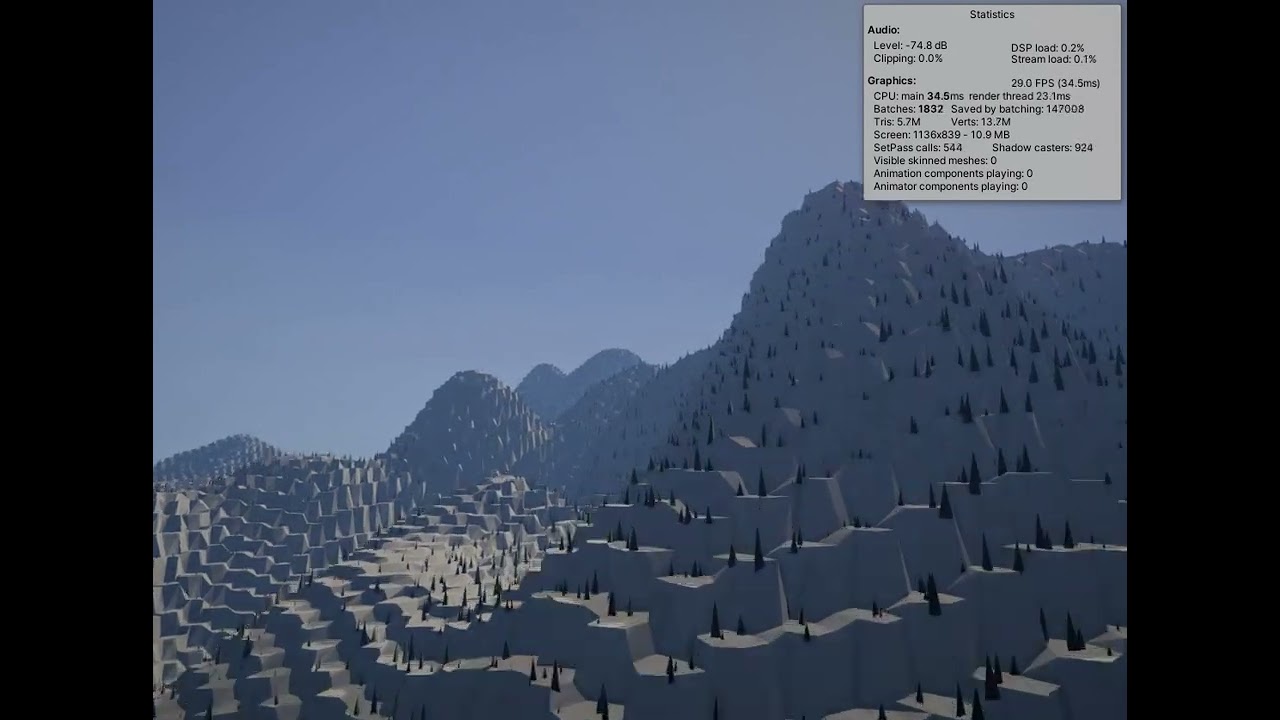
check out perlin noise for that. It allows you to specify a 2d coordinate, and get back a random value.. whats cool about this kinda noise is that it changes "smoothly" so you get smoothly changing hills and valleys as you traverse coordinates..
perlin noise also takes a "frequency" parameter, so you can combine the results of multiple Perlin noise values, (each using a different frequency) to generate huge complex maps. I made this map like that: https://youtu.be/C45YRYoKFgE