#archived-urp
1 messages · Page 31 of 1
 placid laurel
 solar lotus
How do you use shared material in URP
 soft lion
solar lotus
How do you use shared material in URP
soft lion
solar lotus
How do you use shared material in URP
Is there problem with that?
solar lotus
yeah I'm confused on how to use shared material for URP
im trying to use a unlit material for perlin noise
soft lion
What you mean by shared material? Have multiple object use same material?
solar lotus
never mind its a coding thing i dont think you'd understand
soft lion
Why did you ask if you are not willing to explain your issue
solar lotus
So with standard 3D core you are able to use sharedMaterial.mainTexture = texture; (somehting like that) but in URP you are not able to use that anymore or at least I don't think you can so I'm asking if there is a way you can use sharedMaterial in URP
solar lotus
exactly you wouldn't understand 🤷♂️
soft lion
solar lotus
So with standard 3D core you are able to use sharedMaterial.mainTexture = textur...
Im pretty sure Renderer.sharedMaterial works exactly same way in birp and urp. Why you think it doesnt work?
solar lotus
it doesn't not anymore
soft lion
It should
You should show what you have done and what happens, saying something doesnt work isnt helpful
It can be bug or problem with your code, without seeing it its impossible to tell whats going on
 pliant cipher
Hi, I'm working with the unity 3D URP Template, but am making a 2D game ( just feels easier to do 2D parallax without having to do coding etc. ) , would there be any way that I could still achieve the pixel perfect camera effect on this 3D project? or should I just go stick with the Unity 2D template and try to figure out parallax?
soft lion
pliant cipher
Hi, I'm working with the unity 3D URP Template, but am making a 2D game ( just f...
It doesnt matter much which project template you use but Im pretty sure the pixel perfect camera doesnt support perspective projection mode. Making perspective camera pixel perfect sounds much more painful than parallax effect so id stick with 2d
 steep furnace
After upgrading to URP, TextMeshPro does not function properly (the text is getting blurred). I have tried the following methods but none of them worked for me:
- Turned off anti-aliasing on active cameras.
- Tried switching to 3.2.0-pre3 package of TextMeshPro, after upgrading, changed the TextMeshPro material's shader to TextMeshPro/Mobile/Distance Field.
- Ensured that HDR is turned off.
If anyone knows how to fix this, please help me out.
steep furnace
steep furnace
After upgrading to URP, TextMeshPro does not function properly (the text is gett...
This is fixed when updated TextMeshPro shaders with TextMeshPro/Distance Field SSD.
pliant cipher
soft lion
It doesnt matter much which project template you use but Im pretty sure the pixe...
Okay, thank you!
 crystal pebble
I'm coming from a different engine (LOVE2D), where I built a special post-processing effect - basically, camera rendered to a backbuffer, then the backbuffer (texture/canvas) was rendered into a luminance buffer, where all kinds of luminance-based things happen (excitation/decay/aberrations) etc to simulate a nice warm glowy/blurry CRT. Is it possible to build something like this in URP post-processing? Mainly what I need is: render camera to texture, render to offscreen texture one or two more times, then render that back to camera.
The key thing being that the luminance buffer is stateful, and persists frame to frame, so I can't just chain a bunch of stateless post processing to do this
Is ScriptableRenderPass where I start?
 dusty sequoia
I am working with ScriptableRenderPass and I have a set up where I render multiple cameras, but have work I can do that is shared between cameras. From what I can, tell Execute is called per camera, I need to figure out how to delimit the frames. Is there a way in URP to get frame start/end events?
crystal pebble
crystal pebble
Is ScriptableRenderPass where I start?
fwiw to answer my own question this video helped me get started: https://www.youtube.com/watch?v=MLl4yzaYMBY

✔️ Works in 2020.1 ➕ 2020.2 ➕ 2020.3 🩹 Fixes for 2020.2 and .3:
► When you create a shader graph, set the material setting in the graph inspector to "Unlit"
► Editing properties must be done in the graph inspector instead of the blackboard
Renderer features are custom render passes you can add to your game using Unity's Universal Render Pipelin...
crystal pebble
in a scriptable ScriptableRenderPass, if I've created a temp texture and have a RenderTargetHandle to it, how do I "bind" that to a (non-main Texture2D) in a material I'm blitting through?
I assumed I would be setting a material's texture to the RenderTargetHandle's identifier, but I don't see a way to manipulate a material/texture binding through a CommandBUffer
crystal pebble
So far all I've found is by setting global shader props. If there's a local way that'd be great... is there?
 late monolith
I have a small question about forward and deferred lighting, i was wondering which one of the two seems best for an open outdoor scene with realtime lighting, there is a possibility of procedural generation
 brittle jewel
Hello,
Is there a way to implement triplanar UV mapping in URP lit shader?
 merry monolith
brittle jewel
Hello,
Is there a way to implement triplanar UV mapping in URP lit shader?
merry monolith
brittle jewel
Hello,
Is there a way to implement triplanar UV mapping in URP lit shader?
I hate to be the guy asking this but did you google for this?
there's no urp lit triplanar but you can do it with URP shader graph
brittle jewel
i did, but i didn't find ready shader so i assumed that it is not so simple
so the only way is to write my own shader?
merry monolith
write, use existing custom SG's, buy one from asset store etc
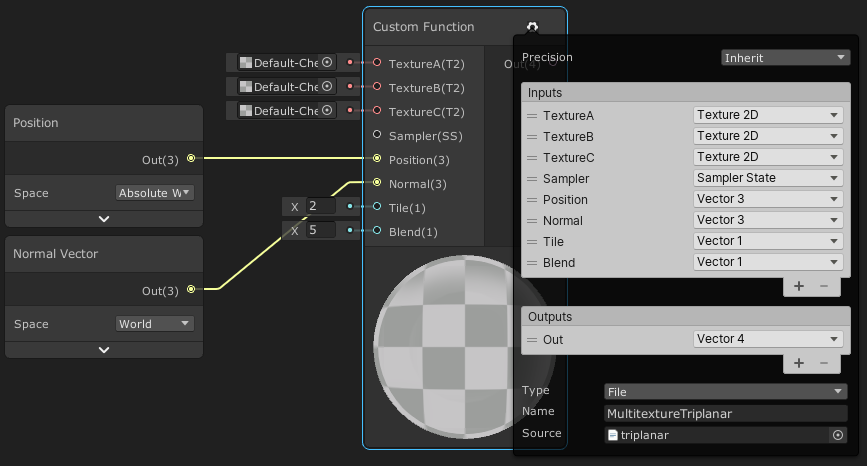
This post includes an introduction to using the Position node to sample textures rather than using mesh UV channels, which is also the basis of Triplanar mapping. It won’t be super in-depth but wil…
brittle jewel
thanks a lot, and sorry for asking that simple question
 marble vigil
brittle jewel
Hello,
Is there a way to implement triplanar UV mapping in URP lit shader?
marble vigil
brittle jewel
Hello,
Is there a way to implement triplanar UV mapping in URP lit shader?
https://docs.unity3d.com/Packages/com.unity.shadergraph@12.1/manual/Triplanar-Node.html
There's a node for it built in which also discussed in Cyan's article
brittle jewel
thanks
 queen cloak
Is there an easy way to determine the lighting intensity of a point light in a shader in URP?
Im very sure Light.color is the base color * intensity
placid laurel
queen cloak
Is there an easy way to determine the lighting intensity of a point light in a s...
half lightIntensity = max(max(light.color.r, light.color.g), light.color.b);
queen cloak
Thanks I'll give this a try
queen cloak
hmm i guess its close enough, but not want I'm looking for. I might have to write the intensity into a buffer and access it similar to how URP accesses the light via lightIndex. (there's no guarantee that r, g, or b will be 1 which will provide the intensity)
 open raptor
Can anyone tell me how to fix URP giving me the wrong color attachment to a scriptable renderer feature?
Im using renderingData.cameraData.renderer.cameraColorTarget to get the target but its giving me attachmentB when the previous feature outputs to attachmentA
 snow egret
Have been trying to make a jelly cube with a slight distortion on it in Shader Graph using a mixture of Screen Color and the distortion I wanted but it's end result means that I can't have a transparent material behind it or it's ignored. (gif to explain)
Does anyone know of another way of having the distortion that'll allow transparent materials behind it or a way to fix the current method I'm using?

 desert vault
Hi, does anyone know why im getting this weird alpha effect when my trees are overlapping my water? its URP deferred with depth & opaque texture enabled. the water is a lit alpha shader graph and the trees are a lit alpha cutout shader graph

trees are alpha cutout, so idrk why the color of the water is fading through
merry monolith
@open raptorjust to be clear, you are using ScriptableRenderPass.ConfigureInput when you add the pass?
https://docs.unity3d.com/Packages/com.unity.render-pipelines.universal@13.1/manual/upgrade-guide-2022-1.html
"URP expects Renderer Features to declare their inputs using the ScriptableRenderPass.ConfigureInput method. The method provides the information that URP uses to determine automatically whether rendering via an intermediate texture is necessary.". if you don't config this properly, maybe it uses the wrong buffer?
I definitely don't know much about this, just throwing this out there
I remember having some trouble in past when dealing with these targets but then just mirrored what URP did on SSAO on newer versions
 dark pelican
So I'm using the urp for it's 2d lights since my games protag has a flashlight, yet even with shadow casting bounding boxes (with the attached settings), it only sometimes works


here's an example of it actually working

oh I'm dumb turns out the problem was Self Shadows lol
 daring swan
Does anyone happen know how to add/edit custom tonemap(s) to URP project?
merry monolith
@daring swanyou mean custom tonemap curve or just LUT?
for LUT, there is volume component called "Color Lookup"
I don't think official docs even mention it but it's there
daring swan
custom tonemap
I saw a few people claiming to be using custom tonemaps in urp
but I couldnt find any info on how they did it
merry monolith
that doesn't really tell anything itself
daring swan
I would imagine its the same custom tonemap curve as in HDRP
merry monolith
there's no such thing on current URP
pre URP 8 you could have used old PPv2 with URP which still had custom tone curve
if you need something like that on any modern URP version, you have to implement it yourself
merry monolith
I don't know why that's not there tbh, I guess they thought just exposing color curves was enough?
I've manually edited the URP source code for tonemapper part in past.. it's not horribly complicated to change but it would mean you'd be stuck on custom URP version then
if one really needed something like this and didn't want to maintain custom URP version for this reason alone, I guess trying to do this on your own renderer feature would be only option
that is, if Unity actually exposes HDR data for this to work
@daring swan have you tried that "color curves" thing though?
daring swan
I haven't really tried anything yet, just looking into it
merry monolith
you can get quite far with the existing overrides
 orchid glen
Hey is it possible to skip certain UsePass calls on builds. I only want a specific UsePass for Editor.
 atomic olive
Does anyone know a way of making "Excel"-style graphs in Unity, WITHOUT making each cell an individual GameObject (my current solution)? See image for insight..
 marble vigil
atomic olive
Does anyone know a way of making "Excel"-style graphs in Unity, WITHOUT making e...
marble vigil
atomic olive
Does anyone know a way of making "Excel"-style graphs in Unity, WITHOUT making e...
Tilemaps would be one pre-existing way to render a lot of tiles from arrays, but I don't know how if the colors can be freely defined or if you're limited to an existing tile palette
I think a surefire solution would be to learn procedural mesh generation
atomic olive
Ye thanks. Seems like generation the mesh will be the way to go, although im still considering doing it through shaders 🙂
 dire trench
baiscally, (that's my first project) i upgraded to urp shaders, and, in the editor, all materials and other things works 100% fine but when i build project, half of the things are pink. i searched online, and someone was having my same problems. some link i didn't understand, and some others what they tried to fix didn't help me. what are the main causes of this issue?
placid laurel
im having trouble converting project to urp using the latest LTS
dire trench
I have done like that
Select the materials
Go to edit
In the bottom there shiuld be a button "rendering" then materials and click convert to urp materials or something like that
In olders version is similar
placid laurel
How do I change the color its just showing me this?
 marble vigil
placid laurel
How do I change the color its just showing me this?
marble vigil
placid laurel
How do I change the color its just showing me this?
Sprite color is controlled by the sprite renderer via vertex colors
placid laurel
marble vigil
Sprite color is controlled by the sprite renderer via vertex colors
oh ok
 proven hornet
Does anybody know about this error?
 dire trench
baiscally, (that's my first project) i upgraded to urp shaders, and, in the edit...
dire trench
dire trench
baiscally, (that's my first project) i upgraded to urp shaders, and, in the edit...
Someone?
 runic sparrow
desert vault
runic sparrow
desert vault
have you checked the render queue value on your materials?
 dawn tusk
Hi, i have a pixel perfect camera in my scene, everything works fine in editor both play and edit mode, but doesnt work in the built .exe
dawn tusk
fixed that with setting built game setting to windowed mode, and setting the right resolution manually
 hasty prairie
Hello, very new developer here. Is there any reason to select the "Core" version of a template rather than the "URP?"
 empty path
hasty prairie
Hello, very new developer here. Is there any reason to select the "Core" version...
empty path
hasty prairie
Hello, very new developer here. Is there any reason to select the "Core" version...
What do you mean?
Core shows many options, 3D, 2D, URP 3D, HDRP 3D
3D is the old render pipeline, no new features or improvements just bug fixes, URP and HDRP are the new render pipelines
hasty prairie
Hmm. Give me a second.
empty path
URP 3D and HDRP 3D are new RP's
hasty prairie
This is what I'm looking at. From my very minimal understanding URP is the simpler more accessible option to use Unity's *newer RP.
I'm wondering if there is any positives to choose the Core render to start out with.

I understand there is value in learning the URP, but as I am just starting to learn I don't want to overwhelm myself. I guess I'm wondering if URP is easier to render with than just the Core render.
empty path
hasty prairie
This is what I'm looking at. From my *very* minimal understanding URP is the sim...
Both are easy, scripting and what not is the same when it comes to game scripts. Render pipelines are mostly visual features, like SSAO, antialiasing, decals, shaders, etc. Both of them have the same "core" of unity (UI, loading/scene system, etc).
If you're new I suggest 3D/2D, since it's easier to find things about it online (been there for much longer).
so if you face an issue, there's probably a fix one search away
hasty prairie
So start out with just the core?
empty path
Yeah, select 3D or 2D (whatever your interested in).
Core is wrong name for it, it's called built-in render pipeline (or legacy render pipeline)
most games made with unity use the built-in render pipeline
hasty prairie
Fair enough. Thank you by the way!
empty path
Sure thing
 oak oak
Hello folks! I have a small problem. I'm new to Unity's tree system and wanted to create some trees to place. The thing is, that apparently I NEED to use the "Tree Creator Leaves Fast" shader for the material of my leaves. That shader however, results in only pink for me (my render pipeline is URP).
Some tutorials say to just change shader type, but then I have to drag the material onto the tree which doesn't put it in the "real" slot and won't let me modify the leaves after.
Does anybody know how to apply materials to URP trees? (My version is Unity 2022.1.3f1)
 timber glade
@oak oak there may be more than one material slot on the tree, for instance, bark &leaves. Make sure you're getting the correct slot
oak oak
I am putting the mat in the correct slot, but it tells me that whatever I chose (like Lit or URP > Nature > Speedtree8) isn't a tree shader and I should use the one that doesn't render :/
timber glade
Ah, kk. I've not worked with those specifically so I can't make further suggestions. Sorry!
oak oak
Okay, thanks anyways!
 ancient harness
anyone know why my renderer features don't work in game but they are visible in the scene view
nvm i checked the main camera's culling mask
 rare totem
Anyone had this issue with Unity 2021.3.4f1 and URP 12.1?

Can't even run a build since I have strict mode enabled.
Ok, nvm. This happens when targeting Web GL 1.0
placid laurel
can you have light cookies in urp
soft lion
placid laurel
can you have light cookies in urp
on unity 2021 and later that should be a thing
 thorn pollen
Is there a resolution setting or something somewhere? I'm admittedly new to this, but have been spending a lot of time learning 3d models in blender and now that I've imported everything to unity and setup a scene with them they are very jaggedy / low resolution looking. I am using URP for this.
just lots of jaggies
soft lion
thorn pollen
just lots of jaggies
Could you share some screenshots with us to vlarify what your issue looks like?
 fallow garden
ive tried using both https://assetstore.unity.com/packages/2d/textures-materials/sky/allsky-free-10-sky-skybox-set-146014 and
https://assetstore.unity.com/packages/2d/textures-materials/sky/skybox-series-free-103633#description
but they both show up as black. Trying to use edit > rendering > upgrade materials didnt work.

Elevate your workflow with the AllSky Free - 10 Sky / Skybox Set asset from rpgwhitelock. Browse more 2D Textures & Materials on the Unity Asset Store.

Elevate your workflow with the Skybox Series Free asset from Avionx. Browse more 2D Textures & Materials on the Unity Asset Store.
placid laurel
Is there any way to have different runtime ambient lighting values within volumes? Like, have a volume with an ambient light, and another volume with another ambient light and they work kinda additively and objects could be affected by more than one (kinda like in the hpl2/hpl3 engines) I've been trying to look this up on google but can't find anything short of making your own lighting solution/shader thing.
marble vigil
placid laurel
Is there any way to have different runtime ambient lighting values within volume...
I think not
Ambient light is sampled from reflection probes, so you can have your own lighting in custom cubemaps
In recent URP versions the cubemaps can be blended together with local volumes I think, but not applied additively
 wicked trellis
Hey, trying here instead (deleted in lighting). I'm wondering if area lights in the URP are supposed to give the same result as spotlights? I'm using Unity 2021.3.0f1. The image shows an area light angled straight down from the ceiling and the light it casts on the wall (Baked Lightmap viewing mode).
 marble vigil
wicked trellis
Hey, trying here instead (deleted in lighting). I'm wondering if area lights in ...
marble vigil
wicked trellis
Hey, trying here instead (deleted in lighting). I'm wondering if area lights in ...
Not supposed to, no
Baked lights should also bounce around somewhat
How many samples do you have?
I'm having flickering white 1 pixel lines at the screen's edges, anybody recognize it?

Happens regardless of quality preset or renderer, but doesn't happen in a new project using the same version and same starter asset scene
Turning off post processing volume doesn't change it either
wicked trellis
marble vigil
Not supposed to, no
Baked lights should also bounce around somewhat
How many sam...
Hmm, interesting. These are my low/quick bake settings

What is strange to me, is that it lights up the area like a spotlight even though the shape of the area light is rectangular.
marble vigil
wicked trellis
What is strange to me, is that it lights up the area like a spotlight even thoug...
How big is the rectangle?
wicked trellis
marble vigil
How big is the rectangle?
 marble vigil
I'd assume that would work like an area light, not a spot light
wicked trellis
marble vigil
I'd assume that would work like an area light, not a spot light
Yeah, I tried in a test scene and it's the same

😂
marble vigil
Strange! What if you make it long and thin
wicked trellis
It was like this in my last project as well, never managed to solve it and it's quite annoying 😄
wicked trellis
marble vigil
Strange! What if you make it long and thin
I will try
wicked trellis
marble vigil
Strange! What if you make it long and thin
This was interesting (moved it down and increased the strength).

Maybe I've been using it the wrong way 😅
marble vigil
Looks better at least
wicked trellis
For sure, always appreciate your help and input Spazi!
I will adjust the shape of my other light. Will probably work better
wicked trellis
I think it might actually be the range that messes it up. I had it way too low and in those instances it will look round.
marble vigil
wicked trellis
I think it might actually be the range that messes it up. I had it way too low a...
A range of 0.1 is unusually short
I forgot range even was a thing for baked lights
wicked trellis
marble vigil
A range of 0.1 _is_ unusually short
I forgot range even was a thing for baked li...
Yeah, I didn't realize that was affecting it. I don't seem to understand the range for the area light. Doesn't seem to work the same way as other lights.
 brazen isle
Is it possible to have the same functionality as this node (Scene Color) in HLSL shader?

 dry willow
brazen isle
Is it possible to have the same functionality as this node (Scene Color) in HLSL...
dry willow
brazen isle
Is it possible to have the same functionality as this node (Scene Color) in HLSL...
The node basically samples a global texture named _CameraOpaqueTexture.
But there's also an include file that handles it for you, #include "Packages/com.unity.render-pipelines.universal/ShaderLibrary/DeclareOpaqueTexture.hlsl"
https://github.com/Unity-Technologies/Graphics/blob/master/Packages/com.unity.render-pipelines.universal/ShaderLibrary/DeclareOpaqueTexture.hlsl
Can then use it's SampleSceneColor function, with the screen position as uv (positionNDC.xy / positionNDC.w)
brazen isle
dry willow
The node basically samples a global texture named `_CameraOpaqueTexture`.
But th...
Thanks a lot! this have given me a good direction, but importing this gives me an error that breaks the shader
Shader error in 'Unlit/ToonShader': redefinition of 'PackHeightmap' at /Library/PackageCache/com.unity.render-pipelines.core@12.1.7/ShaderLibrary/Common.hlsl(1301) (on d3d11)
 red eagle
Hey 🙌
I am trying to make a physically accurate URP camera.
What I want to calculate is the Exposure value from the ShutterSpeed, Aperture and ISO
Found some formulas online for both EV and EV100 but none of them map to the PostExposure value in the ColorAdjustment volume
This is what the documentation says: "Adjusts the overall exposure of the Scene in EV (not EV100)."
This is the equation I am using "http://endoflow.com/exposure/"


The normal exposure I know ranges from 0-15 while 2 being at night and 13 being while the sun is at it's brightest value.
The other exposure values I found ranges from -6 to 17 where (-6 is for the night and 17 is while sun is at it's brightest value)
The PostExposure in the volume is weird!
when it's night time, to increase the brightness, the exposure value is increased so night would be something like 8 and day time would be something like -7
So, the range is completley different from the rest
EV (0 - 15) Eq1 https://www.omnicalculator.com/other/exposure
EV (-6, 17) Eq2 https://photographylife.com/exposure-value
URP (8, -7)
I am just going to map the result to this range. But if you know any info about this that would be great
merry monolith
@red eagleI don't think you'll have huge success with physically correct exposure values as long as URP itself can't handle physically correct lighting values
any reason why you are not using HDRP that supports all this out of the box?
red eagle
HDRP costs a lot of performance and our target is not high-end devices
Remaping seems to fake it kind of well but I wanted to know if there is a cleaner and better approach
Thank you!
 knotty hemlock
Hola, I didn’t know where to write😅 Is it possible to create a decal w animated (external) texture?
 odd vault
Hi, I'm working on a mod for kerbal space program that enables postprocessing effects...I'm actually not sure if KSP is built on URP or HDRP but I'd assume URP...are there known issues when enabling HDR on the cameras under URP? For the most part things seem to work but there is a strange artifact where meshes that should be hidden are affecting the application of HDR...seen here, there is a ladder on the far side of this object that you can kind of "see" in the right-hand image (HDR enabled):
 merry monolith
@odd vaultI'd be very surprised if KSP used either.. it has to be using built-in renderer
odd vault
merry monolith
<@292474189691092993>I'd be very surprised if KSP used either.. it has to be usi...
why's that? Or, is there anything I can look at that would tell me?
merry monolith
because KSP is an old game.. from times before these SRPs existed
first versions were made on Unity 4... they ported it to Unity 5 at some point, haven't followed what the latest versions use
odd vault
most recent ksp runs on unity 2019.4.18
merry monolith
sure it would be possible to port to SRPs but almost nobody ever does that for already released unity game
odd vault
ok, so URP is new in 2019.3? or at least that's the oldest docs I can find. you're probably right
merry monolith
URP was called LWRP before that
odd vault
do you know where I could look to find out what it's using?
I'm able to attach a debugger and everything, I just don't know where to look
merry monolith
there would be traces of Universal in the files if it used that... but it's highly unlikely it does
odd vault
hm...well all the mod is really doing is toggling allowHDR on the Camera...got any idea how that might be related to "seeing" the meshes through the object? Or is there a better channel where I should be asking? #archived-shaders perhaps?
 final crater
Guys, can anybody please tell me how to get rid of this blockiness in my shadows

and what is this ugly transitioning this is unacceptable
 marble vigil
final crater
and what is this ugly transitioning this is unacceptable
marble vigil
final crater
and what is this ugly transitioning this is unacceptable
Those are called shadow cascades, which let you prioritize the shadow resolution closer to camera where it's needed the most
Using cascades is the only reasonable way to get high quality non-blocky shadows
Filtering of shadows and cascade edges likewise costs a lot of performance, which is why I believe it as a feature has been delegated to HDRP
final crater
Guess who's switching to hdrp then
Because this feature sounds good on paper but in effect its just terrible
Also ha, you're the same guy who helped me when I first had this issue lol
marble vigil
final crater
Guess who's switching to hdrp then
The best systems are the ones that best fit your project
As always it's a choice of tradeoffs
I recommend studying the manual of whichever pipeline you go with
They all should have a section which explains all the functions and terminology, like shadow cascades here and many more such which you'll run into for sure
HDRP especially requires studying to be used effectively
final crater
Hmm alright
I guess my issue here is expecting things to just work out of the box
Which in my opinion they should but what can you do
marble vigil
final crater
Which in my opinion they should but what can you do
Realtime graphics as a whole are all about faking it and hiding the flaws, things just aren't going to be flawless out of the box even though we're at a point where most of them do work out of the box at least
That's why tech art is a whole paid profession by itself
Heck, you can spot limitations like these in triple-A productions if you know to look for them, and the whole illusion crumbles when you move the camera somewhere it wasn't designed to be
 cunning flint
For some reason my unity scene view is glitching, this does not happen on 2d urp, or 3d built in renderer, (so far, as i haven't tested the other ones yet) only in 3d urp. When the skybox is turned off or when the global overrides only have bloom enabled or only has vignette disabled, or some random weird cases, it appears cyan. Verision: 2022.1.2f1. Os: Ubuntu 22.
 cunning flint
also when both the camera and the global volume is deleted it looks like this
 empty path
odd vault
hm...well all the mod is really doing is toggling `allowHDR` on the Camera...got...
empty path
odd vault
hm...well all the mod is really doing is toggling `allowHDR` on the Camera...got...
KSP uses built-in, most games out there currently use built-in.
empty path
marble vigil
Realtime graphics as a whole are all about faking it and hiding the flaws, thing...
Sure thing, but URP takes it to another level. Imagine not having LOD crossfade in this day and age. Maybe I can let shadow cascade blending pass, but they're really making it hard to pick URP over built-in, even when built-in is bug fixes, and even then it's low priority. It doesn't stop there, so much is missing. Things you just expect as a fact that they will be provided in a PBR game engine. Random rant but URP really has been an utter disappointment. I see value in HDRP, URP provides absolutely nothing. You know if URP was a stable render pipeline (relatively speaking), with higher quality features (both have SSAO, yet urp's SSAO is a joke) then I might say yeah, URP does something well at least. That isn't the case though, somehow the team ended with shader variant hell, a ton of time compiling an extremely simple scene. It's not like URP came a year ago, tired of waiting for the next version.
just thought of all this when I read your post, random rant, I'll stop here 😄
odd vault
empty path
KSP uses built-in, most games out there currently use built-in.
thanks, I think I have a lead on it: my hypothesis is that the alpha channel goes over 1.0 in high-specular areas. Then when it goes to blend over the previous color, it ends up doing (alpha * new) + (1 - alpha) * old. The old colors seem inverted; darker areas become lighter and light areas become darker; the blue sky becomes orange, etc.
Unfortunately I think the fix is to completely replace the stock shader...
 keen anchor
how do i get unlit particles to support transparent sprites?

 cyan talon
Your textures are not transparent, unless for some wild reason whatever you've saved them in has written checkerboard to the colour in the transparent section. You should be able to use either alpha clipping or transparency and it'll work fine—only if your textures are actually transparent.
keen anchor
damn, I don't understand the point of fake transparent images.
it wasnt transparent 😩
marble vigil
empty path
Sure thing, but URP takes it to another level. Imagine not having LOD crossfade ...
Shader variant compiling is not supposed to take long, but it's a pretty common bug it seems
From the looks of it it happens with editor version upgrades, all fresh projects have compiled perfectly fast for me
The new default URP settings 2021.3. comes with are probably the biggest UX improvement in a while, since it starts with all the features on and correctly configured
URP's selling point is its cross-platform optimization, rather than features
If your project needs features it doesn't do well, and you're comfortable doing the optimization yourself then the choice should be obvious
 elfin forge
Hey, not sure where to put this, but: I'm calling Graphics.DrawTexture on a sprite, and want to be able to apply an already-generated matrix transformation to it. How should I go about this?
placid laurel
Hey, i'm just new to URP and i don't know how to convert custom shader to urp graph shader. If not, that's okay (if yes, pls ping me before rep)
 ocean hinge
placid laurel
Hey, i'm just new to URP and i don't know how to convert custom shader to urp gr...
ocean hinge
placid laurel
Hey, i'm just new to URP and i don't know how to convert custom shader to urp gr...
i think you cant convert a written shader to a shadergraph.
 fading flame
I'm trying to use URP's Spherical Harmonics in a custom render pass, but it looks like SampleSH() and OutputSH() are both returning 0 when called during custom render pass stage, anyone have any ideas for how to access SH data during a render pass?
daring swan
placid laurel
Hey, i'm just new to URP and i don't know how to convert custom shader to urp gr...
You cant directly, you'll have to do it manually (as far as I know)
soft lion
placid laurel
Hey, i'm just new to URP and i don't know how to convert custom shader to urp gr...
small tip: by using custom functions, you can skip a lot of work by copy pasting large portions of the handwritten code as it is. obviously you're not going to get those portions as a shader graph nodes but if your only plan is to make the shader graph work, why not
 pastel ice
hey guys,
I'm trying to add a skybox to my scene but it doesn't seem to show up.
I even tried creating a brand new project and comparing it - but it works on the new project, and not in my existing one.
Any tips on what could I be missing?

 soft lion
 lament canopy
2022.2 Alpha 16 - Graphich repo URP
lament canopy
2022.2 Alpha 16 - Graphich repo URP
great, I have been waiting when it's out. have you tried what is the max pixel light count you can have? unity have only stated that it's going to be much more than 8 but nothing specific
Imo Forward+ is huge step bringing urp closer to birp in terms of features, 8 lights isnt really a much (ik birp doesnt have forward+ but 8 is really a tiny amount and deferred is quite limied)
 wheat smelt
I was gonna ask about lighting, how do I go about setting objects as lit/unlit with the URP? 2D btw
lament canopy
soft lion
great, I have been waiting when it's out. have you tried what is the max pixel l...
There are 216 lights here. Forward+ divides the screen into tiles and each tile has a light limit. that is, if the lights visible on the screen are far apart and their radii are small, you may never reach the limit. I don't know exactly how big the limit is. HDRP is 24 per tile.
forward+ takes URP much further than BIRP. In BIRP Forward, the light limit can be set more than 8, but it affects the performance a lot. Forward+ processes a lot of light much faster.
soft lion
Yeah, ik but that theres no way to increase the limit over 8 is just frusturating (especially for beginners it is frusturating to deal with light flickering, seams etc.). Now that forward+ exists, it doesnt really matter aymore
lament canopy
AMD 6900XT 3840x2160
256 spot light
 pastel ice
hey guys,
I'm trying to add a skybox to my scene but it doesn't seem to show up.
I even tried creating a brand new project and comparing it - but it works on the new project, and not in my existing one.
Any tips on what could I be missing?
lament canopy


 marble vigil
pastel ice
hey guys,
I'm trying to add a skybox to my scene but it doesn't seem to show up...
marble vigil
pastel ice
hey guys,
I'm trying to add a skybox to my scene but it doesn't seem to show up...
Deleting the Library folder and letting the editor regenerate it may solve obscure problems like these if there really is no culprit to be found
wheat smelt
wheat smelt
I was gonna ask about lighting, how do I go about setting objects as lit/unlit w...
Anyone?
marble vigil
wheat smelt
I was gonna ask about lighting, how do I go about setting objects as lit/unlit w...
Same way as with all render pipelines, use a lit / unlit material
 wheat smelt
marble vigil
Same way as with all render pipelines, use a lit / unlit material
wheat smelt
marble vigil
Same way as with all render pipelines, use a lit / unlit material
How do I make that? I am new to unity
marble vigil
wheat smelt
How do I make that? I am new to unity
Every render pipeline ships with lit and unlit materials which you can choose in mesh / sprite renderer component
Sprites use sprite lit / sprite unlit (or sprites-default or something like that)
wheat smelt
Lemme see
marble vigil
pastel ice
<@166982635950702592> same thing 😦
Well, that suggests it's not a bug so there's still something you may have missed
pastel ice
@marble vigil make sense. Any tips on how to find it? how to debug it? I tried to look at the settings we talked before + the renderer data, but couldn't find anything in there either.
wheat smelt
marble vigil
Every render pipeline ships with lit and unlit materials which you can choose in...
Is it the one that's called "New 2D Rendered Data" by default?
marble vigil
wheat smelt
Is it the one that's called "New 2D Rendered Data" by default?
No
The sprite renderer component would have a material slot
marble vigil
pastel ice
<@166982635950702592> make sense. Any tips on how to find it? how to debug it? I...
Could be anything anywhere
I don't have any good ideas or I would've suggested some already
pastel ice
😦 @marble vigil any tips on how to find it? e.g. logs, creating new project and comparing, uploading somewhere, or something else?
marble vigil
pastel ice
😦 <@166982635950702592> any tips on how to find it? e.g. logs, creating new pro...
Comparing and trying to re-make the sky material / texture
Testing in another scene, anything
You'd want to rule out and confirm everything you can
Are all textures/materials broken in your project or just the sky one? Does the material work with a different texture or the texture with a different material?
Are all custom skies broken or just one?
pastel ice
sky material / texture
fyi I didn't make it to begin with, just used the default one
marble vigil
pastel ice
> sky material / texture
fyi I didn't make it to begin with, just used the defau...
So not even a new Basic scene has a working sky?
pastel ice
@marble vigil it does, but in both cases I'm using the default skybox material - I didn't even get to the part about creating my own.
marble vigil
pastel ice
<@166982635950702592> it does, but in both cases I'm using the default skybox ma...
Both cases meaning this project and the test project? Does the custom skybox work in the test project?
I thought I understood the problem but it seems I don't
pastel ice
Both cases meaning this project and the test project?
yes
Does the custom skybox work in the test project?
There is no custom skybox - only the standard one.
marble vigil
pastel ice
> Both cases meaning this project and the test project?
yes
> Does the custom ...
So the default sky works in both projects?
pastel ice
no. the default sky only works in a new test project - in my own existing project it does not.
marble vigil
pastel ice
<@166982635950702592> it does, but in both cases I'm using the default skybox ma...
Oh, I thought this "it does" meant that it does have a working sky
pastel ice
@marble vigilSorry my bad, I actually read the "new basic scene" as in "new basic project" 🙈 let me test that as well and summarize if it doesn't work to clarify everything.
ok yeah doesn't work either.
- New project - skybox works.
- Existing project / existing scene - skybox doesn't work
- Existing project / new scene - skybox doesn't work
marble vigil
pastel ice
ok yeah doesn't work either.
* New project - skybox works.
* Existing project /...
Good summary
To confirm, you did make a new scene with template Basic (URP) or Standard (URP), rather than Empty?
And the sky defined in environment tab is "Default-Skybox"
pastel ice
@marble vigilnope, I used an empty scene. Wasn't familiar with these scene templates ?
pastel ice
marble vigil
And the sky defined in environment tab is "Default-Skybox"
yes on that one
marble vigil
Empty scene starts with no lights, sky or environment lighting, that's the primary difference
pastel ice
@marble vigil yeah which is exactly what I have. Just not sure how to create a scene with template in an existing project?
marble vigil
pastel ice
<@166982635950702592> yeah which is exactly what I have. Just not sure how to cr...
Creating a new scene usually shows something like this
 pastel ice
oh didn't even know there was a "new scene" menu xd I just right clicked an empty area which showed the context menu -> create -> scene.
but yeah same thing
 marble vigil
pastel ice
marble vigil
pastel ice
So this scene has default sky enabled in environmental light settings?
and in the dropdown behind this button skybox is set to visible?
 pastel ice
sorry it was not in that picture; but it just changes the color to black:
 marble vigil
pastel ice
sorry it was not in that picture; but it just changes the color to black:
marble vigil
pastel ice
sorry it was not in that picture; but it just changes the color to black:
Okay at least I'm now up to speed what's happening but not a clue why
I'd try hitting the generate lighting button to see if it does anything
Have you upgraded project version or made such big changes recently? Usually the first thing you see when you make a project is the default sky
pastel ice
so I don't really use the sky in my project. Been working and upgrading for a while and some versions, but the game mostly doesn't need it.
I honestly just want to create a more interactive/fun menu so I need the sky there - hence why I started playing with it.
 shut needle
pastel ice
sorry it was not in that picture; but it just changes the color to black:
shut needle
pastel ice
sorry it was not in that picture; but it just changes the color to black:
Show your cam settings pls
also you assigned the URP Asset correctly in the project?
is it a build in project which is converted or a URP Project Template?
pastel ice
@shut needle
also you assigned the URP Asset correctly in the project?
I believe so, but is there anyway to verify that?
is it a build in project which is converted or a URP Project Template?
I think converted, but honestly it's quite an old project that I keep working on, so I'm not sure. Started it long time ago.
 marble vigil
pastel ice
<@479713113256755210>
> also you assigned the URP Asset correctly in the projec...
marble vigil
pastel ice
<@479713113256755210>
> also you assigned the URP Asset correctly in the projec...
Upgrading from an old version always risks breaking stuff in odd ways, moreso if you do it multiple times
At some point it may be worth it to make a new project and move all your assets and scripts over to the fresh one as .unitypackages
pastel ice
@marble vigil I'm usually checking every time before I upgrade, but this is a "feature" I never used before.
I disagree with the idea of just moving stuff to a new project; there must be something I'm missing here.
I guess trying to re-create the entire game in a new project would reveal the issue, it would just take a lot of time though.
marble vigil
pastel ice
<@166982635950702592> I'm usually checking every time before I upgrade, but this...
Maybe there is something you're missing, maybe there isn't
It's pretty complex stuff and finding the "correct" solution isn't always worth the time, if it's possible at all
Scripts, all art content and prefabs can be moved from one project to another pretty seamlessly, and anything in a scene can be made into a prefab for moving
The only thing you'd have to re-create would be scene data such as lighting, navigation and occlusion and graphical settings assets if you want those in some specific way
Far cry from having to re-create the entire game
pastel ice
@marble vigil sometimes it's not worth the time, agreed. In this case I think it is since ( A ) It's not like I'm working for a company or anything or I'm on a tight schedule, and ( B ) I don't want to be forced to move every time it happens / if it happens again.
marble vigil
Whenever you upgrade editor feature version (not just patching it) you need to be prepared to either roll back if it breaks or do a clean move to a new project
pastel ice
right, and I have the rollback data every time I upgrade - but this wasn't a feature that worked and got broken due to an upgrade.
marble vigil
Right
I'd personally move projects just to be sure there aren't more unpleasant surprises under the hood we haven't run into yet, as it seems stuff for sure is broken in there
You shouldn't need to upgrade or do this process often at all
If you want to keep a project stable, only upgrade from LTS version to another
pastel ice
I really don't think this is due to an upgrade but due to a mis-configuration. But I'll do something half-way;
I'll start by configuring a new project the same way I did my own and moving some stuff.
in my opinion I will reveal the issue that way, but if not I'll continue on and move everything to a new project.
And thanks for spending the time and trying to help out @marble vigil !
marble vigil
pastel ice
I really don't think this is due to an upgrade but due to a mis-configuration. B...
Good luck!
Before the move it's definitely worth making sure the new project doesn't break the same way with similar settings
Especially in regards to 2D URP renderer
You probably already verified that the sky works in the new one with that enabled but that could be significant, I dunno
pastel ice
I did, but I didn't use the exact same assets - but rather created new one with the same type.
I vaguely remember also doing some code in regards to the renderer, but I didn't see anything in the code and I'm not sure if I stopped using it or not - so my initial guess is there now. Will look and find out more, only next weekend sadly xd
marble vigil
pastel ice
I did, but I didn't use the exact same assets - but rather created new one with ...
There's also the option to export assets like the renderer out from the new one into the old one
wicked trellis
placid laurel
is using URP for VR is ok ?
Yes. We are doing it. Currently working on our second project
Probably good for performance
 random badger
hey! What would be the best texture format to use in Unity? I've always used PNGs, but I've just read that TGA are a good thing as well. If sources files are larger, does that mean that they will take more space in the build? Or will it be the same thing as a png?
 peak flame
Hey everyone! So I ran into weird behavior with specifically URP that has me stumped...
So when I run my AR app on play mode on my iphone, it works fine (granted low framerate because editor)
But when I build the app through xcode and run it on my phone, I just get full screen colors
Play mode:
Then when I build it as an app...
This is specifically with the URP build. In the standard shader it works fine in both modes
Does anyone have any idea what could be going on?
 warped dove
what is the current/latest version of urp?
i'm having a issue where
in urp 12.1.6
opening a project with it.. well, i can't
it stops loading halfway and closes itself
for other versions, a million compilation errors show up
 grim pebble
how do i fix my player character not being brightened? this is using urp 3d lights
 soft lion
grim pebble
how do i fix my player character not being brightened? this is using urp 3d ligh...
soft lion
grim pebble
how do i fix my player character not being brightened? this is using urp 3d ligh...
Is the light actually in front of the player?
grim pebble
soft lion
Is the light actually in front of the player?
its on top, i would prefer if direction for the lights didnt matter cause some other problems have occured becuse of direction
soft lion
If its on top, its not supposed to light it… lights doesnt do anything to surfaces at 90 degree angle or more
grim pebble
soft lion
If its on top, its not supposed to light it… lights doesnt do anything to surfac...
is there a way to change that? the camera is orthographic tilted at a 45 degrees angle facing at the player so colored lighting also affects the player in a way that looks odd
soft lion
grim pebble
is there a way to change that? the camera is orthographic tilted at a 45 degrees...
What sort of lighting effect are you trying to achieve for the player? Could you just use unlit shader?
marble vigil
A shader could find the distance to lights and light the whole material based on that
grim pebble
soft lion
What sort of lighting effect are you trying to achieve for the player? Could you...
one sec, gotta figure out a way to explain what i mean
what i want is where both sides are affected by the light no matter what side the light is on
marble vigil
A shader could also replicate the lighting recieved by a face onto the backface, used often for leaves and fabrics
Not sure how to go about making one such, though
soft lion
I think its little dangerous to know bit of shaders because I start seeing shaders as a solution to almost any problem 😁… but I would probably use shader for that, I dont know if theres better way to do that (assuming simple unlit shader/material isnt a solution)
grim pebble
soft lion
I think its little dangerous to know bit of shaders because I start seeing shade...
they are already using simple lit
soft lion
grim pebble
they are already using simple lit
Oops, meant unlit
grim pebble
maybe i can get 2d lights to work in a 3d space somehow
soft lion
grim pebble
maybe i can get 2d lights to work in a 3d space somehow
I dont think thats possible (without doing that yourself using shaders 🤔) because 2d lights exists only on the 2d renderer (afaik)
grim pebble
oh ok
marble vigil
I don't think this is possible to solve without shaders
and trying to modify 2D lights would be an excercise in futility
 warped skiff
😂
if only unity made it so using 2d lights didn't disable almost every rendering feature
then you could just use a light source for sprites and a light source for 3d objects
there was a 2d unity tutorial vid that uses 3d lights as a position and it ignores the lights z position so maybe you could look into that
back before 2d renderer existe
marble vigil
warped skiff
if only unity made it so using 2d lights didn't disable almost every rendering f...
That's so weird
Up until now all 2D and 3D features have been technically compatible with each other
 red shuttle
Hi,
Unity URP 2D renderer question.
=> Simple scene with 2 cameras: the main one & one which renders to a render texture, any GameObject with the layer called "RT". MainCamera.Priority = -1 & RenderTextureCamera.priority = 0
All my sprites have the Sprite-Lit-Default shader.
When I add a global light & a sport light 2D in my scene, my sprites are black on my render texture.. Don't know why and if there is any magic setting I missed :/

 marble salmon
basic or URP whihc one uses more recources if both setup on same quality?
marble vigil
marble salmon
basic or URP whihc one uses more recources if both setup on same quality?
There's no straight answer to this
Performance depends a lot on your target platform and the kind of graphics your project has
URP is generally more optimized for low-end hardware with simple graphical freatures than built-in
marble salmon
Thanks. I just wanted to be sure that URP doesnt hjave some kind of big overhead in performance as my target was WebGL
 livid verge
I'm getting some z fighting between a Lit shader (should always be behind) and an Unlit/Transparent shader (that should be in front) when the camera moves more than 5-10 meters away. I don't want the transparent shader to be in front of everything, just the one lit shader. I tried setting the Lit shader Priority to -1 and Render Queue (in debug) to 2999, but doesn't seem to work. Is there another way to set the render order to make sure it's always behind?
I should add that this happens on a Quest (VR) build, but doesn't happen in-editor when testing
 boreal lantern
why is my water material being covered by even when im super close?

the material should look like this without fog
 ocean hinge
boreal lantern
why is my water material being covered by even when im super close?
ocean hinge
boreal lantern
why is my water material being covered by even when im super close?
looks like its just very reflective
boreal lantern
ocean hinge
looks like its just very reflective
I tried changing smoothness and metallic but it did nothinh
boreal lantern
I found the problem, the cube was wayyy to big and the bigger an object is the more it was affected by fog? sadly, I do need the cube to be that big. Does anyone know how to fix this?
im just going to sue a different system
 left hedge
is there a way to use multiple UDIMS on one material in Unity?
 teal patio
Hi, I am using a Custom Render Texture to render some UI to the screen on an object (basically making it look like paper on a desk that you can interact with like a UI), but it seems like the UpdateMode doesn't seem to work at all, it always renders in Realtime, I even tried to set the update mode in code and it still updates every frame. Does RtT's not work with URP or something, not finding much on the UpdateMode issues online.
marble vigil
First of all how dare you question, second - screen space shadows are a new way (for URP) to draw shadows in a way that sacrifices memory to save computing cost of shadows, but mostly in forward rendering where shadows are considerably expensive
https://docs.unity3d.com/Packages/com.unity.render-pipelines.universal@13.1/manual/renderer-feature-screen-space-shadows.html
marble vigil
I don't know how it works under the hood as they don't explain that
It does use depth texture like screen space shadowing commonly does, and is usually limited to geometry that's drawn on screen which I assume is the case with this one too
Helpfully there's instructions how to view the shadows in frame debugger to compare to ordinary shadowmaps
I guess you probably don't benefit from it much if you're on deferred rendering path anyway, but it could be worth testing
(you don't need to apologize for asking, I was poking fun at that ^^)
 granite citrus
Hi guys. I see low perfomance at my blank scene, when i create new 3d urp project
In other project perfomance in unity is well
When i create new project in urp 3d, i click at upgrade button
And my fps in unity editor is 5-10 😦
 flat vessel
Does camera stacking work in VR? im having trouble getting a UI overlay working. I got it with cavnas set to overlay, but only for the right eye. which i guess is halfway there but were going for "experience tranquility" not "first person nick fury simulator"
 vale nebula
How can I include/exclude objects to be affected by URP Decal Projectors?
empty path
vale nebula
How can I include/exclude objects to be affected by URP Decal Projectors?
Not possible currently, the feature is in progress and might be added to URP 2022.2
 dusty gate
how do i access a 2d light in a script
marble vigil
dusty gate
how do i access a 2d light in a script
The same way you access any other type of component in a script, presumably
dusty gate
marble vigil
The same way you access any other type of component in a script, presumably
i tried that, but light 2d option didnt appear
 cinder kindle
You probably need to include the namespace @dusty gate
marble vigil
dusty gate
i tried that, but light 2d option didnt appear
There seems to be threads about this
 cinder kindle
If you just type Light2D your IDE should help you import the right dependency
dusty gate
marble vigil
There seems to be threads about this
i searched that, and tried what it said and it didnt work
cinder kindle
 marble vigil
dusty gate
i searched that, and tried what it said and it didnt work
marble vigil
dusty gate
i searched that, and tried what it said and it didnt work
Did you read the whole thread? The process is different depending on URP version
dusty gate
ive tried all of the things it suggested
vale nebula
empty path
Not possible currently, the feature is in progress and might be added to URP 202...
Thanks, someone else provided me with a forum diacussion saying the same. There was a workaround there that I used, though sadly I have to use screenspace decals for that, reducing the quality.
Oh that was Ole, who is right here in chat
cinder kindle
dusty gate
ive tried all of the things it suggested
Can you show your script then?
cinder kindle
empty path
Not possible currently, the feature is in progress and might be added to URP 202...
Image from yesterday 😄 fresh out of the overn
 dusty gate
cinder kindle
Can you show your script then?
dusty gate
cinder kindle
Can you show your script then?
I have tried these: (none of them work)
using UnityEngine.Experimental.Rendering.Universal;
using UnityEngine.Experimental.Rendering.LWRP;
that also doesnt work
cinder kindle
This is from the latest version 14. Find the version you're using and refer to the docs for that
 cold geyser
any idea why would these spikes happen? Unity version: 2021.3.4f1, URP 12.1.7, Android, Device: Xiaomi Redmi Note 7
VSync: Don't Sync (however Unity says this does not affect in Android, iOS)
generally in android devices there are spikes like this but it's fine in iphone devices
edit: i realized now, while I'm playing the game if I lock my android phone and then unlock it, something is happening like initialization (game window is refreshening) then the game is being smooth


 sinful gorge
https://forum.unity.com/threads/text-not-rendering-on-different-layer.1295373/
Still desprately looking for help

Unity Forum
I am making an AR game in URP (latest from Unity 2021.3.4f1).
I use stencil to render the portal the way I want it. I want text inside of the portal...
 split stone
cold geyser
any idea why would these spikes happen? Unity version: 2021.3.4f1, URP 12.1.7, A...
split stone
cold geyser
any idea why would these spikes happen? Unity version: 2021.3.4f1, URP 12.1.7, A...
So Device.Present - What has happened is that you have submitted a lot of work to the GPU for rendering and before Unity can start simulating the next frame it's waiting to be done with all that data. There is a secret option to move this sync paint to the next frame. Might be worth trying GraphicsDeviceSettings.waitForPresentSyncPoint
But it would be nice to see what the render thread is doing in your update too
placid laurel
Hi, so everything worked fine until i put the BG there now everything is black except the 1 green plattform that I set to sprite default material and it does not react to light. Edit: Fixed by deleting everything and replacing

 ocean pollen
Hello, tried a URP project (default)
Does anyone know what this artifact is? The plane's outlineish thing is getting mirrored in the editor and in scene

Tried disabling everything until it's just the plane
Still there

Boop
Reloading the project broke immediately lol
Lmao what do I do if the default is broken

Apparently the default URP shaders are all broken? Switching back to old non-URP BuiltIn ones work and remove it
Then what's the point of URP
proven hornet
Why does my SSAO brokes while using render objects feature?

 ocean pollen
Lmao I made a new default lit URP material and it's broken already
 soft lion
ocean pollen
Lmao I made a new default lit URP material and it's broken already
soft lion
ocean pollen
Lmao I made a new default lit URP material and it's broken already
the default lit shader is most likely not broken. you just haven't configured the render pipeline correctly and the render pipeline therefore falls back to built-in render pipeline
ocean pollen
soft lion
the default lit shader is most likely not broken. you just haven't configured th...
The render pipeline is also default
soft lion
just downloading the urp package isn't enough to make urp work
ocean pollen
I started on a default URP project, not upgraded from built in
soft lion
ocean pollen
Lmao I made a new default lit URP material and it's broken already
wait why Shader Graphs/DefaultLitURP?
ocean pollen
That's what I named it
It's made from one of the default settings of shader graphs I could pick from right click
soft lion
but are the all default shaders really broken or only shader graphs?
ocean pollen
All the defaults are broken for some reason, I was trying the shader graph to see if only non-shader graphs were broken and custom made ones are fine, but it wasn't
soft lion
what if you make built-in render pipeline shader?
ocean pollen
I can't make a decal renderer that way
I wanted to use decals but a bigger roadblock was there
soft lion
ocean pollen
I can't make a decal renderer that way
I wanted to use decals but a bigger roadb...
I meant have you tried if birp shaders work in urp. if that's the case, that means urp isn't active/configured
for example, make new material and select the Standard shader
ocean pollen
soft lion
for example, make new material and select the `Standard` shader
Lmaooo

I'm just confused now
soft lion
have you checked if Edit > Project Settings > Graphics > Scriptable Render Pipeline Settings exists?
ocean pollen
soft lion
have you checked if `Edit > Project Settings > Graphics > Scriptable Render Pipe...
Yep, and it's the default which I haven't touched either

Unless somehow all my editors or 3D URP templates offered by Unity I downloaded are corrupted
soft lion
ocean pollen
Lmaooo
and Universal Render Pipeline/Lit doesn't work either?
ocean pollen
soft lion
and `Universal Render Pipeline/Lit` doesn't work either?
Then this wierd bug happens which obscures the decals
If I reload the project here it breaks again into Safe Mode
 soft lion
ocean pollen
Then this wierd bug happens which obscures the decals
If I reload the project he...
soft lion
ocean pollen
Then this wierd bug happens which obscures the decals
If I reload the project he...
what you mean by obscure decals?
ocean pollen
I'm starting to wonder if the 2022.2.0 alpha build that introduced Decal Layers (which I wanted to use) also destroyed everything
marble vigil
ocean pollen
I'm starting to wonder if the 2022.2.0 alpha build that introduced Decal Layers ...
alpha versions have a big chance of doing that
ocean pollen
Ah whelp I'll just have to place the decals at the foot of my player then
 eager quiver
Is there smth with my model wrong or unity? Because in substance painter im not getting those shadows
 soft lion
eager quiver
Is there smth with my model wrong or unity? Because in substance painter im not ...
soft lion
eager quiver
Is there smth with my model wrong or unity? Because in substance painter im not ...
If you mean the shadow acne, you need to change the shadow bias values
pastel ice
Hey guys, when creating a new 2d urp project from template - how can I set up a skybox?
I'm talking about using the default skybox material, Default-Skybox.
ocean hinge
pastel ice
Hey guys, when creating a new 2d urp project from template - how can I set up a ...
Go to Window > General > Lighting > Environment
pastel ice
@ocean hinge
 ocean hinge
pastel ice
<@240155892128022528>
ocean hinge
pastel ice
<@240155892128022528>
 pastel ice
ocean hinge
pastel ice
ocean hinge
 ocean hinge
interesting .. 😄
pastel ice
@ocean hingedoes it work for you? in a brand new urp 2d project?
ocean hinge
i check
ocean hinge
pastel ice
<@240155892128022528>does it work for you? in a brand new urp 2d project?
Also black for me
Sadly, i have no clue. Google doesnt help neither.
pastel ice
🤔 @ocean hinge thanks for checking, at least I know it's not just me!
marble vigil
Does SRP batching work together with static batching or do they exclude each other?
ocean hinge
marble vigil
Does SRP batching work together with static batching or do they exclude each oth...
only one i think
dry willow
Pretty sure those ones work together
marble vigil
I guess they don't exclude each other but do different things?
If SRP batching reduces cost from draw call to another but static batching combines meshes to one draw call, then SRP batching won't do much in that situation
 dire hazel
Hello, I am creating 2d unity lighting using Universal Pipeline, However, I do not have the option forward renderer. Which one should I use instead?
 eager quiver
soft lion
If you mean the shadow acne, you need to change the shadow bias values
eager quiver
soft lion
If you mean the shadow acne, you need to change the shadow bias values
Thx got it working. I already knew about shadow acne (through the unity shadow trouble shoot website) but the examples on the site didn't look quite like my problem...
 lime schooner
Why my Realtime GI dont update when sky is changing color?
My Environment lighting is set to skybox.
And my skybox use custom material.
Its only update when I change intensity.
marble vigil
dire hazel
Hello, I am creating 2d unity lighting using Universal Pipeline, However, I do ...
It's not meant to be an option in that menu
You create an URP Universal Renderer and define forward/deferred in that asset
Forward is the default anyway
dire hazel
ok thanks
 neat lantern
sorry if this is a stupid question but is it possible to use the shader graph to create a "terrain shader"?
soft lion
neat lantern
sorry if this is a stupid question but is it possible to use the shader graph to...
only thing I know is that terrain shader graphs are under In Progress category atm https://portal.productboard.com/dzcznunfgebtky7ipmhrc22z/c/498-shader-graph-for-terrain-materials?utm_medium=social&utm_source=portal_share
neat lantern
soft lion
only thing I know is that terrain shader graphs are under `In Progress` category...
ahh a shame, thanks
is there a way to work around it?
soft lion
I don't know. hopefully someone other knows better
soft lion
neat lantern
ahh a shame, thanks
is there a way to work around it?
actually, if you google Shader Graph for Terrain Materials you'll find few youtube tutorials on that topic. haven't watched so can't really tell if they work/are good but id definitely try atleast
neat lantern
ill check em out
neat lantern
ok so i am confused, this guy I am watching on yt just uses a "regular" shader graph material on a terrain and it works fine... but when I do it the terrain just breaks
ok the terrain only breaks when i generate it using the terrain toolbox window, but when I "create" it manually the shader works fine for some reason
I guess thats a bug?
placid laurel
Today i open my project scene, all of a sudden it's like this. I don't understand why everything is red like this. Hope you guys can help me
 placid laurel
Pls ping me if you can help
dire hazel
how do i convert all my materials into 2d renderer materials?
 placid laurel
Today i open my project scene, all of a sudden it's like this. I don't understan...
placid laurel
placid laurel
Today i open my project scene, all of a sudden it's like this. I don't understan...
Hope everyone help me about this red bug
 pliant rose
For some reason the models in my scene all have these super harsh shadows and I've never been able to get rid of them. Does anyone have ideas as to what might be causing this? Be sure to ping me or reply ping if you have an idea because it really sucks
 placid laurel
Today i open my project scene, all of a sudden it's like this. I don't understan...
placid laurel
placid laurel
Today i open my project scene, all of a sudden it's like this. I don't understan...
No one help...:(
pliant rose
placid laurel
No one help...:(
I don't know what's doing that but I really hope you can find what's causing it. That really sucks :(
 slim iris
So I just imported URP into my project and made a Pipeline Asset. Then, I attached it to Graphics in the Project Settings. All my textures turned pink, but when I tried upgrading my materials, nothing changed.
It's saying that the material was not upgraded
The only thing I found is converting every material manually to URP/Lit
placid laurel
pliant rose
I don't know what's doing that but I really hope you can find what's causing it....
Ye, i hate this
I don't want to spend a lot of time redoing, I looked it up on Google but it didn't exist. Hoping for an answer on how to fix it
slim iris
placid laurel
Ye, i hate this
I don't want to spend a lot of time redoing, I looked it up on G...
Maybe try inactivating each object separately to see which object is causing it.
slim iris
slim iris
So I just imported URP into my project and made a Pipeline Asset. Then, I attach...
I really need help on this bc idk if it's even revertable
marble vigil
slim iris
It's saying that the material was not upgraded
Only Unity's own shaders can be converted automatically
wheat smelt
pliant rose
For some reason the models in my scene all have these super harsh shadows and I'...
You need to add ambient occlusion if I'm not mistaken
Or add some global light
marble vigil
Ambient light, in environment lighting settings, not occlusion
marble vigil
pliant rose
For some reason the models in my scene all have these super harsh shadows and I'...
If you make a new "basic" (or "standard") scene instead of an empty one you'll get a sky and ambient light set up for you
 runic venture
So I am getting the following error after loading a scene with a camera additively onto a scene not containing a camera and then exiting play mode:
MissingReferenceException: The object of type 'UniversalAdditionalCameraData' has been destroyed but you are still trying to access it.
full error here: https://pastebin.com/qi07mNsR
Adding a camera to the base scene does fix it, but that's just a workaround
Pastebin
Pastebin.com is the number one paste tool since 2002. Pastebin is a website where you can store text online for a set period of time.
marble vigil
runic venture
So I am getting the following error after loading a scene with a camera additive...
Is the error causing a problem?
placid laurel
slim iris
Maybe try inactivating each object separately to see which object is causing it.
And all scenes in the project too???
marble vigil
@placid laurel Basically all you can do is try to rule out what's doing it, if nobody recognizes the issue
It looks like your arches are red, but the trees aren't? So, could try swapping their materials to see if that makes a difference
Could try creating a new scene to see if the problem carries over
placid laurel
marble vigil
<@456226577798135808> Basically all you can do is try to rule out what's doing i...
Hmmm ok
 vale marsh
Can anyone please help me out with a little problem with texture packing? Thanks!
 plain wharf
I'm using Universal Render Pipeline @ v7.7
I have two cameras, one rendering the main world, the other rendering the skybox.
I want to apply post processing volume A on main world. and another volume, B, on the skybox.

I have the skybox camera as base, and the main world camera on overlay. I disabled post processing on skybox camera, but when i enable post processing on the overlay camera, it enables on both. Either I want to disable on skybox, or use a separate profile for the skybox camera
pliant rose
marble vigil
If you make a new "basic" (or "standard") scene instead of an empty one you'll g...
Thank you! I looked into it and yeah that really helped
slim iris
So after I installed URP I changed all my materials to URP/Lit. But after running the game my camera doesn't render anything. Any ideas?

The gun and environment are rendered separately using two cameras.
slim iris
I tried making the gun camera an overlay and the main camera a base cam but then the gun just disappears but the environment is visible.
marble vigil
slim iris
So after I installed URP I changed all my materials to URP/Lit. But after runnin...
iirc there isn't a one to one conversion of viewmodel camera systems from built in to URP, so you'd have to rework it for camera stack or render objects feature
 willow torrent
is 6.5 million verts in a scene too much?
 fossil lily
depends on your hardware target.
too much for anything other than mid to high end pcs or consoles
 coarse tangle
Is there any way at all to affect how blurry my soft shadows are? The results I'm getting are far too noisy at resolutions that are low enough to show the softness I like, and they're too sharp when I raise their resolution to compensate for that.
ocean hinge
Maybe with a self written shader
marble vigil
coarse tangle
Is there any way at all to affect how blurry my soft shadows are? The results I'...
iirc not really any way besides dropping resolution with soft shadows on
Good shadow filtering is really expensive so I guess it wasn't a priority, as it wouldn't have been much of an "universal" feature
coarse tangle
marble vigil
iirc not really any way besides dropping resolution with soft shadows on
Good sh...
Why can't I control how wide the blur is, though? I mean, I know that can introduce other artifacts, but why not let me make that call?
there's already a blur of some sort in place. is there someplace i can rewrite how it works?
merry monolith
2022.2 / URP 14 at least has additional shadow filtering quality setting
high setting has higher fidelity soft shadows
@coarse tangle
coarse tangle
yeah, we're still in 2021 atm
also: why isn't soft shadows working for spotlights?
toggle basically does nothing to soften the shadows, although it looks like something chanegs with how the near clip resolves
marble vigil
coarse tangle
Why can't I control how wide the blur is, though? I mean, I know that can introd...
No idea, if it was that simple I guess there would be a control for it already
As far as I understand almost everything about SRPs is customizable, but not that's not an easy thing to do
The fancier features are still tricking into URP, though slowly
coarse tangle
any idea how Outer Wilds did their shadows? they seem to be using something entirely custom, and i'm not sure where any of that would go. is that in the shadowcaster pass in the shader?
marble vigil
Soft shadows definitely should work for spotlights, unless the clipping planes are wrong, the fov is too large or if something else is making the shadow casting get messed up
coarse tangle
lemme try a test setup
marble vigil
Outer Wilds had a lot of custom graphical features, and I think they were using built-in RP anyway
coarse tangle
custom shaders isn't unusual. i've always written custom shaders for my work, but it's usually been for fairly limited platforms, so not too much in the way of having to do extra passes. just straight vert/frag programs and that's it.
i know from looking into the built-in shader zips that there's more stuff to handle all that filtering, but i don't know where it exists in a swappable version for my project if i wanna modify it.


zero change if you set the normal bias to 0.
empty path
coarse tangle
custom shaders isn't unusual. i've always written custom shaders for my work, bu...
HDRP has better support for soft shadows,
built-in has an asset called next-gen shadows that will give you everything you want.
URP unfortunately has none of these, although one idea is to use Bakery (GPU lightmapper) and bake shadows, there's a variable there for shadow blurriness. It can give blurry/soft shadows, the only caveat is it'll only work on static objects.
If unity had capsule shadows it would work perfectly for what your asking for
left hedge
plain wharf
I'm using Universal Render Pipeline @ v7.7
I have two cameras, one rendering the...
if you want to apply two different post processing methods, you'll have to use two cameras which looks like you do. you change the clipping for the Volume B to be on top of Volume A, then position the cameras accordingly
placid laurel
in the normal render pipeline can you use gifs on materials?
 onyx wren
placid laurel
in the normal render pipeline can you use gifs on materials?
onyx wren
placid laurel
in the normal render pipeline can you use gifs on materials?
I think what you're looking for is a flipbook?
placid laurel
onyx wren
I think what you're looking for is a flipbook?
i dont know what that is... but I have a material that has a picture as an albedo... instead of a normal picture I want a gif... is that possible
onyx wren
placid laurel
i dont know what that is... but I have a material that has a picture as an albed...
A flipbook is a texture with all the frames of the animation packed into it, then you cycle through the uv coordinates over time, sampling a new part of the texture resulting in a gif like animation
placid laurel
onyx wren
A flipbook is a texture with all the frames of the animation packed into it, the...
i just googled a flipbook and i dont think it is on the normal render pipeline (that is what i am using for now)
I guess I will have to make an array of textures and change the material's albedo to each
thank you for trying to help though
soft lion
placid laurel
i just googled a flipbook and i dont think it is on the normal render pipeline ...
Btw youre on #archived-urp channel, not ”normal render pipeline”. Theres no reason why you wouldnt be able to make flipbook shader on all render pipelines
placid laurel
soft lion
Btw youre on <#900380950083534888> channel, not ”normal render pipeline”. Theres...
Yes sorry but the didn't find s normal RP channel
soft lion
placid laurel
Yes sorry but the didn't find s normal RP channel
#💻┃unity-talk is used for questions that doesnt fit on other channels. I think #archived-shaders would be best in this case. There seems to be some gif solutions available (most are paid assets) on asset store but using texture atlas and changing the uv coordinates is pretty usual way to display texture sequences. Ask on #archived-shaders if you dont know how to make that texture atlas shader stuff.
placid laurel
soft lion
<#497872424281440267> is used for questions that doesnt fit on other channels. I...
Thank you... I am thinking about moving my project to urp but if I don't I definitely will
soft lion
placid laurel
Thank you... I am thinking about moving my project to urp but if I don't I defin...
What then? Ask on #💻┃unity-talk or make flipbook shader? 😅
placid laurel
soft lion
What then? Ask on <#497872424281440267> or make flipbook shader? 😅
I watched a video on YouTube and it needed nothing to make s gif work on urp... So I'm considering moving my whole project to urp, but at the same time I want my project to be as small as possible... So if I decide to keep the normal pipeline I will ask the people there if I decide to move to urp there's no need to. 😁
soft lion
placid laurel
I watched a video on YouTube and it needed nothing to make s gif work on urp... ...
Thats weird, I was pretty sure gifs doesnt work on urp either… can you link the video here?
placid laurel
soft lion
Thats weird, I was pretty sure gifs doesnt work on urp either… can you link the ...
Sure
I hope this helped those who were wondering to add gifs! :)
Babybeee's server: https://discord.com/invite/7utcsCvVVR
Unity download: https://unity3d.com/get-unity/download/archive
Poiyomi download: https://github.com/poiyomi/PoiyomiToonShader/releases
soft lion
placid laurel
https://youtu.be/pVeV8I29w9U
I highly doubt that will work. That seems like vrchat/poiyomi shader only thing. Btw that just creates texture atlas/flipbook texture out of the gif and samples that using the shader
placid laurel
soft lion
I highly doubt that will work. That seems like vrchat/poiyomi shader only thing....
Hmmm... I'll check out texture atlas and flip book and see what those do
Thank you for helping.. I would have spent an endless amount of time working on this
marble vigil
placid laurel
https://youtu.be/pVeV8I29w9U
Converting gif to array with drag&drop is definitely some custom thing, I think
You'd have to convert the gif to an image sequence yourself, define that as an array and sample that in shader
Or sample the sequence in parts, treating it as an array
Arrays are just sequences anyway
https://github.com/Unity-Technologies/VFXToolbox Unity has a handy tool for generating image sequences out of multiple images
placid laurel
marble vigil
Converting gif to array with drag&drop is definitely some custom thing, I think
...
thank you I will try to do the sequence
 scenic bay
anyone here knows how the "Rendering Layer Masks" exactly work ?

 opaque plume
Is there a way to make custom Tonemaps? i know it was a thing with the old Post processing 2.0 package
 unreal shore
Hello, can't seem to find the right channel to ask this, but I can see the lines of the cube of the skybox
Anyone has a fix for that ?
 marble vigil
unreal shore
Hello, can't seem to find the right channel to ask this, but I can see the lines...
marble vigil
unreal shore
Hello, can't seem to find the right channel to ask this, but I can see the lines...
Set their "wrap mode" to "clamp" in import settings to see if that fixes it
unreal shore
marble vigil
Set their "wrap mode" to "clamp" in import settings to see if that fixes it
That did the trick, thanks so much
soft lion
Not abnormal atleast, it depends. URP should be well optimized for mobile platforms for example. Srp batcher makes URP much better at handling larger amount of individual objects but if you compare performance on empty scenes, BIRP may be faster than URP
 mortal furnace
Hi all! I'm using custom solution for rendering sprites. It is basically drawing quad mesh with sprite texture. To animate sprites i use sprite sheet texture with all frames on it with no empty pixels between each other. And i get such artifact while rendering character. It seems like there is a little error in float calculation of MainTexST value, which results in incorrect UV values in shader. Is it ok to use sprite sheet with 0 padding?


 blazing turtle
The documentation on URP says that I should have an option under the Rendering menu to upgrade all project materials to URL, but I only have the option to upgrade selected. In HDRP projects I get the option to upgrade all... anyone know why that might be missing?
warped skiff
Im experiencing that too
 distant warren
Hey guys, what should I do if I have some particle effect / VFX assets that require URP (and without it theyre just purple boxes) - but with URP all of my other assets are purple
how can I fix this so that they both work?
warped skiff
depends on a lot of things
do your other assets use unity built in shaders?
are the other assets store bought
do the other assets have special shaders or deprecated shaders
distant warren
I'm not sure to be honest - don't know where I would begin to look for that regarding the shaders, everything is from the store - but the materials of these assets are purple when I import them into a URP project, and normal in a regular 3D core project
they don't appear to have any shaders attached, though
warped skiff
probably best that you look up some shader tuts
also the asset store should tell you if assets are compatible with your render pipeline
empty path
blazing turtle
The documentation on URP says that I should have an option under the Rendering m...
You should find a convert tool somewhere in the settings. For some reason they replaced that setting with a new tool that upgrades your materials, but it's not in HDRP, only URP. Classic 😄
Not sure where it is exactly, check out the documentation (make sure the doc is on the same unity version)
 high tiger
Can someone help me here?
 unreal shore
high tiger
Can someone help me here?
unreal shore
high tiger
Can someone help me here?
Not sure why you need help, but i guess it's that your material is unlit ?
high tiger
yes, it is unlit
unreal shore
have you tried with a lit shader ?
high tiger
unreal shore
have you tried with a lit shader ?
Should I use lit?
unreal shore
I have a week experience with unity so don't trust me on that ^^ but at least try 🙂
high tiger
okay... lets see
unreal shore
Or maybe it's a problem of configuration with the URP / HDRP
high tiger
made it lit and this happened
 warped skiff
high tiger
warped skiff
high tiger
Which one to select, currently my goal is to learn so need a basic one (don't have to crate anything very fancy)
1,2,3 or other?

 cold remnant
Usually Lit is fine for basic 3D shader so 3
high tiger
Makes no difference in output 😦

I tried reopening Unity
and re-importing Universal RP
marble salmon
high tiger
Makes no difference in output 😦
first of all, your colour mode needs to be not default. But HDR
Second of all, dont forget to open and save your Shaders, if you update something sometimes reopening and resaving helps
third of all, in render option there is

that is if you have problems with URP beeing pink
pink shaders is almost always problem with URP and materials. Use the converter and convert everything if you installed URP package recently. Also reinstalling URP sometimes is needed.
high tiger
marble salmon
first of all, your colour mode needs to be not default. But HDR
there is no HDR option here
 marble salmon

add as parameter rather as node. that way you will have more control from editor when you finished
high tiger
marble salmon
add as parameter rather as node. that way you will have more control from editor...
Noted.
Also, there is no RP converter option here
 marble salmon
which unity version you are using?
try checking Assets and Edit bars for Option Rendering, there you will find another converter in older Unity versions
marble salmon
Reinstal URP from your packages. restart Unity And install again
marble salmon
it really seems your Editor cant understand it is using URP. I had simialr error before, reinstalling helped me 😦
high tiger
marble salmon
it really seems your Editor cant understand it is using URP. I had simialr error...
Still no change 😦
marble vigil
@high tiger Did you follow the instructions hamboy linked? You need to configure URP, not just install the package
marble vigil
mortal furnace
Hi all! I'm using custom solution for rendering sprites. It is basically drawing...
Use padding if you don't want adjacent sprites to bleed over
high tiger
Guys, thank you for help. It is fixed.... I had added the URP asset in quality but not in graphics.
 tired plover
So... RenderTextures in URP absolutely effing s*x, huh?
No antialiasing, no transparency, what can you even do with it?
Someone here knows an actual RenderTexture solution that actually works like it should?
 karmic iron
tired plover
Someone here knows an actual RenderTexture solution that actually works like it ...
karmic iron
tired plover
Someone here knows an actual RenderTexture solution that actually works like it ...
Good joke 🙂 Just wait until you try make custom post-processing with them, then if you're lucky you get to rewrite your code every new Unity version when Unity breaks them for no reason
marble vigil
Only if you're using something called GPU instancing to draw the meshes
 pastel vector
Is there ANY WAY to use 2D shadow casters on Tilemaps?
warped skiff
Likely not
 mellow inlet
Hello, anyone know how to implement a JumpFloodAlgorithm outline in URP ? I have found this but it's for HDRP and the only thing I found in URP was just unusable and impossible to understand for me.
https://bgolus.medium.com/the-quest-for-very-wide-outlines-ba82ed442cd9
Actually I have a renderpass that draw my object in white, and another that draw my screen in white entirely and I don't know why it doesn't take values made in my first renderpass.

I need to make an outline that will be the most light possible in memory and every forum threads I found redirected to this method
 crimson crescent
I'm having a hard time trying to find what to google to get any tips on how to do something about this issue that I'm having:
https://gyazo.com/ecf088869afcc4101ec5b9e3fcc41abf
When two objects are overlapping each other at the exact same dimensions this occurs. Is there any way to decide any form of rendering order or trick to make it prioritize one of the models?
 final crater
How do I set up pixel perfect camera in URP, it doesn't work properly like in SRP
marble vigil
final crater
How do I set up pixel perfect camera in URP, it doesn't work properly like in SR...
URP is SRP, I guess you mean built-in RP
What do you mean by "doesn't work properly"? From my experience they work exactly the same
final crater
Yep that's what I meant mb, so the effects are different
Basically stretch fill and crop x and y aren't on the urp version
So they don't function exactly the same
I'll send examples soon
 whole relic
Hello is problem pink all there


Elevate your workflow with the FPS Warehouse asset from Nova Shade. Find this & other Environments options on the Unity Asset Store.
for my use URP 3D
warped skiff
Probably not compatible
whole relic
think is old?
warped skiff
You could probably use a urp material
whole relic
warped skiff
You could probably use a urp material
Yeah.
warped skiff
And pass in the concrete
But it looks like it uses a water shader on the floor
Which is probably not hard to make your own material for
whole relic
Hmm okay but you use teamviewer or anydesk?
warped skiff
No
whole relic
warped skiff
Which is probably not hard to make your own material for
uhh okay well already maybe is.

look ?
probably think.
whole relic
warped skiff
No
No?, but my novice sorry but my little.
warped skiff
seems to be a language barrier
whole relic
yeah okay no problem thanks
random badger
Hey! Any ideas how to access a property in the shadergraph set using the CommandBuffer? I tried using the same name and disabling exposed but it doesn't seem to work

(pic is how I set the global variable)
(here is how I'm using it)

 mystic delta
Shadergraph uses two separate names for variables, one you set for the graph and another when it is selected you can see its actual alias that code will use in the properties window
random badger
Yeah so the reference name is the one I should use right?
mystic delta
yes
random badger
Ok because that's what I'm doing (there's no extra space or something, double checked) and it still doesn't seem to be working
mystic delta
Did you check if you get correct command buffer object?
random badger
oh you mean the Get method?
mystic delta
yes, test all the steps
random badger
I actually followed a tutorial, it's my first time using the custom renderer scripting so I'm not sure how to use it haha, I thought that I had to put in the name of the RendererFeature class
mystic delta
Not familiar with it myself, just pointed out the Shadergraph quirk
random badger
yeah this seems like a pretty "niche" topic I haven't had much use cases for it until now
Ok actually, my bad it was my renderer code that was not updating the variable with the correct value! So if anyone ever looks for how this works, you only need to make a new field in the blackboard, set Exposed to false, and set the reference to the property name!
final crater
marble vigil
URP is SRP, I guess you mean built-in RP
What do you mean by "doesn't work prope...
Alright, so here's what I get with the built-in render pipeline


And here's what I get with URP:


You can't see it in the screenshot but it isn't pixel perfect, there is jitter and the pixels don't line up
This does not happen in built-in
Another example
 warped skiff
final crater
And here's what I get with URP:
warped skiff
final crater
And here's what I get with URP:
did you enable run in edit mode
warped skiff
isn't there a seperate component for urp pixel perfect and built in pixel perfect
warped skiff
are you using cinemachine
final crater
Yes
warped skiff
does the cinemachine camera have a pixel perfect extension
 pastel jacinth
Hi!
So I set up a project with URP. I used the URP button when creating a new project. I am making a 2d game, so this probably wasn't the best idea because I had to convert the 3d renderer into a 2d one.
The issue I am having because of this is that my project does not support 2d lights with URP. They are all greyed out when I try to add them. I am just wondering how to fully convert my project to 2d to allow these lights because you know how nice lights can make a project look better :D
If anyone has a solution any answers would be highly appreciated ^^
 warped skiff
what does your urp pipeline asset look like
you need to make a new 2d renderer and assign it to the list of renderers
 warped skiff
what about the render pipepline in your graphics settings?
warped skiff
🤔
warped skiff
nice
pastel jacinth
Only problem is that they dont do anything lmao
everything is still fully lit for some reason
warped skiff
check your main camera settings
also you need a lit sprite material
otherwise they wont know about lights
warped skiff
np
pastel jacinth
Yay for 2d lights! :D
 warped skiff
looks great 👍
pastel jacinth
Thanks ^^
final crater
pastel jacinth
Yay for 2d lights! :D
Turn down the chromatic aberration
And the bloom
It doesn't make the game look better just detracts from what's important
pastel vector
Bloom isn't THAT bad on that screenshot
pastel jacinth
Yeah the bloom is kind of low lol
Also I can see what you mean abt the chromatic aberration and I’ll take that into consideration
But the main focus is always on the middle of the screen so I don’t think it necessarily distracts anything
If anything, I am trying to distract people from the edge so it naturally fades into obscurity
Same kind of principle with vignette I suppose
placid laurel
I like the bloom, it doesn’t make the screen look blurry unlike when I do it 😐
pastel jacinth
I’m using more point lights than bloom to get that look. Maybe that is helpful? :)
I can have that happen to me too sometimes.
 pale quarry
Hey, I just started a URP project but UniversalRenderPipelineGlobalSettings is missing its script and I can't seem to create a new one. There's nothing under Create > Rendering except for "Environment Library (Look Dev)".
FWIW I had pulled over some assets from a project that was in HDRP so I'm not sure if that's related, but it seems super odd that I can't even create a new URP Global Settings to assign to the graphics pipeline...
Any suggestions?
 surreal violet
Hey , does someone know the answer why is my camera showing rendering completely black sreen when im using volumetric fog in urp ?
 silent wadi
Hey guys Im looking for a solution to stop fps weapons clipping through wall without using extra cameras, I found solution that uses renderer features, but its not working,
I found old forum post that describes my problem 1:1
Bottom picture is good tl;dr
https://forum.unity.com/threads/urp-fps-object-camera-clipping-into-walls-official-srp-tutorial.1085648/
Is it bugged?
tl;dr is when i turn on Depth override, my geometry is not clipping through the wall, but i see geometry inside
 torn kestrel
Does anyone know how I can utilize textures like roughness and specular in unity?
Both baked in blender
I know URP materials have a specular slot
but it seems pretty useless, and also doesn't seem to recognize the map from blender
and the most annoying thing being that there is not roughness/gloss slot
so does anyone know how I can utilize all of these maps, as they are all required for my model to look properly
soft lion
torn kestrel
and the most annoying thing being that there is not roughness/gloss slot
Theres no roughness because theres smoothness which is 1 - roughness. By default smoothness comes from alpha channel of the metallic texture
torn kestrel
soft lion
Theres no roughness because theres smoothness which is 1 - roughness. By default...
How can I add a specular texture?
The one baked by blender doesn't seem to work
It just makes the object grey
soft lion
torn kestrel
How can I add a specular texture?
Just enable the specular workflow and select that texture for the specular slot
torn kestrel
soft lion
Just enable the specular workflow and select that texture for the specular slot
Yes but as said
The regular specular maps do not work
They just turn the object gray
soft lion
Pure grey?
soft lion
Maybe show before and after image
torn kestrel
soft lion
Maybe show before and after image
I'm not at home right now but I will when I get there
 golden falcon
Hello, folks!
i've tried to create a shader for the UI image
but alpha is not working. what am i doing wrong?

 rotund tangle
golden falcon
Hello, folks!
i've tried to create a shader for the UI image
but alpha is not w...
rotund tangle
golden falcon
Hello, folks!
i've tried to create a shader for the UI image
but alpha is not w...
I m not sure but you can try with Split node and use R,B,G or A(alpha) channel for alpha
soft lion
golden falcon
Hello, folks!
i've tried to create a shader for the UI image
but alpha is not w...
Yeah, if you just drag rgba color into alpha slot (which is single float), only r component will be taken into account. Shader graph has no idea you want to use a component even though you use it for alpha block
cyan talon
It's black and while though, which should be fine in this case
soft lion
Thats actually true 🤔🤦♂️
 grave rain
hello! I am upgrading an build-in pipeline project to URP, and got this error--this config file is a file from an asset called volumetricLightBeam, and the line 255 that gave error looks like the second picture. Is there a way to fix this, or should I just delete this asset, or comment out this error message? any help is appreciated!


 fading seal
besides ambient occlusion in forward, what are the depth/depth normal shader passes used for? anything else official other than just for user implemented features?
marble salmon
I would say transparency of 3D objects.
soft lion
marble salmon
I would say transparency of 3D objects.
What? How does that work?
marble salmon
If you make custom shader, which needs to see it self or something inside, lets say Shield of somekind. It requires to have depth data to be pretty.
as some things will be more visible and others will be less depending how deep you are in the 3D object.
 fallow verge
I'm a bit confused... I'm trying to see the performance difference using mesh with less polygons... but I'm not seeing any difference.
I created empty scene with a spawner script than instanciate 10k prefabs.
with Original mesh it's a total of 20 millions tris and 50 millions verts
with optimized mesh + normal map it's 5 millions tris and 7 millions verts,
in both tests I get pretty much the same FPS, looks like it's mainly the amount of objects that really has an impact on the performance??
So for a somewhat low-poly style game (1k-1.5k faces per object), am I correct assuming that most desktop PC will be able to handle a few thousands objects on screen without much performance impact?
 tepid dome
How would I fix this issue? I'm using URP to make my character render even when it's behind other gameobjects, but with a grey texture so that the player doesn't lose sight of their character. I know I probably shouldn't have overlapping faces in the model in general, but I'm bad at modeling and I don't want to redo it.

Here's my forward renderer, if it's important

 civic relic

why is my texture being shown so weirdly?
when I don't use the shader but rather a normal material it works fine
 storm sluice
How can I fix that when I export my project to android the colors wont be so dark?


 potent smelt
when I install remote config all materials were pink
what's the problem
soft lion
fallow verge
I'm a bit confused... I'm trying to see the performance difference using mesh wi...
The tris count doesnt really matter when something other is the bottleneck. In case of 10k objects, the biggest performance issue most likely is the amount of draw calls cpu has to handle (even though srp batcher is quite good way to handle draw calls), not the amount of tris gpu is dealing with. If you have few objects with millions of tris on them, the triangle count can possibly make much bigger difference on performance
 unkempt glacier
hey hey! I'm seeking some help
So essentially I've got some render features here

The idea is that I want to render a dithered version of the player every time he's obscured
kind of like this:

I also render outlines through render features
They're hull outlines. basically taking the mesh, flipping it and extruding it outwards
I wanted to render the outlines while the player is obscured too but, they either rendered OVER the dithering, or WITH it, making the player dark and opaque
what can I do about this?
 upbeat sun
Hi guys, im using the unity version 2021.3.0 and i have a problem.. I am unable to convert materials for an urp project. What is the problem?

 mystic delta
If materials do not have compatible analogues you have to swap shaders manually on them to supported or custom ones.
upbeat sun
How?
fallow verge
soft lion
The tris count doesnt really matter when something other is the bottleneck. In c...
Thanks, I did some more tests and in relation to draw calls... I tried static batching at runtime and using combineMesh, I understand the impact better now. Gained a few FPS with the StaticBatchingUtility but combining mesh seems to be the big winner for my goal and looks like I don't have to worry too much about optimizing each models for now 🥳
mystic delta
upbeat sun
How?
How to set a shader on a material?
upbeat sun
Don't worry, i just fixed it
mortal furnace
How it would better to write instanced shader which can flip texture through uv = 1 - uv? I mean branching isn't very good thing for massive calculations. I can also pass float2 values to write uv = flip.x + uv * flip.y, so for no flip it would be 0,1 and for enabled flip 1,-1. But instead of passing 1 byte i will pass 8 byte at least (AFAIK HLSL doesn't support int less then 32 bits)
soft lion
mortal furnace
How it would better to write instanced shader which can flip texture through `uv...
If you use ternary operator, hlsl shouldnt create any branches, it just evaluates both sides and uses math to discard the wrong one. That should be fine in this case. Dynamic branching isnt bad either if the condition doesnt change frequently on nearby pixels, if you use same condition/bool value for all pixels/vertices, dynamic branching shouldnt be problem either (afaik)
 tawny grotto
hi, can someone help me understand why i cant import the Foundations of Audio asset into a basic URP 3d template without pulling a ton of errors
asset: https://assetstore.unity.com/packages/essentials/tutorial-projects/foundations-of-audio-183075

Get the Foundations of Audio package from Unity Technologies and speed up your game development process. Find this & other Tutorial Projects options on the Unity Asset Store.
oh apparently it doesn't work on the current version of unity
rip
marble salmon
If I would want to make Water acoustics, aka underwater princles, what is the most performance light method:
- Shader graph, and create materials for underwater objects.
- Texture projection from standart unity asset package
- Decals or something like that?
soft lion
marble salmon
If I would want to make Water acoustics, aka underwater princles, what is the mo...
I think custom fullscreen post processing effect would be the standard way to do that
marble salmon
Post procesing is good for chaning color, effects, but acoustics with post processing? I have no idea how to do that O.o
soft lion
You can construct the world space position from the texture and use that to to achieve decal like effect. If you dont know how to make handwritten shaders, you may need to wait for release of fullscreen post processing shader graphs
 wispy sierra
I am trying to use render features to render a layer after shadows are cast, but for some reasons shadow casting doesn't seem to be affected by the order of rendering features
Does anyone know how to change the order of the shadow casting pass, or set an object to be rendered after that?
Basically it's so the non-shadow casting object doesn't get shadowed by a shadow proxy
wispy sierra
I suppose rendering features only affect the forward pass
 lusty quartz
Anyone know if Unity released the shader graph version of the base URP shaders?
soft lion
What you mean by that?
merry monolith
I'm guessing the question is "is there SG graph that implement URP Lit shader functionality"
pretty sure someone must have done something like that
and pretty sure there's no official such version from Unity
lusty quartz
Basically yeah, surely I can't be the first person to think: "This shader is great, but I wish I could extend on it in Shader Graph."
 crimson slate
Hey does anyone know a good deal about render pipelines and shaders that would be willing to help me fix a project I have been working on? I have been working on a game for a while and I accidentally installed the incorrect version of an asset which used a different render pipeline or something and now a lot of my stuff is pink. I tried looking it up and fixing it on my own but I feel like I am making it worse due to my lack of experience/knowledge with render pinelines. I have been trying to fix this for so long I am just lost on what to do at this point.
warped skiff
Honestly feels like beginners shouldn't use urp
soft lion
lusty quartz
Basically yeah, surely I can't be the first person to think: "This shader is gre...
The problem is that most of the shader would not work using shader graph nodes because it has to use for loop to iterate through all the nearby light sources and things like that
 lost basalt
soft lion
The problem is that most of the shader would not work using shader graph nodes b...
lost basalt
soft lion
The problem is that most of the shader would not work using shader graph nodes b...
support for that would be great
probably doable with custom nodes kinda
soft lion
lost basalt
probably doable with custom nodes kinda
Kinda yes... but then all the lighting logic should be inside that custom function (or can you use subgraphs inside custom function hlsl code? You cant right?). That would ruin the point of whole shader graph representation
soft lion
lost basalt
probably doable with custom nodes kinda
Kinda yes... but then all the lighting logic should be inside that custom function (or can you use subgraphs inside custom function hlsl code? You cant right?). That would ruin the point of whole shader graph representation
 quaint pumice
Hey yall! Im baking lights in URP, but no matter the settings, the baked shadows are super weird
There is one directional light, I have no idea why its like that. Any suggestions?
 merry monolith
like what
quaint pumice
I want them to look like this! This is without baked lighting

So why is the baked lighting so much worse?
soft lion
lost basalt
you can break it up into multiple nodes
I dont think you can assuming you cant use other custom nodes/subgraphs inside custom functions (I dont know if that is a feature). The problem is that youd need to use those nodes inside the for loop that iterates through all the nearby light sources and you cant do for loops outside of custom functions
soft lion
quaint pumice
So why is the baked lighting so much worse?
It depends on the texel size
quaint pumice
soft lion
It depends on the texel size
It was 64, isnt that very high?
soft lion
Depends on the model ig. Theres some way to visualize texel size but i dont know how it works exactly. Lightmapping tutorials shows you how to choose correct texel size
quaint pumice
soft lion
Depends on the model ig. Theres some way to visualize texel size but i dont know...
Okay, thanks a lot!
lost basalt
soft lion
I dont think you can assuming you cant use other custom nodes/subgraphs inside c...
maybe a custom loop node could be possible?
soft lion
lost basalt
maybe a custom loop node could be possible?
I dont think thats possible without making everything inside custom function. It would be really cool if unity made node to do just that, its shame theres no way to make loops in shader graph
lost basalt
yeah I was referring that maybe they'd make one, or we could make an extension like that
soft lion
lost basalt
yeah I was referring that maybe they'd make one, or we could make an extension l...
Yeah, maybe. That would be really nice as shader graph seems to become more and more mainstream way to do shaders
marble vigil
quaint pumice
Hey yall! Im baking lights in URP, but no matter the settings, the baked shadows...
The terrain mesh you want to cast shadows on is a singular large mesh, the light baking will struggle with it even in best of circumstances as it can't focus the shadow resolution where it's needed
You can control the resolution per mesh by changing its "scale in lightmap"
But assuming the ground mesh is large, you will have to choose between low resolution shadows and storing a lot of area in high resolution with almost nothing in it
"Distance shadowmask" is a feature that's intended to strike a balance between looks and performance in this type of situation
quaint pumice
marble vigil
The terrain mesh you want to cast shadows on is a singular large mesh, the light...
Thanks for the info! This has given me a lot to think about. 😄
 light rapids
Hey I was wondering what happened to one click convert all standard shaders to urp
I'm in 2021 LTS latest version but I don't see a option to convert all materials to urp
It shows me only selected materials

Unity Basics - How to upgrade materials to URP in Unity 2021.2.2
In this video I will show you how to upgrade materials to the Universal Render Pipeline using the new method in Unity 2021.2.2
The process has recently changed and there is now a new upgrade tool called the Render Pipeline Converter that appears to work much better than the old m...
Oh well they move the thing from there to here they keep moving things around without saying their documentation
 weak hamlet
Hi so after downloading URP into my project and setting everything up, only 2 objects on my scene became black instead of all of them

whats more those 2 objects (they are shadows of the cave) are not reacting to light sources
did anyone have this issue?
weak hamlet
coz i don't have this option at all

was it changed since this video?
someone in the comments said to use this

but it just didn't work for my scene


but why i don't even have the option to add global light?
ok for some reason it works now...
 stoic quiver
 warped skiff
is it an asset store shder
 tender wasp
How can i add reflections(screen space reflections) without using Hdr or turning on deffered rendering path
marble vigil
tender wasp
How can i add reflections(screen space reflections) without using Hdr or turning...
URP has no screen space reflections
tender wasp
marble vigil
URP has no screen space reflections
well is there any form of relections that dont require the deffered rendering path
soft lion
Screen space reflections requires depth and normal textures, deferred path just provides both automatically
coarse tangle
Hi! I'm trying to get framebuffer fetch to work, as shown here: https://docs.unity3d.com/Manual/SL-PlatformDifferences.html#using-shader-framebuffer-fetch
I just made that little bit of change to how frag() works, here's my test: https://www.toptal.com/developers/hastebin/wecuwilixa.m
but then I get this error:
Metal: Error creating pipeline state (Unlit/FramebufferFetchTest): Fragment input(s) `user(COLOR0)` mismatching vertex shader output type(s) or not written by vertex shader (null)
Did I miss something?
Hastebin is a free web-based pastebin service for storing and sharing text and code snippets with anyone. Get started now.
coarse tangle
this also didn't work: https://www.toptal.com/developers/hastebin/umutasocef.csharp
I'm guessing it means the same in different words:
invalid ps_5_0 input semantic 'SV_Target'
Hastebin is a free web-based pastebin service for storing and sharing text and code snippets with anyone. Get started now.
 gaunt hinge
Which is generally more performant in URP? Baked light-maps or screen space ambient occlusion?
marble vigil
gaunt hinge
Which is generally more performant in URP? Baked light-maps or screen space ambi...
They do different things, so you can't compare them directly
Baked lightmaps save performance compared to realtime lighting, at the cost of disk size and memory
SSAO is meant to supplement shadows for realtime lighting, and it's quite expensive
 clever rune
I need some help on profiling issue that has been occuring for a long time now to me i.e. StdRender.ApplyShader() which is taking almost 89ms of the usage. Please let me know how can I make it better with URP.
 hollow flame
with SRP batcher
does it make the info in the stats overlay invalid?
the batch count is really high, saved by batching is really low, but when I do a frame profile it shows low number of batches
 stoic imp
Hey guys! Do anyone know about this little issue: our objects are showing little shades on edges between them... I don't find any solution 😦

Thanks in advance
soft lion
stoic imp
Hey guys! Do anyone know about this little issue: our objects are showing little...
Seems like screen space ambient occlusion (ssao)
stoic imp
soft lion
Seems like screen space ambient occlusion (ssao)
Oh, thanks! I haven't found the option in URP until now. It seems pretty nice! Thank you so much
 cinder wing
talking about ssao, i was trying to activate it also but it doesnt seem to work, i cant put my urp into this socket
 upbeat sun
Hi guys, im using the urp version. Why there is this problem with the point light?
 severe portal
Hmm anyone using the Render Pipeline Converter with 'Convert Built-in to 2D URP', it's taking up to 3 hours stuck on 'Importing Assets' after I click Initialize Converters.
soft lion
severe portal
Hmm anyone using the Render Pipeline Converter with 'Convert Built-in to 2D URP'...
I can tell you that its stuck 😂 , shouldnt take that long
severe portal
hmm thanks, seems to always be getting stuck :/
severe portal
I think I see the problem, as soon as the InitializConverter starts it returns an error saying that one of my folder paths is not accessible.. think that actually stops it from working 🤔
not sure how to fix though...
Seems like making a new folder and moving the assets into that folder worked, maybe even renaming it might work
severe portal
Even more problems, but found a workaround:
So I'm not sure if this is just Unity 2021.3.5f1 also encountered on Unity 2021.3.0f1
The Hold On window that appears:

This is actually not really there, if you right click on a scene to bring up a different pop up it disappears.
So my guess is because it spits out an error it doesn't clean itself up.
This happens quite frequently with the Render Pipeline Converter on my side, the fix is when you see this, just right click on a scene to bring up a different pop up, and reclick 'Convert Assets' or 'Initialise Converters' whichever one you were doing.
 subtle owl
Hey, quick question, does anyone know what type I should sample the "Camera Sorting Layer Texture" with? I tried tex2d, virtual texture, and cubemap, but none seemed to produce an output

or maybe I am missing another hookup somewhere? I'm not quite sure
and this was the only information I could find otherwise on this discord

 safe cipher
Does anyone else have this issue ? , When a new project is created with the URP template or later added via the package manager, it crashes on the package load on the same line every time. Start importing "Packages/com.unity.render-pipelines.universal/Editor/2D/Resources/InspectorIcons/PointLight.png using Guid(b3ab972b21db85d48ade9657efdd4771) Importer(-1,00000000000000000000000000000000)." This is seen in both 2021.3.1f1 (LTS) and 2022.1.4f1 with URP 12.1.6 and URP 13.1.8, respectively. However, Unity 2020.3.12f1 and URP 10.5.1 work without any issue. I've tried everything, even reinstalling in a VM and a new Windows 10 install. Are there GPU requirements for URP for use in the editor? Or is it something else?
 proven beacon
my light is shining inside my shadow caster
what to do?

 outer mountain
Hi, I've tried and installed URP to my current project and now all I see is pink from the Game's camera, what gives?

 clever rune
Hi everyone,
I am using URP for my game and currently I am facing few issues related to that which are causing great performance issues. I'll attach here the screenshots which I took while profiling, please help me out with them since it has been a long time I am stuck onto it.


 errant grove
Hello only some light near me render, other wait me to be near to be show. That not good, how to show all light ? I have set all light to IMPORTANT. And i use URP, i didn't have this issue with built in render.
marble vigil
errant grove
Hello only some light near me render, other wait me to be near to be show. That ...
Pixel light limits per object
errant grove
i have multiple light
because i have a big scene.
so i have multiple light.
And since i want to do a video recording i need to show all the scene.
marble vigil
errant grove
i have multiple light
because i have a big scene.
so i have multiple light.
And ...
It may be a little unnecessary to have this conversation on three different servers concurrently, don't you think 😅
errant grove
Yeah because we speak together
severe portal
Okay seems like I've fixed all my issues from using the Render Pipeline Converter.
Seems like if you get an error where it says 'SceneNotLoaded' you have to open every scene on the converter in order for the render pipeline converter to actually complete ¬.¬
hmm maybe not, the render pipeline updates all the scenes, but if I run it again it adds the scenes back into the list.. what the hell is going on 😅
 night prawn
hey, when I use the deferred rendering path, the lighting looks super weird in the editor, and in play mode anything that's beyond the dynamic shadow falloff is in full shadow instead of using the baked shadows

an example of the shadow falloff thing from yesterday #archived-lighting message
I think it's only happening on surfaces with shaders I made in shader graph too
marble vigil
night prawn
hey, when I use the deferred rendering path, the lighting looks super weird in t...
I had something similar
It seems the deferred rendering setting "accurate g-buffer" had an impact on it
night prawn
when it's disabled I still have the 2nd issue with the baked shadows
at least fixes the weird banding in editor tho
marble vigil
Yes
Not sure what's up with that shadow business though
 thorny horizon
Hey, do any of you know an asset store item that adds volumetric lighting (preferably with shadows) to URP and supports camera stacking and VR?
price can be up to 200$.
night prawn
good luck getting remotely decent performances with those requirements
 indigo moon
I was wondering if a fully transparent full screen panel, (0,0,0,0) color, would cause overdraw if it was left enabled ?
placid laurel
thorny horizon
Hey, do any of you know an asset store item that adds volumetric lighting (prefe...
Just use HRDP, pretty sure it has volumetric lighting
marble salmon
Is it normal that URP shader uses 170 mb memory on simple scene? (~12 different materials)
 fallen ingot
ok i'm sorry for this rather dumb beginner question, but i try to learn the shader graph and can't change the material of the standard meshes (sphere, quad etc) because they are greyed out... even when i drag a material on them it doesn't change 😦 i use the 2021.3.5f1 editor
ok i found it out, delete the material, than make a new one, then drag it in.... still don't know why it is so but eh :/
 indigo dirge
Hey do you guys know a method how to de-/activate shadows for things like grass in realtime?
 spark sorrel
https://docs.unity3d.com/Packages/com.unity.render-pipelines.universal@12.1/manual/rendering-to-a-render-texture.html
Here it says if i want to set the rendertexture via script i have to assign it to the 'cameraOutput' property.
But.. that doesn't exist, neither in their documentation, nor in the actual script. What's the correct way to do that?
 limpid ore
I am honestly confused on how to use URP in 2D
all of the tutorials i've seen are completly different
i made a URP asset with a 2D renderer and i dragged the URP asset renderer into the URP asset which has been applied in the project settings
wtf making a SpriteLitDefault material doesnt work either
 slim fog
Hello, I have a problem where I get a message asking for the bumpmap to be labeled normal map when I add it to a texture. When unity auto fixes the name, the normal map looks worse than before it was renamed. Any tips?
gaunt hinge
How do I access the URP package samples? I cannot find them...
 marble vigil
slim fog
Hello, I have a problem where I get a message asking for the bumpmap to be label...
marble vigil
slim fog
Hello, I have a problem where I get a message asking for the bumpmap to be label...
Normal maps need to contain the correct type of normal data and be set to type: normal map in texture import settings
If it looks worse with the correct type, that implies there's something wrong with the texture itself
gaunt hinge
warped skiff
Whats your unity ver
I'm on Unity 2022.1.6f1
warped skiff
well current urp is version 15 and you have 7
gaunt hinge
Weird, I guess the sample scene is out-dated... I tried checking the urp on a project I'm working on and it's on version 13.1.8 and the package samples can actually be downloaded! Hooray!
 gaunt hinge
I'm having performance issues with the decal projector render feature. Once I enable decal projector render feature (to use just one blob shadow) the frame-rate is about 25% slower in build than when I disable the render feature... Is there a way to get around this performance loss, or would I have to find another way to do blob shadows?
indigo dirge
Does anyone know how to fix the shadows to not be cast by transparent sprites?

I'm sorry I expressed myself wrongly. I just wanted shadwos to come from the visible sprite. xD @young escarp
indigo dirge
Thanks 🙂
upbeat sun
Hi guys, why this happening? The point lights disappear when the camera is near
marble vigil
upbeat sun
Hi guys, why this happening? The point lights disappear when the camera is near
Pixel light limit per object
Slice the ground mesh into multiple smaller mesh objects or try baked lightmapping or deferred rendering
Is this the same project Pytchoun is working on?
upbeat sun
marble vigil
Pixel light limit per object
Slice the ground mesh into multiple smaller mesh ob...
Yes is the same
this is my settings

Increasing the pixel for object limit was useful for some lights, but for others the problem remained
marble vigil
upbeat sun
Increasing the pixel for object limit was useful for some lights, but for others...
Indeed
marble vigil
upbeat sun
Yes is the same
In that case I hope Pytchoun is able to direct you to my yesterday's essay-length breakdown of what light limits are and how to work around them
upbeat sun
Okay thanks guys
indigo moon
marble salmon
Is it normal that URP shader uses 170 mb memory on simple scene? (~12 different ...
Are you using Addressables ?
 normal orbit
marble vigil
In that case I hope Pytchoun is able to direct you to my yesterday's essay-lengt...
normal orbit
marble vigil
In that case I hope Pytchoun is able to direct you to my yesterday's essay-lengt...
i'm interested, got a link?
marble vigil
normal orbit
i'm interested, got a link?
The discussion happened on another server, but I can send you a summary if you want
normal orbit
marble vigil
The discussion happened on another server, but I can send you a summary if you w...
Yes I'd like to read what you found
 steady vapor
https://assetstore.unity.com/packages/vfx/shaders/fullscreen-camera-effects/volumetric-fog-mist-2-162694 seems like a good solution for Volumetric lighting in urp, unsure if it supports camera stacking but likely not

Add depth to your project with Volumetric Fog & Mist 2 asset from Kronnect. Find this & more VFX options on the Unity Asset Store.
opaque plume
Hey i want to create an ocean with decent underwater atmoshpere, so i need some kind of local fog that is only visible below the water surface
do i need an expensive asset (like that one ⬆️ ) or is there a smarter way to achieve this?
marble vigil
opaque plume
Hey i want to create an ocean with decent underwater atmoshpere, so i need some ...
You don't need a volumetric fog asset to do this
At simplest, all you need to do is detect when the camera goes underwater and enable scene fog
opaque plume
but my water surface is transparent, which means the fog should also be visible from above it
marble vigil
opaque plume
but my water surface is transparent, which means the fog should also be visible ...
Shaders can be used to create "depth fog" like so https://youtu.be/RyXcXm8b21k
In addition to this it's possible to mask full-screen fog based on which parts of the camera are under water
But how much of this do you need?
Volumetric fog can take care of all of it, but it's way more expensive to render than any other method combined
Does the camera even need to go underwater?
opaque plume
Well yes it’s an underwater game
With air filled rooms in the water that you can walk around in too
And those should not have the same fog ideally
marble vigil
opaque plume
With air filled rooms in the water that you can walk around in too
I expect you need every trick in the book to fake the fog in that scenario, so using a volumetric asset is probably the most straightforward option
opaque plume
Hm makes me question wether it was smart to go with URP in the first place
But then again I’m going for a retro look so HDRP would be overkill
marble vigil
opaque plume
But then again I’m going for a retro look so HDRP would be overkill
You would be working "against" HDRP when using it for a style that's not "HD"
In addition to it being overall more complicated
opaque plume
Are there free volumetric fog assets I should know of? All I found was like fancy 40€ stuff on the asset store
 little grail
Hey, I have these leaves which use the image as their texture. I imported this asset, though whenever I try to use it it just uses the full image instead of the leaf itself. Is there a certain setting I need to turn on for this to work? Or is this not possible in Unity? I noticed the background of the image is very similar to the leaf itself, so removing it with external software would be pretty hard. Any ideas?
 marble vigil
little grail
Hey, I have these leaves which use the image as their texture. I imported this a...
marble vigil
little grail
Hey, I have these leaves which use the image as their texture. I imported this a...
If this is the image it's missing alpha channel information for transparency
The background is meant to be a similar color so that non-similar colors don't bleed over
little grail
you mean this?
 marble vigil
Yes
little grail
Where do I add that texture?
marble vigil
Save the black & white image into the alpha channel of the color texture, using a program such as Gimp
Or if you don't want to do that, make a shader that samples alpha not from the alpha channel of the color texture, but from another texture entirely
little grail
I have gimp, let me try that
How do I put the black & white image into the alpha channel of the colour texture though?
Oh wait
I think I get it
Nope I dont
marble vigil
little grail
How do I put the black & white image into the alpha channel of the colour textur...
The process is a bit convoluted, I believe you have to paste it into a "mask layer" and then apply that mask into alpha channel
little grail
Im guessing I should use this?
 marble vigil
Google would tell you more details
little grail
Yeahh I will google it
little grail
marble vigil
If this is the image it's missing alpha channel information for transparency
Oh wait, can't I just use a shader and subtract the black parts from the image?
I think that'll be easier for me
marble vigil
If you want to use a shader, just use the alpha texture as alpha as I explained
No need to subtract anything
little grail
oh alright, thanks
 long kraken
Anyway to get renderer.cameraColorTarget but for a specific layer in a custom Renderer Feature?
 lapis basin
i need help

why does it not show the Render Pipeline > Universal Render Pipeline setting
?
I want to convert all materials into URP
placid laurel
anyone know why my light is only in one 180 degrees direction? i can't get it to go 360 unless i disable normals
 placid laurel
very obviously a cone shape, but why?
 tribal sorrel
placid laurel
tribal sorrel
placid laurel
none of the transforms change anythign
placid laurel
solution: import settings > sRGB should be off (was on)
lament canopy
Bug I encountered in alpha while getting excited that Decal layer has finally arrived in URP 15.
The decal depth pass is drawn upside down, causing the decals to fail the depth test. (only Forward renderers)

 marble salmon
indigo moon
Are you using Addressables ?
marble salmon
indigo moon
Are you using Addressables ?
Yes I am
indigo moon
@marble salmon Unity often fails to track which Shader Variants are needed for your game when using Addressables. You might be missing shader variants. That is one side effect. Example : Having no alpha clipping on some shaders.
Another side effect is having an enormous memory footprint from shaders. At runtime, it loads needed shader variants, but when the game need the same shader variants again, it reloads them, adding to the memory footprint.
There are a lot of posts about this on the unity forums.
Here is an old post of mine about this
Unity Forum
Hi,
we are facing performance issues with addressables that are linked to the shaders. We have custom hierarchical structure of models in our scene....
 frigid parcel
how do i apply a gradient to something like a fresnel effect
with brightness being how far into gradient it is
 coral wind


 marble salmon
indigo moon
<@821626071853694987> Unity often fails to track which Shader Variants are neede...
marble salmon
indigo moon
<@821626071853694987> Unity often fails to track which Shader Variants are neede...
thank you for teaching me, I will investigate the forum thread and will try to solve this. That is very usefull inofrmation, thank you
placid laurel
is changing shadow tint only allowed in HDRP?
marble vigil
placid laurel
is changing shadow tint only allowed in HDRP?
Realtime Shadow Color can be changed, but it's only for subtractive lighting mode
Otherwise "shadow color" is always black, and the color they appear to have is the ambient light, as in physical reality
placid laurel
yeah I always have grey ambient light in indoor stuff
but yeah ill look into Subtractive
But in HDRP i saw a shadow tint option, guess its only there
marble vigil
placid laurel
yeah I always have grey ambient light in indoor stuff
but yeah ill look into Sub...
As far as I understand, the shadow color is meant to compensate the fact that subtractive shadows ignore ambient light color, but it might work for your purpose
warped dove
urp refuses corrupts my file whenever i use it, so can't partake in this chat :/
 austere field
placid laurel
yeah I always have grey ambient light in indoor stuff
but yeah ill look into Sub...
austere field
placid laurel
yeah I always have grey ambient light in indoor stuff
but yeah ill look into Sub...
You can also write your own shader to tint shadow color. I did it on this OmniShade asset: https://assetstore.unity.com/packages/vfx/shaders/omnishade-pro-mobile-optimized-shader-213594

Add depth to your next project with OmniShade Pro - Mobile Optimized Shader from OmniShade. Find this & more VFX Shaders on the Unity Asset Store.
 glossy verge
so i upgraded to URP but now my custom shader is broken, it works by filtering what a camera outputs as a texture.
what the camera sees

what is output

why are sprites being hidden behind other sprites?
despite not using any sprite masks, changing the Mask Interaction on one of the sprites does change the output
this shader worked before i upgraded to URP
the shader just alpha cutoff
it seems like the sprite up front's alpha is somehow filtering out the stuff below it
why would this be happening?
placid laurel
Does URP have some sort of ambient occulusion built in? It seems like it
marble vigil
placid laurel
Does URP have some sort of ambient occulusion built in? It seems like it
placid laurel
marble vigil
<https://docs.unity3d.com/Packages/com.unity.render-pipelines.universal@12.1/man...
Ah I see, thanks
glossy verge
glossy verge
so i upgraded to URP but now my custom shader is broken, it works by filtering w...
update on this:
turns out that the material "sprite-unlit-Default" that the URP upgrader thing swaps existing sprites to fucks with textures coming from camera outputs or something
changing those sprites to "sprites-Default" fixes this!
coarse tangle
hey guys, any idea what might be causing this flickering issue with the bloom? we only see this happening on device, but no in the editor, even though it should be using the same quality settings (no downsampling that we shouldn't be seeing in the editor).
so far our artists just keep crushing roughness values, but we're not sure it's the best approach, as it moves us away from the results they were looking to achieve under normal circumstances.
we only see this on some phones, too. older ones, it seems.
 hollow fern
I'm trying to understand Camera Stacking in URP at the moment.
I'm trying to render a Skybox from another camera, so that I can rotate that skybox however I want to.
This is working well, but it seems like objects that have transparency on the main camera don't see the stacked camera.
Screenshot from the URP example scene.
As you can see, the Skybox is rendering as intended, but the moon's transparency isn't taken into account.
It's showing the 'actual' scene skybox instead.
Any idea where I can start investigating to resolve this issue?
 hollow fern
The default Skybox can only rotate on the Y axis.
I need to be able to rotate on X, Y, and Z.
The default Skybox Shader doesn't allow that.
So I either need to do the camera stacking, or write a custom shader.
I know nothing about either, and a custom shader sounds like more work. 😂
I have done this, but then I need to set the camera far clipping plane at a ridiculous distance. 50000+
Has to be huge, else it clips with the terrain and surroundings.
It's a terrain mesh provided to us by the client, can't change it 😦
22500x22500 units, based off IRL terrain.
Hmmmmmm haven't tried something like that yet.
Will give it a go, thanks for the idea.
 scarlet lava
Hi,
does anyone know a tutorial on how to convert Standard shader to URP?
there is a very cool free asset for vr that is the only one of its kind in the store, that only supports standard shader, but we are using URP
I'm doing a simple test run VR project, and I believe this asset is essential yet very simple
warped skiff
not possible