#archived-urp
1 messages · Page 27 of 1
 terse stag
 empty path
Deferred is available only in 2021.2 and later
 foggy parcel
nothing better than downgrading unity because Fog Of War assets simply doesn't work with the 2021 URP versions
 dusty sequoia
Is there a way in URP to render my objects in 2 separate passes? I need depth info from the first pass to calculate what to render on my second pass. I tried using renderingLayerMask to specify which set of renderers should be rendered, but it seems like once I do the first DrawRenderers call, that Unity internally caches the renderingLayerMask for each renderer and ignores and changes I make before the 2nd call.

 dry willow
terse stag
I made the default renderer be deferred but it still shows up as forward?
dry willow
terse stag
I made the default renderer be deferred but it still shows up as forward?
That should just be the name of the renderer asset
terse stag
wdym

I have these two
and the default one is the marked one
ok I changed it-
so it just didn't show the other one???
dry willow
If you've created a new Universal Renderer asset you need to assign it to the list on the URP asset
terse stag
I did
dry willow
Is that the same URP asset under project settings? Might also have multiple for each quality setting
 warm apex
Does anyone know what camera FOV value this is?

 merry monolith

GitHub
Purpose of this PR
Currently in URP Mesh LOD switch inside LODGroup occurs immediately which frustrates the users as this ‘immediate’ switch looks like a sharp pop of a new object.
To improve that ...
empty path
I like that they've given us multiple options. for the LOD fading. Very nice.
 neon sorrel
anyone know why im getting those off colored pixels?
im using urp lit for my material


 cyan talon
If they are driven by a texture: https://help.vertx.xyz/graphics/textures/compression-settings
neon sorrel
fixed it thanks
 storm sluice
How can I add volumetric fog to my game?
 toxic forum
Easiest way is to use an asset that has it all figured out for you, so you can just focus on making your game. This one shows up as a top hit on the asset store:

Use the Ethereal URP - Volumetric Lighting & Fog tool for your next project. Find this and more particle & effect tools on the Unity Asset Store.
warm apex
awesome ty!
 tawny sequoia
why did the file size increased 10 times fold ?


ah nvm i forgot to turn on compression , now its back to 400kb

 limber knot
hello guys! is there a way to show the rendering tab? after installing URP from package manager?

this is my URP version
 cyan talon
Are there errors in the console?
limber knot
@cyan talon thanks ! yes there is

i never found out how to solve this specific error
cyan talon
Never seen it before, but that's the issue
You should google for it and see if anything comes up
limber knot
its pretty common i think just by googling , but no one had a permenant fix
alright thanks!
cyan talon
The native error=... part of it seems to be the most useful, whatever it says there seems to be a description of the error
limber knot
ah sorry it says it cannot find the file.
 cyan talon
Some people are saying it's their antivirus
limber knot
@cyan talon yeah thanks for helping me look it up! yeah i did turn it off and tried again, still the error persists.
again i mean even if that worked, that means we have to turn off firewall while using unity? seems weird doesnt it haha...
yup if anyone has similar issue and solved it will be nice to hear how you did it! thanks very much!
 placid laurel
how can i fix my shadows having these lines in them

 nocturne creek
placid laurel
how can i fix my shadows having these lines in them
nocturne creek
placid laurel
how can i fix my shadows having these lines in them
This video might help you: https://www.youtube.com/watch?v=GelFADvLJXY
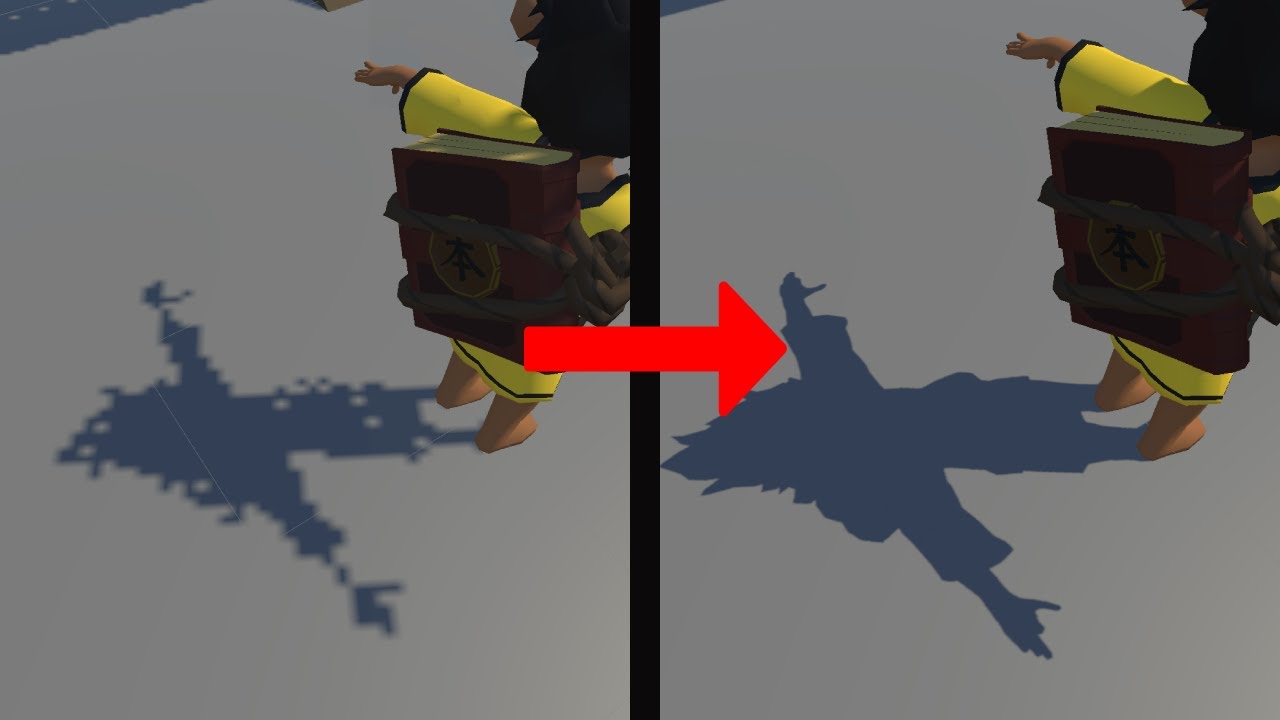
how to fix Unity URP Shadows
#unity #URP #Shadow #Universal Render Pipeline
 south pagoda
Has anyone else used URP 13 with screenspace shadows? Curious if it's stable enough.. I might upgrade to latest 2022 unity if so..
 lament canopy
south pagoda
Has anyone else used URP 13 with screenspace shadows? Curious if it's stable eno...
lament canopy
south pagoda
Has anyone else used URP 13 with screenspace shadows? Curious if it's stable eno...
this is not with screen space shadow Pass. Calculated in Deferred Light Shaders.
south pagoda
lament canopy
this is not with screen space shadow Pass. Calculated in Deferred Light Shaders.
I see. The URP solution requires forward?
lament canopy
south pagoda
I see. The URP solution requires forward?
Screen space shadow feature in URP In forward rendering, instead of each object calculating the shadow itself, Screen space is calculated in a separate pass. so every object can have high quality shadow filtering with less resources. but URP also negatively affects this performance. In Deferred rendering, the shadow is already rendering the screen space in the Deferred light(directional) shader.
south pagoda
lament canopy
Screen space shadow feature in URP In forward rendering, instead of each object ...
What do you mean by "URP also negativity affects this performance"? My game will support VR and so for MXAA I will need to use forward
lament canopy
south pagoda
What do you mean by "URP also negativity affects this performance"? My game will...
Using the Screen space shadow pass in VR will not help. What I do is referred to as Contact shadow. it looks impressive in the video but the object outside the screen space has no shadow. It can only be used to shade small details.
south pagoda
lament canopy
Using the Screen space shadow pass in VR will not help. What I do is referred to...
SSS in VR won't help what? Sorry
lament canopy
south pagoda
SSS in VR won't help what? Sorry
to performance.
south pagoda
lament canopy
to performance.
I see. I thought SSS is supposed to be better for performance vs cascade shadow mapping for real-time lights? e.g. for very dense grass in a forest
lament canopy
south pagoda
I see. I thought SSS is supposed to be better for performance vs cascade shadow ...
The best solution for VR is Mixed light shadow mask mode.
south pagoda
lament canopy
The best solution for VR is Mixed light shadow mask mode.
For an open-world environment with a single directional light we cannot use mixed/baked lighting as we need realtime shadows on vegetation. Hence my interest in SSS
(we have a dynamic day/night cycle)
How has Unity 2022.1 beta been for you? Stable enough?
lament canopy
I worked on something similar. My results weren't bad. I'm trying to find a screenshot....
 stuck fern
Hey there! Does anyone know why this light keeps on shining through the wall?

(Here's the other side of the wall)

 marble vigil
@stuck fern The light needs to have shadows enabled
The walls themselves can't block the reflection, rather it needs to be blocked by the wall's shadow
This can also be solved by using static baked lighting, if that's applicable in your situation
stuck fern
Thx, I have the shadows enabled, but it was still happening so I'll try baking
Nope, baking it didn't solve it either (Shadows are turned on)
marble vigil
stuck fern
Thx, I have the shadows enabled, but it was still happening so I'll try baking
I'm not seeing any shadows at all
Are you sure they're functional in the first place?
stuck fern
Nope, I think they are not working
I tried messing with the settings in various ways, but it doesn't seem as if it matters, as the outcome doesn't change :/
(I am using a point light btw, maybe I should trie with a different one? Is there a way around it>?)
marble vigil
stuck fern
(I am using a point light btw, maybe I should trie with a different one? Is ther...
Does your URP version support point light shadows? They're not implemented in all versions
stuck fern
marble vigil
Does your URP version support point light shadows? They're not implemented in al...
Hm... I think it doesn't. It does say that realtime shadows are not supported, but I figuered that If I baked it it'd work. Guess not.
Should I update it? Any version you'd recommend? Currently I'm using 10.6.0
marble vigil
stuck fern
Hm... I think it doesn't. It does say that realtime shadows are not supported, b...
Well, you could try a wide spotlight as an alternative, those will have shadows and will be cheaper than point lights with shadows as well
stuck fern
Will try
marble vigil
Baking will work if you do the necessary steps, but it won't be dynamic naturally
stuck fern
Good to know, anyways, it should be better than what I currently have so, it's worth a shot. Thanks btw :)
stuck fern
It kinda worked. I mean, it could be better, but it could also be worse. Thanks for the help!
 scenic cloud
I don't see the advanced tab at the bottom on Unity (the screenshot was taken from a video)

this is what I see

does anybody know why? I'm using 2021.2.0f1
I want to enable dynamic batching btw, I it's under the advanced tab so I don't see it
placid laurel
How do I create a shadergraph from the Simple Lit shader?
 teal bone
How can I apply shader to a 2D Rig Animation?
placid laurel
why does this texture show up when im trying to add a high detailed texture
 cyan talon
what texture
cyan talon
I don't see a texture in your screenshot though? Just general blue and the scene view grid
placid laurel
cyan talon
I don't see a texture in your screenshot though? Just general blue and the scene...

thats the texture im trying to add
the blue is only what shows up after i try and add that texture, im wondering why its not showing the full detailed texture and just a plain blue color
cyan talon
It's probably just not tiled the right amount perhaps?
placid laurel
cyan talon
It's probably just not tiled the right amount perhaps?
idk why i didnt think of that in the first place...
placid laurel
cyan talon
It's probably just not tiled the right amount perhaps?
would you happen to know how to add curvatures on the corner of cube 3d objects?
cyan talon
placid laurel
would you happen to know how to add curvatures on the corner of cube 3d objects?
Not sure what you mean, but if it's a change in geometry, you need to model it yourself
 inland nova
My "Saved by batching" keeps flickering between 7 and 9396, does anyone know what might be causing this?
marble vigil
Are you using linear color space and have tonemapping enabled in the post processing volume? Without those two lights will be blown out
Do you need it?
I don't know how to help in that situation
 solemn zodiac
inland nova
My "Saved by batching" keeps flickering between 7 and 9396, does anyone know wha...
solemn zodiac
inland nova
My "Saved by batching" keeps flickering between 7 and 9396, does anyone know wha...
Do not use this stats in URP, they haven't been updated with new batching system, check your Frame Debugger to see how many batches you have really
inland nova
solemn zodiac
Do not use this stats in URP, they haven't been updated with new batching system...
oh, so the statics panel is no longer reliable in URP?
solemn zodiac
inland nova
oh, so the statics panel is no longer reliable in URP?
Yes, if you disable the URP batching in settings file it will use the old batching system and then it should show correct values for that batcher.
 unkempt folio
Is there a way in Shadergraph without having custom lighting functions to have an object/material disregard a reflection probe and use a cubemap instead?
 grizzled knoll
does somebody know why this keeps happenin

no matter the base color value the main preview is always pink
cyan talon
I would guess that your shader is not targeting the right render pipeline, or you do not have URP properly configured.
@grizzled knoll
grizzled knoll
cyan talon
I would guess that your shader is not targeting the right render pipeline, or yo...
i resolved the issue and it was exactly that! thx for the help
 marble verge
How to cull fps hands in one camera but not the other one for splitscreen fps ? (without setting a specific layer for each camera)
marble vigil
marble verge
How to cull fps hands in one camera but not the other one for splitscreen fps ? ...
I'd use layers for it, but for you there might be something useful here
https://forum.unity.com/threads/how-to-cull-gameobject-from-camera-without-using-layers.800202/
 last pivot
my lighting tab is kinda weird
it only has two tabs instead of five

 shell scroll
Anyone know how to adjust opacity of a URP decal projector at runtime?
The property does not seem to be visible on an object reference, only in the inspector
(I'm gonna have to use reflection for this, aren't I?)
dry willow
shell scroll
Anyone know how to adjust opacity of a URP decal projector at runtime?
Haven't used it before but looking at the scripting api would assume DecalProjector.fadeFactor
shell scroll
Fade factor doesn't actually go all the way to 0
It just halfway fades out
The opacity works as expected. I could just add an alpha property to the shader instead, but it would be nice if a Unity feature actually worked as expected instead of requiring me to implement dirty workarounds.
Harr. No opacity field or property on the object
Shader hack it is, then
 frosty bronze
Hi, everyone just wondering how would you manage to exclude some objects from having post-process treatment with the volume from Urp? Cause I want some of my objects to not have post-process effects, I'd love to have your help with it lads. Like I said I'm using Urp and it seems like the post process profile don't works on it and it only seems that volumes work but maybe I'm wrong.
storm sluice
Why is my bridge so foggy in front view? 1. front view, 2. back view


 edgy herald
I had an interesting question, is there a way you can detect if something is inside of a lights radius
 mortal furnace
Hi guys, sorry for unrelated question, but there is no special "graphics" text channel😬
I'm working on custom sprite render system for DOTS and i have a little performance issue that comes i believe from SetPass calls huge amount. After sorting i found "render groups" (batches) which is sequence of sprites which can be rendered within one Graphics.DrawMeshInstancedProcedural. If i have more then one types of sprite i will found a lot of render groups. Then for each render groups i call Graphics.DrawMeshInstancedProcedural and that is how i render all sprites. To remain order of draws i use Z of bound's position.
I have a simple idea of how i can fix it: sort groups by render type and then draw all groups for one render type, then for another, then for another.
What you think about this? Do i understand SetPass calls correctly? Is there any smarter way to optimise this process?
 slow ibex
I have a really silly question. Does anyone know how to make 3d TextMeshPro match lighting of in game (not UI)

 iron yoke
As you can see, this model was built to have materials with an alpha channel in it. I have done everything in my power to make the black square bits disappear but cannot seem to do so.
Can anyone help?

 cinder kindle
iron yoke
As you can see, this model was built to have materials with an alpha channel in ...
cinder kindle
iron yoke
As you can see, this model was built to have materials with an alpha channel in ...
What does your material look like?
cinder kindle
slow ibex
I have a really silly question. Does anyone know how to make 3d TextMeshPro matc...
I've done this in BIRP but I haven't seen any shader like that for URP...
 cinder kindle
No the parameters
iron yoke
 cinder kindle
Set the surface type to something else than opaque @iron yoke
iron yoke

 cinder kindle
You should use different materials for the flames and the candlestick
cinder kindle
right, that's not necessarily the best setup
Is it the same if you set the alpha to cutout?
iron yoke
Wheres that
cinder kindle
Blending mode
iron yoke
I don't have a blending mode in this version for some reason
cinder kindle
The third dropdown
 cinder kindle
Right, what about the surface type?
iron yoke
Only opaque or transparent
Would it be easier to go into a VC and I stream it from there so you can see it easier?
cinder kindle
I'm cooking so that won't work too well unfortunately
If none of the blending modes look right then you'll have to go into a 3D program and separate the flame as its own material unfortunately
slow ibex
cinder kindle
I've done this in BIRP but I haven't seen any shader like that for URP...
thanks for the input regardless, i decided to create text with PNG files and import to Unity instead of messing around with Text shaders. 🙂
 thin spire
Hilfe my lighting looks shit after I baked it for some reason I didn't have this problem with other projects.
 cyan talon
thin spire
cyan talon
thin spire
https://help.vertx.xyz/graphics/lighting/lightmaps/compression
I have seen some advice to bake with lightmap compression off, and then to turn it on afterwards. Not sure how valid it is though.
 sinful gorge
I know that lowering texture resolution will decrease vram usage and improve performance, but if you have an albedo map at 2k and the normal map at 1k, does this also help or does the mismatch cause issues? (already tested that it did not change anything visually)
cinder kindle
No, this is common
It depends from case to case which textures makes sense to scale down
sinful gorge
cinder kindle
No, this is common
No it gives issues or no it helps haha
Right now I got a map for specular which doesn't change anything visually at 2k vs 512
cinder kindle
It helps with vram usage but you have to find the compromise between visuals and performance
sinful gorge
Yeah so if it doesnt matter visually turn it down
Thanks!
Love that this game has glass textures at 2k, without anything being in the texture haha
marble vigil
thin spire
Hilfe my lighting looks shit after I baked it for some reason I didn't have this...
Check texel validity view
I think at least some of the artifacting looks to be caused by presence of backfaces
 stoic quiver
decal projector doesnt work with transparent materials? doesnt render it

 lethal dust
Where do I find this in Unity 2021.2.8f1?
 toxic forum
lethal dust
Where do I find this in Unity 2021.2.8f1?
toxic forum
lethal dust
Where do I find this in Unity 2021.2.8f1?

Uh, cropped out. That is also under Window
lethal dust
Thanks so much 😄
 rustic mural
Anyone know how to fix this problem with light?
 wispy gate
Hello. I am working on Unity 2D with the URP. I want to have an enemy disappear when he is hit by a 2D light. Is there a way to "invert" the way the light affects this enemy sprite so it is less visible the brighter the light shines on him? I was suggested to use a Sprite Mask or just hide the sprite when it hits a collider, but this wouldn't mimic the light's settings.
marble vigil
wispy gate
Hello. I am working on Unity 2D with the URP. I want to have an enemy disappear ...
If you can figure out a way to access light information in a shader, I guess it'd be possible but no idea how to even get started with that
And that's assuming 2D lights do send light information to the shader, it could be more like a post processing layer internally just as well
 gilded token
Hello, I'm trying to add a screen overlay to my camera (think blood splaters when low health in an FPS). I've worked out a solution with UI elements but it's not very elegant. Are there any options to display a texture on my camera ?
wispy gate
marble vigil
And that's assuming 2D lights do send light information to the shader, it could ...
Is this the place to find the developers who can answer such technical questions? should I try the forums?
marble vigil
wispy gate
Is this the place to find the developers who can answer such technical questions...
It's worth asking around elsewhere too
There are knowledgeable people here but there's also a lot of questions scrolling by, and I think this could be a tricky dilemma
There's also a discord server with really skilled tech artists by the name of Technically Speaking where they might have an idea
marble vigil
wispy gate
https://docs.unity3d.com/Packages/com.unity.render-pipelines.universal@7.1/manua...
I don't know which URP version you're using, but make sure you're looking at documentation for the correct version
7.1 version in that link is many years old by now
wispy gate
marble vigil
I don't know which URP version you're using, but make sure you're looking at doc...
dang it ! :p
 wooden nexus
How do i enable depth texture in 2020.3
i cant find out how on the main camera. 2019 had a box you just checked, it was simple

 hot torrent
stoic quiver
decal projector doesnt work with transparent materials? doesnt render it
hot torrent
stoic quiver
decal projector doesnt work with transparent materials? doesnt render it

You found its one and only limitation haha
stoic quiver
hot torrent
You found its one and only limitation haha
dammit xD but mah glass bullet holes
marble vigil
wooden nexus
How do i enable depth texture in 2020.3
It's in the quality settings iirc
 lilac citrus
something between 2022.a12 URP vulkan on Android (Oculus) and 2022.b3-b4 breaks the framerate entirely when anti-aliasing is used
the exact same project on a12 works stably, but has like 20 fps on b3 and b4 when the msaa anti aliasing is enabled
anyone have any clue what might cause this?
marble vigil
lilac citrus
something between 2022.a12 URP vulkan on Android (Oculus) and 2022.b3-b4 breaks ...
This seems like a very specific problem
Maybe it'd be best to file a bug report so a dev would be sure to see it
 late hamlet
does anyone know the proper way to set and restore render targets when writing a custom render feature? I have a render feature that renders to a separate texture, processes the texture, then draws the post processing to the screen. However I cannot find a way to set the depth buffer back to the correct value after I'm done.
specifically the value of cameraDepthTarget for the ScriptableRenderer instance passed to AddRenderPasses varies based on weither SMAA is enabled or disabled
in one state, there's a depth buffer there to set, and in the other, the value is -1
however, I can't compare the value with -1 because the type is locked down, and passing the -1 value to SetRenderTarget, doesn't return the depth buffer, SetRenderTarget requires calling the function without a depth buffer to set it.
likewise, if I try to do it the other way, and don't ever set the depth buffer, it doesn't behave correctly in the reverse case
the documentation is pretty scant on the ground in this regard, which isn't a surprise, and I've tried looking at the internals on GitHub, but I couldn't find anything where the srp does something similar
 steady vapor
is there an asset with box collider defined volumetric lighting like in HDRP but for URP?
 lilac scaffold
I'm in urp and I'm asking if anyone know how to depixel textures basically or at least drastically reduce it.

it does it with literally every texture in my scene and ruins the feel a ton
 lilac scaffold
please ping
marble vigil
Anyone had luck getting Enlighten's realtime emissive materials working on URP?
merry monolith
Yes
marble vigil
merry monolith
Yes
This is all I needed to hear really
Still no idea what was amiss but I got it working only after copying over every single setting and property over from the built-in test
stoic quiver
Is there any plan on making the decal projection component work with transparent objects?
 weary cliff
ok so i accidentally removed the urp settings
now everything is purple
what do i do
ok i solved it
placid laurel
Hey Do you guys know how to change URP Settings like antialiasing in realtime via script ?
 feral lily
Which render pipeline is better for performance? Built-in or URP?
I am making a multiplayer a multiplayer game so I want as high performance as i could get
 signal orchid
Hello, can someone know why my player is disappearing ? I still see him in the scene view but not in the game, the scene is very basic I only have a cube for the ground and nothing between the player and the camera
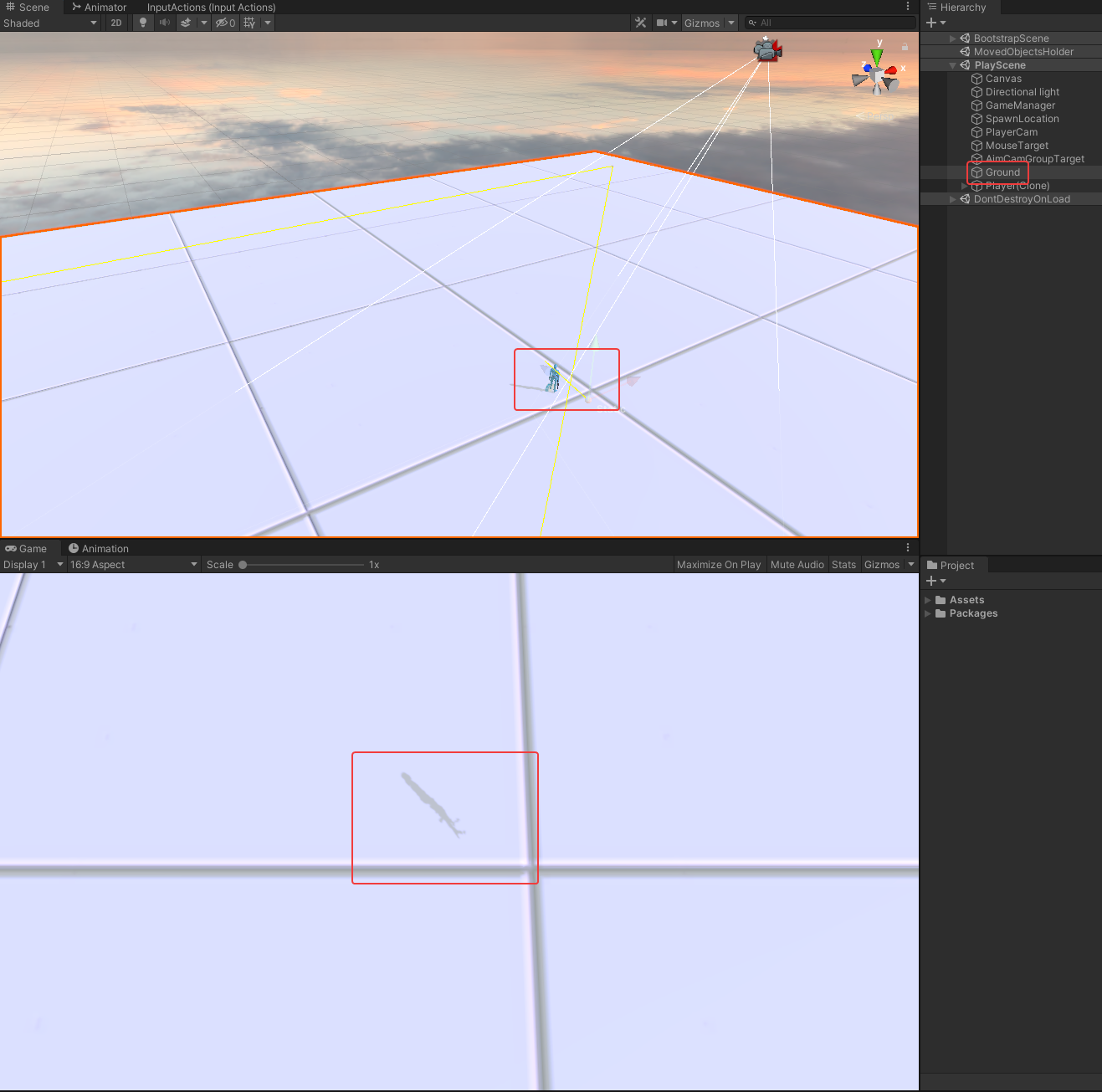 cinder kindle
Show the inspector with the camera selected @signal orchid
signal orchid
cinder kindle
Show the inspector with the camera selected <@!164815343313747969>

or the main camera https://i.imgur.com/Wz525qt.png
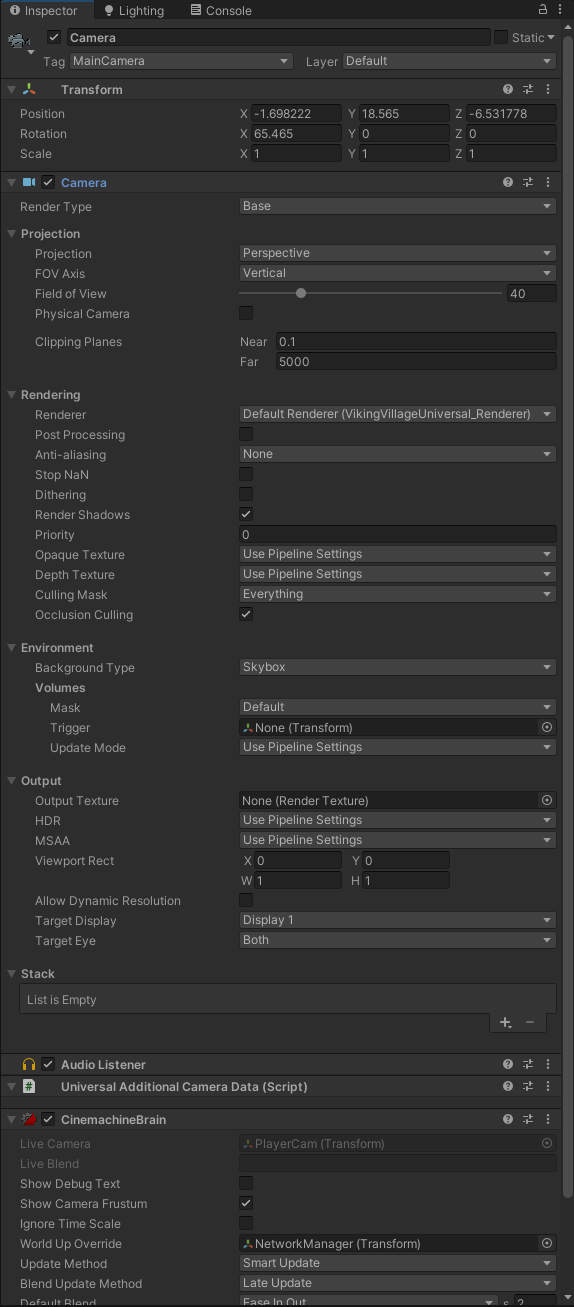
 vocal skiff
can someone tell me why lights not affecting urp 2d templates T_T
there is no global light, sttill everything lit
merry monolith
@marble vigil not on my dev rig for a day at least but can check my test scene settings tomorrow etc if you are still struggling with this
@vocal skiff are you using 2d light components?
vocal skiff
merry monolith
<@326973508573986816> are you using 2d light components?
i figured it out
instead of showing black when no light, unity lights up sprites by.default in latest version
i added point light and it worked as expected, took me 4 hrs to figure that out lol
marble vigil
merry monolith
<@166982635950702592> not on my dev rig for a day at least but can check my test...
Got it sorted
I suspect some baking quality presets exclude emission lighting, and switching the preset wasn't sticking for some reason, probably due to my fumbling
 amber lark
Hi! when reading shader code generated from graphs, I see vert and frag declarations, but I can't find the actual functions, i'm trying to pass extra information from the vertex functions to the fragment ones.
 dry willow
amber lark
Hi! when reading shader code generated from graphs, I see vert and frag declarat...
dry willow
amber lark
Hi! when reading shader code generated from graphs, I see vert and frag declarat...
Assuming it's shader graph they tend to be in include files. e.g. https://github.com/Unity-Technologies/Graphics/blob/master/com.unity.render-pipelines.universal/Editor/ShaderGraph/Includes/UnlitPass.hlsl
If you're in (or can update to) Unity 2021.2 there should also be custom interpolators you can use so you don't have to edit the generated code. https://docs.unity3d.com/Packages/com.unity.shadergraph@12.0/manual/Custom-Interpolators.html
amber lark
thank you i'll try updating 😄
 late monolith
Hello, i was wondering the Graphics section in the project settings doesn't actually define which URP asset is being used right? that happens in the Quality section?
 violet sun
is there a way to see from the browser an individual folder outside of the project and check what session project created the it? I lost some projects because of it
I started to use addressable objects in other folders and it made a lot of mess
 outer fern
o/ Ayo. I have a tree prefab I'm trying to use on URP.. the original render was set to Nature/(some other setting) and it was pink. I changed it to UPR>Lit and its White now.. but no textures are showing up.

 tawdry plover
Try see if there's an equivalent shader to the broken one that's compatible with URP
see if one has the same name
outer fern
Is that just trial and error and choose all shaders till one works? I'm not sure how to tell what is equivalent and what is not.
tawdry plover
well if the original was Nature/ShaderX try look for Universal Render Pipeline/Nature/ShaderX
outer fern
ah fair. I didn't even see the nature section in UPR
tawdry plover
if you switch from the original shader to that there's a chance that unity will recognise the inputs and remap them as needed
and if not you may have to do a bit of work to get it working right
outer fern
I only have these in my UPR>Nature section
 tawdry plover
what's the one it was using before?
outer fern
Nature/Tree soft Occlusion leaves and bark. I got it kinda working with UPR>Nature>Speedtree7(for leaves), and UPR>Nature>SpeedTree8(for bark)
tawdry plover
yeah i don't have that great knowledge with those shaders honestly, but sometimes there's a shader that isn't reimplemented as it was previously in URP and you just have to make do
outer fern
interesting. I'll probably end up learning more about them in time.
 narrow dagger
Hey guys!
I'm new to scriptable pipeline methods on MonoBehaviours, I'm trying to render multiple meshes using CommandBuffer.DrawMeshInstanced but I don't know the correct way of doing so.
Right now I'm using the RenderPipelineManager.beginCameraRendering to render the meshes, create a new CommandBuffer, add the DrawMeshInstanced command with the arguments:
cmd.DrawMeshInstanced(_mesh, 0, material, -1, matrices, _numAliveParticles) being _mesh a quad, material a default lit material, matrices the array of Matrix4x4 representing the instances transformations and _numAliveParticles the number of instances to be drawed.
Then I use the ScriptableRenderContext context passed to execute the command buffer, then release the command buffer and call ScriptableRenderContext.submit().
This is the order of things that my render method is doing, but nothing is being displayed on screen, I already enabled gpu instancing on my material. Anyone knows what is missing?
narrow dagger
Extra info: when using RenderPipelineManager.endCameraRendering instead, the meshes are displayed but not properly, it flickers a lot and have some depth issues
signal orchid
signal orchid
Hello, can someone know why my player is disappearing ? I still see him in the s...
up, still having this issue
tawdry plover
@narrow dagger have you looked into moving your code into a render feature? they allow for you to use a commandbuffer and have it passed into the renderer at a specific point while rendering, seems like it'd be more stable than what you're trying
narrow dagger
tawdry plover
<@!521715778677112832> have you looked into moving your code into a render featu...
That would work, but in my example I'm creating a custom particle system and I'm trying to rendering it instancing the mesh multiple times, that's why I wanted to use DrawMeshInstanced, but how do I grab all the custom particle systems in my scene from the render pass to be able to render them according to each one's settings?
I was thinking of storing each custom particle system in a public static list in the same class, then I use this list from the render feature to render then, but I want to know if there's any other way
tawdry plover
ah yeah that's something im currently frustrated with as well actually
whether you can have per object overrides on a render feature
they're not really designed with that in mind and it's frustrating!
narrow dagger
I'll try to use a static list to see if it works, it should in theory
tawdry plover
yeah, it should, it just means more authoring beforehand
ideally these things would just work
but with the way render features are set up to be like, blueprints for passed along for the renderer to plug in when they're needed, and not the actual code that's executed at render time, it gets weird
at least that's how i like, visualise render features 😅
i mean it would suck if it came to it but i guess the nuclear option of getting it work would be to add it as part of the actual render pipeline, but i'm not sure the URP is designed to be tinkered with like that
and going all in on a totally custom SRP is a Lot
narrow dagger
I worked a bit with custom render passes before, I created a kind of motion-blur effect like the ones used in ps2 games
it's difficult to work it, but not impossible
tawdry plover
!!! oh hell yea! those rule
someone i know actually made a similar thing for UE4/5 recently, cool coincidence
narrow dagger
it's a really cool effect, but kinda slow because it needed to use blit atleast two times in a single frame
tawdry plover
oof yea
best of luck with your particle thing though! sounds rad
might rob the idea of a static list actually 😼
im currently tinkering with some code for stencil shadows ATM
the per renderer thing is frustrating cause this is using DrawRenderers on a shader tag, which means i can't do any per object stuff
but doing it per object means managing those objects and their data in some way
the way i tried it first before messing with this https://github.com/rhedgeco/UnityShadowVolumeGenerator was trying to do it the latter way, while this does it all per object

GitHub
Library for generating sharp shadow volumes in Unity3D. - GitHub - rhedgeco/UnityShadowVolumeGenerator: Library for generating sharp shadow volumes in Unity3D.
ideally i'd want a per object inbetween, so it's more automatic
but we'll see
¯_(ツ)_/¯
narrow dagger
really cool! thanks for the tips and good luck for your project too
narrow dagger
also, the reason why I'm creating a custom particle system, because mainly the built-in one don't update the particles using Time.fixedDeltaTime, so the system would look jittery from the camera perspective lol
I could enable interpolation for the rigidbody that the camera follows, but is a lot of boilerplate instead of simply update the particles using fixed step
narrow dagger
@tawdry plover I implemented the idea at it works! It was pretty straightforward to do it, and you can implement a method in each object that receives the command buffer to execute whenever command you want per object
tawdry plover
that's great to hear! I'll give it a go!
narrow dagger
https://gist.github.com/ghsoares/0007725f0b3771cb0d1bf9ad50f27c15 This is how I kinda implemented it, I removed some of the actual code from my particle system because is huge mess

Gist
Per-object scriptable render feature rendering (Custom particle system example) - MyParticleSystem.cs
 strange inlet
How i can render (with the pixel rotation ) only certain object ?
i tried to stack a cam with no pixel perfect with another one with the pixel perfect but didn't work
 rare fern
Any idea how to make lighting work correctly with camera stacking?

On screenshot: shadow on this little cube
meanwhile overlay camera doesn't catch it
my hierarchy

camera settings (cube has Overlay layer)

 obtuse girder
I can't seem to figure out how to create a texture/material for a particle in URP
Tried a large number of different combinations of the settings on the material and the texture
But when used as a particle, it doesn't color it
It's always "white" i.e. it's using the color info literally
obtuse girder
For future searchers: Here is the apparently correct settings for the texture import and material settings to get a White On Black png texture to properly render both the alpha and the color for use in a URP Universal Render Pipeline particle system 

Since I tried searching for this and couldn't find it hopefully it helps someone else someday 😛
 marble salmon
Question:
Camera stacking versus Render to texture?
Which one is more performance friendly and better to use?
Usage: character creation UI.
 candid owl
hi, the URP render objects, how to render alpha cut with object's base color ?

I use a override material,
but the object's texture not working
marble salmon
How should I report this bug?
https://pasteio.com/xA0NOrQilcoM
In current project 2021.2.8f1 everything works fine. Builds are succesfull.
I updated 2021.2.9f, and project cannot build Linux server and Windows server. WebGL build is succesfull.
After downgrading to 2021.2.8 I noticed that URP and Shader graph needed to be downgraded as well. After downgrading them, the build was successful again.
Still not able to install older URP to newer unity or install newer urp into older. Manifest file dont let work around this either.
PasteIO
C:\Program Files\Unity\Hub\Editor\2021.2.9f1\Editor\Data\il2cpp\external\zlib\gzread.c(472): warning C4267: '=': conversion from 'size_t' to 'int', possible loss of data [193/247 0s] C_Win64_VS[UNKNO ...
tawdry plover
narrow dagger
https://gist.github.com/ghsoares/0007725f0b3771cb0d1bf9ad50f27c15 This is how I ...
Sorry for the slow reply, thanks a million for sharing this! super nice to see you got it working!
steady vapor
depends I think, usually when you switch pipelines you have to convert all your assets for that pipeline using the little widget
 keen aurora
Would there happen to be any good place to get materials for URP online? I know asking free is unrealistic, but I’m just curious as to what’s out there
(I said this here too bc I don’t know whether it’s better to ask here or in #archived-shaders)
 clear goblet
keen aurora
Would there happen to be any good place to get materials for URP online? I know ...
clear goblet
keen aurora
Would there happen to be any good place to get materials for URP online? I know ...
https://www.ambientcg.com/ not exactly urp specific but this has a great collection of pbr

Free materials never looked this good! Get 1000+ PBR materials and textures for free under the Public Domain license.
 zealous trellis
any ideas why my mesh is lit, despite using URP/Lit shader? (with no lights afaik(
its a fresh schene with just my mesh
marble vigil
zealous trellis
its a fresh schene with just my mesh
Environment light from the sky?
zealous trellis
how i should create a basic material? 😄
drag texture to base map box, and thats it?
zealous trellis
yeah it seems no lighting is working
keen aurora
Hm, sorry I had meant PBR textures, thanks though! I’ll check it out
keen aurora
clear goblet
https://www.ambientcg.com/ not exactly urp specific but this has a great collect...
Oh thank you too! These are really good!
zealous trellis
fixed it by starting a fresh project and migrating into it 😄 , I had enabled hybrid renderer (v2), then disabled it and switched from 2d to 3d in URP a hella lotta times
I wish I knew what went wrong
narrow dagger
Hey guys!
I'm messing around with CommandBuffer.DrawMeshInstanced inside a ScriptableRenderPass.Execute, I'm trying to draw a bunch of particle meshes using GPU instancing, but it seens that realtime GI isn't working in my custom shader. I know it isn't the shader's fault because it works for regular MeshRenderers, it just don't work using DrawMeshInstanced in a custom render pass.
Anyone knows of a way to enable baked + realtime GI in CommandBuffer.DrawMeshInstanced inside ScriptableRenderPass.Execute?
 vast ore
hello :)
A model I recently imported from blender is separated into several pieces for easy dismemberment
however in the scene view these pieces appear to be culled incorrectly?
Any ideas what settings might fix this? I couldn't find this issue on the web...
 iron isle
In URP, is there anyway of getting dynamic lighting for spot and area lights?
 wise crystal
Is there any way to import glb files to unity I tried importing but the materials are looking pink in the scene??
wise crystal
Nevermind i found the solution
marble vigil
vast ore
hello :)
A model I recently imported from blender is separated into several piec...
This issue happens because the skinned mesh's parts have moved outside of its bounding box, which Unity uses to determine frustum and occlusion culling
"Update when offscreen" is a brute-force method that fixes the issue, but with a performance cost
The manual page has a part explaining why it happens and some suggestions how to prevent it
 sand frost
where is the convert materials to urp in unity 2022.1
 narrow dagger
Hey guys!
I'm messing around with `CommandBuffer.DrawMeshInstanced` inside a `Sc...
narrow dagger
narrow dagger
Hey guys!
I'm messing around with `CommandBuffer.DrawMeshInstanced` inside a `Sc...
Anyone knows how to do this? I really need this to properly render a mesh instanced, but realtime global illumination sampling only returns a black color. I need to somehow enable this using CommandBuffer but I don't know how
narrow dagger
Ok, I think I found the cause: By manually assigning light probe data to a material property block by using LightProbes.CalculateInterpolatedLightAndOcclusionProbes, MaterialPropertyBlock.CopySHCoefficientArraysFrom and MaterialPropertyBlock.CopyProbeOcclusionArrayFrom, the rendered meshes are properly illuminated by ambient light, but is slow and I don't have any light probe in my scene. In the shader I'm sampling the global illumination by using SAMPLE_GI which also samples spherical harmonics, but is there a way to only sample baked/realtime lightmaps? So I could ignore the light probe data and only sample from the lightmap which could increase performance
vast ore
marble vigil
This issue happens because the skinned mesh's parts have moved outside of its bo...
Thanks Patchi, that does make alot of sense :)
 thorny horizon
Hello, I have a quick question. How much performance does shader graph take compared to just writing them.
vast ore
thorny horizon
Hello, I have a quick question. How much performance does shader graph take comp...
very use case specific, but generally, for just visual effects the performance loss from shader graph is unnoticeable, additionally you can edit the shader's generated code manually if you want.
thorny horizon
vast ore
very use case specific, but generally, for just visual effects the performance l...
ok thx
 alpine lodge
hey so i was wondering how to upgrade from a regular 3-D project to URP, since my camera currently doesnt have the post processing option under it, and in URP it does
placid laurel
alpine lodge
hey so i was wondering how to upgrade from a regular 3-D project to URP, since m...
https://docs.unity3d.com/Packages/com.unity.render-pipelines.universal@10.8/manual/InstallURPIntoAProject.html This should get you started (make sure to set the appropriate version of the docs)
 sleek ravine
Can I render something inbetween two different post processing effects?
the render queue only has a before pp or after, is there a way to say render after bloom but before lens distortion?
 royal tree
First time using the VR template and I am unable to get URP working. Installs fine but no materials work even after running the converter I get "Test material was not upgraded. There's no upgrader to convert shader to selected pipline" Test material is a URP > Lit and remains pink. Are the VR template and UPR incompatible?
alpine lodge
placid laurel
https://docs.unity3d.com/Packages/com.unity.render-pipelines.universal@10.8/manu...
ty, if it doesnt work ill let you know
 tawny wadi
Hey, I'm not sure but I think this might be related to the URP I'm using; lag spikes happen occasionally, and using profiler, it mentions here Semaphore.WaitForSignal up to above 100ms. Is this usually because of the URP Rendering? I don't know enough about profiling and forum posts hint to this being a rendering issue.
 cyan talon
tawny wadi
Hey, I'm not sure but I think this might be related to the URP I'm using; lag sp...
cyan talon
tawny wadi
Hey, I'm not sure but I think this might be related to the URP I'm using; lag sp...
You are looking at the profiler section of the timeline, it's irrelevant
Maybe you'll find it easier if you switched the view to hierarchy
 tawny wadi
ahh iddnt know that option existed, looks really helpful

thanks! so it looks like the lag isn't URP or something, just the editor?
cyan talon
Yup. You should profile builds to get accurate profiling results
tawny wadi
thank you 👍
alpine lodge
hey so i switched to urp, and its working, but the only problem is literally everything is magenta
is there a way to fix it other than switching back from urp?
oh nvr mind i got it working
 scenic zinc
idk if this is an urp issue but anyways. im doing some lighting and i went ahead to bake to se if it looks ok. but the walls and some other stuff are not getting lit

 formal wyvern
Hey, Ive created a new project using 3d core template to follow an example in a book. Since it was created using URP, I'm trying to add AR video background support to the graphics forward renderer, except I'm expecting to see an asset named ForwardRenderer in "the folder that contains the Scriptable Render Pipeline settings assets", which it states is usually in the Assets/Settings/ folder. EXCEPT, that is missing. There is no Settings folder in Assets, I dont see any ForwardRenderer asset
any ideas why?
scenic zinc
I think you have to create it yourself
There should be a button somewhere in a menu to make it
formal wyvern
Yeah, Ive seen that in other examples and also in the documentation but that menu option is also missing.
I think I should see Rendering in the Assets, Create menu between Audio Mixer and Material, according to this doc anyway: https://docs.unity3d.com/Packages/com.unity.xr.arfoundation@4.1/manual/ar-camera-background-with-scriptable-render-pipeline.html
 cyan talon
formal wyvern
Hey, Ive created a new project using 3d core template to follow an example in a ...
cyan talon
formal wyvern
Hey, Ive created a new project using 3d core template to follow an example in a ...
You mean the URP template? Is there a template labelled 3d that is URP?
Look at the package manager and see if URP is even installed
scenic zinc
Yeah was about to say
formal wyvern
haha, ok its installing now
thanks, lets see how it goes this time 😛
cheers, looks good 👍
 surreal dome
Hi
So I'm getting those pink shaders again and it seems Unity changed the way to convert materials
This tutorial shows how

Unity Basics - How to upgrade materials to URP in Unity 2021.2.2
In this video I will show you how to upgrade materials to the Universal Render Pipeline using the new method in Unity 2021.2.2
The process has recently changed and there is now a new upgrade tool called the Render Pipeline Converter that appears to work much better than the old m...
However I only want to convert 3 materials in a folder
How can I only select the 3?
marble vigil
surreal dome
How can I only select the 3?
If your version uses the Render Pipeline Converter window for the process, what you can do is select "built-in to URP", check "material upgrade", then "Initialize Converters" which should make a list of the materials it can convert
Then you can right click the particular materials and choose "Run converter for this asset" for each of them
Or also uncheck all the others and "convert assets" but that may be impractical as there doesn't look to be an "uncheck all" option
sleek ravine
sleek ravine
Can I render something inbetween two different post processing effects?
Anyone know?
surreal dome
marble vigil
If your version uses the Render Pipeline Converter window for the process, what ...
Thanks
marble vigil
sleek ravine
Anyone know?
Camera stacking is one way, but there might be better ones out there I don't know about
surreal dome
It takes a long time though hehe
 rotund pawn
Hi, everyone.
I want to stop camera clipping through objects because of that i reduce value of near clipping plane.
On PC all works good, but when i change platform to Android so you can see the twitching of objects (videos are below)
Any ideas or solutions?
Android - https://youtu.be/t42OSOxQobc
PC - https://youtu.be/jlumbW2oNcI
Thanks

 marble vigil
rotund pawn
Hi, everyone.
I want to stop camera clipping through objects because of that i ...
marble vigil
rotund pawn
Hi, everyone.
I want to stop camera clipping through objects because of that i ...
Increasing the difference of near and far clipping planes reduces the floating point accuracy of the renderer for depth sorting geometry, this is unavoidable
Your best option is to instead code the camera to avoid obstacles, or use a shader that fades out the walls when the camera gets too close
Many games render distant land in another pass so the far clipping plane can be much closer
 hollow flame
Hi! I'm in need of some fog volumes. I have an interior scene with a fishtank on one side and a window into space on the other, each needs a different fog setting
does anyone know how I should go about it?
 prime iron
Hi everyone. My sprite renderer explode sometimes and I have no idea why 😦
They all have normal shader, nothing strange. Sometimes when moving the camera they explode. It also happens in stand alone game pretty rarely.
 random atlas
I've been banging my head on this for a decent chunk of time. I'm using the universal render pipeline and I'm using camera stacking to render the objects that the player is holding separately. I don't know why, but the post processing that i have in my scene isnt affecting this overlay camera
 placid laurel
I'd like help improving the lighting here.

 raw pulsar
Hey guys, I'm using a Custom Render Pass Feature (specifically https://github.com/MirzaBeig/Anime-Speed-Lines)
But I only need them activated under certain conditions. Modifying the Lines Alpha to 0 when I don't need them seems wasteful since they will be rendered but not seen !?
How can I enable/disable a Custom Render Pass Feature from script ? The feature is on the URPAssetRenderer (Forward Render Data) scriptable object.
dry willow
raw pulsar
Hey guys, I'm using a `Custom Render Pass Feature` (specifically https://github....
Should be able to have a public field for the custom feature class / ScriptableRenderFeature. Can then call it's SetActive method. e.g. https://twitter.com/Cyanilux/status/1275060844355702789

@Giseudo I think it's okay to enable/disable at runtime. You can have a public variable to reference the feature, set in the inspector. e.g. this script toggles the feature when pressing space bar.

 Twitter
·
Twitter
·
 dusk sage
Hello everyone, I've created a shader that does this effect. However to see the effect it renders it onto a UI panel which is really bad. I want to do this as a render feature but have no idea how.
Simple terms a 2d pixel metaball to make goo.
If anyone could help that would be fantastic, no stress either way.

I posted this in the shader channel but ut might be better suited here.
raw pulsar
dry willow
Should be able to have a public field for the custom feature class / ScriptableR...
Okay ! Thanks @dry willow , I'll try it out !
 queen cloak
does anyone have an idea on how to extend URP with a custom renderpass/subpass?
https://docs.unity3d.com/2022.1/Documentation/ScriptReference/Rendering.ScriptableRenderContext.BeginRenderPass.html
I'd love to use this but most examples I've seen are for creating a custom SRP so it's used in the RenderPipelineAsset. But i'd like a separate pass similar to how UI is rendered in the frame debugger.

 warped roost
Is there anyway I can add screenspace reflections to my URP project without assets from the asset store? The reason I can't use the asset store is because of the "US restrictions" in Iran
 verbal light
when and how does unity handle Stripping Vertex programs when building? My current project is taking ages to compile quick test builds because of my 30-40 shader variants in the project, where it has to run "stripping vertex programs" for each shader instance
 warped sphinx
How to I get a basic URP material with Emissive color cranked to 11 to actually register as a strong bloom source?
No matter what threshold I set, it behave like it's barely brighter than the non-emissive materials around.
I'm used to HDRP, is it just something that doesn't really work in URP or there is something special to do?
Edit: Nevermind, found it: need to set the Camera/Output/HDR ON before bloom start behaving correctly.
placid laurel
Got any tips for more realistic exterior lighting?
 empty path
placid laurel
Got any tips for more realistic exterior lighting?
empty path
placid laurel
Got any tips for more realistic exterior lighting?
In what way?
If your object is dynamic, not much can be done but good ambient & directional light values.
If static, then baking sky and directional light, or setting it to "mixed" to still have some realtime light and realtime shadows which tend to be better than baked ones.
placid laurel
I set Sonic to Static.
empty path
I don't use URP but i don't think it has a big focus on lighting (that'd be more HDRP)
if your object is static, than you bake the light at a good quality and it should give you something good.
But you can't do much for something like sonic in the picture, maybe do the test on a small house to see the results of light baking.
ideally you'd also use capsule shadows to give your characters a nice indirect shadows under the char,
adds depth and helps ground the characters to the world -- but unity doesn't have capsule shadows.
There's an asset for it though.
 nocturne finch
Any idea why this could be happening. The game view is like making constant copies of everything on the scene as I move around. And you might be wondering why I made the game on Universal Render Pipeline and not just a normal 3D project, and that is because I had a school project and I had to have it look good with the lightning but now I've decided to recicle it to make a map for a game.
So yeah, its a URP game, I think I may need to convert the project to normal 3D but I 'd rather not, all the textures would have to be redone.
Aparently Rigidbody doesn't work properly in URP either, well I think it's time to change
marble vigil
@nocturne finch Nothing in URP specifically causes this, and it doesn't touch Rigidbody code at all
I think you have much bigger problems in your project
nocturne finch
marble vigil
<@!738810891302207560> Nothing in URP specifically causes this, and it doesn't t...
Yeah, I made a project in normal 3D and moved the scene over and the looks changed drastically as expected but the copies were fixed, though the rigid body kept not working.
I guess I'll just work on it sometime in the future. Thanks a lot :)
 daring kraken
how do i edit a volume's weight? putting the volume into the script seems to work, but when i try to edit the weight (ex. volume.weight = 1f or volume.weight.value = 1f, though i've tried other things), i get the constant message when i play (not in the editor, that seems fine), NullReferenceException: Object reference not set to an instance of an object PlayerMovement.Start () (at Assets/Scripts/PlayerMovement.cs:58)
warped sphinx
Is there a way to get the same effect than HDRP "Transparent Depth Prepass" with shadergraph in URP?
 ivory lava
I am working through a fog of war for an RTS style game. I got everything working using a texture and a decal projector in URP. However, it looks like decals projectors in URP do not support transparent surfaces, which mucks up my river (the river bleeds through visually). Anyone have a suggestion for an alternative? I'm early on in the project enough that alternative literally may be going to HDRP.. probably going to be a PC only title anyway.. But open to other ideas of how to draw fog of war on an entire landscape.
surreal dome
Why is it so difficult upgrading materials to URP in Unity 2021.2.7f1?
I just want to upgrade materials from a specific folder, how can I do that?
I would appreciate if someone could share some light
marble vigil
surreal dome
I just want to upgrade materials from a specific folder, how can I do that?
Why only some materials? I don't think a project can use more than one rendering pipeline
candid owl
Hi, I readback a 2K Depth texture with mipmap, cost 0.15s
Is it right?
Time spent on copy from RenderTexture to Texture2D
surreal dome
marble vigil
Why only some materials? I don't think a project can use more than one rendering...
Some of them are custom shaders
marble vigil
surreal dome
Some of them are custom shaders
So the converter will simply ignore them with a warning because they're incompatible
surreal dome
marble vigil
So the converter will simply ignore them with a warning because they're incompat...
Huh
I thought it would change them
Thanks @marble vigil !
marble vigil
surreal dome
I thought it would change them
Yeah, the converter is not magic, it just looks for shaders it recognizes (so Unity's shaders) and replaces them with the pipeline's own while keeping the material values
 tribal lantern
why cant i use deffered in unity 2021, with latest urp? im getting profiler.beginsample errors
clean project
 hidden pewter
hello would like to ask, is thr any issue or bugs with 2019.4.0f1 LTS with URP 3.7.1? Unity keeps crashing when i open up a scene
 lusty sparrow
Hey. Whenever I add URP to my project graphic settings, I can only see UI in my game.

I've tried default URP renderer and 2D renderer
and please ping me if you want to answer
 cobalt sonnet
Please could someone help me configure URP to get more fidelity out of my shadows? They have weird diagnonal stripes in them
 stoic quiver
Is there any news if the URP package is gonna have more flexibility on how many dependencies to other packages it will have?
 balmy fulcrum
Hello!
I am very confused on how to upgrade materials to the urp.
I have imported some assets that use shaders, which are shown pink in my project and i have tried upgrading it through Edit -> Render Pipeline -> ...
But it doesn't work.
This is what the console says:
Optimized Bark Material material was not upgraded. There's no upgrader to convert Hidden/Nature/Tree Creator Bark Optimized shader to selected pipeline
How can i make the shader work?
Thank you in advance
tribal lantern
so there is no way of creating a deffered urp project? becouse i still get the errors but not in forward
 lime ridge
cobalt sonnet
Please could someone help me configure URP to get more fidelity out of my shadow...
lime ridge
cobalt sonnet
Please could someone help me configure URP to get more fidelity out of my shadow...
On the URP Render Asset, check the Normal and Depth Bias on the Shadow section
 soft lion
cobalt sonnet
Please could someone help me configure URP to get more fidelity out of my shadow...
soft lion
cobalt sonnet
Please could someone help me configure URP to get more fidelity out of my shadow...
You can google ”shadow acne” if you wanna learn more about that and why that happens
soft lion
tribal lantern
so there is no way of creating a deffered urp project? becouse i still get the e...
I dont really how it works in practise but deferred renderer on urp should be there on versions up to 2021.2
tribal lantern
soft lion
I dont really how it works in practise but deferred renderer on urp should be th...
yeah got the latest 2021.2 and latest urp with clean project i get profiler.beginsample errors
even tried to reinstall unity dident work
try urself with a clean project think its the same problem
soft lion
I cant rn and in any case my laptop is too slow to make new projects 😅
tribal lantern
damn i just wanted to upgrade to urp deffered and i cant xD , dont wanna use forward
soft lion
Just out of curiosity: why?
tribal lantern
shader graph
soft lion
? How is deferred related to shader graph?
marble vigil
tribal lantern
try urself with a clean project think its the same problem
Works fine on my end, if that helps any
marble vigil
@tribal lantern My bad, it does occur for me too
Though at a glance the profiler seems to be working despite it
https://issuetracker.unity3d.com/issues/multiple-profiler-errors-thrown-when-profiler-is-open-in-play-mode according to this there should be fixes coming for it
tribal lantern
damn thank u for finding that, then i will wait to upgrade 😄
 sterile hemlock
Anyone know anything about this? Found it today hidden behind a URP_ENABLE_CLUSTERED_UI scripting define and it seems to work?

 exotic egret
@balmy fulcrum You could try manually setting the shader to one of the URP shaders for those materials that didn't convert
I recently switched from using the Unity Built In Pipeline to the Universal Render Pipeline, but now I can't get the lights working, they don't even show up in the scene view when I add a new point or spot light. I maxed out the number of lights to 8 in the settings, and my scenes aren't particularly light heavy anyway. Just need to get some basic lights working again. Tried clearing cache. Tried deleting and resetting camera. Can't even make a Baked. Any ideas would be a lifesaver.
 leaden granite
does URP Lit material support alpha between 1 and 254? I have a texture that is half alpha that isn't working properly with Lit>Transparent setting.
for example this is a screenshot of the image in Krita (image software).

however in unity, the whole top of the mushroom is 0 alpha:

the grey thing in this second image is a mesh hidden inside the mesh that will be emissive. this 3rd picture is showing what it looks like in blender where the dark parts are where the alpha is.

 mystic delta
values are usually normalized 0-1
leaden granite
mystic delta
values are usually normalized 0-1
thankyou. do you know if URP Lit material support alpha between 0.001 and 0.999?
Or perhaps I'm misunderstanding. Does Transparent Lit URP shader support albedo alpha channel? Or is it purely for the overlay colour alpha channel?
Seems VERY weird that URP wouldn't have a basic shader that supports either alpha masks, or using alpha from the albedo.
mystic delta
Make sure you are using correct blending mode.
leaden granite
I've tried them all
mystic delta
It should match texture asset settings
might have wrong transparency mode set there
leaden granite
It looks okay to me.

Must be something wrong with the texture file, even though I'm fairly certain there isn't. Unless using albedo A channel is bugged in this version of unity.
mystic delta
Yea, should review export settings
leaden granite
I have done thrice already. Real strange.
mystic delta
You could try testing with any transparent file from google search to be sure
(there's a sort filter in the search by transparency)
leaden granite
fair point. I have others that i know work in blender cycles for example. I'll try one of those here
mystic delta
@leaden granite Do you have any light source on the scene btw?
Your material could be black just from absence of light
leaden granite
I'm currently using the cameras own lightsource. I'll try turn it off, bake, and let you know if anything changes.
the mushroom is static. so if that is the issue, it should fix it.
I tried a grass texture that has either 0 or 1, which worked fine. I don't think i have a texture with 0.5 alpha. although if that grass texture worked, i don't see why the mushroom albedo would be bugged/wrong on export since i also made that grass texture in krita, the same software
exotic egret
exotic egret
I recently switched from using the Unity Built In Pipeline to the Universal Rend...
Not sure if could be something with postprocessing or something in the URP settings. The directional light still works but I cant get a spot or point light working at all since I updated.
mystic delta
Updates sometimes mess up settings, try creating new project and test there, if it works compare what changed.
 empty urchin
Does anyone know why the lights flicker off and on as I look around?
 exotic egret
Maximum of 8 reached?
soft lion
empty urchin
Does anyone know why the lights flicker off and on as I look around?
maybe pixel light count is too low and therefore it will show only the max amount of lights per pixel
empty urchin
thanks this might be the case!
exotic egret
mystic delta
Updates sometimes mess up settings, try creating new project and test there, if ...
Thanks, I notice the camera Renderer in the broken project is set to Default URP Asset, where in the new clean project it is set to FowardRenderer, dunno if this is the same thing or not, cant drag it over to inspector anyhow .... getting warmer I think...
exotic egret
It's weird that the spot lights and point lights dont even illuminate in the scene view.
i also notice my skybox isnt showing in broken light scene, but works upon play..
leaden granite
@exotic egret check if the lightbulb button at the top of scene view is off, if so, click it to turn it on
exotic egret
yep its on
exotic egret
GOT IT.... you need to add a "universal additional light data" script to existing lights.
 lime niche
What does one do when a lot of asset's materials are broken due to legacy shaders?
steady vapor
rewrite the shader I guess
lime niche
steady vapor
rewrite the shader I guess
Argh. The assets are from other devs in the store.
steady vapor
sometimes they'll update them if you send them a nicely worded email
 polar kettle
does anyone know why my material tints blue?
 dry willow
polar kettle
does anyone know why my material tints blue?
https://gyazo.com/66ff4cd63f3d276...
dry willow
polar kettle
does anyone know why my material tints blue?
https://gyazo.com/66ff4cd63f3d276...
Think it's a bug with baked GI being generated while shaders were compiling. Going to Preferences -> GI Cache and clearing it should fix it.
polar kettle
dry willow
Think it's a bug with baked GI being generated while shaders were compiling. Goi...
Thank you! <3
 snow sandal
hi yall. Aside from Lux URP Essentials, what is other must have asset should I buy ?
 final crater
Hello guys
Is it possible to use shader graph in built in?
Or should I use urp
Thing is, urp doesn't support shadow point lights
dry willow
final crater
Is it possible to use shader graph in built in?
Shader Graph supports the Built-in RP now in 2021.2+ (though not sure to what extent. Might have some bugs and some features might not work)
URP also does support realtime point light shadows in 2021.1+
final crater
Yes Ik both of that but I heard there are some limitations to URP point lights in 2021
Also there may be some other limitations like in GI
marble vigil
final crater
Yes Ik both of that but I heard there are some limitations to URP point lights i...
What kind of limitations?
2021.2 also supports enlighten realtime GI
final crater
Oh cool!
final crater
marble vigil
What kind of limitations?
2021.2 also supports enlighten realtime GI
I’m just wondering if there is some stuff built in render pipeline can do that urp cannot
placid laurel
anyone know how to hide sprites in shadows with URP 2d light
 pallid night

When enabling MSAA Anti Aliasing in the UniversalRP-HighQuality settings, these white lines appear on some objects. When I disable MSAA it's gone. Is there a fix for this to remove those white lines?
cyan talon
I believe it's because the camera depth texture doesn't use MSAA, so any depth-based effects are not MSAA-friendly
pallid night
So there's basically no simple fix, other than disabling MSAA or living with the artifacts?
cyan talon
Afaik, yes. Someone may know something to the contrary though
 pallid vessel
URP 2D lighting is still broken on a bunch of samsung phones, has anyone found a fix yet? Reporting this issue a few weeks back 😦
pallid vessel
Can't even connect a debugger with unity 2021 because of how bad the debug situation is atm, engine needs quality of life update badly
placid laurel
hello?
how do i find the shaders / used by the Shadow Caster 2D?

Stack Overflow
I want to recreate the field of view effect in the game Among Us in Unity by using the Universal Pipeline and 2D Lighting system.
But when I use 2D light and Shadow, I still see the character in the
i followed this tutorial
so now my player is hidden when outside of the light
but i want the same effect to come from shadows
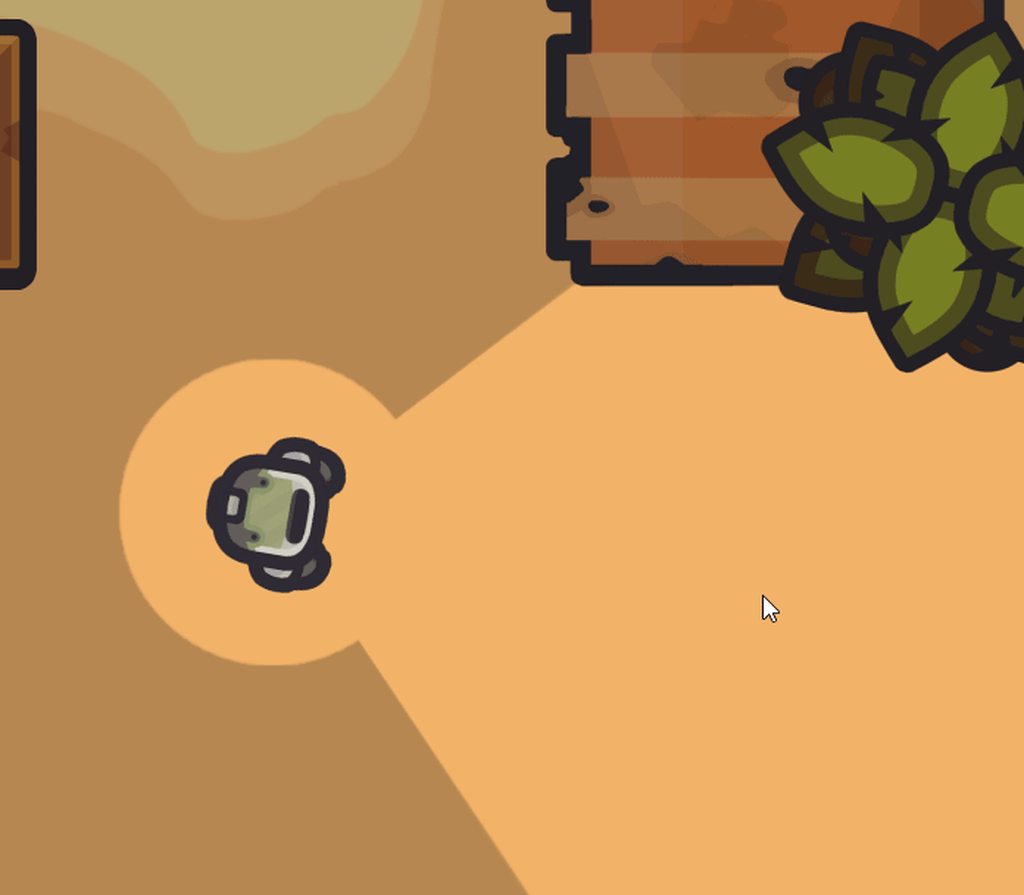
as you can see illustrated here
i can see the player through shadows

when shadow intensity is at 1, the maximum, its still visible if you look very closely!
This has been causing me way more trouble than i'd like to admit
how come its still visible at 100% thick shadows
marble vigil
final crater
I’m just wondering if there is some stuff built in render pipeline can do that u...
URP 12 added so many features that I think the only ones missing are screen space reflections, auto-exposure and maybe some odd ones like light halos
exotic egret
whats the best way to adjust shaders at runtime in URP? like if you wantto switch from the lit to unlit shader of material? During builds, it just renders the material missing and pink. I also can enable or disable emission either
final crater
marble vigil
URP 12 added so many features that I think the only ones missing are screen spac...
Oh that's great, I guess it's worthwhile now
final crater
Is this how it's supposed to look or can I make it better, I turned on auto generate lighting...

 pastel summit
Ok. I'm having trouble with a set of materials not updating on shader change during runtime. I change a color property but there's something not re-rendering. It's a set of materials on a single meshrenderer. Is there a way to force the mesh renderer to re-draw or even just update its instanced materials?
I think this should change the color being rendered but it doesn't:
MeshRenderer myMeshRenderer = prismMeshRenderer; Material rendPrismTop = myMeshRenderer.materials.First(mat => mat.name.Contains(matPrismTop.name)); rendPrismTop.SetColor("ColorTop", letterNoMatchLightColor); Debug.Log("Top Renderer Color:" + rendPrismTop.GetColor("ColorTop"));
Is there a way to force a re-render of a single mesh?
marble vigil
final crater
Is this how it's supposed to look or can I make it better, I turned on auto gene...
I don't know how good you expect a pair of plain cubes in a blank scene to look
You could load the sample scene to see how it uses post processing and probes of various sorts
 gusty geyser
turn off hard shadows in the lighting settings? I say it's unfair to judge the lighting engine when it's a default scene with 2 cubes w/ default materials but...
final crater
Alright
Well now I have a whole other problem


Why do my shadows look terrible
marble vigil
@final crater Do you have other messages in the console besides that one about shadow atlas resolution?
final crater
Nope I just went to another project and imported everything into jt
That one was just broken
marble vigil
I haven't run into that one before but looks like it's caused by shadow resolutions being too high compared to shadow atlas size, so it forces the resolution down
marble vigil
final crater
Nah I just expected the shadows to look better ya know
Built-in and HDRP use more expensive shadow filtering, so in URP you need to rely more on cascades to get similar sharpness
final crater
marble vigil
Built-in and HDRP use more expensive shadow filtering, so in URP you need to rel...
Oh no, now I get this error

There
final crater
marble vigil
Built-in and HDRP use more expensive shadow filtering, so in URP you need to rel...
Dangit I knew there was a catch
Every time I try to use URP I get major headaches from stuff like this
marble vigil
final crater
Dangit I knew there was a catch
URP is made for performance, HDRP is made for features, and built-in made for neither specifically
What matters is using the tools to their strengths and working around the weaknesses in either case
marble vigil
final crater
This seems like it might be related to Input System
You could try enabling "both" option for using Input System and Input Manager
I had similar errors from a script using the Input System with "play mode options" enabled
final crater
marble vigil
URP is made for performance, HDRP is made for features, and built-in made for ne...
My shadows look terrible again...
 marble vigil
final crater
My shadows look terrible again...
marble vigil
final crater
My shadows look terrible again...
So, what do you suppose caused it?
final crater
I don't really know, I messed with the cascades but that didn't give me a good result
Wait
I sort of fixed it now
I think
The shadows become terrible when viewed from far away however
soft lion
final crater
I don't really know, I messed with the cascades but that didn't give me a good r...
Those are really messed up

 soft lion
final crater
soft lion
final crater
Do you really need max distance of 150?
final crater
I dont think so
soft lion
Decreasing the max distance makes the shadows more crispy
marble vigil
final crater
These pictures to my eye seem to be just demonstrating the cascades working as intended
final crater
soft lion
Decreasing the max distance makes the shadows more crispy
Oh alright
Damn this is what I've been missing
marble vigil
Your max shadow distance is the limiting factor of how much shadow resolution you have to work with, per surface area
Cascades prioritize higher resolutions closer to the camera and lower further away
soft lion
@final crater also id not try messing with shadow cascades if you dont really know how shadow rendering/cascades work. Default values should work very nicely automatically
final crater
soft lion
<@!394506500900519948> also id not try messing with shadow cascades if you dont ...
I kind of... don't know how to set them back
final crater
marble vigil
Your max shadow distance is the limiting factor of how much shadow resolution yo...
So the lower the percentage of the cascade the more quality it is orr
final crater
It just shows some extra unnecessary stuff
marble vigil
The other limiting factor is shadow resolution per light
I see you've increased shadow resolution to 4K and pixel light limit to 8
For every shadow casting light it becomes more difficult for the shadows to fit into the shadow atlas, so light resolution starts getting culled to make it happen
This is not exclusive to URP, mind you, but URP forces you to be mindful of how much resolution you're using
soft lion
final crater
It just shows some extra unnecessary stuff
Atleast you can find the default values somewhere and copy them manually
final crater
soft lion
Atleast you can find the default values somewhere and copy them manually
Oh yes I'll look that up
final crater
marble vigil
The other limiting factor is shadow resolution per light
I see you've increased ...
Ohh okayy
Should I increase the pixel light limit?
Nvm it's maxed out
marble vigil
final crater
Nvm it's maxed out
This doesn't help with the shadow atlas problem
final crater
Also I've heard of this shadow acne problem
marble vigil
You can create a new quality asset here, which should have default values
 final crater
I did but it's at the lowest setting
Also now my shadows look great and I'm sooo releived cuz finally I understand it
Thank you soo much
marble vigil
final crater
I did but it's at the lowest setting
It's equivalent to medium settings, but the point is that the cascades are correct when you increase their count
final crater
Ohh ok got it now
Oh also I've found that the edges of my shadows do this weird movement
Like zigzagging idk how to explaing it
exotic egret
pastel summit
I think this should change the color being rendered but it doesn't:
` Mes...
similar issue here. trying to change shader or even enable emission texture at runtime
 ivory prism
 final crater
marble vigil
It's equivalent to medium settings, but the point is that the cascades are corre...
final crater
marble vigil
It's equivalent to medium settings, but the point is that the cascades are corre...
I just discovered something, apparantly I can only have about 11 point lights in my scene that cast shadows before the shadow map can support it
Doesn't seem like a veryy inconvenient limitation
final crater
marble vigil
The other limiting factor is shadow resolution per light
I see you've increased ...
Which is what you mentioned here wow
My question is, does the limitation decrease in built in or HDRP?
marble vigil
final crater
My question is, does the limitation decrease in built in or HDRP?
Not to my knowledge, but I've never run into this issue on any pipeline so I don't have much experience of it
https://docs.unity3d.com/Packages/com.unity.render-pipelines.universal@12.1/manual/Shadows-in-URP.html
https://docs.unity3d.com/Packages/com.unity.render-pipelines.high-definition@12.1/manual/Shadows-in-HDRP.html
Here's some reading though
final crater
Alright thanks a lot, also how come you haven't run into this issue
pastel summit
exotic egret
similar issue here. trying to change shader or even enable emission texture at r...
Found it. Your material / texture has a weird GUID-style name that you use instead of the property name you assigned. At least, that was my problem.
marble vigil
final crater
Alright thanks a lot, also how come you haven't run into this issue
I guess you eventually develop an instinct for avoiding costly settings and scenes, to a fault even
There are situations when, say, cranking resolutions to the max and bundling many lights together is not a problem, but in many cases it is so it's just easier to avoid doing that sort of stuff
final crater
Huh alright
It's just that when I'm making something I don't want to have to worry about how many lights I've already placed in addition to everything else. Anyways, thanks again
exotic egret
@pastel summit im looking through the shader via edit right now... I see things like shader_feature_local_fragment _EMISSION .. is this what your are referring to?
trying to fix...
selectionRenderer.material.EnableKeyword("_EMISSION");
selectionRenderer.material.SetColor("_EmissionColor", Color.red);
Right. I tried that at first. My code ended up looking like:
            case GuessResponse.PresentCorrectLocation:
                currentMaterial.EnableKeyword("_EMISSION");
                currentMaterial.SetColor("Color_5e5d634815c1456e8a984c0cce485524", letterPlacedLightColor * rightGuessLightIntensity);
                break;
If you're following the same tutorial I was, of course.
exotic egret
@pastel summit confused about case GuessResponse.PresentCorrectLocation: thanks for the help though appreciate it
so the emisison color has some weird GUID name i get that, but i commented that out and still cant even get the emissions to turn on at runtime in build
now im trying to add other code like :
selectionRenderer.material.globalIlluminationFlags = MaterialGlobalIlluminationFlags.RealtimeEmissive;
no luck... i dont even need to use this approach if I could just find a quick and elegant way to either light something up and make things glow/blink in the URP. I tried the approach of changing shaders to unlit too, that just led to pink materials in realtime. thanks again for all your help guys 👍
OMG I figured it out... this is unbelieveably frustrating you wont believe the solution...
From a dev on the forum "Have you set a non black emissive color and enabled the toggle to use the emission intensity before.
Also note that we have an check that is made in the inspector that enables a define for emission only when the color is not full black. Else the emission code is stripped out, and changing the values at runtime will have no effect.
An easy fix it to set a very low (0,0,1/255) emission color value."
thats not very fair lol....
so if anyone else is having a glow issue, remember you can not toggle the emission bool, you have have it turned on and set really low initially or else the code is stripped completely and wont run at runtime
I call shenanigans 🤭 😃
at least add a remark in the inspector... thanks for the leads though the language here helped me find it in a forum. 👍
exotic egret
another solution is to enable the emission on awake and then add the color at runtime. hope this helps someone 😄
marble salmon
So if I would order FBX from designer, yet my project is still not in complete state, and bent to change. Is is valid request to make materials and textures reusable and not prebaked?
marble vigil
marble salmon
So if I would order FBX from designer, yet my project is still not in complete s...
Materials and textures will always be a separate asset from the mesh in the file system, if that's what you mean
 ivory parcel
Does anybody know why GetStereoProjectionMatrix and GetStereoViewMatrix are the identity matrix for oculus? It doesn't make sense to me
if (renderingData.cameraData.xrRendering) {
                        Debug.Log("Camera stereo");
                        var projLeft = camera.GetStereoProjectionMatrix(Camera.StereoscopicEye.Left);
                        var viewLeft = camera.GetStereoViewMatrix(Camera.StereoscopicEye.Left);
                        viewProjLeft = projLeft * viewLeft;
                        Debug.Log($"viewProjLeft: {viewProjLeft}"); // identity matrix!

                        var projRight = camera.GetStereoProjectionMatrix(Camera.StereoscopicEye.Right);
                        var viewRight = camera.GetStereoViewMatrix(Camera.StereoscopicEye.Right);
                        viewProjRight = projRight * viewRight;
                        Debug.Log($"viewProjRight: {viewProjRight}"); // identity matrix!
                    }
It seems that those options are not for oculus.. Does anybody have an idea how to get those matrices for oculus?
final crater
Hey guys I just wanna ask are there any issues with baking lightmaps in URP
marble vigil
final crater
Hey guys I just wanna ask are there any issues with baking lightmaps in URP
No problems here
placid laurel
Anyone know anything about URP?
i edited the sprite-lit-default material shader to have sprites disappear when they're outside of the light instead of just turning black
now i want to find out how to do the same thing with shadows. but after investigation it seems the shadows are just Meshes rendering. CommandBuffer.DrawMesh
so how would i go about trying to make players invisible in the shadows
Wait. With a bit more looking around it seems as though sprite-lit-default shader also has logic for shadows
marble salmon
marble vigil
Materials and textures will always be a separate asset from the mesh in the file...
No no. I know pretty well how it all works. the question is more like. There are different methods like: baking lighting into textures and have texture for each object seperate. Or have texture or material and do all lighting in the Unity. As now I am not sure which is better...
or maybe there is some magical another way
 timber glade
That's a broad issue. Depends on much. Style being a big one I should think
marble salmon
Yea that is the problem. I spend a week trying to explain that to my superiors... but they seems to ignore the STYLE part at all. as they want to have product as adaptable as possible. Which in my eyes is Huge problem. But you know.... sometimes you just need to do what is told. Lets say it is CGI semi realistic style. Like games you know you are playing video game, but not look totally bad. In my eyes baking light into textures is out of question. and jsut let Unity bake lights map to make it look decent.and models to have materials prepared, but textures be on materials only, no object fixed textures. That way I would lose quality, but win adaptibility......
marble vigil
marble salmon
Yea that is the problem. I spend a week trying to explain that to my superiors.....
No harm in asking for the source assets, even though lights are only very rarely baked into the texture these days
It'd be best to communicate with the artist what kind of changes you expect or adaptability you hope for with the assets, so they could give ideas how to accomodate that within the confines of the budget
 half token
Hey guys I'm searching for UI Blur in Unity URP for the past 2 weeks I ended up founding a solution that works on multiple canvases but the blur algorithm is not very good, since the URP renders all objects at one time standart blur shaders not working on the UI overlapping images blocking the other images so if you know any solution to this I really aprecciate the help
 warped skiff

GitHub
This project contains a collection of Custom Renderer examples. This will be updated as we refine the feature and add more options. - GitHub - Unity-Technologies/UniversalRenderingExamples: This pr...
I tiried testing these out but they don't seem to work
is it just my pc or are they broken on latest urp?
it seems some of them use lwrp and cause compatibilty issues on my end
 fast cradle
I am trying to replace a blit in a render pass with cmd.DrawMesh because blit does not work with VR. But I still need to read and write from the camera color target. So I have to blit into a temporary texture first.
How can I assign a temp render texture to a material?
dry willow
fast cradle
I am trying to replace a blit in a render pass with cmd.DrawMesh because blit do...
If I understand the question correctly, you can use cmd.SetGlobalTexture to pass the source render texture/target in.
I've got a drawMesh branch of my renderer feature which might help : https://github.com/Cyanilux/URP_BlitRenderFeature/tree/cmd-drawMesh
fast cradle
dry willow
If I understand the question correctly, you can use `cmd.SetGlobalTexture` to pa...
Thx. Didnt know SetGlobaltexture takes an identifier. But I am still a bit worried that setting _MainTex globally might cause problems
warped skiff

why am i getting this error
Hastebin is a free web-based pastebin service for storing and sharing text and code snippets with anyone. Get started now.
dry willow
warped skiff
why am i getting this error
I would assume you're using an older version of URP that doesn't have the OnCameraSetup method as part of the ScriptableRenderPass class . You may need to try a different branch on the UniversalRenderingExamples repo to find scripts compatible with your version.
warped skiff
package manager says im on the latest

and it says my version should be compatible
dry willow
What URP version is available will depend on the Unity version too
warped skiff
GitHub
This project contains a collection of Custom Renderer examples. This will be updated as we refine the feature and add more options. - GitHub - Unity-Technologies/UniversalRenderingExamples: This pr...
dry willow
warped skiff
and it says my version should be compatible
It's likely that readme text just hasn't been updated
 dry willow
Then try the Blit files under https://github.com/Unity-Technologies/UniversalRenderingExamples/tree/release/2019.3/Assets/Scripts/Runtime/RenderPasses
dry willow
The Blit.cs and BlitPass.cs are more equivalent to the DrawFullscreenFeature / DrawFullscreenPass in the master branch.
fast cradle
dry willow
If I understand the question correctly, you can use `cmd.SetGlobalTexture` to pa...
Interesting. I was actually trying to use an older version of your blit pass until I figured it doesnt work with single pass instancing
"Now uses cmd.DrawMesh with fullscreen quad instead of cmd.Blit to avoid issues with single pass instanced VR/XR" Oh you already fixed it 😅
dry willow
fast cradle
"Now uses cmd.DrawMesh with fullscreen quad instead of cmd.Blit to avoid issues ...
Yea, the master branch still uses blit currently but that cmd-DrawMesh branch is an attempt to fix it for VR. It hasn't been tested that thoroughly but I've had a couple people confirm it works.
It does require the BlitDirectly shader to be added to the Always Included Shaders to work in builds, though I'm thinking of swapping that out just for the Hidden/BlitCopy shader which I think would be included automatically.
fast cradle
dry willow
Yea, the master branch still uses blit currently but that cmd-DrawMesh branch is...
yeah was just wondering why that extra blit shader was necessary. Anyway thanks for this convenient blit feature 🙂
Mhh 🤔 with my shader graph shader it simply renders the whole screen white in MP and the whole screen black in SP
dry willow
If you're using a texture property make sure it's set to _MainTex and is not exposed
Though I'm also not sure if you can use shader graph as it would probably use SAMPLE_TEXTURE2D and not SAMPLE_TEXTURE2D_X which is required for it to work in both eyes I guess 🤔
Can probably use a custom function
fast cradle
dry willow
If you're using a texture property make sure it's set to `_MainTex` and is not e...
You are right the shader graph had the texture exposed. This fixed it for MP. But SP is still black
fast cradle
dry willow
Though I'm also not sure if you can use shader graph as it would probably use `S...
yep that might be the reason
dry willow
fast cradle
yep that might be the reason
Try a custom function (file mode) with something like
TEXTURE2D_X(_MainTex);
SAMPLER(sampler_MainTex);

void SampleMainTex_float(float2 uv, out float4 Out) {
    Out = SAMPLE_TEXTURE2D_X(_MainTex, sampler_MainTex, uv);
}
Thx I will try this tomorrow asap as I have to leave now. But thx a lot for your help 🙏
 uneven mauve
im trying to use exponential fog in URP and it keeps coming out like this whenever i build it

ive tried setting the shader stripping to manual but it doesnt seem to work at all
i could use linear or exponential squared but they look nowhere near as good
this is what it should look like, it works in the editor just fine

ive tried a lot of things but non of them seem to work :(
the fog works on any non custom regular default unlit shaders too
so I'm not too sure what's happening and it has me pretty stumped
final crater
Guys how to add ambient occlusion in urp
I can't see it in post processing I think mine is broken somehow
final crater
Nevermind it's now ssao
uneven mauve
narrowed it down further

now its only the shaders i used the shader graph to make that have the issue
uneven mauve
I'm sure this means I have to include something in my shader graph but I can't really find any documentation or what
or a setting or something
marble vigil
uneven mauve
now its only the shaders i used the shader graph to make that have the issue
I'm curious what build target this happens on and what's the shader graph like?
uneven mauve
pretty basic, just so i can tune a few colour aspects of the trees

for windows?
yeah
im not sure ive really never had an issue with this
but ive been struggling with it all day
but as you can see here the column on this lampost has the correct fog but no other parts?

and the ground
uneven mauve
i also change the fog colour and stuff at runtime a lot?
which doesnt work
mannn
and it works perfectly in the editor
marble vigil
@uneven mauve I can reproduce the issue but it seems unbudging
Linear fog works but exponential and exponential squared don't
uneven mauve
when i change it to linear the fog colour no longer matches the background colour and you can see the trees pop in when its built?

also it just doesnt seem to be working about
i can see lights all the way down
same view looks like this in the editor

im really confused
marble vigil
uneven mauve
when i change it to linear the fog colour no longer matches the background colou...
Linear and exponential fog are the same color, with linear the transition is just sharper
uneven mauve
yeah the fog just isnt working now :(
linear isnt ideal but if its the only thing that works it will have to do
so strange
marble vigil
There might need to be a bug report about the exponential fog
You still have some options though
One trick to smooth out fog is to fade to sky texture instead of solid color, but I don't know how exactly that's done
uneven mauve
true! ive just been banging my head against this all day :(
it might just be unsolvable
marble vigil
@uneven mauve I found that switching to deferred rendering makes the exponential fog work on lit shader graphs
But weirdly unlit shader graphs that sample their color using Fog node do not
uneven mauve
wheres this setting?
 uneven mauve
trying it out now!
yay! works just perfectly thank you so much

i swear it always comes down to one incorrect setting
marble vigil
Well, deferred rendering is not supposed to fix it so it's not really a correct setting in that sense
 marble vigil
This is a known issue and will be fixed in the next patch
From a quick glance it didn't seem to break the profiler
uneven mauve
no it runs just fine and still runs fine when built
marble vigil
Since you're married to the deferred path now, it might be worthwhile to check out its strengths and weaknesses
https://docs.unity3d.com/Packages/com.unity.render-pipelines.universal@12.1/manual/urp-universal-renderer.html#rendering-path-comparison
uneven mauve
would you say it's harder to work with than the forward renderer?
marble vigil
uneven mauve
would you say it's harder to work with than the forward renderer?
Probably not
It feels to me like it has some gotchas but that's likely because I'm so accustomed to forward rendering so anything out of the ordinary seems to come out of the left field
uneven mauve
yeah ive been reading about it and they arent too different. just a bit less performant as well as some other quirks
and also random stuff just not appearing now?

no trees theyre gone
lord
lmao sorry for taking a picture of nothing and saying theres nothing there
marble vigil
uneven mauve
yeah ive been reading about it and they arent too different. just a bit less per...
Less performant up front but you'll get more lights than forward could ever handle
That's kinda the whole point
uneven mauve
yes ive read! amazing but my game is in the dark a lot
rrr
so frustrating
im trying to do stuff but i always get caught on silly engine stuff like this
thank you so much for your help though
im sure itll be all sorted soon
marble vigil
Good luck ^^
uneven mauve
<3
reimporting my shaders and trying again
so switching things back to forward they appear and in deffered they dissapear
it worked fine the fiirst time? and its only certain things?
im not sure i think im going to throw it in for tonight
im not sure i feel like it really could be overcome in the forward renderer because its still only some shaders and not others?
must be something im missing
timber glade
Anyway to overwrite or replace the default Lit material?
Been searching for a while but no (usable) joy yet
Mostly wanna add vertexcolor to it so my imported fbxes get correct color without extra work but so far no bueno
 warm quartz
@timber glade You'll have to create a new material. It's very easy to make a shader graph where you stick a Vertex Color node into the "albedo" output. This will create a shader with your desired behavior.
timber glade
yep, already have that working I'd just like to make it easier for the rest of my team as we'll be importing lots of objects at once
warm quartz
Ah, in that case you want to use AssetImporter https://docs.unity3d.com/ScriptReference/AssetImporter.html
timber glade
yup
I've done a bit with that but still run into lots of issues
I can assign a material in the onmaterialassign step but haven't figured out how to hook up textures like the default lit one is setup to do and add a new material to the bundle that makes up the fbx (like the default process does it)
I just pass in my custom vert color shader but its not ideal cause it ignores all the _baseTextures & whatnot that was found on the materialdescription step
not to mention it simply assigns the one base material to all models, so they all share the same material (so modifying it affects all models due to the shared mat)
(also tangentially why do the old docs have script examples but all the new docs don't :'()
fast cradle
Hey @dry willow. I found out that the texture sampler is not the main probelm why it doesnt work with SPI. Just outputting a red color with shader graph still results in a black image
dry willow
fast cradle
Hey <@!357936113983291393>. I found out that the texture sampler is not the main...
Ah okay :(
I'll have to look into it some more. I've struggled a bit with testing because on my end it seems to always go to a black screen in play mode in the editor (even without the feature). I don't have a VR headset so unsure how (or if it's even possible) to set up a project correctly
fast cradle
dry willow
Ah okay :(
I'll have to look into it some more. I've struggled a bit with testin...
Using OpenXR with Mock Runtime works pretty well. I copared the result to the index and it always matches the output
A simple HLSL color inversion shader works with your render pass. But it has the side effect of a flickering occlusion mask
It rapidly switches between black and white occlusion mask:


Interestingly with multi pass its one black and one white eye:
 dry willow
fast cradle
A simple HLSL color inversion shader works with your render pass. But it has the...
dry willow
fast cradle
A simple HLSL color inversion shader works with your render pass. But it has the...
Hmm okay, well I think that can be fixed. It looks like the occlusion mesh is drawn at the near plane before rendering anything else (to colour and depth) so changing the shader to not use ZTest Always, and output at z value just near plane should stop it inverting that part.
Would also need to have the SetRenderTarget call include the camera depth target as a second param.
ZTest NotEqual and outputting output.positionCS = float4(input.positionOS.xy, UNITY_NEAR_CLIP_VALUE, 1.0); might be a good way to handle it, rather than trying to offset it by a small amount
fast cradle
dry willow
`ZTest NotEqual` and outputting `output.positionCS = float4(input.positionOS.xy,...
thx. I will see if that works
dry willow
fast cradle
thx. I will see if that works
Have just updated the github branch (https://github.com/Cyanilux/URP_BlitRenderFeature/tree/cmd-drawMesh) with those changes as it seems to be working okay on my end, so can just pull changes to your fork if easier
I've only tested with Multi Pass though (SPI doesn't seem to be working at all for me, might be a bug with this unity version idk)
 fast cradle
dry willow
I've only tested with Multi Pass though (SPI doesn't seem to be working at all f...
fast cradle
dry willow
I've only tested with Multi Pass though (SPI doesn't seem to be working at all f...
Which unity version do you use? Mine is 2020.3.17f1. I am stuck there because of DOTS
dry willow
fast cradle
Which unity version do you use? Mine is 2020.3.17f1. I am stuck there because of...
2021.2.5f1. Maybe I'll try some other versions later
 copper pilot
Is deferred still the only option for getting shadows from multiple point lights in URP?
marble vigil
copper pilot
Is deferred still the only option for getting shadows from multiple point lights...
They seem to work with forward just as well
copper pilot
They don't seem to for me, even with additional lights per pixel enabled
fast cradle
dry willow
2021.2.5f1. Maybe I'll try some other versions later
I just tried reproducing it in a clean new project. Now the blit does not do anything 🤔
I am just using a simple invert shader:
This is the same shader that works in the other project, which is more complicated though
dry willow
fast cradle
I just tried reproducing it in a clean new project. Now the blit does not do any...
Hmm, strange. Are you sure the feature is applied to the correct renderer? (And camera is using that renderer)
Maybe check the Frame debugger to see if the feature is being run
fast cradle
dry willow
Maybe check the Frame debugger to see if the feature is being run
It seems to draw twice on the same eye 😬

So it inverts twice which results in the same image
Well the second one is the BlitDirectly. Which makes sense but it somehow blits the unchanged (non inverted texture) into the render target
dry willow
fast cradle
Well the second one is the BlitDirectly. Which makes sense but it somehow blits ...
Yeah it's doing it twice to avoid drawing the render target to itself (though I don't really know if that's actually required. That's usually how blits are handled though).
I think the problem is the shader is using ZWrite On, when it should be Off. I suppose technically I shouldn't even be using the cameraDepthTexture for the first DrawMesh, only the second one. But having ZWrite Off still might be important in order to do multiple features to the same target.
fast cradle
dry willow
Yeah it's doing it twice to avoid drawing the render target to itself (though I ...
Yeah rendering twice makes sense and is necessary because you cant read and write from/to the same render target. I just thought it woul apply the shader twice. But thats not the case
Thats the first Draw Mesh

and thats the second one
 dry willow
fast cradle
Thats the first Draw Mesh
dry willow
fast cradle
Thats the first Draw Mesh
Did you change your invert shader to use ZWrite Off?
fast cradle
dry willow
Did you change your invert shader to use ZWrite Off?
Oh sry I just commented out ZWrite On 🤦♂️
So it works when turning ZWrite Off
I think it shouldnt even need the depth render target then does it?
dry willow
fast cradle
I think it shouldnt even need the depth render target then does it?
I think it still needs the depth target for the ZTest part
(To stop it rendering over the occlusion mask part)
fast cradle
dry willow
I think it still needs the depth target for the *ZTest* part
(To stop it renderi...
Yes you are right the depth texture is required. Otherwise it renders over the occlusion mesh
fast cradle
@dry willow Sadly I can also confirm that it does not work with 2021.2:
 fast cradle
@dry willow Sry forget what I just said. It works flawlessly 😄
dry willow
fast cradle
<@!357936113983291393> Sry forget what I just said. It works flawlessly 😄
Oh okay, what a rollercoaster of emotions 😆
fast cradle
Yeah sry I had the wrong branch checked out in the 2021.2.5f1 project 😬
marble vigil
@uneven mauve The exponential fog on forward rendering with shader graph materials on windows build works in 2022.1.0b8 at least
marble vigil
2021.2. and 2022.1. versions are different enough that it's possible the bug never existed on 2022.1.
And different enough that you probably shouldn't rush to upgrade even if it was out of beta

 marble vigil
"Isn't working" is not really much to go on
marble vigil
final crater
Uh guys, I built my game and now all my shadows are gone
Are they gone only in the build or in the editor as well now? What platform are you building for? What quality setting is the build using?
 nova parrot
 merry monolith
@nova parrot on gamepad you press both thumbsticks down at the same time. Cant remember keyboard combo but should be mentioned somewhere in the docs
You are looking at runtime debug menus. You only see that in editor and in development builds.
marble vigil
@uneven mauve I filed a bug report for the exponential fog thing btw, so you don't have to
uneven mauve
i also did!
marble vigil
the more the merrier 😄
uneven mauve
hopefully it gets back
 simple scroll
im having some funky issues
im only seeing textures and shadows if something is at a certain angle
lemme send video
sorry for posting in 2 channels btw
idk which one is better
marble vigil
uneven mauve
hopefully it gets back
It's fixed in 2021.2.12f1 so that's good!
Like it seems many other issues that are not on the issue tracker
uneven mauve
awesome! yeah i just got an email
final crater
marble vigil
Are they gone only in the build or in the editor as well now? What platform are ...
Sorry my bad
They're gone only in the build, I'm building for windows, and it's using max quality setting
Also I did the get quality setting function and it gave me 2
Acc, I think the lights are just non existant in my build
final crater
final crater
Also the light from my flashlight isn't working
Also this
I disabled my directional light and in the build it looks like this

Ok so I changed the urp asset and it fixed itself, I'll see what happens when I go back
Yep there is something wrong with the high fidelty urp asset that I'm using
Yep I fixed it
Wonder what caused it...

 simple scroll
 wary sequoia
hey, whats my problem here?
wary sequoia
hey, whats my problem here?
maybe it needs a _MainTex output
wary sequoia
I have never used shaders before, could you explain?
Oh I just forgot to save it
never mind
 spring depot
I have an issue with URP and a Render Texture.
in Editor, the Render Texture looks as expected, in build it is either completely black, or completely transparent
Build is Windows 10, not any kind of special device
I've tried setting different Color Formats

different color formats make it appear as either pure black, or completely invisible 100% transparent
none of them made it look like it looks in editor

this is my debug shader right now, this works in Editor, the material using this shader shows the Render Texture, but in Build, its pure black
😐 suddenly its working again, which brings me no peace of mind at all, since I have no idea why its working now
I changed nothing, all I did was strip the scene down to next to nothing, it started working.
I then rolled back to before I stripped the scene down to nothing, and it continued to work
aaand its back to not working again
I have no answers
all I did was build again
merry monolith
@spring depot how do you fill the RT?
If you use CRT with URP SG pass, it is possible shader stripper just removes the pass used as it may think that shader wasnt being used
 formal cedar
hi everyone,
I've set VSync Count in Quality Settings to "Every V Blank" but the fps doesn't cap at the refresh rate of monitor.
Does anyone know why?
 soft lion
formal cedar
hi everyone,
I've set VSync Count in Quality Settings to "Every V Blank" but the...
soft lion
formal cedar
hi everyone,
I've set VSync Count in Quality Settings to "Every V Blank" but the...
on game view you have to enable it from here

 fossil lily
formal cedar
hi everyone,
I've set VSync Count in Quality Settings to "Every V Blank" but the...
fossil lily
formal cedar
hi everyone,
I've set VSync Count in Quality Settings to "Every V Blank" but the...
use the above suggestion for game view.
quality setting vsync works for builds

 karmic mantle
How can I access the shadows bool using another script? (URP)
formal cedar
I changed the VSync Count to "Every Second VBlank" and enabled VSync in GameView but the FPS still ~ 140
soft lion
formal cedar
I changed the VSync Count to "Every Second VBlank" and enabled VSync in GameView...
you using 60hz monitor?
 soft lion
formal cedar
I'm using 144hz monitor
soft lion
formal cedar
I'm using 144hz monitor
then it would cap at 144 right?
formal cedar
but I set the VSync Count to "Every Second VBlank", not "Every VBlank"
it should cap at 72 fps
soft lion
true...
@formal cedar actually I think the vsync count on quality settings doesn't affect the game view vsync at all
so in game view it's still the same
formal cedar
so where to set the vsync count?
formal cedar
😔
marble vigil
What do you need it for?
soft lion
formal cedar
😔
on build it should work fine tho
formal cedar
yeah, I will try on build
 remote storm
how to get the best out of URP's texture settings (like how do we use detail maps properly as an example).
im trying to get my urp project to look similar to my urp project as close as possible without 3rd party stuff unless it's free and easy to use (im not very bright and have no money).
i can post a youtube link to my hdrp project for comparison.
im having to go to urp instead of hdrp mid way through my project because my pc can't run it on build and other reasons.
spring depot
merry monolith
<@78571959029334016> how do you fill the RT?
What do you mean exactly by how do I fill it? CRT? I have a camera that renders to the RT if that is what you mean
I have been doing a lot of debugging looking into this, and as far as I can tell the Render Texture breaks when a sprite that has been instantiated by the Addressable system attempts to render the RT
if I place the instantiated prefab myself in editor by dragging it in, the render texture functions as expected, but if I use my runtime code to instantiate it, that one when rendering the RT will render pure black
going through my code now to try to see if I am doing anything dumb when I instantiate it, looking for differences between the original and the instantiated version
spring depot
Is it possible that something is being done to the sprite renderer that is in the scene at launch that isn't being done to the sprite renderer when the addressables instantiates the prefab?
Thats all I can think of that is different between prefabs that are in the scene at game start, vs ones that get instantiated from addressables later on
I think I solved it, got it working in build at least.
instantiated rooms render textures were black, because when you instantiate a room with the addressable systems, its a clone, not the original
which was cloning every material the room was using
so the instantiated room's materials werent changing when I made changes to the originals since theirs became unique on instantiation
and this ONLY happens in Build, not in Editor
in Editor it doesnt duplicate the material, it keeps its reference to the original so changing the original works there but not in build
 tall quiver
Im not sure how I did it, but i ran into a problem with URP. The scene view is grey and the camera view is black. The console meantime shows an index out of range error in UniversalRenderPipelineAsset.cs in the package cache for URP

im quite befuddled at what is going on, considering the last thing I did was to disable a camera in play mode because another one was running. next thing I knew my scene view rendered nothing...
I have reset the library packages (deleted and let unity regenerate them), but that didn't seem to work this time
tall quiver
New discovery, the URP assets seem to be empty.... I was able to suss out that the original error in the previous screenshot is related to the URP asset not having a default renderer, but now a new index error had made itself known, relating to light cookie formats. Im sure this is related to the empty URP assets somehow..
 marble vigil
tall quiver
New discovery, the URP assets seem to be empty.... I was able to suss out that t...
marble vigil
tall quiver
New discovery, the URP assets seem to be empty.... I was able to suss out that t...
Are all the URP assets empty? Have you restarted the editor? Tried to make new URP assets?
tall quiver
marble vigil
Are all the URP assets empty? Have you restarted the editor? Tried to make new U...
yes, yes, and yes, same deal
when i delete the renderer, thats when the URP asset values reappear
so my hunch is its something to do with the renderer settings? I checked where i knew to look, but no luck so far
marble vigil
tall quiver
when i delete the renderer, thats when the URP asset values reappear
So, probably tried with new Renderer assets as well
tall quiver
marble vigil
So, probably tried with new Renderer assets as well
i created a new URP asset that created a new forward renderer as well yes
marble vigil
Well that's all the obvious stuff out of the way
tall quiver
my knowledge unfortunately is somewhat surface level as well 😅
im betting its a single value somewhere thats out of place...
as mentioned, just before this happened I disabled one of two cameras that were active at the same time
 plucky atlas
hey there,
I'm having a problem with the URP material. I want to use perlin noise on the material of the sprite. I checked the perlin noise function already by debugging and the color values were different but when I looked at the sprite in the scene view or game view it looks completely white
I experimented a bit and for some reason it works only with images and only if their image color isn't set completely white
also, when the sprite renderer doesn't have a sprite assigned to, the material of it actually uses the right perlin noise texture but the sprite is still white
when the sprite renderer already has a sprite, it doesn't get the perlin noise texture assigned anyway
this is the unlit shader graphi I'm using for the material

I'm using 2020.3..29f1
plucky atlas
or generally, how can I add perlin noise to the material of a sprite renderer?


 marble vigil
@nimble bolt Settings on the light itself?
 nimble bolt
 marble vigil
nimble bolt
Why do my shadows look like this even with these settings?
marble vigil
nimble bolt
Why do my shadows look like this even with these settings?
Soft Shadows are disabled in the quality settings
also your cascades are kind of wonky
nimble bolt
Oh
Even if I enable and disable soft shadows in the quality settings it does nothing
What do you think the cascade settings should be
marble vigil
nimble bolt
What do you think the cascade settings should be
They should be paced more evenly, packed towards the left a bit like this with 3

Or like this with 4

Your shadow max distance determines the total amount of resoution your shadows will have, so if you can afford to lower it to 50 from 100 you'll double the resolution you get
marble vigil
nimble bolt
Even if I enable and disable soft shadows in the quality settings it does nothin...
I can confirm this happens in my project as well
nimble bolt
I just changed all of those and unfortunately nothing happened
marble vigil
The cascades and distance aren't related to the blockiness itself directly, but important for good shadows
marble vigil
nimble bolt
I just changed all of those and unfortunately nothing happened
Soft shadows is the setting you need
Oops false alarm, I had turned the light's soft shadows off and forgot about it
nimble bolt
I had this same issue last night. Do you think I should just create a new project and import all my stuff from this one to that one?
marble vigil
nimble bolt
I had this same issue last night. Do you think I should just create a new projec...
Before you do that, go through all the shadow casting lights in the scene and verify they're using soft shadows and then also confirm that you're editing the quality settings asset that's active currently
nimble bolt
marble vigil
Before you do that, go through all the shadow casting lights in the scene and ve...
Checked them and they're all correct. No luck for me I guess
Will have to just move it over
soft lion
nimble bolt
Why do my shadows look like this even with these settings?
Do you really need to see shadows 100 meters away?
nimble bolt
soft lion
Do you really need to see shadows 100 meters away?
Nah but it didn't make a difference
Switching to a new project fixed it
soft lion
nimble bolt
Nah but it didn't make a difference
It definitely should make a difference
soft lion
Maybe your cascades messed it up
soft lion
nimble bolt
Ikr but for whatever reason it didn't
Because youre using metric units on cascades, it may be that they doesnt change automatically according to the shadow distance
nimble bolt
I did try to change that
uneven mauve
@marble vigil update dropped and now it works!
tall quiver
nimble bolt
I had this same issue last night. Do you think I should just create a new projec...
As weird as it sounds, ive heard rotating your light around its axis might help
tall quiver
marble vigil
Well that's all the obvious stuff out of the way
Do you happen to know a way to "reset" the URP package Patchi? Something like verifying cache on steam, where you can override all file with the install version
tall quiver
I figured doing that manually and discovered that cleaning out the entire content of the URP settings folder and replacing them with fresh URP assets from a new project fixed things... I have to do a bit of work to get things working properly once more, but it works now! It seems that the problem was in the renderer or settings assets.
marble vigil
tall quiver
I figured doing that manually and discovered that cleaning out the entire conten...
It's fortunate if the problem was only affecting the assets themselves
tall quiver
marble vigil
It's fortunate if the problem was only affecting the assets themselves
For sure, Im very thankful the only things i had to do in the end were to remake my previously settings. Thanks for the help regardless!
marble vigil
tall quiver
Do you happen to know a way to "reset" the URP package Patchi? Something like ve...
Regarding this question I guess you could remove and reinstall it from the package manager, but I don't recall many situations where the problem was a faulty package installation
tall quiver
marble vigil
Regarding this question I guess you could remove and reinstall it from the packa...
My thought was more to "reset" to default, which in the end I technically did. But not the whole install
 livid willow
How would I make the material here not scale the texture down based on the object size?

 solemn isle
You can either use Triplanar texture, or divide uv by object scale
 boreal crystal
Hello everyone! Anyone knows why ShaderData.SubShader.PassCount returns totally incorrect data for URP default Lit shader? Here is the thread I created with screenshots and more detail: https://forum.unity.com/threads/shaderdata-subshader-returns-incorrect-passcount-for-lit-shader.1243555/
Unity Forum
[ATTACH][ATTACH]
Screenshots are from Unity 2020.2 URP 10.3.1. Lit shader source code has 7 passes in the first subShader and 5 passes in the second....
dry willow
boreal crystal
Hello everyone! Anyone knows why ShaderData.SubShader.PassCount returns totally ...
I'm not very familiar with the ShaderData stuff, It could very well be bugged. But it's also possible that it only counts SubShaders/Passes that are currently being used / compiled. If the scene isn't using them it might be stripped. Hence 6 and not the full 7. And in both versions the second subshader (with one pass) could be Fallback (magenta error shader).
boreal crystal
dry willow
I'm not very familiar with the ShaderData stuff, It could very well be bugged. B...
will check it, thanks!
 proven berry
Im trying to change the deferred shading but all the methods to do it aren't working, i started from a template and im using urp
 river prawn
Any idea why I would have seems between separate objects that share vertices? I thought it was because the edge vertices calculated normals without knowing about their neighbors, after fixing that it looks a lot better, but still not seamless. Before and after pictures below:
Is this a urp problem?


with chunk selected:
 proven berry
Im trying to change the deferred shading but all the methods to do it aren't working, i started from a template and im using urp
soft lion
river prawn
Any idea why I would have seems between separate objects that share vertices? I ...
Shouldnt be urp related. Urp doesnt change the normals, the mesh generation code has to be broken somehow
river prawn
alright I'll give it a look over ty for the help
soft lion
You could probably explain your problem and the way you have tried to solve it with details on #archived-code-general
soft lion
Id not bother. As mentioned, your render pipeline doesnt manipulate your normals
river prawn
alright well ty
soft lion
Normals gets interpolated exactly same way on any render pipeline (assuming youre using the build in shaders, with custom shaders you would be able to mess things up but still dont think so)
river prawn
good to know
 earnest mountain
I'm getting this error when i try to make a urp file
 merry monolith
@earnest mountain drive full?
 shut fern
How to fix low quality of textures when imported to Unity

Hello does anybody have a guide on properly importing textures into Unity.
with URP
marble vigil
shut fern
Hello does anybody have a guide on properly importing textures into Unity.
Drag & drop em into Unity, then into a new material
Not a whole lot more to it usually
I haven't faced unexpected texture resolution drops, so hard to say
merry monolith
@shut fernwhat resolution are your textures at?
basically you can override the per platform resolution from each texture separately if needed. but this wouldn't be an issue for regular desktop use typically
I ask about the texture resolution because if you did something silly and had like 4k texture for that object, Unity could limit the default resolution for the textures to something lower
this isn't URP specific


 candid tide
instead of stretching
shut fern
merry monolith
<@!244336922472873984>what resolution are your textures at?
its 256x256
 sharp quartz
How do you access a VolumeProfile's parameters in script?