#archived-urp
1 messages · Page 16 of 1
 placid pelican
 ocean hinge
placid pelican
I have fixed it now though, changed my URP rendering path to deferred and appare...
ocean hinge
placid pelican
I have fixed it now though, changed my URP rendering path to deferred and appare...
this would help if you have to many lights

This video deals with the common problem of flickering or invisible lights in Unity.
If you also have the problem that your Unity lights flicker or become invisible depending on the viewing angle, this is the video for you.
Fixing the problem of flickering or invisible lights in a few seconds with a few mouse clicks
If you are interested in g...
 wraith totem
im looking for physical sky based assets for urp
 sinful gorge
wraith totem
im looking for physical sky based assets for urp
sinful gorge
wraith totem
im looking for physical sky based assets for urp
There are plenty on the asset store. What is the issue?
or check poly haven
sinful gorge
Reduce resolution?
Many HDRIs are just a cube texture
sinful gorge
That is another issue, check the crash logs
wraith totem
dx11 error
sinful gorge
That is not the error, that is the type of error
wraith totem
unity 6 works but 3 fps
sinful gorge
If it only is on your machine update unity and gpu drivers
sinful gorge
wraith totem
unity 6 works but 3 fps
Then run the profiler and see where performance goes
I doubt it is from just 1 texture
Propbably SSAO or HDR or something which is on by default
wraith totem
its empty scene at performance setting
sinful gorge
Same thing, run the profiler
Optimization can be tricky sometimes, especially for low hardware
And check where the issue is. In task manager check if the GPU or 1 CPU core is at 100%
 cosmic marsh
ocean hinge
https://www.youtube.com/watch?v=y_vw-jzuNs0
cosmic marsh
ocean hinge
https://www.youtube.com/watch?v=y_vw-jzuNs0
Out of curiosity, does this imply games in the style of Kenshi, Manor Lords or your typical MMO would have to go deferred rendering to get around the light limits? I feel like so many games today feature hundreds of dynamic lights that most folks have to address this at some point. Alternatively does HDRP not have this limit? Perhaps other game engines do not? Just learning, and didn’t know if folks had some insight.
 marble vigil
cosmic marsh
Out of curiosity, does this imply games in the style of Kenshi, Manor Lords or y...
marble vigil
cosmic marsh
Out of curiosity, does this imply games in the style of Kenshi, Manor Lords or y...
Light limits in forward rendering are per mesh, so the method used by most games is to use segmented meshes and avoid many long-range lights near any one segment
One additional workaround BiRP has is to swap to vertex shading for "unimportant" lights
HDRP segments the meshes at runtime in screen space, like URP's forward+ rendering path does, so their light limits are per screen tile
cosmic marsh
marble vigil
HDRP segments the meshes at runtime in screen space, like URP's forward+ renderi...
Thanks for the info!
 zealous wren
i have an image on my UI , it dosent look the same in build and play mode


the left one is the build photo and right one is the windows build
ocean hinge
zealous wren
i have an image on my UI , it dosent look the same in build and play mode
Do you have mipmaps enabled in the import settings?
 gaunt garden
I'm getting a bit of a problem, once i import URP into my project, i do the convertion, my materials are not pink and are working fine, however my default material is pink and i've tried researching about this but i can't find a solution.
Is there any way to fix this problem?
 sharp sun
Is there a way to render after temporal anti-aliasing? I have UI that needs to do this. Screen Space Overlay and UI Toolkit do the behaviour I want, but I cannot use the former as this is a splitscreen game and the latter doesn't have all the features we really would like.
 ripe lava
so I don't like the baked lighting in urp, how do I make it real-time with the same look?
 iron compass
ripe lava
so I don't like the baked lighting in urp, how do I make it real-time with the s...
iron compass
ripe lava
so I don't like the baked lighting in urp, how do I make it real-time with the s...
You don’t
ripe lava
aww
 upper viper
Hello, anyone knows how to convert a material of a GLB model to URP pipeline?
 indigo dirge
Baking Lightning Missing Function:
Problem:
I want to bake URP Lightning and that also for a cave.
The cave gets completely enligted because everything is being affected.
Question:
Is there any method how to disable generate lightning map for certain areas like caves?
 vivid dock
Hey there awesome people, it is normal to things works on one way on editor playmode and another on runtime webgl build ?
 zinc oracle

Unity Forum
I have a tree, and its shadow look like this in the editor
[ATTACH]
When I build and run on the Oculus, it looks like this
[ATTACH]
It becomes...
upper viper
Hello, i switched the render pipeline to URP in my project now the point lights are overexposed and range value doesn't change anything. How can i fix this?
gaunt garden
I'm getting a bit of a problem, once i import URP into my project, i do the convertion, my materials are not pink and are working fine, however my default material is pink and i've tried researching about this but i can't find a solution.
Is there any way to fix this problem?
 crude elk
Why is there 0 "saved by batching" in this scene?

also I feel like it should have more fps than that? Seems like not very high for a scene with practically nothing
 small hinge
why is my decal all stretched out like that?

 sour abyss
why in mobile my unlit transparent doesnt work (for leaves ) as it should.

its urp project
sinful gorge
gaunt garden
I'm getting a bit of a problem, once i import URP into my project, i do the conv...
Have you set an urp asset in graphics and qualiry settings?
sinful gorge
crude elk
also I feel like it should have more fps than that? Seems like not very high for...
Batching saved is at 0 because urp uses srp batching, which does not show. The setpass calls is the actual draw calls made from all batches. The frame debugger can show you these.
For performance, check the profiler and see if it is a cpu or gpu issue
sinful gorge
small hinge
why is my decal all stretched out like that?
Maybe rotate the decal? Now it could be projecting down instead of at the wall
sinful gorge
sour abyss
why in mobile my unlit transparent doesnt work (for leaves ) as it should.
What exactly doesn't work? How should it look?
Do you use the URP version of unlit?
crude elk
sinful gorge
Batching saved is at 0 because urp uses srp batching, which does not show. The s...
Yea i spent a long time on it. The SRP batcher is being slow in editor. In build its much better.
sinful gorge
Pretty much all CPU performance things are faster in builds
gaunt garden
sinful gorge
Have you set an urp asset in graphics and qualiry settings?
yes and its still broken
sinful gorge
gaunt garden
yes and its still broken
Unity updated? Already upgraded the materials with the rp converter
gaunt garden
sinful gorge
Unity updated? Already upgraded the materials with the rp converter
well my unity is 2021.3.3f1
does that work?
 covert sandal

How can I make these weird crisp edges go away? anti fast anti aliasing
im using fast approximate anti aliasing but it does not change it
sour abyss
sinful gorge
What exactly doesn't work? How should it look?
Do you use the URP version of unl...
the transparemcy wasnt working in mobile, a faded yellow color was appearing instead of transparency . somehow it got fixed after adding skybox .
sinful gorge
gaunt garden
well my unity is 2021.3.3f1
Id try rhe latest 2021 version
 sour cradle
I'm using Unity 2022.3, URP. The car casts shadows, and the ground receives, where I can see under the car, it looks like no shadow is being applied to the ground. Any tips to improve that? This is using real time lighting and soft shadows. Particularly at the screen shot from 21 seconds in. There is a certain amount of environment sky box that shows up in the reflections on the ground. Perhaps that's it?
 sour cradle
Hmmm... its not the skybox reflections. I turned those off, and set its starting color to black. I pin pointed it down to a light.
GOT IT! That one light didn't cast shadows.
gaunt garden
sinful gorge
Id try rhe latest 2021 version
Could unity 6 work with it?
sinful gorge
gaunt garden
Could unity 6 work with it?
If you have the time and skill to fix potentially broken things after upgrading, and you will release q4 2024 or later, I would say yes
The timing to fix any running issues
It's a preview, so not always fully stable atm
 eternal yew
How do you make sprites who have transparent parts be affected by light without like getting all mixed up and weird looking
sinful gorge
eternal yew
How do you make sprites who have transparent parts be affected by light without ...
Looking weird is not a good description. What happens? How did you make the lighting setup?
2D or 3D lights?
For 3D lights just use quads
eternal yew
sinful gorge
Looking weird is not a good description. What happens? How did you make the ligh...
Ok I will try that when I get a chance
 wanton elm
what's the URP equivalent of UnityCustomRenderTexture.cginc ?
can't find anything in docs
wanton elm
also is there any docs on variables in URP shaders similar to https://docs.unity3d.com/Manual/SL-UnityShaderVariables.html

urp docs are a mess with barely any information
 nova bear
covert sandal
nova bear
covert sandal
That's specular aliasing not triangle rasterization aliasing, FXAA won't do much for you there. TAA can help hide it, but the only real solution is some kind of specular AA. Unfortunately only HDRP supports that right now. It would be possible to port the feature to the URP/Lit shader but it would require a reasonably in depth understanding of shader programming
 blazing lichen
hey guy is there a way to enable/disable post processing here at runtime ?

 violet bison
blazing lichen
hey guy is there a way to enable/disable post processing here at runtime ?
violet bison
blazing lichen
hey guy is there a way to enable/disable post processing here at runtime ?
you can do it on the camera itself. Virtually the same thing.
blazing lichen
violet bison
you can do it on the camera itself. Virtually the same thing.
thats wat i believed too but keeping this option enabled causes the uber post shader to eat memory. I found this today in the memory profiler
violet bison
even when not used huh?
violet bison
blazing lichen
thats wat i believed too but keeping this option enabled causes the uber post sh...
this looks like a post about it: https://forum.unity.com/threads/how-to-get-access-to-renderer-features-at-runtime.1193572/
Unity Forum
Hey all,
Could someone please shed some light how I would get access to a renderer feature at runtime?
Previously I had linked the asset directly with...
blazing lichen
violet bison
even when not used huh?
yup. I turned off the post processing from camera, turn off hdr in the pipeline asset and removed any pp volume in the scene.
 warm ember
hi i'm using the URP high fidelity pipeline and wanted to use a spotlight but i noticed it wasn't working. I didn't tweak any lighting settings so unsure why it isn't doing anything?

nvm found out. Intensity and range had to be around 50 and 100
dunno why those aren't default values dough
 quick echo
I'm using the LWRP which is a URP asset so I think this is an alright place to post this. Does anyone know why this takes so much time? I'm deep profiling and this pops up as a lot of assets/areas are loaded

 cyan talon
quick echo
I'm using the LWRP which is a URP asset so I think this is an alright place to p...
cyan talon
quick echo
I'm using the LWRP which is a URP asset so I think this is an alright place to p...
LWRP is not a URP asset, it is the old name for URP
As you can see in that stack trace, you are using URP
quick echo
ah dope so this was the right place to ask then
quick echo
cyan talon
LWRP is not a URP asset, it is the old name for URP
said that cause that's what the lwrp configuration file is called
 ebon karma
warm ember
hi i'm using the URP high fidelity pipeline and wanted to use a spotlight but i ...
ebon karma
warm ember
hi i'm using the URP high fidelity pipeline and wanted to use a spotlight but i ...
Realtime lighting limit?
 median bay
Hello guys, i have this problem in URP,
I have a world space canvas that is the screen of a monitor in the game, and it get's affected by the Volume Post Processing, and i dont want that. There are a few solutions (like add a new camera and render the canvas in the new camera, but this make +1 on the camera counts and its a bad idea..... ) I was expecting a layer select so that the volume will not affect that layer and cannot find something like this
 haughty garnet
median bay
Hello guys, i have this problem in URP,
I have a world space canvas that is the ...
haughty garnet
median bay
Hello guys, i have this problem in URP,
I have a world space canvas that is the ...
render objects will allow you to have more control over what layers are affected by PP
but otherwise I doubt a second camera is an issue as long as you only render the UI
warm ember
ebon karma
Realtime lighting limit?
nope, though i have heard of that. Turns out my light intensity was too low
ocean hinge
ebon karma
Realtime lighting limit?
This video deals with the common problem of flickering or invisible lights in Unity.
If you also have the problem that your Unity lights flicker or become invisible depending on the viewing angle, this is the video for you.
Fixing the problem of flickering or invisible lights in a few seconds with a few mouse clicks
If you are interested in g...
 ruby marsh
hey, does anyone know why light cookies don't work in the URP project? I have a cookie image, 512x512, black border, correct settings and the light doesn't react to it in any way - it's still as flat as it was before...
 dry willow
ruby marsh
hey, does anyone know why light cookies don't work in the URP project? I have a ...
dry willow
ruby marsh
hey, does anyone know why light cookies don't work in the URP project? I have a ...
Make sure Light Cookies is enabled on the URP asset
ruby marsh
oh my god, I had the wrong URP settings enabled and they had cookies disabled
thank you!
 vapid pumice
it does if i scale it down a lot and if i look at particular angle
ocean hinge
Do you have several realtime lights in your scene?
vapid pumice
ocean hinge
Do you have several realtime lights in your scene?
yes
ocean hinge
ocean hinge
https://www.youtube.com/watch?v=y_vw-jzuNs0
Have a look on my tutorial here, i guess you may have reached the light limit
vapid pumice
i js tested out doesnt render lighting in game
vapid pumice
ocean hinge
Have a look on my tutorial here, i guess you may have reached the light limit
you are such a saviour! thank you! im not much of a graphics guy, im more of a programmer so this really did help me😅
ocean hinge
vapid pumice
you are such a saviour! thank you! im not much of a graphics guy, im more of a p...
no problem, if you like just subscribe to my channel 😄 haha
vapid pumice
ocean hinge
no problem, if you like just subscribe to my channel 😄 haha
sure! thank you 😁
 dry quarry
why my visual is like this?

 next lynx
isnt that just an object in front of your camera
marble vigil
dry quarry
why my visual is like this?
Near clipping plane of your scene viewport is too close
With dynamic clipping enabled as per default you can readjust it by focusing on an object by hitting F in scene view or by double clicking an object in the hierarchy
That issue occurs when you focus on a huge object and then move camera very close to another object, so the clipping planes are still adjusted for the huge object's bounds
dry quarry
marble vigil
Near clipping plane of your scene viewport is too close
With dynamic clipping en...
yeah yesterday I solved it by pressing F on an object
vapid pumice
is there any way i could do per vertex lighting for a particular light source?
or how can i reduce per pixel lighting resoultion in urp?
 copper pilot
Use a vertex lit shader
 errant cloud
Anyone know where to disable all Raytracing stuff in URP?
I have a "RayTracingAccelerationStructureManager" in "PostLateUpdate.UpdateAllRenderers" that's taking 2.5ms every frame for some reason.
nova bear
errant cloud
Anyone know where to disable all Raytracing stuff in URP?
I have a "RayTracingAc...
Do you also have HDRP installed or something? URP doesn't have any raytracing code or features whatsoever.
errant cloud
Nope, only URP. Which is why I'm kinda confused to have this thing in my profiler.
nova bear
errant cloud
Nope, only URP. Which is why I'm kinda confused to have this thing in my profile...
That sounds very wrong. Check the stacktrace and see what's calling it
it's basically either HDRP or the lightmapper that could call it
 forest yoke
Hi, does anyone know how to deal with URP warnings/errors on the dedicated server build? Everything is working fine but I get a huge error trace on server start

 twin jay
I set the URP a Rendering as Forwad but the Overlay option in the camera still disabled, why is that?
I mean what could interfere with the option in the camera 🤔
Unity 2022.3.30
I try
- Forward and Forward++ and even Deferred.
- Set environment as Unitilized
- Removing the Post Process from the main camera and on the Overlay camera.
twin jay
¯_(ツ)_/¯
 thorn rampart
getting this error with cyanlux sg custom lighting, any ideas on how to fix?

 light garnet
does anybody have any suggestions for lighting explosions in urp? I'm using VFX graph for the actual effect, is there a more efficient way than just putting a point light on it?
dry willow
thorn rampart
getting this error with cyanlux sg custom lighting, any ideas on how to fix?
What Unity version are you on? Is the graph definitely using URP as a target and not Built-in (under Graph Settings)
 bronze briar
How do you make transparency work in a shader graph for UI

 dry willow
bronze briar
How do you make transparency work in a shader graph for UI
dry willow
bronze briar
How do you make transparency work in a shader graph for UI
If you're in 2023.2+, use the "Canvas" graph type.
Otherwise you have to use Screenspace-Camera (not Screenspace-Overlay) mode on the Canvas component.
haughty garnet
https://cdn.discordapp.com/attachments/448923113921576992/1244291994528911451/Unity_wkwa6mUxMc.mp4
Any good idea to help with frustum culling here? I was thinking I could just do it all manually and activate/deactivate renders using distance, but was thinking there may be some better ways. I'm not too sure if modifying the pivots on the sprite would help too much either.
Also, I don't really understand the sprite packer/atlas tool. You can't seem to edit those packed in there like you can do with the sprite editor or maybe im missing something about it. I feel like you should be able to use that THEN use the sprite editor to configure sprites.
So, it's like I've been just using a bunch of old (non-unity) sprite tools to combine my sheets to throw into the sprite editor /shrug
thorn rampart
dry willow
What Unity version are you on? Is the graph definitely using URP as a target and...
I’m using 2022.3 with the oculus AppSW urp fork
Target is also urp, although the fork is urp v12
But the urp v12 branch of the custom lighting has alot more errors so im using the v8 branch
 soft lion
haughty garnet
https://cdn.discordapp.com/attachments/448923113921576992/1244291994528911451/Un...
soft lion
haughty garnet
https://cdn.discordapp.com/attachments/448923113921576992/1244291994528911451/Un...
Why are you trying to recreate yourself something that I'm pretty sure unity does automatically regardless?
haughty garnet
soft lion
Why are you trying to recreate yourself something that I'm pretty sure unity doe...
I'm actually not too sure why it's being fully culled. It's an opaque shader with some billboarding, but it could be something I have to mess around with on the camera perhaps
My guess is the pivot is just too far below the camera frustum bounds
soft lion
haughty garnet
I'm actually not too sure why it's being fully culled. It's an opaque shader wit...
Ah yeah, sorry, misunderstood what you meant. Modifying vertices on vertex shader does not change the bounding box so the object will be culled as if the vertices were unmodified. If the billboarding effect on the shader is necessary, you can set your own bounding box with Renderer.localBounds by increasing the bounds so that the object is not culled when it shouldn't. You can either calculate the correct value with some math (smallest box necessary to cull correctly on all cases) or just increase it to some value that's for sure large enough (like take the largest component of the bounds extends and use that for all the axes multiplied by some arbitrary value). Note that if you have a ton of those sprites, the latter might be bit slower. Rendering few sprites out of the frustum isn't very expensive though as the rasterizer culls the pixels outside of the frustum independently and regardless of the CPU side frustum culler
haughty garnet
soft lion
Ah yeah, sorry, misunderstood what you meant. Modifying vertices on vertex shade...
Aye, tyty. Sounds like a plan
 vagrant knoll
what does XR stand for here?

 normal orbit
thorn rampart
But the urp v12 branch of the custom lighting has alot more errors so im using t...
normal orbit
thorn rampart
But the urp v12 branch of the custom lighting has alot more errors so im using t...
v8? which one is that?
i'm still on urp 10 appSW which works minus vfx graph and UI text
this is the guy who wrote the appSW forks, he said he wanted to fix all problems https://x.com/neelbedekar
 clear oracle
Hi, having an issue with URP. I must've touched somehting, but I don't know how. The idea is that by default, GOs use a material (transparent), but if hovered, the Layer changes, so the pipeline overrides the material for another one. Now, the layer changes, but the material stays the same, and don't know why. Can someone help?


Layer changes, material does not

 marble vigil
clear oracle
Hi, having an issue with URP. I must've touched somehting, but I don't know how....
marble vigil
clear oracle
Hi, having an issue with URP. I must've touched somehting, but I don't know how....
At a glance it looks like you're not hiding the object on the Hover layer (such as by using the Filter Layer Masks up there) but rendering it again, specifically before transparents
So it could be that it's rendering behind your object
clear oracle
If it helps, here's the code changing the layer
 marble vigil
Important thing to note is that Render Objects doesn't change how an object is rendered, it renders it another time
clear oracle
marble vigil
At a glance it looks like you're not hiding the object on the Hover layer (such ...
Do you mind rephrasing? Brain mush, hitting my head for a while against the wall
marble vigil
clear oracle
Do you mind rephrasing? Brain mush, hitting my head for a while against the wall
Render Objects can't alter any existing object, it renders more on command
It sounds like you might want to change the material in your script instead, rather than the layer and rather than using Render Objects
clear oracle
I was felling the same thing, but I'm trying to learn something new. Worked before, but I must've changed something. Trying to debug this particular issue, in case it happens again
Really feels like something here is misconfigged
 marble vigil
clear oracle
I was felling the same thing, but I'm trying to learn something new. Worked befo...
marble vigil
clear oracle
I was felling the same thing, but I'm trying to learn something new. Worked befo...
If you want to change how something is rendered using Render Objects, you'd first hide the object before rendering it again with that renderer feature
So you'd add Hover to Filtering > Transparent Layer Mask, assuming the shader is transparent
clear oracle
By process of elimination: if the layer changes, code is fine. Materials applied manually look ok, so the rendering doesn't seem the issue. The override seems at fault
So you'd add Hover to Filtering > Transparent Layer Mask, assuming the shader is transparent
It is transparent. But I added a transparent rule/filter
 clear oracle
Can't find a solution. Forced the material change by code for now 😦
Not clean in any way, but it'll do

 balmy forge
Hello 👋
I'm updating from 2021.3.37f1 to 2022.3.30f1. Now I get a mysterious crash on Android, in CoreUtils.cs
managed backtrace:
      #00 (wrapper managed-to-native) System.Reflection.Assembly:GetTypes (System.Reflection.Assembly,bool)
      #01 System.Reflection.Assembly:GetTypes () <0x5b>
      #02 UnityEngine.Rendering.CoreUtils/<>c:<GetAllAssemblyTypes>b__87_0 (System.Reflection.Assembly) <.\Library\PackageCache\com.unity.render-pipelines.core@14.0.11\Runtime\Utilities\CoreUtils.cs:1174>
      #03 System.Linq.Enumerable/SelectManySingleSelectorIterator`2<TSource_REF, TResult_REF>:MoveNext () <0x25f>
      #04 System.Linq.Enumerable/WhereEnumerableIterator`1<TSource_REF>:ToArray () <0x2cf>
      #05 System.Linq.Enumerable:ToArray<TSource_REF> (System.Collections.Generic.IEnumerable`1<TSource_REF>) <0x1ab>
      #06 UnityEngine.Rendering.VolumeManager:ReloadBaseTypes () <.\Library\PackageCache\com.unity.render-pipelines.core@14.0.11\Runtime\Volume\VolumeManager.cs:206>
I can see that URP core has updated as part of a dependency (and it doesn't look like I can downgrade): "com.unity.render-pipelines.core": "14.0.11" (from "12.1.14"). And strangely enough that method was there before, nothing seems to have changed 🤔 maybe the call is new? (I could not find a public repo to double check, lemeknow!). So, is there some new weirdness I should expect from usages of System.Reflection.Assembly ? I'm building with Mono and .Net Standard 2.1. The SDK/JDK are the built-in ones.
Thanks in advance 🙏
 raven cape
How can I get the current view direction without knowing the position it's pointing to?
I've only got the camera position so I guess it's the other way around
not sure tho
haughty garnet
raven cape
How can I get the current view direction without knowing the position it's point...
Every transform has a forward direction you can access via transform.forward
if you have more general questions, #💻┃code-beginner is usually the more preferred place
raven cape
Very dumb of me not to clarify that when asking, that was a urp shader question
Thank you tho
haughty garnet
Ah, there's a camera nodein the shader graph
otherwise some macro in HLSL if you're doing it that way
raven cape
haughty garnet
otherwise some macro in HLSL if you're doing it that way
Do you know what it's called
I've only found ones that require the point it's looking at
haughty garnet
Ah, maybe worth asking in #archived-shaders cause im rusty with it all
Usually I use this: https://xibanya.github.io/URPShaderViewer/
When I do dig into it all
raven cape
Ok, thank you
 glacial dune
Could find almost no info on the topic so will ask -
How do I make enemy with URP Light2D sight area(spot light, but I can change it I if needed) trigger fpr anything that is inside the light?
Note that I use ShadowCaster2Ds in my scene so I need to somehow update my polygon collider 2d to match the Light2D shape, but I coudn't figure out how
marble vigil
glacial dune
Could find almost no info on the topic so will ask -
How do I make enemy with U...
It'd be much simpler to do a raycasts rather than anything with polygon colliders
glacial dune
marble vigil
It'd be much simpler to do a raycasts rather than anything with polygon collider...
In that case I somehow need to recreate sight area, accounting for possible shadow caster 2ds
marble vigil
I'd check if the target objects are in light's range with an Overlap method, raycast from the light's origin to multiple points in the target's volume, and compare the angle of the raycasts to the light's forward vector against the light angle to know if the raycast is in the cone
marble vigil
glacial dune
In that case I somehow need to recreate sight area, accounting for possible shad...
If your shadow casters match the objects' colliders then the detection should be pretty accurate, even if not perfectly exact
Beats having to generate a polygon collider at runtime in my opinion though, if you're not into that kind of stuff
glacial dune
marble vigil
I'd check if the target objects are in light's range with an `Overlap` method, r...
Sounds really cool! thank you! Will try to do it via code 🙂
marble vigil
glacial dune
Sounds really cool! thank you! Will try to do it via code 🙂
You'll have to anyway
The light and shadow stuff are only used for rendering, it doesn't produce any collision events or other data that we could tap into
As C# scripts can't know what the GPU is precisely doing
 charred brook
I want to disable this grey fog so that the flat polygons (which you can see when I zoom in) are ALWAYS visible and not fogged out to flat grey. Where is the setting for this?

Ok I found RenderSettings.fog = false; you can call from any script and this disables it, but what about in the Editor view?
dry willow
charred brook
Ok I found `RenderSettings.fog = false;` you can call from any script and this d...
Should be under the Lighting window
charred brook
dry willow
Should be under the Lighting window
Thanks, where is the Lighting window?
dry willow
menu at the top, under Window -> Rendering iirc
Also on the environment tab when on that window
https://docs.unity3d.com/Manual/lighting-window.html
charred brook
dry willow
Also on the environment tab when on that window
https://docs.unity3d.com/Manual/...
Ah that is it! thank you 🙂
balmy forge
Very dumb of me not to clarify that when
 sage bluff
Is anyone facing memory leak and light flickering issue in unity 2022.3.30 version?(mobile build)
ocean hinge
sage bluff
Is anyone facing memory leak and light flickering issue in unity 2022.3.30 versi...
light flickers may be fixed by this:
https://www.youtube.com/watch?v=y_vw-jzuNs0
This video deals with the common problem of flickering or invisible lights in Unity.
If you also have the problem that your Unity lights flicker or become invisible depending on the viewing angle, this is the video for you.
Fixing the problem of flickering or invisible lights in a few seconds with a few mouse clicks
If you are interested in g...
sage bluff
ocean hinge
light flickers may be fixed by this:
https://www.youtube.com/watch?v=y_vw-jzuNs0
Thanks for sharing it.
I have tried but it not working. Its a unity issue few people also raised this issue with unity.
 glossy tiger
Is it usual for the renderer to be this intensive in the editor? (This is while moving the camera)
Is there a way to see what objects are causing so much strain or a graphics setting for the editor that could help?
~100 objects with a Medium poly count
~6500 objects with a low poly count (squares + rectangles made with ProBuilder)
System Details:
CPU: 11th Gen Intel(R) Core(TM) i9-11900KF
RAM: 32 gigs DDR4
Graphics: Nvidia 3070``` marble vigil
sage bluff
Thanks for sharing it.
I have tried but it not working. Its a unity issue few pe...
marble vigil
sage bluff
Thanks for sharing it.
I have tried but it not working. Its a unity issue few pe...
Who has raised it? How do you know it's the same issue?
marble vigil
glossy tiger
Is it usual for the renderer to be this intensive in the editor? (This is while ...
Moving game camera or scene camera? You should always profile the build, not in editor for accurate data
If you want to optimize a scene it matters more how many objects are being rendered at a time (and with what polycount / LOD level) than how many exist in the scene total
sage bluff
marble vigil
Who has raised it? How do you know it's the same issue?
You can check it on unity tracker.
marble vigil
sage bluff
You can check it on unity tracker.
I don't have the link to that specific issue at hand
Doesn't seem to answer the question of how do you know your issues are the same
There are many causes for both memory leaks and light flickers
sage bluff
marble vigil
There are many causes for both memory leaks and light flickers
The memory issue is not there on the tracker. Which I have to resolve from the side.
But light flicker is there.
 civic yarrow
how do i make png textures not be so blury and parts of them transparent
im making a voxel game similar to minecraft and im using blockbench to design the character and other models
and the transparent parts of the model are black for some reason as well as the whole model being blury

 marble vigil
civic yarrow
how do i make png textures not be so blury and parts of them transparent
im maki...
marble vigil
civic yarrow
how do i make png textures not be so blury and parts of them transparent
im maki...
I expect you want to set filtering to "point" (and disable compression) for the textures, then assign them to a material that's transparent or opaque with alpha clipping
 rustic flicker
hi, i don't know if this is the right place to ask but i think its related to URP. im trying to make an isometric POV for my game. Following a tutorial, i've set the main camera projection to orthographic and fixed the rotation values to my liking.But when i walk behind a wall, the walls glitch and become invisible. how could i fix this?
 wide kestrel
anyone have any experience with render features on quest 2 native builds? I'm running into a weird double vision bug that only crops up when we build to the device, and objects with the layer in question get doubled up in the left eye. kind of feels like drunk vision. This doesn't happen in a windows build or in the editor. we are trying to have a collection of props standout from the film noir post processing we applied to a scene. here's a screen snip of the render feature

 jolly quail
wide kestrel
anyone have any experience with render features on quest 2 native builds? I'm ru...
jolly quail
wide kestrel
anyone have any experience with render features on quest 2 native builds? I'm ru...
yeah, and that only happen on multi view
change it to other technique

 fervent rock
Anyone using Kawase Blur with URP? I followed a tutorial but mine ends up like this with darker shade blur. I want it to become neutral color like glass. Anyone had this issue?

 tawdry grotto
Why am I getting this flickering light? I'm using Forward+ and only have around 60 lights.
 sharp saddle
How can i enable shadows on a Transparent material in URP/lit?
Or fade out an object
ocean hinge
tawdry grotto
Why am I getting this flickering light? I'm using Forward+ and only have around ...
This video deals with the common problem of flickering or invisible lights in Unity.
If you also have the problem that your Unity lights flicker or become invisible depending on the viewing angle, this is the video for you.
Fixing the problem of flickering or invisible lights in a few seconds with a few mouse clicks
If you are interested in g...
 signal fractal
Hey, what's more performant (for pooled Bullet Holes)?
- Prefabs with the default URP Decal
- Prefabs with a 2d Plane with a bullet hole material (GPU Instanced of course)
Any help would be great
 strong aspen
2D plane, but is a tradeoff of performance and quality
if you have the decals dissapear after a while there shouldnt be a problem
 nimble mirage
Has anyone noticed a decrease in performance when trying to use GPU resident drawer and GPU occlusion culling in Unity 6 URP?
I'm seeing like 30-40% worse FPS when trying to use these features.
 spring depot
Is there a way in Shadergraph to set a Lit shader to ignore lighting for specific parts of it?
I want a pure black that ignores light sources on the visible backfaces shown here

Black emmision doesn't seem to work to 'ignore' light
I want to remove all visible light from these backfaces
 dry willow
spring depot
Is there a way in Shadergraph to set a Lit shader to ignore lighting for specifi...
dry willow
spring depot
Is there a way in Shadergraph to set a Lit shader to ignore lighting for specifi...
Does Ambient Occlusion port set to 0 work? I'm not sure off the top of my head, I rarely use PBR
spring depot
dry willow
Does Ambient Occlusion port set to 0 work? I'm not sure off the top of my head, ...
This is normal URP, not PBR (I think?)
I tried setting more things to 0 like you suggest, but Im sitll seeing some non black thing


To avoid xy question problems, what I am ACTUALLY trying to achieve is to slice away the entire world to be able to see characters inside of rooms and behind walls type stuff
ala like old sims, except capped off in black

maybe its black enough, because immediately there's a further problem that this method culls shadows so I can't even go ahead with this 🤔

good enough for now I guess 
 marble vigil
spring depot
maybe its black enough, because immediately there's a further problem that this ...
marble vigil
spring depot
maybe its black enough, because immediately there's a further problem that this ...
You might have to use a separate meshes for shadows eventually anyway, since shadow casting meshes should have smooth normals to avoid light leaks
Which'd make the shader viable again
I don't see any obvious cause for the nonblack color
It might help to branch Metallic to 1 for the dark parts as well
I'd personally use a float of 0 rather than a HDR color field for the black just to have visual confirmation that it really is 0
spring depot
marble vigil
I don't see any obvious cause for the nonblack color
It might help to branch Met...
Setting metalic to 1 helped to get the last bit gone and show it as fully black. Took the suggestion to make the color a float as well

Ill look into that double mesh shadow caster next like you and the above suggested
marble vigil
spring depot
Ill look into that double mesh shadow caster next like you and the above suggest...
It can be a bit cumbersome to have so many meshes and keep them together, even if you could do the normals calculations directly from import settings, though I think it's beneficial in the long run if you at all have light leaks or other bias weirdness with sharp geometry
I think it's alternatively possible to specify a different shader to use for shadow casting passes but I don't know how that's done
wide kestrel
jolly quail
yeah, and that only happen on multi view
😭 thank you! I would not have been able to track that down.
jolly quail
wide kestrel
😭 thank you! I would not have been able to track that down.
it's not really a fix tho, since multiview is very important on increasing your project performance (if you making VR stand alone project)
wide kestrel
jolly quail
it's not really a fix tho, since multiview is very important on increasing your ...
yeah performance is just on the cusp of playability, it's a t-rex of a grant project. like 7 teams projects wrapped together with one set of asset packs and the same VR rig structure. I think I'll either find another solution or give up on having the characters in that scene be in color
jolly quail
wide kestrel
yeah performance is just on the cusp of playability, it's a t-rex of a grant pro...
how about using camera stacking? i never success on using that on VR project, well that could be massive skill issue on my part
 void comet
I'm playing around with Unity 6 (using URP), and have noticed that each identical sprite has its own drawcall. We're talking literally same sprite, material, color, etc... with solely a different position. I tried the same thing in Unity 2022 LTS which has the expected behaviour: there they get properly batched into the same drawcall.
Is this simply a regression in version 6 (yes I know, not LTS, blah blah), or did they move some settings somewhere? I've been looking around but can't find any
sinful gorge
void comet
I'm playing around with Unity 6 (using URP), and have noticed that **each identi...
Check the frame debugger and see why they don't batch (setpass calls is the drawcalls btw, not batches)
If it is not something correct, you can file a bug report
 merry radish
Hello. I'm trying to recreate the "pixelization effect" in a 3D scene.
I'm rendering the camera view to a lower resolution render texture and scaling that up.
But I'm struggling with solving the edge flickering problem that every object has when moved (or when the camera moves)
I've tried snapping the camera to a grid(with different values), but I had not luck there.
Is there any other say to fix the issue?
Or could this be a problem related to a wrong RT resolution/ortho size/snap value?
Thanks in advance for any suggestions!
marble vigil
merry radish
Hello. I'm trying to recreate the "pixelization effect" in a 3D scene.
I'm rende...
Unless I misunderstand, you always will have "flickering" because behind your chunky pixel grid geometry is moving smoothly and then has to just snap to nearest pixels whenever they are
merry radish
marble vigil
Unless I misunderstand, you always will have "flickering" because behind your ch...
I'm having trouble figuring out just by how much I should be snapping movements
marble vigil
Different parts of the geometry may be snapping to pixels at different intervals so it may look like flicker
marble vigil
merry radish
I'm having trouble figuring out just by how much I should be snapping movements
You'd have to calculate the length of a pixel in screen space and translate that to world space and then only move objects and camera in that increment
This is only possible to do in orthographic perspective
 untold wyvern
guys we can't import URP shader graph on a normal 3D Core project right ?
or can we ?
marble vigil
untold wyvern
guys we can't import URP shader graph on a normal 3D Core project right ?
SG supports the BiRP as a Target
But not every node will work
merry radish
marble vigil
You'd have to calculate the length of a pixel in screen space and translate that...
Yes I'm using orthographic mode.
I assume i should be working with "pixels per unit" in the canvas settings, correct?
untold wyvern
marble vigil
But not every node will work
And like if I want to make a curved plane using URP and import it on a normal project do u think it will work or maybe not?
marble vigil
untold wyvern
And like if I want to make a curved plane using URP and import it on a normal pr...
You can use SG just fine on BiRP if you set the correct Target, so try it
marble vigil
merry radish
Yes I'm using orthographic mode.
I assume i should be working with "pixels per u...
I see only meshes so what's the exact relevance of a Canvas?
merry radish
marble vigil
I see only meshes so what's the exact relevance of a Canvas?
i'm displaying the render texture using a raw image which is a child of the canvas
marble vigil
merry radish
i'm displaying the render texture using a raw image which is a child of the canv...
PPU is relevant for standardizing sprite resolutions relative to unity's units and relative to each other
Since your RT texture is always full screen that will not be necessary
The RT texture dimensions must match whatever the user's display size is in that case however, unless you want stretchy pixels
merry radish
marble vigil
The RT texture dimensions must match whatever the user's display size is in that...
I've made sure to match aspect ration
marble vigil
That's not what causes the "flicker" you see anyhow
I don't see any flicker, just how I expect pixel colors to shift when something pixelated moves smoothly
merry radish
marble vigil
That's not what causes the "flicker" you see anyhow
I don't see any flicker, jus...
What would the relationship between pixels rendered and scene space be then?
As far as calculating what distance in the scene a single pixel on the RT represents
marble vigil
merry radish
As far as calculating what distance in the scene a single pixel on the RT repres...
Camera's "orthographicSize is half the size of the vertical viewing volume"
You know how much relative space one pixel takes up since you know how many of them you have vertically and horizontally
Shouldn't be too complex of a multiplication from those I think
merry radish
marble vigil
Camera's "orthographicSize is half the size of the vertical viewing volume"
You ...
Thanks a lot for the hint
I'll give that a try and see what comes out
I could then smooth out the movement by offsetting the image itself if that makes sense
marble vigil
If this kind of math seems hard, I usually first simplify it with 1:1 aspect ratios and very small resolutions
marble vigil
merry radish
I could then smooth out the movement by offsetting the image itself if that make...
Doesn't make sense to me
Perhaps you really want just some type of (hardware) antialiasing
It would also show you what kind of movement is really happening behind the pixels
merry radish
marble vigil
Perhaps you really want just some type of (hardware) antialiasing
Wouldn't that blur the result tho?
marble vigil
merry radish
Wouldn't that blur the result tho?
Only post processing (meaning those on the camera component) antialiasing affects textures
You have multiple cameras so you can specify different renderers to them and so different hardware AA
merry radish
marble vigil
Only post processing (meaning those on the camera component) antialiasing affect...
Never crossed my mind to use AA as a form of smoothing movement for crisp pixel art
Sounds interesting tho
marble vigil
I recommend you try out all the options for both cameras, but note the two different categories of AA
PP AA does not really know when your geometry is between pixels, it can only guess and approximate
Hardware AA does know, but is more expensive
Increased render scale is also a type of hardware AA
merry radish
marble vigil
I recommend you try out all the options for both cameras, but note the two diffe...
Rendering at a lower resolution should give me more room to play around with more expensive tecniques
marble vigil
merry radish
Rendering at a lower resolution should give me more room to play around with mor...
You can also decrease render scale instead, with the nearest neighbor filtering to get the pixelation effect without having to use an RT texture
For cheaper too
merry radish
marble vigil
You can also decrease render scale instead, with the nearest neighbor filtering ...
Thanks for all the advice :)
haughty garnet
Besides resolution scale, are there any other settings that help with 2D images / sprites in a 3D setting that I should be aware of?
or ways I can obtain that pixel perfect quality
I mean cranking up render scale to the max (2) it seems pretty perfect, but not sure if that's the way I should go about it
marble vigil
haughty garnet
or ways I can obtain that pixel perfect quality
Pixel perfectness is unlikely to be possible if by 3D you mean perspective camera
It means a specific thing
haughty garnet
Ah, alright. The render scale stuff does seem to work pretty well then
marble vigil
For quality in general cranking up the render scale a whole lot is probably your simplest option, but inefficient
haughty garnet
yeah it's unfortunate but I've nothing too complex in my scene if that matters
marble vigil
You'd probably need something like a texture AA shader like this
https://assetstore.unity.com/packages/2d/smooth-pixel-209066
but I'm not aware of any for URP
haughty garnet
Ah, pretty neat. Maybe ill look into something like that on my next project
marble vigil
I guess you can also superscale your sprites and enable bilinear (or trilinear) filtering for the same effect
haughty garnet
need to figure out how to make this billboard shader into shader graph first cause hlsl is just a pain to work with when I want to make this large master sprite shader
haughty garnet
marble vigil
I guess you can also superscale your sprites and enable bilinear (or trilinear) ...
yeah but wouldn't that just make them blurry in another smoothing way
maybe ill play around with it a bit.
marble vigil
haughty garnet
yeah but wouldn't that just make them blurry in another smoothing way
All types of AA and resampling make something "blurry in a smoothing way" technically (but in a different way from "blur" effects)
They're alternatives to pixel perfect rendering which makes sure there is nothing to smooth out in that sense
bronze briar
Is there any reason to not use GPU instancing on every material?
Besides on meshes with less than 256 vertices
haughty garnet
bronze briar
Is there any reason to not use GPU instancing on every material?
Something to gauge yourself through the profiler. My experience is if it's something like grass and you're rendering thousands of similar quads, then you want to instance it, otherwise SRP batching has been fine for varied amounts of shaders.
marble vigil
bronze briar
Is there any reason to not use GPU instancing on every material?
You'd have to disable SRP batching for GPU instancing to do anything at all
And SRP batching is likely to perform better in basically all scenarios
bronze briar
I see
I keep seeing tutorials suggesting you turn on GPU instancing to reduce draw calls
But maybe SRP batching wasn’t on by default yet?
haughty garnet
It may be off, so check your rendering asset. I forget if you have to turn on debug or right click on the asset to expose it.
also, you can mark your gameobjects as static if you don't expect them to move, but that too also breaks instancing. So, use it in conjuction with SRP batching
marble vigil
bronze briar
But maybe SRP batching wasn’t on by default yet?
For a long time it and URP didn't exist at all and most tutorials reflect that with their dated advice
marble vigil
haughty garnet
also, you can mark your gameobjects as static if you don't expect them to move, ...
I'd add to this that the benefits of static batching should be scrutinized with SRP batching as well
Static batching has some side effects and the drawback of increasing file sizes and might offer no performance benefit since SRP batching makes it redundant in many situations
haughty garnet
marble vigil
I'd add to this that the benefits of static batching should be scrutinized with ...
I felt like I was getting better performance with it on when it came to voxel chunking, but I still need to test some more ideas. In general, I don't feel like SRP alone did enough to really batch these large voxel projects. There needs to be that mesh combination and chunking because those drawcalls do add up otherwise. (This was all with a single shader with texture array)
But yeah, that side effect may be a bigger problem if you do have a lot of static batched objects.
GPU instancing as well is hard to gauge as the profile tools aren't enough, but I think Unity 6 does offer some more to GPU profiling so I'll want to check that out.
 blazing gull
marble vigil
You'd have to disable SRP batching for GPU instancing to do anything at all
And ...
blazing gull
marble vigil
You'd have to disable SRP batching for GPU instancing to do anything at all
And ...
GPU instancing definitely wins when you are spamming hundreds or thousands of copies of the exact same thing
i was testing this with debris meshes
instancing was performing better than the batcher
normal orbit
when flattening a 3D texture into a 2D texture, is there a way to get interpolation between discrete pixels in the W dimension?
soft lion
blazing gull
GPU instancing definitely wins when you are spamming hundreds or thousands of co...
From what I understand, the GPU instancing implementation is somewhat slow on CPU because the data from different game objects needs to collected and combined into buffers before the rendering command can be sent to the GPU. I highly doubt Unity can handle hundreds of thousands of individual game objects with GPU instancing either. When people talk about GPU instanced grass or something similar, it's usually done by manually calling Graphics.RenderMeshIndirect or similar method which would make it possible to actually draw hundreds of thousands of copies. SRP batcher is generally faster than Unity's GPU instancer (the checkbox on material) though there will obviously be cases where it's the other way around
 dusty sequoia
Does anyone know how to force Unity to wait/block until all rendering commands are complete? Texture2D::ReadPixels will do this, but I would like to do this outside of a texture readback. It looks like WaitForEndOfFrame is also not great cause I would like to execute this code in either a CLI script or as part of editor UI
 pure kelp
Trying to paint holes in terrain and was met with this
Looked into Quality settings saw no issues and tried different qualities with no help*, I am on URP, Unity 2022.3.31
 pure kelp
Trying to paint holes in terrain and was met with this
Looked into Quality set...
pure kelp
pure kelp
Trying to paint holes in terrain and was met with this
Looked into Quality set...
Solution Found Online: https://forum.unity.com/threads/terrain-holes-not-working-in-urp.1473012/
Unity Forum
I'm on Unity 2021.3.25f1 and I just converted my project to URP, and everything works except that all of my terrain holes are gone and I can't paint...
 regal torrent
Is there no way to get a post-processing volume to affect UI when it is set to Screen Space - Overlay? I really would prefer not to change it
light garnet
regal torrent
Is there no way to get a post-processing volume to affect UI when it is set to S...
as far as my googling went there doesn't seem to be any ability to post process overlay canvas
have been debating whether or not I just make a world space canvas and glue it to the camera
regal torrent
light garnet
as far as my googling went there doesn't seem to be any ability to post process ...
There seems to be some workarounds, nothing I would like to implement since a lot of them are very convoluted. Ended up going to Screen Space camera and hoping for the best, seems to be going fine.
light garnet
yeah it was too much of a hassle for me to spend time immediately fixing it
light garnet
light garnet
have been debating whether or not I just make a world space canvas and glue it t...
but I was thinking this would be my solution, especially if going for VR in the future
regal torrent
light garnet
but I was thinking this would be my solution, especially if going for VR in the ...
You can always try and see the results, I've seem some people getting the last rendered frame directly and applying post processing from there manually, but since I'm just doing some blurring, it's not a path I'm willing to take
light garnet
yeah I'm too dumb to touch too much of that right now lol
but we'll see
is there a better practice for adding light to explosions, etc instead of just putting a point light on the transform and changing emission? I'm working with big airstrikes and stuff like that so need to do a lot of real-time lighting all at once
 lost basalt
light garnet
is there a better practice for adding light to explosions, etc instead of just p...
lost basalt
light garnet
is there a better practice for adding light to explosions, etc instead of just p...
you can add a light to the particles themselves, so maybe add a single-shot sub emitter to your explosion vfx and and control the light intensity that way
performance and quality-wise if you have forward+ enabled in your urp settings you should be good
keep in mind forward+ is a bit more expensive on standalone VR (quest 2 and 3) at least in my experience, not sure if u plan on releasing it on there
lost basalt
oh
light garnet
I'm not sure if they have lighting in their particles
tbh I'm not even sure if VFX is the correct usecase for explosions
lost basalt
yeah I'm not sure if those can have lights attached somehow
vfx graph is good for whatever idea you have, just keep in mind that it's not enough if 1 vfx has good performance, test it with the worst-case scenario
light garnet
lost basalt
vfx graph is good for whatever idea you have, just keep in mind that it's not en...
as in if 1 vfx is as performant as 1 particle system?
yeah I'll do some benchmarking, there's quite a lot going on in the scene - ideally I should have 1 master vfx/particle system doing my effects, but I'm not smart enough to fiddle with multiple emission sources just yet haha
haughty garnet
vfx graph surpasses particle system very quickly if you only need limited communication/population of the gpu buffers
of course it's not always device/platform compatible which is really its greatest downside
so any type of oneshot effects that include thousands of particles is perfect for it
or ambient particles like leaves/rain where a lot of it is predefined, or randomly positioned gpu side
iron compass
light garnet
yeah I'll do some benchmarking, there's quite a lot going on in the scene - idea...
It is designed for many individually spawned vfx systems not for one big instance that handles everything. Multiple spawners are only supported in the sense that you can move particles to vertex positions ie mesh/shape/texture/calculation based coordinates
light garnet
iron compass
It is designed for many individually spawned vfx systems not for one big instanc...
ah I see
so I could have like 100 vfx gameobjects
and that's supposed to be a vallid usecase for it
I'm only really doing five particles per vfx object too
lost basalt
light garnet
as in if 1 vfx is as performant as 1 particle system?
no, but it can be very easy to overdo it with vfx graph and often I find myself creating something which runs fine as a single instance but multiple graphs running the same thing are laggy as hell
iron compass
Naturally you need to consider the overhead of the GO that holds the vfx
lost basalt
its like magic but with a price
iron compass
it’s just terribly annoying to make a vfx that is not a simple local instance
light garnet
yeah, Mao linked me to a github page for advanced usecases which seemed to have a solution for it, but I'm not that well versed in the topic to tackle it just yet lol
iron compass
Use it in simple ways before doing advanced stuff
light garnet
rn my vfx use cases are rendering a lot of missiles flying around = a lot of smoke + explosions
so far it runs okay but it's about like 60% of my expectations in terms of visuals
iron compass
it all depends on what the fx is
Usually the boundary for your fx is determined by what gameplay interaction you need
light garnet
by boundary do you mean like the expected parameters/limits for each fx - like a design question or are you talking the actual physical bounds of the vfxgraph
iron compass
mind also that vfx have no culling of particles inside their bounds
light garnet
right so it's the latter
yeah, my smoke effects have very large boundaries, like 10k
iron compass
so if you make a large system it will always render all parties, even those outside the camera’s view
light garnet
for reference I'm doing a flight sim, so the distances are very large, something like this
 iron compass
distance doesn’t matter
light garnet
but doesn't the bounds correspond to the distance at which you need to see the particles?>
iron compass
you need to make sure the 10km away particles are actually visible
No point in drawing stuff that can’t be seen with the same fidelity as close up stuff
a faraway missile might render as a simple trail while a close up one gets a cloudy appearance
light garnet
oh true
that's a good idea
well that's something for me to chew on, I think I got some learning points out of this
even though I still don't know what's best to light vfx explosions with haha
 stable island
Hi can I have a camera rendering to a render texture use a different Renderer? Currently it only shows the current & default Renderer in the dropdown on the camera - I can not see the others I have
dry willow
stable island
Hi can I have a camera rendering to a render texture use a different Renderer? C...
You need to assign the renderers to the list at the top of the URP Asset
stable island
dry willow
You need to assign the renderers to the list at the top of the URP Asset
which asset?
dry willow
The one assigned under Project Settings -> Graphics. Might also have multiple per quality setting
stable island
I see what you mean but if that renderer draws to a render texture, what happens with the asset quality settings like MSAA setting etc. I don't know why some settings are shared across renderers
thats all kind of weird that way - the camera rendering to a render textures renders UI also it seems
ah that is a post process screw up as had one on it
dry willow
stable island
I see what you mean but if that renderer draws to a render texture, what happens...
I think MSAA can be overriden on the Render Texture itself. Other settings might have toggles on the camera. Camera also has layer mask which you could probably use to prevent UI appearing.
stable island
dry willow
I think MSAA can be overriden on the Render Texture itself. Other settings might...
Can you have a post process effect run on a render texture?
dry willow
If post processing is enabled on the camera and it's volume layer mask is set sure.
stable island
both the renderer and the volumes can have post processing assets - should you use the volume only to selectively apply them?
doh ok so you add post process features required to asset and then apply them in a volume...
 gaunt pawn
Hello Everyone! which shader in the urp support alpha textures ? Help me please
marble vigil
gaunt pawn
Hello Everyone! which shader in the urp support alpha textures ? Help me please
Almost all of them
My crystal ball says you want to be told to enable transparency (or alpha clipping for opaque) in your URP shaders to enable alpha channel to be utilized for transparency
And that 80% of the time you'll be using URP Lit and Unlit as well as URP Particle Lit and Unlit shaders
gaunt pawn
you and your cristal are right so help me fix this
 marble vigil
gaunt pawn
you and your cristal are right so help me fix this
marble vigil
gaunt pawn
you and your cristal are right so help me fix this
Does the base map texture actually have transparency? You can verify by checking "alpha is transparency" in the import settings
gaunt pawn
I did it but no result
 marble vigil
gaunt pawn
I did it but no result
marble vigil
gaunt pawn
I did it but no result
Means your texture doesn't have alpha

It's most likely missing it to begin with, but if you're sure it has alpha and can verify it by opening it in an image editor, then the problem might be that the texture format has changed to RGB from RGBA
gaunt pawn
Thank you @marble vigil I add the alpha on it and it work

Tell me ; is there a way to separate all the textures channels ?
marble vigil
gaunt pawn
Tell me ; is there a way to separate all the textures channels ?
I guess it depends what you intend to achieve by doing that
gaunt pawn
Sure I want it for my scene optimization ; it cost less in ressources
haughty garnet
iron compass
It is designed for many individually spawned vfx systems not for one big instanc...
The use case for vfx graphs are both, multiple instance or having larger central systems which are driven by event calls (as seen in their demos). The overall problem with these master systems though is like you said with the culling. If that's not handled correctly you could be spawning stuff outside of the camera, so there needs to be some extra consideration or camera positional logic placed into these graphs.
In general, there's a lot of extra optimizations you can make to your graphs which aren't presented to you right out of the box.
Rather, requiring some more scripting logic from you to really get the most out of them.
It really comes down to if you want to object pool the systems or not.
 final parcel
using URP unlit particle shader, and the system is invisible if there is a mesh behind it. how can i fix this?
 haughty garnet
final parcel
using URP unlit particle shader, and the system is invisible if there is a mesh ...
haughty garnet
final parcel
using URP unlit particle shader, and the system is invisible if there is a mesh ...
Kinda tricky, but easiest way is just not sort by depth with the particle, but then it'll always render over everything
final parcel
i can't get any sorting to do anything. But, i just discovered this (video was meant for someone on my team)
haughty garnet
how I would solve this is to actually displace the sorting pivot out a bit (actually this idea would only work if they both are transparent or if both only compare by sorting axis)
meaning, displace the actual particle, but continue sorting by the depth
depth texture stuff sounds like an idea too, but I've not much experience besides doing some full screen outline stuff
changing the pixel depth is probably the right way about it
or, dynamically change the sorting via script depending where the camera is, but that may be more of a pain
haughty garnet
final parcel
using URP unlit particle shader, and the system is invisible if there is a mesh ...
Oh, wait you're talking about another problem
im here thinking you want it to illuminate on the side
Are you sure both your objects aren't transparent
final parcel
the particle system is transparent. All the materials on the blimp are opaque
haughty garnet
something isn't sorting by depth here between the two shaders
or writing for that matter
Blimp should write to depth and depth sorting as Less Equal then
The transparent shouldn't sort or write
marble vigil
final parcel
the particle system is transparent. All the materials on the blimp are opaque
Doesn't seem right
Some parts are visibly transparent and this error we see is because of transparent sorting ambiguity
haughty garnet
Im curious how games sort these particle quads in older games because I remember them usually popping out on the sides
final parcel
marble vigil
Doesn't seem right
Some parts are visibly transparent and this error we see is b...
you're right. i found the transparent material
signal fractal
Hey, I need the Built-In render pipeline projector component in URP. I tried using the decal renderer feature, but it doesn't work, I'm trying to make a flashlight that doesn't use actual lights.
rustic flicker
Hi, trying to use the Flooded Grounds asset but everything is pink when i imported it and switched to the scene. i did convert materials (window>rendering>render pipeline converter), a bunch of stuff was fixed but there is still lots of assets that are pink. any help?
(idk if this helps but from a distance everything is normal but the closer i get the more assets become pink)
signal fractal
rustic flicker
Hi, trying to use the Flooded Grounds asset but everything is pink when i import...
The asset probably uses custom shaders
rustic flicker
signal fractal
The asset probably uses custom shaders
would i need to setup some stuff provided in the asset pack ?
signal fractal
rustic flicker
would i need to setup some stuff provided in the asset pack ?
I don't know, but I think it's just not compatible with URP. You can also manually convert the shaders
rustic flicker
ive tried with hdrp also, its the same thing
so it must be compatible with built-in right?
signal fractal
rustic flicker
so it must be compatible with built-in right?
I assume
 unique phoenix
For the life of me, I cant find a normal base outline shader that works on the Oculus Quest (Meta) and am using URP for my game. Does anyone have any suggestions?
 verbal stream
Hi guys, i'm asking so that maybe someone can help me fix this thing. I just ripped off a shader from a Scriptable Render Feature tutorial that pixelizes every frame to simulate the "A Short Hike" visuals. The thing is that when I add the renderer feature to the URP renderer, I get a NullPointer on the first Blit call that I make in the Render pass. I can send some pics with the code if it is needed.
I know ripping off assets/shaders/scripts is not ideal for learning, but I'm not very experienced with HLSL and Unity in general and I just want to experiment a bit.
soft lion
signal fractal
Hey, I **need** the Built-In render pipeline projector component in URP. I tried...
Because you can't figure out how to make something work, you shouldn't change to workaround that literally doesn't exist, there's no projector feature in URP besides decals. Period. How about trying to fix whatever problem you faced with the decal system instead, we can likely help you with that. As far as I know, the projector component in built-in render pipeline was terrible system anyways that caused a lot of extra draw calls (basically anything the projector hits needed to be rendered again for the projector) and wouldn't likely have improved your performance at all if that's what you are trying to do. Could you clarify why you want to fake the flashlight instead of using an actual light source?
signal fractal
soft lion
Because you can't figure out how to make something work, you shouldn't change to...
The actual light performs terrible. I'm developing for Quest 2 (mobile vr) and I need to render multiple flashlights from multiple players. Performance starts crumbling when using a single flashlight. Yes I disabled shadows.
soft lion
I assume you also tried to play around with the light range, I think it can have drastic impact on performance? In any case, real time lighting is tough task for mobile devices to handle and faking it might be required. I think you should try the decal system but I think even that can have significant enough performance impact depending on the render technique
signal fractal
soft lion
I assume you also tried to play around with the light range, I think it can have...
My idea was to use a real-time light for the player and fake it for long distances and other players. I do know a game that has managed to pull something like this off, it's called Tactical Assault VR and every gun has working flashlights and they are synced - as far as I remember. So it must be possible. I tried using the default URP decal, but my results were all ugly and unrealistic. I tried using a different decal system and the same thing happened. I tried using various shaders on a 2d plane, but had no success.
Lights are incredible crucial for my game and I need them for every player
soft lion
signal fractal
My idea was to use a real-time light for the player and fake it for long distanc...
What do you mean by ugly and unrealistic? You might get better results with custom decal shader
signal fractal
soft lion
What do you mean by ugly and unrealistic? You might get better results with cust...
They look like if you made a 2d plane with an additive shader and a light cookie as the texture. I have little experience with shaders, I'd need something to work with, a technique I can look up or maybe a github repo.
soft lion
signal fractal
They look like if you made a 2d plane with an additive shader and a light cookie...
I think one thing one thing to consider as well would be to make a fake "volumetric" cone for the light to make it more believable and doesn't look so much like a splat in the wall
signal fractal
soft lion
I think one thing one thing to consider as well would be to make a fake "volumet...
I will add that, but it doesn't give you that light on the wall, which I need
soft lion
I'd try combination of decal and that
Haven't made any decal shaders myself (except one that I made from scratch) but I think shader graph supports decal shaders nowadays which could make it possible to make the decal look more like light though I couldn't find any recourses on it apart from this https://docs.unity3d.com/Packages/com.unity.render-pipelines.universal@14.0/manual/decal-shader.html
Affect Emission property atleast seems promising
signal fractal
Is there any way I can make a shader that just illuminates objects in a cone. I don't need shadows or anything like that, it just needs to mimic how a flashlight would act and preferably have a falloff and cookie
signal fractal
soft lion
`Affect Emission` property atleast seems promising
I think I made my own decal shader where I added an emission texture, and it did nothing
soft lion
This might be useful https://www.ronja-tutorials.com/post/054-unlit-dynamic-decals/ if you want to create one from scratch but the shader graph should be easier to work with but I don't really know anything about it so I'm sorry but can't help you with that any further.
soft lion
signal fractal
I think I made my own decal shader where I added an emission texture, and it did...
Did you enable the Affect Emission property from the Graph Inspector?
signal fractal
soft lion
Did you enable the `Affect Emission` property from the `Graph Inspector`?
I have no idea. I will try tomorrow, I can't right now
soft lion
signal fractal
Is there any way I can make a shader that just illuminates objects in a cone. I ...
not really as a real lighting but similar method that is used in the ronja's tutorial I linked above can be used to mimic the behaviour (falloff and cookie sounds easy enough but one limitation for example is that it only works for opaque geometry (one that draws to the depth texture))
signal fractal
soft lion
not really as a real lighting but similar method that is used in the ronja's tut...
How about a stencil buffer light?
soft lion
Something I haven't heard of, how would that work?
signal fractal
soft lion
Something I haven't heard of, how would that work?
signal fractal
I found this too. I can't test it right now, but they say they try avoiding real time lights and I saw some files with stencil in the name + it's got an MIT license https://github.com/AcChosen/VR-Stage-Lighting

GitHub
A collection of HLSL shaders, UdonSharp scripts, 3D models, prefabs, and assets designed to emulate the real control, quality, and complexity of professional stage lighting into VRChat in as many w...
soft lion
signal fractal
https://www.patreon.com/posts/wind-waker-style-78831006
seems cheap and simple ish but it will only produce hard edges which may or may not be what you want (given you talked about cookies earlier, this alone doesn't seem like the way)
 sudden siren
Does anyone know any way to add a layermask to the decals in 2021.3? I just want the decal to show up on the ground but not on the enemy like it is in this screenshot. I know they added layers in the 2022 release, but that release breaks my project in multiple different ways.
 haughty garnet
sudden siren
Does anyone know any way to add a layermask to the decals in 2021.3? I just want...
haughty garnet
sudden siren
Does anyone know any way to add a layermask to the decals in 2021.3? I just want...
You need to use the special light layer masks to layer them
and enable them on the render asset in the lighting section
sudden siren
haughty garnet
and enable them on the render asset in the lighting section
couldnt find anything mentioning it

nvm i found it, but i still dont see how to layer the decals
 haughty garnet
sudden siren
couldnt find anything mentioning it
sudden siren
haughty garnet
https://docs.unity3d.com/Packages/com.unity.render-pipelines.universal@16.0/manu...
haughty garnet
sudden siren
couldnt find anything mentioning it
sudden siren
haughty garnet
https://docs.unity3d.com/Packages/com.unity.render-pipelines.universal@16.0/manu...
Ive read through that, its not the version im using. I cant update to it because it breaks a bunch of other things, im stuck on URP 12.1 / 2021.3
haughty garnet
sudden siren
Ive read through that, its not the version im using. I cant update to it because...
Ah, unfortunately they were added in later versions. There may be one other way I was using before that update
Seems like you could just use the normal layers
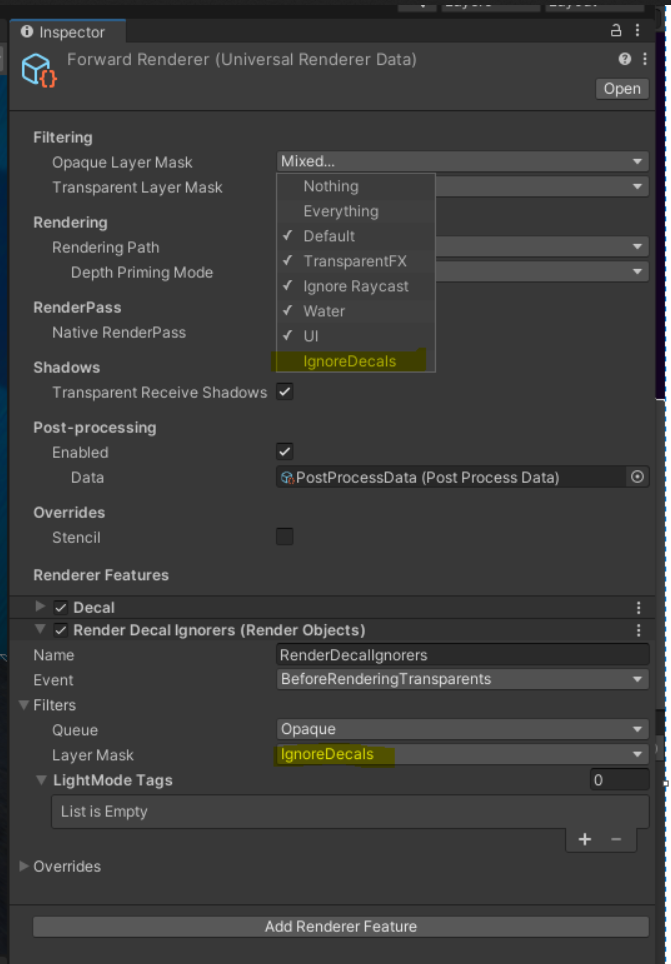
Unity Forum
Being able to exclude meshes from being affected by decals is very important, especially if the targeted decal surface isn't flat. Is there a way to do...
sudden siren
haughty garnet
https://i.imgur.com/IobNZal.png
did you use the IgnoreDecals layer on the decal projector itself or was it on something else? I tried it with the layer on the decal but still have the same issue
haughty garnet
IgnoreDecals should be the layer your player is on if you want the decals to ignore them
You're basically taking control of when that layer should render
I assume by rendering your opaque character after rendering all other opaques (when the decal renders), it probably skips that decal being rendered on them
sudden siren
if you meant that i should put the decal layer on the model shown on in the first screenshot, it just made the model transparent
 haughty garnet
IgnoreDecal is the layer your player should be on. Decal layer should be on another layer that is rendered apart of IgnoreDecal
Your player should be opaque so you must have touched something else if it became transparent
sudden siren
for context the model in the image is an enemy, not the player. I tried putting the player layer in place of the ignore decals layer but its still not working correctly. It kind of works with the previous screenshot, i just can figure out how to make it so the enemy isnt transparent.


(enemy layer is in place of the decal layer)
haughty garnet
Are you sure you're not using any transparent materials? Flipping layers shouldnt make your guys alpha blend at all
sudden siren
the material is set to opaque
 haughty garnet
It's not like a skin renderer where it has some transparent stuff?
sudden siren
no, its just one material using the default lit shader
haughty garnet
I'm confused then unless there's some dithering going on, but to me it does look like there's blending going on. IMO, take out a plane and two cubes and test out the decals with that.
get it to work on primitives before touching these materials
sudden siren
figured it out actually, instead of BeforeRenderingTransparents i used AfterRenderingPrePasses

thanks for all the help, i would have never thought of doing all this lol
haughty garnet
Huh, I'm still kinda curious why it's faded in like that. Anyway, that's usually what I tend to do too with those render objects. Just mess around with them until something works.
Ideally, use the plane and primitive idea if you do want to use these features in the future as it helps with clarity
sudden siren
will do
sudden siren
so glad the decals are working, im super happy with it
 dim prairie
hello guys, any idea why my shadows look like this using URP?
 marble vigil
dim prairie
hello guys, any idea why my shadows look like this using URP?
marble vigil
dim prairie
hello guys, any idea why my shadows look like this using URP?
What shader are your ground and characters using?
 cinder kindle
Hi, we've made a forest environment in URP for VR, where we use the Simple Lit shader with alpha clipping for the branches. However we're getting a lot of aliasing on the Quest. Anyone got any thoughts on ways to alleviate this? I can grab a video as well
 strong aspen
cinder kindle
Hi, we've made a forest environment in URP for VR, where we use the Simple Lit s...
strong aspen
cinder kindle
Hi, we've made a forest environment in URP for VR, where we use the Simple Lit s...
enable anti-aliasing?
 gilded token
hi, some of the grass in the distance is blue but if i move closer to them, they turn back to normal. any idea how can i fix this?
 bronze briar
I imported a HDR skybox, but it seems like the sun affects the environment lighting way too strongly, and with the default bloom, it looks like it's exploding

Am I using it wrong? Would it be better to use something that's not HDR?
cinder kindle
strong aspen
enable anti-aliasing?
We are using 4x MSAA
nova bear
cinder kindle
We are using 4x MSAA
MSAA won't do anything out of the box unfortunately for alpha clipping
This is an amazing article about your exact solution
https://bgolus.medium.com/anti-aliased-alpha-test-the-esoteric-alpha-to-coverage-8b177335ae4f
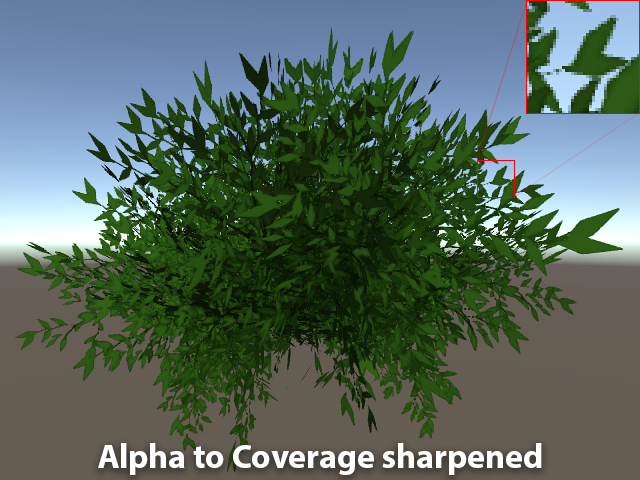
Medium
Aliasing is the bane of VR. We have several tools we use to try to remove, or at least reduce aliasing in real time graphics today. Tools…
cinder kindle
Ah great thank you!!
 weary peak
Hello, I have issues on my game under URP, I get all the mat turning completely black sometimes and the shaddows not displaying after a while. I need some suggestion to understand from where it can come https://youtu.be/w5bwQEChd-E
 marble vigil
weary peak
Hello, I have issues on my game under URP, I get all the mat turning completely ...
marble vigil
weary peak
Hello, I have issues on my game under URP, I get all the mat turning completely ...
I'd first scrutinize about why it happens "after a while"
Do you have scripts running that incrementally do something that could be related to rendering? Does it happen after a while even if you have no scripts at all running?
I'd also try to pause the play mode when the problem occurs and examine the scene with the frame debugger to get clues about which part's failing
Since it's a rendering related bug you could try to rule out post processing, renderer features and the whole current quality level
nova bear
cinder kindle
Ah great thank you!!
The article is for the built in pipeline, but with a little work you can replicate it with shadergraph
marble vigil
 forest rapids
Looks like light limits: https://youtu.be/y_vw-jzuNs0
forest rapids
thank you so much
 shrewd perch
sudden siren
so glad the decals are working, im super happy with it
shrewd perch
sudden siren
so glad the decals are working, im super happy with it
nice work, i was about to give u the same answer 😄
shrewd perch
forest rapids
check out the light limits
 swift verge
Any idea how to create an additional binding for the main shadow map with ShadowSamplingMode.RawDepth instead of ShadowSamplingMode.CompareDepths?
I need this because on WebGL, trying to access the main shadow map with a non-comparison sampler results in an error.
Ideally, I can do this without creating a copy of the texture data itself: that's a pretty large memory overhead to store completely redundant data.
The other option would be to create a custom render pass with a light mode that specifies that shadow depth should be sampled, but that breaks compatibility with regular transparent shaders (due to sorting issues).
dim prairie
marble vigil
What shader are your ground and characters using?
hey, sorry for the delay to answer. my ground is using a normal terrain, didnt change the shader. my characters are using a lit shader graph
marble vigil
dim prairie
hey, sorry for the delay to answer. my ground is using a normal terrain, didnt c...
What I'm seeing there doesn't really make sense to me and I wonder how the issue appeared
In that situation I'd try confirming that shadows do work between some purely default cubes
If they do, you know it's likely concerning your ground and character shaders or renderer components
If they don't, it's an issue with quality levels, renderer assets or project as a whole
dim prairie
One thing is that im using a lit shader graph, but on a sprite renderer
marble vigil
dim prairie
One thing is that im using a lit shader graph, but on a sprite renderer
It generally doesn't cause this kind of issue
You could test by swapping to a default shader, as well as applying your shader graph to a default mesh and looking at their shadows side by side
haughty garnet
I think I've done this before, but using legacy text because I couldn't bother digging through tmp's shader code
was for some world-space combat text using built-in pipeline
 velvet kestrel
someone please help me figure this out, i have been trying to find some help for weeks and nobody knows how to fix it.
 grizzled crag
velvet kestrel
someone please help me figure this out, i have been trying to find some help for...
grizzled crag
velvet kestrel
someone please help me figure this out, i have been trying to find some help for...
reminds me of, but wow thats strange, good luck
 copper pilot
velvet kestrel
someone please help me figure this out, i have been trying to find some help for...
copper pilot
velvet kestrel
someone please help me figure this out, i have been trying to find some help for...
Using a non normal map and/or incorrect normals/tangents on mesh?
 marble vigil
velvet kestrel
someone please help me figure this out, i have been trying to find some help for...
marble vigil
velvet kestrel
someone please help me figure this out, i have been trying to find some help for...
Your scene lighting is disabled, and I would guess your mesh doesn't have any valid normals
velvet kestrel
when im in game, it doesnt work even with lighting enabled.
marble vigil
velvet kestrel
when im in game, it doesnt work even with lighting enabled.
I'd expect not, but as long as you're aware of the lighting toggle
I'm not sure what the issue could be besides the mesh, but for certainty you could test it with a material that doesn't have any normal maps, and compare it next to a default cube with your normal mapped material next to some lights
This will pinpoint if the issue is with meshes or materials
velvet kestrel
marble vigil
I'd expect not, but as long as you're aware of the lighting toggle
I'm not sure ...
the cube had the same effect, also lights permanently point in 1 direction no matter how much i turn it
marble vigil
velvet kestrel
the cube had the same effect, also lights permanently point in 1 direction no ma...
If the cube had your normal maps, that implies the problem is with your normal maps
Especially if your level geometry stops having the issue if you remove the normal maps from its material
Normal maps must be marked as "normal map" in the import settings, and must contain valid normal data
 austere hemlock
Hello. I was wondering what maximum texture size you would recommend for meta quest 3 game. I want my graphics to look sharp as possible. Do you think 4k textures are too over the top?
marble vigil
austere hemlock
Hello. I was wondering what maximum texture size you would recommend for meta q...
Your budget for vram for textures depends entirely on how you use them and how many of them you have
Test it
austere hemlock
marble vigil
Your budget for vram for textures depends entirely on how you use them and how m...
ok, thank you
 dusty gate
I am importing pixel art into unity URP but it still is compressed.
I have changed the filter mode to point no filter, and turned off compression
 velvet kestrel
marble vigil
Normal maps must be marked as "normal map" in the import settings, and must cont...
velvet kestrel
marble vigil
Normal maps must be marked as "normal map" in the import settings, and must cont...
where do i find the import settings?
 swift trout
click on the normal map in project window (where you see assets), import settings will be in the inspector (where you would normall have transform, scripts etc.)


 shut bough
Ya'll I got the purple problem >_< I imported the asset from unity asset store and both my project and it are URP I'v reimported it a few times but to no avail any suggestions?
shut bough
velvet kestrel
this is my post processing settings
This is just your inspector
sudden siren
sudden siren
so glad the decals are working, im super happy with it
okay so bad news: the render objects method makes the enemy render really wierdly in build

really annoying considering it looked fine in the editor
is there any third party decal system on the asset store that someone can vouch for, i dont think theres any way i can get around this
haughty garnet
sudden siren
okay so bad news: the render objects method makes the enemy render really wierdl...
make sure you're using the correct render asset in build
there's a chance that in quality(?) settings it's using another render asset
haughty garnet
there's two places I should say. One, being in the typical render slot in the settings, but if you look around you'll see platform specific settings for each profile
sudden siren
the issue doesnt occur on my lower quality level but does on my high quality level
both levels are set to the correct asset
 pseudo jacinth
I'm looking to do posterized hue shifted lighting like this, in what way can I do so?
 marble vigil
pseudo jacinth
I'm looking to do posterized hue shifted lighting like this, in what way can I d...
marble vigil
pseudo jacinth
I'm looking to do posterized hue shifted lighting like this, in what way can I d...
With custom post processing
This is similar to Obra Dinn's style, so you could use that as a lead to find assets or guides
Especially if you want that kind of dithering pattern also
pseudo jacinth
marble vigil
With custom post processing
This is similar to Obra Dinn's style, so you could u...
I see, I think it would also be nice to have per-texel lighting instead of per-fragment. Any lead on that?
marble vigil
pseudo jacinth
I see, I think it would also be nice to have per-texel lighting instead of per-f...
There is indeed
https://forum.unity.com/threads/the-quest-for-efficient-per-texel-lighting.529948/
The instructions seem a bit scattered and took a little bit of tweaking but it works
pseudo jacinth
Very nice, thx 
 stable matrix
How to make alpha clipping work on lit opaque material?


and why does other materials work????????????

Ahhhhhhhhhhhh I seeeeeeeeeeeeeeeeeee
I made Specular Map Source to Specular Alpha and it worked
Thanks everyone
nimble mirage
Anyone know how to implement an outline render feature using render layers in the latest URP? The API update deprecated basically everything and I'm not sure where to start with porting.
This is the original repo https://github.com/Robinseibold/Unity-URP-Outlines
 chrome stone
so while building my game with urp, in unity it looks fine, but in oculus, it looks pink
like urp didn't load
i put it as standard before building, and it worked fine
stable island
nimble mirage
Anyone know how to implement an outline render feature using render layers in th...
I struggled with this but you are best creating a fullscreen shader graph and adding a custom function node to do depth/normal reads, I put down some notes: https://github.com/andypoly/UnityShaderGraphCustomFunctions/blob/main/README.md
I still do not know what the undocumented "Fetch Color Buffer" is on a FullScreenPassRendererFeature (nice name!) though...
Ah see code - "Specifies whether the assigned material will need to use the current screen contents as an input texture"
 cunning kelp
Hello, someone have a Optimizer of texture for my project in URP (VR). I need a make atlas for optimize my static assets and i try with "Mesh Baker" and "ProDrawCallOptimizer". Just it's png atlas and i need tga atlas.
marble vigil
cunning kelp
Hello, someone have a Optimizer of texture for my project in URP (VR). I need a ...
Why tga?
cunning kelp
because it's for a game ^^'
 torn venture
Hello, so I have a problem with decals.
In editor it work fine, but when I build my game for Android, it does'nt work.
If I choose the technique Dbuffer, it just doesn't appear at all, if I choose the technique ScreenSpace, it does appear, but in flashy pink, like when a shader is not compatible.
I'm at lack of options here, I tried everything I found on google.
Anyone would have a solution for this please ?
Thank you very much.
marble vigil
cunning kelp
because it's for a game ^^'
What does that mean?
There's no technical difference at all to using png vs tga, at least none that I'm aware of
When a texture is imported into unity it's converted into an entirely different format anyway
So any image compression will be nullified, but any lossy compression artifacts from it will remain
TGA and PNG are both lossless formats
PNG is losslessly compressed so it's slower to open and save in an external image editors, but not by much
spring depot
Is there a way to make a URP renderer feature render AFTER the canvas UI ugui stuff? I need to post proccess the canvas UI ugui elements but I can't figure out how to set it to occur after they've been rendered.


Ive currently tried to hard code it to render after the canvas
    public static class CustomRenderPassEvents
    {
        public const RenderPassEvent AfterRenderingUI = (RenderPassEvent)600;
}```but this didnt do the trick
Is there any way to write a unity URP renderer feature that occurs after the canvas UI ugui elements are rendered?
This might be an xy problem, my REAL question is how do I make https://github.com/mightypanda/Unity-Fast-Bloom this package work for canvas ui elements

GitHub
Probably the fastest bloom implementation. Contribute to mightypanda/Unity-Fast-Bloom development by creating an account on GitHub.
This thing is written entirely around a camera concept and I am trying to make it work for canvas ui ugui elements that do not use a camera, and I cannot set the Canvas layer to camera either because that breaks other elements of the UI that cannot be fixed any other way that I am able to solve or personally fix because I am too stupid to figure it out despite many attempts my best efforts just arent good enough
haughty garnet
spring depot
Is there a way to make a URP renderer feature render AFTER the canvas UI ugui st...
depends if it's on an overlay or not
overlay is like a secondary camera, so rendering objects would be less useful, but if you stick to screenspace/world camera then you can override them as if you were overriding transparents
spring depot
haughty garnet
depends if it's on an overlay or not
Currently its an overlay. I'm fairly certain we 'had' to make it overlay for some technical reasons that I don't remember in this exact moment
 haughty garnet
not too sure how you would apply PP on overlay (if that's what you're trying to do), but try it with screen space and see if you can manage the results you want
can always just do a secondary camera with a screen space gui and add a volume to that
 placid laurel
Hello, im new to Unity and im trying to make an fps game
After building and compiling my project the render texture seems to be glitching or something
I dont know why it works fine in my editor
spring depot
haughty garnet
can always just do a secondary camera with a screen space gui and add a volume t...
I wasnt looking to do a volume, I wanted this effect for the entire of everything. The fact that it uses a plane in its source isnt a feature, its a problem
I dont want an overlay
I am trying to fix it to match my use case, which is to bloom just everything, post proccess the whole thing
re "a secondary camera with a screen space gui" - As I said above I'm fairly certain we 'had' to make it overlay for some technical reasons that I don't remember in this exact moment
When running the project with the gui set to camera, it just doesnt' render at all, completely gone vanished
haughty garnet
Yeah, I'm not too sure about the overlay and its ordering. Usually cameras give you more control on rendering order as well. As to why it's not rendering I could only guess the render objects could be responsible as it may not be targeted to render
placid laurel
placid laurel
Hello, im new to Unity and im trying to make an fps game
After building and comp...
Update: changing the background type of the camera to color seems to have fixed it
But I want it to be set to skybox
Nvm enabling opaque textures in the render asset fixed it
bronze briar
Why does this blend like this? How could I make these blend like regular Photoshop layers


 little sapphire
@spring depot did you ever solve the shadow artifacts/acne issue in URP you had last year that changing the URP asset shadow bias didn't fix?
marble vigil
bronze briar
Why does this blend like this? How could I make these blend like regular Photosh...
Try adding both textures' alpha channels together and using that as the Fragment alpha
bronze briar
marble vigil
Try adding both textures' alpha channels together and using that as the Fragment...
Thanks!
But now there's another issue
I reworked it to where it looks like this (will bring back the gradient stuff later) but now it has the jaggy edges from the color layer


And if I swap around the base and blend textures, it fixes the jagginess but colors the edges of the sprite


The issue seems to be that the color texture sampling "bleeds" outside the actual alpha of the texture
marble vigil
bronze briar
The issue seems to be that the color texture sampling "bleeds" outside the actua...
This is actually a pretty complex issue due to technical reasons:
https://bgolus.medium.com/the-team-color-problem-b70ec69d109f
bronze briar
I had a feeling
marble vigil
3D rendered graphics work in some decisive ways differently from 2D image editors
bronze briar
I'm basically just trying to make a sprite shader where one texture's colors is used to lookup a palette (another texture) to allow for palette swaps
Unfortunately there's no resources on that online
Just replacing colors one by one for pixel art
spring depot
little sapphire
<@78571959029334016> did you ever solve the shadow artifacts/acne issue in URP y...
at this point that is so far in the past I have no memory of it if you can link me a message link to when I was working on that it might jog my memory
bronze briar
marble vigil
This is actually a pretty complex issue due to technical reasons:
<https://bgolu...
Skimming the article, it doesn't seem like that should be the case
This may be naive, but why can't it just tell that "the palette texture's alpha is zero here, so just use the other color"
marble vigil
bronze briar
This may be naive, but why can't it just tell that "the palette texture's alpha ...
Usually because that's not good enough
If you only blend at zero alpha you'd get jaggies, color bleeding or both at the threshold where it's somewhere between 1 and 0
Especially due to bilinear filtering and mip maps
bronze briar
Right
So I guess image editing software does something like what you see in the article
bronze briar
This looks better, though there is some artifacting


 marble vigil
bronze briar
This looks better, though there is some artifacting
marble vigil
bronze briar
This looks better, though there is some artifacting
That might be texture compression
haughty garnet
bronze briar
This looks better, though there is some artifacting
Import settings set texture compression to none, and filter to Point (there's also a node to force it in the shader)
bronze briar
Not sure how good it’ll look with no filtering, but I’ll try it
haughty garnet
I guess it's up to preference, but sometimes I notice bilinear will smooth pixels over my outlines
but in your case it does seem like compression because pixels wouldn't jump that far with filtering like that
blazing gull
marble vigil
This is actually a pretty complex issue due to technical reasons:
<https://bgolu...
ooh, that's very useful
copper pilot
marble vigil
This is actually a pretty complex issue due to technical reasons:
<https://bgolu...
Ah, unity's garbage handling of premultiplied alpha strikes again
marble vigil
copper pilot
Ah, unity's garbage handling of premultiplied alpha strikes again
I guess in this case it doesn't pretend to, since we're doing our own blending
But I was surprised to learn premultiply confusion in Unity goes back to at least 2018
copper pilot
Well, most people never understood premultiplied alpha
 vocal halo
In URP using camera stacking I can not have pixel perfect?
I have to choose between camera stacking or pixel perfect?
Anyone found a workaround to this.

 mystic delta
See if you can ignore the warning. It might be fine if they are identical.
marble vigil
Iirc a hard limitation of the 2D renderer at the moment, unless one of the newer editors implemented it
soft lion
Haven't had literally anything going on the 2D roadmap for ages so highly doubt
 odd estuary
Why do i get this glitch when i use URP? I can use built-in with no issue like this but when i use urp i have this weird thing

I dont know if its with unity, is it because of my os? gpu?
the weird thing is that when i switch to game it looks normal
 dry willow
odd estuary
Why do i get this glitch when i use URP? I can use built-in with no issue like t...
dry willow
odd estuary
Why do i get this glitch when i use URP? I can use built-in with no issue like t...
Definitely isn't normal but couldn't tell you what is causing it. Maybe try updating graphics drivers?
odd estuary
dry willow
Definitely isn't normal but couldn't tell you what is causing it. Maybe try upda...
Ill try that
im using intel hd graphics 5500
soft lion
odd estuary
Im not using windows so maybe thats the issue
It could really be anything but you definitely can run unity on Linux
 ripe void
How i can get random point at mesh and get world pos and normal from this object at this point?
I can imagine how to get a random point, but with world position and normals - no idea
ripe void
soft lion
It could really be anything but you definitely can run unity on Linux
I am using unity at linux and here some troubles, but nothing critical as this artifacts
ripe void
odd estuary
Im not using windows so maybe thats the issue
What did you use? OpenGl or Vulkan? I not sure that intel hd graphics support Vulkan, but...
odd estuary
I do have vulkan support because im using linux
so vulkan support isnt a issue for me i think
ripe void
And did you have some other GPU at your laptop? Like Nvidia or something, you can try use that gpu instead
odd estuary
because i can use godot (godot uses vulkan)
odd estuary
ripe void
And did you have some other GPU at your laptop? Like Nvidia or something, you ca...
well, not
but no worries
im not gonna switch to URP now
because i think i found someone make a edge detection shader for built-in

GitHub
A simple post-processing outline effect that uses depth-based edge detection. - MirzaBeig/Post-Processing-Wireframe-Outlines
ripe void
odd estuary
because i think i found someone make a edge detection shader for built-in
It's doesn't depend at render pipeline at all, just need some work. If you don't wanna work with shaders in feature you can simply use this, but else you defenetly need understood process by yourself
ripe void
odd estuary
im using intel hd graphics 5500
And looks that vulkan not supported https://www.intel.com/content/www/us/en/support/articles/000005524/graphics.html
Intel
Information on supported APIs for Intel® Graphics Drivers, including DirectX*, OpenGL*, Vulkan* and OpenCL* versions.
odd estuary
Well i have been working on this for 2 days but i came across a lot of stuff, im not really good at shaders
odd estuary
ripe void
And looks that vulkan not supported https://www.intel.com/content/www/us/en/supp...
Vulkan may not be supported, but if youre using linux i think you can use vulkan
because i somehow ran godot with vulkan
ripe void
odd estuary
because i somehow ran godot with vulkan
Not at opengl? That strange, linux can't get some like that
odd estuary
idk, lemme test it
 ripe void
odd estuary
youre also using linux?
ripe void
odd estuary
youre also using linux?
Yes
ripe void
And vkcube?
 ripe void
Haswell and newer supports Vulkan on Linux. So yes
Well, you can change renderer to vulkan and test urp
OpenGL doesn't support frame debugger for example, but used by default for some reason
odd estuary
Its no problem, ill use built-in. I dont really wanna deal with shaders 😅
ripe void
I think using URP it's easier, but ok
odd estuary
Yeah maybe, but i will just combine a toon shader with this outline and then thats all i need
glacial dune
How do I implement a closed-shape shadow caster 2d in unity urp 2d? I get this awful glitch when I try to do it.
Is it better to switch to non-2d lighting and if so - how to do it?
 signal fractal
Hey, I'm experiencing whatever this is, when I use a spectator camera, instead of my normal camera that's used by the player. This only happens in build.
 signal fractal
This also only happens when setting the target eye to "none"
vocal halo
I ended up using rendertextures since it did break pixel perfect
Had to do some pretty weird hack to deduce the alpha of the camera output lol
ripe void
I am trying draw instanced plates, but what this?
soft lion
ripe void
I am trying draw instanced plates, but what this?
Give more details, code and so on
glacial dune
glacial dune
How do I implement a closed-shape shadow caster 2d in unity urp 2d? I get this a...
😅
shut bough
By chance has anyone ever seen this before? I just changed my game from no render pipline to URP and this is the last bug I need to fix (supposedly)
 shut bough
this is my error message: Unity IsCameraProjectionMatrixFlipped is being called outside camera rendering scope
sinful gorge
Upgrading pipelines needs, well, some upgrading.
Maybe replace the camera, check the settings, delete the library folder to clear caches, and google around @shut bough
And if unity is not updated, update
tawdry grotto

I'm getting these weird lines JUST after baking, I don't know what the problem is...
ocean hinge
tawdry grotto
Thats more a realtime lighting problem names "Shadow acne" and is caused by to low bias on the light source
tawdry grotto
Yes
I see it's coming from my sun's directional light, but I don't know how to fix it. My resolution for shadows is 4096.
signal fractal
Hey, I combined textures for a model in blender, and now, when I set the metalness value to 1 or apply the metallic map, the object just gets darker (the top one), the one below is perfectly fine. Yes, I have reflection probes in my scenes, other objects work just fine, it's just this one specifically.

It's like that in blender too
And everything is set to "non color"
 signal fractal
Finally found a fix! When baking, I had to disconnect the metallic map and set the metallic value to 0, now the gun looks as expected.
 vague gale
any idea why custom render texture does not apply the material ? texture keeps initial color...

i would expect it to be red now ?
dry willow
vague gale
That shader probably isn't suitable for Custom Render Textures. It needs a specific vertex shader to work iirc
vague gale
are there any docs for this ? is it possible to use this with shadergraphs ?
dry willow
iirc there's a "Custom Render Texture" option on the Create -> Shader Graph dropdown, though I've never used/tested it
vague gale
but i still need a material + shader
always the simple things, that dont work in unity -.-
hm custom shader code works tho
 fading seal
baked lights shouldnt contribute to any meaningful performance hit at runtime vs a realtime or mixed light right?
haughty garnet
fading seal
baked lights shouldnt contribute to any meaningful performance hit at runtime vs...
It's a mem cost as you're baking this light texturing, so if you're planning to have a larger world then that's something to consider.
it's probably not that big of an issue if you do use multiple scenes to split up the world.
fading seal
thanks, so its gotta be a bug with entities graphics(deleting 20 lights set to baked lighting yields a 5-7ms speedup)
 fresh kelp
Hello everyone,
I'm using URP 15.0.6, I am making a render feature and in my pass I need to draw my visible objects with a specific shader.
The issue is my objects material have the same shader but the properties, they may vary, so I need to use the Renderer.SetPropertyBlock to adjust those values.
I have tried to simply get the renderers of the objects visible and use cmd.DrawRenderer but I end up with 200+ draw calls, yeah no thanks.
I was previously using cmd.DrawRendererList, but how can I access the renderers from the RendererList??? There is no mentions of a list of Renderer I could access
 fair relic
Hello,
I'm experiencing a strange bug with my project. I am using URP , but I get an error message when rendering, even if it's just a blank scene with nothing in it. I believe the issue might be with the project itself, not the scene or the assets, but I can't pinpoint the problem. If anyone has any clues, I'd really appreciate your help!
i get this error : Build completed with a result of 'Failed' in 7 seconds (7003 ms) Building Player failed UnityEngine.GUIUtility:ProcessEvent (int,intptr,bool&)
Thank you very much.
 vague gale
dry willow
iirc there's a "Custom Render Texture" option on the Create -> Shader Graph drop...
vague gale
dry willow
iirc there's a "Custom Render Texture" option on the Create -> Shader Graph drop...
FYI:
material has to be set to initialization mode -> source -> material, instead of Material ! who would have guessed
 crude elk
am I misunderstanding the purpose of this "Render Objects" thing? It seems that no matter what values I play with here, nothing happens. Even the material override does nothing.

the only thing I can get to work is the camera fov
blazing gull
AfterRenderingPrePasses is before opaque and transparent objects are rendered
also, your Depth Test is set to "Never", which never passes
and the compare Function on your Stencil is also set to Never
although you have both Pass and Fail set to Keep, so that shouldn't matter
I would suggest resetting the render feature to the default settings
crude elk
blazing gull
AfterRenderingPrePasses is before opaque and transparent objects are rendered
dont I want it before opaque?
blazing gull
no, because then opaque objects draw on top
(although Write Depth is checked, so I'd expect it to at least not get covered up)
but i'm not sure if/when the depth buffer gets cleared
crude elk
blazing gull
no, because then opaque objects draw **on top**
what if I want that?
blazing gull
because you presumably want to be able to actually see the rendered object
crude elk
oh, I misunderstood you.
So, why on none of the options does "Equal" for depth test work? Is depth test not suppose to control when an oject is rendered?
it just doesn't seem to be working how it works in shaders which is confusing me. For example setting it to "Greater" renders the entire object, not just parts of the object that are behind something else.
For example, the left (green) is a shader that just colors the object green. Its depth test mode is set to "Greater". On the right (red) is an object with the urp lit shader on the "Test" layer. This is the render objects feature that is targeting that layer. Why does the rest of the red object render?

 dry willow
crude elk
For example, the left (green) is a shader that just colors the object green. Its...
dry willow
crude elk
For example, the left (green) is a shader that just colors the object green. Its...
RenderObjects re-renders the objects with the overrides. Objects still render normally unless you remove the layer from the default Layer Masks at the top of the Renderer Asset
crude elk
dry willow
RenderObjects re-renders the objects with the overrides. Objects still render no...
oh thank you. I didnt know they re-render them I though it replaces rendering. Although now I have another question for #archived-shaders because my extremely simple shader graph seems to be a bit bugged and I dont know why...
marble vigil
Any reasonable way to not have bloom override downscale at all? The default options are half and quarter, but with pixel perfect resolution around 320x180 half is not good enough and causes aggressive flickering
 crystal parcel
Hi guys, I'm working on a 3D game project for mobile platforms using urp with shadows and post processing. Currently my game is very laggy when I run it on my phone (not emulator). Do you have any way to optimize my game, or will I have to use built-in?
 autumn cobalt
Hi o/, is it possible to have depth offset in Unity Urp? is it complicated? (trying to do vfx with floor cracks and the POM seems to be flat)
 agile mortar
Anyone know why I might be seeing a huge vysnc block in profiler despite attempting to disable it with
    Application.targetFrameRate = -1;
    QualitySettings.vSyncCount = 0;
Is this profiler time actually time in something else and not really vsync waiting? Or how do I actually get vsync disabled?
 heady yarrow
crystal parcel
Hi guys, I'm working on a 3D game project for mobile platforms using urp with sh...
heady yarrow
crystal parcel
Hi guys, I'm working on a 3D game project for mobile platforms using urp with sh...
Either do a debug build and connect the unity profiler to see what parts of your render is taking too much time or just try to disable shadows or post processing to eliminate the biggest bottleneck.
marble vigil
crystal parcel
Hi guys, I'm working on a 3D game project for mobile platforms using urp with sh...
You always have to pinpoint performance problems and fix them regardless of render pipeline or platform
 karmic iron
marble vigil
Any reasonable way to not have bloom override downscale at all? The default opti...
karmic iron
marble vigil
Any reasonable way to not have bloom override downscale at all? The default opti...
Short answer is no, not unless you want to maintain your own full branch of the full PostProcessing stack. I have never been a fan of hidden bloom settings for this reason, and don't use Unity's inbuilt bloom because of this.
agile mortar
is there are good article for best practices optimizing urp usage? I can large amounts of time in particular calls under the DoRenderLoop_Internal stack in profiler but I'm not sure what the fix/mitigation would be for these various things eating up time
 cursive pecan
Hey there! I have a problem related to light casting (not sure if this is the correct channel for this).
I am currently working on a 2D top down game, similar to Hotline miami. In there i want to use 2D lights. And outside of the level (in the same scene) I want to have 3D objects placed around, which then use the "normal" 3D lights. I am using 2 cameras, one for the 2D and the other one for 3D rendering. But i can't figure out how to combine both renderers. Does anybody know what the problem here is? When i set my main camera to render 2D Data and the other cam to 3D, i can't stack the 3D camera to the base one. I am using Unity version 2022.3.22f1 and URP version 14.0.10


 marble vigil
karmic iron
Short answer is no, not unless you want to maintain your own full branch of the ...
marble vigil
karmic iron
Short answer is no, not unless you want to maintain your own full branch of the ...
It really does seem so, thanks for the insight
marble vigil
cursive pecan
Hey there! I have a problem related to light casting (not sure if this is the co...
As it bluntly tells you you can't stack cameras with different type renderers
The reason I believe is that 2D renderer disables 3D rendering features and vice versa (for seemingly no good reason)
Or more specifically 2D renderer disables shaders required for lighting calculations, but they still work fine if you re-implement the same or similar calculations in a custom shader
Or inversely stick to 3D lighting with a third party 2D lighting asset
cursive pecan
thank you for your response, these suggestions don't really satisfy me, maybe unity will update this in the future to allow working with both rendering types at the same time. will stick to 2d lights for now
marble vigil
cursive pecan
thank you for your response, these suggestions don't really satisfy me, maybe un...
We can hope and meanwhile ponder why they disabled the functionality in the first place
If you only need very simple lighting, implementing a custom 3D lit shader is not that big of a challenge
 limber hound
Is there a good way to distort transparents in the recent Unity version ?
Last time I checked, it was impossible to distort transparents behind a given shader
 magic stone
Hi all, in the Scene window my game looks correct, but in the Game window, it looks all blue, I ran the auto-update tools for Built-In to URP, does anyone know what may be causing this? Google has a few random forum threads pop up but none have a solution.


 naive niche
whats good fps for 1.6M verts in unity
 last arrow
Hi everybody! Realtime GI sometimes doesn't work at all and I don't understand why. As you can see this building is just completely black while same prefab somewhere else works just fine. What am I doing wrong?
 soft lion
naive niche
whats good fps for 1.6M verts in unity
soft lion
naive niche
whats good fps for 1.6M verts in unity
Vertex count and fps are quite independent from each other, there's a lot of factors that affect performance. Are you having performance problems or why are you asking? You could target framerates anything between 60 and 1000 depending on lot of factors and the target device is one of the most important ones.
naive niche
soft lion
Vertex count and fps are quite independent from each other, there's a lot of fac...
im getting like 40-60 when I should get 200-300 I think
soft lion
naive niche
im getting like 40-60 when I should get 200-300 I think
On what device?
naive niche
soft lion
On what device?
PC
I get 90-120 FPS on a build
I have occulsion and LODs
 soft lion
1.6M doesn't sound too bad. Doesn't seem like the vertex shaders causes the issue so it must be something else.
naive niche
soft lion
1.6M doesn't sound too bad. Doesn't seem like the vertex shaders causes the issu...


idk if that helps
oh also I was getting 120 fps on low settings, high I am getting 70ish
its bad
soft lion
Try to figure out exactly what is the slowest part of your game and optimize that. You could temporarily hide elements like trees and grass to see whether they drastically change the performance. Since rendering seems to take quite much CPU resources, I'd guess the draw call count could be an issue
naive niche
okay
soft lion
Generally rendering should be the part that takes much more from the GPU than from the CPU and the latter should take care of the game logic itself
naive niche
soft lion
Generally rendering should be the part that takes much more from the GPU than fr...
its the grass
went from 40-60FPS went it was there, to 160-220FPS when it wasn't
soft lion
Not unexpected. Look up some different ways to increase grass performance. Depending what exactly about the grass is slow there is many different ways to improve, as I said in your case the batching might be the biggest problem
naive niche
soft lion
Not unexpected. Look up some different ways to increase grass performance. Depen...
how would I see if it was batching
soft lion
Stats window will show you the batch count. How you create the grass can also indicate the batch count (unity terrain, individual objects, etc.)
last arrow
last arrow
Hi everybody! Realtime GI sometimes doesn't work at all and I don't understand w...
in case anyone needs it: i disabled "optimize realtime uvs" and it seem to have fixed the problem
 rare goblet
Hi, I'm currently trying to figure out a good way to render decals, ala unity's Decal Renderer Feature, but am having an issue.
Namely, I want a method where I can restrict a decal to a single gameobject, but the Decals packaged with unity use Layers to handle it, and I'm not totally sure if you can modify those during runtime or not.
 naive nacelle
im not sure if thats the right channel but does anybody know why my objects are fading to grey even if fog is deactivated?
 gaunt pawn
Hello every one 👋 please help me on this. My "Game" assets are not looking like the "Scene" ones. How can I fix that ? Thanks


 marble vigil
gaunt pawn
Hello every one 👋 please help me on this. My "Game" assets are not looking lik...
marble vigil
gaunt pawn
Hello every one 👋 please help me on this. My "Game" assets are not looking lik...
What's the difference?
marble vigil
naive nacelle
im not sure if thats the right channel but does anybody know why my objects are ...
The issue is either with the specific leaf shader, or with the leaf textures
The shader might implement fog on its own, or some other type of shading that looks like fog
The texture may have mip maps that for some reason tint towards grey at higher levels
 wide fern
I'm working on a multi-display application and am trying to use the frame debugger, but I don't see a way to debug a specific display/camera. Is this not possible?
 thick hinge
are you not just getting a stack of stuff for every camera that renders to a screen in there
ah tested for me its just following the selected display in the game tab, not really sure how to do that for device though, find it really odd it does not act the same way is when using multiple camears for 1 screen
gaunt pawn
marble vigil
The issue is either with the specific leaf shader, or with the leaf textures
The...
Ok @marble vigil thanks a lot
 bleak quail
Hi! So I've been trying to implement a laser like attack for one of my enemies, and I've been running into some issues with the my line renderer. Pretty much I want my laser to have pixel graphics/animations. I made my custom material and set it as the line renderer's material. It works fine in stretch mode, however, when I set it to tiling, the line renderer's length remains the same no matter what I scale the 2nd point to. Is this a common issue?


 violet holly
So, URP seems to ignore the "Always Included Shaders" array in ProjectSettings -> Graphics. So I guess that means I will have to use a ShaderVariantCollection instead if I want to make sure all variants of a particular shader are included in a build? Is there a way to automatically include ALL possible Shader variants in a ShaderVariantCollection? One of my shaders has so many that adding them manually doesn't seem possible. And recording them during game would also be unfeasible. It seems like it should be easy to include all variants, it is basically what "Always Included Shaders" used to do.
 bold yew
Hi guys ! I have this issue and i dont know how can i fix it, any ideas ? 😄

 copper burrow
bold yew
Hi guys ! I have this issue and i dont know how can i fix it, any ideas ? 😄
copper burrow
bold yew
Hi guys ! I have this issue and i dont know how can i fix it, any ideas ? 😄
You need to ensure that the Render Pipeline Asset for all Quality Levels and the Scriptable Render Pipeline Settings in Graphics are not set to None.

 bold yew
Yes aha i've found that like 30s after i send the message, but thank's 😄
 fading tinsel
Hey everyone, does anyone know how to apply a volume profile to a seperate camera that doesn't use the main renderer?
 vast sonnet
hi guys, i'm currently having a problem with the lights i've created, when i put a light near my glowing object, it adds intensity to it, making it glow excessively, i don't know what to do

the light from the object itself seems to work fine without nearby lights
 marble vigil
vast sonnet
hi guys, i'm currently having a problem with the lights i've created, when i put...
marble vigil
vast sonnet
hi guys, i'm currently having a problem with the lights i've created, when i put...
You could try excluding the lamp from the light via target sorting layers, or use an unlit sprite material on the lamp instead
vast sonnet
yes, at first I thought of that possibility, but my glowing object doesn't have a 2d light itself, it's actually an object created from a shader, combining the main texture with the emission texture. Because of this, I can't separate the light from the object (I don't even know if this is the right channel to talk about this).

that's the shader by the way
https://discussions.unity.com/t/how-can-i-prevent-lights-overlapping-in-intensity/145271
this discussion is something similar to my case, but he did it with lights, and I need to do it with the shader of the object itself (I think)
 shadow quail
Hey for the hell of me I can not find out why my player is flying off into the void.
This is the playermovement script.
(yes the player moves with w a s and d and rotates to the oriantation to the mouse position)
using UnityEngine;

public class PlayerMovement : MonoBehaviour
{
    public float moveSpeed = 1.5f;
    public float rotationSpeed = 4f;
    public Vector2 pivotOffset = new Vector2(-0.4f, -0.1f);

    private Rigidbody2D rb;
    private Vector2 movement;

    void Start()
    {
        rb = GetComponent<Rigidbody2D>();
    }

    void Update()
    {
        movement.x = Input.GetAxisRaw("Horizontal");
        movement.y = Input.GetAxisRaw("Vertical");
    }

    void FixedUpdate()
    {
        rb.MovePosition(rb.position + movement * moveSpeed * Time.fixedDeltaTime);
        RotateToMouse();
    }

    void RotateToMouse()
    {
        Vector3 mousePosition = Camera.main.ScreenToWorldPoint(Input.mousePosition);
        mousePosition.z = 0f;

        Vector2 direction = (mousePosition - transform.position) - (Vector3)pivotOffset;
        float targetAngle = Mathf.Atan2(direction.y, direction.x) * Mathf.Rad2Deg;
        float currentAngle = rb.rotation;
        float angle = Mathf.LerpAngle(currentAngle, targetAngle, rotationSpeed * Time.deltaTime);
        rb.rotation = angle;
        transform.position = rb.position - pivotOffset;
    }

    void OnCollisionEnter2D(Collision2D collision)
    {
        Debug.Log("Player collided with: " + collision.gameObject.name);
    }

    void OnCollisionStay2D(Collision2D collision)
    {
        Debug.Log("Player is colliding with: " + collision.gameObject.name);
    }

    void OnCollisionExit2D(Collision2D collision)
    {
        Debug.Log("Player stopped colliding with: " + collision.gameObject.name);
    }
}
You're probably going to get more answers in #archived-code-general than the URP channel (your question isn't related to URP) But from a quick glance it looks like you're setting positiont twice in two different ways and just hoping it will work, once in FixedUpdate and once again in RotateToMouse. It would be less error prone to calculate the combined position once and set it once at the end of fixedUpdate using the rigidbody methods. (also as a rule of thumb don't mix and match rigidbody move methods and transform.position, you're asking for trouble and desynced transforms)
Also try just setting pivotoffset to zero and seeing if the problem goes away. If it does, congratulations, you've just narrowed it down to an incorrect pivot algorithm.
shadow quail
nova bear
You're probably going to get more answers in <#763495187787677697> than the URP ...
Alright thanks mate, ill give it ago soon im currently doing sm
Thanks again tho
marble vigil
vast sonnet
yes, at first I thought of that possibility, but my glowing object doesn't have ...
You probably don't want to change how lights overlap, because we expect two overlapping lights to be brighter
And with this kind of shader that's not the issue anyway
Your "glow" shader is increasing the base color above 1, which means it just responds exponentially more to incoming light and doesn't even glow in the dark
That kind of glow shader is the only one you find tutorials for but it's not correct
There are two correct methods, one of which is to use a sprite masked global light, another to lerp to unlit sprite shading using the sprite mask with custom lit sprite graph
You'll want the second technique because lerping to unlit prevents over-exposure
Speaking of the thing @snow dew how did the sprite emission work out with the example
 snow dew
marble vigil
Speaking of the thing <@279664056149737473> how did the sprite emission work out...
snow dew
marble vigil
Speaking of the thing <@279664056149737473> how did the sprite emission work out...
Hey! Sorry for not getting back to you yet!
I had some stuff come up with work and personal things that made me take a break from everything for a bit. I didnt try it yet. I am slowly getting back into everything though and will try it in the coming days!
Very sorry for not getting to it yet/
I still have it laying on my desktop ready to try/
marble vigil
snow dew
Hey! Sorry for not getting back to you yet!
I had some stuff come up with work ...
I know how it be sometimes!
Just let me know if you encounter any issues with it
snow dew
marble vigil
I know how it be sometimes!
Just let me know if you encounter any issues with it
Will do! Thanks alot again!
marble vigil
 modest shale
I can't seem to get the URP Decal Projectors to work at all in 2022.3 =o= They work in the editor, but no matter what I do they're not working my Win64 builds. I've set them to DBuffer per Reddit suggestions, I've force included the shader, etc?
vast sonnet
marble vigil
<@674766960382181407> here's the sample for you as well https://cdn.discordapp.c...
ok, i saw the example and i really understood what i was doing wrong. There really should be proper tutorials on this sort of thing. I'd prefer to use the emissive map example because it has more autonomy over each of the objects that glow, whereas in the case of the masked light all the objects would be connected and consequently it would be more annoying to adjust their lights individually. But gee, thanks for the example, it really helped a lot
 sleek ravine
Anyone know how to make the transparent shader recieve shadows? look at the ring on this planet, the planet isnt casting any shadows on the ring and the ring is like either fully lit or not lit at all

I want like this effect

anyone have experience with this?
I have set this in the shader graph settings but no dice

 queen juniper
Hello ! I'm trying to create a Fog of War system for my RTS from scratch. It needs to be well-optimized because the base game is required to handle a lot of entities. However, I can't find good documentation or resources on it, only already made package that look stunning but ican't find any info on how to do it . Can someone provide documentation or videos that cover this topic? I have found some basic ones, like using shaders over multiple entities, but I'm worried it might hinder performance a lot.
vast sonnet
@marble vigil hi, so, the advice you gave me and the sample worked perfectly, but when I went to put it to work with a sprite of a lamp, it lit up only the parts that I marked to shine, the "glow" of the sprite itself does not affect nearby objects and not even the object itself, which ends up looking unrealistic, do you know how to fix this? I would only put a 2d lamp in the sprite, but I made a lerp of the intensity of it, so it would be a bit of a pain to undo everything and replace the intensity with a 2d lamp, even because it would be more beautiful to use the shader itself as you can see in this image that I will send here

this is with the lamp

and this is without it
as you can see, however weak the light, I think it would look better with the shader illuminating it rather than another light itself
vast sonnet
In fact, I already solved the issue with 2dlights with some lerp in the intensity anyway, I think it really was the easiest method
marble vigil
vast sonnet
<@166982635950702592> hi, so, the advice you gave me and the sample worked perfe...
The post processing glow you get from emission cannot light up anything since it's not "light"
A glow mask / map can include a pixels between black and white for self-illuminated parts of the sprite which can improve the look, but that cannot affect other objects either
soft lion
sleek ravine
I have set this in the shader graph settings but no dice
In addition to Receiving Shadows, you also have to make sure the planet Casts a Shadow to begin with
 hazy prairie
Hey we have this weird rendering issue in our 2D URP project. Anyone had this kind of issue before? Would love to have some clues to know where to investigate the problem. Note that this is an editor only issue. We have no problems in our build, and it's more of a nuisance than an actual blocking problem, but it's just weird and annoying.
https://youtu.be/UnXlb7F0lRY
 sleek ravine
soft lion
In addition to Receiving Shadows, you also have to make sure the planet Casts a ...
sleek ravine
soft lion
In addition to Receiving Shadows, you also have to make sure the planet Casts a ...
thanks, yes both are set to cast and receive shadows but still no luck
soft lion
sleek ravine
thanks, yes both are set to cast and receive shadows but still no luck
From the MeshRenderers as well?
sleek ravine
soft lion
From the MeshRenderers as well?
Yes both set to ON
 astral arch
I have a layer called "front bg". When I set a light2D component's Target Layer to "front bg" through the inspector, I can see the light in my scene. However, if the Target layer is set to anything else, my light doesn't show.
signal fractal
I get this rendering issue when using a camera that doesn't render XR (a spectator camera). I'm using URP, this only happens in build
it's the colors btw, they are not supposed to be there and don't show up in VR
naive nacelle
marble vigil
The issue is either with the specific leaf shader, or with the leaf textures
The...
huh. there was a mystirious button named fade out to grey. i think i found the solution haha
copper pilot
naive nacelle
huh. there was a mystirious button named fade out to grey. i think i found the s...
That setting is meant for detail textures that get overlayed over others, so then go to gray because gray is transparent for that.
(And you want detail textures to fade at distance to avoid noise)
 oblique briar
Where do I enable Rendering Layers? I was told it's here
But there is nothing here?

 dry willow
oblique briar
Where do I enable Rendering Layers? I was told it's here
But there is nothing h...
dry willow
oblique briar
Where do I enable Rendering Layers? I was told it's here
But there is nothing h...
Try the 3 dots in the top right, might be some settings hidden
oblique briar
Ok, and I found out those lights dont' cause the issue. Even if I completly disable them, I still have the issue
oblique briar
Ok, is it possible that eventhough a light does not affect a certain mesh, that mesh is still affected by the lights that don't render on it, but affect the amount of allowed lights in the shader? What I mean is... lights can be disabled depending on importance, if there is too many lights. But... the lights that don't rendenred, are sitll counted as part of the total lights that have affect on that mesh?
This with the combination that I control light intensity witha script, cause lights to turn on and off for other meshes, like a disco
 mint linden
i swapped to HDRP for about 1 second before abandoning ship and going back to URP... now when I'm in play mode, it looks extremely posterized, even when there's no post processing effect... anyone know what might be causing it? (first pic is play mode, second pic is in scene view (which used to look the same))


 waxen pewter
I'm developing a 2d platformer game.
I have an issue with rendering: on older mobile phones, complete black color seems to have transparency.
So on the screenshot I've attached, when a map overlaps another one we can see that they are transparent.
I tried both built-in RP and URP.
 waxen pewter
mint linden
i swapped to HDRP for about 1 second before abandoning ship and going back to UR...
waxen pewter
mint linden
i swapped to HDRP for about 1 second before abandoning ship and going back to UR...
Lighting?
austere hemlock
Does anyone know why I am not getting shadows in my scene? I beleive i have done everything right. My point light is set to hard shadows. And my objects in the scene have cast shadows on. Any advice is massively appreciated.

 humble snow
Hey guys how do I switch from urp to built in?
dusty gate
How do I make global volume only effect certain layers in 2d urp?
 old cedar
I am doing some SRP stuff and i have got a RTHandle which i want to import to a shader graph so i can modify it.
I came to know you can set the texture as a global texture with a reference name that you can call inside shader graph.
But this isnt doing anything, the material/shader is simply showing a whole white texture. Im not sure what im doing is wrong.
(the last image is the proof that _textureHandle indeed has info which is being blit as shown in the first image)


 marble vigil
@austere hemlock It's quite enough to post on one relevant channel
austere hemlock
marble vigil
<@954683658516697128> It's quite enough to post on one relevant channel
Ok sorry. I was not sure the most appropriate channel. Which one should i delete? The one on urp channel or lighting channel?
marble vigil
austere hemlock
Ok sorry. I was not sure the most appropriate channel. Which one should i delet...
It's about lighting and you're already getting help in the lighting channel so this one
 finite loom
Hey there! Im having some problems with the correct settings for a flashlight. Its either not seing anything ore overexposing the moment i look at something three feet ahead. Im also using Bloom to make Lanterns etc look much nicer. But this (obviously) makes my flashlight problem even worse.
iron compass
finite loom
Hey there! Im having some problems with the correct settings for a flashlight. I...
Can’t really be fixed because unity SRPs only support physically correct lighting. you can play around with dynamic exposure and flashlight intensity based on distance to objects in its light cone.
stable island
Hi does Tonemapping ever make a bright game look better? - the neutral and ACES presets just seem to make things gloomier. How useful is it really? And is neutral ever a good setting?!
marble vigil
stable island
Hi does Tonemapping ever make a bright game look better? - the neutral and ACES ...
Tonemapping is not meant to make anything look better alone on its own
It's meant to give you more room to implement other color corrections on top of it and for you to have brighter lights and darker shadows in your scene without washing out detail
Tonemapping is extremely useful with adaptive exposure, which URP does not have, but you can have volumes (local even) with overrides for post exposure to achieve similar effects
stable island
Yes the way the default template has just tonemapping and not any of the other color adjustments or shadows/midtones/highlights, white balance etc does not help. Maybe their sample scenes show better.
wide fern
Any ideas as to why the transparency of my camera's render texture is wrong? (see gif)
I have a standard setup: Camera w/ clear bg color and a render texture assigned to its output, post processing disabled.
I've tried different color/depth-stencil formats in the rt but the transparency issue persists.
I've done this a million times, so not sure what I managed to mess up here 🤔 Any ideas?

 wide fern
Looks like it's due to the asset Better Fog. Even with post processing disabled, it's messing up alpha. Frustrating, but mystery solved at least
 spark pumice
Hey so im having some weird lighting problems, like this light near a wall just shining through for no reason, and the whole basement being just lit up even though its fully enclosed


If i put a large plane over the house and look at it from a bit further away, everything is fine, but when i come closer the shadow seems to dissapear

 marble vigil
spark pumice
Hey so im having some weird lighting problems, like this light near a wall just ...
marble vigil
spark pumice
Hey so im having some weird lighting problems, like this light near a wall just ...
Tweak directional light near plane value
spark pumice
marble vigil
Tweak directional light near plane value
aight, do you think that will be enough?
marble vigil
spark pumice
aight, do you think that will be enough?
If that one's the culprit then yea
Otherwise it's something else
spark pumice
marble vigil
If that one's the culprit then yea
Otherwise it's something else
ill check it later
 gritty bough
why my spotlight don't show up when baked?

 sand linden
URP question: when putting objects in the scene all with the same shader, but different material, they will get batched using the SRP batcher in a single SRP batch.
When using ScriptableRenderContext.DrawRenderers, you can set an overrideMaterial on the drawingsettings and all those renderers will also get batched in a single SRP batch. However, that's only with a single material!
How can you draw renderers using a URP renderer feature, with multiple materials, and have them all be batched in a single SRP batch?
marble vigil
gritty bough
why my spotlight don't show up when baked?
Looks like it's directly inside the lamp, and thus could be blocked
gritty bough
marble vigil
Looks like it's directly inside the lamp, and thus could be blocked
it's not this unfortunately
marble vigil
gritty bough
it's not this unfortunately
How did you confirm it?
gritty bough
or wait
marble vigil
sand linden
URP question: when putting objects in the scene all with the same shader, but di...
Did the frame debugger seem to provide any answers to this question?
gritty bough
Ok that was it I'm rly f stupid XD
Can I change the material or smth to let the light through?
marble vigil
gritty bough
Can I change the material or smth to let the light through?
You can disable shadows per-renderer
Not per material, afaik
sand linden
marble vigil
Did the frame debugger seem to provide any answers to this question?
Nope, not really.
option 1: When I use DrawRenderers, it ends up in a single SRP batch, but I can only set a single overrideMaterial. (picture 1)
option 2: I use DrawRenderers multiple times after each other (but in different passes), each time with a different overrideMaterial -> ends up going in 2 separate SRP batches (picture 2)
option 3: I use DrawRenderers multiple times after each other, in the same pass -> still ends up going in 2 separate SRP batches (picture 3)
option 4: I use CommandBuffer.DrawRenderer in a loop for each renderer -> not batched at all, shows no reason for the batch to be broken (picture 4)


 sand linden
@dry willow if this rings a bell, would appreciate it 😅 sorry to tag you
dry willow
sand linden
<@357936113983291393> if this rings a bell, would appreciate it 😅 sorry to tag...
Sorry no idea. I'm not sure it's possible 😦
 buoyant notch
I've spawned 20,000 entities in ECS. they are not moving yet my fps is sitting at 30fps. all the work is being done byu the RenderLoop.Draw as you can see.

I've enabled GPU instancing as well as SRP Batcher and Dynamic Batching. Whats causing this poor performance?
I am referencing this and we seem to be getting difference results : https://www.youtube.com/watch?v=IrYPkSIvpIw
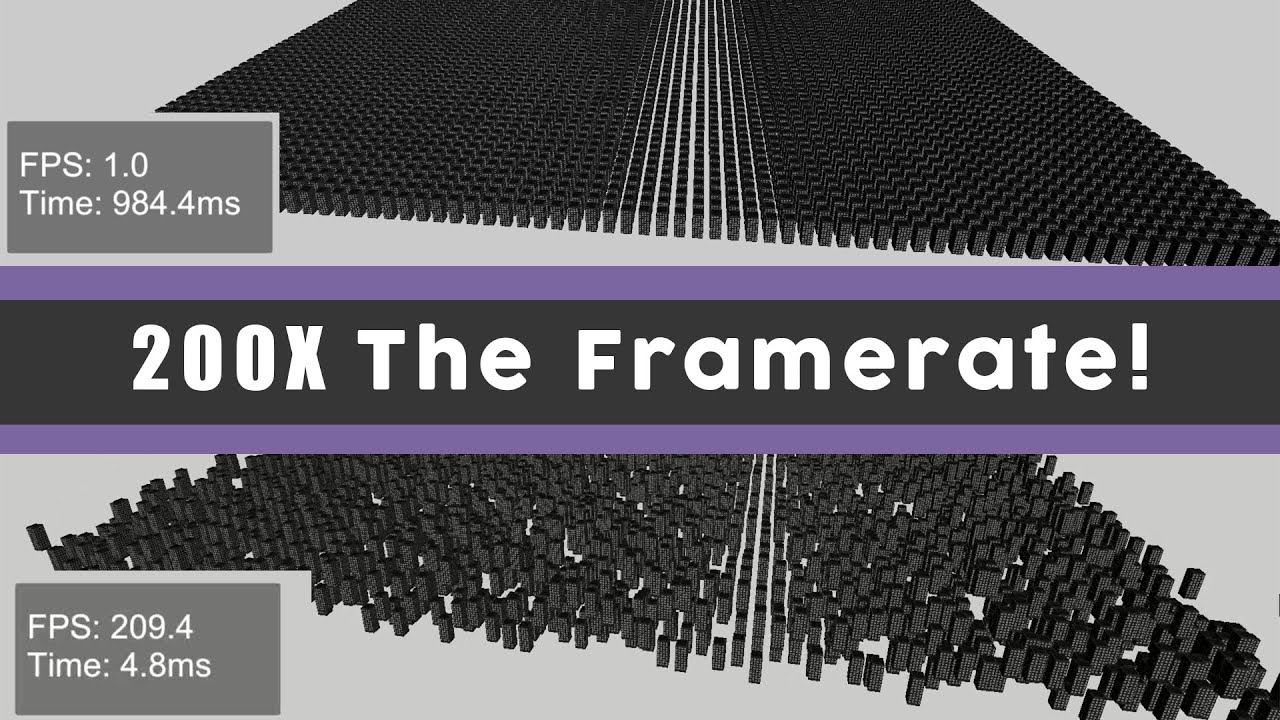
A short video on how to improve your frame rate in Unity. This video covers various optimizations to reduce draw calls such as combining meshes, batching and gpu instancing.
Music Credit: LAKEY INSPIRED
Track Name: "The Process"
Music By: LAKEY INSPIRED
Official SoundCloud https://soundcloud.com/lakeyinspired
Official YouTube Channel:https:/...
marble vigil
buoyant notch
I've enabled GPU instancing as well as SRP Batcher and Dynamic Batching. Whats c...
Avoid using multiple batching methods at once, as most of them are incompatible or give you diminishing returns
To my knowledge BatchRenderer.Flush occurs when dynamic batching or GPU instancing encounter something that cannot be batched or instanced
Since you're on URP you should start with only SRP batching, and then compare its performance to other methods
pseudo jacinth
How can I get lighting information into 2022's shader graph?
there's main directional light is easy ofc, but i need point & spotlights too
sand linden
pseudo jacinth
there's main directional light is easy ofc, but i need point & spotlights too

GitHub
Some custom lighting functions/sub-graphs for Shader Graph, Universal Render Pipeline - Cyanilux/URP_ShaderGraphCustomLighting
pseudo jacinth
Thanks :3
pseudo jacinth
Wow that package is absolutely amazing
 daring jewel
guys, I'm in 2022.3.10f1 and I'm using radiant GI from the asset store becaue enlighten seem to not be available in this version and up. I'm facing a problem where, the envionment lighting isn't recalculated at runtime on directional light moving/rotation. Can it ever be achieved? I'd like to keep all lightings realtime in my game
marble vigil
daring jewel
guys, I'm in 2022.3.10f1 and I'm using radiant GI from the asset store becaue en...
Enlighten realtime GI is supported until the end of 2024 LTS, officially
It's not called Enlighten in the editor but "realtime GI"
daring jewel
but it doesn't seem to be working when I check its checkbox in the scene lighting tab
and there's also no realtime lightmaps options available at all:
 pseudo jacinth
@dry willow Is point light shadow mapping also available?
dry willow
pseudo jacinth
<@357936113983291393> Is point light shadow mapping also available?
That's part of the AdditionalLights_float function. It has to be done in code as it loops over the lights
pseudo jacinth
I see, makes sense. I'll look into it
marble vigil
daring jewel
but it doesn't seem to be working when I check its checkbox in the scene lightin...
Works on my machine, if that helps any
marble vigil
daring jewel
at least I know there's an issue
I tested with Unity 6 and earlier used it with 2021, so it should work with 2022 but if there are specific common issues regarding that one I couldn't tell
When it works, environmental light is occluded from interiors, and directional light does bounce around
daring jewel
I see, I'll try some other 2022 versions to see if it persists
thank you for the help
marble vigil
daring jewel
I see, I'll try some other 2022 versions to see if it persists
Best make sure it's the newest one, and optionally delete Library too
daring jewel
delete library?
marble vigil
Library is a folder containing project's temporary editor-generated files
Might solve vague problems
Though if you've upgraded the project between major unity versions, it may have caused some stuff to mysteriously break that even a Library deletion won't fix
daring jewel
alright, thank you very much for the clarifications
 halcyon sphinx
does anyone know how I could combine these materials into a single material for my skinned mesh
 marble vigil
halcyon sphinx
does anyone know how I could combine these materials into a single material for ...
marble vigil
halcyon sphinx
does anyone know how I could combine these materials into a single material for ...
By baking onto a mesh that has only one material slot to include all the texture maps of your materials in one shared UV space
marble vigil
halcyon sphinx
do yk of any assets that can do this in unity
No, Unity is not for editing models
queen juniper
did any one tried to upragade a shader from built in to urp by hand ?
sand linden
queen juniper
did any one tried to upragade a shader from built in to urp by hand ?
What issues are you stuck on?
naive nacelle
does somebody know how to set up luts in unity?
queen juniper
sand linden
What issues are you stuck on?
Well everything 😭
Idk how hlsl work
And idk the equivalents of the function and variable
oblique briar
Is there a way to put shader code snippets into a shader graph? For instance, just for a certain node?
dry willow
oblique briar
Is there a way to put shader code snippets into a shader graph? For instance, ju...
Custom Function node
oblique briar
Nice, thanks
old cedar
Hey guys!! I made a custom render feature that acts similar to the default render objects feature in URP. You tell which layer to capture, it captures it using RT, and the pass is stored.
But if there are only 2 layers captured, I want to material override both of the layers differently. I simply want to capture color of one layer and want the other to be render black, as if it has unlit black material. Is this possible?
TLDR: want to capture 2 layer using render feature but render one of them as black
 spark pumice
marble vigil
Tweak directional light near plane value
spark pumice
marble vigil
Tweak directional light near plane value
yeah nothing changes


OOOHHHH
NVM
i had to make my model Double-Sided
but for some reason there is still light leaking through

actually nvm
i have a fix for this
thanks again
 lean haven
Does anyone have an idea why this could be happening? When rotating the player ingame or editor, the side of the gun gets completely dark, obviously its on the other side where the sun is pointing, but realistically that should no where be near that dark. Any fixes?
Aces tonmapping makes it darker of course
sand linden
old cedar
Hey guys!! I made a custom render feature that acts similar to the default rende...
So if you do 2 DrawRenderers, once for layer 1 with a red material and once after for layer 2 with a black material, you should end up with the bottom picture right?
 vocal dragon
im using the Render Objects feature in URP i have a material which i use to override for a specific layer, but i would like to also be able to control values on that material such as fade the base map color overtime via code, how do i access the material reference in the render feature to do this ?
old cedar
sand linden
So if you do 2 DrawRenderers, once for layer 1 with a red material and once afte...
ohh ty, didnt know it can work that way, will try!
old cedar
vocal dragon
im using the Render Objects feature in URP i have a material which i use to over...
yourmaterial.setfloat, or any other yourmaterial.set(functions) according to what u need to modify
old cedar
sand linden
So if you do 2 DrawRenderers, once for layer 1 with a red material and once afte...
i will try this tomorrow but do u think i might encounter any issues or in ur experience it should work just fine? if any issues do u have suggestions on an alternative approach for the same?
 past tide
guys, know somebody a list of real game showcases what use URP ?
Is URP ready for mobile devices or better use a built-in render ?
we have big city in our game and running into cpu bottleneck on mobile devices, hit overheating and throttling after, result is 15-25 fps on low quality settings, no post effect, no antialising, no shadows.
we use version 2023.3.3
render takes between 30-60% cpu time
 rare cove
Hi! I've been trying to implement a shadow receiver shader in URP which lerps between main texture and pitch black based on whether it's illuminated by any additional light. I've attached my attempt at implementing such a shader. It mostly works as imagined, but sometimes artifacts occur, and they sort of look like the AABB of the observed light (pic attached).
Am I doing some rookie mistake?
 buoyant notch
any idea why this code doesn't work?
matrices = new Matrix4x4[size];


renderParams.material.enableInstancing = true;
material.enableInstancing = true;


for (int i = 0; i < size; ++i)
    matrices[i] = Matrix4x4.Translate(new Vector3(-4.5f + i, 0.0f, 5.0f));


Graphics.RenderMeshInstanced(renderParams, mesh, 0, matrices);```Does anyone know how to fix this pixely isometric thing? I have no idea what happened it supposed to be a normal 3d URP game.
 nimble mirage
"pixely isometric thing"?
marble vigil
"normal" 3d urp game?
shut bough
😂 There not supposed to be low-quality and in the game mode it shouldnt be at the angle of an isometric game but be using my RTS camera script where the person can freely move around in a 3d space
It should look more like this ignoring the baked terrain

this is the scene view
marble vigil
shut bough
this is the scene view
is your Game window zoomed in
shut bough
Nope there is this though it wont let me uncheck it
 marble vigil
shut bough
Nope there is this though it wont let me uncheck it
marble vigil
shut bough
Nope there is this though it wont let me uncheck it
Can you show a screenshot of your Game window with the settings at the top visible

 shut bough
This is my quality settings also
 marble vigil
shut bough
Like this?
marble vigil
shut bough
Like this?
Now what here is "low quality" or "at the angle of an isometric game"
shut bough
Origanlly in game view you would see a tree like this and be able to move around it to look at it all you want

Now trees look like this in game view and in the right side you can see my camra scrip that has all the things an RTS camra has to prove its not supposed to be 2d

If you change the FOV to far it looks like this
 marble vigil
shut bough
If you change the FOV to far it looks like this
marble vigil
shut bough
If you change the FOV to far it looks like this
Do not change the FoV too far so it doesn't look like that?
marble vigil
shut bough
Now trees look like this in game view and in the right side you can see my camra...
Perhaps they look like that because they are being viewed from far above, not up close like in your scene view there
shut bough
Well not sure what was wrong but I fixed it by creating a new camera
 ornate yew
Hello, my apologies if i don't have terminology very correct, i'm new to shaders and shader graph. What i'm trying to accomplish is something like a decal shader (projector).
Instead of projecting an image however, I'm just looking for like an outline AND a solid interior color, and to accomplish this i'm fine with even rendering 2 meshes.
The reason i want to use meshes instead of a procedural texture and cube decal is because it would be easier later with the physics system to detect the same overlaps that the camera does.
What would be the buzzwords i'm looking for to find help on doing something like this in URP?
iron compass
ornate yew
Hello, my apologies if i don't have terminology very correct, i'm new to shaders...
Render Objects Render Feature, Stencil. Have a look at the examples of that URP feature and see if that’s close to what you need.
 oblique pollen
Hey All,
I am trying to replace a camera (Extra) with a Render Feature and Render Pass but I am struggling to understand some things.
I am using: Unity 2022.3 LTS
The Docs are quite strange and I feel dont give ample explanations and found that this site was a really good point to go through:
https://www.cyanilux.com/tutorials/custom-renderer-features/#ConfigureInput
Are there any other really great docs out there that I should be looking into or Papers ?
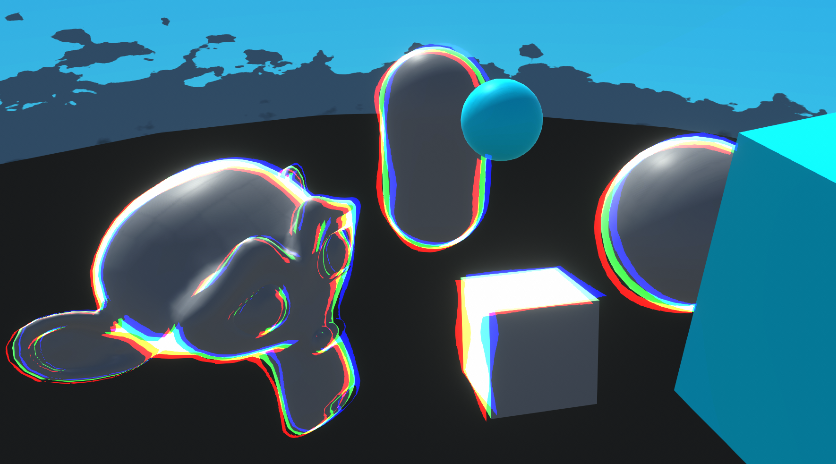
Goes through examples of Renderer Features and explains how to write Custom Renderer Features and Scriptable Render Passes for Universal RP
oblique pollen
I have this kinda working.
So I have multiple cameras Currently. I want to get the cameras into a features so I can save on some CPU usage.
My pass renders just the background objects but, straight after that DrawOpaqueObjects runs and renders everything else. I am not sure if I need to tweak the DrawOpaqueObjects Feature perhaps ?

 dry willow
oblique pollen
I have this kinda working.
So I have multiple cameras Currently. I want to get t...
dry willow
oblique pollen
I have this kinda working.
So I have multiple cameras Currently. I want to get t...
The Opaque and Transparent Layer Masks at the top of the renderer asset will let you filter layers from being rendered normally if that's what you need
oblique pollen
dry willow
The Opaque and Transparent Layer Masks at the top of the renderer asset will let...
Dude... Your here 👀 I should not be Surprised... But I am 🤔
Anyways 😁
Cool, So that could be what I want but to be honest I am really new to the rendering side of Unity so I think I just need some Clarity.
So, I have the following Cameras: Background, Foreground, Player and UI
These live in the Camera stack and Under the Primary Camera an use the Culling Mask to render specific layers to each camera.
I essentially want to remove them the cameras and replace them with a Feature.
I found that the FilteringSettings, SortingCriteria and DrawSettings is what gave me the ability to have the background only come through... 🤔
Anyways, yes, I just want each Feature to render an Opaque and Transparency pass.
dry willow
oblique pollen
Dude... Your here 👀 I should not be Surprised... But I am 🤔
Anyways 😁
Cool...
If you just need to render specific layers, the RenderObjects feature already provided might be enough for what you need
Though I think the camera stacking is meant to be quite optimised anyway. I don't use if often so not sure if swapping it out for features is worth it or not
oblique pollen
dry willow
Though I think the camera stacking is meant to be quite optimised anyway. I don'...
The CPU time is quite heavy. The GPU is waiting a lot between each camera switch every frame.
So I want to save some CPU overhead by converting to a Render feature.
oblique pollen
dry willow
If you just need to render specific layers, the RenderObjects feature already pr...
Thank you. I will take a loo kat this in the Morning 😄
Do you have any advice on Further docs ? I feel the Unity docs are quite limiting.
dry willow
oblique pollen
Thank you. I will take a loo kat this in the Morning 😄
Do you have any advice ...
Afraid not, that's mostly why I wrote my article (which is okay for 2022 - but is outdated for 2023 as the notice box at the start mentions). I mostly learnt from reading the feature/pass code provided under the URP package, like RenderObjects
oblique pollen
dry willow
Afraid not, that's mostly why I wrote my article (which is okay for 2022 - but i...
Thanks so much, I will Do some digging 😄
 waxen plume
Hey everyone,
I'm currently developing a 2D pixel art game with a global light to simulate day-night cycles, using URP. This global light affects every sprite in the game.
However, the UI looks strange at night because the entire game is dark while the UI maintains its original brightness, creating an ugly contrast.
I've experimented with setting the material of my UI images to Lit-Default, which makes them affected by light. Visually, this works well, but it causes issues: images with that material no longer work with RectMask2D or register cursor hovers. I'm sure there are more problems I haven't encountered yet, as I assume the Lit-Default material isn't designed for UI.
Does anyone know a practical way to make the UI respond to lighting?
 random bramble
hello folks!
I am trying to achieve this see through effect, following this nice tutorial:
https://youtu.be/GAh225QNpm0?t=125
The tutorial is using unity 2020 URP, but my project is 2022 URP 2D based.
I can't find the filtering options for the renderer.
Any ideas about where these opaque and transparent masks were moved in 2022?
Thanks in advance!


In this Unity game development tutorial we're going to look at how we can use URP Renderer Features to create a silhouette of a character when they're hidden by an obstacle.
We'll start looking at how to remove the rendering of the character completely by assigning it to a layer and removing this layer from the renderer.
Then we'll add two ren...
marble vigil
random bramble
hello folks!
I am trying to achieve this see through effect, following this nic...
They haven't moved anywhere
random bramble
marble vigil
They haven't moved anywhere
I can't find them thoug 😦
 dry willow
I think the 2D renderer just never had them, which is annoying
marble vigil
For a similar effect in 2D you'd use Mask components
random bramble
dry willow
I think the 2D renderer just never had them, which is annoying
oh, dam 😦 Why would they remove features?
dry willow
Remove isn't really the correct word, it just wasn't implemented I guess
random bramble
dry willow
Remove isn't really the correct word, it just wasn't implemented I guess
oh, ok, I guess I just assumed that the 2D part was built on top of the general URP part, therefore, why remove something that was already useful and working properly. If it was something built from the ground, I guess they might have had their reasons not to implement this.
random bramble
marble vigil
For a similar effect in 2D you'd use Mask components
you mean have like 2 different sprite atlas for each character that I want to represent behind objects and manage their visualisation via masks?
marble vigil
random bramble
you mean have like 2 different sprite atlas for each character that I want to re...
Yes
marble vigil
random bramble
oh, ok, I guess I just assumed that the 2D part was built on top of the general ...
URP 2D does specifically disable all "non-2D" features (and lacks some 2D features which you had in BiRP) so you're right
I wish it wasn't so but if I had to speculate why, it may have been that they intended to create a leaner, lighter and more focused renderer for that specific purpose
random bramble
marble vigil
Yes
oh, this sounds as an optimization nightmare, I would need to manage double the objects for every enemy, NPC and the player itself. I was looking into a shader/render pass based solution. Do you know of any lighter ways to investigate?
random bramble
marble vigil
URP 2D does specifically disable all "non-2D" features (and lacks some 2D featur...
maybe I can work the other way, using normal URP and trying to emulate the 2D renderer features such as custom axis sorting 🙃
I guess I'm gonna find soon that normal URP can't do custom axis sorting, because they removed it and now it only exists in URP 2D 😅
marble vigil
random bramble
I guess I'm gonna find soon that normal URP can't do custom axis sorting, becaus...
Luckily most of the usual sprite and 2D features do work in 3D URP
Notably sprite lighting and pixel perfect camera do not
random bramble
marble vigil
Luckily most of the usual sprite and 2D features do work in 3D URP
Notably sprit...
yeah, I know. I managed to do sprite lighting in 3D urp in my last project, but it was not a smooth path. Also, I use shadergraph and VFX graph, so I am used to undocumented half-baked features with obscure incompatibilities in different pipelines hehehe
Thanks for your answers @marble vigil and @dry willow!
random bramble
marble vigil
Luckily most of the usual sprite and 2D features do work in 3D URP
Notably sprit...
do you happen to know if custom axis sorting is in the do or the do not category? That would save me some time 🙂
marble vigil
random bramble
do you happen to know if custom axis sorting is in the do or the do not category...
I'm fairly certain that's a renderer-independent feature but I don't think I've specificaly confirmed it