
#archived-urp
1 messages · Page 8 of 1
 knotty tide
 fast nacelle
can't find any way to create this blurred screen corners effect been googling for 30 minutes and found nothing

any help?? pls
fast nacelle
already tried im using urp there isn't any direct blur other than depth of field whcih doesn't have a mask
that's what im tryna figure out 😭
can u help? im on 2023 alpha
ty alot u saved me
 spark pumice
So for some reason my water shader looks like this in the scene

but like this in the game

but the shader itself is working
 sinful gorge
@spark pumice
Which Unity/URP version?
Which device?
Does the device use the same active quality tier as you use in editor? (marked green)
spark pumice
Unity 2022.1.22f
Windows 11
Yes yes it does
spark pumice
sinful gorge
<@977944102823940177>
Which Unity/URP version?
Which device?
Does the device use...
^
sinful gorge
Worth trying to update to the latest tech stream.
I assume win 11 is also the build target?
 kindred plume
I just downloaded this asset: https://assetstore.unity.com/packages/3d/environments/historic/colossal-gladiator-arena-168017#description
I am using URP and the asset appears in this pinkish material in the scene. What does that indicate? That the asset isn't compatible with URP?

 marble vigil
kindred plume
I just downloaded this asset: https://assetstore.unity.com/packages/3d/environme...
marble vigil
kindred plume
I just downloaded this asset: https://assetstore.unity.com/packages/3d/environme...
It's nearly older than URP and makes no mention of it so safe to assume it wasn't designed for it
If it doesn't use any custom shaders, you can run the render pipeline converter to convert its materials from BiRP to URP
kindred plume
marble vigil
It's nearly older than URP and makes no mention of it so safe to assume it wasn'...
well ok that's all I need to know - thanks 🙂
kindred plume
Ok I tried a lot of effect assets in the unity asset store. Two of them I do really like however I always get this error:
Shader properties can't be added to this global property sheet. Trying to add _GrabTexture_TexelSize (type 2 count 1)
How come I have so much trouble simply using nice visual effects 😦
I read about that error and I can't find a real solution for that. People seem to give up in the forums
spark pumice
sinful gorge
Worth trying to update to the latest tech stream.
I assume win 11 is also the bu...
Build targwt is overall windows devices
Also the URP is updated to its max
And i cant change the projects unity version
Unless i unibstall urp and try to do stuff without it
sinful gorge
@spark pumice Why cant you update unity without updating URP?
spark pumice
sinful gorge
<@977944102823940177> Why cant you update unity without updating URP?
cause the project is big and i dont want to break it in any way'
sinful gorge
Tbh the upgrades ive done never gave many issues within the same yearly release.
Old versions, especially non LTS ones, and especially the .1 streams usually have a lot of issues. If your project is not set up in a way it can be upgraded and you keep building up on it you might be shooting yourself in the foot
Just make a branch and test the latest 2022.2 version
If it doesnt work reverse changes
spark pumice
sinful gorge
If it doesnt work reverse changes

looks like its on medium even that it says its on max
how do i change this?
nvm
changed it
still does not work
sinful gorge
Is android on ultra now?
marble vigil
kindred plume
Ok I tried a lot of effect assets in the unity asset store. Two of them I do rea...
Visual effects, unlike many game assets, are heavily dependent on the render pipeline so they need to be designed for the RP you're using
Shaders in general cannot be converted from BiRP to other RPs
spark pumice
sinful gorge
Is android on ultra now?
no
but its too late no
w
i just tried uninstalling URP
going to see what that will do
 summer surge
yo whenever i launch the game all the waterfalls get extreme (i would asume) bloom

idk how to fix it
but its not constant
it flickers on and off randomly every few frames
looks like papparazi
i turned off post prosecing bloom in the camera and that didn't help
the entire waterfall is particle based
spark pumice
BRUH WHAT THE FUCK

Cmon man
i need to work on this game and everything i stopping me
stupid shit
nothing works
spark pumice
spark pumice
BRUH WHAT THE FUCK
If anyone knows how to fix this i would be very thankful
sinful gorge
spark pumice
going to see what that will do
Probably break a ton of stuff.
Make sure all quality tiers have the urp asset attached and maybe remove all except 1 to help troubleshooting.
For the license issue check unity hun
spark pumice
sinful gorge
Probably break a ton of stuff.
Make sure all quality tiers have the urp asset at...
THE LICENSE ISSUE IS THE MAIN THING RN
for some reason i did everything to fix it
and it just wont
sinful gorge
Calm down
What does it say in unity hub under licenses? And did you already restart your PC?
spark pumice
sinful gorge
Calm down
sorry im really stressed and when i try to code to relax myself and it just breaks for no reason and with problems that i never had i get kinda frustrated
spark pumice
sinful gorge
What does it say in unity hub under licenses? And did you already restart your P...
yes
both
wait

here
spark pumice
nvm i fixed it
knotty tide
If I use the light probe group, will it reduce performance for VR (Oculus)?
 sinful gorge
knotty tide
If I use the light probe group, will it reduce performance for VR (Oculus)?
sinful gorge
knotty tide
If I use the light probe group, will it reduce performance for VR (Oculus)?
Everything you add will decrease performance, but light probes is very fast so it's a good option
Nope, it's in 2021+
In quality settings you can set textures to half res
 wicked barn
I finally need an answer to this question: how can I create an outline shader in URP? I used to have that built-in RP shader that just did two passes, and that worked nicely. I even could give every object a different outline color. I could give them dashed lines if I wanted. So how do I recreate all that in URP?
 feral knot
Hi, is it possible to do box clipping in urp ? When I'm googling for it, I find solution that only works in 3D.
the thing is, I even wonder if it's doable since I can only set on alpha and alpha clip threshold

https://www.youtube.com/watch?v=EweVg3hXRQk
I found that video, but it only explain how to clip on one direction of an axis, not both

A quick unity tutorial showing how I used alpha clip and position nodes etc. to create a simple clipping shader that can be animated.
sinful gorge
wicked barn
I finally need an answer to this question: how can I create an outline shader in...
There are both free assets and guides on how to do this in URP if you google it.
Both shaders and render features could probably work for this
 placid laurel
why tree trunk is more visible than the tree leaves

using the lit shader
can anyone help?
 queen cloak
Im trying to render objects on a specific layer using ScriptableRenderContext.DrawRenderers, but I would like to not render the skybox in my custom render pass. Effectively recreating a camera that renders to a render texture within a ScriptableRenderPass.
But im not sure how I can do this because I dont want the skybox either
Any pointers on how I can achieve this?
 rustic tiger
hi
marble vigil
placid laurel
why tree trunk is more visible than the tree leaves
Seems most likely that the trunk and leaves are both transparent
Transparent geometry cannot sorted per pixel, rather it is sorted by per object or per-face, which is inaccurate
Make it opaque with alpha clipping instead
placid laurel
You are Awesome sir
 fading seal
should stuff drawn with DrawMeshInstancedIndirect be affected by post processing?
 dry willow
fading seal
should stuff drawn with `DrawMeshInstancedIndirect` be affected by post process...
dry willow
fading seal
should stuff drawn with `DrawMeshInstancedIndirect` be affected by post process...
Post processing typically applies to the whole screen so anything rendered before that point would be affected. In this case I imagine it depends on when the call is scheduled. e.g. If calling from a CommandBuffer inside a custom RendererFeature/ScriptableRenderPass it has a renderPassEvent.
fading seal
thanks, might have a bug to report then
dry willow
fading seal
thanks, might have a bug to report then
Is it a post processing effect in particular? Or all not affecting those objects?
fading seal
fullscreen effect, with calling DrawMeshInstancedIndirect inside of the SimulationSystemGroup for ecs
i actually dont think anything is affecting it but thats the one that stands out(pixelated effect), reporting another bug atm
 worn hamlet
hello, I am not sure where to post this but I have a script that takes some cameras, renders a single frame and outputs it on a render texture which goes as an emission map to a material.
It works fine it editor and looks good, but when I build the game and try doing it in the game, it's just plain black, what could be the cause of the issue?
 rough grove
how can i make just like that screen space shader
dry willow
rough grove
how can i make just like that screen space shader
In 2022.2+ there's a Fullscreen Graph and Fullscreen Pass Renderer Feature (for example, see https://docs.unity3d.com/Packages/com.unity.render-pipelines.universal@16.0/manual/post-processing/post-processing-custom-effect-low-code.html)
For older versions, can use a custom renderer feature. e.g. https://github.com/Cyanilux/URP_BlitRenderFeature
rough grove
dry willow
In 2022.2+ there's a Fullscreen Graph and Fullscreen Pass Renderer Feature (for ...
I'm using the 2021 version, would you suggest I switch to 2022?
dry willow
rough grove
I'm using the 2021 version, would you suggest I switch to 2022?
Mmm idk. I'd say the 2021 LTS is more stable, but the new features are more convenient.
I haven't used 2022 that much yet, but there was an annoying shader graph bug when trying to delete some nodes (in particular custom function nodes that have errors or swizzle nodes with no input)
Though it's possible that has been fixed already in newer versions, mine is a bit behind
rough grove
yes, it's more stable now i guess.
 pseudo thorn
2022 has some show stoppers still
but if they don't impact your or assets it's pretty nice
most of what's broken ime has been with hdrp.. make a backup and give it a try, couldn't hurt (as long as backup >:D )
 rare goblet
I'm currently trying to make a shader that remaps lighting values to a gradient, and have an implementation of this in blender, but I'm realizing that all the current cel shaders I've seen seem to have to code their own lighting in order to access it?
Is there any way around this in the latest unity version, or am I just going to have to bite the bullet and figure out an hlsl function to give me the basic lighting from the lit shader so I can modify the colors of it?
 rugged mist
does anyone know why my box projection check is grayed out?
 errant ivy
Getting a shader error: Shader error in 'Shader Graphs/ArnoldStandardSurface': maximum ps_4_0 sampler register index (16) exceeded at line 3734 (on d3d11). Does anyone now how to fix it?
sinful gorge
rugged mist
does anyone know why my box projection check is grayed out?
In the urp settings or on a probe?
 sweet moon
i got urp a while ago and now this is happening with lights on pro builder

anyone know how to fix?
 copper pilot
wicked barn
I finally need an answer to this question: how can I create an outline shader in...
copper pilot
wicked barn
I finally need an answer to this question: how can I create an outline shader in...
That is an extremely complicated question. The usual method is to use a renderer feature such as https://github.com/Robinseibold/Unity-URP-Outlines but there are several methods and several implementations

GitHub
A custom renderer feature for screen space outlines - GitHub - Robinseibold/Unity-URP-Outlines: A custom renderer feature for screen space outlines
copper pilot
sweet moon
i got urp a while ago and now this is happening with lights on pro builder
That's pretty much just how lights are in URP; they are exponential and have kinda kinky highlights. Generally you'll want to make sure you're in linear color space, and use postprocessing tonemapping to adjust the look of it.
copper pilot
feral knot
https://www.youtube.com/watch?v=EweVg3hXRQk
I found that video, but it only exp...
You just do the same thing again with the clipping reversed and at a different position
feral knot
copper pilot
You just do the same thing again with the clipping reversed and at a different p...
Hum... I finally found how to do it
but I use the node "Position" and use comparison to check if x,y and z are inside my two vector3 defining the two points of the clipping box
marble vigil
sweet moon
i got urp a while ago and now this is happening with lights on pro builder
What do you mean "this"


 past relic
I have another question, my camera is hiding my decals from rendering in the scene view, that make it very difficult to edit them in the scene.https://forum.unity.com/threads/weird-urp-decal-clipping-issue.1305150/


Unity Forum
Hi,
I'm unable to resolve a strange URP Decal Projector clipping issue. At many viewing angles, decals are clipped. With resize gizmos enabled, the...
 clear totem
Why this slide model that in blender takes only 15000 triangles in unity it takes like 200+ triangles? And why without the model it only does like 50-100 batches and with the model it does 1000+?
 torpid matrix
Does anyone knwo why my object looks like this after it was baked

 scenic burrow
torpid matrix
Does anyone knwo why my object looks like this after it was baked
scenic burrow
torpid matrix
Does anyone knwo why my object looks like this after it was baked
could be due to a number of things, but either you didn't mark your object as contribute GI static (to receive a lightmap), or if your intending to not bake it you need to have light probes
marble vigil
torpid matrix
Does anyone knwo why my object looks like this after it was baked
Did it not look like a trash container before?
marble vigil
clear totem
Why this slide model that in blender takes only 15000 triangles in unity it take...
The batches you're showing are from additional light shadow casters rendering meshes again multiple times per light
Did you also remove lights when removing the mesh?
Blender and Unity can report verts/polygons of a mesh differently but Unity's 15652 vs Blender's 15954 seem very close
clear totem
marble vigil
The batches you're showing are from additional light shadow casters rendering me...
What do you mean for "removing lights when removing the mesh"? I haven't touched anything related lights. Just to let you know, the lights that I use in the scene are baked.
marble vigil
clear totem
What do you mean for "removing lights when removing the mesh"? I haven't touched...
It would seem to be the only reasonable explanation why your frame debugger shows 150 batches from "additional lights shadowmap texture"
And what we're seeing in the preview are definitely from realtime shadow casters
Sometimes blender exports accidentally include lights
clear totem
I have only 6 point lights, and they're baked.
clear totem
marble vigil
Sometimes blender exports accidentally include lights
I hadn't lights in my blender collection
marble vigil
clear totem
I have only 6 point lights, and they're baked.
Purely baked lights don't render to shadowmap textures
clear totem
marble vigil
Purely baked lights don't render to shadowmap textures
Lemme investigate a little bit over the scene

These are my lighting settings
marble vigil
clear totem
This does not reveal realtime lights you might have in the scene
clear totem
marble vigil
This does not reveal realtime lights you might have in the scene
I can't find them, It's really odd to me haha
marble vigil
Light Explorer would
clear totem
ok lemme see
marble vigil
Note that mixed lights count as realtime for this purpose
clear totem
 marble vigil
Is that what you see while the frame debugger reports additional light shadow casters?
clear totem
lemme see
The debugger tells me only which mesh is affected by an unknown light, not which light affects a mesh (as I'm seeing, I discovered the frame debugger just a few weeks ago)
marble vigil
clear totem
The debugger tells me only which mesh is affected by an unknown light, not which...
If the frame debugger explicitly reports and visually shows an additional light shadow caster rendering to a shadowmap, while at the same time the lighting explorer reports no realtime or mixed lights, then I'd start scratching my head
clear totem
Imma investigate like sherlock holmes does just wait a bit
 lunar pond
guys why isnt my camera showing anything even though i have objects and camera is in perfect spot


 limpid crescent
lunar pond
guys why isnt my camera showing anything even though i have objects and camera i...
limpid crescent
lunar pond
guys why isnt my camera showing anything even though i have objects and camera i...
The camera is facing the wrong direction, maybe?
marble vigil
Camera culling layers seem like the most reasonable explanation
lunar pond
limpid crescent
The camera is facing the wrong direction, maybe?
its straight at it
 haughty garnet
https://i.imgur.com/kzyJndt.jpg
https://i.imgur.com/dpARBos.png
So I've been playing around with ideas for a fog and I've went back to playing around with rendering orders to create a neat layering effect. Here, I create a cylinder which I use like a mask that my camera projects through, revealing only a specific area, and allowing me to hide enemies on the outside. The problem I am having is the depth that I am rendering, it seems that there's no one good position that I can position this mask to get the information needed to render the tops of objects with the mask, even if I am rendering stuff further in the distance.
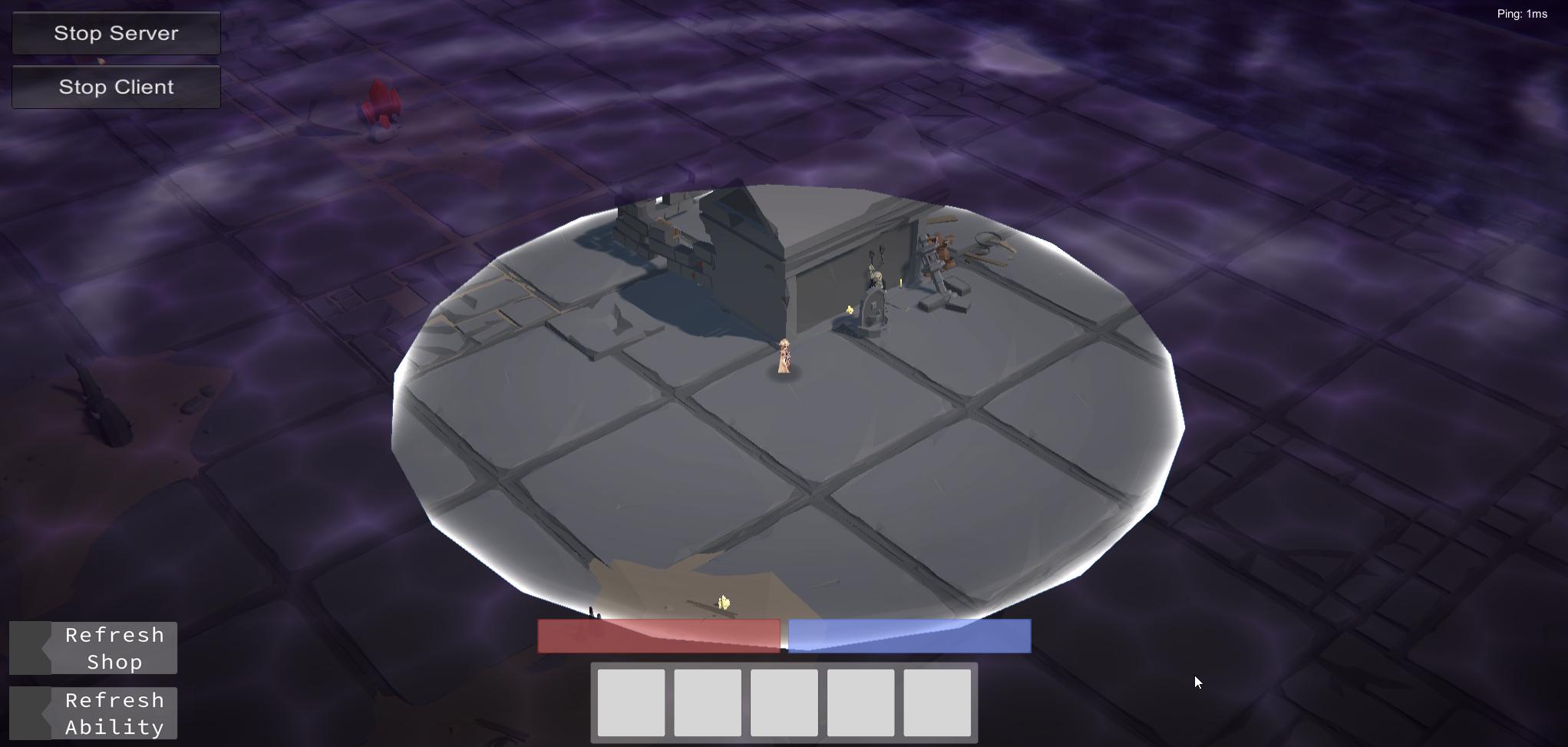
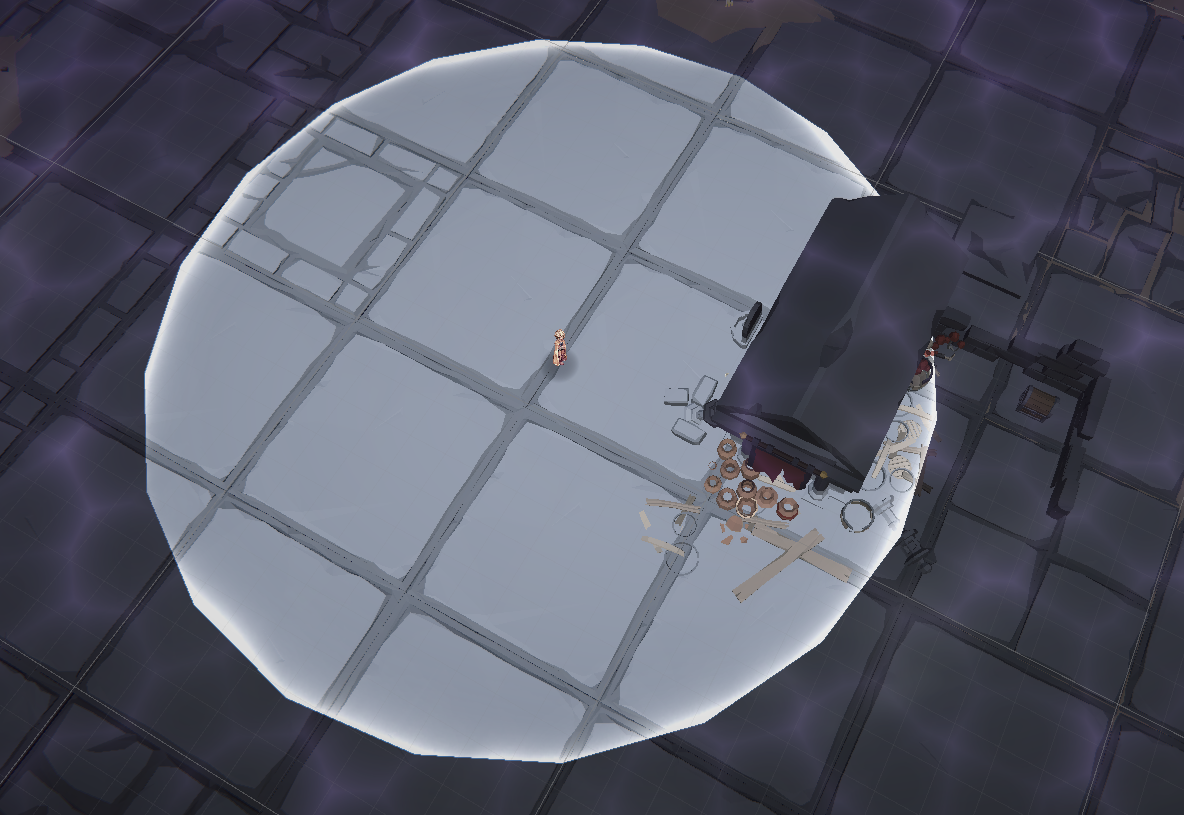
Is the idea here to use a second camera, such that it projects directly downwards? I assume there's a lot more to that such as removing backface culling(I think an overlay is a better idea but even then I don't have the depth info to make it work), but can anyone tell me this is the direction I should be aiming for?
haughty garnet
It's as if I need to project the mask onto the area, which I'm not sure if that's doable with this current setup of using custom render objects.
 zinc root
Hello everyone, so im just starting with shader graphs and I have this issue. When I create a material using a shader graph, and put the mat on some object, the bloom I have does not work, even though I have emission intensity set to 30. When I create a normal material tho, and put emission intensity to also 30, bloom does work.
Unity version: 2021.3.8f1
URP

 limpid crescent
marble vigil
Camera culling layers seem like the most reasonable explanation
limpid crescent
marble vigil
Camera culling layers seem like the most reasonable explanation
Thats what I thought to, but his camera cullingmask is already set to everything
sinful gorge
zinc root
Hello everyone, so im just starting with shader graphs and I have this issue. Wh...
Does it work if you increase the alpha?
haughty garnet
haughty garnet
https://i.imgur.com/kzyJndt.jpg
https://i.imgur.com/dpARBos.png
So I've been pla...
https://i.imgur.com/xe8AmNt.png
Figured it out after wasting hours looking for alternatives such as throwing shaders on everything. You should only need custom renderer passes to accomplish this, and URP renderer objects give you a bunch of flexibility.
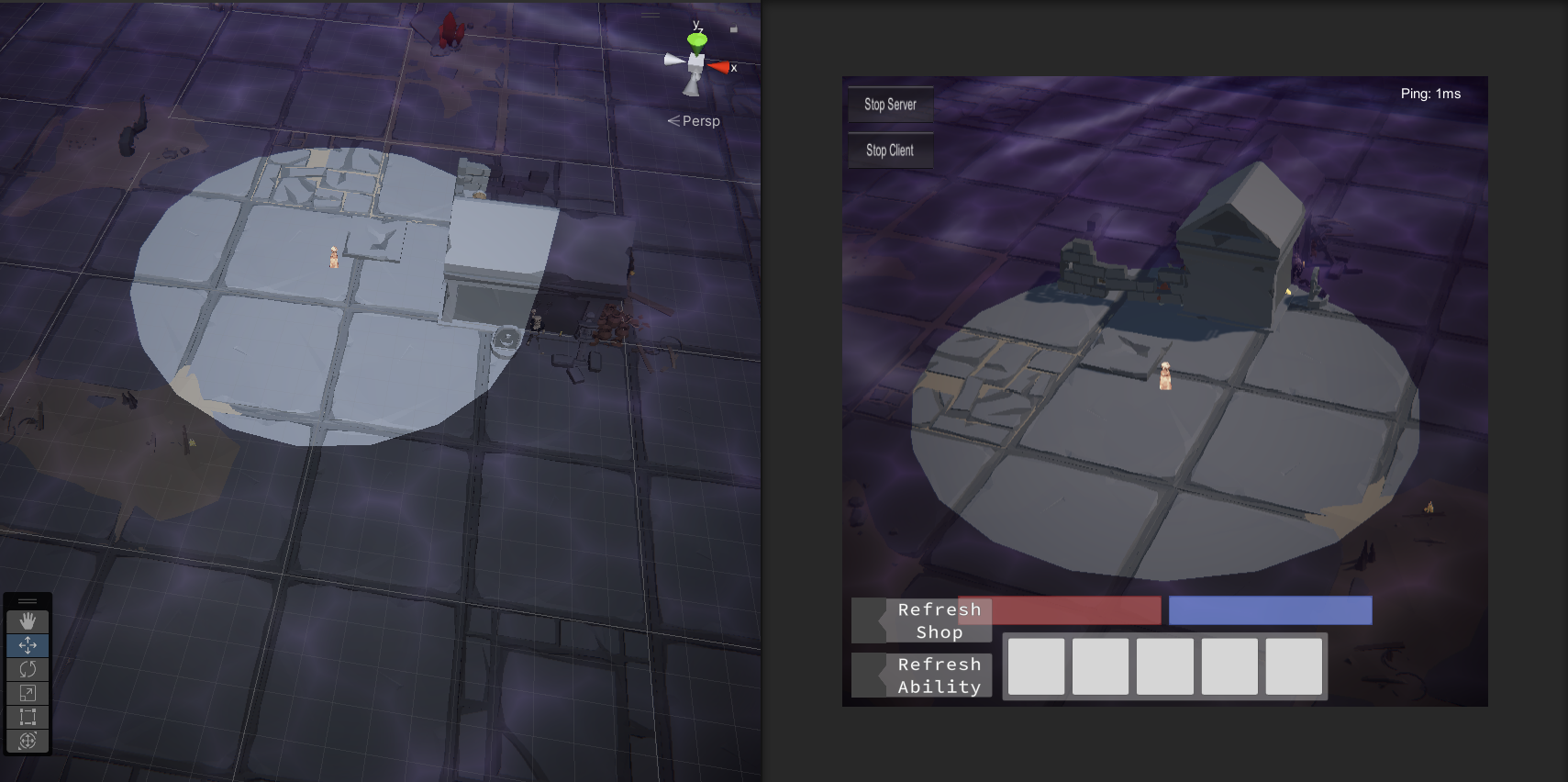 copper pilot
spark pumice
so im having this renderer problem
copper pilot
spark pumice
so im having this renderer problem
Can you describe what the actual problem is?
spark pumice
copper pilot
Can you describe what the actual problem is?
I already fixed it
copper pilot
haughty garnet
https://i.imgur.com/xe8AmNt.png
Figured it out after wasting hours looking for a...
Neat! How did you set it up for that effect?
It looks very nice.
haughty garnet
It's exactly how I wanted to do the fog
https://i.imgur.com/LeUZFGZ.png
https://i.imgur.com/oZMTZrC.png
General set up using the transparent queues, but you can swap them for opaque besides the fog mask
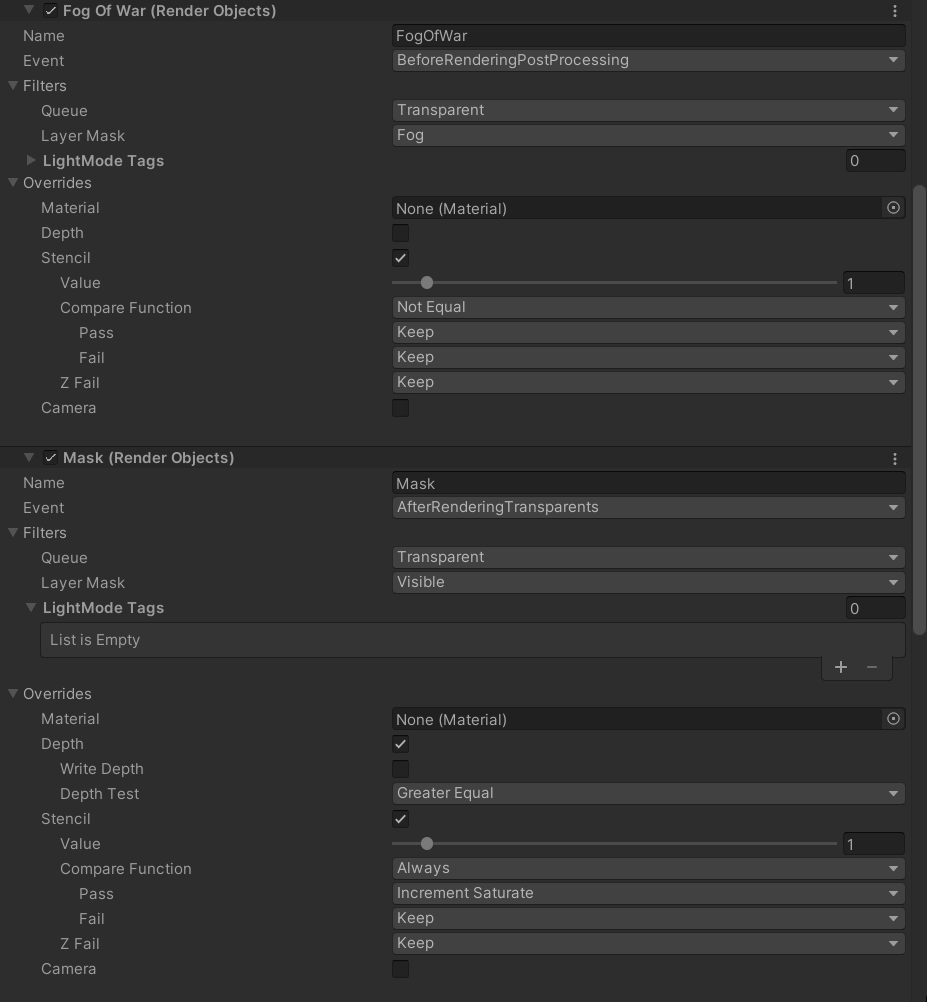
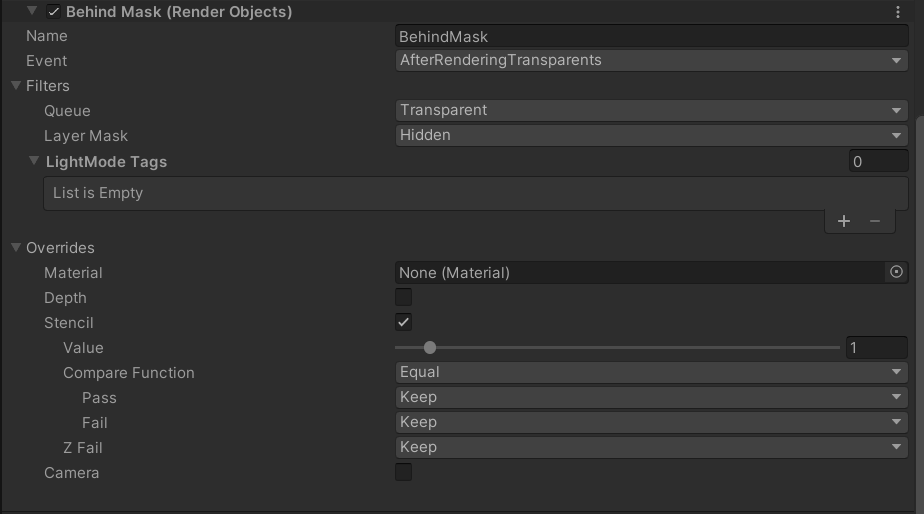
The fog is just a transparent plane being rendered above the level, and the camera is projecting downward above it. I've got a mesh with the mask, in this case a cylinder, that's at my character's feet that reveals a layer around them.
Sphere works fine too, but the cylinder gives me the depth I want for when I have a bit more elevation.
Need to give it a nice shader for the edges
zinc root
sinful gorge
Does it work if you increase the alpha?
Nope
copper pilot
haughty garnet
The fog is just a transparent plane being rendered above the level, and the came...
Ah, neat. So it is using a render texture, then?
 nova bear
I've been having a weird issue with Ambient Occlusion in URP. Mostly it seems fine, but when I set direct lighting strength to zero, it still removes environment reflections in direct sunlight, making for an ugly brown tint without any darkening on areas exposed to sun. This definitely feels like a bug. Notice the brown area in where the wall meets the floor. This means ssao is occluding both ambient light and environment reflections, erroneously even when there should be no visible impact on areas of direct sunlight.

It is made more obvious by toggling on and off ssao

Feels like a bug. I have confirmed the issue is in fact the occlusion of ambient light and environment reflections, as by turning off both of those intensities in lighting settings, toggling SSAO has no effect.
haughty garnet
copper pilot
Ah, neat. So it is using a render texture, then?
Yeah, I've a dedicated layer for the fog to render on, so technically I just overlay a texture onto the scene and use masks for it.
 soft tartan
Does anyone know of any resources on how to use GPU instancing with SRP?
Thanks in advance guys
marble vigil
soft tartan
Does anyone know of any resources on how to use GPU instancing with SRP?
Thanks...
tl;dr you disable SRP batching compatibility to allow for GPU instancing
but GPU instancing usually loses in performance against SRP batching
sinful gorge
Then use that, you can put it on the asset store and might make some money by doing it
errant ivy
Please help me. Internal error communicating with the shader compiler process. Please report a bug including this shader and the editor log. I did everything but this bug continues to happen in ArnoldStandardSurface Shader
 brave schooner
errant ivy
Please help me. Internal error communicating with the shader compiler process. ...
brave schooner
errant ivy
Please help me. Internal error communicating with the shader compiler process. ...
I strongly recommend not using an Arnold shader in Unity. It plays best with it's standard URP shaders
nova bear
Wow you're right, It's not even particularly performant either. How did they (the urp dev team) mess up SSAO this bad?
Tbh HDRP's SSAO is faster
Not to mention better looking
Does it have something to do with URP not being able to use compute shaders maybe?
errant ivy
brave schooner
I strongly recommend not using an Arnold shader in Unity. It plays best with it'...
is there a way to not use that shader? Because i'm not trying to use Arnold shader but when i try to make a build for my game it throws those errors that i mentioned before. If you have any idea on shaders please help me because im out of ideas
brave schooner
errant ivy
is there a way to not use that shader? Because i'm not trying to use Arnold shad...
Did you import custom assets to your project? If so, one of them might have brought a material with it that was assigned Arnold Shader. You might want to look through your custom assets to see if one of them is a culprit
errant ivy
brave schooner
Did you import custom assets to your project? If so, one of them might have brou...
Yes i imported a lot of assets recently but i don't have any idea if one of them using Arnold Shader. I will look in detail and make sure that I do not use Arnold Shader of any asset, thank you very much.
 tacit jackal
Could anyone help me with this URP assignment I have
placid laurel
Is there any way to add parallax to terrain in URP?
 green frigate
I imported Kink3d's decal(kDecal) package into my project, however I am getting the following error.
Library\PackageCache\com.kink3d.decals@3929e9d638\Runtime\KDecalRendererFeature.cs(5,6): error CS0122: 'DisallowMultipleRendererFeature' is inaccessible due to its protection level
Tried changing the protection level of the file in the URP package but Unity automatically rebuilt it to the original version.
Any suggestions?
sinful gorge
tacit jackal
Could anyone help me with this URP assignment I have
Only if you tell what you need help with
sinful gorge
placid laurel
Is there any way to add parallax to terrain in URP?
What do you mean exactly? What do you want to achieve?
Normally 3D doesn't need parallax.
 modest horizon
I think he might be referring to parallax/relief shader.
placid laurel
sinful gorge
What do you mean exactly? What do you want to achieve?
Normally 3D doesn't need...
What I'm trying to say is, I have a custom shader using parallax, and I want to use that on my terrain layers, it would be nice to have parallax on the ground textures in the terrain, right now the ground (which is a rocky beach) looks quite flat
Sorry for the late response, I was asleep lol
sinful gorge
placid laurel
What I'm trying to say is, I have a custom shader using parallax, and I want to ...
Not sure if parralex is the best fit for this, but you might need to convert the terrain to a mesh to use shader graph shaders on it
placid laurel
Ah yeah, I probably won't then, I use Vegetation Studio, and want to keep using the unity terrain system, I thought I might not be able to
Thanks for the tip though!
 low parcel
Using custom renderfeatures I'm drawing two layers to different textures and blending between them.
So far so good... UNTIL I try to render both opaques and transparents to the second RTHandle.
They should be set up to use the (secondary) depth map, but the renderfeature later in the queue always completely overwrites the earlier one. Is it possible to write the second layer on top of the first, or do I need to blit to a temporary texture or something?

Perhaps it would be simpler to move to a 2-camera setup. I would like to understand what is going wrong though.
dry willow
low parcel
Using custom renderfeatures I'm drawing two layers to different textures and ble...
Should be fine to render multiple layers to a RTHandle. But make sure you aren't re-allocating or clearing it (ConfigureClear)
low parcel
Is it a problem if the OnCameraSetup stuff (including the ReallocateIfNeeded call) gets run twice? I already put ConfigureClear behind the 'Clear' bool in the screenshot, that didn't seem to help
I figured 'ReallocateIfNeeded' would only make sure the memory data is allocated if it wasn't already
dry willow
low parcel
Is it a problem if the OnCameraSetup stuff (including the ReallocateIfNeeded cal...
Afaik that should work, as long as the RTHandle hasn't be unallocated the ReallocateIfNeeded shouldn't do anything
Can maybe check the Frame Debugger, check they are rendering into the same target.
low parcel
there's no clear in between

 I think they're writing to different RTHandles. I assumed using the same name would point them to the same handle, but on second thought probably not
👍 that was the problem
 eager karma
Hello, does anyone know why i cant edit urp settings on the inspectoR ?
 dry willow
eager karma
Hello, does anyone know why i cant edit urp settings on the inspectoR ?
dry willow
eager karma
Hello, does anyone know why i cant edit urp settings on the inspectoR ?
That renderer asset is inside the URP package. Typically you have ones in your assets instead. If the project was created with the URP templates, should be under the Assets/Settings folder.
Could also check the URP asset assigned under Project Settings, that'll have references to the renderer assets being used.
eager karma
İn my project settings, urp is set to non, and whenever i change it to something else, everhthing becomes purple
dry willow
eager karma
İn my project settings, urp is set to non, and whenever i change it to something...
If the scriptable pipeline asset is set to None, you are not using URP. You are using the Built-in pipeline.
Each pipeline has different materials/shaders (and different post processing, other things might need tweaking too). If you want to switch, you'd need to convert them. See : https://docs.unity3d.com/Packages/com.unity.render-pipelines.universal@16.0/manual/InstallURPIntoAProject.html
I'd recommend backing the project up before any changes, that way you can rollback if necessary.
eager karma
oh im so overwhelmed with this rn. I changed my mind ill be a dancer instead
thank you for your help
!
❤️
marble vigil
eager karma
oh im so overwhelmed with this rn. I changed my mind ill be a dancer instead
Why not both? Fun and they complement each other I think
If you don't want to face the Render Pipelines right now you won't need to
Just stick to the one you created your project from, so Built-in RP in this case
Though you may need to be on a lookout for which RP the tutorials and resources are made for to avoid incompatibilities
 exotic fractal
why does my unity urp do this
i got everything going for it and all my materials are on lit and when i enter play mode all the textures become pink
marble vigil
exotic fractal
i got everything going for it and all my materials are on lit and when i enter p...
Are they also pink in Game window outside of Play mode? Did the problem start occuring at a specific moment?
exotic fractal
marble vigil
Are they also pink in Game window outside of Play mode? Did the problem start oc...
no its only when i build the game and play it on quest 2 and in the unity play mode
it started after i switched it to urp
marble vigil
exotic fractal
no its only when i build the game and play it on quest 2 and in the unity play m...
But in scene view they are fine? That'd be unusual but not unheard of
I'd check to make sure the platform specific quality levels all have a reference to a proper URP asset
exotic fractal
marble vigil
But in scene view they are fine? That'd be unusual but not unheard of
I'd check ...
alr
marble vigil
@exotic fractal The explanations I can find about why scene view could work but play mode not seems to have to do with custom shaders, but you implied you're not using any?
errant ivy
brave schooner
Did you import custom assets to your project? If so, one of them might have brou...
I followed exactly what you said, but still there is a problem when compiling ArnoldStandardShader and as a result the build fails. I don't know what to do anymore
brave schooner
errant ivy
I followed exactly what you said, but still there is a problem when compiling Ar...
Can you post the exact error that the compiler gives you?
errant ivy
brave schooner
Can you post the exact error that the compiler gives you?
just a second
brave schooner
errant ivy
just a second
brb gotta run an errand but tag me when you post the exact error
errant ivy
brave schooner
Can you post the exact error that the compiler gives you?
maximum ps_5_0 sampler register index (16) exceeded
maximum ps_4_0 sampler register index (16) exceeded
Those are the errors that compiler gives me
errant ivy
brave schooner
brb gotta run an errand but tag me when you post the exact error
no problem
 verbal light
I've discovered in URP, when using the decals renderer feature with Screen Space, the mesh is rendered with flat shading if using forward instead of deferred as the rendering mode. My project doesn't support dbuffers, so I have to render with screen space.
Any suggestions as to any possible ways to make the shading appear smooth, or ideas as to why deferred means the shading must be flat?
 brave schooner
errant ivy
maximum ps_5_0 sampler register index (16) exceeded
maximum ps_4_0 sampler regis...
brave schooner
errant ivy
maximum ps_5_0 sampler register index (16) exceeded
maximum ps_4_0 sampler regis...
this looks like a max texture render error. It means one of your assets has a bunch of textures attached
This still relates to you importing an asset that isn't built/optimized for Unity
errant ivy
brave schooner
This still relates to you importing an asset that isn't built/optimized for Unit...
I will check it later on cus it’s midnight in here
But thanks a lot
brave schooner
errant ivy
I will check it later on cus it’s midnight in here
Unity Forum
so seeing this error in my shadergraph using LWRP,I’m guessing I’ve hit a limit on how many textures I can use in my shader. I’m just staring to work...
forum link
 tranquil pendant
Can anyone tell me why my textures look like this in Unity URP 2020? Only in editor and player. In the project folder they look perfectly normal without this dotted look?


Textures are TGA. Maybe that's the issue. If I use another format the artifacts go away?
 iron compass
tranquil pendant
Can anyone tell me why my textures look like this in Unity URP 2020? Only in edi...
iron compass
tranquil pendant
Can anyone tell me why my textures look like this in Unity URP 2020? Only in edi...
looks like skybox reflections, maybe smoothness/metalness is derived from the texture alpha or other textures on the material are creating it, maybe you are using a roughness input when it should be smoothness (inverted values)
tranquil pendant
iron compass
looks like skybox reflections, maybe smoothness/metalness is derived from the te...
Thanks for the reply! It disappeared when I set texture compression to none. The textures have a height map that I need in their alpha channel. How important is compression? This is for mobile.
marble vigil
tranquil pendant
Thanks for the reply! It disappeared when I set texture compression to none. The...
Might be important since you usually need all the savings you can get on mobile
Do the tiles need to be viewed that close?
If so, it may be best to compare the cost of reducing compression, using higher resolution textures or using detail maps to conceal the problem
placid laurel
tranquil pendant
Thanks for the reply! It disappeared when I set texture compression to none. The...
Sounds like you were compressing the textures to much then, can you show what settings you were using?
clear totem
there is any way to use Decals render feature with forward rendering path?
Cause if I set my rendering path to forward everything in the game viewport turns transparent and I can only see UI and Skybox

 dim tinsel
Where can I find urp shading coding documentation ?
 plain jetty
how do I edit shadow resolution at runtime
marble vigil
dim tinsel
Where can I find urp shading coding documentation ?
https://docs.unity3d.com/Packages/com.unity.render-pipelines.universal@12.1/manual/writing-custom-shaders-urp.html
The recommended way is to use Shader Graph instead of writing shaders by hand with SRPs
dim tinsel
marble vigil
<https://docs.unity3d.com/Packages/com.unity.render-pipelines.universal@12.1/man...
the shader graph is too limited
marble vigil
dim tinsel
the shader graph is too limited
You can also modify shader graph generated code to save some work, or use custom function nodes to use shader code in it while benefiting from its automated generation
dim tinsel
marble vigil
You can also modify shader graph generated code to save some work, or use custom...
Maybe, but in some point using the shader graph seems useless in some cases like the multiple passes and so, also if you wanna make something complicated the connections between nodes looks like spagety you take a lot of time just to find what you are looking for
marble vigil
dim tinsel
Maybe, but in some point using the shader graph seems useless in some cases like...
More information to be found here
https://www.cyanilux.com/tutorials/urp-shader-code/
Multipass shaders are not recommended because they hinder URP's native optimization
Such pitfalls are a reason why hand written shaders aren't the officially sanctioned workflow
 cyan oak
I blit to a temporary render texture and back again in a custom render pass
When I apply a material to the "target -> temp" blit that turns everything white... then everything turns white (duh)
When I also apply the same material to the "temp -> target" return blit everything is still white (duh)
Except when I have an orthographic camera. Then objects in my scene get displayed on top of the white color. But ONLY if I'm applying a material when blitting back from temp to target. What am I missing?


Edit: Fixed with "ZTest Off" -- can someone explain what was going on?
dim tinsel
marble vigil
More information to be found here
<https://www.cyanilux.com/tutorials/urp-shader...
thanks thats helpful
nova bear
I'm messing around with implement VSM's in URP. I need to copy the shadow buffer to a separate buffer for me to manipulate. I managed to acess the RenderTexture for the shadow buffer with BaseShadowMap = (RenderTexture)Shader.GetGlobalTexture("_AdditionalLightsShadowmapTexture");but for some reason, the texture is null for the first frame that I try to acess it in OnCameraSetup. It works fine afterwards.
(This is all in a custom render pass & feature obviously)
 cyan talon
🗃️ Documentation
URP package docs
Configuration / Upgrade ⏫
Shader Upgrade
Feature comparison ↔️
📚 Resources
Github
Tutorials and e-books
💬 Forums
🗺️ Roadmap
cyan talon
cyan talon
## 🗃️ Documentation
[URP package docs](https://docs.unity3d.com/Packages/com.un...
 delicate barn
anyone know how to apply shaders to an overlay camera? or any camera tbh. I have My main camera dispalying to render texture and another camera rendering specific stuff (like hover effects etc) rendering to the same render texture as ontop (i think) (the render texture then fills up the UI so i can actuall see the game). I would like to apply shaders to the overlay camera but i dont think i can put materials on it. Dont even know if this is right way to go about this
 ivory prism
How do you fix these kinds of baking artifacts?
 marble vigil
ivory prism
How do you fix these kinds of baking artifacts?
marble vigil
ivory prism
How do you fix these kinds of baking artifacts?
https://forum.unity.com/threads/lightmapping-troubleshooting-guide.1340936/
Look for your issue here
It could be a denoising issue, filtering issue, compression issue, "fireflies", UV overlap or possibly lightmap leaking
The area is so small and dim it's hard to rule out most of the potential issues
ivory prism
marble vigil
<https://forum.unity.com/threads/lightmapping-troubleshooting-guide.1340936/>
Lo...
Im using bakery instead of unity's built in baking which is supposed to handle most lightmap leaking problems, im not sure about the other ones though
marble vigil
ivory prism
Im using bakery instead of unity's built in baking which is supposed to handle m...
Then you'll have to look at Bakery-specific resources for troubleshooting
I've seen some firefly-like problems with Bakery bakes but I don't know what the fix is
ivory prism
marble vigil
Then you'll have to look at Bakery-specific resources for troubleshooting
I've s...
I just realized I've been using default area lights instead of bakery's own area light component, it's possible this is the cause
 neon depot
So here's my cry for help in Unity URP 2D:
Simply I wanted to add a pixelation fade effect to my 2d game (kinda like in Super Mario World or The Binding of Isaac). I made a shader graph which would let me do just that. Then I went to "Render 2D Data" asset file, and added a "Fullscreen Pass Render Feature". I placed in a material which uses the shader I made (it's a fullscreen shader), and played the game expecting the shader to work. Instead the camera didn't render any sprites at all (only UI), and console was sending an error every frame:ArgumentNullException: Value cannot be null. Parameter name: material
Even if I leave the Pass material as the default "FullscreenInvertColors" this error still persists. Nothing I've tried has made it go away at all. There is also this warning: Render Pipeline error : the XR layout still contains active passes. Executing XRSystem.EndLayout() right now.
But i'm pretty sure that's just the result of the first error triggering. Does anyone have any idea what this null error can be? I seriously dont know
ivory prism
https://cdn.discordapp.com/attachments/497872424281440267/1112875863948664953/image.png
Getting strange lighting artifacts on specifically these 3 tiles

what.

I guess I just have to not place my level there???
This makes no sense
it is literally all duplicates of the same tile, and there is NOTHING ELSE active in the scene

everytime i go to lighting -> clear baked data it fixes the problem, until i go into playmode and back and suddenly the problem reappears
 zinc tide
 halcyon anchor
(just realized this channel exists, hopping over from #archived-code-general)
How can I get sprite masks working on a URP render texture? I've been going down a rabbit hole for an hour now, I've found it has something to do with these settings, but I can't figure out what to do


Here's all the settings on the camera rendering to that texture

Would it be possible to use a built-in RP camera alongside the URP ones? I don't need any post-processing features for the water tex really, it's just getting mangled through a displacement map and tinted blue xD
the only sources ive found so far btw:
"In the render texture, try to change 'Depth Buffer' to 'At least 24 bits depth (with stencil)'" (https://forum.unity.com/threads/how-to-mask-render-texture.374634/)
"I know this is old but I stepped into this problem now with Unity 2020 and I could solve it by changing 'Depth Buffer' into RenderTexture object on Project Tab to 'At least 24 bits depth (with stencil)'" (https://answers.unity.com/questions/1527856/are-sprite-masks-incompatible-with-render-textures.html)
Unity Forum
Hi
I have a render texture assigned to a raw image in my UI.
I'm applying a mask to this raw image but it's just not working. I'm sure that mask setup...
Unity is the ultimate game development platform. Use Unity to build high-quality 3D and 2D games, deploy them across mobile, desktop, VR/AR, consoles or the Web, and connect with loyal and enthusiastic players and customers.
copper pilot
ivory prism
what.
looks like it might be switching from realtime to baked and the data for one of those things is wrong?
copper pilot
halcyon anchor
the only sources ive found so far btw:
"In the render texture, try to change 'De...
what exactly are you attempting to do?
The default render texture doesn't include the stencil buffer, so you need to change it to include stencil like that quote suggests
ivory prism
copper pilot
looks like it might be switching from realtime to baked and the data for one of ...
I don't know, I just moved the entire level by 100 units and I guess that's.. good enough
halcyon anchor
copper pilot
The default render texture doesn't include the stencil buffer, so you need to ch...
What does that mean/How do i do that? x3
copper pilot
halcyon anchor
What does that mean/How do i do that? x3
 halcyon anchor
(just realized this channel exists, hopping over from <#763495187787677697>)
How...
halcyon anchor
halcyon anchor
(just realized this channel exists, hopping over from <#763495187787677697>)
How...
@copper pilot img on the left here
copper pilot
Hm
halcyon anchor
copper pilot
Hm
Here's how i created that one. unity ver is 2022.1.3f1, incase that matters
 copper pilot
I dunno. I've not tried using masks with RTs either, so just going off of general knowledge of how they work
neon depot
neon depot
So here's my cry for help in Unity URP 2D:
Simply I wanted to add a pixelation f...
hello it would be very cool if someone had any idea what this is about
 kindred forge
Hi! What's the roadmap for heightmaps and tessellation to be added to URP shadegraph? It's quite limiting not having these basic features, in a otherwise amazing tool.
 olive birch
is there any way that i can get this renderer feature during runtime? i want to play with the width value through settings.
 dry willow
olive birch
is there any way that i can get this renderer feature during runtime? i want to ...
dry willow
olive birch
is there any way that i can get this renderer feature during runtime? i want to ...
One easy way is to serialise/expose a field of the feature's class in the MonoBehaviour. (e.g. public OutlineFeature feature;) then set it from the inspector.
olive birch
thanks, that worked.
it's giving me access to the name but not the OutlineSettings field.
verbal light
when I use the built in decal system with screenspace decals on the forward renderer, my geometry appears flat. Does anyone know what could be causing this?

Alternatively, any good alternatives to the renderer feature decal system?
 soft lion
verbal light
when I use the built in decal system with screenspace decals on the forward rend...
soft lion
verbal light
when I use the built in decal system with screenspace decals on the forward rend...
As far as you are not using deferred rendering path, the accurate normals of the rendered image are not available after the rendering because theres no normal texture generated, only depth and color textures are available. That means the normals for the decals have to be reconstructed from the depth texture which doesnt know anything about those "fake" normals that are used to make even really blocky meshes appear smooth. Id try the DBuffer method for the Decals feature which Im bit unsure how it works but it sounds like it could work, if not, im out of ideas (making the background objects more dense obviously would make the surface smoother)
verbal light
dbuffer method breaks on webgl export unfortunately. Seems to otherwise behave nicely with the forward renderer
 lavish onyx
I'm using a ScriptableRenderPass to blit the depth texture (just after DepthOnlyPass is executed) to a new RTHandle, then setting that to a globaltexture via the CommandBuffer. But it seems like it's a frame behind or doing something else a bit weird? Anyone seen anything like this before?
Technically, i can just read from the actual depth buffer, but I'm interested in knowing where i'm going wrong.
OH! Is it because DepthPrePass is actually clearing depth before I do my copy?! So I'm just "lucking out" on getting the actual depth? 😮
I really am finding it hard to tell where the depth buffer goes!
 paper folio
Am I not supposed to run the URP Terrain Demo on Intel Comet Lake UHD Graphics or what


 analog sentinel
is there a date for 2022 LTS ? https://blog.unity.com/engine-platform/unity-2022-lts-is-coming-in-june

it says sometime in june
wtf it literally just dropped I checked the hub a few minutes ago

Unity
Unity is the ultimate game development platform. Use Unity to build high-quality 3D and 2D games, deploy them across mobile, desktop, VR/AR, consoles or the Web, and connect with loyal players.
sinful gorge
Cool!
 silk ore
Some of out users (mostly RTX users) experience random crashes when playing DirectX11 version of the game with no informations in the logs since we update Unity to 2021.3.25. anyone experiencing this?
scenic burrow
 rocky hawk
Does anyone know how to fix this scene editor camera tilt
rocky hawk
Does anyone know how to fix this scene editor camera tilt
In the gameobject settings you can align your camera to the selected object
 grim latch
Could someone give me a help with this problem that has been hapening in the past few days with the editor? Sometimes, when I'm changing some values with any urp material, the editor suddenly gives this message and stay at this state until i force quit unity using the task manager, and this leads to loss of some recent data of the scene that I was working in...

I haven't been able to find any possible fix to this problem on the forums either...
grim latch
I think not, I honestly don't know...

I don't know if this could influence, but do you know if cinemachine has any influence on this problem?
I'm using Dolly tracks on this project and I've seem that it could be causing some problems but I don't know why
But at first the problem was only happening while changing materials
 upbeat glen
I want my material on the player to be transparent for when I want to see through the player, but its causing the arm to be drawn on top of the body. In the image u can see that the left arm is fully visible when it shouldnt be, and the alpha is set to the max.
Is there some URP shader or setting I can apply to fix this? i dont know much about shaders or rendering

 sharp shell
analog sentinel
wtf it literally just dropped I checked the hub a few minutes ago
sharp shell
analog sentinel
wtf it literally just dropped I checked the hub a few minutes ago
perfect time to abandon all my small progress i had and redo in 2022
dry willow
upbeat glen
I want my material on the player to be transparent for when I want to see throug...
Transparent shaders don't write to the depth buffer so it can be difficult for pixels to sort correctly. It's a common problem. Using opaque w/ alpha clipping + dithering as you've tried in shaders is one solution.
If you still want actual transparency, could also use a "transparent depth prepass". See that heading here for an example : https://www.cyanilux.com/faq/#transparent-sorting
upbeat glen
thank you
 solar agate

hello does anyone know why this happens when I look up?
i made the game pixelated on purpose but when I look up it drags out the textures happened after i switched to a deferred shader
nevermind it was because i had no roof at the time and the skybox was doing that
 wraith osprey
Hi folks!
I was wondering can if i can use the same render pass for main and secondary camera. Not to render the same stuff twice. Like for scope on a rifle but scope would use the same pass as the main camera
 cold gyro
Is there a way to have multiple cameras with different post processing effects applied? Because I want the main camera to render the game with multiple effects, and then have an UI camera with only Bloom
dry willow
cold gyro
Is there a way to have multiple cameras with different post processing effects a...
Could have two volumes on different layers, then change the volume mask on the cameras
cold gyro
dry willow
Could have two volumes on different layers, then change the volume mask on the c...
Thanks ❤️
 upper plume
Hi, I'm trying to use the Dynamic Resolution(https://docs.unity3d.com/Manual/DynamicResolution.html) but enabling the toggle on the camera changes the resulting render as seen in the gif. I looked around and couldn't find any info about this. I wonder if others have encountered this before and knows of a fix?


 glacial leaf
hello, ive been looking around on the internet and cant find anything on how to access these values from a scriptablerenderfeature in script? im trying to change the width value. thanks
 dry willow
glacial leaf
hello, ive been looking around on the internet and cant find anything on how to ...
dry willow
glacial leaf
hello, ive been looking around on the internet and cant find anything on how to ...
Can use a serialized/public field of the feature's class. e.g. public OutlineFeature feature; & set it in inspector. Should be able to access the properties (or methods) inside that class, assuming they are public.
glacial leaf
dry willow
Can use a serialized/public field of the feature's class. e.g. `public OutlineFe...
turns out the outline package i was using uses scriptable objects for the settings, so i couldnt really change it on the feature, but i have now found a way to create a seperate settings asset and reference that. thank you though!
 silk marlin
I'm having problems with URP and line renderer
in unity 2023.1.17b
the renderer seems to be invisible
when I put any URP materials

it seems to only work withs own custom material
is there a way to make shader/material that work on line rendered
marble vigil
silk marlin
it seems to only work withs own custom material
What "custom material" precisely?
Line (and trail) renderers prefer to use particle shader materials, you'd use URP's particle shaders
silk marlin
can I make a custom URP particle shader?
marble vigil
Sprite shaders require some variety of sprite renderer component
Yes
The main feature of particle shaders is that they combine vertex color with the base color and texture
Because particle, line and trail renderers use vertex color for coloring
marble vigil
silk marlin
so I should put the colour output to vertex color
Not quite
"Vertex color" is a node that gets the color of the vertex
This is normally multiplied with sampled base texture in fragment stage
silk marlin
marble vigil
Not quite
"Vertex color" is a node that gets the color of the vertex
This is nor...
I'm very new to shaders
and shader graphs
so I'm not sure how to do that
here I'll show my shader

 marble vigil
I assume you want "Material" to be "unlit" rather than "sprite lit"
Sprite lit is only for a sprite renderer that will receive 2D lighting with the 2D renderer
silk marlin
I see
yep
seems to be working now

yeah just alpha is off
I assume I can just split the final output's alpha
and put it there
this

oh?
 marble vigil
silk marlin
marble vigil
silk marlin
Then you'd plug Power output to Alpha input
You can then plug Vertex Color node's output to Base Color input if you want the trail renderer to be able to determine laser color
no split
silk marlin
marble vigil
Then you'd plug Power output to Alpha input
You can then plug Vertex Color node'...
ah I see
there we go
thank you so much!


 barren vine
is it possible to make good looking terrains with urp?
maybe not top level, but mostly realistic
placid laurel
can anyone help me with urp
its going purple and i cannot stop it
im trying to make it look like a portal kind using holowall
where the cubemap is like a portal but u cant go through it
can anyone help me with it
soft lion
Now you have made it very unclear what is purple and what you are trying to do, especially how you are trying to make it look like described above
placid laurel
like a skybox cube
like
like this

how do i make it so urp dose this because rn its
this
 soft lion
Formulate proper question so that people who cant read your mind could potentially be able to help, otherwise im out
placid laurel
soft lion
Formulate proper question so that people who cant read your mind could potential...
are u an ai or
soft lion
Yes, im an ai, have a nice day, hope someone other understands you better than I do…
placid laurel
any human mind helping
thats a no
well
time to find a vc
wait
wheres the vc
copper pilot
placid laurel
time to find a vc
You can't even ask an intelligible question in text, and you think stammering it out in voice will help?
 somber lagoon
Hey guys 🙂 Im quite new to shader programming and i try to get into it. Right now i try to learn it using some Youtube tutorials but its pretty messy and its hard to find good ones that explain everything neccessary. How and where did you learn HLSL for urp? Any suggestions where i could start or which tutorials to watch?
 paper vine
How can I sample the directional lights shadow map from within a shader (NOT SHADER GRAPH)
i.e. sample shadow mask at screen position, get float value back where 0 = not in shadow 1 = in shadow
Something like this seems to exist for built-in RP called UNITY_SAMPLE_SHADOW
is there a equivalent function for URP?
placid laurel
copper pilot
You can't even ask an intelligible question in text, and you think stammering it...
yes cuz it less more chatting
dry willow
paper vine
How can I sample the directional lights shadow map from within a shader **(NOT S...
Shader graph doesn't actually expose that much lighting info so you need to use custom function w/ hlsl code anyway. So even if you find resources for that it would tell you how to handle it in code.
Assuming the shader is including the URP ShaderLibrary files (e.g. Core.hlsl & Lighting.hlsl), you'd have access it's functions. It's not really documented, but you can read over Lighting.hlsl, RealtimeLights.hlsl and Shadows.hlsl to look for functions.
For the shadowmap specifically, you can use :
#if defined(_MAIN_LIGHT_SHADOWS_SCREEN) && !defined(_SURFACE_TYPE_TRANSPARENT)
    float4 shadowCoord = ComputeScreenPos(TransformWorldToHClip(positionWS));
#else
    float4 shadowCoord = TransformWorldToShadowCoord(positionWS);
#endif
ShadowAtten = MainLightShadow(shadowCoord, positionWS, shadowmask, _MainLightOcclusionProbes);
If you need to support shadowmask, set that param to SAMPLE_SHADOWMASK(lightmapUV), otherwise can just use half4(1,1,1,1).
Alternatively, using Light light = GetMainLight(shadowCoord); does the same thing, then can access the .shadowAttenuation along with other data like the .direction, .color, etc.
The shader also needs the correct pragmas :
#pragma multi_compile _ _MAIN_LIGHT_SHADOWS _MAIN_LIGHT_SHADOWS_CASCADE _MAIN_LIGHT_SHADOWS_SCREEN
#pragma multi_compile_fragment _ _SHADOWS_SOFT
// #pragma multi_compile _ SHADOWS_SHADOWMASK (if you need to support that)
It's much easier to start with Shader Graph. And it's the recommended way to write shaders in URP & HDRP currently.
But I do have an article that goes over most of the basics if you want to use shader code specifically : https://www.cyanilux.com/tutorials/urp-shader-code/
paper vine
I'm not trying to get shadows to be casted on my object. I'm trying to sample the shadow map at an XY position and get a value back
somber lagoon
oh sick i already scrolled a bit through your articele about scene depth. Pretty well written if i may say so 🙂 thanks for doing this. I didnt have this one one sceen tho. ill take a look into it
dry willow
paper vine
I'm not trying to get shadows to be casted on my object. I'm trying to sample th...
Probably need the screenspace shadows feature for that. But the way to sample it should basically be the same.
https://docs.unity3d.com/Packages/com.unity.render-pipelines.universal@16.0/manual/renderer-feature-screen-space-shadows.html
paper vine
There seems to be an equivalent called SAMPLE_TEXTURE2D_SHADOW(textureName, samplerName, coord3)
where textureName should be _ScreenSpaceShadowmapTexture but I cannot seem to get _ScreenSpaceShadowmapTexture to be recognized. I'm including Shadows.hlsl from the ShaderLibrary and define _ScreenSpaceShadowmapTexture like
TEXTURE2D_X(_ScreenSpaceShadowmapTexture);
Inside a cbuffer, but I still get an error
and yes, I have the render feature enabled
dry willow
paper vine
There seems to be an equivalent called SAMPLE_TEXTURE2D_SHADOW(textureName, samp...
Shadows.hlsl is already defining the texture so you shouldn't need to if you're including that.
Should likely also use the SampleScreenSpaceShadowmap(shadowCoord) function rather than SAMPLE_TEXTURE2D_SHADOW
paper vine
hmm this doesn't seem to be the correct way to go about what I'm trying to do
https://www.youtube.com/watch?v=fSNdZ82I-eQ Trying to recreate this effect. In the description they say "Using the light-space shadow map of the sun, I can project some quads on the scene to compute sunbeams (god rays) with just some texture sampling"
but I'm not sure what they meant by projecting quads in this context
Date of Recording: 2021-01-23
Using the light-space shadow map of the sun, I can project some quads on the scene to compute sunbeams (god rays) with just some texture sampling, without the need to do any raycasting or raytracing. This effect can then be modulated by the camera angle, time of day, and rain density, to create some pretty nice atm...
I thought it was using the shadow map as a mask
someone else described it as a 1D histogram of the shadowmap but didn't really elaborate on what projecting means in this context or how the projection should be done
my only guess is that they're projected like an old school stencil shadow?
somber lagoon
@dry willow do you know how to loop through all the lights with the new forward+ rendering path?
With the Forward i used this code:
uint lightCount = GetAdditionalLightsCount();
for (uint i = 0; i < lightCount; i++)
{
Light additionalLight = GetAdditionalLight(i, c.positionWS, 1);
// Do something with the light here!
}
but i also used:
Light mainLight = GetMainLight(c.shadowCoord, c.positionWS, 1);
to react to the main light source.
as far as i understood i can simply loop through all lights now with forward+?
dry willow
paper vine
https://www.youtube.com/watch?v=fSNdZ82I-eQ Trying to recreate this effect. In t...
I believe they aren't just sampling a screenspace shadowmap. It probably won't be easy to replicate, and I'm just guessing a bit here, but I think it's the regular shadowmap sampling I mentioned earlier with positionWS.
From a comment, it sounds like it's sampled multiple times with different positions calculated by ray-plane intersections. Those planes being at different depths and aligned to light direction (maybe along the camera forward vector & normal of cross(lightDir, float3(0,1,0))?)
dry willow
somber lagoon
<@357936113983291393> do you know how to loop through all the lights with the ne...
There's some specific macros for forward+. I've got a custom lighting package for shader graph which supports it, could look at the AdditionalLights function here : https://github.com/Cyanilux/URP_ShaderGraphCustomLighting/blob/4262886c09bb374db39944322999289f64110980/CustomLighting.hlsl#L211
 stoic imp
Hi, guys! My team and I released a 2D mobile game with built-in renderer, and we are working on an update considering switching the project to 2022 LTS and maybe updating the renderer to URP. Our question is: will URP improve the general performance of the game?
Is URP more efficient and more performant that built-in for mobile games in 2023?
copper pilot
stoic imp
Is URP more efficient and more performant that built-in for mobile games in 2023...
There are way too many variables for that to be a simple question to answer. Actually testing and profiling is the only surefire way short of going feature by feature through your game.
paper vine
bit confused on how to project a mesh in the direction of the main light from within a vertex shader.
//Project along light direction (l.direction)
IN.positionOS.xyz += //projection along light direction
white quad is what I currently have, grey quad is what I want.
 copper pilot
paper vine
my only guess is that they're projected like an old school stencil shadow?
copper pilot
paper vine
my only guess is that they're projected like an old school stencil shadow?
It looks to me that they are using an array of planes in fixed positions(you can see this when the camera pans upwards, the planes don't move relative to the camera like you'd expect if they were in world space) and it seemd like the 'projection' is scaling them so they reach the point in world space that the shadowmap reconstructs to?
copper pilot
They don't even specify whether they are doing it in the shader.
paper vine
"I can project some quads on the scene to compute sunbeams (god rays) with just some texture sampling"
copper pilot
Yeah, which doesn't specify whether he's doing it in a shader. You can sample a texture in a script, too.
 hot leaf
i switched to urp and i'm getting this error. it happens after exiting play mode if i ever paused it.

i'm using unity 2022.1.15f1, i have 1 camera and it has universal additional camera data component
 main canyon
hot leaf
i'm using unity 2022.1.15f1, i have 1 camera and it has universal additional cam...
main canyon
hot leaf
i'm using unity 2022.1.15f1, i have 1 camera and it has universal additional cam...
i guess that unity version is the problem
you should use latest lts because lts of 2022 is already out
hot leaf
main canyon
you should use latest lts because lts of 2022 is already out
installed newer version and guess it works fine.
main canyon
hot leaf
installed newer version and guess it works fine.
nice
stoic imp
copper pilot
There are way too many variables for that to be a *simple* question to answer. A...
I suppose there must be some kind of benchmarks about that or something?
paper vine
copper pilot
Yeah, which doesn't specify whether he's doing it in a shader. You can sample a ...
yeah this is something to be pendantic about instead of answering my original question. I wonder what most people mean when they talk about sampling a texture in the context of graphics programming.
 placid kite
Anyone ever have an issue of half a point light not casting light? Like the left side is only casting light, not the right side. If I move it round the lighting changes, but nothing happens if I rotate it, just one half stays lit...
If I turn off shadows nothing happens...
copper pilot
paper vine
yeah this is something to be pendantic about instead of answering my original qu...
What most people mean doesn't really matter when you are trying to replicate a specific and unusual effect that someone did.
It could be similar to how you can sample a texture in shuriken for particle generation, or how you sample terrain texture to place objects on the terrain.
copper pilot
placid kite
Anyone ever have an issue of half a point light not casting light? Like the left...
Yes, I have had that problem. It is quite a pain in the ass.
Are you using deferred lighting?
placid kite
copper pilot
Are you using deferred lighting?
How would I check?
Ah forward rendering
 torpid saffron
what is the difference between build-in and URP?
And what should I use?
copper pilot
placid kite
Ah forward rendering
Hm, not sure then. For me it was deferred accurate gbuffer normals being broken causing it.
I ended up 'fixing' it by making a fresh project and moving my assets over, so I dunno what to suggest.
copper pilot
torpid saffron
what is the difference between build-in and URP?
And what should I use?
That is a really hard question. I would generally say to stay on built-in unless you find yourself needing urp features(usually the srp batcher would be the big one) but it depends on your project.
There is a good feature comparison in the unity docs
torpid saffron
copper pilot
That is a really hard question. I would generally say to stay on built-in unless...
Is it true that you have a better framerate with URP?
copper pilot
It depend on your project.
placid kite
copper pilot
I ended up 'fixing' it by making a fresh project and moving my assets over, so I...
I mean it would only be the fifth time I do that for this project,,, because Unity is sooo stable...
copper pilot
Some projects will benefit significantly from it, others won't.
placid kite
Does point light shadow work for urp?
copper pilot
And some platforms (especially on vr) apparently have serious performance problems in urp in the current version. So that is worth looking into.
copper pilot
placid kite
Does point light shadow work for urp?
Yes.
torpid saffron
copper pilot
That is a really hard question. I would generally say to stay on built-in unless...
The project contains:
anime toon shaders and textures, openworld-large-scene, ray tracing compatiblity...
"build" compatible with:
Windows x64, Windows arm64, Linux x64 and Apple Intel & Silicon.
placid kite
copper pilot
And some platforms (especially on vr) apparently have serious performance proble...
Upgrading Unity first.
Well that didn't fix it, and I have changed every render setting I can find. New project time, and 6+ hours of compiling 🤣 😅 😭
 blazing crypt
Has anyone upgraded to Unity 2022 and tried the forward+ rendering? If so, what’s it like compared to using deferred?
iron compass
blazing crypt
Has anyone upgraded to Unity 2022 and tried the forward+ rendering? If so, what’...
it feels very +y
 covert pumice
Does URP Render Objects Render feature not support depth writing/reading?
Seems like only happening if you try to add something after post processing
 steady heron
Hey folks, any way to separate Unity's layers at all ? I have objects that are on a specific layer in order to prevent physics collisions with one another (and maybe other layers) but i also need to set them a specific layer among with most of the objects for Post processing purposes.. how should i go around this ? If there was another way of ignoring collisions without using layers this wouldnt be a problem (or if layers wasnt intertwining rendering and physics so hard)
soft lion
steady heron
Hey folks, any way to separate Unity's layers at all ? I have objects that are o...
If its just couple collisions you want to ignore, you could use Physics.IgnoreCollision
iron compass
steady heron
Hey folks, any way to separate Unity's layers at all ? I have objects that are o...
You can make child objects and put those on different layers. Alternatively use TagComponents with TryGetComponent to filter your layers with added detail
silk ore
I've searched everywhere about this, but I cannot find recent informations;
Is streaming virtual textures still NOT supported with asset bundles?
 grand zodiac
Hey I'm looking for a way to implement some custom shading with the Light2D system in URP. Right now its just a component with a sprite, but I would like to use the same functionality, but adding some vertex animation to it.
I searched around and found that you can apparently do it like this https://docs.unity3d.com/Packages/com.unity.render-pipelines.universal@12.1/manual/2d-customlit.html but the documentation is very limited and doesn't really explain well enough how to do it. Has anyone else tried it? I can't get anything working. Basically I want these functions from this component (see image), and add some animation, which I can't because theres no exposed shader tied to it.

Im on URP 12.1.7
marble vigil
grand zodiac
Hey I'm looking for a way to implement some custom shading with the Light2D syst...
Can't you use the Sprite Lit Shader Graph and simply implement the animation with that?
Or is your goal to animate the 2D lights themselves
grand zodiac
Yeah, so I really like using the volume intensity slider, and i currently have a bunch of soft round spots all around to coat my scene, but I'd like to create some "fog" with it using some form of noise that moves
 ocean tangle
Anyone knows, why a Overlay Camera may differ from the preview view to the gameview? I am using a webview renderer, and somehow, it just stops rendering it when set to overlay
 lime bluff
i have a problem? why is my square white?
 marble vigil
lime bluff
i have a problem? why is my square white?
marble vigil
lime bluff
i have a problem? why is my square white?
That's not how you make materials and not how you assign a sprite to a sprite renderer
Are you following any tutorials at all?
 normal temple
Hi everyone, I was wondering if I could get some opinions on what would be best practice for projecting large areas with decals. The game I am working on is a football game and right now we have a mesh for the lines on the pitch. This has kind of given us some slight z-clipping issues during some builds and moving it the mesh higher off the grass of the pitch looks a bit odd.
The solution we where thinking of was to use decals, and render the pitches lines as a projection onto the grass. This is most likely just me other thinking things, but is this a good approach? And would it be better to split the projection up into many projectors, or have a single projector that projects a really large image onto the terrain.
I'm leaning towards the single projector, large image approach, but wanted to get some more opinions on this as I'm not much of a designer.
 fading drift
hi guys is there a channel for helping ?
haughty garnet
normal temple
Hi everyone, I was wondering if I could get some opinions on what would be best ...
Using projectors seems ideal for that, as for single vs multiple, I'd go with what works best for yall
lime bluff
marble vigil
That's not how you make materials and not how you assign a sprite to a sprite re...
yes i put the sprites in the material asset not here, (but ig it s the same) i am not following a tutorial
marble vigil
lime bluff
yes i put the sprites in the material asset not here, (but ig it s the same) i a...
It's not the same
Follow a tutorial and read the documentation
 halcyon crane
So in this game you can see that there are 3 quality levels, if the high quality is selected, the post processing is turning on as well. The problem is the this post processing isn't applied on all scenes and I don't know why. As you can see in the video, the volume works fine in the main menu and the campaign levels but nowhere else... Any help would be much appreciated!
 hollow zodiac
https://www.youtube.com/watch?v=Gu3b3pAqr_0
A few weeks ago, on Youtube I came across the video of an English speaker who created the same game in 8 different game engines; I thought that I could take inspiration from this video for a video where I make the same scene of my game in 5 different game engines. So I took a scene from my game Rollerblador made in 2019; I started by redoing it in UPBGE 0.3 which is the spiritual successor of the Blender Game Engine, then I tried to redo the scene in Godot 3.5 because I know it better than Godot 4.0; then I redid this scene in Unity3d and Pygame (as a cutscene); all that to say that what is important is the game and not what it is made of; the same could be said of 3D software; what is important is not the tool but what you do with it; I suggest you watch my video to see the result of my experiments;
Here are the game engines I used:
-#Blender Game Engine.
Uses logic bricks but you can code in Python if you want.
-#UPBGE 0.3.
Uses logic bricks but you can code in Python if you want.
-#Godot 3.5.1.
Uses GDscript programming language which is easy to learn.
-#Unity 3d Universal Render Pipeline;
Uses the Csharp language in its free version;
-#Pygame (cinematic/video).
Python library that allows you to create 2D games.
Already doing all this took me some time and I haven't tested Unreal engine 5. That's already a lot; just to make water is not easy. This is not a comparison video between game engines but rather a test for each.
I hope you will like my video.
Michael

Bonjour je m'appelle Mikaël Lewi alias Mikael L, vous me connaissez surtout pour les vidéos de ma chaîne, Mikael L, en dehors de cette chaine je suis développeur web full stack et président de LEMINcréation ;
Il y a quelques semaines, sur Youtube je suis tombé sur la vidéo d'un anglophone qui a créé le même jeu dans 8 moteurs de jeux différents...
 rapid pumice
Hey! Checking in to see if anyone has some advice. Our studio is currently facing an issue where the light cookies we use are not included on some computers. It appears that all windows pcs have the light cookies as expected, but only newer MacOs machines have light cookies in the build. Our first guess was some automatic quality adjustment based on specs of the pc to determine if they are included, but after removing all quality levels except for the highest, the cookies are still not included for old macbooks. Anyone have an idea what it could be, if not for the automatic quality settings?
 misty turtle
I always used urp without asking...
now i'm working with oculus and have performance problem, is urp the most efficient?
marble vigil
misty turtle
I always used urp without asking...
now i'm working with oculus and have perform...
Generally yes, but not all of its features are guaranteed to be
For example I believe SSAO is on by default but it's relatively expensive
 viral fable
Hi guys! Im working with the urp 2d render pipeline to create a pixel art game. However, these weird borders show up around my assets. Does anyone know what might cause this? I have compression turned off and filter mode is point on all assets. I use the Sprite-Lit-Default material.

 gilded otter
can someone tell me what is wrong with my transparency on the model?
The normals are outside , transparency is set only on the little glass on the meter, but for some reason most of the parts of the mesh overlap eachother
 marble vigil
gilded otter
can someone tell me what is wrong with my transparency on the model?
The normals...
marble vigil
gilded otter
can someone tell me what is wrong with my transparency on the model?
The normals...
If it's a transparent shader it'll have to use transparent depth sorting on the whole material
Which is inaccurate and causes some faces to sort in front of others incorrectly
You'll want to use an opaque material for the device, and give the transparent parts their own transparent material
gilded otter
marble vigil
You'll want to use an opaque material for the device, and give the transparent p...
understand , thanks
 warped roost
gilded otter
can someone tell me what is wrong with my transparency on the model?
The normals...
warped roost
gilded otter
can someone tell me what is wrong with my transparency on the model?
The normals...
Ay i just saw you on the substance painter disc texturing this model! What a coincidence lol
 worthy finch
can someone tell me why some of the 2d lights im supposed to have are missing
 marble vigil
worthy finch
can someone tell me why some of the 2d lights im supposed to have are missing
marble vigil
worthy finch
can someone tell me why some of the 2d lights im supposed to have are missing
What lights are you supposed to have?
worthy finch
marble vigil
What lights are you supposed to have?
point light 2d
 marble vigil
worthy finch
point light 2d
marble vigil
worthy finch
point light 2d
Spot light
worthy finch
marble vigil
Spot light
is that the same thing?
marble vigil
Yes
worthy finch
marble vigil
Yes
alright thanks, but new issue: spotlight 2d isnt doing anything at all
marble vigil
worthy finch
alright thanks, but new issue: spotlight 2d isnt doing anything at all
Other 2D lights are doing something then?
worthy finch
marble vigil
Other 2D lights are doing something then?
yeah global light works
marble vigil
worthy finch
yeah global light works
Try the other lights too, see what works and if it reveals any clues
Global 2D light has no shadows so maybe the local lights are getting shadowed
If nothing seems to work make sure you've followed the guide accurately
Or read the docs for up to date instructions
worthy finch
marble vigil
Try the other lights too, see what works and if it reveals any clues
Global 2D l...
Uh so, turns out point light and spot light are different
not that any of it other than global light works
marble vigil
worthy finch
Uh so, turns out point light and spot light are different
How precisely?
worthy finch
https://docs.unity3d.com/Manual/Lighting.html you can see here if youd like to see their difference
basically point light goes in every direction, and spot light is like a flashlight, only lighitng the front of it from my understanding
marble vigil
worthy finch
https://docs.unity3d.com/Manual/Lighting.html you can see here if youd like to s...
That's for 3D lights
2D lights used spot / point interchangeably
worthy finch
marble vigil
That's for 3D lights
2D lights used spot / point interchangeably
Oh
Lemme check
marble vigil
Or more exactly they both were spot lights all along, but first named "point" which wasn't consistent with other lights in Unity
worthy finch
okay, whatever the case. how can i fix it from not working?
marble vigil
By either figuring out what's causing it not to work (such as by disabling things in the scene that may be interfering with it and triple checking that the setup is correct)
Or by doing it all again with closer attention to setup instructions, hopefully avoiding the mistake
"Doesn't work" doesn't give us any clues that'd point to a specific issue, and I don't have any pointed guesses either
worthy finch
marble vigil
By either figuring out what's causing it not to work (such as by disabling thing...
i have done the setup all over again like 4 times now
marble vigil
worthy finch
i have done the setup all over again like 4 times now
In a fresh scene and/or project using up to date documentation?
worthy finch
marble vigil
In a fresh scene and/or project using up to date documentation?
not a fresh scene or project, but i deleted everything related to lights and urp assets and did them again
marble vigil
worthy finch
not a fresh scene or project, but i deleted everything related to lights and urp...
It may be easy to miss something that way
You could make a new project with the 2D urp template to minimize problems
Use the newest LTS editor to avoid bugs from the editor itself
 solar coral
(not certain if this is the right channel) Noticing something odd, it appears that the scene camera is better than the game camera.... The game camera (right image) gets these annoying artifacts between my sprites, and yet the scene camera (left image) in 2d mode does not...

 marble vigil
solar coral
(not certain if this is the right channel) Noticing something odd, it appears th...
marble vigil
solar coral
(not certain if this is the right channel) Noticing something odd, it appears th...
There's often sampling errors from nearby sprites in a sprite sheet when they're seamlessly close together
Assuming that's what we're seeing it should be fixed by using pixel perfect rendering, or by adding bleed margins /padding to each sprite on the sheet
That can be done manually, with an automated process with tools like Aseprite, or automatically in Unity by creating a sprite atlas with padding enabled
solar coral
thanks a ton! (weird that it only happened with the game camera though)
marble vigil
solar coral
thanks a ton! (weird that it only happened with the game camera though)
Scene view is not immune to it either, but the perspective and rendering are a bit different
solar coral
ok fascinating and cool, thanks!
solar coral
marble vigil
There's often sampling errors from nearby sprites in a sprite sheet when they're...
weird thing is that my sprite sheet is only 1 sprite tall.... So I don't really know how to add padding
soft lion
solar coral
thanks a ton! (weird that it only happened with the game camera though)
I believe its actually because of MSAA. Sceen view camera doesnt have it so it doesnt have those artifacts
solar coral
soft lion
I believe its actually because of MSAA. Sceen view camera doesnt have it so it d...
what is msaa?
soft lion
Multisampling anti aliasing
marble vigil
Right that's another possible cause
solar coral
soft lion
Multisampling anti aliasing
oh cool, does a pixel game even need anti aliasing at all? Could I just disable it somwhere?
soft lion
This tends to happen because MSAA causes the uv coordinates (and all other interpolators) to slightly extrapolate outside of the triangle area so the texture can be sampled outside of the current atlas
soft lion
solar coral
oh cool, does a pixel game even need anti aliasing at all? Could I just disable ...
I think no, you can disable it from the camera I think
solar coral
soft lion
This tends to happen because MSAA causes the uv coordinates (and all other inter...
should I just slightly underestimate my uv calculations then? As I'm making the mesh at runtime so I could just make them slightly less
soft lion
Id not
solar coral
soft lion
I think no, you can disable it from the camera I think
ok I'll hunt around and see what I can find thanks!
soft lion
That would be a potential solution but then the edge pixels would become bit too thin and also the amount you need to underestimate depends on the screen resolution and the distance you are looking the mesh at
solar coral
seems anti aliasing was already disabled as the camera's default, fascinating
 soft lion
If you dont necessarily need MSAA, id just disable it. You could use some other AA method like FXAA or TAA (or SMAA even) if you think you still meed some AA
soft lion
solar coral
seems anti aliasing was already disabled as the camera's default, fascinating
Show what that dropdown has to offer
solar coral
soft lion
Show what that dropdown has to offer
 soft lion
Yep, thats for post processing AA only, MSAA option is somewhere else, on the URP asset I believe
solar coral
ok thanks I'll hunt there
soft lion
Note that MSAA and SMAA are not the same
solar coral
soft lion
Yep, thats for post processing AA only, MSAA option is somewhere else, on the UR...
which urp asset?
soft lion
The one you are using
solar coral
this one?
 solar coral
soft lion
The one you are using
solar coral
soft lion
The one you are using
I don't know which one I'm using lol, how would I find out?
soft lion
On quality or graphics settings, dont remember which
solar coral
I'll hunt around and see if I can find anything (will it be in the assets folder, or somewhere else?)
I'm on tier 3 according to something graphics settings related in one of the unity drop downs, does that help?
sorry I'm really hopeless when it comes to finding stuff lol
found it!

ok disabling that helped a lot, still happening occasionally though, but a lot less noticeable, thanks a ton!

infact it only happens at y 0 now, which makes it easy to solve by making y1 the new bottom of the map
 worthy eagle
I am getting some weird artifacts in Unity URP shadow of the spotlight.
The settings are also attached.

 worthy eagle
 velvet blaze
Hey guys what do you recommend for PC games URP OR HDRP?
velvet blaze
Hey guys what do you recommend for PC games URP OR HDRP?
URP for optimized cartoonish games and HDRP for realistic games
velvet blaze
worthy eagle
URP for optimized cartoonish games and HDRP for realistic games
thanks ❤️
worthy eagle
velvet blaze
thanks ❤️
no problem, i used to stumble upon the same problem
velvet blaze
worthy eagle
no problem, i used to stumble upon the same problem
yo one question how is called the highdrp?
in unity package?
because I donwloaded the Universal RP <= But i am not sure if it has High
 rotund sand
Hi there everyone
anyone have any idea why in grpahic sahders, in URP lit, there are no 3D preview showing?
rotund sand
I am trying newer versions now
hope it fixes??
Allright guys I did it!!! congratss
ivory prism
When I bake occlusion culling, my point lights no longer render but everything else seems to render fine, any tips?
 strong viper
Hey Guys, I'm Having some issues with reflections and WebGL.
I've tried reflections probe and LIM SSR, and they seems to run well on editor, but when I build and run it on a website it just don't work at all.
I got no reflections.
There is just one project quality setting, that appply for all possible builds.
I'm sending some settings of my stuff.


 analog sentinel
what .ms do you guys have on your global main loop for desktop target?
 terse quest
Do I need a custom shader to use vertex colors and shadows on my terrain mesh? I tried all the lit ones from the universal render pipeline and only the particle shader rendered vertex colors, but not shadows.
 pallid sentinel
I'm trying to do 2D Lighting in my game, and I've looked at as many tutorials as i can yet unity continues to do this and prevents me from utilizing the URP 2D Lights, how can I fix this?
 copper pilot
pallid sentinel
I'm trying to do 2D Lighting in my game, and I've looked at as many tutorials as...
copper pilot
pallid sentinel
I'm trying to do 2D Lighting in my game, and I've looked at as many tutorials as...
Are you using the 2d renderer?
pallid sentinel
I am, I have made one and set it within the Render Pipeline, and I have applied it to all graphics quality settings
copper pilot
Are you using the right version of the 2d renderer for your urp version?
copper pilot
Well, I know that there are multiple versions of it; I don't use it myself so I'm vague on the details.
 wanton marsh
Hi everyone, I have a issue where my Addressable doesn't work in the build version of my app. For some reason, it work perfectly in the Editor but when I build and run, nothing spawn. I'm trying to simply spawn those prefab. I tried pressing the "default build script" and change the play mode script to "use existing build" but nothing changed. any idea of what could be the problem? its the first time that I'm using Addressable so it might be something really basic


 tame pecan
Does the post-processing incorporated by URP in the latest versions of Unity 2021+ have better support than the Post-Processing Stack (v2)?
Sorry if the question is too novice, but I don't see a clear answer in videos and internet information channels
viral fable
I have made a parallax script to move the backgrounds according to clipping plane, however when moving the player the background jitters quite a bit. I use cinemachine to make the camera follow smooth, and have read something about the cinemachineBrain.CameraUpdateEvent that could fix it but I am not shure on how to implement it. Could someone explain what I am doing wrong? This is my code:
using System.Collections;
using System.Collections.Generic;
using UnityEngine;
using UnityEngine.Video;
using Cinemachine;

public class Parralax : MonoBehaviour
{
    public Camera cam;
    public Transform followTarget;
    public static CinemachineBrain.BrainEvent CameraUpdatedEvent;

    Vector2 startingPosition;

    float startingZ;

    Vector2 camMoveSinceStart => (Vector2)cam.transform.position - startingPosition;

    float zDistanceFromTarget => transform.position.z - followTarget.position.z;

    float clippingPlane => (cam.transform.position.z + (zDistanceFromTarget > 0 ? cam.farClipPlane : cam.nearClipPlane));

    public float parallaxFactor => Mathf.Abs(zDistanceFromTarget) / clippingPlane;

    void Start()
    {
        startingPosition = transform.position;
        startingZ = transform.position.z;
    }

    void Update()
    {
        Vector2 newPosition = startingPosition + camMoveSinceStart * parallaxFactor;

        transform.position = new Vector3(newPosition.x, newPosition.y, startingZ);
    }
}
by the way, FixedUpdate doesnt fix the issue
 digital vale
how does the terrrain tree tool work with URP? The trees dont seem to have some of the properties like random size etc.
 clear junco
is it possible to have a post-processing volume that effects only specific cameras? I'm trying to have different effects for in-game rendering and UI that should be rendered on top of it. I tried to use camera stacking, with weird results. It appears to me that the child camera (the overlay) is inheriting post-processing properties from its parent camera. I also thought of texture rendering but PP volumes seems to override texture transparency (I even found an issue report about it on Unity issue tracker with ID 1193599) and UI textures should be mostly transparent, so this idea also had to go. I think it was possible before new rendering pipelines were introduced, but I can't find much information on it with the newest URP
clear junco
Never mind- after reading countless forum threads I found out that this is not possible even though it sounds like a very basic feature
 thorn rampart
idk where to put this but i need help, i downgradeda urp project from unity 2022 to 2021, i got everyting all fixed up except for these 3 errors

i tried everything and they just wont go away, i cleared the cache and everything brh
even worse is the error is within a package im not allowed to remove
 versed garnet
Hello there, does anybody know how I can convert custom materials to URP without getting this error?
 marble vigil
versed garnet
Hello there, does anybody know how I can convert custom materials to URP without...
marble vigil
versed garnet
Hello there, does anybody know how I can convert custom materials to URP without...
You don't
Custom shaders between render pipelines are not interchangeable
versed garnet
So if the package itself does not already have URP materials inside, there is nothing I can do..? Thanks anyway!
marble vigil
versed garnet
So if the package itself does not already have URP materials inside, there is no...
Nothing besides replacing the shaders with your RP's shaders (losing the custom shaders' features, if any)
or remaking the shaders from scratch in Shader Graph for example (a lot of work)
 barren nimbus
Hello
I just created my first urp project in the 2022.3.1f1 LTS version, after it prompts to change the materials to urp, this is how the scene view has become. Does anyone knows why it is doing this or how to fix it?

This issue does not show up in the game view, only in the scene view
I used the unity's 3d core urp template for the creation of the project
haughty garnet
interesting
I'd toggle all the tabs on the scene view there like the grid and gizmos
sinful gorge
Already restarted the PC?
Does it happen in a blank scene?
Maybe delete the library folder?
Anything in the console?
 slim root
I asked in shaders but maybe more appropriate here. I'm trying to upgrade my custom shader to use forward+, I defined it as a multi_compile and also a #define to make sure it's enabled. Frag color does a UniversalFragmentPBR. URP/Lit shader seems to just require the keyword for it to work. Mine just doesn't. Any clues?
Answer: I should do a search in discord 😛 for anyone curious, #define _ADDITIONAL_LIGHTS 1
#undef _ADDITIONAL_LIGHTS_VERTEX needs to also happen 🙂
digital vale
converting to URP seems to have just made my life much harder without any noticeable benefit. Is URP really worth using? What are the main benefits please?
haughty garnet
digital vale
haughty garnet
https://docs.unity3d.com/Packages/com.unity.render-pipelines.universal@7.1/manua...
Thank you, actually I was hoping for some real user opinions, whats your opinion?
haughty garnet
Depends what you're trying to do, but when it comes to SRPs you get more control of where and when you want to render stuff compared to built-in.
digital vale
just trying to make a scene, the terrain trees dont seem to work and there is far fewer assets that are compatible
haughty garnet
Yeah, that's unfortunate part of the URP is that a lot of previous rendering assets require some changing.
 potent merlin
Hey guys, i want to change my decal projector's material but idk how to do that by script... can someone help me out please?
digital vale
I am about to remove the URP because I cant get the terrain trees to behave, they are all the same size. I cant seem to get any advice about this.
haughty garnet
potent merlin
Hey guys, i want to change my decal projector's material but idk how to do that ...
potent merlin
haughty garnet
https://docs.unity3d.com/Packages/com.unity.render-pipelines.universal@12.1/api/...
there isnt a decal projector in universal for me
haughty garnet
There's nothing wrong with built-in, it's just the roadmaps lately have shown that URP is one of the bigger focuses
Unless you've a specific reason for URP, it's not a necessity
potent merlin
 haughty garnet
Namespace: UnityEngine.Rendering.Universal
potent merlin
haughty garnet
https://docs.unity3d.com/Packages/com.unity.render-pipelines.universal@12.1/api/...
oh nvm figured it out, ty!
haughty garnet
^^
marble vigil
digital vale
Thank you, actually I was hoping for some real user opinions, whats your opinion...
SRP Batching gives you optimization for free and it's pretty incredible
You also get Shader Graph and VFX Graph which are very good
There's a decade of assets for BiRP out there, but the new stuff is made for URP or HDRP first
wraith osprey
Hi Guys!
Currently working on the scopes for our VR game.
Did some testing on the open scene and found out that there is a huge dip in the performance
between having one camera and having two cameras.
3-4 cameras comparison is not as dramatic as adding 2nd camera
So, does anyone have an idea of why is it so in unity.
Is it a bug or "by design" 
And what are the possible reasons and maybe how to deal with them
Basicaly there is a dip going from 0.5ms-1ms to 5-6ms
On an empty scene rendering only skybox
And having cameras layered on one screen if it is important
sinful gorge
wraith osprey
Hi Guys!
Currently working on the scopes for our VR game.
Did some testing on t...
- Is this on mobile or PC VR? (Or both?)
- I think this is because of extra depth checks and invalidating some optimizations, especially on mobile/tiled GPUs. Is depth set to force prepass?
- Do you use camera stacking or render textures?
wraith osprey
sinful gorge
1. Is this on mobile or PC VR? (Or both?)
2. I think this is because of extra de...
It is PC VR URP project
Just tried to go as simple as possible without any optimizations
No camera stacking just camera layering
Just made an adjustment to the viewport rects to see al of them at one screen
sinful gorge
wraith osprey
It is PC VR URP project
Just tried to go as simple as possible without any optim...
What do you mean with camera layering? I think that's the same as stacking (which is used as the term in URP)
What does the profiler say btw?
wraith osprey
sinful gorge
What do you mean with camera layering? I think that's the same as stacking (whic...
Camera layering is when you just adjust layers on the camera from 0-whatever cameras yr gonna have to fit them on one.
Think of it like a double screen gameplay. I guess even camera layers don't even play any role in that you just adjust the rects.
Profiler shows dip going from 0.5 ish to 5ms
sinful gorge
wraith osprey
Camera layering is when you just adjust layers on the camera from 0-whatever cam...
So basically split screen?
And check the differences in the profiler and share a screenshot of where the performance hit is between with and without layering
wraith osprey
sinful gorge
So basically split screen?
And check the differences in the profiler and share a...
Ok i've rolled back and lost the setup I'm gonna redo it and send the screen
sinful gorge
Cool, ping me when you got it
digital vale
marble vigil
SRP Batching gives you optimization for free and it's pretty incredible
You also...
Thanks for the feedback. Yes the VFX is pretty exciting, but I am having such problems with the terrain trees that I wonder if its worth the trade-off, also I cant seem to get much help with URP questions so I am worried I bit off more than I could chew migrating to URP
marble vigil
digital vale
Thanks for the feedback. Yes the VFX is pretty exciting, but I am having such pr...
The terrain tool has always been limited and quirky, and it's had spotty URP / HDRP support so maybe?
URP help is much easier to get than Terrain help for any pipeline
digital vale
Do you think so? I have asked one question on 3 channels and not gotten any response, I also extensively googled my question and I cant find a specific answer, the closest thing I got to an answer was "thats the way it is, terrain trees are naf, Unity just needs to get its sh*t togther" I just need someone who knows a little bit about the tree system to help. Meantime I am testing the system myself and comparing Built-in renderer to URP with trees and learning some things that way.
I would love to stick with URP, so I will keep trying for now
sinful gorge
digital vale
Thanks for the feedback. Yes the VFX is pretty exciting, but I am having such pr...
Terrain works fine afaik and trees work with custom shaders.
The tree creator is discontinued, but if you manually replace materials it should work
digital vale
sinful gorge
Terrain works fine afaik and trees work with custom shaders.
The tree creator is...
HI, my problem is the trees no longer respond to the random size and color effects
using URP all the trees are the same size, or am I dong something else wrong
sinful gorge
Might need some different shader attributes, but not too sure on that sadly.
It worked for some trees I got off the asset store
digital vale
sinful gorge
Might need some different shader attributes, but not too sure on that sadly.
It ...
interesting, you really think shaders might influence the procedural sizing?
sinful gorge
Been a while so not sure, sorry
If you ping me tomorrow as a reminder I might be able to check on my laptop
digital vale
sinful gorge
If you ping me tomorrow as a reminder I might be able to check on my laptop
Thank you, I appreciate any help I can get on this subject
dry willow
digital vale
interesting, you really think shaders might influence the procedural sizing?
What shader is being used on the tree material currently? I've never really used them but afaik URP should have shaders that are equivalent to the built-in ones. I think under Universal Render Pipeline/Nature?
digital vale
dry willow
What shader is being used on the tree material currently? I've never really used...
I believe I swapped the shader over to URP because they were pink, they are now showing properly
they are URP/lit
under URP nature I only have 4 options, speedTree7 and 8 and 7 - billboard
but the material is only affecting the appearance, its not affecting the size, and its the size that I have a problem with
wraith osprey
wraith osprey
Ok i've rolled back and lost the setup I'm gonna redo it and send the screen
Sooooooo...
I 'am utterly confused as I've tried to recreate the exact setup on my PC and difference was not that dramatic.
Then we tried to go back with the setup on my buddy developer PC and it showed that weird difference.
So the only difference between is the graphics cards on one is AMD(weird performance) and the other is Nvidia
But then again we set up new, empty project on his pc and performance is now similar to mine
Sorry no screeshots as my collegue just left and i forgot to make it
If any of that makes sense to you please do tell
sinful gorge
wraith osprey
Sooooooo...
I 'am utterly confused as I've tried to recreate the exact setup on ...
Try to export parts of the project and change the settings untill it breaks I guess
wraith osprey
sinful gorge
Try to export parts of the project and change the settings untill it breaks I gu...
That is some solid approach 👍.
Thanks for helping)
Will post an update if there is something worthwhile mentioning here
cold gyro
How do I make an object not affected by fog? For now I am simply using the Lit shader, but it is affected by fog
dry willow
cold gyro
How do I make an object not affected by fog? For now I am simply using the Lit s...
Can use a custom function with macros to override the function used to apply the fog. See https://www.cyanilux.com/faq/#sg-lit-fog
 dry willow
Probably left over from when it was set to File type
cold gyro
Is there any reason I should use a Vector4? and also, should the node be linked to another node (like otherwise it would be stripped from the shader)
Maybe I could just make it input the base color and output it
dry willow
It needs to be linked somewhere yeah. I'd put the base color through it
cold gyro
dry willow
It needs to be linked somewhere yeah. I'd put the base color through it
Thankss!!! It works perfectly ❤️
 eternal geyser
Any guesses why my Unity Toon Shader models even in the included samples look like this? They work if I install the package in a brand new project, so someting in my project settings is causing this, but I have no idea what. The shader works if I switch it to transparent.

Newest URP / 2022 LTS
ok, nvm, I had to also set the render pipeline in the quality settings
 blissful oar
Hi ! Wanted to pop in here to ask a few questions. I don't know much about the pipeline... I want to go for a watercolor and ink render for my game. Was wondering if I could animate based on previous frames ? I think it could look cool to have some form of morphing on my ink, slowly going from a position to the new one ? (that would delay edge line render I don't have big camera movements so i'm not that worried)
Also in the same fashion would it be possible to make the watercolor drop directly onto the render to form the coloration, a little like this ? https://youtu.be/s8KqW2Cemzk
I don't know I'm that comprehensible but what I'd need answer on to make a PoC: Can I do calculations based on previous frames and affect filters with it ? It would allow me to, I guess, do a manual morphing based upon previous and aimed position, and expand colors/textures based upon animation
Also if anyone has any cue about this or any ressources, please send me ! Thanks by advances for all answers !
haughty garnet
Has anyone use the URP decal projectors for blob shadows? Is there a way to disable additive blending(?), such that transparent decals don't stack together, thus creating a very dark shadow?
barren nimbus
haughty garnet
I'd toggle all the tabs on the scene view there like the grid and gizmos
I did that, but it didn't help. Same issue
soft lion
haughty garnet
Has anyone use the URP decal projectors for blob shadows? Is there a way to disa...
I dont think additive blending is the reason. If they were blended additively, shouldnt the intersection be brighter? I think its just because they both overlap and no matter how you blend them with the background, in the end you will get different results on the intersection
soft tartan
Hey guys,
Quick question.
Are you able to use a second vertexbuffer with data in the shader?
I need this for webGL since computebuffers arent supported on that platform.
Thanks guys
digital vale
sinful gorge
Might need some different shader attributes, but not too sure on that sadly.
It ...
Which trees did you use?
sinful gorge
digital vale
Which trees did you use?
I think some Dynamic Nature trees (from NatureManufacture)
But not 100% sure since it was half a year ago and I was not working on art much
digital vale
ok , I will search. I have been working on this for the last few hours and I cant get the trees to behave no matter which shader I use
 wanton relic
Anyone knows how to make those sharp edges smoother for shadows?
 barren nimbus
sinful gorge
Already restarted the PC?
Does it happen in a blank scene?
Maybe delete the libr...
barren nimbus
sinful gorge
Already restarted the PC?
Does it happen in a blank scene?
Maybe delete the libr...
Restarted the system, deleted library folder, even created a new project in a different hard drive.
Previously it was on a ntfs drive and I'm on linux, so I thought that might be the issue.
Now I created a new project in my btrfs (linux filesystem) drive. Same issue. Though the same issue does not occur on other version of unity editor, specifically 2021.3.25f1
barren nimbus
Restarted the system deleted library
sinful gorge
wanton relic
Anyone knows how to make those sharp edges smoother for shadows?
Increase resolution, increase cascade count, decrease shadow distance, and/or use soft shadows
 nimble dust
Is urp totally broken for vr? Why am i reading post complaining about it everywhere?
digital vale
seems to me URP is broken in several areas
This coupled with the fact that I just cant get any solid assistance, I'm going to chalk this up to a bad experience and revert to the built-in.
cyan talon
haughty garnet
https://docs.unity3d.com/Packages/com.unity.render-pipelines.universal@7.1/manua...
It's worth noting that you should be careful about which versions of the docs you link, as it can be quite out of date.
The comparisons have moved to the core docs: https://docs.unity3d.com/2023.2/Documentation/Manual/render-pipelines-feature-comparison.html
haughty garnet
Ah, whoops. I was wondering why the docs were looking a little sparse.
cyan talon
I just pinned it for ease of access 🙂
placid laurel
oh wait ima do it in lighting chanel
 hardy raven
I have an editor tool I built a few years ago to make icons in Unity through the use of a preview window. It creates a window with a model, lets you modify background color, add a background texture, and/or add a foreground texture.
This all worked fine in the built-in renderer, but when URP/HDRP and stuff came out, it didn't work in those pipelines and I just didn't bother with them.
I've recently picked this back up to try and get it to work with URP. Currently, I've managed to get everything to work but the background texture. Can't get it to display behind the object I'm rendering. Here's a snippet of how I do it, that works just fine in the Built-In Renderer.
                if (_bgTexture != null) {
                    _bgTexture.filterMode = _currentFilterMode;
                    _previewUtil.camera.clearFlags = CameraClearFlags.Depth;
                    GUI.DrawTexture(new Rect(0, 0, r.width * 2, r.height * 2), _bgTexture, ScaleMode.StretchToFill, true);
                }

                _previewUtil.camera.Render();

                if (_fgTexture != null) {
                    _fgTexture.filterMode = _currentFilterMode;
                    GUI.DrawTexture(new Rect(0, 0, r.width * 2, r.height * 2), _fgTexture, ScaleMode.StretchToFill, true);
                }

                _previewTexture = _previewUtil.EndStaticPreview();

                GUI.DrawTexture(r, _previewTexture, ScaleMode.StretchToFill, true);
Soooo...
Changing the company and the product name now affects performance. 
I mean...
sinful gorge
wraith osprey
Soooo...
Changing the company and the product name now affects performance. <:Hy...
Wait whut xD
Is that reproducable? :O
wraith osprey
Yes
Wait, not yet
Sorry
We don't know the cause yet
But
Any project named exactly like ours and has the same company name is cursed
Some sort of cash is somewhere that holds grudges against our name and company name
And it is non of unity caches as we have already verified
sinful gorge
Does it have any special characters?
Still I suggest making a bug report from this if it's reproducable at all. Very interesting issue
wraith osprey
sinful gorge
Does it have any special characters?
Only a space which again doesn't matter, because even when adding one character to either name or comapany name brings it back to the normal performance
Everything else in project settings, assets and packages has been removed and results compared already
New project named exactly like ours just getting cursed aswell
Anyways will keep you updated if anything clarifies further
 neon saddle
GfxDevice renderer is null. Unity cannot update the Ambient Probe and Reflection Probes that the SkyManager generates. Run the Editor without the -nographics argument or generate lighting for your scene.
This is a last line of the AssetImportWorker threads' logs. It stuck forever and can't build.
-batchmode -nographics used for command line build.
There are some problem with Enlighten but I can't find how to remove/disable it completely from the project. Lightning settings that listed in documentation - changed everyting everywhere in all scenes, still the same.
Any solutions?
 spare ocean
Does someone know where the white lines around the objetcts in the dark come from ?

 obtuse girder
I found this via search, however it only shows base map
I was able to modify to add normal map, and metal/rough -> split
Works fine, however
In normal URP Lit shader
There is a spot for a Normal Map multiplier
I'm trying to figure out how to implement that 
Multiply doesn't seem to work
Contrast didn't work either
 blazing gull
the normal map is in tangent-space, so the "default" normal is [0.5, 0.5, 1]
maybe you need to subtract that, multiply, then add it back in and normalize
obtuse girder
 blazing gull
haven't actually thought about that before -- whenever i'm doing normal strength, it's for randomization that i do in object space
obtuse girder
This is the setup with contrast, which did ... something... but not quite right 
obtuse girder
blazing gull
maybe you need to subtract that, multiply, then add it back in and normalize
🤔
blazing gull
there's https://docs.unity3d.com/Packages/com.unity.shadergraph@7.3/manual/Normal-Strength-Node.html, but that might be only for reducing strength
obtuse girder
i'll see if that accepts >1
 That worked
More complicated than I thought if it needs it's own black box node
Oh btw @blazing gull I noticed in your screenshot
The "normal" part on the triplanar node
Shows "Absolute World Space", same as "Position" just above
But on mine and on the other person you helped with this, it shows "Absolute World Space" for position" but just "World Space" for Normal
But it still seems to work
God visual scripting is cumbersome. Can never get it lined up quite right 
blazing gull
that's because position is...a position
whilst normals are a direction
world-space positions are actually relative to the camera in the HDRP
"Absolute world space" gives you the real world position
directions are not affected, since they're, you know, not positions
obtuse girder
🤔 so yours is different cause you're in hdrp?
🤔 Any insight into how to have emission map optionally?
If I hook up the same setup
texture parameter -> triplanar -> emission map on the shader output
Then in the absence of a map the object glows bright white
some kind of ... conditional... branching... 
@blazing gull Actually this doesn't seem to be right for roughness 🤔

Is this how you're doing it, splitting it like this? 🤔
It's shinier than the regular URP lit version of the same material (i.e. same maps/settings)
Inverting the alpha makes it a LOT shinier 
obtuse girder
You're saying the input textures are roughness but the shader is smoothness? So need a 1-?
 that also appears to be shinier
Oh I think I see
URP lit has this "Smoothness" slider that was at 0.5
If I set that to 1.0 then it matches the trip version
Yeah this fixed it, setting to 0.5 now it matches the non-triP version
 obtuse girder
I am getting a pretty bad flicker when I try to use local volumes with a blend distance
Even in a brand new, stock URP project

See the yellow bands?
This is a box with 1 face missing, looking into the box, which contains a volume. As you approach and blend in/out, you get these yellow bands
The only postpro effect in use is LiftGammaGain
 fading arrow
I'm using URP for mobile, how do I make optimizations to increase the fps to 60 and above?
My game seems to be capped at 30 fps and I don't know how to fix it
iron compass
fading arrow
My game seems to be capped at 30 fps and I don't know how to fix it
Default for mobile is 30. details/starters here https://blog.unity.com/games/optimize-your-mobile-game-performance-expert-tips-on-graphics-and-assets#
 potent merlin
Hey guys, how can I make toggable settings for unity's URP's post processing volumes? I want to make it so the player can turn off motion blur for example.
blazing gull
potent merlin
Hey guys, how can I make toggable settings for unity's URP's post processing vol...
I do this by having a component that adjusts the properties on the volume components
for motion blur, i have a float setting, and then just set the strength of the blur to equal the user's choice
 glossy thorn
HEY, i have urp in unity 2021 but there is problem that no shadows is showing, how i cen fix it
 fair hamlet
Hello! I want to make a horror game menu but I dont know which filters to pick. Can anyone recommend?
fading arrow
iron compass
Default for mobile is 30. details/starters here https://blog.unity.com/games/opt...
It works, thanks!
I set the application target frame rate to 60, disabled optimize frame pacing, installed adaptive performance and disabled it (people at forums said it worked), and dumbed down a few more URP graphics settings
Also I have another question
Which color space should I use for mobile games? Gamma or Linear?
hardy raven
Does anyone know how to get a background texture to show up in a preview window in URP? In the built in render, I can display a texture with GUI.DrawTexture or Graphics.DrawTexture, do a PreviewRenderUtility Render, then display another texture to give the bg/object/fg effect, but in URP that doesn't work. Any suggestions?
fading arrow
Post processing appears in build but not in editor/game view??
marble vigil
fading arrow
Post processing appears in build but not in editor/game view??
Usually due to your platform being set to use a different graphics quality level
marble vigil
fading arrow
Which color space should I use for mobile games? Gamma or Linear?
I think most mobile devices only support gamma space
fading arrow
marble vigil
Usually due to your platform being set to use a different graphics quality level
I actually fixed it, my desktop player settings' graphics api was set to OpenGL2 so I brought it back to OpenGL3
I thought I was tinkering with the Android player settings and didn't notice lol
fading arrow
marble vigil
I think most mobile devices only support gamma space
Ohhh I see, well I already set it to gamma because I've thought the same so thanks for confirming 
 elfin hound
Hello! I was testing my mobile game and I was touching the screen with my hand while looking at the PC profiler and this show up on my testing device, anyone knows what is?


 median escarp
why i can see shadow on scene but it not display on game?
 haughty garnet
median escarp
why i can see shadow on scene but it not display on game?
haughty garnet
median escarp
why i can see shadow on scene but it not display on game?
Any settings on your camera that you've not got enabled?
median escarp
shadow is enabled

strange, i create other camera and now it display shadow 🤔
whatever, im going to delete old camera
haughty garnet
hmm next guess would be the renderer asset, if not it's obviously camera related ;p
 jagged slate
what is the class name i should serialize to be able to drag this onto a script?


according to this https://docs.unity3d.com/2022.3/Documentation/Manual/srp-setting-render-pipeline-asset.html (im on 2022.3 LTS), RenderPipelineAsset should exist in UnityEngine.Rendering, but doesnt seem work in my code

 dry willow
jagged slate
according to this <https://docs.unity3d.com/2022.3/Documentation/Manual/srp-sett...
dry willow
jagged slate
according to this <https://docs.unity3d.com/2022.3/Documentation/Manual/srp-sett...
Your code is using UnityEditor.Rendering, not UnityEngine.Rendering
jagged slate
oh oops!
dry willow
There's also UnityEngine.Rendering.Universal.UniversalRenderPipelineAsset if you specifically want the URP one
jagged slate
dry willow
There's also `UnityEngine.Rendering.Universal.UniversalRenderPipelineAsset` if y...
yes thats even better, thanks!
jagged slate
dry willow
There's also `UnityEngine.Rendering.Universal.UniversalRenderPipelineAsset` if y...
sorry for old ping, moved my question to #💻┃code-beginner (#💻┃code-beginner message)
 true roost
This pink glitch happens after baking the light. I tried everything I could fine online but nothing works. This does not happen when entering play mode but it's still distracting. The reflection probe also casts pink reflections and couldn't find a fix for that either so I deleted it altogether. Could it just be an engine bug?


So the glitch changes when changing the window resolution
 jolly quail
hi i am trying to use camera as the outpot for render texture, but the fps drop from avg 140 to 30, even tho it only render some VFX and 5 characters, i mean i can get it if it only drop from 140 to 60, but 30? is it really that expensive? i already turn off post proc, anti aliasing and making sure the camera didnt render everything (unity 2022.3.2) using forward +

and in frame debugger it went from 161 to 235, testing using benchmark it didnt event use 50% from the cpu and gpu
 sinful gorge
jolly quail
hi i am trying to use camera as the outpot for render texture, but the fps drop ...
sinful gorge
jolly quail
hi i am trying to use camera as the outpot for render texture, but the fps drop ...
What does the profiler and frame debugger say?

 sinful gorge
jolly quail
uhh
sinful gorge
jolly quail
uhh
Can you test in a build?
The editor is not the best runtime to measure performance
 sinful gorge
Interesting. What's your Unity version and graphics API?
And is stuff like SSAO disabled btw?
jolly quail
2022.3.2LTS, Direct12
jolly quail
sinful gorge
And is stuff like SSAO disabled btw?
yup, no SSAO
sinful gorge
Can you try without graphics jobs?
 sinful gorge
jolly quail
waitonSwapChain?
sinful gorge
jolly quail
waitonSwapChain?
Ah, both mean the CPU is waiting on the GPU. Just wanted to make sure it's not a graphics jobs issue (you can probably safely re enable it)
You could try better GPU profilers like Nvidia NSight to see what the GPU is doing
https://developer.nvidia.com/nsight-graphics
NVIDIA Developer
NVIDIA Nsight Graphics NVIDIA Nsight™ Graphics is a standalone developer tool with ray-tracing support that enables you to debug, profile, and export frames built with Direct3D, Vulkan, OpenGL, OpenVR, and the Oculus SDK. Download for Windows Download for Linux (.run) Download for Linux (.deb) Get started Learn how Nsight Graphics can be used to...
jolly quail
sinful gorge
Ah, both mean the CPU is waiting on the GPU. Just wanted to make sure it's not a...
ohh, never knew nvidia had this, thanks man
jolly quail
sinful gorge
Ah, both mean the CPU is waiting on the GPU. Just wanted to make sure it's not a...
soooo, changing to d3d 11 actually help optimizing the fps, porbably becaus of ray tracing on d3d12? i dont know anymore lol
sinful gorge
jolly quail
soooo, changing to d3d 11 actually help optimizing the fps, porbably becaus of r...
URP doesn't do ray tracing at all, but weird this gave issues.
How much fps are you getting in dx11 compared to dx12?
If it's substantial, please file a bug report so it can be optimized in future versions!
jolly quail
sinful gorge
URP doesn't do ray tracing at all, but weird this gave issues.
How much fps are ...
dx12 when second cam active fps 28
dx11 80fps
sinful gorge
jolly quail
dx12 when second cam active fps 28
dx11 80fps
Yeah please make a report for 2nd camera has bad performance in dx12
It's in Help - submit a bug report
jolly quail
sure
sinful gorge
Awesome
 drifting crypt
Hey guys! I'm having an issue where ambient lighting isn't being applied to any shadows that are ontop of transperant objects. Any idea why this might be? Thanks!

(Notice the ugly black shadow of the palm tree, vs the more subtle shadow on the low poly terrain)
I'm not using GI, the light is realtime
sinful gorge
drifting crypt
Hey guys! I'm having an issue where ambient lighting isn't being applied to any ...
Could you try it on a plane with transparency to make sure it's not shader related?
drifting crypt
it is transperany related
ambient lighting isn't applied to shadows on the transperant ocean

Shadows work properly on default lit material
@sinful gorge
sinful gorge
drifting crypt
Which Unity version?
For me in 2021lts this does work fine
sinful gorge
Yeah that's weird.
You tested without the custom shader, right?
https://assetstore.unity.com/packages/vfx/shaders/shadow-receiver-urp-free-228074
You could yoink the shadow receiving part of my asset and manage it yourself, but that's not ideal
drifting crypt
ill give it a test
drifting crypt
sinful gorge
Yeah that's weird.
You tested without the custom shader, right?
ill give this a shot
sinful gorge
Just test with (simple) lit and set the transparancy to 0.5 or something
drifting crypt
So weird
drifting crypt
sinful gorge
Just test with (simple) lit and set the transparancy to 0.5 or something
it seems to be working with a default shader
just not mine :/

This all look normal?
sinful gorge
drifting crypt
This all look normal?
Yeah seems fine. Maybe make a blank graph and check the differences?
Not sure where the issue is.
If it's from an asset, contact the dev. if it's yours, you can send the graph so I can check if I see something
sinful gorge
Highly possible yeah
drifting crypt
wait nvm


changing the value of depth fade doesn't seem to change the color of the shadows
sinful gorge
drifting crypt
Nothing is connected to alpha here, that might be a part of the issue
drifting crypt
I'm using scene color instead of alpha
sinful gorge
The shadow intensity is based on the alpha with transparency afaik
So if you reduce it it will reduce the shadow intensity
Do you use scene color for distortion etc?
Otherwise alpha is a lot more performant (make sure to disable opaque texture btw)
drifting crypt
intesting
alright ill try remakle it using alpha
huh

thats kinda funny
the water is now transperant where the shadows are
Achually it tints it slightlty with the color the shadow is meant to be. The issue now is that it doesn't tint shadow the color of the ocean at all
i think thats whats happening

regular shader graph doesn't seem to work. Notice how the 'white ocean' apears more transperant where the shadow hits it
drifting crypt
drifting crypt
it seems to be working with a default shader
achually it doesn't work with default shader
it still looks kinda weird
modest horizon
why not just disable shadow on the water? There's already shadow at the bottom of the water
 small kraken
is it possible to add a halo-ring effect around my 2d circle sprite?
if yes, should i use "lens flare"?
i created a lens flare (srp) and put it into a lens flare component which my 2d circle object has.
however nothing happens. i can't see anything in editor or in game
 dense grove
Hi everyone, I don't know much about rendering, in the profiler I see a section called CullingScriptale that uses a lot of CPU. But my game doesn't need culling, is there any way to turn it off completely
 iron compass
dense grove
Hi everyone, I don't know much about rendering, in the profiler I see a section ...
iron compass
dense grove
Hi everyone, I don't know much about rendering, in the profiler I see a section ...
technically the SRPs allow custom control over culling, but that may involve implementing you own pipeline and/or passes depending on your needs. Alternatively you can have your own renderer and skip past culling with DrawInstancedIndirect. Or just accept the culling because its a reasonable tradeoff that generally yields better/more stable frame rates in the usable range of 30-200 at the cost of achieving absurdly high ones.
you also might reduce the preprocessing time by looking at what you are actually trying to render and reducing the amount of work that culling pass has to do.
sinful gorge
And disabling objects not rendering does help of the game has a lot of objects
elfin hound
Hello! I'm trying to use a very low poly object to cast shadows only but is casting shadows on the parent too.
soft lion
elfin hound
Hello! I'm trying to use a very low poly object to cast shadows only but is cast...
Why are you doing that to begin with?
elfin hound
soft lion
Why are you doing that to begin with?
I need it for my mobile game
soft lion
elfin hound
I need it for my mobile game
If your phone is able to render the car, I think it should be able to render the shadow caster too, although realtime shadows are something that I havent seen many times in a mobile games and its not because the tri count of shadow casters I think
elfin hound
soft lion
If your phone is able to render the car, I think it should be able to render the...
My game is running in 60fps on high end phones but i need to optimize it for low end too
I need those kind of shadows for other objects that needs to fill the scene
soft lion
I doubt this will make the performance much better. Have you actually tried how big chunk of the frame time it takes to render the shadows?
elfin hound
this car + shadows have 80k verts, with low poly shadow object have 40k
elfin hound
soft lion
I doubt this will make the performance much better. Have you actually tried how ...
No.
soft lion
The thing is, this doesnt seem easy issue to fix. Id bother trying to do so only if I was certain this is needed
elfin hound
The shadows only thing is working fine in Built in but dowsn't work in URP...
This is in Built in
sinful gorge
Did you get a measurable performance improvement from this?
You can also disable shadows being received on the car maybe
Or skip shadows all together and fake it with decals
@elfin hound
elfin hound
yes, lowering the verts in half... for example the white car + shadows has 80k verts, with that object with "Shadows only" it has 40k verts
in the main city on the map i have like 6-700k verts with shadows on so i can lower that using this thing
in Built In is working but on URP the object with "Shadows only" is casting the shadows on the parent too.. idk how to fix that
soft lion
elfin hound
yes, lowering the verts in half... for example the white car + shadows has 80k v...
Decrease in vertex count doesnt mean better performance, surely slightly better but maybe not that noticeable. The shadow caster pass in the shader is much simpler than the main pass so it may not matter that much
elfin hound
soft lion
Decrease in vertex count doesnt mean better performance, surely slightly better ...
My game is for mobile... and i was wrong about the verts count in main city, they are like 400k.. so maybe decreasing that will run faster on low end device.. on high end i don't have any problems is running in 60 fps but on lower devices is like 30-35 fps..
 random peak
I'm trying to add a water normal map to my surface but nothing happens when i apply it, it just stays as it is before, does anyone know why ?

No ripplets what so ever

 graceful socket
Can anyone help me to enable GPU instances in URP?
sinful gorge
graceful socket
Can anyone help me to enable GPU instances in URP?
Disable SRP batcher (or manually break srp batching in shader) and turn on dynamic batching.
Otherwise SRP batching is used and dynamic batching is used as a backup
sinful gorge
random peak
No ripplets what so ever
Output it to base color to see if it works correctly.
If it doesnt, fix the shader
If it does, make sure the lighting is setup properly that the shadows from normals are visible (maybe change the color to somehting lighter as well)
And make sure you use tangent space
 chrome cliff
Hey Urp Devs
I am thinking about converting to Urp. My project was originally built on urp but my experience with it wasn't great at all! I am targetting low-high spec devices while still trying to get a realistic look (I know pretty unrealistic but I am faking alot of stuff plus the gameplay and style supports optimisation). Back then when it was on urp the game was working very badly on Snapdragon 660, and 60fps on Snapdragon gen 1 ofc. Now I have optimised and polished the game more but switching to built in already improved the fps by a ton due to some reason. Rn the game works at a nice lil 60 fps at 720p res on Snapdragon 660. Converting to Urp is a lot of hassle, so I would really appreciate an answer out of experience. Does latest URP with 2022lts performs better or at least not worst than built in rp so far?
**Additional info: ** back then I tested the ridiculously low performance on Snapdragon 660 while using urp. These screenshots got almost nothing in the scene and the game was apparently still cpu bounded. No matter how low the render scale was, if postfx were being used, etc.

 sinful gorge
chrome cliff
Hey Urp Devs
I am thinking about converting to Urp. My project was originally bu...
sinful gorge
chrome cliff
Hey Urp Devs
I am thinking about converting to Urp. My project was originally bu...
Heyo! This really means on how your game is set up and what features you need. For me in VR 2021lts urp is the fastest.
If urp has a big performance drop you probably missed some urp settings
chrome cliff
Hm thanks I'll try converting to Urp again!
Personally I love Urp just because how great the post processing looks
Urp's post processing is much newer. Also the terrain's mask map doesn't works in built in
 barren inlet
how do I increase vertex density on a mesh
ive got a water asset, but scaling it larger results in the water being choppy due to the few polys
chrome cliff
barren inlet
ive got a water asset, but scaling it larger results in the water being choppy d...
Duplicate the water mesh and spread it. Use GPU instancing/batching
jolly quail
barren inlet
It might take 100 manually copy pasting
you can use procedural script
 vocal dragon
for URP how might i fade objects to greyscale in an area ? i dont like the idea of them all having a custom shader graph material to do it because then i have to fade hundreads of objects one by one that sounds like a terrible idea
nova bear
vocal dragon
for URP how might i fade objects to greyscale in an area ? i dont like the idea ...
Fullscreen shader graph, compare pixel WS positions distances to a point in space, and then make them grayscale if distance is low enough
Or something along those lines
vocal dragon
well i was hoping to apply it to a gameobject and all its children more specifically
which represented an area
nova bear
? How do you define the area which should be grayscale?
vocal dragon
eg:
Room¬
Chair
Table
Wall
then all the objects in that room fade to greyscale
so it would be based on anything thats a child of room
nova bear
ah, so you want a bunch of gameobjects specifically to be grayscale, not an area in space
gotcha
vocal dragon
yeah well they represent an area based of the room gameobject i guess
nova bear
I'd put all those objects you want greyscale on a specific rendering layer, use render objects to render those to the stencil buffer, and then have a full screen shader graph which sets any pixel in the stencil buffer to be grayscale
nova bear
Or wait actually I'm stupid. You can just override the material to a greyscale one with render objects directly and skip the fullscreen pass and stencil buffer stuff altogether
vocal dragon
do you have a link where i can learn how to do that
nova bear
https://docs.unity3d.com/Packages/com.unity.render-pipelines.universal%4013.1/manual/renderer-features/renderer-feature-render-objects.html
Should cover how to use render objects
Under overrides, you can set a material to override with
vocal dragon
and this works if two different rooms have different grey scale fade amounts?
nova bear
It.. could. I'm still a bit confused about the use case, and if you need to do some on the fly fading, the whole stencil buffer stuff might work better. For advice on how to do shader things like that, I'd ask in #archived-shaders
vocal dragon
when an area is cursed i want it to fade to greyscale
theres different areas and they cursed at different times
nova bear
Tbh, off the top of my head, I'd go for the stencil stuff. But having multiple areas be different levels of cursed at once means you might need to get into custom c# code for render passes and stuff, as I don't think render objects is customizable enough. Definitely ask #archived-shaders and someone more knowledgeable than me for this one.
vocal dragon
okay thanks i will do some searching
nova bear
Good luck!
modest horizon
vocal dragon
so it would be based on anything thats a child of room
This could be easier to be done by code, by reparenting a room objects to the 'cursed' room, when a gameobject is become child of 'cursed' room, set it to grayscale via shader (you can create a shader that can interpolate between normal color and grayscale).
Just dont set parent everyframe, iirc, setting parent is quite a heavy process
vocal dragon
modest horizon
This could be easier to be done by code, by reparenting a room objects to the 'c...
yes but the point is i dont want every single object to have their own greyscale shader that seems a bit tedious
 quiet elk
I'm trying to recreate this effect in Unity. The left side is my current shader in Unity and on the right is Unreal and what I am trying to achieve is a shader that only effects the Normals of the materials below it and not the color / other properties.
The white lines in the left picture, are trim sheets that I only want to effect the normals of the underlying object without effecting color. So right now they are white, but those lines should be the same color. This Yellow panel has 4 multi-sub-object materials. One is the yellow, one, for metal, then 2 for the trim sheets. One trim sheet for normals, and one for color and normals.
I can't seem to find a way to have a shader that just does normals without color.

 fast coral
anyone know how to set the camera color and depth texture in URP? in Built in I would use camera.SetTargetBuffers()
I want to set it then do a blit at the end of the frame back to the screen with the camera color and depth texture
barren inlet
im using urp but i downloaded this sand material asset
it uses a 'standard' shader
problem is, its just pink
probably because its not a urp shader
i havent found a urp equivilent that has all the same slots as this needs
 jolly quail
barren inlet
jolly quail
barren inlet
lit
or you can add yoursleft,take lit shader code, copy it then add it to new shader code
barren inlet
doesnt look like theres a slot for a roughmap
is mask under detail inputs that
@jolly quail
jolly quail

 stark valley
hi everyone i have a probleme with a shader who's not working (pink color) and it give me an error with the SRP batcher not compatible any solution ?
marble vigil
stark valley
hi everyone i have a probleme with a shader who's not working (pink color) and i...
What shader exactly?
marble vigil
stark valley
<@166982635950702592> do you want to see the script ?
Any clues can be helpful but it may be more important to know where the shader came from and how was it made
stark valley
its from https://roystan.net/articles/toon-shader/ a hlsl tutorials

Learn to write a toon shader for Unity engine with specular reflections, rim lighting and shadow casting.
marble vigil
stark valley
its from https://roystan.net/articles/toon-shader/ a hlsl tutorials
Not compatible with URP at all
You'll need to find an URP specific tutorial or asset for toon shading
stark valley
its working for me in classic URP but not on a friends one he use High fidelity URP
marble vigil
stark valley
its working for me in classic URP but not on a friends one he use High fidelity ...
What are "classic URP" and "High fidelity URP"?
stark valley
build in and Universal
marble vigil
stark valley
build in and Universal
The tutorial is for Built-in Render Pipeline, not for Universal Render Pipeline
stark valley
so i have to traduce it for URP
marble vigil
stark valley
so i have to traduce it for URP
There really isn't any kind of simple* conversion process
Look into URP toon shading tutorials instead
stark valley
Thanks you give me the way for searching !
 knotty tiger
Any ideas on why is this happening? I'm using the Pixel Perfect Camera.
marble vigil
knotty tiger
Any ideas on why is this happening? I'm using the Pixel Perfect Camera.
At a glance it looks like it might be a gameobject scale or sprite PPU issue
knotty tiger
marble vigil
At a glance it looks like it might be a gameobject scale or sprite PPU issue
So instead of using a tileset, its just easier for us to draw like the whole room and just import it like that. But we are still using 16x16 per tile in the aseprite and import settings of the sprite inside the unity of PPU is set to 16. Also scale is 1,1,1
marble vigil
knotty tiger
So instead of using a tileset, its just easier for us to draw like the whole roo...
Tilesets are usually easier if you have a lot of repeated tiles
If the PPU and scale are correct then I'm not sure what could be causing it
 feral kite


 sinful gorge
You gotta be more specific @feral kite
Right now my andwer is read the first page of the docs
verbal light
I'm using a command buffer to render a decal onto a render texture. This works as intended with a single monitor connected.
However, when I have multiple displays (as is needed for the project), the command buffer renders to the wrong spot in the viewport.
If I go into "scene" and back into game, it works correctly again (but this doesn't help me on build). Any suggestions on how I can "reset" the active display in the way clicking the scene tab does?