#🧰┃ui-toolkit
1 messages · Page 21 of 1
 rough pilot
 old gorge
Is it possible to embed a UI toolkit control into existing UGUI UI?
 weak fog
What event should I subscribe to to re-initialize my UI whenever the style is hot-reloaded?
weak fog
weak fog
What event should I subscribe to to re-initialize my UI whenever the style is ho...
AttachToPanelEvent seems like the best one 🙂
 bleak ibex
 rough scarab
Is in progress on the roadmap, and they've previewed it briefly at Unite. No actual timeline
old gorge
Why does PointerUpEvent not get invoked when the mouse is outside the element, and how do I get around this issue?
Do I really have to keep track of when the pointer leaves an element, and detect when the pointer is released manually?
Seems ridiculous
rough scarab
What's the context?
You can the Clickable manipulator which handles all that for button-like things
otherwise you use the pointer capturing APIs
old gorge
I'm essentially creating a control where I can drag the red dot around this "grid"
I hook up to the dot's visual element PointerDownEvent and PointerUpEvent, and the grid's PointerMoveEvent.

I need to know when the user releases the dot, but since the dot is constrained to the grid, the pointer will not always be over the dot when it is released
According to the docs it's supposed to trickle down
Shouldn't it at least get invoked if I release the pointer over a parent element?
Unless my understanding of that concept is incorrect.
rough scarab
old gorge
I'm essentially creating a control where I can drag the red dot around this "gri...
 old gorge
rough scarab
https://docs.unity3d.com/6000.1/Documentation/Manual/UIE-capture-the-pointer.htm...
old gorge
rough scarab
https://docs.unity3d.com/6000.1/Documentation/Manual/UIE-capture-the-pointer.htm...
Thanks, I honestly forgot about manipulators. This is the correct way
I just need to modify the ExampleDragger to constrain itself inside the parent, which shouldn't be too hard
rough scarab
The pointer capturing API isn't really a part of manipulators, but I think they've structured the docs this way because manipulators are a good way to ensure event lifetimes are sane
old gorge
rough scarab
The pointer capturing API isn't really a part of manipulators, but I think they'...
Gotcha, makes sense
 hallow prawn
Does anyone know how i can prevent this image from stretching when using 9-slicing in UI toolkit? The Scale Mode property does not seem to do anything

I need the container on the right to have an dynamic height
 dark blade
how to make ui field like vector2field, vector3field, enumField, dropdownField to be readOnly?, for float, int double any textValue Field can be done by``` field.textEdition.isReadOnly = isReadOnly;
well there is no built in one so here i found
            var yInput = field.Q<FloatField>("unity-y-input");
            var zInput = field.Q<FloatField>("unity-z-input");
            xInput.isReadOnly = isReadOnly; yInput.isReadOnly = isReadOnly;zInput.isReadOnly = isReadOnly;
``` for vector fieldand this for enum,field.pickingMode = isReadOnly ? PickingMode.Ignore : PickingMode.Position;
old gorge
Are there any Visual Studio or Visual Studio Code plugins that have intellisense support for USS files?
 slow crest
quick and dirty, how to rotate a spinner infinitely? is it doable with just uss?
 sick belfry
Does UIDocument prevent click thru automatically? I have a simple project setup where there is the a UI and a gameobject underneath it. The gameobject has MonoBehaviour script with the method OnMouseDown() doing logging.
Everytime I click on the UI, I am getting the log.
 rough scarab
sick belfry
Does UIDocument prevent click thru automatically? I have a simple project setup ...
old gorge
rough scarab
sick belfry
Does UIDocument prevent click thru automatically? I have a simple project setup ...
old gorge
For outputting to a render texture, having the target texture on PanelSettings makes reusing the panel settings impossible. Wouldn't it make more sense that the target texture is set on the MonoBehaviour UIDocument?
 quiet light
so i have a question about ui builder
how would i see rootVisualElement there?
 hybrid oar
You wouldn't
I think there might be a different question you're looking to answer, why do you want to see it?
old gorge
quiet light
so i have a question about ui builder
how would i see rootVisualElement there?
You can use the UI Toolkit Debugger if you really need to see the properties
 orchid anchor
https://www.figma.com/proto/yziWSReuEcSADd4e0Qv4pv/CalcBoard?node-id=50-170&p=f&t=bItT2Dkh6TOmcpvs-0&scaling=scale-down&content-scaling=fixed&page-id=0%3A1&starting-point-node-id=50%3A170&show-proto-sidebar=1
follow this path (electro -> make map ->next)
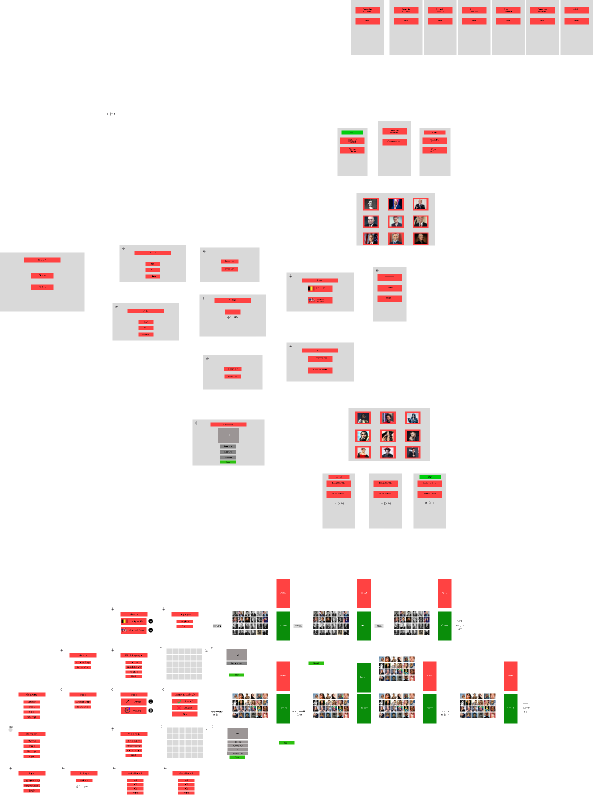
How do i make this layout in toolkit, every tile can also have an img.
if you follow the path to play a map you'll see what i'm trying achieve but i'm first trying to make it possible to create one.
The img is what i managed to achieve
(extra information about the game)
the "panel" is a 594x420 (A2 format), i want the player to be able to click on a tile and assign an image and text, when the entire board is filled out it should save and also take multiple pictures with the camera (1 for the A2, 2 for the A3 and 4 for the A4) so you can print out the map

 sick belfry
rough scarab
No. <https://docs.unity3d.com/Manual/UIE-faq-event-and-input-system.html#mouse-o...
sick belfry
rough scarab
No. <https://docs.unity3d.com/Manual/UIE-faq-event-and-input-system.html#mouse-o...
They should prevent it by default. So I guess I need to figure out if the mouse is over any UI element and then block the mouse event on the game object.
rough scarab
OnMouseDown isn't even a thing in the new input system
As world input now comes from the input system's interactions with user code, or some event system raycaster, there's nothing to prevent
Apart from legacy MonoBehaviour messages
sick belfry
MonoBehaviour still have the OnMouseDown event. Not sure about the new input system, I will do some research on that.
old gorge
rough scarab
No. <https://docs.unity3d.com/Manual/UIE-faq-event-and-input-system.html#mouse-o...
- Intersected UI Toolkit Panels are represented in the Event System’s environment through a GameObject:
- The GameObject’s name matches the corresponding PanelSettings.
- The GameObject’s parent is the GameObject that holds the current Event System component.
- The GameObject has two components, PanelRaycaster and PanelEventHandler. Both components have a panel property that returns the IPanel it targets.
What does it even mean here?
Ohh it adds a gameobject as a child to the eventsystem object in the scene
But what does it mean by "Intersected Panels"?
rough scarab
Presumably those intersected by the ray representing the cursor
 upper garnet
Hi. I have almost no experience with UI toolkit but I was given a project done by someone else, and asked to solve a bug.
As you can see on the screenshot, the buttons are not properly aligned. I think I found the cause of the problem : the elements are contained into the VisualElement that I have highlighted with the debugger, AKA this vertical strip that doesn't fill the whole window horizontally.
Granted, the bug only occurs on windows that do not have a big graph displayed below. But for an upcoming presentation, we dont care about the "no graph windows" appearing mostly empty. ...However we do care about the things appearing outside teh window like this. looks too unprofessional.
How could I change the code/styles so this strip fills all of the window horizontally?

As I said, I'm a noob with UI toolkit. So if I didn't provide you with info you need to help, I'm sorry. Just ask and I'll send it ASAP
old gorge
rough scarab
Presumably those intersected by the ray representing the cursor
Yeah I think you're right, I don't know why I couldn't understand that with the way it was worded. I thought it was referring to panels that are "overlapping" each other, but it's all in the context of the pointer
 trim vale
Is it just me or is working with UI toolkit scripting and ui builder a pain in the ass?
Sometimes it doesnt update
old gorge
trim vale
Is it just me or is working with UI toolkit scripting and ui builder a pain in t...
You don't have to use UI builder, you can do everything with UXML and USS
trim vale
Oh okay, how can I preview my changes in real time then?
since sometimes it just doesnt update
old gorge
trim vale
Oh okay, how can I preview my changes in real time then?
At runtime?
trim vale
No just in preview
old gorge
Without UI builder, I would just setup a test scene to view it at runtime. Style changes should reflect immediately, but changes to the visual tree heirarchy could be problematic if code is dependent on that
old gorge
Is there a way to get the EventSystem represented gameobject from the UI Document (MonoBehaviour)?
Trying to find by matching the name of the panel settings seems like a horrible way.
quiet light
chat are there event where the mouse that's hovering an element is no longer doing it?
old gorge
quiet light
chat are there event where the mouse that's hovering an element is no longer doi...
PointerEnterEvent PointerExitEvent?
old gorge
old gorge
Is there a way to get the EventSystem represented gameobject from the `UI Docume...
Figured it out,
uiDocument.runtimePanel.selectableGameObject
 finite scarab
Hi, I've been doing a custom grid layout using margin right and bottom for individual elements. I'm setting both the width and height of the elements in code. However, even though the calculated values set in code for both seems to be correct in the UI debugger (at the bottom), somehow the actual value used in Unity (at the top in the debugger layout section) is still different, and it's slightly different for all individual elements, not only this one. Anyone has any idea why? I can share the custom grid layout code as well if needed, but it's pretty simple. The big red box on the 2nd row is actually 2 elements but got stick together since the width is incorrect so the 4th element on the first row gets bumped down.
 old gorge
Is your panel settings set to stretch by any chance?
finite scarab
Hmm, what do you mean by that? I was using this. I tried changing to Constant pixel size, and though it technically work, checking the values in debugger still give different values than what I set. Maybe this is a bug with UITK? It just feel kinda weird since setting width and height seems simple enough
 old gorge
Yeah that's what I meant. The values at the top I believe are calculated values taking everything into account
You can read these in code from the resolvedStyle on the VisualElement but these are read only
finite scarab
Alrighty thanks, I guess I'll have to use constant physical size and designate a reference dpi to scale with different screen sizes. I have never tried any option other than Scale with screen size. Do you know if it's any good?
old gorge
I usually use scale with screen size, and set the slider all the way to width but I mostly do Desktop development
finite scarab
Yeah same for me. Welp let's see how it goes
 fallow badger
Any ideas about render artifacts?
Sorry for phone filming, it can't be captured during screen record (everything is fine on the recorded video)
Only steamdeck can reproduce it.
Happens during full screen covered by some UI (all UI made with uitk)
No artifacts when cursor appears.
sick belfry
quiet light
in scripting how would i know if i hovered over an element?
can you tell if you hover over an UI element? I NEED THAT!
trim vale
sick belfry
can you tell if you hover over an UI element? I NEED THAT!
.menu__button:hover {
background-color: rgb(241, 196, 15);
-unity-background-image-tint-color: rgb(255, 205, 25);
}
like this for instance
sick belfry
trim vale
.menu__button:hover {
background-color: rgb(241, 196, 15);
-unity-backgr...
yes for css, I want to know it in the scripts.
trim vale
For Ui elements, you can use:
public class UIElement : MonoBehaviour, IPointerEnterHandler, IPointerExitHandler
{
private bool mouse_over = false;
void Update()
{
    if (mouse_over)
    {
        Debug.Log("Mouse Over");
    }
}

public void OnPointerEnter(PointerEventData eventData)
{
    mouse_over = true;
    Debug.Log("Mouse enter");
}

public void OnPointerExit(PointerEventData eventData)
{
    mouse_over = false;
    Debug.Log("Mouse exit");
}
}
rough scarab
trim vale
For Ui elements, you can use:
public class UIElement : MonoBehaviour, IPointerEn...
That's got nothing to do with UIToolkit
sick belfry
trim vale
For Ui elements, you can use:
public class UIElement : MonoBehaviour, IPointerEn...
maybe its only for gameobject

 past hemlock
Hello, what's the industry standard way to use UI Toolkit? Should I just use whatever Unity gives me or are there any popular addons/plugins/extensions that are more popular/better than the default version? Thank you
weak fog
It's not mature enough to have an industry standard I'd say. Still got a lot of changes happening to API. So far custom controls I needed I just created myself, most out of the box ones work just fine
 versed creek
i'm using UI toolkit, new input system, and PhysicsRaycaster setup and have a problem that mouse click behaves as expected and if UI panel catches a click, it stops any further propagation and it doesn't reach the OnPointerClick of the game world handler, but OnPointerMove isn't like that. It clearly interacts with the raycaster, because as soon as mouse cursor goes over a panel raycaster starts to always give 0,0,0 as the hit. But still hits the collider under the panel, raycast result IsValid is also true.
Is there a way for pointer move to act like the click and "eat" the move event ?
 pallid kindle
Hey sorry been a good bit since I've done CSS but using relative position how do I force the visual element to the bottom of the screen?

wait fixed using absolute mb
 ebon frost
Using Unity 6, URP 3D.. for some reason when i set the UI Toolkit Canvas to a color or image it doesn't show up in the game view

Is there a setting somewhere i am not seeing to get it to work? lol
ebon frost
So figured it out... so whats the point of this?

had to go to on my container and set it there
 weak fog
ebon frost
So figured it out... so whats the point of this?
weak fog
ebon frost
So figured it out... so whats the point of this?
for testing, probably
 hybrid crystal
This just makes no sense, whenever my MultiColumnListView tries to create its noneElement, it sticks to the right border, partially hidden. I tried adjusting every property of the noneElement. The makeNoneElement callback is set to a method that simply instantiates a label with a message, I don't get what's wrong.

I'm using Unity version 6000.0.25f1
dark blade
hybrid crystal
This just makes no sense, whenever my ``MultiColumnListView`` tries to create it...
have you check from UI Debugger?
 shell goblet
Hello everyone my ui elements don't align properly even with a pixel perfect canvas pls help
hybrid crystal
dark blade
have you check from UI Debugger?
Yeah, and nothing seems out of place
sick belfry
Why I have to adjust the 9-slice again in UIDocument after done in sprite editor ?


Do they even work? I only can get 2 sides
sick belfry
Got it to working when saved the button image as a single file
ebon frost
Can anyone point in the right directions on how to switch menu's using toolkit correctly? (Main menu UI to Settings UI, ect)
sick belfry
I would do it using display none and flex. controll it using script
 shy heron
How do I set up the ui toolkit event system?


 autumn quartz
 dark blade
what bug? can you more spesific?
ebon frost
sick belfry
I would do it using display none and flex. controll it using script
So keep everything in one UI Document?
sick belfry
ebon frost
So keep everything in one UI Document?
I would create sub menu separately if too much elements.
Then you can import all the sub menus into a single UIDocument as a template.
sick belfry
Can we have VFX on top of UIDocument? Dont think we can just checking.
There is a guy made this work but the steps are not clear to me. https://discussions.unity.com/t/render-vfx-on-top-of-uielement/865110/2
old gorge
sick belfry
Can we have VFX on top of UIDocument? Dont think we can just checking.
There is...
What exactly is not clear?
They seem to just be rendering the VFX from a camera to a render texture and then assign that texture to a background of a VisualElement
sick belfry
They are the little things. Got it working after having hour long conversation with ChatGPT
love it!
 old gorge
Looks cool!
 fast escarp
oh thats a nice solution
is it okay to share reddit link? made overwatch style health bar and wrote masking tutorial for ui toolkit: https://www.reddit.com/r/Unity3D/comments/1ig286b/created_an_overwatchstyle_health_bar_using_ui/
Reddit
Explore this post and more from the Unity3D community
autumn quartz
dark blade
what bug? can you more spesific?
well 90% of the buttons are broken
ebon frost
How can i ignore the template container when using CloneTree() The container messed up my layout lol
I've tried calling the root element but it still adds the temp container around it
dark blade
autumn quartz
well 90% of the buttons are broken
i understand your frustation but you need give more spesific information, like you said it's 90% broken, what broke?, the style?, it's not taking input?, or what
old gorge
Does IPanel.Pick() expect screen coordinates or panel coordinates?
It's panel coordinates
old gorge
Is there a way to disable input (ignore input, not set to disabled state) at a panel level?
rough scarab
old gorge
Is there a way to disable input (ignore input, not set to disabled state) at a p...
Disable the PanelEventHandler on uiDocument.runtimePanel.selectableGameObject
That's document-level not panel I suppose
but it's better than nothing 😄
old gorge
rough scarab
Disable the `PanelEventHandler` on `uiDocument.runtimePanel.selectableGameObject...
I tried that, but I'm in a weird case where I needed the raycaster disabled as well, but then I couldn't detect when pointer was over it again, so that wasn't an option.
I'm attempting to host UI toolkit controls inside of uGUI and make it as seamless as possible. So that the mouse clicks go to the correct control that is on top, unless UI toolkit panel has pointer captured.
I was actually able to solve this with the sorting order on the panel settings. You can see in the TryEnableInput() and TryDisableInput() methods.
I add a custom script EventSystemBridge to the EventSystem gameobject that sets the sorting order to float.MinValue when the pointer is not over an element in the panel and matches the sorting order of the Canvas when it is over an element or when the panel has pointer capture.
The grid looking control is UI Toolkit that is rendered to a render texture and applied to a raw image
I really didn't want to write a custom EventSystem, and was skeptical if I could get this to work. But it is actually working really well right now.
 undone token
Hey there,
I want to have some nice scene transitions. Most tutorials use the canvas system. I was wondering if this is still the best way to do so, with UI Builder in place? I have my menus in UI Builder and I don't want to mess with two systems, if there is a direct way to do so. Youtube searches on that topic were not successful.
trim vale
Hi there, anyone knows why I cant interact with the MenuBar Buttons anymore after I enable the shop screen view?

It works the same the other way around, if I have shop screen above menu bar, then I can only interact with the menu bar but not with the shop screen
I wasnt able to find any solution, I even provided chatgpt all my code and it did not solve it x.x
old gorge
undone token
Hey there,
I want to have some nice scene transitions. Most tutorials use the ca...
You can use UI Toolkit for this too. It is just another menu with a loading bar / loading indicator
old gorge
trim vale
I wasnt able to find any solution, I even provided chatgpt all my code and it di...
Show a screenshot of the actual UI as well
trim vale
old gorge
Show a screenshot of the actual UI as well
Sure, gonna need a video for that since there are different templates, give me some minutes please
@old gorge there you go
It should be a scrollview and you should be able to press the buttons
And it works as said if I change the order of elements
but then the menu bar gets unclickable
old gorge
trim vale
<@260837642516692992> there you go
Show more of the visual tree in the ui builder for the menu bar
How are you achieving putting the menu at the bottom? Do you have a spacer visual element?
You should use the UI Toolkit debugger and click pick element to see what element you are actually clicking
that should lead you in the right direction
trim vale
Oh I did not know there was a debugger for UI Toolkit
Will definitely check that one out!
old gorge
Yeah I would do this, go into play mode, open the UI Toolkit debugger and click pick element and click where you are having issues. It will show you the element in the visual tree that is receiving the click
trim vale
It seems to be the menu screen
Now its the menu bar

huh
Found it, the MenuBar is set to "position" at runtime
I have no clue why that is though
Anyways thank you for telling me about the debugger!
Its my second day learning ui toolkit
trim vale
Okay I dirty fixed it, I had to implement:
public override void Initialize()
{
// Call base.Initialize to hide on awake if applicable and set up defaults.
base.Initialize();
        m_Root = m_TopElement;

        **// Force picking mode to Ignore so that other screens below are not blocked.
        m_Root.schedule.Execute(() =>
        {
            m_Root.pickingMode = PickingMode.Ignore;
        }).StartingIn(100);**
}
How can you simulate touch (for a vertical or horizontal slider) with mouse in unity 6?
ebon frost
Guys really Struggling to understand Template Container.. all my children are set to 100% height but some how when it loads its half the screen... Is there a way to remove it or force the height?
autumn quartz
Which one of these quit boxes do you like better


the second image was at the bottom corner of the screen
the first was in the middle
old gorge
ebon frost
Guys really Struggling to understand Template Container.. all my children are se...
You probably should just set flex grow to 1 instead
ebon frost
old gorge
You probably should just set flex grow to 1 instead
I tried that it still doesn't solve it 😄
ebon frost
old gorge
You probably should just set flex grow to 1 instead
Just found a weird solution I did this _buttonWrapper.Clear(); _settingWrapper = _settingsTemp.Instantiate(); for (var i = 0; i < _settingWrapper.childCount; i++) { var root = _ui.rootVisualElement; root.Add(_settingWrapper.ElementAt(i)); } I feel like i shouldn't have to do it this way but it seems to work for now haha
 dark jewel
is it somehow possible to invoke pseudo-states with code? For example I have some buttons that are linked to a window, and whenever that window becomes active I want to invoke the :focus state on the linked button
 patent anvil
I am creating a custom UI element but it seems that the constructor for my element runs in UIBuilder as well. I need to do some initialization that should only happen at run time (in-game). How can I do this? Is there an event I can listen for?
patent anvil
nm. I just wrapped my init logic in if (Application.isPlaying)
 slow ore
how would I make a label that fits with what PropertyField does? or see what the default style is? or maybe there's a simple way?
 dark blade
dark jewel
is it somehow possible to invoke pseudo-states with code? For example I have som...
dark blade
dark jewel
is it somehow possible to invoke pseudo-states with code? For example I have som...
you can set focus to element by usng visualElement.Focus(), but you can't modify manually the pseudo state
 tall owl
Is there an official way to use sprites in fonts? The UITK Text settings method with a sprite atlas works in editor, but it's completely broken in builds
Whenever I use a Text Settings in builds, the text is all missing, most of hte buttons are missing, and things just pop in and out randomly
and I get this when I hover a button:
  at UnityEngine.UIElements.UIR.MeshGenerator.DrawTextInfo (System.Collections.Generic.List`1[T] vertices, System.Collections.Generic.List`1[T] indices, System.Collections.Generic.List`1[T] materials, System.Collections.Generic.List`1[T] renderModes) [0x00039] in C:\build\output\unity\unity\Modules\UIElements\Core\Renderer\UIRMeshGenerator.cs:750
  at UnityEngine.UIElements.UIR.MeshGenerator.DrawText (System.Collections.Generic.List`1[T] vertices, System.Collections.Generic.List`1[T] indices, System.Collections.Generic.List`1[T] materials, System.Collections.Generic.List`1[T] renderModes) [0x00001] in C:\build\output\unity\unity\Modules\UIElements\Core\Renderer\UIRMeshGenerator.cs:614
  at UnityEngine.UIElements.UITKTextJobSystem.AddDrawEntries (UnityEngine.UIElements.MeshGenerationContext mgc, System.Object _) [0x00049] in C:\build\output\unity\unity\Modules\UIElements\Core\Text\UITKTextJobSystem.cs:306
  at UnityEngine.UIElements.UIR.MeshGenerationDeferrer.Invoke (UnityEngine.UIElements.UIR.MeshGenerationDeferrer+CallbackInfo ci, UnityEngine.UIElements.MeshGenerationContext mgc) [0x00002] in C:\build\output\unity\unity\Modules\UIElements\Core\Renderer\UIRMeshGenerationDeferrer.cs:144
And it just gets worse from there
Ok, it looks like if you have TextMesh Pro in the project it works. wtf
Really need to put that in the manual somewhere
And if it's there it needs to be made a LOT more prevalent
 brittle furnace
Hey all, I got these 2 panels here that I want to transition into view. How would I do this? Currently I am trying to lerp it by changing style.top and style.bottom. Is there a better way to do this?

 gilded orbit
Are there any public style sheets for unity UI Toolkit?
Im coming from a WebDev background and im looking to style Unity UI Toolkit to something like material UI etc. But i havent found anything about this yet. Anyone having an idea?
dark jewel
dark blade
you can set focus to element by usng visualElement.Focus(), but you can't modify...
well that's useful at the very least. Thank you
hybrid oar
gilded orbit
Are there any public style sheets for unity UI Toolkit?
Im coming from a WebDev...
If you mean like pre-made styles lile tailwind css, not to my knowledge
That said, a quick Google for "tailwind uss" reveals some options
I cant speak to how good it is
Looks like there's a few of them that try to copy the tailwind flow to varying degrees
dark jewel
What's the best way to modify the style of the text of a button object, either with uss or via code. I have a custom button class and I need overflow to be visible for the button itself, but I need overflow hidden for the label. I'm having a really hard time modifying the style for the label though
 rugged steeple
by builder, do you mean the window where you have the css style sheets, the drag and drop things like integer input, scrollable list, visual element
 rocky root
rugged steeple
by builder, do you mean the window where you have the css style sheets, the drag...
rocky root
rugged steeple
by builder, do you mean the window where you have the css style sheets, the drag...
yeah like the In Editor builder
rugged steeple
yeah, i cannot edit the integer field's value when using the prebuilt integer field
rocky root
Ohhh okay. I have to try that out, doing everything in code I never actually tried it lol
rugged steeple
like for some of the elements you can add, you can see stuff like a text field hidden under the actual element
but you cannot edit any part of it, you can only edit parts of the parent
and the parent doesn't expose the "value" field in the inspector window
rocky root
are those actual text fields? I always thought that was reserved padding/spacing
rugged steeple
well all the prebuilt components are just mix matches of the base elements. with a tiny bit of coding. The components under the prebuilt are the ones that the prebuilts edits based on what you do to it in code
or the user does, depending on setup
at least as far as ive used it
 undone blaze
rugged steeple
but you cannot edit any part of it, you can only edit parts of the parent
undone blaze
rugged steeple
but you cannot edit any part of it, you can only edit parts of the parent
I came across the same issue. I created my own int field, float field, object field, etc., so I can edit the values . . .
It was in an old project where I tried creating a property drawer for an Attribute class that would display the correct Stat class depending on the value of a field . . .
rugged steeple
undone blaze
I came across the same issue. I created my own int field, float field, object fi...
you can edit in code with the prebuilt btw, just you cannot edit visually
you can do the same thing you would do to a text field to read the element, if you reference the element class in your cs script
undone blaze
rugged steeple
you can edit in code with the prebuilt btw, just you cannot edit visually
I believe it was a visual reason. I really should revisit the project. The issue I ran into was displaying the correct class bc it was a SerializedReference. I just need to figure the correct way to check and assign the value of it . . .
rough scarab
dark jewel
What's the best way to modify the style of the text of a button object, either w...
USS is generally the best way because you can easily apply it globally. By code requires some awkward querying and the style API is clunky in comparison, if you wanted to apply the style to another button you'd need to do it manually
rough scarab
rugged steeple
but you cannot edit any part of it, you can only edit parts of the parent
If you want to modify the styles of the child elements you should be using USS selectors. If you're adding extra elements or removing ones then yeah that'll require doing it in code
rugged steeple
rough scarab
If you want to modify the styles of the child elements you should be using USS s...
no i meant specifically the "value" field of the inputfieldElement, not anything about styles. You cannot edit the value of the text the player can change, such as changing 0 to 100, or anything like that. You can only do it in a csharp script
rough scarab
If it's a UxmlAttribute, which I believe it is, you can edit the value via the root of the UxmlElement, which is the Input field itself
Maybe I'm just unfamiliar with what exact control you're talking about
rugged steeple
let me correct myself, sorry, it was not available in unity 2022 lts, where i used uibuilder
rough scarab
Ah, yeah I can't comment on that
rugged steeple
it is avaliable in unity 6
most of theseattributes werent exposed in-editor before unity 6.
 slow ore
How would I make a GenericMenu like this with UITK? Dropdown is close to what I want but not really

it would be a work-around
i really just want a button with nested options not a selector
rugged steeple
so, i currently have a binding setup with a multilist view, with a scriptable object instance, and setup binding paths. But no matter what i do unity doesnt seem to reconize my bindings paths? how do you actually implement bindings using uitoolkit? like my different items never show up on the column list. (tried searching and the unity docs saying that binding this way should work, but they only do this with no item asset, just the multilist view and binding. any youtube video doesnt use this because its so new)


 trim vale
Hi guys, how can I adjust the size of the autogenerated, greyed out unity-content-container?
All children inside are squashed together somehow

#shop__content .unity-content-container,
#shop__content .unity-scroll-view__content-container {
height: 100%;
}
fixed it somehow
So it just cant be altered in the builder itself, but in the code, huh
rugged steeple
trim vale
Hi guys, how can I adjust the size of the autogenerated, greyed out unity-conten...
is that a columlist view?
im having similar problems with my set if that is, its a bit hard to get it working honestly
rugged steeple
How do you edit a Template for a visual tree asset in csharp code?

i want to set binding path/type of itemTemplate, then apply it to the listviews's itemtemplate
dark blade
trim vale
Hi guys, how can I adjust the size of the autogenerated, greyed out unity-conten...
Isn't set flex grow: 1 is enough?
rugged steeple
dark blade
Isn't set flex grow: 1 is enough?
the problem is that you cant edit template parts in the outside uidoc, and you cant really edit default temples without extending to a different/ seperate template (in the editor, not script)
 true prism
I found this channel is you are interrested in ui toolkit with binding to scriptableObject, interresting:

YouTube
Bachelor-Studium Kommunikation und Medien in der Informatik an der Hochschule Darmstadt
rugged steeple
true prism
I found this channel is you are interrested in ui toolkit with binding to script...
they dont focus on csharp script. they are editing uxml in their videos
at least, for binding the stuff. They also do not use a UXML template, nor do they use a inventory system populated at runtime\
i looked at that before asking my question, but i got my question answered on the forums
 unborn bluff
I'm currently creating a custom control for my designer to use in the UI Builder. But atm, the properties don't change in the UI Builder when I change them there. Does anyone know why?
[UxmlElement("AudioSlider")]
public partial class AudioSlider : VisualElement
{
    private readonly Slider _slider;
    private readonly Label _valueLabel;

    private const string SliderName = "Slider";
    private const string ValueLabelName = "ValueLabel";

    [UxmlAttribute]
    public string SliderText { get; set; }

    [UxmlAttribute]
    public float LowValue { get; set; }

    [UxmlAttribute]
    public float HighValue { get; set; }

    [UxmlAttribute]
    public float Value { get; set; }

    public AudioSlider()
    {
        _slider = new Slider();
        _slider.name = SliderName;

        _valueLabel = new Label();
        _valueLabel.name = ValueLabelName;

        _slider.RegisterValueChangedCallback(evt => UpdateLabel(evt.newValue));

        Add(_slider); // adds a slider to the visual element
        Add(_valueLabel); // adds a label to the visual element
        Update();
    }

    private void Update()
    {
        _slider.label = SliderText;

        _slider.value = Value;
        _slider.lowValue = LowValue;
        _slider.highValue = HighValue;


        _valueLabel.text = Value.ToString();
    }

    private void UpdateLabel(float newValue)
    {
        Value = newValue;
        _valueLabel.text = newValue.ToString("F0");
    }
}
 junior tundra
how to get the "select type" window from UI builder in editor window?
 rough scarab
unborn bluff
I'm currently creating a custom control for my designer to use in the UI Builder...
rough scarab
unborn bluff
I'm currently creating a custom control for my designer to use in the UI Builder...
You never call update from anywhere other than your constructor. Update your slider and text from the individual properties
unborn bluff
rough scarab
You never call update from anywhere other than your constructor. Update your sli...
Sometimes I'm stupid. I added the changes to the properties and now it works, ty a lot!!
dark blade
junior tundra
how to get the "select type" window from UI builder in editor window?
you could modify your constructor little bit, if you don't like use full property for everything
  public AudioSlider()
{
    ....
    execute(()=>Update())
}
``` doing this when your designer trigger save in UI Builder its will handle update your slider value, i guess unless you want Binding, this way is good enougheh wrong tag sorry
i mean to reply @unborn bluff
rugged steeple
When binding a ItemTemplate to Listview, how do you autoset the Template-containers Flex-grow to 1? template binding is done using listview.itemTemplate = template, so theres no instanciating involved
fixed it myself, done using a uss stylesheet, creating a :root selector, and then editing flex-grow
 vital totem
rugged steeple
so, i currently have a binding setup with a multilist view, with a scriptable ob...
vital totem
rugged steeple
so, i currently have a binding setup with a multilist view, with a scriptable ob...
use gridview better than listview and multilist
rugged steeple
vital totem
use gridview better than listview and multilist
gridview isnt available in unity UItookit rn?
vital totem
junior tundra
how to get the "select type" window from UI builder in editor window?
make new searchprovider for type
vital totem
rugged steeple
gridview isnt available in unity UItookit rn?
unityAppui
rugged steeple
which is a internal unity plugin that isnt supported no?
vital totem
rugged steeple
which is a internal unity plugin that isnt supported no?
didn't matter
its work that all
rugged steeple
ahh gotcha. I already decided to use Templates with runtime binding for slots, but if i cant get it working ill give that a shot
vital totem
made this with app ui
 rugged steeple
ahh, i didnt know the app had a visual mode, thats really neat
or maybe thats a scriptable object
vital totem
scriptable object
rugged steeple
does it support runtime data binding with gridview?
vital totem
yes , it does
 spare sparrow
when i use
https://docs.unity3d.com/6000.0/Documentation/ScriptReference/UIElements.VisualTreeAsset.CloneTree.html
to create a VisualElement then i add it as a child
when i remove the VisualElement with Clear() on the parent
https://docs.unity3d.com/6000.0/Documentation/ScriptReference/UIElements.VisualElement.Clear.html
Does this guarantee the memory ready for garbage collection?
rugged steeple
could anyone provide some insight onto why this databinding doesnt bind? ItemTemplate has 1 child element, and that child element's ONLY goal is to display a sprite through databind. (the Element shows up, but shows a default sprite, not at all connected to binding). I cannot find a single example of databinding a background image

 gusty vapor
spare sparrow
when i use
https://docs.unity3d.com/6000.0/Documentation/ScriptReference/UIElem...
gusty vapor
spare sparrow
when i use
https://docs.unity3d.com/6000.0/Documentation/ScriptReference/UIElem...
.Clear will detach all the children yeah, whether they're subject to be GC'd or not, same rule applies like anything else in unity
vital totem
rugged steeple
could anyone provide some insight onto why this databinding doesnt bind? ItemTem...
icon.SetBinding("style.backgroundImage", new DataBinding()
{
dataSourcePath = new Unity.Properties.PropertyPath("icon")
});
vital totem
rugged steeple
could anyone provide some insight onto why this databinding doesnt bind? ItemTem...
no need to use visualelement
rugged steeple
ah, cant thank you enough for the helpp dray. will check if this works
vital totem
and propertypath sould be ur image/sprite
rugged steeple
the string name of the asset, right?
vital totem
yep
vital totem
rugged steeple
the string name of the asset, right?
property
just change item to image
rugged steeple
yeah, did that and it works, thank you for the help, now ill be able to apply it, thank you so much. now time to implement drag/drop (should be easy lol)
rugged steeple
im using the callback route already, just had to fix bindings before i could finish
vital totem
rugged steeple
im using the callback route already, just had to fix bindings before i could fin...
drag event are better than pointer
rugged steeple
vital totem
drag event are better than pointer
im using all of the above, using onpointerdown to register dragevents that will be called every frame update until OnDragEnd and DragAndDrop is called. If DragandDropp is called, it will overwite the data from dragEnd. still dont know how to handle dropping on the ground, but ill get there
DragAndDrop is called on the item dropped on, OnDragEnd is called on dragged item. No matter what happens to DragAndDrop, OndragEnd gets called and idk how to reference draganddrop in ondropend with visuallelements, but ill figure it out eventually
vital totem
i liked to use App ui dragger for drag and drop
rugged steeple
i thought of that too, just didnt know how i would handle drag and drop to slots that were outside of the original collection
my inventory will have hotbar slots that are outside of the grid, but are still in the "inventory"
vital totem
rugged steeple
i thought of that too, just didnt know how i would handle drag and drop to slots...
are using event on all item?
or only on root
rugged steeple
yes, the events get created and delegated when the slots are made. each slot registers its own specific callbacks
they will reference the same "Item" in the array, but the items in the array will never move, just change their data
vital totem
vital totem
use this dragger
if u are not using appui
rugged steeple
thats, a ton of extra code, may i ask the benifit over registering onpointer down events that call a func in the higher level class?
just want to understand why was the extra legwork done
vital totem
didnt know, its acutually app ui script but it is easier to implement
and cleaner than registering event for every item
rugged steeple
thank you for the help then, do you have an example use case for the class? trying to understand it. seems RegisterCallbacks registers callbacks on the item you click, and connects it to mouse button, but a bit hard to understand how to use it
vital totem
    private void OnAttachToPanel(AttachToPanelEvent evt)
    {
        if (evt.destinationPanel != null)
        {
            itemListView.dragStarted += dragStarted;
            itemListView.dragUpdated += dragUpdated;
            itemListView.dragCanceled += dragCanceled;

        }
    }

    private void OnDetachFromPanel(DetachFromPanelEvent evt)
    {
        if (evt.originPanel != null)
        {
            itemListView.dragStarted -= dragStarted;
            itemListView.dragUpdated -= dragUpdated;
            itemListView.dragCanceled -= dragCanceled;
        }
    }
    private void dragStarted(PointerMoveEvent evt)
    {
        Debug.Log(evt.pressedButtons);
        ProcessPointerDown(evt);
        evt.StopPropagation();
    }

    private void ProcessPointerDown(IPointerEvent evt)
    {
        int button = evt.pressedButtons;
        Debug.Log(button);

        if (button == 1 )
        {
            dragindex = itemListView.GetIndexByWorldPosition(evt.position);
            Debug.Log(dragindex);
            dragelement = simpleIcon.CloneTree();
            dragelement.style.position = Position.Absolute;

            dragelement.style.flexGrow = 0;
            dragelement.style.minHeight = 60;
            dragelement.style.minWidth = 60;
            dragelement.style.top = evt.position.y - dragelement.layout.height ;
            dragelement.style.left = evt.position.x - dragelement.layout.width / 2;
            dragelement.dataSource = itemObjects[dragindex];
            this.Add( dragelement );
        }

    }

    private void dragUpdated(PointerMoveEvent evt)
    {
        if (dragindex != -1)
        {
            dragelement.style.top = evt.position.y - dragelement.layout.height ;
            dragelement.style.left = evt.position.x - dragelement.layout.width / 2;
        }
        evt.StopPropagation();
    }

    private void dragCanceled()
    {
        Debug.Log("dragCanceled");
    }
Hello,
Using listView, Im trying to use bindingPath on an ObjectField :
                        bindItem = (element, index) =>
                        {
                            var serializedProperty = property.GetArrayElementAtIndex(index);
                            var value = serializedProperty.propertyPath;

                            // return true for the 3 values in the array;
                            Debug.Log(value == $"{ property.propertyPath }.Array.data[{index}]");

                            var (objectField, button) = ((ObjectField, Button))element.userData;
                            objectField.objectType = typeof(ObjectGroup);

                            // Probem
                            objectField.bindingPath = $"{ property.propertyPath }.Array.data[{index}]";

                            // works
                            // var serializedProperty = property.GetArrayElementAtIndex(index);
                            // objectField.value = serializedProperty.objectReferenceValue;
                            button.clicked += () => Debug.Log($"Clicked:");
                        }
I have a Debug.Log and I compare the path with the view I set in bindingPath and they are the same ( return true I also checked by comparing both string ... just in case ).
I can set of the objectField using :
    var serializedProperty = property.GetArrayElementAtIndex(index);
    objectField.value = serializedProperty.objectReferenceValue;
But I really would like to understand why objectField.bindingPath does not work as the path is correct .
(The row are visible in the list .. just empty when using bindingPath)
Thanks
 civic sinew
Am I right to think that the inline <ui:VisualElement name="Container" style="flex-direction: row;"> is going to have precedence over the uss file #ReversedHotkeysXML > #Container { flex-direction: row-reverse; }
and therefore this page doesn't work , which I wouldn't even be surprised to hear since it has a typo Unityui.UIElements in there so it very much doesn't work out of the box
true prism
civic sinew
Re: https://docs.unity3d.com/6000.0/Documentation/Manual/UIE-reuse-uxml-files.ht...
you can try !important on your style. Maybe it works like CSS . It basically force CSS to use this style over someting else .. not sure it works for unity...
rough scarab
Important isn't a thing in USS
rough scarab
civic sinew
and therefore this page doesn't work , which I wouldn't even be surprised to hea...
Afaik you are correct
It should all be done in USS, there's very rarely a reason to inline a style imo
civic sinew
Yea I am moving the inline to a class. The problem is this tutorial page is just wrong.
rough scarab
it's weird because it's communicating that something isn't possible via an override, and yet it recommends something else that also isn't possible to override
so I wonder whether it's meant to say you should use USS across both; but who knows what they intended
I submitted feedback (at the bottom of the page), so hopefully it gets updated
brittle furnace

Hi friends, am I doing something wrong here? My TemplateContainers always Instantiate to NaN or 0
dark blade
can we style dropdown that use in Dropdown Field or Enum Field?, it's look so ugly
 mellow mountain
Im stuck with a tricky situation where i need to cut off overflow text made by code using the ui toolkit:

You can see the text go out the top of the menu in that gif and I have no idea how to stop it, I will even settle for a hacky way to make it stop.
 hybrid apex
it's been a minute since I've looked at Unity. doing some simple searches but not coming up with anything -- is there a "strategy ui toolkit"? strategy games tend to have complicated UIs with menus that open menus, and hard-coding menu relationships isn't ideal. some type of system that uses messaging IS probably ideal.
Think of a game like Crusader Kings - clicking on a unit opens a menu and that menu might have dynamic items on it (related to the specific unit) which then have their own submenus.
rugged steeple
mellow mountain
Im stuck with a tricky situation where i need to cut off overflow text made by c...
does this not work? oh wait, you need to set the part of the parent.

do this on the parent of the text objects (That black box behind all the text objects)

 indigo hatch
using UnityEngine;
using UnityEngine.SceneManagement;
using UnityEngine.UIElements;

[RequireComponent(typeof(UIDocument))]
public class MainMenuEvents : MonoBehaviour
{
    [SerializeField] private string _startLevelName;
    private UIDocument _document;
    private Button _startButton;

    private void Awake()
    {
        _document = GetComponent<UIDocument>();
        var root = _document.rootVisualElement;
        _startButton = root.Q<Button>("StartGameButton");

        if (_startButton == null)
        {
            return;
        }

        _startButton.RegisterCallback<ClickEvent>(OnPlayGameClick);
    }

    private void OnPlayGameClick(ClickEvent evt)
    {
        if (string.IsNullOrEmpty(_startLevelName))
        {
            return;
        }

        if (Application.CanStreamedLevelBeLoaded(_startLevelName))
        {
            SceneManager.LoadScene(_startLevelName);
        }
    }

    private void OnDisable()
    {
        if (_startButton != null)
        {
            _startButton.UnregisterCallback<ClickEvent>(OnPlayGameClick);
        }
    }
}
the other buttons dont even get the transform that works on the start one, but thats less of an issue
 uneven oyster
Adding some logs here would help
i.e. to make sure your code is actually running
Also what the heck is Application.CanStreamedLevelBeLoaded(_startLevelName)
uneven oyster
Anyway start with adding the logs to make sure the code is running and to see what point it gets to
I should hope your class taught you how to use Debug.Log
indigo hatch
uhhhh, not yet
uneven oyster
That should have been the first thing they taught you...
I don't understand how classes are teaching programming related topics without doing a "Hello, World!" first these days
indigo hatch
they assume we remember what we did a few semesters ago when we used processing
if you got the classes at all
uneven oyster
Debug.Log lets you print a message to the Console window
Place a few of them with different messages around your code to see which code is running or not running and when
e.g. place one when you resgister the callback. Place another one as the first line inside the callback function, and another right before loading the scene.
then run the game and see what happens
that will tell you which parts are working and not
So you know where to focus
indigo hatch
where would i also place my scene i want to open. with the code we were shown it gave us a little tab to slot it into
 uneven oyster
there's no way to do that with scenes
 uneven oyster
to do what
indigo hatch
if theres no way to do it w wcenes
and we made it in a scene at the start
why would they make us do that
uneven oyster
made what in a scene at the start?
Sorry I'm not following what you're talking about
 uneven oyster
yes the scene list is in build profiles
uneven oyster
Remove and replace what
uneven oyster
the scene in the scene list? No, that's not going to fix anything if you're not getting an error in the console
you need to debug your code as I explained above
indigo hatch
something like
Debug.LogError($"Scene '{_startLevelName}' not found in Build Settings!");
no
something like:
Debug.Log($"About to register the callback here");```
And:
```cs
Debug.Log($"About to load scene {_startLevelName)");```
 ty blue
uneven oyster
indigo hatch
okay, SOMETHING changed bc it works now
ty blue
uneven oyster
indigo hatch
okay, SOMETHING changed bc it works now
Maybe you forgot to save your code
indigo hatch
do you think you could mayb also look at the main menu at to why it wont do the same transform?
indigo hatch
Im trying to get my pause meny to show up, but it wont work, i was following a document on how to fill it out but im not seeing it.
Pastebin
Pastebin.com is the number one paste tool since 2002. Pastebin is a website where you can store text online for a set period of time.
brittle furnace
brittle furnace
Hi friends, am I doing something wrong here? My TemplateContainers always Instan...
Hey all, I wanna know if there is a way to add and remove elements in runtime correctly, it seems no one knows why I am facing this issue with the method used here but what I wanna do is this:
Add UXML templates to a visual element in runtime. It is an Input History box that shows the last 3 previous moves, things like attacks. It is FIFO and Im not sure on what the best way to do it is
mellow mountain
rugged steeple
do this on the parent of the text objects (That black box behind all the text ob...
Thank you but the black box is just a sprite.
rugged steeple
mellow mountain
Thank you but the black box is just a sprite.
im saying, the text should all have a commen parent, that the sprite is the background of no?
you need to have a ui element that is the right width/height that you want the text to not go outside of, and then turn overflox off for that element, and make the text all a child of it
mellow mountain
rugged steeple
you need to have a ui element that is the right width/height that you want the t...
Ok thanks I will try that.
mellow mountain
rugged steeple
you need to have a ui element that is the right width/height that you want the t...
Hold on, just to be certain we are on the same page I need the text to be pushed up out the top, it just shouldnt be visible beyond the black background.
rugged steeple
yes, that i understand
mellow mountain
Ok cool
rugged steeple
if you were to make that black sprite the parent of all the text objects, then turn off text overflow and regular overflow, it can still go outside, just wont display
rough scarab
brittle furnace
Hi friends, am I doing something wrong here? My TemplateContainers always Instan...
https://unity.huh.how/ui-toolkit/resolved-style
The element isn't even attached to a panel when it's first instanced, it can't have dimensions at that point.
Though even when it is it won't, as it'll need to resolve the styles, then it'll need to perform layout
rugged steeple
i find that flex grow/shrink causes a ton of headaches when creating the ui, good to have but man is it painful to use
if you check like 5 frames after you make it and it still says Nan, that means somethings wrong with either what its showing, flex grow/shrink, or the parent
brittle furnace
rough scarab
https://unity.huh.how/ui-toolkit/resolved-style
The element isn't even attached ...
To clarify, I must .Add it to a panel parent upon instantiation and retrieved the resolved style after it has been attached?
rough scarab
Yes, styles are resolved later before layout, mesh generation, and rendering.
Not immediately after it's attached
brittle furnace
Thank you so much, Ill try this!
mellow mountain
rugged steeple
im saying, the text should all have a commen parent, that the sprite is the bac...
Thank you it worked but the left hand side gets cut off and increasing the width doesnt help. (Ignore the red options going to the right, I know how to fix that).

 mellow mountain
Im also stuck with getting a uitooklit visual element to stay ontop of a character, when i move the camera up then the element moves down away from the target and when i move the camera down it moves up away from the target. Same for left and right. Here is my current code I even adding a worldToLocal step but it did nothing:
 rugged steeple
mellow mountain
Thank you it worked but the left hand side gets cut off and increasing the width...
rugged steeple
mellow mountain
Thank you it worked but the left hand side gets cut off and increasing the width...
maybe turn off flex-shrink for the parent of the little black box?
rugged steeple
mellow mountain
Im also stuck with getting a uitooklit visual element to stay ontop of a charact...
setting the y value = to the top of the screen - the y value you want it to be at seems silly doesnt it?
dark jewel
mellow mountain
Im also stuck with getting a uitooklit visual element to stay ontop of a charact...
I believe you should use element.transform.position to manipulate the position of elements at runtime instead of their style as transform.position does not trigger layout redraws
but I could be wrong
mellow mountain
dark jewel
I believe you should use `element.transform.position` to manipulate the position...
It didnt work, unfortunately.
dark jewel
mellow mountain
It didnt work, unfortunately.
this is just off the top of my head but targetScreenPos is probably all that you would need in this case, assuming there are no other properties that would throw that value off(such as panel scale). A forum post has unity staff that recomments:
Vector2 screenPos = RuntimePanelUtils.CameraTransformWorldToPanel(uiDocument.rootVisualElement.panel, _targetCharacter.transform.position, Camera.main);
 twilit rune
I have some logic for drawing my PropertyDrawer, based on the value of the object that it's drawing. It works nicely! However, it doesn't update whenever the relevant data changes, I have to click on some other object in the hierarchy and click back on the object I'm changing, to see the different inspector
the issue seems to be that CreatePropertyGUI is called only once when I'm first clicking on an object, and I want to call it more often, every time the relevant fields change
how can I do it?
I have overriden CanCacheInspectorGUI to false but that didn't fix the issue
how can I force a rebuild of a drawer?
dark jewel
mellow mountain
It didnt work, unfortunately.
okay, on top of what I said make sure your style has the position set to absolute.
public class PlayerTag : MonoBehaviour {
  UIDocument uiDocument;
  private void OnEnable() {
    uiDocument = GetComponent<UIDocument>();
  }

  // Update is called once per frame
  void Update() {
    Vector3 offset = Vector3.up * .5f;
    Vector2 screenPos = RuntimePanelUtils.CameraTransformWorldToPanel(uiDocument.rootVisualElement.panel, this.transform.position + offset, Camera.main);
    uiDocument.rootVisualElement.transform.position = screenPos;
  }
}
```x
 dark jewel
twilit rune
how can I force a rebuild of a drawer?
dark jewel
twilit rune
how can I force a rebuild of a drawer?
element.MarkDirtyRepaint()?
twilit rune
dark jewel
`element.MarkDirtyRepaint()`?
that redraws 1 element, I want the PropertyDrawer.CreatePropertyGUI to be called again
twilit rune
dark jewel
`element.MarkDirtyRepaint()`?
also, I'm gonna admit that I'm pretty new with UI Toolkit overall, maybe I'm doing something wrong - how can I hook this call into my CreatePropertyGUI anyway?
This method is called from my CreatePropertyGUI, the base just draws the default inspector for the property
protected override VisualElement DrawProperty(SerializedProperty property, Label label = null)
{
    var enabledProperty = property.Copy();
    enabledProperty.Next(true);
    if (enabledProperty != null)
    {
        if (enabledProperty.boolValue)
        {
            return base.DrawProperty(property, label);
        }
    }
    var labelText = property.displayName + " " + enabledProperty.displayName;
    var visualElement = base.DrawProperty(enabledProperty, new Label(labelText));
    return visualElement;
}```unfortunately I do not have much experience with CreatePropertyGUI most of what I've been doing is runtime, sorry 😦 I would imagine you'd need to register a callback for when the property is changed https://docs.unity3d.com/6000.0/Documentation/Manual/UIE-Change-Events.html
twilit rune
ok, new problem
when I change VisualElement.visible to false, it still takes up space, it just isn't rendered. How can I make it not take up any space?
I can't remove it, because I'm also adding another element in the same place, and it's a response to an event, so it results in an infinite loop
twilit rune
figured it out
dark jewel
twilit rune
ok, new problem
when I change VisualElement.visible to false, it still takes up ...
you need to set the display to none.
element.style.display = DisplayStyle.None;
twilit rune
dark jewel
`element.style.display = DisplayStyle.None;`
that's better, thanks!
mellow mountain
Thank you so much! That did the trick.
slow ore
why do dropdownfields and propertyfields have different label lengths (and how can I fix this)

like a propertyfield on an enum is a dropdown but its different
which is just horrible to look at
how do I make my custom drawers have the right size label
ok apparently in unity 2021 theres no preferredLabel attribute either??
rough scarab
slow ore
why do dropdownfields and propertyfields have different label lengths (and how c...
slow ore
rough scarab
https://unity.huh.how/editor-extensions/property-drawers/ui-toolkit-aligned-fiel...
tysm!
dark jewel
Why does element.resolvedStyle not have the cursor property? I'm trying to resolve the cursor value of whatever element is at the mouse position but element.style.cursor returns nothing of value and element.resolvedStyle.cursor does not exist?
slow crest
why might the shadow on my text not be getting imported by unity vector graphics?


unity view vs. browser view of the svg
huh, nvm figured it out. apparently unity's vector graphics package hates text
converting both to paths fixed
civic sinew
Trying to get some UI to highlight when I set a bool in a component. So I made a uss class with a border color set... Thought it'd be easy to set up data binding to toggle that class on and off... but no. I have bindings to set int => string, displaying "moves: 2". But I can't seem to easily set classes. Like, just a callback with the bound value would be great, but it's so integrated it has to set a property? I've tried to set a subclass of DataBinding to no avail, not getting UpdateUI called.
nope goddamnit, I gave the wrong binding to SetBinding so that's why it wasn't doing anything fff
Okay yes indeed, all you do is subclass DataBinding and override UpdateUI for a custom callback. For some reason that option is not in the docs, instead they have examples with subclassing CustomBinding that of course doesn't bind to data (which I'd ask what exactly is the point of that)
unborn bluff
How can you style the different elements of some controls? E.g. the label for the Dropdown Field or the text input for the TextField?
vital totem
unborn bluff
How can you style the different elements of some controls? E.g. the label for th...
Check style name in style in uxml
And create new style of same name
rugged steeple
unborn bluff
How can you style the different elements of some controls? E.g. the label for th...
are you talking about specifically like the rectangle textbox inside of a textfield, or the text itself?
the text itself has styles under "text" in uitoolkit window
vital totem
rugged steeple
the text itself has styles under "text" in uitoolkit window
Child's element style
Like text field had a label and inputfield element
unborn bluff
vital totem
And create new style of same name
This did it, ty a lot!!
rugged steeple
we should really be able to treat them like prefabs :/ it sucks that you cant just unpack the default things in the inspector
vital totem
rugged steeple
we should really be able to treat them like prefabs :/ it sucks that you cant j...
Yep
rugged steeple
i mean i can create an extension custom element in code ye, but its just a bit more work
im also just wondering, half of people stick by never opening the inspector window and hard coding using csharp / uxml code, and then the other half gets stiffed on visual features. Isnt the beauty of uitoolkit that you can see how your changes impact the screen immediatly?
vital totem
rugged steeple
im also just wondering, half of people stick by never opening the inspector wind...
I do hard coding generally
I didn't like uxml when things got too complicated
rugged steeple
I code most of the functionality in csharp and tell it when to display / hide. The problem being, that i cannot tell how its going to be styled when it shows up on screen, and modifying code becomes too problematic for me when i can style it how i need to, to have it show up right, then apply the stylesheet in code.
because saving changes in code takes like 15s more each time then using the styling of the visual toolkit
vital totem
rugged steeple
because saving changes in code takes like 15s more each time then using the styl...
Isn't style change applied on element form ui builder immediately?
rugged steeple
vital totem
Isn't style change applied on element form ui builder immediately?
yes, in uibuilder, but if i use a csharp script unity recompiles everytime.
vital totem
rugged steeple
yes, in uibuilder, but if i use a csharp script unity recompiles everytime.
I use code for building ui and apply style(only style nothing in it ) and change it after compiling it
rugged steeple
vital totem
I use code for building ui and apply style(only style nothing in it ) and chang...
you mean uxml code?
i specifically use inspector for styling/ creating immutable ui / containers, and use csharp for ui that changes at runtime, but change styles in inspector
 queen whale
Hey all, figured I'd share a recent struggle I went through with UI Toolkit and a workaround in case it's helpful. I was working on a Rich Text Editor Property Drawer for Unity and was implementing the bold, italic, underline, etc buttons. Whenever I selected text and went to interact with these buttons, I found that the ITextSelection.cursorIndex and ITextSelection.selectIndex were being reset when the focus was lost.
Digging a bit deeper I found that was an explicit part of the FocusController.selectedTextElement setter, which was being assigned as part of focusing another element in the panel.
To circumvent that, I created a TextSelectionHelper that essentially stores off the cursorIndex and selectIndex whenever a repaint occurs (I couldn't find any "SelectionChanged" events).
I'm sure this could be improved (I hate the noted hack I'm using to get the internal selectedTextElement) but it solves my problem for the time being until Unity has a chance to improve the API by either introducing Text Selection events into ITextSelection or a mechanism to preserve the selected text when focus is lost.
Edit: converting indentation to spaces to see if that cleans things up in Discord.
dark jewel
is there really no way to resolve a cursor from a style? resolvedStyle does not have cursor and style doesn't return... well the actual resolved style. I'm trying really hard on figuring out a way to implement my custom cursor with uss but it seems like I'm hitting one wall after another.
 dim fiber
how would one do sprite-like animations with ui toolkit? Originally ugui I just slapped on an animator and went from there
Is the solution now to use unity Timeline?
For example

 strange herald
Hi i need help to fill a listview in unity 6 using uitookit
this is the code:


i follow the manual from https://docs.unity3d.com/6000.0/Documentation/Manual/UIE-HowTo-CreateRuntimeUI.html
but when i execute the code

is not filling the list view why?
those are the uxml

the uxml for new entry
 dark jewel
dim fiber
how would one do sprite-like animations with ui toolkit? Originally ugui I just ...
dark jewel
dim fiber
how would one do sprite-like animations with ui toolkit? Originally ugui I just ...
my first guess would be some sort of custom control with a scheduler https://docs.unity3d.com/6000.0/Documentation/ScriptReference/UIElements.IVisualElementScheduler.html
to scroll through the sprites
dark blade
strange herald
you gave to much information, break one by one, first is there any error?, then are you sure your list not empty
and also i didn't see you set list.itemSource
dim fiber
dark jewel
my first guess would be some sort of custom control with a scheduler https://doc...
Thanks! It was because of this I was considering if I should move back to using the traditional canvas based UGUI ui... though I found ui builder to be very convenint for prototyping; any inputs/thoughts?
vital totem
strange herald
Set listview item source to ur list
And set binding in ur template and binditem to datasorce
dark jewel
dim fiber
Thanks! It was because of this I was considering if I should move back to using ...
I suppose it depends on your use cases. Right now I am finding the ui toolkit best for my project that requires a lot of styling flexibility. The ability to allow others to also create templates/documents and just inject it into my ui is also very useful. I suppose theoretically there's no reason you can't use both if you need a little something from each system. For example I don't know if I'd use the ui-toolkit for world-space stuff in its current state(like enemy health bars)
dim fiber
dark jewel
I suppose it depends on your use cases. Right now I am finding the ui toolkit be...
I have zero idea how it'llimpact performance (or rather, if this should even be considered at all) for using both at the same time; have you encountered any problems by using both at the same time so far? iirc it somehow messes with the eventsystem
dark jewel
I personally have not used both(yet, this is yet to be determined). At the very least a staff member confirmed it is supported: https://discussions.unity.com/t/use-both-ui-toolkit-and-unity-ui-system/1515113/2
dim fiber
dark jewel
I personally have not used both(yet, this is yet to be determined). At the very ...
Thank you so much!
 tender juniper
Hello ! 👋
I am simply trying to put an Image in my UI Builder (using UI Toolkit) but there is none ?
I know I can set a background image to a Visual Element but the visual element won't scale to fit the image size. It's just a background. And I don't want to hardcode the size.
How do I put a simple image in the UI Builder ?
rough scarab
strange herald
Rider has even underlined the problem for you.
dark jewel
tender juniper
Hello ! 👋
I am simply trying to put an Image in my UI Builder (using UI Toolki...
You could create a custom element like this:
[UxmlElement]
public partial class FixedImageElement : VisualElement {
  private Texture2D _image;
  [UxmlAttribute]
  public Texture2D image {
    get => _image;
    set {
      _image = value;
      this.style.backgroundImage = value;
      this.style.width = value.width;
      this.style.height = value.height;
    }
  }
}```Oh so there's not native way of doing it. That's weird. But I will use that then thanks !
dark jewel
Seems you can keep the aspect ratio but not fit to size, natively
tender juniper
dark jewel
Seems you can keep the aspect ratio but not fit to size, natively
Yeah well It's a background image so the image needs to fit the VisualElement not the other way around. I understand that. But I don't think having an Image element would have been bad.
rugged steeple
Whats the performance impact of changing the datasource of a extended visual element, if the bindings are all set before? i want to be able to display info about an item when i click it, and thought the best way would be to just change datasource at runtime. i just dont know if thats the most optimised way.
 sharp hazel
How to get .uss files intellisense to work? I searched I Google and nothing helped
Someone's typing
 woven hinge
sharp hazel
How to get .uss files intellisense to work? I searched I Google and nothing help...
woven hinge
sharp hazel
How to get .uss files intellisense to work? I searched I Google and nothing help...
worked out of the box for me
sharp hazel
woven hinge
worked out of the box for me
Wdym
woven hinge
oh sorry let me ask what do you mean by intellisense exactly?
sharp hazel
woven hinge
oh sorry let me ask what do you mean by intellisense exactly?
The auto words generated? It's called intellisense right
While coding they auto fill the words
woven hinge
like this?
 sharp hazel
Yes !!!!
rugged steeple
worked out of the box for me, no editting needed, but thats only if you install visual code with unity iirc
rugged steeple
honestly i perfer the inspector a ton. i like being able to see visual updates instantly when i change something, but it comes at a downside when you wanna switch to using code to determine values
sharp hazel
That didn't help
woven hinge
I have this if I look at the visual studio installer, other than that there's nothing unity-related that i have installed
 sharp hazel
I'll check
sharp hazel
woven hinge
I have this if I look at the visual studio installer, other than that there's no...
I already had it
Anyway thanks for trying to help
woven hinge
is there a way to set a visual element in the hierarchy as data source for another visual element?
woven hinge
I'm trying to change the visual state of an element based on a foldout state, it doesnt seem to be very straightforward? I feel like I'm missing something basic, or is this just meant to be done through code?
rugged steeple
woven hinge
I'm trying to change the visual state of an element based on a foldout state, it...
you can make copies of visual elements with same inline styles. Datasources refer to serializable objects, like an item class containing info about the item. i just set datasource = to different item depending on which item's visual repersentation was just clicked, but i have no help for you because iirc visualelements dont normally runtime bind to another visual elements. Its meant to bind code to visuals, not visual to visual
woven hinge
yeah i figured out the data source stuff, it's fine to use a scriptable object to communicate the foldout state, but I obviously don't want to code my visual properties in there
for the toggle state visuals, I guess I either expected to have something similar to :hover or :focus, or maybe a container that acts as a selector based on some input binding 🤔
there doesnt seem to be a uss selector for it either 🤔
rugged steeple
i have my item details foldout set with bindings for each part of an element i pass as datasource. and changing what shows up is as simple as doing "datasource = newitem;
woven hinge
visibility of an item is based on your data source contents? not sure I understand your setup (im still kinda new to this)
woven hinge
I found :checked works for toggles
dark blade
sharp hazel
How to get .uss files intellisense to work? I searched I Google and nothing help...
you can treat the uss file as css in vs code, and intelisense auto work, well you need to remember unity uss is nothing compare to vanilla css, no every properties in css are available in uss https://docs.unity3d.com/6000.2/Documentation/Manual/UIE-USS-Properties-Reference.html
true prism
Hello, can we catch the click on a + of an array table ?

 unkempt barn
Is anyone familiar with how to set fonts? I'm trying to use the default monotype font here but it's simply reverting to default:
 var font = EditorGUIUtility.Load("Fonts/RobotoMono/RobotoMono-Regular.ttf") as Font;
_timeLabel = new("00:00.0")
{
  style =
  {
       unityFont = font
  }
};
The asset does get loaded, however
And according to the docs, this should be perfectly valid 
true prism
unkempt barn
And according to the docs, this should be perfectly valid <:thinkies:72174222432...
try :
                        unityFont = new StyleFont
                        {
                            value = new Font("Digital") // replace with RobotoMono-Regular
                        }
Doesn't seem to do the trick
How strange. It's set now but it doesn't look monospace to me
 true prism
is it in a editor window ?
true prism
what about :
root.style.unityFontDefinition = new FontDefinition
            {
                font = new Font("Digital")
            };
ho ok
sorry I did not see your msg
unkempt barn
Solved using:
 unityFontDefinition = new ()
{
  value = new ()
  {
      font = font
  }
},
Thanks 🙂
true prism
true prism
Hello, can we catch the click on a `+` of an array table ?
anyone ?
strange herald
rough scarab
Rider has even underlined the problem for you.
ok its fixed the null of "LevelSampleList" but still not generating the list ........... I'm missing something ???
this is the data

and this is the scriptable obj that stores the data
 true prism
strange herald
true prism
strange herald
use an array public LevelGameData[] AllLevelsDas; or make a custom drawer
strange herald
i have a question if I put a parent component of the listview on display:none the listview clears the contents ? or not ....... anyone have the answer??
vital totem
true prism
Hello, can we catch the click on a `+` of an array table ?
Wdym?
dark jewel
strange herald
i have a question if I put a parent component of the listview on display:none t...
I'd say it would not clear the contents. Changing the display does not modify contents as far as I would know, it would be easy to test though.
strange herald
dark jewel
I'd say it would not clear the contents. Changing the display does not modify co...
let me try to do it in a new project .......
strange herald
not it doesn't show the conents de listview
in the new project doesn't fill the listview ........
its possible that only works for editorwindow??
in a ui of game I don't get it
 civic fiber
Can someone verify before I file a bug report, that in 6000.0.38f1, the data source path editor doesn't really change the data source path in the uxml file
 ornate wolf
Has anyone encountered this issue before? The top button is correctly displaying the 'hover' style, the bottom button is correctly displaying the default style. The button in the middle, however, is sort of stuck in limbo.
If I move the mouse back out of the VisualElement before the Transition Animation has stopped playing, the background-image property is still updated at the point where the animation would have ended.
So for example, a 5 second transition animation... mouse enters then leaves after 1 second... 4 seconds later, the background-image property is updated.
Not sure if this is a bug or if it's a problem with how I'm using transition animations, but any assistance would be much appreciated
 old gorge
Why is UI builder not displaying the styles from a style sheet I added to the default theme?
It works at runtime, just not showing in UI builder


 old gorge
Okay it is just being straight up buggy, I manually added the stylesheet to the template, and it works, but as soon as I edit the style sheet it stops displaying and I have to remove and re add it and then save the template
Not even closing and opening UI builder fixes it
I have to be doing something wrong or is it just this buggy?
So it actually is retaining text color, but not button properties, so strange...
Okay and I actually don't need to delete and readd, I just need to resave for it to show again. Still annoying because I have to change something and save. Gotta be a bug
ornate wolf
Things just seem to... stop working sometimes with UI Toolkit. It's pretty frustrating
dark jewel
If I wanted to do a resizable window what is the best possible way to implement it in a way that still lets me utilize uss/stylesheets? At the moment I am modifying the style.width and style.height but the issue I have is once I modify those values they override the uss styling. I would like to be able to have two classes:
.Panel-Default.Panel-Maximized
to swap between them when I maximize the window, but once I resize the window at all the new inline style changes mean those classes don't do anything anymore. I can't even seem to find a way to clearstyle.valueso that uss takes back over.
ideally I would like to modify the width/height of .Panel-Default since that's the only time width/height can be customized, but as far as I know that can't be done.
vital totem
dark jewel
If I wanted to do a resizable window what is the _best_ possible way to implemen...
I think you should clear classes of element and then add the style class that you want
dark jewel
vital totem
I think you should clear classes of element and then add the style class that yo...
the issue is that the style of classes no longer apply once I modify style.width and style.height
vital totem
dark jewel
the issue is that the style of classes no longer apply once I modify `style.widt...
Style or code?
dark jewel
I need to be able to let the user resize the window(with their mouse), but style.width and style.height are the only way I can think to do that. And once they do that, I can no longer rely on uss styles to modify the width and height(like for maximizing)
vital totem
So u want to change the geometry of the visual element with mouse like a resize window?
dark jewel
yes. I have the resizing working fine. But I want to be able to do:
      this.RemoveFromClassList("Panel-Default");```
when they toggle full screen. However, since I have already modified `style.width` and `style.height` changing these classes does not matter because the styling is now inline and I can't find a way to undo itYeah, I also faced inline problem but didn't find any solution for it,
At last I change value through code
 tall vortex
Hi ! Quick question: I know of AttachToPanelEvent, but is there an event when a VisualElement bind is resolved (like after Bind() is called) ?
I want to make sure a PropertyField's content exist before querying it, but I am not sure it is the case when the field is being attached to the panel.
old gorge
tall vortex
Hi ! Quick question: I know of `AttachToPanelEvent`, but is there an event when ...
Are you sure that binding happens after AttachToPanelEvent?
tall vortex
old gorge
Are you sure that binding happens after `AttachToPanelEvent`?
Well, that's the matter. Instead of listening to AttachToPanelEvent, which I am unsure happens before or after the PropertyField is actually filled, I'd like to know if there is an event that actually tells "OK this field is ready to go".
Well, there probably is nothing yet if this post is still up to date https://discussions.unity.com/t/uitoolkit-propertyfield-change-events-are-emitted-always-when-an-inspector-opens/949785/4
old gorge
tall vortex
Well, that's the matter. Instead of listening to AttachToPanelEvent, which I am ...
It seems bindings are usually specified ahead of time before attaching either through UI builder or through C# before attaching, so I would assume it happens before the attach event occurs. You could probably test it though by testing if the bound value is what you expect to see when that event occurs
tall vortex
old gorge
It seems bindings are usually specified ahead of time before attaching either th...
I tested multiple approaches, but from what I understand in the post I sent, when Bind() is called, the resolution is not guaranteed to happen on nextFrame (binding can take time, or some visual element may only trigger bind once a condition is met like a Foldout in their example). Bind might be called before AttachToPanelEvent, but there is no guarantee that the binding is properly resolved before the attachement (and I did not find more information in the documentation).
But it is okay, i'll schedule a task that will do my query. It is probably not the cleanest way, but it works.
old gorge
tall vortex
I tested multiple approaches, but from what I understand in the post I sent, whe...
but that's not an event
Are you binding for runtime or editor?
tall vortex
old gorge
Maybe this?
https://docs.unity3d.com/ScriptReference/UIElements.Binding.OnActiv...
Editor
old gorge
tall vortex
Editor
I'm not sure if the bound property invokes if the value is the same as the default value, but if it does you could use TrackPropertyValue and do your logic there only the first time
old gorge
For my own question, what is the best practice for setting spacing in-between elements in a list view?
Add bottom margin to each element except the last element?
old gorge
Actually setting margin does not even work.
How the hell are you supposed to add spacing?
rugged steeple
tall vortex
Editor
binding for runtime works in the editor as well, and bindings happen almost immediatly. with bindings, you shouldnt have to ever listen to the element, just work with the items you bind, and unity handles the rest.
if you wanna use runtime binding instead, its pretty easy
old gorge
rugged steeple
binding for runtime works in the editor as well, and bindings happen almost imme...
That's good to know, didn't know runtime binding works with editor as well, but makes sense. Most things for runtime in the engine also work in editor.
 muted saddle
I have a button that I want to change the background color. I'm using button.style.backgroundcolor = Color.red for example. But I'd like to use one of the Unity built in variables: https://docs.unity3d.com/6000.0/Documentation/Manual/UIE-uss-built-in-variable-reference.html
But I have no idea how I would apply these
I would like to use --unity-colors-error-text
 cursive quail
Why not use a class to set the color instead?
muted saddle
What do you mean?
 misty vine
this isnt particularly related to the UI toolkit itself but is UIElementsSchema automatically generated when you open a project or does it have to be pushed to version control (nevermind it is apparently)
trim vale
How can I create a 2 row layout inside a container in UI toolkit?
it seems super difficult
I want 3 elements each row and 2 rows in total
ornate wolf
trim vale
How can I create a 2 row layout inside a container in UI toolkit?
Unless I'm misunderstanding the question, you could just have:
- One container with flex top to bottom
- Two containers inside of that, each with flex left to right (these are your rows)
- Add whatever you want to the two "row" containers
trim vale
Ohh I see, right thats also what I did now
ornate wolf
Trying to change the image of a Slider handle, but having an issue where the handle only actually lines up with the slider value in the middle, not at either end. I had assumed that the center of the handle would be aligned with the actual slider fill value, but this doesn't seem to be the case.. Instead, it seems that the handle always remains inside the slider, i.e. the right side of the image reaches the right side of the slider, left side of the image on the left side of the slider. The image here is bigger than it looks, due to the glow, the edges are aligning perfectly.


 trim vale
How can I make the horizontal scroll view snap to an element?
expected behaviour is something like this:
 fallen sierra
I just started with ui toolkit. I have a menu with a slider. I have a C# script, with a reference to the slider's UIElements.VisualElement. But I can't for the life of me figure out how to access the UIElements.Slider (im just making a volume slider)
(everything i search on google just gets UX info or unrelated toolkit pages)
vital totem
fallen sierra
I just started with ui toolkit. I have a menu with a slider. I have a C# script,...
Runtime? Are u using uidocument or not?
fallen sierra
vital totem
Runtime? Are u using uidocument or not?
Yep, runtime with a ui document i made in the ui builder. They have unique ids but i havent found any function to search for slider by id, or get the slider component from a visualelement variable
vital totem
fallen sierra
Yep, runtime with a ui document i made in the ui builder. They have unique ids b...
Upload code
 steel belfry
I feel like an old man with his Wordperfect 5.1 keyboard layout. I'm striving to recreate a simple gantt. Does anyone have any suggestions I think I need to use this Multi Column list thing but I'm not sure I can add columns but I don't see them in the viewport
fallen sierra
I mean im just asking how one would interface with a slider via c#
I can upload my code when i get home if you really need it
fallen sierra
I figured it out, Query just needs to be cast to <Slider> the same way GetComponent works
So this works:
volumeslider = GetComponent<UIDocument>().rootVisualElement.Query<Slider>("volumeslider");
 cobalt nimbus
Pls help! I create new VisualTreeAsset with single completely untouched VisualElement with half opacity black background. UiBuilder preview looks like this but in game nothing rendered. When I look into UiDebugger I see that root object have 0 height. What is wrong with that or with me?


I trying to render UI by using UIDocument component like this

 umbral sonnet
cobalt nimbus
Pls help! I create new VisualTreeAsset with single completely untouched VisualEl...
umbral sonnet
cobalt nimbus
Pls help! I create new VisualTreeAsset with single completely untouched VisualEl...
Hello, what are you trying to do? create black background with half opacity? 🙂
vital totem
Just set flex grow to 1
umbral sonnet
cobalt nimbus
I've found out that anything inside root visual element have 0 height too
yes, Dɾαყȥσαƙ is right, set grow to 1 and it will work 🙂
cobalt nimbus
vital totem
Just set flex grow to 1
it is set to grow 1 by default
In bug report they say to me that this is because VisualElement have no content so it shrinks down to zero height. But what is content if it isn't VisualElement. But who am I to argue, I've tried to create Label so now I have all 3 elements with zero height: root element (template) / single VisualElement / nested to VisualElement Label
It is fun that manually created .uss with this code works
:root
{
    flex-grow: 1;
}
But for some reason things just don't get rendered. WHAAAAAAAAAAAT.

 cobalt nimbus
Omg, that was a theme problem all that time
 trail oasis
any one know why i get this visual but for my list view:
        private void CreateGUI()
        {
            var root = rootVisualElement;
            var list = new ListView(splines, 20);
            list.showFoldoutHeader = true;
            list.makeItem = () => {                ...            };
            list.bindItem = (el, i) => {               ...           };
            list.allowAdd = true;
            list.allowRemove = true;
            list.showAlternatingRowBackgrounds = AlternatingRowBackground.All;
            root.Add(list);
        }

not sure why it shows the empty label - bit confused
oh i see why
getting a weird null ref 🤔
umbral sonnet
Hello, I am creating tutorial system where I have render texture which contains snapshot of picked gameobjects in scene. I want to display this texture in ui document, where on background is black color with 30 % alpha (you can see through) and on top of should be this render texture (there will be confirm button and info text too). This will highlight effect for some objects.. and it is important to dont scale this texture, because otherwise it will not fit to real gameobjects in scene.. How could I do this?
I tried to do it via use render texture inside world canvas, but UI document is always rendered infront of it.. only overlay canvas works, but, its scaling too..
thank you!
vital totem
trail oasis
any one know why i get this visual but for my list view:
```
private ...
Splines is empty or item source isn't set properly
 fresh axle
This is probably really stupidly simple, but does anyone know how to block UI navigation keys WASD / arrow keys in a NON input system project but using UI Toolkit besides simply removing those keys from the Horizontal / Verticcal area of input manager?
There's surely some function call to stop that right?
unborn bluff
Hi! I am using the ui toolkit to make a gamified carbon footprint tracking app. I am using instantiate to copy a UI image with a button component and a script component with one string variable. when I instantiate the object, i then take the object defined by instantiate and get the variable component and assign a value. the problem is that it keeps telling me object reference is not set to instance of object
public static int TransformCount;
public int TransformYvalue;
public void CopyTask(string NewTaskData)
{
    //do not fix or TOUCH AT ALL if this is touched everything breaks!!!
    //do not optomise in fear of project collapse
    Debug.Log(TransformYvalue);
    TransformYvalue = TransformCount * -150; //makes distance farther for every new task
    GameObject newbutton = Instantiate(buttonPrefab, new Vector3(0,TransformYvalue,0), Quaternion.identity, buttonParent.transform);//creates new button

    newbutton.gameObject.GetComponent<ThisoneVariable>().BString = NewTaskData;
    TransformCount ++; //increases distance for next
}
can anyone help please?
rough scarab
unborn bluff
can anyone help please?
There are so many things in here that can be null, have you actually checked what's null?
🤔 Unity, Huh, How?
A NullReferenceException (NRE) occurs when code tries to access a member of an unassigned variable.
unborn bluff
rough scarab
There are so many things in here that can be null, have you actually checked wha...
its the get component line that says somethins is null
rough scarab
Then the prefab doesn't have the component on it
unborn bluff
debug logging newbutton does not return... anything it doesnt even show up in the console
thats the thing is it does have the component
 rough scarab
That's not the same component
maybe if you named your components reasonably and capitalised them properly then you wouldn't be having issues
Both the script and the class need to have the same name and capitalisation
unborn bluff
rough scarab
maybe if you named your components reasonably and capitalised them properly then...
hey man that was a little low
thanks i'll try changing that tho
in my defense none of the four other people helping me with this saw that either good eye
rough scarab
Parameters to methods should also be camelCase, though that won't cause problems it does make it confusing to read for others
unborn bluff
rough scarab
Parameters to methods should also be camelCase, though that won't cause problems...
yeah I usually stick to camelCase but i'm pretty sure i wrote this file at like, 1am
unborn bluff
rough scarab
Parameters to methods should also be camelCase, though that won't cause problems...
ok its now saying that Thisonevariable does not have a definition for BString
using JetBrains.Annotations;
using System.Collections;
using System.Collections.Generic;
using UnityEngine;

public class ThisoneVariable : MonoBehaviour
{
    public string BString;
}
this is Thisonevariable^^^
rough scarab
No it isn't...
unborn bluff
Assets\Scripts\ModalWindowController.cs(116,62): error CS1061: 'Thisonevariable' does not contain a definition for 'BString' and no accessible extension method 'BString' accepting a first argument of type 'Thisonevariable' could be found (are you missing a using directive or an assembly reference?)
pretty sure thats what it says
rough scarab
Again, please name and capitalize your components properly so you don't have this confusion
ThisoneVariable is not the same as Thisonevariable
unborn bluff
i just changed it to Thisonevariable in ModalWindowController
so now they are the same and the error has changed to no definition found
rough scarab
You should just get rid of all Thisonevariable classes at this point, just recreate the script with a name that describes what it is and has consistent capitalisation. You will have to re-add the component to the prefab, but it should fix all your problems
unborn bluff
NullReferenceException: Object reference not set to an instance of an object
ModalWindowController.CopyTask (System.String newTaskData) (at Assets/Scripts/ModalWindowController.cs:117)
this is the new code:
    public static int transformCount;
    public int transformYValue;
    public void CopyTask(string newTaskData)
    {
        //do not fix or TOUCH AT ALL if this is touched everything breaks!!!
        //do not optomise in fear of project collapse
        Debug.Log(transformYValue);
        transformYValue = transformCount * -150; //makes distance farther for every new task
        GameObject newButton = Instantiate(buttonPrefab, new Vector3(0,transformYValue,0), Quaternion.identity, buttonParent.transform);//creates new button

        newButton.gameObject.GetComponent<buttonStringKeeper>().buttonString = newTaskData;
        transformCount ++; //increases distance for next
    }
back to the original error
ok it's gone now thanks
I would greatly appreciate help with another element, this one opens an overlay depending on values in a parsed string.
the error is
NullReferenceException: Object reference not set to an instance of an object
ModalWindowController.OpenOverlay1FromInspector () (at Assets/Scripts/ModalWindowController.cs:66)
and the related script is:
    public void OpenOverlay1FromInspector()
    {
        GameObject clickedTask = GameObject.FindWithTag("TaskClicked");
        string messageAndPoints = clickedTask.gameObject.GetComponent<buttonStringKeeper>().buttonString;
        //^^^finds task that was clicked and takes it's string
        string[] splitData = messageAndPoints.Split('|');
        string message = splitData[0];
        int points = int.Parse(splitData[1]);
        string link = splitData[2]; //should set 3rd split value to link
        OpenOverlay1(message, points, link);
        clickedTask.gameObject.tag = "Untagged";//untagges tag
    }
line 66 is string messageAndPoints = etc.
for reference, I have a script that gives a button the TaskClicked tag when clicked and then this searches for it
rough scarab
Then either there was no object with the TaskClicked tag, or it didn't have the buttonStringKeeper component
None of this has to do with UI Toolkit, and you should understand how to do some debugging to find out what exactly is missing https://unity.huh.how/runtime-exceptions/nullreferenceexception/debugging
unborn bluff
rough scarab
None of this has to do with UI Toolkit, and you should understand how to do some...
oh wait i think i see it. the original object, one that was not instantiated, has no value to the string. the instantiated objects don't show up on camera when instantiated. that does seem like a UI issue
unborn bluff
How can I change the direction of the popup for a dropdown? So that the popup shows above the dropdown instead of below it
 graceful carbon
unborn bluff
How can I change the direction of the popup for a dropdown? So that the popup sh...
graceful carbon
unborn bluff
How can I change the direction of the popup for a dropdown? So that the popup sh...
in UI Toolkit, it doesn't look like you can
https://discussions.unity.com/t/ui-toolkit-dropdown-popup-direction/905594/5
You might be able to in App UI I haven't tried that yet
dark jewel
what's the proper way to initiate a custom control with children when you have a UxmlAttribute. For example let's say I have a custom button control, and a UxmlAttribute for the label text, and I want to create a child label inside my button control. What's the proper way to do this? If I do it in the constructor I am getting null errors because the attribute is not defined(yet).
At the moment I am just doing it in a AttachToPanelEvent call back, but I'm not sure if this is the appropriate way. I'm having a hard time finding examples/documentation online because the UI Toolkit has moved away from the old method of uxmlfactory which is what a lot of my results are showing.
rough scarab
dark jewel
what's the proper way to initiate a custom control with children when you have a...
Just create the label in the constructor and set the label's text in the property you've defined as the attribute?
You can look at other elements to see how they're implemented (though many will use the legacy API)
dark jewel
well in this case it's actually an array of labels
 delicate talon
So I have this weird issue with my VisualElement layout. It is a child of another visual element and for some reason the size shown isn't the same size that the layout value shows. I have removed the border, padding, and margin but the width value in the blue box says 712 while the layout width says 712.80.
In my styling I have the width and height set to 90% of the parent Visual Element. And the size of the parent is 800 x 600.

 queen flint
anyone know of a color wheel or color selection that wors with ui toolkit?
graceful carbon
queen flint
anyone know of a color wheel or color selection that wors with ui toolkit?
At Runtime or in Editor?
queen flint
Runtime. As part of an app
right now I just have a selction of colors as buttons but thats kinda limiting
graceful carbon
queen flint
Runtime. As part of an app
Check out the App UI Color Inputs
dark blade
i'm stil don't like the idea the create more stuff but in App UI, instead just put together in UI Toolkit
graceful carbon
dark blade
i'm stil don't like the idea the create more stuff but in App UI, instead just p...
Since UI Toolkit is built into the editor now they can't just add to it like a package.
dark blade
yeah i guess i get that, app ui is purely for runtime UI, it's just i spend a lot of time on it already, thinking that will be unity ultimate choice for both editor and runtime and only just replace by App UI with their way better UI Component available, i did try take a look at App UI, i thought i will be easy to adapt, but actually alot different than the "old" UI Toolkit
queen flint
graceful carbon
Check out the App UI [Color Inputs](https://docs.unity3d.com/Packages/com.unity....
This is just an reference but not API examples or anything is shown. Any example links?
graceful carbon
queen flint
This is just an reference but not API examples or anything is shown. Any example...
not in the docs. but there is UI Kit Sample that has all the new elements in one screen
queen flint
graceful carbon
not in the docs. but there is [UI Kit](https://docs.unity3d.com/Packages/com.uni...
Ahh thx. Did not know that
 main smelt
Hello everyone. I have a problem with the ui Toolkit. I want to create an Inventory Screen where multiple "windows" appear. One for the Hotbar. One for the Armor and one for the Inventory itself. I tried to do it in UI Toolkit and i prefer it because its not so hardcoded as with the normal UI Tools of Unity but i cant get theses Windows in position as i want them to be. I tried to flex and flex-growth nothing works. If anybody may know a solution or what i am doing wrong please contact me or write something down below. Thanks :^)

 dark blade
main smelt
Hello everyone. I have a problem with the ui Toolkit. I want to create an Invent...
dark blade
main smelt
Hello everyone. I have a problem with the ui Toolkit. I want to create an Invent...
I rather use position absolute for that
main smelt
so for that i have to def px right? but if i want these portions i have to divied the canvas space evenly but for some reason the canvas space is 1834x917 and not these smooth values. so i have to live with these tiny errors?
 dark blade
main smelt
so for that i have to def px right? but if i want these portions i have to divie...
dark blade
main smelt
so for that i have to def px right? but if i want these portions i have to divie...
you set the game view first, usually i use 1920X1080 for reference resolution
then set absolute value each element, personally never use UI Toolkit for runtime, so can't say alot, but i can imagine, you still able use % for setting the value, if that not match your need try get the screen width and height calculated the position from that
main smelt
Ok thanks ill try that
 heavy pumice
How do you add a ToolbarOverlay in SceneView but not have everything be hidden in a drop-down? How did Unity do it!
graceful carbon
heavy pumice
How do you add a ToolbarOverlay in SceneView but not have everything be hidden i...
Do you mean the Dockable toolbar in the Editor?
 stuck junco
📢 Roadmap Update! Hi everyone - I know many of have had many questions about the latest development status and next milestones for UI Toolkit. I try to answer most of those questions in this post: https://discussions.unity.com/t/ui-toolkit-development-status-and-next-milestones-february-2025/1607740. Have a peak to learn who I am and how I hope to support your UI development.
heavy pumice
graceful carbon
Do you mean the Dockable toolbar in the Editor?
Yeah I want to dock a custom toolbar so the elements are horizontal, like it's expanded but all my elements are hidden, I've tried styling and other container types but nothing works.
 stable matrix
I am working on a custom PlayableTrack for the Timeline. I have created a Custom TrackAsset (and a PlayableAsset and PlayableBehavior to go with it). I would like to create a CustomInspector to snazz up the usibility. As usual I created a class that extends Editor and added the [CustomEditor(typeof(SuperAwesomeAsset))] attribute. I have confirmed that OnInspectorGUI() works as expected, but for the life of me I can't get unity to call CreateInspectorGUI().
So my question is: Is there some known issue with Timeline and UIToolkit? If not I'll post code.
dark blade
at what point using ObjectPool start matter?, for the context, im creating UI Toolkit custom BreadCrumb Control used for editor, i'm expecting to use couple of this in some editor window, so lets say my path is "Assets/Scripts/Test/Blabla/sample.cs/ so each of those will be on pool, and not just that i'm plan to use this BreadCrumb control to be "clickable" and use to populate other breadcrumb,
tbh i also has zero knowledge for Profiler and kind of stuff, ofc it's be usefull to learn that along the way for this as case, but if there someone can give the answer that be appreciate, so i can save learn that thing later, thanks
 feral onyx
dark blade
at what point using ObjectPool start matter?, for the context, im creating UI To...
feral onyx
dark blade
at what point using ObjectPool start matter?, for the context, im creating UI To...
if you want to release a game to a critical audience, it matters, all the time, everywhere... as a rule of thumb or game you can play with yourself: if allocate garbage after initialization, you loose.
 sonic bronze
Can anybody explain (or link) how navigation works with UI Toolkit?
In the old UI system you used to set the first selected item and then everything else just worked, in UI Toolkit I don't seem to get navigation by default?
vital totem
        [UxmlAttribute("Image"), CreateProperty]
        public Sprite Image
        {
            get
            {

                if (slotContainer.style.backgroundImage != null)
                {
                    Debug.Log(slotContainer.style.backgroundImage.value.sprite);
                    return  slotContainer.style.backgroundImage.value.sprite;
                }
                return null;
            }
            set
            {
                Debug.Log(value);
                slotContainer.style.backgroundImage = new StyleBackground(value);
            }
        }
how to set binding to image?
IconUI iconUI = new IconUI();
            iconUI.SetBinding("Image" , new DataBinding()
            {
                dataSourcePath = new PropertyPath("itemObject.icon"),
                dataSource = new PropertyPath("itemObject.icon"),
                updateTrigger = BindingUpdateTrigger.OnSourceChanged,
                bindingMode = BindingMode.ToTarget
            });
            return iconUI;
 hardy barn
Does anybody know is it possible to get Foldout's label to wrap its text?
EDIT: Figured it out, its:
Foldout.Q(className: Foldout.textUssClassName).style.whiteSpace = WhiteSpace.Normal;
 naive coral
For the Unity UI toolkit, what should I target in my script so that upon pressing a button, the UI will disappear?
graceful carbon
naive coral
For the Unity UI toolkit, what should I target in my script so that upon pressin...
I believe it's element.style.display = Display.None
naive coral
alright lemme give that a try
naive coral
graceful carbon
I believe it's `element.style.display = Display.None`
It's DisplayStyle.None but that did the trick! ty!
 fickle perch
im having USS selector issues 
PanelDock.horizontal > .dockContent > DockablePanel
this should select DockablePanel types with a parent with class .dockContent with a parent of type PanelDock that also has the class .horizontal defined. right?
somehow this isn't selecting my thing and I can't work out why
PanelDock.horizontal > .dockContent is matching correctly
DockablePanel on its own also matches just fine
oh wait omg
okay I really wish Unity was a little more clear which type of child they mean
the child selector skips to the content container it seems?
rather than using the hierarchy directly
it's strange that PanelDock.horizontal > .dockContent still matched though, since that's the content container itself
yeah seems confirmed by design, reading the forums
thanks for the help 

 dark isle
Does anyone have a simple example on how to do data binding and react to state changes? I tried giving my parent a data source which I can write to just fine, but I’m lost on how to react to property changes in my data source.
I tried using that TrackProperty method but it doesn‘t work as the data source seems to be null in the constructor of my component.
rough scarab
fickle perch
yeah seems confirmed by design, reading the forums
Woah that might explain some things. Why would they do it like that
 sterile carbon
Interesting styling I came up with

If I want each of my buttons to be linked to an instance of a certain class, eg. the Terraform button is a TerraformTool object
Should I derive my classes from Buttton or should I always manually create the tool classes for each UI button?
vital totem
sterile carbon
If I want each of my buttons to be linked to an instance of a certain class, eg....
I think you should register clickevent for that to call the function
vital totem
sterile carbon
Interesting styling I came up with
If you want more then make a custom class and do all ui related things there for ur example make somepanel class for all that deck button then make separate class for build and Terra from (assuming you had lot of thing in it to do)
sterile carbon
Thing is each tool is mostly a self contained thing, so it should be it's own class
Came to the conclusion that I probably want my tools to be gameobjects or scriptableobjects (for inspector)
Gonna have a base class for a button with a virtual activated/deacivated callback that the derived tools can override
then my UI class treats the tool instances as the model and generates the ui view from that
vital totem
vital totem
If you want more then make a custom class and do all ui related things there fo...
Here
Just add next ui thing to that in separate classes and do logical things there
sterile carbon
The main confusion is that the logical tree and the way I would lay it out in uxml does not match
the Build Tool contains subtools for different build modes, terraform has its own etc., each might recursively contain more (Tool can be Toolshelf or leaf Tool)
But the way I implement the UI is as the currently active level stacked over the previous, so list of shelves with the contained tools
This means I can't simply build the ui in the builder and somehow create the tool classes, unless I want to manually create both hierarchies
I think creating the tools in the scene hierarchy and then having a UI script manage the UIDocument makes sense
I think the baseclass for each button appraoch makes sense
sterile carbon
class TerraformTool : UIToolshelf
class TerraformFlattenTool : UIToggleButton
something like that
vital totem
sterile carbon
`class TerraformTool : UIToolshelf`
`class TerraformFlattenTool : UIToggleButton...
Are u making it for inspector or runtime game ?
sterile carbon
No, a UI for a city builder
vital totem
sterile carbon
No, a UI for a city builder
look like this?
 sterile carbon
uhh maybe?
vital totem
just go with flow
 tulip sundial
I've added a string attribute to a custom control type. How can I make it multiline, like how the Text attribute works?
I am using Unity 2022.3. I followed the example provided by martinpa here:
I'd like to be able to put a bunch of text in there, but it defaults to being a single-line field
 rough scarab
tulip sundial
I've added a string attribute to a custom control type. How can I make it multil...
rough scarab
tulip sundial
I've added a string attribute to a custom control type. How can I make it multil...
Like, [Multiline] or [TextArea]?
tulip sundial
Yeah.
I wound up deciding to store this data in a completely separate document -- this is for a tooltip system.
rough scarab
Pretty sure that's what you use, iirc it supports property drawers like everything else
tulip sundial
so the original question is slightly moot
tulip sundial
rough scarab
Pretty sure that's what you use, iirc it supports property drawers like everythi...
But where would those attributes go?
rough scarab
Maybe you have to make a custom type to apply the attributes to... I don't use the builder personally
tulip sundial
AFAICT, the process for creating your own attributes changed quite a bit in Unity 6
rough scarab
Oh right, I missed that bit
yeah pretty sure earlier versions you can't even customise the UI Builder using property drawers
that was introduced in 2023.2
tulip sundial
dang
The main thing i'm grappling with right now is adding tooltip buttons to a custom editor.
This is for a VRChat asset. I want to be able to add nicely formatted descriptions to every property field -- when you click the ? button, a little document appears with a description of the field.
Right now, I'm putting the bottom in a row along with the property field. This wastes a ton of horizontal space for lists, though. I'd like to have the list use all of the horizontal space.
One idea I had was to keep all of the tooltip buttons in a single column on the right, but I can't quite figure out how to do that. I don't know when I can actually move the buttons around -- maybe after a GeometryChangedEvent?

I originally used an absolute position with left: 100%
but that does not work for anything in a list, since that just shoves it into the scrollbar
Another idea I had was to insert the button into the PropertyField after it set itself up
But I also don't know when to do that
I also considered deriving from PropertyField, but everything in it is private
and I really don't want to do weird reflection jank for code that more than one person (me) has to deal with
rough scarab
Is there a reason you're adding tooltip buttons and not normal tooltips?
rough scarab
tulip sundial
Another idea I had was to insert the button into the PropertyField **after** it ...
I would generally advise not hacking that in; it's more complicated than you would ever want
tulip sundial
rough scarab
Is there a reason you're adding tooltip buttons and not normal tooltips?
I'd like to be able to display more complex multi-line information (maybe including images, too)
regular tooltips are also a bit less discoverable for someone with marginal unity knowledge
(which vrchat assets tend to be aimed at)
I am thinking of just punting all of this out of the inspector, though
and putting all of the explanations on a doc site
but i do really like the idea of rich tooltips directly in the inspector
tulip sundial
e.g. a mildly fancy tooltip
 rough scarab
You can do rich text and multi-line in tooltips already iirc.
You can't do custom layout with images though
tulip sundial
I can get rich text, yeah. The editor won't let me enter multiple lines, but I might be able to do that via script
rough scarab
You can presumably use <br> in the builder
tulip sundial
Those don't register.
rough scarab
I like your right-aligned column idea with a GeometryChangedEvent to adjust the y position to match the PropertyField, that would most appropriate I think
tulip sundial
One hangup there: I have no idea how to calculate the correct X position
I guess I need to walk up the hierarchy, starting from the button, until I find the correct root object?
rough scarab
I'm not quite sure how you're defining this stuff
tulip sundial
The other problem is that they disappear because they're overflowing out of the list view

I can set overflow: visible, but then the list view overflows vertically
rough scarab
I would have one vertical column on the right of your editor that is used for the tooltip buttons
tulip sundial
rough scarab
I'm not quite sure how you're defining this stuff
I need to decide either:
- how many pixels to set
leftto - how many pixels to translate by
tulip sundial
rough scarab
I would have one vertical column on the right of your editor that is used for th...
ah, so they'd be totally independent
I don't know how I would create them, then. I can't just immediately scan for property fields after instantiating my root document, because the child property drawers won't have done anything yet.
So I'll find my directly-contained property fields, but not anything nested.
rough scarab
yeah, and left would be 0, y is positioned via GeometryChangedEvent and with target.ChangeCoordinatesTo(buttonColumn, target.layout.y) as top
tulip sundial
oh, that's handy; I was going to and from world space with two separate calls
I could scan the entire hierarchy for property fields every time the geometry changes
or maybe that's a good place for AttachToPanelEvent?
almost right 😉
 rough scarab
yeah not sure what the best approach is, I'm still not quite sure how you're setting this up.
I was imagining you would have a custom TooltipButton class with a simple setup via a field, and a complex setup with a parented child. When it's added to the panel it traverses upwards to an appropriate root that contains the property fields and performs a Query for the field it's meant to be associated with
tulip sundial
oh, this is also going to break for list views, since i'd have buttons appearing in the sidebar next to content that's hidden because it's overflowing vertically
tulip sundial
rough scarab
yeah not sure what the best approach is, I'm still not quite sure how you're set...
Right now, I have a document template that contains a single property field and a single tooltip button (which is a custom class derived from Button). I manually tell the button what document it should show when clicked.
I'm querying for the buttons and adding a clicked action that actually puts the tooltip in the right spot and displays the document
(which breaks for property fields with children at the moment)
tulip sundial
tulip sundial
Right now, I have a document template that contains a single property field and ...
I don't like this very much
rough scarab
🤷 whatever works. I would probably separate the two and have a list of properties normally and separate Tooltip Buttons that look for their property from wherever they've been placed
But if it works it works
tulip sundial
Well, it doesn't really work, haha
I'm liking the idea of an independent sidebar with the tooltip buttons, but I'd have to figure out how to deal with property fields that have overflowed and become hidden
It's really tempting to try to insert an extra element into property fields
rough scarab
Can the sidebar not go in the scroll view with the property fields?
tulip sundial
That would mean that every list view loses a lot of horizontal space
rough scarab
I'm misunderstanding the problem
tulip sundial
tulip sundial
The main thing i'm grappling with right now is adding tooltip buttons to a custo...
here's that problem
rough scarab
But I'm sure you can figure it out. Annoyingly there isn't a public event for adding children
tulip sundial
The property field and tooltip button are in a horizontal flex element
This would be a non-issue if I could just reach in and poke at the property field's children a bit
rough scarab
Yeah, I'm not suggesting that, I just don't understand the problem with overflowing
it'd just be a problem with things in a ListView
tulip sundial
i have a lot of things in property fields that display lists
(in fact, the object being edited is almost entirely made of lists)
rough scarab
Annoying 😄
tulip sundial
tulip sundial
The main thing i'm grappling with right now is adding tooltip buttons to a custo...
it feels like it should be possible to reclaim that lost space
the forbidden fruit...

one mild saving grace here is that I am targeting literally one version of unity
vrchat took ages to move from 2019 to 2022
i dunno when they're going to try to make another major version jump
 burnt crag
Is there away to register to the submit events like the button.RegisterCallback<ClickEvent>(OnGeometryChange) for UI Toolkit?
rough scarab
burnt crag
Is there away to register to the submit events like the `button.RegisterCallback...
what do you mean, NavigationSubmitEvent?
if you have the button just subscribe to clicked
burnt crag
rough scarab
what do you mean, NavigationSubmitEvent?
So if I use NavigationSubmitEvent in place of ClickEvent it will fire when I hit the Submit bindings in the InputSystem?
rough scarab
Yes
burnt crag
rough scarab
Yes
I was expecting it to be SubmitEvent wasn't expecting the Navigation part.
tulip sundial
rough scarab
But I'm sure you can figure it out. Annoyingly there isn't a public event for ad...
Results are tolerable! I originally wanted to pick the correct tooltip document based on the property field, but:
- The serialized property is private, requiring reflection to grab
- It's kind of annoying to turn a property path into something like "My Class / Cool Field", which would be needed to look up the right document
- Some things won't have tooltips
So I make a TooltipPropertyField class that stores the name of the document to display, and I pass that to the TooltipButton as I create it

(this was taken before I stopped putting buttons on EVERYTHING)
i also might want tooltips that aren't associated with a property field
so this makes more sense anyway
Right now, an Editor class is responsible for inserting the buttons. I guess I should move that responsibility into my TooltipPropertyField class
Actually adding the buttons is still mildly peril-fraught. I had the same sort of problem when adding extra content to my own "property fields" (for an in-game UI); in that case, I wound up adding spots where the layout can handle additional UI elements
can't exactly do that to the property field, though
The buttons themselves find a root object when attached to a panel, so that they can set up the tooltip
I guess I should also make a class for that root visual element, so that the buttons can just tell it "pls display this document" without any knowledge of how that works
I don't suppose there's any analogue to "components" in UIToolkit, since that was my first instinct
If this were UGUI, I'd make a TooltipZone component, and anything parented to its object would be under its jurisdiction
sonic bronze
Does anyone know how navigation works with UI tookit? I used the old UI system before and there the UI would automatically calculate the navigation... with UI toolkit it doesn't appear that way, I have a simple main menu and it doesn't look like either WASD or stick are doing anything
 burnt crag
rough scarab
Yes
burnt crag
rough scarab
Yes
I tried it out and I can say yes it does work!
fast escarp
sonic bronze
Does anyone know how navigation works with UI tookit? I used the old UI system b...
it should work automatically
https://www.docs.cupkek.games/luna/framework/uinavigation
you might need to call el.Focus() manually first
sonic bronze
I did add Hostbutton.Focus() to it but it doesn't seem to do anything although I do have a UI Input System
Mhh I'll send the code in 15 minutes
fast escarp
are they focusable?
sonic bronze
Or maybe I'm doing something wrong in XML but I don't think so... It's a container with three buttons as you can see
sonic bronze
fast escarp
are they focusable?
I believe? They're standard buttons, just styled
 sonic bronze
I mean if they work with the mouse they should but I'll double check once I'm home in 10 mins, thanks
fast escarp
focus state is different from hover state
you can focus on one element, hover on another at the same time
you can also check if your input map(Actions Asset) has these actions
 sonic bronze
fast escarp
you can also check if your input map(Actions Asset) has these actions
sonic bronze
fast escarp
you can also check if your input map(Actions Asset) has these actions
So the buttons are indeed focusable, here's also the hierarchy.
My Input System UI has these properties and in my Awake code I set the host button as focusable


The only thing I can think of is that I technically don't have a Player in my main menu? Because it spawns once I press host game or join game
This is my main menu

But even if I add an object with a player input it's not changing anything
 fast escarp
@sonic bronze try this: hover on button, push LMB but dont release, move cursor to somewhere else, release the mouse
this will focus the element without clicking
then try to navigate
oh you already call focus
I cant think of anything else, everything looks good
are you sure it's not working?
focus style is different from hover style
maybe you dont have focus styling
sonic bronze
fast escarp
maybe you dont have focus styling
... that was actually it
I had it only on hover
Damn
I feel so stupid right now
BUT when I press A on the gamepad to select it actually doesn't do anything / trigger any event... but yeah I'll figure this out
The selection happens with the click action, right?
fast escarp
it should also trigger when there is nothing selected
sonic bronze
Yeah but the action that lets me set which button to press to interact with the ui is click?
 sonic bronze
OHHHH
Nice
I didn't even know that was the proper event to use, I thought registering callbacks was the way to go
thanks
fast escarp
np
yea there are some stuff you need to learn/memorize when beginning ui toolkit, somethings are not clear
sonic bronze
Are TextFields supposed to eat up navigation events?
I have this thing here

I default to join which is fine, but if I scroll up to the textfield I just cannot move the gamepad anymore
sonic bronze
fast escarp
yea there are some stuff you need to learn/memorize when beginning ui toolkit, s...
You were so helpful btw, thank you so very much
(this time I set the proper styling)
fast escarp
I havent used the textfield, but it is probably using that to move between lines
sonic bronze
Mhhh multiline is off though
 fast escarp
yea built in components can be weird, it probably doesnt care about it and override event anyways
 shadow quartz
Tried out Unity's official UI Toolkit World Space new feature that came out today.
Was simple to set up and even managed to get a custom shader I will be working on to do a holographic panel for the UI's background.
 graceful carbon
shadow quartz
Tried out Unity's official UI Toolkit World Space new feature that came out toda...
graceful carbon
shadow quartz
Tried out Unity's official UI Toolkit World Space new feature that came out toda...
What exactly came out today? Is that a new sample?
shadow quartz
graceful carbon
What exactly came out today? Is that a new sample?
The UI Toolkit has World Space Rendering support with mouse and touch input for runtime.
Today's release notes for 6.2.
 graceful carbon
shadow quartz
Today's release notes for 6.2.
graceful carbon
shadow quartz
Today's release notes for 6.2.
Ah Gotcha. UI Toolkit has had that for a few months at least
shadow quartz
graceful carbon
Ah Gotcha. UI Toolkit has had that for a few months at least
I don't think it had the Input support for world space using ray casting.
graceful carbon
Oh. Maybe it wasnt built in.
shadow quartz
Yeah,I just checked a different version of Unity 6.
It just came out today. The other versions of Unity are missing the project settings for it and components to do it.
graceful carbon
It was hidden in the debug inspector. But it was used in the action multiplayer template
shadow quartz
Just for reference todays update on the left you can see some new options.
The one on the right is the older Unity 6 versions.
 shadow quartz
graceful carbon
It was hidden in the debug inspector. But it was used in the action multiplayer ...
shadow quartz
graceful carbon
It was hidden in the debug inspector. But it was used in the action multiplayer ...
So the action multiplayer was them getting feedback for the work flow for the feature before making it in by default.
graceful carbon
Yea. Pop 6.0 into debug and you can see the render mode option. I thought that was weird at the time
shadow quartz
graceful carbon
Yea. Pop 6.0 into debug and you can see the render mode option. I thought that w...
Yeah, that version is still missing a lot of features compared to the one released today officially.
Proper input ray casting, custom shader support (don't think this is fully done yet so warning on it), and a lot of other rendering stuff for it.
graceful carbon
Custom shader support is going to be a huge deal. World space is already a big deal that was blocking XR support
shadow quartz
Welp finishing a holographic shader working with it right now. Just don't think it is full supported in the current alpha yet.
Did get bloom working on it though.
dark jewel
Does ui toolkit not properly support variables with theme style sheets? I have two themes, and while it properly changes the theme in the ui builder, it doesn't seem to make any changes at runtime when I change the theme in the panel settings. The UI debugger is showing that the appropriate theme is loaded and it's showing the new value of the variable but it's not actually changing the elements that are linked to said variable
 echo fable
how does one simply make an image appear in the center of the screen. the image is off by half the width of the image, i tried transform-origin: center; which did nothing
vital totem
echo fable
how does one simply make an image appear in the center of the screen. the image ...
first set top-left , whatever as to 50% to achieve center achor(image corner ) and then set translate x,y to 50% or -50%
or play with style align
echo fable
vital totem
first set top-left , whatever as to 50% to achieve center achor(image corner ) a...
did that however the image is off by half the width of the image
 vital totem
echo fable
did that however the image is off by half the width of the image
vital totem
echo fable
did that however the image is off by half the width of the image
maybe u did somethinf wrong


 vital totem
echo fable
did that however the image is off by half the width of the image
vital totem
echo fable
did that however the image is off by half the width of the image
this is for center of parent element
echo fable
vital totem
this is for center of parent element
thank you kind sir
 limpid bluff
Hey guys, I'm trying to integrate my Blender assets into my UI Toolkit interface for features like item descriptions and mob displays. The UI is relatively static—elements change when different navbar buttons are clicked (and I have event handlers set up for those). Initially, I thought about using looping GIF renders for each icon and playing those videos directly in the UI, but UI Toolkit doesn't handle GIFs/videos very well, and it involves too many conversion layers for something simple.
Would it be possible to have one 3D camera render the assets on a separate layer and then overlay that on top of the existing UI? I'd convert the UI space to world space to position the objects appropriately. Alternatively, I could render the UI Toolkit directly in world space, eliminating the conversion step and allowing me to place or hide objects as needed. I plan to use a separate manager to handle the object placement, which would be triggered when the user clicks the corresponding button.
 rigid veldt
Can I use
https://docs.unity3d.com/Manual/UIE-custom-tag-name-and-attributes.html
For accessing native mobile widget?
delicate talon
So I have an issue with ListView and the focus Pseudo state. I'm not sure if this is happening with other people or not and so I decided to see if it was.
When I have a button that has focus and I click the button and in the buttons clicked callback tell a ListView to grab focus and set the selection this works when the Button and ListView are both being displayed on screen.
B ut if I have the Button displayed and the ListView hidden and I do the same the ListView doesn't get focus but the Selection is set and it looks as if it has focus.
Is this a bug or is this intended behavior?
 prime raft
Repeatedly getting these popups while using the data binding window. With every click in the data source and data source path and also anywhere of the data binding window.
Anybody else getting such popups?
using unity6000.0.40f; occurs for 41f too.

 prime raft
in 41f, another problem seems to be added which makes data source path "not defined".
 dark jewel
if anyone has found themselves having issues with tss/theme styles and such at runtime it seems like including VisualElement {} in the tss has resolved a lot of my issues.
¯_(ツ)_/¯
dark jewel
but also do tss/themes not overwrite values? I have some themes set up and finally working right. For this case I have a background color that changes with the theme. However, if I set the background color in the css/uxml for the element my themes no longer work. It always uses the value from the css instead of tss. This feels like it works in the opposite way I would imagine.
rough scarab
dark jewel
but also do tss/themes not _overwrite_ values? I have some themes set up and fin...
Yes, TSS has lower priority than CSS and for me that makes them mostly useless
Good for a basic thing that acts as a fire and forget base to build on-like the Unity base style. Anything else you immediately want selector precedence with other style sheets, so it's no good
 thorny lodge
Hello! I have a question regarding saving layouts (.uxml files) in the UI Builder. When I'm editing an existing .uxml file and then run my game within the editor, I find that afterwards, I need to reselect the folder (or the existing .uxml file) in the file browser. It doesn't automatically save the changes to the currently open file. Is this the expected behavior, or is anyone else experiencing the same issue?
dark jewel
rough scarab
Yes, TSS has lower priority than CSS and for me that makes them mostly useless
that is kind of mind-blowing lol
dark jewel
thorny lodge
Hello! I have a question regarding saving layouts (.uxml files) in the UI Builde...
are you actually saving the changes in the ui builder with ctrl+s? it will indicate when there are unsaved changes
 prime raft
Is anyone using UI toolkit data binding via scriptableobjects in unity 6 lts?
Whenever I build the game into apk, it simply doesn't change the values at all in the UI; remains static.
Works fine during editor play.
 arctic grail
Hello, with the UI builder windows opened with a uxml in it, if I update any script, the UI Builder windows now has "unsaved file" and the hierarchy is greyed out (I have to close and reopen the UI Builder). Am I missing something? Or is it a known bug?

 tropic badge
Does UI builder support swapping sprites of buttons, similar to how we can do it in the legacy system? I can't find anything on it
cursive quail
I use LocalizedString bindings and I
unborn bluff
how exactly are you meant to tint the icon-image inside a button? i've tried modifying the image tint property on both the button & the image inside and both haven't worked

 scenic brook
unborn bluff
how exactly are you meant to tint the `icon-image` inside a button? i've tried m...
scenic brook
unborn bluff
how exactly are you meant to tint the `icon-image` inside a button? i've tried m...
There is a chance it has applied a style that overrides its color. An easy check to test if it's the case would be to remove all styles and see if the color is changed to the one you set. If it happens, then you need to figure out which style was overriding and decide if you want to override it with another style or remove the old one.
dark blade
unborn bluff
how exactly are you meant to tint the `icon-image` inside a button? i've tried m...
Use between: unity-background-image-tint-color or -unity-image-tint-color
 formal karma
How I can change placeholder of TextField from code? There is no placeholder property.
https://docs.unity3d.com/6000.0/Documentation/ScriptReference/UIElements.TextField.html
dark blade
formal karma
How I can change placeholder of TextField from code? There is no placeholder pro...
textedition.placeholder
formal karma
dark blade
textedition.placeholder
Omg, thx
slow crest
do my data sources HAVE to be scriptable objects? i can't just pull from a monobehaviour?


 tough tusk
I am so confused about picking mode with ui toolkit.
From what I can gather, if a parent element has picking mode set to ignore all children should also ignore regardless of their own picking mode however the root ui element that everything is attached to in runtime mode has it picking mode set to ignore so would this mean nothing should be pickable (which is not that case)?
It seems like that are times when EventSystem.IsPointerOverGameObject() return true but Panel.Pick() is returning false (and it is the right panel since there is one one in the entire game) so why would this happen?
What is the setting and how is it used for runtime uis?
tough tusk
Nevermind, the issue of EventSystem.IsPointerOverGameObject() returning true but Panel.Pick() returning nothing was my fault, I forget to translate the mouse postion to account for the fact that ui toolkit has 0, 0 at the top left instead of bottom left.
 merry schooner
Alright, I'm very confused as to why my callbacks don't get called unless I remove clickable manipulators from the visual elements. Once I re-add them, everything works as normal. So i don't understand what is breaking my callbacks.
Is there some sort of order of operations nonsense between callbacks and manipulators?

Update: Changing the callback event from OnPointerDown to OnPointerUp, fixes everything, and I don't need to remove then re-add the manipulators.
I would still like to know what was wrong with the OnPointerDown callbacks though
rough scarab
merry schooner
I would still like to know what was wrong with the OnPointerDown callbacks thoug...
https://github.com/Unity-Technologies/UnityCsReference/blob/b1cf2a8251cce56190f455419eaa5513d5c8f609/Modules/UIElements/Core/Clickable.cs#L370
Clickable consumes the pointer down event
GitHub
Unity C# reference source code. Contribute to Unity-Technologies/UnityCsReference development by creating an account on GitHub.
merry schooner
Ah, thanks I appreciate it.
merry schooner
What would cause the Bounding Box of a VisualElement to be bigger than the size input in the USS?
The root visual elements size is 1920x1080, the size of the visual element in question is 1920x1080, but it's bounding box is way larger, and I'm pretty sure it's the culprit of my UI sizing properly.


the visual element in question is being added to the UIDocument during runtime, if that matters for this issue.
scenic brook
merry schooner
What would cause the Bounding Box of a VisualElement to be bigger than the size ...
Have you checked your Panel Settings configuration?
 merry schooner
I set it up at the start of my project, everything else seems to be scaling and sizing perfectly

This element isn't the one being added during runtime, but that element is being added under this one.
I think my element that isn't sizing properlly is somehow inheriting this bounding box issue (they both have super large bounding boxes)
Other elements that are direct childeren of this one and aren't added at runtime don't have this large bounding box
 scenic brook
@merry schooner I've made a few quick tests. Seems like the bounding box can be extended by objects that do not fit the object's size. For example, in scroll views there can be many objects that are simply masked by the shape of window, but these objects still extend bounds even if not visible.
merry schooner
Ohhhh
merry schooner
scenic brook
<@248247355055407106> I've made a few quick tests. Seems like the bounding box c...
So essentially, the item I'm adding to the document is extending this items bounding box.
So the item I'm adding is the culprit. This narrows my search for the issue, thanks a lot
I've set the item I'm adding to the document to be width of 1920x1080, perhaps the panel settings scaling isn't being properly applied to the added element?
Nah, even if it wasn't scaling it properly, it shouldnt be larger than that.
scenic brook
merry schooner
Nah, even if it wasn't scaling it properly, it shouldnt be larger than that.
For me, scaling only scales one dimension.
merry schooner
Also true
scenic brook
merry schooner
I think this setting is used only for the preview purpose.
merry schooner
Oh, I did not know that.
scenic brook
When I change it to something ridiculous, like 16x16, then it affects only the preview. Dunno if there is a case where it could possibly affect the game.
If you want to set width/height, change those settings instead:
 merry schooner
I've done that also. I think the issue has to lie in my code. Looking over it again now
@scenic brook I've fixed the issue. Thanks for the help is narrowing it down, I appreciate it.
The problem ended up being a false assumption on my part. I palyed around with a bunch of settings in the USS to try and get it to work. The element that is added contains 3 childeren, and I could only see 1 on screen. So I assumed that the other 2 were off screen. But in reality their Positions were absolute and set to 0,0. These childeren were reused assets from something else, and I forgot to reset that.
Sorry if that doesn't make sense, it was a silly mistake.
slow crest
not sure which channel but this is happening with UI toolkit, is there some trick to getting accurate alpha transparency on UI components without getting weird red tint?

spent close to 2 hours trying every setting i could find and nothing fixes it
the only thing behind it in the full builder is a black background visual element
patent anvil
How do you actually work with theme files? I want to change the default font being used by my theme, but I don't really see a way to do that
graceful carbon
patent anvil
How do you actually work with theme files? I want to change the default font bei...
You should be able to edit it like any other uss file. But also keep in mind that themes will get overridden by any other uss or inline style changes.
patent anvil
graceful carbon
You should be able to edit it like any other uss file. But also keep in mind tha...
What is the syntax for TSS though? I can't find any documentation on how set the font, or syntax for editing the actual TSS file in visual studio for example
graceful carbon
patent anvil
What is the syntax for TSS though? I can't find any documentation on how set th...
It's the same as any other uss file
patent anvil
graceful carbon
It's the same as any other uss file
Ah, so is a theme file basically just a USS file that get applies by default to all elements for a given panel?
tropic badge
How to shrink Text Mesh Pro's Text Rect Transform down to text size?

So the boxes always match the text size
scenic brook
tropic badge
How to shrink Text Mesh Pro's Text Rect Transform down to text size?
Add this component:
 tropic badge
scenic brook
Add this component:
tropic badge
scenic brook
Add this component:
Thanks. Also, I'll try this.
Also, I had the ability to edit the rect transform size by dragging the corners, like this:

But now it's gone as you can see on my first screenshot
I can only edi the yellow rectangle, which is for the margins of the tex element
scenic brook
tropic badge
Thanks. Also, I'll try this.
Also, I had the ability to edit the rect transform ...
 formal karma
Is it possible to impement custom control with selectors?
 dense perch
hey, is there a quick way to have the ui navigation dynamically switch between controller and mouse input?
unborn bluff
Hello there, i have a little issue, i m browsing the unity sample project about UI design
My UI builder shows me this
It doesnt seem normal, the stylesheet seems to be linked on the menubar (????? i dont see any "add stylesheet" button)

Every Visual Elements are overlapping each other
Am I not supposed to see an actual preview of the final UI ?

Even if I match gameview, i get an horrible result
rugged steeple
unborn bluff
do you have position set to relative or absolute on the elements
unborn bluff
It is a project made by unity as a sample to go along their book around UI design
You think there s a mistake on this side ?
I think this must be a problem on my side
Or is the position set to absolute by default on a fresh unity installation ?
rugged steeple
i have no clue, my best guess is that they set uxml elements in code or that they add the elements to a container and that has some properties.


