#archived-code-advanced
1 messages · Page 54 of 1
 midnight violet
 leaden sandal
Okay, I'll go over my knowledge to see what I'm missing.
but in the mean time why won't it get what I mean by game input, there is a script named game input so why wont it recognize it?
midnight violet
leaden sandal
but in the mean time why won't it get what I mean by game input, there is a scri...
did you rename the input asset of the c#?
leaden sandal
nvm I fixed it
the file name space thing was still input
The input is working now
midnight violet
leaden sandal
It actually works like yours now if I make the width super tiny
yeah this is something you gotta test around now between nearclipplane and the width of the line. you can set that codewise too to not have to fight around with that graph editor
leaden sandal
It works great until I rotate my camera then it gets really glitchy?
midnight violet
leaden sandal
It works great until I rotate my camera then it gets really glitchy?
glitchy means?
midnight violet
ah, I see. You might have to generate the points based on the cameras.forward vector instead then. But I got no time to test around with that, sorry. probably later
leaden sandal
All good, I don't expect you to write the code for me.
I could just have a separate camera that only handles the line drawing and switch between them whenever i have to use the line drawing
midnight violet
leaden sandal
I could just have a separate camera that only handles the line drawing and switc...
I mean you can use the overlay option of the cameras and as you said, just use layers to render that line with your overlay camera
leaden sandal
Yeah but I scrapped that idea as the changing canvas size means the camera position has to be changed and that requires a lot of math
It has to be in the center of the canvas which is easy, but getting it the right distance away so that it matches the mouse position is annoying as it changes per screen size.
my first attempt was a ui object averaged between origin and mouse with the length being the hypotenuse of the mouses current position and it worked perfectly but changing aspect ratios ducked it up.
midnight violet
I am just wondering why the linerenderer disappears. Is it maybe just a rendering issue of the linerenderer? Could you use Debug.DrawLine to draw a debug line output , so you see if the positions are still correct even if rotating?
leaden sandal
There may have been something else I changed but I am very sure that all I changed was the material
It was probably something to do with that material not rendering too render textures because it had the wrong properties or smthn idk
midnight violet
Nah just because the linerenderer is a mesh, it might just rotate and therefor not being seen by the camera or what not
Oh so I am talking about the current state, not your first rendertexture approach 😉
leaden sandal
Oh right
I'll look into it in the morning, I'll lyk the problem when I have fixed it. (if I can)
 hybrid belfry
Sorry about the delay. Yes, so I change the values in Inspector (Gridsize), this triggers the Redraw of the Grid by checking the bool. I was using Serialize to save the Grid data which Unity can't serialize


 lusty basalt
Is there a simple way or pattern to opt out of a property function in c#? perhaps a way of making a property setter take multiple parameters? set the underlying variable to public and then assign via a lambda that conditially returns the underlying variable or the assignment?
I can think of ways to do it, but not any that seem clean or simple
 hardy sentinel
lusty basalt
Is there a simple way or pattern to opt out of a property function in c#? perhap...
hardy sentinel
lusty basalt
Is there a simple way or pattern to opt out of a property function in c#? perhap...
example? pseudocode would help
mind that properties generate actual functions: e.g. public int myProp { get => x; set => x = value; } creates this under the hood:
public int myProp { get => myProp_get(); set => myProp_set(value); }

int myProp_get() => x;
void myProp_set(int value) => x = value;
 cosmic garnet
Hi! How should android game be debugged if it crashes immediately? I press icon - black screen appears - game exits. This happens in like a 1-2 second timeframe. Everything works fine in editor and I get no errors. ADB Logcat shows:
Process com.CompanyName.GameName has crashed too many times: killing! Unity
This started happening when I installed Google Ads into the project.
lusty basalt
hardy sentinel
example? pseudocode would help
so my problem is that we are a very small team developing in a huge codebase
So while something like
health set(aDmgNr)
{
//prevent from going negative,
_health -= aDmgNr
}
might be a reasonable implementation at inception, it is often obtuse that Health is even a property when coming back to the same file way later and then health is used like -= Dmg instead of = Dmg like the property intends. this is ideally solved by naming and project code standards, I agree, but It got me thinking whether there migh be some way that I could structure a setter function that allowed
health set(aDmgNr, aTransformOrSimple = PropertyInput.Transform)
{
if(aTransformOrSimple = PropertyInput.Transform)
//prevent from going negative,
_health -= aDmgNr
else
{
_Health +=
}
}
While still retaining the overloaded interface of that properties provide, so that assignment can simply be done with = for example
 craggy sierra
https://hatebin.com/dyctnilpvc
Could someone look at this .gitattributes? I wanna make sure this makes sense, took someone else's and a bit of my own understanding and put this together, wanna make sure this is good before I keep working on my project lol
also, does the following make sense to re-process all my files?
git rm --cached .
git add .
git commit
int _health;
public int Health {
  get => _health;
  set {
      _health = Mathf.Max(0, value);
      if (_health == 0) { OnDeath?.Invoke(); }
  }
}
yeah I was just using the health thing as a simple example
but thanks!
hardy sentinel
you can't use multiple params on the property itself, but wrapper get/set methods aren't that uncommon
int _health;
public int GetHealth() => _health;
public void SetHealth(int amount, HealthSetMode mode) {
    if (mode == HealthSetMode.StandardMode) {
      _health = Mathf.Max(0, value);
      if (_health == 0) { OnDeath?.Invoke(); }
    }
    else if (mode == HealthSetMode.AllowNegative) {
      _health = amount;
    }
    else if (mode == HealthSetMode.Add) {
      _health += amount;
    }
  }
}
I assume u know all this, but going through it anyway 😄
as for the = part, if you REALLY WANT TO, you could do something with Tuples 🙂
(int health, HealthSetMode mode) Health_ {
    set => SetHealth(value.health, value.mode); // or could embed the logic here
}

// from another script
Health_ = (10, HealthSetMode.StandardMode);
Thats actually very clean. Probably still to complex to use in production when we can just move to having some prefix/suffix that indicates property(so you remember to push f12) but honestly this was more about personal curiosity than actual implementation haha
thanks!
hardy sentinel
haha yeah wouldn't go with that in production 😄
craggy sierra
@dusty wigeon ok, they found an issue apparently, they labelled the issue as "Player Crashes on AtomicList::Load when when rerendering the scene"
apparently they couldn't reproduce on win10 or in a variety of other unity versions, for varying reasons between the other unity versions.
thanks for telling me to report!
hardy sentinel
a cleaner (architecturally) implementation would be adding a bunch of boilerplate and look more complex, lol.. but it would break less often
public interface IHealthEntity {    int Health { get; set; } Action OnDeath { get; set; }     } // Simple.. only has health and dies

public interface IHealthChanger {
    Func<int> HealthChangeAmountFunc { get; }
    HealthSetMode HealthChangeMode { get; }
}

public static class HealthManager {
    public static void ChangeHealth(IHealthChanger changer, IHealthEntity target) {
        // do all logic here
    }
}
if not with IHealthChanger, there should be a way to retrieve the Amount and the Mode from another class, and keep IHealthEntity as simple as possible
it's an example, but it's the ideal setup for all systems -- manager, gets the data from an object, makes changes to another object, interfaces are involved for loose coupling
lusty basalt
hardy sentinel
a cleaner (architecturally) implementation would be adding a bunch of boilerplat...
A really stupid way to do it that would introduce other risks
//globalaccess
public static GlobalPropertySetMode = PropertySetMode.Local;

//declaration
int _health;
public int Health {
  get => _health;
  set {
      if(GlobalPropertySetMode = PropertySetMode.Local){
      _health = Mathf.Max(0, value);
      if (_health == 0) { OnDeath?.Invoke(); }
      else{//...
      Global.GlobalPropertySetMode = PropertySetMode.Local;
      }
    }
  }
}

//application, if you want to opt out
GlobalPropertySetMode = PropertSetMode.Variant;
Health -= numbertoadd;
oh yeah no way xD
I would hardly even make the Health int public.. just
int IHealthEntity.Health { get; set; }
Action IHealthEntity.OnDeath { get; set; }
whatever systems want to access it can do so by only being interested in the IHealthEntity of the class (loose coupling)
in my code I usually do that with ICombatEntity -- that has all the info a combat system may need (hp, damage, armor, whatever)
but yeah the CombatManager only accesses the ICombatEntity parts of the objects.. never casts to e.g.: Player or Enemy
lusty basalt
hardy sentinel
a cleaner (architecturally) implementation would be adding a bunch of boilerplat...
If you need loose coupling for unit testing reasons i agree, but In smaller teams I am strongly of the opinion that his introduces waaay to much complexity(not saying you said you claim it is the best way haha)
hardy sentinel
it just requires a senior person that fully understands the pros & cons of these and is willing to communicate them to more junior members
but overall just the fact that it'd help keep the relevant code contained and reduce the spaghetti potential, would make it worth it
lusty basalt
hardy sentinel
but yeah the `CombatManager` only accesses the `ICombatEntity` parts of the obje...
we use a publicly accessible stupid global state struct blob for all communication between objects(Ideally, people do cheat for closesly coupled objects sometimes, making me fume out my ears...) so for example noone tells the healthbar to animate a healthchange, it simply watches the HP-value in the global state and reacts accordingly. Ideally this state should be so stupid that it has literally no logic other than copy constructors, but In practice sometimes it simply makes sense to ofload assignment logic into a propery like the health thing. But for example checking wheter something is dead is never done inside the state
so data wise there is no difference at all between a player and an enemy, the player is just an enemy that has different operations done on its data and vice versa for enemies
My general opinion is that it is better to have less complex(whatever that means) code that require the developer to be responsible in their implementations than it is to have more complex code that prevents the developer from making irresponsible implementations. Atleast for smaller teams. But I'm aware that is a very non-standard opinion.^^
lusty basalt
lusty basalt
A really stupid way to do it that would introduce other risks
```
//globalacces...
For the record Im not saying this would be good haha
 undone coral
craggy sierra
https://hatebin.com/dyctnilpvc
Could someone look at this .gitattributes? I wan...
undone coral
craggy sierra
https://hatebin.com/dyctnilpvc
Could someone look at this .gitattributes? I wan...
also, does the following make sense to re-process all my files?
no
craggy sierra
ok then how do i do it
undone coral
craggy sierra
https://hatebin.com/dyctnilpvc
Could someone look at this .gitattributes? I wan...
it's a really bad .gitattributes file
craggy sierra
w h y
undone coral
do you know what the instructions mean
craggy sierra
mostly yeah
not entirely sure what LFS does or what the unity yaml merger does internally
but i vaguely understand what its saying
undone coral
did you configure git to use unityyamlmerge
craggy sierra
isnt that what the gitattributes tells it to
maybe i need to install it
no clue how though
hardy sentinel
lusty basalt
My general opinion is that it is better to have less complex(whatever that means...
Haha, I totally agree, but 'simple' depends on where you draw the line for what is simple and what's not 😄
For me personally training a new dev for 2-3 months to be able to read and produce code with my preferred architecture would be a no-brainer.
..but if time was pressuring and I wanted a finished product in 2-3 months, anything would go, really 🙂
especially if project was estimated to go on for more than a year.. imagine the amount of times it would break if architecture was weak.. better sort it in the beginning
and if using interfaces is your line where code goes beyond simple, you can expect some issues in the coming months xD
undone coral
@craggy sierra this .gitattributes snippet will deal with lfs files. you should never specify line endings for any file format, with the strict exception of a .bat file
#
# https://help.github.com/articles/dealing-with-line-endings/
#
* text=auto
# These are explicitly windows files and should use crlf
*.bat text eol=crlf
# 3D models
*.bin filter=lfs diff=lfs merge=lfs -text
*.3dm filter=lfs diff=lfs merge=lfs -text
*.3ds filter=lfs diff=lfs merge=lfs -text
*.blend filter=lfs diff=lfs merge=lfs -text
*.c4d filter=lfs diff=lfs merge=lfs -text
*.collada filter=lfs diff=lfs merge=lfs -text
*.dae filter=lfs diff=lfs merge=lfs -text
*.dxf filter=lfs diff=lfs merge=lfs -text
*.fbx filter=lfs diff=lfs merge=lfs -text
*.jas filter=lfs diff=lfs merge=lfs -text
*.lws filter=lfs diff=lfs merge=lfs -text
*.lxo filter=lfs diff=lfs merge=lfs -text
*.ma filter=lfs diff=lfs merge=lfs -text
*.max filter=lfs diff=lfs merge=lfs -text
*.mb filter=lfs diff=lfs merge=lfs -text
*.vrmesh filter=lfs diff=lfs merge=lfs -text
*.swatch filter=lfs diff=lfs merge=lfs -text
*.obj filter=lfs diff=lfs merge=lfs -text
*.mesh filter=lfs diff=lfs merge=lfs -text
*.ply filter=lfs diff=lfs merge=lfs -text
*.skp filter=lfs diff=lfs merge=lfs -text
*.stl filter=lfs diff=lfs merge=lfs -text
*.ztl filter=lfs diff=lfs merge=lfs -text
# Audio
*.aif filter=lfs diff=lfs merge=lfs -text
*.aiff filter=lfs diff=lfs merge=lfs -text
*.it filter=lfs diff=lfs merge=lfs -text
*.mod filter=lfs diff=lfs merge=lfs -text
*.mp3 filter=lfs diff=lfs merge=lfs -text
*.ogg filter=lfs diff=lfs merge=lfs -text
*.s3m filter=lfs diff=lfs merge=lfs -text
*.wav filter=lfs diff=lfs merge=lfs -text
*.xm filter=lfs diff=lfs merge=lfs -text
# Fonts
*.otf filter=lfs diff=lfs merge=lfs -text
*.ttf filter=lfs diff=lfs merge=lfs -text
# Images
*.bmp filter=lfs diff=lfs merge=lfs -text
*.exr filter=lfs diff=lfs merge=lfs -text
*.gif filter=lfs diff=lfs merge=lfs -text
*.hdr filter=lfs diff=lfs merge=lfs -text
*.iff filter=lfs diff=lfs merge=lfs -text
*.jpeg filter=lfs diff=lfs merge=lfs -text
*.jpg filter=lfs diff=lfs merge=lfs -text
*.pict filter=lfs diff=lfs merge=lfs -text
*.png filter=lfs diff=lfs merge=lfs -text
*.psd filter=lfs diff=lfs merge=lfs -text
*.tga filter=lfs diff=lfs merge=lfs -text
*.tif filter=lfs diff=lfs merge=lfs -text
*.tiff filter=lfs diff=lfs merge=lfs -text
*.bundle filter=lfs diff=lfs merge=lfs -text
*.so filter=lfs diff=lfs merge=lfs -text
*.a filter=lfs diff=lfs merge=lfs -text
*.dylib filter=lfs diff=lfs merge=lfs -text
*.dll filter=lfs diff=lfs merge=lfs -text
*.exe filter=lfs diff=lfs merge=lfs -text
# Large files
*.abc filter=lfs diff=lfs merge=lfs -text
*.terrainlayer filter=lfs diff=lfs merge=lfs -text
*.zip filter=lfs diff=lfs merge=lfs -text
*.tar.gz filter=lfs diff=lfs merge=lfs -text
*.tgz filter=lfs diff=lfs merge=lfs -text
*.gz filter=lfs diff=lfs merge=lfs -text
*.bz2 filter=lfs diff=lfs merge=lfs -text
*.tar.bz2 filter=lfs diff=lfs merge=lfs -text
*.sbsar filter=lfs diff=lfs merge=lfs -text
*.sbs filter=lfs diff=lfs merge=lfs -text
*.psb filter=lfs diff=lfs merge=lfs -text
*.ptx filter=lfs diff=lfs merge=lfs -text
@craggy sierra to set up unityyamlmerge follow my instructions here https://gist.github.com/Ikalou/197c414d62f45a1193fd?permalink_comment_id=3269891#gistcomment-3269891
 craggy sierra
" you should never specify line endings for any file format"
but if i do that git tries to write everything as one format
undone coral
craggy sierra
" you should never specify line endings for any file format"
but if i do that gi...
you misconfigured git. your line ending settings should be checkout system, commit lf
craggy sierra
it literally just spams "git will replace X with X next time it touches it"
craggy sierra
but unity hates it
"your line ending settings should be checkout system, commit lf" wdym?
undone coral
you should use git config --global core.autocrlf true
are you developing on windows?
craggy sierra
yes
# Configure Git to ensure line endings in files you checkout are correct for Windows.
uhhhh
but its for unity
unity has weird line ending preferences according to what ive read
undone coral
i have spoken
you are welcome to break your project in mysterious ways
if this is what you want to do
is your goal to work with other people?
it's always hard
unityyamlmerge is the hardest to configure, because even the docs are wrong
@craggy sierra you've made way too many configuration choices and they're interfering with each other. use the .gitattributes i shared. to correctly do terrains, do
Assets/Terrains/*.asset filter=lfs diff=lfs merge=lfs -text
instead of marking all assets as lfs
it's up to you guys to agree to put terrains in the terrains folder
craggy sierra
there are apparently some other weird assets that are binary
undone coral
extremely few. only lightmap settings, and you don't need to put every binary file into lfs
you can safely check in binary files into git
you can't check in LARGE files into GITHUB
you can of course commit large files into git. this is a github limitation, not a git limitation
you can check in binary files into github too
you can use my unityyamlmerge instructinos if you want it to work
trust me, i have probably been doing this 10-100x longer than you have
never git rm your whole folder and readd it
don't do stuff like that
craggy sierra
i severely doubt 100x but ive just never had problems lol
craggy sierra
i havent configured it at all
undone coral
okay
craggy sierra
i havent even used unityyamlmerge in the git attributes
craggy sierra
undone coral
never git rm your whole folder and readd it
ynot
how do i reprocess my files then?
undone coral
cosmic garnet
Hi! How should android game be debugged if it crashes immediately? I press icon ...
you can retrieve the logs other ways. did you use your google ads development id/key or a production id?
undone coral
craggy sierra
how do i reprocess my files then?
it doesn't work that way
do you mean "how do i use lfs in an existing project"?
craggy sierra
thats only part of the issue
undone coral
craggy sierra
thats only part of the issue
what is your goal?
craggy sierra
when i add stuff to my gitignore, it doesnt get removed next commit
undone coral
are you trying to use git to work on something with other people?
craggy sierra
so i figured its the same with gitattribute
undone coral
craggy sierra
when i add stuff to my gitignore, it doesnt get removed next commit
👀 if you git add .gitignore first, it will apply immediately
cosmic garnet
undone coral
you can retrieve the logs other ways. did you use your google ads development id...
What are the other ways? I used development id. All I did was installed the ads package from official site, then went to samples tab, which opened GitHub and took the AdsController from there and did some minor tweaks
craggy sierra
undone coral
👀 if you `git add .gitignore` first, it will apply immediately
but its already added in my tests
undone coral
cosmic garnet
What are the other ways? I used development id. All I did was installed the ads ...
i think you'll have to google it i'm not sure
craggy sierra
like existing project
undone coral
alright well i think you can start with a lot of recipes online
to help you deal with these problems
i've shared all the unity specific knowledge
craggy sierra
alright
cosmic garnet
undone coral
i think you'll have to google it i'm not sure
I did Google it. Only answer I found that would apply to my case was through console with adb. And output from that didn't help me. That's why I am asking here
craggy sierra
so should i replace the lfs part of my git attributes, then handle terrains specifically with .asset, and then just use that?
oh and configure unityyamlmerge
undone coral
craggy sierra
so should i replace the lfs part of my git attributes, then handle terrains spec...
you have to remove all your line ending specifiers
craggy sierra
yeah
undone coral
with the exception of the two in my snippet
undone coral
well you have to configur eline endings the way i said if you want things to Just Work
yes, you will receive a message from git
that it is converting the line endings in the commit for you
but keeping them as is on the file system
that is the correct behavior
the reason you need the settings i shared
is because some asset store packages are authored by users on macOS
so even though you think you're not "working" with anyone, you sort of are
craggy sierra
undone coral
but keeping them as is on the file system
OH
ohhh
ok
do i need some magic to apply this to my existing project
or does it not matter
undone coral
i'm not 100% sure
the safest thing to do
is to make the gitattributes * text=auto change
then the git config global change
push those commits
then clone your repository anew
however, i'm not sure how git deals with checking files that have been marked as a certain line ending in the past
i have no idea because i've never put an existing project into this kind of jeopardy lol
craggy sierra
whatever ill just set it the way you said, then just leave it probably
ive never had issues
except for the terrains
which i figured out why because i treated terrain as text
@undone coral wait it says .asset is treated as -text do i need to add a specifier for terrain then? I guess I should still do that because its not yaml, just binary data
ok how does this look?
undone coral
craggy sierra
<@247793168056057857> wait it says .asset is treated as `-text` do i need to add...
this looks good to me. you can probably remove the .sln and adjacent lines
craggy sierra
Alright
 jagged fiber
Hello everyone! 🙂
Have a question about Scriptable Objects and this article:
https://unity.com/how-to/architect-game-code-scriptable-objects
The proposed idea there is to store both default and runtime state in Scriptable Objects.
(e.g. [SerializableField] initial HP and [NonSerialized] current HP), so that even the runtime state can be shared without breaking modularity.
How do I do this, when I have a single EnemyHP scriptable object, while having many enemies?
How to efficiently share runtime state in this case, which will differ from enemy to enemy?
 compact ingot
jagged fiber
Hello everyone! 🙂
Have a question about Scriptable Objects and this article:
ht...
compact ingot
jagged fiber
Hello everyone! 🙂
Have a question about Scriptable Objects and this article:
ht...
you have two fields on the SO, one stores the serialized initial value and the other any change to that value which is not serialized, ideally however, those would be separate objects and you would not store your individual object's state in SOs.
What you do instead is use the SO as an intermediary between any two objects that hold its reference to communicate, only sending values through it but not storing them.
 hybrid plover
I'm trying to make this code multithreaded, but 'GetPixel' needs to be called from main thread. Any way on how to get around this?
 undone coral
hybrid plover
I'm trying to make this code multithreaded, but 'GetPixel' needs to be called fr...
undone coral
hybrid plover
I'm trying to make this code multithreaded, but 'GetPixel' needs to be called fr...
what is your goal
compact ingot
hybrid plover
I'm trying to make this code multithreaded, but 'GetPixel' needs to be called fr...
you would ideally only write the pixels to the texture once your calculations are complete and have the parallel code work on threadsafe/thread-usable structures
undone coral
hybrid plover
I'm trying to make this code multithreaded, but 'GetPixel' needs to be called fr...
is this editor code?
hybrid plover
undone coral
what is your goal
yes
undone coral
or write a converter
what are you converting from
VRay?
are you writing a materials converter
hybrid plover
Yeah material converter from URP to HDRP
hybrid plover
packing smoothness, metallic, ao to one mask map
hybrid plover
It works, but for large files (4k or larger) it takes around 17 sec per map and i'd like to make it faster
hybrid plover
undone coral
i forget what it's called
If you could find it that would be nice
compact ingot
hybrid plover
It works, but for large files (4k or larger) it takes around 17 sec per map and ...
just don't use getPixel, read the entire texture into a buffer, process that, then write all of them back in one go via SetPixels
hardy sentinel
or, evn better, use gpu
compact ingot
yeah, a conversion shader would make it practically instant
hybrid plover
compact ingot
just don't use getPixel, read the entire texture into a buffer, process that, th...
Hmm yeah I'll give that a try
hardy sentinel
check out compute shaders
compact ingot
doesn't have to be a compute shader
just render to a temporary render texture
the bottleneck will be the encoding to a JPG/PNG
hybrid plover
right now, encoding is less than one sec
hybrid plover
oh okay, i'll look into it. Thanks guys!
I'm going to try reading it into a buffer first
 flint quest
Has anyone figured out how to successfully switch unity scenes when using hybrid ECS?
hardy sentinel
xD
 dapper cave
my conclusion too 👍 requests are naturally staggered. i'll keep an eye on the profiler, it's easy to replace. magnitude by .sqrmag and if need be with kd tree
looks like kd would be needed for boids, i'll keep that for later.
hardy sentinel
what screen setup do u guys have/recommend? Been with 2x24'' monitors for a while. Curious what else works fine
(need to ask here to avoid troll answers in unity-talk)
 fresh salmon
hardy sentinel
what screen setup do u guys have/recommend? Been with 2x24'' monitors for a whil...
fresh salmon
hardy sentinel
what screen setup do u guys have/recommend? Been with 2x24'' monitors for a whil...
await sender.RedirectTo(channels.Single(c => c.Name == "#unity-talk"))
No escaping!
 jovial totem
I have a problem that's hard to describe. I am estimating the amount of light at a single point in space, but the visible luminance of a surface seems to increase logarithmically with the amount of light hitting it. How do I transform the value to become linear? I know this is a math question, but I can't wrap my head around it.
craggy sierra
can you explain what you are trying to do atm
like what are you doing to got that luminance
etc
jovial totem
taking a snapshot of an octahedron and downscaling the result to 1x1 px
compact ingot
explain the purpose/goal i think
jovial totem
get the visual light level at a point for stealth mechanics
compact ingot
i think this discussion has happened before
compact ingot
jovial totem
I have a problem that's hard to describe. I am estimating the amount of light at...
well, if its truly growing on a log scale, you just Mathf.Exp(level) it
 hazy epoch
Maybe I'm not understanding the (limited) documentation...but should there not be a way to iterate through the Array of Bindings on a PlayableDirector? The only method I'm seeing that would help with that is PlayableDirector.GetGenericBinding, but it takes an object...
 dusty wigeon
jovial totem
I have a problem that's hard to describe. I am estimating the amount of light at...
dusty wigeon
jovial totem
I have a problem that's hard to describe. I am estimating the amount of light at...
You do not want to use the visible light for this because you will not be able to detect what is the state of your character if he is occluded. Instead, you should use Physics to detect if the player is "visible".
hazy epoch
It doesn't seem very code safe to have to hardcode in what object you're looking for. You should be able to iterate over the Array and find out what component that Binding is expecting.
dusty wigeon
hazy epoch
It doesn't seem very code safe to have to hardcode in what object you're looking...
Do you use PlayableDirector.SetGenericBinding or other form to set the binding ?
hazy epoch
I'm not using either yet, because I'm trying to figure out how to even "see" the binding.
jovial totem
dusty wigeon
You do not want to use the visible light for this because you will not be able t...
im using both
dusty wigeon
jovial totem
im using both
Just use Physics. You do not want to deal with luminescence. There is nothing to gain, you are going to get pretty decent result without it.
dusty wigeon
hazy epoch
I'm not using either yet, because I'm trying to figure out how to even "see" the...
Do you have any binding ?
hazy epoch
Essentially we have created timelines in a generic scene, and are then Instantiating them as needed. Because the links from the components to the bindings in the track won't exist anymore, we need to go in and re-establish them after Instantiation.
Something along the lines of...
foreach(PlayableBinding b in PlayableDirector.Bindings)
if(b.sourceObject.GetType() == typeof(Animator) )
b.sourceObject = GetComponent<Animator>();
Problem is... PlayableDirector.Bindings isn't a thing.
dusty wigeon
I do know a lot about Playable, but are you sure you need to work directly from the PlayableDirector ? Does the Graph contains the information you are looking for ? https://docs.unity3d.com/ScriptReference/Playables.PlayableDirector-playableGraph.html
 vernal furnace
What should I use code wise to toggle vsync? The unity docs are telling me to use two different things. Am confused
Application.targetFrameRate = -1;
QualitySettings.vSyncCount = 1;
hazy epoch
dusty wigeon
I do know a lot about Playable, but are you sure you need to work directly from ...
That's probably adding to my confusion. The documentation is just so unspecific. So in terms of a timeline...the PlayableGraph.GetOutput() would return one of these? https://i.imgur.com/h8PVwYq.png
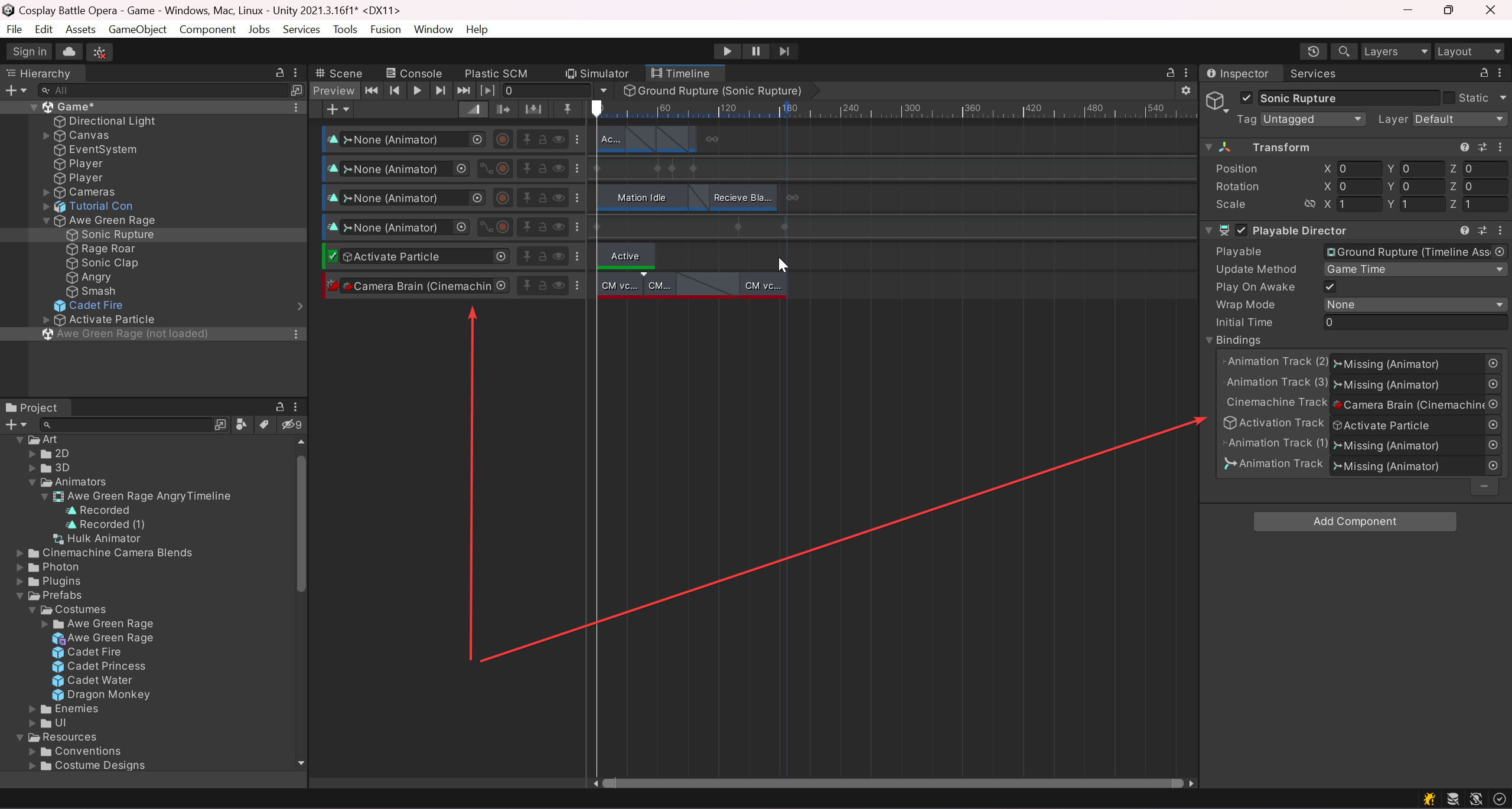 dusty wigeon
vernal furnace
What should I use code wise to toggle vsync? The unity docs are telling me to us...
dusty wigeon
vernal furnace
What should I use code wise to toggle vsync? The unity docs are telling me to us...
vSync and targetFrameRate does the same thing. They both limit the frameRate.
Depending on your target platform, use either vSyncCount or Application.targetFrameRate to set your application frame rate.
https://docs.unity3d.com/ScriptReference/QualitySettings-vSyncCount.html
It depends on what plateform you are using, but some support, some do not, while some force arbitrary value.
compact ingot
vernal furnace
What should I use code wise to toggle vsync? The unity docs are telling me to us...
use target frame rate if you want to cap the frame rate without locking it to the monitor refresh rate
vernal furnace
Vsync is off by default, but if they toggle it on should I be changing the target frame rate or uncapping it?
dusty wigeon
hazy epoch
That's probably adding to my confusion. The documentation is just so unspecific....
I am expecting that you might need to iterate on the Graph first then retrieve the binding associated with the actual node of the graph.
compact ingot
you should always set a reasonable target frame rate or at least allow your users to set one, if you don't you are just gonna waste energy for no gain
undone coral
vernal furnace
What should I use code wise to toggle vsync? The unity docs are telling me to us...
what is your objective
to make a thing in your graphics settings?
dusty wigeon
`Mobile platforms ignore vSyncCount. On mobile devices, when a frame is ready, it displays the next time the screen refreshes. You can use Application.targetFrameRate to control the frame rate on mobile platforms.
VR platforms ignore vSyncCount. Instead, the VR SDK controls the frame rate.
On all other platforms, Unity ignores the value of targetFrameRate if you set vSyncCount.`
undone coral
Application.targetFrameRate = -1;
QualitySettings.vSyncCount = m_IsVsyncOn ? 1 : 0;
Okay so I was confusing the two. Ty.
vernal furnace
dusty wigeon
`Mobile platforms ignore vSyncCount. On mobile devices, when a frame is ready, i...
Yes, but that didn't answer my question. I had the two backwards.
dusty wigeon
vernal furnace
Yes, but that didn't answer my question. I had the two backwards.
What do you mean ? You do not have to set Application.targetFrameRate.
vernal furnace
dusty wigeon
What do you mean ? You do not have to set `Application.targetFrameRate`.
So I just don't touch it than
From what I understand from you and from doctorpangloss, all I want to change is
QualitySettings.vSyncCount = m_IsVsyncOn ? 1 : 0;
 burnt egret
Hi there, i realize that this might not be something super advanced but i can't seem to get it to work for the life of me.
I have a tree of nodes that is rendered on a worldspace canvas. I'm trying to draw a line in between the parent node and all of its child nodes recursively. The problem is, the line renderer just seems like it doesn't want to work no matter what I do. It just sets the position of the line segments to 0,0,0. Is there an alternative, or should i start making my own line rendering solution that uses Images rather than whatever the line renderer is using?
compact ingot
burnt egret
Hi there, i realize that this might not be something super advanced but i can't ...
there is no good way to draw arbitrary lines on a canvas
burnt egret
unfortunate
thank you
i'll update if theres any interesting solution i come up with
 regal olive
hello
im trying to make a spaceship with the behaviours of this:

Jet Standard Asset improved to get Hover controllers.

the second video start clip at 5:57
for the best example
the first video
is a good
but really awful looking
this is my code so far
warning
its terrible
 analog bane
One small tip on a first glance, would be to name that flight mode function ToggleHoverMode, and you can just do hoverMode = !hoverMode;
 timber flame
Should we use Dispose IDisposable zenject to unsubscribe events for non mono classes injected through zenject?
What if both (subscriber/listener and event raiser) have same life time? Both of them are destroyed when unloading a scene
public class Subscriber : IDisposable
{
   private readonly EventSystemA _eventSystem;
   public Subscriber(EventSystemA eventSystem){
      _eventSystem = eventSystem;
      _eventSystem.EventB += OnEvent;
   }
   public void Dispose()
   {
     //here
   }
}
public class EventSystemA{
}
I'd also honestly unify the booleans, otherwise you'll be able to have flight mode and hover mode be true
regal olive
wdym
analog bane
regal olive
wdym
As far as I understand, VTOLs are either driving on the ground, in VTOL mode, or plane mode. That's 3 states, but you have 4 possible states with those booleans
regal olive
analog bane
As far as I understand, VTOLs are either driving on the ground, in VTOL mode, or...
when will a spaceship drive on the ground
or a plane
i just want to get into the spaceship
have it go into hover mode
and then go up
and then go flying
outside the atmosphere
analog bane
If you don't need the other boolean, then I'd operate without it
If it's not in hover mode, you can then know it must be in flight mode
There's also that standalone transform that is inside it's own curly brackets, but I'm not sure how c # handles that
I would normally expect an else statement for that to work
 thin mesa
brackets not attached to any statement just create another scope, the code inside will still run since there's no condition/branch preventing it from doing so, it's just another scope. in the case of their code creating that scope is basically pointless and likely just leftover from some if statement they've since removed
analog bane
Gotcha
burnt egret
burnt egret
i'll update if theres any interesting solution i come up with
thanking chat-gpt for this one, this script lets you draw a line on a canvas with a linerenderer
using UnityEngine;
using UnityEngine.UI;
[ExecuteAlways]
public class LineDrawer : MonoBehaviour
{
    public RectTransform lineRectTransform;
    public LineRenderer lineRenderer;
    public RectTransform pointA;
    public RectTransform pointB;

    private Vector3[] positions = new Vector3[2];

    void Start()
    {
        lineRenderer.positionCount = 2;
    }

    void LateUpdate()
    {
        // Get the positions of the child objects in world space
        Vector3 worldPositionA = pointA.position;
        Vector3 worldPositionB = pointB.position;

        // Convert the world space positions to screen space
        Vector3 screenPositionA = RectTransformUtility.WorldToScreenPoint(null, worldPositionA);
        Vector3 screenPositionB = RectTransformUtility.WorldToScreenPoint(null, worldPositionB);

        // Convert the screen space positions to the local space of the canvas
        RectTransformUtility.ScreenPointToLocalPointInRectangle(lineRectTransform, screenPositionA, null, out Vector2 localPosition0);
        RectTransformUtility.ScreenPointToLocalPointInRectangle(lineRectTransform, screenPositionB, null, out Vector2 localPosition1);

        // Set the line positions in the LineRenderer
        lineRenderer.SetPosition(0, localPosition0);
        lineRenderer.SetPosition(1, localPosition1);
    }
}
 crystal parrot
Is there any mesh combine studio for ecs?
 ancient talon
crystal parrot
Is there any mesh combine studio for ecs?
ancient talon
crystal parrot
Is there any mesh combine studio for ecs?
I would recommend looking into Raymarching for stuff that involves procedural mesh combination at runtime.
crystal parrot
No, i need it because my city is all modular
it has lot of
(really lot) of shadow caster
even sinty assets from polygon are super slow because this
 dusk bloom
Hastebin is a free web-based pastebin service for storing and sharing text and code snippets with anyone. Get started now.
Essentially what is going on is that I am moving the gameObject that the script is attached to back and forth between a undefined set loop of transforms using a horizontal input,
when going forward through the transforms, it will select the next one in line as the one to go to, however when going backwards for some reason, it doesn't select the one before it as the one it should be heading towards?
(when it should)
any ideas of why this is happening? (Unity 2D URP)
 patent bear
dusk bloom
(when it should)
any ideas of why this is happening? (Unity 2D URP)
patent bear
dusk bloom
(when it should)
any ideas of why this is happening? (Unity 2D URP)
Only took as quick look but line 55 is my quick guess as to the issue. You seem to be using two different values to track the current index (currentPointIndex and currey) and checking both in the of statement.
What is the point of the currey variable rather than using a single index?
This topic also would probably be better posted in general rather than advanced in the future as it's not a particularly advanced issue.
 lavish meteor
Hi, is there a way to completely simulate ingame processes? Basically I want to let my players train AI but the PCs in question are low spec. Because of that the training can't run in realtime but should rather be a complete simulation of the training process... (e.g. a simulation of the car driving but without actually loading game objects and rendering stuff)
 untold moth
lavish meteor
Hi, is there a way to completely simulate ingame processes? Basically I want to ...
untold moth
lavish meteor
Hi, is there a way to completely simulate ingame processes? Basically I want to ...
"without loading gameObjects" would imply that you have the simulation logic separate from unity. In this case, why do you even need unity? You could just run a console app.
lavish meteor
Yes that would be the most complicated option for which I'm hoping to find a workaround for... There are things like the headless mode which would batch those values without it really running in realtime but this isn't viable since I want the player to train the AI by setting values etc.
dusty wigeon
lavish meteor
Hi, is there a way to completely simulate ingame processes? Basically I want to ...
I am not sure a low PC can train an AI for car driving in a relatively short amount of time.
If you want to train your AI with the best performance and that you do not need Unity GameObject, I would suggest that you externalise the training. Removing the "Graphics" won't be enough.
dusty wigeon
lavish meteor
Yes that would be the most complicated option for which I'm hoping to find a wor...
You can still set values at runtime.
untold moth
lavish meteor
Yes that would be the most complicated option for which I'm hoping to find a wor...
I don't understand. What do you need the engine for? Can you explain?
Since you mentioned "without loading gameObjects", it means that you're not using any of the engine features.
Or are you using ecs?
lavish meteor
untold moth
I don't understand. What do you need the engine for? Can you explain?
I need the engine for the game. Basically the player sets his values (like learning rate, discount factor etc) and presses on "train ai" or smth. Then the AI would be trained without any visual feedback but every output would be stored in some kind of List so the player can see the learning process after the training. That way he could speed it up, skip it etc. It could run externally but even with this simple of a game there is so much to simulate
And I can't simplify the training environment because I would have to simplify the game environment too
So I was hoping for some kind of build-in simulation mode or smth
Things like collisions would basically be impossible without a proper physics simulation
untold moth
Well, gameObjects and components are the core of unity engine. Without using them, you're not using any of the engine features.
As for simulation speed, you can controll it for example via Time.scale or your own logic.
The rendering can also be disabled - just remove cameras from your scene.
untold moth
lavish meteor
Things like collisions would basically be impossible without a proper physics si...
You can't have collisions without colliders and rb. And you can't have those without gameObjects. Which is why I was so confused.
lavish meteor
untold moth
Well, gameObjects and components are the core of unity engine. Without using the...
This seems to be a viable option. Any idea how that would be performance wise? Would it come near completely simulating the environment?
untold moth
What do you mean by "simulating the environment"?
It will disable rendering and free up the time that would be spent on it, so it really depends on how much was your rendering taking and wether there are other performance heavy things in the project.
If you need specific numbers, profile your game and see what's taking the frame time.🤷♂️
lavish meteor
untold moth
What do you mean by "simulating the environment"?
It will disable rendering and ...
Complete external physical simulation of the game environment. In theory it would be the same thing as not rendering the actual process?
untold moth
lavish meteor
Complete external physical simulation of the game environment. In theory it woul...
Wdym by "rendering the process" and "external physics simulation"?
Rendering is one system that runs each frame. Physics system is another one. Then there're scripts that have update. Some other components could also be updating.
You can see everything that's being processed in the profiler. Then you can decide what systems you could stop if needed.
lavish meteor
untold moth
Wdym by "rendering the process" and "external physics simulation"?
Rendering is ...
By external physics simulation I mean a script that does all calculations done in the unity physics system and therefore simulating the rotation, position, velocity etc of the car after the AI has provided certain outputs
untold moth
lavish meteor
By external physics simulation I mean a script that does all calculations done i...
Okay, so what else aside from rendering do you need to disable?
lavish meteor
I would just need the player objects which interact with the track boundaries and the corresponding learning algorithms... The question is probably if Unity could handle for example 100 instances of an object, all with different neural networks... (or for my reinforcement algorithm, the continuous actor-critic learning in the background)
Since unity isn't really made for this kind of stuff right?
untold moth
lavish meteor
I would just need the player objects which interact with the track boundaries an...
There isn't really anything unity specific in that equation. Aside from maybe physics. Physics probably can handle 100 vehicles, I'm not sure what numbers you'll get exactly though. Gotta test that.
The rest of it is your logic and neural networks. None of which is unity specific. It would have the same overhead as in a console app.
dusty wigeon
lavish meteor
I would just need the player objects which interact with the track boundaries an...
Training an driving Agent, depending on how the environment is, could take 1000 to 100'000 iterations.
 lament salmon
@lavish meteor You can also add the cars in a separate physics scene and call this
https://docs.unity3d.com/ScriptReference/PhysicsScene.Simulate.html
lavish meteor
lament salmon
<@696800599706173533> You can also add the cars in a separate physics scene and ...
Exactly what I was looking for. Is there a performance difference to just not rendering the objects instead?
lament salmon
Not sure about that, but you can simulate it whenever/however fast or slow you want by calling Simulate
So the other scene doesnt necessarily have to use FixedUpdate, Update etc.
lavish meteor
Okay. How do I make an instance of this scene and add objects to it? Can't find that in the docs
lament salmon
lavish meteor
Okay. How do I make an instance of this scene and add objects to it? Can't find ...
I think you make a scene and get the physicsscene from that. Look here
https://learn.unity.com/tutorial/multi-scene-physics#
lavish meteor
Thank you
untold moth
lavish meteor
Exactly what I was looking for. Is there a performance difference to just not re...
It would be the same as just adjusting the fixed timestep of the default physics scene.
regal olive
Hello, rn I have a vtol aircraft that has a specific hover height. But that is in the world. How would I make the hover height be a specific distance from the ground
 modern shell
regal olive
Hello, rn I have a vtol aircraft that has a specific hover height. But that is i...
modern shell
regal olive
Hello, rn I have a vtol aircraft that has a specific hover height. But that is i...
Well you need to do a raycast in the down direction and check where the ground is
undone coral
lavish meteor
I need the engine for the game. Basically the player sets his values (like learn...
"train ai" or smth.
how serious are you about trying to achieve this?
undone coral
lavish meteor
Hi, is there a way to completely simulate ingame processes? Basically I want to ...
train AI but the PCs in question are low spec.
then you will be greatly limited in what you can do
 rocky grove
Hey there 👋 I'm currently building developer-local environment configuration into our project. Previously, we had a globally injected component that was used to configure the game's server environment (production, staging, local fake environment, etc.). On release branches, this had to be always set to "production" which was cumbersome (people constantly touched and committed changes to the prefab while testing). The new system I'm building now takes the final environment configuration from the build pipeline (via command line arguments passed to Unity while building), which prevents that our build will ever run with undesired environment configurations.
To stay flexible, I am trying to add a user preference screen that allows our team to locally select an environment to run against. The selected environment is not committed to the project Git repo, preventing people from messing up the assets while testing. I can inject this configuration when running a custom build pipeline script. However, I wonder if there's some way to inject an editor-only asset into the build when only using the default Unity Editor build window? I want to make sure that if people build the normal way, that their local environment selection is regarded. Any thoughts on how I could achieve this are appreciated.
lavish meteor
undone coral
> "train ai" or smth.
how serious are you about trying to achieve this?
I was referring to the name of the button... I actually already have an actor-critic learning algorithm in place and I'm onto this project well over a few months. It's a school project and therefore the performance is limited to the school computers (which are pretty low spec)...
undone coral
lavish meteor
I was referring to the name of the button... I actually already have an actor-cr...
what is the goal?
it sounds like there's a game, and also "an AI"
lavish meteor
Playfully visualizing two learning algorithms and designing it to be interactive and accessible
undone coral
rocky grove
Hey there 👋 I'm currently building developer-local environment configuration i...
inject an editor-only asset into the build when only using the default Unity Editor build window
i believe you can add whatever build steps you want to the default build pipeline
take a look at interfaces like this https://docs.unity3d.com/ScriptReference/Build.IPreprocessBuildWithReport.html @rocky grove
 undone coral
lavish meteor
Playfully visualizing two learning algorithms and designing it to be interactive...
undone coral
lavish meteor
Playfully visualizing two learning algorithms and designing it to be interactive...
doesn't ml-agents already do this
isn't there a mature openai gym interface to unity? i am pretty sure ml-agents has a pre-authored way to record what is happening in training
i'm not sure why you are talking about running multiple agents in parallel yet. are you saying this is important for the task? what is it? it sounds like you want to have racing
lavish meteor
It does, but I want to do it myself. The machine learning itself isn't the problem here
undone coral
but it also sounds like you are trying to achieve some kind of parallel computing inside of a unity environment
lavish meteor
undone coral
i'm not sure why you are talking about running multiple agents in parallel yet. ...
Genetic algorithm
undone coral
lavish meteor
It does, but I want to do it myself. The machine learning itself isn't the probl...
The machine learning itself isn't the problem here
it sounds like it is the huge, looming problem
knowing how many details there are, even if you were to achieve what you want - running N unity scenes within 1 unity process simultaneous, to fit your ill-architected approach - it will be so full of bugs that you will have no idea if it's working
are you saying you want to show a genetic algorithm process to generate & select a car driving algorithm, and you want the "playful visualization" of seeing 100 ghost cars driving around and then 10 ghost cars driving the furthest being selected, etc. etc.?
@lavish meteor why not record traces from the appropriate environment, and visualize the traces as a data format? it's so much simpler
then your ga fitness step can be 100 unity processes for 100 agents (the only viable architecture)
lavish meteor
This is literally what I was asking about and what I'm trying to do
undone coral
and at the end of the method in python you've authored to do the fitness step, you can write a json file, and read it separately, in a different application, perhaps the same one that is running the training, to visualize all 100 vehicles at 1 time
what difference does it make if it's 10ms or 60s of time between when the simulation occurred and when you visualize it? it makes no product sense anyway, so don't stress about it
lavish meteor
Then the AI would be trained without any visual feedback but every output would be stored in some kind of List so the player can see the learning process after the training
undone coral
lavish meteor
> Then the AI would be trained without any visual feedback but every output woul...
my feedback to you is that you are poor at communication
you are getting preoccupied with telling me i'm wrong, instead of working on the underlying issue, a bad architecture
focus on that
you cannot run 100 agents in 1 scene
1 candidate per 1 process in your fitness function
then you can chew through N-cores-per-machine candidates at a time in the fitness function
you don't need physics for your traces
lavish meteor
Because you still think I'm trying to run it in realtime... The problem is solved and you don't seem like you want to help/give feedback but bash on my project?
undone coral
lavish meteor
Because you still think I'm trying to run it in realtime... The problem is solve...
are you trying to simulate (in the sense of interact with physics) more than 1 candidate / agent / actor per unity process, in any way?
simple yes or no
visualizing the traces can occur with physics turned off
you're not giving me a simple yes or no
which is worrying
it's okay if it's just "no"
lavish meteor
What do you mean by 'per unity process'? Each timestep? Update function?
undone coral
okay, so that's a "yes"
well, you can't do that
is this a race track? is the idea the candidates are cars trying to run a lap the fastest?
simple yes, or what is the idea?
are they supposed to interact with each other? like are there 10 racers in 1 course, and they can bump each other?
or they do not collide?
 shadow dagger
Guys, who can help with IK?
undone coral
lavish meteor
What do you mean by 'per unity process'? Each timestep? Update function?
What do you mean by 'per unity process'?
for every mything.exe in your task manager built with unity, are there 2 or more candidates being simulated in mything.exe?
 devout coyote
NGL solving a car driving problem using a genetic algorithm feels like hitting a nail with a screwdriver
But that's a whole different conversation
lavish meteor
undone coral
> What do you mean by 'per unity process'?
for every mything.exe in your task m...
yes. I don't get why I couldn't do that?
undone coral
lavish meteor
yes. I don't get why I couldn't do that?
okay
is this because the cars interact with each other?
i don't get it. you have to just state what the environment is
and take your fingers and strike the keys on your keyboard 100x faster
because while i'm sure you're a good programmer and you've achieved a lot so far, another piece of feedback to you is, the people who are truly really good at this talk and write 10x faster than you do right now
lavish meteor
The problem is, that you are just disrespectful
 undone coral
that is my feedback to you. i'm sorry i couldn't be more helpful
i am trying to help you thrive
lavish meteor
I appreciate any help I can get. But if your only way of helping me is bashing on my project and writing disrespectfully I'm rather gonna look for help elsewhere
undone coral
i don't know. i can tell you are really good at this, and usually, when someone shows an interest in your work, it is the opposite of bashing
most people would clock out and stop paying attention
lavish meteor
undone coral
is this a race track? is the idea the candidates are cars trying to run a lap th...
yes
undone coral
like i said, my feedback is you should try to answer the questions because it will help you
undone coral
lavish meteor
yes
do they interact with each other?
like is it important that the cars collide with each other?
lavish meteor
undone coral
are they supposed to interact with each other? like are there 10 racers in 1 cou...
not in the learning process. In the actual game yes (If I make the ais race each other)
devout coyote
He's supplied you with a bunch of questions that you need to answer before he can give you any insightful information and help you out.. he's raised some very valid concerns and I don't think you took the time to answer any of his questions with the detail required to really habe a conversation
undone coral
lavish meteor
not in the learning process. In the actual game yes (If I make the ais race each...
okay
then there should be just 1 candidate per unity process in the fitness step
the solution found by GA will not work well with collisions unless it is specifically trained on collisions
not work well is an understatement, it will behave catastrophically / chaotically
there's too many bugs with trying to get 10 candidates computed simultaneously (in parallel) in 1 unity process .exe
however, you can obviously visualize as many as you want simultaneously
lavish meteor
undone coral
there's too many bugs with trying to get 10 candidates computed simultaneously (...
So Unity can't handle that many gameobjects?
undone coral
the code that implements the fitness function should not live inside C#
undone coral
lavish meteor
So Unity can't handle that many gameobjects?
unity built in physics cannot correctly run well enough to produce the results needed for a GA fitness function
it can handle lots of game objects
it can barely handle 1 physics scene correctly. if you didn't configure things correctly, such as by using Physics.Simulate and running at a user controlled timestep like ml-agents does
your results will not be valid the performance benefit of parallel fitness is outweighed by the costs of noise in the simulation
you will not know if it converges at all
because you're introducing too many buggy situations
lavish meteor
So you think that I either have to completely simulate it outside of unity? Or do you think I should simulate each agent at a time?
undone coral
you simulate 1 agent at a time
is your fitness function authored in c#, living inside unity?
meaning
is the whole schedule of steps for GA happening inside unity
lavish meteor
yes
undone coral
or is it running somewhere else, and delegating parts of the fitness function to unity
okay
the performance benefit of parallel computation by simulating multiple candidates in a fitness function at a time* is outweighed by the costs of noise in the simulation
do you understand what i am saying here?
lemme improve that
lavish meteor
But why is the fitness function the bad thing? By fitness function you mean the function that determines how fit an agent is by calculating how far it came and how fast it got there? I was more worried about the neural networks, controlling the car
undone coral
lavish meteor
But why is the fitness function the bad thing? By fitness function you mean the ...
hmm, in a GA architecture, the fitness function is putting the car on the track, running its neural network, letting it make decisions, until a certain amount of time has elapsed
and then measuring the distance it traveled in that amount of time (really the distance left from the goal, if you are minimizing)
and you choose a very long amount of time in the beginning, and make it gradually shorter, for the sake of solving this particular problem
"calculating how far it came and how fast it got there" - in abstract, that could mean running the neural network and driving the cars. is that what you mean?
or is the content of your fitness function
double Fitness(Scene scene) {
 return (scene.GetGameObjectByName("goal").transform.position -
  scene.GetGameObjectByName("agent").transform.position).magnitude;
}
So everything besides running the neural network is called before the simulation... Previous cars will be despawned, their fitness will be calculated by my custom progress script, All cars will be spawned, their parameters will be altered
undone coral
because it should be
double Fitness(Genotype<BitGene> thisAgent) {
 var scene = new Scene();
 Instantiate(Car)...
 // run the simluation
 ...
 return (scene.GetGameObjectByName("goal").transform.position -
  scene.GetGameObjectByName("agent").transform.position).magnitude;
}
No. I have a progress script which calculates how far the car drove along the track by using trigonometry
undone coral
okay well a fitness function has a signature of the form static double Fitness(Genotype oneAgent)
do you have that?
lavish meteor
I'm not done with my genetic algorithm function. I'm still spawning in the cars which proves to be more difficult than I thought
So no
undone coral
gotchyu
okay have you looked at https://github.com/giacomelli/GeneticSharp

GitHub
GeneticSharp is a fast, extensible, multi-platform and multithreading C# Genetic Algorithm library that simplifies the development of applications using Genetic Algorithms (GAs). - GitHub - giacome...
or the java jenetics library
this is how you express a genetic algorithm setup
it sounds like you should look at openai gym too
you haven't gotten far enough to not start over 🙂
i think you should delegate the fitness step to unity
and do everything else outside of unity
because you are going to have multiple unity processes - only for the sake of parallel computing of fitness
there is no other reason
since you are trying to use neural agents... i'm not sure if you have an opinion on how to "mix" neural agents
or what their inputs are
there's a lot of open questions here. i don't know if you're referencing specific literature
@lavish meteor i would make my priority trying to get this running at least once. both the uppermost thing - the definition of your GA problem, in a form that resembles genetics, and proving for a simple problem that you can get something to converge
lavish meteor
undone coral
or what their inputs are
Their inputs are raycasts which determine the distance to the edge of the track
undone coral
then, for your actual racing problem, correctly implement double Fitness(IChromosome car) and prove that it runs correctly
 sand acorn
Hello there, I have a voxel generation system / minecraft like terrain generator which works fine, but I would like to render a face on the chunk side if lets say the loop in x value is equal to a coordinate / the chunk is a border chunk; The problem I have here is that since all the chunks are generated independently and all chunk have the same block ranges (0 to 16) ,iso f I want to check if X is equal to 0, it will make a face where all the other chunk value is 0 too making unwanted faces, so how can I over come this? Here is an example of what happens
 undone coral
i'm not sure if GA makes sense here
since you're using an "actor-critic learning algorithm", you would only be running 1 agent at a time. it sounds like you have that working. does it converge?
do you have a Unity Recording package recording of the car racing the track?
btw, i believe PPO and more is in ml-agents & openai's gym RL framework already
and it would be worth comparing your result to theirs for correctness
lavish meteor
undone coral
you haven't gotten far enough to not start over 🙂
Genetic algorithms is the only thing missing. As I said I wanted to provide an own algorithm for both genetic and actor-critic which may or may not be 'ill-architected'. My solutions probably aren't as good as GeneticSharp or MLAgents but if I don't try to solve the problems myself, there is nothing to be gained here
rocky grove
undone coral
take a look at interfaces like this https://docs.unity3d.com/ScriptReference/Bui...
Hah, that might be what I was looking for. Thanks, I'll give it a shot!
undone coral
lavish meteor
Genetic algorithms is the only thing missing. As I said I wanted to provide an o...
well i think you'll figure it out
gotta go
undone coral
lavish meteor
Genetic algorithms is the only thing missing. As I said I wanted to provide an o...
what i am really saying is, based on this answer, you are not 100% serious about achieving this, you are at like 20-50% seriousness
like if it does or doesn't work doesn't really matter to you
that was the very first question i asked for a reason
lavish meteor
undone coral
since you're using an "actor-critic learning algorithm", you would only be runni...
Actor critic will be just one agent. Genetic could be altered so there is also just 1 agent at a time but the player later gets shown multiple agents
undone coral
lavish meteor
Actor critic will be just one agent. Genetic could be altered so there is also j...
it just sounds like you don't know what GA is yet
or how to use it
and actor critic, like i said - do you have a video of such a model trained and working?
you veered off again
lavish meteor
undone coral
what i am really saying is, based on this answer, you are not 100% serious about...
I do... So much so that I want to achieve it myself
undone coral
just answer the actual questions
no more of this, coping by veering off. you made some big architectural mistakes
so it goes
i make mistakes too
do you have a video of the thing completing a lap correctly?
lavish meteor
No
lavish meteor
It doesn't
undone coral
okay
lavish meteor
Not saying I don't have that algorithm. It just doesn't work
undone coral
yeah
well if i were trying to learn this
i would study the existing thing, or use the existing thing
i would at least use it for the high level, how is this supposed to look when it is right
lavish meteor
That's you
undone coral
in the same way that looking at the snippets from Genetics will not implement GA for you
but it will at least tell you what the signatures should be, which i know is important to people who are good programmers
it's all made way harder by trying to do this in C#
the libraries for implementing a neural network are not mature enough
lavish meteor
I know. I could probably use hundreds of libraries if I were to do this in python
undone coral
i would try to author it in python first and operate unity via an RPC
which incidentally is exactly how ml agents works
lavish meteor
But I really don't want to
undone coral
okay i really gotta go
lavish meteor
👍
undone coral
lavish meteor
Not saying I don't have that algorithm. It just doesn't work
when i was implementing stuff like this, 3,000 years ago, i was so worried about screwing up the transformation from the math in the paper to the math in python that i didn't even work in logspace.
lavish meteor
undone coral
when i was implementing stuff like this, 3,000 years ago, i was so worried about...
Yes, it's by far the hardest part. A few weeks ago I was just figuring out the math behind it (got stuck at the gradient descent) when I realised it wasn't applicable to my problem. I was trying to do everything realtime (So I wasn't working with episodes but rather calculated the loss every timestep) which of course wont work for school computers. Instead of deleting my progress (Like I did when I tried with Q-Learning) I rather started coding a Genetic Algorithm and then try to apply new things I hope I'll learn doing so... Look, I really respect your knowledge about this but I want to learn this via trial and error
lavish meteor
undone coral
it just sounds like you don't know what GA is yet
I do. What I was talking about is, instead of spawning all cars at once I would rather only spawn a small amount or even just one at a time and then put it all together and look for the fittest agent. That way I would avoid the bugs you were talking about and by simulating the whole thing I would achieve equal times
devout coyote
It would 10x your run time though
Using a GA to optimize the parameters of a neural network is quite an interesting approach, I am really curious to what results you will get
undone coral
lavish meteor
I do. What I was talking about is, instead of spawning all cars at once I would ...
you're just biting off a lot of problems all at once
if you want to author neural networks from scratch, which is what it sounds like
that alone is a problem set you should expect to spend 10-20h on
i wouldn't try to implement them inside of unity & C#
it's too janky
lavish meteor
The neural networks are working. Even backpropagation is working. I did need a lot of time for that, that's true. Doing it in C# was a bold choice but I didn't want to commit to a new programming language
devout coyote
Since speed is of concern (goal is to run it on school pcs right) are your implementations fast?
lavish meteor
Which implementations?
undone coral
lavish meteor
The neural networks are working. Even backpropagation is working. I did need a l...
are you doing this within a framework where you can prove it works?
like do you have a successful MNIST result?
lavish meteor
undone coral
like do you have a successful MNIST result?
No. I did calculate it via a calculator to ensure I have the outputs I should have. Regarding backpropagation I have no idea... If I wanted my change my weights with respect to certain outputs that should occur on certain inputs it works like it should
I have tested both functions. I don't have a clue if they are as accurate as they should be
I also made a bigger batch where I made ChatGPT code a function which outputs every calculation done to ensure there were no errors
timber flame
Do you prefer to use Single instead of First, SingleOrDefault, FirstOrDefault when you want to get a specific element/item from a collection while it should be in?
For instance, for assets, collections with specific elemenets in (editor). They are immutable.
undone coral
lavish meteor
No. I did calculate it via a calculator to ensure I have the outputs I should ha...
I did calculate it via a calculator
what do you mean?
are you doing this within the context of a class?
or some other learning material?
lavish meteor
Your question was if my nn and backpropagation have accurate outputs right?
lavish meteor
undone coral
> I did calculate it via a calculator
what do you mean?
Via a school calculator... blame me all you want but I wanted to be sure about it working as it should
dusk bloom
patent bear
Only took as quick look but line 55 is my quick guess as to the issue. You seem ...
Currey was my attempt to debug. It doesn't work only using the currentPointIndex because that checks the travelPoint ahead of the player if they were going forward, but Currey Was meant to check the one they just were at so that if they were to go backwards through it, it would catch it too, and decrease the travelPoint to the one before that, but this also didn't work.
I am going to put this in general now
undone coral
lavish meteor
Your question was if my nn and backpropagation have accurate outputs right?
you gotta fight this instinct to not answer questions
if you want to succeed at this
undone coral
lavish meteor
Your question was if my nn and backpropagation have accurate outputs right?
are you doing this within the context of a class?
or some other learning material?
a school calculator
i just don't understand what this means. what concretely is a school calculator?
lavish meteor
undone coral
> are you doing this within the context of a class?
Yes
undone coral
lavish meteor
Yes
the class had a problem set about implementing a neural network? can you link me to it?
traditionally you test your implementation against MNIST, where you should get like 99% accuracy
lavish meteor
undone coral
> a school calculator
i just don't understand what this means. what concretely ...
Something you use for math
Like in school
undone coral
okay well i think i've reached the end of my support here
i don't really know what the context is, but it doesn't sound very serious
undone coral
the traditional way to test if your implementation of a neural network is correct is by solving the MNIST digit recognition problem
lavish meteor
I will do that and tell you what I got
undone coral
it just sounds like the class has flaws
i am surprised this is how the class taught the implementation of a neural network
this is in a university?
lavish meteor
No its 11th grade in germany
lavish meteor
We currently have html in our class
undone coral
as long as it's not an online course
well i think it's all very interesting and you will have a long journey ahead of you
lavish meteor
The class teaches us nothing...
I tried learning it all by myself... we even skipped machine learning
dusty wigeon
lavish meteor
I tried learning it all by myself... we even skipped machine learning
Machine Learning is something you usually learn in University. So I would not blame them to not teach you that.
devout coyote
I didn't start learning about ML until my masters degree :s
And I think grade 11 is like highschool ish?
lavish meteor
I don't blame em. It's just kind of hard to not get preyed on because my knowledge in this field isn't as deep as someone who does this for his masters degree
lavish meteor
devout coyote
And I think grade 11 is like highschool ish?
Yes. We have elementary school from 1st-4th grade and secondary school (In my case the 'Gymnasium') from 5th to 12th grade
devout coyote
You can honestly be very proud of yourself for figuring all of this stuff out, I had to take quite a couple of extra math classes before I could grasp the basics of building my own ML algos
dusty wigeon
lavish meteor
I don't blame em. It's just kind of hard to not get preyed on because my knowled...
The issue, is that you are trying to get to the "juicy" part without understanding the underlaying concept that you require. You should start with simple lesson and build from there while also search for the knowledge you are missing. Otherwise, you are going to think you know a lot where in fact you little to nothing because you did not take the time to truly understand what you are doing.
One advice that I can give you is to NOT use Unity as your framework because you now need to understand how Unity works and how Machine Learning work while also not being able to follow any tutorial on ML because most of them are done in Python. Also, you should try to make it work with a know library before doing your own implementation so you can compare correctly.
lavish meteor
dusty wigeon
The issue, is that you are trying to get to the "juicy" part without understandi...
I do understand the underlaying concept... I'm just bad at finding and understanding the right terms for certain concepts. I'm learning ml since longer than a year and I did start at finding minimizing functions etc. This whole thread about my project is completely misinterpreted. I don't have any problems with my algorithms and if I did I would get help in associated forums. I just wanted to know whether or not there is a built in way to simulate physics behaviour, so I can minimize performance issues...
But yes I didn't know about things like MNIST...
dusty wigeon
lavish meteor
I do understand the underlaying concept... I'm just bad at finding and understan...
I mean, you are expecting to train an AI live. I just hope your environment is super minimalist, because no amount of optimization will make you able to get to a relatively fast convergence.
lavish meteor
dusty wigeon
I mean, you are expecting to train an AI live. I just hope your environment is s...
It is... There are actually a lot of yt videos using a similar approach and setup so I'm confident that it'll work if I implement it correctly. Also not using python wasn't that bad in regards of properly learning and understanding ml... If I wanted to implement something I couldn't reference it from existing code but had to understand core concepts and put them into code. If my goal was to make progress as fast as possible it would have definitely been the wrong choice
And I'm not expecting to train it live (if you mean realtime?). That's what my original question is all about
dusty wigeon
lavish meteor
It is... There are actually a lot of yt videos using a similar approach and setu...
I need the engine for the game. Basically the player sets his values (like learning rate, discount factor etc) and presses on "train ai" or smth. Then the AI would be trained without any visual feedback but every output would be stored in some kind of List so the player can see the learning process after the training. That way he could speed it up, skip it etc. It could run externally but even with this simple of a game there is so much to simulate
Is there anything I did not understood there ? Pretty such you meant to train your AI inside the Unity Player.
How much time do you expect your training to take ? Most of the video on youtube are made with trained agent off camera. Then they show you the result with visualization tool. It can takes only 100 iterations for simple environment, but some can take more than 100'000 to get to convergence.
lavish meteor
That's pretty much what I'm trying to do. If it is too long of a waiting time I'll have to pregenerate a few samples or let the teacher do it, in which case the project failed. I'm just trying to minimize this waiting time as much as possible
 waxen adder
Can anyone explain to me what a Quaternion.Euler is
dusty wigeon
Anyway, good luck. And for your performance, you basically just need to remove the camera.
 sly grove
waxen adder
Can anyone explain to me what a Quaternion.Euler is
sly grove
waxen adder
Can anyone explain to me what a Quaternion.Euler is
It's a function which returns an equivalent Quaternion for the provided Euler angles
waxen adder
xRotation = 0f;
cam.transform.localRotation = Quaternion.Euler(xRotation, 0, 0):
What would this return
sly grove
waxen adder
xRotation = 0f;
cam.transform.localRotation = Quaternion.Euler(xRotation, 0, 0)...
The 0,0,0 rotation
Aka Quaternion.identity
waxen adder
So what is Quaternion though
waxen adder
Oh ok thanks
 fickle inlet
Hey guys, I am doing a research on Time.deltaTime. Since Time.Del
Since Time.deltaTime varies every frame, what issues does it bring?
Like, what could go wrong with Time.deltaTime when moving an object, animating something, etc
I am trying to have this deep understanding of Time.deltaTIme
Also, another question that I have regarding the deltatime, since delta is changing every frame, how does the object end up at the same distance, if delta time is changed every frame?
 alpine sinew
it's literally just the time that passed since the last frame
as to what can go wrong -- it depends on how you use it.
fickle inlet
alpine sinew
as to what can go wrong -- it depends on how you use it.
I understand how it works per frame, but I am looking more for limitations that devs experience when using time.deltatime, stuff that you can't find in the documentation
Like for an example, using it in multiplayer and each client is sending different time interval and stuff like that
alpine sinew
fickle inlet
Like for an example, using it in multiplayer and each client is sending differen...
oh yeah, so you've already got an understanding then. in that scenario, the server or host would definitely want to be using FixedUpdate() instead of Update() so that all of the clients are forced to synchronize to one clock...
there's not really any "limitations". It just depends on what you want to use it for. It's kind of like asking "what are the limitations of using my computer to program?" like, the answer would be "well... compared to what else? I don't know of any alternatives... and also, what's wrong with the computer in the first place?"
fickle inlet
alpine sinew
oh yeah, so you've already got an understanding then. in that scenario, the serv...
But do you know some common mistakes that new devs do when they use Time.deltaTime. Like some bad practices that they do unaware?
I can list a few, like objects going through walls when low fps and the wall is too thin. Then the networking issue that I wrote above and also animation looking jittery on low fps. But I wanna know if there are more that I don't know
Just listing things so that you know I did some research on my own, but wanna expand it even further
dusty wigeon
To be honest, there is not a lot of magic going with Time.deltaTime. The only thing you need to ask yourself is if you are working with the correct unit whenever you are doing an operation.
By example, if you do transform.positon += velocity, you should realize that it is wrong because you are adding a velocity to a position. Instead, you should do transform.position += velocity * Time.deltaTime. The only bad "pratice" is whenever someone does not use the correct unit for the given task.
Note that in mutliplayer, you do not need to synchronize the players through time (with FixedDeltaTime). In fact, that would be a bad "pratice" from my experience.
 hexed meteor
Would someone be able to tell me why the 'execute' bool is mysteriously set to true when I'm exiting play mode? Makes absolutely no sense. Did I break Unity again?
 dusty wigeon
hexed meteor
Would someone be able to tell me why the 'execute' bool is mysteriously set to t...
dusty wigeon
hexed meteor
Would someone be able to tell me why the 'execute' bool is mysteriously set to t...
What is the serialize value of the execute boolean ?
hexed meteor
false
dusty wigeon
are you sure ?
hexed meteor
dusty wigeon
What is the serialize value of the execute boolean ?
It's always false... it's very spooky
yeah!
dusty wigeon
Is it serialize as false though
hexed meteor
It's false in the inspector
I guess I'm not sure what serialized means
in the script above it's false as per default, and in my inspector it's also false
dusty wigeon
I suspect that the value is serialize as true than override because of the [ExecuteInEditMode]
alpine sinew
am I wrong to assume that the [SerializeField] tag stores the value in memory? And therefore, whatever the value was when you exited, it will be the same when you enter? Regardless of assigning the parameter in the top of the class...
@hexed meteor I'm pretty sure, unless i'm wrong on that (^) that you'll just need to assign it each and every time you run the script.
so assign it inside Awake() or OnValidate()
(I'm pretty sure OnValidate will work here)
alpine sinew
hexed meteor
I guess I'm not sure what serialized means
Serialized means that the value is stored in memory outside of runtime
patent bear
alpine sinew
am I wrong to assume that the `[SerializeField]` tag stores the value in memory?...
This isn't quite corrent on a MonoBehaviour. [SerializeField] marks a property to be initialized to a value saved to disk. The initial value is saved to the scene/prefab file (or sits in memory waiting to be flushed). This is a separate value than the actual runtime value of the variable. When exiting playmode, Unity resets the value
undone coral
if you want to do something in the editor from a component, and you don't want to write a custom editor
patent bear
That's why changes in play mode don't get saved
undone coral
use [ContextMenu], then click the ... button in the component's title
i don't know what you guys are discussing regarding serializefield here, because it's all irrelevant in the context of the flaws of this script
you can find an example of [ContextMenu] in google
patent bear
Agreed, just wanted to correct the statement that the [SerializedField] is saved during play mode which isn't true or, as you mention, relevant in this case.
 plush hare
fickle inlet
Like for an example, using it in multiplayer and each client is sending differen...
plush hare
fickle inlet
Like for an example, using it in multiplayer and each client is sending differen...
In multiplayer, each client is sending stuff at a fixed interval. Aka the tickrate. So I'm not sure what you're getting at
Generally you make a clock, which uses the deltaTime like you were asking about earlier.
timeAccumulator += time.deltaTime;
while (timeAccumulator >= tickDelta) {
timeAccumulator -= tickDelta;
// tick
}
fickle inlet
plush hare
In multiplayer, each client is sending stuff at a fixed interval. Aka the tickra...
I am no expert in multiplayer, but is the code example something that is provided by default by developers who make the networking, or is it something that a beginner has to build himself and has to understand? Could a beginner developer not know what is tickrate and then he just uses time.deltattime that he synces over the network and then faces the inaccurate issue.
plush hare
fickle inlet
I am no expert in multiplayer, but is the code example something that is provide...
I don't know what framework you're using, but there shouldn't be a reason to use time.deltatime in a network simulation user-code assuming it's running at a fixed frequency
I'm assuming we're talking about server authoritative simulations
with rollback and such
fickle inlet
Yes, I understand that, but is it a common mistake that a beginner does not know about fixed tick rate and he just goes with time.deltatime?
plush hare
those two dont correlate
so your question doesn't make sense
When we're doing normal movement code in a unity simulation, most noobs are going to put it in the update() loop. This update loop is highly variable, and therefore if I moved a character by 5 meters every frame, his speed would be dependent on the frame rate
A fixed simulation loop is not variable
it always ticks n times per second unless your hardware cant keep up
fickle inlet
by fixed simulation loop, are you talking about something custom made by networking frameworks, or do you mean fixedupdate loop?
plush hare
network engine loop
fickle inlet
does unet have that?
plush hare
no idea
This is generally why it's good to understand how these things work under the hood
at least on a basic level.
before you go dedicating your time making a game in it
fickle inlet
Yes that is what I am doing, I am trying to find common mistakes with Time.deltaTime
fickle inlet
Mirror is based on UNet
I don't know if it is still maintained by an open source community
haven't used it in years
plush hare
What type of game are you making
fickle inlet
But anyway my questions were more regarding time.deltatime than networking.
I am researching basic unity stuff and trying to learn every bit of it
I used time.deltatime for years
but never went into depth with it. I know it makes moving fps indenpendent, but still wanted to research it deeply and be able to explain it to someone
plush hare
It's really not that deep
If I want my player to move 5 meters per second, and my simulation is already ticking at 30hz (30 times per second), then I can just multiply 5 by the delta time
5 * 0.0333
that way it only moves a fraction of the velocity every simulation tick
until it builds up to 100% after 1 second
fickle inlet
Right now I am searching when Time.deltaTime could be used incorrectly as it has variable time intervals and could effect things in the game
plush hare
Using time.deltaTime in a fixed update loop would be improper use.
You're spending too much time on things that really aren't important
there are better things to learn
like writing netcode
dusty wigeon
plush hare
that way it only moves a fraction of the velocity every simulation tick
The correct way to interpret this would be so that you "convert" velocity into displacement. (m/s * s = m)
plush hare
All deltaTime is doing, is returning the time since the last render frame. It's really not that deep
alpine sinew
deltaTime is such a basic concept without really much to know about it... only thing to know is, like, when to use it. Like, you're trying to build a house but obsessing about what type of hammer to use
regal olive
If I wanted to measure the distance from an object to the ground using a raycast, what would be the code?
fickle inlet
When you put time.deltatime into a fixedupdate it returns time.fixeddeltatime
dusty wigeon
fickle inlet
When you put time.deltatime into a fixedupdate it returns time.fixeddeltatime
Both value are equals in this situation.
plush hare
dusty wigeon
Both value are equals in this situation.
wrong
alpine sinew
plush hare
it does not
burt is on fire lol
regal olive
dusty wigeon
Both value are equals in this situation.
If I wanted to measure the distance from an object to the ground using a raycast, what would be the code?
plush hare
one is the render time, other is the fixed simulation time
dusty wigeon
Both return the same value.
plush hare
they do not
dusty wigeon
If you use it in FixedUpdate
plush hare
if they do, then that's really dumb and shouldn't happen
alpine sinew
if i have a fixedupdate of 0.01sec, but a LOT of shit happened inbetween, there's the chance that it could lag and my deltaTime != 0.01 ... no?
plush hare
Generally you put all of your simulation code inside of a fixed clock, and then interpolate the visual state between simulation ticks
regal olive
If I wanted to measure the distance from an object to the ground using a raycast, what would be the code?
dusty wigeon
plush hare
if they do, then that's really dumb and shouldn't happen
Pretty sure they do. There is no reason to have different value.
plush hare
dusty wigeon
Pretty sure they do. There is no reason to have different value.
I don't think you understand how this works
fickle inlet
Write this Debug.Log(Time.deltaTime) inside a fixedUpdate and tell me what value it returns?
regal olive
If I wanted to measure the distance from an object to the ground using a raycast, what would be the code?
alpine sinew
fickle inlet
Write this Debug.Log(Time.deltaTime) inside a fixedUpdate and tell me what value...
dusty wigeon
plush hare
I don't think you understand how this works
I sure do. There is no reason to have different value betwen Time.deltaTime and Time.fixedDeltaTime inside FixedUpdate();
fickle inlet
alpine sinew
https://discord.com/channels/489222168727519232/885300730104250418/1092972761917...
Cam you elaborate more?
dusty wigeon
Both represent the same concept
plush hare
regal olive
If I wanted to measure the distance from an object to the ground using a raycast...
Not for the advanced section, but just use the distance property of the hitResult
plush hare
dusty wigeon
I sure do. There is no reason to have different value betwen Time.deltaTime and ...
Gimme a sec to test this out
regal olive
plush hare
Not for the advanced section, but just use the distance property of the hitResul...
how do i do that
plush hare
regal olive
how do i do that
If you're asking this, then you shouldn't be in the advanced section
nobody here is going to write code for you
regal olive
im making a vtol aircraft and the hover height needs to be 2 units from the ground
alpine sinew
regal olive
how do i do that
check out #archived-code-general
regal olive
what would i ask
dusty wigeon
alpine sinew
if i have a fixedupdate of 0.01sec, but a LOT of shit happened inbetween, there'...
Not sure I understand your question. If you use FixedUpdate, Unity is going to make more FixedUpdate than there is Update. (If you lag)
alpine sinew
#archived-code-advanced is for people to argue about the differences between deltaTime
plush hare
Ok. time.deltaTime returns the fixed delta clock inside fixedupdate
fickle inlet
These are discussions I like, I love these specific things that devs don't normally talk about.
alpine sinew
plush hare
Ok. time.deltaTime returns the fixed delta clock inside fixedupdate
this is so dumb
what if I WANT the un-fixed deltaTime within the fixed update?
fickle inlet
alpine sinew
this is so dumb
Test it
dusty wigeon
It is not about the purpose. It just make sense. Time.deltaTime is the duration between two frame. So, if you call it in FixedUpdate, this is the duration between two FixedUpdate.
fickle inlet
FixedUpdate is a physics timestep which by default is 0.02
dusty wigeon
Time.deltaTime is not about render frame. It is about the difference between two Update.
fickle inlet
so it updates every 0.02 secds
plush hare
When someone says "frame" I assume render frame
not a simulation tick
but alright
it is what it is
fickle inlet
Time.deltaTime is difference between last and current frame
plush hare
I'm aware buddy
fickle inlet
Inside an Update loop
alpine sinew

When you call Time.deltaTime in FixedUpdate, it automatically calls Time.fixedDeltaTime instead. Just a little syntactic sugar to help.
 alpine sinew
so i can call deltaTime, or fixedDeltaTime and get the same result --- how the hell do I get the deltaTime within the FixedUpdate then?
plush hare
you write your own clock
dusty wigeon
It makes no sense to call deltaTime in FixedUpdate
That is what I am trying to say.
alpine sinew
dusty wigeon
It makes no sense to call deltaTime in FixedUpdate
I'm sure there's some use-case
dusty wigeon
You can have 3 FixedUpdate in the same frame.
fickle inlet
fixed update doesnt run based on frame cycles
dusty wigeon
No, there is no use case for that.
plush hare
fickle inlet
fixed update doesnt run based on frame cycles
It does.
 plush hare
Unity's fixed update runs on a render frame, just not always every render frame.
dusty wigeon
If you were to use the Time.deltaTime of the current frame in FixedUpdate, you will be using the wrong time value. (x times the same value which can be larger or smaller than the actual real value of the simulation)
alpine sinew
dusty wigeon
If you were to use the Time.deltaTime of the current frame in FixedUpdate, you w...
EXACTLY. so maybe you want that to determine how much your simulation differs from the updates
 austere jewel
What's the actual conflict here, this is a long discussion over something that is pretty factual, though I understand it's a convoluted topic when it comes to specifics
plush hare
no conflict
just trying to figure out why unity forces time.deltaTime to return time.fixedDeltaTime in a fixed update loop
austere jewel
I just see a few claims, Time.deltaTime in FixedUpdate returns fixedDeltaTime, you can test it yourself
plush hare
you'd assume the programmer knows the difference
austere jewel
It's for ease of use, you can share code between the two and nothing weird will happen
alpine sinew
no conflict. Just want to know how to get deltaTime (non-fixed) within the FixedUpdate() now
dusty wigeon
People are upset that Time.deltaTime = Time.fixedDeltaTime in FixedUpdate while I think it makes prefect sense.
austere jewel
you don't need to detect which type of update you're running
austere jewel
alpine sinew
no conflict. Just want to know how to get deltaTime (non-fixed) within the Fixed...
Cache it from Update
plush hare
austere jewel
you don't need to detect which type of update you're running
I mean I guess that works
as an answer
austere jewel
austere jewel
Cache it from Update
Though realise it's not a very sensible thing to be doing
dusty wigeon
Update is Run after FixedUpdate, so you will need a bit more of work.
fickle inlet
Look what I found
`Variable time step:
I’ll put this in here as an option in the solution space with the caveat that most game developers I know recommend against it. It’s good to remember why it’s a bad idea, though.
It adapts to playing both too slowly and too fast. If the game can’t keep up with real time, it will just take larger and larger time steps until it does.

It makes gameplay non-deterministic and unstable. And this is the real problem, of course. Physics and networking in particular become much harder with a variable time step.`
Is this true for Unity too?
plush hare
You've just posted what you already know
If you don't run your code at a fixed timestep, or scale it using deltaTime, then it won't be deterministic
determinism means that it "always behaves the same" in laymans terms
You're thinking way too hard about this
fickle inlet
Just learning how game engine and game loops works
plush hare
fickle inlet
Just learning how game engine and game loops works
    Using time.DeltaTime for movement:
        - Player will always move at same rate. Movement is "deterministic".

    Not using time.DeltaTime:
        - Players with lower framerates will move slower. Players with faster framerates will move faster.

Fixed update loop (30fps (never changes))

    Using time.DeltaTime for movement:
        - Player will always move at same rate.

    Not using time.DeltaTime for movement:
        - Player will always move at same rate.
- Player's "velocity" will not be broken up over 1 second. Will probably move faster than above, but still "deterministic" movement. Will always move at the same rate.```I understand how it works
fickle inlet
Ah nothing, it just clicked to me now 😄
I was searching for cases where Time.deltaTime would not good idea to use. But only those cases where it is not obvious at first. I know I am not gonna use Time.deltaTime if I want something to occur every frame, because that is something that you can easily see. But I am looking more for those invisible cases, where it looks all god, but is causing an issue that you can see only by strict logging.
I don't know if this is a type of a question appropriate to ask here
plush hare
Mouse movements, for example, should not use time.deltaTime
you should just use the raw values
I know I am not gonna use Time.deltaTime if I want something to occur every frame,
You also SHOULD use time.deltaTime for something every render frame movement related
I'm trying to think of other scenarios
fickle inlet
The only I know if you are using collision it can go over the wall if fps is lower because it is doing fewer steps
and the distance(time) between steps is bigger
plush hare
yeah if the distance is massive then you'll tunnel through walls
plush hare
No, I just understand how delta time works
which you seem to be struggling with
Mouse movements are updated every frame. It gives us the delta from the last render frame
so if I move my mouse 10 degrees left, I'm going to instantly update my rotation or whatever in 1 single frame, 10 degrees left
The point of delta time, mainly, is to split up a velocity into multiple chunks
When I say "my player movement is 5", that generally means he's going to move 5 meters in 1 second
fickle inlet
But mu question was more like, what would happen if you did apply timedeltatime to mouse position? would mouse move slower?
 tiny pewter
Time.deltatime is applied for continuous movement by normalize it, so for something that expected to have a suddenly change, dont use it
plush hare
Applying deltaTime to your mouse movement would do the opposite to applying it in movement.
Lower FPS would make your mouse faster. Higher FPS would make your mouse slower
you definitely do not want that
at least I think that's what would happen
 torn shuttle
https://gdl.space/ocafenujuj.cpp
I press w in the air while jumping then I go across my entire 20x1x10 plane and fall. How do I stop this?
plush hare
torn shuttle
https://gdl.space/ocafenujuj.cpp
I press w in the air while jumping then I go ac...
You quite literally just posted this in beginner
fickle inlet
Just wanted to know what would happen since you pointed it out 😄
torn shuttle
no one answering it
austere jewel
torn shuttle
https://gdl.space/ocafenujuj.cpp
I press w in the air while jumping then I go ac...
Do not cross-post, this is also not an advanced question. If you're not getting an answer, reply to your message with more context.
fickle inlet
Do you know what advantages would time.deltatime have over time.fixeddeltatime?
Like some case where it's just no brainer
When I think about it fixed is better for everything because it is more stable/precise
plush hare
You're still not understanding
time.deltaTime and time.fixedDeltaTime are two different things
They are only the same when called inside the FixedUpdate() function
Time.deltaTime = time since last render frame
time.fixedDeltaTime = time since last FixedUpdate call
fickle inlet
I do understand differences
plush hare
If you're only calling code inside FixedUpdate(), you don't even need to realistically scale by delta time
it will still work properly
Aside from that, it really has nothing to do with your game being stable or precise
Writing a stable game involves writing good code that doesn't crash
austere jewel
(The value to scaling by a delta in FixedUpdate is that if you changed the fixed time interval, your logic would stay the same, and that your values would reflect real-world distances, but often physics methods already take this into account)
fickle inlet
I do understand differences, but I am thinking about use cases. Moving any object would be better in fixed update than in update, even though you can do it an update too? Is this true?
plush hare
It's easier on the CPU
rather than forcing your CPU to perform collision resolution etc 144+ times per second, you can do it 30 times per second
and interpolate on the render frames in between
Whether or not you want to go through the work to do this, is up to you
because it can be a lot of work. You'll probably end up writing your own library to use
This is an example of a clock. It goes inside the Update() loop.
It does the same thing as FixedUpdate does
ignore the Physics.Simulate(Time.fixedDeltaTime); part for now. Just look at the code example
fickle inlet
That is out of my scope for now 🙂
plush hare
yeah
its alright
Give your brain a rest. When you wake up, deltaTime should make more sense.
fickle inlet
😄
I truly do understand it, just needed more depth
This was a really good read if anyone needs it https://gameprogrammingpatterns.com/game-loop.html
plush hare
float timer;
float tickRate = 30; // Execute our custom loop 30 times per second.
float myFixedDeltaTime = //  (1 / tickRate) will be 0.033 at 30hz tickrate. This is the amount of seconds between each tick.

public void Update() {

        // Timer starts at 0. Every frame, we add the seconds since last frame. Like below.
        timer += Time.deltaTime;

        // Is our clock ready to tick? While loop prevents the clock from falling behind. Could execute multiple times in a single update() just like unity's fixedupdate().
        while (timer >= myFixedDeltaTime )
        {
            // Take away the delta time that we just consumed
            timer -= myFixedDeltaTime ;
            MyCustomFixedUpdate();
        }
}

public void MyCustomFixedUpdate() {
 Debug.Log("I'm running 30 times per second!");
}```This is how unity's fixed update works btw.
Let me know if you need me to explain anything
You can compute the delta time by doing 1 / tickRate
so 1 / 30 = 0.033... that means every 0.033 seconds, we should run MyCustomFixedUpdate
fickle inlet
Looks interesting
Didn't know you could do something like that
is unity fixedupdate working similarly?
fickle inlet
I did notice
plush hare
there's nothing special about their fixed update
When you think of a "clock" you probably think of a perfect clock. Like down to the nanoseconds
but it doesn't matter in this example. The fixed update loop doesn't need to be that precise
fickle inlet
I will debug this tomorrow
Really good for learning
can you use if statement too?
fickle inlet
while (timer >= Time.fixedDeltaTime)
{
// Take away the delta time that we just consumed for the tick so we're not stuck in an infinite loop
timer -= Time.fixedDeltaTime;
MyCustomFixedUpdate();
}
plush hare
So you're asking if we can replace the while with if?
fickle inlet
yes
plush hare
You wouldn't. If you get a big lagspike, and your deltaTime was like 2 or something
then you'd have trouble
        {
            // Take away the delta time that we just consumed for the tick so we're not stuck in an infinite loop
            timer -= Time.fixedDeltaTime;
            MyCustomFixedUpdate();
}```If the timer was at 2 here, and our fixedDeltaTime is 0.033
it will keep running the loop in order to catch up
timer -= Time.fixedDeltaTime;
remember that we're decrementing on every tick
This is very simple btw. I feel like you've been up for hours and your brain is mush
fickle inlet
I'll run logs tomorrow, too tired now
plush hare
yep. Ping me tomorrow if you need help
fickle inlet
Sure, thanks!
regal olive
Do you know any asset or code to compile code in runtime in iOS? In Windows I do that by having an asset bundle of the code and doing assembly.Load but it doesnt work for iOS because the ahead of time compilation of il2cpp. Has someone tried Roslyn C# in iOS?
 craggy kindle
I need some help regarding C# namespaces.
I'm making an online game that has some common code between the client and the server, so I have a common dir that is synchronized between the two. I'm using Jetbrains Rider which suggests that the namespace in each file should correspond to the path of the file, relative the root of the project. The problem is that this shared code appears in 2 different paths (in the client and in the server), which means that the namespace must not match its path in atleast one of them.
What is the correct way to approach this? I don't want to add // ReSharper disable once CheckNamespace in every new file in the common directory.
dusty wigeon
craggy kindle
I need some help regarding C# namespaces.
I'm making an online game that has som...
Make a third namespace for Common/Core/Shared for every file that is shared between both ?

 craggy kindle
dusty wigeon
Make a third namespace for Common/Core/Shared for every file that is shared betw...
craggy kindle
dusty wigeon
Make a third namespace for Common/Core/Shared for every file that is shared betw...
But how do I make Rider not warn me about that path?
austere jewel
 fierce kayak
i got this error and i cant do anything with this here
fierce kayak
i got this error and i cant do anything with this here
Did you comment out the other line of code with the issue? Or is that the only error now
fierce kayak
oh i havent done that yet but the entry point error is something different
it doesnt include a script in the error
austere jewel
please keep to one channel. We were going over that there
fierce kayak
ok
dusty wigeon
regal olive
Do you know any asset or code to compile code in runtime in iOS? In Windows I do...
I do not think it is possible to compile at runtime on device that only support Ahead of Time. If you want to add additional content, you should use DLL/LIB/SO/A files. Interpreted language is also a possibility.
 sage radish
regal olive
Do you know any asset or code to compile code in runtime in iOS? In Windows I do...
sage radish
regal olive
Do you know any asset or code to compile code in runtime in iOS? In Windows I do...
iOS doesn't allow it. It's the reason IL2CPP exists in the first place. The most you can do is interpreted languages, like Lua. There are some .NET interpreters out there too, but they are slow.
dusty wigeon
craggy kindle
But how do I make Rider not warn me about that path?
As I said, make a third folder that contains all the code that is shared between your Server/Client. Then rename the namespace to reflect the path of your folder.
craggy kindle
Do you mean that the folder should be outside of these projects?
because as long as it's inside then the path of the files will be different
dusty wigeon
You should have a third project. If you really want that. Alternatively, you can have 1 single project name X where you have X.Client, X.Server and X.Common. (Which would probably make a lot more sense)
craggy kindle
I believe a single project would be problematic. I'll try to use a third project, thanks 🙂
regal olive
dusty wigeon
I do not think it is possible to compile at runtime on device that only support ...
correct me if Im wrong, but does are windows files, and linux. Is there anything similar to a dll in Windows for iOS?
dusty wigeon
regal olive
correct me if Im wrong, but does are windows files, and linux. Is there anything...
A quick google search give me: *.dylib and *.a as the corresponding format.
 iron torrent
Hi Peeps. I am in dire need of some help here.
I have been working on a side project concept for sometime now, and I have the idea working in a non URP project, and I have it working in a URP project. However, I can not get it to work in URP with Cinemachine, and I do not believe Unity Support are looking at this issue correctly.
The idea.
I am trying to create a solution where the player appears to be in a side scrolling world, where the world wraps and the player is under the impression it is continuous. I have it working with 3 Cameras. The main Camera, a left and right camera. That move without clearing the Depth Flag, and gives the left and right camera the illusion that they overlap on the two ends.
Now, if I move the Main Camera myself so that it follows the player, in either a Non URP or URP project, I have no issues. The player is moving smoothly and the Cameras are all working as it should be working. However, I when I put Cinemachine into the mix, and remove the script to follow the player manually. It doesn't work.
Unity Support is saying this is by design, I am questioning how this can be by design.
 obsidian glade
iron torrent
Hi Peeps. I am in dire need of some help here.
I have been working on a side pr...
obsidian glade
iron torrent
Hi Peeps. I am in dire need of some help here.
I have been working on a side pr...
this seems a bit vague, do you have some example images/videos for what "working" and "not working" means?
dusty wigeon
iron torrent
Hi Peeps. I am in dire need of some help here.
I have been working on a side pr...
I am not sure I understand the concept of your Application. Like Deynai, you will need to provide Video of what is "working" and what is "not working".
Also:
- What is by design ? What is the actual conversation with the support ? You may have miss some critical information,
- What Cinemachine does that influence your mechanic ?
- Do you need Cinemachine ?
- What URP have to do with any of this ?
undone coral
iron torrent
Hi Peeps. I am in dire need of some help here.
I have been working on a side pr...
it sounds like you need ot learn how cinemachine works
in any case, you probably want to create a hierarchy like
Static (real) World
 - Other objects that repeat
Wrapping (modulo) World
 - Player
 - Camera
 - Other objects that don't repeat
let's say the region of the world that repeats is from position x=0 (lower left pivot), size 0 to B, for border.
create prefabs to cover x=-B..0 and x=B..2B
then, the world space position of Wrapping (modulo) world is
wrapping world.x = B*Mathf.floor(player local position.x / B)
that's it
it doesn't make sense to use 3 cameras, a depth flag, etc.
the position of everything in the "wrapping" world in that local space is always in natural, "always going forward" or "always going backward" coordinates.
which is what you need anyway
then you can use virtual cameras inside that hierarchy correctly
so if the player is holding right arrow to move right in this side scroller, the character's localposition.x will keep going up and up and up and up, which is what you expect
same with the camera and other objects that aren't supposed to repeat / wrap
@iron torrent does that make sense?
if you need to place an enemy that should "Repeat" it has to be in the "static (real) world" hierarchy
the tricky part about this is you probably think it's the other way around
and that's how you wound up with 3 cameras
you can still place 2d colliders and such in the static world. when you move the wrapped world transform, you have to sequence everything correctly and make an adjustment if you are using physics
you can alternatively move the static world duplicates. it's the same idea
undone coral
regal olive
Do you know any asset or code to compile code in runtime in iOS? In Windows I do...
you can use an interpreter based solution like moonsharp for C#, embed lua, or try to roll your own thing using javascriptcore.
alpine sinew
What software do you guys use to manage Git repositories? I've been using github desktop so far and it's a hindrance because I can't revert to old commits without creating new branches.
I'd rather use something visual than managing the git in the terminal.
or tell me in which channel i should post this question
undone coral
alpine sinew
What software do you guys use to manage Git repositories? I've been using github...
the only time i interact with a UI to use git is a merge tool. i use the one built into Rider
i also use Rider's UI to visualize diffs and history
and i use it to do an interactive rebase, i.e., to write commit messages. but i also do interactive rebases in the terminal
otherwise, the whole point of git is that its cli hasn't changed since it was gifted to us by linus torvalds, maybe one of the greatest software architects who ever lived. so if he felt it should have a GUI, he'd make one
so you better start using git in the terminal
alpine sinew
undone coral
otherwise, the whole point of git is that its cli hasn't changed since it was gi...
lol i'm not mad at it
undone coral
lol
alpine sinew
i'm just lazy.
undone coral
yeah
understandable
it will really free you
then you will have this skill that will last forever
isn't it interesting that, compared to 10 years ago, i use git the same exact way, but i can't say the same for e.g. Unity?
there's a reason it is the way it is
alpine sinew
i've used git professionally when i worked with linux systems ... just, like i said, too lazy right now lol
undone coral
also the guy thought really long and hard about how multiple people work together on code
well
just do it
Rider's is nice
alpine sinew
but you said Rider - so i thought "i wonder if visual studio has a git visual" and it totally does
undone coral
the jetbrain's ides have good UIs
i can't speak for that one
i think you are bound to screw something up using them unfortunately
alpine sinew
visual studio also doesnt' support checking out old commits. I guess i'll go look into git from the terminal again 😦
thanks @undone coral
undone coral
i can definitely do it in rider
dusty wigeon
alpine sinew
What software do you guys use to manage Git repositories? I've been using github...
I use TortoiseGit/TortoiseSVN.
fierce kayak
hey guys i know this is probably super easy to ressolve, but how would i set a bool in one script to whatever the bool is in the other script? cuz i want to detect whenever it's gameover, which does all of that work in my playerscript but i want that same bool to be updated in my logic script so i can detect if whenever i try to pause the game it will let me or not depending on if its game over or not, and all of that pause stuff is in my logic script which is a different script to where the bool gameover is being done. tag me if you reply
undone coral
fierce kayak
hey guys i know this is probably super easy to ressolve, but how would i set a b...
 tulip cradle
Do quaternion questions go to code or physics?
iron torrent
@obsidian glade @dusty wigeon @undone coral
I have attached a screen shot, you can see the location of the 3 cameras as well as the affect that they have when not clearing the depth flag. The red square is the representation of the player.
So when the player moves left and right, the Cameras will adjust to where they need to go. Keeping the Game View wrapped like it is.
The issue I am having, is that the Left and Right Camera are both Overlays in a URP project. And the main Cameras has a Brain attached to it. And the Virtual Camera is setup to just follow the player with no damping, which works. But the issue is that when the player is in the position as depicted in the Game View, you can every so slightly see a lag or gap between the two screens. The cameras Left and Right are being controlled by a Script that moves with the main Camera.
As far as wrapping the player goes, it works, enemies wrap fine. The issue is the Cameras itself, it is either not synced or they Glitch, meaning that they flash the background every now and then.
 undone coral
iron torrent
<@136593403088470016> <@208422197348401152> <@247793168056057857>
I have attac...
undone coral
iron torrent
<@136593403088470016> <@208422197348401152> <@247793168056057857>
I have attac...
okay
i don't get it. why are you using these side cameras
succinctly
and do you think there is a way to achieve this
iron torrent
undone coral
i don't get it. why are you using these side cameras
Why?
So the Game View shows what is shows
undone coral
without using those cameras?
you could duplicate the object with 4 written on it
and likewise with 1
and put them on the ends
iron torrent
undone coral
and likewise with 1
no, you can't
undone coral
wouldn't that achieve the same thing?
if i wanted to show what hte game view shows, can't i duplicate "4" into x = 0?
i.e. its rightmost border is at x = 0?
yes or no
iron torrent
If you duplicate it, you would need to duplicate everything that is in that section
iron torrent
no it doesnt
undone coral
okay, why not
iron torrent
Because it won't work
undone coral
i don't understand. if i duplicate the rectangle with 4, and put it in world space before the "1"
i will get what i see in the game view, with 1 camera
are you saying i wouldn't?
iron torrent
the rectangle represents the background of that scene area
undone coral
if you want me to help you, help me by answering my questions
i am asking for a simple yes or no
i'm not asking for caveats
iron torrent
Dude, the image of 1,2,3,4 is one image it is to represent the screen play area.
iron torrent
the entire image is one image
undone coral
that wasn't obvious to me - if i duplicate the background into the appropriate position
it will recreate the appearance, right? but with just 1 camera
yes or no
iron torrent
no
undone coral
really?
iron torrent
I don't think you understand the problem
undone coral
well, that's why i'm trying to ask very simple questions