#🤖┃ai-navigation
1 messages · Page 9 of 1
 tardy junco
 normal mountain
i believe that but there has to be a way to be able to keep the transform calls and prevent them from floating out of the platform
the best i can think of is have an ignore collision with tag on the player
so then the enemy gets blocked from sight
outside of the platform i mean
tardy junco
I don't even understand why you need them. I clearly said before that you should avoid any sort of manual movement when using an agent.
You're just shooting yourself in the foot.
normal mountain
because otherwise their movement speed sucks and they can not alter their speed at will
tardy junco
normal mountain
because otherwise their movement speed sucks and they can not alter their speed ...
Than that's a different problem that you should approach. But moving it manually is definitely not a solution...
normal mountain
i mean i could have it so then agent.speed = a certain number when spotting the player or losing them
so then it will seem the exact same
yeah actually let me try that
tardy junco
That sounds better.
normal mountain
let me comment out what we did and try that
imma keep rotation speed though
that does not affect any of the agent
tardy junco
rotation speed is the max possible rotation speed.
It doesn't mean the agent will rotate with that speed.
It's all in the docs.
normal mountain
no i mean the rotation speed from my script
ok so new issue
they dont go after the player
they spot them, but they just keep going for the waypoints
thankfully though, they seem to move at exactly the same speed as intended for patrolling so that is good
i guess this is the last issue
normal mountain
@tardy junco ok so quick last thing... the enemy does not change their destination to the player when spotting them... that's it
tardy junco
wdym and how do you know that?
normal mountain
i mean no matter what, even when the enemy spots the player, they keep going straight on their patrol route
and i know this because i literally see them doing it in front of me
the speed changes definitely, but they dont get off their original patrol route
tardy junco
Are you debugging? What part of your code is responsible for patrol and what for chasing the player?
normal mountain
the InFront function
tardy junco
Share your updated code on hatebin.
normal mountain
ok
basically i replaced a lot of the movements with the agent speed wise and it definitely worked out
once i do it for this code then i will apply it to the dogs
tardy junco
bool InFront() Does it need to return a bool?
normal mountain
yes
tardy junco
Why? I don't see you using it anywhere.
normal mountain
does it relate to the waypoint problem?
tardy junco
this.transform and similar class members can be accessed without this. You would only use it if there's a local variable with the same name in the scope.
tardy junco
normal mountain
does it relate to the waypoint problem?
No, just saying. It would make your code easier to read and understand.
and debug.
normal mountain
i think the this part was for the enemy with the code and without it, it would not follow correctly
tardy junco
I don't see why this is needed?
state = "stop";
if (state == "stop")
Might as well remove the if statement since it's always gonna be true.
Okay, do you see that Debug.Log("CHAAAAAAARGE!!!!"); printed in the console?
normal mountain
yes
i added that to see if the enemy spotted the player at all which obviously they did
tardy junco
Put a debug in your if (direction.magnitude > 0.6) if it prints, you're back to where you were before SamplePosition.
normal mountain
-_-
tardy junco
• If it's not possible to find a valid nearby navmesh position (e.g. Scene has no navmesh) no path is requested. Use SetDestination and check return value if you need to handle this case explicitly.
https://docs.unity3d.com/ScriptReference/AI.NavMeshAgent-destination.html
Here's the issue we were trying to tackle with SamplePosition.
normal mountain
what does ANY of this have to do with switching the damn destination from waypoints to player
tardy junco
Read the quote please.
If it's not possible to find a valid nearby navmesh position (e.g. Scene has no navmesh) no path is requested.
normal mountain
alright, and?
tardy junco
and that's what happens
most likely
If you were to read what it says on that page and used SetDestination(and checked it's return type), then you'd be able to tell if thats the issue.
But i'm 90% certain that it is.
normal mountain
i dont see SetDestination on the page
and i really dont feel like copying this example considering the last one took me three hours to do all for nothing
tardy junco
Use SetDestination and check return value if you need to handle this case explicitly.
tardy junco
Don't get what?
normal mountain
i have the setdestination down correctly, it always worked in the past until i switched the enemy movement to where they try to go towards the player but just dont
tardy junco
Do you understand how SetDestination works?
normal mountain
yesd
normal mountain
when you do SetDestination it makes the agent alter its pattern to go where the target is as its new sort of "waypoint" a.k.a. destination
i know you're gonna say im wrong even though i really dont care
tardy junco
That's not exact enough.
normal mountain
well scuse me for being up at 2am for this shit
tardy junco
The problem is related to what SetDestination does. And since you don't understand it, you can't solve the problem( or even understand the problem it seems).🤷♂️
normal mountain
then please tell me what SetDestination does cause i obviously dont know shit
at least that's what you're implying
tardy junco
basically what the docs say.
Sets or updates the destination thus triggering the calculation for a new path.
returns bool True if the destination was requested successfully, otherwise false.
I know it might be confusing but there is a reason why it returns a bool. Do you understand why?
normal mountain
no because im too tired for this shit but i wanna get it done anyways
tardy junco
normal mountain
when you do SetDestination it makes the agent alter its pattern to go where the ...
There's nothing about no "pattern"(maybe it was a typo?) and it doesn't actually move the agent. It only request to calculate a new path for the agent.
normal mountain
then how am i supposed to make the agent want to go to the player?
agent.destination = player.position; is all i can think of
tardy junco
normal mountain
no because im too tired for this shit but i wanna get it done anyways
It returns bool to tell you whether it succeeded in finding a path or not. If it failed, there's no path, so no where to move.
tardy junco
normal mountain
then how am i supposed to make the agent want to go to the player?
The agent will move automatically if it has any path and updatePosition is enabled.
tardy junco
normal mountain
agent.destination = player.position; is all i can think of
What I'm trying to say, is that agent.destination = player.position; can fail. And it will fail if the position is not close enough to the navmesh.
SetDestination returning a bool is supposed to warn you when that happened.
normal mountain
but the player is ON the navmesh, i'm talking ground level right now
tardy junco
normal mountain
but the player is ON the navmesh, i'm talking ground level right now
Then perhaps it's in an unreachable area. I mentioned previously, but the agent can't move between the areas if they're not connected. It can't even calculate a path to them, because there's not valid path.
normal mountain
you arent listening at all, i mean in general, the enemies on the ground level, GROUND. LEVEL. don't full on chase the player when spotting them
not just the stupid enemies on the floating platforms... ENEMIES IN GENERAL.
tardy junco
Okay. Then debug. Start from the issue I suspected. If it's not relevant we'll know where to move next.
normal mountain
where do i even put the debug
tardy junco
You want to use the SetDestination again and see what value it returns.
Then additionally you can debug agent.pathStatus after setting the destination to see it's state.
https://docs.unity3d.com/ScriptReference/AI.NavMeshAgent-pathStatus.html
normal mountain
here we go with the overly complicated stuff again
why cant you just dumb it down a lot for something obviously so small???
it's not like im trying to build the fuckin death star here
tardy junco
It's as dumb as it can get.
You need to know the api if you want to use it.
or be able to research it at least.
Nothing complicated really.
normal mountain
that pathstatus one was beyond useless
it's telling me what it obviously does
and no example or anything
tardy junco
What kind of example are you looking for? It's a simple variable, you just need to debug it.
If you need more details on it's values, you could click the type, it would open this page: https://docs.unity3d.com/ScriptReference/AI.NavMeshPathStatus.html
normal mountain
i just want the enemy to go at the player upon seeing them, do i have to stab myself in the eye to get the answer?
tardy junco
You need to debug properly, not stab anyone.
normal mountain
i dont know what you mean by debug except for the stupid text, i made the other guy go insane from my lure code problem
tardy junco
By debug I mean various things: debug logs, rays, breakpoints, turning stuff off and on. Debug in general.
But in your case debug logging the values I mentioned will be enough for now.
normal mountain
i only know logs and rays
but yeah im only ever willing to do logs
BUUUUUUT i dont even know where to put that
i dont know what type of stupid if statement to make for that stupid SetDestination
tardy junco
You really surprise me... I wonder how you got so far... 😄
normal mountain
really not in the fucking mood
tardy junco
Okay. Here's as simple as I can explain.
destination = somePosition is the same as SetDestination, right?
normal mountain
yes
tardy junco
So you know you can replace the first with the second one, correct?
normal mountain
yes
tardy junco
SetDestination returns a bool, right?
normal mountain
i guess but i never knew that before
tardy junco
🤬
normal mountain
me rn
tardy junco
How did you no know that when that's literally the thing we were talking about the last 30 minutes or so???
Anyways, you need to debug that bool.
normal mountain
i mean i didnt know it until today
tardy junco
Are we good so far?
normal mountain
i guess
tardy junco
Do I need to teach you how debug a bool?
normal mountain
but how do i even debug that
tardy junco
I guess I do... Debug.Log("destination set: " + thatBool);
Or more elegant: Debug.Log($"destination set: {thatBool}");
normal mountain
oh
tardy junco
Weren't we talking about a bool just a few messages back???
normal mountain
yes'
tardy junco
So you know what to put in there.
tardy junco
Yes it is.
normal mountain
then why does it not work?
normal mountain
im betting this is wrong Debug.Log("destination set: " + agent.SetDestination(player.position));
im tired to the point of not knowing what im doing anymore
tardy junco
technically it should work, but I'd call it outside and assign a value to some variable.
tardy junco
SetDestination. Outside of the Debug.
and assign the value that it returns.
Do we need to go over how methods/functions can return a value and variable assignment?
normal mountain
the value it returns?
tardy junco
the value it returns.
normal mountain
dont know if you mean a number or somethin
tardy junco
Ugghh... I thought were on the same page so far...
normal mountain
obviously not, im sleep drunk kinda
tardy junco
normal mountain
i guess but i never knew that before
So here you didn't actually understand?
normal mountain
normal mountain
i mean i didnt know it until today
like right here??
tardy junco
Okay, let's go back to it again.
SetDestination returns a bool, right?
normal mountain
yes i know that just skip ahead to the directions of where to find the stupid value!
tardy junco
It returns it.🤷♂️
it returns the value
it returns a goddamn bool value.
Is that clear enough?
normal mountain
but where do i find the value after it returns the bool value???
tardy junco
It freakin **returns **it!!!
normal mountain
i know that!
tardy junco
a function can return a value.
What you do with it after that is up to you.
I want you to debug that value.
normal mountain
im asking where can i figure out what the value IS?
tardy junco
In a debug!
normal mountain
AFTER IT RETURNS IT
tardy junco
You can assign it to a variable if you want. That's what I was suggesting.
normal mountain
you're losing me
tardy junco
bool boolVariable = SomeFunctionThatReturnsBool();
I can't believe I didn't send you to do beginner scripting course on unity learn yet...
normal mountain
because i would never get out of there
tardy junco
That's the last time I'm helping you like that. If next time I explain something, you don't know how to debug a damn variable, I'm just gonna ignore you until you go over the courses.😛
normal mountain
i just want to get this one thing done and then go to bed
tardy junco
How can you get it right if you can't assign a damn return value to a variable??? 🤣
normal mountain
and trust me, i was extremely hesitant to come here asking for help knowing that it would be overly complicated
for quite literally a simple task
tardy junco
It's super simple. You just need to learn the basics.
normal mountain
well the basics seem useless if they dont reference to exactly what im doing
thats why i hate the basics
tardy junco
Then your whole approach to programming is wrong and you might need to read something more fundamental.
Like "how to apply generic knowledge to specific problems"
normal mountain
if you're gonna start bringing life in general into this topic then i am done
tardy junco
It's not life related it's programming related. Or really developing of any kind.
tardy junco
Managed to debug the return value of SetDestination?
normal mountain
nope, too busy contemplating that stabbing self in eye offer
tardy junco
Alright. It doesn't seem like you wanna solve it then...
normal mountain
i do
i've just been stressed so fucking much for so long, all i ever do is work my ass off to distract myself from my darkest thoughts
tardy junco
That's a different matter entirely. And not a topic for this server. If you have depression or similar problems, you might as well go to a doctor. If you wanna solve the code problem on the other hand, you should follow what people tell you to do. And also learn to learn properly.
normal mountain
for the first part i am well aware it is not for this server obviously in which i did not want to mention it and i apologize for that at least (but i will never see a prick of a doctor again)
as for the second part i am trying to follow what you are telling me but you aren't telling me where to try to put the debug value or even what it is
the one thing i will not follow is going to that basics crap because once again, disregarding AI, i am perfectly capable of everything else in unity, JUST NOT AI.
tardy junco
normal mountain
the one thing i will not follow is going to that basics crap because once again,...
I can see you struggling with simple things like getting a return value of a function or debugging a value of a variable. In no way that is related to AI, it's one of the very first things you learn if you learn programming properly. So clearely you're not "capable of everything else".
As for the issue at hand, I even gave you in example. Is it still not clear after that?
bool boolVariable = SomeFunctionThatReturnsBool();
tardy junco
bool yourBoolName = SetDestination();
And of course you'll need to pass the correct parameters into SetDestination.
normal mountain
parameters as in the player.position?
tardy junco
then you can debug that bool as I mentioned previously(And provided an example as well).
tardy junco
normal mountain
parameters as in the player.position?
Assuming that's the destination you want to set, yes.
normal mountain
where do i put this thing then if I'm going with maybe this:
bool beep = SetDestination(player.position);
tardy junco
You then use your beep in the Debug.Log as I demonstrated a few messages back.
tardy junco
Yes.
normal mountain
where do i put this though?
bool beep = SetDestination(player.position);
tardy junco
just before your debug
Remember how we talked about agent.destination = something and SetDestination being the same thing?
tardy junco
because it's not just SetDestination. It's supposed to be called on the agent. Look at how you were using it before in the commented out part.
normal mountain
ah
tardy junco
I guess I should've noticed it earlier, when you asked me if that's right...
normal mountain
alright so... after adding the agent, do i just try it?
tardy junco
Yes. Although, you could skip a step and debug the pathStatus right away.
normal mountain
sure why not
so it is basically the same thing but replace beep with pathStatus?
tardy junco
No, you keep your beep and debug. We still wanna see what SetDestination returns.
normal mountain
as in this:
Debug.Log("destination set: " + beep);
tardy junco
Ah yes
normal mountain
ah
tardy junco
Just copy paste that debug and replace the beep.
normal mountain
knew it
tardy junco
Maybe change the string to, so that it doesn't confuse you.
normal mountain
another error surrounding the pathStatus
tardy junco
Debug.Log("path status: " + pathStatus);
You of course need to create a new variable and assign it.
or use agent.pathStatus directly in the debug.
normal mountain
yeah kinda figured that part...
did agent.pathStatus
anything else before trying it?
tardy junco
Should be enough for now.
tardy junco
So as I said, it is not able to set a correct destination.
tardy junco
It is probably for the previously set path.
normal mountain
ah
tardy junco
Try drawing a ray at the position before you set it as a destination. Perhaps player.position is not where you expect it to be.
normal mountain
Debug.DrawRay(head.position, player.position, Color.blue);
tardy junco
no, the first argument should be the position, the second can be Vector3.up so that we see the bottom of the ray as the origin point.
tardy junco
Yes
Debug.DrawRay(player.position, Vector3.up, Color.blue, 3f);
normal mountain
alright, i put it one line under the pathStatus one
tardy junco
Might want to modify it a little bit, if it doesn't give us any clues...
tardy junco
I'm not sure what I'm seeing here. Is there even a surface beneath the player? It seems like the ray origin is way down. Unless you didn't use the code that I suggested.
normal mountain
i did
normal mountain
no it was the enemy
although when do we get to actually fixing the destination? i just feel like we're clarifying the issue
tardy junco
Is there really a navmesh there? Can you take a screenshot from the same perspective, while navigation tab is open?
tardy junco
normal mountain
although when do we get to actually fixing the destination? i just feel like we'...
We're not sure what the issue is even.
normal mountain
the whole ground is the navmesh there i can guarantee that
tardy junco
normal mountain
the whole ground is the navmesh there i can guarantee that
Just take a screenshot.
tardy junco
I'm also seeing you have several errors. It might be that some of them are related.
Okay. One thing that might be relevant: your enemy rb is still dynamic:
normal mountain
nah, one of them is a not existing save which is fine because i intended it for a secret achievement, another one is the lurecode being in a scene it doesnt belong in... which i will fix on my own time and that is about it
you mean not Kinematic?
tardy junco
Yes. Dynamic = not kinematic.
normal mountain
ah i will try that
tardy junco
But I'm not sure that's the cause of the current problem.
normal mountain
nope it isnt
it doesnt make any difference actually
yeah all the errors i looked at have nothing to do with this issue, they are completely unrelated
for the love of satan im tired
tardy junco
Okay, try debugging agent.isOnNavMesh as well.
normal mountain
oh right
tardy junco
So the agent is on the navmesh but it's unable to get the destination path. Hmmm
normal mountain
yerp
tardy junco
Take a screenshot of your agent's inspector.
normal mountain
also i changed the string now to on navmesh:
tardy junco
Also,
For the testing time, disable the rest of the enemies. Only leave that one we're testing with.
normal mountain
did it
tardy junco
And test again, to make sure you get the same results. And share the inspector screenshot.
normal mountain
i really hope im getting some where with this cause i really gotta go to bed soon
tardy junco
normal mountain
please show the inspector of only the enemy we're testing with, not all of them.
normal mountain
whoops
tardy junco
What values do you have selected in area mask?
tardy junco
Try clicking the cog - reset and see if it changes anything.
normal mountain
i know but which part of him
tardy junco
The navmesh agent.
tardy junco
Okay, so one of the settings was not good. Either the area mask, the speed, the base offset or the radius I think. 🤔
It also doesn't help that your navmesh is baked with weird settings.
tardy junco
I'm referring to the radius. It's not supposed to be 5 by default.
normal mountain
it was the radius of obstacle avoidance being 0.2
tardy junco
Oops, wrong one.
normal mountain
0.5 seems to work
tardy junco
Yeah, these settings are kinda related.
If something doesn't work when it should, you probably messed up with the default settings without understanding what they do.
normal mountain
ah
welp, now i can go to bed
thank you for still helping in a sense even though i was an ass
tardy junco
You're welcome. But don't expect me to help you next time if you don't have the understanding of basic things.
normal mountain
ik ik...
 round chasm
I'm experimenting with nav mesh agents for the 3D tank game im making, and for the enemy, I created a simple nav mesh and added a nav mesh agent and a script that sets the destination. Before adding the nav mesh, I had the enemy move using a function in another script with 3 parameters, accelerating, decelerating(going backwards), and direction (from -1 to 1). When I used the nav mesh agent, it ignores the current moving method and moves by itself. How can I make it so it finds a path, and the enemy moves using the function I made?
tardy junco
round chasm
I'm experimenting with nav mesh agents for the 3D tank game im making, and for t...
You'll need to set updatePosition/rotation in agent to false, get the generated path and manually move between the waypoints.
 tacit estuary
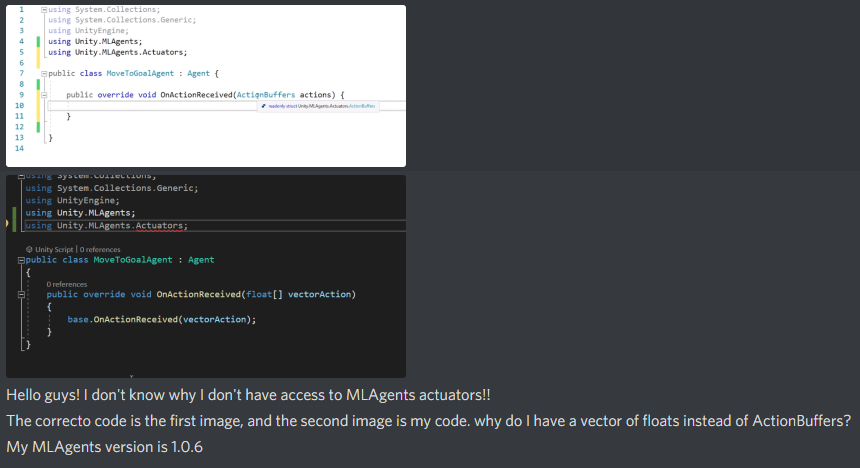
 real sonnet
Actuators were added in 1.4 ?
tacit estuary
I'm guessing I'm using an old version of MLAgents
Nevertheless, 1.4 is still in preview mode in Unity
Thank you!
round chasm
tardy junco
You'll need to set updatePosition/rotation in agent to false, get the generated ...
im assuming NavMesh.CalculatePath generates the path which is the same as what you're trying to say?
tardy junco
round chasm
im assuming NavMesh.CalculatePath generates the path which is the same as what y...
Yeah, that can be used too.
 molten sequoia
@digital solstice Don't cross post.
 sweet sinew
how to make airplane which can taxi, take off and land itself????
tardy junco
sweet sinew
how to make airplane which can taxi, take off and land itself????
Is that related to ai?
sweet sinew
@tardy junco yes, A.I. Controlled tow airplane
tardy junco
- Create player controlled airplane.
- Write some ai for it.
sweet sinew
Ok, thanks
 rotund ginkgo
I am working on a 3D RPG and am beginning to work on AI, theres a lot to this and I am not sure where to start studying. Any reccomendations?
real sonnet
 odd topaz
hi Seth i can give u a link
 steel shore
hi everyone
im having a little problem
my navmeshagent don't go to destination when the destination is in the special place
 worldly trench
Im in a pickle
My modular AI Components need to be CoRoutines
But they also need to be MonoBehavriours to attach to game objects
But a CoRoutine cannot both be a MonoBehaviour and a CoRoutine
Ie. An Action Plan GameObject has drag and drop Actions, these actions are CoRoutines
But you cannot start a CoRoutine if it is a MonoBehaviour
Any advise?
 twilit saddle
worldly trench
Im in a pickle
twilit saddle
worldly trench
Im in a pickle
I'm confused by this question because coroutines and MonoBehaviours are in two totally different universes of things. A coroutine is a method, a MonoBehaviour is a class
 chilly veldt
Ope is there a word limit in the channels?
steel shore
And i have seen, that on the some places it works and on destination its a little arrow but in the special places there are a * on destination
chilly veldt
So I have an issue where my AI model is going through walls.
The enemy must be jumping all the time while navigating to random points on the map. I have accomplished this.
I'm now stuck where the enemy model will follow the path and reach the destination properly, but the enemy model will go through walls following the AI path.
My hierarchy is as follows:
Enemy
EnemyAI (Contains the necessary EnemyRoam script which creates the path for the enemy)
EnemyModel (Contains the necessary EnemyMovement script which makes the EnemyModel continuously jump.)
Is there a better way to allow the EnemyModel to jump continuously while still following the set path?
Okay hopefully it doesn't auto delete my question again lol
I originally had it where the EnemyModel was a child of the EnemyAI GameObject, but the EnemyModel would follow the Y-Axis of the AI which made the EnemyModel look like it's floating up when the AI follows an OffMeshLink pointing upwards.
 plucky moth
hy guys, anyone haver any suggestions. Making a game where the enemy can walk on ground,walls and roof(imagine spiders) if you make a mesh static and bake it, you only get a navmesh on the up vector. is it possible to get navmeshes on a right,left,down,forward,back vectors without using the NavMeshSurface script. mainly because with the meshs, i can auto generate the linkers but with surfaces i need to manually make them
atm im using NavMeshSurfaces with their normals rotated to get the roof and walls, but with no auto link generation. oh boy its a pain
 paper star
Is directly setting the transform.position of a NavMeshAgent bad? I have agent.updatePosition enabled but it doesn't seem to do anything when it's on or off.
steel shore
steel shore
my navmeshagent don't go to destination when the destination is in the special p...
ok i think i just fixed it
i have two navmeshes xd
original and from brackeys video
 sharp inlet
how does unity's navigation work? Like what kind of algorithm does it use to find the shortest path through a navmesh?
real sonnet
I don't use it but should be A Star
sharp inlet
thanks
 alpine glacier
hello
i am using astar a* free ai thing
i set it up
but how do i make it so the enemy kind of floats over the player instead of following him directly
instead of this
more liek this
so kind of bobs over the player
real sonnet
A* for a 2D game ? o_O
you just need to know if player is left or right .... ?
And to make it hover, just set its position on the y axis higher
when you Instantiate or whatever
alpine glacier
what
im new to this ai thing
i just followed brackeys tutorial on it
Let's learn how to make 2D pathfinding using A* with and without code!
● Check out Skillshare! http://skl.sh/brackeys17
● A* Pathfinding Project: https://arongranberg.com/astar/
····················································································
♥ Subscribe: http://bit.ly/1kMekJV
👕 Check out Line of Code! https://lineofcode...
i want it to like hover over the enemy like a bomb
real sonnet
Ok so y isn't always the same ?
real sonnet
It's not really AI, I would just have a bobbing script that sets transform.position.y based on a sin wave
alpine glacier
similar to lakitu from mario
twilit saddle
alpine glacier
so kind of bobs over the player
Make a proxy object that is a child of your player, but offset in the air
Have your AI follow the proxy instead of the player
(no comment on the whole A* thing, but the above should work no matter what your "follow" strategy is)
paper star
How can I prevent my AI from getting stuck on a corner?
twilit saddle
paper star
How can I prevent my AI from getting stuck on a corner?
use boxcast instead of raycast to look for obstacles?
I'm just guessing
not sure how you're doing pathfinding
alpine glacier
my navmesh agent has disabled rotation and y update.
I move it by setting a destination and rotating the object's transform to the target direction. But sometimes it moves in another direction, slightly missing the target.
any ideas why this happens?
it seems like the agent sets the wrong destination internally.......
nvm ill just implement moving myself
rotund ginkgo
Should I make my own FSM or rely on the mechanim animator to handle it all?
or maybe use both? Idk. I can't decide. Can anyone offer some guidance?
 dusk sandal
How can I make the area around the trees walkable?
paper star
How often should I set a NavAgent's destination if it's following a moving target (the player)? Setting it in Update took my CPU usage up to 100% and FixedUpdate wasn't much better.
 lyric moth
you could try only calling it every second or 2
make a float and store a timer value, add timer.deltatime every frame
when the float exceeds 2, set it to 0 and call set destination again
or maybe when you are under a certain distance, stop using the navmesh and just translate using the transform
or addforce
lyric moth
does anyone here know how to constrain a navmesh to a circle? If i put the navmeshsurface on a plane it generates a square but id like to cut off the corners so all my units stay within a circle
paper star
How can I make a NavAgent navigate away from the player when agent.stoppingDistance is breached?
 short sandal
Hi
how can I deal with Navmesh Agents jittering/pushing each other when I have them all go to one point?
 neon steeple
short sandal
how can I deal with Navmesh Agents jittering/pushing each other when I have them...
neon steeple
short sandal
how can I deal with Navmesh Agents jittering/pushing each other when I have them...
read the message above 🙂
short sandal
neon steeple
read the message above 🙂
sorry which one?
short sandal
I was about to say
neon steeple
try changing the radius
short sandal
Even lowering the stopping distance just makes the issue happen just a bit earlier, location wise
short sandal
unfortunately, they become separated from each other, but they still jitter around
short sandal
neon steeple
<https://docs.unity3d.com/540/Documentation/ScriptReference/NavMeshAgent.html>
I'll give it a read, cheers
 dim plover
To implement AI bots in games like COD mobile or Pubg (battle royales), BTs and FSM are enough or Utility based approaches (mapping states to some actions with some probabilities or scores)
I do not want to use more complex approaches like GOAP,...
Also, with my consideration, Bots in these games are really idiot because of some strategies and designs (One of them is because it is a mobile game with hard controlling in comparison with PC/Console games)
real sonnet
They're not supposed to surprise the player ? Just brainded bots trying to shoot at the player and die a few seconds later ? -> BTs and FSM 👌
Not enough actions in BTs and FSMs (not scalable) / Emergent behaviour / Higher AI planning the big picture / Bots staying a long time on screen -> More advanced like UAI, GOAP, HTN, ...
dim plover
I implemented it with BTs and FSM
Some variables and states in blackboard
Adding some vision and auditory system
Dodge, firing, moving randomly, chase, flee,etc.
I have some problems with that
real sonnet
(btw, GOAP is as easy as UAI 😉 )
If you understand Utility, you can tackle goal-oriented
dim plover
How can I improve it?
1- because it is an online game and can cause some latency, I should add it in bots as well, bot can kill while players have some latency
2- Bots are almost idiot but can kill players easily, maybe adding more noise to shooting or flee more than shooting
3- Should I reduce intelligence for bots?
4- Another problem is bot vs bot battle. They can kill each other. The reason that the game will be boring when most players are bot and at the beginning kill each other. Players only watch the battles 🙂
I have reduced the vision range and some stuff to bot vs bot but they found each other and shoot
Is it logical to add some constraints to bot so that they only move and patrol in some regions
Another approach is to add bots gradually in the game
real sonnet
Ok so first, online game is another whole horse to beat ^^
Yes there are many tricks to fight latency
And yes bots are, out of the box, better shooters than humans, they can't fail if you program them like so. So yes you have to put handicap on them so they are enough dumb and yes missing shots can also be an answer.
Godlike AI in games like QUake, UnrealTournament, and such make you live a real nighmtmare
dim plover
@real sonnet thanks dude
real sonnet
My answer is broad because discord chat, but yes you're putting the finger on real questions here 🙂
Study how games you like did it, it will take time. Or tweak incrementally your game
Good luck have fun 👍
 keen moon
Anyone have any idea why calling NavMeshBuilder.UpdateNavMeshData from a NavMeshSurface each frame could be taking a significant amount of time (approx 13ms), despite no changes being made to anything in the scene? According to the docs & various forum posts, only changed portions are rebuilt when UpdateNavMeshData is called, but this does not seem to be the case on my end. Am still getting to grips with Unity's NavMesh Components so sorry if I'm missing something obvious 🙂
tardy junco
keen moon
Anyone have any idea why calling `NavMeshBuilder.UpdateNavMeshData` from a `NavM...
Try digging deeper with deep profiler. Maybe you'll be able to see what exactly takes so long.
 twilit cobalt
Hi, does anyone have any resources on pathfinding on 3d voxel terrain (think marching cubes or dual contouring - e.g. 7 days to die)?
tardy junco
twilit cobalt
Hi, does anyone have any resources on pathfinding on 3d voxel terrain (think mar...
Could be generating the navmesh at runtime.
twilit cobalt
To elaborate on my idea to help, this will involve procedural terrain and a building system in which you command a number of colonists to perform construction etc.. I was thinking navmesh but I wasn't sure how itd work.
Never used navmesh before
Also - it seems for modifiable marching cubes terrain navmesh is actually recommended against
tardy junco
Why? By whom?
twilit cobalt

Unity Forum
Hello,
I have posted this on the RAIN forums, but I have also posted here as I would like non-RAIN-specific help.
I am currently working on a...
twilit cobalt
The voxels are not cubes, I'm going for a low-poly stylized look
tardy junco
Then nav mesh is fine imho.
twilit cobalt
Think astroneer, but flat and in a decently smaller form
tardy junco
Look up nav mesh tools and runtime generation.
You can make it work on jobs so it can be pretty fast. Not gonna be easy though.
twilit cobalt
I've also never worked with jobs haha. Would NavMesh support chunked terrain also, or does the navmesh have to be one big mesh?
tardy junco
No. If it's runtime generation, I'd only generate it in some radius around moving characters.
For performance reasons.
You don't want to regenerate the whole map navmesh each frame.
twilit cobalt
alright, would that mean that the characters are unable to travel to points further than their radius?
tardy junco
Yeah, but it's up to you what that radius would be. You could even change it dynamically if you need a further position.
*if you need a path to position far away.
twilit cobalt
Alright, I'll have a good read on the docs and see if I can get my head around it and implement based on what you've suggested. Thank you!
tardy junco
You'll need to get the navmesh tools from github repository for that. And there's not much documentation on that too. Although they have demo scenes with some code samples.
twilit cobalt
Alright, I'll check it out. Thanks!
worldly trench
Since BT, FSM, GOAP, UAI, HTN all are different ways of mapping considerations to actions, I think its most important to make really intelligent, modular, purposeful considerations and really well defined, well tested actions
To continue the previous conversation :)
If you do the inputs and outputs reall well, the logic in between becomes less important
 plush hatch
its not doing anything different
I have a model problem
I tried making a model following player script
and it isnt working for some reason
and the model problem I cant fix it for some reason
 velvet arrow
so what is everyone's favorite plugin for handling rather simple AI (patrolling, guarding, attacking) player in like a realtime RPG? Been watching so many tutorials on the do's and don'ts when it comes to Behavior tree and FSM . NPC will have like a few simple spells/attack actions rather determenistic based on the enemy type? Do you use any tooling? Like Behavior Desiginer (does that one do FSM)? NodeCanvas ?
What I don't really understand is on how to approach interrupts in a Behavior Tree. A patrolling enemy, that suddenly sees the player should start it's attack behavior. But how do I abort from that if for instance, the player runs away or dies? Is every task in Behavior tree suppose to complete before re-evaluating the tree?
keen moon
tardy junco
Try digging deeper with deep profiler. Maybe you'll be able to see what exactly ...
Finally found out why this was happening
https://github.com/Unity-Technologies/NavMeshComponents/issues/95#issuecomment-420213283
It's apparently remedied in 2020.1, but my project's stuck with whatever the latest LTS version is.
As a workaround I've tweaked my voxel/tile size settings & broken up my NavMeshSurface into multiple overlapping parts which take it in turns to be updated, which isn't ideal but is decent enough for what I'm trying to achieve.
 summer coral
yo anyone know what measurement the NavMeshAgent speed is in?
like 1 metre per second ?
 flint slate
Does anyone happen to have a tutorial handy about using Astar with 2d (I've seen brackeys bird one) but more so, dealing with Target Acquisition (Think RPG Enemy Agro Radius)? I may be searching for the wrong thing... but i'm trying to figure out how to implement the general idea instead of just having the enemy always coming @ my target.
twilit saddle
flint slate
Does anyone happen to have a tutorial handy about using Astar with 2d (I've seen...
aggro radius and pathfinding would be two separate things - unless you mean you want aggro range to include obstacles?
flint slate
twilit saddle
aggro radius and pathfinding would be two separate things - unless you mean you ...
It would be better to include obstacles would it not? That would make Line of Sight more strict?
twilit saddle
that's a question only you can answer - how do you want your game to work?
a normal thing would just be distance + line of sight
flint slate
I just kinda rudimentary coded it i think, (Did a distance check between target <-> enemy npc and it does work but the value is just the distance from the current npc -> Player. which i do kind of like this
twilit saddle
which you can do with a trigger collider + raycast
flint slate
What i'm hoping for atm is Agro radius, Enemy leashing, Wandering, Attacking. I feel like i might be doing overkill atm trying to use the astar system? or doing something that's already able to be done another way.
https://pastebin.com/Qz21XyLe is my current controller script for this
Pastebin
Pastebin.com is the number one paste tool since 2002. Pastebin is a website where you can store text online for a set period of time.
with this setup, it's actually working somewhat, but i feel like i may be doing overkill?
My question would be, compared to what i'm doing is there an easier or more efficient way of doing what i'm trying to do? (Trying to get better @ doing things efficiently)
twilit saddle
well once your enemy is aggroed, A* is a fine way of having them chase
flint slate
I tried to wrap my head around just making a child of my main enemy Circle Collider 2d -> then checking if it's triggered by Player, and if so -> movement. but i also was running into any other trigger colliders on the obj as a whole setting it off.
worldly trench
flint slate
What i'm hoping for atm is Agro radius, Enemy leashing, Wandering, Attacking. ...
Have you considered using a sphere without a mesh, and using OnTriggerEnter trigger your "in range" code?
worldly trench
flint slate
I tried to wrap my head around just making a child of my main enemy Circle Colli...
For this, you want a LayerMask
And put your colliders you want to trigger "aggro" in a layer
If you want to get really advanced, you can combine a Trigger and a Raycast and do front facing line of sight
flint slate
Well to use an analogy, what i've done so far i think is make a 50$ olive garden entree, but it seems to taste okay...
worldly trench
flint slate
Lol! i'm interested in working on what you're talking of
worldly trench
There is the code my bro
That will be $250
(just kidding)
You will find this to be the most modern approach to field of view/line of sight currently out there
This code is assuming you are using a EventBroker pattern 🤔
flint slate
I'm just an addon coder trying to correlate my knowledge of game mechanics to proper terminology in code man (While also making a tiny 2d rpg ).
Hah!, but here's my current code if you want to see what ive came up with so far.. https://pastebin.com/33J6BtEq
Pastebin
Pastebin.com is the number one paste tool since 2002. Pastebin is a website where you can store text online for a set period of time.
worldly trench
I mean looks like it should work, all be it might not be performant or "realistic"
But yeah the approach seems there
flint slate
(Note: It works pretty much like i'd expect it, my NPC enemy will create a path to me, if i get within its agro distance, it will come at me, and enable incombat, then if i leave its agro dist, it starts ticking down its combat timer and will evade back to its spawn @ double speed lol.)
worldly trench
As long as its fun, it doesnt really matter
My code is havily geared toward "real life simulation" not game design
flint slate
Tried to handle as much as i could with bool values too, i guess that would be considered "states?"
Well... not states but uh.. hm
worldly trench
Conditional Tree
flint slate
Doing this made me realize one big thing.. I was initially going to go with a Tower Defense style game, but my thought of mechanic i was like "nah that would be too hard, a simple RPG would be better to do".
Then i realized, oh crap i gotta do melee combat animations and TD would have just been projectile without enemies needing to animate attacks etc as well
worldly trench
If you want to up level your game programming, I highly recommend taking this learning pathway seriously https://learn.unity.com/pathway/junior-programmer

Unity Learn
Welcome to Junior Programmer! Designed for anyone interested in learning to code or obtaining an entry-level Unity role, this pathway assumes a basic knowledge of Unity and has no math prerequisites. Junior Programmer prepares you to get Unity Certified so that you can demonstrate your job-readiness to employers.
There are dozens of code design patterns that will make your code performant, flexible, and modular
flint slate
Oh definitely will have to check this out, i've dabbled my whole life in code, and wrote a few android apps / many addons on wow / web dev coding/scripting.. But i really do want to get more in-depth with it.
worldly trench
I am making a RPG focused on real life simulation and emotional response/AI systems currently
I too understand the demand for animations caused by making an RPG
flint slate
Honestly, i started everything off following Games+James old RPG Tutorial, but that ended without all the systems, i've slowly been adding in other systems using inspiration from many other techniques (Trying to do the best possible ones where applicable)
Thank you for the link tho! i'll definitely be giving that a go when my motivation is not directed solely at this project (Even though i know putting this on hold and doing it would probably benefit me more in the long run) lol
worldly trench
I started with the Unity Fundamentals and Junior Programmer pathways on learn.unity then I did another 20 courses on the site, now I can make advanced game componants efficiently.
I havnt programmed in 10 years prior E:
Sorry for poor english
worldly trench
I noticed your grasp of conditional handling of game states is there
So you have a good footing
The key to making good conditions for your AI/logic is blending Untiies componants (colliders, objects, layers, tags, etc.) with pure code approaches (patterns, structures, classes. etc.)
Unity is a componant based hierarchy, so just focusing on pure code you will run into walls
So learning unity fundamentals is very important
flint slate
I sent you a DM btw, instead of cluttering up here 😛
paper star
How can I make the AI stay between 20 to 25 units from the player? Right now, it seems to oscillate, running towards the player, backtracking, and repeating.
float distance = Vector3.Distance(transform.position, player.transform.position);

if (distance > 25f) {
  agent.SetDestination(player.transform.position);
} else if (distance < 20f) {
  agent.SetDestination(Vector2.MoveTowards(transform.position, player.transform.position, -speed));
}
I understand the problem: the AI overshoots into the 20f range because I set the destination to the player instead of a radius around the player but I want to know how to fix it.
alpine glacier
anyone know how i can move my mouse using speech recognition in c#?
 vocal valley
I made a pretty high stair with probuilder, but when I bake it in navigation it only generate a small part walkable surface, like this
How to deal with this?
 rustic zealot
is there any way to exclude a tree painted on the terrain from the navmesh?
or at least giving it a custom shape?
worldly trench
alpine glacier
anyone know how i can move my mouse using speech recognition in c#?
Try decreaing your stopping distance in the NavMeshAgent
worldly trench
vocal valley
How to deal with this?
Increase your Maximum Slope Angle in the NavMeshSurface
worldly trench
rustic zealot
is there any way to exclude a tree painted on the terrain from the navmesh?
Currently NavMesh Componants and the Terrain Componants do not talk to one another, and there is no indication if this feature is on the Unity roadmap
 pliant steeple
Is anyone here familar with HTN Planners? I realised I was processing compound tasks wrong in mine so refered back to this book chapter http://www.gameaipro.com/GameAIPro/GameAIPro_Chapter12_Exploring_HTN_Planners_through_Example.pdf on it, but it directly contradicts itself. At one point it says it will only do the first valid task, and at another it process all of them. I'm not entirely sure what the intended structure is.
worldly trench
If you are deploying your own HTN code, that is really up to you
If you are using a utility its up to the utility you are using
real sonnet
I read it a while ago so not sure I remember well, but I think this article explained the logic step by step, so at first processing only the first task is simpler for demonstration purposes, then it adds to the example.
worldly trench
Makes sense
If you are writing your own code, id recommend breaking it up into three methods
Sense(), Think, and Act()
Sense should process the considerations from the world and local states
Think should take the considerations and choose actions (using a HTN, GOAP, FSM, ect)
and Act should procedurally execute the actions selected
It will really help you organize your process
pliant steeple
That's not my problem though. I have the whole planner working. In adding behaviour I realised the planner works a bit funny. Reading over it I don't see where it updates the planner model beyond adding things like a method traversal record for replan priority.
It shows this as its first example of a domain
worldly trench
Ah I see
pliant steeple
And shortly after shows this pseudo code for how the planner goes through tasks
WorkingWS = CurrentWorldState
TasksToProcess.Push(RootTask)
while TasksToProcess.NotEmpty {
  CurrentTask = TasksToProcess.Pop()
    if CurrentTask.Type == CompoundTask {
       SatisfiedMethod = CurrentTask.FindSatisfiedMethod(WorkingWS)
       if SatisfiedMethod != null {
         RecordDecompositionOfTask(CurrentTask, FinalPlan, DecompHistory)
         TasksToProcess.InsertTop(SatisfiedMethod.SubTasks)
       }
       else {
         RestoreToLastDecomposedTask()
       }
    }
    else {//Primitive Task
      if PrimitiveConditionMet(CurrentTask) {
        WorkingWS.ApplyEffects(CurrentTask.Effects)
        FinalPlan.PushBack(CurrentTask)
      }
      else {
        RestoreToLastDecomposedTask()
      }
    }
}
Which has this in its accompanying text
Which surely means it will go over every sub task rather than just the first working one, no?
worldly trench
Yes you have to consider if you want a planner to plan once and do an entire tree before it plans again, or if you want to build in interupts and start a fresh plan iteration
I think interupting a plan once a planner makes it is the most challenging
Im not suprised a book struggles with mid-plan interuptions and changes in plan
pliant steeple
This isn't a seperate example either, since it applies that same example to show how that code will work
worldly trench
That looks like it works great so long as you can finish a plan
pliant steeple
What confuses me is if I'm not mistaken, a compound task is meant to hold branches in behaviour, and hold groups of behaviour to be done together. The former wants only the first valid and the later wants all of them done, which I don't understand.
pliant steeple
It feels like it should be simple, but god there's a lot of ways to think about it.
It's especially confusing when figuring out how primitive tasks fit into this, since a compound task can have whatever it likes in there.
worldly trench
I like to build in the logic : Act, then do the next Act, unless there was a change in the global and local states, then start a fresh plan
But if you constrain yourself to completing compound actions to the end, the AI will apear inhuman/unnatural
pliant steeple
Let's say each box is a compound and the line is a primative. Top one contains the bottom for. How do you process this? You can assume what does and doesn't fail as you like.
worldly trench
Get all the actions in the compund, do 1, check if needs to interupt, do 2, check if need to interupt, do 3, etc. etc.
pliant steeple
I honestly don't know if I stop at the first valid one or go through them all or only go through them all if non fail or what.
So you go through them all?
worldly trench
If I dont need to interupt a compound action, then I would perform the entire compound action, yes
Especially since planning is computationally expensive
pliant steeple
Then how do you do branches in behaviour? Something like the first example
Surely it would do the first one, then always do the second one.
worldly trench
Correct
worldly trench
Method [true] is always performed as there are no conditions for entry
🤔 Why would they do that
pliant steeple
Because the book states to the contrary.
pliant steeple
The first branch is valid so it does that in favor of the second which has a lower priority.
This is depth first, not huristics.
worldly trench
Ah is that so
Then it is a poorly written example
I would say Method [No Preceding Methods = True]
That would clear this up a lot
pliant steeple
Everything in the chapter suggests doing just the first open when possible, expect for the section saying how to process a domain.
No as in it stops at the first task.
It doesn't even check the second since the first is a valid plan.
worldly trench
Then treat it like a switch statement?
In which case only one would process at a time
If the switch statement performs an array of actions, or a single action, its whatever
pliant steeple
Ok but that leaves me confused how you're meant to actually do compound behaviour.
worldly trench
So its a switch statement, with child switch statements in some of the blocks
Written in the most confusing way possible
pliant steeple
It's very modular switch statements in a way, yes.
It's very modular switch statements in a way, yes.
Also just in case since you sounded like you said otherwise before, it acts on a copy of the world state as it goes, so you can have actions that rely on previous actions happening.
The acting is a part of the planning.
worldly trench
Do you need all this complexity?
pliant steeple
I did a good bit of research and HTN absolutely seems like the best option for what I'm making, and regardless it's basicly done now, I just need to reorganise how it processes compound tasks.
worldly trench
You can make it act like a switch statement, yes
Or you can make it like like an if, else if
Thats up to you
pliant steeple
Have you used HTN before? I know there's a lot of varients so want to check.
worldly trench
Yes I have
I tend to make the most simple version I need for my task
A HTN is a programming pattern, and you can adjust the patern for your purposes
There is no "one way" to implement a patern
pliant steeple
No, but I'm at least trying to understand the way this chapters doing it because this is my first AI (dived in deep I know) and looking around my other options are 300 page long papers or looking at existing planners.
worldly trench
I used a HTN to program a waitress that tended to patrons, tended the bar, greeted customers, and took breaks
pliant steeple
I'm making tamable animals. Gotta be smart for the process of learning about them and taming them.
worldly trench
I see
If you are learning for the first time, focus on learning the pattern
The more times you implement the pattern, the more you know what part of the pattern are important and strictly needed, and others you can simplify or modify for your use case
pliant steeple
Ye I figured I'd leave out huristics for simplicity.
worldly trench
I confused you with talking about more complicated pattern variants that selected multiple actions, but it looks like you are still learning about selecting one action
My b
 hoary peak
Why tf is this happening
I made this cube marked as non-walkable
and it sorta works but it doesn't empty the area inside?
worldly trench
Did you enable the inverse facing meshes?
pliant steeple
No that's the thing. It's not just selecting an action. I just don't get the contradiction in this chapter and thus what is and isn't included when going through a plan.
hoary peak
This becomes an even bigger issue if i scale it up in such a way where i can define a height volume that should not have a nav mesh generate
where would i enable that?
pliant steeple
You could see in the picture before how it built a set of actions across several layers of the tree.
worldly trench
I see
worldly trench
hoary peak
where would i enable that?
You dont want to enable it
worldly trench
pliant steeple
You could see in the picture before how it built a set of actions across several...
If you are only selecting one compund or primitive at the same time, it does make it a lot simpler
Each layer select one, add it to the queue, go to next layer, etc.
pliant steeple
Ye it's not doing that. It has compound(primitive, compound(primitive, primitive), primitive) in its example and does all 4 primitives
So the question is, why does primitive, compound, primitive do them all, but compound, compound only do the first one?
worldly trench
Does your FinalPlan pusshbak clear the TasksToProcess?
pliant steeple
As it finds valid things it adds them to the stack to process, then it goes through each to see if it should add them to the plan or restore back to a previous state, which removes stuff from the plan.
worldly trench
Right, but that loop will continue to iterate so long as there is another task to process
pliant steeple
It won't check the same task twice, so it'll eventually run out.
The psuedo doesn't show that but it's implied... I think
worldly trench
I thought we were only processing until the first task in a layer completes
Then going up a layer
pliant steeple
It doesn't look consistent over this and that's what's confusing me.
I think I just need to read over the whole thing again inspite of its inconsistencies.
worldly trench
It certainly is confusing
pliant steeple
The system looks good but... I don't get what it is exactly.
worldly trench
This is why most people go with a FSM or DT
Its complex
HTN adds many complexities
But HTN is great because its flexible
pliant steeple
Really good for modularity, which is good since this is meant to let me make many unique creatures.
worldly trench
Since in my games I use many different planners for different tasks, I just treat planners generically
If I cant get something done with a FSM or DT, then I upgrade to a GOAT or a HTN
Sense the world -> Im in this state -> run that states planner -> iterate over its actions
I think a lot of planners merge sense and think and act together, which makes code harder to use
I hope I helped =.=
pliant steeple
Yes, you've helped me get to the bottom of what's confusing me. This isn't exactly a common thing so any help is appriciated. Thanks.
worldly trench
You're welcome
pliant steeple
@worldly trench I figured it out and I figured you might want to know. The books right. I was just seeing two seperate bits of info as the same. It will always only pick the first valid method, and then go through each sub task of that method. I was mixing the method with the contents of it. The method is the branch and the sub tasks are the group of contents.
So in this it picks Method 0 in BeTrunkThumper and goes through each sub task in it, completely ignoring the other method. In that the same thing happens again where Method 0 is picked in DoTrunkSlam and the other method is ignored... it all feels really simple now I know it... looking at my code I think I knew this before too... damn.
 hollow tapir
I just checked out this channel for the first time and realized you're talking about something I've been trying to figure out how to do from scratch on my own (AI planning). I'm currently using agents set up roughly as FSM's, but I wasn't sure how I wanted to handle things like telling an agent to go to a point behind a locked door, or which actions to interrupt and which to finish. I googled HTNs, I saw DT mentioned, assuming that means decision/behavior tree? Are there any other key patterns to be aware of working on a problem like this? The context, if it helps, is to try and let the agents fill in intermediate actions between their current location/state and where the player told them to go.
worldly trench
Thats right
There is plenty of planners you can leverage: FSM (Finite State Machine), DT (Decision Tree), GOAP (Goal Oriented Task Planner), HTN (Hierarchical Task Network) to name a few
You can also encorporate things like Neural Networks, Machine Learning, and the like
Your sensing -- global and local states -- will likely be the same regardless of what you use (ray tracing, overlap spheres, game manager, broker patterns, etc)
And your Acting -- animation, movement, and the like -- will likely be the same as well (Animator, A*, and NavMesh)
But the thinking is pretty much your oister
pliant steeple
There's also GAIA. It's a nightmare to search for but it's mentioned in some GDC talks on AI and there's a paper talking about it. Don't think it's really used outside this guys context but hey it exists and I trust the dude that it's good. <https://www.sisostds.org/DesktopModules/Bring2mind/DMX/API/Entries/Download?Command=Core_Download&EntryId=35466&PortalId=0&TabId=105) > It's probably really not worth it unless you know what you're doing and need it for but like... it's there.
real sonnet
👍 Kevin Dill is a must-read
worldly trench
Im like 60% done developing my own unity AI arichtecture package, its pretty exciting
I have to work on UI elements for it 😴
hollow tapir
Thanks everyone! Especially @worldly trench for emphasizing the separation between sense/think/act, which most explainers I've seen completely gloss over. I'm finally reducing the amount of time I spend between identifying a problem and finding the pre-existing solutions, it's much more fun to develop that way!
 urban crown
worldly trench
There is plenty of planners you can leverage: FSM (Finite State Machine), DT (De...
urban crown
worldly trench
There is plenty of planners you can leverage: FSM (Finite State Machine), DT (De...
Is GOAT the same as GOAP, just named differently? Goal Oriented Action Planning, for reference
urban crown
Is that a yes? xD
urban crown
I've used FSMs and GOAP. Have never seen HTN or DT, oddly enough
real sonnet
Like everything in programming, you learn from previous projects, but nothing stops you from mixing 2 or more of these patterns 😉
There's no golden rule. Only things that worked (or not) in the past, and how it can help you shape your solution
urban crown
I've mixed FSM and GOAP for a school project. I'm fascinated by advanced AI like in Alien Isolation, FEAR, and the like
An AI that seems inteligent enough to hunt, seek cover, actively plan and provide emergent gameplay
I lack ideas for projects. I need to work on my creativity. xD
real sonnet
I watch youtube videos of current year incoming projects, things like that, to harvest ideas 🙂
like "10 best incoming pixel art games 2021" and such ^^
and of course steam best sales
urban crown
I wish I could do pixel art. That style also fascinates me. but I'm just not patient/creative enough. i know my limits xD
pliant steeple
urban crown
I lack ideas for projects. I need to work on my creativity. xD
Two ways I find really effective. As 'what if [whatever everyday strange idea you get] was the main part of a game?', and follow the line of logic of what happens when you change a core trait of a genre and how you'd have to make that work.
urban crown
I've never thought about it that way 😮 I always tend to skip steps in the thought process, going straight to how I perceive X or Y idea I have. And that usually results in either A: I can't build this with my current knowledge. B: I'm not 'artsy' enough to do this or C: It's quite clearly not fun. But this is going beyond the scope of the AI Channel so, we should take it elsewhere xD
hollow tapir
I just watched some of the GDC experimental gameplay workshops, those are filled with great inspirations. Also I've been working on a thing and I have lots of ideas just from playing around with a character running on a plane and seeing what I feel is missing - "it would be nice if I could make him jump" etc etc, until you have a game
urban crown
If you could throw those GDC things you watched, I'd appreciate it tremendously
alpine glacier
Does anyone know a good concept heavy video on Finite State Machines or some source code? I tried watching Jason Weimann's video with the drones, but it was kind of hard for me to follow along, and he doesn't have his full code anywhere.
worldly trench
Boy howdy do I!

Unity Learn
In this project, you will learn about Finite State Machines and how to implement them within Unity. To access the the assets used for this project, click the blue "Project Materials" tab on this project, or within the individual tutorial.
alpine glacier
Thank you!
worldly trench
You're welcome :)
alpine glacier
On a different vein, would you happen to have a similar resource for enemies finding and tracking a player? I'm not sure exactly what I'm looking for, but I think it's some sort of series of raycasts that trigger when hitting a player, that then tells the navmesh to chase.
tardy junco
alpine glacier
On a different vein, would you happen to have a similar resource for enemies fin...
The simplest way is to have a huge trigger collider "sensor" parented to the enemy and a script that will cache objects that enter and exit that sensor. Then your ai should check if the sensor is detecting any valid objects that you want to chase, and if it does, start chasing them.
alpine glacier
I don't want it to be able to detect past walls though.
When it detects, should I cast a ray cast to that object and see if anything intercepts it?
tardy junco
Yep. Should probably keep a list of objects in range and a list of visible objects and update the latter one every frame to see if objects in range became visible/not visible.
And remove them from the second list of they went out of range.
alpine glacier
I am trying to make AI patrol around the floor.
What I have done so far is that I have made the floor static, walk-able and baked it.
I have also added some obstacles where I want the AI to smartly move around those obstacles and I baked those obstacles as well while making them non walk-able under the navigation tab.
The I added a rigidbody, nav mesh agent, capsule collider, and the patrolling script to the enemy capsule.
I have added my custom patrolling script to randomize new moving spots around the floor. But the problem is that my enemy starts shaking weirdly.
Here is my patrolling script:
using UnityEngine;
using UnityEngine.AI;

public class Patroller : MonoBehaviour
{
    // [SerializeField] float patrolSpeed = 10.0f;
    [SerializeField] float patrolWaitTime = 3.0f;
    float currentWaitTime = 0.0f;

    Vector2 groundSizeX, groundSizeZ;

    Vector3 newMoveSpot;

    public GameObject ground;

    private NavMeshAgent navigate;
    // Start is called before the first frame update
    void Start()
    {
        GetGroundSize();
        newMoveSpot = GetNewPosition();
        navigate = GetComponent<NavMeshAgent>();
    }

    // Update is called once per frame
    void Update()
    {
        RotateTowardsNewSpot();
        MoveToNewPosition();
    }
private void GetGroundSize()
    {
        Renderer groundSize = ground.GetComponent<Renderer>();
        groundSizeX.x = (groundSize.bounds.center.x - groundSize.bounds.extents.x); // Ground left side x value
        groundSizeX.y = (groundSize.bounds.center.x + groundSize.bounds.extents.x); // Ground right side x value
        groundSizeZ.x = (groundSize.bounds.center.z - groundSize.bounds.extents.z); // Ground backside z value
        groundSizeZ.y = (groundSize.bounds.center.z + groundSize.bounds.extents.z); // Ground frontside z value
    }

    Vector3 GetNewPosition()
    {
        return new Vector3(Random.Range(groundSizeX.x, groundSizeX.y), transform.position.y, Random.Range(groundSizeZ.x, groundSizeZ.y));
    }

    void MoveToNewPosition()
    {
        navigate.SetDestination(newMoveSpot);
        if (Vector3.Distance(transform.position, newMoveSpot) <= 0.2f)
        {
            if (currentWaitTime <= 0)
            {
                newMoveSpot = GetNewPosition();
                currentWaitTime = patrolWaitTime;
            }
            else
            {
                currentWaitTime -= Time.deltaTime;
            }
        }
    }

    void RotateTowardsNewSpot()
    {
        float turningSpeed = 0.3f;
        Vector3 targetDirection = newMoveSpot - transform.position;
        Vector3 newDirection = Vector3.RotateTowards(transform.forward, targetDirection, turningSpeed, 0.0f);
        transform.rotation = Quaternion.LookRotation(newDirection);
    }
}
Here is the video: https://drive.google.com/file/d/15KSjKMSFuY9tuZhxoQZ6JGKW50yRajWz/view?usp=sharing
Google Drive
 upbeat hatch
I'm using NavMesh.CalculatePath() to get navmesh corners to feed my custom path class and custom mover compoment. I'm running into this issue though.
I can't stadily reproduce it all the time, but the path returned by CalculatePath() method sometimes doesn't seem to produce optimal path.
Sometimes, the path is calculated correctly, an expected straight line:
Sometimes, there's one or two unnecessary corners snapped to navmesh tiles, but it's straight enough:
And sometimes, path is simply not straight at all, even though there is no reason it shouldn't be:
I wrote a script to export the generated navmesh into a .mesh file to get a better view of it, to check if there aren't any holes or other geometry defects that I'm not seeing in the navmesh gizmo and that CalculatePath() tries to avoid, but the generated navmesh is perfectly solid.
I was wandering if anyone happens to know if this is an intended behavior of the built-in pathfinding system, or whether I should open an issue ticket.
hollow tapir
urban crown
If you could throw those GDC things you watched, I'd appreciate it tremendously

YouTube
hollow tapir
upbeat hatch
I was wandering if anyone happens to know if this is an intended behavior of the...
I'm not an expert, but I think that might be expected behavior. If you go to the navigation tab and select an agent, you should be able to hit "select path polygons" and to my understanding, it doesn't matter if there's a straight path if it needs to cross multiple polygons. For example, the yellow lines here are the "path query nodes", not exactly sure what that means, but you can see multiple points between the agent and the white circle it's navigating to. I also confirmed in the debugger that the next path point isn't the destination point. (I think this is all in the docs somewhere but I don't remember where exactly)
upbeat hatch
hollow tapir
I'm not an expert, but I think that might be expected behavior. If you go to the...
I forgot to mention that I use higher-level API (NavMeshSurface component from Unity's GitHub) for creating NavMeshes as I need better control over the building process, plus as I mentioned, I don't use NavMeshAgent (I created custom agent component and custom local avoidance too). So I am not able to see these debug visualizations.
Anyway, I just tried to build the navmesh with standard-shipped Navigation toolset. Interestingly enough, when calling NavMesh.CalculatePath() on so created navmesh, paths are all correct (or should I say - as I want them). Now I just need to find a way to force some settings into this navmesh builder that are not available within editor to achieve the same navmesh quality as from NavMeshSurface component
worldly trench
alpine glacier
On a different vein, would you happen to have a similar resource for enemies fin...
I use a sphere collider, while another agent is in the sphere collider, attempt a raycast to see if they can "see" the player
And then I trigger a event "agent sees other agent" to kick off the reutines
worldly trench
hollow tapir
I'm not an expert, but I think that might be expected behavior. If you go to the...
How the NavMesh places path polygons is a black box to me, but it does have some randomness from what I can tell
hollow tapir
upbeat hatch
I forgot to mention that I use higher-level API (NavMeshSurface component from U...
The screenshot above is using NavMeshSurface component. The navigation window still triggers the gizmo display though. I assumed that agent and calculate path use the same logic to find a path (seems weird that they wouldn't, but I dunno). I just used the agent because I had it set up and had the debug visualizations. Logically though, doesn't it need to query all polygons between the start and destination? Otherwise how would it know there are no obstructions if it shortened the path?
Aha, here's the page I was looking for:
Another thing you may notice on some levels is that the pathfinder does not always choose the very shortest path. The reason for this is the node placement. The effect can be noticeable in scenarios where big open areas are next to tiny obstacles, which results navigation mesh with very big and small polygons. In such cases the nodes on the big polygons may get placed anywhere in the big polygon and from the pathfinder’s point of view it looks like a detour.
https://docs.unity3d.com/Manual/nav-AreasAndCosts.html
worldly trench
As I suspected, path nodes have some randomness to them
If its using an A* algorith, it certainly does not need to querty all path polygons
What algorithm it uses is also a black box to me tho
upbeat hatch
hollow tapir
Aha, here's the page I was looking for:
> Another thing you may notice on some l...
I read that yesterday but I still don't think it is relevant to this issue. I just tried to bake two navmeshes, one with built-in Navigation tab, one with NavMeshSurface component. Not only they produce different meshes with the same agent setup (NavMeshSurface one is generally less "even"), the paths on both just seem to be handled differently.
That being said, built-in tool seems to produce expected paths, whereas NavMeshSurface navmesh still pushes unwanted corners in its paths for some reason
worldly trench
I beleive the Advanced NavMesh Surface and Agents from the GitHub has a different community of contributors updating and maintaing that code then the built in NavMesh componant
So its very likely different code with different behaviours
The one thats built in is a lot less scriptable/customizable tho
upbeat hatch
Well, looking through the NavMeshSurface code, it seems like it's just using exposed built-in API to do its job, but yeah, apparently, something is different
upbeat hatch
Alright, I think I figured it out. It seems to be only happening with very high tile density. If I bring it down, paths are correct again, apparently with both "types" of navmeshes.
urban crown
hollow tapir
https://www.youtube.com/playlist?list=PL2e4mYbwSTbaK0m4Jt0pHT_hz5q6ZbixE
Thaaaank you!
 stark stirrup
Hey, I made a simple algorithm that finds the closest point that is at X distance from an object (simple stuff, just make a vector between the two, normalize it and multiply it by X)
However I would like this to take into account the object velocity, so that instead of going to the closest point at X distance, it would go to the point at X distance where it will take less time to get there
I was thinking on adding the current velocity vector to the Object position and then running the algorithm above but in this case I should also take rotation speed into account. This is when my math skills breakdown 😆
paper star
How can I make a Nav Agent run away instead of towards?
 noble fog
You give it target. Just flip the vector
paper star
I don't think it worked.
agent.SetDestination(-player.transform.position);
I want the agent to run away from the player.
real sonnet
you gave him a POSITION. And an inverted one (... from origin ?🤔 )
Yeah it will prob give you the opposite position of the player mirrored from origin
Or symmetrical, whatever you call it
You want to find the direction between the agent and the player first
Then normalize, then multiply by factor (some kind of speed)
Vector3 dir = agent.position - player.transform.position;
Vector3 desiredPosition = agent.position + dir.normalized * agentSpeed * dt;
agent.SetDestination(desiredPosition);
something like that
- might need some tweaks, it's untested
- ask questions if you don't understand some part of it
paper star
What is dt?
paper star
Wouldn't this just lead the AI directly towards the player?
real sonnet
The first line gets the vector between the player and the AI
From the player, important detail.
then you add the vector to the AI position, giving a new position in the same direction + length
thus the normalize stuff then multiply by speed
(otherwise your ai would be faster as it gets further from the player)
paper star
I tried implementing your code but now the AI oscillates back and forth from the player.
real sonnet
green is subtracting player pos from agent pos
red is normalizing to length of 1 (and myltiplying by speed and such if you want it)
the red vector is added to the agent position, resulting in a new position, opposite from the player
Hope you get the idea
well we don't see the code so can't tell, but this shouldn't be more difficult than that, unless I missed something
alpine glacier
So I'm facing an AI problem rn. I want multiple melee based enemies to target player and move towards them. So when 1 enemy is already taking up space in front of the player I want the enemy to walk around the other enemy until it can move closer.
I don't want to use NavMesh Obstacles cause they're hacky and not perfect.
I'm not even using NavMeshAgent, I think I'll use NavMeshQuery + RVO2 for a custom agent.
The question is what's the accepted solution for walking around the other enemies when pathfinding and RVO say you're good to walk through or stuck.
real sonnet
Did you study flock avoidance by Craig Raynolds ?
you add a separation vector to your AI desired position, away from other agents position
so they will still move towards their targets, but stay aware and avoid each other
A bible, to keep in bookmarks : http://www.red3d.com/cwr/boids/
Background and update on BOIDS, the 1987 model of group motion in
flocks, herds, schools and related phenomena. Includes a Java-based
demonstration and many links to related research and
applications.
alpine glacier
That's what RVO does already I think.
alpine glacier
Reciprocal Velocity Obstacles.
real sonnet
Never heard of that (asset maybe ?)
If it's handled by this RVO thing, what's the problem then ?
This paper is nice, explains algorithm for a swarm of drones https://www.researchgate.net/publication/318601635_Collision_Avoidance_Based_on_Reynolds_Rules_A_Case_Study_Using_Quadrotors
alpine glacier
RVO is a commonly used algorithm for local avoidance.
Unreal uses it.
Idk, just thought maybe someone had experience and had an easy dirty trick in their toolbox.
real sonnet
Reynolds's algo are as simple as it can get
you just add vectors between them, and weight them eventually
and it's scalable
👌
alpine glacier
Well, it's basically boids yeah.
I'm gonna have a bunch of isolated behaviour trees doing whatever the heck they want tho 😢
real sonnet
yeah I'm reading about it, looks like the intended result is the same.
Maybe algo implementation is different didnt have a look
hey whatever works 🤷♂️
 willow fjord
no scripts attached to the object then also the gameobject mysteriously moves to the right side slowly on the baked navmesh surface , why??
if i untick navmesh then it doesnt move like that, it stays still as i want.
 flint geode
Hi! I'm new to Unity. Does anyone know how to update a NavMesh for a very wide map? Currently it takes me 30+ seconds to generate it for the whole map. Are there ways to generate just a small portion and have it updated as I go? Any help is appreciated!
tardy junco
flint geode
Hi! I'm new to Unity. Does anyone know how to update a NavMesh for a very wide m...
Have a look at unity navmesh tools on github. You can't do it with the built-in api.
 timid wigeon
How do I make it so that my Navmeshagents will get close enough to each other to be able to attack each other, and yet still give a relatively wider berth around dudes they need to path around?
I just want to prevent this clustering in MOBA minion behaviour
This is my making the agent radius too small so they won't path around each other properly, but if I make the radius too big they can't get close enough to each other to hit each other.
The capsule collider is exactly the size of their bodies mesh
But the navmesh has had to be super small
timid wigeon
My bigger problem is I can't get them to Transform.LookAt each other. For some reason it won't work.
 obtuse ember
Hi, Does someone here knows how to use unity's A* algorithm with an hexagonal tilemap?. I've found this video where a guy uses a square-shaped grid instead of an hexagonal one and I don't know how to change it to hexagons.
https://www.youtube.com/watch?v=HCt_CYOW9jg&ab_channel=CodingWithUnity

How to implement A* into Unity3D's Tilemap system.
Project includes graphics, and scripts
●Download Project: https://bit.ly/2Nz1waU
●Download Graphic Asset: https://bit.ly/2zpXyhf
●A more in-depth Astar explanation: https://bit.ly/2GLlu1A
♥ Subscribe: https://bit.ly/2FRWgOi...
 fallow shore
timid wigeon
This is my making the agent radius too small so they won't path around each othe...
fallow shore
timid wigeon
This is my making the agent radius too small so they won't path around each othe...
I see what your problem is now. Moving to here, as general-code is a bit busy. In this case, you're probably going to have to do a little manual labor. It may involve a raycast fan, sphere cast, or a trigger of some kind, that when they get too close to an ally, they are prevented from going into an attack state, and temporarily reassign their destination away from the target.
If you wanna get fancy, you can have them move to a certain distance away from the target, and pick a new direction to attack from.
timid wigeon
fallow shore
I see what your problem is now. Moving to here, as general-code is a bit busy. I...
That makes sense, thanks!
I always thought NavMeshAgent would be smarter than that
It's almost like you can tell that Unity was built more with shooters in mind
fallow shore
It's tricky because there's only one place you can set these numbers on the agent component. Alternatively, you can implement your own avoidance distance and stopping distance, but that's a bit more involved.
Honestly I don't think most engines have that capability by default. I'd have to pop over to Unreal's docs
timid wigeon
Well my stopping distance has to be set on the agent, and then I have been tweaking the condition in the animator
In like 8 places
It's stupid
Now I feel like I have to make another state between Walk and Attack that is like "Get Real Close" lol
fallow shore
Yeah what you'd do for a custom system, is set that to zero and write custom behaviors that track the agent's path and obstacles.
And you'd have to differentiate between agent types, which is possible, I believe.
timid wigeon
Setting Stopping Distance to 0 kind of works because I'm already using a parameter...
Yeah, my animator flips to "Attack" state which doesn't move the dude, which works
Oh, lol... yeah my other navmesh agents are now coming up behind them and shoving them out of the way
This is hillarious
lol
I think it's my greediness of actually wanting them to use actual trigger colliders on their swords to hit each other
Wait... how come my NavMeshAgents are actually able to shove others out of the way, anyway? Aren't they supposed to respect each other's radius?
... When NavMeshAgents are on separate physics layers... do they not respect each other?
if so, oh shit
... no, they're all on interacting layers... so I dunno
fallow shore
There's no physics interference?
timid wigeon
Wow, so from what I'm hearing, people usually put a NavMeshObstacle AND an Agent on a Prefab and just enable only one at a time, using the Agent to purely plot paths
timid wigeon
If anyone has any insight on how I can resolve this shoving of other NavMeshAgents it would be much appreciated
Agent Settings
Wow, I guess this is the way: https://twitter.com/valkrysa/status/1066908235741880321?lang=en


Kept having issues with units trying to squeeze past stationary #unity3d navmesh agents. A solution is that when a unit is stationary turn it into a navmesh obstacle w/ carving enabled. This will make sure it is 100% respected. Turn it back when it needs to move again #UnityTips https://t.co/44racHt6zJ
Likes
218
 Twitter
·
fallow shore
Twitter
·
fallow shore
I guess I never thought of putting Obstacles on characters. But yeah, NavMeshObstacle actually has an automatic setting for shutting carving off when the object is moving.
timid wigeon
So I now enable a NavMeshObstacle with Carve on and Skeletons don't get pushed anymore, but there's some janky behaviour where dudes are teleporting now just before they switch out to another animation
Any ideas?
fallow shore
timid wigeon
So I now enable a NavMeshObstacle with Carve on and Skeletons don't get pushed a...
Can't really see the teleport. But the process I'd try:
- Agent enters attack state
- Set agent's destination to its own position
- Clear it's path -> agent.ResetPath()
- Disable Agent
- Enable Obstacle
 limpid plinth
going to toot my own horn a little bit, because I wanted to share this dev blog post I made about the AI in my project:


no navmeshes and built-in stuff, mostly just lots of PID loops and several layers of AI behaviours
timid wigeon
fallow shore
Can't really see the teleport. But the process I'd try:
- Agent enters attack st...
Thank you. I will try the ResetPath(). I believe all of the articles I've read basically say that Unity's local avoidance is hot garbage for what I'm trying to do. I might just spend $100 and buy A*
The 3rd "pair" of Skeletons teleport into place to attack because it's somehow still moving at the end of the animation
hollow tapir
flint geode
Hi! I'm new to Unity. Does anyone know how to update a NavMesh for a very wide m...
There's a script in the NavMeshComponents package specifically for generating a navmesh in a local area only. I haven't used it, but seems like exactly what you need. https://github.com/Unity-Technologies/NavMeshComponents/blob/master/Assets/Examples/Scripts/LocalNavMeshBuilder.cs
Somewhere in this video series (not sure exactly where, sorry) he talks about it and similar problems https://www.youtube.com/watch?v=JjQg2vGHK_8

GitHub
High Level API Components for Runtime NavMesh Building - Unity-Technologies/NavMeshComponents
Watch this video in context on the official Unity learn pages -
http://www.unity3d.com/learn/tutorials/topics/navigation/navmeshsurface-component
In this live training session we will learn how to work with Unity’s Navigation tools at runtime. We will explore the publicly available Components for Runtime NavMesh Building and look at how we can ...
 west leaf
Hey guys, I really need help with my AI script
right now it seems to me like black magic
So my script works as intended for most part. When i set up attack distance to 3 it works, fun part begins when its lower (1.5 or 2) for some reason enemy after attacking re-adjusting himself and player is out of his reach and he is not willing to come closer. On 1.7 attack distance enemy started to wiggle around player while damaging him.(he still have some distance so not really collision)
I am doing this project in collaboration with friend, and this script have different problems on his side. 46 line of code is completely ignored by unity and while attack distance 3 is working just fine, setting it to lower is completely killing damage part of script off. When on my side if i come closer to enemy is damaging me again, on his enemy just follows him as pacifist.
Pastebin.pl is a website where you can store code/text online for a set period of time and share to anybody on earth
timid wigeon
west leaf
Hey guys, I really need help with my AI script
right now it seems to me like bla...
So you should check your animation to see if "Root Motion" is checked because if it is, then the animation will continue to move in a certain direction and ignore the transform. So Transform.lookat() is working, but the animation will literally spin in whatever direction it wants because it's following "root motion"
Literally ran into and solved the problem recently - if you look up
Also, check the NavMeshAgent stop distance, as well as avoidance radius
Again, if you look above
Bascially, just read above
Unfortunately my conclusion will be to buy a $100 asset 😛
@west leaf All my questions above from Feb 15th and onwards will be useful to you
Also, instead of ontriggerstay I ended up just removing those trigger colliders and using a Physics.OverLapSphere because I was sick of trying to place the right collider son the right layers, etc
west leaf
timid wigeon
Unfortunately my conclusion will be to buy a $100 asset 😛
i was arriving at similar conclusion.
Sure, thanks i will check it out.
timid wigeon
west leaf
i was arriving at similar conclusion.
Sure, thanks i will check it out.
Yeah, everything I've read basically points to "Local Avoidance in Unity's Navmesh is trash"
But I hear A* isn't perfect either
timid wigeon
@west leaf I actually might end up rolling my own local avoidance. I once did do a boids algorithm thing long before Unity had Navmeshes (for free). You can find the problem and some of the possible solution here: https://forum.unity.com/threads/how-to-approach-this-problem-with-navmesh-agents-local-avoidance-asset-suggestion-maybe.1025272/

Unity Forum
Hello,
Wanna ask if someone can point me out some approach or suggest an asset which can help resolve my problem with navmesh agents local avoidance in...
alpine glacier
Does anyone know how to code ai that kills the player?
im a little lost
i just dont know how to do player damage
timid wigeon
alpine glacier
Does anyone know how to code ai that kills the player?
You're going to want to google/youtube the topic. But since you've got bullets, you give the bullet prefab a collider, make sure there's a collider on the player, and put a script in the bullet object to tell it void OnCollisionEnter( Collision collision ) { collision[0].gameObject.Destroy() } kind of thing. What I've described is a VERY quick and EXTREMELY dirty way to deal with the problem.
@alpine glacier In other words - read this and try to understand most of this: https://docs.unity3d.com/ScriptReference/Collider.OnCollisionEnter.html
 alpine glacier
uh
paper star
How can I make AI types not interact with other types? Currently, they avoid other AI types but I want them to collide because one tries to catch the other.
For example, I have two AI types: humanoid and zombie. The zombie is pathfinding to the humanoid but due to obstacle avoidance, the zombie will keep at a radius from the humanoid.
 west orchid
hi guys is there any way to make enemy move freely inside certain area without using collision for example make them move inside box raycast
twilit saddle
west orchid
hi guys is there any way to make enemy move freely inside certain area without u...
You could give them some Transforms or absolute x/y/z coordinates to limit themselves to, and just have them check their position to not go outside those boundaries
 wary gull
Hello, i have an issue with the NavMeshAgent. I created 2 characters, they both have all their transforms scales at 1, Y position at 0, a rigidbody, and a collider in the root object with their character shape. The NavMeshAgent component is also on the root and both have the same parameters, the mesh was baked in the navigation tab.
Both have their transform center/pivot at the center of the character model.
Then.... Does someone know why they have different position for the NavMeshAgent collider?

 quaint gazelle
does anyone here have experience with root motion + navmesh agent? I can't get it right and it always walks through walls off the navmesh, pls @ me
 eager dagger
Don’t really know which channel to put this in but here goes
I’ve got a tile based game which is on a world map. The game is a Navy simulator where you need to control a navy. What I’m having trouble with is getting the ships to move between tiles and how to block out tiles which are on land. What I want is the ships to have a mini UI on the map. You can select them and right click to move to other tiles in the map. Anyone know any sources to learn from or videos where I can get started?
velvet arrow
eager dagger
Don’t really know which channel to put this in but here goes
I’ve got a tile ba...
if it is just finding the correct path then just google "unity ai tilemap" . Sounds to me like you have a regular tilemap but well perhaps in 3d (however the tilemap itself is 2d)
or "unity pathfinding tilemap" . Maybe look at this: Custom solution but still: https://www.youtube.com/watch?v=fUiNDDcU_I4
Druidstone Review: https://youtu.be/-FL75reKvBo
Files for this tutorial: https://www.patreon.com/randomartattack
Twitter: https://twitter.com/randomartattack
Facebook: https://www.facebook.com/randomartattack
eager dagger
Alright thanks I’ll try it tommorow
 spare grove
because when I set a setdestinatation towards the player and move the player the player looks fluid but the navmeshagent looks like it goes lagged?
like 15 fps
but the game run more than 200
 slim garnet
is there a workflow for torchscript or tensorflow -serialized models running on a pure managed C# tensor runtime?
does anyone have experience with ONNX?
timid wigeon
quaint gazelle
does anyone here have experience with root motion + navmesh agent? I can't get i...
Root Motion applies the "motion" that is built into the animation. As in, if in the animation itself your character walks forward a step (off of the offset) and then does something, it will keep that motion REGARDLESS OF DIRECTION OR OTHER THINGS. I found that the only way I could use Navmeshagent was with root motion off, but there might be more advanced understandings
But yeah, with Root Motion on, I couldn't even turn my Model to face something.
timid wigeon
paper star
How can I make AI types **not** interact with other types? Currently, they avoid...
This is a delicate balance of tweaking your obstacle avoidance radius, your StoppingDistance in Navmeshagent (I think I got the name right), and whatever other numbers you use to indicate "caught the dude" when you're within distance of "targetdude"
@paper star Essentially like this-ish

@paper star Just as some example values. Note the disabled NavMeshObstacle that I flip on when a Skeleton is idle or attacking so others will path around him (and flip NavMeshAgent.enabled = false, and the other way around when the dude needs to move again)

@paper star
 hollow tapir
I'm getting a bit hung up on how to implement some fairly complex character AI for a game. The game is a sort of squad-based shooter thing. I have a similar prototype where I implemented characters as stack-based FSMs because the tasks were all very simple (go to, interact, etc). Here things are more complicated so I'm thinking of behavior trees, but not sure how to structure code for it (or a HFSM). I was trying to work out the abstract logic but then I got hung up on how the structure would change depending on the pattern I wanted to use. Round and round I go 🙃 . I could really use some advice on how to think through this problem of figuring out structure and implementation without getting dizzy
 narrow dock
Hello, anyone know why my agents body randomly disappears?
 tough falcon
@hollow tapir behavior trees are ruff. you have to keep in mind that every step along a given branch will be executed until the conditions change that made the agent go down this branch. I always started them around "actions" ie branch leafs then built them backwards to the root of the tree to see how to implement the right conditions.
action (leaf) = patrol - above that is are 2 tests - "no one visiable" and "Not attacked" - this node can be sequence node. that sequence node could then lead to the root. once any one of the 2 tests fail it fails back up to the root to see what to do next
hollow tapir
Thanks, that's a helpful tip! Is there a BT model that doesn't require ticking all the way from the root every frame?
 sonic rain
@hollow tapir your Leaf nodes should be able to result in Success/Failure/Running. While Running, you keep that Leaf node cached and keep only executing it, while being able to interrupt that leaf execution with Decorators and/or events, or if the Leaf eventually results in Success/Failure
Unreal Engine uses an event-driven architecture highly tied to their Blackboard
 void iris
Hi, i have 0 past experience with working with A.I. what would be the best way to learn the essentials? (i want to at some point be able to reach the point where my game runs off a ai that just controls everything like game balancing etc) TLDR: how does a anything A.I related noob self teach themselves
sonic rain
Anyways, the secret to not re-running the entire tree every tick is to cache what is useful, and allow for some sources of interruption
sonic rain
hollow tapir
I'm getting a bit hung up on how to implement some fairly complex character AI f...
PS: I like a lot HFSMs, as the hierarchy makes it possible to create better behaviours encapsulated in sub-state machines, reducing the amount of spaghetti on the top layer...if you go this way, just abstract into separate and completely decoupled parts: Actions (performs something, changes game state, returns nothing), Decision (performs checks, doesn't change game state, returns a boolean for success/failure) and States have a collections of Actions, Decisions and other States (that's where the Hierarchy word kicks in). So a parent State can point to many children states, which has transitions between them
Ah...I suggest it all data driven...
sonic rain
void iris
Hi, i have 0 past experience with working with A.I. what would be the best way t...
I'd start by choosing some AI model and implementing it in some game which could have increasing complexity of the enemies system. I mean: it will (probably) not be enough to just read, or to just implement something very very very basic like a very small sample. You'll only face the need to do the complicated stuff when you see that your game needs more complex AI, which will force you to expand your AI architecture
So, pick one AI model, read about it, watch some meaningful videos, do it in your game. In a first moment, you could start with cloning some AI from a video tutorial, this will get you through the "I know nothing" line, if you don't feel like creating something "original" from the very beginning
Some pretty popular AI models used these days are (a very small summary)
- (Hierarchical) Finite State Machine: it is similar to Unity's Mecanim (the animation system). You'll have States, transitions between them, and each state executes actions. It can be hierarchical or not. This one is veery popular
- Behaviour Tree: your AI behaviour is expressed as a tree of nodes, in which they are executed from the leftmost to the rightmost node
- Goal Oriented Action Planning: you only define possible Tasks that the Agent should perform, and the GOAP will create a plan based on the Tasks available, and your objective...so the plans are created at runtime, instead of being defined before (like HFSM and BT)
- Utility Theory: strongly based on evaluating response curves, accordingly to inputs that are given. It's more like a "mathematical behaviour definition"
- Others...
Every model has its pros and cons, so if I were like you (and at some point in time, I was, as I started to study game AI), I would take a look at those AI models "faces", see which ones seem to be the most friendly to start with, and go for it
I started my studies with an FSM implementation using only scriptable objects. I started with it because I had studied State Machines during the Computer Science bachelor so I was more familiar with it rather than with others
void iris
Thank you very much!!
 sand vapor
https://cdn.discordapp.com/attachments/649777166569046026/814660421147164712/Desktop_2021.02.25_-_17.49.11.40.DVR_Trim.mp4
How can I make this ai turn quicker?
Currently it over shoots the target(player) a ton, and I want it to be more agile.
tough falcon
Look at arrival behavior and old ai book had code for all kinds of behaviors like seek, arrive, flee, flocking. Your agents appear to run constantly instead of building an intercept vector
 plain monolith
How do i go about making it so crowds of people aren't walking in a straight line?
i tried making an offset then using setdestination
and it works briefly but after a minute or two all the ai are following the same line
like they're on a conveyor belt
 manic elbow
Can someone clarify this?: When Behaviour Trees are talked about, and "Event-driven" trees are brought up, that doesn't mean they have anything to do with actual C# events....right? For example I'm looking at NPBehave, and see nothing at all to do with events, so I'm assuming that it's either poor wording, or I'm not understanding how exactly they work well enough. (NPBehave: https://github.com/meniku/NPBehave)
Rather, are they named "Event-driven" because they only update / evaluate leaf nodes when they're changed / needed? Sorry for any confusion putting this into words is hard :S
sonic rain
You're correct, it doesn't necessarily has to deal with C# events. I'd not say that it's "poor wording" when people say "event-driven BHT" though, as the concept of events didn't necessarily came from the C# language...
Event-driven can be related to more than one thing...it does not mean that the Leaf nodes are only updated when they're changed. It means (as far as I understand) that the Agent will only re-evaluate the sub-tree to be executed when needed, but it does not mean that the Leaf nodes will update in a lower rate. The frequency in which you update your Leaf nodes is up to you. I'll give you some examples:
- Unreal BHT can trigger some condition checks (i.e evaluate some Decorator nodes) when a specific and observed Blackboard entry is changed. This means that the decorator won't be evaluated every tick, but rather only when the blackboard entry changes. Changing the blackboard is the Event, and re-evaluating some specific Decorators is the reaction to that event;
- If your whole BHT architecture is built having in mind that it can react to events, you can simply cache your
RunningLeaf node and update it at the frequency that you prefer...might be every tick, might be scheduled with other agents, etc...but the key here is caching Running leafs and re-evaluating only a few selected Decorators - I said that it doesn't necessarily is related to C# events, but it CAN be...it's also up to you. You can, of course, have some specific Event types and have parts of your BHT to listen to those events, and react to them by re-checking conditions and so on
@manic elbow
Ah, it also usually comes with some definitions on "how to be interrputed. If an event happened, and you discovered that a specific Composite node should failed as a reaction to that event, you can specify if that entire sub-branch should be aborted, or only the current node, etc etc...think Unreal Engine calls this Abort Type or something like that
manic elbow
So (in the barest example) if you had a value in the blackboard, say bool isHungry = false, after the first evaluation of condition (HungerCheck) it would keep skipping that condition until isHungry == true?
Or you could set that condition (via the blackboard change) to only trigger every 2 (or whatever) evaluations?
sonic rain
Yes, all possible. AFAIK Unreal checks for the value change, so evertime anyone touches the IsHungry entry, it checks if the new value differs from the previous (so it is worth to re check the conditions which depends on this value)
It could be also be some "timed re-check" yes, loke "re check at every N tree updates" or "re check at every T seconds", etc...
But this second alternative will require you to store the amounts of update since the last check, or the amount of time passed since the last check, so your choice here will tell you how much memory you need at runtime to keep track of "when to re check". So it is your choice. Unreal does something similar with their Services, which are nodes that update in fixed intervals...but not related to conditions checking. It uses more of the first example that you described, and not so much of the second example
IMO a good event driven BT is all about knowing what to cache, when to re evaluate, etc. E.g: if you are on the leftmost branch of the BT, you dont need to check and update stuff from the branches to the right...so as you descend on the tree, cache what is useful on your way as you enter the nodes, and only remove from cache when you go up on the tree, i.e. when you leave the nodes, and enters in others
This lets you have, at memory, mostly what is important right now, for the current branch, and the event driven stuff makes it save processing power as it removes the need of re-running from the root all the time
This that I'm describing is a statefull BT, where you save info in game state. It is a tradeoff (memory X processing). It is ok to create stateless BTs, with increased processing need and less memory consumption...design choices
hollow tapir
sonic rain
PS: I like a lot HFSMs, as the hierarchy makes it possible to create better beha...
Thank you so much for the reply! I'm finding myself stuck on the part you described in your next message, putting theory into action in non-trivial cases. I think I have a better understanding of where I'm getting stuck, hopefully I can articulate it. Also related to the question of event-driven and stateful vs stateless.
- I couldn't find a good explanation of Stateful vs Stateless. I was looking at Active Logic on Github which makes a big deal of it but doesn't explain it well. Obviously both need to have variables stored about world/character state, correct? So is the difference ticking the whole tree every update or something else?
- You mentioned "caching the running node" several times, but what does this look like in practice? It sounds to me similar to the idea of a Coroutine in Unity terms, where execution picks up on the next frame where it yielded. In other words, is the caching being done by a separate class/component and the node is running its function(s) from the beginning each time, or is it built into the tree itself? A concrete example I'm stuck on is where to draw the line between actions and nodes. e.g. What part of "move to position" is in the tree vs just navmeshagent or whatever does the moving.
I hope that makes sense, thank you for all the explanations!
sonic rain
hollow tapir
Thank you so much for the reply! I'm finding myself stuck on the part you descri...
Obviously both need to have variables stored about world/character state, correct?
Stateless BHT: it doesn't cache runtime data, meaning that the BHT Agent (or whatever the name is) will not have some game state which is transferred/maintained between frames. As it doesn't cache much data, then it needs to frequently know "ok, so which branch will be executed this frame? Well, gotta run everything again huh? Check the conditions from top to bottom until I find the appropriate leaf node"
It doesn't mean that a stateless BHT cannot store any runtime data...it might store a thing here and there, while still being stateless
Stateful BHT: it can cache more runtime data. You can cache the running node (I'll go into more details on question 2.) and keep executing it. No need to descend from top-down every tick...it's just cached, you just know what is the current Leaf (until it returns Success/Failure). But if you cache it, you might want to keep performing some condition checks...not from root to bottom, but still, some things...like Decorators which are re-triggered based on Blackboard change, or maybe the Leaf node itself can "contain" a set of Decorators...anyways: to selectively say WHAT you will re-check as conditionals, you also have to somehow MARK it to re-check. So...you can cache it, storing those important stuff alongside with the cached Leaf node. So: if you start by caching the executing Leaf, chances are that you'll want to cache even more data, this way maintaining more and more game state through the frames, creating a stateful BHT
It is important to highlight that it doesn't need to be 100% stateless OR 100% stateful. It is a balance that you choose! Because if you have a stateful BHT which stores lots and lots of things, if your game have hundreds and hundreds of AI characters, this can take some of your application memory ofc. If you have memory aligned data, that's faster, etc...so it depends on the bigger picture
But that's how I see the concepts
This has two nice paragraphs on stateles/ful BHT: https://medium.com/game-dev-daily/advanced-behavior-tree-structures-4b9dc0516f92
On the "Behaviour Tree Optimization Strategies"

This Gamasutra article also have some considerations: https://www.gamasutra.com/blogs/ThibaudDeSouza/20201012/371528/Behavior_trees_and_the_future_of_intelligent_control.php
It doesn't speak very good about stateful BHT, but read it with care
As everything has pros/cons
Important: while I like stateful BHT where you cache stuff that is important, I highly recommend the BHT itself to be stateless (static, re-used by many agents)
Which means: do it in a data-driven way
The AI is represented by data assets, and many Agents will point to the same assets
So it is the exact same tree for 100 of Agents, and what is stored is just agent-specific stuff
Like: AgentA has "LeafAttack" in the cache, whilst AgentB has "LeafRunAway" in the cache
But it's all references to a bunch of data assets
Oh no...is there a limit of text that this server allows? I've written an answer for question 2, and it just disappeared when I sent it 🙅
- You can cache it wherever you prefer. It can be some BT Agent class which is responsible for referencing some BHT (in data assets?) and also caches the data needed. Or it can be something else. The important point here is that the data needs to be reached during the execution of the BHT, so you know what the cached data is and can reason about it
As for Actions/Nodes...I'd say:
- Nodes = coding logic which is directly tied to the tree itself. It has some
OnEnter, OnUpdate, OnExitentry points, it can have children (in the case of Composite nodes) or no children (in the case of Leaf nodes), etc...so, very related to the tree flow - Actions = atomic tasks that some entity can perform at a frame. It can be "take one step towards a target position" which runs for many frames, it can be "find a position to run to" which runs in only one frame, etc...then if you cache a "GotoPositionLeaf", this means that every frame you will take one step in that direction. So Actions/Tasks are atomic, and that's what re-run on the cached node. If you use some navigation system, you can have a Leaf node which has actions for: on the first frame on that node (OnEnter), you set the target position on your navigation system. Agent starts to move independently now. Then, return
Runningwhile the entity doesn't get to the target position. ReturnSuccessonce it does, orFailureif for some reason the path is blocked. Then, while the entity is moving, you just keep the node as Running, cached, only re-checking what is needed (event driven)
So that's how I'd separate those two concepts. Of course, this is my take on the matter, other devs might have different opinions!
Gotta add that Unreal's BT also have something useful called Service...which is similar to Actions executed by a Leaf node, but can be stored on any Composite or Leaf node...and is only updated on regular intervals (like: a Service which checks for enemies nearby at every 2 seconds). This is useful for building actions alongside the sub-branches that are chosen, instead of having only one entry point for actions, which would be a Leaf node
hollow tapir
Woah that's a lot of detail, sorry you lost some work 😭
That gamasutra article is actually the guy who made the Active Logic library, so maybe you can see how I got confused about stateful vs stateless! I think the concepts are finally starting to click into place. I spent a long time learning to made quadtrees and the similarity should have been obvious sooner. You start from the top and rule out branches to find a node, but there's the option to start part of the way down the tree if necessary. Nodes don't care about what actions are in them, and actions don't care about what node/branch is calling them.
sonic rain
Exactly
slim garnet
hollow tapir
I'm getting a bit hung up on how to implement some fairly complex character AI f...
i think you should probably use an asset store package for this
there are lots of ways to do scripted behavior, i would use something that supports a mix of "cutscene" scripted behavior and "idle" or environment/context-aware rules
you probably just want Behavior Designer
hollow tapir
slim garnet
i think you should probably use an asset store package for this
I actually looked at BD, and spent even more time today looking into playmaker, thinking "Why am I trying to do this from scratch anyway". Aside from the price tag, some of the more constructive 1-star reviews clarified my concern - essentially that I'll end up spending just as much time trying to learn their system and how to incorporate it into my code as I would trying to learn the basic concepts here. I probably would have been better off getting playmaker two years ago, but at some point since then I passed the point of no return on learning to code. I may still use Active Logic, which is obsessively focused on staying in C# but would save me the time of making a bunch of components and debugging tools.
slim garnet
hollow tapir
I actually looked at BD, and spent even more time today looking into playmaker, ...
do you have a specific goal of behavior in mind?
like can you describe something you would like to have happen in your world
slim garnet
hollow tapir
I actually looked at BD, and spent even more time today looking into playmaker, ...
I think having a brief and elegant description of a kind of behavior you want to do is a lot more valuable than whatever you’ll learn from the ceremony of implementing your own behavior trees
There is no way you’re going to write all the visual tooling the assets have, which is like 90% of the value
hollow tapir
Oh absolutely if I wanted visual editing I would just buy one of those. I'll readily admit that there's just a compulsive element of wanting to do my own version of everything, but not because I'm obsessed with control (I'm not) or love micro-optimization (I do), but mostly because I have ADHD and I have a really hard time making sense of other people's code to a point where I can internalize it enough to work efficiently.
slim garnet
hollow tapir
Oh absolutely if I wanted visual editing I would just buy one of those. I'll rea...
I would focus on describing one behavior you want to achieve
hollow tapir
I didn't get into the details of what I'm trying to build because it sounded too much like "make my game for me". The general overview is a top-down squad shooter type thing, but where the characters can get commands from multiple sources beside the player (including themselves ofc). The ridiculous level of complexity is also part of why I expect I would run into problems trying to use a visual plugin, and probably also part of why I was getting so confused as I was mixing up specific design issues with the basic concepts
slim garnet
hollow tapir
I didn't get into the details of what I'm trying to build because it sounded too...
I think what I’m suggesting is a short, moment to moment description of a scene showing what you’re imagining
People have played XCOM, into the breach, gauntlet, etc...
Is it, “an NPC barks an order to another NPC, before its turn?”
Solve all the NPC’s behavior at once. The “orders” that NPCs “issue” to each other can be cosmetic
You just show the speech bubble before the NPC’s turn, on another NPC
For example
Does this make sense?
“What if the player issues a command that cannot be fulfilled?” I feel like behavior tree assets have docs describing this situations
Maybe it’s real time. So instead of “before the next turn” it’s “a delay of time”
Or like, “an NPC receives an order (goal) from a player, but it already has an existing goal”
hollow tapir
Yeah, I understand the logic part, I was just getting hung up on implementation. Because you can implement the same logic as a BT or a (H)FSM, but that might change how you model/implement it.
slim garnet
it sounds like you don't know yet what should concretely happen, which is okay
slim garnet
hollow tapir
Yeah, I understand the logic part, I was just getting hung up on implementation....
i think once you know the behavior you want to achieve, in a more concrete way, this will all be much easier 🙂
sonic rain
hollow tapir
Oh absolutely if I wanted visual editing I would just buy one of those. I'll rea...
Just another note...implementing your own stuff is a good thing...you're a coder, aren't you? Of course sometimes it makes sense to go for pre-ready stuff, it highly depends on your objective/time/budget, and if you decide to do it on your own, that's fine...that will obviously at least make you a better programmer, which understands better how your stuff work and how other's stuff work...for example, if you'd like to, at some point, become an AI coder for bigger projects with others (or not with others), there are good chances that you'll have to do it from scratch (or from your previous solutions). Being an asset-store creep isn't going to take you everywhere
sonic rain
hollow tapir
Oh absolutely if I wanted visual editing I would just buy one of those. I'll rea...
And visual tooling speeds up the process a lot, specially the ones with debugging enabled
hollow tapir
@slim garnet Yeah, my next step is to map out all the logic bouncing around in my head, which I had started but got jumbled up because of the issues that were confusing me.
hollow tapir
sonic rain
Just another note...implementing your own stuff is a good thing...you're a coder...
This is pretty much what I meant when I said I had passed the point of no return hahaha. I got into this thinking I only cared about design but learning to code from the ground up has really helped me understand a lot of things that I just didn't get before
sonic rain
Great! Same happened to me 2 weeks ago when I started my Utility Theory AI from scratch
Cool dude, gonna send you positive vibes
plain monolith
is there a way to "offset" navmesh agents?