is it an ok practice to use NavMesh only to calculate the path, and then move a Character Controller along the path? the current NavMeshAgent seems to be a bit slippery for me (it often hits walls because it doesn't slow down fast enough), and it's also rotating very slowly. i had an idea to move the Character Controller along the path, because this way i will have more control on movement details e.g. coding my own acceleration system or rotating the character to face the current waypoint.
#🤖┃ai-navigation
1 messages · Page 5 of 1
 violet wyvern
 molten sequoia
violet wyvern
is it an ok practice to use NavMesh only to calculate the path, and then move a ...
molten sequoia
violet wyvern
is it an ok practice to use NavMesh only to calculate the path, and then move a ...
Using your own movement to follow the path is fine.
violet wyvern
molten sequoia
Using your own movement to follow the path is fine.
ok, thanks for answer
 light saffron
there is a fantastic tuto made by the navmesh component team, it shows more advanced way to control character with the navmesh agent parented to the root and some form of lerping to control the rig. can't find it anymore. anyone knows the URL for it?
 sharp nexus
Hello, I'm trying to get a random position on a navmesh but I cant find any resources to do it, I don't want to make it with a radius, I want to get a random position on the whole navmesh.
light saffron
this avoids a sampleposition, might work for u
    {
        NavMeshTriangulation data = NavMesh.CalculateTriangulation();
        var                  idx  = data.indices;
        int                  tri  = Random.Range(0, idx.Length / 3);
        Vector3              v1   = data.vertices[idx[tri * 3]];
        Vector3              v2   = data.vertices[idx[tri * 3 + 1]];
        Vector3              v3   = data.vertices[idx[tri * 3 + 2]];
        // random barycentric coordinates
        float u = Random.value;
        float v = Random.value;
        // barycentric -> cartesian
        Vector3 pos = v1 * (1 - Mathf.Sqrt(u)) + v2 * (Mathf.Sqrt(u) * (1 - v)) + v3 * (Mathf.Sqrt(u) * v);
        D.raw(new Shape.Sphere(pos, 2f), Color.yellow,2f);
        D.raw(new Shape.ScreenText(pos), Color.black, 5f);
        return pos;
}A bit late but thank you it works
light saffron
sharp nexus
A bit late but thank you it works
make sure you cache the triangle array
sharp nexus
The NavMeshTriangulation data ? I did it
light saffron
cool
violet wyvern
how can i make the navmesh agent always come to an object from behind? i am making a monster that stalks the player, and i don't want the monster to suddenly walk in front of the player. i had an idea to create an invisible "shield" that will be in front of the player, forcing the navmesh agent to find a path to reach the back of the player. are there any better options of doing that?
 dreamy sentinel
not sure if this is the right channel but ```!pip install pyngrok
from pyngrok import ngrok
port = 5004
ngrok.set_auth_token("{ngrok authtoken}")
public_url = ngrok.connect(port)
print(f"Public URL: {public_url}")
!mlagents-learn --force``` anyone know why this isn't working? I'm using google colab for my mlagents. Should I use something else and what? I have all the dependencies installed and mlagents does tell me it's running on port 5004 but my local machine cannot find that port.
light saffron
violet wyvern
how can i make the navmesh agent always come to an object from behind? i am maki...
targetPosition = -player.forward*5?
 lost plume
All right, i didn't really know where to put this but i have a coded ai (a chasing one for a first person horror game its roaming ai with the phases idle, chasing, and searching) for some reason, the ai seems to spas out and walk and flail all over teh place while staying in one spot. And after the search phase ends adn they go back into idle they just go straight for a wall and try to go through it. Ill post the ai controller code too just in case it might be the problem
(the image with the wall hierarchy is the same for most walls BTW)


 violet wyvern
light saffron
targetPosition = -player.forward*5?
violet wyvern
light saffron
targetPosition = -player.forward*5?
I think this will just offset the agent target position, but won’t really force it to take another path to remain unseen.
light saffron
violet wyvern
I think this will just offset the agent target position, but won’t really force ...
right. carving forward could work if you interpolate your character to agent position, because otherwise it'll pop
violet wyvern
light saffron
right. carving forward could work if you interpolate your character to agent pos...
does setting an area cost to mathf.infinity completely discourage and agent from going there? i have an idea to just check what the player is looking at, and the area it's looking at will just have a mathf.infinity area cost, so the agent won't go there and will chose another path instead. does it work like this, or am i wrong?
light saffron
violet wyvern
does setting an area cost to mathf.infinity completely discourage and agent from...
that's a good way if your level is small because you need to pre define your areas at bake.
violet wyvern
light saffron
that's a good way if your level is small because you need to pre define your are...
do i have to re-bake the area after changing the area cost?
light saffron
unless navmesh surface component does area weight... then you're set and can do area at runtime
no you can change weight at runtime
light saffron
mmm unless i'm confusing with anypath and astar
light saffron
check out the navmesh surface runtime baking sample, if you add a volume modifier then you can have enemy avoid player front
 empty sonnet
How would I use the outlined mesh as a navmesh? When I click bake, it just bakes for what seems an eternity. And after looking into it, I think it's trying to bake everything?

 signal ridge
empty sonnet
How would I use the outlined mesh as a navmesh? When I click bake, it just bakes...
signal ridge
empty sonnet
How would I use the outlined mesh as a navmesh? When I click bake, it just bakes...
I don't remember where the exact setting is, but you can limit the navmesh bake to certain layers.
empty sonnet
signal ridge
I don't remember where the exact setting is, but you can limit the navmesh bake ...
Thanks, I think I need to try and understand the navigation stuff better even though it's but a small part of the game 😦
light saffron
later is in the surface component
 alpine glacier
Hey uhhhhh i need help with something
light saffron
interesting findings with surface navmesh component: the navmesh doesn't seem to get included in a build
light saffron
no that's not it, it's just the behavior of navmesh is different in build... never seen that b4
light saffron
empty sonnet
Thanks, I think I need to try and understand the navigation stuff better even th...
they changed the UI again. open object collection and select children
 high hedge
alpine glacier
Hey uhhhhh i need help with something
high hedge
alpine glacier
Hey uhhhhh i need help with something
read the rules for help #854851968446365696, dont ask if people are avalible just ask your question
 lavish river
So I'm trying to re-learn ML-Agents after a couple years. Using the latest ML-Agents package and Unity 2021.3.11f1
I'm following the "Get Started.md" from the github, and after installation I need to navigate to assets/ML-Agents/Examples/... but this does not exist. Under Packages, there is no "Examples" folder in sight. Is this a problem with the unity version I am using, or did it lie to me saying to use the package manager window?
Swapping to unity 2023.2.20f1
lavish river
It still does not exist,

None of my packages appear in the windows file explorer either???
I can't read. Did not read note.
lavish river
Cloned the github, copy/pasted com.unity.ml-agents to my assets folder, but cannot open the example scene. I'm just gonna give up again for now.
 whole comet
For some reason the side of my mesh is getting baked as navmeshsurface but the top isnt?

 uncut tide
Hello. Is there a way to optimise weighted A*? Because without weights, my A* searches path really fast, but when weights are added it slows down a lot and I have no idea how I can optimize it. For Open list I use binary heap and HashSet for closed list
 jaunty raft
uncut tide
Hello. Is there a way to optimise weighted A*? Because without weights, my A\* s...
jaunty raft
uncut tide
Hello. Is there a way to optimise weighted A*? Because without weights, my A\* s...
How and when do you calculate your path costs? How do you access the weights? Potentially you are loosing a lot of time by following pointers into random memory locations.
uncut tide
                    int tempG = q.g + Mathf.RoundToInt(getDistance(q, neighbour) + neighbour.movementPenalty);

                    if (tempG < neighbour.g || !openSet.Contains(neighbour))
                    {
                        neighbour.g = tempG;
                        neighbour.h = Mathf.RoundToInt(getDistance(neighbour, endNode));
                        neighbour.parent = q;

                        if (!openSet.Contains(neighbour))
                        {
                            openSet.Add(neighbour);
                        }
                        else
                        {
                            openSet.UpdateItem(neighbour);
                        }
                    }
    int getDistance(Node a, Node b)
    {
        int dx = a.x - b.x;
        int dy = a.y - b.y;
        return dx * dx + dy * dy;
    }
I can provide whole class if needed. When weights are low, it calculates this very fast(like max 1ms) but with larger weights added calcation spikes to even 130 ms for long distances
I thought about precalculating some paths, but I need to be able to change which nodes are walkable during my game
so not sure if that will work
jaunty raft
uncut tide
I can provide whole class if needed. When weights are low, it calculates this ve...
This doesn’t tell much but in any case, first level of optimization would be to figure out if you can avoid any extra work (calculations) you are doing. If your graph needs to be mutable though, most truly effective optimizations will be unavailable to you. How long is such a 130ms path… that seems like an absurdly big graph? Typically the most important first optimization in a* is making a really really great priority-queue/heap. If your nodes are classes or otherwise not stored with data locality in mind, you’re likely loosing a lot of time in cache misses.
uncut tide
Map size is 256x256
Nodes ofc. I was thinking about changing from arrays to to lists in my heap, that could improve some things.
So nodes as struct could help?
 tulip wren
If you haven't it's also worth implementing some kind of debug display that can show you all the nodes it's visiting
Something like everything that's on the closed and open list by the end of the search
130ms is definitely abnormal
On an aside, depending on whether you need perfect paths, it also never hurts to have a limit to the number of nodes it will explore, and an early out where it just provides the best incomplete path it could find
Then just generate a new path as your agent approaches the end of the previous one, often the new path will then make further progress
Won't necessarily be a perfect path but is usually in the realm of "good enough", especially if you tweak the cutoff point
uncut tide
I mean, I don't need perfect path, I just need for the agent to avoid high cost areas, and get to distance b with reasonable time
tulip wren
I'd say that's the way to go then
The rest of the gains are mostly from generating less paths and multi-threading it as much as possible
In my own project my current setup is to make a request for a path, which is then put on a queue for a job system, and to then retrieve it on the next frame
Oh, and using burst for it if you can, it will also double the performance easily
uncut tide
My path calculations are also split between multiple frames, and I do calculations on a seperate thread. When I tried to do multithreading, my cpu usage spikes to 100% no matter what. I think I would have to learn multithreading better first.
uncut tide
tulip wren
Oh, and using burst for it if you can, it will also double the performance easil...
what's a burst?
tulip wren
You'll find it if you google unity burst. Basically it's their framework for writing code which gets compiled down to fast native code.
The caveat: you have to use only a subset of C#, primarily everything has to be structs
No references, no managed data
It's a learning curve but well worth it if you're doing performance critical stuff
In your case you could just apply it to the job which handles the path generation
And the rest of your codebase could stay as is
uncut tide
aight, will take a look. Thank you!
 oak osprey
hi everyone, I have a gameobject setuo like this and im trying to bake a navmesh onto just the sidewalks, so i added navmeshmodifiers to the road to remove it, that works fine, but the navmesh does not bake onto the sidewalk


does anyone have an idea why?
oak osprey
nvm got it, for anyone wondering the sidewalks are too small to fit the agent so making the agent radius smaller baked them
 uncut pagoda
how do i bake navmesh in only a certain region
 radiant palm
uncut pagoda
how do i bake navmesh in only a certain region
radiant palm
uncut pagoda
how do i bake navmesh in only a certain region
You can use the navmesh surface component
uncut pagoda
radiant palm
You can use the navmesh surface component
thx
lost plume
lost plume
All right, i didn't really know where to put this but i have a coded ai (a chasi...
pulling this down
lavish river
I'm finding out that CodeMonkey's "How to use Machine Learning AI in Unity" is not a good tutorial. There is so much just skipped over, like what text editor he's using to simply "go to definition", or how he got that scene when he first started on the unity portion.
I struggled trying to find a version of python that worked, not realizing that the installation guide lied about which one to use, as python 3.10.12 and higher have no available installers, and the most recent previous version I found an installer for was 3.9.13, which works seemingly well.
My main issue is; what do I do after starting unity?? He seems to open unity with no context of how or where he got the sample scene shown, a "now draw the rest of the owl" situation. I tried to clone the git repo and drag/drop it into assets but I just got conflicts, this was after installing ml-agents v1.0.6 just like in the video. He mentions the git repo, but never what to do with it.
Is there anyone here that has experience with ML-Agents, and is capable of explaining what to do? Because from what I've found on youtube and various forums, nobody has any clue how to explain anything or give any context. This is something I have been struggling with for about a year's time total, across the last 3 years. A few years ago, I managed to open an example scene and watch the agent move, but that was about it. I never found anything about how to actually create a new ragdoll agent like the crawler, and I can't figure out for the life of me how to even get back to that point.
molten sequoia
lavish river
I'm finding out that CodeMonkey's "How to use Machine Learning AI in Unity" is n...
Move this to #1202574086115557446
lavish river
molten sequoia
Move this to <#1202574086115557446>
Will do
 tight prism
why while using navigation obselete there is no ai path (there is in other places)

i baked but still no
 craggy zenith
Can anyone tell me why my NavMeshAgent objects hover off of the tilemap by 0.58 whenever I hit play?


 feral frigate
I have a very large navmesh terrain. Is there a way to only update a small section without rebaking the entire surface? Or avoiding the cost of rebaking the entire surface.
radiant palm
feral frigate
I have a very large navmesh terrain. Is there a way to only update a small secti...
navmesh surface component
feral frigate
radiant palm
navmesh surface component
yeah thats what in usign on my terrain
 half hull
how to make the blue area take up the entire surface of the mesh please?
 jaunty raft
half hull
how to make the blue area take up the entire surface of the mesh please?
jaunty raft
half hull
how to make the blue area take up the entire surface of the mesh please?
Set the character radius = 0
half hull
jaunty raft
Set the character radius = 0
character radius on the nav mesh agent?
 stark delta
im using mlagent trying to teach ragdoll to balance itself to stand and im using headlevel to reward however after the ragdoll goes below the headlevel of minus point which is ending the episode my ragdoll is not resetting but only just lying down on the ground im using ResetRagdoll(); beginning the episode can someone help me? if codes are needed i will send through dms
 silver quiver
Anyone having issues with NavMesh v. 2.0.3 ? In unity 6.0.12f?
I'm having a NavMesh that constantly gives 'Failed to create agent because it is not close enough to the NavMesh' forever.
Like
I've already gone through about 3 or 4 forum threads, baked the NavMesh, tried placing the agent on a cube or something normal, instantiated it via script, etc
silver quiver
Solved! There was an NPC that was lost in the middle of nowhere (completely off the map) and I think the NavMesh was baking for it.
half hull
How to remove bake navigation on a scene or update it? There is a bug in my scene. When I move objects, the navigation does not update and the characters walk in space. I'm using Unity 6.
 vestal mica
So my nav mesh navigation was working fine yesterday but has gone really weird. It should be doing a single navigation to a single accessible point but gets jammed and snapped back. As you can see I seem to be getting strange results from neighbours and avoidance as these debug lines show. Any clues as to where I can even look? I removed any new objects and re-baked the navmesh which looks fine.
 vestal mica
So my nav mesh navigation was working fine yesterday but has gone really weird. ...
vestal mica
vestal mica
So my nav mesh navigation was working fine yesterday but has gone really weird. ...
Phew, found the culpret. Adding a Nav Mesh Obstacle to a ProBuilder object you would think would default to a suitable size but it didn't for me. The first image shows its first defaults. If I change to capsule and then back to box I get more reasonable values. Some kind of bug there I fear.


 slow dune
does anyone know why this is happening?
the ground is a flat plane
i instantiated a plane to show the problem
the agent moves just fine if i click far from it but if i click close its floating?
vestal mica
I'm guessing you are hitting a different collider. Perhaps try the Physics debugger view to see if there are any colliders the wrong size or are getting hits when they shouldn't
slow dune
vestal mica
I'm guessing you are hitting a different collider. Perhaps try the Physics debug...
alright ill try, thanks
slow dune
vestal mica
I'm guessing you are hitting a different collider. Perhaps try the Physics debug...
that was the problem, thanks!
 haughty fossil
Hello!
I have a question which might be or might not be quite complicated. I can't find any online documentation or tutorials (generally a bad sign...) on how to use nav mesh modifier volumes at runtime? I would like an object i spawn at runtime to mark the area around it a specific area type.
But from my testing I gather that NMVs only update the area type when baking before play
uncut tide
how can I check if my object is not on navmesh? Like, if any part of it is not on the navmesh, then something should happen.
bool isValidPos = NavMesh.SamplePosition(position, out hit, 1f, NavMesh.AllAreas);
I tried something like this, but it always return false. If I make the radius larger, then it works sometimes, and sometimes it does not.
 sacred dagger
uncut tide
how can I check if my object is not on navmesh? Like, if any part of it is not o...
sacred dagger
uncut tide
how can I check if my object is not on navmesh? Like, if any part of it is not o...
    protected bool SampleNavMesh(Vector3 position)
    {
        if (!stateMachine.CharacterController.isGrounded)
        {
            RaycastHit hit;
            bool hasHit = Physics.Raycast(position, Vector3.down, out hit, 2, 1<<LayerMask.NameToLayer("Terrain"));
            if (hasHit)
            {
                position = hit.point;
            }
        }

        NavMeshHit navMeshHit;
        bool hasCastToNavMesh = NavMesh.SamplePosition(position, out navMeshHit, 1f, NavMesh.AllAreas);

        if (!hasCastToNavMesh)
        {
            Debug.Log($"{stateMachine.gameObject.name} is attempting to move off the NavMesh");
            return false;
        }

        return true;
    }
this is how I check for my NPCs if they're on the NavMesh or not
Anyway, I also have a question. How do I get my NPCs to:
- Get themselves out of areas where they can get stuck?
- Find their way around obstacles?
I'll provide further details on request
jaunty raft
sacred dagger
Anyway, I also have a question. How do I get my NPCs to:
1. Get themselves out ...
- A*, 2) RVO
sacred dagger
what's RVO?
and I was told that Unity has built in Navigation, why do I need to use A*?
sacred dagger
sacred dagger
what's RVO?
I can't google something I don't even know the full form of...
jaunty raft
sacred dagger
and I was told that Unity has built in Navigation, why do I need to use A*?
Those are algorithms that solve the two issues you asked for, respectively
if you have a stuck agent, you need to teleport it. A* is for avoiding getting stuck and solving mazes. RVO is for not running into dynamic walls and other actors.
sacred dagger
with all due respect, what's the full form of RVO? The first result I got was a Dutch company. I'm sure it's not what I'm seeking 🙂
jaunty raft
Reciprocal Velocity Obstacles
sacred dagger
thank you 🙂
jaunty raft
But nobody googles for that, just search ‚RVO algorithm’ like a regular person
sacred dagger
jaunty raft
But nobody googles for that, just search ‚RVO algorithm’ like a regular person
that's when you get better, not as a beginner or reading it the first time 🙂
jaunty raft
Might be a bit advanced for a beginner 🫢
sacred dagger
we all start somewhere
jaunty raft
Fair.
 river walrus
is there a way to bake a 2D navmesh at runtime? I am using the Navmeshplus package?
 quasi fulcrum
I have set up a simple enemy follow script and my enemy successfully follows and rotates towards me. Only issue is that the rotation is always exactly 90 degrees off
using System.Collections;
using System.Collections.Generic;
using UnityEngine;
using UnityEngine.AI;

public class EnemyFollow : MonoBehaviour
{

    public NavMeshAgent enemy;
    public Transform Player;

    // Update is called once per frame
    void Update()
    {
        enemy.SetDestination(Player.position);
    }
}
Is that an issue with the code or something I have to fix in the inspector?
radiant palm
quasi fulcrum
I have set up a simple enemy follow script and my enemy successfully follows and...
Something in the inspector
Your model could be off by 90•
quasi fulcrum
where about would that be?
 radiant palm
quasi fulcrum
where about would that be?
radiant palm
quasi fulcrum
where about would that be?
Probably in the model import settings
 sleek current
experimenting with the navmeshagent in u6 for the first time, and having the popular problem that the navmesh agents are pushing my character controller around, are there builtin ways to make the agents consider the player and other agents as obstacles?
 noble anvil
does anyone know what the problem is with creating an agent?

 warped fable
Let's say I have a navmesh with a wall. I'd rather the character walk around this wall by following the grid more than its traditional plan of cutting the corner. Any ideas?
 quasi fulcrum
warped fable
Let's say I have a navmesh with a wall. I'd rather the character walk around thi...
quasi fulcrum
warped fable
Let's say I have a navmesh with a wall. I'd rather the character walk around thi...
maybe work with invisible walls?
warped fable
quasi fulcrum
maybe work with invisible walls?
I came up with a plan to hybridize navmesh movement with custom grids. Idea currently is when I need a path, I'll check with the a* pathfinder for grids. If the pathfinder sees an obstacle the player shouldn't hug around, it sets some grid nodes around the object. Should lead to a cleaner, more xcom like movement
Keep in mind it isn't setting a node for each grid tile, only for around corners
light saffron
SamplePosition hit.normal =0,0,0 always, according to documentation. No idea why but i need normal, what's the cheapest way? I Would rather not loop through the entire navmesh triangles or do 3 samples to rebuild that. any better method?
warped fable
I take it you want the normal for the gameobject? You can try using a raycast that only cares about the gameobject. Either fire a new one in the exact same way as the SamplePosition or potentially reuse the one you're firing.
 outer bone
I am thinking about how to go about cover systems. Would it be possible to somehow have something similar to the navmesh? The difference here would be that it would only generate points next to walls and other objects so you basically have a line along edges where the player can walk in a cover state.
This idea would be for contained levels so generated in the editor because i think manually doing it would take much more time
sleek current
I think this would have to sit on top of the navmesh, you need it for navigation around the levels, but your chosen navigation points are separate. unless your game is like a one way corridoor they still need to be dynamicly picked because if you have a wall where the cover is on it depends on where the enemy/player is relative to it.
alpine glacier
how to tell navmesh agents to give up if destination is too hard to reach?
radiant palm
alpine glacier
how to tell navmesh agents to give up if destination is too hard to reach?
what do you mean "too hard to reach"?
alpine glacier
radiant palm
what do you mean "too hard to reach"?
basically, just stop searching at some threshold
radiant palm
what threshold.
alpine glacier
condition/
 shadow cove
Hi guys. I've a small issue with NavMesh surface. (I m using unity 6) It looks like the navmesh surface float above my cube, but when I run the game, my character float above the navmesh surface. Is this a normal behavior or i have done something wrong ? thanks
(Its almost correct if I set on my agent the Base offset to -0.1)


 blazing pasture
hi guys i have this weird issue where sometimes my navmesh works, then suddenly its not baked, cant even see it in the scene view
hmm seems related to it being in a prefab, works if i do it in hierarchy then apply
shadow cove
shadow cove
Hi guys. I've a small issue with NavMesh surface. (I m using unity 6) It looks l...
Ok i found something. It looks like my Animator controller doing this behavior.. but I ve no idea what to test / change to fix that 😅 any ideas ?
 odd kettle
yo in what channel I could ask for help in general stuff?
 raw flint
odd kettle
yo in what channel I could ask for help in general stuff?
raw flint
odd kettle
yo in what channel I could ask for help in general stuff?
Not in AI channel 😁. #💻┃unity-talk
 kind spire
I have been using NavMeshLinks as shortcuts for my nav surface but my agents seem to occasionally be getting stuck on them.
I checked around and found Off Mesh Links mentioned, am I suppose to use those for shortcuts across gaps and stuff or is there something else wrong?
 fading hedge
hey i made an enemy which follows the player and is supposed to stop a distance away from the player but it ends up just sliding towards them. I set a drag value and tried putting physics material on the enemy and floor but nothing worked. Does anyone know how to stop the enemy from sliding?
 wicked badge
fading hedge
hey i made an enemy which follows the player and is supposed to stop a distance ...
wicked badge
fading hedge
hey i made an enemy which follows the player and is supposed to stop a distance ...
are you using navmesh
@fading hedge
fading hedge
wicked badge
are you using navmesh
yeah i have a navsurface on the floor and a navmeshagent on the enemy
wicked badge
fading hedge
yeah i have a navsurface on the floor and a navmeshagent on the enemy
send a screenshot of the navmeshagent on the ai
of the inspector
 wicked badge
stopping distance
just turn it up
also maybe up acceleration
when I used it it seemed like it was on ice almost and kinda slide around
when I turned acceleration up it seemed more responsive and made sharper turns
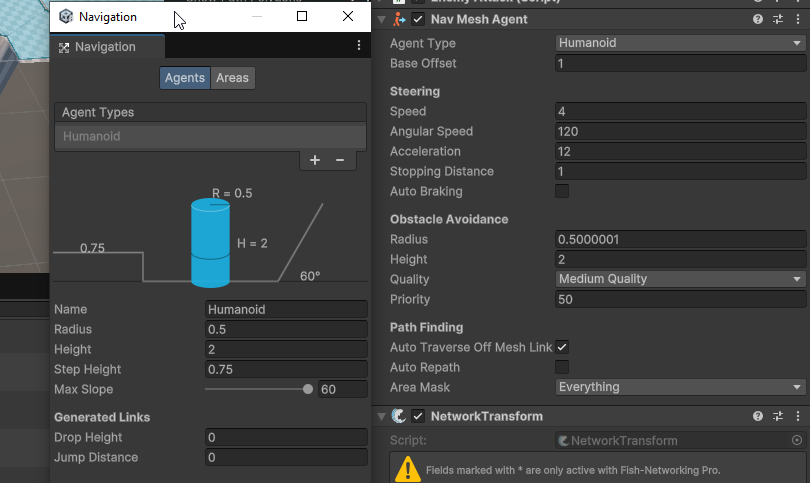
and make sure the humanoid settings are correct
fading hedge
yeah turning up acceleration worked ty
fading hedge
does anyone know why the enemy's movements are so jittery?
this is it's nav mesh agent and ai
using System.Collections.Generic;
using UnityEngine;
using UnityEngine.AI;

public class Basic_enemyAI : MonoBehaviour
{

    public NavMeshAgent agent;
    GameObject player;
    [SerializeField] LayerMask groundLayer, playerLayer;

    private void Start()
    {
        agent = GetComponent<NavMeshAgent>();
        player = GameObject.Find("Player");
    }
    void Update()
    {
        agent.SetDestination(player.transform.position);
    }
}

 loud granite
so im currently using unity's navmesh system, and I pretty much want to make a moving obstacle walkable and non walkable at certain times during runtime, problem is it wont even be walkable when i start the game, i already used stuff like navmesh modifiers but it just wont work
wicked badge
fading hedge
does anyone know why the enemy's movements are so jittery?
turn the rigid body to interpolate
fading hedge
wicked badge
turn the rigid body to interpolate
that worked ty
radiant palm
loud granite
so im currently using unity's navmesh system, and I pretty much want to make a m...
try navmesh surface component
loud granite
radiant palm
try navmesh surface component
On a moving obstacle?
radiant palm
loud granite
On a moving obstacle?
yup
look up how it works
but any navmesh-runtime stuff usually comes down to the navmesh surface
 hexed radish
how can I fix the enemy rotation?
radiant palm
hexed radish
how can I fix the enemy rotation?
it looks like its at a 90 degree offset
so it will most likely be an issue with the exported model
so id look at those settings
loud granite
radiant palm
but any navmesh-runtime stuff usually comes down to the navmesh surface
Ill give it a shot, btw is it also possible to make it only apply for some layers or navmesh agents
radiant palm
loud granite
Ill give it a shot, btw is it also possible to make it only apply for some layer...
Yes very easily possible to only apply to certain layers
Look into it
loud granite
radiant palm
yup
do i put the navmesh surface component on the obstacle, if so then what do i do since nothing works
this just seems impossible to solve at this point, Ive looked it up everywhere
radiant palm
loud granite
do i put the navmesh surface component on the obstacle, if so then what do i do ...
send a screenshot of the obstacle and its surroundings so I can know what you’re working with
What doesn’t work? There isnt a navmesh? The ai don’t use the navmesh?
loud granite
radiant palm
send a screenshot of the obstacle and its surroundings so I can know what you’re...
Btw the obstacle is the player
And im also working in 2d
radiant palm
loud granite
And im also working in 2d
oh both of these would have been very useful to know
i dont have experience in 2d sorry
loud granite
Its cool
 dim plover
Hey, a question. In my 2d game, I flip my characters when they move left, I mean the component x of movement direction is negative. The problem is that sometimes they are fluctuated, they are flipped rapidly especially when they move up/down, the component x of movement direction is around zero
I can add some conditions to mitigate flipping consecutively but is there any better way, does nav mesh ai have something for it?
lost plume
lost plume
All right, i didn't really know where to put this but i have a coded ai (a chasi...
Pulling this down again..
 vast sonnet
I have set stopping distance to my nav mesh agent
but even so the agent comes staright to me and stops
 valid mirage
Still Debug.Log turns false? How it can be false even SamplePosition is true? It find a place on a NavMesh but dont set the destination.
 molten sequoia
valid mirage
Still Debug.Log turns false? How it can be false even SamplePosition is true? It...
molten sequoia
valid mirage
Still Debug.Log turns false? How it can be false even SamplePosition is true? It...
Probably didn't calculate the path yet.
 trail lagoon
I am embarassed to ask this, I have been using Unity for six years and haven't messed with the Navigation stuff in unity that much. But what is that gray box outline thing on the floor and how do expand how large it is?

The agent won't move past it, it's like it's stuck in a box.
Oh also, it works in another scene with the exact same floor and the exact same agent and the exact same navmesh. It's only in this scene that it decides to not work.
 tardy junco
trail lagoon
I am embarassed to ask this, I have been using Unity for six years and haven't m...
tardy junco
trail lagoon
I am embarassed to ask this, I have been using Unity for six years and haven't m...
If you're referring to the rectangle area that looks darker, it's probably not related to navmesh. At least not directly. Did you try clicking it? Perhaps it's caused by a separate object? If the navmesh is baked for that object only, that would explain why the agent can only move inside of it.
trail lagoon
tardy junco
If you're referring to the rectangle area that looks darker, it's probably not r...
The Grey box only appeared when entering play mode. The way I managed to fix it was just moving the ai to a different point on the navmesh and it functioned normally. However, the weird gray box still appeared, but it was able to exit the box. When it did exit the box, the previous box would disappear and the new one would be in the area that the ai was in. It must've just been a weird glitch.
molten sequoia
trail lagoon
The Grey box only appeared when entering play mode. The way I managed to fix it ...
Probably just visualizing the part of a navmesh the agent is currently on.
alpine glacier
    public void SetDestination(Vector3 position)
    {
        agent.SetDestination(position);
}```What validator do you usually put into your setdestination logic? I have a problem... when you use this once inside an unwalkable area, the agent will try to settle to the nearest possible point it can. But if you keep using this method inside an unwalkable area per frame, the agent just keep standing still since it keeps solving paths. What should I check to avoid that behaviour?Also, can we limit the maximum amount of turns the agent will do to pathfind? Or limit the length of path?
tardy junco
alpine glacier
```cs
public void SetDestination(Vector3 position)
{
agent.SetD...
Maybe cache the last destination and compare against it before setting it again. maybe also consider not calling it every frame. Can also check the status of the current path.
tardy junco
alpine glacier
Also, can we limit the maximum amount of turns the agent will do to pathfind? Or...
You can't really affect that.
alpine glacier
lemme play with it more, thanks!
 ocean cobalt
I'm having an issue with some code to make an object "jump" across a NavMeshLink.

This works fine the first time the agent crosses the link, but if the agent tries to cross a second time, it freezes entirely
This is where the coroutine is called
 alpine glacier
Does unity default allow for 3D free flying agents? Or can we set them up to handle 3d free movements? Or at least possible?
molten sequoia
alpine glacier
Does unity default allow for 3D free flying agents? Or can we set them up to han...
Unity's navigation does not support 3D navigation in that form. You can always roll your own or get a third-party navigation solution.
 noble fog
@fiery pendant Off-topic to the channel.
 fiery pendant
noble fog
<@171677728926466049> Off-topic to the channel.
fiery pendant
noble fog
<@171677728926466049> Off-topic to the channel.
? this is the AI channel not? where should I ask this?
noble fog
fiery pendant
? this is the AI channel not? where should I ask this?
Please read the channel name. And it's not related in any way to Unity either.
alpine glacier
Is there a more proper way to make agent's speed vary depending on what they are stepping on? Or raycasting where they at the best approach?
radiant palm
alpine glacier
Is there a more proper way to make agent's speed vary depending on what they are...
Send raycast from feet down to floor -> assign the floor a tag or key identifier -> compare tag to see if should slow down or not
noble fog
alpine glacier
Is there a more proper way to make agent's speed vary depending on what they are...
alpine glacier
Didnt knew that actually slows them tho
Yea, they're not. This just controls the preference 
noble fog
It's up to you to use that information and apply to movement speed then
 vital bison
Hey! Is it possible to get the travel distance between the agent and transform?
I only find "remainingDistance" but that compares it with the current target. I want to compare the travel distance and then set the destination
 timid raven
vital bison
Hey! Is it possible to get the travel distance between the agent and transform?
...
timid raven
vital bison
Hey! Is it possible to get the travel distance between the agent and transform?
...
One solution is to call CalculatePath() https://docs.unity3d.com/ScriptReference/AI.NavMeshAgent.CalculatePath.html, calculate distances between corners of created path and add them together.
 covert creek
busy struggling with how to go about this but how could I have an NPC with a navmeshAgent be hit by a vehicle with a rigidbody
Trying to get this working with ragdolls
Tried adding a rigidbody with isKinematic but that brings the vehicle to a halt when the collision takes place while setting isKinematic to false
tardy junco
covert creek
busy struggling with how to go about this but how could I have an NPC with a nav...
A ragdoll and a navmesh agent are 2 separate systems that would fight for control over the object. Which is why you shouldn't have both active at the same time, but switch between them at the right timing.
 iron rain
Hi, is there a way to set a destination to an agent but not moving it without disabling the agent component? other than just setting the speed to 0
timid raven
iron rain
Hi, is there a way to set a destination to an agent but not moving it without di...
Temporarily set updatePosition and updateRotation of agent to false?
iron rain
timid raven
Temporarily set updatePosition and updateRotation of agent to false?
Just tried it, it doesn't move the object but it still updates the position where the agent is supposed to be, so it doesn't work. Nice try though
 tulip gazelle
UserWarning: torch.set_default_tensor_type() is deprecated as of PyTorch 2.1, please use torch.set_default_dtype() and torch.set_default_device() as alternatives. (Triggered internally at ..\torch\csrc\tensor\python_tensor.cpp:453.)
_C._set_default_tensor_type(t) what to do about it?
timid raven
iron rain
Just tried it, it doesn't move the object but it still updates the position wher...
Oh, yeah, it doesn't disable the agents internal simulation. My bad :0
 fathom arch
tulip gazelle
UserWarning: torch.set_default_tensor_type() is deprecated as of PyTorch 2.1, pl...
fathom arch
tulip gazelle
UserWarning: torch.set_default_tensor_type() is deprecated as of PyTorch 2.1, pl...
Did you read it? It tells you what to use instead
 keen sparrow
i tried to make A* pathfinding algorithm but I'm using 3D and its half working, it will go up the ramps about half way then it will just stop, I thought that including Y axis height would fix it but it didn't.
here's the code https://gdl.space/feyunazace.bash
and this is what is happening
fathom arch
keen sparrow
i tried to make A* pathfinding algorithm but I'm using 3D and its half working, ...
Not enough context/code to tell what is going on
Also it would help if you draw a debug line from the character to the current waypoint
And even use Handles.Label in OnDrawGizmos to draw some info (such as current costs) on the waypoints. Make sure to wrap it in #if UNITY_EDITOR though
outer bone
I have a question, how does the navmesh work internally? i would like to know how they make the navmesh conform to all the surfaces. is every point in the grid raycasted downwards? and every hit that is detected is a node?
I found a tutorial for a vehicle navigation system so that a vehicle can drive autonomously but it requires a more complex navigation system than i think could be achieved with the build in navmesh so that's mostly why i would like to know.
tardy junco
outer bone
I have a question, how does the navmesh work internally? i would like to know ho...
We don't know for sure. This is part of the internal implementation that unity doesn't reveal. It could be raycasts or combining the appropriate geometry and simplifying it in some way. You'll need access to the source code to tell for sure.
tardy junco
outer bone
I found a tutorial for a vehicle navigation system so that a vehicle can drive a...
The navmesh is pretty complex. You can pretty much do anything with it.
But there are alternatives, like A* navigation assets.
outer bone
Yeah, i mostly want to follow the tutorial which was made for unreal. They made their own A* i think. For vehicles a custom approach will be better i think since a car has to turn and reverse sometimes compared to a character that can just always rotate around it's own axis
tardy junco
outer bone
Yeah, i mostly want to follow the tutorial which was made for unreal. They made ...
I don't see why you couldn't implement that with a navmesh. You don't have to use the navmesh agent, you can navigate the navmesh however you want.
outer bone
I am not too certain if it really is completely adaptable to vehicles since they behave different than cars. like the turns. i can try though but i would just like to follow the tutorial i found for most of the logic.
tardy junco
outer bone
I am not too certain if it really is completely adaptable to vehicles since they...
Sure, you can do whatever you want. Just saying that it's probably possible with the navmesh as well.
fathom arch
outer bone
I have a question, how does the navmesh work internally? i would like to know ho...
IIRC it is based on Recast https://recastnav.com/ but I could be wrong
keen sparrow
fathom arch
Not enough context/code to tell what is going on
Oh yeah sorry, I didnt see your message my power went out 🥲
outer bone
fathom arch
IIRC it is based on Recast <https://recastnav.com/> but I could be wrong
Ah thanks, i will see if i can learn something from it
 stone bobcat
so idk if my issue is with the navmesh but the slime enemy in my game isn't moving but still tracks the player an plays the animation accordingly. Been trying to fix this since yesterday but to no avail, can someone please let me know the problem. I'll past the enemy inspector and the code below so you guys can check it out


Any help would be appreciated
tardy junco
That's not the correct channel. This one is about navigation package, not machine learning.
tardy junco
stone bobcat
so idk if my issue is with the navmesh but the slime enemy in my game isn't movi...
You'll need to record a video of what's happening, as we can't see the issue in the screenshot.
However, it's likely caused by you mixing the navmesh agent and character controller. These would fight over control of the object. Don't use both. At least not at the same time.
 crude moat
tardy junco
That's not the correct channel. This one is about navigation package, not machin...
crude moat
tardy junco
That's not the correct channel. This one is about navigation package, not machin...
can you have the channel description updated, then?
ask questions and discuss anything related to AI
tardy junco
I'm not a moderator, but the description is indeed confusing.
crude moat
<@&502884371011731486> ^
 rustic obsidian
Moderators can't change it. I'll ask the admins to. But it's also right next to the #1202574086115557446 channel, and has navigation in the name
crude moat
are there any channels for ML discussion?
tardy junco
#1202574086115557446 as vertx pointed out.
crude moat
so no chat 😦
rustic obsidian
Nothing stopping you from making a thread and chatting there as long as it's on-topic
 viral owl
Question, I have a NavMeshLink with Auto Traverse Off Mesh Link = false (and updatePosition = false), but sometimes (not always) the navmeshagent position automatically teleports to the other extreme of the link.
Why that happens? How can I fix that?
 sharp charm
Trying out the new unity 6 behavior graphs. It works well aside from one issue I'm having where my agents speed gets set to 0 at start
no idea why, it seems to be related to the graph since disabling it keeps the agent's speed correct
Aaaand that's another case of solving my own problem by asking about it. The graph is setting the speed to 0 because I didn't change a default value in the node
 fallow drift
does anyone know how to fix ml agents lag spikes, im doing the rollerball tutoral, and their is a ton of lag spikes
fallow drift
woooooooooow yall are so talkive and helpfull /s
tardy junco
fallow drift
woooooooooow yall are so talkive and helpfull /s
Everyone was sleeping. What do you want?
fallow drift
tardy junco
Everyone was sleeping. What do you want?
???? its was 12pm when i sent the first message
tardy junco
fallow drift
does anyone know how to fix ml agents lag spikes, im doing the rollerball tutora...
You can use the profiler to troubleshoot performance issues.
fallow drift
tardy junco
You can use the profiler to troubleshoot performance issues.
where is that?
tardy junco
fallow drift
???? its was 12pm when i sent the first message
It was 2 am here.
tardy junco
fallow drift
where is that?
It's a tool for investigating performance.
Google it.
alpine glacier
omg..... agent is timescale dependent... speeding up the time causes the agent to overshoot turning
molten sequoia
fallow drift
does anyone know how to fix ml agents lag spikes, im doing the rollerball tutora...
#1202574086115557446 for ML stuff. I recall a big spike from communication with the Python backend. I don't think there's much you can do about this.
fallow drift
molten sequoia
<#1202574086115557446> for ML stuff. I recall a big spike from communication wit...
bandwagoner
your a bit late
that issue was solved 8 hours ago
fallow drift
lol the mod doesn't have a big vocabulary, and doesnt know what bandwagoner means
keen sparrow
i think he knows what bandwagoner means, he's probably wondering and confused why you called him that in the first place since it makes no sense, given the context
chatgpt is an idiot
fallow drift
inded
molten sequoia
It was primarily to direct you and future discussions to the appropriate channel. I left the pointer in since I didn't see a message indicating that the issue was solved.
Don't post here if you can't behave and keep messages on topic.
fallow drift
ok
tardy junco
Lol, I didn't even notice it was about ML and not navigation. But yeah, the answer is still the same: use the profiler.
 fringe raft
Hi Folks, sorry for a possibly stupid question, but I've upgraded unity and I can't find the NavMeshSurface in the scene, but I do have a NavMesh being applied. I searched for t:NavMeshSurface, but it's not there. I'd like to rebake it, but I can't. Any idea what I could be doing wrong?
tardy junco
fringe raft
Hi Folks, sorry for a possibly stupid question, but I've upgraded unity and I ca...
Check the navmesh window. Perhaps you have it baked with the old API.
fringe raft
tardy junco
Check the navmesh window. Perhaps you have it baked with the old API.
Thanks - I think I've got it - rubber ducking always works :D. I deleted a navmesh in the assets then added a new NavMeshSurface to my scene
 vocal fiber
does anyone know why my navmesh on my terrain is doing this?


 dense sparrow
vocal fiber
does anyone know why my navmesh on my terrain is doing this?
dense sparrow
vocal fiber
does anyone know why my navmesh on my terrain is doing this?
It's a little complicated, gotta check a tutorial and set up your objects accordingly. Houses should be marked as unwalkable and the terrain as walkable
tardy junco
vocal fiber
does anyone know why my navmesh on my terrain is doing this?
Can you take a screenshot of the whole object(with the navmesh surface) inspector? Including it's transform.
vocal fiber
tardy junco
Can you take a screenshot of the whole object(with the navmesh surface) inspecto...
i kinda fixed it because i added the navmeshsurface on my monster and not the terrain but i think its not the good way because it still doesnt work
 tardy junco
vocal fiber
i kinda fixed it because i added the navmeshsurface on my monster and not the te...
tardy junco
vocal fiber
i kinda fixed it because i added the navmeshsurface on my monster and not the te...
That's definitely not a great idea. It should be on the root of the objects you want to compose the navmesh.
 rocky quest
Just saw this channel was a thing and was hoping to get some help on my rollaball tutorial.
vital bison
Hey! I have a enemy that I want to reposition whenever the player get caught, I reposition the enemy by simpley changing its transform.position to a random vector.
However the actual " navmesh agent" doesnt follow correctly if there is a wall inbetween the last and current position.
https://i.gyazo.com/584236737f9d669a2e6aa5b6bf9d6e6c.png as you can see the navmesh got stuck on the other side of the wall, how do I update/change agent position correctly?

SOLVED: The correct way to teleport a navmesh agent was to use NavMeshAgent.Warp
 spring magnet
Hey so for my game I have randomly generated terrain divided into chunks with nav mesh surfaces on each chunk of the terrain. The problem is that my AI agents can't go across each chunk since there is a small gap for each of the chunks, I tried adding a small local nav mesh surface to each enemy that bakes a small area around them as I thought this would allow for them to us that to traverse the gap but they still get stuck. I can't really add nav mesh links because of of the random terrain and each chunk would require 100s of links for each vertices. I'm really stuck and have no idea how to fix this. Any help is appreciated.
 pallid hazel
it's not possible to have a navmeshsurface scale along with the object it's attached to during runtime without rebaking each time is it? It already translates and rotates which is why I'm not sure if I'm doing something wrong
 granite spire
I have a map with a bunch of stairs and I'm using links but the ai isn't tracking them. How can I put it in his path?
alpine glacier
    private IEnumerator SolvePathAndAssign(Vector3 targposition)
    {
        CurrentDestination = targposition;

        NavMeshPath path = new NavMeshPath();
        agent.CalculatePath(targposition, path);

        SolvingPath = true;

        // how to check if the navemesh path is done?
        while (path.status != NavMeshPathStatus.PathComplete)
        {
            yield return null;
            // agent.CalculatePath(targposition, path);
        }
        SolvingPath = false;
        agent.SetPath(path);
        agent.isStopped = false;
}```I want it to only assign the path to agent when it got a path already solved
So that it doesnt have to stop and calculate the path
Actually I need an asyncronous method, what should I use?
hmm.. there's no async navmesh calculate path?
tardy junco
alpine glacier
```cs
private IEnumerator SolvePathAndAssign(Vector3 targposition)
{
...
Does this not work?
alpine glacier
tardy junco
Does this not work?
It can fail since CalculatePath is sync
or rather it isnt doing what it's intended
the while is only evaluated once since the path.status will never change at that point
tardy junco
ah, indeed. Setting the agent destination should be async though
alpine glacier
yea, but it doesnt do what I want, wehre it will try to keep walking while solving another path
so it doesnt abruptly stop while thinking a new path
tardy junco
I see.
alpine glacier
making an invisible agent solve the path in async, and then passing the path to the original agent? That seems doable, right?
and maybe chop the corners the the original agent doesnt need (the corners it already passed)
CalculatePathAsync when 
alpine glacier
if(Brain.unitController.AgentStatus == AgentStatus.Idle)
{
// Walk random
if( Brain.unitController.agent.velocity.sqrMagnitude < 0.1f && !Brain.unitController.agent.pathPending )// check if the agent is not pathfinding
{
Debug.Log("xxxx");
Brain.unitController.WalkTowards(Brain.transform.position + Random.insideUnitSphere * 4); // todo: add roam data
}
}``` another q 
When time scale is fast, the agents barely move, no clue why tho muted vale
any idea why this navmeshagent walks on the terrain but clips through the bridge?

 molten galleon
muted vale
any idea why this navmeshagent walks on the terrain but clips through the bridge...
molten galleon
muted vale
any idea why this navmeshagent walks on the terrain but clips through the bridge...
does the bridge have collision
muted vale
molten galleon
does the bridge have collision
Has a Box collider on the parent I just tried, and a Mesh collider for the child


My player can stand on it
 molten galleon
muted vale
My player can stand on it
molten galleon
muted vale
My player can stand on it
do you have a charactercontroller or something on your nav mesh agent? can you show
muted vale
molten galleon
do you have a charactercontroller or something on your nav mesh agent? can you s...
 molten galleon
muted vale
molten galleon
muted vale
oh it has a rigidbody. nav mesh agents shouldnt have that
muted vale
molten galleon
oh it has a rigidbody. nav mesh agents shouldnt have that
But if i but a long cube in the water next to the bridge he will walk over that fine, he has a kinematic rigidbody to push me out of the way when walking and it works fine everywhere else
molten galleon
muted vale
But if i but a long cube in the water next to the bridge he will walk over that ...
if you remove the rigidbody he wont push you anymore?
muted vale
molten galleon
if you remove the rigidbody he wont push you anymore?
Yes, and if i use an invisible cube under the bridge he will navigate fine, so I guess I am just using that
 atomic socket
[SOLVED] Hi,
I am using NavMesh in Unity 2022 LTS in my 2d game and am getting a strange problem when trying to spawn NavMeshAgents on separated NavMesh areas.
In the below screenshot, I try to spawn agents in areas B and C but they will always just spawn in NavMesh area A. It’s as if the game does not realise the areas B and C exist. As soon as I build navmesh area “bridges” between the areas they spawn as expected in the correct location.
What could be the problem here? I use BuildNavMesh() to dynamically update my navmeshes when I change levels in game but the Scene view seems to show the meshes have been built correctly during runtime? Anyone else run into a similar issue?
 atomic socket
[SOLVED] Hi,
I am using NavMesh in Unity 2022 LTS in my 2d game and am getting ...
atomic socket
atomic socket
[SOLVED] Hi,
I am using NavMesh in Unity 2022 LTS in my 2d game and am getting ...
Turns out if you're using Netcode for GameObjects and your agent is a NetworkObject you need to delay the NetworkObject.Spawn() for one frame after Instantiating your prefab.
 plain pivot
I'm having issues generating jump links on my nav mesh, you can see drop links generate fine, but jump links don't seem to be generated properly


I'm not sure what I'm doing wrong
covert creek
Hi everyone, does anyone have tips for making performant crowds, how could we optimise what's happening with the Navmesh Agents or might it be better to make a custom solution?
tardy junco
covert creek
Hi everyone, does anyone have tips for making performant crowds, how could we op...
The main bottleneck with navmesh agents in this scenario would be from dynamic path/collision solving with other agents. If you disable them from colliding with each other, it should be quite a bit faster, but they would stack up on each other.
You can write your own solution for dynamic collision and make it as performant as you need it to be(potentially even running the calculation on a background thread or jobs).
covert creek
tardy junco
The main bottleneck with navmesh agents in this scenario would be from dynamic p...
That's another thing I haven't found anything on running navmeshagents on jobs/burst do you have any resources or documentation that could lead me down this path? We're using a sort of AI LOD system by enabling/disabling components based on distance and occlusion and once they're close enough I want to switch them to rigidbody movement following calculated paths
tardy junco
covert creek
That's another thing I haven't found anything on running navmeshagents on jobs/b...
You can't run navmesh agents in jobs. You can some custom math though.
covert creek
tardy junco
You can't run navmesh agents in jobs. You can some custom math though.
What about calculating paths or is all Navmesh agent logic unable to run in jobs
tardy junco
covert creek
What about calculating paths or is all Navmesh agent logic unable to run in jobs
I think it's all synchonous and runs on the main thread.
https://docs.unity3d.com/ScriptReference/AI.NavMeshAgent.CalculatePath.html
But as I mentioned earlier, the path calculation iself is probably not the bottleneck.
covert creek
Possibly, will need to learn how to properly read the profiler for that then
plain pivot
Is there a workaround to do this nowadays?
(Also I have no idea why they can't do vertical jumps, the technology exists for falls...)
viral owl
Any idea why could I get this exception?
Error Message: EXCEPTION_ACCESS_VIOLATION_READ

[ 00 ] block_remove
[ 01 ] tlsf_free
[ 02 ] public: virtual DynamicHeapAllocator::Deallocate(void *)
[ 03 ] private: DelayedPointerDeletionManager::CleanupPendingMainThreadPointersInternal(void)
[ 04 ] public: virtual DualThreadAllocator<class DynamicHeapAllocator>::Allocate(unsigned __int64,int)
[ 05 ] public: MemoryManager::Allocate(unsigned __int64,unsigned __int64,struct MemLabelId,enum AllocateOptions,char const *,int)
[ 06 ] private: NavMesh::ConnectIntLinks(struct NavMeshTile *)
[ 07 ] public: NavMesh::AddTile(unsigned char const *,int,enum NavMeshTileFlags,int,unsigned __int64 *)
[ 08 ] public: NavMeshCarving::ApplyCarveResults(void)
[ 09 ] public: NavMeshManager::UnloadData(int)
[ 10 ] public: CallbackArray1<int const>::Invoke(int)
[ 11 ] protected: RuntimeSceneManager::UnloadSceneInternal(class UnityScene *,enum UnloadSceneOptions)
[ 12 ] public: virtual UnloadSceneOperation::IntegrateMainThread(void)
[ 13 ] private: PreloadManager::UpdatePreloadingSingleStep(enum PreloadManager::UpdatePreloadingFlags,int)
[ 14 ] public: PreloadManager::UpdatePreloading(void)
[ 15 ] ExecutePlayerLoop(struct NativePlayerLoopSystem *)
[ 16 ] ExecutePlayerLoop(struct NativePlayerLoopSystem *)
[ 17 ] PlayerLoop(void)
[ 18 ] PerformMainLoop
[ 19 ] MainMessageLoop
[ 20 ] UnityMainImpl(struct HINSTANCE__ *,struct HINSTANCE__ *,wchar_t *,int)
[ 21 ] UnityMain
[ 22 ] __scrt_common_main_seh
[ 23 ] BaseThreadInitThunk
[ 24 ] RtlUserThreadStart
[ 25 ] UnhandledExceptionFilter
Seems like possibly an engine bug. Does that happen when you unload a scene with some navmesh related objects?
 normal sonnet
Idk if it's a common issue but, whenever my NavMesh agent moves toward an obstacle, he slows and jitter as if he was hesitating or something, If it isn't a common issue I can try sending some videos
 viral owl
tardy junco
Seems like possibly an engine bug. Does that happen when you unload a scene with...
viral owl
tardy junco
Seems like possibly an engine bug. Does that happen when you unload a scene with...
Sadly I couldn't contact with the person which have the error. But our game do use NavMesh so it's quite likely the scene contained it. The problem is that it doesn't happens "always" so it's super difficult to identify the source of the error.
 hearty granite
What would be the best approach for this? I have a building with certain areas that can't be traversed by agents that don't have a matching area mask, but if the mask does match I want it to act like the surface is just a single surface (so no offmeshlinks, as it creates unnecessary delays). I tried stacking multiple surfaces on top of each other, but that seems to break offmeshlinks. I made sure that every offmeshlink is only connected to a single surface, but agents don't seem to be able to swap between different surfaces. Does anyone have a solution?

 hearty granite
Found it: Had to use navmeshmodifiers
 deep socket
Hello, im making a zombie AI tha tcould climb other zombies and walls to get to the player, are there any better AI solutions to do that or is it douable with the present Default navigation solution?
keen sparrow
deep socket
Hello, im making a zombie AI tha tcould climb other zombies and walls to get to ...
you could use the built in navmesh with some logic to make it happen or you could make your own navmesh system using A* or Grid system using A* with some logic to make it happen
 tired viper
why is the navmesh so high up?


 cyan stump
Anyone have any tips on how to do A* pathfinding with NPC's so that they don't run into each other? I tried making the NPC's increase node cost but that messes up their own pathfinding. Should I try some steering or replusion or something for them instead? Anything else I can do? Maybe switch to navmesh?
tardy junco
cyan stump
Anyone have any tips on how to do A* pathfinding with NPC's so that they don't r...
Make the nodes that other npcs are standing on unwalkable
cyan stump
tardy junco
Make the nodes that other npcs are standing on unwalkable
So I was using a layermask and putting all the NPC's on the NPC layer and using that to adjust costs, is it not correct?
tardy junco
cyan stump
So I was using a layermask and putting all the NPC's on the NPC layer and using ...
Does it work?
cyan stump
tardy junco
Does it work?
no cause the NPC's own nodes are also getting increased costs leading to weird behavior
tardy junco
cyan stump
no cause the NPC's own nodes are also getting increased costs leading to weird b...
Then no
At least not the way you implemented it.
cyan stump
I guess I do not understand how to put in logic that makes them ignore their own nodes while not ignoring other NPC's nodes
tardy junco
Well, you'll need to look at the documentation.
cyan stump
Do you think Navmesh could be used instead?
tardy junco
cyan stump
Do you think Navmesh could be used instead?
Sure. Navmesh would work out of the box.
cyan stump
tardy junco
Well, you'll need to look at the documentation.
What documentation do you suggest looking at?
tardy junco
cyan stump
What documentation do you suggest looking at?
The documentation of whatever asset/plugin you're using.
cyan stump
tardy junco
The documentation of whatever asset/plugin you're using.
I did it myself lol
tardy junco
Aah. Well, then there's no one to ask other than yourself.
cyan stump
How would you do it?
tardy junco
How are you making walls unwalkable?
cyan stump
I set them to cost 100
and all the other nodes are cost 2
and NPC's and Player are cost 50
tardy junco
I see. So, it seems like you have a state shared among all agents.
cyan stump
Yes
tardy junco
You need to provide separate state for agents.
For example, each agent could hold an additive mask that you apply to the global map.
cyan stump
Would this need multiple node maps?
tardy junco
Or something like a list of other agent positions. When you calculate the path, check if an agent is in there and add extra cost.
tardy junco
cyan stump
Would this need multiple node maps?
Perhaps. Or a dictionary with a node position/Id as a key.
Many ways to go about it. I don't know your implementation, so it's hard to say what would be a good way.
cyan stump
tardy junco
Many ways to go about it. I don't know your implementation, so it's hard to say ...
I am using colliders to increase node costs, is this incorrect?
tardy junco
cyan stump
I am using colliders to increase node costs, is this incorrect?
Depends. I'm not sure how they fit in the whole implementation, so hard to answer that.
 jovial wharf
Guys and girls. I dont know anymore what to do. I am extremely frustrated. Me and my friend are trying to create an agent with ML-Agents which plays Tablesoccer/foosbal. We already set up an environment a long time ago.
But he have the problem, that after some time it keeps converging to the values -1 and 1. After some time it just stops doing anything and moves to the extremes.
The Input looks something like this then:
Translational:
1, 1, 1, -1
Rotational:
-1, 1, -1, -1
(4 Rods -> Translation + Rotation)
It makes no sense, that it learn this. It gets heavily punished for that exact behaviour. Thats also why our agent start with Rewards between -3 and 3 because its acting randomly, but in the end when it stops moving the rewards drop to -200 and below.
There is so insentive for the agent to do that. But yet it does that. Is there someone who has ideas on what it going on it would be hugely helpful. We already put 100s of hours into this project because it is for university and are on the edge of going insane.
Please, does someone have an idea on how to fix it?
Observations:
Positions, Rotations, Ballposition, Ballspeed, Rotation/Translationspeed. Everything is normed between -1 and 1 and correctly mirrored for each team.
Rewards:
Small Reward for shooting, even smaller penalte for shooting into the wrong direction, Reward for Goal, Penalty for Goal from Enemy, Small existential penalte, High Penalty for going into extremes (-1 and 1).
Actions:
Translation and Rotation between -120 and 120 degress for the rods

 spring bridge
How do you detect Cover points for AI in a shooter game?
Dynamically - not baked in.
From my understanding there's only two ways - #1 using nav mesh and every point the nav mesh ends becomes a cover point.
#2 using objects that are part of a particular layer, and using the intersection of that object with the nav mesh to create a cover point
However - this would mean any wall/surface becomes a cover point which is inaccurate/unrealistic. A cover point is an edge from which you can conceal/cover and fire back from if needed.
So I made a script that detects the edges of objects of 'Cover Layer' which includes walls and obstacles, and it detects the height to determine if it is tall enough to conceal the enemy and also short enough to be fired from above - leaning over the cover.
If the edge of the object is an open edge, meaning it does not intersect or touch another object of the cover layer nearby, then its a proper cover point. If it does touch or intersect with another object, such as the corner of a room being made up of two walls intersecting/touching, then it becomes a 'corner' point instead of a cover point.
But my script is just not optimized still and makes mistakes, its about 80% effective. Has anyone solved this already?
 eager verge
spring bridge
How do you detect Cover points for AI in a shooter game?
Dynamically - not baked...
eager verge
spring bridge
How do you detect Cover points for AI in a shooter game?
Dynamically - not baked...
8 years ago, i would have just raycasted at points along the mesh.
https://discussions.unity.com/t/check-if-a-collider-is-visible-from-a-position/635767
But these days I'd probably use the gpu to see if it's occluded (suggested in the final example)
uncut pagoda
How do I make navmesh avoid trees and objects place in terrain. Currently, it just bakes through them and my ai are walking through trees. Using Unity 6 URP
 pastel epoch
anyone knows how to stop the navmeshagent to stop repathing once it reached its destination?
auto repath is off i just set the path with agent.SetPath(path);
once it reached the destionation it shouldnt repath to it once i move it
i tried using NavMeshPathStatus.PathComplete but that is always true
the only solution i found is
if (agent.hasPath && agent.remainingDistance <= agent.stoppingDistance)
{
    agent.ResetPath();
    Debug.Log("ResetPath");
}
 tulip gull
Anyone know how to make an object carve into one nav mesh and not carve into another nav mesh?
fallow drift
can someone help me i dont know why ml agents if doing this
tardy junco
pastel epoch
anyone knows how to stop the navmeshagent to stop repathing once it reached its ...
That could mean that the agent never reached it's destination. What settings do you have it configured with?
tardy junco
fallow drift
can someone help me i dont know why ml agents if doing this
Ml agents questions go to #1202574086115557446
This channel is only for Navmesh and everything related to it.
pastel epoch
tardy junco
That could mean that the agent never reached it's destination. What settings do ...
idk why NavMeshPathStatus.PathComplete would be always true tho
tardy junco
pastel epoch
idk why NavMeshPathStatus.PathComplete would be always true tho
Path status is in regards to calculating the path, not following it.
tardy junco
pastel epoch
https://i.imgur.com/PNlcJsT.png
Stopping distance is set to 1, so I guess that's not what I guessed originally.
fallow drift
tardy junco
Ml agents questions go to <#1202574086115557446>
This channel is only for Navme...
No its for all, oh sh!t they changed it this used to be called ai-chat, CURSE YOU MODS!
pastel epoch
tardy junco
Stopping distance is set to 1, so I guess that's not what I guessed originally.
that was my first guess aswell
tardy junco
pastel epoch
that was my first guess aswell
Does this happen if you set destination instead of a path?
pastel epoch
Yep both have the same behavior
tardy junco
pastel epoch
Yep both have the same behavior
Weird. I don't remember such behavior. Is that unity 6?
pastel epoch
yep unity 6 but i didnt see anything in docs related to this or any change in notes
might have to dig deeper
 half pagoda
Satisfaction. Not perfect, but some good progress at least. 

 dark river
    [SerializeField] private NavMeshSurface navigationSurface;

    public void UpdateNavigationMesh()
    {
        try
        {
            navigationSurface.BuildNavMesh();
        }
        catch (Exception ex)
        {
            Debug.Log(ex.Message);
        }
}``` when i do something like this the editor just freeze and sets the cpu usage to %100 but when i click bake on the editor it takes less than a second to complete what do i do wrong?also im sure that i call UpdateNavigationMesh once so not like every frame
tardy junco
dark river
```
[SerializeField] private NavMeshSurface navigationSurface;
public v...
Try breaking with a debugger when it freezes.
 fluid leaf
What is the right way to use ai navigation system? Is it through attaching monobehavior scripts in navmesh agents, or using animators state machine or should i use the behaviour tree package that unity provides?
Which is the best (easy and robust) way for creating ai NPCs in unity
 long wave
Not sure if I should ask here, but I'm trying to use A* pathfinding https://arongranberg.com/astar/
Can I somehow use it to let AI move on like a small city with exterior area and also buildings that you can enter and have multiple floors?
molten sequoia
long wave
Not sure if I should ask here, but I'm trying to use A* pathfinding <https://aro...
Both Unity Navigation and A* Project should be able to generate navmeshes and navigate them out of the box for that use case. Are you facing a specific problem?
 neon swift
Hello, In order to make ml with ml agent on this rover, I imported the urdf model using URDF importer plugin but I have a problem with a joint which as you can see on the screen, it goes through the place it's supposed to rotate, I don't have enough unity skills to fix it handily, if someone has an idea, thank you 🙂
 crude moat
I'm working with NavMesh for the first time, and I'm supplying the fields for my Navmesh Agent. Some of the properties pertain to the speed, acceleration, etc. of my agent, but these values aren't constant for my game's agents. For example, the agent has a slower top speed when backpedaling (running away from looking direction) than when walking forwards, as one example. What are the implications of these values? I'm thinking to just supply some approximate constant values for now - documentation ref
Ah, okay, I'm actually seeing that NavMeshAgent handles way more of the Navigation proces than I want because it has bearing on the physics of the GameObject it governs, which is not what I want. I found that, when the NavMeshAgent was active on a GameObject and I tried to punch it off of the map, the... well honestly, I don't really know what happened, because the object's model stayed on the stage, but the HPBar above the player fell off the stage. I don't know why the coordinates differed, but it isn't what I wanted. So, I think I'll just have the GameObject handle its path by calling methods from the NavMesh directly.
crude moat
Is there any way that I can make a NavMesh surface's cost a property of the surface itself rather than the agent? As related to my previous message, I can't use NavMeshAgents for my implementation because it impacts the GameObject's physics, but I do want to take advantage of cost decisions in the NavMesh.CalculatePath operation
 heavy vessel
working on ML-Agents Hummingbirds tutorial. These errors came, but I don't think they should exist

the reason I don't think they should exist is cause i was really frustrated by following the tutorial and it still giving errors so I copy and pasted the source code
and it still gave errors, the ones I put above
only happens when it says "public override void" like here

so I tried removing the "override" from it, and then there were no more errors. But then when I saw my scene there was nothing in it and I do not know why
Help would be extremely appreciated. I don't know how much people care for ML-Agents these days but this is for school so it's rather urgent
molten sequoia
@heavy vessel Move it to #1202574086115557446
 cinder current
Hey, folks. So right now we are trying to implement melee enemies and I’m struggling to figure out how to move the agent with root motion while attacking. What would be the go to approach for stopping the root motion putting the agent in a wall for example
 high ginkgo
!cs
 pulsar waspBOT
Join the C# Discord server, a programming server aimed at coders discussing everything related to C# (CSharp) and .NET. https://discord.com/invite/csharp
 worn torrent
Hello everyone
I need to know how to calculate a random point on my baked navmesh surface area
I need to send my enemy to a random point ON the baked navmesh area, I tried layers didn't work. Can anyone please help me with this
Unity Version 2022 LTS
 tardy junco
worn torrent
I need to send my enemy to a random point ON the baked navmesh area, I tried lay...
tardy junco
worn torrent
I need to send my enemy to a random point ON the baked navmesh area, I tried lay...
Calculate a random point in space in your desired way, then sample the navmesh for a closest point.
 thick vine
Is it possible to make a* not look like the object is following a grid? Like not move through the centers of each grid space?
 late pulsar
How can I connect this? Can't find any solutions (Not that experienced).
 worn torrent
tardy junco
Calculate a random point in space in your desired way, then sample the navmesh f...
worn torrent
tardy junco
Calculate a random point in space in your desired way, then sample the navmesh f...
I calculate a random point using random.range method and putting some maxRange flaot value.
But what would be the code for checking the closest point in navmesh ?
tardy junco
worn torrent
I calculate a random point using random.range method and putting some maxRange f...
You should check the docs. I don't remember the exact name. Something in the Navmesh class.
 tacit dawn
when i bake the navmeshsurface, i get this area that's not covered. I have 3 meshes here....number2 the ramp, number 3 and number 1 horizontal boxes....Any ideas?

 neon patio
Any solutions to NavMesh for 2D I found one called NavMeshPlus. Is that one that people recommend/use or does Unity 6 have a secret Unity Package I don't know about)
 cold juniper
how can i do the navigation bake thing on a more complex object like this?

 cold juniper
how can i do the navigation bake thing on a more complex object like this?
cold juniper
cold juniper
how can i do the navigation bake thing on a more complex object like this?
nevermind i messed with some settings and fixed it
 south bough
why navmesh bake is not visible? can someone help

 radiant palm
south bough
why navmesh bake is not visible? can someone help
radiant palm
south bough
why navmesh bake is not visible? can someone help
you need to enable gizmos via the little wire circle icon
use the internet for additional guidance
heavy vessel
i hear ML Agents is kinda dead
so what would I use now if i wanted to develop an AI thing in unity
 severe fable
heavy vessel
i hear ML Agents is kinda dead
severe fable
heavy vessel
i hear ML Agents is kinda dead
What's dead about it
Both the package an SDK are being actively updated
heavy vessel
ok
however there arent many new tutorials
anyone know where i could find those or change them to work with the new versions of unity
 crisp jackal
Apologies for the long video, if you don't want to watch it here's a brief explanation
I've extracted the tree collides from my terrain and gave them all their own gameobjects temporarily. And now i'm trying to bake the NavMesh data so it accounts for the trees as collidables so I can then just delete the gameobjects and potentially save on resources, instead of having not only all of the trees actual colliders but ALSO objects for every single one of those trees that have NavMeshCollider attachments.
I'm not sure WHY, but when I bake the terrain, it sees my player and my monster as a collidable and draw the available walkable space around them, so I just gave them their own layers and excluded those layers from the baking process.
But no one what I try, I can't get the bake to account for the trees game objects I've created.
Again attaching NavMeshObstacles WORKS, like the monster that uses a NavMeshAgent will avoid the gameobjects, but baking the data doesn't account for the obstacles so I HAVE to keep the like 500 tree game objects.
molten sequoia
#1202574086115557446 for ML questions
 gilded comet
hello, soo, idk what happen but my NavMesh agent sometimes shaking in random occasion
 atomic temple
hello i need help im using astar algorithm to path find the shortest path and on that path i have to move a car from start to end and back to start while returning to start i face a problem of the car stopping just before the start can any one help me
{
// Ensure there is a path and the agent is set to move
if (ConnectionArray.Count == 0 || !agentMove) return;
// Get the current target position
currentTargetPos = ConnectionArray[currentTarget].ToNode.transform.position;
LocatioOfNextNode = currentTargetPos.ToString();
// Move the car towards the current target position
Vector3 direction = (currentTargetPos - transform.position).normalized;
transform.position += direction * currentSpeed * Time.deltaTime;
// Rotate the car smoothly to face the direction of movement
Quaternion targetRotation = Quaternion.LookRotation(direction);
transform.rotation = Quaternion.Slerp(transform.rotation, targetRotation, rotationSpeed * Time.deltaTime);
// Debug.Log("currentTargetPos : "+currentTargetPos);
// Debug.Log("Direction :"+ direction);
// Debug.Log("currentTrget : "+currentTarget);
if (Vector3.Distance(transform.position, currentTargetPos) < 0.5f)
{
currentTarget += moveDirection;
Debug.Log("CurrentTarget : " + currentTarget);
Debug.Log("ConnectionCount : " + ConnectionArray.Count);
if (currentTarget == ConnectionArray.Count)
{
Reached = "Location reached ! Returning To start";
}
// if (ConnectionArray.Count <= currentTarget)
// {
// moveDirection = -1; // Reverse
// currentTarget = ConnectionArray.Count; // Set to last index
// Debug.Log("CurrentTarget : "+currentTarget);
// Debug.Log("ConnectionCount : "+ConnectionArray.Count);
// if (currentTarget <=-1)
// {
// Reached = "Reached start!";
// agentMove = false;
// }
// }
}
}``` raven rapids
gilded comet
hello, soo, idk what happen but my NavMesh agent sometimes shaking in random occ...
raven rapids
gilded comet
hello, soo, idk what happen but my NavMesh agent sometimes shaking in random occ...
I wonder if their destination is being rapidly changed
Select one of the objects with a NavMeshAgent on it. You should be able to see a gizmo in the scene view that shows where it's trying to go -- it's the circled crosshair in this screenshot (not the other blue lines)
 fluid leaf
Are we supposed to use animation controller and nav mesh agent together?
tardy junco
fluid leaf
Are we supposed to use animation controller and nav mesh agent together?
Depends. Generally you want to avoid using 2 systems that both try to move an object unless you control when each of them does that. Animations(and animation controller by extent) don't normally move the object they belong too, they usually move the bones in the rig that is usually a child of the object with the animator. However, if you have animations with root motion and the animator has root motion enabled, it would try to move the root object(the one that the animator is attached to), at which point it might fight for control with other systems, like navigation.
fluid leaf
tardy junco
Depends. Generally you want to avoid using 2 systems that both try to move an ob...
Isnt animation system based on state machine which is also used to create ai s?
tardy junco
fluid leaf
Isnt animation system based on state machine which is also used to create ai s?
finite state machine is just a design pattern in software engineering. It has a many uses across different fields.
fluid leaf
Oh ok
tardy junco
Which has nothing to do with what you can and can not use together
fluid leaf
What was the intended use of add behaviour in animation states of unity
tardy junco
It's to add a custom behavior(code) to the states.
crisp jackal
 worldly lance
is it ok to add multiple navmesh surfaces to a terrain? it feels really cost effective.
doing this in order to have 2 agents on 1 surface.
does it bake the surface twice or only once but for both agents?
raven rapids
Nothing wrong with it.
You only need one surface per kind of agent, though
you don't need 30 surfaces to support 30 identical NPCs
worldly lance
you mean so if I have 30 NPCs I will have 1 surface, and 30 navmesh surface components?
worldly lance
raven rapids
Nothing wrong with it.
that's awesome, thanks
raven rapids
worldly lance
you mean so if I have 30 NPCs I will have 1 surface, and 30 navmesh surface comp...
No. You will have one NavMeshSurface.
a NavMeshSurface produces a navigation mesh, and then many NavMeshAgents can use that mesh
worldly lance
raven rapids
No. You will have **one** NavMeshSurface.
so how do you set a surface to allow multiple agents
on my terrain, the navmeshsurface can only allow one agent type.
so I got humanoid or monster, but it won't let me do both.
 raven rapids
If you have two kinds of agents, then you need two surfaces
raven rapids
raven rapids
you don't need 30 surfaces to support 30 identical NPCs
hence this
raven rapids
so yeah -- one surface per agent type!
I have three, since I use three kinds of agents
 alpine glacier
Hi. If I ran out of memory exception during baking navmeshes for many large terrains, Is it because their navmeshes take this much memory, or is it the baking process thats specifically memory expensive?
raven rapids
What settings do you have on the NavMeshSurface components?
I wonder if the "Render Meshes" option is more expensive than "Physics Colliders"
tardy junco
alpine glacier
Hi. If I ran out of memory exception during baking navmeshes for many large terr...
There would definitely be more memory consumed during the baking compared to the runtime, so the latter is definitely true, but the former is potentially true as well.
deep socket
void Destination(Vector3 destination)
{
    NavMeshPath path = new NavMeshPath();
    nm.CalculatePath(destination, path);
    nm.path = path;
} ```this doesnt calculate off mesh links?try adding a little pause inbetween creating the new navmeshpash and the calculating the path, as it may be your calling on the path before it’s been created
radiant palm
radiant palm
try adding a little pause inbetween creating the new navmeshpash and the calcula...
a little pause i.e yield return new waitforseconds(0.1f) or something
raven rapids
I had a problem once where an agent refused to move at all. I was telling it to go somewhere unreachable every frame, and there wasn't enough time for it to actually finish calculating the "best effort" path
Note that this was different from what you're doing -- you're calling CalculatePath directly and then giving that path to the agent
I'm pretty sure CalculatePath is synchronous.
 smoky pivot
Hey guys , so I worked on this ar indoor navigation project , where you can have a single starting point and multiple target points . Thing is I want those target points also to be the starting point. For example , lets say I navigate to the LAB , now with LAB as the starting point , I need to navigate to all other targets. How do I do this?
 tardy junco
smoky pivot
Hey guys , so I worked on this ar indoor navigation project , where you can have...
tardy junco
smoky pivot
Hey guys , so I worked on this ar indoor navigation project , where you can have...
Code it. Have a list/queue of target positions and iterate to the next target position when you reach the current destination. This has nothing to do with navigation. Just simple logic code.
smoky pivot
tardy junco
Code it. Have a list/queue of target positions and iterate to the next target po...
Thanks . Btw I worked on another project too , and initially it worked fine with the line rendering part but then when I changed the starting position , I could not render the line , why is that?
tardy junco
smoky pivot
Thanks . Btw I worked on another project too , and initially it worked fine with...
No clue. Hard to say anything without seeing the code and potentially debugging it.
smoky pivot
tardy junco
No clue. Hard to say anything without seeing the code and potentially debugging ...
using System.Collections;
using System.Collections.Generic;
using UnityEngine;
using UnityEngine.AI;
public class setNavigationTarget : MonoBehaviour
{
[SerializeField]
private Camera topDownCamera;
[SerializeField]
private GameObject navTargetObject;
private NavMeshPath path; // current calculated path
private LineRenderer line; // line renderer to display path
private bool lineToggle = false;

private void Start()
{
    path = new NavMeshPath();
    line = transform.GetComponent<LineRenderer>();
}

private void Update()
{
    if ((Input.touchCount > 0) && (Input.GetTouch(0).phase == TouchPhase.Began))
    {
        lineToggle = !lineToggle;
    }

    if (lineToggle)
    {
        NavMesh.CalculatePath(transform.position, navTargetObject.transform.position, NavMesh.AllAreas, path);
        line.positionCount = path.corners.Length;
        line.SetPositions(path.corners);
        line.enabled = true;
    }
}
}
tardy junco
!code
pulsar waspBOT

Posting code
📃 Large Code Blocks
Use links to services like:
https://gdl.space/, https://paste.ofcode.org/, https://hatebin.com/, https://paste.myst.rs/, https://hastebin.com/
📃 Inline Code
Surround code with three backquotes. Not quotation marks.
To format as C#, add cs to the first line:
```cs
// Your code here
```
Add a comment with a line number if there is an error message.
smoky pivot
using System.Collections;
using System.Collections.Generic;
using UnityEngine;
using UnityEngine.AI;

public class setNavigationTarget : MonoBehaviour
{
    [SerializeField]
    private Camera topDownCamera;
    [SerializeField]
    private GameObject navTargetObject;

    private NavMeshPath path; // current calculated path
    private LineRenderer line; // line renderer to display path
    private bool lineToggle = false;

    private void Start()
    {
        path = new NavMeshPath();
        line = transform.GetComponent<LineRenderer>();
    }

    private void Update()
    {
        if ((Input.touchCount > 0) && (Input.GetTouch(0).phase == TouchPhase.Began))
        {
            lineToggle = !lineToggle;
        }

        if (lineToggle)
        {
            NavMesh.CalculatePath(transform.position, navTargetObject.transform.position, NavMesh.AllAreas, path);
            line.positionCount = path.corners.Length;
            line.SetPositions(path.corners);
            line.enabled = true;
        }
    }
}
A bit busy now. Will have a look later
smoky pivot
Oh sure
tardy junco
smoky pivot
```cs
using System.Collections;
using System.Collections.Generic;
using UnityEng...
Assuming there is a path between these points(transform.position and navTargetObject.transform.position), the line renderer should render it. Make sure you check if there is a path and that it's complete. Might need to actually sample the navmesh for a closest point. The navmesh can only find path between points directly on the navmesh. And transform.position of arbitrary objects are not guaranteed to be on it.
fallow drift
should i feed the ai euler angles or rotation? this is for ml agents btw
also i dont care that this is called ai-navigation, this channel used to be called ai-chat, and i will jump of a bridge before i use the forum ai-tools channel
fallow drift
nvm chatgpt helped me
unlike yall
(na the mods gona kill me, getting banned speedrun be like)
tardy junco
fallow drift
also i dont care that this is called ai-navigation, this channel used to be call...
It was missnamed before. This channel was always about the navmesh navigation system.
fallow drift
we NEED a ml-agents channel, ai-tools sucks, because its a forum channel
jaunty raft
fallow drift
we **NEED** a ml-agents channel, ai-tools **sucks**, because its a forum channel
There’s the hint: don’t talk about it 🙃
fallow drift
jaunty raft
There’s the hint: don’t talk about it 🙃
ya but this is important to me.
tardy junco
fallow drift
we **NEED** a ml-agents channel, ai-tools **sucks**, because its a forum channel
What's the problem with a forum channel?
I think it's actually pretty good, as the issues stay in the field of visibility for longer and don't interfere with each other.
The lack of answers is due to the nature of questions being very niche or not providing enough info. And not many people in this community dealing with the topic. Even if you were to ask here, the results would be the same.
fallow drift
...fair
 lost quarry
Hello i am trying to implement steering logic for a vehicle and i am running into a problem (pun not intended)
Basically its this, it detects an obstacle, tries to u turn, but because of how constrained steering is, it ends up running into it anyway, when in reality it would have to back up
Any ideas?
 jaunty raft
lost quarry
Hello i am trying to implement steering logic for a vehicle and i am running int...
jaunty raft
lost quarry
Hello i am trying to implement steering logic for a vehicle and i am running int...
Can only be solved by detecting the situation and executing a pre planned 3-point turn. You could maybe just do the initial reverse then retry the forward solution, rinse and repeat.
This will lead to edge cases where you have to accept a solution with the agent clipping or potentially leaving your agent stuck. In general, agents with a steering constraint and forward/backward motion capabilities are an unsolved navigation planning problem. It can be solved locally but not in combination with pathfinding. Your only real option is to avoid the problem. Which means only allowing the agent to be in states that can be solved either by forward steering or with preplanned 2/3-point turns. This is easy when there is always enough room, in the immediate vicinity of the obstacle, to execute the maneuver.
lost quarry
jaunty raft
Can only be solved by detecting the situation and executing a pre planned 3-poin...
i ended up doing the reverse rinse and repeat, but curious about other ideas still, its hard because i also want the agent to avoid other agents so i dont really think a pre planned 3 point would work in this situation
i wish there was more info on obstacle avoidance like that online but i guess it kinda is an unsolved problem :/
jaunty raft
lost quarry
i wish there was more info on obstacle avoidance like that online but i guess it...
yeah, thats why, and you've already reached the best you can do with that reverse and retry, especially if you want RVO avoidance in the mix
you can do some gymnastics with a local A* flood search bounded by distance to find a path for a reversing agent, and evaluate those paths for a locally optimal solution, this can produce relatively neat behaviour but can't solve the navigation problem entirely, as its basically a brute force approach that is untenable performance wise. And A* doesn't understand steering constraints anyway, so you also have to design the environment in a very constrained way.
raven rapids
i would wait for the player to look away and then let the car pivot in place 😛
lost quarry
If(collideWall)
Transform.position = (random)
jaunty raft
raven rapids
i would wait for the player to look away and then let the car pivot in place 😛
you are too AAA
raven rapids
jaunty raft
you are too AAA
A little lie here, a little lie there
That’s all that games are, really!
 dusk stump
howdy peeps, cranky old dev getting back into unity for the fun of it; ive been spiking on capabilities to constrain my design ideas (cant do it easily? PUNT IT). ran into an issue with ai-navigation and wondering if im actually stuck and should punt it, or whether im just Doing A Dumb and can sidestep the issue easily. Here's the sitch --i got a start on a nice little procedural hex grid happening, with code-driven details like trees and grass and elevation and water level:

hexes themselves are "real" meshes with just variety in materials. But the outlines are a procedural mesh that uses fancy math from a yt video to get the outline seen.
trying to bake tnhe navmesh at runtime leads to curious errors not seen in editor:

my instinct is saying to sidestep ai-nav and just do hex-center to hex-center. only thing i was trying to get out of ai-nav was some more realistic-looking behavior of the little fighting creatures when they moved and attacked from hex to hex
just want to make sure theres not something stupid like a checkbox that says "make procedural meshes work with runtime baking" or something silly like that XD
i guess the other sidestep would be to replace the procedural hex outline (which currently raises a small lip around the painted terrain) with a basic full mesh shape, and have the painted terrain jut slightly above the grey "outline"
but even then based on the navmesh baking im seeing in editor, i wonder if its going to be a lot of lift to accomodate for what seems to be the navmesh's desire NOT to have figures walk up the side of the edge:

my (limited understanding) interpreted of that navmesh rendering is that the figure will gracefully walk up an invisible slope to get to the raised hex to the NNW of it
radiant palm
dusk stump
just want to make sure theres not something stupid like a checkbox that says "ma...
youre not gonna believe this…
for that error: go to the mesh import settings (so the hexagon) and there should be a box that says “Read/Write enabled”. Tick that box.
alpine glacier
https://docs.unity3d.com/ScriptReference/AI.NavMesh.SamplePosition.html why doesnt this work on unity6
 molten sequoia
alpine glacier
molten sequoia
alpine glacier
What's the error?
alpine glacier
molten sequoia
What's the error?


the AI package is uptodate (cant upgrade in package manager)
molten sequoia
alpine glacier
Is that the correct class? Do you have a conflicting class in the project?
alpine glacier
molten sequoia
Is that the correct class? Do you have a conflicting class in the project?
I cant seem to f12 it
find definition
but it's green
molten sequoia
Does it compile in Unity?
alpine glacier

oh.. it's conflicting with something else
but I dont have any class with that name
molten sequoia
IDE could also just be confused if Unity compiles it without errors.
molten sequoia
Just regenerating solution might also fix it
raven rapids
dusk stump
trying to bake tnhe navmesh at runtime leads to curious errors not seen in edito...
I'd consider using physics colliders instead of the actual mesh when baking. It would coincidentally avoid this issue -- but it'd also be a lot more accurate.
dusk stump
radiant palm
for that error: go to the mesh import settings (so the hexagon) and there should...
hot damn that did it! tyty
radiant palm
dusk stump
hot damn that did it! tyty
no worries 
 eternal mauve
I would like to inquire whether the ONNX file in the unity ML agent contains all types of learning or if it only retains the best results, Additionally, how can we filter it out if needed?
tardy junco
eternal mauve
I would like to inquire whether the ONNX file in the unity ML agent contains all...
It contains the model weights. No more, no less.
I'm not sure what you want to filter out of it.
eternal mauve
tardy junco
It contains the model weights. No more, no less.
Example : My Agent has 50 Episode From That if 10 Episode have some miss - training or say some issue during training agent learns that and performs that next Time When I Start New training From That Last Trained Model So How To Solve This Issue ?
tardy junco
Episodes is the amount of training that it went through. The more you train it, the better it would be at certain task. There's really no point in comparing the number of fails during training, especially disregarding the training stage at which these failures happened.
tardy junco
eternal mauve
Example : My Agent has 50 Episode From That if 10 Episode have some miss - trai...
And I'm not sure what issue you're talking about.
If after completing the training, the agent still fails at a task, you'll need to train it more, potentially changing the reward/punishment or even the input data that it receives.
eternal mauve
ok
 livid marsh
When I Inspect a script in the Unity Behavior Demo 's Behavior Graph, visual studio code opens to a blank script... hmm any ideas
 thick raptor
How would I go about implementing a flying navmesh system?
tardy junco
thick raptor
How would I go about implementing a flying navmesh system?
You don't. You can only move a long the surface of the mesh, basically only 2 degrees of freedom. It doesn't have volume. You can fake it by modifying the visuals height, but wouldn't work for avoiding obstacles in 3d space.
If you need actual navigation in 3d space, you'll need to implement your own system. Some kind of A* in 3d space.
thick raptor
tardy junco
You don't. You can only move a long the surface of the mesh, basically only 2 de...
I mean, I guess I could do a if raycast hit, move along y until it doesn't etc
Like those robot projects for children
Some simple stuff and see how it turns out
 haughty bridge
hey guys! how can i fix this error of the navmesh not going below the hips of the character?

solution: i just re-added the navmesh agent component to the asset and it did the hitbox for me
raven rapids
It looks like you had the agent attached to the hip bone
 toxic osprey
I have my navmesh surface properly set up and also the surface looks flat

however when I try to run
The zombie seem to get stuck randomly
running on its on spot
before manage to move again
without showing any error in the console
tardy junco
toxic osprey
before manage to move again
How did you debug so far and what did you discover?
toxic osprey
tardy junco
How did you debug so far and what did you discover?
I have completely no idea
I tried debugging
and the zombie is targetting the player
and when he tries to walk
he just keep walking on the same spot
for no reason
tardy junco
toxic osprey
he just keep walking on the same spot
Assuming you're judging whether it's walking or not by the animation - this is really not related to actual movement. Animations are handled by the animator and don't move the object. The navmesh agent does.
You should use debug logs, rays and gizmos to output and visualize important information.
For example logging the timing where you set the destination of the agent, drawing a ray towards the destination in the scene.
Logging the state of the agent and the found path.
toxic osprey
tardy junco
For example logging the timing where you set the destination of the agent, drawi...
I drew the ray towards destination and it is pointing towards the player
toxic osprey
tardy junco
Logging the state of the agent and the found path.
How do I do that?
tardy junco
toxic osprey
How do I do that?
Debug.Log.
And you can find the different properties of the agent and path in the docs.
Or just look through the suggestions in your ide.
 pure flare
toxic osprey
The zombie seem to get stuck randomly
pure flare
toxic osprey
The zombie seem to get stuck randomly
try also changing the values of the radius and the height
i have the same issue but the difference is that it was by dealing with heights
maybe can work
granite spire
I have a basic navmesh system placed on a creature for my game but he picks the shortest route which at times does not look the best like climbing stairs from the side. Is there a way to incentivise normalness into him? I heard that there is some cost things I can do. I'm using 2022.3.47f1 btw
granite spire
Also he sometimes clips underground how can I get him to relock to the ground
raven rapids
granite spire
I have a basic navmesh system placed on a creature for my game but he picks the ...
If you don't want an agent to climb up the side of a staircase, then you need to make that area unwalkable
granite spire
So that's just it no way to add cost incentives
jaunty raft
granite spire
So that's just it no way to add cost incentives
Depends on the implementation whether that’s possible, you can do whatever you want, that said, nav mesh (as a concept) is terrible at representing node weights in a useful way. Typically stairs and climbs would be represented as links between mesh islands with authored weights.
granite spire
I'm using the normal navmrsh and he can go throughout the place but as he chooses the shortest path he usually gets stuck or acts weird. I want a way to make him avoid certain areas but still make them accessible for him
 twin hound
is someone familiar with the A* pathfinding in 2D space?
I have a problem where my AI seems to be flying off to space, I know this is due to the layer mask. Is there some way I can "Invert" the layer mask so that blue areas turn red and vice versa
raw flint
twin hound
is someone familiar with the A* pathfinding in 2D space?
I have a problem where...
Well, inverting a bit mask in code is just a bitwise comlement in front: ~mask
twin hound
raw flint
Well, inverting a bit mask in code is just a bitwise comlement in front: `~mask`
sounds reasonable...now I can read through 500 lines of code xD
high ginkgo
<@&502880774467354641> can we have a seperate channel dedicated only for ML Agents?
noble fog
@high ginkgo Don't ping staff with suggestions, use #1161868835423526933
high ginkgo
noble fog
<@881931948107390996> Don't ping staff with suggestions, use <#11618688354235269...
oh ok, sorry about that
 placid vector
good day everyone so i want to make a nav mesh for the ai however as you can see in the picture the bake is rather not clean. what are the available solutions i can do
 raw flint
placid vector
good day everyone so i want to make a nav mesh for the ai however as you can see...
raw flint
placid vector
good day everyone so i want to make a nav mesh for the ai however as you can see...
I can't see, where exactly is it not clean? Navmesh is always a simplification of the original mesh (resolution can be chosen btw). I just don't see how that wouldn't be sufficient
placid vector
raw flint
I can't see, where exactly is it not clean? Navmesh is always a simplification o...
there are someparts that are not connected like this picture for examplem can my agent still be able to walk over that?
 placid vector
i also kept getting this error over and over, i have a 2 floor level room shown in the picture

 placid vector
also i seem to be having trouble trying to bake it around the sphere however the navmesh seems to ignore it completly
 radiant palm
placid vector
there are someparts that are not connected like this picture for examplem can my...
radiant palm
placid vector
there are someparts that are not connected like this picture for examplem can my...
if there are gaps inbetween paths, you’ll need to generate navmesh links too
radiant palm
placid vector
i also kept getting this error over and over, i have a 2 floor level room shown ...
the ai are not correctly spawning on the navmesh, there are multiple solutions to this online
radiant palm
placid vector
also i seem to be having trouble trying to bake it around the sphere however the...
not too sure for this one, try ensuring it’s on the correct layer / is included in your baked surfaces
 pale notch
Hey I need help on how to build a navmesh at runtime
I have the latest navigation ai package (1.1.5) yet i dont have an assembly reference to NavMeshSurface ?
I am on unity 2022.3.16f1
Even with the navmeshcomponents package on github it doesnt work
Like I cant put a navmeshsurface as a navmeshsurface variable
placid vector
radiant palm
the ai are not correctly spawning on the navmesh, there are multiple solutions t...
the ai seem to spawn normally and be able to walk up until the sphere which is its waypoint
raven rapids
pale notch
Even with the navmeshcomponents package on github it doesnt work
You certainly shouldn't be trying to use both that library and the proper AI Navigation package
Are you using assembly definitions in your project?
 left stream
Is there any interest in this project I have been working on. I was inspired by the old Autodesk Kynapse AI toolset (used in Medal of Honor, Watchdogs, and various other games). But I am getting burnt out, and thinking of open sourcing the project. It has a nice modular architecture and has pretty cool features like Shooter Avoidance, cover point generation, precomputed visibility between nodes, and node Cost Modifier Volumes. It is integrated with NavMesh as its base. It utilizes an octree for quick positional node lookups, and a simple A* implementation for pathfinding.
Its goal is to provide data for developers to create realistic AI decisions and environmental interactions.

The green orb is a starting location. The 2 pink orbs to the left are "shooters". Notice how the generated path is not the "shortest" path, but the shortest path with the most cover from the shooters. A user of the toolset could identify that some of these points have 50% visibility to shooters, and play a "crouch run" animation, making the movement along the path realistic.
Additional data generation can easily be added by implementing a custom "GenerationPhase" and adding it to the Generation Pipeline.

And each node has a map of visibility to other nodes. So the user can easily ask if one point has visibility to another without needing to perform a Raycast. Visibility is a percentage value, calculated by multiple raycast.

 sharp gulch
how come my agent completely stops when it reaches a destination? even with acceleration at like 5, it just abruptly stops. this is a big issue when chasing players in my multiplayer game because the player can just walk slowly and the agent just keeps stopping
granite spire
what;s the deceleration
sharp gulch
like 5
raven rapids
What's your stopping distance set to?
 sullen mango
Heya, been looking into AI assets like Emerald AI. Has anyone used it and can recommend it? Perhaps alternatives? #💻┃unity-talk message
Actually maybe better suited to ask in #💻┃unity-talk
 abstract nacelle
left stream
Is there any interest in this project I have been working on. I was inspired by ...
abstract nacelle
left stream
Is there any interest in this project I have been working on. I was inspired by ...
This is right up my alley. Would love to follow the project if there is a place to.
alpine glacier
Hey guys, I got some problems with the navigation
raw flint
alpine glacier
Hey guys, I got some problems with the navigation
Please do provide all the information required for someone to help
alpine glacier
So i can't fully make the Nav-Mesh, even if it has the Nav-Mesh Modifier it doesn't work and I want NPCs to go on Objects But it just can't bake it..
alpine glacier
alpine glacier
So i can't fully make the Nav-Mesh, even if it has the Nav-Mesh Modifier it does...
So does anyone have the answer for that problem?
tardy junco
alpine glacier
So does anyone have the answer for that problem?
Maybe if you provide a better explanation.
alpine glacier
tardy junco
Maybe if you provide a better explanation.
Like some parts are baked and some are not
tardy junco
alpine glacier
Like some parts are baked and some are not
You'll need to provide some more context. Like a screenshot or something as well as show your navmesh setup.


 tardy junco
alpine glacier
tardy junco
alpine glacier
So where exactly do you expect to have navmesh?
alpine glacier
On the tables and other stuff
tardy junco
alpine glacier
Did you try reducing the minimum region area? Or modifying the agent type settings?
tardy junco
Well, then try it. These areas are too small to generate a navmesh with these settings
alpine glacier
I swear it did work before but idk what happened to it
alpine glacier
tardy junco
Well, then try it. These areas are too small to generate a navmesh with these se...
And why not with small areas?
tardy junco
alpine glacier
And why not with small areas?
Because of the settings that I mentioned.
If it worked before, you either baked with different settings or something else changed. Are these object even included in the bake?
alpine glacier
Yes they are
tardy junco
Then it's the settings.
alpine glacier
Okay that's a bit odd..
raven rapids
alpine glacier
Notice how narrow the navmesh gets as it goes through the door
and how narrow it is in the hallway, really
alpine glacier
So the characters can navigate?
alpine glacier
raven rapids
Notice how narrow the navmesh gets as it goes through the door
Is there a other way to do it?
raven rapids
alpine glacier
Your agent radius is 0.7
that means that the agent is a cylinder with a diameter of 1.4 meters
that's huge!
they won't fit through a gap smaller than that
alpine glacier
raven rapids
Your agent radius is 0.7
Well what should I set it to? 0.2? Or 0.1?
 crimson oxide
Hi, I'm trying to figure out why my navmesh is being built too high above the level geometry. I read that this can be fixed by enabling Build Height Mesh, but for some reason it is appearing greyed out and inaccessible in my Inspector. Using Unity 2021.3.45f1
 alpine glacier
Honestly i want the old system of the navigation to come back
The window < AI < and then navigation window and that's all
 woven crown
left stream
Is there any interest in this project I have been working on. I was inspired by ...
woven crown
left stream
Is there any interest in this project I have been working on. I was inspired by ...
Sorry for the late reply, but I'd be really interested in checking that out. I've always been disappointed by the limitiations of the built in navigation system for considering stuff like exposure maps or calcualting flanking routes.
 zinc heart
👍


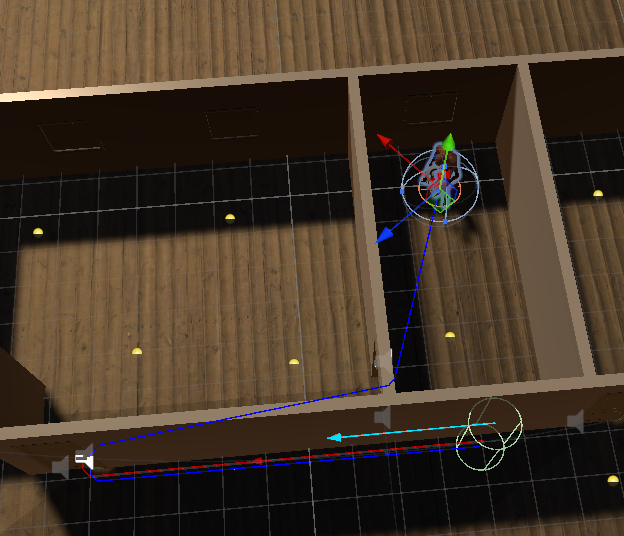

 raven rapids
What are your NavMeshSurface settings?
zinc heart
raven rapids
What are your NavMeshSurface settings?


fixed it by making the map larger
raven rapids
zinc heart
Consider using physics colliders instead of render meshes
 meager bison
Hi, during the training of an ML-Agent the "game" is running at a faster rate, is there a way to do that for inference aswell?
 frail folio
Ey, I have a few questions, beggining for it's true that the AI navigation package doesn't work by default with 2D? Cause I tried to use it with 2D and couldn't manage for the navmesh grid to show, but I am using a extension of that and it is not showing either, and I am wondering if it might be cause I don't have the toggle for it show turned on, but pretty sure I do so...
I don't know what I am doing wrong
frail folio
I followed this and I am not sure how right it is https://www.youtube.com/watch?v=HRX0pUSucW4&t=101s
GitHub project for 2D Navmesh pathfinding:
https://github.com/h8man/NavMeshPlus
If you want to know how to bake at runtime, you can read about it here:
https://github.com/h8man/NavMeshPlus/wiki/HOW-TO#bake-at-runtime
Join the discord server: https://discord.gg/EFrYczuAwc
 restive obsidian
Hey everyone,
I have an issue with my unity ML-Agents env while I am trying to use the gym wrapper. I
have compiled my env with the agent's behaviour type set to Default. When I am trying to execute my python code to train my custom model the code stucks on "UnityToGymWrapper(unity_env, allow_multiple_obs=False)". It opens the env and doesnt move to the following lines of code. Any suggestions? I import the relevant packages as follows :
from mlagents_envs.environment import UnityEnvironment
from gym_unity.envs import UnityToGymWrapper
The rest of the test code looks like this:
unity_env_path = "./UnityEnv/Test.exe"
unity_env = UnityEnvironment(file_name=unity_env_path, no_graphics=False)
gym_env = UnityToGymWrapper(unity_env, allow_multiple_obs=False)
obs = gym_env.reset()
for _ in range(1000):
action = gym_env.action_space.sample()
obs, reward, done, info = gym_env.step(action)
if done:
obs = gym_env.reset()
gym_env.close()
raven rapids
restive obsidian
Hey everyone,
I have an issue with my unity ML-Agents env while I am trying to...
You'll want to look at #1202574086115557446 .
restive obsidian
raven rapids
You'll want to look at <#1202574086115557446> .
Thank you, I'll take a look there!
 celest wing
Hey, I'm having some issues where my navmesh agent won't track the player once they get past a certain distance. The monster is navigating a large maze of trees so I don't know if this is a limitation of the navmesh system or if there's something I can do to fix it. I've attached an image of the map and my navmesh agent settings. Any help would be appreciated, thanks!

 raven rapids
celest wing
Hey, I'm having some issues where my navmesh agent won't track the player once t...
raven rapids
celest wing
Hey, I'm having some issues where my navmesh agent won't track the player once t...
It may be taking too long to calculate a path.
I had a problem once where I was setting an unreachable destination every frame.
It wound up taking longer than that to calculate the partial path, so the calculation never completed.
Try only setting the destination occasionally.
@cursive knoll continuing here:
The obstacle avoidance radius should have no effect on normal navigation.
It's unrelated to the actual agent radius used when baking a mesh
 cursive knoll
raven rapids
The obstacle avoidance radius should have no effect on normal navigation.
cursive knoll
raven rapids
The obstacle avoidance radius should have no effect on normal navigation.
so I set it higher
raven rapids
Interesting, so they simulate getting pushed around
cursive knoll
it completely ignores every attribute it has: speed, turning velocity, acceleration....
raven rapids
Darn
If obstacles aren't giving you good behavior, then I'd consider something more manual
cursive knoll
and no, this isnt carve
raven rapids
You mentioned using raycasts
 fossil orbit
Why not just temporary overide the destination when a bullet/arrow is withim certain radius?
cursive knoll
raven rapids
You mentioned using raycasts
yes, but I dont exactly know how I could go with that
raven rapids
Something like that, yeah
cursive knoll
fossil orbit
Why not just temporary overide the destination when a bullet/arrow is withim cer...
thats what im trying this time yes
raven rapids
I'd consider creating a "danger function"
cursive knoll
problem is when it's trying to chase the player
raven rapids
It would measure how bad a position is based on how long it'll take for a bullet to get there
cursive knoll
because I cant make it dodge and chase the player at the same time
raven rapids
You could then randomly sample positions and move to the safest one
in fact, this could be a fun application of gradient descent...
cursive knoll
oh speaking of sample positions
raven rapids
I wrote a Burst+Jobs enabled system to find the lowest (or highest) value point in a 2D space
where the value is created by summing up gaussian functions
so, imagine finding the lowest point in hilly terrain
That would probably be overkill for reasoning about dodigng a few bullets
cursive knoll
    Vector3 RandomWanderPoint()
    {
        Vector2 randomPoint = Random.insideUnitCircle * maxRadius;
        Vector3 newWanderPoint = new Vector3(randomPoint.x, 0f, randomPoint.y) + wanderCenter;
        NavMeshPath navMeshPath = new();
        if (!agent.CalculatePath(newWanderPoint, navMeshPath))
        {
            //Debug.Log("Wander point out of bounds. Recalculating...");
            return RandomWanderPoint();
        }
        if (Vector3.Distance(newWanderPoint, transform.position) <= minRadius)
        {
            //Debug.Log("Wander point too close. Recalculating...");
            return RandomWanderPoint();
        }
        else return newWanderPoint;
}```I wrote this whole thing for calculating random wander points
raven rapids
I'd just use SamplePosition to snap the point
cursive knoll
raven rapids
where the value is created by summing up gaussian functions
huh
cursive knoll
raven rapids
That would probably be overkill for reasoning about dodigng a few bullets
yeah....
raven rapids
cursive knoll
huh
I used it to decide where to place buildings in an RTS
resource nodes are good, existing buildings are bad
find the global maximum and slap a building there
cursive knoll
I mean, my idea right now would be to use a spherecast in front of every single projectile
raven rapids
I would do something like this:
cursive knoll
and if it collides with an enemy tank, tell that enemy tank to move somewhere
raven rapids
- Look for all bullets that are within 3 seconds of us
- Sample points along their trajectories for the next 3 seconds
- Pick random points and reject them if they're too close to any of those bullet-points
hm, but that could get really expensive
it feels a bit clunky
cursive knoll
raven rapids
it feels a bit clunky
why not just use spherecasts from projectiles?
I don't need it to be perfect AI
I just want it to kinda try
raven rapids
Good point
fossil orbit
You could do something simpler, like
- using sphere trigger to detect incoming bullet,
- store and sort bullet that enter the trigger
- remove bullet leaving trigger
- check bullet direction compare to position, and decide dodge direction from that.
cursive knoll
like if I manage to hit it with a ricochet projectile, thats fine
raven rapids
I'm wondering if you could stop them from driving into a projectile
since they'll strictly be avoiding getting hit while standing still
cursive knoll
I just want it to make an attempt at dodging projectiles coming straight towards them in a linear way
raven rapids
Actually, here's an idea
Every time the tank decides it needs to dodge, it puts its position in a list
these are now repulsors: when picking a point to escape to, it tries to move away from all of the repulsors
I like these "gravity" models. They're pretty simple to implement and can give good results
I remember using this for an RTS AI way back in high school
cursive knoll
wait... I only have enemy tanks on a layer, and I'm only spherecasting that layer.... why am I getting nulls?
 cursive knoll
raven rapids
I like these "gravity" models. They're pretty simple to implement and can give g...
cursive knoll
raven rapids
I like these "gravity" models. They're pretty simple to implement and can give g...
I don't really get what you mean
raven rapids
cursive knoll
I don't really get what you mean
[Serializable]
public struct Influence {
  public Vector3 position;
  public float score;
}

public Vector3 GetDesire(Vector3 position, List<Influence> influences) {
  Vector3 result = Vector3.zero;

  foreach (var influence in influences) {
    Vector3 delta = (influence.position - position);
    float factor = delta.sqrMagnitude;
    result += influence.score * delta.normalized / factor;
  }

  return result.normalized;
}
Something shaped like this!
It's just like gravity: the closer you are to something, the more it affects you
In this case, you would add a strong positive influence at the player's location, then add negative influences for the bullets
This will naturally steer the tank away from bullets
cursive knoll
raven rapids
This will naturally steer the tank away from bullets
how....exactly?
I get the part
on how it calculates positions
but how would I make it move to that position?
wouldnt I need to update the agent's destination every frame?
raven rapids
You would no longer be using the agent to directly control your position. It'd just tell you how it wants to move.
You would then mix this with the influence direction
Imagine the agent says "go right" and the influence says "go up"
maybe the tank should go right and up
cursive knoll
raven rapids
maybe the tank should go right and up
yes, but how
cursive knoll
but i need positions to move to, not directions to move in
raven rapids
an agent can tell you the velocity it desires
even if it is not updating your position and rotation
cursive knoll
im sorry, im having issues understanding this
raven rapids
Currently, you are letting the NavMeshAgent set your position.
cursive knoll
well, I let it change the velocity, yes
but its completely up to me where it's destination is
raven rapids
That's a given. You always tell it what the destination is.
I'm saying that the agent should not be directly controlling where the tank is
Setting updatePosition to false can be used to enable explicit control of the transform position via script. This allows you to use the agent's simulated position to drive another component, which in turn sets the transform position (eg. animation with root motion or physics).
You can set this to false, then read https://docs.unity3d.com/6000.0/Documentation/ScriptReference/AI.NavMeshAgent-desiredVelocity.html
cursive knoll
I was thinking of something like this:
Draw spherecasts from a projectile
If the spherecast hits an enemy tank, make it call a function (maybe tell the function the direction of the projectile) which makes it move out of the way temporarily
raven rapids
You could also just calculate a new destination, yes
cursive knoll
this would work for when they are in "wandering" mode
but problems occour when it needs to chase the player
raven rapids
You still might want to use the "influence" system to decide where to flee to
cursive knoll
I can't just make it go elsewhere
cursive knoll
raven rapids
You still might want to use the "influence" system to decide *where* to flee to
personally id just generate a random point
id just need to make sure somehow that the random point isnt inside the trajectory of the projectile
cursive knoll
raven rapids
> Setting updatePosition to false can be used to enable explicit control of the ...
this does look interesting
i just dont know how id use it
i think itd be extremely noticable when the tank switches from chasing to dodging
raven rapids
in my game, I have updatePosition set to false on my agents
I just use their desired velocity to tell the entity's locomotion system what to do
cursive knoll
raven rapids
in my game, I have updatePosition set to false on my agents
I dont really get it honestly
im trying to but its weird
raven rapids
When you turn off updatePosition, the agent's simulated position can move away from its transform's position
I just warp it back every frame
fossil orbit
cursive knoll
wouldnt that make for jittery movement?
I dont think it would, infact if you dont move the tank manually, it wont move at all. You just using the agent to get the velocity, which you can use to move the transform anyway you like
raven rapids
cursive knoll
wouldnt that make for jittery movement?
No, because the agent doesn't control anything
It just tells you where it wants to go
raven rapids
fossil orbit
I dont think it would, infact if you dont move the tank manually, it wont move a...
Precisely!
celest wing
raven rapids
It may be taking too long to calculate a path.
that fixed the issue, thanks!
cursive knoll
 cursive knoll
fossil orbit
I dont think it would, infact if you dont move the tank manually, it wont move a...
cursive knoll
fossil orbit
I dont think it would, infact if you dont move the tank manually, it wont move a...
ohh the velocity, I get it
cursive knoll
cursive knoll
i was thinking of something like this
where, whenever the tank gets hit by the spherecast the bullet is projecting, it tells the tank to move in a perpendicular way from it
it doesn't matter if the tank doesn't manage to move out of the way because, idk, a wall is in the way
call that the player outsmarting the AI
I just need it to make minimal effort at trying to dodge it
and I was thinking that maybe if its chasing the player, make it go in a 45 degree angle instead of a 90 degree one
so it still tries to move towards the player, and because it's chasing, its more likely to get hit
oh hey it kinda works! @raven rapids @fossil orbit
I can set the amount of time it should dodge for as well
at least it tries a little bit
i dont think i want more than that
cursive knoll
raven rapids
No, because the agent doesn't control anything
although I will certainly look into this on my main project
I want to use navmeshes there so I can make enemies move towards you
but I won't want to use the movement of the navmesh
I didn't know that you can turn it off while keeping the velocity
 magic stirrup
Anyone know a good way to add a cooldown after a sequence has been executed in Unitys new Behavior Graph. I have a ability that my enemy performs and want to add a cooldown of X seconds to it. It is apart of a Random node so I don't want it to run if it is selected until the cooldown has resetted.
 hardy cave
Hello guys, how do people work with Behavior pakage, Blackboards?
I cannot find any way to have a variable modified or added in a blackboard and in another script to recieve it, or to see the same blackboard modified. Isn't a blackboard suppose to be a block of data with global access?
radiant palm
hardy cave
Hello guys, how do people work with Behavior pakage, Blackboards?
I cannot find...
#1202574086115557446 is probably the more knowledgeable channel
jaunty raft
hardy cave
Hello guys, how do people work with Behavior pakage, Blackboards?
I cannot find...
A blackboard (as a concept) is supposed to be the limited view of the world that a given ai-behavior can ‘see’ and access. Whether it’s global or shared depends on the implementation/configuration of the blackboard. In unity, if it’s a SO you should be able to reference it in other behaviors, if it’s a component it’s probably local to the behavior on the same gameobject. Potentially there is an option for having truly global blackboard that is automatically available. I would look for ways to have these three different scopes and that should then illuminate your issues. This stuff is conceptually the same for all the different behavior tree packages/assets/libraries.
hardy cave
jaunty raft
A blackboard (as a concept) is supposed to be the limited view of the world that...
This put a little light on my problem, Thanks!
 gleaming briar
morning people, actually afternoon... does anybody knows why can't i bake-Add this shape into my scene, as all my characters are ignoring it like ghosts? (( what i tried: baking based of mesh render, baking based of collider, make collider convex (althou the resulting shape wouldnt work) )) but it won't take it... ALSO i baked a simple plane to add to the scene which baked correctly but the cilinder guys ignored even that one. so what do you think?
 gleaming briar
i haven't found any tutorials on the new system
gleaming briar
here, i'm not kidding, it's a complete breakage of physics

that nav link didn't help btw
gleaming briar
nope, i thought i just had to adjust those cilinder guys before baking specifically for thei sizes but like the first image, the navmesh won't accept that
im gonna scale everything everything in the scene x10
gleaming briar
there's no option then, i'm gonna make in blender the plane and the hill as one mesh, and that will be the only mesh
raven rapids
gleaming briar
nope, i thought i just had to adjust those cilinder guys before baking specifica...
I don't know what you mean by "cylinder guys"
gleaming briar
ah those are the navmesh agents, the "walkers".
gleaming briar
gleaming briar
morning people, actually afternoon... does anybody knows why can't i bake-Add th...
to answer the question, first put the plane and the path inside a parent empty object, give the navmesh surface component to the parent and to bake it, change collect objects to "current object hierarchy"....
PLUS very important if you were working on the previous version of navmesh and then you updated, there might be an extra surface that is impossible to access and so to remove, so your agents will still stick to that floor and go thru anything even if the new baking looks proper. IF that is the case, the only way to solve it: get everything into a whole new scene.
 long moat
Some part of my Navmesh agents are buried down to the floor
Does anyone know how to fix this? FYI the agents have Rigidbody and their own box colliders, separate from the Navmesh Agent component.
How can I remove the Navmesh Agent collider and use my own?

 heavy vessel
but why isnt the latest version available

 night star
Is there supposed to be bake button or has it changed to somewhere else?
 night star
It was just debug view 🙂
 ashen pine
Is it possible to use root motion animation in conjunction with a Nav Mesh Agent? I haven't seen much on that. I found a couple of YouTube videos, but it seems that it's not too straight forward. Thanks.
raven rapids
ashen pine
Is it possible to use root motion animation in conjunction with a Nav Mesh Agent...
You can set the agent to not control the position and rotation of the object it's attached to.
Annoyingly, it will still set the X and Z rotation to zero
So I wound up attaching the agent to a child object
You can then reset its nextPosition to its current position constantly
You'll also need to use .Warp() if its simulated position gets too far away (I believe that setting nextPosition doesn't work if there's an unwalkable area in the way)
I then read its desired velocity and use that to control my animations
which then use root motion to move the character around
 idle flax
How do I make the navmesh agent correctly follow a target that's in the air? whenever the target ascends too high or lands on a ledge the agent can't get on, the AI either effectively stops or follows a completely wrong target. The agent is grounded at all times, and I just want it to get as close to the destination as possible, on ground
raven rapids
You can use https://docs.unity3d.com/6000.0/Documentation/ScriptReference/AI.NavMesh.SamplePosition.html to find a point on the mesh
That might help. I'd expect the NavMesh Agent to be doing that already, though
idle flax
raven rapids
That might help. I'd expect the NavMesh Agent to be doing that already, though
i think it might be connected to the fact that there is a navmesh on the higher surface

but no way to get to it
idle flax
raven rapids
You can use <https://docs.unity3d.com/6000.0/Documentation/ScriptReference/AI.Na...
Kinda losing my mind.
        Vector3 destination = player.position;
        destination.y = 0;
        NavMeshPath path = new();
        if (!agent.CalculatePath(destination, path))
        {
            Debug.Log("hi");
            NavMeshHit hit;
            bool closestEdgeFound = NavMesh.FindClosestEdge(destination, out hit, 1);
            Debug.Log("Can find closest edge? " + closestEdgeFound);
            if (closestEdgeFound)
            {
                Debug.Log("hi2");
                agent.CalculatePath(hit.position, path);
            }
        }
        Debug.Log("Can find path? " + agent.SetPath(path));
if can find path, it's good
if can't find path, for some reason you can't find closest edge either (this is when the player is above nothingness)
idle flax
idle flax
Kinda losing my mind.
```cs
Vector3 destination = player.position;
...
this is the behavior with this script
and if i just do this
        Vector3 destination = player.position;
        agent.SetDestination(destination);```
this is the behaviorIs this supposed to happen?
raven rapids
idle flax
and if i just do this
```cs
Vector3 destination = player.position;
...
I ran into a related issue a while ago
If I set the destination every frame, agents could fail to move at all
idle flax
idle flax
Kinda losing my mind.
```cs
Vector3 destination = player.position;
...
changing FindClosestEdge to SamplePosition with a high maxDistance fixed it
raven rapids
AFAIK agents can spend several frames calculating a path, and I was never giving them enough time to actually find it
raven rapids
idle flax
changing `FindClosestEdge` to `SamplePosition` with a high maxDistance fixed it
You can do this once per frame and then reuse the result many times
Even an expensive query would be tolerable at that point
idle flax
yup, i'm gonna do that, just glad it works at all lmao
heavy vessel
but why does it say a warning "Heuristic method called but not implemented"
 woven crown
I'm having an issue where when additively loading the next level, it appears like enemies from the new level are using the navmesh for the previous one at first (and get snapped into different starting positions then they should). Not sure if that's the exact issue since I would have assumed agents would get their navmesh from the surface in their scene but I might be missing something. Has anyone run into this issue before? It works fine with a syncronous load or async reloading the scene, it's just the first async that's messing up their start points.
 grizzled bone
Can anyone tell me, how to end patrol after the last waypoint has been reached? Currently it loops indefinitely and never exits patrol mode.
 zinc heart
grizzled bone
Can anyone tell me, how to end patrol after the last waypoint has been reached? ...
zinc heart
grizzled bone
Can anyone tell me, how to end patrol after the last waypoint has been reached? ...
what menu is this I wanna try it out
grizzled bone
zinc heart
what menu is this I wanna try it out
Its Unitys Behavior package. has been recently dropped by Unity and the team behind this has been layed off so I stopped using it and switched to Behavior Designer instead
crimson oxide
Does the new Navmesh Component system support auto offmesh link generation like the previous version did?
raven rapids
for jumps and drops, yeah
 sick shoal
What might be the reason NavMesh.SamplePosition fails? I've increased the search distance to 10 units (Npc's are 1.7 units tall) and yet it still returns "false" every now and then, even if the NPC is standing right in the smack middle of a navmesh.
        private void GeneratePath(Vector3 to)
        {
            destinationLocation = to;
            NavMeshPath path = new();
            if(NavMesh.SamplePosition(transform.position, out NavMeshHit hit, 10, NavMesh.AllAreas))
            {
                if (NavMesh.CalculatePath(hit.position, destinationLocation, NavMesh.AllAreas, path))
                {
                    pathPoints = path.corners;
                    curPoint = 0;
                    return;
                }
                DevLog.Log("failed path",this);
            }
            else
            {
                DevLog.Log("failed to find my position",this);
            }
            curPoint = -1;
        }
I'm using unity 6 btw
 shy grove
alpine glacier
I'm using unity 6 btw
shy grove
alpine glacier
I'm using unity 6 btw
 thorn acorn
Hello,
I want to create my own AI behavior, and I want it to be more complex than just detecting a player and following them. So, I found the Behavior package in Unity 6.
Is it a good idea to use this package and NavMesh for a 2D game, or do you recommend using another package?
 restive delta
Hmm... I'm going to do some research myself, but I have a package that gives a player the ability to use a grappling hook to the edges of elevated surfaces. How hard would it be to adapt the NavMesh logic to add that in for enemies? The facile solution involves setting up OffMeshLinks (yes, I know those are deprecated with the latest version) with the animation, but that feels like it requires mapping every possible point as a Link.
 desert elk
im trying to create a survival horror game set in a house, but my navmeshagent (the enemy) refuses to interact with any stairs or ramps. how do I fix this? here is my code: using UnityEngine;
using UnityEngine.AI;
public class enemyaipatrol : MonoBehaviour
{
GameObject player;
NavMeshAgent agent;

[SerializeField] LayerMask groundLayer, playerLayer;

//Patrol
Vector3 destPoint;
bool walkpointSet;
[SerializeField] float range;

//state change
[SerializeField] float sightRange, attackRange;
bool playerInSight, playerInAttackRange;

// Start is called once before the first execution of Update after the MonoBehaviour is created
void Start()
{
    agent = GetComponent<NavMeshAgent>();
    player = GameObject.Find("Player");
}

// Update is called once per frame
void Update()
{
    playerInSight = Physics.CheckSphere(transform.position, sightRange, playerLayer);

    if (!playerInSight && !playerInAttackRange) Patrol();
    if (playerInSight && !playerInAttackRange) Chase();
    if (playerInSight && playerInAttackRange) Attack();
}

void Chase()
{
    agent.SetDestination(player.transform.position);
}

void Patrol()
{
    if (!walkpointSet) SearchForDest();
    if (walkpointSet) agent.SetDestination(destPoint);
    if (Vector3.Distance(transform.position, destPoint) < 10) walkpointSet = false;
}

void Attack()
{

}
void SearchForDest()
{
    float z = Random.Range(-range, range);
    float x = Random.Range(-range, range);
    destPoint = new Vector3(transform.position.x + x, transform.position.y, transform.position.z + z);

    if (Physics.Raycast(destPoint, Vector3.down, groundLayer))
    {
        walkpointSet = true;
    }
}
}
 humble pine
@desert elk did you find the answer? 🙂
 rapid pawn
[Behavior package bug]
I compiled a Linux dedicated server program, but when I started it, the issue shown below. Is it because I used Behavior Graph, which depends on App UI, causing App UI to make the server attempt to enable display functionality?
I tried checking the “Editor Only” option under Project Settings → App UI, but the error persists, and the Linux server still fails to start. However, After I removed this package, the server started working properly.
Does anyone know how to solve this problem?
unity engine version is 6.0.30f1
The error is:
[App UI] Unable to find an AppUISettings instance, creating a default one…
Unable to init server: Could not connect: Connection refused
(demo.x86_64:1810695): Gtk-WARNING **: 11:48:54.295: cannot open display:
 drifting compass
I'm trying to add a custom type to my Behavior Graph node like so:
[Serializable, GeneratePropertyBag]
[NodeDescription(name: "Publish GameEvent", story: "Publish [GameEvent]", category: "Events", id: "c26072e26a1392180f36c6e3693e8353")]
public partial class PublishGameEventAction : Action
{
    [SerializeReference] public BlackboardVariable<GameEvent> GameEvent;
...
}```

The class:
[Serializable]
public class GameEvent
{
...
}
However, this gives me a ton of Reflection Errors:
NullReferenceException: Object reference not set to an instance of an object
Rethrow as TargetInvocationException: Exception has been thrown by the target of an invocation.Ah, I have to remove the fieldName reference from the Story.
However, GameEvent does not show up in the Node Inspector
 deft cobalt
Never had this problem before, but why dose it look like i have two or even three (!) layers of navmesh on my floor, and why dose it look like it is tearing? Im using simple planes for the floor

 storm orbit
What's the best method to ensure a car using the navmesh system adjusts its rotation and position in releation to the terrian its moving over?
At the moment i can either have it move over the terrain but never adjust to the elevation or using some child objects, wheels and a rigidbody have it bounce around and spin about
VehicleRoot (GameObject) ← Rigidbody
├── NavAgent (Empty GameObject) ← NavMeshAgent
├── VehicleBody (Car model) ← Just the visual model
├── Wheels (Empty GameObject) ← Container for WheelColliders
│ ├── FrontLeftWheel (WheelCollider)
│ ├── FrontRightWheel (WheelCollider)
│ ├── RearLeftWheel (WheelCollider)
│ ├── RearRightWheel (WheelCollider)
Anyone successfully implemented this?
i found this neat trick but cant figure out how to make it work - https://www.reddit.com/r/Unity3D/comments/1gxghsn/flat_navmesh_trick_is_anyone_else_doing_this/?share_id=5bsoad67D5dplaC7NpwP1&utm_medium=android_app&utm_name=androidcss&utm_source=share&utm_term=1
Reddit
Explore this post and more from the Unity3D community
tardy junco
storm orbit
What's the best method to ensure a car using the navmesh system adjusts its rota...
If you want a mix between physics and navigation, you should move the car along the generated path manually(by applying torque to the wheels) instead of relying on a navmesh agent.
Navmesh agent would compete for control over object position, just like physics or animations(with root motion)
storm orbit
tardy junco
Navmesh agent would compete for control over object position, just like physics ...
not with my object structure, the model and the navmesh agent are separate child objects VehicleBodys position will only change if root does
tardy junco
storm orbit
not with my object structure, the model and the navmesh agent are separate child...
Obviously, you'll need to change the structure. As it is now, it's not gonna work even if we assume that nav agent works nicely with physics
In fact, if you follow my suggestion, you wouldn't need a navmesh agent at all.
storm orbit
Not helpful. Your resolution to the issue it not to use it?
the linked video shows its possible to use the navmesh
tardy junco
Yep. Use navmesh, but not the agent.
I'm not telling you not to use navmesh. Go back and read my messages again.
I'm only telling you not to use navmesh agent.
storm orbit
Not Helpful.
tardy junco
Why not?
I mean, you can technically keep the navmesh agent. Just prevent it from controlling the position/rotation and use the generated path manually. Which is basically what I suggested, just via a proxy
storm orbit
Why would i create my own nav agent controller to use the navmesh instead of just using A*. The Navmesh agent is for easy of use.
" all agents are moving on a flat plane and don't have any concept of elevation.
However, the unit bodies are vertically displaced, depending on the terrain height.
This is like doing a heightmap lookup for each agent position and elevating the unit bodies accordingly."
In this example the agent is on the parent and the child is just the model.
my issue is the model flips about and rotates wildly
tardy junco
storm orbit
Why would i create my own nav agent controller to use the navmesh instead of jus...
- You are still using the navmesh(A*) to generate the path. Navmesh agent includes steering motion implementation that you have 0 control over.
- If you REALLY want to use a navmesh agent(which doesn't make sense to me), you can pull it out of the vehicle object and then make the vehicle move towards that navmesh agent. This is a super dirty and silly solution that would be hard to control.
tardy junco
storm orbit
my issue is the model flips about and rotates wildly
Of course it will. Navigation is not meant to work with physics by default.
storm orbit
VehicleRoot (GameObject) ← NavMeshAgent + Script
├── VehicleBody (Car model) ← Just the visual model
Scene
flat plane 0,0,0 - custom layer
terrain on top at 0,0,0
Baked the flat plane only
+++++++++++++++++++++
using UnityEngine;
using UnityEngine.AI;

public class TankTerrainAdjuster : MonoBehaviour
{
    public Transform tankModel;  // Assign the tank model child in the inspector
    public Terrain terrain;
    public float heightOffset = 0.5f; // Adjust for tank's pivot point

    void Update()
    {
        AdjustToTerrain();
    }

    void AdjustToTerrain()
    {
        if (!terrain || !tankModel) return;

        Vector3 agentPosition = transform.position;
        Vector3 terrainPos = terrain.transform.position;

        // Sample height from the terrain
        float height = terrain.SampleHeight(agentPosition) + terrainPos.y;

        // Sample normal from the terrain
        Vector3 normal = GetTerrainNormal(agentPosition);

        // Apply vertical displacement
        Vector3 adjustedPosition = new Vector3(agentPosition.x, height + heightOffset, agentPosition.z);
        tankModel.position = adjustedPosition;

        // Apply rotation
        Quaternion targetRotation = Quaternion.FromToRotation(Vector3.up, normal) * transform.rotation;
        tankModel.rotation = targetRotation;
    }

    Vector3 GetTerrainNormal(Vector3 worldPosition)
    {
        TerrainData terrainData = terrain.terrainData;
        Vector3 terrainLocalPos = worldPosition - terrain.transform.position;

        float xNorm = terrainLocalPos.x / terrainData.size.x;
        float zNorm = terrainLocalPos.z / terrainData.size.z;

        return terrainData.GetInterpolatedNormal(xNorm, zNorm);
    }
}
I was making it more complicated with the wheels
removing all that and just treating it as a rectangle works
tardy junco
!code
pulsar waspBOT
Posting code
📃 Large Code Blocks
Use links to services like:
https://paste.mod.gg/, https://hastebin.skyra.pw/, https://paste.ofcode.org/, https://paste.myst.rs/, https://scriptbin.xyz/
📃 Inline Code
Surround code with three backquotes. Not quotation marks.
To format as C#, add cs to the first line:
```cs
// Your code here
```
Add a comment with a line number if there is an error message.
tardy junco
storm orbit
VehicleRoot (GameObject) ← NavMeshAgent + Script
├── VehicleBody (Car model) ...
Yeah, that would work, but it doesn't make any use of physics.
 bitter sparrow
any advice on how to fix agents getting stuck on these slopes?

my first thought was to increase max slope but thats already maxed out
molten sequoia
bitter sparrow
any advice on how to fix agents getting stuck on these slopes?
Collider interfering?
bitter sparrow
molten sequoia
Collider interfering?
Ah yeah it could be that
We do need colliders though, any advice on that?
molten sequoia
Does the collider need to collide with ground?
bitter sparrow
Maybe disable collisions between terrain and viking?
 unkempt tusk
    // IEnumerator Perma()
    // {
    //     isAlive = true;
    //     while(isAlive)
    //     {
    //         RandomMove();
    //         yield return new WaitForSeconds( Random.Range(waitTime.x, waitTime.y) );
    //     }
    // }

    private float nextMoveTime = 0f;
    void Update()
    {
        // if (!isAlive) return;

        if (Time.time >= nextMoveTime)
        {
            RandomMove();
            nextMoveTime = Time.time + Random.Range(waitTime.x, waitTime.y);
        }

        _Update();
    }``` Why the coroutine triggers `"SetDestination" can only be called on an active agent that has been placed on a NavMesh.`
While the Update() version don't? Anyone can explain?I prefer using the coroutine, but that causes a navmeshagent error
"SetDestination" can only be called on an active agent that has been placed on a NavMesh. happens when gameObject.SetActive(false) is called
 torn pelican
unkempt tusk
`"SetDestination" can only be called on an active agent that has been placed on ...
torn pelican
unkempt tusk
`"SetDestination" can only be called on an active agent that has been placed on ...
you can't call setdestination on an inactive navmeshagent
 south cypress
Does Unity have an official 2D NavMesh solution?
 copper hedge
Don't think so. I was just looking for that yesterday
I'm using navmeshplus (trying to figure out isue with it currently)

Anyone know why the area aroundd the object would be so large? (for non-walkable area)
Bottom left circle btw
 copper hedge
ofc
figured it out after I posted
Had tilemap collider on. Forgot to take it off
 vapid whale
Is there any way at all to use a custom shape for a navmesh obstacle? being stuck to either a capsule or a triangle is a bit of a pain...
 vapid whale
wait im an idiot theres a really easy way to do this
i just gotta add a mesh where i dont want her to go, bake the navmesh, then just delete the mesh after its baked lol
 unborn sandal
I have a problem with my multi-training. As you can see, when a ML-Agent touch the wall or the ball, the episode ends, giving a positive or a negative Reward. The only problem is that the if one AI ends his episode, ends the episode of all others. Please help me!
torn pelican
Noticed NavMesh has a couple various static functions relating to stuff like sampling the navmesh. Is the AI Pathfinding package designed to only really handle 1 active navmeshsurface at a time? I was interested in managing two for the same level and I want to know if that's going to cause any problems for me
torn pelican
🥺 👉 👈
fathom arch
torn pelican
Noticed NavMesh has a couple various static functions relating to stuff like sam...
There's no limit to navmesh surface count, not sure where you got that from
But you do need to add navmeshlinks between surfaces or you can't travel from one surface to another
It can probably be automated but I haven't tried yet
torn pelican
Sorry i realise i missed a crucial piece of information here
I was curious about a workflow using two bakes of the same place
not sure where functions like this actually sample from data wise https://docs.unity3d.com/6000.0/Documentation/ScriptReference/AI.NavMesh.SamplePosition.html
 fathom arch
torn pelican
I was curious about a workflow using two bakes of the same place
fathom arch
torn pelican
I was curious about a workflow using two bakes of the same place
What do you mean with this exactly?
You can have different surfaces for different agent types if you want
In the same place
fathom arch
torn pelican
not sure where functions like this actually sample from data wise https://docs.u...
That just samples all of the navmesh surfaces that use that int areaMask
Navmesh data isn't really exposed, other than CalculateTriangulation, which from my experience needs some post processing
torn pelican
fathom arch
You can have different surfaces for different agent types if you want
oh?
torn pelican
fathom arch
That just samples all of the navmesh surfaces that use that ``int areaMask``
does disabling the surface component remove it from those kinda results?
fathom arch
Probably, but you'd have to try. I don't remember
 untold pendant
vapid whale
i just gotta add a mesh where i dont want her to go, bake the navmesh, then just...
untold pendant
vapid whale
i just gotta add a mesh where i dont want her to go, bake the navmesh, then just...
don't delete that mesh, but rather hide it and make sure it has no collision. If you delete it you will have to re-add it every time you want to bake, which... doesn't make any sense
vapid whale
untold pendant
don't delete that mesh, but rather hide it and make sure it has no collision. If...
Ahhh good idea thank you
idle flax
Any idea why they might not be walking? I'm setting the destination and all, and it works on other maps, but not on this one? Could it have something to do with it being very, very big?

 fervent fern
hey does anybody have any idea how i would make a navmesh agent that works in the local space of its parent ? I have some npcs roaming around a little level section that is moving/rotating constantly and while ive found a way to keep their target destinations at a certain point in local space but the npcs themselves always end up sliding about or clipping through the floor or ending up in completely stupid situations and im not really sure how to go about fixing it
and when the level moves fast they sort of lag behind with but not completely if it moves kinda slowly its fine sometimes kinda
fervent fern
okay i managed to get it working in a stupid way by just adding the difference between the final position of the navigating object last update and the position of the object before it has been moved to the agent this frame to the agents position
still weird with big fast rotations but idc
if anyone knows a better solution it would be appreciated
tardy junco
fervent fern
if anyone knows a better solution it would be appreciated
Is the path even calculated? Can you get the path and draw some debug lines along it?
 brisk pumice
trying to bake a navmesh but get this error
NavMeshPlus.Components.NavMeshSurface.CalculateWorldBounds (System.Collections.Generic.List`1[T] sources) (at Assets/Libraries-APIS/NavMeshPlus-master/NavMeshComponents/Scripts/NavMeshSurface.cs:438)
NavMeshPlus.Components.NavMeshSurface.UpdateNavMesh (UnityEngine.AI.NavMeshData data) (at Assets/Libraries-APIS/NavMeshPlus-master/NavMeshComponents/Scripts/NavMeshSurface.cs:228)
NavMeshPlus.Editors.Components.NavMeshAssetManager.StartBakingSurfaces (UnityEngine.Object[] surfaces) (at Assets/Libraries-APIS/NavMeshPlus-master/NavMeshComponents/Editor/NavMeshAssetManager.cs:127)
NavMeshPlus.Editors.Components.NavMeshSurfaceEditor.OnInspectorGUI () (at Assets/Libraries-APIS/NavMeshPlus-master/NavMeshComponents/Editor/NavMeshSurfaceEditor.cs:264)
UnityEditor.UIElements.InspectorElement+<>c__DisplayClass76_0.<CreateInspectorElementUsingIMGUI>b__0 () (at <043e10ec4a0f4999a2729072194b9cfe>:0)
UnityEngine.GUIUtility:ProcessEvent(Int32, IntPtr, Boolean&)```

yet when I set "use geometry" to "physics colliders" it works but not with "render meshes" and I need render meshes. the weirder thing is this only happens on SOME scenes when I try to bake the tile but all other scenes work finebut all the scenes are copies of one another just with variated assets
I narrowed down the issue to one of my tilemaps in my scene but I just don't understand what about that would cause this error since those objects are the exact same ones the other scenes have
fathom arch
idle flax
Any idea why they might not be walking? I'm setting the destination and all, and...
Are you setting the destination every frame? If yes, the agent probably gets stuck in the calculation phase and never gets to actually move
idle flax
fathom arch
Are you setting the destination every frame? If yes, the agent probably gets stu...
it works on other maps though? why would that happen on this one?
fathom arch
My guess is that the calculation takes longer on a bigger map so it doesn't begin moving immediately
idle flax
oh true, i'll try it out then :D
fathom arch
idle flax
oh true, i'll try it out then :D
You can use this to check if it's still calculating:
https://docs.unity3d.com/6000.0/Documentation/ScriptReference/AI.NavMeshAgent-pathPending.html
Can also give it a cooldown timer because you rarely need the path to update every couple of frames
idle flax
fathom arch
Can also give it a cooldown timer because you rarely need the path to update eve...
i added a cooldown and it seems like calculating the path isn't the problem. maybe the destination itself is?

 fathom arch
idle flax
i added a cooldown and it seems like calculating the path isn't the problem. may...
fathom arch
idle flax
i added a cooldown and it seems like calculating the path isn't the problem. may...
Start by debugging if the SamplePosition is failing or not
(FYI, NavMesh.Raycast also exists)