#🤖┃ai-navigation
1 messages · Page 2 of 1
 rugged palm
 mystic stag
yeah they have capsule colliders
no rigidbodies but it's more about the navmesh and not the agents
rugged palm
yh
mystic stag
since I want them to path find around the trees
rugged palm
mystic stag
since I want them to path find around the trees
are you using custom trees or something? I think by default it should ignore
mystic stag
what do you mean custom?
rugged palm
I mean like made on your own or off the asset store or something. Maybe I'm wrong about it being default because I haven't used navmesh since last year
rugged palm
mystic stag
what do you mean custom?
also did you manually place the trees or did you use terrain painter
mystic stag
yeah it's from the asset store but even if I make a really crude tree in unity and use that it still doesn't work
terrain painter
 lunar plover
im using astar for ai its working pretty good apart from when i made stairs for a quick test he can climb all of them apart from one because its too tall so he decided to just go through the stair/clip through it and i dont want him to do that i just want him to stop walking if he runs into it
 dusty harbor
 lunar plover
im using astar for ai its working pretty good apart from when i made stairs for ...
lunar plover
lunar plover
im using astar for ai its working pretty good apart from when i made stairs for ...
.
 native dome
Using the new Navigation system, anyone know could be causing this issue? The terrain are cubes, and the character in the scene starts atop of it. But when the game is ran they're trasfered to the side of the of the building.

 dark sphinx
check the baked navmesh and see if the top of the building is included
also:
what is the suggested navmeshagent.setdestination() calls per frame? I have ~50 and am wondering if this has a significant impact on frame time
 worthy mason
A I
lunar plover
first image is on the enemy and the 2nd image is just a empty gameobject with pathfinder


 meager venture
Can we get a pastebin of AIDestinationSetter?
lunar plover
sure
lunar plover
meager venture
Can we get a pastebin of AIDestinationSetter?
Hastebin is a free web-based pastebin service for storing and sharing text and code snippets with anyone. Get started now.
meager venture
lunar plover
https://hastebin.com/majakicile.csharp
Can you change the height at which the Ray is cast for collision detection within AIPath?
lunar plover
yes but in pathfinder
meager venture
have you tried playing with that setting to adjust it to what your preferred max height would be for the AI to "climb"
lunar plover
yeah i tried 3 worked fine but i dont want him to be able to climb stairs that high so i set it to 2 but its too low
he doesnt even jump
 meager venture
Ah alright, well I have no exposure to that specific plugin so I'm not too sure other than that. I know most of these script have a height for the raycast. Or there might be some way to edit the navmesh to prevent it. I don't have a ton of exposure to 3D sadly.
 quiet fossil
Make sure u got the right package installed
should be in the package manager
probably named ai nav or something like that
nice 👍
 rain steppe
I've got a list of vectors that I want the agent to travel to in order, how would I go about doing that?
rain steppe
also can someone help me find what's wrong with my a star algorithm, it seems to ignore the heuristic and just take the nearest node

 pulsar jewel
I tried to add knockback to an enemy using rb.addforce and it didn't seem to do anything. Is there something I have to do with the A* tracking to be able to have knockback with it?
This is for a 2d game as well
 jovial creek
Probably need to disable pathfind movent while knockback is active
pulsar jewel
Is there a built in way to toggle that in the A* classes or do you mean just straight up disabling the component on the enemy. @jovial creek
That does make sense though, I was assuming the pathfinding was just ignoring it
jovial creek
Im ot at my computer so i cant test, but if i remember you just dont call agent move to target
Youl have to test it out and see what works
 tardy forge
Hi Iam making a 2D Top Down shooter in Unity.
I have an enemy, that follows the player in the shortest path as possible an avoid obstacles.
Im using the navmesh agent components and want the enemy to hide / cover behind obstacles, when he is at a certain low level of health.
Does someone know how I can implement a "hide" or "cover" function?
 quartz gyro
For some unknown reason my NPC ignores the height of the navmesh attached to the building and think the height is the same as the navmesh attached to the terrain even though there is no navmesh attached to the terrain at the position of the NPC. Can someone tell me how I fix this?


 plain pond
How do folks go about baking terrain features like tall grass (laid down with Edit Trees) so they can be walkable by the navmeshagent?
 lone tundra
tardy forge
Hi Iam making a 2D Top Down shooter in Unity.
I have an enemy, that follows the ...
lone tundra
tardy forge
Hi Iam making a 2D Top Down shooter in Unity.
I have an enemy, that follows the ...
For a shooter, you might use raycasts to find areas that are occluded from the player(either in general, or out of a list of defined cover areas) and pathfind there when the appropriate conditions are met.
 ocean marlin
Hello there! I am making a game which randomly generates a maze every time the main scene is launched. the walls of the maze are randomly generated which are the main obstacles. So, I tried baking the floor which is a Static mesh and adding the NavMesh Obstacle to the wall prefabs. Well, it doesn't work since the AI character still goes and hits a wall and gets stuck there. Is there any other way to do this using navmesh or do I need to code a whole wall detection thing for the AI?
 alpine glacier
The capsule is not static, why does it bake there?

 vivid marten
This is how normally my navmesh in my game looks.

Sometimes though, when l break windows in my game, the navmesh starts to break in some parts and it looks like this

not sure why does this happen
These are my settings for the navmesh surface

l don't think it has to do with scripting, but l will send my windows' script just in case
And just an info, every broken window gets this layer, which doesn't get included in the navmesh in the next update
 ocean marlin
Why don't I have the NavMeshVolume component in my unity ;-; Doesn't appear when I search for it

 rustic obsidian
ocean marlin
Why don't I have the NavMeshVolume component in my unity ;-; Doesn't appear when...
rustic obsidian
ocean marlin
Why don't I have the NavMeshVolume component in my unity ;-; Doesn't appear when...
Install the AI navigation package https://docs.unity3d.com/Packages/com.unity.ai.navigation@1.1/index.html
ocean marlin
Ohhh thank you so much
ocean marlin
rustic obsidian
Install the AI navigation package <https://docs.unity3d.com/Packages/com.unity.a...

 I had to update from 2020 to 2021 version of unity to get this option so hence why i took some time
rustic obsidian
This may or may not be because Unity is having some network issues rn
ocean marlin
I see, what if it isn't
rustic obsidian
No idea. Check the console for errors
ocean marlin
 rustic obsidian
It's probably just the network issue. You could try adding it directly to your manifest.json file if you know what you're doing
ocean marlin
I don't 😭 I will try thoughh, thanks for the help :D
 jolly sluice
i previously closed the floating navigation thingy that normally appears on the bottom right of the editor window - how do i get this back?
 gaunt wadi
I'm having some problems with my custom pathfinding algorithim, could anyone help me figure it out?
Here it is, I don't know why it isn't work, but it isn't...
Also, for reference, NPC_direction is the gameObject's localEulerAngles.y, and NPC_AISpeed is how the AI affects it's movement, y for forward/backward and x for rotation left and right (in 45*)
alpine glacier
can someone please give me a walk through of how to setup ai in unity 2021.3.15f1
ive tried a tutorial but it didnt work
hello pls?
ocean marlin
IDK where to ask this but Any idea on how I can Instantiate GameObjects on a NavMesh Area. Like, i want to instantiate stuff only on Walkable area, how do I do this through code?
 sharp gulch
vivid marten
This is how normally my navmesh in my game looks.
sharp gulch
vivid marten
This is how normally my navmesh in my game looks.
BALDI UNITY PORT???
vivid marten
no it's more like a remake
alpine glacier
I've baked the same nav mesh 20 times in a row but it's not changing shape even after I've added a lot of different buildings and structures, made them static, etc. I can't figure out why the bake isn't working
I fixed part of it, but the outline of a water well I deleted is still there for some reason
 novel lance
Hello. How can I remove these bevels and make the movement right angles?

 marsh verge
is pathStatus meant to be Complete before all the paths corners have been calculated? or is that a bug?
marsh verge

 exotic raven
hope my code works
 rustic obsidian
It won't compile. Configure your IDE using the instructions in #854851968446365696
alpine glacier
https://discordapp.com/channels/489222168727519232/497874004401586176/1061658116380438538 If someone knows how to, please help! I will appreciate your help
 molten trellis
I have a zombie ai from the HFPS kit pack in my game and he will not detect the player or walk around. I have a baked navmesh any ideas?
exotic raven
rustic obsidian
It won't compile. Configure your IDE using the instructions in <#854851968446365...
?
wdym
rustic obsidian
I mean exactly what I said
exotic raven
whats an ide
rustic obsidian
Maybe you should google or read the #854851968446365696
 rustic obsidian
Run through the configuration instructions for your IDE, under IDE Configuration in #854851968446365696
 devout wren
Any thoughts? Better or more simple ways to have (a lot) of agents chasing or following targets? 🤔 tips & feedback welcome 🙏

Close to target is true if distance from agent to target is <= stopping distance
 naive sphinx
devout wren
Any thoughts? Better or more simple ways to have (a lot) of agents chasing or fo...
naive sphinx
devout wren
Any thoughts? Better or more simple ways to have (a lot) of agents chasing or fo...
Looks good. Ive done a simular thing recently (without path finding)
Ive then made an adapted version for a shooting enemy that does the same, but if its too close it will move in the negative speed causing it to back away from the player
Its fun working with ai making enemys do different things
devout wren
Indeed! I have a really nice, modular state machine for my npc brain
Lots of options! For diff behaviors
naive sphinx
And then ive made it so when the enemy is close to you it will hit me every 2 seconds
naive sphinx
devout wren
Lots of options! For diff behaviors
Indeed!
devout wren
Yep! Ive gome basic attack stuff working when in range. Some animations that do things haha. Progress!
Thank you! The backing up is cool. I wonder how to do that with nav mesh agents 🤔
naive sphinx
devout wren
Yep! Ive gome basic attack stuff working when in range. Some animations that do ...
It took me ages to animate mine 😂 im using a Vector2 move towards function, took me a while to figure out how to get the direction - put that into angles - turn that into 4 directions for animation, but its all part of the fun
naive sphinx
devout wren
Thank you! The backing up is cool. I wonder how to do that with nav mesh agents ...
Yeah not to sure. Have a good one! Seems like you have covered everything for your ai
devout wren
Just progress. Ive made a few state machines before. 😉
 sick shoal
I have a question about the AI navigation package - are NavMeshObstacle components dynamic? I have a pretty basic problem - a door that can be locked and unlocked, which should disable and enable the ability for AIs to go through. Can I achieve this by just toggling the NavMeshObstacle's carve bool, or there's something more to this?
devout wren
just leave carve on, and move the door, the nav mesh will update . there are a few good youtube vids on this one
alpine glacier
devout wren
Any thoughts? Better or more simple ways to have (a lot) of agents chasing or fo...
I definitely need to start doing this when I have a big system to implement
devout wren
bro i have a major love of whiteboards for dev work
flow chart apps and sites dont cut it
alpine glacier
Yeah same for me
devout wren
side note, got my ai npcs moving better... need to update my whiteboard to match my in code fixes, then examine to see if i can optimize, (where data is stored, etc)
this kinda came in clutch
 alpine glacier
I'm trying to get an enemy I've designed to move and do stuff. I created a navmesh that outlines a small arch and the four walls and floor as its components.
However, all the enemy can do is turn to face the player. It doesn't move, and it also doesn't take pitch into account.
Please advise?
Here's my code:
 tardy steppe
how could i make an npc move well on a non-flat terrain?
Type that does not fluctuate or that does not bury itself if there is a slightly wavy ground
 swift marlin
alpine glacier
Here's my code:
swift marlin
alpine glacier
Here's my code:
not working , any tips?
alpine glacier
alpine glacier
Here's my code:
UPDATE...
I had to create an empty parent for this thing to hold its true position, as the animation was somehow causing it to stay in the same position all the time.
alpine glacier
swift marlin
not working , any tips?
I was trying to get help with this code too, actually.
I'm trying to figure out how to get it working as well.
alpine glacier
alpine glacier
UPDATE...
I had to create an empty parent for this thing to hold its true posit...
... so now my drone moves, but is half-sunk through the floor. I had a RigidBody component on this thing and had turned off Use Gravity.
I just need this thing to fly and trigger animations... 😦
alpine glacier
I have my drone starting off hovering in the air, but when I preview the game, it's halfway buried in the floor for some reason.
There ought to be a way for it to fly freely, no?
I'm utilizing SetDestination for my navmesh agent, btw... as you can see in the code.
devout wren
Has anyone added custom data to OffMeshLinkData, like a float or bool field I could fill out in inspector for off mesh links and nav mesh links?!?
devout wren
when agents are on "OffMeshLinks" i can access the area type, and other info of off mesh link. I cant seem to get that info when agents are on NavMeshLinks... it knows its on an offmeshlink, but the OffMeshLinkData.offMeshLink is null
devout wren
think i found a thing
NavMeshLink currentLink = (NavMeshLink)agent.navMeshOwner); !?!
devout wren
got it. .. getting anims and movement for off mesh links is not easy lol.
and stopping agents while on offMeshLinks is also quite a time
 solemn hull
https://gdl.space/kuxiloqose.cs this and i baked the ground or smth like that yet it dont move
 daring arch
tardy steppe
how could i make an npc move well on a non-flat terrain?
Type that does not flu...
daring arch
tardy steppe
how could i make an npc move well on a non-flat terrain?
Type that does not flu...
Did you get this worked out? I've always used colliders and rigid bodies. There is a setting on colliders where the detect more often and it keeps meshes from blending into each other.
 small otter
How can I stop the navigation mesh from generating inside terrain tree objects?


I've already tried placing another mesh in the middle to block it but that hasnt worked
or any other solution to stop ai from spawning inside them since I'm randomly choosing anywhere with a navigation mesh on it
alpine glacier
navmesh obstacle component on carve i believe
 cloud meadow
I keep getting this error when I try to make a nav mesh, I've baked the ground and given the sprite the navmeshagent component aswell as a movement script. (2d) What else am I doing wrong?

ok I found navmeshplus but its missing a couple of scripts
 kind hound
can navmeshagent work with rigidbody?
quiet fossil
kind hound
can navmeshagent work with rigidbody?
yes but you gotta use a kinematic rb
kind hound
quiet fossil
yes but you gotta use a kinematic rb
what is that
and how is it different from dynamic?
and why cant i use dynamic?
kind hound
How can I make my nav agents not just go along the edges of navmeshes? I'd rather they walk in the middle of the road than the edge
 severe gorge
uhm why does this baked pathfinding data from my old scene carry over to this new one?

the "clear" button doesnt fix it
severe gorge
ok wow
this was on Unity 2021.2 LTS, the newest version!
but updating to tech stream fixed it
 pure tide
im super new to gamedev and have made a good amount of progress with stuff, ai is tripping me up a lot though and I'm running into some decision paralysis on what to look at/read up first. Behaviour trees theres a ton of free options but i'm unsure on the functionality/quality of all of them and dont know enough to be able to really edit them, and utility ais math seems hard. I'll probably just stick to states atm until that gets to a breaking point but is it worth looking at paid options for AI at this stage?
 jaunty raft
pure tide
im super new to gamedev and have made a good amount of progress with stuff, ai i...
jaunty raft
pure tide
im super new to gamedev and have made a good amount of progress with stuff, ai i...
A behavior tree is a fairly simple thing you can implement yourself. In paid assets you get all that wrapped up in a nice gui with a proven design and convenience features which you may or may not need. Utility decisions can be part of any BT implementation, they are not a fundamentally different concept.
pure tide
Was having a play with the kiwi coder behaviour tree, it seemed decent, if anyone's had a look at it is there anything g that stands out as missing?
pure tide
jaunty raft
A behavior tree is a fairly simple thing you can implement yourself. In paid ass...
Noted, thank you for the comment : ]
 bitter heart
is it possible to make navmesh agent navigate by navmesh but walk on the actual collider of ground?
 boreal badger
cannot figure why my AI keeps floating, I tried fiddling with navmesh settings, nothing seems to be fixing it, tried baking height map too, but that didn't do anything
 boreal badger
cannot figure why my AI keeps floating, I tried fiddling with navmesh settings, ...
boreal badger
boreal badger
cannot figure why my AI keeps floating, I tried fiddling with navmesh settings, ...
base offset in navmesh was set to 1 instead of 0
kind hound
how can i make it so my objects dont take the easiest path, and instead have some variation in their paths?

it looks unnatural and they just go along the edge of the navmesh
 limber nacelle
Hey, are there any good gameAI discord servers out there, or is this channel pretty much it?
 lethal agate
boreal badger
cannot figure why my AI keeps floating, I tried fiddling with navmesh settings, ...
lethal agate
boreal badger
cannot figure why my AI keeps floating, I tried fiddling with navmesh settings, ...
You might yist have to move your Ai down bit do not bake the ai with the nav mesh because it doesn't work if it is static
lethal agate
bitter heart
is it possible to make navmesh agent navigate by navmesh but walk on the actual ...
Yes just use like a box and give it a invisible material and make your object that you want to use a child of the box
limber nacelle
Does anyone have experience writing a GOAP?
Something that isn't clear to me is how to design the graph. Is each node a theoretical world state, and the edges an action with a cost that gets them from 1 state to another?
 left nymph
limber nacelle
Does anyone have experience writing a GOAP?
Something that isn't clear to me is...
left nymph
limber nacelle
Does anyone have experience writing a GOAP?
Something that isn't clear to me is...
sounds about right. you could look at Unitys GOAP implementation for inspiration
limber nacelle
left nymph
sounds about right. you could look at Unitys GOAP implementation for inspiration
Nice i didn't know unity had one. Thanks I'll check it out
left nymph
limber nacelle
Nice i didn't know unity had one. Thanks I'll check it out
i looked into it 2 yrs ago. no idea how much changed since then and if its even still alive. i went with my own utility Ai implementation at some point cause it looked too experimental. but the basics should be there for you to learn from
lone tundra
kind hound
it looks unnatural and they just go along the edge of the navmesh
Add noise to the cost of each node?
 grim kindle
I don't know if it's appropriate to ask this here but I've been talking to ChatGPT for a few days and it's fun. How can I make something like it that I can run on my PC locally? It doesn't need to be just as good just a similar type of thing.
kind hound
lone tundra
Add noise to the cost of each node?
How do I do that
jaunty raft
grim kindle
I don't know if it's appropriate to ask this here but I've been talking to ChatG...
We build a Generatively Pretrained Transformer (GPT), following the paper "Attention is All You Need" and OpenAI's GPT-2 / GPT-3. We talk about connections to ChatGPT, which has taken the world by storm. We watch GitHub Copilot, itself a GPT, help us write a GPT (meta :D!) . I recommend people watch the earlier makemore videos to get comfortable...
jaunty raft
grim kindle
I don't know if it's appropriate to ask this here but I've been talking to ChatG...
If you really want to understand it take the deep learning course on coursera or check out the various samples on GitHub/huggingface
 little nymph
Hello everyone! I'm trying to get navmesh agents to chase the player, attack once, and then go hide behind a wall. I've gotten the attacking the player working fine, the issue is making the agents hide behind something. Any tips?
grim kindle
@jaunty raft I watched a very simple and right to the point video that's 2 minutes long and shows me exactly how to run a pretrained GPT-2 model on my PC. And that's exactly what I wanted. I'm somewhat interested in learning about it all and the code and theory around it but right now I just want to play around with different models that I can run on my computer. I'm not that interested in actually learning it yet. I only want to run it and see the results on my own hardware.
 undone wind
Hey I’m trying to create a 2d enemy ai system. Does anyone know any good videos to start with?
 terse mural
I'm not sure how to visualize this but I have a problem with NavMeshAgent
When starting, the GameObject jumps instantly to the max terrain x,z coordinates then it starts walking to the destination x,z from there
And if there's an obstacle between initial position and max, it gets stuck completely
 still pagoda
Hello everyone! Is it possible to make an AI that sneaks up on the player? If yes, are there any tutorials on how to do it?
 severe crescent
still pagoda
Hello everyone! Is it possible to make an AI that sneaks up on the player? If ye...
severe crescent
still pagoda
Hello everyone! Is it possible to make an AI that sneaks up on the player? If ye...
great place to start is comp3 interactives tutorial on A.I. field of vision
https://www.youtube.com/watch?v=j1-OyLo77ss&t=710s

Enemies usually have eyes, right? So lets give your enemies some vision! In this video we're going to add a really simple but really effective field of view, field of vision, cone of view, line of sight... Whatever you want to call it, to your enemies!
We're also going to make sure that the enemies can't see you through walls and AS A BONUS! We...
not a direct way of getting your desired result
but
what you could do from this tutorial is check what the players camera direction is from the A.I.
and if having found the player is looking away or atleast the A.I. is out of view, taking the A.I. navmesh agent and doing .SetDestination(player.transform.position);
pure tide
severe crescent
not a direct way of getting your desired result
so I put essentially that tutorial into a behaviour tree thing and for some reason if i have more than one enemy at least one of them wont register a target
the rest will work fine
Was just about to post for help on this actually, this was the post
"Looking for help with enemy AI field of vision for a stealth game
Based on a tutorial I've got it setup rn that when a behaviour tree thing is triggered it uses an OverlapSphereNonAlloc to collect nearby targets in a layer ("living") with a certain script. It then casts vector distance cone in front of it and then a raycast to check that the object is in front of it and has no objects blocking it, and then confirms the target as its current target
the issue im running into is for some reason if I have more than one of these enemies with this behaviour one of the enemies will not get a target. Any idea what could cause this? "
severe crescent
pure tide
so I put essentially that tutorial into a behaviour tree thing and for some reas...
honestly man I don't use behaviour trees with my A.I. I'm kind of weird like that 💀 idk why I just split it up into different states and scripts
wish I could help
pure tide
all g
severe crescent
I mean it's probably something to do with a variable not being set up correctly but beyond that I have no idea
pure tide
im also unsure on how i wanna handle actions for guards reacting to enemies/allies or if i should even have the fov checks in the behaviour tree
id like to give guards a chance to comment on their allies if they notice them and potentially do different things (like chat or notice if ones been damaged, or instead of patrolling seperately following that guards patrol path). I dont want them to do any of that over noticing the player though, the player being seen should interrupt everything theyre doing and switch them into combat mode.
i thought about running two checks (one for enemies and allies) but idk
 hollow elk
does anyone can recommend me a tutorial for a pathfinder that can see changes that the level takes, and make jumps and climb to try to get to the destination?
I have time, so if is a tutorial of multiple parts it's even better.
when I say climb, I'm not talking about the character being able to walk in walls, but the player can jump through ledges in walls, and it would be really cool if the enemies could do the same
I'm making a horde game so if I can make the enemies make crazy thing s to try to get to the player it will be really cool
kind hound
@lone tundra sorry to ping you but could you explain to me what noise to the cost of a node is
lone tundra
In what context?
kind hound
lone tundra
In what context?
in the context of the message you sent me the other day
kind hound
lone tundra
Add noise to the cost of each node?
this one
lone tundra
It depends on your pathfinder, but generally you have some fost associated with each node, which is how your agent picks the 'best' node. That's why they follow the edges precisely. If you add some noise to it, they will wander a little.
kind hound
lone tundra
It depends on your pathfinder, but generally you have some fost associated with ...
im using the navmeshagent package right now

ignore all the blue ones but the green lines are the paths it would follow
and its going along the edge of the navmesh
i'll do more research on noise, thanks
also i've notticed that it can only change directions at intersections in the actual mesh object
is noise applied to the mesh?
lone tundra
kind hound
is noise applied to the mesh?
I was just suggesting an overall strategy; I've never needed to do it myself.
kind hound
lone tundra
I was just suggesting an overall strategy; I've never needed to do it myself.
fair enough, i'll figure it out, thanks smile
 hoary silo
Hi! I'm using the runtime navmesh generation package for a mobile project I'm using - basically I switch between different instantiated prefabs and they generate navmeshes at start(). I think i'm running into a problem when switching between different prefabs and navmeshes though - the previously generated navmesh isn't being destroyed, so newly spawned nav agents are using outdated navmeshes. Is there a way to clear all generated navmeshes using the runtime navmesh generation package?
left nymph
hoary silo
Hi! I'm using the runtime navmesh generation package for a mobile project I'm us...
i guess you need this: https://docs.unity3d.com/ScriptReference/AI.NavMesh.RemoveNavMeshData.html
the question is if you have easy access to the handle of the navmesh that was generated
hoary silo
I'm using a pretty simple navmesh surface for it - and yeah I couldn't find how to get the navmesh handle from BuildNavMesh() - documentation on the package seems pretty thin

For more context - pressing a button deletes the existing level prefab and instantiates a new one - the level manager script then does any required setup for the level, adding gamemanager references and handling activation of objects and such

 proper birch
hoary silo
Hi! I'm using the runtime navmesh generation package for a mobile project I'm us...
proper birch
hoary silo
Hi! I'm using the runtime navmesh generation package for a mobile project I'm us...
Hey, just a quick question, I am generating NavMesh at runtime, but I kept getting this error:
"Move" can only be called on an active agent that has been placed on a NavMesh.
when using agent.Move(translate);
        public void GenerateAllNavMeshSurfaces()
        {
            ClearAllNavMeshSurfaces();

            int agentCount = NavMesh.GetSettingsCount();

            for (int i = 0; i < agentCount; i++)
            {
                NavMeshBuildSettings setting = GenerateBuildSettingsFromIndex(i);
                Bounds levelBounds = gameObject.CollectColliderBounds(1f);
                List<NavMeshBuildSource> sources = new();
                List<NavMeshBuildMarkup> markups = new();
                NavMeshBuilder.CollectSources(levelBounds, -1, NavMeshCollectGeometry.PhysicsColliders, 0, false, markups, false, sources);

                NavMeshData surfaceData = NavMeshBuilder.BuildNavMeshData(setting, sources, levelBounds, transform.position, transform.rotation);
                surfaces.Add(surfaceData);

                NavMesh.AddNavMeshData(surfaces[i]);
            }
        }
I have already added the navmesh data to NavMesh, but it seems like its not enough?
hoary silo
proper birch
Hey, just a quick question, I am generating NavMesh at runtime, but I kept getti...
I managed to replicate this issue by switching and building navmeshes too quickly! Didn't find a solution for it though. Ideally I'd like to find something similar to the Unreal Engine navmesh generation volume - for whatever reason calling BuildNavMesh() is building navigation for everything - not just navmesh surfaces. I'm not sure how to fix this but I'd appreciate any insights possible.
@left nymph I think that using NavMesh.RemoveAllNavMeshData() worked somewhat - but I have to generate and clear the navmesh twice in order to make it work - makes me think that it's something to do with function order.
left nymph
hoary silo
I managed to replicate this issue by switching and building navmeshes too quickl...
sorry I havent encountered that problem yet. I converted all that NavMeshSurface stuff to DOTS so i am not using the official components but basically implemented their functionality myself. What i do to update NavMesh when level geometry changes is that i call
NavMeshBuilder.UpdateNavMeshDataAsync() and pass in the new list of buildsources. I have a single NavmeshData per agent that i always keep around and just update.
There is UpdateNavMesh() on NavMeshSurface. you could try that
proper birch
hoary silo
I managed to replicate this issue by switching and building navmeshes too quickl...
I ended up using NavMeshSurface to bake at runtime using this, and it worked.
surface.agentTypeID = NavMesh.GetSettingsByIndex(i).agentTypeID;
Now I encounted a lot of bugs with NavMeshObstacle when its set to carve = true
Carved obstacles still counts as true in agent.isOnNavMesh, and it caused the agent to behave strangely if carving happened on top of the agent.
It either stops moving completely, or rubber band to the last stuck position when it moves.
I expect agents to just displace itself to where it isn't carved, but it seems like it isn't the case.
kind hound
for navmeshagents, how do i interrupt a path and overwrite it with a new one?
 hushed tide
Just assign a new path
At the highest level you can just assign a new destination, then it will path to it.
 flat granite
Hallo! I have a problem: During runtime I manipulate the navMeshData of NavMeshSurface via NavMeshBuilder.UpdateNavMeshDataAsync. Unfortunately this means that the navMeshData asset gets changed on the harddisk too, is there a way to circumvent this?
I tried to do surface.navMeshData = Instantiate(surface.navMeshData);, but that leads to UpdateNavMeshDataAsync()not working anymore
flat granite
Okay, I think I fixed it.
left nymph
flat granite
Okay, I think I fixed it.
out of curiosity what did you do? i never noticed runtime navmeshgeneration writes to disk
flat granite
tbh i might do something wrong. i find the documentation for all this is very lacking
This is how I update the nav mesh during runtime:
        IEnumerator UpdateMeshesCR(Bounds localBounds) {
            yield return null;
            var sources = new List<NavMeshBuildSource>();
            var surfaces = FindObjectsOfType<NavMeshSurface>(false);
            foreach (var surf in surfaces) {
                var source = new List<NavMeshBuildSource>();
                NavMeshBuilder.CollectSources(surf.transform, layerMask, NavMeshCollectGeometry.PhysicsColliders, 0, new List<NavMeshBuildMarkup>(), source);
                sources.AddRange(source);
            }
            foreach (var surf in surfaces) {
                var settings = surf.GetBuildSettings();
                settings.preserveTilesOutsideBounds = true;
                var op = NavMeshBuilder.UpdateNavMeshDataAsync(surf.navMeshData, settings, sources, localBounds);
                while (!op.isDone) { yield return null; }
                yield return null;
            }
}```Maybe this is the right place to ask
How can I make navmeshagents never instantly decelerate when reaching their destination? Autobrake=false has no effect
jaunty raft
alpine glacier
Maybe this is the right place to ask
How can I make navmeshagents never instant...
Slow them down before they reach the destination
alpine glacier
I guess, but they could be facing multiple ways
Like what if their velocity vector is 20 degrees to the left of the target, how much do I slow them by so as to not overshoot. And at that point would I really want to use Navmeshagent.
alpine glacier
Negative stopping distance would be nice
 barren whale
Hello, how can i give an npc a decided path to follow in unity 2d?
I need to give an npc a specific path to follow, which includes jumping and falling. I would need it not to follow the player, but to go direct. I was thinking about NAVMESH, but it wont work with 2d. Advice?
jovial creek
barren whale
Hello, how can i give an npc a decided path to follow in unity 2d?
I need to giv...
barren whale
jovial creek
Nav mesh works in 2d with an extension
What i have to use? And it works with Navmesh agent, because you send me a code with the agent, that doesn't exist in 2d D:
jovial creek
barren whale
What i have to use? And it works with Navmesh agent, because you send me a code ...

- How to create 2D AI pathfinding using the Unity NavMesh components!
- How to have 2D NavMesh Agent in Unity 2022!
GitHub Link: https://github.com/h8man/NavMeshPlus
And don't forget to subscribe for more! ;)
Use navmesh plus
barren whale
And i can set that i want that i follows a lot of point?
Like a rout based on point 1
point 2
point4
point 3
left nymph
barren whale
And i can set that i want that i follows a lot of point?
you need to provide those points one after the other. when you reached point 1 you give the pathfinder point 2 as the next destination. its not like you can plan a route like in googlemaps with stops in between by default. navmeshagent takes one destination.
limber nacelle
HTN is so verbose -.-
left nymph
@limber nacelle im a huge fan of utilityAI. pretty easy to get going. and it kinda does the same planning as GOAP/HTN but implicitly
if you set it up in a way that the next step in a plan has higher utility because the previous step got executed you essentially get planned behaviour thats dynamically adjusting to surroundings
limber nacelle
left nymph
<@213424287883853827> im a huge fan of utilityAI. pretty easy to get going. and...
I love utilityAI and you can emulate planning like you said, but only if they're small.
once the graph gets big enough it's too many ifs
left nymph
limber nacelle
once the graph gets big enough it's too many ifs
not sure what you mean by ifs. you just have a lot of different possible decisions but utility ai has very few "ifs". its more or less all parallel evaluation.
limber nacelle
Let's say the actors goal is to craft 5 beds. Possible actions are:
- CraftBed (-6 plank, +1 bed)
- CraftPlank (-1 wood, +2 plank)
- ChopWood(needs axe)
How would you author this with a utilityAI?
@left nymph I'm a big fan of utilityAI as well, so any insight helps ^^
left nymph
its weird to type it out i guess but here i go:
CraftBedDecision has inputAxis : PlankCount, ProximityToBedCraftingStation
CraftPlankDecision has inputAxis: WoodCount, ProximityToPlankCraftingStation
ChopWoodDecision has inputAxis: AxeCount,ProximityToWoodSource
when PlankCount is under 6 your inputAxis for it needs to output a utilityScore of 0. so when its multiplied with proximityToBedCraftingStation it will always have a utility of 0.
same with woodcount
the proximity inputs should probably be linear. the closer you are to a craftingstation the more utility it has to craft now instead of running into the woods to gather more wood
limber nacelle
That's good, but somewhere you need to limit it to 5 beds. And if actor has 5 beds, he doesn't need to make more planks or cut more wood.
and the wood count needed depends on the plank count you have, which depends on the beds you've made so far
like, the combinatorics start to explode
left nymph
limber nacelle
like, the combinatorics start to explode
not with the right curves i think
combinatorics are what are handled easily by UtilityAI compared to a Behaviour tree or sth.
limber nacelle
I'm not sure what are the right curves, but ok. You could agree that it would be a lot simpler to use GOAP tho, right? Just feed it the goal WorldState(beds = 5) and the three actions and it'll spit out a plan.
left nymph
@limber nacelle

here ive roughly done it for you. took about 5 min to setup with my workflow 🙂
since i have no actual inputparameters in my sample that correspond to axe / wood etc the first layer of nodes has no curves defined. would take another minute or so
limber nacelle
limber nacelle
That's good, but somewhere you need to limit it to 5 beds. And if actor has 5 be...
what about this?
limber nacelle
limber nacelle
and the wood count needed depends on the plank count you have, which depends on ...
and this?
nice tool btw
left nymph
sry ill need to answer later. had sth come up i need to deal with. ill probably just dm you if you are alright with that
limber nacelle
sure np 🙂
left nymph
@limber nacelle

just to finish it up in here. thats how it could like with your additional requirements.
not tested obviously so i might have a bug in there. having more planks reduces the desire to craft planks. having 5 beds completely stops everything. having low supply of planks increases desire to gather wood.
limber nacelle
cool, i dmed u
 viscid topaz
Hello Brothers
my problem is the nav mesh agent can push me
i want him to do nothing just try to walk
like i dont want him do avoid me or somthing or push me i want him to stay at his place
alpine glacier
Asking again does anyone know a way to outright disable instant stopping behavior on the navmeshagent?
alpine glacier
viscid topaz
my problem is the nav mesh agent can push me
Set collision avoidance to none
Unfortunately this will make him ghost through you
There is essentially no built-in way to make him act as an obstacle, though there's an easy way to script it
left nymph
alpine glacier
Asking again does anyone know a way to outright disable instant stopping behavio...
autobrake = true;
stoppingdistance to something small enough;
then it should break with the acceleration value if i remember correctly. so it should come to a stop in a slow fashion if acceleration is low.
If you need it more customized than that you need to write some code.
For example you can check remainingDistance and reduce the navmeshagents velocity / speed yourself once its low enough.
alpine glacier
The problem is my game has knockback
so stopping distance can vary
I came up with a complex custom solution that looks cool tho
wanna see?
alpine glacier
I mean suppose you're going at full speed and you get knocked right next to your target
you'll go 100-0
clearly my solution needs some work
left nymph
alpine glacier
you'll go 100-0
iirc that should not happen. navmeshagent can overshoot. your acceleration value is too high then
alpine glacier
nah
left nymph
or maybe its the collision that stops you
alpine glacier
I tested
you can have 10 seconds to accelerate
and it will just stop once it hits the target
instantly
left nymph
thats very weird cause i had my agents constantly overshooting
alpine glacier
they overshoot if they miss the target
so one of my solutions is to force them to miss
by like 0.25
it works too
left nymph
hmm in that case i would probably handle moving the agents myself. setting updatePosition to false and writing my own movementcode moving them towards the steeringtarget
alpine glacier
with updatePosition=false it sets the navmeshagent position just not the transform right?
so you get desync
something to look into tho yeah
 left nymph
ah i cant remember exactly how it did it back then. but i managed somehow to basically only use the agent for pathfinding and then moving along the path with my movement Code.
without desync
left nymph
i cant remember my exact solution. it was some weird ECS hybrid stuff. my entities drove the agents position while they used the agents pathfinding
left nymph
alpine glacier
with a rigidbody?
i dont think rigidbody plays nice with navmeshagents
alpine glacier
it does if they are disabled
I also tested that for knockback
the only issue is if they run at the same time, cuz that's nondeterministic, don't know which script will operate first
that's what the docs said iirc
left nymph
your in the same boat as me. whenever i tried to use the basic navmeshagent it failed in at least one edgecase. at some point i just wrote my own agent.
left nymph
i didnt need local avoidance so it was not that hard.
alpine glacier
ah yeah
so you mean you don't need agent-to-agent avoidance?
or don't even need agent-to-obstacle-avoidance?
left nymph
agent to agent
alpine glacier
cuz it still seems hard with agent-to-obstacle avoidance
left nymph
no because you can query the navmesh yourself for paths and then just follow them
alpine glacier
right
barren whale
Hello guys. I'm having some issues with my npc, which I've attached a script to which theoretically tells it to follow steps in order. But it does not work. I attach video and code, advice? https://hatebin.com/unqqqjgnyu
barren whale
I just analyzed that it loads the points so fast before getting there (see debug) because there it goes to update with the fixedupdate too fast, even before they get there. How do I fix it?
 tall void
Hey, is there a cool way to avoid that the NavMesh Agents walk in a row behind each other when they walk to the same destination?
 noble fog
@errant igloo no memes, please
 tidal rivet
barren whale
Hello guys. I'm having some issues with my npc, which I've attached a script to ...
tidal rivet
barren whale
Hello guys. I'm having some issues with my npc, which I've attached a script to ...
You should definitely add a condition if moveSpot.length >= array before allowing it to be called.
 errant igloo
noble fog
<@477878461143318538> no memes, please
errant igloo
noble fog
<@477878461143318538> no memes, please
anywhere else i could send the meme?
noble fog
Anywhere else
kind hound
why is my AI path doing this? the circle is the radius of pathfinding, they seem to lock into each other for some reason

its like theres a solid object between them
left nymph
kind hound
its like theres a solid object between them
how did you limit pathfinding to those circles?
kind hound
left nymph
how did you limit pathfinding to those circles?
I figured out its because of obstacle avoidance which acted as a collider, so i just disabled it
 jaunty raft
 pliant galleon
Make the virtual capsule that describes the agent size smaller
pliant galleon
wont that lead to issues in future tho
tall void
tall void
Hey, is there a cool way to avoid that the NavMesh Agents walk in a row behind e...
Someone ?😂
 frosty cove
tall void
Someone ?😂
frosty cove
tall void
Someone ?😂
Depends on your need, here are some solutions I used for my game :
Set their radius to 0.1f
Changed their priority
Set their destination to a randomized position so they all have different path
Spawned them at a randomized position
tall void
frosty cove
Depends on your need, here are some solutions I used for my game :
Set their ra...
Okay by my game all Agents leave a fixed point and go to a fixed point (I changed the target point to be random but its just in the same direction)
left nymph
tall void
Okay by my game all Agents leave a fixed point and go to a fixed point (I change...
what id suggest is you have some kind of group pathfinding that calculates the shortest path for the whole group. then every unit inside that group follows that GroupPath with an offset based on their position in the group. this is not that trivial though. there are a lot of edge cases where you will run into problems.
 final coyote
Hey, could someone recommend me a solid guide on how ai works? I'm kind of new at ai stuff, what I want to do is similar to battle royale but all players are ai. They will have to find food or team up etc. I guess state machines are what I have to look at?
jaunty raft
final coyote
Hey, could someone recommend me a solid guide on how ai works? I'm kind of new a...
behaviour trees, but overall game AI is a large subject with many approaches, behaviour trees are the bread and butter of anything substantial that a state machine can't handle anymore. other more advanced things are needed if you want multiple agents act in a coordinated way. http://www.gameaipro.com/
Home of the book Game AI Pro
pure tide
just in terms of best practice, should i handle sensatory checks from an ai in a behaviour tree, or elsewhere?
was debating handling the ai doing its sight/sound checks in a behaviour tree vs having that handled by some other thing
 novel pecan
Is there any thing to make an AI to pathfind on a 2D Isometric tilemap kind of already implemented on unity or anything similar?
final coyote
jaunty raft
behaviour trees, but overall game AI is a large subject with many approaches, be...
That's the kind of guide I was looking for, thanks!
 molten sequoia
novel pecan
Is there any thing to make an AI to pathfind on a 2D Isometric tilemap kind of a...
molten sequoia
novel pecan
Is there any thing to make an AI to pathfind on a 2D Isometric tilemap kind of a...
Unity navigation doesn't really have out of the box 2D support, but https://github.com/h8man/NavMeshPlus extends it to be usable in 2D.
tall void
left nymph
what id suggest is you have some kind of group pathfinding that calculates the s...
Ok i will look into it.
Did you use this idea ?
left nymph
tall void
Ok i will look into it.
Did you use this idea ?
yes i did. but my use case was kinda special anyways. i did not have to deal with a lot of hard stuff that comes with moving formations for example. how hard it will be to implement depends on what look you are going for
tall void
left nymph
yes i did. but my use case was kinda special anyways. i did not have to deal wit...
Yes that's true.
I will try this group idea.
 frail totem
Anyone know how to fix this error
My navagent is right on the navmesh

I have baked it twice to see if that would fix it but no
Does anyone know?
lunar plover
do you know navmesh how do i make it so the ai tries to be 5 units away from certain obstacles but for other obstacles maybe 2?
or am i understanding obstacle avoidance wrong
radius 0.5 means its trying to be 0.5 units away from an obstacle?
lunar plover
also when i try to use player it gives me an error something like setdestination can only be used on active agents that have been placed on a navmesh
 alpine glacier
lunar plover
also when i try to use player it gives me an error something like setdestination...
alpine glacier
lunar plover
also when i try to use player it gives me an error something like setdestination...
Is the player on the Navmesh surface?
Like fully
lunar plover
yes
when i switch from default and player the default works player doesnt i baked it everything is blue
alpine glacier
Heres mine, this one works

Ill rename it to player to see
Still works
Maybe something here
 lunar plover
its the same
lunar plover
alpine glacier
Heres mine, this one works
click the plus
lunar plover
what type of movement you doing click to move or empty game object?
alpine glacier
lunar plover
what type of movement you doing click to move or empty game object?
Just simple SetDestination
lunar plover
and that gives u the error when using a new type of agent?
alpine glacier
 lunar plover
i get a different error
alpine glacier
So basically same as u
lunar plover
nvm
alpine glacier
The first one is similar
lunar plover
i didnt see that lol
bro why do people need to make these things so annoying to use
alpine glacier
Idk lol
lunar plover
well if anyone can help pls do
 carmine wigeon
lunar plover
well if anyone can help pls do
carmine wigeon
lunar plover
well if anyone can help pls do
I was literally trying to solve this very issue yesterday and eventually figured it out. Are you baking/creating a NavMesh at runtime for the Player (not default) NavMesh? You have an Agent of the new type, but I think Unity is treating them completely different for navigation purposes so you'll need to create two (or one of only the Player type at the very least)
carmine wigeon
lunar plover
well if anyone can help pls do
Yeah, I didn't actually have both NavMeshes working in tandem but I would have felt really stupid if what I told you wasn't true so I needed to finish my own stuff to make sure. Here are some screenshots. NOTE: I'm using the Experimental (lol) package. If you aren't, your approach might look a little different as I need to change the mesh at runtime pretty frequently.

These components are on the same gameObject (In my case, representing the floor of the world in its entirety)
 lunar plover
carmine wigeon
I was *literally* trying to solve this very issue yesterday and eventually figur...
lunar plover
carmine wigeon
I was *literally* trying to solve this very issue yesterday and eventually figur...
lol im so confused
carmine wigeon
You've got two NavMeshAgent types, default and Player
carmine wigeon
To get Player to work (as you said default is working already), you'll need to bake TWO NavMeshes
One bake for each Agent Type
At least, assuming you're using the Experimental tools for getting the NavMeshSurface
lunar plover
yes i tried that but what i was doing was prob wrong i just clicked bake and it was blue but it wasnt working still
lunar plover
carmine wigeon
At least, assuming you're using the Experimental tools for getting the NavMeshSu...
the navmeshsurface wasnt there
carmine wigeon
Okay, yeah sorry, sounds like you aren't using that. I'm also then not sure how you bake for the other Agents with the default stuff because it lets you create the Agent types in the agent window...but then not bake the mesh ahead of time for that particular Agent? That seems fundamentally broken
lunar plover
yeah i saw that on youtube
carmine wigeon
I'd recommend grabbing the Experimental package. to be honest, it is a little confusing, but I think it just...makes doing things easier as opposed to shoving a square peg into round hole that it seems like the default brings
carmine wigeon
Yeah, then you can just slap a NavMeshSurface(s) onto your primary surface and build on Start or whatever and it'll just work.
if (InitialMesh == false) { NavMeshSurface[] navMeshes = Floor_MasterNavMesh.GetComponents<NavMeshSurface>(); foreach (NavMeshSurface surface in navMeshes) { surface.BuildNavMesh(); } InitialMesh = true; }
Once you get to that point (there's probably another, better way to iterate through but whatever), that's the entirety of my code to build the initial NavMesh that I call on 2nd frame.
(Floor_MasterNavMesh is a reference to the object that had those two components in the screenshot I sent earlier)
Also because everyone and their mother was giving different answers, the actual import is, for the version that I pulled yesterday at least for the extra features.
using Unity.AI.Navigation;
You'll need UnityEngine.AI for the base NavMesh stuff though if you're doing anything else via code.
left nymph
carmine wigeon
I'd recommend grabbing the Experimental package. to be honest, it is a little co...
afaik the experimental package got added to unity 2022 by default. its not experimental anymore
baking without the navmesh surfaces should actually bake an individual navmesh for each defined agenttype
carmine wigeon
I needed to import it for 2022.1.23. Eyeballing the 2022.2 beta and seeing if its in tehre
left nymph
2022.2 is out of beta
i cant double check right now as im not on PC sry
but i had to remove the package i got from github
https://docs.unity3d.com/2022.2/Documentation/Manual/Navigation.html. here it says the old system is deprecated in favor of new AI.navigation package
carmine wigeon
I was running an ancient version of Unity Hub not realizing it wouldn't just update on its own and it had an out of date editor version list. 
 Well HmMmMmMmmMm. I guess your mileage my vary then. I should PROBABLY look into updating the build version since I'm so early into my own project.
left nymph
IMO 2022.2 is not that stable yet. but im using DOTS so that might be why. if you dont have to switch i would wait a few more versions
carmine wigeon
Ah yeah, I made the switch from GMS to Unity like two weeks ago for trying something serious. It looks like the Nav system is the same set of classes so hopefully parameters/expected behaviors won't change too much if I make the switch.
left nymph
it was a 1:1 replacement. no troubles switching for me
carmine wigeon
Ah well that's good and convenient. And I see about the baking. My entire project landscape is procedural so I have nothing at all to bake with the editor on my own project.
left nymph
yes same. i do runtime generation too. the only difference is calling UpdateNavMesh instead of pressing Bake if you are using navmeshsurfaces
carmine wigeon
You don't need to bake it the first time?
left nymph
no
carmine wigeon
carmine wigeon
Well that lessened an initial 'load/stutter' I had by like 2 seconds, thanks.
alpine glacier
is this normal with navmesh guys?
he regularly blocks himself, and when he doesnt, he still lets trees hit him from the sides as he walks
i alraedy tried all settings on navmeshagent
carmine wigeon
Are your trees marked in some fashion for the NavMesh (either through Obstacle or being set to a Non-Walkable area)?
alpine glacier
no theyre terrain trees, not sure how can i set them to such in this case
left nymph
carmine wigeon
Well that lessened an initial 'load/stutter' I had by like 2 seconds, thanks.
not sure if you are aware but the UpdateNavMesh function is incremental. so when you call it multiple times make sure you feed all the buildsources in the exact same order.
and you can also use NavMeshBuilder.UpdateNavMeshDataAsync for less stutters
carmine wigeon
When you say build sources, do you mean the NavMeshData that's supplied to UpdateNavMesh? If so, this might be my ignorance showing, but I only ever call it once per surface. And yeah, I'm using the Async version.
left nymph
@carmine wigeon ah i cant remember exactly how it is when you use the surface to update. im using the NavMeshBuilder and gather my own sources : https://docs.unity3d.com/ScriptReference/AI.NavMeshBuilder.UpdateNavMeshDataAsync.html. i guess the surface handles the order for you. I am calling UpdateNavMeshData multiple times because i might load in a new part of a level
carmine wigeon
Oh okay gotcha. Yeah, I'm just having the Surface components do it themselves and they're figuring it out...well enough. I have destructible walls that I need to recalculate navmesh for, but that makes sense if there's entire areas that didn't exist before that you're loading in after, yeah
alpine glacier
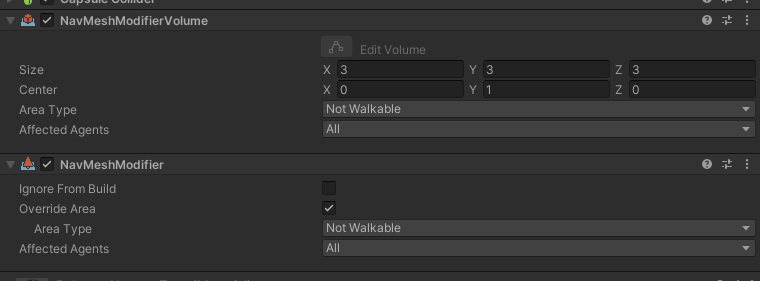
i tried both of these on terrain trees and player just walks through them even though i added rather big volume (3x3x3 meters per tree)
https://i.imgur.com/4i4dQOz.png
so seems these arent respected once converted to terrain trees. ill try to use trees as prefabs (instead of unity trees) but theyre slower than trees
ohh so its the norm
https://issuetracker.unity3d.com/issues/navmeshsurface-trees-placed-on-terrain-are-not-taken-into-account-when-baking-navmesh
How to reproduce: 1. Open the attached project (TreeTest.zip) 2. Open scene Scenes/SampleScene 3. In the Hierarchy window, double-cl...
lunar plover
what is height/length?

 stone owl
lunar plover
what is height/length?
stone owl
lunar plover
what is height/length?
the height and length is the height and length of the agent no doubt
lunar plover
i thought this was this?
 stone owl
This is the new ai components or third party? I don't recognize
stone owl
lunar plover
i thought this was this?
that looks like it's the height and radius of the path 🤔
see Shape above
lunar plover
the yellow is the shape?

 dusk path
so I'm reading through the documentation on NavMeshAgent and I see:
Agents reason about the game world using the NavMesh and they know how to avoid each other
Yet my NavMeshAgents.. don't avoid each other?
What am I missing?
lunar plover
https://cdn.discordapp.com/attachments/763502536354168882/1074751584908607568/image.png https://cdn.discordapp.com/attachments/763502536354168882/1074744465362784266/image.png


what is the difference between radius and height and height/length
what do they do
jaunty raft
lunar plover
what do they do
 lunar plover
bro
jaunty raft
2 what?
jaunty raft
radius & height defines a capsule
lunar plover
what does that do
jaunty raft
?
lunar plover
the capsule
jaunty raft
there is literally a picture of it in your screenshot
lunar plover
YEAH BUT what does it represnt
jaunty raft
its used to check if the pawn fits through a gap on the navmesh
 lunar plover
you arent explaining anything
thats the height and radius the green capsule
right?
then what is height/length? what does that do it cant be the samje thing
jaunty raft
its the height of the virtual capsule used to generate the navmesh padding to any colliders in the scene
lunar plover
isnt that height and radius?
lunar plover
lunar plover
the yellow is the shape?
look
thats height and radius i dont see any green capsule
 crude fjord
https://github.com/Unity-Technologies/ml-agents
Where can I find references and source for the specific implementations of PPO, SAC & MA-POCA used in ml-agents?
And how would I modify the config.yaml file to use SAC instead of PPO?
left nymph
crude fjord
<https://github.com/Unity-Technologies/ml-agents>
Where can I find references an...
you might wanna ask in the machine-learning channel
 latent cloud
Multiplayer ai does anyone know how to do this
left nymph
latent cloud
Multiplayer ai does anyone know how to do this
hmm is there any difference to singleplayer AI? im not experienced with multiplayer but dont you just run your AI on the server and then send their actions, positions etc. to players like you would with every other object in multiplayer?
 sullen prism
 delicate drift
not 100% sure why... maybe check the search radius and turn it down?
 sharp grove
Im kinda new to unity and idk what im doing wrong. I followed https://www.youtube.com/watch?v=Sky4cih6aws&ab_channel=Sketch guide and this is where i ended up in. The entity is stuck on his right side and when i start he isnt even moving

 tame drift
Not directly related to AI, my AI works as expected, but the navmesh got this look after adding obstacles, and it won't go away. It still functions normally, but it gives me an aneurism every time I move the camera.
 sharp grove
Im kinda new to unity and idk what im doing wrong. I followed <https://www.youtu...
sharp grove
sharp grove
Im kinda new to unity and idk what im doing wrong. I followed <https://www.youtu...
Ok i figured out that it was doing the right thing just it is stuck at -90 degrees. How do i fix it. I cant rotate the model cuz that doesnt work.

im not sure what info is required for help


I tried it with a diffrent thing and it has the same problem

Idk if the right side is required so just in case
 dusk path
so I'm reading through the documentation on NavMeshAgent and I see:
> Agents rea...
dusk path
dusk path
so I'm reading through the documentation on NavMeshAgent and I see:
> Agents rea...
Anyone have an answer to this? I really don't want to roll my own pathfinding
sharp grove
sharp grove
Im kinda new to unity and idk what im doing wrong. I followed <https://www.youtu...
I have waited for a little over 10 hours for an answer
 stable bronze
Is DOTS the main go to for large amounts of navmesh agents? I have tried setting it up a few times but keep running into errors with these packages
sharp grove
sharp grove
Ok i figured out that it was doing the right thing just it is stuck at -90 degre...
There are many people who ask but basically none who answer
dusk path
yea this discord seems to be in a similar state to Unity itself..zombie mode
 viral ledge
Anyone here use the Nav Mesh Components package? Having some issues related to baking navigation and I'm having a hard time understanding what the issue is.
I have these occasional narrow "trenches" baking to my nav mesh using the default settings. Using renderers not colliders for baking. I can kind of get around it by changing things like the voxel size or tile size but it's unclear to me what the implications are and why the default values would create these trenches.


The terrain mesh itself is fairly low poly and clean. Not sure why there would be sections completely "cut" away from them. Like this.
left nymph
viral ledge
The terrain mesh itself is fairly low poly and clean. Not sure why there would b...
Just a guess but did you play around with max slope? maybe its too steep along that ridge
viral ledge
left nymph
Just a guess but did you play around with max slope? maybe its too steep along t...
I did. It's hard to tell from the screenshot but that trench area actually isn't a hole in the nav mesh, it just dips far below the terrain mesh there. Almost like it's being "pinched".
I was able to get better results by playing with the tile size and voxel size of the surface

But a little unsure of why the default values would be causing that
left nymph
viral ledge
I was able to get better results by playing with the tile size and voxel size of...
hmm id expect it to only dip a half voxelsize under the terrain. how are agents behaving there? tilesize should have no effect at all on this
viral ledge
left nymph
hmm id expect it to only dip a half voxelsize under the terrain. how are agents ...
Well agents including my player character go down to where the dip does

Or they did before tweaking the values above.
left nymph
viral ledge
Well agents including my player character go down to where the dip does
i guess you just need to enable the build hight mesh option
viral ledge
left nymph
i guess you just need to enable the build hight mesh option
Well apparently that's unsupported
https://docs.unity3d.com/560/Documentation/Manual/class-NavMeshSurface.html
The Unity Manual helps you learn and use the Unity engine. With the Unity engine you can create 2D and 3D games, apps and experiences.
 left nymph
@viral ledge hmm ok... so if you need to use the surface instead of the old way of baking navmesh i guess you need to do some trickery. how about having your actual character representation object on a child gameobject of the Character Object. you let the navmeshagent drive the character object but the representation objects height is controlled by a script raycasting against the terrain to figure out the needed height.
viral ledge
left nymph
<@340309225232400385> hmm ok... so if you need to use the surface instead of th...
Yeah I guess I could do that but seems like some unnecessary overhead. Like I said, changing the tile and voxel size fixed the issue when baking. No idea why but it did.
viral ledge
viral ledge
I have these occasional narrow "trenches" baking to my nav mesh using the defaul...
the same spot after changing those values
 left nymph
smaller voxels make the navmesh more accurate in every point. baking takes longer though.
quiet fossil
viral ledge
Well apparently that's unsupported
https://docs.unity3d.com/560/Documentation/Ma...
Btw those docs are for unity version 5.6, i doubt your on that version
viral ledge
quiet fossil
Btw those docs are for unity version 5.6, i doubt your on that version
There aren't any newer docs for the Nav Mesh Components package afaik
quiet fossil
viral ledge
quiet fossil
Isn't it this https://docs.unity3d.com/Manual/nav-NavigationSystem.html
That’s the default / built in system. Unity created a package for a component based workflow that is much better imo. Includes things like per component nav surfaces (can have multiple per scene) and override areas and obstacles.
quiet fossil
Ah yeah I see what u mean
left nymph
@viral ledge @quiet fossil this is the offical new doku: https://docs.unity3d.com/Packages/com.unity.ai.navigation@1.1/manual/index.html
oh lol :

heightmesh should be possible
@viral ledge
 viral ledge
left nymph
<@340309225232400385> <@931615080108396564> this is the offical new doku: http...
viral ledge
left nymph
<@340309225232400385> <@931615080108396564> this is the offical new doku: http...
Interesting. What package exactly is this? I can't find it in the package manager.
 left nymph
are you that deep in production that you cannot update?
just cause its not LongTermSupport doesnt mean its not good to use. its not beta anymore
viral ledge
Yup I know, but I'm sure that it's coming to LTS very soon it's been on 2021 for a long time
We've got the game installed on a few machines and all sync'd up in Git. Would rather wait to update when it's released. Glad to know that the component based workflow is finally out of preview though.
alpine glacier
{
int randomTarget = Random.Range(0, spawnloc.Length);
GameObject enemyn = Instantiate(enemyobj, new Vector3(0, 0, 0), Quaternion.identity);
enemyn.transform.position = spawnloc[randomTarget].transform.position;
NavMeshAgent agent = enemyn.AddComponent<NavMeshAgent>();
agent.enabled = true;
enemycount += 1;
}```
hi, I use the code above to spawn enemies in random locations, but the spawned enemies don't move, even if they have nav mesh agent. I want to mention that the rest of the manually made enemies go on the map perfectly halcyon delta
sharp grove
I have waited for a little over 10 hours for an answer
halcyon delta
sharp grove
I have waited for a little over 10 hours for an answer
did you use the exact script in the video?
also there is a lot that couldve gone wrong
sharp grove
I did use the exact script in the video. I dont know what went wrong
 frigid orchid
alpine glacier
```void Start()
{
int randomTarget = Random.Range(0, spawnloc.Length...
frigid orchid
alpine glacier
```void Start()
{
int randomTarget = Random.Range(0, spawnloc.Length...
I would suspect the first issue would come from adding a NavMeshAgent but not doing any configuring for it, what kind of agent is it, does that kind of agent have a NavMesh baked for it and test if the location is infact on the NavMesh and the speed/acceleration is nonzero etc kind of things
alpine glacier
frigid orchid
I would suspect the first issue would come from adding a NavMeshAgent but not do...
the enemies are spawned from a prefab, which already has the settings made
 left nymph
alpine glacier
the enemies are spawned from a prefab, which already has the settings made
left nymph
alpine glacier
the enemies are spawned from a prefab, which already has the settings made
then dont add another NavMeshAgent to it.
you probably want to call GetComponent instead of AddComponent
 marsh monolith
alpine glacier
the enemies are spawned from a prefab, which already has the settings made
marsh monolith
alpine glacier
the enemies are spawned from a prefab, which already has the settings made
minecraft?
alpine glacier

alpine glacier
left nymph
then dont add another NavMeshAgent to it.
yes, nvm, I deleted that part. it was a bad idea to start with gpt chat
left nymph
oh im actually impressed it did something so basic wrong 0.o
frigid orchid
You should axiomatically assume it will have a minimum of one mistake and if you didn't catch it presume it's there and read it five times again until you do. Then once more.
It's a highly impressive AI but not for it's technical skills, if you had a junior who made mistakes like it does you would not be impressed.. 😄
 wanton sand
Hi, I'm looking for some assistance using navmeshagent on the XY plane in Unity 2022.2.7. If anyone is able to do this, I would really appreciate some help. The upgrade seems to have broken what was previously working fine. I've included details here:
https://forum.unity.com/threads/navmeshagent-can-not-detect-nav-mesh-on-xy-plane.1403608/

Unity Forum
I have just upgraded from 2022.1.22 to 2022.2.7.
After having upgraded my NavMeshAgent can't find the nav mesh on the XY plane. The nav mesh agent...
 trail cradle
Does anyone have an idea as to why carving a NavMeshObstacle out of the NavMesh would cause NavMeshAgent.path.GetCornersNonAlloc() to return an empty array for a period of time, even though the agent itself is still able to follow its path? I'm wondering if I might have found a bug in the AI system... 🤔
pure tide
for some reason the kiwicoder behaviour tree has a very negative interaction with the deep profiler with my current build, it starts generating "nullreferenceexception" if you refresh the deepprofilerwhiel its loaded. The error messages point towards the Update thing. Just wondering if anyones familiar with this and if theres any known fix?
i thought this was just something i was doing but i made a new/blank unity project (version 20.21.3.19f1), imported the kiwicoder behaviour tree and ran the test scenario and it still generates errors
 snow agate
So i am new to ai, i want to make a simple bot that goes to collect an item, but avoid enemies which go towards the player, where do I start?
snow agate
nvm i found a good tutorial
 ember cedar
Hi everybody I have a nav mesh agent and I want is when ever my player push the agent He fall down to the platform but he's not going down because he stack at the end of bake area
 boreal prism
ember cedar
Hi everybody I have a nav mesh agent and I want is when ever my player push the ...
boreal prism
ember cedar
Hi everybody I have a nav mesh agent and I want is when ever my player push the ...
you cant have a NavMeshAgent be somewhere without the NavMesh, so the only way to make this effect is to detect when it hits the edge, disable the NavMeshAgent component and make it fall using a Rigidbody
 rugged garnet
hey guys, i've been following a tutorial but it seems out of date or something is wrong with my unity maybe? in this he has this but in mine I have this, no bake, no object in mine


 verbal heron
hey guys! i am using a pathfinder script from the pathfinding package. the red parts are the areas the player cant move and blue parts are areas the enemy can move. i want the whole maze to be blue. how do i make this to happen?
 left nymph
rugged garnet
hey guys, i've been following a tutorial but it seems out of date or something i...
left nymph
rugged garnet
hey guys, i've been following a tutorial but it seems out of date or something i...
Yes its outdated. The latest Unity versions now use the Navigation package. https://docs.unity3d.com/Packages/com.unity.ai.navigation@1.1/manual/index.html
You bake the navmesh inside a NavmeshSurface Component on a Gameobject now
rugged garnet
yesterday I found out this way to do it but today baking just does absolutely nothing
 red grove
Is it possible to bake the nav mesh bellow the water level to a different nav layer, when it is the same terrain?
 left nymph
red grove
Is it possible to bake the nav mesh bellow the water level to a different nav la...
left nymph
red grove
Is it possible to bake the nav mesh bellow the water level to a different nav la...
im not sure if that will work but you could try using Volume when collecting objects for the Surface and use 2 surfaces with different volumes.
red grove
Seems to work, thanks 🙏
 raw tiger
NavMeshAgent.remainingDistance
public float remainingDistance;
Description
The distance between the agent's position and the destination on the current path. (Read Only)

If the remaining distance is unknown then this will have a value of infinity.
How a distance can be unknown ?
left nymph
raw tiger
```
NavMeshAgent.remainingDistance
public float remainingDistance;
Description
T...
probably when path calc isnt finished yet.
 mortal umbra
i want my navmesh to be driven rigidbody controller
also it has climbing
what exactly should i do for it?
how exactly should i tap in and out of navmesh agent mode?
after all cimbing is something where you want position/velocity to be driven by controller/rigidbody
raw tiger
How to surround a target with nav mesh agent? The agents do not turn to position themselves and pile up behind each other instead of going around to face the target. They are therefore blocking behind and trying to push those in front.
https://forum.unity.com/attachments/upload_2023-3-5_15-45-14-png.1207540/
 left nymph
raw tiger
How to surround a target with nav mesh agent? The agents do not turn to position...
left nymph
raw tiger
How to surround a target with nav mesh agent? The agents do not turn to position...
you will need to supply points around the target for each agent instead of just putting in the target as the destination.
raw tiger
left nymph
you will need to supply points around the target for each agent instead of just ...
how to do that
left nymph
you take the targetPosition and calculate points in a circle around that position. then you use those points as destinations for the navmeshagents of the units that should surround the target. not sure how else to answer this question sry
raw tiger
left nymph
you take the targetPosition and calculate points in a circle around that positio...
how to know if that point is free.
left nymph
you could maintain a list of SurroundPoints on the Target and when an agent gets one of those points you set that point to occupied for example. but there are literally 1000 ways to solve this. depends on all your other systems and AI
 arctic pond
Hey everyone! First time poster here with a question I hope someone can help me with!
The short version is "one of my scripts runs faster in the editor than in the player." I've researched / googled others facing similar issues, but sadly their fixes did not seem to work for me.
The longer version: I have a function in a script that I call to determine what my AI agents want to do next. When I call this function while playing the game in the editor it completes in about 0.1 seconds, which is acceptable for my game.
However, when I perform this same operation in the player, it takes significantly longer to complete -- around 3.5 seconds. This amount of delay is unacceptable for my game.
Through using the Unity profiler and C# diagnostic tools I feel confident I've isolated the slowdown to this specific function. I've verified that the editor and the player are targeting the same quality settings ("fastest").
To further verify that this script is the problem, I made a separate Unity project that is basically only this function call (no graphics or other game objects; just a button that runs this function) and experienced the exact same behavior -- it runs fine in the editor but not fine when actually built.
I've also produced logs to confirm that the output of the function is the same in both the editor and the player. Indeed, they produce the same output and perform the same number/types of operations.
At this point I'm not sure what to investigate next. The only hunch I have is that the editor has something preloaded that my script is using that isn't preloaded in the player (and it is this "thing" spinning up that is taking the extra time), but that theory isn't particularly substantiated by the profiler, and I wouldn't know where to begin looking to address it.
Does this sound like anything anyone here has ever encountered before? Super happy to provide profiler screenshots or logs or answer any followup questions!
Thank you in advance!!
 open tulip
arctic pond
Hey everyone! First time poster here with a question I hope someone can help me ...
open tulip
arctic pond
Hey everyone! First time poster here with a question I hope someone can help me ...
I did have an issue like this but i don't know if it's related to your function : are you using FixedUpdate in it ? Because if you do, and change the timestep, and checkmark Vsync, it can cause some issues 😅
https://forum.unity.com/threads/game-runs-in-slow-motion-in-build-compared-to-editor.1194991/
Unity Forum
Yep, it's the classic "why is it slower in the build" problem.
This one I just can't solve. I'm pretty sure I got everything with the Time.deltaTime...
arctic pond
open tulip
I did have an issue like this but i don't know if it's related to your function ...
Thank you for the response! I am not using FixedUpdate here, I do not have Vysnc checked, and I have not changed the timestep. I ran into that same forum post though in my research! It gave me a moment of hope when I first found it, haha!
left nymph
arctic pond
Hey everyone! First time poster here with a question I hope someone can help me ...
is it possible for you to use burst for this performance critical function? never heard of that problem before but maybe a different compiler changes things
arctic pond
left nymph
is it possible for you to use burst for this performance critical function? neve...
Thank you for the reply! I confess, I actually haven't heard of burst before. But yes, I'd love to experiment with a different compiler.
Ah! This is the burst you're talking about, right? https://docs.unity3d.com/Packages/com.unity.burst@0.2/manual/index.html
I don't have any prior experience with the unity Job system yet... but if there's a chance it might help me out here, I'm excited to start learning all about it, haha!
Thank you again! It feels good to have a new thread to pull on. I'll let you know how it goes.
left nymph
arctic pond
Thank you for the reply! I confess, I actually haven't heard of burst before. Bu...
i hope i dont send you down a rabbit hole here 😄 DOTS stuff is awesome but its also a steep learning curve. Yes thats the burst i was talking about but plz read up on it in the newest version : https://docs.unity3d.com/Packages/com.unity.burst@1.8/manual/index.html
there are quite some restrictions for code to be burstable. you probably shouldnt care about jobs and multithreading for now
arctic pond
left nymph
there are quite some restrictions for code to be burstable. you probably shouldn...
Heh, well at this point I'm kind of just eager for any sense of forward progress, even if what I end up progressing down turns out to be a rabbit hole 🙂
But thank you for that link. I'll definitely read up on all of it. So am I understanding correctly that it's possible to leverage the burst compiler without also using jobs and multithreading? Sorry if these are naive questions, this is all new to me!
left nymph
Yes Burst,Jobs and the EntityComponentSystem are usually referred to as DOTS but you can use any of those individually (though using ecs individually wouldnt make much sense)
 wheat turtle
i am trying to create an AI for my fighting game (like shadow fight)
Any idea how to implement that, any resources would help a lot
carmine wigeon
Nevermind, I think I just implemented a garbage version of behavior trees without the ability to communicate with one another and need to fix it. Cool
 sturdy sail
Hey, I was wondering if I could get some help with A* grid based pathfinding
What I think is an easy thing to figure out, I have been stuck on this problem for almost a month now
left nymph
sturdy sail
What I think is an easy thing to figure out, I have been stuck on this problem f...
are you sure you need to solve it yourself? ever looked at https://arongranberg.com/astar/features?
post the part you have problems with. its hard to help you if you are that vague
sturdy sail
I'm making a rougelike game and we're using A* for our enemy pathfinding. I want to make it so in the rooms where the enemies are placed, they won't do anything until the player enters the room and the room is fully in camera view
All the rooms are prefabs and I can't just add an A* grid because I would get an error saying only one instance is allowed, I tried making the grid massive, but that would just make enemies in 10 rooms away phase through and chase the player
And I can't pre make the grids and assign enemies to said grid because I can't be sure the room will always spawn where I set it
left nymph
so you are already using arongranbergs package?
i dont know how expensive it is to rebake the Navmesh but how about just baking the navmesh in a certain distance around the player and update it every once in a while?
if the update works incrementally this should not be expensive at all
I dont have much experience with the package (i just knew it had gridbased pathfinding) but i did some runtime navmesh generation with unities navmesh which worked really well. i cannot imagine that package beeing worse at it
sturdy sail
I can try that and see if that works
 fast cape
So,A youtuber created a script that you can use so that an enemy ai will chase you.The problem is,when I get close to the enemy,instead of chasing me,it goes into a corner.I checked the nav mesh agent,the script,and the gameobject.thanks for the help.
sharp grove
I used help from this video https://www.youtube.com/watch?v=Sky4cih6aws&ab_channel=SamSam but I still cant get it working right. Its rotated. How do i fix it so the flat side is on the floor. I cannot rotate it.

 hollow abyss
Does somebody has experience in writing 3D spaceship navigation/battle AI?
 potent ginkgo
is there someone who have implemented self play using mlagent toolkit of unity?
 fathom arch
Humble bundle currently has an AI book bundle if anyone cares:
https://www.humblebundle.com/books/game-design-and-ai-featuring-steve-rabin-taylor-francis-books
(Not sure if this should go into #archived-resources but it's AI related so I thought people here might appreciate this)
jaunty raft
fathom arch
Humble bundle currently has an AI book bundle if anyone cares:
https://www.humbl...
i wish owing those books would automatically transfer all that knowledge
fathom arch
True, I haven't really studied game development from books but I thought I'd try it out
 pallid rover
Hey guys! Wanted to share my new devlog on my Unity game where I am training an AI to learn to dodge bullets using ML-Agents/Reinforcement Learning! I am kinda surprised myself how good it plays after proper training... If anyone is interested in this space, do check out and let me know what you think!

This is Devlog 3 of my 2D projectile-dodging Unity game where I am using Unity's ML Agents package to train an AI with Reinforcement Learning. In this one, I document how I tackled the issues I had been having with training ML Agents on a high time-scale in a complex physics environment that uses a bunch of coroutines, by implementing a more sta...
 clear rain
anyone have any information about AI NPCs that can interact with voice?
for the time being I'm using Convai, maybe there are other suggestions?****
 radiant crag
I want my creature to have a run animation that starts when the scene starts but it doesn't animate, could somebody help me?
radiant crag
I got it to work somehow
left nymph
radiant crag
I got it to work somehow
just generally speaking this should not be something the AI is responsible for.
 dapper moon
Hi, sorry, I'm new here, I have a simple question: I don't understand how the built-in AI system of Unity is supposed to be practical. When I have different enemy types which have different sizes and behaviours, It seems like I can only bake one agent type into the navmesh? How can I support different agent types?
left nymph
dapper moon
Hi, sorry, I'm new here, I have a simple question: I don't understand how the bu...
you need to create a navmesh per agenttype (so you need multiple navmeshsurfaces).
Each agenttype can be defined with those settings.

It would be nice to be able to define multiple AgentTypes in a single NavmeshSurface which then bakes multiple navmeshes automatically but the technology is not there yet. maybe in 10 yrs.
dapper moon
left nymph
you need to create a navmesh per agenttype (so you need multiple navmeshsurfaces...
I didn't understand how I can bake multiple navmeshes, but I will look at it again when I'm home later today. Thanks
left nymph
dapper moon
I didn't understand how I can bake multiple navmeshes, but I will look at it aga...
it depends on what version of unity you are using. if you are already using the new AINavigation Package (formerly known as navmesh Components https://github.com/Unity-Technologies/NavMeshComponents) then you would have multiple navmeshsurface components. each surface generates one navmesh
dapper moon
left nymph
it depends on what version of unity you are using. if you are already using the ...
I did not know that exists
left nymph
if you are on 2022.2 its used by default
dapper moon
oh, Im on 2021.3.9f1 or something like that
thanks! That's very nice, I didn't know they updated the ai stuff, finally!
left nymph
its not really an update. those navmesh components were available for a long time and did indeed improve the Navigation workflow. they now just integrated it as the default way.
i really do hope they'll improve Navigation further at some point. whenever i use it its lacking something i desperately need 😄
 slate basalt
hey guys im working on a alien type enemy ai, i was trying to do it to wander, and it was not working so i tried on capsule and it works perfectly fine, i dont know if it is the navigation bake or the nav mesh agent or the script.. Help please

 rich pendant
Hey there! Basic question, I have an AI script using NavMesh that wanders around, then if the player is in a certain range it chases the player. But I have an issue where even if I set the player game object to inactive, the AI still tries to chase the player. Any fixes? My script: https://pastebin.com/gvMeUgA6
Pastebin
Pastebin.com is the number one paste tool since 2002. Pastebin is a website where you can store text online for a set period of time.
left nymph
rich pendant
Hey there! Basic question, I have an AI script using NavMesh that wanders around...
setting a gameobject to inactive does not make it invisible to other GameObjects. it just means the inactive object does not call Update on any Components.
so an easy solution to that would be to just check if the player is active and if so only then follow him. else fall back to wander around
but generally speaking id introduce something like a "isInvisible" state for the player that you check instead of having to disable objects.
rich pendant
thank you! ill check it out tomorrow (its already 4am) because im beat. again, thank you
slate basalt
rich pendant
thank you! ill check it out tomorrow (its already 4am) because im beat. again, t...
wakey wakey
rich pendant
slate basalt
wakey wakey
i have awakey wakey
 sleek owl
rich pendant
i have awakey wakey
sleek owl
rich pendant
i have awakey wakey
I made it my life mission to say wakey wakey to you every morning
raw tiger
i don't understand this panels. Radius / height is the same ? Someone can explain ?


 zealous mantle
Radius is the radius of the collider. Height is the height. What is the confusion? They are not the same.
raw tiger
zealous mantle
Radius is the radius of the collider. Height is the height. What is the confusio...
so that reffer to what if it isn't the same things.
left nymph
raw tiger
so that reffer to what if it isn't the same things.
the blue cylinder in the image has labels R(radius) and H(height).
raw tiger
left nymph
the blue cylinder in the image has labels R(radius) and H(height).
euh yeah but what is the difference between this 3 images that reffer to what?
zealous mantle
I don't understand. The radius of something relates to how wide it is. The height relates to how tall it is.
left nymph
oooh i now get the question lol. They are asking why there are multiple places where you define heigt and radius and what the difference between them is
@raw tiger Okay so in the Agents tab you define how big a specific agent type is.
In the Bake Tab Height/Radius referes to the default agent. The Agentsettings should override that.
Those settings are for Baking the navmesh.
NavmeshAgent Height/ Radius is defining how it behaves with obstacles and other agents which are not baked into the navmesh.
raw tiger
left nymph
oooh i now get the question lol. They are asking why there are multiple places w...
Yes.
**"In the Bake Tab Height/Radius referes to the default agent. The Agentsettings should override that. **
Those settings are for Baking the navmesh."
I can't see the nav mesh blue color on the floor for each agent ? Only the default one ?
left nymph
i think what you see is all baked navmeshes stacked onto each other for every agent.
which is really useless 🙂
raw tiger
**NavmeshAgent Height/ Radius is defining how it behaves with obstacles and other agents which are not baked into the navmesh. **
How he know the radius and height of other elements that aren't on the navmesh ?
left nymph
i think you can get around that when you use the new version.
raw tiger
left nymph
i think you can get around that when you use the new version.
What is that ?
left nymph
since unity 2022.2 its called AI NAvigation package and has the old navmeshcomponents package integrated by default
raw tiger
So he only combine the package on unity + the package you can download on github. nothing new ?
left nymph
raw tiger
**NavmeshAgent Height/ Radius is defining how it behaves with obstacles and othe...
yes. seems like it. i dont know the internals here
left nymph
raw tiger
So he only combine the package on unity + the package you can download on github...
yes
raw tiger
Ok thanks.
 onyx patrol
Hello ✨
I'm currently looking to joints with MLAgents. I'm having some trouble wrapping my head around Configurable Joints and the Crawler/Walker example. I was wondering if anyone could spare some time to help me with a few issues I am having with Configuring the CJs? It would be much appreciated 🙌
left nymph
onyx patrol
I'm currently looking to joints with MLAgents. I'm having some trouble wrapping ...
i think your question is better suited for the machine-learning channel
onyx patrol
Thank you, sorry
 mighty onyx
hey guys has anyone here used behavior designer? im specifically asking about the Can Hear Task?
 grand socket
anyone know how i can approach 2d navmesh navigation. With Unity 2021 I was using something i found online "NavMeshPlus". But in Unity 2022 some stuff is said as being obsolete and so i cant do it the way i did it with 2021.
 south nymph
how would i make an enemy follow a path in 3d? i wanna try making a game where guards have a set path and if they see you then theyll kill you
 shut jasper
south nymph
how would i make an enemy follow a path in 3d? i wanna try making a game where g...
shut jasper
south nymph
how would i make an enemy follow a path in 3d? i wanna try making a game where g...
use Pathfinding. you can look up tutorials about it on yt
 sand pumice
anyone know why i can't get the navmesh to include terrain trees?
i've got these components on the tree prefabs but they dont do anything

i may well be using them wrong
Here are the settings of the navmesh component

 round bronze
Anyone know of an AI tool for creating 2d game sprites/walk cycles?/pixel art?
left nymph
sand pumice
i've got these components on the tree prefabs but they dont do anything
pretty sure its not supported sry
 leaden perch
 outer night
What tutorial for AI - zombie AI - you recommend?
 deep socket
outer night
What tutorial for AI - zombie AI - you recommend?
deep socket
outer night
What tutorial for AI - zombie AI - you recommend?

In this video I demonstrate and program the same AI stealth techniques that I use on the game I am currently developing. I hope this helps all the people that wanted a tutorial on AI and how to make zombies.
 wise cliff
i have a very crude ai system set up, but how do i make him not faceplant
deep socket
wise cliff
i have a very crude ai system set up, but how do i make him not faceplant
idea
parent him to an empty game object
put the navmesh stuff and all that to thr empty gameobject
and than just rotate the model that you patented
 solar skiff
Question, does anybody here know to make an advanced enemy AI like:
Strafe Left/ Strafe Right : While the target is within attack range but you are on cooldown
Move Towards: You are far from your current attack range, but not too far to pursue
Move Away: You are too close from your current attack range, or you are blocking, dodging, or in cooldown with enough max range of the current attack
If somebody knows, please let me know. Thank you so much
left nymph
solar skiff
Question, does anybody here know to make an advanced enemy AI like:
Strafe Left/...
anything you listed can be done with pretty much any AI architecture. just to name a few you could look into:
StateMachine,Behaviour Tree, GOAP , HTN , Utility AI
statemachines and Behaviour Trees are more on the "scripted"/"hardcoded" side of AI while the others can produce good behaviours even in unclear world states
solar skiff
The enemy AI that I'm using is a Statemachine. I want to put to put them in a battle state, but the NavmeshAgent.setdestination isn't working for me.
For starters, I would want that the enemy AI circle the target while strafing
 tame birch
Does anyone know where the Unity AI that was just announced, where the discussion is occuring? Here? machine-learning forum? somewhere else specific to it? I know it hasn't opened up yet
left nymph
solar skiff
The enemy AI that I'm using is a Statemachine. I want to put to put them in a ba...
tackle one problem at a time. navigation not working should have nothing to do with the decision making.
 regal bison
I have a question, I have a problem where my companion AI sometimes block my way sometimes, I've tried to multiple ways to make them step out of the way, but it just doesnt work right
what could be a good way to make this possible?
also, to note, I am purely navmesh, not root motion
outer night
Dijkstra or A* ?
raw tiger
- Add a Rigid body to the obstacle. Choose Add Component from the inspector and choose Physics > Rigid Body.
https://docs.unity3d.com/Manual/nav-CreateNavMeshObstacle.html
Hi,
On the doc they said add a rigidbody but why we need it ?
outer night
For example the agents should avoid physics controlled objects, such as crates and barrels while moving.
Now we have a working crate that is physics controlled
For example ....
raw tiger
Thanks i know how to read that don't answer to my question.
raw tiger
Hi,
Why when the zombie start moving we have like a small teleport ?
Issue is with nav mesh agent obstacle how to fixe ?
https://media.discordapp.net/attachments/502171313201479681/1089993587447574659/image.png?width=1595&height=897

 outer night
Its look like animation problem
transition from idle to walk /run
try debug speed and u see that mesh agent don't start walk slowly
they just go
raw tiger
outer night
Its look like animation problem
no Issue is with nav mesh agent obstacle like i said.
outer night
if you say so then ok 🙂
 fair ridge
I am having some trouble after re-doing my AI's, they dont work untill I change their offset and back again, weird behaviour anybody knows what could be the problem?
left nymph
@fair ridge Look at the debug warnings. Should be telling you they are too far from the navmesh
 fair ridge
@left nymph SetDestination just does not return true, thats all I can gather from it :/
@outer night I edit the base offset in the video if you look on the right, it works after i move the offset up to 1 during runtime 😒
fair ridge

 outer night
try change radius and height
and how u set box collider?
and why u use box not capsule?
fair ridge
Could be yeah, im redoing my AI's could be I changed the collider, ill test when i reopen project
raw tiger
how do you pause your logic when you need to wait a frame after desable nav mesh agent ostacle before moving with nav mesh agent
raw tiger
outer night
u can use bool state
Here is my script i don't see how i can setup it.
https://github.com/pytchoun/UnityCodeReview/blob/main/Scripts/AI/ZombieController.cs

GitHub
Contribute to pytchoun/UnityCodeReview development by creating an account on GitHub.
outer night
I haven't worked with navMeshObstacle yet, but did u add this component to your enemy?
raw tiger
yes
outer night
why?
its allows you to describe moving obstacles that Nav Mesh Agents should avoid
so this component is for moving obstacles
like doors,
What do you want to achieve by adding this?
opponents don't step on each other?
raw tiger
for ai avoid all together and surround me
outer night
to surround you u can make circle around your player with spot for attacker
if its free attach enemy to this spot, if not keep attacker on distance from player

something like that
 fast pike
I am working on a college project where I will use reinforcement learning to manage a traffic light intersection. I don't have much knowledge in Unity ML-Agents, and I'm really lost. I have an idea of what I need to do, but I'm trying and not able to get the agent script to work the way I want. Can someone help me? There are several questions, so it would be difficult to post everything here, but I can provide them if needed.
Basically, the agent will act by "pressing" a switch, changing the traffic lights
My code: https://pastebin.com/GbrgD7L7
Pastebin
Pastebin.com is the number one paste tool since 2002. Pastebin is a website where you can store text online for a set period of time.
 steep vale
What is the best/easiest solution to handle multiple agents using a-star?
Currently im just having the agent look at the next node in the path, if its occupied, look for another route. But that seems to me that it's running a-star stupidly unnecessary amount of times. Especially when all agents are trying to get to their destinations at the same time. I even run into a scenario where two agents would just bump their heads together, walk backwards, then bump heads again. Probably because they find a new path and then realise that the old path was actually better and then they're stuck in an endless loop.
left nymph
steep vale
What is the best/easiest solution to handle multiple agents using a-star?
Curre...
this is where you need the concept of local avoidance. A* just finds the optimal path but your agents are allowed to diverge from that path if another obstacle blocks it. you dont need to run A* again.
left nymph
fast pike
My code: https://pastebin.com/GbrgD7L7
you should ask in the machine-learning channel
steep vale
left nymph
this is where you need the concept of local avoidance. A* just finds the optimal...
I actually did sort of come up with some solutions to my agents.
In my scene, alot of the times either the destination tile or the source tile is surrounded by other agents. So I opted to make a bi-directional A*, if either of the opened-lists run empty because that end is surrounded by occupied nodes, I can quickly halt the A* and do something else instead.
Also, I did sort of implement an avoidance pattern. But I was tired and just told the agent to skip the next node in the path and find a new path to the second next node. After which I'd add it to the current path.
However, as I am writing this, I realise that might not be the best option.
fast pike
left nymph
you should ask in the machine-learning channel
thanks!
 orchid marsh
 neon canopy
how to use unity ai?
neon canopy
how to use unity ai?
there's no such thing as "unity ai", this channel is about ai-related questions
 balmy hawk
neon canopy
orchid marsh
there's no such thing as "unity ai", this channel is about ai-related questions
balmy hawk
neon canopy
orchid marsh
there's no such thing as "unity ai", this channel is about ai-related questions
i know but i have some projects on unity and i progressed a lot in scripting, 3D, art, sound design... but I still don't know anything about a.i
jaunty raft
neon canopy
i know but i have some projects on unity and i progressed a lot in scripting, 3D...
you can spend multiple lifetimes in each of these and still not fully master them
neon canopy
jaunty raft
you can spend multiple lifetimes in each of these and still not fully master the...
yeah of course, I will have a speciality later so i will have to focus on one thing not to mention 7 years of hard work man in these fields.
orchid marsh
neon canopy
i know but i have some projects on unity and i progressed a lot in scripting, 3D...
you can watch a basic guide on how neural networks work
viral ledge
So I'm working on some navigation behaviors for my enemies. What would be a good way to have a nav mesh agent calculate a path to walk around other agents? I want to keep my enemies spread out further from one another rather than bunching up. I can increase the avoidance radius, but that just makes the agent that is in motion just push the other agents out of the way rather than having the agent in motion walk around the other agents.
left nymph
viral ledge
So I'm working on some navigation behaviors for my enemies. What would be a good...
you could get a bounding box containing all enemies in an area and then create a navmesh obstacle of that size and carve into the navmesh.
viral ledge
left nymph
you could get a bounding box containing all enemies in an area and then create a...
Thanks! Interesting idea. Wonder what the performance cost of such a thing would be 🤔
I realized after looking further into it that having the agent push the other agents might not be such a bad thing. As long as the pushed agents animate to look like they are backing away to make space for the agent in motion it should work for my scenario after all.
left nymph
viral ledge
Thanks! Interesting idea. Wonder what the performance cost of such a thing would...
would not be that expensive since you just incrementally change the navmesh in this area. not a good idea to do this every frame maybe
neon canopy
orchid marsh
you can watch a basic guide on how neural networks work
@orchid marsh thank you! I know where to start now
left nymph
neon canopy
<@598879818532126740> thank you! I know where to start now
dont go for neural networks... you will never get anything running in a reasonable time
neural networks are just not that good for game AI
neon canopy
left nymph
dont go for neural networks... you will never get anything running in a reasonab...
okay what do you recommend?
left nymph
for scripted AI behaviour trees and for fuzzy AI utility AI
neon canopy
left nymph
for scripted AI behaviour trees and for fuzzy AI utility AI
Thanks i'll take a look
 potent totem
I've got a super weird question: does anyone know an easy way to obtain the size of a navmesh area?
I'm trying to compare which of 2 discrete areas is bigger and I don't know where to start
 harsh shell
I'm trying to make a navmesh to find a player in a maze, but it keeps doing things like getting stuck in walls, going really fast when next to a wall, and not going fast enough normally. Does anyone know how I could fix this?
left nymph
harsh shell
I'm trying to make a navmesh to find a player in a maze, but it keeps doing thin...
no idea why it glitches off navmesh in your case but the weird going faster / slower is most likely due to turnrate and acceleration settings on the agent. try it with a really high turnrate and see if it still happens
outer night
@harsh shell https://www.youtube.com/watch?v=TpQbqRNCgM0

This is the first video of a brand new AI series! Animations are added to the NavMeshAgent by feeding the velocity of the agent as an animation parameter into a blend tree. Following the player is achieved by setting the agent's destination to match the player's position. Enjoy!
*** Support this channel ***
► https://www.patreon.com/thekiwicode...
 sterile moat
what tools are available for free to create 3d models / animations with ai.
harsh shell
👍
 ashen smelt
Is there really no way to exclude volumes from being processed by the navmesh generator other than a box shape?!
 robust tree
ashen smelt
Is there really no way to exclude volumes from being processed by the navmesh ge...
robust tree
ashen smelt
Is there really no way to exclude volumes from being processed by the navmesh ge...
I guess if u mark some group of objects with meshes as obstacles, they are the same tag/layer and u bake the navmesh considering them as obstacles, it will subtract from the final mesh their shapes regardles of the shape i guess
robust tree
sterile moat
what tools are available for free to create 3d models / animations with ai.
For the animation or three dimensional models, you can use blender. But for their movement of displacement is where u will be using AI and triggering the respective animations at the same time. Other than that is called procedural animation.
outer night
lately there have been a lot of questions about surrounding the player with opponents - I found two videos - maybe they will help 🙂

Learn how to make your NavMeshAgents SURROUND their target, instead of just running to the center point of their target. In this tutorial we'll be implementing a simple solution to the "dumb AI" problem where your NavMeshAgents get bunched up and create a funnel or wedge when trying to follow a target.
We'll implement a simple AI Manager single...
In this Unity Visual Scripting tutorial we'll draw rays and lines in a circular or radial pattern. We'll visualize radians and trigonometry (aka Jim Uses After Effects, The Early Years).
Our UVS graph can also be used to instantiate or position objects in a circle.
In the next video we'll use raycasting on a Nav Mesh to set enemy agents to su...
 hidden stirrup
I need help solving errors
latent cloud
how to create an ai that goes after the nearest player with photon?
 bleak gyro
latent cloud
how to create an ai that goes after the nearest player with photon?
bleak gyro
latent cloud
how to create an ai that goes after the nearest player with photon?
I'd say break it up into pieces,
First figure out how to make the AI chase the player than learn photon or I'm sure there are tutorials somewhere
bleak gyro
I dont know much about AI but unity has an AI navigation package that could help
latent cloud
good to know
bleak gyro
There are plenty of tutorials on how to make an enemy AI just none as far as I know that incorporate photon
latent cloud
ill just make my own system
bleak gyro
Ok
 wild swan
when giving ai set destination it takes a small delay of 2-5 seconds before executing, any idea why?
halcyon delta
Code please
wild swan
halcyon delta
Code please
no code, only a set destination called from timeline when game starts
wild swan
could it be a hardware issue? project runs slow
 left elm
guys how does the navmesh agent work?
so sepcifaclally what i mean im following a course where the instructor makes an RPG. In this course he makes it so that if he clicks on the surface the player moves there. and he doesnt use a navmesh surface rather he just makes all the objects which we wont be able to click on static. how does that work???
left nymph
wild swan
could it be a hardware issue? project runs slow
navigation runs async over multiple frames until a full path is calculated. so if your project is slow pathcalc is very slow.
and its gets worse the more paths you need to get at the same time. so if you have a lot of agents it will take some time until each one is starting to follow a path
wild swan
left nymph
and its gets worse the more paths you need to get at the same time. so if you ha...
thanks
molten sequoia
wild swan
when giving ai set destination it takes a small delay of 2-5 seconds before exec...
 worldly lance
for some reason I cannot bake navmesh on stairs.
I tried changing the agent radius, jump distance, step height and max slope but nothing seems to affect it.
the only solution I found online was to put a slope instead and hide it's render, but that looks junky. :)
here is my current result: (even on the small square on the right the navmesh cannot climb.)

I tried all these different solutions, none of them worked for me https://www.reddit.com/r/Unity3D/comments/a6ycbz/help_cant_get_navmesh_to_work_on_stairs/ https://stackoverflow.com/questions/61611097/unity-navmesh-wont-bake-stairs
reddit
2 votes and 10 comments so far on Reddit

Stack Overflow
i have a huge problem while baking a stairs 3D model with my NavMesh in Unity 2019.3.12f1 for macOS.
Simply the stairs won't get part of the NavMesh as i expect.
Of course the stairs are static and
left nymph
worldly lance
for some reason I cannot bake navmesh on stairs.
I tried changing the agent radi...
your problem most likely is agent radius. the steps are just too thin. see what happens if you scale up the steps a lot. it should work when width of a step is more than twice as large as agent radius
worldly lance
left nymph
your problem most likely is agent radius. the steps are just too thin. see what ...
Yea, that's what the step on the right is for 🙂 but the agents still can't seem to climb over it
left nymph
ah ok i see. yes there should be a navmesh island there. weird
worldly lance
baking with stairs that have 3 times the radius just makes another island /:
 left nymph
by island i mean there should be a navmesh that is not connected to the main navmesh on those big stairs
did you mark those stair objects as obstacles or sth?
worldly lance
left nymph
by island i mean there should be a navmesh that is not connected to the main nav...
is there anything I need to do with the stairs to let the navmesh know he can work with them?

 left nymph
oh i dont remember how it is with the old workflow. i used navmeshcomponents for years now
worldly lance
am I using an old workflow? 😂 I can upgrade if you have something better
worldly lance
I am using 2021.3 nice
worldly lance
left nymph
look at AI Navigation package
I will look into it, Thanks!
worldly lance
does it replace the current navigation package I have or does it add to it?
left nymph
should be a seemless update. i dont think it removes the old workflows but only adds the new ones on top
navmeshsurface component is what you need to look into first
worldly lance
wow, didn't even had to do much, the package just fixed everything. thank you! @left nymph
by the way, I just added one surface navmesh component to the stairs and it baked the whole world, is this normal?
left nymph
worldly lance
by the way, I just added one surface navmesh component to the stairs and it bake...
yes the navmesh surface has options on where to gather navmeshsources from. not every object needs a navmeshsurface component. per navmesh there should only be one navmeshsurface
i usually use a empty gameobject just for a navmeshsurface
left nymph
worldly lance
that is awesome, amazing how unity handles all of this flawlessly
haha lets see what you'll say as soon as your agents need to do some none basic stuff or you need different ways to define buildsources for the navmesh 😄 i had to rewrite / adjust most of it
but its really great for fast prototyping i agree
worldly lance
left nymph
haha lets see what you'll say as soon as your agents need to do some none basic ...
It gives me a lot of power actually,
most of the work goes into pathfinding so dodging and jumping can come from bullets that act as live moving obstacles
and if I want to make a cutscene or something like that I can just move to a place -> play animation -> move to another place -> run whatever code I need with animation and checksphere every time I reached the place. this tool is amazing.
 chilly cairn
For a new project, should I be using the built-in navigation system or use the AI Navigation package?
I can't even seem to find it in the package manager on unity 2021.3.22f1
left nymph
chilly cairn
I can't even seem to find it in the package manager on unity 2021.3.22f1
navigation package is in unity 2022.2 and later. before that its known as navmeshcomponents https://github.com/Unity-Technologies/NavMeshComponents
GitHub
High Level API Components for Runtime NavMesh Building - GitHub - Unity-Technologies/NavMeshComponents: High Level API Components for Runtime NavMesh Building
for new projects id also always start with newest editor version (ignoring alphas and betas)
you dont need LTS when you are not in production yet
chilly cairn
good point, thank you!
alpine glacier
Are there any settings I can adjust in NavMeshComponents to improve the performance of pathfinding calculations? I have a Navmesh that will eventually be in the ballpark of 1000 x 1000, so performance for NavmeshQuery is critical
alpine glacier
There really needs to be documentation that the voxelSize drastically affects the latency of pathfinding operations. When I increased the voxelSize from .166 to 1, the latency of pathfind operations decreased more than tenfold. Even though this might be intuitive to some, since larger voxels means fewer voxels, and thus fewer calculations, the lack of documentation would make people think that there's no performance cost for voxels


 raven rapids
The new navigation package makes it a little nicer, IMO
You put NavMeshSurface components in the world and bake them
raven rapids
 lilac spire
Hey! If I click on "Bake" nothing really happens.
lilac spire
Hey! If I click on "Bake" nothing really happens.
however, this might already be working fine
do you have Gizmos enabled in the scene view?
 lilac spire
I do
raven rapids
I forget exactly when it shows you the surfaces
lilac spire
How can I import that package?
Because now it doesnt really work, it thorws me an error
raven rapids
that is very vague
raven rapids
lilac spire
How can I import that package?
what version of Unity are you using?
lilac spire
2020.3
raven rapids
the AI Navigation package wasn't out of experimental yet in that version
might as well stick with the default for now
raven rapids
lilac spire
Because now it doesnt really work, it thorws me an error
what error does it give?
lilac spire
raven rapids
what error does it give?

There is no valid nawmesh, thats why it does give this error, but I cant use "Bake" for some reason, nothing really hapepens when I use that.
lilac spire
raven rapids
what error does it give?
Do you see any solution?
I got it!
But how can I make multiple enemies? Not just one? 🙂 @raven rapids
raven rapids
ah, good
raven rapids
lilac spire
But how can I make multiple enemies? Not just one? 🙂 <@118467312197042182>
just put down several copies of the same prefab
lilac spire
Sure, and what if I want to do a radius?
Oh I have right?
Its in the naw mesh agent
lilac spire
raven rapids
just put down several copies of the same prefab
sure
 undone gust
hi guys is really posible to make it happen this way ? the goal is to an avatar to walk you in that path ? currenty i can make it happen , i am using ai navigation , unity 2021.3.17f
 undone gust
hi guys is really posible to make it happen this way ? the goal is to an avatar ...
undone gust
undone gust
hi guys is really posible to make it happen this way ? the goal is to an avatar ...
NVM all the normals was reversed....
lilac spire
Hey! I've got this here, but it only works if I start in that position where I'm less than 20 meters away from the enemy. So if they are further, it doesnt work.

 floral sleet
lilac spire
Hey! I've got this here, but it only works if I start in that position where I'm...
floral sleet
lilac spire
Hey! I've got this here, but it only works if I start in that position where I'm...
Yes, that's what the code does. If the player and enemy are less than 20 units apart, the enemy.SetDestination() method is called with the players position.
 mellow garden
Is there any way to pathfind to the closest spot for the agent, but then stop? Stopping distance doesn't get as close as possible.
 coral cargo
is it possible to save prefabs with navmeshes?
in my game you can create houses and go inside of them
but my npcs ai need to enter and leave them when needed
for that i need the house itnerior be a pre baked navmesh
 jovial remnant
Anyone working on something using the Generative Agents: Interactive Simulacra of Human Behavior paper?
left nymph
coral cargo
is it possible to save prefabs with navmeshes?
you can bake at runtime. baking is incremental so only the new parts of the navmesh will be calculated while leaving the old ones alone
coral cargo
is it possible to make a nav link instantaneus?
coral cargo
hmm im tryign to make navlinks afeter the iset to rebuild hte navmesh
but my editor crases
 dusty kernel
I'm trying to find how to convert NavMeshData generated by the new NavMeshSurface component to a mesh asset.
 nocturne osprey
using navmesh how I can I make the enemy move behind the player. I want it to collide on the way but I dont want it to just stay inside the player

 floral drift
nocturne osprey
using navmesh how I can I make the enemy move behind the player. I want it to co...
floral drift
nocturne osprey
using navmesh how I can I make the enemy move behind the player. I want it to co...
you can use vector3.distance there, and make sure your agent doesnt go above the specified distance
 wild crystal
Im having some issue with a nav mesh and a nav mesh agent, however with the circumstance Im in idk if this server could really help me
if ur gonna respond plz ping me btw

I have this which generates the meshes fine, however when my agent goes through a door object, it suddenly becomes unable to cross back through that door or any other doors
I cant really, edit anything unity would be able to do either, since im doing this all externally you could say
(for moving the AI its just scp096navMeshAgent.SetDestination(currentTarget.Position);)
heres a vid
left nymph
wild crystal
you are baking seperate unconnected navmeshes because you are using multiple navmeshsurfaces. you need to use a single navmeshsurface and supply all buildsources of active rooms to that.
then you dont need to connect anything with navmesh links anymore.
whenever a door is opened just rebake the navmesh at runtime with UpdateNavmesh(). this is incremental so it will only add the new room and does not recalculate the old ones
wild crystal
left nymph
you are baking seperate unconnected navmeshes because you are using multiple nav...
How could I have it all 1 nav mesh
left nymph
Iirc you bake all the navmeshsources to one navmesh per agentID. So all your rooms end up in navmesh with Id alien. So you end up with one navmesh with multiple room islands.
you should probably gather all sources of all navmeshsurfaces into one big list and then supply them to : https://docs.unity3d.com/ScriptReference/AI.NavMeshBuilder.UpdateNavMeshData.html
 olive vessel
"To sum up, five of the top programming languages for AI development are Python, R, Java, C++, and Julia"
I hate this article, it recommended Java over C# and C# is basically Java and more...

Since AI needs programming to function, you might be wondering about the best programming languages for AI development. Check out five of the top languages here.
raven rapids
looks like blog spam
alpine glacier
Hello everyone
I have a problem with my car AI, so I placed the Standard Assets because it has a waypoint system to make a car ai work and move and all that, but I want to put a custom car rather than unity's car
so that's what I did, I used the same script as unity's waypoint car and placed everything to its corresponding units
but when I tried to test it, the car wasn't moving at all but the unity car was, any idea as to why?
here is the video to show what I mean
Nevermind, I forgot to set a target on Car AI Control
my fault 😅
 glossy valve
hey guys so working on implementing my client/server architecture stuff and I'm realizing that I won't be able to do pathfinding and LOS for my AI entities without some kind of copy of the mesh information in the game client. How is this normally handled?
left nymph
glossy valve
hey guys so working on implementing my client/server architecture stuff and I'm ...
why does pathfinding and ai logic run on the client? wouldnt you just sync the action the ai decided and the position?
glossy valve
It doesn't that's the reason I asked the question. On the server I won't have the meshes used for collision and line of sight stuff.
wild crystal
I have a problem where my agent slows down when crossing a link between 2 navmeshsurfaces? is there a known reason for this?
I turned off autoTraverseOffMeshLink
and have this script for it

 raw wing
I made an AI using navmesh and when I added new walls, they don t get recognized and the Ai is walking through them

nvm I had 2 nav mesh
 fringe crag
does anyone know if the experimental runtime navmesh package is still in development and receiving updates?
left nymph
fringe crag
does anyone know if the experimental runtime navmesh package is still in develop...
which one? the navmesh components one? it got integrated as the default workflow in 2022.3 i think
its called AI Navigation package now
fringe crag
thank god.. been leaning on it a little too heavy for an experimental package. that makes me happy to hear
 sand kraken
Anyone know why creating a new Agent Type fails to see navmesh? (yes I've baked the mesh.)
 severe eagle
Hello everyone! I am new to ML and am trying to follow a example I found here: https://towardsdatascience.com/an-introduction-to-unity-ml-agents-6238452fcf4c
I've done my best to follow the example exactly. They recommend training for 300k epohcs and show BigWallJump brain has leaned the policy very easily. However the results I get are somewhat different and the cumulative reward had plateaued even after 1M epochs. The agent has learned to bash it's head into the wall and that's about all. To the best of my knowledge all hyperparameters I used are identical to the website example and I made no changes to the example project or any of the code. I simply loaded ML agents example project, deleted the brains and started training, but it just won't train.!! What could I be doing wrong?
Medium
We’ll learn how Unity ML-Agents works and at the end of the article, you’ll train a RL agent to learn to jump over walls.
left nymph
severe eagle
Hello everyone! I am new to ML and am trying to follow a example I found here: h...
there is a dedicated machine-learning channel. you might ask there
 woeful helm
how do you stop navmesh companions from shaking
left nymph
@rustic obsidian you could pin a link to the new AI Navigation package that now has navmeshcomponents integrated (after unity 2022.2 i think)
woeful helm
video evidence
left nymph
woeful helm
video evidence
have you tried increasing the stopping distance?
woeful helm
left nymph
have you tried increasing the stopping distance?
tried
i have the problem when i accidentally run to the companion
rustic obsidian
left nymph
<@332468003151282176> you could pin a link to the new AI Navigation package that...
Is that not the one that is already pinned?
left nymph
rustic obsidian
Is that not the one that is already pinned?
oh sry i overlooked that link. its not officially called navmeshcomponents anymore
woeful helm
help?
lone tundra
Say I have two groups of navmesh agents, and I want each one to happily clump up with their own kind but to avoid the other... what's the best way to set that up?
noble fog
I would probably introduce gathering points, when they reach their destination, create a gathering point and make sure it's not too close to opposite group's gathering point.
And when in range of a gathering point redirect there straight away.
lone tundra
That's fine for general purpose wandering but specifically these are two types of thing that can be herded around and I want the two types to clump up and avoid each other while still chasing a goal
while navmesh obstacles would work what I'd really prever is dynamically setting navigation areas
 pliant anchor
Hello everyone!
Does anyone know why when I'm generating a NavMesh, it generates an obstacle for NavMesh agents and regular Rigidbodies?
I'm on Unity v2022.2.16 & AI Navigation v1.1.3
 pliant anchor
I figured it out, I had to modify the Object Collection settings in the NavMeshSurface component.

 candid kestrel
Hello! A small question about NavMeshObstacles, do they affect performance of the game or does it not really matter?
left nymph
candid kestrel
Hello! A small question about NavMeshObstacles, do they affect performance of th...
thats impossible to answer. amount of agents, obstacles and size and density of navmesh are factors. moving obstacles are more costly too. youll need to profile it for your specific case.
candid kestrel
Alright, that does actually help me though so thanks!
 lament otter
Hey guys... Hello. I'm an animation director, ai noob and enthusiast. I was wondering these feasible methods I can apply or develop into my animation pipeline? And if so where do I get started?
❤️ Check out Fully Connected by Weights & Biases: https://wandb.me/papers
📝 The paper "DeepPhase: Periodic Autoencoders for Learning Motion Phase Manifolds" is available here:
https://github.com/sebastianstarke/AI4Animation
My latest paper on simulations that look almost like reality is available for free here:
https://rdcu.be/cWPfD
Or this...

With adversarial reinforcement learning, physically simulated characters can be developed that automatically synthesize lifelike and responsive behaviors.
A character is first trained to perform complex motor skills by imitating human motion data. Once the character has acquired a rich repertoire of skills, it can reuse those skills to perform...
 austere fox
The first video has links to resources in the description. AFAICT these are at research stage so I'd imagine going there would be a rocky road for an "AI noob"
 autumn cliff
Is there a way to bake multiple navmeshes? When I'm in the Navigation window, the "Agent" tab lets me create multiple agent types, but the "Bake" tab doesn't seem to have an option for anything other than the Humanoid agents.
Nvm, I figured it out. I actually don't have to bake multiple meshes. I can just add a NavMesh Surface component to the terrain, and set it to my desired agent type.
wanton sand
Does anyone know how to remove this from the scene view?

Esp. when there is no navmesh present...
lol it's literally entirely disabled, but still showing... why????
 crisp musk
Hi. With my new project, I now want to use runtime baking of the navmesh. However, I have an issue with it creating a hole in the navmesh surface, where my agent is currently located. The size of the hole is related to the width of the agent. During initial and offline baking, it behaves like stated in the docs, that the agent is ignored in baking. After runtime baking, it behaves as if the agent also has an obstacle component applied (which it does not), creating a hole at the agents position and auto-move it to the next spot on the rebaked navmesh.
I added two pictures, one initially baked, correctly ignoring the agents position. And one after runtime bake, ripping the hole at the agents position and auto-relocates the agent.
Any1 a hint, why this might happen to me? thx

 left nymph
crisp musk
Hi. With my new project, I now want to use runtime baking of the navmesh. Howeve...
left nymph
crisp musk
Hi. With my new project, I now want to use runtime baking of the navmesh. Howeve...
do you reparent the agent in some way? seems like the agent is collected by a navmeshsurface for its navmeshsources or something.
and does any of the childobject of the agent have a navmesh obstacle component?
crisp musk
left nymph
do you reparent the agent in some way? seems like the agent is collected by a na...
The Agent is on the root level of a prefab I instantiate. During gameplay, I reparent the agents game object to be a direct child of the tile underneath (you see in the picture), which in fact is used for the navmesh generation. This is necessary, as the character should move with the platform underneath. I do not have any navmesh obstacles in the full scene.
left nymph
crisp musk
The Agent is on the root level of a prefab I instantiate. During gameplay, I rep...
ah ok so the reparenting is your issue then. when you are saying platform do you mean an individual tile or the whole floor?
you could have an empty parent gameobject that has the player and the navmeshsurface as its childs
that way the surface wouldnt see the players geometry as a navmesh source
crisp musk
left nymph
ah ok so the reparenting is your issue then. when you are saying platform do you...
I mean a tile. The NavMeshSurface component is on its own game object, which is not parented. Only the agent is. You mean wrap the Surface and Agent component with an empty, which itself then can be patented to the tile?
left nymph
no i meant all the tiles are the child of a "TileMap" Object which has the navmesh surface on it. that TileMap Object and the player could then be children of an empty "Level" object or sth. but if the player needs to be parented to a tile that wont work
you can put the player on a layer you exclude from baking
then it wont matter even if it is in the child hierarchy
crisp musk
Then probably the latter one, cos parenting is for moving with the platforms as they are mobile.
Will try that when back at desk. Thx
left nymph
@crisp musk just as general advice i would avoid using the hierarchy for gameplay purposes too much. for moving the player with the platform id register the player to a tile in my own datastructure and whenever i move a tile move all registered players with it myself instead of relying on parenting. just because of issues like the one you ran into where parenting is used to author prefabs in a certain way that is broken when used at runtime
crisp musk
left nymph
<@640857223890862082> just as general advice i would avoid using the hierarchy ...
Thanks for the insights into your approach, parenting as gameplay helper smelled for me too. However and sadly, all different tutorials I found for my use case use parenting, that is why I got stuck with it in first place. But my issue shows, that I have to dig into it more. I should store a ref to the tile I touch (raycast) and register to changes there. That extra mile in work will payoff, and is much less fragile prolly.
left nymph
crisp musk
Thanks for the insights into your approach, parenting as gameplay helper smelled...
yeah most tutorials show you the quick and easy way to achieve something disregarding any technical debt comming with it
crisp musk
left nymph
yeah most tutorials show you the quick and easy way to achieve something disrega...
True. Funny thing is, that I changed my code to store the reference instead of parenting and follow the transform changes of the references (platform) transforms. Works for the follow case, BUT still and although the character (agent) is now on top level in the hierarchy, it still cuts holes in my navmesh. Something else is still off, gonna have to dig deeper 😦
left nymph
crisp musk
True. Funny thing is, that I changed my code to store the reference instead of p...
can you show your settings on the navmeshsurface component? i did use some runtime generation some time ago and everything worked as expected and similar to editor time
crisp musk
left nymph
can you show your settings on the navmeshsurface component? i did use some runti...
Sure enough

With having the agent on a different layer and exclude, the problem is gone as expected. Anyhow, with the moving platforms, the agents gets pushed to the surface edge before moving along with it. Seems like this is natural for unity's navmesh thingy, as not fully supported for moving along with things 😦
left nymph
crisp musk
Sure enough
Collect object could be set to Children instead of all if all tiles are a child of the object with the navmesh surface component
then you dont need to exclude player with the layer
left nymph
crisp musk
With having the agent on a different layer and exclude, the problem is gone as e...
it sounds like the agent only "moves along" because it is off navmesh and then set to the closest point on navmesh automatically
youll need to translate the agent yourself by the same amount the tile is moved.
crisp musk
left nymph
youll need to translate the agent yourself by the same amount the tile is moved.
Right, which in fact is also always with limits. If using Warp() or SetDestination(), it discontinues the path. One could set .destination directly, which should not be done, due to docs but allows to continue on the normal path, but in that case, the agents speed has to be higher then the changes from the platform, or it will be pushed again to the edges.
left nymph
crisp musk
Right, which in fact is also always with limits. If using Warp() or SetDestinati...
oh i see but moving platforms will invalidate paths / the existing navmesh anyways. what you could do is get the path corners and save them as coordinates relative to the tile. then when a tile moves just let the agent continue on his partial path on that moving tile (just use setdestination on the last corner that is on that tile each frame while the tile is moving) and then once he leaves the tile recalculate the full path.
 raw vector
Hello guys Im a 4th year Computer Science student and im doing a bachelors degree in AI training in Unity, im looking for a mentor that could maybe guide me through some harder choices and matters(im doing it in unity ML-agents package), if anyone is willing to help out, I would be more than grateful, please reach out to me! Cheers
left nymph
raw vector
Hello guys Im a 4th year Computer Science student and im doing a bachelors degre...
there is a dedicated machine learning channel. you should try there