#🖱️┃input-system
1 messages · Page 41 of 1

 timid wyvern
What I need is something like the autoscroll scrollrect I linked there, but it doesn't work completely
It leaves out one item
timid wyvern
ScrollToSelected, yes.
timid wyvern
Where do you see the old input system?
 hoary heron
if you need to get input from the gamepad use a 1D axis with the DPAD
hoary heron
timid wyvern
Where do you see the old input system?
it doesnt import Unity.Input or whatever\
 timid wyvern
Yeah it doesn't need to, Unity natively does that with canvas elements
hoary heron
oh
timid wyvern
Like I said, it registers selections just fine. It just doesn't show the last thing on the list
timid wyvern
Right, very short summary.
I have an array of screen resolutions from unity. That's printed out to a dropdown menu as options.
That's the list I am talking about that I am selecting from.
The code is in the link I provided btw.

You can actually see the scrollbar isn't all the way down
hoary heron
timid wyvern
The code is in the link I provided btw.
that code is from 5 years ago
oh
did you copy -> paste -> adjust?
if you adjust it send the adjusted version
timid wyvern
You can't, but you can scroll on an ui element
hoary heron
I know this is probably a lazy solution but maybe see what index you are currently at and if its reached a certain number scroll up or down based on if the previous number was bigger or lower
 urban raft
damn I hate the input system
why can't it just work
and those error messages aren't helping me

don't now what and how to fix xD
yesterday everything worked fine lmao
someone needs to help we with this xD
here is the stuff it refers to

omg everything is breaking apart 😦

but when I set the action to pass through nothing changes
hoary heron
urban raft
here is the stuff it refers to
You need to pull a float for a 1D composite
as its just up/down
if you want float2 you need a 2D vector composite
urban raft
float2?
urban raft
I just need a float for left and a float for right
hoary heron
urban raft
I just need a float for left and a float for right
well then use 1D
make up A and down D
urban raft
urban raft
here is the stuff it refers to
I have a 1D Axis
hoary heron
urban raft
here is the stuff it refers to
using this A will be -1 and D will be +1
hoary heron
that error message says you are trying to get a Vector2 from a 1D composite
which is impossible
you can only get a float
urban raft
a left
hoary heron
in that screenshot
urban raft
yes A -1
urban raft
in code?
 hoary heron
can i see where is move used
hoary heron
as in can I see your update function
basically how is the variable move used in the code
 urban raft
urban raft
urban raft
this
hoary heron
save your file 🙂
urban raft
but Unity is crying xD
urban raft
hoary heron
save your file 🙂
everything is saved
urban raft
ok
urban raft
Pastebin
Pastebin.com is the number one paste tool since 2002. Pastebin is a website where you can store text online for a set period of time.
hoary heron
looking at it now
i dont see any problem
just try runniong your game
and see if it works
i find that it somehow works in these cases
urban raft
hoary heron
i dont see any problem
I don't either because it worked yesterday xD
well... I can move left and right, but I get these error messages everytime I press a or d
urban raft
exactly the same
thats the line

what if I change something in the Input System
from 1D to 2D like you said
hoary heron
no
dont do that
are you using this in any other script?
if not you should report a bug to unity
urban raft
urban raft
from 1D to 2D like you said
oh wait I even can't
hoary heron
arte you using your player controls in another script
urban raft
no
urban raft
wait one thing
urban raft
urban raft
omg everything is breaking apart 😦
this stuff
It occurred out of nowhere and I can't use my UI
hoary heron
urban raft
omg everything is breaking apart 😦
idk that issue
urban raft
if I click escap it opens the pause UI but then by controls are broken
hoary heron
for me the system just works
urban raft
hmm ok
thanks for the help 🙂
@hoary heron lmao I restored my game to a state I had a week ago (where I changed nothing, only some designs) and it all works. I am sooo happy
 forest fulcrum
so i have the following:
    public void OnMove(InputAction.CallbackContext context)
    {
        var keyboard = Keyboard.current;

        if (keyboard != null)
        {
            Debug.Log(keyboard);
        }
    }
I'm trying to get "if (up){ ... }"... how would I do this? "Up" being the composite part name. I'd rather not use the key obviously, as I might want to create more "up" bindings
 atomic meteor
depending on how you've set it up (1D vs 2D control) you'll want to do context.ReadValue<T>(), where T is float or Vector2
so like if you're trying to see if W is pressed (for WASD), you'd do context.ReadValue<Vector2>().y > 0
or replace 0 with a threshold to limit drifting on controllers
 viral monolith
forest fulcrum
I'm trying to get "if (up){ ... }"... how would I do this? "Up" being the compos...
viral monolith
forest fulcrum
I'm trying to get "if (up){ ... }"... how would I do this? "Up" being the compos...
i use OnMove() exclusively to get the player input and convert it into a Vector2, put something in there like:
moveDirection = context.ReadValue<Vector2>();
now moveDirection is a Vector 2 which will look like: (0, 1) if W is pressed, (-1, 0) if A is pressed, etc.
and you can just use moveDirection in your regular movement logic that gets called in update. apply a force depending on moveDirection.
 dusk pewter
Does anyone know about Unity triggering the A key when taking a screenshot on macOS??
forest fulcrum
@viral monolith I actually just learned that last night thank you guys so much!
 ancient berry
Hey gang, I posted in here a couple days ago really frustrated, asking about the new Input System
I think I figured it out but I was just wondering how to read X/Y values of an Value type action that uses a Vector2 control type
I'm using the left stick and I'd like to use it for movement, I have all my buttons/keys working properly but I'd like to use L-Stick forward/back to modify my velocity.z, and L-stick left/right to modify my velocity.x
But looking through the API I'm not sure how to do that. Would it be simpler to just have a Vector2 for velocity that reads the Vector2 control value directly? I'd like to continue using my existing velocity Vector3 if possible, because I have scripts that affect it outside of my Input function (like being moved forward or back by attacks, or dodging)
 mighty stirrup
Would something like this work for you, do you think?
    public void Move(InputAction.CallbackContext context)
    {
        var inputValue = context.ReadValue<Vector2>();
        var stickInputAsVector3 = new Vector3(inputValue.x, 0f, inputValue.y);
    }
You can convert the vector2 from the stick into a vector3 (you may have to play around with where the inputValue x and y are, not certain I got those right but I think I did)), then use that new Vector3 to affect your existing Vector3 as part of your update method
ancient berry
Oh, yes! I can give it a shot, but that seems like it would work
Thank you very much, I wasn't sure how to separate those two because I was just seeing the ReadValue function and wasn't sure how to operate it
 tepid berry
Hey, I'm sorry if this is a super basic question but I'm very confused on how this input system works and I've only just gotten to take a look at it. I'm starting a project and I would like to display some UI while a button is held and stop displaying when that button is released. In addition to this, I want to be able to read stick input from the player while they are holding down the button and trigger an action depending on the direction the player held the stick.
My main problem is figuring out when the button is released. Can anyone give some advice on how to tackle this? Thank you in advance
 west oracle

Unity Forum
Decided to make a few of these to help folks that are new, or struggling (as I did) to move from the Old Input Manager to the New Input System.
Hope...
tepid berry
west oracle
https://forum.unity.com/threads/best-practices-getting-started-tutorials.875818/...
This is a good resource. Thank you for the help
west oracle
welcome 🙂 thats why i made em
 gritty badger
I'm working on a tap vs hold touch screen input and I'm not sure if I'm understanding how the Interactions work in the new Input System. I have a "Place" action and a "Spend" action. I want single finger taps to trigger the Place and single finger holds to trigger Spend. I've tried mapping both to Touchscreen/Press, Primary Touch, Primary Touch/Tap, and Primary Touch/Contact all using a tap interaction on Place and a hold interaction on Spend. In a few of the cases the Spend (hold) action will work how I expect, starting -> performed after the specified delay, but I can't get the tap interaction to "perform".
gritty badger
gritty badger
I'm working on a tap vs hold touch screen input and I'm not sure if I'm understa...
May have found a workaround (or maybe this is intended lol idk) using .triggered on the Place action with it mapped to Primary Touch/Tap and no interactions seems to work how I want.
gritty badger
west oracle
https://forum.unity.com/threads/best-practices-getting-started-tutorials.875818/...
These videos are super clear and helpful, thanks!
 tame oracle
Can anyone suggest me a good tuts or documentation for unity new input system for Mobile integration I find it hard to implement please help in this.Thanks in advance 😊
ancient berry
Quick Y/N question so I don't distract from what Rexo just asked: Can two actions not call the same function? (ChainAttack works, FaceAttack1 does nothing when pressed despite Player.UpdateInput containing logic for it)

 cloud gazelle
how can i make a tab where if u type the correct word it will load u to another scene
 trim hollow
@ancient berry I don’t use the inspector that much, first of all is your update input function called when an event occur? Maybe you forgot to enable your inputAction ?
viral monolith
Hey guys, I'm looking for some best practices when loading a new scene.
I have two mostly identical scenes, bar a few level design changes.
When the player reaches the goal, it loads the scene with next index.
...but now that i'm in the second scene, every time I press a button, I get an error like this:
https://i.imgur.com/GpuWIkf.png

yet, the game is still working just fine, and player is moving correctly.
I think the solution is something along the lines of... unsubscribing from the events before exiting the scene?
And then be enabled in start() in the player of the next scene.
anyways, i don't know how to unsubscribe, let alone if it's the right idea
 austere grotto
ancient berry
Quick Y/N question so I don't distract from what Rexo just asked: Can two action...
austere grotto
ancient berry
Quick Y/N question so I don't distract from what Rexo just asked: Can two action...
They can no problem
ancient berry
trim hollow
<@!725927343490859048> I don’t use the inspector that much, first of all is your...
I'm 99% sure they're both enabled, and as far as I'm aware, selecting the function from the dropdown is exactly what tells it to call when that action is performed (otherwise ChainAttack wouldn't be working)
My UpdateInput function is just a switch statement that checks the action's name and has logic for each of the actions I'm trying to perform
I'll post a code snippet once my computer boots
Hhhhhhhhhhh...
I just checked and I just had it bound to the wrong key
Thanks for the help, I'm just a dumdum
 vast wren
I use that for my jump button but I can only know when the button is pressed and not held can anyone help ? : fix public void OnJump(InputValue value) =>Jump = value.isPressed;
 glass narwhal
Good morning ... i have read this doc and a question regarding my project:https://learn.unity.com/tutorial/configuring-an-xbox-controller-for-user-input-2019-2#5f8fa994edbc2a284332bdb5

Unity Learn
Configuring the Xbox controller in Unity, and accessing it in code, is relatively straightforward. In this tutorial, we’ll set up a simple scenario that uses the Xbox controller axes and buttons.
this is the script i have generated https://pastebin.com/kBhGG4sS
Pastebin
Pastebin.com is the number one paste tool since 2002. Pastebin is a website where you can store text online for a set period of time.
and my prj is like this ...
 ionic crow
how do you implement double jump with the new input system, mine keeps calling the button a frame too fast for normal user input, thus disabling the bool for double jump even before you reach the air
glass narwhal

Am I right of I put the player input to the cube? In my eyes it should run when I hit PLAY but it doesNt run ... what is my mistake?
vast wren
does the cube have something to process the inputs ?
glass narwhal
nope ...but I understand ... THAT is the way.
it is like initializing ... but what is the right way // os there a good tutorial where I can find it?
vast wren
I don't know because I haven't touched 3D but brackeys does good tutorials
I don't know if he uses the new input system tough
glass narwhal
yep, good idea ... will looking for. thank you!
vast wren
for the new input system that's a good playlist : https://www.youtube.com/watch?v=BAXZ6bxdTYI&list=PL_2UsN9hUYBs4-u5rIQoQV8b7r7wz93GG&index=1
(even tough I still can't tell the difference between a press and a hold someone help me plz this is my code I just want to know when a press happens because I can just know holds rn public void OnJump(InputValue value) =>Jump = value.isPressed;)
viral monolith
vast wren
(even tough I still can't tell the difference between a press and a hold someone...
see the 'responding to actions' section
basically, it lets you execute a function when an action is started, performed or canceled
(equivalent to key press start, key press finish and key up)
so basically you assume that until 'canceled' is called, the key is still being held.
vast wren
thank's a lot I found a solution in the meantime but it was a bad solution so this'll make my code prettier
viral monolith
alright, i have a question myself.
when the level ends, i disable the 'gameplay' action map on the player onDestroy, load next scene, spawn a new player, and enable the 'gameplay' action map again, to give player control in the new scene.
...but when i call enable, it also re-enables the previous scene's action map.
so now i got two identically-named "gameplay" action maps running. one of which gives me erros like 'animator object not found' etc.
i'm not entirely sure i'm looking at it the right way, but, what am i even supposed to do, to get input system working properly after a scene change?
 crystal juniper
while changing back to the old input system ( i havent taken the time to learn the new input system) I removed the package from my project and changed active input handling to the old system and now unity will not load my project

does anyone know what i should do here?
 tame crane
@glass yacht my unity is kinda laggy nowadays .....
any tips to fix it?
like clearing chache or soemthing?
something*
 glass yacht
Not really an input system question. Just profile it if you're having lag issues, you can use the profiler to analyse what the editor is doing
tame crane
glass yacht
Not really an input system question. Just profile it if you're having lag issues...
where was i supposed to ask this then?
glass yacht
glass yacht
tame crane
<#530716058957643796> seemmed like a good one
as the channel description says:
Share your favorite #archived-unitytips. If you post Twitter links we may highlight you on the Unity Twitter!
and the pins also detail what the channel is for
tame oracle
how do i make this not look bad

 zinc stump
@tame oracle Don't use ableist slurs, please.
tame oracle
sorry
vast wren
so I'm trying to use the new input system but when I add a player Input on more than one object then only one of the two objects work
west oracle
@tame oracle don't use Generate C# Class :( it's kinda just bad.
@vast wren you cannot add PlayerInput to more than one object in the scene manually, but you can use Player Input Manager to spawn and join them properly as users.
tame oracle
west oracle
<@456226577798135808> don't use Generate C# Class :( it's kinda just bad.
What should i use instead?
west oracle
If you use the input action map itself you can subscribe and enable directly to events
That'd allow you to use a simple loop based on your action naming
Unity Forum
Decided to make a few of these to help folks that are new, or struggling (as I did) to move from the Old Input Manager to the New Input System.
Hope...
This actually doesn't cover that specific topic... Guess I have to make another tutorial heh
vast wren
west oracle
<@456226577798135808> don't use Generate C# Class :( it's kinda just bad.
I'm trying to make the pause menu appart but I'm currently watching the InputSystem best practices I hope there's something there
west oracle
@vast wren for using PlayerInput local multiplayer stuff, the very last section has some useful stuff
vast wren
I'm currently on the video n°4 I'm watching them in order
vast wren
west oracle
<@311829774706278402> for using PlayerInput local multiplayer stuff, the very la...
so do I have to put the inputs to pause on the player itself ?
west oracle
Shouldn't be any bugs like that, no.
Which version?
@vast wren Pause is a tricky topic.
vast wren
I'll just slap it into the player then
west oracle
With XR Kit or with OVR/OpenVR nativ
?
OpenXR support in general is kind of shit across the board at the moment
Do you think you can isolate a repro for this one? Happy to test it out and help submit a proper bug if there is one
Yea that's a big issue lol
I develop custom XR hardware for a living
Which HMD?
(and controller if Knuckles :P)
Using knuckles or Vive wand?
Is there a strong reason for using OpenXR stuff instead of SteamVR?
Ah
Any chance the action is being disabled?
You should be able to see it enabled in the debugger
OpenXR may not be the future :P Facebook don't give a shit about it
Eh, I'm agnostic. I don't think standardizing input schema makes sense at the hardware level
Once we have more robust verbs in XR design maybe
But basically OpenXR just guarantees minimum functionality now
Which doesn't help XR's design language at all
 slate jetty
Hello, I'm using the new Unity Input System for a project and I'm having an issue when testing on my android phone. There are native gestures / interactions that are detected by the device to take screenshots for example. In my case, a swipe down with 3 fingers on the screen takes a screenshot. The problem is that if I want to do a 3-fingers swipe down on my Unity project, it's not detected as a normal event. It's like Android has a priority for this event and then it causes some bugs. So I was wondering if it's possible to detect this type of event from Unity, in order to "cancel" the native Android interaction and then perform my Unity callbacks as expected ?
Thanks for your time reading me
 drifting lynx
how can i add controller vibration using the new input system? is an asset needed for this?
 finite robin
How can I make TextMeshPro work with the input system
west oracle
@drifting lynx Haptics are supported on XR controllers and on XBox, PS4/5, and Switch controllers
drifting lynx
yeah but how do i add haptics to my game
austere grotto
finite robin
How can I make TextMeshPro work with the input system
Wdym? What does one have to do with another?
finite robin
input fields dont work but there is some other small things
but most importantly input fields
austere grotto
finite robin
input fields dont work but there is some other small things
Make sure you're using the correct Input module
finite robin
what do you mean?
finite robin
austere grotto
Make sure you're using the correct Input module
in the event system?
austere grotto
It's a separate component
Usually on the EventSystem object
Standalone Input module is the old one
New one is Input System UI Input Module
finite robin
I clicked upgrade on the event system
finite robin
austere grotto
New one is Input System UI Input Module
yeah that's what its called
austere grotto
And make sure your input module is hooked up to a valid inputActionAsset
finite robin
The error is in the script itself
finite robin
The textmeshpro one
austere grotto
What error
finite robin
I get an error when I type something and it also doesnt type
one sec Ill send an image
 austere grotto
How do you know that's Input system related
finite robin
bcz it only started doing that when I imported the new input system
finite robin
its up to date on the package manager
austere grotto
Are you typing chinese characters or anything like that
finite robin
nope
finite robin
its the latest for me
austere grotto
What version of Unity are you on
finite robin
2019.3
austere grotto
Any reason you haven't upgraded to the LTS version?
finite robin
I will but im lazy 😂
and it takes time honestly my internet is too slow
so will it work if I upgrade to lts?
austere grotto
I don't know but there are newer versions of TMPRO on those versions
It's up to 2.1.4 i believe
viral monolith
What's the best way to load a new scene, while having a player object with input system on it?
Currently i have just dragged a player prefab into each scene... But this causes issues with the action map
 cold hound
Probably be interested in this https://docs.unity3d.com/ScriptReference/Object.DontDestroyOnLoad.html
viral monolith
That'll probably work, thanks!
 near viper
 mint mantle
Hey, is it possible to have one UI layout, controlled by multiple players at the same time using the input system? I'm making a character selection panel and aiming to have behavior similar to smash bros
 cursive galleon
Hi! I'm trying to make a character controller jump using the input system but this is causing some weird behavior... Like if the character is falling from too high, the velocity.y value get stuck at 10 and i can't jump anymore
here's the code
using UnityEngine;

public class PlayerController : MonoBehaviour
{
    [SerializeField]
    private CharacterController controller;
    [SerializeField]
    private Transform cam;
    [SerializeField]
    private float moveSpeed = 5.0f;
    private float turnSmoothTime = 0.1f;
    [SerializeField]
    private float gravity = 20f;
    [SerializeField]
    private float jumpHeight = 2f;
    [SerializeField]
    private Vector3 drag;

    private float turnSmoothVelocity;
    private Vector3 velocity;
    [SerializeField]
    private float jumpForce = 2f;

    private float horizontal;
    private float vertical;
 private void Start()
    {
        CharacterController controller = GetComponent<CharacterController>();
        // calculate the correct vertical position:
        float correctHeight = controller.center.y + controller.skinWidth;
        // set the controller center vector:
        controller.center = new Vector3(0, correctHeight, 0);
    }

    public void Update()
    {
        Debug.Log($"Vert. Velocity {velocity.y}");
        Debug.Log("-----------------------------");
        Vector3 direction = new Vector3(horizontal, 0f, vertical).normalized;
        //if (controller.isGrounded)
        //{
            //controller.SimpleMove(Vector3.zero);
        //}
        //controller.SimpleMove(Vector3.zero);
        // Movement control
        if (direction.magnitude >= .1f)
        {
            float targetAngle = Mathf.Atan2(direction.x, direction.z) * Mathf.Rad2Deg + cam.eulerAngles.y;
            float angle = Mathf.SmoothDampAngle(transform.eulerAngles.y, targetAngle, ref turnSmoothVelocity, turnSmoothTime);
            transform.rotation = Quaternion.Euler(0f, angle, 0f);

            Vector3 moveDirection = Quaternion.Euler(0f, targetAngle, 0f) * Vector3.forward;

            controller.Move(moveDirection.normalized * moveSpeed * Time.deltaTime);
        }
 // Gravity
        Debug.Log($"Grounded : {controller.isGrounded}");
        if (!controller.isGrounded)
        {
            velocity.y += -gravity * Time.deltaTime;
            controller.Move(velocity * Time.deltaTime);
            // Drag
            velocity.y /= 1 + drag.y * Time.deltaTime;
        }
        else
        {
            velocity.y = 0;
            //controller.SimpleMove(Vector3.zero);
        }

    }

    public void OnMoveInput(float vertical, float horizontal)
    {
        this.vertical = vertical;
        this.horizontal = horizontal;
    }

    public void OnJumpInput(float jump)
    {
        if (controller.isGrounded)
        {
            velocity.y = Mathf.Sqrt(jumpHeight * jumpForce * gravity);
        }
    }

}
any ideas?
the input logic is handled in a separate file
 reef wren
Has anyone used the OnScreen Buttons with the new input system? Is there a best practice for enabling and disabling them, setting the parent game object active/inactive is giving off weird results.
 hard quest
Another input issue.

arrowStates for reference is fine.

Here's the action itself

And a few more tests I'm trying to do. So, to sum my issue up:
I can use the d-pad, analog stick, or w/d to select on my title screen just fine
but not keyboard enter, button south, nor gamepad start -- none of these work to hit "start" or "confirm" like i want
why?
Why does "select" work fine but I can't use "confirm at all" even if they're in the same action map????
finite robin
if I use both input system will it affect the performance?
austere grotto
hard quest
Why does "select" work fine but I can't use "confirm at all" even if they're in ...
See if changing your confirm from "button" to "pass through" helps. I seem to remember the input module asking for that for some reason.
 acoustic shell
finite robin
if I use both input system will it affect the performance?
acoustic shell
finite robin
if I use both input system will it affect the performance?
Not in a meaningful way
acoustic shell
finite robin
if I use both input system will it affect the performance?
They are light weight
 rapid saddle
Does anyone know how you're supposed to switch between two action maps? Like say a UI action map and a general movement one?
finite robin
acoustic shell
They are light weight
Thanks but I already found a solution to my problem
austere grotto
rapid saddle
Does anyone know how you're supposed to switch between two action maps? Like say...
You can enable or disable the action maps
hard quest
austere grotto
See if changing your confirm from "button" to "pass through" helps. I seem to re...
It is pass through now.
Still didn't work.
am i checking it wrrong?
because I changed my main confirm check back to .triggered
austere grotto
hard quest
because I changed my main confirm check back to .triggered
a few ways to check it
you could do ReadValue
and see what its current value is
or you can check .phase
and check for InputActionPhase.Started
hard quest
hmm
austere grotto
I normally do event-based stuff so not sure what the best way is to poll for a button press
hard quest
i know, i just really don't like how the event system works, maybe because I don't understand it 😂
And I'd rather not use something I don't understand
yeah, there's no reason for navigation to work but confirm to not
wait a sec, I think it just worked.
Somehow when you have a same-named thing in a different action set and try to call it
Unity will not do anything I guess because it's confused??
austere grotto
🤔
hard quest
I had a "confirm" in my "player" action set
austere grotto
So two InputActions in two different ActionMaps are causing issues?
hard quest
God, industry standard... I should report it
austere grotto
Are you on Mac by chance?
I was having trouble today reading triggered on an InputAction on my Mac - but it works fine on my Windows PC 🤔
hard quest
No, I'm on pc :/
 edgy mica
Does anyone have any recommendations for a video or guide or something for how to change the appearance of a drop down. I’ve been searching for a bit for how to change what it looks like and I’ve found nothing. Thanks.
austere grotto
edgy mica
Does anyone have any recommendations for a video or guide or something for how t...
When you create the thing it automatically creates a bunch of Text and Image components on a few objects in a small hierarchy
you just need to go through and replace any images or text objects to your liking
resize them, add different images, colors, fonts, etc
edgy mica
Ahh ty
 proud cliff
hi
does anyone knows why is there an error?
 austere grotto
what's p
oh
I think you mean to do this
=>
instead of >=
think of it like an arrow
>= is greater than or equal to comparator
proud cliff
no way xD thank you very much ^^
i was looking for an explanation why on the video it works
edgy mica
is there a way that i can grey out an option in a dropdown. I dont want it to be gone from the list just not useable when something happens
 eager hollow
proud cliff
hi
does anyone knows why is there an error?
eager hollow
proud cliff
hi
does anyone knows why is there an error?
I think that the problem its just that "p" its not defined xD
proud cliff
The problem was that i was using lambda expression and instead of writing "p=>" i wrote "p>="
I mistyped
proud cliff
yep
hard quest
How do I check in code if a PlayerInput is using a generic controller?

this does not work, sadly
 tribal crag
Does anyone often have issues with the input system? Like I have things mapped and working perfectly, then I add a button to do something new and setup everything the same in my player controller. And it just doesn't work. It's very frustrating.
 timber robin
tribal crag
Does anyone often have issues with the input system? Like I have things mapped a...
timber robin
tribal crag
Does anyone often have issues with the input system? Like I have things mapped a...
Don't cross-post in the future. This is the right channel for your question.
tribal crag
@timber robin New, Didn't see this channel
@timber robin But now it's 3 deep and probably won't be seen anyways
tribal crag
Does anyone else no why I have controls working but any new ones I add don't work?
timber robin
Are you sure you're saving your changes?
tribal crag
positive
I can add debug logs to other controls in the same controller
yet the events for the new buttons I added just don't fire
I even deleted the playeractioncontrols and let it rebuild it
I am basically about at the point to just say I think the input system is broken
rather than something I did
timber robin
See if there's an update to the package. I've been using it for keyboard/controller input no problem.
Something like this, basically, was just plug and play.
 tribal crag
Yeah that's exactly how I have been doing it
timber robin
Maybe try without a different controller, just to rule out a hardware issue.
vast wren
how can I unpair/unmap all the controllers using the new input system ?
I fixed it
 safe forge
Is there any way to take information about the mouse being used by the player?
like, how many buttons it has?
does it have more than 3 buttons?
vast wren
the mouse has 5 buttons, 2 of them are not on all mouses (forward and back button)
oh I don't think it's possible to know if the player mouse has more than 3 buttons I don't even know if windows can tell if a mouse has more than 3 buttons since it might look like if it's a mouse and keyboard plugged in from window's perspective (for gaming mouses / other mouses with custom buttons)
safe forge
dangit, how long has Input System been a thing.
safe forge
how long?....
vast wren
at least 3 years
safe forge
hnnnnnn
fuck me dude i hate this
I spent basically the last month making an input system myself because i thought Input and Input manager was absolute trash but this just
this just works and i hate it
im so upset right now
vast wren
I dunno why it's not just integrated into new projects by default now
safe forge
why why did this have to just not be the default i just spent so much time on absolutely useless trash
does it handle mouse inputs well
vast wren
I have no idea
austere grotto
safe forge
I spent basically the last month making an input system myself because i thought...
you only wasted a month?
safe forge
well i was making really good progress on it
safe forge
its not
ive only been coding with c# and unity at all since january 12th
I dont get how they get Events to be selected and called like that so easily in the inspector
What i made is incredibly similar to this, with components with customizable keybinds and then a master component that gathers sorts and sends information out
Wait a minute
If i figure out how they did this whole Event Sending thing they do here and integrate it into mine, mine will be straight up better. I havent integrated the Ui Input Module stuff yet but I have done research into that and I know I can do that
This thing

You also see it in Selectable and EventTrigger
Could somebody point me in the right direction to doing this?
I just had booleans that each script would read to initiate an 'event', but if I can do this somehow that would be perfect.
would that be done using UnityEvent?
vast wren
I don't know if it's unity events or anything but what I do is that per example I have an OnMove event in my script that I select through the interface you showed
exemple : ``` public void OnMove(InputAction.CallbackContext context)
{
  MovementInput = context.ReadValue<Vector2>();

}```
this playlist has a few uses of the new inputSystem https://www.youtube.com/watch?v=BAXZ6bxdTYI&list=PL_2UsN9hUYBs4-u5rIQoQV8b7r7wz93GG
 steady fable
Hi, I am building a mod for one of the Owlcat games and it uses UnityModManager which is built using GUILayout and friends. In my main OnGUI I do this ```csharp
static void OnGUI(UnityModManager.ModEntry modEntry) {
try {
Event e = Event.current;
if (e.keyCode == KeyCode.Return) userHasHitReturn = true;
which tells me that I hit enter. Suppose I have several `GUILayout.TextFields` in here as well. How can I tell which one has keyboard focus?How do I read scroll wheel inputs? Not mouse3, but scrolling up and down.
cold hound
safe forge
How do I read scroll wheel inputs? Not mouse3, but scrolling up and down.
https://docs.unity3d.com/ScriptReference/Input-mouseScrollDelta.html
if you haven't found it yet
safe forge
yea I never found it lmao thank you
 neat gazelle
Hi, a speedy question: i want that in my game the player can change (like most of the game for pc) the keybinding for the action. There is a way to to this with the Input System (Old or New)? or i need to write my own Input System?
 frigid ridge
Pretty sure there is a rebinding example in the new input system samples.
 pallid wedge
Hi, I can't seem to make the IPointerDownHandler and other interfaces work with the new input system, I already have the ui input module. I'm trying to create a pointer down and up on a scroller, is this possible? or how to for this situation?
 chrome walrus
What have you tried codewise? @pallid wedge
pallid wedge
@chrome walrus I’m not at home right now, but I created a script that enabled the input action asset there, the interface for the UI Action Map was there also, but the script where the IPointerDownHandler located is different. IPointerEnter and Exit works, but other interfaces doesn’t. Am I missing something?
 undone jasper
could anyone be so kind to explain why, when I press a button on my gamepad (for example triangle), it fires actions for both of my analog sticks with 0,0 value? I am using the new input system
 echo wharf
how would i just change the prefab a player is controlling with the new unity input system
west oracle
undone jasper
could anyone be so kind to explain why, when I press a button on my gamepad (for...
What controller?
austere grotto
undone jasper
could anyone be so kind to explain why, when I press a button on my gamepad (for...
use the inpuit system input debugger
maybe your controller is doing some weird stuff
 alpine sorrel
hey guys I'm having a small issue with the new input system. the tutorial im following is having me declare a "public inputmaster controls" where inputmaster is the input asset that unity generated. However when I compile the editor doesnt show a field on the component that i can drag and drop the input asset into. How do I access the input asset in C# to preform code on events ect?
austere grotto
alpine sorrel
hey guys I'm having a small issue with the new input system. the tutorial im fol...
You either use
public InputActionAsset controls and assign it in the editor
or you use the script that is automatically generated for you with the same neme as your InputActionAsset
they're probably using the generated script
alpine sorrel
but when I write the public field in C#, the field doesnt appear in editor
austere grotto
the generated script lets you do this if your asset name is "inputmaster":
inputmaster controls = new inputmaster();
austere grotto
alpine sorrel
but when I write the public field in C#, the field doesnt appear in editor
correct, it is not a serializable type
InputActionAsset is
you can use that if ytou want to bind it in the editor
the generated class is a different beast
If you look at your Scripts folder you will literally see a .cs file called inputmaster.cs
that was created automatically by Unity
alpine sorrel
ah okay that worked perfectly
i changed public field class to InputActionAsset
and now all is good
ty
austere grotto
👍
alpine sorrel
okay so if I am using some generic base class, how do I cast it into my specific generated class so I can access my actions?
austere grotto
you can't
you either use the generated class or InputActionAsset
With InputActionAsset you can ccess your actions via string
e.g.
alpine sorrel
eww
Id like to use my generated class
but it wont serialize?
how do I access it?
austere grotto
it won't serialize
like a normal C# object
MyGeneratedThing controls = new MyGeneratedThing();
alpine sorrel
yes that did it, thank you
pretty much never new up objects in Unity so that kind of caught me off guard
always instantiate or assign in editor
austere grotto
Yeah Unity is kind of a funky way to learn C# because using constructors (with the new keyword) is the "normal" way of creating objects in C#
 quaint hearth
Anyone run into this issue when trying to pick a binding in the path drop down? Just get spammed with null ref exceptions
 alpine sorrel
is there a way with the new input system to do something while a button is held down? or do I need to use events to set a bool then do the work in update?
austere grotto
alpine sorrel
is there a way with the new input system to do something while a button is held ...
Listen for the started and canceled events on an action
yeah
what you said
with a bool
austere grotto
alpine sorrel
is there a way with the new input system to do something while a button is held ...
ALternatively you can poll the action
alpine sorrel
this input system feels like it didnt really change anything for how I control things its just more ui based now
austere grotto
I changed a lot of my code from polling to event based
but even if you go with polling
the major improvements are in terms of local multiplayer
alpine sorrel
I want to pan a camera while a button is held down
austere grotto
If the old system works for you and is simpler, there's no reason you can't use it
alpine sorrel
I figured it was depreciated
one last q for now, whats diff between preformed and started
both seem to have the same effect in my scenario
austere grotto
alpine sorrel
one last q for now, whats diff between preformed and started
Usually they happen at the same time. But sometimes they are different. For example if you use a "Hold" interaction, then you will only get performed after the button has been held for the hold duration. started will happen right away
or if it's like a joystick - you will get started right away, and performed every frame the value changes
west oracle
in human terms... let's deconstruct a standard Mobile Touch "Long Press"
Started is when the Long Press starts, Performed is when it completes the duration requirement for the Long Press
alpine sorrel
is there a way to get a binding for the mouse scroll wheel? there doesnt seem to be an option for it under the mosue tab
west oracle

@alpine sorrel My angry brother. make sure you set your Action type to Value, not Button.
alpine sorrel
yeah i figured that out
so what I've read is that mosue outpt by default is 120 to -120 and that normalize can set it to -1 to 1, but i tried normalize on the action and the binding and neither changes the value
west oracle
Normalize typically only works on 2-axis inputs
alpine sorrel
clamp then?
west oracle
clamp will do it
alpine sorrel
ayyyyy that did it
 south void
I’ve been trying to make an FPS controller with the new input system but for some reason I can’t move and look with the mouse at the same time
at first I tried using the asset thing where you assign your inputs and that didn’t seem to work, then I tried using Mouse.current but that didn’t work either so I’m stumped
alpine sorrel
you you always want the mouse to control the direction you are facing, you can try getting a reference to the mouse using mouse = InputSystem.GetDevice<Mouse>();
and then poll for the mouse delta in Fixed Update
and then use the mouse delta to rotate your view
the asset thingy only defines events, so like when a button is pressed or released
 untold sun
In the new input system, I wouldn't think you'd want to grab the mouse specifically in general. Wouldn't you be better off defining an Action that does "Look" and takes input from Gamepad/Mouse/Touch/whatever makes sense?
pallid wedge
Hi, when I click a Scroll Rect content I was able to drag it, but how am I going to make it so that out of all the gameobjects and/or UI in the scene, it was that specific UI that I clicked?
 desert crescent
New input system just WONT WORK in the build!!!
If i play in Editor it works perfectly
If i do a build
It just DOESNT BLOODY WORK!
I've looked everywhere online and no one has posted an actual fix for this
Building in x86_64 does nothing
And so does building for x86
I tried debugging the controller inputs and the system is taking in my inputs, but it wont trigger the sendMessages that the input System generates
Please can someone help me with this
 lavish beacon
Hey guys, is it possible to check if the used device has a physical keyboard?
 glass yarrow
lavish beacon
Hey guys, is it possible to check if the used device has a physical keyboard?
glass yarrow
lavish beacon
Hey guys, is it possible to check if the used device has a physical keyboard?
IF you're targeting Stand_Alone PC, it should be safe to assume a keyboard is included.
lavish beacon
Yeah but I want my app to be clossplatform and there are keyboards that can be attached to mobile devices
west oracle
@lavish beacon yes - you can enumerate all devices with InputSystem
 gleaming mist
Howdy everyone, I'm trying to make a script that uses my Thrustmaster joystick to control the scene camera. Only problem is that I cant find an input for RZ (rotating the joystick by twisting it). I am using the input system package. Tried looking up the inputs but I couldnt find anything for "rz"

And Unity is receiving the values of rz in the input debugger
I tried replacing "zInput" in the code with rz as that is what it is recognized as in the debugger but it doesnt seem to be understood
west oracle
@gleaming mist the default Joystick class mapping only contains:
        public StickControl stick { get; }
        public AxisControl twist { get; }
        public Vector2Control hatswitch { get; }
if twist actually maps correctly, you're in good shape, if not you'll have to map it with an InputAction or Device mapping
I typically would use InputAction's for this so you can have mappings for any of the HOTAS setups

lemme know if you have any HOTAS / InputSystem questions 😛
gleaming mist
i tried experimenting with both twist and hatswitch and neither seem to work. What do you mean by InputAction's?
as in the original input system without the package?
west oracle
nah - DEFINITELY use InputSystem package if you're going to support HOTAS stuff
gleaming mist
 west oracle
(twist is a float, not a Vec2)
gleaming mist
I see I see
west oracle
is this your first dive into the InputSystem package?
gleaming mist
yessir
west oracle
aha 🙂 you've got some learnins to do heh.
Unity Forum
Decided to make a few of these to help folks that are new, or struggling (as I did) to move from the Old Input Manager to the New Input System.
Hope...
gleaming mist
and I won't lie, I only want to use it so I can have seperate dedicated controls for the scene
west oracle
you mean Editor SceneView?
gleaming mist
Yeah, lemme change vector2 to a float
I have fabulous news
The twist is being registered but on the wrong axis lol, but that just requires minor tweaking, thank you so much!
 lost valley
hi, i'm new in this new input system, i got everything working but how can i do a movement without acceleration ?
like using input.getaxisraw instead of input.getaxis
i want the value of the stick only to go only from -1f to 0f and 1f
west oracle
there is no acceleration built in to InputSystem. everything is "Raw" at the start
lost valley
i want to avoid this

the player can slowly move the analog stick to have slow movement
west oracle
ah, you want Digital
not Analog
thats diferent than accel 🙂
add a Normalize processor to your stick input
or set it to DPad mode
lost valley
ty, it worked for left/right, but when i press the analog stick in a diagonal it still slows down my player

i managed to make it work by re-doing the vector2 composite to use digital instead of using a binding
but i don't know if that's wrong
west oracle
@lost valley

I was curious how hard it would be to use processors 😛 This is one of those cases where i'd probably just do it in code...but this works too
 twilit narwhal
There is the bug with input system, when I switching current action map, last played action(For example jump or attack) is invoking at the same time, does someone knows what is the problem and how to fix it?
viral monolith
twilit narwhal
There is the bug with input system, when I switching current action map, last pl...
can you share code?
bet it's a logic issue like not calling enable() or disable() at the appropriate time
 plucky fjord
How do I add an input device that does not show up in the input debugger?
Wanted to see if it would be possible to read off of this
since I already have it and it has 4 ports
south void
@untold sun That's what I did before, but that didn't work
@alpine sorrel hmm, didn't work either, my keyboard just seems to not work whenever I start moving my mouse
unless I'm setting up the actions wrong, I've been doing it by setting a new control scheme
alright I fixed it by putting it in the same scheme
the mouse delta action is set up in my keyboard scheme with just a single binding, I did it wrong before
west oracle
plucky fjord
How do I add an input device that does not show up in the input debugger?
Does it show up in Windows?
 west oracle
Yep. Does it have drivers that map it to XInput or DirectInput?
It looks like it's supported vJoy
Basically the best thing to do is get windows to see it as a joystick or gamepad
If you HAVE to do it the other way, it is possible but not easy and I'm unsure of how the GameCube adapter functions protocol wise
 deft burrow
I think my mouse scroll axis is being read more than once per click. I have it set as button but it's adding 2 everytime instead of one
 austere grotto
deft burrow
I think my mouse scroll axis is being read more than once per click. I have it s...
austere grotto
deft burrow
I think my mouse scroll axis is being read more than once per click. I have it s...
How are you subscribing to the event
deft burrow
    {
index += gunIndex;```It's possible you're just seeing started and performed phases.
austere grotto
deft burrow
``` public void onWeaponSwitch(int gunIndex)
{
index += gunIndex;...
No I mean
How are you hooking up OnSwitch to the action
Is it with PlayerInput component?
 austere grotto
Ok so when you use PlayerInput in Unity events mode
Your function will get called 3 times whenever you press the button
Once for each phase of the action
started, performed, cancelled
You can check which phase by reading the phase property of that callbackContext parameter
deft burrow
ah ok I actually have some other functions in the script
bool Switch = value.started;
would that be good to use?
austere grotto
yeah started will return true only when the phase is the started phase
it's the same as checking value.phase == InputActionPhase.Started
so if you want to do the switch right when the action first happens, and ignore it otherwise
you can use that
deft burrow
ok its performing properly now, so i didn't know the functions get called 3 times. Is using events bad for peformance vs bools every frame?
timber robin
@frosty niche This is for the Input System, ask your question in #💻┃unity-talk.
 frosty niche
ok thanks
twilit narwhal
@viral monolith nevermind, found the problem
twilit narwhal
Guys, how can I switch current action map on button press and switch back on button release? I mean press works, but release won't even triggers
finite robin
guys when I switch action maps using
[SerializeField] private PlayerInput input;

input.SwitchCurrentActionMap("Pause Menu");
the build crashes but on unity itself it becomes unresponding then it switches anyone know how to switch action maps properly?
austere grotto
finite robin
guys when I switch action maps using
```cs
[SerializeField] private PlayerInput...
you sure it's this particular line of code causing the issue?
finite robin
yes bcz its a function that only has this line of code the input variable is refrenced outside ofcourse and I call the function when I press escape and I show the menu panel and show the mouse
before I called the function that switches the map everything worked fine
cold hound
twilit narwhal
Guys, how can I switch current action map on button press and switch back on but...
Is it maybe because the release event is on the old actionmap, and needs to be handled on the new actionmap instead?
twilit narwhal
yes probably
finite robin
austere grotto
you sure it's this particular line of code causing the issue?
I tried rn making it switch action maps and test it to make sure its not the switching that causes the problem but everything worked fine but I think its maybe bcz I didn't make it get the callback context and check if it was on start I just made it switch so maybe bcz it was done 3 times it crashes
so im gonna make it on button press start and see if it works
That was the problem it worked!
twilit narwhal
cold hound
Is it maybe because the release event is on the old actionmap, and needs to be h...
yes probably, but how? 😄 Is it possible to migrate currently handled button to the other map? I just really don't wan't to restrict the player movement with bool, action map is so elegant way to do that and give more possibilities for extending in future
alpine sorrel
hey all, I'm trying to set up a system in my game where the input action map can change between two modes based on an event in the game. how do I determine what the "default" action map is? and when at runtime can I change them?
I tried calling SwitchCurrentActionMap in my Awake function to set the default, but it gave me an error
Cannot switch to actions 'PlayerShip'; input is not enabled
austere grotto
alpine sorrel
hey all, I'm trying to set up a system in my game where the input action map can...
Default action map is only a concept on PlayerInput afaik. Are you using PlayerInput?
It's part of that component and you can set it from the inspector
ancient berry
Hey there, was wondering about how to handle charge attacks (performs stage 1 while held, performs stage 2 when released and sets a "chgTime" float) in the new input system
I've converted almost all of my existing inputs to the new system with the exception of this one feature. I'm not entirely sure what the syntax would be for that sort of thing (as far as I understand it, the event system only sends a callback the frame it's pressed. Unless this is incorrect)
Sorry for the super verbose question, I'm just really unfamiliar with the syntax/event system of the new input manager and I want to be clear about how it used to work before converting
austere grotto
almost none of this code is input related
just the if condition
you can detect that by listening for the started phase of an InputAction
how to do that depends on how you want to use the input system
there are many ways
you could also just use polling
and change basically just that one condition in the if statement
ancient berry
I'm really more asking about how the input system handles press & release within the callback/event
I guess a lot of this is unnecessary info, but I'm still curious how you'd handle pressing and releasing a key based on the callback structure
Like, I guess my real question is: if I have a PlayerInput component that sends callbacks when a button is pressed, how do I determine behavior when the button is released?
austere grotto
ancient berry
Like, I guess my real question is: if I have a PlayerInput component that sends ...
It all depends on how you set things up
PlayerInput can operate in 3 different modes
and PlayerInput is also not the only way to use the Input System
ancient berry
austere grotto
and PlayerInput is also not the only way to use the Input System
Hmm, gotcha
austere grotto
If you use Send Messages you're pretty much screwed because it only sends one event per action and only when the action is "performed"
ancient berry
Ahh yeah, that's the issue I'm running into
austere grotto
If you use Unity Events then you will get at least 3 calls every time you activate the control
one for started
one for performed
one for cancelled
but possibly one every frame for performed if it's a joystick or something
anyway - to detect "held down" buttons you generally set a bool to true on started and set it to false on cancelled
If you use C# events (my favorite), you get full control over which events you receive
I generally don't use the PlayerInput component at all, opting instead to use a direct reference to the Input Action Asset.
but that's just personal preference
ancient berry
austere grotto
anyway - to detect "held down" buttons you generally set a bool to true on `star...
So doing it this way would require a bool defined for each of the buttons capable of being assigned a charge move, correct?
Like, say it's for each face button, I'd need an "AIsHeld," "BIsHeld," etc.?
austere grotto
if you want to do it that way, sure
you could also use a HashSet<InputAction> for example
or a Dictionary<InputAction, InputActionPhase>
whatever flots your boat
ancient berry
austere grotto
I generally don't use the PlayerInput component at all, opting instead to use a ...
Could you explain what you mean by this? Is this handled through an Update function or does it still subscribe to an event system?
austere grotto
you could do either
actually I take it back in my current project I'm actually using the generated source file from my InputActionAsset
but it's almost identical to using the InputActionAsset directly
Here's a code snippet from one of my classes
a powerful website for storing and sharing text and code snippets. completely free and open source.
So what I'm doing here is just subscribing to a bunch of input events
and unsubscribing in OnDisable()
ancient berry
Gotcha, that makes sense
austere grotto
The ControlsHelper just looks like this. I'm actually using one InputActionAsset reference and one generated code file XD I need to clean it up:
https://paste.myst.rs/ek4xnzc7
a powerful website for storing and sharing text and code snippets. completely free and open source.
ancient berry
So, the general gist of it is: PlayerInput generally isn't worth using if I'm able to write my own class to handle inputs, and continuing to use PlayerInput would require a secondary system to track buttons being held or released
Right?
austere grotto
The main benefit of PlayerInput in my eyes is that it makes it easy to make local multiplayer games
ancient berry
Ahhh that makes sense, yeah
Not too much of a concern making a singleplayer game with a customizable moveset. Seems too restrictive for what I'm going for
Thank you very much! I'll look more into it, and I appreciate the code snippet for reference
austere grotto
np
ancient berry
I'll do a little more research on my own, I appreciate the quick response
 fallow condor
trying to learn using my phone's gyroscope for games
using GyroDroid to do that
looking at the different sensors
what is the difference between Gyroscope and Game Rotation Vector?
viral monolith
    void Awake()
    {
        gameplayMap = actionAsset.FindActionMap("Gameplay");
        gameplayMap.Enable();
        moveAction = gameplayMap.FindAction("Move");
    }

    void Update()
    {
        Debug.Log(moveAction.phase);
    }
consider this very simple barebones trial
Move action is bound to WASD.
Its phase is logged every single frame with update
But when I run the game, I only get 'started' when the key is pressed, or 'waiting' when nothing is pressed.
never 'performed' or 'canceled'.
what am i missing exactly?
viral monolith
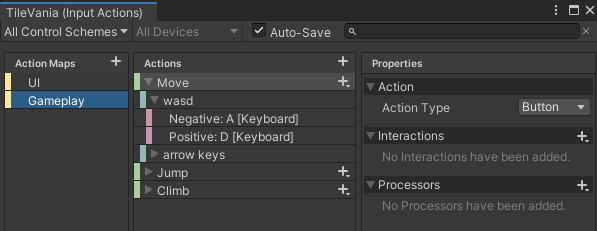
well, not much.
more accurately it's actually just 'A' and 'D' on a 1D axis for moving left and right.
void Awake()
    {
        gameplayMap = actionAsset.FindActionMap("Gameplay");
        gameplayMap.Enable();
        moveAction = gameplayMap.FindAction("Move");
        moveAction.performed += context => OnMove(context);
        moveAction.canceled += context => OnMove(context);
    }

    private void OnMove(InputAction.CallbackContext context)
    {
        Debug.Log(context.phase);
    }
version 2
austere grotto
viral monolith
https://i.imgur.com/I5NwUDu.png
Is Button appropriate?
viral monolith
this seems to work
austere grotto
hmm
viral monolith
i guess the 'performed' and 'canceled' are the context's phase, and not the action's phase
austere grotto
i thought they were the same TBH
austere grotto
Maybe the problem is that the input action phase is updating out of sync with Update?
so checking in update misses it?
tame oracle
i liked the ability to edit scripts in play mode
with the input system that doesnt work though (all input stops working)
is there a way to get that working again
 frail skiff
Hey folks, I'm having issues with finding when cancelled is clicked in my game. I have player input set to send messages on a monobehaviour, and am picking up the OnCancel in a method on one of the components. It works fine in the editor but for some reason has stopped working in the build (it was previously working in the build fine) Any ideas what to look for?
 dusky ocean
I don't have the option to Create Composite Axis and Create Composite Dpad... Does anyone know if this still exists?
 dusky ocean
nvm I found it
dusky ocean
Does anyone know why I can't see my method? My method is called OnMovement and its public.. But i still can't see it

 violet wigeon
When I test my game with keyboard and mouse, and I click with the mouse on an object the object code starts running. But i cant seem to find how I do this with the vr controllers
 grizzled fractal
What does your method look like @dusky ocean
dusky ocean
    public void OnMovement(InputAction.CallbackContext context) {
      Debug.Log("Reached");
    }
Oh I somehow got it working
I don't even know what I changed
dusky ocean
how can I get the mouse input with the new input system? I don't want the position
austere grotto
dusky ocean
how can I get the mouse input with the new input system? I don't want the positi...
Create an InputAction tied to pointer delta or mouse delta
dusky ocean
Hmmm... I can't get - values. SO I'm only able to use left and up
tame oracle
tame oracle
i liked the ability to edit scripts in play mode
with the input system that does...
anyone?
 unique acorn
I'm trying to use the input system, but i seem to be unable to use the actions editor 🤔
the properties pane is just fully empty if it's not an action that was autogenerated, and i have no way of adding a binding properly. also, as soon as i select some control scheme, everything vanishes.
Am i missing something or is this a bug? I'm also getting
NotImplementedException: The method or operation is not implemented.
UnityEngine.InputSystem.Utilities.PrimitiveValue.FromString (System.String value) (at Library/PackageCache/com.unity.inputsystem@1.0.2/InputSystem/Utilities/PrimitiveValue.cs:407)
Sounds like a bug to me 🤔
 brittle pebble
how to implement the Input System in your scripts i tought it was? using UnityEngine.InputSystem;
austere grotto
brittle pebble
how to implement the Input System in your scripts i tought it was? ``using Unity...
You need to also add the package to your project via package manager
brittle pebble
The type or namespace name 'inputSystem' does not exist in the namespace
austere grotto
Capital I
austere grotto
it does
show your code that isn't working
also have you set up your IDE to properly show your Unity errors?
brittle pebble
using System.Collections.Generic;
using UnityEngine;
using UnityEngine.InputSystem;

public class Player : MonoBehaviour
{

}```that's correct.
brittle pebble
then why in the world
austere grotto
You're not using an asmdef file are you?
austere grotto
where are you seeing that error? Unity or VS?
brittle pebble
i hate myself
why doesnt it work when i do it by myself
and when i get help
poooof
it works
im so stupid
well
thanks for help i guess lol
austere grotto
lol ok
brittle pebble
but now
i kinda have another problem
InputMaster give me the same error
ima send line
public InputMaster controls;
this doesnt seem to exist
austere grotto
what's InputMaster
brittle pebble
dunno
austere grotto
Is that the name of your InputActionAsset?
brittle pebble
im kinda following a smol tutorial
austere grotto
The tutorial probably named their InputActionAsset "InputMaster"
austere grotto
What is your input action asset called
brittle pebble
Inputs
austere grotto
Then you need to use Inputs instead of InputMaster
brittle pebble
alright
austere grotto
You should also set up your IDE
so you get Intellisense auto suggestions
Are you using Visual Studio?
brittle pebble
yes i am
austere grotto
Make sure it's configured properly: https://docs.microsoft.com/en-us/visualstudio/gamedev/unity/get-started/getting-started-with-visual-studio-tools-for-unity#configure-unity-to-use-visual-studio

Learn how to install and setup Visual Studio for Unity development.
brittle pebble
alright
austere grotto
so you get errors and autocomplete in VS
brittle pebble
ima try i guess
well
if u wanted to know
i changed it to the right name
but still doesnt want to work
public Inputs controls;
austere grotto
In your scripts folder
brittle pebble
yeah
brittle pebble
yeah
austere grotto
that matches your input asset name
brittle pebble
or the skript name is Player
austere grotto
Mine looks like this

it's generated by Unity
I did not write that code
you should have something like that in your scripts folder
austere grotto
that name is only my name
brittle pebble
oh aight
austere grotto
your name will match the name of your InputActionAsset
brittle pebble
wich is Player
austere grotto
Then yes it should be called Player.cs
brittle pebble
wich it is
austere grotto

If that's the case then you use the name Player to reference it in another script
brittle pebble
ima check
austere grotto
Hopefully you haven't also named one of your other scripts Player or you will have an issue
austere grotto
remove it? No
austere grotto
don't worry about it 😄
brittle pebble
can i remove all this random?
brittle pebble
oh alright
brittle pebble
kk lol
well
i think i might've messed it up
now my skript that was suppose to be my movement skript is now the random stuff
ill just make a new one?
ancient berry
So, when I launch a build of my project, it doesn't receive input at all until I unplug my controller
Then if I plug it in while it's still running, wait until it connects, etc. it will work but the look sensitivity is about 4x what it's supposed to be
I truly have zero idea what's going on here. All I have is a PlayerInput component (I haven't had the time to convert to a custom class yet) and a function that I can post on a pastebin website if people want to see it
But the short version is, all it does is checks the callback.action.name of the callback, and if it's a button it starts states assigned to it, and if it's an analog stick it assigns the value of the stick to a Vector2
This is a new bug as of today, I've never had this issue before, and I haven't changed anything in my code or my PlayerInput component
 nocturne crane
Hi, is there more documentation on the Player Input Manager ? I'm trying to make a local multiplayer game, I made it work well for my character selection screen, but I struggle to link it to my game scene
Selection screen is looking like this and work perfectly, what function should I use on my main scene to instantiate PlayerInput and link it to screen select devices ?
(another format so you can just see it in discord)
I got a way to transfer data from one scene to another, actually I ask my scene game to instantiate a character for each player, each player then have a PlayerInput component, i just need to set their user variable i guess ?
nocturne crane
Well nevermind, it look like Instantiating them in the new scene in the correct order make them retrieve the correct ID, so no additional work is needed
nocturne crane
Well no it is not working, when adding a PlayerInput GameObject, it assign it an ID from scratch, and for the devices, it give it the keyboard first then the gamepad, which is not correct if i want to instantiate a gamepad player first, it will link it to keyboard anyway
nocturne crane
Finally managed to precise a device with the JoinPlayer function :)
fallow condor
how do I use my android sensors with unity? like rotationvector, gyro, etc...
ive found a handful of janky plugins on the asset store that havent been updated in years
i have my phone conncted by Unity Remote
is there any simple class/methods i can use to just access gyro data for a game mechanic?
or do i need a custom plugin
austere grotto
fallow condor
how do I use my android sensors with unity? like rotationvector, gyro, etc...

 bronze finch
Anyone know how to develop a sprint function with the new input system? I have utilized the interaction bindings in the Input Action menu and choosing hold will not keep the sprint speed of the player constant past one frame.
austere grotto
Hold is for "hold to interact" kinda stuff
 earnest stag
sorry but is there a way of geting info from a controller's gyroscope using the new input system???
austere grotto
earnest stag
sorry but is there a way of geting info from a controller's gyroscope using the ...
although that seems to be for android/ios
do you mean like a PS5 controller or something
earnest stag
ps4
austere grotto
earnest stag
ps4
austere grotto
It says this in notes:
Unity doesn't support the gyro or accelerometer on PS4 controllers on platforms other than the PlayStation 4 console. Unity also doesn't support the DualShock 4 USB Wireless Adaptor.
which seems to imply that if the game is going to be on PS4 it might work somehow?
earnest stag
im going to ask again sorry if im anoying or something
sorry but is there a way of geting info from a controller's gyroscope using the new input system???
bronze finch
austere grotto
Hold is for "hold to interact" kinda stuff
😬
austere grotto
bronze finch
😬
listen to started and cancelled events/phases to figure out when the user is holding down a button.
Or poll the InputAction and see if it's actuated
bronze finch
so like runAction.triggered except runAction.Started/Cancelled?
austere grotto
not really
they're events
if you want to do a check in Update or something you would poll the value
runAction.ReadValue<float>() > 0
bronze finch
Oh ok Appreciate ya!


 austere grotto
 lunar geyser
I have a prob
lunar geyser
I have a prob
Did you try opening the build settings like the error suggests?
 still carbon
is there any way to pass a PlayerInput of a gameobject to another gameobject?
or at least the configuration of a playerInput to another?
still carbon
mainly i want to pass this info to another PlayerInput, this is from a sdelection character scene and i want it into each player in gameplay scene

 vernal iron
Does someone here know how to check if you are running the old or new input system from code?
I am making a tool, so I can't check in the player settings
tame oracle
vernal iron
Does someone here know how to check if you are running the old or new input syst...
#if ENABLE_INPUT_SYSTEM
    // New
#endif

#if ENABLE_LEGACY_INPUT_MANAGER
    // Old
#endif
``` also both can be true at the same time idle sundial
InvalidOperationException: You are trying to read Input using the UnityEngine.Input class, but you have switched active Input handling to Input System package in Player Settings.
UnityEngine.Input.GetKeyDown (UnityEngine.KeyCode key) (at <6af207ecd21044628913f7cc589986ae>:0)
body.Update () (at Assets/body.cs:13) pls help
tame oracle
you crossposted
 karmic zinc
I'm trying to setup local multiplayer where players can join by pressing gamepads south button.
However the my "handlePlayerJoin" event does not get any PlayerInput So I can run the setup code for the player.

"Funny" thing is that my code works ok if I do not set a specific button for player joining... But for second player who joins, I get two players totaling 3 and the second players controls don't work...
It's hard to explain the situation. But i'll try:
I have Multiplayer Event System and Input System UI Input Module in EventSystem GameObject
I have Player Input Manager which fires the HandlePlayerJoin event on my PlayerConfigurationManager script

the Event System is trying to open UI modal for each player

But. I get index error:
 earnest stag
how can i use my ps4 controller's gyroscope and accelerometer
karmic zinc
Well it seems I don't understand the problem well enough to explain it properly. But I assume it has something to do with that the HandlePlayerJoin method is not called and therefore playerConfigs for that player is not initialized and I get index error on later code..
vernal iron
I currently have an if statement to check if a mouse button is pressed, which works.
I don't quite understand how I can make an action from code, so I can add listeners without using if statements
earnest stag
pls tell me how can i use my ps4 controller's gyroscope and accelerometer
zinc stump
!warn 661982955446468639 Don't spam the channel. Have some patience.
 sonic sageBOT
 lions#9263 has been warned.
zinc stump
Or in this case lookup the actual tutorial for the topic
earnest stag
i cant find a tutorial
 smoky jewel
How can I smooth Vector 2 input?
tame oracle
i use mathf.movetowards in update to smooth the input
not sure if there's a better way
grizzled fractal
You can only get gyro information of a PS4 controller if on PS4, not with it connected to pc @earnest stag
If you search there was a conversation about it just the other day
karmic zinc
I now have a situation where I get two players for each controller if Join Behavior is set to "Join When Button Is Pressed" and only first player is able to join if it is set to "Join Players When Join Action Is Triggered"
Is anyone else having similar behavior?
I would like to have it triggered on Join Action rather than any button as I only want to support gamepads
proud cliff
I have a problem that i can not use 2d Axis Composite. I am using the new input system in 2D game.
 karmic zinc
Fixed.. I needed to have separate input settings for joining the game and separate for player movement. I guess the first player took the controls for good so it was no longer listening for others to join?
For the problem of players joining twice the key was to set the action as below:
 grizzled fractal
Nice thanks for sharing :)
 livid rapids
Ok so I want to make a mouse sensitivity setting that matches the in/360 or cm/360 of titles like csgo. I am wondering what the calculation is that unity uses for it's mouse deltas given by, Input.GetAxisRaw("Mouse X") and Input.GetAxisRaw("Mouse Y").
I want the same cm/360 as in csgo with the same input sensitivity number that I am going to put in my settings ui.
austere grotto
livid rapids
Ok so I want to make a mouse sensitivity setting that matches the in/360 or cm/3...
I'm pretty sure those values come in screen space units which will be enumerated in pixels
So if you want to convert that to cm or inches you'll need to know the dpi of the display
west oracle
And the current PPI of the mouse
 maiden night
@livid rapids According to this reddit thread below it's about Unity 0.044 = CSGO 1.0. However if you feel like digging to find how they do it exactly Quake 3 Arena uses the same input sensitivity numbers as CSGO and the source code is all on github but not sure which file you'd need to look at to find it or if the code is readable (written in C in ~2001) https://www.reddit.com/r/Unity3D/comments/3vmugj/hey_guys_i_have_a_question_about_inputgetaxis/
reddit
4 votes and 5 comments so far on Reddit
 waxen jolt
Hi all I am trying to learn the Unity Input System and I am having a real hard time with it. I want to essentially just test how to call an action map and action button but It isn't working? I have found a lot of tutorials around WASD and other controllers with the new input system but none just describing how to use it. Any recommendations for me to check out?
maiden night
waxen jolt
Hi all I am trying to learn the Unity Input System and I am having a real hard t...
I just converted my game to it, there are a couple videos I found very useful but I will say it's a lot more on the technical side than the old input system. Good place to start is the below Unity video which should get you at least moving https://www.youtube.com/watch?v=Gz0YcjXBJ3U

The new Input System in Unity allows us to quickly set up input for our player. In this video, we will learn how to adapt a twin-stick shooter character from using the current built-in input management system to the new input system using the new PlayerInput system. We'll look at how to implement moving and shooting controls for both keyboard an...
After that I highly recommend samyam's tutorials on how to set up a cinemachine camera with the new input system and how to set up an input manager
The problem with the new system is you don't "just use it", it's like a framework you set up and interconnect between a few different places so it's confusing at first. Long run it will make your input system better though.
waxen jolt
maiden night
The problem with the new system is you don't "just use it", it's like a framewor...
Thanks so much for the recommendation! I watched samyam’s video and got completely overwhelmed haha most likely because I had no background or understanding of the new “framework”. Hopefully with your suggestion I’ll have a better start to then implement down the road! Thanks again!
maiden night
No worries if you aren't too familiar with programming larger scale things or javascript I could imagine the callbacks and everything could seem overwhelming, good luck!
austere grotto
Just keep an open mind. There are a lot of different ways to use the new Input System
I'm experimenting now with direct InputActionReferences in my scripts
 digital narwhal
Has anyone else experienced issues when building? Build succeeds, but the Input System doesn't work at all. In editor everything works perfect. I am on Unity 2020.3.1, HDRP, latest Input System version. IL2CPP build with .NET 4.7.1, on Windows x86_64.
digital narwhal
Mono build has the same issue.
It doesn't even let me hook up the Input Debugger. The build is development mode with script debugging enabled.
 hidden oracle
Yes, so quick fix: Load an Empty Scene and then your Game Scene and it should work
Or better way, have a "Menu"
where you can go from the Menu towards your GameScene
so you can skip the EmptyScene part with a more "beautiful" way
digital narwhal
Ok. I'll try that thanks.
trim hollow
Anyone here worked with the AddcompositeBinding/ButtonWithTwoModifiers ?
I register my input at runtime and look like the last composite binding I add will be trigger with only 1 button instead of 3 (the button+2 modifiers)
To prevent that bugg if I add another random binding and remove it everything is fine. (Look like something isn’t updating properly for the last register )
austere grotto
How does the "new" unity Input system work?
This is a really vague question, but you can do an even-based approach in the new system where your code gets C# event or UnityEvent callbacks rather than polling the input system each frame. That could be where those comparisons are coming from
You need to somehow get a reference to an InputAction (there are many ways to do this part), then you can subscribe to the events on that InputAciton
e.g.:
InputAction jumpAction;
...
jumpAction.performed += HandleJumpPerformed;
...

void HandleJumpPerformed(InputAction.CallbackContext context) {
  Debug.Log("Jump!");
}```Basically.
You create your own InputActionAsset - this is where you define all the actions
then the most straightforward way to subscribe to the action is with:
[SerializeField]
InputActionReference jumpActionRef;

void OnEnable() {
  jumpActionRef.action.performed += MyListener;
}```then you can just assign an input action directly in the inspector
to jumpActionRef