#🖱️┃input-system
1 messages · Page 39 of 1
 cyan crag
IMGUI is the ancient script-based UI, and UIElements is the newer one, those both aren't supported. UI Package is regular UI system that works, but it's a package now
 austere grotto
yea
but isn't that a screenshot
from UIELements
saying you can use Input System package
cyan crag
it's from input system docs isn't it
austere grotto
idk
What is the Unity UI Package
is that UGUI?
oh ok
yeah nvm
so UIElements just isn't supported at all?
with Input System?
 untold sun
So, if UIElements isn't supported by the input system yet, then I have to think it's definitely too soon for me to be bothering with it 🙂
cyan crag
yeah, UIElements is pretty fresh, it was only just recently it started being tested for runtime support wasn't it, had been editor only for a while
 untold sun
Ok. So... I guess I'll go look into the one that IS supported and scrap the (completely friggen awul) UI I've built so far 🙂
austere grotto
yeah input system is good
untold sun
This is precisely why I'm building junk test scenes, to catch this stuff early and settle on the right tech choices
cyan crag
yeah always a wise decision
untold sun
Ok, thanks for the help guys. I'm gonna rebuild this and hopefully everything will magically work 🙂
 keen wedge
Is there a simple way to have "repeated input events" in the new input system?
What I mean:
I press w:
Event is Fired -(User Holds W for 0.5s)->Event is fired again. - > Repeat until user let's go of W
cyan crag
@keen wedge https://docs.unity3d.com/Packages/com.unity.inputsystem@1.1/manual/Interactions.html#writing-custom-interactions
would want to make a custom interaction for that use case
keen wedge
eww, i goes there goes the "simple". Thanks for the docs link tho :)
cyan crag
Thankfully the api there seems super straightforward for writing the interaction
 tacit igloo
I'm making a top down coop local game and for the aiming, my two players are reading the same value from my Input Action asset
I tried to make them read there own value from the Action of the PlayerInput component but it didnt work because the Input Action script is not derived from MonoBehaviour
I tried this : Vector2 aimScreenPosition = playerInput.GetComponent<PlayerControls>().PlayerActions.Aiming.ReadValue<Vector2>();
Where playerInput = the Player Input component from the GO and PlayerControls, the script created from the Input Action asset
So in fact when P1 is moving the mouse, P2 ( who use a gamepad ) is turning but he should'nt
How can i call this Aiming value for each players ? i'm so lost and found nothing on the net
austere grotto
They each need their own PlayerControls
Or rather
they each need their own PlayerInput
keen wedge
also: Calling GetComponent each time the mouse moves ia really bad
(performance wise)
tacit igloo
i think they both have their own PlayerControls ? i'm using a player Input Manager who instances one PlayerInput / player connected and if you look on my screen you can see that InputActionAsset ( custom var ) has a clone
cyan crag
well one component call each frame ain't bad, but it's not a good habit and easy to creep into areas where it could reallly get bad haha
tacit igloo
haha i know it but i will do the optimization just after the bug is fixed and that i understand the problem
the first line is working but it control the two players
that's why i wrote the second line in order to force the Player Input to read a specific input asset
i'm also using the Invoke Unity Events behaviour's
What i'm looking for is someting like that
aimScreenPosition = playerInput.actions.ARGUMENT<PlayerControls>().PlayerActions.Aiming.ReadValue<Vector2>();
I know playerInput.actions ( also inputActionAsset var ) give the current Input Action Asset of the Player Input so i want to read the one who is set
 queen osprey
austere grotto
yeah input system is good
queen osprey
austere grotto
yeah input system is good
Why is it good?I am just learning unity and have had to relearn input system already. no problem but what was the improvement?
 soft basin
keen wedge
Is there a simple way to have "repeated input events" in the new input system?
...
soft basin
keen wedge
Is there a simple way to have "repeated input events" in the new input system?
...
you can probably do something with IEnumarable?
soft basin
queen osprey
Why is it good?I am just learning unity and have had to relearn input system alr...
It's a different way to work with inputs. A lot of beginners gets frustrated with the event based nature rather than polling (action.performed vs Input.KeyDown())
It's nice because it's easy to add local multiplayer and changing keybindings on the fly
tacit igloo
Yes its cool for that but its a mess for programing ans then fixing your problems due to a lack of documentation/tuto who only show how to add a basic local mulitplayer
soft basin
they asked why it's good, not why it's bad
tacit igloo
Yes but we cant forget the flaws and just say its beautifull
as everything, there is con and pro
soft basin
It's also more difficult to work with for beginners, even if the documentation and tutorials where better
But once you get the hang of it, it's really great
tacit igloo
True i dont recommand to start with the new input system even for a multiplayer game
I hope my mind will change and there will be more doc
soft basin
I mean
That's what I did
The new Input System is pretty natural if you're used to functional programming
tacit igloo
Well, do you know how to read a value of the input action asset attached to the current Play Input component for a co-op game? (I wrote my full problem at the top)
I tried to solve the problem for several hours but found nothing useful
soft basin
I don't think I understand the issue
tacit igloo
i'm using a player input manager component who instance one player input / device connected for a top down local coop game
but in my player input handler script, i read a vector2 value ( mouse position ) who came from my input action asset in order to make the players aim in a certain direction
And the problem is that both player input GO read the same value so in fact if P1 use a mouse and the mouse Pos = 1920,1080 the P2 ( who use a gamepad ) mouse pos var will be the same causing P2 turning according to the mouse position and not the joystick
( i also have a dash/shoot input for both players and i don't have any issue )
As you can see on the right ( P2 Player Input ) , the aim screen position var is not = to 0 and is = to my mouse position ( Player 1 is using the mouse )
On the left you can see what i have done on the update, it's where the problem is coming from and in // what i would like to get => read the action value from the player input ( i know the line cant work but thats the idea )
tacit igloo
alright i found the solution ! and more i understand the line code haha
but it's not optimized at all : 800 fps when i'm not moving the mouse and 150 when i do
tacit igloo
well i'll try but i'm also using event as you can see
but what do you mean ? may be i didnt understand
well i moved the update lines in my OnAiming so it worked but it's still not optimised
tacit igloo
fixed lmao because checking if i'm using a controller or a keyboard/mouse each frame is a bad idea
 nimble spindle
I'm trying to create a Finite State Machine with the new input system, following this https://learn.unity.com/project/finite-state-machines tutorial.
However, when I tried to implement OnMovement(InputAction.CallbackContext value) on abstract state classes, it doesn't work there. How should I read the movement values like the old usage horizontalInput = Input.GetAxis("Horizontal"); in abstract StateUpdate method?

Unity Learn
In this project, you will learn about Finite State Machines and how to implement them within Unity. To access the the assets used for this project, click the blue "Project Materials" tab on this project, or within the individual tutorial.
tacit igloo
can you show your script please ? and do you use a player input component ?
nimble spindle
In the old input system; I could've easily read the input values, in StateUpdate method (called in monobehaviour Player's Update method).
But with the new input system, I have to read from another OnAction method, which is not called in a MonoBehaviour class or Update method. I guess that's why it is not responding.
Hope it makes sense?
tacit igloo
i presume that you are using the player input with the Invoke Unity Events behavior ?
so the horizontal input should work and same for the OnJump
here is what i have for exemple
and for the code its pretty the same
nimble spindle
tacit igloo
i presume that you are using the *player input* with the *Invoke Unity Events* b...
Since the states are non monobehaviour, I can't really use unity events there. But thank you...
tacit igloo
well I did not pay attention
hope you will find the solution
 slate jetty
Hey did you find any way to avoid the bug that Touch id n°0 always start at position (0.0, 0.0) and never ends using the simulated touchscreen ?
 west oracle
@nimble spindle you can still Poll an Action's value rather than use the callbacks if you prefer.
https://forum.unity.com/threads/best-practices-getting-started-tutorials.875818/ I covered a bunch of thoughts on the "new way" a while back

Unity Forum
Decided to make a few of these to help folks that are new, or struggling (as I did) to move from the Old Input Manager to the New Input System.
Hope...
nimble spindle
west oracle
https://forum.unity.com/threads/best-practices-getting-started-tutorials.875818/...
I'll check them all thanks a lot 🙂
west oracle
https://youtu.be/0pKzAFy5r9w this one in particular @nimble spindle

 weary holly
anyone knows if there is a key dict? need to save the keybinds, but i don't want the akward <Keyboard>/E to be saved
nimble spindle
west oracle
https://youtu.be/0pKzAFy5r9w this one in particular <@!368456842793451520>
Great tutorials! Although I knew many of these features, it gave me better insight and learned a few tricks thanks to you. 👏
west oracle
yep 🙂 thats why i made em heh
"This is how I stumbled thru" 😛
some things have changed since then, but a lot of the premise is the same
soft basin
tacit igloo
can you show your script please ? and do you use a player input component ?
Do you dare look at mine? 😏
If you're curious:
https://gist.github.com/BastianInuk/2d59036cb58634c79b70ebdf58695c41
 tacit igloo
hahaha i can see the true power of a real programmer @soft basin
i never used Unity.Jobs/Math/Entities because i dont know what i could do with these, especially jobs and entities
can i ask you why you are using => at the begin of some lines ?
soft basin
for functions it's in place of curly braces, just looks nicer
for anonymous functions, that's just the syntax
Also calling me a real progeammer makes me a little bashful ☺️
tacit igloo
haha oops maybe i shouldn't have 🤔
but i understand thanks !
Entities.WithAll<PlayerControllable>() .ForEach((ref Movement move)
=> { move = moveVector; }).Run(); Is this part an " anonymous function " ?
 bright vapor
Hello, I have a question about the new input system 1.1.0-prev3
Given two actions ActionOne and ActionTwo:
- ActionOne is a button type with a bidding to Keyboard Y
- ActionTwo is also a button type with a composite "One Modifier"
binding to Keyboard Y + modifier Keyboard Shift
I use Unity Events in my code,
I have two unity events:
public void ActionOne(CallbackContext context)
public void ActionTwo(CallbackContext context)
In play mode, when I push the Y key, I get a call to ActionOne method,
but when I push Shift + Y keys, I get a call to both ActionOne and ActionTwo
How can I get only the ActionTwo call for Shift + Y
Am I missing something?
bright vapor
I've posted my question here if you can help: https://forum.unity.com/threads/new-input-system-differentiate-action-coming-from-composite-and-normal.1054682/
queen osprey
maybe in your y check if shift is also pressed and ignore? That might be too simple
bright vapor
Sure I could do something like that, but I'm wondering how it should be done in the right style,
because that was an example but I have multiple modifiers keys and controls, it will quickly become a mess
 kind river
guys
does the new input system
support realtime change
?
like i can create a menu in game options
so players can change the inputs?
bright vapor
it does and it have a full example within the package
bright vapor
idk, you should try to search for it on the internet, im pretty sure there is something but the sample package should be a great ressource too
kind river
Ok Thanks
 neon copper
Could anyone help me figure out why my UI input works on one PC but not the other? Using the default Input Action Asset setup and a Player Input component on my canvases for functions like toggling a menu's visibility or advancing text.
bright vapor
bright vapor
Hello, I have a question about the new input system 1.1.0-prev3
Given two actio...
I still have my problem ⬆️
Upping for US timezone
soft basin
tacit igloo
Entities.WithAll<PlayerControllable>() .ForEach((ref Movement move)
**=> { move...
It at least is syntactically an anonymous function, but I believe burst does some code generation from it, idek though
 wise star
Hey guys I hope I'm right here!
I'm trying to add a new menu item to my UI that opens up a music player that plays external files (mp3s). Do you have any resources or tips on this?
tacit igloo
Mmh ok thank you
 vapid zenith
Hi, Is there a better way to add listeners to InputPlayer OnMove and similar UnityEvents , from code? Currently I do
playerInput.actionEvents[0].AddListener(OnMove);
I'd like to avoid zero index
austere grotto
usually I go through the action maps
InputAction jumpAction = playerInput.currentActionMap["Jump"];
jumpAction.performed += myListener;``` silk reef
So im using Dani's character script and i was wondering how to use a ps4 controller to control it
But so far all it can do is just make it go to left and right
How would i fix it
Cus i want it to be able to go all directions
vapid zenith
Ok so I managed to hook methods to input action UnityEvents , all in code.
public static class InputExtensions {
    public static void AddEvent(this PlayerInput pi, string name, UnityAction<InputAction.CallbackContext> callback) {
        var id = pi.actions.FindAction(name).id;

        foreach (var ae in pi.actionEvents) {
            if (ae.actionId == id.ToString()) {
                ae.AddListener(callback);
                break;
            }
        }
    }
}
You simply add event like so : playerInput.AddEvent("Fire", OnFire);
Now my question is there some auto generated enum like InputActions.Fire so i can replace ugly strings ?
vapid zenith
Strange thing : when my game window isn't focused keyboard movement does not work - all cool. But xbox360 controller makes player move even if window isnt selected. IS that intended ? Can i disable it ?
 north cradle
About the New Input System --- My controllers are not listing under the Binding Path! I have Gamepad, Mouse and Keyboard added on the main input system window, but they are not showing under usage 😦
Found a solution. For anyone having the same issue I had: even when your controllers are listed, you won't be able to access them through the new input system.
Here's all the controllers listed.
But only shows "usages". Not Gamepad, not keyboard, nothing. Only usages.
The solution is pretty damn strange. You have to delete all your controllers from the main window and they all show again.
 chrome flume
Should the PlayerInput component from the new Input System go to the prefab of the player? Right now with the old input system my InputManager handles the input, I could hook up the PlayerInput from the new input system to the InputManager. Or should I hook it up to the palyer object directly?
I mean if the player presses pause, that event should go to the GameManager where a FSM handles the pause etc, should the player invoke that event to the GameManager? Another way would be hooking the PlayerInput directly to the singleton global InputManager custom class
west oracle
north cradle
But only shows "usages". Not Gamepad, not keyboard, nothing. Only usages.
I already have a bug report in for this. Big n' ugly bug heh.
west oracle
chrome flume
Should the PlayerInput component from the new Input System go to the prefab of t...
Mmmm design choices 🙂
tacit igloo
@north cradle you can also create control schemes like "Keyboard-Mouse " and "Gamepad"
north cradle
ohhh
@tacit igloo thanks man
Another question, how do I access a specific context.action.name? I want to access UP and DOWN separately here.
west oracle
@north cradle those are called "Bindings"
north cradle
mmmm
how do I access those ? context.action.bindings ?
Because I'm reading this and, I don't quite get it: the code shown there is the alternative to the screen shot from above? Or you have to do both, set it up in the editor and also write down that code?
It isn't clear (to me, at least) how to access the binding from that 2D vector.
 torn oxide
I've set up actions in Unity's new input system and added corresponding bindings for both keyboard and XR (Oculus Rift). When I enter play mode, the keyboard-based action correctly fires, but the button clicks from the Rift controller do not.
Viewing the Input Debug panel, I see that User #0 is showing a control scheme of Keyboard/Mouse and that the Rift is not listed as a Paired Device. Is this expected behavior?
I'm trying to find code reference for using XR devices with the new input system, but it seems like all the tutorials are using the XR Interaction Toolkit.
north cradle
That said, are you reading the latest version of the docs? (https://docs.unity3d.com/Packages/com.unity.inputsystem@1.0/manual/QuickStartGuide.html)
I'm also finding it difficult to work with the new input system due the lack of clear examples. Having just codes references in the docs don't cut it for me and many others. When it first launched, Unity used to have code examples. Now the docs have become even harder and more cryptic to read for the uninitiated.
 glass yacht
@north cradle please do not discuss sexually suggestive topics or use reaction gifs
 urban quarry
@north cradle This helped me get the new input system working in my project. It's just a start, but it was more helpful to me than the docs:
https://learn.unity.com/tutorial/recorded-live-session-using-the-input-system-in-unity?uv=2020.1&projectId=5fc93d81edbc2a137af402b7
Unity Learn
Watch the recording of the live session where a Unity Certified Instructor led learners through a series of mini-challenges to take advantage of Unity's new Input System. Throughout the session, users will be able to: Describe the use case for the Input System Understand how the Input System allows for multiple input devices to be used without m...
bright vapor
With the new input system, I have two "Player Input" enabled on my scene but only one User showing in the input debug, what could be wrong?
ok it's because i only have one device
bright vapor
Why my Player input user is invalid?
west oracle
?
 tame oracle
Anyone else have major issues with Mouse.delta?
Does Mouse.delta update every Update()? Or is it on a different loop?
hey guys
i need some help
so in the if (Input.GetMouseButton(2))
i want it to be smooth but i dont know how
north cradle
to be honest, the new input system drives me crazy. Its two days and I haven't even been able to move the character the way I want to.
tame oracle
can someone help?
north cradle
I ended up with 3 C# files and a class, all do nothing
soft basin
Damn
north cradle
the scripting part is so different from what it used to be that it takes 40 more steps to apparently do one thing
soft basin
40 steps to do one thing sounds like a lot
north cradle
I used to do this with ONE LINE of code. Input.GetKey(KeyCode.LeftArrow)
soft basin
I only have three steps to do one thing:
https://gist.github.com/BastianInuk/2d59036cb58634c79b70ebdf58695c41
tame oracle
north cradle
to be honest, the new input system drives me crazy. Its two days and I haven't e...
What's the problem?
Also I figured out that Mouse.Delta actually updates far faster than Update(). There is actually no game loop we have access to that updates as quickly as inputs. Must be a separate game loop that is in the internal C++ code that is much faster....
If I print in the update and print in the update() I get like 8 Event messages every 1 Update() message
north cradle
tame oracle
Are you getting lag and stuttering while turning?
north cradle
I got my character moving UP, DOWN, LEFT and RIGHT with my keyboard. The issue is that it strafes left and right. I want it to rotate left and right.
soft basin
tame oracle
Also I figured out that Mouse.Delta actually updates far faster than Update(). ...
I think it's more that the new system is event based rather than polling based, if any changes, then the system will be told
tame oracle
@soft basin Yea but I had always assumed it was only checking for updates once per Update() thread - which we consider "frames". It updates way more often than that.
soft basin
That's because there's wayy more events than one in a frame
soft basin
north cradle
I got my character moving UP, DOWN, LEFT and RIGHT with my keyboard. The issue i...
how would you implement the rotate with the old system? 👀
tame oracle
Yea but a programming language still has to check an event on some sort of game loop. It's impossible for, as an example, a mouse click to stop the game loop and inject code. All code is in a loop.
So there's some separate game loop for inputs that happens faster than the actual "game loop" we use in gameobjects (Update())
Probably only accessible in c++
soft basin
I've actually tried to dig in the code to see where it happens myself
https://github.com/Unity-Technologies/InputSystem

GitHub
An efficient and versatile input system for Unity. - Unity-Technologies/InputSystem
tame oracle
I'm thinking specifically for any mouse inputs you should use the old method of pooling rather than the whole events thing. Like totally don't even write an event for your mouse delta I dont think it works
tame oracle
An alternative is to accumulate the Mouse.delta events in the event (I believe it resets every time you Get<>() the value which is why it messes up) and then clear it in PostUpdate (reset the accumulating vector back to 0,0)
soft basin
That could work
tame oracle
Any events between Update and LateUpdate (if that's even possible) would be lost. Probably unnoticeable inaccuracy but...
It's also less efficient than pooling because you're accumulating accumulating numbers for no reason.
tame oracle
Yea you can it's just not Unity's defacto standard practice
tame oracle
Yea I'm not sure how that works because a mouse ingame can move infinity as opposed to how an actual mouse works where it can only move the cursor to another part of the screen.
I'd have to look into it - it'd be more manual work than delta but if I keep having problems with it
 trim hollow
Any ideas what’s going on

Unity Forum
I'm having a problem with the new input system ButtonWithTwoModifiers composite binding that triggers the action even though the modifiers have not...
north cradle
@soft basin transform.Rotate(Vector3.up, turnSpeed * Time.deltaTime);
inside Update
I would do something like this
if (Input.GetKey (KeyCode.LeftArrow))
then transform.Rotate(Vector3.up, turnSpeed * Time.deltaTime);
but I can't use Input.GetKey KeyCode with the new input system, so I have no idea how to do it
I have 40 tabs open while trying to sort this out: no luck so far
soft basin
why not transform.Rotate(vectorFromInputSystem, turnSpeed * Time.deltaTime)?
north cradle
what is vectorFromInputSystem
oh I follow you
but it doesn't nworks
``
using System.Collections.Generic;
using UnityEngine;

public class PlayerController : MonoBehaviour
{
    public float moveSpeed = 5.0f;
    public float turnSpeed = 50f;

    float horizontal;
    float vertical;


    public void Update()
    {
        Vector3 moveDirection = Vector3.forward * vertical + Vector3.right * horizontal;

        transform.Rotate(moveDirection, turnSpeed * Time.deltaTime);

    }

    public void OnMoveInput(float vertical, float horizontal)
    {
        this.vertical = vertical;
        this.horizontal = horizontal;
        Debug.Log($"Player Controller: Move Input: {vertical}, {horizontal}");
    }
}
There is so little about this Input system
How one would do Switch controls with the legacy input system/
all I want is for a way to detect buttons
the old Input.GetKey
 zinc stump
You can install examples from the package page. Also forums cover a lot of it.
soft basin
there's also the .isPressedThisFrame or however that method is called
north cradle
that might be interesting, looking into it now. I'm starting from scratch
for the fifth time
I hate this new input system
soft basin
why then use it?
north cradle
Because it has gamepad and switch and I'm coding for switch
north cradle
This is usually the easiest part of all, but they changed it since the last time I used Unity back in 2013
I was trying to capture the movement from a 2D Vector
soft basin
Well it would be the easiest part for me, if it wasn't because I keep forgetting the input.Enable() method
north cradle
I wanted to do something like "if Up pressed, then X happens"
But I can't grab those one by one, I have to use Vector3 moveDirection = Vector3.forward * vertical + Vector3.right * horizontal; or something like that. It wants me to grab both horizontal and vertical at the same time, instead of just one button (left or right). So I guess I will just have to do it the hard way and instead of having a 2D vector, I will have to bind keys one by one.
austere grotto
north cradle
if you want to get the values individually, craete 4 separate Actions insstead of a composite like you have now
but you could also just check if that Vector2.y > 0
north cradle
Yes, I was thinking about doing that actually
austere grotto
that will tell you if up was pressed
north cradle
like this?
``if (Vector2.y > 0)
{
pressed! }
austere grotto
no like
 ocean wasp
Okay im running into a lot of ways to detect the Last Touch that happened, basically i want to just the the Touch that was just happened?
ocean wasp
My thing is i'm using a joystick, so during movement there will always be 1 touch on the screen.
This means that simple script like public class TouchExample : MonoBehaviour { void Update() { if (Input.touchCount > 0 && Input.GetTouch(0).phase == TouchPhase.Began) { //Do Stuff } } } will work, but not if we're moving? So basically i'm going to have to for loop and check all the touches that happened to find the one that just began ?
north cradle
private void OnMovePerformed(InputAction.CallbackContext context)
    {
        Vector2 moveInput = context.ReadValue<Vector2>();
        moveInputEvent.Invoke(moveInput.y, moveInput.x);

        if ( moveInput.y > 0 ) {

               Pressed!
        }
    }
Ok so now i have a touch "sanitizer" that checks if a touch is within the joystick or not.
How would i go about using that touch elsewhere in my code? (For example i think this would involve the Event system potentially?)
Like if i want to do something when a touch is pressed, to not have to use a forloop to do input.touches > 0 etc.
ocean wasp
Welp i just attempted migrating to the Input Systems and holy crap i broke everything, i'm gonna revert for now lol
north cradle
I have strafe with Q and E on my Keyboard. How do I access those by code? Right now I am accessing them via Vector 2, but I'm not sure how to access those individually.
using System.Collections;
using System.Collections.Generic;
using UnityEngine;
using UnityEngine.InputSystem;

public class Player : MonoBehaviour
{
    public InputMaster controls;
    Vector2 move;


    void Awake()
    {
        controls = new InputMaster();

        controls.Player.Move.performed += ctx => move = ctx.ReadValue<Vector2>();
        controls.Player.Move.canceled += ctx => move = Vector2.zero;


    }

    void Update()
    {
        Vector3 ForthBack = new Vector3(0.0f, 0.0f, move.y) * Time.deltaTime;

        Vector3 Strafe = new Vector3(move.x, 0.0f, 0.0f) * Time.deltaTime;

        transform.Translate(ForthBack, Space.World);
        transform.Translate(Strafe, Space.World);


    }

    void OnEnable()
    {
        controls.Player.Enable();
    }

    void OnDisable()
    {
        controls.Player.Disable();
    }

    void Move()
    {
        Debug.Log("move");
    }

}
Should the PlayerInput component from the new Input System go to the prefab of the player? Right now with the old input system my InputManager handles the input, I could hook up the PlayerInput from the new input system to the InputManager. Or should I hook it up to the palyer object directly?
I mean if the player presses pause, that event should go to the GameManager where a FSM handles the pause etc, should the player invoke that event to the GameManager? Another way would be hooking the PlayerInput directly to the singleton global InputManager custom class
west oracle
@north cradle you can access a specific Action's activeControl if you want... ie:
public class InputTest : MonoBehaviour
{
    public InputActionAsset asset;
    InputAction action;

    void Start()
    {
        action = asset.FindAction("Strafe");
        action.Enable();
    }

    void FixedUpdate()
    {
        if (action.activeControl != null && action.activeControl.IsPressed())
        {
            Debug.Log(action.activeControl.displayName);
        }
    }
}
that will result in "A" and "D" being displayed in this case when the action is triggered with the keyboard
 limpid totem
What is button for x on ps4 controller here?
 tawdry thorn
Right now, I have a joystick which works wherever you touch on the screen. How do I make it so that it is in a fixed position?
tame oracle
Does anyone know if unity recommends using PlayerInputManager for single player only games? As opposed to just having a single PlayerInput component on a static gameobject.
 frigid ridge
I generally try to look for easy opportunities for making possible shift to local coop easier. Generally end up with cleaner setups anyway.
Granted the static approach is convenient and if you don't see any potential reason to invest, then I guess there is no point
tame oracle
yeah that makes sense, I do like to keep options open. Though in my current case, enough of the game's design relies on players not knowing everything about each other, that I think just not even attempting to support local multiplayer would be alright.
I do intend to support network MP, but I think the local MP adds a bit of unnecessary complexity to the code on top of that
Thanks for the advice!
 lyric needle
which input is mouse left
and mouse right
and up
and down
i hope u understand\
zinc stump
I told you already, it uses axes. negative is left with "Mouse X" etc. Look exact names in InputManager.
tawdry thorn
if(joyStickDirection == joyStickDirection.Horizontal)
        {
            input = new Vector2(input.x, 0f);
}```how can i use this to move my player?
 gritty bobcat
rb.velocity = input; i think
austere grotto
tawdry thorn
```cs
if(joyStickDirection == joyStickDirection.Horizontal)
{
...
depends on if you're using a Rigidbody, CharacterController, or raw transform
 still carbon
Im doing a local multiplayer coop fighter, and on the selection characyter scene i have one canvas for every player, and each player uses his own Multyplayer Event system
but this warnings are appearing all the time, saying that i cant have multiples event system. But the multiplayer event system is supposed to be used for this, allowing to have more than one in scene, no?
austere grotto
It's telling you to set your Input Actions to Pass Through for the ones used by the Input Module
still carbon
i have copied the defaultInputActions and some of them are not Passtrhoug
what Pass trough does?
austere grotto
not really sure but that's what the warning wants you to do 🤔
still carbon
is strange cause using the DefaultInputActions gives me the same problem
And when i hit play, the actions disapears on the second inputsystem module
but still works
 void ocean
im using unity on linux and i can not access the top areas like window, file, edit, ect.
chrome flume
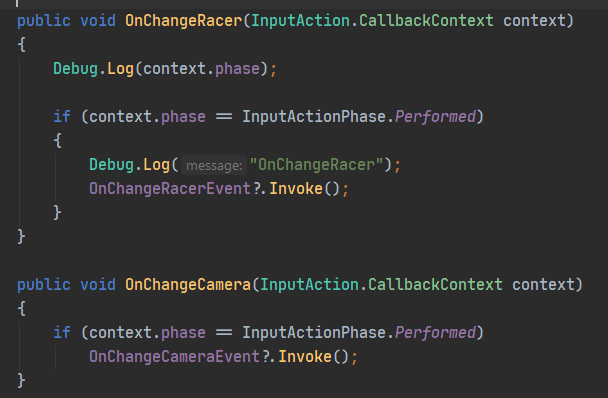
I set up two actions that use the SAME buttons, the ChangeRacer needs the button to be held (long hold) - > https://i.imgur.com/OVwemON.png
And in the code I listen to the events from the new input system. The problem is, the ChangeRacer (holding the button) works only the FIRST time around, "Debug.Log(context.phase);" does not print anything after this action has be performed. Not even "started" gets printed for OnChangeRacer afterwards
 west oracle
firstly, is there a reason you have 2 actions mapped to the same bindings?
chrome flume
well the action is long hold, two different actions
does the input system not support that? To have different interactions on the same buttons?
west oracle
show me the processors/interactions for those two
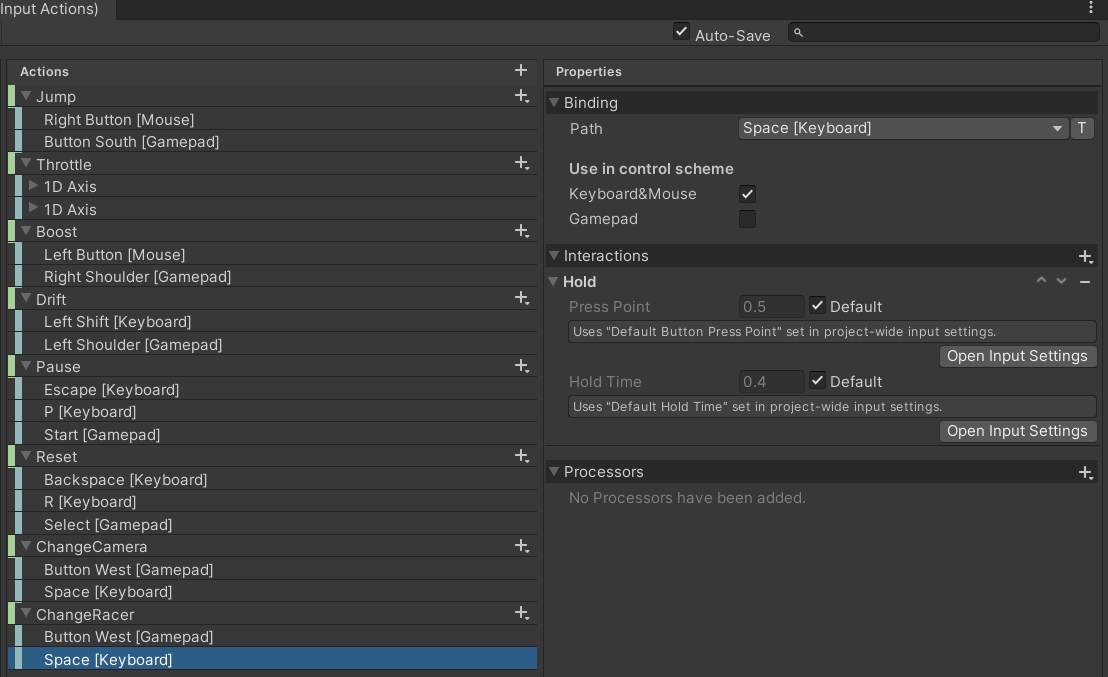
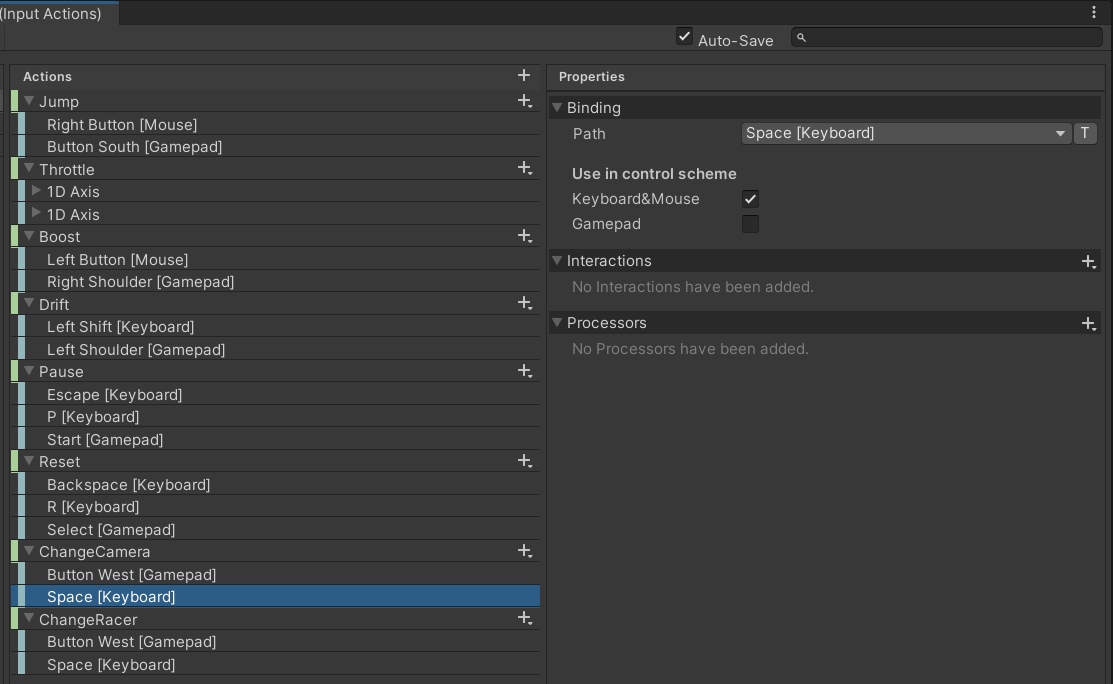 west oracle
so you specifically want it for only Keyboard?
chrome flume
its both, keyboard and gamepad
west oracle
you'll want to put the Interaction on the Action rather than the binding then
chrome flume
same interactions, ChangeRacer is hold
 small fulcrum
what are you adding in OnEnable to the event
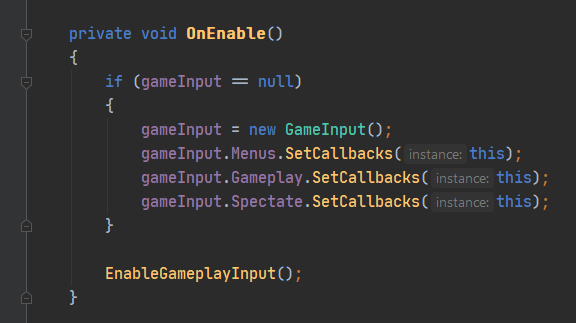 small fulcrum
at least in my older project when I wanted to detect the frame the player started pressing and let go of the button i did something like this
chrome flume
it wasnt sending any event at all for the ChangeRacer after the first "performed" event
putting the hold interaction on the action map didnt help
After "OnChangeRacer" gets "performed" context it never sends any new events, not "started" or "canceled"
I get "canceled" only after exiting the play mode
chrome flume
west oracle
you'll want to put the Interaction on the Action rather than the binding then
didnt help
west oracle
ya, unrelated issue. just cleanliness heh (also sorry, had to settle a feline dispute)
chrome flume
you can see I am pressing "change cam" but the long hold events are not triggering in the console
https://streamable.com/4gfcwf

notice how "cancled" for the "OnChangeRacer" (hold action) triggers only after I exit the play mode, something is bugged
west oracle
public class LogTest : MonoBehaviour
{
    public InputActionReference[] actionReferences;

    void Start()
    {
        foreach (InputActionReference a in actionReferences)
            LogAction(a);
    }

    void LogAction(InputActionReference actionReference)
    {
        actionReference.action.Enable();
        actionReference.action.started += (context) => Debug.Log(context);
        actionReference.action.performed += (context) => Debug.Log(context);
        actionReference.action.canceled += (context) => Debug.Log(context);
    }
}
I do the same
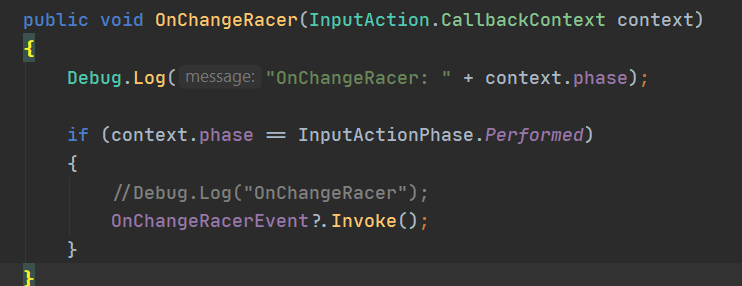
do you have another action with the same binding but without the hold interaction? I think having same bindings causes some issues
west oracle
Action B is configured identically
want me to do the same test with Action B having no interaction?
chrome flume
🤷 how do I debug my case
chrome flume
west oracle
want me to do the same test with Action B having no interaction?
both actions should use the same binding
west oracle
(they do)
chrome flume
but only one having the hold interaction
chrome flume
weird, I never get the "canceled" after it was performed the first time
Does it do "performed" again?
west oracle
yep, is repeatable
chrome flume
weird, not for me with my SO set up
west oracle
@chrome flume
chrome flume
any ideas of how to debug it?
west oracle
make sure my test is repeatable for you
chrome flume
west oracle
<@!206641667871211520>
thanks but I have a different set up with a SO
ok, let me try
west oracle
mostly just determines if you fucked up or if Unity fucked up 😛
chrome flume
west oracle
mostly just determines if you fucked up or if Unity fucked up 😛
🙂 Yours works
west oracle
ok, so what kind of scriptableobject workflow were you trying?
chrome flume
west oracle
ok, so what kind of scriptableobject workflow were you trying?
The one from the Unity open project.
Input Action Asset -> (automatically) generate C# class to GameInput.cs.
SO inherits from GameInput .cs and sets callbacks
like this https://i.imgur.com/dtYJL1A.png
then I just implement the callbacks same as in the GameInput.cs, same name -> https://i.imgur.com/AoRm8Q5.png
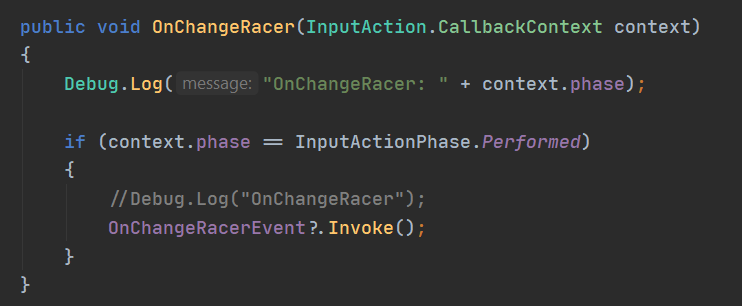 west oracle
Generate C# Class is the bane of my fkking existence I swear... ReneDamm outright admitted my way of doing it was better on forums
chrome flume
lol 🙂
west oracle
but lets see if i can break it the same way so I can submit yet another inputsystem bugreport...
chrome flume
so I should just reference the Input Action Asset directly in the SO?
the generate class -> SO method should normally work the same
I could just give you the same files?
chrome flume
west oracle
but lets see if i can break it the same way so I can submit yet another inputsys...
west oracle
(writing my own for sanity)
chrome flume
I g2g, thanks for helping out, I'll be back later
west oracle
works as intended as SO
[CreateAssetMenu(fileName = "InputObject", menuName ="InputObject")]
public class InputObject : ScriptableObject, ActionsTest.IDefaultActions
{
    ActionsTest actionsTest;
    private void OnEnable()
    {
        Debug.Log("SO Enable");
        if(actionsTest == null)
            actionsTest = new ActionsTest();

        actionsTest.Enable();

        actionsTest.@default.SetCallbacks(this);
    }

    public void OnActionA(InputAction.CallbackContext context) => Debug.Log(context);
    public void OnActionB(InputAction.CallbackContext context) => Debug.Log(context);
}
(I did generate class)
chrome flume
any idea why it doesnt work for me? I am doing the same thing
chrome flume
thanks 👍
chrome flume
In my case after change racer is performed I don't get any events for that action
west oracle
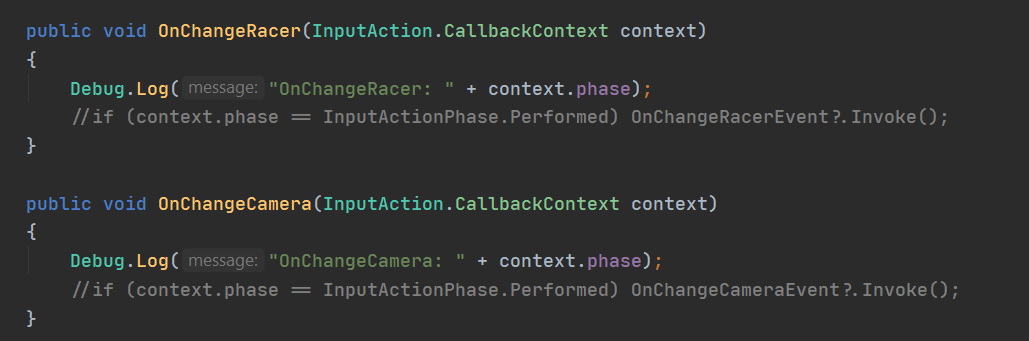
    public void OnChangeCamera(InputAction.CallbackContext context)
    {
        Debug.Log("OnChangeCamera: " + context.phase); //i added this line

        if (context.phase == InputActionPhase.Performed)
            OnChangeCameraEvent?.Invoke();
    }
just for sanity 😛
chrome flume
west oracle
```cs
public void OnChangeCamera(InputAction.CallbackContext context)
{
...
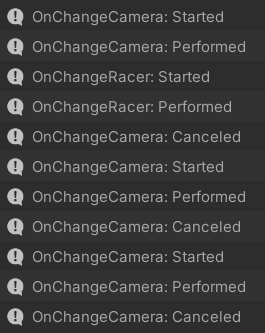
OnChangeRacer doesnt react after it was performed once
I get OnChangeRacer canceled after I exit the play mode
west oracle
are you subscribing anywhere to your public event UnityAction OnChangeCameraEvent; public event UnityAction OnChangeRacerEvent;
(and dumb question, have you tried restarting unity yet)
chrome flume
yes I do sub to those, but it shouldnt matter?
chrome flume
west oracle
(and dumb question, have you tried restarting unity yet)
let me try
What Unity and InputSystem package version are you using?
west oracle
1.0.2 and 2019.4.16
west oracle
run your test with no subscribed stuff...same way you sent me that package and see if you get the same result
chrome flume
west oracle
run your test with no subscribed stuff...same way you sent me that package and s...
same behavior -> https://i.imgur.com/xjPBm6H.png
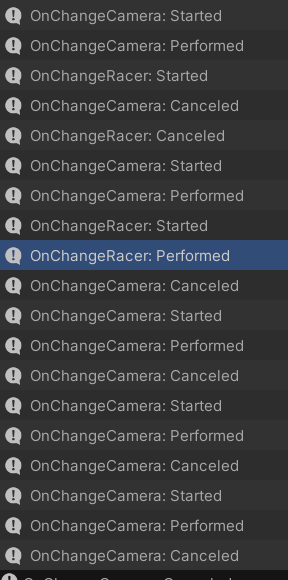
After "OnChangeRacer" performed it stops working
chrome flume
west oracle
anything weird configured in your InputSystem settings?
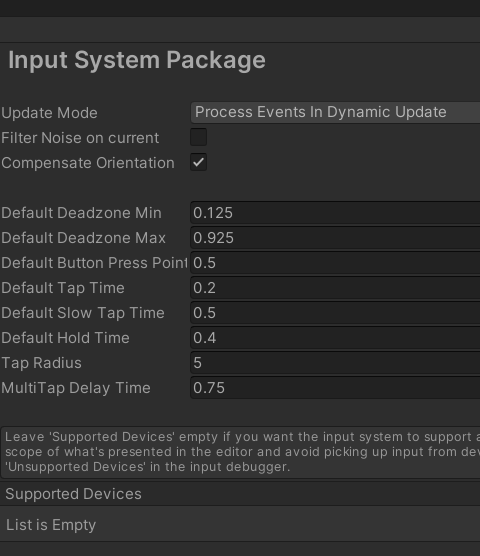
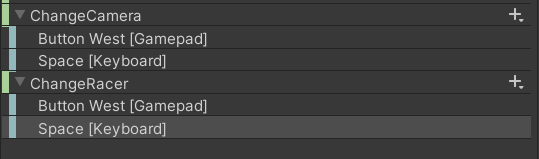
I have two control schemes "gamepad" and "keyboard" though but I dont do anything with it
west oracle
do you have both akeyboard and gamepad plugged in?
chrome flume
yes
north cradle
I have this:
Vector2 move;
controls.Player.Move.started += ctx => move = ctx.ReadValue<Vector2>();
My game read values this way:
Vector3 Move = new Vector3(0.0f, 0.0f, move.y) * Time.deltaTime;
transform.Translate(Move * moveSpeed, Space.World);
Any way I can detect the move.x separately?
Right now I'm choosing to move back and forth, not left and right.
But I want to ''transform.rotate'' on left and right. I can strafe by holding shift, but I want to turn with left and right when I'm not holding shift.
west oracle
lemme plug in a gamepad real quick...
@north cradle break them out into MoveVertical and MoveHorizontal, bind them as 1-Axis composites instead of 2.
chrome flume
unplugging my gamepad solves the problem.......
but now I have a new problem of my game only working with the keyboard 🙂
north cradle
and how do I call move Vector2?
I tried but I couldn't figure it out
if I enter Axis the only reference I get is "SnapAxis"
west oracle
@chrome flume your issue is repeatable over here
chrome flume
west oracle
<@!206641667871211520> your issue is repeatable over here
wow
did I find a bug? 🙂
plugging the gamepad back in and the problem occurs
west oracle
repeatable without control schemes as well
chrome flume
yea, something breaks when using same buttons for different actions and using two or more control devices
what would be the workaround until its fixed? Not using the generated class?
or is the problem at the core of the package
west oracle
(testing it against non-Generate C#... sec)
chrome flume
Unity should pay you 😛
chrome flume
west oracle
(Unity used to pay me)
you were a Unity dev?
I guess I remap ChangeRacer to a different button then :/ Should I or you submit the bug?
west oracle
I'll submit a clean bug report
 faint flame
could Anyone help me with why this isnt working ?
chrome flume
west oracle
I'll submit a clean bug report
will the status of the ticket / bug be visible somewhere?
faint flame
on click it takes me to a different camera
west oracle
chrome flume
will the status of the ticket / bug be visible somewhere?
Only if they accept it as a bug. might be "Working as intended" and we missed something.
chrome flume
west oracle
Only if they accept it as a bug. might be "Working as intended" and we missed s...
lol, as intended yea 🙂
chrome flume
I also dont like that "performed" is triggered before I release the button, how can I emulate ButtonUp with the new system?
chrome flume
just use "canceled" seems the wrong way to do
chrome flume
west oracle
see Best Practices Part 5 from my tutorials
gotcha will watch your vids, thanks for helping out
chrome flume
west oracle
Only if they accept it as a bug. might be "Working as intended" and we missed s...
so there is no online tracker for bugs to see the status of all of them?
in case this one gets accepted
west oracle
there is but its a bitch to search IMO
I found your unity thread, I'm going to reply there first to see what rene says
chrome flume
west oracle
I found your unity thread, I'm going to reply there first to see what rene says
👍 thanks again for narrowing down the issue to, ahhhm, Unity 🙂 At least I can stop trying to debug it
west oracle
eh, could be we missed something, but I agree the behaviour here is "Incorrect" though the implementation may have been intended to be used a different way
chrome flume
west oracle
eh, could be we missed something, but I agree the behaviour here is "Incorrect" ...
well it works with one input device
should logically also work with 2 devices
west oracle
ie: you could do this with a single Action (detect Started and Performed)
chrome flume
the "canceled" event never gets called
chrome flume
west oracle
ie: you could do this with a single Action (detect Started and Performed)
yea, I can write my custom logic
faint flame
Guys i don't mean to be annoying, but i could really use some help, did i not format my question correctly? I tried to be polite and wait until roboserg finished with his question
chrome flume
just need to figure out how to have "Permored" on Button Up, I will watch your vids
chrome flume
faint flame
Guys i don't mean to be annoying, but i could really use some help, did i not fo...
I didnt understand what your problem was, only that it is "not working"
west oracle
@faint flame submittin a proper bugreport for @chrome flume 's stuff 🙂 will be a few min.
faint flame
thanks
faint flame
chrome flume
I didnt understand what your problem was, only that it is "not working"
On click, it is correctly disabling the camera it is supposed to disable, but rather than enabling the camera I want it to (oven camera), it is defaulting to another camera in the scene. My assumption is that oven camera is disabled somewhere, and will not reenable with the button, so it is defaulting tot he only camera left, but i can't find anywhere where it would be disabled, I havent done so in the code, and its ticked as enabled in the editor.
I also have an issue with these buttons only working once and then never again, i am using them to navigate from camera to camera in my scene
chrome flume
west oracle
<@!201260894519427082> submittin a proper bugreport for <@!206641667871211520> '...
would be neat if you could provide the link to the bug once you submit it, or will it only show up online if they accept it? (I dont even know where)
west oracle
@chrome flume
chrome flume
west oracle
<@!206641667871211520>
exactly )
You get cancelled also if just stopping the play mode
Seems like a bug
west oracle
anyway - thats how you work thru finding a bug 😛
chrome flume
Is there a point of using the generated class at all if I can reference the input action file directly?
In my set up with the SO
north cradle
I have
 controls.Player.Turn.performed += Turned;


    private void Turned(InputAction.CallbackContext ctx)
    {

        if (ctx.actions["Turn"].ReadValue<Vector2>().x > 0f)
        {

        }
        _turning = true;
    }
But it gives me error on "actions" ?? I thought this was the way? Why actions gives me error?
west oracle
@chrome flume https://forum.unity.com/threads/hold-interaction-for-the-new-input-system-works-only-once.1057631/
Unity Forum
I set up two actions that use the same buttons, the ChangeRacer needs the button to be held (long hold)
[IMG]
And in the code, I listen to the...
@chrome flume Generated C# Class is basically worthless if you intend on using PlayerInput or PlayerInputManager. If you dont want either of those, Generated C# Class still has some use for code legibility.
chrome flume
west oracle
<@!206641667871211520> https://forum.unity.com/threads/hold-interaction-for-the-...
Just got an email with this, thanks
chrome flume
west oracle
<@!206641667871211520> Generated C# Class is basically worthless if you intend o...
So I can just use the Player Input on the SO? No need to reference the class then ?
For my use case, you've already seen what I am doing
west oracle
if you dont need Local Multiplayer you can do whatever you want
chrome flume
I was more asking if it would work, I guess it will (Playerinput on the so)
north cradle
I don't know how to grab the left or right Vector in that situation
west oracle
"PlayerInput" is a monobehaviour, so no
chrome flume
Ok but I can reference this input file then with the so?
west oracle
if you wish, yea
but TL;DR the way InputSystem handles "Local Multiplayer" is by creating temp copies of the InputActionAsset
and associating them with specific devices
so if you directly reference the base file...you fucked
chrome flume
Hmm, I wonder why the open project didn't do that and instead they generate the class
west oracle
(I did say Generate C# Class for InputSystem is the bane of my existence)
chrome flume
Bane? Wdym
north cradle
We have ReadValue<Vector2>, but how do I read a 1D axis?
chrome flume
Oh I get it, the sole reason you are here ))
west oracle
I actually wrote my own Generate C# for Actions :/
chrome flume
Isn't the automatically generated didn't work for you?
west oracle

Unity Forum
Hey all, I've been ... wrapping... my head around the new InputSystem!
I'm sharing the alternative C# Wrapper Generator that does some interesting...
west oracle
i have a good Keyboard Splitter too
(creates Virtual Keyboards instead of forcing you to make custom mappings)
chrome flume
Might wanna see how you did the rebinding and saving, I need this feature
west oracle
ya - they have their own...but it doesn't fucking save ANYWHERE lol
it'll do rebind but up to you to save it? thanks 😛
chrome flume
Yea I saw the official examples
I'd have to save and load manually
But your doesn't save to mobile as well ☺️
west oracle
lemme know if you want to do a deep dive on the Arugula input stuff 😛 its a bit more developed than that post at this point
(it does save mobile now)
chrome flume
west oracle
lemme know if you want to do a deep dive on the Arugula input stuff 😛 its a bi...
Basically idk if I need the generated class for now but I do need the rebinding and saving
I will look at the code and if I don't understand it I'll ping you if that's ok
chrome flume
I think using your whole thing will be easier though instead of trying to rip away the needed functional ity
I'll give it a go later, thanks again for help ! 👍
chrome flume
west oracle
lemme know if you want to do a deep dive on the Arugula input stuff 😛 its a bi...
Where can I find the most recent version since you say the forum post is outdated
west oracle
worry about that when you cross that bridge 😛 I don't keep the bleeding edge stuff public because I hate supporting people
north cradle
controls.Player.Turn.started += ctx => turn = ctx.ReadValue<"1D Axis">(); this ain't working
1D Axis
west oracle
ctx.ReadValue<float>()
you are reading a float
1D Axis is a float
2D Axis is a Vector2
north cradle
Thanks man, let me give it a shot
west oracle
@faint flame those look more like UI and #💻┃unity-talk questions.
faint flame
ah ok
west oracle
@faint flame but since i'm still awake 🙂
faint flame
thank you!
chrome flume
Can I use the PlayerInput component of the new Input System on different objects with the same Input Action Asset? Like on the player object AND on the InputManager that handles pausing etc
Hmm, it doesnt work when having several PlayerInput components on different objects 😦
chrome flume
Should I then add the PlayerInput only to the global InputManager? So back to singletons again, since having two or more PlayerInput is not working
frigid ridge
@north cradle We don't do the reaction gif here. This has been mentioned to you before.
chrome flume
github for the InputSystem is now at 1.1-preview 3. I can just git clone it and use it already?
1.1 introduces saving the rebinds to disk, a very needed feature
frigid ridge
Could potentially have dependencies to newer engine versions
chrome flume
frigid ridge
Could potentially have dependencies to newer engine versions
I think they use 2019.4 as a minimum, and I am on 2020.2.4
 frigid ridge
Proobably fiine 😄
chrome flume
The last thing I don't understand about the new input system is the overall architecture. The tutorials use "PlayerInput" component on the player GameObject itself, so where a Character Controller sits. But the player might die and not be in the scene, I still need inputs for the menus etc, a level where GameManager usually sits. The problem is, if you would add a second "PlayerInput" to your singleton InputManager it wouldnt work (at least with the same Input Action Asset). So the only way of solving it I found is to accessing the Input Action Asset by individual gameObjects, so your PlayerController and your InputManager would reference the Input Action Asset (or you can generate a .cs class out of the Input Action Asset and reference that).
Are there any other "better" architectures / patterns?
frigid ridge
Yea I don't think they really intended that setup to be the ideal input abstraction setup, but something that works pretty well for prototyping and serves as a reference implementation for the input API itself
Atm I have player input/AI input separated in a different gameobject, which is then assigned input target(s) to control
chrome flume
frigid ridge
Yea I don't think they really intended that setup to be the ideal input abstract...
Meaning writing our own InputManager by parsing the Input Action Asset?
basically the old way in that sense
frigid ridge
You probably could use the PlayerInput in that separate gameobject if you wanted to. I haven't fully implemented the new input system yet
chrome flume
yea, I am using a Scriptable Object instead of a singleton but the idea is the same -> an intermediate layer between the Input System and my game
frigid ridge
Yea I found GameObject useful for adding few extra components
The AI edition has AI input and the AI brain
- some other stuff to hook things up
chrome flume
yea I do the same, the question is where the AI input takes the input, from the singleton InputManager then OR one supplies a SO into it
frigid ridge
In my case AI brain pushes input to AI input, which then pushes it to the controlled actor
chrome flume
in that case I meant where the AI brain gets the input.
frigid ridge
AI brain generates the input
chrome flume
is it a singleton or does it sit on the GameObject the player controls?
frigid ridge
Player input GO is spawned when player is spawned
None of these are singletons themselves to support local coop
And there obviously are multiple AI "players"
chrome flume
weird, when I added the PlayerInput to two different GO I didnt get action events for both at the same time
only one GO with the PlayerInput was working
frigid ridge
Yea sorry. I have not implemented the new input system properly yet
chrome flume
because for your case you still need a Manager for the menus etc, this logic will not sit on the PlayerController or the player GO
frigid ridge
Yea didn't opt to do menu navigation through this input setup yet, but I imagine we would just spawn the player controller earlier and instead of spawning a new player controller, hook the spawned actor to the existing controller
chrome flume
what if you do pausing during your player character is in the game? 🙂
frigid ridge
It would just keeps pushing input to input target(s) 😄
Disabling input is a bit WIP, but you can already disable input for specific GOs
I would like to figure out more granular input overriding setup
Setting time scale to 0 kinda just worked for us for now 😄
chrome flume
watching this series, its golden https://www.youtube.com/watch?v=BAXZ6bxdTYI&list=PL_2UsN9hUYBs4-u5rIQoQV8b7r7wz93GG
 frigid ridge
That is pretty much the extent of my input system knowledge too 😄
It's a pretty good primer
chrome flume
frigid ridge
Setting time scale to 0 kinda just worked for us for now 😄
for some reason having a PlayerInput on the InputManager singleton AND having the SAME PlayerInput with the same input action asset does not work for me at the same time. Probably cant use same action maps at the same time?
or maybe should not use PlayerInput at all, just directly using the input action asset (what I do now with SO)
frigid ridge
I have a feeling that is what we end up doing too
You might need redo PlayerInputManager too, since it seems to depend on PlayerInput
At least when it came to the splitscreen stuff, which is pretty much the only thing I checked out
chrome flume
I used the method from the open project:
input action asset -> generate .cs file -> SO references that generated .cs class, invokes input events -> "end user" GO can reference the SO and sub to input events
frigid ridge
Yea the SO architecture approach seems pretty interesting too
chrome flume
OR one could reference the input action asset directly from within the custom InputManager singleton class. The PlayerController can then listen to events generated by InputManager
frigid ridge
Though I do like attaching logic to my controllers
Also the InputSystem Local Multiplayer serie on that channel stops when it was about to get interesting
 final ledge
Something is wrong with Unity, if i click real fast on button, it calls function 2-3 times simultaneously!!!!!
So i can't use any checks inside code.
chrome flume
final ledge
Something is wrong with Unity, if i click real fast on button, it calls function...
using new or old Input system? Its impossible to help without seeing the code
final ledge
chrome flume
using new or old Input system? Its impossible to help without seeing the code
Problem is not the code
its button
if clicked multiple times rly fast on it,
it runs 2-3 times
at the same time
What system you are talking about?
chrome flume
Unity uses two different input systems, the input is processed with code, so it must be code
final ledge
Im not sure what you mean, but im using button with On click thing
even trigger doing same thing
chrome flume
oh, those buttons, I thought keyboard or gamepad.
so UI buttons? Clicking with the mouse?
chrome flume
so does it happen with a mouse or a with a finger touch?
final ledge
i didn't tested on my phone, but in play i have this bug
if i click rly fast
it function goes 2x times
not matter what
chrome flume
hmm, it should not trigger 2x times, only once, weird
final ledge
im clicking rly fast
every button in my game has that bug, when i click it works perfectly, but when i click rage on button
it goes 2x times on function
at the same time, bool can't help me
chrome flume
doesnt it work as intended? You click several times, it triggers several times
final ledge
no
for example i have function that sets false and i can't do it second time
it works like intended
but when i click very fast at this button multiple times, it goes 2x times
calls 2x times
at the same time probably
chrome flume
afaik the UI buttons trigger on release (onButtonUp) so if you release the button and click again it will trigger a 2nd time
final ledge
i tried already
no use
still
maybe im too fast? but it should not do that
didn't expect that Unity has such problems
chrome flume
final ledge
didn't expect that Unity has such problems
maybe its not Unity, idk whats going on, sorry
final ledge
chrome flume
maybe its not Unity, idk whats going on, sorry
Looks like its something with my button, or hierarchy, i tried other button on clean canvas
and it working like it should
chrome flume
final ledge
and it working like it should
yep, seems more likely
final ledge
chrome flume
yep, seems more likely
But still nothing helps
final ledge
chrome flume
yep, seems more likely
It looks like i found the problem, i'm calling function that changes values in disabled UI, it looks like it can't be done normally if its not active
Im not sure what causing the problem, but i just need to activate one UI first time, and it works ok.
🤔
 thick flame
Hello Unity friends. So I' m having a weird issue with this extremely simple project. Game works fine when playing in the Editor but when I build it out keyboard input does not work.... I have searched all over the forum and internet and can't find any solution. I would really appreciate any help on this. Thanks.
Here is a WebGL build of it - keyboard input doesnt work: https://play.unity.com/mg/other/lab3-6985

Unity Play
The place for aspiring game creators to share their latest WebGL creation. Gain inspiration through ongoing showcases and find thousands of FPS, Karting, 2D Platformer and other creations with Unity. No experience needed, just jump in for the chance to be featured!
and here is the package of the super small project -notice how the keyboard input moves the player fine in Editor
[10:50 AM]
https://drive.google.com/file/d/1xixAwsq9k8IJZinaw4EkcqFXczJkxfbb/view?usp=sharing
Google Docs
west oracle
frigid ridge
Also the InputSystem Local Multiplayer serie on that channel stops when it was a...
Lol yep... I even filmed it and decided not to release it until Input System was more completed. There were some huge issues that needed fixing. I can resume it now I think.
 pearl fractal
Hi. So when the action is .started = button is down first frame, .performed = button is held down and .cancelled button is up?
I'm trying to make the player jump once and not jump again if they held the jump button through the jump. I thought that setting CanJump = true at .started and CanJump = false at .performed would work but I think I don't really understand how it works.
pearl fractal
This is how I've been handling input
Controls.Player.Jump.started += _ => IsJumpPressed = true;
Controls.Player.Jump.canceled += _ => IsJumpPressed = false;
Controls.Player.Jump.Enable();
I'm reading about InputAction.triggered which I think is something that might work for this.
It worked great. I'm using the IsJumpPressed boolean to allow the player to jump higher if they keep it pressed but I'm using Controls.Player.Jump.triggered to call the jump function where it only calls it the one time.
 hallow nimbus
can the input system do button combos like smash? IE: forward and attack = smash attack?
I know about the pre-empt limitation
 fast belfry
Hi, is there a way to only highlight input field (not select it), when I navigate to it using, for example gamepad left stick? (using input system)
west oracle
@fast belfry mmm "Yes", but not using the stock Navigate functions.
the Highlight stuff is built around the IPointer interfaces, so you'd have to make something that understood thumbsticks for that
fast belfry
west oracle
<@!631120999873511434> mmm "Yes", but not using the stock Navigate functions.
I'm trying to do that because I can't navigate anywhere else after I navigate to my input field (using gamepad)
Or maybe is there another way to do that?
west oracle
you could listen for the "Submit" action and automatically move to the next object
fast belfry
west oracle
you could listen for the "Submit" action and automatically move to the next obje...
I think I'll save my time and just use UI button which shows your name as description, and if you click it it'll open keyboard (Idea with listening for action was good, but I'd have some problems when player for example just want to navigate thru it to select something else - then I'd have to listen for navigating direction, find right ui element, and then navigate to it - to sum up I'll create myself input field rather than navigation system in unity)
Either way, thanks for help 😀
 digital narwhal
public virtual void OnPointerClick(PointerEventData eventData)
Debug.Log($"Record {Label} Click count: {eventData.clickCount}");
Always returns 1. Unity 2020.1, Standalone, Input System.
Why?
 nova inlet
are you clicking once or spam clicking? it will be more than 1 only while while spam clicking
 upper dove
How in the hell am I supposed to get the value of the scroll wheel input? Using Scroll/X or Scroll/Y returns no input whatsoever and using Scroll returns an error telling me I can't read a value of "float" and I have to use a Vector2...even when I use a Vector2!
Relevant code is as follows:
public void onCamZoom(InputAction.CallbackContext input)
{
camZoom = input.ReadValue<float>();
}``` chrome walrus
@upper dove https://docs.unity3d.com/Packages/com.unity.inputsystem@1.0/manual/Mouse.html did you check that?
 wispy dock
How would I make a system where the game checks for input in the background?
Like if I typed "string" at any point during the game, it detects this
what kind of routine should I make and where does it go
 cerulean bolt
make a script that logs what the user is typing
wispy dock
how
frigid ridge
For old input system: https://docs.unity3d.com/ScriptReference/Input-inputString.html
 undone jasper
what's the proper use case for binding overrides? we have a situation when a single button has different actions depending on the context of the game, right now we are applying overrides via code but I am wondering if that's the correct way
for example, you press the "square" button to select and action and once it is selected another press of the same button should confirm it instead of reselecting
upper dove
chrome walrus
<@!481008903233208321> https://docs.unity3d.com/Packages/com.unity.inputsystem@1...
That's not all that helpful of a doc.
chrome walrus
Actually it tells you all you need... @upper dove use mouse current scroll...
upper dove
That's not helpful for my given use case. Try again mate.
I've already solved my problem anyways so your information is unhelpful regardless. As is your tone.
chrome walrus
upper dove
I've already solved my problem anyways so your information is unhelpful regardle...
Being rude does not make your point right, try again mate. You asked for input system scroll value access, if you dont get the docs, the tech is not your limit
upper dove
It's not that I "don't get the docs" it's that the specific documentation you sent was not applicable to my use case and I had already solved the problem.
You're the one that's been rude here, my guy. I have nothing more to say to someone that won't offer basic politesse.
chrome flume
Having issues with rebinding. I've used code from the Warriors demo. The only difference is that the demo used PlayerInput, and I am using the generated C# class. For rebinding I supply the Input Action Asset through the inspector to find actions and rebind them. The buttons show the correct new binding, but this binding doesn't work in the game.
Maybe the issue is that for Input I use the generated .cs class but for rebinding I supply the Input Action Asset, not the generated class?
Code - https://hatebin.com/tqvjdqjsbs
Inspector - https://i.imgur.com/zokl7QF.png
Video - https://streamable.com/0yo95g
chrome walrus
@chrome flume Do you initialize your InputSystem on App start?
chrome flume
chrome walrus
<@!206641667871211520> Do you initialize your InputSystem on App start?
wdym by initialize? The new input system works automagically
chrome walrus
chrome flume
wdym by initialize? The new input system works automagically
Oh my bad, I misread your question. Can you specify a bit more, what is not working. So your binding does not find its way into your c# class, you mean?
chrome flume
chrome walrus
Oh my bad, I misread your question. Can you specify a bit more, what is not work...
Assigning new binding has no effect. It should overwrite an old binding (it wont change any classes or input action maps, its a runtime override for how PerformInteractiveRebinding() is currently implemented in Unity for rebind)
Debug Log says the binding is overridden
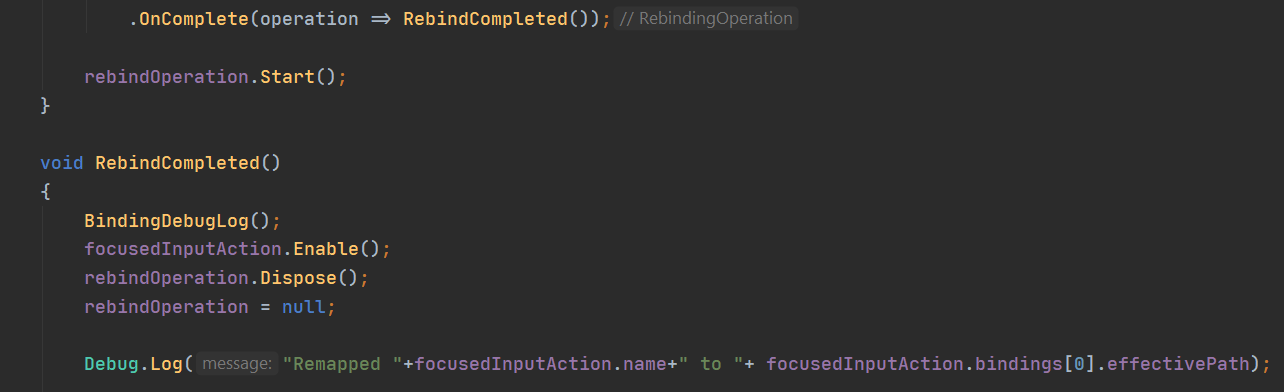
Debug.Log("Remapped "+focusedInputAction.name+" to "+ focusedInputAction.bindings[0].effectivePath);
Remapped Boost to <Keyboard>/n
chrome walrus
But is <Keyboard> not just the control scheme, not an actualy key?
chrome walrus
Oh sorry, thought it was a debug new line 😄
chrome flume
yep, I thought so to first time I've seen it 🙂
chrome walrus
Okay, and after disposing and then debug.logging your binding of your InputAction, it tells you its N?
chrome flume
On the forum someone says "in my experience, the bindings are applied on a per asset basis. The generated C# classes create new runtime only SO assets so they never get any rebinding effects."
Do I understand it correctly rebinding doesnt work for the generated input class?
chrome walrus
I just read something else, do you disable the action?
chrome flume
chrome walrus
Okay, and after disposing and then debug.logging your binding of your InputActio...
yes, it says "Remapped Boost to <Keyboard>/n"
 chrome flume
chrome walrus
I just read something else, do you disable the action?
chrome flume
chrome walrus
I just read something else, do you disable the action?
I enable the new one, see the pic above
chrome walrus
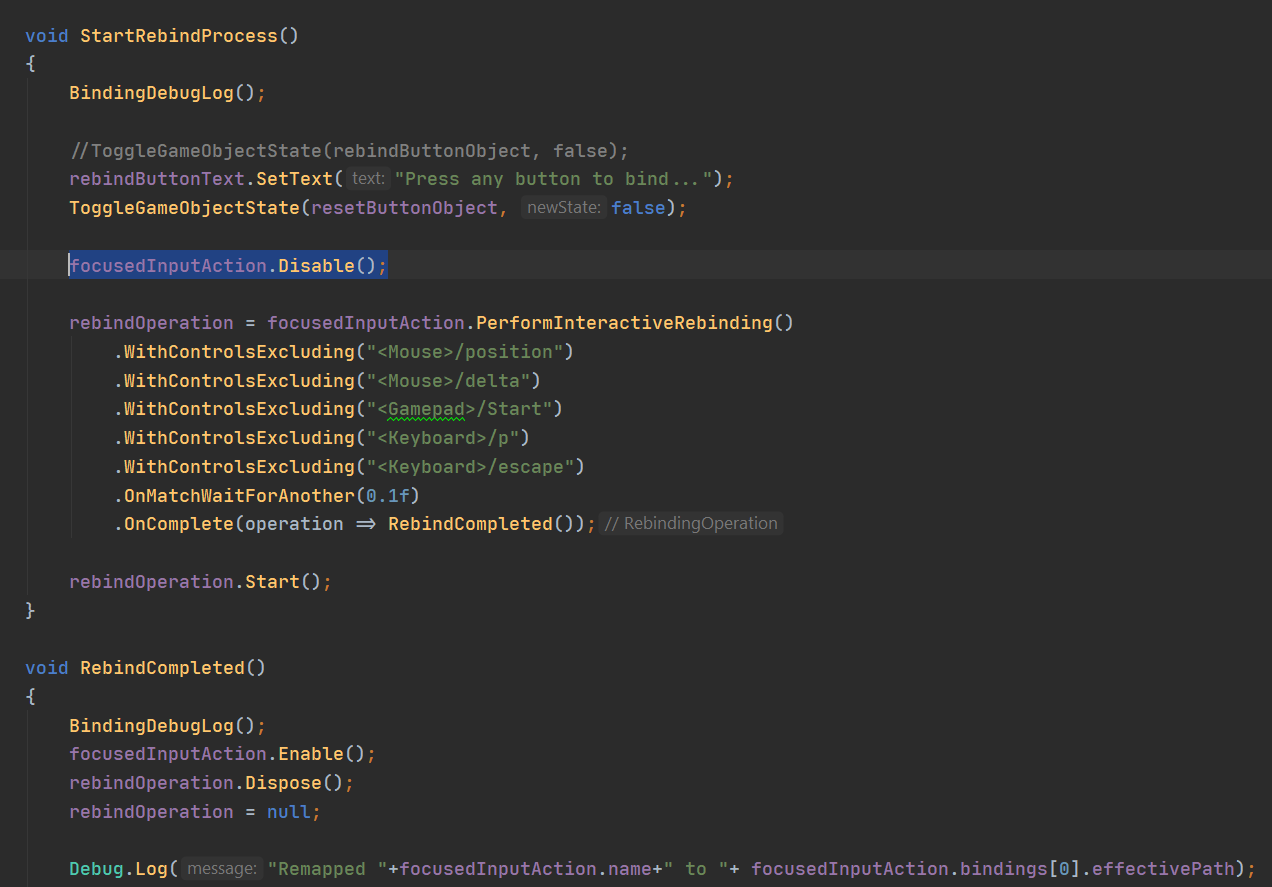
Someone says you cant rebind while the action being active, just try to .Disable() and when COmpleted Enable();
chrome flume
chrome walrus
Someone says you cant rebind while the action being active, just try to .Disable...
didnt help 😦 Code looks like this
https://i.imgur.com/fdI0j8Y.png
 chrome walrus
Check this out the second last entry of the guy found his issue with not having an index in the function set https://forum.unity.com/threads/performinteractiverebinding-not-working.891328/
Unity Forum
Hello,
I have an InputAction File with my Keybindings.
Then I have a InputActionReference binded to an Action I want to override.
When I click the...
chrome flume
the warrior github project does not use any index, interesting (the official one from Untiy)
chrome walrus
Hm okay, just saw the docs also not having one, but well, sometimes those are not the best docs to be found 😄
chrome flume
this is how PerformInteractiveRebinding looks like
https://hatebin.com/kjirvpiumz
it seems to NOT work with index < 0
still doesnt work with the index 0
console does reflect the new change
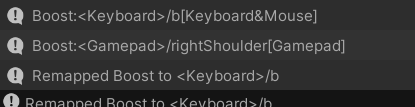
b is the new binding, but has no effect in the game
chrome walrus
Does the old binding still work?
chrome flume
yep
the override has no effect
On the forum someone says "in my experience, the bindings are applied on a per asset basis. The generated C# classes create new runtime only SO assets so they never get any rebinding effects."
Do I understand it correctly rebinding doesnt work for the generated input class?
chrome walrus
I guess this is what its saying, maybe you have to like copy your "generated" class into a runtime class and rebind that
chrome flume
how would I do that 🙂
I could of course rewrite my input manager to reference the input action asset directly, without the generated c# class
chrome walrus
https://docs.unity3d.com/Packages/com.unity.inputsystem@0.1/api/UnityEngine.Experimental.Input.InputActionAsset.html says there is a Clone() feature
So I would just make a private InputActionAsset and generate that on Start cloning your Public one, then try to rebind that
chrome flume
it will work with the asset, I am using a generated C# class, that was generated from the input action asset, and they guy above I think says it wont work for rebinding if using a c# class
this input system is confusing af, rebinding should be a default feature provided by unity :/
chrome walrus
Oh wait, this line focusedInputAction = focusedInputActionAsset.FindAction(actionName);of yours is targeting a public dragged drop input action asset, right?
chrome flume
yes, maybe I should provide the generated class, not the asset itself
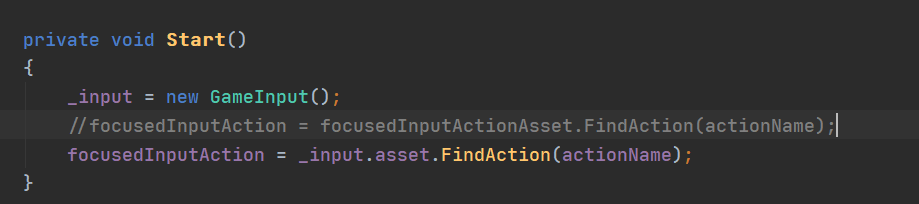
GameInput is the generated class from the Input Action Asset, still doesnt work
https://i.imgur.com/OBgARwB.png
 chrome walrus
Hm okay, I thought making a new one on runtime should work. If just the docs would tell the important parts
chrome flume
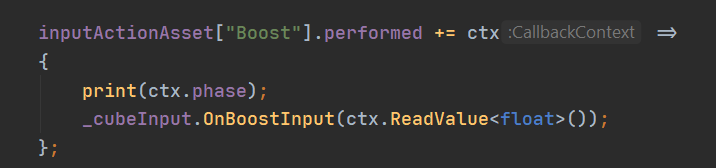
Trying to use the Input Action Asset directly, it doesnt print, no event comes, maybe the asset cant work with the generated class at the same time?
https://i.imgur.com/PWSOxdk.png
 chrome walrus
Afaik you have to use some kind of runtime created class there, either its just an action or a whole inputasset. You are saying you went through a tutorial unity project where it is working?
chrome flume
yes, but he was NOT using a generated c# class + he uses PlayerInput
chrome walrus
Oh the PlayerInput Component thing? Never looked into that, did you find its part of loading the input stuff?
chrome flume
"did you find its part of loading the input stuff?"
I didnt understand your question
chrome flume
chrome walrus
Oh the PlayerInput Component thing? Never looked into that, did you find its par...
yes the new Component
chrome walrus
The playerinput component, what is it doing to load/create the input actions, so we might find out how the playerinput is able to override that stuff. Or is the playerinput itself a whole input map
chrome flume
chrome walrus
The playerinput component, what is it doing to load/create the input actions, so...
he just grabs the Input action asset from the PlayerInput
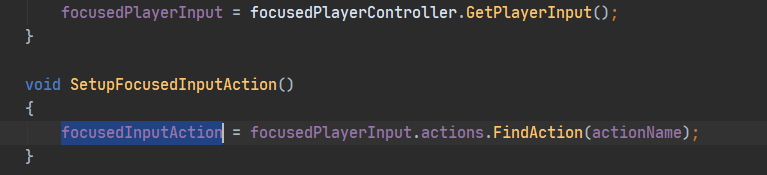
I am trying to do that directly now, without the PlayerInput
chrome walrus
Wha tis the GetPlayerInput() doing?
chrome flume
chrome walrus
Wha tis the GetPlayerInput() doing?
grabs the input action asset
from the PlayerInput component
chrome walrus
So if there is nothing fancy in that code of grabbing, it is doing the same as you do
chrome flume
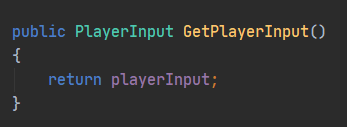
the difference is that I am using a generated c# class
and he uses the asset directly
chrome walrus
But you tried that too, didnt you?
chrome flume
trying it now
it should have worked with the generated class too 🙂
his example project works of course
chrome walrus
from the docs, it sounds like playeirnput is doing more than just grabbing
"This is a helper to get set up with the new input system quickly. It takes care of InputAction bookkeeping and has a custom UI to help setting up input."
chrome flume
yes, it lets you connect events without code
without doing this
inputActionAsset["Boost"].performed += ctx => print(ctx.phase);
chrome walrus
And also triggers when bindings are changed and stuff, somewhere in there has to be the answer on how it grabs the asset, generates its own runtime version of it and makes it available for the player to change
chrome flume
yea, I will try it if using the asset directly wont work
Lmao now using the asset directly doesnt work, I must be missing something, I dont use the generated class at all now
https://i.imgur.com/koWo4GC.png
https://i.imgur.com/drPaVhi.png

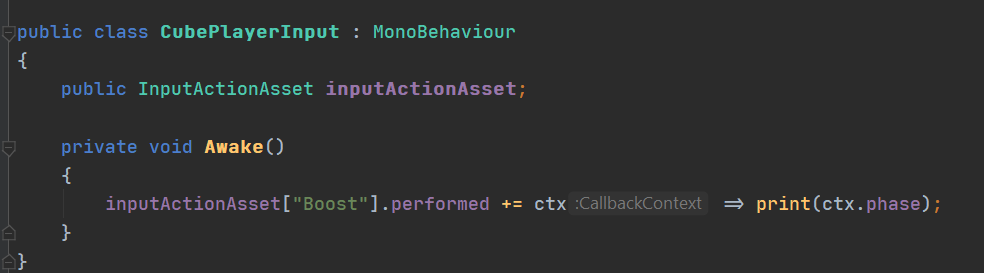 chrome walrus
In the docs it is talking about the inputuser, I guess, thats why you cant change the asset itself, because every user will have his/her own bindings: https://docs.unity3d.com/Packages/com.unity.inputsystem@0.2/api/UnityEngine.InputSystem.Plugins.Users.InputUser.html
But yeah, maybe you are missing something else, did you check if your action is actually found? Dumb question but sometimes 😄
chrome flume
hmm, it doesnt print anything you are right
chrome walrus
I guess Unity is just taking everything for granted yet in that function, not checking against null or whatever input system has to offer on error checking.
chrome flume
hmm, it does work, it prints the correct action, but no event registers
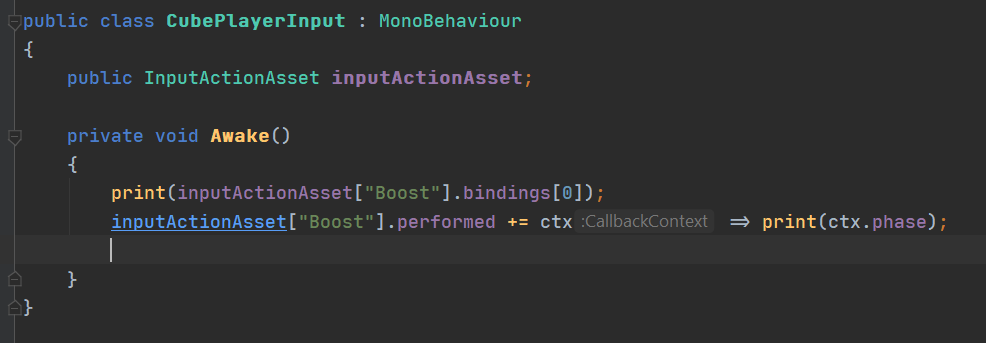
Console -> Boost:<Mouse>/leftButton[Keyboard&Mouse]
chrome walrus
You did not enable it yet in your script
chrome flume
facepalm 🤦
chrome walrus
😉
chrome walrus
I am fiddeling around with AR right now, unity and arkit are just sealed boxes stacked upon each other 😄
chrome walrus
Wait, did you actually not enable it at all?
chrome flume
OK, it works !!!!
chrome flume
chrome walrus
Wait, did you actually not enable it at all?
enabling solved the issue of events not working
chrome walrus
oh boy... 😄
chrome flume
TLDR: Using the input action asset directly works, generating a class - not
chrome walrus
Oh okay, so it works with your recent option you came up. Cool 🙂
chrome flume
I am now a PRO with rebinding, any newcommers having issues with it? 😄
chrome walrus
😄 best misspell ever
chrome flume
lmao 😄
chrome walrus
Great its working now and thanks for that additional knowledge 🙂
chrome flume
chrome walrus
Oh okay, so it works with your recent option you came up. Cool 🙂
didnt need a generated class after all anyway, I can just do:
"inputActionAsset["Boost"]"
works the same, one less .cs file needed, working directly with the input action asset is less pain
the only issue is string defined actions, its not optimal coding style
hardcoded
chrome walrus
hm, you can at least search for an action, right?
So you dont have to hardcode your string?
 chrome walrus
But that string can come from anywhere
chrome flume
wdym
chrome walrus
Oh wait, I guess its not working, how I thought it would.
chrome flume
you manually hardcode the string for the action with this :/
chrome walrus
but dont do that anyway? Now its a string, but otherwise it would be a value called boostAction, right?
chrome flume
yea, but its safer, you would get an error if you dont implement a callback when you inherit from the generated class
with the generated class you create an action -> you instantly get an error in VS because you dont implement a function from the inherited class
chrome walrus
Hm okay.
chrome flume
with the generated class you have to implement the function that have the same names as the action names you defiined in the input action class, e.g.
public void OnDrift(InputAction.CallbackContext context)
austere grotto
I've found the generated class is missing some things unfortunately
for example as far as I can tell, there is no way using the generated code to disable a particular action map
chrome flume
rebinding and menu working, thanks @chrome walrus for assisting!
https://streamable.com/kqfspo
 chrome walrus
chrome flume
rebinding and menu working, thanks <@!144387642140655616> for assisting!
https:...
chrome walrus
chrome flume
rebinding and menu working, thanks <@!144387642140655616> for assisting!
https:...
Great its working! 🙂
west oracle
@chrome flume just create a constant list of strings
austere grotto
north cradle
Just stopped by to say thanks for all the help from this sub
thanks but this isn't reddit!
north cradle
well, I don't know how to call it. Sub/Thread/Channel, whatever 😉
 supple thorn
i manage to implemente Input System but triggers call method multiples times
glass yacht
Because you're continually subscribing to the events in Update
you're meant to subscribe to the event once, like in Start
hallow nimbus
so if I put this in awake that wont happen?
glass yacht
give it a shot
chrome walrus
hallow nimbus
any reason why the input system gets called like 2000 times?
Yeah, you are assigning an action to a callback, just needed once as it listens for the callback now, dont put that in update so you will assign it x Frames per Second
nova inlet
you can subscribe to the events in OnEnable and unsubcribe in OnDisable
undone jasper
what's the proper use case for binding overrides? we have a situation when a single button has different actions depending on the context of the game, right now we are applying overrides via code but I am wondering if that's the correct way
for example, you press the "square" button to select and action and once it is selected another press of the same button should confirm it instead of reselecting
chrome walrus
I guess this is something codewise that might listen for "Enter/Confirm" Action and than do its stuff codewise depending on your actual content
undone jasper
so no messing with the bindings, just one general action and then handle everything on the logic side of things
ok, ty
chrome walrus
Thats how I would approach it, otherwise you could really get messy with all bindings. having like a generic thing of UI Content Class that holds confirm actions or something might work better. So every confirm action just performs the UI classes delegate for example
soft basin
undone jasper
what's the proper use case for binding overrides? we have a situation when a sin...
I would just have a nullable reference to the object
something like
class Myclass : MB //CBA to type the entire thing
{
  GameObject? SelectedObject = null;

  void Method()
  {
    if (newPressedObject == SelectedObject)
    {
      // confirm
    } else {
      SelectedObject = newPressedObject;
      // other select stuff here
    }
  }
}
 small sequoia
hi, i made a grapple hook script and implementing it into the new input system. i've had little to luck getting it to work properly, some help would be appreciated.
supple thorn
Hello
any guide of documentarion on how can make Inpout System work with menu buttons?
austere grotto
supple thorn
any guide of documentarion on how can make Inpout System work with menu buttons?
The thing that hooks the Input system up to the UI system is an "Input System UI Input Module"
Make sure you have one of those on your EventSystem object (Not sure it needs to be on that object but that's where mine is and it works)
austere grotto
Which elements
supple thorn
i need to select one with the mouse and after that i can use the gamepad
the buttons
austere grotto
You need to add some code in OnEnable
when you show your menu
you do something like
supple thorn
where i can find this code?
austere grotto
EventSystem.current.SetSelectedGameObject(someObject.gameObject);
once you select one object then you should be able to navigate as normal
austere grotto
Do it in whatever code shows your UI
OnEnable is a generic thing for all MonoBehaviours
if you have like a UI controller MonoBehaviour, it might be a good idea to put it in the OnEnable for that
supple thorn
wht is the difference with onStart)(9 or onAwake()?
austere grotto
austere grotto
yes
supple thorn
VS suggest UnityEventQueueSystem
austere grotto
idk what that is
but you want EventSystem
you will need to add using UnityEngine.EventSystems;
austere grotto
however you want to reference it
serialized field, Find, FindWithTag, transform.GetChild(n)
whatever
supple thorn
bur doesnt really selecte the item
works but at first is not highlighter
highlighted
EventSystem.current.SetSelectedGameObject(transform.GetChild(0).gameObject);

no one is sletected until i press down button and "opciones" is highlighted
seehms only happen on game start()
if i back to menu works
seems i need something more on the screne start
nah happens the same in option Menu
not higjlight the selecteditem
supple thorn
no way to fix it :/
A courutine loop forever?
Unity is the ultimate game development platform. Use Unity to build high-quality 3D and 2D games, deploy them across mobile, desktop, VR/AR, consoles or the Web, and connect with loyal and enthusiastic players and customers.
 patent socket


Why doesn't my InputAction work?
but my 2D vector for wasd movement works fine, just not my 1D axis for eq in the same script.
pls help
supple thorn
hello again
the Input System is failing how can i know what is worng?
seems i miss something
because in one ActionMap woprks but in the other not
idk why
austere grotto
patent socket
how did you configure the Action?
e.g. Action Type and Control Type
 austere grotto
patent socket
austere grotto
patent socket
try Control Type -> Analog
supple thorn
austere grotto
how did you configure the Action?
is not the action, its the Action Map
because i make the same action in another Action Map and its works
austere grotto
supple thorn
is not the action, its the Action Map
I was responding to a different person
For you - is your actionmap enabled?
supple thorn
ohh sorry
austere grotto
Each action map has its own enabled/disabled state
austere grotto
it depends
where are you getting the action map from?
are you using an InputActionAsset? A generated code file?


 austere grotto
yes I know that but
how are you getting the reference to the action map in your script
supple thorn
controls.Player.Pause.performed += input => menuUI.SelectOption();
controls is the class that created the Input Manager
austere grotto
so it's the generated class right
austere grotto
Also controls.asset.enabled
if those are both enabled then i'm not sure
you're using the same button?
Try with a different binding
maybe it's a problem with the Xbox menu button binding
supple thorn
if i can't change the map enables/disabled from the UI why iis its going to be disable by default?
its not a problem because as i say in the other Actionmap works fine
austere grotto
I'm not sure if it's disabled by default - but all the tutorials I've seen with using the generated class they always call Enable() at the beginning
ok... still test it
austere grotto
It's possible thjat only one actionmap is enabled by default
the first one?
maybe that's it
supple thorn
    private void OnEnable()
    {
        controls.Player.Enable();
    }

    private void OnDisable()
    {
        controls.Player.Disable();
    }
i ahve this
austere grotto
ohh
supple thorn
i don't get the point i activated only Player
supple thorn
ok thanks
and still haceve a problem with UI elements no being highlited
happens now on menu pause
the fixed i test on main menu didn0t work on poause menu
patent socket
austere grotto
try Control Type -> Analog
Still didn't work :(
austere grotto
patent socket
Are you maybe having an action map enabled issue like @supple thorn ?
patent socket
austere grotto
Are you maybe having an action map enabled issue like <@!198838527310430210> ?
yeah I'm a dumbass

 verbal gyro
Having a time trying to understand gamepad => UI integration using the new input system. When my UI pops up, not sure how to transition the input to UI, then oddly every now and then it seems to be moving the active element but not showing highlights randomly... Really at a loss digging through the web. If anyone has insight or solid references to content I would be more than grateful!
Oh I just scrolled up, this seems relevant... 🤔
austere grotto
verbal gyro
Having a time trying to understand gamepad => UI integration using the new input...
You should double check how your navigation is set up
When you use a gamepad or whatever to navigate around the UI, it follows the navigation rules in your UI and selects between all the differrent Selectable components on the canvas
Make sure you don't have Selectables that aren't things you want to be selected
verbal gyro
The UI flow looks ok, just not sure i'm wiring Input mappings correctly
austere grotto
Input mappings are all part of the Input Module
west oracle
@verbal gyro are you using Local Multiplayer stuff (ie: PlayerInput/Manager)? or just single user?
austere grotto
Input System UI Input Module has some pretty sensible defaults
verbal gyro
Does each "menu" need a PlayerInput component or is there only one per scene?
west oracle
PlayerInput should only generally be used if you're using Local Multiplayer setup
(or are planning to)
verbal gyro
Ah ok, this project is likely not going to be multiplayer, at least not single device
west oracle
if you go the PlayerInput component route, there should be one instance per "User" (ie: Gamepad, Keyboard, etc)
verbal gyro
Mostly expect to be on mobile, but my daughter has already pushed more for the gamepad so here I am 🙂
west oracle
oof. fair warning... InputSystem on mobile is a shitshow at the moment
because there is zero support for Unity Remote
verbal gyro
Not sure what Unity Remote is tbh lol I build and run "og" I guess lol
austere grotto
verbal gyro
Mostly expect to be on mobile, but my daughter has already pushed more for the g...
Ah - DDGD - daughter-driven gameplay development
west oracle
^ its a powerful force 😛 wish more companies invested in it.
verbal gyro
lol
west oracle
@verbal gyro
verbal gyro
Early learning educational game so my test audience is limited 😉
west oracle
made this for another discordian needing help with InputSystem UI stuff
might shed some light
verbal gyro
I'll take a look through it, thanks! Feels like i'm just missing something super basic, especially after 3 days digging it has to be simple 😉
west oracle
possibly not in InputSystem 😛 its a bit convoluted
verbal gyro
Mayhaps, i'm certainly no expert. Do you have to do something to tell unity that UI mode is active or something?
west oracle
you do have to tell the EventSystem what object you want to select first
(or re-select if the UI was GameObject.SetActive(false)'d
ie:
Was just looking at that further up the history, i'll give that a go! thanks again
west oracle
this is especially prevalent for Gamepads because theres no way to cursor/highlight anything by default
verbal gyro
Dropping that in OnEnable with reference to a button to see what happens... Watch out for smoke lol
austere grotto
So.. on the topic of selected items.
Is there any Unity-supported way of doing something like this:

Let's say I want one of those save files on the left to be selected
with the event system
but I also want to then be able to select the "Overwrite" and "Delete" buttons
with left and right navigation
so an element from my scrollview selected at the same time as selecting one of my buttons
In the past when I've had this multi-selection problem I've faked it - implemented my own "selected" system and used the real one for one set of selectables and the "fake" one for the other set. But does Unity have some better way to do it?
verbal gyro
Now it's half working, buttons are not highlighting the same as with mouse hover and some "re-used" buttons on gamepad still are going to character controller :\ Hmm
austere grotto
verbal gyro
Now it's half working, buttons are not highlighting the same as with mouse hover...
Double check the graphics transition settings for your buttons
"selected" and "highlighted" are two different states
highlighted happens when you mouseover
selected happens when you click
but for gamepad highlighted never happens
because there's no cursor
verbal gyro
Makes sense...
So it appears to be working now! Last bit is the input being intercepted by the player controller, how can I just disable the "Player" input mode while the UI is up?
Many thanks for the help so far!
austere grotto
verbal gyro
So it appears to be working now! Last bit is the input being intercepted by the ...
Yeah I do exactly this in my game - I enable/disable the relevant ActionMaps as necessary
        private void ShowPauseMenu(bool show) {
            showingPauseMenu = show;

            // In the menu, the other input asset (tied to input module) should take over.
            ControlsHelper.Instance.ControlsEnabled = !show;
            ControlsHelper.Instance.UIControlsEnabled = show;
            pauseMenu.gameObject.SetActive(show);

            if (show) {
                EventSystem.current.SetSelectedGameObject(pauseMenu.gameObject);
}```If I just instantiate the action map, ... ok cool
austere grotto
This is what I do when I show my pause menu 😄
disable the normal controls, and enable the UIControls
        [SerializeField]
        InputActionAsset UIInputAsset;

        public bool ControlsEnabled {
            get => Controls.asset.enabled;
            set {
                if (value) {
                    controls.Enable();
                }
                else {
                    controls.Disable();
                }
            }
        }

        public bool UIControlsEnabled {
            get => UIInputAsset.enabled;
            set {
                if (value) {
                    UIInputAsset.Enable();
                }
                else {
                    UIInputAsset.Disable();
                }
            }
}```Hmmm UIControlsEnabled function is instantiating the map object? or do you .... ah
austere grotto
these are the properties I'm calling from the above - I'm actually uh...
doing something kinda janky
austere grotto
You should probably just use a single InputActionAsset
or a single copy of the generated file class
but I'm using one of each because I haven't cleaned it up yet
verbal gyro
Oh yeah that's right, I have that cs file!
west oracle
austere grotto
but I also want to then be able to select the "Overwrite" and "Delete" buttons
I would make the selectable items in the list be Toggles as part of a ToggleGroup
austere grotto
west oracle
I would make the selectable items in the list be Toggles as part of a ToggleGrou...
I'm not familiar with that. I guess the ToggleGroup basically has its own internal sense of what is "toggled" within the group?
west oracle
Radio Group is what the rest of the world knows it as
ie: only allowing 1 thing to be selected
austere grotto
Would I be able to use up/down navigation to navigate between the toggles
west oracle
yea
west oracle
also even if the Up/Down/Left/Right nav doesn't do what you want
you can implement the navigation interfaces to override them
austere grotto
west oracle
you can implement the navigation interfaces to override them
which interfaces are those?
austere grotto
Damn like 3-4 levels of indirection to get to this: https://docs.unity3d.com/2019.1/Documentation/ScriptReference/EventSystems.MoveDirection.html
ok cool
I'll try it out... once I figure out what's going wrong with my saved game deserealization itself 😄
west oracle
thats what i get for using Google 😛