#🖱️┃input-system
1 messages · Page 37 of 1
 grim plaza
I'm having problems with local multiplayer. On my player gameobject, I have a player movement script, and a Player Input component. The player movement and stuff works perfectly, but the problem is the Player Input Manager. I have that component on a empty game object, and insted of having two seperate characters moving independently of eachother, when i have two players in the game, either control controls both characters
using System.Collections;
using System.Collections.Generic;
using UnityEngine;
using UnityEngine.InputSystem;

public class Player : MonoBehaviour
{
    [SerializeField] private float speed = 12f;
    public GameObject hitEffect;
    public GameObject jumpEffect;
    public GameObject dashEffect;
    public Rigidbody2D rb;
    private DungeonCrawler inputActions;

    void Awake()
    {
        inputActions = new DungeonCrawler();
        rb = GetComponent<Rigidbody2D>();
    }

    private void OnEnable()
    {
        inputActions.Enable();
    }

    private void OnDisable()
    {
        inputActions.Disable();
    }

    void FixedUpdate()
    {
        Vector2 moveInput = inputActions.Player.Move.ReadValue<Vector2>();
        rb.velocity = moveInput * speed;
    }
}
this is my player movement script
DungeonCrawler is the input action
example of all characters moving at the same time
the input manager component
Head being the character prefab
player prefab
player is the script above
This is the input action thing
the only ones that matter are Left stick and WASD under move
 copper night
Hey guys, I'm getting into the input system for the first time, trying to figure out how to do stuff with it while used to the old input manager. I have been watching a few tutorials and reading doc, but i can't figure out what are the advantages of it. It just seems to make everything more complicated than anything? I mean for ex, i used to do stuff like " while this key is pressed, do this " , but i don't even figure out how to do something like that? Does anyone have a few tips about the way it is intended to be used?
 glass yacht
You're constructing actions, don't directly think about the keys you're going to press. This allows you to have multiple things assigned to an action without having to add that to your code in an annoying manual fashion.
Here I have different action maps for separate control schemes I might want under different circumstances
and they contain actions, which is the data I want
and then there's the controls within that
I could easily add another control to an action without having to update my code
if I wanted to support a different controller or something
If you then tick the Generate C# Class option on the asset once you have it set up
you can implement the interfaces present in that class and easily get data from your actions
you just have to new that class, and call Enable and SetCallbacks for the controls you want to use
Though there are various ways of doing that part, it's pretty straight forward and flexible once you're familiar with one of them
https://docs.unity3d.com/Packages/com.unity.inputsystem@1.0/manual/ActionAssets.html
This is the most helpful reference
 hazy jetty
did Unity remove CallbackContext?
im trying to do the new input system
following a tutorial
nm im a idiot, forgot to call static
hazy jetty
having a issue
where i can move left and right but not up and down...
this looks fine, so what gives
 loud pawn
Post your code.
 errant phoenix
Hello guys 👋 I'm having some issues with the input devices with the new input system. For some reason it doesn't recognize my keyboards or mice. I've tried multiple keyboards, different USB ports + Bluetooth keyboard, I've restarted, updated drivers, removed any keyboard management software that i use for gaming, uninstalled and reinstalled the package ... etc, etc. I've ran out of ideas now. Has anyone had a similar issue or have any ideas what might be causing this ? I'm getting desperate here 😞
copper night
@glass yacht Thx. Sorry to answer only now but i fell asleep.
 somber horizon
don't suppose anyone knows if the UI Input Module can be configured to select things on click down rather than up? (thread: https://forum.unity.com/threads/input-in-vr-using-input-system-ui-input-module-and-selecting-on-press-down.1009729/)
loud pawn
errant phoenix
Hello guys 👋 I'm having some issues with the input devices with the new input s...
Have you enabled the new input system in the settings? It might be set to use the old, in which case devices won't show up.
errant phoenix
loud pawn
Have you enabled the new input system in the settings? It might be set to use th...
Aha I don't remember doing that so that is probably it. Just did a quick google and I assume you're referring to this ?
worked like a charm, I feel so stupid. Thanks a bunch !
I dont think I was ever prompted with the warning window also servers me right for following a random YT tutorial rather than the official docs
loud pawn
I found out the hard way as well, after hours of troubleshooting. Felt pretty foolish. 😅
 distant raptor
errant phoenix
I dont think I was ever prompted with the warning window also servers me right f...
distant raptor
errant phoenix
I dont think I was ever prompted with the warning window also servers me right f...
nothing wrong with youtube videos... just take information with a grain of salt.. always cross check against docs / references
grim plaza
i made a main menu with buttons, but when i click the buttons, it won't make the button work. I am using the new input system
 split thorn
Hello, I have input.GetKeys currently working for a little webgl game, and have added UI.Buttons for display when running on a tablet. The old input system appears to choke when holding down the onscreen button and after releasing it still continues to fire. Would switching to the new Input System fix this - do you think? What's the best way to handle Input.GetKey in the latest Player Input System in 2020.1.13
 chrome walrus
Just be assured that you use a preview version of a Unity package, there can be bugs all over the place. We might need to see your code, maybe its not the input system in webgl
Anyone knows how to check if an action gives back a vector2 or not? Like I have binding to touch and left mouse button, while touch gives you the vector2 position, left mosue button does not. Or should I just separate the script into editor and device?
chrome walrus
Anyone in here can light me up on the InputSystem with touch? 😄 Just not working as intended, just wondering if I can get the position out of the button information or have to like pass two parameters withanother Action just for the position.
chrome walrus
Just fixed it myself 😄
 dire spade
is there a way to trigger a callback while a button is pressed and not just once?
i tried moving my function to Update() and check if the button is pressed with ReadValueAsButton(), it works like intended and returns True but when it's not pressed it throws an error Control index is out of range instead of False
 distant flint
hello to everybody i'm having a really strange problem, I'm working on a webgl 3d game with the new input system, For the mobile version, the first scene with the on screen joystick works perfectly, but the second and the third that have exactly the same script and gameobject in the scene didn't work at all.
Can somebody help me?
 solemn badge
@brittle prawn @tawny geode seems our unity version's a bit old, its 2018.4.14f1 i think, what would be another way to handle inputs that are nested too such as Ctrl + C?
 brittle prawn
Sadly, a nested if/switch
solemn badge
would a dictionary be possible for nesteds or nah?
 tawny geode
Does KeyCode have the Flags attribute 🤔
If so you could just store bitmasks of your key combinations
solemn badge
brittle prawn
@solemn badge You can put dictionaries in dictionaries
tawny geode
halt
brittle prawn
but I'd honestly store different dictionaries for contextual controls
solemn badge
Are there any examples of this btw? like for switch or dictionary used in this instance?
solemn badge
brittle prawn
<@!155396491853168640> You can put dictionaries in dictionaries
cuz i havent seen instances of these being used yet so its new to me
brittle prawn
Create two dictionaries, one for regular keys, and one for keys with ctrl
then in update if ctrl is down reference the ctrl dictionary instead of the regular one
chrome walrus
Is this using the new input system?
solemn badge
no
 minor eagle
Wats d diference between d old input system and d new one and also how to tell d diffrence?
somber horizon
@minor eagle the differences are pretty major. The new one requires you to install a package via the package manager, so it's pretty hard to not notice if you're using it.
If it looks like Input.GetKey or Input.GetButton or Input.GetAxis it's the old one
minor eagle
so which is better the new one right? i thot mine was new but its not guess
somber horizon
@minor eagle the new one handles different devices (like gamepads) and mappings significantly better. There are alternatives like rewired, but I don't use it
minor eagle
okay
chrome walrus
Yeah, its easier to just click together the behaviour and then call the code without fiddeling around with input.getkey stuff messing up your code at first hand
chrome walrus
Anyone here knows how to get the old pointerId out of the context from the new Inputsystem?
 astral panther
Man this new input system has been a struggle
I can't find any official unity tutorial that explains things to me a clear way. I felt the official manual was all over the place in that "How do I..." section
I'm having a hard time turning that into something useful
then I check the top 3 video tutorials on youtube and each one implements things in a completely different way
AND in the official Unity video they show you how to do things in a fourth way
and then go ahead and say "but don't do things like this, it's not performant at all"
so that leaves me in a position where I don't really know how and why I should be implementing this new input system
is there a guide that's more in-depth but also beginner friendly
because this new input system has way too many methods to implement input
 rare ice
I have been working on my very first game in the unity engine and I need some help. It is a 3D game. So basically, in my game you control a piece on a board by playing cards, e.g. you play a +1 card and the piece moves 1 tile ahead. I have completed the board but I do not understand how to implement the UI correctly. So I guess I'd need 2 canvasses: 1 for the card in my hand and a target area where to put them?
 earnest kindle
can someone help me with the old input system
 digital narwhal
Performance Question: When using PlayerInput component. Is it more optimal to use Unity Events as Behavior instead of sending or broadcasting Messages?
errant phoenix
@digital narwhal I depends mostly on your use case. Are there going to be multiple different things that need to consume the input or is the input going to be handled in 1 place ? For the former broadcasting makes more sense as different entities will be able to consume that input in a decoupled manner. Linking up directly to a unity event is better if you have 1 entity that consumes the input or if you want to build a custom manager that will orchestrate the behaviour of multiple entities that need to know about each other.
digital narwhal
So sending messages and broadcasting isn't a big hit on performance? I shouldn't be scared to use that approach even if more and more scripts start intercepting it's messages?
errant phoenix
I wouldn't say there would be any performance penalty. Unless you're working on a massive scale, at which point there would be a lot more pressing performance concerns.
copper night
Guys, im trying to do something like if (bool "right mouse button is being held"){}
How can i do that based on the hold interaction?
i mean if i just readvalue, it seems like it does not account for the hold interaction
chrome walrus
I think it will pick up if you started, cancelled or performed. So it is starte, it should fire until it is cancelled or performed?
 sick cradle

Andy Touch, from our Technical Marketing team, shows you how to solve common scenarios when developing a cross-platform game that uses the new Input System. Learn how to quickly switch control schemes, rebind control settings, and connect the Input System with other Unity features.
Speaker:
Andy Touch - Senior Global Content Developer (Unity)
...
 slate owl
So I have an input set up that subscribes methods to the input like so:
GameManager.PlayerOneInput.StartMenu.StartGame.performed += temp_input => SwitchScene();
But how would I unsubscribe it? I can't seem to simply use "-=".
 solar plover
If you will not have to unsubscribe to an event later, you can use the addition assignment operator (+=) to attach an anonymous method [...]
That's an anonymous function: https://docs.microsoft.com/en-us/dotnet/csharp/programming-guide/statements-expressions-operators/anonymous-functions
slate owl
Sure the second half of that line is, but I'm only using an anonymous function because I'm not sure how to activate SwitchScene() from runtime input otherwise
And the first half of that line is subscribes a delegate or something right?
Sorry I'm pretty new to the lambda operator and delegates confuse me
solar plover
If you will not have to unsubscribe to an event later
Lambda will not be allowed to be unsubscribed.
solar plover
Perhaps assign the lambda result to an action and use the action to unsubscribe when needed..
slate owl
Ah, cool, thanks
chrome walrus
Why cant you use -= ? Is it giving an error?
slate owl
Yeah it gives an error
chrome walrus
What does it say?
slate owl
Actually scratch that, it just doesn't do anything
No error
But I think Dalphat is right
I'm just wondering if this means I have to create an action for every single input
chrome walrus
Do you even need temp_input there?
slate owl
Yeah, it gives me an error if I get rid of it
I can't just subscribe it to a method without an anonymous method
chrome walrus
Whats the error, just curious
slate owl
Error CS0029 Cannot implicitly convert type 'void' to 'System.Action<UnityEngine.InputSystem.InputAction.CallbackContext>'
chrome walrus
Ahh got it, grt rid of ()
slate owl
Tried that too :/
Error CS0201 Only assignment, call, increment, decrement, await, and new object expressions can be used as a statement
chrome walrus
Sec, let me have a look
slate owl
I appreciate the help
chrome walrus
It works
AppManager.inputSystem.Interaction.Tap.performed += TapToAdd;
private void TapToAdd(InputAction.CallbackContext context)
{
slate owl
Ah I probably need to have CallbackContext has a parameter
chrome walrus
Yap
slate owl
Much appreciated
chrome walrus
Yw 🙂
 main moon
I want to create a custom mouse to use with a gamepad
does someone know how to do that?
chrome walrus
You can use UI and standard input to move the recttransform
chrome walrus
Pass your gamepad vector2 of your axis and then just as a normaö transform move position of your cursor, maybe check within screen bounds
main moon
but the mouse pos will override
i supose
i already tried before and i remember having that issue
the new input system has the warp position
chrome walrus
Who is going to use both?
main moon
and it works with buttons and sliders, etc?
i know that with eventrigger object doesnt work
chrome walrus
Well you gotta hack it somehow, thats true.
main moon
yah : /
ok thx for the help. I will try to see if there is some execute or something
so when i press a button or event trigger, the game executes the function
chrome walrus
Oh ok, phew
MouseOperations.MouseEvent(MouseOperations.MouseEventFlags.LeftUp | MouseOperations.MouseEventFlags.LeftDown); ```@main moon old input but mouseevent could point you in the right direction
main moon
its just that simple?
main moon
i cant find that in the new input system
 halcyon hound
Is there any way to access additional mouse buttons in the editor?Input.GetKeyDown(KeyCode.Mouse3) works but (e.type == EventType.MouseDown && e.button == 3) does not 😕
main moon
@chrome walrus i found a solution
public class GraphicRaycasterRaycasterExample : MonoBehaviour
{
    GraphicRaycaster m_Raycaster;
    PointerEventData m_PointerEventData;
    EventSystem m_EventSystem;

    private InputMaster controls;
    void Start()
    {
        controls = new InputMaster();
        controls.Player.Click.Enable();
        //Fetch the Raycaster from the GameObject (the Canvas)
        m_Raycaster = GetComponent<GraphicRaycaster>();
        //Fetch the Event System from the Scene
        m_EventSystem = GetComponent<EventSystem>();
    }


    void Update()
    {
        //Check if the left Mouse button is clicked
        if (controls.Player.Click.triggered)
        {
            //Set up the new Pointer Event
            m_PointerEventData = new PointerEventData(m_EventSystem);
            //Set the Pointer Event Position to that of the mouse position
            m_PointerEventData.position = Mouse.current.position.ReadValue();

            //Create a list of Raycast Results
            List<RaycastResult> results = new List<RaycastResult>();

            //Raycast using the Graphics Raycaster and mouse click position
            m_Raycaster.Raycast(m_PointerEventData, results);

            //For every result returned, output the name of the GameObject on the Canvas hit by the Ray
            foreach (RaycastResult result in results)
            {
                result.gameObject.GetComponent<EventTrigger>().OnPointerClick(m_PointerEventData);
            }
        }
    }
}
I put this on a ui element
and done
i apply a eventrigger and done
chrome walrus
Look above @karmic vale Naidio just posted an answer to this
astral panther
So I'm using this basic set up to run the input system on a script I have
        playerControls.Standing.Enable();
        playerControls.Standing.Move.performed += ctx => moveInput = ctx.ReadValue<Vector2>();
        playerControls.Standing.Move.canceled += ctx => moveInput = Vector2.zero;
        playerControls.Standing.Interact.performed += ctx => Interact();
looks good
astral panther
But if I make any changes to the script during play mode, the input system stops listening to any input. I know the script is still running
but not being able to change code during play mode is a deal breaker
How can I fix this problem?
is there another approach to the input system that won't cause this issue?
chrome walrus
nope, thats how it works
astral panther
btw the object holding the faulty script does not have a player input component
damn
but it has a reference to an instance of the player component class
chrome walrus
Everytime you hit play, Unity somehow compiles your scripts, or even more, when it loads them after a changed save. You unity can't process your scripts and reimport at the same time. THink of bigger changes, that affect the whole app/game, how should Unity track that 😄
astral panther
Wait
I can still make changes in the script during play mode
and they go through
it's just the input system specifically that stops working
so unity can process and reimport them
this is why I'm asking this, because JUST the input logic that stops working
When I edited the script, I added this bit of code just to make sure the script was still working:
controller.Move(transform.forward * speed * Time.deltaTime);
and the character started moving forwards
chrome walrus
no no no... 😄
Maybe it doesn't break everything, but be sure, that your app will have lots of issues when you change a script during runtime. Just because your script might be a simple one and therefore it keeps running does not mean, that other code will run and you can rely on it. Just dont do it. Changes in edit mode, than hit play. thats how Unity works
astral panther
I'll do it
it's very practical
and one of the things about Unity that I like a lot
it makes coding much faster and easier, there's no reason not to use this
if it breaks something in play mode I just reload it. Everyone should definitely be doing it
anyway and I got my answer here
The Input System does not yet support the new 2019.3 mode where domain reloads are disabled when entering play mod
I'll revert to the old input system
chrome walrus
phew okay, I would not love to rely on putting extra lines everywhere and hope that it does not mess up after not reloading in playmode 😄 but yeah, if you are familiar with it, its a good to know feature of Unity.
 midnight lotus
Is binding functions to to events in PlayerInput actually better than reading straight from a InputAction (like '''move.ReadValue<Vector2>()''')?
I see all of the examples Unity provides are using events.
But I found this way is not very intuitive. In comparison, reading directly from a InputAction is more like "the traditional way" of doing input handling.
 jagged wyvern
if I'm using a state machine, does that mean I have to enable actions every time I go into a different state?
so I currently have this method that is called when the player is in a movable state
public void MovementInput()
        {
            if (!TransitioningToLevel)
            {
                move.x = Input.GetAxis("Horizontal");
                move.y = Input.GetAxis("Vertical");
}```how do I get a movement action into the move vector?
Do I get it from the PlayerInput Component?
here's what my input actions look like
how would I get the walking vector?
here's my player input component
chrome walrus
You could just use the event instead of send messages like in th eexample https://docs.unity3d.com/Packages/com.unity.inputsystem@1.0/manual/QuickStartGuide.html
jagged wyvern
huh??
chrome walrus
Read the quickstartguide, there its also mentioned how to do it via script https://docs.unity3d.com/Packages/com.unity.inputsystem@1.0/manual/Actions.html#creating-actions
jagged wyvern
I'm here because the quickstart guide makes no sense
so...
if I'm using a state machine, does that mean I have to enable actions every time I go into a different state?```what part does not make sense for you?
jagged wyvern
I don't know how to call inputs
I set up the input actions I just don't know how to call it within a method
how do I get the movement vector?
chrome walrus
thats in the second link I sent you
jagged wyvern
So i have to put inputaction as a property?
chrome walrus
Just read it, like take your time to acutally learn it if you wanna use it, will make it easier for you in the future development. You have the action and you can hook into it with something liek cs var moveDirection = moveAction.ReadValue<Vector2>(); or cs myAction.performed += ctx => { if (ctx.ReadValue<float>() > 0.5f) trace.RecordAction(ctx); };
jagged wyvern
where is myAction coming from?
chrome walrus
Player.Walking would be your action for example
But I guess you did not read the guide at all, I won't hand feed it to you 😄
jagged wyvern
bruh the guide makes no sense
chrome walrus
It does, I used it
jagged wyvern
it doesn't say anything about linkiing the actions to the player.cs
chrome walrus
Yeah, guess so
I'm out, I am willing to help if my counterpart is willing to put effort in reading and researching.
jagged wyvern
none of this makes sense
brittle prawn

Unity Technologies Blog
With the Input System, you can quickly set up controls for multiple platforms, from mobile to VR. Get started with our example projects and new video tutorials for beginners and intermediate users. Input is at the heart of what makes your real-time projects interactive. Unity’s system for input standardizes the way you implement controls and […]
@glass yacht Worth pinning?
main moon
i made it work the mouse movement
but unity only updates inside the game when i move the mouse itself
its like this: in the screen, the mouse is on the top right corner because i moved from the center to that position but the game only registers that the mouse is actually in the middle, and when i move just a little the mouse, he goes instantly to the top right corner.
I dont know how to fix
i am searching for low level input sytem stuff but nothing
chrome walrus
What was your script again?
jagged wyvern
man making methods for every single button input is so annoying
 karmic vale
How do you get a on key press with this new system
jagged wyvern
have u set up an actions asset?
jagged wyvern
oh well it's super complicated
karmic vale
Havent done anything besides that
Is it even worth doing all of this for the new input system
the old one was so much more simple and worked
jagged wyvern
It's only good if u have multiple gamepads and stuff
otherwise it's pretty bloated
karmic vale
i need support for controller and keyboard
karmic vale
how do i remove it and go back to the default
jagged wyvern
i think there's an uninstall in the package manager
glass yacht
you can switch it in the player settings
karmic vale
For the event system gameobject, what scripts did it have
jagged wyvern
idk
glass yacht
glass yacht
karmic vale
ok ty
 timid flare
Does anyone know how to add scroll wheel up or down to the hotkeys?
jagged wyvern
if I wanted to have a UI pop up would I have to change the action map to a UI control scheme?
 glass mason
I am not sure if this is exactly an input system question, but I have a cube that has an OnMouseClick() function with a button that happens to be over it. How do I make it to where when I click the button it doesnt do the OnMouseClick() function of the block under it?
jagged wyvern
I have a wasd input set to vector2 but when I let go the value doesn't go to zero unlike the gamepad
what's the fix?
jagged wyvern
how do I get world position from mouse.current.position.getvalue()?
 eager cobalt
Alright so I'm having an extremely strange problem.
I have this script.
In a completely empty scene.
The jump button on this map is the space key.
This is the log results from just mashing the button.
Reads for the first 3 seconds.
goes dead for 5 seconds for absolutely no reason.
returns after those 5
Anyone know what could possibly be doing this?
jagged wyvern
depends on what the action is set as in the input actions editor window
I think
😲
 pallid wedge
Has anyone tried using the Joystick Pack from the asset store by Fenerax Studios?
If you put the OnScreenStick script in the parent Floating Joystick and make it a Left Stick [Gamepad], it works, but the outer circle also moves so it is weird.
But if you put the OnScreenStick on the childmost which is the Handle, it doesn't move weird but it doesn't read the new input system..
I tried removing the middle gameObject which is the background before the handle and it worked, so I'm thinking that multiple parenting or maybe in canvas is where the problem.
 cloud night
With the new input system am I able to tie WASD to a vector2 with in it or do I have to do that out side of it with code?
 tame oracle
From examples I've seen, you definitely don't have to do it on your own with code. But I can't help you with how to. Just informing you that it is possible 😛
will look into it now, since I need that as well.
will try to update you if i find some more
cloud night
@tame oracle I figured it out
gives you a normalized 1d axis that you can then easy convert to a vector2 in code
tame oracle
ah ye, that's pretty much the example I saw before. thnx for updating me 🙂
cloud night
Just make sure you set the the trigger behavior so you can get events for the reset of the button.
copper night
Guys, im trying to poll an action with InputAction.IsPressed()
i have an InputAction variable, but
.IsPressed() or .WasPressedThisFrame() just returns me InputAction does not contain a definition for .IsPressed()
Am i doing something wrong?
ok apparently it works if i do action.activeControl.IsPressed()
but that doesnt take into account the hold interaction
basicly all i want is a bool which is true when action is performed, without having to use callbacks
midnight lotus
I've got the same question
I'm using action.phase == Phase.Performed
To find if the button is being held
I think it's not very elegant
action.ReadValue<float>() > 0.7f might work as well
But I personally just hate writing codes like this
tame oracle
With the unity input package, how do I get the control scheme being used. For my camera controls, I need to process the inputs per update frame in the case of a controller but on demand (every time a new input is detected) for the mouse.
processing mouse inputs through update can be kinda clunky even at like 2000 frames at high sensitivities
copper night
Yeah i'm experiencing the same thing, im using mouse delta to rotate my camera around a target in LateUpdate and sometimes i get some 180 degree rotations that was not supposed to happen
tame oracle
If I process the camera rotation in Update() it works pretty good except in high sensitivity scenarios in which case it's more of a staircase style movement
Even at 2000 frames which then it should be smooth as butter
IE - you can see the clunkyness if you look at the cubes as the camera pans. It's not the recording... https://streamable.com/qbf1by
copper night
Have u tried late update? I don't have that problem
tame oracle
Yes - have you tried upping the sensitivity? It's pretty smooth at normal/low sensitivites
My code is kinda all over the place but :
InputFunctions.cs
    {
        m_CameraPhysics.RotateCamera(m_CameraInput.y, m_CameraInput.x);

    }```

```    void OnLook(InputValue value)
    {
        float phi = value.Get<Vector2>().x;
        float theta = value.Get<Vector2>().y;

        m_CameraInput = new Vector2(phi, theta);
    }```

CameraPhysics.cs
```void Update()
    {


        if (1==1)
            if (m_FirstPerson)
            {
                Vector3 euler = m_Camera.transform.localRotation.eulerAngles;
                euler.x -= m_InputTheta * m_1stCameraSpeed;
                // If our rotation is above '0'/'360' (same thing), decrease by 360f to make negative version
                if (euler.x > 180f)
                    euler.x = Mathf.Clamp(euler.x -= 360f, m_1stMinThetaAngle, m_1stMaxThetaAngle);
                else
                    euler.x = Mathf.Clamp(euler.x, m_1stMinThetaAngle, m_1stMaxThetaAngle);
                euler.y += m_InputPhi * m_1stCameraSpeed;

                m_Camera.transform.localRotation = Quaternion.Euler(euler);
            }
            else // if third person...
            {

            }
        ClearInputs();
    }```

```    public void RotateCamera(float theta, float phi)
    {
        m_InputTheta += theta;
        m_InputPhi += phi;
    }
The Update() in CameraPhysics is a bit weird because Unity considers straight forward to be 0 and 360 and if you move above it it goes from 360 to 270 (looking straight up) and below the centerline it goes from 0 to 90 (looking straight down)
Although I dont have any issues with turning 180deg so maybe it will help with your issue?
 raven nebula
hey guys whats the keycode for left click?
tame oracle
@copper night If you're still working on camera controls.... looks like things are more complicated than I thought and the only way to remove stutter is to essentially set goals in your fixedupdate and lerp in your update (use both) - you may find this article useful https://www.kinematicsoup.com/news/2016/8/9/rrypp5tkubynjwxhxjzd42s3o034o8

KinematicSoup Technologies Inc.
One of the most intensely debated topics in the Unity community is how to go about removing jerky movement from games, and rightfully so. The issue is universal to all engines, and is directly derived from what timesteps your engine uses. There is no single solution that works for every situation, b
Aparantly everyone saying that all physics code should go in the fixedupdate only are just wrong about everything
 weary apex
Does a class have to inherit from MonoBehavior in order for InputActions to work?
chrome walrus
Not sure, guess not @weary apex Do you get an error or something?
midnight lotus
weary apex
Does a class have to inherit from MonoBehavior in order for InputActions to work...
Think it's irrelevant
 small sequoia
hi, i'm trying to make my player move but it won't work, even the values don't change.
i followed this guy's tutorial on it.https://www.youtube.com/watch?v=KNiM53UbGfA
Just Here To Plug My Social Media Stuff:
https://www.patreon.com/dapperdino
https://www.twitch.tv/dapper_dino
https://twitter.com/dapperdino4
https://github.com/DapperDino
In this video I show you how to Set Up & Use the New Unity Input Sy...
here's the code for it https://pastebin.com/hZh2cU3T
Pastebin
Pastebin.com is the number one paste tool since 2002. Pastebin is a website where you can store text online for a set period of time.
if you guys have any way to fix this please let me know
 static coral
I think you'd need Control.Enable() in Awake?
small sequoia
that worked
tame oracle
Alright my stuttering is caused by the <Pointer>/delta input. It does not occur with a controller of if I use up/down/left/right controls on the keyboard. I know that delta reads the pixel movements on the mouse - how would this mess up code that is working with other kinds of inputs?
It would seem the stuttering only occurs if moving in both up/down and left/right coordinates - if I only move in one direction there is no stutter
sick cradle
tame oracle
Aparantly everyone saying that all physics code should go in the fixedupdate onl...
most of the physics code should go in fixedupdate and there's very little reason to stuff anything non-simulation related in fixedupdate (be it physics sim or your own)
of course this is by assuming you actually use automated physics stepping in Unity
tame oracle
@sick cradle I've been discussing this in physics but I actually think there is no reason to use FixedUpdate at all if you're using a character controller (no rigid body attached). This is because there are no physics simulations or calculations that happen to a character controller every frame (only when Move() is called). Thus, your code does not actually need to be in sync with the rest of the physics loop because it's not really using the physics system
In the case of a rigidbody, the rigidbody is doing all sorts of physics calculations like gravity, collisions, momentum transfer, etc. so your code needs to be in sync with these calculations
sick cradle
in case of char controller, you'd definitely want to at least substep it's simulation even if you don't want to do it at fixed timesteps... but there's a serious benefit for using fixed timesteps for char movement too and it's that it's always going to be "same". That being said, Unreal uses the substepping setup for their chars and their users seem to be happy with it
you don't really need the substeps if the framerate is high, but you'll run into trouble if you don't add extra steps at low framerate as the delta time grows longer
tame oracle
I don't think you can actually be frame rate independent in a game loop. Even if you check to see if the time between your last loop and now is somewhere near 0.2, it's not actually going to have a time.deltaTime of 0.2. It's going to be like 0.0201 or 0.0198 or something. If you multiply an acceleration by deltaTime, it shouldn't matter if deltaTime is consistant or not, you should still move consistantly (unless you have a really low framerate in which case you won't regardless of whether you use FixedUpdate or Update(). Only way to get independent loops is to literally pause your code which you would never want to do because then Update() wouldn't work
You could definitely implement something where you only run your code 30 times a second or something but I think you're better off implementing it on a different frame than the one thats controlling your physics (which will already be longer due to the physics calculations) and you may want it to update more or less frequently than the rest of your physics engine.
Either way, I am convinced my code is failing due to the way mouse inputs work because it works flawlessly with up/down/left/right on the keyboard or a controller
weary apex
chrome walrus
Not sure, guess not <@!198629721624281089> Do you get an error or something?
Not exactly... I get the inputs working properly when they're in a player object (monobehavior) but if I try to put them in a container class they don't seem to work
chrome walrus
Do you enable them as suggested? @weary apex
weary apex
right, I guess since it's not a monobehavior onEnable doesn't work. I enabled it in constructor instead and that works. Thanks
small sequoia
hi, the gravity logic for my character Controller doesn't work, it might be cause of the new input system or something else either way. here's my code https://pastebin.com/NPVLaCEG let me know if there's a solution
Pastebin
Pastebin.com is the number one paste tool since 2002. Pastebin is a website where you can store text online for a set period of time.
tame oracle
moveDirection may be a member variable but you are assigning it to a new Vector3() that has 0 as it's y value. Instead just do moveDirection.x = moveInput.x and moveDirection.z = moveInput.z
@small sequoia
small sequoia
yeah it was that "new Vector3()" input causing it, thanks @tame oracle
 stark sinew
hi there. i am using the old input system and i am trying to get directional input on a second controller. whenever i click play, my controllers are just being recognized as one controller for the 1st player. i already looked into the inputaxis and adjusted to second joystick along with double checking what inputaxis im getting in the playercontroller script but it doesnt seem to work, am i missing a step?
dire spade
Does the input system support gravity/sensitivity for axis? kinda like Input.GetAxis("Horizontal")
instead of
(x, y) = (0, 1) > (0, 0)
it should be (0,1) > (0, 0.9) > ... etc .. (0, 0.1) > (0, 0)
 sharp mirage
how do i tell unity to use one connected controller and not another?
because im using my nintendo switch pro controller and it is only directinput
so i downloaded a program x360 which pretends to be an xbox 360 controller that i then mapped the buttons on the pro controller to
only problem is the original directinput pro controller also connects to unity and the button mapping on that is all wrong
so how do i tell it to only use the fake xbox 360 controller and not the original directinput pro controller
 olive socket
I'm comming back to unity after two years
need to know how to use this new Input Manager
for now only wanna use WASD to make my car move
and rotate on a pivot using WASD
not using forces scripts to control how I move my car
solar plover
olive socket
not using forces scripts to control how I move my car
Well, you're going to have to use some form of movement written through a script. Translation with Transform, Rigidbody, or CharacterController. There are third party tools as well too but you'll likely need to script something. Assuming you meant:
not using
forcesscripts to control how I move my car
There should be plenty of tutorials out on YT or the web to associate the new input system with scripts and would probably provide enough to get simple movement.
olive socket
yes I am using rigidbody but but using iskinimatics
olive socket
solar plover
There should be plenty of tutorials out on YT or the web to associate the new in...
I am looking into tutorials I hope by night I'll be able to complete movement part done
tame oracle
Upgrading to a new unity version with a new input system version resolved my issues with the mouse. Apparently the mouse's delta event was glitchy before
 thick panther
I'm making a multi player game using mirror, networking is all working fine. However when I'm running 2 test build windows my controller inputs are being read on both instances. I've tried disabling "Run In Background" and setting my input script to only read "if Application.isFocused" but it's still not ignoring input on the inactive window. Does anyone have any idea how I can resolve this issue, it's making testing very difficult. Thanks.
cloud night
olive socket
I am looking into tutorials I hope by night I'll be able to complete movement pa...
    {
        PlayerMove = new Vector3(value.Get<float>() * 10, PlayerMove.y, PlayerMove.z);
    }
    public void OnForward(InputValue value)
    {
        PlayerMove = new Vector3(PlayerMove.x, PlayerMove.y, value.Get<float>() * 10);
}``` This is what I use for rigid body movement. PlayerMove is then acted on in my fixed update method. narrow mantle
hey guys, im creating a game for a school project, and i have a wierd bug, some animations after input, turn in the camera direction, when it is suposed to do the attack to the other side, on the animation preview it is all alright, all help would be apreciated
chrome walrus
So seems like it is a bug or something. I am using the new input system and a button inside my UI is getting fired twice
anyone had this issue before?
Okay, I resolved it. The option in the Input Debugger is called "Simulate touch input from mouse"... which in Editor just calls the Mouse OnClick as well as the Input Touch, so twice....
tame oracle
Hello, I'm not too good at the unity input system and was wondering why my "Crouch" and "Sprint" Inputs won't let me bind them to keys?
 ocean jacinth
@tame oracle try sending a video. This will more clear
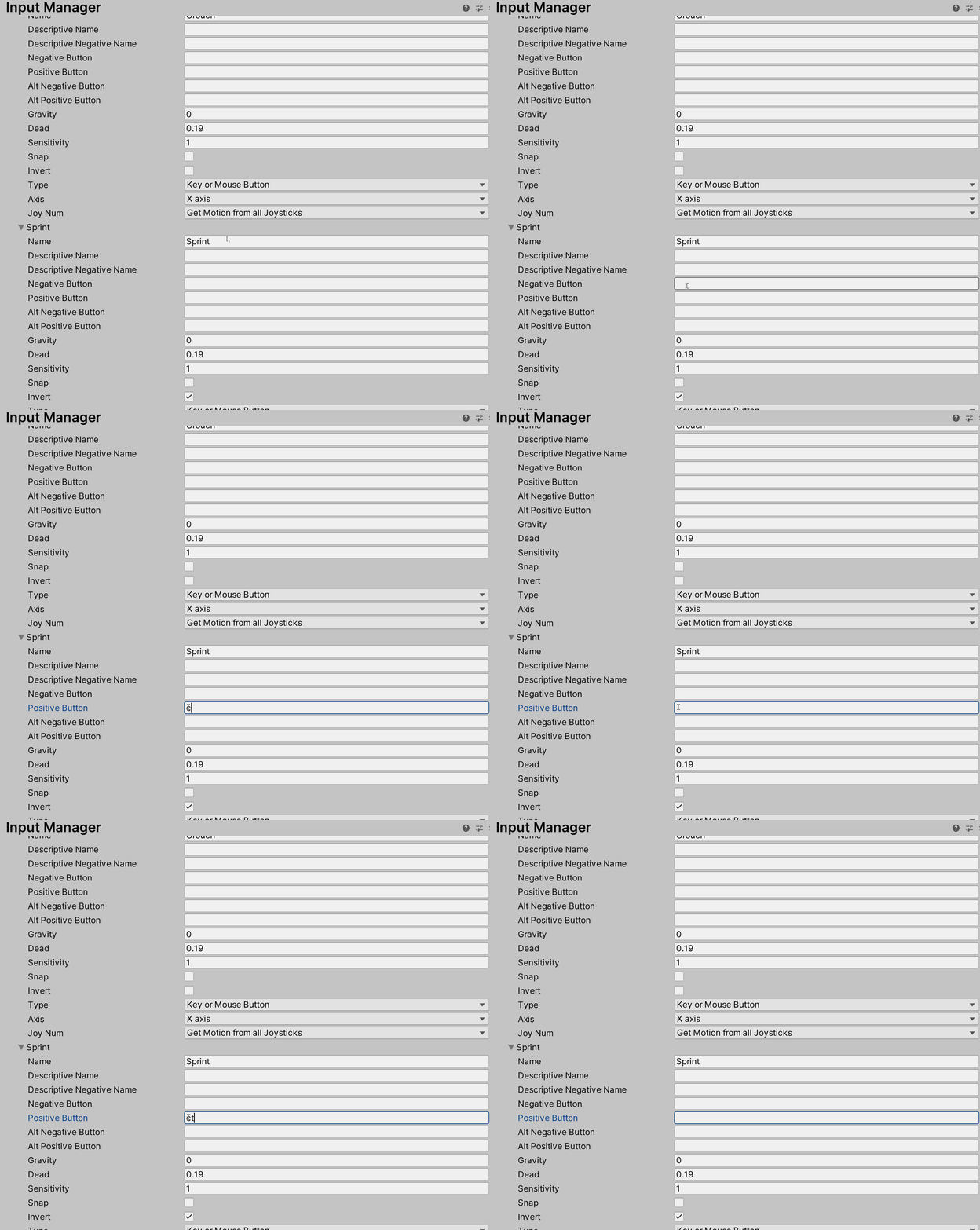 ocean jacinth
@plucky lily the didn't give any snippet
You have to right as this space
just simple
no snippet are given
and for control right left ctrl
 mellow ermine

As peeyush said (sorta)
The name of the key isn't "ctrl" it's "left ctrl" or "right ctrl"
jagged wyvern
I have a tap interaction on an action and it works well on gamepad
but it doesn't work at all on keyboard
anyone know why?
my code
            _inputActions.Player.Dash.started += ctx => Dashing = true;
            _inputActions.Player.Dash.performed += ctx => Dashing = false;
_inputActions.Player.Dash.canceled += ctx => Dashing = false;```my action
glass yacht
 acoustic dirge
Anybody know how to fix this?
acoustic dirge
Anybody know how to fix this?
Spell Input correctly
acoustic dirge
Well, im going to go into a hole.
glass yacht
if Visual Studio is not showing you that underlined and is not showing you suggestions as you type you should follow the setup instructions pinned to #💻┃code-beginner
acoustic dirge
Thanks
small sequoia
hi, I'm looking to add a function where the player has to press 2 buttons at the same time like a fighting game. is there a way to do that or a tutorial covering it?
jagged wyvern
If I wanted to detect if a button is held down shorter or longer would I need two separate actions?
 brittle rune
Hi guys, can someone pls help me with my swipe movement?
the thing is that it works but not exactly as I want it to
because what I want is to add the PlayerPos to the current player position instead of =
does someone knows how can I add it instead of just saying transform.position = PlayerPos;?
ocean jacinth
@brittle rune you hadn't add code
you are giving hatebin link
not your code link
ocean jacinth
first save in hatebin
brittle rune
ocean jacinth
@brittle rune I could help but I don't know what Mathf.Clamp do
brittle rune
It’s just limiting the x position to the corners of the screen
brittle rune
I add it where the Mathf clamp line is?
brittle rune
I tried that but I get an error
ocean jacinth
but remember you are adding value. So it will be too much as you gave value to PlayerPos
ok
change Vector2 to Vector3
and assign z to transform.position.z
now it will not give error @brittle rune
brittle rune
Okay, I’ll try
Well, now I was able to do it but I got weird results because the player disappeared from the screen
ocean jacinth
yes
I told you
decrease value of PlayerPos
If you are adding it's too much @brittle rune
brittle rune
Ok
Now instead of moving really fast in all the axis it’s only moving really fast on the x axis but to the left
O, i think I know what to do
brittle rune
I’ll tell you the results later, thanks
ocean jacinth
ok
thick panther
small sequoia
hi, I'm looking to add a function where the player has to press 2 buttons at the...
I don't know about any tutorials, but if you want logic to fire only when both keys are pressed you can use && in your if statement to require both parameters.
ocean jacinth
@small sequoia obviously you need to check using '&&' and write 2nd key
ocean jacinth
jagged wyvern
If I wanted to detect if a button is held down shorter or longer would I need tw...
I think you need timer type. learn timer in youtube. When button pressed start timer and when Button left stop timer. Calculate time between these. you probably need only one to check the time between holding in and out. But you need extra timer code. (see closely in youtube. If it is not a cooldown timer than see it).
 shrewd gate
Visual Graph 8.3.1 error with the new Unity Input System
Warning if you upgrade to Unity 2020.1.16 with HDRP.
brittle rune
How can I fix this?
because the swipe system works fine until I touch a part of the screen where the player isn't there
 solar pulsar
My buttons don't snap to the edges of the screen anymore. Can sombody help me?
jagged wyvern
anyone else have trouble clicking on ui with the built in UI selection actions?
ocean jacinth
@jagged wyvern are you asking for troble
in clicking buttons
@brittle rune I can't understand you
@solar pulsar use Anchors and set it to corner
using anchors it will easy
jagged wyvern
?
solar pulsar
@ocean jacinth they are set, but when i drag them to the edge, they don't snap to it
But in my other projects it still works.
Ok, my buttons are weird, their edges don't snap any more, but their center does. A new button works just fine, so I'll just replace the old ones with new.
brittle rune
ocean jacinth
<@!372477742563852289> I can't understand you
I’m making a hyper casual game and I just want to make a swipe movement like in the game cube surfer. But the problem is that my movement works mainly with the position of my player equaling my finger position, but when I swipe somewhere where my player isn’t there it looks like he teleports. So how can I stop the player from teleporting and just add the touch position to the player instead of equaling it?.
 upper dove
Is it the case that you can't have multiple PlayerInput objects active in the same scene at the same time?
I'm running into issues with trying to do that, but no errors are being logged.
brittle rune
No, I just need to come up with a solution to add the touch position to my player instead of equaling the same position https://hatebin.com/fhogimoitg
brittle rune
brittle rune
How can I fix this?
This type of movement is what I want to get
upper dove
Why the hell can't you rename action maps
Okay, you can. There's just no option when you rightclick but if you doubleclick it works.
Who wrote this.
Okay, I have a player that is spawned dynamically at runtime from a prefab and a main camera that is sat in the scene at start. Because of this I can't use a single PlayerInput between them if I want to be able to set and manage events via the inspector (the player prefab can't use the main camera as a target for an event and vice versa). Is there any way to make multiple PlayerInput components in the same scene work or do I just need to register events in a single PlayerInput component at runtime?
ocean jacinth
@brittle rune may I can solve this. For making a logic of this time start with easiness. I think make a prefab of an empty and assign that empty a tag. eg:- touchPos.
now in touch code you can write
https://hatebin.com/swbaidmpop
and In player script
https://hatebin.com/evgustwhpj
jagged wyvern
how come the button doesn't work when I click on it?
I'm using the default actions input for UI interaction
ocean jacinth
@jagged wyvern Am I see your canvas
jagged wyvern
it's ok I'm just going to get rid of the button and use something else
copper night
Does anyone have an idea of about when input system will be compatible with UIBuilder? (if ever)
brittle rune
ocean jacinth
<@!372477742563852289> may I can solve this. For making a logic of this time sta...
Okay, thanks!
jagged wyvern
anyone know why I have to press submit before I can chose different buttons?
nvm I used set selected
 waxen jackal
 private IEnumerator MoveToElectricOrigin()
    {
        bool distanceNotAchieved = false;
        Vector2 currentPosition = new Vector2(lastPositionX, lastPositionY);

        while (Vector3.Distance(currentPosition, transform.position) > .02f)
        {
            transform.position = Vector2.MoveTowards(transform.position, currentPosition, Time.deltaTime * playerSpeed);
        }
        if (Vector3.Distance(currentPosition, transform.position) <= .02f)
        {
            distanceNotAchieved = true;
        }
        yield return new WaitWhile(() => !distanceNotAchieved);
    }
can someone explain why this teleports me instead of moving me slowly ?
ocean jacinth
@waxen jackal remove 'transform.position = ' just write Vector2.MoveTowards
and it is recommended to write in update
waxen jackal
ok thanks!
olive socket
how do I use these Input Mapping to drive a car which is this following structure (I am following Unity Wheel Collider thingy from their documentation)
copper night
Mhhh, somehow while learning the Input system, it created an Input Actions asset already set-up for UI. I would like to create a new one but i don't remember how i did it. Any pointers?
 jagged barn
hmm so i am trying to figure out how to use XR in unity 2020.1 but all the tutorials are outdated because the component script called XR Controller doesn't exist...
i am following this https://www.youtube.com/watch?v=gGYtahQjmWQ&t=683s

If you want to get started with VR development. This video is for you.
▶ Get access to exclusive content: https://www.patreon.com/ValemVR
▶ Join the Discord channel: https://discord.gg/5uhRegs
Want more details ? Check arvrtips articles :
▶How to Install Unity Hub and Setup a VR Project :
https://arvrtips.com/how-to-install-unity-hub/
▶The Only...
and i cant find any tutorials for xr with the new input system that was introduced
so im stuck on how to make xr movement
i guess this goes more in vr i just didnt see the channel lol
also it looks like the xr plugin managment disappeared from project settings
bruh so this wasnt enabled... but i have preview packages installed.. how does that make sense lol
jagged wyvern
why does my ps4 controller work in the unity editor but doesn't when I build the game?
apparantly the build needs to be 86-64
 brave thistle
hi! i've got my input system working (debug.log shows my inputs being triggered) but when i try to catch the messages in a script, it doesn't seem like my script knows about the input system library. I tried using UnityEngine.InputSystem; but it doesn't like it. What's the correct way to import the library into a script?
brave thistle
ah magic - I regenerated project files within Edit > Preferences, and Visual Studio 2019 is happyagain 🙂 https://forum.unity.com/threads/cannot-find-unityengine-inputsystem.807645/#post-5401134
Unity Forum
I'm not sure if it's an issue with VSCode or Unity, but for some reason IDE can no longer see the whole UnityEngine.InputSystem namespace resulting in...
static coral
copper night
Mhhh, somehow while learning the Input system, it created an Input Actions asset...
You need to put a Player Input component on something, and then it has a Create Actions... button (you can delete the component afterwards if you're not using it)
 brittle magnet
Could anyone tell me why these events are not firing, none of the Input method's content seems to work. Its not triggering breakpoints, and just in general ignoring the attached actions...
tho the controls object exists and the actions are initialized, its never actually resolving the actions. https://hatebin.com/pquafwchba
I think it might have to do with the property I am using but I'm not entirely sure
 sand shadow
using it like that with the new Input system but it wont work:
 playerActionControls.Movement.Movement.performed += x => input_Movement = x.ReadValue<Vector2>();

Vector3 move = new Vector3(input_Movement.x, 0, input_Movement.y);
with the old one i got (which worked):
Vector3 move = transform.right * Input.GetAxis("Horizontal") + transform.forward * Input.GetAxis("Vertical");
is there something where i can check if a button is released or pressed or hold?
 hard tinsel
@sand shadow At "Interactions" on the right you can chose between Multi-Tap,Press and hold (and possibly something I'm missing right now).
Don't know if this is what you're looking for tho
But for a little problem of my own...
        player1 = PlayerInput.Instantiate(inputPrefab, 0 ,"Arrows",0, Keyboard.current);

        Debug.LogWarning(player1.currentControlScheme);
the Debug Log at this point always puts out "Null", this is also represented by the ingame behaviour - which is kinda annoying. I'm literally defining the control scheme of the instantiated object 1 line above, so how does it not register?
And how can I fix this?
 dusky veldt
Does anyone know if there's any way to check if an input has been released, other than by only using "ReadValue<float>()" ? I'm looking for a way to achieve something similar to Input.GetKeyUp in the new input system
dusky veldt
dusky veldt
Does anyone know if there's any way to check if an input has been released, othe...
never mind, I figured it out! 
 covert heron
Hello there, recently I am trying to work on an input script that functions like a button but have support on holding down for seconds
I am achieving it by inherit the selectable base class
By overwriting the OnPointerDown and OnPointerUp I am able to easily finish the mouse part, but I am struggling on the keyboard part
I found no interface that I can implement in order to get a call back when I am pressing a selected button by keyboard
I am wondering if there is any work around
chrome walrus
So you are using the old input system or the new one? @covert heron
chrome walrus
It shares the OnPointer stuff, yes.
So did you create an action binding with the keyboard?
 fast flare
heyo i've been trying for a while, but for some reason the playerinputmanager only spawns one playerInput, despite the max player count being 4 (i've put the max player count off before and every controller works as it should)
 bold mauve
Join Players When Join Action Is Triggered
change it to when button is pressed ? To see if that's the source of problem
(dunno if you have a join action)
fast flare
it didn't help it sadly
bold mauve
Oh. Not sure I know why then.
Did you try to debug the callback OnPlayerJoined() or smthg like that
maybe your additionnal controllers are not recognized by your OS :p
 vast portal
My EventSystem's InputModule component doesn't work when I return to this scene. Any ideas why?
vast portal
I think it's fixed? My canvas was set up weird (for some reason, I had an EventSystem component attached to it)
covert heron
chrome walrus
So did you create an action binding with the keyboard?
Yes... I basically create a static Input Action and initialize it use a static function
Then I can register and deRegister the listener in OnSelect and OnDeSelect
and process the holding action inside a coroutine
chrome walrus
@covert heron can you show us the code? So you are writing the action yourself or using the Input Manager ?
covert heron
Okay
Anyway, I manage to make it work
These are the parts that handle the initialization
These parts are for assigning and deAssigning the command
This part is for interruption
These are the core logic
 ionic coral
For anyone interested, I've made an attempt to make a selection screen (Smash Brox. style) utilizing the new input system. The idea is for a template so anyone can create selection screens and have the players/controllers persist. Been driving me nuts, so I hope I finally have it, and also hope it can help more than just me. Thread I created here: https://forum.unity.com/threads/local-multiplayer-selection-screen-solution.1019263/
Project is here: https://github.com/GeneralProtectionFault/InputLocalMultiplayerTemplate
Unity Forum
Merry Christmas folks! I'm creating this in the hopes that it will help myself and others, and even more hoping it works xD:...

GitHub
Template for selection screen for using multiple (local) cursor icons using gamepads - GeneralProtectionFault/InputLocalMultiplayerTemplate
ionic coral
Yes, that's exactly right, and you're welcome. I haven't tried to make it into my actual game projects yet, but I'm hoping the basics are in there 🙂
Local multiplayer seems to be the bane of the input system 😄
chrome walrus
Oh really, thought you could handle that with the device stuff, will look into it when I get the time 🙂
ionic coral
Haha, well I just mean I notice a lot of folks have had trouble with it judging by the forum :P. I think the system can handle it, but it seemed to me you really gotta get into the weeds to do it, or at least we will until it matures more.
chrome walrus
@ionic coral totally agree, this is still like a beta thing somehow
small sequoia
Hi, i'm using a rigidbody with the new input system. it didn't work out as planned...
"" void Move()
{
Vector2 readValue = proController.GamePlay.Movement.ReadValue<Vector2>();
Vector3 move = new Vector3(readValue.x, 0, readValue.y).normalized;
    MoveInput = readValue;
    MoveDirection = move;

    move = move * speed * Time.deltaTime;
    RBody.MovePosition(move);

}""
thats the code i used to move the player and i put it in Update(), if anyone has a solution to this please let me know
ionic coral
Generally, I think you want to store readValue in a field and update it with a method that you call from the Events on PlayerInput, then just do the actual moving in Update (). I'm not sure if what you have "should" work, though, I don't recognize the Gameplay.Movement API stuff.
But there's also some new stuff in the preview packages.
@small sequoia sorry forgot to target you in the message lol
small sequoia
i figured it out but now my rigidbody gravity and movement is really slow to the point where i have to turn up the speed to 1000
    {
        Vector2 readValue = proController.GamePlay.Movement.ReadValue<Vector2>();
        Vector3 move = new Vector3(readValue.x, RBody.velocity.y, readValue.y).normalized;

        move = camera.transform.forward * move.z + camera.transform.right * move.x;
        MoveInput = readValue;
        MoveDirection = move;
        //move = move * speed * Time.deltaTime;
        //RBody.MovePosition(move);
        transform.LookAt(transform.position + new Vector3(move.x, 0, move.z));
        //transform.rotation = Quaternion(move)
        RBody.velocity = move * speed * Time.deltaTime;

}```theres the code for the move function
here's what the problem looks like ingame. if anyone has a solution to this, please let me know
 mild rapids
A mass of 1 is very little
small sequoia
so what mass should i set it?
i'm serious cause does the gravity get stronger the higher the mass or when it is lower?
@mild rapids i set the mass to 1000, it didn't work, i set it to 0.1, it didn't work so i don't think the mass has anything to do with the low gravity issue
mild rapids
Unity is the ultimate game development platform. Use Unity to build high-quality 3D and 2D games, deploy them across mobile, desktop, VR/AR, consoles or the Web, and connect with loyal and enthusiastic players and customers.
@small sequoia
 lavish bloom
Has anyone had experience with the "new InputSystem". I am struggling. I set up my Action Mappings and I'd like to use SendMessage. I want to react to a MouseDown (press) event and then get the mouse position. it seems to be impossible. If i watch the value and listen to position i get position updates. if i add the interaction to only react to Press Only, the event will only initially fire once. therefore using "value" does not work. if i only use "button" i can only react to press and release events and have no access to the position. im going crazy 😄
small sequoia
@mild rapids i did that and it didn't work, have seen my code i sent earlier?
mild rapids
I've seen only the one from 21:12
small sequoia
small sequoia
``` void Move()
{
Vector2 readValue = proController.GamePlay.Movemen...
thats the code i'm working with now
can i move this convo to #⚛️┃physics?
 snow pilot
does anyone know how i can set up a button.ui on inputmaneger?
or how can i do it in script to detect if a button.ui was "clicked / touched"? I don't want to use events to call methods, I just need to know if it was clicked or not
someone ?
 ashen pendant
Ok I am using Ui Toolkit preview + new InputSystem. I have a simple UI I built with just a visualelement and a button (created via UI builder). I can click the button and get an event just fine if I load it in a empty project. As soon as I add it to an existing project I no longer receive the click events. Any ideas?
jagged wyvern
how do I check what interaction behaviors are triggered?
ionic coral
lavish bloom
Has anyone had experience with the "new InputSystem". I am struggling. I set up ...
Are you trying to listen for a mouse click independent of a player, or do you have a PlayerInput attached to an object, etc...?
covert heron
Hello, just wondering
Do we have something that we can add listener to when user has change the current input devices? (New input system)
Like that Monster Hunter World styled input tips
 lilac fulcrum
I'm having a problem where I can't Serialize my input system for some reason
Also, when I try to do controls = new MasterInputs(); my inputs don't seem to work anyway
bold mauve
Try the type InputActions?
lilac fulcrum
That just gives me a menu for input actions. I have a generated class that I want to use
 green hazel
So, quick question:
Worth it to port to the new input system if I want to support xbox, ps, nintendo? Or is there a great way to fix this in the old one? Ty
lilac fulcrum
new input system by the looks of it vastly superior but I'm having trouble getting it to function
chrome walrus
You have to enable them, did you? @lilac fulcrum
green hazel
Yeah, I tried it the other day, it's rather sweet.
I used this (https://www.youtube.com/watch?v=yRI44aYLDQs) to learn it 🙂

How to use the new input system in Unity! Next video will show how to make a character controller using the input system.
►Next part
Make a SIMPLE Character Controller using Unity's NEW Input System
https://youtu.be/w1vC32e11wU
►Playlist
Unity Beginner Mini-Series
https://www.youtube.com/playlist?list=PLKUARkaoYQT178f_Y3wcSIFiViW8vixL4
►Projec...
lilac fulcrum
chrome walrus
You have to enable them, did you? <@!235202689544355840>
I don't think so, I'll try it
chrome walrus
@lilac fulcrum jsut call your controls.Enable(); after you created it in script
lilac fulcrum
I'm trying to use the Player Input component now but I get this error when I press my crouch key:
chrome walrus
Show the code 😉
lilac fulcrum
chrome walrus
Does it tell you what line hits this error?
chrome walrus
Alrighty 🙂
jagged wyvern
I set an action with a value type vector 2 and I want a deadzone on my analog but when I set stick deadzone on my game pad it doesn't change anything
can I get some help?
ashen pendant
With the Unity's new InputSystem my mouse is reporting PointerEventData.pointerid == 2 for all mouse buttons. These should return as negitive values. Any ideas?
ocean jacinth
@brittle rune have you solved your problem. Cuz I got a new Idea to solve
static coral
Hey, when using inputAction.GetBindingDisplayString(i), it seems to return the string in system language. Is there any way to always have it as english?
chrome walrus
Shouldn't it return your string that you set ? @static coral
static coral
For example, when doing this
for (var i = 0; i < action.bindings.Count; i++)
{
    Debug.Log(action.GetBindingDisplayString(i));
}
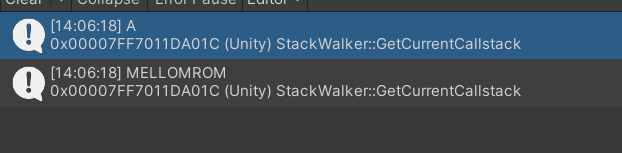
It prints this: https://i.imgur.com/ZMW0SU7.png
The first one is ok (A on gamepad),
The second one printed is Space translated into system language, while I'd want just Space
 chrome walrus
Do you set the language inside your app?
Oh you cannot set it, its the OS language... hm, weird.
Well I guess you cant get the displaystring, as this gets it from the system itself and not a custom one you put in, so you might have to translate it yourself.
tame oracle
Hello, does the new Unity Input System support NearTouch on Oculus Touch controllers on the Trigger as well as the grip button somehow? It doesnt seem like the actions support that, I can only see the thumbstick, and the primary and secondary button ...
brittle rune
ocean jacinth
<@!372477742563852289> have you solved your problem. Cuz I got a new Idea to sol...
I haven’t solved it
tame oracle
anyone know why this is showing up? i feel like the answer is obvious but its just not clicking for me
chrome walrus
@tame oracle guess you have to hack your neartouch things into the Input system, it might give you some values, did you test to just output the raw data from the input system when selecting the oculus quest stuff?
 tawny cosmos
Hi everyone! Has anyone used Rewired to create an input system to customize the button mapping (by the player at runtime), in which you can set two keys for the same action? I am having trouble, when changing a key, both (from the same action) get the same button, like they are mirrored values.
ocean jacinth
@brittle rune So you can do this
speed = 15f;
if(Input.touchCount > 0)
{
Vector2.MoveTowards(transform.position, Input.GetTouch(0).position, speed * Time.deltaTime);
}
adjust speed of your use
brittle rune
ocean jacinth
<@!372477742563852289> So you can do this
speed = 15f;
if(Input.touchCount > 0)
...
Okay, thanks!
ocean jacinth
if work please tell @brittle rune
brittle rune
Okay, I’ll try it in a bit
ocean jacinth
ok
 queen ether
Hey, i have no clue but when i open a tab such as project settings this happens
chrome walrus
Did you reset the layout?
chrome walrus
Window -> Layouts -> choose one
ashen pendant
public static class PointerEventDataExtension
{
    private const int LeftMouseClickPointerId = -1;
    private const int RightMouseClickPointerId = -2;
    private const int CenterMouseClickPointerId = -3;

    public static bool PointerIdIsLeftMouse(this PointerEventData eventData) => eventData.button == PointerEventData.InputButton.Left;
    public static bool PointerIdIsRightMouse(this PointerEventData eventData) => eventData.button == PointerEventData.InputButton.Right;
    public static bool PointerIdIsCenterMouse(this PointerEventData eventData) => eventData.button == PointerEventData.InputButton.Middle;
}```I had to switch to Button vs pointerId with the new input system. Anyone know why pointerId no longer returns negitive values for mouse clicks?
chrome walrus
pointerid did return negative values? It should 0 left, 1 middle, 2 right, doesnt it?
ashen pendant
the values above are what is returned for the old system.
if I switch to the new input system it returns 2 for all buttons.
chrome walrus
What does the whole pointerdata give you, can you destuingish between different clicks?
ashen pendant
yes, I can destungish using eventData.button. However, I was expecting eventData.pointerId to not return 2 for all events, as it did with the previous inputsystem.
So I have a workaround, but this difference makes me concerned something isnt right with my setup
 pliant verge
Can I somehow make the "new" input system call all methods automatically if I make a class implement the interface?
 proper dome
anyone hare already have any problem where the ActionInput not show at inspector to associate?
jagged wyvern
@proper dome what do u mean?
proper dome
@jagged wyvern i was following a old tutorial and they drag the controller to make a reference... i just got a new one were make a new instance and it work
@jagged wyvern tkz for the reply
 rancid lichen
Hey all. I want to use the Input System to invoke Unity Events but I have not been able to find any resources on that. Does anyone have a tutorial or something for me to try?
ocean jacinth
@brittle rune my suggestion worked?
 atomic veldt
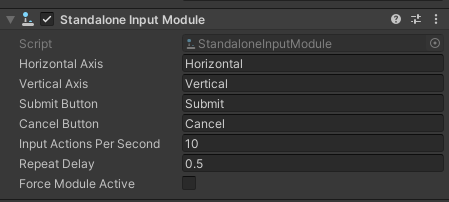
Hey 👋! I've had this problem since I switched to the new Input System: https://imgur.com/a/cFHyGjT and here's the player settings that I have selected it: https://imgur.com/IEjCl8S and I did read unity forums about updating to new input system, and they said there was a button to update it from the old one in the eventsystem gameobject but there's none: https://imgur.com/T6LOcl7? How could I solve this (prefabably not using the "Both" option in player settings)?


 glass yacht
atomic veldt
Hey 👋! I've had this problem since I switched to the new Input System: https://...
atomic veldt
glass yacht
atomic veldt
Hey 👋! I've had this problem since I switched to the new Input System: https://...
atomic veldt
oh didn't notice that, thanks
it isn't showing even i have Unity UI installed:
in pkg manager:
wait my bad 😄
pliant verge
how does this "hold" stuff work? I added hold but it still calls it if I tap the button?? (Same for the otherway around)
 finite hawk
please could someone help im trying to change a HandleMouseClick(); to a if(ChatInputs.ToLower() == "Command Here") can anyone help please
brittle rune
ocean jacinth
<@!372477742563852289> my suggestion worked?
Sorry for the late respond, I've been busy lately xd. But it did worked, thanks!
ocean jacinth
ok @brittle rune
green hazel
Pulling my hair rn...
New input system, horizontal movement. It moves for a bit, then stops, then I have to press again for it to move a bit more, and so on.
Only keyboard and d-pad, not analog stick on gamepad.
green hazel
Doh, sorted
 hard valve
Sorry guys this is just a ragepost after spending several hours thinking I was dumb.
WHY THE HELL IS THIS COMPLETE LACK OF FUNCTIONALITY HIDDEN?
WHAT IS THE POINT OF HAVING A REMOTE DEBUG APP IF IT DOESNT SUPPORT YEARS OLD FEATURES?!
Unity Forum
Is the new Input System expected to work with Unity Remote 5? I see that the Input Debug panel has a pulldown for Remote Devices, and my iPhone does...
chrome walrus
@hard valve Should be put in general tbh. But besides that, what do you mean with years old features? Unity Remote itself is years old not not being updated for a long time now
Last Update on iOS was 2016...
covert heron
Is there a way/work around that I can perform a rebind on the C# class generated from the input Asset?
chrome walrus
@covert heron what you mean with rebind?
 urban raft
uff
I am completely new to the Unity Input System
Can I use forces on my rigidbody for movement in the input system?
or do I need to change everything I had before? xD
just @ me thanks 🙂
if (Input.GetKey("d"))
            {
                rb.AddForce((sidewayMove / airSlowdown) * Time.deltaTime, 0, 0, ForceMode.VelocityChange);
            }
I had this before for moving right as an example
 olive mortar
@urban raft Using the new input system is complex, you can no longer do this with the new input system
chrome walrus
Well, you dont have to rewrite anything tbh. @urban raft you just have rewrite the if part and initialize the Input Actions you get from your Bindings once, then you can do what you want, it is a total separate thing when talking about rigidbodies, Inputs are just for giving you values you can then use, in your case, it would be pressed or not pressed.
urban raft
Ok
 grizzled owl
Not really, I don't think it's more complex than before. It depends on your target devices
If you will work only with keyboards and mouse it's almost the same
chrome walrus
It is more complex to setup once, yep. But can help you get along with cleaner implementation afterwards
grizzled owl
Different people, different opinions yes, but I don't think it's complex to setup either. The hard part is to find the thing you are looking for in the documentation. Not everything is mentioned there
chrome walrus
Thats what I mean 😄 Tbh, if you went to use GetAxis and never touched the default settings of unity, mouse and / or gamepad worked out of the box, so lot of people might think, it gets more complicated now, when you actually have to decide what is doing what 😄
Besides that, if you need any help in rewriting, going into it and the docs stop helping, just come back here @urban raft
chrome walrus
urban raft
is it better to have direct or indirect input?
so what exactly do I do with this?
do I have to connect a script for each side of movement?
chrome walrus
Depends on your personal preference, I usually hook my scripts inside scripting itself and only simple stuff inside the inspector. Just makes it more clear what is going on when having it in one place.
@urban raft
urban raft
hmmm ok
chrome walrus
Its fine using the inspector, just keep track of what you are hooking up. And if you change stuff, you might find yourself re hook everything, just because of a simple name change or what not. These are the downsides
urban raft
I have a problem
controls.Gameplay.Left.performed += ctx => move = ctx.ReadValue<Vector2>();
I used this for me Left move. But I can't use a Vector 2 because I only have 1 axis and not 2
Can I just use a float instead?
chrome walrus
So what do you get as move? is it a vector2?
urban raft
Well it says it cant read a Vector2
from my left behaviour
makes sense, because I only connected a left move on the stick
chrome walrus
Oh yeah, than you can just use float
It depends on what you set in actions, you get different parameters
urban raft
ok I changed it
I dont know now how I get the value on the player position
/ how to move my player now xD
chrome walrus
Oh thats not input system 😄 you got the move value, now you can use rigidbody or charactercontroller to move it 😄
urban raft
wait... I did it in the same script I had before with my simple movement with the forces
should I seperate those?
Or idk
I have no plan of what I am doing here with the input system haha
chrome walrus
can you show that part again of the old input?
urban raft
yes
if (Input.GetKey("d"))
            {
                rb.AddForce(sidewayMove * Time.deltaTime, 0, 0, ForceMode.VelocityChange);
            }
yeah you can just use the sidewayMove for example and replace it with move, or multiply it with sidewayMove, might work better
and remove the if stuff around it
chrome walrus
yep it is, but its 0 if you dont press anything
Like your float will be zero if you dont press the controller
chrome walrus
It should go -1 to 1, right? @urban raft
covert heron
chrome walrus
<@!709943465575972925> what you mean with rebind?
I mean a way of change each binding under every Action across all of my action maps
But direct inside the generated C# class instead through a player input component
tame oracle
could someone help me fix this
chrome walrus
@covert heron so you want the player to customize their input?
chrome walrus
@lost copper lets continue here.
So if you are using the new input system, the code in beginner-code wont work.
chrome walrus
Did you just try and see if unity gives you an error, then you know if you have the new or old input system
But I guess as the guy on beginner said, if you did not change anything, you might be in old.
chrome walrus
Okay, yeah so on old system, the InputGetKeyDown will tell you its true when the user started pressing in that frame, it wont return true during continous frames.
 lost copper
ok
chrome walrus
GetKey will give you like holding the button
chrome walrus
the newest stable, yep, but you can still use the old or new input system 🙂
urban raft
man idk how I get my movement working :/
void Awake()
    {
        controls = new Player();

        controls.Gameplay.Left.performed += ctx => moveLeft = ctx.ReadValue<float>();
        controls.Gameplay.Left.canceled += ctx => moveLeft = 0f;
        controls.Gameplay.Right.performed += ctx => moveRight = ctx.ReadValue<float>();
        controls.Gameplay.Right.canceled += ctx => moveRight = 0f;
    }
I got this but Idk how to put this onto the player and where in the script
I want to have a pushing force on a rigidbody
 north furnace
Is is possible to get input from a specific gamepad in the new Input system with code similar to this:
(Gamepad.current.rightShoulder.wasPressedThisFrame
I want to know if the "rightShoulder" of gamepad1 was pressed or the rightShoulder of gamepad2 was pressed.
north furnace
To answer my own question:
Gamepad.all[gamepadIndex] is something that can be used to get a specific gamepad.
so to get the input from the first gamepad something like this can be made:
        {
            print(0);
        }
        if (Gamepad.all[1].rightShoulder.wasPressedThisFrame) //only gets input from the second gamepad
        {
            print(1);
}```Ok I finally have my movement in the game
but I realized that I cant control my UI buttons xD
Do I need to make a new Input System also for my mouse?
covert heron
chrome walrus
<@!709943465575972925> so you want the player to customize their input?
Yes
jagged wyvern
whenever I press a button I want to change a value, and make it go to zero when it's not pressed
but whenever I do it makes it go to zero right when the action is performed
does anyone have a fix for this?
jagged wyvern
like this ```cs
_inputActions.Player.MoveInventoryRight.performed += ctx => { InventoryDir = 1; print("right inv performed"); };
_inputActions.Player.MoveInventoryLeft.performed += ctx => { InventoryDir = -1; print("left inv performed"); };
        _inputActions.Player.MoveInventoryRight.canceled += ctx => InventoryDir = 0;
        _inputActions.Player.MoveInventoryLeft.canceled += ctx => InventoryDir = 0;```
 devout sandal
I was messing around with the Input system package but then I wanted to remove it and now I get this error:
InvalidOperationException: You are trying to read Input using the UnityEngine.Input class, but you have switched active Input handling to Input System package in Player Settings. Movement.Update () (at Assets/scripts/Movement.cs:39)
how do I fix this?
urban raft
should I do this?
I cant control my UI buttons since I switched to the new input system
devout sandal
idk
urban raft
devout sandal
I was messing around with the Input system package but then I wanted to remove i...
I had this error when I changed to the new one and used GetKeyDown in my script
but idk why you have it when you removed it
devout sandal
I just fixed it but thx for responding ^^
urban raft
ok 🙂
atomic veldt
urban raft
I cant control my UI buttons since I switched to the new input system
yes
if u want to control ur ui buttons and want to keep your errors in console clear
 grizzled arrow
Hey all 🙂 I'm finding that my switch pro controller does not show any events or input responses in the debugger when the controller is wired over usb-c, but it works perfectly through bluetooth. Is this a known issue or am I missing something?
 quartz flint
i have many issues in my conttroller like it doesent build when i whant and doesent build when i want and it walks sloww
chrome walrus
@grizzled arrow Maybe it is attached with BT still even when using the USB C?
 split wadi
heyho
I made a prototype of a game where I parent a rigidbody ball to a rigidbody player
everything works well when I put the prefab in the scene
but as soon as I use the PlayerInputManager to get a second player(even if I don't use the second player) the parenting doesn't work anymore
this is the parenting function
    private void Pickup(GameObject ball, GameObject hand)
    {
        ball.GetComponent<Rigidbody>().isKinematic = true;
        ball.GetComponent<SphereCollider>().isTrigger = true;
        ball.transform.SetParent(hand.transform);
        ball.transform.localPosition = Vector3.zero;
        ball.transform.rotation = hand.transform.rotation;
    }
i made a video to show you what happens
the first part is just the prefab in the scene
in the second part the PlayerInputManager adds the player to the scene
can someone help me?^^
split wadi
ok its getting weird now
i changed nothing since yesterday, but now only 2 balls work as expected and the 3rd ball is floating in the air like in the second part of the video
i fixed it by deleting the player in the scene and put it in again
how can that be?
maybe its not a PlayerInputManager problem?
the player has a capsulecollider, a rigidbody and it has 2 empty objects (handR and handL) parented to it
the ball has a spherecollider and a rigidbody
This is the function that uses the pickup function
    private void OnCollisionEnter(Collision collision)
    {
        if (collision.gameObject.tag == "Ball")
        {
            if (handRfree == true & collision.gameObject.GetComponent<Ball>().picked == false)
            {
                ballR = collision.gameObject;
                Pickup(ballR, handR);
                handRfree = false;
                ballR.GetComponent<Ball>().picked = true;
            }
            else if (handLfree == true & collision.gameObject.GetComponent<Ball>().picked == false)
            {
                ballL = collision.gameObject;
                Pickup(ballL, handL);
                handLfree = false;
                ballL.GetComponent<Ball>().picked = true;
            }
        }
    }
is there something i can try to fix this?
 foggy lodge
Hello guys.. i have a problem with my character movement.. my player does not move forward but move backwards in my game.. how do i fix it? is it bcuz of my coding or the 3D model?
using System.Collections;
using System.Collections.Generic;
using UnityEngine;

public class BoatMovement : MonoBehaviour
{
    protected Joystick joystick;
    public Transform cam;

    private Rigidbody rb;

    public float moveSpeed;

    void Start()
    {
        joystick = FindObjectOfType<Joystick>();
        rb = GetComponent<Rigidbody>();
    }

    void Update()
    {
        float x = joystick.Horizontal * moveSpeed;
        float y = joystick.Vertical * moveSpeed;

        Vector3 direction = new Vector3(x,0,y).normalized;

        if (direction.magnitude >= 0.1f)
        {
            rb.velocity = new Vector3(x*moveSpeed,rb.velocity.y,y*moveSpeed);

            transform.LookAt(transform.position + new Vector3(direction.x, 0, direction.z));
        }
    }
}
hey @foggy lodge
i recommend the new input system its easy and clean
my player is moving with this:
    private void OnMove(InputValue value)
    {
        moveDir = value.Get<Vector2>();
    }
    private void FixedUpdate()
    {
        rb.velocity = new Vector3(moveDir.x, 0, moveDir.y) * moveSpeed;
    }
you just need to set it up
there are lots of youtube videos that will help you
or look here https://docs.unity3d.com/Packages/com.unity.inputsystem@1.0/manual/index.html
foggy lodge
my character is moving just fine.. just it's moving facing backwards
so that's why im asking whether it's because of my code up there or the 3D model
 weak trout
foggy lodge
so that's why im asking whether it's because of my code up there or the 3D model
weak trout
foggy lodge
so that's why im asking whether it's because of my code up there or the 3D model
Does it fix it to either put a - in front of one of the model's transform scale values to make the model face the opposite direction, or to use a - instead of a + in your LookAt call?
foggy lodge
weak trout
Does it fix it to either put a - in front of one of the model's transform scale ...
ty, it fixed my problem by changing + to - at LookAt
 languid jetty
How bad would it be if I started a different thread for updating the Input system?
weak trout
Is it possible to do a multitap-and-hold interaction with the input system?
 soft basin
Is it obvious anywhere to see how the input system reacts to events?
I suspect it's not polling on every single frame like we would in the old one?
I've tried looking in the GitHub, but couldn't find a clue
soft basin
Is the new Input System built on / part of DOTS?
 frigid ridge
No. Afaik it's primarily designed for the old GameObject workflow. DOTS integration will likely come later.
soft basin
Is Input polled somewhere, or how does the new input system get the event?
frigid ridge
Asking about implementation details or how to use it?
Quick start guide is pretty solid for the latter https://docs.unity3d.com/Packages/com.unity.inputsystem@1.1/manual/QuickStartGuide.html
soft basin
implementation details
Sorry I took so long to reply
I know how to use it, but I don't get how the internals works
 tribal rock
Does the new input system have the ability to trigger events every frame an input is held down?
 valid basin
using the DefaultInputActions, what's a way to navigate UI using the keyboard arrows?
Is there a built in solution?
or do I have to code it up myself?
sick cradle
@valid basin I think the input package has sample for that, just look at the samples on package manager when you select input system package there
like, rebinding ui sample could have that thing
but like with most things on the new input system, they don't really document these things
that sample basically had separate asset that had UI navigation preset for you
chrome walrus
@valid basin I think the UI just uses up down left right for checking where to go, you can visualize how the UI would navigate through, there should be an option in the editor to show like little lines for the path.
valid basin
chrome walrus
<@!482817166123466752> I think the UI just uses up down left right for checking ...
oh you're right.
I didn't know that exists
soft basin
tribal rock
Does the new input system have the ability to trigger events every frame an inpu...
You can use a bool, something like
class MyObject: MonoBehaviour
{
  bool isDown = false;
  void Awake()
  {
    playerInput.Player.MainAction.started += _ => isDown = true;
    playerInput.Player.MainAction.canceled += _ => isDown = false;
  }

  void Update()
  {
    if (isDown)
      TriggerEvent();
  }
  void TriggerEvent()
  {
     // Code here to trigger event
  }
}
I'm not sure if this is the right or most elegant approach, but it is an approach
 west oracle
@soft basin they recently added extension methods for InputAction:
https://docs.unity3d.com/Packages/com.unity.inputsystem@1.1/changelog/CHANGELOG.html
InputAction.WasPressedThisFrame(): Whether a bound control has crossed the press threshold this frame.
InputAction.WasReleasedThisFrame(): Whether a bound control has fallen back below the release threshold this frame.
InputAction.WasPerformedThisFrame()```(to 1.1 preview at least)
 velvet flame
How do I implement mouse sensitivity using the new input system? I can't just scale the position/delta because the value is in pixels, so i would lose precision. Is there a way to get a floating point value for the mouse position?
velvet flame
Also I tried using processors, but also does not maintain precision. Does anyone have a solution, or do I need to use the old input system?
lost copper
@velvet flame did u try * Sensitivity?
velvet flame
@lost copper What do you mean?
velvet flame
You mean did I try multiplying the value by a Sensitivity parameter?
velvet flame
That's the problem, the new input system returns the mouse position in pixels (integer values). If you multiply by a large sensitivity value, you will be losing precision.
Say the mouse moves 1.3 pixels, the input system would would say it moved 1 pixel. If you have a sensitivity of 50, the value would be 1 * 50 = 50 while the true value should actually be 1.3 * 50 = 65
chrome walrus
@velvet flame dont know what you mean by full pixel, I am getting floats with at least one step behind comma in my console log
 valid heart
Edit: My issue has been solved. I was using onReset() instead of OnReset(). 🤦♂️
I'm using the new Input System 1.0.1 and Unity 2019.4.16f1. Yesterday I successfully set up a few actions using Send Messages. However today I followed the same steps to add another action "Reset" but I cannot get the OnReset() method to execute when I press the corresponding key or gamepad button.
velvet flame
@tame oracle Are you using the new input system? I can't seem to get this behavior
jagged wyvern
when I use the cancelled event on an action it cancels my action right when it gets performed
how can I delay it one frame?
 sacred cairn
Im trying to put a move right and left buttons. I made a camvas and put 2 ui buttons but they are not showing when i hit play
Is it something to do with the layers?
 pulsar lion
does anyone know how to change what displays on the fourth screen when there isn't a player active?
it seems to be calling from the last position the second player
but I don't know how to change that default
 hollow dragon
Im not really expirenced with it but I have an idea even tho there are probably a better way to do it I you can check whether there is a player in the x axis of that part and y axis of that part
covert heron
Hello there, I'm constantly getting this error output, and I have no idea how to resolve this
Only pass-through actions should be left in performed state by default interaction
After a brief look into the debug log file, it is sent directly by the input manager
 sly bear
Am I not getting something or does the new system feel overcomplicated? There are like 20 input types in the editor for an action. And 5 different ways of reading inputs. I'm a code guy. I tried the "exported C# class" route but only got cryptic NullPointers when I tried to enable the mapping in code... Compared to old input or Rewired it feels... I dunno just weird and overengineered to work with. Am I just not getting it?
 hearty latch
I just use the old input. Still works great
west oracle
@sly bear https://forum.unity.com/threads/best-practices-getting-started-tutorials.875818 I posted a pile of getting-started tutorials with the new inputsystem

Unity Forum
Decided to make a few of these to help folks that are new, or struggling (as I did) to move from the Old Input Manager to the New Input System.
Hope...
 real forum
Does anyone know a way to avoid pixel skipping in an fps controller?
 random seal
Does the performed event not trigger for Action Type: Value, Control Type: Axis, with a composite of type 1D Axis?
For example: if the negative/ positive is Delta/X [Mouse]
real forum
@random seal I don't understand what you mean?
Should I convert the mouse position into a 1D axis?
random seal
@real forum sorry, I was asking a separate question
 trim hollow
if i want to read a vector2 from my mouvement input, should i use Action type Value or Pass throguht ?
i can see that Value will have a better Controller management (if i plan to allow multiple way to control an action) ?
jagged wyvern
there's no best way
 lucid fractal
how can i get button onclicks from physical canvas
i want to detect button clicks from a physical canvas
trim hollow
(Using the new Input system) Currently i have a function called Move() which is called in FixedUpdate() to control my rigidbody, in that function i read the value from my mouvement action. Is it the good way to use my Input from move action or i should include that code into the event OnMove() and put all my Move() code inside
here
thx for your help
tame oracle
Apparently i'm braindead and cannot figure this out.
I can't seem to find a way to expose any Bindings that are a part of Actions to check if performed?
Is this the intended functionality? If so, if we are basing user input only on a keyboard, are individual keys required to be bound to individual Actions?
 soft steeple
I am also so confused on this whole binding thing, it let me add a keyboard key once, but now I can't do it again
Going back to the old way I guess
frigid ridge
You poll the devices directly in the new system too. You lose most high level advantages of the new input system, but at least you have the new backend I guess 😄
soft steeple
This new way is half baked though, at least the UI for it is
frigid ridge
Maybe, but you can bypass it and just use it how you probably used the old system
Keyboard.current...
tame oracle
In terms of efficiency, any performance improvements with this new Input System over the old input?
frigid ridge
Odds are the new system is slower, though you would probably have to compare it to the state you have the old input system once you have all the keybinding and other abstractions that were missing from the old system implemented.
tame oracle
Thanks for the info drop Danny.
jagged wyvern
I think only the guy who made it does
I love how the presentation that unity had for the new input system they skip going over code saying it would be too boring
 stark stirrup
Hi guys.. trying to get use to the New input system. Keyboard kb = InputSystem.GetDevice<Keyboard>(); if ( kb.escapeKey.wasPressedThisFrame) { Debug.Log("Closing Window"); foreach (GameObject go in Panels) { go.SetActive(false); } } I can't seem to get this to work.. am i missing something? the debug never fires off.
I have this placed in the Update function
 tranquil ridge
How does one access the float pressure value from a pen? pen.pressure is of type axiscontrol, and I can't find where you get the actual float value off it
jagged wyvern
tranquil ridge
i've looked at plenty of documentation, thats why im asking. what is the method on the axis control to read the float value?
jagged wyvern
.readvalue
tranquil ridge
i've had no luck with that, I thought as much
oh, nvm i know why now. Its related to windows ink, if you disable it then you can't read the value
 gusty herald
I am using the new input system and I have 2 control schemes. One for mouse & keyboard and one for gamepad.
I want to build a rebind UI menu that lets the player rebind seperately for mouse & keyboard or for gamepad.
I am looking at the documentation (and sample) for rebinding keys, and I found the InputActionRebindingExtensions.RebindingOperation but this feeds only an input action reference and does not say which binding exactly. Can I somehow specify which binding is to be rebound?
Can I specify that the gamepad binding should be rebound?
ah
wait I'm stupid
I can literally feed it in the function
thanks @ sample project
 edgy osprey
I have a more broader question. Why is the new Input System better than the original? Seems like the most basic things take too much work
And doesn't support the most basic things like buffering inputs for the next fixed update
jagged wyvern
it's meant for multiple controllers and different types of input devices
just gotta take a semester to learn it
edgy osprey
😆
but that doesn't look like something difficult to implement on the old one
unrelated question: I have a PS5 controller, has anyone made it work with unity? (even without the new features)
sick cradle
@edgy osprey have you tried it? I don't think there's direct support yet but new input system may pick it up through HID or steam input api

Full support for the LED, trackpad, rumble and gyro features are available now
how I read that was that steam input api doesn't actually expose the new trigger FFB but I haven't checked the implementation
(and I don't own PS5 controller)
right now PS3 and PS4 controllers (at least on PC) are picked up as HID devices but they have special implementation, I'm assuming they will do the same for PS5 controller eventually
 silk steeple
What... is this happenstance. I am getting EXTREMELY long frame times when I wiggle my mouse cursor over my game view, but only if it is focused. This persists whether I have mouse input code, or not.
It seems to snowball over time, only if I move the mouse over the game view, and only if it's on my right screen and I have actually focused it.
The game even reacts to it if the window isn't focused, and is fine.
Whaaa?
brittle rune
Hi guys, can someone pls help me with my controller movement?
the player movement works fine with keyboard, but for some reason it doesn't works that well with a controller
silk steeple
Wowwwweee.
 elfin ridge
Anyone know if there is a way in the new input system to allow the keyboard to "take back over" the inputs from the mouse position, when doing something like this?
The issue is that it works correctly with the keyboard inputs, until I move the mouse, and then the keyboard inputs are never used / read again.
elfin ridge
Ah, nvm I see why it's happening, since the mouse position value is always huge, it's going to "disambiguate" and use it forever, so if I wanted to make it work as I expect, instead of building custom processors to remap the position to a normalized screen val (-1 to 1), I need to make the input itself return that.
On that note, where would I find info on creating a custom control lol.
brittle rune
Guys, I have a question
is it way better the new Input system than the old one?
or it isn't worth it upgrading?
jagged wyvern
I created an input action asset
it made a c# file
how do I get wether a gamepad was pressed or a keyboard was pressed
I tried GetBindingDisplayString on the class name of the asset file it created
but it's giving me an error
nvm apparently I had to do _inputactions.player.accept.getbindingdisplaystring
jagged wyvern
if I wanted the UI to change depending on what device button is pressed would I have to call a method that does that evertime an input is performed?
or do I make a binding tied to every button that can be pressed?
jagged wyvern
I had to do a lot of digging but there's a way to fire an event from input system itself
InputSystem.onActionChange += (obj, change) =>
            {
                if (change == InputActionChange.ActionPerformed)
                {
                    var inputAction = (InputAction)obj;
                    var lastControl = inputAction.activeControl;
                    var lastDevice = lastControl.device;

                    Debug.Log($"device: {lastDevice.displayName}");
                }
};``` fossil quarry
In StandaloneInputModule I want to do something special when the axisEventData.moveDir is triggered and it tries to Execute the moveHandler when eventSystem.currentSelectedGameObject is null. Is there an Event that I can listen and react to?
glass mason
How would I add an input text field (like for someone to input their name) in a 3d space?
nvm
jagged wyvern
I have this code:
ControllerType TypeofController = lastDevice is Gamepad ? ControllerType.GamePad : ControllerType.Keyboard;
                    Debug.Log($"device is :{TypeofController.ToString()} ");

UITextNotificationController.instance.CheckControllerChange(TypeofController);```but I get an error on the first line
UnityEngine.InputSystem.LowLevel.<>c__DisplayClass7_0:<set_onUpdate>b__0(NativeInputUpdateType, NativeInputEventBuffer*)
UnityEngineInternal.Input.NativeInputSystem:NotifyUpdate(NativeInputUpdateType, IntPtr)
I'm not sure what it means what am I doing wrong
 vivid forge
i am using the new input system but for some reason the player is not moving to the direction he is facin
i mean if the player is around 40° rotated on y axis it won't move to forward but side ways instea
this is the code-
Vector2 inputvector = Movement.ReadValue<Vector2>();
Vector3 FinalVector = new Vector3();
FinalVector.x = inputvector.x;
FinalVector.z = input vector.y;
controller.Move(FinalVector *Time.deltaTime * Speed);
can anyone help?
 royal quest
Hello, as you can see in the picture I have a problem with my Character sliding when I move him. I implemented an inputsystem so local multiplayer can work but when i move with it my character begins to slide but if just change the velocity without any of those if statements, my character can run without sliding a bit. Does anyone know why this happens? In short: If i put "theRB.velocity = Vector2.right * moveSpeed;" in the if statement, my character begins to slide but if i do it without those he does not slide
I also posted this in beginner code since i wasnt sure where to post it, sorry if this is not allowed
 blazing atlas
royal quest
Hello, as you can see in the picture I have a problem with my Character sliding ...
blazing atlas
royal quest
Hello, as you can see in the picture I have a problem with my Character sliding ...
I'm not sure if this is the problem but you should normalize the vector before assigning it to velocity
royal quest
I never did this, how can i do that
Is there a function for this?
Can i just vector2.normalize XD
or do you mean something different
Thanks for your answer btw
blazing atlas
royal quest
I never did this, how can i do that
like rb.velocity = (moveSpeed * Vector2.right).normalized although in your case there's probably a different issue
you would probably better off following something like this to implement the input system https://www.youtube.com/watch?v=78PLsHnRXiE

Discord Server:
https://discord.gg/uHQrf7K
Git Hub Repo for this project:
https://github.com/Bardent/Platformer-Tutorial
If you wish to support me more:
https://www.patreon.com/Bardent
We are moving on the using a FSM for the player controller now. To get started we need to take a look at the new input system! It's amazing!
royal quest
Alright thank you
digital narwhal
I have Action Run and Sprint, both are bound to Left Shift. Sprint however has a Multi tap interaction. When I go in game, and I just hold down shift...it triggers Run and then Sprint shortly after. It doesn't matter what the Tap Count is set to, the outcome is always the same.
How can I achieve pressing shift, triggering only run, and then if I let go and press it again immediately, sprint will be initiated?
 neon iris
A timer on shift up
 carmine thicket
How do I do a press and hold with the new input system?
Current input system (ignore the DPAD):
Current code for OnFire:
public void OnFire(InputValue inputValue)
    {
        Debug.Log("Fire command successful!");
        GameObject tempBullet = Instantiate(BulletPrefab, transform.position, transform.rotation);
        tempBullet.tag = "Player";
        tempBullet.GetComponent<Rigidbody2D>().velocity = tempBullet.transform.right * 5;
    }
nvm Use pass through
 lethal lotus
Please guys am using OnPointerDown and Up to detect touches in My game..i use it look around i.e to rotate the camera around....the script works perfect in the EDITOR but on Real Mobile...it just rotates in one axis (left or -x axis)
I followed a tutorial from YouTube nd it works fine there
 onyx linden
can u send the code instead of a photo, it makes it easier to see and read
 ember dagger
Hey everyone!
ember dagger
carmine thicket
nvm Use pass through
Pss through as button ?
 crimson elm
um guys


the blend tree animations are working as intended
but the actual ones are broken?
movement script from brackey's third person
ok nvm i forgot to loop them
 waxen canopy
I don't suppose anyone knows what I'm doing wrong here? csharp controls.PlayerControls.Fire.performed += ctx => inputFire = true; controls.PlayerControls.Fire.canceled += ctx => inputFire = false;
the trouble is once the button is pressed inputfire always remains true
waxen canopy
neh mind, solved, it seems to be something to do with setting the Pass Through option, not sure why, edit: I now know why pass through does not work with cancelled
 bitter talon
Is there a smarter way to disable any keydown press/input than just having a boolean that's required for any keydown location in script? Like I have essentially
{
//Walk Left
}
if ((Input.GetKeyDown(KeyCode.A))
{
//Walk Right
DoThing.GetComponent<Animator>().SetTrigger("AnimationTrigger");
}```
I want to disable the inputs, do I just need to do && some bool/disable stuff? I can't imagine a coroutine would work right since some of these inputs are in different classes/scripts. (Sorry this is probably a basic question) atomic meteor
is there anything on the roadmap for full desktop controller haptics support? the docs claim that the Input System supports PS4 controller haptics on macOS, but not Xbox. the thing is, PS4 haptics actually don't work, so im kinda wondering what's up and if it'll be ready any time soon
 static walrus
@full forge it's a bit awkward, especially at start. if you're just using 1 control method and not thinking about rebinding, old system is better
 full forge
static walrus
<@!212712183472062465> it's a bit awkward, especially at start. if you're just u...
full forge
static walrus
<@!212712183472062465> it's a bit awkward, especially at start. if you're just u...
it starts paying off if i'm supporting multiple types of controllers?
static walrus
i honestly can't imagine doing that without NIS
full forge
I started testing it with the simple examples of the packages, I'm liking it a lot but on Switch one project works while the main one doesn't
what's NIS?
static walrus
new input system
full forge
cool
a bit of a black box, how would you find out what devices it is detecting, in a build?
static walrus
there's a debugger for that, lemme see where it was..
full forge
thanks
static walrus
Window > Analysis > Input Debugger
full forge
i do need it
static walrus
for what