
#🖱️┃input-system
1 messages · Page 24 of 1
 limpid pecan
I found a fix on a forum post where I had to manually go in and change the library scripts but it seems to auto-update itself
Apparently this was fixed in 1.6.3 but we're 7 versions ahead and it's still here 
 elder ore
Does anyone have any ideas on why my character randomly Jumps when I use my DashInput?


 austere grotto
elder ore
Does anyone have any ideas on why my character randomly Jumps when I use my Dash...
austere grotto
elder ore
Does anyone have any ideas on why my character randomly Jumps when I use my Dash...
the code you're showing doesn't have anything to do with character movement so
you'd probably have to show the movement code
elder ore
 austere grotto
elder ore
austere grotto
elder ore
there's nothing here about jumping or dashing either.
Presumably it's in your state machine code
DashState?
Also looks like you're doing this DashInput code every frame while the button is held down
elder ore
public class PlayerDashState : PlayerBaseState
{
    private float dashDuration = 0.2f; // Duration before allowing state change

    public PlayerDashState(Player player, PlayerStateMachine playerStateMachine, string animation) : base(player, playerStateMachine, animation)
    {
    }

    public override void Enter()
    {
        base.Enter();
        timer = Time.time;
        ApplyDashForce();
    }

    public override void Exit()
    {
        base.Exit();
    }

    public override void LogicUpdate()
    {
        base.LogicUpdate();

        if (Time.time - timer >= dashDuration)
        {
            if (player.InputHandler.XInput == 0)
            {
                player.StateMachine.ChangeState(player.IdleState);
            }
            else if (player.InputHandler.XInput != 0)
            {
                player.StateMachine.ChangeState(player.MoveState);
            }
        }
    }

    public override void PhysicsUpdate()
    {
        base.PhysicsUpdate();
    }

    private void ApplyDashForce()
    {
        float direction = player.InputHandler.XInput;

        if (direction != 0)
        {
            Vector2 force = new Vector2(direction * player.dashForce, player.RB.velocity.y);
            player.RB.AddForce(force, ForceMode2D.Impulse);
        }
    }
}
Vector2 force = new Vector2(direction * player.dashForce, player.RB.velocity.y);```you're pretty clearly adding a force upwards here
elder ore
thank you!
austere grotto
if you don't want to add any force on the y axis, you should be putting 0 there
elder ore
thank you, so silly of me
I was thinking the old input system caused the error
when in to project and player etc
darn it, still jumping
😦
austere grotto
Time to start adding some logs
Make sure your jump code isn't running when you don't expect it, for example
elder ore
I am running logs each time I switch state
austere grotto
Perhaps the jumping is just the result of the sideways force? I.e. you're hitting an incline at speed or something>
comment out the dash force and see what happens
elder ore
Im so confused, now Im not jumping anymore. I didnt change anything.
Okay, noticed something.
I added Left Shit Key and East Button to DASH and
Space bar and South Button to JUMP.
When Im in idle mode I cant jump with Shift Left Key, but I can jump with East Button and SouthButton.
that's really weird
elder ore
The Input System bugged out. Made a new Input Action and it started to work properly
 slim citrus
Hello I am using the new input system and I have a error that make it not to work anymore and not registering any inputs
I don't understand what is happening
when I launch unity one time it's working and when i try to play again it stops working
and relaunching unity don't work
the only way is to restart windows
it does the same thing on 2 different computers


 austere grotto
slim citrus
Hello I am using the new input system and I have a error that make it not to wor...
austere grotto
slim citrus
Hello I am using the new input system and I have a error that make it not to wor...
read the full stack trace of that error
slim citrus
NullReferenceException while executing 'performed' callbacks of 'Move/JoystickRight[/DualShock4GamepadHID/rightStick]'
UnityEngine.InputSystem.LowLevel.NativeInputRuntime/<>c__DisplayClass7_0:<set_onUpdate>b__0 (UnityEngineInternal.Input.NativeInputUpdateType,UnityEngineInternal.Input.NativeInputEventBuffer*)
UnityEngineInternal.Input.NativeInputSystem:NotifyUpdate (UnityEngineInternal.Input.NativeInputUpdateType,intptr)
slim citrus
austere grotto
read the full stack trace of that error
yes ?
slim citrus
austere grotto
read the full stack trace of that error
the error is in unity input system how is that helping me ??
austere grotto
slim citrus
the error is in unity input system how is that helping me ??
well we wouldn't have known that without looking at the full stack trace
normally that error means your listener code is throwing an excpetion
I would:
- Make sure the actions asset is saved and force a regeneration of the generated code by deleting it.
- Update the input system to the latest version
see if anything changes
 limber loom
Hello
I facing some issues with the controller joystick. I have removed the dead zone from the look and move actions. So now if I move the joystick slightly it directly affects the character which is what I wanted. But this same thing does not work on the IOS device. If I connect the Xbox controller to the IOS 13 the dead zone is still there. I tried changing the min dead zone value but still did the same thing.
How do the input values work differently on the editor and IOS device?
Can anyone please help with this issue?


 hollow quest
Anyone knows what happen'd to this?
https://docs.unity3d.com/Packages/com.unity.inputsystem@1.2/api/UnityEngine.InputSystem.InputRecorder.html
Is there an alternative now?
I found this so I guess it's just a sample and not really part of the input system?
https://github.com/Unity-Technologies/InputSystem/blob/develop/Assets/Samples/InputRecorder/InputRecorder.cs

GitHub
An efficient and versatile input system for Unity. - Unity-Technologies/InputSystem
Yeah ok that's it
not sure why it was in the doc, I guess it kinda was part of the whole thing at some point
hollow quest
How can I use InputRecorder to get a string i can store in a database, instead of a file?
I notice it outputs a "Stream" but not quite sure what to do with that
I'm in webgl so anything file related is not an option
I think it's something like that
                     var captureStream = new MemoryStream();
                    _inputRecorder.capture.WriteTo(captureStream);

                    // convert stream to string
                    var reader = new StreamReader(captureStream);
                    var captureString = reader.ReadToEnd();

                    // convert string to stream
                    byte[] byteArray = Encoding.UTF8.GetBytes(captureString);
                    //byte[] byteArray = Encoding.ASCII.GetBytes(contents);
                    var captureStreamFromString = new MemoryStream(byteArray);

                    // Try to play replay
                    _inputRecorder.capture.ReadFrom(captureStreamFromString);
                    _inputRecorder.StartReplay();
This gives me an error
EndOfStreamException: Unable to read beyond the end of the stream.
System.IO.MemoryStream.InternalReadInt32 () (at <a3b02d6f9b494355b946095ea1f25c54>:0)
(wrapper remoting-invoke-with-check) System.IO.MemoryStream.InternalReadInt32()
System.IO.BinaryReader.ReadInt32 () (at <a3b02d6f9b494355b946095ea1f25c54>:0)
UnityEngine.InputSystem.LowLevel.InputEventTrace.ReadFrom (System.IO.Stream stream) (at ./Library/PackageCache/com.unity.inputsystem@1.7.0/InputSystem/Events/InputEventTrace.cs:324)
hollow quest
There's something about Int32, maybe encoding issue?
hollow quest
using base64 instead worked
hollow quest
Ok, so I'm using the Input Recorder to playback a player's replay, the best way I found so far is to make it use new devices and disable the previous ones, so the player's inputs cannot affect the outcome the replay. Is there a way I could still allow the player to affect the UI or something so he can exit the replay? I'm not quite sure how to go about this and action maps are not an option in this case
hollow quest
could be doing something wrong but it seems like the input recorder system is just not reliable/deterministic enough
 final hound
https://drive.google.com/file/d/1EX6-oBVbRNPyywXj3D_qPp6TQxGx8lBH/view
Hello, for some reason in the Unity editor I am unable to use my mouse to move my camera, but it works in a windows build. (script for reference https://pastebin.com/hHaDuNuW). As you can see in the video, for some reason when I use my mouse to try to move the camera in the editor, it does not work, but my ps4 controller does. The keyboard works to move my mouse and it works fine. For some reason unity disables my mouse in Input Debugger but I tried forcing that to enabled as yo can see in the video and same results but this is likely part of my problem. Once I go into a build of the game, then my mouse works fine to move my camera although I have my sensitivity set very high. Any ideas whats going on here? (I have also tried using the old input system and I may have set it up wrong but it didint seem to work either, I have done it before many times but just cant get it to work this time).
Google Docs
 vernal nova
hey! i'm trying to access the new input system within a state machine so i can change an input action's function based on the state. i'm not sure how to actually grab the input system reference?
can i use GetComponent in the state machine manager script? and if so, how do i access that variable in the individual state scripts?
atp im like should i just give up and use the old input system 😭
austere grotto
vernal nova
hey! i'm trying to access the new input system within a state machine so i can c...
It depends how you've set up your input handling
vernal nova
i currently have one input action map
i thought maybe i could make different action maps for different states but i have no idea how to access the input action to begin with lol
i used the first person starter assets as a base also
austere grotto
vernal nova
i currently have one input action map
But that doesn't answer the question
I'm asking how you hooked up your code to the actions asset
Are you using the PlayerInput component?
Are you using the generated c# class?. Show what you did
vernal nova
sorry i'm still very new to the new input system! i have a playerinput component, give me one sec
the starter assets uses the PlayerInput component and the namespace PlayerInputManagement (it was called StarterAssets but I renamed it)
so in the controller script it looks like this:
private PlayerInputActions _input;

void Start()
_input = GetComponent<PlayerInputActions>();
_playerInput = GetComponent<PlayerInput>();```and PlayerInputActions is the name of the input actions
so i guess i'm asking if i can use the same GetComponent commands within the State Machine Manager script if it's attached to the Player object? and if so, can i transfer that to individual State scripts?
please let me know if you need more context, i'm way out of my depth here lol
the other script under the PlayerInputManagement namespace doesnt seem to have anything useful, just movement functions and no variable definitions
austere grotto
vernal nova
so in the controller script it looks like this:
```private PlayerInput _playerIn...
This doesn't make a lot of sense at all
Did you copy and paste it improperly?
The generated class is not a component, so it wouldn't work with GetComponent. And you wouldn't use both the generated class AND PlayerInput
And also you seem to have written it differently in two places?
Did you copy and paste this, or re-type it
You've done something weird
Is PlayerInputActions a class from the starter assets, or is it your generated input actions class from the input system?
vernal nova
#if ENABLE_INPUT_SYSTEM
using UnityEngine.InputSystem;
#endif

namespace PlayerInputManagement
{
    [RequireComponent(typeof(CharacterController))]
#if ENABLE_INPUT_SYSTEM
    [RequireComponent(typeof(PlayerInput))]
#endif
    public class FirstPersonController : MonoBehaviour
    {
#if ENABLE_INPUT_SYSTEM
        private PlayerInput _playerInput;
#endif
        private PlayerInputActions _input;
        #if ENABLE_INPUT_SYSTEM
                return _playerInput.currentControlScheme == "KeyboardMouse";
#else
                return false;
#endif```sorry im trying to cut out stuff for the sake of the character limit
this is my first time asking for help in this format in case that isnt obvious @_@
austere grotto
That doesn't answer the question. This is a class that uses those things
vernal nova
        {
            _controller = GetComponent<CharacterController>();
            _input = GetComponent<PlayerInputActions>();
#if ENABLE_INPUT_SYSTEM
            _playerInput = GetComponent<PlayerInput>();
#else
            Debug.LogError( "Starter Assets package is missing dependencies. Please use Tools/Starter Assets/Reinstall Dependencies to fix it");
#endif

            // reset our timeouts on start
            _jumpTimeoutDelta = JumpTimeout;
            _fallTimeoutDelta = FallTimeout;
}```It's not answering my question about what those things are
vernal nova
austere grotto
Is PlayerInputActions a class from the starter assets, or is it your generated i...
generated input actions class i believe
austere grotto
It's definitely not
Why don't you look at it
The generated class is not a component
It seems this is some random class from the starter assets example
You're asking me if GetComponent would work?
Do you understand what GetComponent does?
vernal nova
So I have a StateManager script attached to my Player object, which I can get the Input components from. But the individual State scripts belong to an abstract class and aren't attached to the Player object. I want the State scripts to reference the Input variables from the StateManager
 cloud notch
anyone know how works scrollwheel events?
i try to make some things with started and performed, but started is dont called, performed is called twice :I
austere grotto
vernal nova
So I have a StateManager script attached to my Player object, which I can get th...
Give the states a reference to the state manager
austere grotto
cloud notch
anyone know how works scrollwheel events?
Depends how you set up the input action
cloud notch
austere grotto
Depends how you set up the input action
look
cloud notch
austere grotto
Depends how you set up the input action
is default UI input actions
 austere grotto
cloud notch
is default UI input actions
austere grotto
cloud notch
is default UI input actions
It's pass through
Pass through only has performed
And it happens every time the value changes
cloud notch
ok, but i dont know why my event is called twice
forget it y added this i the delegate
and fixed
 austere grotto
cloud notch
ok, but i dont know why my event is called twice
austere grotto
cloud notch
ok, but i dont know why my event is called twice
Because it's changing twice
Once when you move it, and once when it stops moving
final hound
final hound
https://drive.google.com/file/d/1EX6-oBVbRNPyywXj3D_qPp6TQxGx8lBH/view
Hello, f...
Anyone got any ideas on this?
 tawny elm
Hi, as far as I understand, this thing doesn't work, right?
I want to apply own sensitivity to each devices via code at runtime
I'm using Cinemachine 3 + Attribute for UI + Input System and didn't try to use scriptable object to use sensitivity and trying to use what Unity has
UI doesn't know about Input Manager and anything about, except default interfaces like: IPointDown, Up etc., and as I said it uses attribute [InputControl(layout = "Vector2")]
 austere grotto
tawny elm
Hi, as far as I understand, this thing doesn't work, right?
I want to apply own...
austere grotto
tawny elm
Hi, as far as I understand, this thing doesn't work, right?
I want to apply own...
Wouldn't it be so much easier just to apply sensitivity in your code after the fact?
tawny elm
austere grotto
Wouldn't it be so much easier just to apply sensitivity in your code after the f...
Probably, I just didn't want to use separate floats in configs and try to use Unity way with processors
And I wanted to use multiplicators from CM3
tawny elm
The main goal was to use attribute for UI and don't use InputManager in UI
And it looks much elegant and cleaner, so CM3 has own multiplicator for Input Provider and I just would change 'scaleVector2' processor as input's sensitivity for each devices
For now I just changing CM3 Gain and didn't find solution for Input System
Screenshots with serialized fields it's a small script for UI input


 blissful lodge
EDIT (never mind the VR-stuff I mentioned before):
Two Virtual Cursors that can Drag and Drop objects controlled by Gamepad?
Can I plz get some help with with this?
I followed this https://www.youtube.com/watch?v=Y3WNwl1ObC8&t=1351s great tutorial in order to get the virtual mouse. Also kind of succeeded to modifing to two cursors.
(Also made a random usb game pad be recognised as a gamepad and not a joystick. (This was not a trivial task for me...))
The project I am updating looks like this: https://www.youtube.com/watch?v=z22s-5poS14
plz help

Make a custom gamepad cursor using Unity's New Input System. This way you can navigate UI using a controller similar to a mouse.
ᐅGet the full Source Code Bundle to my Unity Tutorials 🤓
https://sam-yam.itch.io/samyam-full-source-code-to-all-videos
📥 Get the Source Code 📥
https://www.patreon.com/posts/57282387
🤝 Support Me 🤝
Patreon: https://w...

 high forum
is it possible to disable autosave for Input System in Unity 6000.19f1? InputActions is saved every time I add a new button to it, and it's very annoying to wait 10 seconds for compilation
 cursive tulip
Does unity 6 support webcam and eye tracking for the new input system?
Like if you look right, you move right, if you blink only with you left eye, you shoot...
Instead of pressing buttons on a controller, you have a camera / webcam connected and using eye tracking and eye blinking as keybinds for it.
Look right, move right.
Look left, move left.
Blink left, shoot your weapon...
austere grotto
Eye tracking is not built into the input system
 lucid crown
Not that big of an issue but the search bar for when assigning a key has been covered up for a while now. Been like this over many projects. How would I fix this?

Might be tied to this.

 sonic sageBOT

Posting code
📃 Large Code Blocks
Use links to services like:
https://gdl.space/, https://paste.ofcode.org/, https://hatebin.com/, https://paste.myst.rs/, https://hastebin.com/
📃 Inline Code
Surround code with three backquotes. Not quotation marks.
To format as C#, add cs to the first line:
```cs
// Your code here
```
Add a comment with a line number if there is an error message.
 rose quartz
Hi! I'm just starting to learn programming (just 2 days in) and I tried to get my "player" object to move via inputs.
The horizontal movement works just fine but vertical doesn't at all. I don't know what is wrong with the scripts, there is no error and vertical movement is set just as horizontal one.
This is inputHandler: https://gdl.space/ujowofogev.cs and this is PlayerLocomotion: https://gdl.space/ijegawuvup.cs .
Sorry if this question is stupid but 2 days of learning is apparently not enough and I'm learning from youtube so I can't ask someone what is wrong with my code. I would appreciete any help with this ❤️
austere grotto
rose quartz
Hi! I'm just starting to learn programming (just 2 days in) and I tried to get m...
moveDirection = cameraObject.forward * inputHandler.vertical;
moveDirection = cameraObject.right * inputHandler.horizontal;
You're overwriting the vertical completely here
You need to add these together
Not replace
rose quartz
austere grotto
You need to add these together
Thanks a lot! Everything works now
 neat coyote
Hey everyone - so I'm working on a local multiplayer pinball game. Two coontrollers set up as two input actions and each has actions for left and right flipper using the left and right triggers. This all works in game except when two triggers are being used in any combination it locks up the others. For example, if one player holds both triggers then the other player can't use their at all. Or if P1 and P2 both have the left trigger down the neither player can use the right trigger.
Absolutely flabbergasted as to why. I'm not an advanced programmer, hardly a beginner to be honest, but any hints as to why this might be happening would be truely appreciated. Thank you and sorry if asking this here is the wrong thing to do! Just trying to find help
austere grotto
neat coyote
Hey everyone - so I'm working on a local multiplayer pinball game. Two coontroll...
Show how you set things up
 austere grotto
neat coyote
austere grotto
neat coyote
How are you hooking these actions up to your code?
neat coyote
austere grotto
How are you hooking these actions up to your code?
hoopefully im allowed to do this but here's one of the two scripts I use for input (player 1 specifically)
It's pretty jank probably im not a coder - lots of different youtube vids helped me frankenstein it
 sinful grail
Any idea why the Input events wont work in Unity 6(6000.0.16f1)? I am using the EventSystem in the scene. Have both Input System Active. I tried the UIToolkit and Unity UI both dont take any Input event.
austere grotto
sinful grail
Any idea why the Input events wont work in Unity 6(6000.0.16f1)? I am using the ...
Do you have a graphic raycaster?
And an input module properly set up?
sinful grail
austere grotto
Do you have a graphic raycaster?
Yes I have the graphic raycaster in the Canvas and Have set the input module. Any settings that I need to look into these components?
austere grotto
sinful grail
Yes I have the graphic raycaster in the Canvas and Have set the input module. An...
Can you show an example of an input event you set up that isn't working?
sinful grail


Host Server, server and client are buttons that dont take any event
Cant see any mouse events like hover, click etc
 sterile holly
hi i was following a tutorial on how to do movement and ive ran into some errors that i dont know how to fix, could anyone help me?


 distant raptor
sterile holly
hi i was following a tutorial on how to do movement and ive ran into some errors...
distant raptor
sterile holly
hi i was following a tutorial on how to do movement and ive ran into some errors...

configure ur IDE.. you'll get errors, hints, and autocomplete inside the editor..
you'd easily realize that Vector3.Set needs 3 values (hence the Vector3)
 muted path
why do people put a _ before variables
distant raptor
most people do it for private variables
sterile holly
muted path
why do people put a _ before variables
idk i was following a tutorial 😭
muted path
sterile holly
idk i was following a tutorial 😭
honestly you should try it yourself
distant raptor
ThisIsMyPublicVariable
thisIsMyPrivateVariable
_thisIsMyLocalVariable
muted path
i started unity less than a month ago
distant raptor
but most people use it for private variables..
muted path
steal the code for rotating the camera with mouse input
distant raptor
or m_PrivateVariable
sterile holly
muted path
honestly you should try it yourself
eh ill need to get a bit more comfortable
sterile holly
oh
distant raptor
yea, its really not
muted path
i just use (Input.getKey(KeyCode.Example))
distant raptor
its a cool system.. great for experienced users
muted path
as an if statement
distant raptor
muted path
i just use (Input.getKey(KeyCode.Example))
but yea i poll like this..
old Input system for the win
distant raptor

well tbh i actually using both now..
im trying to transition over to the new one
but having the Old Input class around is soo much easier for me
muted path
i make shitty games for fun
distant raptor
hell ya ✊
muted path
i dont need console support or mobile support
distant raptor
im not doing it for either of those
muted path
input.getkey(keycode.w)) 🗣️
 dim phoenix
muted path
input.getkey(keycode.w)) 🗣️
dim phoenix
muted path
input.getkey(keycode.w)) 🗣️
🗣️ 🗣️ 🗣️ 🔥 🔥
 low night
which is the best input system to use when trying to detect touch/click on items on a Grid Layout Group ?
At present all the items are treated like buttons and have individual listerens.
cursive tulip
Does this impact the performance if I support a bunch of possible buttons, just for an alternative of Spacebar (Shooting)

I made so many buttons, so the player have a lot of freedom with his Gamepad or Steam Controller, of what button exactly he wants to use for his shooting.
- Is the New Input System smart enough to manage all those inputs efficient enough, without big performance impact?
austere grotto
low night
which is the best input system to use when trying to detect touch/click on items...
The input system is irrelevant to UI interaction, both work
austere grotto
cursive tulip
I made so many buttons, so the player have a lot of freedom with his Gamepad or ...
Use the Profiler if you have performance concerns
 timid dagger
low night
which is the best input system to use when trying to detect touch/click on items...
timid dagger
low night
which is the best input system to use when trying to detect touch/click on items...
 wide grotto
I want to create multiple controller schemas for my gamepad and be able to swap between them in my settings ui.
What would be the best approach to implement this? I currently have an Input actions asset with a map for in game actions and one for menu/ui actions.
 dire valley
i just started learning unity and coding and I'm trying to make a basic movement script but no matter what i do unity seems to think I'm pressing S or back because it always has the forward movement variable at -1, it doesn't do this in any other application on my computer and i don't have a controller plugged in or anything and its not the script either because i tried to just use someone else's to see if that was the issue but it still will happen no matter what i do, don't have a clue what is going on
 potent iris
I'm incredibly curious about a bug I encountered and I'm wondering if anyone ever encountered it or not and maybe what causes it. So, a bog standard fps controller with left shift for sprint. Pressing left shift while moving and rotating the camera caused a 4000ms lag spike coming from the editor, usually just once per play. I changed the key in the action map asset and it doesn't happen any more. I changed it back to the left shift, and the bug is gone. O.o I'd like to understand what it was ideally since I spent hours debugging anything from cinemachine to the render pipeline, my controller and anything in between.
austere grotto
potent iris
I'm incredibly curious about a bug I encountered and I'm wondering if anyone eve...
Are you using the profiler?
potent iris
austere grotto
Are you using the profiler?
I used the profiler in every mode to try and figure out what it was yes but the prob was there without it
potent iris
damn it's back... this is what the profiler shows (play & edit mode) when it happens


This comes from the profiler, it's kind of annoying because this massive lag spike seems to be coming from the profiler itself in edit mode, and in play mode it just shows it's coming from the editor loop...but the problem is there even without the profiler being open.
 potent iris
I also have the Gamepad bound and it doesn't do it either... seems to be doing it only with the shift (oh and just to clarify, this ain't happening just on my machine. Happens even for another dev on a different OS). Upgrading to the Input System 1.11.0 manually (on 2022.3.37) also didn't help. I'm so confused :/
austere grotto
potent iris
This comes from the profiler, it's kind of annoying because this massive lag spi...
if the spikes come from the editor and from the profiler, then it shouldn't be there in a build
have you tried a build?
potent iris
austere grotto
have you tried a build?
I didn't yet no. That's what I'm hoping for. It's still weird af behaviour lol
 distant salmon
I cannot use my controller for inputs in my game. I've already:
restarted the editor and computer.
Switched between old and new input system.
Re-installed the input system package.
Re-plugged my controller (Dualsense, PS5)
Checked if my controller is detected by unity (which it is)
Updated to another LTS version (2022.3.43)
I feel like there's something I'm clearly doing wrong somewhere obvious. Any pointers?
austere grotto
distant salmon
I cannot use my controller for inputs in my game. I've already:
restarted the ed...
I cannot use my controller for inputs in my game
What is stopping you? How did you set up your code to work with the input? How did you verify it's not working?
distant salmon
Left Stick [Gamepad]
should grab inputs. My code is this:
Field: public InputActionReference moveInput;
OnEnable:
  moveInput.action.performed += InputMove;
  moveInput.action.canceled += InputMove;

Update:
  public void InputMove(InputAction.CallbackContext context)
    {
        MoveInput = context.action.ReadValue<Vector2>();
    }
Pardon wonky structure, wanted to make it short.

this works very well for mouse and keyboard input.
austere grotto
distant salmon
Left Stick [Gamepad]
should grab inputs. My code is this:
Field: `public InputA...
show the full script
distant salmon
alright.
austere grotto
Also - don't forget about Debug.Log
And don't forget to look in your console for errors and logs
distant salmon
yeah, no errors.
I'll send ENTIRE script, but focus on FixedUpdate, OnEnable and the field with InputActionReferences. Sorry for the clutter :P
https://hastebin.com/share/mofecegelu.csharp
Hastebin is a free web-based pastebin service for storing and sharing text and code snippets with anyone. Get started now.
austere grotto
distant salmon
I'll send ENTIRE script, but focus on *Fixed*Update, OnEnable and the field with...
It doesn't look like you ever did, for example:
moveInput.action.Enable();```don't worry I know what to focus on 😉
distant salmon
austere grotto
It doesn't look like you ever did, for example:
```cs
moveInput.action.Enable();...
I'll try putting that in Awake. Isn't it weird if this works though, considering it still takes other input?
public void InputMove(InputAction.CallbackContext context)
    {
        MoveInput = context.action.ReadValue<Vector2>();
        Debug.Log("Inputting move");
    }
@austere grotto This snippet also confirms that it doesn't detect controller input at all. Only debugs on keyboard.
austere grotto
It's not weird - you always need to enable your actions
distant salmon
I uh... haven't. That's odd.
austere grotto
distant salmon
I'll try putting that in Awake. Isn't it weird if this works though, considering...
if this is being called from a PlayerInput component it makes sense
austere grotto
distant salmon
I'll try putting that in Awake. Isn't it weird if this works though, considering...
but waiy you said it wasn't working
distant salmon
yes, it is.
distant salmon
no, enabling it in awake isn't working. Sorry.
distant salmon
The keyboard and mouse input is working, but controller is completely invisible.
to the inputs that is. I can clearly see the controller is connected to Unity Editor.
austere grotto
it's probably a control schemes issue
distant salmon
even tells me this :3
 austere grotto
Yes but if you're not on the right control scheme it will ignore
try removing the control schemes from all your bindings to start with
they're really only there for local multiplayer
distant salmon
Schemes are gone. Still only listens to mouse and keyboard.
I'll try re-making the InputActions again.
re-made the thing and assigned all the inputs again. Still doesn't work
only keyboard and mouse.
Great/bad news
I've changed the "Default Scheme" on both camera and player. I also forced the beginning one to be controller. Now it works.
I cannot change between the two though...
I turn on Auto-Switch, that has worked in other projects, but it doesn't want to switch. @austere grotto
At least we're getting somewhere though. I think.
I have two PlayerInput components, could this maybe be an issue somehow?
austere grotto
distant salmon
I have two PlayerInput components, could this maybe be an issue somehow?
yes definitely
you cannot use more than one
Each PlayerInput is designed to be a separate human being
And it's split by control schemes
distant salmon
aha, as you said, multiplayer.
distant salmon
well, how do I get inputs to the camera from the player's input?
I gotta do some weird stuff...?
austere grotto
well you can reference the PlayerInput's actions asset
or you can stop using PlayerInput
and use for example project wide actions, or the generated C# class
Or direct action references like you have in your script with the InputActionReferences
distant salmon
Okay yeah, removing one fixed all the issues. I'll stick to having one on the player and using it from there.
I guess techically all I need is just one existing somewhere, and just referencing the object in the files to get inputs?
I thought it had to be on the object it sends messages to.
austere grotto
distant salmon
I thought it had to be on the object it sends messages to.
Well don't confuse the PlayerInput component with the InputActionsAsset
PlayerInput basically wraps the actions asset and can give you events
but there are infinite ways to use it
You can access the actions asset on the PI component from its .actions property
And agian, not using PlayerInput at all is always a possibility
distant salmon
austere grotto
You can access the actions asset on the PI component from its `.actions` propert...
aha, yeah this is a totally different way than what I was looking at it.
Thanks very much for your wisdom :)
austere grotto
just beware that PlayerInput likes to pick one action map at a time to enable
distant salmon
austere grotto
just beware that PlayerInput likes to pick one action map at a time to enable
Figured that out trying to control camera with mouse and movement with joystick. Wasn't very great :P
 fading grotto
So I have a code for rotating player where mouse moves and when I press X it should lock when I press X again continue so on
//Player Rotate Lock.---------------------------------------------------------
if (Input.GetKey(KeyCode.X)) { if (PlayerRotates) PlayerRotates = false; else PlayerRotates = true; }
//Player Rotate Follows Mouse.---------------------------------------------------------------
if (PlayerRotates)
{
    Vector3 mousePos = Camera.main.ScreenToWorldPoint(Input.mousePosition);
    transform.rotation = Quaternion.LookRotation(Vector3.forward, mousePos - transform.position);
}
This is my code and it works, problem is sometimes inputs are not detected.
The problem is When I press X like many times like three times in a row it glitches and sometimes stop when its not supposed to and sometimes continue when its not supposed to.
Also it has same problem with picking up resources.
in video when I was trying to pick up last resource I clicked E like 10 times
playerUI.transform.rotation = Quaternion.identity;
//---------------------------------------PICKUP CONFIGURATION---------------------------
//creating range and detecting if player touched specific layer in range
Collider2D col = Physics2D.OverlapCircle(transform.position, collectDistance, pickUpResourceLayer);
if (col != null && currentResource == null)
{
    //if Touched.
    currentResource = col.GetComponent<Resource>();
}
else
{
    //If didn't touched.
    currentResource = null;
    var t = GameObject.FindGameObjectWithTag("PickUpText");
    t.GetComponent<Canvas>().enabled = false;
}

if (currentResource != null)
{
    //If Touching.
    var t = GameObject.FindGameObjectWithTag("PickUpText");
    t.GetComponent<Canvas>().enabled = true;
    //If clicked.
    if (Input.GetKeyDown(KeyCode.E))
    {
        currentResource.resourceAmount--;
    }
}```(ok i might've fixed second problem with changing getkeydown to getkey) but first stays
austere grotto
fading grotto
So I have a code for rotating player where mouse moves and when I press X it sho...
Input.GetKey happenes every frame while the button is held down
with this code you're basically flipping a coin
depends if you hold it down for an odd or even number of frames
You likely want to use Input.GetKeyDown if you're doing to be toggling a bool like that
Also it would be better if you shared the full script
fading grotto
austere grotto
You likely want to use Input.GetKeyDown if you're doing to be toggling a bool li...
getkeydown makes it even slower to response
this my script
austere grotto
fading grotto
getkeydown makes it even slower to response
You're trying to handle input in FixedUpdate, which is incorrect. Input should only be read in Update
That's your main issue here
FixedUpdate doesn't run every frame, so you're getting your input skipped sometimes
fading grotto
can I write Update() and FixedUpdate() at the same time?
high forum
how do I check which device is currently in use? I've tried this, but it doesn't work. It only prints the Keyboard and Mouse

 noble tree
high forum
how do I check which device is currently in use? I've tried this, but it doesn't...
noble tree
high forum
how do I check which device is currently in use? I've tried this, but it doesn't...
im not sure what you expected this code to do?
 spice kelp
Does anyone know why Unity's PlayerInputManager can't detect gamepad's Joystick input when setting Joining behaviour as "Join Players When Button is Pressed? It works fine when I press gamepad's buttons but not when I try to move the joystick. How do I "fix" it because I need it to be able to detect all parts of the gamepad and assign it correctly to the character.
 toxic elm
its registering that im pressing the keys but S wont work and D moves me diagonally backwards
W and A do work so I know the code is right or at least I think
 copper lodge
Im having an issue with the new input system, Im making a vr game and none of the inputs are working, Using a keyboard to test the input works but using a vr headset plugged into the computer or in an apk build does not work, I tried getting the right binding via the binding search thing where it shows what button you pressed and I have the right bindings setup, Can anyone help me?
 copper lodge
hello?
copper lodge
Fixed it by painfully switching over to the old system
timid dagger
copper lodge
Im having an issue with the new input system, Im making a vr game and none of th...
Have you checked if your input maps are enabled? This system was designed to be able to toggle any input maps you want, which is useful if you want different inputs to be active in different game states (e.g. you don't want your gameplay controls to be enabled during the menu).
https://docs.unity3d.com/Packages/com.unity.inputsystem@1.7/api/UnityEngine.InputSystem.IInputActionCollection.html#UnityEngine_InputSystem_IInputActionCollection_Enable
 viral flicker
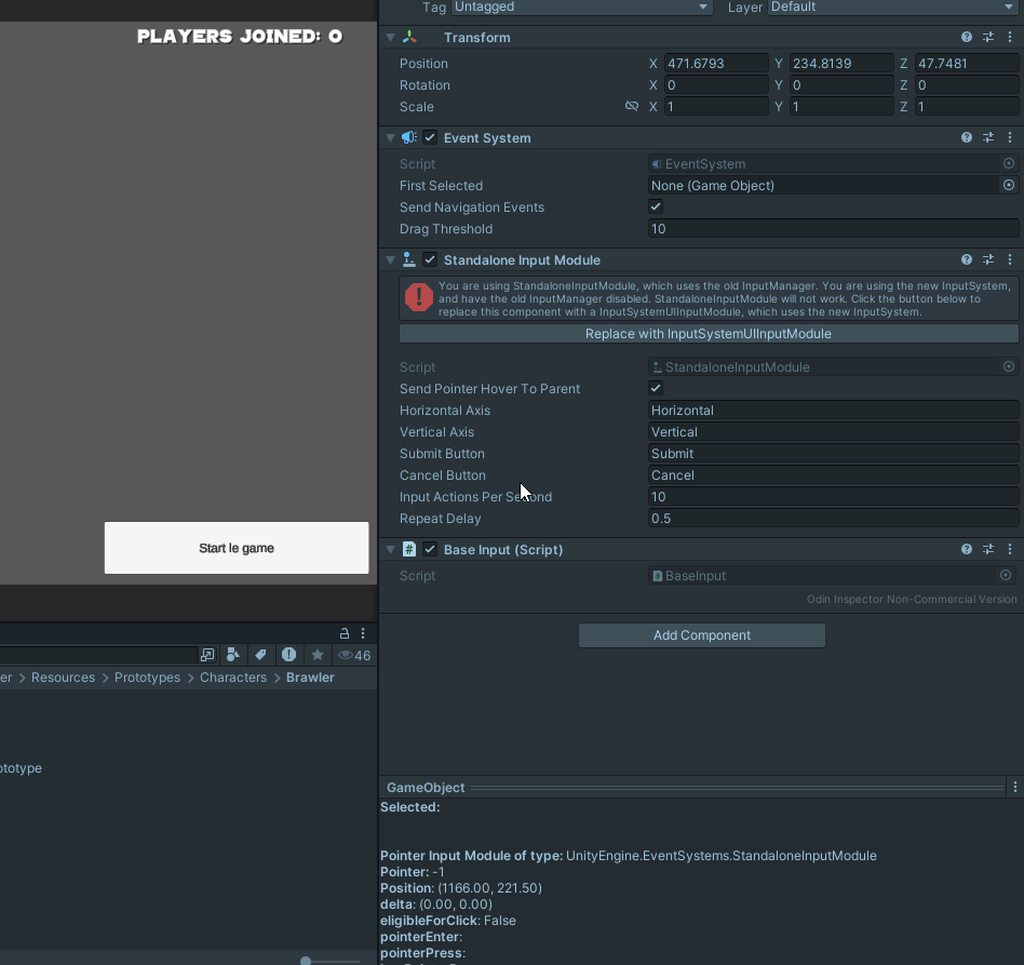
when i use the new input system the mouse clicking events dont work. why is this
like clicking and hovering over any button is not working
it works fine with the standalone input module though
austere grotto
viral flicker
when i use the new input system the mouse clicking events dont work. why is this
Did you switch your input module?
viral flicker
austere grotto
Did you switch your input module?
wdym? I just clicked the button that came with the warning of the standalone input module
so I guess I switched it? it removed the old one
austere grotto
Yes I mean that
 sterile shoal
So whenever I hit a button, the input system reads it as 3 button presses. Do I need to make a script to lock it to one or is there a setting I am missing?
I don't know if this is a common problem
viral flicker
sterile shoal
So whenever I hit a button, the input system reads it as 3 button presses. Do I ...
wats your code look like


 brave shore
Is it possible to collect inputs for the running game instance while in the scene view?
 granite radish
I have both my mouse look and joystick delta set up in my Actionmap, however the values returned by the joystick are considerably lower than those of the mouse, causing certain systems, like weapon sway, to not work as intended (The effect is so subtle it may aswell not be there), how can I fix this, either by reducing the values of the mouse or increasing the values of the controller?
This also applies to the camera movement, sensitivity is considerably slower on controller than mouse
This is my current Action Map

and my camera movement script
 austere grotto
granite radish
I have both my mouse look and joystick delta set up in my Actionmap, however the...
austere grotto
granite radish
I have both my mouse look and joystick delta set up in my Actionmap, however the...
- Offer a mouse sensitivity slider
- Use the ScaleVector2 processor
But yeah mouse delta will basically be measured in pixels which depends highly on your game resolution and mouse sensitivity, and joystick will typically be -1 to 1
They may be dissimilar enough that using the same input action for both is not necessarily the best option
 faint leaf
I've been trying to develop a prototype of a third-person shooter but got stuck at the shooting part. All tutorials I see use the PlayerInput component, but I've already coded in my movement using a CharacterController instead. Is it absolutely necessary to use the PlayerInput component, or can I still implement shooting / using raycasts without going through the process of refactoring my movement code? (Also how valuable is the Player Input Manager to learn, it's very confusing to me so I try to put it off.)
austere grotto
faint leaf
I've been trying to develop a prototype of a third-person shooter but got stuck ...
PlayerInput and CharacterController have two completely different purposes and are not mutually exclusive
PlayerInputManager is only useful if you're planning to do local multiplayer
Raycasts likewise have nothing to do with PlayerInput.
PlayerInput is a component for handling input from the player's input devices. Raycasts and character movement are completely unrelated.
faint leaf
austere grotto
PlayerInputManager is only useful if you're planning to do local multiplayer
I do have aspirations to do online multiplayer far into the future, should I still use PlayerInput Manager or strictly local multiplayer?
austere grotto
PlayerInputManager is for local multiplayer as I mentioned
I e. Multiple players on one computer or console
brave shore
@austere grotto your profile pic looks like Dragon Knight - was that intentional?
austere grotto
brave shore
<@179367739574583296> your profile pic looks like Dragon Knight - was that inten...
I'm not sure, let me ask my cat.
brave shore
can you see it
austere grotto
I have no idea what the Dragon Knight is
 maiden kiln
Hi all, I have created a 'Look' scheme allowing me to either rotate camera based on** X-axis mouse motion** OR using Q/E keys. The problem is that the scheme using keyboard is frame-dependent (very fast on high fps, and slow on low framerate).
My question is how could I get which control has been used to only apply Time.deltaTime factor when keys are used? This is how I get the input: float mouseDeltaX = lookAction.ReadValue<float>();
viral flicker
viral flicker
when i use the new input system the mouse clicking events dont work. why is this
just wanted to bump this. the new input system UI module doesnt work with mouse button presses.
austere grotto
maiden kiln
Hi all, I have created a 'Look' scheme allowing me to either rotate camera based...
Using the same action for mouse input and keyboard input for looking around isn't a good idea because they work so differently
It would be simpler to simply use two actions
maiden kiln
Ah, get it, that’s unfortunate ;(
maiden kiln
maiden kiln
Hi all, I have created a 'Look' scheme allowing me to either rotate camera based...
Following up on that, I could make it work accessing device name through InputAction.activeControl and applying deltaTime only in situations that matter
void HandleInputRotation()
{
    float deltaX = lookAction.ReadValue<float>();

    if (deltaX != 0 && lookAction.activeControl.device.name == "Keyboard")
        deltaX *= Time.deltaTime;

    targetRotation *= Quaternion.Euler(deltaX * Vector3.up);
}
Wouldn't it be nice having sort of a "deltaTime" processor which we could use on bindings that need it? It would work the same way it is done with "scaleFactor"
austere grotto
maiden kiln
Wouldn't it be nice having sort of a "deltaTime" processor which we could use on...
Well the beauty of the input system is you are free to write your own processors!
maiden kiln
austere grotto
Well the beauty of the input system is you are free to write your own processors...
Awesome, I just figured it out 😆
maiden kiln
Hello all, I just created my custom processor for input system but console says that it has not been registered. Anyone has an idea why?
Here is my processor: https://hastebin.skyra.pw/uburaxowez.csharp
Here is a forum topic with exact error but didn't help me neither: https://discussions.unity.com/t/custom-processor-fails-to-register-in-builds/851657/4
austere grotto
maiden kiln
Hello all, I just created my custom processor for input system but console says ...
Is your script in an editor folder or assembly?
maiden kiln
austere grotto
Is your script in an editor folder or assembly?
I’ve placed my file under Assets/Input/ folder, is that considered what you call an editor folder?
 ruby glacier
Why does converting to and from json work but not when I associate actions with the InputActionAsset itself? https://cdn.discordapp.com/attachments/763495187787677697/1291412374372225064/PXL_20241003_145011415.jpg?ex=670000ff&is=66feaf7f&hm=2044a70ccd7c067602c4f889e612674f747c239a7d76eb7584ddc0e9b5789a2b&


My inputs would otherwise be ignored on both of my XR controllers
 daring glade
ruby glacier
Why does converting to and from json work but not when I associate actions with ...
daring glade
ruby glacier
Why does converting to and from json work but not when I associate actions with ...
i would check out the docs for InputActionAsset if that's what you're using in that case - there are specific difference between it and the typical serialization and : https://docs.unity3d.com/Packages/com.unity.inputsystem@1.0/api/UnityEngine.InputSystem.InputActionAsset.html
also not sure because I don't know what your InputActions are and so on, but it looks like you never actually load the values back into the InputActions or even into an InputActionAsset at all (which should be done with .LoadFromJson instead, i believe)
ruby glacier
The code does work in the editor, not so much in built games though.
[SerializeField]
private InputActionAsset m_inputActions;
This is the field from BaseGame, name different because property ofc.
You know what instantiating the asset each time I would need to use it actually makes sensr
ruby glacier
And one more thing, how do you listen to the onDeviceChange callback earlier than Awake? I am missing some callbacks because of this!
ruby glacier
Right now I need to open and close to Oculus Menu to force the callback to run.
viral flicker
why cant i press buttons with mouse when i put the new UI Input module?
austere grotto
viral flicker
why cant i press buttons with mouse when i put the new UI Input module?
Do you have a graphic raycaster? Ever system?
Any errors anywhere?
What settings are on the input module? Etc
viral flicker
austere grotto
Do you have a graphic raycaster? Ever system?
Any errors anywhere?
all i changed was that i pressed the replace button. i have an event system, and the graphic raycaster is on the canvas

 austere grotto
Maybe something is blocking the button
Can you show the screenshot after the button though because that's still showing the old one
 cold owl
How do I delete things in the InputActionEditor (ex: Action, Binding)? I tried selecting it and pressing delete but nothing happens. I tried right clicking the options but no menu pops up. Im on mac using Unity 2022.3.49f1
 tall plover
No f... way, the virtual cursor works badly when canvas is set in "Scale With Screen Size" if you use the reference resolution of the canvas is ok, if you change the game resolution of the window it doesn't count the pixel difference
viral flicker
austere grotto
Can you show the screenshot after the button though because that's still showing...
only this seems to change

nothing else has changed
buttons just straight up dong work after pressing the button
 clever oyster
Hi, how do I detect any input has pressed from any gamepad or keyboard
 pulsar shadow
Hey, sorry to interrupt,
I'm currently trying to make a small local & online multiplayer game and unfortunately have to spawn the player for it by code and wanted to ask if anyone knows how I can set it up so that it still works so that each player gets his own device assigned, so that you first press any button and then the player spawns. I hope you understand, and how could I transfer the whole thing to another object? (Of course with the new input system)
 mighty quest
Guys i have a question, can we somehow import the new input system to unity 2018.2.19f1?
 spiral galleon
Note: The new Input System requires Unity 2019.4+ and the .NET 4 runtime. It doesn't work in projects using the old .NET 3.5 runtime.
austere grotto
pulsar shadow
Hey, sorry to interrupt,
I'm currently trying to make a small local & online mul...
PlayerInputManager does this for you automatically
 fresh galleon
clever oyster
Hi, how do I detect any input has pressed from any gamepad or keyboard
fresh galleon
clever oyster
Hi, how do I detect any input has pressed from any gamepad or keyboard
not sure where I found it exactly,but here's the current solution we have that works for keyboard/mouse/controller
private bool anyKeyPressed=false;
private IEnumerator someCoroutine(){
        InputSystem.onAnyButtonPress.CallOnce(_ => anyKeyPressed = true);
        yield return new WaitUntil(() => anyKeyPressed);
        anyKeyPressed = false;
        //do stuff here after key pressed
}```it's if you're using the input system that is, and you should!
CallOnce basically calls the specified function once and immidiately removes it from the calling chain, so you don't need to worry about memory leaks and similar
clever oyster
fresh galleon
CallOnce basically calls the specified function once and immidiately removes it ...
Sorry forgot to say using the new input system. Great, I'll try it out. Thank you
viral flicker
viral flicker
only this seems to change
bumping this
 glass nacelle
Has anyone figured out how the SwitchCurrentControlScheme works? (ive read the manual on this section, which is meager to say the least)
For example if i would do: playerInput.SwitchCurrentControlScheme("Keyboard&Mouse", Keyboard.current, Mouse.current);
I would then expect the actions with the corresponding input scheme to be the only ones active, however even after executing above, for example, gamepad still seem to be active
 viral flicker

my mouse doesnt appear to be supported
adding the unsupported devices seems to let me use the input system okay
so idk whats going on lol
why is my device unsupported?
if i build the game, the UI stuff wont work
brave shore
I'm getting absolutely horrid performance with InputSystem's callback for getting mouseposition. When I collect the mouse screen position with Input.mousePosition on each Update call, the performance it absolutely fine, but if I collect it with an InputSystem callback, framerate drops to something like 5fps. Why the discrepancy?
austere grotto
brave shore
I'm getting absolutely horrid performance with `InputSystem`'s callback for gett...
if I collect it with an InputSystem callback
Show your code
how are you setting this up exactly
brave shore
Are there any fancy patterns for recording user input, to be read and played back to replay that input? a la this
Off the top, I would expect to open an output stream, record my input on each game tick in binary mode. And then, build some functionality in which I can open that file and set those values for my in-game behavior rather than getting inputs from InputSystem
 mighty juniper
hey there, I implemented two custom processors as shown in the documentation (https://docs.unity3d.com/Packages/com.unity.inputsystem@1.11/manual/Processors.html#writing-custom-processors).
I'm registering the processors the same way and make sure they're registered before any instance is created.
However, each time I start the game, I get (almost) the same exception 3 times per custom processor, which seem to come from the initial "null" update the InputSystem class does to initialize the devices.
First exception:
No InputProcessor with name 'MyProcessor' (mentioned in 'StickDeadzone,NormalizeVector2,MyProcessor') has been registered
UnityEditor.EditorAssemblies:ProcessInitializeOnLoadAttributes (System.Type[])
Second and third exception
No InputProcessor with name 'MyProcessor' (mentioned in 'StickDeadzone,NormalizeVector2,MyProcessor') has been registered
UnityEngine.InputSystem.LowLevel.NativeInputRuntime/<>c__DisplayClass10_0:<set_onBeforeUpdate>b__0 (UnityEngineInternal.Input.NativeInputUpdateType)
UnityEngineInternal.Input.NativeInputSystem:NotifyBeforeUpdate (UnityEngineInternal.Input.NativeInputUpdateType)
UnityEditor.EditorAssemblies:ProcessInitializeOnLoadAttributes (System.Type[])
The input actions are set as project-wide actions.
I have found this bug report (https://issuetracker.unity3d.com/issues/errors-are-thrown-when-assigning-input-actions-asset-that-contains-a-custom-inputprocessor-or-inputbindingcomposite-as-project-wide-input-actions) which seems to be exactly my issue, but this bug is marked as resolved in 1.11.0, which is exactly the version I am using (I upgraded from 1.9.0 specifically because of this).
How do I fix this? The error seems harmless as everything is working fine, but it's kind of annoying to get these 6 exceptions every time I start in editor or in a build.
In a build the stack traces are a bit different, but it's the same exception message.
No InputProcessor with name 'MyProcessor' (mentioned in 'StickDeadzone,NormalizeVector2,MyProcessor') has been registered
UnityEngine.Debug:ExtractStackTraceNoAlloc (byte*,int,string)
UnityEngine.StackTraceUtility:ExtractStackTrace () (at C:/build/output/unity/unity/Runtime/Export/Scripting/StackTrace.cs:37)
UnityEngine.DebugLogHandler:Internal_Log (UnityEngine.LogType,UnityEngine.LogOption,string,UnityEngine.Object)
UnityEngine.DebugLogHandler:LogFormat (UnityEngine.LogType,UnityEngine.Object,string,object[])
UnityEngine.Logger:Log (UnityEngine.LogType,object)
UnityEngine.Debug:LogError (object)
UnityEngine.InputSystem.InputBindingResolver:InstantiateWithParameters<UnityEngine.InputSystem.InputProcessor> (UnityEngine.InputSystem.Utilities.TypeTable,string,UnityEngine.InputSystem.InputProcessor[]&,int&,UnityEngine.InputSystem.InputActionMap,UnityEngine.InputSystem.InputBinding&) (at ./Library/PackageCache/com.unity.inputsystem/InputSystem/Actions/InputBindingResolver.cs:614)
UnityEngine.InputSystem.InputBindingResolver:AddActionMap (UnityEngine.InputSystem.InputActionMap) (at ./Library/PackageCache/com.unity.inputsystem/InputSystem/Actions/InputBindingResolver.cs:304)
UnityEngine.InputSystem.InputActionMap:ResolveBindings () (at ./Library/PackageCache/com.unity.inputsystem/InputSystem/Actions/InputActionMap.cs:1372)
UnityEngine.InputSystem.InputActionMap:ResolveBindingsIfNecessary () (at ./Library/PackageCache/com.unity.inputsystem/InputSystem/Actions/InputActionMap.cs:1237)
UnityEngine.InputSystem.InputActionMap:Enable () (at ./Library/PackageCache/com.unity.inputsystem/InputSystem/Actions/InputActionMap.cs:541)
UnityEngine.InputSystem.InputActionAsset:Enable () (at ./Library/PackageCache/com.unity.inputsystem/InputSystem/Actions/InputActionAsset.cs:804)
[... continues next message]
UnityEngine.InputSystem.InputSystem:EnableActions () (at ./Library/PackageCache/com.unity.inputsystem/InputSystem/InputSystem.cs:3038)
UnityEngine.InputSystem.InputSystem:InitializeInPlayer (UnityEngine.InputSystem.LowLevel.IInputRuntime,UnityEngine.InputSystem.InputSettings) (at ./Library/PackageCache/com.unity.inputsystem/InputSystem/InputSystem.cs:3773)
UnityEngine.InputSystem.InputSystem:.cctor () (at ./Library/PackageCache/com.unity.inputsystem/InputSystem/InputSystem.cs:3507)

(Filename: ./Library/PackageCache/com.unity.inputsystem/InputSystem/Actions/InputBindingResolver.cs Line: 614)
In a build I also get this exception 2 times per processor afterwards
Type of instance in array does not match expected type
UnityEngine.Debug:ExtractStackTraceNoAlloc (byte*,int,string)
UnityEngine.StackTraceUtility:ExtractStackTrace () (at C:/build/output/unity/unity/Runtime/Export/Scripting/StackTrace.cs:37)
UnityEngine.DebugLogHandler:Internal_Log (UnityEngine.LogType,UnityEngine.LogOption,string,UnityEngine.Object)
UnityEngine.DebugLogHandler:LogFormat (UnityEngine.LogType,UnityEngine.Object,string,object[])
UnityEngine.Logger:Log (UnityEngine.LogType,object)
UnityEngine.Debug:Assert (bool,string)
UnityEngine.InputSystem.InputBindingResolver:InstantiateWithParameters<UnityEngine.InputSystem.InputProcessor> (UnityEngine.InputSystem.Utilities.TypeTable,string,UnityEngine.InputSystem.InputProcessor[]&,int&,UnityEngine.InputSystem.InputActionMap,UnityEngine.InputSystem.InputBinding&) (at ./Library/PackageCache/com.unity.inputsystem/InputSystem/Actions/InputBindingResolver.cs:638)
UnityEngine.InputSystem.InputBindingResolver:AddActionMap (UnityEngine.InputSystem.InputActionMap) (at ./Library/PackageCache/com.unity.inputsystem/InputSystem/Actions/InputBindingResolver.cs:304)
UnityEngine.InputSystem.InputActionMap:ResolveBindings () (at ./Library/PackageCache/com.unity.inputsystem/InputSystem/Actions/InputActionMap.cs:1372)
UnityEngine.InputSystem.InputActionMap:LazyResolveBindings (bool) (at ./Library/PackageCache/com.unity.inputsystem/InputSystem/Actions/InputActionMap.cs:1218)
UnityEngine.InputSystem.InputActionState:OnDeviceChange (UnityEngine.InputSystem.InputDevice,UnityEngine.InputSystem.InputDeviceChange) (at ./Library/PackageCache/com.unity.inputsystem/InputSystem/Actions/InputActionState.cs:4494)
UnityEngine.InputSystem.InputManager:AddDevice (UnityEngine.InputSystem.InputDevice) (at ./Library/PackageCache/com.unity.inputsystem/InputSystem/InputManager.cs:1261)
[... continues next message]
UnityEngine.InputSystem.InputManager:AddDevice (UnityEngine.InputSystem.Utilities.InternedString,int,string,UnityEngine.InputSystem.Layouts.InputDeviceDescription,UnityEngine.InputSystem.InputDevice/DeviceFlags,UnityEngine.InputSystem.Utilities.InternedString) (at ./Library/PackageCache/com.unity.inputsystem/InputSystem/InputManager.cs:1195)
UnityEngine.InputSystem.InputManager:AddDevice (UnityEngine.InputSystem.Layouts.InputDeviceDescription,bool,string,int,UnityEngine.InputSystem.InputDevice/DeviceFlags) (at ./Library/PackageCache/com.unity.inputsystem/InputSystem/InputManager.cs:1344)
UnityEngine.InputSystem.InputManager:OnNativeDeviceDiscovered (int,string) (at ./Library/PackageCache/com.unity.inputsystem/InputSystem/InputManager.cs:2518)
UnityEngineInternal.Input.NativeInputSystem:NotifyDeviceDiscovered (int,string) (at C:/build/output/unity/unity/Modules/Input/Private/Input.cs:129)
UnityEngine.InputSystem.LowLevel.NativeInputRuntime:Update (UnityEngine.InputSystem.LowLevel.InputUpdateType) (at ./Library/PackageCache/com.unity.inputsystem/InputSystem/NativeInputRuntime.cs:32)
UnityEngine.InputSystem.InputManager:Update (UnityEngine.InputSystem.LowLevel.InputUpdateType) (at ./Library/PackageCache/com.unity.inputsystem/InputSystem/InputManager.cs:1803)
UnityEngine.InputSystem.InputSystem:Update (UnityEngine.InputSystem.LowLevel.InputUpdateType) (at ./Library/PackageCache/com.unity.inputsystem/InputSystem/InputSystem.cs:2831)
UnityEngine.InputSystem.InputSystem:RunInitialUpdate () (at ./Library/PackageCache/com.unity.inputsystem/InputSystem/InputSystem.cs:3789)

(Filename: ./Library/PackageCache/com.unity.inputsystem/InputSystem/Actions/InputBindingResolver.cs Line: 638)
I'll gladly accept any ideas how to fix this, as it's super annoying.
Setting no input action asset as the project-wide input action asset does not cause these exceptions, but I'd really like to use the asset project-wide.
 slender idol
brave shore
slender idol
brave shore
Thread
 civic anchor
if i have Attack input action on left mouse button. and i click on a button in my ui. why doesn't the ui block the mouse click?
if (primaryAttackInputAction.WasPerformedThisFrame())
{
    player.PrimaryAttack(GetAimDirection());
}
this is the action code i use
clicking on a ui button doesnt seem to block this
viral flicker
why isnt my mouse supported in the new input system? i have to manually add it from unsupported devices and that doesnt work in the build/

i think this might be it. i didnt add mouse
austere grotto
civic anchor
if i have Attack input action on left mouse button. and i click on a button in m...
Why would this code care about UI?
This code is just seeing if you clicked the mouse button.
You would need to be using IPointerDownHandler to get the behavior you are asking for.
 elfin mirage
hey so we have a sweedish keyboard and the A button is not the same as on standard keyboards so its not registering as the input of A even though its the same button its Ä or somehting like that. shouldnt there be some kind of way to avoid this???? the implementation should works since i can get it to work on my laptop, but on this other stationary computer only Ä is not working
civic anchor
austere grotto
Why would this code care about UI?
This code is just seeing if you clicked the m...
directly checking for mouseclick would completely defy the logic of binding keys to actions?
elfin mirage
also how would i add a listener to a input action? from what i tried it didnt work  (this was a while ago so i dont remember what i tried)
maiden kiln
mighty juniper
hey there, I implemented two custom processors as shown in the documentation (ht...
Hey 🙂 I have been stucked on exactly this error for a while before stumbling upon the same patchnote, for me the upgrade to 1.11 solved it. Are you sure you are using the correct version?
mighty juniper
maiden kiln
Hey 🙂 I have been stucked on exactly this error for a while before stumbling up...
I just re-checked, and yes, 1.11.0 is installed and causes the errors. I even updated to 1.11.1 now to check if that resolves the issue, but it's still there.
maiden kiln
To do so I have cloned the repo and imported it as local package
silly question but have you relaunched your editor?
mighty juniper
maiden kiln
silly question but have you relaunched your editor?
multiple times, I even removed and rteadded the package once or twice.
However, I did not clone the repo and import as local package, I simply set the version number in the package.json and let Unity resolve the packages again (which updated it)
maiden kiln
mighty juniper
multiple times, I even removed and rteadded the package once or twice.
However, ...
Then I'd suggest doing like I've done so we're sure about that 😄
mighty juniper
I'll give it a try later today or tomorrow
civic anchor
hm are all action maps enabled by default? kinda weird when i set .Disable() on an actionmap in Start() in a monobehavior it seems to get overriden to enabled=true after Start()
if i .Disable() at Update() it works
austere grotto
civic anchor
hm are all action maps enabled by default? kinda weird when i set .Disable() on ...
No
But other components might enable them
civic anchor
what other components? my own scripts dont 😛
austere grotto
PlayerInput for one
civic anchor
man iam confused. is it required to add a PlayerInput component?
i'm using latest unity 6 version btw
austere grotto
No it's not required
You only add the PlayerInput component if you plan to use the PlayerInput component
civic anchor
is there a way to make it so a ui click blocks the mouse click for an attack?
interesting. i set default map in PlayerInput to none, then i press Play, and suddenly its set back to Player
it's always both UI and Player being enabled
man i could cry wtf is this
austere grotto
civic anchor
is there a way to make it so a ui click blocks the mouse click for an attack?
Implement your mouse click for an attack using the event system (e.g. IPointerDown/ClickHandler) and you will get that behavior for free.
civic anchor
thanks for trying but thats not answering my question 😦
civic anchor
because an attack should happen on the action, not on a hardcoded button
austere grotto
Who said anything about a hardcoded button?
civic anchor
if i do my attack on IPointerDown then its hardcoded to a mouse button and i cant set it to a keyboard key or so
unless i misunderstand you
austere grotto
civic anchor
if i do my attack on IPointerDown then its hardcoded to a mouse button and i can...
First off - no it's not, it's bound to whatever input action is set as the click action in your input module
Second - the keyboard clicking wouldn't have anything to do with mouse ui blocking etc anyway.
Since a keyboard doesn't exactly have a pointer/cursor
civic anchor
IPointerDown doesnt exist in unity6 and PointerDownEvent seems to be for visualelements
oh wait it does, its just not in the documentation
austere grotto
civic anchor
IPointerDown doesnt exist in unity6 and PointerDownEvent seems to be for visuale...
They both exist
and they are both documented
(they're part of the UI package. Package documentation is on the packages site)
civic anchor
but i mean PlayerInput calls my OnAttack() function in my Player class
how is that related to IPointerDown?
it calls Attack() anyways if the mouse clicks anywhere even on ui elements
austere grotto
Make an Attack function.
- Have your OnPointerDown function call Attack() on the clicked thing
- Bind your Attack action only to the keyboard and have OnAttack() also call Attack()
austere grotto
civic anchor
it calls Attack() anyways if the mouse clicks anywhere even on ui elements
remove the mouse binding from Attack
that will now be handled by OnPointerDown
It's not clear to me how your keyboard binding knows which thing to attack though
presumably you have some other selection method for that - which should be handled on OnAttack
civic anchor
it just checks for mouse location and then calculates projectile direction based on that on attack, so you could even press on keyboard
austere grotto
sure so then:
void Attack(Vector2 mousePosition) {
  // shoot at target
}

// PlayerInput will call this one on keyboard press
void OnAttack(InputAction.CallbackContext ctx) {
  Attack(mousePositionAction.ReadValue<Vector2>());
}

// The event system will call this one when you click on something
public void OnPointerDown(PointerEventData evt) {
  Attack(evt.position);
}```note that OnPointerDown needs to go on something that's actually clickable
for example an invisible UI Image in a screen space - camera canvas or something
or a background Sprite of your game world (with a box collider2d and a PhysicsRaycaster2D on your camera)
civic anchor
where does that OnPointerClick come from?
austere grotto
civic anchor
also IPointerDownHandler doesnt get called on my Player class so it does nothing it seems
austere grotto
austere grotto
note that `OnPointerDown` needs to go on something that's actually clickable
Like I said you need this
This is all a little extra setup but it gets you the UI behavior you're looking for.
civic anchor
public class Player : MonoBehaviour, IPointerDownHandler
austere grotto
Yeah but that doesn't make sense
unless you plan on only clicking on the player himself
civic anchor
public void OnPointerDown(PointerEventData eventData)
{
PrimaryAttack(GetAimDirection());
}
when i click nothing happens
austere grotto
Are you not reading what I'm writing?
civic anchor
so basically you want me to add that on enemies so it attacks when i click them?
austere grotto
Nobody is saying you can't do that
PLease read what I wrote
That would all go inside here:
void Attack(Vector2 mousePosition) {
  // shoot at target
}```using the mouse position to do your plane raycast
civic anchor
so my hud needs an invisible background box and a reference to my player and when its clicked i call player.Attack()?
austere grotto
That's one option, or you put a script on the ground in the world
civic anchor
guess ground plane is a bad idea, cause some other collider could block the pointerdown?
although that might be wanted
it keeps propagating until something calls StopPropagation() or so!?
austere grotto
civic anchor
guess ground plane is a bad idea, cause some other collider could block the poin...
You can set the layers that you care about in the input module
Or actually
In the PhysicsRaycaster2D (or PhysicsRaycaster if it's 3D)
civic anchor
ok what i did now:
        public void OnPrimaryAction()
        {
            if (EventSystem.current != null)
            {
                PointerEventData eventData = new PointerEventData(EventSystem.current);
                eventData.position = Mouse.current.position.value;
                List<RaycastResult> raycastResults = new List<RaycastResult>();
                EventSystem.current.RaycastAll(eventData, raycastResults);

                if (raycastResults.Count == 0)
                {
                    PrimaryAttack(GetAimDirection());
                }
            }
        }
i guess that raycast only checks against ui or gameobjects that have an interface that's part of the eventsystem
elfin mirage
im trying to add this ability to the action input event on performed but im not getting it to trigger. am i doing something wrong?
    public void BindAbilityInput(CharacterController2D characterController2d)
    {
        character2d = characterController2d;
        inputAction.action.performed += TriggerAbility;
        inputAction.action.Enable();
    }
oh my bad, im not calling the method to bind the input lol
elfin mirage
is there a way to neatly use the same input setup for both players and ai? or is that just not possible cuz you would need to make an asset for each ai?
austere grotto
elfin mirage
is there a way to neatly use the same input setup for both players and ai? or is...
The typical approach here is basically to encapsulate all of your input in a "packet", i.e. a struct or class describing the input for the current frame.
Have your input handling code simply populate that input packet, and have your AI code do the same
The input packet then gets passed into the character controller code and controls the character
elfin mirage
yeah ok we are kinda doing that already. was just hoping i could simplify some stuff but its not gonna be so different anyway so
 stark stirrup
What is the best way to get the new input system to only register 1 click. here is my code fireAction.started += context => FireTriggered = true; when i click the fire button it will register anywhere between 6 and 15 times.
austere grotto
stark stirrup
What is the best way to get the new input system to only register 1 click. here ...
Where are you running this line of code?
and how do you know it's registering between 6 and 15 times?
show the rest of the context
stark stirrup
austere grotto
Where are you running this line of code?
So i have an input handler where i store all the inputs in one script.. then when i want to call it i do this if(InputHandlerManager.Instance.FireTriggered) { currentSelectedObject = raycastHit; Debug.Log(raycastHit); That debug is firing off between 6 and 15 times.
austere grotto
stark stirrup
So i have an input handler where i store all the inputs in one script.. then whe...
Ok so this is in Update
it means that bool is true for 6 to 15 frames
stark stirrup
Correct
austere grotto
that has nothing to do with the input system "firing off"
your code is setting the bool true
you are never setting it to be false
the input system is only registering it once
you are reading it in Update, which runs every frame
the simple way to do this is to simply put the input handling code in the event listener function directly.
There's no need for Update to be involved here
Another quick fix would be InputHandlerManager.Instance.FireTriggered = false; when you're done using it.
but none of that has anything to do with the input system directly.
stark stirrup
Got it I did just debug it fireAction.started += context => { Debug.Log(context.started); Debug.Log(context.performed); Debug.Log(context.canceled);} and you're right.
my thought was to keep all my input stuff in one place and then just call it like i was doing but seemed cleaner that way.. but maybe not? it kinda looks like this ``` private void RegisterInputActions()
{
moveAction.performed += context => MoveInput = context.ReadValue<Vector2>();
moveAction.canceled += contect => MoveInput = Vector2.zero;
    lookAction.performed += context => LookTrigger = true;
    lookAction.canceled += contect => LookTrigger = false;

    fireAction.started += context => FireTriggered = true;
    fireAction.started += context => FireTriggered = true;;

    fireAction.canceled += contect => FireTriggered = false;

    jumpAction.performed += context => JumpTriggered = true;
    jumpAction.canceled += contect => JumpTriggered = false;
    };
    ```
    private void Awake()
    {
        if(Instance == null)
        {
            Instance = this;
            DontDestroyOnLoad(gameObject);
        }
        else
            Destroy(gameObject);

        moveAction = playerControls.FindActionMap(actionMapName).FindAction(move);
        lookAction = playerControls.FindActionMap(actionMapName).FindAction(look);
        fireAction = playerControls.FindActionMap(actionMapName).FindAction(fire);
        jumpAction = playerControls.FindActionMap(actionMapName).FindAction(jump);
        sprintAction = playerControls.FindActionMap(actionMapName).FindAction(sprint);
        slideAction = playerControls.FindActionMap(actionMapName).FindAction(slide);
        climbAction = playerControls.FindActionMap(actionMapName).FindAction(climb);
        crouchAction = playerControls.FindActionMap(actionMapName).FindAction(crouch);
        proneAction = playerControls.FindActionMap(actionMapName).FindAction(prone);
        unitSelectAction = playerControls.FindActionMap(actionMapName).FindAction(unitSelected);
        releaseAction = playerControls.FindActionMap(actionMapName).FindAction(release);
        RegisterInputActions();


}```Seems like theres 100 ways to use the input system 😄
austere grotto
stark stirrup
my thought was to keep all my input stuff in one place and then just call it lik...
I've seen this pattern a lot and it's actuially a bit cleaner to just expose the InputActionAsset or thos moveAction crouchAction etc fields to other scripts directly
then they can directly subscribe themselves to those things or poll them as desired
austere grotto
stark stirrup
Seems like theres 100 ways to use the input system 😄
absolutely
it's very flexible
which also means it can be unclear what the "right" way to do things is
like rather than if (InputHandlerManager.Instance.JumpTriggered) you can expose the action directly and your code can do this:
if (InputHandlerManager.Instance.jumpAction.WasPerformedThisFrame());```Correct.. i also used it like this before private void OnEnable() { playerInputAsset.Player.Jump.started += DoJump; playerInputAsset.Player.Sprint.started += DoSprint; but didn't really like that approach lol
austere grotto
This lets the consumers of this thing consume the input however they want. They can poll it - or they can subscribe event listeners, eetc.
adding the middleman variables reduces the flexibility you have in other scripts
austere grotto
stark stirrup
Correct.. i also used it like this before ``` private void OnEnable() {
...
yeah this is also pretty typical
stark stirrup
austere grotto
like rather than `if (InputHandlerManager.Instance.JumpTriggered)` you can expos...
Makes sense right now im doing that like this in my handler script proneAction.performed += context => { if(proneAction.WasPerformedThisFrame() && proneAction.IsPressed()) ProneTriggered = !ProneTriggered; if(ProneTriggered) CrouchTriggered = false; };
So theres now long term issue with making them public? I've always been of the midset to keep everything Private unless it REALLY needs to be public lol
You are refering to making this public private InputAction moveAction; private InputAction lookAction; private InputAction fireAction; private InputAction jumpAction; private InputAction sprintAction; private InputAction slideAction; private InputAction climbAction; private InputAction crouchAction; private InputAction proneAction; private InputAction unitSelectAction; private InputAction releaseAction;
austere grotto
stark stirrup
So theres now long term issue with making them public? I've always been of the m...
well - I would probably use properties with only a getter rather than just a plain public field
austere grotto
stark stirrup
You are refering to making this public ``` private InputAction moveAction;
...
public InputAction moveAction { get; private set; }```I would do this
so anyone can read the action.
Nobody can reassign it
austere grotto
stark stirrup
Correct.. i also used it like this before ``` private void OnEnable() {
...
You could also use the autogenerated script like this and avoid manually creating your own variables, if desired.
stark stirrup
austere grotto
You could also use the autogenerated script like this and avoid manually creatin...
Im old school 😄
stark stirrup
austere grotto
```cs
public InputAction moveAction { get; private set; }```
Ok so i switch all my actions to this, and then in my script where i have the input checking in the update if(InputHandlerManager.Instance.FireTriggered) i get rid of that and do what? a little foggy on that part..
austere grotto
austere grotto
like rather than `if (InputHandlerManager.Instance.JumpTriggered)` you can expos...
I showed an example here
stark stirrup
I saw that i just thought you said not to even do it in update.
austere grotto
I never said that
I said that your code was triggering 6-15 times before because you were simply reading a bool in Update that was always true
WasPerformedThisFrame() will only be true for a single frame, so it's suitable for a "one-off" event in Update
stark stirrup
austere grotto
There's no need for `Update` to be involved here
Miss understood 😄
Went back and re-read the whole thing.
stark stirrup
So doing this if(InputHandlerManager.Instance.fireAction.WasPerformedThisFrame()) in the update still fires off twice... better then 6 times.. am i missing anything else to get to just fire off once? I assume its firing off twice becuase of the Started and Preformed calls of the input?
austere grotto
It shouldn't happen twice...
WasPerformedThisFrame only checks for performed
What are your settings for the action?
It should be a Button action
With no processors
And no interactions
stark stirrup

All looks good there.
I have it being called in FixedUpdate.. that shouldn't be causing the issue i dont think
This is the code ``` if(InputHandlerManager.Instance.fireAction.WasPerformedThisFrame())
{
currentSelectedObject = raycastHit;
Debug.Log(raycastHit);``` that Debug goes off twice
do you have two such scripts in the scene?
Debug.Log($"My instanceID: {GetInstanceID()}, {raycastHit}");```also where does that code live?
stark stirrup
From the Debug output
 stark stirrup
austere grotto
do you have two such scripts in the scene?
stark stirrup
austere grotto
do you have two such scripts in the scene?
This is where it is living ``` private void FixedUpdate()
{
CheckSelectionHit();
    if(InputHandlerManager.Instance.fireAction.WasPerformedThisFrame())
    {
        currentSelectedObject = raycastHit;

         Debug.Log($"My instanceID: {GetInstanceID()}, {raycastHit}");```
oh
you're in FixedUpdate
input handling should go in Update
FixedUpdate can run more than once per frame
stark stirrup
austere grotto
oh
Still getting 2 under just update
austere grotto
print the frame count too?
Debug.Log($"My instanceID: {GetInstanceID()}, {raycastHit}, {Time.frameCount}");``` austere grotto
so two totally different frames
What kind of input device are you interacting with
austere grotto
try temporarily removing all the other bindings from the action maybe
maybe it's considering the mouse click also as a touchscreen tap
or something
(also double check the bindings themselves for interactions and processors)
That kinda makes sense to me.
The touchscreen tap happens when you release the mouse button
so it's probably:
- mouse click
- touchscreen tap
going off in sequence
stark stirrup
austere grotto
so it's probably:
- mouse click
- touchscreen tap
going off in sequence
Yup that's what it was 😄
I removed the touch Tap and it's now only 1 time
austere grotto
cool, at least we know what happened
stark stirrup
I would have NEVER thought to look at that, lol
stark stirrup
austere grotto
cool, at least we know what happened
Just so i understand this input system a little better, is this if(InputHandlerManager.Instance.fireAction.WasPerformedThisFrame()) Which i'm doing now pretty much the same if i did fireAction.started += context => {if(fireAction.WasPerformedThisFrame()) FireTriggered = true; else FireTriggered = false;}; in my handler script?
Also thank you for your help on this very much appreciated!!!
austere grotto
stark stirrup
Just so i understand this input system a little better, is this ```if(InputHandl...
no
not the same at all
Your second snippet is subscribing a listener specifically to the started phase
that will only happen when you first start pressing the button
you will not get a callback on the next frame, and so FireTriggered will remain true forever
actions have three phases:
- Started
- Performed
- Canceled
For a basic button action with no interactions on it, it works like this:
- On the frame you initially press the button, Started and Performed happen immediately
- On the frame you release the button, Canceled happens
WasPerformedThisFrame() only returns true on the exact frame that performed happens
stark stirrup
Ok so if it was fireAction.preformed instead of the started?
stark stirrup
Ah ok
austere grotto
but you're using this persistent FireTriggered variable
your code is more similar to fireAction.IsPressed()
your bool will tell you if the button is currently held down
not if it is initially pressed
It's like the difference between GetButton() and GetButtonDown() in the old system
stark stirrup
Ahhh ok that makes a little more sense now
I was trying to think of away to still use my Input handler the way i was using, fireAction.started += context => FireTriggered = true; fireAction.canceled += contect => FireTriggered = false; to get the same result as doing what i'm doing now in the update along with under standing it better, lol.
austere grotto
stark stirrup
I was trying to think of away to still use my Input handler the way i was using,...
If you want a really cheeky/quirky way you could do this:
public int FireTriggeredFrame = -1;

fireAction.started += context => FireTriggeredFrame = Time.frameCount;


// Elsewhere
if (InputHandlerManager.Instance.FireTriggeredFrame == Time.frameCount) {
  Debug.Log("Fire");
}```Ahhh yea.. i thought about doing a timer also.. thats pretty good 😄
 midnight pebble
Hey, I have this script for a custom camera controller using the asset "Touch Camera Pro 2024". I provide it with my Input Actions Asset and it works great in the demo scene but when I add it to my main game scene, the input doesn't work at all. It turns out that my Game Manager has a PlayerInput-component with that same Input Actions Asset assigned to it (this is necessary for other things) but my controller can't work at all while it's active. If I disable my Game Manager, the controller instantly starts working. I can easily use two different Input Actions Assets for them and that works but I would prefer to keep everything unified into a single one.
Does anyone have any suggestions for how to change this script so that it can get the input from a PlayerInput-component and work alongside it?
austere grotto
midnight pebble
Hey, I have this script for a custom camera controller using the asset "Touch Ca...
You can't have two PlayerInput components in the scene at a time
Unless you're doing local multiplayer
Each one is considered a separate person and gets different devices assigned to them
I don't recommend the PlayerInput component unless you're doing local multiplayer TBH
It's unfortunate so many tutorials use that approach
Probably because it's quick and easy
 still trout
If both systems need the playerinput, put it on an object that both can access, make it a singleton or assign it to some manager that you can get it from
 gusty crest
Heya, I'm just trying out the new input system, and a tutorial. The guy from the tutorial automatically got generated a class with the name of his InputActions, but I didn't get that script. Is there a way to create this script?
still trout
I think there is a checkbox on the inputactions asset, not 100% sure though
midnight pebble
austere grotto
You can't have two PlayerInput components in the scene at a time
I don't have two PlayerInput-components, I just have this camera controller-script and the PlayerInput on my Game Manager. I do need a PlayerInput on my GM so I can access it with Playmaker since I like to use PM for visual scripting. But I only have one in the whole scene.
midnight pebble
still trout
If both systems need the playerinput, put it on an object that both can access, ...
Yeah, I was planning on making it so that my Camera Controller-script got the input from the PlayerInput on my GM but I'm not sure how to do that which is why I was asking for help.
austere grotto
midnight pebble
I don't have two PlayerInput-components, I just have this camera controller-scri...
It's hard to understand or say what's going on here without seeing your project. If possible, you should share some details about your setup. Screenshots of the scene, explanation of which components are on which objects, some code, and explaining which code isn't working, etc.
elfin mirage
hey so some of my teammebers are using these swedish keyboards and so the A button is not the A button, but instead its Á. meaning that the input system doesnt register Á as A. so any of these keyboards will not function with regular wasd controls. how can i work around this? without having to define every character that is unique to a swedish keyboard?
here is the git change:
- "path": "<Keyboard>/#(A)",
+ "path": "<Keyboard>/#(Á)",
 slender idol
elfin mirage
hey so some of my teammebers are using these swedish keyboards and so the `A` bu...
slender idol
elfin mirage
hey so some of my teammebers are using these swedish keyboards and so the `A` bu...
Does this option work for you?
 elfin mirage
from what i could tell, no
this is what im told, and that seems to match up when i saw it in person too
Nope, I think there might be an oversight in the Localization package. Cause the "location" for the A key differs between Swedish and Non-Swedish keyboards
even though they are physically in the same location
austere grotto
Sounds like a bug. Report it!
 winter gorge
i tried to make a 2d movement in right and left direction with the new unity input system. the keybind are wasd. i noticed that everytime i move at 2 direction my movement becomes slower because ReadValue function always normalize it.
this is the example
1 Direction input : Move Value = (1.00, 0.00)
2 Direction input : Move Value = (0.71, 0.71)
Can someone help me so the value doesnt get normalize?
public void OnMovementInput(InputAction.CallbackContext context){
        MoveValue = context.ReadValue<Vector2>();

        Debug.Log("Move Value = " + MoveValue);
    }
 solar plover
Just to clarify so others do not get confused by your question, both directional input are normalized. You simply do not understand what a normalized vector is - a vector with a magnitude of 1 (x and y with a value of 0.71 have a magnitude of 1)
winter gorge
ok lemme try understanding normalize first
solar plover
winter gorge
ok lemme try understanding normalize first
 winter gorge
solar plover
winter gorge
solar plover
okok i get it, but is there a way to un normalize?
solar plover
From the new input system, I'm uncertain. Programmatically you'd just set each value to one with respects to it's sign. cs MoveValue = context.ReadValue<Vector2>(); if (MoveValue.x > 0) MoveValue.x = 1; else if (MoveValue.x < 0) MoveValue.x = -1; if (MoveValue.y > 0) MoveValue.y = 1; else if (MoveValue.y < 0) MoveValue.y = -1;
winter gorge
i think that the function itself is normalizing it, because i dont.
And i dont want it to be normalize
winter gorge
solar plover
From the new input system, I'm uncertain. Programmatically you'd just set each v...
yea im also thinking about this but kinda ugly code
so there's no other way?
actually nvm i fixed it
i noticed this why

i changed it to digital and it works!
thanks for helpin btw
 upbeat drift
Is this package still relevant? I think the last update was over a year ago
I haven't used unity in a while. Is this a finished package or an abandoned package
 high crane
is there a way for me to like create ui buttons that I can select using the arrow keys? im creating a 2d platformer game and i want it to be able to run using a pi0 which wont have a cursor so i need a menu select using the arrows option? how would i do that?
 harsh quail
I am having the issue that dropdowns just don't work in Unity 6, this error is spammed when trying to use them
Your script should either check if it is null or you should not destroy the object.
UnityEngine.Object+MarshalledUnityObject.TryThrowEditorNullExceptionObject (UnityEngine.Object unityObj, System.String parameterName) (at <91ab5f1018a44edcbcbbe289ed4303bc>:0)
UnityEngine.Bindings.ThrowHelper.ThrowNullReferenceException (System.Object obj) (at <91ab5f1018a44edcbcbbe289ed4303bc>:0)
UnityEngine.GameObject.get_transform () (at <91ab5f1018a44edcbcbbe289ed4303bc>:0)
UnityEngine.InputSystem.UI.InputSystemUIInputModule.ProcessPointerMovement (UnityEngine.InputSystem.UI.ExtendedPointerEventData eventData, UnityEngine.GameObject currentPointerTarget) (at ./Library/PackageCache/com.unity.inputsystem@5a52a5d2c2ed/InputSystem/Plugins/UI/InputSystemUIInputModule.cs:476)
UnityEngine.InputSystem.UI.InputSystemUIInputModule.ProcessPointerMovement (UnityEngine.InputSystem.UI.PointerModel& pointer, UnityEngine.InputSystem.UI.ExtendedPointerEventData eventData) (at ./Library/PackageCache/com.unity.inputsystem@5a52a5d2c2ed/InputSystem/Plugins/UI/InputSystemUIInputModule.cs:402)
UnityEngine.InputSystem.UI.InputSystemUIInputModule.ProcessPointer (UnityEngine.InputSystem.UI.PointerModel& state) (at ./Library/PackageCache/com.unity.inputsystem@5a52a5d2c2ed/InputSystem/Plugins/UI/InputSystemUIInputModule.cs:352)
UnityEngine.InputSystem.UI.InputSystemUIInputModule.Process () (at ./Library/PackageCache/com.unity.inputsystem@5a52a5d2c2ed/InputSystem/Plugins/UI/InputSystemUIInputModule.cs:2257)
UnityEngine.EventSystems.EventSystem.Update () (at ./Library/PackageCache/com.unity.ugui@b0e0b1c82856/Runtime/UGUI/EventSystem/EventSystem.cs:530)
I have gameobject in the UI which has IPointerClickHandler and void OnPointerClick(PointerEventData eventData)
I first thought it was dropdowns in general but I can't reproduce the issue in another project with just a dropdown
timid dagger
high crane
is there a way for me to like create ui buttons that I can select using the arro...
Selectable UI objects have an option of configuring navigation for them. If navigation is set to None, then the object won't be navigable with arrows. But in order to navigate UI, you need to have at least one ISelectable selected. Any object you click with a mouse is automatically selected and you can navigate UI with arrows from this point. But it obviously won't work for someone without a mouse, so after showing the menu you can use EventSystem.current.SetSelectedGameObject(); to select a button meant to be the default button, and then you will be able to navigate.

 digital lantern
Let's say I have multiple interact options, and they are controllable via an enum, for example I have an enum for LMBInteract, EKeyInteract, etc. Is there a way to tell the input system to only use that one interact key IF the interact mode matches EKeyInteract and E is pressed? The same for if LMBInteract and LMB is pressed?
austere grotto
digital lantern
Let's say I have multiple interact options, and they are controllable via an enu...
Use control schemes
 dawn ether
How can I restrict a playerinput generated c# class to only use one control scheme
If it's a binding mask, how do I implement it? Setting it to a scheme name seems to do nothing.
 spare frigate
upbeat drift
I haven't used unity in a while. Is this a finished package or an abandoned pack...
spare frigate
upbeat drift
I haven't used unity in a while. Is this a finished package or an abandoned pack...
Short answer: Yes it is still relevant - I have been using it for several projects with little problems, AFAIK it is still being supported for bug fixes, maybe some changes could be coming with Unity 6 LTS (havnt been keeping up), though regardless, it is still imo, far better than the legacy "Input" class, maybe when you start to do very device-specific things with it other than just simple input management, it could be a bit less of a "smooth experience" for you from what ive seen, though I normally just use it for KBM and "XInput" (play station, xbox) controller support, control schemes and rebinding with little problems outside of my own knowledge with the API/docs for it (which tbf, the docs arent super helpful for the Input System imo)
 arctic estuary
I'm trying to only jump on the initial key press. however I can't get it to work. i've tried to see if there is a keydown method for the callback context but wasn't able to find anything, and i tried to do the press in the input system. however everytime that i release the jump button, i also jump. my goal is only when the key is pressed down for the first time that it triggers.
here is the jump code
public void Jump(InputAction.CallbackContext context)
{
if (isGrounded && isGreen)
{
velocity.y = Mathf.Sqrt(jumpHeight * -2f * gravity);
}
}```
does anybody know how to get a presskeydown in the new input system? austere grotto
arctic estuary
I'm trying to only jump on the initial key press. however I can't get it to work...
austere grotto
arctic estuary
I'm trying to only jump on the initial key press. however I can't get it to work...
if (context.performed)
also delete that Press interaction
it's unecessary
arctic estuary
i'll quickly test, one sec
austere grotto
to help you understand what's going on I recommend adding Debug.Log($"Interaction phase: {context.phase}"); as the first line in your function
 obtuse coral
in the unity xr multiplayer template, am i able to modify the built in teleportation system?
i cant find an actual script for it.
my goal is to give it a "blind spot" so that i can build in a different function when i move the controller to a certain orientation.
so toggle off teleport and toggle on customAction
austere grotto
obtuse coral
in the unity xr multiplayer template, am i able to modify the built in teleporta...
This is more of a #🥽┃virtual-reality question to be honest
 opal kindle
Is it possible to properly translate it to the new input system?
public class FixedTouchField : MonoBehaviour , IPointerDownHandler, IPointerUpHandler
{
    [HideInInspector]
    public Vector2 TouchDist;
    [HideInInspector]
    public Vector2 PointerOld;
    [HideInInspector]
    protected int PointerId;
    [HideInInspector]
    public bool Pressed;

    void Update()
    {
        if (Pressed)
        {
            if (PointerId >= 0 && PointerId < Input.touches.Length)
            {
                TouchDist = Input.touches[PointerId].position - PointerOld;
                PointerOld = Input.touches[PointerId].position;
            }
            else
            {
                TouchDist = new Vector2(Input.mousePosition.x, Input.mousePosition.y) - PointerOld;
                PointerOld = Input.mousePosition;
            }
        }
        else
        {
            TouchDist = new Vector2();
        }
    }

    public void OnPointerDown(PointerEventData eventData)
    {
        Pressed = true;
        PointerId = eventData.pointerId;
        PointerOld = eventData.position;
    }

    public void OnPointerUp(PointerEventData eventData)
    {
        Pressed = false;
    }
}
I'll ask another question if this one is too incorrect. Is there something like Input.touches in the new system?
Or is there a way to replace Input.GetAxis? I think it will be the best question
austere grotto
opal kindle
Is it possible to properly translate it to the new input system?
```
public clas...
of course it's possible. Use the Enhanced Touch Su[pport API.
There is, of course, a way to do everything in the new system. But it's not necessarily a 1:1 translation.
The new input system does things differently.
Touch is an outlier in that it actually is pretty similar though:
https://docs.unity3d.com/Packages/com.unity.inputsystem@1.11/manual/Touch.html#enhancedtouchtouch-class
 nova plaza
I have no idea why apply binding override doesn't work, and I'm not familiar with the new input system either, it would be helpful if someone can give me some tips, such as do you have to disable the map or the action first
 austere grotto
nova plaza
I have no idea why apply binding override doesn't work, and I'm not familiar wit...
austere grotto
nova plaza
I have no idea why apply binding override doesn't work, and I'm not familiar wit...
I don't think you need to disable anything first, no. The main thing is to make sure you're applying it to the correct instance of the action
nova plaza
There's no error or anything it just The binding doesn't apply
austere grotto
I didn't say there would be an error.
I said:
The main thing is to make sure you're applying it to the correct instance of the action
if you are applying it to the wrong instance, you won't see the effects of course.
nova plaza
I kind of tried to simplify the remindUI example provided by unity
Everything was fine until I try to do the binding part with the applybindingoverride
bruh been debugging for 4 hours it's 2:00 a.m. now
 sour rampart
using System;
using System.Collections;
using System.Collections.Generic;
using UnityEngine;
using UnityEngine.InputSystem;
using UnityEngine.UIElements;

[RequireComponent(typeof(Rigidbody))]

public class PlayerController : MonoBehaviour
{
    // Atrributes
    private Vector2 moveInput;
    private float walkSpeed = 3f;
    private bool IsWalking = false;
    private float turnSmoothVelocity;
    public Transform cam;

    private Rigidbody rb;
    // Methods
    private void Awake()
    {
        rb = GetComponent<Rigidbody>();
    }

    public void onMove(InputAction.CallbackContext context)
    {
        moveInput = context.ReadValue<Vector2>();
        IsWalking = true;
    }

    private void FixedUpdate()
    {
        if (IsWalking){
            Vector3 moveDirection = new Vector3(moveInput.x * walkSpeed, 0f, moveInput.y * walkSpeed);
            float targetAngle = Mathf.Atan2(moveDirection.x, moveDirection.z) * Mathf.Rad2Deg + cam.eulerAngles.y;
            float angle = Mathf.SmoothDampAngle(transform.eulerAngles.y, targetAngle, ref turnSmoothVelocity, 0.1f);
            transform.rotation = Quaternion.Euler(0f, angle, 0f);
            rb.velocity = new Vector3(moveDirection.x, rb.velocity.y, moveDirection.z);
        }
    }
}
Is there a better way to handle the camera turning and make sure the player is facing the right direction?
I barely understand this and I want to believe there's better ways to work with this cause what
austere grotto
Well this is using trigonometry
Which should be pretty straightforward if you took trig in school
Otherwise, using direction vectors directly is the alternative
Which will be straightforward if you understand vectors
 vernal sapphire
Why the Mouse only have leftButton, rightButton, middleButton, backButton, forwardButton? Are those all the possible buttons for a mouse?
austere grotto
vernal sapphire
Why the Mouse only have leftButton, rightButton, middleButton, backButton, forwa...
Just the most common ones
Obviously not the only possible
vernal sapphire
How do I get more mouse buttons inputs?
austere grotto
Every input device has the allControls property
But what are you trying to accomplish here
vernal sapphire
"Key binding" mouse buttons
Ok, so I can just use the "name" of the ButtonControl to identify it
 ripe flower
I'm running into mouse polling rate causing huge performance dips on mouse movement; is this an editor only thing or does it affect builds?
maiden kiln
ripe flower
I'm running into mouse polling rate causing huge performance dips on mouse movem...
Sounds weird, how does your event look like? or maybe you're polling it somehow?
ripe flower
maiden kiln
Sounds weird, how does your event look like? or maybe you're polling it somehow?
The issue is present even when I'm not interacting with/handling the input in any way.
austere grotto
ripe flower
The issue is present even when I'm not interacting with/handling the input in an...
https://issuetracker.unity3d.com/issues/input-polling-rates-drastically-decreases-editor-performance
Supposedly this has been fixed for a long time. If you're seeing it again, report a bug
Steps to reproduce: 1. Download and open the attached project 2. Move the mouse inside the scene view Expected result: little to no ...
ripe flower
Looks like they just won't fix it, it's been pretty replicable for a while.
 austere grotto
What mouse do you have
ripe flower
logitech g703
 glass yacht
ripe flower
Looks like they just won't fix it, it's been pretty replicable for a while.
glass yacht
ripe flower
Looks like they just won't fix it, it's been pretty replicable for a while.
Also, there's some polling options in Edit/Preferences/General/Interaction Mode that may help out
ripe flower
glass yacht
What version of Unity are you having trouble on?
I'm on 2023.3.0b6, updated to 6 earlier today, no dice.
 atomic tundra
Calling async function not working on button click any solution . No Logs and print working
public async void OnClickGuestUserAsync()
{
Debug.Log("Button Clicked");
string GuestUserName = ValidateGuestName;
if (GuestUserName != string.Empty)
{
await SignInAnonymouslyAsync();
}
}
async Task SignInAnonymouslyAsync()
{
print("trying async Signin "); // <----------------- No Logs and print working
try
{
await AuthenticationService.Instance.SignInAnonymouslyAsync();
print("Sign in anonymously succeeded!");
//// Updating the player name that was set inside the name field...
//await AuthenticationService.Instance.UpdatePlayerNameAsync(givenPlayerName);
// Shows how to get the playerID
print($"PlayerID: {AuthenticationService.Instance.PlayerId}");
}
catch (AuthenticationException ex)
{
// Compare error code to AuthenticationErrorCodes
// Notify the player with the proper error message
print(ex);
}
catch (RequestFailedException ex)
{
// Compare error code to CommonErrorCodes
// Notify the player with the proper error message
print(ex);
}
} ``` ornate saffron
atomic tundra
Calling async function not working on button click any solution . No Logs and pr...
ornate saffron
atomic tundra
Calling async function not working on button click any solution . No Logs and pr...
that looks like GuestUserName is probably empty? can you log that value?
atomic tundra
ornate saffron
that looks like GuestUserName is probably empty? can you log that value?
no its not empty, is it something about need to call async task before update frame
if the same async function is called in async void Start() it works?
ornate saffron
atomic tundra
if the same async function is called in async void Start() it works?
there's virtually no difference, are you sure something else isn't changing between those two points in time that could cause ValidateGuestName to return a different result?
atomic tundra
sorry my bad you where right. Thanks
 light hamlet
Hello everyone, I'm here looking for help with an issue that's really bothering me related to the Input System.
Today I upgraded to Unity 6, and after some fixes, everything works fine except for this problem that has appeared:
- My gamepad stops working 20-30 seconds after entering play mode. The keyboard and mouse continue to work. There's no error message. The gamepad is still recognized but no longer sends any input. I'm forced to restart Unity.
- Also, attempting to close the Editor hangs on “Application.Shutdown.InputShutdown,” waiting for Unity’s code to finish executing. I’m forced to end task on Unity Editor to close it.
For more info on the issue, here's an unresolved topic discussing the same problem : https://discussions.unity.com/t/inputsystem-silent-crashing-in-unity-editor-as-well-as-in-built-game/1509412/13
I'm using a PS4 controller with DS4Windows, and I've also tried an Xbox One controller, but it doesn't work at all.
Please, I need help. 😫
cursive tulip
How can I make an array of something like this?

 inner rain
Hi, Is anyone having a problem with TexmeshPro Input in Unity 6? When I type text, my screen changes to look like an ipad screen, causing the layout to break.
austere grotto
cursive tulip
How can I make an array of something like this?
You mean an array of InputAction?
cursive tulip
austere grotto
You mean an array of InputAction?
I guess
austere grotto
InputAction[]
 fair cloud
Did they change how the new input system works? I want to add 8 direction input with the numberpad but I can't seem to do it. I created an action called NewMove, as Value and Vector 2, but I only have access to up down left right composite, and I can't seem to manually set key bindings with the numberpad. I also tried setting it to Action type button and while I can path it with the numberpad I cannot set values for them i.e (0, 1) for up, does anyone know how to do this?
oh I figured it out, just had to make a custom composite
upbeat drift
Ok what's the deal with mouse wheel and +-120
Why is it 120
I mean I normalized it but still why when I scroll the float value of mouse wheel axis is either 120 or -120
austere grotto
upbeat drift
Ok what's the deal with mouse wheel and +-120
Because windows

Stack Overflow
I'm working with mouse events, specifically OnMouseWheel. Many code samples refer to distance the view changes (or zoom f.i. in 3D application) as Distance = Sign(WheelDelta)*Constant or Distance =
upbeat drift
Weird that they never handled it
Like if platform == windows, delta /= 120
But whatever, not that deep. Ty
 jade coral
hi
 blissful lotus
upbeat drift
Like `if platform == windows, delta /= 120`
blissful lotus
upbeat drift
Like `if platform == windows, delta /= 120`
In theory, mouse devices can work in increments tinier than that, so the decision to use 120 may be arbitrary but it isn't necessarily guaranteed.
 ionic timber
Does anyone know of why IsPressed() sometimes works in the incorrect way. I mean like sometime it stays true even though the touch interface is not interecting anymore
austere grotto
ionic timber
Does anyone know of why IsPressed() sometimes works in the incorrect way. I mean...
even though the touch interface is not interecting anymore
What does this mean?
What's the setup of the action and the bindings?
ionic timber
austere grotto
> even though the touch interface is not interecting anymore
What does this mean...
I mean when I am not touching the screen it still returns true.
austere grotto
ionic timber
I mean when I am not touching the screen it still returns true.
What's the setup of the action and the bindings?
ionic timber
 austere grotto
ionic timber
austere grotto
ionic timber
oh so you're talking about the position binding?
position is not for detecting if there's a touch or not
Or do you mean the CLick one?
which are we referring to?
austere grotto
ionic timber
Trying to make a drag and drop
that's not an answer to my question
ionic timber
austere grotto
position is not for detecting if there's a touch or not
Ah ok.. Its working now.
Thanks!
spice kelp
Does anybody know why Windows fires Unity's InputSystem.onDeviceChange twice when plugging in a device while Linux only once?
 tame fossil
I got a function that rotates the player to where the mouse is on the screen. But i want to use the "New Input System" to do this. How do i refactor this function so it works with the new input system? I have tried to google the answer and AI couldn't help me either.
 austere grotto
tame fossil
I got a function that rotates the player to where the mouse is on the screen. Bu...
austere grotto
tame fossil
I got a function that rotates the player to where the mouse is on the screen. Bu...
The only thing that changes is Input.mousePosition
you can do it with Mouse.current.position.ReadValue()
tame fossil
But i would like to use the actions i made in the Player Action map.

So i changed the code to:
 tame fossil
austere grotto
The only thing that changes is `Input.mousePosition`
tame fossil
austere grotto
The only thing that changes is `Input.mousePosition`
Your code works perfect when i only want to use the mouse. But i would like to use a gamepad aswell.
austere grotto
tame fossil
Your code works perfect when i only want to use the mouse. But i would like to u...
using a gamepad is a totally different beast
And then you'll want to make an input action and... well basically
you need to learn the basics of the new input system to learn to use InputActions
tame fossil
I thought because i also use the new input system to make the player move I would be the same
 tame fossil
Nevermind i fixed it with this video https://www.youtube.com/watch?app=desktop&v=koRgU2dC5Po

🚨 Wishlist Revolocity on Steam! https://store.steampowered.com/app/2762050/Revolocity/ 🚨 In today's Unity Twin Stick Top Down Shooter style Controller Tutorial we take a look at how we can use the new input system to seamlessly switch between gamepad and keyboard / mouse and set up our Twin Stick Cinemachine Camera.
Samyam's channel: https://ww...
austere grotto
tame fossil
I thought because i also use the new input system to make the player move I woul...
Sure but while keyboard and joystick input work similarly, mouse input is very different
 tawny geode
For a custom InputProcessor<T>, is the provided InputControl control always null...? No matter where the processor is, it is null. And it seems no matter how I read the value, the control is still null. Am I missing some binding step I have to do or something?
austere grotto
tawny geode
For a custom `InputProcessor<T>`, is the provided `InputControl control` always ...
Shouldn't be... How are you using your processor?
tawny geode
I attach it via the UI. I've tried it on everything in the asset but it all gives a null control regardless of what actually has it for me.
austere grotto
You mean it's null inside the process method?
 turbid rock
Well shit.. So apparently Send Messages and Broadcast Messages use reflection..
that makes sense( no idea why this didn't hit me earlier..)
..No wonder it was too easy / good to be true just plopping one method and correc signature n worked right away... I guess time to use pure events 😦
Has anyone else used Send Messages ? are there any noticeable performance hits?
why is it default option if its such a performance hit (potentially) . I have many scripts to change if that's case.
Just wondering, if anyone has an answer/experience on this would like to hear your preference / opinion on this, I'm still new to new input sys.
austere grotto
Input events are basically not frequent/numerous enough to cause performance problems
in most cases
But - I think SendMessages is the default simply because it has the easiest/fastest setup for prototyping.
I don't use SendMessages usually not for performance reasons usually, but more because it is less flexible than other approaches.
 tough blade
i want to make a color picker screen for my game in VR. i am using OpenXR to handle the input stuff but i was wondering how i would create a color picker that would work in VR that pops up when a user selects an object that they want to change the color of
is there any good assets out there that i can use to accomplish this or should i start from scratch? i tried finding one on my own but not sure if its what i need
 iron mountain
Please forgive my poor English. First of all, as a Unity beginner, I am trying to use the New Input System to build a UI interaction and player control system. In my game, I have created the player's inventory and backpack UI using the Button component. I hope that my mouse or GamePad can handle different logic in different situations. For example, when no UI is open, my mouse's left and right buttons can be responsible for other logic, such as opening objects in the scene, placing items, etc. However, when I open the storage UI or click on my inventory, my mouse's left and right buttons can move items to my storage UI after clicking on them. But I don't know what design pattern to use to achieve this functionality. I created an InputManager hoping to centralize the interaction logic within it. But when I actually operated, I found myself clueless. For example, below is a method in my CursorManager:
public void CheckPlayerInput()
{
switch (_currentItem.itemType)
{
case ItemType.a:
break;
    case ItemType.b:
        if (Mouse.current.leftButton.wasPressedThisFrame && _cursorPositionValid)
            EventHandler.CallObjectBuildEvent(_currentItem.itemID);
        break;
    case ItemType.c:
        if (Mouse.current.leftButton.wasPressedThisFrame  && _cursorPositionValid)
            EventHandler.CallObjectBuildEvent(_currentItem.itemID);
        break;
}
}
In the if statement, I used Mouse.current.leftButton.wasPressedThisFrame. I feel that this approach is no different from using Input.GetMouseButtonDown with the old Input System. So is there a better design method to manage input for UI and player operations?
austere grotto
iron mountain
Please forgive my poor English. First of all, as a Unity beginner, I am trying t...
Yes you should be using input actions and action maps
You can disable the gameplay action map while you are in the menu
iron mountain
Yes, I have created Action Maps and Actions. Should I use the Click action from the UI when I need to handle clicks in the UI, and use the Click action created in GamePlay for non-UI parts?
 iron mountain
austere grotto
You can disable the gameplay action map while you are in the menu
iron mountain
austere grotto
You can disable the gameplay action map while you are in the menu
I have created the Click action in both my GamePlay and UI
austere grotto
iron mountain
Yes, I have created Action Maps and Actions. Should I use the Click action from ...
Realistically you don't need a custom UI action map most of the time
The default one on the input module is plenty
And "click" isn't really a good name for an action in the gameplay map, it should be something like "interact" or "fire" or "build" or whatever it is
timid dagger
iron mountain
Please forgive my poor English. First of all, as a Unity beginner, I am trying t...
I feel that this approach is no different from using Input.GetMouseButtonDown with the old Input System.
The new input system has similar features to those of the old input system. But it also has features that weren't available in the old one. For example, if you're usingActionMaps, you can toggle whole sets of inputs, which can be useful for different game states. HavingInputActions makes it easier to support multiple controllers, postprocess them and modify them (e.g. you can globally invert some inputs or change bindings in runtime).
You can assign references to your InputActions with InputActionReference. Then you can access the InputAction and either check its InputActionPhase (which would be equivalent to the old Input.GetMouseButtonDown) or you can subscribe its performed event (which is handy if you don't want to check it every frame).
iron mountain
Okay, thank you everyone. It seems I need to study the New Input System more in depth.
 uneven timber
Hello!
I have a class that inherits from InputControl - basically it represents a "button" except it's not tied to a physical device, it's triggered on or off by something else. A virtual button let's say
I want to add that button to existing input actions - let's say there's a Cancel action, which is mapped to keyboard backspace and to gamepad B, but i also want it to be mapped to <that virtual input control> so that whenever it is pressed it acts the same as if the game had received a backspace or a gamepad B
It doesn't work. I don't know why it doesn't work. When I look online I see a lot of people with similar use cases but not the same (most of them want to "rebind" or to change bindings, i do not want to rebind, i want to add a binding to an existing input action)
This is what I do:
myInputAction.cancel.AddBinding(new MyVirtualButton(() => someValueThatChanges()));
        private class MyVirtualButton: UnityEngine.InputSystem.Controls.ButtonControl
        {
            private readonly Func<bool> getter;

            public MyVirtualButton(Func<bool> getter) : base()
            {
                this.getter = getter;
            }


            public override unsafe float ReadUnprocessedValueFromState(void* statePtr)
            {
                return this.getter() ? 1f : 0f;
            }
        }
This compiles and runs without warning - also, it does nothing. When looking at the input debugger for the input system, the new binding does not appear on the action (i see onl the keyboard and gamepad binding). I can see my binding in the debugger after adding it, but the function ReadUnprocessed(...) is never called (never hits) and pressing the button does nothing
What am I doing wrong and how a I supposed to do it?
uneven timber
I'm trying this now:
                using (InputActionRebindingExtensions.RebindingOperation a = new InputActionRebindingExtensions.RebindingOperation())
                {
                    a.WithAction(myAction);
                    a.AddCandidate(new MyVirtualButton(() => someValueThatChanges()), 1000f);
                    a.Complete();
                }
This triggers a NullReferenceException inside InputSystem.....
System.NullReferenceException: Object reference not set to an instance of an object
  at UnityEngine.InputSystem.InputControlList`1[TControl].ToIndex (TControl control) [0x00022] in .\Library\PackageCache\com.unity.inputsystem@1.7.0\InputSystem\Controls\InputControlList.cs:522
  at UnityEngine.InputSystem.InputControlList`1[TControl].Add (TControl item) [0x00001] in .\Library\PackageCache\com.unity.inputsystem@1.7.0\InputSystem\Controls\InputControlList.cs:238
  at UnityEngine.InputSystem.InputActionRebindingExtensions+RebindingOperation.AddCandidate (UnityEngine.InputSystem.InputControl control, System.Single score, System.Single magnitude) [0x00053] in .\Library\PackageCache\com.unity.inputsystem@1.7.0\InputSystem\Actions\InputActionRebindingExtensions.cs:2173
Okay this null ref is because the device of the input control is Null when ou create it this way. why is this even possible then 😭
m_Device is internal and can't be changed. What is the normal way to use this?
Is this normal that the examples from Unity Docs don't compile?
https://docs.unity3d.com/Packages/com.unity.inputsystem@1.7/manual/Devices.html

I don't understand what AddBinding is supposed to do, if not to add a binding
 neon pasture
Hey guys, I am trying to figure out how to get the right controller on an oculus quest 2 to rotate the camera, I am using the XR origin (XR Rig) prefab from unity bug im unsure where to go or what to do to get the right stick to rotate the view.
 karmic knoll
Any one ever have an issue with the input system on mac not working? Even when I try to bind a new keybind, when I hit listen, if I press an keyboard keys, it doesn't register. Same project works perfectly fine on my PC.
 queen meadow
So i started a new project and installed the new input system and when trying to bind my keys I am getting no keyboard options, everything else but keyboard. I tried even creating a control scheme and same problem:

as you can see there is no keyboard option and using unity 2023
anyone have any clue of what could be causing this on a brand new project
austere grotto
queen meadow
anyone have any clue of what could be causing this on a brand new project
possibly some kind of control scheme issue?
queen meadow
no its not a scheme issue as i tried both with and with out a scheme and with and still does this
austere grotto
try upgrading your package and/or unity versions
queen meadow
its the latest package
i tried with 2022 and 2023 keyboard is just not showing up in my bindings everything else is tho just not kayboard
austere grotto
queen meadow
So i started a new project and installed the new input system and when trying to...

What shows in this dropdown
queen meadow
this is the entire window of it there is no drop down for none schemes

i tried creating a scheme and still have same issues
as you can see it is show every option there on the right except keyboard
austere grotto
queen meadow
When tou try to add a device type to a control scheme does keyboard even show?
 austere grotto
queen meadow
no it did not help
austere grotto
queen meadow
no it did not help
File -> Build Profiles
queen meadow
it is not a scheme issue
austere grotto
What is your target platform selected as?
queen meadow
PC but it should not matter
austere grotto
queen meadow
again i tried this
that's not an answer to the question though..
queen meadow
i should still get a keyboard option
queen meadow
yes keyboard show in the scheme but does not help with the bindings on the right
austere grotto
Sounds like a bug, not sure
what version of input system and unity is this
(it's working fine for me on Unity 6000.0.24 and input system 1.11.2
queen meadow
i am using 1.7 input and its unity 2023
austere grotto
that's quite an old version of the input system I thinl
also unity 2023 is quite old
queen meadow
yes it works for 6 as its installed and pre configured out of the box for that but i do not want to use 6
austere grotto
you should upgrade to newer versions
austere grotto
queen meadow
yes it works for 6 as its installed and pre configured out of the box for that b...
2023 and 6 are the same
glass yacht
Why do you not want to use 6
austere grotto
6 is the release version of 2023
you're basically using an old beta version of Unity 6 right now
which explains the bugs
queen meadow
the input system should still work in 2023 and it did before so it should not matter
austere grotto
it matters because you're using a beta version of the editor
glass yacht
should and does are clearly different things
austere grotto
switch to a release version
either 2022.3 LTS or Unity 6 LTS
beta versions of the editor can and do have bugs
queen meadow
it even did the same issue with 2022
austere grotto
which 2022 version
glass yacht
Why do you not want to use 6
queen meadow
because i never go for the newest thing right off the bat until they work out the kins and prove it works this is the same with any other software like windows, unreal, or what ever
austere grotto
queen meadow
because i never go for the newest thing right off the bat until they work out th...
unity 6 is the kinks-worked-out verison of 2023
you're using the pre-kinks-worked out version by using 2023
THey worked out the kinks and released it as 6
queen meadow
ok then tell me why this issue is the same problem for me in 2022?
glass yacht
well seeing as you're using 2023, that's very incongruous
austere grotto
queen meadow
ok then tell me why this issue is the same problem for me in 2022?
what version of 2022?
are you talking about the latest 2022.3 LTS, or some earlier version?
queen meadow
 glass yacht
that's ANCIENT
glass yacht
36 patch releases of Unity behind
queen meadow
its funny that these versions i been using for awhile now and decided to pick it back up and the input system worked before on these
austere grotto
¯_(ツ)_/¯
software has bugs
bugs get fixed
you don't get the fixes unless you upgrade to the fixed versions
 tulip nest
austere grotto
you don't get the fixes unless you upgrade to the fixed versions
tulip nest
austere grotto
you don't get the fixes unless you upgrade to the fixed versions
Unless your project is super old and you risk losing it
austere grotto
tulip nest
Unless your project is super old and you risk losing it
There is never risk of losing a project as long as you use version control.
 quaint sable
Super elementary question, but I'm just getting back into unity and a lil lost. I made a jump action, and it works using the input system, but as soon as I add Callback Context to the method in my character controller I'm given an error that the same OnJump() method no longer exists
    {
        if(IsGrounded())
        {
            rb.AddForceY(jumpHeight, ForceMode2D.Impulse);
        }
    }
but as soon as I try to use
    {
        if(IsGrounded())
        {
            rb.AddForceY(jumpHeight, ForceMode2D.Impulse);
        }
    }
It all breaks
austere grotto
quaint sable
but as soon as I try to use
``` private void OnJump(InputAction.CallbackConte...
How are you hooking this up to the input actions?
If you're using the PlayerInput component in SendMessages mode, it expects an InputValue parameter, not a CallbackContext
quaint sable
I am using messages, so that's why
how do I use input value to get when the action is cancelled?
austere grotto
quaint sable
how do I use input value to get when the action is cancelled?
you could do if (!inputVal.isPressed)
or you can switch to another method (i.e. UnityEvents)
and use callbackContext, checking for the canceled phase
quaint sable
alright, I'll probably do that swap then, thanks!
quaint sable
austere grotto
or you can switch to another method (i.e. UnityEvents)
I swapped to Unity Events, and swapped the methods to public, but the jump and move functions aren't being found?\
austere grotto
quaint sable
I swapped to Unity Events, and swapped the methods to public, but the jump and m...
show the code and show how you're trying to assign them in the editor
quaint sable
    {
        if(IsGrounded())
        {
            rb.AddForceY(jumpHeight, ForceMode2D.Impulse);
        }
    }
 austere grotto
quaint sable
``` public void Jump(CallbackContext context)
{
if(IsGrounded())
...
austere grotto
quaint sable
``` public void Jump(CallbackContext context)
{
if(IsGrounded())
...
which script is this
Make sure you have saved your code and you have no compile errors in the console
quaint sable
that's in playerController, I had an error that CallbackContext wasn't found in this context though
austere grotto
quaint sable
that's in playerController, I had an error that CallbackContext wasn't found in ...
You need to fix all compile errors first
It's InputAction.CallbackContext
 marsh mulch
am i crazy or does inputaction.started not fire?
I dont get that callback, but i do get inputaction.performed
im trying to access controller inputs via the default UI inputmap, but .started doesnt seem to be called
i can replicate it using a WasPressedThisFrame() call inside performed, but im curious why these callbacks exist if they do nothing
 earnest field
Hello, I'm trying to write an unit test that relies on InputAction.CallbackContext. On my PlayerController I have a method called OnJump() which assigned in a start event of an action button.
I would like to test this function. How the h*** I can get a CallbackContext from the InputTestFixture.
My method:
public void OnJump(InputAction.CallbackContext context) { isJumpPressed = context.ReadValueAsButton(); }
Basically I'm trying to get a CallbackContext on Test script to pass as parameter to OnJump function.
 naive trench
I don't know why the scheme keeps switching this "joystick" thing when I have auto switch enabled. Pressing buttons on my controller or keyboard switches it for only a frame and then it switches back
 austere grotto
marsh mulch
i can replicate it using a WasPressedThisFrame() call inside performed, but im c...
austere grotto
marsh mulch
i can replicate it using a WasPressedThisFrame() call inside performed, but im c...
It will not do started if your action is Pass Through
Those callbacks absolutely work, they just depend on how you configured the action
austere grotto
earnest field
Hello, I'm trying to write an unit test that relies on InputAction.CallbackConte...
earnest field
austere grotto
https://docs.unity3d.com/Packages/com.unity.inputsystem@1.1/manual/Testing.html
I already explored it @austere grotto . I did not understand how to get a CallbackContext from InputTestFixture.
austere grotto
earnest field
I already explored it <@179367739574583296> . I did not understand how to get a ...
There are examples of triggering input from the test
See the writing tests portion: https://docs.unity3d.com/Packages/com.unity.inputsystem@1.1/manual/Testing.html#writing-tests
You don't "get a callbackcontrxt" from the test fixture
you just do something like:
Press(gamepad.buttonSouth);
if you are listening for input in your code in some way that receives a callback context, you will receive one there
earnest field
Yes, I got it. I was wondering if is possible to have a CallbackContext.
austere grotto
Not sure I understand what you mean by that then
If you are listening for input in a funciton that accepts one, you will get one when you do that
earnest field
I revised my code considering what you said and there is a "trick" not mentioned (or missed by me).
After using Press() we need to skip a frame in order to trigger the action started event.
`[UnityTest]
public IEnumerator HitSpaceAndIsJumpPressedTrue()
{
var gameObject = new GameObject();
gameObject.AddComponent<Animator>();
gameObject.AddComponent<CharacterController>();
var playerController = gameObject.AddComponent<PlayerController>();
var keyboard = InputSystem.AddDevice<Keyboard>();
Press(keyboard.spaceKey);
yield return null;

Assert.IsTrue(playerController.IsJumpPressed);
}`
Is working fine! Thanks @austere grotto !
austere grotto
earnest field
Is working fine! Thanks <@179367739574583296> !
The documentation I linked mentions using InputSystem.Update();
earnest field
Nice, worked in same way forcing the Update.
Looking inside Press function, it uses a Set function which Enqueue inputs when you are in Unit Test mode.
Probably skipping a frame is enough to process them as well.
 versed yacht
did anyone work with the new input system in unity 6. In 2022.3 the delta [Mouse] input works perfectly but in unity 6 it does not. No mouse input can be read. Anyone has the same bug?
But with a gamepad it works. The mouse does not get detected.
 spark hemlock
What's the intended usage of enable and disable action maps
Would that be like when the game is paused, or focus is in a model dialog?
austere grotto
spark hemlock
What's the intended usage of enable and disable action maps
Would that be like ...
That's one use, sure.
Another would be like if the player gets in a vehicle. You disable the regular controls and enable vehicle controls
spark hemlock
So is it intended for like a high level game manager to be setting these, or individual components that use the actions to know when to enable and disable?
Id imagine the letter later would be a nightmare unless things are recounted
austere grotto
spark hemlock
So is it intended for like a high level game manager to be setting these, or ind...
that's really up to your individual game architecture.
spark hemlock
Alright
Thanks!
digital lantern
IS there any difference in using InControl VS native input system? I bought InControl 3 years ago and never used it
 burnt mist
Hey there, I'm trying to setup a drag and drop on my tilemap to move around it. I've created an input asset and added the mouseDown but then I can't find how to define the mouseUp as there is no option to setup release on the event. How can I do that?
austere grotto
burnt mist
Hey there, I'm trying to setup a drag and drop on my tilemap to move around it. ...
Release on what event?
Wdym mouseDown
burnt mist
When the left button of the mouse is release
austere grotto
You should be using IDragHandler/IBeginDragHandler/IEndDragHandler
burnt mist
Those interfaces only work on UI. I'm talking about moving the camera around
 whole prism
Hey guys, input system works fine and I can control my character. I'm working with 2 friends using unity version control and it does not work on either of theirs. My friend made a canvas and the buttons work on mine, but not on theirs. Could anyone help me figure out what is going on?

 fierce compass
did you commit your changes
burnt mist
Have you guys ever had an issue with Unity events not showing up in the inspector?
I have a PlayerInput with customControls.
One of them is called PointerDown and is linked to the left click.
I have the following method in my class:
public void OnPointerDown(InputAction.CallbackContext context)
        {
            Debug.Log("Dragging start");
            isDragging = true;
            dragOrigin = mainCamera.ScreenToWorldPoint(mousePosition);
        }
And I think everything looks good. And yet, this won't appear in the inspector (See picture)

The class IS a monobehaviour
It is also public
austere grotto
burnt mist
Have you guys ever had an issue with Unity events not showing up in the inspecto...
You dragged the wrong thing in the slot
Gotta drag a GameObject with the script attached to it in
Not the script itself
 slim plinth
Hi all,
Hope you are doing well!
So I had an issue when I updated from the old input system to the new one.
It looks like I'm unable to select the TMP_InputFields properly -- as such, I'm unable to edit them unless I hover my cursor over in an odd position -- sometimes like to the right of the input field.
I'm attaching some further context, if that would help, along with a video:
https://discussions.unity.com/t/tmp-inputfields-broken-after-switching-to-new-input-system/1546967
Any guidance is appreciated, thank you! 🙂
austere grotto
slim plinth
Hi all,
Hope you are doing well!
So I had an issue when I updated from the ol...
did you switch your input module?
slim plinth
austere grotto
did you switch your input module?
Ah do you mean this?

I'm currently fully on the new system if that is what you meant as well!
austere grotto
looks like you did
slim plinth
Ah gotcha!
Yeah it looks like all the UI elements are working, minus the TMP_InputFields
buttons, text, etc. is fine -- just the InputField that has this weird selection thing going on haha
I'm unsure how useful this is, but this is also the inputactions I currently have in my game as well
slim plinth
On a sidenote, does anyone know how I can get my controller cursor to follow the regular keyboard / mouse cursor?
I am using hardware rendering if that helps!
I'm using this plugin, so I went ahead and asked in that forum as well: https://adventurecreator.org/forum/discussion/15458/virtual-keyboard#latest
But I thought of asking here if it's directly related to the input system itself
Adventure Creator forum
Hi all! Hope you are doing well -- so I'm hoping to get my game verified on steam deck, but there are some places where I need to enter input in my game.
 tame oracle
One message removed from a suspended account.
One message removed from a suspended account.
austere grotto
tame oracle
One message removed from a suspended account.
Isn't steam input a setting in steam works or something
tame oracle
austere grotto
Isn't steam input a setting in steam works or something
One message removed from a suspended account.
slim plinth
Hi all,
Curious to know -- is it necessary to have controller support in order to pop up the virtual keyboard on steam?
It sounds a bit trivial, but the thing is -- one of my beta-testers created a mapping, which played really well with my game build.
However, the only thing that wasn't working was the virtual keyboard popup, because my code did not recognize the plugged-in controller.
At this point, I migrated to the new input system, but it's causing a fair number of issues, so I wanted to revert back to the old input system.
https://www.steamdeck.com/en/verified
I was taking a look here, and I noticed the word "controller" -- but I'm thinking this is just the steam deck system, correct?

The reason why I was curious is because I tried games like The Blackwell Legacy on steam, and it is steam deck verified --
however, when I plug in my ps4 or my xbox controller, the game doesn't recognize this cursor.
 wet monolith
Hi!
I'm trying to have multiple types of input devices in my game - controllers for controlling players (local multiplayer), and a keyboard for managing the game (game speed, enable/disable sounds, etc.).
It works with the controllers, but when I create a gameobject and assign a Player Input with the keyboard actions to it, the Player Input Manager registered it as a new player (and creates the player prefab for it).
How can I solve it?
I want the Player Input Manager to only recognize controllers, and something else will take care of the keyboard.
Thanks!
austere grotto
wet monolith
Hi!
I'm trying to have multiple types of input devices in my game - controllers ...
Just don't use PlayerInput for the keyboard thing
quaint sable
How do you switch between what Action Map the player is currently using?
austere grotto
quaint sable
How do you switch between what Action Map the player is currently using?
depends if you're using PlayerInput or not
if not - just enable and disable action maps at will
if so - there's a method on PlayerInput for it
 dusty orchid
hello guys, im new to the unity new input system, i did a lot of research and didnt found a specific method for tracking wich key is being pressed. I created a vector2 tab for movement and i need to track when the player is pressing A, W, S or D
austere grotto
dusty orchid
hello guys, im new to the unity new input system, i did a lot of research and di...
Tracking when keys are pressed is pretty much the entirety of what the input system does. You might need to be more specific about what you're trying to do
dusty orchid
i found a solution, thanks
marsh mulch
Is there a call i can make to prompt the system that the player is interacting with a text field and to enable the systems on screen keyboard? Specifically for use with both the steamdeck and the rog ally
I am building my own UI input module and need to handle when the player selects an input field
And how do I go about reading system keyboard chars?
I know there's OnInput callback, but surely there's a good way to do this
marsh mulch
If anyone's wondering in the future, i believe you do it via the keyboard singleton. For some reason I had thought that they'd decouple keyboards as well to enable multiple keyboard/mice in one session but i appear to be wrong
I believe only 1 player will be able to use keyboard/mouse
(Will test tomorrow to verify)
slim plinth
Hi all,
I'm having a bit of trouble getting the virtual keyboard's text to translate to my TMP_InputField in the game.
In case it helps, I'm pasting my code below as well -- is there any reason why this could be happening?
I'm wondering if I should be setting my inputfield text in another way --
any help is appreciated, thank you!
using UnityEngine;
using Steamworks;
using TMPro;
using System.Collections;

public class SteamDeckVirtualKeyboard : MonoBehaviour
{
    public TMP_InputField inputField;
    public string promptText = "Please enter text";
    public int maxCharLimit = 300; //max char limit for input

    private void Start()
    {
        if (SteamManager.Initialized)
        {
            inputField.onSelect.AddListener(ShowVirtualKeyboard);
        }
    }

    private void ShowVirtualKeyboard(string selected)
    {
        if (SteamUtils.IsSteamRunningOnSteamDeck())
        {
            Debug.Log("IS RUNNING ON STEAM DECK");
            bool isShowing = SteamUtils.ShowGamepadTextInput(
                EGamepadTextInputMode.k_EGamepadTextInputModeNormal,
                EGamepadTextInputLineMode.k_EGamepadTextInputLineModeSingleLine,
promptText, (uint)maxCharLimit,   inputField.text
            );

            if (isShowing)
            {
                StartCoroutine(CheckForSubmit());
            }
        }
        else
        {
            Debug.Log("NOT RUNNING ON STEAM DECK");
        }
    }

    private IEnumerator CheckForSubmit()
    {
        while (true)
        {
            if (SteamUtils.IsSteamRunningOnSteamDeck())
            {
                if (SteamUtils.GetEnteredGamepadTextLength() > 0)
                {
                    string enteredText;
                    uint bufferSize = (uint)maxCharLimit;

                    bool success = SteamUtils.GetEnteredGamepadTextInput(out enteredText, bufferSize);
                    if (success)

         {
                        Debug.Log("ENTERED TEXT: " + enteredText);
                        inputField.textComponent.text = enteredText;
                        yield break;
                    }
                }
            }

            yield return null;
        }
    }
}
 knotty flint
It's Vector2? Is there a way to bind two different values to action?
I want to read initial touch position and delta of touch after the drag on screen, is that posible?
It seems simplier will be just to create two different actions?
fierce compass
knotty flint
It's Vector2? Is there a way to bind two different values to action?
I want to r...
yeah, it'll be Vector2, the type is what you get out, not the type of the control
if you're using a touchscreen, why not use a touch input?
this is the type you'll get, which has both a position and a delta
https://docs.unity3d.com/Packages/com.unity.inputsystem@1.0/api/UnityEngine.InputSystem.LowLevel.TouchState.html
knotty flint
Thanks, I'll take a look
 north coyote
I don't understand why the placement of the joysticks changes when the game is played??

 austere grotto
north coyote
I don't understand why the placement of the joysticks changes when the game is p...
austere grotto
north coyote
I don't understand why the placement of the joysticks changes when the game is p...
It's a UI element
So it's subject to whatever anchoring etc you set up for the RectTransform
And your canvas scaler
marsh mulch
slim plinth
```cs
using UnityEngine;
using Steamworks;
using TMPro;
using System.Collections...
did you happen to figure this out?
i want to toggle the keyboard on my ROG ALLY X to open, but it doesnt seem to happen by default
do i need to make an in-game keyboard and using buttons to navigate? :/
slim plinth
marsh mulch
did you happen to figure this out?
Yes!! 🙂 I did actually -- thanks to @lament nebula + my beta testers + the steam community!
Granted, I'm using the old input system -- let me paste my code here in just a min!
marsh mulch
slim plinth
Yes!! 🙂 I did actually -- thanks to <@307360612403642370> + my beta testers + ...
id appreciate that
do the steamutil calls work only for steamdeck?
slim plinth
using UnityEngine;
using Steamworks;
using TMPro;

public class SteamDeckVirtualKeyboard : MonoBehaviour
{
    public TMP_InputField inputField;
    public string promptText = "Please enter text";
    public int maxCharLimit = 300;

    private Callback<GamepadTextInputDismissed_t> gamepadTextInputDismissedCallback;

    private void Start()
    {
        if (SteamManager.Initialized)
        {
            inputField.onSelect.AddListener(ShowVirtualKeyboard);
            gamepadTextInputDismissedCallback = Callback<GamepadTextInputDismissed_t>.Create(OnGamepadTextInputDismissed);
        }
    }

    private void ShowVirtualKeyboard(string selected)
    {
        if (SteamUtils.IsSteamRunningOnSteamDeck())
        {
            bool isShowing = SteamUtils.ShowGamepadTextInput(
                EGamepadTextInputMode.k_EGamepadTextInputModeNormal,
                EGamepadTextInputLineMode.k_EGamepadTextInputLineModeSingleLine,
                promptText,
                (uint)maxCharLimit,
                inputField.text
            );
        }
        else
        {
            Debug.Log("NOT RUNNING ON STEAM DECK");
        }
    }

    private void OnGamepadTextInputDismissed(GamepadTextInputDismissed_t callbackData)
    {
        if (callbackData.m_bSubmitted == true)
        {
            string enteredText;
            uint bufferSize = (uint)maxCharLimit;

            bool success = SteamUtils.GetEnteredGamepadTextInput(out enteredText, bufferSize);
            if (success)
            {
                Debug.Log("ENTERED TEXT: " + enteredText);
                inputField.text = enteredText;
            }
            else
            {
                Debug.LogWarning("Failed to retrieve entered text from the virtual keyboard.");
            }
        }
        else
        {
            Debug.Log("User dismissed the keyboard without submitting.");
        }
    }
}
I think discord wouldn't let me paste some of the comments I made, but this is the gist of what I have!
slim plinth
marsh mulch
do the steamutil calls work only for steamdeck?
Hmm good question --
I'll admit I've only used it in the context of the steamdeck, but I think it should work for controllers too, assuming that you have native controller support I believe (could be wrong about this though) --
The funny thing is, a few of my testers tried my game with the official mapping that someone created, and it worked fine on their xbox / playstation etc.
However, my code wasn't able to detect whether such a device was connected -- hence why I went down the rabbit hole of the new input system.
I don't know if there's a better solution with the old input system actually, but maybe you could get away with an official mapping as well and just have people apply it through steam input 🙂
oof just realized I wrote an essay ^^ sorry
TL;DR -- I ended up switching back to the old input system for my use case pretty much haha
since I just was looking for steamdeck verification pretty much 🙂
marsh mulch
slim plinth
```cs
using UnityEngine;
using Steamworks;
using TMPro;
public class SteamDeckV...
hmmmmm knowing steam, they may have integrated some form of cross-compatibility into their gamepad utils
when you say it worked on their xbox/playstation, you mean controllers right?
slim plinth
marsh mulch
hmmmmm knowing steam, they may have integrated some form of cross-compatibility ...
Ooh yeah -- honestly wouldn't be surprised, seems like they are good at that haha -- if you do end up finding something, would love to hear about it actually!
slim plinth
marsh mulch
when you say it worked on their xbox/playstation, you mean controllers right?
yeah just the controllers!
They connected it to their PCs pretty much
marsh mulch
would any of your testers happen to have a rog ally?
slim plinth
marsh mulch
would any of your testers happen to have a rog ally?
I can ask! 🙂
slim plinth
Ofc!!
I went ahead and pinged my testers in my server --
" <role mentions> hi all! Might any of you happen to have a ROG Ally controller?
Of course, if anyone else has one, please let me know too ofc!! 😄 Someone in another server was curious to know as they were interested in having someone test things out I believe!"
Let me know if you'd like me to add anything to the message!
marsh mulch
thats perfect, thank you
slim plinth
marsh mulch
thats perfect, thank you
no problem!
 warm wadi
As seen in the image, I have a box collider on the bus, which I want to function as a touch screen button, and a Player Input module, which I want to function as a press on the button. So anytime a press is registered in the confines of this box, I want it to return an action from Rigidbody 2D to addforce(transform.forward), and stop when it is released. What is the most direct and efficient way to do that? My knowledge of code is minimal. In summary, I wish for the bus to move forward when the back is touched, relative to the bus’s rotation. The idea is that there is a rocket on the back of the bus, and when you touch that rocket, it activates the thruster, moving the bus forward
 slim plinth
marsh mulch
thats perfect, thank you
slim plinth
marsh mulch
thats perfect, thank you
haven't heard anything from my server unfortunately sorry 😦
marsh mulch
slim plinth
haven't heard anything from my server unfortunately sorry 😦
absolutely no problem
do you know if you can get steamdeck-certified by using an in-game virtual keyboard by any chance?
if you used a virtual keyboard, you technically wouldnt NEED to bring up the on-screen keyboard
 slim plinth
marsh mulch
do you know if you can get steamdeck-certified by using an in-game virtual keybo...
slim plinth
marsh mulch
do you know if you can get steamdeck-certified by using an in-game virtual keybo...
Hm unfortunately not very sure since this is my first time publishing, but I don't see why not! 🙂
 woven berry
perfomance question
what would be preferred, for each control-related script to have its own input action connection and event listeners or have unified input manager singleton that is being called for input read
i dont have MANY things with input, but all of them are running on update, perhaps not the most efficient way?
marsh mulch
woven berry
perfomance question
what would be preferred, for each control-related script to...
If you're gonna make a singleton, why not just use the old input system?
But it usually just comes down to use case
In my project I build it in modules. For UI, I have an instance that handles UI related input, then in my player it handles player input, my virtual keyboard handles keyboard controller input
woven berry
marsh mulch
If you're gonna make a singleton, why not just use the old input system?
well portability, remap-ability is easier with new system tbh
marsh mulch
That's very true
woven berry
but yes, i will try to de-singletonify it as i dont feel like 5 calls to same object is good plan for perfomance
marsh mulch
woven berry
but yes, i will try to de-singletonify it as i dont feel like 5 calls to same ob...
Id you're using the OnInput callback that reads all input, keep that in a singleton imo
woven berry
marsh mulch
Id you're using the OnInput callback that reads all input, keep that in a single...
no, just generally made up functions to read input axis values, which, somehow sounds abit worse even 💀