#🖱️┃input-system
1 messages · Page 21 of 1
 austere grotto
 cosmic wolf
Hey, trying to implement input system with two control schemes - both are keyboard-only, one is for player 1, one is for player 2 - but unity is only registering actions from one of the control schemes, the scheme for player 1. Both are identical as far as I've been able to tell, so no idea what's going on here. Anyone have some wisdom?
austere grotto
cosmic wolf
Hey, trying to implement input system with two control schemes - both are keyboa...

Unity Forum
Hello,
I'm trying to make a local multiplayer on the keyboard.
I made it work with the joysticks to create a new player when pressed a button, but on...
 subtle maple
Hey, for some reason, my Spin (double tap) returns 0, but it should return 1 or -1. Can someone help pls
"_playerControls.Player.Spin.performed += context => _shipMovement.SetSpinInput(context.ReadValue<float>());"

 limpid jewel
Hey all, I'm attempting to import Unity.InputSystem, which is installed via the package manager but getting this error.


 valid dragon
limpid jewel
Hey all, I'm attempting to import Unity.InputSystem, which is installed via the ...
valid dragon
limpid jewel
Hey all, I'm attempting to import Unity.InputSystem, which is installed via the ...
Did you make sure that the input system is enabled in the player settings?
limpid jewel
valid dragon
Did you make sure that the input system is enabled in the player settings?
yes
 valid dragon
limpid jewel
yes
valid dragon
limpid jewel
yes
Okay. Can you take a screenshot of the whole VS window with that script open?
limpid jewel
valid dragon
Okay. Can you take a screenshot of the whole VS window with that script open?
This script?
 limpid jewel
I'm lost, what are we doing?
valid dragon
limpid jewel
I'm lost, what are we doing?
Checking what assembly it belongs to
limpid jewel
 valid dragon
Player? Is that your default assembly? Can you check what projects you have in the solution explorer?
It should be Assembly-cs or something like that by default.
Which makes me think that you are using an assembly definition somewhere
 valid dragon
Yeah, it's not in the default assembly
You need to add dependencies to that assembly definition or put the script somewhere else.
limpid jewel
Sorry, what am I adding where?
valid dragon
Assembly reference in assembly definition asset
limpid jewel
valid dragon
Assembly reference in assembly definition asset
Is this why I can't see the package in my package manager even after installing it?

hm, okay, nvm got it
thank you!
thanks again man @valid dragon
subtle maple
subtle maple
Hey, for some reason, my Spin (double tap) returns 0, but it should return 1 or ...
bumping it up
 blazing shard
i installed the input system package. in my script, i initialized a var: "public InputAction cameraControls;". back in the editor, i added a "CameraHorizontal" action and bound it to Negative/Positive. then i enabled it "cameraControls.Enable();". but how do I access this action?
austere grotto
blazing shard
i installed the input system package. in my script, i initialized a var: "public...
What do you mean "access"? You access it through your variable cameraControls
blazing shard
Yeah, but what after? .ReadValue? I tried all kinds of stuff but can't get it to work
input = cameraControls.ReadValue<Vector2>();
austere grotto
blazing shard
Yeah, but what after? .ReadValue? I tried all kinds of stuff but can't get it to...
What kind of control is it?
Is it a 1D axis?
then it'd be float example = cameraControls.ReadValue<float>();
blazing shard
2d composite, right stick to rotate the camera
austere grotto
Show how you set up the binding
right stick wouldn't/shouldn't be a composite
You said:
bound it to Negative/Positive
Which implies a 1D float axis to me
blazing shard
 austere grotto
blazing shard
austere grotto
blazing shard
why did you make a composite
why not just make a regular binding to Right Stick?
After doing that - ReadValue<Vector2>() will work fine
blazing shard
just "add binding"?
austere grotto
yes
blazing shard
oh my fucking god
I'm the stupidest person in the world
I am doing my coding in a manualRotation() method
AND I FORGOT TO CALL THE METHOD ANYWHERE
blazing shard
austere grotto
yes
Thanks for your help tho
subtle maple
subtle maple
Hey, for some reason, my Spin (double tap) returns 0, but it should return 1 or ...
bumping it up
subtle maple

Stack Overflow
I'm using Unity's new input system and when I use the interaction's multi-tab, I can't get the value of the input at all, so I was wondering if it was a limitation of the input system or my own err...
looks like multi tap is broken
subtle maple
 distant salmon
guess build it manually?
distant salmon
guess build it manually?
looks like that is what i will have to do
 hollow light
What's a good method to handle multiple actions using the same input such that if the highest priority action is fired the action is "consumed". I have a buffer system for certain actions which works well for things like attacking but I'd rather do it with delegates or something so that the Input manager or whatnot doesn't have to resolve each input for all possible actions.
I want to avoid anything like:
private void ResolveButton(CallbackContext value){
  if (conditionA)
    ActionA();
  else
    ActionB();
}
I'd much rather do something similar to:
...
ButtonAction.performed += ActionA;
ButtonAction.performed += ActionB;
...
but neither A nor B need to know information about each other and instead the invoker resolves via priority of some sort (above code by no means works, just for illustrating what I meant)
Furthermore for One button composites where another button is held as a modifier is there a suggested way to handle not invoking the one button input if the composite was fired? This kinda links to the above so if I find a solution to that it should solve both issues.
austere grotto
hollow light
What's a good method to handle multiple actions using the same input such that i...
Are these things like... one time use?
like you want one-time callbacks that just get invoked in order?
hollow light
austere grotto
like you want one-time callbacks that just get invoked in order?
I pretty much just want the input to be consumed by the first thing that gets fired
austere grotto
You could use a SortedList (in lieu of C# having a proper PriorityQueue).
add them to the list, with a priority
always just fire the highest priority one
hollow light
austere grotto
always just fire the highest priority one
very roughly something like this:
public SortedList<int, Action> ActionList = new SortedList<int, Action>();
...
ActionList[0]?.Invoke();
yeah
hollow light
this answers the first issue fine which is great but for composite inputs with modifiers they're tied under separate inputs in the action map so do you have any idea how I could go about it?

found this, it works for consuming the button but not the modifier
 open quarry
INput System Package section is blank after installing the package

And i'm getting the following error

Uisng Unity 2022 LTS and Unity 2023 Alpha
austere grotto
open quarry
And i'm getting the following error
I would close unity, delete your library folder, and reopen
but also make sure package versions are up to date etc
 verbal breach
How does the “hold” interaction work? It calls “started” when the button is pressed, “canceled” when released too early, and “performed” when held for long enough. How do I detect if the button was released after pressed for long enough though?
austere grotto
verbal breach
How does the “hold” interaction work? It calls “started” when the button is pres...
As you mentioned, canceled will happen when you release it
You can just set a flag when you get performed and make sure that flag is set in canceled
 hidden roost
Hi there! Every time I add a new action to my input actions, I have to delete the generated C# class and create a new one otherwise I cant subscribe to it. Is this common? Am I doing something wrong? Thanks!
austere grotto
hidden roost
Hi there! Every time I add a new action to my input actions, I have to delete th...
Do you have domain reloads disabled?
hidden roost
austere grotto
Do you have domain reloads disabled?
i think yes
 austere grotto
hidden roost
i think yes
austere grotto
hidden roost
i think yes
that's why
hidden roost
austere grotto
that's why
isnt this default? I clicked on reload settings and nothing changed
austere grotto
No it's not default. By default the domain is reloaded when entering playmode
hidden roost
thx ! its seems to work now. Should I enable Reload Scene 2?
hidden roost
anyway I have created a new proyect and its not enabled by default so idk
austere grotto
regardless, turning it back on should fix this problem afaik
 signal scaffold
can some one please review my code
 tulip tartan
signal scaffold
can some one please review my code
tulip tartan
signal scaffold
can some one please review my code
Wrong channel. I told you what to do.
#💻┃code-beginner message
If you want it reviewed then just post it. In the right channel of course.
This is for input system help obviously
 crisp smelt
For input settings, I've set the "supported devices" to only include "touchscreen." However, for convenience I'd like to be able to use "mouse" when playing in editor. How would I go about achieving that?
 glass yacht
austere grotto
No it's not default. By default the domain is reloaded when entering playmode
glass yacht
austere grotto
No it's not default. By default the domain is reloaded when entering playmode
Those options being disabled are not indicative of their actual state. If Enter Play Mode options is disabled then the feature is disabled entirely
 still trout
crisp smelt
For input settings, I've set the "supported devices" to only include "touchscree...
still trout
crisp smelt
For input settings, I've set the "supported devices" to only include "touchscree...
Would it break your application to have mouse support enabled?
crisp smelt
still trout
Would it break your application to have mouse support enabled?
Possibly yes, it's a bug that I'm resorting to allowing only touchscreen to workaround it #🖱️┃input-system message
still trout
crisp smelt
Possibly yes, it's a bug that I'm resorting to allowing only touchscreen to work...
this should help you in-editor
Wrap it with an #if UNITY_EDITOR to make sure its only in the editor
crisp smelt
I'll give that a shot later. I've already tried turning on simulating touch via input debugger window and that didn't work, so this might not work either, but will have to try to see.
I suspect that because mouse is removed as a supported device, there's nothing for it to simulate.
still trout
The editor will create a fake touchscreen and simulate mouse touches on that one if you enable it
crisp smelt
still trout
The editor will create a fake touchscreen and simulate mouse touches on that one...
Sure, it creates a fake touchscreen device, and then it takes your mouse's input and simulate that as the fake touchscreen device's input. But the problem I'm saying is that because mouse is not in the supported device list, there's nothing it can take.
still trout
So the code line doesnt work either?
crisp smelt
Trying it atm.
Nope.
Just to make sure it's not something else in the project that's messing with it, I tried it on a fresh project:
- Unity 2022 LTS, Input System, UGUI.
- Set Input System's "Supported Devices" to contain only touchscreen.
- Put some UI on the scene, make sure event system is using "Input System UI Input Module"
- Enter play mode in editor, UI does not respond to mouse with either Input Debugger's "Simulate Touch Input From Mouse or Pen" or using
TouchSimulation.Enable(). - However UI does respond if you use device simulator.
 lavish bluff
For some reason pressing a trigger on the gamepad registers as "started" both when pressed and released
And yes, I tried to add "press" as an interaction
I also tried checking the phase of the input action callback context
The two fixes that are usually taught
 fierce compass
I'm trying to implement a respawn system, and ive tried instantiating a new player object and destroying the old one. ive gotten my own systems to work with it, but it's not receiving any messages for input. ive tried using the debugger and the component is receiving input, but the gameobject isn't receiving the input
 kindred whale
I'm working with the new input system, and I'm wondering if my approach would be fine, or if there are "gotchas" that I'm not considering.
private PlayerGameplayInput _playerInput= new PlayerGameplayInput();

private void SetupControls()
{
    var accelerate = playerInputActions.Gameplay.Accelerate.ReadValue<float>();
    var brake = playerInputActions.Gameplay.Brake.ReadValue<float>();
    _playerInput.Update(accelerate, brake);
}

private void Update()
{
    var accelerateValue = _playerInput.Accelerate;
}
private void FixedUpdate()
{
    var accelerateValue = _playerInput.Accelerate;
}
I'm reading the inputs, and setting the values in a struct called PlayerGameplayInput. Then, I'm accessing those values in both Update and FixedUpdate.
Is this a good approach to working with the inputs, or is there a better way to go about it?
 amber wigeon
I'm making 3D movement with the new input system, but my jump function doesn't work correctly. it doesn't jump most of the time, and when it does, it happens after a short interval of time. Here's my code:
private bool IsGrounded()
{
    return Physics.CheckSphere(check.position, 0.5f, ground);
}
private void Jump()
{
    if (input.Player.Jump.triggered && IsGrounded())
    {
        rb.AddForce(new Vector3(0, jump, 0), ForceMode.Impulse);
    }
}```
both methods are continuously called in FixedUpdate(), the jump input action is a button with initial state check.i managed to fix it by doing a input.Player.Jump.started += Jump; in FixedUpdate(), but i still don't know why the input.Player.Jump.triggered doesn't work.
 turbid olive
amber wigeon
i managed to fix it by doing a `input.Player.Jump.started += Jump;` in FixedUpda...
turbid olive
amber wigeon
i managed to fix it by doing a `input.Player.Jump.started += Jump;` in FixedUpda...
The triggered tells you whether the action was triggered this frame. Checking it in the Update should work better.
amber wigeon
turbid olive
The `triggered` tells you whether the action was triggered this frame. Checking ...
ok, thanks
crisp smelt
crisp smelt
For input settings, I've set the "supported devices" to only include "touchscree...
In case anyone needs it, you can modify InputSystem.settings.supportedDevices.
fierce compass
I'm trying to implement a respawn system, and ive tried instantiating a new player object and destroying the old one. ive gotten my own systems to work with it, but it's not receiving any messages for input. ive tried using the debugger and the component is receiving input, but the gameobject isn't receiving the input
austere grotto
You're probably having two PlayerInput components in the scene at once
They won't be able to bind to the same devices
Is there a reason you need to destroy and re-instantiate? Why not just reset the existing player object?
fierce compass
austere grotto
Is there a reason you need to destroy and re-instantiate? Why not just reset the...
i didn't plan for it, so i don't have an easy way to do that currently.
if this doesn't work out i'll refactor to do that instead
fierce compass
austere grotto
You're probably having two PlayerInput components in the scene at once
would i be able to say, disable one and get the other to bind, then destroy the current player object?
glass yacht
glass yacht
Those options being disabled are not indicative of their actual state. If Enter ...
Just noting that it's also now been changed to this as of 6000.0.0b16
 crisp smelt
glass yacht
Just noting that it's also now been changed to this as of 6000.0.0b16
crisp smelt
glass yacht
Just noting that it's also now been changed to this as of 6000.0.0b16
Oh, is that Unity 6? That seems like quite a big breaking change.
glass yacht
crisp smelt
Oh, is that Unity 6? That seems like quite a big breaking change.
I'm talking about the interface.
crisp smelt
Ah, thought you meant the default was changed.
 tall nacelle
When I create an Input system asset settings, it doesn't create default actions as it's shown in the docs. Why?
austere grotto
When I create an Input system asset
 gaunt copper
The UI input module movement handling seems broken. If you receive multiple input events in a single frame, only the most recent event will be processed. This can result in input being dropped, which is especially noticeable when using the dpad to navigate a canvas at lower framerates.
private void OnMoveCallback(InputAction.CallbackContext context)
{
    ////REVIEW: should we poll this? or set the action to not be pass-through? (ps4 controller is spamming this action)
    m_NavigationState.move = context.ReadValue<Vector2>();
}
 pearl nova
What can I do to make TMP_InputField work on my phone?
austere grotto
It should work on your phone automatically
pearl nova
Exactly, it should, but it doesn't work, the keyboard doesn't appear for input.
pearl nova
I'm using the actual build
austere grotto
Check the logs for any errors
pearl nova
No errors.
austere grotto
you looked at the logs on the device?
pearl nova
yes
austere grotto
Ok something is probably just blocking the ui element or something then
 crystal geode
is it normal that the inputsystem doesnt work in scene view during playmode?
trying to get the result of a key being pressed, works in scene view when outside of playmode but not during
crystal geode
well reported as a bug, no idea if this is normal or just a beta thing
 spice gorge
Hello, we have recently released a game on Steam. Some of our players have reported experiencing random movements, as if their "WASD" keys are stuck. We are using Unity 2022.3.20f1 and Input System 1.7.0. We are unable to reproduce this issue in the editor or on our builds. The reporting users vary from laptop to desktop, and they are using Windows. They have tried reinstalling, unplugging controllers and keyboards, and disabling Steam Input. We are out of ideas and would appreciate any suggestions.
austere grotto
Ask those users if they have joysticks or gamepads plugged into their computers they forgot about.
spice gorge
They have tried unplugging everything and restarting the computer with no USB devices plugged in. Some uses builtin laptop keyboard and some are using external keyboard for their Desktop.
austere grotto
It's also possibly a bug in your code too,.
spice gorge
True, but I can't track it cause only small number of users are experiencing it. I am out of ideas tbh.
 strange lichen
Is it possible to have my app respond to Xbox controller input when the window is not in focus on Windows 11?
crisp smelt
I turned off all other supported devices except touchscreen because of an unrelated bug with input system, in this situation how would I go about detecting back button on Android?
The usual way would be to:
((InputSystemUIInputModule)EventSystem.current.currentInputModule)
    .cancel.action.WasPressedThisFrame()
Or:
InputSystem.Keyboard.current.escapeKey.wasPressedThisFrame
Because it just treats back button as pressing the escape key. However, with keyboard removed as a supported device, that doesn't work anymore.
Any idea what to do?
 frank swan
Hi folks. Anyone got an idea why the editor spams me with the Error Input Axis Horizontal not set up, when all I got is prefabPlayer1[i].GetComponent<PlayerScript>().ControlSchemeX = "Horizontal_P1"; and the axis is declared as Horizontal_P1 inside the input manager? (btw ControlSchemeX is just a getter/setter for a String)
Also pretty weird because my input seems to work just fine and without any hiccups as far as I can tell. Nevertheless I'm worried about the spam I get with the above mentioned error.
Already thought of some kind of Awake vs Start issue, but that doesn't seem to be the case. (Version: 2022.3.25f1)
Not misspelled whatsoever, and also I can't find the String "Horizontal" (which the error mentions) anywhere with a project wide search - in fact the only occurrences are as a substring of "Horizontal_P1" if you will.
austere grotto
frank swan
Hi folks. Anyone got an idea why the editor spams me with the Error Input Axis H...
Read the line number and filename of the error
My guess would be it's the StandaloneInputModule
frank swan
austere grotto
Read the line number and filename of the error
Thanks. I should level up my debugging skills in Unity. Turns out it's coming from a call to Input.GetAxisRaw(ControlSchemeX). Didn't resolve the issue, but now I can reread the docs about that method - maybe that helps.
austere grotto
frank swan
Thanks. I should level up my debugging skills in Unity. Turns out it's coming fr...
Pretty clear you are passing in a nonexistent axis name there
frank swan
Yep
austere grotto
btw ControlSchemeX is just a getter/setter for a String
This is called a "property" btw
frank swan
austere grotto
> btw ControlSchemeX is just a getter/setter for a String
This is called a "prop...
Well yeah, you're right, thanks.
 amber dove
So I think I've ran into a bug.
- Have an on screen, virtual gamepad and it works fine.
- Refactor my code and use manual control schemes by turning off "auto-switch"
- OnMove stops working for the gamepad input, yet meanwhile the Input Debugger picks it up fine. So it's just the event does not fire...
So basically, it picks up the data from the virtual gamepad it just doesn't fire OnMove. I've researched it and it appears to be a bug but I want to troubleshoot to make sure.
amber dove
Turning on auto-switch works, turning it off doesn't work.
 rigid heart
Hi guys!
I decided to make a game in virtual reality but ran into an input problem. For the second day I don’t understand how to implement it. One YouTuber uses the input service in Steam VR, another uses the action service there. I would like to receive a code example (the basic controller setup has already been created). Please help me with this question.
 austere grotto
 heavy jewel
Any idea why my scroll wheel is always saying +120 and -120 and not normalizing?
heavy jewel
Any idea why my scroll wheel is always saying +120 and -120 and not normalizing?
That's what windows natively returns for scroll values

Sent to the focus window when the mouse wheel is rotated.
heavy jewel
Yeah, but why doesnt the processor normalize it?
austere grotto
heavy jewel
Yeah, but why doesnt the processor normalize it?
You'd need to set min and max to -120 and 120. The docs very poorly explain this but they won't touch anything below and above min and max
 floral kettle
help please, how to I stop mouse pressed action from being triggered when player clicking on UI Button?
 spare frigate
floral kettle
help please, how to I stop mouse pressed action from being triggered when player...
spare frigate
floral kettle
help please, how to I stop mouse pressed action from being triggered when player...
Easiest way would be to disable that action when you have your UI open, assuming your mouse pressed action is coming from your Input Action asset
austere grotto
floral kettle
help please, how to I stop mouse pressed action from being triggered when player...
- Check
EventSystem.current.IsPointerOverGameObject - Reimplement your in-game mouse click thing using the event system (IPointerClickHandler) < this is the most robust way
heavy jewel
austere grotto
You'd need to set min and max to -120 and 120. The docs very poorly explain this...
is it better just to handle this in code? i heard that linux uses -1 and 1 and not -120 and 120, so io fgigured just checking if the value is >=1 and <=-1 in a script and using that value would be better
 austere grotto
heavy jewel
is it better just to handle this in code? i heard that linux uses -1 and 1 and n...
austere grotto
heavy jewel
is it better just to handle this in code? i heard that linux uses -1 and 1 and n...
Yes probably
I use preprocessor directives for the platform usually
 echo sparrow
hey I am getting this error:
UnityEngine.InputSystem.OnScreen.OnScreenControl:OnDisable```

I found these two threading regarding this same issue:
1. https://forum.unity.com/threads/could-not-find-active-control-after-binding-resolution.1403626/
2. https://discussions.unity.com/t/on-screen-joystick-lags-and-is-only-semi-responsive/256847

I tried fixes from the both threads but none seems to work. My setup includes an input action asset with keyboard related controls, which I later use for touch inputs using On-Screen Buttons, I also have one gamepad for joystick move using On-Screen Stick. And them I process it using C# events by creating an input action class from the input action Editor UI. Now this error is not consistent it sometimes comes and sometimes not. Have anyone else also encounter this issue? or is aware of how to fix it then please help.
Unity Forum
[ATTACH]
Could not find active control after binding resolution
UnityEngine.InputSystem.OnScreen.OnScreenControl:OnDisable () (at...
btw the thread is marked as bug so is it a input system, related bug which they didn't fix yet?

as every thing works fine this error only comes when I exit playmode.
Unity Version = 2022.3.20f1
Input System = 1.7.0
 open turtle
Hey does anyone know why the <Keyboard>/backspace and <Keyboard>/delete bindings don't work for Mac keyboards? I need to do something when the play presses delete/backspace, but on the Mac keyboard I'm using I've got to hold fn and press delete for it to register even though when I listen for a binding and press the delete key the Input System registers it as <Keyboard>/backspace. Any ideas?
 full forge
how can input be polled independently from framerate?
I tried setting it to fixedUpdate but it's missing input, tried doing it manually but then input stopped working altogether
and what's the call, then? surely not .WasPressedThisFrame
tulip tartan
full forge
and what's the call, then? surely not `.WasPressedThisFrame`
What do you mean "independently of framerate"?
WasPressedThisFrame inside update would be as granular as possible
Or isPressed
full forge
tulip tartan
What do you mean "independently of framerate"?
in a fixed update that's faster than update
i think i found something. need to register to event then process them by hand
then we have event. time
tulip tartan
full forge
i think i found something. need to register to event then process them by hand
Yes, that is definitely the way to use the new input
Having the polling methods is just a way for people to transfer from old input on the way to events
full forge
i think you're right
makes sense then that it's bound to frame
but after reading the oculus doc, doesn't seem possible to poll faster than 60hz, even for buttons 🤔
that doesn't sound right
 quiet rover
https://paste.ofcode.org/XQJG7KCFtZCzmi9t7Zn9jz im trying to work with the new unity input system but im running into an issue where none of my gamepad controls or my mouse inputs work

to be clear anything binded to my keyboard works
but if i want to bind my attack to a mouse
it dosent
and when i try to use a gamepad nothing works
turbid olive
quiet rover
https://paste.ofcode.org/XQJG7KCFtZCzmi9t7Zn9jz im trying to work with the new u...
I'm sure I have already answered this question in #💻┃unity-talk message, haven't I?
Apparently, I don't see you trying the solution in your code shared. Do you perhaps not believe this might work?
 surreal moth
IPointerEnterHandler, IPointerExitHandler
How do these interfaces work under the hood to 'know' when a mouse is hovering over something?
I'm having problems with virtual cursors returning the wrong device ID from them so I my idea to fix it is to try to write whatever unity is doing myself
    public void OnPointerEnter(PointerEventData eventData)
    {
        Debug.Log(eventData.pointerId);
        UserUIObject userGameObject = ServersideConnectionManager.instance.GetUserUserUIObjectFromDeviceID(eventData.pointerId);
        Debug.Log(userGameObject.name);
        userGameObject.tooltip.ShowTooltip(tooltipText);
    }```
I've debugged this to heck and back and Im 100% certain my code is not the problem, the event.data is wrong
           ``` Debug.Log($"Virtual Mouse is not null - Pointer ID: {virtualMouse.deviceId}, Position: {virtualMouse.position}");```
Debugging the virtual cursor itself, everything shows exactly fine as expected, I can clearly look directly at the device hovering the thing being hoveredThe event system uses all of the raycasters in the scene to look for these objects. (GraphicsRaycaster, PhysicsRaycaster)
And it uses the InputModule to determine where the cursor is
 safe copper
with the "new" input system does the controller joystick scale to deltatime automatically (using SendMessage if that changes anything)
austere grotto
safe copper
with the "new" input system does the controller joystick scale to deltatime auto...
joysticks do not scale to deltaTime, that wouldn't make any sense
the input system notifies you about the state of input devices
it is not there to drive gameplay logic
safe copper
wait I think I'm going crazy anyways
I'm so used to the whole thing about mice not needing deltatime applied that I was like wait doesn't a joystick need it but no because that's not how I handle it lol
sleep may be a good idea...
 minor solstice
I have a pretty specific problem with ApplyBindingOverride. Basically I'm assigning a new binding to the "Confirm" action that is being used by the event system input module for the Submit (as seen in image). However, it literally doesn't work. Like, if I log the button after the ApplyBindingOverride it DOES say that it changed it, however I still Submit with the old binding. What is happening?
 austere grotto
minor solstice
I have a pretty specific problem with ApplyBindingOverride. Basically I'm assign...
austere grotto
minor solstice
I have a pretty specific problem with ApplyBindingOverride. Basically I'm assign...
most likely you're applying the rebind to a different instance of the input action asset
minor solstice
InputAction confirmAction = inputActions.FindAction("Confirm");
if (confirmAction != null)
{
    confirmAction.Disable();
    Debug.Log(confirmAction.bindings[0]);
    confirmAction.ApplyBindingOverride(0, "<Keyboard>/n");
    Debug.Log(confirmAction.bindings[0]);
    confirmAction.Enable();
}
else
{
    Debug.Log("Confirm action not found!");
}
the second Log does print "keyboard n" as you would expect, but the change isn't actually applied
austere grotto
where did you get the inputActions reference?
minor solstice
in Awake I do inputActions = new InputMaster(); if inputActions is null
do note that if I use this exact same code, but for the Player action map and not for the Menus action map, it does work perfectly
austere grotto
minor solstice
in Awake I do inputActions = new InputMaster(); if inputActions is null
yeah that's exactly the problem
minor solstice
why?
austere grotto
minor solstice
I have a pretty specific problem with ApplyBindingOverride. Basically I'm assign...
because this is referencing a different instance
the input module is referencing the asset itself
minor solstice
oh you mean the event system input module is using a different instance
austere grotto
yes
you should get the instance it's using from here ^
and rebind with that instance

 potent relic
Can Someone help me with a code part?
using System.Collections.Generic;
using UnityEngine;

public class FirstPersonCam : MonoBehaviour
{
    [SerializeField] float _SensX = 500f;
    [SerializeField] float _SensY = 500f;

    float _Xrotation;
    float _Yrotation;
    void Start()
    {
        Cursor.lockState = CursorLockMode.Locked;
        Cursor.visible = false;
    }

    // Update is called once per frame
    void Update()
    {
        float _MousPositionX = Input.GetAxisRaw("Mouse X") * Time.deltaTime * _SensX;
        float _MousPositionY = Input.GetAxisRaw("Mouse Y") * Time.deltaTime * _SensY;

        _Yrotation += _MousPositionX;

        _Xrotation -= _MousPositionY;
        _Xrotation = Mathf.Clamp(_Xrotation, -90f, 90f);

        gameObject.transform.rotation = Quaternion.Euler(_Xrotation, _Yrotation, 0);
    }
}
```_MousPositionX and _MousPositionY = 0 evertime why?First off you should not be multiplying deltaTime into mouse input
Second your variables are confusingly named - the mouse input gives you the mouse delta, not the mouse position
potent relic
Thanks but why is _MousPositionX or Y = 0 when i multiply them by Time.deltaTime?
austere grotto
It's not 0 it's just really small
Because Time.deltaTime is really small
(unless you didn't move your mouse this frame in which case it will actually be 0) @potent relic
potent relic
austere grotto
It's not 0 it's just really small
the thing is i multiplyed it by 500000 and in the consol the value was still 0
 fiery scaffold
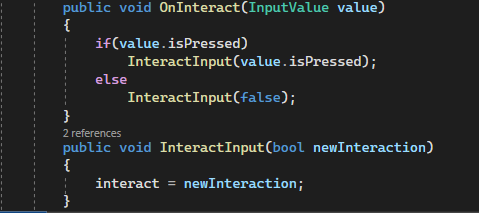
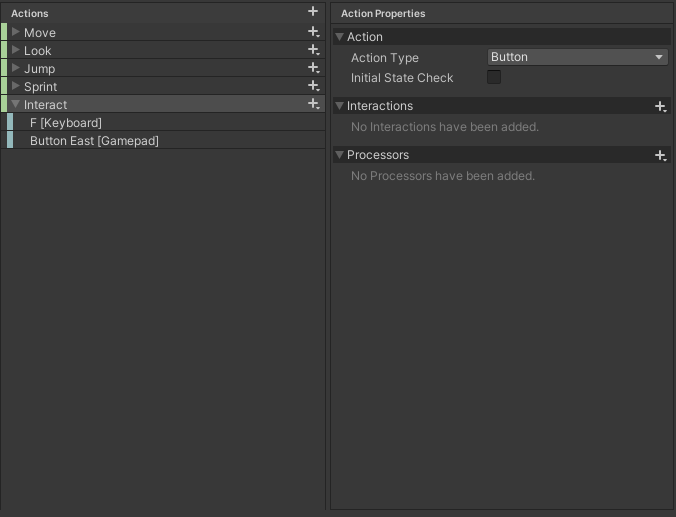
Hey! this has probably been asked several times before but Im currently converting my project from the old system to the new Input system. I have a class for all my inputs that ive made into a singelton so easily can check all the inputs from one place, but Im currently struggling to get the old function " getbuttondown" to work. Atm It triggers all the time the button is down and not only on the first frame
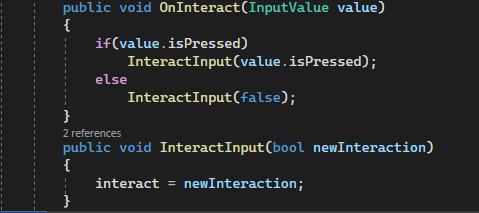
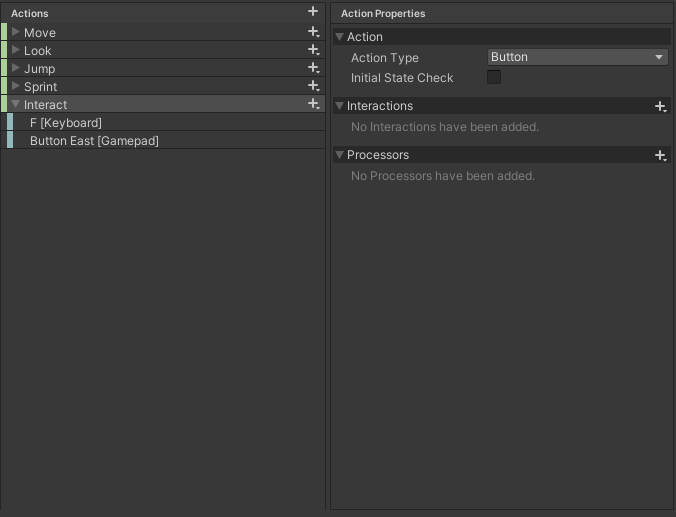
Ive tried multiple different interactions settings and actions but I cant figure it out :/
is there anyway to replicate the old Input.GetButtonDown method?
tulip tartan
potent relic
the thing is i multiplyed it by 500000 and in the consol the value was still 0
unless you didn't move your mouse this frame in which case it will actually be 0
How are you determining it is 0? Logging or looking at the value in the inspector?
austere grotto
potent relic
the thing is i multiplyed it by 500000 and in the consol the value was still 0
Yes you need to set the sensitivity in the inspector
austere grotto
fiery scaffold
Hey! this has probably been asked several times before but Im currently converti...
SendMessages is only going to send you stuff when the value changes
Frankly SendMessages mode isn't that useful and I don't recommend using it
potent relic
tulip tartan
> unless you didn't move your mouse this frame in which case it will actually be...
Debug.log(); in the Consol. And i set the sensX and SensY in the inspector to 500.000
tulip tartan
potent relic
Debug.log(); in the Consol. And i set the sensX and SensY in the inspector to 50...
And the log NEVER changes from 0?
Where do you log it?
I'm asking where you DO log it?
But generally it would be best right after capturing input
I just wanted to make sure it wasn't in start or something
potent relic
oh ok no inn the Update
 neon bay
Hey, this is my current inputs, I have one problem, where I need to detect a button no longer being pressed. So when I press the button I wanna do "JumpButtonPressed" and when I release it I want to do "JumpButtonReleased". How would I handle that? I know how to do the pressing part but i didnt see an option for releasing/ onKeyUp in the Input manager. Whats the best way to do this? I assume maybe something with the holding option?
 neon bay
This seems to also not work
private void JumpButton(InputAction.CallbackContext context)
{
    if (context.performed)
    {
        Debug.Log("Pressed");
        OnJumpButtonPressed?.Invoke();
    }
    if (context.canceled)
    {
        Debug.Log("Canceled");
        OnJumpButtonReleased?.Invoke();
    }
}
Another solution I found is this and it is also not working:
private void JumpButton(InputAction.CallbackContext context)
{
    var control = context.control;
    var button = control as ButtonControl;

    if (button == null) return;

    if (button.wasPressedThisFrame)
    {
        Debug.Log("Pressed");
        OnJumpButtonPressed?.Invoke();
    }
    else if (button.wasReleasedThisFrame)
    {
        Debug.Log("Canceled");
        OnJumpButtonReleased?.Invoke();
    }
}
This solution also is not working:
private void JumpButton(InputAction.CallbackContext context)
{
    if (context.action.GetButtonDown())
    {
        Debug.Log("Pressed");
        OnJumpButtonPressed?.Invoke();
    }
    else if (context.action.GetButtonUp())
    {
        Debug.Log("Canceled");
        OnJumpButtonReleased?.Invoke();
    }
}

public static class InputActionButtonExtensions
{
    public static bool GetButton(this InputAction action) => action.ReadValue<float>() > 0;
    public static bool GetButtonDown(this InputAction action) => action.triggered && action.ReadValue<float>() > 0;
    public static bool GetButtonUp(this InputAction action) => action.triggered && action.ReadValue<float>() == 0;
}
I am certain I am also doing something wrong with my InputSettings
Turns out I am just stupid and I didnt set my Inputactions properly. You need to set this:

Maybe with the proper settings now more of the above solutions would work
And here is the source for some solutions: https://forum.unity.com/threads/solved-getbuttondown-getbuttonup-with-the-new-system.876451/
 tender remnant
Hey friends.
I'm using Unity's new input system for my game and when launching through Steam, it seems be recognising PlayStation controllers incorrectly, defaulting to Xbox icons. Going into the game's settings in Steam and disabling Steam Input fixes the issue, but I obviously can't expect every player to change it manually. Is there any way to force disable Steam Input for PS controllers through either Steamworks or Unity?
 frigid ridge
Might want to set some sort for movement input bool and figure out whether to play sounds based on that in Update instead of raw input events.
austere grotto
You'd have to show the code that triggers this
Then it definitely shouldn't be based on input events
austere grotto
you need to share that link because the link you shared doesn't have it
in which animation event?
Two different ones?
Shouldn't there just be one animation event?
Also why are there two different audio sources?
 light schooner
public class GameInputs : MonoBehaviour, PlayerInputActions.IPlayerActions
    {

        public bool jump;

        PlayerInputActions controls;

        public void OnEnable()
        {
            if (controls == null)
            {
                controls = new PlayerInputActions();
                controls.Player.SetCallbacks(this);
            }
            controls.Player.Enable();
        }

        public void OnDisable()
        {
            controls.Player.Disable();
        }


        public void OnJump(InputAction.CallbackContext context)
        {
            jump = context.ReadValueAsButton();

        }
Hey, I used the following code without PlayerInput component. Is there any downsides to my approach/code? Basically in player script I just read that public bool jump and do the logic there
austere grotto
light schooner
```cs
public class GameInputs : MonoBehaviour, PlayerInputActions.IPlayerActions...
I would say this script doesn't really add much of value. It's kind of an unecessary middleman between the input actions wrapper and the other scripts
turbid olive
Oh, wrong reply, sorry
austere grotto
It would probably be better if it just exposed the controls instance to other scripts to do what they need to do with
turbid olive
light schooner
```cs
public class GameInputs : MonoBehaviour, PlayerInputActions.IPlayerActions...
I wouldn't say that it's bad. Just consider either making your controls public, as they're private now, or removing the null check, as they are always null when not serialized
light schooner
Okay i will remove the null check
turbid olive
light schooner
Okay i will remove the null check
Better serialize it
turbid olive
Oh, exactly
austere grotto
Also the null check makes sense in OnEnable - but really the initialization should just go to Awake instead
Awake will only ever run once, so you wouldn't need the check there.
turbid olive
austere grotto
Also the null check makes sense in OnEnable - but really the initialization shou...
It doesn't make sense to check since they're currently not assigning it anywhere
austere grotto
turbid olive
It doesn't make sense to check since they're currently not assigning it anywhere
they're assigning it in OnEnable
which can run multiple times
if the script is disabled/re-enabled
turbid olive
Oh, that's what you mean, I see
light schooner
Anybody have some example repo that I could still look at for further reference? Preferably without PlayerInput component.
turbid olive
light schooner
Anybody have some example repo that I could still look at for further reference?...
Well, you may have a look at some tutorials, if that's what you mean
 zenith cairn
Looking into making a custom input device and Im running into some problems with initialization. There will only ever be one device of this class, and it will always be present. I have this code to add it if it does not already exist:
Unfortunately, it creates a new device on every script reload. The only devices in InputSystem.devices is the mouse and keyboard
Following this guide https://github.com/Unity-Technologies/InputSystem/blob/develop/Packages/com.unity.inputsystem/Documentation~/Devices.md and using Input System 1.7


GitHub
An efficient and versatile input system for Unity. - Unity-Technologies/InputSystem
Does anyone know how I can get the true state of if any device already exists?
austere grotto
zenith cairn
Looking into making a custom input device and Im running into some problems with...
zenith cairn
Returns null
austere grotto
What makes you think it's creating more than one device at a time?
zenith cairn
The input debugger lists CustomInputDevice, CustomInputDevice1 etc
one more for every domain reload
austere grotto
Interesting.. maybe a bug?
austere grotto
zenith cairn
Returns null
It definitely shouldn't if the device exists
but maybe the devices exist but need to be Destroy()ed
zenith cairn
I think the devices from previous domain load only get added in sometime after BeforeSceneLoad?
zenith cairn
austere grotto
Or maybe you need to call https://docs.unity3d.com/Packages/com.unity.inputsyste...
I did try this
austere grotto
zenith cairn
I think the devices from previous domain load only get added in sometime after B...
Maybe? Try AfterSceneLoad?
zenith cairn
austere grotto
Maybe? Try AfterSceneLoad?
still no dice xD
austere grotto
Or in a Start() on a script somewhere?
zenith cairn
I could try destroying them on teardown, is there a clean way to do that?
zenith cairn
austere grotto
Or in a Start() on a script somewhere?
This is a workaround I can live with
Will see if it works
austere grotto
zenith cairn
I could try destroying them on teardown, is there a clean way to do that?
CustomDevice myDevice;

void Start() {
  myDevice = InputSystem.AddDevice<CustomDevice>();
}

void OnDestroy() {
  if (myDevice) Destroy(myDevice);
}```Something like this?Can do, I was trying to avoid gameobjects cause this is a pretty static thing, but if it works it works
austere grotto
RuntimeInitializeOnLoad can be kinda sketchy
es[ecially when it comes to going in and out of edit/playmode in the editor
zenith cairn
Oh, actually, that is a bit rough, I need the device to be added in editor. Is there a way to make start do that?
austere grotto
Why does it need to be added in edit mode
zenith cairn
Hmm, I was thinking it would be convenient to test and debug
but I guess I can run to get it to show up in the Input Debug window
That should be fine actually
Thanks for your help!
zenith cairn
Hmm, any idea why I cant have a Dpad as a child of a device? Does a Dpad need to be defined as its own device? How would I even do that?
InvalidOperationException: Cannot instantiate device layout 'Dpad' as child of '/CustomInputDevice'; devices must be added at root
This is the state:

Also worked fine when initialized in editor, but fails in this way when initializing in play mode
 junior patrol
Does anyone else have the joystick control not working on unity remote (both ios and android device) problem here?
 foggy kettle
my submit and other gamepad button actions are not going through, (south,north,east,west buttons)
junior patrol
but your mouse input works fine like mine right? like when you move the joysitck on the game window with your mouse cursor
foggy kettle
yes
I'm plugging my gamepad and south north etc buttons do not work for some reason
I see both input systems in action though, and the game is not converted to the new input system completely
So I'm blaming that
My game's resources are not functioning properly either
So idk, maybe it's something else
junior patrol
I did some google searches about this and some forums said that the unity remote app does not work correctly with thee new input system yet, I want to make sure that it actually the case here before I officially lose my mind on this
foggy kettle
I'm thinking you should plug your pad to pc instead
Because all remote does is test mobile input
and not pads plugged to mobile
junior patrol
well I get some input, I mean the UI buttons work and I can move the joystick(UI image with on-screen joystick script) but while I can move the player with the same setup on PC with my cursor, the player does not move on Unity remote.
I did exactly the same things on the tutorial videos on youtube they make it look easy it works fine on both but not on my project no sir
 thick imp
In my control scheme for gamepad there's this:
        {
            "name": "Gamepad",
            "bindingGroup": "Gamepad",
            "devices": [
                {
                    "devicePath": "<Gamepad>",
                    "isOptional": false,
                    "isOR": false
                },
                {
                    "devicePath": "<Mouse>",
                    "isOptional": true,
                    "isOR": false
                }
            ]
        }
I would like to not have the mouse in there as optional, because if I join with the keyboard afterwards the mouse isn't bound to the keyboard player...
How should this be solved?
Nvm, found it. In the control scheme options, just didn't find them .. ^^"
 slender cedar
im trying to make a previousAction key empty with "" when rebinding a key that is a duplicate:
            previousBinding.overridePath = "";
            previousAction.ApplyBindingOverride(previousBinding);
It doesnt apply at all. This does work with composite parts, like this work perfectly:
previousAction.ApplyBindingOverride(previousAction.GetBindingIndex(previousBinding), "");
Why would this second line work with composite while i can't do anything with a single button?
And why im not using this second method is because when i try to access single button with the index it show me index 30 but button has 2 index, not sure why its even getting index 30 in the first place. It come from the same actionMap/action key
One week im into this trying to rebind key, i wonder if it could be made harder?
And i checked all tutorials online, the sample from unity example, readed the doc over 10 times completly, still can't find a solution for this. None of the tutorials and examples work as it should.
Which make me wonder, is this production ready?
Anyone got rebinding to work properly with all key with duplicate and all?
 tame oracle
Question for the new input system what is the best way to handle cross scene actions? Different PlayerInput objects on each scene? Something more custom? Or hooking up PlayerInput to a DoNotDestroy?
austere grotto
"cross scene actions" is pretty vague.
Typically for anything beyond a prototype or if doing local multiplayer, I wouldn't recommend PlayerInput at all
zenith cairn
zenith cairn
Hmm, any idea why I cant have a Dpad as a child of a device? Does a Dpad need to...
Created a forum post with the same question in case it is useful in the future https://forum.unity.com/threads/custom-inputdevice-fails-to-create-when-dpad-is-defined.1588068/
Unity Forum
Hello, I am trying to manually create a new device as described here...
 faint marsh
idk why this is happening but the input system wont read my mouse input at all but it will read a inout from a controller
austere grotto
faint marsh
idk why this is happening but the input system wont read my mouse input at all b...
You'd have to show details about how you're trying to read input
faint marsh
mouseLook = controls.Player.Look.ReadValue<Vector2>();
austere grotto
faint marsh
mouseLook = controls.Player.Look.ReadValue<Vector2>();
that's not enough context
WOuld need to see the rest of the code (including where this controls thing comes from), and the Input Action setup in the asset.
faint marsh
austere grotto
that's not enough context
nvm i figured it out
 harsh wren
I just installed the new input system following the instructions and pressed the button in Project Settings / Input System Package to create the default asset. The default asset was created but now all i get in the project settings window is the input sytem settings (the tab that starts with Update Mode at the top) and I cannot find the actions editor
austere grotto
harsh wren
I just installed the new input system following the instructions and pressed the...
The actions editor is for the asset you created
you're looking at project settings
Your input actions asset would have been created in your asset folder
harsh wren
sure i can find the asset but how do i open the actions editor?
harsh wren
hmm nothing happens when i do that
austere grotto
maybe show screenshots/video?
 wicked yoke
I'm trying to make a fighting game buffer system where it stores inputs and checks for certain command inputs. I'm wondering if there are any source codes I can look at to see how others have accomplished this and I am stuck myself
any advice or ideas will be awesome as well
harsh wren
is it supposed to be in the project settings window?
austere grotto
no
harsh wren
ok the docs are confusing then they make it look like it should appear in the tab where the button to create the asset was ...
if it's supposed to open a new window when I double click on the asset there's not much to screenshot as nothing happens 😉
 austere grotto
harsh wren
if it's supposed to open a new window when I double click on the asset there's n...
austere grotto
harsh wren
if it's supposed to open a new window when I double click on the asset there's n...
what are you double clicking on?
screenshot your full unity editor
austere grotto
harsh wren
I just installed the new input system following the instructions and pressed the...
also what "button in project settings" are you talking about?
harsh wren
i'm double clicking the "InputSystem.inputsettings.asset" that was created
austere grotto
That's not an input action asset
Usually i just create them by right clicking in the project window -> Create -> Input Actions
Or from the Assets -> Create menu
harsh wren
hm ok I was just following the guide on the unity site
austere grotto
Are you using version 1.8?
This is the usual way ^
that whole concept of a "default project wide settings asset" is brand new in 1.8
I've never seen or used it before
wicked yoke
wicked yoke
I'm trying to make a fighting game buffer system where it stores inputs and chec...
Bumping this
 arctic estuary
for some reason i'm not able to see some ui elements, mainly the listen button and the search button. does anyone know how to fix this?
 austere grotto
arctic estuary
for some reason i'm not able to see some ui elements, mainly the listen button a...
austere grotto
arctic estuary
for some reason i'm not able to see some ui elements, mainly the listen button a...
Make sure your unity and input system versions are up to date
arctic estuary
something was wrong and had to leave, so couldn't respond.
unity version is 2022.3.19f1
and input system is 1.7.0.
both seem to be up to date
wicked yoke
any advice on how to improve this buffer system? in the context of a fighting game
currently I am using a list of strings
and each item is a different frame
for example 6L is right and Light attack on the same frame
I can also do neutral stance but I figured for this demonstration it'll be cleaner if I just don't have it appear
My only idea is a system to check when the button is held and released
but idk how to even check that
would make it look a lot cleaner tho
Here's the code


shit i just realized the system i have now will not work if I have charge inputs
I might need to make 2 seperate buffers for directions and buttons
so that way if you input a button, you don't remove charge
 sullen bone
could someone assist me with a VR input related question?
before i start, here's the editor and package stats, because context matters lol
unity Editor vers 2022.3.8f1
Input system vers 1.7.0
unity XRIT 2.5.2
So, I'm currently designing mapping for my controllers, and i used to own an oculus rift which has a joystick, a joystick press, and an A, B, X, and Y button, at 2 per controller.
using the unity input system, id like to give Vive users a similar concept.
see the image for the idea id like to implement.
ideally id like to use the action map panel, but if i need to code it i can, but i don't exactly know how to approach it.
 faint marsh
im having a problem where my input for my controller works to move my character around but the mouse doesnt work
it seems to differ to because it wasnt working at first yesterday then it started working now today when i opened the project it isnt working
using System.Collections;
using System.Collections.Generic;
using UnityEngine;

public class MouseLook : MonoBehaviour
{

    private P_Controls controls;
    private Vector2 mouseLook;
    private float xRot = 0f;
    [SerializeField] private Transform playerBody;
    [SerializeField] private float mouseSens = 20f;

    private void Awake() {
        controls = new P_Controls();
    }

    private void Update() {
        Look();
    }

    private void Look() {
        if (GameManager.instance.inPlay == true) {
            mouseLook = controls.Player.Look.ReadValue<Vector2>();

            float mouseX = mouseLook.x * mouseSens * Time.deltaTime;
            float mouseY = mouseLook.y * mouseSens * Time.deltaTime;

            Debug.Log("x: " + mouseX + " y: " + mouseY);

            xRot -= mouseY;
            xRot = Mathf.Clamp(xRot, -90, 90);

            transform.localRotation = Quaternion.Euler(xRot, 0, 0);
            playerBody.Rotate(Vector3.up * mouseX);
        }

    }

    private void OnEnable() {
        controls.Enable();
    }

    private void OnDisable() {
        controls.Disable();
    }
}
thats my code for the camera movement
you ever figure this out?
 alpine moss
faint marsh
you ever figure this out?
alpine moss
faint marsh
you ever figure this out?
I did. Thanks for the reply XD
faint marsh
alpine moss
I did. Thanks for the reply XD
what did you do?
bec im having the same problem
alpine moss
You have to add mouse in the top left section
You have to edit schematic or something
faint marsh
damn i have it and it still donest work
 glass forge
Hi, I have this script:
skipSet = playerControls.actions["SkipSet"];
skipSet.Enable();
skipSet.performed+=_=>SkipDialogue();

skipAll = playerControls.actions["SkipAll"];
skipAll.Enable();
skipAll.started+=_=>SkipEntireScene();
skipAll.canceled+=_=>CancelSkip();
I have to use the input actions like this because I am using the Input Rebind sample that Unity provides for their new Input System, and it apparently doesn't work with a Generated C# Class. However, this causes a NullReferenceException error when exiting playmode and reloading the scene. Even unsubscribing the functions from the event doesn't prevent the error. Anyone experience this issue?
austere grotto
glass forge
Hi, I have this script:
```
skipSet = playerControls.actions["SkipSet"];
skipSet...
Rebinding works with a generated class just fine
You just need to make sure you're rebinding the correct instance
As for your null reference you probably are not unsubscribing properly
Since you're using lambda that's almost definitely the case
It's not really possible to unsubscribe with a lambda
Unless you save it to a variable and reuse it
You need to unsubscribe the same instance that you subscribed
 mint fox
how to know which composite part binding belongs to?
 mint fox
seems like it's binding.name
amber wigeon
how can i detect if the player presses a specific button on the keyboard/gamepad using the new Input System? usually i create Input Actions and define input maps, actions and keybinds, but i don't want to create an entirely new action just for a single key-press in the entire game which happens only once. lets say that in the end of the game, i want to check if the player currently pressed B (keyboard) or Left Trigger (gamepad) in this particular frame. can i check it via code?
austere grotto
amber wigeon
how can i detect if the player presses a specific button on the keyboard/gamepad...
Either use actions or read it directly from the keyboard
amber wigeon
ok
austere grotto
Keyboard.current.bKey.isPressed
 balmy crown
Does anyone know if we can read input in a Windows headless build or a Windows dedicated server build?
And if you ask why I need it, for an arcade machine with multiplayer VR and all the controllers are connected to the server.
amber wigeon
austere grotto
`Keyboard.current.bKey.isPressed`
oh thanks
spare frigate
arctic estuary
for some reason i'm not able to see some ui elements, mainly the listen button a...
I had the same problem a while back, the issue is caused by a typo in the package cache of the actual Unity version folder, Unity will fallback to these packages in a project if you try to modify a package outside the project (so updating wont help in this case), you can try the steps I took for fixing it, hope it helps: #🖱️┃input-system message
spare frigate
wicked yoke
My only idea is a system to check when the button is held and released
Im not sure I fully understand how your system works, at the moment it looks like you just have rows of "L" and "6" rather than "6L" as a combo row, unless this is intentional? You can check for the state of input with wasPressedThisFame and wasReleasedThisFrame, as well as IsPressed() for continuous input, or if you know the type of your input, you can check for changes of ReadValue<T>() - if your string logic doesnt really change, maybe you can store them in a dictionary instead of needing to do a switch check, for example, (assuming CurrentInput.Light is a enum of some kind) Dictionary<InputManager.InputTypeEnum, string> someInputMapper = new(), so you can initialize with someInputMapper[CurrentInput.Light] = "L" or someInputMapper.Add(CurrentInput.Light, "L"); for example, similar for your Vector2 switch, if you dont need to modify the order you could use a stack or queue (depending on the order you need to read from it) to then add rows from your dictionary, this way you end up with rows of for example "6L"
If those inputs are from a action asset, you could use .started and .cancelled as your input states and have them sub to a function that can do the "add to queue/stack using dictionary" logic - another option is giving these tags like "L" and "(-1, 1)" just a number and use that number as an ID, so "14" can always refer to "6L" and 15 can always refer to "(-1, 1)" for example, if you wanted to try and not depend on strings (but I could be misunderstanding what your asking)
spare frigate
faint marsh
```csharp
using System.Collections;
using System.Collections.Generic;
using Unit...
How are you certain your mouse isnt working? What output do you get if you logged controls.Player.Look.ReadValue<Vector2>() and GameManager.instance.inPlay? Maybe its not always true - if your always getting a vector of 0, show the setup your using for controls.Player.Look
wicked yoke
spare frigate
Im not sure I fully understand how your system works, at the moment it looks lik...
I was unaware of the wasReleasedThisFrame and the wasPressedThisFrame commands! and that does solve the problem I was having with the multiple 6L and should make my life easier to work with. Dictionary would prolly also be easy. Thanks!
faint marsh
spare frigate
How are you certain your mouse isnt working? What output do you get if you logge...
It was Bec I was in simulation mode and didn’t know lmfao
spare frigate
Ah lol, at least you got it sorted out
glass forge
Hi, I'm trying to follow this guide for key rebinding using the Input System: https://www.youtube.com/watch?v=csqVa2Vimao
However, I'm running into an issue where the key rebinds don't actually seem to apply until the Scene is reloaded, or I exit/enter Playmode. Does anyone have experience with this?
austere grotto
It depends which instance of your asset you're rebinding, and which instance the rest of your game is using
Only a particular instance will be rebound
glass forge
austere grotto
Only a particular instance will be rebound
I have a Player Input Handler script that gets the PlayerInput asset assigned via inspector. The Rebind script also gets assigned to that asset via inspector.
glass forge
Oh wait nevermind, I got it. I had multiple PlayerInput components on the scene, and I had to remove the duplicates
 pine timber
Hi, is it possible to make multiple touches on the simulator? I'm working on my first mobile game - I have one set of controls that uses the keyboard for movement that's useful while I'm testing in Unity, and touch controls when you're playing on a phone. I have an issue that is only reproducible with touch controls when you're running and jumping along a wall - I'm trying to figure out how to debug this in unity
turbid olive
pine timber
Hi, is it possible to make multiple touches on the simulator? I'm working on my ...
Well, you have the values you use for your touch controls? Debug them.
safe copper
OnLook wants nothing to do with this WebGL upload but it's fine with an EXE, any ideas?
(broken both on gamepad and mouse)
wait actually I have a thought... might be to do with my config system...
(was very much my config system)
 latent ingot
Has anyone ever used a Wii guitar hero controller? I'm having a hard time setting it up
 white torrent
Has anyone encountered an issue where "Input Actions Asset" doesn't appear in the Create menu?
austere grotto
white torrent
Has anyone encountered an issue where "Input Actions Asset" doesn't appear in th...
Did you install the input system package
white torrent
Yeah it's installed, everything looks good. I can even copy the default input actions from the UI event module but Input actions aren't showing up as an option in the create menu
Unless I'm just totally missing it

 frozen patio
Anyone figure out a good way to do key rebinding for keybinds that have modifier keys? For example, I have a keybind ctrl+p, but I want my players to be able to remove the ctrl part if they want, and vice versa.
I currently have a working rebind UI and everything, but the PerformInteractiveRebinding records one button at a time according to how many composites you have. But I'd rather just have a general record feature and let users completely customize their keybinds to any number of modifiers/buttons
 thin sage
frozen patio
Anyone figure out a good way to do key rebinding for keybinds that have modifier...
thin sage
frozen patio
Anyone figure out a good way to do key rebinding for keybinds that have modifier...
Could you bypass the input system for this and manually take in the binds?
frozen patio
thin sage
Could you bypass the input system for this and manually take in the binds?
It seems like I might have to, but this feature also seems like something so fundamental that it should just be part of the Unity InputSystem package itself
tame oracle
new to using the 'new' input system, why are my invokes getting repeated 2-3 times by my player input component
austere grotto
tame oracle
new to using the 'new' input system, why are my invokes getting repeated 2-3 tim...
That is expected and normal. There are 3 phases to every interaction:
started performed canceled
You can see which phase it is from the CallbackContext parameter you get
either with ctx.phase or ctx.started/performed/canceled etc
tame oracle
    {
        Debug.Log("e");
        if (inventoryUI.activeSelf)
        {
            inventoryUI.SetActive(false);
            ToggleBindsOnOpenMenu(true);
        }
        else
        {
            inventoryUI.SetActive(true);
            ToggleBindsOnOpenMenu(false);
        }
}``` I am just trying to invoke this from the player input script. From what you're saying it looks like I only need the performed context, but im unsure how to only access one context.if you need more lmk

 supple crow
You can accept an InputAction.CallbackContext parameter in those methods
which you'll want to do so that you can check which phase you're in
tame oracle
alr, so ill have to just copy the method with a context input
bc it's set up to a button as well
supple crow
In that case, I'd have one method whose sole job is to receive input and call another method
rather than having duplicate code
austere grotto
yup
public void OnInventory(CallbackContext ctx) {
  if (ctx.performed) InventoryKey();
}```something like this @tame oracle
 delicate flame
groob
 viscid nova
Hey guys, really short question.
I'm following along with a tutorial where the guy sets a Controls variable, but when I do it Unity doesn't recognize the type. (second picture is from the tutorial guy)

 austere grotto
viscid nova
Hey guys, really short question.
I'm following along with a tutorial where the ...
austere grotto
viscid nova
Hey guys, really short question.
I'm following along with a tutorial where the ...
Looks like he made a type called Controls and you didn't
simple as that
you must have skipped a part
viscid nova
Yeah that's what I thought than he must have just skipped showing that part for some reason
austere grotto
Does the tutorial perhaps come with some companion asset or code you're supposed to install first?
viscid nova
input system, but I already did that
austere grotto
Is Controls the name of his Input Actions Asset?
viscid nova
ye
austere grotto
Oh then it's the name of the generated C# class from his asset
viscid nova
Ohhhh my god
austere grotto
you either didn't generate the class or you didn't name your asset the same as he did
austere grotto
Also the [HideInInspector] is completely unecessary for that field
Since that type is not serializable anyway
tame oracle
austere grotto
something like this <@456226577798135808>
Do I attach this to the player input component? where do i call it from?
viscid nova
Aight, but thanks so much
austere grotto
tame oracle
Do I attach this to the player input component? where do i call it from?
you hook that up in the PlayerInput component for the inventory event, yes
PlayerInput will call it
tame oracle
awesome, works thanks
thin sage
frozen patio
It seems like I might have to, but this feature also seems like something so fun...
Lol, working with the input system, it definitely feels like there's a lot of things which should be native but aren't. I'd chalk it up to it being still relatively new. Hopefully it'll get more features with time
E.g. Player Input can only bind one input map, at least from what I gather from the documentation. Meaning if you want to modularize your controls, you can't use Player Input, you have to reimplement it and bind the input maps directly
frozen patio
thin sage
Lol, working with the input system, it definitely feels like there's a lot of t...
This seems like such a critical feature I'm surprised I'm not seeing any idiomatic solutions / other people complaining about it
 inland quail
Hey, I'm struggling to set sensitivity based on controller scheme .
I tried subscribing to the onControlSchemeChange but it does not fire when I pick up the controller
 mental musk
We can change the color of dual shock gamepads, but how would we turn it off again once done? The docs specify nothing about that?
var gamepad = (DualShockGamepad)Gamepad.all[0];
gamepad.SetLightbarColor(Color.red);
Alpha values are ignored so that wouldn't work
austere grotto
mental musk
We can change the color of dual shock gamepads, but how would we turn it off aga...
Isn't the light bar always on?
 turbid apex
how do i have something here let me run a scripts void?
 austere grotto
turbid apex
how do i have something here let me run a scripts void?
austere grotto
turbid apex
how do i have something here let me run a scripts void?
You don't
This is just for configuring actions
Use the PlayerInput component to actually use it with your code in your game
tulip tartan
turbid apex
how do i have something here let me run a scripts void?
A scripts void?
Do you mean a method? Void is a return type
 lucid owl
Hey, did anyone have a similar problem? Some of my input actions return false after quitting the Steam overlay by clicking Escape, and I cannot seem to identify the problem
austere grotto
What does it mean for an input action to "return false"?
lucid owl
when I call the function ReadValueAsButton from the CallbackContext, it always returns false even though everything seems to be ok
it fixes itself only when the app refocuses
e.g. alt+tab to desktop and back
austere grotto
lucid owl
e.g. alt+tab to desktop and back
Possibly a relevant read

GitHub
Not sure if this intended or not. But upon initializing steamworks. My xbox one controller is no longer recognized within unity. No inputs will reach it until i close steam. I can get the game work...
lucid owl
the input actions are actually called, so I don't think it's steam hijacking input in this case
it's probably some annoying edge case
 sleek pasture
I'm running the update method and reading my _inputControls.Shoot but it only detects the initial button down. It does not detect that I'm holding it. _inputControls.Shoot should be true while key is down.
austere grotto
sleek pasture
I'm running the update method and reading my _inputControls.Shoot but it only de...
You would have to show your code
sleek pasture
austere grotto
You would have to show your code
    public void OnUpdate(ref SystemState state)
    {
        _entityManager = state.EntityManager;
        _inputEntity = SystemAPI.GetSingletonEntity<InputComponent>();

        _inputComponent = _entityManager.GetComponentData<InputComponent>(_inputEntity);

        Shoot(ref state);
    }

    private void Shoot(ref SystemState state)
    {
        if (_inputComponent.Shoot)
        {
            Debug.Log("Shoot");
        }
        else
        {
            Debug.Log("Not shooting"); // prints this after registering button
        }
    }```
 austere grotto
sleek pasture
```cs
public void OnUpdate(ref SystemState state)
{
_entityManag...
austere grotto
sleek pasture
```cs
public void OnUpdate(ref SystemState state)
{
_entityManag...
You'd have to show what InputComponent is
sleek pasture
austere grotto
You'd have to show what `InputComponent` is
using Unity.Entities;
using Unity.Mathematics;

public struct InputComponent : IComponentData
{
    public float2 Movement;
    public float2 MousePosition;
    public bool Shoot;
}```
It's just a DOTS IComponentDataok and where are you actually setting the data in here?
Basically you haven't actually shown your input handling code.
sleek pasture
austere grotto
Basically you haven't actually shown your input handling code.
bool shoot = _controlsECS.Player.Shoot.triggered; // should be IsPressed()``` fixed it. Thanks.yes method
inland quail
Hey! I am trying to subscribe to the OnCtronlsChanged event.


all I want to do is check if I am on Mouse and Keyboard or Controller
austere grotto
inland quail
Hey! I am trying to subscribe to the OnCtronlsChanged event.
looks like either actionInputHandler or actionInputHandler.playerInput is null
pretty straightforward NullReferenceExceptions
inland quail
austere grotto
looks like either `actionInputHandler` or `actionInputHandler.playerInput` is nu...
I understand the eerror... thanks. What I don't understand is how I can actually switch controller types and and still get the error.
austere grotto
inland quail
I understand the eerror... thanks. What I don't understand is how I can actually...
not sure what you mean by that
inland quail
austere grotto
not sure what you mean by that
I run around with the mouse and keyboard. I pick up the controller and continue. Yet the playerInput is null. Makes no sense.
austere grotto
inland quail
I run around with the mouse and keyboard. I pick up the controller and continue....
Have you actually verified which of the two references here are null yet?
It makes plenty of sense if for example you accidentally have a duplicate script in your scene
and one of them is working
and one isn't, because you didn't set up the references
don't make assumptions when debugging, and don't skip basic debugging steps like adding logs etc
inland quail
I'll give it another go, but those are simple OnEnable and OnDisable subscriptions.
austere grotto
inland quail
I'll give it another go, but those are simple OnEnable and OnDisable subscriptio...
it doesn't matter how simple they are
if the reference isn't assigned, you get NRE
inland quail
No nulls here . Only when I try subscribe . But let me have another pass on debugging .
 austere grotto
inland quail
No nulls here . Only when I try subscribe . But let me have another pass on debu...
austere grotto
inland quail
No nulls here . Only when I try subscribe . But let me have another pass on debu...
actionInputHandler itself can be null. That was the first possibility I mentioned
Also - OnEnable on the other script can run before Awake on this script
neon bay
Why is this not working:
    private void OnEnable()
    {
        InputSystem.onDeviceChange += OnDeviceChange;
    }

    private void OnDisable()
    {
        InputSystem.onDeviceChange -= OnDeviceChange;
    }

private void OnDeviceChange(InputDevice device, InputDeviceChange change)
{
    if (device is Gamepad || device is Joystick)
    {
        UsingController = true;
        Debug.Log("Device Changing to Controller");
    }
    else if (device is Keyboard || device is Mouse)
    {
        UsingController = false;
        Debug.Log("Device Changing to Keyboard and Mouse");
    }
}
I expect it to properly get called when I switch from my controler to keyboard and vice-versa during my game. But It seems to only do it once in the start or very irregularly? I would like it to trigger on each button press on a different input device, like intended, right?
austere grotto
neon bay
Why is this not working:
```c#
private void OnEnable()
{
InputS...
Based on the docs:
https://docs.unity3d.com/Packages/com.unity.inputsystem@1.7/api/UnityEngine.InputSystem.InputSystem.html#UnityEngine_InputSystem_InputSystem_onDeviceChange
Event that is signalled when the device setup in the system changes
That doesn't sound like "on each button press on a different device"
that sounds like... when you connect/disconnect/plug in/unplug devices
neon bay
Hmm, is there one to achieve what I want?
austere grotto
neon bay
Yeah I will try that, thanks!
Cause with how it is right now it seems to work when turning on the controller
But when turning it off it doesnt switch back to keyboard
So having it actually react in realtime to whatever your last used input device is would be nice
Not the one that was last connected
neon bay
private void Movement(InputAction.CallbackContext context)
{
    Horizontal = context.ReadValue<Vector2>().x;

    switch (Horizontal)
    {
        case > 0:
            Horizontal = 1;
            break;
        case < 0:
            Horizontal = -1;
            break;
    }

    InputDevice deviceUsed = context.control.device;
    if (deviceUsed is Keyboard)
    {
        Debug.Log("Keyboard");
    }
    else if (deviceUsed is Gamepad)
    {
        Debug.Log("Gamepad");
    }
}
this works by getting it from each individual pressed buttons callback context
and then I will just pass that along and switch it if it changes I guess
works fine for me
 kind ore
I'm using 2022.3.20f1 version and I made sure to assign correct bindings to correct action. I picked this function inside Player Input component but it just don't do anything. I followed CodeMonkey's tutorial exactly how he did but I can't get this function to work. And I may be too blind to see if this is asked before.
{
    Debug.Log(context.phase);
}```Yo guys, I feel like I got input system code in a okay place, but I can't seem to get the playermovement to work... I've tried watching countless tutorials but that didn't fix it and resulted in a mishmash of multiple tutorials code. Please help me haha
using System.Collections;
using System.Collections.Generic;
using UnityEngine;
using UnityEngine.InputSystem;

public class UserInput : MonoBehaviour
{
    public static UserInput instance;

    public Controls playerControls;
    [HideInInspector] public Vector3 MoveInput { get; private set; }
    public bool JumpJustPressed { get; private set; }
    public bool JumpBeingHeld { get; private set; }
    public bool JumpReleased { get; private set; }
    public bool CameraInput { get; private set; }
    public bool SneakBeingHeld { get; private set; }
    //public bool SneakReleased { get; private set; }
    public bool InteractInput { get; private set; }


    private PlayerInput _playerInput;

    private InputAction _moveAction;
    private InputAction _jumpAction;
    private InputAction _cameraAction;
    private InputAction _sneakAction;
    private InputAction _interactAction;


    private void Awake()
    {
        //if(instance == null)
        //{
        //    instance = this;
        //    //DontDestroyOnLoad(gameObject);
        //}

        //else
        //{
        //    Destroy(gameObject);
        //}

        playerControls = new Controls();

        //playerControls.InGame.Move.performed += ctx => MoveInput = ctx.ReadValue<Vector3>();

        _playerInput = GetComponent<PlayerInput>();

        SetupInputActions();
}```private void OnEnable()
{
//playerControls.Enable();
_moveAction = playerControls.InGame.Move;
_moveAction.Enable();
_sneakAction = playerControls.InGame.Sneak;
_sneakAction.Enable();
//_sneakAction.performed += Sneak;
_jumpAction = playerControls.InGame.Jump;
_jumpAction.Enable();
//_jumpAction.performed += Jump;
_interactAction = playerControls.InGame.Interact;
_interactAction.Enable();
//_interactAction.performed += Interact;
_cameraAction = playerControls.InGame.Camera;
_cameraAction.Enable();
//_cameraAction.performed += Camera;
}
private void OnDisable()
{
//playerControls.Disable();
_moveAction.Disable();
_sneakAction.Disable();
_jumpAction.Disable();
_interactAction.Disable();
_cameraAction.Disable();
}
private void Update()
{
UpdateInputs();
}
private void SetupInputActions()
{
_moveAction = _playerInput.actions.FindAction("Move");
_jumpAction = _playerInput.actions.FindAction("Jump");
_cameraAction = _playerInput.actions.FindAction("Camera");
_sneakAction = _playerInput.actions.FindAction("Sneak");
_interactAction = _playerInput.actions.FindAction("Interact");
}
private void UpdateInputs()
{
MoveInput = _moveAction.ReadValue<Vector3>();
JumpJustPressed = _jumpAction.WasPressedThisFrame();
JumpBeingHeld = _jumpAction.IsPressed();
JumpReleased = _jumpAction.WasReleasedThisFrame();
CameraInput = _cameraAction.WasPressedThisFrame();
SneakBeingHeld = _jumpAction.IsPressed();
//SneakReleased = _jumpAction.WasReleasedThisFrame();
InteractInput = _interactAction.WasPressedThisFrame();
}```using System.Collections;
using System.Collections.Generic;
using UnityEngine;
public class PlayerMovement : MonoBehaviour
{
public UserInput inputManager;
public CharacterController Controller;
[SerializeField] [Range(5.0f, 25.0f)] float moveSpeed = 12f;
[SerializeField] [Range(1.0f, 5.0f)] private float jumpHeight = 1.0f;
//Gravity
public float gravity = -9.81f;
Vector3 velocity;
//Groundchecks
public Transform groundCheck;
public float groundDistance = 0.4f;
public LayerMask groundMask;
bool isGrounded;
// Sneak Variables
public CharacterController PlayerHeight;
public float normalHeight, sneakHeight;
private float normalSpeed;
private float sneakSpeed;
//Set up an event
private void Start()
{
Controller = GetComponent<CharacterController>();
inputManager.playerControls.InGame.Jump.started += _ => Jump();
normalSpeed = moveSpeed;
sneakSpeed = normalSpeed / 2;
}
//private void FixedUpdate()
//{
// velocity = new Vector2(inputManager.MoveInput.x * moveSpeed, inputManager.MoveInput.z * moveSpeed);
// Controller.Move(velocity * Time.deltaTime);
//}
private void Update()
{
isGrounded = Physics.CheckSphere(groundCheck.position, groundDistance, groundMask);
if (isGrounded && velocity.y < 0)
{
velocity.y = -2f;
}
//float x = velocity.x;
//float z = velocity.z;
float forward = inputManager.MoveInput.x;
float right = inputManager.MoveInput.z;
Vector3 move = transform.right * right + transform.forward * forward;
//transform.localScale = new Vector3(1, inputManager.playerControls.InGame.Sneak.ReadValue<float>() == 0 ? 3.8f : 2f, 1);
Controller.Move(move * moveSpeed * Time.deltaTime);
velocity.y += gravity * Time.deltaTime;
Controller.Move(velocity * Time.deltaTime);
}```I understand it's a lot to look through but I'm not far off with turning into: 💀
viscid nova
viscid nova
```c#
using System.Collections;
using System.Collections.Generic;
using UnityEng...
Most of the problems would be in this script I guess
 rich slate
Hello. I have a problem. In my Android version game, I want to perform an action that requires holding the screen for a slingshot-like drag. But since I'm somewhat new, I don't know how to do this in the Input System. What method or logic can I use to detect screen pressure?
I've been stuck for 3 days XD
austere grotto
rich slate
Hello. I have a problem. In my Android version game, I want to perform an action...
 livid glade
How do I use this mode on the player input component?
 austere grotto
livid glade
How do I use this mode on the player input component?
austere grotto
livid glade
How do I use this mode on the player input component?
You subscribe to the onActionTriggered event
Almost nobody uses that mode TBH
livid glade
austere grotto
You subscribe to the `onActionTriggered` event
Ah. Well I suppose the only advantage to that would be that it's faster than the other modes, but at that point just have it generate a c# script and use that right?
 rapid sky
Can someone please help me? What am I doing wrong? For some reason it does not recognize the Interact action, my Move and Jump works but for some dumb reason the Interact isn't being recognized and keeps giving error.
 turbid olive
rapid sky
Can someone please help me? What am I doing wrong? For some reason it does not r...
turbid olive
rapid sky
Can someone please help me? What am I doing wrong? For some reason it does not r...
Clean all the errors you currently have, then
-
- Make sure you have the
Interactaction, don't forget to save it
- Make sure you have the
-
- Make sure the names of the scripts are correct. The wrong script names, which e.g. differ in Unity and your IDE, may prevent your action from being saved
-
- Try to access the
Interactaction again
- Try to access the
 thorn valley
using the new input system with these settings
pressing a button calls the event twice instead of once

I would imagine "release only" sends a signal just on release, but it sends 2
austere grotto
thorn valley
using the new input system with these settings
pressing a button calls the event...
When you say "the event" what do you mean?
You're probably confused because of the phases
Don't ignore the phase in the Callback Context
thorn valley
when you push a button you have a transition form 0-1 and a transition from 1-0 when you relrease the button
Why is it that when the trigger behaviour is set to release only
that OnAccept is still called twice? @austere grotto
to be clear, it is called twice when the button is released
I would expect it to call only once
(with the tigger behaviour set to press, I would expect it to trigger once, but as soon as you press
and with it set to press and release, I would expect it to call onAccept once when pressed and once when released)
austere grotto
thorn valley
Why is it that when the trigger behaviour is set to release only
Because there's more to it than just the value
You'll want to switch to UnityEvents mode on PlayerInput if you want to disambiguate it
Release only does performed on release instead of on press
That's the only difference
It still does the phase
rich slate
austere grotto
Use https://docs.unity3d.com/Packages/com.unity.inputsystem@1.7/api/UnityEngine....
Thank you
neon bay
I have 2 actions in my Action map:
- Leftclick
- Shift + Leftclick
Both are Actions with one modifier but for some reason its not working
Shift + Leftclick is working
But also now at the same time the leftclick is being called. So I added shift to the normal leftclick aswell as a modifier but added the Invert processor to make it so that that one only fires if shift is NOT held

But for some reason that is not working at all. What am I doing wrong?
Seems to be an issue ignored by unity for years according to this thread:
https://forum.unity.com/threads/using-buttonwithonemodifier-without-triggering-another-action-using-the-same-binding.775109/
But someone said this custom solution makes the invert work:
https://github.com/TRS6123/AginerianInput
By default in tje inputSystem the invert just doesnt do anything apparently
 patent sierra
anyone know where to find the common device names for InputAction.CallbackContext.control.device.name
 stone karma
Dw
viscid nova
Hi, I already got a simple working movement script, but I cannot figure out how to add Jumping. Anyone wanna help?
using System.Collections;
using System.Collections.Generic;
using UnityEngine;
using UnityEngine.InputSystem;

public class PlayerController2 : MonoBehaviour
{
    PlayerControls controls;
    Vector2 move;
    public float speed = 10;

    void Awake()
    {
        controls = new PlayerControls();

        controls.Player.Move.performed += ctx => move =
        ctx.ReadValue<Vector2>();
        controls.Player.Move.canceled += ctx => move = Vector2.zero;
    }

    private void OnEnable()
    {
        controls.Player.Enable();
    }

    private void OnDisable()
    {
        controls.Player.Disable();
    }

    void SendMessage(Vector2 coordinates)
    {
        Debug.Log("Thumb-stick coordinates = " + coordinates);
    }

    void FixedUpdate()
    {
        Vector3 movement = new Vector3(move.x, 0.0f, move.y) * speed * Time.deltaTime;
        transform.Translate(movement, Space.World);
    }
}
This is my current Action Map 🤗
 austere grotto
viscid nova
Hi, I already got a simple working movement script, but I cannot figure out how ...
austere grotto
viscid nova
Hi, I already got a simple working movement script, but I cannot figure out how ...
Are you asking how to handle the input or how to handle the jumping physics
viscid nova
A little bit of both. I know how jumping physics work with the old system, but I can't seem to figure out how to get it to work with the new one
My guess was that I should do something along the lines of this:
    void Jump(InputAction.CallbackContext context)
    {
        Debug.Log("Jump method called.");
        if (isGrounded)
        {
            Debug.Log("I'm Jumping");
            rb.AddForce(Vector3.up * Mathf.Sqrt(jumpHeight * -2.0f * gravity), ForceMode.VelocityChange);
        }
        else
        {
            Debug.Log("Not grounded, can't jump.");
        }
    }
But idk how to correctly call this or if this is the best way to do it
austere grotto
viscid nova
A little bit of both. I know how jumping physics work with the old system, but I...
That seems pretty reasonable but you will need to hook that up to your PlayerControls as well similar to what you're doing in Awake now for movement
Also I highly recommend NOT to mix up transform.Translate and Rigidbody motion
you should really be using the Rigidbody for everything.
viscid nova
So smth like this in awake, but than how do I add this Jumping force to my player's Y
controls.Player.Jump.performed += Jump;
controls.Player.Jump.canceled += Jump;
you don't want to ssubscribe canceled as well
that means you'll jump when you release the button too
austere grotto
viscid nova
So smth like this in awake, but than how do I add this Jumping force to my playe...
but than how do I add this Jumping force to my player's Y
That's what the Jump function does
that's the whole point
viscid nova
Ye fair 😶 😂
viscid nova
austere grotto
you don't want to ssubscribe canceled as well
How should it be
austere grotto
just controls.Player.Jump.performed += Jump;
viscid nova
Alright, I'll try it out
austere grotto
really best practice would be this:
void OnEnable() {
  controls.Player.Jump.performed += Jump;
}

void OnDisable() {
  controls.Player.Jump.performed -= Jump;
}```Alright it works now tnx!
How would I do the movement with the rigidbody instead of the .translate in this case though?
    void FixedUpdate()
    {
        Vector3 movement = new Vector3(move.x, 0.0f, move.y) * speed * Time.deltaTime;
        transform.Translate(movement, Space.World);
    }
}```Set the horizontal velocity, or use forces
viscid nova
austere grotto
Set the horizontal velocity, or use forces
I'm sorry, but could you please type it out. Whatever I am doing is not working 🫥
After doing this I'm heading straight to bed cuz my brain ain't braining rn
 placid glacier
Hey yall
I'm having trouble implementing a drag and drop system
using System.Collections;
using System.Collections.Generic;
using UnityEngine;
using UnityEngine.EventSystems;

public class Draggable : MonoBehaviour, IBeginDragHandler, IDragHandler, IEndDragHandler
{
    public bool selected = false;

    public void OnBeginDrag(PointerEventData eventData)
    {
        Debug.Log("begin drag");
    }
    public void OnDrag(PointerEventData eventData)
    {
        // selected = true;
        // Vector3 mousePosition = Camera.main.ScreenToWorldPoint(Input.mousePosition);
        // mousePosition.z = 0;
        // this.transform.position = Vector3.Lerp(transform.position, mousePosition, Time.deltaTime * 15.0f);
        Debug.Log("drag");
    }
    public void OnEndDrag(PointerEventData eventData)
    {
        Debug.Log("end drag");
    }
}
this is my code, but when I add a script to a 3d geometry it doesnt do anything
any help with this? The tutorials online all say the same thing (use script above)
 bitter tartan
placid glacier
```C#
using System.Collections;
using System.Collections.Generic;
using UnityEng...
bitter tartan
placid glacier
```C#
using System.Collections;
using System.Collections.Generic;
using UnityEng...
You need a Physics Raycaster on your Camera for it to work on 3D geometry in order to send messages to Colliders and everything
More info about Raycasters here : https://docs.unity3d.com/Packages/com.unity.ugui@1.0/manual/Raycasters.html
 ornate bough
    {
        //  IF LOCKED ON, FORCE ROTATION TOWARS TARGET
        //  ELSE ROTATE REGULARLY

        //  NORMAL ROTATIONS
        //  ROTATE LEFT AND RIGHT BASED ON HORIZONTAL MOVEMENT ON THE MOUSE HORIZONTAL ROTATION DURING RIGHT BUTTON CLICK
        leftAndRightLookAngle += cameraHorizontalInput * leftAndRightRotationSpeed * Time.deltaTime;
        //  ROTATE UP AND DOWN BASED ON HORIZONTAL MOVEMENT ON THE MOUSE HORIZONTAL ROTATION DURING RIGHT BUTTON CLICK
        upAndDownLookAngle -= cameraVerticalInput * upAndDownRotationSpeed * Time.deltaTime;
        //  CLAMP THE UP AND DOWN LOOK ANGLE BETWEEN A MIN AND MAX VALUE
        upAndDownLookAngle = Mathf.Clamp(upAndDownLookAngle, minimumPivot, maximumPivot);

        Vector3 cameraRotation = Vector3.zero;
        Quaternion targetRotation;

        //   ROTATE THIS GAMEOBJECT LEFT AND RIGHT
        cameraRotation.y = leftAndRightLookAngle;
        targetRotation = Quaternion.Euler(cameraRotation);
        transform.rotation = targetRotation;

        //  ROTATE THE PIVOT GAMEOBJECT UP AND DOWN
        cameraRotation = Vector3.zero;
        cameraRotation.x = upAndDownLookAngle;
        targetRotation = Quaternion.Euler(cameraRotation);
        cameraPivotTransform.localRotation = targetRotation;
    }
    private void HandleCameraMovementInput()
    {
        // GET MOUSE INPUT
    // CACHE MOUSE OR KEYBOAD ACTIONS

                cameraHorizontalInput = Input.GetAxisRaw("Mouse X");
                cameraVerticalInput = Input.GetAxisRaw("Mouse Y");
        if (cameraHorizontalInput >= 1 || cameraHorizontalInput <= -1)
        {
            Debug.Log("Camera is rotating too fast. rotate value is = " + cameraHorizontalInput);
        }

    }
I have a problem about get mouse inputs. When i use getAxis() method for get mouse horizontal inputs, value unexpectedly jumps to higher or lower value than it should. I dont understand why. But i try something to fix the situation. When i use float value instead of time.Deltatime, there is no value jump. i have to use time.Delta time for trustable rotation movement for every device. what do i have to do for fix this issue. anyone know the solusion.
No such input was given with the mouse. This rotation occurs in only 1 frame. In other words, rotation is made at very high speed.
 austere grotto
ornate bough
I have a problem about get mouse inputs. When i use getAxis() method for get mou...
austere grotto
ornate bough
I have a problem about get mouse inputs. When i use getAxis() method for get mou...
You should not be using Time.deltaTime with mouse input
It's absolutely wrong
Mouse input is already framerate independent
ornate bough
i didnt know that. Thank you
 iron stream
Hi, I have this problem and I don't know how to solve it or aboard it. My 2D Game is show as UI using a Raw Image object that reproduce a RenderTexture inside a Canvas. Also I have a Joystick inside the canvas that you can use to move the player. The signs of my game have a collider so when you are close and make a click it shows a dialogue. How can I made that when my mouse or touch pointer is hover the joystick the signs dialogue functionality stop working?I think something like the joystick consume the event mouseDown and make it stop spread, but I don't know how to make this or either if there is a better way to do that
iron stream
iron stream
Hi, I have this problem and I don't know how to solve it or aboard it. My 2D Gam...
nvm, just solved editing the sign script, and checking if the mouse is over a gameObject with the tag "NoDialogue" using a Raycast with the mouse position. Just let me know if there is a better way to do that, I like to learn the good way to do things
mint fox
Is there a way to get control by binding index?
placid glacier
bitter tartan
You need a Physics Raycaster on your Camera for it to work on 3D geometry in ord...
I did this and still nothing
no matter my approach it still is not giving responses
placid glacier
heyy
My objects are teleporting away when I drag them
using System.Collections;
using System.Collections.Generic;
using UnityEngine;
using UnityEngine.EventSystems;

public class Draggable : MonoBehaviour, IBeginDragHandler, IDragHandler, IEndDragHandler
{
    public bool selected = false;

    public void OnBeginDrag(PointerEventData eventData)
    {
        Debug.Log("begin drag");
        // transform.SetParent(transform.root);
    }
    public void OnDrag(PointerEventData eventData)
    {
        // selected = true;
        // Vector3 mousePosition = Camera.main.ScreenToWorldPoint(Input.mousePosition);
        // mousePosition.z = 0;
        this.transform.position = Input.mousePosition;
        Debug.Log("drag");
    }
    public void OnEndDrag(PointerEventData eventData)
    {
        Debug.Log("end drag");
    }
}
You aren't converting the screen space mouse position into world space
Well your commented out code attempts to do that
But it's commented out
And not used
placid glacier
it doesnt work
austere grotto
We you'd also have to change the line that sets the position
And also it won't work properly if you're using a perspective camera
placid glacier
ortho means 90º?
austere grotto
No
placid glacier
what does it mean then?
where can i learn more how to move stuff?
this part ofEvent Handling and camera have been very difficult for me to grasp
placid glacier
I followed this tutorial but now for some reason everything gest teleported to the middle and it barely moves

Learn how to convert the mouse position on the screen to a real position in the game world in Unity
p.s. if you're using Unity's new Input System: instead of Input.mousePosition, type Mouse.current.position.ReadValue();
00:00 Intro
00:36 Get the mouse's screen position
01:50 Screen to World Point
05:30 Screen Point to Ray
09:10 Using a Layer ...
using System.Collections;
using System.Collections.Generic;
using UnityEngine;
using UnityEngine.EventSystems;

public class Draggable : MonoBehaviour, IBeginDragHandler, IDragHandler, IEndDragHandler
{
    public bool selected = false;
    public Vector3 mousePosition;
    public Vector3 worldPosition;

    public void OnBeginDrag(PointerEventData eventData)
    {
        Debug.Log("begin drag");
        // transform.SetParent(transform.root);
    }
    public void OnDrag(PointerEventData eventData)
    {
        selected = true;
        mousePosition = Input.mousePosition;
        mousePosition.z = 1;
        worldPosition = Camera.main.ScreenToWorldPoint(mousePosition);
        worldPosition.z = 1;
        transform.position = worldPosition;
        Debug.Log("drag");

    }
    public void OnEndDrag(PointerEventData eventData)
    {
        Debug.Log("end drag");
    }
}
 rapid dome
My car rolls over (even on low speed). Any idea how to fix this?
austere grotto
rapid dome
My car rolls over (even on low speed). Any idea how to fix this?
Some options:
- give it a lower center of mass
- simulate a suspension system
- constrain the x and z rotation
tame oracle
Hello, I have a simple script set up to pause and unpause my game. It works on pressing the ESC key. However, I want to add the "START" button on my Xbox controller to also do the same thing, I tried doing this from the script but it didn't work, any ideas?
 neon bay
Im using the new Input System for Controller inputs, I found it much easier than doing it manually here
tame oracle
neon bay
Im using the new Input System for Controller inputs, I found it much easier than...
I'm not sure how it works, can I define a button on my keyboard that equals a button my controller?
I.E: ESC = START
neon bay
No for the Input System you define action maps and actions and can assign specific buttons from Keyboard/ Controller to certain actions
You can then subscribe to these actions like events that get invoked when any assigned button is pressed
tame oracle
neon bay
No for the Input System you define action maps and actions and can assign specif...
to reference those in scripts?
neon bay
one sec i will get an example from my code
tame oracle
Am I doing this right haha
 neon bay
    public Inputs Inputs;
    public static InputManager Instance;
    private void Awake()
    {
        if (Instance == null) { Instance = this; }

        Inputs = new Inputs();

        ...

        Inputs.PlayerMovement.Jump.performed += ctx => JumpButton(ctx);
    }

    public event Action OnJumpButtonPressed;
    public event Action OnJumpButtonReleased;
    private void JumpButton(InputAction.CallbackContext context)
    {
        CheckInputDevice(context.control.device);

        if (context.action.GetButtonDown())
        {
            OnJumpButtonPressed?.Invoke();
        }
        else if (context.action.GetButtonUp())
        {
            OnJumpButtonReleased?.Invoke();
        }
    }
Yes)
From the Input asset you need to tick a box that says "generate c# code" or something
And then you can use these in code like I did above
In your case it would be:
Inputs.*NameOfYourActionMap*.Pause.performed += Pause();

...

private void Pause(){}
Ohh I see
I think I understand how to do this
Thank you very much for taking the time to help
neon bay
There is a lot of tutorials on youtube for this aswell
They probably explain it much better
You should watch one of those
With this system you can also easilly setup things like: Hold, Tap, DoubleTap, Button Combinations
all in that window basically
And If you need extra info you can pass the context to the function like I did in my example where I want to see if the jump button was pressed or released
tame oracle
So define it in InputSystem then invoke it in script
I'll watch a video like you said, and maybe check some more code from people who did it
thank you again
turbid olive
Is there any built-in way to make the Vector2 InputAction return (0, 0) when all 4 keys of the usual WSDA binding are pressed?
It returns (0, y) when both W and S are pressed simultaneously, but doesn't seem to return 0 for the 4th pressed key
Basically, I'm referring to this custom logic with GetKey, where people either increase or decrease the value by 1 according to the key pressed using 4 separate conditions
austere grotto
turbid olive
It returns `(0, y)` when both `W` and `S` are pressed simultaneously, but doesn'...
It should be deermined by this:
https://docs.unity3d.com/Packages/com.unity.inputsystem@1.7/api/UnityEngine.InputSystem.Composites.AxisComposite.html#UnityEngine_InputSystem_Composites_AxisComposite_whichSideWins
But your problem may actually not be Unity related
Are you sure your keyboard can actually handle those particular 4 keys being pressed at once?
You can test with something like this https://www.mechanical-keyboard.org/key-rollover-test/
The term key rollover refers to the number of keys that can be simultaneously registered by a keyboard. The following online key rollover test makes it easy for you to verify specifications from manufacturers. You can try out various key combinations and test how many keys your keyboard can handle at once.
turbid olive
austere grotto
Are you sure your keyboard can actually handle those particular 4 keys being pre...
I see, you're right. My keyboard cannot handle the keys W and S simultaneously with A or D
Do other keyboards usually handle this?
If so, my game should implement the logic for the people that might be able to press all 4 keys
Thank you for your help
austere grotto
turbid olive
Do other keyboards usually handle this?
It's really hit or miss with keyboards. Every one has different n-key rollover limitation
lavish bluff
Why doesn’t Unity support gamepad gyro input
neon bay
lavish bluff
Why doesn’t Unity support gamepad gyro input
Why wouldnt it?
 deep dirge
InvalidOperationException: Cannot rebind action 'UI/Navigate[/Keyboard/w,/Keyboard/upArrow,/Keyboard/s,/Keyboard/downArrow,/Keyboard/a,/Keyboard/leftArrow,/Keyboard/d,/Keyboard/rightArrow]' while it is enabled
UnityEngine.InputSystem.InputActionRebindingExtensions+RebindingOperation.WithAction (UnityEngine.InputSystem.InputAction action) (at Library/PackageCache/com.unity.inputsystem@1.7.0/InputSystem/Actions/InputActionRebindingExtensions.cs:1543)
UnityEngine.InputSystem.InputActionRebindingExtensions.PerformInteractiveRebinding (UnityEngine.InputSystem.InputAction action, System.Int32 bindingIndex) (at Library/PackageCache/com.unity.inputsystem@1.7.0/InputSystem/Actions/InputActionRebindingExtensions.cs:2743)
UnityEngine.InputSystem.Samples.RebindUI.RebindActionUI.PerformInteractiveRebind (UnityEngine.InputSystem.InputAction action, System.Int32 bindingIndex, System.Boolean allCompositeParts) (at Assets/Samples/Input System/1.7.0/Rebinding UI/RebindActionUI.cs:266)
UnityEngine.InputSystem.Samples.RebindUI.RebindActionUI.StartInteractiveRebind () (at Assets/Samples/Input System/1.7.0/Rebinding UI/RebindActionUI.cs:251)
UnityEngine.Events.InvokableCall.Invoke () (at <53aac14d88ba4477acc998b039cfd73a>:0)
UnityEngine.Events.UnityEvent.Invoke () (at <53aac14d88ba4477acc998b039cfd73a>:0)
UnityEngine.UI.Button.Press () (at Library/PackageCache/com.unity.ugui@1.0.0/Runtime/UI/Core/Button.cs:70)
how to fix it?
Code:
Menu Manager: https://hastebin.com/share/esaheqewen.csharp
Rebind Action UI: https://hastebin.com/share/ratiyazemi.csharp
I mean, how to disable input when I rebinding?
 deep dirge
Anyone?
spare frigate
deep dirge
InvalidOperationException: Cannot rebind action 'UI/Navigate[/Keyboard/w,/Keyboa...
You can call .Disable() on the action before passing it to your rebind operation, then .Enable() after a rebind operation is complete
 glad crystal
Can someone tell me why is the touch input working in unitys game/simulator but not on an actual android device?
board.cs
https://gdl.space/qiyigixemu.cs
glad crystal

 remote ridge
Any reason I have no keyboard bindings? The Action is a Value Vector2?

hmmm, dumb question this makes sense
austere grotto
remote ridge
Any reason I have no keyboard bindings? The Action is a Value Vector2?
make a composite binding to use keyboard
remote ridge
Would that be the 4th option here?
 austere grotto
remote ridge
Would that be the 4th option here?
austere grotto
remote ridge
Would that be the 4th option here?
second option
 crude pond
Good afternoon,
Im trying to figure out the input system and happened upon a weird behaviour. In my following setup, the first click after starting playmode and the first click after alt-tabbing back in to unity always returns a Ve2.zero for the touchposition. This causes the drag'n drop interaction with the chair to only work with the second click onwards. Any idea why the position of the first click returns Ve2.zero?
 supple crow
This is probably just because you've lost focus from the game window
Clicking on the game window restores focus
but the touch input simulator may get messed up by this
heavy jewel
what events are there to subscribe to for the Hold interaction?
 austere grotto
heavy jewel
what events are there to subscribe to for the Hold interaction?
austere grotto
heavy jewel
what events are there to subscribe to for the Hold interaction?
every interaction has the same events
started performed canceled
the interaction determines when each is invoked
heavy jewel
Is started when its been held for hold time or is it it when the button is first clicked, and then performed is for when it has hit the holdtime?
austere grotto
the latter
 uncut swift
I'm making a rhythm game and have a max of 8 keys and each button basically does the same thing but it just calls a function on an object in a list at a different index. but I'm not really sure how to handle this code. do I really need to make 8 different functions with the same code but just an int that is different? I feel like there's a better way of doing things but I can't figure it out
uncut swift
heavy jewel
Is started when its been held for hold time or is it it when the button is first...
samyam made a video on the input interactions that I often refer to. lemme find it.
https://www.youtube.com/watch?v=rMlcwtoui4I there ya go
Today we go over Interactions in Unity's New Input System. I go what makes an interaction, how it impacts the actions, the individual actions themselves, code overview, interaction priority and multiple interactions, and custom interactions.
ᐅGet the full Source Code Bundle to my Unity Tutorials 🤓
https://sam-yam.itch.io/samyam-full-source-code...
6:43 is a visualization of all interactions
austere grotto
uncut swift
I'm making a rhythm game and have a max of 8 keys and each button basically does...
One function with a parameter is fine.
However, you should definitely make 8 separate input actions
austere grotto
Not what I meantl
You need to add a layer of abstraction between the input handling and the gameplay logic
 austere grotto
uncut swift
what do you mean
austere grotto
uncut swift
what do you mean
Here's a similar discussion from last month
#🖱️┃input-system message
So I don't have to rehash it
uncut swift
onEnable()
{
  PlayerControls.ActionMap.Button1.started += Function;
  PlayerControls.ActionMap.Button2.started += Function;
  PlayerControls.ActionMap.Button3.started += Function;
  //etc.
}

private void Function(InputAction.CallbackContext context)
{
   myArray[buttonNumber].MyFunction(); //I need to get buttonNumber from somewhere
}
``` I'm just trying to do this but then I can't differentiate what button was pressed so I can't know which index number I needhuh, so you can add an int into the parameters?
austere grotto
uncut swift
```cs
onEnable()
{
PlayerControls.ActionMap.Button1.started += Function;
Pla...
Look at my example
 light pawn
Bizarre question but not sure what to do. I am trying to test my x box controller input scheme and stuff but the player input is showing that its like constantly switching between my mouse and gamepad control schemes causing problems (assumably because they are both plugged in even when mouse is not moving). Any way to fix this I felt like this is how you would normally implement this system
austere grotto
light pawn
Bizarre question but not sure what to do. I am trying to test my x box controlle...
Are you sure you need control schemes for your game?
light pawn
austere grotto
Are you sure you _need_ control schemes for your game?
i mean its nice to be able to seperate out the functions I want depending on what device they are using
Is that not the purpose of it?
light pawn
I figured it out, you have to add the mouse as an optional to the scheme
heavy jewel
Is there a way/event that notifies when the input device is changed? I want to have some things be disabled when a m&k is detected vs a controller
 glossy mesa
@glass yacht is there anything I should be looking for in Input Debug window?
it's just showing a list of actions, config and devices
glass yacht
glossy mesa
<@332468003151282176> is there anything I should be looking for in Input Debug w...
Really just whether the events you're not seeing are actually being read or not. It should be the raw stream the system sees, so it narrows down where the problem is
glossy mesa
glass yacht
Really just whether the events you're not seeing are actually being read or not....
Ah, okay. Well it's not an event, we're just calling ReadValue every Update, and it is definitely being read and applied each frame.
glossy mesa
@glass yacht cool, got a good repro. Seems to be much worse when I'm streaming the game on Discord for some reason. It persists even when using manual polling each Update. Pretty weird huh?
glass yacht
Very weird, kinda looks similar to when an application is unfocused, so yeah, a polling rate problem 🤔
glossy mesa
So we're doing a playtest now and nobody else is having this issue.
But also it's not affecting other games
(afaict, I will try some more)
glass yacht
Is this a build? Or the editor?
glossy mesa
both, but that was the build.
yeah, definitely not happening in other games, so it's something in Unity :-(
 runic swift
I'm building a main menu with a submenu using the new Input System. I've got both menus in the same scene, and navigation/selection works fine with a single EventSystem and the Input System UI Input Module.
My question is: What's the best way to handle UI navigation when the submenu opens? Should I:
-> Use the same Action Map for both menus and just re-target the actions to the submenu buttons?
-> Create a separate Action Map for the submenu and switch Action Maps when it's opened?
-> Is there a way to temporarily disable navigation in the main menu while the submenu is active?
I'm looking for guidance on the most efficient and recommended approach for this scenario. Thanks in advance!
runic swift
my main menu works automatically just by doing this
 light pawn
I figured it out, you have to add the mouse as an optional to the scheme
light pawn
light pawn
I figured it out, you have to add the mouse as an optional to the scheme
I'd like to report that I am still having my issue, while this stopped the swapping instantly every frame, it stopped being able to switch to the mouse control scheme entirely
does anyone know how to fix your control scheme hot swapping every frame?
google / unity forum posts isn't getting me anywhere it just seems to coalese into "yeah I have that problem too any solution"
 quasi spindle
forgot how do you consume input? LIke if i have an action bound to left click and i do an action that requires left shift and left click, how do i prevent the left click action from activating?
 next crown
Got told to ask this here, hopefully someone can help. I'm using Unity's new input system's split-screen implementation, as it's really convenient and easy to setup. It's amazing how fast it is to get something running. Only issue i'm having is the little control you get on the screens' positions, and most importantly relative size. As an example it would be impossible to achieve an effect like it takes two's camera system where if a player triggers an important event, his portion of the screen gets bigger to cover 70% or 80% of the screen. How could I do this without rebuilding the whole thing from the ground up? Editing unity's script wouldn't be too bad but any change would just get overridden. Ideas?
austere grotto
next crown
Got told to ask this here, hopefully someone can help. I'm using Unity's new inp...
If you convert it to an embedded package you can make changes
Alternatively copy that script to a new file and use that
 hot quail
This is my PlayerInputActions and, I am wondering why doesn't my mouse input work. When I am working with mouse, I can't move.
 austere grotto
hot quail
austere grotto
hot quail
Well this is only one piece of the puzzle. How and where are you using this?
austere grotto
hot quail
I am using it for mouse input, and call it in update.
Show the code though
next crown
austere grotto
Alternatively copy that script to a new file and use that
i tried to, just a lot of dependency errors
next crown
austere grotto
If you convert it to an embedded package you can make changes
really? how would i do that?
next crown
hot quail
I am using it for mouse input, and call it in update.
show the code snippet
hot quail
austere grotto
Show the code though
I am really positive in my coding abilities. I get input set it in x and y. But this input system gave me problems, when i checked the keyboard control scheme i got tons of errors.
next crown
hot quail
I am really positive in my coding abilities. I get input set it in x and y. But ...
you can mess up a lot of things while setting up this new input system in code
just show it mate else work it out by yourself
austere grotto
hot quail
I am really positive in my coding abilities. I get input set it in x and y. But ...
If you don't want to share the code it's hard to help. Even master programmers make mistakes
hot quail
That's the code that I am using. It's similar with other inputs, but just so you can see how this would work.
public class UserInput : MonoBehaviour
{
    public Vector2 LookInput { get; private set; }

    private InputAction _lookAction;

    void Awake()
    {
        _lookAction = _playerInputActions.actions["Look"];
    }

    void Update()
    {
        LookInput = _lookAction.ReadValue<Vector2>();
    }
}

public class PlayerLookController : MonoBehaviour
{
    private Vector2 GetMouseInput() => new Vector2
    {
        x = UserInput.Instance.LookInput.x,
        y = UserInput.Instance.LookInput.y
    };
} ```I apologize for the delay.
When I was using standard input it worked just fine. ```cs
private Vector2 GetMouseInput() =>
new Vector2
{
x = Input.GetAxisRaw("Mouse X"),
y = Input.GetAxisRaw("Mouse Y")
};
!code
 sonic sageBOT

Posting code
📃 Large Code Blocks
Use links to services like:
https://gdl.space/, https://paste.ofcode.org/, https://hatebin.com/, https://paste.myst.rs/, https://hastebin.com/
📃 Inline Code
Surround code with three backquotes. Not quotation marks.
To format as C#, add cs to the first line:
```cs
// Your code here
```
Add a comment with a line number if there is an error message.
 coral osprey
any ideas why my inputs would suddenly stop working in the editor game tab, but a build works?
austere grotto
hot quail
That's the code that I am using. It's similar with other inputs, but just so you...
Where does this _playerInputActions come from?
hot quail
My bad
hot quail
austere grotto
Where does this `_playerInputActions` come from?
That is cs private PlayerInput _playerInputActions;
I solved the problem
I had to change Action Type to Value instead of Passthrough
So my explanation here would be that, when using **Passthrough **it requires some type of change (in my case, that change was with **keyboard **which Action Type was also passthrough), while **Value **doesn't require any change and is instantly captured.
supple crow
I am making a singleplayer game, and I need to get ahold of their InputUser. Should I just do InputUser.all[0]?
so far I've been using a singleton with a PlayerInput component, but I just realized that's...not going to exist in the main menu
and I need some information to draw the controls menu
 north scaffold
im watching a tutorial on an older verrsion of unity which has a 2D vector composite, how would i do this in the 2022.3 version of unity

i dont have the option to do this on my version
austere grotto
north scaffold
im watching a tutorial on an older verrsion of unity which has a 2D vector compo...
Same thing it's just renamed
up/left/down/right composite or something like that
 twin sundial
I'm trying to create a UI for each local user in my game. I'm using the MultiplayerInputSystem and a custom UIInputModule that can bind to different InputUsers. This is my code for binding it, which has worked for regular player movement, but isn't working for UI for some reason (all players can control every player's cursor). Ignore some of the code that's specific to the game, but I can't figure out why this isn't working properly


I made sure that all my inputs have control schemes and that the inputs are being properly subscribed and that all looks fine
everything works perfectly here except for the fact that using either keyboard or controller will control every player's controls
I have also used breakpoints to confirm that the BindControls method is not throwing any errors or returning early
 round vessel
How would I make this code use the new input system?
https://hastebin.com/share/wukuxinamu.bash
Hastebin is a free web-based pastebin service for storing and sharing text and code snippets with anyone. Get started now.
As far as I understand if I put WASD into one "Movement" it returns a float or smth
Especially the "GetKeyUp" part im struggling


 austere grotto
round vessel
Yo guys whats wrong
austere grotto
round vessel
Yo guys whats wrong
which script is that function on and is it attached to the same object as the PlayerInput component?
round vessel
austere grotto
which script is that function on and is it attached to the same object as the Pl...
No and its on the drone
Gotta move it?
austere grotto
round vessel
No and its on the drone
well then of course it won't work
austere grotto
You're using PlayerInput, which has a very specific way of doing things
no you cannot have multiple PlayerInputs unless you have multiple players
round vessel
But two different scripts need the input
austere grotto
round vessel
Proxy?
make it call the other thing
void OnUp(InputValue val) {
   someOtherScript.SomeFunction();
}```e.g.
Anyway you should read this https://docs.unity3d.com/Packages/com.unity.inputsystem@1.7/manual/Workflows.html
round vessel
Aight thanks
round vessel
round vessel
How would I make this code use the new input system?
https://hastebin.com/share/...
How about this tho ^
austere grotto
PlayerInput also has different modes
austere grotto
round vessel
How about this tho ^
round vessel
Aight thanksss
austere grotto
the better approach though is to use input actions properly
which again, can be done many ways
austere grotto
You need to spend time learning it
I gave you the appropriate links. YOu need to experiment with the different approaches
I can't distill my years of experience to you immediately.
round vessel
No no like
Not all about it
I got it tho
so if I wanted to do for gamepad its Gamepad.current.movement.isPressed?
How will I turn the gamepad into four inputs tho
austere grotto
it's not 4 inputs, it's a composite
which gives a Vector2
Also "the gamepad" is a device which has MANY controls on it.
Not just the joystick
round vessel
And how am I suppose to use that to move
round vessel
austere grotto
Not just the joystick
gamepad stick sorry
I mean this is my movement code
rb.velocity += dir.normalized * speed;
austere grotto
Ok well it's up to you to translate the input vector into whatever direction vector you actually want to move in.
That part has literally nothing to do with the input system whatsoever
round vessel
But that wont allow for directions
austere grotto
round vessel
But that wont allow for directions
A vector IS a direction
Vector2 is x, y
round vessel
austere grotto
A vector IS a direction
Ok wait but like
how do I know what values it gives
Im guessing if I put the stick forward it gives a certain value
austere grotto
That's a nonsensical question. It IS the value
round vessel
what
austere grotto
Vector2 inputDir = Gamepad.current.movement.ReadValue();```inputDir is the direction
at least of the joystick
round vessel
What would moving it forward give me?
austere grotto
(0, 1)
round vessel
Backwards?
austere grotto
(0, -1)...
round vessel
0 -1?
austere grotto
DO you know how vectors work?
round vessel
Yeas but I dunno the values if right and left yknow
What about right
is it -1 or 1
round vessel
What
austere grotto
Debug.Log
austere grotto
Or just you know, think about it:
 round vessel
No like thats it
round vessel
I mean in my head thats it without more explanation
austere grotto
they're coordinates in space
round vessel
So like a vector 10 is just 10 numbers
austere grotto
I mean fundamentally yes they're just numbers
the meaning we assign to them comes later
and is just one way to interpret the numbers
For example a Vector3 could represent a position in space, or it could represent rgb color, or it could represent euler rotation angles
 austere grotto
round vessel
Giving me error
``Vector2 inputDir = Gamepad.current.Movement.ReadValue();``
austere grotto
round vessel
Giving me error
``Vector2 inputDir = Gamepad.current.Movement.ReadValue();``
sorry I took Movement from you
or leftStick
whichever one you want
 austere grotto
round vessel
What? Im using UnityEngine.InputSystem;
austere grotto
round vessel
What? Im using UnityEngine.InputSystem;
is that error in Unity too, or only in VS?
anyway you shouldn't need to make a StickControl variable or anything. Just Vector2 moveInput = Gamepad.current.leftStick.ReadValue();
austere grotto
you could do that but that's an extremely inefficient way to do it
Typically you'd just do something like
Vector3 movementDir = new (inputDir.x, 0, inputDir.y);
rb.velocity = movementDir * speed;```But I also ahve htis thing
Vector3 dir = Vector3.ProjectOnPlane(transform.forward, Vector3.up);
So that if I go forward since my drone tilts it doesnt slowly go down
austere grotto
nothing about that has anything to do with the input handling so there's no reason you need to change that
round vessel
Its setting the rb velocity tho
round vessel
austere grotto
Typically you'd just do something like
```cs
Vector3 movementDir = new (inputDir...
Working but its "GetKeyDown" instead of "GetKey"
Idk how else I can explain
austere grotto
round vessel
Idk how else I can explain
you'd have to explain what you're trying to do
and you'd have to show your code
round vessel
Moving it
public void OnMovement(InputValue value)
    {
        Vector3 movementDir = new (inputDir.x, 0, inputDir.y);
        rb.velocity = movementDir * speed;
        inputDir = Gamepad.current.leftStick.ReadValue();
        // WUp = false;
        // SpaceUp = false;
        // Vector3 dir = Vector3.ProjectOnPlane(transform.forward, Vector3.up);
        // rb.useGravity = false;
        // up_down_axis = 0.1f;
        // forward_backward_angle = Mathf.Lerp(forward_backward_angle, angle, Time.deltaTime);
        // rb.velocity += dir.normalized * speed;
}```why did you put this in OnMovement
this belongs in Update
round vessel
I see
austere grotto
If you want to use the PlayerInput component, you would do something completely different
round vessel
Oh Im really stupid
 woeful seal
Rigidbody rigidBody = null;
float thrust = 10f;

void Start()
{
  if(rigidBody == null)
  rigidBody = GetCompenent<Rigidbody>();

}

void LateUpdate()
{
  if(inputDir.y > 0)
  {
    rigidBody.AddForce(vector.forward * thrust);
  }
}
Also this is in the wrong order lol cs Vector3 movementDir = new (inputDir.x, 0, inputDir.y); rb.velocity = movementDir * speed; inputDir = Gamepad.current.leftStick.ReadValue();
round vessel
austere grotto
Also this is in the wrong order lol ```cs
Vector3 movementDir = new (inp...
Damn im really smart 😭
woeful seal
rb.velocity works as well probably better even
round vessel
austere grotto
If you want to use the PlayerInput component, you would do something completely ...
Works 👍
WASD dont tho
Wait
Nvm im like braindead
oh yeah wait what if I want both
Movement.readValue or smth?
austere grotto
round vessel
Movement.readValue or smth?
youi would use inpuit actions instead of directly reading from devices
round vessel
so onMovement
austere grotto
Gamepad.current.leftStick.ReadValue();
This is directly reading from a device
round vessel
Yeah I got that
austere grotto
Yes, you can do like
public void OnMovement(InputValue value)
{
  Vector2 inputDir = value.ReadValue<Vector2>();
  Vector3 movementDir = new (inputDir.x, 0, inputDir.y);
  rb.velocity = movementDir * speed;
}```Uh it aint value.ReadValue
 fresh galleon
so maybe... like... read the documentation with an example use...?
that's what they make them for
twin sundial
austere grotto
Yes, you can do like
```cs
public void OnMovement(InputValue value)
{
Vector2 ...
this is supposed to be InputAction.CallbackContext not InputValue if you're using a subscription-based approach
otherwise you can just do ActionMapName.ActionName.IsPressed() to see if it's pressed or ActionMapName.ActionName.ReadValue<Vector2>() if you want to read a specific value
austere grotto
twin sundial
this is supposed to be `InputAction.CallbackContext` not `InputValue` if you're ...
This is for broadcast messages mode
(which i don't recommend, but yeah)
twin sundial
austere grotto
This is for broadcast messages mode
why not?
round vessel
fresh galleon
so maybe... like... read the documentation with an example use...?
Im not finding it
round vessel
austere grotto
Yes, you can do like
```cs
public void OnMovement(InputValue value)
{
Vector2 ...
Ok I've been stuck for 2 hours now It says InputValue doesn't have a .ReadValue
austere grotto
round vessel
Ok I've been stuck for 2 hours now It says InputValue doesn't have a .ReadValue
You never through to look at the docs in those 2 hours?
https://docs.unity3d.com/Packages/com.unity.inputsystem@1.8/api/UnityEngine.InputSystem.InputValue.html#UnityEngine_InputSystem_InputValue_Get__1
Or just see what the autocomplete comes up with
sonic sageBOT
💡 IDE Configuration
If your IDE is not autocompleting code
or underlining errors, please configure it.
Select one:
• Visual Studio (Installed via Unity Hub)
• Visual Studio (Installed manually)
• VS Code
• JetBrains Rider
• Other/None
austere grotto
round vessel
I did go thru a lot
also wdym by "a lot". There's only one set of docs to look at
austere grotto
round vessel
Just not for this
You may need to regenerate project files from the Unity External Tools menu
round vessel
austere grotto
You may need to regenerate project files from the Unity External Tools menu
Uh ill do that
I've seen this already
Didnt help.?
round vessel
austere grotto
You may need to regenerate project files from the Unity External Tools menu
Did nothing
tulip tartan
round vessel
I've seen this already
Which ide are you using?
round vessel
tulip tartan
Which ide are you using?
Studio Code
tulip tartan
Consider vs instead. Sometime vs code just doesn't work
round vessel
Eh im too lazy to switch now
tulip tartan
Alright. Keep in mind that a configured ide is a requirement to get help here