#🖼️┃2d-tools
1 messages · Page 66 of 1
 wheat dragon
 covert whale
you can just set the camera as a child of the player
wheat dragon
the player will look still
covert whale
perfect follow
wheat dragon
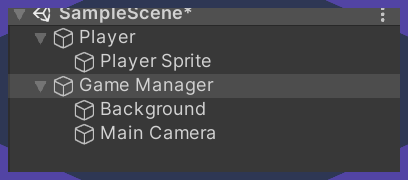
The thing is the player will actually not move its the camera which wil look like its moving
 compact knoll
wheat dragon
yes i want the camera to move
compact knoll
wheat dragon
yes i want the camera to move
i know you want the camera to move but you specifically said you had it following the player but it was too fast for the player. the reason for that is because it's not following the player, it's just moving along the x axis regardless of how fast/slow the player is
wheat dragon
oh srry i meant the camera
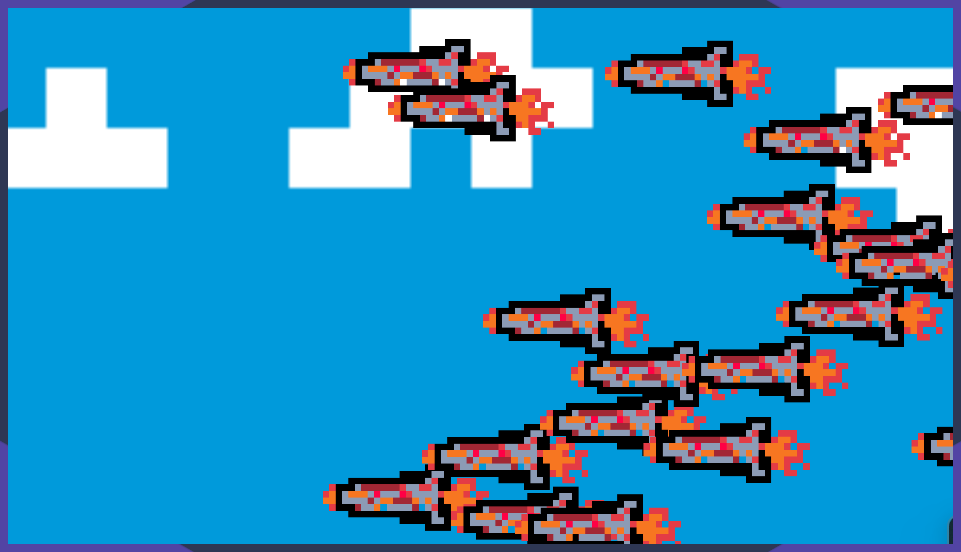
it seems everytime the camera's speed is so fast that the player goes behind
compact knoll
reduce the speed variable you've set if you want it to be slower but still work the same way
wheat dragon
i have
i have set the camera speed to 1
still
should i try it keeping at 0??
then maybe i can set a loop bg
compact knoll
0 would obviously not make it move at all
covert whale
no you need to actually get the player's position and set that to the camera's position
there are plenty of tutorials
compact knoll
but if you want it to actually follow the player, do what dis_da_moe said
wheat dragon
hmm
covert whale
wheat dragon
Umm i have another prob ;-;
#854851968446365696 for how to ask a question
wheat dragon
covert whale
<#854851968446365696> for how to ask a question
so like u guys said
the camera wont move
and thus now the obstacles wont show
but if i increase camera speed
the player goes behind the screen
covert whale
search for '2d camera following tutorial unity'
 wheat dragon
covert whale
search for '2d camera following tutorial unity'
wheat dragon
covert whale
search for '2d camera following tutorial unity'
if the camera follows player then the looping background ends
thats the prob
covert whale
sounds like the background needs to change then
because if it ends then it's not looping is it
wheat dragon
it is looping
i had set the image to loop
i also tried making a gif of the sky but it seems gif animations dont work while importing ;-;
 fleet remnant
if you are trying to make the camera "move" with the player infinitly to the right for example,
a common way to do this is actually not moving the actual camera, but just moving the background and the enemies to the left side and keeping the player and camera in the same spot, creating the illusion of moving.
wheat dragon
fleet remnant
if you are trying to make the camera "move" with the player infinitly to the rig...
if i dont move the camera.. the obstacles incoming wont display..
 warped bough
so i have this camera effect where depending on where the cursor is the camera moves but i want to lessen the effect a bit so that the camera doesnt move as far
covert whale
warped bough
so i have this camera effect where depending on where the cursor is the camera m...
can you show your code?
warped bough
yep getting it rn
covert whale
warped bough
https://gdl.space/erafebinop.cpp
when you do
varVectorMousePos = varVectorMousePos + objPlayer.transform.position;
you can instead do
varVectorMousePos = varVectorMousePos * 0.5f + objPlayer.transform.position;
and that will make it travel half as much away from the player
if you multiply it by 0 then that will make it exactly on the player
also you can do this in Update, FixedUpdate isn't as fast most of the time
and you're not doing anything related to physics
warped bough
covert whale
also you can do this in `Update`, `FixedUpdate` isn't as fast most of the time
also for some reason if i change it to Update and do 'varVectorMousePos = varVectorMousePos * 0.5f + objPlayer.transform.position;' it glitches the character
covert whale
warped bough
also for some reason if i change it to Update and do 'varVectorMousePos = varVec...
why is the character affected to where the camera is?
warped bough
covert whale
why is the character affected to where the camera is?
wait what
isnt the camera being affected by where the character is and not the other way around?
covert whale
i thought you meant that the character was moving around
so i thought the player was being moved by camera
warped bough
covert whale
i thought you meant that the character was moving around
yes the character is moving around
warped bough
warped bough
so i have this camera effect where depending on where the cursor is the camera m...
the effect im trying to get is this BUT less drasticac so that where the cursor is doesnt have as huge of an effect on where the camera is
covert whale
warped bough
https://paste.ofcode.org/33b8BQDHAeMvwPrL5pnhTDg
can you use another site for some reason i can't scroll down on this on mobile
warped bough
sure
warped bough
covert whale
can you use another site for some reason i can't scroll down on this on mobile
covert whale
warped bough
https://gdl.space/adojocamef.cpp
oh i see the mistake
i think it should be
(varVectorMousePos - objPlayer.transform.position) that you should be adding to objPlayer.transform.position
so you add the difference to the original position, and then you can multiply that difference by 0.5
warped bough
covert whale
oh i see the mistake
i think it should be
`(varVectorMousePos - objPlayer.transf...
alright lemme plug that in
warped bough
covert whale
oh i see the mistake
i think it should be
`(varVectorMousePos - objPlayer.transf...
woops
covert whale
war thunder
 warped bough
 tawny hatch
yep, the thing is now it is swapping directly, will add lerp so that it swaps one by one 🙂
warped bough
wtf it wont upload right
 covert whale
warped bough
wtf it wont upload right
covert whale
warped bough
wtf it wont upload right
streamables is a site you can upload videos to
tawny hatch
I had to scale it first, then move it down correctly in the Y axis.
The problem here was that I did not really change the localScale at all but swapped and the height did not get changed.. could print it out and used the debugger attached 🙂
warped bough
it got worse
tawny hatch
 warped bough
it got worse
warped bough
warped bough
it got worse
all i changed
 covert whale
tawny hatch
covert whale
tawny hatch
just something to improve readability, you could store squareList[j] and squareList[j+1] in variables
covert whale
warped bough
all i changed
you still need to add this to objPlayer.transform.position
because all you're getting is the difference between the mouse and player
tawny hatch
yeah will definately do that, I think it is called aggregation in software engineering, Read a book about better embedded software written by philip kopfman
warped bough
covert whale
you still need to add this to `objPlayer.transform.position`
wouldnt that change the players position?
tawny hatch
I understand that it can be cumbersome to use x,y,z, it can be changed to a class or struct
covert whale
warped bough
wouldnt that change the players position?
sorry i meant it should be like camera = playerPosition + (mouse - playerPosition) * 0.5f
so you get the distance from the mouse to the player, multiply that by a smaller than 1 number, and add it to the player
then that's what you set the camera to
warped bough
covert whale
sorry i meant it should be like `camera = playerPosition + (mouse - playerPositi...
Thank you! I've been trying to get this to work for hours
covert whale
nice
covert whale
btw for camera following it might help to put it in LateUpdate but i'm not sure
warped bough
yeah i tried it was still a bit glitchy
fixedupdate seems to be the smoothest out of all the updates
tawny hatch
Is there a simple way to put delay in your for loop?
fleet remnant
tawny hatch
Is there a simple way to put delay in your for loop?
check out unity coroutines
tawny hatch
I did but when I use them .. it simply wont work
fleet remnant
well then show the code
it shouldnt be hard, you call the coroutine method to do the for loop, and before / after each iteration do yield return new WaitForSeconds(time);
tawny hatch
yepp I did something similiar to that 1 min
@fleet remnant here you go
shall run bubble sort
when I press a virtual button
nothing is happening
nvm
I made it
fleet remnant
l ol
 still tendon
Does anyone know how Dungeion Generation works? If so, please DM so we can get to a solution for my game Triangle Bounty.
tawny hatch
here is my algorithm visualizer 🙂
Please feel free to comment
I will add more parameters such as elapsed time, maybe some sound and also another option bar with various algorithms but this is just a start.
covert whale
very cool
tawny hatch
thx bro
 spare coyote
guys why this code wont teleport my object
    {
        public GameObject teleportSpot;
        public GameObject teleportHexa;

        void OnTriggerEnter2D(Collider2D col){

            if(col.gameObject.tag == Define.HEXA_TAG){

                teleportHexa.transform.position = teleportSpot.transform.position;
                Debug.Log("Teleported");
            }
        }
    }
im getting debug but object is not teleported
covert whale
spare coyote
```public class Teleport : MonoBehaviour
{
public GameObject telepor...
what have you set the Hexa and Spot to
spare coyote
those objects are in prefab which is my lvl and it is instantiated when that level is picked it looks like this

so hexa is object which needs to be teleported to position where this Boder object is
 lean estuary
Did you assign prefabs to them or their instances on the scene?
spare coyote

everything is fine when it's instantiated
scripts transform tags i even turned on auto sync transform in project settings because i heard that someone had problems with that off
covert whale
spare coyote
can you show the inspector for what you've dragged into the script
spare coyote
even when i try to teleport to a new Vector3(1,1,1) it doesnt work
lean estuary
You need to assign them at runtime with objects you instantiate.
spare coyote

this is the object that triggers teleport
when i debug position of spot where player needs to be teleported
Debug.Log(teleportSpot.transform.position.y);```i get exact location where it needs to be teleported
covert whale
spare coyote
even when i try to teleport to a new Vector3(1,1,1) it doesnt work
do you have something else changing the position of hexa?
spare coyote
yes it moves with every click so its like puzzle game where you need to navigate hexa to ceratin place
so it changes transform with every click
maybe to try wih numerator
to wait second or 2
and then teleport
covert whale
spare coyote
yes it moves with every click so its like puzzle game where you need to navigate...
if you do hexa.transform.position = new Vector3(100,100,0) in Start does that do anything
spare coyote
shit
numerator works
why xd
i set yield to 1 second and it teleports it
cant understand
covert whale
spare coyote
cant understand
are you setting the position of anything else in trigger enter
spare coyote
no
maybe beacuse hexa is moved on top of the trigger and script cannot instantli get transform
but thats stupid then
covert whale
can you show the code that worked?
spare coyote
even when i set yield to 0.1 it works
public class Teleport : MonoBehaviour
    {
        public GameObject teleportSpot;
        public GameObject teleportHexa;

        public void OnTriggerEnter2D(Collider2D col){

            if(col.gameObject.tag == Define.HEXA_TAG){

                StartCoroutine(TeleportHex());
            }
        }

        IEnumerator TeleportHex()
        {
            yield return new WaitForSeconds (1f);
            teleportHexa.transform.position = teleportSpot.transform.position;
            Debug.Log(teleportSpot.transform.position.x);
            Debug.Log(teleportSpot.transform.position.y);
        }
    }
this one works fine
covert whale
can you show your movement script
spare coyote
        {
            float nextX = this.transform.position.x;
            float nextY = this.transform.position.y;

            switch (dr)
            {
                case DIRECT.DOWN:
                    nextY -= Define.DeltaY;
                    break;
                case DIRECT.DOWN_LEFT:
                    nextY -= Define.DeltaY / 2f;
                    nextX -= Define.DeltaX / 2f;
                    break;
                case DIRECT.DOWN_RIGHT:
                    nextY -= Define.DeltaY / 2f;
                    nextX += Define.DeltaX / 2f;
                    break;

                case DIRECT.UP:
                    nextY += Define.DeltaY;
                    break;
                case DIRECT.UP_LEFT:
                    nextY += Define.DeltaY / 2f;
                    nextX -= Define.DeltaX / 2f;
                    break;
                case DIRECT.UP_RIGHT:

                    nextY += Define.DeltaY / 2f;
                    nextX += Define.DeltaX / 2f;
                    break;
            }

            Collider2D col = Physics2D.OverlapCircle(new Vector2(nextX, nextY), 0.1f, 1 << 8);
            if (col)
            {
                if (col.tag.Contains(Define.HEXA_TAG))
                {
                    col.GetComponent<Hexagon>().TranslateHexa(dr);
                }
            }

            iTween.MoveTo(this.gameObject, iTween.Hash("x", nextX, "y", nextY, "time", 0.3f, "onComplete", "OnMoveDone", "easetype", iTween.EaseType.easeOutBack));
            iTween.ScaleTo(this.gameObject, iTween.Hash("x", Define.SCALE, "y", Define.SCALE, "time", 0.3f, "easetype", iTween.EaseType.easeOutQuart));
        }
if you don't have your movement script active does the non-coroutine teleport work
spare coyote
nope
it's ok coroutine is ok
i need coroutine beacuse i want set animation on teleport so im good
covert whale
that is really weird
still tendon
I have a particle system that goes from the bottom of the screen to the top of the screen.
The particles are appearing in scene view but not in game view
Can anyone help?
I’ve tried:
Making the Z coordinate same as camera (-10)
Changing order in layer
Making cone shape Z=0 (flatting it)
Messing with canvas settings
Checking camera culling mask
Checking Play on Awake
Note: I am making a mobile game for iOS if that matters
I can also give some info on what the particles are if you want
 dawn zenith
How do I have collision detction to a TileMap but have the player able to clip through it 🤔?
for something like coins
compact knoll
 hazy smelt
How can I make SpriteRenderer preserve the aspect of its image?
I'm not sure why it doesn't have that option
 untold anvil
I'm trying to make a dash mechanic but it keeps showing these errors:
Assets/CombatController.cs(46,13): error CS0201:Only assignment, call, increment, decrement, await, and new object expressions can be used as a statement
Assets/CombatController.cs(62,12): error CS0201: Only assignment, call, increment, decrement, await, and new object expressions can be used as a statement
Assets/CombatController.cs(11,10): warning CS0414: The field 'CombatController.isDashing' is assigned but its value is never used
the code: https://hatebin.com/akhapejqih
 hollow crown
lastKeyCode == KeyCode.A;
This should be underlined in red in your IDE
if it's not, configure it properly using the instructions in #854851968446365696
Same goes for the other place you do this
warped bough
objFirePoint.transform.rotation = Quaternion.EulerAngles(180, 0, 0);
warped bough
covert whale
if it's in euler angles then add 180 to `transform.eulerAngles`
like this?
covert whale
that would work if the original value is 0,0,0
if you want to flip it regardless of what the original is then *=
warped bough
objFirePoint.transform.rotation *= Quaternion.EulerAngles(180, 0, 0);
so like that?
covert whale
only one way to find out
warped bough
its supposed to be flipping when the sword is too the right of the player but it just flips indefinatley
covert whale
warped bough
its supposed to be flipping when the sword is too the right of the player but it...
can you show your script?
 crude hamlet
Check if it is turned already
warped bough
crude hamlet
Check if it is turned already
what do you mean? you can see that the rotation on the x-axis is 0 the whole time until it goes right of the player
crude hamlet
warped bough
what do you mean? you can see that the rotation on the x-axis is 0 the whole tim...
Now, when varFloatAngle < 90 it turns every frame by the multiplication
You could check jn that if if it already had turned, if so, don't let it turn again
 warped bough
warped bough
warped bough
my code is this still having this issue
            {

                objCharacter.transform.rotation = Quaternion.Euler(0,180,0);

                if (objCharacter.transform.rotation.x != 180)
                {
                    objFirePoint.transform.rotation *= Quaternion.EulerAngles(180, 0, 0);
                }
}
Does he just have to point either left or right?
warped bough
Yep
I just need to flip the sprite of that sword around so that it is the right side up
once the hand/sword rotates into the red it is the wrong way around
 warped bough
warped bough
warped bough
@crude hamlet I just tried that code you said before you deleted it, this is what happened
crude hamlet
Yup, It's a different part than I thought 😬
warped bough
crude hamlet
Yup, It's a different part than I thought 😬
Different part?
crude hamlet
What happens if you don't adjust the rotation of objFirePoint?
warped bough
crude hamlet
What happens if you don't adjust the rotation of objFirePoint?
if i dont adjust it, it works fine but the sword is swinging the wrong way because its upside down
crude hamlet
warped bough
Did this swing in the right direction?
warped bough
It swung correctly when the sword was to the left
Once it was to the right of the player it swung upside down
i want to flip the sword around so that the animation plays like when its to the left of the player
covert whale
you can change just the x like transform.eulerAngles = new Vector3(180, transform.eulerAngles.y, transform.eulerAngles.z)
warped bough
covert whale
you can change just the x like `transform.eulerAngles = new Vector3(180, transfo...
objFirePoint.transform.eulerAngles = new Vector3(180, transform.eulerAngles.y, transform.eulerAngles.z);
like this?
warped bough
warped bough
```objFirePoint.transform.eulerAngles = new Vector3(180, transform.eulerAngles.y...
this code makes it do this
covert whale
i'm not sure
crude hamlet
warped bough
its supposed to be flipping when the sword is too the right of the player but it...
This makes it only flip ones
bool turnedRight = false;
Update()
{
            if (varFloatAngle > 90)
            {
                objCharacter.transform.rotation = Quaternion.Euler(0,180,0);
//==============================================================================================================
If(!turnedRight){
            objFirePoint.transform.rotation *= Quaternion.EulerAngles(180, 0, 0);
turnedRight = true;
}
//==============================================================================================================
            }
            //if the hand is on the left of the screen
            else if (varFloatAngle < 90)
            {
                objCharacter.transform.rotation = Quaternion.Euler(new Vector3(0, 0, 0));
if(turnedRight){
                objFirePoint.transform.rotation /= Quaternion.Euler(180, 0, 0);
turnedRight = false;
}
            }
}

 crude hamlet
But I'm on my phone, so I have a bit of a bad overview of possible solutions
crude hamlet
covert whale
*= ?
That was your solution? [10:22]
warped bough
warped bough
warped bough
Trying *= instead of /= in this causes this to happen
covert whale
/= isn't a valid operation
warped bough
is there any other way we can SET the angle without quaternions?
crude hamlet
transform.eulerAngles
That is Vector3
warped bough
Why can't we divide but we can multiply it?
also found something odd, this SOMEWHAT fixes the issue
 crude hamlet
warped bough
Why can't we divide but we can multiply it?
crude hamlet
warped bough
Why can't we divide but we can multiply it?
Because of the 0
Then you've to divide by 1 I think. But I don't know if it will give the same output
warped bough
But doesn't anything divided by 0 = 0 (EX: 10/0 = 0 (its been put into zero groups)) or am I wrong?
covert whale
you can't divide by 0
warped bough
crude hamlet
Then you've to divide by 1 I think. But I don't know if it will give the same ou...
It won't let you do that even if there's no zeroes
hollow crown
Quaternion division is not a thing in Unity. It only has the multiplication operator
If you want to do the opposite rotation, use Inverse
warped bough
hollow crown
If you want to do the opposite rotation, use Inverse
Where would you write Inverse?
fleet remnant
hollow crown
If you want to do the opposite rotation, use Inverse
random question, how could i have a custom type react in a custom way to operators?
hollow crown
Google "custom operators C#"
fleet remnant
thanks!
warped bough
hollow crown
If you want to do the opposite rotation, use Inverse
Like this? objFirePoint.transform.rotation *= Quaternion.Inverse(Quaternion.Euler(180,0,0));
hollow crown
Give it a try 🤷
warped bough
Dang still broken
crude hamlet
When going from the bottom to the other side does the hitting work, and from the top not?
warped bough
crude hamlet
When going from the bottom to the other side does the hitting work, and from the...
like that?
 crude hamlet
At least that's what it looks like in the video now
warped bough
no matter which way you turn it the sword turns semi-3d and starts to rotate incorrectly
after a while it fixes itself but then breaks again
 crystal bluff
Anyone have any tips on making a rougelike/rougelite in unity?
 hardy geode
Hi friends. Does anyone have experience with Tilemap 2d rendering on non-default layers in editor? Everything works fine in-game, but the tilemap doesn't show up in the Scene view. it's reliable: by moving the tilemap onto/off of the (n/m, entirely my fault: I'd hidden the layer)Default layer I can make it appear/disappear in editor. It's pretty annoying, since it makes painting on the tilemap super difficult 😅
hardy geode
hardy geode
~~Hi friends. Does anyone have experience with Tilemap 2d rendering on non-defau...
(I want it on a different layer: for collisions to be with the Walls layer, not Default. I want it to be visible in editor mode too, daggummit!). Other facts: Unity 2021.1.24f1; using URP (for light2d). AFAIK the problem is older than that though; before I was using URP it still wouldn't editor-mode render tilemaps.
crystal bluff
Make sure your grid component is on the same z level as your camera's z level
Once it is- try shifting your grid's z axis up and down until it shows!
hardy geode
"same" meaning "inside the frustum"? The camera's @ z=-10 (Ortho; near .3/far 1K), the grid is @ 0
so I think I've done that 😄
crystal bluff
Hmm... that happened to me before but I can't remember how I fixed it lol
Is your tilemap gameobject on the same z level as well?
hardy geode
yes, grid @z=0, tilemap @z=0. Because changing Layer makes it visible, I'd guess this isn't a z issue, though of course I amn't sure.
crystal bluff
hardy geode
yes, grid @z=0, tilemap @z=0. Because changing Layer makes it visible, I'd *gues...
yeah..

 hardy geode
they aren't. Changing it doesn't change anything. I've changed it back to Default/Walls. I don't want them to be on the same layer if I can avoid it though; sounds like you agree 😄
crystal bluff
Does it work on the default layer?
hardy geode
yep, though of course that breaks my beau~tiful collision scheme.
hardy geode
So I was curious whether anyone else had experience with this, since it seems like something very editor-mode, very fixable, but very annoying 😊
crystal bluff
Yeah
crystal bluff
I usually fix stuff by
messing with values
throwing my computer out the window
messing with more stuff
trying to research the problem online
coming to the realization that I am dumb and can't code to save my life xD
taking a break
starting over with trying to fix it
crystal bluff
hardy geode
So I was curious whether anyone else had experience with this, since it seems li...
Sounds very annoying :(
hardy geode
That's why I'm here -- you're my "research problem online" step
crystal bluff
Yup xD
hardy geode
(obvs after the Googs failed me) -- my guess now is either break @ head (unity 2021.1.24f), or nobody puts their tilemaps off of the default layer }:-( )
crystal bluff
hardy geode
... and in-game, where it's visible (no other changes)
Your game's lighting looks cool!
hardy geode
It's URP with default light2d (just edited upthread to comment)
(, and of course kenney sokoban tileset, plus a bunch of primitives for My Own Nefarious Purposes)
crystal bluff
I tried to change my project to URP but I couldn't get mine to work
crystal bluff
hardy geode
(, and of course kenney sokoban tileset, plus a bunch of primitives for My Own N...
xD
hardy geode
well honestly "same" wrt it doesn't work, clearly, but I can help you debug if you're still trying 😄
crystal bluff
Ah thanks!
hardy geode
hardy geode
~~Hi friends. Does anyone have experience with Tilemap 2d rendering on non-defau...
One last wrinkle: I just discovered it's specific to the Walls layer (layer 7 if that matters).
If Tilemap @ layer Floors (6), it shows in editor.
Tilemap @ Walls, child shadowcasters @ UI (5; totally acceptable!) does NOT show in editor (not acceptable!).
So perhaps this is some kind of tainted tilemap render cache thing? I have tried restarting unity, perhaps I have to do something more drastic?
(camera culling mask has every layer, including Walls, selected. Remember, it does work in-game!)
covert whale
it's not really code so one of the other channels would be better
hardy geode
covert whale
it's not really code so one of the other channels would be better
Happy to shop it around, can you help by suggesting where? Thank you!
covert whale
hardy geode
Happy to shop it around, can you help by suggesting where? Thank you!
i think #archived-lighting or if that's not active then#💻┃unity-talk
hardy geode
Don't worry, I'm a complete idiot: At some point I hid the layer (a feature I did not even know existed). Thanks all!
 upper sinew
Hey guys just wondering if anyone can help me with this issue, My player keeps on falling through the left ground piece on the second platform without me pressing the drop button intermittently (not all the time) what could be the issue
I followed this tutorial https://www.youtube.com/watch?v=IlLwTZw-FPU&ab_channel=TopsideStudios

Be sure to subscribe if you enjoyed!
This tutorial covers how to set up one way platforms in Unity 2D along with how to add a script to allow the player to drop down the platforms. Time Stamps Below!
0:00 - Intro
0:05 - Example design
0:33 - Adding the platform effector
1:34 - Coding the drop down
3:56 - Updating the inspector
4:06 - Quick note...
hardy geode
post/host code? Could be anything!
 ancient path
upper sinew
Hey guys just wondering if anyone can help me with this issue, My player keeps ...
ancient path
upper sinew
Hey guys just wondering if anyone can help me with this issue, My player keeps ...
Can you post the effector
Component
ancient path
upper sinew
<@!556637671863222274> do you mean the code?
You aren’t using efectors?
upper sinew
@ancient path yea i am
upper sinew
@ancient path
 upper sinew
I pressed the down key once from the top platform
ancient path

In this easy Unity and C# tutorial I will show you how to make one way collision platforms using the platform effector 2D !
By the end of the video you'll have a character that can jump on a platform from below and also fall down from it !
---------------------------------------------------------------------------------------------------------...
if you try this tutorial?
upper sinew
Ok i will look into this one thanks @ancient path
ancient path
come back if it doesn't work
upper sinew
@ancient path the issue still persists
 little jay
Can anyone tell me the secret of actually good 2D Movement? It feels impossible to achieve. Does someone maybe have a link of a detailed Tutorial?
compact knoll
depends on your definition of good. If you like nice snappy movement, you can always set the rb2d velocity directly. If you prefer to use AddForce and don't mind a tiny amount of acceleration/deceleration then I can give you the numbers I use for mass, linear drag, and the force to multiply your movement vector with. It ends up having movement feel similar to The Binding of Isaac (which was what I was going for)
oh it also depends on if you want top down or side scroller movement
little jay
Ok
 snow willow
little jay
Can anyone tell me the secret of actually good 2D Movement? It feels impossible ...
snow willow
little jay
Can anyone tell me the secret of actually good 2D Movement? It feels impossible ...
Almost all "beginner" character controllers are much too simple to feel "good". If you want something that feels really fluid you need two main things:
- really good animations
- A crapton of playtesting, tweaking, a good understanding of physics, and a willingness to get your hands dirty in the code with lots of edge cases like maximum velocity, handling slopes well, managing the players' momentum, etc..
Of course it's all really going to come down to the "feel" that you're trying to achieve.
 lime field
snow willow
Almost all "beginner" character controllers are much too simple to feel "good". ...
lime field
snow willow
Almost all "beginner" character controllers are much too simple to feel "good". ...
okay, are there any scripts that could help tho?
 solar thicket
little jay
Can anyone tell me the secret of actually good 2D Movement? It feels impossible ...
solar thicket
little jay
Can anyone tell me the secret of actually good 2D Movement? It feels impossible ...
this thread has a lot of the tricks you may want to use https://twitter.com/MaddyThorson/status/1238338574220546049
warped bough
How could I apply velocity to one object in the direction of another?
Like this

I want the black dot to move toward the yellow dot and slowly slow down
solar thicket
warped bough
How could I apply velocity to one object in the direction of another?
maybe this will help https://docs.unity3d.com/Manual/VectorCookbook.html
you can get the direction by subtracting the vectors, then move the thing however you want in that direction
warped bough
solar thicket
maybe this will help https://docs.unity3d.com/Manual/VectorCookbook.html
you ca...
Thanks!
hollow crown
Unofficial Github Resources
Sprite Auditor
https://github.com/badawe/SpriteAuditor
hollow crown
hollow crown
**Unofficial Github Resources**
Sprite Auditor
<https://github.com/badawe/Sprite...
Documentation
Pixel Perfect: https://docs.unity3d.com/Packages/com.unity.2d.pixel-perfect@latest
2D Animation: https://docs.unity3d.com/Packages/com.unity.2d.animation@latest
Vector Graphics: https://docs.unity3d.com/Packages/com.unity.vectorgraphics@latest
2D Lighting: https://docs.unity3d.com/Packages/com.unity.render-pipelines.universal@latest/index.html?subfolder=/manual/Lights-2D-intro.html
2D Sprite Shape: https://docs.unity3d.com/Packages/com.unity.2d.spriteshape@latest/index.html?preview=1
2D PSD Importer https://docs.unity3d.com/Packages/com.unity.2d.psdimporter@latest/index.html?preview=1
2D IK: https://docs.unity3d.com/Packages/com.unity.2d.ik@latest/index.html?preview=1
Samples
Lost Crypt: https://assetstore.unity.com/packages/essentials/tutorial-projects/lost-crypt-2d-sample-project-158673
Blogs
Lost Crypt: https://blogs.unity3d.com/2020/02/06/behind-the-lost-crypt-art-in-our-new-2d-sample-project/
Pixel Perfect: Setup for 8-bit games https://blogs.unity3d.com/2019/03/13/2d-pixel-perfect-how-to-set-up-your-unity-project-for-retro-8-bits-games/
Resources
2D game art, animation, and lighting for artists: https://resources.unity.com/games/2d-game-art-animation-lighting-for-artists-ebook
Forums
2D: https://forum.unity.com/forums/2d.53/
Pixel Perfect: https://forum.unity.com/threads/pixel-perfect-preview-package.533433/
2D Animation: https://forum.unity.com/threads/2d-animation-preview-packages.521778/
Vector Graphics https://forum.unity.com/threads/vector-graphics-preview-package.529845/
2D Lighting: https://forum.unity.com/threads/experimental-2d-renderer-in-lwrp.683623
hollow crown
hollow crown
**Documentation**
Pixel Perfect: <https://docs.unity3d.com/Packages/com.unity.2d...
covert whale
cool channel
 topaz dew
how can i move the player behind the tree? i tried changing the sorting layer and layer order but it doesn't work

 hardy brook
topaz dew
how can i move the player behind the tree? i tried changing the sorting layer an...
hardy brook
topaz dew
how can i move the player behind the tree? i tried changing the sorting layer an...
I would assume a rigidBody2D radius could prevent the player from appearing "under" the tree.
 abstract olive
topaz dew
how can i move the player behind the tree? i tried changing the sorting layer an...
abstract olive
topaz dew
how can i move the player behind the tree? i tried changing the sorting layer an...
Watch this tutorial:
https://www.youtube.com/watch?v=q-r1YJzj28M
 muted pilot
hi can someone help me, im trying to use a tilemap but for some reason it always seems to be really low resolution, its meant to be 16 x 16 but somehow its losing quality somewhere ty
 elder minnow
@muted pilot what are the compression and filtering mode of your sprites? That could be the issue
You need to set the filtering mode to nearest point and remove the compression to see if it changes anything
muted pilot
where would i change that
elder minnow
If you select your image in the project assets window, you can then edit its import settings in the inspector window.
 sharp sandal
Hi I have problem where i cant make a platform only one way so that the player can jump up onto the platform. I watched multiple videos and they all said the same thing and i tried it and it didnt work. also my player has a 2d boxcollider and rigid collider if that helps.
covert whale
sharp sandal
Hi I have problem where i cant make a platform only one way so that the player c...
so what have you tried and what doesn't work? can you show your code and explain more
 random bluff
Hey there, not really sure where to put this but I'm stumped. First time using unity, I'm trying to get a ship wheel to appear on a tile palette but it's coming out very strangly

So each split is 128 x 128 pixels
End result isn't splitting nicely though on the tile palette

Any ideas?
 covert whale
you may need to set the pixels per unit
it seems like the sprite is too big for one unit
covert whale
i think changing the filter mode to point and compression to none might help
random bluff
Damn, didn't seem to work
I guess I need to set a standard that I can be consistent with
I thought I had though
My other art is 32 x 32 and 128 x 64
Time to read up on PPU
Thanks for the help!
Got it, PPU needed to be 128. Thanks for helping me think it through dis_da_moe
got a recommendation for a tool I can run a PNG through to add an alpha channel?

The whole transparency thing isn't going well right now
covert whale
the image looks transparent in the sprite editor
is it that you're painting on the same tilemap?
@random bluff ^
random bluff
Sorry, on the same tilemap?
covert whale
random bluff
Sorry, on the same tilemap?
as in are you placing the wheel tile on the same tilemap as the background tiles
random bluff
Yes
covert whale
because if so then it won't paint the tile on top but replace it
covert whale
you'd need to make a new tilemap and child it to the same grid
random bluff
That'd be it
Thanks, I'll have to crate a new one I guess 🙂
I should really watch a full tutorial on graphics. I was hoping get to focus mostly on the code but that doesn't look like it'll pay off if I'm this stuck already
Thanks for all your help, I'm off to youtube to see what's around
 still tendon
how to create simple shapes? rects and circles i know. but how to create different number or edges and points?
 ruby hinge
 random bluff
still tendon
how to create simple shapes? rects and circles i know. but how to create differe...
random bluff
still tendon
how to create simple shapes? rects and circles i know. but how to create differe...
In vector mode?
still tendon
random bluff
In vector mode?
Im not sure what vector mode is. But I suppose
random bluff
Can you give me some more information about what you're trying to do?
still tendon
Thanks for guiding me in the right direction, ill figure out how to make triangles for a lib that works with vectors
Im trying to create a triangle shape
And change where the points are
Rather, im trying to create a polygon shape sprite.
Just a plane blank sprite for different shapes. Because these come in handy for procreation generation later on.
I think I got it tho. I just found a very cool unity lib. I'll have to learn how to use it later.
random bluff
I think you need to add a polygon collider
It should let you select the shape
But if you've found a lib that works that's great!
 frozen osprey
Hello! New here, hoping this is the right channel for this. I need some advice on how to do the render order of sprites and tiles in my game.
I am making a 2D game that is top down (Like Zelda Link to the Past)
I need:
- Sprites that sort based on their position in the world (If character A is south of character B, A needs to show up in front of B.)
- Tilemaps with multiple layers. Depending on the layer, the tiles should always show up in front of the sprites, or always show up behind the sprites. For example, a layer of floor tiles. Always below characters. A layer of tiles for tops of doorways. Always above characters.
As far as 1) is concerned, I currently understand there are three ways to do this. The simplest way would be to just change Z depth as sprites move north or south. Unfortunately this fails because I also need Tilemaps to behave and for my sprites not to start disappearing below or above them. The second way is "Custom Axis sort mode" so that sprites sort based on their Y position. This sounds ideal, but I can't use it, because I need to be able to move sprites up and down (think: jumping, falling from the ceiling) without changing their sort order.
The third way is to update the renderer's sortingOrder every frame. This way I can fully control it and not have the issue that moving sprites up or down breaks it, like done here: https://breadcrumbsinteractive.com/two-unity-tricks-isometric-games/
This is great, but it has a problem. I can no longer use sortingOrder for its original purpose, meaning that I now have to create a ton of sorting layers.
Ultimately, here's my question: Am I really forced to set renderer.sortingOrder every frame just to achieve the behavior I need?
It feels like I'm doing something wrong because of how many Sorting Layers I now need to create to compensate for it.
if I found myself typing a list that looked like this in any other circumstance I'd assume I'm doing something very wrong

Sorry for the long post 😅
covert whale
frozen osprey
Hello! New here, hoping this is the right channel for this. I need some advice o...
the way rendering works is that unity prioritises layers > order in layer > z position
so a way you could do this is to write a script to modify the z position based on the y position for objects that you want their order to change in runtime
i haven't tried this myself but i'm taking this from here https://www.gamedeveloper.com/programming/what-i-learned-from-trying-to-make-an-isometric-game-in-unity
which i know is iso but i think some aspects still apply
Game Developer
Making an isometric game is far from being an easy task, at least if you're trying to keep your code organized in case you need to support new features. After o
frozen osprey
Am I understanding that Z position is the most important factor? I read that in a comment while searching online for answers earlier, but it seemed to be a lie when I tested.
My character would disappear behind the tilemap despite being physically in front of it
covert whale
according to this diagram here on this blog no z position is the least important
 frozen osprey
Oh man
covert whale
sorting layer is the most important, then order in layer, then if they're all equal, z position is used
so you can use sorting layers for tilemaps, and then you can use the z position for changing in runtime
frozen osprey
I think that makes sense
I'll try that and return with results later, thank you
I guess I just have to make sure the camera is far back enough that it won't clip behind it if you walk down too far
and/or change z very subtly
Actually while I'm here, one more quick question: Is it possible to change the order in layer or sorting layer of a given layer of a tilemap? Or do I just have to make one tilemap per layer
Since they are 3D I thought it would be handy to just put all the tile layers onto one tilemap at different Z coords
covert whale
frozen osprey
Actually while I'm here, one more quick question: Is it possible to change the o...
if you want the tiles to always be rendered separately you'd need to put them on different tilemaps
frozen osprey
frozen osprey
I'll try that and return with results later, thank you
Yep it works! Hugely relieved, this is very useful
 sudden fox
void shoot()
    {
      ShootingPoint.rotation = rhand.transform.rotation;
      GameObject bulletins = Instantiate(Bullet,ShootingPoint.position,ShootingPoint.rotation);
      bulletins.GetComponent<Rigidbody2D>().AddForce(bulletins.transform.right * bulletSpeed);
      Destroy(bulletins,8);
    }
  ``` Shooting Point is the point right in front of the gun's front sight. Rhand is the right hand of the ragdoll. I am trying to make the ragdoll shoot while aiming towards the mouse. The shooting part works fine but the aim is not perfect. Everytime i shoot, it is a bit off from the cursor. This is my ragdoll hand aim script.
```cs
void Update()
  {
    Vector3 playerpos = new Vector3(cam.ScreenToWorldPoint(Input.mousePosition).x, cam.ScreenToWorldPoint(Input.mousePosition).y, 0);
    Vector3 difference = playerpos - transform.position;
    float rotationZ = Mathf.Atan2(difference.x, -difference.y) * Mathf.Rad2Deg;
    if (Input.GetKey(mousebutton))
    {
      rb.MoveRotation(Mathf.LerpAngle(rb.rotation, rotationZ - 90f, speed * Time.fixedDeltaTime));
    }
  }
 lament spire
I have this black container that I want sprites to only show inside it, but as you can see when I add the mask logic the log is only visible where teh sprite is, you guys know how I can achieve what I want

a better view of my setup
 random bluff
I swore I saw this questions asked in coding :P Remember to update here if it gets answered
 hard nimbus
hey I have a question: I have a sprite (ground) which I want to tile (they can be of different heights)
as you can see, the upper part of the sprite gets removed since I reduced the "height" property. Unfortunately, I want it to start removing from the bottom and not the top


I already tried entering a negative number into the height-field but that didn't change anything
rotating or flipping the sprite also didn't work
Is there a way for calculating height from the top starting?
elder minnow
Have you tried editing your pivot position in the sprite editor?
I forgot how this behaves with the height but you should give it a shot, try setting it to the center top or center bottom and see if this changes anything.
hard nimbus
elder minnow
Have you tried editing your pivot position in the sprite editor?
yes
didn't work though
I'm not much experienced with tiles and tilemaps
 olive mesa
I'm using the Sprite Shape Controller, and the collider is all wacky

Can I change/fix this?
Nevermind, found a fix
 split portal
Hello. My 2D light isn't effecting my spriteshapes. Do 2D lights not work with spriteshapes?
it effects normal primitive sprites ok
 solemn latch
Are you using a lit shader on it?
hard nimbus
hey can somebody please help me with my issue, I still didn't find a solution
solemn latch
Use a nine sliced sprite with no bottom?
 fathom bison
when i make bones in the 2d sprite editor, i apply to changes and everything is ok. but then when i put that sprite into the game (drag and drop from assets) the bones do not show up, even in the hierarchy. please @ me
fathom bison
wait no, just needed to add a sprite skin
 lyric pulsar
I'm making a simple turn based strategy/tactics game with isometric maps between 100 and 900 tiles big. Is there any benefit to me using Unity Tilemaps?
i'm finding the lack of example code for Tilemap scripting API to be annoying (i'm not using the Tile Palette or rule tiles and it seems like thats 99% of the resources out there for understanding how to use Tilemaps). I'm not even sure exactly if i should be instantiating a scriptable object that implements a BaseTile class for every tile or attaching a tile prefab gameobject to every tile instead and hoping it magically appears (it says it spawn when the scene starts but I would be generating the tilemap through scripting after the scene starts...)
It seems like it would be a lot easier to just not use Tilemaps and instantiate some Tile prefab gameobjects in the right place with basic isometric math, or perhaps using an isometric grid to get cell=>world positions and then instantiating my own Tile GameObjects with that.
When i search for help with Tilemap scripting I mostly find people complaining that theres no resources out there to understand this stuff and I can't seem to actually find anything useful -- its quite frustrating
 craggy copper
Hello, soo i'm making a rpg game that it's topdown view and i want to make the mechanics for my enemy and player.
I want my player and enemy to attack each other by throwing and energy ball, do you guys know any good tutorials??
I'll send an image of my game after this message

i'm going to switch my enemy sprites after i'm done with the mechanics
crystal bluff
Does anyone know if you can change the size of an individual tile in a tileset?
 coral tusk
Hello, I am trying to code a dart to point in the direction it is moving when thrown.
I am trying to use rb.AddTorque().
I have been trying to search and do this but I have had no luck, does anyone have any ideas?
hard nimbus
hard nimbus
hey I have a question: I have a sprite (ground) which I want to tile (they can b...
hey I'm still having this problem can somebody help me please?
 soft pivot
Anybody have experience working with both sprite shapes and 2D lights? Casting shadows on sprite shapes seems to ignore edges for some reason
 late latch
any ideas why I'm getting this brown line in runtime for my tiles?

tileset is set to Point (no filter)
late latch
fixed it with pixel perfect camera
 alpine kelp
Annoying Zoom After Build And Run
 burnt saddle
alpine kelp
Annoying Zoom After Build And Run
burnt saddle
alpine kelp
Annoying Zoom After Build And Run
Because your canvas scal model is not seted properly
Select Canvas > goto Canvas Scaler component > UI scale mode > select "Scal with screen size"
Enter your the resolution set in your game mode
Then build and run
 quiet jolt
what is this pink blob and how do I get rid of it https://gyazo.com/6843ce770f49a46c005d508736155bbd
 covert whale
quiet jolt
what is this pink blob and how do I get rid of it https://gyazo.com/6843ce770f49...
covert whale
quiet jolt
what is this pink blob and how do I get rid of it https://gyazo.com/6843ce770f49...
i think that means that some sprites are missing
it can happen if you rename or remove sprites
quiet jolt
I happened on one tilemap so a made a new one and it still was there until I deleted the old one
 granite yoke
What do you guys recommend for creating tile art?
 lapis flume
aseprite!
 keen knoll
Is the URP pixel perfect camera broken for anyone when using upscale render texture in 2021.2.0?
split portal
Are 2D lights much more performant than 3D lights?
are 3d lights still active in 2d renderer projects....seems like only when a 2D light is active that it switches
 frail trench
yo im just testing out custom tilesheets, each small square is 16x16 how do i change my grid/tilepalette so i can use each different colour square for 1 tile?
 split portal
frail trench
yo im just testing out custom tilesheets, each small square is 16x16 how do i ch...
split portal
frail trench
yo im just testing out custom tilesheets, each small square is 16x16 how do i ch...
did you slice it in the sprite editor?
 copper vortex
Is there anyway to use text as game object and have 2d collider on that object?
 slim fern
hey i need some help
as you can see there are too little pixels
is there a way to increase thhem?
 strong osprey
hello, can someone flip this art i made? its for a sprite.
p.s. also pls @ me when you do it so i know, because i dont check this much
 abstract olive
strong osprey
hello, can someone flip this art i made? its for a sprite.
abstract olive
strong osprey
hello, can someone flip this art i made? its for a sprite.
If you've made it, why can't you flip it?
strong osprey
The website I used doesn’t let me do it
abstract olive
You can also flip it on the SpriteRenderer that it's on.
abstract olive
So you've said
strong osprey
So I can attach it to the main sprite
If someone sends me that, I can attach it to the sprite
abstract olive
Get a proper tool and learn to use it.
strong osprey
Ok I guess
abstract olive
There's plenty of free ones, such as Piskel, or Gimp.
alpine kelp
burnt saddle
Select Canvas > goto Canvas Scaler component > UI scale mode > select "Scal with...
Thanks @burnt saddle
 strange quest
Hey guys, I searched for my issue but it seems to not have an answer.
My tile palette stretched the cells upwards. So now they are rectangles instead of squares. Any help would be great. Spent about an hour trying to figure it out and nothing seems to fix it.

I might be sleeping by the time someone answers. Thank you.
abstract olive
Its been a while, but I recall there being a Grid component with a scale value. Check that it's uniform?
solemn latch
I was thinking the same thing.
 potent idol
Hey all, was wondering what is the best way to create a 2d skybox, i am new and will be my first one
strange quest
Thanks
So far everything is uniformed. Its kind of weird since it just came out of nowhere, randomly just changed the cells... And nothing changed. One fix was to change the tilemap renderer to individual and manual so that next time it doesn't change anything on its own. I went ahead and redid my tile palette and started working again... I'll let you guys know if it happens again.
Maybe a specific sprite added to the tile palette made it change? I guess I'll find out if it does it again.
Maybe this is a rare occasion type of deal.
 paper jetty
I really like the 2d animation tools in Unity also the lighting. This is a work in progress. https://media.discordapp.net/attachments/430507619606724608/903423153483698246/Ailith_test8.gif

I used Thomas Brush's 2d gamekit as a base.
 light elk
paper jetty
I really like the 2d animation tools in Unity also the lighting. This is a work ...
light elk
paper jetty
I really like the 2d animation tools in Unity also the lighting. This is a work ...
nice character
nice to see something different than regular pixel art games 101 😄
alpine kelp
 alpine kelp
covert whale
did it work without the composite?
alpine kelp
covert whale
did it work without the composite?
player stuck on the floor without using composite col
covert whale
alpine kelp
player stuck on the floor without using composite col
this is probably something with your jumping code
alpine kelp
 covert whale
alpine kelp
covert whale
alpine kelp
this isn't going to run because you've put update and not Update
alpine kelp
covert whale
this isn't going to run because you've put `update` and not `Update`
what?
covert whale
alpine kelp
what?
update is not called by unity, while Update is
alpine kelp
covert whale
`update` is not called by unity, while `Update` is
in image it looks like update but it is Update
covert whale
are you sure?
covert whale
it seems like you're only moving left and right which is in fixed update
can you put a debug.log in update to make sure that it's called
alpine kelp
 covert whale
alpine kelp
covert whale
alpine kelp
where do you set isJumping to true
because currently it doesn't seem like you do that, so your first if statement won't run
alpine kelp
 covert whale
alpine kelp
covert whale
alpine kelp
if you're going to change your code it would be helpful to share the updated one
can you send your entire script in one of the sites in #854851968446365696
don't send in #854851968446365696 , send the code here, through one of the sites that are listed in #854851968446365696
alpine kelp
covert whale
alpine kelp
https://gdl.space/secuhepado.cpp
can you put a debug.log inside the first if statement to see if it runs
 covert whale
alpine kelp
Still Working
covert whale
alpine kelp
Still Working
have you tried to increase the jumpPower
alpine kelp
😃
 covert whale
i'm not sure what the issue is
split portal
How do i make my spriteshape be affected by 2D Lights? Do i need to make a special material?
 covert whale
split portal
How do i make my spriteshape be affected by 2D Lights? Do i need to make a speci...
covert whale
split portal
How do i make my spriteshape be affected by 2D Lights? Do i need to make a speci...
are you using URP
split portal
covert whale
are you using URP
yes. The lights affect the primitive sprites but nothing else
covert whale
i think you need to change the material from default to lit
split portal
covert whale
i think you need to change the material from default to lit
ok. I will try that. just got boot the project up
split portal
covert whale
i think you need to change the material from default to lit
That worked . thank you!
 sturdy oriole
For some reason I'm getting this error on my rigged sprites. This only happens when the platform is on iOS, any other platform the sprites are rigged like normal

 proud python
why isnt the 2d option showing up?
 covert whale
proud python
why isnt the 2d option showing up?
covert whale
proud python
why isnt the 2d option showing up?
make sure 2d is the default in settings and if that fails then restart unity
proud python
i used the 2d platformer microgame as the base
covert whale
same thing happened to me and it worked when i restarted unity
 desert cargo
I've just imported "2D animation" package to my project and cannot see the "skinning editor" option in the sprite editor. What am I doing wrong?
Oh... I need to import using PSB apparently. That's so annoying!
 reef turret
what Package I need for Rule Tile? Because I dont see this at the Buttons to create one...
 terse jolt
hello people, i have a simple problem that i can't see what may cause it. Added to .pngs images in Assets/NewFolder but cant assign them to sprite render. Only the default 5 sprites
reef turret
click on the texture @terse jolt and then change the Texture Type
 still tendon
How can i make this blend into the backround? (im new and just started)


i want it to look like that
abstract olive
You need to use multiple tilemaps, stacked on top of each other.
still tendon
Normally there should be a black pixel behind the white one
 safe thicket
is there a way for one 2D light to ignore a Shadow Chaster 2D?
i tried putting it in different sorting layers but the effect i want isn't coming out
 harsh vault
anyone has this problem like me ? sprite atlas (ver1) in unity 2021.2 not working, i just tried to pack 3 random image to see how it work and click pack preview and nothing happens
is there good alternative solution for packing sprite atlas ?
solemn latch
@desert cargo you don't need the psb importer to access the sprite editor, hut the imported image has to be set to sprite type.
desert cargo
solemn latch
<@105859971064852480> you don't need the psb importer to access the sprite edito...
Right yeah I've done some more experimentation. The issue is that the SVG importer doesn't support sprite editor.
solemn latch
@desert cargoI know there was at least one version of the svg importer that could access the sprite editor.

You need to have sprite as the asset type
desert cargo
solemn latch
<@!105859971064852480>I know there was at least one version of the svg importer ...
The skinned sprite editor?
I can open the sprite editor, but it doesn't let me give it a skeleton
solemn latch
Hm. I've not used the svg importer much so not sure; you SHOULD be able to add skinning info to any sprite with 'multiple' as the mode
You might need to convert it separately, or maybe write a script to fiddle with the import settings.
 celest surge
@solemn latch thanks it workt
desert cargo
solemn latch
Hm. I've not used the svg importer much so not sure; you SHOULD be able to add s...
FYI I since asked in the forum thread and they disabled the feature because changing import options would regenerate the mesh and break skinning.
 untold ledge
hi! I'm a programmer and I took 1 semester of game programming a couple years ago so I'm /sorta/ familiar with unity. I have something I wanna program that I assume should be possible in it but I'm not sure, so it would be nice if you guys could point me in the direction of what tools or functionality I should be looking into!
Basically I want to make a dress up "game" where I'd draw all the assets and have a UI that toggles which ones are visible, and the color. However I also want to create sliders that can shift like, the length of sleeves, the angle of a skirt and things like that. I'm thinking of several ways I could approach that, depending on what I can use with unity.
My first idea is to treat each article as a sprite that can be deformed in certain ways, but I'm not sure how precisely I would be able to control all of the shapes. So that the outline doesnt get warped to be too thick in some spots and too thin in others, I think i will have to make most of the articles solid blocks of color, and add an outline effect so that the outline is the same, instead of stretching and shrinking an image that already has an outline drawn.
But what would be more precise for manipulation, I'm thinking instead if theres some kind of graphing ability, where I can create functions that graph to each shape I need, and then are "filled" with a solid color. Then I can figure out how the function should be changed when the user selects a point on a slider? But unless such a tool also has something where you can just. draw points and set the "function" from that, it would be a lot more complicated to figure out how to graph all the shapes I need rather than just drawing them.
If something like that exists, I can draw 2 shapes for each slider being on each extreme, and scale the point to any point in between, but that might be how a sprite manipulator would work.
Do either of these approaches sound viable? Does anyone know what specifically I would be able to use?
solemn latch
@untold ledge for moderate deformation, yiu can often get away with warping an outlined sprite. As you say, for more extreme stuff adding a dynamic outline can be better.
For dynamically combining shapes, you could look into using SDF functions in a shader, or you could dynamically create a mesh or a sprite shape. You could also pre-create meshes with multiple blendshapes/morphs and blend between those at runtime.
You could also use bones on a rigged sprite to approximate morphs.
Tldr you have LOTS of options.
untold ledge
thank you! when you see blend between them at runtime do you mean what I was thinking where like I have points on different pictures and it finds a point in between?
using mesh seems like what I was thinking, thank you for all the ideas!
still tendon
Does anyone know a good parallax background tutorial? Looking for one for a Sidescroller, meaning it should only move along the x axis
 topaz echo
When making a platformer, do you make the platforms with the tilemap system?
covert whale
topaz echo
When making a platformer, do you make the platforms with the tilemap system?
you can do that, but you can only get as precise as the size of the tiles allows
and if you want moving platforms then using a tilemap complicates that a lot
topaz echo
So whats the regular way of doing it?
covert whale
i'm not sure, but what i'd do is to have the environment made with tiles, and then any platforms as standard prefabs
very much depends on how precise it needs to be, how fast you want to be able to make the platforms, the general look of everything etc
 sullen wadi


 waxen harness
im pretty sure that just isnt alligned (or you are using perspective and isometric together?)
also, thats blender, not unity 🙂
 brazen spoke
Hello! I have Sprite Shape and I'm trying to select all of its points, in order to change their height. However, it only changes the height of one of the points, even though I have all points selected. I'm using Unity 2020.3.21f1. Is this a bug?

 olive flax
How do you get rid of those stupid lines?
solemn latch
olive flax
How do you get rid of those stupid lines?
What stupid lines?
desert cargo
untold ledge
hi! I'm a programmer and I took 1 semester of game programming a couple years ag...
You can do this with 2D animation skinned sprites and the sprite resolver
You can add a bone to each section of the sprite and switch out the sprite for that bone, then stretch the bones to do different sizing
(haven't gone all the way through with this myself, but I was playing with it the other day)
 amber idol
Who has a tutorial they recommend about setting up a tilemap?
NOTE : I don't have any sprites for said tilemap atm so I will have to make them myself or know where to find one online
olive flax
solemn latch
What stupid lines?
those random lines between tilemap sprites
olive flax
amber idol
Who has a tutorial they recommend about setting up a tilemap?
the one from Brackeys is a good one
covert whale
olive flax
those random lines between tilemap sprites
random white lines? or the grid itself? could you show an image of the issue
still tendon
So which is it? 😩 (Original size: 2160x5520)
Obviously considering turning this to POT.
 topaz echo
Im using the IK manager 2d but is there a way to reduce the amount of effected bones to 2? My characters arm only has 2 so its effecting the back bone as well.
 wise stump
hi, has anyone good proficiency making pixel art games? i'm trying to use the pixel perfetct camera but i'm having a hard time getting good results
as you can see it looks off in the game view. There is a change so it is working but something must be off. Everything is 8 PixelsPerUnit

ok, i solved it by pixel pivoting the sprites
 gloomy dawn
How I can make The camera follow my player?
covert whale
gloomy dawn
How I can make The camera follow my player?
have you tried searching for this?
gloomy dawn
Yes but I didn't found anything
covert whale
i googled your question and added unity to the end and it came up with quite a few results
gloomy dawn
Ok
safe thicket
ShadowCaster 2D is not casting shadows, how can I go about fixing?
 tardy crater
Hello, i want to make a 2d animated tile but in all the tutorials i found it says to download the 2d tilemap extras but when i go into the package manager i can't find it, anyone got another way to do this ?
light elk
tardy crater
Hello, i want to make a 2d animated tile but in all the tutorials i found it say...
enable preview packages
tardy crater
i now managed to download it but can't use it because it says that it doesn't contain a definition for "IsSelected" and no accessible extension method "IsSelected"
solemn latch
still tendon
So which is it? 😩 (Original size: 2160x5520)
Obviously considering turning this...
It needs to be both.
Crunch format needs dimensions that are a power of two AND divisible by four.
solemn latch
topaz echo
Im using the IK manager 2d but is there a way to reduce the amount of effected b...
Which IK are you using? Limb IK has a fixed number, FABRIK and CCD let you set the number.
topaz echo
Im using Limb IK, not sure what the other two are. Turns out i dont really need IK for my characters arms anyway so its fine as it is.

 bronze cypress
i need help with wall that goes up and down in 2d
solemn latch
@bronze cypress can you be more specific?
bronze cypress
can discord call you to explain
solemn latch
Don't send unsolicited video calls; nobody wants that.
bronze cypress
okay then
soo
i want a wall in my platfromer game to go up and down as an obstacle, i already have a 2d box collider setup on the wall i just want it to go up and down.
So your would have to wait for the wall to go down to pass thorugh
solemn latch
You can pretty much animate it any way you want; you can use an animator, or use a simple script to control the movement, or use physics with a rigidbody.
There's no really wrong answer
 still tendon
solemn latch
It needs to be both.
still tendon
solemn latch
It needs to be both.
welp I changed the dimensions of the original file, as per usual, and got the benefits I needed
covert whale
bronze cypress
this is the wall
you can do an animation and loop that (it's a setting on the clip) or you can use a tweening library like DoTween (since this is pretty simple)
here's a video on it
https://youtu.be/Y8cv-rF5j6c

DOTween is the very first thing I install upon creating a new project. Animate your position, rotation and scale in a single line of code, with all the customization you could hope for... and that's only scratching the surface.
For the full documentation: http://dotween.demigiant.com/documentation.php
🔔 SUBSCRIBE: https://bit.ly/3eqG...
light elk
covert whale
you can do an animation and loop that (it's a setting on the clip) or you can us...
hmm no one explains the pro features

 solemn latch
@still tendonHelp with what?
If you mean that your tiles don't line up, set the size correctly?
 indigo tusk
Hope this is the right spot but uh, hi im making bg tiles for my game and wanted to know if theres like a go-to software for having pixelated gifs put into unity (ie. a beach with constant crashing waves)
solemn latch
indigo tusk
Hope this is the right spot but uh, hi im making bg tiles for my game and wanted...
Generally you'd just put each frame on the tile map and then set up an animated rule tile in unity
indigo tusk
oof, figures
solemn latch
There are tools to convert animated gifs to sprite sheets; there's a free one I've used before called shoebox
 calm osprey
same issue here but in a larger scale
I basically have thousands of gifs so I can't really convert them into an animation one by one, that would just be too heavy (and too long)
I tried to find scripts online that would do the job but so far all I found was 2005 codes that were outdated at the point of no return
(and I hope I'm in the right category for that request)
elder minnow
If you have Photoshop I think you can automate it with actions
calm osprey
I sadly don't have photoshop :/
all I have is Unity and gifs that are currently used as sprites (so not animated)
solemn latch
If you have thousands, you'll want some sort of batch processor.
calm osprey
that is something I don't know but that sounds interesting, I'll try to explore this option ty
calm osprey
okay maybe I should add some details that could help
I'm codding a pokemon like game and in order to show the pokemons in battle, I use gifs (cause that's the only format of animation I found)
so since only two pokemons are shown in the screen at the same time, maybe I could just do the gif split when I call the pokemon in ? so that means I don't have to store all the animations but only create them when I need to
solemn latch
Though I suppose that I should mention that the best solution there would be to make your own art assets instead of ripping them from another game... (especially a nintendo game where they are really jerks about it.)
still tendon
hey so fun question, it doesn't seem like sprite masks work at all, and I think it has something to do with urp? I'd love to be more helpful but it's really just...it doesn't work and there's nothing I'm doing that makes it work
(not sure if this is the right place for it)
calm osprey
solemn latch
Though I suppose that I should mention that the best solution there would be to ...
That's part of the twist, I'm not using gifs that come from an official nintendo game (all of them are from pokemon showdown and all those sprites are on free access)
and I'm not planning on releasing the game to the public anyway, it's just a way for me to gain experience in game development.
Problem is I don't think it would be possible to find all the animations in an other format (and I'm just a average programmer, so doing them myself isn't an option either sadly)
my hands are a bit tied that's why I'm trying to find a solution everywhere I can :/
calm osprey
ok after activating my brain a bit, I'll just try to convert all the gifs into webm and hope for the best (so I'll just have to find how to convert 3600 files at once but that's just a minor issue)
elder minnow
If it's for experience why can't they just be 10 stick figures? Is there really a reason why you need hundreds or thousands of those sprites? There is absolutely no pipeline anywhere that uses gifs or exports animation as gifs for the the programmers' team to work with; you will be learning something with no real application in game development.
You are just wasting time because you are trying to do something complicated when you could be learning how to develop these type of games itself, specially when the goal is just to acquire experience.
 hollow meadow
Hey i have a question about sprites:
I have a black border for my healthbar but its entired filled black. The filled healthbar is red.
But for some reason the black is mixing with my red?
How can i the red color "overwrite" the black color so if theres red you see the true red color and not a mixed of these two?
hollow meadow
hollow meadow
Hey i have a question about sprites:
I have a black border for my healthbar but ...
 frozen osprey
If the original color of an image is black the tint will not do anything. It can only darken the color. If you want the tint to control the color entirely, make the image white
still tendon

My Text is center, but my Button is not, how can I fix that, if I use the TextMechPro Emojis, it just work❤️
solemn latch
@light elk in most cases there is little reason not to, since unity can do it automatically.
 fast wolf
I've got a question about particle systems and animation. I downloaded some free assets to play with and they have some prefabs that are sprite sheet. The first and most pertinent question: the first loop of the animation plays nothing, then it plays properly. This can be solved by checking the "prewarmer" checkbox. But I don't want the particle effect to loop, but without looping and prewarming, the animation doesn't show up.
 outer wagon
Hello!
I'm using CineMachine 2D with Confiner Plugin.
I have everything set but camera doesn't travel through the tunnel


what should I do? changing the camera size isn't an option and if I increase the confiner size, it joins the "Null" space
snow willow
Change the shape of the confiner
solemn latch
You need a camera sized hole or the camera won't go through.
 quartz anvil
I'm using the rule tile preview package and with that the custom script for sibling rule tiles. whenever I relaunch unity the tiles using the custom script have their rules deleted. anyone know how to fix this? i've left the download link for the custom sibling rule tile script below.
Please @ me in any responses.

GitHub
Tech Demos for Unity 2D Features. Contribute to Unity-Technologies/2d-techdemos development by creating an account on GitHub.
 brittle helm
Hi, one of our designer made a 500x500 tilemap 18 times. But he also says the scene is now 10gb big. Is this normal behavior? To me it does not sound normal
solemn latch
@brittle helm the scene or the project?
brittle helm
solemn latch
<@176710620702310401> the scene or the project?
The scene. He already told me he got an error something like "Serialized files over 4.00 GB".
When he tried to build I guess
solemn latch
Yeah, sounds like something might be a problem there.
brittle helm
Small correction. It is 180 times not 18.
solemn latch
That isn't small.
Though having not used tilemap, I can't say how much that matters.
 severe light
Hey I'm trying to figure out how to make a sprite kinda like where you "9 slice" and it copies but in a circle, so I give it an object and itll copy it in a circle and if it gets bigger itll keep copying. Is there a way to do this without code?
I have the sprite i would just like to turn it into a circle by copying and make it so when i do make it bigger(which i will) it keep growing
solemn latch
@severe light you can do that with Sprite Shape
severe light
ok ill try thanks
brittle helm
solemn latch
Though having not used tilemap, I can't say how much that matters.
Yes, we are trying to split into multiple scenes now. It is mmorpg 2d game. Little bit challenging.
For clients it is no problem but for server we need to test. I am not sure what happens if we would still need to load all scenes with 180 tiles together.
still tendon
Guys, does anybody know why these weird visual glitches happen on my character?

it's not plane clipping because it happens even if I put the sprite on a dirrerent object

it's fine in photoshop tho
 solemn latch
@still tendon check the sprite outlines in the sprite editor?
 stone herald
Even though I zeroed everything out the blue thing is at the back for some reason

 vivid vine
does it has a different sprite layer
stone herald
vivid vine
does it has a different sprite layer
No that's also zero for everything
stone herald
vivid vine
does it has a different sprite layer
 stone herald
vivid vine
the layer 1 is the blue one?
stone herald
vivid vine
the layer 1 is the blue one?
-1? yeah

These are all the layers
Layer 1 is the black
Player is just the player
and Layer -1 Is the blue which I want to fix
vivid vine
are you making like a 3d game
stone herald
vivid vine
are you making like a 3d game
No
vivid vine
or 2d game
stone herald
2d
vivid vine
then the z position shouldn't really be a problem
stone herald
vivid vine
then the z position shouldn't really be a problem
Ok
vivid vine
is it causing any problems
stone herald
vivid vine
is it causing any problems
Ohhhhhh
I am following a course and I
i'm supposed to zero out everything
vivid vine
ah i see
stone herald
And they're supposed to be inside each other
vivid vine
toggle this view
 vivid vine
stone herald
And they're supposed to be inside each other
vivid vine
stone herald
And they're supposed to be inside each other
wait inside each other?
stone herald
vivid vine
wait inside each other?
Yeah
vivid vine
the 2d view would work fine
just mess with the sprite order to change the depth
the higher the number the more forward it is
stone herald
vivid vine
the higher the number the more forward it is
Yeah ik but I think if it's not zeroed it's gonna mess up with what the course wants me to do
vivid vine
is the layer 1 also 0ed out
stone herald
vivid vine
is the layer 1 also 0ed out
yes everything is
vivid vine
then what is the problem
stone herald
THat's waht im trying to figure out 
vivid vine
i think it looks like that because of the angle
stone herald
vivid vine
i think it looks like that because of the angle
nah every angle looks the same

 vivid vine
ok now that is a problem
stone herald
I FIGURED IT OUT
vivid vine
sorry for wasting your time
vivid vine
stone herald
I FIGURED IT OUT
what :D
stone herald
Turns out my dumbass changed the folder by itself
but the sprites seperatly where at different places
stone herald
vivid vine
that happens way too often tbh
How do I change them all at the same time
vivid vine
you can shift click all of them and adjust the z position to be 0
stone herald
oh yeah ty
vivid vine
:)
 real hull
Guys, does anyone here know how to make a 2d top down bridge?
bc if i put the bridge in a higher layer the player ill pass under but when he try pass by the sides he ill still pass under
vivid vine
you can use sorting layers if that's what you're asking about
light elk
is it possible to move weapon sprite with player animations?
when using sprite based characters?
in 3D we just make the weapon child of the armature and everything works
elder minnow
real hull
bc if i put the bridge in a higher layer the player ill pass under but when he t...
You need to add colliders to the sides of the bridge and set them to a different collision layer. By default your player or other NPCs shouldn't be able to collide with them, but once you are close to the bridge's entrance you need to change your player's collision layer to a different one, one that can collide with the colliders that are beside the bridge.
You also need to change its sorting layer
real hull
ill try ty
covert whale
light elk
is it possible to move weapon sprite with player animations?
animators can animate transforms changing, so you can change the position of the weapon by pressing record and moving it
light elk
so i would like move the weapon to match the sprite and record
how about the vfx?
same thing?
covert whale
light elk
so i would like move the weapon to match the sprite and record
yeah
covert whale
light elk
how about the vfx?
what vfx?
covert whale
properties you change in the inspector can be moved in animation
and for other events you can add a function trigger
light elk
so like add vfx event at particular frame eh?
like example they do this in their asset
 covert whale
light elk
https://youtu.be/FSOz3ueGuWU
covert whale
light elk
https://youtu.be/FSOz3ueGuWU
you can trigger that through an animation, i'm not sure how they did it but i'd trigger it in script not related to the animation
whenever the sword's collider enters the enemy's or whatever method there is of dealing damage
solemn latch
@light elkit works fine for VFX. Like in this I am triggering the particles from the animation on the frames they are needed.

You can also use animation events with a script that instantiates vfx.
 west hemlock
I am having some issues with setting up a tilemap, I keep having these lines where the tiles grab the part of the texture of another tile

I already disabled anti aliasing
 median zenith
https://gyazo.com/411896f765dddfe5e1a72f4d9a5a8f1c Why does my sprite only show up in game when I scale it down?
 covert whale
west hemlock
I am having some issues with setting up a tilemap, I keep having these lines whe...
covert whale
west hemlock
I am having some issues with setting up a tilemap, I keep having these lines whe...
can you show the inspector for the tilemap's sprite import
covert whale
median zenith
https://gyazo.com/411896f765dddfe5e1a72f4d9a5a8f1c Why does my sprite only show ...
do you have an increased z position on the lamp?
 west hemlock
where do i do that?
covert whale
wait never mind that's not gonna do anything
https://youtu.be/Wf98KrAyB2I
maybe try this

How to fix tilemap tearing and edges/gaps in a 2D Unity Project is much simpler than you think and does not require reimporting or manipulation of any of your 2D assets, a simple Sprite Atlas is all you need and I'll show you how to do that in under 3 minutes. Tilemaps in a 2D Unity project can be quite frustrating but fixing them is easy. Plea...
west hemlock
alright, I'll get back to you if it worked or not
median zenith
covert whale
do you have an increased z position on the lamp?
No.
west hemlock
covert whale
https://youtu.be/Wf98KrAyB2I
maybe try this
It shows up in the game window, but the lines disappear when I run the game, which is good enough. Thank you!
solemn latch
Don't suppose anyone knows a way to convert a rigged sprite to a mesh and/or export it to an fbx?
covert whale
median zenith
No.
is it a child of any objects with a different z position?
stone herald
I'm doing The FTGD Course and i'm doing layering rn. He wants me to zero everything out but then the background buildings look weird
The blue should be behind the black

THis is what it looks like in game

It looks normal at different angles, This is how I want it to look
 elder minnow
stone herald
I'm doing The FTGD Course and i'm doing layering rn. He wants me to zero everyth...
elder minnow
stone herald
I'm doing The FTGD Course and i'm doing layering rn. He wants me to zero everyth...
Have you changed their sprite sorting order?
I can't see why changing their z position wouldn't solve this either
stone herald
elder minnow
Have you changed their sprite sorting order?
My pc crashed and I lost some progress but when I redid it it worked lol. But now I have another problem
elder minnow
It seems like you got your parallaxing wrong
elder minnow
You probably linked the wrong background to your script. The furthest BG (light cyan) seems to be behaving as if it was on the foreground
While the darker blue one seems correct
stone herald
elder minnow
While the darker blue one seems correct
No the darker blue one is the one I'm having problems with
it's moving too fast with the camera
elder minnow
No, ignore what it looks like in the scene and look at the game window. That is how it's supposed to move like if it's a further away background element
When you move horizontally, far away objects seem to barely move at all. To achieve this they need to move with the camera too but slightly slower to sell the illusion
stone herald
They're not that far tho
elder minnow
It's a matter of tweaking your script then
stone herald
elder minnow
It's a matter of tweaking your script then
It was just working
now it's not
elder minnow
A popular trick is to scroll them based on their z position so you can tweak on the fly.
stone herald
elder minnow
A popular trick is to scroll them based on their z position so you can tweak on ...
I probably have to lower the parallax amount even though that's not what the course says :p
elder minnow
Look at your parallaxing script and see how it scrolls things at different speeds, how you set this up is probably what you messed up
 flint flower
hi ahm
im trying to optimize my UI and the profiler says that the cause for not batching two game objects is different material instances.
But I can't find the cause because both have no material assigned, both share the same texture, position Zs are at 0..
My only guess is that the Image Type actually creates a different instance for the object (one of them is Simple and the other is Sliced), but changing both to simple or both to sliced doesn't seem to solve either..
can someone help me figure this out?
also, im not sure if this is the right place to ask this.. sorry if it's the wrong one :x
 coarse crag
I just started using Sprite Atlas and it's working pretty good, 20fps increase somehow. Is there a way to gracefully handle when secondary textures are not supplied?
I use a diffuse, normal and emissive layer for my sprites, but some sprites don't have an emissive layer.
Prior to using the secondary texture system I was feeding it to the material as an extra texture and in the shader, I would put a default value of "black" or whatever so that if the texture wasn't supplied, all pixels in the emissive layer would be black, so no glowing
Now that I'm using secondary textures and sprite atlas, any sprite that doesn't have an emissive texture specified is gray instead, not very useful
Kinda don't want to have to create uniquely named black rectangles for every sprite sheet in my project!
(oh yeah, it doesn't like if you just supply the same blank texture for every sprite sheet)
solemn latch
You could make a script to generate a black rectangle for every sheet that doesn't have one, but editing the shader would probably be easier
 orchid pewter
how do i remove these pink squares from the tile palette window?

figured it out, you have to click Edit button lol
 ivory bloom
Hey guys, is there a way to stop pixels from stretching? It's ruining my pixelart...
I can't use pixel perfect camera, the locked resolution doesn't work well with my game
(I have free zoom with my mouse wheel, and anyway the zoom is either too small or too big in the game)
By pixel stretching" I mean this (I highlighted some of the stretched pixels)

 sturdy tendon
I'm a programmer helping make a 2D sidescroller with hand-drawn art rather than pixel art. I'm very used to pixel-art and tilesets. Are there any good workflows for effectivising level design/creation when it comes to hand-drawn and non-gridbased artstyles? I'm guessing you make prefabs out of art assets, slap a collider on, and drag them around in the scene? Will this method make the levels super repetitive (visually)? Any tips here?
coarse crag
solemn latch
You could make a script to generate a black rectangle for every sheet that doesn...
I'm using my own shader
But like
what do I even do with it?
It's supplying a grey texture basically, and alpha seems to be 1
I thought of auto-generating black textures but it seems like a bit of a crazy solution
I know there's no real loss other than hard-drive space since in the build it's atlased anyways, so the texture space exists
but yea
coarse crag
ivory bloom
By pixel stretching" I mean this (I highlighted some of the stretched pixels)
You need to use an even number of sprite pixels per screen pixel
So like
if you're in 1080p, you need to have 540 vertical pixels, or 270, or whatever
so like, 2x, 3x, 4x
if you have any decimals in there some pixels will be larger than others
you should also snap the position of the objects to screen pixels. There's a package for that I think. For UI, checking pixel perfect has never worked for me, I always have to manually round the positions of the objects.
you really can't get around having some kind of locked resolution for pixel perfectness
What I do is take the user's resolution and divide by x
that way you can have arbitrary resolutions and still have pixel perfectness. But that means the scale of your sprites is locked to the user's custom resolution
My game looks like poop on a superwide screen, for instance
ivory bloom
coarse crag
if you're in 1080p, you need to have 540 vertical pixels, or 270, or whatever
I can't, as I said with pixel perfect camera I must keep my zoom
I mean, this doesn't make much sense. I can understand the stretch of one, maximum two pixels if the resolution is not perfect, but squeezing one tenth of the pixels? This is weird
coarse crag
You don't need to use pixel perfect camera specifically, you can roll your own solution. But you can't have arbitrary zoom levels and pixel perfectness : p
Those 2 ideas are incompatible
just think about it like this, imagine you have a grid of 5 pixels and you want to zoom 1.768 times. 5 is not divisible by 1.768, so you're gonna get some pixels larger than others
ivory bloom
Yeah, some pixels. In a grid, let's say, 800 x 600, stretching it to a 1920 x 1080 can't make 100 pixels stretched
coarse crag
Yeah, and since I assume you're not actually stretching the screen but resizing the individual elements, which pixels are stretched is not going to be consistent
You can try rendering into a render texture and then scaling the texture up to zoom in
That might give you more consistent results
ivory bloom
But that would make it extremely pixel art
ivory bloom
It's also a setting in the pixel perfect camera
ivory bloom
coarse crag
you gotta pick xD.
Man I can hardly think that people had to choose between free zoom and pixel perfect in their projects... It's also extremely bad because 3x is too much big, and the player is covering 1/6 of the screen, and the 4x is extremely small, and the player is smaller than what it is supposed to do
Pixel perfection is extremely common, and the zoom is a common feature in every game, pixel art in them
coarse crag
You gotta work with your resolutions
Most games are not pixel perfect
like "retro styled" games are usually not pixel perfect, and this pisses me off endlessly
solemn latch
@coarse crag in your shader are you specifying a default for that texture input?
coarse crag
solemn latch
<@525185736828256268> in your shader are you specifying a default for that textu...
Yep
ivory bloom
By the way the pixels are not even stretched "a bit", they are stretched almost half of their original size
coarse crag
Previously I used a custom texture and supplied it manually
when I went over to secondary textures, which is way more convenient, specifying a default texture in the shader doesn't do anything
I'm guessing because it's different under the hood, plus anyways atlasing would break it
The atlasing code doesn't know about the shader anyways, so it wouldn't know how to re-create it
coarse crag
ivory bloom
By the way the pixels are not even stretched "a bit", they are stretched almost ...
It's because you're doing divisions on ints when you're scaling pixel art. It's never going to look correct unless it's multiple of the display resolution
I think you should try rendering into an RT and then scaling up the screen to zoom. As long as the RT is the scale of your pixel art, pixels will at least remain aligned and you shouldn't see a loss of detail other than sub-pixel movements, which, anyways, won't look correct
solemn latch
@coarse crag ooh wait, I just looked it up and texture arrays default to gray. So I guess that's what is happening?
coarse crag
Oh neat
thanks for that
that makes sense
Yeah basically.
What a weird thing to do xD.
0 alpha would be more useful
solemn latch
For non–2D Textures (Cube, 3D, 2DArray) the default value is an empty string. When a Material does not have a Cubemap/3D/Array Texture assigned, a gray one (RGBA: 0.5,0.5,0.5,0.5) is used.```I guess I could detect 0.5 all fields in the shader
I don't think I'll ever have an emissive texture that has 0.5 alpha anyways
but like
I think it breaks batching if you don't supply textures ANYWAYS, so I think generating blank textures is the only option
there really should be a setting for this in the UI, secondary textures are really rad, would be perfect if they added this one thing
solemn latch
You could use an overlay, since 50% gray won't affect anything it overlays
coarse crag
It's an emissive map
solemn latch
And yes, that does seem like a stupid oversight, but the unity 2d workflow is FULL of stupid oversights
coarse crag
it's still cool though that they added this new feature totally silently, lol
I didn't know about it until a few days ago
I think I'll just spend an hour writing an automatic blank texture generator. 'Cause adding an if statement for all 0.5 in the shader would make it branch anyways
solemn latch
It is a total mess
coarse crag
and the whole point of this was to make things run faster
coarse crag
I haven't used any of the physics and collision features in 2d
I'm just using the sprite renderer cause 2.5d
 grim yoke
is anyone aware of a way to get normal maps to work on sprite shapes fill? It works great on edges using secondary textures but I'm getting no result when using the same texture on the fill
grim yoke
grim yoke
is anyone aware of a way to get normal maps to work on sprite shapes fill? It wo...
Found a solution! If anyone's curious you can simply make a material with a normal map and assign it to the fill. Fill uses Texture2D thus doesn't use Sprites thus doesn't use secondary textures
sturdy tendon
I want to grey box levels in a 2d side scroller. in a grid based pixel art game it would easily be done with tilesets and tilemap controller. But this is going to be a non-grid based hand drawn game. What I want to do is be able to create simple n-gon shapes by dragging vertexes around (like the polygon collider). I've been trying to use the sprite shape controller to do this, but everything is very curved instead of polygonal with hard edges. Is there a better tool to make polygonal/n-gon shapes in unity?
grim yoke
sturdy tendon
I want to grey box levels in a 2d side scroller. in a grid based pixel art game ...
you can set your sprite shape points to linear

 orchid pewter
oh i need 2D Extras
orchid pewter
is there a difference between "2D Extras" and "2D Tilemap Extras"?
i'm trying to find the Prefab Brush
this is all i've got 😦
 orchid pewter
i figured it out sheesh
you have to drag the prefab onto here

then you can start painting
 rocky phoenix
hey can someone help me?
so im making a 2d rpg but my character appears 2 times and 1 has no hitbox and i cant select it or anything
the one in red is the one i cant select

is there a way to delete it?
 acoustic kernel
Weird, have you tried restarting Unity
rocky phoenix
Yes and it still doesnt work
acoustic kernel
you are in the scene view not the game view right?
try disabling the Green ninja on the Hierarchy
rocky phoenix
acoustic kernel
you are in the scene view not the game view right?
yes
rocky phoenix
help plz ;-;
abstract olive
What happens when you disable the GreenNinja object?
rocky phoenix
rocky phoenix
the one in red is the one i cant select
the one not in red here disappears but the one in red doesnt
its like it just doesnt exist
but it does
rocky phoenix
abstract olive
What happens when you disable the GreenNinja object?
this is what it looks like

thats the one idk why its there
abstract olive
What version of Unity?
And what happens if you just make a new scene and drag your GreenNinja in?
rocky phoenix
let me check
rocky phoenix
abstract olive
And what happens if you just make a new scene and drag your GreenNinja in?
how do i do that?
 abstract olive
File > New Scene, this is basic editor stuff.
rocky phoenix
abstract olive
`File > New Scene`, this is basic editor stuff.
how do i drag him in?
do i have to find the file?
oh wait i got it
tysm it worked!
 fast steeple
hi all, i have a question. if i want some art assets from github, do i have to download the entire project from github? or is there some other easier way
https://github.com/swapnilrane24/RummyDeck
for example i want the png files in the assets - rummydeck - texture - cards folder

GitHub
Simple project on core mechanics of card movement and shuffling like in Rummy Game - GitHub - swapnilrane24/RummyDeck: Simple project on core mechanics of card movement and shuffling like in Rummy ...
 echo hazel
Made a slightly transparent sprite but wen I put it in the scene the background turns white but the preview looks ok. Is there an easy was to fix this?

 lament spire
echo hazel
Made a slightly transparent sprite but wen I put it in the scene the background...
lament spire
echo hazel
Made a slightly transparent sprite but wen I put it in the scene the background...
how are you importing it ?
and it kinda looks like you've messed up and made the middle more transparent than the outside
echo hazel
lament spire
and it kinda looks like you've messed up and made the middle more transparent th...
That's defiantly possible, I don't really know what I'm doing 😅
echo hazel
lament spire
how are you importing it ?
Drag and drop from gimp?
lament spire
echo hazel
That's defiantly possible, I don't really know what I'm doing 😅
then you probably need to inverse your selection
before deleting
if you want the star to be the non transparent part
 echo hazel
solemn latch
If it is a psd, check
echo hazel
solemn latch
If it is a psd, check
psd?
echo hazel
lament spire
before deleting
before deleting?
lament spire
idk how you made that image but how I would isolate the inside from the outside into a selection
and then delete it
sometimes you select the wrong part (like only the star) when what you want to delete the outside and thats when you inverse the selection
solemn latch
echo hazel
psd?
The file format of the image.
though I just realized
did you not check
 echo hazel
lament spire
and then delete it
echo hazel
lament spire
and then delete it
Thankyou this fixed it 😄
 fading flower
Hey friends, I'm trying to recreate a retro look, kind of how GBC looked back in the day. Is there any way to recreate this look in Unity? I currently have my palette in Aseprite limited to a specific color palette but in the old Gameboy Color games only 4 colors could exist in an 8x8 tile. I am wondering if there is any tool that could assist on this.
Thank you :))
coarse crag
There's a lot of posterization postprocess code out there
but the real MVP of fake palette rendering is writing your palette into a 3d texture where the XYZ axes match RGB values on screen, then sampling from it to re-colour screen pixels
other than that it's fixed resolution and pixel camera probably
Make sure you look up the GBC's resolution and try to match it loosely
If you want to actually limit your sprites to 4 colours per 8x8 tile... Make the sprites in a rom editing tool xD? Otherwise just... don't add more than 4 colours per 8x8 unit...
YY-CHR or something
or any NES editing tool
rocky phoenix
hey is there a way to delete a scene?


 rocky phoenix
o
coarse crag
you're probably in the wrong chat
 mortal sequoia
Disabled Filter Mode since it made some of the tiles really ugly. But now i'm experiences weird graphics glitches when I run the game in Unity.
Not sure if it's ideal to just color the blue background from the main camera of it's better to draw the background with the tile palette tool but the issue occurs either way. More so with the second method tho.


Would anyone happen to know a fix? Not even sure what to google for.
covert whale
mortal sequoia
Would anyone happen to know a fix? Not even sure what to google for.
maybe try pixel perfect camera
another solution could be to pack the sprites into an atlas like here
https://youtu.be/Wf98KrAyB2I
mortal sequoia
Looking into pixel perfect camera now. Thanks a lot.
mortal sequoia
Packing them into an Atlas worked out nicely. Thanks a lot. 🙏
elder minnow
Also, 90% of issues like this don't show up in the build and only in the editor.
 autumn jungle
What programs would yall recommend for making 2D models?
light elk
is there a way to auto sort y/z order?