#🖼️┃2d-tools
1 messages · Page 64 of 1
 covert whale
 remote moth
why AssetDatabase.LoadAssetAtPath<Sprite>("Assets\\Textures\\plane01.png") not work?
i have check several times the path
 hollow crown
Does it not have a file extension?
remote moth
?
hollow crown
 remote moth
it has
remote moth
hollow crown
<#854851968446365696>
sry i forogt
hollow crown
Right, so now that's in your code does it work
remote moth
hollow crown
Right, so now that's in your code does it work
in the code i has png
hollow crown
Also, I'd use forward slashes
remote moth
i have it write new in discord the line
hollow crown
https://docs.unity3d.com/ScriptReference/AssetDatabase.LoadAssetAtPath.html
ALL asset names and paths in Unity use forward slashes, even on Windows.
remote moth
don't fix it
hollow crown
Also, note that AssetDatabase is Editor-only, so if you're not making an editor script you're using the wrong method
remote moth
hollow crown
Also, note that AssetDatabase is Editor-only, so if you're not making an editor ...
what methode is better?
hollow crown
Serialized References, Addressables, the Resources folder.
remote moth
hollow crown
Serialized References, Addressables, the Resources folder.
mean you Resources.Load?
 sudden dagger
Thanks, I'll look into that a bit more. The knockback "bug" or issue happens when I'm not moving as well would that still be an issue of transform vs. physics?
 lusty olive
I want to make it so tiles on the 'breakable' tilemap get destroyed upon being hit, how could I make this?
I found the answer to my question,
https://www.youtube.com/watch?v=94KWSZBSxIA
Who likes destroying worlds? I do! In today's tutorial we learn how to make a 2D Destructible tilemap system that destroys blocks or tiles when you shoot them.
Thanks for watching!
Twitter: https://twitter.com/tyler_potts_
Go check out my main channel: https://youtube.com/c/tylerpotts
I aspire to be an Indie Game Developer making fun and imm...
 stoic moon
I'm following the brackeys tutorial for a* pathfinding, and it works well, exept that the movement is really floaty and feels like more of a plane or car pathfinding than a walking enemy. I'm pretty confident with unity, but I'm still not that good with enemy ai, so please excuse any obvious errors in my code: ```
if(path == null)
{
return;
}
    if(currentWayPoint >= path.vectorPath.Count || Vector2.Distance(rb.position,target.position) <= attackDistance)
    {
        reachedEnd = true;
        return;
    }
    else
    {
        reachedEnd = false;
    }
    Vector2 direction = ((Vector2)path.vectorPath[currentWayPoint] - rb.position).normalized;
    Vector2 force = direction * speed * Time.deltaTime;

    if (!reachedEnd) rb.AddForce(force);
    else rb.velocity = Vector2.zero;

    float distance = Vector2.Distance(rb.position, path.vectorPath[currentWayPoint]);
    if(distance < nextWaypointDistace)
    {
        currentWayPoint++;
    }```
this is being run in a fixedUpdate method
I dont understand fully the a* pathfinding system either, so sorry if I missed any obvious solutions
 paper dune
stoic moon
I dont understand fully the a* pathfinding system either, so sorry if I missed a...
paper dune
stoic moon
I dont understand fully the a* pathfinding system either, so sorry if I missed a...
check out sebastian leagues a* pathfinding tutorial on youtube
its great
stoic moon
Oh hey that dude is really good
his videos are so relaxing
Ok i'll do that
I tried using this for my moving to make it a bit less floaty: rb.velocity = Vector2.MoveTowards(rb.position, (Vector2)path.vectorPath[currentWayPoint], 10); but all it did was yeet my enemy into the stratosphere in the opposite direction?
stoic moon
 timid hound
How do you know it’s the stratosphere
timid hound
How do you know it’s the stratosphere
sorry I meant its just going super fast in a single direction
stoic moon
sorry I'm using 2d
timid hound
Or is it not possible
stoic moon
it seems to be lowering towards this number -7.629395E-06 when I start it
stoic moon
yea using addforce worked fine
timid hound
stoic moon
I tried using this for my moving to make it a bit less floaty: ```
rb.ve...
Make it be transform.position instead of Rn.velocity
RB
 snow willow
stoic moon
I tried using this for my moving to make it a bit less floaty: ```
rb.ve...
snow willow
stoic moon
I tried using this for my moving to make it a bit less floaty: ```
rb.ve...
Why are you setting the velocity to a position?
That's kinda nonsensical
stoic moon
doing this transform.position = Vector2.MoveTowards(rb.position, ((Vector2)path.vectorPath[currentWayPoint].normalized), speed); just teleports my object to the end for some reason?
and then after a bit it just gets stuck in one spot
 still tendon
using System.Collections;
using System.Collections.Generic;
using UnityEngine;

public class basicMovement : MonoBehaviour{

    public Animator animator;

    void Update()
    {


        Vector3 movement = new Vector3(Input.GetAxis("Horizontal"),Input.GetAxis("Vertical"), 0.0f);

        animator.SetFloat("Horizontal", movement.x);
        animator.SetFloat("Vertical", movement.y);
        animator.SetFloat("Magnitude", movement.magnitude);

        transform.position = transform.position = movement * Time.deltaTime;
    }
}
I am using this code with on my character. I get no errors but my character automatically moves down?
stoic moon
getting rid of the .normalised seems to stop the thing getting stuck, but it still teleports directly to the end point
snow willow
still tendon
```cs
using System.Collections;
using System.Collections.Generic;
using UnityEng...
Why's there an extra transform.position = transform.position in there
Anyway it will move down if movement.y is negative I suppose
still tendon
snow willow
Why's there an extra `transform.position = transform.position` in there
thats my bad lmao
i fixed it from falling now, but now my character doesnt move but just does the animation
stoic moon
Managed to fix my code, but now when my player is behind a corner the enemy ignores the nodes and just moves towards the player and gets stuck on the wall? here's the script: ```using System.Collections;
using System.Collections.Generic;
using UnityEngine;
using Pathfinding;
public class FollowEnemy : MonoBehaviour
{
public Transform target;
public float sightRadius;
public float attackDistance = 1;
public float speed = 200;
public float nextWaypointDistace = 3;
Path path;
int currentWayPoint = 0;
bool reachedEnd = false;
Seeker seeker;
Rigidbody2D rb;

// Start is called before the first frame update
void Start()
{
    seeker = GetComponent<Seeker>();
    rb = GetComponent<Rigidbody2D>();

    InvokeRepeating("UpdatePath", 0f, .5f);
}

private void UpdatePath()
{
    if (seeker.IsDone())
    {
        seeker.StartPath(rb.position, target.position, OnPathComplete);
    }
}

void OnPathComplete(Path p)
{
    if (!p.error)
    {
        path = p;
        currentWayPoint = 0;
    }
}

// Update is called once per frame
void FixedUpdate()
{
    if(path == null)
    {
        return;
    }
    if(currentWayPoint >= path.vectorPath.Count)
    {
        reachedEnd = true;
        return;
    }
    else
    {
        reachedEnd = false;
    }
    Vector2 direction = ((Vector2)path.vectorPath[currentWayPoint] - rb.position).normalized;
    Vector2 force = direction * speed * Time.deltaTime;

    rb.AddForce(force);

    float distance = Vector2.Distance(rb.position, path.vectorPath[currentWayPoint]);
    if(distance < nextWaypointDistace)
    {
        currentWayPoint++;
    }
}
}
It didnt do it in the brackeys video got this from
you know what screw this its way to late for my brain to work properly
 pastel sage
Hello guys! I was wondering if anyone had any idea how to make Platform Effector 2D work with tilemaps. I mean, it works but it only works for a single platform. I cannot draw multiple platforms on a single tilemap or the effector simply won't work as it should

this is what I'm trying to accomplish
 stoic moon
It does work just fine, just if you're flipping the platform effector to drop through it flips every platform in the scene
pastel sage
I havent implemented the dropdown yet
like the bottom platform in the webm
it's just not working
which is weird because it does collide from the sides
and if I paint more platforms, the effector goes to the middle of it all

oh I see what's going on
those are too close to each other
so the player's collider is still interacting with the top arc's collider and makes every single one passable
pastel sage
nvm, got it fixed. changed the tiles colliders to a single pixel tall one
and the effector only interacts with a small collider at the feet of the character
 abstract olive
@strange cove Don't cross post. #archived-code-general.
 brittle smelt
Hey guys i have a question, how do i make a raycast in 2 different direction and use it for the same function
covert whale
brittle smelt
Hey guys i have a question, how do i make a raycast in 2 different direction and...
make your two raycasts, then you can do
if(hit1 || hit2)
 topaz dew
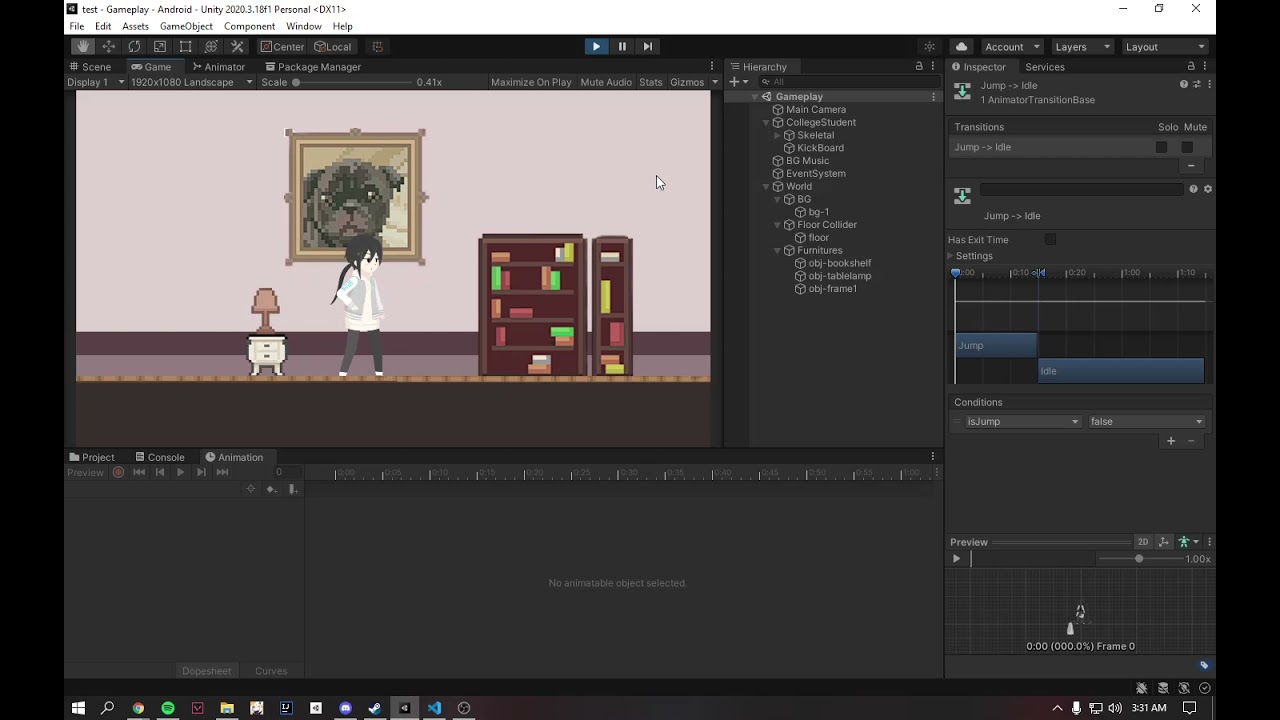
Hello, I just started studying unity last week and there's a bug where my character gets stuck when jumping. Can someone tell me what's the problem and how to fix it?
Movement Script: https://hastebin.com/nuzaxorunu.csharp
Video: https://youtu.be/v3C0sxGMs2o
 civic knot
topaz dew
Hello, I just started studying unity last week and there's a bug where my charac...
civic knot
topaz dew
Hello, I just started studying unity last week and there's a bug where my charac...
Probably because you don't reset the animation parameter. You only ever set it to true
anim.SetBool("isJump", true);
 lament roost
Hello,
Anyone knows how to use the Pixel Perfect Camera with Lightweight RP ?
 blazing mica
Hi, so as I am concern, there is two ways to flip a sprite direction
1st : change +-ve of the gameobject
2nd : access the SpriteRenderer and use the Flip method
so generally which way is more preferable, or does it not matter whatsoever?
blazing mica
topaz dew
Hello, I just started studying unity last week and there's a bug where my charac...
try having your Animator window and Game window side by side, see how your animation states run
civic knot
blazing mica
Hi, so as I am concern, there is two ways to flip a sprite direction
1st : ``ch...
2nd because it avoids messing with everything else. It just renders the sprite inverted.
topaz dew
civic knot
Probably because you don't reset the animation parameter. You only ever set it t...
I tried to add anim.SetBool("isJump", false); and it doesn't animate the jump animation anymore
civic knot
topaz dew
I tried to add `anim.SetBool("isJump", false);` and it doesn't animate the jump ...
where?
topaz dew
 civic knot
Yeah, that's not the right place. It will set it to false on the next frame. You need to set it to false when the character becomes grounded.
topaz dew
do i need to create a new function
civic knot
Up to you. You don't have to. You could just put all of your code in update directly.
hollow crown
it looks kinda underhighlighted too. If you're not getting errors underlined in red, #854851968446365696 has the instructions for configuring VS.
 white cairn
Hi, I am trying to patch some text rendering code as follows in a unity game public static void Postfix(TooltipBrickEntityHeaderView __instance) { //__instance.m_MainTitle.text = "hi"; __instance.m_MainTitle.color = (Color32)Color.green; __instance.m_MainTitle.overrideColorTags = true; __instance.m_MainTitle.outlineColor = (Color32)Color.magenta; __instance.m_MainTitle.outlineWidth = 5; } My code can change the color easily to this obnoxious test color. However it doesn't let me add an outline. Can someone please help me understand what I am missing?

Here is a tooltip for the type of m_MainTitle
 topaz dew
civic knot
Up to you. You don't have to. You could just put all of your code in update dire...
topaz dew
civic knot
Up to you. You don't have to. You could just put all of your code in update dire...
thank you, it works now
covert whale
topaz dew
your ide is most likely not configured, look at #854851968446365696 for how to do it
topaz dew
okayy thanks
 foggy horizon
Is there a way to get SpriteRenderer's quad vertex, and then change its vertex color?
 tranquil tulip
Hi there! By chance are there any people working with ProCamera2D?
brittle smelt
Can someone help me? i cant seem to diagnose the problem with this code, the gameobject that is attached to this code should flip around if encountered a wall or a hole in the ground but it doesnt wanna flip instead it got stuck
 covert whale
brittle smelt
Can someone help me? i cant seem to diagnose the problem with this code, the gam...
covert whale
brittle smelt
Can someone help me? i cant seem to diagnose the problem with this code, the gam...
could you do a Debug.DrawRay of your raycast to see that it's going in the right place
brittle smelt
covert whale
could you do a `Debug.DrawRay` of your raycast to see that it's going in the rig...
where should i put the drawray function?
covert whale
brittle smelt
where should i put the drawray function?
right underneath your raycast
give it the same arguments for the raycast
brittle smelt
@covert whale https://streamable.com/dt2zld
 covert whale
brittle smelt
Can someone help me? i cant seem to diagnose the problem with this code, the gam...
covert whale
brittle smelt
Can someone help me? i cant seem to diagnose the problem with this code, the gam...
i think the issue is that even after you flip the character the transform is moved to the right
and this could be because you're using Vector2.right which is the world space for right, not transform.right which is relative to the transform
so try changing to transform.right to see if that fixes it
and additionally change any other Vector2.direction to transform.direction
 bleak elk
Does <sprite>.bounds.center return the centre coordinates (as a Vector3) of the given sprite regardless of its pivot point (example: if its pivot point is at the bottom centre, does it return the coordinates of the bottom centre or the exact centre?) or is it completely different?
 distant oracle
So hello I need some help
abstract olive
distant oracle
So hello I need some help
distant oracle
Hello I am recently having some questions

 grand coral
ok so say the questions lmao
distant oracle
I was hum writing sry
xD
I want to do this
but the circle can be moveable depending on the position of a gameobject
is this possible?
I can do a sprite renderer so I can have a dark overlay but can I do a moveable hole on it somehow?
I want to do this so I can do a tutorial to my game btw
IF possible please DM me with answer
abstract olive
You would have to build a shader for this. It wouldn't be complicated, but also not easily explained quickly.
abstract olive
There are no Unity docs for creating gameplay features, no. Only for the API.
If you have no idea what a shader is, then you have a big hill ahead of you.
Alternatively, if the hole doesn't have to animate around, you could just create different images with the hole baked in, and switch between them during the tutorial.
distant oracle
Hum I prefer to learn how to use shadows I guess ;-
grand coral
abstract olive
You would have to build a shader for this. It wouldn't be complicated, but also ...
why can't he just use a spritemask
can you not do multiply or other blend modes with a spritemask?
abstract olive
Possibly? I haven't used it much. It looks like there's this:
https://docs.unity3d.com/ScriptReference/SpriteMaskInteraction.VisibleOutsideMask.html
 grand coral
yeah that's what i was thinking of, i think that would work with a semi-transparent image
and much simpler than a shader (although i always look for opportunities to write cool shaders bc it's fun lol)
still tendon
Hello i have a pretty simple movement and animation script which works great but when i press w and d at the same time my character moves super fast diagonally? Any help/solution.
 fleet remnant
well... its not that hard to figure out
you probably apply force for each key you press
so when you press 2 keys at the same time
you apply twice the force
or you dont apply force but just translate more units per second so it seems as if its faster
we cant know without seeing your script but basically, calculate the direction based on the inputs you have and only THEN add force / move in that direction
remote moth
i want to know when the mouse not touch a object
grand coral
remote moth
i want to know when the mouse *not* touch a object
the exact moment it stops touching, or at any given time query whether or not it's touching?
 grave fox
How do I limit transform.Translate movement to 2 decimal places?
snow willow
grave fox
How do I limit transform.Translate movement to 2 decimal places?
what do you mean by this?
are you trying to round the resulting position?
Or limit the position to be within some range?
grave fox
snow willow
what do you mean by this?
Okay, basically I'm trying to achieve pixel perfect movement. I have background elements which parallax however when they reset on the x axis I get a nasty seam with some visual glitching. I'm using the Pixel Perfect camera component set to 640x480 and the grid units set to 0.01. I believe that the visual glitching is due to Unity translating the background elements in units which aren't 'pixel perfect'. I've been searching for hours for a solution and can't find a simple way to fix it.
snow willow
grave fox
Okay, basically I'm trying to achieve pixel perfect movement. I have background ...
well one issue you're going to have is that 0.01 is not a number that is possible to represent in binary
it's an infinite repeating expansion
sort of like how 1/3 in base 10 is 0.3333333 repeating
0.01 in binary is like 0.0110110110110101 and so on
grave fox
Currently 0.01 translates to 1 pixel... If I change the grid units I'm going to have to adjust the PPU to match
That's why I'm thinking PPU 1, grid units 1 (1 unit = 1 pixel)
Camera of 640 pixels wide would also be 640 units wide
All I want to do is increment the translation by 1 pixel at a time
 grand coral
if you change the size of a sprite that has a sprite mask component on it, it should change the size of the mask
distant oracle
Hum yeah
but hum
I am so confused rn
but I want to keep the sprite with a specific size
but make hum a hole on it with a small size
grand coral
?
you want to change the size of the mask but keep the sprite that it's masking the same size right?
distant oracle
nvm nvm nvm
Im just being dumb
I just made a sprite mask in another gameobject
so I can make a circle in the rectangle sprite
and now it has exacly what I wanted thx 🙂
grand coral
cool
distant oracle
:=: xD
bleak elk
bleak elk
Does <sprite>.bounds.center return the centre coordinates (as a Vector3) of the ...
Looks like the message got lost (common in a server with many members I am not even angry about it). Just wanted to mention it again by just replying on it and ask whether or not you guys know about it.
civic knot
bleak elk
Looks like the message got lost (common in a server with many members I am not e...
Bounds are generic. There are bounds for different renderers and colliders, so no, they don't take into account config specific to the object they're on.
 tawny tendon
I am making a 2D game on a tilemap, and because I want to constrain movement to the grid, I am not simulating physics. Instead, I manually check for collisions before allowing the player (or other items on the map) to move onto a tile.
The problem I am running into is that when I move an object by directly setting transform.position, its collision boundaries do not seem to update right away. In other words, after updating the position and "occupying" a tile, another object that uses Physics2D.BoxCast to check whether the tile is occupied will not detect a collision.
So sometimes I get two objects moving onto the same tile at once, which should never be allowed, since the objects should collide with each other, and the first to occupy the tile should prevent the other from entering.
I have taken steps to verify that this is not just a "race condition." It seems as though updating the position of an object does not cause any other object to detect collisions with its new location until a later update cycle.
I'm guessing this is known behavior and not a bug, but I'm wondering if anyone can point me to documentation that will help me understand what to expect with regards to when collision boundaries get updated.
timid hound
I’m pretty sure that collisions get processed in FixedUpdate, so if you set the position in update, it won’t get processed till next fixeduodate
tawny tendon
Ah, that's an interesting thought. I am doing everything directly in Update, so I will see if moving my collisions checks to FixedUpdate resolves the problem. Thanks.
And now that I know the answer, it is easy to find a bunch of similar answers with a google search.
 subtle vessel
tawny tendon
I am making a 2D game on a tilemap, and because I want to constrain movement to ...
subtle vessel
tawny tendon
I am making a 2D game on a tilemap, and because I want to constrain movement to ...
there's a setting in the project settings (in physics) called somethign like "autosync transforms"
turning it on should fix your problem, I think
though it sounds like you're using 2D physics, so the first one
tawny tendon
Oh, that's perfect. The documentation for that setting also matches what I was experiencing.
When set to false, synchronization only occurs prior to the physics simulation step during the Fixed Update.
So even if I moved it to FixedUpdate, things might get out of sync if I am updating multiple transforms, since the synchronization happens just once per fixed update otherwise.
 amber shard
hm. I was hoping to do some simplistic but dynamic shapes for a 2d sprite game. chaining lines of various thickness, arcs, that type of thing. Is there a way aside from gui-hacking for this?
subtle vessel
amber shard
hm. I was hoping to do some simplistic but dynamic shapes for a 2d sprite game....
Are you familiar with the LineRenderer component?
also, the Shapes asset is very well suited to that kind of thing. https://assetstore.unity.com/packages/tools/particles-effects/shapes-173167

Use the Shapes tool for your next project. Find this and more particle & effect tools on the Unity Asset Store.
amber shard
Hm. I like it, though I don't know how to sort through Sprite Rendering and Mesh Rendering... in terms of sorting and layering the drawing
Will explore it more for sure
brittle smelt
Can someone help me? how do i use this to make an if statement, like "if distance from a is less than 3 then do this"
 still tendon
hello, when i press (for example) a and w my character goes diagonally but faster then just pressing a, any help?
 jolly narwhal
brittle smelt
Can someone help me? how do i use this to make an if statement, like "if distanc...
jolly narwhal
brittle smelt
Can someone help me? how do i use this to make an if statement, like "if distanc...
if(dist < 3) { do this }
jolly narwhal
still tendon
hello, when i press (for example) a and w my character goes diagonally but faste...
Need to see the code
still tendon
alright
using System.Collections;
using System.Collections.Generic;
using UnityEngine;

public class PlayerMovement : MonoBehaviour
{

    public float moveSpeed = 5f;

    public Rigidbody2D rb;
    public Animator animator;

    Vector2 movement;

    // Update is called once per frame
    void Update()
    {
        movement.x = Input.GetAxisRaw("Horizontal");
        movement.y = Input.GetAxisRaw("Vertical");

        animator.SetFloat("Horizontal", movement.x);
        animator.SetFloat("Vertical", movement.y);
        animator.SetFloat("Speed", movement.sqrMagnitude);

        if(Input.GetAxisRaw("Horizontal")==1 || Input.GetAxisRaw("Horizontal")== -1 || Input.GetAxisRaw("Vertical")==1 || Input.GetAxisRaw("Vertical") == -1)
        {
            animator.SetFloat("LastHorizontal", Input.GetAxisRaw("Horizontal"));
            animator.SetFloat("LastVertical", Input.GetAxisRaw("Vertical"));
        }

    }

    void FixedUpdate()
    {
        rb.MovePosition(rb.position + movement * moveSpeed * Time.fixedDeltaTime);
    }


}
You set the speed to sqrMagnitude which is about 1.4 if both x and y movements are 1
if you want the speed to be always the same then set the speed to 1
still tendon
what should i change to 1?
jolly narwhal
the speed
still tendon
are you referring to the moveSpeed?
jolly narwhal
no, the one that uses sqrMagnitude
animator.SetFloat("Speed", movement.sqrMagnitude);
still tendon
ah i think i get it.
jolly narwhal
and set movevent to movement.normalized to get a distance that's always one in FixedUpdate
still tendon
do i have to add
movement.normalized
to FixedUpdate?
jolly narwhal
yes, for example
still tendon
when i add movement.normalized; i get an error "Assets\scripting\PlayerMovement.cs(37,9): error CS0201: Only assignment, call, increment, decrement, await, and new object expressions can be used as a statement"
using System.Collections;
using System.Collections.Generic;
using UnityEngine;

public class PlayerMovement : MonoBehaviour
{

    public float moveSpeed = 5f;

    public Rigidbody2D rb;
    public Animator animator;

    Vector2 movement;

    // Update is called once per frame
    void Update()
    {
        movement.x = Input.GetAxisRaw("Horizontal");
        movement.y = Input.GetAxisRaw("Vertical");

        animator.SetFloat("Horizontal", movement.x);
        animator.SetFloat("Vertical", movement.y);
        animator.SetFloat("Speed", movement.sqrMagnitude);

        if(Input.GetAxisRaw("Horizontal")==1 || Input.GetAxisRaw("Horizontal")== -1 || Input.GetAxisRaw("Vertical")==1 || Input.GetAxisRaw("Vertical") == -1)
        {
            animator.SetFloat("LastHorizontal", Input.GetAxisRaw("Horizontal"));
            animator.SetFloat("LastVertical", Input.GetAxisRaw("Vertical"));
        }

    }

    void FixedUpdate()
    {
        rb.MovePosition(rb.position + movement * moveSpeed * Time.fixedDeltaTime);

        movement.normalized;


    }


}
or did i do it wrong cause this is all new for me
jolly narwhal
no, replace movement with movement.normalized
still tendon
so for movement.x should i change that aswell
jolly narwhal
no only for that one line in FixedUpdate
still tendon
hello is there away i could make an attack delay because i can just click my attack button very fast and the animation just keeps on resetting.
 turbid heart
still tendon
hello is there away i could make an attack delay because i can just click my att...
turbid heart
still tendon
hello is there away i could make an attack delay because i can just click my att...
dont crosspost please. #📖┃code-of-conduct
brittle smelt
Hey is there a function that record if a gameobject is in front or behind another gameobject?
still tendon
turbid heart
dont crosspost please. <#497867528488484864>
my bad
 haughty pollen
Hi! I’m watching a tutorial on c# and using unity and I’m supposed to use : private BoxCollider2D boxCollider; and on the tutorial guy’s screen the BoxCollider2D has a colour on it but mine doesn’t. So I’m thinking it that it doesn’t register? When I’m going to playtest in Unity it says “All compiler errors have to be fixed before you can enter playmode!” I don’t know what’s wrong, I seem to write everything just like in the tutorial.
 compact knoll
haughty pollen
Hi! I’m watching a tutorial on c# and using unity and I’m supposed to use : priv...
compact knoll
haughty pollen
Hi! I’m watching a tutorial on c# and using unity and I’m supposed to use : priv...
set up your IDE using the configuration steps linked in #854851968446365696
also compiler errors will be in the console in the unity editor, if you have errors in the console you won't be able to test until you fix those errors
haughty pollen
Ok, thank you.
haughty pollen
I'm sorry, but where is the workloads tab? Or the modify button? There isn't any other buttons except open, new or projects.
Or am I supposed to do it in the Unity Hub?
compact knoll
that's in the Visual Studio Community installer. Did you install visual studio separately or did you install it with the unity editor when you downloaded it through the hub?
haughty pollen
I installed it separately.
compact knoll
ah in that case you'll need to run the installer again to add the workloads
haughty pollen
Is it simpler to install it in the Unity Hub?
 lean estuary
haughty pollen
Is it simpler to install it in the Unity Hub?
lean estuary
haughty pollen
Is it simpler to install it in the Unity Hub?
Yes, it installs all dependencies and configures itself
haughty pollen
Alright, I'll try that.
lean estuary
Don't forget to remove copies first, it may mess with it
 livid hill
Can someone help me with some transform math?
Basically I have this heirarchy:
| PlayerBody (Rigidbody2D - Dynamic):
|--> BoxingGlove (Rigidbody2D - Kinematic)
When the player presses a button I want the boxing glove to shoot out and come back like a punch. I'm controlling the glove movement via a script (lerp to destination, lerp back to start) but the problem I am facing is that I can't figure out how to use Rigidbody2D.MovePosition in terms of local position so the glove always stays in position relative to the player.
I.e. If the player is moving how do I keep a good starting position reference for handling my lerps.
covert whale
livid hill
I.e. If the player is moving how do I keep a good starting position reference fo...
you could try transform.TransformPoint to convert the position you want the glove to move from local to world space
https://docs.unity3d.com/ScriptReference/Transform.TransformPoint.html
do all your lerping calculations in local space, then when you want to actually move use transform point
livid hill
Still don't quite have it working but I'm headed in the right direction now. Thanks.
livid hill
Got it working! Two things I found out along the way:
- You have to use the parent transform for
TransformPointto work properly (kinda obvious but I overlooked it at first) - Apparently
Rigidbody2D.MovePositionwill not work if the rigidbody is a child of another moving rigidbody. I don't really need the physics checks thatMovePositionoffers since my child rigidbody is just a trigger so I am just applying the position directly to the transform which does work.
covert whale
nice
haughty pollen
Sorry, one more thing. When I download the Visual Studio for Mac it says Completed with errors. And Install failed. Any way to fix this? I've tried looking it up online, nothing seems to work.
compact knoll
if you are using visual studio for mac then just install it normally. the tools for unity are included on the mac version (as you would have seen had you switched to the mac version instructions)
https://docs.microsoft.com/en-us/visualstudio/gamedev/unity/get-started/getting-started-with-visual-studio-tools-for-unity?pivots=macos#install-unity-support-for-visual-studio
haughty pollen
Alright! And again, sorry for the hassle.
bleak elk
I've got a problem. I have a gameobject that I want to spin. However, its sprite's pivot is not in the centre (done like that on purpose for other reasons). I know that I can make it a child of an Empty GameObject and then spin the parent (the Empty GameObject). Is there a way to find the co-ordinates of the exact centre of the gameobject's sprite? Or even the distance between the sprite's pivot and the sprite's actual centre?
 vague meadow
my sprite is split into several layers. on my movement code, all the parts are moving individually at different speeds even though their position in the world is identical. any clue?
 storm coral
Does anyone have any idea how I would go about making collideable shadows?
vague meadow
storm coral
Does anyone have any idea how I would go about making collideable shadows?
separate object parented with its own collider is the easiest method
or create it by script addComponent and set transform
storm coral
yeah but how would I get it to conform to the shape of the shadow
vague meadow
polygoncollider
then press the button in the inspector that looks like a point selection diagram
that will open the editor for the polygoncollider in the scene view
assuming the shadows shape never changes and is known before hand
storm coral
therin lies the problem
the changing shape
i need to have the collider move to wherever the shadow moves
 tame turret
storm coral
yeah but how would I get it to conform to the shape of the shadow
tame turret
storm coral
yeah but how would I get it to conform to the shape of the shadow
do you have a screenshot how the shadows look like?
vague meadow
storm coral
i need to have the collider move to wherever the shadow moves
u shud be able to animate it per frame
unless u r generating it procedurally
in which that is more advanced
vague meadow
i came to a similar issue myself
i saw that u can tie variables to each frame in the animator
thats the first potential solution
the second is to have multiple shadows and deactivate the right one
storm coral
yeah but i cant predict every possible location of the light
vague meadow
the light is generated by unity
we are talking about collider shapes moving to suit the frame
unfortunately i dont know more on that sorry
storm coral
i mean the light source
the player will carry the light around and place it down where they need
tame turret
do you have multiple light sources that determine the shadow colliders?
storm coral
just one
tame turret
and you you need point or shape collision?
storm coral
idk
its a platformer
what would be really good is if i could just tell the player, collide with anything onscreen that is black
tame turret
yes
you can always make a custom collider that looks up collisions in a utility texture
render your occluders manually with a special material into a render texture and use that as data-source for the collision lookup
tame turret
right
compact knoll
what you are attempting is not exactly simple in any way. Give these threads a read to better understand what it is that you are doing (and some possible solutions)
https://forum.unity.com/threads/3d-shadows-collider.824499/
https://answers.unity.com/questions/1739021/make-shadow-interactive-1.html
they are technically for 3d, but the concepts discussed would still apply for the most part
storm coral
thanks!
Ps. can anyone tell me why this: https://paste.mod.gg/qrskfyqiobyb/0 end up like:

A tool for sharing your source code with the world!
snow willow
storm coral
Ps. can anyone tell me why this: https://paste.mod.gg/qrskfyqiobyb/0 end up like...
- It's pink because your linerenderer doesn't have a valid material.
- Some of the lines are weird because
DrawLine(vertex, unNormdir, Color.black, Mathf.Infinity);is erroneously using a direction vector as a position.
Also new Vector2(transform.position.x, transform.position.y); is unecessarily verbose - you can just use (Vector2)transform.position
 balmy pebble
hey does anyone know how to make sprites overlay another sprite when its y level is lower than the bottom of the other sprite in a 2d top down game
tame turret
balmy pebble
hey does anyone know how to make sprites overlay another sprite when its y level...
balmy pebble
let me try that question again, i want the player to be behind the object when its towards the top of the sprite, and when the player is at the bottom of a sprite it is ontop, thios updates during runtime. Also the sprite building is accually a tile which makes it a bit harder


depending on player position the player orders itself, how do i do this
also for these images i manually changed the sorting layer to show what i want
balmy pebble
tame turret
https://docs.unity3d.com/Manual/class-SortingGroup.html
thanks Anikki ill be using your tip with prefabs in tile palettes to do this
fleet remnant
you can use pick like lets say the top 3 tiles of the sprite to be one sorting group, and the 3 bottom ones to be another sorting group, depending on which tilemap you put them
if its a prefab tho idk how you could do that
balmy pebble
yea its all good thanks, i found an alternitive thats working ok, i just cant use tiles for the houses, i was getting lazy lol
 neat flame
Hi guys, i want to make my player sprite blink between red and normal color to show the invincible state after getting hit. After 3 seconds, the player would go back to normal. I got the 3 seconds then back to normal thing, but i can't get the player sprite to flash between 2 color in that 3 seconds duration. What should i do?
https://pastebin.com/hTiqGpLw
Pastebin
Pastebin.com is the number one paste tool since 2002. Pastebin is a website where you can store text online for a set period of time.
 thin bear
@neat flame use an animation instead of this hard-coded approach
neat flame
thin bear
<@!447956044874907649> use an animation instead of this hard-coded approach
Yeah, the other guy in Beginner channel also telling me the same thing. I haven't even touch Animation up till now, lol. Guess it's time!
thin bear
👌
 craggy kite
neat flame
Hi guys, i want to make my player sprite blink between red and normal color to s...
craggy kite
neat flame
Hi guys, i want to make my player sprite blink between red and normal color to s...
Really depends on your case, if you will have loads of animation styles like this, go for animation. If you just have simple flashes, you can still code it and go on animation later if it does not feed your visual needs
neat flame
craggy kite
Really depends on your case, if you will have loads of animation styles like thi...
Yeah, i've found a way to hard code it for now. I'm learning Unity now so i will touch on Animation sooner or later. Which is not my strong point, lol. I like working with code more than UI as i'm working as an Automation scripter :p
craggy kite
I mean you can have quite good procedural animations with code, but thats another topic 😉 So do you need any help with the code or did you figure it out? 🙂
neat flame
Thanks 🙂 But yeah, i got it figured out. A bit hacky tho.
craggy kite
I am sure using ienumerator cant hold that many ways of hacking colors 😉
neat flame
Here's my work-around, not very efficient i'd say.
Pastebin
Pastebin.com is the number one paste tool since 2002. Pastebin is a website where you can store text online for a set period of time.
craggy kite
neat flame
https://pastebin.com/CzG6NGmT
Looks fine too me. not sure whats not efficient about it, such a small piece of code 🙂
just be sure to StopAllCoroutines otherwise you overlap ienumerators on every call of that function
neat flame
craggy kite
just be sure to StopAllCoroutines otherwise you overlap ienumerators on every ca...
Gotcha, i'll do that!
 grave haven
Hello. I am using Mirror for a multiplayer game. I would like to know if it is possible to configure Network Manager in scripting?
grand coral
grave haven
Hello. I am using Mirror for a multiplayer game. I would like to know if it is p...
haughty pollen
Hi! I’m having trouble writing this line of code: transform.Translate(moveDelta * Time.deltaTime); I’m on a MacBook and I cannot make the multiplication symbol right and I don’t find anything on google. Anyone?
compact knoll
What do you mean you can't make the multiplication symbol right?
haughty pollen
It’s not like, on the top. But in the middle. Then the “Time” line isn’t in the right colour? If that makes any sense.
compact knoll
if you aren't getting syntax highlighting then you need to configure your IDE using the steps linked in #854851968446365696
haughty pollen
I did!
Oh what
What happened?
Oh
It wasn’t connected for some reason.
Nevermind then!
 exotic cradle
What do you do when your button doesn't change colors when highlighted or pressed during runtime?
I have 'Interactable' checked off
I have another button that successfully darkens when clicked
I don't know what I'm missing
 snow willow
exotic cradle
What do you do when your button doesn't change colors when highlighted or presse...
snow willow
exotic cradle
What do you do when your button doesn't change colors when highlighted or presse...
Possibly another UI element is blocking it
Try looking at the inspector/preview window of your event system while the games running to see if it's detecting a different object
exotic cradle
I don't detect anything rendered in front the button, but 100% certain I'm using this tool right
 neat hollow
im trying to make a base builder game, how do i store a "room" ?
i have the grid set up and player can build walls
how do i detect which grids is inside these connected set of walls ?, so then i could mark those grids as room 1
bleak elk
bleak elk
I've got a problem. I have a gameobject that I want to spin. However, its sprite...
Any ideas?
snow willow
neat hollow
how do i detect which grids is inside these connected set of walls ?, so then i ...
floodfill graph algorithms like Breadth-first search to find all connected squares
neat hollow
@snow willow thank you, its hard when i dont know the term i have to search 🙂
covert whale
bleak elk
I've got a problem. I have a gameobject that I want to spin. However, its sprite...
you could call sprite.bounds.extents and subtract/add that to the pivot to get the center, if sprite.bounds.center doesn't return what you want
https://docs.unity3d.com/ScriptReference/Bounds.html
 ivory bloom
Hey guys, do any of you know how to fix this error: SceneView rotation is fixed to identity when in 2D mode. This will be an error in future versions of Unity.
UnityEditor.SceneView:OnEnable ()
I have no clue what's causing it, it returns a warning every time I touch something
 chrome snow
Would anyone know what could be my issue:
- I as a player run into a wall which doesn't allow me to pass. The character and the main GO of the player stays in the correct position(Correct)
- When I try to attack as the player the spawned object position is waay off it sort of moves when I collide with my wall. The spawned position should be the same as where the player is located. (Issue)
Player Setup: has a network transform,rigidbody + rigidbody network,the movement and attack scripts are on the root player gameobject.
Spawned object: is spawned at the location of the root player gameobject
How is such sorcery possible?? 😄
 crisp pond
Pastebin
Pastebin.com is the number one paste tool since 2002. Pastebin is a website where you can store text online for a set period of time.
want to change the position of object on mouse click but won't work
 hearty lake
hey
so im making a scrool panel but its in menu and i dont wanna the buttons to be visible outside the menu
heres the screenshot

?
grand coral
hearty lake
so im making a scrool panel but its in menu and i dont wanna the buttons to be v...
not sure you can do that, but there might be some sort of gui mask
what do you know
@hearty lake try that
hearty lake
ok that was easy thx anyway
man
could someone give me a good web for some 2 d - 3d photos for game?
grand coral
hearty lake
could someone give me a good web for some 2 d - 3d photos for game?
unity asset store
 real ivy
Hey friends, I am generating multiple tilemaps and setting them next to each other for a platformer game. I'd like to be able to combine two tilemaps together. Any thoughts on how I might go about doing this?
Nevermind! Figured it out. I was forgetting to account for the x and y position of the other tilemaps and was just overwriting each tilemap which the one that comes after it.
still tendon
I'm trying to make sure a player character can pass through a collider until they've crossed it, and then they must land.
For this, I've made two layers, PlatformOpen and PlatformCaptured for such a platform and I've made a Player layer. What I'm trying to do is:
PlayerController.cs
        private void Start()
        {
            print(LayerMask.LayerToName(gameObject.layer));
            Physics2D.IgnoreLayerCollision(gameObject.layer, character.PlatformOpenLayer, ignore: true);
        }
Platform.cs
        [SerializeField, Layer] private int platformCapturedLayer = 7;
        [SerializeField, Layer] private int playerLayer = 8;

        private void OnCollisionExit2D(Collision2D other)
        {
            if (other.gameObject.layer == playerLayer)
            {
                gameObject.layer = platformCapturedLayer;
            }
        }
I've checked the layer values obviously, but it doesn't seem to work yet. Am I using IgnoreLayerCollision right?
I think I've mistaken some functionality here: ignoring collisions may even mean not being able to detect them. Perhaps I should use the IsTrigger property.
That didn't work. How else is it possible to preserve the player's rigidbody motion while still allowing to ignore collisions...
By which I mean it should still fire the Unity callbacks but I'll not have the character bounce back.
still tendon
Solved it by a crude bounds check.
 fleet knot
Hey, Guys ,I am trying to make 2d Android Games and i have a problem with background, how to scale background same as 2d orthographic camera
Thanks before i hope you understand my problem
covert whale
fleet knot
Hey, Guys ,I am trying to make 2d Android Games and i have a problem with backgr...
if you always want the background to be the same as the camera's size, and if you don't want it to move, then you can make a canvas, set it to camera space, put it a layer underneath everything else, and add an image that stretches fully, then make your image the background
 fossil bluff
Hi folks. As part of a bigger project, I'm recreating a Pacman game using Tilemaps. After a LOT of trial/error, I almost have a working model - except for some reason I cannot seem to have the player sprite flush against left or down facing walls. I think it has something to do with the wall detection code:
    {
        Vector3Int gridposition = walls.WorldToCell(transform.position + (Vector3)direction);

        if (walls.HasTile(gridposition))
        {
            return true;
        }
        return false;

}```It seems X+1 and Y+1 tile locations are fine, but X-1 and Y-1 are somehow exactly one cell away from the player sprite - but I cannot see why, or how to correct the alignment. Any tips would be welcome 😄
covert whale
fossil bluff
Hi folks. As part of a bigger project, I'm recreating a Pacman game using Tilema...
could you debug.log gridposition to make sure it's the right one?
fossil bluff
I will double check that indeed.
hmm so it is working - however I think this is an issue with world to grid location - say the left side wall is at cell X=-9, logically we want munchyboy to stop at X=-8 - however he's actually stopping at X-7.1
On the other side, if the wall is at X=8, he is stopping at X=7
Must be a rounding issue, I do hate working with float to int
 prisma ocean
Say I wanted to make a collider for the line renderer that represents the asteroid field, should I generate a bunch of circle colliders and get their positions in the same way that I got the positions for the ellipse line renderer?
 covert whale
prisma ocean
Say I wanted to make a collider for the line renderer that represents the astero...
covert whale
prisma ocean
Say I wanted to make a collider for the line renderer that represents the astero...
what do you need colliders on the belt for?
depending on how accurate you need to be it could be a single polygon collider or a series of edge colliders
 plush coyote
^
although if you are only going to use it as a trigger, there are probably better ways of determining if you are in the belt (using radius from center, if its a circle)
Well not "better," just alternate
depends what you want / need it for
prisma ocean
If I wanted to click / mouse over it
covert whale
prisma ocean
If I wanted to click / mouse over it
you could do something like this?
https://answers.unity.com/questions/1546512/detect-mouse-click-on-line-renderer.html
Unity is the ultimate game development platform. Use Unity to build high-quality 3D and 2D games, deploy them across mobile, desktop, VR/AR, consoles or the Web, and connect with loyal and enthusiastic players and customers.
prisma ocean
thanks 🙂
 hoary ginkgo
I have a tab system in my game, inside of the tab system players can select customization options, on click the button color for the item they choose is changed to green, is there a way to save this change?
within unity
 peak cedar
anyone have references for how to dynamically layout a hand of cards?
i am trying to instantiate cards into the "hand" and have then fan out like you would hold them irl. and then after that ill have to figure out how to scroll through the cards with the selected one being more revealed than the others.
ive been trying stuff but im running into issues. like not knowing wtf to do
 hybrid wasp
Someone can help me with this error?

 olive magnet
error
fleet knot
covert whale
if you always want the background to be the same as the camera's size, and if yo...
Thanks you so much,i'll try this
 left canyon
i know this isnt code but im not sure where to write... anyone help?
 olive magnet
well this definitely isn't the channel to post about it then
 coral tusk
This is a very bad diagram, but I have a player (green) which I want to be able to teleport wherever I want it, but if it would go inside an object, I would like it to instead be placed perfectly on the edge of the object and keep all it's momentum?
What function would I use to do that? currently I am using addForce for movement

Blue is where I want to effectively rb.transform.position to, but I want it to be pushed back out from where it came, then continue in it's previous direction with it's full velocity
still tendon
using System.Collections;

public class EnemyAi : MonoBehaviour
{

  public Transform target;//set target from inspector instead of looking in Update
  public float speed = 3f;


  void Start()
  {

  }

  void Update()
  {

    //rotate to look at the player
    transform.LookAt(target.position);
    transform.Rotate(new Vector3(0, -90, 0), Space.Self);//correcting the original rotation


    //move towards the player
    if (Vector3.Distance(transform.position, target.position) > 1f)
    {//move if distance from target is greater than 1
      transform.Translate(new Vector3(speed * Time.deltaTime, 0, 0));
    }

  }

}
this is my enemy ai code, and i want it to go to the player and push them, but when it comes very close to the player it just stops, how can i fix that?
still tendon
Yes they do
@hollow siren
i really need this fixed, because it's the main point of the game. so if anyone could help me out would be amazing
 hollow siren
the problem is the if statement
still tendon
How can i fix it?
still tendon
and how can i fix that?
i'm really new to this
just tryin to do the best out of it
hollow siren
I would use velocity instead of transform.Translate
myRigidbody.velocity = new Vector3(...);
can I fix your code real quick?
still tendon
Yeah that i would appreciate
hollow siren
do they have Rigidbody or Rigidbody2D?
hollow siren
using UnityEngine;
using System.Collections;

public class EnemyAi : MonoBehaviour
{

  public Transform target;//set target from inspector instead of looking in Update
  public float speed = 3f;

  Rigidbody2D myRigidBody;
  void Start()
  {
    myRigidBody = GetComponent<Rigidbody2D>();
  }

  void Update()
  {

    //rotate to look at the player
    transform.LookAt(target.position);
    transform.Rotate(new Vector3(0, -90, 0), Space.Self);//correcting the original rotation


    //move towards the player
    if (Vector3.Distance(transform.position, target.position) > 1f)
    {//move if distance from target is greater than 1
      myRigidBody.velocity = (target.position - transform.position).normalized * speed;
    }

  }

}
sorry
messed up
now it sould work
still tendon
now it just rotates against where my character is but not moves
still tendon
ty
hollow siren
how about now?
still tendon
it says transform does not exist
line 27 transform does not exist in current context
hollow siren
weird... every game object should have a transform
still tendon

 ruby karma
still tendon
ruby karma
still tendon
omg im blind
hollow siren
ups typo
still tendon
still goes up to me it feels like we're touching but it doesn't push me

he comes this close
and just
stands there
hollow siren
is it because you are pushing the other way?
still tendon
no i stand still
hollow siren
show me both rigidbodys in the inspector

 hollow siren
so... I am quite confused
does it move to the player at least?
and then it stops?
hollow siren
can I see the player code?
still tendon
yeah
using System.Collections.Generic;
using UnityEngine;

public class PlayerMovement : MonoBehaviour
{
  public float speed = 5f;
  public float jumpSpeed = 8f;
  private float direction = 0f;
  private Rigidbody2D player;

  public Transform groundCheck;
  public float groundCheckRadius;
  public LayerMask groundLayer;
  private bool isTouchingGround;
  // Start is called before the first frame update
  void Start()
  {
    player = GetComponent<Rigidbody2D>();
    player.freezeRotation = true;
  }

  // Update is called once per frame
  void Update()
  {
    isTouchingGround = Physics2D.OverlapCircle(groundCheck.position, groundCheckRadius, groundLayer);
    direction = Input.GetAxis("Horizontal");

    if (direction > 0f)
    {
      player.velocity = new Vector2(direction * speed, player.velocity.y);
    }
    else if (direction < 0f)
    {
      player.velocity = new Vector2(direction * speed, player.velocity.y);
    }
    else
    {
      player.velocity = new Vector2(0, player.velocity.y);
    }

    if (Input.GetButtonDown("Jump") && isTouchingGround)
    {
      transform.rotation = Quaternion.identity;
      player.velocity = new Vector2(player.velocity.x, jumpSpeed);
    }

  }
}
I am afraid that the problem is here
since you are forcing the volocity to be 0 when you are not touching comands
still tendon
so what should i do
i don't want it to fall onto its side and not be able to do anything
hollow siren
ok I'm thinking...
using System.Collections;
using System.Collections.Generic;
using UnityEngine;

public class PlayerMovement : MonoBehaviour {
    public float speed = 5f;
    public float jumpSpeed = 8f;
    private float direction = 0f;
    private Rigidbody2D player;

    public Transform groundCheck;
    public float groundCheckRadius;
    public LayerMask groundLayer;
    private bool isTouchingGround;
    bool hasStoped = false;
    // Start is called before the first frame update
    void Start() {
        player = GetComponent<Rigidbody2D>();
        player.freezeRotation = true;
    }

    // Update is called once per frame
    void Update() {
        isTouchingGround = Physics2D.OverlapCircle(groundCheck.position, groundCheckRadius, groundLayer);
        direction = Input.GetAxis("Horizontal");

        if (direction > 0f) {
            player.velocity = new Vector2(direction * speed, player.velocity.y);
            hasStoped = false;
        } else if (direction < 0f) {
            player.velocity = new Vector2(direction * speed, player.velocity.y);
            hasStoped = false;
        } else if (!hasStoped) {
            hasStoped = true;
            player.velocity = new Vector2(0, player.velocity.y);
        }

        if (Input.GetButtonDown("Jump") && isTouchingGround) {
            transform.rotation = Quaternion.identity;
            player.velocity = new Vector2(player.velocity.x, jumpSpeed);
        }

    }
}
try this
hollow siren
hahahahaha
still tendon
looks like it doesn't have enough power
 vocal condor
still tendon
```using System.Collections;
using System.Collections.Generic;
using UnityEngine...
vocal condor
still tendon
```using System.Collections;
using System.Collections.Generic;
using UnityEngine...
I think that if statement about direction isn't necessary.
still tendon
and + now it flies (the enemy)
hollow siren
vocal condor
I think that if statement about direction isn't necessary.
let him code as he understands it hahaha
hollow siren
still tendon
and + now it flies (the enemy)
put the enemy code as it was before, your code was better
still tendon
using System.Collections;

public class EnemyAi : MonoBehaviour
{

  public Transform target;//set target from inspector instead of looking in Update
  public float speed = 3f;


  void Start()
  {

  }

  void Update()
  {

    //rotate to look at the player
    transform.LookAt(target.position);
    transform.Rotate(new Vector3(0, -90, 0), Space.Self);//correcting the original rotation


    //move towards the player
    if (Vector3.Distance(transform.position, target.position) > 1f)
    {//move if distance from target is greater than 1
      transform.Translate(new Vector3(speed * Time.deltaTime, 0, 0));
    }

  }

}
this?
vocal condor
When direction is not greater than zero or not less than zero, it's definitely zero; implying the third player.velocity = new Vector2(0f, player.velocity.y) - direction.x is zero.
hollow siren
try, I never used transform.Translate, that is why I said to change it
but my code, I noticed it ignores the gravity
still tendon
it doesn't fly anymore, walks torwards me but doesn't push
vocal condor
Are you moving with rigid body or transform?
hollow siren
I was courious
still tendon
rigidbody i think
vocal condor
Transform is a teleport and will not trigger physics detection.
hollow siren
hollow siren
```cs
using UnityEngine;
using System.Collections;
public class EnemyAi : MonoB...
like this
hollow siren
the problem is that it ignores the gravity
still tendon
is there anyway we can add more power to the ai, so it can push harder haha
hollow siren
add more velocity
still tendon
o ok
hollow siren
- more speed
still tendon
but then the gravity is problem
hollow siren
using UnityEngine;
using System.Collections;

public class EnemyAi : MonoBehaviour {

    public Transform target;//set target from inspector instead of looking in Update
    public float speed = 3f;

    Rigidbody2D myRigidBody;
    void Start() {
        myRigidBody = GetComponent<Rigidbody2D>();
    }

    void Update() {

        //rotate to look at the player
        transform.LookAt(target.position);
        transform.Rotate(new Vector3(0, -90, 0), Space.Self);//correcting the original rotation


        //move towards the player
        if (Vector3.Distance(transform.position, target.position) > 1f) {//move if distance from target is greater than 1
            Vector2 velocity = new Vector2(target.position.x - transform.position.x, 0).normalized * speed;
            velocity.y = myRigidBody.velocity.y;
            myRigidBody.velocity = velocity ;
        }

    }

}
how about now?
 still tendon
still flies
hollow siren
still tendon
still flies
try now
hollow siren
I just changed it
still tendon
Yeah way better now
now it doesn't fly, just spins a little weird and falls alot
but works as it should
hollow siren
I'm sorry, it's difficult not being able to try the code I am sending you
not having the project
still tendon
Yeah but you're still helping me, i've gotten a better way now
even at higher speed than the player, and if i stand still
the enemy doesn't have enough power to push them
just a little (more and more for how much speed it has) but i dont want the enemy to be usain bold either
hollow siren
that is because most of the speed is going in the gravity
since it's an acceleration and not a velocity
ok I get it
still tendon
adding more mass helps, but it still gives like 1 big push then just stops
until i do something back
still tendon
which one
hollow siren
or do you want to always go to the player
if (Vector3.Distance(transform.position, target.position) > 1f)
still tendon
Not Always maybe, but most of the time as it's a sumo game ihs
so i want the enemy to try push me off
hollow siren
when it gets near the speed drops since the player is pushing too
still tendon
no but even if i stand still, it stops pushing until i push it a little then it gives again a big push ( with more mass )
hollow siren
but you don't want that it's velocity is stoped when it's near the player right?
try getting rid of that if statement
still tendon
I want it to keep pushing, and when i figure out the pushing part then i'll try to add more stuff to the game, like that it can jump to avoid death etc
but now i worry about it just actually pushing and trying to win ( push me off)
still tendon
trying
wayyyyy bettter
not it's actually hard for me
it doesnt stop now
but now if i jump, and my character ends up ontop of the enemy, neither i can jump or get of him, neither the enemy can move and is just under me

is there a code that can say that when i'm on top it makes me slip of or sum?
hollow siren
taht is because your jump code has the condition that it has to be touching the ground
you can fix that your self
still tendon
Yes i know, but i don't want it to jump forever, so it has to be grounded
hollow siren
maybe you can say that if you are touching the enemy you can still jump
hollow siren
I have to go now
I really hoped I helped, I am afraid I confused you more than anything
still tendon
Have a nice day bro, nah you helped me out now i just gotta polish the code a bit
hollow siren
you could also probably look in to some FSM states
so you can switch between your enemy rushing to you, bouncing back, and every thing that you want
and keep me updated on your game, it's interesting
still tendon
Alright Thanks
coral tusk
@still tendon if you are using a layer mask when checking for the ground, you could include the enemy's layer mask in the check, and you would be able to use them just like the ground?
then you could walk and jump on them and even use them as platforms if they dead maybe
still tendon
Yeah but the problem is
when i jump on the player i'm stuck forever, i did use the enemy as layer
but when i jump and move to the side it jus follows under me while still laying
so i never get of them even if i jump because they're still under me
but either way i just turned of it's rotation, but the player and enemy just keep pushing eachoter forever as one of them slowly goes to its death, and i can't jump over or anything to make it more fun because the enemy just keeps pushing and following you
so thinking of adding a delay or sum after some time it's stops or gets tired same with the player
 spare coyote
guys i have one problem how can i solve is trigger to be checked without object moving on him
it only checks is trigger if object is moving
is there any work around for this
 dusky compass
Hey, anyone know how I can fit my UI inside a rect with grid layout group?
I am trying to fit some UI items into a grid and I want them to scale based on the size of the parent container (with the grid layout component)
I can set the cell size to scale them but isn't there another way?
covert whale
spare coyote
it only checks is trigger if object is moving
if you have on trigger stay it should call as long as the collider is touching
https://docs.unity3d.com/ScriptReference/MonoBehaviour.OnTriggerStay2D.html
 grave solar
hey can somebody help me out with movement?
compact knoll
grave solar
hey can somebody help me out with movement?
provide more details about what specifically you need help with and someone might actually help
 amber idol
Hoi 👋🏻
Hope y'all doing good, I have a question

See my friend RussianGuard? See the little box right in front of his foot?
Basically, i want him to walk forward over a platform and if that little trigger collision box no longer overlaps with any ground tile, he should turn around.
How do you recommend I do that? What would be the most simple approach?
My idea is giving the box - which is connected to the guard - an Update() that checks whether or not it's overlapping with ground every frame
As soon as it doesn't, it sends RussianGuard a prompt; to which the guard reacts by turning around and walking the other day, rinse and repeat. Much like a Red Koopa Troopa would, for connoisseurs. 🤔
How do I check if the little collider trigger is overlapping with ground?
amber idol
compact knoll
provide more details about what specifically you need help with and someone migh...
I know I'm not the person above, but just in case you have any advice regarding my situation... any help is appreciated 
compact knoll
You really shouldn't ping people randomly like that, kinda not cool and against #📖┃code-of-conduct
but you could use a boxcast or if you wanna do it in a really hacky way, you could use OnTriggerEnter2D/OnTriggerExit2D
amber idol
Does the reply button send a ping?
compact knoll
yes
amber idol
My bad
 gray perch
Hi! I have the following situation and i'm wondering what will be the easiest approach.
I have 3 Locations and 3 Objects and i want each object to spawn on a random location (1 object per location)
Then i want to be able to detect if an object is at the correct location (Object 1 on Location 1, etc.)
Will appreciate any help or advice, or just pointing me what to google because i can't seem to find anything

 golden cedar
Should be similar to key door systems, giving door/object some same identifier, and then checking if they are near each other
gray perch
sounds like a great place to start, thanks a lot!
golden cedar
no problem
amber idol
My tilemap somehow causes both me the player and an enemy to get "stuck" randomly
While moving left or right
I don't know why that happens
Any help?
compact knoll
don't crosspost, i just answered in #💻┃code-beginner
 normal river
downloaded unity a few days ago and i'm just trying some stuff out.
I have a sprite above a square, and they both have box colliders perfectly alligned to the edges, but when i press play the sprite still floats slightly above the square.
i'm at a loss at what to do, i've tried google but none of the answers have helped.
yes, i've tried changing the default contact offset but that still doesn't help.
compact knoll
add a rigidbody2d to anything that you want physics (like gravity) for
normal river
i did that
to the player
it falls and then stops a slight but noticeable amount above the ground
snow willow
normal river
downloaded unity a few days ago and i'm just trying some stuff out.
I have a spr...
If its floating above then one or both of the colliders are misaligned
compact knoll
normal river
it falls and then stops a slight but noticeable amount above the ground
well that doesn't sound right. care to share a screenshot with gizmos enabled?
normal river
both colliders are practically pixel perfect
snow willow
Show them
normal river

and when played

floats about here
different scaling but still an issue, clearly visible in the game window

 snow willow
normal river
snow willow
normal river
I'd maybe put an OnCollisionEnter method on the player and print out the name of the collider it's colliding with
normal river
    void OnCollisionEnter(Collision collision) {
        Debug.Log(collision.collider.name);
    }
is this the correct code? cus if so i'm getting nothing
and i got this from https://docs.unity3d.com/ScriptReference/Collision-collider.html
compact knoll
it needs to be 2d so OnCollisionEnter2D with Collision2D as the parameter
normal river
mm thank you
snow willow
Sorry my bad - yeah you need the 2d version
snow willow
what is square - is that the ground?
normal river
yes
snow willow
can you select the ground and show screenshot of its collider gizmo(s)?
normal river
the green collider outline?
snow willow
yes
normal river
 snow willow
and it only has one collider?
snow willow
Do you have any scripts on your player
normal river
nothing besides the oncollisionenter2d
snow willow
Oh also Project Settings -> Physics2D -> Collision detection Offset have you looked at that?
snow willow
unless I'm just reading something wrong here
normal river
where is that? i'm looking at physics2d and i don't see collision detection offset
snow willow
yeah I may have just misread something
normal river
if i adjust default contact offset to 0.0001 from 0.001 then the player dips slightly into the ground, which also isn't ideal
sorry not those values but generally there is no value that gets the player to not float
or maybe there is, but i haven't found it quite yet
should i just look for that
snow willow
normal river
if i adjust `default contact offset` to 0.0001 from 0.001 then the player dips s...
dumb question but - is your camera aligned properly?
and are your objects on the same z coordinate?
storm coral
Why am I getting health subtracted twice for each collision? https://paste.mod.gg/kceblqwspmia
A tool for sharing your source code with the world!
snow willow
storm coral
Why am I getting health subtracted twice for each collision? https://paste.mod.g...
Does your player or your enemy have more than one collider?
 feral parcel
hi, i want to change the position of the golden one relative to the position of the hand, how am i supposed to do that
using System.Collections;
using System.Collections.Generic;
using UnityEngine;

public class WeaponPickUp : MonoBehaviour
{
    public Transform hand;
    public GameObject weapon;
    public GameObject oldWeapon;

    void OnTriggerEnter2D(Collider2D other)
    {
        if (other.CompareTag("Player"))
        {
            Destroy(oldWeapon);
            weapon.transform.parent = hand;
        }
    }
}
this is my code
vocal condor
It's parented now so it would do what you say; change relative to the parent.
 subtle geyser
Anyone know why the Default GameObject field would be missing from a RuleTile? All it gives me is the option for Default Collider.

 velvet magnet
does anyone have pixelated 2d 0-9 numbers?
covert whale
google exists, there are plenty out there
fleet remnant
subtle geyser
Anyone know why the Default GameObject field would be missing from a RuleTile? A...
you need to select a sprite, not gameobject
u put the base sprite on the default sprite and then add rules for different sprites to apply
subtle geyser
fleet remnant
you need to select a sprite, not gameobject
https://docs.unity3d.com/Packages/com.unity.2d.tilemap.extras@1.6/manual/RuleTile.html is showing that there would normally be a Game Object field that I could select in addition to a sprite?

I've done it in previous projects as well, so I'm not sure what changed cuz it was in the same version of Unity as far as I'm aware
Cuz it'll spawn the sprite but also spawn a game object at runtime
I did some digging and it looks like the Game Object field was added in 2019.x and I'm using 2019.4.12f
https://www.reddit.com/r/Unity2D/comments/exsjzi/help_with_rule_tile_assets_assets_in_unity_20193/

reddit
3 votes and 5 comments so far on Reddit
 quartz anvil
I need a camera to follow the player but only on the y axis. How do I do that?

please @ me in any responses
abstract olive
quartz anvil
I need a camera to follow the player but only on the y axis. How do I do that?
Construct a new Vector3 position that is composed of the camera's own x/z values and the target's y value.
 quaint fjord
Hello there, I want to draw ray in 16 different directions. So starting from angle 0 i will add 22.5 degrees to the next line.
How can I do it?

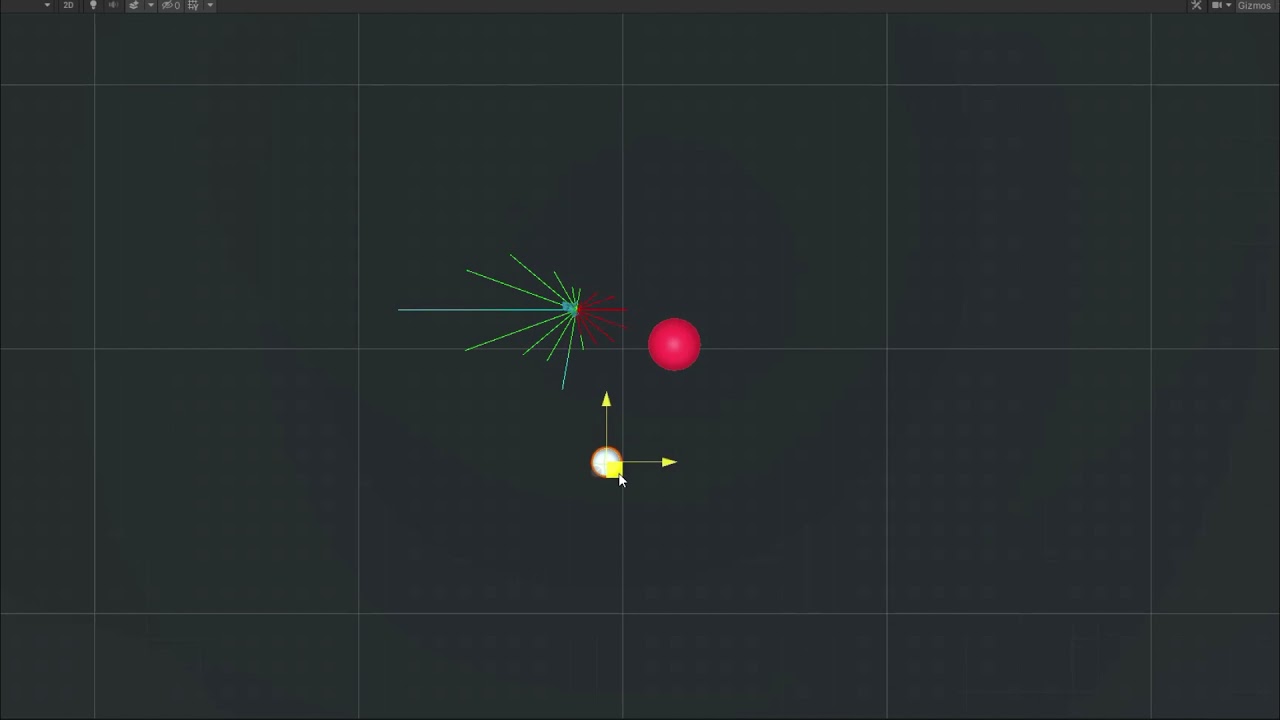
Want to do something like this
snow willow
quaint fjord
Hello there, I want to draw ray in 16 different directions. So starting from an...
Vector3 dir = Vector3.up;
int directionCount = 16;
for (int i = 0; i < directionCount; i++) {
  float angle = i * (360f / directionCount);
  Vector3 drawMe = Quaternion.Euler(0, 0, angle) * drawMe;
  Debug.DrawRay(transform.position, drawMe, Color.red);
}
 cerulean comet
How does Physics2D.RaycastAll work on a 2D tilemap collider? I am doing a raycastall on a tilemap scene (see below) However the raycastall only ever returns 1 hit point. I am curious how Physics2D.RaycastAll interacts with the 2D tilemap collider. Thanks in advance.
 snow willow
cerulean comet
How does `Physics2D.RaycastAll` work on a 2D tilemap collider? I am doing a rayc...
snow willow
cerulean comet
How does `Physics2D.RaycastAll` work on a 2D tilemap collider? I am doing a rayc...
Tilemap collider combines all of the tile colliders into a single collider
cerulean comet
snow willow
Tilemap collider combines all of the tile colliders into a single collider
Thanks for the response, how does this inturn impact the RaycastAll? I was trying to find some information on this. Does the raycast check the same collider twice? Seeing as the tilemap collider is combined
If it does not check colliders twice, is there a work around that could be achieved?
If need be I can provide context to why I am trying to achieve this
snow willow
cerulean comet
Thanks for the response, how does this inturn impact the RaycastAll? I was tryin...
Not sure why it would check the collider twice. It will check any given collider only once
The workaround is don't use Tilemap Collider
Context would be good, yes
covert whale
cerulean comet
Thanks for the response, how does this inturn impact the RaycastAll? I was tryin...
do you have a composite collider on the tile map?
 grim lintel
Hey so how do I make a character aim with a joystick using an animation of them rotating 360 degrees? I have this frame animation but I'd also like to know for bone-based

 glacial sky
Hello once again. For some reason when I try to load the game view, Unity throws this at me NullReferenceException: Object reference not set to an instance of an object SpawnCard.CardCheck () (at Assets/Code/SpawnCard.cs:36) however there are no errors or warnings in code editor.
The error occurs because of this part. Note: setManaCounter is 'int' as is warrior.cost

idk why, because it's warrior's properties are public

this is the script of character's constructor
 covert whale
glacial sky
Hello once again. For some reason when I try to load the game view, Unity throws...
covert whale
glacial sky
Hello once again. For some reason when I try to load the game view, Unity throws...
right before this line, could you debug.log manaRefill and entity.warrior to see which is null
glacial sky
both are null
https://paste.myst.rs/y0b6yqrh
here are all the scripts in one place
a powerful website for storing and sharing text and code snippets. completely free and open source.
 wide ginkgo
glacial sky
https://paste.myst.rs/y0b6yqrh
here are all the scripts in one place
wide ginkgo
glacial sky
https://paste.myst.rs/y0b6yqrh
here are all the scripts in one place
Where do you assign manaRefil in SpawnCard?
glacial sky
you mean scripts or references?
wide ginkgo
public ManaRefil manaRefil;
glacial sky
SpawnCard.cs is assigned to UI buttons which indicate which prefab to instantiate
manaRefil.cs is assigned to a GameObject with slider component attached to it
glacial sky
wide ginkgo
`public ManaRefil manaRefil;`
these are used to check whether there is enough mana generated to spawn warrior
 wide ginkgo
Can you double check that you assigned it? It shouldn't be null if you did. Also make sure that there's not multiple scripts in the scene where one might not have the reference. You can search the scene hierarchy with t:ManaRefil
glacial sky
do that search in Unity or editor (I use vscode)?
wide ginkgo
glacial sky
do that search in Unity or editor (I use vscode)?
The hierarchy in Unity
 glacial sky
 jolly narwhal
The error is thrown by the SpawnCard component so you need to check the elements that have that component
so search for t:SpawnCard and check the references to manaRefil and entity
glacial sky
 jolly narwhal
and now select each one in turn and check the inspector that all of them have valid references
glacial sky
they all have these checked (according to entity)
 jolly narwhal
No, the SpawnCard component

 hollow crown
My guess would be that CardCheck is calling itself infinitely
glacial sky
covert whale
where are you accessing any object's name
I'm not, I assumed the info is passed between scripts, since access to needed values is public
glacial sky
hollow crown
My guess would be that CardCheck is calling itself infinitely
CardCheck is called on button press
covert whale
    private void CardCheck()
    {

        if (selectCard.gameObject.name == "SelectCardWarrior" && manaRefil.setManaCounter >= entity.warrior.cost)
        {
            spawnWarrior = true;
            Debug.Log("selected card: " + selectCard.gameObject.name);
            spawnCost = 2f;

        }
        else if (selectCard.gameObject.name == "SelectCardArcher" /*&& mana.mana >= 3*/)
        {
            spawnArcher = true;
            Debug.Log("selected card: " + selectCard.gameObject.name);
        }
        else if (selectCard.gameObject.name == "SelectCardZeppelin" /*&& mana.mana >= 4*/)
        {
            spawnZeppelin = true;
            Debug.Log("selected card: " + selectCard.gameObject.name);
        }
        else if (selectCard.gameObject.name == "SelectCardDragon" /*&& mana.mana >= 5*/)
        {
            spawnDragon = true;
            Debug.Log("selected card: " + selectCard.gameObject.name);
        }
        else CardCheck();
        Update();
here
why are you calling Update?
and also CardCheck
glacial sky
to spawn entities on left mouse click in the scene
hollow crown
glacial sky
CardCheck is called on button press
Is that not when this is happening? I have not been folllowing, all I see is that CardCheck is calling CardCheck
which seems like a potential infinite loop, which is all a stack overflow is indicating
covert whale
if you're new to coding recursion isn't recommended
hollow crown
Look at the full error and see if it hints at where it is
covert whale
you can end up in a loop which is happening here
glacial sky
ok, removing CardCheck call in else solved the problem
that was just dumb logic error
;d
covert whale
no need to call Update at the end of CardCheck too, that'll be called by unity every frame anyway
glacial sky
that's true, thanks for pointing this out :)
covert whale
also here, you can replace this whole switch statement with manaCounter.text = setManaCounter.ToString(), and ```
if(setManaCounter == 2)
{
allowSpawnWarrior = true;
}

doing setManaCounter-=2 doesn't do anything because you're not using setManaCounter outside of this method
glacial sky
covert whale
doing `setManaCounter-=2` doesn't do anything because you're not using `setManaC...
I'm using it to convert mana (it's being constantly increased in Coroutine) to int (setManaCounter is int)
covert whale
you have setManaCounter as a parameter name, and also as a field name
what you're passing in as setManaCounter isn't the same as public int setManaCounter
glacial sky
I understood what you meant now, that mana deduction was in wrong script :D
hence it had no effect on mana value
it needs to be here :D
 covert whale
glacial sky
https://paste.myst.rs/y0b6yqrh
here are all the scripts in one place
covert whale
glacial sky
https://paste.myst.rs/y0b6yqrh
here are all the scripts in one place
the whole of entities.cs should be split up into something using polymorphism
you can have different classes, and use inheritance, an interface, or have scriptable objects instead, instead of having a bunch of bools and if statements to check what the entity is
https://www.w3schools.com/cs/cs_inheritance.php
https://www.w3schools.com/cs/cs_interface.php
https://docs.unity3d.com/Manual/class-ScriptableObject.html
this would be better than setting a bunch of bools and having if statements to set each property
glacial sky
yeah, I see that current entities.cs won't work as I want if I keep it that way, I'll change it the way you suggested
covert whale
and for things like castle.type, use enums instead of strings to avoid typos and to allow for it to autofill
https://www.w3schools.com/cs/cs_enums.php
doing some c# tutorials would help a lot in allowing you to organise this better
 spring compass
how do i reenable collision between 2 layers after disabling it with IgnoreLayerCollision? im trying to make an action start by ignoring but then going back to normal at the end
 molten lance
how do i make an object point at the mouse
 ancient path
molten lance
how do i make an object point at the mouse
ancient path
molten lance
how do i make an object point at the mouse
ok so
first you need a camera reference
then use the built in method to convert the mouse position to a world position
molten lance
Input.MousePosition?
ancient path
then get the difference between the objects position and the world mouse position
ancient path
molten lance
Input.MousePosition?
yes
then get a float using the mathf.Atan2 method of the difference x and y times Mathf.Rad2Deg
then assing that float to the z rotation of the gameobject
molten lance
ok, thanks!
molten lance
ok why the heck won't an option show up in unity for cam

but my old Target is showing up??
ITS NOT EVEN IN MY CODE ANYMORE
HUH
im so confused rn
ive saved the script, ive tried removing the script component and adding it back
it just says no
deleting all the code and putting it back worked
ofc it did
why not
using System.Collections;
using System.Collections.Generic;
using UnityEngine;

public class controller : MonoBehaviour {

    [SerializeField] private Camera cam;
    float xInput = 0f;
    float yInput = 0f;
    float stepSize = 1f;
    Vector2 mousePos = new();


    // Start is called before the first frame update
    void Start() {

    }

    // Update is called once per frame
    void Update() {
        xInput = Input.GetAxisRaw("Horizontal");
        yInput = Input.GetAxisRaw("Vertical");
        mousePos = Input.mousePosition;
    }

    private void FixedUpdate() {
        transform.Translate(new Vector2(xInput, yInput));
    }
}
why the heck is cam not showing up as an option here

unity recognizes that the script has changed

SO WHY WONT IT LET THE SERIALIZED FIELD SHOW UP IN THE INSPECTOR
ancient path
molten lance
SO WHY WONT IT LET THE SERIALIZED FIELD SHOW UP IN THE INSPECTOR
maybe is the class name
molten lance
how could the class name be the issue
ancient path
molten lance
how could the class name be the issue
no idea might be worth a try
molten lance
i copied all the code over to a new script, changed the class name, still nothing
oh, there was an error hiding from me
lol
 primal notch
I have two different coroutines running in 'parallel' that do RayCast2D with 2 different layer masks (Door and Arrow)
Door and Arrow Sprites in scene are overlapped (Arrow above Door) and I would like to make trigger only the Arrow RayCast2D and not the other one.
How to do that?
molten lance
ok, i made my player follow my mouse, but it always is looking 90 degrees to the right
code: transform.rotation = Quaternion.Euler(0, 0, Mathf.Atan2(transform.position.y - mousePos.y, transform.position.x - mousePos.x) * Mathf.Rad2Deg);
it seems kinda weird that it is 90 degrees off
180 or smth woulda made sense
ancient path
molten lance
180 or smth woulda made sense
Use another variable you can modify in the inspector
And add that variable to the z rotation
 inland wind
I have a question. I want to make it so my player dashes to the mouse pointer. I tried storing the mouse pos in a variable but then the power of the dash depends on how far away the mouse pointer is. im still a beginner so im not very good. sorry if the answer is obvious
ancient path
inland wind
I have a question. I want to make it so my player dashes to the mouse pointer. I...
Normalize the direction
More specific
Normalize the distance to get a direction vector
A direction vector doesn’t affect speed
inland wind
sorry im rlly dum
i dont get it
ik normolize means that you turn it so the max value is 1
but i dont really know how to implement that
ancient path
Can you send a screenshot
inland wind
do i just do rb.velocity = mousePosition.normalized;
ancient path
inland wind
do i just do rb.velocity = mousePosition.normalized;
It’s preferably better to use add force
inland wind
ok thanks
inland wind
mousePosition = Camera.main.ScreenToWorldPoint(mousePosition);
?
ancient path
It will give you the direction for an object placed at the origin (center)
Rather use
mousePos -= transform.position;
ancient path
What exactly
inland wind
it;s still launching itself depending on the mouse pos
if i move it further
then it goes really fast
inland wind
?
ancient path
inland wind
?
Did you refresh unity
inland wind
yee
heres my code
mousePosition = Input.mousePosition;
mousePosition = Camera.main.ScreenToWorldPoint(mousePosition);
mousePosition -= transform.position;
rb.AddForce( mousePosition.normalized);
ancient path
What happens if you change in the Camera.main the mousePos ti Input.mousePosition?
ancient path
Yes
inland wind
it no work
ancient path
Ok let’s try
mousePosition = Camera.main.ScreenToWorldPoint(Input.mousePosition);
Vector3 difference = transform.position - mousePosition;
rb.AddForce(difference.normalized);
ancient path
inland wind
still nothing
Well
The problem is now not the code
Can you send a screenshot of your IDE?
inland wind

 ancient path
That isn’t visual studio
inland wind
how do i find it?
 kind island
hi, this is in a coroutine, and i want the button to have an addlistener inside the coroutine by code. i can't do that. how do i do it?
pls help
 inland wind
ancient path
Is the purple program
inland wind
ancient path
Is the purple program
My brother made a math equation that changed the force my dividing it so it adds to a certrain number
it worked!
 smoky sable
Would there be any drawbacks or bad practices if I were to use the different Layers to keep collision and rendering (clients only) separated whenever my players accessed new floors of buildings etc? Thought it'd be a decent way to keep the same translations and everything without teleporting players to different locations (it is a multiplayer game, so everything needs to be in the same world / scene)
covert whale
smoky sable
Would there be any drawbacks or bad practices if I were to use the different Lay...
i don't think there's anything wrong with it, but too many layers can be hard to manage, so make sure it doesn't get out of hand if you have lots of floors
if you do have lots of floors, you may want another system such as messing with the z axis, disabling/enabling objects or components on different floors and so on
covert whale
kind island
hi, this is in a coroutine, and i want the button to have an addlistener inside ...
are you trying to add an IEnumerator as a listener to an event?
 fluid cloak
inland wind
fluid cloak
inland wind
This looks like a nice game
covert whale
you'll have to add a method that has StartCoroutine(TheCoroutine)
 little loom
Ok so for context I wanna have a spawner to create an enemy that will follow the player. Only issue is that when I made the character a prefab, they only followed to the location where the perfab is declared as, not the character itself. So uh, how to fix?
The 'Enemy' that I directly spawn initially works perfectly fine, but the ones spawned from the spawner however isn't

I can't drag the Circle directly to the transform slot, and if I make the Circle a prefab, the clones of the enemy will just go to where the prefab was made, not the player itself
feral parcel
hi, so apparently as you can see, i have the platform where my player is in, they both have colliders, and the platform is set on trigger

now
when it collides with the player
what it should do is
if (other.gameObject.CompareTag("Player"))
        {
            Debug.Log("I hit a player");
            for (int i = 0; i < spike.Length; i++)
            {
                spike[i].transform.position = new Vector3(spike[i].transform.position.x, spike[i].transform.position.y + yOffset, 0);
            }
        }
is there something wrong im doing
oh well nevermind
i found the prob
xD
covert whale
little loom
Ok so for context I wanna have a spawner to create an enemy that will follow the...
you'll need someway for the enemies to get a reference to the Player after they've spawned, and you can either do that by
dependency injection - when the enemies are spawned by the spawner, have the spawner pass them a reference to the player
singleton (this only works if you have only one player object) - make a public static Player instance in the player script, set instance = this; in awake, and have that be used to get a reference to the player
you can search up these two methods for a more detailed explanation/example
 somber wyvern
How can I use rb2D.AddForce() in the direction an object is facing?
covert whale
somber wyvern
How can I use rb2D.AddForce() in the direction an object is facing?
just multiply your force vector by transform.forward
somber wyvern
@covert whale ok, thx
 bright condor
How can I make sorting layer order only affect sprites when they are in the exact same Z position?
so like if a sprite has sorting layer of 1 but its under another sprite the sprite above will always show?
turbid heart
bright condor
so like if a sprite has sorting layer of 1 but its under another sprite the spri...
put it on another sorting layer. not sorting order
 lucid frigate
is there no 2d character controller? and if so should I still use a character controller and add 3d box colliders to sprites or just switch to 2d rigidbody?
covert whale
if you're using 2D, use 2d colliders and 2d rigidbodies
i don't think there's a 2d character controller but it's not difficult to do 2D movement, there are plenty of tutorials out there
covert whale
lucid frigate
well I know how to do it but I just prefer charactercontrollers
if you don't want any of the fun, go onto youtube, search 'brackey's 2d movement' and it's very simple
basically gives you a script
still tendon
I started creating a game whit rockets my player can move and that is ok and my rocket is following my player and it get destroyed when touch player but when i put rocket in script for spawning rockets its spawn but whet it get destroyed they stoped spawning and it missing a game object, and when i put it in prefab they spawn but are just spinning around. How do i fix that?
covert whale
still tendon
I started creating a game whit rockets my player can move and that is ok and my ...
don't crosspost
can you send your code and a video of this
still tendon
can but private
 covert whale
use one of the sites in #854851968446365696
still tendon
and this is spawn
 covert whale
still tendon
this is rocket mowement
covert whale
still tendon
this is rocket mowement
how are you setting target
still tendon
you mean this
 covert whale
it looks like the Player object is outside of this prefab, so dragging that reference won't work
you'll need to assign what Player is to each rocket, and you can either do that with a singleton (static instance of Player) or dependency injection (pass in a reference when the rocket is instantiated)
covert whale
on the edge of my seat
 sudden fox
I have this c# code which is supposed to make player arms follow the mouse
using System.Collections;
using System.Collections.Generic;
using UnityEngine;

public class MouseFollow : MonoBehaviour
{
  int speed = 5000;
  public Rigidbody2D rb;
  public Camera cam;
  public KeyCode mousebutton;
  void update()
  {
    Vector3 playerpos = new Vector3(cam.ScreenToWorldPoint(Input.mousePosition).x, cam.ScreenToWorldPoint(Input.mousePosition).y, 0);
    Vector3 difference = playerpos - transform.position;
    float rotationZ = Mathf.Atan2(difference.x, -difference.y) * Mathf.Rad2Deg;
    if (Input.GetKey(mousebutton))
    {
      rb.MoveRotation(Mathf.LerpAngle(rb.rotation, rotationZ, speed * Time.fixedDeltaTime));
    }
  }
}
``` It gives me no error although it does not work either :/. I have a ragdoll joined with HingeJoint2DsOne problem - you have update instead of Update
another problem is that MoveRotation should only be done in FixedUpdate()
lean estuary
@sudden fox No reaction gifs, please.
sudden fox
:0 ok
using System.Collections;
using System.Collections.Generic;
using UnityEngine;

public class MouseFollow : MonoBehaviour
{
  int speed = 300;
  public Rigidbody2D rb;
  public Camera cam;
  public KeyCode mousebutton;
  void Update()
  {
    Vector3 playerpos = new Vector3(cam.ScreenToWorldPoint(Input.mousePosition).x, cam.ScreenToWorldPoint(Input.mousePosition).y, 0);
    Vector3 difference = playerpos - transform.position;
    float rotationZ = Mathf.Atan2(difference.x, -difference.y) * Mathf.Rad2Deg;
    if (Input.GetKey(mousebutton))
    {
      rb.MoveRotation(Mathf.LerpAngle(rb.rotation, rotationZ, speed * Time.fixedDeltaTime));
    }
  }
}
``` Now when i try this script, it just points the hands in one direction and do not follow the mouse position. Any help would be much appreciated :)Are you using a perspective camera or orthographic?
sudden fox
snow willow
Are you using a perspective camera or orthographic?
YOU ARE A LIFE SAVER. Thank you so much. Pardon me for being so dumb
spare coyote
Guys i have problem have prefab that instantiate with game start but if resolution is 19:9 it is cutted on sides it does not fit into screen
maybe someone know where is the problem
covert whale
what are you instantiating?
spare coyote
Its puzzle game and im instatiating level that is premade prefab but i dont know how to instantiate it properly on every screen
Its same on every screen and if screen is slimer then it cuts it of
covert whale
do you have a set aspect ratio or is it in free aspect
you can see this in the game window
spare coyote
When im testing its on 16 9 when i put it on free aspect prefab is same size
Its always same size aspect does not matter
covert whale
you can get the screen's extents with Screen.width and Screen.height
use Camera.ScreenToWorldPoint of those values to get the extents of the screen in world position
then you can change the scale of the prefab depending on whether it falls outside of those positions
spare coyote
Ok so i should include screen width and screen height on code where im instantiating it i supose
I dont im gonna play with it im sure there is a way
Thanks for time
 versed halo
Hey guys! I just got into programming and i have a first project in mind. I am really excited but really new, so ill be here a lot lol
I wanted to ask for help because my project has some game related characteristics, but is definetly not an actual game. My idea is a platform that people can get to organize themselfs and create a routine... it's inspired by a game called "virtual cottage". I don't know what tutorials to search for because if i search: unity 2d tutorial, there is only like, mario bros type of thigns
ancient path
versed halo
I wanted to ask for help because my project has some game related characteristic...
organize as?
build levels?
or procedural levels
compact knoll
versed halo
I wanted to ask for help because my project has some game related characteristic...
you'll definitely want to go through those basic tutorials and familiarize yourself with C# before you attempt to make something big. gotta learn to walk before you can run, ya know.
 civic cave
👀
versed halo
i am not htinking anything complicated... is more because of the aesthetic of it. I am more a graphic artist then a programmer so the main area of it would be its looks
but i did a c4 model of it and i saw that my idea might actually be a little too complicated
versed halo
compact knoll
you'll definitely want to go through those basic tutorials and familiarize yours...
i just don't know how to look for tutorials... i watched a lot of C# tutorials, so now it would be time to learn a little more specific areas... but i don't know if game development would actually work for me
compact knoll
there is a "Beginning 2D Game Development" course on the unity learn site you could start with. And if you end up deciding that the actual programming side of things isn't for you, you can always check out the forums to find people to collab with so that you can focus on the art while someone else does programming.
versed halo
oooh, cool!. Because i made a list of the functions i would need, and the most complicated one, is building a spreadsheet. Because the idea was that the perosn could set a tiemr and title to a task, and put it in kind of a this spreadsheet, where the tasks u added are movable. The rest of the functios are basic, like... clokcs, timer, music and stuff
civic cave
@ancient path you good?
civic cave
same haha been waiting for ya
ancient path
civic cave
I thought you were like, making a tutorial or something lol
xd
well
wait a bit
Rigidbody2D rb;
public float speed;
    float horizontal, vertical;
    sword S;
    Vector2 direction;

    private void Start()
    {
        rb = GetComponent<Rigidbody2D>();
    }
    private void Update(){
        direction.x = Input.GetAxisRaw("Horizontal");
        direction.y = Input.GetAxisRaw("Vertical");
    }
    private void FixedUpdate(){
    rb.AddForce(direction * speed * rb.mass);
    }
@civic cave we said acceleration right?
and force movement?
civic cave
yup
civic cave
😳
what does sword stand for in the script? It's telling me the type or namespace name could not be found
ancient path
civic cave
what does sword stand for in the script? It's telling me the type or namespace n...
delete that
i copied an old sccirpt
ancient path
civic cave
maybe I did something wrong? It's not working as intended
whats your rigidbody values?
civic cave
for the elevator?
ancient path
yes
civic cave
mass 1
friction 0
angular friction 0.05
gravity 1
Freeze position X checked, Y unchecked, Z checked
ancient path
civic cave
mass 1
friction 0
angular friction 0.05
gravity 1
Freeze position X checked, Y ...
uncheck all of them
put 0 gravity
civic cave
done
ancient path
try now
 civic cave
speed is 1
ancient path
civic cave
speed is 1
increase it
 ancient path
civic cave
well it's not floating away anymore but it's like this
ancient path
civic cave
well it's not floating away anymore but it's like this
constrain the rotation
civic cave
well now it's gone
ancient path
xd
civic cave
fell into the hole
ancient path
which hole?
civic cave
I hit play and it already moves from the starting position and goes to the right
ancient path
go into an empty scene
civic cave
then it gets stuck in the wall and I can make it move/follow me with A and D
ancient path
and test the elavator there