#🖼️┃2d-tools
1 messages · Page 23 of 1
 spring ledge
@remote moth Thats also now how you do it in Python
The proper way to calculate distance is
 remote moth
@remote moth Thats also now how you do it in Python
yes, but this have also work in unity
spring ledge
I just showed you why it doesn't work 😄
remote moth
I just showed you why it doesn't work 😄
ok, thx
spring ledge
in the picture you'd see that with your calculation, the closer object is further away
remote moth
but now have i the old problem still, the Projectile go not in the correctly direction
 hard rune
Hello, I'd like to try to make a game in 2D but converted in 3D, how's that possible?
spring ledge
What?
spring ledge
Not sure what you mean tbh
remote moth
but now have i the old problem still, the Projectile go not in the correctly direction
how can i do that he go correctly?
projectile:
void Update()
    {
        if((self.position.x < -15f)||(self.position.x > 15f)||(self.position.y > 8f)||(self.position.y < -8f))
        {
            Destroy(this.gameObject);
        }

        transform.Translate(transform.right * 5f * Time.deltaTime);
    }
spawn projectile:
void SpawnProjectile(Collider2D[] enemys)
    {
        GameObject a = Instantiate(shootPrefab) as GameObject;
        a.transform.position = new Vector2(self.position.x, self.position.y);

        Vector2 dirToTarget = (GetNearst(enemys).position - a.transform.position).normalized;
        a.transform.right = dirToTarget;
    }
 spring ledge
I mean, it's still just 2d, just when you draw your actual sprite (as in, creating the image itself, not something you do in Unity) you draw it as if seen from the side (a bit angled though)
hard rune
so all sprites should be angled?
and what about the character? is it possible to move foward and backwards?
instead of just through the X axis
like most 2D games
spring ledge
what do you mean?
hard rune
lemme send smth

Pocket Mirror is a RPG Maker horror game that follows a girl trapped in a world that is obviously hostile as she must protect the one thing most precious to her, a pocket mirror.
Game Playlist: https://goo.gl/fCr0s0
Game Info: http://pocketmirror-project.tumblr.com/
"Mirror ...
this game for example
 plush coyote
That's just in art skills man
The game is basically a top down game
the art is not
hard rune
yea that
plush coyote
that's the only difference
hard rune
hmmmm
plush coyote
There isn't really any special programming at all
hard rune
im just trying to figure out
because in 2D the player can only move to the sides
and up and down
plush coyote
So, like, a 3D game???
spring ledge
What do you mean?
plush coyote
if you add a third dimension, its no longer a 2D game
spring ledge
Where in that video do I see that
hard rune
i just want to give a 3D vibe
plush coyote
I have no idea what you mean
hard rune
xD
hard rune

✅ Get the Project files and Utilities at https://unitycodemonkey.com/video.php?v=3zxTigjJr24
Most of my videos showcase systems working in 2D but they can work just as well in 3D.
Let's learn how to do that conversion so you can take any system/element and make it work in your...
plush coyote
it would look the same no matter the Z position
remote moth
hard rune
hmmm
plush coyote
Like, is Starcraft 2 a 2D game?
No
but it plays like one
Its still a 3D game in terms of the engine, though
 scarlet fractal
I think there's also something called 2.5D?
spring ledge
2.5D is still 3D, just with planes of sprites in the 3d environment
plush coyote
Yeah, although I typically associate those with side scrollers
remote moth
.-.
spring ledge
Like Ragnarok
hard rune
------------Quer Trocar uma Ideia Comigo?-------------
Twitter: https://twitter.com/ShirouDouglas
Pagina no Face : https://www.facebook.com/ShirouDouglas/
Poké-Storn: http://poke-storn.blogspot.com.br/
Skype: ShirouDouglas
Instagram: http://instagram.com/douglasaragaoj/...
scarlet fractal
so it's a 2D game using a 3D engine right?
hard rune
nvm thats 3d
plush coyote
well, technically all 2D unity games use a 3D engine
remote moth
spring ledge
I mean
spring ledge
You don't generally move in the third dimension, so sort of?
plush coyote
@remote moth There is nothing wrong with that code
you have to be getting the wrong position
for your target
remote moth
@remote moth There is nothing wrong with that code
he should go to the other object, but he don't do this
when the target is left, then the projectill go right, why is this so?
.-.
hard rune
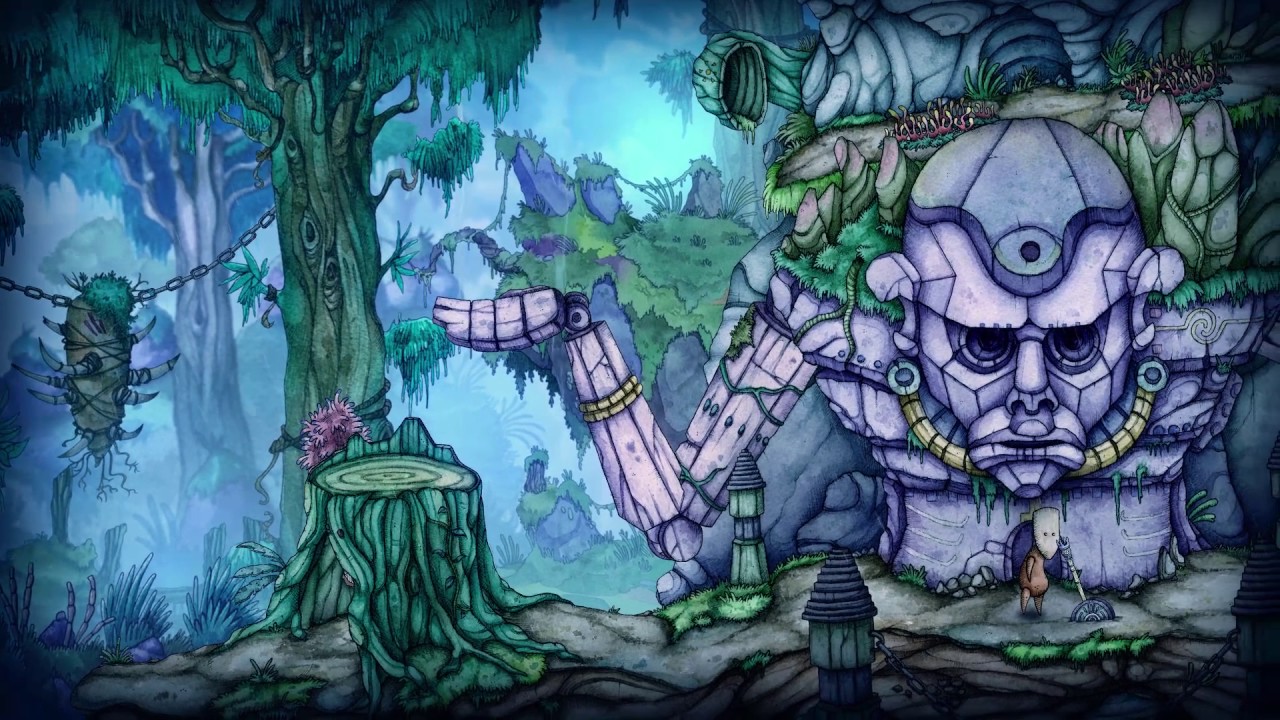
A majority of the top 2D games in the world are made with Unity. In fact, hundreds of thousands of creators rely on Unity for regular updates with the latest and best tools for developing, launching and earning revenue with 2D games.
Read more here: https://unity3d.com/solutio...
@spring ledge @plush coyote
this is the kind of camera i mean
0:48
Children of Morta
plush coyote
camera is just looking down
straight down
The only reason it looks like its at an angle is because the artists drew everything at an angle
remote moth
Give that me a wrong position?
Collider2D[] TouchedEnemys = Physics2D.OverlapCircleAll(transform.position, Radius, 5 << LayerMask.NameToLayer("Gegner"));
Don't think so
remote moth
what is thenn the problem?
 tropic inlet
5 <<?
isn't it supposed to be 1 <<
?
remote moth
5 <<?
isn't it supposed to be1 <<
?
@tropic inlet this doesn't changed anything
remote moth
Are you getting no collisions?
@tropic inlet no not this is the probleme
the problem is that the projectill move in the wrong direction #🖼️┃2d-tools message
tropic inlet
Oh, wow, cool. I didn't know you could directly assign to transform.right like that.
I gotta test that out some time
Where's the code where you move the projectile?
oh it's above
remote moth
the first code here -> #🖼️┃2d-tools message
tropic inlet
i only saw the block of code at the bottom
ok what if u
add this line of code in the projectile's update:
double drawDistance = 5.0f;
Debug.DrawLine(transform.position, transform.position + transform.right * drawDistance);
is the transform.right facing the wrong way?
remote moth
mhh, he look in the correct direction, but he go in the wrong direction
is the transform.right facing the wrong way?
@tropic inlet nope it is not
remote moth
so have fixed it:
wrong:
transform.Translate(transform.right * speed * Time.deltaTime);
correctly:
transform.position += transform.right * Time.deltaTime * speed;
why is my tilemap not correctly in the fileds? :o
remote moth
i have the problem that the texuters, not by the textures center are
 solar thicket
@remote moth move that first child "textures" to 0,0,0 to center it on the pivot of 'tower'
solar thicket
@remote moth the pivot for a gameObject is always at 0,0,0, as far as I know. If you set the position of a child to 0,0,0, it will be exactly on the pivot of its parent (in this case, the center of 'tower'
so yeah, both mean the same thing here (but they are different concepts)
 raven sinew
i have some questions about coding a 2D game.
- how do you set when you click on a spot on the map that it set a place for a rocket to hit.?
- how do you build way that a troop can walk but on on tiles that they cant?
- what is the best way to make a system that you can place troops on the map?
remote moth
why are a few pixels in unity other as of the original image?
solar thicket
@remote moth try turning the filter mode in the import settings for that image to 'point'?
remote moth
@remote moth try turning the filter mode in the import settings for that image to 'point'?
yes
but that has it not fixed
 wind socket
Hello there!
I've question about developing strategy game (turn based) in Unity. I've headache in terms how should I structure the game to make it okay. I've some minor gamedev background but in older engines like SFML, LibGDX etc. The question is, I do not really know how should I approach the game state here.
Should I have some sort of "low level" representation of game state and just use GameObjects to display things but handle game state "internally"? Or should I keep the game state in scene as a standard GameObject tree? I'm concerned that it will be really hard to handle strategy game using game objects in terms of making some AI for it, calculate paths, tie some sort of entity (like player unit) to particular place etc.
In more tradional game engine, I'd just keep game state and map in classes, arrays of tiles, etc, but I'm not sure how to crunch this in Unity. Do you have any suggestions for that?
solar thicket
the more stuff i do, the more i think 'model your game data independently of unity and use unity as a renderer' is the way to go
or maybe DOTS, which i think will be the best option eventually
wind socket
Thanks for your opinion. There is something going in my head that tells me that using scene object as "real" game state won't scale well for strategy game
solar thicket
I think the model of 'objects which exist and you attach behaviors to them' is really appealing and great for prototyping ideas...but yeah, for anything of any scale, I end up pulling things into higher level systems that control dumb 'visual' objects. If you want to have a crowd of units with collision avoidance, you're going to want that to be one loop, not a component on each unit in the crowd. Stuff like that.
wind socket
Very good points, thank you
 still tendon
I am looking to learn how to spawn guns above a spawner. I know how to create a 2d gun, how does this differ? any help or pointing towards a tutorial would be splenid
 cedar panther
So I'm looking to do some basic procedural generation of my tilemap, should I be making each sprite in my tilemap a prefab?
nm, that can't be right
Hmm this is harder than I thought, what's a reasonable way to load a sprite at position when entering a scene?
I'm trying GetComponent<SpriteRenderer>().sprite = Resources.Load<Sprite>("Path");
but how does the path work when I'm referencing a sprite in a sprite sheet?
 cursive apex
Hey
I am making a 2D platformer and I want the camera to follow the player but only on the x axis. How would this be done?
plush coyote
Just don't change the y position when running your camera code? @cursive apex
public Transform playerTransform; // Get a reference to the player through the inspector

private Vector3 _cameraZOffset = new Vector3(0f, 0f, -10f); // An offset so the camera doesn't go directly inside the player
private float _lerpSpeed = 8f; // A variable to control how fast the camera lerps to the player position

private void LateUpdate() // LateUpdate so this executes after the player has moved already
{
  Vector3 desiredPos = new Vector3(playerTransform.position.x, 0f, 0f); // Get our desired X position

  transform.position = Vector3.Lerp(transform.position, desiredPos + _cameraZOffset, _lerpSpeed * Time.deltaTime); // Finally move the camera
}
Thank you! I will try it out
@plush coyote It works, but the player is shaking alot
plush coyote
You put this code on the camera right
plush coyote
Is the player a rigidbody?
cursive apex
Yes
plush coyote
Try turning on the "Interpolate" setting
or, switching the interpolation option to "Interpolate"
plush coyote
You might be able to use lower lerp speeds if you turn on interpolation
cursive apex
Hmmm i will give it a try
raven sinew
how do you make a sprite clickable?
 vocal condor
Depends.. but you could use a collider and do this https://docs.unity3d.com/ScriptReference/MonoBehaviour.OnMouseDown.html
 spark vessel
been tinkering with this script for a while to make two objects attach to each other. kinda hitting a brick wall. I can get the script to work correctly if i make the cookieObj a child of chef and change the script a bit.. but I want the cookie to move independently of the chef and then when he hits it attach to him. not follow him around as a child.
Anyone that can point me in the right direction I would be eternally grateful.
If I set cookie as a child of chef I can get it to work with this.
but again.. then i just have this cookie that randomly follows the chef around until they collide which isnt really what I want 😦
still tendon
I need my bullet to shoot straight but it is shooting up, I know this is the line of code that I need to change but I don't know what to change it to.
 undone coral
Try changing the transform.up to transform.forward in that line.
still tendon
That works, but now it does not go forward. It just stays at the spot that it was shot from. Hmmmm
any ideas @undone coral
undone coral
Maybe it's z-axis is being adjusted and you're not using that? Try transform.right instead? Been a while since I've done this, sorry. :p
still tendon
haha, now it always right. thanks for the help so far
I don't understand why forward is not working
@undone coral
spark vessel
Hmm think i figured out my issue in part.. but im not sure what to do. My script triggers adding the fixed joint 2d between both objects. so component A is fixed to component B. However I need to be able to move component B with Component A moving along with it. As of now component A remains stationary where the Fixed Joint was assigned rather then following component B. Not sure what to do with that.
 tropic raft
help me
spring ledge
@tropic raft Start with describing what you need help with? :p
@spark vessel They both should move if they both have rigidbody2d? Provided you added the correct gameobject into the fixed joint
 glossy marten
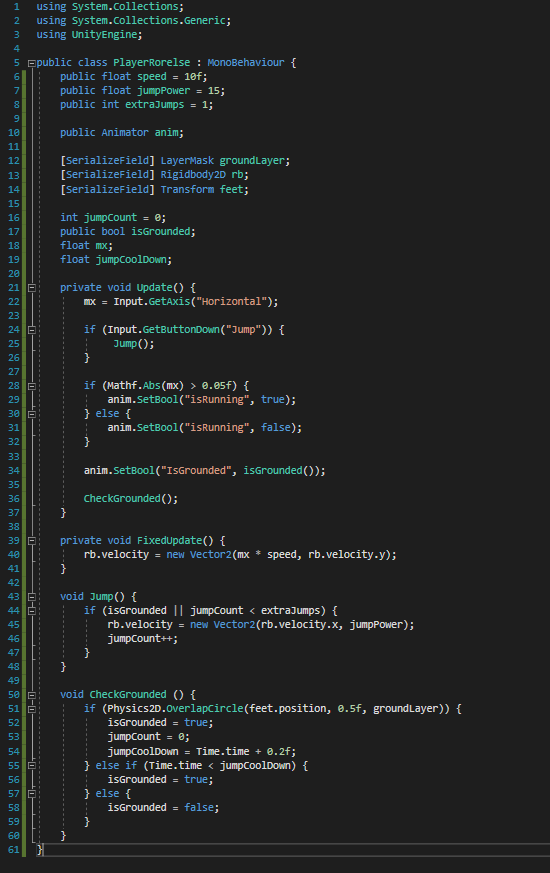 spring ledge
Why do people like screenshotting their code so much btw
glossy marten
Anyone know the problem here?
I have the error CS1955 and it says "Assets\Scripts\PlayerRorelse.cs(34,36) error CS1955: Non-invocable member 'PlayerRorelse.isGrounded' cannot be used like a method."
I just screenshotted me code so you know what I am working with
spring ledge
Well
it's what it tells you
(34,36) means line 34, character 36 in that line
And sure, just usually pasting it on a paste site is nicer
glossy marten
I know where the error is but I don't really understand how to fix it
spring ledge
How do you use methods?
glossy marten
I have a public boolean of isGrounded
glossy marten
Oh now I see
still tendon
yeah
glossy marten
I have an extra ) at the end
still tendon
yeah
glossy marten
Thanks
spring ledge
n-no
 rugged kite
Guys, when I translate position into world position from tilemap where does this position exist. In bottom left corner, middle or upper right of the tile?
glossy marten
Yeah I see now but I think there's something more
spring ledge
Would be better if you figure it out yourself, but yes, what the error is telling you is that you're trying to use a field (non-invocable, aka non-callable, since you do call methods using (), not fields) like a method, by attempting call it with ().
rugged kite
Wanna build RPG maker like event system and gonna probably overlap and check for colliders and get events
spring ledge
You do seem to know how to use fields, after all you did use it in Update()
still tendon
Guys, when I translate position into world position from tilemap where does this position exist. In bottom left corner, middle or upper right of the tile?
@rugged kite may be middle not sure
glossy marten
@spring ledge I have done some research and english is not my first languange so it's too hard explanations everywhere, do you have any tips where I should figure it out?
still tendon
maybe
spring ledge
Well if you know that invoking (and thus invocable) are just fancy works for calling (so, callable) I guesst hats a first step
@rugged kite Got a tilemap?
still tendon
never used tilemaps like that
rugged kite
@spring ledge not atm
spring ledge
Ah
still tendon
sorry to say @spring ledge but you are not using beginner friendly words
spring ledge
That complicate things 😄
rugged kite
Planning my work on the fly
spring ledge
@still tendon Can always ask if they don't understand a word
spring ledge
The compiler doesn't use beginner friendly words either is the issue haha
spring ledge
Sure, but the compiler outputs "invocable"
not "You're trying to call a field"
@still tendon What words specifically though?
rugged kite
One important thing for begginers is to check what compiler does and how they can use its optimalization strategies in order to make themselves work less
still tendon
yeah
glossy marten
Whats the difference between GetAxisRaw and just GetAxis?
rugged kite
Eg compiler changes multiple ifs into switch automatically
So if switch bothers you go with ifs
tropic inlet
Whats the difference between GetAxisRaw and just GetAxis?
@glossy marten getaxisraw is always whole number
spring ledge
@rugged kite What do you mean with "translate position into world position" btw?
still tendon
in acc form
glossy marten
Okay thanks
still tendon
@rugged kite What do you mean with "translate position into world position" btw?
@spring ledge its transform
may be
rugged kite
If KeyCode is detected Get tile position and make it into world position, overlap circle, check if there's some event eg button and execute it
Wondering where the point of overlaps origin would be
spring ledge
Not sure if it has a transform
still tendon
oh I am out
rugged kite
I know I could just overlap with change in 1, 1 in X and Y axis, but I wanna explore different things
glossy marten
Whats the difference between GetButtonDown and KeyCode?
still tendon
i am still student
glossy marten
is it the binds?
rugged kite
KeyCode - button on keyboard
still tendon
Whats the difference between GetButtonDown and KeyCode?
@glossy marten well thats easy button is binding and key is a key
spring ledge
@rugged kite Well if you use Tilemap functions, it's obvious at least 😄
rugged kite
Getbuttondown returns true on the frame button has been started to be presses
still tendon
i use tilemap to create level only
spring ledge
GetCellCenterWorld Get the logical center coordinate of a grid cell in world space.```Oh okay 🙂
still tendon
so i am not familiar with it
rugged kite
@spring ledge but where is the point of origin, in the middle, bottom left or upper right
spring ledge
What do you mean? It gives you the center of that cell
still tendon
@rugged kite found something on documentation
may it helps

its for cells
orgin
glossy marten
@spring ledge Where can I learn about methods?
spring ledge
if it's a tilemap field, how can it be for cells 🤔
still tendon
@glossy marten i will recommend to go with a tutorial series at first
spring ledge
Think that just tells you what tile the tilemap as a whole is centered on?
spring ledge
i.e. where the gizmo would be too
glossy marten
I have watched a lot of tutorials but to learn programming is like to learn a whole new language
still tendon
yeah then you can just store position in a var to calculate the translations
I have watched a lot of tutorials but to learn programming is like to learn a whole new language
@glossy marten you can start with
HOW TO C#
rugged kite
You mean center/amount of tiles?
tropic inlet
https://youtu.be/bPQx0paXrbw @glossy marten

Let's learn how to re-use code with methods in C#!
► Check out Milanote for free: https://www.milanote.com/brackeys062020
● My Solution to the Challenge: https://bit.ly/3b4JVmJ
····················································································
♥ Subscrib...
glossy marten
@tropic inlet I just clicked on that video 😄
rugged kite
found it
Grid.GetCellCenterWorld
In a rectangular grid layout, a call to GridLayout.CellToWorld with Vector3Int parameter, returns a Vector3 coordinate that represents the bottom-left of the cell. This is mathematically correct, but when for example instantiating a GameObject into the grid, you often prefer the center of the cell instead.
still tendon
great
rugged kite
thank you for your help! 💙
still tendon
i will try to remember it
still tendon
👍
spring ledge
Yeah, probably doesn't matter much which oyu use
rugged kite
guys, rn tryna create scriptable tile but it returns me all kinds of problems
based on code from the documentation
using these docs entries
https://docs.unity3d.com/Manual/Tilemap-ScriptableTiles-TileData.html
keeps saying ```'TileData' does not contain a definition for 'gameobject' and no accessible extension method 'gameobject' accepting a first argument of type 'TileData' could be found (are you missing a using directive or an assembly reference?)
even though TileData entry says otherwiseYeah, seems someone typo'd there
https://docs.unity3d.com/ScriptReference/Tilemaps.TileData.html tells you it's gameObject
Reported as incorrect information, lets see if it gets fixed
 clever sky
Can I hook a Sprite Resolver on a tile like I can with a "normal" game object? I'm looking into remaking my chest as a tile instead. If it's somehow relevant, I have my chest class look a lil' like this:
https://hastebin.com/jobisubijo.csharp
 atomic patrol
guys can someone help me with this, i want to make the gun flip direction when is towards left and right idk how to do it with "if" statement. ```if (transform.rotation.z = ?)
{
this.transform.localScale = new Vector3(1, -1, 1);
Debug.Log("facing_LEFT");
}
    if (transform.rotation.z = ?)
    {
        this.transform.localScale = new Vector3(1, 1, 1);
        Debug.Log("facing_RIGHT");
    }```
 brave creek
how would i do this correctly for rotations: https://hatebin.com/iuqogegqoo
currently it just barely rotates and when i do * 180 next to it, it acts weird
still tendon
@brave creek Why you using this?
brave creek
for instantiating, i just need that for the rotation part so i can add my stuff like aimoffset to it
brave creek
https://hatebin.com/wcittowbfb here is the entire script for it, i just kinda need that part to be fixed and it's fine
brave creek
sorry what?
brave creek
that's not really how instantiating works, it needs a whole rotation
not just the z axis
brave creek
https://hatebin.com/iuqogegqoo this, so it's a whole rotation (what instantiating requires) and a seperate vector3 or quaternion
brave creek
how would i do this correctly for rotations: https://hatebin.com/iuqogegqoo
currently it just barely rotates and when i do * 180 next to it, it acts weird
no errors, it just doesn't recognize it as a quaternion
spring ledge
what do you mean, "doesn't recognize it as a quaternion"
still tendon
thats wierd
spring ledge
And I see, you're doing that wrong 😄
brave creek
when spinning it around, it acts weird, the first part of a half spin seems slower while trying to rotate, while the second part is faster, which generally happens if it doesn't recognize it as a quaternion
spring ledge
You're feeding the .z of a Quaternion into .Euler as if it were an euler angle
depending on your setup you want transform.eulerAngles.z or transform.localEulerAngles.z
atomic patrol
can someone help me too or wat
still tendon
When I shoot a bullet, the bullet does not go anywhere. Any ideas?
spring ledge
.forward is the z-axis
for 2d that points into the screen
You probably want .up (y-axis) or .right (x-axis)
spring ledge
?
atomic patrol
guys can someone help me with this, i want to make the gun flip direction when is towards left and right idk how to do it with "if" statement.
        {
            this.transform.localScale = new Vector3(1, -1, 1);
            Debug.Log("facing_LEFT");
        }

        if (transform.rotation.z = ?)
        {
            this.transform.localScale = new Vector3(1, 1, 1);
            Debug.Log("facing_RIGHT");
}```help plox
spring ledge
@still tendon transform.right should give you the local x-axis of the transform (Aka where it points on that)
same for transform up
still tendon
Yeah I thought the same. I think it has something to do with how my player flips on the x axis, so I am looking into thata
spring ledge
-transform.right then?
cedar panther
Anyone mess around with procedural generation of tilemaps?
I seem to be going around it the wrong way
 unreal cairn
I think the j in "jump" should be capital
cedar panther
is it a bad idea to stack sprites and have a few that end up not being visible?
like a tile that is dirt with water on top that has some transparency is fine
but then another tile that's dirt with grass on top of it that completely obfuscates the dirt tile
should I go with the extra effort of making the dirt tile not visible, or does the engine handle it in such a way that I shouldn't worry about it
still tendon
Not sure about your question 😦
Anyone know how to flip a polygon collider with respect to the y axis
How do I flip my colider when my spirte flips
since they can't flip together
 sweet swan
try setting transform.localScale.x to -1f instead of using spriterenderer.flip
still tendon
I did it like this
            spriteRenderer.flipX = true;
            transform.localScale = new Vector3(-transform.localScale.x, transform.localScale.y, transform.localScale.z);  }
        else if(movementInput == 1){
            spriteRenderer.flipX = new Vector3(transform.localScale.x, transform.localScale.y, transform.localScale.z);;
}```Like this
            spriteRenderer.flipX = true;
            transform.localScale = new Vector3(-transform.localScale.x, transform.localScale.y, transform.localScale.z);  }
        else if(movementInput == 1){
            spriteRenderer.flipX = false;
            transform.localScale = new Vector3(transform.localScale.x, transform.localScale.y, transform.localScale.z);
        }
first one is typo
Sorry wrong again just without the spriteRender.flip
and the sprite is jittery
vocal condor
@still tendon First ones a typo
spark vessel
Is there a way to see a fixed joint at run time?
vocal condor
@still tendon Second ones a duplicate function
If you don't see the typo... it's ||Collision2D rather than Collison2D ||
vocal condor
What line is that and the code present there @still tendon
Error says you've already got an OnCollisionEntered2D declared in your Grounded script. @still tendon
vocal condor
@still tendon Second ones a duplicate function
@vocal condor 😉
vocal condor
You've gone beyond simply answering questions and actually understanding implied intentions; great job  .
.
(It's a compliment)
spring ledge
haha
vocal condor
You probably want what @spring ledge suggested?
Because I doubt you'd actually want it to do both (physics quote: no work).
Seems they want it to be Exit on one
I'm assuming you want it to be set to true on entered and false on exit; the is grounded boolean that is.
🤦♂️ I'm sure (maybe) someone will help.. I'm on mobile and cannot/will-not code on the phone 😛 . It's not hard though, so maybe someone will help you out. Literally change Entered for the second function to Exit. I type/swype a lot but will not code (usually don't).
Try it 😉
spring ledge
Questionmarks are not pack animals
vocal condor
Typo
You added a S
As for Move2D, does it take exist?
Is it a component?
Make sure the name is correct.
Spelled exactly identical
spring ledge
🤔
vocal condor
I've got to go, good day.
raven sinew
how do you rotate a sprit to aim at the target spot? it can shot al round the building
tropic inlet
I've learned recently that u can just set the transform.right to make ur object point where u want
u just need the right direction vector
tropic inlet
like this
private void PointAt(GameObject target){
  transform.right = target.transform.position - transform.position;
}
this is assuming transform.right is what u are treating as ur character's forward
 quasi forge
How can I get references of all children GameObjects of a parent GameObject and save them in a list, such that I could individually call a script attached to each of them using a loop ?
 ruby karma
quasi forge
ruby karma
quasi forge
@ruby karma thank you 🙂
 rigid crypt
https://paste.myst.rs/bl9qtarf
Hey so i have recently come across a point of inefficiency in my game and want to make some changes specifically to the enemy attack mechanic in the game. Currently what i am doing in the damage player function (near the end of the script) is checking if the player is within 0.9 f units of the enemy and if it is it then attacks after a set time value, but this is extremely in efficient as the player can go in and out of the 0.9 f range and the enemy will not hit. So i attempted to check collision instead with the player but that was to no avail, using the on collision enter 2D function. Could you please help me refine the combat system as i feel it is extremely sloppy as of now. If you want to see a video in action of how the enemy ignores the player please do ask and ill be happy to make one and send it.
a powerful website for storing and sharing text and code snippets. completely free and open source.
a powerful website for storing and sharing text and code snippets. completely free and open source.
cedar panther
Is it possible to split a sprite sheet through C# instead of using the slice functionality?
I want to use an external dataset for all my sprite names
cedar panther
nm found it, it's via sprite.create
 pure beacon
Does anybody know how to make throwing mechanic in top down game with AddForce, or some other working way?
I use rb.AddForce((mouse position - current pos) * dropForce, ForceMode2D.Impulse)
My item just move in current direction without decreasing velocity
 leaden hill
Howdy, so I'm trying to finalize my top-down building system. The last thing I have to do is show the area in which is buildable. How it works is a building must be placed within x amount of tiles from a "node". These nodes are also placeable, and is needed to expand the players buildable area.
My issue is I don't know how to visualize this. The best Idea I had was when a player enters building mode, it highlights all grid spaces red that the user cannot place in. I'm just not sure the best way to tackle this.
Here is what I mean. As you can see I have a grid overlay with the hub in the middle. By default, the player has control over 3 grid spaces out from the hub. But I want to visualize that when they enter build mode, so all other tiles outside of that area would become red when in build mode.
Also I should mention I didn't make this via a tile map. So that's my issue
spring ledge
@pure beacon Check if it has a drag value set in the inspector
pure beacon
@spring ledge you mean custom variable or inunity var?
spring ledge
On the rigidbody
pure beacon
I need to check, but i guess it was set
spring ledge

Linear Drag
I think it defaults to 0 even
But no drag means it won't slow down (except maybe for gravity and eventual collision with ground)
pure beacon
@spring ledge THAT'S IT, thanks 😘
still tendon
I am getting the following error on my multiplayer game "PhotonNetwork.Instantiate() can only instantiate objects with a PhotonView component. This prefab does not have one: Player" Any ideas?
 late spear
@still tendon zoom in a bit more
 sly crow
    public string shipName;
    Rigidbody2D rb;

    void Awake()
    {
        Rigidbody2D rb = this.gameObject.GetComponent<Rigidbody2D>();
    }
``` i want to access the script's gameobject's rigidbody. is this correct?wait i fixed it lol
i foudn the real error
    void Start()
    {
        ThrusterLeft(100f);
    }

    void ThrusterLeft(float force)
    {
        rb.AddForce(new Vector3(1f, 0f, 0f) * -1f * force);
    }
NullReferenceException: Object reference not set to an instance of an object
ShipFunctions.ThrusterLeft (System.Single force) (at Assets/Scripts/ShipFunctions.cs:21)
ShipFunctions.Start () (at Assets/Scripts/ShipFunctions.cs:15)
line 21 is at rb.AddForce(new Vector3(1f, 0f, 0f) * -1f * force);
line 15 is at ThrusterLeft(100f);
@still tendon ^
still tendon
Good to hear lol
 ember adder
I am trying to rotate 90 degrees on a line defined by 2 vectors by a specified distance. the rotation works fine, but I seem to be getting the distance wrong.
    Vector2 get_depth_point_BL_v2( Vector2 v2_L, Vector2 v2_R, float depth_to_BL_point){
        Vector2 relative_vector = v2_L - v2_R;
        Vector2 p3_perp = v2_R +  ( v2_rotate(relative_vector, -90 * Mathf.Deg2Rad ));

        float cur_dist = Vector2.Distance(v2_R, p3_perp);
        float dist_fctr = depth_to_BL_point / cur_dist;
        Debug.Log($"depth_to_BL_point:{depth_to_BL_point}      cur_dist: {cur_dist}       dist_factor:{dist_fctr} ");
        return Vector2.MoveTowards(v2_R, p3_perp, dist_fctr);
    }
 spiral scarab
Hello can someone help please
How could I transform My Object Like Spider's Head in this video
rigid crypt
I really dont know how but i just want to say that Webbed looks like such a cool game, if it comes out :0
still tendon
Hello can someone help please
How could I transform My Object Like Spider's Head in this video
@spiral scarab yo just calculate angle between your mousepos and head parent then rotate in that direction.
spiral scarab
I really dont know how but i just want to say that Webbed looks like such a cool game, if it comes out :0
@rigid crypt
Yeahh This game so cute
@still tendon Thanks bro
still tendon
no problem if need any help in code ask me mate @spiral scarab
 golden finch
I am trying to create a 2d running animation but ran into several problems:
1: if I try to create the animation manually in the animator the sprite shown doesn't change
2: if I try to drag the various sprites in multiple selection, the animation is created but I cannot then apply it to a sprite in the initial state
How can I solve?
 devout hill
i have a question where can i buy online gaming server for my game i dont know much about servers but i know i need one
 nocturne gull
i dno what ive done wrong here but my planets arent moving nor resetting when they hit eachother
 magic dock
How do I make a normal extenction
im trying to fix this for half day
how th do i change it
still tendon
So I need to create a health system which I know how to do, but I need to do it in a multiplayer game but also I need to make the bullet do damage when it is a rigidbody and not a raycast
Any help is appreaciated
Ive watched a few tutorials and they have not helped yet
tropic inlet
So, you want to spawn and launch a projectile
and you want this projectile to have a rigidbody?
still tendon
Well I already have the bullet shooting
and it has a rigidboyd
I need it to do damage on a multiplayer game
Any ideas? @tropic inlet
spring ledge
Sort of depends on the structure of your netcode and such
tropic inlet
I don't know how to do networking.
I only know how to do it in singleplayer (or, well, offline) mode.
still tendon
Yeah, same
still tendon
All I have with networking so far is that someone can join the game and we can see each other shoot and move.
spring ledge
How does that work?
still tendon
still tendon
What do you use?
spring ledge
Well, haven't really used Unity for networking, but usually just sockets
still tendon
Ahhh, no problem thanks anyway
spring ledge
Not sure what networking model Photon goes for, I think peer-to-peer.
If so, you'd have one host be the authorative server and on that one, when the projectile hits a player the host decreases that players' HP and sends the new HP update out to all players
Or you could have an approach of like, each player manages their own HP, i.e. if the local client sees a projectile hit the player, it decreases HP and sends out an update for that.
Though the latter is more prone to be affected by cheating
Though it can get a lot more complex if you want to do fancy networking stuff to compensate for lag and such
still tendon
But I imagine that for the first scenario, if the person who is hosting the server quits than the whole game does as well?
spring ledge
Sure, some games have a mechanism that transfers hosting rights
Generally, if you want a game to run regardless of who is there, you'd go with some sort of dedicated server. Where you run the game (or at least the necessary parts of it) on a server that people connect to
still tendon
Would this work for larger games as well?
spring ledge
Which way?
still tendon
Like is that the system that large games like COD or fortnite would have multiplayer
spring ledge
Dedicated server is even better for anti-cheat because now there is no host who could cheat easily. But you of course need to provide your own server then :p
Think Fortnite would uses dedicated servers
CoD could be either way, since I think you can just create a server ingame
still tendon
So a dedicated server can host multiple games?
spring ledge
Sure? Dedicated just means that it's a server that exists for the sole purpose of people playing the game and such.
Instead of like, a player acting as the server.
Theres lots of decision to make about how you want your game to network :p
still tendon
Yes seems like a lot of information lol, very interesting
spring ledge
Sadly I picked that knowledge up from various sources over time, so I can't really provide a single guide or anyhting
Other than Valve's post about lag stuff, but tahts quite advanced
still tendon
I will definetely check that out thanks
 fervent ermine
how do you attach components to scriptable tiles, like say if i wanted to have a tile that had a box collision trigger above it and have the tile destroy itself when an object goes into the trigger
also just how do you use scriptable tiles in the first place, i probably should have started with that
i have the tile script made
but then how to i bind it to a tile in the tile pallete
glossy marten
Hi I have a problem that my enemy in my 2D game doesn't take any damage, I have both made a playercombat script and a health script for my enemy. The enemy doesn't do any hurt animation or the dead animation and when I watch the debug window the enemys health still remain max HP
I also have an "attackpoint" in front of my player
tropic inlet
show code, sweetie
spring ledge
"sweetie" xD
 signal quest
So I have a problem
It's about my character
I made all sprites for my character that's 32x32 pixels
So, when I put my character sprite in game
When I open scene you can see character sprite normally
But when you open "game" scene
It's like this
So I tried changing scale of character, it helped but it's not just right
It should be x 1 and y 1 , right?
One interesting fact that when I change scale of the whole "game scene" my character starts to change too
Maybe it's problem here?
 strange sierra
Have you set your PPU for the sprite?
 idle wing
anyone know why the stars aren't sppearing in the game view?
sweet swan
- particle z values are behind camera
- camera culling mask filters particles
- something else is in front of them
spring ledge
Try Update instead of FixedUpdate
magic dock
@magic dock Don't press f5 in vs code? 😄
thx alot
 hoary tide
Can anyone take a look at my question, please? It's about using the camera to take a snapshot
https://answers.unity.com/questions/1787755/trying-to-take-a-snapshot-of-only-a-portion-of-the.html
Unity is the ultimate game development platform. Use Unity to build high-quality 3D and 2D games, deploy them across mobile, desktop, VR/AR, consoles or the Web, and connect with loyal and enthusiastic players and customers.
 fossil garden
Is there a way to create an image in a canvas purely from scripting
More context: I am trying to create a chess board and would like to generate the squares programmatically
still tendon
Hey guys, I need help on making a 2d game (no access to unity as of now, i just need help) for mobile.
I dont know coding for now but i wanna make a 2D platformer that would be interesting, but idk how to make scripts
ill be learning coding
when i get
a pc
I dont have one as of now
if u can help then dm me
fossil garden
@still tendon https://learn.unity.com/

Unity Learn
Unity Learn provides award-winning free tutorials, sample projects, and full courses for mastering real-time 3D development skills with Unity Learn to make video games, VR, AR, and more.
@still tendon Unity uses C# for scripting. You can learn C# in this book (which I am also reading) http://libgen.rs/book/index.php?md5=43CC9F8096F66361F01960142D9E6C0F
Library Genesis is a scientific community targeting collection of books on natural science disciplines and engineering.
still tendon
@still tendon https://learn.unity.com/
@fossil garden tysm
Unity Learn
Unity Learn provides award-winning free tutorials, sample projects, and full courses for mastering real-time 3D development skills with Unity Learn to make video games, VR, AR, and more.
@still tendon Unity uses C# for scripting. You can learn C# in this book (which I am also reading) http://libgen.rs/book/index.php?md5=43CC9F8096F66361F01960142D9E6C0F
@fossil garden ohh iwas using lua
Library Genesis is a scientific community targeting collection of books on natural science disciplines and engineering.
oh and one more thing
idk how to draw. literally.
is pixelart like, uh, ez?
(oh btw, i wanna make something like darkland, but with softbody and many other features, not darkland but in the style of)
 stoic rivet
How can I make an NPC turn around when it hits a wall? Currently using tilemap collider 2d. Game is a sidescroller
 sacred burrow
is there not a built in editor for unity 2d?
 hollow crown
The editor is the same, what do you mean?
tropic inlet
Maybe he expected for there to be a second editor designed specifically for 2d or something
Nonetheless, as Vert says, you use the same editor you use for 3d
it's just that u set the camera to orthographic or something, and u ignore the Z axis when scripting your character movement
 pseudo geyser
in Unity 2D can I set the camera to a screen size?
still tendon
Hello amazing folks, so I have 2 questions.
For a game based alot on crafting and ui. I was thinking wether to go for approach of Unity GUI with canvas or Sprites acting as buttons instead and wonder what your recommendations would be and why. I know how they render differently etc. Would want to know your opinions on the matter.
Also whats a good base resolution to work from creating games for mobile ?
still tendon
How can I make an NPC turn around when it hits a wall? Currently using tilemap collider 2d. Game is a sidescroller
@stoic rivet o thats the script i need too except for the player
 flat widget
Hello fellas ! I am having a bit of a trouble here : I have a simple script for a "spawn protection".
Projectiles go throught an empty BoxCollider2D set as a tyrigger one, get there CapsuleCollider2D disabled on enter2D and re-enable on Exit2D and then get destroyed (that part is working tho). That's what iit is suppose to happen.
using System;
using UnityEngine;

public class EnemySpawnProtection : MonoBehaviour
{
    private void OnTriggerEnter2D(Collider2D other)
    {
        if (other.CompareTag("PlayerProjectile") && other != null)
        {
            other.enabled = false;
        }
    }

    private void OnTriggerExit2D(Collider2D other)
    {
        if(other.CompareTag("PlayerProjectile") && other != null)
        {
            other.enabled = true;
        }
    }
}
The tag is OK (set correcly), I trully don't get why it is not working as the script is quite simple. The .cs is located on the BoxCollider2D GameObject.
 candid onyx
hello, i have made an enemy AI following brackeys tutorial and am now making it so it runs when it is moving. For some reason it keeps like running then it plays idle but continues to move? please @ if you have any suggestions for fix
update, the enemy only runs when the player does
 potent flower
@candid onyx your issue is that the ai it moves based on player input
candid onyx
oh right...
potent flower
the first line in your update
candid onyx
Yeah i see, so how would I make it so it was the velocity of the enemy?
the rigidbody2d is refrenced in another script and it also not on this component but instead the group or folder whatever its called
rigidbody is on EnemyObject, the script is on EnemyTest.
@potent flower
potent flower
I believe its
GetComponent<Rigidbody>().velocity
vocal condor
Well.. it's a vector 3 😛
potent flower
oops that gets you a vector3, try:
GetComponent<Rigidbody>().velocity.magnitude
candid onyx
btw im new so half this stuff goes over my head
potent flower
well getComponent<>() just gets the attached component on the gameObject, and through that you can get certain information that component holds
 pallid stirrup
so i have my movement set on
rb.velocity = new Vector2(xmoving * speed, rb.velocity.y);
`but i want to add external forces
How could i do that?
potent flower
add the external force onto the end of that
vocal condor
Setting velocity will override forces.. perhaps use add force instead.
candid onyx
@potent flower to refrence the rigidbody, its in a different tab in the inspector?
potent flower
yeah that's probably the actual solution, but I figured you were handling it directly for a reason
potent flower
your enemy object should have its own rigidbody if you want it to move
and getcomponent<rigidbody> should grab it off the object
candid onyx
well im trying to get the component from the other thing
the code is on test, the rigidbody2d is on object
pallid stirrup
add the external force onto the end of that
@potent flower the velocity doesn't decrease then
it just gets added all the time
potent flower
if you are directly setting the velocity, you need to do all the drag math yourself as well
pallid stirrup
And what is exactly that math
potent flower
but Dalphats solution allows the physics engine to handle all the other stuff
pallid stirrup
Im sorry i don't really know 😅
The problem with dalphats solution is that my character will not have a set velocity
He'll accelerate then decelerate
potent flower
depends on what you are trying to accomplish, a general dampening is just velocity *= 0.9f; or something like that, you can do directional drag as well
adding force allows for that though
potent flower
np, glad to help
still tendon
Hey
I'm doing a personal project of remaking Super Mario Bros, and I needed help with movement physics
How do I easily recreate mario-style jumping where the shorter you press the jump button, the smaller the jump is?
and how do I detect collisions properly with tilemaps?
vocal condor
Google a 2d platformer tutorial to help get started then cater it towards what you need.
 sweet swallow
Hi! I´m kinda new using Unity and I have a question related to this animation script (sorry for the low quality) , I want it to move down for .5 seconds every 1.5 seconds (Simulating a jump), I´ve been experimenting with coroutines and bools nut it doesn´t work, hope anyone can help me 😄
vocal condor
this animation script
Where's the script?
sweet swallow
I coudln´t figure out how to paste it as code without being spam sorry for that, anyways that´s basically the code, I know there´s missing the 0.5 second movement but I´ve been deleting and changing lines of code and I didn´t wanted to mess it up more than it is
still tendon
Doesnt a collider is enough
to detect clicks
with void OnMouseDown()
I am getting this error "Object reference not set to an instance of an object" on the highlighted part of the code. I don't see whats wrong with it.
 civic nymph
GetComponent is returning null
civic nymph
Do you have the component on the object?
still tendon
I have that script on the object, yes
civic nymph
I’m not sure what’s wrong then, sorry
still tendon
No worries, thanks for trying
civic nymph
Anytime
still tendon
How do I get the tile that was responsible for a tilemap collision? I'm not using a composite collider
I've searched the internet for this and the answers have been sparse, some even saying its not possible
 lime belfry
@still tendon can you help with something else for coding, or are you asleep?
 distant pecan
How do I get the tile that was responsible for a tilemap collision? I'm not using a composite collider
@still tendon idk if there is some method already for this, but what you can do is check the collision point, convert its position using WorldToCell and make things based on this, like removing the tile, changing it...
 vale coral
Why doesn't this send a message to console
I have given my player the tag Player already so if you say that is the problem you're wrong
potent flower
probably means that the collider trigger isnt firing
which means you might want to double check your collider and rigidbody setup
sweet swan
https://docs.unity3d.com/Manual/CollidersOverview.html chart at the bottom of this page shows which rigidbody pairs will send messages by default
if you can't be bothered, project settings -> physics
vale coral
Ok yeah the player didn't have a rigidbody
im stupid
But im still a beginner
You learn from mistakes
still tendon
can i get some code that makes my cube go left or right when i press a button?
this is my first day with unity
sweet swan
oh what the hell sure here ya go https://hastebin.com/topubesene.csharp
ruby karma
lol
sweet swan
@still tendon if you wanna make it smoother, look into smoothdamp or linear drag + addforce
ruby karma
I'm confused to how this syntax void Awake() => body = GetComponent<Rigidbody2D>(); works. isn't => imply this function returns this? (in this case body..?)
sweet swan
smth smth function bodied members but nah it works
it treats that line as a delegate and assigns it to awake()
so unity shrugs and runs it anyways
honestly braces are still more readable
ruby karma
yerp very much more so 😛
 tidal hatch
hey everybody I'm currently working on a topdown sword fighting game and I'm trying to figure out how to do enemies taking damage. I will be having multiple enemies using the same script, and I'm having trouble figuring out how to do damage to only one of them while writing the attack method in my player script. Does anyone have any ideas on how to target a single enemy
sweet swan
OnTriggerEnter2D(Collider2D hit) {
Enemy enemy = hit.GetComponent<Enemy>();
enemy.Health -= 3;
}
``` use collision callbacks and gc to grab your target's scripts@tidal hatchideally filter out collision targets with the matrix under settings -> physics too
or use comparetag
tidal hatch
oh thank you! I actually already found a solution for what I was looking for. I appreciate it though!
sweet swan
nice!
 stuck yacht
Can someone send me a script that allows me to move? I'm in 2D
 viral locust
Someone can explain me how to make a script for my movement character on an isometric 2D Map ?
@stuck yacht go check this

Get code examples like
sweet swan
someone else asked for movement code earlier today too #🖼️┃2d-tools message
stuck yacht
Aight thank you
still tendon
So I am watching a not so out of date tutorial, and
I am not sure what to send or screenshot, but I cant get it to make the sprite jump
using System.Collections;
using System.Collections.Generic;
using UnityEngine;

public class PlayerMovement : MonoBehaviour {
    public float movementSpeed;
    public Rigidbody2D rb;

    public float jumpForce = 20f;
    public Transform feet;
    public LayerMask groundLayers;


    float mx;

    private void Update() {
        mx = Input.GetAxisRaw("Horizontal");

        if (Input.GetButtonDown("Jump") && isGrounded()) {
            Jump();
        }
    }

    private void FixedUpdate() {
        Vector2 movement = new Vector2(mx * movementSpeed, rb.velocity.y);

        rb.velocity = movement;
    }

    void Jump() {
        Vector2 movement = new Vector2(rb.velocity.x, jumpForce);

        rb.velocity = movement;
    }

    public bool isGrounded() {
        Collider2D groundCheck = Physics2D.OverlapCircle(feet.position, 0.5f, groundLayers);

        if (groundCheck != null) {
            return true;
        }
        return false;
    }
}
any help?
sweet swan
mmmm wish blackthornprod wouldnt encourage using overlapcircle
plop Debug.Log(isGrounded()); into update and see if it's behaving as expected?
still tendon
https://www.youtube.com/watch?v=1bHVsxw_o7o -- the video

Learn how to make a 2D Platformer in Unity. In this video we look at creating a Player Jump script in Unity which uses Colliders to check if the player is grounded before jumping.
A Unity 2D Game Development Tutorial.
Thanks for watching!
Twitter: https://twitter.com/tyler_...
Btw I am a complete beginner at this
sweet swan
yee gotta start somewhere
still tendon
plop
Debug.Log(isGrounded());into update and see if it's behaving as expected?
@sweet swan sorry wdym
and where
sweet swan
add it as the first line of update, i suspect it's always returning false which prevents jump from being called
stuck yacht
Oh yea I'm following that series and the movement isn't workign
sweet swan
what appears in the console?
stuck yacht
Nothing. There's no errors just the assosiated script cannot be loaded thing
still tendon
stuck yacht
Let me restart unity to see errors
still tendon
Do you know how to get the jumping to work
Cause the left to right is fine
and gravity is fine
I added the debug
sweet swan
if you just want to see the jump work, change the if statement to this:
if (Input.GetButtonDown("Jump")) {
    Jump();
}```so just getting rid of the broken ground check
also next time collapse your console because if it returns true and false when youre in the air when you're on the ground then we'd know it works
still tendon
Could you add it into the code?
Or is it just on the end
I just dont want to lose the tutorial
sweet swan
mmmmmm true
if that's the case, here's some things i'd make sure are the same in the tutorial:
- the way groundLayers is set up
- every gameobject with a collider's layer
- the position of the feet's transform relative to the player
still tendon
I mean it is a big complaint in the comments that the jumping wont work, so its not like I am the only one
sweet swan
yeah i'm not surprised, afaik the best way to go about ground checks is with a dedicated foot collider and collision callbacks
casts don't use the matrix under project settings -> physics which makes them harder to maintain
still tendon
What should I do then- a different tutorial? Add the jump code in but carry on the tutorial? Just keep going on the tutorial?
sweet swan
this seems promising
i'm afraid i don't know the specifics of this series so i might not be able to help more than that
still tendon
But I have created a ground tag, and added it to the Ground + Platform, do you think I need to have the ground tag on anything else?
sweet swan
you know what set ground layers to everything and see if it works
if it still doesn't, then we'll know it's probably a bug with foot placement
still tendon
ground layers = Ground?
sweet swan
if it's set to ground, the ground should be on the ground layer
tag is largely irrelevant for physics



 still tendon
may be a simple question; although How do I make an AI look in the way it's working? e.g If X is increasing look right, X is decreasing look left, Y is decreasing front sprite Y is decreasing behind sprite etc?
sweet swan
sounds like a blend tree to me https://docs.unity3d.com/Manual/class-BlendTree.html
still tendon
thank you!
 errant cloud
I want to make a ragdoll that is controlled by the Player but im new to C# and Unity
Is there a Tutorial to how to make this?
 amber geyser
Good evening!
I need some tips on correct pipeline for animating a 2d character which consists of several elements.
For example I have a cat and sword swing effect spriteshits. What's the best way to animate them both when cat swings it sword?
(May be particle for sword effect, or child object which I can turn on... first time trying to animate 2d things)
 severe smelt
Any idear how to get a GameObject (that is already instanciate) into an prefab ?
sweet swan
drag from hierarchy window to project
@amber geyser i'd have the sword slash be a separate gameobject that handles hitboxes and damage
if you have a bullet class, the slash can extend it
swinging the sword spawns the slash prefab
honestly you might as well find what works for you and use the profiler to decide whether it's performant
amber geyser
swinging the sword spawns the slash prefab
@sweet swan Thx for the answer. But if I instantiate another animated gameobject I should sync its animation with my character somehow. How can I do it?
sweet swan
i typically use an animation event at the start of the chara's swing animation to spawn the sword slash at the same time
or on the first frame the slash comes out if you're using anticipation frames
amber geyser
Aha, thx! Can you give a tip about correct architecture of such animators?
It should be a component which handle all View-related things like child gameobjects, animator etc I think
or may be good reusable example?
I think it should implement some interface to be reusable?
sweet swan
afaik this is the most reusable thing about the animator component https://docs.unity3d.com/Manual/AnimatorOverrideController.html
amber geyser
Thanks! Gonna try and build my character from several gameobjects 🙂
sweet swan
good luck!
 winter elbow
Hi, could use some help with creating a patrol route for an npc in game I started working on. I have a MovementController script used by player and npc. I want to create a route for npc to move around but when I pass the waypoint transform the NPC move in odd way.
So moves to the waypoint but just continues going. And if I move the waypoint to other side it heads there but at slower rate. Using a Character Controller but tried with a rigidbody2d and its the same. Player movement works just fine.
NPCController:
  private void Update()
    {
        RouteBehaviour();
        UpdateTimers();
    }

    private void UpdateTimers()
    {
        _timeSinceArrivedAtWaypoint += Time.deltaTime;
    }

    private void RouteBehaviour()
    {
        var nextPosition = _initialPosition;

        if (patrolPath != null)
        {
            if (AtWaypoint())
            {
                _timeSinceArrivedAtWaypoint = 0.0f;
                CycleWaypoint();
            }

            nextPosition = GetCurrentWaypoint();
        }

        if (_timeSinceArrivedAtWaypoint > waypointDwellTime)
        {
            Debug.Log("Moving to: " + nextPosition);
            _movementController.StartMoveAction(nextPosition);
        }
    }

    private void CycleWaypoint()
    {
        _currentWaypointIndex = patrolPath.GetNextIndex(_currentWaypointIndex);
    }

    private bool AtWaypoint()
    {
        return Vector2.Distance(transform.position, GetCurrentWaypoint()) < 0.1f;
    }

    private Vector2 GetCurrentWaypoint()
    {
        return patrolPath.GetWaypoint(_currentWaypointIndex);
    }
And the MovementController:
public class MovementController : MonoBehaviour, IAction
{
    // Animator properties
    private static readonly int Horizontal = Animator.StringToHash("Horizontal");
    private static readonly int Vertical = Animator.StringToHash("Vertical");
    private static readonly int LastHorizontal = Animator.StringToHash("Last_Horizontal");
    private static readonly int LastVertical = Animator.StringToHash("Last_Vertical");

    // Movement configuration
    [SerializeField] private float movementSpeed = 2f;
    private ActionScheduler _actionScheduler;

    private Animator _animator;
    private CharacterController _characterController;
    [NonSerialized] public Vector2 Destination;

    [NonSerialized] public bool IsMoving;

    private void Start()
    {
        _actionScheduler = GetComponent<ActionScheduler>();
        _characterController = GetComponent<CharacterController>();
        _animator = GetComponent<Animator>();
    }

    private void FixedUpdate()
    {
        UpdateMovement();
        UpdateAnimator();
    }

    public void Cancel()
    {
        IsMoving = false;
    }

    private void UpdateMovement()
    {
        var direction = new Vector2(Destination.x, Destination.y);
        var motion = direction * (Time.deltaTime * movementSpeed);
        _characterController.Move(motion);
    }

    private void UpdateAnimator()
    {
        _animator.SetFloat(Horizontal, Destination.x);
        _animator.SetFloat(Vertical, Destination.y);
        if (!IsMoving) return;

        _animator.SetFloat(LastHorizontal, Destination.x);
        _animator.SetFloat(LastVertical, Destination.y);
    }

    public void StartMoveAction(Vector2 destination)
    {
        _actionScheduler.StartAction(this);
        Destination = destination;
    }
}
Code is terrible but I'm new to unity and this is just a prototype so be gentle please. 🙂 The destination that's passed in to character controller seem to be find and match the waypoint.
 tacit sluice
Does anyone know how to make collisions? I'm using a RigidBody2D and have a box collider on both my player and barrier.
I followed a tutorial and didn't get my results.
public class CharacterController2D : MonoBehaviour {

    private Rigidbody2D rigidbody2d;
    private Vector3 moveDir;

    private void Awake()
    {
        rigidbody2d = GetComponent<Rigidbody2D>();
    }

    private void Update () {
        float moveX = 0f;
        float moveY = 0f;

        if (Input.GetKey(KeyCode.Space) || Input.GetKey(KeyCode.W) || Input.GetKey(KeyCode.UpArrow))
        {
            moveY = +1f;
        }
        if (Input.GetKey(KeyCode.S) || Input.GetKey(KeyCode.DownArrow))
        {
            moveY = -1f;
        }
        if (Input.GetKey(KeyCode.A) || Input.GetKey(KeyCode.LeftArrow))
        {
            moveX = -1f;
        }
        if (Input.GetKey(KeyCode.D) || Input.GetKey(KeyCode.RightArrow))
        {
            moveX = +1f;
        }

        moveDir = new Vector3(moveX, moveY).normalized;
    }

    private void FixedUpdate()
    {
        rigidbody2d.velocity = moveDir;
    }
}
Please also @ me when you answer since I moderate quite a busy server.
vocal condor
Collisions should be occurring by default if you're using 2d colliders and at least one of the two objects have a Rigidbody2D.
amber geyser
Hello! Can I use SpriteAtlas for making animations in Editor?
vocal condor
Unless they (the colliders) are set to trigger.
ruby karma
Are physical collisions not happening? Or the events triggered by collisions ? @tacit sluice
tacit sluice
Physical collisions
ruby karma
ok, so do you have non trigger colliders on both objects?
tacit sluice
Yes
ruby karma
Can you post screenshots?
ruby karma
Have you disabled any layer based collisions? are both the objects on the same Z position?
vocal condor
Ideally if one of the two objects have a Rigidbody and both have colliders that are set to non-triggered a collision should occur; assuming both are of the same type(2d/3d) and simulated.
tacit sluice
recording a clip, be with you soon
both on z level 0, z level locked on rigidbody
the colliders are non-triggered
 lavish spire
Hello guys! I have a problem with death system. I don't know how to pass a newHealth variable to another script. How to make that reference?
And here is a piece of code responsable for health, where resides variable that I want the game manager to read ( it is attached to a player )
sweet swan
cache this with healthPlayerCollision = FindObjectOfType...; and access newHealth with healthPlayerCollision.newHealth
rmbr to declare it as a class variable too, so add HealthPlayerCollision healthPlayerCollision; at the start of your script
i'm assuming that find call doesn't return null
 blazing seal
anyone know how to access a float from another script???
sweet swan
@blazing seal my last answer covers yours too but here are some alternatives:
- use a singleton pattern
- use getcomponent + a collision callback
- make the other script a property and drag it in from the inspector
- cache the return value of instantiate
if you still need help i can take a look at your classes and implement it if it seems simple
lavish spire
Like that? I'm basically new to programming and I can't really understand referencing yet :<
 robust ivy
you first declare a variable, in this case you want healthPlayerCollision to be that newHealth variable
so if your newHealth is a int
you do:
int healthPlayerCollision = FindObjectOfType.....
declaring variable in a function will only be usable in that function
if you declare it like your public variable up in your script then its usable everywhere
all the red underlined text you have in script are missing reference like this
either variable is not declared or not referenced to something in another script
also at the end of a line, add the ;, unless its a if and you open parenthesis { }, thats considered like a ; (which mean return/enter/process the code before that end point)
In your specific case, you dont really need to find that object variable in the
Awake menu, also its a bad idea to try finding other object in awake, the other object might not be there and ready yet so it could return null.
you could just do if (FindObjectOfType<HealthPlayercollision>().newHleath = 0
in your endgame
 inner kelp
So i am trying to make a UI, but the UI thing won't work. I made a Button and a code that did SceneManager.LoadScene("Scene"), but when i click it. Nothing happens. I have tried to debug it and everything, but no
 calm wyvern
Does the debug shows in the console?
if yes its a issue wht the loading of the scene
if not its a issue with the button
 covert cliff
I'm struggling to make my character stay on slopes without sliding. Any help? Unity 2d
And to make my menu buttons be the focus.
 raw raptor
So i am trying to make a UI, but the UI thing won't work. I made a Button and a code that did
SceneManager.LoadScene("Scene"), but when i click it. Nothing happens. I have tried to debug it and everything, but no
@inner kelp did you assign the function to onclick on the button in the inspector?
inner kelp
Yeah
 fiery egret
Hi guys, currently my shooting works fine but i have one small bug. Due to a mechanic in my game where I flip the character to the left or right(depending on where the cursor is) and the gun always pointing to the cursor. Due to this when you put the cursor directly below you and quickly strafe left and right the bullet will spin
    {
        currentAmmo--;
        allowFire = false;
        GameObject bullet = Instantiate(bulletPrefab, firePoint.position, firePoint.rotation);
        Rigidbody2D rb =  bullet.gameObject.GetComponent<Rigidbody2D>();
        rb.AddForce(firePoint.right * bulletForce, ForceMode2D.Impulse);
        yield return new WaitForSeconds(0.2f);
        allowFire = true;
}```if you would like the player flipping methods here you go:
    {
        if (facingRight == true && direction.x<0|| facingRight == false && direction.x > 0)
        {
            Flip();
        }
    }

    void PointGun()
    {
        gun.transform.right = direction;

        if (facingRight == false && gunRight ==true)
        {
            FlipGun();
            gunRight = !gunRight;
        }else if(facingRight==true && gunRight == false)
        {
            FlipGun();
            gunRight = !gunRight;
        }
    }

    void Flip()
    {
        facingRight = !facingRight;
        Vector3 theScale = transform.localScale;
        theScale.x *= -1;
        transform.localScale = theScale;
}```all of which are called in input
except for flip
@ me if have a solution much thanks
brave creek
https://hatebin.com/jjslkizhgc Heyo, i keep getting indexoutofrangeexception's while running this, how could i fix this?
clever sky
try with this instead?
    public Vector2 vel;
    public GameObject[] Player;
    public Movement[] PlayerScr;
    public byte AmountPlayer;

    void Awake()
    {
        Player = GameObject.FindGameObjectsWithTag("Player");

        foreach (GameObject s in Player)
        {
            PlayerScr[AmountPlayer] = s.GetComponent<Movement>();
            AmountPlayer++;
        }
    }
But maybe a map would be more appropriate?
brave creek
didn't help it sadly
viral locust
Hi i'm developping a 2D game and i wan't my character to hit ennemies but my script is not working any clue ?
 true crater
👀
clever sky
using Linq;

PlayerScr = GameObject
  .FindGameObjectsWithTag("Player")
  .Select ( (player) => player.GetComponent<Movement>() )
  .ToArray();
@brave creek does this work?
brave creek
it says gameObject[] doesn't contain a definition for FlatMap
clever sky
Are you using Linq?
brave creek
yeah i'm using System.Linq
clever sky
Is there a specific reason you're using GameObject[], or would List<GameObject> suffice?
Also it's Select and not FlatMap, that's my mistake
brave creek
never used List<GameObject>, but what i'm trying to do is grab all Players with the tag "Player"
okay yeah now it works, thanks!
clever sky
Spreading a little of functional programming goodies never hurt
@brave creek I can btw tell you why you get an out of bound exception
Array's in C-like languages has a set size, so if you don't initialise it with the right size, then you'll get an out of bound exception
Let's take the following two arrays:
int[] ArrayOne = new {1,2,3}
int[] ArrayTwo = new {2,4}
While we can do something like (you're just reassigning ArrayTwo)
ArrayTwo = ArrayOne
We cannot say
for (int i = 0; i <= ArayOne.count; i++)
{
  ArrayTwo[i] = ArrayOne[i];
}
Because then you'll get an out of bound exception because ArrayTwo[2] doesn't exist
brave creek
huh, late reaction due to having to close discord for some time, but thanks!
winter elbow
Hi guys, having an issue with how an npc I have moves. I have this simple patrol rout and the npc gets to it, waits for 1.5 seconds and then moves to next waypoint, but when moving to next waypoint it starts of at very high speed instead of constant speed of 2f and kind of slides to spot.
What's wrong with the script I have, this is used for both player movement and npc, but works fine with player?
private void FixedUpdate()
        {
            if (_isMoving)
                UpdateMovement();

            UpdateAnimator();
        }

        public void Cancel()
        {
            _isMoving = false;
            _destination = new Vector2();
        }

        private void UpdateMovement()
        {
            var direction = new Vector2(_destination.x, _destination.y);
            var velocity = _rigidbody2D.position + direction * (Time.deltaTime * movementSpeed);
            _rigidbody2D.MovePosition(velocity);
        }

        public void StartMoveAction(Vector2 destination)
        {
            _actionScheduler.StartAction(this);
            _destination = destination;
            _isMoving = true;
        }
And NPC controller:
        private void Update()
        {
            PatrolBehaviour();
            UpdateTimers();
        }

        private void PatrolBehaviour()
        {
            var nextPosition = _initialPosition;

            if (patrolPath != null)
            {
                if (AtWaypoint())
                {
                    _timeSinceArrivedAtWaypoint = 0.0f;
                    CycleWaypoint();
                    _movementController.Cancel();
                }

                nextPosition = GetCurrentWaypoint();
            }

            if (_timeSinceArrivedAtWaypoint > waypointDwellTime)
            {
                var offset = nextPosition - (Vector2) transform.position;
                _movementController.StartMoveAction(offset);
            }
        }
Illustrating what I mean on gif, the two gizmos are the waypoints, you can see it shoots of really fast and then slows down near waypoint. Also slides into place.;/
offset.normalized is the answer... 😄
still tendon
I am getting the following error " error CS0122: 'Movement.m_Grounded' is inaccessible due to its protection level" on this line of code
I am trying to access another scripts component, and it says protection level is too high
spring ledge
Presumably m_Grounded is private or something like that
If you want to access it like that from another script, you need it to be public
sweet swan
or internal if you want cleaner namespaces + less inspector clutter
 hollow cliff
oh hello
covert cliff
Anyone to help me with slopes?
My Player script
https://pastebin.com/QucGxZgU
Pastebin
Pastebin.com is the number one paste tool since 2002. Pastebin is a website where you can store text online for a set period of time.
I'm doing a 2d platformer and the character slides when on a slope
 mild saffron
I'm having a problem with Rigidbody 2D. Im moving my player using RigidBody.velocity. This has worked fine since I implemented it, however, all of a sudden my player transform isn't being updated anymore. The velocity is applied to the rigidbody, but its not moving the player. Any ideas as to why this is happening?
sweet swan
some possibilities:
- transform.position or rb.position is being set elsewhere
- rb.velocity is being overwritten by something else
- rb is kinematic or static
mild saffron
transform.position isnt being set elsewhere, the only place I apply velocity is in the movement script and its being applied as expected just not reflecting onto the player, and rb is dynamic.
stuck yacht
I'm getting an error about the definition of quaternion and eluer. I can send the code if that helps
The camera puts a color in the background so if you want the blue to change color just go to main camera and change it threr
candid onyx
nevermind it wasnt scaled properly
stuck yacht
ah
still tendon
Okay so I made a text box that follows the sprite around by making it a child of my sprite, but transform.flip is flipping the text inside the TMPro text as well
Any way to stop the TMPro from flipping
but have everything else continue to flip on x
along the y axis I mean
I made a text box with TMPro as a child I want the text box to flip when the player changes direction but don't want the text to flip
 heavy token
@stuck yacht yes show the code
@still tendon change your hierarchy to this:
EmptyParent
-SpriteYouWantToFlip
-Text
and EmptyParent is the thing you move around
 summer glen
@stuck yacht can you paste the error for us
stuck yacht
It’s talking about quaternion not having an Euler definition
summer glen
Can you copy paste your code and not the video
 cinder veldt
 elfin sandal
how do I zoom in and out with pixel perfect camera and cinemachine?
the camera doesn't want me to change orthographic size?
anyone here know if cinemachine's pixel perfect extension is compatible with unity's pixel perfect extension?
stuck yacht
using UnityEngine;
public class PlayerShoot : MonoBehaviour {
public float fireRate = 0.2f;
public Transform firingPoint;
public GameObject bulletPrefab
float timeUntilFire;
PlayerMovement pm;
private void Start() {
pm = gameObject.GetComponent<PlayerMovement>();
}
private void Update() {
if (Input.GetMouseButtonDown(0) && timeUnitFire < Time.time {
Shoot();
timeUntilFire = Time.time + fireRate;
}
}
void Shoot() {
float angle = pm.isFacingRight ? 0f : 180f;
Instantiate(bulletPrefab, firingPoint.position, Quaternion.Euler(new Vector3(0f, 0f, angle)))
}
}
still tendon
So, I have a system where the player flips depending on which way they go. Is there a way to apply that same code to the weapon by not typing it all out again?
still tendon
Well yes, I guess my question refers to the projectile coming out of the weapon
So the weapon flips just fine, I just need the bullet to
tropic inlet
well, in what direction does the bullet move?
tropic inlet
What Brackeys did was instead of inverting the scale
he rotated the actual gameobject iirc
still tendon
okay thanks
tropic inlet
well, that was to make sure the object he was using to determine the spawn point of the bullet
would rotate with the player
i think it may have fixed the bullet thing too? Idk, I'll check the vid real quick
but if u are moving the bullet based off, like, bullet.transform.right or w/e, and the bullet's rotation is based off the player's rotation at the time of firing, I would assume rotating the player would make sure the bullet goes in the correct direction
Let's learn how to shoot enemies!
● Get the The Complete C# Masterclass for only $9,99: https://bit.ly/2xfXE6J
● Instagram: https://instagram.com/brackeysteam/
● Download the Project: https://github.com/Brackeys/2D-Shooting
● Get the 2D Sprites: https://bit.ly/2p6VcvH
♥ Su...
2:05 - 3:06
stuck yacht
Yea
 strange root
has the pixel perfect extension for cinemachine been deprecated? It doesn't appear as an option on my virtual cameras, and i can't find anything about it in the package source, but I also can't find any information stating that it's no longer needed or anything.
Running 2019.4.12f1 LTS by the way
elfin sandal
it's in extensions
strange root
i know it's in extensions......
there is a pixel perfect camera and cinemachine brain on my main camera too
stuck yacht
I finally got my player to shoot bullets. But it has no collision. How can I fix it?
 dark pumice
- Both parties in any collision need to have one of the 2D collider components attached, even if its just a wall.
- At least 1 object in any collision needs a Rigidbody2D
You can see more here: https://docs.unity3d.com/ScriptReference/MonoBehaviour.OnCollisionEnter2D.html
stuck yacht
Thank you\
stuck yacht
Yea both have a collider but theres still no collision
still tendon
is it 2d or 3d
dark pumice
yeah, careful, Unity is quite stealthy with physics ambiguity
OnCollisionEnter()
for 3D objects
OnCollisionEnter2D()
for 2D objects, that can trip you up easily
and also check that your rigidbody is not Rigidbody but Rigibody2D
and that your colliders are not Collider but Colider2D
still tendon
How would I go about spawning a gun on the spawner, that the player can pick up
cinder veldt
// start by coding a gun that the player can pick up..
// turn that into a prefab
// instantiate the prefab @ the position of the spawner
still tendon
and then how would the player pick it up
cinder veldt
you would have a trigger on the pickup so when the player interacts with it, it disables / destroys the pickup gun and enables the players gun instead
still tendon
So the game has multiple guns. Would I have all the guns present on each player and whenever they interact with that gun. It would be enabled?
cinder veldt
thats the easy way of doing it yes..
u build one gun with functionallity on teh player..
set that gun active whenever u pick it up
then the pickup gun can be destroyed..
still tendon
and then when the gun is enabled, I can set the animation of them running with that certain gun active?
still tendon
ooooo much better way of doing it, I see
cinder veldt
then when u have a different gun or its put away you just disable it / de-active it
still tendon
okay thanks.
cinder veldt
np
sly crow
my bullet is offcenter, is there a way to center it?
    void fire()
    {
        Bounds turretBounds = gameObject.GetComponentInChildren<Renderer>().bounds;
        GameObject firedBullet = Instantiate(bullet, new Vector2(
            turretBounds.center.x, turretBounds.center.y
        ), gameObject.transform.rotation);

        Rigidbody2D rb = firedBullet.GetComponent<Rigidbody2D>();
        rb.velocity = transform.up * bulletSpeed;
    }
^ nvm
 sharp karma
How would I go about coding in a gacha event into my game? One that is used by spending in game currency
 civic knot
Gacha? The heck is that?
elfin sandal
lootbox but in degenerate language
civic knot
@sharp karma I see. You'd use some kind of collection for your rewards and randomly select one. Basically.
You can do weighted random if you want different chances for different rewards.
spiral scarab
Hello . I need some help .
In Unity2d. Do you know how can i get connected anchor to vector.position.x, vector.position.y ??
I want My Object rotates to X,Y of connected anchor , How can i do thant ;-;
ruby karma
springJoint.connectedAnchor = yourVector;```Thanks. but if the connected Anchor change every time ??
ruby karma
?
spiral scarab
sorry i mean how can i rotate My Object to look at connectedAnchor ;-;?
Vector2 R2 = transform.position;
Quaternion rotation = Quaternion.LookRotation(R2 - R1);``` fast ore
Hello, I am having an issue with my code, maybe otherCollider doesn't work the way I think it does? After the star object collides with the player, I want to despawn the star and respawn it at a random location.
cinder veldt
wouldnt it be just Respawn(starObject); ?
fast ore
Ah, that did work, but now I have an issue with the coroutine not starting because starObject is deactivated. I guess I'll think of another way to do this. Thank you!
 forest hedge
https://gyazo.com/28918998980e4aa8ea8802299502dd2a Hey does anyone know how to remove the weird white lines? I tried setting my tilemap gap to 0.0001 or keeping it at 0 but they still appear.
 mild owl
Unity Forum
Hi all.
Unity 2018.3.0b12
So I'm making this small game with Unity Tilemaps and I found that when the Camera moves there are gaps you can see, only...
 chrome fern
I have a 2d Firingpoint flipping issue.
The character is able to flips sides, but the firingPoint is not.
cinder veldt
how do u flip ur player
chrome fern
private void Flip()
{
// Switch the way the player is labelled as facing.
isFacingRight = !isFacingRight;
transform.Rotate(0f, 180f, 0f);
and then
chrome fern
ah
cinder veldt
chrome fern
chrome fern
I did have
if (movement > 0f) {
rigidbody.velocity = new Vector2 (movement * speed, rigidbody.velocity.y);
// transform.localScale = new Vector2(3f, 3f); and then
// transform.localScale = new Vector2(!3f, 3f);
but either way the firing point wont flip
cinder veldt
🤔
chrome fern
I fixed the flipping part, now i just need to fix the immediate bullet destroy
tropic inlet
does the bullet destroy itself when it collides?
change the bullet's collision event code then
cinder veldt
probably colliding wih something prematurely
robust ivy
is a collider on trigger maybe?
 delicate bramble
Nope
The circle is a kinematic rigidbody with full kinematic collisions
and the rectangle is a static rigid body
Most of the time they collide properly (as you might be able to see in the first image), but not always
delicate bramble
The Use Full Kinematic Contacts checkbox is marked, which I believe does the same thing
chrome fern
@tropic inlet and @cinder veldt You helped me solve my problem, I have trigger and collision destroys for the bullet, it was one of the triggers that was causing the issue. It's weird though, I had other scripts where it worked. Thank you.
 craggy kite
@delicate bramble are you moving the objects by script?
delicate bramble
Yes, I am using MovePosition
Only the circle moves though, the rectangle is stationary
craggy kite
MovePosition is like moving a transform directly right, it does not really work with the physics in unity
delicate bramble
How should I move a kinematic Rigidbody then?
I thought the point of MovePosition was to enable that
craggy kite
from unity docs: If the rigidbody has isKinematic set to false, it works like transform.position=newPosition and teleports the object to the new position (rather than performing a smooth transition).
delicate bramble
The rigidbody is kinematic
craggy kite
than you should use forces I think
Oh wait, nope. read this: https://docs.unity3d.com/ScriptReference/Rigidbody-isKinematic.html
like the first sentence will tell you, its not possible as you want it to happen
delicate bramble
I was looking on the Rigidbody 2D reference, and it says "Because this feature allows a rigidbody to be moved rapidly to the specified position through the world, any colliders attached to the rigidbody will react as expected i.e. they will produce collisions and/or triggers."
Also, even if the rigidbody is being moved by script, it still should collide right?
That's the point of Kinematic Rigidbodies right?
craggy kite
Nope, if its kinematic, moving it is like teleporting it, it might collide some times, but is not really controlled and checked by the unity physics system in a reliable way
delicate bramble
So are the docs wrong? any colliders attached to the rigidbody will react as expected i.e. they will produce collisions
craggy kite
If the rigidbody is kinematic then any collisions won't affect the rigidbody itself and will only affect any other dynamic colliders.
thats also in that doc site you posted.
delicate bramble
I don't need it to be affected
I just want it to call OnCollisionEnter
Which it usually does
But not always
craggy kite
So either you are moving it to fast and it will miss the collision enter call in physics, or its the kinematic part, which I am thinking is the problem. Just try for testing to non kinematic colliders, make a simple addforce script on mouse click or whatever and check if the same movement gives you bette rresults.
delicate bramble
ok