
#🎥┃cinemachine
1 messages · Page 8 of 1
 sudden isle
sudden isle
sudden isle
oh
sudden isle
 royal tartan
You used Transposer
royal tartan
You used Transposer
wait
the movement isnt good
its kind of lagging
it looks like the guy is vibrating
royal tartan
sudden isle
it looks like the guy is vibrating
You need to turn on interpolation on your character's Rigidbody
Or potentially fix your player movement if you're doing something weird/wrong
sudden isle
royal tartan
You need to turn on interpolation on your character's Rigidbody
my rb is interpolate
btw its 2d
royal tartan
sudden isle
my rb is interpolate
you'd have to show your movement code and your player inspector
I know it's 2D
you're doing something wrong with the player movement
 royal tartan
sudden isle
royal tartan
sudden isle
And your movement script?
royal tartan
sudden isle
https://pastecode.io/s/tc28953n
A couple notes:
Vector2.ClampMagnitude(movement, 1f);you can delete this line because it's not doing anything currently.rb.MovePosition(rb.position + movement * CurrentSpeed * Time.fixedDeltaTime);this should be replaced withrb.velocity = movement * CurrentSpeed;
As for why your object is jittering it's because of this code:
        if(isFacingRight)
        {
            gameObject.transform.rotation = Quaternion.Euler(0,180,0);
            //shootBullet.direction = 1f;
        }
        else
        {
            gameObject.transform.rotation = Quaternion.Euler(0,0,0);
           // shootBullet.direction = 1f;
}```modifying the Transform directly will break Rigidbody interpolation
royal tartan
The best fix would be that the sprite is a child of the main Rigidbody character so when you rotate it (only the child object) it won't affect the parent
But a stopgap solution would be something like this just so you don't change it every frame:
bool newFacing = movement.x > 0;
if (isFacingRight != newFacing) {
    isFacingRight = newFacing;
    if(isFacingRight)
    {
        gameObject.transform.rotation = Quaternion.Euler(0,180,0);
        //shootBullet.direction = 1f;
    }
    else
    {
        gameObject.transform.rotation = Quaternion.Euler(0,0,0);
       // shootBullet.direction = 1f;
    }
}```only flips when i hold the "D" key
royal tartan
sudden isle
only flips when i hold the "D" key
I think if (isFacingRight != newFacing && movement.x != 0) {
but wait show your code?
sudden isle
royal tartan
You left this part underneath:
        if(movement.x < 0 )
        {
            isFacingRight = false;
        }
        else if(movement.x > 0)
        {
            isFacingRight = true;
}```delete that
and also add the != 0 part
sudden isle
now lets see if it works
perfectly
tysm
now i need to clutch myself in this gamejam
 ivory umbra
^? It doesn't have to be through the POV if there is a different way someone knows of...
 unkempt forge
ivory umbra
^? It doesn't have to be through the POV if there is a different way someone kno...
unkempt forge
ivory umbra
^? It doesn't have to be through the POV if there is a different way someone kno...
Can you explain what you want better. You said rotate based on pov (which I didn't understand) and now doesn't have to he through pov... so what do you actually want?
royal tartan
ivory umbra
^? It doesn't have to be through the POV if there is a different way someone kno...
There are a million FPS controller tutorials out there on YouTube, I recommend you either follow one of those or start with the Unity Starter Assets first person controller or something.
Honestly Cinemachine is not very useful for such a thing and can safely be not used for such a game, unless you want special cutscenes or something.
 agile quest
I'm trying to use cinemachine in a multiplayer game but when a new player joins, everyone's camera switches to the most recent player who joins. I've set up the culling mask, made different layers for each player and have P1 the highest priority (and tried all cameras having the same priority value).
Would anyone know how to stop the cameras from moving ? Thanks in advance
royal tartan
agile quest
I'm trying to use cinemachine in a multiplayer game but when a new player joins,...
disable or destroy the virtual camera for any player object except the local player
void Awake() {
  if (!IsLocalPlayer) {
    Destroy(myVirtualCamera);
  }
}``` e,g,alternatively start out with it disabled/not existing and only create/enable it when it's local
agile quest
@royal tartan I've spent the last few days trying to get this to work and now it does. Thank you so much !!!
ivory umbra
unkempt forge
Can you explain what you want better. You said rotate based on pov (which I didn...
I would like my player to move in the direction the camera is looking. I've tried changing the forward and right variables to be those of my camera but that didn't change anything. Second pic is how I used the handle the moving while I still used the basic unity camera, but I would like to upgrade to cinemachine, so I can have an easier time making cutscenes.

 royal tartan
ivory umbra
I would like my player to move in the direction the camera is looking. I've trie...
royal tartan
ivory umbra
I would like my player to move in the direction the camera is looking. I've trie...
you'd have to show the code that actually handles movement
you've only showed the look rotation code
ivory umbra
1 sec
royal tartan
Anyway based on this you can use transform.forward and transform.right or use transform.TransformDirection with your input vector.

(assuming we're talking about the same transform in the movement code as in the look code)
ivory umbra
Never used the recommended sites for large code before. Can you see the code?
royal tartan
yes
Basically you can do this:
moveDirection = (forward * curSpeedX) + (right * curSpeedY);
moveDirection = transform.TransformDirection(moveDirection);```I've just tried it and it didn't seem to change compared to the linked video from earlier
royal tartan
ivory umbra
I've just tried it and it didn't seem to change compared to the linked video fro...
show the updated code
oh wait sorry I gave you bad advice actually. your code should already be working afaik
ivory umbra
no worries
royal tartan
Though this:
Vector3 forward = transform.TransformDirection(Vector3.forward);
Vector3 right = transform.TransformDirection(Vector3.right);```

Can just be:
```cs
Vector3 forward = transform.forward;
Vector3 right = transform.right;```fair enough
 muted dome
for some reason, when i use the impulse listener to shake the camera, only some things shake, and some seem to not shake at all?
for example, the background shakes but the main objects don't
i use a cinemahcine virtual cam that isn't parented to anything
and the background is a child of the object
royal tartan
muted dome
for example, the background shakes but the main objects don't
Are you using a multi camera setup?
What are "main objects"?
Note that the camera is the thing shaking, not the objects.
royal tartan
muted dome
and the background is a child of the object
The background is a child of what object
muted dome
the player (which doesn't shake)
so there's a virtual camera that has the impulse listener
the camera is following the player (no aim, no "lookat")
and the background is a child of the player
when i shake the camera, the player doesn't look like it's shaking, while the background does
muted dome
upon further investigation, it looks like only the background is shaking, but everything is actually shaking, just less for some reason
does it matter that the background is a quad with a mesh renderer, while everything else is a sprite renderer?
 errant shard
muted dome
does it matter that the background is a quad with a mesh renderer, while everyth...
errant shard
muted dome
does it matter that the background is a quad with a mesh renderer, while everyth...
A common issue is applying rotational shake to a camera in 2D space, which can create some really wild parallax effects as well as other problems
muted dome
rotational shake? i just use the impulse listener, i've never seen an option for rotational shake
oh i just found something out
at least, for my current setup, the z position of my background quads (that use mesh renderers) influences the amount of shake it looks like they are getting
btw yeah my game is 2d
muted dome
errant shard
A common issue is applying rotational shake to a camera in 2D space, which can c...
can you elaborate on this? (or find a website that explains it)
i'm not entirely sure on the keyword to search this up
errant shard
muted dome
can you elaborate on this? (or find a website that explains it)
i'm not entirely...
Impulse applies noise
Noise profiles determine how that noise affects position, rotation or both
You usually can't rotate the camera on X and Y axes in a 2D game without issues, nor move it in Z
It'd be easier to guess if you showed what your scene and the issue look like
 amber pelican
Hey, im currently attempting to create a third person character controller but im facing weird camera/world/player glitch effects (see video) this effect appears either on the player or on the world when im switching the camera (cinemachine free look camera) mode from lateupdate to fixedupdate and vice versa here's the code https://pastebin.com/wizzRc2Z
Pastebin
Pastebin.com is the number one paste tool since 2002. Pastebin is a website where you can store text online for a set period of time.
royal tartan
amber pelican
Hey, im currently attempting to create a third person character controller but i...
Make sure you enable interpolation on your Rigidbody, and leave the Cinemachine update mode on Smart Update
BTW your code that adds forces is a bit wrong. You shouldn't be multiplying deltaTime into your force.
amber pelican
royal tartan
Make sure you enable interpolation on your Rigidbody, and leave the Cinemachine ...
Thanks mate but somehow it still seems to be "glitchy"
royal tartan
amber pelican
Thanks mate but somehow it still seems to be "glitchy"
Your script is breaking interpolation
playerObj.rotation = Quaternion.Euler(Vector3.up * angleDeg);```Replace playerObj with playerRB on that line to fix it
Never modify the Transform directly for a Rigidbody, it has all kinds of bad side effects
amber pelican
royal tartan
Your script is breaking interpolation
i think that fixed it when damping is disabled on the rigs but if i turn it on the glitchy effect will appear
but it only appears if i add the force to the rigidbody if i do not press WASD it will follow smoothly
amber pelican
royal tartan
Your script is breaking interpolation
ok i found the issue i was updating the playerRB.rotation in Update instead of FixedUpdate transfering the rotation of the RB to fixedUpdate seems to solve the issue
thanks for your help[
 upper vortex
Hi, I upgraded cinemachine from 2.10.1 to 3.1.1 and I get errors in the example URP. (Chinemachine is a dependency before upgrading)
 magic nimbus
For a camera in a 2D game that follows the player, why not just update the MainCamera's X/Y to that of the player?
or does cinemachine have more options or something
 fast orchid
Cinemachine has more options
errant shard
magic nimbus
For a camera in a 2D game that follows the player, why not just update the MainC...
If that's all you need, you won't benefit from Cinemachine
errant shard
magic nimbus
interesting, tt
But I recommend finding out what it actually does
magic nimbus
im guessing learn just teaches you what it is and how to use it so you apply it to bigger projects
errant shard
magic nimbus
im guessing learn just teaches you what it is and how to use it so you apply it ...
https://docs.unity3d.com/Packages/com.unity.cinemachine@3.0/manual/CinemachineUsing.html
The docs in my opinion might do a better job at explaining what it does than the learn tutorials
magic nimbus
damn these docs are quite in depth, i thought theyd just be a script api reference
errant shard
magic nimbus
damn these docs are quite in depth, i thought theyd just be a script api referen...
One of the best if not the best package documentation Unity has
magic nimbus

Is the best way to make a box shaped boundary really to make a polygon collider that's box shaped
royal tartan
magic nimbus
Is the best way to make a box shaped boundary really to make a polygon collider ...
You could use COmpositeCollider with one box collider in it
magic nimbus
Why doesn't it just take a BoxCollidier? Isn't that the most common use case?
royal tartan
I didn't write cinemachine so IDK
probably because Polygon and Composite are the only ones that use a triangulation which the confiner needs
magic nimbus
i see i see
 gaunt parrot
i cant drag my cinemachine component into the slot!
 gaunt parrot
is this whole package outdated?
royal tartan
gaunt parrot
i cant drag my cinemachine component into the slot!
Does your script expect a CinemachineFreeLook?
Or sorry
Does your object have one on it
I know if you're on Cinemachine 3+ it's all different
 ionic geyser
I made a CameraTrigger script using OnTriggerStay2D instead of OnTriggerEnter2D due to some errors were the camera would lose track of the player. Is this Method more performance costly?
public class CameraTrigger : MonoBehaviour
{
    private CameraManager cameraManager;

    void Start()
    {
        cameraManager = FindObjectOfType<CameraManager>();
    }

    void OnTriggerStay2D(Collider2D other)
    {
        if (other.gameObject.CompareTag("Player"))
        {
            cameraManager.SetActiveCamera(transform.GetChild(0).GetComponent<Cinemachine.CinemachineVirtualCamera>());
        }
    }
}
Doing something every frame is always more costly than doing it once.
But any performance questions should always take you to the profiler first
The getchild and getcomponent call every frame is pretty worrying now that I actually look at the code. You should just cache the virtual cam
ionic geyser
unkempt forge
The getchild and getcomponent call every frame is pretty worrying now that I act...
How would you do that exactly?
unkempt forge
ionic geyser
How would you do that exactly?
Caching it? Just make a variable and drag it in via the inspector
It is a child of that object already, so absolutely no need to do it in any OnTrigger
ionic geyser
I got a CameraManager script that holds all Objects with colliders(parent) and camera(child)
Problem with the OnCollisionEnter2D is that I can enter the collider half way to start the new camera and then turn back without it registering. So the camera would loose track of the player
With the stay collider that problem was fixed
unkempt forge
ionic geyser
Problem with the OnCollisionEnter2D is that I can enter the collider half way to...
There is OnTriggerExit
ionic geyser
I know, but if the player stands in both? But good point, might be able to work something out
unkempt forge
ionic geyser
I know, but if the player stands in both? But good point, might be able to work ...
The logic should not be in any OnTrigger it sounds like. Add the camera to a list when in its collider, remove when not. When added or removed, set an isDirty bool to true.
Handle the list in some other method whenever isDirty is true
ionic geyser
So don't use the priority? Just enable or disable pretty much?
Or add / remove list
With only 1 cam in list which is active
Gotcha
I'll play around a bit more
Still think the issue with not fully entered or exited the collider will cause issues
unkempt forge
ionic geyser
Still think the issue with not fully entered or exited the collider will cause i...
If stay works, why not use that?
The big issue in your code imo is that getcomponent and getchild call every frame. Fix that, then use the profiler to see if stay is even an issue
ionic geyser
unkempt forge
If stay works, why not use that?
The big issue in your code imo is that getcompo...
Use the profiler?
What does that mean. I'm no Unity expert, I'm rather new. Sorry for the silly questions.
unkempt forge
ionic geyser
Use the profiler?
What does that mean. I'm no Unity expert, I'm rather new. Sorr...
If you google "unity profiler" it will show you guides about it. You should always START there when asking any question about performance
ionic geyser
Thanks for the reply, I'll look into it
 sharp sparrow
Does anyone know why the confiner for the virtual camera doesn't work when I use a target group for the camera to follow?
 pallid obsidian
Hi, CM kings!
Can someone elaborate on how to make an obstacle avoidance, which back camera in place after the actual avoidance?
My camera by default has an X angle rotation = 17 degrees (runner game with Z positive forward). I use CinemachineDeoccluder and it does the obstacle avoidance, but when it finished avoiding my camera stay in some other rotation state by default (like 10-14 degrees by X axis). It looks like it trying to go back a little into the pervious position after avoidance, but far from enough.
What techniques (components/options?) should be used for such cases?
 pearl void
Hello,
I'm currently having an issue with my Virtual Camera using Cinemachine. I have a 2D scene which has the camera following the player and I have camera bounds that keeps the camera from up and down. When my character approaches a vertical section of the game and the bounds change from going horizontal to vertical, the camera teleports to the vertical portion rather than smoothly transitioning from one portion to another. Is there a setting I need to toggle, something I need to add to the code, or change the way I have my bounds set up?

 ornate marsh
Hey, does anyone know a way to change the tracked object offset from code for cinemachine?
pallid obsidian
Hey, does anyone know a way to change
pallid obsidian
Hi, CM kings!
 vital aspen
Hi!
Does anyone have some knowladge about camera stacking with post processing that could help me, maybe on the call or whatever way that works for you. Will be forever greatfull and will repay with whatever someone will need :))
ionic geyser
Trying to set up 16:9 aspect ratio using pixel perfect camera and cinemachine.
I've set my reference resolution to 320*180 and 16 pixels/unit. Then played around with the orthographic lens for size.
Still I get rendering problems. What am I doing wrong? Please enlight me.
royal tartan
ionic geyser
Trying to set up 16:9 aspect ratio using pixel perfect camera and cinemachine.
I...
You mean reference resolution for your canvas? What does that have to do with the camera?
Also please elaborate on what you mean by "rendering problems".
Cinemachine also has very little to do with Rendering. It's only about positioning the camera
ionic geyser
royal tartan
You mean reference resolution for your canvas? What does that have to do with th...
To be honest I'm not quite sure what I'm on about either 🙂
I'm trying to make a pixelart game with 16:9 widescreen resolution.
Im using 16*16 tiles with mutliple tilesets.
I want to get a ceratin ratio in a player to world perspective.
When setting 16:9 in the Game Tab I get rendering issues.
But I solved it now using 1280 * 720 in Game Tab and as reference inside the pixel camera perfect component.
 neon peak
how can I produce high-quality cinematics in Unity without relying on cinemachine’s dolly tracks?
Using cinemachine's dolly track while creating a cinematic / music video is hard. It takes time and effort to get the camera angles right and the motion of the camera to feel good.
For example, I'm trying to create a cinematic where a large character is fighting helicopters, similar to this scene in Kong Skull Island: https://www.youtube.com/watch?v=vEfLPdI-jxU&t=66s

Kong vs Helicopters - 'Is That a Monkey?' - Fight Scene - Kong: Skull Island (2017) Movie Clip [1080p 60 FPS HD]
TM & © Warner Bros. (2017)
Fair use.
Copyright Disclaimer Under Section 107 of the Copyright Act 1976, allowance is made for "fair use" for purposes such as criticism, comment, news reporting, teaching, scholarship, and research. Fai...
and I want to have the same type of camera movement (i.e., pretty complex, as there are multiple dynamic objects in the scene flying around and moving fast)
Is there anything better than cinemachine?
errant shard
neon peak
Is there anything better than cinemachine?
I don't know of a tool that would make the result feel gooder easier
Generally you'd be animating the camera as part of the cinematics themselves and then exporting that motion as keyframes along with the animations
But you'd be using pretty much the same features then as you would with CM, even though that makes it much easier to sync everything up
You'll be using splines, curves and keyframes either way
The main advantages of CM are that it lets you blend partially between many virtual cameras, track multiple objects, easily implement noise and impulses, but mostly to adapt to dynamic target movement that keyframed camera movement could not
Judging from the example in the hdrp channel it looks like you're using some extremely stiff type of interpolation
neon peak
errant shard
I don't know of a tool that would make the result feel gooder easier
Generally y...
thanks!
here is what Icurrently have:
(ignore the audio out of sync)
neon peak
errant shard
Judging from the example in the hdrp channel it looks like you're using some ext...
I'm just using curves. Like Linear and Bezier:

it seems like Unity doesn't have as much to offer for curves compared to Blender?
are there any cinemachine features I could use to improve the scene where the camera is circling the monster?
errant shard
neon peak
I'm just using curves. Like Linear and Bezier:
Linear is always going to look stiff and mechanical
With both curves and splines I think Unity's and Blender's features are mostly the same for a task like this
 warm verge
I want to switch a camera to a camera from script. How could i achieve this from best approach?
fast orchid
Change the priorities of the virtual cameras, the higher one is the one the cinemachine brain will transition to and use.
ivory umbra
Hi, does someone know why my freelook camera feels so clunky? I cannot look up and horizontally at the same time for some reason
ivory umbra
ivory umbra
Hi, does someone know why my freelook camera feels so clunky? I cannot look up a...
It is veryyy weird... I didn't touch it and now it works... let's just hope it stays that way
royal tartan
Missing from your explanation here is an explanation of how your camera is set up and controlled
 verbal meteor
royal tartan
Missing from your explanation here is an explanation of how your camera is set u...
verbal meteor
royal tartan
Missing from your explanation here is an explanation of how your camera is set u...
I see, I'll take it down and fix it
 still gull
Hi! I am making a 2d game in which you control a spider and build a web to capture as many flies as possible. I set up the cinemachine 2d camera and it works but it lags behind the player when moving and what I want is for it to be snappy and hard fixed to the player. How can I do this?
verbal meteor
still gull
Hi! I am making a 2d game in which you control a spider and build a web to captu...
I actually had this issue so i can help here ^ ^
There should be a slider somewhere called "Z Damping", in the CinemachineVirtualCamera component it is located in the "Body" drop down, it controls how much delay there is between the camera and the target's movements, you want to set this value to 0 and it won't lag behind anymore. If you want smooth zoom in and out functionality with this, I sadly cannot help though, I ran into and still have an issue where if I set Damping to 0, my camera will only snap when zoomed instead of it being smooth, and if i set it above 0 it has a smooth zoom but will always lag behind the player.

Depending on how your camera works you might actually just want to set all 3 values to 0, since I'm guessing with a 2D game your camera is going to be moving along 2 of the axes rather than zooming in and out like mine.
still gull
verbal meteor
I actually had this issue so i can help here ^ ^
There should be a slider somew...
Thank you
absolute legend
verbal meteor
My CinemachineVirtualCamera can be zoomed in and out by accessing "m_CameraDistance", and the CinemachineCollider is set to occlude when colliding with the Environment layers. If I proceed to zoom the camera further out while it is against a wall, it will stay (mostly) in place but keep note of the distance the camera should be at so that when it is no longer occluded it will return to that distance.
However when it is against a wall and I zoom the camera in, it will jump forwards, and then readjust back to being against the wall if the actual distance of the camera is not closer than its distance when against the wall. I'm trying to get the camera to function as close as possible to the way World of Warcraft does it, where when the camera rests against a wall, it doesn't move at all when zooming in or out unless the zoom distance is shorter than the current distance.
Below is a clip to illustrate the problem I'm having and a clip of how it functions in WoW. In the clip, my camera is occluded and resting against a wall, and when I zoom in it will move forwards then move back to the wall until I've zoomed in enough to where the zoom distance is closer than the distance of the wall it was against.
The teleporting is just because I didn't have zoom damping when recording this, however even with that on it still jumps the camera forward.
https://imgur.com/a/unity-cinemachine-virtualcamera-damping-when-zooming-JRExiG9
https://imgur.com/a/world-of-warcraft-camera-zoom-out-FvXJw6G
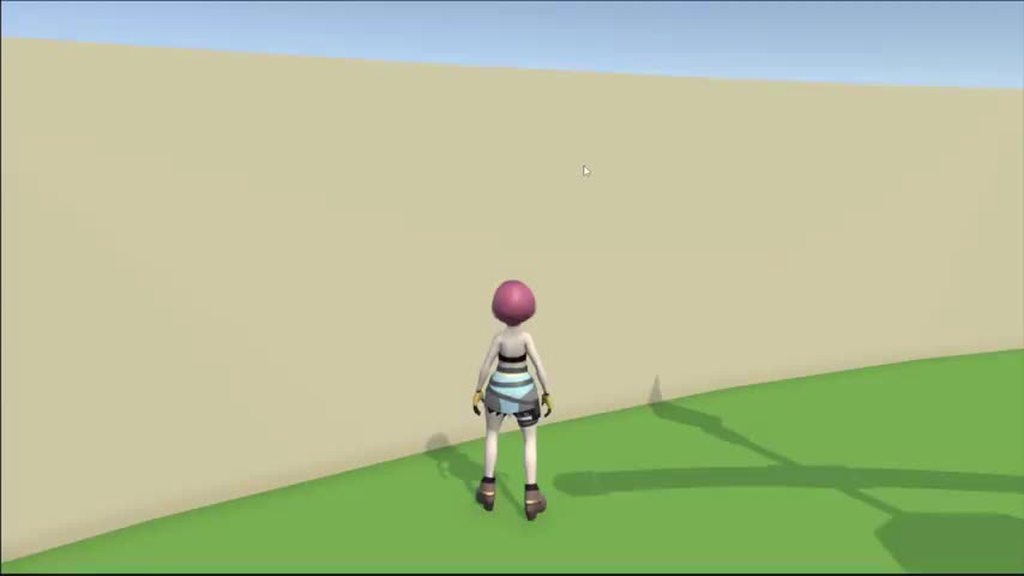
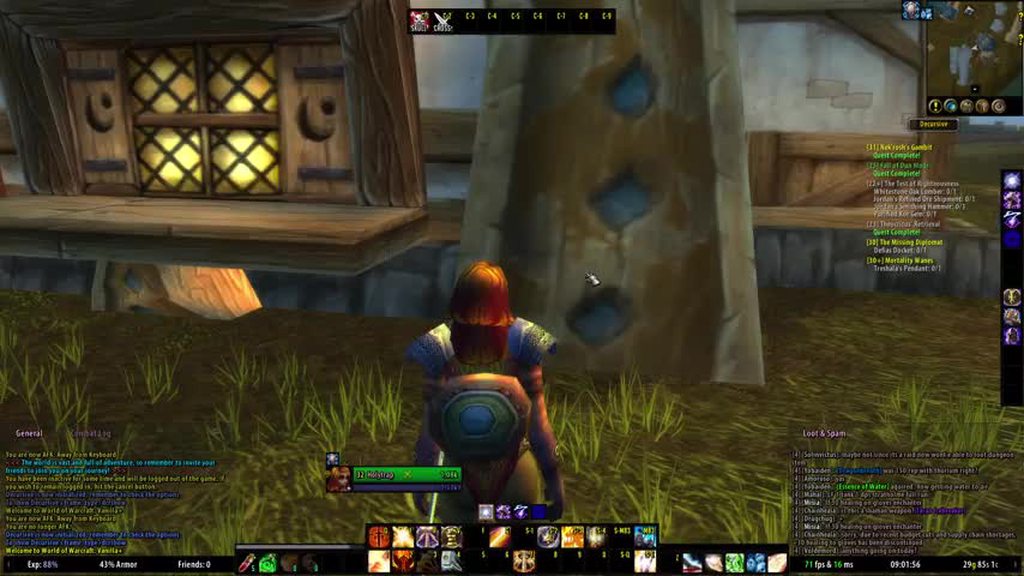
Here's the Zoom code in case there's something I missed:
 // CAMERA ZOOM -----

        PlayerStateFactory.Instance.playerGameInput.Player.CameraZoom.performed += x => mouseScrollY = x.ReadValue<float>();

        if (componentBase == null)
        {
            componentBase = mainVirtualCamera.GetCinemachineComponent(CinemachineCore.Stage.Body);
        }

        if (componentBase is CinemachineFramingTransposer)
        {
            (componentBase as CinemachineFramingTransposer).m_CameraDistance = cameraDistance;
        }

        // when the player scrolls up, the camera distance decreases, when 1.5 units away from the player, a futher scroll will switch to first person
        if (mouseScrollY > 0)
        {
            if (cameraDistance > minCameraDistance + 1)
            {
                cameraDistance -= mouseScrollY * zoomSensetivity;
            }
            else
            {
                cameraDistance = 0;
            }
        }

        // when the player scrolls down, the camera distance increases, if in first person, the camera will set itself to 1.5 units away form the player
        if (mouseScrollY < 0 && cameraDistance < maxCameraDistance - 1)
        {
            if (cameraDistance != 0)
            {
                cameraDistance -= mouseScrollY * zoomSensetivity;
            }
            else
            {
                cameraDistance = minCameraDistance;
            }
        }
 potent flame
I used to do this I think Follow still works, I just have some other bug which I interpreted incorrectly.moveCameraTarget = moveCamera.Follow; in cm2, now trying to upgrade the field is now called "Tracking Target" but can't figure out how to access it by code? in CM3?
 weary zealot
cinemachine won't let me transform it with the move tool (such as in this video)

Create the perfect 2D camera in Unity. Cinemachine gives you AAA quality camera controls within seconds. Creating your own camera script, although a viable option, can be very time-consuming and unless your camera controls require something completely unique, Cinemachine will give you what you need.
=========
❤️ Become a Tarobro on Patreon: ht...
royal tartan
weary zealot
cinemachine won't let me transform it with the move tool (such as in this video)
Correct. The position of the virtual camera is determined entirely by its "Body" settings. You cannot set the position manually if it has a body configuration
This is normal and expected
verbal meteor
verbal meteor
My CinemachineVirtualCamera can be zoomed in and out by accessing "m_CameraDista...
In case anyone else runs into this issue, after a long break I took another crack at it and managed to come up with a solution that fixes both of the VCam's damping issues, I've had to basically manually program the damping myself and also prevent the camera from being able to physically move on the Z axes at all until the zoom is shorter than the distance between the player and the wall. I have no clue how this video game standard camera functionality simply does not exist in Cinemachine, but maybe it will get added in future updates.
sudden isle
how do i make it so i can invert the rotation of my free look camera
bec when my mouse goes left it goes right and when it goes right it goes left
and how can i increase my cinemachine sensitivity
errant shard
sudden isle
and how can i increase my cinemachine sensitivity
Tried googling these questions?
sudden isle
errant shard
Tried googling these questions?
tried and everything is complicated i dont wanna do it through script i just wanna change it through cinemachine
the components
did i miss smthng?
errant shard
sudden isle
did i miss smthng?
Virtual cameras (or axis controllers in modern CM) that use input also have properties for input speed/gain
Negative speed or gain should let you invert the control
sudden isle
errant shard
Virtual cameras (or axis controllers in modern CM) that use input also have prop...
oh thanks i will find that is it in the component or do i have to write the script?
errant shard
sudden isle
oh thanks i will find that is it in the component or do i have to write the scri...
You should be seeing it in the component
sudden isle
ok
pallid obsidian
Good time of day, CM gurus!
I'm still here with my attempts to switch from custom made code to CM and there is the last of big issues I can't handle.
My follow-camera setup is on the screenshots. The result is on the right side of the video and our current custom-code-camera is on the left.
The issue is that when deoccluding happens and I move character to sides, camera starts to rotate by Y axis, which is totally undesirable behaviour, I want it constantly looking straight forward by that axis. When deoccluding stopped working and camera is back in place, as you can see, camera behave as I want and don't rotate by Y on side moves.
Which things I found could disable this effect:
- setting X damping = 0 in Position Composer disable this rotation
- turning OFF the CinemachinePanTilt component disable this rotation
- setting Damping = 0 in CinemachineDeoccluder almost neglecting this rotation (but there is some micro rotation left still)
But if I'll do any of these, then camera will have other undesired behaviours:
- setting X damping = 0 in Position Composer will make camera glued solid to the character on side moves, which I don't need, I need that "a-little-free" side movement feeling (we have it in original camera).
- turning OFF the CinemachinePanTilt component will rise another problem with deoccluding: after deoccluding camera won't back in default place and will stay in position it has during last obstacle avoidance.
- setting Damping = 0 in CinemachineDeoccluder will make camera movement too abrupt when does obstacle avoidance.
😔
The solution I have in mind:
Write some component, which will replace CinemachinePanTilt and will return X rotation in place after deoccluding, but really don't know where to start and if it's even possible to solve that way...
But maybe there is some other solution to that?


 slender aurora
any way to add camera shake through cinemachine while walking/ running
im making a bodycam game so its necessary
errant shard
slender aurora
any way to add camera shake through cinemachine while walking/ running
im making...
Sure thing
slender aurora
thanks
errant shard
pallid obsidian
Good time of day, CM gurus!
I'm still here with my attempts to switch from custo...
It looks like in this case you would benefit more from blending to a different vcam whenever an obstacle is close
I'm not sure why the issue happens but if you're sure it's because of the deoccluder, it's a good option to use blending instead of it
Since the obstacles are always in predictable positions, deoccluder is kind of overkill and probably can't adapt quickly enough anyway
slender aurora
errant shard
Sure thing
could you please tell me how
where it shakes more when u run etc
pallid obsidian
errant shard
It looks like in this case you would benefit more from blending to a different v...
Thanks for the answer, but that's the problem: obstacles ARE NOT in the predictable positions here.
We have a level editor and things could be placed/rotated/scaled freely. On the video you could see this pink floor from a candy theme above the yellowish dusty floor from forest theme and there are candy floors on the right forming a tunnels with inclines and declines, where camera should react accordingly to the incline/decline angle (and ceiling of the "tunnel"), and that's just a basic things, there is a lot of s-t could happen in the real UGC levels, things could even be dynamically moved/rotated in any direction. So no static entry-exit points.
All camera movement and obstacle avoidance is procedural based on the surroundings.
I'm thinking about the custom CinemachineExtension, which will rotate camera back to look straight forward after movement, rotation and obstacle avoidance are finished, but the whole idea of switching to the CM was to have a less of the custom code to support 🥲
 late vine
pallid obsidian
Thanks for the answer, but that's the problem: obstacles ARE NOT in the predicta...
late vine
pallid obsidian
Thanks for the answer, but that's the problem: obstacles ARE NOT in the predicta...
I was in a similar situation, I use the freelook camera, which is fantastic, but you have to get all the settings exactly right for it to shine, which takes a bit of time to setup correctly. However, what I found to be of issue was the CM collision extension which didn't work as well as I wanted it to. I do overlapsphere checks around the vcam to check for collisions, if there's a collision I stop the input from the mouse/joystick and give a subtle nudge in the opposite direction. I also do a 3 point check from the camera to the player armature to see if 3/3 are blocked (head, chest, knee(s)), I consider the player occluded and then check a ring of points around the player every 72°, from the center freelook orbit ring, from those point I check to see if that point in space is occluded, if it's not, I send the world yaw forward euler of that point into the X axis of the freelook camera which then moves the camera to that spot. This saved me from having multiple virtual cameras to manage. The end result is a much more stable collision avoidance and camera/input management system. However, yeah it's extra code to maintain and took a day to configure it.
errant shard
pallid obsidian
Thanks for the answer, but that's the problem: obstacles ARE NOT in the predicta...
I mean obstacles are predictable in the sense that they're always coming from ahead the player, and the camera is always behind the player, I assume
Which means you could detect approaching obstacles above the player with a raycast or overlapsphere as mentioned, and then swap to another vcam that's below the obstacle pre-emptively
 calm wharf
Hello, I read on the official Unity site that the "Cinemachine 3 is compatible with minimum version 2022.2"
I have 2022.3... so how to import Cinemachine 3 to Unity? I can see only version 2 (which is a nightmare). I have pre-release packages enabled
royal tartan
calm wharf
Hello, I read on the official Unity site that the "Cinemachine 3 is compatible w...
You can do add by name and specify a version in the package manager
calm wharf
ok but where I can find that name and version? I read that I need to change manifest, but from what text to what text?
royal tartan
You don't need to change the manifest manually
Name and version can be found on the documentation for the package
pallid obsidian
errant shard
I mean obstacles are predictable in the sense that they're always coming from ah...
Thanks, guys! )
But, if you'll look at the left side of the video, my custom code works just fine.
The whole point was to get rid of it by the means of the components, provided with the CM.
P.S. I fixed that rotation bug by doing reverse Y rotation in the custom CinemachineExtension.
 sterile oasis
I have a main camera and an idle camera that loops through 6 different animation clips indefinitely. I'm simply enabling/disabling the gameObject with the camera after x amount of character idle time and it works fine.
Is there a way i could ensure that whenever i enable my idle cam thus enabling the animator on the camera, i would have a new, random default state every time? Essentially starting from a different point in the 6 clip-loop
Wondering what the best approach would be
 gusty vine
Hey guys, could anyone help me?
I just have that dolly track set up and the virtual camera too...

And I want it to look exactly where i want in every single moment of the track... but right now when i change the camera path position it doesn't change the "rotation" of the camera...

You know what i mean? I want the camera to have a drone effect while it turns around the factory letting me to decide where the drone have to look at
 fiery harness
NullReferenceException: Object reference not set to an instance of an object
PlayerMovement.Update () (at Assets/PlayerMovement.cs:69)

it is returning null idk why someone help? i searched the internet and found no solution
unkempt forge
fiery harness
NullReferenceException: Object reference not set to an instance of an object
Pla...
You cut off the line numbers
fiery harness
can you explain?
unkempt forge
fiery harness
can you explain?
You cropped your image so that we cannot see the line numbers on the left. Thus do not know which line 69 is
 unkempt forge
So.... the line numbers are STILL not showing...
fiery harness
 unkempt forge
Assuming the two offsets are vectors, the only thing that can be null is cinemachineComposer
fiery harness
yes the cinemachine composer is null but why
unkempt forge
fiery harness
yes the cinemachine composer is null but why
Because it is not assigned
Where do you assign it?
How could I know why with only this code?
I see cinemachingComposer is private
And you try to get it in awake
unkempt forge
Is there a composer on that object?
fiery harness
im new to cinemachine so if there is cinemachine virtual camera there is composer to
or no
i just wanted to change the tracked object offset
unkempt forge
fiery harness
im new to cinemachine so if there is cinemachine virtual camera there is compose...
You need to add the composer component separately
fiery harness
is it a component
fiery harness
unkempt forge
You need to add the composer component separately
how
unkempt forge
The same way you added the virtual camera or any component
The add button in the inspector is one way
fiery harness

idk do i need to get the composer or the framing transporter
becouse there is no such component as composer ?
 unkempt forge
fiery harness
idk do i need to get the composer or the framing transporter
unkempt forge
fiery harness
idk do i need to get the composer or the framing transporter
The composer
And sorry, yeah forgot how it worked in cinemachine. Should have been reminded by the GetCinemachineComponent call that it was not an actual component
fiery harness
fiery harness
so how do i refrence this vale
 dark yew
Hello, does anyone know a good tutorial I can use for using cinemachine cameras for a Sidescrolling 2D Multiplayer game? Almost every tutorial I find (both 2D/3D) attempts to make individual cameras as children of players that spawn in. However, I've since been told that method is not a good one and that I should have 1 camera already in the scene and each time a player spawns into the game they have code that makes the camera target them. I've attempted to do this and have failed because the camera would always follow the first person spawned.
 rain basin
How can I change the follow offset from code?
There doesn't seem to be any memebers of the CinemachineVirtualCamera class that allow for it
 flat stag
dark yew
Hello, does anyone know a good tutorial I can use for using cinemachine cameras ...
flat stag
dark yew
Hello, does anyone know a good tutorial I can use for using cinemachine cameras ...
Is it networked multiplayer? Just don't spawn a camera for remote players. You don't need those cameras locally
Why would you want the local camera to follow a remote player?
dark yew
flat stag
Is it networked multiplayer? Just don't spawn a camera for remote players. You...
How would I go about that though? I've attempted to attach the camera to a player when they spawn but it only attaches to the host/first person spawned.
flat stag
Is it a networked game and the follow-up players don't have local cameras or something?
Maybe add a little more explanation of what your setup is
Big difference between local multiplayer where one camera shows everyone, split-screen local multiplayer where everyone gets a quarter of the screen, or networked multiplayer, where each player gets their own local camera
dark yew
flat stag
Is it a networked game and the follow-up players don't have local cameras or som...
Sorry, its networked and I've had to redo the camera set up multiple times because I was told multiple different things so I've started over.
but yes I want each player to get their own local camera.
flat stag
Do you know how to detect whether a given player is the local player or not?
(when it's spawned)
dark yew
flat stag
Do you know how to detect whether a given player is the local player or not?
No
royal tartan
rain basin
There doesn't seem to be any memebers of the CinemachineVirtualCamera class that...
It wouldn't be on there it's on the specific Transposer or whatever Follow module you're using
GetCinemachineComponent is your friend
warm verge
can main camera be changed without coding/triggers? Like, normally the yellow is the main vcamera and is chasing the player, but when the player is in the red virtual camera, that camera will become the main vcamera
 royal tartan
warm verge
can main camera be changed without coding/triggers? Like, normally the yellow is...
warm verge
royal tartan
There are things like https://docs.unity3d.com/Packages/com.unity.cinemachine@3....
royal tartan
warm verge
can main camera be changed without coding/triggers? Like, normally the yellow is...
warm verge
royal tartan
There are things like https://docs.unity3d.com/Packages/com.unity.cinemachine@3....
this is a lot of stuffs to learn, thanks!
yea, I needed that clearshot, nice
flat stag
There's a good video from SasquatchB that shows a camera controller switch vcams with triggers. There's also engines like corgi and the ultimate 2d camera engine that include that functionality (and a lot more)
It's not hard to make a collider trigger than switches cams based on the direction you pass through it
actually, nvm. Just noticed you said "without coding/triggers"
potent flame
I have a lot of cinemachine cameras with the same priority, and I'm calling camera.Prioritize() when I intend to blend to one. But when I'm reparenting and object that has a nested inactive camera it seems to prioritize itself on its own? I'm on Unity 6 / cinemachine3. What might be causing that, and can I configure cm somehow to not do it? Or do I have to adjust priorities? (I like the workflow where a single Prioritize call does what I want because I don't need to care about the camera I'm cutting away from)
 median knoll
Hey guys I have set a third person camera to follow the player but sometimes other character jitter when the camera is on following the player and the character is in the field of view of the camera, the jitter happens always when I run to the side and the character aslso runs to the side with me but from other perspectives its fine , anyone know hows to fix it ?
royal tartan
Make sure your Rigidbodies have interpolation turned on
And that you're moving them properly via their Rigidbodies
median knoll
im not moving the bodyies via rigid body im moving them via animator using the animato.DeltaPosition, I will add a collider at some Point but not yet, but the issue still remains, its not entirely displeasing but i need to look into removing it
royal tartan
median knoll
im not moving the bodyies via rigid body im moving them via animator using the a...
That's your problem. You're breaking interpolation
median knoll
im guessing that animator has a different update to the camera then so I need to make them match
 hidden tide
Having issues using Cinemachine 3 with a touch screen.
The default component "Cinemachine Input Axis Controller" works for touch to rotate the camera, but it will accept touch from across the entire screen. Conflicting with the buttons, especially the movement button on the bottom left.
as an example, whenever I try to turn my character to the right, it also moves the camera to the right.
All the scripts I've seen use cinemachine 2 and dont work with the name changes in Cinemachine 3.

this was the old script I was using but I can't for the life of me figure out what m_XAxis.Value and m_YAxis.Value got replaced with in Cinemachine 3.

(in text form for convenience)
Hastebin is a free web-based pastebin service for storing and sharing text and code snippets with anyone. Get started now.
royal tartan
hidden tide
(in text form for convenience)
https://hastebin.com/share/udemepaven.csharp
!code
 marble yachtBOT

Posting code
📃 Large Code Blocks
Use links to services like:
https://gdl.space/, https://paste.ofcode.org/, https://hatebin.com/, https://paste.myst.rs/, https://hastebin.com/
📃 Inline Code
Surround code with three backquotes. Not quotation marks.
To format as C#, add cs to the first line:
```cs
// Your code here
```
Add a comment with a line number if there is an error message.
hidden tide
I've got this code working using the script touchfield, which gives me a vector 2 for x and y.
however "GetValue" is expecting a float. I'm still pretty new to programming so I dont know how to create a conditional to give it the x value to return when it's looking for x and y when it's looking for y.
royal tartan
hidden tide
I've got this code working using the script touchfield, which gives me a vector ...
Well they're giving you the hint parameter to tell you that. If you look at it it's an enum:
so... something like:
switch (hint) {
  case IInputAxisOwner.AxisDescriptor.Hints.X:
    // x axis
    break;
  case IInputAxisOwner.AxisDescriptor.Hints.Y:
    // y axis
    break;
  default:
    // unknown
}```Indeed it works now! Thanks again!
potent flame
I have some code for camera control that has empty gameobjects that my cameras are following (ported from CM2 thir person follow) and some custom code that clamps the angle of that helper game object target (mostly from the starter assets 3rd person example). Am I correct in thinking that in CM3 I can get rid of those objects and code and there's a builtin component for a 3rd person follow cam control? (with those 3 ring gizmos that limit the camera angles?)
royal tartan
potent flame
I have some code for camera control that has empty gameobjects that my cameras a...
Well the thing you're describing sounds like CinemachineFreeLook
which is still a thing in CM3 afaik
potent flame
royal tartan
Well the thing you're describing sounds like CinemachineFreeLook
I think the unity starter asset 3rd person example just overcomplicates things a lot, thanks for the reasurence, I'm going to simplify my code and use more of CM
 rough tinsel
How do I make the camera follow the right points and return to the original one?
warm verge
When this thing loads, the maincamera goes into Steady camera and then slides to ChasingPlayer whenever the player isnt in view.
What's the proper setup to avoid that behaviour? I want the camera to normally chase the player, but when the player is in a certain part of the map, I want to focus on that. It works fine as desired, but when this thing turn on and the player isnt in the Steady, the steady is chosen first and then slides, which isnt a good behaviour
 royal tartan
warm verge
When this thing loads, the maincamera goes into Steady camera and then slides to...
royal tartan
warm verge
When this thing loads, the maincamera goes into Steady camera and then slides to...
you would probably want to manually code that behavior. ClearShot picks whatever it feels is the "best" shot based on certain heuristics, but is not super controllable.
warm verge
royal tartan
you would probably want to manually code that behavior. ClearShot picks whatever...
I see, thanks. I guess ill pump the priority of playerchaser at start then just revert at some point
royal tartan
warm verge
I see, thanks. I guess ill pump the priority of playerchaser at start then just ...
yeah you can use priority, or you can just enable/disable as needed
 celest glacier
i have seen a lot of videos on cinemachine, but it seems like all of them keep on adding many virtual cam each time they want to transition from one place to another, is this better or making an animation clip and activation track the old way instead of using cinemachine track
 wind rune
How would i bring the camera just to stop when touching the collider, without any scripting? currently it rotates weirdly to the side no matter what "strategy" option i choose.
i mean i can script that but i feel like either i miss something or there is maybe something completely different with cinemachine 3?


 last lion
Hi to cinemachine team , in version 3.0.1 there's a mistake under cinemachine Camera Events , which cause to the Camera Activated Event to be fired instead of Camera Deactivated Event

 tranquil berry
last lion
Hi to cinemachine team , in version 3.0.1 there's a mistake under cinemachine Ca...
tranquil berry
last lion
Hi to cinemachine team , in version 3.0.1 there's a mistake under cinemachine Ca...
!bug
marble yachtBOT
🪲 To make bug reporting as quickly as possible, we made a bug reporting application for you. When running Unity choose Help->Report a Bug in the menu, or you can access it directly through the executable in the directory where Unity is installed. It will also launch automatically if you experience a crash.
📝 If your bug report is to do with Documentation, either an error, typo, or omission, you can report it by scrolling to the bottom of the page where you found the issue and click ‘Report a problem on this page’!
💡If your report is to do with a new feature idea, you can check the Unity Product Roadmaps page to see if your idea has already been planned.
For more complete instructions on how to report bugs, access: https://unity3d.com/unity/qa/bug-reporting
tranquil berry
You may be able to get attention to the issue on Discussions, but an actual bug report is the right way to get it fixed
 subtle bison
hey so i just downloaded cinemahine for a project and im watching a tutorial and for some reason mine looks way different here is the tutorials screen and then mine

 errant shard
subtle bison
hey so i just downloaded cinemahine for a project and im watching a tutorial and...
errant shard
subtle bison
hey so i just downloaded cinemahine for a project and im watching a tutorial and...
The blue one is CM3
The red one is CM2.9 or earlier
subtle bison
ah ok
subtle bison
errant shard
The blue one is CM3
The red one is CM2.9 or earlier
is it possible to instal cinemachine 2.9
potent flame
How to disable player control of CM temporarily? I'm using bare CM3, with Orbital Follow, Rotation Composer, Input Axis Controller, Group Framing. I only have custom code to manage what's in my target group. I'm working on a "lock on" functionality, and when a target is select it I added to my target group so the camera "focuses" on it (and the player). When I have multiple targets I'd like to use the right stick to switch targets instead but right now I'm getting janky camera cause the stick still controls the orbital follower ?
royal tartan
potent flame
How to disable player control of CM temporarily? I'm using bare CM3, with Orbita...
If you're using the new input system you could probably disable that input action.
You can probably also disable the cinemachine input axis controller
potent flame
Thanks looks like simply disabling the input axis controller is the way. I was kind of hoping CM would interpolate when changing the target group too like it does with switching cameras. Is there some builtin functionality for that, or is tweening/animating the cm target weights the only way to smoothly switch out elements in a targetgroup?
potent flame
(nevermind I think I was misunderstanding what was happenning, I'll try adding all potential targets to the camera target group and try selecting the current target among those)
potent flame
I still can't get it to work the way I'd like to, I expected assigning a new LookAt would result in a blend towards the new target/targetgroup, but my cameras are snapping. Is it possible for the camera to blend towards a new target, or do I need 2 cameras for that?
And a separate issue, the rotation composer and group framing doesn't actually do what I wanted. Is it possible to setup CM3 to act like a "locked" camera? still following the player but aiming at the target like the player would (so actually rotating the orbital follow to position it self so the target is in frame, rather than simply panning / rotating the camera directly to frame the locked target?
royal tartan
potent flame
And a separate issue, the rotation composer and group framing doesn't actually d...
I honestly am way more familiar with CM2 than CM3, but cinemachine has always separated the "Follow" settings from the "Aim" settings
I can't imagine CM3 is different in that regard.
rough tinsel
How do I make the camera follow the right points and return to the original one? Who can help me?
 ocean inlet
Does anyone know if it is possible to use multiple alembic animations with one alembic mesh ins equencers
or is that not possible?
 wide compass
My problem is that i use this line of code:
var leftViewportMiddle = Camera.main.ViewportToWorldPoint(new Vector3(0, 0.5f, 0));
This gets the right position at startup, but when i call later in runtime it gets totally wrong position. The position of the camera was remained the same.
I use the camera with Cinamachine if that could be any helpful information. Also it's an ortographic camera in 2D space. What could cause the problem?
rough tinsel
@errant shard Can you help me with Cinemachine?
 wintry canopy
@rough tinsel Don't ping people not in conversation with you.
rough tinsel
wintry canopy
<@469898504647737344> Don't ping people not in conversation with you.
I'm sorry, but I just addressed the problem a long time ago - and never got an answer...
 broken ingot
how can i solve cinemachine lagging? my movement and cinemachine updatemethods are fixed update
royal tartan
broken ingot
how can i solve cinemachine lagging? my movement and cinemachine updatemethods a...
What do you mean by lagging?
 hot yacht
broken ingot
how can i solve cinemachine lagging? my movement and cinemachine updatemethods a...
hot yacht
broken ingot
how can i solve cinemachine lagging? my movement and cinemachine updatemethods a...
do you mean your cinemachine camera is "delayed" compared to the player movement?
else, what do you mean by lagging?
errant shard
rough tinsel
I'm sorry, but I just addressed the problem a long time ago - and never got an a...
Sorry, the way you phrase most of your questions is nearly incomprehensible to me
The times I've tried to help I've had to take a guess what you mean and I haven't been getting it right
rough tinsel
errant shard
Sorry, the way you phrase most of your questions is nearly incomprehensible to m...
And now the question is not quite clear?
errant shard
rough tinsel
And now the question is not quite clear?
What?
broken ingot
@hot yacht , @royal tartan i mean this
broken ingot
hot yacht
do you mean your cinemachine camera is "delayed" compared to the player movement...
yes its delayed
hot yacht
broken ingot
yes its delayed
Set the Damping property to 0 in the Cinemachine Virtual Camera inspector
broken ingot
did you mean x, y, z damping?
i did it but now my camera movement with mouse isnt working properly
@hot yacht here its
rough tinsel
errant shard
What?
Don't you understand my question?
royal tartan
broken ingot
<@732323050686775506> here its
You also seem to be using a Rigidbody without interpolation
Or you're moving in FixedUpdate without a Rigidbody.
One of those
Anyway without seeing code and your Cinemachine setup, it's hard to say exactly what's wrong
errant shard
rough tinsel
Don't you understand my question?
I do not, and I'd guess others don't either
broken ingot
https://onecompiler.com/csharp/42rz49h3y here is all my code and my rigidbody2d is interpolate
İt isnt working
royal tartan
broken ingot
https://onecompiler.com/csharp/42rz49h3y here is all my code and my rigidbody2d ...
This line of code will break the interpolation:
transform.rotation = Quaternion.LookRotation(Vector3.forward, mousePos - transform.position);```you should never directly modify the Transform of a physics object
changing that to rb.rotation = will help with the interpolation at least
although the looking around code should really be in Update not FixedUpdate if you want it to look smooth
Oh and since this is 2D you actually need to do this:
Vector3 direction = mousePos - transform.position;
float angle = Mathf.Atan2(direction.y, direction.x) * Mathf.Rad2Deg;
rb.rotation = angle;``` neon forge
Anyone knows how to prevent cinemachine third person follow see through avoided objects?

 errant shard
royal tartan
Oh and since this is 2D you actually need to do this:
```cs
Vector3 direction = ...
errant shard
royal tartan
Oh and since this is 2D you actually need to do this:
```cs
Vector3 direction = ...
MoveRotation() respects interpolation, while .rotation does not, right?
Can Rigidbody methods take effect if called in Update
Before the next FixedUpdate I mean
errant shard
neon forge
Anyone knows how to prevent cinemachine third person follow see through avoided ...
If you're not preventing the player from moving the camera inside the wall, such as with Cinemachine Collider or Clear Shot Camera, you'll need to determine what should happen when the camera does go through the wall
Should the camera see nothingness inside the wall and be effectively blinded, or should the wall fade instead? There's a lot of options
neon forge
errant shard
If you're not preventing the player from moving the camera inside the wall, such...
Thanks, Ill look for those options
But I want the third person traditional behaviour, the player shouldnt see through the walls
rough tinsel
errant shard
I do not, and I'd guess others don't either
Okay. One more time...
You need to make sure that during a certain animation, the camera moves in the right direction
broken ingot
royal tartan
Oh and since this is 2D you actually need to do this:
```cs
Vector3 direction = ...
still delayed, also my cinemachine setup


 royal tartan
update method for the brain should be Smart update or Late Update
broken ingot
https://onecompiler.com/csharp/42s2ddc53 my target script
broken ingot
royal tartan
update method for the brain should be Smart update or Late Update
its something fixed
royal tartan
broken ingot
its something fixed
why are you moving your Rigidbody via the Transform
broken ingot
royal tartan
why are you moving your Rigidbody via the Transform
But camera isnt following player
İt isnt the problem
The problem from camera target
royal tartan
yes and you're moving the camera target's Rigidbody bvia its Transform
that seems like a problem to me
broken ingot
https://onecompiler.com/csharp/42s2px3g3 whats wrong with this code camera still delays
playerRb and rb (rigidbody2d) is interpolate also
errant shard
neon forge
But I want the third person traditional behaviour, the player shouldnt see throu...
There's no such thing as one "traditional behaviour" , and "shouldn't see through the walls" doesn't describe how you want it prevented
You could save all this trouble by providing an example or a reference game that does what you call traditional
errant shard
rough tinsel
Okay. One more time...
You need to make sure that during a certain animation, ...
Grammatically this makes sense but lacks relevant detail
What's the "right direction"
How does the "certain animation" determine the right direction
Are there additional requirements how the camera should or should not move
rough tinsel
errant shard
Grammatically this makes sense but lacks relevant detail
What's the "right direc...
Let's use an example:
When the first animation of the fight is performed, the camera is pointing in one orientation
When the second animation of the fight is performed, the camera is turned in the other orientation
errant shard
rough tinsel
Let's use an example:
When the first animation of the fight is performed, the c...
When using cinemachine you can keyframe a virtual camera's transform, or keyframe the virtual cameras to be disabled so cinemachine blends to next highest priority virtual camera
rough tinsel
I'd like to show this... Or maybe there is a video that can help me?
 sterile spoke
Someone know what are the soft zone ?
royal tartan
sterile spoke
Someone know what are the soft zone ?
sterile spoke
thanks
 sullen lagoon
Hello there, i need some help. Im trying to make the fov be smaller, so the player doesnt see too far away, i want everything that isnt close to be blackish. How can i do that, unless he has a flashlight, wich makes him see a litle more ?
errant shard
sullen lagoon
Hello there, i need some help. Im trying to make the fov be smaller, so the play...
With cinemachine, fov can be changed from each virtual camera / cinemachine camera
Second question sounds like you're asking for some ordinary light and darkness
warm verge
using System.Collections.Generic;
using UnityEngine;
using TMPro;
public class Sims3Camera : MonoBehaviour
{
public TMP_Text data;
public TMP_Text data2;
private Vector3 point;
private bool pandrag;
// Start is called before the first frame update
void Awake()
{
point = gameObject.transform.position;
}
// Update is called once per frame
void Update()
{
float xPos = Input.GetAxis("Mouse X");
float yPos = Input.GetAxis("Mouse Y");
//data.text = xPos.ToString() + yPos.ToString();
pandrag = Input.GetMouseButton(1);
if (pandrag)
{
point = new Vector3(point.x + xPos * Time.deltaTime, point.y, point.z + yPos * Time.deltaTime);
data.text = point.x.ToString();
data2.text = point.z.ToString();
}
else
{
//data.text = pandrag.ToString();
}
}
}```
I dont know where else to put this but, for some reason the Cinemachine camera refuses to budge even though it should technically move west ridge
Anyone know why the camera jitters when the car moves? It's like the camera cant keep up with the car all the way.
errant shard
west ridge
Anyone know why the camera jitters when the car moves? It's like the camera cant...
Usually because your follow target is an uninterpolated rigidbody
royal tartan
warm verge
```using System.Collections;
using System.Collections.Generic;
using UnityEngine...
there's nothing in this code that moves any object.
warm verge
How should I program it to move then?
royal tartan
Genrally you don't program a cinemachine camera to move
you just set it up in the editor
that's the point of cinemachine
but it seems like you haven't learned the basics of moving objects in Unity yet?
warm verge
royal tartan
but it seems like you haven't learned the basics of moving objects in Unity yet?
Well I know how to move objects with force
Hell I even programmed acceleration
Tho I forgot to specify that the thing I want to move with the right click is an empty game object
royal tartan
warm verge
Well I know how to move objects with force
Hell I even programmed acceleration
to move objects you either need to modify their Transform, or you need to use a Rigidbody, or an Animator
the code you shared isn't doing any of those things
so nothing is going to move with this code alone
 radiant coral
I was not sure where to ask but i want to set up my cameras one to render air objects and another to render ground objects. Like in sky force reloaded game. I could not find the depth option in unity 2022.3.45.

I have my plane on top and flying through ground
currently i tried setting to solid colur and get rgba 0000 but i get this

its not rendering under the air camera
i set up the camera sorting corectly i think
-2 for ground -1 for air
Thanks for the help
royal tartan
radiant coral
I was not sure where to ask but i want to set up my cameras one to render air ob...
Depends on which render pipeline you're using
radiant coral
URP
royal tartan
radiant coral
URP
then camera stacking is done with base cameras and overlay cameras
royal tartan
it works in a completely different way
radiant coral
thanks i will try again
royal tartan
depth is available, but it's not for camera stacking
radiant coral
ok so here i set the air game ovjects at overlay i think
air game objects are basically the enemy and player ships
warm verge
royal tartan
so nothing is going to move with this code alone
Well then what do I do?!
if I want to move the thing and have the Cinemachine follow?!?!
royal tartan
warm verge
if I want to move the thing and have the Cinemachine follow?!?!
move it in any way you want
but you have to actually move it
I'm not sure what the confusion is
warm verge
royal tartan
I'm not sure what the confusion is
about what is actually supposed to be moving and how I can get that "thing" moving
royal tartan
warm verge
about what is actually supposed to be moving and how I can get that "thing" movi...
Simple example of actuially moving something:
someObject.transform.position = someNewPosition;```your code doesn't move anything
royal tartan
warm verge
about what is actually supposed to be moving and how I can get that "thing" movi...
what is actually supposed to be moving
You move whatever you want the camera to follow
Maybe back up here and explain what you're trying to accomplish
warm verge
royal tartan
Maybe back up here and explain what you're trying to accomplish
brb ill record what I am trying to achieve
Im just trying to have the Right Mouse Button Pan the Camera View across (tho not rotate) like whats being shown HERE
royal tartan
warm verge
Im just trying to have the Right Mouse Button Pan the Camera View across (tho no...
you would either move an invisible object that your virtual camera is following, or you would set your virtual camera to "Do Nothing" mode for the Body settings, and move the virtual camera in your code.
warm verge
royal tartan
you would either move an invisible object that your virtual camera is following,...
"or you would set your virtual camera to "Do Nothing" mode for the Body settings, and move the virtual camera in your code."
Like do the same things I would do for like Rigid bodies but for the Virtual Camera?
royal tartan
warm verge
"or you would set your virtual camera to "Do Nothing" mode for the Body settings...
I have no idea what you mean by "the same things I would do for like Rigid bodies but for the Virtual Camera"
Presumably the camera would not have a Rigidbody
warm verge
royal tartan
I have no idea what you mean by "the same things I would do for like Rigid bodie...
I meant like do I move the Virtual Camera in the same way as in Input.GetAxis(Horizontal) and when I press either A or D it goes left and right?
royal tartan
warm verge
I meant like do I move the Virtual Camera in the same way as in Input.GetAxis(Ho...
You do it however you want to do it
warm verge
oki
royal tartan
You're talking about specific code - it depends how you want it to work
 cursive abyss
I want to blend a player driven "zoom in/out". How do I control this with Cinemachine? My current approach is this, but it doesn't work if the player zooms twice while a blend is happening:
  public class CameraManager : BetterMonoBehaviour
    {
        [SerializeField] private GameObject PlayerCamera;
        [SerializeField] private GameObject DestinationCamera;
        private void OnEnable() => CinemachineCore.BlendFinishedEvent.AddListener(OnBlendFinished);
        private void OnDisable() => CinemachineCore.BlendFinishedEvent.RemoveListener(OnBlendFinished);
        private void Update()
        {
            if (Input.mouseScrollDelta.y > 0)
            {
                DestinationCamera.transform.position = ...;
                BlendToDestinationCamera();
            } // .. and the other way for the other scroll
        }
        private void BlendToDestinationCamera()
        {
            PlayerCamera.SetActive(false);
            DestinationCamera.SetActive(true);
        }
        private void OnBlendFinished(ICinemachineMixer mixer, ICinemachineCamera cam)
        {
            PlayerCamera.transform.position = DestinationCamera.transform.position;
            PlayerCamera.SetActive(true);
            DestinationCamera.SetActive(false);
        }
I started to think that I'd need to check if a blend is in progress, and if so, stop it (by setting the player camera to the vcam location, setting the destination camera where it should go, then toggling active/inactive for them all) but this seems like the wrong way, or should be built into CM?
late vine
cursive abyss
I started to think that I'd need to check if a blend is in progress, and if so, ...
I had something similar on a freelook camera when dynamically adjusting the orbitals on the rings by how the player scrolls the mouse wheel or a thumbstick on a gamepad.
https://discussions.unity.com/t/best-way-to-find-out-if-a-virtual-camera-has-fully-transitioned/748162
What I do is run the coroutine, but assign the coroutine so I can check if it's running or not and if so, stop the coroutine and if necessary, start another one, etc. This also allowed me to smooth the change in the orbital values so that it wasn't clunky between values.
Gameobject setactive has some lag, consider setting priority on the virtual cameras instead.
Rather than hard set the position and then change priority for a camera "zoom", you might want to adjust some of the offset values on the virtual camera composers for either Aim and or Body. You can lerp those floats in a coroutine with min/max values and then kill/cancel it/modify the target float on your zoom variable. Might be the better way to go...
If perspective isn't an issue, just change the FoV on the camera (for a scope, etc).
cursive abyss
Hm, I'm not sure I wanted to get into the tweening of values myself - that's what I thought CM provided.. I'm exploring the approach of modifying the body, though
Perspective is an issue, I think. Basically I'm intending to make an isometric camera view where the user can scroll in/out to zoom and tilt; within a fixed amount I specify. Clicking on a unit on the map would retain the tilt/height but pan to another location on the map
Doing the blend in/out one tick at a time is OK but it gets messed up if the user scrolls twice within one blend (I think it breaks the CM Brain component)
late vine
Another thing I do for other virtual camera is have a an invisible LookAt/Follow target that I move instead of moving the camera... depends on whether or not you need the Blend effect. When I move between 1st person and 3rd person cameras, it's nice to have the blend effect because the FoV changes as well, so it's buttery smooth.
Yeah I see, so one thing might be to add some input spam check so that while the blend is going, it's not spamming the method
cursive abyss
Like maybe the best way is just to create a tracking target at 0,0,0, and change the framing transposer zoom - and move the tracking target around the map (constrained to y=0)
right
late vine
Yeah, moving the target vs moving the cm camera is something that's often recommended by the Cm devs
especially if you're getting any stuttering
cursive abyss
the thing is.. i want the blending for zoom in/out to be smooth, but I want the "blending" of moving the target around (ie, click and drag) to be instant, not blended
Yeah that's how I understand CM to work - like you don't try to move cameras, you just turn them on/off and let CM do the blending
I mean alternatively (and this isn't great) I could make 10 cameras, each at appropriate levels of zoom/pan and then track which "click" i'm on, and just set the appropriate camera active
that would also work, at the cost of being a little bit more hard coded (ie, users wouldn't be able to zoom out a tiny bit - just one "click" at a time)
this works pretty good

will have to figure out how to pan easily but I think my idea will be to disable the blending while dragging
late vine
Either way, you have a lot of options, you could use a Queue to load in values and just keep processing the queue as the player zooms, once it finishes a zoom you just process the next one, as long as blends are short <0.5f
cursive abyss
I dunno if that will look nice though because it eases in/out - so it'll do a series of "stutter" eases, if that makes sense
like a "one click" ease in/out ten times versus one big ease in/out will look really weird
late vine
yeah, your current solution looks good to me
cursive abyss
ya I think it's good enough for now.. I can just move the tracking target wherever too, and the camera should just look nice.. lemme try
it works pretty well, but i'll have to obviously tweak the values for tilt/zoom/offset etc
even works if i mousewheel zoom while the blend is happening left/right
 old heart
Hey! I have World Space UI Canvas Bubbles (Gamepad/PC button hints) rendered through an Overlay (UI layer) camera.
I wonder how can i keep the position of the UI bubbles consistent when blending between Cinemachine Cameras with different orthographic sizes.
Is this doable?
royal tartan
old heart
Hey! I have World Space UI Canvas Bubbles (Gamepad/PC button hints) rendered thr...
I guess you mean consistent with respect to game world objects they are floating above/nearby?
old heart
royal tartan
I guess you mean consistent with respect to game world objects they are floating...
Indeed, since cameras have different ortho size, hints position is not consistent.
Here you can see that blending cameras makes the issue outstand more (white star hint moves with the blend)

this is where it should stay
 royal tartan
old heart
Here you can see that blending cameras makes the issue outstand more (white star...
royal tartan
old heart
Here you can see that blending cameras makes the issue outstand more (white star...
I would put a script on them for example that positions them in the right place in LateUpdate based on the Main Camera
old heart
royal tartan
I would put a script on them for example that positions them in the right place ...
How do i know the right place? specially during a blend
royal tartan
old heart
How do i know the right place? specially during a blend
Basically it'd just be a position on the line segment between the target object and the main camera
So like cs uiPos = Vector3.Lerp(targetObjectPos, mainCameraPos, 0.2f) for example
This would be the position of the actual Unity camera, not the virtual camera
old heart
royal tartan
So like ```cs
uiPos = Vector3.Lerp(targetObjectPos, mainCameraPos, 0.2f)``` for ...
It unfortunately still moves around
transform.position = Vector3.Lerp(TargetTransform.position, Camera.main.transform.position, 0.2f);

I dont quite understand what its supposed to do,
since the Main Camera still changes Orthographic Size what is the difference on using the camera position if what matters is the size?
cursive abyss
late vine
yeah, your current solution looks good to me
It was a little tricky to get working perfectly because as the vcam blends I have to "subtract" the current camera position from the plane.raycast
but it ends up working pretty well to click and drag the map around and have the movement be "true" to the scale of the world depending on where you click in the world
basically i track the world position drag start, the current world position mouse location, and move the tracking target (the pink box) to the difference - but subtract the camera difference as the blend happens
(note how the tracking target moves the opposite way the mouse does)
late vine
cursive abyss
basically i track the world position drag start, the current world position mous...
Nice job 👍
 reef whale
old heart
`transform.position = Vector3.Lerp(TargetTransform.position, Camera.main.transfo...
reef whale
old heart
`transform.position = Vector3.Lerp(TargetTransform.position, Camera.main.transfo...
Man your game looks too good ❤️❤️
 bronze saddle
Hello i have problem with camera and borders, im using cinemachine. I wanted to add camera borders using Cinemachine Confiner, but idk why camera stops following the player and also borders didn't work and I see the void... I just wanted to make camer view does not exceed tilemap.
 old heart
reef whale
Man your game looks too good ❤️❤️
old heart
reef whale
Man your game looks too good ❤️❤️
thanks! thats what overthinking visuals looks like 😅
 hidden ruin
Can anyone help me figure out this camera trigger (setup)?
To the right, the camera is trying to keep Zero centered. That’s easy enough
To the left, they’re allowed to be below the center but when jumping the camera doesn’t follow them as much because I believe the center of what would be the framing transposer is above them
What seems to be what’s happening is the camera is being confined to not go below a certain point anymore
I’ve tried colliders as confiners but run into undesired behavior when the camera starts colliding horizontally when I really just want it to worry about vertically
 jade harness
how do i make the cinemachine camera not go through a wall?
or like, make it so it cant see outside a wall?
errant shard
jade harness
or like, make it so it cant see outside a wall?
Which one is it? Those are two very different things
jade harness
errant shard
Which one is it? Those are two very different things
I think i want it to not go through the wall?
errant shard
jade harness
I think i want it to not go through the wall?
Cinemachine collider does that just by avoiding colliders
Clearshot camera chooses one of many virtual cameras whichever's least occluded by colliders
jade harness
errant shard
Cinemachine collider does that just by avoiding colliders
Clearshot camera choos...
im trying to use the collider but its saying it needs a lookat target but it has one?
errant shard
jade harness
im trying to use the collider but its saying it needs a lookat target but it has...
When in doubt you can always download example implementations from the package manager to compare with
jade harness
errant shard
When in doubt you can always download example implementations from the package m...
i have no clue how to do that.
errant shard
jade harness
i have no clue how to do that.
There should be a "samples" tab with "import" button if you open cinemachine's page on the package manager
jade harness
errant shard
There should be a "samples" tab with "import" button if you open cinemachine's p...
when i load the sample scene everything is purple
errant shard
jade harness
when i load the sample scene everything is purple
They use built-in render pipeline materials, but they should be convertible to any URP or HDRP with the render pipeline converter
I usually import samples to a different project to avoid clutter, but it's not big deal
jade harness
im so lost rn
jade harness
errant shard
They use built-in render pipeline materials, but they should be convertible to a...
i think i understand what this sentence means in isolation, but in the context of our conversation and my issues i am completely lost.
errant shard
jade harness
i think i understand what this sentence means in isolation, but in the context o...
It's a tangential issue
You're looking at the samples for reference how to implement cinemachine cameras
You can't see the samples visually because the materials are incompatible with your render pipeline
Material incompatibility is not by itself related to cinemachine
jade harness
i... think im just gonna move on to something else and try to deal with this later
 fiery nimbus
Cinemachine 3 says it's recommended on Unity 6 but works on 2022, which is a bit confusing. Any downsides or glaring issues that it has to suggest not using it on 2022? (Basically i was debugging an issue and upgraded it and was wondering if I should bother reverting)
 steady estuary
fiery nimbus
Cinemachine 3 says it's recommended on Unity 6 but works on 2022, which is a bit...
steady estuary
fiery nimbus
Cinemachine 3 says it's recommended on Unity 6 but works on 2022, which is a bit...
A bunch of internals changed, which will almost certainly break third party assets that implement Cinemachine and haven't updated their code.
fiery nimbus
steady estuary
A bunch of internals changed, which will almost certainly break third party asse...
ok so if i have none of that and only my own code, as a package, this ver is safe to use on 2022.3?
hidden ruin
currently running into an issue transitioning between virtual cameras causing the camera to lag behind the player until that transition time is over
I want the player to remain at the center horizontally even during this transition as the transitions are mostly to raise the camera to a new minimum height
hidden ruin
Is there a way to use numerical bounds for a virtual camera. I want to be able to have a trigger that once the player passes through it, it passes a number (minimum y position for example) to the camera and if it's currently below that position it will move to that position and until told otherwise never go below that number again
I've managed it using Regular Camera but not sure how to approach it using Cinemachine and getting past what it's already trying to do with the Framing Transposer
steady estuary
fiery nimbus
ok so if i have none of that and only my own code, as a package, this ver is saf...
I’m not sure. If your code references Cinemachine then you likely have changes you’ll need to make.
fiery nimbus
steady estuary
I’m not sure. If your code references Cinemachine then you likely have changes y...
yes of course... I'm probably not asking properly, apologies... I'm looking to find out if it's safe to use in a new project on 2022.3 (or if there are any glaring issues that keeps unity from recommending it for usage in a new project on 2022.3)
steady estuary
yes of course... I'm probably not asking
 edgy sigil
Easy question - how can I set the min/max camera distance for Cinemachine's Framing Transposer?
royal tartan
edgy sigil
Easy question - how can I set the min/max camera distance for Cinemachine's Fram...
Minimum Distance Set this to limit how close to the target the camera can get. Available when Follow specifies a Target Group.
Maximum Distance Set this to limit how far from the target the camera can get. Available when Follow specifies a Target Group.
edgy sigil
Only works for Target Group
I did see that in the documentation
I have " void Update()
{
    if (componentBase == null)
    {
        componentBase = virtualCamera.GetCinemachineComponent(CinemachineCore.Stage.Body);
    }

    if (Input.GetAxis("Mouse ScrollWheel") != 0)
    {
        cameraDistance = Input.GetAxis("Mouse ScrollWheel") * sensitivity;
        if (componentBase is CinemachineFramingTransposer)
        {
            (componentBase as CinemachineFramingTransposer).m_CameraDistance -= cameraDistance;
        }
    }
}
}"
Not sure how to set the min/max bounds
royal tartan
edgy sigil
I have " void Update()
{
if (componentBase == null)
{
...
i m ean if you're doing this manually you can just clamp the value, no?
royal tartan
Mathf.Clamp. For example:
            if (componentBase is CinemachineFramingTransposer cft)
            {
                float dist = cft.m_CameraDistance - cameraDistance;
                dist = Mathf.Clamp(dist, min, max);
                cft.m_cameraDistance = dist;
}```Thank you for helping. What is the cft after the first line?
I know its the acronym for CinemachineFramingTransposer, but what purpose does that serve in the code?
Oh my god, it did work though. you're a legend.
royal tartan
edgy sigil
I know its the acronym for CinemachineFramingTransposer, but what purpose does t...
it's a varaible so you don't have to hae that ugly second cast line
edgy sigil
LOL thank you. I really appreciate your help.
 fiery obsidian
Hello,
soo i want to make a cinemachine transition when a character does specifics move when ultimate animation is played, I'm thinking of using timeline for easier setup, but the problem is the character is not in the scene by default and will be instantiated by script later, resulting in missing character animator inside playable director, is there a way to solve this problem, any help is appreciated, thanks
errant shard
fiery obsidian
Hello,
soo i want to make a cinemachine transition when a character does specif...
Your character could contain the necessary virtual cameras, and control them with an animator locally instead of timelline
 narrow cipher
Has anyone made experience with Cinemachine 3 vs 2? Especially regarding a third person camera, right now I am having troubles with collision making the camera jump around and flicker when close to a wall and I wonder if an update would help that.
I saw that the collision component seems to have some more settings in Cinemachine 3.
flat stag
fiery obsidian
Hello,
soo i want to make a cinemachine transition when a character does specif...
What Spazi said, or you can make the character a prefab and drag that into the inspector to reference it
fiery obsidian
ah okay thanks
i have other question, is there a manager that can set CinemachineVirtualCamera priority without doing it manually by script
 wise geode
Hey guys, Im having a weird issue where I add a cinemachine virtual camera and it makes the camera be incredibly zoomed in to the player
The black is like 1 pixel of the player sprite

but the camera bounds look okay
 tepid summit
I have a variable that determines "up", how do I set my free look camera to use that up?
 cursive abyss
I've got a camera manager with a player camera that's tracking an invisible object. When I use a CM position composer, it looks great. I wanted to add a rotation to it as well, so I tried adding a rotation composer (to the same camera) and it seems like.. they're fighting? There's some weird jumping around with the rotation.
What's the correct way to do this?
(I do have the position control and rotation control in the CM camera set to the local composers)
I may have a code bug of some sort as well, that's not out of the question. 🙂 Can post code if needed - but there's a lot of functionality in it
cursive abyss
OK, I have it mostly working with a different rotation control - the CinemachinePanTilt. The problem is that it's not blending the rotation, only the position. Do I need to lerp the rotation myself?
code - whenever the tracking target changes, or the user zooms in/out:
            float zoomPercent = _currentZoomClicks / MaxZoomClicks;
            CinemachinePanTilt.TiltAxis.Value = Mathf.Lerp(MinCameraTilt, MaxCameraTilt, zoomPercent);
            PlayerCameraPositionComposer.CameraDistance = Mathf.Lerp(MinCameraDistance, MaxCameraDistance, zoomPercent);

(position blends nicely, but tilt doesn't - it just instantly changes the tilt)
 mystic cloak
im using the new cinemachine 3, and the target group is no longer zooming in when theyre close. how fix?
 royal tartan
mystic cloak
im using the new cinemachine 3, and the target group is no longer zooming in whe...
royal tartan
mystic cloak
im using the new cinemachine 3, and the target group is no longer zooming in whe...
target group doesn't handle zoom
zoom is handed by your look or follow settings
mystic cloak
royal tartan
target group doesn't handle zoom
i ended up having to add this plugin
 cursive abyss
(position blends nicely, but tilt doesn't - it just instantly changes the tilt)
cursive abyss
cursive abyss
(position blends nicely, but tilt doesn't - it just instantly changes the tilt)
Followup - I ended up lerping it myself.. bit more complex than I originally thought it would be, but the effect is reasonably good. Code below
One thing I'll probably need to improve is using MathF.Lerp based on the Y position of the camera ... which isn't linear between min and max, it's circular, and I think I want to have the tilt be linear based on the target/current distance of the camera, and not the Y height... but doing so would require all that trigonometry in the update method and .. trig makes my smooth brain get cramps
I wish Cinemachine exposed the "current distance" with the camera position composer
 umbral raven
ok, ignore the bot msg... read this instead https://dontasktoask.com/
 cedar wave
I am trying to use Cinemachine 3 but am having some issues. what i would like is the camera to move left and right based on where the character is (but not follow them exactly). I don't really want it to move up and down or forward and backwards with the character. So i decided to use Position composer. I set the dead zone depth to somethink like 200 so it ignores the character going forward and backward.
The issue I am having is I would like the camera to move backwards to view more of the playingfield when something happens. But when i change the camera distance value either through code or just in the editor while the game is playing nothing happens.
royal tartan
cedar wave
I am trying to use Cinemachine 3 but am having some issues. what i would like i...
Often it's better to switch to another virtual camera for such a feature
 cursive grove
So, I'm making a horror game and I need to make an attack jumpscare where the enemy pins the player to the ground and starts to attack him. What would I need to use to make this so it keeps same position but still makes sense? Animations, timelines or something different?
mystic cloak
https://cdn.discordapp.com/attachments/1210017732079263755/1292150060976701503/2024-10-05_16-42-12.mp4?ex=6702b005&is=67015e85&hm=0f1fe662828de836a633f252c5544c1312a3ce937bb472bc5b6c97fd56512b29&
How can i avoid the camera clip at around 4 seconds?
warm verge
mystic cloak
https://cdn.discordapp.com/attachments/1210017732079263755/1292150060976701503/2...
add some camera shake
warm verge
Hi how to use cinemachine camera as my main camera on my character controller and which cinemachine camera should i choose for first person perspective?
royal tartan
mystic cloak
https://cdn.discordapp.com/attachments/1210017732079263755/1292150060976701503/2...
Don't beat yourself up about it.
mystic cloak
royal tartan
Don't beat yourself up about it.
I would like to fix it though 😭
royal tartan
mystic cloak
I would like to fix it though 😭
set the transition back to be a cut? https://docs.unity3d.com/Packages/com.unity.cinemachine@3.1/manual/concept-camera-control-transitions.html#cuts
mystic cloak
royal tartan
set the transition back to be a cut? https://docs.unity3d.com/Packages/com.unity...
but the cut looks bad I want it to be a transition
I'll try to maybe change the animation so it's a bit smoother or whatever
 lyric kelp
For the camera to look at specific points in the map when the player crosses a checkpoint (a door), do I just use empty objects or is there something from cinemachine I can use?
 royal tartan
lyric kelp
For the camera to look at specific points in the map when the player crosses a c...
royal tartan
lyric kelp
For the camera to look at specific points in the map when the player crosses a c...
you can just put a virtual camera wherever you want
lyric kelp
so I can just put 3 cameras for each area and have it shift when the player crosses the border?
lyric kelp
oh that's interesting
fiery nimbus
can cinemachine 3 blend between different noise profiles?
errant shard
fiery nimbus
can cinemachine 3 blend between different noise profiles?
The typical way to do that would be to blend between two virtual cameras with different noise profiles, as you'd always have done
fiery nimbus
errant shard
The typical way to do that would be to blend between two virtual cameras with di...
Appreciate the help but unfortunately that's not ideal. It's basically the first thing I tried but it quickly became a mess with all the virtual cameras. For context, I'm using noise settings for different headbobbing values (run, crouch, walk, swim, fall high altitude, low altitude etc...( yes player can turn them off 🙂 ) I also tried impulses but can't really fine tune them as much as noise profiles
steady estuary
I'm learning Cinemachine right now. Curious why it would be a mess to have lots of virtual cameras? They consume almost no resources, so you can have thousands in a scene. Even two with the exact same transform. So wouldn't blending between two identical cameras with different noise profiles work just fine?
royal tartan
yes "lots of virtucal cameras" is the intended use case for CM basically
wise geode
How can I fix this ghosting? you can see it at the top and bottom of the player sprite

I know theres a pixel perfect cinemachine extension but I havent been able to make it fix this.
royal tartan
wise geode
How can I fix this ghosting? you can see it at the top and bottom of the player ...
are you sure that's ghosting? Try going to your sprite import settings and turning off compression
as well as setting the filter mode to Point
 royal tartan
not sure then
wise geode
Sprite in scene mode

 mild eagle

plz tag me for reply
I would like to know what camera I should use, and if possible how I could setup my own controls so I can have WASD to move my camera how I want
W and S only, really
 split flicker
I have no idea of this is a Cinemachine thing, But after turning off my skylight and removing all background to just be the VOID whenever I move the camera I get this :
fixed
errant shard
split flicker
I have no idea of this is a Cinemachine thing, But after turning off my skylight...
For future reference Cinemachine does not do anything related to rendering, it basically just moves the real camera around
mystic cloak
can i change the behaviour of the cinemachine blends? it's not doing it in a smooth way for me.
some strange rotation
errant shard
mystic cloak
I really can't tell what's strange or not smooth about the blending there, but
https://docs.unity3d.com/Packages/com.unity.cinemachine@3.0/manual/CinemachineBlending.html
You can set a custom blend curve as well if needed
mystic cloak
errant shard
I really can't tell what's strange or not smooth about the blending there, but
<...
the rotation isn't done smoothly

comapred to this one
you see how it jus goes straight back normally
errant shard
I don't know what you're expecting
or exactly referring to, anyway
Maybe you want overshoot in the blend? Hard to say
 tranquil berry
 twin notch
Stuck like this
twin notch
Stuck like this
The MainCamera tag would indicate that this is a Camera with a CinemachineBrain on it, which isn't how you move cinemachine cameras.
Move the Virtual Camera and the camera with the brain will move with it
 frail sentinel
Has anyone dealt with this issue in Unity 6. I am trying to update cinemachine but I get this error.
 royal tartan
frail sentinel
Has anyone dealt with this issue in Unity 6. I am trying to update cinemachine ...
royal tartan
frail sentinel
Has anyone dealt with this issue in Unity 6. I am trying to update cinemachine ...
"see console for more details"
frail sentinel
royal tartan
"see console for more details"
it just says the same thing.
royal tartan
Are you reading the full message?
frail sentinel
It just says the same is with com.unity.settings-manager. I unable to find this dependency.

Cinemachine requires spline.
I get this same message when trying to update Cinemachine and spline.
I had to revert back to Cinemachine 2.10.1. I unable to update to cinemachine 3.
 silent cypress
Hi all
I have just added cinemachine to my project following a tutorial
And in the tutorial when cinemachine is added, it "pops" up a selector on the File/Edit/Assets etc bar
But in my project It doesn't do that
I have tried by exiting the project and entering another time
But doesn't work

Where It is the red line should appear the Cinemachine selector
Anyone knows why this happens?
Thanks
Also, please if you respond me ping me as I am not too active on discord
royal tartan
silent cypress
Anyone knows why this happens?
Check the documentation for the version of Cinemachine you're actually using
This behavior is different in different versions
Likely the tutorial is using a different version
(new versions don't create that menu)
silent cypress
royal tartan
Check the documentation for the version of Cinemachine you're actually using
Ok thks
I have to check that from the Assets manager shouldn't I?
Or how tf was it called
 grand socket
Hey guys. My camera keeps moving along with the player but I can't seem to find what will make the camera stay still while still following the player around the room as it moves. I want the camera to turn it's angle or rotation but not be completely free to move around where ever.

 hybrid mesa
does this mean I misspelt it or something
 royal tartan
hybrid mesa
does this mean I misspelt it or something
royal tartan
hybrid mesa
does this mean I misspelt it or something
Or you are missing a using directive as mentioned
Or you didn't install the package
steady estuary
grand socket
Hey guys. My camera keeps moving along with the player but I can't seem to find ...
So you want your camera to stay where it is, but just rotate to frame the player in view?
royal tartan
grand socket
Hey guys. My camera keeps moving along with the player but I can't seem to find ...
Remove the follow if you don't want it to move
hybrid mesa
royal tartan
Or you didn't install the package
I have
royal tartan
Then the other thing
grand socket
steady estuary
So you want your camera to stay where it is, but just rotate to frame the player...
Yes
grand socket
royal tartan
Remove the follow if you don't want it to move
This seems to be the best way to make the camera work. Just curious, could I make the camera go forward and back and side to side a little without it moving completly out of place?
 tribal loom
I cant find cinemachine on 2d unity
 royal tartan
tribal loom
I cant find cinemachine on 2d unity
royal tartan
tribal loom
I cant find cinemachine on 2d unity
You're looking at the packages "in project" (as in, the ones you already have installed)
change to the Unity Registry
tribal loom
royal tartan
You're looking at the packages "in project" (as in, the ones you already have in...
ty ❤️
errant shard
https://discussions.unity.com/t/pixel-perfect-camera-and-jitter/947095
I didn't look into how this solves this exactly, but your only other option is to not use a smoothed camera
A smooth camera will always lag a sub-pixel distance behind its target, so they get snapped to screen pixels at uneven intervals
A surefire way to get rid of the jitter in my experience was to parent the camera to the character without using CM at all
Note that if your character is moved by an uninterpolated rigidbody, while your CM camera is trying to follow it at a higher update rate, there will always be jittering even without pixel perfect
As I said because your rigidbody is not interpolated
That always causes a type of jitter as your camera is smoothly following an object that is not moving smoothly, but restricted to the fixed update frequency
errant shard
There are multiple types, and first you have to identify which
Applying solutions at random is not likely to help
As you said, the jitter happens even without pixel perfect camera at all so it doesn't seem related to it
And as I said, not enabling rigidbody interpolation together with a smooth camera would cause jitter
It's hardly so simple
 pale delta
Heya. I am using the Unity Starter asset for 3rd person controller. Currently I am working on adding aim camera. However, whenever I go into tight spaces my camera loses sight of the player. I suspect this is because of the cameraside offset
I would like the camera to not move away at all and keep the player in view at all times.
I have a temporary workaround where I play with field of view of distance but would rather keep the FOV as normal camera.
Any tips on what I can do to go about changing this?

 jade karma
Hellow all i have question, i tried to adding a blur effect with cinemachine . i tried to play around with it and the blur didnt effect to the camera. it's still same even when i playing it on Play Mode.
 jade karma
Hellow all i have question, i tried to adding a blur effect with cinemachine . i...
jade karma
jade karma
Hellow all i have question, i tried to adding a blur effect with cinemachine . i...
nvm i forgot to add post-proccess layer component. hehehe 
royal tartan
Show how your background and player move
That doesn't necessarily mean it's not a problem with the player movement
Yes
Doesn't matter
Player looks fine because the camera is locked to it
Player is probably jittery
Do you have interpolation enabled on your Rigidbody?
That's your problem
Turn it on
Yes really
If you don't want jitter
The art style doesn't matter
Next thing is to try disabling the Animator
For a minute
Just to test
The Animator may break your Rigidbody interpolation if it's modifying the Transform
Does the background have a parallax script or anything
What is a "text box"
That's vague
SpriteRenderer?
UI element?
UI that moves?
World space UI?
Do you have any other scripts on the player (and did you try disabling the Animator as mentioned)?
For example any script that rotates the player or anything
Cm looks fine
Although if it's 2d you should use framing Transposer
Can you maybe show a video of what you mean by jittery
errant shard
Aside from the pixel shifting caused by your non-integer 1.1 game window zoom level, I can't really see it
Testing in a build is usually always better for a bunch of reasons
But in this case it's enough to always keep your game window zoom level at 1x (or 2x, 3x, 4x etc if you need to zoom in) to solve the particular issue I see
1.1 means pixels have to be stretched about 10% which does not happen evenly
Then it's some different type of jitter that I can't see from the video
Recording formats are often limited to a lower framerate than modern monitors can show, which can conceal any motion that happens ta higher frequency
Even frame by frame I cannot see it
But what I can see is that the pixel perfect extension is not doing anything since the pixels aren't on the pixel grid
That means whatever jitter you see is not related to pixel perfectness
 near dew
I'm missing something crucial about how cinemachine confiner 3d works. No matter what game object I put into the bounding volume the camera keeps shooting outside of the space. I've tried with a plane shape and an entire cube but there's no difference no matter what I do?
 errant shard
Like I said way before, that depends on the type of jitter
Do test builds every now and then to see what issues persist
But ultimately what helps you the most is to try to understand what causes visual jitter in general, so that you can understand the specific type you're seeing
 river berry
What's the difference between Cinemachine Input Axis Controller and Cinemachine Input Provider? They both seem to do the same thing but Input Axis Controller has way more options
errant shard
river berry
What's the difference between Cinemachine Input Axis Controller and Cinemachine ...
I believe CinemachineInputProvider is an old add-on for making Cinemachine compatible with the new Input System
CinemachineInputAxisController is a new component that unifies reading input from both the old Input Manager as well as the new Input System
I would've thought Input Provider is CM 2.9 only while Input Axis Controller is CM 3.0> only
near dew
How can I get the noise component from Cinemachine through script? Trying to get a small camera shake when the player lands on the ground after jumping. ChatGPT wants me to add this line
_cameraNoise = cinemachineCamera.GetCinemachineComponent<CinemachineBasicMultiChannelPerlin>();
but it can't be used with type arguments. ChatGPT doesn't seem to be updated on how Cinemachine works nowadays.
errant shard
near dew
How can I get the noise component from Cinemachine through script? Trying to get...
If you read the upgrade guide
https://docs.unity3d.com/Packages/com.unity.cinemachine@3.1/manual/CinemachineUpgradeFrom2.html
you'll find that
Cinemachine 2.x implemented the CM pipeline on a hidden GameObject child of the vcam, named "cm". This has been removed in CM 3.0, and CM pipeline components (such as OrbitalFollow or RotationComposer) are now implemented directly as components on the CinemachineCamera GameObject. You can access them as you would any other components: GetCinemachineComponent() is no longer necessary, just use GetComponent().
This is also revealed by a quick search of "cinemachine noise" on the forums: https://discussions.unity.com/t/upgrading-from-cinemachine-2-x-to-3-x/1532451
You really should be first looking into documentation and forums rather than getting unreliable code from a chatbot
 royal jetty
Has anyone updated to Unity 6 and have issues doing Zoom ? I am trying to narrow down if its the input system or Cinemachine. My movement and rotation of the camera works fine but zoom does not.
errant shard
royal jetty
Has anyone updated to Unity 6 and have issues doing Zoom ? I am trying to narrow...
CM doesn't have just one type of zoom so you may want to be more specific
royal jetty
errant shard
CM doesn't have just one type of zoom so you may want to be more specific
Its alright I had figured it out. My zoom function works on the Y value of the CM FreeLookCamera.
My zoom before was decreasing the value by 0.05f but after some looking into it I noticed it was decreasing the value in very small increments so I just changed it to 2f and its working fine now.
Guessing the changes to the API of the CM had introduced in Unity 6 changed the values a bit.
errant shard
royal jetty
Guessing the changes to the API of the CM had introduced in Unity 6 changed the ...
You can see all the API changes in the docs link above
Not sure if you're talking talking about zoom or camera position but glad you got it fixed in any case
royal jetty
errant shard
Not sure if you're talking talking about zoom or camera position but glad you go...
Axis Control of the FreeLookCamera
Y Value
errant shard
royal jetty
Axis Control of the FreeLookCamera
The Input Axis Controller can control many different variables, the default Y being Look Orbit Y when created along with the default FreeLook, which is not the same as zoom
These details are not important now, but would've been when you initially explain your issue
royal jetty
errant shard
The Input Axis Controller can control many different variables, the default Y be...
I know but for what I want to do it doesn't work for my type of game so I use this value:
Just to be clear what kind of implementation my zoom function works as.
 errant shard
royal jetty
I know but for what I want to do it doesn't work for my type of game so I use th...
errant shard
royal jetty
I know but for what I want to do it doesn't work for my type of game so I use th...
Also to be clear "zoom" always refers to FOV, not camera orbits or other types of position or rotation
royal jetty
errant shard
Also to be clear "zoom" always refers to FOV, not camera orbits or other types o...
I find FOV a very bad way of making a zoom. If u zoom in too much the game camera stretches everything. Adjusting the Y value moves the camera's Y positioning on the orbital up and down which is good for the birds eye type view I am after kinda like a city skylines or rts game view.
errant shard
royal jetty
I find FOV a very bad way of making a zoom. If u zoom in too much the game camer...
Whether it's good for your purposes or not, zoom is FOV and FOV is zoom
royal jetty
Bad way of making zoom for my type of game I am making. I am sure a gun zoom FOV will work fine.
errant shard
Not orbital axis or anything else
 sand wyvern
errant shard
sand wyvern
errant shard
There's no need to spam, all the regulars have seen your issue
You already have my advice about how you should proceed, and how you're not making it easy for others to help you
It looks like you don't quite grasp what the pixel perfect camera component is supposed to do exactly
Like I said before it's not really a solution to jittering problems more so than it is a cause for new ones if you don't utilize it very precisely
errant shard
I don't think you can claim that confidently
Guessing randomly and begging for others to fix it are no substitutes to researching the systems you're using
 marsh coyote
I'm trying to use cinemachine to follow a 2d player, but whenever I set the tracking target to be the player, the cameras z position is locked and I can't change it, making it not show anything
errant shard
marsh coyote
I'm trying to use cinemachine to follow a 2d player, but whenever I set the trac...
The virtual camera's position is relative to its follow target, which is why it becomes locked
You can set an offset to it in vcam settings, or if CM3 through the Position Composer either via Camera Distance or Target Offset
royal tartan
Does the invalidate cache button do anything?
Also how is the virtual camera set up
 lucid wigeon
errant shard
lucid wigeon
lucid wigeon
errant shard
lucid wigeon
I think it'd make most sense to have an invisible target that your virtual camera follows, and move, confine and teleport it as needed
That way the vcam never has to be moved by you, and it only needs to be responsible for damping
Also, it saves effort to utilize cinemachine's blending whenever it's an option, so the moving target has to be responsible only one perspective
In that situation I'd only use the confiner to enforce a guaranteed unseen region around the gameplay area, if it's at all possible that the target can stray too far
This is not the only way to do it, but in my opinion easier and more intuitive to use a moving target and multiple vcams whenever possible, in favor of overwriting any vcam properties or coding complex motion for a vcam or the target
I did try to help you but you weren't receptive to any of the advice at all
We're not going to do your work on your behalf, and that includes study of the systems you're using
If you cannot implement basic cinemachine or pixel perfect setups with just the help of the documentation, there are importable samples in the package manager that you can learn from
That includes the 2D Pixel Perfect package
I already said there is no single fix for it
You have to figure out what exactly is causing the jitter in this case, and work around it
errant shard
Because there isn't just a single cause for it
Jittering can be seen whenever object or texture pixel positions shift rapidly relative to screen pixels, which usually means camera position but not necessarily
It can be one of many types of movement timing related issues, or it can be one of many types of texture scale issues
Pixel perfect rendering itself can introduce a wholly new types of jitter due to sprite snapping, or due to RT upscaling
Prying the necessary clues out of you to even guess what type it is seems impossible
Any, that is not relevant
Unless you can stop looking for fixes and start trying to understand the cause, there's nothing anyone here can do for you
If you cannot do that you should ignore the issue or abandon the point filtered pixel graphics
Any time a sprite moves relative to camera an increment smaller than exactly one texture pixel's width, if point filtering and/or pixel perfect rendering is in use
Any time a sprite's PPU or sprite renderer scale is viewed at a non-integer multiple of its native resolution and it moves relative to camera
Any time a sprite moves relative to camera at a nearly exact speed, or at the exact speed but at different sub-pixel position so the texture pixels snap with a different, rapid, timing
Yes
However, even if everything is perfectly pixel snapped, jitter still occurs due to timing
Snapping to a pixel itself is a jagged movement, if the camera and an object in its view snap a fraction of a second apart, you will see it as jitter
One guaranteed way for the issue to occur is to combine pixel perfect rendering's snapping or upscaling with a smoothly damped camera
Even if it's entirely different from the kind of pixel shifting that occurs when you don't have pixel perfect rendering
Like I said, if you have trouble setting it up view the importable sample in the package manager
marsh coyote
Question: How do I save the cinemachine object between scenes?
errant shard
marsh coyote
Question: How do I save the cinemachine object between scenes?
You can re-use gameobjects between scenes in editor by having them as prefabs
If you mean like keeping the same CM gameobject between scenes at runtime instead, you can use DDoL
Or something else perhaps?
marsh coyote
Completely forgot about prefabs
lucid wigeon
errant shard
I think it'd make most sense to have an invisible target that your virtual camer...
Thanks for the advice
I think that idea could work
I can have invisible target group with a same size as a real group(board) and move it within reasonable confinement
errant shard
lucid wigeon
Thanks for the advice
I think that idea could work
I can have invisible target g...
Seems reasonable, but the best way really depends on how exactly the camera is meant to move ultimately
 raven vapor
Hi there, i have a question related to cinemachine, how do move the camera to the center orbit. Rn its in between center and bottom and i cannot move the camera at all.

The camera keeps on auto centering too low for my liking, this is how its auto center atm :
 steady estuary
raven vapor
Hi there, i have a question related to cinemachine, how do move the camera to th...
steady estuary
raven vapor
Hi there, i have a question related to cinemachine, how do move the camera to th...
Probably help to show the inspector view of your CM camera
 opal prairie
hi guys, I use Cinemachine Decollider and Deoccluder and those work fine but only with colliders on game objects. Is there any news from Unity when we can expect support for ECS colliders?
tranquil berry
opal prairie
hi guys, I use Cinemachine Decollider and Deoccluder and those work fine but onl...
There's sadly no roadmap for ECS support that I'm aware of. You would have to make your own fork of those components; which probably wouldn't be too bad (I say rather tentatively)
opal prairie
tranquil berry
There's sadly no roadmap for ECS support that I'm aware of. You would have to ma...
thanks! I will do that if I have to, just didn't want to do that needlessly
 solar wraith
Hey, a simple yes/no question
I just made a (third person) player movement script and ofcourse i have a camera following the player. The settings of this follow camera are pretty important for the feel of the movement, so i wanted to put the camera in the prefab of the player aswell
However, in the future we also want to e.g. show a whole level top down with this camera. (Like that this camera flies up, and back down to the player)
Is there still a good way to do this when the camera is inside the prefab?
(i want to know this that i am not locking myself in before i make this change)
errant shard
solar wraith
Hey, a simple yes/no question
I just made a (third person) player movement scrip...
Yes
That's what CM and its virtual cameras / cinemachine cameras are for
https://docs.unity3d.com/Packages/com.unity.cinemachine@3.1/manual/concept-essential-elements.html
The docs are very well written, I recommend going page by page from the start until you grasp its concepts
 marsh garnet
I'm working on a character controller and want the character to move relative to the camera (3rd person).
If I use the camera forward and right to reorient my input, it gets messed up by the look ahead feature, and if I use the tracked object position and camera position to compute the orientation, I get messed up by the damping.
Is there any way to access the camera raw transform before any cinemachine computation ?
royal tartan
marsh garnet
I'm working on a character controller and want the character to move relative to...
it gets messed up by the look ahead feature
What do you mean by that
marsh garnet
royal tartan
> it gets messed up by the look ahead feature
What do you mean by that
When there is position damping or look ahead enabled, the rotation of the Camera.main is affected, either because the transform lags behind the tracked target forcing the rotation of the camera to adjust to keep the player in the center of the screen, or the look ahead change the rotation of the camera to show what coming in front of the player movement.
Either way the camera rotation is affected and I cant use the Camera forward and right to map my horizontal and vertical axis.
This results in the player not moving in a straight line even with a constant horizontal or vertical linear input.
marsh garnet
I though this could be it CinemachineBrain.State.RawOrientation but it turn out to be the same as the camera orientation...
FYI, found what I needed in the CinemachineOrbitalFollow.HorizontalAxis.Value .
 clever relic
Using Cinemachine, I'm trying to setup a 3rd person camera by using the FreeLook camera, but when I set both the Follow and Look At fields to my GameObject, the camera goes crazy and random rotates all over the place. Any ideas?
royal tartan
clever relic
Using Cinemachine, I'm trying to setup a 3rd person camera by using the FreeLook...
You're doing something degenerate like having the camera try to look at and follow itself
Hard to say without you sharing details
clever relic
What kind of details should I share?
royal tartan
The setup of your scene.
Which objects the components are on
Which objects you're referencing
clever relic
It's pretty simple. I have a Sphere GameObject, Cinemachines FreeLook camera, and I only set the Follow and Look At fields to my sphere

The Cinemachines FreeLook camera is also randomly rotating while outside of "play".
And I've just solved it.
I had this set to the Cinemachine FreeLook camera

 south crane
im so confused why is the pivot set as the cameras and not the character:
 royal tartan
south crane
im so confused why is the pivot set as the cameras and not the character:
royal tartan
south crane
im so confused why is the pivot set as the cameras and not the character:
Because you have the tool handle position set to Center instead of Pivot
clever relic
Using Cinemachine, I'm looking to make a 3rd person camera, but when I use the FreeLook camera, and move my GameObject sideways, the camera will rotate a bit, instead of simply moving sideways with the GameObject. Any ideas how to fix this?
royal tartan
clever relic
Using Cinemachine, I'm looking to make a 3rd person camera, but when I use the F...
show your settings
clever relic
I managed to use a Virtual Camera instead, and used C# for the camera rotation.
So I'm good for now. Thanks
royal tartan
 hasty widget
this is a plugging?
hasty widget
this is a plugging?
It's an official plugin for controlling cameras, yes.
https://docs.unity3d.com/Packages/com.unity.cinemachine@3.1/manual/index.html
royal tartan
hasty widget
also...how you install plugings?
hasty widget
royal tartan
https://docs.unity3d.com/Packages/com.unity.cinemachine@3.1/manual/InstallationA...
thank you :3

 ashen crypt
I'm working on a lock-on system using a freelook camera that tracks the player while looking at the enemy (with inputs disabled)
Is there an easy way to make the camera always be on the opposite side of the orbit to the enemy ?
Right now the camera is always at its starting position on the orbit


(to be clear i want to get the camera to move there in the second screen)
 steady estuary
ashen crypt
I'm working on a lock-on system using a freelook camera that tracks the player w...
steady estuary
ashen crypt
I'm working on a lock-on system using a freelook camera that tracks the player w...
Have you looked at the Cinemachine demo scenes? Install them and look at the BossCam scene. I think this is what you're looking for.
Or at least close enough to what you want. You can tweak from there
ashen crypt
steady estuary
Have you looked at the Cinemachine demo scenes? Install them and look at the Bos...
Where can I find those ?
steady estuary
Do you have Cinemachine installed?
ashen crypt
yup
steady estuary
Package Manager > Cinemachine > Samples tab. Install the different samples
Are you on 2.x or 3.x?
ashen crypt
3.1.2
steady estuary
I see the Bosscam in the 2.x samples. Might have been renamed or removed for 3.x
I'll take a look
steady estuary
Yeah looks like it's probably it
steady estuary
No problem
 pearl shoal
Does anyone know of a way to make a third person camera that can dynamically move to either side of the player's 'shoulder', depending on how the player is moving?
royal tartan
pearl shoal
Does anyone know of a way to make a third person camera that can dynamically mov...
Set up two different virtual cameras, one for each shoulder
Just switch between them according to the movement direction
 full cloak
Is anyone free to help me with an issue
should only be brief im just confused about the new update
im used to using 2.10 where a flat-state driven camera spawns a virtual camera i can set to player tracking. Now it spawns a child cinemachine camera which doesnt work like a virtual camera and I ended up having to down patch back to 2.10
errant shard
full cloak
im used to using 2.10 where a flat-state driven camera spawns a virtual camera i...
Did you read the documentation for the updated state driven camera
full cloak
errant shard
Did you read the documentation for the updated state driven camera
would you mind linking it for me? i havent seen it no
errant shard
full cloak
would you mind linking it for me? i havent seen it no
Which version of CM are you using
2.1 is extremely old
I wonder why you are using specifically that
Or were
full cloak
errant shard
2.1 is extremely old
I wonder why you are using specifically that
im using 2.10.3 not 2.1. I was used to using the virtual camera for player tracking movements however when I switched to cm3.1 the method for how I did that wasnt the same as far as i can tell i couldnt find virtual cameras they were replaced by cinemachine cameras. So im just trying to see if anyone knows how that is done in the cm3.1 as i would like to use it haha
sorry if any of that in confusing
errant shard
full cloak
im using 2.10.3 not 2.1. I was used to using the virtual camera for player track...
Note that upgrading to CM3 will turn existing vcams into "legacy" cinemachine cameras which can work a bit weird
Make sure you're using the new component when following the instructions for it
full cloak
errant shard
<https://docs.unity3d.com/Packages/com.unity.cinemachine@3.1/manual/CinemachineS...
tysm
 next carbon
I want to achieve a POV of the left, can anyone help me. Do I need to rotate my characters or only the camera? How do i achive that angled top down view? Thanks!
 royal tartan
next carbon
I want to achieve a POV of the left, can anyone help me. Do I need to rotate my ...
royal tartan
next carbon
I want to achieve a POV of the left, can anyone help me. Do I need to rotate my ...
just move your camera there..?
In fact you can right click the camera object and do "align object to view"
why would that involve rotating the characters?
next carbon
royal tartan
In fact you can right click the camera object and do "align object to view"
holy shit youre a genius
i didnt know that was a thing
thanks man
 candid hare
hey! does anyone have any clue how you can set up a camera that tracks 2 gameobjects at once, one the player (which the camera follows too) and one, the enemy, kind of in a soulslike style?
royal tartan
candid hare
hey! does anyone have any clue how you can set up a camera that tracks 2 gameobj...
cinemachine target group
candid hare
royal tartan
https://docs.unity3d.com/Packages/com.unity.cinemachine@3.1/manual/CinemachineTa...
i tried it
 gleaming ice
i dont think you need a target group for what you are trying to achieve
candid hare
but the problem is that things can still leave the camera
royal tartan
what things can leave the camera
errant shard
CM3 importable samples have an example of a soulslike lock-on camera
royal tartan
also yeah a lockon camera is really just a third person camera that follows the player but looks at the enemy
candid hare
royal tartan
what things can leave the camera
if the player isnt at a perfect distance from the locked on enemy, either the enemy or the player isnt visible
royal tartan
candid hare
if the player isnt at a perfect distance from the locked on enemy, either the en...
the transposer you use will have settings to handle that
it can either zoom in/out or dolly in/out
but yeah it doens't sound like this is what you actually want
royal tartan
dolly means move closer and further in this context
candid hare
do I use a freelook or a dolly camera then?
gleaming ice
there is an example of what you are trying to do
in the samples section of the cinemachine package
candid hare
lemme check
gleaming ice
you most likely wanna go for the freelook cam
royal tartan
I'm kind of out of my depth a little in CM3, I knew better in CM2
candid hare
royal tartan
I'm kind of out of my depth a little in CM3, I knew better in CM2
same, I did that before in CM2
gleaming ice
 gleaming ice
royal tartan
I'm kind of out of my depth a little in CM3, I knew better in CM2
gleaming ice
royal tartan
I'm kind of out of my depth a little in CM3, I knew better in CM2
tbh new and old cinemachines should be two different channels at this point
the jump in functionality is quite stark
candid hare
gleaming ice
oh shit
lemme check
doesnt quite work
lemme take a viid
the example uses inplace motion
I use root motion
gleaming ice
i dont think root motion does much in this case, it happens in Update iirc, cinemachine by default works on late update
candid hare
well the problem is that the camera rotates behind my character
as an example if my character faces left, the camera will allign itself to be behind the character
and this is what happens if I dont have it that way
tho I might have an idea
i figured it out
i just needed a gameobject that looked at the enemy but followed the player, and set that as the tracking target
thanks a lot for the help all of you!!
errant shard
candid hare
i just needed a gameobject that looked at the enemy but followed the player, and...
If you look at the lock-on sample, you see that no extra gameobjects are necessary
candid hare
errant shard
If you look at the lock-on sample, you see that no extra gameobjects are necessa...
what do you mean? the sample does use an extra gameobject
theres a gameobject on the player which looks in the direction of the enemy
errant shard
candid hare
theres a gameobject on the player which looks in the direction of the enemy
Ah, my mistake
candid hare
errant shard
Ah, my mistake
all good, I didnt notice it either heh
 willow fjord
I can't find the virtual camera anywhere.
Does it still exist or has it been change to another GameObject?
 steady estuary
willow fjord
I can't find the virtual camera anywhere.
Does it still exist or has it been cha...
steady estuary
willow fjord
I can't find the virtual camera anywhere.
Does it still exist or has it been cha...
It’s just Cinemachine Camera. Then you add the components/extensions you want.
willow fjord
steady estuary
It’s just Cinemachine Camera. Then you add the components/extensions you want.
Got it. Thank you! 🙂
errant shard
willow fjord
I can't find the virtual camera anywhere.
Does it still exist or has it been cha...
Confirm that you're reading the documentation correct for your version
Likely this one: https://docs.unity3d.com/Packages/com.unity.cinemachine@3.1/manual/index.html
 potent crypt
I've updated cinemachine and now am using the Input Axis Controller with the Unity Input System to move the camera around (was FreeLook before). How do I change the gain in code to customise the sensitivity and invert the Y axis if needed? I don't see access to the driven axes and the Input System doesn't have a scale or invert option.
potent crypt
potent crypt
I've updated cinemachine and now am using the Input Axis Controller with the Uni...
And then I find the solution. Was not accessing the controllers as I thought that was actually controller numbers (as in physical controllers). It in fact refers to the different axis. Not very pretty solution to my axis flip but works:
for (int i = 0; i < carCameraLook.Controllers.Count; i++)
{
if (carCameraLook.Controllers[i].Name == "Look Orbit Y")
{
carCameraLook.Controllers[i].Input.Gain = -carCameraLook.Controllers[i].Input.Gain;
}
}
 marsh ingot
Hello guys! I am doing a 2d game. I already set the cinemachine and I have a few virtual cameras that changes the perspective of the player, like focusing in one area or looking slightly below. But my sprites are flickering when moving the player, so I put the Pixel Perfect Camera in the Main camera. Now my sprites are neat, but every resolution has a different "zoom" and I do not want that. There is somebody that already had the same problem? Maybe a way to fix it without the pixel perfect camera.
PPU 32
Resolution: 640x360
Lenz Ortho size: 5.625
 clever geode
Hi I was wondering if I could get some help on some cinemachine stuff, more specifically I went and upgraded unity and along with it cinemachine, the issue being my I guess tilt speed is so sluggish now, I'm looking at the upgrade guide but it's very light on the specifics as to what I should change, so originally I used
cinemachinePOV.m_HorizontalAxis.m_MaxSpeed
the max speed value is what I used as a rotation speed setting, though since that's deprecated I've changed to
cinemachinePOV.PanAxis.Value
However I'm unsure as to whether that was the right setting or not, and not exactly sure where I would ask to figure out what I would need to change, I'm somewhat new to cinemachine but only in regards to "I got it to work and haven't had any issue with it so I've left it alone"
I know in the guide it says that I could just stick to 2.x but I don't mind doing the work to change things, just more or less don't know what to change lol
Just to add since I saw the pinned message, I was using (or rather still am) 2.10.2 and I upgraded to the latest which is 3.1.2
 willow light
i was wondering if there is a fix for this i was trying to make a cinematic on a racing game and it turns my map to this my version of bepinex is bie6 build 724 and the version of unity this game is running on is 2021.3.0f1 any help would be great
 royal tartan
willow light
i was wondering if there is a fix for this i was trying to make a cinematic on a...
royal tartan
willow light
i was wondering if there is a fix for this i was trying to make a cinematic on a...
Modding discussion isn't permitted on this Discord server
 opaque horizon
hey, I'm running into a big wall with my camera system. I want the camera to be able to automatically adjust its view so that it always maintains a perspective similar to this one in persona 5 with any target. I have it manually set that the middle enemy's camera is always correct (Image 2), but if switch to a cam that's targeting a different enemy (Image 3), it falls apart and I'd also have to manually set that.
Does cinemachine have any method for keeping perspective between multiple aims or something? I've tried TargetGroups and fiddling with the aim and follow, yet no solution


I thought that maybe there was some way to use the orbit transposer to point the camera to the right spot, but I tried that for a while and didn't get it to work
 quick yoke
Hello. Cinemachine remains blocked in first person and I cannot move the perspective unless I delete de camera and put it again
nevermind, it happens everytime I put the cinemachine on the object and I try to use any perspective
it works again
 zenith stirrup
how to reference cinemachine v3 in unity C# code? like reference the Cinemachine FreeLook camera properties to change em by code
royal tartan
zenith stirrup
how to reference cinemachine v3 in unity C# code? like reference the Cinemachine...
Have you checked the V3 documentation? Everything is just on normal Unity components
You can see all the components in the inspector
opaque horizon
opaque horizon
I thought that maybe there was some way to use the orbit transposer to point the...
Hey, just updating since I got it solved. I ended up just using a 3rd person follow and setting it to the player, and then using LookAt() and playing with the values until finding a skew value that generally worked for everything and looking at the enemy, and forcibly rotating the player to the enemy's position with the skew.
I imagine this is kinda flimsy though, and I'd probably need distance based calculations if my enemies were further apart.
steady estuary
opaque horizon
Hey, just updating since I got it solved. I ended up just using a 3rd person fol...
That's what Cinemachine's Target Group is for. You create a Cinemachine Target Group and add whatver targets you want to it. Then use that target group in your Cinemachine Camera. Then dynamically add/remove targets to reframe the shot as needed.
opaque horizon
Didn't do what i wanted with it. It could ensure that they were all on screen but not ensure that the targets took up the same positions referring to screenspace
The targets are already within screenbounds, the issue was getting the camera to look at the right thing, which the position of the target group via weighting could be helpful for, but I couldn't get it to be consistent cause the distance from enemies to player wasn't similar
steady estuary
opaque horizon
Didn't do what i wanted with it. It could ensure that they were all *on screen* ...
Ok. It's not really clear to me what precisely you're trying to accomplish as it's not evident to me from the screenshots you provided.
But if you're happy with what you've got now, great.
 muted hawk
Hello, I'm just starting out with cinemachine and I've learned that we can change the active camera position by either enabling/disabling whichever virtual cameras we have in the scene, or we can modify the priority of the virtual camera components. I'm wondering if there is any performance or best practice reason to use one over the other?
If I go with an approach of modifying the priority to move the "view camera" location, my first implementation I was setting the priority of all the non-focus cameras to zero, and the focused virtual camera to 1. Is there any concern with having a handful of cameras with identical low priority in a scene?
royal tartan
muted hawk
Hello, I'm just starting out with cinemachine and I've learned that we can chang...
It's not going to make a noticeable difference either way.
muted hawk
royal tartan
It's not going to make a noticeable difference either way.
Thanks! It didn't seem like it at first glance, but I figured I'd ask out loud. I'll see which approach works best for my project!
 dark spire
Hi all! I have a problem with blending between the player's camera and a cinemachine virtual camera on a dolly track. No matter what I do, there will always be a snapping rotation bug at more extreme angles. Example: https://streamable.com/pjee96
Any idea on how to fix this?
 steady estuary
dark spire
Hi all! I have a problem with blending between the player's camera and a cinemac...
steady estuary
dark spire
Hi all! I have a problem with blending between the player's camera and a cinemac...
Do you have a blend configured? Is it not executing? Suggest showing your config for the Cinemachine Brain + blends and the two cameras.
 lilac charm
heya, trying to figure out an issue with flickering that I'm having that I hope you guys can help me with.
I have a bit of a unique setup that's downscaling the screen (rendering to a 640x360 RT and upscaling to fit the camera). recently I switched to using cinemachine for my cameras so I could do fun camera warps/translations, and that's all worked perfectly so far. but I was rounding my camera position to match the "zoom" level (so every camera step was equal to a pixel). this is effectively what pixel perfect cameras do, but without the extra rendering nonsense, as it isn't needed for my 3D case
I've been trying the cinemachine pixel perfect extension, but as you can see, it doesn't really resolve the issue. I was wondering if there was a way to add my own script once the cinemachine cameras are done blending/moving to just quickly round the camera to the nearest 1/16th or 1/32nd or whatever it is.
it's kind of hard to see because of the bitrate, but it's when I start or stop moving primarily (I assume because when moving, my speed is a nice, capped flat rate, but everything between is a fractional value that's moving me and therefore the camera to fractional positions)
for what it's worth, all the flowers (and grass) are instanced meshes with a texture applied and rotated periodically. applying the pixel perfect camera component to the actual camera (not the cinemachine extension) seems to make the jittering worse. oddly, the jittering happens even when antialiasing is turned on
& this happens regardless of if I freeze the flowers and stop them from moving, presumably because the pixels of their mesh are already at non rounded positions
lilac charm
figured it out
camera ortho size didn't match my cinemachine ortho size or the size of the screen RT
dark spire
steady estuary
Do you have a blend configured? Is it not executing? Suggest showing your config...
I do, here's the setup:
pic1: in the scene, you drop the rock inside the missing spot, then the camera transitions from player cam to dolly cam. This is working, as the camera does transition and responds to my configurations. The problem is that the camera transition interpolation has to do a 180 degree turn and I think that causes it to roll/snap sometimes.
pic2&3: configuration on the cinemachine brain
pic4: player's freelook camera (transition start point)
pic5: dolly virtual cam (transition end point)
Let me know if you need any more info


 errant shard
lilac charm
heya, trying to figure out an issue with flickering that I'm having that I hope ...
errant shard
lilac charm
heya, trying to figure out an issue with flickering that I'm having that I hope ...
Pixel perfect camera would not be any help in this kind of situation
It cannot snap non-sprite objects to the pixel grid, only upscale them, and with a smooth camera it'd make jittering worse
lilac charm
yepyep, I realized my orthographic size was the issue as ordinary sprites were being jittered as well
steady estuary
dark spire
I do, here's the setup:
pic1: in the scene, you drop the rock inside the missin...
Have you experimented with the blend hints to see if you get a better result?
dark spire
steady estuary
Have you experimented with the blend hints to see if you get a better result?
yeah, all give the same result. I think I noticed a checkbox somewhere that mentions "roll" or something like that, yet still does nothing. I pretty much went through everything, ticking and unticking all the boxes, nothing seems to help
steady estuary
dark spire
yeah, all give the same result. I think I noticed a checkbox somewhere that ment...
Ok, dumb idea time: what about creating an intermediate camera to blend to first, then to the tracked dolly?
dark spire
not dumb, actually something similar popped up in my head haha
haven't tried it yet
it's my last resort
because it complicates the hierarchy (I have 4 instances of the aforementioned setup)
but it's no biggie
I'll give it a try
steady estuary
dark spire
it's my last resort
Please let me know if this works out for you.
 sharp elbow
Hey Folks.
I'm teleporting the player from one location to another right now, and as such, the camera does a pan to the new location instead of just snapping.
Is there any simple way to fix this? I tried disabling the dampening but yeah.
sharp elbow
Another problem that I have is that I want the Camera to swoop down to the player level as seen in this gif. However, the swoop doesn't stay looking at the player even though I have the aim set to hard look at?
 sharp elbow
Hey Folks.
I'm teleporting the player from one location to another right now, a...
sharp elbow
sharp elbow
Hey Folks.
I'm teleporting the player from one location to another right now, a...
I was able to fix this with Custom Blends, however the other issue is still an issue.
dark spire
steady estuary
Please let me know if this works out for you.
sure, but right now I'm working on something else so I'll let you know when I return to it
mild eagle
do mixing cameras make drawcalls?

if so I will make sure to not keep the ones I'm not using active
else, I might keep them
 steady totem
What is the difference between
Dolly Camera with Track
vs
Dolly Track with Cart?
I get that with Dolly Camera with Track I can set up a path for my camera to follow via a timeline, however I need to specify its target separately. I kinda wish that I could just create points on the track with both position and rotation so that THEY control where the camera is looking at any point instead of it looking at a predefined target. Is that what Dolly Track with Cart is about?
 muted knot
Hi can someone help me set up a 3rd person camera.
 warm smelt
Hi , i assign my tr root on first frame in awake
But when i start game i does not center the transform and stick to that corner edge
When i change target offset and press control-z undo , everything starting to works as expected it starts to centering my tr
What can cause this ?


 late basin
steady totem
What is the difference between
Dolly Camera with Track
vs
Dolly Track with Cart?...
late basin
steady totem
What is the difference between
Dolly Camera with Track
vs
Dolly Track with Cart?...
Dolly Camera is a CM camera that rides on a track. Dolly Cart is an empty GameObject that rides on a track.
late basin
mild eagle
do mixing cameras make drawcalls?
They do not make draw calls, but they do evaluate all their child cameras
late basin
sharp elbow
Hey Folks.
I'm teleporting the player from one location to another right now, a...
Yes, when you teleport the player, call CInemachineCore.OnTargetObjectWarped to inform the system that it's a teleport and not just a really fast move.
late basin
zenith stirrup
how to reference cinemachine v3 in unity C# code? like reference the Cinemachine...
They're just components. Use GetComponent<> and poke around in the members.
sharp elbow
late basin
Yes, when you teleport the player, call CInemachineCore.OnTargetObjectWarped to ...
Oh perfect! I'll know this for next time. I did a pretty janky workaround instead, however this is good to know.
Thanks.
mild eagle
thx
zenith stirrup
late basin
They're just components. Use GetComponent<> and poke around in the members.
Ty king 🙏👑
 mossy mulch
Anyone have any idea why 2 cameras with the same gain in the input axis controller have wildly (like 10x) different sensitivities?
Both have cancel delta time checked, since its mouse input
Nevermind. Other one was using a built-in cinemachine input action map that had some stupid settings.
mild eagle
lmao
sup gang

if I want to make a camera, that renders the mat only
can I make an overlay camera, that instead renders behind the main camera?
mild eagle
welp ~ I made my main camera render the decoratives
and the overlay camera render what I want on top~ Which is okay I guess
now my problem is

my overlay camera that renders what's important
not casting shadows, on my table
Table - Rendered by Main Camera (Decorative)
Cards - Rendered by Overlay Camera
should I put cards, in the culling mask of my main camera as well?
because that fixes it, just I don't know if it's okay, since that layer will be rendered by both the Main and Overlay camera
late basin
steady totem
What is the difference between
Dolly Camera with Track
vs
Dolly Track with Cart?...
CM3 has a new Procedural Rotation component: SplineDollyLookAtTargets that lets you set up exactly what you're describing (assigning specific camera rotations to points along the spline). See here: https://discussions.unity.com/t/cinemachine-3-1-1-is-now-available/951451
late basin
warm smelt
Hi , i assign my tr root on first frame in awake
But when i start game i does ...
It's because you have a dead zone in the Rotation Composer. Center On Activate will center the target in the dead zone when the camera is activated, not when the target is assigned. You can force it by deactivating and reactivating the camera
late basin
muted knot
Hi can someone help me set up a 3rd person camera.

In this video, we’re going to look at how we can set up a third-person camera using the new Aiming Rig of Cinemachine 2.6, and how we can use Impulse Propagation and Blending to create additional gameplay functionality for our camera controller.
Download this project here!
https://on.unity.com/36nVNzt
Learn more about Cinemachine 2.6 here!
htt...
late basin
muted hawk
Thanks! It didn't seem like it at first glance, but I figured I'd ask out loud. ...
There's a super-simple approach which may also work for you. If multiple active cameras have the same priority, CM will use the one that was most-recently activated. You can force that by calling CinemachineCamera.Prioritize(). So: keep all cameras activae and at the same priority. Whenever you want to transition to a camera, call that camera's Prioritize() method. Note this is a CM3 API. For CM2 it's something goofy like "MoveToTopOfPrioritySubqueue"
steady totem
late basin
CM3 has a new Procedural Rotation component: SplineDollyLookAtTargets that lets ...
Oh jesus christ thank you! Youre a lifesaver, cause ive already began setupping a hybrid system where camera target follows its own synchronized splines (its quite messy and cumbersome)
Blessings!!!
 humble axle
Hello! Simple question i think but I am having trouble figuring it out....
I am trying to use cinemachine confiner for a uniquely shaped room, but it only lets me use one 3d collider for the bounding volume. Ideally giving it a set of box colliders that could be set as its bounds would be ideal, but I don't believe that worked for me. Is there a simple way to handle this?
late basin
humble axle
Hello! Simple question i think but I am having trouble figuring it out....
I am ...
Use a composite collider
humble axle
Composite collider 2d? Can I use this in a 3d scene?
late basin
humble axle
Composite collider 2d? Can I use this in a 3d scene?
For 3D you can use a MeshCollider, provided it's convex
humble axle
I was attempting to use a mesh collider, but I think I'm not connecting the dots on something. Do I need to create an object that is the shape I need, then create a mesh collider out of it? Is there a way to do this with just primitives in unity?
steady totem
The new versions of Cinemachine work with splines instead of their own dolly track (cool decision, support it, splines have much more controls and functionality for building a smooth path). The only thing that I kinda miss from the CinemachineSmoothPath is this little button that aligns the knot to my viewport view.
AND I NEED IT! OH GOD I NEED IT BACK! Ctrl+Shift+F or whatever we use to align stuff with viewport doesnt work because it aligns the spline container, not the spline know (spline knot is not a gameobject)
Theoretically, can I kinda hack the spline script to bring that button back from the cinemachinepath script? Is it possible? Has anyone done that? I'm probably asking too much, but oh well
 late basin
humble axle
I was attempting to use a mesh collider, but I think I'm not connecting the dots...
late basin
humble axle
I was attempting to use a mesh collider, but I think I'm not connecting the dots...
You'll have to write some code to create the MeshCollider from a bunch of boxes. Here's some code I found that might point you in the right direction (haven't tested it myself, it is what it is):
MeshCollider Combine(BoxCollider[] boxColliders)
{
    // Create a new mesh combining all box collider geometries
    Mesh combinedMesh = new Mesh();
    CombineInstance[] combines = new CombineInstance[boxColliders.Length];

    for (int i = 0; i < boxColliders.Length; i++) {
        BoxCollider box = boxColliders[i];
        // Create mesh from box dimensions
        Mesh boxMesh = CreateBoxMesh(box.size);
        combines[i].mesh = boxMesh;
        combines[i].transform = box.transform.localToWorldMatrix;
    }

    combinedMesh.CombineMeshes(combines);
    combinedMesh.Optimize();

    // Create mesh collider using combined mesh
    MeshCollider meshCollider = gameObject.AddComponent<MeshCollider>();
    meshCollider.sharedMesh = combinedMesh;
    meshCollider.convex = true;
    return meshCollider;
}
Thanks for confirming the right direction for me. I'll take a look at this and work from here. I just wanted confirmation that there wasn't a checkbox or something I was missing.
late basin
humble axle
Thanks for confirming the right direction for me. I'll take a look at this and w...
you might also need this:
Mesh CreateBoxMesh(Vector3 size)
{
    Mesh mesh = new Mesh();

    // Define the 8 vertices of a box
    Vector3[] vertices = new Vector3[8]
    {
        new Vector3(-size.x/2, -size.y/2, -size.z/2), // bottom left back
        new Vector3(size.x/2, -size.y/2, -size.z/2),  // bottom right back
        new Vector3(size.x/2, size.y/2, -size.z/2),   // top right back
        new Vector3(-size.x/2, size.y/2, -size.z/2),  // top left back
        new Vector3(-size.x/2, -size.y/2, size.z/2),  // bottom left front
        new Vector3(size.x/2, -size.y/2, size.z/2),   // bottom right front
        new Vector3(size.x/2, size.y/2, size.z/2),    // top right front
        new Vector3(-size.x/2, size.y/2, size.z/2)    // top left front
    };

    // Define the triangles (two triangles per face, six faces total)
    int[] triangles = new int[36]
    {
        // front
        4, 6, 5,
        4, 7, 6,
        // back
        1, 2, 0,
        0, 2, 3,
        // top
        3, 2, 7,
        7, 2, 6,
        // bottom
        4, 5, 0,
        0, 5, 1,
        // left
        4, 0, 7,
        7, 0, 3,
        // right
        5, 6, 1,
        1, 6, 2
    };

    mesh.vertices = vertices;
    mesh.triangles = triangles;
    mesh.RecalculateNormals();
    mesh.RecalculateBounds();

    return mesh;
}
Thanks a lot
 hard atlas
Hi, im using cinemachine v3.1
can someone please explain(or give me an example) how to invert mouse by pressing a button?
or a link to a video
late basin
steady totem
The new versions of Cinemachine work with splines instead of their own dolly tra...
This is a very camera-centric function that Splines is highly unlikely to implement. You could possibly do it yourself with a script. It might be a fun coding exercise to help you learn about Unity Splines.
 timid igloo