#archived-code-general
1 messages · Page 414 of 1
 wicked scroll
 compact spire
@cold parrot It does use a grid, sort of
wicked scroll
nope I have no idea about any of the references you've mentioned so maybe I'm behind the times
compact spire
FtD is rather old
 cold parrot
have you looked at besiege?
compact spire
I have played besiege
That's a bit more like FtD with a more complex physics system
wicked scroll
compact spire
FtD is rather old
rip a game from 2020 is rather old 😭
cold parrot
also you could check out Hardspace: Shipbreaker, its not a combat or building game but the ships are composed of 1000s of small parts
also made in Unity
compact spire
@wicked scroll maybe for it's official release, but it's been a thing for 5+ years longer than that
@cold parrot I have beaten it yes
wicked scroll
oooh interesting
I can't tell from this trailer what the actual gameplay is like or how long it takes to make one of these lego ships
compact spire
@wicked scroll FtD I will tell you now, it takes goddamn forever
wicked scroll
yeah that ain't gonna fly broadly
compact spire
You want to build a ship with a laser on it or a cannon and you've never done it before? You are going to spend an inordinate amount of time looking up tutorials
hell, even an engine takes forever to figure out how to make
I spent days meticulously building boats
and then I tested them in combat, and they sucked
wicked scroll
that is definitely a market
people build insane stuff in minecraft and they don't even get to use it to fight other stuff
compact spire
Stormworks has a simlar problem, except Stormworks wasn't really designed around anything besides it's physics and the building, so the content to play isn't so great.
cold parrot
some people also spend most of their 120h in starfield in the ship-builder
compact spire
I loathe Starfields ship builder
cold parrot
and that ship builder is rather basic
compact spire
in fact, I loathe every building system Bethesda has ever made
cold parrot
but its an extremely strong hook
i think bethesda building systems teach you one very important lesson: no matter how shit the builder gameplay is, people will still use it more than any other system in the game
you just gotta provide a great fantasy for it
compact spire
I mean that's true
But you either need mods, or glitches to get certain looks
and some stuff simply won't snap to a grid because it's the wrong size
cold parrot
nah, thats just the hardcore gamer speaking
most people dont care about mods and stuff
and its super weird how tolerant people are of bugs in builder-type games
also people could not care less about having ultimate shape and placement freedom
that stuff is only important for streamers
compact spire
ehh, I think people want things to fit together within expectations
cold parrot
people want to pick and place nice looking components, not design them
cold parrot
compact spire
ehh, I think people want things to fit together within expectations
yes, you need to make sure that whatever the player does, it looks nice or better than they expected
and they can decorate and paint it
put stickers on it
compact spire
being unable to rotate a part that makes sense to be rotatable or picking a wall to fill in a spot with that is of a slightly different type and have it not fit are valid annoyances.
cold parrot
make sure you playtest that, i've personally made a lot of wrong assumptions about what people actually want in builder games
but, ofc, you need to build something you like, so ymmv
compact spire
Right, at first my system was a bit too inflexible, so my results weren't what I wanted.
cold parrot
i would expect that there will be a sweet-spot
cold parrot
but its very easy to not find it when preoccupied with wishes and wants
compact spire
But I took a break on the building prototype and that's why I want to test the mesh merging / physics / destruction
cold parrot
next time i make one i would spend a lot of time on getting the snapping and control exactly right
everything from then on will have to be subservant to that
compact spire
Building system interactions.. there are a lot of examples
I don't think refining that is.. important
cold parrot
well, thats until your first public playtest
compact spire
not if you are From the Depths, that building system is a nightmare
It seems to be doing well lol
Sure at public playtest I would have something refined
But I feel that those systems are so well established that you have enough examples to not worry about it
cold parrot
compact spire
It seems to be doing well lol
it would maybe do 10x better if the controls were better
compact spire
Stormworks probably has the best building UI/UX
cold parrot
all super successful building games have excellent UX
 sacred sinew
Sorry if it's a stupid question
But why use abstract classes over interfaces?
Both will still require the class to write their own implementation
But a class can only inherit from one base class at a time, compared to multiple interfaces
So you would be more limited by using an abstract class over an interface
 steady bobcat
you may want some functions or have virtual ones too
 hexed pecan
I use abstract classes when I want some default implementation. Not sure how well the new-ish interface default implementations work
Also, nothing stops you from using both abstract base class and interfaces
sacred sinew
steady bobcat
you may want some functions or have virtual ones too
Oh I see
sacred sinew
hexed pecan
Also, nothing stops you from using both abstract base class and interfaces
True, I guess
It just seemed kinda redundant for me
 latent latch
Abstract classes prevent actually creating an instance of it first and foremost
steady bobcat
interfaces usually just define a "contract" that anything impements, where as abstract classes are some common base you can build apon (but are prevented using the base as its incomplete)
 bitter jewel
Hi everyone,
I need some help as i want to make a clicker game for mobile, kinda like the business empire richman game. How would i start off? Would it even be possible? Please if anyone has some tips, tutorial links or anything then please just tell me as im so exited to be able to start this project.
Thank you for reading and i hope you have a lovely rest of your day
latent latch
dont think you can make virtual methods inside of interfaces can you?
 plucky inlet
bitter jewel
Hi everyone,
I need some help as i want to make a clicker game for mobile, kind...
plucky inlet
bitter jewel
Hi everyone,
I need some help as i want to make a clicker game for mobile, kind...
check the pins and !learn
 tawny elkBOT
:teacher: Unity Learn ↗
Over 750 hours of free live and on-demand learning content for all levels of experience!
 chilly surge
You can also have default implementations for interface via DIM https://learn.microsoft.com/en-us/dotnet/csharp/language-reference/proposals/csharp-8.0/default-interface-methods
But it's a feature that's generally frowned upon.
bitter jewel
does anyone know whats the best language for my request
tawny elkBOT
:teacher: Unity Learn ↗
Over 750 hours of free live and on-demand learning content for all levels of experience!
steady bobcat
^ go learn the basics first!
compact spire
If you want some context try and find a Unity tutorial on youtube for a clicker game.
sacred sinew
latent latch
dont think you can make virtual methods inside of interfaces can you?
I don't think so, doing so gives me an error
I think my entire idea of the purpose of an abstract class was incorrect
From what I'm gathering
More complex and re-usable systems should be made with a base class to inherit from
While Interfaces are more of a "help" to add extra functionality
chilly surge
Abstract class vs interface can be further boiled down to inheritance vs composition. Inheritance models "is" relationships (class Bird : Mammal), composition models "can" relationships (class Bird : ICanFly, ICanWalk). That's a very good rule of thumb way to think about it when you need to pick.
latent latch
I usually use interfaces for identity or to help remove ambiguity if needed. Ashame still no interface serialization support
steady bobcat
"I can fly!"
 leaden solstice
sacred sinew
Sorry if it's a stupid question
But why use abstract classes over interfaces?
leaden solstice
sacred sinew
Sorry if it's a stupid question
But why use abstract classes over interfaces?
Mainly that you can have base class (e.g. MonoBehavior) and fields
sacred sinew
chilly surge
Abstract class vs interface can be further boiled down to inheritance vs composi...
OH
bitter jewel
sorry i was just asking about what code language is the best for a 2D Clicker Game?
sacred sinew
That was super helpful
steady bobcat
latent latch
I usually use interfaces for identity or to help remove ambiguity if needed. Ash...
just have a component ref and cast it at runtime (and validate it with OnValidate)
leaden solstice
After compiling to IL, interfaces become abstract class
sacred sinew
bitter jewel
sorry i was just asking about what code language is the best for a 2D Clicker Ga...
C# is the only language you'll use in Unity
bitter jewel
sacred sinew
C# is the only language you'll use in Unity
ok cool so should i join the discord server in the pin
hexed pecan
You should do some beginner courses first
bitter jewel
yeah atm im stage 4 in the essentials pathway
latent latch
steady bobcat
just have a component ref and cast it at runtime (and validate it with OnValidat...
honestly, that's just how everything seems nowadays with unity. Editor support just isnt there, do it at runtime.
steady bobcat
it surely cant be hard to make it work cus they can presume the interface is a Component at a min or something :/
chilly surge
sacred sinew
That was super helpful
Inheritance especially when the hierarchy gets deep can become a nightmare to maintain. "Is" relationships counter intuitively, can change and evolve over time, because when you first write the code class Battleship : Ship, anything that can move in water is a Ship and you shove all the water movement code in there, only for future requirements to change ("game designer says we need to add marine animals now"). This is how code bases end up getting stuck with class Shark : Ship. Some may brush that off as an issue of not enough foresight, but imo that's more or less unavoidable, you cannot predict what the future will bring.
Composition on the other hand, "can" relationships are for the most part rock solid and rarely ever change. It does lead to more initial boilerplate code, but it tends to be more flexible and adaptable to future changes.
This is not to say you should never use inheritance though, they both have their places.
 polar marten
bitter jewel
Hi everyone,
I need some help as i want to make a clicker game for mobile, kind...
polar marten
bitter jewel
Hi everyone,
I need some help as i want to make a clicker game for mobile, kind...
there are a lot of unity asset store assets for this
 exotic shard
Can someone help me with my game
am looking for a coder the knows how to code with C#
can i get help
from someone
If anyone can?
 twilit scaffold
exotic shard
Can someone help me with my game
twilit scaffold
exotic shard
Can someone help me with my game
read the #📖┃code-of-conduct
Don't cross post
!collab
tawny elkBOT
:loudspeaker: Collaborating and Job Posting
We do not accept job or collab posts on Discord.
Please, use Discussions to promote yourself as job-seeking, advertise commercial job offers, or look for non-commercial projects to participate in:
• Collaboration & Jobs
 void basalt
exotic shard
am looking for a coder the knows how to code with C#
void basalt
exotic shard
am looking for a coder the knows how to code with C#
No one is going to code your game for free.
These channels are for asking for help.
 loud wharf
I'm using TMP_InputField inside a layout. I'm trying to make the text field expand as I type so i just hooked up onValueChanged to LayoutRebuilder and mark it dirty.
But the problem is it doesn't seem to account for whitespace. The text gets pushed back without the transform expanding. And even if I add non whitespace text afterwards, it doesn't correct it until I hit backspace.
loud wharf
Okay, found an old forum post about accomodating for white space.
 azure frost
Okay, as seen in #1329735696621240320 , I'm having swimming problems.
case CharacterState.Swimming:
    {
        _jumpRequested = inputs.JumpHeld;

        _moveInputVector = cameraPlanarRotation * moveInputVector;

        switch (OrientationMethod)
        {
            case OrientationMethod.TowardsCamera:
_lookInputVector = cameraPlanarDirection;
break;
           case OrientationMethod.TowardsMovement:
_lookInputVector = _moveInputVector.normalized;
break;
        }

        _shouldBeCrouching = false;
        _isCrouching = false;
        inputs.Crouch = false;
        break;
    }```
This might be the trouble-causer, but I'm not sure. How do I make the swimming controls more freeform?Is anybody here?
azure frost
Well, I think a better way to say it is, "How do I make it so that "forward" is the exact direction the camera is pointing while underwater?"
compact spire
Oh I see, that was in your link near the bottom, I didn't see it
This isn't something I've ran into, but is the planar direction not the camera's actual direction?
azure frost
🤷♂️
I'll post the whole script in hastebin.
And here's the camera script.
https://hastebin.skyra.pw/uzitijorof.pgsql
compact spire
yeah I think when in water you might not want to use just the cameraPlanarDirection, you need your character to angle upwards a bit when swimming up and then down when swimming down right?
Again, not sure on the fix, but that's where I would look, I haven't tried that kind of character movement before
azure frost
Well, it's more like, tilting forward will move the character in the direction the camera is pointing. Not just laterally.
compact spire
but the character doesn't rotate
azure frost
The Kinematic Character Controller includes a walkthrough for water controls, whose script we took components from.
Hang on, let me bring up the original.
compact spire
_lookInputVector = cameraPlanarDirection;
Wouldn't that lock you to a specific plane
azure frost
https://hastebin.skyra.pw/oxenewokeq.java
The problem with this script is that the camera and character can't move independently from one another.
compact spire
Well, I'm sure someone smarter than me will chime in, I don't have any additional ideas without digging through this for quite a while. And I need to head to bed 😛
azure frost
ok. goot night
compact spire
Maybe log some of your different vectors to see if another might better match the characters expected underwater rotatioan.
or I guess, not a vector, quaternion.
 unkempt meadow
!code
tawny elkBOT

Posting code
📃 Large Code Blocks
Use links to services like:
https://paste.mod.gg/, https://hastebin.skyra.pw/, https://paste.ofcode.org/, https://paste.myst.rs/, https://scriptbin.xyz/
📃 Inline Code
Surround code with three backquotes. Not quotation marks.
To format as C#, add cs to the first line:
```cs
// Your code here
```
Add a comment with a line number if there is an error message.
unkempt meadow
//  void Update()
    {
        if (Input.GetMouseButtonDown(0))
        {

            Vector3 mouseScreenPosition = Input.mousePosition;
            mouseScreenPosition.z = 0f;
            Vector3 explosionPosition = Camera.main.ScreenToWorldPoint(mouseScreenPosition);


            Collider[] colliders = Physics.OverlapSphere(explosionPosition, 2);

            foreach (Collider hit in colliders)
            {
                Rigidbody rb = hit.GetComponent<Rigidbody>();
                if (rb != null)
                {
                    rb.AddExplosionForce(explosionForce, explosionPosition, 2);
                }
            }
        }
    }¸
why does this not work?
hexed pecan
unkempt meadow
```cs
// void Update()
{
if (Input.GetMouseButtonDown(0))
{...
You debugged it right? So which part fails?
unkempt meadow
I didn't 😄
 quartz folio
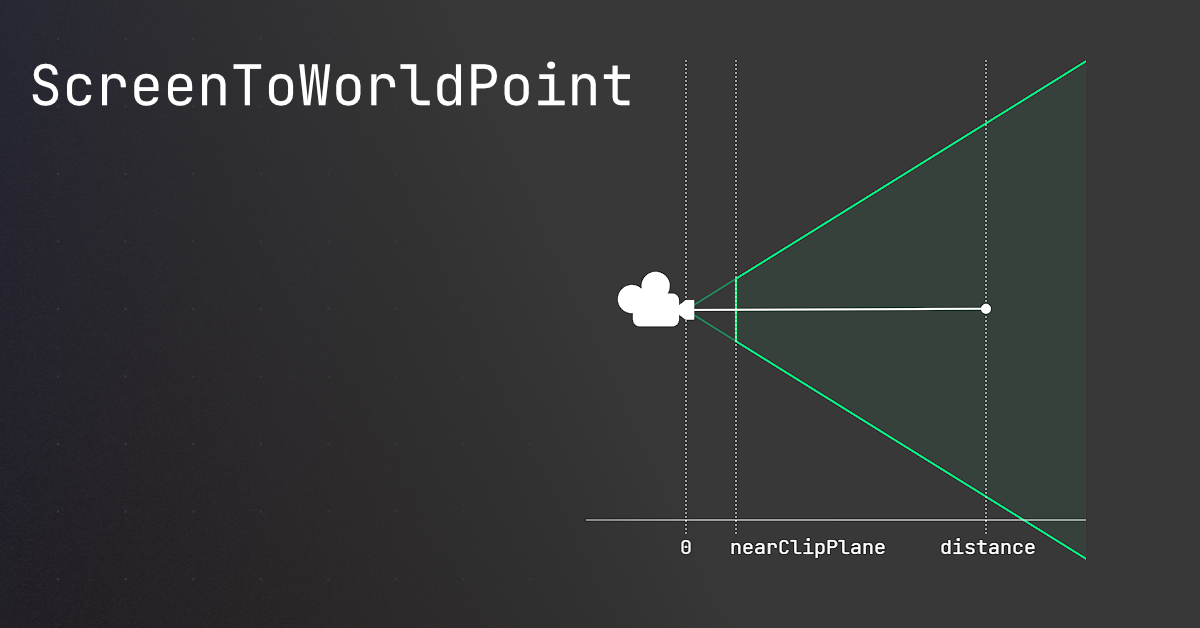
🤔 Unity, Huh, How?
Common ScreenToWorldPoint issues, and similar alternatives that may be better.
unkempt meadow
I tried to serialize the Vector3s like an idiot
should have debugged
no force is being added visibly, no matter how much I change the force or radius
quartz folio
You should draw rays/lines in the scene to ensure positions are where you think they are
unkempt meadow
so the code itself should be correct? instead it seems like a mismatch with some poisitons or something?
quartz folio
You will have to do some debugging to find out
I've also linked a resource that's probably your issue
 swift falcon
hi
unkempt meadow
ah I used debug log to see the mouse click position
it's really wrong
let me get on that
I am confused. So I have a box that is 2m cubed. The difference in X mouse position between the left bound and right bound is like 150m
how does that work?
Also, the y position is wild. It's as if the ''collision'' of the mouse is set very far back
ok I kinda fixed it
 blazing basalt
How can i create my prefabs by the right click menu in the inspector. Shall I use [MenuItem("GameObject/MyObj")]
And instantiate function to create it?
azure frost
azure frost
Okay, as seen in <#1329735696621240320> , I'm having swimming problems.
```C#
ca...
Can anybody else help with this?
 rustic ember
I have one Vector3 ("v1") and another Vector3 ("v2") on a Plane. v2 rotates around and I need to calculate the degrees between v1 and v2. I know I can use Vector3.SignedAngle, but I also need to know the degrees when the degrees exceed 360 when rotating multiple revolutions. How can I approach this?
 hexed pecan
rustic ember
I have one Vector3 ("v1") and another Vector3 ("v2") on a Plane. v2 rotates arou...
hexed pecan
rustic ember
I have one Vector3 ("v1") and another Vector3 ("v2") on a Plane. v2 rotates arou...
How is v2 being rotated?
rustic ember
hexed pecan
How is v2 being rotated?
I just have two points on a plane. The point v2 changes position, and so the degrees between the two vectors are different
hexed pecan
If all you have is the vectors, there's no way to know if it rotated 1 degree or 361 degrees
What are you trying to accomplish?
hexed pecan
hexed pecan
If all you have is the vectors, there's no way to know if it rotated 1 degree or...
Or 90 degrees vs. -270 degrees
rustic ember
True, but the point changes every frame, and we can assume that it never changes more than 360 degrees
hexed pecan
You still can't know if it rotated a positive or negative angle
rustic ember
Really?
hexed pecan
Well, both could be valid
90 degrees rotation looks the same as -270 degrees, for example
181 is the same as -179
hexed pecan
rustic ember
Then I guess I don't need to know if it rotates multiple revolutions
Can it rotate both ways?
rustic ember
Yes
hexed pecan
Tell me what you are trying to actually do
rustic ember
I am making a rotation tool similar to the unity editor. You can visually see when it rotates multiple revolutions
 hexed pecan
Current approach won't work
hexed pecan
rustic ember
I am making a rotation tool similar to the unity editor. You can visually see wh...
The rotation tool/handle knows how much your mouse has moved since you grabbed it
So that's a parameter you are missing here
rustic ember
I am doing it a bit differently. In the Unity Editor it measures the mouse movement (linearly) in relation to the tangent of the ppoint on the circle that is clicked. In my game you rotate the mouse around the circle
So I have v1 from the center to the start click point, then I have v2 from the center to the mouses current point on the circle
hexed pecan
So it happens over multiple frames
rustic ember
Yes
rustic ember
I guess. I wanted to avoid this because of floating point errors
The effect might be minimal though
hexed pecan
It's not going to be noticeable
rustic ember
Alright. Thanks for your help
latent latch
azure frost
Well, I think a better way to say it is, "How do I make it so that "forward" is ...
camera.forward * vertical_input
for horizontal input you need the cross product of forward with world up to be relative to it
this is under the assumption you want controls lock relative to the camera cause I may be misunderstanding
azure frost
latent latch
this is under the assumption you want controls lock relative to the camera cause...
Well, I want the camera to be able to rotate freely around the player just as it does on land.
And tilting the joystick would move you relative to the camera.
Rather than the player's orientation and the camera orientation being locked together.
 frozen holly
hello can anyone recommend a tutorial on rendomly generating terrain?
azure frost
So... I've been getting help from another discord. I've changed this section of code and... well...
 hexed pecan
What's wrong with the first version? What is cameraPlanarRotation - is it just the Y rotation of the cam?
azure frost
I'll bring the video up again.
azure frost
azure frost
I'll post the whole script in hastebin.
The scripts are here.
My goal is to mimic the swimming system of Just Cause 2.
hexed pecan
No idea how the change you showed would fix being able to swim in the air
Doesn't look like the issue has anything to do with camera rotation
azure frost
The character wasn't swimming in mid-air. That was another water volume.
And yes, the camera functions just fine in the original video. It's not being able to aim where the player swims while underwater that's the problem.
 soft shard
frozen holly
hello can anyone recommend a tutorial on rendomly generating terrain?
soft shard
frozen holly
hello can anyone recommend a tutorial on rendomly generating terrain?
"Catlike Coding" has some blog tutorials on procedural terrain and mesh generation, you could add randomization in the algorithm from there or use something like a noise map/texture to determine randomization - if you prefer a more video tutorial, you could try searching "unity procedural generation" or similar keywords on YouTube
 hexed bough
What would be the best multiplayer solution which i can use for a turn based card game? Here i also want to handle the scenarios where a player might be in background but it shouldn’t affect the game for others.
 heady iris
hexed bough
What would be the best multiplayer solution which i can use for a turn based car...
heady iris
hexed bough
What would be the best multiplayer solution which i can use for a turn based car...
Turn-based games can be a lot simpler than things like shooter games
I have a game that's a ripoff of Into the Breach
hexed bough
I do have a tps game for which im using photon fusion shared mode
As its on web
heady iris
Each move in the game is represented as an "action" object. I can serialize and deserialize the action objects.
When the local player makes a move, they create an object and send it to a router. The router sends it right back, and the action is applied
When the remote player makes a move, it goes over the network first
but the outcome is the same: the action gets spit out by the router, and the game applies the action
Multiplayer is hard when you have to deal with desync
hexed bough
Previously i used a custom solution using sockets for my turn based game
But i had a lot of edge cases like last second move or player is in background
heady iris
but turn-based games aviod pretty much everything that could cause desync, since only one player has authority to perform actions at a time
I'm just using Unity Transport directly, yeah.
hexed bough
Netcode?
heady iris
Turn time limits do introduce a desync opportunity
heady iris
hexed bough
Netcode?
not Netcode for GameObjects, no. I'm just using Unity Transport directly to move data around
hexed bough
heady iris
Turn time limits do introduce a desync opportunity
Will only a dedicated server resolve my issue?
heady iris
If you want to prevent cheating, in the form of:
- Refusing to obey the time limit
- Pretending the opponent's out of time already
then yes, you would need a server in the middle that you control
You can detect that the games have gotten out of sync, which works if both players are honest
But that won't help you against a dishonest player
If you went with a dedicated server, you could either:
- Simulate the game only on the server, and then display the resulting game-state to the players
- Simulate the game everywhere, and use the server's state if a desync occurs
hexed bough
Wouldnt that be more helpful in the case of rejoining players as well
Or maybe syncing the current state easily?
heady iris
Either way, you'd have the server as a single source of truth
Simulating the game locally means that you don't have to wait for network latency to see your own actions happen
It's also a bit difficult to completely separate the game simulation (i.e. all of the mechanics) from the game display (all of the visuals and sounds)
hexed bough
Thats another part which is important
And if i go for a web game then having a server might be heavier
How is photon quantum?
heady iris
i'm not sure what you mean by that
are you asking if you'd still use the networking library when playing a single-player mode?
 sick cove
I am trying to instantiate a copy of a prefab, where i set one of the parameters of the script which is placed on it. in this case the color.
so when i spawn the prefab, the color get set according to the colour of object that spawns it
(to be more precise the colour of a decal)
How can i access the colour while instantiating?
this spawning part of the script
foreach (Vector3 direction in directions)
{
    RaycastHit hit;
    if (Physics.Raycast(transform.position, direction, out hit, raycastDistance))
    {
        // Check if the hit object is static (we'll check if it has a Rigidbody and if it's set to static)
        Rigidbody hitRigidbody = hit.collider.GetComponent<Rigidbody>();
        if (hitRigidbody != null && !hitRigidbody.isKinematic)
            continue; // Skip dynamic objects with Rigidbody that are not kinematic

        Debug.Log("Painting the walls now" + direction);
        if (hit.collider.CompareTag("Wall"))
        {
            Vector3 decalPosition = hit.point + hit.normal * decalOffset;
            GameObject decal = Instantiate(decalPrefab, decalPosition, Quaternion.LookRotation(hit.normal));
the setting the colour on the prefab
public Color Paint;

void Start()
{
    setColour();
}

public void setColour()
{
    DecalProjector decalProjector = GetComponent<DecalProjector>();
    decalProjector.material = new Material(decalProjector.material);

    decalProjector.material.SetColor("paintColour", Paint);
}
the goal: when an enemy dies, leave behind a paint splatter of that colour.
 heady iris
nooo he exploded 😭
heady iris
sick cove
I am trying to instantiate a copy of a prefab, where i set one of the parameters...
Instead of referencing the prefab as a GameObject, you can reference it as a PaintComponent (or whatever the second script's class is named)
Instantiate will give you a reference to that component on the newly-created game object
[SerializeField] Bullet prefab;

public void Shoot() {
  var shot = Instantiate(prefab);
  shot.damage = 123;
}
e.g.
sick cove
heady iris
nooo he exploded 😭
bubble boy be like
sick cove
heady iris
```cs
[SerializeField] Bullet prefab;
public void Shoot() {
var shot = Instan...
i'll quickly take a look, 1 sec
heady iris
Also, if you only set the color in Start, then there will be one frame where you see the wrong color
I'd suggest doing this:
Splat instance = Instantiate(splatPrefab);
instance.SetColor(someColor);
rather than just setting the "Paint" field and then using it in the Start method one frame later
sick cove
it's been a while that i instantiated anything.
i just have the prefab written as ```public GameObject decalPrefab;````
what is the 'bullet' referencing again?
right, and the second script is on the just spawned item.
heady iris
Switch the type from GameObject to whatever the type of that second script is
heady iris
sick cove
what is the 'bullet' referencing again?
in my example, prefab is a field of type Bullet that references a prefab asset
I edited the script to avoid using the "bullet" name twice.
sick cove
right.
heady iris
shot is a local variable that points to the newly-instantiated bullet
and then damage is a field on the Bullet class that I'm modifying
I almost never reference prefabs as a GameObject. I always want something more specific!
sick cove
alright. i'll quickly test
i don't know what i did, but it now takes a really long time to explode, and nothing get's created, here is the change i made
RaycastHit hit;
if (Physics.Raycast(transform.position, direction, out hit, raycastDistance))
{
    // Check if the hit object is static (we'll check if it has a Rigidbody and if it's set to static)
    Rigidbody hitRigidbody = hit.collider.GetComponent<Rigidbody>();
    if (hitRigidbody != null && !hitRigidbody.isKinematic)
        continue; // Skip dynamic objects with Rigidbody that are not kinematic

    Debug.Log("Painting the walls now" + direction);
    if (hit.collider.CompareTag("Wall"))
    {
        Vector3 decalPosition = hit.point + hit.normal * decalOffset;
        //GameObject decal = Instantiate(decalPrefab, decalPosition, Quaternion.LookRotation(hit.normal));
        var setColour = Instantiate(decalColorSetter, decalPosition, Quaternion.LookRotation(hit.normal));
        setColour.Paint = decalColor;
(i made a mistake in another piece of code i just see, 1 sec)
polar marten
hexed bough
What would be the best multiplayer solution which i can use for a turn based car...
turn based networked card games can be hard to make. what are the rules like?
sick cove
no, that also didn't work. i had the wrong colour name set for the decalprojector. but that wasn't the only problem it seems
polar marten
sick cove
```c#
RaycastHit hit;
if (Physics.Raycast(transform.position, direction, out hit...
you probably want to raycast only to certain layers.
sick cove
i only raycast to 'wall'
polar marten
the code is raycasting to everything
so whatever is the first collider it runs into will cause the Physics.Raycast call to return with that collider
you could say you aspire that the first collider on the ray is a wall 🙂
sick cove
whoops
hexed bough
polar marten
turn based networked card games can be hard to make. what are the rules like?
Lets say its like callbreak or spades
But rules are somewhat more different
sick cove
polar marten
you could say you aspire that the first collider on the ray is a wall 🙂
i'll quickly send the original code in that case, before i edited it with the advice from here.
private void PaintTheWalls()
{
    Vector3[] directions =
    {
        Vector3.forward,
        Vector3.back,
        Vector3.left,
        Vector3.right,
        Vector3.up,
        Vector3.down
    };

    foreach (Vector3 direction in directions)
    {
        RaycastHit hit;
        if (Physics.Raycast(transform.position, direction, out hit, raycastDistance))
        {
            // Check if the hit object is static (we'll check if it has a Rigidbody and if it's set to static)
            Rigidbody hitRigidbody = hit.collider.GetComponent<Rigidbody>();
            if (hitRigidbody != null && !hitRigidbody.isKinematic)
                continue; // Skip dynamic objects with Rigidbody that are not kinematic

            Debug.Log("Painting the walls now" + direction);
            if (hit.collider.CompareTag("Wall"))
            {
                Vector3 decalPosition = hit.point + hit.normal * decalOffset;
                GameObject decal = Instantiate(decalPrefab, decalPosition, Quaternion.LookRotation(hit.normal));

                Renderer decalRenderer = decal.GetComponent<Renderer>();
                if (decalRenderer != null && decalRenderer.material.HasProperty("_PaintColour"))
                {
                    decalRenderer.material.color = decalColor; // Set the color dynamically
                }
            }
        }
    }
}
brb, i'm gonna do more research on raycasts
polar marten
sick cove
i'll quickly send the original code in that case, before i edited it with the ad...
you should add a layer mask to your raycast call, and set the layer on the walls appropriately. you'll also have to update physics collissions.
polar marten
hexed bough
Lets say its like callbreak or spades
But rules are somewhat more different
does it have to be engineered rigorously, or is this a casual game that would not attract cheaters?
hexed bough
polar marten
does it have to be engineered rigorously, or is this a casual game that would no...
Ill need to avoid the cheater
polar marten
hexed bough
Ill need to avoid the cheater
are you making this for yourself or someone else?
steady bobcat
hexed bough
Ill need to avoid the cheater
Do some research on server authoritative design, where the server needs to not trust what clients do and validate all requests.
Otherwise you get GTA online
polar marten
hexed bough
Ill need to avoid the cheater
does it have to avoid botting? or "inauthentic behavior" ?
hexed bough
For myself
hexed bough
polar marten
does it have to avoid botting? or "inauthentic behavior" ?
Actually i do get some edge cases like last second move played by a player
polar marten
hexed bough
Actually i do get some edge cases like last second move played by a player
why is that such an issue?
i mean i suppose you can give the opponents more time if a player plays a card right before his turn is up
hexed bough
Yes i can but thing is how much? What if the player is in background
That messes up everything else
steady bobcat
What are you saying, that you want to account for someone submitting a move very close to the allotted time?
You can add on some buffer time server side to say allow moves made up to 2 seconds late or something
polar marten
hexed bough
Yes i can but thing is how much? What if the player is in background
also, you have already written this game? how do you observe issues like this?
hexed bough
I already did before where i used a websockets
Im planning to rewrite it with an existing solution available rather than web socket
hexed bough
polar marten
also, you have already written this game? how do you observe issues like this?
There i observed such issues
steady bobcat
What is "existing solution"
hexed bough
I meant like maybe using photon or mirror
steady bobcat
Regardless unless you design it correctly it will be easy to cheat
hexed bough
Apart from cheating i need to ensure the game keeps running even if a player is in background or unresponsive such that the experience for others is not disrupted
leaden solstice
What was the question
steady bobcat
hexed bough
Apart from cheating i need to ensure the game keeps running even if a player is ...
If the server keeps the game state safe and tolerates someone not communicating very often it will work.
You can even have it so a player can start the game again and join back where they left off
plucky inlet
you can test nakama for multiplayer stuff and broadcast messaging and all that fuzz to get a server going
sick cove
polar marten
you should add a layer mask to your raycast call, and set the layer on the walls...
didn't manage to fix that yet, however i did manage to fix the colour spawning (sort of)
the only problem is that now the next paint splatter is placed below the previous one. do you (or anyone else) know how that works with decals?
 steady bobcat
I've heard good things about nakama
plucky inlet
yeh, I am using it on a non game approach and its doin a great job so far
steady bobcat
I may get to use it one day at my work but previous server games used a custom system in scala
leaden solstice
hexed bough
What would be the best multiplayer solution which i can use for a turn based car...
You won’t need fancy real time replication for turn based card game, Just shared logic with any server and some RPCs, then server validate if that is possible actions
Your game should just be able to serialized to list of player actions
hexed bough
Got it
Then i can probably use photon fusion shared mode as well
Ill check out nakama as well
Thanks for the suggestions 🙂
 inner mist
would a list or array be best for 10 bodyparts? using it for active ragdoll
latent latch
is your ragdoll ever growing an extra arm
inner mist
latent latch
is your ragdoll ever growing an extra arm
No, ig? So Array! thats what im best at. Thanks (:
 oak panther
so how would I check if player is on the ground, and then have them jump from the ground and only from the ground
 rigid island
oak panther
so how would I check if player is on the ground, and then have them jump from th...
rigid island
oak panther
so how would I check if player is on the ground, and then have them jump from th...
Ground check, usually a raycast or other type of cast
overlap works too
 dawn mauve
Has anyone found good uses for ML agents? Thinking about training one but can't really figure out where I'd run it given they seem to cost a lot of resources to run. I'm building traditional game apps (aka not robotics).
Was thinking about creating exploratory test cases using ML agents, to test my levels in between play testing sessions during development. My thought is it might help catch bugs in levels, since an ML agent can hypothetically play through a level many different ways. Figured I'd ask in case others have found a use.
 wheat spruce
I think its if you'd like some complicated behaviour that would be tough to program. Say you had a card game and you want the agent to have an idea of what the best card to play would be given their hand
or something like a football player where it know the best location it should move towards based on the rest of the players
hexed pecan
I don't think anyone knows what you are trying to ask
dawn mauve
wheat spruce
I think its if you'd like some complicated behaviour that would be tough to prog...
Honestly part of the value of training a ml agent seems to be learning how to articulate a value function for entities in the game.
Still evaluating if the juice is worth the squeeze
steady bobcat
"MonoBehaviour Script" is the option
 candid tundra
check the scripting, should expand and have an empty script option too
 still jungle
uh GUI files creation
heady iris
Some things were renamed in Unity 6.
What used to be "C# Script" is now "MonoBehaviour Script"
candid tundra
and your file name and class name matches each other?
like:
file name MyMonobehaviour.cs
class MyMonobehaviour: MonoBehaviour {}
rigid island
new unity versions that doesnt even matter anymore
steady bobcat
rigid island
new unity versions that doesnt even matter anymore
since when??
candid tundra
steady bobcat
since when??
to be fair, usually the component search wont yield a result for the non matching script, but you can drag the script file from the project window onto your object into the hierarchy view and that will add the script component
steady bobcat
candid tundra
to be fair, usually the component search wont yield a result for the non matchin...
huh well that good. i had some issues in the past with scriptable object types breaking weirdly when i accidently had 2 in one file...
 somber nacelle
yeah, that's still not allowed if you're creating them in the editor
steady bobcat
they were actually created with editor code but stuff would be all funky untill i moved it to its own file
rigid island
You still cant have 2 MB or SOs in same file afaik
somber nacelle
steady bobcat
they were actually created with editor code but stuff would be all funky untill ...
yes that would be "in the editor", if they are created at runtime it makes little difference (provided you aren't then attempting to save them as an asset)
steady bobcat
not so useful then :/
somber nacelle
i mean, ideally you wouldn't be cramming a bunch of different object definitions into the same file anyway. the reduction of the naming restrictions can be useful though if you have a UnityEngine.Object and a plain object in the same file (but again, ideally that wouldn't be the case) or you just rename a class without using the refactoring tools so the file name doesn't change
steady bobcat
I don't normally do it, I often create a new class in another and use VS to move it
 late ocean
im a beginner and I made this script to make the player move left and right using a tutorial. But it doesn't seem to work, any solutions?

oops should have put this in code beginner
ill do that now ig
 hidden flicker
high-velocity objects keep passing through colliders, or registering the collision point as occurring after the objects has passed through. i have interpolate and continuous on the rigidbody but it still does this
leaden solstice
hidden flicker
high-velocity objects keep passing through colliders, or registering the collisi...
Set it to continuous dynamic if you are shooting against a dynamic colliders.
Interpolation setting doesn't affect collision.
hidden flicker
leaden solstice
Set it to continuous dynamic if you are shooting against a dynamic colliders.
In...
i’m shooting against static colliders
also, what does interpolation setting affect then?
leaden solstice
hidden flicker
also, what does interpolation setting affect then?
Interpolation is visual interpolation for your game object to physics simulated location
hidden flicker
ah, ok
leaden solstice
hidden flicker
i’m shooting against static colliders
Does the issue persist with continuous dynamic?
hidden flicker
doesn’t continuous dynamic just toggle between discrete and continuous based on the object’s velocity?
leaden solstice
hidden flicker
doesn’t continuous dynamic just toggle between discrete and continuous based on ...
Not at all
 leaden solstice
hidden flicker
is this correct?
leaden solstice
hidden flicker
is this correct?
Continuous dynamic means it will apply continuous collision detection for dynamic vs dynamic collision
Just continuous only enables for dynamic vs static collision
hidden flicker
but my issue is occurring with a dynamic-static collision
leaden solstice
hidden flicker
but my issue is occurring with a dynamic-static collision
I mean does it fix it tho?
hidden flicker
let me check
leaden solstice
If it fixes the issue then you might just thinking it's static when it is actually dynamic
hidden flicker
leaden solstice
If it fixes the issue then you might just thinking it's static when it is actual...
it’s a gameobject with a single box collider and static mode checked :/
i’ll get back to you one sec
leaden solstice
hidden flicker
it’s a gameobject with a single box collider and static mode checked :/
Does it have rigidbody
hidden flicker
leaden solstice
Does it have rigidbody
no
it fixed it though
wait nope
it didn’t
leaden solstice
hidden flicker
it fixed it though
Okay, does your object move only via physics?
hidden flicker
leaden solstice
Okay, does your object move only via physics?
a velocity gets applied initially and that’s it
leaden solstice
hidden flicker
a velocity gets applied initially and that’s it
Not so sure then, if it is something small like bullet then you might use own raytrace check instead
 simple void
Very quick question, intellisense is recommending that Unity objects should not use null propogation. Anyone know why it's saying this?
https://github.com/microsoft/Microsoft.Unity.Analyzers/blob/main/doc/UNT0008.md

GitHub
Roslyn analyzers for Unity game developers. Contribute to microsoft/Microsoft.Unity.Analyzers development by creating an account on GitHub.
somber nacelle
simple void
Very quick question, intellisense is recommending that Unity objects should not ...
somber nacelle
they only override == and != because the null condition and other null operators cannot be overridden. and they did so because an object can be destroyed but not null because c# does not have the concept of "destroyed" and there is no way to automatically set a variable null when the object has been destroyed
so you have to use the overridden operators to do your null checks otherwise you potentially run into exceptions
simple void
somber nacelle
they only override `==` and `!=` because the null condition and other null opera...
You mean for native objects(i.e. value types kinda) it can't make it null even though Unity destroyed it, so if I do != null it checks if the native object is destroyed by unity but because ?? and ?= can't be overrriden it will be true because it can only be default at most.
That's what I'm getting
That makes sense thanks
somber nacelle
any object that inherits from UnityEngine.Object can be destroyed on the native side, but that does not actually do anything to any references to that object on the c# side. so those null checking operators will think the object is not null so when you try to access those properties on those objects that reach into that native code where the object is destroyed you'll get an exception
 vagrant blade
We don't need the spam. If you don't have a question, don't post, thanks.
 grand thicket
NullReferenceException: Object reference not set to an instance of an object
 somber nacelle
grand thicket
NullReferenceException: Object reference not set to an instance of an object
grand thicket
grand thicket
NullReferenceException: Object reference not set to an instance of an object
somber nacelle
grand thicket
NullReferenceException: Object reference not set to an instance of an object
grand thicket
grand thicket
NullReferenceException: Object reference not set to an instance of an object
i was trying to declare a variable that was already declared...
somber nacelle
that is not what that exception means
 cosmic rain
grand thicket
i was trying to declare a variable that was already declared...
cosmic rain
grand thicket
i was trying to declare a variable that was already declared...
What you mean to say is that in Start you assign to a local variable, not your text field
 viscid kite
question i want to bind an onclick event of a button in C# rather than through in-editor, how do I do that?
 somber nacelle
the event has an AddListener method
https://docs.unity3d.com/6000.0/Documentation/ScriptReference/Events.UnityEvent.AddListener.html
viscid kite
somber nacelle
the event has an AddListener method
<https://docs.unity3d.com/6000.0/Documentati...
sanks!
 foggy pasture
https://gyazo.com/902fcbff578b70a47724d65bcf238285
heya, would anyone be able to help me figure out why DrawMeshInstancedIndirect is flickering like this? in my previous method using the same function and bounding box it wasn't flickering
 mental wedge
Hey anyone having issues where you assign buttons or objects in inspector but it still shows errors that they are not assigned? Idk wtf is going on
 brazen kestrel
would anyone know why my arms are animating but legs are not. they are two different objects using the same parameter and the legs move but arms do not. When I manually set the parameter (float) in the animator the legs animate but arms dont
EDIT: using same controller as well
somber nacelle
mental wedge
Hey anyone having issues where you assign buttons or objects in inspector but it...
don't crosspost, keep it in #💻┃code-beginner . and see #854851968446365696 for what to include when asking for help.
mental wedge
somber nacelle
don't crosspost, keep it in <#497874004401586176> . and see <#854851968446365696...
Sure. But will someone help?
somber nacelle
see #854851968446365696 for what to include when asking for help
nobody is going to commit to helping until they know what they are actually helping with
mental wedge
somber nacelle
nobody is going to commit to helping until they know what they are actually help...
"issues where you assign buttons or objects in inspector but it still shows errors that they are not assigned?"
That. Or is it better if I were to write a couple paragraphs explaining everything that no one would even read?
somber nacelle
alright, since you refuse to actually provide useful details you have guaranteed that I won't help. so good luck 👍
mental wedge
somber nacelle
alright, since you refuse to actually provide useful details you have guaranteed...
Yeah you should be more friendly in the future. It's cool
somber nacelle
#archived-networking
but i'm also fairly sure that Rpcs must be on networkbehaviours
 ancient sable
oh whoops didnt see that channel.
 modern atlas
mental wedge
"issues where you assign buttons or objects in inspector but it still shows erro...
modern atlas
mental wedge
"issues where you assign buttons or objects in inspector but it still shows erro...
Perhaps send your code
mental wedge
modern atlas
Perhaps send your code
I didn't think that would be accepted well since some people would get mad at a random code being sent in the chat. I have no issue sending it DMs, but I don't need people coming at me with an attitude ya know.
the weird thing is that it works when I test, then I move through different scenes, and when I go back to the initial scene, the button all of a sudden is not assigned...but it was just working. So I have no idea what is going on
modern atlas
mental wedge
I didn't think that would be accepted well since some people would get mad at a ...
Well, send your !code
tawny elkBOT
Posting code
📃 Large Code Blocks
Use links to services like:
https://paste.mod.gg/, https://hastebin.skyra.pw/, https://paste.ofcode.org/, https://paste.myst.rs/, https://scriptbin.xyz/
📃 Inline Code
Surround code with three backquotes. Not quotation marks.
To format as C#, add cs to the first line:
```cs
// Your code here
```
Add a comment with a line number if there is an error message.
somber nacelle
mental wedge
I didn't think that would be accepted well since some people would get mad at a ...
fun fact, but if you'd bother to read #854851968446365696 you would see that you should send your code. and now that you've provided some actually useful information, i'm gonna go ahead and guess that you have a DDOL object that you are expecting to hold references to scene objects that are being destroyed.
mental wedge
somber nacelle
fun fact, but if you'd bother to read <#854851968446365696> you would see that y...
I have no idea what DDOL is lol
:[
Aj!
modern atlas
It means dont destroy on load. Better yet, send the code so we can assess the problem
mental wedge
Dontdestroyonload
Let me try something real quick
Damn. Didn't work lol
This is a warning that appears when the boss enemy spawns. It works when I test the level. I go to the main menu, navigate back to that game mode, and click play, then the error appears that it's not assigned. But it was just working.
It's a 2D tower defense
somber nacelle
mental wedge
using UnityEngine;
using System.Collections;
using TMPro;

public class BossWarning : MonoBehaviour
{
    public static BossWarning instance;
    public GameObject warningUI;
    public TextMeshProUGUI warningText;
    public float warningDuration = 2f;
    public Animator animator;

    void Awake()
    {

        Debug.Log("BossWarning Awake called");
        if (instance == null)
        {
            instance = this;
            DontDestroyOnLoad(gameObject);
            Debug.Log("BossWarning instance set");
        }
        else if (instance != this)  // Only destroy if this isn't the instance
        {
            Debug.Log("Destroying duplicate BossWarning");
            Destroy(gameObject);
        }

    }

    public IEnumerator ShowBossWarning()
    {
        Debug.Log("ShowBossWarning called!");
        if (warningUI != null)
        {
            Debug.Log("Warning UI found, activating...");
            warningUI.SetActive(true);

            if (animator != null)
            {
                animator.SetTrigger("Show");
            }

            yield return new WaitForSeconds(warningDuration);
            Debug.Log("Warning duration finished");

            // Check if warningUI still exists
            if (warningUI != null)
            {
                if (animator != null)
                {
                    animator.SetTrigger("Hide");
                    yield return new WaitForSeconds(0.5f);
                }

                warningUI.SetActive(false);
                Debug.Log("Warning UI deactivated");
            }
        }
        else
        {
            Debug.LogError("Warning UI is not assigned!");
        }
    }
}```

Did I do it?DontDestroyOnLoad(gameObject);
look at that, i was right. your DDOL object is not being destroyed when you switch scenes, but the objects it references are, then when you get back to the main menu or where ever this object originated, the DDOL object is still there without those old references because those objects were destroyed.
is there a reason this is DDOL?
mental wedge
somber nacelle
> DontDestroyOnLoad(gameObject);
look at that, i was right. your DDOL object is ...
Honestly. I don't know. I've been learning and using YouTube, AI, literature, manuals, and whatever else I can find. I don't even know what DDOL even does. It's all mushed in my brain
somber nacelle
start by learning the basics, the junior programmer pathway on the unity !learn site will take you through the important concepts that you need to understand in a structured manner
tawny elkBOT
:teacher: Unity Learn ↗
Over 750 hours of free live and on-demand learning content for all levels of experience!
mental wedge
Maybe I can just delete that part
mental wedge
somber nacelle
start by learning the basics, the junior programmer pathway on the unity !learn ...
Thanks
Also thanks for helping. I don't understand a lot of this stuff. In my world, I know it all, but in the this world, I'm lost. I'm excited to learn and I am happy with what I've been able to build, but it's just so far outside of my expertise. It's like I'm a stupid kid all over again lol
grand thicket
using System;
using System.Linq;
using UnityEditor;
using UnityEngine;

public class Chunk : MonoBehaviour
{
    public int size;
    public int width;
    public int length;
    public int seed;
    public bool randomize;
    public int magnitude;

    // Start is called once before the first execution of Update after the MonoBehaviour is created
    void Start()
    {
        if (randomize)
        {
            seed = UnityEngine.Random.Range(-10000, 10000);
        }
        Generate();
    }

    // Update is called once per frame
    void Update()
    {
    }

    void Generate()
    {
        GameObject block = AssetDatabase.LoadAssetAtPath<GameObject>("Assets/Blocks/Base.prefab");
        for (int i = 0; i < width; i++)
        {
            for (int j = 0; j < length; j++)
            {
                for (int k = 0; k < size; k++)
                {
                    for (int l = 0; l < size; l++)
                    {
                        float xCoord = (float)(i * size) / width;
                        float yCoord = (float)(j * size) / length;

                        float perlinx = (xCoord + k) * seed;
                        float perliny = (yCoord + l) * seed;
                        float perlin = Mathf.PerlinNoise(perlinx, perliny);
                        print((int)Math.Round(perlin * magnitude));
                        GameObject cloned = Instantiate(block);
                        cloned.transform.position = new Vector3((i * size) + k, (int)Math.Round(perlin * magnitude), (j * size) + l);
                    }
                }
            }
        }
    }
}
the perlin noise keeps outputting the same value
mental wedge
Does anyone in here do audits? Lol I'll just pay you at this point
cosmic rain
grand thicket
```cs
using System;
using System.Linq;
using UnityEditor;
using UnityEngine;
pu...
Log the inputs that you pass to the perlin noise.
cosmic rain
mental wedge
Does anyone in here do audits? Lol I'll just pay you at this point
You can hire someone on the forums or on one of the freelancing platforms like upwork.
!collab
tawny elkBOT
:loudspeaker: Collaborating and Job Posting
We do not accept job or collab posts on Discord.
Please, use Discussions to promote yourself as job-seeking, advertise commercial job offers, or look for non-commercial projects to participate in:
• Collaboration & Jobs
mental wedge
cosmic rain
You can hire someone on the forums or on one of the freelancing platforms like u...
Thanks!
grand thicket
cosmic rain
Log the inputs that you pass to the perlin noise.
the inputs passed into the perlin noise are different-ish numbers
 cosmic rain
grand thicket
the inputs passed into the perlin noise are different-ish numbers
cosmic rain
grand thicket
the inputs passed into the perlin noise are different-ish numbers
These are all integers. Perlin noise expects values in 0-1 range.
Integers would return the same value all the time.
grand thicket
is there a solution for that?
cosmic rain
grand thicket
is there a solution for that?
Yes: pass values in 0-1 range
grand thicket
and how would i do that?
cosmic rain
wdym? Just make sure your values are more than 0 and less than 1
For example
for(int i = 0; i++; i < 10)
{
  float x = i / 10f;
  float y = i / 10f;
  float noiseValue = Mathf.perlinNoise(x,y);
}
What happened to that for
cosmic rain
leaden solstice
What happened to that for
Duh. That's what happens when you rely too much on the ide. I can't remember the last time I typed a for loop manually. Before this message.
Let's pretend it was pseudocode.
modern atlas
cosmic rain
For example
```cs
for(int i = 0; i++; i < 10)
{
float x = i / 10f;
float y =...
never seen the increment before the condition in a for loop 🧐
cosmic rain
Yeah, that's gonna be a compile error
 fallen hatch
Can some coding guy help me
I'm having a problem with unity netcode
I have a leaderboard with 4 slots and every player can see his own name


But I want them to see everyone's names
hexed pecan
I don't know about the network stuff, but you should learn arrays/lists
fallen hatch
as I have this by default (you can traduce it by player X (not connected)
 fallen hatch
hexed pecan
I don't know about the network stuff, but you should learn arrays/lists
fallen hatch
hexed pecan
I don't know about the network stuff, but you should learn arrays/lists
ok, I'll search
Here is an example with 1 player

They can see their own name
But with 2 players, the names aren't referenced on the network so they only see their own name and as the other's connected player names are only locally referenced, when someone connect or is already connected, the default reference (player X not connected) disappears as it should be but is replaced by nothing.


I've already tried network variables but as I'm not an expert, this only caused the entire script to do not work
So, may someone help me synchronizing the variables between clients?
steady bobcat
fallen hatch
I have a leaderboard with 4 slots and every player can see his own name
some generic notes:
- Its very bad to do Find() each frame in update... use a serialized field or find in Start/Awake.
- Use an array or list so you can access the correct tmp text via index instead of loads of ifs (you can also avoid doing Find() for these too...)
Its been a while since i used unity netcode but the name can be a networked var on the main player components
steady bobcat
Yea network variables should be syncronised always: https://docs-multiplayer.unity3d.com/netcode/current/basics/networkvariable/
You will need to use a supported string type however and these have a fixed max length
NetworkVariables are a way of synchronizing properties between servers and clients in a persistent manner, unlike RPCs and custom messages, which are one-off, point-in-time communications that aren't shared with any clients not connected at the time of sending. NetworkVariables are session-mode agnostic and can be used with either a client-serve...
azure frost
azure frost
So... I've been getting help from another discord. I've changed this section of ...
Can anybody help me with this?
hexed pecan
azure frost
Can anybody help me with this?
Might wanna ask the actual question again. Don't make people search for it
azure frost
Okay, well, it's the swimming problem again.
Given that I'm not particularly skilled with code, and that there are multiple scripts involved in this, it is difficult for me to explain the nitty-gritty.
Should I just bring the images and video back to the front again?
hexed pecan
Sure. Were you using KCC? If yes, that's worth mentioning.
azure frost
Yes, actually.
Unfortunately, the swimming controls that the walkthrough had weren't entirely what I had in mind for my project.
Here's a bit of code that got changed.
 steady bobcat
Is the aim to make swimming "relative" to the current camera view?
azure frost
steady bobcat
Is the aim to make swimming "relative" to the current camera view?
Yeah. One moment.
steady bobcat
how does the camera follow the player?
azure frost
Hang on, let me grab the camera script, and put it on hastebin.
(Gotta go for a bit.)
steady bobcat
azure frost
Hang on, let me grab the camera script, and put it on hastebin.
im gonna guess due to using the "follow transform" up and the players up now changing, it goes to shit
azure frost
steady bobcat
im gonna guess due to using the "follow transform" up and the players up now cha...
Yeah, that seems like it.
If there was a way to make the actor rotate, and not the character object, that could solve the problem.
steady bobcat
azure frost
Yeah, that seems like it.
If there was a way to make the *actor* rotate, and no...
Well your model can be a child of a game object but you could only rotate the player on y? I'm not sure tbh what's best


 steady bobcat
azure frost
Here's what the character looks like.
steady bobcat
azure frost
Here's what the character looks like.
Perhaps you should not rotate the top level transform at all. Only rotate the model to face some stored direction that's also used for movement? I'm not familiar with what you are using to move already
 north hatch
I made a first person movement but i got a problem i need help
 vestal arch
!ask
tawny elkBOT
:thinking: Asking Questions
:mag: Search the internet for your question!
:book: Use the API Scripting Reference and User Manual and this troubleshooting site for commonly posted issues.
:wrench: Attempt to debug your issue.
:thought_balloon: Find an appropriate channel by reading the name and description in #🔎┃find-a-channel
:grey_question: And don't ask to ask, ask a full question illustrating with screenshots if needed.
-# For more posting guidelines, go to #854851968446365696
azure frost
steady bobcat
Perhaps you should not rotate the top level transform at all. Only rotate the mo...
Do you know about the Kinematic Character Controller?
https://assetstore.unity.com/packages/tools/physics/kinematic-character-controller-99131?srsltid=AfmBOorU7YAaJKbU6u84SvZwfu2aGQ_a1cyhrhW2BQZCq13-Bsge2ZMf

Get the Kinematic Character Controller package from Philippe St-Amand and speed up your game development process. Find this & other Physics options on the Unity Asset Store.
 wraith spear
I'm getting a "Can't add script behaviour 'TestDialogueWriter' because it is an editor script. To attach a script it needs to be outside the 'Editor' folder." warning on a script not inside the Editor folder. Does someone know how to fix it?
I tried:
- Googling (it says delete and create new script)
- I deleted and created a new script
- I deleted the meta files associated with the script
- I restarted Unity & VS
The full path is [Project]/Assets/Tests/EditMode/Combat/Test.cs
Here's the troublesome code:
{
        [OneTimeSetUp]
        public void OneTimeSetUp()
        {
            Debug.Log("Create TestDialogueWriter");
            EditHelperMethods.SetupMarble();
            testWriter = EditHelperMethods.Instantiate_DialogueWriter();
        }

        [...]
}

public class EditHelperMethods
{
        public static TestDialogueWriter Instantiate_DialogueWriter()
        {
            return Instantiate_GameObject().AddComponent<TestDialogueWriter>();
        }

        public static GameObject Instantiate_GameObject()
        {
            return GameObject.Instantiate(new GameObject());
        }
}```Edit mode tests are to be executed in edit mode. Why are you trying to add it as a component somewhere?
You use the test runner to execute them
wraith spear
steady bobcat
Edit mode tests are to be executed in edit mode. Why are you trying to add it as...
Is Instantiating GOs never meant to be done in EditTests? I'm doing it in a few others as well without problems. I'll go read the docs on this
steady bobcat
wraith spear
Is Instantiating GOs never meant to be done in EditTests? I'm doing it in a few ...
Well not really but if you wanted to, the MonoBehaviour would need to be defined elsewhere in a normal asm and not in the editor test one
wraith spear
steady bobcat
Well not really but if you wanted to, the MonoBehaviour would need to be defined...
I see, so theoretically if I were to move the TestDialogueWriter to the normal asm it would work? (would prefer not to do that for obvious reasons)
steady bobcat
wraith spear
I see, so theoretically if I were to move the TestDialogueWriter to the normal a...
Yes, you can surround the whole class in #if UNITY_EDITOR to keep it out of builds.
wraith spear
Ah, it works, thanks a lot for the help!
I'll see about moving it to PlayMode or other solutions to avoid having the class in my normal project files, just for the sake of organization.
azure frost
So, rob, should I post again the character controller scripts?
https://hastebin.skyra.pw/ovececedaz.java
I'll just do it anyway...
wraith spear
azure frost
So, rob, should I post again the character controller scripts?
Hi, I know I'm not Rob, but figured I'd reply anyway 🙂
I just looked at your earlier questions + video's + code, but to me it isn't really clear what you're trying to achieve in your game. In the second video, for example, the character swims out of the pool into the air, but you say this is intended behaviour as there is a second level of water. Without your comment, I would never have been able to guess that that's intentional.
I recommend you make a more bare-bones level, test it out again, and if it doesn't work please describe what you want to happen vs what happens in a single post (preferably with a video example & the code that is behaving unexpectedly instead of the whole file). It'll make it easier for people to help you.
If you've done so, I'll take a look at it! Just @ me.
azure frost
wraith spear
Hi, I know I'm not Rob, but figured I'd reply anyway 🙂
I just looked at your e...
Okay, to further explain what I'm trying to achieve.
I'm trying to make a third-person swimming system where the player can point the camera in the direction they want to swim, but still remain able to freely turn the camera around the player. Basically, the swimming system from Just Cause 2.
What is shown here is so close, but the swimming controls via the left stick are completely lateral, and the only way I can move vertically while underwater is by pushing jump to go up, and crouch to go down.
Since there are multiple scripts at play, I'm not entirely sure which one is responsible for my problems, or which one I'd have to modify to make it work how I want it to.
But yeah, maybe I should make the pool a bit deeper and more open to better explain what's gone wrong.
(But I really should sleep right now...)
wraith spear
azure frost
Okay, to further explain what I'm trying to achieve.
I'm trying to make a third...
So if you point the camera down, you would also swim down? Or is direction only relevant on the X,Z plane?
azure frost
wraith spear
So if you point the camera down, you would also swim down? Or is direction only ...
Yeah, pretty much. Pointing the camera down would make forward on the joystick have the character swim downward at that angle.
(And naturally, back on the joystick would be at the same angle in the opposite direction.)
But, the camera would remain vertical. (Except in cases where dynamic gravity is applied.)
I'll probably record a but of just cause 2 swimming and post it on my devlog for reference tomorrow.
(But for now, I gotta go. Goot night / morning.)
wraith spear
azure frost
(But for now, I gotta go. Goot night / morning.)
Alright! I'll look a bit more into it, as well as the code you sent. Have to say I'm not super optimistic I'll find a solution, but who knows!
azure frost
wraith spear
Alright! I'll look a bit more into it, as well as the code you sent. Have to say...
best of luck to you.
 blazing tiger
I'm facing a dilemma. I need to render a lot of walls in my scene that can be placed, removed or recolored (like The Sims, but on a much bigger scale). I'm almost certainly not gonna use gameobjects for this, as there might be thousands of wall segments. I've got my data structue and for the rendering I could combine them all into several meshes but now I'm kinda unsure how do I determine what wall segment the player is hovering over with their mouse
So on one hand, it makes sense to keep wall segments separate, cause it would be easy to highlight them and determine their index in the data structure, but on another combining them into a couple big meshes would be vastly better for performance and allow more walls to be placed
Never would think walls could be such a complicated topic
heady iris
blazing tiger
I'm facing a dilemma. I need to render a lot of walls in my scene that can be pl...
If you have a grid, you could calculate all of the grid cells the mouse cursor is hovering over and then check if each cell has a wall
It'd be something like https://en.wikipedia.org/wiki/Bresenham's_line_algorithm
blazing tiger
heady iris
If you have a grid, you could calculate all of the grid cells the mouse cursor i...
I initially thought to do this, but wouldn't I think it might be a little too hard to get right in 3D space, especially if the walls would not be just flat meshes
Anyone came up with a way to do this using physical hit tests yet?
Shouldn't be too hard to determine "yes, I'm hovering over a wall chunk mesh" but the harder part would be to figure out which segment exactly
heady iris
You could encode an ID into the vertex data of the walls
Unity allows for up to eight UV streams, each of which can contain four floats
If the wall segments are disconnected, then you can give every vertex the same ID value and very reliably recover it from a raycast hit
steady bobcat
azure frost
Yeah, pretty much. Pointing the camera down would make forward on the joystick h...
Instead of using Transform point you should rotate the input by the camera rotation via quaternion * vector3
heady iris
heady iris
You could encode an ID into the vertex data of the walls
This is a lot like using an "index buffer" for clicking on objects https://stackoverflow.com/questions/35885029/improving-performance-of-click-detection-on-a-staggered-column-isometric-grid/35917976#35917976
blazing tiger
heady iris
If the wall segments are disconnected, then you can give every vertex the same I...
Ok, this actually sounds pretty clever
heady iris
The mesh will need to be read/write enabled, but I'm guessing that's already the case if you're constructing it at runtime
You'll also want to avoid retrieving all of the vertex data every single time you do the test
You can use https://docs.unity3d.com/ScriptReference/Mesh.GetNativeVertexBufferPtr.html to directly access the vertex buffer.
Of course, it's always a bit spooky to use an IntPtr...
Oh, but that's not needed
If you encode this into UV1 (zero-indexing here, so this is the second UV map), you'll get it in RaycastHit
otherwise, you'd need to look up the triangle from the mesh and sample one of its indices
Note that this would conflict with lightmapping
Although you could probably just stuff the data into UV1.z if necessary
blazing tiger
heady iris
Note that this would conflict with lightmapping
I remember I used additional UVs once for ambient occlusion stuff
I think it should be possible to have more specialized UV maps and not run into lighting issues but I'll need to look it up
heady iris
this only matters if you have lightmaps that care about UV1
blazing tiger
Anyway, putting this stuff directly into the UVs seems like a spot-on idea tbh
blazing tiger
heady iris
this only matters if you have lightmaps that care about UV1
Well, I'm sure not gonna bake any lighting and I don't remember whether anything else does
heady iris
as for the IDs -- the easy way is to just use whole float numbers
but, you can actually just reinterpret an int as a float (getting some absurdly small or large float in the process) and write that
You'll want to do that if you think you'll need more than...a couple million IDs
that's the point where floats can no longer represent every integer
blazing tiger
I think worst possible case I'd need 65,536 IDs
Which I think is Ushort
Anyway, this sounds like a pretty good solution. Tnx tnx
polar marten
blazing tiger
Anyway, this sounds like a pretty good solution. Tnx tnx
if you have a robust data structure for the walls already, create the mesh however you need. author a shader with shader graph which takes the data structure as a graphics buffer. then, you can paint directly from the structure. it's like having a world space shader. i don't think you want to hack a bunch of stuff together. but it seems like a lot of work, to do parametric wall rendering
althoguht really
this is all overengineered
130k tris is nothing
blazing tiger
polar marten
if you have a robust data structure for the walls already, create the mesh howev...
I don't think I understood the graphics buffer part. I need to know what wall the player is pointing at so I can dispatch a command to destroy the wall or repaint it and stuff
polar marten
yeah i think you just need to model it as simply as possible
blazing tiger
Yeah the issue isn't really rendering it
Rendering is dirt cheap for a mesh this simple
polar marten
i guess this is why you need game objects
blazing tiger
Issue is that 65,536 GOs will destroy my CPU
blazing tiger
Sounds like a lot of GOs
And they all carry useless data with them
Like scale, rotation, floating point precision position
For every single wall
polar marten
i feel like i have this conversation a lot - https://discussions.unity.com/t/how-to-handle-a-massive-amount-of-game-objects/531228/6
blazing tiger
Oh, ECS by the way
Would be perfect is they didn't cap a chunk at 128 entities or so
Starts to run like garbage when you try to spam tens of thousands of lightweight entities since it wastes most of the memory for nothing
polar marten
well what's your goal
 worldly stirrup
So, I made a circle sprite (the circle in red) for a character controller with a box collider (black box). The sprite is a child of the collider. Because of this setup, when the player is on a slope, the sprite appears to float. I can't change the character controller, so instead I want to shift the sprites local position so it would like its on the slope. I already have the normal of the slope, but I need to find the perfect value so there wont be any gaps between the slope and the sprite. How do I find this value?
 vestal arch
by "character controller", do you mean the built-in CharacterController component, or your own monobehaviour to handle that?
worldly stirrup
my custom one
vestal arch
typically a capsule collider is used for characters for this reason
worldly stirrup
I first wanted to use a character that makes sense to be put in a square collider, but I realized a circle shaped character is more fitting for the gameplay, and I already spent to much time refining the controller
But still, that isn't the point right now
vestal arch
is the character a perfect circle or elongated (as in a capsule?)
worldly stirrup
perfect circle
vestal arch
i'd recommend using a circle collider then
in general a collider that matches the visuals would make more sense
for ground/terrain collision, for hit detection, etc
worldly stirrup
I plan on attaching a circle collider for hit detection, and the box one for level detection, but again, this isn't what I asked for
 astral roost
Hi everyone!
vestal arch
worldly stirrup
I plan on attaching a circle collider for hit detection, and the box one for lev...
why not just make your collider match up with the sprite? if you want to detect level geometry accurately to your sprite that'd be how you do it
im curious why you're opposed to the idea
it would be the easiest way and most likely give best results
worldly stirrup
vestal arch
why not just make your collider match up with the sprite? if you want to detect ...
I tried using a circle collider, but it breaks when i try to climb a slope
worldly stirrup
vestal arch
make sure you've set appropriate friction and fixed the rotation
I use raycasts fired from the corners to detect collisions (floor, right wall, left wal, and ceiling), for some reason, when trying to climb a ray, the ray detecting walls (also detects if the wall is a slope) stops working
This happens when I use a circle collider, but not a box collider
worldly stirrup
I also use a rigidbody, but just for setting the velocity
vestal arch
so it's kinematic?
worldly stirrup
dynamic, kinematic makes it fall through the level
vestal arch
that sounds... reversed
if it were dynamic it would be subject to gravity, if it were kinematic it wouldn't
worldly stirrup
the gravity is calculated by me
vestal arch
are there any special interactions with walls and ceilings?
worldly stirrup
on floors, velocity.y is set to zero, there are special walls and ceilings that the player can stick on and move on them when the raycasts detect them
strange, the raycasts still work, because i just tested it with a special wall, and the player phased through it, but it still detected it
vestal arch
brb
ok yeah that makes sense. i was starting to wonder why you didn't just use the rigidbody lol
are you in 2d or 3d?
 clear basin
guys which method will be executed on scene start even if an object with the script is disabled?
worldly stirrup
vestal arch
ok yeah that makes sense. i was starting to wonder why you didn't just use the r...
2d
I'm thinking currently testing out some mario sprites to see if it works well with a running character
And if it does look good, then I'll design a character with legs
vestal arch
worldly stirrup
2d
i'd suggest having a look at OnCollisionEnter2D
it provides a Collision2D, from which you can get ContactPoint2Ds that provide normals
 polar marten
worldly stirrup
So, I made a circle sprite (the circle in red) for a character controller with a...
polar marten
worldly stirrup
So, I made a circle sprite (the circle in red) for a character controller with a...
you can maybe use the contact point of the box collider. but you can't fix the problem "the collider and the art are different shapes, and the art isn't one of the collider shapes" in general
it's always a subjective choice
vestal arch
vestal arch
i'd suggest having a look at [OnCollisionEnter2D](https://docs.unity3d.com/Scrip...
(to be clear, suggested as a replacement for the raycasts you mentioned)
 lost vale
Hi , where can i find a unity dev ?
rigid island
lost vale
Hi , where can i find a unity dev ?
!collab
tawny elkBOT
:loudspeaker: Collaborating and Job Posting
We do not accept job or collab posts on Discord.
Please, use Discussions to promote yourself as job-seeking, advertise commercial job offers, or look for non-commercial projects to participate in:
• Collaboration & Jobs
lost vale
thanks a lot
rigid island
np
 deep bobcat
Hey there, i am having a problem with my game where its having lag spikes. The fps stays at around 60-70 and then drops to 10-15 fps and jumps back to 60-70. I look at the profiler and i am not sure what im looking to be honest.

if someone can help me out with i would highly appreicate it
 late lion
deep bobcat
Hey there, i am having a problem with my game where its having lag spikes. The f...
late lion
deep bobcat
Hey there, i am having a problem with my game where its having lag spikes. The f...
First thought is shader compilation. This happens if a shader is being rendered for the first time and is most common when moving the camera around in a new scene or objects or effects are spawned for the first time.
deep bobcat
late lion
First thought is shader compilation. This happens if a shader is being rendered ...
i have a car and attached to it is freelook camera (cinamachine)
late lion
deep bobcat
i have a car and attached to it is freelook camera (cinamachine)
What would be more relevant information is when these spikes occur. They appear to be pretty consistent in the graph. Is that the case? Or do they only happen when you are doing something, such as looking around, driving around, things are happening around you?
latent latch
I was actually told that shaders aren't compiled at the runtime and are compiled into the build, but at editor time it'll continue to recompile them. So I was kinda wondering what's the whole shader prewarm feature for then?
Even with that feature, Web exports will still spike when new shader instances are presented into the frustrum for the first time
late lion
latent latch
I was actually told that shaders aren't compiled at the runtime and are compiled...
Shaders are compiled into an intermediate form at build time, bytecode for DirectX, transpiled to GLSL for OpenGL.
But when this intermediate form of shaders are given to the graphics driver, it has to compile it into its own internal assembly code that can run on the shader units in the hardware.
deep bobcat
late lion
What would be more relevant information is when these spikes occur. They appear ...
they happen randomly i think, because sometimes it doesnt happen for a while and then it happens. Sometimes it happens alot without me changing a thing.
late lion
late lion
Shaders are compiled into an intermediate form at build time, bytecode for Direc...
Similar to how C# is compiled to IL (intermediate language) and compiled into native assembly code on demand with the JIT compiler. Which is also why calling methods for the first time can cause lag.
latent latch
late lion
Shaders are compiled into an intermediate form at build time, bytecode for Direc...
Ah, ok makes sense. I been just pre-loading most of them to get over the spike issue by throwing them behind a occluding quad that's rendered in the frustrum.
since web exports are usually single-threaded it's probably just locking as it compiles it is my assumption
pre-warming feature doesnt seem to do squat about it
deep bobcat
deep bobcat
they happen randomly i think, because sometimes it doesnt happen for a while and...
Like no i drove around for a while and no lag spike, its strange
late lion
latent latch
pre-warming feature doesnt seem to do squat about it
The trickiest part is collecting all the variants. If the collection doesn't contain all the variants that will appear in the game, you'll still have spikes.
Unity's recommended method is to use their tracking feature and then play through the entire game. But I think that only works in the editor, and there can be different variants in editor than in the build. What I've done in the past is programmatically generate the shader variant collection with all the variant combinations I know can appear in the game. This is only doable because I mostly use my own custom shaders and know what keyword combinations are present.
deep bobcat
Every time i bake for occlusion i am geting theses errors in console, but it still does occlusion

 unkempt zenith
Does anyone know why this works in the editor and on Windows builds, but not on WebGL?
It's not an issue as I can fix it by comparing the name, instead of the reference, but it would still interest me:
itemView.RenderedItem != _promptInput.Item
Where both objects are Item scriptable objectst
latent latch
I'd double check if anything is null
unkempt zenith
It's definitely not. On WebGL it seems the Addressable creates a different version of the ScriptableObject than the reference set, whereas it doesn't seem to do that in the editor
latent latch
can't say then. I've not had a problem with it all, but I keep all my SOs loaded in as I've not made anything too complex for web for me to manage them
unkempt zenith
Interesting
plucky inlet
Might also be a server config issue probably?
unkempt meadow
quick question. If I have a mesh that's the shape of a box and I use a mesh collider on it, does it performs worse than or same as a box collider?
plucky inlet
unkempt meadow
quick question. If I have a mesh that's the shape of a box and I use a mesh coll...
I guess it is in a range of you dont really care as long as its not a box with millions of vertices
unkempt meadow
plucky inlet
I guess it is in a range of you dont really care as long as its not a box with m...
It's a 2d box made from the default square sprite
I just realized mesh collider doesn't work in 2d (first time making 2d game), so same question for polygon collider 2d vs box 2d
plucky inlet
unkempt meadow
I just realized mesh collider doesn't work in 2d (first time making 2d game), so...
same answer. depends on the count but I guess, its even more neglectable in 2D unless you go crazy with the polygon count. But I did a game iwth polygoncolliders making crazy caves and stuff, all no problem and that was years ago
unkempt meadow
well
I'm just using the default 2d cubes
they have 2 tris, right?
so I guess it would be the same, yes?
plucky inlet
not sure how they are made up technically. How the polygons on polygoncolliders distribute when adding points, but in your case, might be the same yes.
also not really a coding question tho 😄
 steady moat
plucky inlet
I guess it is in a range of you dont really care as long as its not a box with m...
steady moat
plucky inlet
I guess it is in a range of you dont really care as long as its not a box with m...
Just to point out that the difference in MeshCollider (non convex) and BoxCollider is considerably high same if both have the exact same mesh layout. But yeah, that would be for non convex in a "first" project on PC is probably negligeable.
steady moat
unkempt meadow
quick question. If I have a mesh that's the shape of a box and I use a mesh coll...
Advice: Do not question your performance as long as you have no issue. There is so many other aspect of game development that you need to consider before.
unkempt meadow
it's a webgl build which is supposed to run on phone browsers as well so I wanna optimize in advance to save myself the hassle
also, it's not my first game, I don't know why you would think so
steady moat
unkempt meadow
also, it's not my first game, I don't know why you would think so
Because that is a pretty simple question that people with experience would know.
Because most people here are at the beginner level.
Obviously, you do you. If you have the drive to see your vision come to life you are most then welcome to try to optimize it before hand, I'm simply assuming that it is not the case.
If it does not apply, ignore it.
unkempt meadow
Well, seems like others are not sure
I?m going to use a box collider then
reason was laziness. I will have my player click on position 1 and position 2 and then instantiate a square mesh such that its bounds are between the 2 positions
steady moat
Box Collider is better then non-convex mesh. That being said, convex mesh are pretty similar.
unkempt meadow
using a mesh collider was lazier, but it's not a problem to update the box collideer either
I'll use box then
steady moat
If it is axis-aligned, you can use the Bounds structure which contains all the math. In fact, you could probably use even if it is not as long as you inteprete the result in the appropriate transformation.
 jaunty iris
Hey guys I have followed this code tutorial in YouTube for a inventory system:https://www.youtube.com/watch?v=clV9m9QG2ig&list=PLn1X2QyVjFVBM7Gr_-pMhVt3-7rlY5hkx&index=3 but for some reason the public List<SlotClass> items = new List<SlotClass>();
in the InvetoryManager dose not want to work can anyone help


Learn to Make a Inventory in Unity with Scriptable Objects! In this quick how-to tutorial, we go over how to Use Scriptable Objects to Make an Inventory System in Unity! We'll learn how to use classes, abstract classes to allow us to store different Items in our Inventory and later on we'll work on adding the ability to drag and drop these Items...
 fast dune
What happens to the script that calls SceneManager.LoadScene or LoadSceneAsync after the scene has been loaded? Does the rest of the method still get executed?
    IEnumerator LoadYourAsyncScene()
    {

        AsyncOperation asyncLoad = SceneManager.LoadSceneAsync("Scene2");

        while (!asyncLoad.isDone)
        {
            yield return null;
        }

       // will this run?
       Debug.Log("Hello");
    }
why not just test it?
anyway to answer the question, NO it will not run
vestal arch
fast dune
What happens to the script that calls SceneManager.LoadScene or LoadSceneAsync a...
you can yield return asyncLoad; to wait for it to be done, btw. or yield return the method call directly
latent latch
jaunty iris
Hey guys I have followed this code tutorial in YouTube for a inventory system:ht...
I'm not seeing anything in SlotClass that would become serialized in the editor
also probably not an issue, but don't instantiate your serialized list as Unity will do that for you
jaunty iris
latent latch
I'm not seeing anything in SlotClass that would become serialized in the editor
So just a question do you mean to remove the serialized field in the slotclass?
latent latch
private int quantity;
Make that public and see if anything shows up
jaunty iris
Will try that
rigid island
rigid island
why not just test it?
anyway to answer the question, NO it will not run
wait this will run the Debug.Log ? @somber nacelle or am I misremembering something?
thought it would only run if asyncLoad.allowSceneActivation = false otherwise it will switch scene before rest of Coroutine finishes no?
somber nacelle

afaik it should still run that log because it will resume execution of the coroutine for that last frame before the old scene is unloaded
leaden solstice
If allow scene activation is false then it will never be done
somber nacelle
also yeah, allowSceneActivation being false prevents isDone from being set to true
leaden solstice
It stuck at 0.9f because someone thought that magic number is good idea
rigid island
I just tested it and it loads the Scene right away at least without touching allowSceneActivation
latent latch
jaunty iris
So just a question do you mean to remove the serialized field in the slotclass?
Go to 28:00 of the video. They change the values later on to expose it in the editor
your item SO is also abstract but havent looked if they extended it. You need to make a non-abstracted version to make instances of it to be able to serialize it
jaunty iris
latent latch
Go to 28:00 of the video. They change the values later on to expose it in the ed...
Thanks man you are a life saver
leaden solstice
rigid island
I just tested it and it loads the Scene right away at least without touching all...
Rest of coroutine run or not may depend on if the coroutine running game object is DDOL
rigid island
ok that makes more sense then if its DDOL otherwise it gets destroyed
ya no log here
 polar marten
fast dune
What happens to the script that calls SceneManager.LoadScene or LoadSceneAsync a...
polar marten
fast dune
What happens to the script that calls SceneManager.LoadScene or LoadSceneAsync a...
the object should be marked dont destroy on load.
whichever one starts the coroutine
 covert talon
is it possible to get exiting sorting layers list using script in the inspector
latent latch
covert talon
latent latch
https://docs.unity3d.com/6000.0/Documentation/ScriptReference/SortingLayer-layer...
i already tried it but it not appeared in inspector
public SortingLayer[] roomL;
somber nacelle
SortingLayer does not have any serialized fields so there's nothing to show in the inspector even if it were serialized
covert talon
Thank you
 viscid plaza
Question. If I wanted to make a car mirror in Unity, I'd presumably add a render texture to a material, and have the render texture reference a camera attached to the mirror. Problem is, car mirrors are not perfect squares, so I'd need to scale it, messing up the render texture.
latent latch
stencils
rigid island
best you just fake it ala cubemap
having cam for each mirror is expensive you're rendering the world twice or threee times
steady bobcat
you can have a reflection probe be "realtime" so maybe low res wouldn't make it so bad to use.
https://docs.unity3d.com/Manual/RefProbePerformance.html
viscid plaza
I tried that, but it's not reflecting anything.
latent latch
that sounds like an idea or raytracing but that too pretty expensive
viscid plaza

I just applied it to the floor for testing.
Hmm. Works on a sphere.
So that's just an isolated issue, doesn't really matter.
Thx guys!
 empty elm
Everything is in physics 2D;
I want player physics layer to collide with enemy physics layer so that the player cannot walk through enemies. But I don't want the player to be able to push enemies. Is there some attribute in rb or physics settings that allows this exact functionality? I'm aware I can increase the relative mass of enemies, but that causes some problems with the enemy movement even though I set the force proprtional to the mass
somber nacelle
empty elm
Everything is in physics 2D;
I want player physics layer to collide with enemy p...
one of the regulars here made an asset that should do that, you can check it out to see how they accomplished it (or just use it)
https://discord.com/channels/489222168727519232/1247284826835517450
ah wait, that asset might only work for 3d, but you can still check it out to see how it was accomplished
 maiden marsh
Hello everyone. I was hoping to get help with the following problem:
I have set up a scriptable object to be sort of a gloabal settings. How can i have this global settings be accessable and always present without using a prefab or instanced gameobject?
 leaden ice
maiden marsh
Hello everyone. I was hoping to get help with the following problem:
I have set ...
leaden ice
maiden marsh
Hello everyone. I was hoping to get help with the following problem:
I have set ...
Well for one you could directly reference it in the inspector
For two you could put it in a Resources folder and use Resources.Load
heady iris
I've done both of those!
You can make a "singleton scriptable object" that pulls itself out of the Resources folder
maiden marsh
I was hoping to avoid the resource folder approach as well, as i heard that files inside of it are directly transfered to the build of the game.
leaden ice
maiden marsh
I was hoping to avoid the resource folder approach as well, as i heard that file...
No you're confusing Resources with StreamingAssets
Obviously the data will be included in the build in some form though, since it will exist in your game and you want it to exist.
 waxen spruce
{
    //make quad
    vertices[v + 0] = new Vector3(0, 0, 0) + gridPositionsNorthFacing[i];
    vertices[v + 1] = new Vector3(cellSize, 0, 0) + gridPositionsNorthFacing[i];
    vertices[v + 2] = new Vector3(0, 0, -cellSize) + gridPositionsNorthFacing[i];
    vertices[v + 3] = new Vector3(cellSize, 0, -cellSize) + gridPositionsNorthFacing[i];

    uv[v + 0] = new Vector2(0, 0);
    uv[v + 1] = new Vector2(0, 1);
    uv[v + 2] = new Vector2(1, 1);
    uv[v + 3] = new Vector2(1, 0);

    triangles[t + 0] = v + 0;
    triangles[t + 1] = v + 1;
    triangles[t + 2] = v + 2;
    triangles[t + 3] = v + 2;
    triangles[t + 4] = v + 1;
    triangles[t + 5] = v + 3;

    v += 4;
    t += 6;
}``` This is the code I'm trying to use to make a uv for a procedural mesh, buts its not working. I'm not 100% sure why.
the look of the mesh when textured with a material
the tile
 leaden ice
Your UVs don't match the vertex positions:
    vertices[v + 0] = new Vector3(0, 0, 0) + gridPositionsNorthFacing[i];
    vertices[v + 1] = new Vector3(cellSize, 0, 0) + gridPositionsNorthFacing[i];
    vertices[v + 2] = new Vector3(0, 0, -cellSize) + gridPositionsNorthFacing[i];
    vertices[v + 3] = new Vector3(cellSize, 0, -cellSize) + gridPositionsNorthFacing[i];

    uv[v + 0] = new Vector2(0, 0);
    uv[v + 1] = new Vector2(0, 1);
    uv[v + 2] = new Vector2(1, 1);
uv[v + 3] = new Vector2(1, 0);```basically you did V+1 as (1, 0) for the position but (0, 1) for the UV
waxen spruce
oh my god
leaden ice
just make those match up
 lucid brook
I found this bit of code to make a head bob motion but would I still need to account for frame timing with Time.deltaTime or does the Time.time part already account for that?
private Vector3 FootStepMotion(float frequency, float amplitude)
{
    Vector3 pos = Vector3.zero;
    pos.y += Mathf.Sin(Time.time * frequency) * amplitude;
    pos.x += Mathf.Sin(Time.time * frequency / horizontalMultiplier) * amplitude * horizontalMultiplier;
    return pos;
}
Time.time already accounts for it
lucid brook
thanks! 
 warm badger
well, i am using IPointerDownHandler. How do I know if the pointer id id the second touch on the screen? actually i want to detect a swipe gesture while another touch is holding a UI(on screen joystick). i found this compatible to use Pointer system for the joystick movement. Now what should i use for the gesture recognition? I want to avoid update(), so i moved away from enhanced touch...any approach?
plucky inlet
warm badger
well, i am using IPointerDownHandler. How do I know if the pointer id id the sec...
Why are you moving away from update and the touches array, if thats what you need?
warm badger
i mean, well i'm maybe wrong...But i am doing that to avoid frame by frame system....i think it is bad for performance, i am trying to align everything that i can do with event based systems
warm badger
plucky inlet
Why are you moving away from update and the touches array, if thats what you nee...
but, i shifted to the action system for this right now, it works really well
plucky inlet
So how do you think events are fired off? By guessing when the input happens on pointer down? Or maybe some frequent update already? Tbh in the end, you might end up recreating this behaviour while trying to avoid it
leaden ice
warm badger
i mean, well i'm maybe wrong...But i am doing that to avoid frame by frame syste...
For gesture recognition it seems a little weird to not use enhanced touch
It's by far the easiest
warm badger
i did it with that...but you know, that damn performance related OCD
plucky inlet
Just go for the normal approach tbh. You are cutting off on the wrong side to get a assumed performance gain, which you wont really have here but rather a bad user experience in the end, when extending your custom system
It is only one update to happen that can still fire off events depending on the state and give you feedback about swipes and touch numbers and current id easily
leaden ice
warm badger
i did it with that...but you know, that damn performance related OCD
What makes you think event based handling is more performant in this case?
 full mason
Hi, has anyone here worked with AssetBundle encryption (including Addressables) before? If so, would you be available for a chat? Preferably in German, as my English isn’t very good.
plucky inlet
full mason
Hi, has anyone here worked with AssetBundle encryption (including Addressables) ...
#📦┃addressables might be your place to look for the right people 🙂
full mason
plucky inlet
<#844715993213173780> might be your place to look for the right people 🙂
ty
warm badger
plucky inlet
Just go for the normal approach tbh. You are cutting off on the wrong side to ge...
i got this, thank you, i will stick to update, i guess
warm badger
leaden ice
What makes you think event based handling is more performant in this case?
i don't know, probably i am just making things based on my personal judgement...i think i will use update for this case
plucky inlet
warm badger
i don't know, probably i am just making things based on my personal judgement......
Its not wrong to think twice about. But then you really gotta just do some profiling to see, if it really makes a difference. But that will consume some time as you would have to somehow prototype the same amount of inputs you wanna detect. For this case, I think its quite safe to say, the input system gets already as optimised as "possible" compared to a custom system. But nothing wrong coming up with your own system IF the other does not fit your needs.
 fervent badger
{
animator.SetTrigger("Shoot");
StartCoroutine(Cooldown());
GameObject Bullet = Instantiate(Projectile, spawnpoint.position(), Quaternion.identity);
Bullet.transform.up = Trajectory();
}
public Vector3 Trajectory()
{
Ray ray = cam.ViewportPointToRay(new Vector3(.5f, .5f, 0));
RaycastHit hit;
bool GotHit = Physics.Raycast(ray, out hit);
Vector3 Hitpoint;
if (GotHit)
{
Hitpoint = hit.point;
}
else
{
Hitpoint = ray.GetPoint(100);
}
Vector3 Direction = Hitpoint - transform.position;
return Direction.normalized;
}```
Does anyone here know what's going on with my code? thin aurora
fervent badger
```void Fire()
{
animator.SetTrigger("Shoot");
StartCoroutine(Cooldown()...
thin aurora
fervent badger
```void Fire()
{
animator.SetTrigger("Shoot");
StartCoroutine(Cooldown()...
Yes, it's a firing state that uses the camera to fire a ray.
Glad I could help
fervent badger
thin aurora
Yes, it's a firing state that uses the camera to fire a ray.
Hmm, what should I do about it to fix it?
thin aurora
fervent badger
Hmm, what should I do about it to fix it?
Not sure, does it need fixing?
fervent badger
thin aurora
Not sure, does it need fixing?
Yes, I'll post a video
thin aurora
That would definitely help the situation
fervent badger
 kind willow
first you should not do cooldown as cooroutine
fervent badger
kind willow
~~first you should not do cooldown as cooroutine~~
What should I use?
thin aurora
There's nothing wrong with using a coroutine for a cooldown
kind willow
something along the line of using a timer in the update loop
fervent badger
fervent badger
It's not aligned
fervent badger
thin aurora
There's nothing wrong with using a coroutine for a cooldown
Yeah, it worked just fine for me
fervent badger
kind willow
something along the line of using a timer in the update loop
Oh, I would not prefer that solution
thin aurora
fervent badger
Yeah, it worked just fine for me
Yes, it also doesn't relate to the problem at all so idk why it's being suggested
kind willow
thin aurora
There's nothing wrong with using a coroutine for a cooldown
except it creates garbage each time
fervent badger
fervent badger
Oh, I would not prefer that solution
But thank you for your suggestion
thin aurora
kind willow
except it creates garbage each time
except it doesn't relate to the issue
kind willow
thin aurora
Yes, it also doesn't relate to the problem at all so idk why it's being suggeste...
that's why I crossed that
fervent badger
fervent badger
I'm not very experienced with raycasts
thin aurora
It seems like your raycast does not have the correct value with the initial shot
fervent badger
thin aurora
It seems like your raycast does not have the correct value with the initial shot
Which variable?
modern atlas
You can also use Invoke(nameof(methodName), delay) also one I like to use
kind willow
modern atlas
You can also use ``Invoke(nameof(methodName), delay)`` also one I like to use
this is like coroutines but slightly worse and more lame
modern atlas
How is it more lame?
thin aurora
It would be nice if code style could be commented on after the issue is resolved.
There's nothing wrong with it.
fervent badger
thin aurora
Can you log what `Bullet.transform.up` returns each time?
(0.22, -0.17, 0.96)
thin aurora
fervent badger
(0.22, -0.17, 0.96)
Can you shoot a few times and return all the values here?
I assume the first one is the only different one
 thin aurora
Hmm, not what I expected
kind willow
thin aurora
It would be nice if code style could be commented on after the issue is resolved...
yeah I don't really like to keep talking about that, I just could not resist the urge to nitpick the coroutine
fervent badger
Have you worked on a first-person shooter game featuring a projectile style like mine?
If so, how did you go about it?
@thin aurora
thin aurora
No, this is generally just the first thing I'd expect to be wrong
fervent badger
thin aurora
No, this is generally just the first thing I'd expect to be wrong
Ahh, I see
thin aurora
fervent badger
The first value is from the bullet that is wrong, right? Or was it a valid case?
fervent badger
I'm thinking of watching more tutorials and developing a better grasp on raycasting.
fervent badger
thin aurora
The first value is from the bullet that is wrong, right? Or was it a valid case?
I'm not sure what it means to be wrong, right, or valid case
kind willow
that's Raycast I did in my game for picking up stuff
Physics.Raycast(cam.position, cam.forward, out RaycastHit hit, usingDistance, usemask)
thin aurora
fervent badger
I'm not sure what it means to be wrong, right, or valid case
I mean the video shows the first bullet goes off the completely wrong way, so I just want to know the values it logs for that one
fervent badger
kind willow
that's Raycast I did in my game for picking up stuff
Physics.Raycast(cam.positio...
Which one is better? cam.forward or ViewPointToRay?
fervent badger
thin aurora
I mean the video shows the first bullet goes off the completely wrong way, so I ...
The projectiles for the guns are really inconsistent, and I'm actually going to discard this code.
I'm going to find a new method, which I want to find out what
kind willow
cam.forward seems like the most simple and straightforward approach
fervent badger
I'll try out the cam.forward solution then
thin aurora
Though then it would take the position relative to the camera instead of shooting to the center
fervent badger
Thanks for helping out
thin aurora
I don't think this would work, but you can try
kind willow
you don't need ViewPointToRay to just shoot from the middle
kind willow
fervent badger
I'll try out the cam.forward solution then
oh also cam in this context is a transform
it's just a transform of a camera
thin aurora
Sorry, I'm not experienced with this, so I can't be of much help
fervent badger
thin aurora
Sorry, I'm not experienced with this, so I can't be of much help
It's fine, I got some insights
kind willow
I just take the camera transform and trace a ray along it's foward axis
could not think of anything simpler
fervent badger
kind willow
it's just a transform of a camera
forward is indeed a property of transform
fervent badger
kind willow
I just take the camera transform and trace a ray along it's foward axis
That is exactly what I want to do
kind willow
yeah I had Transform cam
also here is the snippet of what I personally chose to make a random spread
``
Vector3 dispvec = UnityEngine.Random.insideUnitCircle * currentshootable.dispersion;
Quaternion rot = Quaternion.LookRotation(Vector3.forward + dispvec);
Vector3 forwardVector = fpsCam.transform.rotation * rot * Vector3.forward;
int howmanyhits = Physics.RaycastNonAlloc(fpsCam.transform.position, forwardVector, cachedHits, Mathf.Infinity, layerMaskOfShooting);
``
...and then I cycle through all hits
kind willow
okay, how do I properly use ScreenToWorldPoint for a RectTransform?
seems like I am failing to setup a RectTransform properly or something
I am trying to do basic world-to-UI kind of thing
your regular coin soaking effect
public class MovingOnUI : MonoBehaviour { [SerializeField] float speed; [SerializeField] Camera cam; [SerializeField] RectTransform dest; void Update() { Vector3 pointTwo = cam.ScreenToWorldPoint(dest.transform.position); transform.position = Vector3.MoveTowards(transform.position, pointTwo, Time.deltaTime * speed); Debug.Log(transform.position + " " + pointTwo); } }
this blunt approach doesn't work
and even if I try cam.ScreenToWorldPoint(dest.anchoredPosition); too
 hexed root
this is more a c# question that unity, but for some reason i cant access a class outiside a certain namespace in a namespace. the class im trying to access is in no specific namespace but the class in a namespace doesnt recognize the class...
hexed root
what are those?
kind willow
if you are asking you are likely not using it
hexed root
xD yea
all i have is a singleton that is in no namspace and i class inside a namespace that doesnt recognize it
hexed pecan
Might need to restart your IDE and/or regenerate project files
hexed root
already restarted how do i regenerate?
 thick terrace
does it have the same name as a member of the class by any chance? that can cause some ambiguity
kind willow
I just recall I had issues where I could not access namespaces inbetween assembly definitions
but to have this issue you need to create an assembly definition to begin with
hexed root
thick terrace
does it have the same name as a member of the class by any chance? that can caus...
i dont think so there is no "ambiguity" warning
 hexed root
kind willow
I just recall I had issues where I could not access namespaces inbetween assembl...
hexed root
kind willow
I just recall I had issues where I could not access namespaces inbetween assembl...
i modified a "yarn" script idk if that might have assembly definitions
what might they look like?
hexed pecan
You can search for them with t:asmdef
 hexed root
oh yea found one
do i need to add something to that file?
sorry for asking so much ive never used namespaces before
kind willow
maybe
I lack experience working on it
I fixed my issue by doing... something with it
thick terrace
hexed root
sorry for asking so much ive never used namespaces before
for the record it's nothing to do with namespaces, asmdefs tell unity to generate entirely separate C# projects for a particular folder
kind willow
which I forgot what exactly, I have made a reference from one to another
hexed root
thick terrace
for the record it's nothing to do with namespaces, asmdefs tell unity to generat...
oh okay
thick terrace
a script inside an asmdef can't reference one that's not inside an asmdef, you would need to make a second asmdef and add it as a reference to the first one
or move both outside asmdefs
kind willow
I recall I have download a package and could not use it
hexed root
okay i get it thank you
kind willow
and I had to add an assembly definition of this package to my own assembly definition at one of those menus
hexed root
so i just refernce the other asmdf in the one im trying to access?
hexed root
kind willow
and I had to add an assembly definition of this package to my own assembly defin...
okay, thank you guys vm
thick terrace
hexed root
so i just refernce the other asmdf in the one im trying to access?
yes, it's pretty much like adding a project reference in normal C#
hexed root
how do i create a asmdf tho? do i need to do anything special?
thick terrace
not really, just give it a name and put it in a folder of its own
hexed root
okay
kind willow
kind willow
okay, how do I properly use ScreenToWorldPoint for a RectTransform?
public class MovingOnUI : MonoBehaviour { [SerializeField] float speed; [SerializeField] Camera cam; [SerializeField] RectTransform dest; [SerializeField] float startDist; void Start() { startDist = Vector3.Distance(transform.position, cam.transform.position); } void Update() { Vector3 pointTwo = cam.ScreenToWorldPoint(new Vector3(dest.position.x, dest.position.y, startDist)); transform.position = Vector3.MoveTowards(transform.position, pointTwo, Time.deltaTime * speed); } }
so this finally works
I have no idea how the code from the guide I posted above were achieving basically the same result
like how can you get a proper position just out of doing ScreenToWorldPoint to a transform
wait... I realized I accidently used dest.position instead of dest.anchoredPosition and it still works
it works but why does it works
hexed root
it worked, thank you sm
kind willow
great, I wonder how did you get your definitions in your project at the first place
hexed root
i used yarnspinner and they had asmbdf´s
but hey now i fixed the problem and learned about assembly definitions, 2 birds with one stone xD
thin aurora
They're great
Haven't read the convo but note that asmdefs also split compiling between them so it's a must have with bigger projects that compile a lot
kind willow
that was the only point I started to use them
I don't care about security much yet
or a well made structure of a project
hexed root
thin aurora
Haven't read the convo but note that asmdefs also split compiling between them s...
yea ik i was always wondering why my compiler took literal minutes
kind willow
m i n u t e s?
jeez
I guess it's expected for a fairly big complex game
is it, tho?
hexed root
my computer could just be ass ngl
hexed pecan
Minutes sounds wrong in any case
It could be other stuff than compilation happening though
Like some assets doing some funky stuff on domain reload
hexed root
yea maybe but this might fix it..? lets hope xD
 lapis veldt
I am trying to dynamically spawn a bunch of buttons, and I am getting a very odd result that I was hoping someone might be able to explain. Sorry if this is the wrong spot for this
private void DisplayUnits(int count) {
    int i = 0;
    foreach (GameObject button in buttons)
    {
        UnityEngine.Object.Destroy(button);
    }
    while (i < count)
    {
        i++;
        GameObject newbutton = Instantiate(buttonPrefab, pannel.transform);
        newbutton.GetComponent<UnitButtonScript>().id = i;
        newbutton.GetComponent<UnitButtonScript>().text.text = "Unit " + i;
        newbutton.GetComponent<Button>().onClick.AddListener(() => SelectLevel(i));
        buttons.Add(newbutton);
    }

}

private void SelectLevel(int level)
{
...
The button spawns with the correct name and will call the SelectLevel method like I want. However it always calls it with the value of count.
I have managed to work around it by passing a reference to this into the UnitButtonScript and having the button prefab on click event trigger a function in the UnitButtonScript that calls SelectLevel on this, but I am still curious as to why the previous solution does not work
cold parrot
lapis veldt
I am trying to dynamically spawn a bunch of buttons, and I am getting a very odd...
you have to make a copy of the i value inside the while loop and have that copy passed to SelectLevel
lapis veldt
Ah, its a pass by reference not by value issue?
cold parrot
lapis veldt
Ah, its a pass by reference not by value issue?
its more complicated, this is called a "closure", in the () => {} you are creating a scope that captures any variables that are not declared inside it, in this case the i but you modify that variable outside the scope and this makes it get updated inside the scope as well, so the usages in all the closures will have the updated value, which is == count at the end of the loop. The closure is an object (that you can't see) and passed by reference.
lapis veldt
I see. Thank you for taking the time to explain that to me.
cold parrot
your IDE should have given you a warning about this btw.
lapis veldt
It did not
Vs 2022 is perfectly happy with the code, and nothing came up in the console
cold parrot
lapis veldt
Vs 2022 is perfectly happy with the code, and nothing came up in the console
that is unfortunate
 craggy veldt
lapis veldt
I am trying to dynamically spawn a bunch of buttons, and I am getting a very odd...
craggy veldt
lapis veldt
I am trying to dynamically spawn a bunch of buttons, and I am getting a very odd...
capturing issue with the i copy it to a variable inside your lambda
var index = i;
SelectLevel(index);
Well I got it working so that is all that matters. Again, thank you for making the effort to explain it.
Now I just have to figure out what project settings I need to change to host a webgl build on git.
vestal arch
craggy veldt
capturing issue with the `i` copy it to a variable inside your lambda
```cs
var ...
needs to be outside the lambda, not inside
otherwise you just get the same issue with index getting the last value of i
thin aurora
lapis veldt
I am trying to dynamically spawn a bunch of buttons, and I am getting a very odd...
- newbutton.GetComponent<Button>().onClick.AddListener(() => SelectLevel(i));
+ int capturedI = i;
+ newbutton.GetComponent<Button>().onClick.AddListener(() => {
+  SelectLevel(capturedI);
+ });
Considering lambda's are invoked later, you have to store the variable's current state or it will resort to taking the value that it would be when invoked. In your case it would be the very last value.
Alternatively, get the id from UnitButtonScript somehow and use that. It seems to be the same.
The best solution here (with the given context) would be to store a reference directly about whatever SelectLevel is supposed to do. In your case you take an index of something and work from that, but rather than relying on the index you might just want to get a reference to whatever it ends up grabbing.
hexed pecan
thin aurora
That's the opposite
hexed pecan
thin aurora
That's the opposite
What do you mean?
thin aurora
I don't think it matters what you do here, both work
You just need to make sure you get an instance of i that is not mutated later
hexed pecan
If it was the same, this would output 0 0 1 1, but instead it outputs 0 2 1 2
Chris is correct
hexed pecan
thin aurora
You just need to make sure you get an instance of `i` that is not mutated later
But you are using the i to get that "instance"
 unkempt citrus
anyone have any game programmed i wana play something and i can rate it
thin aurora
unkempt citrus
anyone have any game programmed i wana play something and i can rate it
Check #1180170818983051344 and please resort to using this channel for actual code questions
kind willow
Okay so Camera.ScreenToWorldPoint seems to work nicely in my case usually BUT
if I switch canvas to screen space camera it stops working
because of the position of UI elements are not valid anymore
I can use a crutch by making the same element at the same spot on my normal canvas but that's lame
what do I do
 maiden fractal
kind willow
if I switch canvas to screen space camera it stops working
maiden fractal
kind willow
if I switch canvas to screen space camera it stops working
What is the further context as to why you need the world position of whatever screen position that is and what you are trying to accomplish with it?
kind willow
I want to drag a coiny laying in the world onto the position of coin counter on UI
and I have already achieved that for normal canvas
but my main canvas is a screen space camera one
for sake of putting 3D models there
maiden fractal
kind willow
I want to drag a coiny laying in the world onto the position of coin counter on ...
Wouldn't the world space position (coinCounter.position) of the UI element alone do?
kind willow
you mean for screen space camera case?
maiden fractal
for any camera
the position of the UI element... is the world position of the element
kind willow
maiden fractal
the position of the UI element... is the world position of the element
what would I do with it
maiden fractal
oh wait. Two things: are you using the good old UI system or the new UIToolkit? and are you rendering the coin using the UI camera or something else (during the transition from the world to the counter)?
kind willow
old one
coin is on scene, it's your normal object
tho I switch it's layer so it renders on top of everything once it's picked
I don't think I can' make Ui camera render it
well, I probably can, but I don't know how to teleport it to the exact spot I want
and also UI camera is orthographical while normal is not
maiden fractal
alr. how are figuring out the screen position of the UI element used for Camera.ScreenToWorldPoint?
makes sense
kind willow
maiden fractal
alr. how are figuring out the screen position of the UI element used for `Camera...
I just put what you mentioned, UIelement.position there and a distance to the coin from camera (tho I should probably do something about the latter part)
and it gives me a valid position in the world relative to the camera
and then coins moves to it
yeah, I don't really have a solid grasp on what I am doing there
but it works like that
kind willow
kind willow
I just put what you mentioned, UIelement.position there and a distance to the co...
recttransform.position
maiden fractal
UIelement.position is not really a screen position but a world position. In unity Screen Space - Overlay just happens to place the UI elements so that screen positions and world positions are equal, the other modes don't so it wouldn't work
kind willow
is it different from UIelemetn.position?
maiden fractal
no. RectTransform itself doesn't have .position property, it is inherited from regular Transform which RectTransform inherits from (Transform.position is a world space position)
maiden fractal
yes
kind willow
maiden fractal
`UIelement.position` is not really a screen position but a world position. In un...
that makes sense, what should I do instead?
maiden fractal
kind willow
that makes sense, what should I do instead?
I'm trying to think of some easier way but I suppose you could do 3dCam.ScreenToWorldPoint(UICam.WorldToScreenPoint(ui.position)) (might want to specify the z distance to some constant though) to first transform the world coordinates to screen coordinates (based on the UI camera) and then back to world coordinates (based on the other camera). That might be doable also with some simple vector math alone but I couldn't figure it out yet
I'm afraid this only works for UI modes other than Screen Space - Overlay though. I'm having hard time trying to figure out a reasonable way to do the transformation that works for any UI type other than doing separate logic for them in if (Screen Space - Camera and World Space should work similarly).
kind willow
task of getting a pixel perfect position of an UI element sound very trivial, yet...
maiden fractal
Dealing with different coordinate systems is not always trivial. To do the transformation in this case, the camera, the rectTransform (or it's position) and the canvas mode are all required. I would have thought unity had this method somewhere but I cannot find it
kind willow
I am investigating on this topic and I see someone saying that by default unity canvas is a one HUUUGE rectangle in a scene because
because each pixel on this canvas is... 1x1
in unity units
wack
maiden fractal
that is true for Screen Space - Overlay canvas only. That's why screen space and world space positions are equal for that canvas mode
kind willow
that's what I meant by "by default"
maiden fractal
That indeed is bit odd design choice but that's how it has always been. Unity is moving towards the UIToolkit anyways so they are obviously not going to change it now
kind willow
maiden fractal
I'm trying to think of some easier way but I suppose you could do `3dCam.ScreenT...
yeah your code just works right away, using WorldToScreenPoint to UI feels so out of the box
I was starting to try to do some simple math (this below works if rect is a child of Canvas itself and all anchors are at the same point)
public static Vector2 RectToPosTest(RectTransform rect) { Vector2 realAncorPoints = new Vector2(rect.anchorMin.x * Screen.width, rect.anchorMin.y * Screen.height); return rect.anchoredPosition + realAncorPoints; }
but yeah what you described just seem to work every time, yay
no way I could not google people talking trying to do the same task
three steps out of trivial zone and googling yields little to nothing
tho I guess everyone here knows those feelings
 thorny hinge
Hey there everyone! im running into some issues with dotween tweening for some of my objects and i'm not sure where the problem lies!
basically i have a arrow pointer object which is a prefab i use as a child of certain GameObjects to show the player what to interact with, the pointer has a script to give it a lil bopping animation using Dotween.
my problem is that whenever i have some moments where the timescale is changed the tween is stopped for the pointer regardless of me adding SetUpdate(true) in the code! i can't seem to understand why the tween does this, does anyone have any pointers on what the problem is? no pun intended

 heady iris
Are you sure that the tween isn't stopping entirely? It isn't resuming after you exit the menu
(where the timescale is presumably non-zero)
even if you didn't use SetUpdate to make the tween ignore the timescale, you'd still expect it to continue after unpausing
steady bobcat
I was wondering if due to 0 time scale it somehow thinks its done and stops?
heady iris
(or maybe something divides by zero)
steady bobcat
oo could be but id expect this to be handled (i hope)
the solution is to try to debug the animation and see what happens when timescale becomes 0
heady iris
i'd also try setting the tween to run in FixedUpdate, for funsies
not as a "fix", but to see if the behavior changes
thorny hinge
i changed to using unity animator to be able to work on something else but i have not found where the problem lies :((
the way i handle timescale changes is through my game manager and all i do is set it to 0 and then back to 1 so i don't see why would the tween stop considering there are other objects that use tweening as well that work fine when adding the SetUpdate(True)
heady iris
thorny hinge
i changed to using unity animator to be able to work on something else but i hav...
Get rid of the timescale changes entirely
see if the issue still happens
 modest anchor
 hollow ridge
hey guys, im trying to debug an error but I can't get my code my breakpoint on error? normal breakpoints are working but not exceptions

its an editor rendering error
 rigid island
hollow ridge
its an editor rendering error
rigid island
hollow ridge
its an editor rendering error
just restart the editor ?
rigid island
oh