#archived-code-general
1 messages · Page 411 of 1
 rigid island
 modern creek
(F - not D - F is for "fixed point" integers)
"N" if you want commas in your big numbers
 prime crane
I just need to compare two floats but 2 numbers after ,
modern creek
then F2
prime crane
Its ok to use in an update ? i need that dont depress the performance
modern creek
Debug.LogError(number1.ToString("F2"));
Debug.LogError($"{number1:F2}"); // same same
yes, don't worry about performance
prime crane
Thank you !
prime crane
But its for format to string ?
If i would like compare the format "x,xx" of these : "-8,109922E-12" and "-8,10923E-12" ?
Its MathF.Round something ?
modern creek
don't compare floating point numbers, they'll (almost never) be equal
if you want to compare them, then yes, you'll need to round them to whatever you define your epsilon to be
prime crane
modern creek
don't compare floating point numbers, they'll (almost never) be equal
but just the two numbers after ,
Its ok to use mathf round them in update() ?
modern creek
"just" the two numbers after the comma will almost never be the same.. What are you trying to do..?
prime crane
I have vehicle and i need to know when he stop to rotation (he have a Quaternion.Slerp))
So i compare the old rotation with the new, that works for East, West and South but at the north i have these "-8,109922E-12
modern creek
if you are trying to compare 2 floats - this is what you are actually comparing: https://en.wikipedia.org/wiki/IEEE_754
Floats don't have a "just the part after the comma" - they're 32 bits of information that all mean something different
prime crane
 modern creek
K, so in your case, you want to round to something that means enough precision (epsilon) for your use case - probably a lot, like 5 degrees or more
truncate or round it to the nearest int and see if it's within 10 of your cardinal directions
 polar marten
prime crane
polar marten
prime crane
have you looked at https://assetstore.unity.com/packages/tools/physics/vehicle-physics-pro-community-edition-153556 ?

Get the Vehicle Physics Pro - Community Edition package from Edy and speed up your game development process. Find this & other Physics options on the Unity Asset Store.
it's free
Runner... are you trying to make an infinite runner?
prime crane
polar marten
have you looked at https://assetstore.unity.com/packages/tools/physics/vehicle-p...
No need thx
polar marten
okay well it's a good start on your programming journey 🙂
prime crane
polar marten
Runner... are you trying to make an infinite runner?
No its like the manager of Photon Fusion (networking
polar marten
got it. you are trying to make a multiplayer driving game?
prime crane
polar marten
got it. you are trying to make a multiplayer driving game?
I did already , just need to help me for something
polar marten
the linked one? looks nice
prime crane
polar marten
the linked one? looks nice
Tank you :]
 wintry crescent
Can someone sanity check me?
This is my code, and this is the debug.log result of the foreach loop, then the debug.log

 wintry crescent
Can someone sanity check me?
This is my code, and this is the debug.log result o...
wintry crescent
wintry crescent
Can someone sanity check me?
This is my code, and this is the debug.log result o...
am I crazy? Like what the hell am I doing wrong
wintry crescent
wintry crescent
Can someone sanity check me?
This is my code, and this is the debug.log result o...
I checked, the values aren't null
I HAVE overridden == operator on the type I'm using as a key, but I've also overriden Equals in the exact same way so it should be fine...?
how is dictionary serialising the key?
modern creek
show your overloads and equals() implementation
wintry crescent
modern creek
show your overloads and equals() implementation


 modern creek
can you post code instead of screenshots, this is super hard to read
but in your code snippet above - i can't really tell what your debug.logs are - are you doing this twice? or are those messages with multiple items in the loop?
 knotty sun
wintry crescent
Can someone sanity check me?
This is my code, and this is the debug.log result o...
knotty sun
wintry crescent
Can someone sanity check me?
This is my code, and this is the debug.log result o...
where to you set a value to tutorialSelector?
modern creek
well his debug log says "true" right before the error so it seems like that's not the problem
wintry crescent
modern creek
but in your code snippet above - i can't really tell what your debug.logs are - ...
the dictionary contains two values, foreach has 2 debug logs, so there are 4 debug logs from the dictionary, and the final debug.log errors out because the element is "not present"
 hexed pecan
Yeah what if tutorialselector is null
knotty sun
modern creek
well his debug log says "true" right before the error so it seems like that's no...
irrelevant, that is not setting a value
wintry crescent
hexed pecan
Yeah what if tutorialselector is null
I have verified that tutorialSelectors are not null, and the values in the dictionary are also not null
wintry crescent
knotty sun
where to you set a value to tutorialSelector?
another foreach loop just above this one
knotty sun
but you dont set tutorialSelector anywhere in that code
wintry crescent
knotty sun
but you dont set tutorialSelector anywhere in that code
it's a foreach loop irrelevant to the one I'm showing, I made sure it's a valid value
especially since as you can see it's equal to a valid value
as per the equal override i sent
knotty sun
assumption and $1 might just buy you a cup of very bad coffee
knotty sun
wintry crescent
it's a foreach loop irrelevant to the one I'm showing, I made sure it's a valid ...
the code you showed does not set tutorialSelector so how can the code that does be irrelevant?
modern creek
i mean.. your debug.logs aren't helping you.. I'd probably do something a bit more verbose just so you can make sure:
Debug.Log($"Key:{highlightElement.Key}, Y:{tutorialSelector}");
(inside the loop)
wintry crescent
knotty sun
the code you showed does not set tutorialSelector so how can the code that does ...
this is the entire function:
foreach (var tutorialSelector in tutorialToOpen)
            {
                foreach (var highlightElement in tutorialHighlightElements)
                {
                    Debug.Log(tutorialSelector + " " + highlightElement.Key + " " + highlightElement.Value[0]);
                    Debug.Log(tutorialSelector == highlightElement.Key);
                }
                Debug.Log("highlight element " + tutorialHighlightElements[tutorialSelector]);
                if (tutorialHighlightElements.TryGetValue(tutorialSelector, out var element))
                {
                    tutorialController.Init(
                        tutorial.GetStage(tutorialSelector).data,
                        element
                    );
                }
                else
                {
                    tutorialController.Init(
                        tutorialConfiguration.GetDataForStage(tutorialSelector),
                        null
                    );
                }
            }
            tutorialToOpen.Clear();
with you debug as the only debug inside the loop, here's the result

debugged hashcodes instead, we're on the right track! now... why?
 modern creek
are your keys monobehaviours?
wintry crescent
modern creek
are your keys monobehaviours?
pure c# class
modern creek
well i mean... that's your problem, no? equality for keys doesn't mean that item exists in your dictionary
wintry crescent
modern creek
well i mean... that's your problem, no? equality for keys doesn't mean that item...
item exists in dictionary I checked, the key is valid, the issue is why the hashcodes are different when all values on the object are the same
modern creek
the item doesn't exist in the dictionary, but rather, there is an item in your dictionary which is "equal" to the item you're checking
but it's a separate item in memory
modern creek
say you have a dictionary of .. i dunno, members of your family. And you've decided that anyone with the same name IS the same - that doesn't mean that some other dude with the same name is in your family, it just means he's "equal"
wintry crescent
override GetHashCode?
modern creek
no - find the element in your dictionary you care about and then operate on that element
lemme look at your code again
wintry crescent
oooh would making it a struct fix it perhaps?
modern creek
no
you're thinking about it wrong
you have a dictionary of.. what.. tutorials? and you're trying to find the right tutorial based on something the user's done?
so look up the tutorial you care about (by key) and do that thing
lemme write some pseudocode how i'd do this
wintry crescent
modern creek
you have a dictionary of.. what.. tutorials? and you're trying to find the right...
no, I have a tutorial selector class I made
it's pretty much a c# class with 2 strings and a type variable, that I can easily assign in the inspector
modern creek
Dictionary<int, Tutorial> TutorialsDictionary = new();
int tutorialKey; // or an enum, or your own compareable that you linked above
Tutorial newTutorial = new() { ... };

TutorialsDictionary.Add(newTutorial);

... now the user wants to see a tutorial ...

public void ShowTutorial(int which)
{
  Tutorial showThisTutorial = TutorialsDictionary[which]; // or use tryget with error handling
  showThisTutorial.ShowTheTutorial();
}
you... should just have one dictionary, and look up the item you care about in that dictionary...
wintry crescent
modern creek
```cs
Dictionary<int, Tutorial> TutorialsDictionary = new();
int tutorialKey; //...
that's de facto what I'm doing, it's just that instead of an int key I have a TutorialSelector key
modern creek
i don't really understand the way you've done it? even with the custom key (which seems like overkill? just use an enum?)
wintry crescent
modern creek
i don't really understand the way you've done it? even with the custom key (whic...
explaining why I have removed the enum option would make us be here all day 🙃
I really would like to just make my custom key work please
how can I achieve that?
I have a single string inside the custom key that is pretty much the entire thing
modern creek
well.. i mean, you have a fundamental misunderstanding of how pointers/memory/comparison works so .. i was just trying to maybe simplify it
wintry crescent
I don't think I do... there might be a miscommunication happening though
 steady bobcat
classes will reference compare by default unless you override it. You can also supply a custom comparison thingy for dictionary instances.
modern creek
equality means two different things - are they the same values, or are they the same items in memory.. your code isn't working because you're trying to point to an item in memory that is value-equal but not the same item so it doesn't exist in your dictionary
wintry crescent
modern creek
equality means two different things - are they the same values, or are they the ...
are you telling me that the dictionary is doing a pointer comparison? that makes no sense at all
it's probably doing a hashcode comparison
and I have different hashcodes on otherwise equal objects so it'd make sense
modern creek
but they aren't the same object
wintry crescent
modern creek
but they aren't the same object
but from the perspective of my code they might as well be
the TutorialSelector is meant as a "pointer" to a class that defines a particular tutorial
modern creek
Dictionary<MyKeyType, MyObject> myDict = new();
MyKeyType one = new();
MyKeyType two = new();

myDict.Add(one);
foreach (var kvp in myDict)
{
  if (kvp.Key == two) // found it! no.. actually, you didn't, you just found an object that looks like it...
}
myDict[two].DoSomething(); // key not found exception
this is what you're doing, fundamentally
right?
your problem is that you've overridden equality to mean something it's not - you're sorta treating a class like a struct
just changing the class to a struct won't fix it
"two" is equal to one (because the values in two are the same as the values in one - because you've overridden equals and == properly) but that doesn't mean myDict contains two.. it contains an element (one) that looks like two but isn't
trying to "get" two from myDict won't work because mydict doesn't contain it
wintry crescent
ok - so how do I make it work? I need the key to remain as my key type
modern creek
if you want to use the object one in myDict that looks like two... then do so:
Dictionary<MyKeyType, MyObject> myDict = new();
MyKeyType one = new();
MyKeyType two = new();

myDict.Add(one);
MyObject theRealObject;
foreach (var kvp in myDict)
{
  if (kvp.Key == two) theRealObject = kvp.Value;
}
theRealObject.DoSomething(); // $$
well that defeats the whole point of using a dictionary, if I have to loop through the whole thing anyway
modern creek
agreed? 😛 like I said.. I'm not sure you're understanding what's going on under the hood.. you say you do but you're kinda jumping through 3 steps to do 1 thing
steady bobcat
I believe if you have a custom EqualityComparer for the class it will work for many objects to work the same
i had an issue once where i wanted reference comparison so i had to override it for a dictionary instance (which is possible)
wintry crescent
steady bobcat
I believe if you have a custom `` EqualityComparer`` for the class it will work ...
why can't I just override GetHashCode?
I'm pretty sure that'd work
steady bobcat
wintry crescent
why can't I just override GetHashCode?
Dont ask me ask microsoft?
go read: https://learn.microsoft.com/en-us/dotnet/api/system.collections.generic.dictionary-2?view=net-9.0#remarks
wintry crescent
actually lemmie try with that override it might be just that simple
modern creek
if the key really is an immutable type then you could make it a struct and it'll work, but you seemed to imply that you had other functionality?
wintry crescent
wintry crescent
actually lemmie try with that override it might be just that simple
it sure is that simple lmao. it works now
wintry crescent
modern creek
if the key really is an immutable type then you could make it a struct and it'll...
I do, but I guess it doesn't really have to be a class
actually no wait
it has to be a class
because it's abstract
modern creek
i mean.. the thing is, what you have might "work" but i suspect you're creating downstream problems for yourself (memory leaks because you aren't pointing to the right object), etc
wintry crescent
and also structs don't have default parameters which is making me mad because I have some editor-only stuff that is really annoying in a struct
modern creek
if you need to have speed on your dictionary for lookups - then use the right data type and use a primitive for the key, or read rob's article
you mentioned that you had some strings you wanted to see in the editor so it sounds like it's a monobehaviour?
 fallow quartz
I have an object that automatically places itself parallel to the terrain in the point it spawns. Now I want the player to get impulse in perpendicular to the direction of the object (Just like a bouncer) but i cant get that to work
steady bobcat
why not have a unique int id for each tutorial stage so you dont have to struggle soo much?
wintry crescent
modern creek
you mentioned that you had some strings you wanted to see in the editor so it so...
it's not a monobehaviour, it's just a type that gets referenced in a monobehaviour
modern creek
ah
wintry crescent
steady bobcat
why not have a unique ``int`` id for each tutorial stage so you dont have to str...
because the whole point of that selector is to have a nice selection for all the tutorials without having to mess with an int
it's pretty cool check it out
modern creek
then yes gethashcode should do the trick - but just be aware you need to know what you're doing because you've got two items in memory but you're only looking for one?
steady bobcat
im good 😆
wintry crescent
steady bobcat
im good 😆
I define classes that derive from tutorial stage, and all the defined classes appear in all my selectors like this

simply defining a class automatically adds it as an option everywhere where a tutorial reference is needed
 steady bobcat
Its a list of System.Type?
wintry crescent
steady bobcat
Its a list of System.Type?
yea
but it doesn't store a list, it just stores the serialized type itself
I create it like a normal variable and it just provides me an always up to date list like this in the inspector
I had a different problem where I wanted to create an instance of the selected type somewhere
but I pretty much had to do reflection 🙃 couldn't figure out a better way
steady bobcat
Activator.CreateInstance() can make an new instance but may require a parameterless constructor
wintry crescent
steady bobcat
Activator.CreateInstance() can make an new instance but may require a parameterl...
Waaait what? never heard of this
I can certainly figure out a parameterless constructor
steady bobcat
oh no seems it supports args too. go have a looky
wintry crescent
o damn so cool, thanks!!
that's so cool I was so scared I had to have random reflection in my code
phew
steady bobcat
not able to use scriptable objects to manager it better?
wintry crescent
whatever it is, is better than this line XD
 wintry crescent
steady bobcat
not able to use scriptable objects to manager it better?
wintry crescent
steady bobcat
not able to use scriptable objects to manager it better?
if I tried to explain it we'd be here all day 🙃 I'm using scriptableObjects where I can
steady bobcat
wintry crescent
whatever it is, is better than this line XD
Oof yea that isnt pretty 😐
np hopefully this makes it a tad easier now
wintry crescent
steady bobcat
np hopefully this makes it a tad easier now
it's beautiful <3 thanks again!
 steady bobcat
np i once did some stuff like this years ago and discovered it then
 heady iris
Of course, this is still reflection -- it's just hidden from you 😉
 thin aurora
wintry crescent
it's beautiful <3 thanks again!
thin aurora
wintry crescent
it's beautiful <3 thanks again!
You should really look into using the generic type overload for CreateInstance and possibly create it from data
Your generic type can have a rule that the type must support new(). Right now you not only have an implicit type defined, you also indirectly require it to have a parameterless constructor
wintry crescent
heady iris
Of course, this is still reflection -- it's just hidden from you 😉
shhhh, if you can't see it it doesn't exist ;)
thin aurora
Also, the reflection obviously
wintry crescent
thin aurora
You should really look into using the generic type overload for `CreateInstance`...
wdym generic type overload for createinstance?
you mean like something that derives from Type...?
I feel like I'm misunderstanding something
although it would be cool
thin aurora
wintry crescent
wdym generic type overload for createinstance?
There is an overload that allows you to specify a generic type parameter rather than a Type parameter like you have now
steady bobcat
Doing it via a generic function can also work but i think restricts you to new() only?
public T MakeNew<T>() where T : new()
{
    return new T();
}
Basically in your TutorialStage class you'd have a method abstract TutorialStage CreateInstance(); which all your derived types implement
wintry crescent
steady bobcat
Doing it via a generic function can also work but i think restricts you to new()...
generic function doesn't work for me since it needs to be assignable through the inspector
thin aurora
Or at least, it doesn't seem like this is the main type you use
I have no idea what data.stage can have in this case
wintry crescent
thin aurora
I have no idea what `data.stage` can have in this case
data is a scriptableobject with some strings and a reference to the class (through the tutorialselector), it has no business making the instances by itself
thin aurora
Oh, it's an SO? Then perhaps it's not as suitable here
It's probably possible, but in this case the work involved is not worth it
wintry crescent
thin aurora
Basically in your TutorialStage class you'd have a method `abstract TutorialStag...
yea but I can't call it from a Type variable, can I
heady iris
there's not enough information there, yeah
heady iris
you just have a Type object
thin aurora
wintry crescent
yea but I can't call it from a Type variable, can I
The type must be known at compile time, that is the whole thing
I don't think you can do that here
Like I said it can be done, but the work involved is not worth it due to the complexity
wintry crescent
I mean technically I could make it "known at compile time" enough but yeah that'd be too much work for nothing
heady iris
Just pinky-swear to not mess up (:
sometimes the type system needs a little help from the outside
wintry crescent
heady iris
sometimes the type system needs a little help from the outside
sure does, thank god I can do the preserve attribute assembly-wide xd
this isn't the first time I'm on this ride lmao
fallow quartz
Is there any way to apply a force to a character controller with a direction? Having all of the axis custom
 vagrant blade
Force is a direction
Get the direction you want, apply it to the CC in the .Move function.
 leaden ice
fallow quartz
Is there any way to apply a force to a character controller with a direction? Ha...
leaden ice
fallow quartz
Is there any way to apply a force to a character controller with a direction? Ha...
CharacterController doesn't automatically simulate "forces". You just tell it exactly where to move.
if you want to simulate forces you need to build a system for forces and velocity etc yourself.
fallow quartz
    private void ApplyImpulse(PlayerController playerController)
    {
        Quaternion rotation = transform.rotation;

        // Calcular las direcciones basadas en la rotación
        Vector3 forwardDirection = rotation * Vector3.forward; // Dirección hacia adelante (eje Z)
        Vector3 upDirection = rotation * Vector3.up;           // Dirección hacia arriba (eje Y)
        Vector3 rightDirection = rotation * Vector3.right;     // Dirección hacia la derecha (eje X)

        // Combinar las direcciones (puedes ajustar los pesos según tus necesidades)
        float forwardWeight = 20.0f;  // Peso del impulso hacia adelante
        float upWeight = 10f;       // Peso del impulso hacia arriba
        float rightWeight = 20f;    // Peso del impulso hacia la derecha

        Vector3 impulseDirection =
            (forwardDirection * forwardWeight) +
            (upDirection * upWeight) +
            (rightDirection * rightWeight);

        // Normalizar la dirección combinada para que tenga magnitud 1
        impulseDirection = impulseDirection.normalized;

        // Aplicar el impulso calculado al jugador
        playerController.GetComponent<CharacterController>().Move(_impulseForce * impulseDirection);
}```like this when i execute the method the player just tps
leaden ice
yeah i mean
This function is called "ApplyImpulse" but that's exactly what it would actually do
just teleport
If you want velocity and momentum you need to simulate that yourself
store those things in variables
and apply the velocity as motion each frame
fallow quartz
I want to make it behave like a bouncer
leaden ice
idk what a "bouncer" is other than the guy who kicks you out of a nightclub
fallow quartz
leaden ice
idk what a "bouncer" is other than the guy who kicks you out of a nightclub

this, but for example if its in a diagonal spot
leaden ice
That's a trampoline
fallow quartz
it will bounce u off the direction is looking at
leaden ice
anyway your player object would need to keep track of its own velocity and simulate momentum for you to have a mechanic like this
right now it seems like you have a very simple movement script that just directly moves it
To be honest if you want external forces to affect your character in this way, CharacterController is not necessarily the right approach.
A Rigidbody-based controller may be more suitable for you
otherwise you need to simulate velocity and forces yourself
fallow quartz
leaden ice
anyway your player object would need to keep track of its own velocity and simul...
I have a more complex script regarding the character controller movement
leaden ice
fallow quartz
this script is just directly currying the input into a movement
there's a veriable called "velocity" but you're not actually storing velocity frame-to-frame
you're just directly overwriting it from the input each frame
So again, you'll need a more sophisticated system if you want external forces and momentum
fallow quartz
ggs
 ivory smelt
leaden ice
A Rigidbody-based controller may be more suitable for you
ivory smelt
leaden ice
A Rigidbody-based controller may be more suitable for you
we tried man
But with rigidbody u gotta code almost any physics interaction from 0
mostly we were having trouble with slopes
leaden ice
ivory smelt
But with rigidbody u gotta code almost any physics interaction from 0
I feel like you have that exactly opposite
Rigidbody gives you most physics interactions for free (movement/velocity/momentum, collisions, bouncing, friction etc)
CC is just basic movement with collisions and that's it
no momentum
no impulses
no forces
nothing
fallow quartz
leaden ice
I feel like you have that exactly opposite
 public IEnumerator Dash()
    {
        _isDashing = true;
        _isDashOnCooldown = true;

        _trail.emitting = true;
        float originalFov = _camera.fieldOfView;

        Vector3 dashDirection = transform.right * _move.x + transform.forward * _move.y;

        if (dashDirection == Vector3.zero) //default direction when no input
        {
            dashDirection = transform.forward;
        }

        float elapsedTime = 0f;
        while (elapsedTime < _dashDuration)
        {
            float progress = elapsedTime / _dashDuration;

            float curveValue = _dashFovCurve.Evaluate(progress);
            _camera.fieldOfView = originalFov + (curveValue * _dashFovChange);

            _characterController.Move(dashDirection * _dashForce * Time.deltaTime / _dashDuration);

            elapsedTime += Time.deltaTime;
            yield return null;
        }

        _trail.emitting = false;
        _camera.fieldOfView = originalFov;

        _isDashing = false;
        yield return new WaitForSeconds(_dashCooldown + _dashDuration); //avoid counting the performing time as cooldown
        _isDashOnCooldown = false;
    }
but for example this dash works
leaden ice
yeah... and it's all done completely manually
fallow quartz
If i change the dash direction for the direction of my object, shouldnt it work the bounce thing?
leaden ice
I mean if you want to model it as a dash, sure I guess
fallow quartz
    public IEnumerator Bounce(Vector3 impulseDirection)
    {
        _trail.emitting = true;
        float originalFov = _camera.fieldOfView;

        float elapsedTime = 0f;
        while (elapsedTime < _dashDuration)
        {
            float progress = elapsedTime / _dashDuration;

            float curveValue = _dashFovCurve.Evaluate(progress);
            _camera.fieldOfView = originalFov + (curveValue * _dashFovChange);

            _characterController.Move(impulseDirection * Time.deltaTime / _dashDuration);

            elapsedTime += Time.deltaTime;
            yield return null;
        }
    }
is not working
ivory smelt
leaden ice
I feel like you have that exactly opposite
for the game we are making it was the most useful solution, CC gives IsGrounded (wich tb fair is pretty ez to do also with rb), slope management, and controlled movement
maybe its time to give it another thought tho
leaden ice
fallow quartz
```CS
public IEnumerator Bounce(Vector3 impulseDirection)
{
_tra...
yeah because your other one has the _isDashing variable that disables the normal movement
siunce you're not disabling the normal movement here, it's not gonna work
fallow quartz
wdym? In the bounce method isdashing is not getting true
fallow quartz
leaden ice
yeah because your other one has the `_isDashing` variable that disables the norm...
so it should work fine right?
 fossil blaze
public Vector3 GetNextPlacementPosition()
        {
            Collider shelfCollider = GetComponent<Collider>();
            if (shelfCollider == null || maxItems <= 0)
            {
                return Vector3.zero;
            }

            float shelfLength = shelfCollider.bounds.size.x;
            Vector3 placementAxis = transform.right.normalized;

            if (placementAxis.x < 0)
            {
                placementAxis = -placementAxis;
            }

            Vector3 leftEdge = shelfCollider.bounds.min + placementAxis * (shelfLength / (2 * maxItems));
            float spacing = shelfLength / maxItems;
            Vector3 nextPosition = leftEdge + placementAxis * (spacing * placedItems.Count);

            nextPosition.y = startingPosition.position.y;
            nextPosition.z = startingPosition.position.z;

            return nextPosition;
}```Why is it that when the rack is rotated by Y, the goods are placed one after the other?
fossil blaze
how to fix it?
leaden ice
rewrite it to work in some object's local coordinate space or using a direction vector as a parameter that serves as the layout direction
something like that
fossil blaze
leaden ice
rewrite it to work in some object's local coordinate space or using a direction ...
Oh, I can't figure it out
 indigo tree
fossil blaze
Oh, I can't figure it out
indigo tree
fossil blaze
Oh, I can't figure it out
Here is some math I did. This would work given the starting point and the end point :)

I haven't tested this extensively but you get the idea
fallow quartz
Is it possible to add collision to a particle system? And it can be precise?
 latent latch
yes and somewhat
leaden ice
fallow quartz
Is it possible to add collision to a particle system? And it can be precise?
"collision" is vague
what kind of interaction are you looking for
fallow quartz
leaden ice
"collision" is vague
each time a particle touches a collider from a gameobject
collisionenter triggers
leaden ice
fallow quartz
collisionenter triggers
Read this stuff:
https://docs.unity3d.com/Manual/particle-physics.html
modern creek
Are destroyed game objects always disabled? I have a weird bug that I can't chase down.. I have a game object which is null which is (somehow?) still catching C# events and unity has having a fit
I can't seem to chase down this bug
heady iris
C# events have nothing to do with Unity at all
modern creek
right so .. what I mean is.. i have this:
leaden ice
modern creek
Are destroyed game objects always disabled? I have a weird bug that I can't chas...
The GameObject being disabled or not has no bearing on C# events on components attached to it
modern creek
        private void OnEnable()
        {
            InterfaceManager.SelectedEntityChanged += OnSelectedEntityChanged;
            InterfaceManager.CommanderSelectEntity += OnSelectedEntityChanged;
            GameManager.EntityHpChanged += OnEntityHpChanged;
        }

        private void OnDisable()
        {
            InterfaceManager.SelectedEntityChanged -= OnSelectedEntityChanged;
            InterfaceManager.CommanderSelectEntity -= OnSelected;
            GameManager.EntityHpChanged -= OnEntityHpChanged;
        }
and I have an object which "doesn't exist" in unity that's getting some of these events
heady iris
You can check the timing of OnDisable vs. the unwanted event invocations
I don't recall exactly when that runs after destroying an object
leaden ice
modern creek
```cs
private void OnEnable()
{
InterfaceManager.Sel...
You're unsubbing a different method than you are subbing
heady iris
whoops
modern creek
asldkfjasldfkj mashes face on keyboard
add it to the tab, PB, thx
wait!
no
i just mispasted

(i was trimming out the code)
leaden ice
Which event is the problematic one?
modern creek
somehow this entity renderer (a monobehaviour) is catching an event when the MB is ... null, so it's not being unsubscribed properly in ondisable
OnSelectedEntityChanged
leaden ice
When I get into the weeds with this kind of thing I find it helpful to log the listener's instance id:
- When you subscribe the listener
- When you unsubscribe the listener
- When the listener is invoked
modern creek
basically I have some... nonexistent MB that's catching this event and trying to turn off the highlight.. but obviously it fails because the MB has been long since deleted
yeah - that was my approach, and I can see that the GO that's calling this is clearly the wrong one, but ... I don't know how it exists (unity should have disabled it).. I'll show you, sec.. lemme add some logging
what's the instance id btw? that's on GO?
leaden ice
GetInstanceID() MonoBehaviour has it
modern creek
thx
leaden ice
(there's one for the GO too but we're really interested in the MB here)
modern creek
K so we'll look at "Turner" - level 1 init looks like this (and works properly):

when i go to level 2 - level 1 behaviours and renderers are destroyed via my own DestroyAllChildren (which iterates a GO and destroys the children)

level 2 init

looks correct to me so far - turner 4630606 is created and then destroyed
then we create a new turner - 4701712
lemme throw a breakpoint on it and step in
not sure what's going on 😐 but it all looks good on the surface
leaden ice
ok where's the part where the event is invoked and the listener is running on a destroyed thing?
modern creek
when i click on a UI element, it emits the selected unit changed event - which gets caught by a GO that doesn't exist
gonna see if i can see the instance id
(have to run for a meeting in 7 minutes though)
mouse panel renderer 3 - like so
 leaden ice
modern creek
gonna see if i can see the instance id
leaden ice
modern creek
gonna see if i can see the instance id
Yeah print the instance id in the listener. I would love to see a series of events like this in the logs:
- OnEnable ran for object 5
- OnDisable ran for object 5
- Listener invoked on object 5
modern creek
which I have to init by linking it to the entity in question:

hm... it seems like GetInstanceID() is NRE'ing in here as well
i might need to memoize it
leaden ice
yeah it would fail after the object is destroyed
modern creek
well gotta run for a stupid standup.. will continue after and see what I can find.. thanks for the eyeballs
think i found it

there are 5 (not 4) mice - they all inherit from EntityRenderer
but i don't call the base ondisable on the overrides
(thought it would do it automatically)

note - ondisable doesn't call base.ondisable
leaden ice
yeah that'll do it
make the base one virtual
and you'll get a warning about method hiding if you don't explicitly override it and while you're doing that you'll probably remember to call the base?
heady iris
the base will need to be protected, not private
I wish there was a nice way to say "this method MUST invoke the base class's method"
 quartz folio
Typically you'd have to re-declare it as an additional abstract/virtual method
though I too find that ugly 😄 if there was a jetbrains annotation attribute I'd probably start using it lol
leaden ice
Yeah this is the C# way to do it...
    class Parent {

        private void DoSomething() {
            // Do base things here

            // Then call the child behavior
            DoAfter();
        }

        protected virtual void DoAfter() {
           // Do nothing by default
        }
    }

    class Child : Parent {
        protected override void DoAfter() {

        }

        // This would be an error
        protected override void DoSomething() {

        }

        // This would, sadly, only be a warning about symbol hiding
        protected void DoSomething() {}
    }
}```I've done some program analysis before, but I've never touched Roslyn analyzers
heady iris
leaden ice
Yeah this is the C# way to do it...
```cs
class Parent {
private v...
I did that so that I could run some setup code, then the virtual method, and then some teardown code
(mostly just profile markers right now)
modern creek
Yeah so @leaden ice @heady iris that was it, thx for the help. I think I originally set OnDisable up (in the parent) as simply virtual (without making it protected), but I forgot to follow up and implement it properly (protected virtual with overrides on the children that call base.OnDisable). Obviously the random c# object was floating around because it (properly) detected that it was still subscribed to an event.. for which the MB was long ago deleted
Fixed now! tyty
modern creek
leaden ice
Yeah this is the C# way to do it...
```cs
class Parent {
private v...
warning about symbol hiding is sufficient - TWAE for life (throws up gang signs)
even a "message" about symbol hiding is fine by me
heady iris
My headache is that I had an abstract method that I switched out for a virtual one
I'm pretty sure I still have a few dangling instances that don't call the base method
modern creek
heh
i do it a lot for properties for my abstract parent classes

it makes the children really small since.. the only thing they care about is "what's different"

even my list of DieTypes could probably be removed from the child
vestigal scope appendix
 obsidian anchor
Having a bit of an issue with a bit of code on my character controller script for a university course. The error report instates that "All implictly-typed variables must initialized."

For reference, here's the script that was given in the canvas module:

 somber nacelle
compare what you have with what is shown in the example
obsidian anchor
somber nacelle
compare what you have with what is shown in the example
Then, this occurs. I copied the exact code like it was referenced in the script. And, it still keeps giving me initialized errors:


 quick token
:vector3 is more of a comment than actual code
somber nacelle
obsidian anchor
Then, this occurs. I copied the exact code like it was referenced in the script....
that :Vector3 is not actually typed text, it is just a hint from the IDE to show what the type of the variable is. you do not include that.
you should also start with beginner c# courses (like the ones pinned in #💻┃code-beginner ) if you think that is valid syntax for c#
obsidian anchor
somber nacelle
that `:Vector3` is not actually typed text, it is just a hint from the IDE to sh...
Ah, so it can be removed?
somber nacelle
not just can be removed, but must be removed because it isn't valid syntax
obsidian anchor
somber nacelle
that `:Vector3` is not actually typed text, it is just a hint from the IDE to sh...
Thanks for the help! That solved it! ^^
 indigo drift
I have a script that needs to read some text from a text file. There are no errors in Unity, but when I actually build my game I get this error, how do I solve this??
(Blacked out part is part of the file directory, it has my name on it)
 quartz folio
Check if the file exists before trying to read from that location
leaden ice
indigo drift
I have a script that needs to read some text from a text file. There are no erro...
Well you seem to be trying to read a file from the Assets folder, which no longer exists when you make a build
If you want to copy files over verbatim to read with System.IO, you need to use Streaming Assets
quartz folio
well, it still exists locally, but it won't on anyone else's machine. It's not a sensible place to try to read from at runtime.
modern creek
indigo drift
I have a script that needs to read some text from a text file. There are no erro...
windowskey+alt+s, drag a box, ctrl+v right in discord.. don't take a photo of your screen. 🙂
indigo drift
leaden ice
If you want to copy files over verbatim to read with System.IO, you need to use ...
Alright, currently it reads from
Application.Datapath + “/Text Files/“ + fileName
Do I just need to change the directory?
leaden ice
indigo drift
Alright, currently it reads from
Application.Datapath + “/Text Files/“ + fileNam...
No, you need to use Streaming Assets instead
Put the files inside the StreamingAssets folder and use Application.streamingAssetsPath
indigo drift
Ohhh now I understand thank you
modern creek
and also don't use hard coded directory separators in your game.. might work fine on your machine but will break on phones/macs/etc - use directory separator
leaden ice
Use Path.Combine
modern creek
or that
indigo drift
Alrighty I’ll change it thanks guys
 stark sun
can someone take a look
 jade belfry
Hi, not sure if anyone here is familiar with the whole imput system, but we have a LOT of worldspace canvas with each their own Graphics Raycaster.
Is there a reason EventSystem.Update / EventSystem.current.RaycastAll is THIS expensive??
Why does it check every single rect in every single canvas? Is there any ways for me to override the GraphicsRaycaster and implement something smarter?

Same question with the XRBaseInteractable. How come is "ProcessInteractionStrength" called every frame for every object?

 dawn mauve
@low root Did you get the webcam based eye tracking working? Did you end up using openCV or unity sentis?
 low root
dawn mauve
<@246813230205370379> Did you get the webcam based eye tracking working? Did you...
low root
dawn mauve
<@246813230205370379> Did you get the webcam based eye tracking working? Did you...
We did actually get webcam tracking working with openCV
We the bought a package to upgrade the detection and I was informed that my team member basically has it working
I would send pics but they have my team members face in it
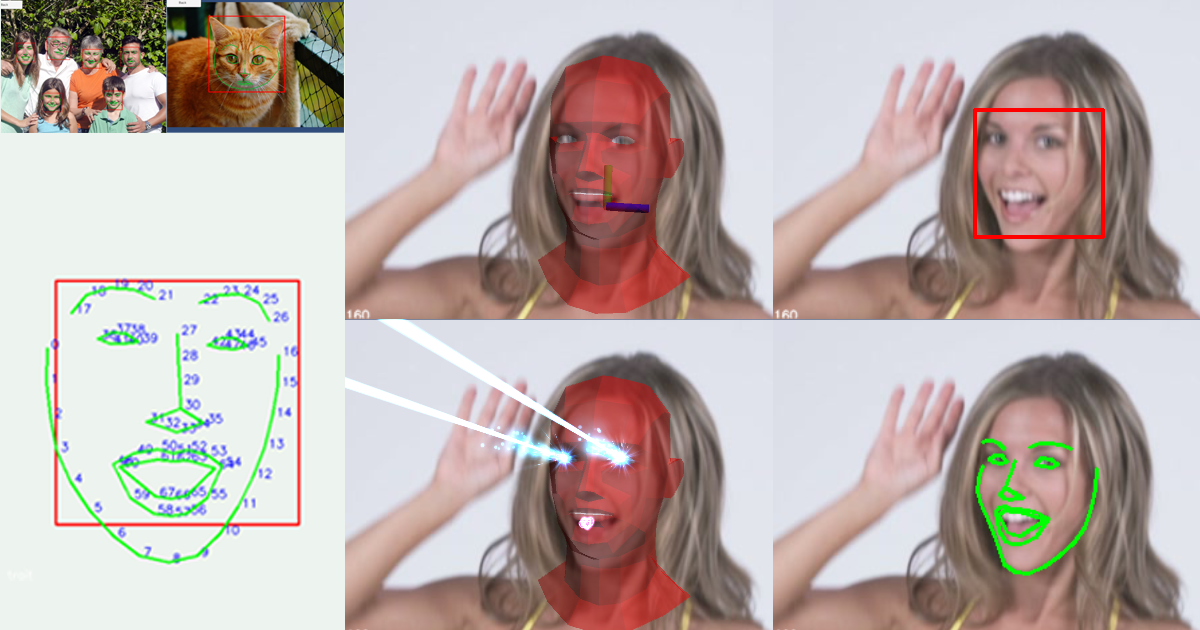
Use the Dlib FaceLandmark Detector from Enox Software on your next project. Find this integration tool & more on the Unity Asset Store.
The jam ends in around 2 weeks so hopefully we have a game I can send here by then
Thanks for the support :)
dawn mauve
No prob. Yea was just curious. I'm working on something kinda similar - a webcam based avatar controller. Its been... Interesting.
low root
Oh cool!
Our team is solely focus on blinking for this weird game lol
I’ll send the game here once it’s done
dawn mauve
👍
 warm badger
I have made something that would bring one of my UI button wherever on screen I touch (touch screen), but the problem is, the position of the UI, but is not pressed, I have to press it again which I don't want... Any way to fix that?
 indigo tree
warm badger
I have made something that would bring one of my UI button wherever on screen I ...
indigo tree
warm badger
I have made something that would bring one of my UI button wherever on screen I ...
Sorry, can you rephrase this? I don’t understand.
warm badger
indigo tree
Sorry, can you rephrase this? I don’t understand.
Actually as you can see in the script, Whenever I touch on the screen, I have a button that is positioned accrding to the position of the touch. Now the button is repositioned in the under the touch, but the button is not clicked, I have to put off my finger and then again I have to touch on that button to register a click on it, To sum up, it doesn't get clicked when its position is changed...
rigid island
warm badger
Actually as you can see in the script, Whenever I touch on the screen, I have a ...
those are two different events
couldn't you just call the function in the button after you assigned position?
indigo tree
warm badger
Actually as you can see in the script, Whenever I touch on the screen, I have a ...
Uss or UGUI?
warm badger
rigid island
couldn't you just call the function in the button after you assigned position?
yeah, i think this should work, thanks, I'll try it now
warm badger
indigo tree
Uss or UGUI?
UGUI
warm badger
rigid island
couldn't you just call the function in the button after you assigned position?
but isn't there any way around it, i have seen dynamic floating on screen joystick that relocated wherever player touches, how do they do it then?
rigid island
warm badger
but isn't there any way around it, i have seen dynamic floating on screen joysti...
I know that Unity is doing everything through Event System, I'm no expert but I don't think I've seen a way to manually call a click on the EventSystem / Input Module, maybe I just haven't seen it yet
EventSystem iirc register a click on something that blocks the raycast when you do the press
indigo drift
leaden ice
No, you need to use Streaming Assets instead
I'm using Streaming Assets and it does work, but it makes the assets public, is there something else I can do that won't make it an easily accessible folder?
 errant flame
I have a [WriteOnly] public NativeParallelMultiHashMap<int, int>.ParallelWriter PointWriter;
inside my paralel job and the definition of the pointWriter is
        NativeParallelMultiHashMap<int, int> pointResult = new(1, Allocator.TempJob);
        NativeParallelMultiHashMap<int, int>.ParallelWriter pointWriter = pointResult.AsParallelWriter();
It says size exceed error but i only do
PointWriter.Add(index, 0);
In execute so the definition size is the key size or the max value of the key holds ?
Or its already creaing the bucket and when i try to write add its exceed to limit ? so do i have replace the value ?
 soft nymph
What is the common pattern for storing reusable one off utility functions. E.g. I need to write code the runs a blast effect
hexed pecan
I usually put utility functions in a static class. But a "blast effect" doesn't sound like a utility function
Well, I guess you can think of it as one
hexed pecan
soft nymph
What is the common pattern for storing reusable one off utility functions. E.g. ...
You can make a singleton or a static class that holds methods for spawning all kinds of effects
errant flame
how can i return an array of KVP <int, list<T>> of this
NativeParallelMultiHashMap<int, NetworkTileBurstData> results = new(allCombinations.Count * 15, Allocator.TempJob);
I want to find out how many values each key holds and loop through these values
 plucky inlet
errant flame
plucky inlet
errant flame
exaclty what was i looking for thanks 😄
 lost rivet
Ok so whats the best way to go about serializing monobehaviors?
Do i just create another class for every monobehavior and serialize that, or is there any way around this?
hexed pecan
lost rivet
Ok so whats the best way to go about serializing monobehaviors?
Do i just create...
https://docs.unity3d.com/2020.1/Documentation/Manual/JSONSerialization.html
JsonUtility can serialize a mono with ToJson and it can deserialize with FromJsonOverwrite
You need to have the component before deserializing into it
lost rivet
Huh ive seen people say you couldnt do it
 wheat spruce
On the topic of serializing, I've got a handful of pretty simple values that I'd like to persist as save data
string PlayerName;
int CoinsCollected;
int HealthUpgrade;
int SpeedUpgrade;```What's a fairly straight forward way to do something like that?Toss them in a struct or a class and use JsonUtility
You can also use Json.NET but JsonUtility works fine here
wheat spruce
Sounds simple enough! So once I call ToJson how do I get that to be saved in the right location?
lost rivet
hexed pecan
<@430327334596509703> Give it a go and let us know?
I suppose ill try, never did a savesystem in unity before
 tired elk
wheat spruce
Sounds simple enough! So once I call `ToJson` how do I get that to be saved in t...
tired elk
wheat spruce
Sounds simple enough! So once I call `ToJson` how do I get that to be saved in t...
Create a file at desired location and write the string into it. https://learn.microsoft.com/en-us/dotnet/standard/io/how-to-write-text-to-a-file
lost rivet
Ugh can i just serialize the entire scene and be done with it?
latent latch
lost rivet
I think i need a way to serialize gameobjects...
well, you can save transform values, and remember prefabs are simply an ID
lost rivet
But changes happened to the object...
latent latch
needs to be value types then
wheat spruce
latent latch
that'll be unity 9
Unity[i + 1]
lost rivet
Thing is i dont even know what components my gameobject will have when i am serializing it
latent latch
mostly just a transform if you think about it
if for some reason you've made this collection of gameobjects that isn't a prefab, then you need to create some load manager that you tell it to structure it the previous way
lost rivet
Nit sure what you mean
 vestal arch
lost rivet
Thing is i dont even know what components my gameobject will have when i am seri...
vestal arch
lost rivet
Thing is i dont even know what components my gameobject will have when i am seri...
you could GetComponents<Component>()
fallow quartz
Is there any way to make rain unity in a big large area without wasting a lot of resources?
vestal arch
can you elaborate on what exactly the rain is/does
fallow quartz
vestal arch
can you elaborate on what exactly the rain is/does
nothing, is just visually, the effect is handled in other way
vestal arch
you could just make it local to the player then
latent latch
lost rivet
Nit sure what you mean
Probably best to give me an example of what you're saving, but before you do take alook at this object and tell me if it's structured different to any prefab by components
vestal arch
enabled/disabled based on position
fallow quartz
vestal arch
enabled/disabled based on position
you mean a transform on top of the player?
vestal arch
yeah
not sure if that's a good/common solution, but you wouldn't have to create rain for the entire area
fallow quartz
yeah but that has a problem, when u move u can notice is following u + particles spawn and if u get a speed boost its even getting more obv
vestal arch
just make it not follow you exactly then
latent latch
wheat spruce
On the topic of serializing, I've got a handful of pretty simple values that I'd...
mostly structs, and like I've mentioned that prefabs are simply an ID which can be included in the struct to show belonging so the next time you instantiated an instance you know where those values go
vestal arch
if it's tilable you can just make like, an area around the player (not a child of the player) and then move the tiles based on the position of the player
fallow quartz
vestal arch
if it's tilable you can just make like, an area around the player (not a child o...
its on 3d
vestal arch
fallow quartz
its on 3d
what i suggested would work in 3d
 west lotus
This is how you do rain snow etc https://docs.unity3d.com/Packages/com.unity.visualeffectgraph@11.0/manual/Block-TileWarpPositions.html
 daring cove
Hey,
How to scale a rectangle to fit around a 3D game object in a fashion that it highlights it?
This is what I have so far.
highlightedGameObject is the game object to highlight with the rectangle.
rectangle is a game object that has an image for the rectangle.
Vector3 worldPosition = highlightedGameObject.transform.position;
MeshFilter meshFilter = highlightedGameObject.GetComponent<MeshFilter>();

// Get bounds and scale to highlightedGameObject's scale
Vector3 max = new Vector3(
  meshFilter.mesh.bounds.max.x * meshFilter.transform.lossyScale.x,
  meshFilter.mesh.bounds.max.y * meshFilter.transform.lossyScale.y,
  meshFilter.mesh.bounds.max.z * meshFilter.transform.lossyScale.z
);
Vector3 min = new Vector3(
  meshFilter.mesh.bounds.min.x * meshFilter.transform.lossyScale.x,
  meshFilter.mesh.bounds.min.y * meshFilter.transform.lossyScale.y,
  meshFilter.mesh.bounds.min.z * meshFilter.transform.lossyScale.z
);

// Get position of highlightedGameObject in screen space.
Vector3 screenPosition = Camera.main.WorldToScreenPoint(worldPosition);
screenPosition.z = 0f;

// Calculate bounds in screen space
// screenMin = TOP LEFT
// screenMax = BOTTOM RIGHT
Vector3 screenMin = Camera.main.WorldToScreenPoint(worldPosition + min);
Vector3 screenMax = Camera.main.WorldToScreenPoint(worldPosition + max);

// Calculate size for the rectangle
Vector3 screenSize = new Vector3(
  Mathf.Abs((screenMax - screenMin).x),
  Mathf.Abs((screenMax - screenMin).y),
  1f
);

// move rectangle over the highlightedGameObject in screen space
rectangle.transform.position = screenPosition;
rectangle.transform.localScale = screenSize;
Sry im back, my point is that the object can mutate a lot from the time it is instantiated
So idk, i dont see how keeping a reference to its prefab would help at all
latent latch
lost rivet
Sry im back, my point is that the object can mutate a lot from the time it is in...
if it's a prefab that you're only mutating known value types and not instantiating say components then it's as simple as mapping where those values go from a load method
if for reason you are creating multiple new gameobjects and components and say want to serialize a whole new prefab at runtime, then that does get a bit more complicated
lost rivet
If i adding and removing components?
latent latch
There's a Json Newtonsoft package that's just a better JsonUtility and it does help serialize types that it cannot do
basically does a bunch of reflection to find the required object types
also serializes data structs that Unity cannot do like dictionaries
but most of the time I don't need it cause I'm not creating anything unique that I need to serialize at runtime
lost rivet
Fair enough
latent latch
"Only plain classes and structures are supported; classes derived from UnityEngine.Object (such as MonoBehaviour or ScriptableObject) are not. Note that classes derived from MonoBehaviour or ScriptableObject can be used with JsonUtility.FromJsonOverwrite as an alternative."
But again, it's worth knowing that prefabs and scriptable objects can be identified as an ID
as they do not change between runtimes, only the values that may have mutated
Meaning, if you make a PrefabManager, you can make a lookup table and ID these assets as a KVP
and similarly, components can be identified as an ID too (strings too), or just do it via reflection with Newtonsoft
Newtonsoft can also get out of control pretty quickly if you're serializing larger objects
If you really want to get good at serializing, take some time to learn networking and sending data between clients
fossil blaze
How can I make the placement of objects on the shelf be correct when the rack is rotated in Y? The shelf is a child object of the rack
 latent latch
If you child the objects to the shelf then you should have rotation relative to the shelf, no?
fossil blaze
Well, they're not the only ones spinning.
 placid edge
bleed = 4
it's not giving me the first loop and total damage is equating to 6 instead of 10
 latent latch
Do yourself a favor and instead of inlining everything just make some temporary variables and assign the values you're trying to append
thin aurora
Also constantly using GetComponent for the same components in general is a big no no
leaden ice
Debug.Log the variables involved at each point of this process and you'll clearly see what's happening
steady bobcat
fossil blaze
How can I make the placement of objects on the shelf be correct when the rack is...
the position needs to be local to the shelf. you can do Quaternion * Vector3 to rotate a local vector easily.
placid edge
this does look nicer though you're right
 steady bobcat
placid edge
I have Logged everywhere, its skipping the first loop
steady bobcat
placid edge
I have Logged everywhere, its skipping the first loop
✨ upgrade to using a debugger ✨
placid edge
the i var is actually not doing anything, can i just remove it?
leaden ice
placid edge
I have Logged everywhere, its skipping the first loop
What does that mean?
Which variable does that? The loop condition is on bleedDamage
Note that the incrementer is the LAST thing that runs each iteration
So it's not skipping anything
placid edge
so each loop it grabs the variable of bleed damage and adds it to hemorrhage then reduces bleed damage by 1
leaden ice
No
You have that backwards
It will reduce bleed then add to hemorrhage
The incrementer runs last
vestal arch
placid edge
it goes 0,3,5,6
this seems correct
daring cove
Whats the point of the loop? When you could multiply? Correct me if I'm wrong but seems a bit redundant to me.
leaden ice
The bleed -- should be the incrementer
And the hemorrhage+= bleed should be inside the loop
placid edge
oh you're so right
placid edge
daring cove
Whats the point of the loop? When you could multiply? Correct me if I'm wrong bu...
how would you multiply this? i tohught there'd might be an equation for this i just couldnt find out what
placid edge
tyty, i knew there had to be math for it 
daring cove
Oh yeah I see what you are doing there nvm
leaden ice
Thanks Euler
latent latch
I would have done a for loop too cause I cant be bothered with math
vestal arch
i mean a loop would make more sense if you want each tick of bleed to be done individually over time (for example)
(for example, poison in peglin)
daring cove
It doesnt seem like its done over time the loop seems like its running inside OnCollisionEnter
placid edge
so bleed damage does that in EnemyStats. it ticks the damage then goes down by 1. This weapon grabs all the bleed damage and does it at once.
so instead of 4 ticks of 4+3+2+1 over 4 seconds, it does 10
it's supposed to be like a big bleed build cashout, where you build lots of bleed then hit the guy with this
yep all working good now, thanks guys :>
fossil blaze
steady bobcat
the position needs to be local to the shelf. you can do ``Quaternion * Vector3``...
I have the placement crooked, not the product rotation.
steady bobcat
fossil blaze
I have the placement crooked, not the product rotation.
i dont understand, need more information or some images of it in the scene view.
if elements are placed as children of a transform then use local positions for the parent so it works with the parent rotation
 reef lagoon
So wondering if i wanted to make a top down pixelart game with equipables such as helmets, chestplates etc, and want it to show on the player when walking in 4 directions. Does anyone have any tips to how I could do this?
fossil blaze
steady bobcat
i dont understand, need more information or some images of it in the scene view.
Good


 steady bobcat
Then yea use local positions for this "Rack" transform to place things in a row but locally
hexed pecan
fossil blaze
How can I make the placement of objects on the shelf be correct when the rack is...
Would be simpler to do it in local space
fossil blaze
hexed pecan
Would be simpler to do it in local space
I can't fix it.
 bleak meadow
Hey guys! I have a peculiar problem. Anyone with experience with the new input system?
My problem is that two buttons triggers the same trigger even though they are mapped to two different buttons. I have checked my code, and as far as I can see, all events are separated to their respected button, but these two still trigger each other for some reason. 🤔

I'm testing with a controller
hexed pecan
fossil blaze
I can't fix it.
Ok
leaden ice
bleak meadow
Hey guys! I have a peculiar problem. Anyone with experience with the new input s...
show how you hooked them up to your code
Also #🖱️┃input-system
bleak meadow
leaden ice
Also <#763502300781477948>
aaah yeah! I will repost it there with the code
steady bobcat
fossil blaze
I can't fix it.
its fixable you just need to re do how you pick a position for a child.
e.g. child.transform.localPosition = new Vector3(offset.x * index, 0f, 0f);
using local position means its relative to its parent always
 faint bridge
I just realized i had to prevent diagonal movement and ive actually never done it before
Vector3 move = Vector3.ClampMagnitude(transform.right * x + transform.forward * z, 1);
Is this approved?
faint bridge
i mean reliable as in the same context as Void Update && void FixedUpdate
leaden ice
That doesn't clarify anything lol
leaden ice
The function works properlly. There is no need to generally question if a function does what it says it does. You can usually assume it does.
faint bridge
update is frame based
vestal arch
ok?
leaden ice
faint bridge
are there any flaws
Weird question to ask. What makes you suspicious of this function in particular?
You can generally assume functions do what they say they do, and do so without error.
faint bridge
leaden ice
Weird question to ask. What makes you suspicious of this function in particular?
I know it has a precision flaw at small number that's all I can think about but I was talking about in general, if there's any do's and dont's
vestal arch
both at small and large numbers, yes, that's how floating-point works
Vector3 also uses single-precision floats
that's just inherent
leaden ice
faint bridge
I know it has a precision flaw at small number that's all I can think about but ...
That's a floating point number restriction, not specific to this function at all
vestal arch
nothing to do with ClampMagnitude specifically
faint bridge
leaden ice
That's a floating point number restriction, not specific to this function at all
Ok, I just noticed how it acts when small numbers keep updating, it sometimes outputs a higher number
leaden ice
faint bridge
Ok, I just noticed how it acts when small numbers keep updating, it sometimes ou...
ClampMagnitude should never output a vector with a higher magnitude than what you put in
 rustic rain
int animationClipLength = Mathf.RoundToInt(listClip.frameRate * listClip.length);
I have this calculation to get the frame length of an animation, but it seems to be exactly 1 frame short every time. Would this be the correct way to get the animation's frame length?
vestal arch
faint bridge
leaden ice
ClampMagnitude should never output a vector with a higher magnitude than what yo...
I tried debugging it and prime numbers with 3 decimals output the square root of 7 which is very strange to me
leaden ice
faint bridge
I tried debugging it and prime numbers with 3 decimals output the square root of...
huh?
faint bridge
I can't wrap my head around it
vestal arch
no clue what you mean there
leaden ice
you'd have to show eexactly what you're talking about
faint bridge
Clamp magnituding smaller numbers that are prime numbers
always makes it the square root of 7
instead of like 1
leaden ice
makes what the square root of 7
faint bridge
vector
leaden ice
ClampMagnitude takes a Vector input
leaden ice
faint bridge
vector
you mean the components of the vector?
vestal arch
show some code
faint bridge
leaden ice
you mean the _components_ of the vector?
yeah
vestal arch
we have no idea what you're talking about
leaden ice
You'd have to show the exact inputs and outpus and the code you used.
because you're being extremely vague
faint bridge
Vector3 move = Vector3.ClampMagnitude(transform.right * x + transform.forward * z, 1);
I just use this, and i console log the values
vestal arch
ok, and what was the result?
leaden ice
faint bridge
Vector3 move = Vector3.ClampMagnitude(transform.right * x + transform.forward * ...
ok and you would need to show us the values coming in and out for us to understand what you're talking about
Because a minute ago you were talking about prime numbers and sqrt of 7 and ...????
hexed pecan
None of the components of the resulting vector would be over 1 here
So idk what the square root of 7 is about
faint bridge
hexed pecan
So idk what the square root of 7 is about
me neither i am so lost
thats why im asking i have no clue
vestal arch
we have no idea wtf you're talking about 😭
faint bridge
at this point i dont either
i just noticed that 2.4 is the square root of 7 so i went with it
2.6 my bad
vestal arch
it is not
faint bridge
pls forgive me
when doing the x and y inputs it returns 1 or -1, when you hold W + D its gonna be the square root of 2 based off of how fast you move when combining both axis
i accidentally put it +1 on top of the clamp thing
vestal arch
yes, that's how it's supposed to work
vestal arch
well, half of the square root of 2
vestal arch
faint bridge
yeah but combined they are
why would you combine them
that's not how vectors work
placid edge
is there a Mathf.Ceil that rounds down or do I just -1 with it?
lost rivet
i am going to go insane, newtonsoft cant serialize vector3s?
leaden ice
lost rivet
i am going to go insane, newtonsoft cant serialize vector3s?
It can when you have the Unity extensions installed
which should happen automatically if you installed it through the package manager afaik
placid edge
i figured -1 would have problems yeah ;/
OH you were talking to me when you said Floor OHHHHH Floor and Ceiling omg 😭
faint bridge
To prevent movement sliding should i floor it? or is there a better way
leaden ice
SHould you floor what?
What do you mean by "movement sliding"? That is really vague.
vestal arch
sliding?
faint bridge
leaden ice
SHould you floor what?
What do you mean by "movement sliding"? That is really v...
we are talking about vectors
vestal arch
clearly not
faint bridge
Sliding as in when you release D, it moves you very slightly more
placid edge
they were responding to me
leaden ice
faint bridge
Sliding as in when you release D, it moves you very slightly more
That is highly dependent on your movement code.
lost rivet
leaden ice
It can when you have the Unity extensions installed
where can i get that?
leaden ice
Not intrinsic to the D key.
leaden ice
lost rivet
where can i get that?
How did you install newtonsoft
faint bridge
placid edge
they were responding to me
What do you mean by "movement sliding"? That is really vague.
vestal arch
placid edge
i figured -1 would have problems yeah ;/
OH you were talking to me when you said...
ceil(1)-1 = 0
floor(1) = 1
lost rivet
leaden ice
How did you install newtonsoft
i did install package by name
i couldnt find it elsewhere
faint bridge
leaden ice
That is highly dependent on your movement code.
float x = Input.GetAxis("Horizontal");
float z = Input.GetAxis("Vertical");

Vector3 move = Vector3.ClampMagnitude(transform.right * x + transform.forward * z, 1);

controller.Move(move * speed * Time.deltaTime);```


very simplistici think i may have interrupted something here
leaden ice
lost rivet
i did install package by name
You need to also install this:
https://github.com/applejag/Newtonsoft.Json-for-Unity.Converters
GitHub
Converters of common Unity types for Newtonsoft.Json. Goes hand in hand with jilleJr/Newtonsoft.Json-for-Unity - applejag/Newtonsoft.Json-for-Unity.Converters
leaden ice
lost rivet
i couldnt find it elsewhere
your sliding comes from using Input.GetAxis
it has nothing to do with anything else
switch to Input.GetAxisRaw if you don't want it.
OOOps wrong reply. I meant @faint bridge
faint bridge
Okay thank you
That's much better, using what I originally had makes the movement feel unresponsive & washed out
 indigo orchid
in this script I included a function to freeze animations and play them to complete them frame by frame but I want it for only walk and not for run but the run animation freezes and doesn't switch to the idle animation frames which I want pls help here is the script https://paste.ofcode.org/8F5y2sKHDeDp4UHvBXZ6gu
lost rivet
leaden ice
You need to also install this:
https://github.com/applejag/Newtonsoft.Json-for-U...
cant do it
cant find the package
leaden ice
lost rivet
cant find the package
Did you follow the instructions?
https://github.com/applejag/Newtonsoft.Json-for-Unity/wiki/Install-Converters-via-UPM
Make sure you follow this part assuming you don't have the scoped registry configured already:
https://github.com/applejag/Newtonsoft.Json-for-Unity/wiki/Install-Converters-via-UPM#if-you-dont-have-the-jillejrnewtonsoftjson-for-unity-scoped-registry-configured
hexed pecan
lost rivet
what is all this stuff WHY DO I NEED TO DO ALL THS STUFF
Was there an issue with jsonutility? Do you need to serialize something it can't?
leaden ice
He's trying to serialize Vector3
which you need the Unity Converters package for
(you could of course also write your own custom converter but... the package exists already)
lost rivet
dictionaries too, which the json utils cant
steady bobcat
What about unity mathematics float3?
latent latch
I would just suggest sticking to arrays (with kvp structs) and building the dictionary at runtime
leaden ice
dictionaries work out of the box for newtonsoft
lost rivet
latent latch
I would just suggest sticking to arrays (with kvp structs) and building the dict...
why?
latent latch
Just what I do I guess cause I cant be bothered fighting with Unity serialization
steady bobcat
yea its not hard for your structure to have a key and to make the dictionary after loading it
hexed pecan
They should really just add a serializable dictionary built in
latent latch
unity serialization is just weak
lost rivet
lost rivet
what is all this stuff WHY DO I NEED TO DO ALL THS STUFF
ok found it, its just the different ui that threw me off
fossil blaze
steady bobcat
its fixable you just need to re do how you pick a position for a child.
e.g. ``c...
I didn't get it right, unfortunately.
latent latch
honestly worst part about Unity for me by a long shot
lost rivet
latent latch
unity serialization is just weak
i mean fair i was wondering if there was any advantag to it
latent latch
the advantage is not relying on 3rd party serialization
steady bobcat
what prevents vector3 from being used? not being Serialized?
lost rivet
steady bobcat
what prevents vector3 from being used? not being Serialized?
it gets into an infinite loop
from properties returning other vector3s
vestal arch
lmao
lost rivet
i guess they couldnt be bothered writing [jsonignore] or something
leaden ice
Yeah the converter package fixes that
hexed pecan
lost rivet
i mean fair i was wondering if there was any advantag to it
It's pretty fast
lost rivet
yes it seems to work now, many thank
steady bobcat
Because not everything has to be compatible with newtonsoft json by default but the new .net json serialization id expect now
lost rivet
tru
did take a while to setup but if it works it will b worth it
never did a proper save system before
not a good one i mean
indigo orchid
in this script I included a function to freeze animations and play them to complete them frame by frame but I want it for only walk and not for run but the run animation freezes and doesn't switch to the idle animation frames which I want pls help here is the script https://paste.ofcode.org/8F5y2sKHDeDp4UHvBXZ6gu
errant flame
System.InvalidOperationException: HashMap is full
How can i trace which hash map is exceed i opened stack trace btw also setting
NativeLeakDetection.Mode = NativeLeakDetectionMode.EnabledWithStackTrace;
before the jobs
hexed pecan
indigo orchid
in this script I included a function to freeze animations and play them to compl...

Mate
Try to make your question more readable
That probably helps attract some helpers
vestal arch
errant flame
```System.InvalidOperationException: HashMap is full```
How can i trace whic...
look through the stacktrace
errant flame
its not showing the lines it only show JobHandle handle = job.Schedule(allCombinations.Count, 64); the line where i schedule 😄
i want to one more step to look which hashmap exceed its only says in this job there is a hashmap that exceed limit xd
steady bobcat
is it possible to debug in jobs? if so it may be able to break on the exception
errant flame
maybe i guess it should be, let me try to add try blocks to inspect i jsut wonder if there is a easier way 😄
steady bobcat
try adding a breakpoint but it may not work as its not managed code but native
 vestal arch
errant flame
its not showing the lines it only show ```JobHandle handle = job.Schedul...
vestal arch
errant flame
its not showing the lines it only show ```JobHandle handle = job.Schedul...
there's no stack at all? not even when you click the error?
 young edge
do you guys have any tutorials that are dedicated to unity scripting?
autocorrect
I mean
I can’t say it for some reason
a video that explains in depth about unity scripting
vestal arch
you can edit your message
in depth? probably not
you might want to see unity !learn
 tawny elkBOT
:teacher: Unity Learn ↗
Over 750 hours of free live and on-demand learning content for all levels of experience!
errant flame
vestal arch
there's no stack at all? not even when you click the error?
No if i click the error it goes the handle.Complete() ...
vestal arch
errant flame
No if i click the error it goes the handle.Complete() ...
don't double click it
errant flame
there is a stack but its only shows until right before of the complete section not going further therefor i cant say that thing exploded etc
vestal arch
can you show it?
errant flame

board sorter 76 is

and line 312 the section exceed limit but if i add that try blocks then shows this
vestal arch
no, check the stack on the actual error, InvalidOperationException
 errant flame
yeah 😄
hexed pecan
@errant flame What if you remove [BurstCompile]

 steady bobcat
oh is it fixed capacity (not familiar with a lot of the unsafe collections)
errant flame
the key values are not fixed but the bag of the one key that holds its fixed i guess
fossil blaze
steady bobcat
oh is it fixed capacity (not familiar with a lot of the unsafe collections)
I didn't get it right, unfortunately.
I haven't been able to solve this problem for two days.
steady bobcat
i dunno what else to tell you sorry :/
fossil blaze
steady bobcat
i dunno what else to tell you sorry :/
public Vector3 GetNextPlacementPosition()
        {
            Collider shelfCollider = GetComponent<Collider>();
            if (shelfCollider == null || maxItems <= 0)
            {
                return Vector3.zero;
            }

            float shelfLength = shelfCollider.bounds.size.x;
            Vector3 placementAxis = transform.right.normalized;

            if (placementAxis.x < 0)
            {
                placementAxis = -placementAxis;
            }

            Vector3 leftEdge = shelfCollider.bounds.min + placementAxis * (shelfLength / (2 * maxItems));
            float spacing = shelfLength / maxItems;
            Vector3 nextPosition = leftEdge + placementAxis * (spacing * placedItems.Count);

            nextPosition.y = startingPosition.position.y;
            nextPosition.z = startingPosition.position.z;

            return nextPosition;
        }```
Let's look at the script together again, even chatgpt couldn't help me, I give him my code and he reworks it into a non-working one.Collider.bounds is axis aligned in the world space. Does not make sense to use it here
latent latch
oh no they said the c word
leaden ice
Especially not the x axis bit...
fossil blaze
hexed pecan
Collider.bounds is axis aligned in the world space. Does not make sense to use i...
and how do you do it right?
hexed pecan
Do it in local space like we suggested
You can make a float field for the width instead of using bounds
 leaden ice
2 is 2
hexed pecan
Float is.. a number
latent latch
may just be easier to make empty game objects as pivots on the shelf as children
hexed pecan
You could also just use the box collider's size
hexed pecan
latent latch
may just be easier to make empty game objects as pivots on the shelf as children
I believe they have some sort of pivot, there's a transform startingPosition
Is that right?
latent latch
yeah if you did was a larger number size then you do raw calcs but if you're having trouble positions it may be better to define them
stick the local points into an array and do it that way
fossil blaze
I only have a problem with placement when the rack is rotated in the Y direction
heady iris
fossil blaze
It's the size of the box collider in the local space of the object it is attached to.
so, for example, X=2 means that the box collider will have its left and right sides at X=-1 and X=1 in the object's local space (since the Center is at X=0)
the resulting world-space positions will depend on the transform of its object and of all its parents
You can construct a Bounds object out of the center and size (divided by 2, since the bounds wants half-extents), then use it to figure out local-space positions
Transform those points back into world-space at the end if you need to.
fossil blaze
Oh, still didn't make it.
hexed pecan
You need to show what you tried
fossil blaze
hexed pecan
You need to show what you tried
  public Vector3 GetNextPlacementPosition()
        {
            BoxCollider shelfCollider = GetComponent<BoxCollider>();
            if (shelfCollider == null || maxItems <= 0)
            {
                return startingPosition.position;
            }

            Vector3 localSize = shelfCollider.size;
            Vector3 localCenter = shelfCollider.center;

            float shelfLength = localSize.x;
            float spacing = shelfLength / maxItems;

            Vector3 localNextPosition = localCenter - new Vector3(shelfLength / 2, 0, 0);
            localNextPosition += new Vector3(spacing * placedItems.Count, 0, 0);
            Vector3 worldNextPosition = transform.TransformPoint(localNextPosition);

            worldNextPosition.y = startingPosition.position.y;
            worldNextPosition.z = startingPosition.position.z;

            return worldNextPosition;
}```These lines don't make much sense herecs worldNextPosition.y = startingPosition.position.y; worldNextPosition.z = startingPosition.position.z;
You should probably do that in local space
localNextPosition.y = startingPosition.locallPosition.y etc.
Before converting to world space ofc
fossil blaze
Okay, I'll give it a try.
public Vector3 GetNextPlacementPosition()
        {
            BoxCollider shelfCollider = GetComponent<BoxCollider>();
            if (shelfCollider == null || maxItems <= 0)
            {
                return startingPosition.position;
            }

            Vector3 localSize = shelfCollider.size;

            float shelfLength = localSize.x;
            float spacing = shelfLength / maxItems;
            float localLeftEdge = -localSize.x / 2;

            Vector3 localNextPosition = new Vector3(localLeftEdge + spacing * placedItems.Count, startingPosition.localPosition.y, startingPosition.localPosition.z);

            return transform.TransformPoint(localNextPosition);
}```Now for some reason I have the goods placed from right to left and the placement starts from the center of the goods and not from the edge of the rack
steady bobcat
plz refer to things as the parent/container and children
heady iris
steady bobcat
plz refer to things as the parent/container and children
i don't understand what that would mean here
steady bobcat
they have the container which is trying to position its "children"
im not sure what "goods" or "rack" is
heady iris
fossil blaze
```Csharp
public Vector3 GetNextPlacementPosition()
{
BoxCo...
You haven't accounted for the collider's center property.
heady iris
steady bobcat
they have the container which is trying to position its "children"
im not sure w...
oh, I see; I was looking at the code and getting really confused lol
Also, if the items are appearing in weird spots (e.g. stuck halfway inside the shelf), make sure that their pivot points make sense
I'd expect to have the pivots at the bottom-center of each item
steady bobcat
Make sure your scene view is set to "pivot" and not "center" !!!!!!!!!!!!!!!!
fossil blaze
I can't solve this problem of product protruding over the shelf
 leaden ice
sounds like shelfLength isn't correct
fossil blaze
public Vector3 GetNextPlacementPosition()
        {
            BoxCollider shelfCollider = GetComponent<BoxCollider>();
            if (shelfCollider == null || maxItems <= 0)
            {
                return startingPosition.position;
            }

            Vector3 localSize = shelfCollider.size;
            Vector3 localCenter = shelfCollider.center;

            float shelfLength = localSize.x;
            float spacing = shelfLength / maxItems;

            Vector3 localNextPosition = localCenter - new Vector3(shelfLength / 2, 0, 0);
            localNextPosition += new Vector3(spacing * placedItems.Count, 0, 0);

            localNextPosition.y = startingPosition.localPosition.y;
            localNextPosition.z = startingPosition.localPosition.z;

            return transform.TransformPoint(localNextPosition);
        }```
2 size
leaden ice
- shelfLength isn't right
or - You're not accounting for buffer spoace
or - The starting pos on the left is not correct
leaden ice
fossil blaze
show the gizmo for the ocllider? Is it placed correctly?
hexed pecan
Also is placeditems.Count 1 or 0 at the first iteration?
leaden ice
yeah what's the count there
And where's the pivot for the box object?
Doesn't seem the width of the placed items is taken into account
you're placing them directly on the edges of the shelf
leaden ice
hexed pecan
Also is placeditems.Count 1 or 0 at the first iteration?
Seems like this is starting at 1 instead of 0
hexed pecan
Yep
leaden ice
combined with placing things directly on the edges (no buffer being allowed for at the beginning/end
so you get an item half hanging off
 hexed pecan
fossil blaze
I can't solve this problem of product protruding over the shelf
hexed pecan
fossil blaze
I can't solve this problem of product protruding over the shelf
Is the rightmost item the first one in this screenshot?
fossil blaze


Thanks, bro. I got it.
but now how do you make the product left-to-right instead of right-to-left?
hexed pecan
fossil blaze
but now how do you make the product left-to-right instead of right-to-left?
You would just reverse your math in the x axis
Why do you need that tho?
I mean it is already left to right
Your camera is just not facing the same way as the shelf
fossil blaze
okay bro, ty
@hexed pecan @leaden ice I couldn't have done it without your help, thank you.
 pastel idol
yo so I have these 2 scripts and I keep getting the CS0120 error code on line 42 and 43, what do I do?
using System.Collections;
using System.Collections.Generic;
using System.Xml.Resolvers;
using UnityEngine;
public class WeaterContoller : MonoBehaviour
{
public GameClockController clock;
public VolumetricClouds clouds;
public GameObject rain;
public int currentWeather;
bool dayornightweather;
bool weatherswitcher;
// Start is called before the first frame update
void Start()
{

}

// Update is called once per frame
void Update()
{
    if (weatherswitcher == false && clock.elapsedtime < 18000)
    {
        weatherswitcher = true;
    }
    if (weatherswitcher == true && clock.elapsedtime > 18000)
    {
        currentWeather = Random.Range(0, 10);
        weatherswitcher = false;
    }

    if (currentWeather == 2)
    {

    }
}

public static void RainyCloudsPreset()
{
    clouds.CloudSettings.DensityThreshold = 0.1f;
    clouds.CloudSettings.DensityMultiplier = 1.5;
}
}
somber nacelle
!code
also instead of sharing the error code, share the actual error. and point out what lines are the ones with the error
tawny elkBOT

Posting code
📃 Large Code Blocks
Use links to services like:
https://paste.mod.gg/, https://hastebin.skyra.pw/, https://paste.ofcode.org/, https://paste.myst.rs/, https://scriptbin.xyz/
📃 Inline Code
Surround code with three backquotes. Not quotation marks.
To format as C#, add cs to the first line:
```cs
// Your code here
```
Add a comment with a line number if there is an error message.
pastel idol
why didn't the first one send as a file wtf
pastel idol
somber nacelle
!code
also instead of sharing the error code, share the actual error. and point ...
CS0120 : Object Reference is Required for the Non Static Field (for lines 42 and 43)
public VolumetricClouds clouds
public static void RainyCloudsPreset()
{
42 clouds.CloudSettings.DensityThreshold = 0.1f;
43 clouds.CloudSettings.DensityMultiplier = 1.5;
}
long story short
somber nacelle
🤔 Unity, Huh, How?
An object reference is required for the non-static field, method, or property 'Foo'
pastel idol
wait so does that mean
public float something; isn't static
and
public float something = 1.5f; is static?
somber nacelle
no
neither of those are static because neither of them are marked with the static modifier
 slow lodge
someone doesn't have a first person movement code
pastel idol
huh
is it because I didn't reference a class inside of the class that I did reference?
slow lodge
Because I used a YouTube code on how to do it step by step and it doesn't work. I don't know if the code is wrong or if I'm doing something wrong.
pastel idol
slow lodge
Because I used a YouTube code on how to do it step by step and it doesn't work. ...
send code
vestal arch
slow lodge
Because I used a YouTube code on how to do it step by step and it doesn't work. ...
you're gonna need to give more details
somber nacelle
pastel idol
is it because I didn't reference a class inside of the class that I did referenc...
please read the information on the page that explains the error as well as what you need to do to fix it
vestal arch
how exactly doesn't it work? is there an error or what
slow lodge
vestal arch
you're gonna need to give more details
bank that I am looking for the code
somber nacelle
slow lodge
Because I used a YouTube code on how to do it step by step and it doesn't work. ...
it's almost assuredly that you have copied something incorrectly or you missed a step that the video performed
slow lodge
I don't know if it has anything to do with the age of the video because it was uploaded 4 years ago
vestal arch
none of us can actually help you if you don't give us any info to work with
pastel idol
slow lodge
bank that I am looking for the code
we can't fix the code if you don't give us the code
slow lodge
vestal arch
none of us can actually help you if you don't give us any info to work with
I'm looking for the code so you can see if something is wrong.
pastel idol
copy it and send it here
I'm guessing you're not somehow making a closed-source operating system kernel in unity so it's alright if you share the code
slow lodge
using System.Collections;
using System.Collections.Generic;
using UnityEngine;
public class PlayerMovement : MonoBehaviour
{
public float Speed = 1.0f;
// Start is called before the first frame update
void Start()
{

}

//Update is called once per frame
void Update()
{
    float horizontal = Imput.GetAxis("horizontal");
    float vertical = Imput.GetAxis("vertical");

    transform.Translate(new vector3(horizontal, o.0f,vertical) * Time.deltatime * Speed);
}
}
vestal arch
!code
tawny elkBOT
Posting code
📃 Large Code Blocks
Use links to services like:
https://paste.mod.gg/, https://hastebin.skyra.pw/, https://paste.ofcode.org/, https://paste.myst.rs/, https://scriptbin.xyz/
📃 Inline Code
Surround code with three backquotes. Not quotation marks.
To format as C#, add cs to the first line:
```cs
// Your code here
```
Add a comment with a line number if there is an error message.
 still jungle
vestal arch
!code
still jungle
vestal arch
!code
that was quick
rigid island
o.0f, tf
vestal arch
first off, configure your !ide
tawny elkBOT
💡 IDE Configuration
If your IDE is not autocompleting code
or underlining errors, please configure it.
Select one:
•  Visual Studio (Installed via Unity Hub)
• Visual Studio (Installed manually)
•  VS Code
•  JetBrains Rider
• :question: Other/None
pastel idol
slow lodge
using System.Collections;
using System.Collections.Generic;
using UnityEngine;
...
please follow the tutorial more closely
pastel idol
slow lodge
using System.Collections;
using System.Collections.Generic;
using UnityEngine;
...
Input, not "Imput"
Time.deltaTime, not Time.deltatime
also please try making the first letter in each name of a float, int, bool, and so on a lowercase letter
that means speed, not Speed
rigid island
pastel idol
Input, not "Imput"
Time.deltaTime, not Time.deltatime
also please try making the...
they should first fix their IDE before spoonfeeding the answers
slow lodge
Type I did all the code, it asks me to put the capsule that creates the scripts, make the code that I send after I press the capsule again and put in the inspector to go to (add component) and put the created code and with that the character should move but it does not move
still jungle
those axis names also doesnt look right
vestal arch
pastel idol
Input, not "Imput"
Time.deltaTime, not Time.deltatime
also please try making the...
also please try making the first letter in each name of a float, int, bool, and so on a lowercase letter
this is not necessarily correct.
casing/styling should be done by what kind of symbol it is, rather than the type.
pastel idol
vestal arch
> also please try making the first letter in each name of a float, int, bool, an...
idk, I always blame these things when something doesn't work
😂
force of habit
vestal arch
style is generally not a source of any behavioral problems
slow lodge
When I add the script that I created to the capsule that will be a player, I start the game and it does not move.
still jungle
pastel idol
idk, I always blame these things when something doesn't work
how does something that "doesn't work" can be related to naming convention
well maybe if you write code without intellisense
somber nacelle
slow lodge
When I add the script that I created to the capsule that will be a player, I sta...
you shouldn't even be able to start the game with the current code you showed
pastel idol
slow lodge
When I add the script that I created to the capsule that will be a player, I sta...
configure your Visual studio with the tutorial above first
and please watch the youtube tutorial till the end, and carefully follow the uppercase and lowercase letter usage
pastel idol
still jungle
how does something that "doesn't work" can be related to naming convention
well ...
you know, it doesn't apply to floats or any of these, but it still works with other functions like:
gameObject =/= GameObject
transform =/= Transform
somber nacelle
those are properties not functions
vestal arch
pastel idol
you know, it doesn't apply to floats or any of these, but it still works with ot...
those aren't functions
and like i said before; the difference in casing is between what kind of symbol it is
the camelCased ones there are props, the PascalCased ones are types
pastel idol
what da hell
 somber nacelle
read the entire message there
still jungle
pastel idol
what da hell
it was probably too short to be valid
 flint plume
public class Carrigescript : MonoBehaviour
{
    public Transform RaycastOrigin;
    public float speed = 5f;
    public float rotationSpeed = 1f;
    public float height = 5;
    private Transform carridge;

    void Start()
    {
        carridge = transform.GetChild(1);
    }
    void Update()
    {
        RaycastHit hit;

        Debug.DrawRay(RaycastOrigin.position, Vector3.down * 100, Color.red);
        if (Physics.Raycast(RaycastOrigin.position, Vector3.down * 100, out hit, Mathf.Infinity, LayerMask.GetMask("Train")))
        {
            TerrainGeneration tg = hit.collider.GetComponent<TerrainGeneration>();
            if (tg != null)
            {
                int xPos = Mathf.RoundToInt(hit.point.x);
                float[] placements = tg.pathValues;
                int terrainWidth = tg.width;
                float terrainLength = tg.height * 2;

                int count = (xPos / 2) % terrainWidth;
                float zPos = placements[count];

                Vector3 current = transform.position;
                Vector3 target = new Vector3(xPos, height, zPos * 2);

                carridge.rotation = Quaternion.Slerp(carridge.rotation, Quaternion.LookRotation(target - carridge.position), rotationSpeed * Time.deltaTime);

                transform.position = Vector3.MoveTowards(current, target, speed * Time.deltaTime);
            }
        }
    }
}

Watch Requested and millions of other Requested videos captured using Medal.
this is happening
and this is the heirarchy

the carriage holder is because the rotation on the model wasnt right
and for scale
flint plume
leaden ice
And how is the player following the object?
the player is following it with rb.move
public class PlayerVelocity : MonoBehaviour
{
    private Rigidbody rb;
    private Vector3 position;
    private Quaternion rotation;
    void Start()
    {
        rb = transform.GetComponent<Rigidbody>();
    }

    // Update is called once per frame
    void Update()
    {

    }

    void OnCollisionEnter(Collision collision)
    {
        position = collision.collider.transform.position;
        rotation = collision.collider.transform.rotation;
    }

    void OnCollisionStay(Collision collision)
    {
        if (!collision.transform.CompareTag("Carriage")) return;
        Vector3 offset = collision.collider.transform.position - position;
        Quaternion offsetR = collision.collider.transform.rotation * Quaternion.Inverse(rotation);
        position = collision.transform.position;
        rotation = collision.transform.rotation;
        rb.MovePosition(rb.transform.position + offset);
        rb.MoveRotation(rb.rotation * offsetR);
    }
}
the rotating part doesnt work rn
but the rest does
leaden ice
Does the train have a Rigidbody?
flint plume
no
leaden ice
What are the settings on the player's Rigidbody
flint plume
flint plume
```cs
public class PlayerVelocity : MonoBehaviour
{
private Rigidbody rb;
...
 leaden ice
and what other scripts are on the player?
flint plume
leaden ice
and what other scripts are on the player?
just movement on the rigidbody
for the rb*
latent latch
can you confirm it shakes if the player and camera arent on the train
flint plume
my power just cut out and I'm on phone right now I might not be able to get back on unity till tomorrow
flint plume
latent latch
can you confirm it shakes if the player and camera arent on the train
I'll do this when I can
leaden ice
It's either the player movement script breaking interpolation, or it's the train movement itself being jittery - possibly related to the RoundToInt that's happening?
I'm not sure I really follow the train movement code
flint plume
it might be the rounding
I don't think that's supposed to be there I probably got confused with the z axis movement because I made it unnecessarily complicated and was using rounding beforehand
 dawn belfry
Could anyone point me in the right direction of something? I have several sprite sheets for my 2d game for weapons. Each sprite sheet is animated with the player holding a weapon. I now want to tell my script for anims that when the player has selected a weapon or press 1 or 2, to use those animations for the weapon like attacking, idle, walk left or right. Now should I use containers holding weapons with their scripts or how should I go about or think about this. Right now I have all my animations on one controller with custom names I call in code. But I'd rather write something like if player is walking left play the left walk animation that all weapon animations have a reference to walk left.
steady bobcat
dawn belfry
Could anyone point me in the right direction of something? I have several sprite...
If using an animator its kinda hard to do this cleanly as it depends on state names or param names 🤔
If you did the animations yourself it may be easier to configure them all by some enum or shared thing for these states
 split junco
I need some help debugging an issue. I am able to use Quest Link and hit "Play" to interact with the scene. Everything works as it should. However, when I build the apk and use my Quest 3, a part of the simulation doesn't work. I am still able to move around and interact with the environment but two-three gameobjects don't function as they should.
I downloaded Android LogCat and I see error messages in it's console. It's pointing to lines of code that work perfectly fine on desktop through Quest Link but now it's an error. Here's an example:
2025/01/21 14:08:52.605 10463 10486 Error Unity NullReferenceException: Object reference not set to an instance of an object.
2025/01/21 14:08:52.605 10463 10486 Error Unity   at ServerDataPacketTransmission.EnterState (DataPacket dataPacket) [0x00000] in <00000000000000000000000000000000>:0
2025/01/21 14:08:52.605 10463 10486 Error Unity   at UserDataPacketTransmissionComplete+<WaitAndTransition>d__4.MoveNext () [0x00000] in <00000000000000000000000000000000>:0
2025/01/21 14:08:52.605 10463 10486 Error Unity   at UnityEngine.SetupCoroutine.InvokeMoveNext (System.Collections.IEnumerator enumerator, System.IntPtr returnValueAddress) [0x00000] in <00000000000000000000000000000000>:0
2025/01/21 14:08:52.605 10463 10486 Error Unity
2025/01/21 14:08:52.646 10463 10486 Error Unity NullReferenceException: Object reference not set to an instance of an object.
2025/01/21 14:08:52.646 10463 10486 Error Unity   at ServerDataPacketTransmission.EnterState (DataPacket dataPacket) [0x00000] in <00000000000000000000000000000000>:0
2025/01/21 14:08:52.646 10463 10486 Error Unity   at UserDataPacketTransmissionComplete+<WaitAndTransition>d__4.MoveNext () [0x00000] in <00000000000000000000000000000000>:0
I have no idea how to solve this issue. Help?
leaden ice
split junco
I need some help debugging an issue. I am able to use Quest Link and hit "Play" ...
Is this a debug build?
split junco
I don't know what you mean. Like, I build and run and I am using Quest 3 (not Quest Link). But since it's connected to Unity adb, I see logs through Android LogCat
leaden ice
split junco
I don't know what you mean. Like, I build and run and I am using Quest 3 (not Qu...
I mean when you built the game, did you build it as a development build, or a release build?

 leaden ice
You'll want to make a development build
And then do this as well: https://docs.unity3d.com/6000.0/Documentation/Manual/android-symbols.html
You'll need the debug symbols, then you can get exact error traces with filenames and line numbers
split junco
Thank you. I appreciate it. I'll check in after. Cheers!
steady bobcat
You only need symbols for native code stacks to decode function ptrs to names
the exception stack you sent is from "managed (i guess its cpp now but it was)" code hence it having info
leaden ice
Ok so for the managed code (which is what this is) just development build is ok?
I mean they have most of the info now other than line number I guess
steady bobcat
i dont actually know if line number can ever be restored tbh but symbols for dev builds is optional id say.
For prod builds you should keep them otherwise you are stuffed in future
services like bugsnag, sentry and firebase support symbol upload for auto crash stack decoding
 eager fulcrum
Hey. I have text in 3d space and on click I need to open input field that will change the value of that text. How can I do this?
rigid island
eager fulcrum
Hey. I have text in 3d space and on click I need to open input field that will c...
pass it through a method or something, or share a variable
eager fulcrum
yes I know how to change the value, what I'm asking is how to actually add the input field to that
cuz there isn't a 3d space input field type
there is only text
rigid island
oh thought you wanted a UI panel popup, then in that case no you probably need worldspace canvas
or custom made one
indigo drift
I have a save system that turns an inventory into JSON, but for item sprites, it only saves instance IDs of the sprite so it stops working when you leave the game.
Would addressables be good to solve this?
 rigid island
indigo drift
I have a save system that turns an inventory into JSON, but for item sprites, it...
rigid island
indigo drift
I have a save system that turns an inventory into JSON, but for item sprites, it...
what are you trying to save exactly? what type are they
they have to be serializable
indigo drift
Well it's a sprite which I assume is why it just saves an instance ID, so I'm asking what I can do in order to save sprite information
rigid island
you can't directly save the Sprite type thats reference type
steady bobcat
indigo drift
I have a save system that turns an inventory into JSON, but for item sprites, it...
addressable or in resources so they can be loaded correctly another time
rigid island
addressable are better version of resources
resources is old ,it all gets stuffed in one file so not very good compared to addressables, but for not many things is ok
indigo drift
steady bobcat
addressable or in resources so they can be loaded correctly another time
Alright, I added some scriptable objects containing the sprites and other information so how would I then get these?
I'd have an inventory with different items so I want to be able to get whatever asset I need by name or something like that
 steady bobcat
indigo drift
Alright, I added some scriptable objects containing the sprites and other inform...
steady bobcat
indigo drift
Alright, I added some scriptable objects containing the sprites and other inform...
use AssetReference !
indigo drift
okay!
steady bobcat
indigo drift
okay!
that makes it easier to load an addressable later. Or you can ofc use the address string which can be anything you want (but needs to be unique)
tags work too if you want to say load all assets with a tag and sort em yourself by name for example
sorry, "labels"
indigo drift
steady bobcat
that makes it easier to load an addressable later. Or you can ofc use the addres...
Is it okay to use the address string? Like for example, if I load an inventory and the items are "sword" and "rock" , I need to get the addressables for the sword and rock items
Since there will be quite a few items I think it would be difficult to have like an inspector reference for all of them, so could I just get it by using "Assets/Script/Inventory/Items/Rock.asset" and "Assets/Script/Inventory/Items/Sword.asset" ?
steady bobcat
indigo drift
Is it okay to use the address string? Like for example, if I load an inventory a...
Yea ofc, in a few games i work on we have a address configured for many many items (1000+). I recommend making the address better first though and making some tools to validate addresses.
indigo drift
alright thank you so much
steady bobcat
the default address usually sucks. If you make a folder addressable btw it auto has the assets inside it as addressable!
 steady bobcat
eager fulcrum
steady bobcat
eager fulcrum
does it have a collider that matches the physics raycaster you are using? You got an event system in the scene?
eager fulcrum
it doesn't have a collider and yes, I have event system on the scene
steady bobcat
If in the UI the a TMP ugui text will just work
eager fulcrum
no, its in 3D space
indigo drift
steady bobcat
Yea ofc, in a few games i work on we have a address configured for many many ite...
Sorry to ask again but do you mean I should just move the folder or is there a way to make a custom address?
rigid island
eager fulcrum
okay I don't get it, I added Event Trigger to my 3D text and it doesnt trigger?
why would event trigger work on a mesh
you need the component for it (Physics Raycaster on camera) for 3d objects / colliders
steady bobcat
indigo drift
Sorry to ask again but do you mean I should just move the folder or is there a w...
A folder can have a custom address as well as explicit assets. Right click to change address or do it in the inspector for the asset
soft nymph
What is a common architecture for signals that can be subsribed to. I have a monobehaviour that is designed to run bezier curve animations on game objects. I want a way so that anyplace in my codebase I can call that function without having to rely on the coupling of the two scripts
 wicked scroll
soft nymph
What is a common architecture for signals that can be subsribed to. I have a mon...
wicked scroll
soft nymph
What is a common architecture for signals that can be subsribed to. I have a mon...
your first statement seems at odds with the rest of your explanation to me
if what you want is a globally accessible script, a singleton or some kind of service locator are common solutions
or for some things, a static method
 rose willow
how do I use that pixel per unit size and change the size of the camera without effecting pixel per unit size? I also have Vcam

 jagged plume
I'm not sure why I'm getting ObjectDisposedException on heartContainersImgs which is a List<Image>

Isn't that how I'm supposed to destroy the gameObjects associated with the List<Image> then clear it?
somber nacelle
which line is the exception on
also unrelated to the exception, but to clear a list you can just call its Clear method, you don't need to instantiate a new list
jagged plume
somber nacelle
also unrelated to the exception, but to clear a list you can just call its Clear...
Yeah I'm just trying things at this point tbh
The thing is that the bug occurs rarely
somber nacelle
jagged plume
ObjectDisposedException: SerializedProperty heartContainersImgs.Array.data[3] has disappeared!
UnityEditor.SerializedProperty.get_objectReferenceInstanceIDValue () (at <8e887700cd7e4674989da7b046e8eaa6>:0)
UnityEditor.EditorGUIUtility.ObjectContent (UnityEngine.Object obj, System.Type type, UnityEditor.SerializedProperty property, UnityEditor.EditorGUI+ObjectFieldValidator validator) (at <8e887700cd7e4674989da7b046e8eaa6>:0)
UnityEditor.UIElements.ObjectField+ObjectFieldDisplay.Update () (at <8e887700cd7e4674989da7b046e8eaa6>:0)
UnityEditor.UIElements.ObjectField.UpdateDisplay () (at <8e887700cd7e4674989da7b046e8eaa6>:0)
UnityEngine.UIElements.VisualElement+SimpleScheduledItem.PerformTimerUpdate (UnityEngine.UIElements.TimerState state) (at <65dd26f13aa64a8aa867b0c3ce21500d>:0)
UnityEngine.UIElements.TimerEventScheduler.UpdateScheduledEvents () (at <65dd26f13aa64a8aa867b0c3ce21500d>:0)
UnityEngine.UIElements.UIElementsUtility.UnityEngine.UIElements.IUIElementsUtility.UpdateSchedulers () (at <65dd26f13aa64a8aa867b0c3ce21500d>:0)
UnityEngine.UIElements.UIEventRegistration.UpdateSchedulers () (at <65dd26f13aa64a8aa867b0c3ce21500d>:0)
UnityEditor.RetainedMode.UpdateSchedulers () (at <11bcbf0739b743ae99c6c4815598df19>:0)
It's not really saying a line
somber nacelle
that is an editor error
jagged plume
So what should I do
somber nacelle
ignore it because it is an editor error not directly related to your code
somber nacelle
wdym by "crashing" your game
jagged plume
maybe not the build (?)
somber nacelle
also you said you were getting an ObjectDisposedException on heartContainersImgs. how did you even confirm that, or was that just a complete guess?
soft nymph
wicked scroll
your first statement seems at odds with the rest of your explanation to me
I guess thats true, my problem though is if I use a service or singleton then it becomes a dependency for anything calling that. I would ideally want to be able to call an event and not have to worry if the singleton is there or not
jagged plume
"ObjectDisposedException: SerializedProperty heartContainersImgs.Array.data[3] has disappeared!"
Well first of all the bug appeared after I introduced the deletion of the heartContainersImgs
and also well it's written here
somber nacelle
soft nymph
I guess thats true, my problem though is if I use a service or singleton then it...
sounds like you want an event bus
soft nymph
maybe
wicked scroll
soft nymph
I guess thats true, my problem though is if I use a service or singleton then it...
yeah, maybe something like https://github.com/PeturDarri/GenericEventBus
if you want to see how that might feel
somber nacelle
jagged plume
Well first of all the bug appeared after I introduced the deletion of the heartC...
and again, what do you mean when you say it is "crashing" your game
soft nymph
wicked scroll
yeah, maybe something like https://github.com/PeturDarri/GenericEventBus
oh thats nice, shame unity doesnt implement something natively
wicked scroll
soft nymph
I guess thats true, my problem though is if I use a service or singleton then it...
I understand this desire but it's your game so I would just make sure the singleton is always there and save myself having to architect my game around this one trivially solvable problem (unless you have other good reasons too!)
soft nymph
yah it's just jarring, I come from Roblox which has some neat signal implementations that are basically event buses built into the engine so having to do it manually is a bit jarring
wicked scroll
Unity makes very few assumptions about what you're making which is both a blessing and a curse
I think it would make the engine much more approachable if it had worldstate and game modes a la Unreal, but then those things would be there and sometimes we'd have to fight them
jagged plume
somber nacelle
and again, what do you mean when you say it is "crashing" your game
So in the Editor it pauses the play mode for instance
somber nacelle
that's not crashing your game. you likely have error pause enabled on the console so any error is going to pause play mode, even if it is unrelated to play mode
jagged plume
somber nacelle
that's not crashing your game. you likely have error pause enabled on the consol...
So you suggest that I just ignore the error and deactivate error pause?
somber nacelle
well unless you have written some editor code that you've failed to mention, that's really all you can do
jagged plume
Can't I like fix my code to work well with Unity's serialized properties or something?
 pallid rampart
Can somebody look at this and give me a hand? I'm not quite sure how to figure out which slice of my pie chart my mouse is hovering over.

Game Development Stack Exchange
I'm trying to create a simple pie chart for my game (a strategy/simulation game) to show population demographic data for a province, but I'm struggling to figure out how to detect which slice is be...
somber nacelle
jagged plume
Can't I like fix my code to work well with Unity's serialized properties or some...
there is nothing you are doing wrong here, except where you "clear" the list by removing all elements then just instantiating a new one anyway
jagged plume
somber nacelle
there is nothing you are doing *wrong* here, except where you "clear" the list b...
Okay well after I unchecked error pause I don't seem to get much issues now and I cleaned my code back to be consistent with what you suggested I think
 somber nacelle
you're showing the wrong loop there but alright
stark sun
https://pastebin.com/HPePvkJj grab script
https://pastebin.com/UFaeAgpD lever script
https://pastebin.com/aeE4Gcf0 trapdoor script
the balance script I didnt include just have rigidbody2D.Moverotation()
problem is when I grab to pull the lever, its like changing its limits the second time I grab.It cant get past a point by grabbing but I can push it with my body.
steady bobcat
jagged plume
Okay well after I unchecked error pause I don't seem to get much issues now and ...
consider not doing GetChild() twice
still jungle
stark sun
https://pastebin.com/HPePvkJj grab script
https://pastebin.com/UFaeAgpD lever sc...
there are not enought informations to even look at that, you should show the inspector of the lever instead of square which strangely change position for no reason, and explain your implementation and how it supposed to work and whats the current outcome
stark sun
nothing changes in the inspector
I mean the problem is once I fully rotate (or just pull it to a side) it to one side, I cant get it to other side without using body(without using the grab function)
still jungle
then make it to ignore to move when its not grabbed
and when its grabbed it should have start position and end position and shouldnt pass those values in any circumenstances
stark sun
still jungle
then make it to ignore to move when its not grabbed
moving it with my body is not a problem that can stay
still jungle
stark sun
moving it with my body is not a problem that can stay
clamp lever rotation then
stark sun
still jungle
and when its grabbed it should have start position and end position and shouldnt...
I dont know if that will work because we have a value we cant pass not a value we dont want to pass
still jungle
stark sun
I dont know if that will work because we have a value we cant pass not a value w...
whats the angle limits?


 tired shore
What's the best way to handle third person shooter bullets? Spawning at barrel and pointing to camera center works in most cases, but there's lots of small issues when near walls/cover that block the shot. Is it better to spawn visual at barrel but still spawn actual bullet at camera? Something else?
stark sun
tired shore
What's the best way to handle third person shooter bullets? Spawning at barrel a...
some games use rays for bullets
it depends on you
tired shore
I want both. Think Gears of War. It's probably a raycast from center, but also the visual bullet comes from barrel.
 stark sun
 still jungle
big force lets you break the angle limits and let you reach open position (30*)