


1 messages · Page 381 of 1
 fast oriole
Hi, was just wondering if there is a way to force reload a shader/material? trying to set the bools manually in the first two screenshots but it just stays the same despite the bools being set, but if I just manually tick it in the inspector it works straight away
 pastel patio
Well, yep, like I suspected, WebGL builds will automatically have ALL input devices, even if they aren't actually available

I assume that there's no other solution than displaying two buttons so that the player can choose, right?
 wary dock
Heya, I made a nightvision using Post Processing in URP. How can I go about making the lights almost blinding when looking at them? I can go about changing the intensity of all lights to something high, but is there a better approach? There is also post exposure but that affects everything.
This is what it looks like right now:


 soft shard
pastel patio
I assume that there's no other solution than displaying two buttons so that the ...
soft shard
pastel patio
I assume that there's no other solution than displaying two buttons so that the ...
A button sounds like a good option, you could probably also check if the device is enabled, or has active input, or check a "key" that would constantly change like delta position - if you know your specifically on a particular platform you might be able to check system info instead to detect if its mobile or PC and determine the input outside the input system that way, though probably just letting the player click a button would be a quicker/easier solution, otherwise you could maybe try #🖱️┃input-system for some more ideas
pastel patio
wary dock
Heya, I made a nightvision using Post Processing in URP. How can I go about maki...
I think that normally the effect is dependent on the average brightness of everything in your view... If it's mostly dark things will brighten up a bit, if not it would darken down
Although it's probably really not cheap to go through your whole view to determine how bright your current view is
I'd suggest as an alternative in that case to make volumes that affects the strength of screen post processor that darkens everything... Of which the effect occurs if you're looking at one such volume
By volumes I mean colliders with isTrigger enabled, that's likely the most simple way to go about it
wary dock
Thanks @pastel patio. Just to understand. I add a volume to my for example spotlight, add a collider and make the volume Local? Then I can add say Bloom effect to the light?
I am not sure I understand the isTrigger part, is this to prevent player from bumping into the light or should I use the isTrigger logic for something?
pastel patio
wary dock
Thanks <@589400575305842690>. Just to understand. I add a volume to my for examp...
IsTrigger just means that the collider is more of a bounding volume that you can raycast onto, although you should check if the raycast has queryTrigger is active
Because without it, it won't check trigger colliders
Why I suggest trigger colliders is because nothing will bump into it, but you can still raycast onto them
pastel patio
wary dock
Thanks <@589400575305842690>. Just to understand. I add a volume to my for examp...
The volume doesn't have much to do with it, though, why I'm not recommending you to use a volume in this case is because you can look at a bright area while standing in darkness, or looking at a dark area while in light- Your location doesn't matter.
Ah, I have an idea for a slightly better design that wouldn't require you to line all bright surfaces with such colliders:
 sterile reef
whats the least impactful way of doing Aoe detection? a normal Aoe would be doing an OverlapCircle and iterating through hit targets and using trygetcomponent.
but.. is there a less impactful way of doing it?
pastel patio
If you support it, actually looks like there's a built-in solution...

Free tutorials, courses, and guided pathways for mastering real-time 3D development skills to make video games, VR, AR, and more.
xD
pastel patio
sterile reef
whats the least impactful way of doing Aoe detection? a normal Aoe would be doin...
Honestly it depends on what you're trying to do... You can filter out all layers and only get the layer used by enemies
You can also keep all enemies in a collection and iterate through those instead, but it might actually be worse to do this depending on your game's setup
The above solution can then be optimized by assigning enemies to a grid to avoid looping through all of them
sterile reef
pastel patio
You can also keep all enemies in a collection and iterate through those instead,...
its a vampire survivors esque game
so no grids involved
pastel patio
I assume that Unity already has spacial partitioning to optimize collision, can anyone verify it?
wary dock
pastel patio
https://learn.unity.com/tutorial/post-processing-effects-auto-exposure#
Thanks. I will take a look at this too
sterile reef
and while i dont think the normal way of doing it is bad i would like to learn a more efficient way
pastel patio
sterile reef
so no grids involved
Well, I mean that you can sort your enemies into grids for optimization reasons
sterile reef
pastel patio
So that you may only check all enemies within the nearby 4 square meters or so
 quartz folio
pastel patio
I assume that Unity already has spacial partitioning to optimize collision, can ...
quartz folio
pastel patio
I assume that Unity already has spacial partitioning to optimize collision, can ...
It uses PhysX, so yeah (or Box2D for 2D Physics)
sterile reef
pastel patio
So that you may only check all enemies within the nearby 4 square meters or so
i dont really underatnd what youre trying to say
pastel patio
sterile reef
i dont really underatnd what youre trying to say
Tbh it looks like that thread does exactly what I'm saying
sterile reef
my enemies move freely, aoe should be radial
pastel patio
Basically all enemies with for example 0 <= x < 10 and 0 <= y < 10 as position can be obtained within a related grid in the map
And no, I don't mean that the enemy's movements are fixed to a grid
I mean that the enemies are put inside grid cells based on their position
Then you can find the cells that the circle intersects with
So that you only have to check the enemies inside the intersected cells
sterile reef
🤔 im starting to understand but its vague
pastel patio
They use a linked list to make adding & removing enemies from each cell cheaper
There's quad tree in the article too but honestly, I doubt you'll need it
pastel patio
sterile reef
🤔 im starting to understand but its vague
Take your time
Good luck xD
It might be a lot to wrap your head around initially
sterile reef
so youre projecting a local space on an entity that keeps track of all other entities within a range
pastel patio
sterile reef
so youre projecting a local space on an entity that keeps track of all other ent...
Sorry, I don't get what you're saying '^^
sterile reef
pastel patio
Sorry, I don't get what you're saying '^^
it look to me that every enemies has an imaginary 2d space that keeps track of distances between other units
wait
its not
pastel patio
What I mean is that if... Hmmm... It's easier to explain in 1 dimension, so imagine a platformer
And you devide the world into a grid, each cell has a size of 5
In that case, if an entity's at position 4.3, they're actually in cells[0]
If their x position is 1.3, they're in cells[0] too
But if their position is 6.5, then they're in cells[1], cus 6.5/5 rounded down is 1
sterile reef
actively scratching my head
sterile reef
pastel patio
What I mean is that if... Hmmm... It's easier to explain in 1 dimension, so imag...
this image

basically
a fake grid
pastel patio
And if you wanna get all entities with an x position of 0 ~ 5 (Actually 4.9 but okay)
You'll just have to check cells[0]
Well, yeah, you can say so
It's basically there to group things
sterile reef
but can the range be variable?
since i can have a 5 Aoe range or an 11.549678587 whatev
pastel patio
Well, the cell an entity should be put into is Mathf.Floor(position/cellSize)
pastel patio
sterile reef
since i can have a 5 Aoe range or an 11.549678587 whatev
Well, yes
You need to get all cells that are touching the AOE
There're quite a few possible answers, so I would suggest you just research from here on
I think that the thing you need is quite clear now, what's left is just implementation
sterile reef
 i shouldnt have started this 30 minutes before going to a birthday
sterile reef
pastel patio
I think that the thing you need is quite clear now, what's left is just implemen...
this can be added onto the enemies i already have? like i dont need a full rewrite of my enemies
pastel patio
xD I wish you a good day, you can check later
sterile reef
or my player
sterile reef
thanks for the info!
pastel patio
sterile reef
this can be added onto the enemies i already have? like i dont need a full rewri...
Pretty much, you just need to update your enemy's movement function so that they assign themselves to the grid
Please don't forget to unassign from previous cell too xD
Or else it's gonna get bad
 open plover
I just made a new project with unity 6000.0.24f1
It says “internal build system error. BuildProgram exited with code 123.”
 simple egret
open plover
It says “internal build system error. BuildProgram exited with code 123.”
simple egret
open plover
It says “internal build system error. BuildProgram exited with code 123.”
#💻┃unity-talk - the issue is most likely not linked to your own code
 rocky jackal
I have one plane object that has a rigidbody components, the colliders are childreen of it. How can i get which of the plane segments was part of the collision i tried checking for a collision using a script on the individual segments but that didn't work at all

 leaden ice
rocky jackal
I have one plane object that has a rigidbody components, the colliders are child...
leaden ice
rocky jackal
I have one plane object that has a rigidbody components, the colliders are child...
Using a script on the individual colliders is the way
What didn't work about it?
rocky jackal
leaden ice
Using a script on the individual colliders is the way
I had this but the function never executed(not even the debug log)
 leaden ice
Is your Rigidbody dynamic?
rocky jackal
 rocky jackal
leaden ice
Is your Rigidbody dynamic?
rocky jackal
leaden ice
Is your Rigidbody dynamic?
could it be because only the parent has a rb but the children don't ?
 leaden ice
That should be fine
That's the correct arrangement
I think your console window might have warnings disabled?
Yeah it does
rocky jackal
leaden ice
I think your console window might have warnings disabled?
yes, but the number next to it was still 0

Ill restart unity and see if that fixes it
rocky jackal
leaden ice
You have errors
They have nothing to do with the collisions its cause some value somehow turns NaN in the beginning but i have a check in the code that resets the spring simulations to fix the NaN error so i always get these exact 11 errors

Restarting unity didn't fix the collision detection
leaden ice
I can't imagine it would have
 dusk apex
Do both objects have colliders? I see a box collider.
leaden ice
rocky jackal
They have nothing to do with the collisions its cause some value somehow turns N...
Ok turns out this is what you need to do:
https://gamedev.stackexchange.com/a/151681

I have an enemy with this structure:
Enemy
Body
Head
Arm Left
Arm right
...and so on. I also have a collider for each part of the body.
In my "Enemy" object I've attached a script, an...
It will only fire On collision enter on the object with the Rigidbody
I was thinking of OnTriggerEnter which would work this way
rocky jackal
leaden ice
Ok turns out this is what you need to do:
https://gamedev.stackexchange.com/a/15...
okay, thank you
 astral girder
Aloha! I read that a new feature in in Unity 6 Web platform is the ability to copy and paste to and from the Unity player. This works with Ctrl + C and Ctrl + V in input fields, and is great! But I am looking for a way to make a button, that when clicked, copys a lobby code to the user's clipboard. Is this possible? I've tried GUIUtility.systemCopyBuffer = roomCode; which works in the Unity engine but not on the Web platform. I've also tried googling for solutions but only found ones that enable copy and paste with Ctrl + C and Ctrl + V to input fields for older versions of Unity WebGL builds. Thanks for your time!
 dusky lake
If thats not natively possible you can write a JS plugin that does that task
astral girder
dusky lake
If thats not natively possible you can write a JS plugin that does that task
Looking into this now, thank you!
dusky lake
astral girder
Looking into this now, thank you!
https://github.com/Trisibo/unity-webgl-copy-and-paste/blob/master/Assets/WebGLCopyAndPaste/Plugins/WebGLCopyAndPaste.jslib if you need a reference

Support Copy and Paste in Unity WebGL. Contribute to Trisibo/unity-webgl-copy-and-paste development by creating an account on GitHub.
 cursive granite
I don't really know where to put it, so if this is wrong, please tell me.
I have trouble creating a seamless transition between 2 different scenes.
In Scene 1 I have a blue room with a door to an elevator, entering the elevator closes the door and loads Scene 2, a red room. Now I want to create the effect of traveling in an elevator, where you go in from S1 to S2 without noticing it. (Player still being able to move inside the elevator and not snap to a predifined position when loading S2)
leaden ice
cursive granite
I don't really know where to put it, so if this is wrong, please tell me.
I hav...
You would need the elevator itself to be a third scene or a DDOL object
That way you can unload scene 1 while inside the elevator
And load scene 2
Basically:
Load scene 1.
Load elevator scene additively.
Player enters elevator
Start loading scene 2 additively and asynchronously
Start unloading scene 1 asynchronously
When scene 2 finishes loading you open the elevator doors
cursive granite
That is actually a much more obvious and easy solution than what I thought.
Thanks a lot
What about the player tho?
How would I handle that?
I presume just make him DDOL and not add him in scene2?
leaden ice
The player would be DDOL yes
 swift falcon
is there a way to use jobs to generate the heights for terrain data?
 normal sail
I've made a dragging script and when you grab a object you can move it thru walls & other objects.How can I make the objects so they always collide with other objects?
Script:https://hatebin.com/umvcfuylaq
leaden ice
normal sail
I've made a dragging script and when you grab a object you can move it thru wall...
move the object via velocity or forces instead of using MovePosition which doesn't respect collisions
normal sail
leaden ice
move the object via velocity or forces instead of using MovePosition which doesn...
thanks
 teal shell
Does anyone know why my RayPerceptionSensor3D is not working in play mode? Normally on Scene i can see gizmos (red lines when hiting a wall, white when there is no collision), but when i click play then all lines are white even when hitting a wall.
 raven basalt
When the player is stationary, max static friction is turned on so the player doesn’t slide off the slope, but it prevents something from being able to push the player back. I want certain things to be able to push the player back. If I use an extremely large push back force, it is able to get past the high static friction, and push the player back when it is stationary, but on the flip side, this pushback force is way too large for when the player is moving, which is when the max friction isn’t turned on.
 lean sail
raven basalt
When the player is stationary, max static friction is turned on so the player do...
lean sail
raven basalt
When the player is stationary, max static friction is turned on so the player do...
Dont use friction to counteract slopes. Just handle gravity yourself and check the slope angle, if its above a threshold then apply gravity
 latent latch
 quartz jay
who knows how github works
quartz jay
who knows how github works
No one truely does. Also not Unity code related
 merry stream
how could I define a particle system within a scriptable object? it seems a lot of the properties of a particle system can't be changed within code
 rigid island
merry stream
how could I define a particle system within a scriptable object? it seems a lot ...
rigid island
merry stream
how could I define a particle system within a scriptable object? it seems a lot ...
particle system is weird, it has a main component you mainly change properties on
but some don't , its a strange setup
 steady moat
merry stream
how could I define a particle system within a scriptable object? it seems a lot ...
steady moat
merry stream
how could I define a particle system within a scriptable object? it seems a lot ...
Ideally, you can use a Prefab instead.
(Depends on what you try to do obviously)
merry stream
steady moat
(Depends on what you try to do obviously)
so my abilities are defined as scripable objects and I want to be able to define the particle system along with it so I can pass it into a particle system object pool to spawn a particle system and play at a certain location, etc
steady moat
merry stream
so my abilities are defined as scripable objects and I want to be able to define...
Yeah, using prefab is definitely what I would recommend you to do.
Just handle each effect as a different pool.
merry stream
yeah I could but the idea is that the particle system pool would hold empty particle systems that would be defined when spawned
though I think that's impossible no?
merry stream
well then theres no point to pool really
steady moat
That is false, if you play an ability multiple time you wont have to spawn it.
The underlaying issue, is that you would have a bigger pool of object if you group them by type.
However, each particle system does not hold that much data.
Hence, in almost case, it is better doing it this way.
Obviously, you gotta clear the pool at some point. But this is an other discussion.
merry stream
hm, I wanted to have a general particle system pool similar to how I do my audio pool and vfx pool where it can be called to spawn at a certain position with certain params, etc
steady moat
I would recommand that you do a ScriptableObject per effect you want to spawn. Something like ParticleEffectDefinition where it holds the prefab/addressables path/resources path. From this effect, you will be able to spawn and manage every particle linked to this.
steady moat
merry stream
hm, I wanted to have a general particle system pool similar to how I do my audio...
It is better, for particle system, to proceed as I said.
However, if you still want to do it your way, there is nothing preventing you from doing it.
rigid island
merry stream
hm, I wanted to have a general particle system pool similar to how I do my audio...
if you already have that pool what makes particle system so different 🤔
merry stream
the fact you can't just define one through code like you can just assign a clip to an audio source
steady moat
You can though.
rigid island
just recyle the prefab and have another script handle changing all the params
main difference is you need to tap into the ParticleSystem.main for most attributes
merry stream
steady moat
You can though.
most properties are read only
steady moat
merry stream
most properties are read only
They are not if you follow what as been said to you.
rigid island
thats because its properties of a struct
merry stream
steady moat
It is better, for particle system, to proceed as I said.
what makes this way better?
steady moat
merry stream
what makes this way better?
Particle system tends to be really complicated with ton of "parameters".
merry stream
makes sense, thanks
rigid island
 obtuse jay
Hey there, Im trying to start making a minecraft like game based on Octopath Travelers graphics.
I had been using Gamemaker Studio 2 but gave up when I realized that I was stupid and would not be able to implement 3d stuff into the game... (wouldn't affect it too much, but would be a lot harder to make it look like the style of Octopath Traveller)...
Now Im working on it in unity and am stuck on the terrain generation part. I just dont know how to code the concept. My concept combines normal procedural generation with parts of how wave function collapse works.
This is my concept:
By generating perlin noise, then making blocks snap up and across (like minecraft), then dependent on the biome, height (how dense that coord is on the Perlin noise), and then where it is compared to other cells, or blocks (e.g: a corner piece).
PROBLEM: I have never touched Unity before, and there is not a specific tutorial that uses my concept (in the most part).
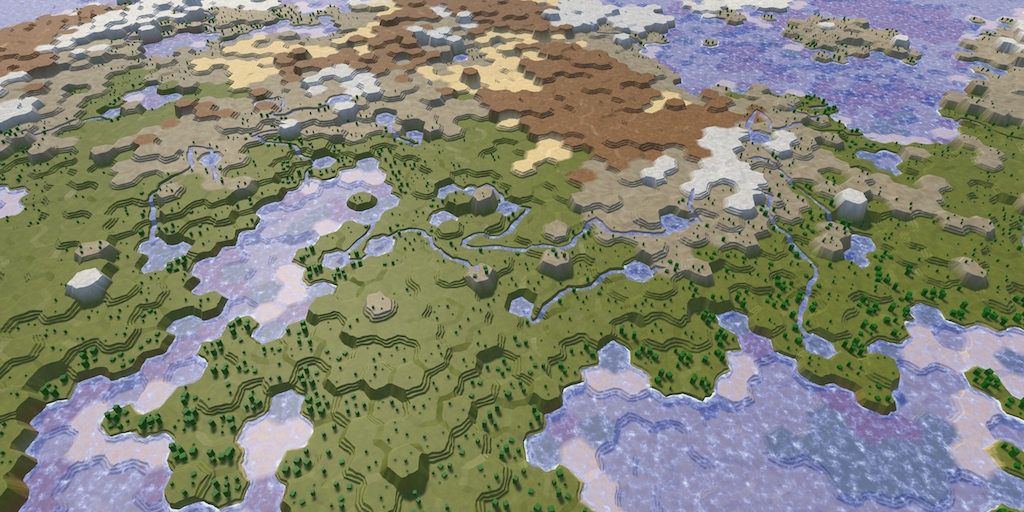
The picture Attached is kinda what I want to have as a result...

 mellow sigil
You'll very rarely find tutorials that do exactly what you want. The point of tutorials is to use them to learn the subject and then use that knowledge to implement the thing yourself.
If you're completely new to Unity then it's better to start with other parts of the game and come back to terrain generation when you have more experience
obtuse jay
mellow sigil
If you're completely new to Unity then it's better to start with other parts of ...
The problem is, is that almost everything will need to be based off of the terrain. So thats why I decided to do it first.
obtuse jay
mellow sigil
You'll very rarely find tutorials that do exactly what you want. The point of tu...
Do you know of any articals or tutorials that could potentually help me understand what to do?
mellow sigil
You can start with a more simple algorithm or a static terrain and switch it to the final algorithm later
obtuse jay
Thanks :)
latent latch
Usually when I hear wave function collapse, it's something being done with a set of tiles, so how does that apply to something completely procedural like terrain generation?
unless you mean to chunk the terrain then add values to each of those chunks
Ah, ok that sounds like what you're trying to do. Sebastian Lague has a lot of good tutorials on just general terrain generation, so it may be worth checking what they have to offer.
https://catlikecoding.com/unity/tutorials/
Also catlikecoding is worth a browse as they do offer a lot on more complex topics
A collection of tutorials for people who want to learn C# and shader programming in Unity. Useful to both novice and experienced developers.
obtuse jay
latent latch
Usually when I hear wave function collapse, it's something being done with a set...
I was kinda going for something LIKE tilemaps. Where its tiled 3d models that change height dependant on where htey are and stuff...
 fallow quartz
I have a question. if for example im making a MOBA this is my vision. First I make the character class and add by composition an ability class. The problem is there will be abilities that have some types of attributes, other abilities that might have shared some of the attributes but others not, and even more abilities that might share the attributes from the 2nd abilities but not from the first
How can I do so I dont repeat code in it?
Cause I guess inheritance is not an option right here
leaden ice
fallow quartz
I have a question. if for example im making a MOBA this is my vision. First I ma...
Composition as you mentioned
A list of attributes
latent latch
fallow quartz
I have a question. if for example im making a MOBA this is my vision. First I ma...
Ability systems are pretty complex assuming you want something modular. Speaking of MOBAs, Dota2 uses Lua for theirs and it's very much just a bunch of composition.
I would definitely figure out what type of behaviours you want and try to build your abilities around a handful of them
 marble dome
How hard would it be to create friendly npcs? Well basically bots that'll follow you, and kill enemies, maybe even gather resources in some fashion. I understand it's a pretty vague question, but lets say it's just the most basic it can be.
marble dome
Well i know c# to some extent so i am familiar with the syntax, but Unity itself i've got no experience at all. I'd just be looking to make them very basic and then i guess i'd improve them as i get better
leaden ice
i know c# to some extent so i am familiar with the syntax, but Unity itself i've got no experience at al
It will be very hard for you
for now your focus should really just be on improving your skills and learning the ropes of Unity
don't worry terribly much about how hard or how long some specific game mechanic will be
by all means work on making your NPCs
but it will be a learning process
fallow quartz
leaden ice
Composition as you mentioned
yeah, the ability is introduced in the character by composition but the problem is in the attributes of each ability
cause not all of them have the same
some share attributes, others dont and so
leaden ice
fallow quartz
some share attributes, others dont and so
Like I said
a list of attributes
List<Attribute>
fallow quartz
latent latch
I would definitely figure out what type of behaviours you want and try to build ...
The thing is i dont want to duplicate attributes from abilities but i cant just use inheritance all the time in this case
fallow quartz
leaden ice
List<Attribute>
and what I can do with that? Like make each attribute in a separate class and then introduce it on the list?
leaden ice
fallow quartz
and what I can do with that? Like make each attribute in a separate class and th...
separate class? No
they'd all be Attributes
attribute would be something like (simplified example):
class Attribute {
  string name;
  float value;
}```so name and value are variables and the whole class compound is an attribute?
 normal niche
Hello, i was wondering how capsule colliders affect the physics of the object. At the moment I'm running the below code pasted to hastebin to walk up steps, it works really well in both directions and with different sizes of steps. However when i change the capsule radius to make the collision size more accurate to different player models it stops working, any ideas why this is? https://hastebin.com/share/birolifoco.csharp
Hastebin is a free web-based pastebin service for storing and sharing text and code snippets with anyone. Get started now.
leaden ice
normal niche
Hello, i was wondering how capsule colliders affect the physics of the object. A...
what do you mean by "stops working"?
Colliders define the shape of the object. Different colliders have different shapes. A different radius is differently shaped.
By the way Time.fixedDeltaTime multiplying this into your forces never makes sense
normal niche
leaden ice
what do you mean by "stops working"?
Colliders define the shape of the object. ...
by "stops working" i mean that it just doesnt step
when should i use Time.fixedDeltaTime, that always confuses me
leaden ice
Basically you have * fixedDeltaTime and ForceMode.VelocityChange. These are basically cancelling each other out.
You will get the same effect by removing the deltaTime and switching to ForceMode.Impulse
you use fixedDeltaTime when you need the fixed timestep of the physics simulation in your calculation
normal niche
that makes sense, I thought i could use it to get a acceleration over 1 second
normal niche
maths is not my strong side lol
leaden ice
I meant ForceMode.Acceleration
normal niche
yup, I switched back to that now
thats what i had previously, ill see if it acts the same
normal niche
but acceleration doesnt take mass into consideration right?
leaden ice
Acceleration ignores mass
acceleration is like
if you did ForceMode.Force but you multiplied the mass in
Impulse is like if you did ForceMode.Force and divided by Time.fixedDeltaTime
VelocityChange is like doing both - multiplying the mass in, and dividing by fixedDeltaTime
normal niche
then I should stick to acceleration i think
how would i move x units per second then using force acceleration?
I thought i did the math before but it just doesnt move at all, only with a radius of atleast 0.5 does it move
leaden ice
normal niche
how would i move x units per second then using force acceleration?
Acceleration is a change in velocity
it would depend on your starting velocity
If you want to change velocity by x units per second per second, then it's AddForce(x * normalizedDirection, ForceMode.Acceleration)
if you want to do that INSTANTLY
normal niche
then impulse?
leaden ice
then it's (x * normalizedDirection, ForceMode.VelocityChange)
normal niche
okey
leaden ice
Impulse wouldn't guarantee a specific acceleration rate because it will depend on the object's mass.
If the object's mass is 1 then VelocityChange is equivalent to Impulse
normal niche
ah yes, I thought the other way around with the mass
leaden ice
I'm confused here though because
what is the goal here?
THis is for stepping up stairs?
None of this makes sense for stairs
leaden ice
You seem to be confusing translation for acceleration
basically sending a rigidbody up stairs is an extremely unnatural and aphysical interaction
the idea of uses forces and acceleration for it at all are just, kind of nonsensical
normal niche
then how can it be done if i want to move x units per second?
leaden ice
the best option in 90% of games would be to get rid of any stairs and use ramps instead
normal niche
I want to avoid that as i dont like IK and thats the second best option for making it look good imo
leaden ice
If you want to send a rigidbody up stairs,. you're basically going to want to just teleport it
normal niche
I dont see why it would be so hard tho, it should just be, add force upwards using the steps bounds size to calculate the amount of force needed to move up a step in x seconds
leaden ice
I don't really get the resistance to IK though
leaden ice
normal niche
I dont see why it would be so hard tho, it should just be, add force upwards usi...
because adding force imparts a velocity on the body
normal niche
leaden ice
I don't really get the resistance to IK though
I have never done it and it spooks me
leaden ice
velocity is permanent
until some other force counteracts it
so you would need some extremely rapid extremely intense forces
to like
pop you up and onto each step
and then decelerate you immediately
not to mention the horizontal motion
 knotty sun
normal niche
I have never done it and it spooks me
knotty sun
normal niche
I have never done it and it spooks me
what is the point of being a dev if you don't want to learn new things?
normal niche
that should technically be able to done with something similar to a collide and slide algorithm
leaden ice
Honestly going with a ramp and IK seems like the significanlty simpler option here
normal niche
knotty sun
what is the point of being a dev if you don't want to learn new things?
I want to learn stuff, thats why im learning unity physics atm
but i also need results for the game
leaden ice
this isn't even unity physics though this is just netwonian physics.
normal niche
yeah, I dont like math so im trying to learn it more in depth, kinda the point
because i need it with most stuff i work with
leaden ice
the thing about physics is things don't happen instantaneously. You add a force. That imparts velocity. The velocity then affects your position over some subsequent period of time.
normal niche
yeah thats true
do you have some good resources on IK because i was really trying to stay away from it tbh
leaden ice
so to go up stairs there's a whole complicated dance of "add a force up, wait till we clear this step, add a force down to stop the upwards motion. add a force forward, wait till we reach the next step, repeat"
normal niche
yup, didnt think about the permament part of velocity but its so obvious when u think about it
so thats complicated, maybe ill come back to it later
ill do IK for now not that I think it will be any easier
normal niche
movement works really well tbh
its just the annoying stairs
I use acceleration with a physics material and it runs smoothly
Thanks for the help anyways, ill look into IK later, maybe its not that bad
fallow quartz
leaden ice
that's what I wrote
then Im not visualizing ur point. Lets say we have for example an ability with area effect time and another one that doesnt have it, how this approach could solve this problem?
leaden ice
fallow quartz
then Im not visualizing ur point. Lets say we have for example an ability with a...
the ability with the area effect time would have that attribute in its attribute list
the other ability would not
fallow quartz
leaden ice
the ability with the area effect time would have that attribute in its attribute...
yeah so Ill need to do a class attribute and then just create the list from that class and add whatever i want right?
so just a full class with all the attributes and then in the list i put in whatever i want
leaden ice
I'm not sure I understand what "full class with all the attributes" means
fallow quartz
leaden ice
attribute would be something like (simplified example):
```cs
class Attribute {
...
in the option you told me to do there is a problem. In the list I can only put attribute objects, which are required to have each of the variables on it, how am i solving this
leaden ice
fallow quartz
in the option you told me to do there is a problem. In the list I can only put a...
which are required to have each of the variables on it
What do you mean by that?
Each of what variable?
Here let me show an example:
Ability: {
  "name": "Fireball";

  Attributes: [
    { "name": "range", "value": 5 },
    { "name": "area of effect", "value": 10 },
    { "name": "damage", "value": 20 }
  ]
}```this would be the example json representation of a Fireball ability
fallow quartz
leaden ice
> which are required to have each of the variables on it
What do you mean by tha...
If i understood correctly in ur approach you want me to create a class atribute with all the list of the variables a skill can have, even if i dont use all of them. Then in the ability class i create a list of attributes and i just put the ones i want (Imagine i dont want to add effect area time on this one but i do in another). But in here i cannot just put in the list individual variables, i can only put attributes, which require me to give values to each of the variables, meaning that the one i dont want it to exist in some cases (effect area time) is required to
leaden ice
fallow quartz
If i understood correctly in ur approach you want me to create a class atribute ...
No you don't understand me correctly at all
fallow quartz
leaden ice
No you don't understand me correctly at all
yeah i thought so
leaden ice
leaden ice
attribute would be something like (simplified example):
```cs
class Attribute {
...
This is the class
See it has only two fields
Not "all the variables any attribute can have"
fallow quartz
so if i want to add in some abilites the effect area time i need to create another class
leaden ice
leaden ice
Here let me show an example:
```cs
Ability: {
"name": "Fireball";
Attribute...
Look at this example
You just add an attribute to the list
 shrewd tendon
does anyone know if there is a numpy like array in C# that you can use in unity?
fallow quartz
leaden ice
Look at this example
yeah i got that, but then how do i make for example class poisonArea get dmg, cd, area effect time and the class FireBall only cd and dmg?
 burnt arrow
is 150gb enough on my computer to start using unity or should i delete some games
rigid island
shrewd tendon
does anyone know if there is a numpy like array in C# that you can use in unity?
whats "numpy like array"
leaden ice
fallow quartz
yeah i got that, but then how do i make for example class poisonArea get dmg, cd...
Here's a more fleshed out example:
class Attribute {
  string name;
  float value;
}

class Ability {
    string name;
    List<Attribute> attributes;
}

void Example() {
    Ability fireball = new Ability {
      name: "Fireball",
      attributes: new() {
        new Attribute() { name: "damage", value: 10 },
        new Attribute() { name: "range", value: 50 },
        new Attribute() { name: "areaOfEffect", value: 15 },
      }
    }
}```
Does that make any better sense?this is a code channel.
and yes 150 should be enough
leaden ice
shrewd tendon
does anyone know if there is a numpy like array in C# that you can use in unity?
What specific features of numpy are you wanting in Unity
You can use something like this if you want: https://github.com/SciSharp/Numpy.NET
shrewd tendon
with python's numpy array I can remove about 90% of my loops
leaden ice
    Ability poisonCloud = new Ability {
      name: "Poison Cloud",
      attributes: new() {
        new Attribute() { name: "range", value: 50 },
        new Attribute() { name: "areaOfEffect", value: 15 },
        new Attribute() { name: "poisonLevel", value: 2 },
      }
}``` @fallow quartzThis looks awesome, thanks
leaden ice
See how you can have any attributes in the list you want, and they are all optional @fallow quartz ?
fallow quartz
leaden ice
Here's a more fleshed out example:
```cs
class Attribute {
string name;
floa...
oh okay I was missunderstanding the attribute thing
shrewd tendon
and how do advanced unity devs modularize game components?
leaden ice
shrewd tendon
with python's numpy array I can remove about 90% of my loops
honestly your time would proably be better spend learning the job system
fallow quartz
leaden ice
```cs
Ability poisonCloud = new Ability {
name: "Poison Cloud",
...
and how do i solve this problem with methods? So imagine i have some methods that repeat in some abilities and others that dont
leaden ice
fallow quartz
and how do i solve this problem with methods? So imagine i have some methods tha...
define them in one place and reuse them in the abilities that use them
fallow quartz
leaden ice
define them in one place and reuse them in the abilities that use them
u mean like injecting them?
leaden ice
not really
shrewd tendon
I've seen a number of strategies: Scriptable objects, templates that can be instantiated, and some tutorials that describe object orientation
fallow quartz
leaden ice
```cs
Ability poisonCloud = new Ability {
name: "Poison Cloud",
...
btw i see a problem in here. If for some of the attributes i dont want the value to be float? Maybe boolean, or int or something else?
leaden ice
fallow quartz
btw i see a problem in here. If for some of the attributes i dont want the value...
this is a simplified example
but you can replicate most of those things with float
e.g.
bool ValueAsBool => value == 1f;```usually Scriptable Objects
depends what you're doing ofc, like everything else
shrewd tendon
leaden ice
honestly your time would proably be better spend learning the job system
As an exercise in math I'm writing a 3D engine using only a gpu accelerated numpy, and I've got phong shading, scene trees, obj files and stl files in under 1000 lines of code and with about 20 loops in total
leaden ice
shrewd tendon
As an exercise in math I'm writing a 3D engine using only a gpu accelerated nump...
doesn't sound like anything to do with Unity then
fallow quartz
leaden ice
e.g.
```cs
bool ValueAsBool => value == 1f;```
but here you are just forcing everything to work as a float right? Like if i want an integer or another string it wouldnt work
shrewd tendon
leaden ice
doesn't sound like anything to do with Unity then
No but judging from C#'s syntax it is possible to almost entirely replicate numpy array syntax, and it speeds me up a lot
leaden ice
shrewd tendon
No but judging from C#'s syntax it is possible to almost entirely replicate nump...
If you wish to use Python, use Python
leaden ice
fallow quartz
but here you are just forcing everything to work as a float right? Like if i wan...
string is different
but int would work fine
shrewd tendon
python has other limitations, such as deployment on cell phones
leaden ice
as long as the alues are within around 16 million or so from 0
shrewd tendon
The more I learn about unity, the more I'm realizing it is a way better version of a browser ^^
leaden ice
fallow quartz
but here you are just forcing everything to work as a float right? Like if i wan...
anyway in general if you want different value types you can:
double which is plenty of precision for almsot any use casestring field on the Attribute class and use that when necessary
rigid island
shrewd tendon
The more I learn about unity, the more I'm realizing it is a way better version ...
what?
shrewd tendon
rigid island
usually Scriptable Objects
depends what you're doing ofc, like everything else
What is your favorite youtube video on ScriptableObjects in unity
rigid island
shrewd tendon
What is your favorite youtube video on ScriptableObjects in unity

Scriptable Objects are an immensely powerful yet often underutilized feature of Unity. Learn how to get the most out of this versatile data structure and build more extensible systems and data patterns. In this talk, Schell Games shares specific examples of how they have used the Scriptable Object for everything from a hierarchical state machine...
shrewd tendon
rigid island
what?
It allows you to deploy user interfaces on basically any device you can dream of, except you can do decent hardware integration without fighting with browser people and you have easily accessible gpu acceleration
fallow quartz
leaden ice
anyway in general if you want different value types you can:
- make the base num...
But for example for boolean you cant force the value to be 1 or 0 only cause its a float, so if someone decides to put 4 or whatever that would get an error
leaden ice
fallow quartz
But for example for boolean you cant force the value to be 1 or 0 only cause its...
that's not really a problem
if it's a bool attribute you would never do that
you would do
rigid island
shrewd tendon
It allows you to deploy user interfaces on basically any device you can dream of...
wdym fighting with the browser people?
You mean at most fighting the DOM ?
Comparing a whole game engine to a browser is a bit of a disservice tbh. You don't have many things on a browser, also multithreading etc
leaden ice
void SetValueAsBool(bool val) {
  this.value = val ? 1 : 0;
}``` @fallow quartzI have about 30 years of programming experience, and about 1 day with unity/C#. I will pick up complex concepts fast, but I don't know basic things such as how to import a script in C# in unity, do you recommend this one first, or maybe another one?
leaden ice
no the system is not perfect and doesn't rpevent programmers from making mistakes, but that's not really a feature of any system. Mistakes can always be made
rigid island
shrewd tendon
I have about 30 years of programming experience, and about 1 day with unity/C#. ...
if you're new to Unity i would suggest you start with the !learn pathways courses, some are a bit boring / "slow burn" start but they will show you important feature you might not know. The Essentials is the first one I'd hit up at least
 tawny elkBOT
Over 750 hours of free live and on-demand learning content for all levels of experience!
fallow quartz
leaden ice
no the system is not perfect and doesn't rpevent programmers from making mistake...
okay right, im going to try, thanks a lot
fallow quartz
leaden ice
define them in one place and reuse them in the abilities that use them
for the method thing wdym by "defining them in one place"? Cause most of the methods will have to access those attributes but some of them wont be used by all of the abilities and others will do
shrewd tendon
rigid island
if you're new to Unity i would suggest you start with the !learn pathways course...
how does unity detect C# files to include in the project? And if it does, is all code automatically available globally, preventing namecollisions through namespaces?
rigid island
shrewd tendon
how does unity detect C# files to include in the project? And if it does, is all...
anything in Assets folder is a "Unity asset" so scripts are part of that. Everything else is done through the Assemblies / CSproj that tells how project is organized
and yes namespaces are used like any normal c# app to encapsulate.
(in unity Folders are not automatically assigned a namespace like most .net apps creating new script in that folder)
leaden ice
fallow quartz
for the method thing wdym by "defining them in one place"? Cause most of the met...
public static void ApplyDamage(Attribute damageAttribute, Unit target) {
  target.TakeDamage(damageAttribute.valueAsFloat);
}

public static void ExecuteFireball(Unit caster, Ability ability, Vector3 target) {
  if (Vector3.Distance(caster.position, target) > ability.GetAttribute("range").valueAsFloat)) throw new Exception ("out of range!");
  Attribute damageAttr = ability.GetAttribute("damage");
  Attribute areaOfEffectAttr = ability.GetAttribute("areaOfEffect");

  foreach (COllider c in Physics.OverlapSphereAll(target, areaOfEffectAttr.valueAsFloat, ...)) {
    ApplyDamage(damageAttribute, c.GetComponent<Unit>());
  }
}```
More examples^
In this case ApplyDamage can be reusedThanks! You probably saved me an hour of extra work, and that is a lot of time when you get attacked by a 3 year old daughter the entire day so you can't build her an educational game very quickly ^^
fallow quartz
leaden ice
```cs
public static void ApplyDamage(Attribute damageAttribute, Unit target) {
...
isnt it bad to do static methods? atleast on stuff that is not correlated with singletons
leaden ice
no
rigid island
shrewd tendon
Thanks! You probably saved me an hour of extra work, and that is a lot of time w...
hehe nicee . I would be doing the same "none of these are good, just make my own "
Goodluck!
if anything we outt here
leaden ice
there's nothing wrong with static methods
but again, this is a quick example
I have stuff to do now, so hopefully this is enough to get you started
you can build the rest 🙏
fallow quartz
leaden ice
I have stuff to do now, so hopefully this is enough to get you started
sure, thanks again ❤️
 late ivy
Yo, I'm wondering if it's more expensive to call a public field from another class everytime you need it rather than storing the value once in a field and using that one ?
In my case I'm only using an int field from another class to do some calculations, should I set it as a local field in the function ?
rigid island
fallow quartz
isnt it bad to do static methods? atleast on stuff that is not correlated with s...
sadly just nonsense stigma ,ofc you should not abuse static keyword just for simple referencing, but static methods esp if the function doesnt need to be in a specific class, they are quite useful
look at methods like Debug.Log and Mathf. functions are all static methods
leaden ice
late ivy
Yo, I'm wondering if it's more expensive to call a public field from another cla...
if it's truly a field, then no it's usually not that expensive. But in general local variables are a good idea
rigid island
late ivy
Yo, I'm wondering if it's more expensive to call a public field from another cla...
it can depend
fallow quartz
rigid island
sadly just nonsense stigma ,ofc you should not abuse static keyword just for si...
yeah but this methods should be only in atleast an ability class, not somehwere else
rigid island
fallow quartz
yeah but this methods should be only in atleast an ability class, not somehwere ...
if the method gets all the info passed into it and just process it, static is the way to go for sure
shrewd tendon
Unity is no longer building anything, and I'm getting an error about adaptive performance
but I cannot install any adaptive performance package
and I also get a bug about the Start function of a monobehavior that has empty Start and Update functions
rigid island
shrewd tendon
Unity is no longer building anything, and I'm getting an error about adaptive pe...
show the errors
if you dont want adapted perfomance / don't need it , disable it in player settings
shrewd tendon
do people here use some form of pastebin?
rigid island
!code (read the bot msg don't spam the command)
tawny elkBOT

Use links to services like:
https://gdl.space/, https://paste.ofcode.org/, https://hatebin.com/, https://paste.myst.rs/, https://hastebin.com/
Surround code with three backquotes. Not quotation marks.
To format as C#, add cs to the first line:
```cs
// Your code here
```
Add a comment with a line number if there is an error message.
shrewd tendon
I get weird stack traces, also on a monobehavior
but deleting the object and the behavior and then recreating doesn't solve anything
rigid island
shrewd tendon
https://justpaste.it/fsq6b
oh ok if its disabled remove the package, in Package manager
this is a code channel
#💻┃unity-talk
 hard hull
Okay sorry
rigid island
shrewd tendon
but deleting the object and the behavior and then recreating doesn't solve anyth...
huh ? I have no idea what that means, You can make some screenshots maybe?
which error is it?
shrewd tendon
hmmm... I think Debug.Log() automatically produces a stack trace...
rigid island
shrewd tendon
hmmm... I think Debug.Log() automatically produces a stack trace...
almost every method does this..
shrewd tendon
mismatch between scriptname and monobehavior ^^
rigid island
are you using old Unity?
afaik newer unity versions don't care if filename doesn't match class name
although imo is still good practice to do so.
 dire crown
Hi!
I'm using TestPlanesAABB to check if an object is inside view distance, however i'm getting false positives as stated on the docs https://docs.unity3d.com/6000.0/Documentation/ScriptReference/GeometryUtility.TestPlanesAABB.html
The test is conservative and can give false positive results. A bounding box can intersect the planes outside of the frustum because the planes are infinite and extend beyond the frustum volume. A typical false positive result is produced by a big bounding box near the frustum edge or corner.
Is there any workaround I can apply to make those false positives disappera?
shrewd tendon
rigid island
are you using old Unity?
Probably then?
Can't add 'TextMeshPro' to Word because a 'Image' is already added to the game object!
what are constraints on ui components?
leaden ice
shrewd tendon
Can't add 'TextMeshPro' to Word because a 'Image' is already added to the game o...
You can only have one graphical component per GameObject
shrewd tendon
Are canvasses and images game objects?
rigid island
they are components that live on gameobjects
knotty sun
shrewd tendon
Are canvasses and images game objects?
no, they are components
rigid island
gameObject is a container of components basically
shrewd tendon
How can I create a tree structure of ui components?
A canvas is the root of a ui overlay and then you can create a tree of panels, with images and textmeshpro leafs?
Cause I think that is what I have…
rigid island
nest gameobjects
shrewd tendon
Maybe I messed something up?
rigid island
the order of the hierarchy for canvas determines the order of drawing
bottom item = draws last = always ontop
shrewd tendon
And the tree is made from game objects
rigid island
yes the gameobjects in hierarchy are in a tree like structure
also this isnt really a code question #💻┃unity-talk
shrewd tendon
But, if you need a graphical object, it has to be the only one in the game object. However, that game object need not be the only child
shrewd tendon
rigid island
also this isnt really a code question <#497872424281440267>
Code-general is not unity framework related questions?
rigid island
shrewd tendon
Code-general is not unity framework related questions?
its for coding questions, anything else editor related is #💻┃unity-talk
sounds like you're asking more about UI / general structure of unitys workflow
 chilly sail
Hey, I don't know if I'm the right channel but I have some trouble with the new behavior graph. I can't seem to get through the wait event even when I'm sending the message to true If anyone has any idea, I would love some help
 dusk apex
chilly sail
Hey, I don't know if I'm the right channel but I have some trouble with the new ...
dusk apex
chilly sail
Hey, I don't know if I'm the right channel but I have some trouble with the new ...
I'm not sure what this is but if this is #763499475641172029 you'd get support for that in the other channel/server. This channel is mainly for general Unity coding questions beyond the very basics (syntax errors, debugging and whatnot).
chilly sail
Oh my bad thanks, I though it was only for visual scripting component
 somber nacelle
chilly sail
Hey, I don't know if I'm the right channel but I have some trouble with the new ...
somber nacelle
chilly sail
Hey, I don't know if I'm the right channel but I have some trouble with the new ...
#1202574086115557446 for help with the Behavior package
and see #854851968446365696 for what to include when asking for help
 pearl burrow
hi currently my items in game have multiple material (with a toon shader) to specify the different part of the item. For example the apple in the image has 3 material one for each color you see. Would this be heavy on performance? Its probably best to do a texture but im not really good with uv mapping and at creating textures so im using simple toon shader with colors

 dawn meteor
https://hatebin.com/zlgyqlwrny
Hi, im trying to make a grid based inventory system and im trying to place new objects on any available positions on the grid which are currently not occupied but when i run this it places the item at the end of the grid and also stacks the items
latent latch
Not really seeing anywhere that you're keeping track of these placed items, unless you're just comparing by all rect transforms which I probably wouldnt do
dawn meteor
I have a list which contains all the items i have
latent latch
Your PlaceItem method takes in a GameObject item, but all you do is change the rect transform position
latent latch
dawn meteor
Is there a fault in doing so?
If you're indexing items with a list/array is just makes sense to compare the items for where they are in those containers and use 2D array math
with that being said, your forloop here is confusing as it would be applying the same iteration logic for each item which is why your item visuals are stacking
 grand brook
Hello! Im trying to activate this bool parameter for my animation when I click on the Play 3d model with OnMouseDown() function, is that possible?


i tried
    {
        if (menuButtons[1])
        {
            Animator animator = menuButtons[1].GetComponentInParent<Animator>();
            if (animator)
            {
                animator.SetBool("PlayButtonPress", true);

            }

        }


    }```

without successYou have three places there you can fit in some debug logging so figure out where it's not working
grand brook
so I was on the right track?
latent latch
assuming everything is connected in the hierarchy correctly, yes (and assuming menuButtons[1] evalutes to true)
latent latch
oh, actually you compare against the indexing but you access it so I assume it's not a bool type, so you probably want to do
if(menuButtons[1] != null)
grand brook
alright!
 cunning rose
Hey guys, I'm working on a 2D tile based point and click, and I was writing a simple script for my camera, to make it so that the camera pans to the next screen when the player comes in contact with a collider at the end of the screen, but for some reason, it isnt working, and i can not, for the life of me figure out why. Any help is greatly appreciated
mellow sigil
What part of it is not working?
cunning rose
The collisions aren't detecting at all. My bad, shouldve mentioned that as well
rigid island
cunning rose
The collisions aren't detecting at all. My bad, shouldve mentioned that as well
cunning rose
I couldn't figure it out, I am using A* for my movement, could that have anything to do with it?
rigid island
cunning rose
I couldn't figure it out, I am using A* for my movement, could that have anythin...
wdym you couldnt figure out, go through the steps.. including the debugging ones
cunning rose
rigid island
wdym you couldnt figure out, go through the steps.. including the debugging ones
I just did, still nothing
mellow sigil
Show the inspectors for the collider and the player
rigid island
cunning rose
I just did, still nothing
why are you using physics to pan a camera anyway?
moving the transforms is not a good way to get accurate physics collisions messages
and using a rigidbody for a camera pan is a bit strange, you only need the Clamp to limit the camera within a specific area
 nova leaf
how do i get the path of a prefab in editor mode? no matter what kind of method i use it always returns and empty string
rigid island
nova leaf
how do i get the path of a prefab in editor mode? no matter what kind of method ...
most likely the assetDatabase class
nova leaf
rigid island
most likely the assetDatabase class
nope empty string
rigid island
nova leaf
nope empty string
are you using GetAssetPath?
nova leaf
yes
rigid island
nova leaf
yes
show code
nova leaf
rigid island
show code
Debug.Log(AssetDatabase.GetAssetPath( gameObject ));
simple
the script is on a prefab, in editor mode so not at runtime and is [ExecuteInEditMode] with #if UNITY_EDITOR
if that's important

debug
rigid island
nova leaf
```cs
Debug.Log(AssetDatabase.GetAssetPath( gameObject ));
```
you're passing in the instance though
instances are not stored in the asset database
nova leaf
what should i do then
rigid island
what are you trying to do here exactly
nova leaf
getting the path where its stored
rigid island
nova leaf
what should i do then
make a field for the prefab and run the function on that
nova leaf
wdym
rigid island
nova leaf
wdym
do you know what a field is?
nova leaf
yeah why
rigid island
your prefab was in the field you can get the path but frankly not sure what the end goal is here
You would need the asset not an instance of it
rigid island
if you dropped a prefab in here you will see the pathcs [SerializeField] private GameObject prefab; private void OnValidate() { if (prefab == null) return; Debug.Log(AssetDatabase.GetAssetPath(prefab)); }
nova leaf
and how do i set the prefab field to anything
rigid island
[SerializeField] private Object prefab;
nova leaf
yeah ok but that's null always
rigid island
oh you drop in the field
nova leaf
the whole point is to make it automatically
rigid island
you still havent explained the usecase, how do you plan on telling which specific prefab you want to grab path of
nova leaf
the script is supposed to get the path of the object, and store a combined mesh as a new model there (in the same folder)
rigid island
which object though
nova leaf
the object the script is on
i didn't want to make an external editor script because this worked better with the other functions just using the local gameObject
rigid island
I still don't understand, this is a runtime object ? cause if its not an asset I dont see how you expect to get a path
rigid island
ok so you have the path already?
nova leaf
you but why manually type it in
rigid island
anything in the hierarchy is just an instance of an object not an asset
nova leaf
rigid island
anything in the hierarchy is just an instance of an object not an asset
yeah but the script is in editor mode on the prefab not in the hirarchy in a scene
rigid island
nova leaf
you but why manually type it in
how else do you want to grab the object from the folder then
nova leaf
rigid island
how else do you want to grab the object from the folder then
idk i thought there was a function that does that
apparently not
rigid island
I mean you either know the path or directly link the object in the fields
nova leaf
🫠
rigid island
nova leaf
🫠
maybe there is a better way to do what you want to do, but without details its hard to suggest much
nova leaf
rigid island
maybe there is a better way to do what you want to do, but without details its h...
i shared all details
rigid island
get the path of the object, and store a combined mesh as a new model there (in the same folder)
you mean this, is details?
nova leaf
yes, i want to generate a bunch of stuff for a prefab, and store it in the same folder it is in
rigid island
combined mesh from where? why cant the object be dragged in a field to do this operation?
plop the prefab in the field and run the rest from its path
nova leaf
rigid island
combined mesh from where? why cant the object be dragged in a field to do this o...
because... i get the meshes from the child objects in the prefab
nova leaf
rigid island
plop the prefab in the field and run the rest from its path
alright
i guess i have to create an external editor script
rigid island
you can even just make it so you dont have to have a field, it could just be based on your selection in Project window
nova leaf
yeah
rigid island
nova leaf
yeah
https://hatebin.com/elykegltqa
can go from there
editor scripts are fun aren't they
 nova leaf
autoGenerateScript.prefabReference = Selection.activeGameObject;
works perfectly
rigid island
nice
 storm wolf
Anyone have experience with pythonnet? I am trying to use openai whisper model for voice recognition. Everything works besides the transcribe method:
    public string GetMicrophoneTextFromWhisper()
    {
        if (!File.Exists(AudioPath))
        {
            UnityEngine.Debug.LogError("Audio file not found: " + AudioPath);
            return "NOT REAL";
        }

        string transcription = string.Empty;
        InitializePython();
        dynamic whisper = Py.Import("whisper");
        dynamic model = whisper.load_model("turbo");
        try
        {
            dynamic transcriptionResult = model.transcribe(AudioPath); // ERROR HAPPENS ON THIS LINE EVERY TIME
            transcription = transcriptionResult["text"];
        }
        catch (Exception ex)
        {
            UnityEngine.Debug.LogError($"Error during transcription: {ex.Message}");
            UnityEngine.Debug.LogError($"AudioPath: {AudioPath}");
            UnityEngine.Debug.LogError($"Python DLL Path: {Runtime.PythonDLL}");
            return "ERROR HAPPENED.";
        }
        return transcription;
    }
    private void InitializePython()
    {
        try
        {
            UnityEngine.Debug.Log("Setting Python DLL path");
            Runtime.PythonDLL = "python312.dll";
            UnityEngine.Debug.Log("Initializing Python Engine");
            PythonEngine.Initialize();
            UnityEngine.Debug.Log("Python Engine Initialized");
        }
        catch (Exception ex)
        {
            UnityEngine.Debug.LogError($"Failed to initialize Python: {ex.Message}");
        }
    }
Heres the error: Error during transcription: [WinError 2] The system cannot find the file specified
from my research this error is happening allegedly because the file doesn't exist, is in the wrong format, etc.
I have confirmed that the path to the audio file is correct (and its in WAV format which is supported by Whisper). If i paste the path into my explorer and press enter it literally opens the file and plays it. But when I pass it to the transcribe function it can't find it. Help would be appreciated I am kind of lost. Also the initial check for the file at the start of the function never executes. So clearly the file exists.
heres the path:
public static string AudioPath => Application.persistentDataPath + "/Audio/audio_chunk.wav";
what is the path printed in the exception
storm wolf
rigid island
what is the path printed in the exception
C:/Users/***/AppData/LocalLow/DefaultCompany/My House is Haunted/Audio/audio_chunk.wav
rigid island
storm wolf
`C:/Users/***/AppData/LocalLow/DefaultCompany/My House is Haunted/Audio/audio_ch...
I'm not familiar with the python library, where is the path expected is it relative to the dll ? and does it ignore whitespaces?
rigid island
worth a shot to try
storm wolf
before I was starting a process so I just passed the path to the command arguments nested in a string
but the transcribe definitely doesn't do that on its own
rigid island
ahh ok
rigid island
storm wolf
it might be that
did it work ?
storm wolf
not yet im trying to include the spaces so far same error tho i could be doing it wrong though
might just change directory name its probably easier
ok well I don't think that was the solution
I added the @ symbol and pasted it exactly and same error
string CORRECT_PATH = @"C:/Users/***/AppData/LocalLow/DefaultCompany/My House is Haunted/Audio";
dynamic transcriptionResult = model.transcribe(CORRECT_PATH);```Whenever I edit and save a script in Unity a load bar appears. When the game is not big it takes like 5-10 secs to load, but when it gets bigger it can get to 1-3 mins and is quite annoying. Is there any way to avoid the loading thing? I saw some videos where they dont get it
storm wolf
fallow quartz
Whenever I edit and save a script in Unity a load bar appears. When the game is ...
Yeah it's quite annoying. Closest thing I found was HotReload which is okay but has its own issues
fallow quartz
storm wolf
Yeah it's quite annoying. Closest thing I found was HotReload which is okay but ...
for example?
storm wolf
fallow quartz
for example?
fallow quartz
storm wolf
https://hotreload.net/
i mean the issues
rigid island
if you have many scripts you can maybe separate them via assembly definitions, this can potentially shave off some time but might not be worth
fallow quartz
rigid island
if you have many scripts you can maybe separate them via assembly definitions, t...
but I saw videos that literally get no load bar, they just save and its like when ur programming a normal application
for example a web in vs code or whatever
that type of speed
rigid island
maybe refresh the library , sometimes it can start chugging heavy
also those videos might have the auto refresh assemblies on save turned off
storm wolf
and/or they edit their videos
fallow quartz
rigid island
also those videos might have the auto refresh assemblies on save turned off
so if it doesnt refresh changes dont get applied?
rigid island
it wont refresh each save so you can edit multiple scripts and save without unnecessary wait between each one
then you have to manually refresh for changes in unity editor with a shortcut press
but its 1 reload as oppose to many each save of a script
storm wolf
storm wolf
I added the @ symbol and pasted it exactly and same error
```cs
string CORRECT_...
yeah I don't think this is the problem anymore I tried a different file with no spaces and the same error happened. I have no fucking clue anymore the file is literally there i feel like theres nothing I can do
rigid island
storm wolf
yeah I don't think this is the problem anymore I tried a different file with no ...
have you used this method / library before?
do you know if that function runs the path relative or absolute
storm wolf
My research says absolute
I tried both anyways lmao but they both error out like that
rigid island
it could be trying to do
library.dll location / c:/etc/etc/
rigid island
is there no .NET library for this lul
nova leaf
rigid island
nice
there actually is a function for that, i found it
UnityEditor.Experimental.SceneManagement.PrefabStageUtility.GetCurrentPrefabStage ()?.prefabAssetPath;
rigid island
that is quite the namespace..
nova leaf
the problem was the whole time that when you double click on a prefab, the prefab reference is not a prefab anymore, it works if you just click at the prefab in the folder, but once you double clicked it didn't work anymore lol
rigid island
you mean when you open it?
nova leaf
yes, and it's more complicated to track and save that in an editor script
anyway it works now
 hybrid relic
storm wolf
https://hotreload.net/
hybrid relic
storm wolf
https://hotreload.net/
why pay $70 for something thats for free on github ?!?

Hot Reload implementation for Unity. Iterate on code insanely fast without breaking play session. Supports any editor. 1. Play 2. Make change 3. See results - handzlikchris/FastScriptReload
People need to look for open source alternatives for stuff before clicking that big BUY button
 eager yacht
FSR doesn't support generic methods, Mac Silicon, partial classes, and other stuff on their docs. HR also has its own limitations. Also FSR wasn't always free. I've also seen a lot more complaints of FSR being buggy, but I've never used it myself (I've only used HR).
 fleet gorge
hybrid relic
why pay $70 for something thats for free on github ?!?
fleet gorge
hybrid relic
why pay $70 for something thats for free on github ?!?
How does Hot Reload track the free trial?
I see there's a 30 day trial on the website
hybrid relic
fleet gorge
How does Hot Reload track the free trial?
contacting the license server
like (nearly) every other licenced asset
fleet gorge
Ooh
I haven't bought any licensed assets before 😴
I'm kinda tempted to get it
At the moment I need a tilemap system similar to growtopia where you can place and break blocks, I'm still thinking if I should use unity's tilemap system or make my own
rigid island
fleet gorge
At the moment I need a tilemap system similar to growtopia where you can place a...
keep static level tilemap, all interactable / constantly changing as gameobjects
unless you can efficiently pool, individual gameobjects will always be more expensive than a big gameobject tilemap (assuming it doesn't update often)
hybrid relic
eager yacht
FSR doesn't support generic methods, Mac Silicon, partial classes, and other stu...
FSR is still a good option if you dont want to spend $70 on something thats basically useless, it gets the job done for free
Cuz you could also jus reload the entire game in 3-6 seconds and not use FSR or HR
ok on a bad pc maybe 15 seconds
eager yacht
Don't see how that makes HR useless. I use it in all of my projects 🤔 If you don't want to spend $70, then just use FSR and have its tradeoffs. Either way you get a similar result.
hybrid relic
Not what i was after, just that you can have a basicallly similar thing for free
latent latch
Unity can also just optimize it themselves ;)
eager yacht
latent latch
Unity can also just optimize it themselves ;)
Basically what Unity 7 will have alongside CoreCLR and Code Reload 
latent latch
i wait
 devout knoll
i have a class called SoundPlayer:
public class SoundPlayer : MonoBehaviour {
    public AudioSource collide;
    public AudioSource merge;

    public void collideSound() {
        collide.Play();
    }

    public void mergeSound() {
        merge.Play();
    }
}
and a script which relies on these functions:
SoundPlayer.mergeSound();
but it has the error:

making it static causes another error because i think those functions need to be non-static
 cosmic rain
devout knoll
making it static causes another error because i think those functions need to be...
cosmic rain
devout knoll
making it static causes another error because i think those functions need to be...
They are not static, but you try to access them as static.
devout knoll
how do i access them as non-static?
devout knoll
well, i have tried
SoundPlayer.instance.mergeSound() but that doesn't work
normally it does
cosmic rain
devout knoll
well, i have tried
`SoundPlayer.instance.mergeSound()` but that doesn't work
It doesn't look like you have an instance field in that class. Also, that's a singleton pattern, not how you created instances of the class normally.
cosmic rain
devout knoll
normally it does
It would only work if your class is a singleton.
devout knoll
i think i've done that before, but i forgotten
cosmic rain
I suggest going back to learning the C# basics. Specifically, the difference between types and instances/objects.
Also maybe ask in #💻┃code-beginner next time if you need a more lenient reply.
devout knoll
ok
fleet gorge
rigid island
keep static level tilemap, all interactable / constantly changing as gameobjects...
Technically everything is interactive as you can break any block
It's like a sandbox game
rigid island
fleet gorge
Technically everything is interactive as you can break any block
you would need to do some testing to see for sure, but if you're updating / destroying often maybe pooling might be better than tilemap
storm wolf
hybrid relic
why pay $70 for something thats for free on github ?!?
i have it for free as well lmao
pythonnet + openai whisper with Python.Runtime
 echo ferry
Hot Reload pays for itself in the first week of using it. Shaves at least 5-10 minutes a day off wait times.
 finite idol
Unity Assembly Definition Question
I want to use UniTask in various places and put UniTask in core asmdef and player asmdef puts the core in references, so I want to use UniTask, but I'm getting an error...
Is it normal not to do it?
So I just call them all separately, so there's no error.
Core.asmdef
name: Core
references: [UniTask]
Player asmdef
name: Player
references: [Core]
not sure that even works
storm wolf
rigid island
not sure that even works
yeah i was mistaken slightly, you can't await them, but you can WaitUntil Task.Run(() => mytask.isCompleted)
quartz folio
finite idol
Unity Assembly Definition Question
I want to use UniTask in various places and ...
No. You need to reference UniTask in both assemblies.
rigid island
storm wolf
yeah i was mistaken slightly, you can't `await` them, but you can `WaitUntil` `...
yeah you can also create a custom yield instruction for it
storm wolf
ooo that sounds fun ima look into that
finite idol
quartz folio
No. You need to reference UniTask in both assemblies.
thank you
rigid island
storm wolf
ooo that sounds fun ima look into that

@storm wolf btw if you're looking into branch out of Coroutines and actual async Unity 6+ now integrates awaitable class that has similar wait instructions as coroutines but its far more efficient using built in real async
https://docs.unity3d.com/6000.0/Documentation/ScriptReference/Awaitable.html
storm wolf
Woahhhh
im using 6+ too
might have to convert this whole thing with Awaitable it looks more fun
rigid island
also controlling background thread and main thread
rigid island
you can literally just await lol
storm wolf
oh 💀
rigid island
thats the joke
latent latch
storm wolf
can you just make your own?
If you wanted that method implementation, yeah you need to condition the cancelation so a extra line or two
unless 6 added it in havent checked
storm wolf
doesn't look like it
latent latch
Unitask just does everything and includes stack trace of async operations
for when you screw up and mem leak onto the editor
 sleek bough
@silver compass don't cross-post, please. Pick one channel.
 silver compass
I'm just trying to get this working as soon as I can. I posted it in advanced, then saw general was a quicker response time, posted it there, then saw beginner was even quicker. My bad.
storm wolf
Can anyone help me with this? I am trying to optimize this but I have a feeling im not doing it right... I'm using coroutines and it still stalls for 2.5 seconds
I am basically using the whisper model from openai for voice recognition and that shows stalling on the function where the model is transcribing the audio... is there nothing I can do about this to make it faster? I am also using one of the faster models (base)
 cosmic rain
storm wolf
Can anyone help me with this? I am trying to optimize this but I have a feeling ...
cosmic rain
storm wolf
Can anyone help me with this? I am trying to optimize this but I have a feeling ...
Coroutines are not magic. They're still running on the main thread. So if a function in a coroutine takes 2.5 sec to complete, it's gonna stall for 2.5 sec. Your best bet is calling it on a background thread.
storm wolf
cosmic rain
Coroutines are not magic. They're still running on the main thread. So if a func...
thanks this gave me a better understanding
 modest anchor
latent latch
modest anchor
latent latch
And dampen there does not work?
Unless you mean to ignore a specific layer then you've those options there too
 alpine current
modest anchor
latent latch
Unless you mean to ignore a specific layer then you've those options there too
alpine current
modest anchor
latent latch
Unless you mean to ignore a specific layer then you've those options there too
the thing is I have tried in both setting dampen to 1 and on 0 but neither works and as for layer , whenever it collides with anything even id we use specific layer as soon as it collide it shift like its performing hard collision
latent latch
modest anchor
the thing is I have tried in both setting dampen to 1 and on 0 but neither works...
If the idea is to just stop the particle completely, you can just use a collision trigger then remove that particle's velocity
modest anchor
ok i will try this one out
 long pebble
I need to somehow get a Twine game to run inside my Unity window (on a Windows build). Seamless enough so that I can switch between the unity game and twine games whenever I need. Is this something that is possible? I've been looking but I feel like I'm looking in all the wrong places. If anyone has any familiarity with this or knows a next-best option I would really really really apprieciate the help so much!!
lean sail
long pebble
I need to somehow get a Twine game to run inside my Unity window (on a Windows b...
i find it a little confusing what you're trying to do. if you're trying to run it in unity, you have to make it in unity. if you're trying to run something as a separate window, which i assume by the switch between part, this is already how everything works in windows.
 fringe bramble
this is a weird question, but i'm struggling to find an answer to what it'd be while searching online, probably because of how hard it is to describe...
is there a good way to go about having the screen read if something looks a certain way and making action based on that? for example, say the screen is completely red, it could detect that and then do something based on that.
i would normally have it detect based off other conditions but this is a really weird and complicated thing i'm trying to do where that'd make more sense
leaden ice
fringe bramble
this is a weird question, but i'm struggling to find an answer to what it'd be w...
There are some ways but most are not very performant. Usually whatever is making the screen look that certain way would be a better soource for the information
One option though, is to render your camera to a RenderTexture, and then analyze the texture in whatever way you're interested in.
fringe bramble
that would be a good approach, i can try doing that! and yeah... if i could have it directly go off of whatever makes the screen look like that i would but there's some Complications in doing that involving
i'll try to find an alternative solution but if nothing works i'll go with what you mentioned, it would only need to check maybe once every now and then. thank you for the suggestion!
lean sail
fringe bramble
that would be a good approach, i can try doing that! and yeah... if i could have...
it should be pretty simple either with events or just directly calling a method whenever something changes the screen
fringe bramble
it would be if it wasn't this specific quirky scenario
modest anchor
latent latch
If the idea is to just stop the particle completely, you can just use a collisio...
No this method did not work velocity to zero did not solve the issue
 prime lintel
Hi, I have been getting an issue where my console is giving me a MissingReferenceException, I'm not sure where in my code I managed to delete a member of my class but apparently it happened?
MissingReferenceException: The variable m_nodes of PathfindingManager doesn't exist anymore.
You probably need to reassign the m_nodes variable of the 'PathfindingManager' script in the inspector.
UnityEngine.Object+MarshalledUnityObject.TryThrowEditorNullExceptionObject (UnityEngine.Object unityObj, System.String parameterName) (at <91ab5f1018a44edcbcbbe289ed4303bc>:0)
UnityEngine.Bindings.ThrowHelper.ThrowNullReferenceException (System.Object obj) (at <91ab5f1018a44edcbcbbe289ed4303bc>:0)
UnityEngine.GameObject.get_transform () (at <91ab5f1018a44edcbcbbe289ed4303bc>:0)
FW.PathfindingManager.RemoveCollidingNodes () (at Assets/Resources/Scripts/Managers/AStarPathFinding/PathfindingManager.cs:108)
FW.PathfindingManager.GenerateNodes () (at Assets/Resources/Scripts/Managers/AStarPathFinding/PathfindingManager.cs:48)
FW.PathfindingManagerEditor.OnInspectorGUI () (at Assets/Resources/Scripts/Managers/AStarPathFinding/PathfindingManager.cs:137)
UnityEditor.UIElements.InspectorElement+<>c__DisplayClass79_0.<CreateInspectorElementUsingIMGUI>b__0 () (at <82d5427af9d84542ac1bab8e50c139c7>:0)
UnityEngine.GUIUtility:ProcessEvent(Int32, IntPtr, Boolean&)
there's a totalvelocity method too, have you tried zeroing that? If you're using velocity over lifetime that could conflict with it too maybe
modest anchor
ok let me do that one
latent latch
I've done it this way before so I know it can work, but there could be more to it
 tulip spruce
Is it difficult to make a vwave spawning system in unity
lean sail
tulip spruce
Is it difficult to make a vwave spawning system in unity
no, theres going to be tutorials on it too. if you're familiar with basic programming concepts there really isnt much to it. the complexity comes from how many other related features you want
latent latch
prime lintel
Hi, I have been getting an issue where my console is giving me a MissingReferenc...
Beyond not being able to see line number with embeded code, it does mention something isnt assigned on the inspector
tulip spruce
lean sail
no, theres going to be tutorials on it too. if you're familiar with basic progra...
I have done introduction course in c# before
lean sail
tulip spruce
I have done introduction course in c# before
it'll all depend on your skills, the very basics of wave spawning is quite literally just gonna be Instantiate and a for loop maybe in a coroutine.
prime lintel
latent latch
Beyond not being able to see line number with embeded code, it does mention some...
It should not need to be assigned, its a purely private field and was functioning before some changes. Changes I reverted, but the error still persisted
latent latch
prime lintel
It should not need to be assigned, its a purely private field and **was** functi...
It's private but you never initialize it so you have to do it in start
leaden ice
prime lintel
Hi, I have been getting an issue where my console is giving me a MissingReferenc...
MissingReference means the object you are referring to has been destroyed.
latent latch
Oh this is on the editor
It's been a minute since I worked with editor scripts, but if you're not going to serialize it then it's not going to persist probably
there's a specific way to serialize editor script data anyway but that's not something I can easily recall
prime lintel
Sorry I misphrased it, what I meant was the issue persisting haha
I found that when I run the script without UpdateConnections() it would function (with errors)
latent latch
You can maybe cheat it by doing [HideInInspector][SerializeField] but that's probably not the ideal way
prime lintel
But I don't see the issue in UpdateConnections() since it does not delete or add any objects
modest anchor
latent latch
there's a totalvelocity method too, have you tried zeroing that? If you're using...
it did work for exactly 1 frame but then it got pushed away from the collider again
latent latch
did you turn off the collision module. I think all you need is the trigger module for it to work
prime lintel
@latent latch Thanks for the help. I managed to solve it, I did not affirm that objects are not null before each operation.
latent latch
modest anchor
it did work for exactly 1 frame but then it got pushed away from the collider ag...
If this is only 1 particle per system you can maybe just disable the collision completely when it collides using a callback, but I'm not too sure how well that works
I honestly dislike the shuriken system for collisional stuff and prefer to make my own particle controller if it's something that requires more control
modest anchor
latent latch
If this is only 1 particle per system you can maybe just disable the collision c...
there is single particle but the objects it collides with can be multiple
modest anchor
latent latch
I honestly dislike the shuriken system for collisional stuff and prefer to make ...
I will agree it sometimes doesnt makes any sense
latent latch
Well, the collision module has a callback method on it, so can attempt grabbing that callback and disabling the collision completely. You just can't disable collision per particle which is problematic but maybe not in this case
modest anchor
if i do disable collision as soon as first person is hit other enemies in blast radius will be left out
prime lintel
Hi again everyone, may I ask if there is a way for me to automatically remove object references?
Given my current situation:
The problem is that I will now get a truckload of errors for objects that have been destroyed since the pre-existing connection is now refering to nothing.
How would I go about removing these connections elegantly? I hope to not nest too many for loops.
 latent latch
Ah, yeah so it's some type of ability. I'd say just make your own projectile class and tack on a particle system on top of it and control the projectile yourself
then you can make the particle system local to the projectile so it follows it
latent latch
prime lintel
Hi again everyone, may I ask if there is a way for me to automatically remove ob...
Not too sure of the whole setup, but if you're destroying something and you need to make sure you're not pointing to some null reference now, I'd probably add some subscriptions for when the object is destroyed I'd invoke a callback, telling those pointing at it to clean up.
prime lintel
Ah callbacks! That will work thank you!
latent latch
or bi-directional references the more messier way but it works.
 hard estuary
Debug.Log($"Initializing {name}, {this.patterns.Count}");
foreach (var pattern in this.patterns)
{
  Debug.Log($"Initializing {pattern.name}");
The first log returns 1 as count, which means the foreach loop should be iterated 1 time. However, the second log is never logged. Any ideas about what kind of magic is this? 🤔
hard estuary
hard estuary
```cs
Debug.Log($"Initializing {name}, {this.patterns.Count}");
foreach (var pat...
Turns out that restarting Unity fixed that problem. ._.
 stuck hatch
Does anyone know what Is going on with my Game Manager? I got two game manager for 2 game on a different scene.


 cosmic rain
stuck hatch
Does anyone know what Is going on with my Game Manager? I got two game manager f...
cosmic rain
stuck hatch
Does anyone know what Is going on with my Game Manager? I got two game manager f...
What is line 33..?
!code
tawny elkBOT
Use links to services like:
https://gdl.space/, https://paste.ofcode.org/, https://hatebin.com/, https://paste.myst.rs/, https://hastebin.com/
Surround code with three backquotes. Not quotation marks.
To format as C#, add cs to the first line:
```cs
// Your code here
```
Add a comment with a line number if there is an error message.
stuck hatch
cosmic rain
What is line 33..?
 cosmic rain
stuck hatch
cosmic rain
stuck hatch
Then gameManagerX is being null here.
stuck hatch
cosmic rain
Then gameManagerX is being null here.
yeah I tried to acces GameManager2 Script on a different script so that I can call the function from GameManager2, but when I'm calling it on different script (on start) like this
gameManagerX = GameObject.Find("Game Manager").GetComponent<GameManager>();
it gave me Null Reference Error
cosmic rain
stuck hatch
yeah I tried to acces GameManager2 Script on a different script so that I can ca...
Then there is no such object in the scene.
stuck hatch
cosmic rain
Then there is no such object in the scene.
You mean GameManager Object on my scene?
cosmic rain
stuck hatch
You mean GameManager Object on my scene?
Yes. Or it doesn't have that component.
cosmic rain
stuck hatch
You should be confirming at runtime, not outside of it.
Ideally when the error is thrown
Also, it doesn't have that component. I can see it even now.
stuck hatch
 stuck hatch
yeah I change something
 cosmic rain
Well, think yourself. What component are you trying to get?
stuck hatch
script
stuck hatch
you mean like this?
 stuck hatch
GameManager
cosmic rain
Ok, and what are you trying to assign to it?
cosmic rain
stuck hatch
you mean like this?
Ah, I see you made a change there sneakily.
Yes, that might fix the issue.
Next time I suggest asking in #💻┃code-beginner as it's a very basic issue.
stuck hatch
but It gave me error like this
Assets\Script\IndomieCollision.cs(11,24): error CS0029: Cannot implicitly convert type 'GameManager2' to 'GameManager'
cosmic rain
A compile error. You can't assign GameManager2 to GameManager as they are separate different types.
I suggest configuring the !ide as well, so that you can see compile errors in it.
tawny elkBOT
If your IDE is not autocompleting code
or underlining errors, please configure it.
•  Visual Studio (Installed via Unity Hub)
• Visual Studio (Installed manually)
•  VS Code
•  JetBrains Rider
• :question: Other/None
stuck hatch
cosmic rain
A compile error. You can't assign GameManager2 to GameManager as they are separa...
then what should I do? can I have different GameManager for each scene? or It should be only one?
cosmic rain
stuck hatch
then what should I do? can I have different GameManager for each scene? or It sh...
That's a design question. Usually games have 1 game manager for the whole game and they either make it DDOL or keep it in a scene that is always loaded.
stuck hatch
cosmic rain
That's a design question. Usually games have 1 game manager for the whole game a...
Thank you, It's solved
fallow quartz
@storm wolf whats the issues with hotreload?
sterile reef
stuck hatch
you mean like this?
This can be done as GameManager gamemanagerx = findobjectoftype<GameManager>()
https://docs.unity3d.com/ScriptReference/Object.FindObjectOfType.html
(Assuming you have 1 Game manager)
 maiden fractal
If there's only one GameManager, using singleton pattern might be more appropriate
somber nacelle
that is not a code question
open plover
Would “async Task Start()” work
somber nacelle
Start must return void. but you can make that async if you really need to
 queen ginkgo
Im making a ping pong game with an ai and I want to
I looked around for a bit but its pretty niche so I couldn't turn up much without knowing what to look for
open plover
somber nacelle
Start must return void. but you can make that async if you really need to
Ye Apple’s gamekit uses await
somber nacelle
and why does that mean you need to make Start asynchronous?
open plover
somber nacelle
and why does that mean you need to make Start asynchronous?
Well I’m authenticating the player in the statt
var player = await GKLocalPlayer.Authenticate();
somber nacelle
okay do you need to await this in Start?
open plover
Ideally yes, it would be automatically authenticated
somber nacelle
alright well i already told you that you can make Start async. though you've not actually provided a convincing argument as to why you actually need that since you aren't really providing much info as to why you actually need to await this in Start
open plover
When else would I? Are you talking about adding an extra button that would auth onclick?
somber nacelle
in some method called by start? not at all? i don't know because you aren't providing any actual info about what you are doing. you are just saying you need to await some method in Start
open plover
Ok the GKLocalPlayer is tied with apple’s game center service. I want the player to be authed to game center as soon as the game opens so that game center features could be used
somber nacelle
okay at this point i am just going to assume you have no idea how async works or the actual details of what you are doing and are just making assumptions because the method you are calling is async. so good luck
open plover
I really dont understand your point
somber nacelle
my point was i was trying to get actual details about what you are trying to do with this method. but you keep just saying that you want to authenticate the player when the game starts. but that's not actual details about what you are doing. is there an actual reason you need to await this in Start? are you actually using its return value are you actually doing anything in Start that requires this to be awaited here?
It is bad practice to use async void (which is your only option with Start) if there are other options available because it will eat your exceptions if you aren't handling them manually so if something goes wrong you're gonna have a hard time debugging it
also i stand corrected about async void being Start's only option. if you are on unity 6 you can make it return Awaitable
 thick terrace
somber nacelle
my point was i was trying to get *actual details* about what you are trying to d...
thick terrace
somber nacelle
my point was i was trying to get *actual details* about what you are trying to d...
async void methods actually shouldn't swallow exceptions normally in unity! due to the way unity's sync context works, throwing in an async void method should result in a log as normal, it's only if you return a Task/Awaitable and don't use it that you should see exceptions not being logged
 wheat elbow
Hi all,
Hope you are doing well!
I'm having some trouble here getting a virtual keyboard to pop up the moment the user taps on a TMP_InputField.
I am using a plugin called AdventureCreator in my game, and I asked the developer, but we are both stumped as to why the virtual keyboard is not working.
I modified the first script in the thread according to the latest Steamworks API just in case, as there were some errors in the template:
using UnityEngine;
using TMPro;
using Steamworks;
using UnityEngine.InputSystem;

public class SteamDeckVirtualKeyboard : MonoBehaviour
{
    public TMP_InputField inputField;

    private void Start()
    {
        inputField.onSelect.AddListener(ShowVirtualKeyboard);
    }

    private void ShowVirtualKeyboard(string selected)
    {
        if (Gamepad.current != null)
        {
            if (SteamManager.Initialized && SteamUtils.IsSteamRunningOnSteamDeck())
            {
                SteamUtils.ShowFloatingGamepadTextInput(
                    EFloatingGamepadTextInputMode.k_EFloatingGamepadTextInputModeModeSingleLine,
                    0, 0, 300, 50
                );
                StartCoroutine(CheckForSteamInput());
            }
            else
            {
                Debug.Log("No virtual keyboard in this platform.");
            }
        }
        else
        {
            Debug.Log("No controller detected / keyboard input expected.");
        }
    }

    private System.Collections.IEnumerator CheckForSteamInput()
    {
        uint bufferSize = 1024;
        string userInput = "";

        while (SteamUtils.IsSteamRunningOnSteamDeck())
        {
            if (SteamUtils.GetEnteredGamepadTextInput(out userInput, bufferSize) && !string.IsNullOrEmpty(userInput))
            {
                inputField.text = userInput;
            }
            yield return null;
        }
    }
}```

Is there anything that I should be doing / am missing?

Any help is appreciated, thank you!This is the thread I created for reference:
https://adventurecreator.org/forum/discussion/15458/virtual-keyboard#latest
Hi all! Hope you are doing well -- so I'm hoping to get my game verified on steam deck, but there are some places where I need to enter input in my game.
leaden ice
wheat elbow
Hi all,
Hope you are doing well!
I'm having some trouble here getting a virtu...
what is Debug.Log telling you?
(you should probably add more too for other code paths)
wheat elbow
leaden ice
what is Debug.Log telling you?
It looks like it's entering into the right conditions when I'm on a PC -- "No controller detected / keyboard input expected."
Unfortunately I don't have a steamdeck, but one of my beta-testers did!
It looks like for them it also entered the correct condition as they had no logs from what I could see.
leaden ice
wheat elbow
It looks like it's entering into the right conditions when I'm on a PC -- "No co...
No logs doesn't necessarily mean the right path here
ShowVirtualKeyboard might not even have run.
wheat elbow
Ah that's fair --
yeah that's what I'm confused about.
If it helps, this is the code I had before:
using UnityEngine;
using TMPro;
using Steamworks;
using UnityEngine.InputSystem;

public class UniversalControllerVirtualKeyboard : MonoBehaviour
{
    public TMP_InputField inputField;

    private void Start()
    {
        inputField.onSelect.AddListener(ShowVirtualKeyboard);
    }

    private void ShowVirtualKeyboard(string selected)
    {
        if (Gamepad.current != null)
        {
            if (Application.isMobilePlatform)
            {
                TouchScreenKeyboard.Open("", TouchScreenKeyboardType.Default);
            }
            else if (SteamManager.Initialized && SteamUtils.IsSteamRunningOnSteamDeck())
            {
                SteamUtils.ShowFloatingGamepadTextInput(
                    EFloatingGamepadTextInputMode.k_EFloatingGamepadTextInputModeModeSingleLine,
                    0, 0, 300, 50
                );
                StartCoroutine(CheckForSteamInput());
            }
            else
            {
#if UNITY_PS4
                Sony.PS4.Input.PS4Input.OpenOnScreenKeyboard(0, Sony.PS4.Input.PS4Input.OnScreenKeyboardType.Default, "");
#elif UNITY_XBOXONE
                UnityEngine.XboxOne.XboxOneInput.OpenVirtualKeyboard("");
#else
                Debug.Log("No virtual keyboard in this platform.");
#endif
            }
        }
        else
        {
            Debug.Log("No controller detected / keyboard input expected.");
        }
    }

    private System.Collections.IEnumerator CheckForSteamInput()
    {
        uint bufferSize = 1024;
        string userInput = "";

        while (SteamUtils.IsSteamRunningOnSteamDeck())
        {
            if (SteamUtils.GetEnteredGamepadTextInput(out userInput, bufferSize) && !string.IsNullOrEmpty(userInput))
            {
                inputField.text = userInput;
            }
            yield return null;
        }
    }
}```Use links to services like:
https://gdl.space/, https://paste.ofcode.org/, https://hatebin.com/, https://paste.myst.rs/, https://hastebin.com/
Surround code with three backquotes. Not quotation marks.
To format as C#, add cs to the first line:
```cs
// Your code here
```
Add a comment with a line number if there is an error message.
leaden ice
or use a paste site
wheat elbow
Ah ha thanks!
I was wondering why it looked odd -- went ahead and added the extra backticks! 🙂
added cs as well just now!
 wanton cedar
okay, so i want to add a lot of things to make my world more atmospheric, like flickering lights in some of the streetlights, but is it considered "bad practice", to have a lot of independent scripts? or is it normal that a lot of things in my world have their own scripts, that make them do minor things like that?
rigid island
wanton cedar
okay, so i want to add a lot of things to make my world more atmospheric, like f...
everything has a cost, having 1 script control many things is generally always faster then each object having a script and having info like fields cloned so many times
ofc it also depends what you do in each script too
every MB script has to tap into the C++ engine though
wanton cedar
rigid island
everything has a cost, having 1 script control many things is generally always f...
but if im making a world where things spawn in around the player - then im guessing i would have to search for the objects that need to be accessed?
and i have heard that searching for gameobjects can be heavy, if you do it alot
rigid island
you could search which is more expensive yes
Dependency injecting is always the best route
if possible inspector and then "trickle" down to whatever else
Singleton patterns also can help for specific things that only need 1 instance
steady moat
wanton cedar
okay, so i want to add a lot of things to make my world more atmospheric, like f...
It is normal to have a lot of script. You simply need to have a robust occluding/lod system.
wanton cedar
rigid island
Singleton patterns also can help for specific things that only need 1 instance
But if i did this, would that not make all the flickering lights flicker at the same time?
rigid island
wanton cedar
But if i did this, would that not make all the flickering lights flicker at the ...
not really because you can control each Light component from 1 script individually
doesnt mean you also couldnt have a Script on the light hat maybe registers itself and so forth, I just wouldnt put Update in each light script.. The cost isn't worth
steady moat
To be honest, the cost of either updating through a script or using a single place would not really matter if we are talking about flickering light.
The light itself is considerably more heavy
rigid island
Update in each script most certainly matters
steady moat
Relatively speaking, in this case, it does not.
rigid island
thats why even leaving Empty update loops in script is considered bad practice cause it still has cost
imagine 200+ lights running update loop
 sudden lantern
Hello, everyone. I have some player states, all of them are about character movement. Several states have +- similar logic of movement and additional force on calculations, etc. The problem is that I have to copy the code with minor changes. I'm thinking of creating an ActorKinematics class where I'll make public methods with basic physics, various other additional force implementations, and depending on the state, I'll make small changes. Is this a good solution?
steady moat
Because it does not matter and increase development time and make things harder to work with.
rigid island
when 1 script could easily randomize each light on its own and you're only running 1 script an update rather than 200+
rigid island
steady moat
Because it does not matter and increase development time and make things harder ...
i agree premature optimization can ruin the dev time / process and could hinder creativity, but just something to be aware of when the game later on runs like shit
although frankly.. id worry about Meshes and complexity of geometry before scripts
steady moat
Obviously, there is a moment where it matters, but from I have seen it is far from being an issue in most situation. Instead, using appropriate culling system for object that are too far/not visible is what should be done. The amount of objects is usually small enough and the variety is too much to warrant the creating of centralise behaviour.
rigid island
steady moat
Obviously, there is a moment where it matters, but from I have seen it is far fr...
Yeah I mean, powerful PCs now days.. But if you're trying to squeeze every ms of performance / complexity shaved off (mobile 😦 I've seen some things..) something to keep in mind with Monobehaviours (i kind like dots )
steady moat
sudden lantern
Hello, everyone. I have some player states, all of them are about character move...
Yes, it is normal to have multiple function/class with different functionnality.
sudden lantern
steady moat
Yes, it is normal to have multiple function/class with different functionnality.
that's not what I asked about
rigid island
Sound like you want some type of abstract class?
not sure what you mean though by changing things slightly, are we talking methods and how they behave? the values of fields?
steady moat
sudden lantern
that's not what I asked about
I meant, it is usually a good approach to extract what is similar or coherent in separate class.
Simply add parameter to those functions instead of relaying on copy paste and you are set.
sudden lantern
rigid island
not sure what you mean though by changing things slightly, are we talking method...
how the methods behave. The ground physics rotates the movement vector and air physics does not, but the “end” of them is practically the same
steady moat
sudden lantern
how the methods behave. The ground physics rotates the movement vector and air p...
Show some code if you can. Pseudo code at least
rigid island
sudden lantern
how the methods behave. The ground physics rotates the movement vector and air p...
something to look into virtual methods?
sudden lantern
steady moat
Show some code if you can. Pseudo code at least
float rate = turnSpeed;
planarVel += inputDir;

Vector3 newVel = Rotate(planarVel, inputDir) * planarVel;
movementVector = Slerp(movementVector, newVel, rate * dt);
This is the ground physics
Then in the air physics first 2 lines are the same
movementVector = Slerp(planarVelocity, inputDir * planarVelocity.magnitude, rate * dt);
ofc there are a lot more lines and that's the problem, I need to copy paste to add a few lines. This is bad, because if I want to change something in the physics code, I have to change it in every state that use almost the "same" physics implementation
leaden ice
sudden lantern
```cs
float rate = turnSpeed;
planarVel += inputDir;
Vector3 newVel = Rotate(pl...
The answer to this problem is just to write some reusable, parameterized functions that you use in all of those places, instead of duplicating the code.
sudden lantern
leaden ice
The answer to this problem is just to write some reusable, parameterized functio...
So I should do as I said? Create a Kinematics class and do all the calculations here with current state checking?
leaden ice
If you want
sudden lantern
okay, thanks yall
rigid island
could probably even be static funcs
leaden ice
The lowest common denominator is just a bunch of static utility functions
steady moat
sudden lantern
```cs
float rate = turnSpeed;
planarVel += inputDir;
Vector3 newVel = Rotate(pl...
In your case, I would just create Statistic Helper/Utility class. Something like PhysicUtility or PhysicHelper
 glacial mountain
Friends
            float angle = Mathf.Atan2(_rb.velocity.y, _rb.velocity.x) * Mathf.Rad2Deg;
            VisionPivot.transform.rotation = Quaternion.Euler(0, 0, angle);;
Shouldn't this be correct for facing a child object to same position as character is moving?
leaden ice
glacial mountain
```c#
float angle = Mathf.Atan2(_rb.velocity.y, _rb.velocity.x) * Ma...
Is this 2D?
glacial mountain
yes
somber nacelle
fun fact, but you don't need to use Atan2 or assign rotation for that. just assign its transform.right or transform.up to the velocity (whichever direction points along its "forward" axis)
leaden ice
If so, yes it's correct, assuming the object's "right" direction is actually its forward
but yeah just VisionPivot.transform.right = _rb.velocity; is good enough
glacial mountain
top down rpg
leaden ice
glacial mountain
what are we looking at here exactly
glacial mountain
Vision pivot is just used to have a 0,0 pivot for the Poly collider 2D
I'm explaining lol
So goal is for it to rotate on that pivot and have the flat side opposite of apex where the pivot is to face direction that movement is
leaden ice
Siwtch to the "move" tool and switch your tool handle rotation to "Local" instead of "Global", and your tool handle position to "Pivot" not "Center"
then we can see what's actually happening here
glacial mountain
sec
interesting
didn't know about that
so I have to rotate my triangle
to face along red axis
leaden ice
glacial mountain
so this is showing us that your polygon/triangle is not aligned with either transform.up (green) or transform.right (red)
glacial mountain
well that is helpful
leaden ice
indeed
glacial mountain
I use unreal, not unity. lol Just decided to switch to unity for a class project and do 2D for fun since its out of my norm
leaden ice
Well the concepts of transforms and such are surely the same
leaden ice
glacial mountain
what object is selected here?
What does the object hierarchy look like?
glacial mountain
woops had wrong object selected
let me switch to ```c#
VisionPivot.transform.right = _rb.velocity;
ok so
your problem now I believe is that you are setting the x scale of the parent object to -1
so when your guy "flips", suddenly your collider is now facing AWAY from the red arrow/x axis
instead of along it
one way to fix this is to move the sprite into a child object and only flip the scale of that child object when you turn
or use the SpriteRenderer Flip X property instead of negative scale.
 bronze crystal
some can give advice on implementing drag and drop code like you see with scratch
rigid island
bronze crystal
some can give advice on implementing drag and drop code like you see with scratc...
create snap points you can reference that only connect to other specific SO / Types
I would def use SOs I think though
but in terms of drag n drop just snap the male from one piece to female pos of another piece
bronze crystal
what is so
rigid island
you can also use Colliders / physics queries instead of distance / positional check
but prob overkill with that but will make it easier in some instances
esp overlapping pieces, you can also use the Event System that has more interesting methods like OnDrop etc.
bronze crystal
i tried with the event system but it drags the original object
 rigid island
bronze crystal
i tried with the event system but it drags the original object
rigid island
bronze crystal
i tried with the event system but it drags the original object
wdym drag to original object.. also this is why you dont use AI code, if something breaks you have no idea where to even begin fixing
bronze crystal
the original sorry
rigid island
I still dont know what "drags the original object" means lol what is the original object, this screenshot doesn't help much
how are you even snapping them
bronze crystal
one panel is for executable commands

like move forward
and then when you click start yuo would execute in order
like scratch you know
maybe i shouldn't try make such system with limited code skill 😅
rigid island
look into ScriptableObjects, do the logic first, then figure out how to piece them together
this way you know you're not gonna be wasting time on UI for no reason, UI tends to waste a lot of time
 shrewd bramble
Hii guys i get a problem here with my playermovement maybe, idk why when game started the player will be moved to under building object. did anyone know what happend with this?
 spare dome
we would need to see some !code, and also a little more elaboration would help
tawny elkBOT
Use links to services like:
https://gdl.space/, https://paste.ofcode.org/, https://hatebin.com/, https://paste.myst.rs/, https://hastebin.com/
Surround code with three backquotes. Not quotation marks.
To format as C#, add cs to the first line:
```cs
// Your code here
```
Add a comment with a line number if there is an error message.
 inner shuttle
hello, im having a problem incorporating root motion to work in conjunction with a nav mesh agent and ive got no clue what to do with this i know it probably has something to do with the nav mesh agent trying to move the model and the model trying to move itself or something but i really have no idea
Pastebin.com is the number one paste tool since 2002. Pastebin is a website where you can store text online for a set period of time.
 rocky basalt
What's the correct way to force a physics/collision-based object to only move on one local axis? I set the Constraints on the RB, but those only work in World Space.
I have rotatable objects that I only want to move along their positive x axis, not the world x axis...
I saw some solutions of people doing transforms every frame, but that seems a bit clunky performance-wise?
leaden ice
rocky basalt
What's the correct way to force a physics/collision-based object to only move on...
This (free) asset has a "speed limits" feature which has local axis limits https://assetstore.unity.com/packages/tools/physics/betterphysics-selective-kinematics-244370

Get the BetterPhysics - Selective Kinematics package from Sadness Monday Productions and speed up your game development process. Find this & other Physics options on the Unity Asset Store.
inner shuttle
Is this AI Navigation script generally messy / bad for maintenance? I've got a feeling there is some things i can do like condensing all the "reached point" enumerators into one stuff like that
Pastebin.com is the number one paste tool since 2002. Pastebin is a website where you can store text online for a set period of time.
cosmic rain
inner shuttle
Is this AI Navigation script generally messy / bad for maintenance? I've got a f...
It seems more like an ai controller than just navigation scripts. It handles the ai thinking process. Which is not great.
But let me ask you this:
Is there a specific issue that you're trying to solve? Does the script not work as you intend?
inner shuttle
thats what i meant to be honest navigation/ai controller, and yes it does work as i intended and no theres no issue i just want to have a clean script that i dont have to worry about maintaining being a bitch etc
how is handling the thinking process not great in there by the way?
cosmic rain
You're not ever gonna have a perfectly clean script. I recommend just leaving it like that for now, until there's an actual issue. Then it will be an opportunity to refactor it.
cosmic rain
inner shuttle
how is handling the thinking process not great in there by the way?
The issue is that it does several things. Ideally you want your scripts to do only one particular thing or handle one domain/function. If it's meant to handle navigation, it would only be responsible for calculating the path to a destination, possibly making some adjustments to it, and maybe moving along it. Now it also decides where to go(and whether to go at all), basically the state of the whole ai agent, which is outside of the task of just moving it to a point. This should be the responsibility of the decision making ai brain(or call it whatever you want).
inner shuttle
right okay, say i was to redo it from here then would it be in my best interests to just split that script up into smaller classes i can call in that case?
cosmic rain
Yes and no. Just splitting it is not gonna do. You have to move the decision making to an actual decision making script. Not have decision making for movement and separately decision making for attack or item use or whatever.
inner shuttle
alright thanks ill probably just end up redoing this in that case cheers mate
cosmic rain
inner shuttle
alright thanks ill probably just end up redoing this in that case cheers mate
I recommend getting acquainted with OOP and SOLID principles. These are great guidelines for writing clean code.
cosmic rain
inner shuttle
is that code architecture or whatever?
It's code design principles. Specifically for object oriented programming
cosmic rain
inner shuttle
like namespaces and that
Nah, namespaces are just a language feature.
inner shuttle
alright ill take a look thanks again
storm wolf
Issue with running dynamic python code as async using pythonnet
prime lintel
Hi all, I am having an issue with retrieving an array of Nodes (my custom type) and I'm not sure what I am doing wrong.
Node[] nodes = FindObjectsByType<Node>(FindObjectsSortMode.None);

The type 'UnityEditor.Experimental.GraphView.Node' cannot be used as type parameter 'T' in the generic type or method 'Object.FindObjectsByType<T>(FindObjectsSortMode)'. There is no implicit reference conversion from 'UnityEditor.Experimental.GraphView.Node' to 'UnityEngine.Object'.
cosmic rain
prime lintel
Hi all, I am having an issue with retrieving an array of Nodes (my custom type) ...
An issue with the usings. The Node used in this script is not the same class that you created.
prime lintel
Got it, thank you
prime lintel
Will using UnityActions as a way to update a Dictionary of target positions on a 2D world be a laggy solution for mob pathfinding?
There will probably be less than 10 targets at a time, where their positions are updated with a raise event in fixed update
latent latch
Unless you're doing it every frame, doubtful
mellow sigil
and not even then
prime lintel
I see, so perhaps I can then put it in InvokeRepeating every half a second?
mellow sigil
Triggering an event by itself will have absolutely no visible effect on performance. What the event does is another matter.
Stop worrying about it beforehand. Do whatever the game needs and if it becomes too slow then start optimizing
 round violet
is it possible to expose a script like a static asset (like DAs in UE) ?
my goal is to have static variables inside and access them anywhere in scripts and expose to the inspector when selected in the folder view
knotty sun
round violet
is it possible to expose a script like a static asset (like DAs in UE) ?
my goal...
look at the Singleton pattern
round violet
i just wonder if im forced to create a gameobject where the script will live
ideally the vars would be editable in the inspector when the script is selected
knotty sun
of course if you want to use the inspector
cosmic rain
I think they're looking for ScriptableObjects
knotty sun
ah, by folder do you mean Project or Hiearchy view?
round violet
knotty sun
ah, by folder do you mean Project or Hiearchy view?
project
knotty sun
In that case you do need ScriptableObjects
round violet
thanks that was it !
round violet
mh, for some reasons i cannot use a public type declared in a namespace even when including the namespace
using UnityEngine;
using AYellowpaper.SerializedCollections;

[CreateAssetMenu]
public class EnemiesDataAsset : ScriptableObject
{
    public SerializedDictionary<int, string> Data; // <== The type or namespace name 'SerializedDictionary' could not be found (are you missing a using directive or an assembly reference?)
}

// in some other file
namespace AYellowpaper.SerializedCollections
{
    [System.Serializable]
    public class SerializedDictionary<TKey, TValue> : Dictionary<TKey, TValue>
i didnt add any assembly setup so i should have it
knotty sun
round violet
```c#
using UnityEngine;
using AYellowpaper.SerializedCollections;
[CreateAsset...
using System.Collections.Generic;
if Dictionary is not highlighted as an error you need to configure your IDE
cosmic rain
round violet
```c#
using UnityEngine;
using AYellowpaper.SerializedCollections;
[CreateAsset...
Assuming that's the actual code, you can't have fields outside of classes or structs in C#.
You mentioned unreal earlier, so I assume that you're used to C++, but C# has a lot of differences with C++. You should go over the language manual, before attempting to write any code.
knotty sun
cosmic rain
Assuming that's the actual code, you can't have fields outside of classes or str...
not sure where you are seeing that. To me it just looks like he has cropped the {} and } from the class/namespace
cosmic rain
Hmm... Indeed. I should've read the comment in the code. I tend to skip those...
I made some assumptions based on what they said earlier with "static" access to variables in an asset or something like that.
round violet
knotty sun
```cs
using System.Collections.Generic;
```
if Dictionary is not highlighted as ...
System.Collections.Generic; is already included in the namespace
cosmic rain
round violet
`System.Collections.Generic;` is already included in the namespace
Do you have any other compile errors?
round violet
cosmic rain
Assuming that's the actual code, you can't have fields outside of classes or str...
indeed my field is inside the EnemiesDataAsset class
oops i forgot to check
cosmic rain
round violet
indeed my field is inside the EnemiesDataAsset class
No. That's fine. It's an instance field of a class. I thought you were trying to do something else.
round violet
compiling fine, just a IDE issue
cosmic rain
Do you have your ide configured correctly?
round violet
didnt touch it since last year and it worked fine with same stuff
updated to 2024 versions
im on 2022 17.11
cosmic rain
Do you see the assembly displayed correctly for the opened file?
 grizzled venture
Hi there, how can I save a procedural mesh as an asset from an editor script?
I get the error Couldn't create asset file! with a unhelpful stacktrace that just points to the line where I call CreateAsset.
Mesh colliderMesh = new Mesh
{
  vertices = meshFilter.sharedMesh.vertices,
  triangles = meshFilter.sharedMesh.GetTriangles(k),
};
colliderMesh.RecalculateNormals();
colliderMesh.Optimize();

string path = Application.dataPath + "/" + obj.name.GetHashCode() + k + ".asset";
AssetDatabase.CreateAsset(colliderMesh, path); // Here I get the error
AssetDatabase.SaveAssets();```Do I need a MeshFilter for each mesh perhaps? I really have no idea
quartz folio
grizzled venture
Hi there, how can I save a procedural mesh as an asset from an editor script?
I ...
Application.dataPath is not appropriate to use with AssetDatabase afaik
just hard-code the root as Assets/, it'll handle it from there
dataPath starts at the drive root and the AssetDatabase doesn't care about any of that
 round shale
Question for Unity experts:
I'm having a problem with blurry Text Mesh Pro text. This happens when I use an animation (DOTween) that appears the canvas and scales the canvas from 0.2->1.0 (input effect).
It looks as if the DOTween displays the text correctly when the Canvas appears (SetActive(true)) at a scale of 0.2, but once we scale to 1.0, it's as if that text doesn't refresh and is blurred/has artifacts. Changing anything on the UI causes it to refresh and it already displays the text correctly.
How to fix this correctly? Or how to force a refresh (TMP_Text.ForceMeshUpdate() on tween completion on every text component in the canvas seems a bit... complex)?
knotty sun
grizzled venture
Hi there, how can I save a procedural mesh as an asset from an editor script?
I ...
your usage of GetHashCode there is very suspect. I suggest you read the c# docs on this to make sure it is fit for your purpose
grizzled venture
quartz folio
dataPath starts at the drive root and the AssetDatabase doesn't care about any o...
Thank you I didn't know that. It's working fine now 👍
grizzled venture
knotty sun
your usage of GetHashCode there is very suspect. I suggest you read the c# docs ...
The name of the file wasn't important in this case but thanks for your input
knotty sun
grizzled venture
The name of the file wasn't important in this case but thanks for your input
just checking, GetHashCode has lured many a dev down a particularly nasty rabbit hole
wanton cedar
can i make all gameobjects outside this big sphere be disabled, so only game objects that come in contact with the sphere are enabled?

or would that be too resource heavy, to constanly manage that much?
knotty sun
best bet would be to think the other way around. Disable all game objects by default and only enable those within/touching the sphere
wanton cedar
or make some sort of render distance / LOD system??


 learned something new
