#archived-code-general
1 messages · Page 309 of 1
 hard viper
 fervent arrow
hard viper
tbf, very important setting to get right
fervent arrow
hard viper
tbf, very important setting to get right
This took many weeks and head bumps against my drywall just to change a number to 6
 spring creek
fervent arrow
This took many weeks and head bumps against my drywall just to change a number t...
spring creek
fervent arrow
This took many weeks and head bumps against my drywall just to change a number t...
How many pixels is the sprite? I mean the resolution. Generally the PPU should relate to that. Lowering below the resolution makes the image bigger, increasing it makes it smaller
fervent arrow
spring creek
How many pixels is the sprite? I mean the resolution. Generally the PPU should r...
6x6
I think
Idk
I dont have ultra superhuman vision
spring creek
fervent arrow
I dont have ultra superhuman vision
If you click the sprite it will tell you hahaha
At the bottom of the inspector, in the preview
fervent arrow
spring creek
If you click the sprite it will tell you hahaha
Yeah after changing the ppu to 6 i decided i was done for the day
 past kite
I use a lot of decorators for my ScriptableObjects:
public interface IBla {
    int Num{ get; }
}

public interface IFoo {
    int Str{ get; }
}

public class FooAbleMonster : ScriptableObject, IBla, IFoo {
    public int Num => 3;
    public int Str => "hello";
}

public class BaseMonster : ScriptableObject, IBla {
    public int Num => 2;
}
Different SOs implement different interfaces, but a lot of them share them. No multiple inheritance, so I can't use classes instead of interfaces.
Is there a framework in c# to include implementations from files? Something like aspect-oriented programming?
Basically I want to implement some code templates for the different interfaces and get them copied into classes.
 thick terrace
past kite
I use a lot of decorators for my ScriptableObjects:
```c#
public interface IBla...
thick terrace
past kite
I use a lot of decorators for my ScriptableObjects:
```c#
public interface IBla...
i'm pretty sure that exists but before you throw a framework at it, what about default interface implementations? https://andrewlock.net/understanding-default-interface-methods/

Andrew Lock | .NET Escapades
In this post I provide an introduction to default interface methods, how they work at a high level, their typical uses, and some of their sharp edges
past kite
thick terrace
i'm pretty sure that exists but before you throw a framework at it, what about d...
this looks like exactly what I need! Thanks a lot.
thick terrace
it's new-ish but should be supported in unity 2021+ i think?
past kite
it clearly breaks the idea of an interface as you are now providing implementation with the interface, but I don't care, because I'm not a language purist.
thick terrace
well, you can only define it in terms of the public interface, so it's not really much more powerful than defining extension methods on an interface like you could before
past kite
well, the problem I now run into is that I cannot define a field in the interface that is used in the default implementation. So it seems it won't work.
thick terrace
🤔 you mean a property?
past kite
Either would be fine, because I would define the getter as part of the interface.
public interface IBla {
    int Num{ get; }
}

public interface IFoo {
    int Str{ get; }
}

public class FooAbleMonster : ScriptableObject, IBla, IFoo {
    [SerializeField] private int _num;
    public int Num => _num;

    [SerializeField] private int _str;
    public int Str => _str;
}

public class BaseMonster : ScriptableObject, IBla {
    [SerializeField] private int _num;
    public int Num => _num;
}
This is what the code looks like. Default interfaces don't support defining _num or _str, which I can then edit through the inspector.
As you can see, I constantly copy&paste the interface implementations into the different SOs.
thick terrace
oh i see, yes you would still have to implement the interface in each case
to do that kind of thing normally i guess you'd just make a separate class or struct for those fields? if a bunch of things have the same set of data fields, better to put that data in its own type definition rather than try to get the compiler to do it for you
basically composition instead of inheritance
past kite
Composition is what I'm trying with using interfaces. I can slap on as many interfaces as I want. In the MonoScripts, I then just cast the object to the interface to use them. So I can define BlaCapability and it gets the base object with IBla so = GetComponent<...>().so as IBla;.
thick terrace
you could make IBla into IHasBla which has a getter for a Bla , but then you don't need to copy all the fields to each implementation, you just need to give them a Bla property
past kite
Can you give a short example? I don't fully get it.
thick terrace
past kite
Can you give a short example? I don't fully get it.
sorry, i don't have time to come up with a full example right now, but basically assuming you have more than one property in your real interfaces, put all those properties in a struct instead so you only need to add one field per interface instead of all the fields, and you can still access them through default methods on the interface
past kite
thick terrace
sorry, i don't have time to come up with a full example right now, but basically...
I understand, so the point is to reduce the amount of code I have to copy&paste into each class. Just one property instead many individual ones. I could just make a property that returns a tuple and the default interface picks the correct value and returns it.
 haughty glacier
I'm making a Rock Paper Scissors simulator that is feature rich. I want to be able to do various things with it, such as mazes, RPSLS ||Rock, Paper, Scissors, Lizard, Spock|| and skills. but the issue I'm running into is the code I have and pathfinder I'm using are inefficient and even 60 entities are too many and it stays frozen. what I currently have, each entity will look through all the other entities and will look for targets and enemies. if a enemy is closer it will run away. if a target is closer it will chase it.
here's my project on GitHub:
https://github.com/StoneCommander/TwitchRPS

GitHub
Twitch RPS interactive game! Contribute to StoneCommander/TwitchRPS development by creating an account on GitHub.
 fervent furnace
void Update(){
  // ***** TARGET *****

  // get all entity objects
  GameObject[] entities = GameObject.FindGameObjectsWithTag("entity");
  attackTargets = new List<Vector2>();
  runTargets = new List<Vector2>();
  foreach (GameObject entity in entities){
    Entity entityScript = entity.GetComponent<Entity>();
    // check if enitty type is on the attack types list
    if(attackTypes.Contains(entityScript.type)){
      print(entity.transform);
      attackTargets.Add(entity.transform.position);
    }
    // check if enitty type is on the run away types list
    else if(runAwayTypes.Contains(entityScript.type)){
      print(entity.transform);
      runTargets.Add(entity.transform.position);
    }
  }
  //other codes
}
you have 60 entities, so the above code runs 60 time per frame
now look into this
// check if enitty type is on the attack types list
if(attackTypes.Contains(entityScript.type)){
}
// check if enitty type is on the run away types list
else if(runAwayTypes.Contains(entityScript.type)){
}
```we know that Contain costs O(n) time to look up that means
```cs
foreach (GameObject entity in entities){
  some list.contains()
}
```is O(n^2)you cpu may still be handle it and other stuff within 16ms, but you should optimize it as much as you can
List<Vector2> ShortenPath(List<Vector2> path){
  List<Vector2> newPath = new List<Vector2>();
  for (int i=0;i<path.Count;i++){
    newPath.Add(path[i]);
    for (int j=path.Count-1;j>i;j-- ){
      if(!Physics2D.Linecast(path[i],path[j], obstacles)){
        i = j;
        break;
      }
    }
    newPath.Add(path[i]);
  }
  newPath.Add(path[path.Count - 1]);
  return newPath;
}
```also this is called every frameoh nvm, this should be done in linear time
list.add(point[0]);
lastPoint=point[0];
for(int j=1;j<count;++j){
  if(point at j is visible from lastPoint&&j<count-1){
    continue;
  }
  list.add(point[j]);
  lastPoint=point[j];
}
 hardy mulch
Anyone have an implementation for Mathf.HalfToFloat (and Mathf.FloatToHalf)? I need to do some conversions outside of the unity context and thus don't have access to Mathf
 rotund ember
Anyone know a good way to add collisions to big enemies that work with IK want to make it collidable with my player but because it uses skin mesh render I cant think of a good way to do it
 cosmic rain
hardy mulch
Anyone have an implementation for `Mathf.HalfToFloat` (and `Mathf.FloatToHalf`)?...
cosmic rain
hardy mulch
Anyone have an implementation for `Mathf.HalfToFloat` (and `Mathf.FloatToHalf`)?...
I'm sure there's something similar in default C#... Did you look it up?
hardy mulch
I did look it up, I found the built in Half struct, but I don't think im using it correctly
I attempted to implement like this:
        public static ushort FloatToHalf(float val)
        {
            return (ushort)(Half)(val);
        }

        public static float HalfToFloat(ushort val)
        {
            return (float)(Half)(val);
        }
But did not get correct results out of it
 dim latch
What would be the best way to go about getting a list of every script that inherits an interface?
    public class NetworkUtils : MonoBehaviour, HasUtilities
    {
        public string utilityName { get; } = "Network";
        public UtilityAction[] SetUtilities { get; } =
        {
            new UtilityAction("Test Action", () =>
            {
                Debug.Log("thing pressed");
            }),
        };
    }
This is an example script i made, so id like to get all scripts that have HasUtilities and then access the values. I thought of using FindObjectsOfType but that only works for scripts in the scene, whereas i also have some utils that are just static
fervent furnace
is HasUtilities interface?
spring creek
hardy mulch
Anyone have an implementation for `Mathf.HalfToFloat` (and `Mathf.FloatToHalf`)?...
I don't really understand that much, but I see c# can implicitly convert from ushort to float. Is this not good enough? I don't know anything about the halftoshort implementation
hardy mulch
It is not good enough, the numbers are wrong
fervent furnace

Stack Overflow
I have no choice but to read in 2 bytes that make up a half-float. I would like to work with this in the form of a 4 byte float. Ive done some research and the only thing I can come up with is bit
raw implementation
dim latch
fervent furnace
is HasUtilities interface?
Yeah sorry, my mistake 
hardy mulch
hardy mulch
I attempted to implement like this:
```cs
public static ushort FloatToHa...
This impl converts 20604 to 20608, where as HalfToFloat gives 35.875
 soft shard
dim latch
What would be the best way to go about getting a list of every script that inher...
soft shard
dim latch
What would be the best way to go about getting a list of every script that inher...
Do you need objects/instances or just every class in your project that also inherit an interface? What exactly are you trying to use this for? Some kind of editor script or something at runtime/in a build?
dim latch
soft shard
Do you need objects/instances or just every class in your project that also inhe...
It's for an editor script, i want scripts to inherit HasUtilities and then they can define actions that can be called from the ui as a dev utility thing
fervent furnace
why your float to half returns ushort?
hardy mulch
Because thats what Mathf.FloatToHalf returns, a Half is just a convince for a ushort
hardy mulch
Sure but they're the same size, ushort is typically what things pass half's around as
And its what the unity Mathf lib uses, and its the data type im receiving/dealing with
soft shard
dim latch
It's for an editor script, i want scripts to inherit `HasUtilities` and then the...
You can get classes as a type with Reflection and looping through all your assemblies, or I think through AssetDatabase, but AFAIK, you wont be able to call any functions from them without an instance/object of the same type, one way could be using System.Activator
dim latch
Hmmm, maybe i should just bite the bullet and add all the scripts with HasUtilities to a gameobject in the scene then
I guess it wouldn't be too bad
soft shard
dim latch
Hmmm, maybe i should just bite the bullet and add all the scripts with `HasUtili...
That could work (or maybe a prefab if you dont always need it in the scene), if all your classes that use that interface can be attached to objects/derive from MonoBehaviour/Component/Behaviour, but you likely wont be able to attach static classes that use the interface to a object in the scene, if you also need to find those
soft shard
rotund ember
Anyone know a good way to add collisions to big enemies that work with IK want t...
You could try using multiple colliders and maybe raycasting, many games take this approach for characters that cant be handled with a single collision shape (often referred as "hit boxes") or when limbs need to react to the environment like ragdolls
dim latch
soft shard
That could work (or maybe a prefab if you dont always need it in the scene), if ...
It works! at the cost of this monstrosity of a line

Thanks for the help :)
 twilit scaffold
Out of curiosity, is there a built way, or a tool, to covert Visual Scripting to native C#?
 runic nimbus
I have a quick question about how you might go about modifying the stats of a gun through attachments
So I have my WeaponStats struct ranging from stuff like whether the gun is full auto, the recoil values, etc, and a bunch of attachments that can arbitrarily modify the weapon stats
In my previous system, it was easy to do this. You simply ran through each modified stat and multiplied it by the original. Easy.
Things are more complicated now though, as you can detatch attachments mid game. Now, how would I go about "reverting" the stats that were changed?
This isn't as simple as setting it all to the original stats, as attachments only modify select stats
Another thing to consider is that I'm also not just multiplying values anymore, there are bools and sometimes an attachment may want to set a stat to a certain value.
 chilly surge
Your final weapon stats is just a combination of the base stats and all the attachments right? Shouldn't it simply be anytime your attachments changes, whether it's a new one being added or an old one getting removed, just recalculate the whole thing again?
runic nimbus
Oh, good idea. I can just have it recalculate everything upon adding and removal.
Thanks
 upper pilot
My Game class is created 2 times, could it be due to DontDestroyOnLoad?
It causes some of the properties to be null, which makes no sense as those properties should never be null(they are created with data with the object)
I am lost 😐
 spring flame
are you using a constructor and it's inheriting from MonoBehavior or Component?
upper pilot
its inheriting from MonoBehaviour
and I do use a constructor for testing, its called 2 times.


public abstract class PersistentSingleton<T> : Singleton<T> where T : SerializedMonoBehaviour
{
    protected override void Awake()
    {
        base.Awake();
        DontDestroyOnLoad(gameObject);
    }
}
Even if I remove singleton code and just use MonoBehavior:

public class Game : MonoBehaviour
{
    public static Game Instance;
    public Game()
    {
         Debug.Log("Game created");
    }
    private void Awake()
    {
        Instance = this;
        Debug.Log("Awake called");
    }
}
So its interesting, that 1st call doesnt even go to Awake method, but only constructor runs once.
Any ideas what could cause this?
That solved it, removed inline initializers from Game class as well as a constructor and I initialize it in Awake.
All other component of the game can still use constructors/inline initializers, the only objects that cant use those are Monobehaviours due to how playmode works.
 hexed fjord
My player can only move right? This is for android
{
    if (Input.touchCount > 0)
    {
        if (EventSystem.current.IsPointerOverGameObject(Input.touches[0].fingerId))
            player.x = moveX;
    }
    else
        player.x = 0;
}```
moveX is properly set as negative for the left button, but it still makes you go right anyways
```void Update()
{
    Vector3 move = new Vector3(x, 0, 1);
    rb.MovePosition(transform.position + move * speed * Time.deltaTime);
}```What is the issue here?
if moveX is negative, shouldnt it move left?
unless speed is also negative then -1 * -1 = 1
hexed fjord
right is set as 0.5f, moves right
left is set as -0.5f, also moves right
upper pilot
I am confused about your code, 2 scripts seem to do different things
player.x = moveX will set your position to moveX value
Either way, you should debug the code, are you sure that its -0.5f and 0.5f when you actually move in game?
 leaden ice
hexed fjord
My player can only move right? This is for android
```void Update()
{
if (In...
leaden ice
hexed fjord
My player can only move right? This is for android
```void Update()
{
if (In...
Where does moveX even get set?
Nothing in this code sets it
upper pilot
or x
leaden ice
I assume that's from the "player.x = moveX" bit
But if moveX is just some constant positive value that explains things
upper pilot
we can assume 😛 But if this is copy paste code then it doesnt seem to do what its supposed to do.
hexed fjord
moveX is a public float, the touch code goes in each of the UI buttons
leaden ice
hexed fjord
moveX is a public float, the touch code goes in each of the UI buttons
Right so you're just setting player.x to either 0 or whatever the value of that variable is which is probably a positive value
So obviously you can only go right
How do you get any expectation of being able to go left from that code? Seems like wishful thinking is the only thing powering that.
hexed fjord
do you know what a public variable is? it lets you set different values on each object that has the code
like this
 leaden ice
Of course, and presumably the copy of the script your other script is referring to has a positive value there.
Also Rigidbody.MovePosition should never be used in Update like that.
It's going to lead to buggy/stuttering motion
leaden ice
hexed fjord
My player can only move right? This is for android
```void Update()
{
if (In...
You recognize that if you have two copies of this script that both copies are going to run their code right?
hexed fjord
yes, but not at the same time as they are buttons
leaden ice
So it doesn't mattr which one you press, whichevers Update runs second will win out
leaden ice
hexed fjord
yes, but not at the same time as they are buttons
But you're not actually using the button functionality
You're doing a weird broken thing in Update
It's going to be true for both of them
They are both going to run at the same time
Your code is just checking if you're touching ANY UI element
hexed fjord
hmm so the touch detection is the one with the error?
leaden ice
Not this particular button
hexed fjord
makes sense
leaden ice
Yes, you should be using IPointerDownHandler and IPointerUpHandler
fervent arrow
Guys what is this "unity charging you" thing about?
leaden ice
Hello time traveler
Welcome to 8 months in the future
All that hubbub is over with.
(also that's not related to code)
 oblique spoke
 tardy crypt
It’s basically a non issue for anybody that comes and posts here anyway…
 knotty sun
Damn straight, the chances of anyone posting here of ever having to pay Unity anything are as close to zero as to be negligible
 swift cobalt
HI
I am trying to generate meshes through code, based on received data, including the Contour Points and the Center Point of the mesh. The created mesh doesnt seem to be right and the center is off. Down you can find the code and the result mesh
public void GenerateMesh(ObjectData data)
    {
        List<Point> contourPoints;
        Vector3 centerPosition;
        Mesh mesh;

        Debug.Log("Generating Mesh...");

        contourPoints = data.contour_points;
        centerPosition = new Vector3(data.x, data.z, data.y);

        mesh = new Mesh()
        {
            name = "Mesh"+data.object_id.ToString()
        };

        GetComponent<MeshFilter>().mesh = mesh;

        Vector3[] vertices = new Vector3[contourPoints.Count];
        for (int i = 0; i < contourPoints.Count; i++)
        {
            //The points are 2D so we are using the Z position of the provided center point for our vertices
            vertices[i] = new Vector3(contourPoints[i].x, contourPoints[i].y, centerPosition.z);
        }

        //Creating triangles from the provided vertices, assuming the contour points form a closed loop
        int[] triangles = new int[(contourPoints.Count - 2) * 3];
        for (int i = 0; i < contourPoints.Count - 2; i++)
        {
            triangles[i * 3] = 0;
            triangles[i * 3 + 1] = i + 1;
            triangles[i * 3 + 2] = i + 2;
        }

        Vector2[] uvs = new Vector2[contourPoints.Count];
        for (int i = 0; i < uvs.Length; i++)
        {
            uvs[i] = new Vector2(vertices[i].x, vertices[i].y);
        }

        mesh.vertices = vertices;
        mesh.triangles = triangles;
        mesh.uv = uvs;
        mesh.RecalculateNormals();
        mesh.RecalculateBounds();


        }
    }

 plain spire
Hi!
I have a level editor in my game, and i thought it'd be cool to add modding (sorta) where you can make your own level editor objects in unity, dump the prefab into some folder, and have the game get all prefabs in that folder and make them usable and placeable in-game
How can I do this? I've heard of StreamingAssets, but I'm not quite sure that's the right solution for this.
 crisp flower
how do you make a TMP word invisble?This isn't working:
C#
private void UpdateTextRatio()
{
// Calculate the number of visible words based on the ratio
int totalWords = textMeshPro.textInfo.wordCount;
int visibleWords = Mathf.RoundToInt(totalWords * visibleRatio);
// Modify the alpha value of each character's vertex color to hide or reveal words
for (int i = 0; i < textInfo.meshInfo.Length; i++)
{
TMP_MeshInfo meshInfo = textInfo.meshInfo[i];
int characterCount = meshInfo.vertexCount / 4;
for (int j = 0; j < characterCount; j++)
{
byte alpha = j < visibleWords ? (byte)255 : (byte)0;
for (int k = 0; k < 4; k++)
{
int vertexIndex = j * 4 + k;
Color32 color = meshInfo.colors32[vertexIndex];
color.a = alpha;
meshInfo.colors32[vertexIndex] = color;
}
}
}
// Update the vertex colors in the TextMeshPro component
textMeshPro.UpdateVertexData(TMP_VertexDataUpdateFlags.All);
}``` zinc plover
swift cobalt
HI
I am trying to generate meshes through code, based on received data, inclu...
zinc plover
swift cobalt
HI
I am trying to generate meshes through code, based on received data, inclu...
you don't actually seem to be using the center point while creating the triangles, rather they all come from the countour points array. Assuming this is a sort of circle-ish 2d blob, your vertex array should look something like this:
// c is centerPos, v0...n are the contour points.
[c, v0, v1,
 c, v1, v2,
 c, v2, v3,
 ...
]
The typical way is to make your own level format which your game can load and play, and also your own editor for the players working with your format. You wouldn't use Unity's stuffs for it.
plain spire
chilly surge
The typical way is to make your own level format which your game can load and pl...
oh yeah ive got my own level format already
theres also an editor
at the moment levels arent shared, theyre purely a single player thing
so its nice to be able to add your own prefabs into the mod folder to use
apparently StreamingAssets can do it?
tardy crypt
crisp flower
how do you make a TMP word invisble?This isn't working:
```
C#
private voi...
I don’t think you want to make letters invisible by adjusting mesh properties. Check text properties for text color and adjust that. Otherwise just swap out letters for an invisible character like space.
thick terrace
plain spire
apparently StreamingAssets *can* do it?
if you're loading data files in your own format, you can basically put them wherever you like if you give it the right path at runtime! StreamingAssets is there for assets you want to include in the unity project yourself but not import as asset database assets
knotty sun
plain spire
apparently StreamingAssets *can* do it?
StreamingAssets is a folder, it has nothing to do with the content placed into it
plain spire
oh
plain spire
thick terrace
if you're loading data files in your own format, you can basically put them wher...
ahh okay
i dont quite have the flexibility to create my own format now as i am not that skilled
i was just wondering, is there a way to load a prefab from outside the game, into the game
crisp flower
tardy crypt
I don’t think you want to make letters invisible by adjusting mesh properties. ...
thing is I want to do it without changing any formatting whatsoever which changing for space could, and when things are happening in tags it seems not to work
plain spire
which im sure is possible
thick terrace
plain spire
i was just wondering, is there a way to load a prefab from outside the game, *in...
asset bundles are the way to load extra content at runtime, but that means modders would need a unity project set up with whatever scripts they'd need from your project
knotty sun
plain spire
i was just wondering, is there a way to load a prefab from outside the game, *in...
sure it is, look at Asset Bundles and Addressables
 deft timber
crisp flower
how do you make a TMP word invisble?This isn't working:
```
C#
private voi...
deft timber
crisp flower
how do you make a TMP word invisble?This isn't working:
```
C#
private voi...
put it into CanvasGroup
and change alpha of that canvas group
plain spire
thick terrace
asset bundles are the way to load extra content at runtime, but that means modde...
well to be honest that doesnt sound terrible
at least for early mods
hell, VRChat does that for avatars
zinc plover
swift cobalt
HI
I am trying to generate meshes through code, based on received data, inclu...
Alternatively, you can store the center point only once, and refer to it in each triangle again (saves vertices):
// c is centerPos, v0...n are the contour vertices
vertices = [c, v0, v1, v2, v...n]
triangles =
[0, 1, 2, // 0 is the center point and appears as the first vertex of every triangle
 0, 2, 3,
 0, 3, 4,
 0, 4, 5,
 ...
 0, n-1, n]
so its definitely not foreign to gamers, and if someone wants to mod a unity game i feel its expected to have to touch unity
cosmic rain
thick terrace
asset bundles are the way to load extra content at runtime, but that means modde...
I'm not sure that's true. You can implement many ways of loading stuff at runtime without using asset bundles or addressables.
 neon plank
I noticed that inside OnStateExit in StateMachineBehaviour any trigger which is used for the transition is already consumed... is there a way to know if it was consumed for the specific transition?
chilly surge
Having to have a Unity account and license, download a 10 GB Unity editor, know enough about Unity to work your way around things, sounds like a pretty high barrier to entry for people wanting to mod your game.
swift cobalt
zinc plover
you don't actually seem to be using the center point while creating the triangle...
so this is where I should do the modification ?
//Creating triangles from the provided vertices, assuming the contour points form a closed loop
        int[] triangles = new int[(contourPoints.Count - 2) * 3];
        for (int i = 0; i < contourPoints.Count - 2; i++)
        {
            triangles[i * 3] = 0;
            triangles[i * 3 + 1] = i + 1;
            triangles[i * 3 + 2] = i + 2;
        }
right but they don't want to roll their own format
cosmic rain
thick terrace
right but they don't want to roll their own format
Ah, I see. That was discussed already. My bad.
plain spire
chilly surge
Having to have a Unity account and license, download a 10 GB Unity editor, know ...
free to make an account
free license, players arent releasing their own game
i suppose fair yeah
as expected if someone wants to mod a unity game
thick terrace
chilly surge
Having to have a Unity account and license, download a 10 GB Unity editor, know ...
determined modders will hack open your asset bundles and mod your stuff even without official mod support if they feel like it lol
plain spire
like i wanted to mod buckshot roulette, so i had to learn godot
not a ton, just enough to import a model and do basic coding
i suppose it is what it is, if you want to mod a game you need to learn the engine thats just how modding is
zinc plover
swift cobalt
so this is where I should do the modification ?
```cs
//Creating triangles fro...
You've never added the center point to the vertex array, but you're referencing it in that piece of code (triangles[i * 3] = 0). 0 here refers to the first vertex in the vertex array, but the first vertex that is in it, is just one of the contour points
chilly surge
Sure, for people that are hardcore fans of your game, they will find their ways to mod it even if you have zero support for modding, but that's not really the point if you have the goal to make modding accessible to more people than those hardcore fans.
plain spire
im just making it easier by saying "yeah rather than decompiling the entire game, heres a folder you can add your unity prefabs into and itll put them in the editor for you"
thick terrace
plain spire
i suppose it is what it is, if you want to mod a game you need to learn the engi...
not necessarily, a proper modding framework can be added to a game that's independent of the engine
plain spire
i suppose fair
at the end of the day this is just the easiest method that i can think of and the question kinda stays the same
thick terrace
yeah, what works best depends entirely on your game
plain spire
the level editor objects arent really complex anyway its just a model, the desired collision, and a script that says "hey yeah im a placeable object" which i can point people to
swift cobalt
zinc plover
You've never added the center point to the vertex array, but you're referencing ...
So the first point in my Vertices array should be the Center Point and in the triangles array here triangles[i * 3] should be replaced with the center point
plain spire
takes like 2 secs to add and i cant imagine its terribly hard to learn how to make a prefab from a beginners perspective
cosmic rain
plain spire
the level editor objects arent really complex anyway its just a model, the desir...
They seems simple to you on the surface, but there's a lot involved in processing them both during import in the project and during the build, until they are in an actually usable form by the game.
knotty sun
plain spire
the level editor objects arent really complex anyway its just a model, the desir...
well you have a problem right there, scripts cannot be added dynamically to a built Unity game unless you really, really, really know what you are doing
 ashen yoke
knotty sun
well you have a problem right there, scripts cannot be added dynamically to a bu...
ashen yoke
knotty sun
well you have a problem right there, scripts cannot be added dynamically to a bu...
why not?
plain spire
knotty sun
well you have a problem right there, scripts cannot be added dynamically to a bu...
well how are you meant to add a script onto an asset in an asset bundle
ashen yoke
plenty of methods that achieve this, asset bundles, harmony and so on
knotty sun
ashen yoke
why not?
well, think about it, how would the game know a sript even exists?
knotty sun
plain spire
well how are you meant to add a script onto an asset in an asset bundle
scripts are not allowed in Asset Bundels or Addressables
plain spire
by seeing it on the asset i assume
ashen yoke
typically they dont, the assembly is loaded and the main game uses reflection to look for base classes
all approaches are used, interfaces, attributes
every game does it differently but in general you inherit some base class game provided for extension
plain spire
yeah unity says they can be included in a assembly and loaded using mono reflection
thick terrace
if you want to put an existing script from the game on the assets in your bundle you don't need to do any of that, it's only if you want modders to be able to add brand new code that you need that
plain spire
yeah
thats fine for the moment then
as long as it supports prefabs and scripts that ive already written then its fine
ashen yoke
common approach i see is when dev provides an SDK for unity, so modder installs unity, adds the sdk package and it comes with scripts
plain spire
yeah
crisp flower
deft timber
put it into CanvasGroup
that would just work with TMP GUI? I'm using the normal 3d space TMP (also custom shader etc)
 weary swift
Yo ! I want to implement AI pathfinding In my 3D game, I heard about the Unity's built-in Navmesh system, is this the common tool to use for this ? And is there other tools ?
knotty sun
weary swift
Yo ! I want to implement AI pathfinding In my 3D game, I heard about the Unity's...
2D or 3D ?
weary swift
3D
knotty sun
then Unitys Ai.Naviagation is just fine
 steady moat
weary swift
Yo ! I want to implement AI pathfinding In my 3D game, I heard about the Unity's...
steady moat
weary swift
Yo ! I want to implement AI pathfinding In my 3D game, I heard about the Unity's...
Yes, it is the go to tool.
There is also A* on the asset store that is used considerably.
weary swift
It's the one that cost like 60 bucks ?
knotty sun
there is a free version you can get from Github
weary swift
Thanks for the info
weary swift
knotty sun
then Unitys Ai.Naviagation is just fine
Ok thanks !
And is there other common pathfinding principles other than navmesh ?
I don't know if principles is the right word, but like ideas
knotty sun
Really only A* as mentioned above
weary swift
Perfect then
knotty sun
there are other path finding algorithms but they are not really for the inexperienced or faint hearted
weary swift
Do you have some name right away, just for my culture pls
knotty sun
look on wikipedia
weary swift
Ok thanks !
fervent furnace
most of times you are not reducing the running time of your path finding but reducing the number of vertices
 devout basin
Question: How to refer to a Json file dynamically?
My problem is that after building, the game doesnt work, i suspect it being the Json file not being reached. Right now its path is:

How do I make path work post build?
knotty sun
devout basin
Question: How to refer to a Json file dynamically?
My problem is that after bui...
use Assets/StreamingAssets and refer to it in your code as Application.streamingAssetsPath
devout basin
knotty sun
use Assets/StreamingAssets and refer to it in your code as Application.streaming...
what.
Thats basicly the only time i use the path, the loadMissions method just collects the objects from the file using the set path
knotty sun
devout basin
Thats basicly the only time i use the path, the loadMissions method just collect...
which does not exist in a build. Hence my advice
devout basin
The build yeh, doesn't work there, im a bit confused cuz im stressed. Deadline is nearing and somehow my project decided to merge its branches. 😅
How would it look?
 mellow sigil
[SerializeField] private TextAsset missionsJson and drag the file there in the inspector, then loadMissions(missionsJson.text)
knotty sun
well go and search 'unity streamingassets'
devout basin
How to handle it now?
 mellow sigil
Which technique did you use, TextAsset or streaming assets?
devout basin
I copypasted the oner you posted.
mellow sigil
Post the code as text, I can't modify a screenshot
devout basin
    private List<Mission> loadMissions(string path)
    {
        List<Mission> missions = new List<Mission>();
        // red the json file
        jsondata = File.ReadAllText(path);
        Debug.Log(jsondata);
        // Deserialize the json file
        List<JsonMission> jsonMissions = JsonConvert.DeserializeObject<List<JsonMission>>(jsondata);

        foreach (JsonMission mis in jsonMissions)
        {
            Mission mission = makeMission(mis.objective, mis.description);
            missions.Add(mission);

        }

        return missions;
    }
private List<Mission> loadMissions(string jsondata)
{
    List<Mission> missions = new List<Mission>();
    Debug.Log(jsondata);
the rest is the same
 shy citrus
Need help with github.
If I added a new unity package that contains over 100mb of files, how can I push it to the github repo?
knotty sun
shy citrus
Need help with github.
If I added a new unity package that contains over 100mb ...
unity packages should not be pushed to git
devout basin
mellow sigil
```cs
private List<Mission> loadMissions(string jsondata)
{
List<Mission> mi...
Holy smokes it works. TYSM
knotty sun
devout basin
Holy smokes it works. TYSM
I have to ask. Why do you have a json file in your project in the first place?
devout basin
knotty sun
I have to ask. Why do you have a json file in your project in the first place?
To hold the missions.
It holds objective and stuff
knotty sun
devout basin
To hold the missions.
It holds objective and stuff
sounds like scriptableobject would be a better option
devout basin
Holds like 8+ different missions, my teacher taught me to put such data in an external file
And not in the script
knotty sun
devout basin
Holds like 8+ different missions, my teacher taught me to put such data in an ex...
and they are correct. ScriptableObject is the way to make such 'external' data in Unity
devout basin
Ooooh, first time doing it in unity, didn't know such a thing was made by Unity 😅
I gotta look into that though, sounds like i missed smth cool
knotty sun
basically just the same as you are doing, just 'the Unity way' of doing things
devout basin
Aaah i see.
 lunar python
I just attach all player stats to player script for easy modification
devout basin
I apologise again for the hasty reponse and possible unfriendly behaviour. I was just stressed as deadline is pulling up and suddenly the build didn't want to work.
 blissful grove
Can someone tell me why the leak detection always jumps back to "Enabled"? I set it to "Enabled With Stack Strace" and the console still tells me to turn it on:
A Native Collection has not been disposed, resulting in a memory leak. Enable Full StackTraces to get more details. Leak tracking may be enabled via `Unity.Collections.NativeLeakDetection.Mode` or from the editor preferences menu Edit > Preferences > Jobs > Leak Detection Level.

 dusky lake
set it, save project, close the editor and open the project again
see if that helps, usually helps me when settings dont save 😄
oh nvm, didnt see the first line
blissful grove
did it multiple times and snapped back 😅
fervent furnace
if you didnt use any native collection, that probably google first to see if there are bugs in your editor version
blissful grove
I already assumed which script it was and turned out it is the one.
private NetworkList<byte> remainingTokens/* = new();*/;```
now I'm trying to figure out why I cannot initialize it as new 🧐constructor maybe private
hard viper
private constructor is weird
blissful grove
nah guys I fixed it let me explain:
private NetworkList<byte> remainingTokens;

        public override void Awake()
        {
            base.Awake();
            remainingTokens = new();
        }
NetworkLists can't be initialized at declaration. I had to do it via Awake. Found this example: https://docs-multiplayer.unity3d.com/netcode/1.8.1/basics/networkvariable/#synchronizing-complex-types-example
Now all memory leak errors are gone
 spice briar
void FixedUpdate(){
if (canSeePlayer)
{
    eyePos.forward = lastPositionPlayerSeen - transform.position;
    eyePos.localEulerAngles += curRecoilInaccuracy * transform.right;
    eyePos.localEulerAngles += Random.Range(-0.5f, 0.5f) * Vector3.up;

    if (timeSincePlayerSeen == 0)
    {
        //CooldownShot();
        ResetShot();
    }
    else if (roundsLeftInBurst <= 0)
    {
        onCooldown = true;
        Invoke(nameof(CooldownShot), cooldown);
        curRecoilInaccuracy = 0;


    }

    if (!onCooldown && canShoot && roundsLeftInBurst > 0 && timeSincePlayerSeen > reactionTime)
    {
        Instantiate(bulletPrefab, eyePos.position, eyePos.rotation);
        canShoot = false;
        roundsLeftInBurst -= 1;
        //Invoke(nameof(ResetShot), 50/650);
        curRecoilInaccuracy -= 0.1f;
        Invoke(nameof(ResetShot), 0.05f);
        anim.Play("Base Layer.Shoot");
    }
    else curRecoilInaccuracy += 0.025f;


    timeSincePlayerSeen += Time.fixedDeltaTime;
}
else timeSincePlayerSeen = 0;
}``` void CooldownShot()
{
float distFromPlayer = (lastPositionPlayerSeen - transform.position).magnitude;
distFromPlayer = Mathf.InverseLerp(0, 200, distFromPlayer);
int maxShots = (int)Mathf.Lerp(1, 6, -distFromPlayer);
Debug.Log(maxShots);
roundsLeftInBurst = Random.Range(1, maxShots);
onCooldown = false;
}```hey everyone, so im working on enemy FPS AI
basically i want the amount of shots in a burst to be lower if the player is further away. right now, the lerps work and the correct maxShots gets assigned, however it still shoots 6 bullets no matter what
shotsLeftInBurst is the correct value, but it still seems to shoot multiple shots no matter what.
dusky lake
spice briar
basically i want the amount of shots in a burst to be lower if the player is fur...
you lerp from 0-200, log what your distfromplayer is
dusky lake
what values does it contain?
spice briar
lerp from 0-1 depending if its 0m - 200m from the player
and then that lerp sets the max amount shots the burst will contain
dusky lake
distFromPlayer = Mathf.InverseLerp(0, 200, distFromPlayer); this will contain 0-200 depending on what value distfromplayer had before
not 0-1
oh nvm
didnt see inverse
knotty sun
spice briar
lerp from 0-1 depending if its 0m - 200m from the player
then you are doing it wrong
int maxShots = (int)Mathf.Lerp(6, 1, distFromPlayer);
tried that as well, like i said the issue isnt with the maxShots. ive tested that with debug and it returns correct
the issue is with the if statement that actually shoots the bullet ( i think?)
as you can see the debug log is giving 1 as max shots

which is where it should be as he is >200m away
knotty sun
spice briar
as you can see the debug log is giving 1 as max shots
ah,
roundsLeftInBurst = Random.Range(1, maxShots);
Random.Range is exclusive max for ints
so it should be maxShots+1
spice briar
right, also found an issue in the lerp doing -distFromPlayer and not 1/distFromPlayer
hes still shooting many bullets though.;..
even more than 6 which should be the max possible
knotty sun
spice briar
even more than 6 which should be the max possible
ah,
if (!onCooldown && roundsLeftInBurst <= 0)
you are invoking Cooldown multiple times
spice briar
what do you mean?
knotty sun
spice briar
what do you mean?
look at this
else if (roundsLeftInBurst <= 0)
    {
        onCooldown = true;
        Invoke(nameof(CooldownShot), cooldown);
runs every Fixed update, so once it is true the Invoke will happen untill the first one actually starts
spice briar
oh, while its waiting for the first invoke to finish its calling it every frame?
i see
knotty sun
yes
knotty sun
spice briar
yeah yeah
ill try that
alright thats almost working, it does a large burst at the start and then correctly fires in single shots
fixed that, when timePlayerSeen is zero i just set the burst to 1
well if (timeSincePlayerSeen == 0) { onCooldown = true; CooldownShot(); //roundsLeftInBurst = 1; ResetShot(); }
this works a bit better as if the enemy is close it doesnt go 1 shot first
@knotty sun Thank you for the help
🤎
 lapis badger
I'm currently following a tutorial video, and while everything so far works perfectly, I occasionally get the NullReferenceException: Object reference not set to an instance of an object error on launch. It seems completely random. No matter the wait between re-launching the game. Sometimes it happens, but usually doesn't. I have no idea what this could be. It apparently has to do with the input system, which looks like this:
using System;
using System.Collections;
using System.Collections.Generic;
using UnityEngine;

public class GameInput : MonoBehaviour {

    public event EventHandler OnInteractAction;

    private PlayerInputActions playerInputActions;

    private void Awake() {
        playerInputActions = new PlayerInputActions();
        playerInputActions.Player.Enable();

        playerInputActions.Player.Interact.performed += Interact_performed;
    }

    private void Interact_performed(UnityEngine.InputSystem.InputAction.CallbackContext obj) {
        OnInteractAction?.Invoke(this, EventArgs.Empty);
    }

    public Vector2 GetMovementVectorNormalized() {
        Vector2 inputVector = playerInputActions.Player.Move.ReadValue<Vector2>();

        inputVector = inputVector.normalized;

        return inputVector;
    }

}
Can anyone help me solve this issue?
knotty sun
screenshot the complete error and stack trace
lapis badger
I need to encounter it first, give me a moment
I don't know how it even happens
Just occasionally when I hit play, it pops up
I'll send a screenshot of the stack trace once it appears
lapis badger
knotty sun
screenshot the complete error and stack trace
From memory, I can tell you that it was something with like 16

what the hell
now it won't appear
knotty sun
lapis badger
From memory, I can tell you that it was something with like 16
so there are 2 things that could be null there
Player
Player.Interact
so I would presume that your Enable method is not initializing things correctly
actually no, it can only be Player.Interact is null
lapis badger
I still don't quite understand how this Interact works
knotty sun
that is not important for the error
knotty sun
no as long as it is that line of code that is throwing the exception
lapis badger
I'd need to encounter the error to fully confirm via screenshot
ok, what about this
I will ping you with a screenshot when it happens, if it happens, and for now ignore my question, ok?
knotty sun
fine
lapis badger
then after the ping, once you have time, ping me back and we'll fix the issue
alright, see you later, possibly
knotty sun
lapis badger
alright, see you later, possibly
you may find if you change Awake to Start the error will go away
or rather
private void Awake() {
        playerInputActions = new PlayerInputActions();
        playerInputActions.Player.Enable();
}
private void Start() {
        playerInputActions.Player.Interact.performed += Interact_performed;
    }
 fallow rain
whenever I switch platform to "linux" or trying to build linux build via command line I have a crash related to burst (editor closes itself intstantly). host is windows.
when I untick "burst -> enable compilation" I can switch platforms without problems or errors.
where to start?
ashen yoke
fallow rain
whenever I switch platform to "linux" or trying to build linux build via command...
editor logs?
fallow rain
ashen yoke
editor logs?
can't find anything useful since it's burst and happens in background after everything is ready and stacktrace pretty obscure
ashen yoke
i can only find a bunch of threads with similar issues like this one https://forum.unity.com/threads/how-to-debug-burst-compilation-crashes.1367067/

Unity Forum
Unity Editor: 2020.3.30f1
Entities: 0.51.1-preview.21
Hi, I'm working on a hobby project trying to make an implementation of Goal Oriented Action...
there are bits and pieces of info that might help, i googled using (burst-llvm-16) burst_Intrinsic_unlikely crash
knotty sun
fallow rain
can't find anything useful since it's burst and happens in background after ever...
that looks like you are using the Mono backend, did you try with an IL2CPP build? Also which unity version?
fallow rain
knotty sun
that looks like you are using the Mono backend, did you try with an IL2CPP build...
I can install il2cpp module and switch to it to try, ok
I thought it's kinda illegal to build il2cpp when host not the same as target, so why we have all kind of different images for ci
currently on lts 2022.3.20f1
knotty sun
fallow rain
I can install il2cpp module and switch to it to try, ok
I thought it's kinda ill...
building is ok, running is not. but an IL2CPP build on Linux should give more stable results than a Mono build
 static matrix
how should i go about doing this
I have a creature that should be positioned on a wall, but i'd like for it to be able to sink into a wall and warp somewhere else where it pops out of a new wall
I could do this the slow way where I set up points on each room where it can emerge
but idk if theres a faster way I should do this
any reccos?
 rigid island
static matrix
any reccos?
rigid island
static matrix
any reccos?
random point on the wall maybe?
static matrix
that should work, although i'd then have to get the orientation
how could I get a random point on a wall?
rigid island
You can get the normal of the wall then use that in your plane
or probably do something with collider
 fading walrus
can someone help me with this error? i was adding playfab to my gorilla tag fangame
 rigid island
fading walrus
can someone help me with this error? i was adding playfab to my gorilla tag fang...
rigid island
fading walrus
can someone help me with this error? i was adding playfab to my gorilla tag fang...
this is a basic syntax error
!ide
 tawny elkBOT

💡 IDE Configuration
If your IDE is not autocompleting code
or underlining errors, please configure it.
Select one:
• Visual Studio (Installed via Unity Hub)
• Visual Studio (Installed manually)
• VS Code
• JetBrains Rider
• Other/None
static matrix
well gee golly looks like there should be a comma somewhere
fading walrus
rigid island
this is a basic syntax error
im just kinda new to it
static matrix
rigid island
You can get the normal of the wall then use that in your plane
ah yes
I certainly know what those words mean
rigid island
fading walrus
do you know the fix?
the fix is having a configured ide
fading walrus
rigid island
the fix is having a configured ide
how do you get that?
rigid island
fading walrus
how do you get that?
get wat? click the link the bot linked
fading walrus
oh
static matrix
(facepalm gif)
 waxen blade
I have a yield return new WaitForSeconds(4f) that refuses to advance.
I have a log checking the timescale to ensure it stays at 1f the whole time (which it does), I'm making sure the object and script do not get disabled so the WaitForSeconds does not get interrupted. However, if I change the WaitForSeconds to 1f, it DOES make it through. 2 or more seconds and it doesn't make it through.
What else can I look for that is preventing me from settings WaitForSeconds beyond 1f?
static matrix
idk much about coroutines you could try waitforsecondsrealtime
waxen blade
That could cause issues if someone's computer hangs up for a second. But I'll see if it works.
Same issue.
static matrix
okay idk then
not good with coroutines
rigid island
waxen blade
That could cause issues if someone's computer hangs up for a second. But I'll se...
did you verify script is running the whole time?
rigid island
static matrix
ah yes
I certainly know what those words mean
do your walls have common forward axis?
waxen blade
rigid island
did you verify script is running the whole time?
I don't have any code that deactivates this script, and I see the check mark for it stays on the whole time even when it gets stuck.
static matrix
using several different tilemaps
each screen is its own tilemap
rigid island
oh its 2D ? thats even easier.
static matrix
oh I see what you mean
yes they all have common forward axis
rigid island
yeah 2D is easier to find random point on collider lol
3D was a bit difficult since you have so many faces
rigid island
waxen blade
I don't have any code that deactivates this script, and I see the check mark for...
try a different script on the same gameobject
put Debug.Break inside OnDisable in any scripts with coroutine
Try same script different Object
using break points, step through code
 naive swallow
waxen blade
I have a yield return new WaitForSeconds(4f) that refuses to advance.
I have a ...
naive swallow
waxen blade
I have a yield return new WaitForSeconds(4f) that refuses to advance.
I have a ...
- Is the object running the coroutine ever disabled or destroyed?
- Are you manipulating
Time.TimeScaleanywhere? - Are you running multiple copies of this coroutine?
rigid island
StartCoroutine in update ? lol
waxen blade
naive swallow
1. Is the object running the coroutine ever disabled or destroyed?
2. Are you ma...
- No
- Yes, but it's before this point. When the WaitForSeconds is reached, the timeScale stays at 1.
- No.
waxen blade
rigid island
StartCoroutine in update ? lol
No.
fading walrus
rigid island
get wat? click the link the bot linked
when i get a IDE what do i do? its not telling me
rigid island
waxen blade
No.
how are you logging timescale value
ashen yoke
waxen blade
I have a yield return new WaitForSeconds(4f) that refuses to advance.
I have a ...
post code?
naive swallow
fading walrus
when i get a IDE what do i do? its not telling me
Do you have a red underline in the IDE where the error is
fading walrus
naive swallow
Do you have a red underline in the IDE where the error is
yes theres a red line
naive swallow
fading walrus
yes theres a red line
So now you know what you need to fix and where
fading walrus
i did Alt+enter
fading walrus
naive swallow
So now you know what you need to fix and where
i dont
naive swallow
waxen blade
1. No
2. Yes, but it's before this point. When the WaitForSeconds is reached, th...
Try logging the timescale before the wait. See what the timescale is at the time that line is reached
rigid island
fading walrus
i dont
show where to shows red underline and hover it
fading walrus
ok
fading walrus
rigid island
show where to shows red underline and hover it
 rigid island
fading walrus
rigid island
fading walrus
well what is t Resul t thats not valid syntax
fading walrus
rigid island
well what is `t Resul t` thats not valid syntax
uhh do i get rid of it
rigid island
why is it there in the first place?
spring creek
fading walrus
uhh do i get rid of it
With the backspace button on your keyboard?
fading walrus
spring creek
With the backspace button on your keyboard?
ye ik
rigid island
this isn't a guessing game, surely you must know why you are doing what you're doing
if you're new don't start by making a "gtag fangame "
make flappy bird or sum
static matrix
so how does one get a random point on a tilemap collider?
 deft quest
Assistance with Root objects holding destroyed scripts (Scene swaping)
waxen blade
naive swallow
Try logging the timescale before the wait. See what the timescale is at the time...
As a failsafe, I am setting the timeScale to 1 right before beginning that wait. The update method that logs the timeScale stays at 1 the entire time the wait occurs.
waxen blade
rigid island
how are you logging timescale value
Debug.LogWarning(Time.timeScale);
lapis badger
@knotty sun
 static matrix
exo reportedly forgot to assign the object anywhere
(or it stopped existing at some point and you never checked)
knotty sun
lapis badger
<@556797857584381953>
so what is line 24 of gameinput?
lapis badger
 static matrix
thehell is readvalue
naive swallow
lapis badger
Either playerInpoutActions, playerInputActions.Player, or playerInputActions.Player.Move is null
(probably the first one)
knotty sun
actually it is probably Move
lapis badger
imma check where it's made
waxen blade
!code
tawny elkBOT
Posting code
📃 Large Code Blocks
Use links to services like:
https://gdl.space/, https://paste.ofcode.org/, https://hatebin.com/, https://paste.myst.rs/, https://hastebin.com/
📃 Inline Code
Surround code with three backquotes. Not quotation marks.
To format as C#, add cs to the first line:
```cs
// Your code here
```
Add a comment with a line number if there is an error message.
naive swallow
knotty sun
actually it is probably Move
Not if it's an Input Actions Asset
If it's missing a binding you get a different error than an NRE
it won't even compile at that point
lapis badger
only here
 knotty sun
but he accesses the others earlier in his code without exceptions
static matrix
OHHH MY GOD IM SUCH AN IDIOT
i forgot to set the timer to stop flailing back to 0 💀
so after the first flail the arms wouldn't flail again
if I had a nickel for everytime I started a timer and forgot to set it back to 0 when it was done
naive swallow
lapis badger
only here
Hm, that's in Awake so that should definitely be running before GetMovementVectorNormalized, depending on how you're calling it. Try logging playerInputActions at the top of this function, and another one in Awake right after you set it. See which one prints first
 naive swallow
lapis badger
where exactly?
naive swallow
lapis badger
where exactly?
Put one log as the first line of GetMovementVectorNormalized. Put the other after you set it in awake
knotty sun
lapis badger
where exactly?
do you know how to write a debug.log?
naive swallow
And make sure to put something else in there so you know which is which
like "Awake: "
knotty sun
lapis badger
here?
no, pointless
 naive swallow
lapis badger
here?
naive swallow
lapis badger
here?
Yes. And then another one at the top of GetMovementVectorNormalized. See what order they print in
knotty sun
lapis badger
here?
make them more descriptive
static matrix
a lot of new programmers in the chat today it seems
but maybe thats just me
knotty sun
must be school holidays
static matrix
ah
lapis badger
I'll test this
 static matrix
makes sense
lapis badger
static matrix
a lot of new programmers in the chat today it seems
but maybe thats just me
I need to make money
naive swallow
lapis badger
I'll test this
Yes. Exactly.
static matrix
based, project productivity on holiday
static matrix
lapis badger
I need to make money
and you thought this was a good way to do it!??!?
uh
interesting choice
but this is programming chat, not life choices chat
so ill shut up
lapis badger
static matrix
based, project productivity on holiday
I also do webdev since last august parallel to this, started unity this wednesday and hoenstly I love C# so far
yeah I should also shut up abt this
static matrix
great
javascript is hell
c# is great
lapis badger
(beginning)
 static matrix
well javascript isn't that bad
its better than the htmlcss part
lapis badger
lapis badger
(beginning)
seems that the order is correct
naive swallow
lapis badger
(beginning)
Okay, I don't see any problems with this but I also don't see the null reference exception you said you were getting
knotty sun
lapis badger
seems that the order is correct
so now expand the debugs to include .Player
lapis badger
naive swallow
Okay, I don't see any problems with this but I _also_ don't see the null referen...
as I said waaay back
this happens randomly
waxen blade
ashen yoke
post code?
https://gdl.space/yihopufuto.cs
The methods are listed in the order that they trigger.
lapis badger
for no apparent reason
and no rhythm
there's like a small chance this appears on launch
naive swallow
lapis badger
this happens randomly
Try to see if you can get it to occur, and see what the log says under that condition
lapis badger
naive swallow
Try to see if you can get it to occur, and see what the log says under that cond...
I sent the error
it's always the same
naive swallow
lapis badger
I sent the error
I know, I saw that
lapis badger
so try to get it again?
naive swallow
I mean see what the logs you just added say when the error occurs
knotty sun
lapis badger
I sent the error
you know what, put a Debug into the constructor of PlayerInputActions and see if it fires more than once
lapis badger
line?
naive swallow
knotty sun
you know what, put a Debug into the constructor of PlayerInputActions and see if...
PlayerInputActions is generated by Unity, pretty sure any edits you make to the class are overwritten by the asset
lapis badger
the problem is I triple checked and it's exactly as in the tutorial
naive swallow
It's the C# half of the new input system asset
knotty sun
lapis badger
the problem is I triple checked and it's exactly as in the tutorial
one for you digi
naive swallow
You're not meant to edit it by hand
lapis badger
naive swallow
You're not meant to edit it by hand
I mean, it's not an issue, really
happens like once an hour and it's enough to re-run to make it disappear
it's just scary
naive swallow
knotty sun
one for you digi
No, I'm actually pretty sure in this case this code is correct. My hunch is that something externally is calling GetMovementVectorNormalized on a prefab or deactivated object that hasn't run Awake yet
rigid island
why are you editing a c# generated class
lapis badger
if this shit happens in serious projects it might not be so easy
naive swallow
rigid island
why are you editing a c# generated class
He isn't. Steve is telling him to and I'm trying to explain that you don't do that
rigid island
Ohh myb then
naive swallow
lapis badger
happens like once an hour and it's enough to re-run to make it disappear
If it's that rare then it might be better to do some code forensics instead. Click on this and see the 3 references to this function
 knotty sun
naive swallow
He isn't. Steve is telling him to and I'm trying to explain that you don't do th...
knotty sun
naive swallow
He isn't. Steve is telling him to and I'm trying to explain that you don't do th...
I'm just interested to see if he is newing the class somewhere else which is fucking things up\
naive swallow
If you could share the !code of those, we can see if anything might be calling it on a disabled object
tawny elkBOT
Posting code
📃 Large Code Blocks
Use links to services like:
https://gdl.space/, https://paste.ofcode.org/, https://hatebin.com/, https://paste.myst.rs/, https://hastebin.com/
📃 Inline Code
Surround code with three backquotes. Not quotation marks.
To format as C#, add cs to the first line:
```cs
// Your code here
```
Add a comment with a line number if there is an error message.
lapis badger
naive swallow
If it's _that_ rare then it might be better to do some code forensics instead. C...
ok, one sec
 naive swallow
lapis badger
naive swallow
lapis badger
Okay, so, you've got a few of those in the same class. Show the !code for Player.cs
tawny elkBOT
Posting code
📃 Large Code Blocks
Use links to services like:
https://gdl.space/, https://paste.ofcode.org/, https://hatebin.com/, https://paste.myst.rs/, https://hastebin.com/
📃 Inline Code
Surround code with three backquotes. Not quotation marks.
To format as C#, add cs to the first line:
```cs
// Your code here
```
Add a comment with a line number if there is an error message.
lapis badger
alright, but keep in mind this is in the middle of a tutorial segment, so stuff might not make sense like the duped text chunk
shit
naive swallow
Use a bin
lapis badger
a what
waxen blade
For my WaitForSeconds issue, I found a workaround. It doesn't explain why the wait stops, but instead of waiting the full 4 seconds, I wait 1 second, and then I start another Coroutine that waits the remaining 3 seconds and then proceeds on with the rest of the code. When I daisy-chain it to the second coroutine, the second coroutine does not get interrupted like the first one does.
naive swallow
lapis badger
a what
one of the websites in the bot
lapis badger
hastebin or hatebin
naive swallow
it literally does not matter just pick one from the bot and post it
 twilit shoal
Hello! I have a question related to scriptable objects! Are scriptable objects conidered as persistent data in a build?
naive swallow
twilit shoal
Hello! I have a question related to scriptable objects! Are scriptable objects c...
No, changes to a Scriptable Object instance in a build will be lost when the program closes. In the editor, they'll persist forever. It is due to this asymmetry that it is generally recommended not to change data in a ScriptableObject at runtime
naive swallow
lapis badger
!code
tawny elkBOT
Posting code
📃 Large Code Blocks
Use links to services like:
https://gdl.space/, https://paste.ofcode.org/, https://hatebin.com/, https://paste.myst.rs/, https://hastebin.com/
📃 Inline Code
Surround code with three backquotes. Not quotation marks.
To format as C#, add cs to the first line:
```cs
// Your code here
```
Add a comment with a line number if there is an error message.
twilit shoal
naive swallow
No, changes to a Scriptable Object instance in a build will be lost when the pro...
so if i would have some hard coded values for the scriptable objects fields, I could instantiate them for a first run? Would they after that have persistent values?
or sould i just create an external JSOn save file ?
naive swallow
twilit shoal
so if i would have some hard coded values for the scriptable objects fields, I c...
Yes, for the duration of that run in a build. But in the editor those changes would be permanent
twilit shoal
naive swallow
Yes, for the duration of that run in a build. But in the editor those changes wo...
oh, so only for as long as the game will run. if for example, during the game the scriptable object value changes during the game, it will not be saved if i restart the game?
naive swallow
twilit shoal
oh, so only for as long as the game will run. if for example, during the game th...
So, let's imagine you had a ScriptableObject PlayerStats that has an HP value of 100.
If you had code that changed that instance's HP in game, they'd behave differently:
- In a build, your HP would persist across all scenes and loads, but would reset to 100 when you close the game.
- In the editor, your HP would persist across all scenes and loads, but when you exit play mode, the HP would remain at whatever it was when you closed it
 frosty surge
Hi, i have a small problem here.
I am instantiating a prefab and parenting it into a parent, the issue is that when i scale down the parent the prefab becomes bigger, i tried to change the wordPositionStays to false it worked but the prefab doesnt spawn exactly at the parent location...
Any help?
twilit shoal
naive swallow
So, let's imagine you had a ScriptableObject `PlayerStats` that has an HP value ...
ah, ok, thx alot for the clarification! Looks like i need to have an external save! i have some values like player skill points that change and also player stats, and i need to always have the stats be rememberes between gaming sessions! Looks like PlayerPrefs or JSOn external save is the way to go!
i have the system work with player prefs, but i know those are saved in registry and not used for saving data
 edgy stump
Why it's returning null audio clip and it's not playing, but when I select the clip, and start playing It, it's playing. Why this happening?
Script: https://hastebin.com/share/yukisejako.csharp


Hastebin is a free web-based pastebin service for storing and sharing text and code snippets with anyone. Get started now.
 terse turtle
How can I make a simple lock room system with Tilemap 2D? I want the doors(Blocked area) to be blocking the Player from entering the next room until they have completed the objective of killing all enemies in that room. How would an individual go about adding this?
rigid island
terse turtle
How can I make a simple lock room system with Tilemap 2D? I want the doors(Block...
Store those particular tiles inside a dictionary, or just use a regular prefab object placed with GameObject brush to snap it to grid
 dusk apex
naive swallow
So, let's imagine you had a ScriptableObject `PlayerStats` that has an HP value ...
dusk apex
naive swallow
So, let's imagine you had a ScriptableObject `PlayerStats` that has an HP value ...
To add to that: if a reference to the specific instance of the scriptable object is ever lost (for example on loading a new scene where there isn't a persistent object referencing the modified SO), the references to the SO in the new scene will be that of the non-modified default SO.
in order to have your mutated instance of an asset (scriptable object asset) to be the same in all the scenes, you should provide a reference to that asset in every single scene.
https://discussions.unity.com/t/scriptable-object-resets-randomly-between-scenes/207798/5 @twilit shoal
terse turtle
rigid island
Store those particular tiles inside a dictionary, or just use a regular prefab o...
What is a dictionary in coding?
edgy stump
edgy stump
Why it's returning null audio clip and it's not playing, but when I select the c...
Anyone?
rigid island
terse turtle
What is a dictionary in coding?
same thing it does in real life
eg Dictionary<Vector3Int, DoorTile>
https://www.tutorialsteacher.com/csharp/csharp-dictionary
its a key-value pair system
you search a value by a "key"
Imo you can just use a Prefab and make this easier with Tilemap gameobject brush
dusk apex
terse turtle
What is a dictionary in coding?
A built-in C# type that contains pairs of keys and values. You are able to look up certain values by providing unique keys.
terse turtle
dusk apex
A built-in C# type that contains pairs of keys and values. You are able to look ...
I'm looking at examples currently, thank you
twilit shoal
dusk apex
To add to that: if a reference to the specific instance of the scriptable object...
this one i sucessfully implemented, it works fine between scenes with no issues
edgy stump
edgy stump
Why it's returning null audio clip and it's not playing, but when I select the c...
Anyone can help? I need help
terse turtle
rigid island
Store those particular tiles inside a dictionary, or just use a regular prefab o...
I now somewhat understand what a dictionary is. How would I put your reccomendation into play?
dusk apex
edgy stump
Why it's returning null audio clip and it's not playing, but when I select the c...
Maybe show the console error, assuming you're getting an null reference exception
rigid island
terse turtle
I now somewhat understand what a dictionary is. How would I put your reccomendat...
all depends how you want the door to behave after it was opened
terse turtle
rigid island
all depends how you want the door to behave after it was opened
I want to disable the door and enable it again at another time
rigid island
terse turtle
I want to disable the door and enable it again at another time
yes but "disabling" can mean many things
does the sprite change, etc..
swift cobalt
I have a strange issue. I got this class
public class HTTPCommunication
    {

        public  Action<string> OnHTTPSuccess;
        public  Action<string> OnHTTPError;

        string uri;


        public HTTPCommunication(string uri)
        {
            this.uri = uri;
        }
...
and when I am trying to subscrible to the event from another script
void OnEnable()
    {
        httpCommunication = new HTTPCommunication(URI);
        httpCommunication.OnHTTPSuccess += OnHTTPObjectRecieved ;
I am getting the error TTPCommunication' does not contain a definition for 'OnHTTPSuccess. Any idea ?
terse turtle
rigid island
yes but "disabling" can mean many things
does the sprite change, etc..
The object*
edgy stump
dusk apex
Maybe show the console error, assuming you're getting an null reference exceptio...
No errors
rigid island
swift cobalt
I have a strange issue. I got this class
```cs
public class HTTPCommunication
...
did you save
swift cobalt
rigid island
did you save
Yes
rigid island
terse turtle
The object*
if its a separate object just make it a prefab instead, and use gameobject brush to put it on grid
swift cobalt
rigid island
if its a separate object just make it a prefab instead, and use gameobject brush...
I had to close and reopen VS.
dusk apex
swift cobalt
Yes
Maybe it thinks you're referring to a different class?
rigid island
swift cobalt
I had to close and reopen VS.
was the error not highlighted in vs?
swift cobalt
rigid island
was the error not highlighted in vs?
It was
terse turtle
rigid island
if its a separate object just make it a prefab instead, and use gameobject brush...
Okay, but what I am puzzled about is the way I will use a dictionary to do that. Will I add the doors to the dictionary and just disable them after the Player kills are enemies in that room?
rigid island
terse turtle
Okay, but what I am puzzled about is the way I will use a dictionary to do that....
Nah you don't need a Dictionary if you go this route, since it wont be technically part of the tilemap you don't need to store the CustomTile
dusk apex
edgy stump
No errors
Not sure. Try logging the path and verifying that it's correct. Ensure the inspector you're looking at is the correct object instance that's been changed. Ensure the audio source is the expected object in scene etc
terse turtle
rigid island
Nah you don't need a Dictionary if you go this route, since it wont be technical...
Alright, that makes things easier. Thanks for the help!
rigid island
terse turtle
Alright, that makes things easier. Thanks for the help!
np. and yeah storing each door in a list or dictionary can be useful as well
frosty surge
frosty surge
Hi, i have a small problem here.
I am instantiating a prefab and parenting it in...
I will also appreciate any help you know...
edgy stump
dusk apex
Not sure. Try logging the path and verifying that it's correct. Ensure the inspe...
Tried, path is correct

 loud patrol
New to Unity, and ran into an issue.
I have a Canvas with a couple buttons (A, B, C). When you click A, it Instantiates a B button from a prefab. If you click C it deletes B buttons. However, when I try using Destroy(go.gameObject), the object is removed from the scene, but the button image stays on screen.
Any help is greatly appreciated. And I can give examples, or more context if needed.
naive swallow
loud patrol
New to Unity, and ran into an issue.
I have a Canvas with a couple buttons (A, B...
If you can still see the image, then you aren't destroying that object.
dusk apex
loud patrol
New to Unity, and ran into an issue.
I have a Canvas with a couple buttons (A, B...
Maybe you're destroying the wrong object
knotty sun
edgy stump
Tried, path is correct
why are you using the WWW class that is really old. Try using UnityWebRequest instead
edgy stump
knotty sun
why are you using the WWW class that is really old. Try using UnityWebRequest in...
I think it's give the same result
loud patrol
naive swallow
If you can still see the image, then you aren't destroying that object.
any way i can verify that? I see the object being created in the scene, and then being removed from the scene. and from my debugging it looks to be the correct object.
knotty sun
edgy stump
I think it's give the same result
well if you are using the file protocol (which is file:/// btw) then your path should not contain backwards slashes
naive swallow
loud patrol
any way i can verify that? I see the object being created in the scene, and the...
Show !code
tawny elkBOT
Posting code
📃 Large Code Blocks
Use links to services like:
https://gdl.space/, https://paste.ofcode.org/, https://hatebin.com/, https://paste.myst.rs/, https://hastebin.com/
📃 Inline Code
Surround code with three backquotes. Not quotation marks.
To format as C#, add cs to the first line:
```cs
// Your code here
```
Add a comment with a line number if there is an error message.
dusk apex
loud patrol
any way i can verify that? I see the object being created in the scene, and the...
Verify that you're destroying the correct object. Since you haven't provided further details, we can only assume that you aren't destroying the correct object.
deft quest
I made a thread, is there anyone who can help me with my issue?
loud patrol
dusk apex
Verify that you're destroying the correct object. Since you haven't provided fur...
I'll post an example in a little bit. But until then, how do you recommend I verify? From what I can tell I am destroying the correct thing.
edgy stump
knotty sun
well if you are using the file protocol (which is file:/// btw) then your path s...
Hastebin is a free web-based pastebin service for storing and sharing text and code snippets with anyone. Get started now.
Like this?
Wha

Well, previously FMOD installed in project
dusk apex
loud patrol
I'll post an example in a little bit. But until then, how do you recommend I ve...
After destroying the object, click on the image in the scene view and see which object wasn't destroyed (you're probably destroying something else: prefab, child object, sibling, something completely unrelated, etc).
knotty sun
edgy stump
https://hastebin.com/share/emabapevov.csharp
did you not read this #archived-code-general message ?
loud patrol
dusk apex
After destroying the object, click on the image in the scene view and see which ...
The image that remains on screen cannot be interacted with. And the item in the hierarchy for it is gone.
dusk apex
loud patrol
The image that remains on screen cannot be interacted with. And the item in the...
Every object visible to the camera must have a renderer component
If you see it then it's in the scene unless your camera is malfunctioning
dusk apex
loud patrol
The image that remains on screen cannot be interacted with. And the item in the...
The item in the hierarchy that you've destroyed likely isn't it
How to properly post !code (the large code block section)
tawny elkBOT
Posting code
📃 Large Code Blocks
Use links to services like:
https://gdl.space/, https://paste.ofcode.org/, https://hatebin.com/, https://paste.myst.rs/, https://hastebin.com/
📃 Inline Code
Surround code with three backquotes. Not quotation marks.
To format as C#, add cs to the first line:
```cs
// Your code here
```
Add a comment with a line number if there is an error message.
 lavish laurel
thats what I did
// Your code here
Add a comment with a line number if there is an error message.
 lavish laurel
I meah yeah but which one
Hello, I'd like help with my code. I can't figure out why the high-score table isn't updating or displaying information. Does anyone know how I can fix/do this?
The first image has information but is on game-screen before I load game. Second image is what happens when game loads
Here is the link to my code https://hatebin.com/qblkmshzgk

 loud patrol
dusk apex
The item in the hierarchy that you've destroyed likely isn't it
loud patrol
dusk apex
The item in the hierarchy that you've destroyed likely isn't it
Alright here's a basic example: https://paste.ofcode.org/fAPsCAgHQmCXKJqnyAKQHc
leaden ice
lavish laurel
Hello, I'd like help with my code. I can't figure out why the high-score table i...
Is your code running? Do you have any errors in console?
Also instead of that manual bubble sort you're doing why not just highScoreEntryList.Sort(e => -e.score);?
lavish laurel
leaden ice
Is your code running? Do you have any errors in console?
I have none and it should be running, considering when I start the game it changes from displaying 1 line to no lines (image 1 to image 2)
leaden ice
lavish laurel
I have none and it should be running, considering when I start the game it chang...
time to add some Debug.Logs
rigid island
lavish laurel
I have none and it should be running, considering when I start the game it chang...
should
never assume.
leaden ice
I'd say it's probably this though:
entryTemplate.gameObject.SetActive(false);
lavish laurel
Thats not assumption, it's changing but I'll add some
leaden ice
you're deactivating the template
so the instances are also not activated
oh you are activated them in the other function though.
Well - Debug.Log time
lavish laurel
leaden ice
I'd say it's probably this though:
`entryTemplate.gameObject.SetActive(false);`
Should it be entryTemplate.gameObject.SetActive(true);
dusk apex
loud patrol
Alright here's a basic example: https://paste.ofcode.org/fAPsCAgHQmCXKJqnyAKQHc
Rather than look at code, you need to verify which objects are still persistent in the scene that aren't being destroyed - assuming you've got more than one object not being destroyed or some pattern of objects not being destroyed.
Else this is an XY problem where you're assuming it's to do with code or a specific object. Where what you're not wanting to see in the scene may have nothing to do with the buttons you're managing/destroying.
leaden ice
lavish laurel
Should it be entryTemplate.gameObject.SetActive(true);
I don't think it matters. It's a bit odd you're manually setting the anchored positions of these things though - why not use a VerticalLayoutGroup?
dusk apex
Assuming this isn't an editor script where the dirty canvas may not be updating itself, you ought to be able to see the object in the scene and game window if it still actually exists.
leaden ice
yes check the hierarchy
lavish laurel
leaden ice
I don't think it matters. It's a bit odd you're manually setting the anchored po...
I am setting them manually so they all go in the correct places. Also I don't think I know what VerticalLayoutGroup is
leaden ice
lavish laurel
I am setting them manually so they all go in the correct places. Also I don't th...
VerticalLayoutGroup is the thing that will do that automatically for you
loud patrol
dusk apex
Rather than look at code, you need to verify which objects are still persistent ...
Could you give some more specific guidance on this? The contents of my hierarchy shows a camera, the canvas containing to two buttons (create, and destroy ones), an event system, and my button manager object. When I click the create button a new button is created in the hierarchy, and when I click the destroy button that same button is removed from the hierarchy.
I'm also not sure what you mean by "editor script". I tried running Canvas.ForceUpdateCanvases after removing the button but no success.
dusk apex
Can you show an image of the hierarchy, scene view and game view?
Before and after destruction of the buttons
Assuming you aren't doing full screen mode, you ought to be able to encapsulate the three in a single image each.
loud patrol
dusk apex
Can you show an image of the hierarchy, scene view and game view?
is it cool to post them in here, or do I need to put them somewhere else?
dusk apex
You'd post it here if it's necessary to illustrate to others what's occurring that should not be occurring.
loud patrol
dusk apex
You'd post it here if it's necessary to illustrate to others what's occurring th...
ok cool


first is base state, second is after adding the button, third is after removing the button
dusk apex
So in the scene view, the cloned object has been removed.
This implies, the code works and that the object was successfully created and destroyed. The new concern would be to look up why the canvas wasn't properly repainted.
Googling will probably yield some good results
loud patrol
dusk apex
So in the scene view, the cloned object has been removed.
I didn't have any success with that before. it's why I ended up here.
Though, would it safe to say that the whole canvas repaints when a buttons animation runs? Or does the engine only repaint certain portions of the canvas?
dusk apex
loud patrol
I didn't have any success with that before. it's why I ended up here.
Though, w...
I'm assuming since the button has been pressed, it'll repaint this frame without the absence of the buttons so you may need to delay the destruction of the buttons or force another repaint of the buttons in the next frame - purely my assumption.
loud patrol
dusk apex
I'm assuming since the button has been pressed, it'll repaint this frame without...
Ok. I'll have to dig into it later.
I appreciate your time and patience very much!
edgy stump
edgy stump
Why it's returning null audio clip and it's not playing, but when I select the c...
Now I know the reason
it's load type
by default it's set to decompress on load
so, I need to fix it
but I idk how to fix ☠️
 peak cobalt
does anyone know how to write a script that would randomly swap the location of 3 identical gameobjects when a button is clicked?
rigid island
peak cobalt
does anyone know how to write a script that would randomly swap the location of ...
well yeah its pretty easy but should probably be asking in #💻┃code-beginner
as this is very basic stuff
hardy mulch
Anyone have an implementation for Mathf.HalfToFloat (and Mathf.FloatToHalf)? I need to do some conversions outside of the unity context and thus don't have access to Mathf
I attempted to implement like this:
        public static ushort FloatToHalf(float val)
        {
            return (ushort)(Half)(val);
        }

        public static float HalfToFloat(ushort val)
        {
            return (float)(Half)(val);
        }
However am getting different results than what unity provides
knotty sun
hardy mulch
Anyone have an implementation for `Mathf.HalfToFloat` (and `Mathf.FloatToHalf`)?...
yes you will, casting is not the same as converting
hardy mulch
The half class contains explicit operater overloads for it, but seem to be doing something different than unity
 dusk apex
loud patrol
Ok. I'll have to dig into it later.
I appreciate your time and patience very mu...
dusk apex
loud patrol
Ok. I'll have to dig into it later.
I appreciate your time and patience very mu...
Having the buttons persist an extra frame likely isn't favorable as who knows what the user could be doing with the buttons before the culling. It may be appropriate to repaint the very next frame instead (repainting has some expense but you're working with ui so it probably isn't going to be very time sensitive). Invoke might be appropriate in this casecs Invoke("Canvas.ForceUpdateCanvases", 0.001f);(haven't tested the code but it should be valid)
knotty sun
hardy mulch
The half class contains explicit operater overloads for it, but seem to be doing...
yep, note the Round. Cast truncates, Unity always rounds when going from decimal to integer
hardy mulch
Right, but that doesn't help me lol. Im asking specifically the algo for the unity impl
knotty sun
hardy mulch
Right, but that doesn't help me lol. Im asking specifically the algo for the uni...
just use the standard C# implementation. Cast to double, round, cast to int
hardy mulch
Yeah im just hoping someone has worked out how its implemented
hardy mulch
knotty sun
just use the standard C# implementation. Cast to double, round, cast to int
What does this mean? Specifically for the HalfToFloat impl. Would I cast from ushort -> int -> double - > float ?
knotty sun
hardy mulch
What does this mean? Specifically for the `HalfToFloat` impl. Would I cast from ...
you never need to do that from integer to decimal only from decimal to integer
hardy mulch
Right now I need to go from a ushort to a float. Directly casting them does not work, casting to a Half does not work, so I don't know what would work
knotty sun
define does not work. Casting from ushort to float will give you the same value as well as it can be expressed as a float
hardy mulch
In unity Mathf.HalfToFloat(20604); returns 35.875
Every variation iv tried in my own project has given a different number
For instance, this implementation:
public static float HalfToFloat(ushort val)
{
    return (float)(val);
}
returns 20604
 simple egret
ushort and Half are not the same types.
One stores an integer number, the other a floating point number
hardy mulch
Im aware, but they're the same size and what unity uses for them. The unity method is public static extern float HalfToFloat(ushort val);
And under the hood C# implements half's with ushorts anyways
 late lion
hardy mulch
In unity `Mathf.HalfToFloat(20604);` returns `35.875`
Every variation iv tried i...
late lion
hardy mulch
In unity `Mathf.HalfToFloat(20604);` returns `35.875`
Every variation iv tried i...
How different are the results? A tiny fraction?
fervent furnace
i think the ushort is actually bit respresentation of the half
hardy mulch
late lion
How different are the results? A tiny fraction?
20604 vs 35.875
fervent furnace
so directly casting not work, google and copy other code by yourself
knotty sun
so this is the same as int and float
late lion
hardy mulch
`20604` vs `35.875`
I don't mean that. I mean in the different implementations you've tried.
hardy mulch
Oh, the different impls iv attempted have all been around the same ballpark of extremely high numbers
simple egret
So it's just reinterpreting the bits, not converting anything
late lion
Of course the ushort is going to be a completely different number from the float it was converted from. It's a completely different representation of numbers.
hardy mulch
simple egret
So it's just reinterpreting the bits, not converting anything
Yeah that seems to be the issue, but unity clearly does a conversion and its that conversion I need
knotty sun
hardy mulch
Oh, the different impls iv attempted have all been around the same ballpark of e...
do you actually know what the Half implementation is?
hardy mulch
The C# side? Iv poked around the Half struct a bit
knotty sun
so show me
hardy mulch
What?
knotty sun
the Half struct
late lion
hardy mulch
The half class contains explicit operater overloads for it, but seem to be doing...
What makes you think this is different from what Unity is doing?
fervent furnace
Just extract the sign and exponent and mantissa by yourself
hardy mulch
I don't know much about how the cast overloading works, I thought
public static float HalfToFloat(ushort val)
{
    return (float)(Half)(val);
}
would give me what I wanted but its not
simple egret
Yep that's a pure reinterpretation. Unsafe.As<TFrom, TTo>(ref TFrom) (.NET 5+) does that
 knotty sun
yes you are using it wrong, what you are doing is like taking a float, treating it like an int because they are the same length then converting that as an integer
knotty sun
hardy mulch
I don't know much about how the cast overloading works, I thought
```cs
public ...
that make absolutely no sense in the context
fervent furnace
Ah
Half h=*(Half*)&ushort
simple egret
You basically need to extract the bits as they're laid out in memory, and apply them to the other type
hardy mulch
As so I need to actually litterly map bits, without trying to convert anything
So HalfToFloat is implemented as a nop in unity lol
knotty sun
yes, exactly the same as a float or a double
simple egret
Yep, using pointers may be an option. The C++ side probably just takes a pointer type and casts it to another pointer type
late lion
hardy mulch
I don't know much about how the cast overloading works, I thought
```cs
public ...
If you have a Half type available, why are you using ushort at all?
tardy crypt
can't you just apply bitmasks with bitwise operations?
hardy mulch
late lion
If you have a `Half` type available, why are you using `ushort` at all?
Because its what I get over the network
fervent furnace
Just cast it by pointer
hardy mulch
And to make code consistant between unity and my own project
knotty sun
hardy mulch
And to make code consistant between unity and my own project
https://en.wikipedia.org/wiki/Half-precision_floating-point_format
All you need to know
In computing, half precision (sometimes called FP16 or float16) is a binary floating-point computer number format that occupies 16 bits (two bytes in modern computers) in computer memory. It is intended for storage of floating-point values in applications where higher precision is not essential, in particular image processing and neural networks...
simple egret
tardy crypt
can't you just apply bitmasks with bitwise operations?
Not all types have bitwise operators implemented unfortunately, Half doesn't
hardy mulch
knotty sun
https://en.wikipedia.org/wiki/Half-precision_floating-point_format
All you need ...
I understand how the format works, my issue was I didn't understand that it wasn't converting between a half and a ushort, it was storing a half in a ushort container but retaining the same bits
But now that I understand that (thanks SPR2) iv got it working
simple egret
If you're able to toggle unsafe code on, then do what the C++ probably does, using pointers:
Half target = *(Half*)&source_ushort;
hardy mulch
Yeah unsafe is enabled in this project, I implemented like that
public static unsafe float HalfToFloat(ushort val)
{
    Half h = *(Half*)&val;
    return (float)h;
}
what's all this stuff?

https://learn.microsoft.com/en-us/dotnet/api/system.half.system-numerics-ifloatingpoint-system-half--trywritesignificandbigendian?view=net-8.0#system-half-system-numerics-ifloatingpoint((system-half))-trywritesignificandbigendian(system-span((system-byte))-system-int32@)
it at least seems to allow you to just write out the significand and exponent directly?
simple egret
.NET 7 and above unfortunately (see "Applies To" section at the bottom of the page)
Those use static abstracts in interfaces, pretty neat stuff, but too new for Unity to have it
knotty sun
simple egret
Those use static abstracts in interfaces, pretty neat stuff, but too new for Uni...
one day, if we live long enough, Unity will give us .Net 7, probably the day before it is depreciated
tardy crypt
oh .net 7...
derp
nvm me then...
so wait they're up to like... .net9 and unity only uses .net 2.1?
simple egret
Yep, it's another branch entirely. Unity either uses ".NET Framework 4.x" or ".NET Standard 2.1".
Framework hasn't seen new versions in quite some time
knotty sun
simple egret
Yep, it's another branch entirely. Unity either uses ".NET Framework 4.x" or ".N...
And yet, Framework is still the best implementation to date
simple egret
Both have been superseded by ".NET Core" which was rebranded to just ".NET" since it's the only one in development rn
tardy crypt
what are the major challenges to updating the .net version they use? is it that they have to update their "C++ side backend" or whatever? il2cpp? both? and some other stuff?
i have no idea how this all works, clearly...
does unity have its own implementation of the runtime or something?
simple egret
It uses Mono or IL2CPP yep
knotty sun
tardy crypt
does unity have its own implementation of the runtime or something?
unity does not even use the MS implementation, it uses the Mono one. the biggest problem is that MS .Net and Mono .Net are not 100% compatible
 warm blaze
Could someone help me? Running into what I think is a unity editor bug.
Basically, I have public arrays that I have put values into, but when I try to pull a value from that array at start, I get a null reference exception. However, when that same function runs while the game is active, it works fine. It was also working fine before I had an issue that caused unity to crash.
tardy crypt
knotty sun
unity does not even use the MS implementation, it uses the Mono one. the biggest...
hmm... interesting
 somber nacelle
unity is in the process of updating their .net support and Josh Peterson frequently talks about the challenges faced in this forum thread about the update process https://forum.unity.com/threads/unity-future-net-development-status.1092205/
knotty sun
tardy crypt
hmm... interesting
It shouldn't be a major problem to migrate, other smaller engines have done it without major problems but it does require a lot of testing and, as we all know, Unity does not test shit nowadays
tardy crypt
interesting... ok i'll have to check it out
warm blaze
warm blaze
Could someone help me? Running into what I think is a unity editor bug.
Basica...
bumping this
tardy crypt
i think yuou're going to have to show your code at least
warm blaze
Here is the inspector with the public array, the nullreferenceexception and the code that is causing it


 tardy crypt
can you show line numbers?
knotty sun
warm blaze
Here is the inspector with the public array, the nullreferenceexception and the ...
post the full !code
tawny elkBOT
Posting code
📃 Large Code Blocks
Use links to services like:
https://gdl.space/, https://paste.ofcode.org/, https://hatebin.com/, https://paste.myst.rs/, https://hastebin.com/
📃 Inline Code
Surround code with three backquotes. Not quotation marks.
To format as C#, add cs to the first line:
```cs
// Your code here
```
Add a comment with a line number if there is an error message.
warm blaze
knotty sun
AI generated code, forget it
What do you mean? This was all written by me, I dont use AI to code. If you have tips and think I wrote poor code, feel free to let me know.
tardy crypt
check whether gamestate_script is null
you're getting the component but that could be null
unfortunately nullreferenceexception is not more specific than which line
warm blaze
tardy crypt
check whether gamestate_script is null
It's not null, I also run this exact line of code while the game is active, and get no errors. It seems to only happen when it runs on start
tardy crypt
also line 56 refers to NumberOfWaves
 lean sail
warm blaze
It's not null, I also run this exact line of code while the game is active, and ...
lean sail
warm blaze
It's not null, I also run this exact line of code while the game is active, and ...
Add a debug and prove this to yourself
tardy crypt
you showed length of day
spring creek
warm blaze
It's not null, I also run this exact line of code while the game is active, and ...
That doesn't really matter. That difference is huge and could absolutely mean it is null at that point
tardy crypt
it's almost certainly not a bug in the editor
lean sail
I feel like a lot we discussed the other day was missed 😅. You shouldnt be declaring wave1, wave2, wave3 as fields like this
warm blaze
Fixed it by moving the script initializers into Awake instead of Start
spring creek
warm blaze
Fixed it by moving the script initializers into Awake instead of Start
That would mean being null is very likely the issue
warm blaze
lean sail
I feel like a lot we discussed the other day was missed 😅. You shouldnt be decl...
Honestly, I was a bit confused about the explanation yesterday. Would you be open to chatting in more detail about it over a call? Text communication can be hard to understand :/
lean sail
warm blaze
Honestly, I was a bit confused about the explanation yesterday. Would you be ope...
no I dont call people, most people in here wont. A lot of us just help while hiding away from our real world work.
My suggestion yesterday was basically use a class (yes another one separate from what you've shown) which stores the information for a single wave. Not wave1 2 3.
Then you have an array of this new Wave class, or WaveInfo, whatever you wanna call it
warm blaze
lean sail
no I dont call people, most people in here wont. A lot of us just help while hid...
Got it, that makes more sense. To clarify, all the data would be associated with a Day, so would I create a new class for each "Day" ( this would mean making like 100+ classes), or would that class store all the parameters of each day, and I just call a function from that class that loads all the values?
lean sail
warm blaze
Got it, that makes more sense. To clarify, all the data would be associated with...
Something should store all the information for 1 day yes. The 1 day then I assume can have as many waves as it wants, so you need an array for the waves. So you can make a class for each Wave.
lean sail
warm blaze
Got it, that makes more sense. To clarify, all the data would be associated with...
You wouldnt make a new class for each one to clarify. You would make an instance of Day, which then contains it's own instances of Wave
warm blaze
lean sail
You wouldnt make a new class for each one to clarify. You would make an instance...
Ok, I'll have to do some research since I haven't used instances before. Thank you for the help @lean sail same to @spring creek @tardy crypt for the help with the error 🙏
spring creek
warm blaze
Ok, I'll have to do some research since I haven't used instances before. Thank y...
An instance is anything that exists in the scene
But yeah, in this case they mean multiple instances of the same class, which I could see feeling new
waxen blade
I believe I'm having a snythax issue. I have a GameObject called MainController that has a component called LevelController. LevelController has an IEnumerator method I'm trying to call. Since the component is already on the same GameObject I'm trying to call the IEnumerator from, I don't understand what reference is needed.

 lean sail
waxen blade
I believe I'm having a snythax issue. I have a GameObject called MainController ...
lean sail
waxen blade
I believe I'm having a snythax issue. I have a GameObject called MainController ...
You are trying to call it like it's a static function. It isnt, so it is associated with an instance of LevelController
This magic right here gives you the instance
 waxen blade
                    LevelController levelController = transform.GetComponent<LevelController>();
                    levelController.StartCoroutine(LevelController.CompleteLevel());
I'm still not understanding the magic.
So I'm calling it like it's static
But I need to call it like it's not static.
lean sail
Static means its associated with the type, the type being LevelController. Your instance is stored in levelController
spring creek
waxen blade
```cs
LevelController levelController = transform.GetCompone...
LevelController inside start coroutine is still capitalized
waxen blade
                    LevelController levelController = transform.GetComponent<LevelController>();
                    levelController.StartCoroutine(levelController.CompleteLevel());
I think that was it. Am I able to do this in one line?
lean sail
Of course, but why would u want to
You need to store the levelController, so a one line solution would just make you call GetComponent twice
naive swallow
waxen blade
I think that was it. Am I able to do this in one line?
Don't. It would require calling GetComponent twice which is slow
lean sail
You could turn this into a 1 line solution actually by making a public method in the level controller which starts the coroutine.
I tend to do this instead, I'm not a fan of other objects starting coroutines
 rapid stump
    private void OnDoubleClick(PointerEventData eventData)
    {
        RectTransform mapPanelRect = mapPanel.GetComponent<RectTransform>();
        Vector2 localPoint;
        if (RectTransformUtility.ScreenPointToLocalPointInRectangle(mapPanelRect, eventData.position, miniMapCamera, out localPoint))
        {
            MapController.instance.SetDestinationMarker(mapPanel.transform.TransformVector(localPoint));
            Debug.Log($"MiniMapController: OnDoubleClick: evenData.position {eventData.position}" +
                $"\nlocalPoint {localPoint}");
        }
    }
Im completely lost at this point. I don't know what I'm doing wrong.
I've even tried calculating the new position myself and ofc that doesn't work XD
I'm trying to implement a minimap with an orthographic world space camera and a 10,000x10,000 canvas group. But I can't figure out how to calculate for the local position of the players click relative to the canvas group, when the player clicks on a raw image that is displaying the minimap camera. I'm using if (RectTransformUtility.ScreenPointToLocalPointInRectangle(mapPanelRect, eventData.position, miniMapCamera, out localPoint)) which works better than any other method I've tried, but it's still inaccurate, as you can see in the video
waxen blade
Got it. Okay, thank you.
warm blaze
@lean sail On the data for Days, would creating a Prefab for a "DayController" with a script that initializes all the parameters from an XML file or something like that be a good way to set it up?
I would instantiate it at start, and each day that goes by, delete it and instantiate a new object with the next day's info
spring creek
waxen blade
I think that was it. Am I able to do this in one line?
As much as it may feel fancy to do one-liners, it is often a worse idea
 vapid lynx
Im making grass for my procedural terrain
andi created grass material using a shader
and then
{
    float[,] treeNoise = Noise.GenerateTrees(size, size, 0.5f);
    int treeCount = 0;
    int treeCount2 = 0;
    float worldX = 0;
    float worldZ = 0;
    float heightMesh = 0;
    Vector3 meshPosition = mesh.transform.position;
    for (int y = 0; y < size; y++)
    {
        for (int x = 0; x < size; x++)
        {
            float rngGrass = UnityEngine.Random.Range(0f, 0.5f);
            worldX = meshPosition.x + x;
            worldZ = meshPosition.z + y;

            RaycastHit hit;

            if (treeNoise[x, y] < rngGrass)
            {
                //  if (Physics.Raycast(new Vector3(worldX, 100, worldZ), -Vector3.up, out hit))
                //{
                //  if (hit.collider.name == "Terrain Chunk" && (100 - hit.distance) > 5)
                {
                    //    heightMesh = 100 - hit.distance;
                    GameObject grass = Instantiate(grassPrefab, new Vector3(worldX, heightMap[x, y], worldZ), Quaternion.identity);
                    grass.transform.parent = grassChunk.transform;
                    // }
                    // }
                }
                // xCoord += treePrefab.GetComponent<MeshRenderer>().bounds.size.x;
            }
            // zCoord += treePrefab.GetComponent<MeshRenderer>().bounds.size.z;
        }

    }```

use this code to create instanceshowver it runs really slow so is there a better way of doing this?
spring creek
vapid lynx
```void GenerateGrass()
{
float[,] treeNoise = Noise.GenerateTrees(size, siz...
This is really hard to read with all the commented code
vapid lynx
wait im sorry
lemme delete it
        {
            float[,] treeNoise = Noise.GenerateTrees(size, size, 0.5f);
            float worldX = 0;
            float worldZ = 0;
            Vector3 meshPosition = mesh.transform.position;
            for (int y = 0; y < size; y++)
            {
                for (int x = 0; x < size; x++)
                {
                    float rngGrass = UnityEngine.Random.Range(0f, 0.5f);
                    worldX = meshPosition.x + x;
                    worldZ = meshPosition.z + y;

                    RaycastHit hit;

                    if (treeNoise[x, y] < rngGrass)
                    {
                        GameObject grass = Instantiate(grassPrefab, new Vector3(worldX, heightMap[x, y], worldZ), Quaternion.identity);
                        grass.transform.parent = grassChunk.transform;

                    }
                }

            }
}```This is fully up to you if you want to do it like this. It makes some things easier like if it already exists. I think it is not a good idea, because once you start trying to add references to in game objects it gets funky. You'll start to have to reference every single thing via ID or some other lookup. And when you delete a prefab or anything, this wont be reflected in the file, something will just break later.
But then again, when talking about save systems for user progress it is the same issue. Where things must be saved via ID. But at this point the game is already made
dusk apex
vapid lynx
howver it runs really slow so is there a better way of doing this?
Create a loading screen and make the player wait till it finishes unless you're wanting to do some pre-caching stuff (deterministic, non random etc) - assuming you're creating lots of objects.
 latent latch
rapid stump
```cpp
private void OnDoubleClick(PointerEventData eventData)
{
...
latent latch
rapid stump
```cpp
private void OnDoubleClick(PointerEventData eventData)
{
...
I gave some ideas yesterday about this if you were checking but ultimately what you need to do is keep track of the pivot on the minimap relative to your larger map, then get the local position on the phone map and add that to the pivot's location on the main map. I suggest remove the scaling at the moment and try to get that to work as scaling will require some more logic to get the correct units.
vapid lynx
dusk apex
Create a loading screen and make the player wait till it finishes unless you're ...
i mean i added lod to the grass prefab
so it only spawns in a radius around you
dusk apex
vapid lynx
so it only spawns in a radius around you
Use the profiler and determine what's causing the long loading. Generally, garage collection is the more expensive task.
vapid lynx
dusk apex
Use the profiler and determine what's causing the long loading. Generally, garag...
i did that but im having a hard time reading the graphs
warm blaze
lean sail
This is fully up to you if you want to do it like this. It makes some things eas...
That makes sense. So would it be better to have a container in the hierarchy with an object for each day eg Day1, Day2, etc... with the parameters of each day? Have them be persistent and just edit all the parameter for each day in the inspector of each object.
 mild osprey
rapid stump
```cpp
private void OnDoubleClick(PointerEventData eventData)
{
...
mild osprey
rapid stump
```cpp
private void OnDoubleClick(PointerEventData eventData)
{
...
I want to make sure I'm understanding the issue correctly. The issue your having essentially regards that when your player double clicks, it places a waypoint marker at the point on the minimap which they clicked, but the issue is the further out you go, the more inaccurate the placement is?
lean sail
warm blaze
That makes sense. So would it be better to have a container in the hierarchy wit...
I would have the Day be a scriptable object, so you dont need to rely on all this data living in the scene. It would exist as an asset, which you copy data off of when need.
Especially since this seems like data you just need to read
vapid lynx
dusk apex
Use the profiler and determine what's causing the long loading. Generally, garag...

is this bad or
rapid stump
mild osprey
I want to make sure I'm understanding the issue correctly. The issue your having...
My issue is that the calculation I'm using isn't accurate. It seems when the orthographic camera size is at 300, the localPoint fed into the destinationMarker setter is like 50X and 100Y higher than where the player clicked relative to the minimap canvas.
And the deviation grows as the orthogaphic camera size grows. So when the size if 1200, the deviation is like 100X 400Y from where the player clicked.
I did some testing, but it's not perfect ofc.
MM Camera Pos: -101.0505, 49.52332
Size: 300
EvenData Pos:775.24,1032.57
localPoint: 21.28, 208.44
NeedPos: ~ 0, 110
MM Camera POs: 10.37952, 123.8092
Size: 1200
EventData Pos: 535.05, 950.86
localPoint: 72.69, 614.22
NeededPos: ~ 0, 250
This is what I got from the test. The NeededPos is the rough local position relative to my minimap canvas that the destination SHOULD have been. But as you can see, the localPoint, what was fed into the destinationSetter isn't correct
warm blaze
lean sail
I would have the Day be a scriptable object, so you dont need to rely on all thi...
Sounds good! Have a plan on how to implement it now. Ty!!!
mild osprey
rapid stump
My issue is that the calculation I'm using isn't accurate. It seems when the ort...
Could you show the SetDestinationMarker method, I think I have an idea of what might be causing it and I think seeing what it's doing would help
rapid stump
mild osprey
Could you show the SetDestinationMarker method, I think I have an idea of what m...
    public void SetDestinationMarker(Vector2 Pos)
    {
        destinationPositionBool = 1;
        destinationPosition = Pos;
        destinationMarker.gameObject.SetActive(true);
        // Set the destination marker's position
        destinationMarker.transform.localPosition = destinationPosition;

        // Start moving the ship towards the destination
        isMoving = true;

        // Update travel time text
        UpdateTravelTime();
    }
It sets the localPosition of the destinationMarker (UI image) to the inputted position.
Should it not be the local position?
 vestal arch
are parts of a coroutine that are before a yield return executed synchronously?
simple egret
All of it is executed synchronously
It pauses at the yields, and the engine resumes execution itself.
Coroutines do not run on another thread
rigid island
vestal arch
are parts of a coroutine that are before a `yield return` executed synchronously...
only Coroutine itself runs async
simple egret
Not even
vestal arch
i am extremely confused by these answers
simple egret
No other code runs when code in a coroutine runs
vestal arch
so, it's like js async
vestal arch
does c# not use multiple threads for that
rigid island
simple egret
No other code runs when code in a coroutine runs
Interesting, always thought they don't block other code, hence why you can run Multiple Coroutines at same time in script
vestal arch
but like, execution can jump between the coroutine and other code (Update or whatever), correct?
simple egret
vestal arch
does c# not use multiple threads for that
Depends, it has a thread pool but may not use it depending on the framework backend. In Unity it can't, since you cannot access Unity objects and other stuff from other threads
vestal arch
so Unity is single-threaded?
rigid island
yeah many UI frameworks want you to run stuff on main thread
simple egret
rigid island
Interesting, always thought they don't block other code, hence why you can run M...
They just run one after another. Coroutine 1 runs and hits a yield, coroutine 2 resumes and hits a yield, Update runs
vestal arch
yeah that sounds like js async
latent latch
well, c++ side of things it's more managed, but developer side you're dealing with linear execution orderings
soft shard
simple egret
Depends, it has a thread pool but may not use it depending on the framework back...
Out of curiosity, why is that multithreading cant access Unity objects? Is simply referencing them from another thread blocking the main thread to get that reference? (therefore defeating the purpose of a second thread)
rigid island
simple egret
They just run one after another. Coroutine 1 runs and hits a yield, coroutine 2 ...
interesting cause I usually have 3 Coroutines inside an simple enemy that are runing while loops in Coroutines for Vision, PathMove and SoundChecking for example
vestal arch
anyways i think i phrased my question in a way that doesn't actually give an answer to what i was initially curious about. as i was trying to phrase a better question i realized i could just test it myself
latent latch
unity's methods usually have some sort of optimization going on, much like their physics and rendering, so it's not totally single threaded
simple egret
soft shard
Out of curiosity, why is that multithreading cant access Unity objects? Is simpl...
Absolutely no idea, I guess since it uses the C++ backend it might not be able to lock the objects to make operations thread safe.
Unity will kill the non-main threads silently if you access things you aren't supposed to
soft shard
Ah
waxen blade
I'm having another issue with calling coroutines. I have an object called **MainController **that has a **LevelController **component. That component contains a Coroutine, public IEnumerator StartLevel(). This time I am trying to call that method from an outside script, EnemyInfoMenuKeyboard.
On EnemyInfoMenuKeyboard, which is my outside script, I've tried calling the Coroutine with the LevelController component, as well as the MainController GameObject directly, but each gives me a null exception. I don't understand why it's a null exception because I have the MainController and LevelController added as public fields to my outside script, and when I debug I can see that levelController and levelController2 in the screenshot both contain data.
I tried the code for levelController and levelController2 separately, both result in null exceptions.


 vestal arch
anyways i think i phrased my question in a way that doesn't actually give an ans...
vestal arch
vestal arch
anyways i think i phrased my question in a way that doesn't actually give an ans...
got my answer
thanks for the insights though
my question was more about how yield return worked than how unity handled the coroutine
i just phrased it too broadly
simple egret
rigid island
interesting cause I usually have 3 Coroutines inside an simple enemy that are ru...
Yep, and in these loops you have yields so execution can continue off to somewhere else.
If it was really multi-threaded, having a while loop with no yields in it would not freeze the game
latent latch
vestal arch
my question was more about how `yield return` worked than how unity handled the ...
coroutines just mini update loops, but there are some actual async operations via jobs and unity's dots if you do want that multithreaded control
vestal arch
waxen blade
I'm having another issue with calling coroutines. I have an object called **Main...
fyi, you can use backticks (`) to format inline code, like this
waxen blade
vestal arch
fyi, you can use backticks (\`) to format inline code, `like this`
Nice, thank you.
rigid island
simple egret
Yep, and in these loops you have yields so execution can continue off to somewhe...
amazing how its doing it so fast its barley noticeable .
soft shard
vestal arch
fyi, you can use backticks (\`) to format inline code, `like this`
For code blocks, youd want to use 3 though, and often followed by "cs":,
```cs
code...
```
For single line, just 1 backtick works fine though
chilly surge
vestal arch
my question was more about how `yield return` worked than how unity handled the ...
It's the same as JS generator functions.
waxen blade
Yeah, I've always been using that for code blocks, but didn't know there was a variation for in-line.
rigid island
waxen blade
Yeah, I've always been using that for code blocks, but didn't know there was a v...
Markdown 💪
vestal arch
waxen blade
I'm having another issue with calling coroutines. I have an object called **Main...
GetComponent is for getting attached components, im not seeing that there?
vestal arch
chilly surge
It's the same as JS generator functions.
good to know, but i don't know how those really work either lmao
simple egret
vestal arch
my question was more about how `yield return` worked than how unity handled the ...
Unity just hijacks C#'s iterator methods feature, which allows you to call a method multiple times, and you'll get different values:
IEnumerator Sample()
{
    yield return 1;
    yield return 2;
    yield return 3;
}

// ...
Sample(); // -> 1
Sample(); // -> 2
Sample(); // -> 3
Sample(); // -> null
Unity executes the function internally, and retrieves the value you returned (eg. a new WaitForSeconds()) to decide when to resume (execute the function again) later on.
vestal arch
so if you yield return null in the coroutine, that effectively ends it?
simple egret
No, that tells Unity to wait one frame before resuming it
yield break; stops it completely
waxen blade
vestal arch
`GetComponent` is for getting attached components, im not seeing that there?
The MainController has the attached LevelController component.
 vestal arch
simple egret
No, that tells Unity to wait one frame before resuming it
vestal arch
simple egret
No, that tells Unity to wait one frame before resuming it
how does it differentiate the end of the coroutine from that?
vestal arch
waxen blade
The MainController has the attached LevelController component.
which access is triggering the NPE?
waxen blade
vestal arch
which access is triggering the NPE?
It looks like the EnemyInfoMenuKeyboard script.

Right when I'm trying to call the coroutine from it.
waxen blade
the result is the same from both 115 and 118.
simple egret
vestal arch
how does it differentiate the end of the coroutine from that?
It's complicated. Iterators actually compile into a whole class containing a state machine, a set of variables that say "what's my current state" and a function that moves to the next state.
Hitting a yield break advances the current state past the last state immediately, so when Unity executes the function again, it asks "is there any more states" to which the state machine answers "no", and the whole thing ends.
vestal arch
waxen blade
the result is the same from both 115 and 118.
that doesn't answer my question
waxen blade
vestal arch
that doesn't answer my question
levelController.StartCoroutine(levelController.StartLevel()); levelController2.StartCoroutine(levelController2.StartLevel());
Both cause a null point exception regardless of which one I try.
vestal arch
simple egret
It's complicated. Iterators actually compile into a whole class containing a sta...
oh god, i don't have enough brainpower to understand this right now lmao. thanks for the explanation so far though.
chilly surge
vestal arch
how does it differentiate the end of the coroutine from that?
IEnumerator essentially has two things: .MoveNext() and .Current.
When you enumerate it, you are essentially repeatedly calling .MoveNext() and check the return value, if the return value is true then it means there are still more elements left to go, otherwise there's no more.
vestal arch
waxen blade
`levelController.StartCoroutine(levelController.StartLevel());
`levelController2...
how's levelController defined?

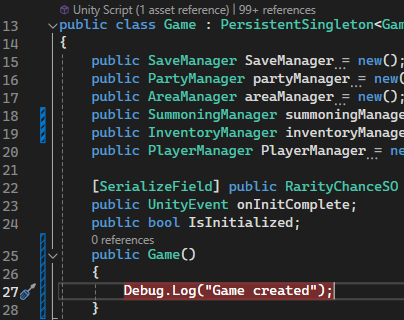

 chilly surge
When you do yield break that essentially means "the next .MoveNext() should return false."
When you do yield return xyz that means "the next .MoveNext() should return true, and then .Current should return xyz."
vestal arch
chilly surge
`IEnumerator` essentially has two things: `.MoveNext()` and `.Current`.
When you...
oh so it is like a generator...
chilly surge
It's exactly like JS generator yeah.
vestal arch
(that's about as much as i know about generators)
vestal arch
simple egret
Unity just hijacks C#'s *iterator methods* feature, which allows you to call a m...
i suppose this was an abstraction then?
simple egret
Yep the IEnumerator method gets expanded into that state machine class with the Current and MoveNext()
mild osprey
rapid stump
```cpp
public void SetDestinationMarker(Vector2 Pos)
{
destinati...
How I would approach this issue is pretty close to what you were doing, there's just a couple other things I would account for. I think you're only going to want to keep track of double clicks that actually happen on the minimap, instead of what appears to be the entire panel. Second, there doesn't seem to be a reliable way of accounting for either camera movement or scale, which I think is the cause of your issue with scaling.
Here's what I would try:
//This should equal the x and y values of the camera's position when the app starts
Vector3 cameraStartPos = new Vector3(Camera.transform.position.x, Camera.transform.position.y, 0);

//Calculate the offset of the camera by finding the difference between the start position and the current position
Vector3 cameraOffset = cameraStartPos - Camera.transform;

//This is just to account for the initial scale of your minimap/camera zoom
float canvasStartScale = (initial size of canvas);

//This finds how zoomed in/out you are relative to the initial zoom
float canvasOffset = (current canvas size) / canvasStartScale

private void OnDoubleClick(PointerEventData eventData)
    {
        //Get the RectTransform of the Minimap instead of the whole map panel
        RectTransform newMapRect = newMap.GetComponent<RectTransform>();
        Vector2 localPoint;
        //Pass in the Minimap as well as variables to accurately find where the marker should be placed
        if (RectTransformUtility.ScreenPointToLocalPointInRectangle(newMapRect, eventData.position, miniMapCamera, out localPoint))
        {
            MapController.instance.SetDestinationMarker((localPoint + cameraOffset) * canvasOffset);
        }
    }
Obviously, this isn't a complete drag and drop solution, but I explain my logic with the comments. If this doesn't work, try replacing "destinationMarker.transform.localPosition = destinationPosition;"
with
destinationMarker.transform.position = destinationPosition;
vestal arch
simple egret
Yep the `IEnumerator` method gets expanded into that state machine class with th...
i mean the calls, you have to call and then use Current/MoveNext with the resulting IEnumerator instance, right?
simple egret
Yep, Unity does that on its own
vestal arch
cool, i was a bit confused from the syntax you used
chilly surge
You don't need to do that either
foreach essentially handles calling MoveNext/Current for you.
vestal arch
right, i mean from manual calls from SPR's snippet
simple egret
Unity gets it when you do StartCoroutine() and pass the coroutine, and it handles the rest
chilly surge
It's just like how for..of loops handles generators in JS.
vestal arch
waxen blade
what method are you doing the Coroutine calls in?
simple egret
But indeed, foreach loops are expanded to a while loop that executes MoveNext(), but you don't see it since it's done at compile time
waxen blade
vestal arch
what method are you doing the Coroutine calls in?
It's in EnemyInfoMenuKeyboard's update method. It's only reached when you press enter on a specific button.
The weird thing is I can trigger the Coroutine easily directly from the MainController with this:
                    LevelController levelController = transform.GetComponent<LevelController>();
                    levelController.StartCoroutine(levelController.StartLevel());
But if I try to grab it the same way from the outside script, I get the null exception:
                            LevelController levelController2 = mainController.GetComponent<LevelController>();
                            levelController2.StartCoroutine(levelController2.StartLevel());
sidenote, for the first snippet you can use GetComponent<T>() directly, you don't have to go through the transform
im not super experienced with unity so this might not be useful, but have you tried logging it out in Start()/Update() and see if it's consistently null?
waxen blade
vestal arch
im not super experienced with unity so this might not be useful, but have you tr...
I put a break point on the call, and it shows that values of that component are populated.
 simple egret
Maybe the exception occurs in StartLevel()? Can you post the full error, it contains a stack trace which indicates where exactly in the code the exception occurred
waxen blade
`levelController.StartCoroutine(levelController.StartLevel());
This line works. I stepped one line at a time, and there's a Coroutine within StartLevel that is causing a null exception. But the exception got reported in the wrong script.
So looks like I was misled, and I misled you guys.
But now I can actually proceed from here. Thanks for your help.
simple egret
waxen blade
`levelController.StartCoroutine(levelController.StartLevel());
This line works....
Unless it's a very specific Unity bug (which isn't the case here), exceptions are never reported in the wrong place.
Perhaps the stack trace had a weird line that looked like this
LevelController.StartLevel()+MoveNext() (at ...LevelController:42)
Which indicates the issue happened in a coroutine, but the file + line number (at the end of the line, here LevelController line 42) should still be correct
(The class name and function name might be even more garbled than this due to how coroutines are made)
waxen blade
simple egret
Unless it's a very specific Unity bug (which isn't the case here), exceptions ar...
So if Coroutine A contains launches Coroutine B, and Coroutine B has a null exception, it should still be reported in Coroutine B? That's what I expected, but it's being reported in Coroutine A. 🤷♂️
simple egret
Yep, you'll have 3+ lines in the stack trace (sample I just made up):
NullReferenceException: yadda yadda
  Sample.CoroutineB()+MoveNext() (at Assets/Scripts/Sample.cs:69) // exception here
  Sample.CoroutineA()+MoveNext() (at Assets/Scripts/Sample.cs:42) // called from there
  MonoBehaviour.StartCoroutine() (at Assets/Scripts/Sample.cs:10) // internal to Unity
  Sample.Start() (at Assets/Scripts/Sample.cs) // Coroutine A started in 'void Start()'
Most recent call first, meaning you read the stack trace top-to-bottom to go from the most precise location to the less precise ones
"exception occurred in coroutine B, on line 69 ; which was called from coroutine A, on line 42 ; which was called from Start, on line 10"
vestal arch
ok so it doesn't work for CustomYieldInstructions
upper pilot
I want to return a number in range based on another range, but with specific rules.
I have a game clock as a float 0f to 24f
When I pass a value 0.3f(not a clock value) I want to change it between 0f and 0.3 based on the time in game clock.
Example: GetValue(0.3f); => If time is 0f then value is 0, if time is 12f then value is 0.3f, if time is 18f then value is 0.15f
So the value will go from 0f to 0.3f then back to 0f based on the time.
0f->12f clock => 0f-0.3f value
12f->24f clock => 0.3f-0f value
My actual use case will be to separate clock into 4 parts, 6 hours each.
Then getting the value based on which time "zone" we are in.
Night, Morning, Afternoon, Evening basically
During Night value will go between 0f and 0.3f, Morning it will be 0f, Afternoon it will be 0f, Evening it will go from 3f to 0f etc.
I probably need a Lerp, but for my use case I might need 2 lerps?
vestal arch
nah just 1 would be enough
could do something like Lerp(min, max, 1 - Abs(time % cyclelength - firstpeak) / cyclelength)
simple egret
The most versatile way to do this would be with an AnimationCurve, on the X axis the clock time (0-24) and on the Y axis the value to output. Then you .Evaluate(clockTime) to get the value.
Especially useful if you want to change the ranges a lot depending on the time frames
upper pilot
It has to work based on various rules I set later.
Its not set in stone to work the way I mentioned earlier
So the 0f to 0.3 might happen in the Morning time for some cases
I guess we would swap 12 with 3
vestal arch
just need 2 variables
simple egret
Hm yep the curve is out, if the ranges are dynamic
upper pilot
So the example above would be: cyclelength = 6f, firstPeak 3f(middle of the cycle?)
simple egret
Well you can emulate that in the code, with a class/struct that stores start+end clock times and start+end values
And have a list of those
vestal arch
upper pilot
So the example above would be: cyclelength = 6f, firstPeak 3f(middle of the cycl...
so would be peak at 3am and back at 0 at 6am
chilly surge
You can always just write a bunch of if (time >=0 && time < 12) return ...
upper pilot
vestal arch
so would be peak at 3am and back at 0 at 6am
Thats exactly what I need, I will test that code and come back
 untold siren
what's the easiest way to do a coroutine where I can interrupt a waitforseconds? would I have to make my own timer with a yield break inside or is there a better method of implementation?
chilly surge
Or pattern matching.
vestal arch
if the cycle always aligns to midnight then the firstpeak would always be half cyclelength so you wouldn't need a separate input for that
upper pilot
chilly surge
You can always just write a bunch of `if (time >=0 && time < 12) return ...`
Thats what I was doing haha, but even with that I needed to get the "peak"(middle point of the cycle)
vestal arch
untold siren
what's the easiest way to do a coroutine where I can interrupt a waitforseconds?...
WaitWhile/WaitUntil exist, you might be able to adapt those to your usecase
if not you'll probably have to make your own CustomYieldInstruction
untold siren
vestal arch
`WaitWhile`/`WaitUntil` exist, you might be able to adapt those to your usecase
oh that's a good shout
chilly surge
Using actual async/await like with UniTask is also an option, if you are going to work with asynchronous code.
untold siren
my idea is
(excuse the rough pseudocode)
IF TIME > 5 seconds AND Condition not met:
  do this function
ELSE OR UNTIL CONDITION MET above
  do another function
use a while loop to make a timer and put bool condition inside to break out loop early to interrupt
untold siren
rigid island
use a while loop to make a timer and put bool condition inside to break out loo...
yeah, that was my initial idea for method of implementation - my brain is fried rn so excuse the dumb question but while inside a coroutine would be the best method right?
rigid island
untold siren
yeah, that was my initial idea for method of implementation - my brain is fried ...
You can do it in update too i suppose
*reg timer not while loop
untold siren
Yeah, had assumed so - I guess the general question was if there was an easier approach when working with coroutines esp since they have yield return new WaitForSeconds()
rigid island
what are you trying to do exactly?
simple egret
There's this, not sure if that works properly, looks a bit convoluted but hey
float start = Time.time;
yield return WaitUntil(() => Time.time - start > 5 || condition);

if (condition)
    // Condition met
else
    // Timer expired
sent early mb give me two secs
upper pilot
vestal arch
nah just 1 would be enough
        float cycleLength = 6f;
        float firstPeak = 3f;
        return Mathf.Lerp(0f, 0.3f, 1 - Mathf.Abs(time % cycleLength - firstPeak) / cycleLength);
Am I using it wrong?
At hour 0 it returns 0.15, at hour 3f it returns 0.3f(peak)
Is there a way to tell it which hour I care about? i.e. 2pm to 6pm?(peak being 4pm) -> 14f, 16f(peak), 18f
Right now it seems to just take % of the full day based onn the cycle length, but it doesnt care if its evening, morning etc
untold siren
        private IEnumerator PistolRelatedDialogue()
        {
            yield return new WaitForSeconds(1.2f);
            ImageTweening.ChangeTextPromptOnly(ref tutorialTextHint, ref InputPromptTexts, 8);
            yield return new WaitForSeconds(1.8f);
            ImageTweening.ChangeTextPromptOnly(ref tutorialTextHint, ref InputPromptTexts, 9);

        }
this is controlling my dialogue in my tutorial once the player collects the pistol - if the player doesn't do what the dialogue is telling them to do so within 10 seconds I want it to change. so was thinking "oh start a timer to determine if the condition has been met yet" - and if the condition isn't met, change the dialogue, if it has been met, then continue
chilly surge
With UniTask, it's trivial to express:
await UniTask.WhenAny(
    UniTask.Delay(5000),
    UniTask.WaitUntil(() => condition)
);
that most likely seems it'd work, I'd give it a try
untold siren
chilly surge
With UniTask, it's trivial to express:
```cs
await UniTask.WhenAny(
UniTask....
I'm not doing any async things in my code however
chilly surge
That doesn't matter, async/await is just a different way to write coroutines, you can convert between the two.
untold siren
oh interesting
mad to think I'm finishing uni for games dev in 2 two weeks and have never been tought async / await features in unity 💀
chilly surge
But it depends on how much asynchronous code you are writing, if you deal with a lot of asynchronous stuffs, coroutines is just a caveman version of async/await.
vestal arch
upper pilot
```csharp
float cycleLength = 6f;
float firstPeak = 3f;
...
i think i wrote it wrong, give me a sec
yeah i think the last cycleLength needs to be firstPeak
vestal arch
vestal arch
if the cycle always aligns to midnight then the `firstpeak` would always be half...
also see this
rigid island
chilly surge
That doesn't matter, async/await is just a different way to write coroutines, yo...
not close.
async code is like a zombie infection
chilly surge
So are coroutines 😄
If you have some piece of code that was previously not a coroutine and now you turn it into a coroutine, you have no way but to change the caller to also be a coroutine. That's no less different from async/await.
upper pilot
vestal arch
i think i wrote it wrong, give me a sec
Thanks, that works!
rigid island
chilly surge
If you have some piece of code that was previously not a coroutine and now you t...
its a bit different cause how StartCoroutine vs Task.Run
chilly surge
But yeah, if you don't write a lot of complex asynchronous logic, coroutines may very well be sufficient even if it's a bit less elegant (eg the question above having you to write out a solution like WaitUntil(() => Time.time - start > 5 || condition) that's difficult to read)
If you deal with lots of asynchronous logic, getting proper async/await makes your life so much easier and code so much more readable.
chilly surge
rigid island
its a bit different cause how StartCoroutine vs Task.Run
How so, can you show an example of "turning non coroutine into coroutine" where the equivalent async/await would have trouble?
vestal arch
chilly surge
If you have some piece of code that was previously not a coroutine and now you t...
if the caller wasn't dependant on the result and just called for side effects, wouldn't you just slap on a StartCoroutine and call it a day
chilly surge
vestal arch
if the caller wasn't dependant on the result and just called for side effects, w...
And you would do the exact same, just StartNewTask() and call it a day.
vestal arch
on that note, out of curiousity, what's the equivalent of yield* for c#
chilly surge
Nothing about the caller has to change in either coroutine or async/await, if you don't care about the result.
vestal arch
yeah, i shouldve inferred that, i just kinda ignored that part of your statement since i didn't want to get into it
rigid island
chilly surge
How so, can you show an example of "turning non coroutine into coroutine" where ...
idk what you mean
i never said it was trouble
chilly surge
rigid island
idk what you mean
Your point about "async/await being infectious," my point is that it's no less infectious than coroutine is.
rigid island
I said async code in general is
cause you have start making almost everything async
chilly surge
rigid island
not close.
async code is like a zombie infection
Then maybe I'm misinterpreting what you are trying to say here then.
rigid island
Unity coroutine is easier to deal with than Tasks inside unity specifically
untold siren
simple egret
There's this, not sure if that works properly, looks a bit convoluted but hey
``...
this worked perfectly, thank you
vestal arch
someone needs to come stand behind me and stop me from doing StopAllCoroutines from inside a coroutine
rigid island
rigid island
Unity coroutine is easier to deal with than Tasks inside unity specifically
I suppose thats why they came up https://docs.unity3d.com/2023.1/Documentation/ScriptReference/Awaitable.html
chilly surge
rigid island
Unity coroutine is easier to deal with than Tasks inside unity specifically
In what way? It's worse in almost all aspects.
vestal arch
vestal arch
someone needs to come stand behind me and stop me from doing `StopAllCoroutines`...
ive done that like 3 times now
rigid island
chilly surge
In what way? It's worse in almost all aspects.
worse in what way?
upper pilot
i think i wrote it wrong, give me a sec
untold siren
        private IEnumerator PistolRelatedDialogue()
        {
            yield return new WaitForSeconds(1.2f);
            ImageTweening.ChangeTextPromptOnly(ref tutorialTextHint, ref InputPromptTexts, 8);
            yield return new WaitForSeconds(1.8f);
            ImageTweening.ChangeTextPromptOnly(ref tutorialTextHint, ref InputPromptTexts, 9);
            var timerStart = Time.time;
            yield return new WaitUntil(() => Time.time - timerStart > 5f || hasFiredPistolYet);
            switch (hasFiredPistolYet)
            {
                case false when !tutorialEnemyDead:
                    ImageTweening.ChangeTextPromptOnly(ref tutorialTextHint, ref InputPromptTexts, 10);
                    break;
                case true when !tutorialEnemyDead:
                    ImageTweening.ChangeTextPromptOnly(ref tutorialTextHint, ref InputPromptTexts, 11);
                    break;
                case true when tutorialEnemyDead:
                    ImageTweening.ChangeTextPromptOnly(ref tutorialTextHint, ref InputPromptTexts, 12);
                    break;
            }

        }
bit messy with the switch statement but it works 
chilly surge
Just coroutines not being able to return value alone makes them incredibly annoying to pass results amongst themselves.
rigid island
True but hey gotta have trade offs somewhere ig
Awaitable class makes things with async more pleasurable in unity
simple egret
untold siren
```cs
private IEnumerator PistolRelatedDialogue()
{
...
Heh, something really pretty would be to make ChangeTextPromptOnly return a new WaitForSeconds() that waits for the amount of time needed for the dialogue to appear, so you'd do
yield return ImageTweening.ChangeTextPromptOnly(stuff1);
yield return ImageTweening.ChangeTextPromptOnly(stuff2);
And it waits the perfect amount of time, no more magic numbers
But that's for another time. In order: make it work, make it pretty, make it fast
untold siren
simple egret
Heh, something really pretty would be to make `ChangeTextPromptOnly` return a `n...
I'll see if that's doable since that's a static function using LeanTween
simple egret
Ahh I see
chilly surge
rigid island
Awaitable class makes things with async more pleasurable in unity
It's a lot about how much asynchronous code you are writing and how complex the logic is, coroutines are adequate for simple stuffs but anything above will make your life miserable.
rigid island
well for one Coroutines can work with Timescale but Task.delay for example cannot
simple egret
Multiply delay with time scale!
rigid island
but again the Awaitable class finally added these to async
also things like Fixed time
chilly surge
Even in that solution:
float start = Time.time;
yield return WaitUntil(() => Time.time - start > 5 || condition);
If you take a closer look you will see that:
- You have essentially reinvented
WaitForSecondsin the form of keeping a starting time and checking if the time has past. - You have essentially reinvented
Task.WhenAnyin the form of using||to check if either task has completed.
untold siren
async propaganda /s
rigid island
simple egret
Multiply delay with time scale!
haha
don't tasks keep running if object is destroyed? (unlike coroutines)
major reason i never used async on gameobjects like that
latent latch
I still dont understand using WaitForSeconds with coroutine over game time
frame time for that matter
chilly surge
rigid island
haha
don't tasks keep running if object is destroyed? (unlike coroutines)
major...
You can use a cancellation token to tell the task to stop if that's what you want.
But coroutines have the opposite problem: you have no way to tell it to keep going even if the GO is destroyed.
rigid island
chilly surge
You can use a cancellation token to tell the task to stop if that's what you wan...
yes but its messy
simple egret
Nowadays MonoBehaviour exposes a cancellation token that gets cancelled when the object is destroyed. You do have to check for cancellation yourself though
untold siren
to think a simple question about coroutines would cause a debate between coroutines vs async / await tasks 💀
latent latch
coroutines seem better on manager type systems where the GO isnt destroyed
untold siren
tbh
chilly surge
You have the choice to ignore cancellation or not ignore it, unlike coroutines where you don't have a choice, it will always cancel when GO is destroyed and you have to work around that.
untold siren
I use coroutines because they're easier to understand
rigid island
chilly surge
How is that messy?
for simple things objects is overkill
chilly surge
Sure, and that's why I said coroutines are fine for simple stuffs.
 swift falcon
Hi there, would anyone be able to tell me what the problem is here and how to fix it?
 latent latch
if I use coroutines it's usually for stuff like menu transitioning, but for like large amounts of them I'm usually just iterating over hashsets or sorted queues and executing logic independently for each
rigid island
swift falcon
Hi there, would anyone be able to tell me what the problem is here and how to fi...
its confused on which Debug class you want
remove the System using
untold siren
swift falcon
Hi there, would anyone be able to tell me what the problem is here and how to fi...
at the top of the script remove the using system.diagnostics.debug one