#archived-code-general
1 messages · Page 286 of 1
 willow hull
 heady iris
so you can just do "foo\nbar"
heady iris
willow hull
https://gdl.space/urilasosov.cpp
You need to mark all of these classes as [System.Serializable]
Not just CharacterDataArray
willow hull
heady iris
You need to mark all of these classes as `[System.Serializable]`
oh dam ya right, thank you very much
 worthy willow
heady iris
so you can just do `"foo\nbar"`
worthy willow
heady iris
so you can just do `"foo\nbar"`
That does work with normal text, but I have a ToString() function that is being used. How can I implement "\n" with the function?

 leaden ice
worthy willow
That does work with normal text, but I have a ToString() function that is being ...
leaden ice
worthy willow
That does work with normal text, but I have a ToString() function that is being ...
\n not /n
 simple egret
Backslash
worthy willow
oh
simple egret
You wrote it correctly in Discord. When it's done right, the two characters will become yellow in the string
leaden ice
worthy willow
That does work with normal text, but I have a ToString() function that is being ...
anyway you should do something more like:
PointsGained.text = $"{PlayerPointAdd}\nSurvivors Bonus {browniepoints}";``` rocky jackal
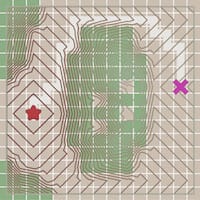
@heady iris could you maybe help me figure out why i dont get diagonal edges for the directions like img1 but instead i get edges like img2 where the edges between my flows are straight ? that image is a bit older and has a few mistakes in it but ive fixed them it currently looks more like img3 but thats just really bad to read


 leaden ice
rocky jackal
<@118467312197042182> could you maybe help me figure out why i dont get diagonal...
leaden ice
rocky jackal
<@118467312197042182> could you maybe help me figure out why i dont get diagonal...
You are only considering cardinal directions as neighbors in your code
            neighbors.Add(current + new Vector2(0, 1));
            neighbors.Add(current + new Vector2(1, 0));
            neighbors.Add(current + new Vector2(0, -1));
neighbors.Add(current + new Vector2(-1, 0));```No diagonals
Add diagonals here if you want to consider diagonals
rocky jackal
leaden ice
You are only considering cardinal directions as neighbors in your code
but thats how they did it right here and they got diagonal edge flow https://www.redblobgames.com/pathfinding/a-star/introduction.html
Interactive tutorial for A*, Dijkstra's Algorithm, and other pathfinding algorithms
 rocky jackal
 rocky jackal
that are zog zags but i dont have zig zags i have this
 leaden ice
I don't know what that's a picture of
rocky jackal
i dont have arrows i have colors so i can see what im doing
leaden ice
I don't understand your colors
or what they mean
or what I'm looking at
Also note that when dealing with manhattan distance, a zigzag is just a fast/slow as an "L" shaped path
rocky jackal
each collor corresponds to a direction
leaden ice
the zigzag would happen only with an as-the-crow-flies heuristic function
rocky jackal
leaden ice
Also note that when dealing with manhattan distance, a zigzag is just a fast/slo...
but i dont want a 90° angle in my roads
rocky jackal
leaden ice
the zigzag would happen only with an as-the-crow-flies heuristic function
i cant find anything about a "as-the-crow-flies" function
leaden ice
Where's your heuristic function?
leaden ice
rocky jackal
i cant find anything about a "as-the-crow-flies" function
it's just the regular distance function
rocky jackal
leaden ice
Where's your heuristic function?
i dont use that
leaden ice
Then don't complain that you don't get nice results
A* requires a heuristic to function nicely
rocky jackal
im using Breadth First Search and thats supposed to give zig zags too according to this page https://www.redblobgames.com/pathfinding/a-star/introduction.html
Interactive tutorial for A*, Dijkstra's Algorithm, and other pathfinding algorithms
rocky jackal
leaden ice
A* _requires_ a heuristic to function nicely
im not using a*
leaden ice
BFS isn't going to prefer a zigzag to straight lines
it will give equal weight to both
and since you're always checking "up" before "right" or left or whatever, it's going to just pick the first one that works
leaden ice
rocky jackal
im not using a*
You can see in the red blob games source code they did a little hack to get the "stairstepping" behavior. It doesn't come naturally

without this hack you will get straight lines not a zigzag
(yes I looked at the web page source to find this)
rocky jackal
omg, thank you. how do i recreate this ? what do they mean with flip every other tiles edge ?
 neon nymph
Finally created gravity and jumping and learned Raystack
The Code:
using System.Collections.Generic;
using UnityEditor.Rendering;
using UnityEngine;
using static UnityEngine.Rendering.DebugUI.Table;
public class NewBehaviourScript : MonoBehaviour
{
    public CharacterController controller;
    public float gravity = -9.81f; // Gravity value, adjust as needed
    public float jumpHeight = 3f; // Jump height, adjust as needed
    public float speed = 12f; // Movement speed, adjust as needed

    private Vector3 velocity;
    public bool isGrounded;
    public float isGroundedCheckDistance;
    private float isGroundedExtraCheckDistance = 0.1f;
    public CapsuleCollider CapsuleCollider;
    void FixedUpdate()
    {
        float x = Input.GetAxis("Horizontal");
        float z = Input.GetAxis("Vertical");
        float jumpInput = Input.GetAxis("Jump");
        isGroundedCheckDistance = CapsuleCollider.height / 2 + isGroundedExtraCheckDistance;
        RaycastHit Hit;
        if (Physics.Raycast(transform.position, -Vector3.up, out Hit, isGroundedCheckDistance))
        { //if the ray hit
            if (Hit.collider.gameObject.tag == "Ground")
            {
                isGrounded = true;
            }
            else
            {
                isGrounded = false;
            }
        }
        else
        { //if the ray didn't hit
            isGrounded = false;
        }
        // Check if the player is grounded

        // Movement
        Vector3 move = transform.right * x + transform.forward * z;
        controller.Move(move * speed * Time.deltaTime);
        // Apply gravity
        if (isGrounded && velocity.y < 0)
        {
            velocity.y = 0f;
        }
        velocity.y += gravity * Time.deltaTime;
        controller.Move(velocity * Time.deltaTime);

        // Jumping
        if (isGrounded && jumpInput > 0)
        {
            velocity.y = Mathf.Sqrt(jumpHeight * -2f * gravity);
        }
    }
}```The simplest equivalent for you would be like:
            neighbors.Add(current + new Vector2(0, 1));
            neighbors.Add(current + new Vector2(1, 0));
            neighbors.Add(current + new Vector2(0, -1));
            neighbors.Add(current + new Vector2(-1, 0));
if ((current.x + current.y) % 2 == 0) neighbors.Reverse();``` @rocky jackalso it basically just switches arorund the direction in wich it checks for neighbours ?
neon nymph
The result:
 cobalt gyro
anyone know any good resources on how to accomodate for the differences between phone screens
 weary swift
Yo ! Let's say I want to know if two floats are approximately equals, but with a threshold of three digits after the comma. Can you give me the function or at least ideas on how to do that effectively. Examples : Approximately(123.123456f, 123.123856f) == true
Approximately(123.122456f, 123.123856f) == false
I tried this but i'm not sure if it the best way. (or even if it is accurate)
return Mathf.Abs(b - a) <= 0.001f;
cobalt gyro
multipy by 3, round both numbers then divide them by 3
weary swift
cobalt gyro
multipy by 3, round both numbers then divide them by 3
Can you explain to me how this works please ?
leaden ice
weary swift
Yo ! Let's say I want to know if two floats are approximately equals, but with a...
bool same = Mathf.Abs(a - b) < 0.001f; note that floating point numbers are represented in binary, not decimal, so this is going to be subject to floating point precision error
cobalt gyro
weary swift
Can you explain to me how this works please ?
not by three, 100
leaden ice
GigaElmo is suggesting rounding the numbers to the nearest 1/1000th, then comparing
Which means though that 1.0001 and 1.0009 will not be considered the same
even though they're the same to three digits
weary swift
cobalt gyro
not by three, 100
So if I understand.
123.123456f * 1000 -> 123123.456f
123.123856f * 1000 -> 123123.856f
Rounded :
123123.456f -> 123123f
123123.856f -> 123123f
This means they are "equals" right ?
cobalt gyro
guess that works too
weary swift
leaden ice
Which means though that 1.0001 and 1.0009 will not be considered the same
Why ?
weary swift
cobalt gyro
guess that works too
That wasn't what you said ?
cobalt gyro
bool Approximate(float a, float b)
{
    float _a = a * 100;
    float _b = b * 100;

    _a = Mathf.Round(_a);
    _b = Mathf.Round(_b);

    _a /= 100;
    _b /= 100;

    return _a == _b;
}```1.0001 will round to 1.000, 1.0009 will round to 1.001
weary swift
Ah ok
cobalt gyro
weary swift
That wasn't what you said ?
i was thinking something more like shown above but i guess your solution works too
leaden ice
but they are 0.0008 apart
which is less than 1/1000th apart
So i don't like the rounding solution
distance solution seems better IMO
weary swift
leaden ice
distance solution seems better IMO
What is distance solution ? The GigaElmo proposition ?
leaden ice
the original Mathf.Abs(b - a) <= 0.001f;
weary swift
Oh no, he is using round so I guess not
weary swift
leaden ice
1.0001 will round to 1.000, 1.0009 will round to 1.001
But if I round the numbers up then it will work right ?
1.1 -> 2, 1.8 -> 2
leaden ice
It really depends what you're after
weary swift
more like 1.1234 -> 1.124 and 1.1238 -> 1.124
leaden ice
that would be using the Ceil function
cobalt gyro
leaden ice
1.0001 will round to 1.000, 1.0009 will round to 1.001
then just use Mathf.Floor(float a)
weary swift
cobalt gyro
then just use ``Mathf.Floor(float a)``
I guess ceil is the exact opposite right ?
cobalt gyro
weary swift
I guess ceil is the exact opposite right ?
yes
leaden ice
again it depends what you're after. Are you looking for:
These numbers are less than 1/1000th apart
Or are you lokoing for:
These numbers are in the same 1/1000th sized bucket
weary swift
leaden ice
It really depends what you're after
Just comparing two values that are the same at least until third digits
leaden ice
If it's the former - use distance.
The latter, use Ceil or Floor
cobalt gyro
 bool Approximate(float a, float b, int decimalPlaces)
 {
     float _a = a * Mathf.Pow(10, decimalPlaces);
     float _b = b * Mathf.Pow(10, decimalPlaces);

     _a = Mathf.Floor(_a);
     _b = Mathf.Floor(_b);

     _a /= Mathf.Pow(10, -decimalPlaces);
     _b /= Mathf.Pow(10, -decimalPlaces);

     return _a == _b;
}```What I want is to say 123.123 == 123.124
weary swift
(I changed from one less digit)
leaden ice
just do the rounding solution but replace Round with Floor
weary swift
leaden ice
well those are only the same to 2 decimals
Yes I changed, but it's the same idea
weary swift
leaden ice
just do the rounding solution but replace Round with Floor
Perfect ! Thanks you very much !
Just to understand, the distance solution was to know if the two numbers are close to 1/1000th and my solution is to know if the numbers are less than 1/1000th right ?
leaden ice
no
weary swift
Should I forget what you just said x) ?
leaden ice
it's the difference between measuring the distance between the numbers and checking which bucket the numbers are in
cobalt gyro
also use *= not /= in the example i showed
leaden ice
two numbers in the same bucket will always be less than that distance apart, but two numbers that are less than the distance apart may be in different buckets
for example 1.212 and 1.209 are less than .01 apart
but they are in different buckets
weary swift
cobalt gyro
also use *= not /= in the example i showed
I'm not gonna copy your answer I'm gonna adapt it for my needs but thanks !
weary swift
leaden ice
but they are in different buckets
I guess that's the term "bucket" that I don't understand. Bucket in this case means what ?
leaden ice
weary swift
I guess that's the term "bucket" that I don't understand. Bucket in this case me...
all the numbers between 1.00 and 1.0999999999 repeating
weary swift
1.21 and 1.23 same bucket
1.21 and 1.11 not the same bucket
leaden ice
is one bucket
then [1.01, 1.02) is the next bucket
then [1.02, 1.03) is the next bucket
make sense?
heady iris
the important thing is that two numbers can be extremely close, but go into two different buckets
This has some important implications
If A and B are in the same bucket, and B and C are in the same bucket, then A and C are in the same bucket
weary swift
Like 1.0999999 and 1.1
leaden ice
exactly
heady iris
heady iris
If A and B are in the same bucket, and B and C are in the same bucket, then A an...
This isn't the case if you go by distance
weary swift
Yes I understand then, thanks !
heady iris
If A and B are similar, and B and C are similar, A and C might not be similar
weary swift
A = 1.19, B = 1.2 and C = 1.29 ?
A and B same bucket, B and C same, but A and C no ?
leaden ice
assuming your buckets are 0.01 in size, A and B are in different buckets, and C is in the same bucket as B
 weary sapphire
Ok, I'm still stumped. What is the W value in a quaternion?
leaden ice
weary sapphire
Ok, I'm still stumped. What is the W value in a quaternion?
If you're asking that, it means you think you know what xyz are and you don't
weary sapphire
leaden ice
If you're asking that, it means you think you know what xyz are and you don't
Do you realise how unhelpful that is?
leaden ice
weary sapphire
Do you realise how unhelpful that is?
It's somewhat helpful
because it should make you realize you know less about them than you thought
if you thought xyz were angles around those axes or something
weary sapphire
All its helped with is making me feel somewhat stupid mate, thanks
leaden ice
weary sapphire
All its helped with is making me feel somewhat stupid mate, thanks
You're welcome. If you want to really know how the math works, watch this https://www.youtube.com/watch?v=zjMuIxRvygQ
but I can tell you it's completely unecessary
you do NOT need to know how the math behind Quaternions work to use them in Unity
weary swift
!code
 tawny elkBOT

Posting code
📃 Large Code Blocks
Use links to services like:
https://gdl.space/, https://paste.ofcode.org/, https://hatebin.com/, https://paste.myst.rs/, https://hastebin.com/
📃 Inline Code
Surround code with three backquotes. Not quotation marks.
To format as C#, add cs to the first line:
```cs
// Your code here
```
Add a comment with a line number if there is an error message.
leaden ice
I don't know (I knew once, but the knowledge is useless so it is gone), but I use quaternions all the time. All you need to know is that they are variables that represent a rotation from the identity, to familiarize yourself with the API https://docs.unity3d.com/ScriptReference/Quaternion.html and that * can be used to compose them
weary sapphire
leaden ice
I don't know (I knew once, but the knowledge is useless so it is gone), but I us...
If you've just turned around and said that you don't know yourself, don't judge me for not knowing mate.
leaden ice
weary sapphire
If you've just turned around and said that you don't know yourself, don't judge ...
I'm not judging anyone
I'm helping you along the same knowledge journey I went through
If your goal is to understand the math, I sent a helpful video.
If your goal is to understand how to USE them in Unity, I'm helpfully explaining not to waste your time and brainpower learning the math
 dense tusk
weary sapphire
If you've just turned around and said that you don't know yourself, don't judge ...
dense tusk
weary sapphire
If you've just turned around and said that you don't know yourself, don't judge ...
you could try asking chat gpt for an explanation on a topic like that
i use chat gpt all the time when i don’t understand a certain concept and a google search won’t cut it
weary swift
🦁
heady iris
weary sapphire
If you've just turned around and said that you don't know yourself, don't judge ...
the point is that you do not need to grok how quaternion math works to use Unity's Quaternion class
Quaternions are an extension of the complex numbers, much like how complex numbers are an extension of the reals
A quaternion is made up of four real numbers, and has the form a + bi + cj + dk
or, using Unity's names, x + yi + zj + wk
XYZ are the common names for the first three numbers in a vector
W is used for the fourth because you run out of letters
hence XYZW
Without a decent understanding of how the quaternion group works, you cannot do anything meaningful with the quaternion's four values
I do not have a decent understanding of the quaternion group.
 latent latch
yeah, you can treat W like a buffer because you need more room to work with
latent latch
similar to how you want to rotate on the z axis in 2D, but in 2D you've only got two axis so that's one way to think of it
latent latch
leaden ice
You're welcome. If you want to really know how the math works, watch this https:...
pretty cool video, ill probably watch it when I get home
heady iris
Unity really should've just called it Rotation
and given it a method called ExposeQuaternion or something
it's way too easy to think that rotation.x is the euler X angle
latent latch
Just stick to Quaternion.AngleAxis, rotate around world axis, and stick to xyz ordering (z into y into x)
never worry about gimbal again
 hard viper
let’s say I have a ruletile on a tilemap. I now want to set that exact same sprite onto a different tilemap (without refreshing, so it does not check again what its neighbors are). Is there a way to do that?
(does my question make sense?)
 dusk apex
You want to change the tile map without allowing it to update?
ie dirty etc but not relative to visuals
hard viper
kind of. Tilemap A has ruletile B that (based on the rules), shows sprite C. I have tilemap D, and I want to put sprite C onto it.
Because ruletile B has special logic to check specifically tilemap A (and other specific tilemaps), so if it tries to refresh, it will be wrong when it is on map D
i need to not even refresh. Just make a copy of what it currently looks like, and don’t change it
dusk apex
Sounds hacky 
heady iris
a snapshot, essentially
 austere bolt
ArgumentNullException: Value cannot be null.
Parameter name: path2 anyone know why?
 heady iris
well, saveFileName is probably null
have you checked the values of it and saveDataDirectoryPath?
hard viper
where you select a region on a tilemap, select some stuff, it gets copied to a preview tilemap, which is on an object that gets dragged around
dusk apex
austere bolt
ArgumentNullException: Value cannot be null.
Parameter name: path2 anyone know w...
Make it not null or determine why it thinks it's null?
austere bolt
i set savefilename to character still had the same issue
heady iris
prove that both of those variables are non-null by logging them
hard viper
use debugger and set breakpoint to see the contents
just see wtf those variables are set to
heady iris
hard viper
let’s say I have a ruletile on a tilemap. I now want to set that exact same spri...
It looks like you can ask which sprite is on a tilemap at a certain position.
heady iris
you'll need a tile for each sprite, I guess
hard viper

that is a fuckload of tiles
can I maybe instance it during runtime?
man, am I going to need to make 2,000 asset files for just this little feature?
heady iris
a tile is just a scriptable object
I bet you can just create instances at runtime and hold them in a Dictionary<Sprite, Tile>
hard viper
that is what I am thinking, but that seems even more hacky
if I instance an SO in editor play mode, does it permanently keep the file?
hard viper
thank god
hard viper
so I just need to do new Tile(…)?
heady iris
no, use CreateInstance
that was misleading; CreateInstance has nothing to do with actually creating the asset (:
heady iris
Correct.
It creates a new instance of the scriptable object type
var set = CreateInstance<IconSet>();
AssetDatabase.CreateAsset(set, BASE_PATH + "/" + setName + "/" + key + ".asset");
the second line actually creates an asset
hard viper
ok, i got you
does this mean I can make Non-SO asset files to make instances as files?
heady iris
I don't know what you mean by "non-SO asset files"
 dense estuary
Is there a version of Vector3.Angle that produces a value between 0 and 360 instead of 0 to 180?
heady iris
there's Vector3.SignedAngle
it gives you an angle between -180 and 180
it takes an extra argument to define the axis of rotation
hard viper
heady iris
I don't know what you mean by "non-SO asset files"
w/e, doesn’t really matter.
hard viper
So this would be good?

 wary coyote
design pattern question
My game is networked multiplayer. Sometimes I need to figuratively slap everyone's hands away from their controls and take total control of the program to make fixes or do whatever. I need a way to shut down all interactivity from the clients, without disconnecting them, as well as I need to potentially interrupt anything they might be doing at the time, and do all of this without fucking up anything or causing null references or making orphaned instantiated objects or any other problem.
Lets call this concept the GM Override.
I am not sure how to achieve this since it sounds like having every single function in the program constantly checking 'If total override != true' which won't be feasible, and would further need even more code to allow the figurative super user to take control and not get stopped themselves by the lockdown they initiated.
How do I correctly put this design to code? Whats a better design? Is this even what I want to do?
I am not worried about the actual fixes and changes being performed, I am only worried about how do I cleanly turn off everyone's hands without turning my own hands off, and passing around / referencing this override state without it becoming a bloated mess nightmare of checks on override state
 dapper schooner
Anyone have an IAP for WebGL they would recommend? '
latent latch
wary coyote
design pattern question <:UnityChanThink:885169594560544800>
My game is networ...
Well, apply it to how ownership is being checked, and apply additional comparison logic to that. Even if they are the owner, if input isn't being accepted, then deny that request. Interrupting something already issued by the server would have to be handled independently like a pathfinding module though.
I'd probably go with an observer pattern then if there are similar type modules where you do need to halt a player's action.
wary coyote
latent latch
I'd probably go with an observer pattern then if there are similar type modules ...
Alright Ill look into that approach
latent latch
Im thinking of terms like a MMORPG where there is some escape method to every action, so ideally you'd have some IInterupt that implements and handles how a module is halted.
 silver lava
yo do you guys think it would be possible to take a screenshot of what the player is looking at when a certain key is released then apply that screenshot as a texture on to a wall?
im trying to attempt to recreate catacombs of solaris and i think that would be a decent starting point
 cosmic rain
silver lava
yo do you guys think it would be possible to take a screenshot of what the playe...
cosmic rain
silver lava
yo do you guys think it would be possible to take a screenshot of what the playe...
Yes. Render the camera view to a render texture and use it on whatever you want.
silver lava
cosmic rain
Yes. Render the camera view to a render texture and use it on whatever you want.
Do you think I'm going along the right tracks for something like this?
cosmic rain
Probably. Never heard of that game.
silver lava
Alright, it's an odd one
 barren flicker
Hello, I am generating a noise grid with compute shaders for later applying marching cubes over it. I have an algorithm for modifying the noise so it generates caves and a crust (im generating spherical worlds). I've divided the shader in 3 parts:
if the position is smaller than cave radius, generate cave
else if the position is smaller than the inside of the crust, generate inside crust
else if the position is smaller than the outside crust, generate outside crust
If i run with one of the if statements commented, it generates everything perfectly, but the second i uncomment it, it generates very weird things
It doesnt matter what "if" I comment, that it runs fine
 mental rover
barren flicker
Hello, I am generating a noise grid with compute shaders for later applying marc...
mental rover
barren flicker
Hello, I am generating a noise grid with compute shaders for later applying marc...
you may want to share your code & be a bit more specific about what "generates very weird things" means
barren flicker
okay, give me a sec
This is what normal would look like, with the 2 first "if"s working and the 3rd one responsible for the outer side of the crust commented

this is with the inside crust and the outside crust only (also "normal")

And this is "weird": triangles disappear

The only thing that has changed through the 3 executions is the noise generating file
mental rover
it's not really clear to me what's happening here - I'd guess when doing every layer there's a non-smooth boundary being generated in the noise map that the marching cubes implementation is failing on
 lean sail
I have effects in my game which are like "When X happens, do Y" made using scriptable objects. I realize I want to delay some effects because of cases like "When taking damage, reflect damage back to the attacker". If both characters have this effect, itll cause an infinite chain but at least with a delay it wont freeze the game. I was thinking the following:
All characters in my game have a Character script, I could run a coroutine on there but i worry about edge cases like a character being destroyed and the coroutine stopping. Or anything else i am unaware about
I could create a new gameobject which has a script I run the coroutine on, which sounds like a little more work but could be worth it.
Any thoughts on what I should do?
 calm talon
how do I change the vertices of a sprite shape via code? I am trying to align the vertices/control points of a sprite shape to the vertices of a composite collider 2D
 fiery gate
how do i get my intellisense working
 soft shard
lean sail
I have effects in my game which are like "When X happens, do Y" made using scrip...
soft shard
lean sail
I have effects in my game which are like "When X happens, do Y" made using scrip...
Maybe you could setup a "effects manager" (could be a service or a monobehaviour that starts with your scene or something similar), you could run the coroutine on that or use something like a Task to not have to rely on the life cycle of that mono behaviour, though in a case like that where you can have a back-and-forth reaction, I would maybe put in some kind of stoppage, like "isAffected" that can only be triggered once, or if you actually want the back and forth as part of your games design, maybe limit it to something like 5 times, and use a counter to keep track of how many times its been applied to that character or you could treat it like a "spell" system where it can "stack" up to a certain number of times before just capping, like MMO's do when the same ability is applied on the same target more than x times
latent latch
My system prevents exponential effects from happening such that only primary abilities can apply secondary abilities.
lean sail
soft shard
Maybe you could setup a "effects manager" (could be a service or a monobehaviour...
yea i plan on not having damage reflect if it was reflected damage the character was hit by, but there are likely other cases I will run into like "heal extra hp when healed". I am more so just trying to prevent myself from running into an infinite unstoppable chain that will require me to close my unity.
I do have a singleton object pool, which manages a dictionary of pools. i could use it to spawn objects but im unsure if im even gonna stay with a singular pool manager like this. Its scary to think about how Ill need to ensure each prefab is registered and how Ill handle transferring them between scenes. I think ill just try it anyways for now
latent latch
Could do like a flag for these effects such that they are reactive, and reactive effects can't trigger other reactive effects
lean sail
Ill end up doing something to fix that overall, but thinking about it ill need delays anyways. Spawning objects will help me have models as well with it i guess
thanks for the inputs
 faint hornet
Anyone have a solution to connect a ToggleGroup to a set of buttons ( next, previous) ?
I tried using a custom script extending the toggle group to make my own functions to find the currently selected toggle and then to select next/prev depending on button clicked. no luck.
 latent latch
button clicked => if toggle true go next, else go previous
faint hornet
latent latch
button clicked => if toggle true go next, else go previous
go next is not a function
faint hornet
latent latch
button clicked => if toggle true go next, else go previous
i know how to connect the logic. im missing the logic
latent latch
https://docs.unity3d.com/2018.3/Documentation/ScriptReference/UI.ToggleGroup.html
"When using a group reference the group from a Toggle. Only one member of a group can be active at a time."

https://docs.unity3d.com/2018.3/Documentation/ScriptReference/UI.ToggleGroup.ActiveToggles.html
returns IEnumerable, so my solution would be when you click the button, get the active toggle and do your comparison from the active toggle and then do your logic
 oblique nexus
I came up with the perfect null check.
What do you guys think?
using Unity.VisualScripting;

    public static bool IsNull<T>(T _var)
    {
        var v = _var;
        return v == null || v.ToSafeString() == "(Destroyed)";
    }
 quartz folio
Truly awful to rely on a terrible extension method in a visual scripting package, and to constantly allocate strings and compare them to test for null
 tall salmon
does someone have a link to a video explaining how lists work? it would be very usefull since i cant seem to find a good one
cosmic rain
tall salmon
does someone have a link to a video explaining how lists work? it would be very ...
Maybe have a look at the Microsoft C# manual.
tall salmon
the words there confuse me quite a bit
 rigid island
tall salmon
does someone have a link to a video explaining how lists work? it would be very ...
rigid island
tall salmon
does someone have a link to a video explaining how lists work? it would be very ...
 chilly surge
What about lists that you want to understand? It's kind of a foundational building block and it really doesn't do all that much.
tall salmon
i want to know how to create them and use them in general
cosmic rain
tall salmon
the words there confuse me quite a bit
Then research the confusing words. They are probably important to understand.
chilly surge
Eh I was about to post https://learn.microsoft.com/en-us/dotnet/csharp/tour-of-csharp/tutorials/arrays-and-collections but that uses collection expression which isn't available in Unity because of the C# version.
tall salmon
i want to make an enemy spawner that for example has 10 coins and can spawn certain amount of enemies depending on the price, for then putting the enemies on a list and spawning them
maybe im focusing it wrong and that isnt used for what im trying to do
rigid island
break down the problem into smaller more manageable ones
tall salmon
i somehow did a base for what i want to do as a whole
this is kinda all the steps involved into what i want to do (ignore that its in spanish)

and in selecting the amount of enemies i had the idea to do a list for it
maybe it doesnt make sense
tall salmon
rigid island
break down the problem into smaller more manageable ones
navarone srry for the ping but in case you could help me it would be great

is there any efficient way to assign each number to one game object?
or do i need to write this for each number:
if (choosedSpawner == xnumber)
{
(some random code that makes it select x spawner)
}
 olive drift
tall salmon
is there any efficient way to assign each number to one game object?
olive drift
tall salmon
is there any efficient way to assign each number to one game object?
Could you tell me in detail?
tall salmon
sure
mental rover
tall salmon
is there any efficient way to assign each number to one game object?
use an array
tall salmon
lemme think how to explain it all in a compressed way
tall salmon
mental rover
use an array
idk what that is
so i basically want to make a wave spawner that spawns random amounts of enemies at random positions
i have 4 selected positions
upper lower left right
and once choosed spawner selects a number i want to tell that the enemies should spawn in certain spawner
i could write a lot of ifs statements that would make it happen (or atleast so i think) but i wanted to see if there is a more efficient way of doing this
olive drift
tall salmon
i could write a lot of ifs statements that would make it happen (or atleast so i...
What do you use if staements for?
tall salmon
i would make the if statement be
if( choosedSpawner == xnumber)
and then write a code that would use the transform position of the corresponding spawner asigned to that xnumber
idk if im explaining myself
in case im not tell me and ill try to figure out how to explain in it other way
 fervent furnace
Use “xnumber” as index to access array element
And code beginner problem
olive drift
So do you mean when first wave?
if( choosedSpawner == 1)
tall salmon
fervent furnace
Use “xnumber” as index to access array element
And code beginner problem
what is index and array element?
fervent furnace

Store multiple variables of the same type in an array data structure in C#. Declare an array by specifying a type or specify Object to store any type.
tall salmon
ty!
tall salmon
olive drift
So do you mean when first wave?
if( choosedSpawner == 1)
i forgot to answer to this
i guess something like that
since its a kind of open answer it can point towards lot of situations
but yeah i think we mean the same
cosmic rain
tall salmon
i could write a lot of ifs statements that would make it happen (or atleast so i...
Then write it as you can and share the code. We might be able to direct you to a proper way of refactoring it.
tall salmon
cosmic rain
Then write it as you can and share the code. We might be able to direct you to a...
alright ill try, but idk how much time i will take for it
oh you are the slimeascend creator
i played your game 2 days ago i think
cosmic rain
We can wait. Take your time.
tall salmon
it was good!
faint hornet
can anyone tell me why this code isn't working? I used StartCoroutine correctly. becasue the rect transform moves after 2 seconds but it's instantaneous. the duration is set to 5 seconds. PLUS, its not even moving to the correct localPosition. it's like way off
I have used Coroutines so many times and i've never had this issue... Am i tired, or wtf.
IEnumerator Move(Vector3 start, Vector3 end)
  {
    yield return new WaitForSeconds(2);

    float elap = 0f;
    movable.localPosition = start;
    while (elap < 1f)
    {
      elap += Time.deltaTime / moveAnimation.duration;
      elap = Mathf.Clamp(elap, 0f, 1f);
      float eval = moveAnimation.animationCurve.Evaluate(elap);

      movable.localPosition = Vector3.LerpUnclamped(start, end, eval);
      if (elap >= 1f)
      {
        movable.localPosition = end;
        break;
      }
      yield return null;
    }
}```Debug.🤷♂️
faint hornet
cosmic rain
Debug.🤷♂️
i think unity is totally bugged right now wtf... its not moving correctly but the positions still have an offset.. i didn't change any code. idk how to debug this. it makes no sence
cosmic rain
The way you debug is always the same: debug logs and breakpoints.
faint hornet
I already know whats happening at runtime. what i don't understand is why is it converting my local position to a world position, even though i have it set to local position @cosmic rain
cosmic rain
faint hornet
I already know whats happening at runtime. what i don't understand is why is it ...
Are you sure you're passing in a local position?
faint hornet
cosmic rain
Are you sure you're passing in a local position?
I'm setting the position in the inspector as a vector 3. does that not work?
cosmic rain
It does if you're setting the correct value.
Where are you calling the coroutine. Share more of the relevant code.
faint hornet
this is the position it ends up in at the end of the animation.. but you can see the vector 3's at the bottom, the start position, then the end position. it's not even close
 cosmic rain
Rect position != Local position.
It's relative to the anchors.
You're looking at the wrong thing
faint hornet
cosmic rain
You're looking at the wrong thing
what? iv'e always done it this way and it works ecept now? what do you mean
 lunar dirge
I've been working on a tower defense game where there are plots and using the OnMouseDown function you can place a canon.
The problem is to delete a canon you also use the same function and it only deletes the canon 1/5 times.
faint hornet
@cosmic rain
so yeah this is now working
IEnumerator Move(Vector3 start, Vector3 end)
  {

    float elap = 0f;
    movable.anchoredPosition = start;
    Debug.Log(start);
    while (elap < 1f)
    {
      elap += Time.deltaTime / moveAnimation.duration;
      elap = Mathf.Clamp(elap, 0f, 1f);
      float eval = moveAnimation.animationCurve.Evaluate(elap);

      float y = Mathf.LerpUnclamped(start.y, end.y, eval);
      movable.anchoredPosition = new Vector3(0, y, 0);
      if (elap >= 1f)
      {
        movable.anchoredPosition = end;
        break;
      }
      yield return null;
    }
  }```
But this makes no sense, i've never done it this way, ive done it using local position hundreds of timesThen you were doing it wrong all along.
faint hornet
cosmic rain
Then you were doing it wrong all along.
well clearly i'm tippin or something, because it's always worked. whatever. i feel like a fkn insane person at this point
lunar dirge
lunar dirge
I've been working on a tower defense game where there are plots and using the On...
i need this to be done asap I'd appreciate any and all the help I can get
 sudden stump
lunar dirge
I've been working on a tower defense game where there are plots and using the On...
sudden stump
lunar dirge
I've been working on a tower defense game where there are plots and using the On...
Add an if statement to prevent both functions from... functioning at the same time
lunar dirge
they are on two different scripts and game objects
sudden stump
You should make a general PlayerInput script that calls both of those
That way you can control which one should function first
cosmic rain
faint hornet
well clearly i'm tippin or something, because it's always worked. whatever. i fe...
As I said, it just happened to work, because of a specific anchors configuration. You're not insane, you just had a bug that went under the radar.
tall salmon
cosmic rain
As I said, it just happened to work, because of a specific anchors configuration...

i finally wrote what i meant
srry i was so slow, was grabbing breakfast
(a variable that selects a spawner in wich to spawn the enemy)
i still need to mess with the y or x of the vector 3 but thats what i was going for
 wide dock
tall salmon
wide dock
tall salmon
Most of this is repetition
tall salmon
i know
wide dock
Just select a spawner based on the number and save it into a local variable
and use that instead
tall salmon
tall salmon
i could write a lot of ifs statements that would make it happen (or atleast so i...
exactly what i was looking for
tall salmon
wide dock
Just select a spawner based on the number and save it into a local variable
could you elaborate on that?
i dont get it srry
wide dock
Spawner spawner = choosenSpawner switch
{
  1 => upperSpawner,
  2 => lowerSpawner,
  3 => leftSpawner,
  4 => rightSpawner
};

Vector3 position = new Vector3(spawner.transform ...
Instantiate(...
tillNextWave = 4f;
Or just make yourself an array of spawners, get a random index from 0 to 3, and choose the spawner from the array based on the random index you get
tall salmon
i get the main idea ( or logic) but i dont understand some things like what spawner spawner means
or what switch is
wide dock
Spawner is whatever type you have for your spawner
Maybe even a GameObject, idk what you did there
tall salmon
i created a empty gameobject as a reference for the position
wide dock
As for a switch, that's a basic C# keyword, it would be wise to learn the basics to have an easier time with Unity
wide dock
tall salmon
i created a empty gameobject as a reference for the position
Then basically what I did, but replace Spawner with GameObject
tall salmon
yep im basically using unity to learn c#
tall salmon
tall salmon
yep im basically using unity to learn c#
not the wisest but the funniest way of doing it i think
tall salmon
wide dock
As for a switch, that's a basic C# keyword, it would be wise to learn the basics...
i´ll look into it
wide dock
tall salmon
yep im basically using unity to learn c#
Personally I don't think it's the wisest thing to do, but whatever. It's best to learn one thing at a time
tall salmon
im "not" learning any unity
im just using default sprites and concepts
and trying to create random mechanics of games
searching my own way to answer the problems of creating that mechanic
wide dock
Fair enough. Still, going through a C# course wouldn't hurt
tall salmon
probably
wide dock
It's like trying to operate a machine by yourself via trial and error when the manual is right next to you
wide dock
Doing stuff by yourself is fine, but that comes after learning the basics properly
You'll have a lot of opportunities to do so.
tall salmon
i try to learn how something works
like transform.position
for example
and once i have that in my grasp i will use it
sudden stump
wide dock
Doing stuff by yourself is fine, but that comes *after* learning the basics prop...
More proof that #archived-code-general is the actual #💻┃code-beginner
tall salmon
i use the code general because its general
i didnt know it was meant to a " medium level"
srry if so
my logic was code begginer is for begginers to have some sort of discussion and so with code advanced
and code general as just where everyone can talk
wide dock
tall salmon
like transform.position
Well, and guess how can you learn everything about it - from the docs
tall salmon
and since im no advanced but needed help from advanced i write in general
tall salmon
wide dock
Well, and guess how can you learn everything about it - from the docs
they confuse me a lot
i try to read it but i just cant get around it
sudden stump
tall salmon
they confuse me a lot
Use ChatGPT to simplify it
wide dock
tall salmon
my logic was code begginer is for begginers to have some sort of discussion and ...
No worries, no one will hunt you down for asking in the general code channel
tall salmon
wide dock
No worries, no one will hunt you down for asking in the general code channel
i know i know
just wanted to make a point
tall salmon
sudden stump
Use ChatGPT to simplify it
my friend is doing exactly that in some sort of way
but he also uses it to write code and all
sudden stump
I wouldn't recommend using ChatGPT to write code
sudden stump
In fact, normally I wouldn't even recommend using it for anything code related
tall salmon
maybe for understanding the docs it can help tho
sudden stump
Unless you have 4.0 but even that isn't good enough for coding, only simplifying the docs
sudden stump
ChatGPT has two models, 3.5 and 4.0. Later is more advanced but costs money
wide dock
tall salmon
they confuse me a lot
Well, one thing to learn besides C# itself is learning how to read docs. But I believe that most of the confusion comes from not understanding the basics of C#, and thus the wording used in the docs may confuse beginners. That's why you should start with C# basics rather than Unity + C#
tall salmon
sudden stump
ChatGPT has two models, 3.5 and 4.0. Later is more advanced but costs money
ohhhh i was thinking you meant smth like 4.0gpo
tall salmon
wide dock
Well, one thing to learn besides C# itself is learning how to read docs. But I b...
probably
lemme search for a doc i was trying to read
sudden stump
wide dock
Well, one thing to learn besides C# itself is learning how to read docs. But I b...
Learn C# up to events/interfaces
That should be enough
tall salmon
Store multiple variables of the same type in an array data structure in C#. Declare an array by specifying a type or specify Object to store any type.
wide dock
sudden stump
Learn C# up to events/interfaces
That's pretty vague, since the order of learning depends on the course used
 sudden stump
wide dock
That's pretty vague, since the order of learning depends on the course used
sudden stump
wide dock
That's pretty vague, since the order of learning depends on the course used
Most courses put both of those things somewhere in the middle of intermediate coding
rigid island
tall salmon
what i dont get is what does the T after IList mean
T is a generic type
tall salmon
my boy
 calm echo
I would recommend staying away from the microsoft docs until you have a good understanding of the language, as it contains alot of implimentation specifics that are not important until you are more advanced. Just try googling what you want to learn and click around until you find a site that explains it well for you
sudden stump
If you want a list, then learn those;
variables
data types
conditional statements
switch statements
collections (arrays, linked-lists, lists)
loops(for, while, do)
functions/methods
references
scope(global, local, parameter)
LINQ
sorting algorithms
inheritance
composition
classes
abstract classes
interfaces
polymorphism
SOLID
namespaces
events
exception handling
Debugging
break points
algebra
calculus
basic trigonometry (you don't need to be a math genius bit you need to know enough to at least find an answer on google)
rigid island
wtf is this
tall salmon
xD
sudden stump
What you should learn before going into unity, hopefully
tall salmon
makes sense
ill try to learn those
its similar to how i was doing things atm
but just specified
wide dock
Also have this. Never used w3schools but heard people talking good things about it.
https://www.w3schools.com/cs/index.php
tall salmon
i was searching problems which needed exact answers (or answers that i thought were correct ) and then started investigating
so i wanted to make a counter that goes up each time i press smth (variable)
i wanted to make that when it reaches 10 it does smth (statements)
and so on
not the best way
ik
but the one i find to enjoy the most since i get to see some results of the work i put in
wide dock
tall salmon
i was searching problems which needed exact answers (or answers that i thought w...
While that is completely fine, it would be good to know the basics, just to root out 95% of the problems you might have at this stage.
tall salmon
idk how to word it but
if i write code in c# where is a visual representation of what im doing
like for example the mythic hello World
i dont know where it is displayed
(thats what i mean)
wide dock
Well, things don't always come with a visual representation
tall salmon
i mean, how do i know if something is working if i dont see it
wide dock
You'll eventually be in situations where you code for a week and it's all logic which you'll see "visually" in another week, maybe
You print values to see what happened and if it worked, etc
tall salmon
if i dont see the text "Hello world" how can i know that i scripted the hello world correctly
tall salmon
wide dock
You print values to see what happened and if it worked, etc
thats what i meant
i didnt mean smth like: yippe my character moves but more like okay i managed to change a Rb2D.velocity change with what i wrote
wide dock
Either way, if you commit to it, then learning the basics of basics will take you a few days
And you'll need the basics
And yeah, I'd now better get back to work, since I'm highly overstepping the "free" time that I've got 😆
tall salmon
im currently also getting my language certificate (or however its called) so im just side-questing programming (this doesnt mean i dont like it or smth like that but rather that i dont have that much "free" time to dedicate)
tall salmon
wide dock
And yeah, I'd now better get back to work, since I'm highly overstepping the "fr...
gl with everything!
you seem like a real/chill person
wide dock
Well, yes, I am real (at least I hope so)
wide dock
tall salmon
gl with everything!
Thanks
cosmic rain
tall salmon
and since im no advanced but needed help from advanced i write in general
Code general means we expect certain basic knowledge from you. Like the C# basics, debug methods and the ability to configure your environment. If you are not able to these things, better to ask in beginner as then the expectations towards you would be lower and we would explain things in ways better suited for beginners.
sudden stump
cosmic rain
Code general means we expect certain basic knowledge from you. Like the C# basic...
That's code beginner?
I thought it was for those with basic knowledge like methods, if statements and fields
cosmic rain
What?
sudden stump
#💻┃code-beginner is for setting up the IDE, and #archived-code-general is for coding?
cosmic rain
No.
Code beginner is for beginners that potentially don't know anything at all. Code general expects you to have certain understanding and knowledge of basics.
Both are for coding.
As for setting up ide, isn't really a coding question in the first place, but if you were to chose a channel, beginner would suit it better.
sudden stump
25% of questions in beginner are asking how to set up unity or the ide
cosmic rain
Don't know about 25%, but yeah, there are many questions about it, which doesn't contradict what I said.
 dusky niche
made a weapon switching script with animations
due to that I used coroutines
It waits for the animation to finish before deactivating a weapon object
can anyone check if it's done correctly?
https://paste.ofcode.org/ZT2mLetcyrCCyiqrng7GgL
 dawn nebula
cosmic rain
Code beginner is for beginners that potentially don't know anything at all. Code...
dawn nebula
cosmic rain
Code beginner is for beginners that potentially don't know anything at all. Code...
What would you say is the split between #archived-code-general and #archived-code-advanced
cosmic rain
dawn nebula
What would you say is the split between <#763495187787677697> and <#885300730104...
Hard to say, but I like to think of it as a channel you write to about issues that no one would be able to help with probably.😅
dawn nebula
cosmic rain
Hard to say, but I like to think of it as a channel you write to about issues th...
The "I'm deep in the rabbit hole, get me out" channel?
cosmic rain
Yeah, but that definition is also applicable to beginners that think that their issue is unsolvable, while it's really something simple, so It's hard to say.
dawn nebula
cosmic rain
Yeah, but that definition is also applicable to beginners that think that their ...
There's always a smarter fish.
cosmic rain
I guess, it's a channel you'd write to after going through documentation, manual and tutorials and still unable to solve it.
And debugging of course
dawn nebula
In my own mind I usually put the divide between beginner and general at ~3 months of experience.
And advanced is just some hyper specific nonsense.
cosmic rain
Yeah, I guess I'd agree about the "non specific nonsense", but regarding experience time it's really vague. I've seen people that struggle with basic C# after months or even a year of doing unity, simply because they didn't learn properly.
dawn nebula
cosmic rain
Yeah, I guess I'd agree about the "non specific nonsense", but regarding experie...
I'll admit to having been in an odd state within my first year. I was doing some relatively complex stuff like function callbacks, A* pathfinding and rule engines.
But was unsure how to build a console app executable >_>
Because I literally never touched regular ass C#.
cosmic rain
I'd say it's more about mindset, than specific knowledge. If you know you can go through the docs in a few hours and figure out how to build a console app, you've graduated being a beginner.
dawn nebula
That's fair.
cosmic rain
When you're a beginner you don't even consider that as possible.
dawn nebula
Honestly even now there's a few "intermediate" concepts I really should have a better handle on. String manipulations is one of them. I really have never used Regex all that deeply.
Idk in game dev you're not doing crazy string shit.
lean sail
you rarely need to know proper regex tbh, only really for when you are parsing something that wasnt yours to begin with
if you need complicated regex on a string you made, theres likely a easier way to do things
dawn nebula
Regex is probably a higher level example. I still tend to go "Wait, how do I get this substring?" every so often.
lean sail
🤷♂️ ill look up the syntax still to this day and ive been coding for about 10 years now. maybe because ive done it in different languages and dont remember which method was which language
dawn nebula
This field is too deep man.
I have an odd combo of physics simulation and computer graphic knowledge baked in.
While my handle on networking is eeeeeeeh.
I wish I could hold a fraction of the power Ben Golus and Freya Holmer wield.
lean sail
dawn nebula
This field is too deep man.
You can say that about a lot of fields, it just so happens that computers are used to do work for other fields. Anyways if you truly want to get better at raw coding skills, there is always stuff like leetcode or whatever website is popular these days. Game dev is really just a matter of producing something that runs. In solving data problems, usually these websites will give you a time and memory constraint so you cant just do whatever you want to get the answer
 molten timber
i will paypal anyone 10 pounds if they help me with my problem (My problem is that when i pull out my gun the gun doesnt want to shoot ive been following a tutorial from a guy called HawkesByte and when i am this part where i cant shoot when i take out my gun its quite useless please help lmao)
 west lotus
Show relevant code maybe someone will be able to help then
molten timber
Do i just put all the code in here?
tawny elkBOT
Posting code
📃 Large Code Blocks
Use links to services like:
https://gdl.space/, https://paste.ofcode.org/, https://hatebin.com/, https://paste.myst.rs/, https://hastebin.com/
📃 Inline Code
Surround code with three backquotes. Not quotation marks.
To format as C#, add cs to the first line:
```cs
// Your code here
```
Add a comment with a line number if there is an error message.
molten timber
!code
tawny elkBOT
Posting code
📃 Large Code Blocks
Use links to services like:
https://gdl.space/, https://paste.ofcode.org/, https://hatebin.com/, https://paste.myst.rs/, https://hastebin.com/
📃 Inline Code
Surround code with three backquotes. Not quotation marks.
To format as C#, add cs to the first line:
```cs
// Your code here
```
Add a comment with a line number if there is an error message.
molten timber
molten timber
i will paypal anyone 10 pounds if they help me with my problem (My problem is th...
latent latch
where the logging at
west lotus
So this is a inventory script. I dont see what i has to do with a gun not firing
molten timber
so the gun script is working but when i pull it out it doesnt work and i cant see the mistake
like litteraly
molten timber
latent latch
where the logging at
wdym
west lotus
So perhaps also share the gun script
And share how it exactly interacts with the inventory
molten timber
!code
tawny elkBOT
Posting code
📃 Large Code Blocks
Use links to services like:
https://gdl.space/, https://paste.ofcode.org/, https://hatebin.com/, https://paste.myst.rs/, https://hastebin.com/
📃 Inline Code
Surround code with three backquotes. Not quotation marks.
To format as C#, add cs to the first line:
```cs
// Your code here
```
Add a comment with a line number if there is an error message.
molten timber
west lotus
So who sets isActiveWeapon to true ?
wide dock
Do you have any idea what the code does or did you just blindly follow a tutorial?
wide dock
isActiveWeapon should obviously be set to true once the gun is taken out, otherwise nothing in Update() will run
This does not happen neither in the gun nor inventory script
molten timber
Well what can i type to add it
could you give me what i should typ eor
Casue i am just learning as i go on with unity
latent latch
molten timber
wdym
If something isn't working and your code isn't riddled with debug.log then you're missing that crucial step of debugging
unless you're using breakpoints
molten timber
can you help me fix it
latent latch
if you're following a tutorial, I'd just go over it again and make absolute sure you're doing everything correctly as they do it
molten timber
I am 100% ive followed the tutorial fully
latent latch
cause now instead of you fixing it, you got other people fixing someone else's code ;)
molten timber
but i am not gonna lie i dont remember the videos name
wide dock
Either just get rid of the boolean entirely and just keep the weapon GameObject disabled, or make some kind of item interface with OnEquip() & OnTakeOff() method which handles switching it to true/false
Either way it's a bad idea to follow a tutorial without understanding everything presented there, as you can see by yourself right now
One small thing to change and there's a problem, which wouldn't exist if you understood what the code does from start to finish
molten timber
wide dock
Either just get rid of the boolean entirely and just keep the weapon GameObject ...
are you on about inventory script
molten timber
wide dock
One small thing to change and there's a problem, which wouldn't exist if you und...
yeah but than nobody would begin with game development if you cant learn as you go
I started a few months ago
and i fairly think its going well
Its just that this is the first problem ive had resolve to this
but thats why i said i will paypal any1 10 pounds if they fix my code
Which seems fair
wide dock
IItem interface with OnEquip() & OnTakeOff() method, implement it on the Weapon script, store IItem instances in inventory, call methods when needed.
Can't help more beyond that
molten timber
wide dock
`IItem` interface with `OnEquip()` & `OnTakeOff()` method, implement it on the `...
do you want me to copy what i told it do in the inventory script over to the weapon script?
wide dock
This is not what I said
wide dock
I just described how you could do it
- Make an interface
- Make your inventory slot store references to instances implementing this interface
- Implement this interface in the weapon script.
OnEquip()should turn the boolean to true,OnTakeOff()turns it to false - Call appropriate methods at appropriate time
wide dock
And where do you think
molten timber
weapon
wide dock
I reckon you're asking about point 4?
molten timber
yh
wide dock
Then why would ever weapon call the interface methods
It's the inventory/slot that stores the instance, and it's the inventory/whatever which pulls out the item
Thus it should be the inventory or whatever pulls out the item to call the method
How else would the weapon know it's being pulled out and equipped
A weapon has no concept of inventory, it can just be either used or not - how it happens depends on how you implement it (inventory, interface, etc)
tall salmon
cosmic rain
Code general means we expect certain basic knowledge from you. Like the C# basic...
got it!
 spring flame
Is it possible to do collision checks between intersections of colliders?
On the attached image I have a player and 2 colliders. One is green and one is Red.
The player character would have a set of masks describing what it can collide with. On the attached image player can collide only with red and green at the same time, so effectively it's the hitbox that is the intersection of red and green.
 leaden ice
spring flame
Is it possible to do collision checks between **intersections** of colliders?
On...
leaden ice
spring flame
Is it possible to do collision checks between **intersections** of colliders?
On...
Not with anything built in.
 magic briar
Hello, how to add libraries of sensors into unity? They arent in git. They are only downloadable from their web and support .NET. Just add them to Library folder?
leaden ice
You'd need to dynamically generate the intersection as a polygon collider
leaden ice
magic briar
Hello, how to add libraries of sensors into unity? They arent in git. They are o...
spring flame
leaden ice
You'd need to dynamically generate the intersection as a polygon collider
Any battle tested and performant libraries for that you would recommend?
magic briar
leaden ice
https://docs.unity3d.com/Manual/UsingDLL.html
Uff. Ty, I have never experiences with dll
hard viper
spring flame
Is it possible to do collision checks between **intersections** of colliders?
On...
you would need to actually add logic. You read each individual collision, and log it.
you don’t need to overcomplicate by defining a collider for the intersection
just have a monobehaviour that keeps a state to log which colliders have been hit, so you know if you are in the intersection
 delicate flax
spring flame
Is it possible to do collision checks between **intersections** of colliders?
On...
delicate flax
spring flame
Is it possible to do collision checks between **intersections** of colliders?
On...
you can't get something exactly like with with any of the built-in systems. the system you need is called "boolean mesh/shape creation", using that you can create a shape and then create a polygon collider from that.
buuuuuut, if your use case is specific enough you can probably cheat. like in the image you posted. if red was a trigger collider, you could make it so that the player only collides with green if it's also colliding/hitting red.
hard viper
don’t make a collider/geometry for the intersection. that will only cause spaghetti
if you need the force, to be conditional, then you should handle that with custom logic
like, if player is on green, set layer overrides for force receive to include the red. Otherwise, set it back off
tall salmon
wide dock
```cs
Spawner spawner = choosenSpawner switch
{
1 => upperSpawner,
2 => lowe...
i searched a video that talks about the switch conditional and wrote a bit in my code
i´ve noticed 1 main issue, visual studio recommends me to use default because not all possible cases have been covered but when i write it it tells me it is not valid
i did some research and found that it got patched a while ago and default ceased to be used
 thick terrace
what did you try?
thick terrace
yeah, what did it say isn't valid?
 wide dock
not default, write _
thick terrace
in a switch expression you write it as _ => upperSpawner for example
tall salmon
ohh
wide dock
you only write it as default if it's a regular switch statement
tall salmon
and isnt it a regular one?
wide dock
switch (variable)
{
  case 1: ... break;
  default: break;
}```it's a switch expression, totally different construct despite the name
 red mango
 tall salmon
thick terrace
it's a switch expression, totally different construct despite the name
tall salmon
thick terrace
it's a switch expression, totally different construct despite the name
ohh
tall salmon
wide dock
```cs
switch (variable)
{
case 1: ... break;
default: break;
}```
another thing
it has to do with math/logic
idk if you can help me with that
wide dock
Write what is the issue
 spring flame
statements don't return values, expressions return values. 1+2 is an expression. float x = 2 is a statement; You can use expression in an if(...) contition check for example, but you cant use statements.
tall salmon
i wanna do that it chooses a random x if the spawner is = to upperSpawner or lowerSpawner
and if its leftSpawner or rightSpawner that the randomized transform.position is y instead of x
spring flame
statements is a "do thing" kind of syntax and expression is "calculate and return the value" kind of syntax
tall salmon
what i had written b4 was this for left and right :Instantiate(enemy, (new Vector3(position.x , position.y + Random.Range(-5.59f,5.59f), position.z)), transform.rotation);
and this for upper and lower: Instantiate(enemy, (new Vector3(position.x + Random.Range(-10, 10), position.y, position.z)), transform.rotation);
 humble kraken
Can someone help me please? I have a missile system, where I set point A and point B. The missile spawns in point A and moves to point B until it reaches the point. I want to implement a system, where I can animate the path (arc, curves and etc).
- All curves will be strechted along the path (A →
B). the curve is applied relative to the path. - The „time“ of the curves is the normalized time of the
animation duration (0 = start of animation, 1 = end of
animation). - The value is the displacement on a single axis (X or Y
or Z) in world units. - Tiling means how often the curve is repeated along the path.
- Scaling means how much the curve values (displacement along the up axis) are scaled. This way you can keep your curve values in a nice 0 to 1 range, yet scale them up as much as you need.
- Each curve should start at (time: 0, value: 0) and end at (time:1, value: 0). If the value is not zero at the end then the target will be missed and it will look very odd if the curve is tiled.
However, I can't figure out how to make the missile to move along the curve. Currently, it just instantly jumps to the scale, instead following the arc or curve i set. Help me please
Main Code: https://gdl.space/cojilanuwa.cs
SO: https://gdl.space/omuxikudah.cs
tall salmon
spring flame
statements is a "do thing" kind of syntax and expression is "calculate and retur...
got it
hard viper
tall salmon
also you should use enums, or you will get very lost
tall salmon
hard viper
also you should use enums, or you will get very lost
what is an enum?
spring flame
you can check in C# docs
hard viper
it’s like a definition of a class that has specific named values for int values
spring flame
basiaclly a named alias for int values
spring flame
with bonuses like it shows a dropdown in inspector if you use enums, instead of int fields
tall salmon
surely will check it out once i have lunch
hard viper
public enum Cardinal { Up, Right, Down, Left}
defines a type. You can now write Cardinal.Up, and that is basically equivalent to 0. But now when you read your code, you know wtf it means. Instead of just seeing a zero
tall salmon
makes sense
spring flame
and you can assign custom int values to enum keys as well: enum Cardinal {UP = 0b1000, DOWN = 0b0100, LEFT = 0b0010, RIGHT = 0b0001} (this one uses binary literal syntax)
tall salmon
tall salmon
what i had written b4 was this for left and right :Instantiate(enemy, (new Vecto...
btw idk if yall have context but i have thought about how i can merge both of them in one since i want to use switch but i havent come to a conclusion yet
i dont know if its just not possible
wich may be
hard viper
enums and switches usually go together
tall salmon
or if im just slow-ish
hard viper
almost every one of my switch statements uses switch of an enum type
wide dock
tall salmon
i wanna do that it chooses a random x if the spawner is = to upperSpawner or low...
Either do that manully depending on choosenSpawner value, or preferably make a custom class for the spawners to actually use them as spawners rather than just a position, and place that logic there.
Simply have some fields there representing X and Y range and use that to get the position
hard viper
int and enum types can be cast into each other.
(int) Carinal.Up is 0.
(Cardinal) 3 is Cardinal.Left
wide dock
for top/bottom spawners Y range can simply be [0 ; 0]
 wide raft
So i have a slight problem, when i load my project on my desktop my map and character show up correctly, but when i try to pull the same project down from github onto my laptop, the scene im working on is empty... (using git lfs btw), this has not happened on other scenes so im confused
tall salmon
im going to copy paste that and look into it further once i am finished eating since my family reclaims me
ty tho caesar
you are being my saviour like navarone
ty all who helped!
spring flame
wide raft
So i have a slight problem, when i load my project on my desktop my map and char...
do you open correct scene? :D
 calm bobcat
Why are the parameters in the following code not being recognised correctly? Also, the EditorGUILayout.ObjectField(string,Object,System.Type,bool); is marked as deprecated, meanwhile this is clearly wrong...
 wide raft
spring flame
do you open correct scene? :D
wide raft
spring flame
do you open correct scene? :D
😂 yes i do
calm bobcat
calm bobcat
Why are the parameters in the following code not being recognised correctly? Als...
When I do the following outside of a function, it works like it should
 spring flame
are scene file contents the same on your desktop and after you pull it from git?
wide raft
spring flame
are scene file contents the same on your desktop and after you pull it from git?
do you mean the window that shows assets inside the scene ? if so then no, there is nothing inside it. but the prefabs used in the scene are present
in their respective folders. just not in the scene, like at all
spring flame
wide raft
do you mean the window that shows assets inside the scene ? if so then no, there...
I mean the actual .unity* file as it is serialized on the disk. Is it possible that the contents of both files differ in their textual format
wide raft
spring flame
I mean the actual `.unity`* file as it is serialized on the disk. Is it possible...
uhm i dont know, how would i check that ?, have to copy from git and compare ?
spring flame
hmmm, are you new with git?
wide raft
not exactly, but its been a while since ive had to do anything major
spring flame
you would generally do a variant of git diff <revision SHA> -- <file path> or something like that
for example when I'm inside my local git repo in the Scenes directory I can do git diff origin/master -- someScene.unity
which will show the diff between local file and what's in git
maybe you just didn't pull the changes or something
hard viper
calm bobcat
Why are the parameters in the following code not being recognised correctly? Als...
idk why your #if directives aren’t gray. Are you sure ur IDE is configured properly?
!Ide
tawny elkBOT
💡 IDE Configuration
If your IDE is not autocompleting code
or underlining errors, please configure it.
Select one:
• Visual Studio (Installed via Unity Hub)
• Visual Studio (Installed manually)
• VS Code
• JetBrains Rider
• Other/None
hard viper
#if UNITY_EDITOR should be grey.
leaden ice
why would unity editor be grey
they're almost definitely compiling for unity editor currently
calm bobcat
hard viper
idk why your #if directives aren’t gray. Are you sure ur IDE is configured prope...
i do have the package installed

and the unity extension from the vscode extensions
 hard viper
leaden ice
they're almost definitely compiling for unity editor currently
hard viper
leaden ice
they're almost definitely compiling for unity editor currently
because it is in a compiler directive. my compiler directives are always grey
leaden ice
hard viper
because it is in a compiler directive. my compiler directives are always grey
the active ones should not be grey
hard viper
is that not normal? It’s been like that for me on both mac and windows
hmmm, I’ll need to see if maybe my settings are wrong lol
calm bobcat
even after explicitly mentioning which parameter is what, it gets an entirely wrong (and deprecated for some reason) overload
 wide raft
spring flame
for example when I'm inside my local git repo in the `Scenes` directory I can do...
wide raft
spring flame
for example when I'm inside my local git repo in the `Scenes` directory I can do...
did a git diff nothing showed up
leaden ice
nvm i misread
calm bobcat
it is a c# feature
you can get a different parameter with that
to like get a default variable without typing it in a specific order
leaden ice
Yes I know
spring flame
wide raft
not exactly, but its been a while since ive had to do anything major
you could do git fetch because maybe your lcoal repo doesn't know of new changes in the remote then do git status to see if you are maybe in progress of some kind of rebase/merge or something and whatnot and possibly check if you actually pushed the changes to remote from your desktop
chilly surge
calm bobcat
and the unity extension from the vscode extensions
You should not be using the "VS Code Editor" package in Unity, you should use the VS one. See the documentation of the Unity extension.
calm bobcat
chilly surge
You should not be using the "VS Code Editor" package in Unity, you should use th...
should i remove the VS code one?
and only keep VS package?
chilly surge
Yes, remove it and use only the VS one.
calm bobcat
will do rn
chilly surge
It might not be what's causing the issue that you are having though, just a passing observation.
calm bobcat
chilly surge
It might not be what's causing the issue that you are having though, just a pass...
i'll try it tho
installing back is easy so yeah
chilly surge
The reason is that C# Dev Kit actually uses the same core as VS, I guess they just didn't bother updating the VS Code Editor package since it was marked deprecated a long time ago, and just tell people to use the VS Editor package.
calm bobcat
chilly surge
It might not be what's causing the issue that you are having though, just a pass...
do i restart vscode afterwards?
i'd assume
calm bobcat
chilly surge
Click the regenerate project in Unity and then restart VS Code.
where is this option again?
i used to just delete the project configuration files and re open vscode lol
chilly surge
IIRC in Preferences.


 leaden ice
calm bobcat
what's so different about using it in here anyway
leaden ice
calm bobcat
what's so different about using it in here anyway
i mean your error is pretty straightforwrd
calm bobcat
leaden ice
i mean your error is pretty straightforwrd
but that's an object already???
 calm bobcat
oh?
leaden ice
you need to constrain the generic type if you want to make sure it's a UnityEngine object
calm bobcat
like if (T is UnityEngine.Object obj) in a way?
leaden ice
public static void HandleCustomInspector<T>(this List<T> list) where T : UnityEngine.Object for example
calm bobcat
leaden ice
`public static void HandleCustomInspector<T>(this List<T> list) where T : UnityE...
OH
thank you!
didn't know what where did when i was seeing it, that's helpful :)
thx 👍🏻
it did work
 prisma birch
How can I achieve this style of enum category options in Unity 2023? [InspectorName(Category/Option)] used to do it but it seems to no longer work and displays all my options in a super long list.


 limpid siren
How can i access in code this mesh inside the gameobject that i already have access:

gameobject.GetComponent<Mesh>() just return null
wide dock
limpid siren
gameobject.GetComponent<Mesh>() just return null
I ain't a 3D expert but you probably want to get the MeshFilter and get the mesh via the mesh property
limpid siren
backpack.GetComponent<MeshFilter>() returns null
 limpid siren
wide dock
I ain't a 3D expert but you probably want to get the `MeshFilter` and get the me...
limpid siren
wide dock
I ain't a 3D expert but you probably want to get the `MeshFilter` and get the me...
/\
wide dock
The mesh filter is probably on a child of the actual gameobject
 knotty sun
Show the inspector so we dont have to guess at the setup
 tardy crypt
I am writing some code and I want to test it out. To do this, I made a console application in VS with some test code in the directory structure of my unity project. After testing and whatever, Unity is telling me that there are multiple precompiled assemblies with the same name (<filename.dll>). I just want to be able to test my unity code separately from unity in some simple way. Can anybody tell me how what I'm doing is wrong and how I should go about correcting these issues?
leaden ice
tardy crypt
I am writing some code and I want to test it out. To do this, I made a console ...
Use Unity Assembly Definition files

 spring flame
limpid siren
How can i access in code this mesh inside the gameobject that i already have acc...
spring flame
limpid siren
How can i access in code this mesh inside the gameobject that i already have acc...
you have to access the asset, so it would be something like AssetDatabase.LoadAssetAtPath<Mesh>("<pathToAsset>")
tardy crypt
leaden ice
Use Unity Assembly Definition files
quick stupid fix appears to be just to play an assembly definition into the folder that has my console tests? that way, unity will just ignore that folder and subfolders?
limpid siren
My asset is in a list of gameobjects for possible dresses
knotty sun
limpid siren
The inspector of the GameObject not the Model
limpid siren
knotty sun
The inspector of the GameObject not the Model
this ?
 spring flame
Asset is what is in the library. Component is what is attached to GameObject.
not sure what exactly you want, but just as I wrote, AssetDatabase.LoadAssetAtPath<Mesh>("<pathToAsset>")
you need a path to asset
in any way you want, serialized in inspector or something
knotty sun
limpid siren
this ?
yes, So you have a SkinnedMeshRenderer which has a mesh property
limpid siren
Yes but i have all the equipments in the GameManager List <GameObjects>
limpid siren
knotty sun
yes, So you have a SkinnedMeshRenderer which has a mesh property
that's not the problem, im able to change it
all i want is to select all the objects and drag into a list
if i do a list of Mesh instead of gameobjects and drag one by one to the list it will work
tardy crypt
tardy crypt
quick stupid fix appears to be just to play an assembly definition into the fold...
no that didn't work... alright i'll take a look more closely
limpid siren
but i need to drag the children
knotty sun
limpid siren
that's not the problem, im able to change it
your question was 'How can i access in code this mesh inside the gameobject'
limpid siren
limpid siren
yes, but the object i want to access the mesh is this one:
i want to access that to be able to set on the Skinned Mesh Renderer that i already checked that is working just fine to change, i just need to access the Mesh from the gameobject
limpid siren
spring flame
you have to access the asset, so it would be something like `AssetDatabase.LoadA...
Tooster, so u r saying like that?

instead of the pathToAsset can i use the gameobject with the mesh inside?
spring flame
you must use asset path
leaden ice
If you already have a reference to the thing you wouldn't be using AssetDatabase at all
limpid siren
leaden ice
If you already have a reference to the thing you wouldn't be using AssetDatabase...
i mean yes XD
spring flame
leaden ice
If you already have a reference to the thing you wouldn't be using AssetDatabase...
that is also true
chilly surge
tardy crypt
I am writing some code and I want to test it out. To do this, I made a console ...
What do you mean by "test it out"? Test as in actual tests like unit tests/integration tests/etc? Or as in just some quick throwaway code to try out C# stuffs?
Because if it's the latter, just move the "test" project outside of the Unity project's folder.
tardy crypt
chilly surge
What do you mean by "test it out"? Test as in actual tests like unit tests/integ...
it's going to be unit testing with a console app. The class I'm testing is obviously part of the unity project but the test code that tests the class is going to run in a console app, not within unity itself. Will moving the test project outside of the Unity project folder work if I'm including a file in the Unity directory structure (the class being tested) in that project itself?
chilly surge
Nah, that suggestion was for the latter which isn't your case. Was just making sure.
Is there a specific reason that you want to run your tests outside of Unity? There is the Unity Test Framework package you can use to directly run your tests inside of Unity.
tall salmon
wide dock
Either do that manully depending on `choosenSpawner` value, or preferably make a...
isnt that kinda what i had in the first place? I suppose i can do switch for both of the ones that need a random x and for those who need the y, and what you say about making them actual spawners, isnt it something that would just take me much more time?

(got back from lunch)
limpid siren
var newBackpack = GameManager._instance.listSkinsBackpacks[0].transform.GetChild(0).GetComponent<SkinnedMeshRenderer>();
backpack.sharedMesh = newBackpack.sharedMesh;
it worked like that guys 😉
tardy crypt
chilly surge
Is there a specific reason that you want to run your tests outside of Unity? The...
No specific reason, I just didn't want to deal with the Unity interface in doing the tests. I have used the Unity unit tests before so I can take a look at that. Thanks.
limpid siren
i needed the getchild(0), i iterated all the childs the check which
wide dock
tall salmon
isnt that kinda what i had in the first place? I suppose i can do switch for bot...
Depends on how you implement it, but overall it would be way cleaner to have something named "spawner" act like a.. spawner.
tall salmon
i guess so but since i already did it like this i think there isnt a major issue right?
wide dock
If you want this script to act like a spawner then rename these fields for more clarity, so for example "spawnPoint"
And make it into a small custom class so that it supports a spawn range
tall salmon
small custom class?
tall salmon
wide dock
If you want **this** script to act like a spawner then rename these fields for m...
great idea
chilly surge
tardy crypt
No specific reason, I just didn't want to deal with the Unity interface in doing...
Valid reason tbh, but it's probably lesser of the two evils.
tardy crypt
chilly surge
Valid reason tbh, but it's probably lesser of the two evils.
which is the lesser? dealing with unity's stuff?
chilly surge
Yeah.
tardy crypt
alrighty...
knotty sun
tardy crypt
alrighty...
pro tip, if you are sharing code between a Unity and a VS project make sure to use the Add As Link option of add existing file in your VS project, that way you only have one version of the code
tardy crypt
knotty sun
pro tip, if you are sharing code between a Unity and a VS project make sure to u...
hmm... i added the "existing" item... i assumed it didn't make a separate copy but... did it?
knotty sun
tardy crypt
hmm... i added the "existing" item... i assumed it didn't make a separate copy b...
yes
tardy crypt
ahh...
knotty sun
The Add button is actually a drop down with Add as Link as the other option
wide dock
tall salmon
small custom class?
public class SpawnPoint : MonoBehaviour
{
  [SerializeField, Min(0)] private float m_xRange;
  [SerializeField, Min(0)] private float m_yRange;

  public Vector2 GetRandomPointInRange()
  {
    Vector2 pos = (Vector2)transform.position;
    float xRand = Random.Range(-m_xRange, m_xRange);
    float yRand = Random.Range(-m_yRange, m_yRange);

    return new Vector2(pos.x + xRand, pos.y + yRand);
  }
}```Something along those lines, simply replace `GameObject upperSpawner` with `SpawnPoint upperSpawner`, etc (or make an array of these to make it simpler if the chosen spawner is completely random)i see.
i just finished a C project where I could just specify exactly what is compiled, where to put the .obj files, and what .obj files to link into an executable... unity and vs's system is way more complex and i still have no idea how it works...
tall salmon
wide dock
```cs
public class SpawnPoint : MonoBehaviour
{
[SerializeField, Min(0)] priva...
i had an idea like that but i want it to spawn outside of camera
with that thing it would spawn in camera and potentially on top of the player insta killing them
wide dock
tall salmon
i had an idea like that but i want it to spawn outside of camera
So what's the issue with that? You can still spawn it outside of camera with this
Simply have an Y range of 0 for top/bottom spawners
and X range of 0 for left/right
wide dock
Well, it's cleaner, you keep all the position logic within the SpawnPoint class
tall salmon
thats true
wide dock
All you have to do is use the switch expression from earlier (or an array) and call the method once
tall salmon
instead of bruteforcing thru it with writting random.range each time
chilly surge
tardy crypt
i just finished a C project where I could just specify exactly what is compiled,...
Where is your VS project currently, is it in Assets/ of the Unity project?
tardy crypt
chilly surge
Where is your VS project currently, is it in `Assets/` of the Unity project?
yes, Assets/Scripts/Tests/ConsoleTests
tall salmon
but the switch expression doesnt work for this since it cant be written in the same " formula" that it spawns randomly and works for upper and lower at the same time as it does for left right without spawning in the camera
i think
chilly surge
Yeah don't do that, things in Assets/ are treated as game assets and added as part of the Unity project.
tardy crypt
chilly surge
Yeah don't do that, things in `Assets/` are treated as game assets and added as ...
alrighty...
chilly surge
Simplest is just move it into like Tests/ and that should get rid of the double compiling issue.
tardy crypt
ok i'll do that
wide dock
tall salmon
but the switch expression doesnt work for this since it cant be written in the s...
public class Spawner : MonoBehaviour
{
  [SerializeField] private SpawnPoint[] m_spawnPoints;

  private void SpawnSomething(GameObject prefab)
  {
    int spawnPointIndex = Random.Range(0, m_spawnPoints.Length);
    Vector2 position = m_spawnPoints[spawnPointIndex].GetRandomPointInRange();
    GameObject instance = Instantiate(prefab, position, Quaternion.identity);
    ...
  }
}```That's all you needi think thats far more advanced of what i can comprehend and do
 arctic plume
Hey, sorry if this is a stupid question, I'm not that experienced with coroutines and timing things in c#, but why does the code after the if statement still immediately execute?
    public void buttonPressed(String choice)
    {
        if (firstTime)
        {
            StartCoroutine(sitCharacters());
        }
        ....//rest of the code here
Shouldn't it wait since it's a Coroutine? Again I don't have a lot of experience doing this so I'm assuming I have a complete misunderstanding on how it works
tall salmon
but atleast i now know i was wrong and that there was a way of doing it with switchs
wide dock
tall salmon
i think thats far more advanced of what i can comprehend and do
Not really that advanced.
Same as you have a GameObject field, you can just have an array of SpawnPoints
Choose one at random, call the method to get the position and spawn the thing you want to spawn
 surreal blaze
arctic plume
Hey, sorry if this is a stupid question, I'm not that experienced with coroutine...
surreal blaze
arctic plume
Hey, sorry if this is a stupid question, I'm not that experienced with coroutine...
I believe they may run in parallel on the main thread, so no it wont wait.
surreal blaze
arctic plume
Hey, sorry if this is a stupid question, I'm not that experienced with coroutine...
If you need something happen at the end of the coroutine just put a bool = true at the end of the sitCharacters coroutine, then just put ....//rest of the code here inside an if bool = true
tall salmon
i know this can sound weird and you surely are busy but if you have the creativity and the will to do it, do you know any mechanic that i could add? the game is a basic top down shooter with a wave generator (which i need to polish a bit)
knotty sun
arctic plume
Hey, sorry if this is a stupid question, I'm not that experienced with coroutine...
you do indeed misunderstand. When you start a coroutine that routine will execute immediately until it hits a yield statement. The code will then continue to execute with the statement after the StartCoroutine
wide dock
tall salmon
but atleast i now know i was wrong and that there was a way of doing it with swi...
Well, switches are a thing if you really don't want to use an array, but if you can use an array, then use it, since a switch would require you to expand it every time you'd add a new spawner (and using an array is just simply faster and takes less lines to implement)
tall salmon
yeah i need to get myself to learn how arrays work fr
have been thinking about that for 2 days or so
wide dock
tall salmon
i know this can sound weird and you surely are busy but if you have the creativi...
I'd need to know a lot more details than that, and it would be probably a topic for either #archived-game-design or DM
tall salmon
wide dock
I'd need to know a lot more details than that, and it would be probably a topic ...
its just that simple tbh
it doesnt have more than that
kewk
and srry for using the wrong chat ig
wide dock
tall salmon
and srry for using the wrong chat ig
No worries, you probably won't get eaten by any moderator as long as you don't start a full-blown 12-hour conversation about something unrelated to the channel you're in
tall salmon
that makes them comprehensive
wide dock
But yeah, if you're looking for inspiration then #archived-game-design is the place for it
spring flame
hard viper
just have a monobehaviour that keeps a state to log which colliders have been hi...
I thought about it and it wouldn't produce correct results on it's own.

for example here, I would have logged that it collides with G and collides with R, but the intersection doesn't exist so it shouldn't collide with anything, yet it would be detected as if it collides with both
delicate flax
spring flame
I thought about it and it wouldn't produce correct results on it's own.
well, add an extra check that G and R also have to collide? else they can't intersect
 elfin tree
What's the best way to either make LayerMask out of a list of LayerMask, or how to input a multi-layer layer mask in inspector (to be used with Physics.Raycast)
spring flame
delicate flax
well, add an extra check that G and R also have to collide? else they can't inte...
this approach also wouldn't work in all cases:
 leaden ice
elfin tree
What's the best way to either make LayerMask out of a list of LayerMask, or how ...
leaden ice
elfin tree
What's the best way to either make LayerMask out of a list of LayerMask, or how ...
public LayerMask mask;```I don't understand, LayerMask is a bitmask, so you can already set multiplie layers?
delicate flax
spring flame
this approach also wouldn't work in all cases:
that's true, and that's why I said in my original answer that the 'cheat' method might only work if your game design allows it, since it's not a general solution.
but are you going to have any level geometry that looks like the image you just posted? and even then you can get more clever with the 'cheat' and adding more rules.
spring flame
delicate flax
that's true, and that's why I said in my original answer that the 'cheat' method...
Yeah, I plan to have a geometry like that. I'll also be trying to sometimes have 3 (not sure if more) overlapping areas. I am thinking about something pretty crazy here, but maybe I will try something I've never seen before and render collision buffer in a compute shader, which I would handle manually for checking collistions?
as mesh intersection solvers could get a bit crazy if I ever wanted to go beyond simple convex shapes
 glossy wave
when i set the LocalTransform of a variable like this:
LocalTransform value = new Unity.Transforms.LocalTransform();
is the value the LocalTransform of the object that it's attached to?
leaden ice
glossy wave
when i set the LocalTransform of a variable like this:
`LocalTransform value = n...
no you're creating a default struct there
it's basically going to be all zeroes
hard viper
spring flame
this approach also wouldn't work in all cases:
that depends on the logic, which is a totally separate issue
do you need to make the red solid only on the frame after you are on green, or do you need to apply force from red only on frames where you are in contact with green
because the latter does not make sense with how contacts are generated at all
you can’t know if you are in contact with green until contacts are generated for it, but now you want to go backwards and redo the simulation with red counting as solid
or if you are just DETECTING collision, eg by collision callback, then there are no forces at all, and this needs to be detected by logic with a script, that keeps a record
it’s not clear if you are dealing with forces or callbacks
 gray vessel
multiple instances of a material (these made in shadergraph) causes them to bug out and shrink and offset, anybody know why it might do this?

Only in edit mode
and if only one is visible, it goes back

moving one unit to the right

 spring creek
gray vessel
multiple instances of a material (these made in shadergraph) causes them to bug ...
calm talon
spring creek
gray vessel
multiple instances of a material (these made in shadergraph) causes them to bug ...
calm talon
how do you get code in OnDestroy() to run when deleting a gameobject in editor?
([RunInInspector] is not working)
spring flame
I don't know, but try [ExecuteAlways] instead of RunInInspector. I remember there being some bugs/differences with it.
rigid island
calm talon
how do you get code in OnDestroy() to run when deleting a gameobject in editor?
It works but You need to run DestroyImmediate not Destroy
dusk apex
calm talon
how do you get code in OnDestroy() to run when deleting a gameobject in editor?
That probably wouldn't fire in the editor like awake and start would not too. Maybe something like this https://forum.unity.com/threads/editor-callbacks-for-gameobject-creation-deletion-duplication-by-user-or-user-script.788792/
rigid island
dusk apex
That probably wouldn't fire in the editor like awake and start would not too. Ma...
it works
calm talon
rigid island
It works but You need to run DestroyImmediate not Destroy
there's no OnDestroyImmediate
dusk apex
rigid island
It works but You need to run DestroyImmediate not Destroy
I think he's deleting the object in the scene hierarchy
leaden ice
I think OnDestroy works as long as you have [ExecuteInEditMode]
dusk apex
Can you give us more info on what you're actually trying to do?
rigid island
calm talon
there's no OnDestroyImmediate
[ExecuteAlways]
public class Destroy : MonoBehaviour
{
    [ContextMenu("Destroy")]
    public void Destroyit()
    {
        DestroyImmediate(gameObject);
    }

    private void OnDestroy()
    {
        Debug.Log("Destroyed");
    }
}
did you put ExecuteInEditMode on the class or the method?
it belongs on the class
calm talon
leaden ice
did you put `ExecuteInEditMode` on the class or the method?
yeah that's it
rigid island
rigid island
```cs
[ExecuteAlways]
public class Destroy : MonoBehaviour
{
[ContextMenu("D...
incase you dont believe me 😛

but yeah should prob explain what ur trying to do
calm talon
Take all the tiles of one tilemap, shove them into another that acts as a mask that lays on top for blood splatter effects
if I delete the tilemap, automatically remove all the tiles in that mask
 agile rock
Hello 🙂 I have a question about null references on screenshots. I'm using steamworks.Net (without any wraper I guess)
This null happens rare, not everytime. I'm out of ideas what can cause this.
In editor this problem don't appear and also when I'm trying to recreate this bug in build/launch from steam as player/ build with console - but no success. It's related somehow to esc (pause game) and steam layout? but how?
The funny thing is that everything is working correctly, but it's annoying to see this in player logs and don't have idea how to fix this. The game is released on steam, has working achievements and everything else.
 knotty sun
agile rock
Hello 🙂 I have a question about null references on screenshots. I'm using steam...
knotty sun
agile rock
Hello 🙂 I have a question about null references on screenshots. I'm using steam...
post the PauseMenu.Pause and PauseMenu.OnPause !code
tawny elkBOT
Posting code
📃 Large Code Blocks
Use links to services like:
https://gdl.space/, https://paste.ofcode.org/, https://hatebin.com/, https://paste.myst.rs/, https://hastebin.com/
📃 Inline Code
Surround code with three backquotes. Not quotation marks.
To format as C#, add cs to the first line:
```cs
// Your code here
```
Add a comment with a line number if there is an error message.
 main coral
Hello after every build I get this Report .. But I dont have any plan how to fix this. Can someone help me there ?

 mellow sigil
Fix what?
main coral
That I dont get this report
mellow sigil
Go to preferences and switch off debug build layout
knotty sun
agile rock
https://gdl.space/iqezoxuqub.cpp
I was hoping to see some unique commonality between the methods, unfortunately there's a great deal of that and so many things that could be null it's impossible to tell. you're gonna need to debug this to find the problem
 brave hazel
Hello ! I have an error (UnassignedReferenceException:The variable rb of Player has not be assigned) and i don t understant my variable is not null
 agile rock
hmmm ok thanks, I was hoping if here maybe someone have exactly the same problem and somehow fix it
I'm debuging this but zero result, no clue. If I will be able to recreate this bug then no problem but this is just a lottery
rigid island
brave hazel
what about during playmode
if it still assigned in playmode search for any duplicates in hirerchy view search t:Player
main coral
mellow sigil
Go to preferences and switch off debug build layout
Thanks
leaden ice
brave hazel
Hello ! I have an error (UnassignedReferenceException:The variable rb of Player ...
Player can exist on more than one object
also your collider is referencing a destroyed physics material
brave hazel
leaden ice
also your collider is referencing a destroyed physics material
well, what can I do now (sorry, if it's a stupid question, I'm a beginner)
 naive swallow
brave hazel
well, what can I do now (sorry, if it's a stupid question, I'm a beginner)
naive swallow
brave hazel
well, what can I do now (sorry, if it's a stupid question, I'm a beginner)
Either clear the box or drag in an actual physics material
leaden ice
brave hazel
well, what can I do now (sorry, if it's a stupid question, I'm a beginner)
remove it
heady iris
This isn't the cause of the error, mind you
You probably have two Player components in your scene
You can search for all instances of the component by searching for t:player in the Hierarchy
brave hazel
Hmm , here ?
 brave hazel
 rigid island
 heady iris
yes. search for t:player in the hierarchy.
brave hazel
 heady iris
okay, so there's only one player
also, is there a reason you're not just sending screenshots
you can just log into discord on your desktop to paste images
heady iris
I presume the Player script is overwriting the field with something else
rigid island
yeah was thinking that
brave hazel
rigid island
can u show the Player script
 rigid island
hmm yeahh looks fine here. Except ofcourse your Unconfigured IDE
 somber nacelle
speed is also 0
rigid island
btw are you sure thats not an old error you just didn't clear console or something ?
brave hazel
heady iris
also, is there a reason you're not just sending screenshots
I'm connected with iCloud on my phone
rigid island
but you're using a computer just send screenshots
heady iris
brave hazel
I'm connected with iCloud on my phone
I don't see how that has anything to do with my question.
Sign in to Discord on your computer so you can send screenshots and paste code correctly.
brave hazel
rigid island
btw are you sure thats not an old error you just didn't clear console or somethi...
I didn't change anything, I just closed it and opened it again
rigid island
brave hazel
I didn't change anything, I just closed it and opened it again
closed and open what? Wipe the console and start game again, is the error appearing again?
brave hazel
I closed the project
thank you all, I was written rb and on unity it was written Rb in the variable and I modified it and it works rn
🙏🙏
heady iris
That was not the problem.
the inspector automatically capitalizes variable names.
I'm guessing you accidentally duplicated the Player component at some point, or perhaps cleared the field in the inspector while the game was running
Given how it was referencing a missing PhysicsMaterial2D, it's also possible you hit undo a bunch while the game was running and wound up unassigning the rb (and un-creating the material)
brave hazel
heady iris
I'm guessing you accidentally duplicated the Player component at some point, or ...
well now it doesn't give me any error. Should I continue with this project or make a new one from the beginning?
heady iris
It's fine.
lean sail
brave hazel
well now it doesn't give me any error. Should I continue with this project or ma...
Continue on but configure your !ide and also setup version control if you arent using it.
tawny elkBOT
💡 IDE Configuration
If your IDE is not autocompleting code
or underlining errors, please configure it.
Select one:
• Visual Studio (Installed via Unity Hub)
• Visual Studio (Installed manually)
• VS Code
• JetBrains Rider
• Other/None
lean sail
Version control would show you if you deleted your physics material here, assuming it was pushed to the repo ever.
calm talon
map.CompressBounds();
foreach (Vector3Int pos in map.cellBounds.allPositionsWithin)
{
  if (map.HasTile(pos))
  {
    mask.SetTile(pos, map.GetTile(pos));
    mask.SetTransformMatrix(pos, map.GetTransformMatrix(pos));
  }
}
I have this code to copy the tiles over from one tilemap to another, with a material on the tilemap being copied to that acts as a sprite mask.
However, the sprite mask does not work until I manually draw over it
it does work with the small test tilemap (Yellow) but not the larger tilemap (purple) Third image is the outline of the full tilemap mask


 real raft
I am trying to create simple third person character movement with the new InputSystem, however the player just moves on its own like it's holding down W and A the second I start up the game. I am using the default PlayerInput component that you get by just adding the PlayerInput component on an object. This is my Player Movement script:
using System;
using System.Collections;
using System.Collections.Generic;
using UnityEngine;
using UnityEngine.InputSystem;

public class PlayerController : MonoBehaviour
{
    public CharacterController controller;
    public float moveSpeed = 5f;

    private Vector2 moveInput = Vector2.zero;

    public PlayerInputActions playerControls;
    private InputAction move;
    private InputAction look;

    private void Awake()
    {
        playerControls = new PlayerInputActions();
        move = playerControls.Player.Move;
    }

    private void OnEnable()
    {
        move.Enable();
    }

    private void OnDisable()
    {
        move.Disable();
    }

    // Update is called once per frame
    void Update()
    {
        moveInput = move.ReadValue<Vector2>();

        if (moveInput.magnitude >= 0.1f)
        {
            Vector3 direction = new Vector3(moveInput.x, 0f, moveInput.y);

            float targetAngle = Mathf.Atan2(direction.x, direction.z) * Mathf.Rad2Deg;
            transform.rotation = Quaternion.Euler(0f, targetAngle, 0f);

            controller.Move(moveSpeed * Time.deltaTime * direction);
        }
    }
}
do you have a joystick/gamepad plugged into your computer and leaning against something?
Also according to your code you are not using the PlayerInput component
if you have it attached, it's not doing anything at all
at least not anything related to this particular script
real raft
leaden ice
do you have a joystick/gamepad plugged into your computer and leaning against so...
Turns out it was just my steering wheel, now it works fine. I thought it might have been related to some external device I had connected to my PC so I tried deleting the other input methods from the PlayerInput component but it still didn't work
Well it works now so it's not worth looking into it too much haha, thanks for the help
leaden ice
real raft
Turns out it was just my steering wheel, now it works fine. I thought it might h...
well again the PlayerInput component has nothing to do with your code here
you could remove it from your character and nothing will change
real raft
I generated a public C# class from the PlayerInput action I created and use public PlayerInputActions playerControls; to access it
leaden ice
real raft
I generated a public C# class from the PlayerInput action I created and use `pub...
yes indeed but that has nothing to do with the PlayerInput component
that's from your Input Actions Asset
(which you have named PlayerInputActions)
There's also a thing called the PlayerInput component which is unrelated
real raft
Oh, sorry I thought that was what I was using
leaden ice

this is the PlayerInput component
it's totally separate
You may be confusing yourself because you named your thing "Player Input Actions"
real raft
Yes I should be more careful with how I name things, thanks for clarifying
 earnest gazelle
Why doesn't unity have a built-in behaviour trees but there is a package AI Planner (GOAP)?!
rigid island
earnest gazelle
Why doesn't unity have a built-in behaviour trees but there is a package AI Plan...
because they thought it was more profitiable to add it to AI Muse
heady iris
huh, I didn't know about that package
 blazing tiger
I got UnityWebRequest.Post with only a string data is obsolete. warn when sending posts to my server and apparently you're supposed to use MultipartFormSection now to send them?
Is there any actual benefit to using this thing? I thought simply JSONifying serializable data was OK
 vocal cypress
Is there anything I can base my AI off of to get a more... real feeling?
Its for a FPS shooter and the human AI are very bland
leaden ice
blazing tiger
I got `UnityWebRequest.Post with only a string data is obsolete.` warn when send...
MultiPartForm is for URL Encoded forms
vocal cypress
Ive tried adding states etc but it dosent help that much
sudden stump
vocal cypress
Is there anything I can base my AI off of to get a more... real feeling?
AI is hard to program for a reason
Your best bet is to watch examples
vocal cypress
sudden stump
AI is hard to program for a reason
I can tell from experience 
leaden ice
blazing tiger
I got `UnityWebRequest.Post with only a string data is obsolete.` warn when send...
You want something like this:
https://docs.unity3d.com/Manual/UnityWebRequest-CreatingUploadHandlers.html
But with:
UnityWebRequest wr = new UnityWebRequest("https://www.mysite.com/data-upload", "POST");
UploadHandler uploader = new UploadHandlerRaw(Encoding.UTF8.GetBytes(jsonString));
uploader.contentType = "application/json";
wr.uploadHandler = uploader;```Yeah I got confused a little by the api. Already done the byte encoding thing 👍
But tnx
 sturdy cove
guys does anyone have an idea why it doesn't want to discard
limpid siren
Hey guys, a question.
Im trying to create in code a renderTexture 80x80 and assign it to a camera i have already created in-game, and to a rawImage to be able to see what is in the camera in a Ui Image.
Is it possible to do that? or the renderTexture needs to be created in assets in order to work?

 lunar dirge
So this is the code place cannons anywhere on the field, however, I can only place one and I can't place anymore. I ruled out it isn't an inventory issue because I have 5 of them but can only place one.
delicate flax
you never set 'defense' back to 'null' maybe?
don't know if you have other scripts interacting with this
but after the first run, this will start being true 'if (!inEdit || defense != null)'
delicate flax
lunar dirge
So this is the code place cannons anywhere on the field, however, I can only pla...
given that 'defense' is a private variable, I'm 98% sure that's the issue
unless there is reflection magic going on
I really hope that's a troll, or that you are 12
 steep herald
delicate flax
steep herald
delicate flax
@topaz charm I don't know the command to call in a mod / report... please assist, this is ridiculous
heady iris
nice, beat me to the mod ping
quartz folio
!mute 1135924484327616553 don't come back if you're here to discuss piracy
tawny elkBOT
 plainrocky was muted.
quartz folio
!unmute 1135924484327616553
heady iris
delicate flax
given that 'defense' is a private variable, I'm 98% sure that's the issue
yep, that's gotta be it
tawny elkBOT
plainrocky was unmuted.
quartz folio
!mute 1135924484327616553 3d
tawny elkBOT
plainrocky was muted.
heady iris
you assign to defense and nothing ever clears it
 topaz charm
Vertx beat me to it again..
quartz folio
Just woke up and looked at the channel
dawn nebula
Imagine pirating Unity
calm talon
just use a personal license
delicate flax
sturdy cove
😭
run a manual 'git reset'? I don't know what UI tool that is
sturdy cove
delicate flax
run a manual 'git reset'? I don't know what UI tool that is
Github Desktop
delicate flax
did you try running git reset from the cli? should remove all local changes