#archived-code-general
1 messages · Page 255 of 1
 somber nacelle
because your object is not constructed in a way that would make the red square be the center of the object
 orchid gust
ok, then is there a way to instantiate but have the position be relative to the red dot, or do i need to modify position of the whole object to get the red dot to be where i want the origin
 thick cipher
It works like a charm! Thank you!!!
somber nacelle
orchid gust
ok, then is there a way to instantiate but have the position be relative to the ...
you need to either modify your prefab so that the red square is at 0,0 (this is the easiest/cleanest way). or you need to calculate the offset of the red square's position from the prefab's 0,0 and add that offset to the position you spawn it at
orchid gust
Thank you i will do that
 small ember
im about to learn C# to start coding using the unity official tutorial, any advice/tips?
like, anything I should pay attention too more?
 dire spire
hey im trying to make a script that makes it so my camera follows my player, at 1/10th of the speed (deliberately exaggerated number for testing purposes) but when i run the game with this script it just either locks my player in place (despite the script not interacting with the player movement at all, only getting its location) or shows me nothing (but acts like it should be able to see my player in scene view).
here is the script
FollowCamera.transform.position = new Vector3(FollowObject.transform.position.x - FollowCamera.transform.position.x / FollowSpeed, FollowObject.transform.position.y - FollowCamera.transform.position.y / FollowSpeed);
wait
huh
im lost why did that not
 rigid island
small ember
im about to learn C# to start coding using the unity official tutorial, any advi...
rigid island
small ember
im about to learn C# to start coding using the unity official tutorial, any advi...
lots of practice
dire spire
small ember
im about to learn C# to start coding using the unity official tutorial, any advi...
be prepared to cry
a lot...
somber nacelle
dire spire
hey im trying to make a script that makes it so my camera follows my player, at ...
obligatory: use cinemachine
dire spire
icl i have never used cinemachine nor do i know how
small ember
dire spire
be prepared to cry
been there, done that
dire spire
any tutorials u could link me to?
somber nacelle
there's documenation pinned in #🎥┃cinemachine
dire spire
ty
small ember
I stopped coding 2 years ago and now I'm back with 0 info about coding
dire spire
small ember
I stopped coding 2 years ago and now I'm back with 0 info about coding
learn what variables to use when
dire spire
yeah yeah
 soft shard
small ember
im about to learn C# to start coding using the unity official tutorial, any advi...
soft shard
small ember
im about to learn C# to start coding using the unity official tutorial, any advi...
I always suggest w3schools if your unfamiliar with C# or need a refresher on the basics, they have lessons you can test code you learn on their website so its nice - I would also suggest keeping a notepad as you learn so you can write down specifics about what your learning, and terms to google later, maybe even bookmark MSDN and the Unity docs/manual when you get stuck, aside from that, as navarone mentioned, practice and experiment - try to do things different from what you learn so you can understand why its taught in a specific way and if theres other ways to achieve the same goal (there usually is)
small ember
gotchu, thanks!
 unreal gale
Hey I'm having an issue with switching scenes in my multiplayer game, so im using multiplay, matchmaker, and netcode for gameobjects and im trying to make it so the player starts a client side connection than switches from the main menu scene to the game scene I've got the client side connection and the matchmaking set up but I can't figure out scene changes while connected can someone plz assist me with this?
somber nacelle
unreal gale
Hey I'm having an issue with switching scenes in my multiplayer game, so im usin...
#archived-networking
it also generally helps to look at the docs 😉
unreal gale
somber nacelle
<#497874116246896640>
it also generally helps to look at [the docs](<https://do...
Looked all over the docs couldn't find what I was looking for but ill go to that channel and see if I can find what I'm looking for there, thx.
somber nacelle
you should click that link i sent. it's literally the documentation for scene synchronization/management
unreal gale
Oh ig I should have mentioned im trying to do this with a button so when you click it you join as a client than switch scenes
somber nacelle
cool. so read the docs about scene management
 latent latch
Quaternion lookRotation = Quaternion.LookRotation(rotatedDirection);
Quaternion spreadLookRotation =  Quaternion.AngleAxis(rotOffset, lookRotation * Vector3.up);
Vector3 spreadPosition = startPosition + spreadLookRotation * positionalOffset;```
So I am projecting an object forward relative to another object's forward direction, which include some angle values on the x and y. I then use a position a few units ahead in that direction to then instantiate objects that are rotated around like a fragment grenade effect. My problem is that on x values (which would be my tilt direction) that if I were to have specific angles of 90 then it seems like I run into gimbal lock.

lookRotation = forward direction + angle offset
startPosition = the position in the first direction projected num units forward
rotOffset = the angles in which objects are dispersed around startPosition
positionalOffset = an offset position for objects dispersed from startPosition

https://i.imgur.com/hWDdJOE.png
https://i.imgur.com/mOjqfRy.png
x = -89 then x = -90 here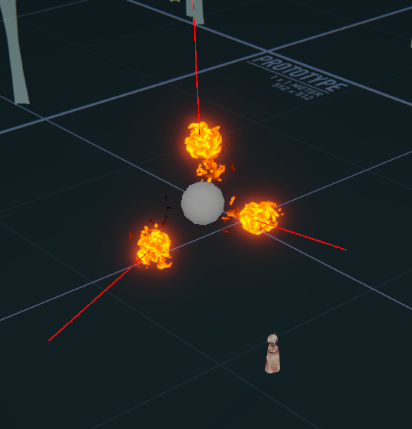
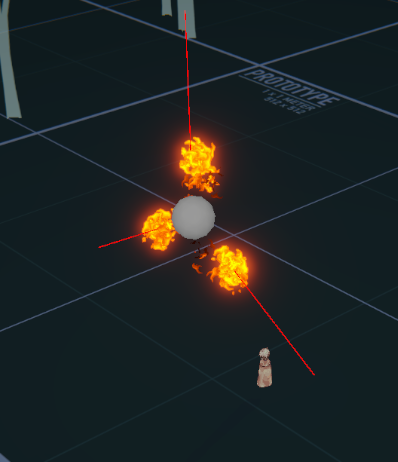
I guess my question is if there's a better way to handle this, though for the most part it works exactly how I want as long as I don't have those specific 90 rotations, or would anyone bat an eye if I added a comparison check to add a small float values onto these bad angles haha
 dense swan
I can get enum's string using nameof(Enum.Thing). But are there built in way to do the reverse operation?
from string to enum.
somber nacelle
no
okay actually, let me rephrase. there is Enum.Parse technically. i wouldn't recommend that though as the string has to match the enum's name perfectly. you would be better off converting it manually with a switch statement so that you can control the casing yourself (since that obviously matters)
 delicate flax
dense swan
I can get enum's string using `nameof(Enum.Thing)`. But are there built in way t...
delicate flax
dense swan
I can get enum's string using `nameof(Enum.Thing)`. But are there built in way t...
Enum.Parse
MyEnum enumValue = (MyEnum)Enum.Parse(typeof(MyEnum), value);```Aaah, thanks.
somber nacelle
why do you need to convert a string to an enum in the first place though
dense swan
somber nacelle
why do you need to convert a string to an enum in the first place though
I'm using it to save data to json. I'm using enum as key for type safety. I wanted the key to use string instead of int (default) in case the database is modified.
delicate flax
serialization maybe? could be many reasons
somber nacelle
dense swan
I'm using it to save data to json. I'm using enum as key for type safety. I want...
but enums are just ints already
dense swan
somber nacelle
but enums are just ints already
i wanted to avoid situation where I have player with savegame. and then someone in our team modify the enums, they remove some enum key and add some. Now their int that is previously saved no longer represent what they actually are. If we patch the game, the old savegame will be messed up.
there is a way to keep the int the same by adding = 8923 to the enum, but I tried to assign the same number to multiple enum and the compiler doesn't throw an error, that worries me a little.
somber nacelle
well you're not going to get any warnings about your strings not being correct. you're just going to end up with runtime errors instead
dense swan
that's okay. I just need to handle the error during load, at least the savegame still represent the actual state.
also my savegame already had anti-tampering in case player modify their string manually. (I originally used it to check corruption by hashing the savegame)
somber nacelle
also it sounds like you're just serializing a dictionary. why not just create a class that you serialize then you won't need to worry about enum keys being incorrect or whatever it is you're trying to solve
dense swan
i am using class and serialize it to json.
also I can't use JsonUtility.ToJson using dictionary for some reason. It doesn't get saved. The dictionary is inside the class.
But List can
somber nacelle
right, jsonutility cannot serialize a dictionary. but if you're just serializing a class directly why would you need enum keys?
dense swan
type safety.
somber nacelle
for what
dense swan
for when I'm writing the game logic. I'd like to avoid magic string as much as possible
somber nacelle
that is obviously not what i was referring to. what are the enums actually being used for
dense swan
AH sorry, I didn't catch it. I'm using it as a key for item that I can add in inventory. I'm still using dictionary to save the items. Dictionary<ItemEnum,int> inventory;
somber nacelle
okay well i would still recommend using ints. you're going to slow down your serialization/deserialization by using strings, potentially generate a bunch of garbage, and also you would (hopefully) have some testing in place that would let you know when you've got enums with the same integer values (since that would throw an exception when trying to add to the dictionary with that key since the key already exists in the dict).
but you do you 🤷♂️
 cosmic rain
I'd use int IDs for items instead of enums. Hard coding all your items sounds like a pain.
dense swan
somber nacelle
okay well i would still recommend using ints. you're going to slow down your ser...
Oh I didn't know about the performance thing. Writing a test to prevent duplicate int then manually assign custom int sounded much better if it increase performance. I'll do that instead. Thanks for the suggestion.
dense swan
cosmic rain
I'd use int IDs for items instead of enums. Hard coding all your items sounds li...
We did use int for item ID in our previous project. Personally I think it's more pain, I had to constantly look what item id is what. And looking at the code and the scene, it's not immediately obvious what Item I'm working with.
We will try using enum for this project and see how it goes. (we use OdinInspector addon which can show enum in the inspector, if not because of this addon I probably won't consider using enum)
cosmic rain
dense swan
We did use int for item ID in our previous project. Personally I think it's more...
How many items do you expect to have in the game?
dense swan
cosmic rain
How many items do you expect to have in the game?
we don't know yet but we have only 14 in our previous game.
cosmic rain
Also, if you really need to look at the saved data manually, many create a tool that parses it to readable form.
cosmic rain
dense swan
we don't know yet but we have only 14 in our previous game.
I see. In this case it might be fine then.
If you had hundreds or thousands, that would be problematic.
dense swan
cosmic rain
If you had hundreds or thousands, that would be problematic.
what sort of problem may happen? is it performance related? or a pain related
somber nacelle
pain related. that enum would be an absolute nightmare to manage
cosmic rain
Let's say you have a designer on your team that wants to add a new item to the project. They would need to know a bit of coding and mess with the source code to add that new item or ask a programmer to do it. That's very inefficient.
And even if it's just you, it would be way cleaner to create a new item asset and add it to a list in the editor instead of going to the source code and hard coding it.
Future updates(after the game is released) would also be more difficult if you want to add new items.
delicate flax
cosmic rain
Let's say you have a designer on your team that wants to add a new item to the p...
depends on the game / setup. the way I solved this was to use a spreadsheet (cvs/xl) where the designer could add the name, damage, price, durability etc in the columns.
then during parsing the row number became the item id
dense swan
cosmic rain
And even if it's just you, it would be way cleaner to create a new item asset an...
is asset like... ScriptableObject? it does sound fun, maybe I'll try that instead.
Maybe something like,... adding new item to the database by adding new ScriptableObject into the project folder, and then using the ScriptableObject for referencing the item. This should allow drag and drop item into game logic easily. Just need to figure out how to get unique identifier for the scriptable object for the savedata.
cosmic rain
delicate flax
depends on the game / setup. the way I solved this was to use a spreadsheet (cvs...
Yeah, that's an option too. The point is not to just hardcode it. Although if there aren't many, hardcoding is still an option.
cosmic rain
dense swan
is asset like... ScriptableObject? it does sound fun, maybe I'll try that instea...
Yeah,I'd go with SOs. Another approach is what simex suggested.
delicate flax
dense swan
is asset like... ScriptableObject? it does sound fun, maybe I'll try that instea...
no just a normal 'text' file inside Resources, designers usually know how to edit simple spreadsheets / json files. what good about it is that they can edit that stuff after the game is built too.
so they can focus on balancing the game without asking me to recompile every 10m 😄
cosmic rain
dense swan
is asset like... ScriptableObject? it does sound fun, maybe I'll try that instea...
To get a unique identifier, you could register new SOs with some sort of ItemDatabaseManager, where the ID would be an index of the item in a list or something.
delicate flax
same for localization files
if you just need an int/id for the item you could also just hash the name (given that the ids don't need to be sequential and that item names are unique)
 twilit scaffold
The fact that this crashes without the null check really bothers me.
    public void EventuallyDecreaseCount(Collider other)
    {
        Debug.Log("Made it this far");
        if (this != null)
        {
            StartCoroutine(OnTriggerEnterDoPause(other));
        }

    }
Probably called from an event
twilit scaffold
yes sir, it is. how did you know?
twilit scaffold
ACK!. that's it. thanks 🙂
 rose fulcrum
If I have a scriptable object and I wanted to be able to add a dictionary "Dictionary<Sprite, int>, how could I setup my scriptable object script so I can actually ADD dictionary entries in the editor?
Or if someone can link me to some docs on a realted topic that'd be cool too
 quartz folio
rose fulcrum
If I have a scriptable object and I wanted to be able to add a dictionary "Dicti...
quartz folio
rose fulcrum
If I have a scriptable object and I wanted to be able to add a dictionary "Dicti...
Either use one of the many avaliable 3rd party serializable dictionary implementaions or implement your own
rose fulcrum
quartz folio
Either use one of the many avaliable 3rd party serializable dictionary implement...
huge thanks!
latent latch
or the unity way, make a list of structs and then instantiate it on awake
 light cloud
Hey guys, i've been gazing on the code for a bit long and i think i need an other eye on my current problem to solve it. Can't find a solution even tho i tried so much things. Here is the part of the code that i would want to simplify. Their must be a much simpler way to write that condition...
#
if (Input.GetMouseButton(0))
{
   RotateCameraMouse();
}
else if((Input.GetKey(KeyCode.A) || Input.GetKey(KeyCode.LeftArrow)) || (Input.GetKey(KeyCode.D) || Input.GetKey(KeyCode.RightArrow))
   || ((Input.GetKey(KeyCode.W) || Input.GetKey(KeyCode.UpArrow))) || ((Input.GetKey(KeyCode.S) || Input.GetKey(KeyCode.DownArrow))))
{
   HandleKeyInput();
}
I tried playing around "Input.Anykey" like "Input.Anykey && !(Input.GetMouseButton(0)" to check if a key is pressed without the mouse being detect but dit oesn't work.. The code is working, but i want to make it simpler. It's ugly like that. And i do already have that condition with the Keycodes in the function "HandleKeyInput()". So that makes a double twin condition.
 main shuttle
light cloud
Hey guys, i've been gazing on the code for a bit long and i think i need an othe...
main shuttle
light cloud
Hey guys, i've been gazing on the code for a bit long and i think i need an othe...
Why not use the predefined Horizontal and Vertical from GetAxis/GetAxisRaw? https://docs.unity3d.com/ScriptReference/Input.GetAxis.html
light cloud
main shuttle
Why not use the predefined `Horizontal` and `Vertical` from GetAxis/GetAxisRaw? ...
To be honest, i like the hard way. I wanna do as much as i can in code. I'm trying to get back into coding in Unity, so i want to code as much as possible. I avoid using the editor etc..
 mild coyote
light cloud
Hey guys, i've been gazing on the code for a bit long and i think i need an othe...
mild coyote
light cloud
Hey guys, i've been gazing on the code for a bit long and i think i need an othe...
The code is working, that's good enough for me
And it seems like it's already in it's simplest form
main shuttle
light cloud
To be honest, i like the hard way. I wanna do as much as i can in code. I'm tryi...
Then I don't understand the question, you want to simplify it.
Input.GetAxisRaw("Horizontal") != 0 || Input.GetAxisRaw("Vertical") != 0
Does exactly that, but you want to use the hard way. 
light cloud
In your suggestion, you're using the editors parameters as going into the axis sections, imply to configure it if it isn't etc... I just wanna stick to raw code. I'm struggling to explain myself sorry.
I see what you're saying tho, and yeah it simplify the code.
 lean sail
light cloud
To be honest, i like the hard way. I wanna do as much as i can in code. I'm tryi...
lean sail
light cloud
To be honest, i like the hard way. I wanna do as much as i can in code. I'm tryi...
This is honestly silly to do. What you are doing isnt the hard way, it is just the naive way. You wont learn better by having a longer if statement (and shittier code). Use the proper existing methods for gathering input so you can move on to code the actual aspects of your game
mild coyote
light cloud
In your suggestion, you're using the editors parameters as going into the axis s...
I'd like to point that hardwiring the input to KeyCodes means that you cant remap the key later when you need it
light cloud
lean sail
This is honestly silly to do. What you are doing isnt the hard way, it is just t...
That's my point. I've done the "Naive way". And the "shittier code". And can't find a way to do that part of the code easier, so much shorter and understandable.
light cloud
mild coyote
I'd like to point that hardwiring the input to KeyCodes means that you cant rema...
I know, but it's not going to be necessary later anyway. but is the Input.getaxis the new optimal way to code anything related to keyboard inputs or ?
lean sail
light cloud
That's my point. I've done the "Naive way". And the "shittier code". And can't f...
You were given how to do it above. Get out of this "I dont want to use the editor" mentality because it is not going to help you learn.
It is simply just silly
mild coyote
light cloud
I know, but it's not going to be necessary later anyway. but is the Input.getaxi...
No, Input.GetAxis is actually not the optimal way, really. It's use string as parameter, that alone prone to error.
Your method looks shitty but imo, it's the more effective way, not by noticable margin, but yeah, from effectiveness perspective, it's more effective
light cloud
huh
mild coyote
it's simple and it works
light cloud
Is doing a condition using GetAxis, and then using a condition later using GetKey, a bad behavior ? to make the the two of them exist in the same code ?
mild coyote
actually, yeah, if you mix it, it's bad
light cloud
Because with GetAxis i can't do my math later if the user is pressing Q, W, S,D right ?
mild coyote
No, GetAxis is configurable, GetKey not
main shuttle
Sure you can, GetAxis gives -1 to 1, depending on how far you push your key. GetAxisRaw only has -1, 0 and 1. Good for keyboards for example.
lean sail
light cloud
Is doing a condition using GetAxis, and then using a condition later using GetKe...
You really shouldn't need both if they're for the same keys
main shuttle
Anyhow, I would just use the new input system and get a vector2 for the input, and use my whole logic on all controllers like that.
light cloud
Alright thanks i'll read once more what you all said and try the GetAxis in my code to see if it doesn't trigger some errors
I really thought their would be a more litteral way to code that tho. GetAxis doesn't tell anything when you read it tbh, but when you look at some code saying "Input.GetKey(A) && ! input.GetMouseButton(0)" i think it looks really easier to understand
Without being naive, of course
Maybe i'm just looking for some problems that doesn't exist at first lol
mild coyote
GetAxis and GetButtons are meant to be configurable. You can use GetKey and WSAD fine on QWERTY keyboards, until your player use AZERTY keyboard
light cloud
mild coyote
GetAxis and GetButtons are meant to be configurable. You can use GetKey and WSAD...
I agree. Not a proper way to code if the game was to be release or anything really serious
main shuttle
Also, is there a reason you don't use the new #🖱️┃input-system?
Because there you can just give your inputs your own names, it seems way more your style.
mild coyote
new input system is good, but it takes time to setup and learn
main shuttle
I agree, but he didn't learn the old way yet, I would just focus on the new one if I started out again.
light cloud
Since i'm just getting back on Unity, i didn't want to get lost and becoming unfocused on useless task such as configuring Axis, etc.. specially since i can already code it hard in the script.
 light cloud
That's how we make us learned at school back then. But since the new input system is a lot used, i would need to comply to it
 fiery sinew
mild coyote
new input system is good, but it takes time to setup and learn
fiery sinew
mild coyote
new input system is good, but it takes time to setup and learn
not much time tho. Documentation is really good
and once you learn setting up is pretty fast too
light cloud
Is there a way to block / disable "GetMouseButton(0)" to prevent clicks in game ? Should i work around layers ?
(EventSystem.current.IsPointerOverGameObject()) is not a solution in my case, neither CursorLockMode.Locked and Cursor.visible = false;
Oh wait can i do like InputSystem.DisableDevice(something) for mouse ?
Of course it does.. I need a break, sorry nvm about that silly question. Just tested
 sour gull
I'm not sure where to go for this one but I was wondering if anyone was familiar with some mesh generation in Unity. specifically I'm having an issue offsetting some verts by their normals:
At the moment I'm:
-Reading a ring of points from a Json
-"Extruding" them up,
-Generating the mesh + regenerating the normals from these points
-Offsetting the top verts inwards based on their normals


For some reason they are skewing off course from what you'd think the normal direction was, I even exported the mesh to Blender to check the vert normals and they look correct, 45 degrees, pointing to center. But the verts arent moving in that direction
Here's a code snippet for the normal offset function
{
Vector3[] vertices = roofMesh.vertices;
Vector3[] normals = roofMesh.normals;
int topVertexStartIndex = vertices.Length / 2;
for (int i = topVertexStartIndex; i < vertices.Length; i++)
{
vertices[i] -= normals[i];
}
roofMesh.vertices = vertices; // Update the mesh with the new vertices
roofMesh.RecalculateNormals(); // Recalculate normals if needed
}``` leaden ice
sour gull
I'm not sure where to go for this one but I was wondering if anyone was familiar...
leaden ice
sour gull
I'm not sure where to go for this one but I was wondering if anyone was familiar...
Hard to say without also seeing the code that generates triangles and normals
 dusk apex
sour gull
For some reason they are skewing off course from what you'd think the normal dir...
dusk apex
sour gull
For some reason they are skewing off course from what you'd think the normal dir...
Are you intending to offset only the greater half of the vertices? Index vertices.Length / 2 to vertices.Length.
I'm assuming that without the offset, everything is as expected
sour gull
dusk apex
Are you intending to offset only the greater half of the vertices? Index `vertic...
Yeah at this point everythings working as expected, its just the offset that goes bad
yeah, just the top half of the mesh, those were the ones the code "extruded" The entire scripts a bit long atm. Ill try condense it down a bit soon.
Im also trying another method not relying on normals at the moment, getting the bisect of the corners and using that instead, before the mesh generation
dusk apex
If you do not have a lot of vertices, you can attempt to log the data:cs Debug.Log($"Index: {i}, Vertex: {vertices[i]}, Normal: {normals[i]}, Result: {vertices[i] - normals[i]}");
Should be done prior to subtraction.
leaden ice
sour gull
Yeah at this point everythings working as expected, its just the offset that goe...
Don't you want the normals from the lower half?
You're using the normals from the upper half
sour gull
leaden ice
You're using the normals from the upper half
YEP, that did it!
Ill post results in a sec
I dont even think the logic is techincally correct in this test, but I think you hit the nail on the head? I assumed it was just the normal of the single vert I needed but I guess its the edge normal?. Thanks
````private static void ApplySlopeToRoof(ref Mesh roofMesh, float slope)
{
    Vector3[] vertices = roofMesh.vertices;
    Vector3[] normals = roofMesh.normals;
    int topVertexStartIndex = vertices.Length / 2;

    for (int i = topVertexStartIndex; i < vertices.Length; i++)
    {
        vertices[i] -= normals[i] + normals[i - vertices.Length / 2]; - Add top and bottom normals together
    }

    roofMesh.vertices = vertices;
    roofMesh.RecalculateNormals();
}```


 gentle bison
Does anyone know how I could commit the changes in VisualStudioCode for Gitlab? I tried to just press commit changes but it is loading for ever. Is there a way that works to commit the changes on Gitlab for collaboration?
leaden ice
gentle bison
Does anyone know how I could commit the changes in VisualStudioCode for Gitlab? ...
Gitlab is just a web service that hosts git repositories
You can use any Git client you want
It doesn't have to be specific to gitlab
Personally I use Git on the command line but you can use Fork or whatever the kids are using these days
gentle bison
My friend testet it, you can collaborate on Gitlab, the problem is that it is loading for ever
gentle bison
leaden ice
Personally I use Git on the command line but you can use Fork or whatever the ki...
Well someone suggestet Gitlab
leaden ice
gentle bison
My friend testet it, you can collaborate on Gitlab, the problem is that it is lo...
I didn't say you couldn't
leaden ice
gentle bison
Well someone suggestet Gitlab
I didn't say not to
I'm saying the program on your computer you use to work with it can be any Git client you want
gentle bison
yeah
 round violet
hi
i am using a namespace that helps me for some stuff
but part of it is using UnityEditor, resulting in a error when trying to build.
on screen you can see the content of the folder of this namespace
how can i exclude the Editor folder from my builds ?
 leaden ice
round violet
hi
i am using a namespace that helps me for some stuff
but part of it is using ...
leaden ice
round violet
hi
i am using a namespace that helps me for some stuff
but part of it is using ...
You need to either put your editor code in an editor folder or use preprocessor conditions around the specific code that uses editor code
E g.
#if UNITY_EDITOR
UnityEditor.SomeClass.DoSomething();
#endif```No
round violet
oh wait
leaden ice
If you already have an editor folder just move it out of this folder
round violet
i dont, but will this mess up the references ?
leaden ice
But I bet you it's not that folder that's the problem
leaden ice
round violet
i dont, but will this mess up the references ?
There's an editor folder in your screenshot
round violet
leaden ice
But I bet you it's not that folder that's the problem
the compilers errors all come from the files inside of it
leaden ice
leaden ice
If you already have an editor folder just move it out of this folder
Ok well do this
leaden ice
round violet
the compilers errors all come from the files inside of it
The reason it's a problem is because you have an assembly definition
round violet
leaden ice
If you already have an editor folder just move it out of this folder
oh sorry i thought you were talking bout the Editor folder in the root of Assets
leaden ice
Actually since you have an assembly definition you should be moving all of that stuffs into a separate assembly that is targeted at the editor only
round violet
ill try
leaden ice
round violet
oh sorry i thought you were talking bout the `Editor` folder in the root of `Ass...
In a sense I was but now that I see you're using asmdefs you will need to make a separate editor assembly
round violet
so now that I created a AD in the Editor folder, can I use a "check" in the main AD to decide to reference or not the editor AD ?
perfect you can setup Constraints
ty Blue
 hardy flower
anyone know of a way to disable code coverage reports? I want to run my unit tests but having a report every time I do it gets very annoying.
 dusty star
I have a general question for scripts. If I now have several functions for my player, for example movement, inventory system, head bobbing and camera movement. Is it smarter to have multiple scripts for each function or just one script that contains everything?
rigid island
dusty star
I have a general question for scripts. If I now have several functions for my pl...
separate
dusty star
rigid island
separate
So it could be that I end up with around 10 different scripts on my player. Depending on how many functions I have?
rigid island
dusty star
So it could be that I end up with around 10 different scripts on my player. Depe...
its not 1 file per function just to be clear, its 1 file per responsibility
Eg.
1 for movement, one for head bob etc.
so yes you would have more scripts in quantity but in quality you dont have to scan through a whole class to find 3 different things
dusty star
Aight
dusty star
rigid island
so yes you would have more scripts in quantity but in quality you dont have to s...
Fair point
 warm kraken
this is my fps character controller code and it works fine, but i want to add speed reduction in every direction except forward. i tried multiplying transform.right with a value but it didn't work as expected (only reduced sideway speed while simultaneusly walking forward. when i only walked sideways it didn't have the effect). i think its mainly .normalized issue but i cannot think of a solution because without it character moves faster diagonally.

 narrow summit
Anyone know of any plugins, which allow serialization (Editor) and deserialzation (Runtime) of animator controllers?
Doesn't have to be AnimatorControllers specifically, can be any other mecanim alternative which does the same job
main shuttle
warm kraken
this is my fps character controller code and it works fine, but i want to add sp...
Yeah, normalized makes the magnitude of the vector 1. There is another method that just clamps it to below or equal to 1.
warm kraken
main shuttle
Yeah, normalized makes the magnitude of the vector 1. There is another method th...
thanks
main shuttle
warm kraken
thanks
Does it work?
warm kraken
i was hoping for an easy fix, seems like its getting a little too coplex for my tiny brain. so instead i'm using if statements to determine the direction first, and then scaling move speed depending on the direction. seems to work well.

 split patio
 delicate flax
warm kraken
i was hoping for an easy fix, seems like its getting a little too coplex for my ...
delicate flax
warm kraken
i was hoping for an easy fix, seems like its getting a little too coplex for my ...
I think the solution you have is fine as it, and maybe I'm just not getting exactly what you're trying to do... but
float forwardSpeed = 1.0f;   // 100% speed
float sidewaysSpeed = 0.5f;  // 50% speed
float backwardSpeed = 0.2f;  // 20% speed

var moveVector = new Vector2(Input.GetAxisRaw("Horizontal"), Input.GetAxisRaw("Vertical"));

// Apply speed multipliers
moveVector.y *= (moveVector.y > 0) ? forwardSpeed : backwardSpeed;
moveVector.x *= sidewaysSpeed;

// moveVector is adjusted, so use it
// transfrom.position += new Vector2(moveVector.x, 0, moveVector.y) * moveSpeed; or watherever
 flat hill
split patio
flat hill
split patio
what is your script attached to?
flat hill
which is a gameobject in the scene i assume?
split patio
thats the problem I guess, it doesnt have an object
like when I play the game
the number indeed increases
however, there is no object I suppose
flat hill
you seem to in your other screenshot, I would make sure you arent getting any compile errors, make sure you are trying to change the transform position of the text not the canvas, and make sure to use TextMeshPro instead of unity's built in Text system because it is quite outdated
warm kraken
delicate flax
I think the solution you have is fine as it, and maybe I'm just not getting exac...
that would work too. its definetly much more clean than mine 😄
flat hill
split patio
I fixed it
glad to hear it
split patio
thx for the help)
flat hill
npnp
gentle bison
I don't know why but when commiting Changes on Visual Studio Code it is loading with no progress...
 placid summit
Hi I can use EventSystem.current.IsPointerOverGameObject() but how do I know which GameObject that is?!
dusty star
I have a question about Rigidbody or Character Controller. I can't decide which component to use for my player. On the one hand I want to be able to go up stairs and slopes and on the other hand I want the objects to be able to interact with the player. What would you recommend more?
 vagrant blade
Both can go up stairs and slopes and both can have objects interact with the player. But both take work to get either to work the way you might want.
If you want to use Unity physics go with rigidbody. If you want to have absolute control over your physics, go with CC.
 oblique spoke
https://assetstore.unity.com/packages/tools/physics/kinematic-character-controller-99131 for a nicer base to work from if you opt for CC.
 unreal sonnet
Hi there, i got an item and an inventory script, adding the item and dropping it is easy, however, how does one go about placing it into players hand and then using it? Right now the second i pull it into the hand it goes right back into inventory, i was considering just instantiating the model into players hand but then the problem is that there is no item script attached to it


I guess i could make a separate prefab for item in the hand, but would that be a good solution?
 hard viper
i’m trying to refactor a tile drawing function, and want some advice. DrawTile currently draws a set of tiles to tilemap, AND also logs what was there before etc to an Undo/Redo history. I want to now split this up into 2 methods: one that draws tile without undo log, and one that does.
I basically want to make a PlayModeLevelEdit class that has no knowledge of any build history, and EditorModeLevelEdit that does a bunch of stuff during each step.
My problem is that logging to build history requires: 1) reference to the history, 2) logging multiple things in the middle of the function (that take additional time to go search and do)
I want to be able to split this without doubling up my code, to avoid repetition, followed by trying to update two methods if I need to make edits.
Any suggestions?
delicate flax
sounds like a job for events maybe? if the question is about how to decouple the code, it sounds like a natural thing for the type of problem you're describing
so EditorModeLevelEdit could subscrible to a TilePlacedEvent emitted by the PlayModeLevelEdit
hard viper
i’m tryig to split it up
hard viper
delicate flax
sounds like a job for events maybe? if the question is about how to decouple the...
the current DrawTile invokes events IF we are in editor mode
which is dumb af
because the function should not have this different behaviour based on the state of a totally different object from the class it is in, and not in an argument
the challenge is doing intermediate steps to go make new lists and allocate a bunch of data to save the previous state. it’s just a bunch of random work that the PlayMode function does not need to do
DrawTile(inputs) {
do some common first steps
call a method with a similarly different behaviour for edit vs play mode
if (editor mode) {
do some work and store it to a variable}
do common work
if (editor mode) {invoke events on that variable}
}
I know what I did is dumb af. I didn’t know better. I’m atoning for my sins now.
 static matrix
weoilfjersoidlfhtryksdjrhdj ew
ughhhh
I might just redo my level generation again
or maybe just start with a static level and do generation later
hnkudzlle
 pine ivy
trying to make this game object duplicate 10 times with each a few spaces between, but instead the object is infinitely cloned... any suggestions?
 hard viper
does the prefab have a falling behaviour on it?
rigid island
pine ivy
trying to make this game object duplicate 10 times with each a few spaces betwee...
nothing here would spawn it infinite unless prefab had FallingBehavior on it
hard viper
hard viper
DrawTile(inputs) {
do some common first steps
call a method with a similarly dif...
i’m still searching for a way to make this less dumb
pine ivy
rigid island
nothing here would spawn it infinite unless prefab had FallingBehavior on it
the script is on the original object, is that the problem?
 rigid island
pine ivy
the script is on the original object, is that the problem?
rigid island
pine ivy
the script is on the original object, is that the problem?
so FallingTargets has FallingBehavior and you're wondering why it infinitely spawns ?
pine ivy
yes
hard viper
every frame, you make 10 of these objects
rigid island
Start runs on every MB
pine ivy
oh does the script execute for each clone?
hard viper
all 10 of them have a script where, on that frame, each one makes 10 more
rigid island
so you're spawning, its running Start, rinse and repeat
pine ivy
ahhhh okay
rigid island
pine ivy
oh does the script execute for each clone?
ofc if the script is on it why would it not run
have something else spawn them
hard viper
i might even put in an assertion that the prefab does not contain that script
Debug.Assert(prefab.GetComponent<FallingBehaviour>() == null, “Can’t spawn the prefab if it has the behaviour that makes it spawn more.”);
static matrix
you could add a flag on the original for isBase and the spawning will only execute if isBase=true
rigid island
or just you know not have the script on it in the first place and not worry about this stuff..
hard viper
Confucious say “Best solution is to not have problem.”
 tender patio
I'm using the new Input system. Should I reference from InputManager script to PlayerMovement script or the opposite (referencing from PlayerMovement to InputManager)?
hard viper
InputManager?
tender patio
hard viper
InputManager?
The script that gets the value from the InputActions
hard viper
my player movment specifically subscribes its own methods to my PlayerInput component input actions
i think that is how I hooked it up
subscribes OnEnable, unsubscribes OnDisable
that is the standard workflow afaik
tender patio
I guess I'll reference PlayerMovement from the InputManager script
Thank you for helping @hard viper
hard viper
tender patio
I guess I'll reference PlayerMovement from the InputManager script
What
the other way around
PlayerMovement gets a reference to the instance that is invoking messages on input, and subscribes to delegates
any input related classes should have no knowledge of what depends on them
tender patio
 hard viper
is player movmenet not a monobehaviour
 hard viper
then.. why are you doing this?
tender patio
Doing what
hard viper
why does input manager tell player movement what its values should be
that is backwards
playermovement.x should not even be exposed for public set
tender patio
So I should do:
y = inputManager.onFoot.Walk.ReadValue<Vector2>().y;
in player movement
hard viper
yes
tender patio
Ahh I get it
hard viper
but why not just get a reference to PlayerInput
tender patio
I want to keep the input logic and the movement seperate. Like doing OnEnable or OnDisable is in another script (InputManager)
hard viper
then input manager should solely expose public getters
public getters for processed data, and it needs to have a super high execution order
and it should be a singleton
and should not be on your player character at all
tender patio
So should I make a singleton InputManager?
hard viper
if that’s how you want to do this system. which would only serve to pre-process some inputs
you will probably not save a lot of time on this tbh, unless your plan is to preprocess controller input or something, and then have multiple different scripts read the input which follows that common post processing
tender patio
pre-process?
hard viper
like if you want to take control stick input, and force it to be along a couple of specific angles
hard viper
playermovement still needs access to your PlayerInput component, btw. It would need to subscribe/unsubscribe for things like a jump button
it might even be simpler to make InputManager a static class, that just applies a common set of preprocessing to input.
tender patio
Why not handle subscribing in the InputManager
hard viper
InputManager would just subscribe to PlayerInput, and then make a custom function that invokes a delegate, just so that PlayerMovement can subscribe to that delegate, with its own custom function with the same input
it depends on how you will branch out tbh
singleton InputManager makes sense when you want to centralize and parse events coming from InputSystem into some different sort of format
hard viper
gl
 pliant spade
Hi, I have some problems with input, using the old input system, I'm trying to detect fast touches, if I use my keyboard it's detecting fine, but when I move to Touch input, it look like it's missing touches, same thing is happening with IPointerDownHandler, any idea why?
pliant spade
I made a counter and it look like i can't register more than 3 touches per seconds, why is that??
static matrix
Me looking at my room generation code knowing damn well i'm going to rewrite it again:
 rancid moon
pliant spade
I made a counter and it look like i can't register more than 3 touches per secon...
rancid moon
pliant spade
I made a counter and it look like i can't register more than 3 touches per secon...
You might want to check Touch.tapCount. Maybe your fast touches are considered as one touch with few taps
https://docs.unity3d.com/ScriptReference/Touch-tapCount.html
 pliant spade
@rancid moon oh, it look like it's registering touches as tapCount
If I go slowly it remain at 1, but faster it ramp up the counter
Is there a way to register every tap as a touch? because 3 tap per seconds is slow...
 vocal flax
hello i have a very weird issue that i asked multiple people already.
I basically copied out from this link https://pastebin.com/RXZ1dXgw
a code for a first person camera.
I think in every other computer it works fine but in my scene or computer, the character just walks forward and left continously, there are colliders for the ground, i reset the positions and all, but it keeps doing it, anyone can help me out?
Pastebin
Pastebin.com is the number one paste tool since 2002. Pastebin is a website where you can store text online for a set period of time.
and in unity i can stop it but just clicking out of the game tab, BUT if i build it there is no possible way to stop it
 heady iris
That sounds like a stuck controller input
Do you have an xbox controller? A steering wheel? Flight stick and throttle?
 random oak
Is this correct or too many Time.deltaTime?
     if (grounded && dir.y < 0)
     {
         dir.y = 0;
     }
     dir.y += gravity * Time.deltaTime;
cc.Move((moveInput.y * movespeed * Time.deltaTime * transform.forward) + (dir * Time.deltaTime));```no i use awsd and a mouse
+i opened two new projects and its still the same thing
 untold siren
what would be the best method of approach if I wanted to code enemy characters that have the ability to wallrun? would this use navmesh or would I have to code it via my own methods / potentially class extensions? after searching online the only tutorials is to make the Ai characters walk on the walls, but not run alongside them
I'm assuming one method of implementation I could do is to basically copy and re-use my pre-existing wall running script for my player but modify it so that it works for a navmesh agent?
or some bs where I toggle off their navmesh agent when on the walls, and then re-enable once they get grounded
 knotty sun
wall running using navmesh agent is totally doable
untold siren
knotty sun
wall running using navmesh agent is totally doable
well that's one relief XD next method is to even thought of how I would go about implementation
rigid island
just bake the surface of the wall? add a navmesh link?
untold siren
would that not cause the navmesh to be walking on the wall, as in they'd be rotated 90 degrees?
instead of like moving alongside
knotty sun
untold siren
well that's one relief XD next method is to even thought of how I would go about...
first thing you need is to make vertical nav mesh surfaces
rigid island
untold siren
would that not cause the navmesh to be walking on the wall, as in they'd be rota...
well you have to be creative to how you rotate your mesh while on wall
thats just visuals though
untold siren
knotty sun
first thing you need is to make vertical nav mesh surfaces
I'm assuming I could create an empty gameobject, rotate it, set the layer masks to the walls only then bake?
untold siren
rigid island
well you have to be creative to how you rotate your mesh while on wall
could always just rotate the visible mesh and leave the parent object normalised ig
knotty sun
untold siren
would that not cause the navmesh to be walking on the wall, as in they'd be rota...
yes, you need to rotate the agent yourself, nav mesh does not do that for you
untold siren
gotcha
rigid island
navmesh surface can bake any direction, you just need to give it a navmesh link and it goes right on it
no need to manually code rotation aside from visuals
untold siren
mmm the good old method of "if it looks fine it works fine" ;)
knotty sun
basically, yes
untold siren
makes sense to me
cheers guys
originally the obstacle was the enemy walking rotated but if it can just be rotated than that's an easy maneuvre to do
knotty sun
you've gotta watch your link transitions because they can be a bit messy but apart from that it's plain sailing
rigid island
untold siren
originally the obstacle was the enemy walking rotated but if it can just be rota...
you wan to split visuals from the main object with components anyway
untold siren
rigid island
you wan to split visuals from the main object with components anyway
yeah definitely, parent object and then child with the visuals, parent object will either hold components or another child GO
knotty sun
if you want to get it just right, years ago I made a nav mesh mobius loop, it was a great learning exercise
untold siren
Oh damn that sounds like an interesting learning experience
heady iris
vocal flax
no i use awsd and a mouse
I know you use a mouse and keyboard. But do you have any other devices? Even devices you don't have plugged in right now?
Also, log Input.GetAxis("Horizontal") to find out if the input value is stuck at something other than 0
vocal flax
no i dont have anything plugged in, give me a second about the log
heres also a video
first time it happend second time it didnt, when i press play
random oak
random oak
Is this correct or too many Time.deltaTime?
```cs
if (grounded && dir.y < ...
Anyone know ?
heady iris
random oak
Is this correct or too many Time.deltaTime?
```cs
if (grounded && dir.y < ...
Assuming dir is velocity caused by falling, then yes, that's accurate
Vector3 acceleration = Vector3.down * 9.81f;
velocity += acceleration * Time.deltaTime;
position += velocity * Time.deltaTime;
acceleration times a duration is a velocity
and velocity times a duration is a distance
 lavish frigate
Hey all. I seem to be unable to launch an object in the direction i want. I have a cannon, which has as a child a rotation anchor point ( i want the red arrow from this one). That anchor point also has a child barrel transform where my projectile is instantiated. Now from my cannon script i instantiate my enemy, which i rotate at identity. I then try to apply a force to it in the direction of my anchor points right (red arrow). However, it always shoots up. Anyone thats able to help?
 heady iris
I would not use AddRelativeForce here. That adds the force from the perspective of the rigidbody
You already have a world-space direction here -- rotationAnchorPoint.right. Just use that.
heady iris
Make sure that rotationAnchorPoint is assigned correctly
and that you have the scene view in local, not world, mode when checking which direction its red arrow is pointing
lavish frigate
It is, because when i print the .right, it shows me correct values

this is my hierarchy
the script is on cannon, and i am using the selected objects transform
for the .right thing
lavish frigate
heady iris
and that you have the scene view in local, not world, mode when checking which d...
this is it
thank you
heady iris
np (:
lavish frigate
any tips on how to convert the .right of the local rotation to a world vector?
 late lion
transform.right and up and forward are always in world space.
random oak
heady iris
Assuming `dir` is velocity caused by falling, then yes, that's accurate
yes dir is only there for falling/gravity
thanks!
lavish frigate
Okay so apparantly my problem lies elsewhere. Printing transform.right gives me the correct value, however applying my force does not shoot my projectile in the right direction
heady iris
Check how the game behaves if you replace right with up
If the projectile changes direction by anything other than 90 degrees, something's wrong with how it's shooting
(maybe it's hitting a collider)
 rancid jolt
The log is not printing under the if condition, The if condition is never getting true, What could be the reason? The animation is finishing but never going to the freeFallState again
 somber nacelle
do you know what normalizedTime is?
rancid jolt
somber nacelle
do you know what normalizedTime is?
It is zero all the time although it should be 1 at the end of the animation
somber nacelle
right so it's a value from 0 to 1. knowing that 1 is the maximum value, how could it ever be greater than 1
rancid jolt
somber nacelle
right so it's a value from 0 to 1. knowing that 1 is the maximum value, how coul...
Yes I understand, while debugging I remove the '=' sign by mistake maybe. Consider it >=1. But the issue still persist. While printing the valur of normalizedTime on console it is strangely providing the value of 0 through out the cycle
 somber nacelle
then take a look at your GetNormalizedTime method
rancid jolt
somber nacelle
then take a look at your GetNormalizedTime method
Here it is
 rancid jolt
somber nacelle
look at those first two lines very closely
rancid jolt
somber nacelle
look at those first two lines very closely
Yup thanks for pointing out, quite a few issues with the function, Now this one seems to be correct. Still not working though
 somber nacelle
now you can use breakpoints or logs to determine whether your objects are in the state you expect them to be
rancid jolt
somber nacelle
now you can use breakpoints or logs to determine whether your objects are in the...
It is in the state I am expect it to be, The punch animation is running for example after animation si finishing it doesn't get back to the idle state which "FreeLookState in this case
somber nacelle
how have you verified that
rancid jolt
somber nacelle
how have you verified that
From here, it is still stuck in the punch state even though the animation has finished

The normalizedTime is 0 throughout which is strange
 somber nacelle
okay now debug the objects in your GetNormalizedTime method like i suggested
knotty sun
so far you don't even know if that code is being executed
somber nacelle
rancid jolt
From here, it is still stuck in the punch state even though the animation has fi...
you also don't even appear to have transitions
lavish frigate
Can anyone tell me why this guy is shooting them upwards instead of in the desired direction?
 somber nacelle
show !code
 tawny elkBOT

Posting code
📃 Large Code Blocks
Use links to services like:
https://gdl.space/, https://paste.ofcode.org/, https://hatebin.com/, https://paste.myst.rs/, https://hastebin.com/
📃 Inline Code
Surround code with three backquotes. Not quotation marks.
To format as C#, add cs to the first line:
```cs
// Your code here
```
Add a comment with a line number if there is an error message.
lavish frigate

 mellow sigil
Since they seem to be also walking on the ground, I'm guessing the movement code overrides the horizontal velocity
lavish frigate
holy shit
you might be right
lemme try
YES
it worked
@mellow sigil thank you
rancid jolt
somber nacelle
you also don't even appear to *have* transitions
Yes, because I am relying on normalizedTime for it, the console says it is zero through out and never become 1 so the problem lies in the code somewhere it seems
somber nacelle
rancid jolt
Yes, because I am relying on normalizedTime for it, the console says it is zero ...
how can your animator be in a transition state if there are no transitions
 half cosmos
Hi I'm having an issue, at first my player was able to move up and down just fine but now that I'm using WASD its randomly moving all over the place? even diagonally
Idek how to begin to describe this in order to get help
it was working fine before I added a second camera
rancid jolt
somber nacelle
how can your animator be in a transition state if there are no transitions
This system doesn't need transition states in the animator to work, to prevant the states I am specifically using the normalizedTime. Well the issue is resolved now, it was a pretty basic mistake. The tag name is "Attack" 🤪
 somber nacelle
rancid jolt
This system doesn't need transition states in the animator to work, to prevant t...
somber nacelle
rancid jolt
This system doesn't need transition states in the animator to work, to prevant t...
please look at your code
then look at this https://docs.unity3d.com/ScriptReference/Animator.IsInTransition.html
 terse quarry
Does anybody know any reasons why a script would do this? The code is functionally exactly the same as the other two. It's just grayed out, the name doesnt show and it doesn't run.

All I did was save the project and it changed to this
paired with this
 quartz folio
Check this list https://unity.huh.how/script-loading-issues
dusk apex
terse quarry
All I did was save the project and it changed to this
Remove the component and add it again
terse quarry
dusk apex
Remove the component and add it again
 terse quarry
thanks lol
hm im guessing "UI" is a reserved folder name because i changed it and its all good
 simple egret
terse quarry
hm im guessing "UI" is a reserved folder name because i changed it and its all g...
simple egret
terse quarry
hm im guessing "UI" is a reserved folder name because i changed it and its all g...
Not that I know of. Sometimes Unity fails to pick up script changes, and modifying the project structure (renaming a folder, moving the script to another folder and back) will trigger a recompile, and will fix the problem
heady iris
I have several folders named "UI" and have not observed this
(also, ctrl+R will reload if you have auto-reload disabled; it might also work in case unity "misses" something)
maybe the filesystem watcher has a nap
 swift falcon
i made a parsing tool for "Luigi's Mansion" animation .key files, ive almost finished it but i cannot get the positioning and rotating working. im basing it off of an old program and it seems to work fine there, its alot of messy code so i will try my best to send screenshots.
im also really bad at math, so the quaternions and matricies have been a struggle.
all i need help with is getting the animation to not be wacky, it uses skinned meshes for each "bone"
if i need to send the project i will, im also horrible at explaining

 terse quarry
simple egret
Not that I know of. Sometimes Unity fails to pick up script changes, and modifyi...
terse quarry
simple egret
Not that I know of. Sometimes Unity fails to pick up script changes, and modifyi...
hm whenever i reopen the project this one script consistently does this and nothing else
Even though 5 of them are practically the same
 terse turtle
I am making a Clock in Unity. However, there is an issue. When I click on another application (like a game or browser) it just pauses and is useless until I click in its window. What code can easily solve this issue?
cosmic rain
terse turtle
I am making a Clock in Unity. However, there is an issue. When I click on anothe...
Maybe use system time instead..?
terse turtle
cosmic rain
Maybe use system time instead..?
Never knew that was a thing. How can I access that Time?
cosmic rain
somber nacelle
terse turtle
I am making a Clock in Unity. However, there is an issue. When I click on anothe...
there's also a Run In background option in the build or player settings if you just want it to continue running in the background
terse turtle
somber nacelle
there's also a Run In background option in the build or player settings if you j...
What is the pathway?
somber nacelle
i don't have unity open at the moment to check it for you. but you have access to the search bar in the settings too
terse turtle
somber nacelle
i don't have unity open at the moment to check it for you. but you have access t...
Whats the name of the option? I can search it in Unity.
lean sail
run in background
somber nacelle
terse turtle
Whats the name of the option? I can search it in Unity.
man i wonder
 lean sail
should just be directly there in the player settings
terse turtle
My audio sounds static, and I think it might be because I am calling it to play in Update. How can I fix this? ```cs
if (input.timerSeconds <= 0f) {
                GetComponent<AudioSource>().Play();
            }```
check if as is playing then don't play
terse turtle
rigid island
check if as is playing then don't play
What do you mean? Can you rephrase?
rigid island
also GetComponent in Update 😬
terse turtle
rigid island
also GetComponent in Update 😬
Okay
rigid island
terse turtle
What do you mean? Can you rephrase?
terse turtle
rigid island
https://docs.unity3d.com/ScriptReference/AudioSource-isPlaying.html
Thank you so much!
 dawn nebula
Is there a way to figure out if a gameobject is an instance of a specific prefab?
rigid island
dawn nebula
Is there a way to figure out if a gameobject is an instance of a specific prefab...
can you explain what you want to do because prefabs aren't really anything but blueprint to a gameobject for runtime
 spring creek
dawn nebula
Is there a way to figure out if a gameobject is an instance of a specific prefab...
spring creek
dawn nebula
Is there a way to figure out if a gameobject is an instance of a specific prefab...
Might be better to check if it has some Component or value on a component. Maybe an enum?
 west lotus
dawn nebula
Is there a way to figure out if a gameobject is an instance of a specific prefab...
west lotus
dawn nebula
Is there a way to figure out if a gameobject is an instance of a specific prefab...
I am only finding this in the docs https://docs.unity3d.com/ScriptReference/PrefabUtility.FindAllInstancesOfPrefab.html
rigid island
I suppose for an editor function it makes kinda sense
west lotus
I cant think of a proper use car right now but there must be a reason for its existence heh
 solemn shale
How is it 2024 and there's still no PlayerPrefs.SetBool or PlayerPrefs.SetColor? Yes, I know I can use floats and ints to convert, but those are such basic features, you'd think I wouldn't have to.
west lotus
How is it 2024 and PlayerPrefs is still a thing ?
Use Json or a ini or cfg file or anything. Stop writing your garbage to the users os registry please
 dark kindle
Well is there a reason why unity continues to save things in the registry
lean sail
solemn shale
How is it 2024 and there's still no PlayerPrefs.SetBool or PlayerPrefs.SetColor?...
On top of what Uri said, it would be awkward for them to continue on PlayerPrefs in the same manner. You ask about bool and color, but what about Vector, Quaternion, and every other single "primitive" value that will exist in the future? What about custom classes that you declare?
You'll end up with too many methods for a shittier save system. Meanwhile the existing json methods can just directly save everything you need already
 honest saddle
anyone have experience w hinge joints? I'm running across a problem w/ setting the target position. I have a method that I know is getting called to reset it to zero. When I debug the target position, it correctly returns 0, however, in the inspector, the target position still reads the previously set target position of 52
somber nacelle
for Renderer.materials it says "This function automatically instantiates the materials and makes them unique to this renderer. It is your responsibility to destroy the materials when the game object is being destroyed"
Does the same apply for using Renderer.GetMaterials? in other words, will I have to make sure I'm destroying the materials put into the list when I destroy the object?
quartz folio
Presumably, it does say instantiated materials
somber nacelle
Alright, that's what I figured. wish the docs mentioned that on the GetMaterials page too
 fringe silo
Hi! I'm looking for ideas/suggestions on how to approach that kind of system:
Let's say I have a scene, that can be visited by the player during the game at different (unknown) times. There's a quest system, and the player might visit the scene at any given point in time and could have any quest currently active. Now I would need some interactions in my scene (or objects/characters/etc....) to change state, depending on the current state of the game like the current quest or time of the day etc...
The solution here is definitely something along the lines of visual scripting because I don't want this data to be hardcoded, but is there another way? How is this kind of multi-state scene stuff typically done?
What I have tried so far:
- Having a scene with "layers", which are additive scenes loaded on top of the base scene, and each layer contains a set of interaction that are loaded according the the current quest. That didn't scale very well IMO
- Having multiple interactions, each with a VisualScripting ScriptMachine disabling and enabling it. It's the current thing I'm using but I can see already that it's hardly going to scale well, but it's flexible at least
I was thinking something like a graph that can handle a list of conditions, and return a value to enable/disable an object?
honest saddle
honest saddle
anyone have experience w hinge joints? I'm running across a problem w/ setting t...
Solved it on my own
latent latch
fringe silo
Hi! I'm looking for ideas/suggestions on how to approach that kind of system:
Le...
Something along the lines of scriptableobjects that each entity can have that holds a list for each state which contains delegate calls depending how polymorphic you're trying to make it.
rather, can't serialize the delegate so probably some struct of information which points to said delegate
fringe silo
So each SO would have a list of a condition (state could be quest/time/whatever the player has done before etc...) mapped to a delegate?
latent latch
stuff like time can be referenced from a singleton
and quest completetion; anything like a list of flags
^mostly gamemanager related
 junior wind
Hey gamers,
I have this function that makes one object rotate around another which I call in update
        private void RotateAroundObject()
    {
        player.transform.RotateAround(transform.position, Vector3.back, orbitSpeed * Time.deltaTime);
        Vector3 dir = (player.transform.position - transform.position).normalized;
        player.transform.position = transform.position + dir * radius;
    }
The issue is I want my object to be able to move away from it, which I'm doing by an addForce, but the issue here is that using the transform functions will override any other movement every frame.
Any suggestions on how I can get my orbiting rocket to blast away and still have my self correcting orbit?
fringe silo
latent latch
^mostly gamemanager related
Ok that would make sense, taking this stuff out of the scene and into SOs is nice actually, thanks for this!
latent latch
fringe silo
Ok that would make sense, taking this stuff out of the scene and into SOs is nic...
Dictionary<TriggerConditionFlags, Func<bool>> triggerConditionsDict = new()
{
    { TriggerConditionFlags.HealthThreshold, () => { return HealthThresholdCondition(); } },
    { TriggerConditionFlags.ChanceToTrigger, () => { return ChanceToTriggerCondition(); } },
    { TriggerConditionFlags.WhileUnderStatusEffect, () => { return WhileUnderStatusEffectCondition(); } },
 };
Some snippet of something I've worked on. Basically this worked off the character for checking for effects for abilities and items, but you can very much make a struct of info too to pass into these conditional checks.
 hexed pecan
junior wind
Hey gamers,
I have this function that makes one object rotate around another wh...
hexed pecan
junior wind
Hey gamers,
I have this function that makes one object rotate around another wh...
You probably want to do the orbiting with forces too. Moving a rigidbody via the transform will give unexpected behaviour
 glass sparrow
Anyone got any advice? (Networked Projectiles)
- I have a bug where 1/10 times OnCollision does not register.
- When set my colliders to x10 scale there's no issues.
Is there a better fix? I'd rather not a gigantic game? Harder on FPS also?
Cheers.
hexed pecan
junior wind
I feared as much, gonna be much harder to implement then.
Could be as simple as getting a direction from the object to the orbit point and rotating that direction 90 degrees 🤔
And using that as your force direction
fringe silo
latent latch
```cs
Dictionary<TriggerConditionFlags, Func<bool>> triggerConditionsDict = new(...
For sure that would make sense, I would now need something that does this, but that can be done without coding for easy change, I guess that's the hard part since you can't really streamline the process of making VisualScripting graphs
latent latch
I already spend too much time making my SO data look nice. If I decided to pick up visual scripting, then at that point I wouldn't be making the game anymore haha
 jagged snow
is there a way I can use System.Func but not require a variable? What Im trying to do is create a function and assign it like an event. Such as
() =>
{
Agent.FollowTarget((Chase_CurrentTarget));
return BehaviorTree.ENodeStatus.InProgress;
},
() =>
{
return !_isFacingTarget ? BehaviorTree.ENodeStatus.Failed : _inRangeTarget ? BehaviorTree.ENodeStatus.Succeeded : BehaviorTree.ENodeStatus.InProgress;
});```
However I don't want the bools I just want the ability to assign a bunch of commands to an event. What I'm trying to do is create a function that passes through a specific variable and events wont allow me to do this
``` _animator.OnFootstep += PlayFootstep(_footstepSound);``` chrome mural
hey guys, i'm making an interaction system between player and object.
i would like to make it as good as possible.
any feedback or opinions?

any interactable object will inherit from this class, and will override "interact"
the player will know what is the interaction key by calling the static function "getInteractionKey"
to interact with the object he will "tryToInteract"
latent latch
Well, here's a question to ask yourself. If you wanted to make an interactable box, and a non-interactable box, how would you design that with your idea?
chrome mural
latent latch
Well, here's a question to ask yourself. If you wanted to make an interactable b...
by non-interactable you mean just a simple object with no interaction script?
latent latch
Yep
chrome mural
well the non interactable i would leave it as it is
for the interactable i would do this:
new class, child of "Interaction"
override method "interact" with its behaviour
tweak "delay_between_interactions", done.
latent latch
Right, but what layer contains the information for the box mesh, collider, textures, ect
chrome mural
yup
latent latch
So here's the problem: if this is the root abstract layer then where are you having the information for the object's mesh and collider information
because what it seems like you want to do is have that as the derived class
 crude mortar
jagged snow
``` protected System.Func<BehaviorTree.ENodeStatus> OnEnterFn;
```
is there a...
crude mortar
jagged snow
``` protected System.Func<BehaviorTree.ENodeStatus> OnEnterFn;
```
is there a...
events can let you do that, you just have to create a lambda in between, like
_animator.OnFootstep += () => PlayFootstep(_footstepSound);
ahhh great
going to try it
latent latch
so you're effectively making two of these object classes such that
Interaction -> ObjectClass#1
ObjectClass#2
jagged snow
this is exactly what i needed it works thanks!
chrome mural
latent latch
so you're effectively making two of these object classes such that
Interaction -...
yes
ok but whats the problem
be specific sorry i'm stupid
latent latch
Ah, ok yeah I'm overthinking where you were going with this, but ideally you treat it as a component on your object class such that you'd have declared an Interaction component
You treat it like composition, if it's set then it's interactable, otherwise ignore it
sounds fine
In this case you do have it as a monobehaviour, so you can just check if the Gameobject has the component which is fine too
chrome mural
latent latch
Ah, ok yeah I'm overthinking where you were going with this, but ideally you tre...
how its done??
latent latch
If you want to do it the GetComponent way, when your character presses "E", overlap/cast in the area. If it finds a GameObject with a Interaction script on it then Interact();
chrome mural
latent latch
If you want to do it the GetComponent way, when your character presses "E", over...
and your way? how would you do it?
latent latch
Interfaces, but ignore that since this is fine too
chrome mural
i might want to study that... thank you man
latent latch
What you're doing is fine, I'm just making sure what you were overriding to
latent latch
latent latch
so you're effectively making two of these object classes such that
Interaction -...
rather running into this situation^
chrome mural
i've just watched a video about it, 0% understood. i'm just not gonna overcomplicate this and use good old abstract classes
i'm too silly
OOP is just too much...
round violet
i am using NaughtyAttributes to help me organize my inspector
the issue is that its only for editor, making any build fail.
The thing is that I did a build test this morning and it worked, changed PC and i got these errors now.
anyways, how can I make the NaughtyAttributes attributes only be loaded in editor ? I dont think using a #if UNITY_EDITOR for each [Attribute] is the solution
making the namespace only for UNITY_EDITOR makes all attributes error
main shuttle
round violet
i am using `NaughtyAttributes` to help me organize my inspector
the issue is tha...
You should just be able to build it afaik, so I think your first computer is how it should be. No idea how you broke it on your second computer.
round violet
yeah idk what could of changed on the "borken" computer, the project folder is the same
i did some testing, all the attributes coming from the NaughtyAttributes class are getting (trying) to be compiled, but fail since NaughtyAttributes isnt existing outside of editor
how are attributes ignored when building ?
 grizzled sparrow
Hey guys,
any idea on how to subscribe to a BLE sensor through Unity on the Quest3 (Android)?
cosmic rain
round violet
i did some testing, all the attributes coming from the NaughtyAttributes class a...
Can you share the errors?
Looking at the GitHub repo, they use assembly definitions. Did you mess with them perhaps?
round violet
cosmic rain
Can you share the errors?
here
 round violet
cosmic rain
Looking at the GitHub repo, they use assembly definitions. Did you mess with the...
round violet
cosmic rain
Looking at the GitHub repo, they use assembly definitions. Did you mess with the...
i am using them correctly
i found the fix
moving the root folder of NA inside a Editor folder inside Assets was the solution apparently
cosmic rain
You should not really have it in the assets in the first place
It should be in packages.
Did you just copy paste the repo into your project?
round violet
nope i used the package manager
cosmic rain
I don't think it should be in the assets then
round violet
same but i didnt had the choice
 short osprey
Sup, i got an odd issue here.
We have a few GameObjects w scripts on them that have [SerializeField] variables in them. The value of these was set to be other GameObjects in the same scene. This works so far.
When the player loses, the scene reloads using the following code:
SceneManager.LoadScene(SceneManager.GetActiveScene().name);
The issue is, when this happens, the serialzed references to other gameobjects in the scene seem to be lost
What's the proper way to handle this?
cosmic rain
short osprey
What's the proper way to handle this?
Are the objects that lose references persistent/DDOL?
latent latch
chrome mural
i've just watched a video about it, 0% understood. i'm just not gonna overcompli...
https://hatebin.com/hbchvhouqy
Here's some ideas that does not inherit from monobehavior, but instead is a variable declaration on your base object data which you can set or ignore. This way you can just check the object's base script to see if it's interactable. (may be some syntax errors as I'm typing in notepad++)
short osprey
Yes, and most behave as i expect, except the causing the issue:
the sedcond time the referenced thing should act, it throws a MissingReferenceException
this is the script:
using System.Collections;
using System.Collections.Generic;
using UnityEngine;
using UnityEngine.UI;
using UnityEngine.SceneManagement;
using System;
public class ResultsScreenBehaviour : MonoBehaviour
{
    [SerializeField] private GameObject screen;
    [SerializeField] private float freezeTimeSeconds;
    [SerializeField] private UnityEngine.UI.Text bonusTimeTxt;
    [SerializeField] private UnityEngine.UI.Text finalTimeTxt;
    [SerializeField] private UnityEngine.UI.Text finalScoreTxt;
    [SerializeField] private GameTimerBehaviour timer;

    public void Start()
    {
        PlayerHitBehaviour.OnPlayerDeath += (int bonusScore, int finalScore)=>{
        Debug.Log("End screen");
        screen.SetActive(true);
        bonusTimeTxt.text = $"Bonus survived: {bonusScore}";
        finalTimeTxt.text = $"Time survived: {timer.TimeSinceStart}s";
        finalScoreTxt.text = $"Total score: {finalScore}pts";
        StartCoroutine(FreezeScreenAndReload());
        };
    }

    private IEnumerator FreezeScreenAndReload()
    {
        Time.timeScale = 0;
        yield return new WaitForSecondsRealtime(freezeTimeSeconds);
        Time.timeScale = 1;
        screen.SetActive(false);
        SceneManager.LoadScene(SceneManager.GetActiveScene().name);
    }
}
the issue is "screen.SetActive(true)". screen is just an image
knotty sun
The problem is likely to be PlayerHitBehaviour.OnPlayerDeath is persistent across scenes so the original is still being executed causing the missing reference
short osprey
knotty sun
The problem is likely to be PlayerHitBehaviour.OnPlayerDeath is persistent acros...
the script itself should have a new instance when reloading the scene. Unless u mean the thread/code execution is still ongoing?
knotty sun
I'm talking about the event you subscribe to
short osprey
The event itself is static but the method subscribed to it isnt
knotty sun
doesn't matter, if you dont unsubscribe, which you cannot do, the lambda is still there
just dont use an anonymous method, then unsubscribe in OnDestroy
short osprey
lemme try
rancid moon
@short osprey your static event still holds a reference to the anonymous method (lambda). So when you reload, it calls your code from Start 2 times (on the destroyed object, which gives you an exception, as it no longer exists, and on a new one). Unsubscribe from it in OnDestroy and you'll be fine
That is one of the reasons why you should be really careful with your static code, as it persists throughout your application
knotty sun
and also why anonymous methods are a really bad thing to use
knotty sun
like everything else, it's simple when you know
short osprey
knotty sun
and also why anonymous methods are a really bad thing to use
tbh i agree. i've been doing too much react lately ;-;
knotty sun
yeah, JS does not translate well to a C# environment
short osprey
i'm ddecent at both i think. i just got pushed into this way of thinking so much
knotty sun
Hopefully, lesson learned, for the sake of not writing a proper method signature you caused yourself a lot of grief
 chilly surge
Their issue was more so forgetting to unsubscribe than method vs lambda.
knotty sun
except you cannot unsubscribe an anonymous method
chilly surge
You can, if you keep a reference to it.
This is not to say I would suggest using lambda in this case, method is absolutely the right call here, but I'm just pointing out that's not the core issue.
knotty sun
the core issue was the OP did not realize he had to unsubscribe
round violet
i keep having issues with rider inside the PackageCache
the errors are:
Library\PackageCache\com.unity.ide.rider@3.0.24\Rider\Editor\ProjectGeneration\FileIOProvider.cs(5,29): error CS0234: The type or namespace name 'Util' does not exist in the namespace 'Packages.Rider.Editor' (are you missing an assembly reference?)
Library\PackageCache\com.unity.ide.rider@3.0.24\Rider\Editor\RiderInitializer.cs(5,7): error CS0246: The type or namespace name 'Rider' could not be found (are you missing a using directive or an assembly reference?)
any ideas ?
quartz folio
round violet
i keep having issues with rider inside the PackageCache
the errors are:
```
Lib...
Looks like a corrupt package; unless Unity is declaring these types (doubt it) then it's missing content within the same package?
So upgrade/downgrade it, or reacquire the package completely https://unity.huh.how/package-manager/package-errors
round violet
quartz folio
Looks like a corrupt package; unless Unity is declaring these types (doubt it) t...
i'll try ty
the main issue is that this error appears half of the times when I open the project
rancid moon
round violet
i keep having issues with rider inside the PackageCache
the errors are:
```
Lib...
Can't even see the v3.0.24 in changelog, so maybe it was removed. Try updating, the latest is 3.0.27
https://docs.unity3d.com/Packages/com.unity.ide.rider@3.0/changelog/CHANGELOG.html
round violet
the "remove" button is grayed out
and i don't have any update
nvm it was in anothe tab
i got no errors this time, the update might fixed the issue.
ty vertx and alevastor
 deft dagger
hey guys, i need help with changing orientation in unity from landscape to portrait when i load another scene, im loading the scenes additively. im not sure if i do that through code or if there is another way
knotty sun
deft dagger
hey guys, i need help with changing orientation in unity from landscape to port...
deft dagger
knotty sun
https://docs.unity3d.com/ScriptReference/Screen.html
ill check this out now, thanks
chrome mural
latent latch
https://hatebin.com/hbchvhouqy
Here's some ideas that does not inherit from mono...
wow thank you man
latent latch
chrome mural
wow thank you man
ye, I think there's a syntax error in the ExplodeInteraction method where the constructor names dont match
but otherwise that's similar to something I've done before
chrome mural
latent latch
ye, I think there's a syntax error in the ExplodeInteraction method where the co...
i'll try that now, thank you!
 pine carbon
is there a way to automatically calculate normals when generating a mesh
when generating a mesh
latent latch
oh when generating them there should be some option too if I remember (don't take my word on this though)
 west nova
Hi is anyone familiar with Unity audio coding? I cant seem to get mine work. I can play the attack sound and running sound effect. The attack sound effect is based on a ontriggerenter2d but running and swoosh sound effect is based on button click. However i cant seem to get the swoosh sound effect to work
Here is my code : https://paste.ofcode.org/jSsPLxja3fGBTb2s9eix6W
 unborn elm
If I have a instance of a class that is not a monobehavior is there any way to destroy that instance without external reference to it? Similar to how you destroy a gameobjector remove a component?
 vapid condor
west nova
Hi is anyone familiar with Unity audio coding? I cant seem to get mine work. I c...
vapid condor
west nova
Hi is anyone familiar with Unity audio coding? I cant seem to get mine work. I c...
use the PlayOneShot function instead of setting the clip, then playing then stopping
vapid condor
unborn elm
If I have a instance of a class that is not a monobehavior is there any way to d...
you mean destroy a pure C# class?
 wide dock
unborn elm
If I have a instance of a class that is not a monobehavior is there any way to d...
wide dock
unborn elm
If I have a instance of a class that is not a monobehavior is there any way to d...
As long as there isn't any reference to a plain class instance, the garbage collector will take care of it
https://learn.microsoft.com/en-us/dotnet/standard/garbage-collection/fundamentals
If there are some kind of unmanaged resources then use this I suppose https://learn.microsoft.com/en-us/dotnet/api/system.idisposable?view=net-7.0
unborn elm
vapid condor
you mean destroy a pure C# class?
yes
unborn elm
wide dock
As long as there isn't any reference to a plain class instance, the garbage coll...
Thats good, so if its just removed from the list its on, it shouldnt be a problem
vapid condor
unborn elm
yes
as caesar said, thats done automatically by the garbage collector once all references of that class are gone
to test this you can add a destructor to your class and add a debug.log there
hard viper
we can add destructors?
vapid condor
in pure C# classes of course
 violet pecan
Hello. I have a problem. When assembling bundles in Addressable, the RAM overflows and the assembly is not assembled. How can this be fixed? In one place I read: "I solved that by creating binary files containing all label data for each tile and added the binary file as TextAsset to the prefab, reducing the file size of all prefabs to 280 MB. So the build process worked again.". But I don't know how to do this. Please, Help me.
hard viper
holy shit. what a gamechanger
latent latch
garbage collector more like garbageee
hard viper
the unity garbage collector is such garbage that it can’t even collect itself
round violet
is there any known issues with additive layer in a animator ?
i have an animation going to y = 1 to y = 0, but in game it looks like its doing y = 01 to y = -1
 strange lotus
hello. Not sure if this is the right channel but I'm trying to set a wallpaper on Mac from the game. It's working fine on windows but on mac it does nothing. Here is the code if anyone can help: https://pastebin.com/NRnRCvVq
Pastebin
Pastebin.com is the number one paste tool since 2002. Pastebin is a website where you can store text online for a set period of time.
knotty sun
strange lotus
hello. Not sure if this is the right channel but I'm trying to set a wallpaper o...
There is so much that could be wrong there and you appear to have done absolutely no debugging
dusk apex
strange lotus
hello. Not sure if this is the right channel but I'm trying to set a wallpaper o...
It's vaguely related to Unity only in that it's encapsulated in a MB. Try asking the Windows forums.
strange lotus
I'm not sure how to debug on mac since I'm developing on Windows. But thanks anyway.
rigid island
strange lotus
I'm not sure how to debug on mac since I'm developing on Windows. But thanks any...
ever heard of virtual machine ?
knotty sun
strange lotus
I'm not sure how to debug on mac since I'm developing on Windows. But thanks any...
You are writing MacOS specific code without having access to a Mac? WTF
hard viper
virtual machines require you to split your CPU cores between machines
and i’m not sure how you can test on mac without a mac, since apple is very protective of their OS
even with a virtual machine
knotty sun
Also you cannot run a MacOS VM on Windows, you need Linux for that
hard viper
you can easily run a windows VM on mac, but the reverse is not true. Not without some extremely hacky and difficult workarounds
it’s called Hackintosh, and it is a huge amount of effort to get, set up, and maintain
knotty sun
Still wont work under Windows, does on Linux though
hard viper
it’s honestly easier to get a mac, or test with a friend with a mac
strange lotus
knotty sun
You are writing MacOS specific code without having access to a Mac? WTF
hah, no I have a mac mini M2. I can install Unity and copy the project there. I was hoping it wouldn't be necessary and I could debug somehow from windows. I expressed myself incorrectly there, I meant not sure how to debug for mac from Windows. Everything else runs alright and I can of course debug stuff on windows that will run on mac, except it seems, changing wallpaper.
knotty sun
strange lotus
hah, no I have a mac mini M2. I can install Unity and copy the project there. I ...
Not a chance, MacOS specific code must be tested on a MacOS instance, whether that be bare metal or VM
heady iris
when say "debug for mac", do you mean attaching a debugger to a running program?
hard viper
he means trying to make a mac version, and make it work
i’m not exactly sure how much difference there is in terms of unity
knotty sun
he's using OS specific stuff, so in this case, a great deal
hard viper
strange lotus
hello. Not sure if this is the right channel but I'm trying to set a wallpaper o...
btw mac os is extremely protective of letting programs change settings
part of why mac is safer is that a lot of that shit is closed off. it might be like an open door in windows, but much harder on mac
i have no idea if you can even force the OS to change wallpaper
knotty sun
MacOS won't let you do it, Windows just fails to do it, Linux just does it.
strange lotus
Mac ask user for permission
hard viper
yeah, I was thinking mac OS would just tell you to GFY
heady iris
System.Diagnostics.Process.Start does at least work on macOS
I use it to open my game's log folder.
e.g. System.Diagnostics.Process.Start(finder, '"' + path + '"');
knotty sun
of course it does, you've just got to be very careful what you pass into it
heady iris
i was about to say I wonder if this can get command-injected
 steep drift
It's possible to have it work just fine on all three setups. The amount of work just varies.
heady iris
it feels dicey when you just give it a string instead of an array of strings
knotty sun
I just use bash scripts, works well on both MacOS and Linux boxes
this
string script = $"tell application \"Finder\" to set desktop picture to POSIX file \"{filePath}\"";
looks very iffy to me
it's not Alexa
dusk apex
Wasn't it Cortana? Maybe Siri..
steep drift
That looks fine.
knotty sun
I was being facetious
steep drift
@strange lotus But I don't think you can run apple script like that without shell execute.
strange lotus
steep drift
<@419552567169777674> But I don't think you can run apple script like that witho...
Thanks I'll look into it
steep drift
TBH it's been some years since I've done integration work like that, but it feels like that was something I came across.
heady iris
apple script is weirdly english-looking
steep drift
Yea it can be a bit jarring when you're used to a C-like language.
But you can get some really nice integration going with it. I've definitely missed it on other systems where you might get some CLI integration offered by apps, but comparatively not super standardized and often not really covering all aspects of the app - IE the CLI is offered for a specific use case which only needs a subset of available access.
warm kraken
so im implementing a simple button system but OnPointerEnter and OnPointerExit doesnt register untill i have left mouse button pressed. i did this same thing in another project where the event system was older version i think and it worked fine.


correction: untill i press any button on my mouse*
 uncut torrent
hi could anyone help me? Im trying to make a drop and pickup thing for my inventory system but it just wont work. (also i dont know if im writing this in the right place or not, im new)
latent latch
debug till you can figure out an area in code where you error is in then drop by #💻┃code-beginner
dusk apex
uncut torrent
hi could anyone help me? Im trying to make a drop and pickup thing for my invent...
Usually you'd provide what you've tried.
latent latch
warm kraken
so im implementing a simple button system but OnPointerEnter and OnPointerExit d...
I'd try debugging to see what the canvas raycaster is hitting if not the gameobject
rather, the event system current data
rancid moon
Is there any reliable way to profile app closing? We do have a problem with the long execution of Application.Quit() call on Windows.
We tried attaching a profiler to the build, but it shows that the game is closed in ~50ms (calls of OnDestroy, unloading assets, etc.). While in reality, it can take up to 40 seconds! And we see no way to check what's going on!
I'll share the details in a thread. Any help is appreciated.
uncut torrent
latent latch
debug till you can figure out an area in code where you error is in then drop by...
oh okay, cheers
warm kraken
latent latch
rather, the event system current data
it was as i thought. when i click this button to add new version of input module only then this problem appears. with old input module everything works fine.
 latent latch
Well, I'd stil enable it and try debugging such as making a blank script with just those interfaces
new canvas, new script
 slim shard
using System.Collections;
using System.Collections.Generic;
using UnityEngine;
public class Collision : MonoBehaviour
{
public bool isColliding = false;

public void OnCollisionEnter(Collision Colliding)
{
    if (Colliding.gameObject.CompareTag("batman"))
    {
        isColliding = true;
        Debug.Log("Collided!");
    }
}

public void OnCollisionExit(Collision Colliding)
{
    if (Colliding.gameObject.CompareTag("batman"))
    {
        isColliding = false;
        Debug.Log("Collision is Enda");
    }
}
}
check for bugs i'm too lazy lol
where are you peasants? work for the queen bee
hexed pecan
slim shard
using System.Collections;
using System.Collections.Generic;
using UnityEngine;
...
I found a bug in it
slim shard
hexed pecan
I found a bug in it
where?
latent latch
here
slim shard
latent latch
here
i see a rat not a bug
rigid island
slim shard
using System.Collections;
using System.Collections.Generic;
using UnityEngine;
...
!code
tawny elkBOT
Posting code
📃 Large Code Blocks
Use links to services like:
https://gdl.space/, https://paste.ofcode.org/, https://hatebin.com/, https://paste.myst.rs/, https://hastebin.com/
📃 Inline Code
Surround code with three backquotes. Not quotation marks.
To format as C#, add cs to the first line:
```cs
// Your code here
```
Add a comment with a line number if there is an error message.
slim shard
rigid island
!code
you annoy me worse then the middle school teacher
slim shard
rigid island
!code
yeh fine
spring creek
slim shard
you annoy me worse then the middle school teacher
So... your current teacher?
slim shard
spring creek
So... your current teacher?
i dropped out
sadly
these collision system are hurting my brain, i'm just done with health bar and now i have to deal with that
ahhhhh
ig tommorow better be good
 tight ice
I have a general question. I'm using an asset called "MegaFiers 2" on a mesh. It's a mesh deformation asset.
Supposedly, when it deforms the mesh, it creates a "new mesh instance".
I need to somehow target that "new mesh instance" because I want to have a script that interacts with it. But I literally don't know how to find it in Unity and therefore I have no idea how to target it! For instance, if I go into Play Mode and click on the mesh after it's been deformed by MegaFiers, it's not like the MeshFilter says the word "(Instance)" by it or anything. So I'm just confused how to find the Instance in my unity project so that I can begin trying to target it with scripts etc?
heady iris
the name can be whatever MegaFiers 2 wants it to be
tight ice
heady iris
the name can be whatever MegaFiers 2 wants it to be
Oh, okay. Well, it also looks like nothing changes in the hierarchy. I guess I just have to ask the creator for more explanation
knotty sun
tight ice
I have a general question. I'm using an asset called "MegaFiers 2" on a mesh. It...
I suggest contacting the asset publisher for support
heady iris
I would not expect the hierarchy to change either.
I would expect the Mesh Filter to have its mesh reference swapped out for a newly constructed mesh
west lotus
tight ice
I have a general question. I'm using an asset called "MegaFiers 2" on a mesh. It...
If its rendering its from the mesh filter component. Unless megafiers does instancing as well
tight ice
west lotus
If its rendering its from the mesh filter component. Unless megafiers does insta...
This is a screenshot of it when the MegaFiers-deformed object is selected in hierarchy
 west lotus
So they preserve the original mesh name
The mesh you want is in the mesh filter like I said, unless instancing is involved but I doubt it
tight ice
west lotus
The mesh you want is in the mesh filter like I said, unless instancing is involv...
what the creator previously wrote to me is: "when MegaFiers deforms a mesh it creates a new mesh instance otherwise every object in the scene sharing the mesh will deform"
and I need to target that new mesh instance but just confused about how to
heady iris
tight ice
what the creator previously wrote to me is: "when MegaFiers deforms a mesh it cr...
get it from the mesh filter.
 idle oxide
I am probably missing something really easy and stupid but I don't understand why the Debug.Log on the second image always outputs 0. It should at the start show 1 because that's how it's set up in the other file right?

 mellow sigil
It depends which Start runs first
idle oxide
I am also setting the damageMultiplier in the Update() void
lean sail
idle oxide
I am also setting the damageMultiplier in the Update() void
Use awake to set it up first, so that anything else getting it on start has the updated number.
idle oxide
mellow sigil
that's irrelevant, Update runs much later
like the left code runs at the start of the scene but the second one should only run when the "bullet" object is created
idle oxide
lean sail
Use awake to set it up first, so that anything else getting it on start has the ...
Just simply like this?
 mellow sigil
Start by adding logs to the BuffManager script
mellow sigil
idle oxide
Just simply like this?
no, in the other script
idle oxide
mellow sigil
Start by adding logs to the BuffManager script
I have them the damageMultiplier changes correctly there.
Here are the full codes:
- BuffManager: https://hatebin.com/uyhgcoeqmq
- BulletData: https://hatebin.com/ozhsqmqugm
The logs are a bit weird but doesn't really mater
mellow sigil
Show a screenshot of the console

 mellow sigil
Full output please
idle oxide
After shot and after powerup?
mellow sigil
Doesn't really matter
lean sail
idle oxide
Just simply like this?
No, use awake for scripts to setup their own values and start for getting stuff from other scripts
idle oxide
mellow sigil
Full output please
 mellow sigil
I suspect that the Player object you've dragged to the BulletData's field is a prefab instead of the Player object in the scene
 sacred sinew
I need to make "FinalIron" equal to a random number between Iron-10 and Iron+10, how can I do this?
 chrome mural
hey guys, know a place for someone to hire or to be hired?
chrome mural
sacred sinew
I need to make "FinalIron" equal to a random number between Iron-10 and Iron+10,...
put 10.0f instead of 10
sacred sinew
thx
chrome mural
😉
simple egret
chrome mural
hey guys, know a place for someone to hire or to be hired?
!collab
tawny elkBOT
📢 Collaborating and Job Posting
We do not accept job or collab posts on discord.
Please use the forums:
• Commercial Job Seeking
• Commercial Job Offering
• Non Commercial Collaboration
idle oxide
mellow sigil
I suspect that the Player object you've dragged to the BulletData's field is a p...
Could be. I need to figure out how to avoid that then
chrome mural
simple egret
!collab
thanks
chrome mural
sacred sinew
thx
tell me if it works
sacred sinew
it doesn't
chrome mural
ok
simple egret
It won't work, a field cannot reference another one in its initializer
simple egret
Do you need to compute the value once, or each time it's being accessed?
sacred sinew
once
simple egret
So like you create an instance of the scriptable object in your project files, and it chooses the random number automatically?
latent latch
if you instantiated Iron here to be a value here of say 10 would that work?
simple egret
Why not just choose a number at random yourself and input it manually, if it won't change
sacred sinew
simple egret
Why not just choose a number at random yourself and input it manually, if it won...
you're right
simple egret
Changes made to scriptable objects are not saved between play sessions in builds, so do not use them as save files
sacred sinew
ook
solemn shale
lean sail
On top of what Uri said, it would be awkward for them to continue on PlayerPrefs...
Thing is, I'm actually using it for its intended purpose, which is "player preferences" not serializing all my game data; and until Unity can make a straightforward out of the box Save System, it's still useful for some things. And yes, other primitives would also be nice, like how there isn't a way to show Color properties in a Unity Event.
idle oxide
mellow sigil
I suspect that the Player object you've dragged to the BulletData's field is a p...
You are right that was it thank you very much! I fixed it by just instead of dragging the player to the bullet I instead just used GameObject.find
rigid island
solemn shale
Thing is, I'm actually using it for its intended purpose, which is "player prefe...
You can easily store color as a HEX string
there is even a helper class for conversion 🤷♂️
https://docs.unity3d.com/ScriptReference/ColorUtility.html
swift falcon
How do you improve this so the object cant rotate up or down
 rigid island
swift falcon
How do you improve this so the object cant rotate up or down
rigid island
swift falcon
How do you improve this so the object cant rotate up or down
make the target only have that 1 axis you want, lock the rest to self
that would be the x
var target = new Vector3(transform.position.x, player.transform.position.y, player.transform.position.z)
something like that prb
 teal delta
Hey there, i have a problem with raycasts. They are not rotating with my enemy body, why is that? (x is set to 0, y is set to 0.5f)


 mossy snow
teal delta
Hey there, i have a problem with raycasts. They are not rotating with my enemy b...
mossy snow
teal delta
Hey there, i have a problem with raycasts. They are not rotating with my enemy b...
your offset is in world space. If you intended to use local space, use one of the transform conversion methods or factor in the object's rotation when you add it to the transform world position
lean sail
solemn shale
Thing is, I'm actually using it for its intended purpose, which is "player prefe...
I fail to see how this matters. You are saving data, it does not matter what the data is. Just because it's a preference doesnt mean it should use player prefs.
lean sail
solemn shale
Thing is, I'm actually using it for its intended purpose, which is "player prefe...
Also this seems like a dumb self imposed restriction. The base of my save system is literally like 20 lines of code, using netwonsoft json and I can save everything I want. I dont have to add functionality to add support for bools or colors
heady iris
    public static void Serialize<T>(T obj, string name)
    {
        var path = Path.Join(BasePath, name + ".json");

        var data = JsonConvert.SerializeObject(obj, Formatting.None, settings);

        File.WriteAllText(path, data);
    }
my top-secret save system
don't share it with anyone else
swift falcon
When i shoot whilst aiming, the camera doesn't follow the aimpoint whilst the gun rotates. Any way to fix this?

 teal delta
mossy snow
your offset is in world space. If you intended to use local space, use one of th...
teal delta
mossy snow
your offset is in world space. If you intended to use local space, use one of th...
wich method is in world space and wich is local?
heady iris
teal delta
wich method is in world space and wich is local?
Where are x and y coming from?

If they're constant values, then that would cause the two non-center rays to not move when you rotate
teal delta
heady iris
Where are `x` and `y` coming from?
public floats
heady iris
okay, so they're constants
You will want to transform that vector into world space.
transform.TransformVector will do the trick.
To understand why, imagine holding your left arm out straight while rotating
From your point of view, your hand isn't moving. It's always at the same position relative to you
roughly Vector3.left
But from the world's point of view, your left hand's position is constantly changing
If you're facing forward, it's to the left. If you're facing right, it's forward.
transform.TransformDirection(Vector3.left) converts a local-space vector pointing to the left into a world-space vector
transform.TransformVector(Vector3.left does the same, but also respects your scale (if you're scaled up, the result is a bigger vector)
Hence why I think that's the ideal choice here.
heady iris
no prob (:
oh yeah, and the last one, transform.TransformPoint, also cares about your position
That's used to turn a local-space position into a world-space position
Here, you don't want that: you're just changing the direction and length of the vector
(and then there are Inverse methods to undo all three of those)
teal delta
heady iris
(and then there are `Inverse` methods to undo all three of those)
why would i want to undo all of that?
like, whats the use case for that
heady iris
It's less common, but sometimes you need to go from world space to local space.
For example, I have an IK system that smoothly moves targets towards a goal in local space. I set goals in world-space, though. So I use transform.InverseTransformPoint to figure out a local position.
oftentimes, you can do something in either local space or world space. If I want to know how well-aligned my transform is with a direction, I could do...
Vector3.Angle(transform.forward, direction);
Vector3.Angle(Vector3.forward, transform.InverseTransformDirection(direction));
(direction is a world-space vector)
either works
obviously, in this case, I'd just do the former
and yes, I could even do something really silly:
Vector3.Angle(transform.TransformDirection(Vector3.forward), direction);
Vector3.Angle(transform.InverseTransformDirection(transform.forward), transform.InverseTransformDirection(direction));
Mostly just through experience. You get tired of having to randomly guess which space you're in after a while :p
Try reading the documentation for Transform and Vector3
 normal quest
I can't build my android application. Everything worked fine until I imported google admob plugin. These error messages are about gradle failing
heady iris
I do basically zero trig nowadays. I just use things like Vector3.Angle
teal delta
heady iris
Mostly just through experience. You get tired of having to randomly guess which ...
thats true
heady iris
normal quest
I can't build my android application. Everything worked fine until I imported go...
are there other errors in your console?
teal delta
heady iris
I do basically zero trig nowadays. I just use things like `Vector3.Angle`
why
heady iris
Several errors will just be the build system saying "it didn't work"
normal quest
heady iris
are there other errors in your console?
 heady iris
teal delta
why
heady iris
teal delta
why
Vector3.Angle(dir1, dir2);
It's really clear what this does: finds the angle between two directions. If I did the triginometry myself, it'd be longer, and less obvious.
heady iris
normal quest
Check the earlier errors.
teal delta
heady iris
```cs
Vector3.Angle(dir1, dir2);
```
It's really clear what this does: finds th...
ah
normal quest
heady iris
Check the earlier errors.
wdym?
heady iris
I built a reliable tank without ever having to do any trig
https://gdl.space/iqidavofil.cpp
https://gdl.space/eroyigoxek.cpp
it feels pretty nice once you get to know all of the methods
Quaternion too -- really useful stuff in there
 normal quest
heady iris
especially this one.
normal quest
heady iris
especially this one.
oh, that one gets solved by removing a line from gradleTemplate
if I do that I get 3 errors instead of 4
I'm building rn to show you
heady iris
heady iris
I built a reliable tank without ever having to do any trig
https://gdl.space/i...
you know, in hindsight, this would probably be simpler if I changed the local rotation of the gun, not the world rotation
normal quest
 heady iris
okay, then look at the first error again.
heady iris
heady iris
you know, in hindsight, this would probably be simpler if I changed the *local* ...
i should go implement that again
normal quest
heady iris
okay, then look at the first error again.
 hard viper
which step does using assemblies help with for unity reloading times?
ie do assemblies help reduce time for "Reloading domain"
heady iris
I don't believe that's going to affect domain reloads specifically
because that's just resetting the scripting state
hard viper
my unity editor lags most on reloading and completing domains
how would I reduce that time?
 wicked scroll
hard viper
ie do assemblies help reduce time for "Reloading domain"
wicked scroll
hard viper
ie do assemblies help reduce time for "Reloading domain"
you can turn that off assuming your code is written well:
https://docs.unity3d.com/Manual/DomainReloading.html
heady iris
and yeah, I have Domain and Scene reload disabled
wicked scroll
highly recommended
heady iris
massive speedup to play mode times, as long as you pinky swear to be mindful of static fields
I have to make sure I clean up all static event listeners, for example
wicked scroll
alternately: avoid mutable static fields altogether and live a happy life
hard viper
I'm scared then that my static fields get not reset then
because I won't notice errors
things will work that should not work, and things that don't work will work
wicked scroll
wicked scroll
alternately: avoid mutable static fields altogether and live a happy life
that's why i do it this way 😄 no static fields, no worries
heady iris
of course, you'll still get a reload after every compile
wicked scroll
otherwise you can go through yours and make em work, not a bad idea to ensure that anyway
heady iris
so I tend to notice the issues pretty quickly
It DOES make something in the new input system really mad
if I just change a single float without triggering a domain reload, unity hard-crashes when i enter play mode
hard viper
I'll try. My concern is some static fields being initiated to automatically reference a given SO in static constructor
heady iris
I think it's something with getting binding display strings
heady iris
hard viper
I'll try. My concern is some static fields being initiated to automatically refe...
as long as the scriptable object isn't destroyed, that'll be ok
the reference will just wind up living from play session to play session
hard viper
and singletons referencing an instance from a previous editor play session?
heady iris
that'll happen if you check for genuine null, not just destroyed-object null
I was struggling with that a few days ago
 lament cove
I have a problem with Unity, I am trying to obtain a rotation value from a camera to a Vector3 variable.
This is the result:
Getting the rotation:
transform Rotation-Vector3(10,10,0)
Vector 3: Vector3(10.0000038,10.0000048,-5.41840315e-08)
hard viper

I see where the issue is
static bools in my singleton to keep track of if the applicaion is quitting. obviously gets set true exactly once, when application is quitting
hard viper
heady iris
install gentoo
what is that
wicked scroll
lament cove
I have a problem with Unity, I am trying to obtain a rotation value from a camer...
heady iris
hard viper
static bools in my singleton to keep track of if the applicaion is quitting. obv...
oh yeah, this is exactly where I ran into trouble...
I couldn't tell "the game is ending" from "the game is starting again"
hard viper
does this work on static classes?
I've been a good boy with static variables, but god damn. learning this late is hard
heady iris
Yes. In fact, it must target a static method
I had trouble because I wanted to use it on a generic static class, which you can't do
Oh right, you're doing that too
😄
hard viper
yeah, how do I make that work
heady iris
I would suggest having one source of truth for "the game is quitting"
everyone else can just read from that
it's not like you need each singleton instance to have its own notion of quitting-ness
hard viper
but then I can't make any generic classes with static fields
heady iris
lament cove
I have a problem with Unity, I am trying to obtain a rotation value from a camer...
I don't understand what this means
Is this something you logged?
Ah, I see: you're confused by the slight numerical errors
that's just a byproduct of converting to a Quaternion and back to Euler angles
hard viper
I feel like there should just be a simple attribute to apply to a static field for Unity to go and reset it whenever you domain relaod
 placid crypt
Hello, this may be a vague question. But pertaining to how the Unity engine defines its built in methods... when i use a method like Update or start, am i technically overriding the parent monobehavior class that my gameobject script inherits from? How are these members defined in c#?
heady iris
that's what makes entering play mode so fast!
I guess it would be nice if you could say "okay, reload this thing"
heady iris
placid crypt
Hello, this may be a vague question. But pertaining to how the Unity engine defi...
you aren't overriding a method here
Unity just directly checks if your component has a method named Update
it's reflection-based
wicked scroll
yep ^ in fact you can get notable performance by avoiding using Update() because of this
heady iris
You can absolutely make a virtual Update method and then override it in a child class (see the UI Selectable/Button/etc. classes)
heady iris
wicked scroll
yep ^ in fact you can get notable performance by avoiding using Update() because...
really? i should look into that
hard viper
heady iris
I guess it would be nice if you could say "okay, reload *this* thing"
I assume I have a bunch of crap in packages etc that do not need to be reloaded
heady iris
I've actually done exactly that, but more-so to easily control execution order
wicked scroll
it's pretty old but still true as far as i know
hard viper
but in my case, I just need to reload a much smaller amount of stuff
wicked scroll
heady iris
I've actually done exactly that, but more-so to easily control execution order
yeah i never investigated because i'd rather call my own update methods anyway even if it's slower 
placid crypt
Im not particularly intersted in overriding, just in understanding how the engine defines these members. You say its through reflection, so theoretically i could create my own library that checks its members for a function of a given name and then calls them? What are the steps to implementing this kind of functionality? Thanks for the answers
wicked scroll
hard viper
but in my case, I just need to reload a much smaller amount of stuff
yeah, it's all about tradeoffs. if i were you i would rewrite my stuff to not rely on static classes and get the best of all worlds, but depending on what your project looks like it might be easier just to do wait on the reloads
heady iris
placid crypt
Im not particularly intersted in overriding, just in understanding how the engin...
you'd just want to look up C# reflection
wicked scroll
placid crypt
Im not particularly intersted in overriding, just in understanding how the engin...
the article i linked explains exactly that
placid crypt
Thanks guys
hard viper
wicked scroll
yeah, it's all about tradeoffs. if i were you i would rewrite my stuff to not re...
the thing is that I just have a little bit of static field usage in my whole project, and I feel like that little bit of usage is what is blocking me from this
heady iris
I use a lot of static fields and have domain reload disabled
Almost all of them are references to Unity objects that I can tell are destroyed after quitting and playing again
wicked scroll
hard viper
the thing is that I just have a little bit of static field usage in my whole pro...
if it's just a little usage, it should be easy to remove 😄
but yeah i understand, it might be nice if you could just flag those few things somehow
consistency is very powerful though
heady iris
The corner case I ran into was for singletons that construct themselves when an instance isn't available
placid crypt
Not to bite the hand that feeds but prakkus article specifically states that unity does not use System.Reflection
hard viper
that's the main case at issue
wicked scroll
heady iris
The corner case I ran into was for singletons that construct themselves when an ...
i never saw any reason for that
why wouldn't it exist? write your code so that it exists
heady iris
placid crypt
Not to bite the hand that feeds but prakkus article specifically states that uni...
Not quite!
No, Unity doesn't use System.Reflection to find a magic method every time it needs to call one.
It uses it once!
That's why I found it surprising that Update was relatively slow..
placid crypt
Ah i see thanks for clarifying
hard viper
I figured out how to do this
I just need to make a singleton that holds the information of if the application is quitting
but then this singleton needs to know if the application is quitting so I can GetInstance
so this singleton needs to reference another singleton
which then needs to know if the appllication is quitting
heady iris
who watches the watchers
hard viper
so I'll have it reference another singleton
heady iris
Eventually you just have a nice static boolean field
wicked scroll
i'm confused, isn't there a quitting event that unity throws? or are you doing something else?
heady iris
Yes, Application.quitting
hard viper
which calls a method
heady iris
You can subscribe to that in the static constructor of a class. That ought to subscribe exactly once
hard viper
which you need to store
heady iris
You can have it invoke a static method.
wicked scroll
or one in an instance of your...game lifecycle singleton or whatever
which your other things can subscribe to
hard viper
ok, but how does this one know if the application is quitting or not
wicked scroll
when the event is fired
i think you want https://docs.unity3d.com/ScriptReference/Application-wantsToQuit.html actually
that way you can prevent it if you want
hard viper
this invokes a delegate
wicked scroll
basically you use your singleton as a relay that subscribes to the app and broadcasts to the rest of your app
hard viper
and I need to change the behaviour of a GetInstance method based on if the application is currently quitting
wicked scroll
so that you can do all your quit stuff in one place? i'm not sure there's a big reason to do that versus just using the event in places you need it though
wicked scroll
hard viper
and I need to change the behaviour of a GetInstance method based on if the appli...
ah it sounds like maybe you are doing somethign weird
hard viper
I already have
 wicked scroll
can you make it so you don't need to do that?
hard viper
how do I know if the application is quitting
wicked scroll
hard viper
how do I know if the application is quitting
ah ok, so each monobehavior can have that method which unity will call on quit
you can also have anything subscribe to the global Application.quitting event
(or wantsToQuit)
hard viper
that does not solve the quandry of resetting it without domain reload
wicked scroll
no, it sounds to me like that quandry is unrelated and should be solved on its own
you shouldn't need to do much when your app quits other than maybe saving something to disk
heady iris
This is specifically about handling disabled Domain Reload correctly.
wicked scroll
let alone 'reset an instance' since that instance will no longer exist once the app has quit
placid crypt
New question. Given that there are now various UI systems as well as 2D and 3D objects, in terms of handling mouse and user input what is the appropriate way of detecting these interactions? Would it be the OnMouseOver and collider interactions, or something like GraphicRaycast? Im not exactly familiar with the exact terminology but just looking to poing myself in the right direction.
wicked scroll
yeah, this is editor stuff
heady iris
public static class Lifecycle {
  public static bool quitting;

  static Lifecycle() {
    Application.quitting += () => quitting = true;
    Debug.Log("HI!");
  }

  [UnityEditor.InitializeOnEnterPlayMode]
  static void Reset() {
    quitting = false;
  }
}
there ya go
just make sure you read quitting at least once before the game quits. that's the one caveat.
hard viper
    private static T instance;

    protected static bool DontDestroy = true;
    private static bool m_applicationIsQuitting = false;

    /// <summary> If the instance is defined, go get it. If not, go make it, unless the application is quitting. </summary>
    public static T GetInstance() {
        if (m_applicationIsQuitting) { return null; }

        if (instance == null) {
            instance = FindObjectOfType<T>();
            if (instance == null) {
                GameObject obj = new GameObject();
                obj.name = typeof(T).Name;
                instance = obj.AddComponent<T>();
            }
        }
        return instance;
    }
private void OnApplicationQuit() => m_applicationIsQuitting = true;
If you check it in something that runs when the game starts, you're golden
static matrix
is there a way to draw a visual line between two points that is visible in game?
 timid depot
Hey! Any idea why when I rotate directional light everything is so bright? Looks like world light has to be somehow recalculated?
 static matrix
preferably with color or texture
heady iris
(otherwise the statuc constructor won't be called, and thus the event won't be subscribed to)
hard viper
heady iris
If you check it in something that runs when the game starts, you're golden
I'll give it a shot
timid depot
using System.Collections;
using System.Collections.Generic;
using UnityEngine;

public class DayCycle : MonoBehaviour
{
    public Light sunLight;
    public int hour = 12;
    public int minute = 0;
    public int minuteDuration = 1000; // in milliseconds
    int lastTick = 0;

    void FixedUpdate()
    {
        if (lastTick + minuteDuration < System.Environment.TickCount)
        {
            lastTick = System.Environment.TickCount;
            PassTime();
        }
    }

    void PassTime()
    {
        minute++;
        if (minute == 60)
        {
            minute = 0;
            hour++;
            if (hour == 24)
            {
                hour = 0;
            }
        }
        SetTime(hour, minute);
    }

    public void SetTime(int hour, int minute)
    {
        float angle = 0;
        if (hour < 21) // 9pm
        {
            angle = (hour * 60 + minute) / 4.5f - 80;
        }
        else
        {
            angle = 21 * 60 / 4.5f - 80 + (hour * 60 + minute - 21 * 60) / 3.5f;
        }

        sunLight.transform.eulerAngles = new Vector3(angle, 0, 0);
    }
}
This is my DayCycle code
heady iris
timid depot
Hey! Any idea why when I rotate directional light everything is so bright? Looks...
What render pipeline is this? You may need to adjust skybox/environment settings.
wicked scroll
static matrix
is there a way to draw a visual line between two points that is visible in game?
timid depot
heady iris
What render pipeline is this? You may need to adjust skybox/environment settings...
it's urp
how can I do that?
heady iris
Check the lighting -> environment tab. Let me pull up a URP project...
hard viper
heady iris
```cs
public static class Lifecycle {
public static bool quitting;
static L...
but this code adds a delegate to a static event, that never gets cleared
heady iris
hard viper
but this code adds a delegate to a static event, that never gets cleared
Yes!
It does it exactly once.
It will subscribe again after a domain reload.
but that wipes everything, because..it's a domain reload
The static constructor fires once
wicked scroll
hang on, aren't we trying not to do the domain reload?
timid depot
when I start game with night set and set time to 12:00 with code, its now dark
 heady iris
Yes, but you get a reload after recompiling
Normally, every time you enter Play Mode, Unity wipes scripting state. This is like closing and reopening a program.
Turning off "Domain Reload" stops that.
static matrix
wicked scroll
https://docs.unity3d.com/ScriptReference/LineRenderer.html ?
Is there a 2d version of this?
heady iris
However, scripting state is still wiped after a recompile.
hard viper
so static constructor is only called whenever you first call a method since last domain reload?
timid depot
I mean changed time with variable
wicked scroll
static matrix
Is there a 2d version of this?
it should work fine in 2d
heady iris
hard viper
so static constructor is only called whenever you first call a method since last...
It's called before you create an instance of the class or use any of its static members.
static matrix
cool
placid crypt
static matrix
Is there a 2d version of this?
You can just keep the z value the same?
heady iris
And it's only called once in the lifespan of the application domain
A Domain Reload kills the domain and creates a new one.
(also, sweet, I was actually struggling with this a few days ago. now I know exactly how to deal with a problem I've been having.)
turning off "Domain Reload" means that entering play mode is no longer equivalent to quitting the game
timid depot
I dont see anywhere lighting tab
heady iris
(actually, it was already different, but it's even less equivalent now)
heady iris
timid depot
I dont see anywhere lighting tab
ctrl-9
or window -> rendering -> lighting
then in that window, go to Environment
timid depot
 heady iris
If it's set to use the sun light, it ~should~ adjust ambient lighting to compensate
but try setting the intensity multiplier to 1 and seeing if the scene darkens properly
heady iris
You can control that value from a script. I don't recall exactly how.
timid depot
I've always had this problem with unity, every time I tried to make daynight cycle
ok Ill find way thanks a lot
heady iris
The HDRP handles it nicely, at least 😁
hard viper
I just don't know why my domain reload is so damn slow in the first place.
wicked scroll
that's maybe a good question