#archived-code-general
1 messages · Page 245 of 1
 round violet
 knotty sun
so where do you initialize them?
knotty sun
round violet
is it possible to write **on the same line** a `<summary>` of a var/function/......
if you had just tried this you would have known the answer yesterday when you first asked
round violet
knotty sun
if you had just tried this you would have known the answer yesterday when you fi...
it doesnt work
knotty sun
then no
round violet
so no other alternatives ?
knotty sun
no
round violet
okay ty
 primal wind
knotty sun
so where do you initialize them?
primal wind
knotty sun
so where do you initialize them?
private int RealmSizeInChunks = 16,RealmHeightInChunks = 16;
Sure it worked fine in non unity projects i have
 delicate olive
round violet
is it possible to write **on the same line** a `<summary>` of a var/function/......
delicate olive
round violet
is it possible to write **on the same line** a `<summary>` of a var/function/......
Even if this was possible, it would be quite bad for readability
knotty sun
primal wind
` private int RealmSizeInChunks = 16,RealmHeightInChunks = 16;`
post the full code to a paste site
primal wind
round violet
delicate olive
Even if this was possible, it would be quite bad for readability
i prefer this way since my <summary> isnt very long for my vars
 quartz folio
primal wind
https://hastebin.skyra.pw/wohocuqiwe.cs
quartz folio
primal wind
https://hastebin.skyra.pw/wohocuqiwe.cs
have you logged what coordinates you're using to access when you get the exception?
delicate olive
round violet
i prefer this way since my <summary> isnt very long for my vars
But still, for something like _isGrounded I think it's redundant to add a comment because the variable name is already descriptive enough to understand its purpose
quartz folio
primal wind
https://hastebin.skyra.pw/wohocuqiwe.cs
Also, if you're having issues with RealmSizeInChunks being 0, add a a [NonSerialized] attribute above it
primal wind
quartz folio
have you logged what coordinates you're using to access when you get the excepti...
the first ones it starts at, the middle so 8,0,8 but if i try 0,0,0 it does the same
primal wind
quartz folio
Also, if you're having issues with RealmSizeInChunks being 0, add a a [NonSerial...
i'm gonna try that
knotty sun
this is very odd

 fervent furnace
is the inspector in debug mode? it can show private varibles
knotty sun
Ah, possibly previously serialized?
round violet
delicate olive
But still, for something like _isGrounded I think it's redundant to add a commen...
yes your right, but not all vars can be easily written without being to long
delicate olive
round violet
yes your right, but not all vars can be easily written without being to long
Fair enough, but that's rare imo
primal wind
Well guess i'm gonna have to use my settings system to get this value instead
 west hamlet
Thanks!!
primal wind
Yeah i shoudl have used my settings system for that a while ago
works fine now
Now i still have to fix all the issues caused by me switching to 3D chunks
Uh it was easier to do than i thought
 cold egret
- Will unity json utility serialize list null values? I.e. if i serialize a
null, obj1, null, obj2array, will it be deserialized exactly like this? If so, does it serialize nulls like in classic json by just typing null or by pasting empty objects?
 cosmic rain
cold egret
- Will unity json utility serialize list null values? I.e. if i serialize a `nul...
cosmic rain
cold egret
- Will unity json utility serialize list null values? I.e. if i serialize a `nul...
No. It will not serialize null.
It will serialize these elements with default values.
 karmic brook
how was it on none when you send a screenshot where it was enabled when i asked if you had it enabled?
refering to this
cold egret
cosmic rain
It will serialize these elements with default values.
- Serializing runtime indexes it is then. Thank you for confirmation
 last raven
honestly if you serialize json
just use json library
unity serializer is dogshit
my experience with unity serialization is "don't use unity serialization"
west hamlet
karmic brook
how was it on none when you send a screenshot where it was enabled when i asked ...
It was on interpolate, dunno what I did, Im still learning all the unity things
Now Its fixed which is nice
 unborn fern
Hey so im trying to make a transparent and click through background in unity but also make the ui works so the click through turns off when i have my cursor on UI. But for some reason its neither transparent and neither click through.
karmic brook
west hamlet
Now Its fixed which is nice
Nice
 dusky pelican
How can i set a null value for it?
 knotty sun
dusky pelican
How can i set a null value for it?
knotty sun
dusky pelican
How can i set a null value for it?
is GunSkin a class?
dusky pelican
Yes.
knotty sun
then it is null by default
 simple egret
EquippedSkin = null; to set it to null manually
fervent furnace
public A a{get;set;}=default;

 knotty sun
dusky pelican
knotty sun
dusky pelican
in this case just pass null as the parameter
 latent latch
Let's say I want to create a helix pattern for my projectile trajectory. I do give these projectiles a duration so I was thinking of basing this change through a curve, so I guess the question is: would it make more sense to change the direction directly or perhaps change the rotation over the duration.
Actually, not too sure how to represent the direction on a curve hmm
I guess I'd have a curve for each axis then
fervent furnace
a circular motion+an additional "forward" vector
(if you look at the parameterized form of helix it does what i say)
the forward vector should be the some multiple of unit cross product of two radius vector anyway
latent latch
I was thinking of ways to generalizing projectile motion so having a one-curve solves all was a solution I was looking for, but it may just make sense to add an additional circular motion curve along with a forward velocity curve
fervent furnace
or the forward vector can be the normal of plane, then having a radius vector rotate on the plane, it should be the thing you looking for but idk the math
latent latch
I feel like I should just rewrite my whole projectile system now that I've got a better idea how to generalize a lot of this stuff instead of hard coding specific functionalities
dusky pelican
knotty sun
in this case just pass null as the parameter
It's a scriptable object. I tried to pass but nothing changes. Do i need to use serialization callbacks for setting null?

 ocean river
i wanna create a sprite that fills the space outside of its borders, the space between its borders and the viewport with darkness
im resizing this sprite a lot, i just want to achieve darkness all around the sprite
knotty sun
dusky pelican
https://gdl.space/kujifipufu.cs
I meant this code
#archived-code-general message
ocean river
im actually using 2017.2 now, too
 reef escarp
Hello. I want to update this script, I want to make it in the script so that when I activate 3 levers the door animation is played, but I don’t know how to do this, can anyone help me update this code for this.
using System.Collections;
using System.Collections.Generic;
using UnityEngine;

public class LeverScript : MonoBehaviour
{
    public Animator Lever;
    public Animator DoorUp;
    public GameObject openText;

    public AudioSource openSound;

    private bool inReach;
    private bool doorisOpen = false;

    void OnTriggerEnter(Collider other)
    {
        if (other.gameObject.CompareTag("Reach"))
        {
            inReach = true;
            if (!doorisOpen)
                openText.SetActive(true);
        }
    }

    void OnTriggerExit(Collider other)
    {
        if (other.gameObject.CompareTag("Reach"))
        {
            inReach = false;
            openText.SetActive(false);
        }
    }

    void Update()
    {
        if (inReach && Input.GetButtonDown("Interact"))
        {
            if (!doorisOpen)
            {
                Lever.SetBool("Open", true);
                DoorUp.SetBool("Open", true);
                Lever.SetBool("Closed", false);
                openText.SetActive(false);
                doorisOpen = true;
                openSound.Play();
            }
            else
            {
                Lever.SetBool("Open", false);
                Lever.SetBool("Closed", true);
                doorisOpen = false;
            }
        }
    }
}
I will be sincerely grateful to you if you help 🥹


 rigid island
reef escarp
**Hello. I want to update this script, I want to make it in the script so that w...
rigid island
reef escarp
**Hello. I want to update this script, I want to make it in the script so that w...
!code
use links for large code
 tawny elkBOT

Posting code
📃 Large Code Blocks
Use links to services like:
https://gdl.space/, https://paste.ofcode.org/, https://hatebin.com/, https://paste.myst.rs/, https://hastebin.com/
📃 Inline Code
Surround code with three backquotes. Not quotation marks.
To format as C#, add cs to the first line:
```cs
// Your code here
```
Add a comment with a line number if there is an error message.
 verbal grail
I have a unit value kg•m/s². I am computing this value during an update cycle. To convert from second to delta time, do I multiply this value by deltaTime or deltaTime²?
 celest sable
Does anyone have experience with Photon Fusion? I'm struggling with a basic scene setup. The spawned players work fine and FixedUpdateNetwork is called for them, but any objects which are in the scene before players spawn do not call FixedUpdateNetwork for me
I can provide more information on my implementation if necessary, but afaik Fusion should hook up the objects in the scene automatically since they have a NetworkObject component
verbal grail
fervent furnace
is it dp/dt?
Are you responding to my question or someone else?
fervent furnace
you
verbal grail
What is dp?
fervent furnace
momentum, usually denoted by p
verbal grail
The unit written out is as follows: kilogram * meters per second²
I add force to a body during an update, do I just multiply it by deltaTime or deltaTime²?
 leaden ice
verbal grail
I add force to a body during an update, do I just multiply it by deltaTime or de...
leaden ice
verbal grail
I add force to a body during an update, do I just multiply it by deltaTime or de...
you stop
and put it in FixedUpdate instead
where it belongs
and multiply it by neither
fervent furnace
the physics engine will changing its velocity by adding F/m*dt (depend on forcemode)
leaden ice
is this a gravity force?
fervent furnace
you dont need to multiply it by anything, acceleration wont take m to account
verbal grail
Yes it's gravity
leaden ice
Or what
Then just do rb.AddForce(gravity, ForceMode.Acceleration)
assuming your gravity is expressed the same way standard gravity e.g. 9.8m/s^2 is
verbal grail
No. I am making a space simulation where bodies are attracted to each other's gravity fields based on their mass and distance from each other.
leaden ice
then use the default force mode
rb.AddForce(calculatedGravityForce)
it's ready to go
verbal grail
So to be clear, you are saying that AddForce will take into account the fixed delta time for me?
leaden ice
yes
fervent furnace
i remember there is energy conserve way to do work instead of just v=v+a*dt but i really forget what that calls.....
leaden ice
When using the default ForceMode.Force, yes
verbal grail
Awesome. That's all I need to know thanks guys
verbal grail
leaden ice
When using the default ForceMode.Force, yes
Some bodies will have a mass that exceeds rb.mass limit of 1e+09. So I have a custom component that stores mass as a double. Then it computes the gravitational attraction between bodies. So using ForceMode.Force will not be accurate because I need it to ignore the rb mass value. That's why I use ForceMode.Accleration.
Does this mean the fixed delta time is not considered in the AddForce method?
If so, what do I need to multiply my attraction unit by to make it fit into the time step?
fervent furnace
acceleration is v=v+force*dt
 green oyster

(i added the if statement)
because the coroutine still ran after the script was disabled
or componenent
knotty sun
yes, it will, you have no loop in that coroutine
green oyster
i just thought that the coroutine would stop after the script was disabled lol
but nope
knotty sun
no, it will pause on the first yield, then it will continue on the next Update, disable and destroy happen after that
green oyster
tbh i dont think i know what it means by yield either, i just know i have to use it in coroutine to wait for seconds
and such
 somber nacelle
are you sure this component is the one being disabled? 🤔
somber nacelle
and that if statement is checking a bool on a different component though
green oyster
yes, basically, egg hatches itself after a set amount of time
basically, i break egg, and i disable the component that spawns something once eggs broken.
but because its in a coroutine it didn't seem to stop, even after the componenet was disabled.
rigid island
where is the code question
round violet
rigid island
where is the code question
wrong channel mb
let me move it to physics
somber nacelle
green oyster
but because its in a coroutine it didn't seem to stop, even after the componenet...
ah okay, so apparently disabling the component doesn't actually stop it. but destroying the component or setting the entire gameobject to inactive will stop it
public class TestThing : MonoBehaviour
{
    private void OnEnable()
    {
        Debug.Log("Enabled");
        StartCoroutine(CoroutineThing());
    }

    private void OnDisable()
    {
        Debug.Log("Disabled");
    }

    private IEnumerator CoroutineThing()
    {
        Debug.Log("Coroutine Started");
        yield return new WaitForSeconds(10);
        Debug.Log("Coroutine Ended");
    }
}
first set is enabling the component, then disabling the component. it still completed. second set was enabling the component then disabling the entire gameobject, it did not complete
 green oyster
somber nacelle
ah okay, so apparently disabling the component doesn't actually stop it. but des...
green oyster
somber nacelle
ah okay, so apparently disabling the component doesn't actually stop it. but des...
yea im assuming its because the coroutine runs like in a seperate thread?
somber nacelle
no
green oyster
maybe, are coroutines just creating new threads to run code?
somber nacelle
it's still on the main thread
knotty sun
I already told you
somber nacelle
actually what you said isn't quite right. it turns out that just disabling the component doesn't stop the coroutine at all
knotty sun
it will stop when it hits the next yield
 carmine lagoon
Does anyone know how to make a volume slider?
somber nacelle
knotty sun
it will stop when it hits the next yield
nope
knotty sun
IN THIS case there isn't one
rigid island
carmine lagoon
Does anyone know how to make a volume slider?
carmine lagoon
rigid island
google
ive tried smartass
rigid island
carmine lagoon
ive tried smartass
try harder
somber nacelle
knotty sun
IN THIS case there isn't one
private IEnumerator CoroutineThing()
{
    while(true)
    {
    Debug.Log("Loop Started");
    yield return new WaitForSeconds(10);
        Debug.Log("Loop Ended");
    }
}
disabling just the component does not stop the coroutine. only disabling the entire gameobject appears to
 green oyster
somber nacelle
```cs
private IEnumerator CoroutineThing()
{
while(true)
{
Debug.Log...
green oyster
somber nacelle
```cs
private IEnumerator CoroutineThing()
{
while(true)
{
Debug.Log...
ive not got a loop in mine, but ye it doesnt stop
somber nacelle
green oyster
ive not got a loop in mine, but ye it doesnt stop
i am aware, i pointed out your case above. this was just to show steve that he was also mistaken about disabling a component to stop its running coroutines
somber nacelle
carmine lagoon
ive tried smartass
must not have tried hard enough
 gloomy stirrup
somber nacelle
ah okay, so apparently disabling the component doesn't actually stop it. but des...
gloomy stirrup
somber nacelle
ah okay, so apparently disabling the component doesn't actually stop it. but des...
can you please tell me how to upload code as clean like that here ?
somber nacelle
!code
tawny elkBOT
Posting code
📃 Large Code Blocks
Use links to services like:
https://gdl.space/, https://paste.ofcode.org/, https://hatebin.com/, https://paste.myst.rs/, https://hastebin.com/
📃 Inline Code
Surround code with three backquotes. Not quotation marks.
To format as C#, add cs to the first line:
```cs
// Your code here
```
Add a comment with a line number if there is an error message.
gloomy stirrup
thanks
green oyster
somber nacelle
i am aware, i pointed out your case above. this was just to show steve that he w...
so what is the reason behind it not stopping?
somber nacelle
dunno, i guess it's somehow tied to the active state of the gameobject rather than the actual monobehaviour 🤷♂️
or maybe it's a bug
knotty sun
somber nacelle
```cs
private IEnumerator CoroutineThing()
{
while(true)
{
Debug.Log...
ah, yes, my bad.
When you start a coroutine it becomes a separate delegate of the gameobject rather than a delegate of the monobehaviour in the Unity update loop so it makes sense that only disabling the gameobject will stop it
somber nacelle
https://docs.unity3d.com/Manual/Coroutines.html
Note: If you’ve disabled a MonoBehaviour by setting enabled to false, Unity doesn’t stop coroutines.
turns out we should read the docs more
knotty sun
lol
green oyster
lol
knotty sun
even so if you disable the gameobject any running coroutine should run until it's next yield before it is disabled
somber nacelle
green oyster
lol
anyway, either that if statement you already have or just calling StopAllCoroutines in OnDisable should do the trick to ensure that the destroy and spawning code doesn't run if the component is disabled
green oyster
somber nacelle
anyway, either that if statement you already have or just calling StopAllCorouti...
i will stick to the if statement, coz i dont know whether stop all coroutines would stop every coroutine running in the game
which could have unwanted side effects
somber nacelle
nope, only on the monobehaviour you call it on
green oyster
Ah
somber nacelle
https://docs.unity3d.com/ScriptReference/MonoBehaviour.StopAllCoroutines.html
Stops all coroutines running on this behaviour.
you could also store the returned result of StartCoroutine in a variable and pass that to StopCoroutine if you want to ensure you only stop the one, but in this case since you only have the one running on that behaviour StopAllCoroutines will work just fine
dusky pelican
Hello, when i put Time.deltaTime in if statement, it struggling. When i remove the if statement, it's works right. Any reason for this?

When remove the statement;
I don't think just one condition can do like that.
simple egret
dusky pelican
I don't think just one condition can do like that.
It can if IsProductionConstructing is getting changed rapidly
dusky pelican
simple egret
It can if `IsProductionConstructing` is getting changed rapidly
I don't think so.
 simple egret
The property has 4 references, inspect all of them
dusky pelican

 simple egret
The Inspector does not update as fast as your code, so the check box might not visually change if the underlying boolean is modified quickly.
3 more places where it's accessed to go.
Check the references to the bool property, not that method


 simple egret
dusky pelican
I don't think so.
simple egret
dusky pelican
I don't think so.
The screenshot here shows 4, are you referring to the same variable everywhere?
dusky pelican
I changed it
After you said
Now like that
One reference, only changeable in editor
simple egret
Now check everywhere you modify CurrentConstructionTime. You might be subtracting deltaTime there, but adding some other value elsewhere.
 simple egret
Check the value by logging it with Debug.Log instead, the inspector isn't reliable for fast change checking
 leaden walrus
hello
dusky pelican
simple egret
Check the value by logging it with `Debug.Log` instead, the inspector isn't reli...
simple egret
Not really anything visible in that
Check that the value decreases by 1 each second
round violet
quick question:
when enabling a new /multiple camera(s), does unity switch directly or will it stay on the current one ?
 wary dock
Heya, I am using Mixamo character and the following weapon models https://assetstore.unity.com/packages/3d/props/guns/guns-pack-low-poly-guns-collection-192553
However, when I import the pistol, it is massive and in addition it has this odd pixel effect when model is moving around in the scene (Anti Alising?). I can fix the size by changing the scale factor but how do I fix it from having these odd weird lines when weapon is rotating in the scene? (Look at the left one vs the right stationary one)
I use URP btw.
 dusky pelican
simple egret
Not really anything visible in that
dusky pelican
simple egret
Not really anything visible in that
That changed fixed my problem. I don't know but field:serializedfield is not working right i think


I am trying to understand the logic behind but...
Whenever i tried to add [field:SerializeField] to my property and set the value from the inspector, timer struggle.
But in this way, i can set the value from inspector and timer working right
Just asking, what's the difference between of these?
somber nacelle
the only difference between the targeting the backing field of a property and having an explicit property with a get only property exposing it is where you assign to the field in your code. with the former the assigment happens through the property because there isn't an explicit backing field, only the compiler generated one. with the latter the property is read only so you have to assign to the explicit backing field
dusky pelican
somber nacelle
the only difference between the targeting the backing field of a property and ha...
Which one is healthier?
somber nacelle
wdym by "healthier"? they are functionally the same
dusky pelican
somber nacelle
wdym by "healthier"? they are functionally the same
Because the only thing that solved my problem is this. If you saw past messages, tried every possible solution. I just try to understand logic behind. I used a lot of [field:SerializeField] in my code and it caused a problem.
somber nacelle
you haven't actually described your issue and i'm not going to go through and watch several videos to figure out what it is. but realistically there should be no impact on your code's performance or functionality when using a property with a private setter versus a private field
dusky pelican
Thank you so much for your help. Got it.
 wanton sierra
I am getting these errors and I don't quite understand why. is the index of a string array not a string? public static string ConvertToLacinka(string cyrillicText, string[] cyrillicAlphabet, string[] diacritics, List<string> vowels) { string output = ""; foreach (char i in cyrillicText) { string index = i.ToString(); if (cyrillicAlphabet.Contains(index)) { switch (index) { case cyrillicAlphabet[0]: output.Insert(i, "a"); break;
 quartz folio
wanton sierra
I am getting these errors and I don't quite understand why. is the index of a st...
quartz folio
wanton sierra
I am getting these errors and I don't quite understand why. is the index of a st...
you cannot switch using variables like that
wanton sierra
quartz folio
you cannot switch using variables like that
like how exactly?
quartz folio
you cannot use dynamic variables as arguments to a case
you can only do that in switch expressions, not switch statements
wanton sierra
quartz folio
you can only do that in switch *expressions*, not switch *statements*
Okay thanks
quartz folio
feels like there would be an easier way to do this though, like a dictionary of pairs of characters/strings
 brittle oyster
My code runs liquid fast, but now that I'm trying to assign a mesh to a Mesh Collider at runtime my FPS tanks thanks to this calculation that runs. This only happens once when I set a new mesh to a mesh collider, and after all chunks are done generating the FPS recovers. Can I get around this in any way? Some calculation I can disable, or do asynch instead?

 late lion
brittle oyster
My code runs liquid fast, but now that I'm trying to assign a mesh to a Mesh Col...
late lion
brittle oyster
My code runs liquid fast, but now that I'm trying to assign a mesh to a Mesh Col...
See here:
https://docs.unity3d.com/ScriptReference/Physics.BakeMesh.html
You can use this to pre-bake your mesh for physics. That way, Unity won't need to do it when you set MeshCollider.sharedMesh. The method is also thread safe, so you can call it from a different thread to avoid the main thread freeze.
 stoic ledge
When running "Dedicated Server" in Editor on MacOS, for some reason environment variables aren't visible to the app.
But I really want to run in Editor, how can I set an environment variables in a convenient way, so that Unity Editor Runtime sees them?
 versed light
can anyone help me with this?
 crude mortar
use debug logs to determine the cause of the issue. Debug.Log the result of your ground check, and also log something in your if statement to see if the input is working. You could also log your velocity after jumping to make sure it's within the expected range
 hushed ore
I'm am a having time of it trying to get PhysicsMaterials to work with my custom PlayerController.
General Info
- Running Unity 2023.3.0a18
- Using InputSystem
- Script located on Player Object
- The player
Rigidbodydoes not use drag, and is NOT kinematic. - Player mass is
75(assuming mass is kilograms) - Player has
PhysicsMaterialwith 0,0,0 so that the player can jump when running into walls. - Player has
CapsuleCollider - Ground Detection is done with a
RayCast
Below is a trimmed down version of the HandleMovement() function I am using.
    private void HandleMovement() { // Called in FixedUpdate. Handles WASD movement only
        Vector3 moveDirection = transform.forward * _moveInput.y + transform.right * _moveInput.x;
        float speedMultiplier = 1f;

        Vector3 targetVelocity = moveDirection.normalized * (moveSpeed * speedMultiplier);

        if (IsGrounded) {
            // On the ground, set velocity directly
            _rb.linearVelocity = new Vector3(moveDirection.normalized.x * targetVelocity.magnitude, _rb.linearVelocity.y, moveDirection.normalized.z * targetVelocity.magnitude);
        }
        else if(airStrafeForce > 0){
           // In the air, apply velocity with air strafe
           ApplyAirStrafing(targetVelocity);
        }
    }
Notice I am setting the velocity directly (not calling _rb.AddForce()). I am doing this as it was the best way I could get responsive input.
My question is that I would like to get a sort of ground friction set up. As an example, if I were to put ice on the ground, then it should take time for the player to work it's way up to the defined walk speed, and when the player stops walking, it should take time for the player to slow down and eventually stop.
One attempt was to place a PhysicsMatieral on the Ice, however, in its current state, my code does not respect this.
Another attempt was applying drag to the player when it was on ice, however, this just limits the max speed of the player.
Finally, another attempt was to build my own sort of friction, however in doing this, I feel like this is simply not the way to do it.
How can I allow for friction to be applied to player when the player walks on said surfces, while respecting my want for instant movement like in the code above?
If using PhysicsMatierals is the way to go, how should they be setup to allow the behavior I am looking for?
cosmic rain
hushed ore
I'm am a having time of it trying to get PhysicsMaterials to work with my custom...
If you set the velocity manually, you would also need to calculate friction and stuff manually as well.
PhysicsMaterial would only work if you let unity physics to handle the velocity.
 swift falcon
Hey all! Placing 2.5d trees on my terrain as quads instead of planes pushes them into the ground, changing this through the prefab does not do anything:

Can I code smth to fix this? Or is there a different fix?
hushed ore
cosmic rain
If you set the velocity manually, you would also need to calculate friction and ...
I ended up trying to use the _rb.AddForce with VelocityChange and I got it very close to how I was looking for it.
private void HandleMovement() {
        Vector3 moveDirection = transform.forward * _moveInput.y + transform.right * _moveInput.x;
        float speedMultiplier = 1f;

        Collider ground = GetGround;
        PhysicsMaterial groundMaterial = ground?.material;
        float frictionCoefficient = (groundMaterial?.dynamicFriction ?? 1f) * (1/3);

        Vector3 targetVelocity = moveDirection.normalized * (moveSpeed * speedMultiplier);
        Vector3 currentHorizontalVelocity = new Vector3(_rb.linearVelocity.x, 0, _rb.linearVelocity.z);

        if (ground != null) {
            Vector3 force = (targetVelocity - currentHorizontalVelocity) * frictionCoefficient;
            _rb.AddForce(force, ForceMode.VelocityChange);
        } else if (airStrafeForce > 0) {
            ApplyAirStrafing(targetVelocity);
        }
    }
This now respects the PhysicsMaterials present on anything players can stand on, but I am having to use only (1/3) of provided value for the player, otherwise it makes game objects that are controlled by the Unity Physics engine way too slippery. I'm not sure if this is the best way to handle this overall...
 young elm
Is there a code maybe that can change all the rotation interpolation in the rig bones from quartanion to Euler Angle?
I have a complex rig with tons of bones and I need to change it Euler Angle for the animation to play well in constant interpolation.
and what I'm doing now is to select bunch of bones and than change all the from quartanion to euler angle but it takes quite a lot of time.
 pallid raft
actually does anyone know how this drop down effect is done in the inspector ?
 simple egret
pallid raft
actually does anyone know how this drop down effect is done in the inspector ?
simple egret
pallid raft
actually does anyone know how this drop down effect is done in the inspector ?
That's a custom class marked with [Serializable].
Then the script has a field of that type
pallid raft
simple egret
That's a custom class marked with `[Serializable]`.
Then the script has a field ...
but how is it doing this drop down toggle effect ?
simple egret
It's automatic
Unity detects that's its a serializable class, and generates a folding area for it
west hamlet
Hello, Im managing some objects spawn but somethimes they spawn inside walls, is it possible to make them not to spawn in solid objects?

 exotic reef
west hamlet
Hello, Im managing some objects spawn but somethimes they spawn inside walls, is...
exotic reef
west hamlet
Hello, Im managing some objects spawn but somethimes they spawn inside walls, is...
use phhysics.overlapbox to check for colliders before spawning
Physics.OverlapBox(spawnPosition, spawnAreaSize );
rigid island
its 2d you need Physics2D
west hamlet
exotic reef
use phhysics.overlapbox to check for colliders before spawning
Physics.OverlapB...
I need to add that code whenever I create the object, rigth?
rigid island
west hamlet
I need to add that code whenever I create the object, rigth?
before creating, correct
west hamlet
/code
rigid island
use links for large code
https://hatebin.com
west hamlet
rigid island
your center pos is right here
GenerateRandomPosition
just pass the correct square size in the params of overlap
if its blocked run the GenerateRandomPosition again until you found empty one
Ideally a loop to keep retrying
rigid island
you can put 0 then
also spawn your enemy as Enemy
GameObject newEnemy = Instantiate(enemy);
skip doing GetComponent 3 times
west hamlet
rigid island
skip doing GetComponent 3 times
Thats for some variables that I need the enemy to have
rigid island
west hamlet
Thats for some variables that I need the enemy to have
you're not understand
GameObject newEnemy = Instantiate(enemy);
        newEnemy.transform.position = position;
        newEnemy.GetComponent<Enemy>().targetDestination = player;
        newEnemy.GetComponent<Enemy>().barManager = soulBar;
        newEnemy.GetComponent<Enemy>().playerHP = playerHp;```

```cs
Enemy newEnemy = Instantiate(enemy);
        newEnemy.transform.position = position;
        newEnemy.targetDestination = player;
        newEnemy.barManager = soulBar;
        newEnemy.playerHP = playerHp;
you should prob have an Init method anyway..
west hamlet
rigid island
you should prob have an Init method anyway..
Yes I have it, but I need it to be a GameObject so I can create whenever object I want, I dont know if its bad programmed but its all I know for now in Unity
rigid island
west hamlet
Yes I have it, but I need it to be a GameObject so I can create whenever object ...
well its bad
and this belongs in #💻┃code-beginner
 delicate olive
public abstract class ATestClass : MonoBehaviour
{
    protected virtual void Awake()
    {
        // abstract awake logic here
    }
}

public class MyTestClass : ATestClass
{
    protected override void Awake()
    {
        base.Awake();
        // awake logic
    }
}
I'm creating an abstract implementation for a singleton monobehaviour. For the initialization, I need to have logic in the "Awake" method of the abstract class.
But this creates an issue in my eyes. If the singleton inheriter wants to run Awake logic, they have to override the Awake in the base class and run "base.Awake()" before their awake logic runs. This means the client has to know the base class's implementation, which is bad for code structure.
Is there any way to avoid this? Like seal the awake method on the base class somehow and create a virtual OnAwake() method that runs instead?
 loud wharf
Yeah pretty much.
No other way.
Make Awake not virtual and make another method OnAwake that's abstract.
delicate olive
loud wharf
Make Awake not virtual and make another method OnAwake that's abstract.
But then what if some of them don't want any Awake logic? Virtual in OnAwake better in my opinion
delicate olive
Also if I make the Awake method not virtual and private, can't the inheriters still implement Awake() by accident and have no errors pop up and it will fail hiddenly (or sumn)?
loud wharf
Yeah I have no idea how unity will deal with it.
fervent furnace
you will hide the base class awake
loud wharf
Yeah but idk how unity will decide which Awake to call.
delicate olive
Or maybe add a summary comment in the base implementation with bold characters saying "DO NOT IMPLEMENT! USE OnAwake INSTEAD!!"
Also sorry for caps
loud wharf
I heard that it prefers the new Awake from the class, not the hidden one from the base class.
delicate olive
Wait let me test
 vagrant blade
It uses the one in the class it's called, and you can use base.Awake() to run the base class implementation as well.
delicate olive
Oh yeah it does not show the summary comments
delicate olive
vagrant blade
It uses the one in the class it's called, and you can use base.Awake() to run th...
Yeah but in my eyes this goes against good code structure principles
See the post above
vagrant blade
I use a generic Singleton class that my managers inherit from. It uses Awake to make a static instance as well as call an empty virtual Initialize function.
Any manager that wants to be a singleton inherits and uses the Initialize function instead of Awake.
delicate olive
vagrant blade
I use a generic Singleton class that my managers inherit from. It uses Awake to ...
That's fair, I think that's the only good solution because of OOP
vagrant blade
It's never failed me
fervent furnace
you dont need to know anything of base class implementation indeed
you dont need to know how unity inplement monobehaviour behaviour component object when you use it
vagrant blade
And the whole boilerplate of creating singletons is nicely hidden away
loud wharf
I think his problem is people can accidentally create a new Awake and override it when the base Awake needs to be called.
Another idea I have is instead of just making a singleton monobehaviour, make it a normal object instead and require people to make a monobehaviour wrapper for it.
delicate olive
Yeah that would work too but often the wrapper is copy-pasted which is bad for code structure
 vocal torrent
Is it possible to send custom udp packets? I'm using NetworkTransport#Send, but this causes unity to complain:
[Error  : Unity Log] [Netcode] Received a packet with an invalid Magic Value. Please report this to the Netcode for GameObjects team
```Is ``NetworkTransport#Send`` something that should only be used internally by unity? If I *am* allowed to use it, then what packet structure do I follow to make unity ok with it?Magic Value xD
vocal torrent
I just realized I should probably post this in #archived-networking, just gonna repost it there
 opal pine
Whats the best way to detect if the mouse has moved up or down since started holding down mouse botton? Trying to drag a gear handle but only if mouse button is held down. I have preset positions set using the "gearStage" IDs to line up with would positions.
if(handOnStick) {
    if (Input.mouseScrollDelta.y > 0) gearStage++;
    else if (Input.mouseScrollDelta.y < 0) gearStage--;

    if (Input.GetMouseButton(0)) {
        Vector2 mousePos = Input.mousePosition;
        if (Input.mousePosition.y > mousePos.y) gearStage++;
        if (Input.mousePosition.y < mousePos.y) gearStage--;
    }
}
Scroll wheel works like a charm. Just isnt as immersive.
 mellow sigil
You have to store the initial mousePos on GetMouseButtonDown, not every frame the button is held down
opal pine
🤦♂️ ofc. Thanks.
 mental pivot
lets make it official my company leaves any Unity3D projects and concentrates purely on Unreal
rigid island
mental pivot
lets make it official my company leaves any Unity3D projects and concentrates pu...
and we should care why ?
 hard viper
i am trying to understand timing of Start. Exactly when does Start get called? I’m noticing for monobehaviour A, A.Awake() / A.OnEnable() is called followed by B.Update(), followed by A.Start().
leaden ice
hard viper
i am trying to understand timing of Start. Exactly when does Start get called? I...
It's called right before the first Update or FixedUpdate
 dusky quest
im trying to build my project with html5 and its crashed twice while building
the project works fine and ive built it for pc and html5 before
hard viper
how does that timing work with other scripts?
rigid island
dusky quest
im trying to build my project with html5 and its crashed twice while building
th...
not enough info, what about crashlogs did you look there? have you tried other version of unity etc.
 west lotus
mental pivot
lets make it official my company leaves any Unity3D projects and concentrates pu...
west lotus
mental pivot
lets make it official my company leaves any Unity3D projects and concentrates pu...
k tnx bye
hard viper
like, should it be guaranteed that no Update()/FixedUpdate() for any script gets called in between Awake() and Start() of a given script?
dusky quest
rigid island
not enough info, what about crashlogs did you look there? have you tried other v...
it simply froze in the middle of the building twice
leaden ice
Think of the Unity engine code doing this:
if (!HasStartBeenCalledYet(script))
  script.Start();

script.Update();```and i had to use task manager to close unity
hard viper
oh, so Start waits for its own first Update()/FixedUpdate() call to call itself?
meaning if I Instantiate monobehaviour in one script’s LateUpdate (or something late like collision callback), then the instantiated behaviour will definitely not get its Start() until next frame?
dusky quest
dusky quest
it simply froze in the middle of the building twice
if i waited like an hour would it work?
leaden ice
hard viper
meaning if I Instantiate monobehaviour in one script’s LateUpdate (or something...
Yes, I encourage you to experiment with logs and see
hard viper
thanks. I fixed my issue before already, but was reaching out for more understanding as to why what I did worked
west lotus
Start will always be called before update for a given Mono, however the order for different monos is not guaranteed, unless specifies in the execution order manager
rigid island
dusky quest
if i waited like an hour would it work?
🤷♂️ try another version of unity to test on a copy of project
if it crash ur project is busted somewhere
dusky quest
i mean it has an outdated version of unity
i guess i could update it
from LTS 2021 to LTS 2022
rigid island
dusky quest
i guess i could update it
always do that on a copy first
LTS 2021 is not outdated
maybe anything pre 2021.3.
 supple relic
Hi,
So I have my player who steps on a bus and triggers a collision. This way I can set the bus as my parent. but when I Set the parent (eitehr with SetParent, or just by setting transform.parent to the new parent's transform). I somehow keep my old local position, regardless of me setting it to Vector3.Zero
||I know, I'm using Xr Origin aka VR but I feel like it isn,'t VR related problem.||
Offset is a part of the bus which will be set to my current position which works fine. Then I set my XR Parent to that object. and set local position to 0. This seems to be doing what I expect in the object's code. but once the update happens, my local position is still the same, but the parent is set.
Does anyone know whuy this happens and how to solve this?

 dusky quest
i updated to 2022 and it broke and i dont have any recent backups
dusky quest
dusky quest
i updated to 2022 and it broke and i dont have any recent backups
mostly it seems like the control script is full of errors
supple relic
||I've been stuck with this problem for 4 weeks now 🥲 ||
 stark plaza
Best way to save data across scene and when game closes? I need it for an rpg
dusky quest
supple relic
||I've been stuck with this problem for 4 weeks now 🥲 ||
sorry to hear that
supple relic
stark plaza
Best way to save data across scene and when game closes? I need it for an rpg
my personal recommendation is Json files
stark plaza
supple relic
my personal recommendation is Json files
Can't you just change them to get more loot?
crude mortar
supple relic
Hi,
So I have my player who steps on a bus and triggers a collision. This way ...
Have you tried the simple test of just, when you press a button, teleporting your character somewhere random in the game world? If you are unable to teleport, that likely means that either the physics simulation or the XR library is storing your position in some internal state and setting it every update. In other words, you would probably have to use some proper API to do a teleport like that.
supple relic
stark plaza
Can't you just change them to get more loot?
you can make them secure in multiple ways, one could be checking if it has been altered by adding some kind of value at the end that is a number representing all the data, if something changes, it won't match meaning data has been altered. Or you just hash it, also possible
supple relic
crude mortar
Have you tried the simple test of just, when you press a button, teleporting you...
yeah that works, it's when I set the parent it happens
stark plaza
supple relic
you can make them secure in multiple ways, one could be checking if it has been ...
Thanks! Let's encrypt
supple relic
stark plaza
Thanks! Let's encrypt
some also make it binary, others make it a custom json file with a custom extention (though less secure I guess), I recommend you doing some research on what suites you best but there are neat ways 😄
crude mortar
supple relic
yeah that works, it's when I set the parent it happens
So you are saying, in that code, if you just comment out that .parent = line, setting the localPosition to zero would suddenly work? (i.e. it would teleport you to 0,0,0 in world coordinates)
supple relic
hav'nt tried it when that exact event happens, so I'll try that, but just setting position does work
let me see
supple relic
crude mortar
So you are saying, in that code, if you just comment out that `.parent = ` line,...
Intresting. so for example if I detect if my hand is up, i can teleport to anywhere, but if I have an ontrigger enter, I can't
nvm I didn't save my code...
supple relic
crude mortar
So you are saying, in that code, if you just comment out that `.parent = ` line,...
so yeah indeed, only when the .parent happens, I don't get teleported to the correct place
crude mortar
Hmm, seems suspicious! Likely there is some code somewhere using .position for movement calculations instead of .localPosition, and an internally cached .position is overriding your local position line on the next update.
supple relic
crude mortar
Hmm, seems suspicious! Likely there is some code somewhere using `.position` for...
it's what I think too. Then you have setParent, which has a parameter taht shouuuld not do that, but it still does
crude mortar
Well, if it's other code that's interfering, I don't think there is anything you can change in this code block that would resolve the issue. I am not an XR developer but my instinct is that it has something to do with the XR character controller.. You would know more about that than me.
hard viper
is there a way to find out how big (size wise) an instance of a class is? I just want a general idea, and the Marshal refuses to give me a straight answer
i just want to know as I keep adding variables to something if there are any classes that are inadvertently huge
late lion
hard viper
is there a way to find out how big (size wise) an instance of a class is? I just...
It depends on the runtime and how it sorts everything. Mono might be different from IL2CPP.
latent latch
what's wrong with marshal
 nimble hawk
evening folks! Im having a hard time with one thing: I have a method to read rb velocity and then feed it to the animator. Ive added some lerping there to make the transition smoother. It all works until i start feeding negative values. In the lerping process from -something, it jumps to +1.something instead of returning slowly to 0, thus making a weird jitter in the animation. I have it on screenRec, is it possible to post it here? Will gladly provide code. Thanks in advance! ❤️
leaden ice
nimble hawk
evening folks! Im having a hard time with one thing: I have a method to read rb ...
wdym by negative values?
how are you feeding the velocity to the animator?
velocity is a Vector3 (or Vector2) in 2D, and the animator doesn't accept vector parameters.
nimble hawk
Im aware, im going with magnitude. Code incoming:
leaden ice
magnitude can never be negative
hard viper
latent latch
what's wrong with marshal
Marshal.SizeOf refused to get the size of the instance of the class. I forget the error msg rn
nimble hawk
 void CalculateVelocities()
 {

     //Velocity
     Velocity = adWalker.CalculateMovementVelocity().magnitude;
     if (Velocity == 0)
     {
         Velocity = stateMonitorScript.movementSpeed;
     }


     backVelocity = stateMonitorScript.movementSpeed * -1;

     if (Input.GetAxis("Vertical") > 0)
     {
         Velocity = adWalker.CalculateMovementVelocity().magnitude;
     }
     else if (Input.GetAxis("Vertical") < 0)
     {
         Velocity = backVelocity;

     }


     if (Mathf.Abs(Velocity) < rounder)
     {
         Velocity = 0f; // Set to zero if very close to zero
     }

     strafeVelocity = LerpStrafeVelocity();
     Velocity = lerpBackwardVelocity();


}```Ah, it may only work on blittable types
nimble hawk
as for negative values:
  float lerpBackwardVelocity()
  {


          // Check if moving backward
          if (Input.GetAxis("Vertical") < 0)
          {
              Velocity = stateMonitorScript.movementSpeed * -1;
          }
          else
          {
              Velocity = stateMonitorScript.movementSpeed;
          }


      // Lerp between current velocity and target backward velocity
      Velocity = Mathf.Lerp(Velocity, targetBackwardVelocity, Time.deltaTime * lerpBackwardSpeed);

      return Velocity;

}```Result:
supple relic
crude mortar
Well, if it's other code that's interfering, I don't think there is anything you...
I've tested it out with a random object, once I attach it, the exact same thing happens.It feels like it's OnTriggerEnter that does something weird
leaden ice
nimble hawk
```cs
void CalculateVelocities()
{
//Velocity
Velocity = adWalker....
a lot of missing info here..
What kind of animation is this? Does it need to be reveresed when going backwards?
Where's the part where you set the animator params?
Why do you need a special "backVelocity" field?
leaden ice
nimble hawk
as for negative values:
```cs
float lerpBackwardVelocity()
{
...
Well you're only interpolating when going backwards, when you goforwards you're jumping strraight to the movement speed
which is exctly what we're seeing in the naimation
once you stop going back it jumps straight to -
this is all a bit overcomplicated though
nimble hawk
sorry for missing info, didnt want to clutter 😛 '
Im just pasting parts concerning the Backward lerp.
nimble hawk
leaden ice
this is all a bit overcomplicated though
is it..?
leaden ice
definitely
nimble hawk
it is, isnt it..
leaden ice
nimble hawk
sorry for missing info, didnt want to clutter 😛 '
Im just pasting parts concer...
anyway it's unclear how Velocity is being used
so it's hard to give concrete answers
Also GetAxis has its own built in interpolation/smoothing
so that's adding some confusion here too
you can probably just do this to start with and get something smooth:
void Update() {
  float maxMoveSpeed = adWalker.CalculateMovementVelocity();
  Velocity = Input.GetAxis("Vertical") * maxMoveSpeed;
}```
And that's pretty much it - assuming you're feeding velocity into the animator directly.GetAxis will provide the smoothness in this case
if you want to do your own smoothing - you should use GetAxisRaw and then smooth it with SmoothStep or MoveTowards
nimble hawk
I was thinking id pair the animator to the Veloc.magnitude, that would provide reliable numbers... boy, was i wrong 😄
nimble hawk
leaden ice
you can probably just do this to start with and get something smooth:
```cs
void...
Thanks so much! Was a bit huge of a bite apparently 😄
crude mortar
supple relic
I've tested it out with a random object, once I attach it, the exact same thing ...
Try going into your Project Settings -> Physics and enable Auto Sync Transforms, just to see if it's the physics taking control of the objects then.
supple relic
crude mortar
Try going into your Project Settings -> Physics and enable `Auto Sync Transforms...
I'll give it a try
didn't fix it sadly
hard viper
if I have an auto property: [field:SerializeField] public int myInt { get; set; }
is there a way for me to easily keep the serialized backing field, and modify the setter to do something else?
supple relic
I did have a great idea of having an offset object, set it's localPosition the oposite of own position. but then i learned I also need to keep in mind the facing direction of the parent object of the offset, so I'll need to figure that out, but I guess this would be one way to solve it
crude mortar
hard viper
if I have an auto property: [field:SerializeField] public int myInt { get; set; ...
No
supple relic
hard viper
if I have an auto property: [field:SerializeField] public int myInt { get; set; ...
I guess if you make it a full property you could
hard viper
well, I want to make it a full property, but keep whatever backing field values were already written in the project
maybe I should just write a backing field, duplicate the value in OnValidate, and just open every prefab with the given component in my project?
supple relic
Try calling the backing field from your propertie instead
crude mortar
If you figured out the name of the backing field, I think you could use [FormallySerializedAs] on a new variable that you create
supple relic
oh that way, yeah that coudl work
hard viper
so... how do I do that?
crude mortar
You can just look at the actual data on the asset files and see everything that's serialized
via a text editor
 worn flare
can someone pls help me find out why my projectile code does not make it get destroyed after colliding with something
rigid island
worn flare
can someone pls help me find out why my projectile code does not make it get des...
post code in #💻┃code-beginner
worn flare
ok thank
hard viper
right now:
[field: SerializeField] public int myInt {get; set;}
do I now make
public int myInt {.....// with full property ```is that the idea?
crude mortar
That's the idea, yeah
You could test it with some other variables / properties first.
latent latch
at that point you might as well just use the getter
crude mortar
They are trying to convert an auto-property into a non-auto-property but keep the serialized backing field values
Since the data has presumably been authored on existing objects in the project and they don't want to get rid of that data
latent latch
you can do previously serialized as and switch to a private variable with the getter
latent latch
oh wait that's what you're doing
lmao
yeah that's one thing I dislike about the backing fields for that
hard viper
[field: SerializeField] public int testInt { get; set; }
// Replace with:
[SerializeField, UnityEngine.Serialization.FormerlySerializedAs("<testInt>k__BackingField")] private int _testInt;
public int testInt { get => _testInt; set => _testInt = value; }```i can just retcon it. it was that backing field all along
latent latch
honestly it's such a trap to serialize the backing fields. My SOs are riddled with them and I do regret it a bit
looks cleaner though :)
hard viper
why would you not serialize the backing field
in the file, formerlyserializedas will not write over the old <xxx>k__BackingField entry, until you modify it yourself, then it will serialize it with its new field string
crude mortar
because seeing the real name for the backing field anywhere at all is gross
But if you never have to deal with the raw serialization, it's nicer
hard viper
you only deal with the raw name in the FormerlySerializedAs argument
stark plaza
In Input manager I have an action called CameraRotation which is returning a float +1 -1 upon pressing Q and E. I update the camera rotation in update. I have also by using getkeydown.q and e a 90° rotation upon the vertical axis but that is not performed in an update method. I switch this behaviour with a simple flag.
Since my action is called CameraRotation, do I really need to make another action for that?
And subscribe to the event upon pressing the button? Or can I do something smarter?
hard viper
that depends on how you do this
 fading kite
Anyone interested in joining a team to participate for a game JAM? I already posted in the game jams discussion but I feel no once visits the thread 🤣
fervent furnace
!collab
tawny elkBOT
📢 Collaborating and Job Posting
We do not accept job or collab posts on discord.
Please use the forums:
• Commercial Job Seeking
• Commercial Job Offering
• Non Commercial Collaboration
hard viper
InputSystem can make 2 separate events for each type of key binding, which would be like CameraRotateLeftButton and CameraRotateRightButton. You could alternatively make an axis type input so it invokes with a value based on +/- if you press q/e
hard viper
stark plaza
And subscribe to the event upon pressing the button? Or can I do something smart...
if you mean your custom class has an action, I would make an Action<float> or Action<int> instead of Action
stark plaza
hard viper
if you mean your custom class has an action, I would make an Action<float> or Ac...
lemme show:
    void Update(){

        if(toggle)
            HandleRotation();
        else
            HandleSnappyRotation();
    }


    //called in update
    private void HandleRotation()
    {
        float rotationAmount = InputManager.Instance.GetCameraRotateAmount();
        [...]
    }

    private void HandleSnappyRotation()
    {
        if (Input.GetKeyDown(KeyCode.Q))
        {
            SetAngleOffRotationLeft();
            Rotate();
        }

        if (Input.GetKeyDown(KeyCode.E))
        {
            SetAngleOffRotationRight();
             Rotate();
        }
    }
SetAngleOfRotation should be a single function
stark plaza
It is I just wrote some pesudocode on the real thing. Thing is both are called in update, both work with Q and E but one is using input system and the other not. I don't know if it possible to bind two buttons to the same action name with different behaviour on the same buttons
Sorry for my poor English explanation
 zinc parrot
Say I have 300 meshes of relatively low individual triangle count(40-6000 per)
and say I have a compute shader that needs to process all vertices in all of those meshes via their vertex buffers every frame
I have noticed that dispatching this shader all 300 times with such low counts is rather inefficient
is there a way to group them together to aggregate them nicely and improve the data each one can work on or am I out of luck with that path
Current numthreads for the compute shader is 256,1,1, so that I can work on large meshes at the same time if need be
supple relic
crude mortar
Try going into your Project Settings -> Physics and enable `Auto Sync Transforms...
offsetStartPoint.localPosition = (_xr.position *-1) + offsetStartPoint.parent.InverseTransformPoint(_xr.position);
There is no way this should be the way to do it. but I guess this works and it's bs
 prisma surge
OK so I think I need some hep with my code where should I look to add animation to an fps Controller?
 heady iris
I have a ScriptableObject that hold a LocalizedString. The object represents a kind of hint popup the player can see.
I want to set a variable on that LocalizedString to customize the popup
imagine something like
[X] -- Open Door
meaning you push the X button to open a door, where "Door" is coming from a string variable
actually, I think I just answered my own question
i was going to ask if i'll need to copy either the LocalizedString or the entire ScriptableObject before using it
but of course I will -- if two things both use it, they'll wind up fighting over the the localized string
 oak panther
so i ran into an issue with this guide and I don't see any issue were I went wrong but I can't figure it out. When I'm spawning pipes I kept x the same y gets change to any postion that it can new Vector3(transform.position.x, Random.Range(lowestPoint, highestPoint) and z stays the same and when i run it nothing happens and so im lost
heady iris
post this in #💻┃code-beginner along with your !code
tawny elkBOT
Posting code
📃 Large Code Blocks
Use links to services like:
https://gdl.space/, https://paste.ofcode.org/, https://hatebin.com/, https://paste.myst.rs/, https://hastebin.com/
📃 Inline Code
Surround code with three backquotes. Not quotation marks.
To format as C#, add cs to the first line:
```cs
// Your code here
```
Add a comment with a line number if there is an error message.
 low acorn
Just coded my game to include a while loop that won't won't end until the next frame begins. Woops lol
 rocky jackal
i cant drag my sprite renderer into my sprite renderer variale, help
 brittle oyster
Have I found a bug with this version of Unity?
I realize this script isn't practical but I've narrowed the problem in my larger script down to this. If I set the allocation to TempJob then the crash does not occur.
Pastebin
Pastebin.com is the number one paste tool since 2002. Pastebin is a website where you can store text online for a set period of time.
My larger script uses static NativeLists with Persistent allocations
late lion
brittle oyster
Have I found a bug with this version of Unity?
I realize this script isn't pract...
What is this method?
NativeListUtility.Add(ref someList, index);
 weary bloom
Hi, sorry to bother everyone with what might be a super easy fix. im making a game in vr rn, where the player picks up a rope and throws a moving ai at the end of it like a ball on the end of a string, everything is working apart from the ai cant move when the rope is attached, like the rope is either too heavy or has too much friction to let it move, but i have removed any drag on the object and wieght
oak panther
if i rename something do i have to change it in the script?
knotty sun
yes and no
 spring creek
rocky jackal
i cant drag my sprite renderer into my sprite renderer variale, help
spring creek
rocky jackal
i cant drag my sprite renderer into my sprite renderer variale, help
Got any compiler errors?
Show the whole script !code
tawny elkBOT
Posting code
📃 Large Code Blocks
Use links to services like:
https://gdl.space/, https://paste.ofcode.org/, https://hatebin.com/, https://paste.myst.rs/, https://hastebin.com/
📃 Inline Code
Surround code with three backquotes. Not quotation marks.
To format as C#, add cs to the first line:
```cs
// Your code here
```
Add a comment with a line number if there is an error message.
opal pine
Hey guys. Might have a bug unless im understanding this wrong. I have a sprite on a UI button but I made it backwards. So I smartly decided to rotate the rect transform Y rotation by 180 and now the button doesnt seem to detect my mouse click. Unrotating it makes it work again. Am I missing something?
You know what. Rotating the Z axis works so I guess it might have been me. Forgot the Y axis kinda flips it. Working like normal now on Z axis
 tacit swan
whats the best way to create different phases for attacks in a top down dungeon crawler. Like first the boss does a melee attack and then he shoots bullets in a circle and then repeats these attacks
should i just loop attacks with waits in between until something triggers his second phase?
or is that a really bad approach
cosmic rain
tacit swan
should i just loop attacks with waits in between until something triggers his se...
Maybe a state machine?
tacit swan
cosmic rain
Maybe a state machine?
so just loop within an if conditional?
and then just go to else for the second phase?
cosmic rain
tacit swan
so just loop within an if conditional?
Not entirely sure what you have in mind, but that sounds like an infinite loop.
tacit swan
cosmic rain
Not entirely sure what you have in mind, but that sounds like an infinite loop.
the boss should just loop infinitely through 3 attacks until he reaches 50% hp
and then he just loops through 3 different attacks until he dies
cosmic rain
I mean codewise.
tacit swan
im not sure i understand
it shouldn't be an infinite loop since the if condition is only met if the boss is above 50% hp
cosmic rain
Why do you need a loop in the first place? Where are you planning to put it?
tacit swan
cosmic rain
Why do you need a loop in the first place? Where are you planning to put it?
it needs to repeat 3 attacks over and over again until it goes below 50% hp
cosmic rain
tacit swan
it needs to repeat 3 attacks over and over again until it goes below 50% hp
That doesn't answer my question.
Share your code
tacit swan
cosmic rain
Share your code
i haven't written it yet, i was gonna ask how to approach it before writing
cosmic rain
And I said a state machine
I don't see where the loop came from
Unless you want your 3 attacks to happen in 1 frame
tacit swan
my idea is:
boss:
phase 1:
melee attack
ranged attack
melee attack
ranged attack...
phase 2:
other attack 1
other attack 2
other attack 1
other attack 2...
 broken trail
does anyone know the default value of the Resolution value type?
edit: it's 0 x 0 @ 0Hz
tacit swan
the state machine deals with the two phases no?
cosmic rain
tacit swan
my idea is:
boss:
phase 1:
melee attack
ranged attack
melee attack
ranged attack...
It could. You could have sort of a state machine to execute the queued attacks too.
tacit swan
ah kk ty
 paper pine
hello guys i got a question on scriptableObjects: do people usually add methods to their scriptable objects which they can execute or is that considered a bad pactice/ unclean code?
 primal scaffold
paper pine
hello guys i got a question on scriptableObjects: do people usually add methods...
primal scaffold
paper pine
hello guys i got a question on scriptableObjects: do people usually add methods...
Scriptable Objects are basically less dynamic instances of classes so the same software development practices should apply
if anyone tells you its bad practice they dont know what theyre talking about
simple as
paper pine
okay tysm 😄
 nimble cairn
List<Sphere> completeListOfSpheres = RecursiveSphereLookup(initialSpheres);

    List<Sphere> RecursiveSphereLookup(List<Sphere> list) {

        List<Sphere> tmp = new List<Sphere>();

        foreach (Sphere s in list) {
            tmp.Add(s);
            tmp.AddRange(RecursiveSphereLookup(s.connectedSpheres));
        }

        return tmp;
    }
This recursive method takes a list of connectedSpheres and then concatenates each sphere's list of connectedSpheres into one master list.
The execution feels bloated and expensive. Any feedback on how I might make this method more efficient?
fervent furnace
is order important?
and is it acyclic? (not exists A sphere contains B and B sphere contains A)
nimble cairn
No, it is not order important
I don't understand the second part of your question!
Do you mean, does connectedSpheres list A contain sphere B, whose connectedSpheres list may contain reference to sphere A?
fervent furnace
yes, something likes that
fervent furnace
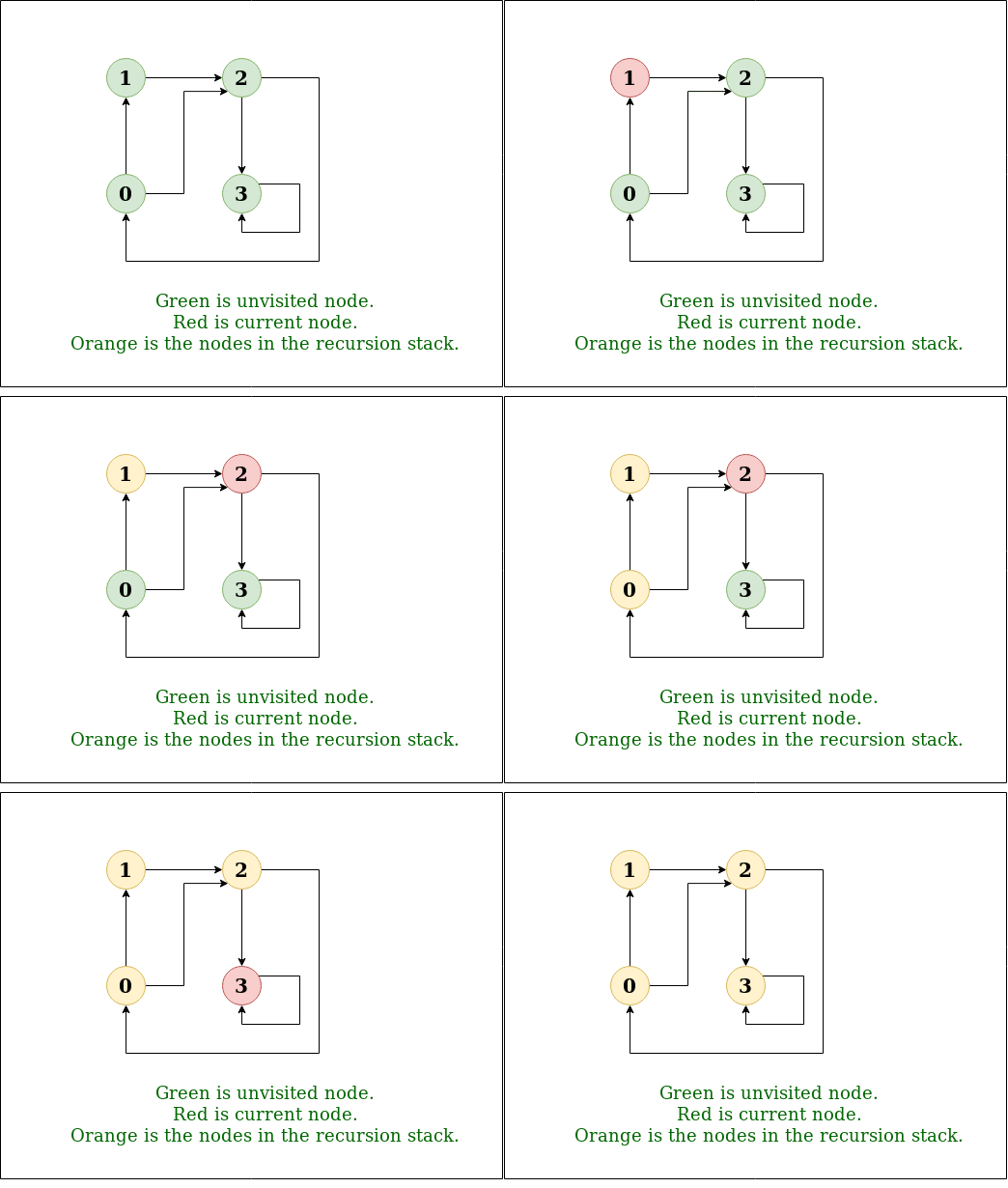
GeeksforGeeks
A Computer Science portal for geeks. It contains well written, well thought and well explained computer science and programming articles, quizzes and practice/competitive programming/company interview Questions.
do you know what is "graph" data structure?
nimble cairn
I have a vague understanding of this.
The current method does not "double up" when adding spheres to the list. I just test it.
fervent furnace
Ah, i just notice that you create a new list on each call, it can be avoided by a driver program or iterative approach
nimble cairn
Could you give me an example please?
fervent furnace
You can make a driver then turns this existing to helper , then the driver passes the list into helper and helper add the sphere to the same list in each recursive call
Void dfs(list l,A a){
l.add(something)
Dfs(l, other a in a)
}
Void driver(){
List l=new list;
Dfs(l, first a);
}
nimble cairn
Does that not have more overhead, being split into two functions?
And that method still creates a new temporary list.
fervent furnace
yes, you still need a list for storing all the results
void dfs(List<A> l,A a){
  l.Add(a);
  for other _a in a:{
    dfs(l,_a);
  }
}
List<A> driver(A first){
  List<A> theA=new();
  dfs(theA,first);
  return theA;
}
or the iterative approach by create an additional stack
nimble cairn
Okay I will put this on hold.
I have another question if you're willing:
I have a parent gameObject which has a Rigidbody component with gravity enabled.
Each child of the parent has SphereCollider and Rigidbody components with isKinematic set to true.
However, whenever gravity is applied to the parent gameObject, it fails to collide with anything.
Currently, my solution is to call Destroy(rigidbody) on each child gameObject until collision has been detected by the parent's rigidbody and then re-add the Rigidbody to the children after.
The children need rigidbody components for other game mechanics. However, this solution of destroying and adding components whenever the parent needs gravity applied to it just feels wrong.
crude mortar
Can you describe the mechanics?
nimble cairn
It's a bridge made of sphere gameObjects.
You can "pull" a sphere, to split the bridge into two.
Once a bridge has been split in half, the second half free falls.
crude mortar
I wouldn't recommend nested physics bodies in most cases. Sounds like what you want could be achieved via connecting the children with physics joints, or finding another solution for the "other mechanics" that you say require a rigidbody on each sphere.
If your reasoning for the children requiring a rigidbody is that nodes of the bridge (spheres) can be detached individually, why not just add a rigidbody after they have been detached?
nimble cairn
You're right, I've just scrapped the entire rigidbody system. Sometimes "reading your problems out loud" helps you realize why you're having bugs, lol.
 shrewd harbor
Hello, a question, how could I make objects such as obstacles in 2D appear with the method procedural , with certain rules to make it playable
nimble cairn
@shrewd harbor With very limited information, you could include your "obstacles" prefabs which spawn in your procedural generation
The same way you might spawn a tree.
shrewd harbor
I don't really have the sprites yet but they will be part of the ground, and obstacles like Chrome's dinosaur
shrewd harbor
I'm oriented with this type of games
 nimble cairn
Perhaps an int which counts how many tiles have been placed. And if you go over a threshold, you can place an obstacle.
This threshold could change based on your score, time survived etc.
nimble cairn
If you're using Unity's tile system, you just reference the tile one above on the Y axis where an obstacle would be placed 🙂
Tile system or not, I think tracking int tilesPlaced would be a good start
nimble cairn
 hallow crown
Guys, a long time ago i found a really good website that have list of so many formula for generating primitive 3d mesh. Does anybody have a link to it ? cause i can't remember which website
 soft shard
hallow crown
Guys, a long time ago i found a really good website that have list of so many fo...
soft shard
hallow crown
Guys, a long time ago i found a really good website that have list of so many fo...
Not sure about the specific site you might be referring to, but maybe Catlike Coding may help? There is a section on procedural mesh generation
hallow crown
I just looked it up. Its not catlike coding. It has so many and some unique 3d mesh. Its a really cool website, but I can't remember it
 tender haven
im tryna do a slide thing for my game and i did this
if (Input.GetKey(KeyCode.C))
{
rb.AddForce(cam.transform.forward * 100, ForceMode.Force);
}
but because its forward when i look up i start flying what can i do to fix that so its just horizontal
west lotus
tender haven
im tryna do a slide thing for my game and i did this
if (Input.GetKey(KeyCode.C)...
Project the camera forward vector on plane with the characters up vector as the planes normal
tender haven
ok thanks
 jaunty light
Whenever I attach visual studio to unity and proceed to boot my program it takes AGES to load. Why is this and how to solve?
 deft timber
is this a code related question?
deft timber
well where is the code you need help with?
knotty sun
jaunty light
Whenever I attach visual studio to unity and proceed to boot my program it takes...
There are many possible reasons for this, start by looking in the Task Manager to see if there are any bottlenecks in your system
jaunty light
knotty sun
There are many possible reasons for this, start by looking in the Task Manager t...
Yea.. now the debugger stopped loading at all
I'm not hitting any bottlenecks on my hardware
knotty sun
then there is no reason for it to be slow
jaunty light
it used to work fine until today

finally loaded after 5min
it's a small project
so idk
 buoyant copper
Hello, I try to use scriptableObject for triggering events but it seems that the response events are not being invoked. When i created the first scriptable object it worked fine, but now (after a day) it's not working anymore.
I use the same code from "Unite Austin 2017 - Game Architecture with Scriptable Objects"
buoyant copper
it's seems that is a problem with the listeners cause if i create a new event and use it instead of the old one, it works as expected, but if I enter in play mode again the new event is broken as the old one
 gray mural
buoyant copper
Hello, I try to use scriptableObject for triggering events but it seems that the...
gray mural
buoyant copper
Hello, I try to use scriptableObject for triggering events but it seems that the...
Do we have to search for the scripts you're talking about ourselves? 🤔
buoyant copper
a powerful website for storing and sharing text and code snippets. completely free and open source.
a powerful website for storing and sharing text and code snippets. completely free and open source.
gray mural
buoyant copper
https://paste.myst.rs/3uwxhy0g
https://paste.myst.rs/rndzwgtu
How can you remove a listener from the list that doesn't contain it? 🙂
if (!listener.Contains(oldListener))
    listener.Remove(oldListener);
also I think you don't have to check it
guess it's just worse for the performance
 severe sable
are editorscripts unable to save changes to their components?
context: I have a class that consists of arrays of data points and I have an editorscript to edit and change these indivdual data points easily, but when instanciating a prefab with this script attached none of my changes I do in the editor stick
if the answer is they cannot, why is that? and what other workarounds could I use?
leaden ice
Of course they can
Follow examples
You need to be working through the SerializedObject interface and mark them as dirty etc
severe sable
leaden ice
Of course they can
clearly not in the context I'm facing?
leaden ice
severe sable
clearly not in the context I'm facing?
I assume your code is just wrong
severe sable
I can tell haha
leaden ice
Also make sure the data you're trying to save is actually serialized/serializable
severe sable
so I can't serialize my own datatypes
leaden ice
Of course you can
You can do all of this, it just has to be done properly
It's hard to say exactly what's going wrong without seeing any of the code though
severe sable
I can provide the offending snippets, one minuite
            for (int i = 0; i < _nodeSystem.FreeNodes.Count; i++)
            {
                EditorGUILayout.BeginHorizontal();
                _nodeSystem.FreeNodes[i].Position =
                    EditorGUILayout.Vector2Field("Free Node " + (i + 1), _nodeSystem.FreeNodes[i].Position);
                if (GUILayout.Button("Remove Node", GUILayout.Width(100), GUILayout.Height(20)))
                {
                    _nodeSystem.FreeNodes.RemoveAt(i);
                }

                EditorGUILayout.EndHorizontal();
}```so there is nothing there that saves anything
severe sable
_nodeSystem is properly initalized
knotty sun
what is _nodeSystem?
severe sable
lemme just make a thread and post both files to not bog up this channel
knotty sun
cool
 woven veldt
Should I be using DOTS and ECS even though the ECS is experimental or should I use DOTS and GameObjects
hard viper
that really depends on the project
woven veldt
Well at the moment I'm making a 2D top down shooting game. I got to working on Pathfinding for the enemy AI and now I've gone into the rabbit hole of ECS. But becasue I'm new a lot of this stuff really goes over my head lol but I'm trying. So I've got a pathfinding algorithm in DOTS (A*) but don't know how to link it with my game objects
I have posted something in #1062393052863414313 if you want the code
 latent oriole
anyone had experience using aliases (symlinks) via git packages? the symlink is relative and works fine if i manually clone the repo to my computer, it just doesn't seem to work if Unity clones the repo via the package manager. the symlink itself doesn't seem to get cloned, but the meta file gets added just fine.
the package im trying to use is my own, so i'd really like to get it working.
 sage latch
woven veldt
Should I be using DOTS and ECS even though the ECS is experimental or should I u...
sage latch
woven veldt
Should I be using DOTS and ECS even though the ECS is experimental or should I u...
The whole DOTS package was fully released this year
You can use the other components (Burst and Jobs) with GameObjects, but using ECS means you have to restructure the whole project, since there are not GameObjects or components with ECS
woven veldt
sage latch
You can use the other components (Burst and Jobs) with GameObjects, but using EC...
so I should just use DOTS and not use ECS and instead just use GameObjects?
sage latch
woven veldt
so I should just use DOTS and not use ECS and instead just use GameObjects?
Have you started the project yet?
woven veldt
sage latch
Have you started the project yet?
I'm in early stages
sage latch
Ok, you could look into using all of DOTS, but it's not recommended unless you need the highest performance or if you're a beginner
(DOTS is ECS, Burst and Jobs together)
The code you shared in #1062393052863414313 only uses Burst and Jobs and can integrate with normal GameObjects and MonoBehaviour
woven veldt
I'm a beginner tbh, but I have some background with C#. So how would I integrate gameObjects with the code I have now then?
sage latch
fervent furnace
job doesnt support managed type
Look at the code, it's starting a job from a component
you can feed the data from a managed type into it
fervent furnace
you can feed data to it but you cannot use it in job
so wrap your data to struct and pass into it
woven veldt
How would I do this, sorry I'm really new
fervent furnace
you have already done this, you have created a struct and all you need is to initialize them then use it in job
woven veldt
alright perfect
 hard estuary
I have parameterless UnityEvent and I'm adding and removing lambda listeners to it, however it doesn't seem to work well, because it fails to remove it. Any tips about how it should be done properly?
void SetUp (CustomClass something)
{
  something.unityEvent.AddListener (() => SomeMethod (something));
}
void CleanUp (CustomClass something)
{
  something.unityEvent.RemoveListener(() => SomeMethod (something));
}
void SomeMethod (CustomClass something) { /* do something */ }
You cant remove lambdas
fervent furnace
dont use lambda expression, or hold the reference to it
woven veldt
Imagine I have multiple of the same type of enemy in a scene. But each of them needs to path find from a different location to a different end location. How would I pass all these jobs into one scripts and then get them all to complete at once using multi threading?
latent latch
you don't multithread yourself but instead use Unity's Navmesh API to do it for you
fervent furnace
isnt you following cokemonkey tutorial?
 gleaming tundra
public List<GameChunk> chunksToLoad0;
public List<GameChunk> chunksToLoad1;
...
public List<GameChunk> chunksToLoad9;

public GameObject playerPrefab;
public GameObject cameraPrefab;

public class StupidCollectionToGetAroundUnitysBSEditorWindowCrap
{
    private RoomManager _ugh;
    public StupidCollectionToGetAroundUnitysBSEditorWindowCrap(RoomManager fuckThis)
    {
        _ugh = fuckThis;
    }
    private List<GameChunk>[] _chunksToLoad;
    public List<GameChunk> this[int i]
    {
        get{
            if (_ugh == null)
            {
                try
                {
                    _ugh = GameObject.FindAnyObjectByType<RoomManager>();
                }
                catch
                {
                    return null;
                }
            }

            switch (i)
            {
                    case 0:
                        return _ugh.chunksToLoad0;
                    case 1:
                        return _ugh.chunksToLoad1;
                    case 2:
                        return _ugh.chunksToLoad2;
                    case 3:
                        return _ugh.chunksToLoad3;
                    case 4:
                        return _ugh.chunksToLoad4;
                    case 5:
                        return _ugh.chunksToLoad5;
                    case 6:
                        return _ugh.chunksToLoad6;
                    case 7:
                        return _ugh.chunksToLoad7;
                    case 8:
                        return _ugh.chunksToLoad8;
                    case 9:
                        return _ugh.chunksToLoad9;
                    default:
                        return null;
            }

        }
        set { _chunksToLoad[i] = value; }
    }
}```

Am I going straight to Unity Hell for this?it looks like you are already there
fervent furnace
i think try catch is useless, any FindXX wont throw if they cant find then you still get NRE
leaden ice
gleaming tundra
```[HideInInspector] public StupidCollectionToGetAroundUnitysBSEditorWindowCrap ...
Time to learn arrays
rigid island
gleaming tundra
```[HideInInspector] public StupidCollectionToGetAroundUnitysBSEditorWindowCrap ...
go directly to Jail. Do Not pass Go
gleaming tundra
leaden ice
Time to learn arrays
I mean... I know this is BAD, but like, I was trying to get around not being able to display my collections of collection of craps in the editor window. Is there some easier way that you would recommend?
I'm not sure I take your meaning, I guess?
gleaming tundra
fervent furnace
i think try catch is useless, any FindXX wont throw if they cant find then you s...
valid
knotty sun
man your StupidCollectionToGetAroundUnitysBSEditorWindowCrap is not even Serialized
 upper pilot
How do I setup a 2d object to bounce without losing/gaining energy/speed?
I have:
- 2d box collider floor
- a ball with:
- rigidbody2d(dynamic + bounciness material 1.0)
- box collider2d
- gravity 1, angular 0, mass 1
But the ball slowly bounces up higher and higher.
knotty sun
dont blame Unity for your own incompetence
rigid island
upper pilot
How do I setup a 2d object to bounce without losing/gaining energy/speed?
I have...
V3.Reflect
leaden ice
gleaming tundra
I mean... I know this is BAD, but like, I was trying to get around not being abl...
Yes, using arrays
upper pilot
rigid island
V3.Reflect
So it cant be achieved with built in physics?
rigid island
upper pilot
So it cant be achieved with built in physics?
that is physics
use velocity and reflect it
upper pilot
So what is the use of 2d physics material if 1.0 bounciness makes it bounce more than 1.0?
Unless there is something else adding force
rigid island
then you will get bounce
gleaming tundra
leaden ice
Yes, using arrays
Doesn't appear in the inspector
rigid island
cause the original type, its not serialized [System.Serializable]
leaden ice
gleaming tundra
Doesn't appear in the inspector
Sure it does, as long as the type in the array is serializable
simple egret
upper pilot
So what is the use of 2d physics material if 1.0 bounciness makes it bounce more...
The physics material may have the "Multiply" mode for the bounciness (does 2D even have those?)?
If that's the case, it may bounce higher
upper pilot
rigid island
use velocity and reflect it
Seems like its due to gravity settings
-9.81
gleaming tundra
leaden ice
Sure it does, as long as the type in the array is serializable
It is serializable
rigid island
simple egret
The physics material may have the "Multiply" mode for the bounciness (does 2D ev...
it doesnt have those option but afaik you can crank bouncey more than 1 which you can't do in 3D i think
gleaming tundra
But it's also an abstract class. Would that do it?
upper pilot
simple egret
The physics material may have the "Multiply" mode for the bounciness (does 2D ev...
They dont seem to have multiply setting, just 2 properties: Friction, Bounciness
I set Bounciness to 0.981 and the issue seems to be fixed.
simple egret
Ah yeah it's just 3D that has these, then
gleaming tundra
rigid island
abstracts dont show up in inspector
That's not always true, but in nested collections or 2D arrays, it seems to be the case? I think?
upper pilot
its good to know that this "random" number caused this issue.
Since youd expect Bounciness of 1.0 to be 100% bounciness with no energy loss/gain
gleaming tundra
leaden ice
Sure it does, as long as the type in the array is serializable
But seriously, is there a better way to do this with arrays? Or am I just going to have to do my hacky crap to avoid editor window coding?
gleaming tundra
knotty sun
man your StupidCollectionToGetAroundUnitysBSEditorWindowCrap is not even Seriali...
I'm confused as to why this is a problem? Do you care to elaborate? Is there a reason it should be?
rigid island
gleaming tundra
That's not *always* true, but in nested collections or 2D arrays, it seems to be...
not true
gleaming tundra
What part is not true?
rigid island
You said only nested collections and 2D arrays abstracts dont show in inspector..
knotty sun
gleaming tundra
I'm confused as to why this is a problem? Do you care to elaborate? Is there a r...
how is
[HideInInspector] public StupidCollectionToGetAroundUnitysBSEditorWindowCrap chunksToLoad;
supposed to be serialized if the class it references is not serializable?
rigid island
You can use this though
https://docs.unity3d.com/ScriptReference/SerializeReference.html

 rigid island
ScriptableObject 😉
gleaming tundra
rigid island
ScriptableObject 😉
so abstract scritable objects are the exception or something?
gleaming tundra
knotty sun
how is
[HideInInspector] public StupidCollectionToGetAroundUnitysBSEditorWindowC...
I don't think I need to serialize it, unless I'm missing something?
rigid island
gleaming tundra
so abstract scritable objects are the exception or something?
Unity serializes ScriptaleObjects so I assume its doing that
knotty sun
HideInInspector public says that it will try to serialize it
and if you cant serialize that how can you serialize anything it contains?
gleaming tundra
It doesn't contain anything though? It just has set and get accessors to access the lists in the inspector
I'm just using it to be able to access multiple lists in the inspector by index and stuff
leaden ice
gleaming tundra
But seriously, is there a better way to do this with arrays? Or am I just going ...
Yes as I said just using arrays with serializable types will work perfectly and require no editor scripting
gleaming tundra
But... it doesn't
leaden ice
gleaming tundra
I don't think I need to serialize it, unless I'm missing something?
If you want something in the inspector it must be serialized
knotty sun
then your code makes even less sense than I thought
gleaming tundra
leaden ice
If you want something in the inspector it must be serialized
it is
latent latch
probably best to come back with a better formatted script cause it's kinda hard to make out what you're doing
gleaming tundra
It works though
latent latch
I could only guess you've an inner class and it's not serialized
knotty sun
impossible, to start with
private List<GameChunk>[] _chunksToLoad;
is always null
gleaming tundra
 latent latch
[Serializable]
public class StupidCollectionToGetAroundUnitysBSEditorWindowCrap```not the same thing
leaden ice
gleaming tundra
it is
You have an array of lists
You can't do that
You must make a wrapper object
It's very simple
gleaming tundra
I tried an array of arrays as well
hard viper
I recently learned about tuple format. eg (int x, int y) instead of Tuple<int, int>. Is it mostly identical but with better syntax?
(so I know what the entries of the tuple mean?)
knotty sun
public class MyClass : Monobehaviour
  public OtherClass[] otherClasses
...
[Serialize]
public class OtherClass
  public Aclass[] Aclasses

[Serialize]
public class Aclass
//Some data here
(int x, int y) is shorthand for a ValueTuple<int, int> rather than Tuple<int, int>
but in all ways, it is identical to ValueTuple just with better syntax
 rain minnow
hard viper
I recently learned about tuple format. eg (int x, int y) instead of Tuple<int, i...
rain minnow
hard viper
I recently learned about tuple format. eg (int x, int y) instead of Tuple<int, i...
You can name each member of the tuple to be more concise . . .
hard viper
thanks
rain minnow
hard viper
thanks
You (mainly) use them if a class or struct is not needed . . .
 brittle haven
[System.Serializable]
public class SettingDetails
{
    public string SettingName;
    public enum SettingType {Float, Int, Bool}
    public enum SettingForm {oneValue, twoValue, toggle}
}
    //This is in a different class
    [HideInInspector] public SettingDetails thisSetting;
    void Start()
    {
        switch (SettingDetails.SettingType) // here
        {
            case SettingDetails.SettingType.Float:
            value1.contentType = InputField.ContentType.DecimalNumber;
            Panel1.SetActive(true);
            break;
            case SettingDetails.SettingType.Int:
            value1.contentType = InputField.ContentType.IntegerNumber;
            Panel2.SetActive(true);
            break;
            case SettingDetails.SettingType.Bool:
            toggle.gameObject.SetActive(true);
            break;
        }
    }
Why is there an error here?
sage latch
You're referencing the class SettingsDetails instead of your field thisSetting. You also need a field in SettingsDetails for the SettingType value (right now you have only declared the enum type)
brittle haven
sage latch
You're referencing the class SettingsDetails instead of your field thisSetting. ...
when I type "switch (thisSetting.SettingType)" there, it doesn't work. what should i write?
ok i solved it. thanks
 chrome trail
If I have a bunch of trigger colliders parented to an object, is there any way to tie those colliders' OnTriggerEnter events to a function on a script in the parent without putting a script on each of the children?
 wise mesa
have an SBC with android OS 12 on it. The board has 2 hdmi out and 1 hdmi in. I am looking for a way to get the vid from the HDMI In. webcam texture seems to only look for webcam devices that are non existant on the board. Anybody able to point me in the right direction? 🙂
if it may help the board picks up the HDMI input as rockchip-hdmi0 as input device 8
knotty sun
wise mesa
have an SBC with android OS 12 on it. The board has 2 hdmi out and 1 hdmi in. ...
is the board using HDMI-CEC frames?
wise mesa
@knotty sun at a quick google glance it appears it dos. board is an orange pi 5 plus.
knotty sun
wise mesa
<@556797857584381953> at a quick google glance it appears it dos. board is an or...
try this
https://github.com/AleRoe/CecSharp
you will need to use version 1.2 as Unity will not support version 1.4

GitHub
A .net class library to facilitate HDMI-CEC communications. - GitHub - AleRoe/CecSharp: A .net class library to facilitate HDMI-CEC communications.
 modern creek
chrome trail
If I have a bunch of trigger colliders parented to an object, is there any way t...
modern creek
chrome trail
If I have a bunch of trigger colliders parented to an object, is there any way t...
I don't think so, since as far as I can tell(?) these aren't unity events, but something specific to colliders. If you want to make it easy, though, just make a simply collider script that executes a callback when a collisioni happens:
public class SimpleCollider : MonoBehaviour
{
  private Action _callback;
  private void OnCollisionEnter2D(Collision2D collision) => _callback?.Invoke();
  public void Initialize(Action callback) => _callback = callback;
}

public class ParentThing : MonoBehaviour
{
  // .. some init method - find all the SimpleColliders in all children
  {
      foreach (SimpleCollider myCollider in SomeListOfColliders) myCollider.Initialize(MyHandler);
  }

  private void MyHandler()
  {
    // .. handle one of the children collision events
  }
}
Oh I have something like that. I was just wondering if there was a way to do it without resorting to that.
public class WeaponComponent : MonoBehaviour
{
    CollisionDelegate collision;

    public void BindToWeapon(CollisionDelegate inCollision)
    {
        collision += inCollision;
    }

    void OnTriggerEnter(Collider other)
    {
        collision(other);
    }
}```@knotty sun thanks ill take a look at it
modern creek
Yeah, there ya go. You could make it more robust by having the script ensure that there's a collider in Awake() or whatever, but that's probably NBD since the OnTrigger_ methods won't do anything if there's no collider.. but you know, for debugging
I would have naturally assumed there was a way to subscribe to collision events with something like colliderChild.onCollisionEnter2d += MyHandler but I couldn't find anything that supported that
chrome trail
modern creek
I would have naturally assumed there was a way to subscribe to collision events ...
I thought there was too and was confused there wasn't hence the question
modern creek
it might be possible but I cba'd to try 🙂
I'd probably do it the component way anyway since you're .. naturally gonna want to put some logic in the child collider over time anyway.. even some debugging hooks or whatever.. ie, "why is this bullet going twice as fast as it should be" type questions - you'd just slap a breakpoint on a bullet and debug it, instead of ... trying to mental-math it out from the parent
 dawn nebula
Is there a way to know which gameobjects will execute their Awake/Start methods first?
And if not, is the execution of Awake/Start on components within a gameobject ordered in any way?
Like top down?
woven veldt
Can someone please explain to me why I can't read the data out of this NativeArray https://hastebin.com/share/alaqexonev.java
Hastebin is a free web-based pastebin service for storing and sharing text and code snippets with anyone. Get started now.
Trying to read in StartPathFinding
 lean sail
dawn nebula
Like top down?
lean sail
dawn nebula
Like top down?
There is no guarantee for what the order will be, it can change if unity wants to change it. You can change the script execution order if really needed, but you shouldnt need this often at all. Ideally your code shouldnt rely on the execution order at all
dawn nebula
lean sail
There is no guarantee for what the order will be, it can change if unity wants t...
Ya I was aware of these overrides, but hoping there way some overall pattern. Hmmm.
I have some component that generates a path (list of Vector3s). I was thinking of having other "Modifier" components that can hook into the path component and make alterations to it upon some event. I'm worried that if there were multiple modifier components, the order of them might end up changing the final result.
lean sail
dawn nebula
Ya I was aware of these overrides, but hoping there way some overall pattern. Hm...
Are these all done in editor or unknown order at runtime? You could have the modifiers stored in a list, much easier to change the order of the list instead of relying on the order of components
 did you read what their use case was? I didnt say you shouldnt ever change it, I just said this shouldnt be something you need often.
If you need to change the execution order constantly, you have design problems.
reef escarp
How to make Save System Autosave / Trigger Event in Unity. Pls
Where sources where this can learn to do this.
I rummaged through the whole google and did not find anything 💀
modern creek
Your question's a bit vague. If you need to know how to store simple data points, look up "PlayerPrefs". If you need to be able to do something on a timer, write a method to check if that much time has elapsed and call it from an Update() somewhere in your codebase (probably related to player). If you need to save on demand when the app has closed, tie it to OnApplicationPaused() calls.
reef escarp
modern creek
Your question's a bit vague. If you need to know how to store simple data points...
Bro, I'm still a newcomer in C# so I need textbooks on this. To explain to me and showed how. Therefore, I say where I can find these textbooks. I rummaged through the Google and did not find what I need. 💀
modern creek
reef escarp
Bro, I'm still a newcomer in C# so I need textbooks on this. To explain to me an...
All good, just saying, your questions need to be a bit narrower. It's like asking "how can I get better at sports?" It's too broad and vague to give a simple answer. I gave you a couple leads to google up on. Just remember that when it comes to programming the things you do will be incredibly small until you're able to do them - how do I put a value into a variable, how do I loop over a bunch of things, how do I read text contents from a file, etc. Once you get those building blocks, then you can start putting them together to do things like build save system in a game in Unity.
woven veldt
Hi everyone, I’ve been stuck for ages now and I could really use some help before I go insane. I’ve posted something on DOTS and a hastebin link to my code. I have a job with a path finding function however whenever I try to get the path out of the job I get a null array and I don’t know what to do. If someone could look at it, it would honestly make my night.
leaden ice
woven veldt
Hi everyone, I’ve been stuck for ages now and I could really use some help befor...
without seing code, nobody can help
 mental rover
woven veldt
Hi everyone, I’ve been stuck for ages now and I could really use some help befor...
mental rover
woven veldt
Hi everyone, I’ve been stuck for ages now and I could really use some help befor...
it looks like you're allocating new arrays inside the job instead of populating the one you started the job with
woven veldt
leaden ice
without seing code, nobody can help
Its in DOTS under my name
woven veldt
mental rover
it looks like you're allocating new arrays inside the job instead of populating ...
How would I fix this then?
mental rover
woven veldt
How would I fix this then?
use the one you allocated on line 43, don't create a new one on line 238 then dispose it on line 253
woven veldt
mental rover
use the one you allocated on line 43, don't create a new one on line 238 then di...
Perfect thank you. I thought it had something to do with me using lists instead of a normal array
woven veldt
mental rover
use the one you allocated on line 43, don't create a new one on line 238 then di...
OMG you absolute LEGEND. It finally works. You have no idea how many different concussions I'm suffering from just from banging my head continuously on my desk. Thank you!
gleaming tundra
gleaming tundra
```[HideInInspector] public StupidCollectionToGetAroundUnitysBSEditorWindowCrap ...
So does anyone know why I had to jump through these hoops? I'm trying to figure out why just using arrays didn't work
leaden ice
gleaming tundra
So does anyone know why I had to jump through these hoops? I'm trying to figure ...
Because as mentioned yesterday you're using an array of lists which Unity doesn't support
You need an array of a serializable wrapper class that contains a list
gleaming tundra
How would the wrapper class work. Maybe I misunderstand the term?
hard viper
a wrapper class is just a class that basically holds another class, plus a bit more to justify its existence
gleaming tundra
That's what I did though, essentially
hard viper
example; If an array did not have .Length, you might want to make a wrapper class that holds an array plus its length
 gaunt wren
Flat Skybox Parallax Deadzone
nimble cairn
foreach (Transform t in transform.Cast<Transform>().ToList()) t.DoThing();
Does this ⬆️ foreach cast calculate each time the loop iterates, the same way that the following loop ⬇️ will calculate the length of an array each iteration:
for (int i=0; i<array.Length; i++) {
    DoThing();
}
that's horrific, why do any of the casting or ToList?
Though, it will do it once
nimble cairn
@quartz folio I have a parent Transform and I iterate over each child and assign a new parent. I cast the children to a list.
If I don't cast the children to a list, the indexing will break
And it skips every second child
fervent furnace
then use for loop and you use iterate it reversely
nimble cairn
fervent furnace
then use for loop and you use iterate it reversely
Is the only benefit of this avoiding the overhead and memory of casting?
quartz folio
It avoids allocating a list only to immediately garbage collect it, and it avoids creating an Enumerable to cast, and it's clearer what's going on
autocomplete forr to make a reverse for loop easily
nimble cairn
for (int i = childCount; i >= 0; i--) transform.GetChild(i).SetParent(col.transform.parent);
Perfect
fervent furnace
index out of bound
nimble cairn
What do you mean?
int childCount = transform.childCount-1;
for (int i = childCount; i >= 0; i--) transform.GetChild(i).SetParent(col.transform.parent);
mb
 gleaming trench
how can i make items in my hand not pickable again like i tried so many things but it still doenst work the way i want it
my pickableitem class that triggeres when there is an item i can pick up: https://pastes.dev/4inP848cJC
and here is my pickup class: https://pastes.dev/O0ftVzLnwv

A paste containing 27 lines of csharp.
A paste containing 35 lines of csharp.
nimble cairn
@gleaming trench You don't really need to use trigger collision to detect this! You already have a control variable hasBeenPickedUp!
gleaming trench
i added that after it still kept triggering even tho i have it in my hand
nimble cairn
Perhaps cast a raycast out, and then if there is a RaycastHit detection and you press E, then set hasBeenPickedUp to true.
Yeah, so rework the mechanic and don't use triggers.
gleaming trench
is using triggers bad
nimble cairn
Are you having problems?
gleaming trench
yes
nimble cairn
There you go!
gleaming trench
alright alright i was just making sure idk its my first time using unity
nimble cairn
Not to mention, having a trigger box area takes more computational power than casting a raycast against a layermak.
@gleaming trench
if (Physics.Raycast(mainCamera.ViewportPointToRay(new(0.5f, 0.5f, 0)), out RaycastHit hit, X, itemPickupLayerMask) && Input.GetKeyDown(KeyCode.E)) {
    hit.transform.GetComponent<PickableItem>().hasBeenPickedUp = true;
}
Where float X is the distance of the ray. This could be Mathf.Infinity if needed.
Where LayerMask itemPickupLayerMask is a control layer so you are not casting a ray on every single surface on your game.
gleaming trench
nimble cairn
<@814614567862272073>
```C#
if (Physics.Raycast(mainCamera.ViewportPointToRay(n...
Alright Imma try
Thanks!
nimble cairn
GameObject bridgeParent = new GameObject("Bridge", typeof(Bridge)) {
    tag = "Bridge"
    // What else can go here?
};
So I've found out you can create GameObjects with the following constructor method.
I've read the documentation and it is a bit unclear what else I can include in this "object".
latent latch
i'd assume any of a gameobject's properties
leaden ice
nimble cairn
```C#
GameObject bridgeParent = new GameObject("Bridge", typeof(Bridge)) {
t...
Yep anything on GameObject. This is an object initializer
https://learn.microsoft.com/en-us/dotnet/csharp/programming-guide/classes-and-structs/how-to-initialize-objects-by-using-an-object-initializer

Learn how to use object initializers to initialize type objects in C# without invoking a constructor. Use an object initializer to define an anonymous type.
nimble cairn
There are not many public properties for the GameObject constructor, I was a little confused but that's what I thought. Thanks @latent latch @leaden ice
 mossy sand
hi. im trying to make a ui pop up when you hover over an item/object in-game .i kind of got it to work but it only pops up when i hover over the leaves of the tree and not the trunk part. is this a skript problem or asset problem.
Selection Manager - https://gdl.space/arewuqabak.cs
Interactable Object - https://gdl.space/poxolocola.cpp

 gaunt wren
@mossy sand just to clarify, you say the trunk doesn't work but the image you posted looks like it is.
mossy sand
sry
idk what is happening coz i tried it again to be sure but this happened

because when i look at the leaves i get the pop up. but then when i look away,say at the sky. the tree popup stays on the screen till i look at the floor of the trunk for some reason
gaunt wren
are the leaves and tree seperate objects by chance? Also, The text thing I suspect is because the raycast hasn't hit anything meaning it just keeps the original text from the last thing it hit
mossy sand
they are the same prefab
gaunt wren
well in theory, if it's a single object, the raycast should detect the whole thing. Leaves and trunk should be the same object but if it's not detecting the trunk, it suggests to me that the prefab consists of multiple objects and one of them(Leaves) is responding to the raycast.
mossy sand
i also added a mesh collider. the mesh is the tree with the whole tree outlined?
quartz folio
 radiant elm
Alright interesting question for yall. It might seem trivial but I don't think it is. I got this code for my navmeshagent. It's in my Update function.
if (navMeshAgent.velocity.magnitude == 0f)
{
SetRandomDestination();
}
The problem is as follows: If on frame X, velocity.magnitude is 0, it sets a random destination. The thing is that on frame X+1, despite having set a new random destination, the velocity magnitude might still be 0 (due to the agent not having its velocity caught up on the next frame yet), so the code repeats itself, if that makes sense. So at random times the agent will be stuck in place. Does that make sense? I have tried both Update and FixedUpdate but neither works. I basically want the agent to find a new destination whenever its velocity magnitude is 0. I want it to move all the time.
quartz folio
radiant elm
Alright interesting question for yall. It might seem trivial but I don't think i...
Don't compare floats using equality. Use Mathf.Approximately or less/greater than a bias
If that's not actually an issue in this case, perhaps also check the sqrdistance to the destination?
radiant elm
quartz folio
Don't compare floats using equality. Use Mathf.Approximately or less/greater tha...
I checked with debug logs and that doesnt seem to be the problem. I will try the sqrdistance thing though, thank you
lean sail
radiant elm
I checked with debug logs and that doesnt seem to be the problem. I will try the...
If it is completely stuck, maybe it is just updating the destination so quickly that it cant move or the path doesnt calculate fully. You could try to do this every X seconds, since this really wouldnt be needed every single frame
radiant elm
it gets stuck randomly for like a few seconds. I could try every X seconds but that could still leave it stuck for that X amount of time
private void SetRandomDestination()
{
Vector3 randomPoint = Random.insideUnitSphere * 10f;
randomPoint += transform.position;
NavMeshHit hit;
NavMesh.SamplePosition(randomPoint, out hit, 10f, NavMesh.AllAreas);
destination = hit.position;
navMeshAgent.SetDestination(destination);
}
this is my desination code
There are no other navmeshes around, its only on a square platform
lean sail
It could even be something like 0.2 seconds or just check something related to the path to see when it's done rather than relying on the magnitude
radiant elm
lean sail
It could even be something like 0.2 seconds or just check something related to t...
I actually tried that, I had a whole system where I would calculate the estimated time every frame it should have traversed that path, to see if it was "off schedule". I even used a leniency factor, so like it would still be let to keep going if the estimated time "schedule" was 5% higher than what it is supposed to be. None of it worked
knotty sun
radiant elm
I actually tried that, I had a whole system where I would calculate the estimate...
try adding && navMeshAgent.hasPath to your if statement.
note this will mean you will also have to call SetRandomDestination() from Start
radiant elm
okay ill try that that sounds like it might work
lean sail
radiant elm
I actually tried that, I had a whole system where I would calculate the estimate...
Yea you wouldnt need to calculate the estimated time at all, since it has fields to tell you if it has a path or the path is invalid/partial. You probably want to check those other cases incase
https://docs.unity3d.com/ScriptReference/AI.NavMeshAgent-pathStatus.html
 unborn flame
!code
tawny elkBOT
Posting code
📃 Large Code Blocks
Use links to services like:
https://gdl.space/, https://paste.ofcode.org/, https://hatebin.com/, https://paste.myst.rs/, https://hastebin.com/
📃 Inline Code
Surround code with three backquotes. Not quotation marks.
To format as C#, add cs to the first line:
```cs
// Your code here
```
Add a comment with a line number if there is an error message.
unborn flame
Heys guys im having problem with my dialogue, so i know sometimes in games people spam through the dialogue because they do not want to read it. So to account for that I want to make sure that when space is pressed it ONLY skips the dialogue and enter ONLY selects the choices. Right now when i spam through the dialogue with the space button it makes a choice as well, here is my full code but I think the issue is in the update function, here is also a clip of the issue if that helps. https://paste.ofcode.org/37nG6twUkMKsskppfYGaMqb
fervent furnace
because this
private IEnumerator SelectFirstChoice(){
    EventSystem.current.SetSelectedGameObject(null);
    yield return new WaitForEndOfFrame();
    EventSystem.current.SetSelectedGameObject(choiceButtons[0].gameObject);
}
whats wrong with it?
fervent furnace

Unity Discussions
Is there a way to prevent unity UI buttons from being triggered by any keyboard input? I only want them to respond to mouse inputs as keypresses are handled through code due to… reasons. Is there a way to do this with the inbuilt ui system or am I going to have to do some sort of raycast in trickery and have no onclick in my button?
unborn flame
fervent furnace
https://discussions.unity.com/t/is-there-a-way-to-prevent-ui-buttons-from-being-...
i dont understand
fervent furnace

you can open the input manager under project setting and the standalone input module in event system to have a look on it
 dark moat
So hey guys ,
I am working on a project on creating residential building procedurally in unity 3d .
as of the second step in that is generation of walls and roof.
while generating those I need them to follow Real-life physics and gravity , like when heavy loads are given to the floor it will break , it should be able to withstand earthquake, if proper stable widths and thickness for the walls are not there it will fall,
I have no idea on how to do these physics parts for this,
If anyone has any idea do help out .
reference documents and projects will eb helpfull
unborn flame
fervent furnace
ah i understand now thank you! It works now!
dark moat
😀 😀 😀 😀
knotty sun
dark moat
So hey guys ,
I am working on a project on creating residential building procedu...
That is a very complex process, I wonder if you realize just how complex. I suggest you start by googling 'Calculating Structural Integrity' and taking it from there
dark moat
@knotty sun
This is my final goal.
But getting any basic ideas which are related to this and will be really help full.
I Will be able to build up from those
nimble cairn
@dark moat It's important to remember that jet fuel can not melt steel beams!
nimble cairn
dark moat
nimble cairn
Hey is there anything wrong in the goals? I would like to know as this is for my project i need to do required adjustments
reef escarp
Hi all! Guys, help URGENTLY!!! The game is coming out soon and I still have this problem.
How can I make autosaving work when the player touches the trigger block? So that after exiting the game I can press the "Load game" button and so that I can continue the game from the place where the autosave occurred.


 junior salmon
Is there a way to export grease pencil from blender into unity? I have a blend with a 3d model and grease pencil detail, but the grease pencil doesn’t carry over
 maiden junco
reef escarp
Hi all! Guys, help URGENTLY!!! The game is coming out soon and I still have this...
maiden junco
reef escarp
Hi all! Guys, help URGENTLY!!! The game is coming out soon and I still have this...
do you already have a save system implemented?
maiden junco
junior salmon
Is there a way to export grease pencil from blender into unity? I have a blend w...
you can convert the grease pencil to a curve, then go to the curve tab and set the extrude value to your liking and then convert it to a mesh
then export it as an fbx or obj and you're done
reef escarp
maiden junco
do you already have a save system implemented?
No, I have no idea how to do this 💀
maiden junco
reef escarp
No, I have no idea how to do this 💀
don't worry, you can write your own JSON serialize system to serialize data in json files or you can use some assets that do that for you
if you wanna be cool you can use Easy Save 3
but its paid
otherwise
this one is pretty valid: https://github.com/IntoTheDev/Save-System-for-Unity

GitHub
Save System for Unity with AOT (IL2CPP) and assets references support. - GitHub - IntoTheDev/Save-System-for-Unity: Save System for Unity with AOT (IL2CPP) and assets references support.
I'm using it in my production game
it works like a charm
reef escarp
maiden junco
this one is pretty valid: https://github.com/IntoTheDev/Save-System-for-Unity
Thank you
junior salmon
maiden junco
then export it as an fbx or obj and you're done
I just tried these steps and its not worked
 eager steppe
Hey y'all, I made some tiny changes to my script from before, but for some reason, when rotating with EditRotation() (which is called in OnMouseDrag()), the object just jitters and acts weird when changing its rotation.
Could be hard to notice the objcet's rotation. No cursor capturing, Recorder don't like that hahah
But in the "Inspector", you can see that the Z is barely changing...
This script is put on the Circle you can see. Dragging around/with it, should change the Z of the track.... but it aint and i got no idea why 🥲
 peak raptor
When I build and run Unity, canvas does not appear. but appear in editor. Solutions on the internet do not work.
leaden ice
peak raptor
When I build and run Unity, canvas does not appear. but appear in editor. Soluti...
What render mode is the canvas? I would guess you probably placed your UI elements incorreectly.
peak raptor
leaden ice
What render mode is the canvas? I would guess you probably placed your UI elemen...
I actually have a nested canvas. One of these is not visible. base canvas's rendering mode is "screen space camera"
this is base

and
 leaden ice
Which objects in particular are not visible?
Show them in scene view/inspector
ideally show the whole unity window when doing this
peak raptor
In the component canvas, I show the information of the element that is dynamically clicked during the game.
working in editor mode
but not working build
leaden ice
Please show the objects as requested 🙏
wary dock
Heya, I am working on a 3D top down game and would like to have an illuminating vision cone. I tried using a spotlight to simulate this but it has some unwanted effects. Any suggestions on what is an appropriate approach to take?
Also I do not wish a viewcone that hides everything outside of the vision cone but just lights it up to some extent
 leaden ice
wary dock
Heya, I am working on a 3D top down game and would like to have an illuminating ...
leaden ice
wary dock
Heya, I am working on a 3D top down game and would like to have an illuminating ...
#archived-lighting not code
wary dock
I don't think lighting is the way to solve this problem
leaden ice
I mean something is wrong with your setup if the shadows aren't working properly
wary dock
I get that but I am looking for an alternative method than using spotlights
 foggy sentinel
using System.Collections;
using System.Collections.Generic;
using UnityEngine;
using UnityEngine.Tilemaps;

public class interactableTileMap : MonoBehaviour
{
    Grid grid;
    Vector3Int mousePostion;
    Tilemap tilemap;
   [SerializeField] Tile tile;

    // Start is called before the first frame update

    void Awake()
    {
        grid = new GameObject("PlayerGrid").AddComponent<Grid>();
        tilemap = new GameObject("Tilemap").AddComponent<Tilemap>();
        tilemap.transform.SetParent(grid.transform);

    }

    // Update is called once per frame
    void Update()
    {

        mousePostion = tilemap.WorldToCell(Camera.main.ScreenToWorldPoint(Input.mousePosition));
        mousePostion.z = 0;
        Debug.Log(mousePostion);


        tilemap.SetColor(new Vector3Int(0, 0, 0), Color.red);
        tilemap.RefreshAllTiles();
    }
}
can someone help me with scripting tile maps. I added this script to a gameObject and its supposed to make a tilemap and set a tile at the location of the mouse but it does not work. Everything just stays blank.
 crude mortar
tilemaps need a tilemap renderer
foggy sentinel
i added that just now but it still doesnt work
 crude mortar
Oh I see, I missed the .SetParent line, my bad
what are you expecting to see? what's your tile look like

 crude mortar
well all you are currently doing is setting the color at 0,0,0 to red and refreshing all tiles
you aren't actually setting a tile there
are you doing it by hand in the scene view?
crude mortar
nothing in your code actually sets a tile
foggy sentinel
but I have set tile
oh wrong code
using System.Collections;
using System.Collections.Generic;
using UnityEngine;
using UnityEngine.Tilemaps;

public class interactableTileMap : MonoBehaviour
{
    Grid grid;
    Vector3Int mousePostion;
    Tilemap tilemap;
   [SerializeField] Tile tile;

    // Start is called before the first frame update

    void Awake()
    {
        grid = new GameObject("PlayerGrid").AddComponent<Grid>();
        tilemap = new GameObject("Tilemap").AddComponent<Tilemap>();
        tilemap.gameObject.AddComponent<TilemapRenderer>();

        tilemap.transform.SetParent(grid.transform);

    }

    void updateInput()
    {
        mousePostion = tilemap.WorldToCell(Camera.main.ScreenToWorldPoint(Input.mousePosition));
        mousePostion.z = 0;
        Debug.Log(mousePostion);
    }
    void Update()
    {
     updateInput();


        tilemap.SetColor(mousePostion, Color.red);
        tilemap.RefreshAllTiles();
    }
}
still not setting a tile in the code though, just a color
you have to use tilemap.SetTile(mousePosition, tile);
and you shouldn't need to refresh all tiles each frame either (or at all)
 rugged storm
is this a good way to wait for a Coroutine to end in another Coroutine ?
        Coroutine cd = StartCoroutine(CountDown(3));
        yield return new WaitUntil(() => cd == null);
yield return CountDown(3)
 hexed pecan
rugged storm
is this a good way to wait for a Coroutine to end in another Coroutine ?
```cs...
hexed pecan
rugged storm
is this a good way to wait for a Coroutine to end in another Coroutine ?
```cs...
Coroutine references don't go null when the coroutine ends
rugged storm
oh kk ty
vagrant blade
@thorny edge these posts belong on the forums !collab
tawny elkBOT
📢 Collaborating and Job Posting
We do not accept job or collab posts on discord.
Please use the forums:
• Commercial Job Seeking
• Commercial Job Offering
• Non Commercial Collaboration
 thorny edge
vagrant blade
<@226409406923931648> these posts belong on the forums !collab
thorny edge
vagrant blade
<@226409406923931648> these posts belong on the forums !collab
Thanks! 🙏
 somber sparrow
public GameObject fireBall;
public float fireBallCooldown;
private bool canAttack = true;
void Update()
{
    if(Input.GetMouseButtonDown(0))
    {
        if(canAttack);
        {
            canAttack = false;
            StartCoroutine("fireBallDelay");
        }
    }
}

public IEnumerator fireBallDelay()
{
    Instantiate(fireBall, transform.position, transform.rotation);
    yield return new WaitForSeconds(fireBallCooldown);
    canAttack = true;
}
i have this script to try and do a cooldown between attacks but there isn't any delay, what did i do wrong?
quartz folio
- Don't use strings to start coroutines, StartCoroutine(fireBallDelay());
if(canAttack);your if statement is empty because of the;
- !code
tawny elkBOT
Posting code
📃 Large Code Blocks
Use links to services like:
https://gdl.space/, https://paste.ofcode.org/, https://hatebin.com/, https://paste.myst.rs/, https://hastebin.com/
📃 Inline Code
Surround code with three backquotes. Not quotation marks.
To format as C#, add cs to the first line:
```cs
// Your code here
```
Add a comment with a line number if there is an error message.
dawn nebula
Anyone have experience with creating circuit simulations? Not anything related to resistance, just concepts like Add/Or gates, Adders etc.
somber sparrow
quartz folio
1. Don't use strings to start coroutines, StartCoroutine(fireBallDelay());
1. `i...
thank you so much, i completely missed that. as for the coroutines im pretty sure it said to do it that way on a unity scripting manual
quartz folio
If it does, it's wrong
dawn nebula
Similar to that Sebastian Lague video.
https://www.youtube.com/watch?v=QZwneRb-zqA&t=3s&ab_channel=SebastianLague

A little exploration of some of the fundamentals of how computers work. Logic gates, binary, two's complement; all that good stuff!
Series playlist: https://www.youtube.com/playlist?list=PLFt_AvWsXl0dPhqVsKt1Ni_46ARyiCGSq
Simulation tool (work in progress): https://sebastian.itch.io/digital-logic-sim
Source code: https://github.com/SebLague/Dig...
quartz folio
quartz folio
If it does, it's wrong
It's the first thing listed in the StartCoroutine API, but you don't need to use what's first
dawn nebula
Unsure how to best set it up.
rugged storm
how do i avoid this being true when the musicaudio is paused?
yield return new WaitUntil(() => musicAudio.isPlaying == false && musicAudio.time <= musicAudio.clip.length-1);
and only when the music is 1 second from ending
quartz folio
dawn nebula
Anyone have experience with creating circuit simulations? Not anything related t...
If you have actual questions it's best to just ask them so you don't drag people into a non-specific conversation
dawn nebula
quartz folio
If you have actual questions it's best to just ask them so you don't drag people...
Fair enough. Main question then is how to set up the simulation. For example if a circuit component's state is updated, do I propagate this new state down the line, or do I set up some type of "Update tick" and all components check what their state should be, and then update on that tick.
I feel like the signal propagation can lead to loops really easily.
Am I making sense with this question btw?
quartz folio
Yes; the problems are probably in the details and specifics and general advice might not help; I've had similar problems making a custom state machine
it may be that Lague's was actually quite broken, but just worked for what they needed to do
and they never protected against loops
delicate olive
rugged storm
how do i avoid this being true when the musicaudio is paused?
```cs
...
Doesn't that already do the functionality you want? I see nothing wrong with it
dawn nebula
quartz folio
it may be that Lague's was actually quite broken, but just worked for what they ...
It seems to be protected against loops, states just swap every frame. The project is playable on itch. I just posted the video to give a good reference as to what I am trying to recreate.
simple egret
Yeah I guess each gate has an internal "have I been updated this tick" boolean that gets reset when a new tick is reached
Or they're stored in some list
quartz folio
Ah cool. I've not tried it myself but I would probably make a class that represents the electricity that collects the nodes it's enabled along its path. Then exclude those if I hit them in the same state, and perhaps count them too to avoid infinite loops
simple egret
Yeah requires some thought. You spent weeks on the thing, building a system that's really complex and think it's unbreakable. Then some user links a NOT gate to itself
dawn nebula
simple egret
Yeah I guess each gate has an internal "have I been updated this tick" boolean t...
I was thinking of having some "CircuitManager" script that has a reference to all components, and then each tick has the component check what state it should be in by looking at its inputs, and THEN everyone gets updated to the new state.
rugged storm
delicate olive
Doesn't that already do the functionality you want? I see nothing wrong with it
when i run, musicAudio.Pause(); it is true but i only want it true when the music is ending
dawn nebula
Stuff can still "loop" but at the defined tick rate.
I'm just worried about massive circuits.
delicate olive
rugged storm
when i run, musicAudio.Pause(); it is true but i only want it true when the musi...
How come? !musicAudio.isPlaying evaluates true when you have paused it, but the second part will still be false unless it's over
quartz folio
That's also fine, if you did it in ECS it's very scalable
simple egret
You could define a max number of component updates per tick, and take back from where you were in the last tick
dawn nebula
I wonder how Minecraft does it with Redstone. Each piece of wire is basically a circuit component.
quartz folio
They have a tick; but that's one of the reasons it's kinda bad for certain things
I'm certain that how redstone works is heavily documented if you wanted to replicate it
dawn nebula
Honestly my use-case doesn't involve circuits that're THAT big. Even with ~a hundred components I doubt the performance would be that bad.
It would just be iterating down a list and checking a bool 😛
rugged storm
delicate olive
How come? !musicAudio.isPlaying evaluates true when you have paused it, but the ...
im not sure why but ill investigate more
I can confirmed that simply calling musicAudio.Pause() causes it to evaluate true
delicate olive
No cross posting
 brave river
oh im sorry
rugged storm
rugged storm
I can confirmed that simply calling `musicAudio.Pause()` causes it to evaluate t...
whenever i call musicAudio.Pause() at the very least the coroutine will continue
    public IEnumerator MusicShuffle()
    {
        var randomizedMusicList = musicList.OrderBy(x=> UnityEngine.Random.value).ToList();


        while (true)
        {
            randomizedMusicList = randomizedMusicList.OrderBy(x => UnityEngine.Random.value).ToList();
            foreach (var music in randomizedMusicList)
            {
                musicAudio.clip = music.clip;
                musicAudio.Play();
                float dmv = PlayerPrefs.GetFloat("MusicVolume"); //default music volume
                musicAudio.volume = 0;
                for (int i = 0; i < 60; i++)
                {
                    float tta = dmv / 60f; //volume to add
                    musicAudio.volume += tta;
                    yield return new WaitForSeconds(1f / 60f);
                }
                musicAudio.volume = dmv;

                yield return new WaitUntil(() => musicAudio.isPlaying == false && musicAudio.time <= musicAudio.clip.length-1);

                for (int i = 0; i < 60; i++)
                {
                    float tta = dmv / 60f; //volume to remove
                    musicAudio.volume -= tta;
                    yield return new WaitForSeconds(1f / 60f);
                }
            }
            yield return null;
        }

    }```
this is the whole coroutineits supposed to smoothly fade out from one song then to the next
delicate olive
rugged storm
```cs
public IEnumerator MusicShuffle()
{
var randomizedMusicLis...
I guess you could try changing
"musicAudio.time <= musicAudio.clip.length-1"
to
"musicAudio.time <= (musicAudio.clip.length - 1)"
If visual studio (or whatever IDE you're using) says that parentheses are redundant then this likely isn't the correct fix.
But the -1 could for some reason be subtracting one from the bool, making it reverse and thus making it evaluate true when it shouldn't
rugged storm
it did not say it was redundant... lemme playtest
delicate olive
That's a good sign
rugged storm
it also does not fix the issue
delicate olive
Okay, do you know how to use an attached debugger?
 jaunty sleet
Does anyone know what the best way is to get a random boolean value from unitys random class?
delicate olive
jaunty sleet
Does anyone know what the best way is to get a random boolean value from unitys ...
(bool)Random.Range(0, 2)
It randoms between 0 and 1, where 0 will be casted to false and 1 into true
rugged storm
delicate olive
Okay, do you know how to use an attached debugger?
yeah
jaunty sleet
delicate olive
(bool)Random.Range(0, 2)
Doesn't that return a float though
rugged storm
rugged storm
yeah
somewhat at least
delicate olive
jaunty sleet
Doesn't that return a float though
(bool) will cast the float into a boolean. Bools are just ints under the hood
jaunty sleet
delicate olive
(bool) will cast the float into a boolean. Bools are just ints under the hood
Yeah, but couldn't the float be 0.5?
delicate olive
jaunty sleet
Yeah, but couldn't the float be 0.5?
Random.Range has overrides for both ints and floats, so if you don't do Random.Range(0f, 1f) then it won't be float
Do Random.Range(0, 2) (2 because the second param is exclusive)
jaunty sleet
delicate olive
Random.Range has overrides for both ints and floats, so if you don't do Random.R...
oh, thanks. That will work great then
quartz folio
delicate olive
(bool) will cast the float into a boolean. Bools are just ints under the hood
This isn't a thing; it's not true
rugged storm
 delicate olive
Actually they maybe aren't ints because they don't need to use as many bytes in memory
quartz folio
Just == 1 to make it a bool
delicate olive
quartz folio
Just `== 1` to make it a bool
Oh yeah that will work
jaunty sleet
I just realized what I am trying to do is more complicated then I thought. I am trying to generate a random Vector3 with a magnitude in between a minimum and maximum value
delicate olive
rugged storm
somewhat at least
Then you should make the WaitUntil's anonymous function into a more debuggable form, so to something like this:
yield return new WaitUntil(() =>
{
  bool isPlaying = musicAudio.isPlaying;
  bool hasEnded = musicAudio.time <= musicAudio.clip.length - 1;
  return isPlaying && hasEnded;
}
and then inspect each of those variables in debug mode
quartz folio
jaunty sleet
I just realized what I am trying to do is more complicated then I thought. I am ...
So you have the direction? If it's normalized, just multiply it with your random value
delicate olive
jaunty sleet
No, it can be any direction
Use Random.insideUnitSphere then
And multiply by that random number
jaunty sleet
delicate olive
Use Random.insideUnitSphere then
If I multiply it by 3, does that result in a vector3 with magnitude 3?
quartz folio
well, onUnitSphere and then multiply, no need to bias towards the center with two magnitudes
delicate olive
rugged storm
i should have fliped the statment
Oh damn you realized it even before I did lol
rugged storm
lmao
delicate olive
jaunty sleet
If I multiply it by 3, does that result in a vector3 with magnitude 3?
Yeah, that's the upper bound
quartz folio
delicate olive
Isn't it?
Just to add a bit more context if you're interested: https://stackoverflow.com/a/28515361
delicate olive
quartz folio
Just to add a bit more context if you're interested: <https://stackoverflow.com/...
Okay so it's just literally one byte, good to know
lean sail
delicate olive
Isn't it?
in other languages you can, like c/c++
delicate olive
lean sail
in other languages you can, like c/c++
Also asked GPT and it said Convert.ToBoolean(myInt); would also work
In c#
 craggy veldt
delicate olive
Also asked GPT and it said Convert.ToBoolean(myInt); would also work
craggy veldt
delicate olive
Also asked GPT and it said Convert.ToBoolean(myInt); would also work
it may not as you're expecting it to work
  float f = 0.4f;
  Console.WriteLine(Convert.ToBoolean(f));
  //Will print true
  //0.6, 0.7, 0.8, 0.9 will also be true
!= 0 is true
craggy veldt
also based on OP's float question
tacit swan
what's the best way to implement repeating attacks for a 2d metroidvania?
edit: as in an enemy will repeat attack 1, then attack 2, then attack 3 and then go back to attack 1 (each attack needs to finish before starting the next one)
craggy veldt
this is if we're speaking about floats not int, which the op was asking
rigid island
tacit swan
what's the best way to implement repeating attacks for a 2d metroidvania?
edit: ...
are you using animator ? implement an index that keeps going up each attack then use it as transition to diff animations
tacit swan
rigid island
are you using animator ? implement an index that keeps going up each attack then...
how do i make sure that each attack is finished before starting another one?
like maybe attack 1 will take 10 seconds to finish while attack 2 is fast and only takes 3 seconds
rigid island
tacit swan
like maybe attack 1 will take 10 seconds to finish while attack 2 is fast and on...
an animation event maybe ? runs a method that counts each run
along with a few other checks
tacit swan
what if im not using an animator?
rigid island
A timer i suppose?
delicate olive
tacit swan
is waitforsecondsrealtime affected by in game fps?
Shouldn't be
rigid island
tacit swan
is waitforsecondsrealtime affected by in game fps?
almost anything in unity gameloop is fps dependent
quartz folio
Ie. It waits until the next frame after real-world seconds have passed
delicate olive
rigid island
almost anything in unity gameloop is fps dependent
Yeah because waitforseconds updates every frame, so even if you did waitforsecondsrealtime(0.0001f) 100 times in a row it would wait 60 frames and not 0.06 seconds
cold egret
- If there any way to instantiate objects across multiple threads, or speed up object instantiating by other means? I've been looking into the jobs system, but it doesn't seem to have this functionality. Dots is not an option for me yet because i'm quite limited in time and i don't buy into sweet lies about me learning a complex system in a couple of days. Any other options?