Overview of Unity's Netcode for GameObjects for your multiplayer networking needs.
#archived-code-general
1 messages · Page 217 of 1
 latent latch
 leaden ice
I'm not going to prescribe this for you. Put it on a script somewhere that makes sense
I assume since you are making a networked multiplayer game, you must have some basic programming sense.
if not, you are in way over your head
leaden ice
you just said here you're making a multiplayer game
leaden ice
networked multiplayer, or local multiplayer?
 spring creek
 main coral
I never heard about !IsMine
main coral
I never heard about !IsMine
That was pseudocode
 past wasp
I always had one question to netcode, the peer to peer has cost ?
leaden ice
main coral
But I start with Local
you need to think about what you're doing then
main coral
Whats easier ?
leaden ice
in local multiplayer you need to have multiple actual unity cameras
a FreeLook is NOT a Unity camera
it's a thing that controls a unity camera
main coral
Can I show u my screen one time ?
leaden ice
you can freely post screenshots and videos here to explain your problem
or in a thread
main coral
Ok
 still carbon
What GUIStyle is GUI.Button() using by default?
 toxic lodge
Hello everybody, i don't know if it's right channel but: on runtime some objects are creating on the screen. I do not have a code to create them, could they be some kind of warning for something?
 leaden ice
toxic lodge
Hello everybody, i don't know if it's right channel but: on runtime some objects...
leaden ice
toxic lodge
Hello everybody, i don't know if it's right channel but: on runtime some objects...
it will be due to some code running in your game
presumably on a script in the scene somewhere
toxic lodge
leaden ice
it will be due to some code running in your game
They were not there yesterday, i haven't done any changes in the code today
leaden ice
toxic lodge
They were not there yesterday, i haven't done any changes in the code today
well I certainly haven't
so I assume something in your game has changed
or you didn't notice them there yesterday
things can also change that are not code
 simple egret
Do a solution-wide search for "floating text", that name seems like something a human would write
toxic lodge
Unity crashed like 5 mins ago, i hope it didn't break anyting
My bad, I found that i was added "Text Mesh Spawner" script by accident to an object in the scene
Thanks for warning
leaden ice
toxic lodge
My bad, I found that i was added "Text Mesh Spawner" script by accident to an ob...
That's almost... comically apt
toxic lodge
leaden ice
That's almost... comically apt
it is, didn't notice it's that easy to add wrong scripts
 lime patrol
Guys anyone know "How can i use javascript function on Unity?" I used them but it gaves my error when i'm building it.

Application dev's gave me JS file to put WebGL's html file for API. I'm using them but when i want to build game it gives error like that. Anyone can help, please. Thanks.
Here is my code to call function from Javascript.
 lime patrol
Not anyone can help?
 mossy snow
did you look at the Unity docs for how to do this?
 knotty sun
lime patrol
Not anyone can help?
knotty sun
lime patrol
Not anyone can help?
You dont put javascript into unity. you use emscripten in a .jslib file which is kept in a Plugins folder
lime patrol
mossy snow
did you look at the Unity docs for how to do this?
Yes i check that's why i'm using it.
 hybrid turtle
is there a way to detect whether you are outside the boundary of a mesh skinned renderer
lime patrol
knotty sun
You dont put javascript into unity. you use emscripten in a .jslib file which is...
Well i wanted to use "Application.ExternalEval" to call it but Unity is saying "Not Supporting Anymore".
Also i have .jslib file on Plugins folder.
 mossy snow
your casing is wrong
also I don't know much js but those functions are very suspicious looking to me
lime patrol
I double checked them they not okay.
latent latch
where your intellisense at
lime patrol
This is my JS script.
 latent latch
not that I've had much help from any ide with javascript
lime patrol
Well actually they gave me that js file to put into the html.
knotty sun
lime patrol
Also i have .jslib file on Plugins folder.
That looks nothing like emscripten
lime patrol
knotty sun
That looks nothing like emscripten
Why i'm using emscirpten?
I just want to reach js functions.
I'm exporting game as WebGL.
knotty sun
because that is what unity uses to talk to js
lime patrol
knotty sun
because that is what unity uses to talk to js
What about that? ExternalEval method.
public void CallJavaScriptFunction(string jsCode)
    {
        Application.ExternalEval(jsCode);
    }
public void OnButtonClick()
{
    JavaScriptCaller caller = GetComponent<JavaScriptCaller>();
    string jsCode = "trackEventEndGame('game_id');";
    caller.CallJavaScriptFunction(jsCode);
}
that is C#
lime patrol
Yes it is.
knotty sun
yes, so C# calls Emscripten methods which call JS functions, it's not rocket science
lime patrol
I mean can't use ExternalEval method to call it?
To call JS functions.
Or i must use Emscripten?
Please forgive me for being confused as this is a topic I haven't dealt with before.
knotty sun
iirc ExternalEval died many years ago when Unity dropped JS support
lime patrol
and after that they used emscripten for communication?
knotty sun
yes, as I have said several times already
lime patrol
So what is wrong about here? Documents says put .jslib file into the Plugins folder. I did it.
knotty sun
which is correct except your emscripten is malformed
lime patrol
I used converter for Emscipten to convert that JS file. As applications dev's send me.
 hybrid turtle
ok sorry to refine my question how do you find out whether the mouse position has gone beyond the bounds of a MeshRenderer
lime patrol
hybrid turtle
ok sorry to refine my question how do you find out whether the mouse position ha...
Do you want to understand whether your mouse position is on the mesh renderer or not? Use raycast.
knotty sun
lime patrol
I used converter for Emscipten to convert that JS file. As applications dev's se...
I see that unity has updated their Emscripten docs incorrectly, the correct format for a .jslib Emscripten file is
var MyLibrary = {

MyFunction : function() { },
}

autoAddDeps(MyLibrary, 'MyFunction');
mergeInto(LibraryManager.library, MyLibrary);
cant I ScreenToWorldPoint() then check if it is in the bound s
lime patrol
knotty sun
I see that unity has updated their Emscripten docs incorrectly, the correct form...
So is it correct?
 knotty sun
no
simple egret
Never used that but I assume you need to put your function names in that autoAddDeps call
lime patrol
Oh because i didn't put function names to 'autoAddDeps' ?
knotty sun
MyFunction : function() { },
autoAddDeps(MyLibrary, 'MyFunction');
And yeah I guess you'd need to name them the same as on the C# side, with the uppercase first letter (PascalCase)
knotty sun
exactly, this is what exposes the Emscripten functions to C#
lime patrol
Got it. Okay right.
 knotty sun
one autoAddDeps line per function
lime patrol
I hope it's correct now.

After that i'm gonna read emscipten documents to learn what that is..
knotty sun
it might help if you did that before trying to use it
lime patrol
knotty sun
it might help if you did that before trying to use it
If I had time, I would read and learn, but since they want it tomorrow, I have to ask for help. please excuse me.
I change it C# script too.
 knotty sun
you are going to have a problem with your id, you cannot use it as you are doing in the js function
lime patrol
knotty sun
you are going to have a problem with your id, you cannot use it as you are doing...
Are you saying this because there is a mistake in the code writing or is such a thing not possible?
knotty sun
It's the way C# passes strings, wait one
you need to use this in the emscripten function
myId = Pointer_stringify(id);
then pass myId to the js function.
iirc this has been updated in later versions of Emscripten but this still works
lime patrol
Like that?
 knotty sun
yes, exactly
lime patrol
Let me try to get webgl export now. i hope not getting any errors anymore.
lime patrol
knotty sun
yes, exactly
 knotty sun
show the inspector of your jslib
lime patrol
knotty sun
show the inspector of your jslib
 hybrid turtle
so i wrote this basic function to detect whether something is in the bounds of my model
        var worldMousePos = Camera.main.ScreenToWorldPoint(new Vector3(mousePos.x, mousePos.y, 10));
        return !flipRend.bounds.Contains(worldMousePos);
}```*correction not in the bounds
knotty sun
lime patrol
you have WebGL checked to EXCLUDE
lime patrol
knotty sun
you have WebGL checked to EXCLUDE
Oh true.. Finally i got export without any errors. Thank you so much.
Lastly i need to put that javascript file into the html file?
knotty sun
no, that is included in the unity build
lime patrol
in application side dev's can access it right?
we are iframe webgl game on application.
knotty sun
and do yourself a favour, next time someone asks you to do something you know nothing about, tell them to piss off
lime patrol
knotty sun
and do yourself a favour, next time someone asks you to do something you know no...
thanks for that too, you are right...
they just told me put that script to html and call it like that...
knotty sun
this is not trivial shit, tell your devs they have no idea what they are talking about
lime patrol
in application side dev's can access it right?
knotty sun
yes
lime patrol
knotty sun
this is not trivial shit, tell your devs they have no idea what they are talking...
I will definitely say it. Thanks again.
lime patrol
hybrid turtle
so i wrote this basic function to detect whether something is in the bounds of m...
Just detect meshRenderer with raycast if it's hit, do your stuffs.
hybrid turtle
i tried to detect mesh collider if it was hit with raycasts but did not work
spring creek
hybrid turtle
i tried to detect mesh collider if it was hit with raycasts but did not work
Show the code. That is a standard/common way of doing it. Better than ScreenToWorldPoint imo
hybrid turtle
ok ok sure let me get it
here is my method
    {
        RaycastHit hit;
        Vector3 mousePos = Input.mousePosition;
        Ray ray = Camera.main.ScreenPointToRay(mousePos);
        return !(Physics.Raycast(ray, out hit) && hit.collider == foldCollider) || !(Physics.Raycast(ray, out hit) && hit.collider == flipCollider);
}```i think this is pretty standard idk what other way to do it
excuse the formatting
spring creek
hybrid turtle
``` private bool CheckInBounds()
{
RaycastHit hit;
Vecto...
So, to break down this return logic. You are checking:
if it did NOT hit something and hit.collider is NOT foldCollider
OR
if it did NOT hit something and hit.collider is NOT flipCollider
Is that what you wanted?
Seems like you would want the opposite
Also, I don't really like doing equality between objects. I try to do tag/layer/trygetcomponent or something like that
hybrid turtle
ok thank you ill change the not and use a layer
ok even removing the the nots it still doesnt respond
I'll use a tag or something then
spring creek
@hybrid turtle I would try breaking it up a bit, so you can do debugs in various parts to see which part is working and which isn't
private bool CheckInBounds()
{
    Vector3 mousePos = Input.mousePosition;
    Ray ray = Camera.main.ScreenPointToRay(mousePos);
    if !(Physics.Raycast(ray, out RaycastHit hit)
    {
        return false;  // Hit nothing
    }
    if (hit.collider.CompareTag("Fold") || hit.collider.CompareTag("Flip"))
    {
        return true;  // Hit colliders tagged as Fold or Flip
    }
    return false;  // Hit colliders tagged anything else
}
Not sure which you wanted to be true or false though
main coral
How was the Method for OnNetworkSpawn ? I cant find it ..
main coral
Ok thanks
latent latch
main coral
Ok thanks
Both the NetworkObject and NetworkBehaviour components require the use of specialized structures to be serialized and used with RPCs and NetworkVariables:
everything is in the docs
 autumn pendant

How do I fix this?
Once I play the game, the character does not change position
they stay still
 steady moat
autumn pendant
steady moat
autumn pendant
No idea, but you are doing a lot of things that arent use. The only thing that is used is moveDir. Also, I really do not thing using a coroutine for the movement of a character is a good idea.
 unreal temple
God this sucks so badly:
MaterialPropertyBlock index 0 is out of range
UnityEngine.Renderer:SetPropertyBlock (UnityEngine.MaterialPropertyBlock,int)
EffortStar.Actor3dAppearance:SetOverlayColor (UnityEngine.Color) (at Assets/_Game/Scripts/MonoBehaviours/ActorAppearance/Actor3dAppearance.cs:476)
EffortStar.Actor3dAppearance:Update () (at Assets/_Game/Scripts/MonoBehaviours/ActorAppearance/Actor3dAppearance.cs:265)
    static readonly int OverlayColorProperty = Shader.PropertyToID("_OverlayColor");
    static MaterialPropertyBlock? _overlayPropertyBlock;
    void SetOverlayColor(Color color) {
      if (_renderers is {} rs) {
        _overlayPropertyBlock ??= new();
        _overlayPropertyBlock.SetColor(OverlayColorProperty, color);
        foreach (var r in rs) {
          var count = r.CountSubMeshes();
          for (var i = 0; i < count; i++) {
            try {
              r.SetPropertyBlock(_overlayPropertyBlock, i); // <-- this line
            } catch (Exception e) {
              Debug.LogError($"Counted {count} submeshes, but {r} threw an exception on submesh {i}: {e}", r);
            }
          }
        }
      }
    }
How am I meant to find out which object is having this error? It's just logging an error instead of throwing
spring creek
autumn pendant
Well... show the code where they would move...
It's that coroutine
 dusky lake
unreal temple
God this sucks so badly:
```
MaterialPropertyBlock index 0 is out of range
Unity...
dusky lake
unreal temple
God this sucks so badly:
```
MaterialPropertyBlock index 0 is out of range
Unity...
Well, you know what the error is and that it occurs on trying to set the property block on the first material, just get the object with if (r.materials.Length <= 0) which one might fulfill this criteria and log it
unreal temple
dusky lake
Well, you know what the error is and that it occurs on trying to set the propert...
Ah true. I didn't think of materials, I've been counting submeshes.
I worked it out though, it was visual effect creating a hidden renderer
 wheat spade
How do I rotate a GameObject so a child of that GameObject is facing a point? The stuff I've found online hasn't been working and would like some help please.
spring creek
the lowest level parent. It has no parents itself
 formal wagon
Hey folks, how expensive are NativeArray reallocations? Would like to know if I can afford to resize them at runtime without that much of a performance penalty
 cosmic rain
formal wagon
Hey folks, how expensive are NativeArray reallocations? Would like to know if I ...
cosmic rain
formal wagon
Hey folks, how expensive are NativeArray reallocations? Would like to know if I ...
Test and profile and see for yourself. Probably depends on the size of the array🤔
 dire marlin
using the new Unity AI navmesh stuff, it won't identify NavMeshSurface?
 spring creek
dire marlin
using the new Unity AI navmesh stuff, it won't identify NavMeshSurface?
spring creek
dire marlin
using the new Unity AI navmesh stuff, it won't identify NavMeshSurface?
When you hover on the error what exactly does it say? Does it suggest a namespace?
I think you need UnityEngine.AI?
Can't remember, I just let it do it for me automatically usually
dire marlin
spring creek
When you hover on the error what exactly does it say? Does it suggest a namespac...
no it just says it isn't a valid namespace
dire marlin
spring creek
I think you need UnityEngine.AI?
Can't remember, I just let it do it for me auto...
i put UnityEngine.AI; at start
 cosmic rain
Do you have the pathfinding package installed?
dire marlin
cosmic rain
Do you have the pathfinding package installed?
AI navigation?
spring creek
Maybe it is Unity.AI.Navigation
That is what I see in the docs
https://docs.unity.cn/Packages/com.unity.ai.navigation@1.1/api/Unity.AI.Navigation.NavMeshSurface.html
cosmic rain
dire marlin
AI navigation?
yeah
 tired compass
Hi how do you dowload and put navmesh into unity
spring creek
tired compass
Hi how do you dowload and put navmesh into unity
Download?
tired compass
on the github?
spring creek
You need the ai navigation package from the package window
spring creek
tired compass
on the github?
What navmesh are you getting from github?!
tired compass
The unity one
spring creek
tired compass
The unity one
No. That is not how it works
tired compass
oh
spring creek
You need the ai navigation package from the package manager window
spring creek
Oh, this is also not a code question. Ask this stuff here next time
#💻┃unity-talk
spring creek
tired compass
is that it
Yeah, then use the package. You'll want a tutorial for that
You need to add components to various things
tired compass
spring creek
Oh, this is also not a code question. Ask this stuff here next time
<#4978724242...
ok sorry
thanks
 lucid matrix
hey, how to check if email is valid in input field?
I tried regex and it did not work. and also I tried this but has the problem, it logs error in console even if I use try catch, how to fix? Help please
public class FormValidator
{
    public static bool IsValidEmail(string email)
    {
        try
        {
            MailAddress mailAddress = new MailAddress(email);
            return true;
        }
        catch (FormatException)
        {
            return false;
        }
    }
}
What error does it log?
knotty sun
lucid matrix
hey, how to check if email is valid in input field?
I tried regex and it did no...
The docs dont specify that MailAddress throws any exceptions. What error are you getting
cosmic rain
knotty sun
The docs dont specify that MailAddress throws any exceptions. What error are you...
The constructor does
Exceptions
ArgumentNullException
address is null.

ArgumentException
address is Empty ("").

FormatException
address is not in a recognized format.
true, I was just looking at the basic class docs
lucid matrix
cosmic rain
What error does it log?
Empty string
cosmic rain
lucid matrix
Empty string
Well, you don't catch that error
cosmic rain
It means that you don't catch it. And it would cause undefined behaviour or crash your game
lucid matrix
O_o so I just manually check if string is not null or empty and next create new MailAddress()
cosmic rain
You should catch/handle it unless you want an emty string to be treated as an unhandled exception
lucid matrix
I thought I could some how catch Debug.LogError()
cosmic rain
lucid matrix
O_o so I just manually check if string is not null or empty and next create new ...
You can do that, or catch it the same way as you do for FormatException
lucid matrix
does Debug.LogError() Throws an exception and can it be catchable? OR is it just printing in console in red text
and does not crash script
cosmic rain
lucid matrix
does Debug.LogError() Throws an exception and can it be catchable? OR is it just...
I don't think it throws an exception. It just logs with the error level.🤔
cosmic rain
lucid matrix
and does not crash script
It doesn't crash. But the one you're getting will.
lucid matrix
lucid matrix
hey, how to check if email is valid in input field?
I tried regex and it did no...
I am using try/catch, why will it crash
cosmic rain
Check the docs. And the snipped from the docs I shared earlier:
#archived-code-general message
cosmic rain
lucid matrix
I am using try/catch, why will it crash
Are you even listening???
You only catch one specific error
You should catch/handle it unless you want an emty string to be treated as an unhandled exception
 eager fulcrum
Hey, I was wondering if it possible to somehow AssetDatabase.AssetPathToGUID() get an asset not by its name, but the value in a variable?
the asset is a scriptable object
eager fulcrum
cosmic rain
You need to load it probably<@261561047012474880>
thats not what i am asking for tho
cosmic rain
What then?
eager fulcrum
i have a bunch of scriptable objects UnitData, each of them has a variable id
i need to find the UnitData with given id
cosmic rain
You nead to load the data from your disk to access it.
eager fulcrum
and then iterate thru them?
cosmic rain
If you need to. The method only loads one asset at a time
In the example they load a texture, but you can do the same with your SO type
 vivid remnant
Hello, does anybody know why this issue is occurring and what can be done to fix it?
https://www.youtube.com/watch?v=h-8uTtap0Z4

When I duplicate prefabs made of ProBuilder objects, and then delete one instance, the meshes on the others become invisible
 sudden lantern
How to get the value -1 or 1 from this vector, depending on where it goes? If it's not clear, I apologize. I have 3 animations: running, running left, running right and I need to switch between these animations depending on player movement direction. Is there another way to do it right?
_movementDirection = Vector3.Cross(_werehogMovement.Velocity, Vector3.up);
_movementDirection.Normalize();
float val = Mathf.Sign(_werehogMovement.Velocity.x);
sudden lantern
leaden ice
`float val = Mathf.Sign(_werehogMovement.Velocity.x);`
Thanks
 cosmic rain
 silver pine
whats wrong with this?
silver pine
whats wrong with this?
You tell us🤔
cosmic rain
It tells you what is expected and where. Read the error.
silver pine
I have a missing }?
I do!
i do!

that broke it all XD
but no more brackets issue
Assets\scripts\Monster.cs(11,5): error CS8803: Top-level statements must precede namespace and type declarations.
knotty sun
you took out a { rather than adding a }
knotty sun
both NEED to be there
knotty sun
yes, you need to learn some C# basics
knotty sun
silver pine
in the video im following neither are
doubt
cosmic rain
silver pine
it was missing one anyways
if the compiler says that something is expected, it doesn't mean that you need to remove something else.😅
 gray mural
Hello, is it good for performance to use params in my methods?
So I have methods like SelectItems(params Item[] items) instead of SelectItem(Item item)
it won't affect performance so much, will it?
 fervent furnace
it allocates a new array each time, just made a bunch of overloads avoid it
 loud wharf
If Items is a struct that only contains managed values, u can use Span. 
 shy basin
Hi All, im doing an assignment where im creating a recreation of pinball in 2022.3 2D, but i am not allowed to use the rigidbody. Im running all of my collisions through colliders and raycasts. Ive currently got nearly everything working, but the piston is running into an issue that when it shoots upwards, the ball sometimes falls into the piston. Does anyone have any good ideas as to how i can keep the ball on top of the piston as it moves upwards?
The ball does all of the raycasts
leaden ice
shy basin
Hi All, im doing an assignment where im creating a recreation of pinball in 2022...
one thing I highly recommend here is to use FixedUpdate (or your own simulacrum thereof) rather than Update for implementing your physics engine. Physics will not ever be consistent with a variable timestep.
shy basin
ah ok i can definitely do that! do i still need to use time.deltatime in there? i dont usually work in fixed update
leaden ice
especially of note is that unless you're doing Physics.SyncTransforms(), none of your raycasts will be in sync in Update
leaden ice
shy basin
ah ok i can definitely do that! do i still need to use time.deltatime in there? ...
You use Time.deltaTime (or Time.fixedDeltaTIme) to convert per-frame (or per-physics-frame) quantities to per-second quantities
so you would continue to use it inside FixedUpdate whenever you need to do that, yes.
shy basin
can do! ty
latent latch
Why fixedupdate with custom physics though? Is it because of the frame catch-up or however it works when you'd come upon some frame dips?
shy basin
Well i did find nearly immedietly that it was smoother, and fell through the platform less
 worn flare
what extension do i need to install in vs code for it to autofill commands?
 somber nacelle
!vscode
 tawny elkBOT

Visual Studio Code guide
If your IDE is not underlining errors in red or autocompleting code,
please configure it using the link below:
 next salmon
hey yall. if anyone has a little extra time, help would be appreciated(its bout the input system fyi) #🖱️┃input-system message
 rancid pond
        {
            if (!Input.GetMouseButton(1))
                return Vector2.zero;

            RaycastHit hit;
            if (!Physics.Raycast(Camera.main.ScreenPointToRay(Input.mousePosition), out hit))
                return Vector2.zero;

            Renderer rend = hit.transform.GetComponent<Renderer>();
            MeshCollider meshCollider = hit.collider as MeshCollider;

            if (rend == null || rend.sharedMaterial == null || rend.sharedMaterial.mainTexture == null || meshCollider == null)
                return Vector2.zero;

            Texture2D tex = rend.material.mainTexture as Texture2D;
            Vector2 pixelUV = hit.textureCoord;


            pixelUV.x *= tex.width;
            pixelUV.y *= tex.height;
            Debug.Log(pixelUV);

            return (new Vector2(pixelUV.x,pixelUV.y));
        }```
Hi anyone knows Texture2D tex is giving me NULL? rend, material and mainTexture is not null.. I checkeddebug the hit
rancid pond
hit is working properly
I am updating the maintexture using a rendertexture.. is that the reason
leaden ice
rancid pond
I am updating the maintexture using a rendertexture.. is that the reason
The as operator will return null if the thing is not a Texture2D
RenderTexture is NOT a Texture2D
You could use Texture instead of Texture2D yes? In which case you don't need as at all
just Texture tex = rend.material.mainTexture;
also note that rend.material will create a new material
if you don't intend that, use rend.sharedMaterial
 hard viper
I’m slowly getting there with my physics engine, but the last few decimals are making things not quite work right
the issue is iterations and trying to stop on the right position between steps. if anyone has advice
what I do now is: I give everything an extra skin (ie + edge radius). Then I take it away when I try to calculate different movements, so when I expand it again, the physics system registers contact
the challenge is depenetration and contact, because if I cast when at <= 0 distance to another collider, it frequently registers a hit with wrong normals etc.
for depenetration, if I move things to be 0 distance, it immediately registers an overlap for next iteration.
but if I do depenetration and casting with some buffer distance, then I get ejected from slopes, then fall down to the side, which causes me to naturally slide down slopes
any general advice?
leaden ice
latent latch
Why fixedupdate with custom physics though? Is it because of the frame catch-up ...
For the same reason Unity PhysX uses a fixed timestep in the first place, it makes the simulation consistent and doesn't absolutely destroy reality on a framerate dip.
hybrid turtle
is it possible to laod two scenes additively and have one scene access the gameobjects of the other?
I thought I could just use serializableField but it doesn't allow me to do this exactly
leaden ice
hybrid turtle
is it possible to laod two scenes additively and have one scene access the gameo...
yep, nothing stopping this
the only thing you can't do is direct inspector references
leaden ice
leaden ice
the only thing you can't do is direct inspector references
^yes said that
leaden ice
many
hybrid turtle
idk i went online and it said to use a scriptable object
leaden ice
sure that's one option.
hybrid turtle
or addressables
leaden ice
Addressables are for referencing assets
It really depends on exactly what you're trying to do
there are many many ways to pass references around
hybrid turtle
ok ok like all i need is acess to 3 gameobjects which I want to disable after a timer goes off
leaden ice
for a timer, an event is probably the way to go
you could even use a static event if it's a one-in-the-whole-game kind of thing
hybrid turtle
yeah it is one in the whole game type of thing
leaden ice
I would probably also make a single script that is responsible for managing these three objects
hybrid turtle
so I could make another class holding the event objects
hybrid turtle
ok ok like an event script?
leaden ice
no like a "TheThreeObjectsManager" script
dumb name because I only know what you've told me
the timer itself would be a separate script
and the timer would be the one invoking the event
hybrid turtle
yeah ofc
        {
            if (Input.GetKey(KeyCode.Alpha2) && _timerVariable > 0)
            {
                _timerVariable -= Time.deltaTime; // decrement the timer here
            }
            else if (_timerVariable <= 0)
            {
                EnablePhoneObjects(false);
                StartCoroutine(FadeVideoCanvas(fadeDuration));

            }
            else if (!Input.GetKey(KeyCode.Alpha2) && videoFaderCanvas.GetComponent<CanvasGroup>().alpha == 1)
            {
                EnablePhoneObjects(true);
                StartCoroutine(FadeVideoCanvas(fadeDuration));
            }
            yield return null;
        }
}```the manager object would be listening to the event
hybrid turtle
like this is all its got to do
like not very diffcult but i need access to those objects
leaden ice
so instead of EnablePhoneObjects(false); it should be firing events like OnTimerStarted OnTimerEnded
it doesn't need to care about the phone objects directly
the other script that listens to the events can do that
hybrid turtle
ok ok
how would i create a custom script editor
like event script then?
like observer patten?
idk
leaden ice
you just make an event
public static event Action OnTimerStarted;```To listen to the event you do WhateverClass.OnTimerStarted += MyEventListener;
to invoke it you do OnTimerStart?.Invoke();
 swift falcon
I'm currently working on a RTS-like building system using a grid. It's a 3D game and the player looks at the world as seen in Picture 1.
This is my code showing a placeholder building. I want it to be right on the grid (local y = 0) and not above or below as seen in Picture 2.
Right now, it sometimes jiggles and behaves like in Picture 3 and like in Picture 2 again.
private void Update()
        {
            Ray ray = Camera.main.ScreenPointToRay(_currentMousePos);
            Debug.DrawRay(ray.origin, ray.direction * 100, Color.yellow);

            RaycastHit raycastHit;

            Physics.Raycast(ray, out raycastHit, Mathf.Infinity, _worldData.BuildingLayerMask);

            Vector3Int gridCoords = _buildGrid.WorldToCell(raycastHit.point);

            Vector3 gridCellCenter = _buildGrid.GetCellCenterWorld(gridCoords);

            debugDisplay.transform.position = gridCellCenter;
        }
Does anyone know a solution to this?


 leaden ice
swift falcon
I'm currently working on a RTS-like building system using a grid. It's a 3D game...
leaden ice
swift falcon
I'm currently working on a RTS-like building system using a grid. It's a 3D game...
use Plane.Raycast instead of a Physics raycast
hybrid turtle
@leaden ice a problem i have with the design of making a object manager script is that there ar eobjects from both scenes that I would need to manage
so how would I get all the objects within that script
because then it would require two instances to get all references
leaden ice
hybrid turtle
<@179367739574583296> a problem i have with the design of making a object manage...
I don't really feel comfortable making recommendations without fully understanding the context here
it's unclear to me what's going on. Why there are two scenes in the first place. What these objects are, what the lifecycles of everything are, etc..
hybrid turtle
like basically I have a scene with a video and another scene loaded additively. And When the timer reaches zero I want to fade the scene in with the video on the canvas in. So basically id need reference to the canvas in the video scene as well as reference to the canvas of the other scene to disable those throughout the transition
leaden ice
hybrid turtle
``` while(true)
{
if (Input.GetKey(KeyCode.Alpha2) &&...
this script already fades the canvas
the only difference is adding the event for the other scene to do its thing
you don't need to get all the objects within one script
hybrid turtle
yes exactly but i cant get reference to the canvas in the other scene to disable it
hybrid turtle
ok ok got you
leaden ice
if you really wanted to though you could get direct references to everything using e.g. FindWithTag or the singleton pattern. Or through some mediator object like a ScriptableObject
hybrid turtle
thank you again @leaden ice got it working the way I wanted
hi so I made this function to fade the video in and out of the scene
    {
        print("HAS BEEN CALLED");
        var alphaVal = videoFaderCanvas.GetComponent<CanvasGroup>().alpha;
        float elapsedTime = 0f;
        while(elapsedTime < fadeDuration)
        {
            videoFaderCanvas.GetComponent<CanvasGroup>().alpha = Mathf.Lerp(alphaVal, 1 - finalAlpha,
            fadeCurve.Evaluate(elapsedTime/fadeDuration));
            elapsedTime += Time.deltaTime;
            yield return null;
        }
        scenePlayer.Play();
        finalAlpha = videoFaderCanvas.GetComponent<CanvasGroup>().alpha;
}```pretty standard but for some reason it not doing it correctly when I run 1 - finalAlpha
i made finalAlpha a global var and initialized it to 0 to begin with
 soft shard
hybrid turtle
i made ```finalAlpha``` a global var and initialized it to 0 to begin with
soft shard
hybrid turtle
i made ```finalAlpha``` a global var and initialized it to 0 to begin with
If I understand you correctly, and if your finalAlpha starts at 0, and assuming .GetComponent<CanvasGroup>().alpha starts at 1, your lerp would basically be doing 1 - 0 which is 1, so it wouldnt have any different value to lerp to in that case, then after your while loop your setting finalAlpha to the current alpha value of your CanvasGroup, which I would imagine youd want the other way around
 untold knoll
is there any repo that contains a script or guidance for AI wandering within navmesh?
 rigid island
untold knoll
is there any repo that contains a script or guidance for AI wandering within nav...
rigid island
untold knoll
is there any repo that contains a script or guidance for AI wandering within nav...
thats very specific thing to request, I'm sure if you search around github you probably would find one
making one isn't that difficult at all
spring creek
untold knoll
is there any repo that contains a script or guidance for AI wandering within nav...
Random.insideUnitCircle may be helpful. It just returns a random point within a circle of radius 1, and you can multiply that by a range?
Or grab random x and y coordinates within some bounds.
Or make a list of po- ah nav said it
rigid island
this ^ or you can also do it the old school way and have an array of points you just cycle through
untold knoll
spring creek
Random.insideUnitCircle may be helpful. It just returns a random point within a ...
i have a implementation like that currently and it works somewhat, problem is just the navmesh interaction, they tend to reach a point close to navmesh border and then freeze, bit funky with my stopping distance that i want a certain way also
spring creek
untold knoll
i have a implementation like that currently and it works somewhat, problem is ju...
Reduce the range so it doesn't go too close to the edges?
rigid island
I tend to bump my stopping distance a bit more than 0
usually I do a coroutine while loop distance check with v3.distance
untold knoll
cool thank u, ill try some stuff just wanted to ask to see some other approaches
like mine works, just not great lol
rigid island
hmm post the script maybe ? we can see what might be not making it smooth
untold knoll
im on campus atm so not near pc, but tomorrow i can if u dont mind me tagging you maybe?
hybrid turtle
soft shard
If I understand you correctly, and if your `finalAlpha` starts at 0, and assumin...
not exactly it still lerps a bit
hybrid turtle
soft shard
If I understand you correctly, and if your `finalAlpha` starts at 0, and assumin...
Like it does not finish lerping and only goes halfway
 unborn flame
Hey so when i try to make a choice i cant, the game does not detecit my touch. Yet I know I am touching the button because the button changes color when I touch it. How can I fix this? Here is my code, I also put a screenshot of my ink file. https://paste.ofcode.org/6JCVgNEirqSWpGRWRfD5SE


 soft shard
hybrid turtle
Like it does not finish lerping and only goes halfway
soft shard
hybrid turtle
Like it does not finish lerping and only goes halfway
Ah, if its only going half way, that sounds like it could be an issue with your last param, you could try logging your evaluation to make sure its the number you expect, ideally it should be between 0 and 1, climbing closer to 1 the longer your lerp runs for
leaden ice
unborn flame
Hey so when i try to make a choice i cant, the game does not detecit my touch. Y...
What debugging steps have you taken so far?
hybrid turtle
soft shard
Ah, if its only going half way, that sounds like it could be an issue with your ...
yes exactly I tried to change the variable like this
    {
        var alphaVal = videoFaderCanvas.GetComponent<CanvasGroup>().alpha;
        float elapsedTime = 0f;
        while(elapsedTime < fadeDuration)
        {
            videoFaderCanvas.GetComponent<CanvasGroup>().alpha = Mathf.Lerp(alphaVal, 1 - alphaVal,
            fadeCurve.Evaluate(elapsedTime/fadeDuration));
            elapsedTime += Time.deltaTime;
            yield return null;
        }
        scenePlayer.Play();
}```to get the same result
leaden ice
hybrid turtle
``` private IEnumerator FadeVideoCanvas(float fadeDuration)
{
print...
Well for one the += DeltaTime should happen before evaluating the curve
hybrid turtle
yes that is my bad
leaden ice
Also not sure why 1 - alphaVal is being used as the end point
hybrid turtle
because basically if 2 is being held down then it should start the timer and fade in but if 2 is not being held down it should not
I also have this other coroutine
    {
        while(true)
        {
            if (Input.GetKey(KeyCode.Alpha2) && _timerVariable > 0 && Mathf.Approximately (videoFaderCanvas.GetComponent<CanvasGroup>().alpha, 0))
            {
                _timerVariable -= Time.deltaTime; // decrement the timer here
            }
            else if (_timerVariable <= 0)
            {
                EnablePhoneObjects(false);
                videoFaderCanvas.gameObject.SetActive(true); // need to fade it here careful
                StartCoroutine(FadeVideoCanvas(fadeDuration));

            }
            else if (!Input.GetKey(KeyCode.Alpha2) && Mathf.Approximately(videoFaderCanvas.GetComponent<CanvasGroup>().alpha, 1f))
            {
                EnablePhoneObjects(true);
                StartCoroutine(FadeVideoCanvas(fadeDuration));
            }
            yield return null;
        }
}````these are my debugs
 soft shard
hybrid turtle
because basically if ```2``` is being held down then it should start the timer a...
soft shard
hybrid turtle
because basically if ```2``` is being held down then it should start the timer a...
Btw, irrelevant to your issue, but for in-line code that doesnt need a whole codeblock, you can put it between just 2 backticks, `like this` becomes like this
main coral
How can I make visible the whole time my Canvas when I do something on the Childrens ? When I click on the Host the Canvas Rect Transform disappear in the Editor

 hybrid turtle
soft shard
Btw, irrelevant to your issue, but for in-line code that doesnt need a whole cod...
hybrid turtle
soft shard
Btw, irrelevant to your issue, but for in-line code that doesnt need a whole cod...
thank you and here is what I got like what it looks like

it is half faded like this
leaden ice
unborn flame
these are my debugs
How about a log for when the button is pressed
unborn flame
leaden ice
How about a log for when the button is pressed
let me try that
unborn flame
leaden ice
How about a log for when the button is pressed
i have that in my make choice method in my code
leaden ice
unborn flame
i have that in my make choice method in my code
why are you manually doing Event System raycasts?
unborn flame
leaden ice
why are you manually doing Event System raycasts?
i dont know it works. Is that bad?
is that the issue?
leaden ice
unborn flame
i dont know it works. Is that bad?
Whyu don't you just use the event system / button listeners etc normally?
leaden ice
unborn flame
is that the issue?
clearly, since Touch detected is printing but not Debug.Log("Touch on choice: " + i); // Debug for specific choice touched
unborn flame
leaden ice
clearly, since `Touch detected` is printing but not `Debug.Log("Touch on choice:...
ok ill try changing it now
main coral
Why I dont see the Outline from my Canvas ?
 simple egret
Gizmos are off, enable them
 unborn flame
leaden ice
clearly, since `Touch detected` is printing but not `Debug.Log("Touch on choice:...
unborn flame
leaden ice
clearly, since `Touch detected` is printing but not `Debug.Log("Touch on choice:...
it works now thank you!
soft shard
hybrid turtle
thank you and here is what I got like what it looks like
With Blues suggestions, what does your updated code currently look like?
hybrid turtle
nothing in update just this other coroutine
    {
        while(true)
        {
            if (Input.GetKey(KeyCode.Alpha2) && _timerVariable > 0 && Mathf.Approximately(videoFaderCanvas.GetComponent<CanvasGroup>().alpha, 0))
            {
                _timerVariable -= Time.deltaTime; // decrement the timer here
            }
            else if (_timerVariable <= 0)
            {
                EnablePhoneObjects(false);
                videoFaderCanvas.gameObject.SetActive(true); // need to fade it here careful
                StartCoroutine(FadeVideoCanvas(fadeDuration));

            }
            else if (!Input.GetKey(KeyCode.Alpha2) && Mathf.Approximately(videoFaderCanvas.GetComponent<CanvasGroup>().alpha, 1f))
            {
                EnablePhoneObjects(true);
                StartCoroutine(FadeVideoCanvas(fadeDuration));
            }
            yield return null;
        }
}```But then I have these other lines ..
 dusky lake
main coral
But then I have these other lines ..
dusky lake
main coral
But then I have these other lines ..
That looks like camera fov outlines, if you click the arrow next to gizmos you can select which ones are shown
main coral
Normally it is like this! I see the Rect Transform when I work in the Childrens of the Overlay-Canvas

But now, when I work in Editor, i dont see it anymore.

ok i got it
 south lake
So right now I have a script that can pick up objects and set their position in front of the player as if I have "picked up" the object, however this means that you can move objects through walls while holding them. I'm struggling to find a solution where I can 'Pick up' an object and not allow the player to move it through walls (e.g it gets dropped automatically if the player were to try and move it through a wall) I can send a video if that helps explain the issue
 void basalt
south lake
So right now I have a script that can pick up objects and set their position in ...
void basalt
south lake
So right now I have a script that can pick up objects and set their position in ...
You ever play Garry's Mod? You know the physgun?
The way they do this is by getting the target vector in front of the player, and then setting the "grabbed" item's velocity to point towards that target vector
you could do something similar
void basalt
The only problem is that it might lag behind the player while you're running
and it wont look like it's grabbed
when you drop the item, you could always just have it respawn at the player's origin, then add force infront of the player, so he's like throwing it
then do some camera stuff so that the grabbed object always renders first before any walls or obstacles, so that the visual appearance doesn't clip through
south lake
To be fair I don't mind if the object lags behind a little, I tried some stuff with spring joints but they seemed to be a little too chaotic for what I was aiming for
Same thing with configurable joints, it stopped the object going through walls but if I forced it too hard the object seemed to get stuck until I touched it
void basalt
is your player a rigidbody?
south lake
The player uses rb movement ye
void basalt
good
south lake
I prefer rb over character controllers
void basalt
you'll want to scale the velocity based on the difference of the actual hold item's position vs where it needs to be
so if it's right infront of the player, you want less velocity. If it's further away, more velocity so it moves where it needs to be
south lake
I mean that's sort of what a spring joint does, but that didn't seem to be quite right
void basalt
I can't speak for physx joints. You'll pretty much always get a better result by doing your own hand-tuned method
soft shard
hybrid turtle
nothing in update just this other coroutine
Assuming your hold logic isnt causing weird issues of possibly calling your coroutine more than you intend, and if your fade coroutine is the same, try logging the params of your lerp, and moving the elapsedTime change to happen before your alpha change
 lean sail
south lake
I mean that's sort of what a spring joint does, but that didn't seem to be quite...
lean sail
south lake
I mean that's sort of what a spring joint does, but that didn't seem to be quite...
Joints take a lot of fine tuning to get right, you could probably just play with the settings to get the affect you want. By default a spring joint is gonna be quite sudden, as they are in real life
south lake
I did a little bit of adjusting with it but most of what I did was either not enough force (dragging across the ground too slow) or too much force (literally orbiting my player lol)
I can't seem to find the right spring/dampen ratio
void basalt
springs really aren't going to give you the desired result.
south lake
Yeah it's close but not quite it
lean sail
Dragging across the floor is more of a friction issue than it is a joint one. If you do this manually through script, you can just assign the velocity directly to get around that
void basalt
float multiplier = 1;
vector3 desiredVelocity = (grabbedObject.position - targetHands.position) * multiplier
I imagine it would be as something as simple as this
you'll have to mess around with the multiplier value
disabling gravity on the target object would also help. you might not even need a multiplier
south lake
disabling gravity is probably a good idea for while I'm holding it, I have no idea why I didn't think of that
void basalt
you'll probably also want to lock the rotation
otherwise it's gonna spin like it's levitating. could be cool though
lean sail
You could set some angular drag on it too, which would slow rotations down
south lake
Thank you both! This is much more what I was looking for, it no longer clips walls and looks smooth when moving the object! 
 lethal minnow
I changed a setting in VS so it doesnt suggest class names, how do I get it to suggest them again
 rigid island
lethal minnow
I changed a setting in VS so it doesnt suggest class names, how do I get it to ...
rigid island
lethal minnow
I changed a setting in VS so it doesnt suggest class names, how do I get it to ...
What did you change then
lethal minnow
rigid island
What did you change then
idk thats what I'm asking\
I didn't mean to change it and didn't notice that I changed it
rigid island
lethal minnow
I didn't mean to change it and didn't notice that I changed it
Follow this guide again then
!ide
tawny elkBOT
💡 IDE Configuration
If your IDE is not autocompleting code
or underlining errors, please configure it.
Select one:
• Visual Studio (Installed via Unity Hub)
• Visual Studio (Installed manually)
• VS Code
• JetBrains Rider
• Other/None
 fleet carbon
Im just starting out and this might be an obvious thing im missing but my movement works, but the issue is the up and down arrow keys litteraly move the cube up and down and the physics also seem iffy, anyone got any suggestion?
``using System.Collections;
using System.Collections.Generic;
using UnityEngine;
public class Playercontrol : MonoBehaviour
{
public float speed = 10f;
public Rigidbody playerbody;
public float hmove;
public float vmove;
// Start is called before the first frame update
void Start()
{
playerbody = GetComponent<Rigidbody>();
}
// Update is called once per frame
void Update()
{
    float hmove = Input.GetAxisRaw("Horizontal");
    float vmove = Input.GetAxisRaw("Vertical");

    playerbody.velocity = new Vector3 (hmove, vmove) *speed;
}
}
``
dusky lake
fleet carbon
``using System.Collections;
using System.Collections.Generic;
using UnityEngine;...
your Vector3 should be new Vector3(hvmove, 0, vmove) * speed;
in unity vector3 is (right, up, forward)
 hexed pecan
fleet carbon
Im just starting out and this might be an obvious thing im missing but my moveme...
hexed pecan
fleet carbon
Im just starting out and this might be an obvious thing im missing but my moveme...
physics seem iffy
In what way? How do you want it to move?
dusky lake
fleet carbon
Oh god your right lol idk why I missed that
Also as a tipp for your playerbody, dont assign it on start, drag it into the field in your inspector
fleet carbon
dusky lake
Also as a tipp for your playerbody, dont assign it on start, drag it into the fi...
I have done but thank you anyways
dusky lake
Then remove the assignment in start 😄
fleet carbon
hexed pecan
> physics seem iffy
In what way? How do you want it to move?
Just for it too be affected by gravity a bit more, it seems slow and sluggish when it falls which doesn't seem to fix even after messing with the inspector
fleet carbon
dusky lake
Then remove the assignment in start 😄
Ahhhh thanks haha
Im not great at explaining so I apploigise haha
hexed pecan
fleet carbon
Just for it too be affected by gravity a bit more, it seems slow and sluggish wh...
The player's scale is 10x10x10 meters so that's kinda big. It will make it feel like low gravity
With big I mean big relative to the default gravity scale
fleet carbon
Ahhhh that makes sense, thank you!
dusky lake
If you see a big tower fall in real life its also "slow" compared to a tiny wood brick you push over, imagine it the same way
stay in the 1x1x1 scale for objects as a reference, and it wont feel slowmotion 😄
fleet carbon
Hm it seems to not make a difference lol im genuinely stumped
dusky lake
is your cube now 1x1x1?
fleet carbon
Yea
dusky lake
Can you show us a video?
dusky lake
oh, you are setting its vertical velocity to 0 every frame 😄
instead of 0 set it to playerbody.velocity.y
fleet carbon
Thanks ill try that now
It fixed it but somehow got a whole other issue now, the cube just flies away as it hits the ground lmao
dusky lake
Time for the next video i guess 😄
fleet carbon
Yeap lol thanks for the help
Idk how this even happened haha
WAIT
Nah ik
Made a dumb mistake
I think atleast
dusky lake
Your plane lost its collider? 😄
fleet carbon
Nah apparently not I thought it might be that haha
Its not that so who knows now lol
dusky lake
nvm, forget what i wrote before, would have a different controll feeling
fleet carbon
That actually fixed it tbf lol
dusky lake
yeah, but now you add the velocity instead of setting it
fleet carbon
Yeah
dusky lake
now your cube will behave like a boat on water that you try to steer into another direction
instead of taking that new direction instantly
dusky lake
Ok following:
Make the hmove and vmove modifiers class properties and set the velocity in FixedUpdate instead of update
oh they actually already are, you just shadow them locally 😄
public class Playercontrol : MonoBehaviour
{
    public float speed = 10f;
    public Rigidbody playerbody;
    private float hmove;
    private float vmove;

    // Update is called once per frame
    void Update()
    {
        hmove = Input.GetAxisRaw("Horizontal");
        vmove = Input.GetAxisRaw("Vertical");
    }

    private void FixedUpdate()
    {
        playerbody.velocity = new Vector3(hmove, playerbody.velocity.y, vmove) * speed;
    }
}```Im confused now there is no movement at all lmao
dusky lake
did you replace the update function in your code?
like remove the var infront of hmove and vmove
fleet carbon
Wait its working now lol think I forgot to save the code
Okay it just jolts off the plane now and out of camera veiw
 dusky lake
without you pressing anything?
fleet carbon
Nah thats with pressing
dusky lake
reduce speed 😄
fleet carbon
By even more? damn 😆
dusky lake
i mean you are setting the velocity to 10units/s
if you have a 1x1x1 cube thats out of screen pretty fast 😄
fleet carbon
Yeah thats fair haha
Doesnt seem to fix it damn
It just shoots upwards
Like it moves for a second then shoots lol
dusky lake
I am not sure if reapplying the velocity every frame might create problems, ill test a bit
dusky lake
nah thats just how much rotation slows down by "air drag"
fleet carbon
Ohh
The way it shoots up is actually kinda funny, but yeah this is me increasing the speed
Even then it moves strangely haha
dusky lake
ok i can recreate the problem for sure 😄
OHH
playerbody.velocity = new Vector3(hmove * speed, playerbody.velocity.y, vmove * speed);
we were multiplying the whole vector by speed
meaning also the updward velocity the cube had. every. frame.
that line above should fix it
dusky lake
thats why you couldnt force the bug on 1 speed
dusky lake
https://img.sidia.net/ZEyI5/peqiGiLo04.mp4/raw looks pretty good now 😄
fleet carbon
Oh yeah taht looks spiffy
dusky lake
also add this to the first line of FixedUpdate:
if (Mathf.Abs(hmove) < 0.001f && Mathf.Abs(vmove) < 0.001f) return;
so the cube can move on its own while you dont move it via keyboard
fleet carbon
Ahh thanks man
fleet carbon
Tried to make a jumping mechanic without any tutorials pretty pleased with it actually
 shy knoll
sometimes when my player walks on tilemap tiles (whit a tilemapcollider) it gets stuck
if(Input.GetKey(Rechts))
        {
            rb.velocity = new Vector2(speed, rb.velocity.y);
            sr.flipX = false;
        }
        else if(Input.GetKey(Links))
        {
            rb.velocity = new Vector2(-speed, rb.velocity.y);
            sr.flipX = true;
        }
        else
        {
            rb.velocity = new Vector2(0, rb.velocity.y);
        }
FIXED
 dusk apex
Box colliders can get stuck if you're sliding over edges of smooth surfaces
shy knoll
only box colliders?
dusk apex
We weren't given info so I'm simply providing general solutions
shy knoll
ok more info:
my player is a cube my tiles are also a cubes i gave them both colliders my player has a box collider and my tiles have a tile map collider
ok i Fixed it but still thanks for the help
 mellow mural
I made a simple drag and drop inventory with the eventsystem but i cant figure out how to filter slots
this is the code on the inventory slot
public class Inventoryslot : MonoBehaviour, IDropHandler
{
public void OnDrop(PointerEventData eventData)
{
if(transform.childCount == 0)
{
GameObject dropped = eventData.pointerDrag;
DraggableItem draggableItem = dropped.GetComponent<DraggableItem>();
draggableItem.ParentAfterDrag = transform;
}
}
}
And this is the code on the items
public class DraggableItem : MonoBehaviour, IBeginDragHandler, IDragHandler, IEndDragHandler
{
public Image image;
[HideInInspector] public Transform ParentAfterDrag;
public void OnBeginDrag(PointerEventData eventData)
{
    ParentAfterDrag = transform.parent;
    transform.SetParent(transform.parent.parent.parent);
    transform.SetAsLastSibling();
    image.raycastTarget = false;
}

public void OnDrag(PointerEventData eventData)
{
    transform.position = Input.mousePosition;
}

public void OnEndDrag(PointerEventData eventData)
{
    transform.SetParent(ParentAfterDrag);
    image.raycastTarget = true;
}
}
dusk apex
How to post !code
tawny elkBOT
Posting code
📃 Large Code Blocks
Use links to services like:
https://gdl.space/, https://paste.ofcode.org/, https://hatebin.com/, https://paste.myst.rs/, https://hastebin.com/
📃 Inline Code
Surround code with three backquotes. Not quotation marks.
To format as C#, add cs to the first line:
```cs
// Your code here
```
Add a comment with a line number if there is an error message.
 drifting root
Hello everyone. I am making something like a 3D RTS and I need to create a Fog of War. As I understand the best way for me is to use some shader for this purpose. But I do not fully understand how to create it... The additional problem is that the game is in 3D with free camera, so Fog of War should work for different angles of camera
Any ideas or advices on that problem?
 rocky helm
So, I "updated" the navmesh from the "NavMesh Updater" and it put these NavMeshModifiers everywhere, and I want to get rid of those that are in unneccesary places, but whenever I try to get the component NavMeshModifier in a script, it says no such type or namespace exists and the latest docs are from 2020.3 for "NavMesh Modifier"
So I don't quite know what namespace I'm supposed to use or what I'm supposed to do to remove them
rocky helm
Main question being, how do I access this component in a script?
 young moon
I'm making a grid based puzzle game and I'm trying to scale it for every device by using Aspect Ratio Fitter and "Scale With Screen Size" on the canvas but sadly when I use the game on a phone the game objects get put outside of the grid and I'm not sure why. The grid is based on every cell being a prefab with a set cell size.
Does anyone know why this happens?

 somber tapir
are the trees and cells SpriteRenderer or Images?
young moon
They're SpriteRenderer
somber tapir
young moon
They're SpriteRenderer
so the problem is that the trees are not centered correctly?
leaden ice
young moon
I'm making a grid based puzzle game and I'm trying to scale it for every device ...
SpriteRenderer is not a UI element and isn't going to align with canvas UI elements automatically
young moon
somber tapir
so the problem is that the trees are not centered correctly?
The problem is that the cells which the trees are on in the grid are all skewed to the side. The dark green and light green squares are visuals so they are not indicative of the position of the grid. The grid should be aligned to the squares, it works fine testing on Unity but not on phone.
young moon
leaden ice
SpriteRenderer is not a UI element and isn't going to align with canvas UI eleme...
What should I use instead?
somber tapir
young moon
What should I use instead?
preferably the canvas with the grid stuff shouldn't scale with screen size
young moon
somber tapir
preferably the canvas with the grid stuff shouldn't scale with screen size
I know it's not the best but because every phone and tablet device has widely different sizes, it needs to scale with the screen to not look too small on bigger devices
somber tapir
The height of your screen will always be twice the size of your camera. That means that the height is fixed and extra space is added or removed on the left and right.
But I assume that's not what you want for your game. It would be better if it were reversed.
So you need to change the orthographicSize of your camera depending on the phones apect ratio:
 leaden ice
young moon
I know it's not the best but because every phone and tablet device has widely di...
leaden ice
young moon
I know it's not the best but because every phone and tablet device has widely di...
Should be done through camera zooming (as per Gruhlum's answer) not making your game out of UI elements.
young moon
somber tapir
The height of your screen will always be twice the size of your camera. That mea...
Thank you for the help. It didn't click in my mind that doing it this way would be just fine, it works now c:
 loud wolf
Hey, how's it going? Could someone help me out? I'm working on a college assignment, and I need to create a multiplayer game using the proxy design pattern in Unity. Does anyone know how I can do this or have any ideas?
 exotic aspen
loud wolf
Hey, how's it going? Could someone help me out? I'm working on a college assignm...
exotic aspen
loud wolf
Hey, how's it going? Could someone help me out? I'm working on a college assignm...
I unfortunately haven't begun to learn about the multiplayer APIs you can use with Unity yet. If you are new to Unity I'm not sure mastering the appropriate skills will be doable for most folks within a semester. BOSS ROOM was a Unity-made example of a small coop type game. I haven't personally attempted to use it in the newer Unity versions yet, but with the appropriate version installed it may be a good starting point to learn and understand the basics.
exotic aspen
loud wolf
Hey, how's it going? Could someone help me out? I'm working on a college assignm...

Unity
Create a small scale cooperative game with our multiplayer sample project, Boss Room.
loud wolf
exotic aspen
I unfortunately haven't begun to learn about the multiplayer APIs you can use wi...
Thank you. I understand, I'll take a look at that BOSS ROOM. My issue is not being very familiar with the Proxy design pattern in Unity, and I couldn't find a tutorial or any place explaining it. Do you know how to use the Proxy pattern?
exotic aspen
No, it isn't something I'd heard of before. Googling it made it sounds like just classes with interfaces.
loud wolf
exotic aspen
No, it isn't something I'd heard of before. Googling it made it sounds like jus...
Yes, I'll try to find something, thanks anyway
exotic aspen
Yeah sorry I don't have more info here. My approach might be to take the coop sample and replace the assets/mechanics a bit. Maybe implement Tic-Tac-Toe with your avatars in there or something unique. Then wrap all the calls to make it Proxy-like. I'm guessing you had some instruction on what that methodology is...? so you'd be further along on that angle.
loud wolf
exotic aspen
Yeah sorry I don't have more info here. My approach might be to take the coop s...
Yes, I'll try to find something on some forum, thanks anyway
rocky helm
How would I check whether two convex polygons are connected? By connected I mean that at least one edge on one polygon is touching another edge on the other polygon. I've tried many things and gotten something almost working, but it seems to often still be really inaccurate. The current almost working code is the following:
    private bool IsConnected(Vector3[] verticesA, Vector3[] verticesB){
        for(int A1 = 0, A2 = 1; A1 < verticesA.Length; A1++, A2 = (A1 + 1 == verticesA.Length) ? 0 : A1 + 1){
            for(int B1 = 0, B2 = 1; B1 < verticesB.Length; B1++, B2 = (B1 + 1 == verticesB.Length) ? 0 : B1 + 1){
                if(PointOnLine(verticesA[A1], verticesA[A2], verticesB[B1]) &&
                   PointOnLine(verticesA[A1], verticesA[A2], verticesB[B2])){
                    return true;
                }
            }
        }
        return false;
    }
    private bool PointOnLine(Vector3 pointA, Vector3 pointB, Vector3 checkPoint){
        Vector3 direction = pointB - pointA;
        Vector3 check = checkPoint - pointA;
        float dotProduct = Vector3.Dot(direction, check)/direction.magnitude/check.magnitude;
        if(AprxEqual(dotProduct, 1f)) return true;
        /*direction /= Mathf.Max(direction.x, direction.y, direction.z);
        check /= Mathf.Max(check.x, check.y, check.z);
        if(AprxEqual(check.x, direction.x) && AprxEqual(check.y, direction.y) && AprxEqual(check.z, direction.z)){
            return true;
        }*/
        return false;
    }
The problem however is that it gives a ton of false positives, no false negatives as long as the AprxEqual tolerance isn't very very small tho.
And yes, this is in 3D, but the vertices have already been converted to world space and all of them are on the same plane.
fervent furnace
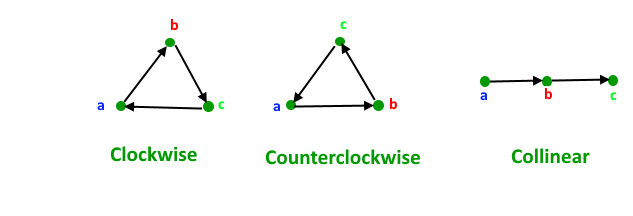
GeeksforGeeks
A Computer Science portal for geeks. It contains well written, well thought and well explained computer science and programming articles, quizzes and practice/competitive programming/company interview Questions.
 hoary sparrow
I'm trying to make a generic list of actions and iEnumerators, but having the "void" in the function expecting an object does not work giving me an error "cannot convert from void to object"
Adding a return type fixes it, but is there a way to make it work without that?
private void Start()
        {
            AddToCombinedQueue(TestCoroutine());
            AddToCombinedQueue(TestAction());
            StartCoroutine(CoroutineQueue());
        }

        public void AddToCombinedQueue(object queueObject)
        {
            if (queueObject is not Action or IEnumerator)
            {
                Debug.LogWarning("WRONG OBJECT TYPE CAN'T BE ADDED TO QUEUE, ONLY FUNCTIONS AND COROUTINES ALLOWED");
                return;
            }

            _combinedQueue.Enqueue(queueObject);
        }

        void TestAction()
        {
            Debug.Log("ActionTest");
        }
use overload methods (parameter type action or ienumerator), i havent tried convert something to c# object before
hoary sparrow
alright, will test that out
fervent furnace
and create a struct
struct whatever{
Action action;
IEnumerator enumerator;
}
```instead of just using object and cast it to see what the object actually isbasically, for this system I am creating a queue of actions and enumerators that then gets fired sequentially, so the overload solution you mentioned should be fine
thank you for the help!
 edgy lynx
Is there a way to see what is being used the hood for things like Stack and Queue class in C#?
Like for example, are they just arrays, or LLs?
fervent furnace
read the source code
edgy lynx
Yeah, trying to find that. I see on MS docs that Stack is an array.
But trying to locate more info.
fervent furnace
and linked list can be implemented in array
public struck Node<Tval>{
  public Tval val;
  public int next;
}
Node<T>[] entries;
 woven matrix
what is your guys opinion on using gameobject names for information, for example, I want a specific animation to be used for diferent objects, and I didn't want to make a script for each object to identify it or using tags, so I was thinking of using the gameobject name to define the name of the animation trigger?
but this is a bit sketched right?
dusky lake
thats 100% sketch
woven matrix
fuck it I am gona do it anyway, the gameobjects are blank gamepbjects that are called "leftLeanSpot" and "RightLeanSpot"
and they are part of a parent that is called resting spots
so I guess it wont fuck my mind that much
dusky lake
Just attach a script that has a property "name"
woven matrix
but wont that give more load to the program?
having a script for each spot?
thats my question, because I am gona have allot of "Spots"
dusky lake
unless you are handling thousands its no problem
woven matrix
yeah, there is gona be kinda a few, I am trying to do a small city
and npcs will interact with the spots
dusky lake
just accessing a property of a script is basically no load
might be the same as accessing the name of the gameobject
gray mural
Hello, is there any way to serialize a field so that it won't be visible in the Inspectors of derived classes?
Well, I guess I have to use custom inspector, don't I?
spring creek
gray mural
Hello, is there any way to serialize a field so that it won't be visible in the ...
Won't be visible only? Like still accessible though? Private wouldn't be accessible by the children scripts, you need protected for that.
Otherwise there is the [HideInInspector] attribute
gray mural
spring creek
Won't be visible only? Like still accessible though? Private wouldn't be accessi...
I know, I asked how to make a field that is visible in parent's Inspector be not visible in child's Inspector
spring creek
gray mural
I know, I asked how to make a field that is visible in parent's Inspector be not...
Yeah, so the second part
gray mural
spring creek
Yeah, so the second part
well, if I hide it, it also won't be visible in parent's Inspector
spring creek
gray mural
well, if I hide it, it also won't be visible in parent's Inspector
You hide it in the child class, not the parent...
gray mural
spring creek
You hide it in the child class, not the parent...
but I cannot override a field
rigid island
gray mural
Well, I guess I have to use custom inspector, don't I?
yes
gray mural
so it's impossible
gray mural
rigid island
yes
I see, quite troublesome, actually
guess Unity could've easily implemented an attribute for that..
rigid island
its not fun maintaining another script for just for visuals in unity
rigid island
gray mural
guess Unity could've easily implemented an attribute for that..
make your own?
gray mural
rigid island
make your own?
So it's possible?
spring creek
gray mural
but I cannot override a field
I don't understand why you think this...
You can..
gray mural
spring creek
I don't understand why you think this...
You can..
What do you mean? You cannot override a field
protected virtual int field; // error

protected virtual int Method() { } // nice
Yeah... that aint how you would do it...
gray mural
spring creek
Yeah... that aint how you would do it...
so how'd I do that? 🤔
spring creek
You can either hide it using new, which would be functionally the same as overriding it, or make it a property and use virtual and override
gray mural
rigid island
[HideInChildren] or something
sounds complicated
 jovial lark
whenever i try to open unity hub it says there is a critical error quits. would someone be able to help?
gray mural
spring creek
You can either hide it using new, which would be functionally the same as overri...
I see, yeah, it works just if they have same types and names...
rigid island
gray mural
sounds complicated
I found this script/ thread. there's more to it maybe it can help you, but really should be asking yourself is the usecase outweigh the hassle ?
https://forum.unity.com/threads/hiding-inherited-public-variable-in-the-inspector.161828/#post-2420156
gray mural
But yeah, it has the same functionality as overriding
rigid island
jovial lark
whenever i try to open unity hub it says there is a critical error quits. would ...
not really a code question ?
spring creek
jovial lark
whenever i try to open unity hub it says there is a critical error quits. would ...
Not a code question
#💻┃unity-talk
spring creek
gray mural
I see, yeah, it works just if they have same types and names...
Yeah. Sorry I wasn't clear on that.
A property CAN do virtual and override if you'd rather though
gray mural
rigid island
I found this script/ thread. there's more to it maybe it can help you, but reall...
The hassle? If creating a new script and copy pasting the code from that link is all I have to do, then it does worth the hassle
Thank you 😄
gray mural
spring creek
Yeah. Sorry I wasn't clear on that.
A property CAN do virtual and override if yo...
I see, thanks, I cannot change the original type though
 wise pumice
I've been doing this for hours now so I think I have just gone brain dead and can't see a simple problem.
Is anyone able to spot any problems I have here?
My character is working off of root motion and I've changed some things and now the character isn't moving when I give my input
dusky lake
what is your velocity log outputting?
wise pumice
dusky lake
what is your velocity log outputting?
 wise pumice
Just constantly increasing on the Y which should be because of the artificial gravity
dusky lake
wise pumice
https://gyazo.com/d55cc9e9350f28646fac91d8d5fca025
here you go
just to be sure, those logs are while you are trying to move?
wise pumice
Yeah, though it also was while I was not touching anything
dusky lake
What values do you get while trying to move? also x and z 0?
wise pumice
For the most part yeah, though just now z is just hitting 0.01
dusky lake
then add logs along the way, check if the input actually gives you what you want, if that does check the next step and so on, or even better use the IDE debugger for that if you know how to
dusky lake
With all the math involved its really hard to tell you what might be wrong without actually trying around in code 😄
 silent pendant
I'm working in 3D and I've tried out a few scripts for Interacting with objects (switches and the like) and picking things up but they only seem to work 25% of the time. I'm not sure what I'm doing wrong and I have checked my scripts and they look the same as the ones shown to work. any ideas?
 marsh oriole
Yo im trying to develop a maze game on unity but whenever i click play my unity freezes and becomes unresponsive and i have to shut it down with task manager
is there someone i can dm for help im rlly new with unity
 river wigeon
hey guys, I'm stuck on a network problem and have made a post in the network channel. If anyone knows about netcode I'd appreciate if u could take a look 🙏
 wide dock
marsh oriole
is there someone i can dm for help im rlly new with unity
wide dock
marsh oriole
is there someone i can dm for help im rlly new with unity
Or just post the code which you suspect to be the issue
Judging by the "im rlly new with unity" I'd guess it's just an infinite loop somewhere in your code
Take a look at these first
soft shard
silent pendant
I'm working in 3D and I've tried out a few scripts for Interacting with objects ...
What are these scripts that seem correct and what do you mean by "it only works 25% of the time", what happens the other 75% of the time?
silent pendant
nothing happens. i click on an interactable and nothing.. I keep clicking around and maybe it works, then I go to something that can be picked up and sometimes nothing and other times the object picks up as it should
 primal nacelle
Can someone help me with a problem? i trying to show in screen a webcamtexture and after 5 seconds i change to another webcamtexture(the final version i have to use 3 cameras, but to test i only using two cameras), i can show in screen one camera but when i try to do the same with more than 1 camera is not working.
soft shard
silent pendant
nothing happens. i click on an interactable and nothing.. I keep clicking around...
Its possible your detection may be hitting layers or objects unintended within the path of the object your trying to interact with, what script are you using to handle detecting interactions?
silent pendant
I think so as that feels like that is the case but I'm not sure what to do about it 😦 I don' thave enough knowledge
dire marlin
Hey guys, i'm trying to make a main menu with a camera that slightly moves when you move your mouse. my code isn't working for some reason, any reason why/
 somber nacelle
- use cinemachine
- why the magic numbers and the multiplication of the mouse position rather than its delta?
dire marlin
somber nacelle
1. use cinemachine
2. why the magic numbers and the multiplication of the mouse ...
delta?
somber nacelle
yes, how much the mouse position has changed since last frame. you can get that using the Mouse X and Mouse Y axes with Input.GetAxis
dire marlin
oh ok
somber nacelle
but still, just use cinemachine
dire marlin
somber nacelle
yes, how much the mouse position has changed since last frame. you can get that ...
oh cool it works now
 dense void
Trying to figure out an algorithm for random generation of a rush hour type game, posting actual screenshot of the game below since it's more recognizable than my prototype at the moment lol, but Im developing it to be a mobile game that I will release on the playstore. Trying to find things online on this type of puzzle generation but I'm having trouble.
The goal is to get the red car to the exit by moving the other cars in the direction they are facing.
 cosmic rain
dense void
cosmic rain
dense void
You could start from placing the cars randomly but in a solved state. Then just move them backwards in random order to get an unsolved puzzle. I guess.🤔
steady moat
dense void
Trying to figure out an algorithm for random generation of a rush hour type game...
https://www.michaelfogleman.com/rush/
(Base on the articles)
https://github.com/fogleman/rush
 fallen lotus
why do mercury and venus and earth correctly orbit the sun but the moon doesnt?
void Update()
{
    sun.transform.Rotate(0, sunRotationSpeed * Time.deltaTime, 0);

    mercury.transform.Rotate(0, mercuryRotationSpeed * Time.deltaTime, 0);
    mercury.transform.RotateAround(sun.transform.position, Vector3.up, mercuryOrbitSpeed * Time.deltaTime);

    venus.transform.Rotate(0, venusRotationSpeed * Time.deltaTime, 0);
    venus.transform.RotateAround(sun.transform.position, Vector3.up, venusOrbitSpeed * Time.deltaTime);

    earth.transform.Rotate(0, earthRotationSpeed * Time.deltaTime, 0);
    earth.transform.RotateAround(sun.transform.position, Vector3.up, earthOrbitSpeed * Time.deltaTime);
    moon.transform.Rotate(0, moonRotationSpeed * Time.deltaTime, 0);
    moon.transform.RotateAround(earth.transform.position, Vector3.up, moonOrbitingSpeed * Time.deltaTime);
}
If you are going to make orbit, use actual orbit physics ?
Like, you know, gravity.
fallen lotus
steady moat
If you are going to make orbit, use actual orbit physics ?
are there built in functions for that?
i was just learning shaders and added the code to the sun to make the sun rotate so i could see the shader but now im just messing around with other planet's shaders
dense void
steady moat
https://www.michaelfogleman.com/rush/
(Base on the articles)
https://github.com...
I saw Michael's rush code and I think this would help me a ton but I'm not sure how to implement it
steady moat
fallen lotus
are there built in functions for that?
Yeah and no. You can just use basic physics and accelerate the object towards the other one. (Using Rigidbody.velocity by example)
soft shard
silent pendant
I think so as that feels like that is the case but I'm not sure what to do about...
It could be something related to how you set up one of your objects, or how you written your script or possibly both, though its hard to say without seeing what your code is doing, you can check the bots message to share your !code
tawny elkBOT
Posting code
📃 Large Code Blocks
Use links to services like:
https://gdl.space/, https://paste.ofcode.org/, https://hatebin.com/, https://paste.myst.rs/, https://hastebin.com/
📃 Inline Code
Surround code with three backquotes. Not quotation marks.
To format as C#, add cs to the first line:
```cs
// Your code here
```
Add a comment with a line number if there is an error message.
 dusky pelican
I have a class that inherits from Abstract class (Let's call this class X, let's call the base class Y). I call OnProductFinished in the update function in the base class. My question is; Now I override OnProductFinished in the same way in my class that inherits from Abstract class. Which OnProductFinished works logically? The base one (OnProductFinished in Y?) or the one in the inherited class (OnProductFinish in X)?

 broken heron
Can anyone explain how I can get the AI to move? I was experminting with a turn based movement.
using UnityEngine;
using Pathfinding;
using System.Linq;


public class AIMovement : MonoBehaviour
{
    public GameManager gameManager;
    public float moveDistance = 1.0f; // The distance the AI can move in one turn
    private List<Vector3> path = new List<Vector3>();
    private int currentPathIndex;
    public Transform target;

    private void Update()
    {
        if (!gameManager.isPlayerTurn)
        {
            // cheks if there is still a path to follow. If there is, move the AI towards the next waypoint in the path
            if (currentPathIndex < path.Count)
            {
                // Move AI
                Vector3 targetPosition = path[currentPathIndex];
                Vector3 newPosition = Vector3.MoveTowards(transform.position, targetPosition, moveDistance * Time.deltaTime);
                GetComponent<Rigidbody2D>().MovePosition(newPosition);

                if (Vector3.Distance(transform.position, newPosition) < 0.1f)
                {
                    Debug.Log("Moved to target position");

                    currentPathIndex++;
                    gameManager.StartPlayerTurn();
                }
            }
            else
            {
                Debug.Log("Calculating path");

                // Calculate path to player
                path = CalculatePathToPlayer();
                // Log the number of waypoints in the calculated path
                Debug.Log("Calculated path: " + path.Count + " waypoints");

                currentPathIndex = 0;
            }

            // If the AI has reached the end of the path
            if (currentPathIndex >= path.Count)
            {
                // Log that it reached the end of the path
                Debug.Log("Reached end of path");

                path.Clear();

                gameManager.StartPlayerTurn();
            }
        }
    }
    private void Start()
    {
        if (GameManager.Instance == null)
        {
            Debug.LogWarning("Player is still not found in Start!");
        }
        else
        {
            gameManager = GameManager.Instance;
        }
    }
    private List<Vector3> CalculatePathToPlayer()
    {
        var path = new List<Vector3>();

        var seeker = GetComponent<Seeker>();
        var start = transform.position;
        var end = target.position;

        // Construct a new path and start calculating it
        var p = ABPath.Construct(start, end, OnPathCalculated);
        AstarPath.StartPath(p);

        // store the path
        while (!p.IsDone()) { }
        if (p.error) { return path; }

        foreach (var node in p.path)
        {
            path.Add((Vector3)node.position);
        }

        return path;
    }

    private void OnPathCalculated(Path p)
    {
        if (p.error)
        {
            Debug.LogError("Path calculation error: " + p.errorLog);
            return;
        }

        path = p.vectorPath.Select(node => (Vector3)node).ToList();
    }
}
Currently reports the Debug.logs but never moves. using A* arongranberg
Thanks.
spring creek
dusky pelican
I have a class that inherits from Abstract class (Let's call this class X, let's...
Well the inheritor basically owns all that code too. When you write base.OnProductFinished() just mentally copy paste the code from base right there. It is the exact same thing. The base method will run exactly the same. You can have the X class code run before or after or however you want depending on where you place it.
I may not understand your question though.
Ohhh, you mean because the base classes Update calls OnProductFinished?
If it's in the X class, it calls the X classes OnProductFinished
steady moat
dusky pelican
I have a class that inherits from Abstract class (Let's call this class X, let's...
I do not understand your question, however note that when you call a function, the most specific one will be called.
When a virtual method is invoked, the run-time type of the object is checked for an overriding member. The overriding member in the most derived class is called, which might be the original member, if no derived class has overridden the member.
https://learn.microsoft.com/en-us/dotnet/csharp/language-reference/keywords/virtual
dense void
steady moat
https://www.michaelfogleman.com/rush/
(Base on the articles)
https://github.com...
If I don't do the procedural generation do you think it would be viable to make 500ish prefabs and then have a script call each one in order to a scene and then once they are solved just destroy the prefab and then call the next one. I want to make it seamless, I wouldn't be opposed to generating a level online and then just recreating it myself after having all the systems set up. I'd say 500 would be good amount of levels to start but what do you think. The procedural generation would be way more chill but i just have no idea how to implement this
steady moat
dense void
If I don't do the procedural generation do you think it would be viable to make ...
No, you should use pooling. Also, why 500 pieces ?
Oh, you mean 500 levels.
There is no reason to use prefabs per level. I think you should use a script to generate your level. I would create a ScriptableObject that defines how the level should be constructed. (You could even create an importer base on the data you are going to generate from the site)
This way, you are going to be more flexible. By example, you could easily swap the assets (Board, Car, etc.) to tune your game.
dense void
generation gets me excited sooner i can master it sooner i can use it to generate infinite levels of any type of game
dusky pelican
steady moat
I do not understand your question, however note that when you call a function, t...
Thanks, i will take a look at it
gray mural
Hello, is it possible to find a private field in the custom editor?
serializedObject.FindProperty() finds just serialized properties
 velvet relic
I just started my first unity project and I notice that when I place scripts under directory ybder assets and then make a script, and open it in Visual Studio. It doesn't make a projection under solution explorer. I don't understand because the video I'm following doesn't reflect what I'm seeing on my screen.
knotty sun
velvet relic
I just started my first unity project and I notice that when I place scripts und...
screenshot your VS window
velvet relic
 knotty sun
Your VS is not configured correctly follow ALL of the steps here carefully and exactly !IDE
tawny elkBOT
💡 IDE Configuration
If your IDE is not autocompleting code
or underlining errors, please configure it.
Select one:
• Visual Studio (Installed via Unity Hub)
• Visual Studio (Installed manually)
• VS Code
• JetBrains Rider
• Other/None
knotty sun
it is totally unclear what you are posting by posting screenshots of code snippets. Please post the full scripts to a paste site
A PASTE SITE!
knotty sun
!code
tawny elkBOT
Posting code
📃 Large Code Blocks
Use links to services like:
https://gdl.space/, https://paste.ofcode.org/, https://hatebin.com/, https://paste.myst.rs/, https://hastebin.com/
📃 Inline Code
Surround code with three backquotes. Not quotation marks.
To format as C#, add cs to the first line:
```cs
// Your code here
```
Add a comment with a line number if there is an error message.
soft shard
gray mural
Hello, is it possible to find a `private field` in the custom editor?
I would imagine it could probably be done with System.Reflection, not sure if there is Unity API for private fields otherwise (could be wrong though)
knotty sun
gray mural
Hello, is it possible to find a `private field` in the custom editor?
what would be the point of having a non-serialized field in your custom editor? Any changes made to the field will not be saved anyway
gray mural
soft shard
I would imagine it could probably be done with `System.Reflection`, not sure if ...
I see, thank you. SerializedObject can also find private serialized fields, so I guess it won't a problem if I manage to hide this field from derived classes
gray mural
knotty sun
what would be the point of having a non-serialized field in your custom editor? ...
I see, then I should have a private serialized field
knotty sun
gray mural
I see, then I should have a private serialized field
would make more sense
gray mural
Does somebody know how to fix this?
public class ItemBehaviour : MonoBehaviour
{
    [SerializeField] private ItemData _itemData;

    public FocusController focus;

    // ...
}
[CustomEditor(typeof(ItemBehaviour))]
public class ItemBehaviourEditor : Editor
{
    public override void OnInspectorGUI()
    {
        EditorGUILayout.PropertyField(serializedObject.FindProperty("_itemData"), false);

        DrawDefaultInspector();
    }
}

so, how do I exclude the already serialized property in DrawDefaultInspector ?
leaden ice
gray mural
so, how do I exclude the already serialized property in `DrawDefaultInspector` ?
You don't. Looks to me like you actually want a property drawer for ItemData, not a custom editor for ItemBehavior
gray mural
leaden ice
You don't. Looks to me like you actually want a property drawer for ItemData, no...
I see, thanks. Anyway, I've already let this idea
 crude creek
does the waitforseconds work outside an IEnumerator? If I place one in a for, will it wait before starting again the for?
knotty sun
crude creek
no yield Wait is only for Coroutines
leaden ice
crude creek
does the waitforseconds work outside an IEnumerator? If I place one in a for, wi...
of course not
crude creek
knotty sun
no yield Wait is only for Coroutines
I'm not using yield
leaden ice
notice how you're missing the most important thing there which is yield return which certainly doesn't work outside a coroutine/iterator
leaden ice
crude creek
I'm not using yield
then you are simply creating a WaitForSeconds object for no good reason.
river wigeon
Hey guys 👋
I'm using NGO but connections are being blocked by windows firewall, even though I've allowed the unity app through. How do I allow unity through firewall?
 craggy oyster
hello I want to make a 2d pixel art top down game and I want to make a big but not infinite procedural world, I want main landmarks on the map to be spawned in random locations and the rest of the world will be roads and forest areas
should i use a mix of tiles and prefabs or prefabs alone or tiles alone
steady moat
craggy oyster
should i use a mix of tiles and prefabs or prefabs alone or tiles alone
Is your world tiles or not ?
craggy oyster
i havent made any assets or worlds thats why im asking to know how to start making the procedural worlds
steady moat
craggy oyster
i havent made any assets or worlds thats why im asking to know how to start maki...
I mean, do you plan to have world that fits a grid or not ?
craggy oyster
yes
steady moat
then use tilemap
craggy oyster
can tilemaps have functionality?
steady moat
craggy oyster
can tilemaps have functionality?
It isnt just a name ?
craggy oyster
like per say a tile that can randomly spawn a grass pedal that moves or a tree that can be chopped down
steady moat
craggy oyster
like per say a tile that can randomly spawn a grass pedal that moves or a tree t...
You usually add object on top of the tilemap. Tree would be an example of such object
craggy oyster
ok ok so gobjects can be placed on tiles
steady moat
yes
craggy oyster
alr what about landmarks like if I wanted to make a big mall in the game
can I make a tile that spawns the object of the mall and fits correctly
steady moat
craggy oyster
can I make a tile that spawns the object of the mall and fits correctly
The mall would definitely be a tile map, if you are going to do that.
That is, if you want your world to be grid base and use the functionnality of tilemaps. (I would copy the data from one tilemap (mall) to the other (world))
craggy oyster
how would i go about placing things on tiles?
steady moat
craggy oyster
how would i go about placing things on tiles?
By looking things up on any tutorial
craggy oyster
common unity developer helpers
steady moat
craggy oyster
common unity developer helpers
My friend, what you are asking is impossible to explain easily without visual support. Fortunatly for you, there is ton of people that have done the hard work of making tutorial.
craggy oyster
i did look around
but I didnt exactly find what I was looking for thats why i came here
steady moat
craggy oyster
but I didnt exactly find what I was looking for thats why i came here
What do you not understand exactly in placing object on a tilemap ?
craggy oyster
well I think you dont get my question
Im placing all these tiles through code
basically using the grid system of tilemaps to spawn these tiles
and I want to know how a tile i place can have for example children objects on it that are gameobjects
steady moat
craggy oyster
and I want to know how a tile i place can have for example children objects on i...
You simply overlay it on top.
It is not part of the tilemap
craggy oyster
aha see
steady moat
See what ?
craggy oyster
thats my question so the procedural world Im making isnt fully using the tile system
I will have to place objects through code irrelevant to the tile grid
steady moat
probably
You could always make a tile that represent the object
However, the object will need to fit a tile exactly
You could have two tilemaps layer
One with the ground/wall, and one with the dynamic object such as chest or tree
There is multiple way of doing, depending on what you want and what you do those come with restriction and ease of use.
craggy oyster
im starting to understand
I just have to see how object tiles work
and then I think i can make a plan
steady moat
Pretty sure this would have been shown in any tutorial.
steady moat
craggy oyster
I just have to see how object tiles work

Checkout AutoTiling - A Useful Feature for your Tilemaps: https://youtu.be/IS_RIdYZa9M
Unitys Tilemap system makes it easy to create grid-based 2D levels and worlds. Without any coding you can draw tiles onto a Tilemap. With additional components like special colliders you can fastly create a usable prototype of a 2D game and enjoy a lot of co...
See how they goes about drawing things with two tile map
craggy oyster
ill watch now
hard viper
I have an encapsulation question
I have Class1 connects to Class2 connects to very many classes. Class2 contains a ton of public fields to allow Class1 to get and set them. However, I want to limit access so only Class1/Class2 are allowed to do this.
Class2 : Monobehaviour (as is Class1), so it can't be internal
recommendation on how to encapsulate?
steady moat
hard viper
I have Class1 connects to Class2 connects to very many classes. Class2 contains ...
Interface Segregation Principle
https://en.wikipedia.org/wiki/Interface_segregation_principle
In the field of software engineering, the interface segregation principle (ISP) states that no code should be forced to depend on methods it does not use. ISP splits interfaces that are very large into smaller and more specific ones so that clients will only have to know about the methods that are of interest to them. Such shrunken interfaces ar...
hard viper
I don't understand
I get it, but not how it applies here
Class1 and Class2 both make heavy use of the getters and setters of a large fraction of fields
steady moat
In other words, all other object shouldnt contains a direct reference to Class2. Instead, they should use interface that Class 2 implements
hard viper
I would say something like, Class2 has like half of its fields that should only be accessible to Class1 and 2
steady moat
Also, this is really a small that you have such a high coupling with a single class
Your cohesion must be really low in this given class
hard viper
correct, so I want to break it up now before it gets worse
steady moat
I guess, you could try to read on Single Responsibility Principle
hard viper
I'm thinking about breaking up all the shared fields into a single intermediate class, and composing it into class2. My concern is that we still have access
I want to do that, honestly. I just don't know how to get the final product to be encapsulated like how I want
I don't want to half-ass the encapsulation, basically
If there were access modifiers that only allowed access to specific classes (like the friend keyword), then I think this would be trivial
this might be hackey, but could I define Class3 with a bunch of internal methods, and make it a partial class, partially defined in Class1 and in 2?
steady moat
Personnaly, I refactor this way:
- Divide the code in #region / #endregion blocks
- Extract the actual code in an other class (Class2A) and rewire every function call to this new class. (You would have a bridge between Class2 and Class2A)
- Remove any call to the given function of the original class to use the new class (The call would looks like Class2.Class2A.MyFunction)
- (Optional) Move the given class to a more appropriate place such as a ServiceRegistry or a higher(concept wise) class
hard viper
I can do that without issue tbh. but wouldn't other classes still be getting access?
assume I can actally extract exactly like you described
steady moat
hard viper
this might be hackey, but could I define Class3 with a bunch of internal methods...
Do not use partial for architecture, they are not fun to work with.
The friend keyword in C++ is not something you should plan to use. They are most of the time an antipattern (reduce the maintanability of the code)
steady moat
hard viper
assume I can actally extract exactly like you described
If you follow that, the other class would be barely affected. (Reference to the function would change and that would be pretty much the amplitude of the change they would have to do)
hard viper
ty. I'll get to refactoring
hard viper
moving 18 fields into a simple holder class just feels so refreshing
it just feels like taking a bath when you're so dirty
swift falcon
Where should I start developing a sims 4 like build system?
rigid island
make grids / snap system
 vernal wharf
Hi, I'm building a house building game and I'm trying to figure out the position to place a wall so it aligns with another wall even if one of the walls are rotated. I was able to do this without rotation. But now that I'm trying it with rotated walls, I'm not sure how to calculate the position of the wall I'm looking to place. If the wall already on the ground has a rotation than the default, then I have to change the position of the wall I'm placing than using the default
hexed pecan
vernal wharf
Hi, I'm building a house building game and I'm trying to figure out the position...
Hard to give details without seeing the placement code. But you can combine rotations (quaternions) by multiplying them
You can rotate the offset from the first wall too by multiplying it with the first wall's rotation
vernal wharf
hexed pecan
Hard to give details without seeing the placement code. But you can combine rota...
Pastebin
Pastebin.com is the number one paste tool since 2002. Pastebin is a website where you can store text online for a set period of time.
This is my object placement code
dusky lake
vernal wharf
Hi, I'm building a house building game and I'm trying to figure out the position...
What I have seen in the past, you add some empty gameobjects to every building piece you have, any of those represents an "anchor" point, if your anchor point comes close to the anchor point of another building piece you snap to it, so that both anchors have the same position
vernal wharf
dusky lake
What I have seen in the past, you add some empty gameobjects to every building p...
I have that setup with this code https://pastebin.com/BYu1eZzC
Pastebin
Pastebin.com is the number one paste tool since 2002. Pastebin is a website where you can store text online for a set period of time.
dusky lake
Ohh so now you want the new placed wall to have the same rotation as your pre-placed wall, when snapping to it?
vernal wharf
I'm able to get the same rotation. It's the position of the new wall I'm not sure how to calculate if the position of the wall already on the ground is rotated
rocky helm
vernal wharf
Hi, I'm building a house building game and I'm trying to figure out the position...
If you already have the wall that it needs to snap to then just give it the same rotation and move it using wallTransform.right to move it right
vernal wharf
I've never heard of that
rocky helm
So like ```cs
toPlaceWall.position = toSnapWall.position + toSnapWall.right * wallWidth
toPlaceWall.rotation = toSnapWall.rotation
But that's only for the x axis?
 dreamy elm
Is there a way to get the picture that shows the prefab in the project menu?
rocky helm
vernal wharf
But that's only for the x axis?
I'm assuming you need it to be moved so that it looks like it's on the right of toSnapWall
vernal wharf
@rocky helm I'm trying that my friend
That works better than what I had @rocky helm 🙂
But if the wall is rotated, the new wall jumps multiple positions but is pretty cool when I apply it
I don't know if that's a range issue
For example, my players placement rangement or the snap points
Works fine if the wall already placed isn't rotated
parentTopLeft.transform.position = parentOtherObject.transform.position - parentOtherObject.transform.right * size.x;
                if (otherObject.tag == "TopRightSnapPoint")
                {
                    Debug.Log("hello1");
                    renderer = GetComponent<MeshRenderer>();
                    size = renderer.bounds.size;
                    size = new Vector3(size.x, 0, 0);
                    Debug.Log(size);
                    Debug.Log(topLeft);

                    GameObject parentTopLeft = topLeft.transform.root.gameObject;
                    parentTopLeft.transform.position = parentOtherObject.transform.position - parentOtherObject.transform.right * size.x;
                    parentTopLeft.transform.rotation = parentOtherObject.transform.rotation;
                }
@hexed pecan @dusky lake @rocky helm Any more ideas?
rocky helm
vernal wharf
<@136926228341850112> <@183382329400623104> <@767297192783511562> Any more idea...
Looks pretty fine to me, if the jumping is the problem then that's most likely because you check whether the wall is close enough to snap, but once it snaps it goes out of that range, so I think you could either make it have another bigger range effective once the wall has snapped or to compare the range to the non-snapped position not with the actual position
vernal wharf
rocky helm
Looks pretty fine to me, if the jumping is the problem then that's most likely b...
So once the walls are snapped, to increase the radius of my snap points?

 rocky helm
vernal wharf
So once the walls are snapped, to increase the radius of my snap points?
rocky helm
vernal wharf
So once the walls are snapped, to increase the radius of my snap points?
Sure, try it
vernal wharf
Ok, thank you
vernal wharf
@rocky helm It's still glitching out if I used a wall already placed at 90 degrees then try to connect another. It's not lining up perfectly then either

Actually when I put the radius very high, the wall gets placed in the same position as the first wall
 rocky helm
Can you show me the whole related code?
exotic aspen
Alright so I just finished adding reverse shadowmapping to my 2D RTS for line-of-sight fog of war removal. And as expected, its consuming a lot of CPU cycles. I've already optimized the routine itself rather heavily. And NPCs only perform the check if, on an AI tick, they are no longer on the same tilemap tile they used to be. But when moving a lot of NPCs at once everything spikes. I'm curious what optimization techniques might be possible here. I couldn't think of an efficient way to notice nearby NPCs had already done the LOS check and to ignore doing it again, for example.
rocky helm
rocky helm
Can you show me the whole *related* code?
Or actually, the code that checks whether it should snap or not (or "unsnap") would do
vernal wharf
rocky helm
Can you show me the whole *related* code?
@rocky helm
Wall connect code: https://pastebin.com/mYsNdgt1
Wall placement code: https://pastebin.com/pM54fwc5
Pastebin
Pastebin.com is the number one paste tool since 2002. Pastebin is a website where you can store text online for a set period of time.
Pastebin
Pastebin.com is the number one paste tool since 2002. Pastebin is a website where you can store text online for a set period of time.
wise pumice
Trying to use root motion atm on my character. Noticing a weird thing where my values (Lateral, forward) seem to constantly be changing in the animator and causing the character's animations to kick in some times. Like walking forward without any input from me.
Anyone have any ideas where I'm going wrong?
Code is too big for discord limit apparently so I just paste linked it
rocky helm
vernal wharf
<@767297192783511562> Is that what you need?
Yes, I'm just trying to figure out how exactly this all works
vernal wharf
Do you want to voice chat or is text better?
rocky helm
vernal wharf
Do you want to voice chat or is text better?
I'm fine with text
So, I might have found something, although if that is true then I don't even get why it works in the other cases.
Every update, you either instantiate a new object or make the current object snap, correct?
vernal wharf
I only instantiate when the player presses the left mouse button
and I only snap if 2 sphere colliders are touching
        void Update()
        {
            // TOP LEFT
            Collider[] topLeftColliders = Physics.OverlapSphere(topLeft.position, radius);

            // Loop through the colliders to perform actions with them
            foreach (Collider collider in topLeftColliders)
Oh
There's another radius there
Interesting..
Oh no, same problem after changing it
rocky helm
vernal wharf
I only instantiate when the player presses the left mouse button
Is playerController constantly setting isPickingUp to true?
vernal wharf
rocky helm
Is playerController constantly setting isPickingUp to true?
No, only when an object is spawned and the player is holding it. Or when the player picks up an object and is holding it
Seems to be working fine
rocky helm
vernal wharf
No, only when an object is spawned and the player is holding it. Or when the pla...
Well then this code part has me really confused
                if (CurrentObject && playerController.isPickingUp == true)
                {
                    CurrentObject.useGravity = true;
                    CurrentObject.transform.gameObject.GetComponent<WallConnect>().enabled = false;
                    Rigidbody CORB = CurrentObject.GetComponent<Rigidbody>();
                    CORB.constraints = RigidbodyConstraints.FreezePosition;
                    CORB.constraints = RigidbodyConstraints.FreezeRotation;
                    CORB.isKinematic = true;

                    CurrentObject = null;
                    playerController.isPickingUp = false;
                    return;
                }
                else if (playerController.isPickingUp == false)
                {
                    // Instantiate the object at the hit point.
                    GameObject newObject = Instantiate(objectPrefab, PickupTarget.transform.position, Quaternion.identity);
                    CurrentObject = newObject.GetComponent<Rigidbody>();
                    CurrentObject.useGravity = false;
                    Rigidbody CORB = CurrentObject.GetComponent<Rigidbody>();
                    playerController.isPickingUp = true;
                    newObject.GetComponent<WallConnect>().enabled = true;
                    //CORB.constraints = RigidbodyConstraints.FreezePosition;
                }
This is running in Update, and every update, if the player is holding down the left mouse button and isPickingUp is false then it creates a new object and sets isPickingUp to true, but the next time Update fires it sets CurrentObject as null and sets isPickingUp to false, which would trigger a new object being made no?
vernal wharf
Only sets CurrentObject to null if the player press the left mouse button again
One click for spawn, another click to drop
rocky helm
Oh shit mb. I forgot how the input system worked for a moment
Yeah that makes a lot more sense
vernal wharf
Hehe, I'm still learning myself 😛
rocky helm
vernal wharf
It's still doing the jumping thing right
vernal wharf
Yeah, only if the first wall is rotated about 90 degrees
if it starts at another angles, usually works fine
And if it's at 90 degrees, the wall sometimes gets placed into the same position
Putting 2 walls in 1 position
It's almost good except for that edge case
 young sage
[Serializable]
public struct ButtonPanelRelation
{
    public Button button;
    public GameObject panel;
}
Does using a struct for existing GameObjects/ Unity Components make sense? Does it copy the object and make it redundant?
 river shale
Idk what level of code this is lol, but I want to know if theres a way I can use a character controller to manage player movement while still using the rigidbody to apply forces to the character.
This is the code im using to move the player
playerController = this.GetComponent<CharacterController>();
playerController.Move(moveDirection * Time.deltaTime * moveSpeed);
But I want to be able to apply forces to the players rigidbody and have it move the player. This dosent work at the moment because I think every time you call the character controllers Move() function it sets the velocity to 0 (or something along those lines)
Any ideas?
rocky helm
vernal wharf
<@767297192783511562> It works now
What was it?
rigid island
young sage
```
[Serializable]
public struct ButtonPanelRelation
{
public Button button;...
I'd use class if it contains reference types
but thats just me
river shale
young sage
```
[Serializable]
public struct ButtonPanelRelation
{
public Button button;...
Also how do I do code blocks like this?
vernal wharf
rocky helm
What was it?
I did what you did was increase the radius after placing the object. But then I had to update this radius to the new radius:
 rigid island
river shale
Also how do I do code blocks like this?
rigid island
river shale
Also how do I do code blocks like this?
!code
tawny elkBOT
Posting code
📃 Large Code Blocks
Use links to services like:
https://gdl.space/, https://paste.ofcode.org/, https://hatebin.com/, https://paste.myst.rs/, https://hastebin.com/
📃 Inline Code
Surround code with three backquotes. Not quotation marks.
To format as C#, add cs to the first line:
```cs
// Your code here
```
Add a comment with a line number if there is an error message.
river shale
ty
vernal wharf
vernal wharf
I did what you did was increase the radius after placing the object. But then I ...
But then it messes up my radius value for the rest of the wall. This is something I think I could probably fix though.
Thanks for your help!
fleet carbon
If I want the player to move in the direction the camera is facing what should I do to achieve that, i've tried a few things but haven't been able to figure it out or have gotten close
Hastebin is a free web-based pastebin service for storing and sharing text and code snippets with anyone. Get started now.
I know im probably doing it all wrong or missing a vital thing
rigid island
fleet carbon
If I want the player to move in the direction the camera is facing what should I...
camera.transform.forward
 fast hound
How do I get this simlpe code to work on my Android build?
It works perfectly fine in the editor, but not after being built.
string path = Application.dataPath + "/" + "Resources/example_mesh_0.ply";
var stream = File.Open(path, FileMode.Open, FileAccess.Read, FileShare.Read);
var header = ReadDataHeader(new StreamReader(stream));
var body = ReadDataBody(header, new BinaryReader(stream));
change it to Application.persistentDataPath
simple egret
And use some using statement for those streams, to make sure they're closed properly whatever happens!
dusky lake
using is the automatic version of calling Close on them after the code block right?
simple egret
Yep it calls Dispose which internally closes the stream
Available to use on anything that implements the IDisposable interface
knotty sun
fast hound
How do I get this simlpe code to work on my Android build?
It works perfectly fi...
The only folder you can read in a built apk is the Application.streamingAssetPath and you need to access that with a UnityWebRequest. You can read/write to Application.persistentDataPath using System.IO but that is outside of your built game
fast hound
knotty sun
The only folder you can read in a built apk is the Application.streamingAssetPat...
Ah, Application.persistentDataPath didnt work
2023/11/05 15:16:19.747 28162 28184 Error Unity Failed importing /storage/emulated/0/Android/data/com.C.D/files/Resources/example_mesh_0.ply. Could not find a part of the path "/storage/emulated/0/Android/data/com.C.D/files/Resources/example_mesh_0.ply".
I guess thats why.
So there is no way to include that file in my game?
knotty sun
yes, in Application.streamingAssetsPath as I said
fast hound
knotty sun
yes, in Application.streamingAssetsPath as I said
Is that an actual folder in my project?
mossy snow
fast hound
Ah, Application.persistentDataPath didnt work
2023/11/05 15:16:19.747 28162 281...
you need to:
- move the file from Resources folder into a StreamingAssets folder, since Resources gets baked into asset files and won't be available
- use the streamingAssetsPath as source dir
- Open the file using UnityWebRequest, since it's actually packed into the jar and isn't inthe file system still
see https://docs.unity3d.com/Manual/StreamingAssets.html and https://docs.unity3d.com/ScriptReference/Networking.UnityWebRequest.html
knotty sun
fast hound
Is that an actual folder in my project?
yes, google it to find the correct name and location
 dusk wolf
so i have made this code for the player movement but the player keeps falling on to no where even though ive added rigidbody and enabled gravity
{


    public CharacterController controller;
    public float speed = 12f;
    public float Gravity = -9.81f;
    public Transform GroundCheck;
    public float GroundDistance = 0.4f;
    public LayerMask GroundMask;
    public float JumpHeight = 3f;

    Vector3 velocity;
    bool isGrounded;

    // Update is called once per frame
    void Update()
    {
        isGrounded = Physics.CheckSphere(GroundCheck.position, GroundDistance, GroundMask);
        if (isGrounded && velocity.y < 0)
        {
            velocity.y = -2f;
        }


        float x = Input.GetAxis("Horizontal");
        float z = Input.GetAxis("Vertical");


        Vector3 move = transform.right * x + transform.forward * z;

        controller.Move(move * speed * Time.deltaTime);

        if (Input.GetButtonDown("Jump") && isGrounded)
        {
            velocity.y = Mathf.Sqrt(JumpHeight * -2 * Gravity);
        }

        velocity.y += Gravity * Time.deltaTime;
        controller.Move(velocity * Time.deltaTime);

    }
}```is it the code problem or i missed to do smth
 dusky lake
Yeah so gravity is active, shouldnt the player fall?
dusk wolf
but not more than the plane
dusky lake
Also if you have a rigidbody with gravity, you dont need to manually set the y velocity
does your player + the plane have colliders?
dusk wolf
no
dusky lake
then read about colliders 😄
 fast hound
knotty sun
yes, google it to find the correct name and location
fast hound
knotty sun
yes, google it to find the correct name and location
That all worked. Thanks!
fleet carbon
rigid island
camera.transform.forward
What do you mean by this?, not sure if I worded the question right tbf haha. What I am looking for is a way to make it so the player moves in the direction that the camera is looking like in may first person games. I had this working before but cant seem to figure how to do it again
Im not sure if Im misunderstanding your message
rocky helm
fleet carbon
What do you mean by this?, not sure if I worded the question right tbf haha. Wha...
camera.transform.forward is the direction that the camera is facing. Then you can just do player.position += camera.transform.forward * distanceToMove
fleet carbon
Ohhhh right thanks!
I apologise for these questions btw haha, I'm really new to unity atm and I realise I should have posted in the beginner code channel 😁
 tired hill
private Vector3 CalcTooltipPos()
{
    Vector3 ret = new Vector3();
    ret = Input.mousePosition;


    ret.y += rectT.rect.height;
    ret.x += rectT.rect.width;

    return ret;
}```

Hello, this is a simplified version of my tooltip code, why does this not work on different aspect ratios? recT is the RectTransform component of the tooltip. All this is executed on a Canvas. This only works correctly on 1920x1080.
What the heck does all this code mean?! Today we’ll break down every line so that you can move your characters relative to the camera’s rotation in Unity 3D! Learn the basics of Vectors and SPACE and how to transform between the two. Put your programming hat on and let’s get started!
ACCESS PROJECT FILES & SUPPORT THE CHANNEL:
💛 https://www.pat...
steady moat
tired hill
```c#
private Vector3 CalcTooltipPos()
{
Vector3 ret = new Vector3();
re...
Input.mousePosition is the pixel that the mouse is over. It should work correctly given that you set your tooltip at this given position. If it does not work, my guess would be that you are not setting the object to the correct position. (By example, setting the localposition instead of the world position)
tired hill
steady moat
Input.mousePosition is the pixel that the mouse is over. It should work correctl...
ohh okay thanks, that makes sense
fleet carbon
steady moat
https://www.youtube.com/watch?v=7kGCrq1cJew
Thanks!
 tawny elm
is there any way to use an Event Trigger component on a 3d object?
somber nacelle
yes, it needs a collider and your camera needs a physics raycaster
tawny elm
i could use the collder's OnMouseEnter thing but id have to make a new script just for detecting that object and i dont really want to
tawny elm
somber nacelle
yes, it needs a collider and your camera needs a physics raycaster
oh shit that actually worked
i saw tutorials doing the same sort of thing but they did way more complicated things
thats poggers
hard viper
I'm seeing inconsistency in my cast methods. Can someone explain to me: if I Cast colliderA (Collider2D), I hit colliderB with hit distance = 0.0055 (positive). Then if I immediately call colliderA.Distance(colliderB), the distance is -0.00999 (negative). That means colliderA and B are already overlapping and 0.00999 units deep in each other. Can someone explain how these two things can make sense?
how can both be happenning at once?
dusk apex
Maybe show your implementation for "I hit collider B with hit distance".
hard viper
                    Debug.Log($"When casting {mover.name} farther, we hit {x.collider.name} at {x.distance} hit raw (distance = " +
$"{x.collider.Distance(mover.mainCollider).distance}).");}```this formats so poorly on discord. hold up
dusk apex
So x is the raycasthit info
hard viper
the RaycastHit2D is generated by this line:
colliderToCast.Cast(castVector, receiveForceFilter, raycastResults, distance);
yeah, I only used a shitty variable name for quick testing purposes. to see why my other things were not working
dusk apex
Distance would return the distance of the two objects
hard viper
correct
so why is distance negative (=overlapping/penetrating), while the raycasthit2D gives a positive distance
dusk apex
Ones a raycast, the other is a difference of position
The raycast would be from origin to impact point
hard viper
yes, but if we're overlapping, shouldn't the hit have hit.distance = 0?
dusk apex
Distance would be between the two objects. The results shouldn't be the same unless both objects have no volume.
hard viper
I understand... but how can one be negative, and the other positive?
I would expect negative distance + zero hit distance, or both positive
because if the Distance is negative, and we cast the whole collider, then we're already on top of each other
dusk apex
0.0000000000001 and -0.00000000000000000000000000001 aren't too different
dusk apex
But ignoring that, the raycast hit distance and difference in position (Distance) aren't measuring the same thing
Raycasthit evaluates relative to origin and impact point. Distance evaluates relative to origin and origin
hard viper
I understand they aren't measuring the same thing. But explain how you can have negative distance and positive hit distance
just HOW does that happen
do you understand what I'm getting at?
dusk apex
hard viper
I understand they aren't measuring the same thing. But explain how you can have ...
There's a miniscule difference of 0.005?
Are they exactly at the same position?
hard viper
by Distance, they should already be penetrating into each other
dusk apex
For example, at vector zero of the world in position.
dusk apex
dusk apex
Are they exactly at the same position?
. If not, they won't be zero in delta
And if not zero in distance, a raycast impact point will not simply yield the difference in position of the two objects.
hard viper
but I expect the raycast to have actually zero hit distance automatically if the shapes already overlap
dusk apex
Are they at the same position?
hard viper
that's kind of an abstract question, because they are different shapes
dusk apex
Trying to make you not use the overlap word here as it isn't remotely the close to being same thing
hard viper
I can't define an area by a single point
dusk apex
Area doesn't matter
Distance define the difference between the two origins
Raycast distance will yield the nearest impact point
hard viper
but for colliders, it should be the negative of the magnitude of the smallest vector to eject them out of each other (if distance is negative)
like, if I have two circles of radius 10 with their centers at 0 and 10, the distance should be -10
 night harness
dusk apex
Distance define the difference between the two origins
night harness
dusk apex
Distance define the difference between the two origins
Distance define the difference between to points, no? most people just use transform.position in them
you can use RaycastHit.point in Distance to achieve the same thing?\
dusk apex
They're two different measurements that you're doing.
Origin to impact point and origin to origin. For them to be the same, the impact point needs to be the origin of the other object.
hard viper
but how do you even define impact point between two shapes that are already penetrating inside each other?
not even touching at a single point. there is a whole area of points overlapped by both shapes
dusk apex
night harness
Distance define the difference between to points, no? most people just use trans...
Not my concern.
The distance from the ray origin to the impact point.
https://docs.unity3d.com/ScriptReference/RaycastHit2D-distance.html
https://docs.unity3d.com/ScriptReference/Collider2D.Distance.html
Note: I was wrong about origin to origin (thought we were looking at vector distance) but the two measurements are done so differently.
dusk apex
Yeah, I skipped over that as well 
hard viper
when you use .Cast on a collider instead of an actual ray, the interpretation is a little bit different
hard viper
ok,when casting the collider, it's like the collider is just smaller?
night harness
could that just be floating point imprecision?
hard viper
absolutely not