#archived-code-general
1 messages · Page 207 of 1
 heady iris
 north pewter
I have a question about particle systems. How can I make a particle system which sticks to the surface of a sphere? Apparently you can't change individual particle positions so I have to use a shader or something?
heady iris
as in, the particles will get stuck on the sphere when they touch it?
north pewter
no like they are generated on the surface and they move along the surface
 latent latch
Shuriken system's collision with bounce disabled will stick to collider surfaces
latent latch
oh, eh that's a little more technical
north pewter
yeah trying to make a shield hit effect, I got the look I want from the particle system but don't know how to make it sperical
heady iris
There's an "Orbital" velocity setting here
 latent latch
If you just want an orbiting effect that's pretty easy
north pewter
I want them to all start at one point on the sphere and then move outward, still confined to the sphere surface
heady iris
check this out

Very tiny shape for the source. Offset the position by a few meters.
add Velocity over Lifetime with a random orbital velocity
0 start speed
latent latch
You don't necessarily need to use the particle system if you just wanna script the logic yourself if you've some specific cases not handled by it.
heady iris
All of the particles will start in one spot and then randomly orbit around
You could set the shape's position to contorl where the particles appear from
north pewter
latent latch
You don't necessarily need to use the particle system if you just wanna script t...
im worried it wont be efficient haha, you mean my own particle system made of objects?
latent latch
That's all the particle system really is. Just a controller for your particles with some built-in object pooling.
heady iris
well, I don't think it's spawning a game object for every particle...
north pewter
then why can't we change individual particle positions?
heady iris
that would be a bit wild
It's still CPU-based.
unlike the Visual Effect Graph, with is GPU-based
latent latch
Yeah, there's some mesh splicing up
heady iris
It is much smarter than just spawning 500 objects
heady iris
heady iris
check this out
anyway, that should do it. The only annoying part will be computing where to set the shape position to make the particles appear in the right spot
I guess that's in local space
latent latch
I know vfx graph does use one single mesh and chops it into bits. I'm actually not too sure about shuriken, but they both object pool.
heady iris
why do you say that they use object pooling?
I guess they could be pooling some simple reference types
I am thinking of unity objects.
latent latch
The capacity you set isn't just the amount of particles expressed. It's a buffer for how much it will create when you make the system.
VFX graph you usually want to make a large capacity of particles, even if you don't use them all.
north pewter
heady iris
check this out
I copied your settings to my existing particle system, it looks a bit different but I can't tell if it's following a sphere lol
heady iris
well, make sure the start speed is 0
or else they'll do uh, something
i deleted the particle system already so i can't check easily
north pewter
 heady iris
the orbit isn't random. switch it to "random between two constants"
little arrow on the right side
heady iris
it should be spawning particles that neatly orbit around a sphere.
if it doesn't, you have something configured wrongly
 teal silo
Hello all, I am attempting to make a UI that the player is able to interact with through Kinect v2 hand tracking in gestures. It's been a bit of a nightmare so far but I got really lucky and was able to find an example from 2016 which used a custom Input Module. I got it working, for the most part. The player is able to move two cursors around (one for each hand) and interact with most UI elements, except for scrollbars. For some reason, scrollbars and sliders do not want to respond to the scrollHandler. It works for scroll view windows. If anyone has any sort of inkling as to why I would love to hear it, as it is driving me insane.
Code for reference:
https://hastebin.com/share/ligifiyeba.csharp
Hastebin is a free web-based pastebin service for storing and sharing text and code snippets with anyone. Get started now.
 molten plinth
what is the difference between Matrix4x4.MultiplyPoint3x4 vs Matrix4x4.MultiplyPoint vs
multiplying a vector by a matrix like this:
var transformed = matrix * vector;
 ashen bough
Hello, I have a sprite renderer with a box collider and I want the OnMouseOver method to do something when I hover over it. The problem is that when I move the mouse over it, the OnMouseOver does not execute, the colider is activated, the radius is set correctly and it is not a layer problem. That could be happening?
 leaden ice
ashen bough
Hello, I have a sprite renderer with a box collider and I want the OnMouseOver m...
leaden ice
ashen bough
Hello, I have a sprite renderer with a box collider and I want the OnMouseOver m...
maybe you have some other collider in front of it?
Otherwise the restrictions for OnMouseOver are described here https://docs.unity3d.com/ScriptReference/MonoBehaviour.OnMouseOver.html
ashen bough
leaden ice
maybe you have some other collider in front of it?
Otherwise the restrictions fo...
Im not using triggers, i dont have colliders in front and object is not with Ignore Raycast layer
In other places where I also use OnMouseOver, sometimes it does not detect the object until I turn the collider on and off
leaden ice
ashen bough
In other places where I also use OnMouseOver, sometimes it does not detect the o...
does the object have a Rigidbody or Rigidbody2d?
Perhaps the rigidbody is sleeping
ashen bough
He has it as kinematic
leaden ice
you would have to show how the scene is set up
 dusky lake
I have setup a cinemachine cam that follow a target group (in this example 3 players) https://img.sidia.net/ZEyI5/xUCeMInu60.mp4/raw
How can I prevent it from rotating to get them all in frame? I just want the 3 to be in there and it zooming out if the characters distance themselves to fast
ashen bough
I have it set to Never Sleep, anyway if I remove the rigidbody nothing happens
leaden ice
dusky lake
I have setup a cinemachine cam that follow a target group (in this example 3 pla...
use a framing transposer and set Aim to do nothing
also this isn't a code problem
it's a #🎥┃cinemachine problem
dusky lake
oh yeah, sorry
 lean sail
molten plinth
what is the difference between ```Matrix4x4.MultiplyPoint3x4``` vs ```Matrix4x4...
lean sail
molten plinth
what is the difference between ```Matrix4x4.MultiplyPoint3x4``` vs ```Matrix4x4...
the documentation tells you everything about it
https://docs.unity3d.com/ScriptReference/Matrix4x4.html
 shrewd mulch
is it possible to change the points in a closed sprite shape in code
 lament elm
Hi! I have this error while loading a Package: error CS1061: 'Image' does not contain a definition for 'texture' and no accessible extension method 'texture' accepting a first argument of type 'Image' could be found (are you missing a using directive or an assembly reference?)
I have 4 lines like this in the same script but I really don't know how to solve them... any thoughts?
Here one of the line :
cameraFade.GetComponent<Image>().texture=texture;
 spring creek
https://docs.unity3d.com/2018.3/Documentation/ScriptReference/UI.Image.html
Looks like Image just doesn't have a texture field...
lament elm
spring creek
<https://docs.unity3d.com/2018.3/Documentation/ScriptReference/UI.Image.html>
Lo...
at the beginning I had to replace all the GUITexture by Image in this script, I don't know if it can help..
spring creek
lament elm
at the beginning I had to replace all the GUITexture by Image in this script, I ...
Guitexture is a legacy component...
But what are you trying to do?
You simply cannot do Image.texture...
Is this like a super old asset?
lament elm
yeah I guess
just trying to resolve the errors due to the old asset..
hum I was able to resolve most of them except 1 :
error CS1061: 'Image' does not contain a definition for 'texture' and no accessible extension method 'texture' accepting a first argument of type 'Image' could be found (are you missing a using directive or an assembly reference?)
cameraFade.GetComponent<Image>().texture=CameraTexture(Color.black);
 rigid island
lament elm
hum I was able to resolve most of them except 1 :
error CS1061: 'Image' does not...
rigid island
lament elm
hum I was able to resolve most of them except 1 :
error CS1061: 'Image' does not...
its very clear what error is telling you , Image component doesn't have property called texture
Image component uses sprites not texture
lament elm
for the other ones I've added this line:
var newSprite = Sprite.Create(texture, new Rect(0.0f, 0.0f, texture.width, texture.height), Vector2.one * 0.5f);
and replace texture by: .sprite = newSprite;
lament elm
rigid island
Image component uses sprites not texture
so I have to replace .texture by .sprite?
rigid island
lament elm
so I have to replace .texture by .sprite?
if the image you're trying to use is a sprite
raw image can take in a texture
https://docs.unity3d.com/Packages/com.unity.ugui@1.0/manual/script-RawImage.html
lament elm
rigid island
if the image you're trying to use is a sprite
error CS0029: Cannot implicitly convert type 'UnityEngine.Texture2D' to 'UnityEngine.Sprite'
if I replace .texture by .sprite
lament elm
is it because of CameraTexture?
rigid island
whatever your trying to apply to it is of type Texture2D but Image takes only sprites
i told you, if you want to use texture2d use RawImage instead of Image
lament elm
cameraFade.GetComponent<Image>().texture=CameraTexture(Color.black); to cameraFade.GetComponent<RawImage>().texture=CameraTexture(Color.black);
?
only for this line or for all the same lines? there are 2 more like this
rigid island
if you have to pass textures then yes, idk ur code
lament elm
cameraFade.AddComponent<Image>();
cameraFade.GetComponent<Image>().texture=CameraTexture(Color.black);
cameraFade.GetComponent<Image>().color = new Color(.5f,.5f,.5f,0);
only the 2nd one for the texture
rigid island
lament elm
cameraFade.AddComponent<Image>();
cameraFade.GetComponent<Image>().texture=C...
are you passing a Texture
then use RawImage
rigid island
should configure your ide
lament elm
Thanks @rigid island , appreciated!
leaden ice
 broken light
is uv channels in unity mesh related to submesh ?
broken light
is uv channels in unity mesh related to submesh ?
they are just alternate UV channels available to shaders. For example notice that the UV node in shadergraph has a "Channel" dropdown. https://docs.unity3d.com/Packages/com.unity.shadergraph@17.0/manual/UV-Node.html
broken light
ah i see
 muted idol
So I want to optimize my chat system because I encountered lag as the number of incoming messages increased. I googled and found if 2DRect Mask is helpful but I want more. I want to disable the masked message items. Any suggestions on how to do this? Thank you!
 cosmic rain
muted idol
So I want to optimize my chat system because I encountered lag as the number of ...
cosmic rain
muted idol
So I want to optimize my chat system because I encountered lag as the number of ...
Not enough info to help you, but if the issue is with the number of ui text elements for messages, then pooling is the way.
muted idol
cosmic rain
Not enough info to help you, but if the issue is with the number of ui text elem...
What I'm trying to do is if I scroll the chat up or down I want to disable the masked object. Not just masked but also disabled in the scene
I'm thinking if the message item which is the UI elements even if it's masked it's still need to be disabled for more optimized result. Or is it unnecessary?
lean sail
muted idol
So I want to optimize my chat system because I encountered lag as the number of ...
How many chat messages do you have that this is an issue?
You'll see a lot of games just have a chat history that is limited and only has the last X messages for a good reason. Theres no real feasible optimization you can do if theres like 1 million messages you are scrolling through, thatll always be laggy
 sharp sable
a c# linq question - what is the method that's like Except, but for a singular element ?
 cold parrot
except with a single element ienumerable
there are conceptually no single elements in linq
you can do new []{myElement}
sharp sable
yeah I thought of that, just don't like that I have to create an enumerable just to remove an single element
oh well
cold parrot
sharp sable
yeah I thought of that, just don't like that I have to create an enumerable just...
then you can't use linq
the beauty of it that is removes the whole notion of singular/plural from its API
this is what makes it so uniform and adaptable to all sorts of abstractions
ofc at the cost of constantly allocating enumerators
sharp sable
it fits quite well, just have one loop that has to process elements one by one
cold parrot
but at the benefit of being lazy
sharp sable
I'll just rewrite it in a different way to get rid of that step
 copper star
Does anyone know if this
return currentIslands.Find(item => item == island);
would return null if the currentIslands stores prefab references and island is an active GameObject?
cold parrot
copper star
Does anyone know if this
```cs
return currentIslands.Find(item => item == islan...
that line makes no sense, you already have the island
if you want to check if the collection contains the island, use Contains()
copper star
hang on let me process that i'm low on mental ram atm
cold parrot
you'd use a search only if you want to compare state of objects (properties and fields) not identity
copper star
cold parrot
you'd use a search only if you want to compare state of objects (properties and ...
my god
you've forced me to see this in a different way
i must have been cooked when i wrote this
thank you for your help
cold parrot
well, happy to have been of help
muted idol
lean sail
How many chat messages do you have that this is an issue?
You'll see a lot of g...
I limited the messages to 100. And it's a bit lag. I want to give you some short explanations with my chat system. So at the start it fetch the message from the server asynchronously. Each message will be instantiated to the chat box. So if you have like 100 messages the prefab will be spawned one by one continuously. I'm afraid if this is just my spawning method that are wrong. Or should I change to wait the system to fetch all and spawn them at once? Will this make any difference based on your thought?
 neat yoke
muted idol
I limited the messages to 100. And it's a bit lag. I want to give you some short...
neat yoke
muted idol
I limited the messages to 100. And it's a bit lag. I want to give you some short...
Why have an individual object for each message rather than use a single text component and just modify the text?
muted idol
neat yoke
Why have an individual object for each message rather than use a single text com...
What do you mean? Each message spawned is from the same prefab and of course it will be modified upon spawned
neat yoke
Why is the message box not one Text or TextMeshProUGUI component?
With 100 different text objects, you also have the overhead of the transforms, and presumably the layout group controlling them
When really, all you want is a vertical box of text with newlines between each message
muted idol
neat yoke
Why is the message box not one `Text` or `TextMeshProUGUI` component?
This is our design. We used TextMeshProUGUI for the username, the message content, and the timestamp
 muted idol
neat yoke
With 100 different text objects, you also have the overhead of the transforms, a...
muted idol
neat yoke
With 100 different text objects, you also have the overhead of the transforms, a...
And yep I have layout group controlling them
muted idol
neat yoke
When really, all you want is a vertical box of text with newlines between each m...
I'm afraid I don't get what you meant sorry
lean sail
muted idol
I limited the messages to 100. And it's a bit lag. I want to give you some short...
its hard for me to say because now a lot more context is brought in, also what part is actually lagging? I initially thought you were having lag while just scrolling through the existing items. Im surprised its noticeable at 100.
is it lagging just once on start, are you constantly asking the server for messages or just caching them all
 lusty zephyr
muted idol
This is our design. We used `TextMeshProUGUI` for the username, the message cont...
lusty zephyr
muted idol
This is our design. We used `TextMeshProUGUI` for the username, the message cont...
wow, Kalita. I'm about to create a chat system like that. Are you free to share some stuff how you created it? It'll save me tons of time (I'm working for a company with a deadline)
muted idol
lean sail
its hard for me to say because now a lot more context is brought in, also what p...
It's just lagging just once on start. While the messages is spawned and the user didn't open the chat box, when I'm moving the character it feels lag a bit for a while. After that it's just normal. That I want to repeat my question above. I'm afraid if this is just my spawning method that are wrong. Or should I change to wait the system to fetch all and spawn them at once? Will this make any difference based on your thought?
muted idol
lusty zephyr
wow, Kalita. I'm about to create a chat system like that. Are you free to share ...
I'm sorry this is confidential. What I can tell you is we are using nakama plugin for the chat system
cosmic rain
Generally, you'll never have 100 messages visible on the screen at once, so it might be good idea to use a pool of fewer messages. Also, you should probably instantiate the objects during a loading or game start, instead of in the middle of the game.
lusty zephyr
muted idol
I'm sorry this is confidential. What I can tell you is we are using nakama plugi...
ah thnx. I'm planning to create chats that remain forever. Namaka is for actual game chats, I'm looking for smt else, but still thanks tho!
muted idol
cosmic rain
Generally, you'll never have 100 messages visible on the screen at once, so it m...
I have no idea about that pool messages specifically when switching between messages to be disabled or enabled. Can you please explain this or maybe you have any resources for me to read? But thanks for the second approach.
cosmic rain
muted idol
I have no idea about that pool messages specifically when switching between mess...
There's not much to explain. You can google "object pooling". It's a common technique in game development.
You would simply have 10-20(as many as fit on the screen + some extra just in case) text objecta pooled and initialize them with the message texts as needed. When a text object goes out of view you return it to the pool. When you need to show a new message, you take a text object from the pool, place it where needed and initialize it's text and whatever other info you need.
neat yoke
muted idol
This is our design. We used `TextMeshProUGUI` for the username, the message cont...
Oh I see. In this layout it indeed is not viable to have a single text component
Is it actually the creation/destruction that's slowing down the game?
Or do you mean 'lag' as in a consistently low fps?
 vague tundra
In a 2D game, how can you apply a sprite to a scaled object such that the sprite has some fixed size and tiles on the object? (no stretching)
latent latch
Usually just don't scale the objects
otherwise make sure the sprite isn't a child of the scaled object
neat yoke
vague tundra
In a 2D game, how can you apply a sprite to a scaled object such that the sprite...
Sounds like it might be a wall texture or something? You could use shadergraph - scale the UVs by the gameobject's scale
vague tundra
neat yoke
Sounds like it might be a wall texture or something? You could use shadergraph -...
Oh alright thanks I'll look into shadergraph - never heard of it before
Yep, wall texture!
neat yoke
Good luck!
latent latch
Oh you just want to reduce this texture from stretching, that's all?
vague tundra
I want to have a sprite applied to a scaled, 2D object such that the sprite tiles instead of stretching with the object
latent latch
Unity shaders usually have a tiling parameters
neat yoke
Do the sprite renderer shaders?
latent latch
I'm not too sure about their sprite shader though
vague tundra
Sorry was that question for me? I don't follow haha
latent latch
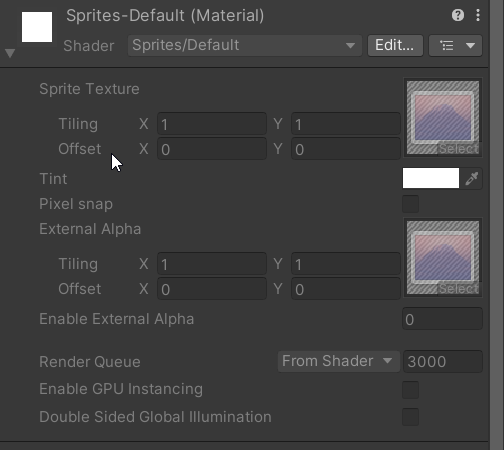
yeah it does
Just make yourself a sprite material and play around with the tiling there
vague tundra
I'll give that a try, one moment!
 fervent furnace
https://docs.unity3d.com/ScriptReference/SpriteDrawMode.Sliced.html maybe this? i havent tried this
 vague tundra
Ahh yes, so sliced isn't what I'm after but I have tried the SpriteDrawMode.Tiled option.
It ALMOST works, however...
It doesn't seem to scale the physical object, only the sprite that is rendered. That might not be the best explaination but I have a screenshot that explains my issue - just looking for it
latent latch
The slicing seems more dynamic in this case
vague tundra

So in this case, the object itself isnt scaled, but I have SpriteMode = Tiled, and have modified the Size of the renderer.
Which seemed to work until I applied lighting haha... the original object is still 1x1
@latent latch I don't seem to have an edit option for my shader, like in ur image except 'edit' button is also disabled
latent latch
You need to create a new material
in this SS you're using unity's single sprite material, but basically you want to make a copy to apply your own settings
neat yoke
vague tundra
This is very weird behaviour on Unity's behalf lol
I would not have expected that option to do that
vague tundra
Haha yeah ikr so weird
neat yoke
I mean I get why they made it like that, but the "Size" under "Tiled" seems to indicate the tiling size, not the quad size
It's also reasonable @vague tundra that instead of changing the material, you just have a script that keeps the collider and renderer sizes identical
vague tundra
@latent latch Very close! It looks like I'd have to create a material for every wall segment, as I'd need a different X and Y tiling for each wall segment... is there a way to have it set dynmically? Let me know if I need to explain that further haha
neat yoke
Yeah, that's why I was thinking what I suggested may be better
vague tundra
@neat yoke Oh yes so interestingly I've actually done exactly that - my colliders are the exact same as the sprite renderer's size... but it seems the actual game object is somehow still at 1x1
neat yoke
The gameobject has no geometry
latent latch
If you need to change the UVs for different wall variations then you need a new material for each
but otherwise the idea is that it's reusable (and is easier to batch)
vague tundra
You can see the green outline in the screenshot - the collider - is the same as the sprite renderer's visual
neat yoke
What is the white square?
vague tundra
Thats the original 1x1 XD
as you said, very weird XD
Well I guess I just assume it's the 1x1... Idk what else it could be?:0
neat yoke
1x1 of what? are there other components on the object
An empty GameObject is just a transform - it has no volume
vague tundra
Well it started off as a square... but I imagine that's driven by the SpriteRenderer's sprite.
Which is now a square tile so thats also square
fervent furnace
the white square is shadow caster
vague tundra
Ooh what's that and how do I make it the same as the visual size of the object?
neat yoke
ShadowCaster2D appears to be defined in size by vertices
@vague tundra URP or builtin?
idk if builtin even has a shadow caster
vague tundra
Oooh wow, yeah okay I do have a ShadowCaster2D attached haha 😅
URP
Oh yep I see, I can edit the shape of the shadowcaster using said verticies. Thank you!
Seems to be a very manual process... I'll investigate a way to automate it. Thanks everyone(:
neat yoke
vague tundra
Seems to be a very manual process... I'll investigate a way to automate it. Than...
I'm looking at the ShadowCaster2D source and I cannot find a public access point for the shape
It generates it on Awake based on the object bounds if it's null, but otherwise you can't seem to change it
vague tundra
Oh jeez that's a bummer... hmm
neat yoke
Once again, the Unity devs love of private/internal causes issues :V
cosmic rain
No program can handle it, unless your code handles it.
This is totally normal. Don't leave null reference errors in your game.😅
 subtle sable
it should break callstack on lateupdate on this object but i'm not shure if it should couse application crash O.o
cosmic rain
As for the reason of the error, you'll need to debug it.
Null reference is undefined behaviour, so it's totally normal to crash if you don't catch them. The editor has different behavior, because you don't want it to crash while debugging.
Where there might be a null access, sure.
And an unhandled exception does what?
That's right. It crashes the app.
I don't know about these specific "sometimes".
Might want to provide an example.
Pretty sure it crashes. Maybe there might be a difference between development and shipping builds. About that I'm not sure.🤔
Aight. I'll try when I get home.
Anyways, an unhandled exception would cause a crash. That's just how programs work. If it doesn't, then unity catches it.
It really depends on where it occured.
It's not sometimes. It depends on each specific case.
You should investigate the error. A reference can't just "disappear" suddenly.
 cobalt kite
friendly reminder to never use is null when it comes to unity objects
...and also never reference them by an interface, I guess
cosmic rain
From the look of it, the error is thrown when accessing the "gameObject" property, which probably goes through the C++ land, at which point unity might handle errors differently.
Probably some code running on a destroyed GameObject or a "not unsubscribed in time" delegate/event
 viscid willow
Good day everyone,
I'm having trouble with quaternions. I have a 3D Gameobject of a hand with animations for VR interactions and want to apply these animations onto the hands of a fullbody ready player me avatar. Since rigs of both fbx and orientations of each joint pair (for example vr_index_2 <-> rpm_index_2) are differently, I try to apply the rotation from each joint of the vr hand onto each respective joint of the the rpm hand.
At first I tried to save the local rotation of the vr joint at Start(), convert the rotation offset during runtime into world space and apply that onto rotation of the respective rpm hand joint by converting the rotation back into rpm hand joint space and adding it onto its' local start rotation. Which I didnt manage to implement and in theory requires both hands to be parallel, so that fingers dont suddenly go sideways if the hands are perpendicular. Then I tried to figure out the differences between each joint pair.
Adding a simple rotation offset work? Didn't work, because rotating around the z-axis of the vr joint isnt the same movement as rotating the z-axis of the respective rpm joint.
Applying the x,y and z values of the vr rotation to different x,y and z fields of the rpm joint rotation? Seemed to work. When I convert the rotation as follows, the rotation of the rpm finger joints look to be similar to the rotation of their respective vr joints, but not for all.
convertedRotation = new Quaternion( x: -source.localRotation.z, y: -source.localRotation.x, z: source.localRotation.y, w: source.localRotation.w);
The rotation of the joints for the thumb and knuckles are completly off the board. I tried to ... errr ... reenact the way I got the shown quaternion convertion, which works for the joints #2 and #3 for index, middle, ring and pinky finger, but it seems it was a lucky guess. And by now I'm simply confused about my lifechoices. I hope you can help me find some clarity.
 thick terrace
viscid willow
Adding a simple rotation offset work? Didn't work, because rotating around the z...
thick terrace
viscid willow
Adding a simple rotation offset work? Didn't work, because rotating around the z...
am i understanding it correctly that you're trying to manipulate the rotation by modifying the quaternion directly? the values aren't angles, if you want to do that convert it to angles first with eulerAngles and back with Quaternion.Euler
viscid willow
You mean like this?
ne = Quaternion.Euler( x: -source.localRotation.eulerAngles.z, y: -source.localRotation.eulerAngles.x, z: source.localRotation.eulerAngles.y);
Seems to work the same, but since I'm not sure if the joint pairs are in the same left- or right-handed coordinate system, this is the more savely approach i guess?
 hexed pecan
Hmm I doubt that swizzling xyz angles will give the results you want
You mentioned 'offsetting the rotation', you could do that by multiplying the rotation with another Quaternion
For example something like rotation = Quaternion.FromToRotation(Vector3.up, Vector3.forward) * rotation
Just an example - you need to find the right conversion rotation
viscid willow
hexed pecan
For example something like ``rotation = Quaternion.FromToRotation(Vector3.up, Ve...
For this example, would that look something like this?
rotation = Quaternion.FromToRotation(vrHand.forward, vrHand.right) * Quaternion.FromToRotation(vrHand.forward, vrHand.Up) * rotation
So that the transform handlers for both are somewhat oriented the same?
 hexed pecan
Thats the general idea yeah. If I understand your problem
viscid willow
Thanks. Let me see, if I can make it work.
vague tundra
@neat yoke It looks like the ShadowCaster2D will choose its shape when its attached to the object, so I attached the ShadowCaster2D to all my walls at runtime and that seems to work 👍
neat yoke
vague tundra
<@212084311967399936> It looks like the `ShadowCaster2D` will choose its shape w...
Aye, that'd be the ShadowCaster2D building the shape based on the object bounds in Awake. Glad it works for what you need 🙂
 quartz folio
Please don't post nonsense, there is no off-topic here, and unless you have an actual question or discussion it's just spam
 patent hound
just to double check if i go into the collider component of an object and change the layer overrides to ignore a layer will the OnColliderEnter function still be called if it comes into contact with it? I have enemies that need a large capsule collider for proper movement and navmesh interaction but i want my bullets to ignore their capsule collider and only check the hitbox colliders attached to the bones
leaden ice
patent hound
just to double check if i go into the collider component of an object and change...
no
that layer will be ignored
there will be no collisions
patent hound
I assumed this was the case, but wanted to double check
 swift falcon
how to enable and disable ray tracing based on c# script please?
(HDRP)?
ping if know how pls ❤️
heady iris
isn't that controlled by volumes?
you'd want to add a global volume with a profile that turns on raytracing
then turn the volume on and off
(or just turn on the specific volume override)
i do graphics settings that way. one global volume with a many overrides in its profile.
heady iris
swift falcon
ping if know how pls ❤️
^
 royal temple
Hello guys, do you know if it's a bad idea to change Canvas RenderMode at Runtime please? Changing from Screen Space - Overlay to Screen Space - Camera and assigning Render Camera manually from script. I have many problems and I'm wondering if maybe I should simply change my whole approach
It seems it's not such a bad idea since Unity documentation is doing it here: https://docs.unity3d.com/ScriptReference/Canvas-renderMode.html
heady iris
I don't see any reason for it to fail
But it does sound a little weird. What are you trying to accomplish?
 final shard
Im not sure why but my code keeps stopping when the int thats displayed value reaches 6
latent latch
sounds like your unlucky number
also probably want to post your code where you think the problem persists
heady iris
we can do nothing with this little information
final shard
oh
okay
sorry
I think i found the issue
I was using ^ as an opperator
but I dont think C# supports ^
does anybody know if there are other ways to write exponents?
heady iris
^ is the bitwise XOR operator.
If you want to perform an exponentiation with floats, you can use Mathf.Pow
final shard
does that exist?
ive found sources saying it does not
weirdly
im just using an online C# compiler atm
heady iris
C# doesn't have a built in way to do integer exponentiation, I don't think.
final shard
heady iris
If you want to perform an exponentiation with floats, you can use `Mathf.Pow`
Im using ints btw
yeah
Okay
so I could just use a for loop
and have it repeat
until its repeated the ammount of times
heady iris
yes, or maybe do repeated squaring if the exponents are large
heady iris
of course, you'll run out of space in the integer very quickly
final shard
thanks!
final shard
heady iris
of course, you'll run out of space in the integer very quickly
wait
well
probably not
because the integer limit is like
heady iris
2^32 would overload an int
 knotty sun
final shard
max is prolly like a billion
knotty sun
final shard
max is prolly like a billion

Returns a specified number raised to the specified power.
also works for ints
 rancid kindle
hello!!
so i wanted to create a code where a blood particle will show up at a particular health bar, im using an if fuction for it but like creating if for not just 10f but for 15f and 5f will make the code unorganized so is there some way to like code it in such a way that i can put the health together in the if statement instead of putting it individually?
 rigid island
rancid kindle
hello!!
so i wanted to create a code where a blood particle will show up at a pa...
rigid island
rancid kindle
hello!!
so i wanted to create a code where a blood particle will show up at a pa...
use a variable you want to change variations
don't ever hard code numbers
 nimble valve
i need help fixing my animaton from looping even tho i have loop time off. PS i dont rlly know anything about coding
 leaden ice
nimble valve
i need help fixing my animaton from looping even tho i have loop time off. PS i ...
leaden ice
nimble valve
i need help fixing my animaton from looping even tho i have loop time off. PS i ...
this error is that your code is trying to set a trigger that doesn't exist
nimble valve
and how would i make it so the trigger exists
leaden ice
create it in your animator state machine
nimble valve
leaden ice
create it in your animator state machine
you mean this place?
 rigid island
thats not parameters
@nimble valve https://docs.unity3d.com/Manual/AnimationParameters.html
nimble valve
?
 rigid island
ok, where is UpDownAttack
nimble valve
oops i didnt realize i put it with the -
aight thats fixed but its still looping on its own
rigid island
nimble valve
aight thats fixed but its still looping on its own
its possible your trigger keeps triggerring, click the object with animator at play time and observe your animator
I see the screenshot says its in Update()
don't know your code though, idk which conditions you put
 rigid island
hmm it shouldn't loop, do you have it unchecked on animation clip ?
also what exit conditions you have for animator
nimble valve
yea i have it unchecked
rigid island
unchecked exit condition ?
rigid island
Exit time unchecked means it needs an exit condition with params or it yells at u
w exit time, it exits the state if animation done(assuming no params on transition)
nimble valve
so basically
leaden ice
nimble valve
when i uncheck it then it says it wont work
click the transition arrow from UpDownAttack to Idle and show what it says
it should be unconditional
nimble valve
 rigid island
iirc if the transition duration is longer than the clip it loops the clip a couple times, we can't see the timeline tho xD
nimble valve
 rigid island
hmm looks fine there
leaden ice
nimble valve
do you have conditions on this?
nimble valve
nope
 simple egret
Hm exit time 0? The animation will not play or will just look weird as it interpolates to the Idle state
Did you mean to set exit time to 1, and transition duration to 0?
nimble valve
nope i havent
rigid island
nimble valve
nope i havent
can u show inspector for animation clip UpDownAttack ?
nimble valve
 rigid island
nimble valve
rigid island
nimble valve
how many times does it loop
rigid island
there is something probably in plain sight
simple egret
Maybe a condition from Idle to Attack is always true? You can view what state the animator is in while in play mode, by selecting the object that has the animator
nimble valve
lemme see
rigid island
gotta be Idle to Attack probably has that or perhaps no conditions at all?
maybe you forgot to put trigger conditions
nimble valve
from idle to sword attack has a condition
nimble valve
that doesnt have 1
rigid island
well there ya go
rigid island


 rigid island
nimble valve
a what
rigid island
nimble valve
a what
whats on line 16 of CollisionDetection
nimble valve
 leaden ice
nimble valve
leaden ice
nimble valve
usually happens when you try to set a parameter on a disabled animator
or perhaps one that lives on a prefab
nimble valve
also this happens
 leaden ice
nimble valve
also this happens
leaden ice
nimble valve
also this happens
loooks like you're Instantiating an object from the scene
instead of a prefab
nimble valve
it only clones itself when i do the UpDownAttack
nvm now both
i just deleted the npc now it doesnt multiply
alright all fixed now
 tough storm
quick question, im trying to generate patch notes for my plastic scm repo, the thing is they generate a lot of information when i use the cm log --from=(insert number) command
i only want the comments, i dont care about the date,owner,or files that were changed
leaden ice
tough storm
quick question, im trying to generate patch notes for my plastic scm repo, the t...
See if cm log --usage has any helpful info
or cm log --help
tough storm
it has some info, but nothing seems super obvious and i can't find the docs on the specific command online
honestly plastic's docs have been really frsutrating to find if i can find them at all
tough storm
wait i might have missed something
one sec
yep im silly
cm log --from=4200 --csformat="{newline}Changeset {changesetid}{newline}{comment}"
 hard viper
i have an idea, and need someone to tell me if it is completely stupid.
I want to make a system where i can specifically make collider A send force to collider B, and not B to A, without changing how they interact with other colliders in the same layer.
Idea: For every rigid body, duplicate its collider. Make the original collider send forces to nothing, and the duplicate solely receives forces (no callbacks). Then individually call IgnoreCollider on the duplicate as necessary.
Good or dumb?
tough storm
sounds like it could end up being expensive
hard viper
that’s my concern
but I don’t otherwise know how to achieve the desired result
i’d also need to refactor a bunch of code because I now have 2 colliders to do the job of one
tough storm
you could like, temporarily disable the rigid body of one
hard viper
maybe it would be easier with a diagram

red blocks dynamic RB, blue moving platform is kinematic RB, and green terrain is static
i want red blocks to ride each other and the lift, and things don’t send forces to whatever they are riding
because it otherwise screws with trajectories in a really complex way
I want middle block to receive force from bottom block (so it doesn’t fall through), and still send force to top block (so it can lay on top)
does it make sense what I’m trying to get?
tough storm
i'd suggest either you make the blue moving platform temporarily not recieve new forces, or you could write a simple custom physics script that would allow for what you want, just try to avoid the double collider thing cause that could get real expensive
it does make sense yeah, its just a tough problem
personally i'd just want to try and have the blue platform "on rails", that is, not a part of the physics if possible, and then handle the rest as given
hard viper
the blue platform is on rails
it is kinematic, and does not care about what is above it
but the blocks on middle and bottom are a problem. they get forces from above, which screw with their trajectory.
to be clear, when blue platform moves, every method I’ve tried either has blocks start clipping through each other, or the blocks move with the platform without moving like normal dynamic RBs
but you’re right that the double colliders is so bad T.T
tough storm
have you tried setting the collision mode to continouous? @hard viper
continuous dynamic
hard viper
yes. everything is continuous
colliders only clip into each other when using transform.Translate. Because that has been the only way I’ve found to make them properly move in reference frames
i want to move away from that, and I’m considering using friction and attractive forces. But I will also need dynamic rigidbodies in the middle to ignore forces from above.
Otherwise i’m basically applying artificial gravity, where each block accelerates the whole stack down super fast, especially in midair
it’s a never-ending problem, fen. lol
tough storm
i might be wrong, but if youre mixing physics with doing raw transformations, that might be part of the issue here
hard viper
absooutely. but idk how to make a block move with the platform below it using forces
friction is an idea, but I also need to know how to keep them in intimate contact when the platform moves vertically
if you have an idea for how to make that work with forces, I’m very open to suggestions
tough storm
you could parent the red blocks to the platform, and stick with it only using transformations, but honestly this is a really hard problem
theres probably papers written on it
hard viper
parenting transforms doesn’t work. the dynamic RBs just don’t respect the hierarchy at all
tough storm
hm, it might be a good idea to ask somewhere that has a more physics sim oriented perspective then, im not super duper knowledgable about unity physics and at this point im not sure how id get around all this, besides just doing some kind of artifical gravity thing
hard viper
ty for trying anyway
rigid island
why was crossposting this necessary ?
swift falcon
Can someone help me structure something a bit better so that I can cast more efficiently?
So here is 3 examples of data I want to cast
public class PropData : StackableData
public class WallData : StackableData
public class FloorData : BaseData
Here is the classes I inherit from
public class  StackableData : BaseData
{
    // If we stack on top of an object, we need the children to be stored on it
    public List<PropData> children;

}

public class BaseData
{
    //  The id of the model
    public int id;
    // The variant of the model we have
    public int variant = 0;
    public int buildStage;

    public float rotation;

    // The save data for each mesh on the object
    [CanBeNull] [ItemCanBeNull] public MeshData[] meshData;

    [JsonIgnore] public GameObject gameObject;
}```
Now I want to be able to create a job by grabbing the data of a wall or prop, here is the JobData
`public class JobData : StackableData`

And I want to cast depending on the type like floor, prop, wall, etc.
```csharp
JobData overlapData = cell.data.floor;```^ FloorData

So how should I handle casting?I want to be able to do "JobData = WallData" or "JobData = FloorData"
heady iris
hey @unreal notch , I did some more digging on that persistentDataPath problem
so yeah, it changes every time you push a new build to itch. it's based not on the page URL, but rather on the folder that the game data is served from
and that changes every time.
did you wind up using an explicit idbfs path?
i'm going to try that next
swift falcon
need help with some player movement
rigid island
swift falcon
need help with some player movement
don't crosspost. continue on #💻┃code-beginner
leaden ice
swift falcon
Can someone help me structure something a bit better so that I can cast more eff...
why would a member called floor not just be a FloorData in the first place?
Referring to this example: JobData overlapData = cell.data.floor;
swift falcon
leaden ice
why would a member called `floor` not just be a `FloorData` in the first place?
Sorry I duno if I wrote something wrong but data.floor is "FloorData"
 junior maple
Which is better, using singles or sprite sheets for furniture? And in the case of using sprite sheets, use 16x16 pieces in objects that are a little larger, or cut it so that it is a single sprite (32x16)?
I am worried that since the spritesheets are so large, they will have to be loaded when loading the scene, when I will only be using 3 objects from that spritesheet. What do they say?
rigid island
junior maple
Which is better, using singles or sprite sheets for furniture? And in the case o...
not really a code question
junior maple
Im sorry
 timber kernel
hey yall, if i use VSCode, do i need both the visual studio code editor package and the visual studio editor package? or just the one for code?
rigid island
junior maple
Im sorry
also you shouldn't worry spritesheets are optimized in unity
swift falcon
leaden ice
```cs
FloorData overlapData = cell.data.floor;```
So it's a job system where all things to do with building is in a list and that's why it needs to be JobData because it has additional information in it
public List<List<Job>> data; I iterate through this
each job has JobData for 1. Building. 2. Deleting
rigid island
timber kernel
hey yall, if i use VSCode, do i need both the visual studio code editor package...
just Visual Studio Editor
make sure its updated
junior maple
rigid island
also you shouldn't worry spritesheets are optimized in unity
It's big, because carrying everything when you enter a house if I only use one. Or was Unity optimized to not have to load the entire texture?
 rigid island
junior maple
It's big, because carrying everything when you enter a house if I only use one. ...
rigid island
junior maple
It's big, because carrying everything when you enter a house if I only use one. ...
unity slices them into sprites anyway , you just load it like normal
junior maple
Ohh, I understand now, thank you, and sorry for not following the channel topic.
leaden ice
swift falcon
So it's a job system where all things to do with building is in a list and that'...
I don't understand the relationship between JobData and BaseData / StackableData. Why is JobData part of that hierarchy at all?
in short - why did you do JobData : StackableData
rigid island
junior maple
Ohh, I understand now, thank you, and sorry for not following the channel topic.
no worries 🙂
Anything else you can try #💻┃unity-talk
patent hound
so, looking for an opinion here, I'm adding in a "sound" system for the enemy ai in my game so they can "hear" the player. obviously adding some actual sound listener is way overcomplicated and would cause a ton of performance overhead. how would you implement this for footsteps and for gunshots?
heady iris
well, I recently implemented a sound system for detecting the player in a stealth game
The most basic option is to just give each kind of sound a range. Any listener within the range can hear the sound when it triggers.
patent hound
i'm thinking since it's indoors i will break the game up into individual rooms and just trigger the current room and the 2 adjacent ones with a gunshot, and for sprinting just make a big collider trigger and only activate enemies inside it when sprinting
heady iris
you could also be a little more "realistic" and just give each sound an intensity, which drops with the square of distance
and then make enemies notice any sound that has a high enough intensity
heady iris
patent hound
i'm thinking since it's indoors i will break the game up into individual rooms a...
Doing it by room will be a lot more predictable, which might be a better fit for your game
swift falcon
leaden ice
I don't understand the relationship between `JobData` and `BaseData` / `Stackabl...
I did that because each Job can be converted to a save.
So like if I want to build a floor, all the data required to make that floor (Which will be saved in FloorData) will be inside that job.
Same for props, all the data required to build things will exist in it. However JobData has some extras that are not required by the Floor / wall data... if it's a valid location to build and storing original materials to a preview material can be added to objects
heady iris
heady iris
you could also be a little more "realistic" and just give each sound an **intens...
I go a step further and have a whole spatial audio system where sound intensity is affected by how direct the path is between the source and the listener
swift falcon
All types of items need to be able to go into JobData because... they're basically the same thing, just JobData has a few extra details
heady iris
It uses a NavMesh.
That is an interesting option to get stuff like "sound doesn't go through walls" for (realtively) free
but there are lots of gotchas. for example, what if the sound origin is slightly out of bounds? what if the player is 30 feet above the ground?
patent hound
thankfully i do want sound to go through walls, so a simple range check would suffice
heady iris
Unless you're trying to make a very realistic simulator, you probably want something more predicable, like a simple range check
leaden ice
swift falcon
I did that because each Job can be converted to a save.
So like if I want to bu...
I think you're trying to abuse polymorphism to do something it isn't good at. JobData HAS a StackableData or BaseData. Is isn't a StackableData / BaseData itself.
patent hound
how would you check for objects in a spherical range without too much overhead, i was leaning the direction of just a sphere collider
heady iris
patent hound
how would you check for objects in a spherical range without too much overhead, ...
tbh you aren't going to do THAT many sound checks
patent hound
i see in the documentation there's a function called physics.overlapsphere which might work
heady iris
Physics.OverlapSphere sounds reasonable, yeah
It's actually slower than just brute forcing it for small numbers of enemies
rigid island
OverlapSphereNonAlloc is goat
heady iris
but a physics query should behave better if you have lots of enemies, most of which are nowhere near close enough
heady iris
rigid island
OverlapSphereNonAlloc is goat
i used to use this with a one-element array before I discovered CheckSphere
🧠
swift falcon
leaden ice
I think you're trying to abuse polymorphism to do something it isn't good at. Jo...
Yeh but my general thought process is that JobData and PropData both have the same information that they both require... That's why I just want to be like
Get all the information from PropData that we have in common and put it into ourselves, that's what I wanted and how I thought it'd work
leaden ice
swift falcon
Yeh but my general thought process is that JobData and PropData both have the sa...
class JobData {
  BaseData thingToBuild;
  // other stuff
}```it's a 4 player coop game where players may have automatic weapons, and there could be up to 20-30 enemies in a room waiting in an idle state, so in theory you could have 4 players that are checking 120 objects to see if they are in an idle state 4 or 5 times a second
leaden ice
also i have no idea what PropData is, you haven't mentioned that up to now
heady iris
patent hound
it's a 4 player coop game where players may have automatic weapons, and there co...
ah, good point
patent hound
so i think performance overhead will be quite a big deal
heady iris
You may want to add a timeout after each noise check
you can probably avoid checking every single shot
although, you'd have to be careful, or players could silence their weapons by taking a step and then firing right afterwards
:p
swift falcon
leaden ice
also i have no idea what PropData is, you haven't mentioned that up to now
Oh my bad there is just basically 4 types of information
PropData
WallData
FloorData
ColumnData
They all inherit from either "BaseData" or "StackableData" my bad
heady iris
maybe a timeout that's ignored if the new noise is louder than the old one
 unreal notch
heady iris
did you wind up using an explicit idbfs path?
unreal notch
heady iris
did you wind up using an explicit idbfs path?
nope! solved the problem though
it had something to do with the string being sent to the javascript being UTf16... needed to explicitely convert it to UTF8 both on the way in, and on the way out
and also, I had to change the path for webGL to
path = "koboldsshiny" + saveIndex;
because local storage doesnt like complex file names
patent hound
heady iris
you can probably avoid checking *every single shot*
good idea, i doubt this would actually effect gameplay
swift falcon
leaden ice
```cs
class JobData {
BaseData thingToBuild;
// other stuff
}```
But erm... I think I see what you're suggesting here and see where I've gone wrong 
Thanks for the help, I'll look at redesigning this a little
heady iris
unreal notch
nope! solved the problem though
it had something to do with the string being sen...
I just tried using my own path. Works great.
patent hound
heady iris
maybe a timeout that's ignored if the new noise is louder than the old one
as long as i make sure the code that does the timeout is attached to the weapon(or muzzle object since my weapons already have a full attachment system), and the audio range is bigger than the visual range, i don't think there will ever be a noticeable effect on gameplay other than reduced overhead
unreal notch
nice
heady iris
The save data still exists after uploading a new build
The one catch: you have to create the directory first!
I was trying to write to /idbfs/foo/save.json without creating the /idbfs/foo directory
so that was failing mysteriously
heady iris
this seems a lot nicer than having to call out to JS
unreal notch
yea, and your solution I think is safe from losing save data by clearing your browser cache
heady iris
relatively safe, yeah
i think indexedDB is more persistent than localStorage
Both can still get wiped if you run low on disk space, though.
afaik
unreal notch
I'll eventually switch over to that, but at the moment I've moved on to a different issue: selectively applying a pixel perfect shader to only certain layers in my scene
(I actually solved it, been working on this all day, now I'm just applying it in several places)
old effect vs new effect
heady iris
Safari also aggressively wipes things after 7 days
patent hound
does a layermask actually improve performance overhead of physics.overlapsphere/physics.overlapspherenonalloc or does it just filter the reuslts?
heady iris
unreal notch
old effect vs new effect
neat!
 silk cedar
Hello, can someone help me with the code problem?
patent hound
silk cedar
Hello, can someone help me with the code problem?
THE code problem?
silk cedar
patent hound
THE code problem?
I need help because I am a Unity beginner and I have a problem
 silk cedar
spring creek
https://dontasktoask.com/
silk cedar
spring creek
https://dontasktoask.com/
thank
Hey, can you also help me with a problem I have in Unity, it's not about codes but about my rigibody character.
unreal notch
I'd recommend the #💻┃code-beginner for begginer questions
spring creek
silk cedar
Hey, can you also help me with a problem I have in Unity, it's not about codes b...
Don't ask to ask 🤷♂️
Don't ask if someone can help
Just say your problem
Someone will help if they can
 finite thorn
hey is cinemachine code beginner question
unreal notch
no its #🎥┃cinemachine question 😛
rigid island
finite thorn
hey is cinemachine code beginner question
if it has to do with code doesnt matter which channel
unreal notch
theres a whole channel for that
finite thorn
kk got it
 hybrid turtle
Has anyone used PaintIn3D this documentation is actually garbo but if anyone has used Activation field I want to manually be able to enable and disable when users can be paint
 lean sail
hybrid turtle
Has anyone used PaintIn3D this documentation is actually garbo but if anyone has...
lean sail
hybrid turtle
Has anyone used PaintIn3D this documentation is actually garbo but if anyone has...
might be easier to find help from the creator's discord/forums if they have made one.
lean sail
silk cedar
How do you send video?
discord will embed mp4 format. Look at the #854851968446365696 though because not many people will go through the effort of watching a video to understand what you need help with
lean sail
hybrid turtle
but ill see if there exists a server or smth
if im looking at the right thing, seems like there is a forums link on the asset store for PaintIn3d.
silk cedar
lean sail
discord will embed mp4 format. Look at the <#854851968446365696> though because ...
Where can I ask for help?
 solar estuary
Currently my player can infinitely jump higher and higher if you continue to press space bar. I am trying to make it so I can only jump once, but I'm not sure how. Can someone help me? Here is my code:
 rigid island
solar estuary
rigid island
solar estuary
you need a way to determine you're grounded

In this part, we will take care that our player can only jump while he is standing on the ground.
Github repository:
https://github.com/codinginflow/2DPlatformerBeginner
🎓 Learn how to build a 2D game in Unity (beginner): https://www.youtube.com/playlist?list=PLrnPJCHvNZuCVTz6lvhR81nnaf1a-b67U
🎓 Learn how to build a 3D gam...
solar estuary
thanks so much
heady iris
silk cedar
help me with this please
it looks like you renamed the file after dragging it in
silk cedar
yes
heady iris
actually, I dunno exactly what you did. downloading that gives an error
hybrid turtle
lean sail
if im looking at the right thing, seems like there is a forums link on the asset...
oh ok ill go on there rn then and see
 scarlet kindle
Hey I've got an OnCollisionEnter(Collision collision) event firing for collisions on a dice roll, it's working but I noticed that if the dice has already collided but not jumped up, and part of it is already touching the table, then it doesn't consider the last impulse when part of it flops onto it's side a collision. Is there any type of workaround for detecting this last impulse?
solar estuary
rigid island
https://youtu.be/LEUhxe9vUOM
Hey, i followed the tutorial and the jumping worked but he also shows how to make it so the player falls to the ground instead of being stuck on edges. I did this as well but I can't tell if it works because my map starts to rotate if I try to play it
my composite collider is also showing me this
 rigid island
solar estuary
my composite collider is also showing me this
rigid island
solar estuary
my composite collider is also showing me this
you didn't make your CompositeCollider rigidbody static?
cosmic rain
scarlet kindle
Hey I've got an *OnCollisionEnter(Collision collision)* event firing for collisi...
No. And honestly using OnCollisionEnter to determine a dice roll is a horrible idea.
I'd just monitor the dice velocity and angular velocity and decide the roll on when the velocity is 0 after the roll.
scarlet kindle
I'm not using it to determine a dice, i'm using it to play a sound effect
cosmic rain
Ah
scarlet kindle
I think I'm going to try OnCollisionStay and check the impulse force greater than a certain amount
it should work, just need to find the right amount
solar estuary
rigid island
you didn't make your CompositeCollider rigidbody static?
nope, he didn't show that lol thx for the help
rigid island
solar estuary
nope, he didn't show that lol thx for the help
did it fix?
solar estuary
yeah
one more question, do you happen to know how to make it so i can't hold down the walk button and just sit on the side of the platform?
right now i can just hold the right arrow and sit on the side of the platform
 rigid island
solar estuary
right now i can just hold the right arrow and sit on the side of the platform
rigid island
solar estuary
right now i can just hold the right arrow and sit on the side of the platform
if its getting stuck you can get put nofriction 2DphysicsMaterial on player collider
solar estuary
thanks
cosmic rain
scarlet kindle
I think I'm going to try OnCollisionStay and check the impulse force greater tha...
Maybe add smaller trigger colliders on the edges and play the sound in OnTriggerEnter.🤔
scarlet kindle
cosmic rain
Maybe add smaller trigger colliders on the edges and play the sound in OnTrigger...
I ended up doing this
    {
        Debug.Log("collision dice!");
        diceHit.Stop();
        diceHit.volume = 1;
        diceHit.Play();
    }

    void OnCollisionStay(Collision collision)
    {
        // Debug.Log("collision stay dice!");
        var totalImpulse = Mathf.Abs(collision.impulse.x) + Mathf.Abs(collision.impulse.y) + Mathf.Abs(collision.impulse.z);
        var force = totalImpulse/Time.deltaTime;
        Debug.Log("force is " + force);
        if(force > 8) {
            Debug.Log("sitting force: " + force);
            diceHit.Stop();
            diceHit.volume = Mathf.Lerp(0, 1, force/20);
            diceHit.Play();
        }

    }```

This way I get sounds triggered when it collides with the table, and then also when there is appropriate Impulse while its maintaining contact. I normalized the impulse force with the lerp to adjust the volume based on how strong the impulse is. the results are pretty nice, tbhwhy is this platform at the bottom green when its not the color i chose on the color picker
 rigid island
solar estuary
why is this platform at the bottom green when its not the color i chose on the c...
rigid island
solar estuary
why is this platform at the bottom green when its not the color i chose on the c...
is the original sprite white?
also not code question
solar estuary
oh okay
hybrid turtle
Hey ok so I figured my paintIn3D thingy out but now does anyone know a work around to signal the end of a timeline with PlayableDirector
playabledirector.time == playabledirector.duration does not work
 sullen fern
im making a basic 3d action game, but for some reason at low speeds my character overlaps with the wall
is there some setting im forgetting?
 alpine hearth
Hi I'm trying to profile my game on mobile
I don't get that long WaitForJobID, every thread seems to be spinning idle?
And then at the very end it pops two very fast task on worker 3 and 0?
 cosmic rain
alpine hearth
Hi I'm trying to profile my game on mobile
I don't get that long WaitForJobID, e...
cosmic rain
alpine hearth
Hi I'm trying to profile my game on mobile
I don't get that long WaitForJobID, e...
Perhaps it's waiting for some dependency.
Hard to say without having a closer look.
alpine hearth
cosmic rain
Perhaps it's waiting for some dependency.
Hard to say without having a closer lo...
yeah but what I don't understand is that every thread is at idle, I would expect one of the worker or background or render thread to be doing something
Anything specific I could provide to help diagnose the issue?
 night harness
Just looking for confirmation
Gizmos.matrix default makes the Gizmos origin be set to the scene/root Transform (always 0 in everything)
Gizmos.matrix = transform.WorldToLocalMatrix makes the Gizmos origin be set to the local transform of a Transform
Gizmos.matrix = transform.localToWorldMatrix makes the Gizmos origin be set to the world transform of a Transform
yes?
solar estuary
why isn't my game manager script working? when the player touches the blue bar, it's supposed to teleport the player back up to that first yellow platform. When I test it though, I just phase through it.
 spring creek
solar estuary
why isn't my game manager script working? when the player touches the blue bar, ...
spring creek
solar estuary
why isn't my game manager script working? when the player touches the blue bar, ...
Show the inspector for the blue bar
Does it have a trigger collider?
How do you tell when the player touches it?
solar estuary
'
 cosmic rain
alpine hearth
Anything specific I could provide to help diagnose the issue?
cosmic rain
alpine hearth
Anything specific I could provide to help diagnose the issue?
Maybe a screenshot with all the threads expanded.🤔
rigid island
solar estuary
why isn't my game manager script working? when the player touches the blue bar, ...
show script

 rigid island
solar estuary
heres the game manager script
rigid island
solar estuary
heres the game manager script
you might need to delete collider and make a new one
are u sure they're the same size
you can also cleanup that Game manager if you just reference the PlayerController directly you can skip the GetComponent
put Debug.Log inside the Triigger
solar estuary
rigid island
you might need to delete collider and make a new one
delete the box collider and remake it?
rigid island
solar estuary
delete the box collider and remake it?
unless its the same size, the inspector doesnt make it clear
did you check the gizmos
the green lines
solar estuary
no, I'm just copying the code my instructor provided
solar estuary
i dont see any green lines
rigid island
turn Gizmos on in the scene view then
spring creek
solar estuary
'
Show a screenshot of the player. Does it have a collider2d and rigidbody2d?
solar estuary
rigid island
turn Gizmos on in the scene view then
everything is already on
 solar estuary
spring creek
Show a screenshot of the player. Does it have a collider2d and rigidbody2d?
solar estuary
spring creek
Show a screenshot of the player. Does it have a collider2d and rigidbody2d?
yes
 rigid island
solar estuary
everything is already on
rigid island
solar estuary
everything is already on
ok so you don't see this around the Blue floor

?
spring creek
solar estuary
yes
Ok, then that is all set up for registering collisions. It's something else. Maybe what Nav is talking about
solar estuary
unless you're talking about this red thing, no
 rigid island
can u turn off the sprite for a second
that color is like blinding me, i can't tell
 solar estuary
 rigid island
yeah just make a new box collider and see if it fixes it
 rigid island
solar estuary
the gizmo is finally there but i still go through the bar
rigid island
solar estuary
the gizmo is finally there but i still go through the bar
did you put a Debug.Log inside your OnTriggerEnter?
solar estuary
nope, ill do that now
spring creek
solar estuary
the gizmo is finally there but i still go through the bar
Ah, found the issue
Your player is not tagged Player
rigid island
oh shit.
solar estuary
where
 solar estuary
OHHHHHH
 rigid island
you have to check Console window for the line number and script
chances are missing tag on GameManager too
spring creek
@solar estuary GameManger is not GameManager
Your find is for GameManager
But the object is named GameManger
One of the many reasons I hate namebased anything and find haha
unreal notch
friends dont let friends use GameObject.Find
rigid island
GameManager should be a singleton anyway 😛
solar estuary
man this crap is confusing
spring creek
solar estuary
man this crap is confusing
Is it still not working?
Did you fix the name of the gameobject?
spring creek
solar estuary
how do i fix it
Just change the name. Like in the inspector at the top where the name is, or right click the object and click rename
solar estuary
i just rename GameManager to GameObject?
spring creek
solar estuary
i just rename GameManager to GameObject?
No. GameManger to GameManager
Missing an "a"
Before the second "g"
 prime sinew
It happens way more often than you think
Which is one of the reasons why you avoid using Find
Learn better ways to get references to objects
https://unity.huh.how/references
rigid island
solar estuary
I can't believe my problems were because I forgot an A lmao 😂
start using types so u can benefit from Type Safety
working with string is like working with javascript :\
rigid island
eg gameManager = FindObjectOfType<GameManager>();
class is a type
using your class / type GameManager there is no way you can mispell that
your IDE would yell at you / fix it
when you did GetComponent<PlayerController>()
thats using types
night harness
"string"
night harness
I know I shouldn't ask about asking a question but anyone here have experience in Gizmos, rotating and matrix stuff? Having some troubles figuring it out in my head and would love some advice
solar estuary
solar estuary
thanks for the useful info
thanks again, sorry that you had deal with my idiot ass lmao
rancid kindle
rigid island
use a variable you want to change variations
Can you like probably give an example?
rigid island
rancid kindle
Can you like probably give an example?
what are you trying to do again?
 slim basalt
I am a bit confused. I am trying to have an object point towards a point in space that is 20 units in front of the camera. I am doing this inside Update:
transform.LookAt(playerCamera.forward.normalized * 20);
Based on everything I have read and debugged, it should be correct, but the object keeps going to all sorts of random positions. Video for reference.
I have zero idea what is going on and how to solve this.
 zinc parrot
If I have a light in HDRP and convert the project to builtin, whats the proper way to convert the lights intensity from HDRP to builtin?
 mossy snow
slim basalt
I am a bit confused. I am trying to have an object point towards a point in spac...
mossy snow
slim basalt
I am a bit confused. I am trying to have an object point towards a point in spac...
you're using an overload of LookAt that expects a world position, and you're giving it a direction instead
slim basalt
I assumed that Vector3s were Vector3s. transform.forward.normalized is a point in space, no?
In this case, do I have to do a raycast or something manually rather than just getting the forward?
 quaint rock
transform.forward is a directinal vector
slim basalt
I see, well I guess this works. I had assumed the forward was just a position in space that represents the direction relative to the origin of the object, but that's just so strange.
this works
        Ray r = new Ray( origin: playerCamera.position, playerCamera.forward.normalized);
        transform.LookAt(r.GetPoint(20));

Shouldn't they make Direction a separate class so you can't super easily use it with Vector3? It seems so wrong to me
quaint rock
like if you wanted a point n units infront of the player you would on something like
transform.position + transform.forward * n
quaint rock
slim basalt
Shouldn't they make `Direction` a separate class so you can't super easily use i...
no they should not, you might want to look directinal vectors
you can do math with them along side regular vectors
slim basalt
quaint rock
like if you wanted a point n units infront of the player you would on something ...
dang, you're right. That works too
quaint rock
since its more or less a point in space 1 unit infront of the transform, if that transform was (0, 0, 0)
slim basalt
I am just not used to properties of the same type having different behaviors depending on where they originate from in the class structure
quaint rock
well its not different behaviours
like a float could repersent many things since its just a number
well a vector is the same
slim basalt
I mean, it is. When I print forward, I get a position in space. I would have assumed I can just plop that into LookAt, but the behavior is different from the values I get
quaint rock
look at the position it gives you relative to the position of your object
also make sure your object is not near the origin
slim basalt
Ohhhh, it's a relative position?
quaint rock
you will notice the forward will be something like (0, 0, 1) or something if you are looking down the z axis
the code i shows worked since you are taking the position adding it to forward that gives you a point 1 unit infront of your character
slim basalt
I see
So foward is relative to the player. So it's not that it's a "direction", it's that it's a vector3 whose values are relative to the source object
quaint rock
you can always multiply that forward to get a point further out before you add it to position
yes
quaint rock
also why Vector3 has stuff like
Vector3.Up, Vector3.forward
slim basalt
yeah I see
quaint rock
where up would be (0, 1, 0) since y axis is your up axis
but say you wanted something 5 units up, you could just do Vector3.up * 5
its the same idea with the transform.forward, but its based on where that transforms z axis is facing
also forward is already normalized
no need to do it again, also all normalizing does is make the length of the vector 1, so really only useful for directions
other reasons for directinal vectors is for getting a direction pointing from 1 postion to the other for example
(posB - PosA).normalized would create a vector that points from A to B that is normalized so you can multiply it to make it any length you want and add it to a position to make it relative to that position
 river wharf
If I have a line renderer attached to an empty gameobject, can I not move the line by moving the empty gameobject ?
rancid kindle
rigid island
what are you trying to do again?
Allow my particle effect to play from a particular hp like from 30hp to 0hp it'll play the blood particle
Currently it plays particle when it's on 10hp and 0hp
river wharf
rancid kindle
Currently it plays particle when it's on 10hp and 0hp
are you trying to avoid excessive if statements ?
lean sail
rancid kindle
Currently it plays particle when it's on 10hp and 0hp
from just quickly looking at the reply chain: i assume you dont want it to play on 0. You'll want to use else if then. Your code right now checks if health is less than or equal to 0, and then also checks if its less than or equal to 10. You dont want that 2nd check to happen if the first is true, so use else if
also it looks like your IDE isnt configured because theres very little highlighting on anything
rancid kindle
river wharf
are you trying to avoid excessive if statements ?
Yes
rancid kindle
lean sail
from just quickly looking at the reply chain: i assume you dont want it to play ...
So what's the difference between else if and if?
Like I want to set a range where the blood particle will play if the hp is not in that range it won't play it
So like for now I've used 1 if statement as a starting point of the range and another if for the end range of the blood particle
patent hound
the idea with an else if is you can check an if statement only if a previous if statement isn't true.
rancid kindle
I see
lean sail
rancid kindle
So what's the difference between else if and if?
that website lets you run code if you wanna experiment around with what it does
rancid kindle
lean sail
<https://www.w3schools.com/cs/cs_conditions_elseif.php>
That helps
So like I can use if condition to keep the actual hp where the blood particle will play and else if for where the blood particle won't play, that about right?
patent hound
hey i've got a navmeshagent that is...wandering around 0.1 per frame(different every frame) and i can't seem to find anything that would be changing its destination, but i put in a public debub vector3 and can confirm its destination is randomly being set
it's not consistent it seems to be completely random and i can't find out why he's doing that, and because it's a navmeshagent not a script i can't add a debug.log to do a stacktrace
is there any way i could do a stacktrace to figure out what is setting the navmeshagent.destination?
i just paused the editor during runtime and disabled every component except the animator(so that it doesn't ragdoll), as well as components from about 5 other objects so i don't know where to look
lean sail
patent hound
i just paused the editor during runtime and disabled every component except the ...
idk much about navmeshagent so assuming it isnt some built in moving feature
If removing everything from it doesnt work, then its likely something else referencing it. id still check that the animator isnt moving it around but you could try right clicking the object/components and press Find references in Scene
If you still cant find it, try making a new one in a separate scene and see if it has the same issue
patent hound
well it seems like somehow the animator is setting the destination of my navmeshagent object but i don't know either why or how...
ok i figured out at least that it was just the entire object being moved, and the navmeshagent was just updating its destination to the new position of the object
but now i have no clue why the animator is moving the player around randomly, it's sliding in random inconsistent directions and speeds, and bouncing off walls even when the speed is set to 0
cosmic rain
An animation is moving the object? Sound like root motion.
 undone pasture
Heya I'm having a bit of trouble comprehending whether if im getting a reference or a value on a class whose purpose is to store values:
I have the class seen in the first picture, which i use as seen on the second picture, to then apply on my playercharacter in the third picture.
This stat system has two goals: our game has multiple characters with each having differing stats, so by implementing flyweights we can make that easier, but you can also throughout the game upgrade those player's stats, which you do via the function in the first picture.
So, in the player script, I create a new variable of the type of my struct, then i set the struct to one of my flyweights, then other code references that "stats" variable and runs the function defined in the class itself to change the values.
The problem is: When I do this, it seems the flyweight itself, "dendra" is whats being modified, and not the variable "stats" in player, meaning that if i set stats to null, then re-set it to the flyweight, whatever modifications i made will still be there, with dendra being static and all, so I guess that when I'm modifying "stats" im actually just modifying the flyweight??? How can I not do this? should I make PlayerStats a struct instead?


 cosmic rain
undone pasture
Heya I'm having a bit of trouble comprehending whether if im getting a reference...
cosmic rain
undone pasture
Heya I'm having a bit of trouble comprehending whether if im getting a reference...
Yes, dendra is the field that is being modified. Is that not what you want?
undone pasture
nope, i wanna copy the values of dendra to the variable "stats", then modify those values, not dendra itself
cosmic rain
Since class is a reference type, you're passing everything by reference.
Structs are value types, and are passed by value(copied).
cosmic rain
undone pasture
nope, i wanna copy the values of dendra to the variable "stats", then modify tho...
In this case you'd either create a new instance of stats with a copy constructor or something or just make your stats a struct to have it copied by default.
undone pasture
cosmic rain
Since class is a reference type, you're passing everything by reference.
Ah I see, got it
rancid kindle
So I want to play a sound when the player is walking, for dashing I just used playoneshot whenever the shift button was pressed but that won't work for walking as the W key will be held down so the sound will only be played once.. is there any way to play the sound so that it will play when the W key is held down and it stops playing when the W key is released
undone pasture
thank you so much, I'll probably make it a struct since its less work than making a constructor lol
 west lotus
rancid kindle
So I want to play a sound when the player is walking, for dashing I just used pl...
west lotus
rancid kindle
So I want to play a sound when the player is walking, for dashing I just used pl...
There are multiple ways to do this. Have a walk animation? Set up animation events on the proper foot placements and play the sound from there. Alternatively start a coroutine that loops and plays the sound every X amount of time and stop it when the W key is released. Or you can simply check the distance the player has moved and and play a sound if it’s over a certain step threshold(this is what we do for our fps)
night harness
So I have this 3d array of positions that I'm drawing and centering based off the middle of the array size and the transform.position. But I'm struggling to figure out how to set up the rotation in a way where they all move anchored off the transform.rotation as a whole, rather than them each replicating it
relevant code:
    void Update()
    {
        arrayCenterOffset = new Vector3((float)arraySize.x / 2, (float)arraySize.y / 2, (float)arraySize.z / 2);
        tileHalfExtents = transform.localScale / 2;
        arrayCenterPosition = Vector3.zero;
        arrayCenterPosition += transform.position;
        arrayCenterPosition -= arrayCenterOffset;
        arrayCenterPosition += tileHalfExtents;
        VisualiseTileScanning();
    }

    public void VisualiseTileScanning()
    {

        array = new Vector3[arraySize.x, arraySize.y, arraySize.z];
        Vector3 indexPosition = Vector3.zero;

        for (int indexY = 0; indexY < array.GetLength(1); indexY++)
            for (int indexX = 0; indexX < array.GetLength(0); indexX++)
                for (int indexZ = 0; indexZ < array.GetLength(2); indexZ++)
                {
                    indexPosition = new Vector3(indexX, indexY, indexZ);
                    Vector3 cubePosition = indexPosition + arrayCenterPosition;

                    D.raw(new Shape.Box(cubePosition, new Vector3(0.5f, 0.5f, 0.5f), transform.rotation, true));
                }
    }
wireframe gif is what i have, solid lit gif is what im looking for

 patent hound
for those curious i FINALLY figured out my wandering navmeshagent problem that was happening with no script, my project settings hadn't saved and the ragdoll bone colliders were colliding with the capsule collider of the navmeshagent they are inside and throwing the character all over the place
rancid kindle
west lotus
There are multiple ways to do this. Have a walk animation? Set up animation even...
Well mine is literally a capsule so

patent hound
for prototyping you could do something like
//footstep every one second
float footStepInterval = 1;
float footStepTimer = 0;
public void update(){
footStepTimer += time.deltatime;
if(running){
//double footstep speed when running
footStepTimer += time.deltatime;
}
//check if it's been more than the footstep interval
if(footStepTimer >= footStepInterval){
//play the footstep sound
playfootstepsound();
footStepTimer = 0;
}
}
west lotus
rancid kindle
Well mine is literally a capsule so
I gave you 3 options. Two of them will work for your case
spring creek
west lotus
I gave you 3 options. Two of them will work for your case
I mean, all three could. I've seen people animate capsules haha. Just a side to side tilting kinda thing.
rancid kindle
patent hound
for prototyping you could do something like
//footstep every one second
float fo...
Hmmm
rancid kindle
west lotus
I gave you 3 options. Two of them will work for your case
Lemme try to work on those
patent hound
I think the documentation says yes, but if i have an object that is a trigger moving, said object hits a collider, is OnTriggerEnter called on the trigger?
currently i have the bullets in my games have colliders and the onCollisionEnter is working well for them but they are moving so fast they are applying unnneccessarily high forces to objects with colliders, i'm wondering if i can toggle isTrigger on them and make it work that way
fervent furnace
on both objects
patent hound
oh good, the documentation seemed to say that but the wording isn't 100% clear if it would call it on both the collider and the trigger, or just on the collider
"OnTriggerEnter happens on the FixedUpdate function when two GameObjects collide. The Colliders involved are not always at the point of initial contact." could be a little more clear
night harness
night harness
So I have this 3d array of positions that I'm drawing and centering based off th...
bump 😅
patent hound
fervent furnace
on both objects
so my onTriggerEnter() function is not being called with the bullets as a trigger, are you certain this is the case?
fervent furnace
is the collision detection continuous (i forgot what the option is called)?
patent hound
not sure what setting you're asking about but the code was working flawlessly with oncollisionenter, i changed the collider to a trigger, added an "onTriggerEnter" and put a debug.log in it and the debug.log is not being called nor is the oncollisionenter
also just in case you're wondering the projectile does have a rigidbody
fervent furnace
i have no idea, maybe share your code, so that others can help
patent hound
private void OnTriggerEnter(Collider collision)
{
Debug.Log("bullet entered trigger");
//Ignore collisions with other projectiles.
if (collision.gameObject.GetComponent<Projectile>() != null)
return;
if(collision.transform.tag == "EnemyHitbox")
{
Enemy damageTarget = FindTargetEnemy(collision);
damageTarget.healthManager.ApplyDamage(5f);
Debug.Log("bullet hit an enemy");
}
}
the bullet entered trigger debug message is not appearing in the console unless the bullet is fired into an actual trigger
and i just tried resetting the physics settings to default in my project and it did not fix the issue
night harness
are your colliders tagged correctly?
patent hound
well it should display the debug.log regardless, also the code works perfectly i change "ontriggerenter(collider collision)" to "onCollisionEnter(Collision collision)"
patent hound
and set the isTrigger flag to false on the projectile of course so that onCollissionEnter is called
 somber nacelle
you do know that OnTriggerEnter requires at least one of the two objects to be a trigger, right? that's what that isTrigger property is for
patent hound
yes, the original problem is that the projectile applies too much force to the objects it hits, so i wanted to change the collider to a trigger and convert oncollisionenter to ontriggerenter
but with the projectile as a trigger ontriggerenter is never called unless it contacts another trigger
somber nacelle
did you not just say that isTrigger is false on the projectile?
either way though, go through the link i sent. it takes you through everything you need to check
patent hound
somber nacelle
did you not *just* say that isTrigger is false on the projectile?
no i meant that if i disable istrigger and change the function back it works properly
the oncollisionenter function wouldn't work with istrigger on obviously
 mellow sigil
If OnTriggerEnter gets called when the bullet hits a trigger then the bullet is not set to be a trigger because two triggers don't react to each other
so the bullet doesn't have trigger set
somber nacelle
because two triggers don't react to each other
that's inaccurate
patent hound
i assure you it has the isTrigger flag set
mellow sigil
If both GameObjects have Collider.isTrigger enabled, no collision happens.
somber nacelle
patent hound
i assure you it has the isTrigger flag set
have you gone through the steps on the page i linked?
patent hound
somber nacelle
have you gone through the steps on the page i linked?
yes, i also reset my physics settings just as a last resort
somber nacelle
mellow sigil
> If both GameObjects have Collider.isTrigger enabled, no collision happens.
correct, but that just prevents OnCollisionEnter from happening. OnTriggerXXX messages are still sent to triggers when a trigger enters another trigger
trigger matrix: https://unity.huh.how/physics-messages/trigger-matrix-3d
a static trigger will not send a trigger message to another static trigger, but non-static triggers can react to static and other non static triggers
mellow sigil
It literally says that two triggers don't send an OnTriggerEnter message on the OnTriggerEnter documentation
somber nacelle
patent hound
yes, i also reset my physics settings just as a last resort
Show the inspector for both objects involved
somber nacelle
mellow sigil
It literally says that two triggers don't send an OnTriggerEnter message on the ...
Show me where it says that
night harness
mellow sigil
It literally says that two triggers don't send an OnTriggerEnter message on the ...
I can confirm from recent firsthand experience that is not true
patent hound
okay so i did a debug.log(collision.gameObject.name) and it seems like it does collide with a collider about 2% of the time
and sometimes it collides with only a collider behind something else
patent hound
so it seems like it's extremely unreliable not nonfunctional
night harness
patent hound
okay so i did a debug.log(collision.gameObject.name) and it seems like it does c...
Play with your Rigidbody's Collision Detection setting
patent hound
night harness
Play with your Rigidbody's Collision Detection setting
in what way?
mellow sigil
 somber nacelle
mellow sigil
<https://docs.unity3d.com/ScriptReference/Collider.OnTriggerEnter.html>
somber nacelle
mellow sigil
<https://docs.unity3d.com/ScriptReference/Collider.OnTriggerEnter.html>
that does not say anywhere that OnTriggerEnter is not called when two triggers overlap. it just says a collision does not happen which is accurate. you can read the trigger matrix i sent which also links to the one in the unity docs
night harness
if your bullet is very fast the default setting might not be checking fast enough
somber nacelle
you can also literally test it
patent hound

is there a problem with this?
i thought continuous dynamic was specifically for fast moving objects
somber nacelle
can you show the full inspector for both objects like i suggested before

 somber nacelle
and OnTriggerEnter is on the Projectile script?
patent hound
currently the entire script is commented out except:
private void OnTriggerEnter(Collider collision)
{
Debug.Log("bullet entered trigger");
Debug.Log(collision.gameObject.name);
}
somber nacelle
so that's a yes?
patent hound
yes

here is a cube i'm using as a test to remove all the possible problems between the box rather than the actual use case
it collides with the cube maybe 1 out of every 200 times
somber nacelle
let me guess, it's moving at an incredibly ridiculous speed?
patent hound
it didn't seem like it, because it never had problems with it jumping through objects when it was a collider
the impulse applied to them is currently set at 400
i tuned the impulse down to 100 and it still only detected 1/120
somber nacelle
patent hound
the impulse applied to them is currently set at 400
Yeah that means that the bullet moves 8 units every fixed update. If the objects on question are smaller than that, it's no wonder that it isn't being detected consistently
patent hound
then how would it consistenly be detecting the collisions every time with colliders set to on
i assumed the physics engine was checking if the object had moved through things between updates since it always worked with colliders on
somber nacelle
well it's a trigger so it doesn't need to check if it collides with anything to stop its movement
patent hound
is there a way i can make it check for collision between fixed updates? i assumed that's what the interpolate option in the rigidbody was for, seems pretty silly that it just wouldn't check when it's a trigger but does if it's a collider
somber nacelle
is there a specific reason this is even relying on physics messages? with it moving so fast you should be using raycasts each frame/fixed update to check if it will hit something in its path which will be more accurate at higher speeds than physics messages will be
patent hound
well because the physics system had the collision detection handled for me, made things easier
but it sounds like for some wacky reason they don't do part of that if it's a collider
somber nacelle
You're just moving it at ridiculous speeds and expecting it to be consistent
patent hound
and it was, to my surprise, so i left it
i expected the movement speed to cause huge problems when i first coded it as a collider, but it never did cause a single problem other than applying too much force to the objects it hits for my liking
somber nacelle
it happened to be working likely due to Continuous Collision Detection. but triggers do not collide
patent hound
well suppose i can always just do a new ray between the current position and the current position + (velocity * time.fixedDeltaTime) in the FixedUpdate() right?
somber nacelle
yeah that should do it
patent hound
just odd that they allow you to set the collision detection to a higher setting with a trigger, but i'm assuming its because the collider and rigidbody are different components. Would have liked a warning in the documentation about that lol
somber nacelle
a rigidbody can have multiple colliders
patent hound
i suppose so
sharp sable
is there a way to force GC to collect a bunch of garbage at a specific point in time ?
I have a routine that's supposed to take place behind a loading screen (world generation), and once it's completed I want to collect all the garbage it generates while the loading screen is still there, so it doesn't affect performance at play time
rn, it collects all that garbage with significant delay (around 30 seconds)
patent hound
so i made some code for testing, and it's still missing objects and hitting things behind them, the enemy hitbox only got hit 1/150 shots taken at it
Ray ray = new Ray(transform.position, transform.position + (gameObject.GetComponent<Rigidbody>().velocity * Time.fixedDeltaTime));
RaycastHit hitInfo = new RaycastHit();
float distance = Vector3.Distance(transform.position, transform.position + (gameObject.GetComponent<Rigidbody>().velocity * Time.fixedDeltaTime));
int layerMask =~ LayerMask.GetMask("Enemies");
if (Physics.Raycast(ray, out hitInfo, distance, layerMask))
{
if (hitInfo.transform.gameObject != null)
{
Debug.Log(hitInfo.transform.gameObject.name);
Destroy(gameObject);
}
}
 hoary monolith
Hello, I would like to ask what method would be good to use when I want to save a PlayerProgressionData.json inside Unity Cloud or is that even possible?
cosmic rain
hoary monolith
Hello, I would like to ask what method would be good to use when I want to save ...
By unity cloud you mean what service exactly?
hoary monolith
oh i was talking about unity cloud save
wanted to use that for storage for player data
cosmic rain
hoary monolith
wanted to use that for storage for player data
Sure. Totally possible. Check their documentation.
cosmic rain
sharp sable
is there a way to force GC to collect a bunch of garbage at a specific point in ...
Should be possible. Check GarbageCollector API.
cosmic rain
patent hound
Ray ray = new Ray(transform.position, transform.position + (gameObject.GetCompon...
Might want to provide some context for people that didn't follow the whole convo.
patent hound
that's ok at this point i've given up at least for the time being, i've spent nearly 3 hours on it and it just doesn't want to work, i'm just going to lower the projectile velocity and hope it works ok as a collider because it seems like an engine limitation
i switched to using a ray between the last position and current position every fixed update and it still would only return the expected result one out of every 100-200 times
if they had continuous collision detection for triggers this would be a complete nonissue but unfortunately there isn't a way to do that
cosmic rain
An object is moved discreetly every fixed update, so I'm not sure what you expect to hit in between.🤔
patent hound
i wanted to switch a collider to a trigger because it was applying too much force to objects it was hitting at the current speeds, then apply the force discretely using the rigidbody and adding velocity, but ontriggerenter was only working 1/250 times(or less) in my testing
so i switched to raycasting between the last position and the current position every fixed update, no dice, still was not properly detecting colliders
so i'm just back to using colliders since CCD works 100% of the time regardless of the projectile speed but only on colliders
cosmic rain
Ah, indeed, continuous collision detection might not work with triggers. Your need to implement it manually with a raycast.
cosmic rain
patent hound
so i switched to raycasting between the last position and the current position e...
Must be some issue with your raycast implementation.
patent hound
with raycasting on a fixed update i changed my sample size to 1000 and counted 2 times of it working properly
night harness
Does it need to be in FixedUpdate?
patent hound
it hits the object behind the target sometimes, and sometimes it doesn't even hit that
cosmic rain
patent hound
with raycasting on a fixed update i changed my sample size to 1000 and counted 2...
Might want to share code in question properly:
!code
 tawny elkBOT

Posting code
📃 Large Code Blocks
Large code blocks should be posted as links to services like:
https://gdl.space/, https://paste.ofcode.org/, https://hatebin.com/
https://paste.myst.rs/, https://hastebin.com/
📃 Inline Code
Surround code with three backquotes. Not quotation marks.
To get C# formatting the first line should only contain cs or csharp.
Add a comment with a line number if there is an error message.
```cs
// Your code here
```
Do not share screenshots of code unless requested.
cosmic rain
If your raycast doesn't hit something in front of it, then there must be an issue with the code.
It could be a bit more complicated if the object you're trying to hit is also moving at high speeds.
Might not actually be where you expect it to be.
patent hound
i've already deleted all the code i was using, after 3 hours this is an inefficient use of my time, not to mention i would have to restructure every one of the 28 weapon prefabs and muzzle attachment prefabs in my game to prevent them from being hit by the ray and that could end up being extra hours of my time
i'm just chalking it up to a silly unity engine limitation and moving on
night harness
It's less a limitation and more of your using the wrong tool for the job afaik
With projectiles that fast it's going to be a lot less of a headache in general to detatch the actual logic of your guns from the visuals
cosmic rain
patent hound
i'm just chalking it up to a silly unity engine limitation and moving on
It's probably due to you misunderstanding some aspect of the engine physics.
patent hound
I was able to get the expected behaviour within minutes during the prototyping stage using colliders, for both short and long distance shooting
but since the continuous collision detection code doesn't work for triggers i would have to rewrite far too much of it this late into development for it to be worth it
night harness
and that's perfectly ok! more than reasonable decision
patent hound
plus bullet drop and drag works suprisingly well with colliders built into the engine, which i would have to go back and incorporate into what are now fully fleshed out systems
night harness
all we're saying is that your running up against Unity's walls because conceptually your going about it in a less than ideal way for what your trying to do (thats not a slight at you just sometimes you have more wiggle room with these type of things than others)
in terms of a mechanic like hitscan weapons, most games afaik don't even use a projectile period. their too fast to deal with their collision detections and too fast to see from a visual standpoint
sharp sable
cosmic rain
Should be possible. Check GarbageCollector API.
looks like it isn't
I tried using GC.Collect() straight away, it did nothing
and researching this further only showed that calling it manually can have some adverse side-effect and doesn't provide any guarantees that garbage will actually be collected
I'll have to check a built version too, I have a suspicion this delay may be caused by the editor
cosmic rain
sharp sable
looks like it isn't
I tried using GC.Collect() straight away, it did nothing
and...
GC.Collect? That's not unity API, is it?
I was referring to the GarbageCollector API provided by unity.
sharp sable
oh, Unity's GC api doesn't have anything like that in the documentation
sharp sable
yep, it looked irrelevant to me, something about spreading the garbage collection across multiple frames
cosmic rain
It literally says "runs the incremental garbage collector for up to the specified time".
sharp sable
yeah, it does nothing too
cosmic rain
Do you have the incremental GC enabled?
sharp sable
I really need to see that's related to the editor play mode
cosmic rain
Also, you need to call this function multiple times, since it might not finish in the time you provide it.
hoary monolith
Are there any good tutorials for Unity Cloud Save and its different functions? it's pretty hard for me to learn it by documentation alone so having a video to guide would be pretty nice
cosmic rain
hoary monolith
Are there any good tutorials for Unity Cloud Save and its different functions? i...
Try googling. YouTube and unity learn might have something.
hoary monolith
so far on my searches found some that touches some of the functions but not really what i needed.
cosmic rain
Well it is pretty niche API, so don't expect to find anything super detailed.
What exactly do you need covered and what tutorials did you have a look at?
sharp sable
cosmic rain
Do you have the incremental GC enabled?
it was disabled
and it does work now, after enabling it, thanks 👍
need to read up on the consequences of enabling it though, maybe it won't be a good fit
hoary monolith
cosmic rain
Well it is pretty niche API, so don't expect to find anything super detailed.
Wh...
I would like to know how exactly would I be able to store json files in the cloud and would it work the same when I encrypt the said json files before saving it in the cloud. Looking at the documentation, there is a lot of different types of methods so knowing what's their best use case for each method would be good too
cosmic rain
sharp sable
it was disabled
and it does work now, after enabling it, thanks 👍
need to read...
It should only be good afaik. But yeah, worth reading.
cosmic rain
hoary monolith
I would like to know how exactly would I be able to store json files in the clou...
From what I've seen there's really only one way to save something: ForceSaveAsync.
As for encryption, as long as you save a string, it doesn't matter.
patent hound
        private void FixedUpdate()
        {
            lastPosition = thisPosition;
            thisPosition = transform.position;
            Ray ray = new Ray(lastPosition, lastPosition - thisPosition);
            RaycastHit hitInfo = new RaycastHit();
            if (Physics.Raycast(ray, out hitInfo, Vector3.Distance(lastPosition, thisPosition), raycastLayerMask))
            {
                if (hitInfo.transform.gameObject != null)
                {
                    Debug.Log(hitInfo.transform.gameObject.name);
                    if (hitInfo.transform.tag == "EnemyHitbox")
                    {
                        Enemy damageTarget = FindTargetEnemy(hitInfo.transform.gameObject);
                        damageTarget.healthManager.ApplyDamage(5f);
                        Debug.Log("bullet hit an enemy");
                    }
                    Destroy(gameObject);
                }
            }
        }
i pulled the code from the github fork, changed some things slightly and the best i can get out of it is about a 75% success rate, it goes through the target and hits objects behind it the other times
cosmic rain
hoary monolith
I would like to know how exactly would I be able to store json files in the clou...
Ah ok, there's also SaveAsync for byte arrays.
sharp sable
cosmic rain
It should only be good afaik. But yeah, worth reading.
yep, it does seem to have no downsides
a bit weird that it's disabled by default
cosmic rain
sharp sable
yep, it does seem to have no downsides
a bit weird that it's disabled by default
I'm not sure if it's still, but it was experimental until recently, so it was disabled by default.
sharp sable
oh, makes sense
hoary monolith
cosmic rain
Ah ok, there's also `SaveAsync` for byte arrays.
So is this what I should be using if I want to save a JSON file into Unity Cloud?
cosmic rain
patent hound
```cs
private void FixedUpdate()
{
lastPosition = th...
Is the object that you're trying to hit moving?
cosmic rain
hoary monolith
So is this what I should be using if I want to save a JSON file into Unity Cloud...
One of the methods mentioned. Both would work. The first one is for saving strings. The second is for byte data.
Json is a string, so the first one I guess.
patent hound
cosmic rain
Is the object that you're trying to hit moving?
yes, but i wouldn't think it would be quickly enough to be a problem, i think it caps out at less than 8 units/s
cosmic rain
patent hound
yes, but i wouldn't think it would be quickly enough to be a problem, i think it...
Make it stop and see if that helps.
patent hound
either way that does bring up a serious flaw with this system
hoary monolith
oh and also I wanted to know if there is a way to actually save directly into Unity Cloud Save without having to create a file in the system, so the players can't modify their own save file.
cosmic rain
patent hound
either way that does bring up a serious flaw with this system
No, it's as expected. If the object is moving, it might actually not be where you visually see it, due to interpolation or some other system.
 vocal crest
so I'm using navmesh plus, and for some reason it's taking my textmesh pro as obstacles for some reason? Also the navmesh doesn't cover the entire "walkable" sprite (but that may be normal)
 patent hound
i've now tried it without the object moving and i'm still regularly getting results of less than 50% success rate
cosmic rain
patent hound
```cs
private void FixedUpdate()
{
lastPosition = th...
Ok. Several things to try:
-rb.position instead of transform position.
-instead of checking retroactively raycast forward from the current position to pos + velocity * fixed delta.
patent hound
but that also brings out a serious problem with this system because if the enemy is moving toward the player(a pretty common occurance) they can move forward through the raycast area right?
like if they're in the raycast area and that frame they move forward a few units they'll get missed by the frame
cosmic rain
Yes. That's why the issue is not as simple as you make it sound. There are many factors involved. With colliders, physics takes care of all of it.
But... Is it actually true? Wasn't continuous collision detection available with triggers as well?
It's a property of the rb, so I'm not sure trigger state would affect it🤔
patent hound
so really my only options are a) go back and change the entire weapon system to work on a raycast rather than projectile which would also involve rewriting A LOT of code for spread, etc. or b) deal with the bullets either being too slow or applying ridiculous forces to all physics objects they hit
patent hound
cosmic rain
It's a property of the rb, so I'm not sure trigger state would affect it🤔
nada, continuous collision detection, interpolation, and a number of other systems do not work with triggers
cosmic rain
patent hound
so really my only options are a) go back and change the entire weapon system to ...
Yes, I guess that's right. Pretty sure most competitive shooters use a hitscan(raycast approach) and only simulate the bullet visuals if they really need to.
cosmic rain
patent hound
nada, continuous collision detection, interpolation, and a number of other syste...
Weird. Can't seem to find any info on it online.
patent hound
nobody is posting on it or requesting it so i guess they never implemented it
i just was so confused that it allows you to turn on continuous collision and interpolation on a rigidbody then have it ignored by a trigger flag
which is why i said i'm chalking it up to a unity limitation
somber nacelle
continuous collision detection is meant to determine where the rigidbody would collide. since triggers do not collide it makes sense for it to not really help with fast objects not sending trigger messages to objects they pass entirely through in a single fixed update
not sure how you mean that interpolation doesn't work for it. physics messages like OnTriggerEnter are only sent on FixedUpdates when physics actually updates. interpolation doesn't incrementally update physics every frame, it predicts where the transform should be and puts it there, but physics is still not updating until the next physics frame
at least that's my understanding of how it works
cosmic rain
patent hound
which is why i said i'm chalking it up to a unity limitation
Hmm... I do agree with that. There should be more feedback for the user or at least mention in the docs.🤔
And yes, interpolation has nothing to do with collisions
latent latch
So what's the problem here? It's not using rb system so having it go through stuff is pretty standard.
With that being said, I should change my projectile system to rb because I'm starting to encounter similar problems ;)
cosmic rain
No. The problem is that apparently continuous collision detection doesn't affect triggers.
Although what Boxfriend mentioned makes sense, it's not very intuitive in the editor and there's no mention of that anywhere in the docs.
patent hound
so interesting question, it's now 3am and my brain is fried, is there an easy way to do a raycast using my current spread system so the dummy projectile will match the spread of the raycast?
//Spawn as many projectiles as we need.
            for (var i = 0; i < shotCount; i++)
            {
                //Determine a random spread value using all of our multipliers.
                Vector3 spreadValue = Random.insideUnitSphere * (spread * spreadMultiplier);
                //Remove the forward spread component, since locally this would go inside the object we're shooting!
                spreadValue.z = 0;
                //Convert to world space.
                spreadValue = playerCamera.TransformDirection(spreadValue);

                //Spawn projectile from the projectile spawn point.
                GameObject projectile = Instantiate(prefabProjectile, playerCamera.position, Quaternion.Euler(playerCamera.eulerAngles + spreadValue));
                //Add velocity to the projectile.
                projectile.GetComponent<Rigidbody>().velocity = projectile.transform.forward * projectileImpulse;
            }
well you've got the position and direction right there
night harness
question to boxfriend and dlich since I might be wrong, Is there any reason they would want to use fixedupdate here for the raycasting and not just update?
patent hound
i was just looking for consistency and update with time.deltatime was inconsistent so i tried switching to fixed update 😛
once you hit 3 hours into debugging a problem you start trying things that shouldn't make a difference anyway
cosmic rain
night harness
question to boxfriend and dlich since I might be wrong, Is there any reason they...
Physics objects are moved every fixed update, so raycasting in the update would just be a waste of cpu time.
patent hound
ah, i guess i did have a good reason, i just didn't know it
latent latch
somber nacelle
continuous collision detection is meant to determine where the rigidbody would c...
So in this case, I do have projectiles that pierce and some that do collide. If I were to change over to having the physics system do work instead of directly changing the position, would the interpolation apply here to both cases, or are you saying this continuous collision does not affect stuff that doesn't collide at all?
patent hound
it seems to have literally no effect on anything that doesn't generate a collision event
patent hound
so OnTriggerEnter events will be inconsistent at best but OnCollisionEnter works 100% of the time
somber nacelle
latent latch
So in this case, I do have projectiles that pierce and some that do collide. If ...
i'm certainly no expert on the topic, but from my understanding it is solving contacts for colliding with objects which triggers do not do so 🤷♂️
latent latch
I do like having the control of when to check and cast without RB, so it's kinda preferable to use without trigger events
cosmic rain
Interpolation and continuous collision are 2 separate systems.
somber nacelle
yes that too, it's important to understand that they are not related
cosmic rain
Interpolation is to tackle jitter due to fixed update not matching with regular update. It's purely visual thing.
night harness
patent hound
```cs
private void FixedUpdate()
{
lastPosition = th...
Wait what code is this attatched to, the bullet?
patent hound
that was test code attached to the bullet
cosmic rain
Continues collision detection is the opposite: it's for detecting collision between fixed frames(because an object is simply teleported between them).
night harness
These bullets are like, faster than you can see right? like a traditional gun out of something like cs:go or cod or etc.?
patent hound
you can see them for a few frames
the projectiles in my prefabs get an impulse of between 200 and 400 depending on the weapon
night harness
Yeah but for gameplay purposes that speed seems somewhat unlikely to matter, no?
latent latch
The continuous collision does sound* like some method of interpolating though, because it's guessing that there's a collider ahead and does some checking before hand. Probably does some similar methods to check behind itself I'd assume.
patent hound
they handled the appearance, lighting, and collision
i'm going to have to convert them to just appearance and lighting(as well as the whizzing noise) without the collision and put the collision into a raycast of some sort
night harness
yeeee
just a easy raycast from the tip of the gun should be very easy to get up and running for you
cosmic rain
latent latch
The continuous collision does sound* like some method of interpolating though, b...
It only needs to check in front for the amount it would be moved by the next frame. You can sort of think of it as interpolation, but it's probably closer to making a raycast from it's position to detect anything in front.
latent latch
Yeah true
cosmic rain
patent hound
i'm going to have to convert them to just appearance and lighting(as well as the...
Games are not made to simulate reality perfectly and generic game engines often break on the extremes. High speed movement is one of the extremes.
patent hound
sanity check, if i've been using Quaternion.Euler(playerCamera.eulerAngles + spreadValue) as the rotation for the gameObject, playerCamera.eulerAngles + spreadValue will return the correct direction value for a raycast?
cosmic rain
It would return a rotation, not a direction.
night harness
patent hound
sanity check, if i've been using Quaternion.Euler(playerCamera.eulerAngles + spr...
just chuck in one of these if you ever need to know https://docs.unity3d.com/ScriptReference/Debug.DrawRay.html
patent hound
oh it calls it "direction" but what it really means is just an endpoint to draw a line through
cosmic rain
Then definitely no. An endpoint implies a point in space. Rotation is not a point in space.
patent hound
i was confused on how they were storing a "direction" as a Vector3
rather than a quaternion
cosmic rain
Direction as Vector3 totally makes sense.
night harness
most of the time people just use raycasts their dealing with two world space positions so giving your second position as the direction will be the correct direction relatively
patent hound
I'm just being a 3am smoothbrain and failing to convert a worldspace quaternion into a direction
night harness
ive spent the last two days dealing with transforms and rotations homie dw
they suck
cosmic rain
patent hound
I'm just being a 3am smoothbrain and failing to convert a worldspace quaternion ...
There's no such thing as a world space quaternion.🤔
patent hound
well when you instantiate a gameobject it has to be instantiated using a quaternion rotation in worldspace correct?
night harness
you can use Quaternion.identity which is just 0 in everything
latent latch
Matrices/Transforms are what you're probably thinking. Quaternions are just a rotation you apply to them I believe.
Such that you can create a rotation, but the space does not apply to it.
patent hound
Vector3 direction = (Quaternion.Euler(playerCamera.eulerAngles + spreadValue) * Vector3.forward).normalized;
does this make any sense?
if not i'm going to sleep
latent latch
Try it out ;p
night harness
i think you could just do something like
float forwardDistanceFromCamera;
Vector3 spreadPosition = new Vector3(playerCam.position.x + spread, playerCam.position.y + spread, playerCam.position.z + forwardDistanceFromCamera)
Raycast(playerCam.position, spreadPosition)