#archived-code-general
1 messages · Page 151 of 1
 buoyant crane
Unity made that weird decision
 white gyro

 lean sail
buoyant crane
Unity made that weird decision
lean sail
buoyant crane
Unity made that weird decision
i feel its the better decision, due to my reason above your message
 gray mural
buoyant crane
Unity made that weird decision
gray mural
buoyant crane
Unity made that weird decision
strange.
lean sail
damnit my message had a typo, corrected
lean sail
that should only really happens on numbers that cannot be represented properly
gray mural
lean sail
that should only really happens on numbers that cannot be represented properly
I see
 quartz folio
gray mural
quartz folio
gray mural
ok, System.Sign then
gray mural
quartz folio
<https://float.exposed/0x00000000>
what's that for?
quartz folio
 pure cliff
hhmm... I am realizing I need some way to handle tracking "Activated" entities, which are ones only within lets say 2 screens of the player, best to ignore any entities out of "Range" and they stop doing stuff and mattering for calcs
 frigid glen
Hello, I would like to know how to use more than one extra thread when using system.threading and async/await funcitons. I know that you can use async/await and tasks to run code on a seperate thread but I don't know how to use more than one seperate thread.
white gyro
Do you have a use case for this?
You might want to take a look at the C# Jobs system, part of the Unity DOTS package.
frigid glen
Im using many references in my code so I can't use the jobs system
its a procedural world generation system
white gyro
Right.
Have you tried the native Threading library?

Creates and controls a thread, sets its priority, and gets its status.
frigid glen
that's what im tryna figure out atm
white gyro
Maybe it's worth it to convert your system so it doesn't use references so you can use the Jobs system.
 leaden solstice
frigid glen
Hello, I would like to know how to use more than one extra thread when using sys...
leaden solstice
frigid glen
Hello, I would like to know how to use more than one extra thread when using sys...
Look into UniTask
 thick terrace
frigid glen
Hello, I would like to know how to use more than one extra thread when using sys...
thick terrace
frigid glen
Hello, I would like to know how to use more than one extra thread when using sys...
async functions called from the Unity main thread don't run on a separate thread, you can use await Task.Run(() => ...stuff here runs on a worker thread...)) but it sounds like you might want to check out Parallel.ForEach for your case
 floral fractal
private void SaveCurrentData()
{
var str = JsonUtility.ToJson(temp, true);
TextAsset textAsset = new TextAsset(str);
AssetDatabase.CreateAsset(textAsset, $"{relativePath}/Level {temp.levelNumber}.asset");
AssetDatabase.SaveAssets();
AssetDatabase.Refresh();
}
``` so i make Text Asset via Code, and its work. the text are created on correct path, but i though i can open it from Vs Code, then when i click that text asset, nothing happened??, why??, does unity Text Asset can't be open? frigid glen
thick terrace
async functions called from the Unity main thread don't run on a separate thread...
frigid glen
thick terrace
async functions called from the Unity main thread don't run on a separate thread...
yea thats what I used\
white gyro
floral fractal
```cs
private void SaveCurrentData()
{
var str = Jso...
What do you mean "nothing happened"? What were you expecting to happen?
 golden vessel
Hey, I'm having problems when changing resolution. Should I set all UI elements with anchors only and never use size?
 thin aurora
golden vessel
Hey, I'm having problems when changing resolution. Should I set all UI elements ...
thin aurora
golden vessel
Hey, I'm having problems when changing resolution. Should I set all UI elements ...
This is a coding channel #🔎┃find-a-channel
 earnest gazelle
To manage a project, suppose there are some columns like TODO, InProgress and Done. If you prefer to add QA and Review columns, how do you estimate sprint point or hour for that task? Consider all from TODO state to Done with QA + Review?
white gyro
earnest gazelle
To manage a project, suppose there are some columns like TODO, InProgress and Do...
Not sure if this is the right channel for this but for 2-week sprints, our pointing system is: Less Than Half Day, Half Day, 1 Day, 3 Days, 5 Days (1 week), 8 Days, 10 Days (2 weeks). This does get the ticket from TODO to QA in the same sprint but usually not closed until the next sprint.
earnest gazelle
white gyro
Not sure if this is the right channel for this but for 2-week sprints, our point...
OK, thanks and what if different person should handle QA and Review.
Change the assignee or create different cards
white gyro
It's still the same because they are blocked until work on the ticket has been done. Usually, QA will test the tickets that were sent to them in the previous sprint. But if there are enough people, QA can test within the same sprint.
Just change the assignee
Usually we create new ticket if we re-scope the ticket
earnest gazelle
white gyro
Just change the assignee
So time estimation should include both dev + qa
white gyro
Definitely. Sometimes we also do Bugfix-only sprints where no new features are allowed.
earnest gazelle
It is a bit confused how much it is for dev and how much for qa if just one card has been created
white gyro
Since QA is often blocked until the engineers finish the feature, it doesn't make sense to create a separate ticket for them. We just reuse the same feature ticket and make sure it fulfills all the acceptance criteria.
Because if they have their own ticket, the ticket will remain blocked until the feature is ready for QA anyway.
So just use the same ticket and pass it around. Less tickets to manage.
earnest gazelle
white gyro
So just use the same ticket and pass it around. Less tickets to manage.
OK, thanks so I estimate time dev + qa together, double it
gray mural
Hello, I have just started making a 2D game with new Input System.
I already have a movement, where coroutine is started in InputAction.started and the player is moved every moveDelay seconds by moveUnit.
He's moved with just 1 axis: (1, 0), (-1, 0), (0, 1), (0, -1).
I want to do it so that when move Vector is changed from (1, 0) to e.g. (1, -1) -> player starts moving to the new axis that is in our case (0, -1) (-1 is KeyCode.A).
(1, 0) -> (1, 1) = (0, 1)
0, -1 -> 1, -1 = 1, 0
Any ideas?
note: that's not just #🖱️┃input-system topic, that's why I ask in #archived-code-general
 winged mortar
Set a variable that is read from the coroutine
gray mural
winged mortar
Set a variable that is read from the coroutine
what do you mean, everything is performed within coroutine
winged mortar
Or cancel the coroutine and start a new one
Create a class scoped var, store direction in there
Read said var in the coroutine to determine direction
gray mural
winged mortar
Create a class scoped var, store direction in there
I have tried to use prevDirection, but I haven't succeded
winged mortar
Coroutines are just functions
 leaden ice
gray mural
Hello, I have just started making a 2D game with `new Input System`.
I already h...
leaden ice
gray mural
Hello, I have just started making a 2D game with `new Input System`.
I already h...
Coroutine doesn't seem like a good choice here. Just read the input data in Update
gray mural
leaden ice
Coroutine doesn't seem like a good choice here. Just read the input data in Upda...
I have a delay
leaden ice
Use a timer variable
leaden ice
Delays in coroutines aren't consistent anyway
leaden ice
Of course
gray mural
making it in Update doesn't seem to solve anything
winged mortar
Counter or timer in fixed update is probably better if it's some thing the player has control over
If just background scenery and you don't care about consistency then use update or coroutines
gray mural
yeah, doesn't seem like I can achieve that movement by just making it in update or fixedupdate
winged mortar
Your problem is that you don't know for to store the last direction though
winged mortar
winged mortar
Create a class scoped var, store direction in there
This
gray mural
winged mortar
Your problem is that you don't know for to store the last direction though
there are 2 last directions, do I store both?
gray mural
winged mortar
Just xy right?
yes, 2 Vector2s
winged mortar
Yeah why not
gray mural
and one new
winged mortar
Do you care about the old?
gray mural
winged mortar
Do you care about the old?
yes, if I just check one prevDir, then the movement is zig-zag
(1, 0) -> (1, 1) = (0, 1)
void MoveOnce(out bool canContinue)
{
    Vector3 dir = callback.ReadValue<Vector2>();

    dir.x = Math.Sign(dir.x);
    dir.y = Math.Sign(dir.y);

    Vector3 defaultDir = dir;

    print($"dir default: {dir}");

    if (dir.x != 0 && dir.y != 0)
    {
        if (dir.x != prevDir.x)
        {
            dir.y = 0;
        }
        else if (dir.y != prevDir.y)
        {
            dir.x = 0;
        }
    }

    print($"prevDir: {prevDir}; dir: {dir};");


    Vector3 newPos = transform.position + dir * moveUnit;

    if (!_gameFieldBounds.Contains(new Vector2(newPos.x, newPos.y)))
    {
        canContinue = false;
        return;
    }

    canContinue = true;
    prevDir = defaultDir;
    transform.position = newPos;
}
Looks good to me
gray mural
winged mortar
Looks good to me
it doesn't actually

it's zig-zag
wait, why does it have (1, -1) vector...
actually I also wonder if I can achieve this by doing smth in input-system..
I think I gonna try to achieve this behaviour a bit later
winged mortar
I don't know what you are doing and what you are trying to achieve
 unkempt arrow
hello! i have two objects, and im trying to make it when i hit one of them with bullets they flash white, and i've managed to do it with sprite masking, however when they are near eachother i find that the flash is shown on each object with the mask, nmot just the parent ofitself


i can't find anything online that mentions one object's mask stuff showing on another
 rancid frost
Anyone know why I cant reassign vertices?
I am drawing a map of hexes, originally, I had 600 vertices. I then removed 1 hex, thus, now my vertices array on the left has 594 vertices.
I am trying to reassign it to the mesh, but the mesh.vertices wont update and still has an array count of 600
anyone know why?
 rancid frost
unkempt arrow
hello! i have two objects, and im trying to make it when i hit one of them with ...
rancid frost
unkempt arrow
hello! i have two objects, and im trying to make it when i hit one of them with ...
If this is a visual only feature, perhaps you could use a shader to change the colors
rancid frost
unkempt arrow
hello! i have two objects, and im trying to make it when i hit one of them with ...
you could also just change the color of the sprite to white
 steady moat
rancid frost
Anyone know why I cant reassign vertices?
I am drawing a map of hexes, originall...
steady moat
rancid frost
Anyone know why I cant reassign vertices?
I am drawing a map of hexes, originall...
To make changes to the vertices it is important to copy the vertices from the Mesh. Once the vertices have been copied and changed the vertices can be reassigned back to the Mesh.
I've used the API in the past and I had no issue.
Maybe you did not invoke mesh.vertices before ?
Also, is your mesh ReadWrite ?
rancid frost
yea, I can RW
steady moat
rancid frost
yea, I can RW
I mean, does it have the option enable.
leaden ice
rancid frost
Anyone know why I cant reassign vertices?
I am drawing a map of hexes, originall...
Debug.Log would be your friend here
To ensure the lengths of things are as you expect
rancid frost
steady moat
I mean, does it have the option enable.
just verified, is readable to true
unkempt arrow
rancid frost
If this is a visual only feature, perhaps you could use a shader to change the c...
i've had lots of bad experiences with shaders :') i looked around online and saw that for 2d masks can be easier
steady moat
rancid frost
just verified, is readable to true
Follow the tutorial and see if it works.
using UnityEngine;

public class Example : MonoBehaviour
{
    Mesh mesh;
    Vector3[] vertices;
    void Start()
    {
        mesh = GetComponent<MeshFilter>().mesh;
        vertices = mesh.vertices;
    }

    void Update()
    {
        for (var i = 0; i < vertices.Length; i++)
        {
            vertices[i] += Vector3.up * Time.deltaTime;
        }

        // assign the local vertices array into the vertices array of the Mesh.
        mesh.vertices = vertices;
        mesh.RecalculateBounds();
    }
}
Im using breakpoints in Visual studio, let me verify with debug

The updated length is what the new mesh is suppose to be
but for some reason the mesh length is still at 600
strangely the hex in the middle vertices are removed
rancid frost
unkempt arrow
i've had lots of bad experiences with shaders :') i looked around online and saw...
I recommend you just change the sprite color then
rancid frost
steady moat
Follow the tutorial and see if it works.
```cs
using UnityEngine;
public class...
tutorial works
steady moat
rancid frost
You have 2 error. Fix them ?
 short badge
Hello im having a problem. Sorry if thats not the right channel for it. I downloaded and imported a asset pack but it seems it has no texture?
using urp
 rancid frost
steady moat
You have 2 error. Fix them ?
rancid frost
steady moat
You have 2 error. Fix them ?
yup, working on it,
rancid frost
short badge
Hello im having a problem. Sorry if thats not the right channel for it. I downlo...
check the shader
in the mesh renderer, under materials tab
put in a default material i mean
or the proper one
lean sail
short badge
Hello im having a problem. Sorry if thats not the right channel for it. I downlo...
This isnt a code problem
short badge
rancid frost
check the shader
Thank you!
short badge
lean sail
This isnt a code problem
As i said , sorry if thats not the right channel for it(reading is important). However, you could just tell me where to send such problems next time instead of being a, well you know!
rancid frost
short badge
As i said , sorry if thats not the right channel for it(reading is important). H...
well, for visual related problems try the Artist Tools channels
or even the graphics
short badge
Great, thanks!
rancid frost
steady moat
You have 2 error. Fix them ?
For some reason, my mesh.vertices is not updating
steady moat
rancid frost
For some reason, my mesh.vertices is not updating
Are the error fixed ?
rancid frost
The error is caused by mesh.vertices not updating
rancid frost

so here is where I am at
initially, I have 600 vertices -- 6 per hex
I remove 1 hex -- now I have 594 vertices...
after removing the hex, I redraw the mesh by calling this method.
how ever the mesh.vertices size still stays at 600, even to the Vertices array size is at 594
thick terrace
the error is telling you it won't update vertices because that would make the previously assigned indicies in triangles invalid, try calling mesh.Clear() before reassigning the verts and tris
rancid frost
thick terrace
the error is telling you it won't update `vertices` because that would make the ...
Well, this is a step in the right direction, thanks
now we have a new problem
 steady moat
rancid frost
steady moat
rancid frost
You gotta update the triangle array also.
 steady moat
The triangle seem to not be correct.
Yes, however you are referencing vertex that no longer exist.
thick terrace
the indices themselves are wrong, you'll need to fix them before reassigning them, because you've changed the length of the array
steady moat
And to be honest, have you consider using individual render component instead of manipulating the mesh at runtime.
rancid frost
no, never heard of standard render component
ATM, im just learning how to work with meshes really
steady moat
rancid frost
no, never heard of standard render component
I mean, 1 renderer per hexagone.
steady moat
Yeah, it is faster, however do you need it to be faster ?
Because, it is also harder to maintain.
Meaning that you will lose time
rancid frost
Hmm, well the end goal is to have a means to modify the material of hexes individually
I guess 1 renderer per could be a better strat
lean sail
short badge
As i said , sorry if thats not the right channel for it(reading is important). H...
Yes I agree reading is important. As the channel name, description, and #🔎┃find-a-channel wouldve pointed you to the right place, you shouldve read them
thick terrace
rancid frost
I guess 1 renderer per could be a better strat
your way isn't bad, but individual renderers will be easier to start with and you can see if it's a performance problem after that
 haughty zephyr
Hey everyone! Does anyone know if the UGS Cloud Save has offline functionality, similar to Google Firebase?
short badge
lean sail
Yes I agree reading is important. As the channel name, description, and <#531961...
well i am not a discord mod like you mate to know where every channel is and what purpose it has. Besides that, i am new to this discord server as i believe your eyes can see.
thin aurora
short badge
well i am not a discord mod like you mate to know where every channel is and wha...
That is not a coding problem so this is the least relevant channel for this. #🔎┃find-a-channel has a good explanation on each channel and your problem fits perfectly in one, if not multiple.
 rigid island
haughty zephyr
Hey everyone! Does anyone know if the UGS Cloud Save has offline functionality, ...
rigid island
haughty zephyr
Hey everyone! Does anyone know if the UGS Cloud Save has offline functionality, ...
store it locally until you have internet
haughty zephyr
rigid island
store it locally until you have internet
Thanks, no built in functionality then? We're looking to move from Firebase, their SDK just does it all automatically then pings the data off when internet connection is back.
In storing it locally, any suggestions on what way is best? Our save data is pretty large JSON, so I imagine we'll have to write a JSON file locally (mobile).
 swift falcon
short badge
Hello im having a problem. Sorry if thats not the right channel for it. I downlo...
swift falcon
short badge
Hello im having a problem. Sorry if thats not the right channel for it. I downlo...
convert the materials
short badge
guys the problem is fixed!
short badge
short badge
Thank you!
.
rigid island
haughty zephyr
Thanks, no built in functionality then? We're looking to move from Firebase, the...
yes cloud save on unity is still in its infancy.
yes you'd store the file locally, when you have internet on client again check and compare the files, handle overwrites / different files from there.
short badge
rancid frost
well, for visual related problems try the Artist Tools channels
@thin aurora Someone helped me out already thanks.
haughty zephyr
rigid island
yes cloud save on unity is still in its infancy.
yes you'd store the file locall...
Thanks for the help & confirmation, much appreciated.
rigid island
haughty zephyr
Thanks for the help & confirmation, much appreciated.
cheers!
just curious is there a reason wanting to go from firebase to cloud save?
gray mural
hello, is there any way to force trigger InputAction?
haughty zephyr
rigid island
cheers!
just curious is there a reason wanting to go from firebase to cloud save...
We've hit 132k users now, and we're no longer able to view or edit users data in 'realtime' on their dashboard.
I've been looking into it, it seems we have to export the data to BigData and edit it there, then reimport it to Realtime Database. It just seems like a headache.
rigid island
haughty zephyr
We've hit 132k users now, and we're no longer able to view or edit users data in...
gotcha. Have you looked into MongoDB Realm at all ?
not sure their cap but their datasync is pretty good
swift falcon
gray mural
hello, is there any way to force trigger `InputAction`?
elaborate please
haughty zephyr
rigid island
gotcha. Have you looked into MongoDB Realm at all ?
not sure their cap but thei...
I have not, thanks for the heads up - I'll look into this.
UGS was interesting because we're already using Addressables, and we can use their remote config, authentication, vivox & multiplayer all under one roof. Just trying to simplify the project.
gray mural
swift falcon
elaborate please
Is there any way to trigger InputAction in code?
E.g. I want to trigger InputAction.started one more time
rigid island
haughty zephyr
I have not, thanks for the heads up - I'll look into this.
UGS was interesting b...
makes sense. Yeah having all in one spot is convenient, def give realm a look tho . gl
thin aurora
gray mural
Is there any way to trigger `InputAction` in code?
E.g. I want to trigger `Input...
The events are public, you can invoke them yourself.
thick terrace
even a public event can only be invoked privately
thin aurora
Oh right
Then use reflection
Reflection can bypass the internal and private stuff
Just don't add it as actual behaviour, only for testing
gray mural
thin aurora
https://github.com/Unity-Technologies/InputSystem/blob/develop/Packages/com.unit...
I cannot invoke it.
 eternal aspen
Hi guys, does someone know how to change position camera when sphere named "Player" will be in section ? (section - cube without collision)
gray mural
thin aurora
Then use reflection
what do you mean by reflection?
another method that will do the same stuff or what?
thin aurora
Reflection is a way to access class info that normal stuff can't do, so you can access the event and manually invoke it
gray mural
thin aurora
Reflection is a way to access class info that normal stuff can't do, so you can ...
I see, thanks
 ashen yoke
 gray mural
winged mortar
I don't know what you are doing and what you are trying to achieve
gray mural
winged mortar
I don't know what you are doing and what you are trying to achieve
that's what I was aiming for
looks laggy because of the recording, there is 200 fps
basically when you hold e.g. D button, it moves right, and when you start holding W button, it moves up
holding A and D together makes Vector ofc (0, 0)
 knotty sun
@rigid island http://www.s100computers.com/
S100 Computers Home Page
rigid island
knotty sun
<@968604165150507078> http://www.s100computers.com/
found some of these on ebay but most of them are in broken conditions or untested
expensive though 200+ for an old board xD
knotty sun
rigid island
found some of these on ebay but most of them are in broken conditions or unteste...
break out the soldering iron and osiciscope
rigid island
knotty sun
break out the soldering iron and osiciscope
haha yeah that's actually my next investment is oscilloscope
knotty sun
rigid island
expensive though 200+ for an old board xD
we've got a garage full of this shit dating back to '76. But we aint selling
rigid island
knotty sun
we've got a garage full of this shit dating back to '76. But we aint selling
yeah I wouldn't either, that stuff is priceless imo. History in the making
 quartz vessel
FirebaseDatabase.GetJSON(usersTableName , gameObject.name, "DisplayData", "DisplayErrorObject");
}
i am using this line to get data from firebase , but GetJSON is no calling the callback methods. can anyone tell me how can i call callback methods?
rigid island
quartz vessel
FirebaseDatabase.GetJSON(usersTableName , gameObject.name, "DisplayData", "Displ...
this isn't Unity related. Probably try firebase discord
quartz vessel
this is unity related. if u work on firebase webgl
thin aurora
quartz vessel
FirebaseDatabase.GetJSON(usersTableName , gameObject.name, "DisplayData", "Displ...
Try using nameof() for the method names
Who knows, you might've misspelled them
rigid island
quartz vessel
this is unity related. if u work on firebase webgl
how's FirebaseDatabase at all related to Unity though?
you at very least should provide the source of the methods you used and how does it apply to unity
the docs for unity SDK shows a completely different method then what you showed . Where is this GetJSON method ?
quartz vessel
thin aurora
Try using `nameof()` for the method names
i don't think so . here is my code. and second pic is of error that i am getting.


 desert wind
For my script, I'm trying to make it so that once the player steps on a "SafeZone" a place where they can change their character, it updates a Ui sprite showing what character they are. The variable currentCharacter doesn't seem to be updating even when the "Player" is colliding with the "SafeZone". Here is the code.
https://paste.ofcode.org/63uE92nHJKKHYcxgmn6SwV
is it because I'm trying to reference the collision of two seperate game objects?
thin aurora
quartz vessel
i don't think so . here is my code. and second pic is of error that i am getting...
Idk, I don't use it
The error is not clear enough
And honestly, I can't work with "I don't think so". Just try it, and play around with the settings. One might fix it.
quartz vessel
thin aurora
Idk, I don't use it
i mean misspelling of function name is not a problem , that's why i shared the pic of function where i am calling and which i am calling. it looks totally same. Thanks for suggestion , actually i used nameof() as well.
As u said u didn't use this, so its okay. Thanks again for your precious suggestion , it actually means alot for me. 🙂
 carmine wind
Hello I have this structure for an enemy. the Body is the actual enemy which moves but his body is the MainBody which rotates like a ball. I have a NavMeshAgent moving the Body and am manually doing mainBody.Rotate(agent.velocity, speed); to rotate the ball body as he's moving.
but this rotating doesn't fully match with his speed and doesnt look very nice.


Is there some math I can do with the rotation? I tried adding rigidbody to the MainBody but that causes it's own problems
 molten sandal
Quick question, is there any diference between:
rb.AddForce(force1);
rb.AddForce(force2);
and:
totalForce = force1 + force2;
rb.AddForce(totalForce);
leaden ice
molten sandal
Quick question, is there any diference between:
rb.AddForce(force1);
rb.AddForc...
no not really
gray mural
molten sandal
Quick question, is there any diference between:
rb.AddForce(force1);
rb.AddForc...
more force
oh, no
the same
haven't mentioned
molten sandal
And for best practice?
leaden ice
molten sandal
And for best practice?
whatever makes your code more readable and organized
gray mural
molten sandal
And for best practice?
I would suggest 2nd one, it looks better
and more readable
molten sandal
Kk
 left crypt
does anyone know how to use monoinjector for c++
 vast wyvern
Hello everyone!
I wanted to ask real quick if I am overcomplicating something. I currently am working on a project where I have a skinned mesh renderer with multiple materials that happen to be render textures. My goal is to be able to receive a QR code and paste it into one of the textures. One resource said to use .Blit(), but that seems to replace a texture channel instead of combining them. Another resource said to create a custom shader that has a slot for the overlay texture.
I am trying to see if there is a resource already created within unity to work this out? Or if I am using Blit wrong lol.
leaden ice
vast wyvern
Hello everyone!
I wanted to ask real quick if I am overcomplicating something. ...
You could either use a custom shader or modify the albedo texture
vast wyvern
leaden ice
You could either use a custom shader or modify the albedo texture
Ah, is modifying the albedo texture possible during runtime?
leaden ice
of course
vast wyvern
Oh yeah I think I already am elsewhere in my project lol.
 modern creek
My unity seems to be .. doing something? to my sprites by just selecting them, prompting me to save changes. Any ideas?
steady moat
modern creek
My unity seems to be .. doing something? to my sprites by just selecting them, p...
Do you have a custom importer ?
Also, are you able to know what is being change ?
modern creek
No custom importer, and no idea what's changing, although I could check git in visual studio
 upper pilot
How can I use Vector2.Distance and apply object width/height into equation?
Currently the distance is measured from and to the center of an object.
I want a collision to check walls of both objects for the distance.
I can write the code for it, but perhaps there is a built in function for that?(I dont want to use built in colliders)
leaden ice
upper pilot
I want a collision to check walls of both objects for the distance.
Are you doing manual collision detection?
upper pilot
Yes
It's very basic
It's not about collision, but rather checking the distance between objects.
leaden ice
well if you're not using colliders at all you'll need to do all the math yourself
upper pilot
The issue is that my units walk inside a building, instead of standing next to it in order to attack.
ashen yoke
upper pilot
The issue is that my units walk inside a building, instead of standing next to i...
what represents the building?
upper pilot
I mean the building does use a collider
upper pilot
but the unit doesn't
ashen yoke
buildings are axis aligned?
upper pilot
Because I dont use gravity which cuases units to do weird things when they collide.
Yes they are on the same Y axis
leaden ice
upper pilot
but the unit doesn't
your options are:
- implement your own collision system
- work with Unity's physics (including perhaps physics queries)
ashen yoke
units use navmesh?
leaden ice
if it's all axis-aligned boxes the collisions are simple to process
upper pilot
Units are not on same Y axis(a bit random, but close)
so if I use unity collision system, units start rotating when they hit with their "heads" lol
leaden ice
upper pilot
so if I use unity collision system, units start rotating when they hit with thei...
constrain the rotation on the rigidbodies
upper pilot
Is there a way to prevent any movement when collision occurs?
ashen yoke
is that an RTS?
upper pilot
Or do I need to write a script for that.
Currently I loop through all active units + buildings to see if they are in "attack range"
No its a simple uh 2 side castle wars type of game
you send units on a straight path
ashen yoke
played those
upper pilot
but with a slight random Y(just visual)
ashen yoke
use physics save yourself headache
upper pilot
But I can't rely on collision detection for everything
Unless I add secondary collider as a trigger for unit attack range.
ashen yoke
yes
upper pilot
Would that be a better way?
ashen yoke
or use Overlaps
leaden ice
upper pilot
Unless I add secondary collider as a trigger for unit attack range.
that's very standard
ashen yoke
you can have as many colliders and triggers as you want on different layers
upper pilot
Do you mean this kind of overlap?
https://docs.unity3d.com/ScriptReference/Physics.OverlapBox.html
upper pilot
What is the nonalloc?
ashen yoke
in your link click Physics, read the api
upper pilot
ah
It says that OverlapBoxNonAlloc this method will be depreciated in the future
and that I should use OverlapBox instead
leaden ice
upper pilot
and that I should use `OverlapBox` instead
this is true but you just use the overrides that are non alloc
upper pilot
but I think that I want a regular one either way? Since it returns an array of units?
leaden ice
which are the ones where you provide array or list for the results
ashen yoke
if not then use non alloc and when, in the future, they replace OverlapBox with non alloc version, you can swap to it
leaden ice
ashen yoke
if not then use non alloc and when, in the future, they replace OverlapBox with ...
the new overloads are already there
ashen yoke
upper pilot
but I think that I want a regular one either way? Since it returns an array of u...
dont use the methods that return you arrays
in hotpaths
upper pilot
Collider2D[] The cast results returned.
yes dont use that
upper pilot
Why not?
leaden ice
ashen yoke
not for me
it's for 2D
upper pilot
yeah I am on 2D
ashen yoke
because you are allocating an array for each call
non alloc means no allocation
you create a buffer once and its reused
modern creek
steady moat
Do you have a custom importer ?
Also, are you able to know what is being change ...
Looks like it's ... doing something related to the build target being webGL?
 upper pilot
        foreach (UnitBase unitBase in SpawnerSystem.Instance.ActiveUnits)
        {
            if (unitBase.faction != faction && isUnitInRange(unitBase))
            {
                unitBase.TakeDamage(damage);
                return;
            }
            else if(isOpponentCastleInRange())
            {
                // Attack castle
            }
        }
I am already doing this lol, tho the List contains all units(including allied)
modern creek
Actually, no, the build target is set correctly as windows - but I've recently installed WebGL as a module
(gamejam things)
upper pilot
And I do this to change unit state(which basically acts as a collision)
        foreach (UnitBase unitBase in SpawnerSystem.Instance.ActiveUnits)
        {
            if ((unitBase.faction != faction && isUnitInRange(unitBase)) || isOpponentCastleInRange())
            {
                state = UnitState.Attacking;
                return;
            }
            else state = UnitState.Moving;
        }
Should I reimport all?
upper pilot
Is this bad enough that I should switch to Unity physics asap?
The game is small, nothing crazy
ashen yoke
its not bad
steady moat
modern creek
Looks like it's ... doing something related to the build target being webGL?
Have you change your build target ?
upper pilot
    private bool isUnitInRange(UnitBase unitBase)
    {
        float distance = Vector2.Distance(transform.position, unitBase.transform.position);
        return distance <= attackRange;
    }
Normally changing build target reimport all.
modern creek
steady moat
Have you change your build target ?
No, build target is (correctly) windows, but I did install the WebGL module for another project recently
upper pilot
That's how I determine that, so I need to apply Unit/castle width * 0.5 to the formula and it should work(Or maybe change Pivot for those)?
ashen yoke
upper pilot
```csharp
private bool isUnitInRange(UnitBase unitBase)
{
float ...
you can simply create a transform or a set of transforms that represent the stopping points for units and use them
modern creek
I'm just gonna reimport all
ashen yoke
this will be the most convenient way to manage it
upper pilot
ashen yoke
you can simply create a transform or a set of transforms that represent the stop...
What do you mean?
ashen yoke
your building prefab, open it, create empty game objects, use them as points the units have to reach
upper pilot
oh you mean for the castle?
ashen yoke
yes
ashen yoke
how many units on screen?
upper pilot
I assume no more than 100(its a mobile game)
ashen yoke
unitBase.transform.position cache this
dont use Vector2.Distance
compare square magnitude instead
upper pilot
What do you mean by cache? Does it update the position when the unit moves?
upper pilot
so if I make a list of unit postions it will keep track of it?
Tho I still need to access the Unit to check if it is the enemy unit.
yeah buildings dont move
ashen yoke
thats why i said to cache
upper pilot
so I will have a List<Transform> units; then I have to do units[0].GetComponent<UnitBase>(); right?
For those units in range that I want to attack.
ashen yoke
unitBase is not the building?
upper pilot
ah no
molten sandal
If I decide to move an object by changing it's transform directly, collitions won't work, right?
ashen yoke
i assumed its a building
upper pilot
Its unit script that stores its information. Like a controller I guess.
 rugged goblet
molten sandal
If I decide to move an object by changing it's transform directly, collitions wo...
rugged goblet
molten sandal
If I decide to move an object by changing it's transform directly, collitions wo...
If it's a rigidbody move it by using rigidbody.MovePosition
 grim pecan
Trying to figure out how to not hard-code this
ashen yoke
upper pilot
Its unit script that stores its information. Like a controller I guess.
units[0].GetComponent<UnitBase>() to units[0]
where units is List<UnitBase>() already
basically dont make unnecessary calls to unity api
upper pilot
    public List<UnitBase> ActiveUnits => activeUnits;
    private List<UnitBase> activeUnits = new();
I do this
ashen yoke
dont access transform unity apis, cache values that can be cached
upper pilot
so do I make second List to store position?
upper pilot
Because I need both position + UnitBase(it has functions like TakeDamge)
ashen yoke
buildings, stopping points can be cached
upper pilot
yes thats what I thought
ok that makes sense
I made a mistake with how I wrote the code for castle spawning.
I have a class that has 2 instances for 2 castles.
But they vary a bit in how they spawn units(player presses a button, but enemy is automated)
Do you think its something worth fixing?
 ashen yoke
i dont understand the question
upper pilot
SpawnerSystem is where I store a List<UnitBase>
Basically I feel like I made a mistake with this class
pure cliff
I personally am a fan of strategy pattern for when you have 2 foos that do very similiar things, but slightly different
upper pilot
They are used by 2 castles(1 for player and 1 for AI)
Differences are:
    [SerializeField] private int spawnDirection;
    [SerializeField] private Faction faction;
    [SerializeField] private Transform spawnLocation;
And the way units are spawned.
upper pilot
pure cliff
I personally am a fan of strategy pattern for when you have 2 foos that do very ...
Yes basically my problem 😄 I have similar classes
So I just do some if's
if(faction == Faction.Ally) PlayerAction();
else if(faction == Faction.Enemy) EnemyAction();
usually i design such things in such way that the "spawner" becomes a factory that only does things that are externally requested.
then the user input becomes one user, and an ai script becomes another
this way your object has no idea who is using it and doesnt care
upper pilot
    private void DoEnemySpawn()
    {
        if (Time.time > nextSpawn)
        {
            nextSpawn = Time.time + spawnRate;

            SpawnUnit(unitPrefab);
        }
    }
    private void FixedUpdate()
    {
        if (faction == Faction.Enemy)
        {
            DoEnemySpawn();
        }
    }
And player spawn happens in a different script(its a button press) That is put on a button UI element
Both use same SpawnUnit(unitPrefab) function.
pure cliff
upper pilot
```csharp
private void DoEnemySpawn()
{
if (Time.time > nextSpaw...
yeah so what you want is something like:
interface IFactionStrategy { ... }
class EnemyFactionStrategy : IFactionStrategy { ... }
class PlayerFactionStrategy : IFactionStrategy { ... }

public class FactionStrategyProvider
{
    public IFactionStrategy For(Faction faction) =>
        Strategies.First(s => s.Faction == faction);
}

public class YourClassHere {
    void YourMethod(UnitBase unitBase)
    {
        var strategy = StrategyProvider.For(unitBase.Faction);
        DoCommonLogicA();
        strategy.DoFactionSpecificLogicA();
        DoCommonLogicB();
        strategy.DoFactionSpecificLogicB();
        ... // Etc etc
    }
}
That sounds like what I should be doing.
So I am close to it, just need to move things out of the castleSpawner script into a more general Spawner script.
Then I can probably keep using shared CastleSpawner with few differences(spawnDirection + spawn location)
But thinking ahead, it's probably better to have separate scripts, since AI spawning will also have some sort of Spawner system with unit list/amount for different difficulty levels.
upper pilot
pure cliff
yeah so what you want is something like:
```
interface IFactionStrategy { ... }...
I need to look up strategy pattern, it's been a while and I doubt that I can implement your solution easily atm.
pure cliff
I pretty much wrote most of it there, thats about all there is to it
upper pilot
yeah but I need to understand it
I can't see where you use FactionStrategyProvider in the code
Is it StrategyProvider?
pure cliff
upper pilot
Is it `StrategyProvider`?
yeah you have an instance of it
or like, make it a singleton or whatever your way about it is
pure cliff
upper pilot
What is `.For`?
nah thats the method I declared in FactionStrategyProvider
upper pilot
I am afraid of linq, cuz it broken my old project for some reason and I never used it since then 😄
pure cliff
I just lambda'd it cuz its a 1 liner
upper pilot
ah
pure cliff
but what I wrote is the same as
public IFactionStrategy For(Faction faction)
{
    return Strategies.First(s => s.Faction == faction);
}
So you store strategies as a List somewhere?
pure cliff
yeh
you can either do drag and drop with editor if thats your speed, or dependency injection, or service locator, whatever fits your workflow
upper pilot
So its almost like an if statement, but with extra steps?
I guess it has its benefits tho
pure cliff
You also could just store them in a dictionary instead of list even
upper pilot
So it returns a class either PlayerFactory or EnemyFactory and both of them share a script like .SpawnUnit
pure cliff
then itd just be
return Strategies[faction];
Which will be even faster cuz lookups on dictionaries are fast, and the assumption is you wont be registering more than 1 strategy per faction
upper pilot
so you don't need to do if(faction == player) doPlayerSpawnUnit();
pure cliff
yeh you'd just do
strategy.SpawnUnit()
upper pilot
But the issue I think is that player spawn units differently from the enemy.
it uses an UI button.
How do you put that into this pattern?(do you have to?)
Is it YourClassHere.YourMethod that you throw on a button?
I guess as long as the function knows who called it then it doesnt matter.(either player or AI)
pure cliff
yeah so, with the strategy, you already know who called it implicitly, cuz if its method is hit, it will just do its thing
public class PlayerFactionStrategy
{
    public void SpawnUnit()
    {
        // We already know player is doing the spawning here, regardless of what called this, so we just focus on spawning the unit for player here and assume whoever called us knew what they were doing
    }
}
This also opens up your ability to do stuff like, perhaps, have multiple ways players can spawn units.
Clicking UI will call PlayerFactionStrategy.SpawnUnit.
If they have an automatic spawner they built, that thing also just calls the same method.
If they have a unit that spawns a unit when it kills a unit... it would also call that method
etc etc, they all can just call the same method (and ideally you pass in some metadata about how/where/which unit to spawn
So maybe instead
public class PlayerFactionStrategy
{
    public void SpawnUnit(UnitSpawnInfo spawnInfo) { ... }
}
That makes sense.
So I was going to ask, but you kinda answered with the second part.
Since I don't need to store the spawn location, PlayerFactionStrategy doesn't have to be a monobehavior.
pure cliff
eyup
 solemn rune
Trying to get my player's input frame rate independent, but stumbling on a thing: I rotate the player's object based upon the mouse's horizontal axis (in Update), but if I multiply by Time.deltaTime the eventual rotation is faster at slower framerates then at higher rates?
float adjustedRot = (s_Input.mouseHorizontalAxis.ReadValue<float>() * setUpRotationSpeed * Time.deltaTime);
what am I doing wrong? the Time.deltaTime should smoothen that out, right?
upper pilot
Are you doing this in an Update or FixedUpdate?
solemn rune
update
I am using the "new" input system (hence the ReadValue). Is that just frame rate independent?
with axis
rugged goblet
I believe that input axes already have deltaTime applied to them
leaden ice
rugged goblet
I believe that input axes already have deltaTime applied to them
They don't
Only mouse input is framerate independent
leaden ice
solemn rune
float adjustedRot = (s_Input.mouseHorizontalAxis.ReadValue<float>() * setUpRotat...
Mouse input has always been framerate independent
solemn rune
makes sense.. I was just checking on keyboard / controller axis and why they had the Opposite effect in regards to framerates as the mouse axis
desert wind
For my script, I'm trying to make it so that once the player steps on a "SafeZone" a place where they can change their character, it updates a Ui sprite showing what character they are. The variable currentCharacter doesn't seem to be updating even when the "Player" is colliding with the "SafeZone". Here is the code.
https://paste.ofcode.org/63uE92nHJKKHYcxgmn6SwV
solemn rune
Does the OnTriggerStay function trigger correctly?
I would also just change that var in OnTriggerEnter and OnTriggerExit
 mortal harbor
how to resolve this
 lean sail
mortal harbor
how to resolve this
lean sail
mortal harbor
how to resolve this
What are u trying to do with this? The error tells u exactly what's happening, you have a dictionary that does not contain "None" which your enum does
leaden ice
desert wind
For my script, I'm trying to make it so that once the player steps on a "SafeZon...
Why are you using GameObject.Find?
mortal harbor
lean sail
What are u trying to do with this? The error tells u exactly what's happening, y...
thnxxx brooo !
solved
lean sail
 all I did was ask what you were trying to do and repeated what the error said
mortal harbor
lean sail
<:kekwait:1068131295483408394> all I did was ask what you were trying to do and ...
when i looked at my own screenshot, i understood lmao
lean sail
mortal harbor
thnxxx brooo !
I would still change this system a bit, you can loop over the dictionary with its .keys and .values or just really any way that you see on google. rather than attempting to store all its keys in an enum, because this will be fragile
Everytime u add to the dictionary, you'll have to type that into the enum
mortal harbor
hmm 
desert wind
leaden ice
Why are you using GameObject.Find?
By checking that the character is not null, its supposed to change the sprite over the safe zone to that character
leaden ice
desert wind
By checking that the character is not null, its supposed to change the sprite ov...
huh?
carmine wind
Hello I have a gameobject with a navmeshagent and it has a child which is a sphere, I want to rotate that sphere in the direction of the NavMeshAgent.velocity. but idk how exactly the math works for that. the sphere should rotate/roll as if it has the agent.velocity itself and is on the ground.
I tried childTransform.Rotate(agent.velocity) but it doesn't work
desert wind
if the character is found in the scene, the UI sprite is supposed change to show that character
All the characters have the "Player" tag so I'm using GameObject.Find instead if that's what you're asking
leaden ice
desert wind
All the characters have the "Player" tag so I'm using GameObject.Find instead if...
there's no need for either Find or FindWithTag
gray mural
I have never had troubles with raycasts but now. Collision is just not detected. I have also drawn it with Debug.DrawRay
Vector3 newPos = transform.position + dir * moveUnit;

Ray ray = new Ray(newPos, Vector3.forward);

if (Physics.Raycast(ray, out RaycastHit hit, 10f))
{
    transform.position = newPos;
    print("hits");
}

Debug.DrawRay(newPos, Vector3.forward * 10f, Color.red, 100f);

yes, it does have Collider
leaden ice
gray mural
I have never had troubles with raycasts but now. Collision is just not detected....
show the collider gizmo?
also why are there 3 lines
gray mural
leaden ice
also why are there 3 lines
becaue this method was called 3 times with different WASD directions
gray mural
leaden ice
show the collider gizmo?
 leaden ice
gray mural
leaden ice
gray mural
YOu're doing a 3D physics query against a 2D collider
Try Physics2D.GetRayIntersection
or use a 3D collider
gray mural
leaden ice
Try Physics2D.GetRayIntersection
do I check for null?
leaden ice
gray mural
do I check for null?
https://docs.unity3d.com/ScriptReference/Physics2D.GetRayIntersection.html
it returns a RaycastHit2D
https://docs.unity3d.com/ScriptReference/RaycastHit2D-collider.html
Note that some functions that return a single RaycastHit2D will leave the collider as NULL which indicates nothing hit. RaycastHit2D implements an implicit conversion operator converting to bool which checks this property allowing it to be used as a simple condition check for whether a hit occurred or not.
gray mural
leaden ice
https://docs.unity3d.com/ScriptReference/Physics2D.GetRayIntersection.html
it re...
oh, actually I don't need to check for null, in converts itself
@leaden ice thank you, it works now!
 feral mica
This code still gives this error: . But I don't see the problem. I stopped the emitting process. I don't see a need to clear the things it has already emitted (and I don't want that to happen). Any ideas how to get rid of this?

 leaden ice
feral mica
This code still gives this error: . But I don't see the problem. I stopped the e...
leaden ice
feral mica
This code still gives this error: . But I don't see the problem. I stopped the e...
it's telling you exactly what to do
feral mica
won't that clear the existing particles?
feral mica
damn that sucks
lean sail
feral mica
This code still gives this error: . But I don't see the problem. I stopped the e...
You could make the duration longer than what you need, or short and loop it assuming that's the same in your particle system. Then stop it after the duration rather than trying to change the duration at runtime
feral mica
I was looking into the looping work around. Thanks !
just loop=true and using play and stop works like a charm 🙂
desert wind
leaden ice
there's no need for either Find or FindWithTag
The player characters are prefabs and are not within the scene until the level starts, so I have to call them this way
 soft shard
Not sure if this is a code or animation question, lets say I have 2 "types" of enemies "Melee" and "Ranged", who use an "Attack" state, but the animation is different for each "type" of enemy, everything else like movement, falling, etc are all the same between "types", what might be a good way to handle the different attacks? Should I make each attack its own state with a switch-case to play by name based on the type, or use a int animation param and assign each attack an arbitrary index or give each enemy their own animation contrroller? If the latter, how would I handle similar states like movement, falling, etc, since attacking and maybe 1 other feature would be the only differences between controllers
leaden ice
soft shard
Not sure if this is a code or animation question, lets say I have 2 "types" of e...
Are the animator state machines for each enemy the same?
Just different animation clips in each state?
e.g. same states, same transitions, etc
If they are - you should use this https://docs.unity3d.com/Manual/AnimatorOverrideController.html
soft shard
Ah, ill try that out, thanks - yeah for the most part they are essentially "same states, transitions etc, different clips"
 hollow hound
Why monobeheviours have persistant state between game launches and how to avoid this?
leaden ice
hollow hound
Why monobeheviours have persistant state between game launches and how to avoid ...
they don't unless you:
- are using static variables
and/or - are not doing domain reloads when entering play mode
hollow hound
I am not using static variables. I am not doing domain reloads when entering play mode.
But what I do, is not instantiating my prefab while editing its state.
leaden ice
hollow hound
I am not using static variables. I am not doing domain reloads when entering pla...
you shouldn't edit prefabs at runtime
just as a general rule of thumb
and you should generally do domain reloads when entering playmode
but yeah any time you make changes to any asset (including prefabs, SOs, materials, textures, etc) in the editor it will be permanent
hollow hound
leaden ice
you shouldn't edit prefabs at runtime
Why? How can I reduce character hp without editing it components? Or do you mean prefabs I am not instantiate?
leaden ice
hollow hound
Why? How can I reduce character hp without editing it components? Or do you mean...
you reduce the HP of the spawned character, not the prefab
upper pilot
pure cliff
yeah so what you want is something like:
```
interface IFactionStrategy { ... }...
Hey, is there any reason why you call the method .For? Is this a thing when using strategy pattern?
desert wind
For my script, I'm trying to make it so that once the player steps on a "SafeZone" a place where they can change their character, it updates a Ui sprite showing what character they are. The variable currentCharacter doesn't seem to be updating even when the "Player" is colliding with the "SafeZone". Here is the code.
https://paste.ofcode.org/63uE92nHJKKHYcxgmn6SwV
 somber nacelle
desert wind
For my script, I'm trying to make it so that once the player steps on a "SafeZon...
somber nacelle
desert wind
For my script, I'm trying to make it so that once the player steps on a "SafeZon...
but also you're just assigning the sprite variable in your component. you aren't actually assigning the sprite to the sprite renderer
 high condor
does anyone know how to make your game able to be fullscreened?
high condor
would I have to make some sort of button in the game to toggle between it?
hol on nvm
thank u :3
leaden ice
high condor
would I have to make some sort of button in the game to toggle between it?
yep - that's how it works typically. In the game menu you typically have a setting for Fullscreen vs windowed
floral fractal
white gyro
What do you mean "nothing happened"? What were you expecting to happen?
i was expecting, i can open Text Asset in VS code, simply for view and edit its content,
 compact spire
Is there a way to force scriptable objects to behave in the editor like they do in standalone build?
floral fractal
compact spire
Is there a way to force scriptable objects to behave in the editor like they do ...
wdym?
compact spire
So, as I understand it, making changes to SO assets in the editor changes the asset on disk. Making changes to a SO in a standalone build only persist as long as the application is running, changes aren't written back to the asset.
 simple egret
That's correct. Hence why scriptable objects should not be used as mutable data containers
somber nacelle
the best answer is to not use scriptable objects as mutable data
simple egret
You'll have to roll out your own save system (using JSON or similar) to make it work
compact spire
but they are so convenient as a method of modifying instances of a prefab without having to hook much up
white gyro
floral fractal
i was expecting, i can open Text Asset in VS code, simply for view and edit its ...
What happens when you right click the created asset and click reimport?
Also have you tried using System.IO.File.WriteAllText() instead of creating a TextAsset? This is what I use in my editor tools.
 ashen bough
How can I get an array of coliders of all the players in the scene through their layermasks? Without using "Physics.OverlapSphere" or any other radius stuff
soft shard
ashen bough
How can I get an array of coliders of all the players in the scene through their...
If your players all have at least 1 common script, you could use FindObjectsOfType<SomeScript>(), otherwise you could get all GameObjects in the scene and check each of their layers, store matching ones in a list and return the list (or use Linq), though either approach would be best done infrequently or not during gameplay, depending how your game works, there may be better ways you can just cache the players initially so you dont need to do a Find at all
white gyro
When you spawn the players, put them in a list and remove them when they despawn.
Then you loop through the list to do what you want
ashen bough
okey thanks
 mighty yew
I have a collider attached as a child to my player character and I'm using it as the hit detection for specific attacks. I have one (combat) script on the main character, and a script on the collider for using "OnTriggerEntry". Is there a way to communicate properties of the attack from the combat script to the on trigger entry script?
I could have it so that I have a reference to the on trigger entry script in the combat script, but that won't really work too well, so im hoping for an alternate solution
white gyro
How about GetComponentInParent<CombatScript>() ?
 spice dew
I need help, I have a First person camera, how can I make so that the player can see the arms but not their own body, but still see other players body, and see their reflections on mirrors?
I saw having two meshes one for full body and one for just arms, and display one depending on wether its the player or other clients, but that wont show the players body on mirrors will it?
any thoughts?
white gyro
You will need to have multiple cameras that render only specific parts of the player's mesh.
You can use the first person camera to only render the local player's arms but still render the remote player's body using the Culling Mask setting.
 delicate zinc
i'm having a bit of troubles with vector math, mainly because its a bit complex for me sometimes 
I'm currently making a detection system for my AI (pic down below), said dettection system knows the range (The yellow sphere gizmo) and a View Angle (In this case, the AI can only "detect" targets that are inside the two vectors (90°))
I'm already doing an overlap sphere and obtaining valid targets for the AI, the only issue now is to do a LOS check, in a scenario where the AI only has a cone view of 90°, i want the LOS check to return true only if a valid target is inside the cone view

how can i do this?
white gyro
Fire multiple raycasts from one end to another.
 floral fractal
white gyro
What happens when you right click the created asset and click reimport?
floral fractal
white gyro
What happens when you right click the created asset and click reimport?
i guess thats it, we can't open text asset via Code Editor, the extensions of file itself is .asset, so i do have option my data as json.txt but all because my personal preferences for using Text Asset, i didn't make that as txt, so all good for now,
 crisp dust
I am trying to implement restarting my game by unloading and reloading my scene. But when I do that the scene seems to be in some midway state where a lot of the objects seem to carry over their previous state. I assume I am doing something nonstandard that's causing things to not clean up properly. Anyone have recommendation on what patterns to use to make the scene restartable? Or maybe tips on how to debug why my reloaded scene is in this stale state?
white gyro
Do the objects that don't reset properly have any scripts in common? Or are they involved in some manager script at all?
crisp dust
no it seems like many scripts are in that state
but I am the common factor haha so maybe I jsut implemented the same bug in all of them
somber nacelle
crisp dust
I am trying to implement restarting my game by unloading and reloading my scene....
do you have any objects that you use DontDestroyOnLoad for?
white gyro
Are all the objects existing in the scene or are they generated at runtime?
crisp dust
Almost all exist in the scene. Some UI widgets are generated at runtime.
crisp dust
somber nacelle
do you have any objects that you use DontDestroyOnLoad for?
Not directly but I might guess that Feel and DoTween do
which I usee
maybe they are holding references to things and I am not cleaning up properly?
white gyro
For DOTween you should ensure that no tweens are happening when you reload.
I don't know what Feel is so I can't comment on that.
crisp dust
white gyro
For DOTween you should ensure that no tweens are happening when you reload.
Do you mind spelling out for me what might happen if a tween is going on?
it might prevent GC of some objects?
white gyro
Lots of NullReferenceExceptions for the most part. Some objects might remain on memory unintentionally.
Try calling DOTween.KillAll() before reloading the scene.
Of course without knowing what else happens in your code we can't tell if that's what's causing it.
floral fractal
for me tween maybe the culprit, as they usually dont destroy, so when you reload scene, your object is being destroy, but the tween still need it
lean sail
delicate zinc
i'm having a bit of troubles with vector math, mainly because its a bit complex ...
you should stay with the overlap sphere strategy or even use a trigger collider and then calculate the angle between the targets and the direction the AI is facing.
https://docs.unity3d.com/ScriptReference/Vector3.Angle.html
Using a TON of raycasts to avoid the 1 math function is a shitty solution, for a bunch of reasons. Raycasts wont even guarantee that a target is seen if its within your LOS zone.
floral fractal
happens for me when using LeanTween too, so make sure you kill all the tween
crisp dust
cool thanks for the ideas!
delicate zinc
lean sail
you should stay with the overlap sphere strategy or even use a trigger collider ...
Truly
Yeah I was like "I guess that works"
No way I'd do that cuz that's just awful for performance
white gyro
It's not though but you do you.
delicate zinc
lean sail
white gyro
It's not though but you do you.
worse performing solution, with launching many raycasts that wont catch targets in a ton of areas, vs a better shorter solution guaranteed to do what they want
white gyro
yeah but that sounds like premature optimization
worry about performance when it tanks
¯_(ツ)_/¯
lean sail
🤦♂️
 lean sail
"premature optimization" doesnt mean you should opt for a worse performing solution that DOESNT work in every case
delicate zinc
Friend of mine recommended using Vector3.Dot() and do some more math to determine if it was inside the view cone
But I think the angle idea you mentioned would suffice in this scenario
lean sail
lean sail
you should stay with the overlap sphere strategy or even use a trigger collider ...
note how the issue i brought up here was "Raycasts wont even guarantee that a target is seen if its within your LOS zone"
I did not mention performance, although that is one factor
white gyro
It will though
delicate zinc
It won't lol
lean sail
ok test it yourself.
there are these cases: Place an object lying down along the floor but its still in the LOS area. The raycast can go over it
Place an object above the raycast, the raycast will go under it
Stretch the LOS sphere to be massive, the raycasts will grow further and further apart
white gyro
Then use spherecasts
delicate zinc

quartz folio
@swift falcon don't cross-post
quartz folio
swift falcon
i see k ty
delicate zinc
Either way no fuckin way I would spam casts for this
lean sail
white gyro
Then use spherecasts
Why commit to a bad solution, you could just accept theres a better way. Its not preoptimizing to use a better and EASIER solution when it already is known. Its just dumb to stick to a worse solution
white gyro
yeah sure
delicate zinc
Makes me cringe thinking about it with X amount of AI running Y amount of raycasts every fixed update
white gyro
I just prioritize faster iteration over making a "proper" solution that you probably won't utilize because you will drop the project halfway through.
lean sail
delicate zinc
Makes me cringe thinking about it with X amount of AI running Y amount of raycas...
ah i forgot to mention as well, regardless of what method you choose, you'll want to consider height as a factor. So if the player is above the enemy, do you want that to count towards the angle limit?
delicate zinc
Hm yes I will drop my thesis project in the future 
quartz folio
If you do need to check for line of sight in addition, you can first check the FoV, then you can do some casts selectively towards the player from certain places you care about
delicate zinc
lean sail
ah i forgot to mention as well, regardless of what method you choose, you'll wan...
Not really, I plan on doing the angle check first and ignore the Y positions by setting them to 0. if that succeeds, launch a single raycast to check if it actually is seeing the object or if said object is behind a wall
lean sail
Ah yes i cant believe i forgot to mention that as well, once u find the target you should launch the raycast towards them to make sure there isnt a wall in the way
delicate zinc
Aye
Ofc once both checks pass, the AI has a target and can begin attacking, which will be another can of worms I'm dreading to open but since my halfway point is approaching I'll have to do it anyways 
rancid frost
@steady moat A bit late, but that individual hex mesh idea is fabulous! thanks
swift falcon
I think through a weird GitLFS interaction I corrupted my whole project (except scripts which have confusing duplicates)... is there any hope to fix this? If I make a new project, how am I going to put it on Github without using LFS? Can I be sure it won't corrupt again?
white gyro
When you clone your project, is the clone broken?
lean sail
an earlier version should be completely fine, maybe some settings got messed up? did you push using the correct git ignore
lean sail
swift falcon
I think through a weird GitLFS interaction I corrupted my whole project (except ...
from what ive seen recommended, people will send large files through other methods like dropbox or google drive
white gyro
Can you try running git lfs pull in git bash
swift falcon
sure
didnt seem to do anything
okay, much earlier versions are fine, thanks for pointing me that way
white gyro
Check any commits that modify .gitattributes
I'd backup the repo and try uninstalling lfs https://github.com/git-lfs/git-lfs#uninstalling
thin aurora
This is not really the place to ask these things #🔎┃find-a-channel
More like #📱┃mobile
 coral bluff
Alright thanks
gray mural
my character is unstoppable with this movement:
if (hitInfo && hitInfo.transform.CompareTag("GameField"))
{
    print("moved");
    _rigidbody.AddForce(dir * moveUnit, ForceMode2D.Impulse);
}
it's literally flying
quartz folio
Impulse is intended for one-off forces, like shooting a cannon ball for example
gray mural
quartz folio
Impulse is intended for one-off forces, like shooting a cannon ball for example
I need to move my character so that it will be able to collide with other rigidbodies
teleporting with transform.position won't be good
lean sail
gray mural
I need to move my character so that it will be able to collide with other rigidb...
doesnt matter what force u apply to it, it'll still be able to collide. with impulse you are just applying a lot more than you think
quartz folio
Why have you chosen Impulse?
gray mural
quartz folio
Why have you chosen Impulse?
to see if it moves fast enough
quartz folio
🤔
lean sail
the forcemodes are just equations
 gray mural
lean sail
doesnt matter what force u apply to it, it'll still be able to collide. with imp...
gray mural
lean sail
doesnt matter what force u apply to it, it'll still be able to collide. with imp...
I see, I will try to change it to ForceMode2D.Force
it's the same with ForceMode2D.Force
it's just moving with small steps
quartz folio
lean sail
gray mural
it's just moving with small steps
well yes, u changed the equation used
gray mural
lean sail
well yes, u changed the equation used
yeah, it doesn't just move once. I want to do the same with Rigidbody as if I was doing:
tranform.position += dir * moveUnit;
We know
quartz folio
Just increase moveUnit
lean sail
physics does tend to be different from teleporting objects (which doesnt exist in the real world)
gray mural
quartz folio
https://unity.huh.how/physics/object-tunnelling
also rigidbody2D has just 2 enum options
quartz folio
I'm sure you can figure it out then
gray mural
quartz folio
I'm sure you can figure it out then
I cannot actually. I need to move it on moveUnity that is 1f in my game = 1 "block" of unity
so the position is inted this way
quartz folio
Did you change it to Continuous or not?
gray mural
quartz folio
Did you change it to Continuous or not?
yes
quartz folio
And it still goes through walls?
gray mural
quartz folio
And it still goes through walls?
the issue is not that it goes through walls
the issue is that it doesn't move just once
quartz folio
lol the original question could have been phrased so much clearer
lean sail
an object in motion will stay in motion, unless coded to stop - Newton probably
gray mural
I AddForce just once and it moves with small steps (~0.05f) for infinite amount of time
gray mural
quartz folio
lol the original question could have been phrased *so much clearer*
my character is unstoppable with this movement:
it just moves forever
quartz folio
"unstoppable" would imply that walls couldn't stop it
 short hatch
In this tutorial, we will create a scoreboard and then increment (add) to the score when we collide with another game object. We will be using the FPSController to control the player and we will be collecting spheres that have a point value.
Don’t forget the rigid body.
Dont forget to put a Sphere Collider on both objects.
Remember to: Add a ...
any earlier tutorial for such thing ?
quartz folio
short hatch
any earlier tutorial for such thing ?
What does earlier mean in this context?
gray mural
quartz folio
"unstoppable" would imply that walls couldn't stop it
I see, maybe my English problems. It just moves as if I was moving it in Update with 10 fps
transform.position += 0.05f;
Either your character has no friction with the floor (physics material issue), which is the only thing that slows it down, or you are continually applying the force.
lean sail
gray mural
it just moves forever
imagine you are rolling a glass ball (in real life) against a glass surface. It would continue to roll for a long time because nothing is stopping it. If you keep pushing it while it was rolling, it would never stop! Im simplifying here because real world obvious has resistances.
Think of rigidbodies as similar, nothing is stopping your rigidbody and you are constantly pushing it. If you want to stop it, you can use friction, drag, or manually slow down its velocity when no input is given
gray mural
I see, my Player isn't even on surface
lean sail
when adding velocity, you should restrict it to some maximum amount as well
gray mural

it doesn't make sense if it's 3d game
but it's 2d
maybe you have any ideas how to make smth stop it?
or should I perhaps try another movement?
like I don't know how to make it, because it's not 3D and GameObject doesn't have z scale
lean sail
the concept still works, there is friction and drag in 2D. you can also just apply a counteracting force when no input is given
gray mural
lean sail
the concept still works, there is friction and drag in 2D. you can also just app...
is it reliable and efficient?
cuz I have never seen someone doing this.
quartz folio
Increase the linear drag on the rigidbody until it stops how you like it
lean sail
you'll always have to adjust the numbers to get physics how u want it, its a lot harder to get an object to move exactly 1 unit by velocity compared to transform
gray mural
lean sail
you'll always have to adjust the numbers to get physics how u want it, its a lot...
maybe I should use Rigidbody.MovePosition instead?
gray mural
quartz folio
Increase the linear drag on the rigidbody until it stops how you like it
sounds hard and not that reliable.
lean sail
this really depends on what the object actually is, you would want the rb to be kinematic then
but MovePosition also doesnt care if objects are in the way
gray mural
lean sail
but MovePosition also doesnt care if objects are in the way
yeah, that's the issue here
lean sail
do u even need physics on the object? Otherwise you could just move via transform and check if anything is in your path
winged mortar
At this point that's probably better for him
He had something going on with a coroutine, just chuck the checks in there
And done
gray mural
lean sail
do u even need physics on the object? Otherwise you could just move via transfor...
yes, probably that's a great idea. I haven't understood the full behaviour of my game yet.
But actually makes sense if I just check OnCollisionEnter2D 🤔
but the little issue is that transform will telepost it instantly
so my player will just stand on enemy if I just change its position
at that point using Vector3.Lerp does make sense, yeah? (that's question)
lean sail
maybe not with OnCollisionEnter2D, but just by calculating your next position and seeing if anything is colliding with you at the new position
gray mural
lean sail
maybe not with OnCollisionEnter2D, but just by calculating your next position an...
I see, I calculate distance between that collision and player and translate player to that distance when they should collide. Then end game
thank you all for your help @lean sail @quartz folio @winged mortar
 solid mountain
I need help. I am fixing a bug in my game, where, if two bullets collide, the physics engine for some reason crashes, or takes an infinitely long time to process the frame. I found a fix, but it requires a collision to be detected. Is there a way to check for collisions before the physics engine, like, on update? I'm on 2d
 tawny elkBOT

Posting code
📃 Large Code Blocks
Large code blocks should be posted as links to services like:
https://gdl.space/, https://paste.ofcode.org/, https://hatebin.com/
https://paste.myst.rs/, https://hastebin.com/
📃 Inline Code
Surround code with three backquotes. Not quotation marks.
To get C# formatting the first line should only contain cs or csharp.
Add a comment with a line number if there is an error message.
```cs
// Your code here
```
Do not share screenshots of code unless requested.
solid mountain
for context, this script is making the bullet snap back to the player after some time. I decided that if two bullets colide (they are called triangols) they will both snap back
short hatch
quartz folio
What does earlier mean in this context?
latest version of Unity 😬
it's from 5 years ago, but I know it's legit
solid mountain
hmmm idea
what if I make a trigger that's bigger than the collider
so I get to trigger, without it messing up the physics
 lusty gull
hello, we are trying to build our application on mac, using an M1 machine. Unfortunately whatever we do, it ends up at the same error, i will leave it here. It's Bee Artifact
We are using IL2CPP, and we are on unity version 2021.3.11f1
If somebody is able to fix this problem please let us know! We can't get anything to work on M1 machines
solid mountain
lusty gull
hello, we are trying to build our application on mac, using an M1 machine. Unfor...
so, it's web build right?
lusty gull
no it's for mac
solid mountain
oh then i dont know
white gyro
lusty gull
hello, we are trying to build our application on mac, using an M1 machine. Unfor...


Unity Forum
We are seeing a similar issue - building to Oculus Quest. Was there any solution to this found!?
Failed running...
white gyro
solid mountain
I need help. I am fixing a bug in my game, where, if two bullets collide, the ph...
Your code doesn't seem to suggest something like this. Is this code the ammo code? And by crash, do you mean Unity shuts down unexpectedly?
 fringe raven
So Unity utilizes roslyn compiler, and for the latest LTS version, the default c# version that Unity chooses is 9.0, however generally i know for instance on older Framework .csproj i can update language to "latest" to get some more modern feature. IS there anything like that in Unity? I tried changing csproj but it would revert to default 9.0
solid mountain
white gyro
Your code doesn't seem to suggest something like this. Is this code the ammo cod...
music still playing, nothing working
It seems like it's not a code problem tho.
white gyro
Can you take a video of it happening?
 pearl cypress
Hey guys I have a quick question,
I have a float array (just a flat array) and I want to convert that to a Vector4 array. The memory layout should be the same, but the first array is just layout as floats. Prefferably just a cast no copies, is this possible at all?
Thanks a lot
white gyro
How are you planning to convert a float into a Vector4?
 mossy shard
white gyro
How are you planning to convert a float into a Vector4?
mossy shard
white gyro
How are you planning to convert a float into a Vector4?
i think he says a vector with 4 floats and wanting to make a v4 out of it
knotty sun
pearl cypress
Hey guys I have a quick question,
I have a float array (just a flat array) and ...
Converts an array of one type to an array of another type.
pearl cypress
knotty sun
https://learn.microsoft.com/en-us/dotnet/api/system.array.convertall?view=netfra...
The converter is the way to initialize the array correct?
So effectively just a big loop over all the elements to initialize them?
knotty sun
pearl cypress
The converter is the way to initialize the array correct?
So effectively just a ...
yes, and you get to say what it does so in your case it can group 4 floats into a Vector4 and then skip the next 3 calls
pearl cypress
Yea I figgured, thanks
I dont really think what I am looking for is possible
knotty sun
what? convert an array of floats into an array of Vector4, of course it is
if you have an array of 16 floats you can make an array of 4 Vector4's
 coral flame
Hi everyone,
Thank you for your time,
I'm getting a weird bug where I got the native file browser and choose a specific file but the callback only execute after clicking on the power button on Oculus Quest 2 wait a second then awake it (in other word putting it on sleep then awake it)
void Start()
 {
     NativeFilePick();
 }
 private void NativeFilePick()
 {
     //string[] fileTypes = new string[] { "audio/*" };
     string fileTypes =  "audio/*";

     NativeFilePicker.Permission permission = NativeFilePicker.PickFile((paths) =>
     {
         if (paths == null)
             Debug.Log("Operation cancelled");
         else
         {
             print(paths.Substring(0,paths.LastIndexOf("/")));

             FilePath = paths.Substring(0, paths.LastIndexOf("/"));

             dir = new DirectoryInfo(FilePath);
             info = dir.GetFiles("*.*");
             CountFilesInDir();

         }
     }, fileTypes);

     Debug.Log("Permission result: " + permission);


 }
No, I know it is possible, but I dont think it will be performant enough for my use case.
Right now I am sending a float array to the gpu, and wanted to optimize this using a vector4 array. But if I am going to spend more time initializing the array every frame it isnt an optimization.
I was really just looking a way to cast it, or trick unity into thinking it is a vector4. Because the memory is layed out exactly the same way.
knotty sun
pearl cypress
No, I know it is possible, but I dont think it will be performant enough for my ...
then you need to look at using unsafe code which will do that
basically a re-map of the array
pearl cypress
knotty sun
then you need to look at using unsafe code which will do that
Yea I tried looking for that, some pointer magic. But I couldnt work it out how to do it
knotty sun
learn C++
pearl cypress
I know c++ 🙂
have been using it for the past 7 years haha
I am well familiour with pointers in c++.
But for instance, unity doesnt seem to like to dereference pointers?
knotty sun
then it should not be a problem. C# is typesafe, C++ is not, so unsafe code in C# gives you the un typesafe facility you need
NativeArray should do it for you
pearl cypress
Can I bind a native array to a material?
Or is it just a way to cast it?
knotty sun
to a material, no. to a texture used on a material, yes
pearl cypress
wait what?
earnest gazelle
Hey, How can I suppress exiting play mode when a user presses play mode?
I want to show a dialogue box with yes and no button
open a dialogue box before stopping play mode unity
 craggy cedar
My list in a structure in a list is somehow getting edited (Count 1 to 0) without the second list getting read or set according to VS Debug, what's going on???
 latent latch
https://docs.unity3d.com/ScriptReference/ISerializationCallbackReceiver.html
I'm using this interface for some nested classes inside of my SO and noticed that while debugging it's being constantly called even without making edits to the data. Is this intentional?
Really what I'm trying to accomplish is calculating and caching data with my nested classes while trying to keep the SO immutable.
craggy cedar
craggy cedar
My list in a structure in a list is somehow getting edited (Count 1 to 0) withou...
I think this has to do with ScriptableObjects disappearing after a yield return
earnest gazelle
EditorApplication.wantsToQuit works when quitting editor not play mode
haughty zephyr
Any idea why my project keeps hanging like this? Deleteing my library & temp folder fixed it, but it's the second time this morning already.

Changes to the project include integrating Unity Authentication & Remote Config.
lusty gull
haughty zephyr
Any idea why my project keeps hanging like this? Deleteing my library & temp fol...
usually when it does like that after some time it works, and then next time is a lot faster. Try waiting 5 minutes before closing the window. Also check in the task manager whether the unity editor is allocating resources and moving memory around
 dark delta
Hey guys, I have a question concerning the performances of my game. Does using an event based system for my player Input rather than the Update function will improve the performance of the game or change nothing?
haughty zephyr
lusty gull
usually when it does like that after some time it works, and then next time is ...
The last one was 55 minutes, before I killed the process. 😅
So I rebooted the project, hit play, fine. Made a change in my scene, saved it, hit play. Hangs.
lusty gull
haughty zephyr
So I rebooted the project, hit play, fine. Made a change in my scene, saved it, ...
very strange. what comes into my mind is: check how much the scene file weights, check if some plugins save stuff in the scene file. If deleting the library folder fixes it, i think it's a meta file problem, or maybe a cyclic reference that doesn't resolve
do you use Odin for serialization?
steady moat
dark delta
Hey guys, I have a question concerning the performances of my game. Does using a...
No. It should not change performance drastically.
There is a lot of other things that can be changed before.
 haughty zephyr
lusty gull
do you use Odin for serialization?
haughty zephyr
lusty gull
do you use Odin for serialization?
No we don't, nothing too special in the project AFAIK. It was working fine until I started integrating the UGS stuff.
 rain minnow
dark delta
Hey guys, I have a question concerning the performances of my game. Does using a...
rain minnow
dark delta
Hey guys, I have a question concerning the performances of my game. Does using a...
No, events are normal to use. You're just moving where the input polls to Unity's input system . . .
steady moat
rain minnow
No, events are normal to use. You're just moving where the input polls to Unity'...
The question was about performance.
Event base Input and Input Pooling is different.
craggy cedar
craggy cedar
My list in a structure in a list is somehow getting edited (Count 1 to 0) withou...
Alright, turns out I forgot to switch lists when deleting elements but more importantly, arrays and classes are passed by reference
haughty zephyr
haughty zephyr
No we don't, nothing too special in the project AFAIK. It was working fine until...
Hmm, I'm also seeing these new plus signs & blue bars on my scripts - which I've added to this game object. Any idea what that means? We use GitHub for our repo, so if Unity is recognising changes, maybe there's a setting that has been changed.
 steady moat
haughty zephyr
steady moat
haughty zephyr
This is because you added value to a prefab.
haughty zephyr
OK, so it's recognising the prefab change. So probably not the cause of my Unity breakdown.
steady moat
haughty zephyr
OK, so it's recognising the prefab change. So probably not the cause of my Unity...
Usually, when you have an issue that is hard to track, you roll back the change.
And try again, but slower.
You could also try to inspect what Unity is doing while hanging with a Debugger.
Then is also the Editor Log that can help you.
haughty zephyr
steady moat
You could also try to inspect what Unity is doing while hanging with a Debugger.
Do you mean using Debug Logs? I can't get into play mode at the moment, no matter what scene I'm loading. So seems like a project collision.
i'll try and find the editor logs, thank you.
steady moat
haughty zephyr
Do you mean using Debug Logs? I can't get into play mode at the moment, no matte...
No, I mean looking into the EditorLog files.
And using a Debugger such as Visual Studio
To stop the execution.
gray mural
haughty zephyr
Do you mean using Debug Logs? I can't get into play mode at the moment, no matte...
 haughty zephyr
gray mural
haughty zephyr
gray mural
Thanks, but I see nothing.
It loads modules, posts an assembly line, then no other responses.
 gray mural
haughty zephyr
Thanks, but I see nothing.
It loads modules, posts an assembly line, then no oth...
gray mural
haughty zephyr
Thanks, but I see nothing.
It loads modules, posts an assembly line, then no oth...
what ide is it?
haughty zephyr
That's the VS that comes with Unity
steady moat
haughty zephyr
Thanks, but I see nothing.
It loads modules, posts an assembly line, then no oth...
You gotta stop the execution of the code.
To see something.
Then you can go in thread section see what thread is doing work.
And, maybe, you gonna see a while(...)
(Also, be sure to attach to the Editor)
haughty zephyr
steady moat
You gotta stop the execution of the code.
Thanks for your patience, just trying to figure out how to do this. Will google the steps.
steady moat
haughty zephyr
Thanks for your patience, just trying to figure out how to do this. Will google ...
Unfortunaly, this is not something you gonna find on google easily.
haughty zephyr
OK, so once I attach and it updates the console outputs - do I just hit Pause in VS?
steady moat
Yes
lusty gull
haughty zephyr
OK, so once I attach and it updates the console outputs - do I just hit Pause in...
attach the debugger to the unity editor instance, and set up a break point in visual studio. when that point in the code is reached, the execution will pause and you can inspect the values that are held inside your variables
steady moat
lusty gull
attach the debugger to the unity editor instance, and set up a break point in vi...
The user does not know where it hangs.
They cannot set a debug point
 steady moat
haughty zephyr
I can see the threads, just not seeing anything jumping out at me.
steady moat
haughty zephyr
I can see the threads, just not seeing anything jumping out at me.
You gotta inspect them, see it anything is out of ordinary.
A call to UGS by example.
You might, or might not be able to find something.
I am really able to find issue this way.
 steady moat
But sometimes, you see something obvious
steady moat
haughty zephyr
Yeah
steady moat
Try to see on what it is waiting.
Double click on void<LoadPlayerData>
You might be able to see
Anyway, it hangs on the loading of data.
Thus, you definitly have not correctly setup UGS.
haughty zephyr
I'm digging, I think it may just be code structure issues. Trying to resolve.
haughty zephyr
steady moat
Thus, you definitly have not correctly setup UGS.
Yessss! Resolved, thank you.
I don't know if this is normal form, but following tutorials for integrations of UGS Remote Config & Cloud Save required that the player was signed into UGS Authentication.
So there was while loops in the Start functions, awaiting for the signing in to finish while (!AuthenticationService.Instance.IsSignedIn)
The thread were locking up in those functions, so I moved the loops to a seperate function and called them - code flowed and scene plays as expected.
As an example, this async await also seems to be hanging my project.

 pulsar arch
guys, lets say i would want to generate the outlines of a cube shaped grid. How would I do that?
knotty sun
pulsar arch
guys, lets say i would want to generate the outlines of a cube shaped grid. How ...
LineRenderer
pulsar arch
ty
desert wind
For my script, I'm trying to make it so that once the player steps on a "SafeZone" a place where they can change their character, it updates a Ui sprite showing what character they are. The variable currentCharacter doesn't seem to be updating even when the "Player" is colliding with the "SafeZone". Here is the code.
https://paste.ofcode.org/63uE92nHJKKHYcxgmn6SwV
part of it might be that I'm using GameObject.Find and gameObject.CompareTag, the reason this is here is becuase my player objects are all prefabs and can not be referenced through the inspector window, another issue might be that referencing a collision of two seperate gameobjects unrelated to the UI Sprite might be causing an issue, or at least that's as far as I can understand it
 unreal sigil
I have an idea for a game, when a door closes stuff change. How can i disable / enable an object visibility when closing the door?
 primal violet
uhh i have a problem with unity or a bug
leaden ice
unreal sigil
I have an idea for a game, when a door closes stuff change. How can i disable / ...
do not crosspost
unreal sigil
k
 random oak
aren't these both event ?
what is the difference ?
public event Action MyAction
vs
public Action MyAction
I know Action is a delegate but what would be the difference here aside from 1 of them shows the lighting bolt on it ?
delicate zinc
lean sail
you should stay with the overlap sphere strategy or even use a trigger collider ...
just for the sake of answering how i did it in case anyone else ends up on a similar situation.
if(awarenessAngle < 360f)
{
var potentialTargetPos = potentialTargetTransform.position.normalized;
potentialTargetPos .y = 0;
var bodyAimForward = aiBody.AimOriginTransform.forward;
bodyAimForward.y = 0;
var max = awarenessAngle / 2;
var min = -max;
var angle = Vector3.SignedAngle(potentialTargetPos , bodyAimForward, Vector3.up);
//Hurtbox is not inside vision cone, continue to next candidate
if(!(angle > min && angle < max))
{
continue;
}
}``` stable osprey
random oak
aren't these both `event` ?
what is the difference ?
`public event Action MyA...
stable osprey
random oak
aren't these both `event` ?
what is the difference ?
`public event Action MyA...
main difference is that an event may only be invoked by the class that declares it, while non-event delegates may be invoked from any object with access to that var
under the hood there are way more changes, e.g.: how the compiler treats those fields, and what is accessible via reflection
also, for events there're two special keywords: public event Action MyEvent { add => ..; remove => ..; } -- and cannot do 'get; set;'
random oak
stable osprey
main difference is that an `event` may only be invoked by the class that declare...
Oh ok that make sense, thanks!
 summer jay
https://gyazo.com/e1f2c054774e57b1fbb80516405b3084
here is a video better showing my issue
at first when i try hover over the brown box nothing happens when it should be triggering my OnMouseOver
however for what ever reason if i turn isTrigger on and then off it seems to work
which dosnt make any sense to me

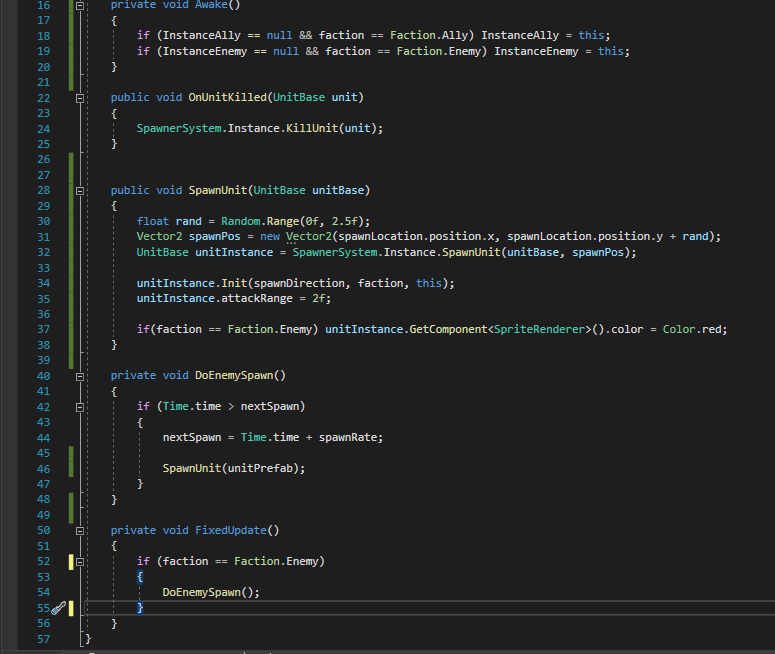
 dapper whale
delicate zinc
just for the sake of answering how i did it in case anyone else ends up on a sim...
dapper whale
delicate zinc
just for the sake of answering how i did it in case anyone else ends up on a sim...
Hi Nebby, I saw your post and thought I'd share my idea of what should also work. I haven't tested it though.
bool IsTargetInAwarenessCone(Transform target, float coneAngle)
{
    return IsTargetInAwarenessCone(target, coneAngle, transform.forward);
}

bool IsTargetInAwarenessCone(Transform target, float coneAngle, Vector3 coneCenter)
{
    var selfToTarget = (target.position - transform.position).normalized;
    return (Vector3.Dot(selfToTarget, coneCenter.normalized) >= Mathf.Cos(coneAngle * Mathf.PI / 180f));
}
 scenic thicket
Hi, I have a problem: when creating a property drawer, I have a property that shouldn't be drawn but for some reason it's still drawn.
So the question is: is a list considered a property that can be not drawn??
public override void OnGUI(Rect position, SerializedProperty property, GUIContent label)
{
if (ShowMe(property))
{
...
}
else if (drawIf.disablingType == DrawIfAttribute.DisablingType.ReadOnly)
{
...
}
    Debug.Log("Not drawn");
}
that log statement will run no matter what
scenic thicket
leaden ice
that log statement will run no matter what
But the property is drawn only if the ShowMe() is true or the disablingType is Read only
the debug line is outside everything
so no code should be run
leaden ice
scenic thicket
the debug line is outside everything
exactly so it will run always.
only if it's in an else will it run only when the others don't
summer jay
#archived-code-general message anyone have any ideas?
leaden ice
        if (ShowMe(property))
        {
            ...
        }
        else if (drawIf.disablingType == DrawIfAttribute.DisablingType.ReadOnly)
        {
            ...
        }
        else {
            // not drawn
}```I just added it in the else statement but it still debugs
leaden ice
scenic thicket
I just added it in the else statement but it still debugs
you'll have to show all your code and explain which property is being drawn that you don't want to be drawn
scenic thicket
Can I send it through pastebin?
leaden ice
you should yes
scenic thicket
Pastebin
Pastebin.com is the number one paste tool since 2002. Pastebin is a website where you can store text online for a set period of time.
https://pastebin.com/1sJzppdT For the property attribute
Pastebin
Pastebin.com is the number one paste tool since 2002. Pastebin is a website where you can store text online for a set period of time.
leaden ice
DialogueManager.GetInstance() is returning null
presumably you don't have a DialogueManager in the scene or something along those lines
scenic thicket
leaden ice
you'll have to show all your code and explain which property is being drawn that...
Here the list is drawn always
public bool completionSetOtherQuestsAccessible;
[DrawIf("completionSetOtherQuestsAccessible", true)]
public List<string> questIDToSetAccessible = new List<string>();
leaden ice
scenic thicket
Here the list is drawn always
public bool completionSetOtherQuestsAccessible;
[...
you're showing little bits and snippets and not really fully explaining the issue exactly. It's also unclear what DrawIf is and how that works
it's hard to help only seeing little snippets
oh sorry i see the pastebins now
leaden ice
scenic thicket
ping me if you find something wrong im going afk a sec
Tbh i'm not really sure, but instead of writing a custom DrawIf attribute I would recommend using NaughtyAttributes which definitely works
https://dbrizov.github.io/na-docs/attributes/meta_attributes/show_hide_if.html
scenic thicket
I saw it while I was researching but I still wanted to try something on my own
I'm not sure it worked with custom classes
leaden ice
of course it does
scenic thicket
guess i'll have to go that way
earnest gazelle
EditorApplication.wantsToQuit works when quitting editor not play mode
I want to show a dialogue box with yes/no button when the game is playing in the editor (play mode) and if they press play button in game window to close the game (editor), shows the dialogue box and if they press No button, don't quit play mode.
soft shard
earnest gazelle
EditorApplication.wantsToQuit works when quitting editor not play mode
I want t...
You could create your own system - on a button click, show your dialogue, if yes is hit, all Application.Quit(), otherwise hide the dialogue, you could set it up with a callback if youd want, or just have your dialogue trigger with a function that accepts a System.Action as a param for what to do if "yes" is clicked
earnest gazelle
soft shard
You could create your own system - on a button click, show your dialogue, if yes...
No, It is not my scenario
Play button in game window
I want sometimes it does not work
soft shard
earnest gazelle
Play button in game window
Ah, you should be able to call EditorApplication.isPlaying = false when you click "yes" on your dialogue if its to exit play mode from the editor only, and not at runtime/in a build
 manic cipher
Can someone please tell me how I screwed this up?
Whenever I press the S key (backwardMovement) it is setting to false instead of true. I keep looking this over and it looks good to me.
void HandleMovement()
    {
        bool isRunning = animator.GetBool(isRunningHash);
        bool isWalking = animator.GetBool(isWalkingHash);
        bool isWalkingBackwards = animator.GetBool(isWalkingBackwardsHash);

        if (!movementPressed && (isWalking || isWalkingBackwards))
        {
            animator.SetBool(isWalkingHash, false);
            animator.SetBool(isWalkingBackwardsHash, false);
        }

        if (movementPressed && !isWalking && !isWalkingBackwards)
        {
            if (currentMovement.y >= 0 && !backwardMovementPressed)
            {
                animator.SetBool(isWalkingHash, true);
            }
            else if (currentMovement.y >= 0 && backwardMovementPressed)
            {
                animator.SetBool(isWalkingBackwardsHash, true);
            }
        }

        if (movementPressed && runPressed && !isRunning && !backwardMovementPressed && !isWalkingBackwards)
        {
            animator.SetBool(isRunningHash, true);
        }

        if ((!movementPressed || !runPressed || backwardMovementPressed || isWalkingBackwards) && isRunning)
        {
            animator.SetBool(isRunningHash, false);
        }

        if (currentMovement.y > 0)
        {
            transform.Translate(transform.forward * moveSpeed * Time.deltaTime, Space.World);
        }
        else if (currentMovement.y < 0)
        {
            transform.Translate(-transform.forward * moveSpeed * Time.deltaTime, Space.World);
        }
        if (backwardMovementPressed && !isWalkingBackwards)
        {
            animator.SetBool(isWalkingBackwardsHash, true);
        }
        else if (!backwardMovementPressed && isWalkingBackwards)
        {
            animator.SetBool(isWalkingBackwardsHash, false);
        }
    }
And yes, the input has a value of -1
ashen yoke
manic cipher
Can someone please tell me how I screwed this up?
Whenever I press the S key (ba...
use debugger
manic cipher
ashen yoke
use debugger
No idea as to how debugger works, which is why I posted this here in case anyone could spot something simple, but I guess I will figure out debugger.
ashen yoke
manic cipher
No idea as to how debugger works, which is why I posted this here in case anyone...
 regal marsh
hey where should I go if i want wwise help? they don't have a discord
manic cipher
ashen yoke
https://github.com/pointcache/tips/wiki/Visual-Studio-Debugger
thanks 😄
scenic thicket
scenic thicket
https://pastebin.com/Bs3fwWwM
I have an update on my question. The attribute works perfectly with custom classes and normal atributes like int, floats, strings
Apparently the problem is with Lists and Array
scenic thicket
ashen yoke
there is no usable drawer for lists afaik
So lists are always drawn no matter what?
ashen yoke
doubt it, i just cant dedicate mental resources to simulating your code atm sorry
 languid hound
Wait just quickly if I have a static variable and I assign it at some point, does creating another instance also carry the value of that variable over?
I'm trying to understand singletons
I know how to do them but just why
 hasty haven
Static variables only have one instance and the value is shared between classes
languid hound
Ah right that makes a lot of sense now
hasty haven
If you took a generic enemy script and made their current HP a static value, hurting one enemy would hurt every one of them
A practical use would be for easily referencing something like in my game, the settings menu object
languid hound
Yeah static now that I've had it be said simply makes so much more sense
Seems really useful definitely going to be using it
hasty haven
If you want to do that to a class you can make a static member referencing the same class, then on Awake() you can do reference = this
Look up singleton patterns in unity there’s a ton of examples and use cases
You might want to destroy any copies of that class in Awake
languid hound
Yeah I've done so already was just curious what the point in them was when say I could make a DDOL GameObject with a script on it
ashen yoke
every class has a static version, a static class is also an instance class, but you are not allowed to manage it, the .net is managing it for you, and allows you to access it through static members, so it is by itself already a singleton in its purest form
desert wind
For my script, I'm trying to make it so that once the player steps on a "SafeZone" a place where they can change their character, it updates a Ui sprite showing what character they are. The variable currentCharacter doesn't seem to be updating even when the "Player" is colliding with the "SafeZone". Here is the code.
https://paste.ofcode.org/63uE92nHJKKHYcxgmn6SwV
Does this have something to do with how I'm referencing the collision of two seperate gameobjects?
hasty haven
In my case I dont expose the static reference as public, I just expose methods like
  public static bool IsOpen() {
    return instance != null ? instance.isOpen : false;
  }
So i can use SettingsMenu.IsOpen() to see if the menu is open or something, disabling player movement input while the menu is open.
languid hound
That makes way more sense tbh
ashen yoke
that also leads to bigger refactor time later
 jade phoenix
i have two cubes perfectly lined up together and for some reason when the player rolls over them, the collision normal isn't (0, 1, 0). anyone know why?
even when theyre on the same y level?
ashen yoke
how do you get the collision?
rbs generates a bunch of collision points for each collision
those can be all over the place, inside the collider, on the surface etc
jade phoenix
    // Player Knockback
    private void OnCollisionStay(Collision collision)
    {
        Vector3 normal = collision.contacts[0].normal;
        Transform transform = collision.gameObject.transform;
        if (
            (collision.gameObject.tag == "ground" && normal != transform.up)
            || collision.gameObject.tag == "enemy"
            )
        {
            Debug.Log(normal);
            //Debug.Log("c1:" + (collision.gameObject.tag == "ground") + ", c2: " + (normal != transform.up) + ", c3: " + (collision.gameObject.tag == "enemy"));
            rb.AddForce(normal * pooshAmount, ForceMode.Impulse);
        }

}```yeah check how many contacts there are in that array
use debugger
that tutorial doesnt seem to use rb contact points at all
oh im wrong there is
 jade phoenix
im not trying to snap the player to the ground though i just use a tilemap for grounds so a 3x3 of evenly hieghtened cubes should really act like 1 surface
ashen yoke
there is no "single contact" point
you have to extract the information relevant to you from a set of generated contacts
like in the screenshot above
jade phoenix
oh so like
jade phoenix
theres a point in time where im colliding with 2 different objects at once so i can check the y value of the player within a threshold
yeh?
ashen yoke
even 1 object generates multiple collision points
jade phoenix
but my issue is only triggered by rolling over the 2 not when the ball is only on 1
ashen yoke
use physics debugger
it will show you precisely where the contacts are
so you can visualize what is going on
jade phoenix
its a marble game
the player is a sphere
and im trying to make it so the player knocks back on the sides of walls (anything that isnt transform.up)
 dim crypt
In WebGL builds, i've tested by creating builds in unity 2019, 2020, 2021 and 2022 of just a new project with the sample scene, Everything loads fine when i host the builds on itch.io but when i try to host the builds on the server at the company where i work the build just hangs past unity 2019. Unity 2019 and earlier work fine but 2020, 2021 and 2022 get stuck like you see in the screenshot there.
Can anyone think why this might be the case that WebGl doesn't seem to work so well anymore after 2019?
 latent latch
If you're doing any async loading there could be issues
just from previous experience pre-loading a bunch of data
Open the dev window on your browser and see if it's throwing any errors
hollow hound
Is GetComponent from gameobject is noticeably faster than .gameObject from component?
leaden ice
hollow hound
Is GetComponent from gameobject is noticeably faster than .gameObject from compo...
no
it's almost definitely slower actually, but definitely not noticeably in either direction
hollow hound
leaden ice
it's almost definitely _slower_ actually, but definitely not noticeably in eithe...
So it is faster to targetGO.GetComponent<MyComponent> than myComponent.gameObject?
somber nacelle
you almost never need a GameObject type variable, it's typically better to reference the component rather than the gameobject in nearly all cases and just get the gameobject from the component if you need to access it for whatever reason
hasty haven
Trying to think,
so would the worst case of a 16x16x16 chunk mesh where only exposed faces are rendered be this?

I'm trying to reduce garbage collection so I would want the chunk to have a vertex array probably to fit this
leaden ice
hollow hound
So it is faster to targetGO.GetComponent<MyComponent> than myComponent.gameObjec...
that's completely the opposite of what I said
hollow hound
leaden ice
that's completely the opposite of what I said
Oh, right
leaden ice
Your original question was "Is GetComponent noticeably faster than .gameObject"
I responded: "no it's slower"
they're both fast enough that you usually don't need to worry about them from a performance perspective. I'd just argue GetComponent is ugly and less readable than using .gameObject on the rare occasions you actually need a GO reference
code readability is the bigger issue
Yeah I'm comparing go.GetComponent<Rigidbody>() with myRb.gameObject though which is a different subject
hollow hound
So is it reasonable to create dictionary with a GameObject as a key and component as a value instead just list of components to cut additional GetComponent that will be called a few times every frame at maximum?
leaden ice
hollow hound
So is it reasonable to create dictionary with a GameObject as a key and componen...
no
completely not reasonable
As I said before:
they're both fast enough that you usually don't need to worry about them from a performance perspective.
leaden ice
hollow hound
So is it reasonable to create dictionary with a GameObject as a key and componen...
if you are calling GetComponent a few times every frame you're doing it wrong
call it once and save the reference in a variable
or better yet - don't have a damn GameObject reference in the first place
hollow hound
I have list of rigidbodies and I need to remove the ones that was destroyed. My onDestroy event passes gameObject, so if I store only rigidbpdies, I'll need to destriyedObject.GetComponent<RigidBody>() every time I need to remove rb from list.
leaden ice
hollow hound
I have list of rigidbodies and I need to remove the ones that was destroyed. My ...
My onDestroy event passes gameObject
Make it pass a Rigidbody instead
hollow hound
leaden ice
> My onDestroy event passes gameObject
Make it pass a Rigidbody instead
This was a component that can be on objects without rb, seems not very convinient to have different ones.
leaden ice
hollow hound
This was a component that can be on objects without rb, seems not very convinien...
then use GetComponent here - not a problem. How many of these things are actually happening anyway
I fear you may be trying to prematurely optimize
are you actually seeing a performance issue here?
Have you profiled the game and saw "oh my GetComponent is really killing me here"
hollow hound
Yes. I have modifier that controls movement, it stores all active projectiles and apply some force to them.
hollow hound
leaden ice
are you actually seeing a performance issue here?
No, just asking how it is usually done 🙃
leaden ice
hollow hound
No, just asking how it is usually done 🙃
it sounds reasonable to use GetComponent here - though if OnDestroy event is happening for objects that don't have Rigidbodies I would be using TryGetComponent
hollow hound
Doesn't GetComponent just return null if there is no such component?
leaden ice
hollow hound
Doesn't GetComponent just return null if there is no such component?
yes which is uglier than using TryGetComponent
dim crypt
latent latch
just from previous experience pre-loading a bunch of data
Thanks will take a look
leaden ice
if (obj.TryGetComponent(out Rigidbody rb)) {
  allBodies.Remove(rb);
}```
is cleaner than:
```cs
Rigidbody rb = obj.GetComponent<Rigidbody>();
if (rb != null) {
  allBodies.Remove(rb);
}``` @hollow houndThanks
 narrow summit
Anybody familiar with this? Works on Editor. Breaks on WebGL.
var count = fileStream.Read(bytes, sumLoaded, readSize);
 hollow hound
I am doing getComponent when projectile is created and adding rigidbody to list. I am also subscribing to onDestroy event of gameObject. Then in update I am apllying force to projectiles. And in HandleDestroy (which passes gameObject) I want to remove rigidbody from list. And if i'm not using dictionary here, I'll need to destroyedGO.TryGetComponent every time it destroys. Which can be ok from the performance side, but I'm not sure so asking this. 🙂
leaden ice
it's fine
you will get a much better performance improvement by swtiching from a List<Rigidbody> to a HashSet<Rigidbody>
You also should only be adding forces in FixedUpdate not Update
hollow hound
Thanks
 late ivy
Hey sorry this might be a simple question but I'm not sure how I should make it so that an object moves indefinitely in the forward direction during runtime (aka along the blue line in the editor)
while being affected by its rotation
desert wind
I've had a few problems coding a script. Basically, the player has the ability to change character, and I want a Ui sprite to update once that player switches character. I've changed the script a few times but currently it only seems to update the sprite to that of the first character, and doesn't change to the second or third. My question is why doesn't the script update currentcharacter for the second and third else if condition?
https://paste.ofcode.org/EtdCvDqFbLkyFHDJpVqkxn
Also the UI sprite has its own script that takes the currentCharacter of this script and makes it its own, in case that helps explain it
soft shard
late ivy
while being affected by its rotation
transform.forward will refer to the local z of the object (unless changed), you could add that value, multiplied by some speed to the current position, if it needs to also respect physics, you could add that as a velocity instead of setting the transform posittion
late ivy
oh i didn't know i could just add transform.forward to a position directly
thanks a lot
here's the line if anybody's interested
transform.localPosition += transform.forward * speed * Time.deltaTime;
I would maybe use an event so you can separate your logic a bit more, for example:
public class CharChanger : Mono
{
public static Action onNextChar;
int next;

void Update()
{
if(someInput) {next++; onNextChar?.Invoke(next);} //however you want to handle "changing characters"
}
}

public class CharViewer : Mono
{
public Image display;
public List<Sprite> chars;

void OnEnable() { CharChanger.onNextChar += NextChar; }
void OnDisable() { CharChanger.onNextChar -= NextChar; }
void NextChar(int index) { display = chars[index]; }
}
Not verbatim code, though in this case, the "changer" is your player logic or whatever handles switching characters, that fires the event - the "viewer" listens for that event and updates UI in response - there are many ways you could improve that kind of implementation (you could wrap the index or modulate it so its never less/greater than your sprites, you could store the sprites in a ScriptableObject and use that instead of a index, etc)
 short walrus
Hi, i have a rotation problem.
i have a 2D tank that can move and rotate itself, and a turret child object which I want to have a specific FOV angle it can turn towards in relation to the parent object.
i tried too many methods and none seemed to work, i still struggle to comprehend all rotation types properly and maybe thats why.
I tried sharing code here, but discord's Clyde said it couldnt be delivered 😠 . I guess discord doesnt like me sharing code.
Not blaming this server btw. So i'll try to give the code in parts.
Dictionary:
front_mg_target = game object that is defined properly elsewhere.
front_mg_weap_obj = our mg turret object
Various coroutine variables are defined elsewhere.
flaot front_mg_rotate_speed is defined.
            // called in Update()
        private void FrontMGAimLogic()
        {
            if (front_mg_target != null)
            {
                if (Vector3.Distance(front_mg_target.transform.position, front_mg_weap_obj.transform.position) < range)
                {
                    if (resetFrontMGCoroutine != null)
                    {
                        StopCoroutine(resetFrontMGCoroutine);
                        resetFrontMGCoroutine = null;
                    }
                    Vector3 directionToEnemy = front_mg_target.transform.position - front_mg_weap_obj.transform.position;
                    Quaternion targetRotation = Quaternion.LookRotation(Vector3.forward, directionToEnemy) * Quaternion.Euler(0f, 0f, 0f);
                    if (rotateFrontMGCoroutine != null)
                    {
                        StopCoroutine(rotateFrontMGCoroutine);
                        rotateFrontMGCoroutine = null;
                    }
                    rotateFrontMGCoroutine = StartCoroutine(RotateFrontMG(targetRotation));
                }
                else
                {
                    if (resetFrontMGCoroutine == null)
                        resetFrontMGCoroutine = StartCoroutine(ResetFrontMGRotation());
                }
            }
            else
            {
                if (resetFrontMGCoroutine == null)
                    resetFrontMGCoroutine = StartCoroutine(ResetFrontMGRotation());
            }
        }```
        private IEnumerator RotateFrontMG(Quaternion targetRotation)
        {
            while (front_mg_weap_obj.transform.rotation != targetRotation)
            {
                front_mg_weap_obj.transform.rotation = Quaternion.RotateTowards(front_mg_weap_obj.transform.rotation, targetRotation, front_mg_rotate_speed * Time.deltaTime);
                yield return null;
            }
        }

        private IEnumerator ResetFrontMGRotation()
        {
            yield return new WaitForSeconds(3f);
            Vector3 directionToEnemy = tank_mg_base_lid.transform.position - front_mg_weap_obj.transform.position;
            Quaternion targetRotation = Quaternion.LookRotation(Vector3.forward, directionToEnemy) * Quaternion.Euler(0f, 0f, 0f);
            while (front_mg_weap_obj.transform.rotation != targetRotation)
            {
                front_mg_weap_obj.transform.rotation = Quaternion.RotateTowards(front_mg_weap_obj.transform.rotation, targetRotation, front_mg_rotate_speed * Time.deltaTime);
                yield return null;
            }
            resetFrontMGCoroutine = null;
        }
```That's all, please ping me if you have anything
 subtle scroll
{
[Header("Layers")]
public LayerMask groundLayer;
[Space]
public bool onGround;
public bool onWall;
public bool onRightWall;
public bool onLeftWall;
public int wallSide;
[Space]
[Header("Collision")]
public float collisionRadius = 0.25f;
public Vector2 bottomOffset, rightOffset, leftOffset;
private Color debugCollisionColor = Color.red;
// Start is called before the first frame update
void Start()
{
}
// Update is called once per frame
void Update()
{
onGround = Physics2D.OverlapCircle((Vector2)transform.position + bottomOffset, collisionRadius, groundLayer);
onWall = Physics2D.OverlapCircle((Vector2)transform.position + rightOffset, collisionRadius, groundLayer)
|| Physics2D.OverlapCircle((Vector2)transform.position + leftOffset, collisionRadius, groundLayer);
onRightWall = Physics2D.OverlapCircle((Vector2)transform.position + rightOffset, collisionRadius, groundLayer);
onLeftWall = Physics2D.OverlapCircle((Vector2)transform.position + leftOffset, collisionRadius, groundLayer);
wallSide = onRightWall ? -1 : 1;
}
void OnDrawGizmos()
{
Gizmos.color = Color.red;
var positions = new Vector2[] { bottomOffset, rightOffset, leftOffset };
Gizmos.DrawWireSphere((Vector2)transform.position + bottomOffset, collisionRadius);
Gizmos.DrawWireSphere((Vector2)transform.position + rightOffset, collisionRadius);
Gizmos.DrawWireSphere((Vector2)transform.position + leftOffset, collisionRadius);
}
}```
How can i do this type of gizmos but with squares so it fills the bottom side and the same with the sides? since my player is a square and the circle doesnt fit all the way to the sides/bottom earnest gazelle
soft shard
Ah, you should be able to call `EditorApplication.isPlaying = false` when you cl...
earnest gazelle
soft shard
Ah, you should be able to call `EditorApplication.isPlaying = false` when you cl...
No, It does not work. I have tested it before.
It freezes the game (play mode)
soft shard
earnest gazelle
No, It does not work. I have tested it before.
You sure? I just tested this code, and 3 seconds later, it automatically exits play mode, if its freezing, maybe something else is going on:
    void Start()
    {
        Invoke(nameof(Test), 3f);
    }

    void Test()
    {
        EditorApplication.isPlaying = false;
    }
Any ideas on how I select an environement (dev, prod) in UGS Cloud Save?
I've managed it for Remote Config, but can't find the function in their manuals.
 torn eagle
Need some help!
I'm using this script for a drawing mechanic, however, the colour only changes if I set it like this
        {
            BrushColor = Color.green;
        }```

I want to set it via a colour picker in the inspector but when it is set that way it seemingly ignores the colour in preference of one set via Color.green, Color.red, etc.

This is how BrushColor is set
```public Color BrushColor = Color.black;```

The debug on this script outputs an RGB value but doesn't actually change the colour
```    public Paint brush;
    public Color color;

    public void ChangeColour()
    {
        brush.BrushColor = color;
        Debug.Log("Colour set to" + color);
}```Here is an example of how I have set up a use of the ChangeColour() mechanic
 lean sail
torn eagle
Need some help!
I'm using this script for a drawing mechanic, however, the colo...
lean sail
torn eagle
Need some help!
I'm using this script for a drawing mechanic, however, the colo...
is the RGB value correct from what you chose in the inspector? because this function doesnt take any parameters so im unsure where color even would get its value from
is there anymore code to this?
torn eagle
There's the entire painting code but not sure if it's relevant
lean sail
it just seems like this function just needs to take in the color to actually change it to then
torn eagle
The "color" variable that is used in ChangeColour() is set in the inspector
lean sail
oh damn i missed that part
torn eagle
All good!
lean sail
torn eagle
All good!
for public Paint brush;, are you assigning using that reference to actually draw as well?
i think you might be changing the color on another instance of the class
quartz folio
Also, are you setting BrushColor elsewhere?
torn eagle
I don't believe I am?
 tawny mountain
Can someone tell me how , when using netcode for gameobjects , I can spawn a player object for both host and client when its bult for standalone but for android only the host spawns a player object not the client
torn eagle
The Paint script is what I use to set up the painting mechanic
quartz folio
tawny mountain
Can someone tell me how , when using netcode for gameobjects , I can spawn a pla...
tawny mountain
quartz folio
<#497874116246896640>
torn eagle
Weird thing is that it shows up with the changed colour in the inspector for the Paint script but doesn't actually "draw" with that colour
quartz folio
Then surely those are two different things
if it's changing in the inspector then the code is working fine
torn eagle
This is the actual painting code
    private void DrawOnTexture(Vector2 localMousePosition)
    {
        float u = (localMousePosition.x + rectTransform.rect.width / 2) / rectTransform.rect.width;
        float v = (localMousePosition.y + rectTransform.rect.height / 2) / rectTransform.rect.height;

        Vector2Int currentPixelUV = new Vector2Int((int)(u * texture.width), (int)(v * texture.height));
        Vector2Int previousPixelUV = new Vector2Int((int)(previousMousePosition.x + rectTransform.rect.width / 2),
                                                    (int)(previousMousePosition.y + rectTransform.rect.height / 2));

        // Calculate the brush size in pixels
        int brushSizePixels = Mathf.RoundToInt(BrushSize * texture.width / rectTransform.rect.width);

        for (int x = currentPixelUV.x - brushSizePixels / 2; x < currentPixelUV.x + brushSizePixels / 2; x++)
        {
            for (int y = currentPixelUV.y - brushSizePixels / 2; y < currentPixelUV.y + brushSizePixels / 2; y++)
            {
                if (x >= 0 && x < TextureWidth && y >= 0 && y < TextureHeight)
                {
                    float normalizedDistance = Vector2.Distance(new Vector2(x, y), currentPixelUV) / (brushSizePixels / 2f);
                    float brushIntensity = Mathf.Clamp01(1f - normalizedDistance);
                    Color currentColor = texture.GetPixel(x, y);
                    Color blendedColor = Color.Lerp(currentColor, BrushColor, brushIntensity);
                    texture.SetPixel(x, y, blendedColor);
                }
            }
        }

        previousMousePosition = localMousePosition;
        texture.Apply();
}```Id suggest making a property/setter function so you can debug what the old and new value of BrushColor is. Maybe it is setting on a separate instance then
torn eagle
Alright it's definitely not setting correctly then since it only debugs when I use the Color.green method not the custom inspector one

The colour set is showing the correct values in the inspector but the RGBA (what's actually being drawn) is clearly not the same

Another weird thing i found is that the colour picked drawing actually works when I have a buffer zone where the drawing is meant to be "disabled"
 bright heron
is there a way to have two camera follow the same movement but only having one active at a time?
torn eagle
Do you want to be able to toggle between them?
bright heron
yeah so i'm doing a game where the character transforms into 2 different modes so i have two cinemachine cameras set up
pure cliff
Im sitting here staring at this debug output and I cannot for the life of me see why my continue didnt get hit, am I tired or does this logic check out, and I should 100% be hitting that continue? Or is this some kind of weirdness with comparing Vector2s?

oh damnit nevermind now I see it, third part is supposed to be .Contains(neighbour) not to fml lol
 cosmic rain
pure cliff
oh damnit nevermind now I see it, third part is supposed to be `.Contains(neighb...
cosmic rain
pure cliff
oh damnit nevermind now I see it, third part is supposed to be `.Contains(neighb...
Though I'd be careful with comparing vectors like that. If they don't have decimal part, might be wiser to use Vector2Int.