#📱┃mobile
1 messages · Page 38 of 1
 ebon cypress
 elder agate
ok, this is hard to explain I guess 😄 I know how to set a price and make a paid app, etc. but I want to also set the form of the payment.
elder agate
so when the user buys the app on the store he will automatically subscribe (and pay obv), instead of a one time payment
elder agate
yeah, can't find any information about this. And on the play console or appstore connect I can only set a one time price. But since subscriptions can be done through IAP, why wouldn't they be available directly from the store?
 wary solstice
elder agate
yeah, can't find any information about this. And on the play console or appstore...
wary solstice
elder agate
yeah, can't find any information about this. And on the play console or appstore...
Because subscription logic depends on app. You can provide different kind of subscriptions with different terms or features. Also user can cancel subscription outside of your app anytime so as an app developer you don't have control over users payment behavior. So you need to check subscription status in your app anyway. Based on your logic you can welcome user in your app with subscription page (Several apps are already doing it). Just check google and apple developer pages.
https://developer.apple.com/app-store/subscriptions/
https://support.google.com/googleplay/android-developer/answer/140504?hl=en&ref_topic=3452890#zippy=

Apple Developer
Provide a seamless experience for auto-renewable subscriptions in your apps. You’ll receive more revenue for qualifying subscriptions after one year, have greater pricing flexibility, and more.
Review our updated Subscriptions Policy in the Developer Policy Center to ensure your app is compliant with the latest changes.
Usi
elder agate
wary solstice
Because subscription logic depends on app. You can provide different kind of sub...
Thanks, I understand, but this means that my app will have to be free on the store, but after opening it will pop up a subscription form (we have to register users that buy subscriptions too). And we had a case where Apple rejected the app from the store because it didn't provide content for users that would like to use the app without registering/subscription (because, well, it is free on the store and having them subscribe on start is misleading).
 severe geode
Directory.GetFiles() does not work on android but Directory.GetDirectories() does. I have external writing permission (set through player settings). How can I fix this? Code works in editor but not on android device (on android device, Directory.GetFiles() returns nothing)
ping me if anyone knows how to fix it
wary solstice
elder agate
Thanks, I understand, but this means that my app will have to be free on the sto...
I know Apple can be troublesome. Based on apple suggested ux workflow sign in and sign up are separated processes. Users need to know what they are signing up for or what they are subscribing for. So apple suggests free trial and guest session. User can sign in or start free trial. To be able to continue using the app or save the process, user needs to sign up. Look at apples design guidelines, you will understand. Both apple and google are easily refund one time purchase but they are resisting in the subscription case. So they annoy devs
ebon cypress
hello i have errors when i build my game they are 3

  at UnityEditor.BuildPlayerWindow+DefaultBuildMethods.BuildPlayer (UnityEditor.BuildPlayerOptions options) [0x002ca] in <03b7a01d7ff445ec8ed231b348714f65>:0
  at UnityEditor.BuildPlayerWindow.CallBuildMethods (System.Boolean askForBuildLocation, UnityEditor.BuildOptions defaultBuildOptions) [0x00080] in <03b7a01d7ff445ec8ed231b348714f65>:0
UnityEngine.GUIUtility:ProcessEvent (int,intptr,bool&)
```1UnityEngine.GUIUtility:ProcessEvent (int,intptr,bool&)```2 wicked zealot
severe geode
Directory.GetFiles() does not work on android but Directory.GetDirectories() doe...
wicked zealot
severe geode
Directory.GetFiles() does not work on android but Directory.GetDirectories() doe...
GetFiles() should work on Android, used it myself in the past, any chance that there's an error in your filepath for example? Also, afaik, the files content has to be in Byte Form, not string, just in case that's related to your error in any way
severe geode
wicked zealot
GetFiles() should work on Android, used it myself in the past, any chance that t...
there should be no error with the directory path, i checked it with debug.log and its correct. What do you mean byte form?
wicked zealot
The content of your file
Have to be bytes on Android
Not string characters
Like, using File.WriteAllBytes instead of WriteAllText
But there's builtin methods (obviously) to convert your string to bytes and vice versa
severe geode
oh but im just trying to list all the files in a directory, does byte form affect it?
wicked zealot
Tbh I don't know, I only know that when I first tried to implement some save system on Android, nothing worked out until I used Bytes
Maybe try that approach in a new project, just to see if it's related
severe geode
alright
wicked zealot
But tbh I doubt, was just the first things popping to my mind
severe geode
wait i cant convert the file into bytes if i cant get the files in the first place lol
wicked zealot
You missunderstood slightly, you don't want to "convert the file into bytes", instead what you wanna do is, when creating the files, you want to use WriteBytes instead of WriteText, and when reading the files you want to use ReadBytes
But, another thing
Are your files actually existant on the android device when checking in the directory you're trying to access from code?
severe geode
wicked zealot
You missunderstood slightly, you don't want to "convert the file into bytes", in...
im not creating or reading files, i just want to list out all the files present in a directory
severe geode
wicked zealot
Are your files actually existant on the android device when checking in the dire...
yea it is
wicked zealot
Ooooh ok
My bad then, forgot all the byte stuff, only matters if u create your own files afaik
and when using Debug.Log to test, is it giving the correct directory and/or filename?
severe geode
its giving the correct directory, but i cant get the file name because Directory.GetFiles() returns nothing
Directory.EnumerateFiles() also returns nothing
wicked zealot
Weird
severe geode
im guessing its an android version problem
cuz another project that uses EnumerateFiles() work
wicked zealot
Are you hardcoding the path ure trying to access or using Path.Combine?
wicked zealot
Try creating the paths via Path.Combine, but if your other project works, it may be unrelated
Mhmm u know what, don't try
U already told that GetDirectories works, so the path must be correct
Tbh I have no more ideas 🥴
severe geode
yea i debug.log it and its correct as well 
im guessing its an android version problem
or rather the target android version of my project
wicked zealot
May I ask what your usecase is, just out of curiosity? Something like a file browser for Android?
severe geode
ah, im making a chart editor for a rhythm game, and i need the user to be able to select text, music and image files
wicked zealot
Oh wow sounds nice 😀
severe geode
all the code works on the editor but for now GetFiles() is not working on android
wicked zealot
You could ask in general-code if somebody might check out this channel and your problem, if that's allowed
severe geode
i asked there before and no one replied lol, in fact you are the first person to reply XD
elder agate
wary solstice
I know Apple can be troublesome. Based on apple suggested ux workflow sign in an...
This is helpful information, thank you for explaining! We will work on providing free trials, seems resonable, and should fix the previous reject case on Apple.
 rugged bough
How many tris is fine to render for mobile?
Im doing a low poly game, but with alot of props im going to end up with some tris anyways
What do you think?
 steel star
Depends on the device
And how many objects you plan to have on screen at once
My best guess tho, try to keep props to around 500-1k.
For characters with clothing and weapons and hair etc... 10k-20k is a good limit
That should allow you to populate your worlds a fair bit. Polycount is far from the worst problem tho. Texture res, overdraw, excessive material instances and overly segregated UVs and hardened nornals are far bigger offenders
severe geode
severe geode
all the code works on the editor but for now GetFiles() is not working on androi...
I think i know what the issue is now. Its android 11, it blocks file api even if you give external read permission. Time to figure out how to give the app full file access
If anyone knows,please ping me
ebon cypress
when i build my game for bundle google i get this error
UnityEngine.GUIUtility:ProcessEvent (int,intptr,bool&)
does anyone know what it means
wicked zealot
severe geode
If anyone knows,please ping me
Maybe this is helpful in some way
https://answers.unity.com/questions/1279669/how-can-i-browse-files-on-android-outside-of-the-u.html
Unity is the ultimate game development platform. Use Unity to build high-quality 3D and 2D games, deploy them across mobile, desktop, VR/AR, consoles or the Web, and connect with loyal and enthusiastic players and customers.
Tbh nobody will be able to tell you what the problem is if you don't provide some context, for example the problem you're having, or error messages
severe geode
wicked zealot
Tbh nobody will be able to tell you what the problem is if you don't provide som...
oh i got it. forgot to update it here. What i did was to add a permission called "MANAGE_EXTERNAL_STORAGE" in the android manifest file
the user still have to set the permission to access all files manually though since i havent figure out how to let the app call the android action "manage app file access" (forgot bout the full name)
wicked zealot
Glad you got it solved, I'll try to remember that just in case I'm in the same situation one day 😀
In the Link I posted there's an answer that shows how to use Native Android API from within your Unity Script, may be helpful
severe geode
ah but i think i still need to have that manage external storage permission to write files to it, iirc the native methods are read-only but i could be wrong since i didnt research into the native api and just came across some info bout it
 pseudo moat
been trying to make a top down camera with the cine- machine but it not working well
 river escarp
cine-machine sucks just create ya own camera handler
heres one i made to follow GO's and lerp and to optionally stop following
@pseudo moat https://github.com/jpgordon00/Unity2DCameraFollow

GitHub
One script to follow a GO or multiple GO's in Unity 2D - jpgordon00/Unity2DCameraFollow
pseudo moat
@river escarp thanks alot. Use cinemahine because it has inbuilt functions. Like screen shake
river escarp
@river escarp true i prefer my own solution, np tho
 lunar verge
How do you non android users test out APKs? I made an apk with a minimum level of Android 8.0, and bluestacks refused to touch it.
 errant sedge
I'm not sure where to ask this, but this is my first time building for android and whenever I export it just gives me a folder, no APK
 errant sedge
@craggy orbit That fixed it, thank you!
What is export for, anyway?
Hmm running it on BlueStacks shows me an empty screen, maybe the camera is off center 😐
For everything Unity?
Yeah Unity Remote works, albeit for iphone
I'll continue using that until I'm done polish, then look into a cheap android
I'm testing it on unity remote on my iphone
I don't have android
 craggy orbit
And you have to enable , show preview packages to see it in unity registry.
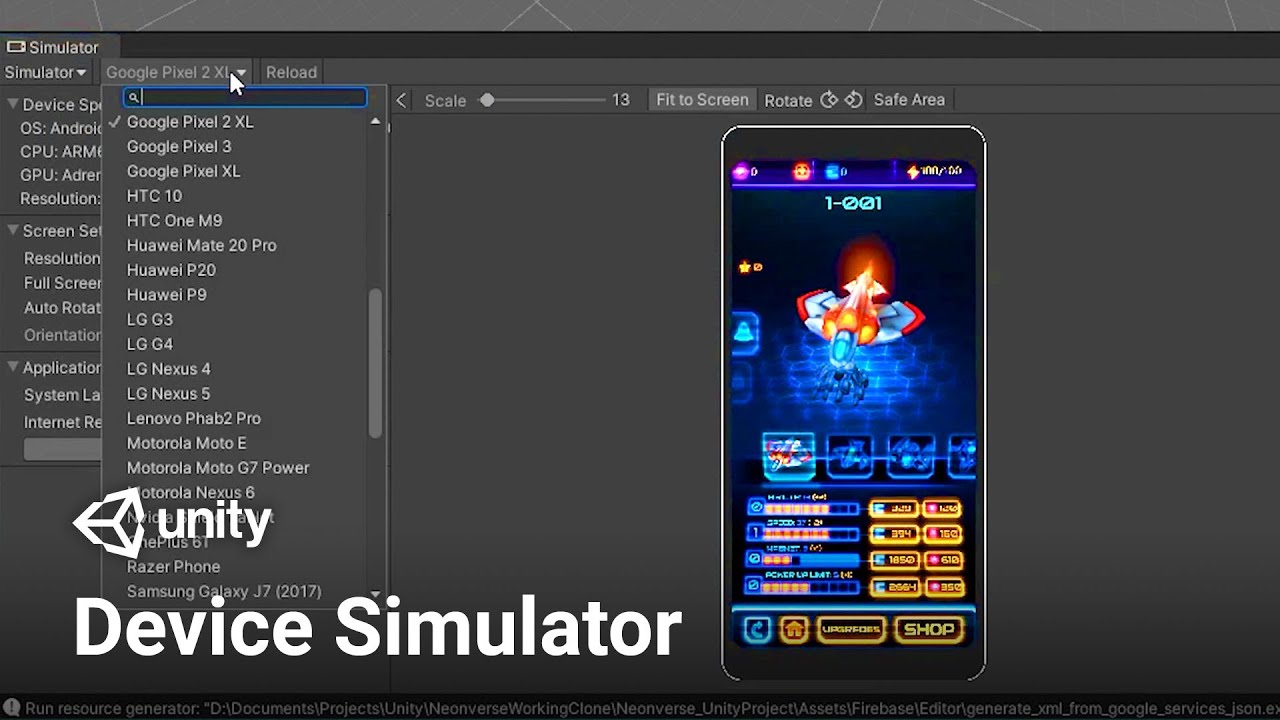
Using the Device Simulator in Unity, you can now view, simulate and change the behavior of your game in various mobile devices! Device Simulator aims to give an accurate image of how an app will look on a device.
Game content from the title Neonverse by Pixel Reign and Tamasenco
Learn more about Device Simulator and its configurations here!
ht...
If you like the preview then you can buy the paid version for 44 bucks. Cheaper than buying any phone, but again I've mever tested it.
errant sedge
@craggy orbit Checking that out now, thanks again!
Can't seem to find it on 2021 version, maybe I will downgrade to 2020
 neon thicket
Turn on preview packages.
 wanton sedge
Greetings iam trying to connect my mobile with remote unity and my unity in desktop and iam getting this error
CommandInvokationFailure: Unity Remote requirements check failed
C:/Unity/2019.4.20f1/Editor/Data/PlaybackEngines/AndroidPlayer\SDK\platform-tools\adb.exe forward tcp:7201 tcp:7201
stderr[
error: no devices/emulators found
]
stdout[
]
exit code: 1
@wanton sedge you need to uncheck and check SDK in project settings
wanton sedge
The problem was that unity couldnt connect to my mobile phone because i should have turn on the usb debugging on the mobile
errant sedge
neon thicket
Turn on preview packages.
Pre-release packages is on
There wasn’t a setting for preview packages, I believe they changed it
No results for device manager when I searched with that setting
craggy orbit
@errant sedge yes they changed the setting
Is there still, but it has to be enabled a bit diff
Open package manager as usual .
There will be a tool icon(is next tothe search bar)and if you hover over it, it will say advance options.
Click on it. Then click advance project settings.
A new menu will open up: look for "enabled preview packages ".
 glossy sluice
I keep getting this error, does anyone know whats wrongs?
 wary solstice
glossy sluice
I keep getting this error, does anyone know whats wrongs?
wary solstice
glossy sluice
I keep getting this error, does anyone know whats wrongs?
Your phone isn't authorized for debugging. Unplug your phone, plug back and reenable usb debugging.
ebon cypress
does anyone know how to download ndk r21d

i can only find r21e and it doesnt let me build me game
i cant build the game i have been trying to fix it for weeks
 mighty barn
i'm building a mobile game and i want the player to be able to draw on the screen.
But whenever i start to drag my finger it just puts one dot down... anyone know why?? https://hastepaste.com/view/CYGSR1WJ

Service to share files/parts of a file with others.
craggy orbit
@errant sedge hey did you try the preview. I started using for the first time and it has been very useful for viewing scaling on every phone resolution. (Like Samsung vs ipad).
Had to mention cause so far i think it is a must have tool for mobile developers.
@ebon cypress never had the issue, so can't help much, but on what version of unity are you trying to build?
Do you have Arm for 64 bit architecture enabled.
mighty barn
can anyone help me?
craggy orbit
@mighty barn it usually takes a while for someone with high expertise to show up. If your comment doesn't get buried that is. Maybe tom someone will show up. Good luck.
mighty barn
thanks!
river escarp
@mighty barn I think TouchPhase.Moved is invoked when your finger is moving that frame
it doesnt say anywhere in the documentation though
In my code for mobile I simply use Touch.touchCount and use a boolean to see if I was previously touching
not the best solution
you could also put a boolean in line 29 and move the rest of the code outside of update, where it should only be invoked when that boolean is true
@mighty barn try this https://pastebin.com/Zx5tj24v (untested, I made in 1 minute but try my other suggestions if this dont work)
Pastebin
Pastebin.com is the number one paste tool since 2002. Pastebin is a website where you can store text online for a set period of time.
 bright epoch
anyway to figure out what went wrong, previous builds were completed in under 10 min, and now if i switch to mono it takes 4 mins to build. but with il2cpp the build is taking forever, even let it run for 2 hours before force closing and restarting unity to try build again
 ebon cypress
bright epoch
anyway to figure out what went wrong, previous builds were completed in under 10...
ebon cypress
bright epoch
anyway to figure out what went wrong, previous builds were completed in under 10...
i have the same problem when i try to build with il2cpp on arm 64 the build doesnt work
bright epoch
ebon cypress
i have the same problem when i try to build with il2cpp on arm 64 the build does...
hope we can find a solution, do ping me if you find one, ill ping you as well
mighty barn
river escarp
<@!511766546356633600> try this https://pastebin.com/Zx5tj24v (untested, I made ...
thanks soo much I’ll try it out!
craggy orbit
@bright epoch Hey, if you don't mind; give me the settings you used for your build. I want to try and recreate the issue.
I will be releasing several apps for google play, so I want to get ahead of it.
@ebon cypress same thing for you.
Idk yet what you are doing diff, but it could be a simple fix.
neon thicket
No? How would that work.
Well, I suppose you could use the device simulator in Xcode.
river escarp
yeah i was gone say you can use a mac with a simulator
i use a windows machine and i rent a VM mac to run my sim builds
mighty barn
river escarp
<@!511766546356633600> try this https://pastebin.com/Zx5tj24v (untested, I made ...
so unfortunately none of these worked but maybe I could make a fix by myself. But I don't understand what the problem is... could you tell me?
should i bring it by the forums?
river escarp
mighty barn
so unfortunately none of these worked but maybe I could make a fix by myself. Bu...
Can you tell me if the if statement in your code for TouchPhase.Moved is being ran just once per finger drag?
Also please go back and read my solutions. You can achieve the same thing via Input.touchCount and a boolean
bright epoch
@craggy orbit these are the settings i remember messing around with, also i noticed the warning repositories.cfg could not be loaded. Could that have anything to do with IL2CPP builds not working?


 mighty barn
river escarp
Can you tell me if the if statement in your code for TouchPhase.Moved is being r...
mighty barn
river escarp
Can you tell me if the if statement in your code for TouchPhase.Moved is being r...
I’m pretty sure it’s whenever your finger moves and I’m checking every frame
mighty barn
river escarp
Also please go back and read my solutions. You can achieve the same thing via In...
Ok I’ll have to look more in depth about Input.touchCount because I don’t really understand what it does
river escarp
mighty barn
I’m pretty sure it’s whenever your finger moves and I’m checking every frame
I'm asking you to put a Debug statement and check if its being ran more than once. Thats the first thing you shoulda done to debug it.
@mighty barn it returns 0 if no finger touching and then it returns the numbers of fingers touching
very easy to implement with your code. Check if Input.touchCount == 0 and if a boolean (touching) is false. Then for 'MOVED', check touchCount == 1 and the shooting boolean must be true. And for let go check touchCount == 0 when boolean shooting is true
mighty barn
river escarp
very easy to implement with your code. Check if Input.touchCount == 0 and if a b...
Thanks for explaining more in depth I’m still pretty new to unity! I’ll try out your solution
river escarp
No problem man. If you want to understand why your code behaves the way it does, use Debug.Log statements to figure out when your blocks of code are actually running.
mighty barn
Ok I’ll use it more often!
river escarp
@mighty barn yessir! And heres some reading about touchCount for you. DM me if you want more help 🙂
 mighty barn
Thanks 😃
river escarp
@mighty barn edited your code real quick for you, hope it helps. https://pastebin.com/e5e6JD4D
Pastebin
Pastebin.com is the number one paste tool since 2002. Pastebin is a website where you can store text online for a set period of time.
craggy orbit
@bright epoch a clean installation of unity solved the issue for dreynor. Of you need help doing that then let me know.
 arctic nova
anyone used native c plugins with android here before?
glossy sluice
hey, i am having some struggles with my touch inputs and movement in a project, anyone here can help me a little ?
mighty barn
river escarp
<@!511766546356633600> edited your code real quick for you, hope it helps. https...
Thanks ! Just a quick question, would I have to reset the input.touchCount?
Like make the variable 0 again
neon thicket
Don't have any touch on the screen?
mighty barn
river escarp
<@!511766546356633600> edited your code real quick for you, hope it helps. https...
i copied your exact code but got this error
ArgumentException: Index out of bounds.
UnityEngine.Input.GetTouch (System.Int32 index) (at <6af207ecd21044628913f7cc589986ae>:0)
testdraw.Swipe () (at Assets/Scripts/testdraw.cs:44)
testdraw.Update () (at Assets/Scripts/testdraw.cs:13)
ok i fixed the error but now it just draws a straight line as soon as i touch the screen
sorry if this is getting annoying...
river escarp
mighty barn
Thanks ! Just a quick question, would I have to reset the input.touchCount?
No you never reset the variable it should always represent the current touch count
river escarp
mighty barn
sorry if this is getting annoying...
lets break down your code to figure out why it is behaving the way it is
Your current code draws a straight line because its only setting the same vertex's position (vertex with index 1 in your code)
I don't know what behavior you expect, but 'SetPosition' using a static index parameter (in your case '1') will only change that one vertex over and over...yielding a line
mighty barn
@river escarp i cant move the line it just places it on my screen as soon as i click the screen
river escarp
Okay so first go in your code and using Debug.Log statements, figure out if the "if" statements in your code are being ran correctly. Make sure 18-28 is being ran only on a finger press
Make sure 32-35 is being pressed only when the finger is touching
Make sure 40-50 is being ran only when the finger is lifted
We are trying to understand why your script is behaving the way it is
mighty barn
river escarp
Okay so first go in your code and using Debug.Log statements, figure out if the ...
just tried this and it seems there all being runned at the right times
river escarp
Okay thats good actually
So the behavior that you are getting is what exactly? Is there a line that follows your finger as it moves?
So right now you are only setting one vertex to your mouse position. If you want the line to come from somewhere, you need to set vertex with index 0
@mighty barn set the line's vertex with index 0 to some position...not sure what behavior you want, though.
mighty barn
ok it's getting late for me i got to go to bed. ill try it out tomorrow. Crossing my fingers it works! 👍
river escarp
You don't need luck my friend, all you need is to read the documentation 😛
I'll be here if you have more issues
mighty barn
thanks!
 normal vault
android
craggy orbit
I have to make sure. Now we just need to look at your settings in unity
Show me your editor settings
craggy orbit
K
Also make sure your phone is detected by your pc. Use a usb cable that supports data transfers. If is windows then a plug in sound should let you know that the device was detected.
normal vault
ok
craggy orbit
So you still need help?
normal vault
yep
craggy orbit
Ok so did you install android studio
normal vault
yep
craggy orbit
In external tools the settings are correct.
normal vault
i restarted my unity wait
i dont think my pc detects
the cable
it just charges my phone
craggy orbit
Is possible you are using a charging only cable
craggy orbit
Very common . Is easy to know. Open file explorer
Click this pc. If your device does not show up in that list
Then is just a charging cable.
craggy orbit
Does it show up in devices and drivers?
 craggy orbit
I don't think it is the usb slot. You can test it by putting another device in that slot to see if something shows up.
Other than that, did you buy you4 chargers from amazon or something?
craggy orbit
You have to use the cable that comes with your phone on purchase. Those support data transfers.
craggy orbit
Ok then let's check that your phone has data tranfers turned on
normal vault
how?
craggy orbit
You will have to google that.
normal vault
ok
craggy orbit
Is diff for each phone. If is one of the latest androids 8 or more then you should find it fast
Go to phone setting
normal vault
i think i have android 9
normal vault
wait
craggy orbit
?
craggy orbit
Are you the only one that uses your pc
normal vault
no
craggy orbit
Yea restarting pc will at least ensure new updates are completely installed
So do that anyways
normal vault
ok
craggy orbit
Ok so I will assume you tested the usb port with another device.(usb storage)
We can rule out broken port or driver issues.
Don't assume that because it charges the phone it is not broken.
You said your cable worked in the past ap we can rule that out as well.
Restard both your phone and pc so we can rule out any software issues.
normal vault
there are not issues
craggy orbit
There is no point in checking your unity settings until the device at least shows up in your pc.
So make sure that other phones appear in your pc.
If they don't then the issue lies with some settings or driver issues in windows 10.
If other devices (Phones , music players, usb) do show up then the issue is the phone you are using .
Figure out which is then we can continue.
@normal vault did you test?
You will be going in circles forever if you don't test this stuff.
normal vault
dms
craggy orbit
Got it.
glossy sluice
If I set my platform texture compression to ASTC, will it only compress the textures that are used for the build for that platform?
(I.e. the build is being made in a larger project which also targets other platforms and has a lot of extra textures)
 quartz kernel
I don't believe so @glossy sluice, I think it compresses all textures in the project
glossy sluice
Thanks for the quick response! Is there any documentation I can look up for this?
As I couldn't find anything on it
quartz kernel
This is just based on my own experience
But it compresses the textures when you change the format or the build target, not when it builds
At that point unity would not know whether a texture is included in the build or not
glossy sluice
Fair enough, thanks 👍
 wary solstice
normal vault
i need help with this
wary solstice
normal vault
i need help with this
Check your phone's connection with pc
mighty barn
river escarp
<@!511766546356633600> set the line's vertex with index 0 to some position...not...
so you mean line.SetPosition(1, mousepos) ?
when i try this out it doesn't change anything
river escarp
No I said 0
Okay so line.SetPosition takes a certain vertex for the first parameter @mighty barn
Your code is only setting one vertex right now
use line.SetPosition(0, new Vector3(0, 0,0)) for example to set the first index and make the line go from 0,0,0 to your mouse position
mighty barn
thats what i meant it does nothing
mighty barn
@river escarp
ok now my code doesn't even work i don't even know why!
https://hastepaste.com/view/sZIl1EaLY8
Service to share files/parts of a file with others.
river escarp
Let's break down your code @mighty barn so you will know why
mighty barn
it's ok im just getting a little frustrated ill come back to it later
ill work on someother parts of my game
I thank you for all the help!
river escarp
On line 17-27 you set both vertexes, 0 and 1 to the mouse position. Then for the rest of the time your finger is dragging, only vertex 1 is being set. Hence a line is drawn from the initial finger position to the current finger position.
bright epoch
@craggy orbit i tried building it again today and it worked ! , didnt change anything .....
Thanks though ill keep in mind fresh installs if it happens again
craggy orbit
@bright epoch congrats.
bright epoch
btw how does a clean install differ from a normal uninstall and reinstall through unity hub? or is it the same?
craggy orbit
In your case the the error was prodouced for a different reason. If you didnt move or install any sdk files. Do you have any idea what lead to it?
@bright epoch clean install simply means that you remove all traces of thw program to ensure that a new installation does not create errors with old installation files.
A normal unistalll does not remove everything in most cases. A lot of files are left behind.
You also require a pc restart when doing a clean install, so system files get removed. (Most cases as well)
bright epoch
hmmm got it, how do you do a clean install for unity then?
As far as the building issue, I am not really sure what caused the issue though, as I didnt really change any settings. I switched to mono for my builds for a while and then I decided to try il2cpp again and it just ended up working
craggy orbit
Well you remove every version of unity. Including the hub. Ideally you would also hunt down any other unity files in your system and then restart the pc.
You would have to do research or pay attention to unity instllation , so you know where to look and find these files.
bright epoch
I understand now, thanks!
craggy orbit
And back up your projects first if you decide to do that.
bright epoch
yep haha been burned before not having a backup so i regularly backup on a different drive at the end of the day
craggy orbit
Clean installation is a last report kind of thing, and is a must do if you jad made changes to unity file system and don't know hpw it was structured.
Anyways. That's good. You planning to publish soon?
bright epoch
ill need a couple of more weeks to finish, this will be my first publish though so Im excited
craggy orbit
Nice. I recently moved to unity for about a month, so I've been going through a rabbit role of learning.
bright epoch
I started learning unity last month too. first time making a game, i find diving into a project helps stay motivated
craggy orbit
Any tutorials that help you a lot with mobile development?
I'm having a bit of trouble finding AI related tutorials and camera movement.
bright epoch
I had a hard time finding mobile development tutorials actually, I usually follow Brackeys tutorials on youtube and try my best to just google stuff and figure out how to translate it into mobile
craggy orbit
My background is cyber security and software engineering. Just in that you need help troubleshooting networks, and general pc issues.
Yea I find that unity did a lot of the work when i I switch to mobile build
I prob need to keep looking and watching tutorials
I'm looking to learn how to control ai enemies and make them interact.
And also how to control the touch screen so that a user can navigate the scene even if it does not fit the screen
Idk if that makes sense
bright epoch
It does make sense but I am a beginner too so I dont really know how to go about implementing that or the resources for it 😅
craggy orbit
Like a 2d map for instance. The user only sees a portion of it, so he would have to use touch controls to move around it and away from current resolution.
bright epoch
hmmm im not sure if im understanding it right but how about adding a movement script to the camera and have the camera move where the player touches or configure a touch joystick to move the camera around
craggy orbit
Well yea that would be it, but doing it, is what I'm looking for.
There are two approaches to this:
I can find someone who did it better and improve upon it or try doing it myself for a few weeks.
Both are great, but I don't have much time.
Idk if that makes sense. I'm not doing anything innovative, so I find it mofe efficient to use resources that teach how to do that. Anyways I won't take kore of your time.
bright epoch
hmm im not more if this is what you are looking for but might help?
https://www.youtube.com/watch?v=GOQV688wbU0

Check out my latest video! : "Topdown 2D RPG In Unity - 22 Player Stats"
https://www.youtube.com/watch?v=9eh41WPlD_g --~--
In this video, we will be using a new C# script to make the camera follow our player.
craggy orbit
Well ik that if you make the camera a child, it can follow a player, but how you do that when there is no player. Only a 2d background.
Maybe is super simple. Thx for tje the reference. I will look at that whole video anyways in case I find it.
Ig I want the user to decide where the Camera goes, but with touch controls.
bright epoch
hmmmm maybe this could help?
https://answers.unity.com/questions/517529/pan-camera-2d-by-touch.html
Unity is the ultimate game development platform. Use Unity to build high-quality 3D and 2D games, deploy them across mobile, desktop, VR/AR, consoles or the Web, and connect with loyal and enthusiastic players and customers.
craggy orbit
Yes prefect!
Hey thx for doing the research for my lazy ass. I prob should of clarified that I was having small talk, and wasn't expecting you to do that. I still appreciate it.
bright epoch
no problem haha, glad I could help. There have been times where I knew what I wanted but couldnt find the right terms to google it or was just plain lazy so I understand 😆
craggy orbit
Pretty much 💯
 subtle locust
is there anyway to make the camera follow and rotate with the movement of the ball (roll-a-ball)
 junior shoal
Hey, I‘m pretty new to Unity and I wanna implement mobile controls, but I can’t find a good explanation.. Can someone help me?
 robust hamlet
junior shoal
Hey, I‘m pretty new to Unity and I wanna implement mobile controls, but I can’t ...
robust hamlet
junior shoal
Hey, I‘m pretty new to Unity and I wanna implement mobile controls, but I can’t ...
 wary citrus
Which one is better for mobile performance? Vulkan or OpenGLES? My game is currently eating 75% of cpu and 100% of gpu on the very simple scene. Any suggestions?
glossy sluice
What do I do to fix this

 odd arrow
glossy sluice
What do I do to fix this
odd arrow
glossy sluice
What do I do to fix this
Make sure you've installed all of the Android support components in Add Modules
 glossy sluice
It's already done
 odd arrow
Make sure they used in preferences
 odd arrow
glossy sluice
What do I do to fix this
odd arrow
glossy sluice
What do I do to fix this
What exactly gives you this error?
glossy sluice
When I try to build the APK in build settings
odd arrow
If you create an empty project and build apk do you get this error?
 odd arrow
Should look for more detailed troubleshooting guide about this. But the usual fix is to make sure that there isn't Android studio installed. Or sometimes old Unity versions that I think shared SDKs at some point and reinstalling cleanly current Unity version with android modules. (so removing those as well)
Also could try uninstalling/reinstalling SDKs through the Hub. But clean install should work.
glossy sluice
I have more than one version of unity and I don't have android studio installed

Should I unitall all the versions of unity?
odd arrow
2020 versions are definitely self contained.
You don't need older minor version of 2019
Remove that, remove android modules and reinstall them on current 2019
That fails reinstall 2019 entirely to latest one
glossy sluice
should I upgrade to 2020?
I unistalled everything
I'm downloading the latest in 2019
2020 is self contained though?
 supple mantle
Hi everyone! i'm trying to deploy a project that has a RenderTexture with R8G8B8A8_SNORM as the color format, everything looks black in this renderTexture ingame in android (quest 2) but everything was looking ok when running on the pc, any ideas?
 slim thunder
Hello, in my android game touch works on remote but it doesn't detect touch when i try with apk.
Is there anyone know how to fix it?
 celest tinsel
slim thunder
Hello, in my android game touch works on remote but it doesn't detect touch when...
celest tinsel
slim thunder
Hello, in my android game touch works on remote but it doesn't detect touch when...
you should make sure the touch is actually calling, log it out to check if it is, if it is working how it should then you might want to make sure the build matches the device, you could be building for an old device, where are you trying your apk
slim thunder
celest tinsel
you should make sure the touch is actually calling, log it out to check if it is...
Well, touch works on button but doesn't affect the panel which i added Event Trigger (pointer click)
Actually it worked a few hours ago as well but after i set Admob and build settings now it doesn't work in apk, also i build for my device
celest tinsel
if it worked a bit ago did you by chance change the layer by accident? even just putting a non touchable panel forward on the z can make it not click what is underneath
slim thunder
I think thats not the problem, and it works when i try with unity remote
celest tinsel
you did change the platform of the apk to android yes?
slim thunder
Yeah
celest tinsel
can you tell me about what it is you are touching?
is it like a scroll page with text, or is it a map for a game or
slim thunder
Well, it is full screen panel which is written "Tap to Text" in
celest tinsel
lets move to pm so we do not bury other peoples questions, im not a pro but i will try and help
supple mantle
supple mantle
Hi everyone! i'm trying to deploy a project that has a RenderTexture with R8G8B8...
fixed by changing the format to unorm i think
subtle locust
i need roll-a-ball help
glossy sluice
I have 2 buttons to control the movement on android and they take up the whole screen. how can you manage to put other buttons over it for your pause menu?
 frank ferry
C:\Android\tools\bin> sdkmanager --install "platform-tools" "platforms;android-29" "build-tools;29.0.2"
Error: Could not determine SDK root.
Error: Either specify it explicitly with --sdk_root= or move this package into its expected location: <sdk>\cmdline-tools\latest\
Any idea? I followed this tutorial https://cloudreports.net/install-android-sdk-on-windows-10-without-android-studio/

This post was completed with the help of my friend NamNV, who pointing out the way to install Android SDK
glossy sluice
Hi, I connected my Xiaomi phone with the Unity Remote app, but I could not do it in the project settings
 heavy furnace
hey! we took very interesting error.We build and upluad ios game on xcode.It says upluad succesfull.And we look testflight tab on app store connect.It disappears 1 minutes later
it instantly disappears
neon thicket
There's no messaging in the resolution center about it?
heavy furnace
no , and no e-mails in our inbox
neon thicket
No idea, I've never had that problem before. 🤔
Maybe appstore connect is being funky again.
heavy furnace
we solved problem
in interesting way 😄
we just untick enable bitcode
fyi for ios game devs
 gloomy token
using the unity remote on iphone, had it working a second ago but now its just quit

my phone appears in window explorer
i can select my phone specifically too
nvm started working again..
 hardy pawn
how can i make it so my player automatically shoot at the enemy when the player aims the cross hairs at the enemy? raycast on the crosshairs?
its for a mobile fps
glossy sluice
rugged bough
What does not work?
Does not Work
 errant torrent
hi,quick question does anyone know how to program a button for the if statement,as im trying to replace the get key down with a button and i have been researching it on youtube but all of it just show prebuild function

 summer zinc
use onpointerdown
wicked zealot
What exactly do you mean with "replacing the GetKeyDown with a Button"?
Like, replacing it with a GetButton call, or using an actual UI Button?
errant torrent
@wicked zealot using actual ui button
wicked zealot
Mhmm multiple approaches then
But the easiest is probably having a public void SetCount(int value)
And then using that inside buttons on click event
errant torrent
i see thanks,cause i been trying to research and alot of the video on youtube are at least 2 year old
wicked zealot
A good part of them is still valid 😀
errant torrent
ah i see thank you
wicked zealot
You are welcome
 tidal lion
help, streaming unity to my phone has been going well for a while but suddenly today i got this error, any help?

 icy pewter
How does every other game in the play store get screen ratio perfect while mine is looking like this:

 dire magnet
icy pewter
How does every other game in the play store get screen ratio perfect while mine ...
dire magnet
icy pewter
How does every other game in the play store get screen ratio perfect while mine ...
how do you want it to look
icy pewter
dire magnet
how do you want it to look
This is an older version, but something like this
 dire magnet
icy pewter
This is an older version, but something like this
dire magnet
icy pewter
This is an older version, but something like this
so the issue is what? positioning of the UI elements?
icy pewter
Yeah but then I fix the ratio, then its not fixed on another phone
Like this ones adjusted for s10 but then it look funky on the like the s9
dire magnet
icy pewter
Yeah but then I fix the ratio, then its not fixed on another phone
You need to use the basic layout tools to make it able to respond to the different aspect ratios and look good in any of them
Start by reading this:
https://docs.unity3d.com/Packages/com.unity.ugui@1.0/manual/UIBasicLayout.html
icy pewter
Ok thank you
dire magnet
And then I suggest using the resolution controls on the Game View window to test out different screen resolutions and make sure your game looks good on all of them
icy pewter
Ok that makes sense
 sweet saffron
i have been working on a game and when i play it on my pc it goes the normal speed but when i try it on mobile the move speed is WAY MORE slower how do i fix this
ive already tried to change the move speed in the script
but that didnt work
 summer sierra
Some device will have a 30FPS target framerate by default so if you are not using Time.deltaTime for your movement it will make them slower
sweet saffron
summer sierra
Some device will have a 30FPS target framerate by default so if you are not usin...
but how/where do i add it in the code
summer sierra
Line 48 : Controller.AddForce(RotatedDir * MoveSpeed * Time.deltaTime);
You will have to adjust your speed since this divide your speed by 60 at 60FPS
You could just do Controller.AddForce(RotatedDir * MoveSpeed * Time.deltaTime * 60);
So that you don't have to adjust it
 limpid wagon
Hey
I'm working on a game for android
I'm having problem in Shop System
The game is working fine in Editor but when I build the game and try it on Mobile it doesn't work properly
I'm using Json to store game data
 frozen vapor
@limpid wagon Would help a lot if you could narrow it down to something a lot more specific
Look into either logging things and getting the log file or or connecting the console to the build
limpid wagon
frozen vapor
<@!494851954661654538> Would help a lot if you could narrow it down to something...
I think the Problem is that when I build the game, it isn't including the Json file
When I buy something in Editor, it works completely and I can equip it it and use it
but on android device it doesn't work at all
frozen vapor
Make sure to verify if that is the case. Not knowing how to debug the build is probably going to be painful
limpid wagon
frozen vapor
Make sure to verify if that is the case. Not knowing how to debug the build is p...
How do I verify it?
frozen vapor
Surely there are checks you can do when trying to load it
limpid wagon
Let me explain you the problem
 grim spindle
Hi. I want to do a mobile game where one tap to screen would perform small part of action and X amount of tapping to screen would perform this task and finish this task. How would I go about this? Any sources how to make this kind of action performance?
limpid wagon
limpid wagon
Let me explain you the problem
When I buy something and Equip it,it doesn't get Equip and when I restart the game every thing goes back to when default like the thing I bought is also showing the Buy Button
frozen vapor
What part of the equipping is failing?
How is the persistence supposed to be working? Did the equipping not working break it?
limpid wagon
I'm making a Cutter Game in which you have to cut objects with cutter and in Shop you can find other models of cutter and equip those cutters to cut the object
but the cutter is not getting Equipped
and when the game is restarted all the cutter which I bought gets removed from my bought section
 brisk raven
Is it possible to send notification with the app closed?
mighty barn
limpid wagon
and when the game is restarted all the cutter which I bought gets removed from m...
Use PlayerPrefs it should save stuff automatically
For an example do PlayerPrefs.SetInt(“cutters”, 4)
Then you know that they have 4 unlocked cutters
neon thicket
You can't "open" an APK in Unity. Ripping assets from other games is also not a topic allowed in this discord for obvious reasons.
sweet saffron
ive been working on a game and wanna try it out on mobile but when i wanna built on my phone it gives my a error

ive tried eveything
restating unity
my pc
an other cable
 nova nimbus
did you enable debugging on the phone? also i think you had to install ADB
sweet saffron
yes debugging is on
nova nimbus
bet, do you have the Unity remote app open??
sweet saffron
yup
nova nimbus
I only got it to work once either way, so I can't help you further than that really 🤷
 tranquil comet
Are you trying to build it on the phone or use remote ?
sweet saffron
im try to build it there
tranquil comet
Yes so you are trying to build so why open Unity remote? So can you show the settings in build settings ?
sweet saffron
 tranquil comet
No devices available at run device ?
sweet saffron
got the same error
 tranquil comet
Yes if you connect your phone try other usb settings. I always use only charging that always works for me. But at run device you should select your phone if it is possible.
If you go to editor settings can you screenshot that
edit -> project settings -> editor

 tranquil comet
Okay well i dont think this helps for building but set device on any android device atleast now you can use unity remote
Maybe try another usb port. Maybe cable is broken ?
sweet saffron
sweet saffron
an other cable
ive already tried that
tranquil comet
Well reconnect your phone change usb settings to only charge and click on refresh at run device your device should show up
sweet saffron
it only shows up
default devise
all comatble devises
tranquil comet
The Unity Manual helps you learn and use the Unity engine. With the Unity engine you can create 2D and 3D games, apps and experiences.
Probably the SDK missing
sweet saffron
but how did it work before? cz i cloud do it than as well
craggy orbit
@sweet saffron you using ios or android?
sweet saffron
craggy orbit
<@530329533543350272> you using ios or android?
Android
craggy orbit
@sweet saffron so first of, set your setting to any android device.
Other than that does your device appear in your pc?
In editor > device
sweet saffron
that didnt work but it does show up in my pc
craggy orbit
Ok so lets look at your phones setting.
Is it on file transfers?
sweet saffron
yes
craggy orbit
And also turn USB debugging off if is on.
Then turn it back on. (Sometimes it doesn't work even if is on)
That shouldn't solve your issue, but should help with a specifc error type.
Do you remember changing anything in your project since this happened?
sweet saffron
yea i changed some things
craggy orbit
Such as?
Did you change anything else? Windows settings, downloaded anything android related, chnaged cables or smartphone.
sweet saffron
no
craggy orbit
Unistalled any programs in your PC
sweet saffron
nope
craggy orbit
So what did you add to your project
craggy orbit
Ok so lets make sure your sdk is loaded.
Is it?
sweet saffron
it worked again
craggy orbit
Well
craggy orbit
Great.
So remember what I told you about usb debugging.
That is likely to be the next error you will encounter.
In the future. It usualy happens after you restart the device for whatever reasons.
That will fix it.
@sweet saffron the error is unity remote requirement check failed.
:tcp:7201
sweet saffron
thanks
 bold fern
hey guys, how easy is embedding a unity build into a native (or react native) app. Anyone have any experience?
 vernal wing
hello
i have problem with Admob ads
when i try it in the editor everything works perfectly
but when i try it in my phone nothing works
quartz kernel
This is not related to unity at all. You’ll need to run the android code in a separate program would be my guess
 rough kindle
Is there a way to run a particular script on a particular part of the screen?
 young ice
yes
rough kindle
Could you give me then a Videolink or a script for that? That would be really greate ;)
 robust mist
Hi! I added test ads for my game. Ads working succesfuly on unity but they are not working on phone.
 dire abyss
I currently have no practice in making mobile games. Is there anything I should know, any major differences when trying to publish an android game? Is mouse input the same as a tap? idk
glossy sluice
how can i solve that?

 tame halo
Hello
Any explanation why I can authenticate in google play only when I build an APK?
When build aab it just say "authentication canceled"
glossy sluice
does anyone know how to make a multiplayer mobile game top down shooter code, ive been trying to find a tutorial for it but there is nothing, i think becuse there is nothing that specific for a tutorial, if anyone knows of a tutorial that would help me, or show me/ help me in anyway, i would appreciate it, please help
if not a multiplayer mobile game, a top own shooter pc multiplayer would also be appreciated.
neon thicket
You don't need a tutorial that specific, you need a tutorial on how to do multiplayer and then apply it to your game.
The main difference between making a multiplayer shooter vs a multiplayer racing game, is that the offline mechanics are different. But the idea of creating lobbies, sharing data, etc., are at the core, the same.
glossy sluice
Oh perfect, there's a channel for mobile app development help. I was gonna ask in a main channel if there was a discord server for specifically Android app development in Unity, but this will do.
This is my first time messing with Unity. I've got a small bit of C# experience from a first year C# class I took at college for Computer Programming before dropping out, but I picked up most of my programming knowledge from a Pawn-like language for making server plugins for Source engine games called SourceMod. The syntax of the SourcePawn language is highly similar to C# which helped me out in the long run. I'm working on my first android game and just to get the hang of things, I made a ball that bounces around the screen without flying off the screen.
Fun thing, albeit a tad offtopic: SourcePawn has methodmaps which are basically C#'s class' s without a...i think without a destructor. I never understood what the heck a methodmap was until I did that year of college and learned basic C#. After that, everything fell into place. I'm a sucker for object oriented programming, I guess.
 fast olive
welcome 404.
@glossy sluice In Unity Standard Assets there is cross platform input which has a joystick. Free on the asset store, Im sure there are other options there too.
glossy sluice
fast olive
welcome 404.
<@456226577798135808> In Unity Standard Assets there is cross platf...
thanks
fast olive
For touch you can use same as mouse position and mousebutton down. Not sure how to use multi finger touch
 proud temple
I'm working on creating a port for a completed project.
I have everything working in the APK. For google play console I am splitting the game into an APK and OBB.
When uploading the OBB to the console I get the following error.
ERROR: dump failed because no AndroidManifest.xml found
Looking back at the project, I see the AndroidManifest is infact not generated. I've looked for hours to no avail.
Any help?
The project builds successfully without any errors.
Another note, I was originally getting an error that the OBB is not zipaligned. So I'm using the zipalign tool from the sdk to rectify that.
robust hamlet
Why splitting the apk? Just build an app bundle
proud temple
The aab is too large for google play console
glossy sluice
am i doing this correctly?

just wondering why the button started out so huge compared to the size of the 16:9 mobile window
 latent granite
Hi Guys. I have a problem. IL2CPP APK build works fine. But when I build aab file and upload it to google play for internal testing. The App crashes.
This is the stack trace I got from Logcat, But it is not showing function names.
'
How can I be able to read this?
 indigo condor
latent granite
Hi Guys. I have a problem. IL2CPP APK build works fine. But when I build aab fil...
indigo condor
latent granite
Hi Guys. I have a problem. IL2CPP APK build works fine. But when I build aab fil...
that sucks
I might be wrong but theres something called the dysm file you are supposed to upload to crashlytics
with that maybe you get normal readings, im not 100% sure
latent granite
indigo condor
I might be wrong but theres something called the dysm file you are supposed to u...
Thanks man, yea it sounds good. I'll try it
indigo condor
i remember getting stacktraces like that on crashlytics but i dont remember exactly how i fixed it, i remember learning from this thing but im not completely sure
I just implemented the Application.lowMemory event since I learned from it but sometimes gets triggered with readings like this:

As you can see the app is in the green area not even close to the warning. We didn't had any memory crashes at all but I'm surprised to see this event is being triggered.
I guess it is because the device is running low on free memory (500MB) and is warning it needs more? if it's like this... I guess this event is kinda being triggered to many other apps not just ours? and if it were to decide to close it would never choose app in foreground, correct?
Im just confused why our app is getting this event triggered while using a reasonable amount of RAM and I'd like to know if we are really in potential trouble or not.
sweet saffron
ive been workin on a game but the joystick i made for just wont work pls help me
robust hamlet
@indigo condor @latent granite It's nothing to do with Crashlytics, those are native crashes. It's probably a Unity crash or if you use some other native libraries. I remember there were some issues wih IL2CPP and Unity on Android, maybe you should try updating Unity version you are using just to check if it's fixed.
latent granite
robust hamlet
<@!508665975655235594> <@!587490423581442048> It's nothing to do with Crashlyti...
Thanks 🙂 I'll try it
indigo condor
robust hamlet
<@!508665975655235594> <@!587490423581442048> It's nothing to do with Crashlyti...
so it has nothing to do with this? https://firebase.google.com/docs/crashlytics/get-deobfuscated-reports?platform=android
robust hamlet
Nope. If you are using Proguard or any other tool supported from Firebase, you should upload your mapping file in order to get the right stacktrace. Obfuscated stacktrace will look similar to the real one, only the class names will be changed. For example:
without obfuscation ->
NullPointerException at: com.packageName.myGame.MainClass.cs line 45
will become after obfuscation ->
NullPointerException at: ab.rtdsaas.asfdd.avb23.cs line 45
That's why you provide a mapping file so the Firebase can replace ab.rtdsaas.asfdd.avb23.cs with com.packageName.myGame.MainClass.cs
indigo condor
robust hamlet
Nope. If you are using Proguard or any other tool supported from Firebase, you s...
Damn! Initially i thought it was for this purpose but someone told me it wasnt.... so it has to be a tool supported by firebase uh? Interesting. Thanks a lot for that.
anybody please? #📱┃mobile message
this little memory doubt... 🙏
 ember rain
how do i fix this error? latest Play Games plugin for unity. This happens when i try to save the game with Play Games Services.
 sweet saffron
maby a stupid quistion but... ive been working on a mobile game but on pc i works fine but when i try it on phone the player wont work well
bz on pc i can rotaite but on phone i cant
rotate*
indigo condor
sweet saffron
rotate*

Get the Mobile Touch Camera package from BitBender Games and speed up your game development process. Find this & other Camera options on the Unity Asset Store.
there are dozens like that
glossy sluice
how do i enable android sdk?
 deft tapir
glossy sluice
how do i enable android sdk?
deft tapir
glossy sluice
how do i enable android sdk?
in unity hub go to installs tab, then edit the version you are using and press add modules
you can add android sdk there
 fallow ice
Hello everyone, i'm strugglin from days with a URP problem:
i'm building an app for ios and inside a scene i got a camera stack with 3 cameras.
if i turn on the msaa (at 2x) inside the urp setting then i'll have a black screen on ios. if turn msaa off instead everything fine....
i found some link on internet about the problem but not the solution
https://issuetracker.unity3d.com/issues/urp-metal-opaque-objects-are-rendered-black-when-msaa-is-enabled
or
https://issuetracker.unity3d.com/issues/urp-the-camera-renders-black-screen-when-post-processing-is-enabled-in-the-2d-renderer-and-in-the-camera-component
i'm working on Unity LTS but also tried the 2021 version. nothing changed....
hope someone could help 🙏 🙏 🙏 🙏
How to reproduce: 1. Open user's attached 'URP_Template.zip' project 2. Go to File-> Build Settings-> Switch to iOS Platform 3...
How to reproduce: 1. Open the attached "PostProcessing2DRenderer.zip" project 2. Open the "SampleScene" Scene 3. Enter Play Mode 4. ...
 deep hamlet
Anyone having issues validating archives this weekend?(Xcode, unity project) I keep getting a general error with no other info. Started happening yesterday.
 shell mortar
I want to play background music on iOS (Spotify, Music app, any other app ...) and concurrently use the microphone as an input in Unity (using Microphone.Start).
Has anyone achieved that in Unity for iOS? I know it should work somehow because the app STAELLA in the AppStore is capable of doing this.
I can play music from the Music app and listen to another audio inside of the Unity app, thats working concurrently! But in the moment I initiate the microphone using Microphone.Start the background music stops. Also when the microphone was initialized and I start the background music again, in the moment I come back to the Unity app, the background audio will be muted.
Interestingly enough, it works out of the box on Android.
I found this Stackoverflow thread (https://stackoverflow.com/questions...-configuration-to-record-and-play-with-others) and tried to add
[[AVAudioSession sharedInstance] setCategory: AVAudioSessionCategoryPlayAndRecord withOptions:AVAudioSessionCategoryOptionMixWithOthers error: nil];
[[AVAudioSession sharedInstance] setActive:YES withOptions: AVAudioSessionSetActiveOptionNotifyOthersOnDeactivation error:nil];
to my UnityAppController but I had no success with it. Someone in the Stackoverflow thread has suggested to set automaticallyConfiguresApplicationAudioSession = false; for the AVCaptureSession but I'm not even sure if I can access the AVCaptureSession Unity is using to record the microphone, so I don't know what else to do.
Every help is really appreciated.
If someone can help me solving this for iOS, I'm also willing to send this person a small tip of 20$.
 sacred creek
shell mortar
I want to play background music on iOS (Spotify, Music app, any other app ...) a...
sacred creek
shell mortar
I want to play background music on iOS (Spotify, Music app, any other app ...) a...
Looks like microphone start is generating a live stream of your incoming audio and outputting it directly to an audiosource, maybe thats the issue. you could try to route the audio to a another clip and source and see, if your main source keeps playing. Hard to tell from not knowing your setup tho
shell mortar
sacred creek
Looks like microphone start is generating a live stream of your incoming audio a...
Thanks for the answer! When I understand your answer correct, I guess we talk about two different things. I not want to play an extra audio source concurrently in the Unity app but I want to keep playing the background music (let's say when you listen to Spotify and start recording inside of the app).
sacred creek
shell mortar
Thanks for the answer! When I understand your answer correct, I guess we talk ab...
Oh okay, got you. So your third party music app stops playing, misunderstood that, sorry.
shell mortar
@sacred creek yes, that's it. Unfortunately this only happens on iOS, on Android all is working.
sacred creek
Its an iOS Bug or Unity/iOS Bug rather, at least in the beginning of 2019. Did you check this? https://docs.unity3d.com/ScriptReference/PlayerSettings-muteOtherAudioSources.html @shell mortar
I guess, your app is not outputting any music at start, just as soon as you start the microphone, it tries to output and therefore stops playing other audio apps
shell mortar
@sacred creek Interestingly enough the setting mutOtherAudioSources=false is working when not using the microphone. I can make a short video, just one moment
@sacred creek I think it's special behaviour of iOS handling the microphone recording. Seems like it stops the background audio as a default setting.
Here's a video which shows the problem: https://www.youtube.com/watch?v=aWNS6m29Y7I
 sacred creek
shell mortar
<@!144387642140655616> I think it's special behaviour of iOS handling the microp...
sacred creek
shell mortar
<@!144387642140655616> I think it's special behaviour of iOS handling the microp...
Is your microphone the built in one or do you use bluetooth?
shell mortar
sacred creek
Is your microphone the built in one or do you use bluetooth?
Built-in.
sacred creek
Hm, than it might be a bug still. There are some threads and reports on google about it
shell mortar
sacred creek
Hm, than it might be a bug still. There are some threads and reports on google a...
I guess it's more like default behaviour on iOS stopping background music if microphone input is used. However, in case anyone has an idea for a workaround / solution, this would be incredible!
 lost meadow
Hi guys, I have an issue..
My game has an interface while gaming with a Pause Button/Mute Audio buttons
The problem is that when I click on the buttons, my player counts this as a movement and I dont want that!
dire magnet
lost meadow
Hi guys, I have an issue..
My game has an interface while gaming with a Pause B...
disable your player movement script when in the menu
or, if using new input system, disable the action map
lost meadow
dire magnet
disable your player movement script when in the menu
Emh.. Let me explain better the situation.
do you know Temple Run? Perfect.
While running you can pause the game or mute the game by clicking the two icons top right and top left corner, same thing in my game
the problem? when you click the button on top right, the player moves on the right
and when you click the button on top left, the player moves on the left
dire magnet
lost meadow
Emh.. Let me explain better the situation.
do you know Temple Run? Perfect.
Whil...
I understand the situation
Disable the player movement script when you're in the menu
sacred creek
 tardy ravine
Please Help
tardy ravine
Please Help
What does your code look like?
 steel tree
guys, why the banner ads is not showing after i test it on android but shown in editor (the ad is in test mode) ? how do i fix this ? (I've checked the gameId and placementId isn't wrong)
here's my code :
https://pastebin.pl/view/c73b25b5
Here's the log :
https://pastebin.pl/view/e3f39026
Pastebin.pl is a website where you can store code/text online for a set period of time and share to anybody on earth
Pastebin.pl is a website where you can store code/text online for a set period of time and share to anybody on earth
Ahh... nevermind i've fixed it
sacred creek
steel tree
Ahh... nevermind i've fixed it
feel free to tell how, so others know 😄
steel tree
ok. soo... it turns out, unlike the rewarded video ads and interstitial ads, the banner ads placement isn't automatically added to the unity dashboard, so i had to add it first. i forget that we need to check it because i just copy paste the code from my previous game, then all i did was change the gameId.
 night basalt
When I build for android and look at the editor.log this is what is looks like -
Checking for leaked weakptr:
  Found no leaked weakptrs.
##utp:{"type":"MemoryLeaks","version":2,"phase":"Immediate","time":1624311920910,"processId":17168,"allocatedMemory":154494,"memoryLabels":[{"Default":560},{"NewDelete":67976},{"Thread":64},{"Manager":808},{"GfxDevice":13912},{"Serialization":40},{"BaseObject":9496},{"WebCam":72},{"String":6576},{"DynamicArray":464},{"Curl":1440},{"PoolAlloc":176},{"GI":3560},{"VR":272},{"EditorGui":56},{"EditorUtility":560},{"UnityConnect":28360},{"Collab":57},{"ProfilerEditor":20045}]}
I wanted to see asset and file sizes to see what takes up most room
 true apex
is there a faster way to build and test mobile games on iphone? my xcode takes ages to build my app everytime i want to test on my phone
glossy sluice
true apex
is there a faster way to build and test mobile games on iphone? my xcode takes a...
Unity Remote 5
Your app will look and perform a lot worse but it’s faster
night basalt
Report.log (generated after building the game) shows me this -
Uncompressed usage by category (Percentages based on user generated assets only):
Textures               253.7 mb     63.4%
Meshes                 99.2 mb     24.8%
Animations             448.0 kb     0.1%
Sounds                 1.1 mb     0.3%
Shaders                3.7 mb     0.9%
Other Assets           7.5 mb     1.9%
Levels                 14.6 mb     3.7%
Scripts                5.8 mb     1.5%
Included DLLs          13.4 mb     3.4%
File headers           351.9 kb     0.1%
Total User Assets      399.9 mb     100.0%
Complete build size    888.7 mb
Obviously I need to figure out a way to reduce my texture somehow. Tips?
 stable notch
night basalt
Report.log (generated after building the game) shows me this -
```
Uncompressed...
stable notch
night basalt
Report.log (generated after building the game) shows me this -
```
Uncompressed...
You can use Crunch Compression if you're not already. You can also limit the maximum size of your textures. Both of these settings are in the import settings of the texture.
night basalt
Thanks, will try and see how much it changes the size.
night basalt
stable notch
You can use Crunch Compression if you're not already. You can also limit the max...
So in the Report.Log, it shows the Textures going from 253mb to 180mb which is fantastic! But the apk size reduced by 5mb only (went from 194mb to 189mb). Is there something I am missing?
Uncompressed usage by category (Percentages based on user generated assets only):
Textures               181.9 mb     55.4%
Meshes                 99.2 mb     30.2%
Animations             448.0 kb     0.1%
Sounds                 1.1 mb     0.3%
Shaders                3.7 mb     1.1%
Other Assets           7.5 mb     2.3%
Levels                 14.6 mb     4.5%
Scripts                5.8 mb     1.8%
Included DLLs          13.4 mb     4.1%
File headers           352.0 kb     0.1%
Total User Assets      328.0 mb     100.0%
Complete build size    806.5 mb
 lime vessel
Guys, when you finish a mobile game and you want to make the UI fit all of the different screen sizes, do they end up fitting for both phones and tablets? Or you have to publish two different versions of your game; one for mobile and then one for tablets/ipads?
neon thicket
If you use proper anchoring and canvas scaling, you don't need to make multiple versions.
lime vessel
Okay, thanks
frozen vapor
@pale cradle I didn't see anything outdated in there
 bitter wasp
Does unity have any default datepicker? Or any good free ones
sacred creek
I do not think so, unity just got the parts to build it, but no out of the box afaik @bitter wasp
 pale cradle
Do you guys know how this kind of crosshair is called or how its done? Sorry for the bad example but I dont have another one 😄
frozen vapor
Looks like a static sprite
 shadow talon
iOS problem:
My app crashes immediately when opened. The last log i see in sole is
RBSStateCapture remove item called for untracked item <RBConnectionClient| 881 name:application<rugby.blackout> entitlements:<RBEntitlements| [

            ]> inheritanceManager:<RBClientInheritanceManager|  inheritances:[
    <RBSInheritance| environment:UIScene:com.apple.frontboard.systemappservices::sceneID%3Arugby.blackout-default name:com.apple.frontboard.visibility origID:34-62-2001 payload>,
    <RBSInheritance| environment:(none) name:com.apple.frontboard.visibility origID:34-62-1994>
    ]>>
But I'm literally stabbing in the dark trying to solve it.
It happened mediately after installing UniWebView to the project though but there doesn't seem to be any clues in their docs. No "make sure to add this property to your xcode flags" type thing.
Any help is appreciated.
shadow talon
Oh wow I think I just found out why iOS build is crashing. Don't know why it didn't dawn on me earlier. Its because UCB is using xcode 12.4, but iOS 14.6 requires xcode 12.5 but that requires Big Sur. Unity need to upgrade their build servers to Big Sur.
 weary dirge
Hello i have problem with in app updates from unity to google play is there somone with experiences ?
Iam using unity documentation and write the code and whenever i upload my game to google and someone want to play it insta crashed: https://developer.android.com/guide/playcore/in-app-updates/unity
 proud cloud
Hi everyone! I'm trying to build a game for android but the build just keeps failing. nothing seemed to work for me that i found on the internet.

 proud cloud
Nevermind I solved it

 random whale
Hey guys I have download jdk and sdk I was getting problem in sdk so I download Android studio now how to add it or connect it to preference to build my game.
odd arrow
@random whale Did you look at the link explaining this that was given to you?
There are plenty of tutorials covering that. Including on Unity Learn

Unity Learn
Unity’s Touch system for mobile development can monitor several properties of touches, allowing a wide variety of control systems for both games and applications. Touches are tracked individually, each associated with the finger that made it, and carry with them several data elements. In this tutorial, you will learn about Unity's Touch system a...
 static needle
Trying to build and run to android doesn't do anything but gives no errors. No idea what's up since the SDK and that seem fine, though I did have to tell them to go to the default location because when using the automatim option it for some reason warned it wasn't setup. My phone is on debug mode and logcat works just fine. Any ideas?
 sick dome
Hey, Im planning to release my game on Google Play Store soon. And Im wondering are there some impoetant things to do before publishing?
I already got my ads working and I configured everything on Unity Dashboard
sick dome
 somber jungle
Im not 100% sure but i remember that I repaired the same error by deleting gradle from C:\Users(yourUserName)\AppData\Local\Android\sdk\build-tools
And after you delete this, unity should download the newest version of gradle during the build
I hope it will help
 hoary niche
Hello I tried both arm (7 & 64) for unity ads. for 64, everything works fine however for 7, the event reward doesn't show after the video is finished. I am in test mode and I use IUnityAdsListener. Any ideas?
somber jungle
sick dome
Im not 100% sure but i remember that I repaired the same error by deleting gradl...
Thank you! Ill give it a shoot
sick dome
Also, if you cant find it in appdata then it might be at C:/Users/(userName)/.gradle
 eternal shell
Which is better? Google Admob or Unity Ads?
craggy orbit
@eternal shell since you are developing with unity. Unity ads.
Is easier to implement and you will deal with less errors.
eternal shell
craggy orbit
<@319130008004067339> since you are developing with unity. Unity ads.
Is easier...
Do they differ in revenue?
craggy orbit
@eternal shell that depends on a lot of things. Like your area and what ads are available, allowed for you. We could say that admob prob has a higher chance to pay more because is more well known hy advertisers, but that doesn't guarantee that you will make more with it.
eternal shell
craggy orbit
<@319130008004067339> that depends on a lot of things. Like your area and what a...
By my area, do you refer to my actual country or the country my players live in (I've heard bout tier 1-2-3 countries etc).
craggy orbit
Both.
eternal shell
Can't understand how MY country will affect it.
craggy orbit
I suppose that just affects custome ads. Google and unity take care of thw rest
eternal shell
I mean.. I searched on the web and it seems like the revenue depends on the country my players live in. Can't find anything about the country of the developer. My country might affect costs if I post an ad via AdMob I suppose or something. Please correct me if you find something different
craggy orbit
@eternal shell no you don't understand. If i live in afganistan and that area has companies that want to advertise their ads with your app then you can run ads using the admov source code(preferably an open project started by someone else). More revenue as long as you follow all restrictions and conpliance.
Idk of you are company or plan to start one, but if not then it that solution should be of no interest.
eternal shell
I am solo planning to simply release a game on the play stores.
craggy orbit
Just pay attention to your age rating and filter ads accordingly.
eternal shell
Alrighty. Thank you very much!!
lime vessel
Guys, does someone knows how are these backgrounds made?

like with the fading effect. And also, are the rectangles positioned by code? Or do you guys think that they were positioned manually?
neon thicket
Probably positioned procedurally to work with the level design.
lime vessel
okay, thanks!
 mighty anvil
How do mobile games deal with touch sensitivity?
 wide lance
How do i build for ios ?
quartz kernel
wide lance
How do i build for ios ?
With a mac
quartz kernel
Then you'll need to borrow one somehow, or use a cloud build service like Unity Cloud Service
craggy orbit
@quartz kernel have you tried using a mac vm on windows?
I will give it a try and see if I can use all the tools needed. I already have mac running.
quartz kernel
I have not
 nimble escarp
lime vessel
Guys, does someone knows how are these backgrounds made?
nimble escarp
lime vessel
Guys, does someone knows how are these backgrounds made?
Just add some fog and some building like in the pictures simplee
 vast kernel
guys tips on making a healthbar for a mobile game?
 tall helm
I'm having an issue with using AppLovin MaxSdk in my iOS game. I was able to use it in past builds but then had to remove the FacebookSDK for a new build, and then it stopped working. I believe I have removed all Facebook leftovers but it still could be the case. When my game builds (successfully), and then runs, when an ad tries to load, the game freezes. I've managed to pull this crashlog but enabling verbose before exporting the XCode project: https://pastebin.com/sJnPGqGf
Pastebin
Pastebin.com is the number one paste tool since 2002. Pastebin is a website where you can store text online for a set period of time.
tall helm
vast kernel
guys tips on making a healthbar for a mobile game?
An image for background, with a mask component, and an image with 'fill' type and pivot on the left as a child
vast kernel
tall helm
An image for background, with a mask component, and an image with 'fill' type an...
Thanks 👍🏽
 sour flint
Hi, If I am using Admob Mediation to show Unity Ads, do I need to turn this ON from services panel or is it only required in case I am using Unity Ads without any 3rd party mediation. Thanks.

Any one having related info kindly guide.
craggy orbit
@sour flint last I checked no. If anything, turning on unity ads should cause issues for abmob plugin.
But you can simply implement your ads and see what happens. Last time I used admob was 2018 and on another engine, so I'm a bit curious myself.
bitter wasp
Is it possible to make a ListView but its on the 3D environment instead of the Canvas UI? My problem is that my 2d sprite object does not match the scale of the contents in the scrollview. So im thinking that it would be better if i get all my 2d sprite objects to behave like they are on on scroll view.

 clever kelp
Hey you lovely community! ☺️ anyone here publish for iOS? Have a spare Mac to pop my project through Xcode - just wondering if I can test on my iPhone without an Apple dev account? Can I test profile without paying the year fee (yet 😅). Want to change my controls to use the accelerometer. Anyone who knows - appreciate it!
tall helm
sour flint
Hi, If I am using Admob Mediation to show Unity Ads, do I need to turn this ON f...
UnityAds as a Service is paired with Unity Analytics, and from what I recall it's only if you wanna use Unity Ads through Unity's Ad system, so if you use AdMob and have the Unity Ads dependency checked/installed, it'll either turn it on automatically or you shouldn't have an issue turning it off
For what's it worth, in our game we're using App Lovin MaxSDK for Ads and with Unity Ads used, Unity Ads also appears enabled too
tall helm
bitter wasp
Is it possible to make a ListView but its on the 3D environment instead of the C...
Would a World Canvas work for you? although from your screenshot, it seems you need to turn off 'auto expand width' AND/OR enable 'Maintain aspect ratio' on the Sprite.
tall helm
clever kelp
Hey you lovely community! ☺️ anyone here publish for iOS? Have a spare Mac to po...
I think your best shot at this would be macincloud.com perhaps ?
clever kelp
tall helm
I think your best shot at this would be macincloud.com perhaps ?
Got a Mac that I can use - just wanted to play around with the accelerometer before getting the paid developers account to publish 🙂 wondering if anyone knew if that was doable with Xcode.
tall helm
You mean adjusting Accelerometer values through XCode, or testing without a devs account in XCode ?
clever kelp
tall helm
You mean adjusting Accelerometer values through XCode, or testing without a devs...
Testing without a devs account 🙂
tall helm
Building from XCode requires the App to be signed if I recall correctly, let me search I'll get back to you in a bit!
clever kelp
tall helm
Building from XCode requires the App to be signed if I recall correctly, let me ...
Thanks Jerry! Had a browse but couldn’t work it out. $99 is a lot for me right now so seeing if I can get the app tested privately before paying to publish! 😅
tall helm
Even though it's old, this looks like what you're looking for! https://ionicframework.com/blog/deploying-to-a-device-without-an-apple-developer-account/
My pleasure! 😄
quartz kernel
@clever kelp You don't need a paid developer account to test. That's just for publishing. You can make a personal one for running your own stuff
clever kelp
Huzzah! Thank you!!
 minor musk
Hello, how can I make camera that rotates using swipes for Android?
sacred creek
yes
 tall cedar
hi i need help i have been trying to do a swipe feature for my mobile infant runner but i could not find a tutorial that works with my code one even made me redo the controls for my pc to test it
sacred creek
@tall cedar show us some code
tall helm
minor musk
Hello, how can I make camera that rotates using swipes for Android?
See LeanTouch, has various events for you to play with, including LeanTouch.OnFingerSwipe
tall helm
tall cedar
hi i need help i have been trying to do a swipe feature for my mobile infant run...
Same as above, see LeanTouch 😄 it also supports simulation on PC so you can t est it
 tacit mural
Hi guys 🙂 I have a simple question: does turning off vsynch on mobile devices work? I'm currently working on a project and set the target frame rate to 30 and disabled vsynch in the editor. It works on the computer, the FPS is capped at 30, but if I run the same build on my android phone it still shoots over the target.
Is it possible that vsynch is just forced on on my mobile device?
dire magnet
Android I know forces vSync IIRC at 30 or 60 (or more depending on device)
 cosmic valve
Hi everyone, i have a simple question. When we release a new version of a game on the AppStore or google play, does the entire game redownload? Or do they have a system in place that only modifies the existing game, similar to steam.
 cosmic trail
Where can i get some explanation about the new AAB features in Unity 2021.2b?
about this
Unity Forum
Hello,
The release note on the blog says:
In 2021.2, Unity provides direct support for Android’s new expansion file format, Android App Bundle (AAB)...
 amber wedge
If i load a assetsBundle of 200 Textures when this texture are decodes? at the load of the asset bundle or when i call LoadAsset<Texture2D> one by one?
 open trellis
Execution of the command buffer was aborted due to an error during execution. Caused GPU Address Fault Error (IOAF code 11)
how to solve
help
it’s in xcode
i don’t know what’s wrong
bold fern
https://unity.com/features/unity-as-a-library
Is this possible to do for React Native also? Does anyone have any experience?

Unity
Unity as a Library lets you insert features powered by Unity, such as augmented reality (AR), 3D/2D real-time rendering, 2D mini-games, and more, directly into your native mobile apps.
 remote basin
hey all
I've been trying to set up Unity Cloud Build for iOS
However it seems like you have to add the device ID for all iPhone that you want the link from the Cloud Build to be able to work on.
I remember a company I worked at (not a gaming company) used something called TestFlight for their beta testing - and this didn't require a UDID.
I can see some threads online about attempts to set up Cloud Build to automatically upload to Test Flight.
But before I go down that road... Is it possible to do this for games that aren't yet on the app store?
remote basin
quartz kernel
<@!692089561790152805> You don't need a paid developer account to test. That's j...
Do you have experience with this?
@quartz kernel
quartz kernel
no
remote basin
aw
quartz kernel
I use testflight but I build locally
 naive dawn
Hello kind people
Does anyone have any idea why I'm getting this error message on unity? I've installed the mobile notifications package and now Im getting this error message every time I open the package manager window

 gilded ocean
Anyone else having issues with Unity Ads recently? Created 2 new fresh projects and they just refuse to initialize. Even tried it with a VPN, test mode enabled of course. No errors, nothing, just failing to initialize
Never mind fixed it
sick dome
Hey, did anyone here ever published a game on Play Store? Im asking because im curious about the game veryfing/publishing time. How long does it take?
quartz kernel
sick dome
Hey, did anyone here ever published a game on Play Store? Im asking because im c...
I did some updates this week and it took 3-4 days. Don't know how that compares to an initial release
sick dome
ok thanks 🙂
sick dome
quartz kernel
I did some updates this week and it took 3-4 days. Don't know how that compares ...
btw have you ever used Play Store API (achievements, leaderboards)?
quartz kernel
I have not
sick dome
Im asking because idk should I initialise the google play API on every scene or only on game startup
oh ok nvm then
sick dome
quartz kernel
I did some updates this week and it took 3-4 days. Don't know how that compares ...
Oh and what's the game's name?
quartz kernel
It's a location based experience for a museum so it's not really made for the public
bold fern
Anyone here have any experience embedding a unity app into React Native?
fast olive
@sick dome only initialize on startup and do your log in, it will persist between scenes.
sick dome
ok thanks
but now I have a question
If it is being initialized in a different script in a different scene, how am I able to get the "platform variable"?

i need it in order to unlock achievements and other GPGS stuff
fast olive
I have to go back to look at my own scripts. one sec
it’s static so doing Classname.platform should get it from anywhere. Where ”Classname” is the name of your class.
sick dome
oh ok thanks
fast olive
Looking at my scripts now and I don’t think you need to access it to post or retrieve scores actually
sick dome
So how to post without platform?
I've seen something like Social.somefunction() but this for example has no .UnlockAchievment() function
fast olive
I have an achievment that is for the player reaching a certain score in a single round, that one I have a function for that sets achivement to 100%. with
 fast olive
A bit more complicated for total kills. I count the kills in a variable and then send the value of that variable every 30 seconds with a coroutine, or when the player dies
good luck!
 fierce arch
Hello, I'm making a small single player game which has a level editor. I want to be able to share custom levels between android phones. I basically want to send a string of less than 100 characters from one andorid phone to another. How can I do that? I tried looking for a way to do it via bluetooth, but I only found paid plugins and no tutorial or something on the code I need to write in Unity to do it. Even if it is not bluetooth, is there another way to do it without having a server?
 wise rune
fierce arch
Hello, I'm making a small single player game which has a level editor. I want t...
wise rune
fierce arch
Hello, I'm making a small single player game which has a level editor. I want t...
QR code maybe? One game I played did that
fierce arch
wise rune
QR code maybe? One game I played did that
That's an awesome idea. I'll check for QR code tutorials
glossy sluice
Hi, I build many tested version files aab or APK in Google Play Console. I have been using all the time the same key and now I have a problem. If I want to upload file aab it shows me "The Android App Bundle was not signed.". Another way if I want to upload APK file it shows me "You uploaded a debuggable APK or Android App Bundle. For security reasons you need to disable debugging before it can be published in Google Play. "
I didn't change any settings.
quartz kernel
glossy sluice
I didn't change any settings.
Double check if you've built with developer mode enabled @glossy sluice?
 fervent geyser
Hey guys, does anyone know if Application Quit works in quest 2 build?
 rugged pecan
Hello :), i'm the biggest beginner in Unity5, i want to test my game with my phone with Unity remote 5. i watch many videos about this but it still doesn't work. can i have some help please?
glossy sluice
@quartz kernel My settings
 quartz kernel
Turn off development build. I assume that's what is the issue
glossy sluice
I'll it 😄
glossy sluice
@quartz kernel Thank you 😄 it works 😄
 sharp axle
Showing All Messages
Could not reparse object file in bitcode bundle: 'Invalid bitcode version (Producer: '1205.0.22.9.0_0' Reader: '1200.0.32.29_0')', using libLTO version 'LLVM version 12.0.0, (clang-1200.0.32.29)' for architecture arm64
Im getting this error while archiving my project, builds fine.
I have xcode 12.4 and probably there is a 3rd party lib compile on 12.5 ? How can I fix this?
 quiet cipher
is normal map common in mobile game nowadays?
bitter wasp
How do i adjust my UI when the keyboard shows up?
bitter wasp
tall helm
Would a World Canvas work for you? although from your screenshot, it seems you n...
thank you world canvas is just what i needed
 scarlet ocean
Im getting this error when I try to use unity remote 5. ```CommandInvokationFailure: Unity Remote requirements check failed
C:\Program Files\Unity\Hub\Editor\2020.3.12f1\Editor\Data\PlaybackEngines\AndroidPlayer\SDK\platform-tools\adb.exe forward tcp:7201 tcp:7201
stderr[
error: device unauthorized.
This adb server's $ADB_VENDOR_KEYS is not set
Try 'adb kill-server' if that seems wrong.
Otherwise check for a confirmation dialog on your device.
]
stdout[
]
exit code: 1
UnityEditor.Android.Command.WaitForProgramToRun (UnityEditor.Utils.Program p, UnityEditor.Android.Command+WaitingForProcessToExit waitingForProcessToExit, System.String errorMsg) (at <2c6e9a95f1dd4e06ad71afcd2684dcb7>:0)
UnityEditor.Android.Command.Run (System.Diagnostics.ProcessStartInfo psi, UnityEditor.Android.Command+WaitingForProcessToExit waitingForProcessToExit, System.String errorMsg) (at <2c6e9a95f1dd4e06ad71afcd2684dcb7>:0)
UnityEditor.Android.Command.Run (System.String command, System.String args, System.String workingdir, UnityEditor.Android.Command+WaitingForProcessToExit waitingForProcessToExit, System.String errorMsg) (at <2c6e9a95f1dd4e06ad71afcd2684dcb7>:0)
UnityEditor.Android.ADB.RunInternal (System.String[] command, UnityEditor.Android.Command+WaitingForProcessToExit waitingForProcessToExit, System.String errorMsg) (at <2c6e9a95f1dd4e06ad71afcd2684dcb7>:0)
UnityEditor.Android.ADB.Run (System.String[] command, UnityEditor.Android.Command+WaitingForProcessToExit waitingForProcessToExit, System.String errorMsg) (at <2c6e9a95f1dd4e06ad71afcd2684dcb7>:0)
UnityEditor.Android.ADB.Run (System.String[] command, System.String errorMsg) (at <2c6e9a95f1dd4e06ad71afcd2684dcb7>:0)
 remote schooner
Is it possible to see unity ads without running the game on mobile device?
vernal wing
hello
i want to make life system like candy crush
what's it's name to search about it ?
 faint iron
Why can't my script detect orientation? My simulator is already set to landscape but I can't see the debug log that should be displaying.
    {
        if (Input.deviceOrientation == DeviceOrientation.LandscapeLeft || Input.deviceOrientation == DeviceOrientation.LandscapeRight)
        {
            DataPanel.SetActive(true);
            Debug.Log("orientation in landscape");
        }
        if (Input.deviceOrientation == DeviceOrientation.Portrait)
        {
            DataPanel.SetActive(false);
            Debug.Log("orientation in portrait");
        }
    }```
I tried debugging the device orientation, and it outputs "unknown"
glossy sluice
Hi, I try to build an ios file with Xcode but all the time I have a very popular error with GoogleMobileAds. I tried many options and nothing works. I paste files and change the code. Somebody know how to solve it>?
remote schooner
Does vertex shaders work for mobile?
 rain leaf
faint iron
Why can't my script detect orientation? My simulator is already set to landscape...
rain leaf
faint iron
Why can't my script detect orientation? My simulator is already set to landscape...
You can just check Screen.width > Screen.height for landscape/portrait if the return is unknown
 lyric crystal
So I’m working on a mobile game for a final project and idk if I’m just not looking in the right spot. Can someone point me in the right direction for detecting touch on an object in a 2d game? It seems like everything is using 3D physics I find
I’ve implemented controls for moving with a joystick before, etc. but, I need to destroy a gameobject via touch and nothing I’ve found is working
quartz kernel
lyric crystal
So I’m working on a mobile game for a final project and idk if I’m just not look...
You can either use IPointerDownHandler or you can do a manual raycast
lyric crystal
I was trying to do a raycast, but I guess I’m not doing it right?
I’m using a raycast in my 3D game on PC and it works perfectly lol. Mobile is already pissing me off
Does IPointerDownHandler work as a touch? @quartz kernel
quartz kernel
With raycasts you still need colliders on your 2D objects and you need to perform a 2D raycast I believe
bitter wasp
anyone have method to deal with keyboard covering the UI?
quartz kernel
IPointerDown is cross platform
lyric crystal
Okay so if I just use an IPointerHandler and call the pointer down to remove a game object with a tag it’ll just know if I hit it?
@quartz kernel
I’m reading the documentation though and it’s saying IPointerDown is only for UI elements
quartz kernel
Well, you would attach the IPointerDown script to any objects you can click on, and then when you tap it, it will call its method
I believe I've used it on objects with colliders as well
lyric crystal
Okay. I gotcha. I’ll try it out
quartz kernel
You need a bunch of things in place for the interfaces to work. Here is the list:
- You need a GameObject in the scene with an EventSystem attached. This is created automatically when you create a Canvas, but you can also create one manually.
- You need a PhysicsRaycaster attached to the appropriate camera.
- You need a Collider attached to the GameObject
- Your script implementing the interface must be attached to the GameObject.
remote schooner
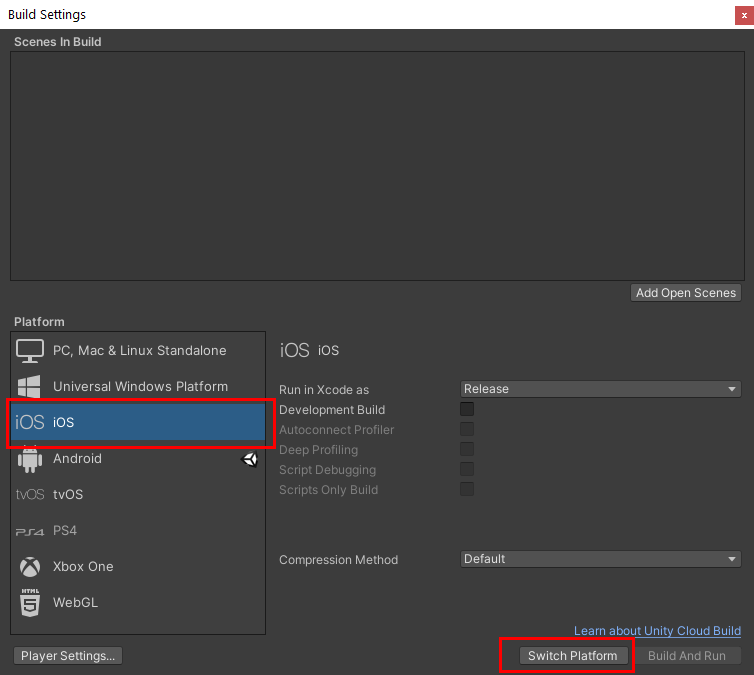
Unity Learn
Unity includes a built-in publishing feature that allows you to publish to various popular platforms in an easy and efficient way. You can publish the same application to multiple platforms, provided the application design takes into account each platform’s unique hardware and software requirements. In this tutorial we’ll explore publishing to i...
I checked in this tutırial
Is it possible to publish for IOS from windows machine?
quartz kernel
No
The only alternative to building on a mac is to use a cloud build service like the one unity provides
remote schooner
quartz kernel
The only alternative to building on a mac is to use a cloud build service like t...
Considering money, how wise is this compared to buy m1 macbook air? I have powerful windows laptop probably never gonna use air to develop future games if I ever will develop another one
quartz kernel
Mac Mini is a usual recommendation for a cheap build machine, it's what I use at work
 silent cliff
hi! it is worth using the saved games feature from google play services if I will release my game for both Android and iOS?
remote basin
remote basin
hey all
I've been trying to set up Unity Cloud Build for iOS
However it seems li...
Still trying to do this... Connect cloud-build to TestFlight
Would love some pointers
Are there any checklists of things I need to do. The Unity documentation only explains how to deploy directly from Cloud Build to a phone via a link, and only for a build that works on pre-registered devices. Changing them is a nightmare - I have to go through the signing / provisioning profile generation / uploading that file every single time I want to make a change - and who I can send it to is really limited.
quartz kernel
If you want unregistered people to run the app you'll need to go through testflight either way
Even if you manage to build a standalone IPA file it will still only run on your defined devices @remote basin
At least this is my impression, there might be solutions I don't know
remote basin
i want to go through testflight
for some reason it says my credentials have expired today in Cloud Build
I'm not sure which set of credentials its referring to?
Do I need to generate a new certificate? p12? I'm confused
@quartz kernel I created a different kind of provisioning profile this time - An App Store one so that it doesn't require device IDs
bitter wasp
is it possible to show the touchscreenkeyboard on the editor?
remote basin
@bitter wasp Have you managed to get the output from Unity Cloud Build to upload directly to TestFlight?
lyric crystal
Okay I need some help from someone who has used touch controls in a mobile game. I talked with someone last night, but nothing is working for me.
dire magnet
lyric crystal
Okay I need some help from someone who has used touch controls in a mobile game....
what are you trying
 frosty flame
Hi All,
I am working on dart throwing game.
In this, I am trying to move dart with respect to mouse position but it is working not right.
Dart position is not following the mouse properly . If mouse is moved upwards dart is moving in different direction.
How to move properly with mouse direction.
lyric crystal
dire magnet
what are you trying
I’m good now thanks. I had an error on another script that was disabling my script causing it not to run which is why it wasn’t working. Got it fixed
remote basin
anyone here use Unity Cloud Build?
23: prebuildstatus finished successfully.
24: ! platform service error: read timeout reached
25: Build failed. Please check the log for further details.
Do you know what it means?
 arctic ruin
Does anyone know how to remove unwanted permissions from the AndroidManifest.xml? I tried supplying a custom manifest inside of the Plugins/Android folder, but it appears that the manifests merge and the permissions appear again. The permissions that I am trying to remove are microphone and record audio.
 deft dock
arctic ruin
Does anyone know how to remove unwanted permissions from the AndroidManifest.xml...
deft dock
arctic ruin
Does anyone know how to remove unwanted permissions from the AndroidManifest.xml...
Hey pico , can u help me out please that how can i use any ui Buttons to do any function like - move left , move right , exit and all please :((
In android unity..
neon thicket
deft dock
Hey pico , can u help me out please that how can i use any ui Buttons to do any ...
Don't bother people.
Look up button events for the UI.
deft dock
neon thicket
Don't bother people.
Look up button events for the UI.
Kk srry
 quaint briar
hi, I'm using the UnityEngine.Social library for the first time, and it seems that Game Center leaderboards return a very large (and incorrect) value for maxRange. Has anyone experienced this? I did find this from... 7 years ago... but it doesn't offer any direction to look: https://answers.unity.com/questions/816464/wrong-values-for-ileaderboardmaxrange.html
Unity is the ultimate game development platform. Use Unity to build high-quality 3D and 2D games, deploy them across mobile, desktop, VR/AR, consoles or the Web, and connect with loyal and enthusiastic players and customers.
arctic ruin
deft dock
Hey pico , can u help me out please that how can i use any ui Buttons to do any ...
Try not to bother people, BUT
If you haven't figured it out yet, do this:
Create a C# script with public functions for each action (move left/right etc). Public means public void FunctionName(){} Make sure to add the script to a gameobject in the scene
Then, each button will have a Button component and there will be a little events box. Click the plus to add an event, drop in the GameObject that your script is on, and select your script name then function name in the dropdown. Now the function will run whenever the button is pressed.
deft dock
arctic ruin
Try not to bother people, BUT
If you haven't figured it out yet, do this:
Create...
Tysm :D
rugged bough
Im looking for mobile friendly nature environments. Preferably realistic looking but still low poly-ish / performant
bitter wasp
why is the material tint of my sprite renderer alway transparent? This is a sprite renderer generated at runtime

 late sinew
bitter wasp
why is the material tint of my sprite renderer alway transparent? This is a spri...
late sinew
bitter wasp
why is the material tint of my sprite renderer alway transparent? This is a spri...
It looks like it isn't using the default Sprite material and instead instantiates one with a transparent tint.
bitter wasp
ok i manage to make it not transparent but no matter what color i set its always white
 silk kindle
Hello !
I'm building a mobile (iOS and android) game (only UI pretty much) for a client, and my game lags like a lot when i go from portrait to landscape or the other way around
I have 0 idea of how i could solve that, any idea ?
By lag, i mean if you don't have a decent enough phone, it takes time to go to the other disposition, and elements doesn't scale immediatly to fit the orientation
 sonic otter
arctic ruin
Does anyone know how to remove unwanted permissions from the AndroidManifest.xml...
sonic otter
arctic ruin
Does anyone know how to remove unwanted permissions from the AndroidManifest.xml...
if you can't specify it with Unity's permissions in Unity, you should be able to edit it in android studio after exporting
sonic otter
silk kindle
Hello !
I'm building a mobile (iOS and android) game (only UI pretty much) for ...
start profiling
silk kindle
sonic otter
start profiling
What do you mean ?
sonic otter
use the resource profiler in Unity to identify unnecessary jobs waiting on things to finish. Check for CPU spikes, check for memory leaks too
silk kindle
sonic otter
use the resource profiler in Unity to identify unnecessary jobs waiting on thing...
Oh ok. Will sure try that tomorrow, thank you !
sonic otter

Unity Learn
A profiling tool gives detailed information about how a game is performing. The Profiler window is a powerful profiling tool that is built into Unity. This tutorial describes what the Profiler window is used for and how to use it to diagnose performance problems in a game or other application.
 lone osprey
Guys Id like to make in-game events in mobile games, like you download new stuff on game load and new stuff appears in the scene, new functionality etc. I saw asset bundles mentioned a lot but it said you can't use scripts along with it and I got confused. Wasn't able to find a proper tutorial at all, any ideas?
sonic otter
lone osprey
Well that doesn't seem very helpful tbh
sonic otter
In my head I'm thinking you want the app to request data from a server and load it in, maybe like a banner or just new text, or maybe a whole new level?
so that client has to go out into the interwebs and find the server you point it to--now I'm thinking about server security and my palms start gettin sweaty
lone osprey
I'm more worried about how can the changes be loaded in the game and if asset bundles don't allow code then how can this be achieved at all o_O
Found nothing on the subject :/
 chilly fog
Hello! so I dont need hand holding just someone that can NAME stuff for me. by naming i mean, there are things i want to do in a mobile game but i am aware of the tools used to achieve the goals i want.
So. what tool do i use for things like, live events? i have seen "live code" in unity and done some "networking" with photon. but I am not getting anywhere with that, I want a system that I can start events, and have a way to check player data. Also is i am using mapbox to create a geomap for world interaction but I cant find a way to move the camera with swipes instead of hidden boxes serving as a button.
something like "tool" > "system" > "resource". like response would be super appreciated. i just need a place to start.
 undone nexus
@chilly fog
And have a way to check player data
Unity services offers analytics
I am not sure how to fix the rest but analytics of unity is good
chilly fog
thank you!
glossy sluice
hi! when i upload and download my game on google play console, my game does'nt start and gives this error : cause: null pointer deference 0x ....... ve backtrace : #00 pc ...../data/app/company name ...... , any suggestion?
 haughty whale
My game is running in full screen mode on iOS even if I unchecked the Requires Fullscreen option.
How can I tell Unity or Xcode to never run my game in full screen mode?
I don't want full screen mode because the area on top where the front camera is located and the line on the bottom cover my game.
sonic otter
has anyone checked out https://assetstore.unity.com/packages/tools/utilities/ios-project-builder-for-windows-15522 for building iOS apps?

Use the iOS Project Builder for Windows from Pierre-Marie Baty on your next project. Find this utility tool & more on the Unity Asset Store.
shadow talon
sonic otter
has anyone checked out https://assetstore.unity.com/packages/tools/utilities/ios...
2022-04-03 Version 3.33.2
Wow they're even making releases in the future! Amazing!
craggy orbit
@sonic otter is nice compared to having to buy a mac, but cloud solution is still better. It has bugs and is as not beginner friendly.
Great plugin, but needs to match the reliability, and ease of xcode.
 undone hedge
Has anyone had any problems not being able to clear Android cache? I supposedly cleared it, yet when i reinstall there are artifacts remaining from the previous install 🤔
undone hedge
Turns out if you have GoogleDrive installed, it has a feature that auto backup's your PlayerPrefs data... Good to know
undone hedge
haughty whale
My game is running in full screen mode on iOS even if I unchecked the Requires F...
i think that Fullscreen refers to something else and not what you're thinking. Maybe disabling that allows the game to be played side by side with another app like you can do with iPads? If you don't want the notch on the top of the screen to cover your game, I think you gotta work around it. Move your UI around. You could also create two black borders to and place it on the top and bottom of the screen (if its portrait view game), though Apple doesn't like that 😄 but I don't think they'd reject you for it :think:
deft dock
Please help me solving this when i am building my project to apk then its showing GRADLE BUILD FAILED SEE IN CONSOLE FOR DETAILS , and when i unchecked my gradle path then its showing this ⚠️ YOU ARE NOT USING RECOMMEND GRADLE 😭
Pls help me fix this,am suffering this form yesterday

Please
undone hedge
deft dock
Please help me solving this when i am building my project to apk then its showin...
try using the recommended gradle. right now you are using a version from a Unity 2021.1, not the 2019.4 one
deft dock
undone hedge
try using the recommended gradle. right now you are using a version from a Unity...
Aa thanku so much i didn't noticed that , but hiw can i download 2019 version gradle please reply 🙏
undone hedge
deft dock
Aa thanku so much i didn't noticed that , but hiw can i download 2019 version gr...
well, you already have 2019.4 installed, have you checked the folder for the gradle?
deft dock
undone hedge
well, you already have 2019.4 installed, have you checked the folder for the gra...
No i didn't and i installed this android once by unity hub only so will i need to download that gradle again or just need to verify its path? And yaa i have that version 2019.4.14f1
undone hedge
lemme check, i have a simliar version installed
deft dock
Okyy
undone hedge
Check
C:\Program Files\Unity\Hub\Editor\2019.4.14f1\Editor\Data\PlaybackEngines\AndroidPlayer\Tools\gradle
or hey, why not check the checkbox?
deft dock
undone hedge
Check
`C:\Program Files\Unity\Hub\Editor\2019.4.14f1\Editor\Data\PlaybackEngines...
Okky thanks a lot btw rn my pc is off can i do it later please
undone hedge
ok
 celest carbon
Im having massive problems building for android. "Gradle Build failed". Can somebody help me?
 mossy echo
I cant build android game. I have downloaded all what it need(NDK, JDK...) But it dont builds it. even an empty project. How can i fix it?
Text: Gradle Build failed
celest carbon
Same xD
rain leaf
@celest carbon& @mossy echo , check the log, it usually contains information why Gradle Build failed
bitter wasp
have anyone done a carousel wheel but its on the 3d environment rather than in the UI?

 molten belfry
guys , when i build my game (including admob to it) the game crashes , but when using test ads , it works
how can i fix that ?
rain leaf
bitter wasp
have anyone done a carousel wheel but its on the 3d environment rather than in t...
I managed to fake it using a world spaced canvas and z-offseted images
https://www.youtube.com/watch?v=XZEry4_eFG4
 bitter wasp
rain leaf
I managed to fake it using a world spaced canvas and z-offseted images
https://w...
bitter wasp
rain leaf
I managed to fake it using a world spaced canvas and z-offseted images
https://w...
holy fudge this looks so cool
deft dock
celest carbon
Im having massive problems building for android. "Gradle Build failed". Can some...
I have this problem too , its hella iritating me from 3 days
 brittle pilot
hey any1 able to hel
help*
so i am making a little game where u can just run around with a character but my joystick isnt working it doesnt take any imput
input*
its really weird i can send a picture and a video
the jump was from the spacebar just ignore it
sec
thanks already
so frustrating been at this for the whole day
silk kindle
could you show the code where you call your jump func ?
brittle pilot
yeah i can for now i just want to get it to move
using System.Collections.Generic;
using UnityEngine;

public class PlayerMovement : MonoBehaviour
{

    public CharacterController2D controller;


    float horizontalMove = 0f;

    public float runSpeed = 40f;

    bool jump;
    public Joystick joystick;
    public float JumpSpeed = 0f;


    // Update is called once per frame
    void Update()
    {

        if(joystick.Horizontal >= .2f) {
            horizontalMove = runSpeed;

        }
        else if (joystick.Horizontal <= -.2f) {
            horizontalMove = -runSpeed;
        }
        else
        {
            horizontalMove = 0f;

            }
            if (Input.GetButtonDown("Jump")) {
                jump = true;
            }


    }


    void FixedUpdate() {
        //move character
 {
            controller.Move(horizontalMove * Time.fixedDeltaTime, false, jump);
            jump = false;
        };


        }


    }
Mh, is your game done for the phone ?
Maybe unity doesn't recognize spacebar when using android or iOS layouts
Also couldn't you make a jump function outside update this way
void Jump()
{
                jump = true;
}
and assign this function as an onPress to your jump button ?
brittle pilot
silk kindle
Mh, is your game done for the phone ?
Maybe unity doesn't recognize spacebar whe...
yes its done for the phone
no my problem is with the moving i want to implement the jumping with the button later but ill implement this
silk kindle
ah yeah, you followed a tutorial or smth ?
There must be tons of those on youtube, you could work it out this way
brittle pilot
yeah brackeys
it worked earlier but when i tried to implement the button jump it stopped
i delete everything from the button jump and its still bugged
silk kindle
Well can't tell what happened, you should delete jump references and stuff in your code/game to make movement work again
and then test step by step reimplementing the juimp button to see where it makes your movements bugged
brittle pilot
so basically start over

 brittle pilot
damn man it still doesnt work
i quess ill just make the game for pc
not worth spending 3 Hours getting 0 results
celest carbon
deft dock
I have this problem too , its hella iritating me from 3 days
I get this, which is straight up wrong. My project patch does not include withspaces or anything like that
craggy orbit
@low maple unity is not supported on bluestacks or any emulator.
That's using the build version
There is a work around, but is not worth the trouble. I find that testing on my own mobile phone is better.
Cause even if it does work in an emulator, it won't give you the best results in terms of troubleshooting. You will find mee issues in emualtors that don't exist in mobile devices.
So if your fan base request emulator support then keep in mind that's it's its own category. It might as well be a diff platform.
 coral fable
Some of my UI elements are cutting off / overflowing when i build he APK
but theyre fine in the editor
THe build

the editor

i am not sure what is causing this
limpid wagon
Hey
Does somebody know how to Constantly rotate a gameobject while a UI button is pressed?
 graceful cradle
limpid wagon
Does somebody know how to Constantly rotate a gameobject while a UI button is pr...
graceful cradle
limpid wagon
Does somebody know how to Constantly rotate a gameobject while a UI button is pr...
transform. Rotate() will help
graceful cradle
coral fable
Some of my UI elements are cutting off / overflowing when i build he APK
May be resolution is not same for mobile and editor
 boreal pawn
Why am I getting almost 1000 fps in Editor but 6-7 fps on my android device?
graceful cradle
Application.targetFrameRate = 30; there is short video in code monkey YT
boreal pawn
graceful cradle
`Application.targetFrameRate = 30;` there is short video in code monkey YT
I've added that in my startup code, no change
Which code monkey video?
The one two years ago?
graceful cradle
i cannt find right now
boreal pawn
That's ok
I just don't understand why my Galaxy Note 5 is having such trouble running this build. The game seems to be way too graphics-intensive looking at the profiler...

...but the game doesn't have to render very much
 graceful cradle
go to "project setting --> quality " you can try with low setting
 graceful cradle
so optimize your game for frame rate and idk about your texture
boreal pawn
I've spent most of my time lately optimizing both fps and storage
The game used to run at 200 fps, now it runs close to 1000 on PC.
It still runs at the same 6 fps before and after optimization (on Android)
Also forgot to mention I tested a build on iphone 6, where the fps stayed at 60, before I locked it to 30
dire magnet
boreal pawn
I just don't understand why my Galaxy Note 5 is having such trouble running this...
you've gotta use the Frame Debugger
that will show you all the things being rendered and how long each thing took to render
 toxic grail
has anyone run into any of these when building for android? also getting a "repositories.cfg could not be loaded" on starting the editor, but no solution on google seems to have worked.
edit: i fixed the repositories thing but the build is still failing. notably im also getting a Script attached to '!ftraceLightmaps' in scene 'Assets/Scenes/MainMenu.unity' is missing or no valid script is attached.
 glossy sluice
i have an app with 100k active users on the play store and it crashes on all devices on start
i have no clue why please help.... i have crash messages if anyone can figure out a solution that way
i've tried almost everything in build settings
Please help! ping me if you have a clue on how to fix it
odd arrow
@glossy sluice Don't cross-post, pick a channel and post the problem.
 tulip marsh
Hello do you is it possible to export my game on My iphone wxithout xcode on from a windows computer
So if somoene knows 🙂
dire magnet
tulip marsh
Hello do you is it possible to export my game on My iphone wxithout xcode on fro...
no. You need a mac or rent a service on the web to do the build for you
tulip marsh
dire magnet
no. You need a mac or rent a service on the web to do the build for you

That's why I don't like apple
dire magnet
tulip marsh
That's why I don't like apple
how do you think they get to be worth 2 trillion bucks
tulip marsh
dire magnet
how do you think they get to be worth 2 trillion bucks
I don't even know at that point 
They just make your life harder so u buy their shit
dire magnet
Ok I have a weird Android problem.
I'm trying to make a production build for my app so I can publish on Google Play.
I made the build, all signed with my keystore etc...
If I take the APK and install it directly on my device either via ADB or copying the APK and installing it from the device, the game works fine.
If I take the exact same APK, upload it to google play console and create a release for internal testing, and download it from Google Play, the game crashes immediately after the splash screen
The crash log from LogCat is... useless frankly.
It's just IL2CPP and native stuff
neon thicket
Make sure you clear your data on the app on your device before opening the new one off the store.
dire magnet
neon thicket
Make sure you clear your data on the app on your device before opening the new o...
I have been - I fully delete the app usually
neon thicket
Or better yet, full uninstall the app before replacing it.
Hmm, I've encountered that issue twice and both times that was the solve. 🤷♂️
Add a tester and have them try the store version?
dire magnet
I'll try my wife
Ok it works on my wife's phone from google play
idk what's up with my phone
thanks @neon thicket
Another google play question:
I have Unity creating a native debug symbols zip file, so I can get readable stack traces. But the zip it creates is always like 500+ MB.
Google play only allows a max symbols file size of 300MB
How can I shrink the file?
nvm I was able to reduce the filesize by just unzipping the contents and rezipping them with a stronger compression level
neon thicket
You can also try using one of the compression settings in the build window. I think it's set to none by default?
sonic otter
dire magnet
nvm I was able to reduce the filesize by just unzipping the contents and rezippi...
this is the way
 buoyant field
<@&502884371011731486> can someone help me when i get a new version of unity my android SDK and my OPENJDK are all messed up can you please help
 hollow coral
buoyant field
<@&502884371011731486> can someone help me when i get a new version of unity my ...
hollow coral
buoyant field
<@&502884371011731486> can someone help me when i get a new version of unity my ...
Please do not ping moderators or admins into your issues. We are not a line of support
buoyant field
ok
buoyant field
hollow coral
Please do not ping moderators or admins into your issues. We are not a line of s...
then who is?
hollow coral
You don't ping anyone not in conversation with you
if someone has an answer they will respond if they want to
 sly bane
Anyone know what this error message is referring to and/or how to fix?
CommandInvokationFailure: Unable to remove reverse socket connections. Please make sure the Android SDK is installed and is properly configured in the Editor.
Not seeing any results for this on Google.
I do have the SDK installed, and all paths are showing.
To provide more details: This is when attempting to do Build & Run while on an Android phone, connected via USB.
It's even more odd because it is saying the build was complete, but nothing pops up...

Ah, I turned off "Development Build" and now it worked!
Does anyone know, is using Build and Run while connected via USB accurate performance?
sly bane
sly bane
Does anyone know, is using Build and Run while connected via USB accurate perfor...
Yes, it is. Just tried downloading and installing my .apk build and performance was the same.