#📱┃mobile
1 messages · Page 16 of 1
 wary crag
wary crag
wary crag
Wow
wary crag
But its yours actually, instead of paying rent
In long term you will pay same amount to services too
 potent cloak
wary crag
But its yours actually, instead of paying rent
potent cloak
wary crag
But its yours actually, instead of paying rent
Exactly
potent cloak
wary crag
In long term you will pay same amount to services too
It will pay off in the long term
wary crag
And i think it will be a good machine too, you have more options to use
potent cloak
wary crag
And i think it will be a good machine too, you have more options to use
Yes, the CPU is the most difficult to choose though cause you need to make sure it's able to handle low but high traffic as well (you never know).
wary crag
potent cloak
Yes, the CPU is the most difficult to choose though cause you need to make sure ...
Do you think it's one of the best picks you've sent?
potent cloak
wary crag
And i think it will be a good machine too, you have more options to use
I like these coolers so much
 wary crag
For budget too
potent cloak
wary crag
Do you think it's one of the best picks you've sent?
For the power consumption especially
wary crag
potent cloak
I like these coolers so much
Yeah its looks great, i think these things more efficient than water cooling
potent cloak
wary crag
Yeah its looks great, i think these things more efficient than water cooling
Depends on the load
for gaming is prolly better AIO
But for sustained load (Server) I would go with that
wary crag
Are you planning to set up a server in the near future?
potent cloak
wary crag
Are you planning to set up a server in the near future?
Not near future but I definitely will sooner or later
those CPUs are crazy though

 karmic rivet
appStateEventNotifier.AppStateChange += OnAuthStateChanged; this code is not working in Unity, It is It'sAppOpen ads code for Admob ads.
error is shown in image

 iron acorn
karmic rivet
`appStateEventNotifier.AppStateChange += OnAuthStateChanged;` this code is not...
iron acorn
karmic rivet
`appStateEventNotifier.AppStateChange += OnAuthStateChanged;` this code is not...
What's DefaultLifecycleObserver? Is that the class that subscribes?
wary crag
@potent cloak

I think it never ends😖
Is anyone knows what's mapping file?
Maybe i can check that
potent cloak
wary crag
<@1109474819113762836>
Damn
that's way over the expected time
seems like it is stuck
potent cloak
It should be something real fast to do
I usually spend the most time in compilation of native libraries
potent cloak
Seems like you are not the only one
 wary crag
I think its %10000 editor related idk
i will try another one cause really no one find a solution for this
potent cloak
you are not using one of these to build right?
 wary crag
2022.3.20f
2022.3.18f
same
error
i think its about gradle
i will try latest 44f
wish we can see the logs of building process
potent cloak
wary crag
wish we can see the logs of building process
that would help too much, game dev would get boring fast
wary crag
my major is game development too, next year ill graduate so i better not get bored quickly lol
potent cloak
I have had problems with Gradle once and I am now using "gradle-6.8", you could try to see if that works.
I mean, I did try a few to be honest
 wary crag
potent cloak
I have had problems with Gradle once and I am now using "gradle-6.8", you could ...
wary crag
potent cloak
I have had problems with Gradle once and I am now using "gradle-6.8", you could ...
So you are not using recommended gradle for unity version
just directly selecting gradle from external tools page right?
potent cloak
wary crag
just directly selecting gradle from external tools page right?
Yes
the reccomended one didnt work for me
conflicting dependecies or smth
(i dont remember since it was about a year ago)
karmic rivet
iron acorn
What's `DefaultLifecycleObserver`? Is that the class that subscribes?
Maybe it is an internal class of Google Ads Mobile SDK, I am trying to show App Open Ads here is the code
`private void Awake(){
// Use the AppStateEventNotifier to listen to application open/close events.
// This is used to launch the loaded ad when we open the app.
AppStateEventNotifier.AppStateChanged += OnAppStateChanged;
}
private void OnDestroy()
{
// Always unlisten to events when complete.
AppStateEventNotifier.AppStateChanged -= OnAppStateChanged;
}`
iron acorn
karmic rivet
Maybe it is an internal class of Google Ads Mobile SDK, I am trying to show App ...
If it is, then you probably just missing some dependencies. Did you go over the installation instructions of the sdk?

 potent cloak
wary crag
Just changed editor
potent cloak
wary crag
Just changed editor
Lol, I am using 2021.3.33f1 from at least half a year
Really reliable version
Not worth changing it due to the building complications
 upper prawn
does anyone know of any potential drawbacks of Application.OpenURL() on mobile platforms, I just want to open social media links
potent cloak
upper prawn
does anyone know of any potential drawbacks of `Application.OpenURL()` on mobile...
What type of question is this? What kind of drawbacks do you expect?
upper prawn
potent cloak
What type of question is this? What kind of drawbacks do you expect?
I don't know, I very rarely touch mobile, just a case of trying to fix a problem that doesn't exist yet, if there aren't any potential drawbacks then I'll happily continue going about my day
potent cloak
upper prawn
I don't know, I very rarely touch mobile, just a case of trying to fix a problem...
There is no drawback. Nothing at all. Just make sure that the user wants the web page to pop on and dont make it open automatically else it could impact user experience.
upper prawn
potent cloak
There is no drawback. Nothing at all. Just make sure that the user wants the web...
good call
 surreal crag
I think the average dev starting out has no idea how much cloud services will end up costing them… the fud pushing cloud adoption, especially some of the higher margin bits like serverless/lambda compute is amazing.
 ancient badger
Thanks for that information. The tutorial I watched had given me the incorrect information that it was meant to always be set to the device resolution being used in deice simulator.
If I'm using a GUI asset kit, and they suggest 1920x1080 reference resolution (they showcase it used in landscape), should I still use that for portrait orientation, or is it better to use 1080x1920? I believe they look identical either way, just want to confirm if it matters or not.
 brazen birch
surreal crag
I think the average dev starting out has no idea how much cloud services will en...
brazen birch
surreal crag
I think the average dev starting out has no idea how much cloud services will en...
Especially if you wrap all your cloud services under a single provider (I.e. unity). Fall behind on that one payment or get a mad bill you werent expecting and everything from multiplayer to inapp, to hosting, to user accounts, analytics etc can all stop working at a moments notice...
Personally I prefer self hosted, and never worrying about ccus or mystery cloud fees. But that's just me. Phenomenally cheaper.
 torn hatch
why is it when i export my game to webgl and upload it on itch.io that it runs much better and smoother on my phone than when i export it as an apk?
i really need help with this
surreal crag
Do you have some crazy background downloading package (stand up Ad libraries...) that's active on the phone build but got stripped because it's not compatible with webgl?
torn hatch
surreal crag
Do you have some crazy background downloading package (stand up Ad libraries...)...
there was one function that was stripped
but everything seems the same
but i dont think this function have to do anything with the problem cause i tried a fresh start and made some basic stuff, ran it and it has the same terrible performance
very low frame rate
and seems kind of blurry i think
 lucid shuttle
Is it possible to build for iOS on a Windows machine? I've been researching, and it seems like the build automation service in UGS might be a solution. However, I'm struggling with matching the provisioning profile and .p12 file. I used OpenSSL to generate them but can’t seem to get it right. I don't have access to a Mac or iPhone, so any advice or help would be really appreciated! Alternatively, I’m considering using a virtual machine. Has anyone faced this issue before? Your guidance would be a huge help

 cosmic yew
lucid shuttle
Is it possible to build for iOS on a Windows machine? I've been researching, and...
cosmic yew
lucid shuttle
Is it possible to build for iOS on a Windows machine? I've been researching, and...
No I don't think it is.
I updated my app to statisfy the new target API for android but the warning still won't go away. Does this take some time even though the internal test from google is already over? Using Unity 2022.3.35f1.
 lucid shuttle
I don't have any issue with android build using build automation only I can't create ios builds

 fallen compass
The Unity "iOS" build is creating an XCode project, it isn't creating an iOS app (this can't be done on Windows).
lucid shuttle
fallen compass
The Unity "iOS" build is creating an XCode project, it isn't creating an iOS app...
I'm not familiar with how iOS builds work. For Android, it's straightforward—you just create an APK for testing and an AAB for publishing to the Google Play Store. In Unity Build Automation, it generates the APK and emails me a download link.
So, are you saying that if I use Build Automation, it will only create the Xcode project, and there's no workaround to build an iOS app on Windows?
 serene egret
lucid shuttle
I'm not familiar with how iOS builds work. For Android, it's straightforward—you...
serene egret
lucid shuttle
I'm not familiar with how iOS builds work. For Android, it's straightforward—you...
No you cant build iOS in windows only can be done in mac
lucid shuttle
serene egret
No you cant build iOS in windows only can be done in mac
Is it possible using Virtual Machine?
serene egret
lucid shuttle
Is it possible using Virtual Machine?
I dont have experience in virtual machine and i dont think there is macOS software in it
lucid shuttle
serene egret
I dont have experience in virtual machine and i dont think there is macOS softwa...
Could you please clarify my confusion? In Unity Build Automation, as shown in the photo above, does it only build the Xcode project, meaning you still need Xcode to create the app?
serene egret
lucid shuttle
Could you please clarify my confusion? In Unity Build Automation, as shown in th...
Yes and xcode only can be done in mac
fallen compass
lucid shuttle
Is it possible using Virtual Machine?
of course, your VM would be running MacOS.. and MacOS is required to make the iOS build.
Unity's cloud build will give you an installable app.
(it would be useless otherwise, wouldn't it?)
serene egret
fallen compass
Unity's cloud build will give you an installable app.
is the macos software in virtual machine?
fallen compass
I have no idea how the cloud build system works.
lucid shuttle
I believe the Cloud Build service builds the app on macOS using Unity's own system, so we don't need macOS ourselves.
 tired lily
lucid shuttle
Could you please clarify my confusion? In Unity Build Automation, as shown in th...
tired lily
lucid shuttle
Could you please clarify my confusion? In Unity Build Automation, as shown in th...
it runs Xcode, you can build for iOS there. The problem is you need to generate certs. Where did you get your provisioning profile?
lucid shuttle
tired lily
it runs Xcode, you can build for iOS there. The problem is you need to generate ...
I got them using openssl
fallen compass
Why aren't you getting them from apples dev dash?
lucid shuttle
getting those require macos which I don't have?
fallen compass
no, you can get them from the website
lucid shuttle
So i used openssl.org
fallen compass
.. which has nothing to do with provising profiles or certs 😄
lucid shuttle
tired lily
it runs Xcode, you can build for iOS there. The problem is you need to generate ...
Yes, that is what I thought it uses unity own macos to run xcode.
fallen compass
tired lily
it does, and it looks like you're actually getting a build except your certs and provisioning profile are nonsense so you can't sign it, and therefore it won't run on any devices
lucid shuttle
Check out this vide "https://www.youtube.com/watch?v=0iLtDb2ZKAE&t=321s"
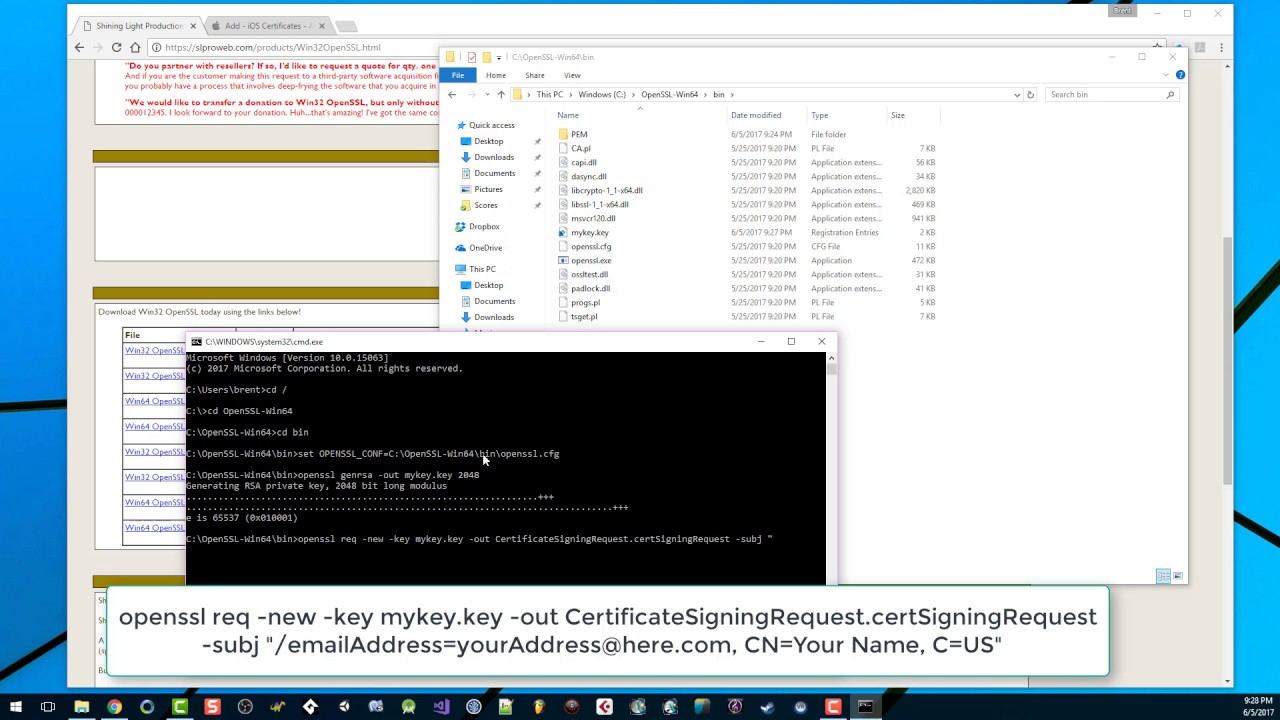
Generate the Certificate Signing Request file and create a .p12 file all on a Windows machine.
Follow me on Twitter: https://twitter.com/iBrent
Here are the command-line instructions:
set OPENSSL_CONF=c:\OpenSSL-Win64\bin\openssl.cfg
openssl genrsa -out mykey.key 2048
openssl req -new -key mykey.key -out CertificateSigningRequest.certSignin...
lucid shuttle
lucid shuttle
Check out this vide "https://www.youtube.com/watch?v=0iLtDb2ZKAE&t=321s"
@tired lily see this
fallen compass
lucid shuttle
Check out this vide "https://www.youtube.com/watch?v=0iLtDb2ZKAE&t=321s"
that's 7 years old, and even back then you could do it via the apple dev site ¯_(ツ)_/¯
tired lily
the video is still using the apple dev site (ancient version), it's just creating a csr
did you then create a provisoning profile in the apple site AdeelDev?
lucid shuttle
Yes I did it, the type could be wrong ?
 lucid shuttle
tired lily
the video is still using the apple dev site (ancient version), it's just creatin...
lucid shuttle
tired lily
the video is still using the apple dev site (ancient version), it's just creatin...
I have set both provision profile and p12 file
 lucid shuttle
Check out this vide "https://www.youtube.com/watch?v=0iLtDb2ZKAE&t=321s"
lucid shuttle
lucid shuttle
Check out this vide "https://www.youtube.com/watch?v=0iLtDb2ZKAE&t=321s"
Both of these files are generated by following this tutorial.
tired lily
did you pay the fee to be in the apple dev program? one problem it it's app store, so it'll only be installable via testflight
the provisioning profile definitely isn't
lucid shuttle
tired lily
did you pay the fee to be in the apple dev program? one problem it it's app stor...
Yes I did pay the fee
tired lily
did you create the provisioning profile after creating your dev cert?
 tired lily
maybe repeat the step where you converted the cer to p12 then, something has gone wrong
lucid shuttle
Should i select the ios app development?
tired lily
how are you planning on distributing the build?
tired lily
via testflight?
lucid shuttle
Don't know what that is?
I don't have an iphone myself but the other person have it so what I want is the other person to test the app on its phone I think UDID is required for this
tired lily
ios app dev will work assuming your device is registered with your team, ad hoc will also work if you have external testers, and use app store if you're planning on using TestFlight which I would recommend
lucid shuttle
The main issue is that why cloud build is not building the app it could be the conflict between provision profile or p12 just like you said to create new one
Or i didn't created them correctly
tired lily
that's another reason why I like testflight: every time you want to add a tester, you have to regenerate all the provisioning profiles to include team device UDIDs
if your provisioning profile is for app store, TestFlight will sign them again for you
lucid shuttle
lucid shuttle
I have set both provision profile and p12 file
So for now should I create new provisioning profile using ad hoc and add it to credentials in unity build and try to build again
Since I already have the certificate
tired lily
any chance you mixed up certs? I would regenerate the p12 also, from the certificate you download from apple
lucid shuttle
I have two certificates

For Unity cloud build iOS Development cert is ok
So I will use that cert to create the provision profile
also the p12
tired lily
make sure your provision is also dev then, a dev cert + app store profile makes no sense
lucid shuttle
this could be the issue
tired lily
once you get this working personally, look into TestFlight. Unity's BA already has Fastlane installed and it's fairly easy to have builds uploaded to the app store and automatically distributed among testers on your team
I have to head out now. Hopefully you get it working
lucid shuttle
Trying the steps you mentioned let's hope it works.
 north musk
Anyone know why my game crashes on mobile webGL? My build is kinda big could that be a reason? If you need more info tell me.
 wintry epoch
Hi, does anyone have an idea/experience for integrating a 3D avatar into a mobile app?
lucid shuttle
@tired lily I have did the steps but Unity Cloud build is throwing error when building
tired lily
same error?
lucid shuttle
@tired lily It throws multiple errors not sure which one is the cause of build failed.
 tired lily
that seems like a problem on their end, at first glance
btw you should create a minimal test project for this, cloud build fees stack up pretty fast and you want a fast turnaround to debug this issue anyway
lucid shuttle
Thanks for pointing out that it's now 2 dollars, and I still haven't been able to make a build, haha.
 tired lily
that's cheaper than I expected, at one point I think I was spending 30-40c'ish per build hour
lucid shuttle
tired lily
that's cheaper than I expected, at one point I think I was spending 30-40c'ish p...
I am using there standard machine that is why since premium machine costs more.
btw have you used cloud build for iOS ?
tired lily
yes, until we started hitting $500+/mo in fees and it made more sense to set up our own build machine with TeamCity instead
I don't have any more suggestions as to what might be wrong. I have a mac obviously, and setting up the certs was very simple with KeyChain and I never had a problem with it
lucid shuttle
tired lily
I don't have any more suggestions as to what might be wrong. I have a mac obviou...
Thanks for your help! I'll reach out to Unity support.
 coarse stream
Do i need to Enable the Accelerometer for mobile use manually or is it always turned on by default?
I am trying to make a step counter but through my logs it shows that all my accelerations are always 0
Both Acceleration and prevAcceleration return as 0.
This function is called in the update function
 tired lily
on Android or iOS? on iOS, there's a player setting for accelerometer frequency that might be disabled
coarse stream
Android
tired lily
doesn't look like you need any special permissions for basic access. Did you consider using the built-in android step counter? https://developer.android.com/develop/sensors-and-location/sensors/sensors_motion#sensors-motion-stepdetector Otherwise, afaik it's enabled by default. One post I found said they needed to enable the gyroscope, so that would probably be the next step
coarse stream
i see
torn hatch
can someone PLEASE help me, ive been stuck for days because whenever i export the game to android apk. it performs terribly meanwhile if i export it on webgl for example and test it on the same phone it runs perfectly on the web browser. my phone runs much heavier stuff so i have no idea whats wrong and i tried following tutorials and stuff but it aint working
lucid shuttle
torn hatch
can someone PLEASE help me, ive been stuck for days because whenever i export th...
In terms of performance?
brazen birch
If its performance I'd start by checking the logs first (maybe its just a platform specific error spamming things and impacting performance). Then move onto profiler etc.
 sage pagoda
I have a hypothical question for publishing on the Apple App store. If i were to pay £100 a year to publish a game... but there's one thing i'm confused about, what happens if i cancel the yearly subscription? will my game stay up still or get auto removed from app store?
 neon thicket
sage pagoda
I have a hypothical question for publishing on the Apple App store. If i were to...
neon thicket
sage pagoda
I have a hypothical question for publishing on the Apple App store. If i were to...
https://developer.apple.com/support/renewal/
If your Apple Developer Program membership expires, your apps will no longer be available for download and you won’t be able to submit new apps or updates or access Certificates, Identifiers & Profiles. However, your apps will still function for users who have already installed or downloaded them, and you will still have access to certain App Store Connect features and free development resources.
sage pagoda
thank you and also YIKES!
torn hatch
lucid shuttle
In terms of performance?
yes or you could also say framerate
torn hatch
brazen birch
If its performance I'd start by checking the logs first (maybe its just a platfo...
do you mean console log? im not getting any issues other than adaptive performance and i dont think its relevant (its not even an error)
idk what profiler is
torn hatch
brazen birch
If its performance I'd start by checking the logs first (maybe its just a platfo...
is this the profiler ur talking about?
 brazen birch
torn hatch
is this the profiler ur talking about?
brazen birch
torn hatch
is this the profiler ur talking about?
This should help:
https://docs.unity3d.com/Manual/profiler-profiling-applications.html
 torn hatch
the entire if statement here gets neglected when i build this on android. am i not allowed to make an if statement in a void on android? what is causing this exactly, works fine on pc tho

 rain leaf
torn hatch
the entire if statement here gets neglected when i build this on android. am i n...
rain leaf
torn hatch
the entire if statement here gets neglected when i build this on android. am i n...
that would not make any sense to have if statement not working on android. Instead, you should check what make isArrowItem false.
also, that if(!isArrowItem) could be just written as else...
lucid shuttle
this is the error "[error] [2024-09-07T06:39:32Z - Unity] An error occurred while resolving packages:
[2024-09-07T06:39:32Z - Unity] One or more packages could not be added to the local file system:
[2024-09-07T06:39:32Z - Unity] com.unity.2d.animation: undefined == true
[2024-09-07T06:39:32Z - Unity] com.unity.burst: TAR_ENTRY_INVALID: checksum failure
[2024-09-07T06:39:32Z - Unity] com.unity.timeline: TAR_ENTRY_INVALID: checksum failure
[2024-09-07T06:39:32.443Z] - 7.4.12.2.7.4 - INFO: Unity ran in '5418.480836' seconds
[warning] [2024-09-07T06:39:32.443Z] - 7.4.12.2.7.4 - WARN: Running Unity in Batch Mode can help reproduce and debug potential build/test issues.
[warning] [2024-09-07T06:39:32.443Z] - 7.4.12.2.7.4 - WARN: For additional information on building in Batch Mode see https://support.unity.com/hc/en-us/articles/9466056266004-How-do-I-Build-Unity-Project-in-Batchmode-Locally-
[warning] [2024-09-07T06:39:32.443Z] - 7.4.12.2.7.4 - WARN: Try running Unity 2022.3.43f1 in batch mode locally with the following commands:
[warning] [2024-09-07T06:39:32.443Z] - 7.4.12.2.7.4 - WARN: When running from Mac:
[warning] [2024-09-07T06:39:32.443Z] - 7.4.12.2.7.4 - WARN: /APPLICATION_PATH/Unity/Hub/Editor/2022.3.43f1/Unity.app/Contents/MacOS/Unity -logFile {PATH_TO_LOG_FILE} -projectPath {PROJECT_PATH} -batchmode -skipMissingProjectID -skipMissingUPID -buildTarget ios --quit -executeMethod {CLASS_AND_STATIC_METHOD_NAME_OF_BUILD_SCRIPT} -quit
[error] [2024-09-07T06:39:32.443Z] - 7.4.12.2.7.4 - FATAL: ! Unity player export failed! "
causing cloud build failure
torn hatch
rain leaf
that would not make any sense to have if statement not working on android. Inste...
isarrowitem is set false by an ienumerator after the duration of the item and is enabled by ontriggercollision with the item
for more clarification it basically skips to instantiating the arrow instead of following the rules but like i said that only happens on android and not on pc which is very confusing to me
torn hatch
rain leaf
that would not make any sense to have if statement not working on android. Inste...
yup thx for pointing out the else if statement
 warm isle
Hello! Does anyone know what these kind of popups are called?

I want to add them to my game
rain leaf
warm isle
Hello! Does anyone know what these kind of popups are called?
toast?
or maybe native popup?
 vague violet
I'm importing the android sdk, why is the banner so small?
 tired lily
I assume that's the editor, so you're not running any android sdk and you're shown a fake placement. And that fake placement seems to have the wrong ui scaling on it so it's not accurate
vague violet
Ah I see
Also when I run a video ad the banner still runs on top of it

But it should be fine since its editor mode right?
tired lily
it's all faked with some temp UI, yes
make sure you test ads on an actual device because behavior can be different, for example the engine is typically paused in an actual build, but won't be with those fake ads
vague violet
Is there a guide for testing? I couldn't find anything so far, is the advertising ID provided by google? or is it something we add by ourselves
 tired lily
that particular one is yes, you need to whitelist your test devices or advertisers will consider it fraud if they deliver real ads to you in development and then end up paying you
vague violet
oh I found my device's advertising ID 😄
im going solely off the docs without a video tutorial, this is all news to me
would building the game with a debug key still allow me to test ads? or must I have my keystore at the ready
tired lily
I'm actually not sure on that one, I always use my upload signing key for local builds because it's required for the auth system I use to work
coarse stream
Just a quick question, do I need to make special provisions for JSON to work on mobile, or does it work exactly the same for mobile as it does PC?
tired lily
in what context? If you're reading/writing to the persistent dir no; if you're reading from a TextAsset then no; if you're reading from StreamingAssets then yes because for example on Android that file gets packed into the bundle itself so you can't just access it on disk
rain leaf
coarse stream
Just a quick question, do I need to make special provisions for JSON to work on ...
for parsing? no.
 prime vine
hi, have a couple of questions
Is Adaptive Performance um... cross-platform? In, like, it's available for all(most) mobile devices?
Is Adaptive Performance even worth learning/using if i'm aiming for work in gamedev studios? Is it common thing in development?
 sacred creek
prime vine
hi, have a couple of questions
Is Adaptive Performance um... cross-platform? In,...
sacred creek
prime vine
hi, have a couple of questions
Is Adaptive Performance um... cross-platform? In,...
These are some very generic questions. It depends on what you will work on. Some platforms support it, some dont. Some do it their own way like Apple decreasing FPS or throttling fans when surrounding loudness is too low. Its smart to take it into account, so nothing wrong with looking into it, even if gamedev studios might not care about this as much as other software studios might. but that also depends on the game studio of course.
prime vine
sacred creek
These are some very generic questions. It depends on what you will work on. Some...
yeah, kinda understand that it's generic.
it confuses me a bit that there is a specific samsung AP "kit" in unity. that what makes me ask this question.
Like, it's platform specific? Or it's just like this and i can ignore that
sacred creek
Its what the hardware manufacturer is willing to share. If they give you API access to thermal and power levels and are willing to work or expose them to Unity or other engines, unity devs can implement it in their platform specific core code. And it would be smart for every manifacturer to do so in the future, when things get smaller but more powerful and its just another approach, that was ignored the last decades of development and should be considered more depending on the apps usage. So why not learn about it if you got some free time 🙂
prime vine
alright, big thanks ❤️
 cerulean valley
Hello, I am trying to publish my first mobile game and am very close the last step really is just building it to an abb file but when it I try to build it, at the end, it always does this.

This has been particularly annoying because as I have stated before this is basically the last thing I need to do and also I've been struggling with it for days
tired lily
and the details are?
cerulean valley
I believe it is some issue with the sdk. In the actual consle after it states: FAILURE: Build failed with an exception.
- What went wrong:
Could not determine the dependencies of task ':launcher:bundleReleaseResources'.
Installed Build Tools revision 35.0.0 is corrupted. Remove and install again using the SDK Manager.
- Try:
Run with --stacktrace option to get the stack trace. Run with --info or --debug option to get more log output. Run with --scan to get full insights.
I have attempted completley reinstalling android studio and using the sdk files i got from there but it hasn't changed anything
tired lily
What version of Unity are you on?
cerulean valley
2020.3.26f1
tired lily
why so old?
tired lily
It can be yes, since the api levels have changed and you need to target 34 at least
cerulean valley
Ok im installing the newest version and ill get back to you
tired lily
hopefully newest LTS and not Unity 6, I would use 2022.3.x
cerulean valley
got it
tired lily
and make sure your project is in source control or backed up at least before you upgrade
cerulean valley
oh yeah, ive already lost a lot of progress because i didnt have a back up of my project, thank you for reminding me
cerulean valley
thank you so much
that seemed to work
dude its always the most simple solutions
 dusty locust
heyo, I am wondering wether I should keep ARM v7/32 bit support or drop it, I am saving significant space if I remove 32 bit support, tho my personal research found that even my oldest android 5.1 device from 2014 was 64bit, so currently most if not all device should be running 64bit.
dusty locust
cerulean valley
I believe it is some issue with the sdk. In the actual consle after it states: ...
I also got the same issue, tho for me re-installing the same version fixed it, but I will recommend upgrading to a more recent one as well.
tired lily
dusty locust
heyo, I am wondering wether I should keep ARM v7/32 bit support or drop it, I am...
does your build get rejected for being too large with it included? If not, include it because google will optimize it anyway
dusty locust
tired lily
does your build get rejected for being too large with it included? If not, inclu...
although my build is not rejected but my publisher is telling me to optimise more
tired lily
optimize for space specifically?
dusty locust
tired lily
optimize for space specifically?
yeah
tired lily
are they looking at the uploaded bundle or judging based on what they download to their devices?
dusty locust
the old version was very unoptimised (I was inexperienced) so, when we decided to update it, we set the limit to be less than what the original was, which we achieved as current bundle is only 2mb heavier than the original bundle
dusty locust
tired lily
are they looking at the uploaded bundle or judging based on what they download t...
the literal aab file created by Unity
these created using smaller (faster) file size, and above one is with both 32 + 64 and the below one is only 64 bit

these are exported from unity 6 so they don't support anything below android 6 and maybe 3 gigs of ram
majority is surely textures -> audio files -> single intro mp4
dusty locust
tired lily
they're both the same size, except one eliminates all ARM v7/32 devices
yeah the lesser one removes all ARM v7/32 devices
tired lily
no, the size is totally irrelevant unless you changed texture/audio stuff like that
the top one supports more devices. It will not be any larger than the bottom one
dusty locust
ohh now I get it
tired lily
google will split the bundle for you and only relevant cpu architectures will be supported, so the top one and the bottom one are functionally equivalent at the end user side
dusty locust
basically the size for me != the size user will download
tired lily
correct
dusty locust
now I just have to find a way to insert this into the brain of my boss
anyways thanks a lot
tired lily
btw I would consider both of those to be quite tiny; you aren't anywhere near the size limit
dusty locust
you saved me shit tone of testing
dusty locust
tired lily
btw I would consider both of those to be quite tiny; you aren't anywhere near th...
its a pretty simple 2d drag and save player from falling things game, so reaching 74mb of bundle sized scared me at first as well, but now that I think of it, I rarely ever downloaded anything above 34mb when I download from google play store
brazen birch
I don't care much what the size is if the game looks fun
fallen compass
I never even look at the size
 vernal trail
hey guys, i have an online mobile game that uses netcode relay for the multiplayer, when i build an apk and try to test it the multiplayer works fine, but when i make an app bundle for google play and publish it on internal testing and try it, the multiplayer doesnt work, on the host side both players are shown, but on the client side nothing happens. and i can move freely and whatever i want on the host side, but as i said on the client side nothing happens.
what should i do ?
tired lily
add much better logging and check any config that uses the signing cert fingerprint, since internal test builds are re-signed with the app signing cert
 river escarp
anyone here build for iOS or Android and use Addressables? anyone else get errors relating to the build for ios not being compatable w the editor?
tired lily
river escarp
anyone here build for iOS or Android and use Addressables? anyone else get error...
addressables built for iOS/Android aren't compatible with the editor. I tweak the remote catalog path when loading remote addressables in the editor to point to a version built for the editor platform
 pulsar cave
Hey, I upgraded to Unity 6 yesterday and only my skyboxes have become pink when i run my game on android, It seems fine in editor and also everything else seems fine. Have you guys stumbled upon this issue?
 broken steppe
I have an existing mobile game that I have gone in to do updates for, and now I can't get the achievements to work at all (it's a live game with achievements that work). Did I set it to a wrong token or something somehow? Any thoughts?
 burnt fox
when publishing to the apple app store, is there a way to prevent users with less than 4 GB RAM from downloading the app?
we use up a decent chunk of RAM, so 2GB crashes for sure, and it miiight run on 3GB but we don't have the devices to test for it lol
tired lily
pulsar cave
Hey, I upgraded to Unity 6 yesterday and only my skyboxes have become pink when ...
broken material, probably due to shader stripping. Try messing with those settings and looking at docs
tired lily
broken steppe
I have an existing mobile game that I have gone in to do updates for, and now I ...
Android? Play games services? Did you build with the right keystore, and did PGS sign in successfully?
broken steppe
tired lily
Android? Play games services? Did you build with the right keystore, and did PGS...
PGS does sign in. How can I tell which keystore is which? Or do I need to create a new one to know for sure?
tired lily
Use a keystore that matches the fingerprint you set for the android credentials in PGS config
broken steppe
tired lily
Use a keystore that matches the fingerprint you set for the android credentials ...
Does it have to match anything specific in google play console as well?
tired lily
The keystore? No. I've had the GPGS plugin wipe the resources I set up for it on the Unity side so double-check that too (Play Console/PGS -> Setup -> Config -> Get Resources)
broken steppe
tired lily
Use a keystore that matches the fingerprint you set for the android credentials ...
Oh maybe I misunderstood what you meant by PGS config. Where is this?
tired lily
Play Games Services in Play Console -> Setup and management -> Configuration
are you testing with internal test builds or local builds?
broken steppe
tired lily
are you testing with internal test builds or local builds?
Local, either via apk or directly from Unity
tired lily
And you're signing it, right?
broken steppe
tired lily
Play Games Services in Play Console -> Setup and management -> Configuration
I have two, and I'm not sure which the live uses, or which I am currently using for testing.
tired lily
the live one would be the one with a fingerprint that matches the app signing key certificate (Play store -> Setup -> App Signing)
broken steppe
tired lily
the live one would be the one with a fingerprint that matches the app signing ke...
Okay, I've identified the live one. Do I need to make sure I'm connected to that one?
tired lily
? No, you're verifying your test app has a fingerprint that matches your credentials
Are you signing your app with an actual key from a keystore, or did you leave it blank?
broken steppe
tired lily
Are you signing your app with an actual key from a keystore, or did you leave it...
An actual keystore
tired lily
And does the fingerprint of that keystore match any of the credentials you have set up?
key from keystore*
broken steppe
tired lily
And does the fingerprint of that keystore match any of the credentials you have ...
How do I determine the fingerprint of the keystore?
tired lily
broken steppe
tired lily
<https://stackoverflow.com/questions/11331469/how-do-i-find-out-which-keystore-w...
Looks like it matches the other pair of credentials I have (the non-live one)
tired lily
okay, and did you check if your PGS resources config in Unity was right?
You said achievements are working on the prod game right?
broken steppe
tired lily
okay, and did you check if your PGS resources config in Unity was right?
Yes, re-copied it to be sure.
broken steppe
tired lily
You said achievements are working on the prod game right?
Correct.
tired lily
Are you getting any errors in logcat?
broken steppe
I'll run it locally real quick and see
broken steppe
tired lily
Are you getting any errors in logcat?
I can unlock the achievement locally np. When I create an APK and send it to my friend to test - nothing.
Am I going about testing that wrong?
tired lily
you went from "achievements don't work at all" to this suddenly
Go to Play console -> PGs -> setup -> publishing, open the credentials you signed that apk with and confirm you didn't enable anti-piracy
if you did, you'll have to add your friend as a tester
broken steppe
tired lily
you went from "achievements don't work at all" to this suddenly
Yes, my fault. I misremembered. I will check
broken steppe
tired lily
Go to Play console -> PGs -> setup -> publishing, open the credentials you signe...
Both anti piracy are off. Anything else to check?
tired lily
any chance your friend already tested and got the achievements with their PGS account?
nothing else comes to mind
tired lily
I guess my last suggestion would be to add your friend as a tester and use an internal test track to distribute builds. They'll be signed with the app signing key and pass any security checks the play store is running
broken steppe
tired lily
any chance your friend already tested and got the achievements with their PGS ac...
Another (potentially) important piece of info I realize I left out. These are all new achievements and are in draft status
tired lily
yeah if your friend isn't a tester, that has no chance of working
broken steppe
tired lily
yeah if your friend isn't a tester, that has no chance of working
What track do they need to be on? Like how exactly do I need to add them as a tester?
tired lily
they need to be a tester for PGS specifically to have access to draft achievements
PGS -> Testers -> testers tab -> Add testers
You might as well include them in your internal test track too, that's Play console -> Testing -> internal testing -> Testers. Then you can give him a link that invites him, and any builds you promote to the internal test track will be available to him as an update
broken steppe
tired lily
they need to be a tester for PGS specifically to have access to draft achievemen...
That's definitely the issue then and why it worked only for me. Thank you so much for the help and patience. I'll confirm this fixed it later when they send their emails.
broken steppe
tired lily
You might as well include them in your internal test track too, that's Play cons...
Will either of these allow the APK to work or will it only work via official testing channels?
tired lily
PGS tester should allow APK to work. Adding to internal test mean they can get the game straight from the play store instead of you distributing it signed with what I assume is your upload signing key
broken steppe
tired lily
PGS tester should allow APK to work. Adding to internal test mean they can get t...
Would they need to reinstall or anything? I had them try via APK after adding their emails and it still didn't work.
tired lily
Do they get the play games sign in popup on launch?
broken steppe
tired lily
Do they get the play games sign in popup on launch?
Ah just found their test was an achievement they already unlocked. Created a new achievement to test, still waiting to hear back.
broken steppe
@tired lily Thank you!
 tired lily
lucid shuttle
tired lily
lucid shuttle
I guess i have to use the script approach since i can't access xcode project on unity cloud build
lucid shuttle
Thank you @tired lily
The issue is fixed by adding the script
sacred creek
You should build with xcode directly to get debug information of whats going on
lucid shuttle
Unfortunately I don't have xcode I am using unity build automation to build the app
what if I build with no scenes included to test?
tired lily
it's more likely a third party dependency causing an issue in my experience, but yes without being able to debug it locally you're going to have to try things piecemeal until you find the issue
lucid shuttle
like facebook, google plugin?
tired lily
yes
lucid shuttle
what if I build with empty scene just for testing will it work?
tired lily
Let me get my crystal ball and check
Just try it dude, without being able to use a debugger you're in a nightmare scenario. I would guess you have a third party dependency that initializes on app launch and a blank test scene won't help, but if it does you can start adding related scripts to the scene until it fails
lucid shuttle
@tired lily You mentioned that the initialization occurs on app launch, which means no scene is loaded at that time. Therefore, it shouldn't matter if the scene is blank. How about I delete the third-party assets and test again? Since I'm using version control, this won’t be an issue. My goal is to see the app open on my iOS device, even if it's a blank scene, just to confirm that the previous steps were done correctly. This will help narrow down the search.
tired lily
you can't tell if the scene matters until you've tested it and seen whether something in the scene has, for example, given a third party invalid config data and they handled it in some stupid way that leads to an unhandled exception in the sdk = crash
sacred creek
To be honest, developing for iOS without a mac at hand will not give you much fun... maybe try to grab an older one, maybe used macmini or something, becuase just building and hoping wont make you finish your app in years. This is just ONE bug happening, but as you add code, do things that are platform dependent and will only occur on runtime, you are not gonna have a good time.
lucid shuttle
sacred creek
To be honest, developing for iOS without a mac at hand will not give you much fu...
I agree that eventually, I will need to purchase a Mac. However, when I started this process, I thought that since Unity provides a service for building iOS apps, I should use it. After many trials and errors, I’ve made it this far and believe it is possible to complete the task this way. As you mentioned, this approach may not be ideal in the long run, so I will consider getting a Mac. For now, I want to ensure that the progress I've made is not wasted, so I will focus on getting my app to run on iOS.
sacred creek
lucid shuttle
I agree that eventually, I will need to purchase a Mac. However, when I started ...
Hanging on to what work you put into to get the "workflow" going should not be the base of your decisions on how to continue if it was a lot of work just to get an iOS app going. How would the work also be wasted if you start working in xcode directly now? you still just build and run from unity instead of push to git and let unity do it. Thats all there to change but you get a ton of debug information and fix your error in minutes probably instead of hours waiting for the build, trying new things and so on. But you do you, this is just my guess
lucid shuttle
Got it. The remaining steps will stay the same, and Unity will handle the rest. I only need a Mac to obtain debug information. Thank you for your suggestion.
vague violet
I've installed the tapjoy sdk into a test app, and after following the guide to make a basic tapjoy manager and building the app for android, I get a Autoconnected Player "Autoconnected Player" AndroidJavaException: java.lang.ClassNotFoundException: com.tapjoy.Tapjoy error
tired lily
you're either missing an android dependency or proguard stripped that class out https://dev.tapjoy.com/en/android-sdk/Proguard
vague violet
tired lily
you're either missing an android dependency or proguard stripped that class out ...
im not sure what proguard is
ive checked all stripping settings and theyre disabled
 north thunder
Hey all, is there any way to render grass for low end mobile?
vernal trail
tired lily
add much better logging and check any config that uses the signing cert fingerpr...
hey thanks for the response, sorry for the late reply but i didnt understand what you mean in signing cert fingerprint exactly
tired lily
vague violet
im not sure what proguard is
Build Settings/Android -> Publishing Settings -> Custom Proguard File. Paste the contents of that link into it
tired lily
vernal trail
hey thanks for the response, sorry for the late reply but i didnt understand wha...
nevermind about that, mostly you need better logging. The client is probably throwing an exception somewhere
vague violet
tired lily
Build Settings/Android -> Publishing Settings -> Custom Proguard File. Paste the...
hm is there a way I can update the gradle?

these files look different
tired lily
you can enable custom base gradle template
 sour gate
When building my mobile game for IOS on mac, using unity 6000.0.16f1 + XCode 15.0.6 + cocoapods of Levelplay sdk 8.3.0, latest google fcm notifications and chartboost for Levelplay, facebook SDK 16+, I get the following issue in xcode during building:
Lib arch: arm64
Host arch: x86_64
Bee arch: x64
/Users/apple/Library/Developer/Xcode/DerivedData/Unity-iPhone-duhuneugkfypsugkzcifdezolqie/Build/Intermediates.noindex/Unity-iPhone.build/ReleaseForRunning-iphoneos/GameAssembly.build/Script-C62A2A42F32E085EF849CF0B.sh: line 40: /Users/apple/Library/Developer/Xcode/DerivedData/Unity-iPhone-duhuneugkfypsugkzcifdezolqie/Build/Intermediates.noindex/Unity-iPhone.build/ReleaseForRunning-iphoneos/artifacts/arm64/buildstate/Il2CppOutputProject/IL2CPP/build/deploy_x86_64/il2cpp: Operation not permitted
Command PhaseScriptExecution failed with a nonzero exit code
I feel lost with thje IL2CPP, tried chaning everything I coudl so far
are there any compatibility issues here ?
tired lily
Does a clean empty project build?
you might want to look at that script and see what it's doing on line 40
sour gate
well, I got it now so sorta build, not sure what happened
login with apple postprocessing script that I removed made it build on xcode
it adds the entitelements automatically - so I will now attempt do it manually
 stoic vessel
I have a 3d animating app but all I can do on it is either 3d model or animate but bones and rigging is broken so I can only animate pre rigged models and objects
lucid shuttle
@tired lily So the scene wasn’t the issue. Even when I included a blank scene in the build, the problem persisted. I will erase everything in the assets except for two scripts and one scene, then test again.
tired lily
and delete your dependencies, yes? The odds are decent that a script-less, empty scene project still crashes because one or more of your plugins are initializing and failing
lucid shuttle
I have removed everything from the assets folder so there are no plugins and dependencies etc.
One is post-bash script the other is DisableEmbedSwiftLibs
So it is totally empty unless you are talking about unity packages.
 river verge
I can not build my android project with keystore, im using unity's gradle version and it says its not working, im trying to make .aap file and its unity's lastest LTS version of 2022
 tired lily
what does the error say?
river verge
WARNING:The option setting 'android.aapt2FromMavenOverride=/Applications/Unity/Hub/Editor/2022.3.46f1/PlaybackEngines/AndroidPlayer/SDK/build-tools/34.0.0/aapt2' is experimental.
WARNING:We recommend using a newer Android Gradle plugin to use compileSdk = 34
This Android Gradle plugin (7.4.2) was tested up to compileSdk = 33
This is the error that i got
when i create .aab file with debug keystore it works and when i try to build with my keystore its stop working, how its possible that Gradle stops working when i use my keystore
I already uploaded my .aab file with same my keystore and now its stop working
@tired lily Can you help! Thanks for listening.
Execution failed for task ':launcher:signReleaseBundle'. also this error
tired lily
the first two are warnings. The popup tells you to look in the console. You see how there are 4 red log entries there right? Look through them
 hollow mural
How do i fix this error i tried installing a different version of the editor and a bunch of other stuff but when ever i make a new project it gives me this error
 tired lily
how did you install the editor? There are people who get that due to permissions issues
hollow mural
tired lily
how did you install the editor? There are people who get that due to permissions...
how do i fix the issues
tired lily
What did you find when you googled it? I don't know dude, I looked at a few stackoverflow results since I've never encountered that error
lucid shuttle
@tired lily After removing everything from the assets, the app successfully opened without crashing. This means the previous steps were correct, and a third-party dependency is causing the crash.
tired lily
well that's unfortunate; you've got your work cut out for you now
 coarse elm
hello, any one know about Advertisement legacy package in unity? Im working with it and I followed the steps on the instalation guide but in the editor all the interstitial, banner, rewardedAdbutton works perfectly well but when build and export to my android device there is not banner nor ads nothing even on test mode, I notice something kinda sus in the package and in the pluggins section wich is this:

this package came only with iOS plugins is this the main reason why ads are not loading on my phone? because on LogCat on androidStudio I see the debu.Log() wich says not loaded Ad
 tired lily
you're going to need to provide more information than that. Did you set up ad units? Did you configure the android dependencies correctly? Are there any errors in logcat?
vernal trail
tired lily
nevermind about that, mostly you need better logging. The client is probably thr...
im not sure what more logging i could implement
{
    Debug.Log("Joining Relay with " + joinCode);
    JoinAllocation joinAllocation = await RelayService.Instance.JoinAllocationAsync(joinCode);

    RelayServerData relayServerData = new RelayServerData(joinAllocation, "dtls");

    NetworkManager.Singleton.GetComponent<UnityTransport>().SetRelayServerData(relayServerData);

    NetworkManager.Singleton.StartClient();

}
catch (RelayServiceException e)
{
    Debug.Log(e);
}```
this is the code, and i did a bit of testing on a new small scene and figured out that the multiplayer works when i dont use addressables and load the scene, like if the game starts at the main scene of the game the multiplayer worked, but if i put a starting scene to load the main scene just like i do with my main game it doesnt work, i use addressables with play asset delivery as install time for the size limit in google play console.so the problem should be that while loading the main scene something breaks or something like that. but im not totally sure because i cant check because my main games main scene is 330 mb and google play accepts 200mb
but i have no idea on how to fix it
and again sorry for the late replay 😅
 surreal crescent
hey, im trying to make a nonogram game for mobile, everything seems to be working correctly on unity's simulator phones, but once i build and run the game on my personal phone, the main grid object isn't rendering the grid, why that could be? i was getting some errors about Adaptive Performance, but it told me to install Samsung (Android) providers and so i did, but still no grid on my phone
coarse elm
tired lily
you're going to need to provide more information than that. Did you set up ad un...
ad units on the dasboard yea
like so right?
 coarse elm
tired lily
you're going to need to provide more information than that. Did you set up ad un...
coarse elm
tired lily
you're going to need to provide more information than that. Did you set up ad un...
I dont see android dependecies on the proyect
you mean that?
 coarse elm
any fix for this bug?
 vernal trail
tired lily
nevermind about that, mostly you need better logging. The client is probably thr...
vernal trail
tired lily
nevermind about that, mostly you need better logging. The client is probably thr...
honestly im not sure if i got this error before but i checked now and when the client tries to join the host i get this error message on the host side:
Exception: Scene 'Assets/Scenes/testing multiplayer.unity' couldn't be loaded because it has not been added to the build settings scenes in build list.
and when i double click on the error it takes me to the NetworkMessageManager script
tired lily
vernal trail
but i have no idea on how to fix it
if you haven't installed one of those mobile console packages, that would be a good next step. Personally I use lunar console (free version) and configure it to appear on any error. It sounds like you are loading the 'testing multiplayer' scene incorrectly if it's supposed to be an addressable
tired lily
surreal crescent
hey, im trying to make a nonogram game for mobile, everything seems to be workin...
I wouldn't bother with the performance thing at all. More info needed on what exactly the 'main grid object' is
tired lily
coarse elm
you mean that?
no, I mean did you confirm the project has all the android dependencies it needs? Looks like it needs com.unity3d.ads:unity-ads:4.7.0. Normally there is some kind of resolution step. Are you switching to their new advertising? Your last screenshot seems to be using ironsource instead
tired lily
also you should enable test mode for whichever devices you're trying to test with. You could have a valid config but not receive any ads if the advertiser doesn't serve to non-live apps or considers your ad value to be low
 prime socket
Hey guys
Im doing the Mobile AR tutorial
I replaced the component with a newer one called "XR Origin" and I put the AR default face prefab to the face prefab.
I updated the prefab so the face mesh won't be rendered but after "build and run" it still renderes although u can see in the pic it's only the hat and the mustache (With particles as well)
Did someone experience similar trouble?
 prime socket
Solved:
It was because this was enabled

 sick lance
Hi guys! I have a question. If I publish a game on Google Play, and it does not have any SDK, advertising, analytics or other services. Can I specify in the Data Security section that the application does not collect any user data?
 austere nebula
Anyone have experience with Branch for deep linking and mobile ad attribution?
brazen birch
sick lance
Hi guys! I have a question. If I publish a game on Google Play, and it does not ...
Yes, if you aren't collecting any yourself, and none of the plugins are, and depending on your Unity version have also disabled their analytics
ancient badger
Does anyone else experience the device simulator screen occasionally bugging out, and I have to click anywhere in the device simulator tab to make the screen go back to normal. It only occurs while not in play mode, or at the very start of play mode.
 acoustic frost
I have a problem, I finished my project and when I went to export it, it didn't go through, there was an error there, and I installed everything correctly

 cursive roost
onApplicationQuit doesn't work on android mobiles, and i'm really desperate for a solution because i'm building a multiplayer game and when someone kills the app mid game they should become a looser??? is there any solution ????
i can't use on app pause and focus because i'm already using that to detect the player pased the game and there is a chance they are coming back to recconnect them, but when they kill the app there is no return
coarse stream
cursive roost
onApplicationQuit doesn't work on android mobiles, and i'm really desperate for ...
So you wish to check if a player turned their app off in a multiplayer game, and then you want to assign them as a loser?
cursive roost
coarse stream
So you wish to check if a player turned their app off in a multiplayer game, and...
yes, not just slide off but someone killing the app.
cursive roost
cursive roost
yes, not just slide off but someone killing the app.
we have this in unity-ios which is OnApplicationQuit but it does not work for android
coarse stream
I am not entirely sure.
OnApplicationQuit should work but.... yeah...
I'll bring the question to a professor at my university
cursive roost
coarse stream
I am not entirely sure.
OnApplicationQuit should work but.... yeah...
I'll br...
i would really appreciate that, thank you alot.
sacred creek
 scenic vine
Hi Everyone , I have added Firebase Google Sign in in my app and one needs to log in via google to play my game. But it is getting rejected from Google. I have provided the login credentials of for the google sign in in "App Access" section. Still facing the same issue.
Any help would be appreciated.
brazen birch
I'd start by reading why they are rejecting it
 regal thicket
Hey guys I figure it will be too late by the time someone answers here but I could have sworn there used to be a 2D Mobile URP template available in the 2022 LTS templates list. Anyone know if I'm making that up or if I am thinking of another version?
 tired folio
is there any way to batch textures that are downloaded at runtime?
Willing to pay $$$ if someone can help
 sleek eagle
tired folio
is there any way to batch textures that are downloaded at runtime?
sleek eagle
tired folio
is there any way to batch textures that are downloaded at runtime?
In the UI if they are in the same hierarchy level you could make a texture atlas after they are downloaded for them to batch together when rendering if that's what you want.
You phrased it differently here than in DM
tired folio
sleek eagle
In the UI if they are in the same hierarchy level you could make a texture atlas...
they arent in the same heirarchical level
any way to batch them in that case?
sleek eagle
tired folio
any way to batch them in that case?
Atlassing might help but in BiRP I am not sure if that can be batched in UI
 hollow hill
Hello, I'm having issues building my Android app related to AdMob LevelPlay Integration. I'm encountering 3 errors which I'm struggling to find solutions to online. I'm using Java 8 and Unity 2022.1.0f1, if it's relevant. I will paste some of the content of the 2nd error because the text is too long for discord messages. If there's a need I can send the rest of the error. All 3 errors are revolving around :launcher:processDebugResources.
I hope someone can help me 
warning: C:\Users\mtryb\Documents\Unity Projects\Tents And Trees\Library\Bee\Android\Prj\IL2CPP\Gradle\unityLibrary\libs\classes.jar(com/samsung/android/gamesdk/GameSDKManager.class): major version 53 is newer than 52, the highest major version supported by this compiler.
  It is recommended that the compiler be upgraded.
Note: Some input files use or override a deprecated API.
Note: Recompile with -Xlint:deprecation for details.
1 warning

FAILURE: Build failed with an exception.

* What went wrong:
Execution failed for task ':launcher:processDebugResources'.
> A failure occurred while executing com.android.build.gradle.internal.tasks.Workers$ActionFacade
   > Android resource linking failed
     AAPT: aapt2.exe E 09-18 20:09:25 33584 30476 LoadedArsc.cpp:109] RES_TABLE_TYPE_TYPE entry offsets overlap actual entry data.
     aapt2.exe E 09-18 20:09:25 33584 30476 ApkAssets.cpp:183] Failed to load 'resources.arsc' in APK 'C:\Program Files\Unity\Hub\Editor\2022.1.0f1\Editor\Data\PlaybackEngines\AndroidPlayer\SDK\platforms\android-35\android.jar'.
     error: failed to load include path C:\Program Files\Unity\Hub\Editor\2022.1.0f1\Editor\Data\PlaybackEngines\AndroidPlayer\SDK\platforms\android-35\android.jar.
TimeSpan timeRemainingBeforeReset = (ProtectedTime.UtcNow.Date.AddDays(1) - ProtectedTime.UtcNow) + new TimeSpan(0,0, extraTimeToWaitBeforeLoadingMatchCounterAtMidnight);
timeRemainingBeforeResetTimerTxt.text = ((timeRemainingBeforeReset.Days * 24) + timeRemainingBeforeReset.Hours).ToString() + " : " + timeRemainingBeforeReset.Minutes.ToString() + " : " + timeRemainingBeforeReset.Seconds.ToString();```.ToString() functions uses a lot of GC Alloc, how can I fix this analog plover
Use a format string: string.Format("{0}:{1}:{2}", timeRemainingBeforeReset.Hours, timeRemainingBeforeReset.Minutes, timeRemainingBeforeReset.Seconds)
and the text should only be set when the text changes. 3 new strings per second shouldn't have made any noticeable difference
tired folio
Got it
 willow turret

 tired folio
Building for android sucks the most, out of all platforms,
Youll get errors which youve never seen before
 proven solstice
Hi! My app got rejected on Apple Store. I am honestly not sure why. I used legal unity assets anyone know what can it be?
Specific rejection: “Guideline 4.3(a) - Design - Spam
We noticed your app shares a similar binary, metadata, and/or concept as apps submitted to the App Store by other developers, with only minor differences.
Submitting similar or repackaged apps is a form of spam that creates clutter and makes it difficult for users to discover new apps.”
analog plover
It means that your game is too similar to other games. For example if you just copy-pasted the game from a tutorial with no or minimal changes of your own.
 patent glen
Does it apply only to the assets, or the overall design? If it's about the design I think google has different politics 😂

Reminds me of uefn
proven solstice
analog plover
It means that your game is too similar to other games. For example if you just c...
Right. Which I think is not true so what in their test flagged as such so I can remove it. Does anyone know? I am pretty sure they have not played it. So do they run some script I assume
patent glen
Bin/metadata check is automated for sure
proven solstice
patent glen
Bin/metadata check is automated for sure
Yeah. I wonder what is flagging so I can remove it
patent glen
Ig it's somesuperspecialmagicmysteryflag that is not supposed to be known by devs to ensure they don't find workaround
btw any1 using Graphics.RenderMeshPrimitives on mobile? I have really bad perf on drawing 1000 unlit hexagons. I wonder if I should try switching to BRG or it's not worth the time and I should just redesign my app to not use instancing at all. That's a shame, bc compute shader for matrices works like a charm and it's probably just the vertex limit or smth
tired lily
no secret flag, just some reviewer who glanced at your app and decided it wasn't unique enough. A lot of devs try to cash out by buying those premade games and then reskinning
fallen compass
proven solstice
Yeah. I wonder what is flagging so I can remove it
Not a single person here can tell you, there isn't enough information in the message from Apple for you to know, so how can anyone here know? You haven't even shown your game.
Apple have the facility for you to reply to the rejection msgs - try sending a message asking for clarification.
patent glen
patent glen
btw any1 using Graphics.RenderMeshPrimitives on mobile? I have really bad perf o...
nvm, apparently its some crazy default urp template settings, because results are the same when drawing a single object x.x
 radiant nymph
anyone, im getting Gradle build failed error continuously
whenever i find some fixes in Unity discussions or stackoverflow i try them it fixes but i get other errors instead, can anyone help?
when someone is available i can send logs
proven solstice
fallen compass
Not a single person here can tell you, there isn't enough information in the mes...
Yeah I sent them a message. I was just wondering if using some assets like synti is the reason cause they are too common. It’s frustrating! Didn’t expect that at all.
 languid garnet
radiant nymph
anyone, im getting Gradle build failed error continuously
languid garnet
radiant nymph
anyone, im getting Gradle build failed error continuously
You are using LevelPlay?
radiant nymph
never heard of it tbh
languid garnet
You have ads in your game?
radiant nymph
it doesnt often happen until i use firebase i dont think it causing issues
radiant nymph
languid garnet
You have ads in your game?
not yet
languid garnet
A, firebase, i wouldn’t know. Try to read in depth the logs since they usually include what is causing the failure
Worst case figure out which plugin/package causes it and delete it and implement it again. Its sometimes very stupid stuff, for me once i didn’t have one callback for a vibrations script and couldn’t figure it out for days
radiant nymph
i read them while i try fixing the stuff shown them doesnt match literally it was first saying that i needed gradle 7.4.0 while i was using 7.0.1 i installed one like 8.0.1 i dont really remember and now it gives 2 different errors
radiant nymph
languid garnet
Worst case figure out which plugin/package causes it and delete it and implement...
it just gives gradle errors idrk
languid garnet
Try switching to latest version of unity
languid garnet
radiant nymph
i read them while i try fixing the stuff shown them doesnt match literally it wa...
That fixed this error for me
You shouldn’t install your own gradle, unity does it for you
radiant nymph
im using 2021.3.33f1 because im not comfortable with new ones
like mostly for the pricing system but im not
languid garnet
Yeah, its an issue since its not gonna support newer gradle versions and you need them to upload to google play
radiant nymph
languid garnet
You shouldn’t install your own gradle, unity does it for you
when i didnt it says that i need to upgrade to 7.4.0 when i installed a newer one it gives 2 different errors
languid garnet
Yeah, just upgrade to the latest LTS
radiant nymph
languid garnet
Yeah, its an issue since its not gonna support newer gradle versions and you nee...
im just trying to test my game in apk i wasnt even building in bundle yet
radiant nymph
languid garnet
Yeah, just upgrade to the latest LTS
in other projects with firebase i could build it idk why not now
languid garnet
I understand. If you really want to stay with older versions then you have to lower the target android version to 33? I think
radiant nymph
i just have like 3 scenes 1 to connect 2 to login and 3rd to test sign out
radiant nymph
languid garnet
I understand. If you really want to stay with older versions then you have to l...
oh uh
i hope it helps ill try, thanks
languid garnet
For me the 7.4.0 error appeared once i switched target to 34
radiant nymph
i was also planning on recreating the project tho so uh ye
radiant nymph
languid garnet
For me the 7.4.0 error appeared once i switched target to 34
does the target version affects anything in the build just asking like if newer or older devices cant play?
languid garnet
Newest android version can’t play
For that you need to download the new unity version, but this should work for testing
radiant nymph
like newest
so whenever a new android version comes out it cant play thats what you mean?
or they can play once a newer version comes out?
languid garnet
No, the current main android version isn’t supported so you can’t upload it to google play
radiant nymph
does that mean that ill never be able to upload my game to the google play store unless i upgrade my unity version?
languid garnet
Yes, i think
radiant nymph
ah PAIN
languid garnet
Maybe someone else knows a way
But it makes sense, when your unity version was made this current android didn’t exist
radiant nymph
are you U18?
languid garnet
Like age?
radiant nymph
yeah like under 18?
languid garnet
19
radiant nymph
oh good
im 16 so i cant use google play console yet 2 more years to go
this is my first big project i start to make and im trying to get an advice at the beginning before i regret it
radiant nymph
im trying to make it crossplay lmfao
ah PAIN again
i need to go sleep cuz i have headache now lol
i mean im kidding but ill do the impossible
fallen compass
proven solstice
Yeah I sent them a message. I was just wondering if using some assets like synti...
No, using synty assets won't make a difference. It'll be something like the game you've made is too similar to <these thounds of games>. EG: both stores stopped accepting Flappy Bird games for a while after the original dev removed it from the stores.
Apple will also reject games that aren't "big" enough, if it looks more like a demo, then there's not enough content
radiant nymph
languid garnet
Anyone thats done mobile will tell you that
all mobile games are literally recreated from pc like almost all of them (first i thought mobile games just switch to android project and add controls for them thats all)
turns out more complexity frfr
languid garnet
Converting a pc game to mobile almost never works. You need a completely different gameplay loop for mobile games for them to have even a slight chance of breaking even, but 99% of the time you’re gonna lose all your money if you are not working with a major publisher
rain leaf
radiant nymph
all mobile games are literally recreated from pc like almost all of them (first ...
this is not true. While some mobile game uses the same theme/franchise with some pc games (like tomb raider, cod), they (the mobile version) are most likely developed as mobile game, not as PC to mobile port (some of them are even developed by different developer).
There might be several exceptions, like pubg, genshin or hsr, but most likely they are developed with cross platform capability in mind (not as pc game first, mobile later)
 little mica
How tf do i convert my C# code to swift?
tired lily
if the context is Unity, your question makes no sense
 analog plover
Show the third error message in full. Use a paste site: !code
 grand windBOT

Posting code
📃 Large Code Blocks
Use links to services like:
https://gdl.space/, https://paste.ofcode.org/, https://hatebin.com/, https://paste.myst.rs/, https://hastebin.com/
📃 Inline Code
Surround code with three backquotes. Not quotation marks.
To format as C#, add cs to the first line:
```cs
// Your code here
```
Add a comment with a line number if there is an error message.
 jovial canopy
analog plover
Show the third error message in full. Use a paste site: !code
jovial canopy
analog plover
Show the third error message in full. Use a paste site: !code
okay wait
@analog plover
analog plover
There's only a few hits on google for those errors: https://www.google.com/search?q="Could+not+find+com.ironsource.adapters%3Aadmobadapter" See if those threads give any clues
jovial canopy
Hello how to update gradle to latest version that support Higher Target API level for Android ? My Unity Version 2022.3.32f current gradle version : 7.1.2 support only API 32
tired lily
it probably is warning you that it was only tested up to 32. Updating gradle is a giant pita that you should avoid if you can
are you targeting 34?
jovial canopy
tired lily
are you targeting 34?
Actually I want to target highest which is 35
But I have selected automatically highest installs
 sullen cliff
hi, I have a question > Even if I open a new project, the ms values are very high, does anyone know how to fix it?
 analog plover
How do you reckon 2.86 ms is high
sullen cliff
cpu 504 ms
analog plover
99% of that is the editor, not the game
sullen cliff
when i start the game cpu main is getting 10ms, is that related to the editor
analog plover
You can ignore the EditorLoop part of the profile. It's just the editor overhead. 10ms while playing in the editor sounds normal.
sullen cliff
got it, thank you for your help
lucid shuttle
I need help with saving a captured image using Native Gallery on iOS. While the image gets saved, the returned path is empty, preventing me from loading the image again. You can see this issue in my SaveImageToGallery() method. I've also added the necessary permissions to the info.plist using a post-process build script. Could you please help me resolve this?
 tired lily
lucid shuttle
I need help with saving a captured image using Native Gallery on iOS. While the ...
tired lily
lucid shuttle
I need help with saving a captured image using Native Gallery on iOS. While the ...
assuming it's this repo I found on git, seems like it might be working as intended

seems like a strange limitation to me though, might want to have a look at the ios docs and see if you can't find a way to fix that
 sudden basin
hello guys, does anyone know about authenticating using Google, that works for pc and mobile?
with Unity Gaming Services, of course
 opaque bolt
Hello,
Anyone please help me with this...
 analog plover
Show the full text of the third error message, use a paste site: !code
grand windBOT
Posting code
📃 Large Code Blocks
Use links to services like:
https://gdl.space/, https://paste.ofcode.org/, https://hatebin.com/, https://paste.myst.rs/, https://hastebin.com/
📃 Inline Code
Surround code with three backquotes. Not quotation marks.
To format as C#, add cs to the first line:
```cs
// Your code here
```
Add a comment with a line number if there is an error message.
opaque bolt
analog plover
Show the full text of the third error message, use a paste site: !code
Here it is... Please help

Please check are these setting correct?
 analog plover
I asked for the full text, and to use one of the sites in the bot message
opaque bolt
analog plover
I asked for the full text, and to use one of the sites in the bot message
Please check this - https://gdl.space/jimelolugi.makefile
analog plover
The only thing I could find about that error is here: https://stackoverflow.com/questions/78320107/android-build-error-after-installing-google-mobile-ads-unity-plugin-v9-0-0-packa
 little crater
I got a warning
Android SDK platform tools missing
So I downloaded it manually, which folder do I put it in?
 strong zephyr
I'm trying to build an apk for Android in Unity, and the scripting backend is Mono. however it doesn't support ARM64, so when I try running the apk in my android phone, it shows something like "version incompatible and please contact developer". However, it only shows up for the very first time, and the app is running fine atm (im not sure if its cuz the app doesn't have complicated things to work on yet). does that mean I have to change it to IL2CPP or is it not a big issue?
tired lily
fine for testing. You'll need to use il2cpp when uploading to stores though, since most will reject a bundle that doesn't support ARM64
 young hill
hey guys, i'm creating a mobile app for a competition, and the topic this year is to create a game version of a learning app (such as prodigy for those who have played it in their elementary years). me and my group are thinking of doing something 3d, but we want the UI to look good and I've heard that it's hard to create complex ui's, which will probably be needed in my game since its built for learning and teaching. I've been reading into Android Studio, and it looks really good so far, but I'm not really sure exactly how the specifics work, like if I can have the 3d game with unity and the entire UI with android studio.
so my main question is, could I have my unity 3d game in the background, and have my android studio UI on top of it like an overlay? does android studio even work like that?
or is it better to just use unity by itself and learn how to make a proper 3d ui using the canvas?
thanks in advance 🙏
ancient badger
Is there any way I can get this same statistics from Game View tab to be visible in Device Simulator tab instead?
 tired lily
young hill
hey guys, i'm creating a mobile app for a competition, and the topic this year i...
tired lily
young hill
hey guys, i'm creating a mobile app for a competition, and the topic this year i...
if you have a lot of Android experience, this is possible. It depends on what you mean by complex and whether you mean a 3d ui or a 3d game with a 2d ui the way an Android ui would work
I would use Unity UI if you're going with Unity though, mixing Android ui with unity will make your project considerably more complex
tired lily
ancient badger
Is there any way I can get this same statistics from Game View tab to be visible...
why not just use the game view? device simulator is just a reskinned Game window + safe area modifications
young hill
tired lily
if you have a lot of Android experience, this is possible. It depends on what yo...
a 3d game with a 2d ui, sort of like clash of clans where you see the entire 3d world from above and the ui is 2d on the screen
young hill
tired lily
I would use Unity UI if you're going with Unity though, mixing Android ui with u...
but sure then, i'll give the unity ui a look and see if and how i can fit it to my needs
i just dont want to waste too much time learning something if i wont need it, since i dont know Kotlin nor C#
tired lily
how long do you have to work on this? If you're starting at zero, you should aim for the simplest mvp you can
young hill
tired lily
how long do you have to work on this? If you're starting at zero, you should aim...
well im pretty sure the competition starts in march, so i have a good deal of time
but i dont want to compromise the look and ux of the entire app
tired lily
march until when? making good UI can be challenging and unless you're starting your learning journey now, I wouldn't expect to produce anything without at least a couple months' effort
young hill
tired lily
march until when? making good UI can be challenging and unless you're starting y...
oh my bad, from now until january
march is the last competition
young hill
tired lily
march until when? making good UI can be challenging and unless you're starting y...
i'm in a group with 3 people, but i'm the only one doing the coding, so would you think using unity would be the way to go?
the other two are planning out the game and the design, and it's my job to put their plans from paper into code
tired lily
if this is a group project, you got screwed over and will do 100x the work
if you're going to use a game engine, yes Unity would be the tool of choice unless you have experience with UE already
coarse stream
Can I please ask for help regarding how to use Unity's Pedometer or how to create a step counter on mobile?
I've followed the Api and a lot of guides online but most of them fail or don't work.
I would appreciate any help in getting a working solution, or if you can just point me towards a tried and tested guide, that would be a great help as well
tired lily
define doesn't work + show code snippet
jovial canopy
ERROR:C:\Program Files\Unity\Hub\Editor\2022.3.32f1\Editor\Data\PlaybackEngines\AndroidPlayer\SDK\platforms\android-35\android.jar: D8: java.lang.NullPointerException

FAILURE: Build failed with an exception.

* What went wrong:
Execution failed for task ':launcher:desugarReleaseFileDependencies'.
> A failure occurred while executing com.android.build.gradle.internal.tasks.DexFileDependenciesTask$DexFileDependenciesWorkerAction
   > Error while dexing.

* Try:
Run with --stacktrace option to get the stack trace. Run with --info or --debug option to get more log output. Run with --scan to get full insights.

* Get more help at https://help.gradle.org

BUILD FAILED in 3s

UnityEngine.GUIUtility:ProcessEvent (int,intptr,bool&)
any solution ?
brazen birch
I'd do what it said, manually run the command with the params. All that error says is it failed, not why.
Chances are it's a third party plugin, but why guess.
young hill
tired lily
if you're going to use a game engine, yes Unity would be the tool of choice unle...
alright thanks, sounds good considering i already took an introductory course to unity last year in school
i appreciate the help 🙏
one question however tho, since I am not using android studio will I be able to run the apps on iOS?
i dont have a macOS though, so will I have to ask one of my friends with macOS to build it, or will the "Unity Build Automation" do it for me? idk i just read the unity documentation page. if the cloud build takes money, that's ok, just tell me how much as long as we can run it on iOS since we will need two devices to demo the app for the competition and we scoured our houses and only found one old android phone
tired lily
I wouldn't build it for iOS unless you have a mac. Borrow or buy a mediocre android if you must
young hill
tired lily
I wouldn't build it for iOS unless you have a mac. Borrow or buy a mediocre andr...
tysm for the help 🙏 i'll try fixing up an old android i found at home and one of my group partners owns a macOS so we can use that to build it on iOS before we go to present our project
young hill
tired lily
if this is a group project, you got screwed over and will do 100x the work
and to get some of the load off my shoulders ill teach them how to use different tools such as blender to make the 3d assets
 solid lake
I'm trying to re-setup my whole project from scratch to obtain a clean Android dependencies resolution setup. Ideally I want EDM4U able to resolve the dependencies without me becoming mad each time for duplicate libs and such issues. I started with a clean Android project with Unity 2023.2.12f1, I added the latest EDM4U 1.2.183 (using openupm scoped registry in the Unity package manager), then I followed EDM4U docs suggestion to enable both “Custom Main Gradle Template” (see here and “Custom Main Gradle Template” (see here). Then I added the latest FirebaseAuth 12.2.1 from the .unitypackage. I can build it, but when a script tries to use the FirebaseAuth APIs, it throws DllNotFoundException: Unable to load DLL 'FirebaseCppApp-12_2_1'.

GitHub
Unity plugin which resolves Android & iOS dependencies and performs version management - googlesamples/unity-jar-resolver
solid lake
solid lake
I'm trying to re-setup my whole project from scratch to obtain a clean Android d...
in editor it works flawlessly: I'm able to do an unanimous authentication and receive the auth token. There's just some issue including the dll in Android. The Assets/Firebase/Plugins doens't include any Android folder (see screenshot).
 solid lake
in editor it works flawlessly: I'm able to do an unanimous authentication and re...
solid lake
solid lake
in editor it works flawlessly: I'm able to do an unanimous authentication and re...
here are my Android build settings and the EDM4U Android Resolver settings

 tired lily
did you actually resolve dependencies?GeneratedLocalRepo is missing. Firebase puts its stuff in Assets/Plugins/Android, you should have at least a FirebaseApp.androidlib there
solid lake
tired lily
did you actually resolve dependencies?GeneratedLocalRepo is missing. Firebase pu...
probably I didn't. I reopend the project and I was prompted with this poup. I previously ignored it because I was expecting EDM4U to already do its magic thanks to "Enable auto-Resolution" being ticked. And I didn;t notice the auto resolution on build was disabled. Now that I clicked "Enable" on this popup, it imported the missing libs and it worked!
 solid lake
tired lily
did you actually resolve dependencies?GeneratedLocalRepo is missing. Firebase pu...
solid lake
tired lily
did you actually resolve dependencies?GeneratedLocalRepo is missing. Firebase pu...
thank you so much for the help
solid lake
tired lily
did you actually resolve dependencies?GeneratedLocalRepo is missing. Firebase pu...
There are a couple of things I'm not understanding:
- If "Prompt before auto-resolution" is checked, I ignore (close) the "Enable Android Auto-resolution" popup and then press External Dependencies Manager / Auto Resolver / Resolve (or Force Resolve), nothing happed. It's like if importing FirebaseAuth broke the Android Resolver. then I somehow (I think by doing: revert everything, import again, resolve from the popup, revert the resolution) fixed it
- When auto-resolving FirebaseAuth dependencies, the build settings where changed so now "Custom Gradle Settings Template" is enabled. Why? Should I keep it enabled?
tired lily
for 2, it's setting the path to that local repo. For 1, what's happening exactly? You should see a success/fail message popup
solid lake
tired lily
for 2, it's setting the path to that local repo. For 1, what's happening exactly...
I wasn't seeing any message, I had to do many back and forth to finally see it again and now it's working fine. Strange
 cursive venture
Hi guys, I'm getting a NullReferenceException on FB.API() call if I logged into Facebook account and relaunch the game. This happens in iOS build only. I added some logs and found out the Facebook access token is null when I relaunch. I tried in v14, v15, v16 and v17 FB Unity SDKs but not able to solve it. Did anyone face this issue before?
This GitHub issue refers to this problem:
https://github.com/facebook/facebook-sdk-for-unity/issues/534
But nobody got any solution.

GitHub
Checklist [+] I've updated to the latest released version of the SDK [+] I've searched for existing GitHub issues [+] I've looked for existing answers on Stack Overflow, the Facebook De...
solid lake
tired lily
for 2, it's setting the path to that local repo. For 1, what's happening exactly...
sorry if I bother you
I was finally able to make a build were FirebaseAuth is working: I get the anonymous login working, I get the user id and the auth token.
But when using the Firebase APIs, I get this error and warnings in the logcat:
Error restpro.staging Unable to resolve path '/data/app/~~FQQYVADCeutI2mfogIBm4g==/com.drest.drestpro.staging-YCnp61Zff8xBxRSYWdPT2w==/base.apk': No such file or directory
Warn restpro.staging ClassLoaderContext classpath element mismatch. expected=/data/app/~~FQQYVADCeutI2mfogIBm4g==/com.drest.drestpro.staging-YCnp61Zff8xBxRSYWdPT2w==/base.apk, found=/data/app/~~32BxfbYe7bgmQdkv3tdZSw==/com.drest.drestpro.staging-wrGIuJLY79UnGSYeQ0PXFQ==/base.apk (PCL[];PCL[/data/app/~~FQQYVADCeutI2mfogIBm4g==/com.drest.drestpro.staging-YCnp61Zff8xBxRSYWdPT2w==/base.apk1293435795] | PCL[];PCL[/data/app/~~32BxfbYe7bgmQdkv3tdZSw==/com.drest.drestpro.staging-wrGIuJLY79UnGSYeQ0PXFQ==/base.apk1293435795])
tired lily
seems like you have multiple versions of Firebase in the project somehow, based on the error. Anything strange in the various gradle files?
does it happen in a project containing only Firebase?
solid lake
yes, it's in a EUDM4 1.2.183 + FirebaseAuth 12.2.1 only Unity 2023.2.12f1 project, no other lib.
I attached my gradle files


and Android build settings
 tired lily
could be something cached wrongly with your build. Try a clean build, and try wiping library and rebuilding after that. Did you install the same version unitypackages, and from where? Occasionally google messes something up so trying out different versions would also be useful
solid lake
the clean build did the trick, thank you so much for the hint!
jovial canopy
* What went wrong:
Execution failed for task ':unityLibrary:mergeReleaseJavaResource'.
> A failure occurred while executing com.android.build.gradle.internal.tasks.MergeJavaResWorkAction
   > 2 files found with path 'META-INF/kotlinx_coroutines_core.version' from inputs:
      - D:\PROJECT BACK-UP\Asteroids Between Us\Library\Bee\Android\Prj\IL2CPP\Gradle\unityLibrary\libs\org.jetbrains.kotlinx.kotlinx-coroutines-core-1.7.1.jar
      - D:\PROJECT BACK-UP\Asteroids Between Us\Library\Bee\Android\Prj\IL2CPP\Gradle\unityLibrary\libs\org.jetbrains.kotlinx.kotlinx-coroutines-core-jvm-1.7.1.jar
     Adding a packagingOptions block may help, please refer to
     https://google.github.io/android-gradle-dsl/current/com.android.build.gradle.internal.dsl.PackagingOptions.html
for more information```any solution ??
tired lily
jovial canopy
any solution ??
edit packagingOptions as the error mentions. Depending on Unity version (installed version of gradle), you can use exclude or pickFirst. Would look something like this
   packagingOptions {
       exclude('META-INF/kotlinx_coroutines_core.version')
}```enable custom launcher and/or base template gradle files in Unity player publishing settings for Android if you haven't already
jovial canopy
tired lily
enable custom launcher and/or base template gradle files in Unity player publish...
I did that already after doing that it's removes my admob adapter and it's throwing another gradle build failed error
Since I implemented unity's Ironsource levelplay package
tired lily
So? Fix the next error. You're assuming fixing this one causes the other one when you might just have two different build errors and it's getting farther along now
 cyan pilot
hello anyone know how to fix this🥹 i believe everything is by default
UnityEditor.BuildPlayerWindow+BuildMethodException: 4 errors
at UnityEditor.BuildPlayerWindow+DefaultBuildMethods.BuildPlayer (UnityEditor.BuildPlayerOptions options) [0x002da] in <780782bc035845f9909cebbd4c983ae3>:0
at UnityEditor.BuildPlayerWindow.CallBuildMethods (System.Boolean askForBuildLocation, UnityEditor.BuildOptions defaultBuildOptions) [0x00080] in <780782bc035845f9909cebbd4c983ae3>:0
UnityEngine.GUIUtility:ProcessEvent (int,intptr,bool&)


 rain leaf
cyan pilot
hello anyone know how to fix this🥹 i believe everything is by default
UnityEd...
rain leaf
cyan pilot
hello anyone know how to fix this🥹 i believe everything is by default
UnityEd...
- Unity 2021.3.0f1 is quite old, you might need to update your unity version if you want to upload to playstore
- Check the other error messages, one of those error messages usually says why the problem occured.
- Once you find the actual error message, you can try googling it first to find the answer
- Try building apk with empty project, like, before adding any external plugins. This to make sure that your unity and any needed sdks are properly set up
cyan pilot
i was following a tutorial so i tried to be as close as possible even the version unity to packages
_here i tried changing the baseProject file gradle version
tho i did try and some help and it still the same😥

 cyan pilot
heres the full log
jovial canopy
Are you building for Android ?
cyan pilot
yes
cyan pilot
i did 🥹
 jovial canopy
Enable gradle.properties and add this line : android.enableR8=false
Also maybe you mistyped your keystore password
cyan pilot
got it now ,,thanksfor yourr helpp the problem was the perms of androidSDK folder and that file thanks smm🥹
jovial canopy
cyan pilot
got it now ,,thanksfor yourr helpp the problem was the perms of androidSDK folde...
Yeah I saw that was read-only
sacred creek
Anyone in here knows, if we can alter the xported xcode project from Unity after build? Trying to add some custom code right now and not a fan of doing it manually
tired lily
Alter it how? Sure you can. I use a bunch of post build scripts to avoid having to do anything manually
sacred creek
So I would love to add the GroupActivity Capability to it and also add some .task() code to the immersive space inside the visionossetting file
Most of my code parts I have sourced out to a injected swift scene, which is working. But I cant seem to be able to trigger anything from inside the swift file
Basically after
var mainScenePart0: some Scene {
ImmersiveSpace(id: "Unbounded",...
I would love to add some custom content
I mean, best case would be to call the .task() I want to call from within the injected scene, but I am no swift dev, so I am just getting the gist of it
tired lily
most changes can be made using https://docs.unity3d.com/ScriptReference/iOS.Xcode.PBXProject.html. I don't see your GroupActivity capability but you should be able to edit it in by figuring out where it is in the build config files and just modifying it there. I'm not sure what you mean with the injected swift stuff. Is that a swift file you wrote or something that is generated?
sacred creek
You can use folders called SwiftAppSupport to create injected swift files. So those will get attached to the mains cene of the unity build. Anything you place in there will be included in the build and anything with injectetedscene at the end will be added to the main scene
tired lily
oh it's a visionos specific thing, that makes sense
sacred creek
Ah ye, sorry, been in the dev for months, forgot there is anything else 😄
tired lily
well if you want to edit some specific file after the Xcode project is actually built, the easiest way is with [PostProcessBuild] on an editor script and just make whatever text changes you want to make
sacred creek
tired lily
well if you want to edit some specific file after the Xcode project is actually ...
Alrighty, so I just have to do some intense manual work to get the things tied together and be happy to hit build and run afterwards 🙂
[PostProcessBuild]
    public static void OnPostprocessBuild(BuildTarget target, string pathToBuiltProject)
    {
        if (target != BuildTarget.iOS && target != BuildTarget.VisionOS)
            return;

        string projectPath = PBXProject.GetPBXProjectPath(pathToBuiltProject);
        PBXProject project = new PBXProject();
        project.ReadFromFile(projectPath);

        string targetGuid = project.GetUnityMainTargetGuid();
        project.AddCapability(targetGuid, PBXCapabilityType.GroupActivities);

        File.WriteAllText(projectPath, project.WriteToString());
    }
Thanks a lot for clarification 🙂
Do you know, how I could access the build settings supported platforms inside the target unity project? Just wondering if I just need to alter a file or if there is already something, I cant find in the docs right now
This one should be forced to visionos, even if I build for simulator (to be able to add capabilities at all)

Ah, found it. Its just a simple build property. Getting the hang of it I guess, thanks 🙂
 worthy pasture
Hi Everyone.
I was hoping someone could help me with this issue
When I build my project to iOS. I get this “Error Installing CocoaPods” and it requires an update to “Ruby”.
This is where I hit the wall.
Any suggestions ?
 tired lily
what happened when you tried to use the suggested command?
worthy pasture
The error message continues to appear in Unity. But it seems like it’s installed
worthy pasture

says successful installation.
But the error message still pops up in Unity
How could I run it in a different directory ?
tired lily
do you have cocoapods installed?
that's what Unity is trying to do atm so make that work. For reference, I installed ruby with rvm (3.2.2) and use cocoapods 1.15.2
worthy pasture
 tired lily
now run which pod
worthy pasture
seems like it’s installed correctly.
But the error message still shows up
How do I install it your way ?
tired lily
did you install it with ruby? run which pod
tired lily
type which pod into the terminal you have open right now
you need to make sure Unity is trying to run the right thing
worthy pasture
Like this
 tired lily
which version of ruby do you have active?
worthy pasture
How can I check that ?
tired lily
looks like the command is rbenv version
worthy pasture
3.1.0
tired lily
Unity's trying to use 2.6.0 so something went wrong
iirc 2.6.0 is the system installed ruby version
what happens if you run rbenv global 3.1.0 and then restart Unity and try again?
tired lily
maybe rbenv isn't installed correctly, then
worthy pasture
How can I correct this?
tired lily
reinstall rbenv or another ruby version manager. I use rvm personally
worthy pasture
How do I install rvm ?
This is completely outside of my field of knowledge
I have no clue. I didn’t have this problem a few weeks ago. I was able to build test app and upload them to my iPhone.
tired lily
you must have followed some directions somewhere to have rbenv installed
did you update something? Did you modify your .zshrc/bash profile at some point? Maybe you edited the path value in there by hand
here is rvm install info: https://rvm.io/rvm/install use rvm stable with ruby
worthy pasture
no. I wouldn’t do anything like that! lol
this is confusing AF
I honestly don’t know what to do next.
tired lily
uninstall rbenv, install rbenv or rvm your choice, install ruby 3.x using one of those, make that version of ruby globally active, install cocoapods with gem install, reboot system just in case, try again
worthy pasture
How do I uninstall “rbenv” ?
worthy pasture
Apparently I have CocoaPods version 1.15.2. Which is the latest.
tired lily
yes, except it's installed with ruby 3.1.1 and not 2.6.0 which is the version Unity is picking up, then trying to install it because it's missing and it fails
2.6.0 is the system version of ruby so something is wrong with your shell bash, so your installation of rbenv is probably busted since it's not updating PATH correctly
worthy pasture
now in my terminal the error message is “Error running ‘__rvm_make -j12’
tired lily
did you try any of the stackoverflow solutions?
hopefully there is more to that message
 hard blaze
Anyone have experience bridging a Monobehavior in unity with an XCode swift file? I can't find any resources within 2 years. Seems a lot has changed.
Here are the steps I've done.
- Created my C# Monohehavior in Unity
- Built my Unity project so the Xcode project is created.
- In the Xcode project, created the swift file with the logic I want to run (getting weather from Apple's WeatherKit)
- The main thing I'm not sorting out is the proper headers or whatever needed to link the @objc public func to be accessible from Unity.
prime socket
Only I can do an Official Unity learning course and hit shenanigans so hard
So basically Touch on screen doesn't work at all, I perform screen touches on my mobile and it doesn't detect it in the least.
What can be the issue? I tried to tweak and play with various "input managers" on the XR Origin or the event system or canvas...
 coarse stream
Can someone please help me set up a simple Pedometer in Unity?
I've followed a few tutorials. I've researched the API, I've even asked ChatGPT to help me create one but all have failed.
Can someone please help guide me on how to set up a basic functioning Pedometer for Unity?
The program just needs to be able to count steps and display them in a text box please.
I genuinely need help, I have been struggling with this for weeks.
hard blaze
coarse stream
Can someone please help me set up a simple Pedometer in Unity?
I've followed a...
Is there a reason you can't use the APIs of the mobile device? To get health data and steps?
coarse stream
I'm not sure how to do it or if it is possible,
Every road I have followed has been a bust.
I wasted 5 $ today on a Pedometer from the asset store that caused my Gradle to have a stroke and me spending 2 hours just fixing build problems, and I am back at square 1.
tired lily
On what platform? What version of Unity? What issues did you encounter? Unity even has an input device in the new input system for exactly this https://docs.unity3d.com/Packages/com.unity.inputsystem@1.11/api/UnityEngine.InputSystem.StepCounter.html
jovial canopy

I'm using TextMeshProUGUI but in android build it does not show any text
Any solution ???
patent glen
I've had similar issue, iirc the fix was to add mobile tmp and legacy sprite shaders to "always include" list. May not help in your case but worth trying
jovial canopy
patent glen
I've had similar issue, iirc the fix was to add mobile tmp and legacy sprite sha...
How to do that ? I mean the steps please
patent glen
now when i checked, apparently its either one of shaders at idx 1-3 🤔

but may be completely different problem as well
tbh i dont even understand why it helped in my case, but... wel it did, even though my text uses "TextMeshPro/Mobile/Distance Field" xd
you can check in the inspector of TMP GameObject if your font material uses Mobile version of shader
 wraith plover
Have any of you guys used Play Asset Delivery? I am developing a mobile application in Unity. I would be very happy if I could contact someone who has used it before.
 worn vine
who know a good mobile publisher who can take the game and take care about promotion and monetization and publish it from his company name?
jovial canopy
worn vine
who know a good mobile publisher who can take the game and take care about promo...
I know some good publisher and I have work with them
 marble jacinth
what version of Unity should I be using? I've just had to switch to Android APK 35, and now the gradle plugin looks like it's out of date. when I build I get an error about not being able to access 35's android.jar (it exists and is accessible, path is correct, but it fails)
I'm on 2022.3.0f1 at the moment
jovial canopy
marble jacinth
what version of Unity should I be using? I've just had to switch to Android APK ...
At the moment API Level 35 is not supported even if it's shows to select, you can try 34
marble jacinth
I had google play reject API 34
the delay between being forced to use a new API and the framework being updated is why I stopped using unreal
are we still able to upload stuff built with 34, or are we waiting?
jovial canopy
marble jacinth
I had google play reject API 34
What is the reason for rejection ?
marble jacinth
I'll re-upload but I recall it was just that APK 34 was no longer being accepted. seemed odd.
or the target version had to be 35
and weirdly I DID an APK 35 build and uploaded it, I'm sure of it. I'll check now
jovial canopy
Make sure In your android/app/build.gradle
targetSdkVersion 34
compileSdkVersion 34
marble jacinth
yeah I'm wrong the target SDK was 34
maybe I was trying to do 33 that day and had to go to 34
oh, right. when I tell unity to target 34 I get this shit:

and I don't have an android folder in my project
found it, it was in Assets/Plugins/Android/launcherTemplate.gradle
android {
    ndkPath "**NDKPATH**"

    compileSdkVersion **APIVERSION**
    buildToolsVersion '**BUILDTOOLS**'

    compileOptions {
        sourceCompatibility JavaVersion.VERSION_11
        targetCompatibility JavaVersion.VERSION_11
    }

    defaultConfig {
        minSdkVersion **MINSDKVERSION**
        targetSdkVersion **TARGETSDKVERSION**
        applicationId '**APPLICATIONID**'
        ndk {
            abiFilters **ABIFILTERS**
        }
        versionCode **VERSIONCODE**
        versionName '**VERSIONNAME**'
}```presumably it's set up correctly, since it's reading from the project settings and they're set to min/target 29/34
I moved API 35 out of that path, still getting this:


going to try telling it to "use highest"
I think that's what got me through last time, although I had 35 installed then as well
it was telling it to update that installed 35
I was on 33 until google play rejected it. having it look for 36 when using 34 must have been broken for a long time
yeah, "use highest installed" now works and makes an sdk 34 build. I think I told it to update (installing 35) then use highest without restarting, so it used 34 for that one instance
like to be totally clear, targeting 34 doesn't work, but "use highest" makes a 34 build. at some point it's incorrectly looking for 36
 neon creek
i'm experimenting with the Adaptive Performance packages (https://docs.unity3d.com/Packages/com.unity.adaptiveperformance@5.1/manual/user-guide.html) but i'm running into a basic issue with hysteresis; the indexer keeps bouncing a scaling parameter (resolution scaling in this case) back and forth between a level that reaches the framerate target, and a level that doesn't reach it
this results in quite a jarring experience for the user because the framerate keeps alternating between a smooth and solid 30fps and a variable rate below 30fps
what's the intended way to reduce this type of hysteresis, so that the indexer would actually stick to a good scaler level configuration once it's found one instead of jumping back and forth?
 odd arrow
Research the error first, then post full question, including answers you've found you didn't understand.
worn vine
@jovial canopy can you give me link on site or name of publisher? I found CrazyLabs but looks like they work with hypercasual games my game is educational
 hard notch
i dont know much about mobile development but how do devs make game objects and such scale with the res of the moible device?
sacred creek
hard notch
i dont know much about mobile development but how do devs make game objects and ...
Depends on the gameobject. You can adjust camera fov, you can scale things if needed, you can resize the UI dynamically.
 long berry

Encountered when trying to get an android build
(And no, I couldn't take an screenshot)
 turbid narwhal
long berry
(And no, I couldn't take an screenshot)
turbid narwhal
long berry
(And no, I couldn't take an screenshot)
Read the stack traces, we can't see anything here.
Gradle build failed is such a common error.
 robust thorn
Hey guys, i'm wondering if anyone can help me. I have a client that has asked about the performance of Unity builds on mobile devices. They would like to know how a simple 2D Unity build would compare to a similar app built in React or Flutter. Does anyone have any information or links comparing the performance of Unity and other competing engines?
fallen compass
"a simple 2D build" ..
a game? -> better in Unity.
an app? -> better in native.
 mild warren
Anyone has dealt with ironsource, and have any idea what 606 : empty waterfall means? Everything seems to be setup correct, test banners show, normal rewarded and interstitial show, but can't seem to make normal banners appear, always receive the error when trying to load
 sleek dagger
I have a pretty simple question, can Unity build for Google Play Instant? Can it make aab's <15mb? If so, is it complicated or something the core engine supports? Cheers
jovial canopy

How can I make something like this for Android ?
Shuffles rewards and any two contain bombs so no rewards Granted
 verbal current
did anything change with unity remote 5 since april?
the editor no longer recognizes my iphone connected with the provided data/charging cable
i have itunes installed and running, it recognizes my phone on there but doesnt show up on the run device spinner in build settings or the device spinner in project settings > editor
i also have both android and ios packages installed + restarted both devices many times
My computer is a windows
any tips to try out?
rain leaf
sleek dagger
I have a pretty simple question, can Unity build for Google Play Instant? Can it...
never really tried it, but it should be possible
https://developer.android.com/topic/google-play-instant/getting-started/game-unity-plugin
 full egret
Can someone teach me how to make 3d mobile games?
odd arrow
!learn
grand windBOT
:teacher: Unity Learn ↗
Over 750 hours of free live and on-demand learning content for all levels of experience!
 thorn zodiac
I finished my game and when I try to build it to android I got these errors:
FAILURE: Build failed with an exception.

* What went wrong:
Execution failed for task ':launcher:processReleaseResources'.
> A failure occurred while executing com.android.build.gradle.internal.tasks.Workers$ActionFacade
   > Android resource linking failed
     C:\Users\darsh\.gradle\caches\transforms-2\files-2.1\4799bff656fa488efc3c1f9f28ec78ce\jetified-play-services-ads-lite-23.0.0\AndroidManifest.xml:90:9-92:62: AAPT: error: unexpected element <property> found in <manifest><application>.


* Try:
Run with --stacktrace option to get the stack trace. Run with --info or --debug option to get more log output. Run with --scan to get full insights.

* Get more help at https://help.gradle.org

BUILD FAILED in 2s
Picked up JAVA_TOOL_OPTIONS: -Dfile.encoding=UTF-8

UnityEngine.GUIUtility:ProcessEvent (int,intptr,bool&)
and there is other more error as shown in the pic. can any one tell me what should I do to solve that. I must submit it today
 analog plover
Show the next error, that's where the actual problem is
thorn zodiac
analog plover
Show the next error, that's where the actual problem is
can you tell me which one pls
thorn zodiac
this one?
 thorn zodiac
this one?
thorn zodiac
thorn zodiac
this one?
I sent the first and the second erorrs in the pic
analog plover
That's the previous one. The next one.
The one that starts with "Build completed with a result of 'Failed'"
thorn zodiac
analog plover
The one that starts with "Build completed with a result of 'Failed'"
Build completed with a result of 'Failed' in 111 seconds (111188 ms)
UnityEngine.GUIUtility:ProcessEvent (int,intptr,bool&)
analog plover
Yes, I can see that in the screenshot. Post the entire error
thorn zodiac
that is the entire error 🥲
analog plover
No it isn't
thorn zodiac
 analog plover
Ok, what about the one after that?
thorn zodiac
  at UnityEditor.BuildPlayerWindow+DefaultBuildMethods.BuildPlayer (UnityEditor.BuildPlayerOptions options) [0x002da] in <5f40cdb07bd44d76a23dad985a4ec283>:0
  at UnityEditor.BuildPlayerWindow.CallBuildMethods (System.Boolean askForBuildLocation, UnityEditor.BuildOptions defaultBuildOptions) [0x00080] in <5f40cdb07bd44d76a23dad985a4ec283>:0
UnityEngine.GUIUtility:ProcessEvent (int,intptr,bool&)```you mean that right?
analog plover
There should be a full error message somewhere
You can also try to google the one in the first one: https://www.google.com/search?q="AAPT%3A+error%3A+unexpected+element+<property>+found+in+<manifest><application>"
thorn zodiac
that is the last remaining one
analog plover
thorn zodiac
analog plover
<https://discussions.unity.com/t/error-unexpected-element-property-found-in-mani...
they said that I should downgrade the google admob but I don't know how
 forest night
If you press the home button in mobile or respond to a notification, which one is called? OnApplicationFocus or OnApplicationPause
fallen compass
Pause is leaving the app, Focus is returning to the app
 bronze python
hello guys anbody now how to fix this problme

 tired lily
read the past dozen'ish messages
 nimble tide
Does anyone here know how to fix this Gradle Build failure?
 tired lily
read the past dozen'ish+1 messages and post the actual problem if you can't find any help on google
 tired lily
you know each of those errors has multiple lines, right?
nimble tide
what
tired lily
click on one of those entries and expand the window to see the actual details the popup told you about
 tired lily
and you see how the panel at the bottom is too small to hold all the info? expand it. There's probably even a scrollbar at the right you've cropped out

 tired lily
yes
something fishy in your project /Library/Bee. Close Unity, delete it, re-open, clean build
nimble tide
what do you mean there is something fishy in my project
tired lily
the error indicates something might be wrong in /Library/Bee, so your first step is to delete it in case there is old or invalid stuff there breaking your build
nimble tide
sorry if this annoys you but where is Library/Bee
 weary wedge
i got a problem with selecting a provider, i got en new build for Mobile 2D but it wont let met check the samsung android provider
 tired lily
nimble tide
sorry if this annoys you but where is Library/Bee
tired lily
nimble tide
sorry if this annoys you but where is Library/Bee
[YOUR_PROJECT_DIR]/Library/Bee
tired lily
weary wedge
i got a problem with selecting a provider, i got en new build for Mobile 2D but ...
did you do something about that giant exclamation point? That's probably step 1
weary wedge
tired lily
did you do something about that giant exclamation point? That's probably step 1

now i finaly enabled them en it tells me there is none selected
nimble tide
this
 tired lily
weary wedge
now i finaly enabled them en it tells me there is none selected
tired lily
weary wedge
now i finaly enabled them en it tells me there is none selected
that line seems to be printed if AdaptivePerformanceGeneralSettings SO is missing
tired lily
nimble tide
this
yes. Start by deleting Bee and rebuilding, and then nuking the entire of Library and rebuilding if the first thing didn't work
nimble tide
if i nuke the libary will it delete any files?
tired lily
no, Unity rebuilds that dir. But I assume your entire project is in source control because if it's not, that's another disaster waiting to happen
nimble tide
yeah i think it is
tired lily
weary wedge
now i finaly enabled them en it tells me there is none selected
I tested it and it all worked properly for me (with Android build target set). Assets/Adaptive Performance/AdaptivePerformanceGeneralSettings.asset should exist and it's created by AdaptivePerformanceSettingsManager. So maybe have a look in there and see why it wasn't
nimble tide
should i do a clean or normal build
tired lily
clean
north thunder
Hey all,
I am testing apk for mobile and facing a memory issue. How can I track Untracked memory? And please let me know why its increase?
 forest night
I’m getting a failed to load libmain.so error when I try to try it on android virtual device
 plucky skiff
north thunder
Hey all,
I am testing **apk** for mobile and facing a memory issue. How can I tr...
plucky skiff
north thunder
Hey all,
I am testing **apk** for mobile and facing a memory issue. How can I tr...
Most likely it's memory allocated from C#, you would need to use Unity memory tools to determine why it's so big
 inner dust
love to hear it when the project I am starting on has never run the profiler and now, like a month frmo launch, wants to optimize

north thunder
plucky skiff
Most likely it's memory allocated from C#, you would need to use Unity memory to...
Thanks, could you suggest me which tool and where I will get it?
As of now I am using only unity memory profiler.
 kind wren
I have Samsung S22+ but when I build android developer mode and install using APK Installer by Uptodown, my application crash instantly
anyone know how to fix?
release mode works normally
analog plover
You need to check the error message with logcat
brazen birch
kind wren
I have Samsung S22+ but when I build android developer mode and install using AP...
You need to look at logcat and figure out why it's crashing. Could be a bad unity version, plugin, android sdk, manifest entry, could be a code issue.
kind wren
Sorry if it sounds stupid, im quite new to unity and android thing, what's logcat?
 scarlet berry
kind wren
I have Samsung S22+ but when I build android developer mode and install using AP...
scarlet berry
kind wren
I have Samsung S22+ but when I build android developer mode and install using AP...
You can attach your phone and have unity build + install it, no thirdparty apps needed, and in the same step attach the debugger which spits out all logs on your pc
north thunder
hey all, what is the best way to render vegetation for low end mobile devices for Mesh terrain.
is there any tool or technique?
 gaunt gazelle
I have an issue with AppsFlyers on iOS, my attribution test does not seem to work, on Android it’s working fine. I have followed the configuration on the website and documentation and I still got this on Unity tester.
Anyone has some tips where I might did something wrong ?

 earnest plank
plz tell me how to remove this fron debug

 frozen vapor
earnest plank
plz tell me how to remove this fron debug
frozen vapor
earnest plank
plz tell me how to remove this fron debug
IIRC there are logging settings somewhere in Project settings -> Adaptive Performance
 past turret
How to increase Interstitial AD Showrate for OptimizedAdmobPluginWithGDPR Ad plugin
earnest plank
frozen vapor
IIRC there are logging settings somewhere in Project settings -> Adaptive Perfor...
This is bug or not ?
earnest plank
frozen vapor
IIRC there are logging settings somewhere in Project settings -> Adaptive Perfor...
Loggin is already unchked 😥 i don't understand why then show this debug
 peak tartan
hi
I tried to add ads to my 2D game in Unity. I installed the required libraries, including 'Advertisement Legacy.' When I downloaded that library, the following error appeared (now I'll show it). Does anyone know what to do to solve that error and be able to build my game version? Because that error also causes the game build to get stuck and not continue.
Win32Exception: ApplicationName='C:\Users\MATIAS\PLATAFORM GAME\Temp\PlayServicesResolverGradle\gradlew.bat', CommandLine='--no-daemon -b "C:\Users\MATIAS\PLATAFORM GAME\Temp\PlayServicesResolverGradle\PlayServicesResolver.scripts.download_artifacts.gradle" "-PANDROID_HOME=C:/Program Files/Unity/Hub/Editor/6000.0.20f1-x86_64/Editor/Data/PlaybackEngines/AndroidPlayer\SDK" "-PTARGET_DIR=C:\Users\MATIAS\PLATAFORM GAME\Assets\Plugins\Android" "-PMAVEN_REPOS=https://android-sdk.is.com/;https://maven.google.com/" "-PPACKAGES_TO_COPY=com.ironsource.sdk:mediationsdk:8.3.0;com.google.android.gms:play-services-ads-identifier:18.0.1;com.google.android.gms:play-services-basement:18.1.0;com.unity3d.ads:unity-ads:[4.12.0,4.13[" "-PUSE_JETIFIER=0" "-PDATA_BINDING_VERSION=8.3.0"', CurrentDirectory='C:\Users\MATIAS\PLATAFORM GAME\Temp\PlayServicesResolverGradle', Native error= El sistema no puede encontrar el archivo especificado.
System.Diagnostics.Process.Start () (at <9d7a0e870e2249c5902e15d806bd66a1>:0)
(wrapper remoting-invoke-with-check) System.Diagnostics.Process.Start()
GooglePlayServices.CommandLine.RunViaShell (System.String toolPath, System.String arguments, System.String workingDirectory, System.Collections.Generic.Dictionary`2[TKey,TValue] envVars, GooglePlayServices.CommandLine+IOHandler ioHandler, System.Boolean useShellExecution, System.Boolean stdoutRedirectionInShellMode) (at <6107d0e161ea44f5b1a06a3cb63d4bc0>:0)
GooglePlayServices.CommandLine.Run (System.String toolPath, System.String arguments, System.String workingDirectory, System.Collections.Generic.Dictionary`2[TKey,TValue] envVars, GooglePlayServices.CommandLine+IOHandler ioHandler) (at <6107d0e161ea44f5b1a06a3cb63d4bc0>:0)
GooglePlayServices.CommandLine+<RunAsync>c__AnonStorey0.<>m__1 () (at <6107d0e161ea44f5b1a06a3cb63d4bc0>:0)
System.Threading.ThreadHelper.ThreadStart_Context (System.Object state) (at <321eb2db7c6d43ea8fc39b54eaca3452>:0)
System.Threading.ExecutionContext.RunInternal (System.Threading.ExecutionContext executionContext, System.Threading.ContextCallback callback, System.Object state, System.Boolean preserveSyncCtx) (at <321eb2db7c6d43ea8fc39b54eaca3452>:0)
System.Threading.ExecutionContext.Run (System.Threading.ExecutionContext executionContext, System.Threading.ContextCallback callback, System.Object state, System.Boolean preserveSyncCtx) (at <321eb2db7c6d43ea8fc39b54eaca3452>:0)
System.Threading.ExecutionContext.Run (System.Threading.ExecutionContext executionContext, System.Threading.ContextCallback callback, System.Object state) (at <321eb2db7c6d43ea8fc39b54eaca3452>:0)
System.Threading.ThreadHelper.ThreadStart () (at <321eb2db7c6d43ea8fc39b54eaca3452>:0)
UnityEngine.<>c:<RegisterUECatcher>b__0_0(Object, UnhandledExceptionEventArgs)```It's just one message; it's just that Discord won't let me send it together due to character limit.
brazen birch
peak tartan
It's just one message; it's just that Discord won't let me send it together due ...
It looks like an iron source gradle error, but I don't use it for monetization, and my Spanish is rusty and I don't recognize the error. But someone else may weigh in. I suspect you have a few other error messages and one has the specifics
peak tartan
brazen birch
It looks like an iron source gradle error, but I don't use it for monetization, ...
It says it doesn't detect something, and the error came up right after downloading libraries (the ones from the ads, that's why I associated it with that) thank you very much for answering me anyway
rain leaf
peak tartan
I tried to add ads to my 2D game in Unity. I installed the required libraries, i...
have you resolve the google play service dependencies?
peak tartan
rain leaf
have you resolve the google play service dependencies?
I'm not sure, the error always appears now, I deleted the libraries I had downloaded and it still appears, so I know that at least the error doesn't come from there
peak tartan
rain leaf
have you resolve the google play service dependencies?
I FOUND A SOLUTION THAT MAKES THAT ERROR MESSAGE STOP APPEARING, BUT WHEN I WANT TO BUILD MY GAME, 2 OTHERS COME OUT, THE LOADING BAR NO LONGER APPEARS OR THE OTHER ERROR BUT IT DOES NOT LET ME BUILD THE GAME, I ATTACHED THE ERROR HERE
Sorry for the capital letters
I attach the new errors that appear in the console
Could not resolve all files for configuration ':launcher:releaseRuntimeClasspath'. See the Console for details.
Activate the following so that the gradle error no longer appears
 kind wren
scarlet berry
You can attach your phone and have unity build + install it, no thirdparty apps ...
kind wren
scarlet berry
You can attach your phone and have unity build + install it, no thirdparty apps ...
@scarlet berry @brazen birch thank you!
 glossy sluice
Hi. I has stupid question. I use Google play game plugin and call ExternalDependensyManager->Android->Force Resolve after that in Assets/Plugins/Android add libs. I need start Build with this libs?
If I start Build with libs = Can't build. Too many errors message and logs has
- What went wrong:
Execution failed for task ':launcher:checkDebugDuplicateClasses'.
A failure occurred while executing com.android.build.gradle.internal.tasks.CheckDuplicatesRunnable
Duplicate class android.support.v4.app.RemoteActionCompatParcelizer found in modules core-1.2.0-runtime (androidx.core:core:1.2.0) and jetified-androidx.core.core-1.2.0-runtime (:androidx.core.core-1.2.0:)
If call ExternalDependensyManager->Android-> Clear Resolved Libs = No errors in build but class not found in Game
solid lake
I created a project from crastch with FirebaseAuth 12.3.0, FirebaseMessaging 12.3.0 FirebaseAnalytics 12.3.0 and Braze 7.1.0 and everything works fine on Android: I can build, run and verified working the 3 firebase services. I didn't compelte the Braze setup. Then I imported FirebaseCrashlytics 12.3.0 and it builds, but crashes on boot with this error:
Error FirebaseCrashlytics The Crashlytics build ID is missing. This occurs when the Crashlytics Gradle plugin is missing from your app's build configuration. Please review the Firebase Crashlytics onboarding instructions at https://firebase.google.com/docs/crashlytics/get-started?platform=android#add-plugin
I'm confused, I'd expect EDM4U to solve any necessary dependency correctly, but is there anything missing I should do?
I tried to add a strings.xml in Assets/Plugins/Android/res/values but Unity at build time gives an error telling that's not any more the way to add string resources
any hint?
tired lily
did you re-resolve dependencies after installing it?
jovial canopy
I'm publishing my game from xyz country for Android on Google play store, so my question is the same game can I publish on iOS from Australia ???
rain leaf
glossy sluice
If I start Build with libs = Can't build. Too many errors message and logs has
...
did you update a project to unity 6 or starting new project?
It happened to me after updating a project, and I have to remove the plugins, delete library folder, and reinstall gpg plugin again to make it work (resolve and build)
glossy sluice
rain leaf
did you update a project to unity 6 or starting new project?
It happened to me a...
I Upgraded from old version to 2022.3.50. After upgrade I delete all plugin folders and install Google play plugin from git repo releases tab
After day of trying I fix build issue buy install new resolver version nut in game after call Authorisation I has class not found core.play.service error

GitHub
Describe the bug When I launched my game, stuck in the authentication with this error: 09-07 03:24:57.124: E/Unity(5469): AndroidJavaException: java.lang.ClassNotFoundException: com.google.android....
 tribal ledge
Silly Q but can't seem to find an answer: How do I update my API levels for Android in unity hub? I only have level 30 available in player settings but google needs to 34.
solid lake
tired lily
did you re-resolve dependencies after installing it?
yes I did. Here are the resolution results:
other info: Unity 2023.2.12f1 with latest EDM4U 1.2.183
I'm attaching the resolver Android settings too


 tired lily
solid lake
yes I did. Here are the resolution results:
other info: Unity 2023.2.12f1 with l...
tired lily
solid lake
yes I did. Here are the resolution results:
other info: Unity 2023.2.12f1 with l...
do you have a folder called FirebaseCrashlytics.androidlib in Assets/Plugins/Android? the crashlytics build id should be in crashlytics_build_id.xml under res/values there
solid lake
tired lily
do you have a folder called FirebaseCrashlytics.androidlib in Assets/Plugins/And...
No I don't, here's the content of the folder:
Are you sure it should be in that folder in latest Unity?
I ask because I tried to manually create the folder (just the folder, I didn;t even add the xml) and trying to build gave me a new error complaining that resources shouldn't go any more in res/values but should come from aar files (or simething ismilar, I could find the specific error if you wish...)
 tired lily
you called the folder what? .androidlib is a special naming convention. It sounds like you used res/values
the exact path of the file would be Assets/Plugins/Android/FirebaseCrashlytics.androidlib/res/values/crashlytics_build_id.xml
solid lake
ok, I didn;t try that, I just created res/values
should the creation Assets/Plugins/Android/FirebaseCrashlytics.androidlib/res/values/crashlytics_build_id.xml be part of EDM4U's dependencies resolution? Or is it a manual step I should do?
tired lily
but it should be created automatically, so you might want to poke around and see where it's actually made
solid lake
ok, I'll give a look at the build scripts, thanks
glossy sluice
Android app manifest have "permission" attribute in the application tag, how do i put multiple permission to the attribute ? Or i only can put one ?
tired lily
What's your use case? Defining multiple required permissions would be strange
tribal ledge
Silly Q but can't seem to find an answer: How do I update my API levels for Android in unity hub? I only have level 30 available in player settings but google needs to 34.
solid lake
tribal ledge
Silly Q but can't seem to find an answer: How do I update my API levels for Andr...
I guess... either your Unity version is too old to support above 30, or maybe you first need to install the API version locally to be able to select it?
tribal ledge
solid lake
I guess... either your Unity version is too old to support above 30, or maybe yo...
Do you have instrucitons on this? This is what I couldn't seem to find info about
Unity version 2021.3 it should be available for it
I assume I need to update the android sdk tools but no info that I could find about how to do that
fallen compass
tribal ledge
I assume I need to update the android sdk tools but no info that I could find ab...
You don't. You don't do this via the hub.
If the API level you need isn't available from the dropdown, then you need to install a newer version of Unity (2021.3 doesn't tell us which one you're using..)
It's a pain, I fight with it ~yearly .. and tbh the easiest way is just to get a newer version of Unity
tribal ledge
fallen compass
You don't. You don't do this via the hub.
If the API level you need isn't avail...
2021.3.6f1 so just updating to 2022 should work?
north thunder
Does anyone has used HLOD for mobile?
I have tried and getting some issue's.
Memory Increased
Loading time increased (even sometimes apk crashed).
rain leaf
I dont know how HLOD on unity works (heck, I never heard unity support hlod until you mentioned it), but if it works like unreal hlod, which bakes everything into a new static mesh and texture clusters, it's not surprising if it increases memory usage.
and if the memory increase is too large to be handled by the android device, well, it crashes. Or if the loading process is too long and the system thinks that it's freeze, it crashes
north thunder
rain leaf
I dont know how HLOD on unity works (heck, I never heard unity support hlod unti...
Thanks for the clarification.
Yes its same as like Unreal HLOD.
 weary citrus
Hello, I'm in process of publish an app in play store, and I need at last 20 testers... there's here some community to share mails to test apps. Someone that helps me with this task I'm able to do the same. Thank you!
jovial canopy
A problem occurred evaluating project ':launcher'.
> Failed to apply plugin 'com.android.internal.application'.
   > The option 'android.enableDexingArtifactTransform' is deprecated.
     The current default is 'true'.
     It was removed in version 8.3 of the Android Gradle plugin.
If you run into issues with dexing transforms, try setting `android.useFullClasspathForDexingTransform = true` instead.```having this gradle error while build apk for android
any solution ?
my unity version is Unity 6 LTS
 primal yoke
jovial canopy
```* What went wrong:
A problem occurred evaluating project ':launcher'.
> Faile...
primal yoke
jovial canopy
```* What went wrong:
A problem occurred evaluating project ':launcher'.
> Faile...
Android folks tell me we're not using that deprecated option internally any more, are you perhaps using a plugin that is using it?
jovial canopy
primal yoke
Android folks tell me we're not using that deprecated option internally any more...
I'm Using IronSource third-party plugin for AD mediation
primal yoke
jovial canopy
I'm Using IronSource third-party plugin for AD mediation
perhaps check to see if there is an update to that
jovial canopy
primal yoke
perhaps check to see if there is an update to that
I'm using IronSource very old version
Actually I just switched my project to Unity 6
It was works fine in my previous unity version
 sudden heron
Unity 6 uses a newer version of Android Gradle Plugin, hence you're getting this error.
jovial canopy
sudden heron
Unity 6 uses a newer version of Android Gradle Plugin, hence you're getting this...
Yess
I don't know how do I update my gradle to newer version
sudden heron
We have updated gradle for you, you need to update your scripts to remove "enableDexingArtifactTransform"
jovial canopy
Congratulations to me, the build is successful 👍 thanks guys.
forest night
If I make money through unity ads (not through google play at all), am I considered a merchant according to google play?
bronze python
Hello, I am encountering an issue in Unity when trying to integrate Unity Ads. When I attempt to resolve the project to prevent errors, I receive an error stating that the Java home reference is incorrect. I tried running echo %JAVA_HOME% in the command prompt, and it correctly shows the Java home path. I have also set the Java path in the system variables and environment path, but the same problem persists in Unity. For more details, I’ve attached pictures of the issue below the request.

 hollow remnant
hello, after adding Adaptive Performance to my game, the x86_64 build on the Google Play PC Emulator does not work anymore, it just crashes after showing the splash image. I don't know if it is an issue caused by me (or Unity) or by the emulator. I'm assuming it's caused by Adaptive Performance because there's a reference to it in the crash log of the emulator. I'm using the latest version of the editor Unity 6. The arm build on my other device runs just fine.
sleek eagle
hollow remnant
hello, after adding Adaptive Performance to my game, the x86_64 build on the Goo...
Share the errors
And also file a bug report dor sure
 zealous atlas
is anyone able to help me im tring to rotate my canvas to landscape but it wont work

ive done everything
ive set the ios build to landscape and nothing works
brazen birch
zealous atlas
is anyone able to help me im tring to rotate my canvas to landscape but it wont ...
That box is just showing you the ratio you set on the game view, it's not the actual build ratio
zealous atlas
brazen birch
That box is just showing you the ratio you set on the game view, it's not the ac...
I want to change it to landscape tho
Like this

I took a photo when I had it working the movement pad and shoot button is landscape because. The canvas was landscape but somehow I’ve accidently changed it to portrait and it won’t go back
brazen birch
zealous atlas
I want to change it to landscape tho
Yup, on the game view tab, just change the resolution from the little drop down
 brazen birch
Show me the game view with the setting selected
zealous atlas
Ok
brazen birch
You may just have them backwards and need to swap them 🙂
 brazen birch
Yup the first number is width, second is height.
And right now you have the width at 2064 and height at 2752 (portrait). So you just need to swap them
zealous atlas
Let me test
brazen birch
You can hit the +, and add it as a second option, if you need
zealous atlas

It’s upside down now
Nice
And the screenshot sends it the right way up
Nvm
It’s fixed
But now another issue arises lmao
Why is the quality so bad?

If u don’t know then that’s I’ll just ask gpt or google it
 vestal radish
yo I plan to make a microgame inside a giant mobile apps with unity2d ?
I mean how to integrate the database,
and on what platform it wrapped during the built process
sleek eagle
vestal radish
yo I plan to make a microgame inside a giant mobile apps with unity2d ?
I mean ...
Check Unity as a Library:
https://unity.com/features/unity-as-a-library
brazen birch
zealous atlas
Why is the quality so bad?
The quality of your game or the UI thumbstick? I could expand on either
zealous atlas
brazen birch
The quality of your game or the UI thumbstick? I could expand on either
I fixed it thanks I’m just having issues with the movement pad now 😭
 sonic otter

Get the Simple Mobile UI Inputs package from Joao Milone and speed up your game development process. Find this & other Input Management options on the Unity Asset Store.
I like the variable position joystick this provides
hollow remnant
sleek eagle
Share the errors
And also file a bug report dor sure
thanks for answering, but I've made other builds of my game meanwhile and lost the log file. But I've discovered after installing a game from Google Play on the Google Play PC emulator, it crashes just like my game, so I guess this is an issue with the emulator and not with Unity.
also, I shared the apks (both armv7 and armv8) to my close friends and on real Android devices the game runs smooth and without any problems.
sleek eagle
Emulators can often have issues. You can track it down or test on (low end to be safe) devices and hope for the best haha
 distant arrow
Hi, any of you ever find an issue where app icon is randomly missing in iOS 18 on install?
I suspect it is because of the new dark mode app icon
Any of you know the fix?
vestal radish
sleek eagle
Check Unity as a Library:
https://unity.com/features/unity-as-a-library
what kind of platform do you think it will be built ?
my best guest is webgl
sleek eagle
vestal radish
what kind of platform do you think it will be built ?
my best guest is webgl
I think it's for native apps, so iOS or Android. No idea how web support will be
vestal radish
sleek eagle
I think it's for native apps, so iOS or Android. No idea how web support will be
it's said build as a gradle and it will be imported to the mobile apps framework
 unique parcel
Anyone can fix the build problem on android with IAP version 4.12.xx and Firebase?
 unique lichen
Hi! Can anyone help point me to the right direction?
I'm trying to build my unity app for iOS but I keep getting the "EXC_RESOURCE (RESOURCE_TYPE_MEMORY: high watermark memory limit exceeded) " during app launch which crashes the app.
Im not sure if this is related to how I built the xcode proj on unity or in xcode itself
Thanks!
tired lily
why do you think this is xcode related? Does a test project build and run?
 tulip comet
im trying to get a plugin setup with unity 6 using firebase+googleads+applovin
but im having issues with firebase +google ads
can anyone help me out with this
Note: C:\Users\Zi\Unity Projects\Apero Ads Test 6000.0.23f1\Library\Bee\Android\Prj\IL2CPP\Gradle\unityLibrary\src\main\java\com\unity3d\player\UnityPlayerGameActivity.java uses or overrides a deprecated API.
Note: Recompile with -Xlint:deprecation for details.
C:\Users\Zi\Unity Projects\Apero Ads Test 6000.0.23f1\Library\Bee\Android\Prj\IL2CPP\Gradle\launcher\src\main\AndroidManifest.xml:109:13-59 Error:
Attribute property#android.adservices.AD_SERVICES_CONFIG@resource value=(@xml/gma_ad_services_config) from [com.google.android.gms:play-services-ads-lite:23.4.0] AndroidManifest.xml:109:13-59
is also present at [com.google.android.gms:play-services-measurement-api:22.1.0] AndroidManifest.xml:32:13-58 value=(@xml/ga_ad_services_config).
Suggestion: add 'tools:replace="android:resource"' to <property> element at AndroidManifest.xml to override.
FAILURE: Build failed with an exception.
- What went wrong:
Execution failed for task ':launcher:processReleaseMainManifest'.
Manifest merger failed with multiple errors, see logs
- Try:
Run with --stacktrace option to get the stack trace.
Run with --info or --debug option to get more log output.
Run with --scan to get full insights.
Get more help at https://help.gradle.org.
BUILD FAILED in 14s
UnityEngine.GUIUtility:ProcessEvent (int,intptr,bool&)
 north thunder
Anyone knows why its taking too much cpu?

I have tried in blank scene but still taking too much cpu.
tired lily
north thunder
I have tried in blank scene but still taking too much cpu.
this does not look like a blank scene. It seems like you are generating a monster amount of garbage. Is this every frame, or a one-time ~375ms spike?
tired lily
tulip comet
im trying to get a plugin setup with unity 6 using firebase+googleads+applovin
b...
did you edit Assets/Plugins/AndroidManifest.xml in any way? Are you using build and run? Wipe Library and run a clean build
north thunder
tired lily
this does not look like a blank scene. It seems like you are generating a monste...
In starting and somehow in the middle of the game as well
tired lily
well how much garbage are you spewing every frame on average? Hopefully not 27 KB
north thunder
Almost showing the same.
tired lily
then it's simple as that; you have a lot of garbage to collect so it takes a lot of time to collect it. Time to go profile your scripts and fix it
north thunder
Oh! Okay
I have another environment with the same setup. So is it possible some assets are taken from their?
tired lily
it's more likely a few scripts behaving badly. It's possible to generate a ton of garbage with assets (instantiate, creating extra materials/meshes/etc on accident) but less likely
it should be pretty obvious which one(s) are the issue with deep profiling on
north thunder
Okay 👍 thanks. I will do deep profiling.
 copper ermine
My turn! I'm getting very weird visual glitches when building for android

I've narrowed the purple down to needing a default material
But I don't know why there are holes. Does anyone have any ideas?
tired lily
assuming you mean the magenta ones, that looks like a material missing a shader. Are you doing any custom shader stuff? Are the glitches only around text? What Unity version? Is the stuff at the top also a glitch? Do you have any dev options (frame profiling etc) on? What device gpu?
copper ermine
I'm using URP but I disabled all the shaders
The glitch spots are always in the same place but not always around the text. It's a solid, grey asset so I don't know why the corner is being cut off
2022.3.14f1
I'm gonna say "no" since I've never interacted with the dev options
I'm not sure about the gpu but I'm running it on Android 8.0.0
tired lily
"disabled all the shaders" meaning what exactly? Do you have another device to test? Did you try a clean build? Did you try a different Unity version?
copper ermine
tired lily
"disabled all the shaders" meaning what exactly? Do you have another device to t...
A few weeks ago I went into the settings and disabled a bunch of shader options (but I'm looking for them again and can't find them so now I don't know what I did)
I've been building for android 10+ without any issues but I've downgraded to 8 so it'd be compatible with the phone I'm using
I've rebuilt it multiple times with the same results
I haven't, no
tired lily
maybe you can go back in your vc history and try a build without those shader changes? Does this device have any issues with other games?
copper ermine
tired lily
maybe you can go back in your vc history and try a build without those shader ch...
Haven't tried other games but I can give it a look
I suppose I could? I'll get my friends to try it on their phones and see if it's only on mine aswell
copper ermine
tired lily
maybe you can go back in your vc history and try a build without those shader ch...
I've checked and other games doesn't have any issues
copper ermine
figured it out. I was missing these

 arctic marlin
My game runs mostly fine, only if I build for android, the scene will not spawn any prefabs, but only at the first I started the game.
If I quit the game and restart it again, it will never happen again on this installation.
But it 100% always happen at the first time after playing a freshly installed game and only on Android. PC and Linux runs perfectly fine?
Why does this happen? Is this a Unity bug or something?
I use the latest Unity 6 LTS for this.
This bug only happens on Android, not for Windows and Linux builds.
And like I said, it only happens at the first time starting it after a fresh installation and never again as long I don't reinstall the apk.


The left screenshot is at the first time I start my game after a installation.
Th right screenshots is how it normally looks.
I cant debug it because its a bug that doesn't happen in the Editor because it only happens after the android .apk installation and only once and never again until I reinstall.
The code that let spawn those red devil prefabs is nothing special and should work always and everywhere.
I mean, it DOES always work on Windows and Linux, only android have this onetime struggle after the first start from a fresh .apk installation...
copper ermine
arctic marlin
My game runs mostly fine, only if I build for android, the scene will not spawn ...
are you sure they're not actually spawning? they could be invisible through a quirk in android
what happens if you fly around in the area they're supposed to occupy?
arctic marlin
copper ermine
what happens if you fly around in the area they're supposed to occupy?
The devils prefabs are missing, and the player cant move.
Even if I go back to the mainmenu and load again scene 1, its stays broken until the app was closed and started again.
And after you restarted the game, everythings work perfect.
But everytime, the first start after the apk installation makes the game start broken.
The devils are missing, zhe player cant move, but shoot button seems to work...
And i cant save the game.
Everything is so messed up, but only on Android and only after the first start after installation.
Restart the game and erverything works, no matter how often you restart it again, this bug will only appear after the first startup after the installation.
rain leaf
arctic marlin
The devils prefabs are missing, and the player cant move.
Even if I go back to t...
To be sure, check the logcat.
But my wild guess is you are loading some saved data, but since it's fresh install the saved data is not there yet
arctic marlin
rain leaf
To be sure, check the logcat.
But my wild guess is you are loading some saved da...
Loading saved data?
Do you mean how I save data like levels and settings or does unity also save and load their own stuff?
If you want, I can send you the apk file...
rain leaf
Do you mean how I save data like levels and settings or does unity also save and load their own stuff?
How you load saved data, like unlocked levels or highscore etc
arctic marlin
rain leaf
> Do you mean how I save data like levels and settings or does unity also save a...
I use this asset:
https://assetstore.unity.com/packages/tools/input-management/save-game-free-gold-update-81519

Get the Save Game Free - Gold Update package from Bayat Games and speed up your game development process. Find this & other Input Management options on the Unity Asset Store.
arctic marlin
rain leaf
> Do you mean how I save data like levels and settings or does unity also save a...
But anyway, this still doesn't explain why the devils Prefab doesen't spawn and why the player movement Buttons don't work either....
The possibility to save and load is just one of many glitches in the first runtime after installation.
rain leaf
assuming you load data when the scene started, and you do all the spawning stuff after the load on the same script, if the load part is error, the remaining code in the function wont be executed
again, put some debug text, and check it in the logcat
you'll just firing blindly in the dark without seeing the logcat
arctic marlin
rain leaf
you'll just firing blindly in the dark without seeing the logcat
I will try it out if I'm back home.
But was his is you already been known by others?
In Unity 6000.0.23f1 ?