#↕️┃editor-extensions
1 messages · Page 112 of 1
 glacial sail
 peak bloom
yeah, more often than not, we just had to do that.. so yeah
My knowledge of customeditor just for common stuffs, proly others have their own thought regarding this
glacial sail
Well I guess I can’t fault Unity too much, because such a flag would mean it has to compile twice.
 zenith estuary
Is Application.isPlaying not enough?
There's also Application.IsPlaying(_gameObject)
Which returns true if _gameObject is in play mode (i.e., not a prefab, play mode is active)
glacial sail
It has runtime cost.
zenith estuary
A cost so small it's negligible though, it's a single branch
glacial sail
Yes but unnecessary none the less.
zenith estuary
It's only a performance concern in like, a super tight loop in job-like code
Having an #if for edit mode would be awful
The code would need to be recompiled every time you entered/exited play mode
glacial sail
It could compile on demand and cache it.
zenith estuary
That'd just be hacky and there are plenty of cases where that wouldn't be enough
Especially if the only purpose would be to handle scenarios like this which are already served by Application.IsPlaying
glacial sail
Another reason is that writing it this way makes it extremely clear that in fact that piece of code is dedicated solely to editor and prevent future confusion.
zenith estuary
If the near-zero runtime cost is an actual concern, you can just remove it from a build
#if UNITY_EDITOR
if (Application.IsPlaying(gameObject))
    return;
#endif
// do edit-mode only work
For that particular case you can write your own destroy method that does it
zenith estuary
What's ugly about it?
glacial sail
Just wished it could be better.
glacial sail
glacial sail
I’m just a bit disappointed an edit mode flag doesn’t exist, I feel like it’s us...
This is certainly cleaner would you not say so?
zenith estuary
#if UNITY_EDITOR
if (!Application.isPlaying)
{
    Object.DestroyImmediate(_gameObject);
    return;
}
#endif

Object.Destroy(_gameObject);
just do this in a separate method
zenith estuary
glacial sail
This is certainly cleaner would you not say so?
It's less code sure, but it comes with much more complexity behind the scenes that makes it not worth it
Script recompilation is already a complicated and slow process as it is
glacial sail
Yes that just moves the problem to somewhere you can’t see, on the call site you now have a mental burden of knowing “MyDestroy is just the same except for dealing with editor stuffs”
zenith estuary
Having separate assemblies for edit mode would require more domain reloads, twice the compilation time, etc
glacial sail
glacial sail
Well I guess I can’t fault Unity too much, because such a flag would mean it has...
I also agree with it btw.
zenith estuary
A much better solution is to just use Application.isPlaying and then have a post-build step that trims it out for builds
So you have
if (Application.isPlaying)
    Object.Destroy(_gameObject);
else
    Object.DestroyImmediate(_gameObject);
and the IL is trimmed in a build to
Object.Destroy(_gameObject);
That sounds better, how would I go about doing that?
zenith estuary
You would need to look into modifying assemblies with Mono.Cecil when building
I have a really simple example of doing that here: https://github.com/NewBloodInteractive/com.newblood.lighting-internals/blob/master/Editor/AssemblyPostProcessor.cs
But this is for edit-time modifications to IL
glacial sail
Nice I’ll look into that.
zenith estuary
But realistically, it's still not worth the effort imo
It's a lot of work to basically get no real performance gain
glacial sail
🤷
zenith estuary
That if is nothing
In fact, I think isPlaying just returns a constant from managed code in builds
So chances are that the JIT actually already cuts out the edit-mode code
glacial sail
Can’t for AOT.
zenith estuary
The same would apply to AOT, even more-so actually
glacial sail
iOS doesn’t allow JIT.
zenith estuary
The AOT compiler would see a branch behind a constant and eliminate it
glacial sail
Would it really?
zenith estuary
It's a pretty standard optimization
One that a C++ compiler is more than capable of
glacial sail
I’ll have to see, because IL2Cpp injects a lot of things
zenith estuary
You'd need to look at the resulting assembly, rather than the generated C++
glacial sail
Specifically for accessing static classes it does a runtime check to see if it’s not yet initialized and call static ctor.
I don’t believe that can be optimized out.
zenith estuary
That can be optimized out for methods that do nothing but return a constant
Okay, looks like isPlaying is still an internal call in builds, but you can still write it in a way that optimizes it out
if (Application.isEditor && !Application.isPlaying)
    Object.DestroyImmediate(_gameObject);
else
    Object.Destroy(_gameObject);
that should get optimized
isEditor is a constant in builds
glacial sail
Nice
 short tiger
zenith estuary
`isEditor` is a constant in builds
short tiger
zenith estuary
`isEditor` is a constant in builds
You mean the property is replaced with a const field?
zenith estuary
No, I mean that the property returns a constant value itself
So through inlining and other optimizations, it effectively becomes a const
glacial sail
I’m under the impression that the static ctor check would still be there.
But good to know.
zenith estuary
The check will still be there in the generated C++, most likely
But chances are that it will be removed when it's actually compiled
For reference, the isEditor implementation in builds:
 short tiger
Does IL2CPP throw a wrench into that scenario?
zenith estuary
For most cases I doubt it
glacial sail
If I’m bored one day I’ll decompile the actual byte code output and see 😄
zenith estuary
It'd be a useful test, yeah
I would be very surprised if IL2CPP somehow made a method that simple unable to be inlined
Because a lot of code would run like hot garbage if that were the case
The Mono JIT isn't particularly great but I'd be surprised if even that struggled with a case like this too
glacial sail
I won’t be so sure, there are some cases where coding in a specific way would make IL2Cpp a lot happier, though granted that was an article I read quite a few years ago.
I’ve dug into IL2Cpp output a few times and it’s a lot of boilerplates.
zenith estuary
Application doesn't have a static constructor, so I don't think that would apply here either
(Well, it didn't until 2022.2)
glacial sail
Guess we will see whenever I’m bored enough to investigate it.
For now I’ll just stick with #UNITY_EDITOR check.
zenith estuary
zenith estuary
(Well, it didn't until 2022.2)
Actually, even though it has a static ctor in 2022.2, the type is marked with beforefieldinit in IL, so the static constructor check still won't be there for isEditor and isPlaying since they don't access any static fields
So yeah, I would expect that it'll get inlined and then optimized out in a release build. Of course, that should be tested to be sure
 finite cliff
How would I grab the current script instance in the case of multiple scriptable objects being the target of an editor?
edit;
OnInspectorGUI's target is getting the current reference..
peak bloom
you can cache it somewhere? like when which editor that was tied to that scriptableobject is active or something along those lines?
finite cliff
Yeah I guess I'm just trying to understand the api for when a specific scriptable object is active
instead of the generic TileRuleSO boardSettings = target as TileRuleSO;
well.. duplicating the SO gives me no errors, and able to edit them independently of one another, I'm not sure if they'll save or what though.
 astral shadow
Any idea what's causing this to happen/ways to fix it?
A list of items using a CustomPropertyDrawer
Does not seem to refresh the height of items in the array correctly until I force a repaint by changing the inspector size
 muted cave
astral shadow
Any idea what's causing this to happen/ways to fix it?
A list of items using a ...
muted cave
astral shadow
Any idea what's causing this to happen/ways to fix it?
A list of items using a ...
Could you post your code?
 whole steppe
Coming here with a weird request.
I'm looking for a way to detect when a Scale Tool is currently "Active"
I need to not run some Editor Code when someone is in the process of Scaling a gameObject. But I can't find a way to signal this change. I've tried transform.hasChanged, and altough that functions for when I'm actively changing the scale component. I only want it to run at the "end"
Anyone got a clue?
Basically want to receive the same signal that the Gizmo gets when being selected. "Highlighted axis"

 waxen sandal
I think the right way to do this is with a custom tool
And not trying to hijack the scale tool
whole steppe
Not necessarily trying to hijack the scale tool. Just trying to figure out if there's a way to find out, in code, if a tool (in this case the scale tool) is being changed
You have the same with the Transform Tool.

If you have it selected.
I just wanna get this state in code. Is some basic tool from unity currently selected
waxen sandal
Well, Handles use ControlIds to determine the closest control and then check Event.current.type but chances are that is set to Used as it's being consumed by the scale tool
whole steppe
That's fine. I don't want to change it. I just need to get it's state.
So I can do that using Handles? Do you happen to have some code examples ?
waxen sandal
There's 2 things you need finding out the controlId of that scale tool (which is likely not possible but search the reference source for it, it likely chances every frame) and figure out a way to get the current event since as I said it's likely set to Used instead of e.g. MouseDown
I don't have samples but this shows how you can use controlids https://gamedev.stackexchange.com/questions/149514/use-unity-handles-for-interaction-in-the-scene-view

Game Development Stack Exchange
I want to give an object with a specific script arrows to do special functions in the scene view. I have gotten Unity to render the arrows but I have no idea how to actually handle mouse events. Th...
 tight python
Hey, I am searching for an editor extension that allows you to quickly access the last few prefabs you have opened. I cannot find any extenstion (free or paid) that does this 🤔 Weird. I would have thought this a very usefull funcionality.
astral shadow
muted cave
Could you post your code?
Test script for checking inspector display:
public class Test : MonoBehaviour
{
    public SoundEvent myTestSoundEvent;
    public SoundEvent heyImAnother;
    public SoundEvent andHereIAm;

    public SoundEvent[] soundsArr;
}
Custom Property Drawer calls EditorGUI.PropertyField on a B field which then uses Custom Property Drawer B. Unsure if this is relevant.
GetPropertyHeight method of Custom Property Drawer A
        public override float GetPropertyHeight(SerializedProperty property, GUIContent label)
        {
            float height = 0;

            //Determine where we are receiving the data from
            //Get the preset asset
            var preset = property.FindPropertyRelative("soundEventPreset");

            //Get the data since we need to delete its managed reference if using a preset
            //And create its managed reference if not using a preset
            SerializedProperty data = property.FindPropertyRelative("data");
            height += ExtraEditorGUIUtility.SingleLineHeight();

            if (property.isExpanded)
            {
                //Draw Preset Field
                height += ExtraEditorGUIUtility.SingleLineHeight();
                if (preset.objectReferenceValue == null)
                {
                    height += EditorGUI.GetPropertyHeight(data);
                }
                else
                {
                    height += ExtraEditorGUIUtility.SingleLineHeight();
                }
            }

            return height;
        }
GetPropertyHeight method of Custom Property Drawer B
        public override float GetPropertyHeight(SerializedProperty property, GUIContent label)
        {
            float height = 0;
            height += ExtraEditorGUIUtility.SingleLineHeight() * 7;
            var audioClipsProp = property.FindPropertyRelative("audioClips");
            if(audioClipsProp != null)
            {
                height += EditorGUI.GetPropertyHeight(audioClipsProp, true);
            }
            height += EditorGUIUtility.standardVerticalSpacing;
            return height;
        }
I don't think that anything other than the GetPropertyHeight methods would be relevant, but let me know and I can send you the whole scripts
astral shadow
tight python
Hey, I am searching for an editor extension that allows you to quickly access th...
Automatically add prefabs you open to a display window or something?
waxen sandal
tight python
Hey, I am searching for an editor extension that allows you to quickly access th...
https://assetstore.unity.com/packages/tools/utilities/ng-tools-free-80093 has selection history iric

Use the NG Tools Free from Mikilo on your next project. Find this utility tool & more on the Unity Asset Store.
 tough cairn
how to force refresh graph view ?
calling MarkDirtyRepaint on the target nodes won't do the trick
waxen sandal
astral shadow
Test script for checking inspector display:
```
public class Test : MonoBehaviou...
Looks like a bug, try updating to 2020.3
tight python
astral shadow
Automatically add prefabs you open to a display window or something?
Hmm. My imagined workflow is to have tabs or something like that at the top of the editor which you always see and when you click them they just open their linked prefabs I guess? 🤔
Should not be that hard to make my own. Its just weird that I cannot find anything
tight python
waxen sandal
https://assetstore.unity.com/packages/tools/utilities/ng-tools-free-80093 has se...
Yeah. I have found that. Have not tried yet tho.
 astral shadow
tight python
Hmm. My imagined workflow is to have tabs or something like that at the top of t...
astral shadow
tight python
Hmm. My imagined workflow is to have tabs or something like that at the top of t...
There are a bunch of favorites plugins I think
Like this:
https://github.com/plyoung/Favourites
You would have to add them manually, instead of being like the selection history plugins

GitHub
Unity Favourites Panel. Contribute to plyoung/Favourites development by creating an account on GitHub.
tight python
Something like this I guess. But without hiding it in a window. And only showing prefabs I guess.
astral shadow
waxen sandal
Looks like a bug, try updating to 2020.3
Will try!
tight python
astral shadow
There are a bunch of favorites plugins I think
Like this:
https://github.com/pl...
Hmm. Thats nice. Still an unnessesary window tho. 🤔
waxen sandal
Is that not what you wanted..?
astral shadow
tight python
Hmm. Thats nice. Still an unnessesary window tho. 🤔
It will be difficult too avoid having a window I think
Where would you prefer it to be drawn?
Maybe tool shelves can be used
waxen sandal
You can just dock it permanently somewhere
tight python
astral shadow
It will be difficult too avoid having a window I think
Where would you prefer it...
Yeah. I guess either a scene overlay or just extend the toolbar.
astral shadow
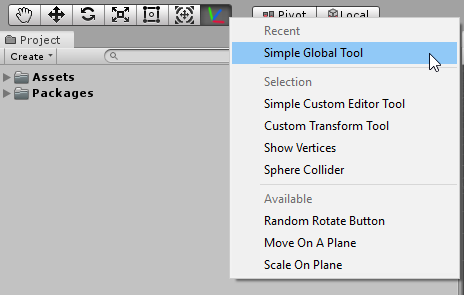
Unity Forum
Editor: Added new EditorTools API, allowing users to create new tools that behave like native tools. A new button has been added to the toolbar to...
Not an actual link to a tool, just an idea of where it could be
tight python
Yeah. I guess I will just create it. Does not seem like it will be difficult.
Even like the last 3 prefabs opened would increase my productivity a lot. Especially when tweeking things all over the project I find myself just jumping around the asset browser and it gets anoying
astral shadow
waxen sandal
Looks like a bug, try updating to 2020.3
Update worked!
Lesson for the future, always assume its a bug 😄
Man I wasted so much time tryna figure it out lol
waxen sandal
astral shadow
Update worked!
Lesson for the future, always assume its a bug 😄
Man I wasted so...
Glad it fixed it!
astral shadow
tight python
Even like the last 3 prefabs opened would increase my productivity a lot. Especi...
        var prefabStage = PrefabStageUtility.GetCurrentPrefabStage();
        if(prefabStage != null)
        {
            //There is a prefab staged
        }
Not sure what your entry event will be, but here's how you can see if you are currently staging a prefab or not.
null means the prefab stage window is not open
tough cairn
what other methods exists in Urelement's that will force propagate changes ? I tried the following :
MultiFloatSlotControlView field = ... ;

/// Method 1
field.MarkDirtyRepaint();

/// Method 2
var absMatNode = field.GetType().GetField("m_Node", Flags).GetValue(field);
absMatNode.GetType().GetMethod("Dirty", Flags).Invoke(absMatNode, new object[] { 0x3 });
// UnityEditor.Graphing.ModificationScope.Topological = 0x3

/// Method 3
( win as EditorWindow ).Repaint();
what im trying to do is change the input text field values inside the graph material node

like so :
var get_func = field.GetType().GetField("m_Get", Flags).GetValue(field) as System.Func<Vector4>;
var set_func = field.GetType().GetField("m_Set", Flags).GetValue(field) as System.Action<Vector4>;
set_func(new Vector4(1.01f, 0));

int field_index = 0;

field.Children().ToList().ForEach(x => {

    if (x is FloatField)
    {
        var ff = x as FloatField;
        ff.value = 1.01f;
        field_index++;
    }
});
 pure siren
Has anyone encountered this issue before?
https://answers.unity.com/questions/1420119/changing-isexpanded-property-from-another-editor.html
I'm using a similar approach to modify a serialized object from an Editor Window and the isExpanded property doesn't seem to be retaining
glacial sail
In a method marked by InitializeOnLoadMethod, using StageUtility.GoToMainStage() throws a bunch of errors, I assume it's because some editor logics are done being set up yet.
How do I fix it?
zenith estuary
I suppose you could add an EditorApplication.delayCall subscription which does the actual work
glacial sail
That worked, thanks.
pure siren
So isExpanded is tied to propertyPath. The problem I am facing is that when I reorder my array, all of the isExpanded values are not reordering with it, since isExpanded is mapped to the propertyPath of the array element location and not the serialized properties themselves. Does anyone know a way around this?
 gloomy chasm
pure siren
So `isExpanded` is tied to `propertyPath`. The problem I am facing is that when ...
gloomy chasm
pure siren
So `isExpanded` is tied to `propertyPath`. The problem I am facing is that when ...
There isn't. That is just how it works. If you control the reordering you can manually move the isExpanded state from the old path to the new one
glacial sail
How do I listen to stage change (eg StageUtility.GoToMainStage())?
gloomy chasm
glacial sail
How do I listen to stage change (eg `StageUtility.GoToMainStage()`)?
There are some internal events it looks like if you want those?
glacial sail
I ended up doing something a bit dirty.
gloomy chasm

GitHub
Unity C# reference source code. Contribute to Unity-Technologies/UnityCsReference development by creating an account on GitHub.
If ya want it
glacial sail
I have an editor window that wants to listen to stage change but only cares if the stage change comes from a source that I control, so I just hardcoded to let the source notify that editor window.
pure siren
gloomy chasm
There isn't. That is just how it works. If you control the reordering you can ma...
That's what I thought, I was thinking of doing that but it I would need to do it for every sub serialized property as well. Which I might have to end up doing, but it's gonna be complicated because my array holds different sub class types.
gloomy chasm
pure siren
That's what I thought, I was thinking of doing that but it I would need to do it...
Nah, you just iterate through them that part is 'easy' to do
Is there a good way to store settings that will be used at runtime outside of the assets folder?
glacial sail
When you select a camera, the scene view gets a floating window, how would I go about achieving that for my own component?
glacial sail
Is it possible to get the state of GUILayout.Button()? I need to know if it's normal/hovered/pressed.
I can check for hover by testing mouse position on last rect, but there doesn't seem to be a way to check for if it's pressed.
Ideally I'd just like to obtain the state somehow rather than having to do my own checks.
waxen sandal
Any random button or your own button?
finite cliff
Why is it my planar (2d) array which is inside a SO is refusing to save changes, but my regular array (1d) is saving fine?
Inside the custom editor (override void OnInspectorGUI()
// planar (2d array)
if (GUILayout.Button(tileRule.GetPlanarTileType(x, y).ToString(), GUILayout.Width(100),GUILayout.Height(100)))
{
// set selectedTileType to 1 for example, so button color changes
tileRule.SetPlanarNeighborType(x, y, selectedTileType);
}

// vertical (1d array)
if (GUILayout.Button(tileRule.GetVerticalTileType(y).ToString(), EditorStyles.miniButtonLeft,
GUILayout.Width(100),
GUILayout.Height(20)))
{
// set selectedTileType to 1 for example, so button color changes
tileRule.SetVerticalNeighborType(y, selectedTileTypeVertical);
}
Here is how I save them (inside the SO):
    public NeighborType[,] planarNeighbors = new NeighborType[3,3];
    public NeighborType[] verticalNeighbors = new NeighborType[2];
    public void SetPlanarNeighborType(int x, int y, NeighborType type)
    {
        planarNeighbors[x, y] = type;
    }

    public void SetVerticalNeighborType(int y, NeighborType type)
    {
        verticalNeighbors[y] = type;
    }
2d arrays can't be serialized
waxen sandal
You can do nested arrays though
finite cliff
because it all works fine in editor
but saving.. doesnt happen on restart
actually just to clarify I'm not trying to serialize (show in the inspector) the 2d array
but maybe it doesnt matter, regardless it wont save it being a 2d array?
waxen sandal
Serialized is whether it's saved really
finite cliff
Ah ok thank you, I'll work around
waxen sandal
and Unity needs to serialize to show it
astral shadow
Anyone know how to copy all contents of a SerializedProperty to a different SerializedProperty of the same type?
waxen sandal
 astral shadow
waxen sandal
https://docs.unity3d.com/ScriptReference/SerializedObject.CopyFromSerializedProp...
astral shadow
waxen sandal
https://docs.unity3d.com/ScriptReference/SerializedObject.CopyFromSerializedProp...
I thought so, but it seems that is for copying from a serialized property from one serialized object to another
I want to copy the values of one serialized property path on a serilialized object to another serialized property path on the same serialized object
            if (GUILayout.Button("Apply to all Frames"))
            {
                for (int i = 0; i < serializedProperty.arraySize; i++)
                {
                    var selProp = serializedProperty.GetArrayElementAtIndex(i);
                    selProp = CopyFrom(bindPointProp);
                }
            }
Basically I want to apply all the same values that one item has in the collection to ALL items in the collection
waxen sandal
Ah, don't think ther's an automated way then
But you can use Next(true) to go into all children and copy their values
astral shadow
Ah good idea! I will do that
glacial sail
waxen sandal
Any random button or your own button?
My own button.
Though I decided to use OnSceneGUI instead, and I'm trying to block all mouse events with no success.
I thought it would be as simple as:
private void OnSceneGUI()
{
    switch (Event.current.type)
    {
        case EventType.MouseDown:
        case EventType.MouseMove:
        case EventType.MouseUp:
        case EventType.MouseDrag:
            Event.current.Use();
            break;
    }
}
But I'm still able to click other game objects.
waxen sandal
Yeah I don't think you can
glacial sail
I mean I technically can by having an invisible button covering the entire screen.
Haven’t tried it but pretty sure it works, I just have no idea how to replicate that behavior in my own code instead of using that hack.
astral shadow
waxen sandal
But you can use Next(true) to go into all children and copy their values
It worked nicely, but I did have to make a switch case to go through the property type so I could assign the correct value. It is working though, so thanks!
Is there any solution yet for initializing list items with their default values?
int test = 3;
In Inspector this will always default to 0 when it is inside a collection
 delicate pivot
Hey, new day, new problem:
For some reasons i'd like to add edges via script in a graphview (cf: img 1)
for now I have the code below: ```cs
List<Port> portsList = ports.ToList();
//some other code we dont care...
var edge = new Edge()
{
input = portsList.Find(_port => (_port.node as ISTNode)?.m_id == edgeData.input.id && _port.portName == edgeData.input.portName), //find the port in list from edgeData which is a class I added
output = portsList.Find(_port => (_port.node as ISTNode)?.m_id == edgeData.output.id && _port.portName == edgeData.output.portName) //same with output
};
edge.input.Connect(edge); //I also tried with edge.input.ConnectTo(edge.output) with same result
edge.output.Connect(edge);
any idea?

 green palm
Hi all, I'm looking at the new Search stuff (and the experimental Dependency Viewer) and wondering if there's a way to replace all references to a particular asset. I can see on the forum post about the dependency viewer that its something that Unity would like to implement, but I'd like to be able to do it with what's available. Does anyone know if it is possible, and if so, how I might go about approaching this?
Starting with Search, I've been going through the documentation that exists and it looks like searching is possible via the API, but it isn't clear if I can get some data structure (like a List<>) of the objects/assets that the search returns. If anyone knows if this is possible (and also, how I might achieve this) then I've at least got a starting point. Any insight would be greatly appreciated
waxen sandal
    [MenuItem("Examples/SearchService/Class")]
    public static void Run()
    {
        void OnSearchCompleted(SearchContext context, IList<SearchItem> items)
        {
            foreach (var item in items)
                Debug.Log(item);
        }

        SearchService.Request("*.cs", OnSearchCompleted);
    }```
Is this not just it?Could be, think I've stared at the docs for so long my brain might have just packed in. Will have a play with it, thank you!
 visual stag
@west mesa don't cross-post. Your question is already visible in two channels. Nobody knows the answer, and this isn't even a relevant channel.
You can bump #📱┃mobile when it starts going off-screen.
 west mesa
visual stag
<@!961173314041155604> don't cross-post. Your question is already visible in two...
west mesa
visual stag
<@!961173314041155604> don't cross-post. Your question is already visible in two...
my bad
finite cliff
Do people normally use a single editor script for their custom inspectors or break it up depending on function? I only ask because, while it feels right to break it up I don't know how that plays in the order in which things are drawn to the inspector
(or if order even matters)
example: I have some buttons I'm drawing they serve a separate purpose.
now I'm going to expand by drawing object previews, thinking I should split that off into it's own editor script
edit; apparently only one InspectorGUI script call per inspector?
green palm
waxen sandal
```cs
[MenuItem("Examples/SearchService/Class")]
public static void Run...
Took me a while, but managed to achieve what I wanted. Thanks again!
 vapid prism
Do EditorWindows have some way of automatic serialization handling like Editor or PropertyEditor does? Or will I have to use ChangeCheckScopes and manually mark stuff for undo? I.E having a FloatField and changing it's value
 verbal maple
Hey, I'm just getting into how editor stuff works.
I don't have an editor specific class since I haven't needed one. Instead I use OnValidate() inside the class itself.
However, I'm trying to detect the instance's change in hierarchy, but can't seem to do that without a static call?
I need to perform an action on the instanced object when it get's changed in the hierarchy and I don't want to run the update in editor since it involves movement.
Is their a way to do this?
glacial sail
How do I get the size of scene view so I can use in OnSceneGUI to do GUI.Button and covers the entire screen?
Camera.current.pixelRect doesn't seem to be correct, it's quite a bit larger than what it shows.
glacial sail
Hmm it seems like Camera.current.pixelRect is 125% the true size, I have no idea where that comes from.
 silver pond
there any way to get keyboard input from within a EditorApplication.update() call? Like not using runtime input system
peak bloom
verbal maple
Hey, I'm just getting into how editor stuff works.
I don't have an editor specif...
Take a look at this https://docs.unity3d.com/ScriptReference/EditorApplication-hierarchyChanged.html
verbal maple
peak bloom
Take a look at this https://docs.unity3d.com/ScriptReference/EditorApplication-h...
Yes, I've already read that doc, but it requires a static call, which does not work with an instanced object.
peak bloom
wdym, create a new script just for that and with [InitializeOnLoadAttribute], it will get executed without having tied to certain instances or editorwindow
verbal maple
peak bloom
wdym, create a new script just for that and with `[InitializeOnLoadAttribute]`, ...
I NEED it to be for a specific instance is my issue 😅
peak bloom
I mean you may already cached it somewhere, so just filter it?
this what I'm doing with the GraphView's nodes connected to the gameObjects in the hierarchy
verbal maple
Is there a unique variable on a gameObject to filter by? I might have objects with the same name
peak bloom
var all = Resources.FindObjectsOfTypeAll(typeof(GameObject));
then look for your gameObjects's guid or id or whatever
make a guid for each gameObject
if you want it to be persistent
if you don't care about persistent id then instanceId should do it, depends on your game tbh
verbal maple
The idea is to update a list on the script component when the object is reparented. (During the editor)
If the OnHierarchyChange can provide the object that was changed, then this would be viable, but otherwise, it won't work since I'll have multiple of these objects and I won't be able to target the one that needs to be updated
peak bloom
you must couple it with OnValidate, so when it gets a new parent the check was done via OnValidate otherwise, OnHierarchyChange
OnHierarchyChange supports reordering, but not quite sure what kind of reordering. I highly doubt re-parenting parts of it, but you should check
verbal maple
I'm not sure what you mean by couple it with OnValidate... OnValidate is for instanced components while OnHierarchyChange is for static calls.. the 2 can't communicate..
peak bloom
by that I mean, you serialize a some value in the inspector which indicates that the parent was changed, Onvalidate deals with this value changes, then based on that serialized value and in the OnHierarchyChange do the filtering, check if the serialized value is still the same(meaning same parent) or not (parent was changed)
verbal maple
But OnValidate isn't called when the object is reparented.. otherwise this wouldn't be an issue, I would just use OnValidate
peak bloom
yeah it didn't sadly .. then just use hierarchyChange then, just check if the parent is still the same or not
[InitializeOnLoadAttribute]
public static class HierarchyMonitor
{
    static HierarchyMonitor()
    {
        EditorApplication.hierarchyChanged += OnHierarchyChanged;
    }

    static void OnHierarchyChanged()
    {
        var all = Resources.FindObjectsOfTypeAll(typeof(GameObject));
        for (int i = 0; i < all.Length; i++)
        {
            var t = all[i] as GameObject;

            if (t.GetComponent<someClass>.parentNameSerializedValue != t.transform.parent.gameObject.name)
            {
                Debug.Log("Parent was changed!);
            }
        }
      }
that should do it, didn't try it, but you should get the idea
you still need OnValidate to fill the initial parentName then serialize it
edited there, missing parent
verbal maple
Ok, so just adding a new variable and checking them across the board.
Guess I need to decide if that's worth doing over just running the update in editor 😩
Another option was to create a support script that runs update in editor so i don't have to on the actual one, but then that would be a useless script when the project is built, adding clutter to the build file..
I'm handling OnValidate under an #if UNITY_EDITOR so that it doesn't get compiled in the build.
Maybe I'll end up doing the entire support script under that and just build with an empty support script file. Might not be too much of an issue for the build file.
peak bloom
like why 😆 ... I've shown you how to validate the parent.... also it won't be checked everytime bcos it's subscribed to hierarchyChange
the api is built for this scenario
verbal maple
Ya, but this way I can avoid dealing with it and having it clutter the build file. Because that code becomes useless after the project is built, which means it just takes space in the build unnecessarily.
I'm trying to see how clean I can get my build for mobile.
I'll test both ways and see the results.
Thanks for the insight
peak bloom
aight, good luck
also see this, to better understanding what's included in build or not https://docs.unity3d.com/Manual/SpecialFolders.html
verbal maple
Thanks, also sorry, I probably should have mentioned, this will also occur during runtime, so it's not completely useless 😅
And thanks, I'll check it out
oh damn, i forgot about editor folder not being included in the build.
I named my Editor folder "Editor" out of habit haha
 molten sierra
Hi, how is Odin Inspector compared to Unity Editor Toolbox? Is it worth $55 over that free solution?
Odin Inspector and Serializer: https://assetstore.unity.com/packages/tools/utilities/odin-inspector-and-serializer-89041
Unity Editor Toolbox: https://github.com/arimger/Unity-Editor-Toolbox

Use the Odin - Inspector and Serializer from Sirenix on your next project. Find this utility tool & more on the Unity Asset Store.

GitHub
Tools, custom attributes, drawers, hierarchy overlay, and other extensions for the Unity Editor. - GitHub - arimger/Unity-Editor-Toolbox: Tools, custom attributes, drawers, hierarchy overlay, and o...
whole steppe
yo someone give me a game that already has code
 stark geyser
@whole steppe It's called a tutorial. You can find them pinned in general code channels. Don't spam unrelated channels, read #🔎┃find-a-channel
 last token
molten sierra
Hi, how is Odin Inspector compared to Unity Editor Toolbox? Is it worth $55 over...
last token
molten sierra
Hi, how is Odin Inspector compared to Unity Editor Toolbox? Is it worth $55 over...
I won odin inspector from a gamejam, and I do like it. But the big problem with it is the fact that it causes a lot of crashes and other problems, that while won't stop you from developing things, will make things a lot more annoying.
I contacted them about the crashes and they just said that they can't do anything as it's Unity who's at fault. Kinda dissapointed at the answer tbh
molten sierra
last token
I contacted them about the crashes and they just said that they can't do anythin...
Thanks for the answer! That's surprising at such price they can't put out stable versions. May I ask when did you use it? Maybe more recent version would be more stable?
last token
molten sierra
Thanks for the answer! That's surprising at such price they can't put out stable...
Oh I'm still using it. It just causes random crashes from time to time as well as a problem where my projects wont launch the first time after a system reset
gloomy chasm
last token
I contacted them about the crashes and they just said that they can't do anythin...
While it can be disappointing, there are definitely times where it is simply not possible at all to fix bugs or even safe guard against them due to how Unity does things. I have run in to it my self a number of times.
molten sierra
last token
Oh I'm still using it. It just causes random crashes from time to time as well a...
Oh dang! What Unity version are you using?
gloomy chasm
molten sierra
Hi, how is Odin Inspector compared to Unity Editor Toolbox? Is it worth $55 over...
I would say it depends. What is it that you want Odin for? Is it just the attributes? The serialization? Easier APIs for custom editors?
last token
molten sierra
Oh dang! What Unity version are you using?
2021.1.20f1
molten sierra
gloomy chasm
I would say it depends. What is it that you want Odin for? Is it just the attrib...
Yes all of them. I want to improve my workflow.
gloomy chasm
molten sierra
Yes all of them. I want to improve my workflow.
Then yeah I would say Odin is definitely worth the money. Their drawers generally look nicer imo, they have more of them and they have a very nice API. The serialization is fine, however from what I remember it doesn't support nested prefabs 100%?
It is polished a pretty solid. Of course everyone will have different experiences, but that is generally the case from my own and what I have seen from others.
Basically, if you want all of the things that it does, then yes it is easily worth the $55. If you only want some of it though, then the value definitely goes down.
molten sierra
Tbh I'm not entirely sure if I want all of it. But right now I'm not using any of such editor plugin, so any plugin should be a good plugin, and I want to look for the best one.
gloomy chasm
molten sierra
Tbh I'm not entirely sure if I want all of it. But right now I'm not using any o...
Some one else asked this question before, and this is what I told them https://www.reddit.com/r/Unity3D/comments/ppda3n/is_odin_still_worth_it/hd5wvc0/?context=3
gloomy chasm
I wouldn't imagine that it does as it is not nearly as low level has Odin
molten sierra
Thanks a lot for the answers! I think I gotta try out these open source solutions first before buying it.
gloomy chasm
Ooooh! In 2022.2 Unity will switch to using UITK for default inspectors! 🎉

@visual stag It is finally happening! 😄
 soft creek
When drawing an enum with EditorGUI.PropertyField is there any way to disable certain enum options?
peak bloom
Oh dayum, they really switched to ui-toolkit
 jovial zealot
Hi, I need to do the default property drawer for a given System.Type, without there being an actual property.
How do I achieve that
peak bloom
I'm still using imguicontainer to render the inspector on top of ui-toolkit for now, guess time to change that
jovial zealot
The actual field is an object, while I need to do the drawer for a specific System.Type, then assign it to that field
so I want e.g. a boxed int or float or whatnot
possible to do without an if-else over types?
that I'm planning to support?
pls ping if you answer, thank you
vapid prism
vapid prism
Do EditorWindows have some way of automatic serialization handling like Editor o...
Anyone?
gloomy chasm
vapid prism
Do EditorWindows have some way of automatic serialization handling like Editor o...
If you mean you are changing the properties that are stored/defined within the window, then you need to register the undo yourself or create a SerializedObject for the window and use that to change the properties.
gloomy chasm
jovial zealot
The actual field is an `object`, while I need to do the drawer for a specific `S...
How are you planning on saving the value? Since Unity can't serialize object fields.
 hoary grove
Maybe an extension would help but...
Is it possible to drag and drop a transform ontop of a Vector2/3 for a position? I know I could do a Transform, but I'm using Scriptable Objects to store this information.
gloomy chasm
hoary grove
Maybe an extension would help but...
Is it possible to drag and drop a transfor...
You mean drag & drop a transform component on to a Vector field to copy the position vector to the vector field that the transform is dropped on?
hoary grove
gloomy chasm
You mean drag & drop a transform component on to a Vector field to copy the posi...
Yup. Exactly that.
gloomy chasm
hoary grove
Yup. Exactly that.
I don't think so. But if you could, the way you would need to do it for IMGUI is to add a callback to the internal EditorApplication.beforePropertyGUI event and get the drag and drop info there and also check if the property is a vector
It gets more complicated for supporting UITK
Basically, it would be a pain and most likely not worth it. You can right-click on the field to copy/paste values
hoary grove
Yeah, Im just trying to figure out the best way to handle this :/ Doing the copy paste is prone to errors, especially when handing this off to non-programmer folks.
gloomy chasm
hoary grove
Yeah, Im just trying to figure out the best way to handle this :/ Doing the copy...
What is the 'problem' you are trying to solve for?
Or what workflow are you trying to improve?
hoary grove
gloomy chasm
What is the 'problem' you are trying to solve for?
So, all of my attacks/abilities/etc in my game are Scriptable Objects. Data driven and all that Jazz. Been working perfectly fine up until I decided to implement a boss fight system.
So, example being if I create an Ability that does something like say: Spawn explosion at Position 1, Delay for 2 Seconds, Position 2, Delay for 5 Seconds, Position 3, Delay for 2 seconds...
The problem being, I'd like to keep it simple for the other developer who isn't a programmer.
Ideaily I'd have something like a List of Structs in the SO, where the struct contains a: Prefab, Vector3 Rotation and Position, and a delay.
gloomy chasm
hoary grove
Ideaily I'd have something like a List of Structs in the SO, where the struct co...
Right... so how does that relate to wanting to copy the transform pos?
hoary grove
Because at the end of the day, having the other dev need to right click, copy POS (Not world pos), paste, same for rotation, into each SO would be a pain.
More prone to error.
gloomy chasm
hoary grove
Because at the end of the day, having the other dev need to right click, copy PO...
I guess I am asking what are they copying the Pos from and to?
hoary grove
From: The world/hierarchy.
To: Scriptable object.
If it wasn't an SO, I'd just make a Transform and be done with it.
gloomy chasm
hoary grove
From: The world/hierarchy.
To: Scriptable object.
No, I mean like what/why are they copying.
Another option would be to use an ExposedReference and reference the transform directly
oooh, hold up, you control the Vector fields right?
If so then yeah you can really easy implement what you want to do with a custom editor
However I will say from a UX standpoint it won't be initiative unless you add some sort of indicator to the field to show that it accepts transforms like that.
hoary grove
ExposedReference doesn't work, because you still cant drag and drop onto it from the scene.
gloomy chasm
hoary grove
ExposedReference doesn't work, because you still cant drag and drop onto it from...
Yeah you can...?
hoary grove
I just tried it.
I have a Scriptable Object with a public ExposedReference<Transform> test;
Dragging and dropping a Transform thats in the scene ontop of it, deosn't register it.
gloomy chasm
Oh you are right
odd
I would consider that a bug
Well like I said, if you control the drawing then you can support the dnd function you want yourself
jovial zealot
gloomy chasm
How are you planning on saving the value? Since Unity can't serialize `object` f...
it can't, huh? what about a fixed length byte array?
given I do the decoding manually
gloomy chasm
jovial zealot
it can't, huh? what about a fixed length byte array?
Yeah it can do that. It can do string, bool, float, byte, int, long, double, array [] and List<>
jovial zealot
gloomy chasm
Yeah it can do that. It can do string, bool, float, byte, int, long, double, arr...
no I mean like an in-memory one
e.g. byte[16], the value type one
gloomy chasm
jovial zealot
no I mean like an in-memory one
If you have this [SerializeField] object _objectField; Unity cannot serialize it because it is object
jovial zealot
yeah I got that
Shoot how should I go about storing that, actually. Storing and decoding bytes is kind of a pain in the butt actually
you need to take care of the endianness too
gloomy chasm
jovial zealot
Shoot how should I go about storing that, actually. Storing and decoding bytes i...
Would storing the value in a byte array and the type in a string work for your case?
jovial zealot
gloomy chasm
Would storing the value in a byte array and the type in a string work for your c...
huh it can serialize fixed size byte arrays natively, I'm surprised
jovial zealot
gloomy chasm
Would storing the value in a byte array and the type in a string work for your c...
yeah I don't need to store the type actually, I'm going to know it through other means
I'm doing a tagged union fyi
gloomy chasm
jovial zealot
huh it can serialize fixed size byte arrays natively, I'm surprised
It is converted to an array of ints internally iirc
gloomy chasm
jovial zealot
I'm doing a tagged union fyi
I'm not familiar with that
Oh like a variant
jovial zealot
gloomy chasm
I'm not familiar with that
option type
yeah
i think the cool kids call them monads
gloomy chasm
I just did one of those my self. I only had to support the basic types so I just used an enum for the type and had a value field for each type
jovial zealot
gloomy chasm
Would storing the value in a byte array and the type in a string work for your c...
Is there any easier way to check this theory than forcing binary serialization instead of yaml and then like bumping the number of bytes by X and seeing if the binary file size jumped by 4*X. Well, I guess it's not that hard now that I spelt that out
gloomy chasm
jovial zealot
Is there any easier way to check this theory than forcing binary serialization i...
Check what theory? About bytes switching to ints?
jovial zealot
yeah
gloomy chasm
Actually thinking about it more... I don't think it does. My thinking was that SerializedProperty only has an intValue property, but I think it might just cast it to/from the byte
jovial zealot
yeah it could be
gloomy chasm
Well string and byte array are your only options for serializing generic data on to UnityEngine.Objects, so it is a bit of a null point.
gloomy chasm
#archived-shaders would be the appropriate channel I think, as this one is for discussion about creating custom editor windows an inspectors.
 remote ruin
gloomy chasm
<#497874081329184799> would be the appropriate channel I think, as this one is f...
remote ruin
gloomy chasm
<#497874081329184799> would be the appropriate channel I think, as this one is f...
Oh, sorry
 dusk vector
are there any "must have" editor extensions that everyone should have?
vapid prism
gloomy chasm
If you mean you are changing the properties that are stored/defined within the w...
Yeah that's exactly what I mean, but how exactly would I record such an undo? Since I don't really have an object I am manipulating, since it's only changing the values of the editor window?
gloomy chasm
vapid prism
Yeah that's exactly what I mean, but how exactly would I record such an undo? Si...
The editor window inherits from ScriptableObjects
var serializedObject = new SerializedObject(this);
vapid prism
gloomy chasm
The editor window inherits from ScriptableObjects
Wait what, I've somehow completely missed this
gloomy chasm
vapid prism
Wait what, I've somehow completely missed this
Yup, Editor does as well
vapid prism
huh, well all of a sudden a lot of things makes sense.
Many thanks for middle of the night enlightenment
gloomy chasm
Sure thing!
 lyric herald
anyone know how to draw a list field in unity editor window (not inspector)
waxen sandal
Propertyfield
lyric herald
doesn't work in editor window if there's not a serialized property to reference
goal is to drag/drop some sprites from Assets into a list in an editor window to generate a scriptable object
could i just use FindProperty referencing the SO class sprite list to init the property field?
in the past i've just used Selection.GetFiltered<Sprite>(SelectionMode.Unfiltered) in order to temporarily store an array for processing the sprite references
since it seems impossible to just have a list in an editor window that you can populate w/o having some serialized property tied to another class outside the editor window
gloomy chasm
lyric herald
goal is to drag/drop some sprites from Assets into a list in an editor window to...
EditorGUILayout.ObjectField(..) ?
lyric herald
none of those were quite it. Found a solution w/ help on a dif discord.
https://stackoverflow.com/questions/56122827/is-there-a-way-to-use-serializedobject-in-editorwindow-script
answer 2 here

Stack Overflow
I have a script with a List :
using System;
using System.Collections;
using System.Collections.Generic;
using System.IO;
using System.Linq;
using UnityEditor;
using UnityEngine;
public class Test :
have to create a serialized object ref to the editor window itself, then access the property from it that way
 deft coral
I have this as my scriptable object
using System.Collections.Generic;
using UnityEngine;

[CreateAssetMenu(fileName = "ToDo")]
public class ToDoScript : ScriptableObject
{
    [TextArea]
    public string Notes = "";

    public List<toDo> toDos = new List<toDo>();

    public void Reload()
    {
        Debug.Log("Reloaded");
    }
}

[System.Serializable]
public class toDo
{
    public string name;
    [TextArea]
    public string toDoNotes;
    public bool isDone;
}
Then this as my editor script
[CustomEditor(typeof(ToDoScript))]
public class ToDoEditor : Editor
{
    public override void OnInspectorGUI()
    {
        ToDoScript toDo = (ToDoScript)target;
        EditorGUILayout.LabelField("Main Notes");

       toDo.Notes =  EditorGUILayout.TextArea(toDo.Notes);


        serializedObject.ApplyModifiedProperties();
    }
}
Whatever I type in the inspector then close unity doesn't save
after I open it
gloomy chasm
deft coral
Whatever I type in the inspector then close unity doesn't save
That is because you are note setting the value using SerializedProperties
deft coral
Can you point me to a video? or explain what should I do?
I just tried making custom editor an hour ago or so
gloomy chasm
deft coral
Can you point me to a video? or explain what should I do?
Look in the pinned messages
deft coral
Thank you
peak bloom
Any idea how to fix those flickers when switching between graphviews?... My suspicion is with that scrollview which must be delayed the next frame, but without it, the horizontal scroll AND the automatic scrolling to the newly created visualelement will break... I'm at lost here
 karmic ginkgo
didnt work with uitk but with imgui this happens if you break out of a draw loop before it finishes, maybe there is a way to cache the switch request, and then process it just before the ui finishes processing (some event maybe)
peak bloom
Yeah, this project is basically the 1st time of using ui-toolkit, kinda still alien to me
 misty igloo
curious question, I'm trying to make a dropdown field with a toggle next to it in a CustomPropertyDrawer (using EditorGUI not EditorGUILayout) but I want the toggle to line up with all the other 'right aligned' input fields, what would be the best approach?
misty igloo
 crude relic
use `rect = EditorGUI.PrefixLabel( rect, etc )`
crude relic
use `rect = EditorGUI.PrefixLabel( rect, etc )`
does this work with foldouts?
misty igloo
crude relic
<@168973182877958144>
this one
 crude relic
uh
I'm lost
what's stopping you from just chopping out the rightmost 16 px of your rect
glacial sail
Is there a way to force editor scene to run at 60 FPS?
crude relic
why
glacial sail
For previewing things.
crude relic
not that I know of
the editor doesn't consistently run at a framerate
unless you have preview animated textures on
glacial sail
A bit of a hack:
private async void EditorLoop()
{
    EditorUtility.SetDirty(gameObject);
    SceneView.RepaintAll();
    await Task.Delay(10);

    EditorLoop();
}
The FPS seems to be pretty low but good enough for my preview purpose.
crude relic
that is indeed a hack
but glad it works for you
I thought you needed a fixed specific fps
If you just want to repaint every possible tick you can just call Repaint inside a sceneviewgui callback
glacial sail
Does that actually work?
glacial sail
Hmm, I'm doing OnSceneGUI on a custom editor, it doesn't receive a scene view as parameter though.
crude relic
that's not what I'm referring to
SceneView.onSceneGUI (or whatever the callback name is)
glacial sail
glacial sail
That works perfectly, thanks.
crude relic
👍
glacial sail
Speaking of SceneView.RepaintAll, is it really bad too use?
glacial sail
Ah.
I have some previewing logic in OnSceneGUI and some things in there might want to force an update, but obviously it doesn't have a reference to the scene view so it has to do SceneView.RepaintAll, so I was thinking if that can be optimized a bit.
Then I realized there's no need now, since I'm already calling it to update every frame.
crude relic
SceneView.RepaintAll just repaints all the scene views
if you have only one then it just repaints that
btw you can get the current sceneview in OnSceneGUI using https://docs.unity3d.com/ScriptReference/SceneView-currentDrawingSceneView.html
crude relic
editor or the sceneview?
glacial sail
Eh, either can work I guess.
crude relic
try UnityEditorInternal.InternalEditorUtility.isApplicationActive
glacial sail
Seems like when I'm doing the repaint every frame thing my CPU and GPU usage go pretty high.
That's what I'm trying to prevent basically.
crude relic
m
misty igloo
crude relic
what's stopping you from just chopping out the rightmost 16 px of your rect
the green section is a foldout with a toggle next to it. I want the toggle button to align with the right aligned elements (i.e. input field, toggle box etc.) at the moment it doesn't because it is 2 separate objects done with EditorGUI
crude relic
You can move the toggle wherever you want by manipulating the rect
@glacial sail RepaintAll may be drawing it as fast as your computer can handle
misty igloo
is there a way of having it align with inputs though? it appears most properties are drawn in a 2 column fashion with label on left and input on right, I want to have my foldout property on the left and my toggle box on the right column
glacial sail
crude relic
<@451999506918277131> RepaintAll may be drawing it as fast as your computer can ...
But animated texture preview also does that right?
I wonder if it's an issue for that too.
crude relic
@misty igloo I don't know why it feels like we're just talking past each other but I am still missing the issue

 misty igloo
crude relic
<@168973182877958144> I don't know why it feels like we're just talking past eac...
misty igloo
crude relic
<@168973182877958144> I don't know why it feels like we're just talking past eac...
with the way I have my custom property set up the tick box always stays a fixed distance from the left, whereas a normal tickbox adds distance between the label and the tickbox when you expand the size of the inspector window
crude relic
aah
I believe the labelWidth for normal fields is something like 60% of the window width
crude relic
you can tweak EditorGUI.labelWidth
as needed
or just draw your dropdown with that width
not sure if labelwidth applies to the dropdown
misty igloo
drawing it with the width 🙂
EditorGUIUtility.labelWidth was the offset I needed tyvm @crude relic
crude relic
yw
glacial sail
What's the height used in EditorGUILayout.Space?
visual stag
You should really download the source and just look with questions like these
visual stag
It may have changed over the years with the UI reworks
crude relic
as of 2019 it was 6
glacial sail
I was under the impression that it's exposed somewhere, I just couldn't find it in EditorGUIUtility and a bunch of places.
crude relic
it's not, it's just a hardcoded value
glacial sail
Welp.
visual stag
🌈 look at the source
crude relic
and that's what I did! 😊
glacial sail
That UnityCsReference repo right?
visual stag
yes (it was 6 back in 2017 too, just hard-coded into the space)
glacial sail
Look at source feels like a last resort solution tbh.
crude relic
it's really not
visual stag
It's literally the first thing I do to answer most editor questions
glacial sail
I attribute that to editor stuffs being poorly documented than anything.
Or lack of resource in general.
gloomy chasm
That is exactly what I do too ^
crude relic
yep
and that's usually when I discover that it's some internal bullshit and I have to break out the reflection again
:I
glacial sail
If you already know where to look then sure (which admittedly my question belongs)
crude relic
@glacial sail I mean in some sense yes, but also I don't think it's reasonable for them to document the entirety of how the editor works
glacial sail
But lots of times I couldn't find a lot of things and it's not apparently in source.
gloomy chasm
crude relic
and that's usually when I discover that it's some internal bullshit and I have t...
lol, it doesn't even really register with my brain any more if something is internal or not.
crude relic
haha
glacial sail
Like UnityEditorInternal.InternalEditorUtility.isApplicationActive you mentioned, no way would I ever find it without digging for hours.
visual stag
Learning how to look is a part of it, but it's not difficult once you know vaguely what to search for or how to get an entry to search for using one of the GUI debuggers
crude relic
gloomy chasm
lol, it doesn't even really register with my brain any more if something is inte...
@glacial sail I literally pulled that from one google search
visual stag
That's not really a source-code related search thing
crude relic
oops misreplied lol
gloomy chasm
lol
crude relic
gloomy chasm
lol, it doesn't even really register with my brain any more if something is inte...
I'm never surprised anymore, just disappointed
visual stag
Unless something in the editor was using that functionality and you wanted to see how it was done
glacial sail
Right but I'm just saying, I've been doing editor stuffs the past week and it's been quite a step down in DX with the lack of docs and resources in general.
crude relic
what is DX
gloomy chasm
I was about to ask that too
glacial sail
Developer experience.
crude relic
I don't think that's a real term
visual stag
Like, the other day I was wanting to make a bounds handle for a thing, and I didn't google how it works or look at the docs, I just searched for "BoxCollider Editor" and then ctrl-f'd handle
crude relic
no one cares about developers 😄
glacial sail
🤣
crude relic
visual stag
Like, the other day I was wanting to make a bounds handle for a thing, and I did...
yeah basically this is me every time
gloomy chasm
visual stag
Like, the other day I was wanting to make a bounds handle for a thing, and I did...
In this case it would probably would have been faster to just google haha
gloomy chasm
visual stag
It really wouldn't have been 😛
The BoxBoundsHandle manual page is the the first result!
crude relic
I think he was making a custom handle
but wanted to duplicate some of the functionality
gloomy chasm
Well it is beside the point either way
visual stag
The point is, I go where I know the information is, and where a usecase is
and that tends to be in the source. If you want to go to google or the docs first, sure, but if they don't provide, the source is there, and is meant to be used for this
gloomy chasm
Yeah!
visual stag
I was very sad when they stopped updating it for that long period 😛
crude relic
yeah I remember reading they were going to remove it
but I guess they didn't do that
visual stag
I don't remember them saying that. They were doing some long migration and it never was high on their list afaik
gloomy chasm
visual stag
I was very sad when they stopped updating it for that long period 😛
Yeah, I am happy they are updating again, but for the most part I still use dnSpy and Rider
glacial sail
Again that only applies if you know where and what to look for.
visual stag
Sure, and Space was what got me started on it 😛
glacial sail
Yeah that's fair, that question was a perfect use case of just looking into source.
crude relic
@visual stag it was ages ago I remember hearing some scuttlebutt, it was probably bs
@glacial sail understanding how to find where to go and what to look for is a skill
glacial sail
glacial sail
How do I get the size of scene view so I can use in `OnSceneGUI` to do `GUI.Butt...
This problem I was having, really had no way to find an answer for it.
The answer is that you need to divide it by EditorGUIUtility.pixelsPerPoint.
visual stag
gloomy chasm
Yeah, I am happy they are updating again, but for the most part I still use dnSp...
I used to not bother with the source and just used IlSpy (and DnSpy, but DnSpy felt more annoying to search with), but Rider's search and having everything actually as it's written means I barely decompile unity source unless it's quick heads-up information or debugging.
gloomy chasm
visual stag
I used to not bother with the source and just used IlSpy (and DnSpy, but DnSpy f...
Yeah, DnSpy feels kind of annoying to search. I mostly use Rider if I want to take a quick peak at what internal methods and stuff there are
glacial sail
My UI framework feels mostly done now, editor stuffs are a big part of it.
I can write code like:
[PreviewSize(240, 60)]
public class Counter : Widget
{
    private readonly Texture2D _icon;
    private readonly string _name;
    private readonly Ref<int> _value;

    public Counter(Texture2D icon, string name, Ref<int> value)
    {
        _icon = icon;
        _name = name;
        _value = value;
    }

    protected override void Setup()
    {
        var text = Computed(() => $"{_name}: {_value.Value}", _value);

        Render(
            new Btn()
                .OnClick(() => _value.Value++)
                .Children(
                    new Cols()
                        .Margin(10)
                        .Gap(10)
                        .Children(
                            new Img(_icon)
                                .Width(40),

                            new Lbl(text)
                                .FontSize(24)
                                .FontStyle(FontStyle.Bold)
                        )
                )
        );
    }
}
Editor will use reflection to find the ctor and have an interface for you to bind ctor parameters to preview.

And it boots up a preview scene, in which you can actually interact with the UI, without having to run the game at all.
 glacial sail
Nope, everything from scratch.
crude relic
isn't this kind of what UITK is trying to do 😄
glacial sail
UI Toolkit has its issues that's ultimately not a good fit, on top of it being not near production ready.
glacial sail
The 2 most important requirements are:
- UI components should be code only, no editor that generates a bunch of crap that's unfriendly to version control and code review
- Able to preview and interact with the UI directly in editor without having to play the game, this includes not just the visual but also the actual logic (in the example I can actually click the button, and the counter will actually go up) in order to allow developing and testing each UI component in isolation.
crude relic
so in order to get functionality you communicate values through Ref<>
glacial sail
Yep it's a reactivity system very similar to Vue's, a web frontend framework.
crude relic
yeah I know Vue
I'm more familiar with rxjs bc my work does Angular
but the principle is similar
glacial sail
Ah yeah
Writing UI this way is so much nicer, than whatever imperative way there is.
I can build an entire app, test it, without ever booting up the game once 😄
 crude relic
pretty cool
gloomy chasm
@glacial sail So are you using UGUI for rendering and layout? Or is it completely custom?
The fact that it still uses GOs bugs me a bit haha, but it makes sense.
Looks cool though!
glacial sail
gloomy chasm
<@451999506918277131> So are you using UGUI for rendering and layout? Or is it c...
Rendering yes, layout is custom.
 polar escarp
can anybody explain this? the array with the element zero isn't expanding properly. I'm using an editor script to show the scriptable object in the editor. I'm thinking this is a unity bug though... BTW, it's only the first element of the array that doesn't display properly
(I came from beginner coding but moved here cause I was told to lol)
 visual stag
If it's just the first element, I imagine it's a bug.
visual stag
But if you are using a property drawer, you do need to override GetPropertyHeight and return how tall the property is
polar escarp
I don't believe I'm using that. I'm not too familiar with editor extensions.
visual stag
How does your script work?
polar escarp
using System.Collections;
using System.Collections.Generic;
using UnityEngine;
using UnityEditor;

[CustomEditor(typeof(Planet))]
public class PlanetEditor : Editor
{
    Planet planet;
    Editor shapeEditor;
    Editor colorEditor;
    public override void OnInspectorGUI()
    {
        using (var check = new EditorGUI.ChangeCheckScope())
        {
            base.OnInspectorGUI();
            if(check.changed)
            {
                planet.GeneratePlanet();
            }
        }

        if(GUILayout.Button("Generate Planet"))
        {
            planet.GeneratePlanet();
        }
        DrawSettingsEditor(planet.shapeSettings, planet.OnShapeSettingsUpdated, ref planet.shapeSettingsFoldout, ref shapeEditor);
        DrawSettingsEditor(planet.colorSettings, planet.OnColorSettingsUpdated, ref planet.colorSettingsFoldout, ref colorEditor);
    }
    void DrawSettingsEditor(Object settings, System.Action onSettingsUpdated, ref bool foldout, ref Editor editor)
    {
        if(settings != null)
        {
            // TODO: what in the world is this syntax????
            foldout = EditorGUILayout.InspectorTitlebar(foldout, settings);
            using (var check = new EditorGUI.ChangeCheckScope())
            {
                if(foldout)
                {
                    CreateCachedEditor(settings, null, ref editor);
                    editor.OnInspectorGUI();

                    if(check.changed)
                    {
                        if(onSettingsUpdated != null)
                        {
                            onSettingsUpdated();
                        }
                    }
                }
            }
        }
    }
    private void OnEnable()
    {
        planet = (Planet)target;
    }
}
``` pretty simple, I just have a few scriptable objects that I'm drawing into the editor. This comes from a tutorial, but I pretty confidently understand all of itIt's nothing as too crazy as far as I'm aware, so I'm pretty sure It's a bug in unity
visual stag
Someone else had a very similiar bug not long ago, they just used a different version and it fixed #↕️┃editor-extensions message
so I imagine it is just a bug
polar escarp
Ah I see. I'm on the alpha because I was trying to fix something. Would you recommend trying to downgrade? (Is that even possible?)
visual stag
Sometimes it works, sometimes it causes ongoing issues. It's really the kind of thing I do when I'm desperate. If you have it on source control it's less of a risk though. Deleting the Library folder before you change versions can help fix some cache issues you can get by doing it.
polar escarp
Aight, well I should probably be on LTS anyways so I guess I'll try.
oh god this backup is going to take forever
crude relic
what are you backing up
polar escarp
Like all my unity projects
crude relic
you only need to back up assets, projectsettings, and packages
library and the others isn't necessary
are you using source control
polar escarp
That's true, but I keep backups of all my project files just incase something happens. I suppose I should just do that though
crude relic
you should be using source control
polar escarp
Not for this project currently, I'm just using an OS backup tool
polar escarp
Yeah I'm looking. Literally 2 gb on my drive for that one project
crude relic
it's all the cached generated assets and such
polar escarp
ah that explains it.
crude relic
so unless you've done something very funky it will be regenerated perfectly when you open the project
polar escarp
makes sense.
aight thx. Is there a source control that isn't an online version? Like github, but just for my computer personally?
Or would that just be plain git
glacial sail
Most IDE have built in git integration now.
In VS Code it's just clicking one button and you have a local repo.
Drop in gitignore for Unity, commit, and you are done, less than a minute.
pure siren
How can I have an Editor window always open when the project is opened?
gloomy chasm
pure siren
How can I have an Editor window always open when the project is opened?
Just check if the window is open in a InitilizeOnLoad method and open the window back up in the Destroy method of the window
green palm
Does anyone have any advice about how to go about changing references in prefab properties? I have the reference GUID, can see it in the .prefab file and can get access to some of the data in that file via reflection (which I'm new to), but I'm having difficulty figuring out what part of the .prefab file is accessed via the object I'm looking at, and what is part of a component, or base prefab etc. Alternatively, if someone knows of a better way of replacing those references, I'd be very happy to hear it
Any insight would be appreciated!
pure siren
gloomy chasm
Just check if the window is open in a InitilizeOnLoad method and open the window...
InitializeOnLoad seems to get called even when scripts are recompiled, I just want it to be opened the first time the Editor is opened. Is there a way to do this?
gloomy chasm
pure siren
InitializeOnLoad seems to get called even when scripts are recompiled, I just wa...
Oh, just when the editor first opens? As far as I know there isn't. Just toggle a bool in SessionState that the window has been opened, and in InitializeOnLoad check the state of the bool
gloomy chasm
green palm
Does anyone have any advice about how to go about changing references in prefab ...
Can you explain what you mean by "change references in prefab properties"? And how that relates to GUIDs in this case?
pure siren
gloomy chasm
Oh, just when the editor first opens? As far as I know there isn't. Just toggle ...
Ahh yes, I forgot about session states. Thanks!!
green palm
gloomy chasm
Can you explain what you mean by "change references in prefab properties"? And h...
Yep, sure. My terminology might not be very accurate, so feel free to press me on anything that is unclear. A bit more context:
I have a GUID of a particular object, and am using the dependency search to get all the objects which have a reference to it. Some of these are prefabs. I want to access the property on that prefab which has the GUID as a value (my ultimate goal being to replace that GUID with another one -> to replace the reference)
If I look at the .prefab file, I can find the GUIDs I'm looking for. But I'm struggling to access them via code

(I may have used the word "property" when I meant "field")
waxen sandal
You can use SerializedObject and SerializedProperty to get those
green palm
waxen sandal
You can use SerializedObject and SerializedProperty to get those
Thank you! I just had that thought as I was re-reading my own message again as well. I'll look around and see if I can find them.
waxen sandal
If you only have the GUID though and not an actual object reference then it might be hard to switch them around
And there's no api to modify meta files as text rather than as Unity Objects
So you'll have to open it as a file and find/swap the GUID
green palm
I think I explained poorly - should be replacing with references, just using the GUID to match that I'm doing it in the right place. I'll give it a shot. Bit skeptical about it all working nicely, from looking at the forums it seems like fiddling with prefabs can result in lots of broken references/hierarchies
Thanks for the help though
green palm
Not sure what you mean by loading, can you clarify?
crude relic
the type of prefab components you're scanning through
I'm assuming not since you're talking about reflection?
green palm
I guess it's a general thing. I'm hoping for it to work project-wide on any prefab/component
waxen sandal
Can't you use this api? https://docs.unity3d.com/ScriptReference/PrefabUtility.ApplyPropertyOverride.html
crude relic
yeah, so I'd avoid messing with the meta files directly unless you have no alternative
especially wrt references
waxen sandal
Modifying meta files seem overly complicated since it looks like there's an api available
crude relic
you can load your target prefab into a serializedobject
then scan all of its properties (this is easy using the Next( true ) method)
having a GUID only is nbd because AssetDatabase lets you turn that into an assetpath that you can then load and turn into a real object
waxen sandal
That's assuming the GUID points to an assetdatabase object and not a scene asset, a nested object, or a subasset
crude relic
subassets don't have guids
green palm
crude relic
then scan all of its properties (this is easy using the `Next( true )` method)
I had started to go that way before, but I don't think I could change what I wanted. Although that was early on into looking into any of this so I was learning many new things. Might be able to achieve it now if I go back to it. Thanks for bringing it up again
It's also inconsistent with what I've done for scenes and scriptable objects which seem to be working as intended currently
crude relic
neither do scene assets I don't think 🤔
what did you do for scenes/scriptable objects
waxen sandal
Scene assets do, but they have a different fileId iirc
waxen sandal
(as in assets in scenes)
 green palm
crude relic
what did you do for scenes/scriptable objects
green palm
crude relic
what did you do for scenes/scriptable objects
I've used reflection to go through the fields of the objects and find where the guid (from AssetDatabase.TryGetGUIDAndLocalFileIdentifier) matches, and then use .SetValue to alter it. Then dirty and save those assets
waxen sandal
You can do that same with SerializedObject which is neater and gives you easy support for e.g. Undo
green palm
For scenes, scriptable objects and prefabs?
crude relic
I dunno about scenes
green palm
I will take another look at them, perhaps I missed something the first time round (or just as likely - I forgot)
waxen sandal
For assets in scenes yes, but iirc you can't make an SO from a SceneAsset and get all its children
green palm
Okay, thank you for the help and insight @waxen sandal and @crude relic! I will see what I can do with SerializedObjects and SerializedProperties 🙂
crude relic
good luck!
 onyx harness
crude relic
subassets don't have guids
onyx harness
crude relic
subassets don't have guids
They have, the same as the main asset
onyx harness
They are dissociated with the FileID
crude relic
subassets don't have their own guids
crude relic
I've been crawling around in meta files for a few weeks haha
onyx harness
I like to go through meta, I feel I have full power
crude relic
im doing it to avoid double-importing generated images
waxen sandal
Idk how much you're generating but for a few I wouldn't bother
(besides you can generate them in memory before saving no?)
waxen sandal
Ah, I was assuming you were generating it in Unity
crude relic
you need to build texture -> save to disk as png or whatever -> import -> get importer -> change import settings -> apply import settings -> reimport
it sucks ass
crude relic
waxen sandal
Idk how much you're generating but for a few I wouldn't bother
for a few I don't bother, I'm trying to build a very fast importer
multiple import phases is no bueno
 tired sail
Did Unity remove a bunch of old packages? I am getting constant package import errors from the package manager.
 slim zinc
tired sail
Did Unity remove a bunch of old packages? I am getting constant package import e...
slim zinc
tired sail
Did Unity remove a bunch of old packages? I am getting constant package import e...
haven't noticed anything. just recreated an older project of mine and everything worked fine
 nova condor
When creating a UPM package, is there a standard way to expose package-wide preferences to a user? Like as an additional preferences tab or something in the project settings?
gloomy chasm
nova condor
When creating a UPM package, is there a standard way to expose package-wide pref...
nova condor
Thanks!
peak bloom
can we display serialized fields with custom propertydrawer dynamically? meaning, it will accept every type of fields without having to define the type explicitly? right now I'm using inspectorElement to display the default inspector element on top of uielements for the scrollview part in the video
waxen sandal
PropertyField will find the matching PropertyDrawer and invoke that
peak bloom
waxen sandal
PropertyField will find the matching PropertyDrawer and invoke that
oh, neat... lemme try that real quick
waxen sandal
Sounds a bit like you're loading assets in constructors of serialized objects or in serialization callbacks
Could also just be a bug in Unity in the specific version you're in
 placid vapor
How do I find probuilder on the asset store?
 trail dawn
placid vapor
How do I find probuilder on the asset store?
trail dawn
placid vapor
How do I find probuilder on the asset store?
You don't, you use the package manager inside of Unity.
Windows > Package Manager, it'll be in that list. (Also, not related to this channel)
placid vapor
trail dawn
You don't, you use the package manager inside of Unity.
Sorry, I understand now, someone else had already helped me
Thanks for trying to help me tho
gloomy chasm
Wrong channel #archived-networking is what you want. You can look at the channel description to get a better idea if a channel is right or not 🙂
 gritty ridge
My custom editor window is resetting the values, when I try to edit them they reset to 0/empty
https://pastebin.com/P93iV6aY -> Weapon Creator
https://pastebin.com/262nEqq5 -> Editor Window
https://pastebin.com/8CezB4Up -> Weapon Settings

Pastebin
Pastebin.com is the number one paste tool since 2002. Pastebin is a website where you can store text online for a set period of time.
Pastebin
Pastebin.com is the number one paste tool since 2002. Pastebin is a website where you can store text online for a set period of time.
Pastebin
Pastebin.com is the number one paste tool since 2002. Pastebin is a website where you can store text online for a set period of time.
gloomy chasm
gritty ridge
My custom editor window is resetting the values, when I try to edit them they re...
That is because DrawSerializedClass creates a SerializedObject but never applies changes and also never disposes of it
gritty ridge
gloomy chasm
That is because DrawSerializedClass creates a SerializedObject but never applies...
What can I do?
It was working before, but I did something that broke it :/
gloomy chasm
gritty ridge
What can I do?
It was working before, but I did something that broke it :/
Read the method. It is self contained meaning that nothing outside of it access it's internals and it doesn't access anything outside of itself
I am pretty sure that if you read it you will be able to figure it out (assuming you know how to apply changes to a SerializedObject)
gritty ridge
I ~~stole ~~ got this code from here:
https://answers.unity.com/questions/1772598/how-to-display-custom-systemserializable-class-in.html
Unity is the ultimate game development platform. Use Unity to build high-quality 3D and 2D games, deploy them across mobile, desktop, VR/AR, consoles or the Web, and connect with loyal and enthusiastic players and customers.
gloomy chasm
gritty ridge
I ~~stole ~~ got this code from here:
https://answers.unity.com/questions/177259...
I see.. well the code is faulty to start with it seems. There are a few inconsistencies and problems with the code tbh. I would try learning how serialized objects and properties work as it will make it a lot easier for you in the long run (there are pinned messages with links in this channel)
gritty ridge
gloomy chasm
I see.. well the code is faulty to start with it seems. There are a few inconsis...
You mean SetDirty?
gloomy chasm
gritty ridge
You mean SetDirty?
Yeah, SetDirty is not needed, and creating a SerializedObject every draw call is quite wasteful
Also having the DrawSerializedClass method defined how it is is also unneeded and just complicates the code
whole steppe
gloomy chasm
Wrong channel <#497874116246896640> is what you want. You can look at the channe...
Ok, thanks
gloomy chasm
@gritty ridge I edited it for you. But on the condition that you read the comments so you can learn how to do it your self in the future, okay?
https://pastebin.com/VfeAqBjV
gritty ridge
gloomy chasm
<@684858080793460772> I edited it for you. But on the condition that you *read* ...
Thaaanks ❤️
Sure, I still very noob in editor scripting 😅
I want to get better on it
gloomy chasm
gritty ridge
Thaaanks ❤️
Sure, I still very noob in editor scripting 😅
I want to get better...
Thats okay, every starts some where! And its great you want to get better!
A note for learning stuff, generally copying code is the worst way to learn. If you do want to copy something, then doing it manually is best as it helps you understand it a bit better.
(By manually, I mean typing it out your self even if you are using someone elses code)
 gaunt oxide
Any easy way to make the x and the y say something else here?

Preferably Minimum and Maximum
It's just a vector in the code

 icy merlin
No especially easy way, as far as I know; you would need a custom PropertyDrawer that calls something like EditorGUI.MultiFloatField.
gaunt oxide
icy merlin
No especially easy way, as far as I know; you would need a custom PropertyDrawer...
Hm
Trying to make my own struct that just has Min and Max as variables but that doesn't work with [SerializedField]
crude relic
you need to mark the struct as Serializable
but it won't show like above
it'll show a foldout
 gaunt oxide
Any easy way to make the x and the y say something else here?
gaunt oxide
gaunt oxide
Any easy way to make the x and the y say something else here?
If anyone know how to denote it like this please let me know (@ me)
crude relic
@gaunt oxide you got the answer already, you need to make a custom property drawer
gaunt oxide
And there's no easier way of doing it? 🤔
crude relic
there's packages that add that kind of functionality
gaunt oxide
hm
 velvet eagle
That is the right answer
 fierce wedge
Hello, I'm working on a game that uses a hexagonal tilemap. I have a custom EdgeMap : MonoBehavior class that I use to store rivers, which pass between tiles (like in e.g. Civ 5).
Everything works as intended as long as the rivers are stored in a separate ScriptableObject asset, but I want them to be stored in the scene (like the tilemap tiles). When I try to achieve this by instead storing them in a serialized class EdgeList : List<Edge> they reset on play (and I also get some other weirdness like the splines not always rebuilding while editing).
Any idea on what might be going wrong/how to do this properly?
visual stag
If you're having persistence issues with serialized objects then it's usually that you're not correctly dirtying them in a custom editor
fierce wedge
This is what I've gathered from googling to, I tried calling EditorSceneManager.MarkSceneDirty(EditorSceneManager.GetActiveScene()); from the editor script just after modifying the map but this doesn't solve the problem.
Can I use Undo.RecordObject to modify a collection? Atm I'm just calling Add(Edge edge) and Remove(Edge edge) methods on the map. I don't think I can use SerializedObject/SerializedProperty since I'm working from OnSceneGUI?
visual stag
You mark the UnityEngine.Object as dirty with RecordObject before making changes to its serialized values, yes
You can use SerializedObject anywhere, just sometimes you have to new one yourself, and it can be a pain in the ass to work with in regards to complex structures
fierce wedge
Ok, thanks! From your comment and link it sounds like not calling RecordObject before the change is the problem. I'll try this next.
fierce wedge
Problem still remains after trying Undo.RecordObject and EditorUtility.SetDirty. I print the count of the collection which is correct while editing but then 0 on play. Any ideas on what else to try besides using a SerializedObject?
visual stag
you're sure the list is serialized?
fierce wedge
No, and I'm not sure how to make sure it is either. It shows up in the inspector but no values are shown (I assume I would need to write a custom inspector for that).
visual stag
No values are shown? What do you mean
fierce wedge
I assume my Edge class and Vector3S classes are serializable as I also used those when storing the rivers in the scriptable object asset.
visual stag
is it marked as [Serializable]?
fierce wedge

Yes, EdgeMap, EdgeList, Edge, and Vector3S are all marked serializable. I use the [SerializeField] attribute on the EdgeList field.
visual stag
if you just expose each of those components to the inspector individually do they all appear?
fierce wedge
Good question, I'll check.
Yep, they appear. All have editable fields in the inspector except for the EdgeList which looks like above.
visual stag
Is that just a List<> of one of those types?
You're saying there's no Editor here, and I presume no property drawer either?
fierce wedge
It's a class
[Serializable] public class EdgeList : List<Edge> { (...) }
No property drawer or editor window.
visual stag
I am unsure whether that setup is serializable, oddly enough. I'll have to do some testing
yeah, I don't think it works
fierce wedge
Very kind of you to offer help
I might just need to rewrite the thing from scratch without taking shortcuts
visual stag
I am somewhat surprised it doesn't know how to handle it. I think you will just have to serialize the list portion separately... maybe you could use an ISerializationCallbackReceiver to fix it up without much effort though. Though that's not ideal either
fierce wedge
Maybe it's the way to go since I want to use a HashSet or Dictionary anyway. Right now the list is copied at start. I just used a list since I ran into additional problems when trying with the map at first.
Thanks again
fierce wedge
FYI I think I might have solved it now. I tried using just a List<Edge> instead of the EdgeList class. This made the items of the list appear in the inspector. I then tried saving with EditorUtility.SetDirty() and it seems changes are now saved after entering/exiting play mode.
jovial zealot
If I use a custom attribute for my property drawer on an array field, it seems to be getting called for elements as serialized properties instead of the array itself
Is there a way to force it to be called once for the whole array instead
gloomy chasm
Nope
jovial zealot
[CustomProperty]
public int[] array;

[CustomPropertyDrawer(typeof(
CustomProperty)]
public class Drawer : PropertyDrawer
{
//stuff
}
ok I guess I'll just need to wrap it
in a struct
custom property drawers don't work for generic types right?
gloomy chasm
I was going to expand on that, but there isn't really anything more to say. Unity applies attributes to the elements in the array/list no the array/list itself
gloomy chasm
jovial zealot
custom property drawers don't work for generic types right?
They do iirc
jovial zealot
no I mean like a single drawer type for all instantiations of the generic struct
gloomy chasm
Yeah iirc you can
jovial zealot
huh ok lemme try
zenith estuary
Yup
jovial zealot
tanks
zenith estuary
There's a flag for it somewhere
In one of the attributes
CustomPropertyDrawer I think?
gloomy chasm
I don't think there is anything special you need to do. Maybe set it to be used for inherited types
 humble idol
I have some Issues with assigning Scriptable Objects to an Array inside of another Scriptable Object in a custom Editor, would be grateful if sbd could point me to the issue.
(Img 1) When editing the array and selecting an element from the asset browser in the normal Unity inspector, everything works properly
(img 2) However when I try to edit an array element in my custom editor the selection I am doing in the asset browser window is not applied, it just stays at None (Any other edit that is not part of an array or a custom struct works as expected, I can also add and remove array elements but not define them)
(img 3) same is true for my custom dictionray - works fine in Inspector but not in my custom editor - I can (again) add and remove elements but not define members of the elements
Img 1 :

Img 2:

Img 3:
 gloomy chasm
humble idol
I have some Issues with assigning Scriptable Objects to an Array inside of anoth...
gloomy chasm
humble idol
I have some Issues with assigning Scriptable Objects to an Array inside of anoth...
You probably are not applying the changes would be my guess
humble idol
gloomy chasm
You probably are not applying the changes would be my guess
I'm applying them, like this in my OnGUI function (obj = ScriptableObject):
obj.Update();
soEditor.OnInspectorGUI();
obj.ApplyModifiedProperties();
This works perfectly fine for normal values that are getting modified "directly" but when values are encapsulated such as in an array or my custom struct they are not applied properly, not sure how I would additionally apply those
gloomy chasm
humble idol
I'm applying them, like this in my OnGUI function (obj = ScriptableObject):
```...
Is it a custom array drawer (not using PropertyField)? I assume so since the indentation is off?
humble idol
nope it's reproducable with this f.e. : [SerializeField] public ScriptableObject[] SomeScriptableObjects; not using any custom gui overrides in that ScriptableObject derived class where this snippet is placed in
gloomy chasm
Don't know what to tell ya. Would need to see the draw code and the runtime code
humble idol
gloomy chasm
Don't know what to tell ya. Would need to see the draw code and the runtime code
alright so this is a bit simplified but I'm pretty sure I didnt leave out any relevant code
 public class GameConfigurationEditorWindow : EditorWindow
    {

        private Vector2 scrollPosition;
private ScriptableObject obj; private SerializedObject someCfg;
        static void Init()
        {
            // Get existing open window or instantiate it if necessary
            GameConfigurationEditorWindow window = (GameConfigurationEditorWindow)EditorWindow.GetWindow(typeof(GameConfigurationEditorWindow));
            window.Show();
            window.titleContent.text = "Some Config";
        }
        void OnEnable()
        {
            //Defines obj and someCfg
        }
        void OnGUI()
        {
            scrollPosition = EditorGUILayout.BeginScrollView(scrollPosition);

            ConfigEditor.GUI(obj, someCfg);

            EditorGUILayout.EndScrollView();
        }
    }

public class ConfigEditor
{
    private static Editor soEditor;

    public static void GUI(SerializedObject obj, ScriptableObject cfg)
    {
        soEditor = Editor.CreateEditor(cfg);
        EditorGUIUtility.wideMode = false;
        EditorGUIUtility.labelWidth = EditorGUIUtility.currentViewWidth / 2;
        obj.Update();
        soEditor.OnInspectorGUI();
        obj.ApplyModifiedProperties();
        EditorGUILayout.Space();
    }
}
You are doubling up on SerializedObjects. The editor already creates a SO for its target, no need to make one your self. Also idk if it is because it is tripped down, but you cache the editor instance but still create a new one every frame. Also don't for get to dispose of your stuff
humble idol
gloomy chasm
You are doubling up on SerializedObjects. The editor already creates a SO for it...
ah okay, so I think there are a bunch of helpful things in your answer but I'm not sure if I understand them all
- how can I get the SO of my ScriptableObject that the editor already created?
- how can i Dispose a custom editor window or did you refer to smth else?
gloomy chasm
humble idol
ah okay, so I think there are a bunch of helpful things in your answer but I'm n...
editor.serializedObject 😛
As for 2, I mean when you create a SerializedObject you should call serializedObject.Dispose() on it when you are done with it (like when the editor window is disabled).
And Editor, you should call DestroyImmediate(editor); because it is a ScriptableObject instance that will just 'float' in memory until Unity does a cleanup pass at some point.
And no, you don't need to clean up editor windows, unity handles that. I think you will actually cause problems if you try to.
humble idol
gloomy chasm
And no, you don't need to clean up editor windows, unity handles that. I think y...
So no Destroy Immediate(editor)? In my actual use case I'm calling the static void GUI function a bunch of times (whenever a foldout on a section happens) so it should be overriden and garbage collected automatically since soEditor is static and basically just replaced when calling GUI
and btw, cleaning up all the misery with the SO's and just using editor.serializedObject in-fact solved my problem 😂 thanks a lot!!!
gloomy chasm
humble idol
So no Destroy Immediate(editor)? In my actual use case I'm calling the static vo...
Basically when you want to change to a new editor you should destroy the old one. Unity does not clean them up because they have native (C++) representations. You may lose the reference to the instance, but the instance still exists in memory.
if (editor != null)
  DestoryImmediate(editor);

editor = Editor.CreateEditor(targetObject);
Ahhh okay that makes a lot of sense thx :) Didn't know they have a C++ representation but in that case making sure they are destroyed properly makes a lot of sense
gloomy chasm
humble idol
Ahhh okay that makes a lot of sense thx :) Didn't know they have a C++ represent...
Yep, everything that inherits from UnityEngine.Object has a C++ counterpart.
humble idol
Still I wonder how and when garbage collection kicks in in that case when references are dropped in c# (since afaik nearly every relevant thing in unity derives from Object)
gloomy chasm
humble idol
Still I wonder how and when garbage collection kicks in in that case when refere...
Never, they are not collected ever
Things can become unloaded if they are persistent (assets, gameobjects in a scene, components in a scene etc.)
humble idol
So if I would just keep assigning an instantiated GameObject to a static GameObject go all of the instantiated game objects would remain in memory?
gloomy chasm
Sure would!
humble idol
Good to know 
Thinking about it Instantiate was a bad example, but anyways good to know that this is relevant for all UnityEngine.Object s
 slim vector
what's the difference between EditorGUI and EditorGUILayout?
crude relic
Editor gui layout uses the imgui layout system to determine gui rects
Editor gui draws tools using explicit rects
jovial zealot
I'm trying to do somthing like this https://github.com/ATHellboy/ScriptableObjectDropdown but with a better interface

GitHub
Dropdown for ScriptableObjects. Contribute to ATHellboy/ScriptableObjectDropdown development by creating an account on GitHub.
The question seems unrelated, but here we go:
AssetDatabase.LoadAssetAtPath(assetPath, type)
What can the type be?
If the thing is a scriptable object implementing some interface, can I give it the interface type?
Or do I have to say scriptable object and then look at the type?
delicate pivot
Hey, is it possible to prevent the port to be draggable (avoid the blue line here) in a custom graphview?
 peak bloom
delicate pivot
Hey, is it possible to prevent the port to be draggable (avoid the blue line her...
peak bloom
delicate pivot
Hey, is it possible to prevent the port to be draggable (avoid the blue line her...
yes
you can register callback like this edge.RegisterCallback<MouseDownEvent>(e => e.StopImmediatePropagation(), TrickleDown.TrickleDown);
depends on your use case I guess, as that method would cancel all mousedown events
peak bloom
A better alternative to this is to re-create the edges and re-connecting the ports on OnPortRemoved
delicate pivot
I'll try after my meal
peak bloom
so the effect will be much nicer...
jovial zealot
Hi, I need help with the AssetDatabase functions
Hold on, I think I'm onto somthing
waxen sandal
Well post your question then
 cosmic inlet
does anyone happen to know how I could represent graph view in json?
peak bloom
serialize all the values?
ScriptableObject would be perfrect compared to json for graphview but it's your choice
waxen sandal
?? wat #💻┃unity-talk
 kindred nova
sry kinda got lost on all the channels here but i'll move it to there
cosmic inlet
peak bloom
ScriptableObject would be perfrect compared to json for graphview but it's your ...
yeah but I need some compact (storage wise) way to save them
and then load them at run time
using a http request or something
I have the Scriptable Objects
I should probably figure out all the saving first tho
and then work from there
peak bloom
I'm not quite sure what you mean, just go for it! 👍
slim vector
crude relic
Editor gui draws tools using explicit rects
explicit as in?
 naive thorn
so im trying to set some list and update it via some editor script with a button press atm, but the problem im having is that when i go into playmode the list resets
its a serialized list and when i hit the custom button it populates it fine, but then as soon as i go into playmode it resets
ive tried using serializedObject.ApplyModifiedProperties after updating the list, but nothing, any clue what i can do here?
for reference editor script:


and where I set "sceneCollectables" (the serialized list)
naive thorn
nvm figured it, i guess i cant modify serialized fields like this thru editor so used this
 naive thorn
alright 1 more question... so ive got 2 scripts pretty much like the above, but the oninspectorgui of 1 of them isnt running
im referencing the correct mono for the custom editor so not sure why it isnt invoking, again it works perfectly fine on 1 of the editors but not the other


hovering the inspector tab shouldve at invoked the oninspector method, but no calls are happening to oninspectorgui specifically on the KartPowerupManagerEditor script
if someone figures this lmk, im spending way too much time on this lmao and im sure im missing something basic
vapid prism
naive thorn
if someone figures this lmk, im spending way too much time on this lmao and im s...
Is the non-working one in an editor folder?
waxen sandal
Sounds like you might have duplicate editors
vapid prism
Have you tried a full recompile in case something dodgy has happened?
I.E deleting Library/ScriptAssemblies and restart unity?
naive thorn
hmmm guess thats an option
ill try it out
yup that was it, damn..
thanks for the help
crude relic
slim vector
explicit as in?
Explicit as in not automatically decided. Look at the method signatures and compare them. Editor gui takes rects, editor gui layout does not
This is something you could easily test for yourself
peak bloom
why did they make Graph Tool Foundation to be compatible to 2020 only 🥲
slim vector
crude relic
Explicit as in not automatically decided. Look at the method signatures and comp...
ahhh alright thanks!
 cosmic inlet
is there any way I can take the current scene in the editor, and save it as an asset bundle via script?
 dark flint
hii
I'd like to code new Button for my UI so that I can modify color, font, etc via code (not buttons for Unity, but for my game)
How would you recommend that I start ?
I don't really understand the CustomEditor stuff
 split skiff
so you want a button in your project, which edits the font/color of what exactly?
and the button is in the scene?
dark flint
I'm creating an app with buttons and all (see the image)
And I'd like to be able to modify everything about the buttons u see on the image
 split skiff
are you using TMPro
split skiff
I'd say you should
Then you can directly edit the font/color of TMPro text through script
you'll need a list of fonts, then put them into a Dropdown or something
dark flint
oooh
split skiff
and I can send you a colour picker asset I think that you can use
dark flint
since it's for a company I already have all fonts, colors etc
I have a whole design I need to implement into Unity
split skiff
ok
dark flint
with precise sizes, colors..
I just wanted to be able to instanciate my stuff
So that I have one generic button that's orange, and if the company wants, they can change the color once then it'll change everythinf
(if i'm not clear enough I can voc real quick to explain, u'll just hear French in the background lmao)
split skiff
yeah - could you add everything that needs to be changed to a list then change it from another script?
can't voc
split skiff
oki
maybe if you tagged all the changeable ones you can get an array (so more efficient) using FindGameObjectsWithTag
at the startup
stark geyser
dark flint
with precise sizes, colors..
I just wanted to be able to instanciate my stuff
S...
You can see all of the properties you can setup in the manual. However setting up new element from scratch involves a lot of additional code. You'll be better off creating a prefab with components already setup and just slightly tweaking them for modification when instantiating the prefab
dark flint
u guys are amazing ty for helping me
split skiff
that ok 👍
dark flint
stark geyser
You can see all of the properties you can setup in the manual. However setting u...
so I can create like :
OrangeButtonPrefab
that's got all of the stuff like the color when u click it etc
then reuse it every time I need an Orange Button ?
will modify the prefab modify the rest ?
I'm sorry I'm new to that and English is my 2nd language so sometimes I don't really understand everything T-T
stark geyser
Yes, you use prefab and only set color and text for it, or texture
split skiff
I think prefabs unpack at runtime right?
stark geyser
split skiff
I think prefabs unpack at runtime right?
Prefab is an asset, it's baked in the build
split skiff
I'd say a reference to the TextMeshProUGUI and just change the properties there?
split skiff
stark geyser
Prefab is an asset, it's baked in the build
ah k
so you can edit it at runtime
only the individual objects
stark geyser
you can edit it, it won't remember changes next run
split skiff
hm ok
split skiff
oh I didn't realise that lol
dark flint
dw I'm pretty bad at explaining
split skiff
I thought you meant editing it while running
dark flint
I just want my stuff not to be a nightmare to modify in the future if someone wants to do a new version of the app
i'll try to do prefabs
ty ur amazing
split skiff
yeah you can just use a prefab
if you want you can edit prefab stuff in each individual object - to keep every button in the same object
actually potentially a better way to do it would be to make a script that holds a reference to the current size/color and then make every object read them off the script at runtime
dark flint
ill try prefab but ill keep ur idea in mind ty
split skiff
oki 😀
dark flint
split skiff
oki 😀
i succeeded w prefabs
and now i wanna show everyone in the company what I did
ty again for saving me days of work
split skiff
dark flint
i succeeded w prefabs
and now i wanna show everyone in the company what I did
...
nice!
what are you making it for?
dark flint
split skiff
what are you making it for?
I'm working on an app
im in an intership in a small company that makes guns that make you feel the shots in VR
And they need an app for their products
jovial zealot
Hi. I'm calling EditorGUI.PropertyField() on an array field. I have a custom property drawer for the type contained as elements of that array. The default behavior when you just have a field by Unity is to draw an array, and then draw each element of the array using your property drawer. However, when calling EditorGUI.PropertyField(), it calls my property drawer with the entire array as input
split skiff
dark flint
I'm working on an app
im in an intership in a small company that makes guns that...
ooh nice!
sounds cool
jovial zealot
Is there a way to either apply some default style to do an array, or tell Unity that it should call OnGUI for each element of the array, or just do the default behavior
With EditorGUI.PropertyField()
huh that actually makes little sense
I might be misinterpreting what is happening
ah yea i get it now
it passes the array as the fieldInfo
even though it calls the drawer for each element
misty igloo
How do i get/set the view direction of the camera used in Editor.OnPreviewGUI() ?
 pseudo jasper
Is it possible to add a child SerializedProperty to another SerializedProperty? (I'm trying to write an extension to upgrade a bunch of shaders where the property names changed, so I need to be able to add elements to the array, e.g. m_TexEnvs, which I can do, but then I can't find a way to add the various properties to that new blank element)
crude relic
@pseudo jasper if it's an object, the properties will already be present and findable using FindPropertyRelative
unity serialization has no concept of null, so a new object in an array will be initialized to the default (non-null) value
including children
pseudo jasper
thanks Mad
for something serialized like so, is there a way to change the name of an array entry: m_SavedProperties: serializedVersion: 3 m_TexEnvs: - Texture2D_4084966E: m_Texture: {fileID: 0} m_Scale: {x: 1, y: 1} m_Offset: {x: 0, y: 0}
(my issue is basically that I have a bunch of gibberish names from shader graph I'm trying to migrate - my plan was to create a new element in the array, copy the properties over with modification, then delete the old because I couldn't find a way to rename a serializedProp)
crude relic
I have no idea
I didn't think array elements could have names
lol
do you know what the object model looks like?
ah, it's a material
that means that it has special handling for importing on the C++ side
you might be able to use EditorJsonUtility.ToJson to change it
something like
var matJson = EditorJsonUtility.ToJson( mat );
// do some transform stuff on the json, mb load it into newtonsoft.json
EditorJsonUtility.FromJsonOverwrite( matJson, mat );
@pseudo jasper
note that this operates on the object itself, not the serializedobject
gloomy chasm
pseudo jasper
for something serialized like so, is there a way to change the name of an array ...
If it is a material, as far as I know SerializedProperty does little.
What you will need to read the text file and replace all occurrences of the text you want to replace.
 languid ether
How do I display a ParticleSystem.MinMaxCurve in the inspector?
Root Problem: Use a MinMaxCurve (or equivalent) for values in a Vector3; where XYZ may easily be edited as one value, or individually.
I do not think AnimationCurve is sufficient.
My first thought was to have an Inspector toggle show 1 or 3 properties (eg: One shared XYZ curve; or, 3 individual X, Y, Z curves).
Using [CustomEditor], OnInspectorGUI() and EditorGUILayout I understand how to conditionally show most properties, but I cannot figure out how to show that one.
Or, I am up for suggestions for another solution to the root problem.
 abstract tartan
does anyone know if Playmaker (the extension) is free or whether you have to pay for it?
 weak spoke
abstract tartan
does anyone know if Playmaker (the extension) is free or whether you have to pay...
weak spoke
abstract tartan
does anyone know if Playmaker (the extension) is free or whether you have to pay...

Get the Playmaker package from Hutong Games LLC and speed up your game development process. Find this & other Visual Scripting options on the Unity Asset Store.
abstract tartan
thankyou
pseudo jasper
Thanks @gloomy chasm and @crude relic for the suggestions, ill try these out
 brittle valley
Hey can someone help me with A* pathfinding? My enemy keeps saying that it's path failed and that it is checking for 0 nodes. I've looked online, and I can't figure out what the issue is
brittle valley
brittle valley
Hey can someone help me with A* pathfinding? My enemy keeps saying that it's pat...
Wait I just found the error message that there are zero nodes in my grid. I'm trying to figure out what's causing this
tough cairn
is this normal ?

 agile condor
Can anyone point me to an explanation on showing/using lists in a custom editor window?
visual stag
agile condor
Can anyone point me to an explanation on showing/using lists in a custom editor ...
If you have a list serialized, just use a PropertyField, and it'll get drawn. Doing most things via property fields is certainly the easiest out for most things.
If you don't have a list serialized, you'll have to create a ReorderableList and draw it. There's definitely tutorials for that.
agile condor
@visual stag Thank you. I have it serialized, though it is of a serialized class. Property fields new to me, will look into it more
 median ravine
how would i go about making this tab like system that was shown in this video? https://youtu.be/Nc9x0LfvJhI?t=335

The first 1,000 people to use this link will get a 1 month free trial of Skillshare: https://skl.sh/gamedevguide10211 - Animation Curves are more useful than you think! Let's take a look at some non-traditional ways we can take advantage of evaluating values in Animation Curves.
Making Progress Bars: https://www.youtube.com/watch?v=J1ng1zA3-Pk
...
vapid prism
median ravine
how would i go about making this tab like system that was shown in this video? h...
Use GUI.SelectionGrid() and draw what your want depending on selection
median ravine
vapid prism
Use `GUI.SelectionGrid()` and draw what your want depending on selection
need this to be in the for the inspector, not game view
vapid prism
median ravine
need this to be in the for the inspector, not game view
You can use normal GUI in Editor too, just not the other way around
tough cairn
anyone got a hub v2 installation file to share ?
stark geyser
Wondering is there's an alternative to https://docs.unity3d.com/2021.3/Documentation/ScriptReference/ScriptableSingleton_1.html for saving persistent data between sessions, apart of Scriptable Objects.
Because in my testing ScriptableSingleton data survives restart but gets wiped out when making any build for some reason. Interesting if it's the desired function.
slim zinc
stark geyser
Wondering is there's an alternative to <https://docs.unity3d.com/2021.3/Document...
scriptable singleton is only available in editor
stark geyser
Yes. I'm using it to store hierarchy state.
slim zinc
hm. shouldn't get wiped when building though
stark geyser
It's just a List in this case.
[FilePath("HierarchyState/HierarchyStateData.txt", FilePathAttribute.Location.PreferencesFolder)]
public class HierarchyStateData : ScriptableSingleton<HierarchyStateData> {
    [field: SerializeField] public List<ExpandedIDsCollection> ExpandedIDsCollection { get; set; }
    public void Save() => Save(true);
}

[Serializable]
public class ExpandedIDsCollection {
    public int[] ExpandedIDs;

    public ExpandedIDsCollection(int[] expandedIDs) {
        ExpandedIDs = expandedIDs;
    }
}```
Restarting editor data remembered, but not when building anything.Which is the main use for it, as it's not ideal when state gets wiped out by Unity on build while iterating on stuff.
pseudo jasper
crude relic
I didn't think array elements could have names
I finally found a way to rename array entries. The name is stored as arrayElement.first, while the data is arrayElement.second. The arrays are more like tuples of key/value pairs.
crude relic
ooh ok
stark geyser
stark geyser
Wondering is there's an alternative to <https://docs.unity3d.com/2021.3/Document...
Oh nevermind, it's worse than I thought. ID just gets changed during build, that's why they are lost on build.
crude relic
I knew about that but only in more explicit terms, there's some other serialized lists that show the first and second label
didn't know that was applicable to all lists
or maybe it's not and is just for this one 🤔
@pseudo jasper did EditorJsonUtility at least help to suss that out?
pseudo jasper
I ended up rethinking why the data was stored in the 'second' field before I got round to EditorJson (was away for a couple of days, hence the delayed reply :D)
but it does make renaming easy - just set first.stringValue
crude relic
good thinking
@zenith estuary tipped me off on editorjsonutility, it has been a life saver a few times already
so definitely keep that one under your belt
vapid prism
Do I have to manually destroy SerializedObjects I create?
visual stag
Yes
jovial zealot
Do property drawers get launched on separate threads?
So do I have to synchronize access to static variables?
zenith estuary
They don't
All of the involved APIs aren't thread safe and are restricted to the main thread, so it can't be on a background thread to begin with
vapid prism
jovial zealot
How do I detect when the user is done editing an input field?
You would have to check the Event.current for enter/return keypress. Then you also need to check if the focused control is the TextField. You can use GUI.SetNextControlName and GUI.GetNameOfFocusedControl
waxen sandal
Don't forget deselecting 😛
There's also Delayed fields that only trigger a change event when it's deselcted
waxen sandal
Iterate the parents and see if it's an array
jovial zealot
There's no property.parent
Do you mean parse the path, and then go through it from the root?
waxen sandal
Oh yeah forgot about that
You can just strip the last bit of the propertypath
Don't think there's another way
Don't really know why you'd want to do that anyways
waxen sandal
That's only true if the current property is an array and not if it's a child
jovial zealot
Is FormattableString serializable?
zenith estuary
By Unity? I don't believe so, no
You could implement a wrapper that allows it to be serialized, but it's not serializable on its own
 paper basalt
is dotnet-sdk and https://aka.ms/msbuild/developerpacks the same thing? im getting msbuildWorkspace.Diagnostics: [Failure]
The reference assemblies for .NETFramework,Version=v4.7.1 were not found. To resolve this, install the Developer Pack (SDK/Targeting Pack) for this framework version or retarget your application. You can download .NET Framework Developer Packs at https://aka.ms/msbuild/developerpacks
waxen sandal
dotnet sdk is netstandard/net 5 things afaik
paper basalt
thank you. its listed in rider containing both sdk and runtime
is it fine to retarget what unity generated?
waxen sandal
That won't work since Unity will regenerate it
You'll just have to install the right version really
paper basalt
fixed it by letting rider generate the sln and csproj
 austere adder
I'm working on an automation tool and I have an interesting challenge.
I have a 3D model (a prefab) and I need to intersect that model with a ray and determine the colour (or material) of the triangle that has been hit.
How would I go about implementing this?