#↕️┃editor-extensions
1 messages · Page 50 of 1
 feral shell
ok thx
 tough cairn
or #🏃┃animation
 onyx harness
@tough cairn I really hope you are caching behind this code
onyx harness
This one is not big. but allocating each frame is to avoid, even in the editor.
var layers = new int[32]
    .Select( (x,i) => i + ": " + LayerMask.LayerToName( i ) )
    .Where( x => ! string.IsNullOrEmpty( x.Substring( x.IndexOf(":") + 2 ) ) )
    .ToArray();

var layers_indexes = layers.Select( x => LayerMask.NameToLayer( x.Substring( x.IndexOf(":") + 2 ) ) ).ToArray();
Easy way, easy road, but if you do that with all your editors/drawers/tools/extensions/plugins
you end up with hundreds of people messing around with the memory
Ending up in memory chunks, GC collecting, slower initialization, etc.
I don't blame you, I already blame editor coders outside (including plugins made by Unity)
tough cairn
yea... good point
i used to do "catching" or manually scan before i found about Linq
 tulip plank
Linq is wonderful.
onyx harness
Depends on the context
If environment is not critical, yep it helps a lot.
Otherwise, it is to avoid at any cost.
tulip plank
Yeah, I'm talking about editor scripts / desktop apps.
I long for the day when it works reliably on iOS.
tough cairn
I wonder if there is an extension for linq
like there is a thing for Zen-coding in html
where you input one format, press parse and it will auto convert the short code into a full scale code
would be great to have something like that for Linq so you just press a button and it will write the dreadful code for you based on the Linq syntax
Hey @onyx harness i need advice on this:
raycastHits = Physics.RaycastAll(
    transform.position,
    transform.forward,
    distance, -1,
    QueryTriggerInteraction.Collide
);

// Abort if no collision data exists
if( ! SurfaceInReach() ) return;

raycastHits = raycastHits
    // Make sure only valid hits are selected
    .Where( x => {
        var c = x.transform.GetComponent<InkCanvas>();
        // Filter only inkCanvas scripts
        if( c == null ) return false;
        // Filter by paint group
        return CrossEnum( c.paintGroup, paintGroup );
    } )
    // sort so the fist hit result will be the nearest
    .OrderBy( x => x.distance )
    // Finally get array
    .ToArray();
If i would call it every single Update / frame in runtime ( play mode ) would it leak memory ?
 cedar reef
Use the profiler to find out
But ToArray() at least will generate garbage, which isn't actually the same as leaking memory
 desert lotus
is there a way to remove a component (B) if the object already has a component (A)? basically the inverse of [RequireComponent]?
tough cairn
I would add [ExecuteInEditMode] to A and scan for B on event OnEnable and remove it
desert lotus
I can't quite do that cause it's doing convert to entity stuff, if I put that in a base class, it won't call Derived functions of those, will it?
tough cairn
don't know much about that
i mean if you need it to remove component type of B in edit mode
then the provided method should work, try it
assuming A and B are Mono
desert lotus
yeah but I'm already doing stuff in there with EntityManager that I don't want to be called in editor
I guess I'll just try it as a base and see what happens
tough cairn
@cedar reef can u link me something to learn about how to check mem leaks in the profiler thing ?
onyx harness
Memory leak is different than garbage.
The former is memory that is not recoverable.
The latter is.
But generating garbage mean GC has to collect, and Unity's actual GC is not known to be friendly.
And about your code above, Unity provides Physics methods to avoid allocation. You should use them instead.
By the way, LinQ will create garbage. If you can avoid it, avoid it.
cedar reef
Not all linq methods create garbage; it really depends on which ones you use. That's why I say to profile it and see exactly how much.
@tough cairn There's tutorials on using the profiler. All you have to do is surround your code with BeginSample and EndSample and use the filter in the profiler, basically
tough cairn
@onyx harness "Physics methods to avoid allocation" do you mean layer mask ?
onyx harness
RaycastNonAlloc
@cedar reef Based on what I can understand from @tough cairn, he doesn't have yet the knowledge to knowingly differentiate which method will generate garbage or not, and in which context
In the scenario, I prefer to advice people to avoid those things.
tough cairn
sounds like a bullet proof advice, if you don;t know how to steer, don;t drive 💯
onyx harness
Then you just need to learn. But it is up to your curiosity to go and dive in
tough cairn
yep
i know i need to, hopefully i will learn it sooner then later, got more important stuff to learn about atm
thnx anyway
cedar reef
Just experiment with the profiler, and play with Profiler.BeginSample/EndSample, and you'll quickly be able to understand which parts of your code generate garbage. It's fairly easy.
onyx harness
Yep, play with the profiler, the earlier the better
cedar reef
The profiler is an important tool that anybody who's coding should understand how to use to analyze their code
tulip plank
I am completely baffled that the UIElements.DropdownMenu class does not derive from VisualElement. How am I supposed to use this?
 visual stag
dropDownMenu.DoDisplayEditorMenu(rect) I assume
tulip plank
That looks like IMGUI syntax, so probably not that. DoDisplayEditorMenu isn't even a method of the UIElements DropdownMenu class.
visual stag
it's an extension method
Maybe it's not public though... I've not tested it 😛
Ah, the extension class is private, great
visual stag
They literally seem to convert it to a GenericMenu in that extension method, so who knows how you're meant to do it
tulip plank
Even then, it's not a VisualElement so it can't be added to the hierarchy. But, I just saw a class called ToolbarMenu which has a property named "menu" (because Unity names properties lowercase, don't get me started) of type DropdownMenu.
So it looks like a DropdownMenu may be a component of VisualElement types, but not the VisualElement type itself...
visual stag
You would add your own element like a button and use the rect of that to spawn it when interacted with
ToolbarMenu does use a DropdownMenu
and it inheririts from IToolbarMenuElement which has the public extension method ShowMenu
tulip plank
Yes, oh interesting about the Button functionality.... yeah, that seems like it has potential.
visual stag
so you could make your own control inheriting from that interface
tulip plank
Hmm yeah I'm not sure what a ToolbarMenu looks like but I may be able to hack something together. It would be so nice if there were just a simple DropdownMenu VisualElement class. It makes me wonder what the mindset is of the implementors of the UIElements system, like how they imagined we'd use these things.
I'm coming from a traditional Windows desktop / WPF background so that's where my mind is.
visual stag
My mind's still in IMGUI land so it takes me ages to make UIElement things
tulip plank
Ah right, it's definitely a different paradigm.
I was really hoping I could have the bulk of my UI defined in UXML (similar to how I would do it with XAML) but it's too early now so much of the functionality needs to be hard-coded... so much in fact that I just opted to do virtually all of it in code.
tulip plank
Oh I will have to look into that UIBuilder, I've only heard little bits. I'm on 2019.3 so maybe that's not available to me.
visual stag
It should work on .3
tulip plank
Oh cool, I'm looking now.
Well I gotta get to sleep, thanks for your help, it actually pointed me in the right direction so I'll have something to work on tomorrow morning.
 keen prawn
I have Linux mint 19.2
tough cairn
Question: How to Install Visual Studio Code on Ubuntu 18.04 / Linux Mint 19?. This guide will help with the installation of Visual Studio Code on Ubuntu 18.04 / Linux Mint 19. Visual Studio Code is a popular code editor redefined and optimized for building and debugging moder...
keen prawn
But vs code, community, don't work
tough cairn
what ?
keen prawn
Don't work in unity
tough cairn
can u open vscode from the terminal by typing:
code .
tough cairn
cool , but what you don' t say ?
keen prawn
I have used only win 10
I don't understand how I can use linux
I don't see the exe file
keen prawn
How??
tough cairn

How-To Geek
If you have ever found yourself in need of a terminal available at all times in Linux, here are four different ways you can bring up a terminal with a maximum of three buttons.
or try [ Ctrl + Alt + T ]
also you can right click any folder and select " Open Terminal " ...
keen prawn
Ok
keen prawn
Console??
keen prawn
Ok
keen prawn
Yes
keen prawn
And after I install unity??
tough cairn
so its not installed
use the 1st list i send to install it
also i advice joining a linux discord
keen prawn
No
tough cairn
you will get more help there
tough cairn
if it would be installed, either would work
you don't have it installed
follow the steps in the tutorial
DM if you have problem
i'll link u few linux servers im in
keen prawn
How??
 split bridge
is their an equivalent to DidReloadScripts that fires before recompiling? There's InitializeOnLoad but that looks like a class callback rather than static method
split bridge
I also just found InitializeOnLoadMethod but whatever I'm doing is causing a crash atm
thanks @waxen sandal
 severe python
this looke really cool
I have no idea what is going on in there really, but it looks cool
also, isn't it spelled Rhythm
onyx harness
Looks fun XD
tulip plank
Re-visiting something that's plagued me in the past: Is there a way to check if an Editor Window is open without the extremely obnoxious side-effect of Opening said window if it isn't?
tulip plank
interesting that this will find something not in the Scene hierarchy, or resources folder or whatever, hmm
 reef elk
@tulip plank if I recall correctly from a Unite presentation, you need to have it referenced from at least one GameObject in an open scene, or else it won't work when the project is built (talking about general assets here btw, not sure if it applies to windows/panels)
tulip plank
Hmm okay, well that definitely applies to me so at least it's working--mostly. I mean, I find it, then Object.Destroy it, but of course the window remains, except all its contents are cleared and the title changes to "Failed to load". 🙂 #justunitythings
But that's at least enough to prevent the more horrible bug that I was otherwise encountering.
cedar reef
You need to actually call the Close method on the window, not just destroy it
onyx harness
@tulip plank While Dameon is right, you are right as well.
But it depends on the EditorWindow.
If the window is alive and well, closing is the right path.
If the window is failing already, closing might not work correctly, and it will either send an exception when closing it, or just do nothing. In this case destroying it is the only way.
(Happens to me in Unity 2017.4)
tulip plank
Hah yes, that has been my experience.
tough cairn
Rhythm
@severe python yea spelling is not my strong side xD
only if autocorrect was in side unity editor
severe python
hehe I fully understand, that word is evil to be fair, but I figured I'd point it out and save you some future embarrassment
 meager chasm
Can you make a custom editor for a class inside of a class?
visual stag
You can create a custom editor for anything that is serializable
if you mean to create an editor for something that is solely displayed in other classes
that might be a PropertyDrawer that you're looking for instead
tough cairn
@meager chasm
public class TestClass : MonoBehaviour
{

}

#if UNITY_EDITOR

        [CustomEditor(typeof(TestClass))]
        [CanEditMultipleObjects]
        private class TestClassInspector : Editor
        {
            public override void OnInspectorGUI()
            {
                ...
            }
        }
#endif
[System.Serializable]
public class StatSheet{
    [SerializeField]
    [HideInInspector]
    public float[] mBaseStats = new float[6] {0, 0, 0,0 ,0, 0};
    [HideInInspector]
    public float[] mStatGrowth = new float[6] {0, 0, 0, 0, 0, 0};
}


#if UNITY_EDITOR
[CustomEditor(typeof(StatSheet))]
[CanEditMultipleObjects]
public class MonsterInspector : Editor{
    SerializedProperty mStatSheet, mStatSheet2;


    void OnEnable(){
        Debug.Log("true");
        mStatSheet = serializedObject.FindProperty("mBaseStats");
        mStatSheet2 = serializedObject.FindProperty("mStatGrowth");
        Debug.Log(mStatSheet);
    }
    ...
    #endif
What am i doing wrong here?
 dim walrus
Editor only works with Unity Objects such as Monobehaviours or ScriptableObjects
For plain C# classes you have to use PropertyDrawers
 simple cove
or Odin 🙂
 formal geyser
Hello, I don't understand why I'm losing the value assigned to a SerializedProperty in a custom PropertyDrawer when i lose focus.
Any idea?
onyx harness
code
formal geyser
    {
        var propertyRefType = property.FindPropertyRelative("_typeName");

        position = EditorGUI.PrefixLabel(position, label);
        var controlId = GUIUtility.GetControlID(_controlHint, FocusType.Passive, position);

        bool triggerDropDown = false;

        switch (Event.current.GetTypeForControl(controlId))
        {
            case EventType.MouseDown:
                if (GUI.enabled && position.Contains(Event.current.mousePosition))
                {
                    triggerDropDown = true;
                    Event.current.Use();
                }
                break;

            case EventType.Repaint:
                string selected = propertyRefType?.stringValue ?? NONE;

                EditorStyles.popup.Draw(position, new GUIContent(selected), controlId);
                break;
        }

        if (triggerDropDown)
        {
            DisplayDropDown(position, GetMatchingTypes());
        }

        propertyRefType.stringValue = _selectedType?.Name;
}``` {
_selectedType = (Type)selectedType;
GUI.changed = true;
}```DisplayDropDown calls OnSelectedTypeNameChanged
    private static readonly int _controlHint = typeof(SubclassOfPropertyDrawer).GetHashCode();
private const string NONE = "None";```That's a very verbose way of doing IMGUI O_o
But why not
I'm not 100% sure, but propertyRefType.stringValue is set every single time
formal geyser
It is set while I have the inspector opened
When I close it and open it again, it is gone
visual stag
at no point do I see selectedType be initialised from the property itself?
you probably only want to change the property value when you select something in the popup
or else you're just setting it to selectedType all the time, and when you select back that seems to not be initialised
onyx harness
Meaning "move stringValue = 2 lines above"
formal geyser
Oh well, it looks like that was the problem :/ I feel stupid
Thanks
Btw Mikilo, you said that this is a verbose way of doing IMGUI, what did you mean?
onyx harness
EditorGUI.Popup(position, index, new string[] { "A", "B", "C" })
The Prefix, the ControlID and all the events handling is done by EditorGUI
Except in scenarios you really want a fine control, yes, do it manually, otherwise, waste of time
formal geyser
Oh, ok. Too bad it doesn't accept user data and I have to map strings to types
visual stag
If you use my approach you can keep your dropdown (I assume is a GenericMenu) and it'll look exactly how you have it but with 10x less code
which would just be: if(GUI.Button(rect, propertyRefType.stringValue, EditorStyles.popup)){...}
onyx harness
As vertx stated above, you can use any methods from [Editor]GUI[Layout] and provides any GUIStyle you want.
The behaviour you used is a simple MouseDown, Button is exactly what you are looking for.
formal geyser
Thanks, I did it using the GUI.Button method.
Can I redraw the inspector to show the latest changes? I doesn't update right after I select the value.
onyx harness
whenever you click, it will repaint the window
just call for Repaint on the drawing window
formal geyser
I'm in a property drawer, I'm not sure that I have access to the window
formal geyser
Thanks again
onyx harness
Or you can use this one (Which is my favorite and more reliable way):
private static Type            GUIView = typeof(Editor).Assembly.GetType("UnityEditor.GUIView");
private static PropertyInfo    current = GUIView.GetProperty("current", BindingFlags.Public | BindingFlags.Static);
private static Type            HostView = typeof(Editor).Assembly.GetType("UnityEditor.HostView");
private static FieldInfo    m_ActualView = HostView.GetField("m_ActualView", BindingFlags.NonPublic | BindingFlags.Instance);

public static EditorWindow    GetCurrentEditorWindow()
{
    if (Utility.current != null && Utility.m_ActualView != null)
    {
        object    guiView = Utility.current.GetValue(null, null);

        if (guiView != null)
            return Utility.m_ActualView.GetValue(guiView) as EditorWindow;
    }

    return null;
}
FocusedWindow means you are focused on it, which is true.
But sometime it might happen that action will be triggered, while you are not focusing.
MouseOver is also not really the one you want, because it just means the window under your mouse, which can be null or different than the inspector
formal geyser
I still can't get it to work
private Type _selectedType;
private SerializedProperty _propertyRefType;
private SerializedProperty _propertyRefAssembly;
private const string NONE = "None";

public override void OnGUI(Rect position, SerializedProperty property, GUIContent label)
{
    if (_propertyRefType == null || _propertyRefAssembly == null)
    {
        _propertyRefType = property.FindPropertyRelative("_typeName");
        _propertyRefAssembly = property.FindPropertyRelative("_assemblyQualifiedName");
    }

    position = EditorGUI.PrefixLabel(position, label);
    if (GUI.Button(position, !string.IsNullOrWhiteSpace(_propertyRefType.stringValue) ? _propertyRefType.stringValue : NONE, EditorStyles.popup))
    {
        DisplayDropDown(position, GetMatchingTypes());
    }
}

// DisplayDropDown calls OnSelectedTypeChanged when the user selects something

private void OnSelectedTypeChanged(object selectedType)
{
    if (selectedType is Type type)
    {
        _propertyRefType.stringValue = type.Name;
        _propertyRefAssembly.stringValue = type.AssemblyQualifiedName;

        Utility.GetCurrentEditorWindow().Repaint();
    }
}
@formal geyser what is not working?
formal geyser
The selection doesn't change
onyx harness
Just put few Debug.Log
formal geyser
I did
onyx harness
You will have a clear view of the situation
formal geyser
Can I update the SerializedProperty outside OnGUI ?
formal geyser
Then I have no idea why it is not working
It changes to the right value in the drop down item callback but in OnGUI it shows the previous value
formal geyser
private void DisplayDropDown(Rect position, List<Type> types)
{
    var menu = new GenericMenu();

    menu.AddItem(new GUIContent(NONE), false, OnSelectedTypeChanged, null);
    menu.AddSeparator("");

    for (int i = 0; i < types.Count; ++i)
    {
        var type = types[i];
        menu.AddItem(new GUIContent(type.Name), false, OnSelectedTypeChanged, type);
    }

    menu.DropDown(position);
}
I think it is because you are changing the SerializedProperty without applying on the SerializedObject
onyx harness
partially
formal geyser
Wow. That fixed it
onyx harness
SerializedObject is a subtile subject
It takes some time to fully grasp the concept
formal geyser
I've spent 8 hours - no joke - to make this little thing work
onyx harness
🙂
If you continue, in a month, this kind of thing will take you 5 minutes - no joke
Even less
formal geyser
That'd be great.
By the way, I tried making the same thing with UIElements at first but the CreatePropertyGUI method was never called
onyx harness
There is a caveat when modifying a property outside the calling scope.
Just check if the object is still alive.
I almost never used UIElement, I can't help you on this matter sorry
formal geyser
No problem, you saved me a lot of time already
 jaunty furnace
does anyone know how i can set the label color of a EditorGUILayout.ObjectField? i know i can use a style or GUI.contentColor but styles would be quite anoying to make for every color and GUI.contentColor only tints the label so if i want white i can't from what i understand... so, can i do it without useing a style?
 gloomy chasm
@jaunty furnace you should be able to do something like "this is my string <color=blue>and this is blue text</color>"
Here is all the rich text you can do https://docs.unity3d.com/Manual/StyledText.html

 uncut snow
Hi https://docs.unity3d.com/Manual/class-TextAsset.html means it should be possible to edit those file in inspector. But it is nothing showing up ? anyway to write a custom inspector for e.g json files ? to just edit plain text ?
onyx harness
This is just text, you can do whatever you want behind
tulip plank
Is there a way to completely hide the title area of an EditorWindow? What I need is a generic PopupWindow functionality that will display whatever content I want, and so far using a custom child EditorWindow seems to be the only/best way to accomplish this.
tulip plank
@onyx harness I was using EditorWindow.GetWindow, but you're saying that CreateWindow will exhibit different behavior?
onyx harness
Yes. Set a minSize, and the maxSize, and use ShowAsPopup
Or Show, I don't remember X)
tulip plank
I have tried ShowPopup() previously, now I'll try Show(). So far, everything shows a tab/title.
So then, is GetWindow sufficient or do I actually need to use CreateWindow?
onyx harness
GetWindow will setup some basic settings
CreateWindow will give you a neutral window
You must use CreateWindow
tulip plank
Okay.
Both Show() and ShowPopup() show a title/tab area. :/
tulip plank
I will try that. Funny though, I saw a ShowAsDropDown method now, maybe that's the best option. I didn't see that earlier. So far it still shows a title, but now I'll try setting some min/max sizes??
onyx harness
It is a very specific setup that needs to be set
I'm not behind my computer, I can't drop you the code
And a little bit tipsy X)
tulip plank
Oh no problem, I really appreciate your help, haha wow, dedication, thank you
Are these values (min/max) part of the parameters to ShowAsDropdown, or are they set on the window's rootVisualElement in OnEnable?
I am being summoned away for a moment but I will be back soon
onyx harness
Set minSize and maxSize of the editor window
onyx harness
Tonight or tomorrow I will send you the code
tulip plank
That is very kind of you, I hope it's just something small I'm doing wrong.
I'm saving the window created with CreateWindow as a member variable of its parent EditorWindow. Not sure if that matters.
Oh and I'm pretty sure I implied I was using UIElements but not certain.
onyx harness
Oh, I can't tell
tulip plank
So UIElements may behave differently, not sure...
onyx harness
But that would be strange, UI Element is just a way to display
It should work no matter UI Element or IMGUI
tulip plank
@waxen sandal Wow, that works! I tried so many different incantations but for some reason the ScriptableObject.CreateWindow was the key. Thank you so much!
For some reason EditorWindow.CreateWindow didn't work, but ScriptableObject.CreateWindow did. I won't pretend to understand why.
 agile reef
how do i make my enemy ai follow the player? i have all the if statements down and the distances and stuff, but im having trouble getting him to actually move towards my player
booblydobble
 grand saddle
In UIElements, Is it normal that a PropertyField that is bound to a custom enum doesn't doesn't trigger a ChangeEvent<Enum>?
I'm using Unity 20191.2f1 and want to listen for any change on the propertyfield
 heavy marten
I'm playing with custom PropertyAttributes and I made a PropertyDrawer for it, but the field is showing "No GUI Implemented"
I looked online and everyone was saying to add the keyword "override". I added it, but it still doesn't work
onyx harness
Code code
heavy marten
using UnityEngine;

[CustomPropertyDrawer(typeof(MinValueAttribute))]
public class MinValueDrawer : PropertyDrawer
{
    public override void OnGUI(Rect position, SerializedProperty property, GUIContent label)
    {
        base.OnGUI(position, property, label);

        MinValueAttribute minValueAttribute = attribute as MinValueAttribute;

        if (property.propertyType == SerializedPropertyType.Integer && property.intValue < minValueAttribute.MinValue) {
            property.intValue = (int)minValueAttribute.MinValue;
        } else if (property.propertyType == SerializedPropertyType.Float && property.floatValue < minValueAttribute.MinValue) {
            property.floatValue = minValueAttribute.MinValue;
        }
    }
}
btw using Unity 2019.2.2f1
onyx harness
Remove the base call
heavy marten
Now it doesn't render anything
onyx harness
Yep, just draw it yourself
onyx harness
This is the way it works
onyx harness
The base call of OnGUI is literally No GUI implemented
onyx harness
@tulip plank This is what I use:
YourWindow    window = EditorWindow.CreateInstance<YourWindow>();
window.position = new Rect(10F, 10F, 100F, 100F);
window.minSize = new Vector2(100F, 100F);
window.maxSize = window.minSize;
window.ShowPopup();
window.Focus();
 tidal cave
Can I get an asset from AssetDatabase by GUID directly? Many functions return guids, and going through GUIDtoAssetPath is kinda wasteful. Am I missing something?
visual stag
No, that's just how it works
tidal cave
Okay, thanks …
tulip plank
@onyx harness I wanted to thank you for getting back to me. I will try that solution as well.
 lethal breach
Hey wassup. Is it possible to add a custom field to an native resource, say for example a Material ?
 errant gale
I have an AnimationClip and now I want to make a script to mirror the animation clip. But I want to have as little work as possible when I change the original clip (at most pressing an "Update" button). I tried looking at custom asset types but that doesn't look like a good idea. Any other ideas?
 wispy delta
@errant gale can you create/save a new AnimationClip and set the curves to the mirrored versions of the original curves? https://docs.unity3d.com/ScriptReference/AnimationClip.SetCurve.html
errant gale
@wispy delta unfortunately that doesn't automatically read the original AnimationClip because the GetCurve is Editor only, so I can't actually mirror like this
wispy delta
You want to do this at runtime?
errant gale
Ideally at runtime, if it's at Editor time, then I want it to easily adjust the animation if I change something in it.
For example if I just press a button it would update the mirrored animation clips automatically to match
errant gale
How do I run an Editor Script when someone presses on "Play" before the game actually gets compiled and run?
onyx harness
EditorApplication @errant gale
There is few properties that can indicate you which state the editor is in, or will be in
errant gale
Thanks!
wispy delta
Is there a way for an EditorTool to get all key presses? I was able to read key presses from OnToolGUI by checking Event.current, but that only works when the scene view has focus. I tried adding a method to EditorApplication.modifierKeysChanged but Event.current was null and Input.GetKeyDown(somekey) didn't return true when I pressed the specified key.
onyx harness
There is no Input in editor.
There is a way to intercept the input from anywhere. But I'm not behind my computer, I'll come back to you soon @wispy delta
onyx harness
@wispy delta
FieldInfo    globalEventHandler = typeof(EditorApplication).GetField("globalEventHandler", BindingFlags.Static | BindingFlags.Public | BindingFlags.NonPublic);

if (globalEventHandler != null)
{
    MethodInfo    method = YOUR_METHOD_HERE;
    if (method != null)
        globalEventHandler.SetValue(null, Delegate.Combine((Delegate)globalEventHandler.GetValue(null), Delegate.CreateDelegate(globalEventHandler.FieldType, null, method)));
}
It is all in EditorApplication.globalEventHandler
Hook into it, and you will be able to catch almost any event
wispy delta
whoah cool! thanks @onyx harness 🙏
onyx harness
@regal jasper Go go go, shoot your question
 regal jasper
@onyx harness started to type by mistake haha just following the channel by now
onyx harness
Hahahaha
meager chasm
How do you get the type of variable that a CustomInspector is editing? Like figuring out what the type of a child variable is
onyx harness
@meager chasm you have a fieldInfo
 cyan sphinx
I wondering if anyone knows how to get all components from gameobject using reflection (including unity components)?
var components = gameobject.GetComponents<MonoBehaviour>();
This will get me all of the monobehaviors, but not the unity components as well.
cyan sphinx
Oh, I didnt know Component was a type 🙂
cyan sphinx
Neat!
cyan sphinx
Thanks!
 median frigate
Hey, I'm trying to render a component's inspector stuff somewhere else. I managed to prevent it from rendering in the default side panel but is it even possible to then redraw it elsewhere ?
Thanks for any help
onyx harness
Yes
median frigate
Jeez that was quick
onyx harness
But what do you mean the default side panel?
median frigate
I mean when you inspect something you have the side panel with all it's components right
onyx harness
The Inspector you mean?
median frigate
Yeah yeah
You can prevent a component from displaying there with hide flags
And I've managed to hide what I want as needed
But now I want to render the default editor for this component somewhere else (in a window)
onyx harness
The main mechanic behind drawing an Object is an Editor.
You can create an Editor and draw it anywhere you want.
median frigate
Even the default one ?
onyx harness
I'm not 100% sure, but if you use the default it might rely on the hide flags
median frigate
If I just create a custom editor class without doing anything it should do the trick anyway then ?
onyx harness
You can either try, or just manually draw it (which is pretty straightforward)
median frigate
Basically I have a "manager" component which only has a button to open a window in it's editor
From that window I want to render the default editors of other components
onyx harness
Doable, default maybe not
median frigate
Alright I'll look into how to manually create editors, haven't done that yet
Also, from an editor, what is the best way to retrieve the owner component ?
Current I'm doing "selection.activegameobject.getcomponent" but it sounds so flawed
onyx harness
To create an Editor it's very simple Editor.CreateEditor()
If you are drawing a "manager" Component. It means you have access to this Component already. Don't you already have the GameObject?
From an Editor instance, you have serializedObject, which contains a target. Cast it to Component and you are good to go.
median frigate
So far I've only been drawing the custom editors automatically
using [CustomEditor(typeof(Component))] etc
Great, okay, I'll look into that.
The Unity Manual gives good examples but isn't super clear as to why things are happening lol
onyx harness
What is your question exactly then?
median frigate
You gave good pointers already
I'll try making it work in a bit. Thanks a lot.
I wonder if I'll have any persistence issues
If you can create editors for any component on the fly how does it know which one has priority?
onyx harness
It is a bit complex
You create your own Editor to draw a given Component
Inspector has its own Editors to draw the selection.
Editors are not associated
Inspector rely on some ActiveEditorTracker to know what to render
onyx harness
Don't worry, your case is simple, I mean people did equivalent already, it's not unknown
🙂
median frigate
Yeah I just want :
- Component A opens window
- Window had editors for components B and C
- It actually works
onyx harness
Just need to be careful on target being destroyed, this might be your "persistence issue"
median frigate
"target" would be Component A, right ?
onyx harness
If you created your Editor from this Component A, yes.
median frigate
Yeah okay
Thanks again
I also managed to prevent users from adding some components directly since I want adding / removing them to also be handled from the window
Is that common / a good idea ?
onyx harness
How do you manage Inspector to hide "Add Component"?
I would say, without the big picture, it sounds strange
median frigate
I just catch it when the component is added, display an error message, and delete the component back
I thought it necessary since they're hidden from the inspector and only displayed in the window
So otherwise you can add them and they just don't appear and it's strange
onyx harness
Well in your scenario, I guess it is a way
onyx harness
Why do you need such a manager in the first place?
median frigate
I'm making a standalone system
If you want more details, it's an AI system, and I want it to be as easy to use as possible
It uses a GOAP (google it) approach, and the goal is that to enable AI on an object you simply add an "Agent" component and some "Action" components.
I don't want the inspector to be cluttered with all the actions and I want a central place to manage them all anyway
So all the action components are hidden
And you manage everything through a window created by the Agent component
onyx harness
I see, and your Action is a genuine Component.
median frigate
Yes, maybe that should be reconsidered, but I like it this way. I can use Unity Add / Remove methods and everything.
onyx harness
Most of the time, people tend to create their own custom entity. Playmakers, and all the visual scripting systems around
median frigate
From there, the end user can create custom actions for their game simply by extending the Action component
Right
Maybe I should go that far then. 🤔
onyx harness
At least you don't have to handle serializing, it is done by Unity
But might be heavier perhaps
median frigate
Thing is, I don't need a lot of Special UI / Editor features, so that why I thought making them components as well would be enough.
The window will basically be a list of actions, their (default if possible) editor, and a visual representation of the final AI
onyx harness
As long as it works, it is good
median frigate
Yeah I might be able to make it work with the help you provided.
dim walrus
Is there a list somewhere to see all ui elements types?
onyx harness
A quick script or a decompiler will certainly give you the answer
 odd vessel
Is there a way to check if a specific property (SerializedProperty) changed while using the default inspector (DrawDefaultInspector) ?
onyx harness
You don't have detail when something has changed.
But you can check specifically a path if you want
odd vessel
I have BeginChangeCheck(0 and EndChangeCheck() for details when something has changed, as far as I know.
How can I check specifically a path?
onyx harness
Begin/EndChangeCheck will just tell you that the GUI in between has been altered
It does not give you who, or what
From your SerializedObject/Property, you can call FindProperty()
odd vessel
.. and then?
onyx harness
FindProperty will give you the property of the exact path you requested. You need to monitor it yourself, then check if it has changed
odd vessel
"You need to monitor it yourself, then check if it has changed" - you mean by keeping the old value and checking if it's changed? or is there a better way?
onyx harness
Yes.
Hum... Not that I know
Because you are willing to check a "specific property" as you stated earlier
Except if you have Begin/End around this specific part, I don't know any easy way to monitor THIS specific part.
odd vessel
as I thought then. Thanks anyway though!
odd vessel
I have a component and an editor for it. The component is on a game object together with SpriteRenderer. How can I detect when ever there's a change in the SpriteRenderer component on the same game object?
odd vessel
Well I could always add a callback to EditorApplication.update and check it every frame. But yeah, I really don't like that option.
onyx harness
Woah, that's way worse
odd vessel
way worse than what? than none? 😛
but yeah I might not do it at all eventually, we'll see. thanks though
odd vessel
because I don't know any other option, and you said there isn't any way either. So using .update is a bad option, but it's the only way.
well, the other way is doing nothing at all.. hence none.
onyx harness
Well there is maybe a way, you can try SerializedObject.UpdateIfRequiredOrScript
@odd vessel
odd vessel
what does the "OrScript" means? documentation doesn't say more than "or if it is a script" - but what is "it" in this case?
onyx harness
If the target is a script. It will update no matter what if I understand it correctly
odd vessel
sounds a bit weird. doesn't serialized object targets game object, rather than component? hence always not a script?
odd vessel
mm well my editor is an editor of my component; [CustomEditor(typeof(MyScript))]. Does that mean the SerializedObject target is actually my component, hence a script?
onyx harness
Yes
SerializedObject can target any Object, including GameObject, Component, Material, Shader, AudioSource, etc.
odd vessel
that mean the UpdateIfrequiredOrScript will simply return true, I can't really use it.
And actually, now thinking about it, I was looking for an event rather than a property. After all, assuming I'm not using the .update callback, my code shouldn't even run when another component change it's property.
Anyway right now I'm simply using the component Update() method, wrapped with #if UNITY_EDITOR and (!EditorApplication.isPlaying), together with [ExecuteAlways]. It only updates when the game object changes as far as I can tell.
onyx harness
That means? Based on? Method name?
I understand you don't want to "waste" your time by trying something that "might potentially fail".
But you might also just miss something that "might potientally work".
You are thinking reactive programming, but you are dealing with IMGUI, which is far from that paradigm
But if your way works, it works
odd vessel
well actually changes in the editor are reactive programming, even with IMGUI, so it's not that far.
And I'm not afraid to try something that might fail, but you didn't actually provide a way.
Let's assume for a second that UpdateIfRequiredOrScript() method has the correct value. where do I use it? you never mentioned that. Which, is the actual problem to begin with.
also, "That means? Based on? Method name?" - I have no idea what you're talking about.
onyx harness
If I understood your problem correctly, you have an Editor for MyScript, which has a SpriteRenderer on the same GameObject.
odd vessel
true
onyx harness
What kind of action do you want to do from a detected change?
odd vessel
change the color property of that sprite renderer
onyx harness
That's the action, but from what change first?
odd vessel
if you're now asking what causes the change, it is some property in the sprite renderer changing (by me, or someone from my team)
Anyway I think we should leave it. Thank you for your help, but the Update() method not only works, but it's happening based on an event rather than me needing to check it every frame, which is the perfect solution imo.
onyx harness
Fair enough, if it suits you, it's all fine 🙂
@odd vessel We never know, but have you check OnValidate?
https://docs.unity3d.com/ScriptReference/MonoBehaviour.OnValidate.html
odd vessel
mm ok so I checked it out, and found 2 things:
(1) Update() method isn't being called when there's a change, but rather being called every frame (even when not playing). That sucks.
(2) OnValidate() is almost what I need. However, it is called when the component changes. I need something like that, for the entire game object.
onyx harness
You are not giving me the whole picture. How do you expect me to help you correctly
Now you need a check on the entire GameObject
odd vessel
You might not understand what I'm saying, but I told you everything.
I don't, I need to check on the SpriteRenderer, like I said
onyx harness
OnValidate is just at the Component level
odd vessel
but I can't check on it specifically, so checking on the entire gameobject is the same
yes, but OnValidate checks on my component, which isn't what I wanted. As I said previously
Do you understand now?
onyx harness
Obviously, you can't inject an OnValidate on a SpriteRenderer
Well, the SO is the closest to what you want I guess
odd vessel
Obviously. Which is why I'm looking for something like OnValidate, for the entire game object.
"SO"?
odd vessel
I'm not too familiar with ScriptableObject, but I'm not sure how SerializedObject is related. It's a property/field. As said, I need an event.
That is, where do I put my code that I want to happen when there's a change? even if SerializedObject has property that can tell me if a change occurred, I need an event to call it from.
onyx harness
Your Editor, you have OnEnable() and OnInspectorGUI().
Create a SO of the SpriteRenderer in OnEnable().
From OnInspectorGUI() check if the SO has detected a change, this might work.
odd vessel
OnInspectrGUI() isn't called when a change is happening on the SpriteRenderer though.
onyx harness
Nope, but your Editor is still running, or can be forced to run
Therefore able to check his neighboor
You can override RequiresConstantRepaint()
Anyway, if an Editor is being altered, it will trigger a Repaint() from the Inspector.
Therefore triggering all Editors around.
They are not linked, but they will repaint
odd vessel
mm I can't find a Repaint() method to override, if that is what you're suggesting?
onyx harness
RequiresConstantRepaint is overridable
But it is not important since they will repaint due to the change on SpriteRenderer
@odd vessel It literally asked me 18 lines of code.
[UnityEditor.CustomEditor(typeof(MyScript))]
public class TestEditor : UnityEditor.Editor
{
    private UnityEditor.SerializedObject so;

    protected virtual void OnEnable()
    {
        this.so = new UnityEditor.SerializedObject((this.target as UnityEngine.Component).gameObject.transform);
    }

    public override void OnInspectorGUI()
    {
        if (this.so.UpdateIfRequiredOrScript())
            UnityEngine.Debug.Log("T updated");

        base.OnInspectorGUI();
    }
}
I thought OnInspectorGUI doesn't trigger when there's a change to another component? I also remember you agreeing to that fact actually
onyx harness
You read half my sentences. While I said no, I also explained why it does rightafter.
OnInspectorGUI is not triggered.
But it is because of Inspector, and because both Editor are running on it at the same time.
A really stupid example. Let say I draw SpriteRenderer on a different window, I modify it.
Will it trigger OnInspectorGUI of your Editor? No.
But in your case, because you are in an Inspector, it does.
 hazy isle
Hey guys - im racking my mind about this:
Inspector Property
I try to have a inspector field that allows a specific object to be dropped there (e.g. a scriptable object). But i dont want it to be a property (various reasons, e.g. no reference to the object wanted). Instead i only want the name of the object to be saved as string.
Any ideas?
onyx harness
PropertyAttribute + PropertyDrawer
hazy isle
ty! can i get a really small example?
onyx harness
In the drawer, you draw an ObjectField and set the string value of your field accordingly
Im not behind a computer, tomorrow if you are still around I may help you
Or maybe @visual stag can (I saw you ma man! 😁)
visual stag
You described it fine. There should be functional docs relating to all the terms
we can help if you get stuck
hazy isle
well i figure it out, thank you guys!
 feral karma
Is there a way to do a full clean+recompile for a single asmdef or a set of asmdefs or a folder?
Like, force recompilation
 waxen sandal
Right click > Reimport
feral karma
Sorry, should have mentioned - looking for a way to do that from an editor script
waxen sandal
AssetDatabase.ImportAsset
feral karma
That doesn't refresh if the AssetDatabase thinks it already has the latest...
odd vessel
how can I draw a property and a button near it, on the same line, using property drawer? I tried following this: https://docs.unity3d.com/ScriptReference/PropertyDrawer.html ,
but there's no EditorGUI.button or something similar. I tried to use GUILayout.Button, but it just ended up putting the button at the end of the object editor
cedar reef
You just use GUI.Button
All of the classes in the GUI namespace also work for editor GUI scripts
odd vessel
that seems to override the property it self. That is:
EditorGUI.PropertyField(position, propPos, GUIContent.none);
if (GUI.Button(position, "S - " + propPos.vector2IntValue)) { }
Which make sense I guess, since position isn't being updated; but those methods don't return a Rect
cedar reef
You can't use the GUILayout classes in a property drawer, if memory serves
Not sure why you'd expect either of those methods to return a rect
odd vessel
where do you see GUILayout?
I'm using EditorGUI and GUI ..
and I'd expect them to return a Rect since the position is the same, and it isn't being updated. Hence why drawing the button on the 2nd line is overriding the first line, and I can't see the Property field anymore
cedar reef
I don't, you were talking about it earlier
You need to manage the positioning yourself
odd vessel
how do I know the size of the property field?
oh well I guess it's just Rect.width I'm passing it
ha that worked, got it!
cedar reef
odd vessel
just fyi:
position.width *= 0.5f;
EditorGUI.PropertyField(position, propPos, GUIContent.none);
position.x += position.width;
if (GUI.Button(position, "S - " + propPos.vector2IntValue)) { }
Thanks @cedar reef !
cedar reef
NP
odd vessel
https://medium.com/@ProGM/show-a-draggable-point-into-the-scene-linked-to-a-vector3-field-using-the-handle-api-in-unity-bffc1a98271d
Anyone familiar with this technique? I can't get it to work.

Medium
I’m always search new ways to improve the editing within the editor in Unity. One common issue in my projects is: making it easier to…
More specific, I created a class inheriting from Editor, added [CustomEditor(typeof(MonoBehaviour), true)], and added a Debug.Log() message in OnSceneGUI, but it's never called.
tough cairn
@odd vessel You don't have to use custom editor for this one:
void OnDrawGizmos()
{
    #if UNITY_EDITOR

    // Only draw in play mode
    if( ! UnityEditor.EditorApplication.isPlaying ) return;

    // Only draw when selected
    if( UnityEditor.Selection.activeGameObject != gameObject ) return;

    // 3D space - scene
    UnityEditor.Handles.Label( transform.position, "Scene Text" );
    UnityEditor.Handles.SphereHandleCap( 0, transform.position, transform.rotation, 0.2f, EventType.Repaint );

    // 2D space - GUI
    UnityEditor.Handles.BeginGUI();
    GUILayout.Labe("GUI Text");
    UnityEditor.Handles.EndGUI();

    #endif
}
 kind ridge
 odd vessel
@tough cairn not sure I follow. Isn't OnDrawGizmos a method of MonoBehaviour? The idea is to draw something for a property, so there isn't any MonoBehaviour you can put it in. Or am I missing something?
tough cairn
@odd vessel are you after OnSceneGUI ?
odd vessel
yes, but in a property drawer and not a component. Hence why the article is using an editor that inherits from MooBehaviour, and then checking the properties
tough cairn
sounds like you want OnInspectorGUI if you want to draw properties in the inspector
odd vessel
I want to draw a cube on the scene view, not properties
but it's for a property
Currently btw I got it working by creating the above editor, which doesn't work, and then creating an editor for a specific component that uses my property, and inheriting from that editor.
tough cairn
// you can fetch vars via
var script = (MonoClass) target;
then use handles to draw cube or Gizmos
odd vessel
class TilesReference { ... }
class MyComp : MonoComponent { public TilesReference Tiles; }
[CustomEditor(typeof(MonoBehaviour), true)] class TilesReferenceEditor : Editor { .. }
[CustomEditor(typeof(MyComp)] class MyCompEditor : TilesReferenceEdtor { }
"then use handles to draw cube or Gizmos". .. how is using handles any different? the problem is where, no?
odd vessel
I told you. To draw in the scene, in a PropertyDrawer.
Imagine a class that holds a Rect variable, and you want to draw that on the scene view.
That class can be a property in any mono behaviour
tough cairn
oh i see what you want, don't know how to do that, good luck
odd vessel
that's the idea of inheriting from a MonoComponent. It will apply to all scripts. In there, I can use static or properties to draw what I want
and k, thx anyway
tough cairn
@odd vessel have you tried [CustomPropertyDrawer(typeof(TilesReference))] ?
odd vessel
well that's just a property drawer. How do you draw in the scene then?
tough cairn
use the static delegates ?
odd vessel
what static delegates? EditorApplication.update ?
tough cairn
im not sure if you can draw in this one, by give it a shot anyway:
SceneView.duringSceneGui += delegate( SceneView scene )
{
    /// Only draw in play mode
    if( ! UnityEditor.EditorApplication.isPlaying ) return;

    /// ...
};
mm interesting. I'll give it a shot, thx!
 keen pumice
@odd vessel just popping in on the discussion.. perhaps I missed it but have you tried using OnGizmo for your monobehavior? The advantage to using this to draw stuff in the scene window (not game window) is that you can then control it with the window's gizmo drop down menu.
This can optionally be used to only display the .. whatever... only when the object is selected.
odd vessel
yeah you missed some stuff. To make long story short: I need to draw a cube in scene view, for a property
That is, any script can have that property, so I don't have a MonoBehaviour
keen pumice
ah, gotcha. So you intended to draw all that are in the scene, not just those in the selected object?
odd vessel
no, just the selected one. But it's a property, not a script.
keen pumice
"the selected one" hmm.. I'd probably invoke the draw functions of that property from within in THIS object's OnGizmo. Perhaps even create it as a base class, and implement in in all monobehaviors that display this type of property.
odd vessel
what "draw function of that property" ?
"THIS object's OnGizmo" - what is "this" ?
last sentence about base class and mono behaviours - I'm currently doing something like that, only with editors. But it really sucks, and only works since I have a single property like that.
keen pumice
"this" would be the "selected object's" monobehavior, the one that contains the property you want to draw.
odd vessel
k. Still requires having a base mono behaviour class, which again isn't that good and only works right now, but thx anyway
keen pumice
correct, it does require you have a base class. Or you could implement in "manually" in each monobehavior that uses this property. ```public class MonoImplementingMyPropertyGizmoDraw: MonoBehaviour
{
MyPropertyClass propertyInstance;
private void OnDrawGizmosSelected()
{
if (propertyInstance != null)
propertyInstance.DrawGizmo();
}
}
public class ArealMonoBehavior: MonoImplementingMyPropertyGizmoDraw
{
    private void Start()
    {

    }
    private void Update()
    {

    }
}```
yeah I know how to do that; as I said, I did something similar. It works, but it's repeating. In places that shouldn't.
keen pumice
repeating? like drawing the same property's "cube" multiple times?
odd vessel
no, repeating code. Multiple classes that have to implement a base class. Which only works as long a I have a single class that requires it btw, which won't be in the near future.
It's a bad design.
keen pumice
I don't get it.. deriving from the base class means you DON't have to repeat the code in each derived class. you just type :mybaseclass rather than :monobehavior... right?
if you mean that the derived classes will use different numbers of these custom properties, check out this pattern- (un-tested.. just to give you an idea): ```public class MyPropertyClass
{
public void DrawGizmo() { }
}
public class MonoImplementingMyPropertyGizmoDraw: MonoBehaviour
{
protected MyPropertyClass[] propertyInstanceArray;
virtual protected int numberOfProperties { get { return 0; } }
private void Reset()
{
propertyInstanceArray = new MyPropertyClass[numberOfProperties];
}
private void OnDrawGizmosSelected()
{
if (propertyInstanceArray != null)
foreach(MyPropertyClass prop in propertyInstanceArray)
prop.DrawGizmo();
}
}
public class ArealMonoBehavior: MonoImplementingMyPropertyGizmoDraw
{
    override protected int numberOfProperties { get { return 2; } }
    MyPropertyClass propNamedX {  get { return propertyInstanceArray[0]; } }
    MyPropertyClass propNamedZ { get { return propertyInstanceArray[1]; } }
}
public class AnotherRealMonoBehavior : MonoImplementingMyPropertyGizmoDraw
{
    override protected int numberOfProperties { get { return 1; } }
    MyPropertyClass propNamedT { get { return propertyInstanceArray[0]; } }

}```
No offense, but I hate it even more. It's starting to create more complex design, and t's coupling more and more the drawing of the property with the scripts that uses them, and it shouldn't be like that. Thanks for trying, but I'll try SceneView.duringSceneGui like Wad1m suggested and stick with what I got for now
keen pumice
I understand the decoupling point, it's a good one... how are you going to know if the proprty is a member of the currently selected object?
odd vessel
you can iterate over the properties of a SerializedObject and check their types
odd vessel
Entirely different question: I have a MonoBehaviour with OnSceneGUI code, and it works, but I want it to only draw when the script is expanded.
Much like the colliders work, where they draw a wireframe of their shape, but only if the script is expanded
formal geyser
Hello, the RectangleHandleCap draws a square, is there a handle that draws a rectangle?
onyx harness
@odd vessel Check InternalEditorUtility.GetIsInspectorExpanded
odd vessel
@onyx harness Awesome, exactly what I was looking for! Thanks!
 wraith coyote
I'm getting a NullReferenceException with AssetDatabase.SaveAssets, which doesn't make sense to me.. code and error in a forum post: https://forum.unity.com/threads/assetdatabase-saveassets-is-giving-a-nullreferenceexception.778691/
Has anyone got any ideas?
Unity Forum
I can't work out why I'm getting this NullReferenceException from AssetDatabase.SaveAssets(). The scriptable object isn't null, otherwise it wouldn't...
 reef apex
NullReferenceException: Object reference not set to an instance of an object
This happens when I try to select Visual Studio Code as my editor
**EDIT: It happens with every editor actually
onyx harness
No stack trace?
 sage summit
Hey, i want to write an custom inpector for a class A that is referenced within class B, so it looks something like:
class KlassB : MonoBehavior {
    public KlassA klassA;    // This is a scriptable object
}
I don't want the custom inspector when looking at class A, but when looking at class B.
I managed to write it for class B and class A on it's own, but i don't want to write an Editor Script for every other class simelar to class B.
It it supposed to draw an dropdown.
Couldn't find anything online for my problem.
Current code:
[CustomEditor(typeof(SOFaction))]
public class SOFactionEditor : Editor {

    public override void OnInspectorGUI() {
        SOFaction m_faction = (SOFaction)target;

        if (GlobalGameSettingsSO.Instance == null) {
            throw new System.Exception("GlobalGameSettings no instance is set!");
        }

        SOFactionManager factionManager = GlobalGameSettingsSO.Instance.factionManager;
        string[] options = new string[factionManager.factions.Length + 1];
        options[0] = "None";
        for (int i = 0; i < factionManager.factions.Length; ++i) {
            options[i + 1] = factionManager.factions[i].codeName;
        }

        int selected = 0;
        bool found = m_faction != null;

        if (!found) {
            found = true;
            Debug.LogError("Selected faction has been deleted.");
        }

        for (int i = 0; i < factionManager.factions.Length; ++i) {
            if (m_faction == factionManager.factions[i]) {
                selected = i + 1;
                break;
            }
        }

        selected = EditorGUILayout.Popup("Faction", selected, options);


        EditorGUILayout.Separator();

        EditorGUILayout.LabelField("Set the faction that is allowed to spawn here with the dropbox.");

        if (selected == 0)
            m_faction = null;
        else
            m_faction = factionManager.factions[selected - 1];

    }
}
You are in the wrong direction. Look at PropertyDrawer not Editor. @sage summit
sage summit
Ah yes, got it, thanks
 molten nimbus
Why is it that I get this ugly banding in the preview rendering for materials, 3d models etc?
 lime moat
Hi, I am trying to create a button in Inspector that will export an object to STL format through using the ProBuilder Export tool. I know how to create a button but am having trouble finding any API for ProBuilder to allow me to export my object. I would like this to be a script, rather than user navigate to Tools->Probuilder->Export->Export Stl. Any ideas how I can wrap this up in a script for a button?
molten nimbus
I am not sure you are asking in the right channel.
This is how materials look in the editor preview. In addition, every time I rotate the sample in the preview window, reflections seem to flicker in the Scene window. Since this is happening in a couple of 2019.x versions I assume it is not a bug.
lime moat
Thank you so much! I knew this had to be a feature but was getting lost in menu creation forums.
tidal cave
AssetDatabase question: what's most straightforward way to find an instance of ScriptableObject of specific type starting from some folder upwards to Assets folder? I've got some really convoluted code that uses AssetDatabase.FindAssets("t:ObjectType") and then uses manipulations on asset paths to find the one that is on the same path to root and most deep. Maybe I'm missing something, but all "find" functions search recursively downwards…
onyx harness
Find an instance? Resources.FindAllObjectOfType<>()
tidal cave
It's the same as above with AssetDatabase – all objects of type in all folders?
onyx harness
It is existing instances of the requested type.
keen pumice
I have a ScriptableObject, (“Primary”) that contains references to other ScriptableObjects (of a different, “Secondary”, type).
I would like to save (to the AssetDatabase) the referenced (secondary) SO’s when I create the primary SO as an Asset. (I want to save them AFTER the primary, so I can use https://docs.unity3d.com/ScriptReference/AssetDatabase.AddObjectToAsset.html, to save the secondary assets “inside” the primary)
I already have a generalized editor tool that allows me to save a ScriptableObject as an asset (rather than a scene/run-time only object), inside an inspector.
How can/should I “hook into” the CreateAsset function, so that my primary SO can save the secondary SOs, inside itself, immediately after it’s created/first-saved?
Initial idea: create an interface, IHandleAssetCreation and check if the Asset I’m creating in the editor tool, implements it, (and if so, invoke its AfterCreation function). The problem with this solution is ‘AfterCreation’ won’t be invoked if the Asset is created by any means other than this custom editor tool.
 mighty cradle
I think this is the place to write about this, sorry if I should have written in #💻┃code-beginner.
So, I'm trying to make an extension script giving the SpriteShapeController more functionality, and the ability to view all the spline data.
Wait, actually never mind. I think I found a solution to my issue
 whole steppe
Is there any way to call AssetDatabase functions off the main thread, like RenameAsset/GetAssetPath?
I wrote a small script to do some bulk renaming and it's just too slow for my taste, but apparently I'm not allowed to call those functions off the main thread.
onyx harness
Most of the time, any call related to an Object wont be authorized out of the main thread
whole steppe
I take it the job system hasn't implemented any help here
whole steppe
i just want to do it in parallel
considering it's just really basic file IO with no dependencies it'd be nice to get a little speed boost in the form of multi threading
obviously i could just write a script in an external language to do it but I think it'd mess up the meta files
onyx harness
Hum...
whole steppe
probably best just to do the renaming outside of unity entirely
then copy those now renamed files back into the unity project
no real problem really
onyx harness
Renaming in parallel or in one thread, won't it just be bottleneck by the hardware?
whole steppe
not sure i understand what you mean
onyx harness
CPU 1 is renaming a file.
Send instruction to OS.
OS will request the hardware (HDD/SSD) to rename the file.
Continue until no more file to rename.
If in parallel CPU 2 is also renaming a file.
Won't the OS just wait for the hardware to finish, before renaming a second file?
whole steppe
dunno
onyx harness
you can have many threads running in parallel
whole steppe
im sure ive gotten a significant speed increase out of doing file io concurrently with golang/windows
but i dont really know the implementation details
onyx harness
But your hardware doesn't have much controllers to handle those operations.
Ok, I'm really curious to see your results then
whole steppe
it's probably mostly just unity that's dead slow anyway
cuz it's taking closer to a minute to add some characters to some files
onyx harness
Just don't use Assetdatabase to rename. Just use Directory/File.Move or anything that suits you
whole steppe
like i said i can just do the rename outside of unity entirely which is fine
onyx harness
yep yep
whole steppe
but im pretty sure assetdatabase is smart about handling meta files etc
which is why if i can id rather do it from within unity
kind of a tradeoff there
onyx harness
I use this one to rename massively:
https://www.bulkrenameutility.co.uk/
whole steppe
tbh
considering unity would need to reimport all the assets
any speed gained from doing it outside the assetdatabase would be negated
hahaha
i think ill work on my patience ;)
thanks for your help tho :)
dim walrus
What's the best way to draw a search field?
I need a text field that looks like a search field
onyx harness
TextField with search style?
dim walrus
Yeah that doesn't work
onyx harness
A search field is basically a textfield
dim walrus
It draws an empty box
onyx harness
and you want the placeholder?
dim walrus
Yep
onyx harness
Is that what you think is a search field?
 chrome geyser
    var toolbarSearchCancel = GUI.skin.GetStyle("ToolbarSeachCancelButton");
var toolbarSearchCancelEmpty = GUI.skin.GetStyle("ToolbarSeachCancelButtonEmpty");```those are they styles ur'e looking for
dim walrus
I was caching the style on "OnEnable" and using it on "OnGUI" using new GUIStyle(style)
onyx harness
Nope
GUIStyle can only be created during a OnGUI context.
You need to move that initialization part to OnGUI
chrome geyser
Yeah, the construction of the GUI event cycles
onyx harness
It needs OnGUI context for... reasons X)
dim walrus
I mean if i'm not wrong styles only defines how it's drawn
onyx harness
Yes, but it requires internal stuff
chrome geyser
The usual way to go, is to have a singleton static instance of the styles provider, that initializes all it's styles in it'c constructor
dim walrus
I guess that's another rule to the list of rules that i don't get from unity but i suppose i'm gonna have to follow
dim walrus
I was thinking like i can avoid some overhead if i cache some stuff
chrome geyser
Yes, make a sincleton access class
onyx harness
I personnally prefer lazy static properties, but the singleton class is common and works fine
chrome geyser
like this.
    public static readonly StylesProvider Instance = new StylesProvider():

   public GUIStyle myStyle;
    private StylesProvider() {
     myStyle = new GUIStyle(.....);
    }```

and use it like this
`StylesProvider.Instance.myStyle`

the first time you will call it for style use (only in OnGUI) it will cache all the stylesWell it's essentially the same as GUI.skin right?
chrome geyser
Yes... and no. You can;t modify GUI.skin styles, and GetStyle() gives you a copy.
dim walrus
Oh well i was talking about the way you access it
chrome geyser
Oh, sure. totally.
 cloud wedge
I have a line in my editor that says, BooleanAlgebra t = target as BooleanAlgebra;
Since I have access to that, what's the difference between these two lines?
t.checkStatus = EditorGUILayout.Toggle("Check step status", t.checkStatus);
checkStepStatusProp.boolValue = EditorGUILayout.Toggle("Check step status", checkStepStatusProp.boolValue);
in other words, why should I access things through the serialized properties?
onyx harness
Always SerializedProperty if you can
cloud wedge
why?
onyx harness
If you want to use the target directly, you can.
But after that, you will have to update your SO accordingly. Otherwise they might not be in sync' anymore
 wanton patio
Hi, does anyone knows if it's possible to know which script files have been modified when the compilation starts? I want to check if any file inside a git ignore folder was modified... but CompilationPipeline only gives me the list of all the assemblies and all the files inside the assemblies
 ashen wyvern
I am tinkering with a "lock position" script and I have a LockPosEditor.cs and a LockPos.cs that is a behavior...
Is this the correct approach? Why not just make a behavior that runs on editor? 🤔
[CustomEditor(typeof(LockPos))]
public class LockPosEditor : Editor
{
    LockPos obj;
    void Awake()
    {
        obj = target as LockPos;
    }
    void OnSceneGUI()
    {
        if (obj.Lock)
        {
            obj.transform.position = obj.Position;
        }
        else
        {
            obj.Position = obj.transform.position;
        }
    }
}
and
public class LockPos : MonoBehaviour
{
    public bool Lock = true;
    [HideInInspector] public Vector3 Position = new Vector3();
}
@wanton patio you can either try https://docs.unity3d.com/ScriptReference/AssetModificationProcessor.OnWillSaveAssets.html, intercepting modified files and consider one will trigger a compilation
Or scan the change log... Because Unity write in there when it detects a change
wanton patio
@onyx harness thanks, I went with the CompilatuonPipeline and listening to assemblyCompilationFinished and checking if that assembly belongs to the ignored folder
cloud wedge
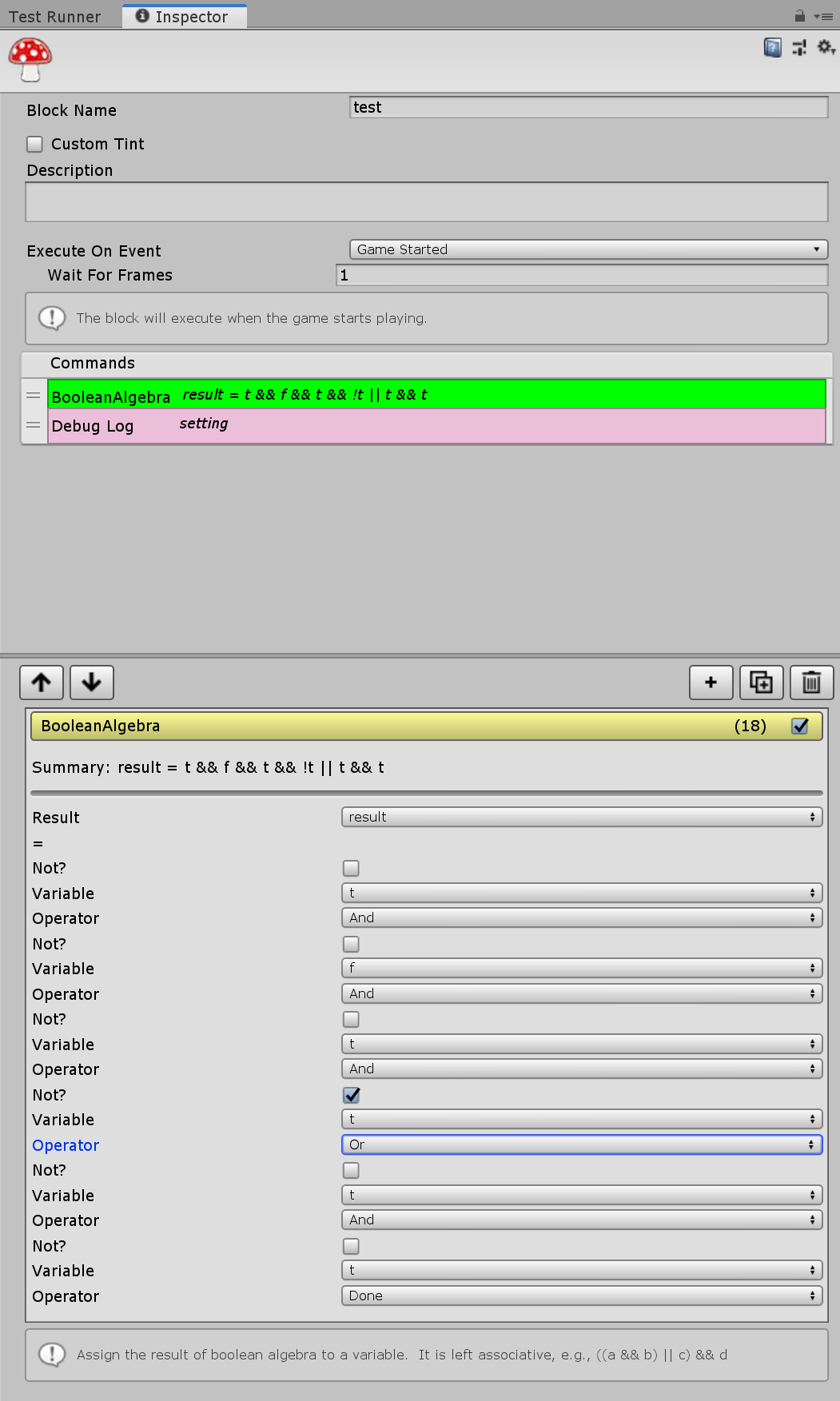
any suggestions on how i could make this look better? https://imgur.com/9vXmCc8
 onyx harness
UX speaking?
cloud wedge
i'm only asking about the bottom half, but i don't understand what you said
onyx harness
Yep yep this is what I was thinking
visual stag
and use a green that's closer to white and is less saturated 😛
cloud wedge
@visual stag that's fungus' choice
onyx harness
"Summary: result = bla bla bla"
Make the "bla bla bla" interactable
cloud wedge
hm, but you have to pick a variable that exists
if you don't have bla, it would be an error
onyx harness
Well, if you render a "&&" it means the variable exists, no?
visual stag
I mean same goes for code, you just get an error if something doesn't exist
I do think parsing would be the ideal way of going about it
onyx harness
Yeah, writing and auto parsing it would be the ideal and most efficient
visual stag
but looking at what you've made, I think it's kinda unclear what's it's actually doing... how do I use the UI other than the toggles and the dropdowns?
I'm not familiar with fungus so that would probably be a start. Though I do think a UI should better communicate its purpose
cloud wedge
the variable dropdown contains only bool variables in your game
The way fungus works is you have to Define your variables upfront
And it's kind of annoying because they have if statements, but you can only have 1 Bool in that if statement
Which makes certain things is very clunky. For example, you literally can't say X or Y in an if statement
What you can do is use Lua code to gain access to all the variables and then assign X or Y to another variable and then you can have the if statement check that result
I also found that to be very clunky and noticed myself constantly making typos in that luau code
So I made this Boolean algebra command that lets me do complex assignments like that without the possibility of making typos and now I don't have to remember the Lua syntax
So I'm kind of hesitating to have an interactive will text field because I kind of already did and it's what caused me problems
Anyway, let's say I wanted to remove the label called operator and Center that drop down. How would I go about doing that?
visual stag
if you don't want a label on a control just pass GUIContent.none to its label field
cloud wedge
this worked too: boolOperatorField.enumValueIndex = EditorGUILayout.Popup((int)boolOperatorField.enumValueIndex, operatorLabels);
is there a way to center that dropdown and not take up all available space? Here's how it looks now:
probably won't improve things, just experimenting
visual stag
I'm a little confused what you mean by center, do you mean the text? Or do you want it to just have space around it?
visual stag
put it in a horizontal scope and add some space to the sides
cloud wedge
whatever's easiest
visual stag
or dupe the style and add padding to it
or get a rect using one of the layout functions and modify the rect
onyx harness
HorizontalScope
   Popup
   FlexibleSpace
cool, thx
onyx harness
I guess you are using GUI Layout
cloud wedge
yes
onyx harness
I don't get a piece of your question.
 fierce scroll
oh i wrote that wrong
there is not "Package manager" in Windows menu
it isn't there
onyx harness
{Project}/Packages/manifest.json
fierce scroll
Umm, my project folder doesn't contains a folder like Packages
onyx harness
What Unity version are you running on?
fierce scroll
5.6.7f1
onyx harness
if i'm not wrong
Package Manager was implemented way after this version
More like 2017
onyx harness
Wasn't it suppose to be downloaded manually in this version?
 craggy kite
I feel like that was a security update.
5.6 hasn't gotten actual feature updates since 2017 came out
fierce scroll
The most important proble is the lack of "Tile palette"
i think i need package manager to install it
?_?
visual stag
Your Unity version is very old. You will not be able to use most 2D features
If you use the Unity Hub to install a unity version then it'll list ones that are at least relevant 😛
visual stag
But also, this channel is for extending Unity, and not for general questions. #💻┃unity-talk is where you should be
odd vessel
I have a material that I want to reset one of it's parameter when saving the scene.
I found InitializeOnLoad together with EditorSceneManager.sceneSaving, but since there's no actual game object I can't pass a reference to the game object.
Is there perhaps a way to pass it a gameobject reference anyway somehow?
gloomy chasm
@odd vessel why do you need a gameobject?
odd vessel
I'm assuming (might be wrongly assuming) I can pass the material as a reference instead of the game object. That is,
I need a way to access a specific parameter in a specific material in that code.
gloomy chasm
Anyone know how the TreeView or the ListView works in UIElements?
whole steppe
Hi! Is there any built-in option of have Unity generate default editor scripts for any script I create?
waxen sandal
No
 barren elk
how would i create a custom asset type?
barren elk
sorry if i am not using the correct terminology.
i mean how can i create an asset with custom parameters and possibly an editor menu like the unity animator, but for logic
gloomy chasm
Ah, yeah a ScriptableObject can do that just fine.
barren elk
but what about the custom logic? i want to be able to make custom functions that will, say, add two inputs, or multiply two inputs, and feed them to an output. can they do that?
gloomy chasm
Sure can! You can have anything inside a scriptableObject. I normally have my Inventory system in a ScriptableObject.
barren elk
oh, Thank you!
gloomy chasm
Sure thing!
onyx harness
@whole steppe yes
whole steppe
@onyx harness could i get some pointers to find that option?
onyx harness
That's gonna sound stupid, but just add an Editor template to the default MonoBehaviour, this way, you stay 'built-in' @whole steppe
whole steppe
Damn, it does sound stupid
onyx harness
So, no there is no built-in, yes you can make it built-in
But to add an entry 'Create Editor' it asks you less than 3 minutes.
whole steppe
yeah
 astral hemlock
Is there a good editor extension for 3D tile brushes? I remember using Rotorz Tile System many years ago but it is now defunct. Any recommendations?
 reef patio
How Do I Get VSCode to Autocomplete C# Files? It Is Annoying As Frick having To Type It Out, And Not Have AGuide As To What To Put Next :/
Ping Me With Response
 plain estuary
onyx harness
plain estuary
plain estuary
onyx harness
Your file maybe wasn't part of the project
tough cairn
Made few changes, if anyone is interested in giving it a shot, here is the repo ( not tested ): github.com/nukadelic/UnityGraphs
 lucid hedge
beautiful
whole steppe
just wanna ask i can add brightness to the camera?
 shadow violet
Is there another function/event I can use instead of OnGUI to update a custom Editor window? Some people have said one of my assets are laggy when the window is open, and my assumption is cause OnGUI is being called way too many times, and it has to go through a few arrays/for-loops of data and display it, maybe a "OnCustomEditorWindowHasFocus" or something that might not be called as frequently? - or better question, how might I be able to debug a Editor script to find out how to better optimize it for OnGUI? Maybe some do's and dont's similar to how Update() works for game scripts?
onyx harness
@shadow violet Deep profile.
There is several things you can check to try to optimize your script.
Update() is often called, try to reduce its time footprint.
OnGUI() is called whenever the window is repainting, an input is triggered, the mouse is clicking.
If you have the property wantsMouseMove enabled, the event will send a MouseMove for every single mouse move.
Replace GUILayout by GUI. Takes some time, but this is the biggest optimization you can do.
But first of all, measure with deep profile.
shadow violet
Hmm, alright ill check that - deep profile is only showing occasional spikes when every possible GUI window is expanded, and far fewer when only the bare-minimal is shown (this tool lists all scenes in the project with collapsable sections to only show whats important to you, or everything at once)
onyx harness
Well you got your answer then
if your users are complaining and you are just doing that, you know what to do
Remember, some people may have > 100 scenes
shadow violet
Right, so I could simply tell them "collapse the 'all scenes' section and problem solved", but I feel like if its causing this much lag, then maybe theres something I can do to optimize it a little better, make the for-loops or store the data in the arrays a bit more efficiently or something, only a handful of people have really mentioned its kind as annoying as Unity baking, you can live with it, but itd be nice in a ideal world not to
onyx harness
No no, you don't tell them lol
This might be the issue they are raising to you, when too many expanded, it lags
I don't think memory layout will help you, your scale is waaaay to low
If you reproduce the lag on your side with deep profile enabled.
Look at the laggy spots and try to optimize them
At the end, the less you draw is always better
Ask your users, "how many scenes do you have?"
shadow violet
Ah ok, that makes more sense, I think I see what your saying now, I might have to... Find a way to do all my calculations, for-loops, Getter calls etc first, maybe outside of OnGUI, like in a OnSceneCreated/Deleted/Changed event, and then do all the display once rather than trying to shove everything in the same OnGUI - I already know your right that most of these users experiencing these problems have well over 100 scenes from "example scene" assets mostly
onyx harness
The easy solution but heavy, replace GUILayout by GUI
Or show me your coee
I will review it a bit if you want
shadow violet
Sure, I can show you the current code, itll probably look pretty messy to you, since I never really thought about optimizing Editor scripts, I didnt think it was really a thing that was needed like game/Mono scripts are - so any advice/feedback is helpful
onyx harness
It's never a problem until you face it 🙂
shadow violet
Lol, fair enough :p
waxen sandal
Sounds like you're doing a lot of calculations each ongui that don't necessarily have to be done each frame
onyx harness
He was doing much more than just GUI 🙂
 cedar rose
so, i have an issue with my tilemap editor
that little bit makes the scene 20 mb in size
the only thing it generates thats not saved in a resource
is the mesh
each tile uses 16 verticies
and 8 triangles
any suggestions on de-bloating the scene size?
cedar rose
lol
waxen sandal
Maybe you can make your tilemap a prefab so it isn't all saved in the scene
onyx harness
You just transfer 20MB from the scene to the prefab
waxen sandal
It's technically what he wants to do 😛
dim walrus
@cedar rose I'd suggest opening the scene with a text editor to see what's storing 20Mb
If your scene is binary instead of text then you probably have something in the scene that should be an asset
 grim walrus
There any code example for the collider gizmo drawer? Would like to do something similar where you can drag around the sides etc
grim walrus
ah was just looking for the wrong term
 summer ermine
Hey guys, I don't suppose anyone can help me with this issue:
https://forum.unity.com/threads/issue-with-custom-inspector-making-changes-to-objects-it-shouldnt.783773/
Unity Forum
Hi there,
I've recently gotten into creating custom inspectors for some simple editor tools, I've run into a few issues but mostly overcome them.
I've...
tl;dr my custom inspector script (I'm fairly new to this but it's quite simple) is changing components on objects it has previously placed when it should only be affecting the object it's currently placing
And I don't know why
Cheers for any help 🙂
Also if anyone's an addressable expert I may have some other questions about using AssetReferences with custom inspectors
dim walrus
I think it's because you are not cloning the assetRef, you are just referencing it
So every component has the same reference to your assetRef
Try doing assetRef = new AssetReference(FurnPlacer.FurnToPlace);
(Haven't used AssetReference never so i don't know if that constructor will work)
summer ermine
Aha you've solved it!
I did consider that as a possible issue before but I couldn't think how to properly work around it, and asset reference to me sounded like it should be just a reference rather than a clone, solved with the line:
AssetReference assetRef = new AssetReference(FurnPlacer.FurnToPlace.AssetGUID);
Cheers 😄 I've been going in circles with this
 heavy plaza
Hello there. I am trying to use this link (https://docs.unity3d.com/2017.4/Documentation/Manual/BuildingAssetBundles4x.html) to be able to create an asset bundle for the 2017.4 version of Unity
however when I go to build the cs file in Monodevelop it throws this error
in which I need to use that specific version of unity
whole steppe
so i know y'all hate VRchat questions, but... I have 108 game objects, and on each of them i need to make editor references for all other 107 of them. this means manually dragging 11,556 references..... is this a problem that could be solved by editor scripts? if so, can someone point me in the right direction?
onyx harness
Tell me more
whole steppe
ok so
(obviously it would be easy to solve the problem gracefully so that i wouldn't need to manually do them in the first place, but im "coding" the minigame behavior using VRchat's SDK)
lemme hit u with some screenshots
this is the Script that is apart of the VRchat sdk
a script identical to that is on each "Item"
however, with one small difference
each list of Receivers doesn't include itself in the list
however,
if i could just
make 108 "Item" objects, that are identical in every way
I could manually go through 108 times to remove itself from that list
whole steppe
no that's why im asking lol
whole steppe
not editor scripting, just writing game logic scripts in C#
for stuff besides VRchat i mean
onyx harness
namespace Test
{
    public class VRC_Trigger_Extensions
    {
        [MenuItem("CONTEXT/VRC_Trigger/Auto Assign")]
        private static void    AutoAssign(MenuCommand menuCommand)
        {
        }
    }
}
oo
onyx harness
This is how to append a contextual element when you right-click on the VRC_Trigger in the Inspector
The important point is line 5 [MenuItem("CONTEXT/")]
This is how to append it
In AutoAssign, what you can do to ease the task is to use the API Selection
whole steppe
ok
onyx harness
Use Selection.gameObjects to get the selected GameObjects.
Iterate over all of them, assign the "Receivers", remove itself.
Job done.
whole steppe
eehhh yeahh okay ill try :' )
onyx harness
Don't worry, I'm around, good luck
whole steppe
ohhh lol ok
onyx harness
But it must be in an "Editor" folder
Or you can even write it in your VRC_Trigger
and wrap it around #if UNITY_EDITOR
#endif
whole steppe
btw if you're wondering, im creating UNO party game in VRchat : )
onyx harness
You can add a button anywhere you want, the top menubar, or else
You better implement the accumulated +4
whole steppe
sooo first off,
do i need to put
"using somenamespace" for this editor stuff to work
like the code snippet you put up there
whole steppe
ohh i see ok
onyx harness
I told you, the most important point is line 5
whole steppe
okay noted
ok so i'm confused as to what should replace MenuItem in my situation
[MenuItem("CONTEXT/VRC_Trigger/Auto Assign")]
onyx harness
Well, it already works I think
whole steppe
i've just never seen syntax like this, is the point of this to give me a button in the right click context menu?
onyx harness
VRC_Trigger is the name of the Component you want to append the element
Yes
MenuItem needs namespace UnityEditor
whole steppe
thats what i thought ok
whole steppe
nice got it
onyx harness
Right-click on it to let Visual Studio suggests you guidance
onyx harness
😄
whole steppe
okay now to write meaty stuff
onyx harness
You have your list of GameObjects.
Just get your Component and assign the stuff
whole steppe
ok noted
wriiiite so, 1st order of business, get all the Item objects in an....... array?.... and then.... yea no im lost :T
onyx harness
Selection.gameObjects is an array of GameObject
GameObject[]
You fetch the Component VRC_Trigger
I guess you must have a field Receivers in there
whole steppe
oo so it knows what gameobjects ive got selected with that
onyx harness
And it's an array of... GameObject?
onyx harness
You are blocking at "assigning the field Receivers"
whole steppe
you mean
im getting stuck there?
im getting stuck at getting the selected gameobjects referenced in my script
onyx harness
oo so it knows what gameobjects ive got selected with that
What did you mean?
whole steppe
oh i thought, Selection gives you access to whats selected in the editor
onyx harness
yep, that's exact
whole steppe
right thennn
    {
        ///get array of selected Item gameobjects
        ///
        [MenuItem("CONTEXT/VRC_Trigger/Auto Assign")]
        private static void AutoAssign(MenuCommand menuCommand)
        {
            ///get the fields that i need to fill
            ///automatically fill the fields with the Item array
        }
}```is this more or less the right direction?
onyx harness
Hum.. Why is
///get array of selected Item gameobjects
outside the method?
But yes, beside that, it is fine
whole steppe
good point, im thinking in the mindset of writing gamelogic
now i just need to understand the syntax in order to do so
heavy plaza
Is anyone able to help with the issue I posted yesterday?
waxen sandal
No clue what issue you posted yesterday
whole steppe
GameObject[] itemArray = new GameObject[Selection.gameObjects];