#↕️┃editor-extensions
1 messages · Page 29 of 1
 golden grove
Oh okay, but don't I have to make a ListView in order to override the "unity-list-view__add-button" or can that just be done with a propertydrawer?
 waxen sandal
In some cases yes, but in this case, since your attackComponents is always an array you can deduce that it'll always draw a listview internally
golden grove
Ah, I see!
waxen sandal
PropertyField just matches the type to the right ui components, so integers get an inputfield with whole numbers, arrays get listviews, etc...
golden grove
Ah, so a "ListView" is just the name of what is displayed when an array is declared by default with the "add and subtract" buttons?
waxen sandal
Yeah
golden grove
I see, so would my root just be what I should directly add the array reference to once it is declared as a PropertyField?
SerializedProperty attackComponentsArray = property.FindPropertyRelative("attackComponents");
var attackComponentsArrayField = new PropertyField(attackComponentsArray);

root.Add(attackComponentsArrayField);
Yeah
golden grove
Then I assume I query the root itself directly for the button as it's a propertydrawer?
waxen sandal
Nah you can query attackComponentsArrayField , so it'll only search in that element
(Rather than potentially any other elements added to the root)

 waxen sandal
Yeah that's probably still the same issue as this
golden grove
Ah, I see.
waxen sandal
Not sure atm what the easiest way to fix that is
golden grove
I'm confused as to why this is so complicated especially with an updated system, I could imagine quite a few reasons someone would need a button to add a specific type to an array, is there potentially a better way I could do this without needing to override the "add" button?
waxen sandal
I'm not aware of any
golden grove
Could I maybe draw a new button after each instance of my "frame" class?
I'm not sure if that's possible in an array, though.
waxen sandal
Sure, you can just add an extra button, but it'll still show the original button
golden grove
Oh, yeah that's fine. Can't that be disabled in ListView anyway?
waxen sandal
You can just add a new Button() to your root
Yeah I think so but you also have to replicate the remove button then
golden grove
waxen sandal
Yeah I think so but you also have to replicate the remove button then
Yeah that'd be fine, would there be a function that removes the highlighted item in an array that you know of?
golden grove
Alright, I'll have a look! Appreciate it.
golden grove
waxen sandal
You can just add a `new Button()` to your root
Yeah, this worked pretty much instantly! Haha.
Unfortunately adding the component to the array isn't working as intended with another not very specific error.

void OnAttackComponentSelected(AttackComponent component)
{
var componentScriptableObject = Activator.CreateInstance(component.GetType());
attackComponentsArray.InsertArrayElementAtIndex(attackComponentsArray.arraySize);
attackComponentsArray.GetArrayElementAtIndex(attackComponentsArray.arraySize - 1).managedReferenceValue = componentScriptableObject;
}
is that array a SerializeReference?
golden grove
It's a SerializedProperty
SerializedProperty attackComponentsArray = property.FindPropertyRelative("attackComponents");
What's the definition of your list
golden grove
golden grove
```cs
SerializedProperty attackComponentsArray = property.FindPropertyRelative("...
do you mean this?
golden grove
[System.Serializable]
public class Frame
{
    public AttackComponent[] attackComponents;

    //private void AddMovementData() => attackComponents.Add(new MovementData());
}
It's an array
and I am attempting to add a "MovementData" class which is a subclass of the "AttackComponent" class
waxen sandal
You probably need to add the SerializeReference attribute as it will not allow subclasses at the moment
golden grove
Yeah that worked! I'm now not getting any errors but it still isn't populating in the inspector's list.
 waxen sandal
You might need to apply the serializedObject, e.g. attackComponentsArray.serializedObject.ApplyModifiedProperties()
golden grove
waxen sandal
You might need to apply the serializedObject, e.g. attackComponentsArray.seriali...
Amazing! It's perfect.
waxen sandal
Also add some text to your button lol
golden grove
I really genuinely appreciate all the help, I'm sure this was painful to explain everything truthfully I think i'd be here another few more days if it weren't for your help haha!
golden grove
waxen sandal
Also add some text to your button lol
😭 Yeah, I was just trying to test to make sure nothing was gonna break on me haha.
Also, right click functions still work so I don't even need a delete button it doesn't seem like.
waxen sandal
Cool
golden grove
I still get the default "Delete Array Element"!
waxen sandal
Did you not hide the default buttons?
golden grove
waxen sandal
Did you not hide the default buttons?
No not yet, I'm honestly not too sure how to give ListView parameters if I am not actually declaring a ListView, gonna look into that now. I'm also wanting to rename the default "Element 0" texts.
waxen sandal
Not sure about renaming but I think the list might just be
list.Bind(attackComponentsArray);

root.Add(list);```And disable that setting
golden grove
waxen sandal
Not sure about renaming but I think the list might just be
```list = new ListVi...
Oh alright! I'll try that now. But if it starts acting up again I might just move on for a bit haha.

Yeah, same issue as I encountered before since it's a SerializedProperty. I'm pretty sure I need to be referencing an actual object to bind it, and .BindProperty I don't think worked but I should actually try that again.
Oh actually, since I am declaring a blank list I think I need to set the height or else it'll be invisible huh, that might be what I was dealing with before haha.
waxen sandal
Uhh might have to set bindingPath to attackComponents and then bind to attackComponentsArray.serializedObject
Not sure how sizing works tbh
golden grove
list.bindingPath = property.FindPropertyRelative("attackComponents").propertyPath;
list.Bind(attackComponentsArray.serializedObject);
Yeah, I think this does the same thing as "BindProperty". Same output in the inspector but no errors either way.
I just need to figure out how to set dynamic height as I don't think it's default.
Yep! got it working.
list.BindProperty(attackComponentsArray);
list.virtualizationMethod = CollectionVirtualizationMethod.DynamicHeight;
Setting the virtualizationMethod seems to work property.

However, I am noticing "ListView" by default seems to create a "Size" parameter which is replacing the "AttackComponents" title, not sure about that.
 blissful burrow
Is there a proper way to ensure shaders can read the/a scene view camera depth texture?
it feels a little bit of a hack to enable the render depth flag in the scene view camera behind the scenes
 short tiger
blissful burrow
Is there a proper way to ensure shaders can read the/a scene view camera depth t...
short tiger
blissful burrow
Is there a proper way to ensure shaders can read the/a scene view camera depth t...
The post processing view in the scene view must be doing it somehow, maybe you can find how that's done.
golden grove
How do I set the title of an array element at index as follows?
attackComponentsArray.GetArrayElementAtIndex(attackComponentsArray.arraySize - 1). // <- Here
I've tried ".FindPropertyRelative("name")" which works until I add a new instance of the array elsewhere, which will throw an error. Just wondering if there's an easy native way of setting the name of an element in an array?
 gloomy chasm
golden grove
How do I set the title of an array element at index as follows?
```cs
attackComp...
gloomy chasm
golden grove
How do I set the title of an array element at index as follows?
```cs
attackComp...
You can't. IIRC it just uses the .displayName property which Unity sets.
golden grove
gloomy chasm
You can't. IIRC it just uses the `.displayName` property which Unity sets.
ah, dang. Do you know of any way to override ".displayName" it's mostly for organization in the inspector.
gloomy chasm
golden grove
ah, dang. Do you know of any way to override ".displayName" it's mostly for orga...
There isn't a way. You either draw the element, or you add a property to the element called Name since it will automatically pick that up.
golden grove
gloomy chasm
There isn't a way. You either draw the element, or you add a property to the ele...
Okay, thanks. I'll try that, I tried finding it and by default when creating the element it wasn't being found. I'm sure adding a property would work!
gloomy chasm
golden grove
Okay, thanks. I'll try that, I tried finding it and by default when creating the...
A say property, but I mean a serialized field, and I think it just has to contain the world 'name' in it.
golden grove
gloomy chasm
A say property, but I mean a serialized field, and I think it just has to contai...
Ah okay, I'll try that! Just heading back now, I'll let you know if it works.
golden grove
gloomy chasm
A say property, but I mean a serialized field, and I think it just has to contai...
I can't seem to figure out how to add a property to it, since it's returning a "SerializedProperty" itself I don't think it gets any Add functionality to my knowledge, I'm not too familliar with Editor scripting so I'm sorry if I'm missing something obvious haha.
blissful burrow
okay it looks like Unity's scene view camera does render depth, but, only if there's an enabled camera in the scene that also renders to depth
trying to override the scene view camera's depthTextureMode doesn't work on its own even
maybe it's easier for me to just render a depth texture on my own using the same camera
 snow stag
        GameObject obj = new GameObject();
        obj.transform.position += transform.right;
        var objFilter = obj.AddComponent<MeshFilter>();
        var objMat = obj.AddComponent<MeshRenderer>();

        objFilter.mesh = _fileMesh;
        objMat.material = mat;
        obj.name = transform.name + "_baked";
 visual stag
#💻┃unity-talk message continuing from
You need to use https://docs.unity3d.com/ScriptReference/Undo.RegisterCreatedObjectUndo.html
Eg.
var go = new GameObject();
Undo.RegisterCreatedObjectUndo (go, "Created go");```thanks let me try
snow stag
visual stag
You need to use https://docs.unity3d.com/ScriptReference/Undo.RegisterCreatedObj...
works, thank you
 limber trellis
Hi there. Is anyone aware how I could call "Download" from Package Manager via Script? There's nothing official, but I'm seeking the internal API calls within PackageManagerWindow.cs etc.
Background: During pipeline/CI calls, we want to download a package (.unitypackage) and import it headless.
Update: So they are internal functions called for downloading within UnityEditor.PackageManager.UI.Internal.PackageDownloadButton
Let's see if I can copy&paste some functionality to redo the download within an EditorScript.

 wicked orbit
I feel like this is a basic question, but one that's got me a bit stumped and google isn't helping: How can I do some initialization code (like Awake) when an asset (in this case, a ScriptableObject) is first created in the editor via duplication (control D)? The reason I want to do this is the ScriptableObject I want to duplicate has a UniqueId field that I want to regenerate when duplication happens. Thanks.
gloomy chasm
wicked orbit
I feel like this is a basic question, but one that's got me a bit stumped and go...
You would use an AssetPostProcess and then check the ID to see if it is duplicated.
 heavy path
Are there any assets that automatically add namespaces to my scripts depending on the folders? SmartNS is pretty good but it doesn't allow for you to change the space it leaves between the class and namespace. It also does
namespace nameHere{
Instead of
namespace nameHere
{
I'm really not looking to go through SmartNS and adjust things but if I have to I'll sit down and do it tonight
gloomy chasm
heavy path
Are there any assets that automatically add namespaces to my scripts depending o...
Rider, and I think also VisualStudio will do it and/or have options for it if you create the class through them instead of inside of Unity.
heavy path
gloomy chasm
Rider, and I think also VisualStudio will do it and/or have options for it if yo...
Should definitely be something Unity supports. I'm really lazy when it comes to manually writing out namespaces lol. I'm looking into rider but I don't know if I can pay monthly for that sort of thing right now. VS does support this but there's no way to exclude part of the namespace (it always does solutionName.folderPath as the namespace no matter what) which really annoys me but it works for now I suppose
gloomy chasm
heavy path
Should definitely be something Unity supports. I'm really lazy when it comes to ...
You can use Assembly Definitions, which you can set a default namespace for, for any scripts created inside of it. Not per-folder though.
For what its worth Rider is a perpetual license for I think $90 USD (I find it to be well worth it. But that is besides the point for this channel).
 plucky knot
heavy path
Should definitely be something Unity supports. I'm really lazy when it comes to ...
plucky knot
heavy path
Should definitely be something Unity supports. I'm really lazy when it comes to ...
In both VS and Rider you can right-click a folder, open its properties, and turn off NamespaceProvider
visual stag
Post the actual error and !code. Also not sure why you've confusingly quoted yourself but it makes the question hard to read
 grave hingeBOT

Posting code
📃 Large Code Blocks
Use links to services like:
https://gdl.space/, https://paste.ofcode.org/, https://hatebin.com/, https://paste.myst.rs/, https://hastebin.com/
📃 Inline Code
Surround code with three backquotes. Not quotation marks.
To format as C#, add cs to the first line:
```cs
// Your code here
```
Add a comment with a line number if there is an error message.
 floral tangle
I have a project with separate assembly defs for Editor and Runtime, including an Editor utility for managing configuration assets and the like.
I'd like the ability to have a single interface for loading these assets, and swap it out based on whether it's being called from the editor or runtime. I'm haven't been able to solve this without moving my editor code out of the editor assembly and using preprocessors / Application checks, which I'd prefer not to do.
I'd be fine with something like an adapter class that uses #UNITY_EDITOR checks, but that doesn't actually seem to be workable due to the sequestering of the Editor code. Really I'm just trying to avoid moving a bunch of editor-specific logic out of the Editor assembly just to enable this interface.
Are there any patterns or workarounds for this kind of problem that any of you have found? Or am I chasing my own tail here?
gloomy chasm
floral tangle
I have a project with separate assembly defs for Editor and Runtime, including a...
Not sure I really follow, but it sounds like you are already trying to mix editor code in to runtime code. If you want a interface they both use, why would it not just be in runtime?
 indigo crescent
visual stag
Post the actual error and !code. Also not sure why you've confusingly quoted you...
visual stag
indigo crescent
indigo crescent
visual stag
Post the actual error and !code. Also not sure why you've confusingly quoted you...
visual stag
indigo crescent
You can't include editor code in the build. You need to exclude it, or not use it at all.
indigo crescent
Unfortunately, I can't fix it.
visual stag
indigo crescent
Unfortunately, I can't fix it.
You are going to have to elaborate. Your code is using Spline.Unity.Editor code, that code is Editor-only
indigo crescent
thank you very much you solved it I LOVE YOU
 atomic sable
Is there any way to override property height in a property drawer? I created an attribute that hides a field in the inspector if another field is null, and I want to allow multiple of these attributes on a single field. It successfully hides/shows the field when there’s multiple, but it looks like GetPropertyHeight is only called once or something as when there’s two (and one condition is false and one is true), it hides the field in the inspector but still has the height set to single line height (as this is what it gets set to when the condition is false)
 minor cloud
atomic sable
Is there any way to override property height in a property drawer? I created an ...
minor cloud
atomic sable
Is there any way to override property height in a property drawer? I created an ...
I've dealt with this problem by creating a variable to store the value of the base.GetPropertyHeight method (or UnityEventDrawer's one) if the property is supposed to be visible or change it to 0 if the property is supposed to be hidden. Then I override the GetPropertyHeight method to return the cached variable. It looks a bit messy, but it does the job.
atomic sable
minor cloud
I've dealt with this problem by creating a variable to store the value of the `b...
I would do this but i have multiple attributes… i do have a base class. I guess I’ll just have to use reflection to get all attributes on the field?
gloomy chasm
minor cloud
I've dealt with this problem by creating a variable to store the value of the `b...
I think that would break for Lists
minor cloud
atomic sable
I *would* do this but i have multiple attributes… i do have a base class. I gues...
I've just tested it out a bit more and turns out it also has issues with extra lines when the results are in a particular order (extra line is added when the first attribute doesn't try to hide it). It reminded me that when I had this problem I have remade the attribute to be able to handle multiple parameters (as in the screenshot).
 gloomy chasm
minor cloud
I've just tested it out a bit more and turns out it also has issues with extra l...
gloomy chasm
minor cloud
I've just tested it out a bit more and turns out it also has issues with extra l...
Is ValueType a Enum by chance? Or just a struct?
minor cloud
gloomy chasm
Is ValueType a Enum by chance? Or just a struct?
Enum. It works for other types, although the code looks messy.
minor cloud
gloomy chasm
I think that would break for Lists
Seems like you're right, turns out my attribute doesn't work for lists at all.
gloomy chasm
minor cloud
Enum. It works for other types, although the code looks messy.
Ahh, then I would just make it a flag enum, then you can do ValueType.fractionOfModifiedAttribute | ValueType.FractionOfSourceAttribute to have both at once.
gloomy chasm
minor cloud
Seems like you're right, turns out my attribute doesn't work for lists at all.
Yeah, it is cause Unity re-uses the property and decorator drawers for the elements in a list
minor cloud
gloomy chasm
Ahh, then I would just make it a flag enum, then you can do `ValueType.fractionO...
True. I suppose I overdid it. On the positive side my solution will work with non-enum types, but I doubt it will be used that way.
atomic sable
minor cloud
I've just tested it out a bit more and turns out it also has issues with extra l...
Yea im thinking i’ll do this… like make a struct for each attribute like this and have params of that struct
Ok i think i have a plan
atomic sable
oh... attributes cant take structs lol. Welp, back to where i was.
atomic sable
minor cloud
I've just tested it out a bit more and turns out it also has issues with extra l...
I think ill probably end up doing this, a param of some enum that has a lot of conditions and a big switch statement. It's less elegant but because of the restrictions on attributes I think it's the best I can come up with.
golden grove
Hey! Just quickly wondering if anyone knows how to create a custom editor for all children of a type? I'm currently trying to create a custom inspector for my "Weapon" class which stores my custom class for "attacks" which stores my custom inspector for type "Frame", however when trying to create a custom inspector for my "Weapon" scriptableobject I get a popup at the top of the inspector saying "multi-object editing not supported". Any help or references would be greatly appreciated! I've tried enabling the bool to enable "editorForChildClasses" in the "Weapon" custom editor to no avail.
Or if anyone even has any reference to understanding the different types of "Editor" base classes and their use-cases because I am thoroughly confused as to what type of base class I should even be using for my specific use-case atm.

[CustomEditor(typeof(NewWeapon), true)]
public class WeaponInspectorEditor : Editor
{
    private SerializedProperty _attacks;

    private void OnEnable()
    {
        _attacks = serializedObject.FindProperty("attacks");
    }

    public VisualTreeAsset VisualTree;

    public override void OnInspectorGUI()
    {
        EditorGUILayout.PropertyField(_attacks);

        serializedObject.ApplyModifiedProperties();
    }
}
But yeah, not super sure why that would be happening. I am searching for the property "attacks" which contains the "Frame" class with the custom inspector so that could be a cause?
golden grove
golden grove

This is how it should be drawing using the custom editor of my "Frame" class. Instead I am getting the "No GUI Implemented". Any help would be amazing!
visual stag
golden grove
```cs
[CustomEditor(typeof(NewWeapon), true)]
public class WeaponInspectorEditor...
You are mixing IMGUI and UI Toolkit.
If you only used UITK then you will not have this issue
golden grove
visual stag
You are mixing IMGUI and UI Toolkit.
If you only used UITK then you will not ha...
Ah okay, I see. I'll look into it when I get home. Thanks!
 dark prairie
Hello, Is there a way to change these values via script ? I have many small textures with similar settings, can I write a script that will analyze their file names and assign values here based on that ?

 brave herald
Hello i am Currently working on a Custom Editor Test script; but ive ran into a big issue:
I set my animator to display in xyz spot but i cant set the animator in the unity editor.
Not even the DrawDefaultInspector(); one.
Ive tried Propertyfield, Objectfield
Code in Thread
golden grove
visual stag
You are mixing IMGUI and UI Toolkit.
If you only used UITK then you will not ha...
Worked, thanks! Also started looking into UXML integration and it's fantastic, as a web designer it is making me very happy haha!
minor cloud
dark prairie
Hello, Is there a way to change these values via script ? I have many small te...
Try using TextureImporter or TextureImporterSettings depending on your needs. Here is an example:
https://docs.unity3d.com/ScriptReference/TextureImporter.SetTextureSettings.html
 dark prairie
minor cloud
Try using `TextureImporter` or `TextureImporterSettings` depending on your needs...
dark prairie
minor cloud
Try using `TextureImporter` or `TextureImporterSettings` depending on your needs...
Thanks, I will check this
 outer crystal
Anyone know/remember if Unity has a method to clean/remove illegal characters from a string for use as a file path? I've got working code using .net 'Path.GetInvalidFileNameChars' working, but I know it doesn't account for more unusual aspects such as forbidden names in root drive etc. So just trying to remember if Unity had a similar builtin method that might be better.
 regal oxide
So you can set a tint to the editor for when you enter playmode in preferences, can you set a tint for when you're NOT in playmode tho I cant seem to figure that out
 elder wasp
Is there any way to get a reference to the current Inspector Window?
I want to open an EditorWindow right next to it, and it requires a type to find a window (in this case I would like inspector) and open it docked
Managed to do it like this
            var requiredAttribute = typeof(EditorWindow).Assembly.GetType("UnityEditor.InspectorWindow");
            InfiniteLandsGraphEditor wnd = CreateWindow<InfiniteLandsGraphEditor>(requiredAttribute);
It seems that the inspectorwindow class is internal and I can't reference it
gloomy chasm
I am doing some GL calls inside of a IMGUI scrollview. The issue is that I think the clip rect for the scrollview is messing with the GL drawing, any ideas why?
Here is an example of it (the Audio clip preview is what is being drawn.
(I keep the mouse over it just because I have it so it only actually draws when the mouse is over it. It can be ignored)
 ashen wyvern
Can I ask unity for only direct dependencies? 🤔
I am using EditorUtility.CollectDependencies but it lists dependencies of dependencies (A.K.A Transitive dependencies)

interesting, it seems that AssetDatabase.GetDependencies(path,false); does the trick but CollectDependencies can't do it 🤔
from
Object[] dependencies = EditorUtility.CollectDependencies(new Object[1] { obj });
to
Object[] dependencies = AssetDatabase.GetDependencies(AssetDatabase.GetAssetPath(obj), false).Select(x => AssetDatabase.LoadAssetAtPath<Object>(x)).ToArray();
Has anyone used SearcherWindow before? Trying to use it to create my graph editor, but it's adding that rectangle on the rignt, not sure why

It seems that that is the helper space, but i somehow need to disable it
Alright, managed to do it ina relly ugly way XD
Created an adapter that just implements part of the interface
        private class Adapter : ISearcherAdapter
        {
            SearcherAdapter BaseAdapter;
            public string Title => BaseAdapter.Title;
            public bool HasDetailsPanel => false;
            public bool AddAllChildResults => BaseAdapter.AddAllChildResults;
            public bool MultiSelectEnabled => BaseAdapter.MultiSelectEnabled;
            public float InitialSplitterDetailRatio => 0;

            public Adapter(string title){
                BaseAdapter = new SearcherAdapter(title);
            }
            public VisualElement Bind(VisualElement target, SearcherItem item, ItemExpanderState expanderState, string text)=> BaseAdapter.Bind(target, item, expanderState, text);
            public void InitDetailsPanel(VisualElement detailsPanel)=>BaseAdapter.InitDetailsPanel(detailsPanel);
            public VisualElement MakeItem() => BaseAdapter.MakeItem();
            public SearcherItem OnSearchResultsFilter(IEnumerable<SearcherItem> searchResults, string searchQuery) => BaseAdapter.OnSearchResultsFilter(searchResults, searchQuery);
            public void OnSelectionChanged(IEnumerable<SearcherItem> items)=> BaseAdapter.OnSelectionChanged(items);
        }
This is way cleaner
private class Adapter : SearcherAdapter
{
    public Adapter(string title) : base(title){}
    public override bool HasDetailsPanel => false;
    public override float InitialSplitterDetailRatio => 0;
}
 viral grail
I have a List<Vector3> and would like to visualize these positions in world-space in the 3d scene view.
What is an approach that I could take for this?
 fringe cairn
I have no idea what channel is appropriate for this, so I'll just put it here for now. I have a grid/tilemap set up, but I see that isn't actually entirely centered. I have a cube gameobject outside the grid/tilemap system at 0,0,0. However, it's not fitting snugly into the grid. Any help?
 ashen wyvern
elder wasp
Has anyone used SearcherWindow before? Trying to use it to create my graph edit...
ashen wyvern
elder wasp
Has anyone used SearcherWindow before? Trying to use it to create my graph edit...
I just saw a video about it today
https://www.youtube.com/watch?v=0HHeIUGsuW8

Long dropdown lists in the Unity Editor are painful. Let's improve them, by converting them to Searchable Windows instead! 🔎
Want to support the channel?
▶️ Help fund new episodes by joining the Patreon - http://www.patreon.com/GameDevGuide
Use these links to gra...
elder wasp
ashen wyvern
I just saw a video about it today
https://www.youtube.com/watch?v=0HHeIUGsuW8
Neat! Yeah that's what the MonoBehaviour search window looks like, But I wanted to use the new search window that ShaderGraph uses. There's barely any documentation about it, but managed to get it working with what I mentioned :))
 queen wharf
I know theres some helper functions i have being used here but any reason why rich text wouldn't be working here?
            GUIStyle style = LabelUtilities.CreateStyle(enableRichText: true, new Color(0, 0, 0, 0.5f));
            GUILayout.BeginArea(LabelUtilities.GetMousePositionRect(50, 0, 250, 120), style);
            GUIStyle labelStyle = LabelUtilities.CreateStyle(true);
            labelStyle.richText = true;
            GUILayout.Label(tileInfo, labelStyle);
            GUILayout.EndArea();
 gloomy chasm
queen wharf
I know theres some helper functions i have being used here but any reason why ri...
gloomy chasm
queen wharf
I know theres some helper functions i have being used here but any reason why ri...
Hmm, well I don't think the formatting is correct for the size. So that might be it?
You are not closing the size tag
queen wharf
oh frl? its how TMP expects it, lemme check that. suprised it would kill the other formatting though?
im closing the size it's just offscreen
gloomy chasm
Ahh, well you could try with just bold to be sure
Also it doesn't support % only pixels
queen wharf
ahh ok tyvm, missed that
was hoping i could just use my cool tmp tags for this 1:1 but i see i have run out of luck
 marsh lichen
Hey,
Can anyone help me figure out how to display these two variables in the inspector like they are shown at the bottom of the image, compared to the top version?
 waxen sandal
You make a slider from 0-1 then convert that into an hour/minute and back
elder wasp
How can I detect Ctrl+S (aka save action)
i need to do something right before it executes the Save action but I can't find a way to handle that
Also, how can I find the MousePosition at any point in the Editor?
 tropic silo
Is there a way to somehow ask the AssetDatabase whether a refresh is available (i.e. some assets have been added/changed but not imported)? I would like to make a visual indicator around the play button that would tell if you've done changes to your code but not refreshed the asset database.
I don't like the Auto Refresh feature (Preferences > Asset Pipeline > Auto Refresh) but at the same time I occasionally forget to refresh manually with Ctrl+R and then start debugging why something is not working only to find out that I forgot to refresh.
 regal abyss
Hello!
So ive been making a simple editor tool based on this video: https://www.youtube.com/watch?v=c_3DXBrH-Is
And so far it works as I would like with one small exception.

In this video we take a look at how to dynamically draw Editor Windows in Unity by harnessing the power of the SerializedObject and SerializedProperty classes.
We create a tool that will automatically draw an inspector-like editor window, for any object we pass into it.
Be sure to LIKE and SUBSCRIBE if you enjoyed this guide! Share the video ...
please pay attention to the top feild in the right section

if a field it is selected it dosnt update when switching between items
if the content is not selected it works as expected

All of the fields are drawn using the following function as taught in the tutorial i linked
protected void DrawFeild(string propertyName, bool relative, bool showLabel = true)
{
    if (showLabel)
    {
        if (relative && currentProperty != null)
        {
            EditorGUILayout.PropertyField(currentProperty.FindPropertyRelative(propertyName), true);
        }
        else if (serializedObject != null)
        {
            EditorGUILayout.PropertyField(serializedObject.FindProperty(propertyName), true);
        }
    }
    else
    {
        if (relative && currentProperty != null)
        {
            EditorGUILayout.PropertyField(currentProperty.FindPropertyRelative(propertyName), new GUIContent(""), true);
        }
        else if (serializedObject != null)
        {
            EditorGUILayout.PropertyField(serializedObject.FindProperty(propertyName), new GUIContent(""), true);
        }
    }
}
i understand this is probably not enough info to pinpoint an exact solution
but before i set up a minimal reporduction project to share I would just like some hint of what could possibly be going wrong.
Alternatively a way to deselect a feild when the button is pressed would also work i think.
i havnt worked much with unity's editors before so im having trouble debuging this
thank you in advance
waxen sandal
Try doing GUI.FocusControl(null); when you switch
It's probably a safeguard to prevent the user's input from being lost when you change it programmatically
@regal abyss
regal abyss
waxen sandal
<@179214714469875712>
thank you ill give it a shot and report back in a couple mins!
regal abyss
waxen sandal
<@179214714469875712>
it worked thank you so much!
elder wasp
Hellou, so Im trying to work with Undo.Record but I can't quite figure out if Im doing it right or not.
Basically this method
public InfiniteLandsNode ConfigureAsset(InfiniteLandsNode node, Vector2 position){
    Undo.RecordObject(node, "Configuring it");
    node.guid = GUID.Generate().ToString();
    node.position = position;
    node.name = node.GetType().Name;
    node.ClearConnections();

    Undo.RecordObject(this, "Added node");
    nodes.Add(node);

    AssetDatabase.AddObjectToAsset(node, this);
    return node;
}
I first start recording the node, i do some modifications to it. Then I record the main object to which I add the node and add the SO to the asset as a child.
Am I doing this right?
 tribal glacier
EditorGUILayout.LabelField("Current Action", "None", EditorStyles.boldLabel);
anyone know how I can make only the "current action" bold? right now it makes "none" bold
 simple cove
elder wasp
Hellou, so Im trying to work with Undo.Record but I can't quite figure out if Im...
simple cove
elder wasp
Hellou, so Im trying to work with Undo.Record but I can't quite figure out if Im...
Begin change check or smth
Alternatively you can use Flush for more explicit control https://docs.unity3d.com/ScriptReference/Undo.FlushUndoRecordObjects.html
I’m not sure if Flush will make all actions register as a group by default. IIRC it might though
elder wasp
simple cove
Begin change check or smth
Im not sure i follow, what are yoy suggesting?
simple cove
elder wasp
Im not sure i follow, what are yoy suggesting?
I’m suggesting utilizing the information that’s inside the links I posted for you to read
simple cove
simple cove
Alternatively you can use Flush for more explicit control https://docs.unity3d.c...
This one in particular might be exactly what you want
Calling flush will finalize the record object
elder wasp
simple cove
I’m suggesting utilizing the information that’s inside the links I posted for yo...
I guess i didn't explain myself well. I WANT to be able to undo/redo, I'm just asking if I'm doing it right. I'm not sure how FlushUndoRecordObjects would benefit me
The code it's working, just wondering if the structure is how it should be or not
One addition that i made is using https://docs.unity3d.com/ScriptReference/Undo.IncrementCurrentGroup.html to group those recordings
Thank you for trying to help, thats more than most, but throwing a link with no context whatsoever (and assuming i didn't read it) doesn't help at all
 real spindle
Yeah the links have nothing to do with "begin change check"
But to me the code looks fine, unless you have to also SetDirty afterwards. But maybe AddObjectToAsset takes care of that
 plush spade
hey all , is there a way to capture custom editor window and record a video ?
unity recorder does not capture that i guess also in obs i cant capture only the editor window, window must be docked to editor
simple cove
elder wasp
Thank you for trying to help, thats more than most, but throwing a link with no ...
alright, I get it.. I was from phone and it was hard to type lol, sorry.
So the one issue I was trying to make you notice is that Undo.RecordObject(..) requires Undo.FlushUndoRecordObjects to actually register the changes
which usually happens at the end of the frame anyway, as long as there are any pending Record requests, but it's sometimes not safe or desired to let the editor do that
in your case a potential issue would be that your Undo.RecordObjects might or might not be passed on the same group by default
iirc the actions are grouped no matter what until the pending undo stream is flushed, so not sure Undo.IncrementCurrentGroup actually does anything except calling Flush, lol
and what I'm suggesting is:
Undo.FlushUndoRecordObjects(); // optional if you wanna make this a standalone undo operation
var curGroupID = Undo.GetCurrentGroup();

Undo.RecordObject(node, "Configuring it");
// ...do the configuration things
Undo.RecordObject(this, "Adding node");
nodes.Add(node);

EditorUtility.SetDirty(this);
EditorUtility.SetDirty(node);

Undo.CollapseUndoOperations(curGroupID);
Undo.FlushUndoRecordObjects();
// ...
I haven't used IncrementCurrentGroup admittedly so not sure whether it could replace GetCurrentGroup() + CollapseUndoOperations(..), but might do
elder wasp
I see! That makes a lot more sense. Thank you! It seems that I was trying a couple more thing wrongly. I was also making use of the SetCurrentGroupName and I thought that that was equivalent to
Undo.CollapseUndoOperations(curGroupID);
Undo.FlushUndoRecordObjects();
The only note is that in theory, acording to wiki, we don't need to manually set items dirty if we are using record object https://docs.unity3d.com/ScriptReference/EditorUtility.SetDirty.html
If you do want to support undo, you should not call SetDirty but rather use Undo.RecordObject prior to making changes to an object,
simple cove
ah nice.. yeah I wasn't sure about whether SetDirty was needed, good find
simple cove
simple cove
and what I'm suggesting is:
```cs
Undo.FlushUndoRecordObjects(); // optional if ...
I think their Undo system has nice potential especially architecture-wise, even if it's a little unintuitive.
Undo.FlushUndoRecordObjects();
var curGroupID = Undo.GetCurrentGroup();
Undo.RecordObject(this, "Adding node");
Undo.RecordObject(node, "Configuring it");
// other undo actions
Undo.CollapseUndoOperations(curGroupID);

// ...do the configuration things

Undo.FlushUndoRecordObjects();
e.g.: this would make a correct undo thingy -- preferably you'd also set the name just to not have a weird autogenerated name for it
elder wasp
Yeah! But there are still some weird stuff, for example:
 Undo.IncrementCurrentGroup();
Undo.SetCurrentGroupName("Copy pasting");
var curGroupID = Undo.GetCurrentGroup();

for(...){
    //Call to another method that handles their own undo redo actions
    {
      Undo.IncrementCurrentGroup();
      Undo.SetCurrentGroupName("temporal Action");
      var temp= Undo.GetCurrentGroup();
        //Do some stuff
      Undo.CollapseUndoOperations(temp);
      Undo.FlushUndoRecordObjects();
    }
}
Undo.CollapseUndoOperations(curGroupID);
Undo.FlushUndoRecordObjects();
Here I would expect one big group that undos/redos all of the actions of the for loop, with the name Copy Pasting. However it ends with a big group with the name of temporal Action (this is pseudocode of something i just tried)
simple cove
Undo.IncrementCurrentGroup(); should be equivalent to Undo.CollapseUndoOperations(Undo.GetCurrentGroup()), I'm not 100% sure whether it flushes too
based on your test results, it doesn't flush 😛
elder wasp
XD
simple cove
hmm very strange though that even calling flush manually doesn't end the group 🤔
elder wasp
One solution to that test code, is just setting the name before finishing
So basically you start an undo operation with
Undo.IncrementCurrentGroup();
var curGroupID = Undo.GetCurrentGroup();
Then we call all the methods, regardless of they are subgroups ore not
and we finish with
Undo.SetCurrentGroupName("Copy pasting");
Undo.CollapseUndoOperations(curGroupID);
Undo.FlushUndoRecordObjects();
This ends up with one operation named Copy Pasting that will undo/redo all the actions that happened inbetween
simple cove
elder wasp
So basically you start an undo operation with
```cs
Undo.IncrementCurrentGroup(...
have you checked whether curGroupID increases here? or on your test code after a for iteration (after Flush)
elder wasp
The Flush is actually not needed btw
Let me check on that
Yup
So first value is before I start anything, second is the first call to Increment, then I go through the for loop and call three times a method that internally has an increment and stuff going on, so we see third value, and then i call collapse from the 1240 value
 simple cove
OH CollapseUndoOperations might be for collapsing multiple groups together then 😆

In all use-cases the issue I was wanting to solve was to not have multiple undo operations on the same frame, so this never failed me lol
elder wasp
Is there any easy way to replicate the Preview Mesh window of unity in a diferent place? Like that small window that allows to see meshes, and move around, is there a class that handles it and that I can use in an editor window?
I mean this window
 real spindle
elder wasp
I see! That makes a lot more sense. Thank you! It seems that I was trying a coup...
real spindle
elder wasp
I see! That makes a lot more sense. Thank you! It seems that I was trying a coup...
It also says:
In the case of ScriptableObject, call both SetDirty and Undo.RecordObject, if you want to register the change and support undo.
Is InfiniteLandsNode a SO?
elder wasp
real spindle
It also says:
> In the case of ScriptableObject, call both SetDirty and Undo.Rec...
Oh lol, how didn't I see that, yeah it is
Altough I did end up doing it anyways because some parts wheren't working as expected
 atomic karma
The class 'Editor' was depricated in the latest version of Unity (6.0.15), but the link in the release notes as to why wasn't put in. What should we be using instead of deriving from Editor? It's caused havoc in the project from all the editor scripts that derived from Editor. Anyone know how to handle this yet?
atomic karma
https://unity.com/releases/editor/whats-new/6000.0.15#notes
When I change to using Editor = UnityEditor.Editor I get these error instead.
Assets\Plugins\PuzzleForge\Editor\PFSimpleMoveEditor.cs(9,6): error CS0576: Namespace '<global namespace>' contains a definition conflicting with alias 'Editor'
I have hundreds of similar messages. Editor is not defined in the project.
Was working fine with Unity 6.0.14
 waxen sandal
It sounds like you either have a class or namespace called Editor
Which is conflicting
It's probably not related to the unity update but rather happened to be at a similar time
atomic karma
The project was updated from 6.0.14 with no code changes. Searching the project and all plugins / packages
Only one class in a unity namespace is called Editor under a performance namespace.

Found the issue. Probuilder 6.0.2 introduces "Editor" as a root namespace which breaks literally everything. So don't update probuilder. Reverted to probuilder 6.0.1 with Unity 6.0.15 and it's fine. How do they not QA this?
waxen sandal
They do, there's just a missing test case
And maybe a junior pushing something accidentaly that didn't get reviewed properly
 ebon oxide
Anyone know how to prevent sharing violations with a scripted importer?
I have this simple importer but sometimes when editing the file itll give me a sharing violation and destory references to the asset
 short tiger
ebon oxide
I have this simple importer but sometimes when editing the file itll give me a s...
short tiger
ebon oxide
I have this simple importer but sometimes when editing the file itll give me a s...
Either you're reading the file somewhere else in Unity and not cleaning it up, or the file is open in exclusive mode in another program. You can't bypass it, it's at the operating system level.
short tiger
ebon oxide
it cant block until its open? lol
You can implement that way if you want. Catch the error, thread sleep, try again.
But there's no guarantee it will be unblocked any time soon. If another program has it open, it will likely keep it open until the user does something to close it.
plush spade
        public override VisualElement CreatePropertyGUI(SerializedProperty property)
        {
            VisualElement root = new VisualElement();
            PropertyField propertyField = new PropertyField(property);
            SerializedProperty enumProperty = property.FindPropertyRelative("NodeType");
            SerializedProperty extraVariableProperty = property.FindPropertyRelative("SelectionData").FindPropertyRelative("_valSerialized");
            PropertyField extraVariableField = new PropertyField(extraVariableProperty);
            UpdateFieldVisibility(enumProperty, extraVariableField);
            PropertyField enumField = new PropertyField(enumProperty);
            enumField.RegisterValueChangeCallback(evt =>
            {
                UpdateFieldVisibility(enumProperty, extraVariableField);
            });
            propertyField.Add(extraVariableField);
            root.Add(propertyField);
            return root;
        }

        private void UpdateFieldVisibility(SerializedProperty enumProperty, VisualElement field)
        {
            if (enumProperty.enumValueIndex == (int)GPElementType.SELECTOR)
            {
                field.style.display = DisplayStyle.Flex;
            }
            else
            {
                field.style.display = DisplayStyle.None;
            }
        }
I want to render an extra variable according to the value of the enum, but I am trying to add it not to the root but to the propertyField, that is, in the property view that is already there, or it moves out but I cannot add it.
When I add it to root, it appears to overflow out of the main class, but when I add it to the property field, nothing appears.
It shouldn't be so hard to show a field connected to a state, I really hate the editor part.
Does anyone have any ideas?
 unreal light
I'm making a "global" editor setting storage system for a package i'm working on and currently i just got curious about something.
Editor wise, what's the lifetime of a public field that's not serialized by unity? something like public object boxedValue
does the value inside "boxedValue" set to null each time there's a domain reload?
 molten bolt
How can I (assuming it's possible), bind a UI toolkit property field to a member of the Editor script, rather than the object being edited?
unreal light
molten bolt
How can I (assuming it's possible), bind a UI toolkit property field to a member...
Create a SerializedObject for your Editor instance, and bind the property field to the Editor instance's SerializedObject
unreal light
plush spade
```
public override VisualElement CreatePropertyGUI(SerializedProperty p...
Unsure whats the behaviour here, but from what i remember, PropertyFields get their containers wiped whenever Bind is called, it might happen that youre adding it to the property field before unity calls bind to it
plush spade
unreal light
I'm making a "global" editor setting storage system for a package i'm working on...
If I understand, I think the problem will be solved with ISerializationCallbackReceiver in the serialize / deserialize section or you will write AssemblyReloadHandler and listen to the reload process do somthing in beforeReload , afterReload functions
https://docs.unity3d.com/ScriptReference/ISerializationCallbackReceiver.html
https://docs.unity3d.com/ScriptReference/AssemblyReloadEvents.html
unreal light
I'll read into this if what I did doesn't work
gloomy chasm
unreal light
I'm making a "global" editor setting storage system for a package i'm working on...
A couple of things. For global editor settings, ScriptableSingleton is a great way to do it. The serializable settings persist for the entire editor session and between sessions if you call the Save() method on it.
You can have your settings show up in the Preferences or in the Editor Setting windows by using SettingsPovider.
And any non-serialized field gets reset to its default value at domain reload. Meaning yes, boxedValue would be set to null each domain reload.
unreal light
yes thats what i'm using
basically this is the setup i got atm
Hastebin is a free web-based pastebin service for storing and sharing text and code snippets with anyone. Get started now.
so technically speaking
the value for "boxedValue" inside a EditorSetting's SettingValue should persist even between domain reloads, yes?
there's also one i made for user preference settings
but point is, it should survive domain reloads since its a ScriptableSingleton, right? @gloomy chasm
gloomy chasm
unreal light
but point is, it should survive domain reloads since its a ScriptableSingleton, ...
Nope, as I just said, boxedValue will get reset to null on domain reload becuase it cannot be serialized by Unity by default.
unreal light
ah, reading comprehension error, lol
well, but with what i have with making sure boxedValue is not null by deserializing whatever value it has should theoretically work at leas
that way i dont have to do expensive string parsing for values
gloomy chasm
yeah looks like you have a way around it.
unreal light
perfect
 supple willow
It's strange to me it asks you for color space though, it can find out the project's color space from project settings
Oh gotcha! Thanks
 tough cairn
anyone knows why unity version 2023.2. doesn't have the older method overflow as listed here ? https://docs.unity3d.com/ScriptReference/AssetImporters.TextureGenerator.GenerateTexture.html
im looking for TextureGenerationOutput that has the NativeArray<Color> colorBuffer argument
here is what my version shows when navigating inside the source code
#region Assembly UnityEditor.CoreModule, Version=0.0.0.0, Culture=neutral, PublicKeyToken=null
// D:\UnityHubEditors\2023.2.18f1\Editor\Data\Managed\UnityEngine\UnityEditor.CoreModule.dll
#endregion

using Unity.Collections;
using UnityEngine;
using UnityEngine.Bindings;
using UnityEngine.Scripting.APIUpdating;

namespace UnityEditor.AssetImporters
{
    //
    // Summary:
    //     Experimental utilities for generating Texture2D.
    [MovedFrom("UnityEditor.Experimental.AssetImporters")]
    [NativeHeader("Runtime/Serialize/BuildTarget.h")]
    [NativeHeader("Editor/Src/AssetPipeline/TextureImporting/TextureGenerator.h")]
    [NativeHeader("Editor/Src/AssetPipeline/TextureImporting/TextureImporterTypes.h")]
    [NativeHeader("Editor/Src/AssetPipeline/TextureImporting/TextureImporter.bindings.h")]
    public static class TextureGenerator
    {
        public static TextureGenerationOutput GenerateTexture(TextureGenerationSettings settings, NativeArray<Color32> colorBuffer);
    }
}
Didn't know about the InternalEditorUtility, but i've been using UnityEditor.Screenshots for as long as I can remember.
It has a bunch of methods, from setting the MainWindowSize to 1024x768 to screenshotting the GameView, or any other selected view, including tabs like Inspector. I think some like the active toolbar are broken now, but that could also be due to using scaled up interface. Not tested in 2023 or Unity 6 yet. Here is my script https://gist.github.com/noisecrime/3cb57c2618c7ade9d4398fe7f3835e34

Gist
Exposes the native Unity 'ScreenShotting' methods to Unity Menu & Shortcut keys. - Unity-InternalScreenShotting.cs
outer crystal
tough cairn
anyone knows why unity version 2023.2. doesn't have the older method overflow as...
Maybe documentation error? It wasn't in 2023.1 so 2023.2 is the first version to 'claim' to have it.
outer crystal
tough cairn
im looking for `TextureGenerationOutput` that has the `NativeArray<Color> colorB...
Maybe it only went in for 2023.2.20f - its present in the online c#references on github for it.

GitHub
Unity C# reference source code. Contribute to Unity-Technologies/UnityCsReference development by creating an account on GitHub.
outer crystal
Cool extra info - I think I stumbled across the class ( as one does ) while looking for something else and reading the c#references. It was immediately useful so I never bothered digging any deeper, but seems like there is more to explore here. I wonder if some of the other stuff has been added/exposed more recently.
unreal light
my gut tells me i should ask about this in here.
I'm trying to figure out a specific styling modification to the base editor's controls and property fields, something i really dread about UIToolkit is how it makes labels with very long names look... awful, compared to something like IMGUI.
what i mean mainly is that in IMGUI (pic 1). the label just gets cut off, if the label is too large to display in the current size, just cull the text that overflows.
However, using VisualElements with the default stylings. (Pic 2) The label pushes the control and causes all the controls to no longer be aligned, which in my opinion looks dreadful and i dont know how i could fix it.


i know i can actually overwrite the styles from the default controls but no matter what i try i havent been able to crack it yet
outer crystal
Some interesting choices in your version - will have to dig into them when I get a chance. I think the main reason I went with using the 'UnityEditor.ScreenShots' instead of digging deeper is my 'expectation' that Unity might just keep it updated as it seemed obvious to me it was heavily used for producing screenshots for the manuals etc. Maybe that is a bit naive, especially these days with how UT seems to work 😉
outer crystal
unreal light
i know i can actually overwrite the styles from the default controls but no matt...
I've steered clear of UI toolkit - but if I was trying to fix this ( which I totally would, that looks so annoying) i'd be looking to see if any of the other elements will clamp the overflow and copy how that element does it.
unreal light
i'm on 2019.4
if that helps
they probably fixed it in future versions but at least in 2019 it looks like this
outer crystal
its cool - always good to learn new things. stylistically i might not agree with some choices, but i'm intrigued by 'Unsupported.GetTypeFromFullName'
unreal light
Aight so, fiddling with the UIElement Debugger i managed to make it align by basically locking its width to be 150, which is the min width for all control labels
however, doing so i cant just drag the left side of the window to the left to show the label as the size is now static
i think i gotta do some dynamic fiddling
im curious to see if what 8chan said is true, so i'll boot up unity 6 and see the behaviour there
yeah the behaviour is different in unity 6

good thing, i'm going to check if i can see if the change was purely stylistic
if it was actual code then... crud
yeah as i said, this seems to be related to post 2019 changes
i'm using 2019.4
thats awful
thanks unity
unity 6 seems to do some width changing magic when the window gets resized
since changing the width of the window i can see the width value of the element changing with it
i genunely prefer using visual elements for editor UI but christ things like these makes me wish i could bear the pains of IMGUI
yeah this is very painful and seems to be locked behind some UIToolkit magic present in future versions
oh well
unreal light
Clearly I must make a script that transforms VisualElements into IMGUI
That'll totally work 
Lol. I know that the IMGUI container exists
Thanks for your enthusiasm tho
Assuming these methods and fields exists in 2019 then probably
Otherwise I'll just cut my losses or find a compromise
I'd test it now, but I'm in bed
unreal light
Thanks, I'll try out these once I'm back home
unreal light
8chan, gonna test these out
unreal light
funny thing this just causes the control to vanish out of sight, cant even make it appear in the debugger
and this just aint possible cuz text overflow doesnt exist in 2019
but oh well
thanks for the help
this does actually work but unlike IMGUI where you can resize the window to show the full label, resizing does nothing sadly
oh well
 whole steppe
can we add a button in here?
 whole steppe
or better, an object field 
gloomy chasm
whole steppe
can we add a button in here?
Not natively, but this package lets you https://github.com/smkplus/CustomToolbar
whole steppe
gloomy chasm
Not natively, but this package lets you <https://github.com/smkplus/CustomToolba...
this is pretty handsome, thanks!
wonderful, thank you very much random citizen

the fast mode is so op
outer crystal
I'm everywhere 😉
 neon birch
Is it possible for a custom inspector to add a MonoBehaviour to a GameObject? The use case being to add MBs which the "Add Component" menu can't see because they're generic.
 clear kite
neon birch
Is it possible for a custom inspector to add a MonoBehaviour to a GameObject? Th...
clear kite
neon birch
Is it possible for a custom inspector to add a MonoBehaviour to a GameObject? Th...
You can with Undo.AddComponent but I doubt it will work if the menu doesn't support generics either
 lunar spindle
I've found this editor plugin https://assetstore.unity.com/packages/tools/integration/etchi-mbpt-264079 that's supposed to make a Multi-platform builds without switching platforms, so I can build like Windows, Android and iOS builds all the same time. have anyone tried it or know about it?
also this should work with building a XRTK build for Windows with Steam and Android for Oculus Quest?

Use the Etchi - MBPT from Hesham Maher on your next project. Find this integration tool & more on the Unity Asset Store.
waxen sandal
I'd be pretty skeptical 😛
Even if it does what you think, you'll likely be resource starved
lunar spindle
but if it does it this will save me a great deal of time
at least in matter of letting the pc building all over the night and waking up to the final builds :xD
neon birch
clear kite
You can with `Undo.AddComponent` but I doubt it will work if the menu doesn't su...
Yup, it didn't work. Thanks anyways!
 reef hornet
HI there
does anyone know if it's possible to create an Inspector that allows me to edit child components of a specific type from within a parent component?
unreal light

Decided to do it myself
its not perfect yet but i'm getting somewhere
https://i.gyazo.com/110b029549b81171c6401f5421ca6d5d.gif Fixed the issue when the width of the rect was too small, but its basically complete other than the weird behaviour the Control's width has

unsure how to fix it other than tweaking how i'm doing things, i think i'll post the hastebin for it in a bit
Hastebin is a free web-based pastebin service for storing and sharing text and code snippets with anyone. Get started now.
here it is, the code i made to have not cancerous labels in 2019 using uitoolkit
 subtle cliff
hey y'all, is OnValidate supposed to be running in scripts that are NOT in the scene? it's being called on project load from WITHIN prefabs that are just sitting in my project's assets, and in some cases causing actual changes to the prefabs that show up in version control
real spindle
subtle cliff
hey y'all, is OnValidate supposed to be running in scripts that are NOT in the s...
Pretty sure it gets called when the object is loaded into memory
Including assets
So be careful with onvalidate
subtle cliff
dang, ok, good to know... i'm looking at !PrefabUtility.IsPartOfPrefabAsset(gameObject) for now then
outer crystal
unreal light
https://i.gyazo.com/110b029549b81171c6401f5421ca6d5d.gif Fixed the issue when th...
nice work - this was for 2019 right? Do we know what version Unity fixed the issues?
outer crystal
lunar spindle
I've found this editor plugin https://assetstore.unity.com/packages/tools/integr...
Not sure about the point of this, surely it has to do everything that Unity would do when switching platform anyway? I mean apart from swapping per platform prepared assets you have to recompile scripts to account for code defines that set up specific per platform settings. Sure assets can be cached, even some compiled dll's, but there is more to switching platforms than that. It sounds more like its an automated build pipeline to swap between platforms in sequence ( not sure why it claims to do it all 'simultaneously' ). The video isn't very helpful, doesn't show anything about the actual process.
I guess if you don't have the coding skills to whip up an automated build piepline it might be useful, but nothing on the asset page really explains how it does what it claims, so i'm skeptical its doing anything amazing.
unreal light
outer crystal
nice work - this was for 2019 right? Do we know what version Unity fixed the iss...
i havent tested
but at least Unity6 has proper label widening
but yes it was for 2019
probably earlier versions also had this issue
 bitter crater
Hi, I'm making a Custom Editor for a script, I would like to know if it's possible to know which index/element in the array is removed when you click the minus (-) button.

In this screenshot I have Element 1 selected, and if I clicked the minus button it would remove that element from the array.
I'm new to editor scripting and coding in general so forgive me if this is trivial but I'm having trouble finding the answer to this problem online.
 hardy apex
Does anyone know how I can prevent Unity from drawing the sub classes for a serialized class?
I want to draw the scriptable objects in the inspector, and stop there. It'd be great if I didn't need to write a whole property drawer just to not draw the serialized classes further in the chain
 gloomy chasm
hardy apex
Does anyone know how I can prevent Unity from drawing the sub classes for a seri...
gloomy chasm
hardy apex
Does anyone know how I can prevent Unity from drawing the sub classes for a seri...
Unity doesn't do this. You have an asset/extension that is doing it (looks like maybe Odin?).
hardy apex
oops. Yes. I'll ask there, thanks
whole steppe
how to scroll to top of the current inspector? We have a MoveComponentToTop but would be better if the inspector follows trough when it does its job
simple cove
whole steppe
how to scroll to top of the current inspector? We have a `MoveComponentToTop` bu...
I don't like the idea of moving the viewrect of the inspector upwards. But you'd likely have to go to https://github.com/duanjiahao/UnityDecompiled to do that.
should be looking for something like a inspectorScrollViewRectPosition = Vector2.zero; -- but via reflection
inspector code is wrapped inside: inspectorScrollPosition = EditorGUILayout.BeginScroll(inspectorScrollPosition, options); of some sort
so finding that variable and changing its value via reflection should work. Mind the var name I used above is abstract/random
simple cove
@whole steppe solved?
I was just closing open tabs and saw that m_ScrollPosition is public, so you can just do this: EditorWindow.GetWindow<InspectorWindow>().m_ScrollPosition = Vector2.zero;
oh no nvm the class itself is internal so you NEED reflection 😆 This will work though:
simple cove
var type = typeof(EditorGUILayout).Assembly.GetType("UnityEditor.InspectorWindow");
var field = type.GetMember("m_ScrollView", BindingFlags.NonPublic | BindingFlags.Instance)[0] as FieldInfo;
(field.GetValue(EditorWindow.GetWindow(type)) as ScrollView).scrollOffset = Vector2.zero;
damn this was harder than expected due to outdated UnityDecompiled version -_-
whole steppe
all that pain just to scroll inspector 
simple cove
no-one said game dev would be easy lol
 narrow lotus
is there a way to have assets like these in a editor window?
 gloomy chasm
narrow lotus
is there a way to have assets like these in a editor window?
gloomy chasm
narrow lotus
is there a way to have assets like these in a editor window?
What part do you want? Do you just want the thumbnail/preview image? Do you want to be able to drag them in to fields, etc.
narrow lotus
gloomy chasm
What part do you want? Do you just want the thumbnail/preview image? Do you want...
dragging them into fields and scenes is what im looking for
gloomy chasm
narrow lotus
dragging them into fields and scenes is what im looking for
Yeah, you would use DragAndDrop class, and when you start dragging (mouse down + move) you start a drag in teh DragAndDrop class and assign the object(s)
narrow lotus
alright and how would i go about rendering them?
gloomy chasm
narrow lotus
alright and how would i go about rendering them?
You can get them from the static AssetPreview class
narrow lotus
sure, thanks for the help!
 ember gate
Does Unity provide built-in assistance for property drawer scrollbar and value change with a mouse (as in the serialized float)?
Also a thing is that I would like to do it with generics
narrow lotus
gloomy chasm
Yeah, you would use `DragAndDrop` class, and when you start dragging (mouse down...
small question, how would i set the current dragged object?
narrow lotus
ty
 vapid prism
How do I get a float3 value from a SerializedProperty? I seem to be getting mismatched types when using vector3value
gloomy chasm
vapid prism
How do I get a float3 value from a SerializedProperty? I seem to be getting mism...
Gotta get each component, or you can use boxedValue but read the docs if you do since it is 'special'
vapid prism
ah yes boxedValue saves the day 😄 For some reason I kept thinking it was called managedReferenceValue and was confused why I couldnt use it 
gloomy chasm
vapid prism
ah yes boxedValue saves the day 😄 For some reason I kept thinking it was called...
Yeah managedReferenceValue is just for fields serialized with [SerializeReference], though they do have a similar end result
ember gate
Having an Attribute, assigned to the Field of the non-derived class CloudLayer inside of the CloudManager : MonoBehaviour class, inside of the Attribute's PropertyDrawer, property.serializedObject.targetObject gets CloudManager instead of CloudLayer. Any way to get CloudLayer?
 gusty mortar
Having an Attribute, assigned to the
 dusky pumice
Hello there, it's more an editor related question as it related to project "health". We identified that some, if not a lot, of residual references of components are never removed from our gameobjects from the scenes .unity / prefabs files .
It's often not really an issue, although a dirty mechanism, but it sometimes end up in "Unknown script" at play time/in builds. However recently it even did something more vicious, some of those components were "reactivated" in the build creating unwanted regressions.
We could go one by one but I'm actually wondering if there wouldn't be a way to detect "lost" components and game objects in the scene files. I'm not really sure what causes this issue (btw hide flags are set to 0). Note that it is different from unknwown scripts as those components scripts are still in the project
dusky pumice
Scene YAML clean-up
outer crystal
simple cove
I don't like the idea of moving the viewrect of the inspector upwards. But you'd...
Why are you still using Unitydecompiled, the entire c# source code has been public from UnityTechnologies for years since Unity 2017.1 https://github.com/Unity-Technologies/UnityCsReference. If i recall correctly in the readme it tells you where to find the msvc solution file.
 thorny rock
I'm writing a tool that helps me keep track of some level related things. Is there an easy way to highlight which level I am currently in (I keep all levels managed through this tool in an array)? I'd love for the array to display Level_02 i.e. in green when I am currently in level 2.

 arctic jolt
thorny rock
I'm writing a tool that helps me keep track of some level related things. Is the...
arctic jolt
thorny rock
I'm writing a tool that helps me keep track of some level related things. Is the...
is this for edit mode only? you could use EditorSceneManager.GetActiveScene, and compare it to all scenes in your list, and fancy-up the selected scene
I'd recommend keeping the selected scene outside of Level Data list (perhaps "current level data"?), but that's an aesthetic choice
thorny rock
arctic jolt
is this for edit mode only? you could use EditorSceneManager.GetActiveScene, and...
Thanks, yes this is editor only. Our game is built in a way that allows me to automate the early steps in level creation.
You write "fancy-up the selected scene". How do you do this? This is exactly what I am asking. 😄 Right now I am drawing the property field of my struct via EditorGUILayout.PropertyField(propertyLevelData); but this renders the array as is, without options for highlighting a single element.
gusty mortar
thorny rock
Thanks, yes this is editor only. Our game is built in a way that allows me to au...
Is propertyLevelData the whole array ?
arctic jolt
thorny rock
Thanks, yes this is editor only. Our game is built in a way that allows me to au...
propertyLevelData is a List<LevelData>, right? You can create a custom inspector for LevelData perhaps, and do the changes there?
I admit I'm a bit rusty...
thorny rock
gusty mortar
Is propertyLevelData the whole array ?
Yes
arctic jolt
thorny rock
Thanks, yes this is editor only. Our game is built in a way that allows me to au...
look into this
https://docs.unity3d.com/ScriptReference/PropertyDrawer.html
thorny rock
arctic jolt
look into this
https://docs.unity3d.com/ScriptReference/PropertyDrawer.html
This looks like exactly what I was looking for, thanks!
arctic jolt
thorny rock
This looks like exactly what I was looking for, thanks!
had to remember what that thing was called XD
glad I could help!
thorny rock
Is there documentation where official Unity icons are so I can put a scene-icon next to my scene entry of the array? 😄 I want it to look pretty.
gusty mortar
thorny rock
Is there documentation where official Unity icons are so I can put a scene-icon ...

GitHub
✨ Gallery of Unity Editor icons (6000.0.7f1). Contribute to jasursadikov/unity-editor-icons development by creating an account on GitHub.
arctic jolt
thorny rock
Is there documentation where official Unity icons are so I can put a scene-icon ...
pretty sure the easiest way is to just add it to your project as your own asset, and draw that
gusty mortar
Not "official" but some devs generally maintain a repository with the built-in icons and how to access them
arctic jolt
might be possible to do it otherwise, but I wouldn't
thorny rock
Thanks to both of you. Sad that I can't use the built-in icons directly.
gusty mortar
Well, it's kinda directly as the repo gives you the name to use and the unity method to fetch the icon
simple cove
outer crystal
Why are you still using Unitydecompiled, the entire c# source code has been publ...
OH nice thank you!! that's awesome!
thorny rock
Another question came up that I struggle to solve. I want to pack a couple of 1k textures in a 4k atlas. I stumbled across the PackTextures() method which seemed to to exactly what I want so I wrote this:
void CreateAtlas(List<Texture2D> atlasTextures, int atlasIndex)
{
  Texture2D atlas = new Texture2D(4096, 4096);

  byte[] bytes = atlas.EncodeToPNG();
  System.IO.File.WriteAllBytes(Application.dataPath + $"/LevelData/Atlas/Atlas_{atlasIndex / 16}.png", bytes);

  AssetDatabase.Refresh();
  atlas.PackTextures(atlasTextures.ToArray(), 0);
  AssetDatabase.Refresh();
  }
But it does not work and produces several monochrome light grey-textures (without a trace of the textures I want to pack). Any ideas why? :/
I guess the atlas does not have any reference to the asset in the project, that might be the problem?
dusky pumice
thorny rock
This looks like exactly what I was looking for, thanks!
Odin inspector is pretty neat as well in term of leveraging work for custom editors
 bitter hill
alright this is getting on my nerves. I have a custom editor window where I want to have two preview windows side by side. The problem is their size is square and proportional to the available width excluding the padding. I want to have something like this image, but I cant seem to get the container rect in any way shape or form to what I want, instead I either get 1 pixel height, entire window height, an error or nothing at all! id love for this pain to be over with 

 snow pebble
how do i bind a visual element to my custom struct in my monobehaviour so that if any of the struct's fields change i can use register value change callback ?
since its a struct i cannot use serialized object so i dunno how to do trigger change callbacks
ah i figured it out
thorny rock
Tried something similar first but this throws the error Unsupported texture format - Texture2D::EncodeTo functions do not support compressed texture formats. I have found nothing in the documentation how I can set my atlas Texture2D to be not compressed.
outer crystal
thorny rock
Tried something similar first but this throws the error `Unsupported texture for...
Going from memory, I think the idea is that you only packtextures that share the same compression settings, so for example all the textures need to be say DXT1 compressed. That should work. However if for some reason you really want to pack different com-pressed textures then you'll have to mess with the import settings for those textures. you could create an assetPostProcessor access the raw data of each texture and pack them yourself, then create a new asset based on them, but thats getting to be a lot of effort.
Alternatively I guess if the textures are set to readable ( which is not a great idea as if they are included in build they will increase ememory greatly as they have both compressed and non-compressed copies saved) you could extract the raw data, create a new in memory texture, compress them then pack them, then save the packed texture and destroy all the temp copies you made.
thorny rock
All my textures that are supposed to be packed share the same settings. The atlas is then created in my editor script. The problem is that when I pack my textures to my atlas it no longer can be encoded via EncodeToPNG() since this function requires my texture to be uncompressed.
I have not found another way to store a Texture2D in my project, or a function to "uncompress" my atlas.
outer crystal
thorny rock
All my textures that are supposed to be packed share the same settings. The atla...
ah. Ok well what is the purpose of making the atlas? If its just editor time and to avoid say opening an extenal paint program, then i'd be tempted to set the textures to uncompressed by hand - reimport - run your packing script, save to png, then restore the compression settings in the insepctor.
if you need to use this method lots of times, then you are looking to get into making assetPostProcess editor type scripts and likely deal with packing yourself.
thorny rock
The purpose is to speed up the time I need to set up levels and to reduce errors if textures on the atlas should change. The game world basically is a bunch of notes with a 1k texture each.
outer crystal
I'm sure I remember reading a blog somewhere about doing this to combine multiple textures into different channels to save texture space - it had an example, but I can't rmemebr where that article was.
outer crystal
thorny rock
The purpose is to speed up the time I need to set up levels and to reduce errors...
Why do you need export to PNG? Why can't you use Unity's native atlas packing systemn?
thorny rock
The atlas is for sprites only right? I use my atlas later for rendering 3d objects (but with reduced draw calls as I can now use 16 notes per material).
outer crystal
Yes, but you can still access the packed texture of the atals, and used to be able to access the info ( uv mapping ) so you could probably use it for other purposes.
thorny rock
But can I plug it in shader graph? 😄
outer crystal
Let me ask this, iamgine you could pack and exportToPng, how would you be mapping to meshes?
thorny rock
The notes are 3d, but with planar uv mapping before deformation. Imagine your standard post-it note
outer crystal
thorny rock
But can I plug it in shader graph? 😄
The atlas texture? Sure don't see why not. but haven't used Shader graph much
outer crystal
thorny rock
The notes are 3d, but with planar uv mapping before deformation. Imagine your st...
Right but now you have 4 notes per texture, so how to deal with uv mapping? I guess a simple texture transform?
In which case in theory it should all still work.
My suggestion at this point - go make a test atlas - in the project browser it used to be the resultant sprite could be expanded and you'd see the underlying texture, thats the asset you'd drag into shadergraph reference.
Sorry to be a bit vague, but I've been stuck on older versions of Unity for client work, so I don't know if Unity have changed things to be 'helpful' and ended up removing accessibility.
thorny rock
Thanks. I am considering to do the packing myself now as the packing process is really easy. It would have been nice to use an existing function but I feel like this is a dead end of some sort.
This is btw the goal. To take those textures, pack them, and create a level with prefabs/materials in it.

(Here the textures are flat but they will be applied to 3D note meshes)
outer crystal
ooh, very nice sketches - yeah this should be perfect for texture Atlasing
Alternatively you could pack them into a texture2DArray - though I don't recall off hand if any major platforms are excluded.
thorny rock
outer crystal
Alternatively you could pack them into a texture2DArray - though I don't recall ...
That sounds like a good idea, never heard of this data type. I hope the documentation is sufficient. Actually this would be perfect if I can make an array for each level. I'll look into it, thanks!
outer crystal
Same restriction applies all textures must share same format/compression - but you'd have no need to exportToPng
queen wharf
Anyone available to give me some quick Drawer IMGUI OnGUI help?
i have ValueSetting<T> class which contains a T _value, I wanted to just use a drawer to remove Unity displaying it as like a dropdown for the ValueSetting class so it just shows _value directly
I just wanna kinda skip to that property but still let Unity handle all of the drawing of it


Like this (but in IMGUI, using UI Toolkit for that)
ember gate
When having serialized in the inspector List of class Foo, which contains
public string bar = "default value";
adding an item Foo via inspector, is there any easy way to have bar set as "default value", instead of (string)default?
waxen sandal
Nope
elder wasp
How can I change the icon of a ScriptableObject through code?
I thought this would work
    public override Texture2D RenderStaticPreview(string assetPath, Object[] subAssets, int width, int height)
    {
        Debug.Log(assetPath);
        TextureAsset example = (TextureAsset)target;

        if (example == null || example.Albedo == null)
            return null;

        // example.PreviewIcon must be a supported format: ARGB32, RGBA32, RGB24,
        // Alpha8 or one of float formats
        Texture2D previewTexture = null;
        while (previewTexture == null)
        {
            previewTexture = AssetPreview.GetAssetPreview(example.Albedo);
        }
        Texture2D tex = new Texture2D (width, height);
        EditorUtility.CopySerialized(previewTexture, tex);

        return tex;
    }
But only some seem to change for no aparent reason
They both have an Albedo texture of the exact same dimensions and parameters

For example, reimporting the asset fixes it until I restart
ember gate
In the PropertyDrawer's OnGUI method, drawing a property this way causes Lists to collapse
EditorGUI.PropertyField(position, property, label, true);
Any way to fix it?
 thorny rock
I think I solved the problem with creating the texture2Darrays. If anybody is interested, this is how I did it:
void CreateTexture2DArray(Texture2D[] arrayTextures, string name)
{
  Texture2DArray texture2DArray = new Texture2DArray(
  1024, 1024,
  arrayTextures.Length,
  TextureFormat.DXT1,
  true,
  false);

  texture2DArray.filterMode = FilterMode.Bilinear;
  texture2DArray.wrapMode = TextureWrapMode.Repeat;

  for (int i = 0; i < arrayTextures.Length; i++)
  {
    for(int j = 0; j < arrayTextures[i].mipmapCount; j++)
    {
      Graphics.CopyTexture(arrayTextures[i], 0, j, texture2DArray, i, j);
    }
  }

  AssetDatabase.CreateAsset(texture2DArray, $"Assets/LevelData/TextureArrays/TextureArray_{name}.asset");
}
Now I only need to worry about how those arrays behave on different platforms, as not all platforms support DTX1 iirc. 😵💫
thorny rock
ember gate
In the `PropertyDrawer`'s `OnGUI` method, drawing a property this way causes `Li...
Still a beginner at editor tool programming but is there a reason you use EditorGUI instead of EditGUILayout? I think the latter automatically reserves the space required.
ember gate
thorny rock
Still a beginner at editor tool programming but is there a reason you use Editor...
Haven't tried with EditorGUILayout. The items are separated from their box, and when scrolling, the inspector gets collapsed
EditorGUILayout.PropertyField(property);

Don't mention the enum with Left, since it has the same Attribute as the List on it
thorny rock
Is there a way to call a function in a custom editor from another class? I made a tool that reorders the game world and I want it to refresh other components afterwards so they register the changes too.
Right now each class (that should be informed) has a custom inspector that allows me to click a button to do the refreshing manually but ofc I'd prefer to trigger it automatically. 🙂
ember gate
thorny rock
Is there a way to call a function in a custom editor from another class? I made ...
Do you want to access a method on all the objects, which have a specific Editor?
thorny rock
I want my editor window to call a function in another custom editor after I clicked a button in my editor window.
real spindle
thorny rock
Still a beginner at editor tool programming but is there a reason you use Editor...
PropertyDrawers dont support Layout, gotta do the spacing manually
real spindle
thorny rock
Is there a way to call a function in a custom editor from another class? I made ...
Maybe you can make the editor store itself in a static variable that you can access from the other class
ember gate
thorny rock
I want my editor window to call a function in another custom editor after I clic...
I suppose, you'll have to use reflection
visual stag
ember gate
In the `PropertyDrawer`'s `OnGUI` method, drawing a property this way causes `Li...
You have to override GetPropertyHeight for IMGUI property drawers.
It's a major benefit of using UITookit, layout will just work and there's no faffing with manually allocating height
ember gate
visual stag
You have to override GetPropertyHeight for IMGUI property drawers.
It's a major...
Yeah, I have figured it out. Thank you. It's quite disappointing that the solution was so easy though
outer crystal
I guess I'm the last to find out, but just discovered Unity Foundation 'Official guidance for Unity Editor' containing all the guidelines and specs for the editor and building your own.
https://www.foundations.unity.com/

Guidance for building intuitive and engaging experiences for the Unity Editor.
waxen sandal
Oh yeah I forgot about that, should use it more
gloomy chasm
It is so great! And actually gets update still too 😄
 split reef
ShaderVariantCollections! Is there anyway to iterate over the shaderVariants? I even tried finding the hidden property via Reflection, but am having no luck. (The use case is that I want to build tooling to help partially automate updating variant collections, and while I can add, remove, and check if it contains a variant, I cannot actually get a list of the variants and iterate over it from my testing)
short tiger
split reef
ShaderVariantCollections! Is there anyway to iterate over the shaderVariants? I ...
Yes, it's possible. Look into how the variant collection editor draws them.
https://github.com/Unity-Technologies/UnityCsReference/blob/master/Editor/Mono/Inspector/ShaderVariantCollectionInspector.cs
split reef
short tiger
Yes, it's possible. Look into how the variant collection editor draws them.
<htt...
Thanks!
simple cove
first, second variants are part of the actual code? 😮 is there a place I can read more about this?
I mean I can see it in the reference but curious how these work etc

thanks for the deets! So you found out about this by checking the serialized shader variant?
cool 👍
ember gate
Is it possible to fully remove the serialization functionality of the List, and implement my own?
Since empty OnGUI enables adding empty items, regardless of their types
simple cove
you can serialize and deserialize properties however you want, but you might break the inspector parts. What are you after exactly?
ember gate
simple cove
you can serialize and deserialize properties however you want, but you might bre...
I want to override List's serialization to add items with the 0-argument constructor (new())
Since it adds all default values, and I cannot define my own
This is the List with nothing written in OnGUI, in the PropertyDrawer of the custom Attribute

OnGUI is not even called for the List with no items
simple cove
it's likely the ObjectEditor.OnInspectorGUI that draws it
simple cove
ember gate
I want to override `List`'s serialization to add items with the 0-argument const...
so you want to override the drawing -- not the serialization itself
ember gate
simple cove
so you want to override the drawing -- not the serialization itself
Yes, probably
First of all, I want to fully remove TestList from the Inspector
simple cove
I tried to find the source from here real quick: https://github.com/Unity-Technologies/UnityCsReference/tree/master/Editor/Mono/Inspector/Core
but I couldn't find the specific editor that does that.. Maybe GenericInspector?
I know how to do it with a CustomEditor(typeof(myType)) (where potentially myType is UnityEngine.Object), but it's not standalone
ember gate
Yes, CustomEditor can do it, but I will have to create it for every class
simple cove
Some pseudocode of what I'm talking about:
[CustomEditor(typeof(UnityEngine.Object))]
public class CustomBaseEditor : Editor {
    OnGUI(...) {
        foreach (var prop in serializedProps) {
            if (prop.IsList()) { MaybeDrawList(prop); }
            else { prop.Draw(); }
        }
    }
}
Not the only solution. You could potentially just inject an attribute that skips drawing the field: https://stackoverflow.com/a/24413055/9433659

Stack Overflow
//Get PropertyDescriptor object for the given property name
var propDesc = TypeDescriptor.GetProperties(typeof(T))[propName];
//Get FillAttributes methodinfo delegate
var methodInfo = propDesc.Get...
if there's a built-in one that Unity reads before drawing a field it's great -- I'm not aware of any, though.
ember gate
Oh, reflection, perfect
simple cove
it's only once per OnEditorLoaded (or OnInspectorPreviewChanged if you wanna do it quickly)
(everything mentioned is pseudocode btw)
ember gate
simple cove
Not the only solution. You could potentially just inject an attribute that skips...
The thing is that this can add the Attribute to the List, but it won't override how the List is drawn at runtime, since it also doesn't, when manually adding it
simple cove
you'd add the attribute to the property/field
wait what? It doesn't when you manually add it?
Share your code/attempt plz
ember gate
simple cove
wait what? It doesn't when you manually add it?
Wait, what do you mean?
simple cove
[DoNotDraw] public List<int> test;
ember gate
ember gate
This is the `List` with nothing written in `OnGUI`, in the `PropertyDrawer` of t...
When having a List with the attribute, I cannot override how this List is drawn, as I've shown here
This is
[Test]
public List<string> testList;
yeah share attribute code please
I didn't know you were fine with adding an attribute on each list's instance since you mentioned PropertyDrawer
ember gate
simple cove
I didn't know you were fine with adding an attribute on each list's instance sin...
It's only an empty PropertyDrawer of the Attribute
Let me recover it quickly
This gives the following result on
[Test] public List<string> testList;
 simple cove
even if you set GetPropertyHeight to 0?
I guess you want it to draw (in a custom way), but go ahead and try anyway
ember gate
simple cove
even if you set GetPropertyHeight to 0?
It only affects the items
 waxen sandal
PropertyDrawers always apply to the list item and never to the list itself
simple cove
CustomPropertyDrawer(.., useForChildren: false);?
waxen sandal
Known "issue"
The only way you can change the way the list is drawn is creating an editor/drawer for the parent
simple cove
simple cove
`CustomPropertyDrawer(.., useForChildren: false);`?
@ember gate does this make the property drawer not do anything?
ember gate
simple cove
<@1025482839954821222> does this make the property drawer not do anything?
It's the same. It seems that useForChildren's default value is false
simple cove
awww 😦 then sorry. I'm sure I've resolved this somehow in the past, but can't really remember how. Maybe it was just with Odin.
ember gate
waxen sandal
The only way you can change the way the list is drawn is creating an editor/draw...
Is it possible to create an Attribute with the Editor, since it doesn't seem to work and I don't want to define a custom Editor for every class
 dusk portal
ember gate
Is it possible to create an `Attribute` with the `Editor`, since it doesn't seem...
dusk portal
ember gate
Is it possible to create an `Attribute` with the `Editor`, since it doesn't seem...
as a workaround, you could maybe create a struct as a wrapper that has the list as its only member, then you can have a custom property drawer for the wrapper
ember gate
dusk portal
as a workaround, you could maybe create a struct as a wrapper that has the list ...
Either this, or deriving my own type from List and creating a custom drawer for it, assuming the Unity's one is not applied to the derived classes. Anyway, this sounds troublesome, so I'm out
Thank you all for your help
outer crystal
Doing some mesh based stuff and wanted to draw face normals in scene view - really surprised by how inefficient Unity handle class is, seems like every handle.draw command causes a Material.SetPassFast call which kills performance, not to mention the actual draws themselves are inefficient too. Getting better performance using drawlines(segments[]) but still surprised. I wonder if its still immediate mode based?
Clearly the expectation was that you wouldn't have a huge number of handle calls per frame, but I guess that means i'll have to roll my own.
Anyone else encountered this?
Any good existing libraries to deal with it?
gloomy chasm
outer crystal
Doing some mesh based stuff and wanted to draw face normals in scene view - real...
You can just use the Graphics and GL classes directly. Just more work 🙂
You can use Graphics.DrawInstantProcedural if you really need a lot. And there is the paid Aline asset which I have heard good things about too.
outer crystal
gloomy chasm
You can use Graphics.DrawInstantProcedural if you really need a lot. And there i...
Aline looks good. Thx
 wild edge
outer crystal
Doing some mesh based stuff and wanted to draw face normals in scene view - real...
wild edge
outer crystal
Doing some mesh based stuff and wanted to draw face normals in scene view - real...
is this for editor-use only? If so, there is https://github.com/vertxxyz/Vertx.Debugging, which is similar to Aline and has a "draw mesh normals" function.
outer crystal
wild edge
is this for editor-use only? If so, there is https://github.com/vertxxyz/Vertx.D...
thx that looks interesting - I'll dig into it tomorrow
thorny rock
I'm trying to refresh my data when a scene switches, but this line does not work. Why? I get Compiler Error CS0123 but changing UpdateLevelDatas parameter to (Scene scene, LoadSceneMode mode) does not get rid of that error.
void OnEnable(){
EditorSceneManager.sceneOpened += UpdateLevelData;
}

void UpdateLevelData(){
...
}
Here (https://docs.unity3d.com/ScriptReference/SceneManagement.EditorSceneManager-sceneOpened.html) are not parameters given that I need to add to my method. 😦
gloomy chasm
thorny rock
I'm trying to refresh my data when a scene switches, but this line does not work...
void UpdateLevelData(SceneManagement.Scene scene, SceneManagement.OpenSceneMode mode)
From https://docs.unity3d.com/ScriptReference/SceneManagement.EditorSceneManager.SceneOpenedCallback.html
thorny rock
Oh wow thanks. I had the reference of the regular SceneManagement open that has slightly different parameters >.>
queen wharf
Trying to draw a table in a editorwindow w/ IMGUI. Could someone point me in the right direction here? I have each of these rows handled by a beginhorizontal but im trying to figure out how to "sync" the individual field widths so their not mis-aligned like this

(vs. what i want)

Was previously doing this via grouping them into columns via beginverticals but i need horizontals to sync the height of stuff like lists and taller fields
I think my main confusion is I don't understand how to get the width of a displayed field
gloomy chasm
queen wharf
Trying to draw a table in a editorwindow w/ IMGUI. Could someone point me in the...
You set the width instead of letting them figure it out.
Alternatively, you can use the built-in (but more complex) MultiColumnHeader and TreeView to do it https://docs.unity3d.com/ScriptReference/IMGUI.Controls.MultiColumnHeader.html
And if you decide to use UIToolkit (I very much recommend it over IMGUI), then there is the MultiColumnListView control (pretty easy to use)
https://docs.unity3d.com/2022.3/Documentation/ScriptReference/UIElements.MultiColumnListView.html
queen wharf
gloomy chasm
You set the width instead of letting them figure it out.
Alternatively, you can ...
I've been trying to set the width but I don't know how to get the width of something im rendering (aside from the previous or current rect which includes unused space?)
Like im not sure how i can programmically grab this rect
 queen wharf
I've been trying to google with that, is that only for usage of Begin/End functions or per EditorGUILayout.Field etc calls?
gloomy chasm
queen wharf
I've been trying to google with that, is that only for usage of Begin/End functi...
Nope, as the example in the docs shows it works with buttons and anything else that uses the layout system.
Basically just call it after you draw the header for each of your columns and cache the value for each column.
queen wharf
heard chef ty chef
 muted wraith
Hello i've been really struggling to find a fix for this, basically in vs code the intellisense completely stopped working and it said it was from dotnet and that it wasn't installed even though I had it installed I went on the terminal to check it's path and tried fixing it in vs code but still no intellisense at all can anyone help me please?
 blissful sky
I don't really know where to put this question, but is there a way to create .mesh files via script? I am trying to make a Skinned Mesh -> Mesh baker using SkinnedMeshRenderer.BakeMesh(Mesh mesh), but it just make mesh with no name somewhere in RAM or my pc storage, I am still not sure where and what it is, but I want it to bake into separate .mesh file (or at least edit existing .mesh file that I choose) somewhere within assets folder, and it would be great if it had a name 😅
 visual stag
blissful sky
I don't really know where to put this question, but is there a way to create .me...
visual stag
blissful sky
I don't really know where to put this question, but is there a way to create .me...
Sure. Just set .name and if you want to create an asset use AssetDatabase.CreateAsset
blissful sky
visual stag
Sure. Just set `.name` and if you want to create an asset use [`AssetDatabase.Cr...
Thank you! ❤️
unreal light
i'm learning the editor coroutine package by using it in an "EditorWizard" system i'm creating for an editor extension. the wizard window only has to implement the visual element UI and an IEnumerator whcih is the coroutine itself.
Here's a trimmed version of the system: https://hastebin.com/share/muresajewa.csharp
i'm having an issue where the TestWizard is basically completely ignoring the EditorWaitForSeconds call, i'm unsure why. but here's the output in the console that imo shows what i'm talking about

Hastebin is a free web-based pastebin service for storing and sharing text and code snippets with anyone. Get started now.
am i yielding the wait instruction incorrectly?
unreal light
ok it was because on the internal coroutine i was yield return null instead of yield return current
 glad cliff
I dont remember time when I did not have any problems with ListView, and thus im here with it again.
Im using Unity 2022.3.10f1 and reorderable ListView in my PropertyDrawer couses editor to crash every time I try to move items in it. Is this some common issue and workaround is known as well? Or maybe someone has idea of what I may be doing wrong that breaks everything? CrashLog seems like something in SerializedProperty.MoveArrayElementInternal couses crach.
https://pastebin.com/hLzgwdcm
Pastebin
Pastebin.com is the number one paste tool since 2002. Pastebin is a website where you can store text online for a set period of time.
yeah actually its not list view, any attempt on calling MoveArrayElement couses crash
glad cliff
I guess there is nothing more I can do than try updating to newer version, although this maneuver will propably cost me 51 years (insert meme here)
 iron pasture
Unity sometimes resets inspector variables when I start play mode and then exit play mode if the variable was not set in prefab. 2022.3.34f1
minor cloud
iron pasture
Unity sometimes resets inspector variables when I start play mode and then exit ...
All changes made during the playmode to objects in the scene are discarded.
iron pasture
minor cloud
All changes made during the playmode to objects in the scene are discarded.
That's not what I mean, man. I'm talking about the variables I set in edit mode.
minor cloud
iron pasture
That's not what I mean, man. I'm talking about the variables I set in edit mode.
During reloads, Unity may discard all changes that haven't been serialized. If your code is modifying variables and they get lost later, then there is a chance you haven't marked those variables dirty and Unity didn't know it has to serialize (save) them.
iron pasture
minor cloud
During reloads, Unity may discard all changes that haven't been serialized. If y...
I guess I can't be clear enough. I assign values to variables marked public or SerializeField in the code by dragging them with the mouse before starting the game. And sometimes when I turn play mode on and off, these variables are reset. The code does not change the value of these variables.
minor cloud
iron pasture
I guess I can't be clear enough. I assign values to variables marked public or...
Do you know if the assets that contain those fields have a custom inspector, editor or property drawer? Sometimes they're designed to not save changes automatically. Sometimes they don't save changes because of mistakes in their code.
 timid coyote
should i unregister from visualelement.RegisterValueChangeCallback(action); ? if yes how, because the deconstructor doesnt work. the only solution is to make a function or implement IDisposable
glad cliff
timid coyote
should i unregister from `visualelement.RegisterValueChangeCallback(action);` ? ...
I have never done so and did not encounter any issues. However if you really need to, you can use RegisterCallback<ValueChangeEvent<ValueTypeOfThatField>> and use Unregister counterpart for it. I may messed up the names but something along this lines
timid coyote
glad cliff
I have never done so and did not encounter any issues. However if you really nee...
i havent gotten any isues at all too but i thought is a good practice to do it too for toolkit
glad cliff
glad cliff
I guess there is nothing more I can do than try updating to newer version, altho...
On newer version works like a charm. Apparently got unlucky that version I was working on had such a critical bug :/
 carmine walrus
Anyone else having the problem that when you (I have Unity and visual Studios 2022) create a new script in a project, Visual Studios drops all the connections to unity, and it makes the using UnityEngine; for example, greyed out. So i have to restart Visual Studios for it to work again.
 clear kite
I have been working on a little EditorWindow extension that opens all the scenes one by one and traverses the scenes for a problems in one of my scripts. After all scenes are done, I open the original scene again. Now I'm wondering whether there is any easy way to keep the selection I had in the original scene unchanged after loading all the scenes. Just keeping the Selection.objects array will result in all the selected objects in the scene turning Null in the array. Same way if I keep array of the .GetInstanceIDs and try to turn them into Objects when the original scene is loaded again using EditorUtility.InstanceIDToObject, all the objects in the scene will return Null. Are there any relatively easy workarounds to this that I have missed?
 flint garnet
carmine walrus
Anyone else having the problem that when you (I have Unity and visual Studios 20...
flint garnet
carmine walrus
Anyone else having the problem that when you (I have Unity and visual Studios 20...
its either problem with visual studio, or you computer can't handle it, usually if that happens, just need wait couple second or minute, or you can tried open other class, and back to the current class that still grey out, for me its work...so don't need to restart the vs studio
gloomy chasm
clear kite
I have been working on a little `EditorWindow` extension that opens all the scen...
GlobalObjectId would do probably. https://docs.unity3d.com/ScriptReference/GlobalObjectId.html
clear kite
gloomy chasm
GlobalObjectId would do probably. <https://docs.unity3d.com/ScriptReference/Glob...
Managed to miss that completely, thanks a ton. Will try that
gloomy chasm
clear kite
Managed to miss that completely, thanks a ton. Will try that
Easy to miss, it is a newer feature and not widely used or know about really. Hope it helps 🙂
clear kite
gloomy chasm
Easy to miss, it is a newer feature and not widely used or know about really. Ho...
not very promising that each static method is suffixed with Slow but in this case it will be more than enough if it just works. Loading all the scenes and then traversing them takes quite some time already so this surely can't be slower than that
gloomy chasm
clear kite
not very promising that each static method is suffixed with `Slow` but in this c...
yeah for the small number of objects that will be selected, I am sure it won't be much of an issue.
For the scenes, most scenes are in plain YAML text, so you could probably read the text from the file directly to do your checks instead of loading them. But I guess it depends on what the checks are.
ember gate
In a PropertyDrawer, any way to get the specific modified field, when applying an Attribute to the Type, which has fields inside of it?
[MyAttribute] // see which field was modified: field1 or field2
public MyClass myClass;

[Serializable]
public class MyClass
{
    public string field1;
    public string field2;
}
I thought of that but it is a type of check that I only need to do once when the game is finished to make sure I haven't forgot to set the things properly in some of the scenes so it doesn't matter if it takes second or minute to do (from what I have seen so far, it seems like it will only take couple seconds)
gloomy chasm
ember gate
In a `PropertyDrawer`, any way to get the specific modified field, when applying...
What do you mean ?
when applying an
Attributeto theType
ember gate
gloomy chasm
What do you mean ?
> when applying an `Attribute` to the `Type`
In the shown code example, the Attribute MyAttribute is applied to the Type MyClass
Also, it was a typo, since the Attribute should've been named MyAttribute, not MyType
gloomy chasm
Okay, and what are you wanting to do?
ember gate
I'm willing to see which field was modified inside of the object
Since PropertyDrawer.fieldInfo only returns MyClass
gloomy chasm
Modified when? You mean just any time a field changes?
ember gate
I'm sorry, I forgot to mention it. By "modified" I mean modified in the inspector, which is tracked with EditorGUI.EndChangeCheck
gloomy chasm
Just put a change check around each field
ember gate
How would I extract each field?
gloomy chasm
Where?
clear kite
gloomy chasm
GlobalObjectId would do probably. <https://docs.unity3d.com/ScriptReference/Glob...
Worked perfectly, thank you so much
ember gate
gloomy chasm
Where?
You've mentioned checking each field separately. I'm asking you how would I get an enumeable of fields
gloomy chasm
ember gate
You've mentioned checking each field separately. I'm asking you how would I get ...
You can iterate over the serialized properties.
ember gate
gloomy chasm
You can iterate over the serialized properties.
Using SerializedProperty.Next?
gloomy chasm
ember gate
Using [`SerializedProperty.Next`](https://docs.unity3d.com/ScriptReference/Seria...
Yeah, or you can just foreach the GetEnumerator
 muted cave
Trying to make a custom editor for a generic class. How would I fix this error?

 knotty oracle
You can't do that with generic class like that really
Probably you should have abstract base Display class (as in, Display<T> : Display) and move common functionalities there
And editor [CustomEditor(typeof(Display), true)] would then apply to all Display<T> classes
 soft hill
Hi,
Anyone using Steamworks facepunch wrapper here?
I'm trying to fetch steam inventory item TAGS, but I cant seem to get the .getProperty or .properties to work. Anyone did this before?
I'm getting desperate xD
 north sphinx
I made a custom editor static method that is used from item menu and I want to make it cancellable because it's super long
How can I make "cancel" button here?

        [MenuItem("Assets/Find Dependent Assets")]
        private static void FindSelectedAssetDependencies()
cant u make it async and make ur own ui for showing the cancel button/
north sphinx
timid coyote
cant u make it async and make ur own ui for showing the cancel button/
it's using AssetDatabase, so no
timid coyote
oh
soft hill
soft hill
Hi,
Anyone using Steamworks facepunch wrapper here?
I'm trying to fetch steam in...
Omg i solved it -.-' I'm just dumb
north sphinx
hmm, how can I make a menu item that works on game objects in hierarchy?
I want this, but this button does not appear when I right click root of hierarchy
        [MenuItem("Unhide selected object recursively", false, 30)]
        private static void UnhideSelectedObjectRecursive()
        {
            var activeObj = Selection.activeObject;
            if (!activeObj)
            {
                return;
            }

            if (activeObj is not GameObject go)
            {
                return;
            }

            var tf = go.transform;
            Recursive(tf, transform =>
            {
                var localGo = transform.gameObject;
                localGo.hideFlags &= ~(HideFlags.HideInHierarchy | HideFlags.HideInInspector);
            });
        }
"GameObject/"Unhide Selected Object Recursively"
north sphinx
gloomy chasm
`"GameObject/"Unhide Selected Object Recursively"`
a typo with "?
gloomy chasm
north sphinx
a typo with `"`?
You use GameObject/ to add menu items to the GameObhect (hierarchy) menu
Like you use Assets/ to add menu items to the project window menu
north sphinx
oh, I see
ashen wyvern
Sometimes Unity doesn't write/flushes prefabs and scriptables to disk until I close the editor, making a mess with source control
Can I force it somehow?
AssetDatabase.Save();? AssetDatabase.Refresh(ImportAssetOptions.ForceUpdate);? AssetDatabase.ForceReserializeAssets()?
Any insights?
 plush terrace
north sphinx
I made a custom editor static method that is used from item menu and I want to m...
plush terrace
north sphinx
I made a custom editor static method that is used from item menu and I want to m...
 uncut jasper
I don't think Unity has this built-in, so I'm wondering if it's possible to implement as an editor script:
Lets say I have an Old Text game object that's been referenced in many different scripts (serialized field).
Is it possible to transfer that game object's reference ID to a different new text game object, so that anywhere Old Text was referenced now points to New Text object instead? Or, find everywhere that Game Object/Game Object's component is in a serialized field. and set it to the new one.
vapid prism
Yes, if you serialize an object you can then iterate over every single serialized property and check if its type is SerializedPropertyType.ObjectReference, then check if it references your old object and swap out the reference with your new object.
You would have to do this to every single prefab and every single object in every scene you have though, so it will be extremely expensive and slow depending on the size of your game
visual stag
The above question was cross posted and has been answered again #💻┃unity-talk message
 flat surge
How do I quickly preview PNG files in my projects? My image previews are so tiny and I'd like to be able to quickly scroll through large images.
Oh, I see: There's this zoom function at the bottom right of the two column layout for the Project Window

 muted kernel
Not sure if this is the right channel for this, but i'm trying to use the profiler (Standalone process) to profile my project and i'm getting this warning that keeps stopping the profiler.
Please use Profiler.maxUsedMemory API or -profiler-maxusedmemory command line parameter to increase maximum allowed memory usage.
Using 536887296 bytes while Profiler.maxUsedMemory is 536870912 bytes.
I tried googling it and honestly have found zero examples of how to do this.
not even sure how to launch the standalone profiler from command line to even add the parameter
ember gate
Hello, is there any way to make an Attribute with a PropertyDrawer not interfere with the field's PropertyDrawer?
 graceful river
I've been working on this little editor tool that automatically manages any files that your drop in your assets root directory into sub folders and puts files in folders depending on the file type, I will be extending this functionality to work with any folder instead of just the root directory, so that when you reach a time in development where you just want to get back to work after importing a couple of files quickly , you don't have sit there and put everything where it belongs, this extension will handle just that, source code available on GitHub soon...

 outer kraken
graceful river
I've been working on this little editor tool that automatically manages any file...
outer kraken
graceful river
I've been working on this little editor tool that automatically manages any file...
Pretty interesting, but couldn't that end up being problematic, occasionally?
Like, importing a Third Party Asset Pack, and suddenly all it's Contents are scattered across your own Folders?
unreal light
i'm stuck with some old ass situation where i'm forced to use AssetbundleBrowser
i've noticed that the entirety of AssetBundleBrowser is basically protected up to it's nuts, basically there's no way to interact with that API specifically
is there... a way i can run code before and after assetbundles are built? like, right before theyre built and right after?
gloomy chasm
unreal light
i've noticed that the entirety of AssetBundleBrowser is basically protected up t...
No idea about your question unfortunately, but you can always use reflection to interact with the internal API if you need.
unreal light
and i thought addressables was bad enough 
 real glacier
I'm stuck with the following situation:
I have an abstract serialized class NPCSettings. I want to write a custom Property Drawer for it that would render it's fields in a different style if it matches with a value from a template NPCSettings object, which I set up in a static public variable NPCSettings.Template.
All this is to differentiate changed values from unchanged ones (with the possible option of adding a button to revert changes later).
I'm kinda stuck with how to get the variables from the template object without explicitly referencing them. It has over 40 variables, I kinda don't want to sit and manually writing drawer properties for each one, and then keeping revisit the drawer if I'll add or remove some.
My code so far:
    [CustomPropertyDrawer(typeof(NPCSettings))]
    public class NPCSettingsDrawer : PropertyDrawer
    {
        public override void OnGUI(Rect position, SerializedProperty property, GUIContent label)
        {
            EditorGUI.BeginProperty(position, label, property);
            int propertySize = property.CountInProperty();
            //Convert template object to SerializedProperty... doesn't let me.
            SerializedProperty templateProp = new SerializedObject(NPCSettings.Template);

            for (int i = 0; i < propertySize; i++)
            {
                bool valueDifferent = false;
                SerializedProperty curProp = property.GetArrayElementAtIndex(i);
                SerializedProperty templateProperty = templateProp.GetArrayElementAtIndex(i);
                switch (curProp.propertyType)
                {
                  //... I compare variables here, like
                  //valueDifferent = curProp.intValue != templateProperty.intValue;
                }
                // draw property

            }
            EditorGUI.EndProperty();
        }
    }
Nah, it doesn't mess with anything that is already in a folder
There is some other problems though, like when adding a new script to object directly from inspector, you create name for script and hit add, it instantly moves it to right folder, so it doesn't allow inspector to add the script , so basically hit add component again and search for the script you just created and add it
gloomy chasm
real glacier
I'm stuck with the following situation:
I have an abstract serialized class `NPC...
What I would do is create a ScriptableObject that holds the template. Then create a SerializedObject of that ScriptableObject.
You can then iterate over all child SerializedProperties and use and then get them in the template using the name compare the template with the current instance using SerializedProperty.DataEquals()
glad cliff
There are a fiew tools Ive seen that try to extend functionality of UnityEvent by adding more supported value types, more method arguments etc, but it is almost guaranteed that there is still something that cant be done with a serializable event, so for last couple of months I have been working on my solution that lets us call or assign pretty much anything through a serializable event. It is still far from finished, but im at a stage where I can start thinking about some "fancy" features if anyone would like to see some in a final product 😄 (and yeah, I want to show off a bit XD)
propably I would like to add some custom extension to VisualStudio to see in IDE if member is referenced in some event, however that is something ive never done before so dont know how big of a task it is yet
gloomy chasm
glad cliff
There are a fiew tools Ive seen that try to extend functionality of UnityEvent b...
Oh very cool! Sort of ends up looking more like some primitive/limited scripting.
You able to share how you are handling some of the serialization aspects of it?
The UX and UI design is clever, but also I think ends up feeling like a lot of stuff on screen to parse. Some icons could really help as a start. You can just use the built-in ones directly, as Unity has a lot. I use this Utility to see them all in editor.
Also, while I as a programmer like the look of being able to see what it is calling. I think it ends up being harder to read and parse, especially for designers/non-programmers. That is where I think Unity's more limited UnityEvent does well, it is pretty easy for anyone to understand and use.
Anyway, just my two cents, but regardless, very cool!
glad cliff
gloomy chasm
Oh very cool! Sort of ends up looking more like some primitive/limited scripting...
Oh UI and UX is a thing of nightmare with this project, there is simply so much that needs to be explicitly showed to the user in one way or another that it just becomes messy, but I guess its either easy to use and limited, or can do almost everything but its complex in usage. One design choice I made to ease the eye a bit is this display change on hover and focus, so you can see this complex view only when you are editing given expression and see only simple, readable text when you are not, but I will probably add color-coding to this string to make it even easier to read, like in IDE, green for class, blue for variable etc.
Btw its already a 3rd iteration of that tool, first one was just a proof of concept for a compiled events, second one is even currently in use where I work, but is terrible to work with, and this one finally addresses all issues whole team had with 2nd iteration, mainly:
-it had tree-like structure so for something like "Class.field = 5" you had to build tree first by clicking Binary Assign Op -> (left side) Static Member -> (right side) Constant Value and then fill out each with what you want, now you just click in the same order as you would write it in code and dont care about expression type, but it took me 2 weeks to came up with algorithm that compiles it from 2D array with linear complexity (no recursive calls, no array slicing etc.)
-it did not communicate compiling errors at all, so either you knew what you are doing or it wouldnt work when running the game
-had limited supported value types, but now it supports pretty much every non-generic serializable class (and when using generic there is an option to call a constructor instead)
-generic methods worked only if there was some type constraint on a parameter and worked only with methods that have 1 generic parameter, now its unconstrained
-it was type sensitive, but now there is built in type promotion
-there was no conditional calls, now there is IF and ELSE
Serialization is just a bunch of SerializeReferences with managed type being an interface, but I can share some specific details if you want
thorny rock
I have an editor window-class that is getting quite big. I already refactored some functinality in other classes. Is there a way to call OnGui() on those classes?
Ideally I'd want my editor window-class to be a wrapper for several other classes that all handle what propeties are displayed etc. Is that possible?
thorny rock
waxen sandal
Property drawers?
So you'd write one class "LevelSectionHandler" and a separate property drawer for that? Because in this example LevelSecionHandler is already purely a class for editor purposes and I feel like making a second class to draw it feels a bit whacky. But if there is no other way then I guess I will do that.
I was hoping for a simple way to just implement functions like OnGui() that I can call from my wrapper class to extend the editor.
vapid prism
How can I add something to the context menu of a MonoBehaviour/ScriptableObject that isn't MenuItem?
My class is defined in an assembly that's not an editor assembly and needs a reference to some API that's declared in an Editor only assembly.
Actually I can solve this using a custom editor for that particular class.
gloomy chasm
vapid prism
How can I add something to the context menu of a MonoBehaviour/ScriptableObject ...
You can use the ContextMenu attribute,
vapid prism
Doesn't work since I can't have an asmref to my other assembly which is an editor only assembly. Since I can't have a reference I can't use the editor APIs of that assembly in my non-editor assembly
gloomy chasm
vapid prism
Doesn't work since I can't have an asmref to my other assembly which is an edito...
Ahh sorry I misread, my bad. Yeah a custom editor is the way then.
 sinful spoke
is there a way to see if a excel file in your project has changed?
gloomy chasm
sinful spoke
is there a way to see if a excel file in your project has changed?
You mean to get a event when it changes, or to check if it has changed since some point in time? If it is the former, you can use AssetPostprocess OnPostprocessAllAssets https://docs.unity3d.com/ScriptReference/AssetPostprocessor.OnPostprocessAllAssets.html
elder wasp
elder wasp
I thought this would work
```cs
public override Texture2D RenderStaticPrevie...
Any help on this?
 robust bloom
Hi all. I'm having some issues with an Editor script. I have followed a tutorial for a Field of View cone and it was working fine a few days ago but now it appears to have broken all on its own.
I have tried using breakpoints to help bug fix but it says "this breakpoint will not currently be hit. Unable to find a corresponding location"
 patent totem
Hi! So im trying to create a custom inspector in unity, so that when I tick a bool as true it shows an array. However, it keep giving me errors and I dont know why. I have asked AI with no avail, so I've come here. Here is the code, TY in advance https://gdl.space/olojorixor.cs
waxen sandal
Well ObjectField is for UnityEditor.Objects, idk what your type is
 mystic wigeon
patent totem
Hi! So im trying to create a custom inspector in unity, so that when I tick a bo...
mystic wigeon
patent totem
Hi! So im trying to create a custom inspector in unity, so that when I tick a bo...
which errors do you get?
patent totem
mystic wigeon
which errors do you get?
Nvm I fixedi it
mystic wigeon
alr
 burnt dove
¿How can I by code check if "Strip Logging Callstack" from the Console menu is enabled?
graceful river
Got my little asset manager tool a new UI to put similar file types in dedicated folders automatically and shi
 sinful spoke
gloomy chasm
You mean to get a event when it changes, or to check if it has changed since som...
sinful spoke
gloomy chasm
You mean to get a event when it changes, or to check if it has changed since som...
yeah i tried this and its working when your not override your curent file and thats just the feature i want haha
so if i save over my current excel sheet with a new excel sheet i want to trigger a event
waxen sandal
afaik it should trigger if the file changed?
sinful spoke
aa well that solves my problem i was saving the whole time the same time
thx i was like why doesnt this work like this
robust bloom
Hey all. Still having an issue with my editor script. I followed a tutorial on youtube for it and it was working perfectly fine. Then a few days go by and I reopen the project and it appears to not be working.
using System.Collections;
using System.Collections.Generic;
using UnityEditor;
using UnityEngine;
using static UnityEngine.GraphicsBuffer;

[CustomEditor(typeof(FieldOfView))]
public class Editor_FieldOfView : Editor
{
    private void OnSceneGUI()
    {
        FieldOfView FOV = (FieldOfView)target;
        Handles.color = Color.white;
        Handles.DrawWireArc(FOV.transform.position, Vector3.up, Vector3.forward, 360, FOV.viewRadius);

        Vector3 viewAngleA = FOV.DirFromAngle(-FOV.viewAngle / 2, false);
        Vector3 viewAngleB = FOV.DirFromAngle(FOV.viewAngle / 2, false);
    Handles.DrawLine(FOV.transform.position, FOV.transform.position + viewAngleA * FOV.viewRadius);
        Handles.DrawLine(FOV.transform.position, FOV.transform.position + viewAngleB * FOV.viewRadius);

        Handles.color = Color.red;

        foreach (Transform visibleTarget in FOV.visibleTargets)
        {
            //visibleTarget.GetComponent<Material>().SetColor("_seen", Color.red);
      visibleTarget.GetComponent<MeshRenderer>().enabled = true;
            Handles.DrawLine(FOV.transform.position, visibleTarget.position);
        }
    }
}```

I have tried reimporting the file and tried deleting and recreating it but it won't do what I wantThe buttons dont align with the rest of the fields and i dont understand why
style container:
private void Initialize()
{
this.AddFieldClass();
_label = new Label("Style")
.AddLabelClass()
.SetTooltip("The styles to apply to the text");
_multipleButtonsRoot = InitializeMultipleButtonsRoot();
_singleButtonsRoot = InitializeSingleButtonsRoot();
}
private VisualElement InitializeMultipleButtonsRoot()
{
var root = new VisualElement()
.AddStyleSheet("ButtonsRoot");
var boltButton = new StyleButton("B",
FontStyles.Bold, _mediator);
var italicButton = new StyleButton("I",
FontStyles.Italic, _mediator);
var underlineButton = new StyleButton("U",
FontStyles.Underline, _mediator);
var strikethroughButton = new StyleButton("S",
FontStyles.Strikethrough, _mediator);
return root
.AddChild(boltButton)
.AddChild(italicButton)
.AddChild(underlineButton)
.AddChild(strikethroughButton);
}```
style button:
```cs
private void Initialize(string displayText, Mediator<RichWord> mediator)
{
this
.AddClass("button")
.SetText(displayText)
.SetTooltip(_style.ToString())
.SetAndRegisterMediator(mediator);
}```
ButtonsRoot.uss:
```cs
:root
{
flex-grow: 1;
flex-direction: row;
overflow: hidden;
border-radius: 7px;
}
.button
{
flex-grow: 1;
border-radius: 0;
margin: 0;
}
.button-on
{
background-color: var(--pressed-button-color);
}```
```cs
public static T AddFieldClass<T>(this T target) where T : VisualElement
{
string fieldClass = BaseField<bool>.ussClassName;
return target.AddClass(fieldClass);
}``` gloomy chasm
timid coyote
The buttons dont align with the rest of the fields and i dont understand why
sty...
gloomy chasm
timid coyote
The buttons dont align with the rest of the fields and i dont understand why
sty...
I assume you mean you want the buttons to line up on the right of the label with the other fields. If so, you need to add the BaseField<>.alignedUssClassName class to the StyleContainer
gloomy chasm
robust bloom
Hey all. Still having an issue with my editor script. I followed a tutorial on y...
What does 'not working' mean? What is it doing, and what do you want it to be doing?
timid coyote
gloomy chasm
I assume you mean you want the buttons to line up on the right of the label with...
i tried, only with aligned, with aligned and field and it just wont align
gloomy chasm
timid coyote
i tried, only with aligned, with aligned and field and it just wont align
Might need to add input to the input container element.
gloomy chasm
timid coyote
input class?
A field has 3 elements, and should have these classes
Base : unity-base-field, unity-base-field__aligned
 - Label : unity-base-field__label
 - Input : unity-base-field__input
I followed a tutorial that would display a field of view cone. In that tutorial it had the editor file that would be in charge of changing all the enemy attributes (change colour when in line of sight, not render when not in line of sight) etc
timid coyote
ok will try to add it, thanks :DD
robust bloom
This was recorded when it was working as intended (enemies hide when not in fov)
 gloomy chasm
robust bloom
This was recorded when it was working as intended (enemies hide when not in fov)
gloomy chasm
robust bloom
This was recorded when it was working as intended (enemies hide when not in fov)
I see, and what is it doing now?
robust bloom
Ive moved the code out of the editor so its working now but it seemed like it wasnt acknowledging the editor script. I was getting "this breakpoint will not currently be hit" when having a breakpoint in the editor script
 gloomy chasm
robust bloom
Ive moved the code out of the editor so its working now but it seemed like it wa...
gloomy chasm
robust bloom
Ive moved the code out of the editor so its working now but it seemed like it wa...
I notice in your OnSceneGUI method you are enabling the renders of the targets. You shouldn't be doing this in the editor script probably since editor scripts will not be included when you build the project. And you can't build if any runtime scripts (anything not inside of a Editor folder) reference UnityEditor.
robust bloom
I've never used editor scripts before now so didn't fully understand what I was doing. I have moved things out of the editor script now.
thanks for the help though
gloomy chasm
Ahh sure no problem 🙂
timid coyote
gloomy chasm
Might need to add `input` to the input container element.
it still didnt work
timid coyote
why my textelement wont change its font? ( its text is "<font=Louis George Cafe>ana</font> are mere")
I also tried "<font=\"Louis George Cafe\">ana</font> are mere" but its the same
 real spindle
timid coyote
why my textelement wont change its font? ( its text is `"<font=Louis George Cafe...
real spindle
timid coyote
why my textelement wont change its font? ( its text is `"<font=Louis George Cafe...
How are you drawing it? IMGUI or UITK?
timid coyote
Uitoolkit
real spindle
With imgui you have to use a guistyle with "richText" enabled, not sure about uitk. But maybe something similiar
real spindle
timid coyote
Uitoolkit
Check this doc, maybe the bottom part about enabling richtext helps: https://docs.unity3d.com/Manual/UIE-rich-text-tags.html
 real spindle
timid coyote
why my textelement wont change its font? ( its text is `"<font=Louis George Cafe...
real spindle
timid coyote
why my textelement wont change its font? ( its text is `"<font=Louis George Cafe...
Did you try with the quotes but without escaping?
timid coyote
U cant
gloomy chasm
timid coyote
why my textelement wont change its font? ( its text is `"<font=Louis George Cafe...
I don't think the UIToolkit supports it. But if it does, make sure that richText is enabled on the Label element. Otherwise, you need to use styles, and multiple Labels, one for each font.
 white jay
Was told to ask this here
does anyone know if its possible with custom editor stuff to get this graphic from the rule tile
I am trying to make an editor tool to make patterns for a grid

 dusk dome
I'm trying to make an editor window where I can edit a list of vector2s in parallel with an animation for a frame data thing I'm working on. any idea how I should get started, or if this exists already? the idea would be that there is a drop-down with all the animation states, and you can scrub through the frames of the animation and edit a value of the list on that frame index.
timid coyote
gloomy chasm
I don't *think* the UIToolkit supports it. But if it does, make sure that `richT...
But the screenshot i posted above clearly shows that font tag is supported by uitoolkit and on the textelement rich is enabled by default
 inner notch
I moved my unity projects folder and lost all scripts somehow 8months later I’ve fixed it but reimporting some stuff stuff but all the scripts fields are empty and I forgot where what goes
Can some big brain person please help me bcs it’ll take ages to figure out how it all worked
golden grove
Hey all, just wondering if anyone knows of a UIElements functionality to draw the default inspector to root? Currently I have a script that finds a specific property however I am looking to still draw all the default data that would be drawn if not being overridden by the custom inspector, I am using "PropertyDrawer" and "CreatePropertyGUI" if anyone has any insight that would be greatly appreciated!
timid coyote
golden grove
Hey all, just wondering if anyone knows of a UIElements functionality to draw th...
private const string SCRIPT_FIELD = "m_Script";

private VisualElement InitializeDefaultInspector()
        {
            var root = new VisualElement();

            var property = serializedObject.GetIterator();
            if (!property.NextVisible(true))
                return root;

            do
            {
                if (property.propertyPath.Equals(SCRIPT_FIELD))
                    continue;

                var propertyField = new PropertyField(property);
                root.AddChild(propertyField);
            }
            while (property.NextVisible(false));

            return root;
}```Appreciate it thanks! I'll try it when I get back.
timid coyote
ur welcome :DD
dusk dome
https://gdl.space/weyaradowo.cs
why arent the position handles being updated?
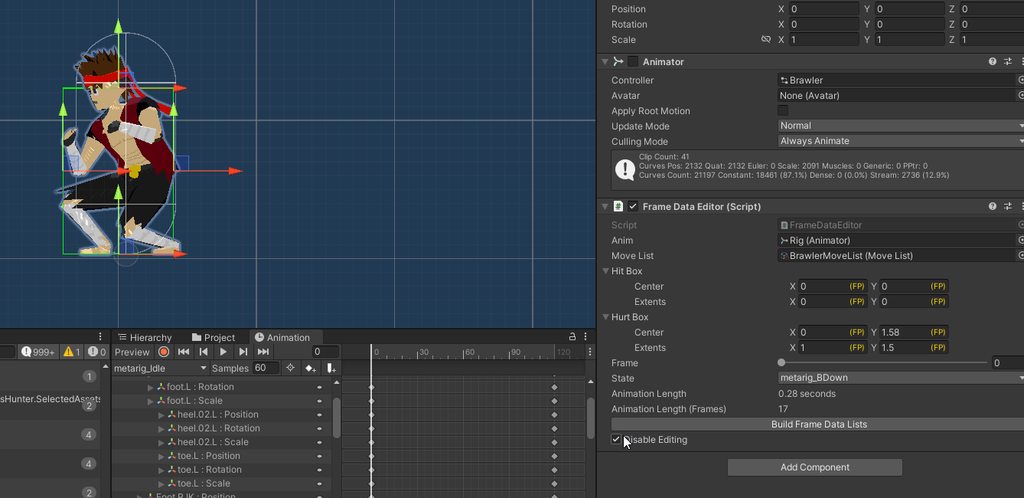 real spindle
dusk dome
https://gdl.space/weyaradowo.cs
why arent the position handles being updated?
...
real spindle
dusk dome
https://gdl.space/weyaradowo.cs
why arent the position handles being updated?
...
Is FPBounds2 a struct?
If yes, you are editing a copy of it. So you need to assign it back in the end of EndChangeCheck: ```cs
t.hurtBox = hurtBox;
thank you! just packed up my PC to move, but will check this out when I can. will the positions change while I drag, or only when I let go?
real spindle
Drag should work
unreal light
I'm being forced to create a custom property drawer to display a long value as a mask, currently doing it with a popup, how can i make it so the toggles for each possible flag of the mask (pic 1) looks like the ones from this type of toggle? (pic 2)

 timid coyote
unreal light
I'm being forced to create a custom property drawer to display a long value as a...
timid coyote
unreal light
I'm being forced to create a custom property drawer to display a long value as a...
If its off, invisible true, else i think u can change the box into the check then inviz off ( this all with uitoolkit )
unreal light
Forgot to mention I'm using imgui, oops
dusk dome
real spindle
Drag should work
https://gdl.space/burozuzima.cs
Just added the line you told me, and now when i drag this happens 😅
https://i.imgur.com/CJcaSFT.gif
any idea why?
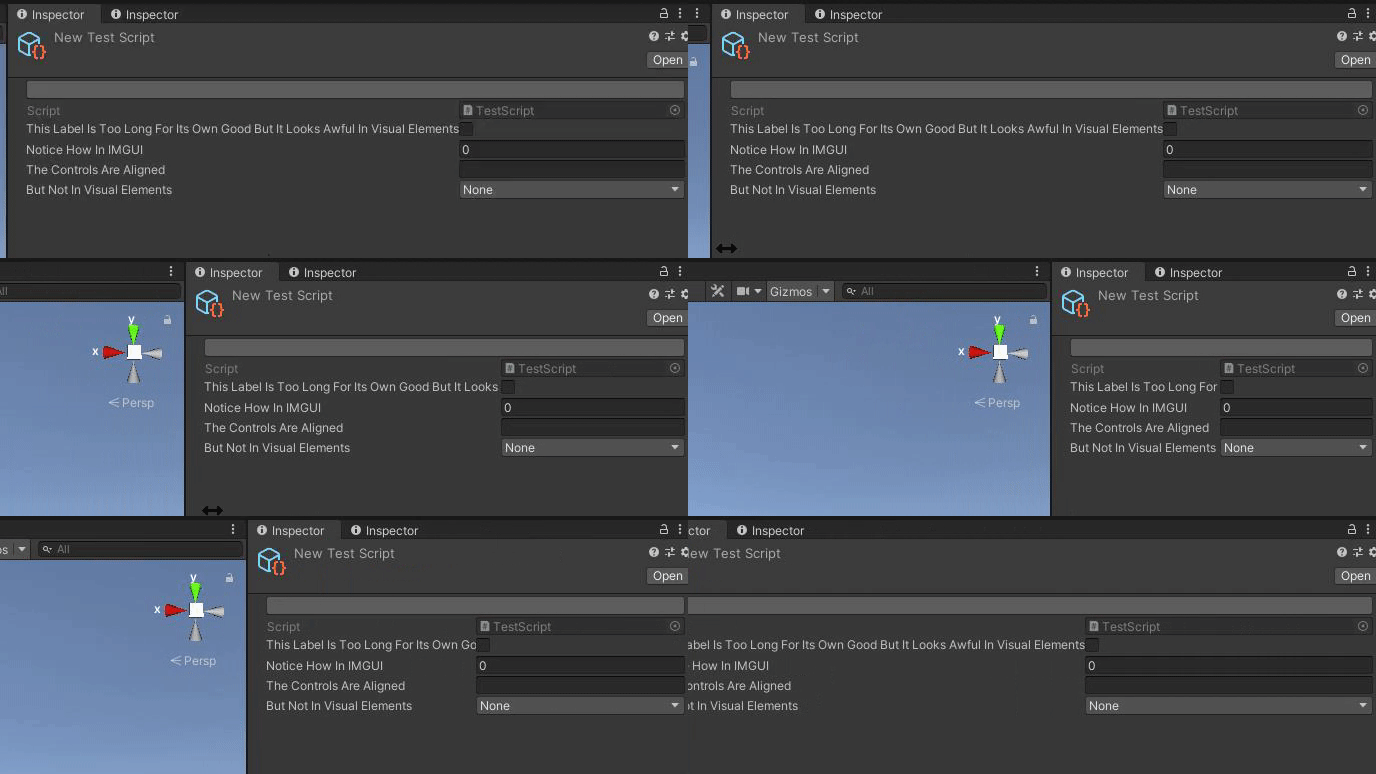
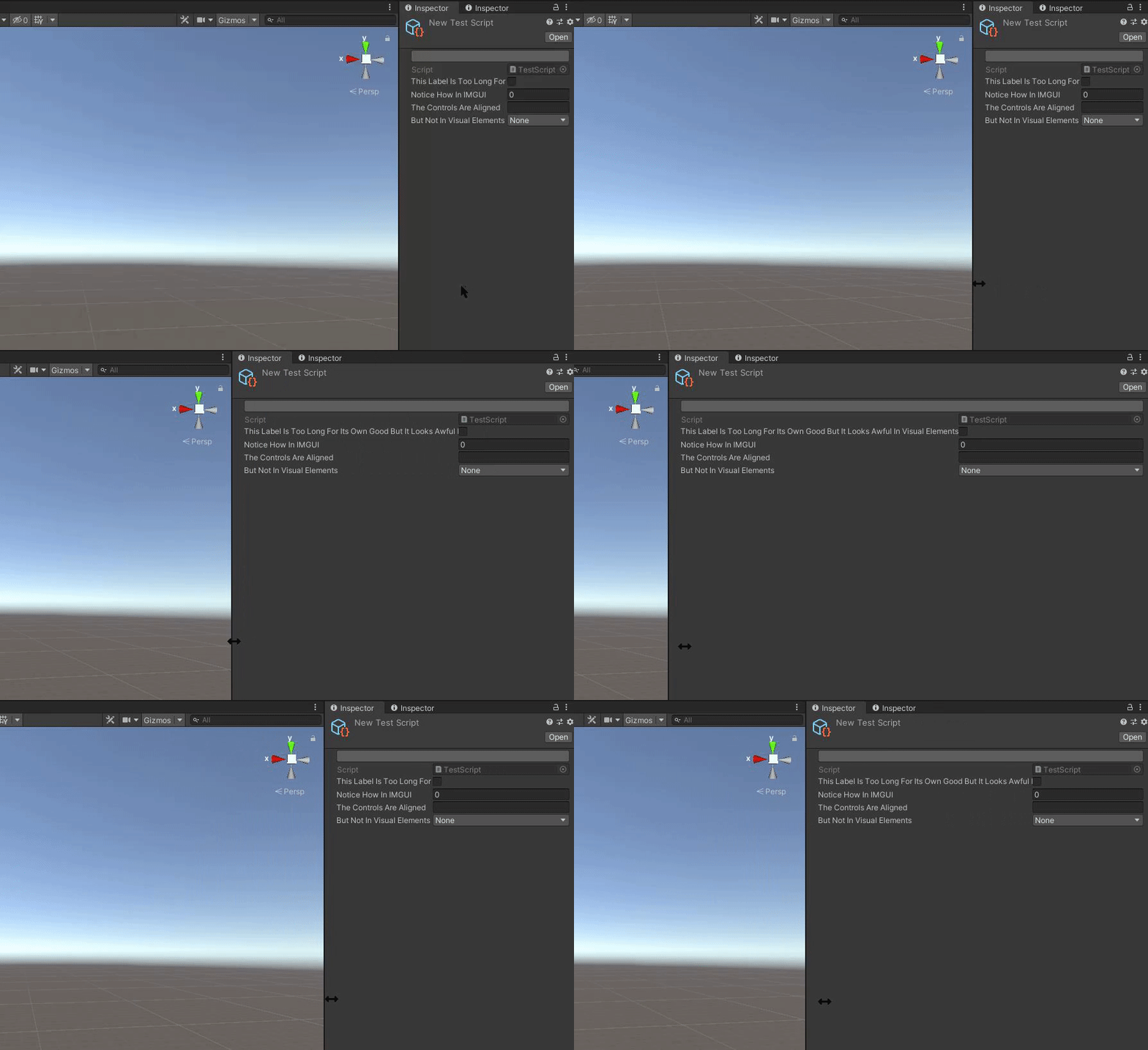

 real spindle
dusk dome
https://gdl.space/burozuzima.cs
Just added the line you told me, and now when i ...
real spindle
dusk dome
https://gdl.space/burozuzima.cs
Just added the line you told me, and now when i ...
Dunno, probably related to all those conversions
dusk dome
real spindle
Dunno, probably related to all those conversions
maybe its the divisions?
for the extents
fixed it

is there a way to change these position handles so they aren't like that?
like collder editors
they just have small squares
visual stag
dusk dome
is there a way to change these position handles so they aren't like that?
Use Handles.Slider or Handles.Slider2D and pass whatever cap function you like
golden grove
timid coyote
```cs
private const string SCRIPT_FIELD = "m_Script";
private VisualElement Ini...
Hey! Sorry I'm only getting to this now, I do see the idea behind what you are going for but there's a couple problems I'm facing, I understand the approach of looping through all "properties" in the SerializedProperty, but I am unable to find reference to: ```cs
var property = serializedObject.GetIterator();
as-well as:
```cs
root.AddChild
as it appears "serializedObject" and "root" doesn't seem to have an "AddChild" function. Any ideas on what may be going wrong or perhaps a script reference I could be missing?
golden grove
golden grove
Hey! Sorry I'm only getting to this now, I do see the idea behind what you are g...
I have tried to pass the "CreatePropertyGUI"s "SerialiedProperty" reference as a ".serializedObject" and tried adding the function you created with that reference to root, but unfortunately that added an infinite loop of the base class holding it inside the PropertyDrawer haha. Sorry I am quite unfamilliar with custom inspectors and especially "UIElements" as a whole.
timid coyote
golden grove
Hey! Sorry I'm only getting to this now, I do see the idea behind what you are g...
https://docs.unity3d.com/ScriptReference/SerializedObject.GetIterator.html
as for addchild:
/// <summary>
        /// Add the <paramref name="child"/> to the <paramref name="target"/>.
        /// </summary>
        public static T AddChild<T>(this T target, VisualElement child) where T : VisualElement
        {
            target.Add(child);
            return target;
        }
Is there possibly an easier built-in function for adding default variables in a class, I really am not able to follow very well unfortunately. 😭
I thought I had seen somewhere a "DrawDefaultInspector()" of some kind, I'm unsure if it's a "UIElements" function but I feel as though it may be much more convenient, I'm creating this custom inspector for a parent class and searching for the property list which only some child classes have and drawing a custom functionality to a button which is required for the custom list, Is there potentially a way to not replace the entire inspector and just target a specific variable if it's found?
timid coyote
DrawDefaultInspector is on the gui part
but at the moment for uitoolkit, there is not
golden grove
        SerializedProperty effectComponentsArray = property.FindPropertyRelative("contactEffects");
        if (effectComponentsArray != null)
        {
            var effectComponentsArrayField = new PropertyField(effectComponentsArray);

            var addContactEffectButton = new Button();
            addContactEffectButton.text = "<b><size=115%>(+) Attack Effect</size></b>";

            addContactEffectButton.clickable = new Clickable(() =>
            {
                Debug.Log("button clicks");
                GenericMenu menu = new GenericMenu();

                // Declare New Effect Components Below !

                KnockbackEffect newKnockbackEffect = new KnockbackEffect();

                // Insert New Declared Effect Components Below !

                menu.AddItem(new GUIContent("Knockback Effect"), true, () => OnEffectComponentSelected(newKnockbackEffect));

                menu.ShowAsContext();
            });

            void OnEffectComponentSelected(ContactEffectComponent component)
            {
                var effectScriptableObject = Activator.CreateInstance(component.GetType());
                effectComponentsArray.InsertArrayElementAtIndex(effectComponentsArray.arraySize);
                effectComponentsArray.GetArrayElementAtIndex(effectComponentsArray.arraySize - 1).managedReferenceValue = effectScriptableObject;
                //attackComponentsArray.GetArrayElementAtIndex(attackComponentsArray.arraySize - 1).l
                effectComponentsArray.serializedObject.ApplyModifiedProperties();
            }
            effectComponentsArrayField.label = "<b><size=115%>Attack Effects</size></b>";

            root.Add(effectComponentsArrayField);
            root.Add(addContactEffectButton);

        }
        return root;
Currently this is my pretty basic property which I have created as a "CreatePropertyGUI" in my "[CustomPropertyDrawer(typeof(AttackComponent))]"
golden grove
timid coyote
but at the moment for uitoolkit, there is not
Ah, I see. Is there possibly a way of merging the two gui systems somehow?
Because it really is just one particular property or variable I need to add a button for.
timid coyote
dont think its the best solution
golden grove
timid coyote
https://docs.unity3d.com/ScriptReference/SerializedObject.GetIterator.html
as fo...
Hmm, I see. Because honestly I have very very little understanding of where this connects to the previous code, just simply because I am unfamilliar with how UIToolkit is even structured entirely haha.
timid coyote
but why u dont just create an attribute, assign it to the list and then with a property drawer, draw the list and then the button
didnt read ur last question
this is the answer 🙂
just like u have [serilializeField] u can have custom attributes
golden grove
timid coyote
just like u have [serilializeField] u can have custom attributes
I am pretty sure I was unaware of this, but I also am unaware of how that all works in general 
golden grove
timid coyote
but why u dont just create an attribute, assign it to the list and then with a p...
this was initially what I was trying to do but my attempts of figuring that out were futile so I just decided to draw and look for the property as it was the easiest solution I could find resources on.
timid coyote
ik this kinda hard at first, but after a while u will get it
golden grove
timid coyote
ik this kinda hard at first, but after a while u will get it
Haha, yeah that's the hope. I am just really worried about overcomplicating code that has a hidden simple answer, you'd think they'd have a function to just draw default variables.
timid coyote
so u have CustomEditor to edit a whole script, and property drawer for fields
golden grove
Right yes
I vaguely understand the difference between a CustomEditor and the UIToolkits stuff, which generally is a lot more understandable I've found, besides drawing these dang default variables haha.
timid coyote
uitoolkit is just an api, a bounch of scripts, that helps u to draw the inspector
golden grove
Is the ```cs
public override VisualElement CreatePropertyGUI(SerializedProperty property)
there is also the an ancient "version" called imgui
the property its just the field
u have .stringValue, .intValue
etc
golden grove
timid coyote
there is also the an ancient "version" called imgui
I remember when I had first tried to start in unity I had used imgui which I believe was a package haha. I really hadn't known anything at that point and gave up really fast.
golden grove
timid coyote
the property its just the field
can I send the context I'd love to be able to know what the "property" actually represents under this context I feel like that'd help me gauge this better.
timid coyote
golden grove
```cs
SerializedProperty effectComponentsArray = property.FindPropertyRe...
its just like u did here SerializedProperty effectComponentsArray = property.FindPropertyRelative("contactEffects");
golden grove
in this:
[CustomPropertyDrawer(typeof(AttackComponent))]
public class AttackComponentsEditor : PropertyDrawer
{
    public override VisualElement CreatePropertyGUI(SerializedProperty property)
Right yes, it's a visualelement but it references "property" what is possible to retrieve from this reference?
timid coyote
u need to create a new class that inherits from Attribute
and instead of AttackComponent u have the attribute
golden grove
oh dear
timid coyote
golden grove
Right yes, it's a visualelement but it references "property" what is possible to...
the property isnt a visual element
visual elements are what u draw on the inspector, like the int field, string field
golden grove
timid coyote
the property isnt a visual element
Yes, but what is it?
timid coyote
property just points to ur list
golden grove
timid coyote
property just points to ur list
ahh, I see.
timid coyote
because u have to add ur attribute to the list like this [Custom] private List<int> list;
u create a class CustomAttribute : Attribute
so the property just points to whatever u assigned ur attrribute to
golden grove
so what would I be creating an attribute of ?
Like what would be defined in the attribute, the "AttackComponent"?
timid coyote
i dont understand what are u going for
golden grove
me either at this point
golden grove
I am editing what my arrow is pointing to, shouldn't I get access to everything within' it?
golden grove
timid coyote
want to vc to explain a little better?
I don't have a mic at the moment as I'm away but I can listen
timid coyote
sure
golden grove
Debug.Log(property.CountInProperty());

        for (int i = 1; i < property.CountInProperty(); i++)
        {
            SerializedProperty childProperty = property.GetArrayElementAtIndex(i);
            Debug.Log("Adding Property:" + childProperty.name);
            root.Add(new PropertyField(childProperty));
        }
``` Hey all! I think I've got something at-least functional as far as drawing child classes elements individually, but I am currently trying to create a loop which will (ideally) loop through all properties of the current child class, which does accurately log the number of variables using the "CountInProperty" however, I cannot seem to get my "property.GetArrayElementAtIndex(i)" to return anything, I am also noticing the loop isn't even logging my "Adding Property: " log in the loop, any ideas why the loop wouldn't be firing even though the "CountInProperty()" is not 0 or null?Well is property a SerializedProperty of an array?
golden grove
"property" in my case is for my class:
[System.Serializable]
public class AttackComponent
{
    public virtual void Invoke(Entity sender) { }
}
which is the parent class of in my current test:
[System.Serializable]
public class MovementData : AttackComponent
{
    [SerializeField]
    public float xVelocity = 0;
    [SerializeField]
    public float yVelocity = 0;
}
which property.CountInProperty() seems to accurately be returning the accessable variables in whatever child class I am referencing, but not firing the loop at all, which should be happening even if it can't access the properties due to "CountInProperty()" being a non null int?
gloomy chasm
myProperty.GetArrayElementAt(i) is like when you do myArray[i]. So if myProperty is not for an array, it isn't going to work.
For iterating on the children, you can just foreach the property 🙂
Not sure what CountInProperty is. Is it an extension method you wrote?
golden grove
Hmm, "CountInProperty()" is a function from the "SerializedProperty" class.
gloomy chasm
Ooh
golden grove
But shouldn't my for loop be firing if my "property.CountInProperty()" is accurately logging "8" for example eitherway?
I guess in "MovementData"s example it'd be logging 3, since it also logs the "AttackComponent" itself.
gloomy chasm
I totally forgot CountInProperty is a thing... I don't think in all my years of editor scripting I have ever used it haha, thats my bad
golden grove
Haha, yeah I just assumed it would be useful in a for loop to try to automate the manual process of adding default variables I need to access
gloomy chasm
foreach(SerializedProperty childProperty in property)
{
  root.Add(new PropertyField(childProperty));
}
Anyway, this will do the same as what you wanted the code you posted to do.
golden grove
Like for example I can do:
if (property.FindPropertyRelative("xVelocity") != null)
        {
            SerializedProperty variableElement = property.FindPropertyRelative("xVelocity");

            root.Add(new PropertyField(variableElement));
        }
which will display specifically my "xVelocity" element if it is found in the child class, but I am trying to avoid doing that for each.
golden grove
gloomy chasm
```cs
foreach(SerializedProperty childProperty in property)
{
root.Add(new Pro...
Let me try that!
golden grove
gloomy chasm
```cs
foreach(SerializedProperty childProperty in property)
{
root.Add(new Pro...
Hmm, yeah this just adds another instance of my "AttackComponent" not the child class unfortunately.

sorry it's a bit scuffed, but the red box represents the "AttackComponents" custom editor
gloomy chasm
Can you show the runtime classes and the editor classes? I'm having a hard time figuring out what exactly is where so it is a bit hard to say what might be going on
!code
grave hingeBOT
Posting code
📃 Large Code Blocks
Use links to services like:
https://gdl.space/, https://paste.ofcode.org/, https://hatebin.com/, https://paste.myst.rs/, https://hastebin.com/
📃 Inline Code
Surround code with three backquotes. Not quotation marks.
To format as C#, add cs to the first line:
```cs
// Your code here
```
Add a comment with a line number if there is an error message.
golden grove
golden grove
"property" in my case is for my class:
```cs
[System.Serializable]
public class ...
where-as this, would draw as so:
 golden grove
gloomy chasm
Can you show the runtime classes and the editor classes? I'm having a hard time ...
golden grove
gloomy chasm
Can you show the runtime classes and the editor classes? I'm having a hard time ...
and yes
the "property.FindPropertyRelative("contactEffects")" segment is just searching for a particular element which needs a custom button and drawing the button, that isn't a part of the "MovementData" class but instead another child class that is longer.
gloomy chasm
Ahh was just aboout to ask about that
golden grove
Essentially my system splits animation into frames, which each can add a "Attack Component" which could play a sound, move the "caster", play a sound, or add a damage hitbox, and the "damage hitbox" has another list of modular effects which can for example: apply knockback, apply damage etc.
gloomy chasm
I don't see why this code wouldn't work https://paste.ofcode.org/hYXBUpBiHB8n2jNxv3kXxs
Here is the code for what it is doing if you are interested https://github.com/Unity-Technologies/UnityCsReference/blob/master/Editor/Mono/SerializedProperty.bindings.cs#L259
golden grove
gloomy chasm
```cs
foreach(SerializedProperty childProperty in property)
{
root.Add(new Pro...
not really sure what kind of wizardry is going on in my project, but this worked?
It wasn't working a second ago haha. Not really sure what happened.
gloomy chasm
Maybe it got pasted in the wrong place or didn't recompile?
golden grove
Except it isn't drawing my custom button anymore, not sure why.
golden grove
gloomy chasm
Maybe it got pasted in the wrong place or didn't recompile?
probably, it was logging really weirdly in the inspector.
gloomy chasm
But actually looking at the code, I think it won't work exactly how you want because it will go in to nested classes as well.
golden grove

this is how it's currently working in the inspector, and it's drawing propertly for "MovementData" as-well.
It's just my "ContactEffects" isn't drawing as my custom list, but I assume I could just search for it in the childproperty loop and do it that way?
gloomy chasm
var end = property.GetEndProperty();
var iterator = property.Copy();
if (iterator.NextVisible(true))
{
 do {

    root.Add(new PropertyField(iterator));
  }while(iterator.NextVisible(false) && !SerializedProperty.EqualContents(iterator, end))
}
I think you want to do this instead of the foreach because the foreach will enter the child properties. So if you had another class/struct in your AttackComponent it would add a PropertyField for each of its properties as well.
golden grove
gloomy chasm
I think you want to do this instead of the `foreach` because the `foreach` will ...
Like a parent to "AttackComponent" or child?
It's only drawing the specific child I am adding of "AttackComponent"
I have a custom button to add a specific child instance of "AttackComponent"
gloomy chasm
Like if you had
public class MovementData : AttackComponent
{
  public MyOtherDataClass myData;
}
It would add a PropertyField for myData but also a property field for each property inside of MyOtherDataClass
golden grove
Hmm, that may be fine as I don't intent on referencing a class but I guess I could use the other example just in-case.
Generally, all the references happen in the "Invoke" function which are passed a variable when "invoked"
gloomy chasm
Also, for the CustomPropertyDrawer attribute, you should add [CustomPropertyDrawer(typeof(AttackComponent), true)]
(Honestly, it shouldn't be working right now for your MovementData class)
golden grove
Yeah I really have no idea what's going on with my project atm lol.
My "MovementData" when being added is adding two "XVelocity"s
gloomy chasm
Have you tried restarting Unity just? haha
gloomy chasm
golden grove
My "MovementData" when being added is adding two "XVelocity"s
That is probably because below the foreach loop you are manually adding one 🙂
golden grove
Nevermind I forgot to save my changes in the inspector, it's just from my old "findproperty"
golden grove
gloomy chasm
That is probably because below the `foreach` loop you are manually adding one 🙂
Yeah, haha in my inspector I had commented it out and not saved.
golden grove
gloomy chasm
Also, for the `CustomPropertyDrawer` attribute, you should add `[CustomPropertyD...
what does the "true" do?
nevermind there's a tooltip haha
gloomy chasm
golden grove
what does the "true" do?
It makes the property drawer be used for child classes
golden grove
So should I just add my
SerializedProperty effectComponentsArray = property.FindPropertyRelative("contactEffects");
        if (effectComponentsArray != null)
        {
``` to the loop through childproperties and just search for a childproperty with the name "contactEffects"or how would I find the "contactEffects" property in that loop?
Because it doesn't seem to be using the other block where it searches for "contactEffects"
gloomy chasm
Can you showwhere contactEffectsis defined
I mean it should find it, I would debug.log it out
golden grove
gloomy chasm
I mean it should find it, I would debug.log it out
I mean it is displaying "contactEffects" in your new loop, but that seems to be replacing the other "Find". Not sure why
gloomy chasm
golden grove
I mean it is displaying "contactEffects" in your new loop, but that seems to be ...
What do you mean?
golden grove
gloomy chasm
I don't see why this code wouldn't work https://paste.ofcode.org/hYXBUpBiHB8n2jN...
the whole bottom half of this where it looks for and replaces the "contactEffects"
I'm looking to maintain the (+) Attack Effect button, and custom list. I assume this would be done by finding the "childProperty" for "contactEffects" and drawing all the replacing stuff in it's place.
but I'm not sure how to check using an if statement if "childProperty == contactEffects" or something to that effect.
gloomy chasm
OOOH
golden grove
to be completely honest I have no idea why it's different at all with or without this loop, but.
gloomy chasm
Duh, do var copy = property.Copy(); before the foreach and use the copy instead of property in the foreach
golden grove
Perfect that worked!
Is it possible to still search and not draw the "contactEffects" twice though haha
 gloomy chasm
In the for loop you can do if (child.name == "contactEffects") to find it
golden grove
I assume I'd still need to search for the "childProperty" that equals "contactEffects".
golden grove
gloomy chasm
In the for loop you can do `if (child.name == "contactEffects")` to find it
oh perfect, thanks!
Horray! Everything works.
I really appreciate your help this has been concerningly difficult for me to figure out for some time now haha

it's beautiful 
Also, on a side-note do you know of a way to easily remove the default list "+/-" under the "AttackEffects"?
just a visual thing and it doesn't really matter if it complicates things, but it would be nice to remove.
gloomy chasm
golden grove
Perfect that worked!
Just as an explanation for why it worked. SerializedProperties are basically in a hierarchy/tree. And whatever property you have is the 'selected' one. So property.NextVisible(false) moves itself to be the next one in the hierarchy. While property.NextVisible(true) will move itself in to its child property if it has one.
The foreach internally does a NextVisible(true), so it would move the property 'past' the contactEffects property. If that makes sense.
golden grove
gloomy chasm
Just as an explanation for why it worked. SerializedProperties are basically in ...
Ahh, I see. Yeah no working this out with you has made how it works make a lot more sense. I really do appreciate it!
I was pretty much just throwing attempts at it and hoping something worked lol.
gloomy chasm
golden grove
Also, on a side-note do you know of a way to easily remove the default list "+/-...
You would need to draw your own ListView instead of a PropertyField. Or you could add a uss file that has styles that hide those elements.
gloomy chasm
golden grove
I was pretty much just throwing attempts at it and hoping something worked lol.
Been there haha
golden grove
I couldn't find ANY reference on how to accomplish this simply.
golden grove
gloomy chasm
You would need to draw your own `ListView` instead of a `PropertyField`. Or you ...
Okay I'll probably just add styles as I'm natively a webdev haha.
so is it possible to create "css" type styles for specific elements or portions of the inspector?
Like can I assign a "css-class" to an element?
I think UIToolkit uses UXML, but I assume it's the same thing?
gloomy chasm
Literally it is just a subset of css 👍
golden grove
okay perfect, I'll do that then! Thanks so much you're a lifesaver!
gloomy chasm
You can right-click on the header of a window to open a context menu with a UIToolkit Debugger (or maybe UIElements Debugger depending on the version)
From that window you can see the full hierarchy of elements and find the +/- buttons and see what classes they have right now
golden grove
gloomy chasm
You can right-click on the header of a window to open a context menu with a `UIT...
Yeah, I think I've seen that somewhere it seems exactly like Unity's DevTools replacer
where it highlights all the related info of a panel
gloomy chasm
Also most visual element types have static string properties for the uss class names, like FloatField.ussClassName is a property for "unity-float-field"
golden grove
gloomy chasm
Also most visual element types have static string properties for the uss class n...
Oh perfect, yeah I'm looking at that now.
Are all instances of (in this example) "unity-list-view__footer" unique or would I need to create some sort of distinction and search for my class first
like is there a way to specify the "unity-list-view__footer" on specifically my "contactEffects" list?
gloomy chasm
No, not without either naming the element or adding a class to it
golden grove
gloomy chasm
No, not without either naming the element or adding a class to it
Hmm, can I add a class to a list which will be inherited by all children of it? I'll send an example.
Could I somehow add a class to "Enemy Attacks" which will remove or hide all instances of "unity-list-view__footer".
gloomy chasm
Yes, but not specifically the Attact Effects list.
golden grove
Right, but all underneath the "Enemy Attacks" list?
not just specifically the AttackEffects one
unless I were to add a class to specifically the "AttackEffects" one?
gloomy chasm
Yeah if you just add a class like my-class, And then had a uss selector like
my-class unity-list-view__footer {
  display: none;
}
Perfect! And I can add that to specifically my "Enemy Attacks" and it should inherit?
Because I really don't need any of the default +/- on my custom inspector class
gloomy chasm
It doesn't inherit no. But you can use the 'space' selector in uss to say 'any child`
golden grove
Oh okay, thanks!
I'll try that I really appreciate all your help.
You really have saved me a lot of time here haha!
gloomy chasm
Haha, glad to help 😄
 young anchor
is it possible to write a script that when activated (in editor mode), it goes through all audio sources in the scene and sets their output audio mixer group to some specific mixer?
timid coyote
yes
/// <summary>
        /// Save the current Scene.
        /// </summary>
        public static void SaveCurrentScene() => EditorSceneManager.SaveScene(SceneManager.GetActiveScene());

        /// <summary>
        /// Loop thru all the MonoBehaviours in the scene and get each of them thru the <paramref name="onFound"/> Action.
        /// </summary>
        /// <param name="onFound">Type = MonoBehaviour type</param>
        public static void PassSceneMonoBehaviours(Action<Type, MonoBehaviour> onFound)
        {
            SaveCurrentScene();

            var monoBehaviours = FindObjectsOfType<MonoBehaviour>();
            foreach (var monoBehaviour in monoBehaviours)
            {
                var type = monoBehaviour.GetType();
                onFound?.Invoke(type, monoBehaviour);

                type = type.BaseType;
                while (type is not null)
                {
                    onFound?.Invoke(type, monoBehaviour);
                    type = type.BaseType;
                }
            }

            SaveCurrentScene();
}``` u can use thisYou can also just doObject.FindObjectsOfType<AudioSource>(), and then iterate on them and set the mixer
young anchor
gloomy chasm
You can also just do`Object.FindObjectsOfType<AudioSource>()`, and then iterate ...
thanks a lot
dusk dome
scriptableobjects that im editing via an editor script are not saving when i exit the project. why is this?
gloomy chasm
dusk dome
scriptableobjects that im editing via an editor script are not saving when i exi...
See the second pinned message in this channel
dusk dome
gloomy chasm
See the second pinned message in this channel
im not getting any errors here, but i cant see the Resize Box Colliders in the undo history
 gloomy chasm
dusk dome
im not getting any errors here, but i cant see the Resize Box Colliders in the u...
gloomy chasm
dusk dome
im not getting any errors here, but i cant see the Resize Box Colliders in the u...
Did debug.log it to see if it is getting there?
dusk dome
gloomy chasm
Did debug.log it to see if it is getting there?
when i move the handles it fires

 dusk dome
just made a manual button that saves all assets
 sacred wave
When scripting custom inspectors, how can I get default Unity colors and styles?
gloomy chasm
sacred wave
When scripting custom inspectors, how can I get default Unity colors and styles?
Well I've got a site for you https://www.foundations.unity.com/
Guidance for building intuitive and engaging experiences for the Unity Editor.
sacred wave
oh my god, that's my dream
thank you so much, I can't believe I couldn't find that before
gloomy chasm
You're very welcome! No worries, it actually isn't very widely used or talked about so not surprising
dusk portal
i've got a ListView bound to a list property on a serialized object, is there a good way to apply different classes or styles to the elements depending on the items in the list? let's say i want to make some items red if they've got invalid values for example
the items aren't created immediately after updating the list, so i can't just loop over them
gusty mortar
dusk portal
i've got a `ListView` bound to a list property on a serialized object, is there ...
You can change the bindItem method of your ListView and register to a callback to check the validity of your data on change event and update the style of the element accordingly (idk if that makes sense for you).
dusk portal
gusty mortar
You can change the bindItem method of your `ListView` and register to a callback...
setting bindItem stops the default binding behaviour from running so the labels and stuff inside each element don't get bound (the docs warn about this), is there an equivalent method i can call if i want that to still happen?
gusty mortar
Well yeah it is meant as an override. You'd have to do the binding yourself. Maybe someone will know better, but I don't know of a method that specially control the styling of a ListView element without altering the binding method.
Doing the binding is not that hard. I suppose you have access to your array property in the first place to bind it to the list view. then you should be able to access it's element through their index.
dusk portal
dang OK 🤔 i was hoping there was an event or something that would get fired afterwards
it's not hard to bind the data manually in this case, just a shame it can't be set up with binding paths in the editor like the rest of the UI though 😔
thanks for the advice!
 mild sentinel
Anyone know how to modify animation controllers in an editor script? I can get all the files ending with .controller in the project pretty easily, but I can't seem to find a way to actually modify them. I presume I can use AssetDatabase.LoadAssetAtPath, but what would be the type? It would seem to be RuntimeAnimatorController, but that one has nothing to actually access the state machine.
real spindle
dusk dome
scriptableobjects that im editing via an editor script are not saving when i exi...
In the case of ScriptableObject, call both SetDirty and Undo.RecordObject, if you want to register the change and support undo.
https://docs.unity3d.com/ScriptReference/EditorUtility.SetDirty.html
I think you need to do
-Undo.RecordObject
-Apply your changes
-SetDirty
dusk dome
real spindle
> In the case of ScriptableObject, call both SetDirty and Undo.RecordObject, if ...
I ended up just making it so I set the asset as dirty, because I'm working on modifying assets. works the same
golden grove
Hey all! I'm currently trying to set a "display: none" style on a specific type of element using uss (or any inline solutions with my propertydrawers), currently I have a uss file which I am trying to link to my root which is setup as so:
USS:
unity-list-view__footer
{
    display: none;  #NOTE: have tried display: none; and display: None;
}
var root = new Foldout();
StyleSheet styleSheet = (StyleSheet)EditorGUIUtility.Load("Assets/New/Entity/New Enemy/RemovePlusMinus.uss");
root.styleSheets.Add(styleSheet);
However, the "unity-list-view__footer" is still visible in the inspector. Anyone have any good references or quick solutions on how to get the uss styles working, or what may be causing it to not work?

trying to remove these default +/- list/array buttons by setting the display to none.
gloomy chasm
golden grove
Hey all! I'm currently trying to set a "display: none" style on a specific type ...
Your uss is missing a . before the class name
Unless it is a copy-paste error
should be:
.unity-list-view__footer
{
    display: none;
}
Ah I see! The "example" I was referencing didn't have a dot in any of the examples so I had just assumed it was different in uss, appreciate it!
Yep, worked instantly. Probably should have tried that haha!
gloomy chasm
golden grove
Ah I see! The "example" I was referencing didn't have a dot in any of the exampl...
If there isn't a dot, then it refers to a C# class. Like
ListView {
  color: black;
}
Would make the text in the C# ListView element black.
golden grove
gloomy chasm
If there isn't a dot, then it refers to a C# class. Like
```css
ListView {
col...
Ahh! That makes a whole lot of sense, yeah that would probably explain it.
gloomy chasm
And a # refers to the name of an element
golden grove
I believe the guide I was watching (which I skipped ahead in haha) was using something along the lines of "Test"
gloomy chasm
Ahh
golden grove
Appreciate that!
gloomy chasm
As far as I know, the only difference between css and uss, is that uss has fewer style options and types. And maybe doesn't support some of the more advanced/niche selectors
golden grove
gloomy chasm
As far as I know, the only difference between css and uss, is that uss has fewer...
Yeah, seems like it. The UIBuilder seems to lay out all the options pretty nicely even if I don't directly add them through it.
gloomy chasm
Yeah, for sure
golden grove
I honestly much prefer to adjust everything using uss as it's really familliar to me.
gloomy chasm
Yeah for me it depends on what I'm doing. But I find the UIBuilder faster for prototyping and playing around normally. But if I know what I want (mostly) then just editing the uss directly is way faster
golden grove
gloomy chasm
Yeah for me it depends on what I'm doing. But I find the UIBuilder faster for pr...
Yeah, seems like it! Is connecting UXML the same as connecting a uss file?
StyleSheet styleSheet = (StyleSheet)EditorGUIUtility.Load("Assets/New/Entity/New Enemy/RemovePlusMinus.uss");
Something along these lines?
Well, actually I guess UXML directly adds elements doesn't it.
gloomy chasm
Yeah. You can actually make uxml load the uss.
golden grove
Oh, cool!
gloomy chasm
But I only recommend setting it up from the UIBuilder cause it uses the asset GUID
golden grove
gloomy chasm
But I only recommend setting it up from the UIBuilder cause it uses the asset GU...
Ah I see.
gloomy chasm
But yeah, you can load uxml like AssetDatabase.LoadAssetAtPath<VisualTreeAsset>(myPath).CloneTree(rootVisualElement);
golden grove
gloomy chasm
But yeah, you can load uxml like ` AssetDatabase.LoadAssetAtPath<VisualTreeAsset...
Okay, perfect!
Appreciate it!
Also, another question I had this time PropertyDrawer related, is there a way to get the current "property"s place in an array?
gloomy chasm
Yeah... not a nice one. You have to parse the propertyPath of the property
I have a extension method for it, second
golden grove
gloomy chasm
Yeah... not a nice one. You have to parse the `propertyPath` of the property
Ah I see.
Currently all my attack "Frame" components are labelled "Frame" which makes it pretty difficult if there are like 30+ frames to count haha.
gloomy chasm
golden grove
Ah I see.
Well, I can't find it now. It would be something like
public static int GetArrayElementIndex(this SerializedProperty property)
{
  if (!property.propertyPath.EndsWith(']'))
    return -1;

   int fromIndex = property.propertyPath.LastIndexOf('[');


  string indexString = property.propertyPath.Substring(fromIndex);

  return Convert.ToInt32(indexString.Substring(1, indexString.Length - 2));
}
Appreciate it! I'll try that.
golden grove
gloomy chasm
Well, I can't find it now. It would be something like
```cs
public static int Ge...
Actually worked instantly, really appreciate it!
gloomy chasm
Oh really? Sick! First try!
golden grove
Also, seems to update live on reorder.
golden grove
gloomy chasm
Oh really? Sick! First try!
Haha, always feels good when it's the first try especially when it's someone else's first try 😎
only thing needing to be changed was the public modifier, which supposedly wasn't valid. But that could also be something I misunderstand haha!
gloomy chasm
Weird, that shouldn't be an issue at all. But as long as it is working haha
golden grove
Yeah, I'm really not sure haha. But it's looking a lot cleaner in the inspector now!

Also, do you know if there's a way to detect foldout state at all? I'd like to only display a particular "frame"s "(+) Attack Component" button when it's folded out, and ideally default everything to be closed.
gloomy chasm
golden grove
Also, do you know if there's a way to detect foldout state at all? I'd like to o...
I think it is a Foldout element or it might be a Toggle I don't remember. But you can query it in C# and register a ChangeEvent callback to know when it is changed.
I would open the UIToolkit debugger and have a look
golden grove
gloomy chasm
I *think* it is a `Foldout` element or it might be a `Toggle` I don't remember. ...
Perfect, thanks I'll try that!