#↕️┃editor-extensions
1 messages · Page 9 of 1
 gloomy chasm
 earnest talon
IStyleType
or i mean
IStyleValue
not in Unity 2021.3
StyleValues is (because ???)
or it's not even in 2023?
huh
weird
gloomy chasm
Ah nvm IStyleValue is internal
gloomy chasm
of course it is xD
earnest talon
insert elmo fire gif here
well, do you have any suggestions for what I can do about the property value type
I know the entire way I'm going about USS is so gloriously cursed and janky but that's my biggest concern
whether or not i fugged it
I plan to add all sorts of inheriting classes based on USSValue (which contains an object representing a value and a ValueType enum value)
gloomy chasm
earnest talon
well, do you have any suggestions for what I can do about the property value typ...
What do you mean about the property value type?
earnest talon
converting a generic C# object type into a USS data type in a less "oh-god-no" way.
I'll probably implement the inheriting classes idea instead
because this is just way too cursed for me 💀
earnest talon
speaking of @gloomy chasm do you happen to have a reference sheet to all the keywords for properties (e.g. auto, hidden, visible)?
gloomy chasm
earnest talon
speaking of <@131292153300123648> do you happen to have a reference sheet to all...
earnest talon
oh those are properties themselves
I've added all those
i mean the keywords like auto, hidden, visible
because it is oddly hard to find those.
MDN just gives me a catch-all for everything it could possibly throw at me
same with W3C/W3S
gloomy chasm
earnest talon
oh those are properties themselves
Look at the enums that the StyleFlaot and StyleColor et. use
 gloomy chasm
That is something
earnest talon
at this rate that's just the motto of this entire interpreter
"it's certainly something."
actually I'm adding that as an easter egg in this code
there we go
 gloomy chasm
earnest talon
I'm just doing this for now
gloomy chasm
earnest talon
I'm just doing this for now
Instead of this, I would instead either copy or just use the unity values they use like StyleLength and StyleFloat
It is a better, less bloated approuch
imo
earnest talon
that all depends on if those are available
gloomy chasm
Huh?
gloomy chasm
Of course they are
earnest talon
now it's just how would I interpret them in the system I've got now
I'll see if I can incorporate or otherwise work SL/SF in tomorrow because they are a tad bit different and I don't have the mental cognizance to understand them fully rn
thanks for telling me about them
earnest talon
it's working

(from this - USSElement uses a params USSProperty[] for USSProperty objects)

 upper juniper
Anyone know why Undo.Record object might not record something like this?

It wont undo the array creation
 visual stag
upper juniper
Anyone know why Undo.Record object might not record something like this?
visual stag
upper juniper
Anyone know why Undo.Record object might not record something like this?
Because your array creation has nothing to do with the gameobject. Record the undo on the UnityEngine.Object that actually contains the modifications
if that's curRoom, then use that
upper juniper
visual stag
Because your array creation has nothing to do with the gameobject. Record the un...
Oh whoops I posted the me trying crazy things that make no sense version of the code... I tried it with curRoom first and it still failed.
visual stag
Is playerSpawnsDown an array of UnityEngine.Object subtypes, or is it just a normal serialized class
upper juniper
visual stag
Is `playerSpawnsDown` an array of UnityEngine.Object subtypes, or is it just a n...
It's a list of this class Which is a sub class of curRoom which is type room.
    [System.Serializable]
    public class playerSpawns
    {
        public Transform[] spawnPoints = new Transform[2];
        public Transform[] entryPoints = new Transform[2];
    }
I don't know what you mean, that's not a subclass, it's not inheriting from anything
upper juniper
visual stag
I don't know what you mean, that's not a subclass, it's not inheriting from anyt...
Sorry I'm not sure how to word this, yeah subclass was the wrong term. It's defined within the scope of the Room class
Idk if that's relevant
visual stag
it shouldn't matter. If the undo is registered on the curRoom object it should work fine
upper juniper
visual stag
it shouldn't matter. If the undo is registered on the `curRoom` object it should...
That's what I figured.... I did the same thing on another list in the same object that didn't have any arrays nested in it and it worked just fine.... But this isn't undoing...
 visual stag
Unless your playerSpawnsDown array isn't serialized in the first place, I can't think of a reason it wouldn't work
upper juniper
My editor script is actually an OdinEditor Script could that be an issue? I remember something about this kind of serialization being slightly different with odin...
upper juniper
visual stag
Unless your playerSpawnsDown array isn't serialized in the first place, I can't ...
Hmmmm We'll it's not a big deal I guess. Just strange. Thanks for the help.
 robust venture
How do I manage to add a custom funtion inside the Assets Menu, when selected only multiple assets of a certain kind?
https://i.imgur.com/ivxyFt0.png
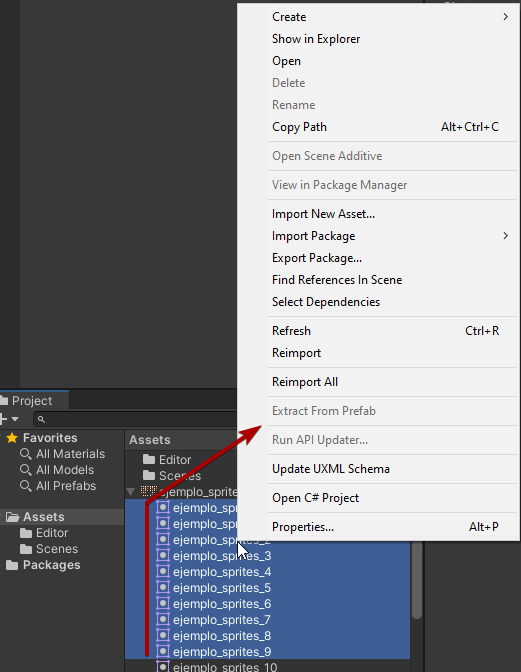
like these...
I though it was ContextMenu, but my option doesn't show
robust venture
Whoops! sorry my fault. It was MenuItem indeed. Thx anyways! 👍
earnest talon
@gloomy chasm I just realised, in my quest to avoid USS I've managed to unintentionally, spitefully learn USS in order to not use USS.
i have become what I sought to avoid
 fast marsh
Hi! Is this the right place to ask about Asset processing?
I have a .psb file with different layers and they get imported as different objects with sprite renderers. I would like to write a script that changes each sprite renderers' sorting/layer properties, but I'm unsure of where to start. Is what I need an Asset PostProcessor? Is there any way to change the properties for a prefab from an imported .psb?
 tawdry kraken
earnest talon
<@131292153300123648> I just realised, in my quest to avoid USS I've managed to ...
tawdry kraken
earnest talon
<@131292153300123648> I just realised, in my quest to avoid USS I've managed to ...
Thanks to you, we don't have to learn \o/
earnest talon
wait
what
I didn't actually think there was a demand for a C# -> USS interpreter
I just did it because i didn't want to write 7 lines * of USS and I wanted to see the look on my tutors face when he left me for a day to my own devices only to come back to a working interpreter.
it is a fully functioning, operating USS interpreter too as far as I've seen but still adding in complex type selectors as interpretable strings
tawdry kraken
well to be frank, I know a fair bit of old CSS, but it's not really motivating to learn a subset of CSS just for the purpose of making a different UI. Who knows if I will prefer your solution, but I generally like the idea of not having to dip into another world, just to fix a part of a C# project.
earnest talon
i only learnt USS because I was on a warpath to never have to learn it
tawdry kraken
At least afterwards you can repress it
earnest talon
probably won't
someone has to debug this if it goes wrong
so
something special I did
tawdry kraken
xD
earnest talon
there's two unique overarching selector types
Wildcard & Root
which are separate from simple selectors and complex selectors
Wildcard -> Universal Selector (Technically a simple one but easiest to separate as it's own type)
 blazing silo
hey guys
earnest talon
and Root is the only Pseudo-class given a unique selector instead
as it directly references the root visual element
It's fully documented but boy is this cursed
blazing silo
is unity safe because my windows security just went off
tawdry kraken
by the way, I was the guy a few days ago now who was initially curious about your Property Type switch.
Do you have a pastebin link for that one?
earnest talon
I didn't notice?
blazing silo
blazing silo
is unity safe because my windows security just went off
just because my antivirus just blocked it
tawdry kraken
It was in the convo before you responded to the mention. Then I fell asleep.
tawdry kraken
Just if you had a complete type switch for SerializedProperty
earnest talon
oh
that
it's technically complete but it's a pain
and you need to cast the resulting object as the type you're wanting
and there's four parts to it
well five?
A) basic property "object Value"
B) bool GetValueUnsafe(out object value)
tawdry kraken
Does it work anything like boxedValue (new in 2022)
earnest talon
C) bool GetValue(object <varyingType> value)
oh no
boxedValue is unique
in that it's a reference to a Generic class/struct
so that's probably mechwarrior's bewildered core you're looking for.
pseudoclass modifiers work

 earnest talon
tawdry kraken
Does it work anything like boxedValue (new in 2022)
earnest talon
tawdry kraken
Does it work anything like boxedValue (new in 2022)
for the C# -> USS value, everything unity currently has I've ported over as best as I can
even the confusing things
the only exception is some operators
because i can't find an example of how they work
tawdry kraken
earnest talon
so that's probably mechwarrior's bewildered core you're looking for.
Looks like one of his classes might do the job.
tawdry kraken
earnest talon
pseudoclass modifiers work
Looks promising. Close to finish?
or I guess, 'finished for now' lol
earnest talon
close, yeah
it's technically finished and releasable if you're just looking for an object-oriented -> string conversion approach
doesn't write files yet
missing QOL stuff
I don't know if I plan to release it separate to Cappuccino Editor Framework
purely because I want everything well documented before release
with strong, high-standard examples that help communicate how it all works.
I did look into what you suggested yesterday mech
I ended up not going for it because of lost flexibility with some type values
gloomy chasm
earnest talon
pseudoclass modifiers work
Ah, yes, clearly so much clearer to read and faster to write than USS!
(I'm just teasing you a bit 😛 )
earnest talon
oh I never intended for it to be easier or faster to write lol
I intended it to be a literal "C# Object-Oriented approach" to USS
the QOL stuff is what's going to help a bit with that
gloomy chasm
LOL, so basically you went "I am going to make something that is slower to write, slow to read, and harder to use because I hate USS!" XD
You really showed them!
earnest talon
well kinda-sorta
it was more "Man I just want to write in C#, I hate web-dev languages"
I immediately will open up and say, if you really want full flexibility
go USS directly
this is just something I wanted to do for various reasons
gloomy chasm
I find it funny because USS' syntax is already so close to C# syntax
earnest talon
yeah and I just wanna modify style-sheets on the fly from code
gloomy chasm
earnest talon
this is just something I wanted to do for various reasons
Yeah I totally understand! I am just joking around 😛
earnest talon
i know ✨
It's such a dumb alternative approach
that butchers the beautiful native tongue of UI Developers
I think now I'm well past 3,100? lines of code
just for this limited-scale interpreter
gloomy chasm
You know, looking at the code, you could probably do a fluent type of API to make it easier to use
 near wigeon
earnest talon
it was more "Man I just want to write in C#, I hate web-dev languages"
near wigeon
earnest talon
it was more "Man I just want to write in C#, I hate web-dev languages"
This statement confuses ASP.NET and Blazor devs
earnest talon
gloomy chasm
You know, looking at the code, you could probably do a fluent type of API to mak...
that's what the goal would be, yeah
what I've done in the example code isn't actually how I would use it
I just did that to test if it actually produced usable .uss code
I believe it did


I've legit just been using mozilla's documentation on CSS and primarily unity's documentation on USS (for 2021.3 & 2023.1) to understand how it's formatted
also whether or not a :root {} element selector can make use of pseudo-class chaining like :checked is yet to be determined
same with a wildcard * {}
 twin dawn
Why do I get this for my custom property drawer?
[CustomPropertyDrawer(typeof(Limits))]
public class LimitsDrawerUIE : PropertyDrawer {
public override VisualElement CreatePropertyGUI(SerializedProperty property)
{
// Create a new property container.
var container = new VisualElement();
// stuff
return container;
}
}``` twin dawn
Figured it out, apparently you can't draw a UIToolkit Property Drawer inside a IMGUI inspector.
 glad cliff
Could someone experienced with graph view help me?
Im trying to completely move funcionality of creating edge upon clicking on a port to nodes contextual menu, and im partially there, only cant figure out how to make newly created adge fallow the mouse. I have found out about EdgeManipulator, but honestly I dont know if it is the solution, and even if I dont know how to use it.
this.AddManipulator(new ContextualMenuManipulator(
                menuEvent => menuEvent.menu.AppendAction("Create Edge",
                    (e) =>
                    {
                        var graphView = GetFirstAncestorOfType<GraphView>();
                        var edge = new Edge
                        {
                            input = port,
                            output = null
                        };
                        graphView.AddElement(edge);
                        edge.input.Connect(edge);
                        graphView.ClearSelection();
                        graphView.AddToSelection(edge);

                        //EdgeManipulator manipulator = new EdgeManipulator();
                        //graphView.AddManipulator(manipulator);
                        //manipulator.target = edge;
                    }, DropdownMenuAction.AlwaysEnabled)
                ));
 waxen sandal
twin dawn
Figured it out, apparently you can't draw a UIToolkit Property Drawer inside a I...
waxen sandal
twin dawn
Figured it out, apparently you can't draw a UIToolkit Property Drawer inside a I...
Oh yeah fun feature
earnest talon
this is cursed

but it allows me to create any Element Selector, Mechwarrior
I plan to do this for USSProperty for all valid property types (imma need a caffiene boost to get through that)
waxen sandal
Just codegen?
waxen sandal
Right but code gen this bit so you don't have to manually write it
earnest talon
the structure would be used backwards too for USS <- C#
oh I don't think I can
VS 2022 has been funny with what it considers generatable
it'll only do things sometimes, if it explicitly thinks something's inefficient
I wouldn't just haphazardly generate code though
I personally prefer to do it all by hand
so I can see what's going wrong and so I know where something is
that and documentation sake
for the most descriptive, accurate documentation possible.
earnest talon
I think I've finally done it

complex selectors now might work woooo
(multiple does)
descendant does
and child does

also added more specific errors when the type selector in a multiple selector is not at index 0 and it works if you have more than one type selector after index 0, even when none are at index 0 (It's a third USSElement I just forgot to print out as a string after the first two)
 glad cliff
Could someone experienced with graph view help me?
Im trying to completely move ...
glad cliff
glad cliff
Could someone experienced with graph view help me?
Im trying to completely move ...
OK I made a custom event class that simulates left click extactly on a port position and invoke it through contextual menu. No need for any of this code to manually creat, add, populate and register edge by myself, native implementation does the job. Please tell me how of a stupid idea it is XD (but as they say, "if it works...")
 abstract solar
If I have a SerializedObject and get all of its properties via GetIterator(), how can I display them in an editor window (wizard) so that I can edit them? I don't need to manually handle every type, right?
robust venture
I just found that EventType.ContextClick responses a lot slower than EventType.MouseDown using the right mouse button...
Shouldn't both do the same?
visual stag
abstract solar
If I have a `SerializedObject` and get all of its properties via `GetIterator()`...
Use a property drawer
abstract solar
visual stag
Use a property drawer
Don't I have to inherit a PropertyDrawer? how can I do it inline for just this wizard?
visual stag
No, it's a IMGUI or UIToolkit element
abstract solar
visual stag
No, it's a IMGUI or UIToolkit element
like... This? although I need to call Next() somewhere, says Unity.
VisualElement CreatePropertyDrawer(SerializedObject so)
        {
            var container = new VisualElement();

            var props = so.GetIterator().GetEnumerator();

            while (props.MoveNext())
            {
                var prop = props.Current as SerializedProperty;
                var pf = new PropertyField(prop);
                container.Add(pf);
            }

            return container;
        }
You call Next on props no need to GetEnumerator
abstract solar
right, okay. so I have this, but nothing is actually added to the wizard. Am I looping this right?
static void CreateWizard()
        {
            var wiz = ScriptableWizard.DisplayWizard<ItemWizard>("Create Item", "Create");
            wiz.Init();
        }

public void Init()
        {
            item = ScriptableObject.CreateInstance<Item>();
            SerializedObject so = new SerializedObject(item);

            rootVisualElement.Add(CreatePropertyDrawer(so));
        }

VisualElement CreatePropertyDrawer(SerializedObject so)
        {
            var container = new VisualElement();

            var props = so.GetIterator();
            props.Next(true);
            var propsenum = props.GetEnumerator();

            while (propsenum.MoveNext())
            {
                var prop = propsenum.Current as SerializedProperty;
                var pf = new PropertyField(prop);
                container.Add(pf);
            }

            return container;
        }
 peak bloom
glad cliff
OK I made a custom event class that simulates left click extactly on a port posi...
peak bloom
glad cliff
OK I made a custom event class that simulates left click extactly on a port posi...
you want MouseDownEvent here.. so RegisterCallback<MouseDownEvent>(x =>{ //filter the mouse button left/right})
peak bloom
glad cliff
Could someone experienced with graph view help me?
Im trying to completely move ...
wdym by edge follow the mouse?
This is where graphview kinda sucks at, but you can do the hacky way by registering MouseMoveEvent and make the edges follow the mouse and don't forget to create bounds based on the scene view panel so it won't keeps capturing the mouse movement when out of bounds
 north sphinx
I'm looking for a way to serialize all type in Editor in order to load them by assembly qualified name in runtime later.
What are my options aside from creating asset in [InitializeOnLoadMethod]?
It includes test types and I worry, that those test types will be included in build, which I don't want
earnest talon
oh my god mech's gonna kill me
I GOT THE INTERPRETER WORKING

fully working interpreter
 earnest talon
and overwriting files does work too.

I think the only thing I achieved is butchering USS
gloomy chasm
north sphinx
I'm looking for a way to serialize all type in Editor in order to load them by a...
I don't get what you are wanting to do sorry. What do you mean serialize all types? Do you mean like the System.Type? If so, I don't see what you would be serializing or what use it would be.
earnest talon
hi mech
gloomy chasm
earnest talon
I think the only thing I achieved is butchering USS
And you learned USS 😈
earnest talon
and CSS
yes i had to use mozilla to even understand half of what Unity tried to do.
there's SO MANY KEYWORDS
SO MANY
IM DROWNING IN KEYWORDS
legit I've got to add
positional alignment
baseline alignment
distributed alignment
and everything in between
because unity said "oh hey btw we use the W3C CSS keywords xoxo bye"
and I'm sat here going "WHAT DOES THAT MEAN MOZILLA HELP"
in the end we're all just butchering CSS
so hey, I guess this interpreter is just an eye for an eye
gloomy chasm
BUT! You are the best at butchering CSS 👌
earnest talon
consolation prize I guess
I will say
although this interpreter is fully working
it's not fully compatible with the standard
specifically because of missing keywords
and more importantly, missing the use of |, ||, && and all those other operators that it says can be used
but never elaborates on - not even mozilla MDN elaborates
(this is 2023.1 documentation I'm using now as it's just clearer 2021.3 compatible documentation)
gloomy chasm
earnest talon
and more importantly, missing the use of `|`, `||`, `&&` and all those other ope...
Wait, so you don't support operators?
gloomy chasm
It is just like C#
 sly glacier
field.SetValue(script, script.GetComponent(field.FieldType));
so i am trying to set a value to a gameObject from the editor,it works fine when the field type is a component,but it doesn't work when it is an interface,any ideas why?
earnest talon

it's this, basically
it interprets nested objects as a USS formattable representation.
only reason I can't support these

is I have nothing to reference.
north sphinx
gloomy chasm
I don't get what you are wanting to do sorry. What do you mean serialize all typ...
Serialize all types deriving from another
earnest talon
no "this is how it works" or "you can use it for this" just a near-useless table that tells me "hey these exist, good luck"
(useless as in useless-to-interpret as a C# object)
gloomy chasm
sly glacier
```cs
field.SetValue(script, script.GetComponent(field.FieldType));
```
so i am ...
I mean, I would really recommend using SerializedProperties. But I would debug.log the FieldType, Something tickles my brain that it acts different with interfaces
gloomy chasm
north sphinx
Serialize all types deriving from another
But what do type mean a 'type'? Do you mean the result of GetType()? Or do you mean instances of a type?
north sphinx
gloomy chasm
But what do type mean a 'type'? Do you mean the result of `GetType()`? Or do yo...
System.Type yes
gloomy chasm
north sphinx
`System.Type` yes
Those are included though? There is nothing you need to serialize in order to get them. What are you trying to do? What is the use-case for doing this?
north sphinx
gloomy chasm
Those are included though? There is nothing you need to serialize in order to ge...
I avoid using foreach over all assembly types
to avoid creating tons of undisposable garbage
thus attempting at getting types directly through Type.GetType(assemblyQualifiedName)
gloomy chasm
earnest talon
no "this is how it works" or "you can use it for this" just a near-useless table...
.my-class | .my-other-class this means the USS will apply to any elements with either of those two classes
north sphinx
currently I just store them in json
which is loaded through addressables
but I'm looking for a mod friendly solution
earnest talon
gloomy chasm
`.my-class | .my-other-class` this means the USS will apply to any elements with...
ohhh, okay that one I'd have to apply as a special "complex" selector.
gloomy chasm
north sphinx
I avoid using foreach over all assembly types
I don't think that will be much faster. And what are you trying to do with them?
earnest talon
because it's just "a or b"
north sphinx
gloomy chasm
I don't think that will be much faster. And what are you trying to do with them?
it's not about faster
gloomy chasm
earnest talon
because it's just "a or b"
or C or D
earnest talon
yeah
north sphinx
Unity GC does not dispose of reflection objects
north sphinx
so if you create them, they will be forever stored in memory and causing GC to loop over them
earnest talon
and it'll *join them with " | "
north sphinx
hurting perfomance of whole game
gloomy chasm
north sphinx
Unity GC does not dispose of reflection objects
Ahh, right-o. But again, what are you doing where you need to serialize all of the types?
north sphinx
gloomy chasm
Ahh, right-o. But again, what are you doing where you need to serialize all of t...
I need to pre-create type specific data ahead of time (on application start)
then it will be used in native code
also
I need it to obtain all user-defined types
for another solution
it's a general reflection use case basically
earnest talon
remind me never again to translate any CSS-style language
I hate keywords with a passion
gloomy chasm
north sphinx
I need to pre-create type specific data ahead of time (on application start)
Feels like there is probably a much nicer way to go about this than to cache every type. But to answer your question. You can use the [UnityEditor.Callbacks.DidReloadScripts] attribute to get when all of the scripts have finished reloading
earnest talon
there's so many
north sphinx
gloomy chasm
Feels like there is probably a *much* nicer way to go about this than to cache *...
I already use on InitializationOnLoadMethod for when compilation is done
but I'm not very fond of solution
sly glacier
gloomy chasm
I mean, I would really recommend using SerializedProperties. But I would debug.l...
                Debug.Log(field.FieldType);
                Debug.Log(script.GetComponent(field.FieldType));
the first Debug.log outputs the correct type,but the second one doesn't even out put anything
gloomy chasm
north sphinx
but I'm not very fond of solution
Why is that?
north sphinx
gloomy chasm
Why is that?
I haven't implemented a way to ensure generated list ends up in a build
gloomy chasm
sly glacier
```cs
Debug.Log(field.FieldType);
Debug.Log(scr...
What is FieldType? If it is an interface, are you sure the GameObject has a component hat has that interface
north sphinx
so if for some reason it's folder or file is romved
it's not gonna make it into build
allthough
maybe I'm overthinking it
gloomy chasm
north sphinx
I haven't implemented a way to ensure generated list ends up in a build
Like... put the asset in Resources or you know, just reference the asset in something that is in the build for sure?
north sphinx
btw, regarding editor...
Is there a way to create my own project settings element?
sly glacier
gloomy chasm
What is FieldType? If it is an interface, are you sure the GameObject has a comp...
public class Test : MonoBehaviour, ITest
{
    [SelfComponent]
    public BoxCollider i;
    [SelfComponent]
    public ITest test;

    private void Update()
    {
        if (Input.GetKeyDown(KeyCode.Space))
        {
            print(test);
        }
    }
}
yes i am sure,here is the class with the interface
north sphinx
north sphinx
btw, regarding editor...
Is there a way to create my own project settings elemen...
like one of these
 gloomy chasm
north sphinx
like one of these
gloomy chasm
north sphinx
like one of these
Yeah, but annoyingly, not a way to include runtime data in a nice way. Just have to manually reference an asset in some way https://docs.unity3d.com/2021.3/Documentation/ScriptReference/SettingsProvider.html
sly glacier
gloomy chasm
What is FieldType? If it is an interface, are you sure the GameObject has a comp...
also when i put a getcomponent in start,it gets it normally
north sphinx
gloomy chasm
Yeah, but annoyingly, not a way to include runtime data in a nice way. Just have...
Interesting
somehow google has no idea about this one 😅
at least I used a lot of keywords, but couldn't find it
earnest talon
finally made variable declarations easier

There's also USSProperty.NativeProperty(string, USSValue) for a nativeproperty that's not supported but the value is
and USSProperty.NativeProperty(string, string) for a nativeproperty that's not supported, whose value is a keyword that's also not supported.
you can also export USSElement objects as .uss files alone too.
 sick apex
Anyone knows how to disable the first completion as when I use that it puts everything in one line
 sly glacier
```cs
field.SetValue(script, script.GetComponent(field.FieldType));
```
so i am ...
sly glacier
sly glacier
```cs
field.SetValue(script, script.GetComponent(field.FieldType));
```
so i am ...
Any help anyone?
glad cliff
How could I draw an edge in a graph view so it has an arrow similar to edges in mecanim? My initial thought was to use GL but have no clue how it works tbh.
glad cliff
im getting somewhere, I made a triangle

but I dont know why it is so small and black...
int width = 100;
            int height = 100;
            RenderTexture renderTexture = new RenderTexture(width, height, 0);
            RenderTexture.active = renderTexture;
            GL.Clear(true, true, Color.clear);
            GL.Begin(GL.TRIANGLES);
            GL.Color(Color.white);

            GL.Vertex3(width, height, 0);
            GL.Vertex3(0, height, 0);
            GL.Vertex3(width, 0, 0);

            GL.End();

            Texture2D texture = new Texture2D(width, height, TextureFormat.RGBA32, false);
            texture.ReadPixels(new Rect(0, 0, width, height), 0, 0);
            RenderTexture.active = null;
            texture.Apply();
            texture.alphaIsTransparency = true;
            arrow = new Image() { image = texture};
            contentContainer.Add(arrow);
I set the vertex color to white and tried to draw a triangle filling bottom-right half of a texture
ok, it was black couse I did not set any material to pass
visual stag
glad cliff
How could I draw an edge in a graph view so it has an arrow similar to edges in ...
glad cliff
but still dont know why it is so small
glad cliff
visual stag
Use the Vector API <https://forum.unity.com/threads/introducing-the-vector-api-i...
google betrayed me!!! I cant believe I did not know about this things existance, even though Ive serched for something like that for HOURS
glad cliff
visual stag
Use the Vector API <https://forum.unity.com/threads/introducing-the-vector-api-i...
oh wait... its Unity 2022, and im using 2021 LTS
visual stag
well, you should at least be using MeshGenerationContext, and not GL
 soft zenith
Hi, i'm having a weird problem, when i hit the play button a texture that i create on my custom editor window stop working... anyone know what may be the issue? here's the video
that's how i'm creating the texture:
    private void OnEnable()
    {
        if(_spriteAnimationObject != null)
        {
            _serializedObject = new SerializedObject(_spriteAnimationObject);
            _currentProperty = _serializedObject.FindProperty("SpriteAnimations");
            RestartCoroutine();
        }

        int textureSquares = 4;
        _transparentCheckboardTexture = new Texture2D(textureSquares, textureSquares, TextureFormat.RGBA32, false);

        for (int x = 0; x < _transparentCheckboardTexture.width; x++)
        {
            for (int y = 0; y < _transparentCheckboardTexture.height; y++)
            {
                Color color = ((x + y) % 2 == 0) ? new Color32(192, 192, 192, 255) : new Color32(128, 128, 128, 255);
                _transparentCheckboardTexture.SetPixel(x, y, color);
            }
        }

        _transparentCheckboardTexture.filterMode = FilterMode.Point;
        _transparentCheckboardTexture.Apply();
    }
then i'm simply saying:
EditorGUI.DrawTextureTransparent(textureRect, _transparentCheckboardTexture, ScaleMode.ScaleToFit);
What does "stop working" mean. It isn't clear from the video
Ooh, I see you mean the background
soft zenith
yes
gloomy chasm
I think you can use DrawPreviewTexture instead to get a checkered background. And really, I would probably just load a texture instead of make one.
With that said, it probably just isn't getting created or something. Where is the error coming from? Also, make sure to dispose of it on disable!
soft zenith
gloomy chasm
I think you can use DrawPreviewTexture instead to get a checkered background. An...
thanks, loading it instead solved it
robust venture
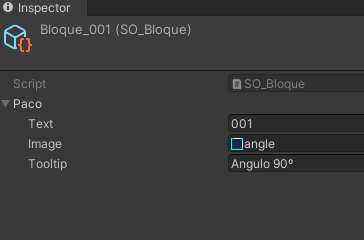
How do I fetch some data from an ScriptableObject asset in UnityEditor? AssetDatabase.LoadAssetAtPath<SO_file>(mypath) results in Null Reference Exception...
So, I need to instantiate that asset somehow..
(it's an EditorWindow tool, I have no means to show an Inspector..)

 visual stag
log what the path is
robust venture
thx for the idea, @visual stag .
mmm the path seems correct and points exactly to the asset, indeed. Full route...
visual stag
Full route?
robust venture
has to be inside the Editor subfolder?
visual stag
https://docs.unity3d.com/ScriptReference/AssetDatabase.LoadAssetAtPath.html
All paths are relative to the project folder, for example: "Assets/MyTextures/hello.png".
robust venture
.. ouch
sorry, I missed that part..
EditorUtility.OpenFilePanelWithFilters() returns full path, which has sense for external files or things inside the StreamingAssets subfolder...
ok, so I need to convert that path to relative, right?
visual stag
Yes
robust venture
gotcha! it's working now. Thanks a lot @visual stag
Now let's see if I can display a texture from it , in the EditorWindow...
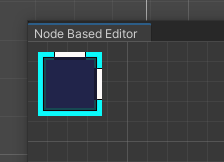
hell yeah!
 spring siren
I'm trying to serialize an array of derived types (from an abstract base class) into an array on an SO. I've come up with a pretty hacky way to do this through an editor button, since the + on an array obviously can't know which type I want to add. I'm really useless when it comes to anything in the editor and wondering if there's a better way I can achieve this.
here's what I've got so far: https://hatebin.com/khekogodmi
Based on what I've seen online, I'm sure that this has been asked before - but I still think it's worth asking since I'm trying to improve my current implementation 🙂
gloomy chasm
spring siren
I'm trying to serialize an array of derived types (from an abstract base class) ...
The way I would do it is to use a property drawer for the type and just have a dropdown to select the type. Another option would be to use a decorator drawer.
Vertx made a great little thing that does this exactly https://github.com/vertxxyz/Vertx.SerializeReferenceDropdown
If you just want to keep your current setup. Firstly I would switch to using serializedProperty so that the values are saved and can be undone.
Secondly, when clicking on the button I would instead open a GenericMenu populated with each type you could select. You can get all derived types by using the TypeCache class. Then you can use System.Activator.CreateInstance to create an instance from the type selected.
Also, I would recommend changing to a different name than Action if you can since there is a System.Action class which is very commonly used so could lead to annoy situations in the future.
(CardAction, GameplayAction, etc. may be a 'better' name choice)
spring siren
gloomy chasm
The way I would do it is to use a property drawer for the type and just have a d...
sorry for the delay, was 3AM for me 😮
this is exactly the kind of thing I was looking for! I'll give it a go. don't care about keeping the current setup, it's horribly hacky. yeah I plan on changing the naming (will have to use System.Action down the line), just wanted to get something down and couldn't be bothered fussing over the right naming haha. thanks for the help and suggestions 🙂
gloomy chasm
spring siren
sorry for the delay, was 3AM for me 😮
this is exactly the kind of thing I was ...
Sure thing! Good luck! 😄
glad cliff
visual stag
well, you should at least be using MeshGenerationContext, and not GL
Now as I know that something like this exists I will be definitely using it. Matter of fact I already did and im halfway there to achieve my target, but something is wrong with my math I guess, yet cant figure out what...


my arrow is shrinking (maybe couse it is cold)
and it even dissapears when this Start node gets to the left or above the target node
            start = edge.GetPoints()[edge.GetPoints().Length/2 - 1];
            end = edge.GetPoints()[edge.GetPoints().Length/2];
            Vector2 lineDirection = end - start;
            Vector2 midPoint = (start + end) / 2;
            Vector2 perpendicular = new Vector2(-lineDirection.x, lineDirection.y);
            float arrowEdgeLength = 12f;
            float distanceFromMiddle = (arrowEdgeLength * Mathf.Sqrt(3) / 4);

            MeshWriteData mesh = ctx.Allocate(3, 3);
            Vertex[] vertices = new Vertex[3];
            vertices[0].position = midPoint + (lineDirection.normalized * distanceFromMiddle);
            vertices[1].position = (midPoint + (-lineDirection.normalized * distanceFromMiddle))+(perpendicular.normalized * arrowEdgeLength/2);
            vertices[2].position = (midPoint + (-lineDirection.normalized * distanceFromMiddle))+(-perpendicular.normalized * arrowEdgeLength/2);

            for(int i = 0; i < vertices.Length; i++)
            {
                vertices[i].position += Vector3.forward * Vertex.nearZ;
                vertices[i].tint = Color.white;
            }

            mesh.SetAllVertices(vertices);
            mesh.SetAllIndices(new ushort[] { 0, 1, 2 });
 dreamy grotto
Is there a way to add a new type to console? I mean log, logwarning, logerror.
I want to have a custom log type
But i would like to achieve this in unity's original console, i dont want to create a new editor window
spring siren
this attribute is honestly exactly what I needed (and have needed across several projects). thanks so much Vertx 🙂
glad cliff
Just want to say that after sticking my nose into a math book for a while I solved the problem, so I leave it here if anyone would like to recreate an arrow showing the edges flow in a graph view, just like in mecanim
private void OnGenerateVisualContent(MeshGenerationContext ctx)
        {
            //Safe check if edge has assigned points
            if (edge.GetPoints().Length < 2) return;

            //Use color same as edge itself
            Color color;
            if (edge.isGhostEdge) color = edge.ghostColor;
            else if (edge.selected) color = edge.selectedColor;
            else color = edge.defaultColor;

            //Assign points beetwen which the edge with an arrow is drawn
            start = edge.GetPoints()[edge.GetPoints().Length/2 - 1];
            end = edge.GetPoints()[edge.GetPoints().Length/2];
            Vector2 lineDirection = end - start;
            Vector2 midPoint = (start + end) / 2;
            float arrowEdgeLength = 12f;
            //Arrow is an equilateral triangle and we want its middle to be in a midPoint, so we shift the points by height/2
            float distanceFromMiddle = (arrowEdgeLength * Mathf.Sqrt(3) / 4);

            //We want bottom edge of a triangle to be always perpendicular to edge it is drawn upon
            //Thus we need to scale it properly
            float angle = Vector2.SignedAngle(Vector2.right, lineDirection);
            float perpendicularLength = arrowEdgeLength / (Mathf.Sin(Mathf.Deg2Rad * (angle - 60)) * 2);
            if (angle < 60 && angle > 0)
            {
                perpendicularLength = arrowEdgeLength / (Mathf.Sin(Mathf.Deg2Rad * (angle + 120)) * 2);
            }
            else if (angle > -120 && angle < -60)
            {
                perpendicularLength = arrowEdgeLength / (Mathf.Sin(Mathf.Deg2Rad * (angle - 120)) * 2);
            }
            else if (angle > -60 && angle < 0)
            {
                perpendicularLength = arrowEdgeLength / (Mathf.Sin(Mathf.Deg2Rad * (angle + 60)) * 2);
            }

            Vector2 perpendicular = new Vector2(-lineDirection.y, lineDirection.x).normalized * perpendicularLength;

            //After all that boring math we assign vertices
            MeshWriteData mesh = ctx.Allocate(3, 3);
            Vertex[] vertices = new Vertex[3];
            vertices[0].position = midPoint + (lineDirection.normalized * distanceFromMiddle);
            vertices[1].position = (midPoint + (-lineDirection.normalized * distanceFromMiddle))+(perpendicular.normalized * arrowEdgeLength/2);
            vertices[2].position = (midPoint + (-lineDirection.normalized * distanceFromMiddle))+(-perpendicular.normalized * arrowEdgeLength/2);

            for(int i = 0; i < vertices.Length; i++)
            {
                vertices[i].position += Vector3.forward * Vertex.nearZ;
                vertices[i].tint = color;
            }

            mesh.SetAllVertices(vertices);
            mesh.SetAllIndices(new ushort[] { 0, 1, 2 });
        }
 grizzled solstice
robust venture
How do I fetch some data from an ScriptableObject asset in UnityEditor? **AssetD...
grizzled solstice
robust venture
How do I fetch some data from an ScriptableObject asset in UnityEditor? **AssetD...
Not sure if you figured it out but personally I just use Resources.Load (with the asset in a folder named Resources)
Quite handy to make singleton Scriptable Objects, to define global game settings and such
 tough cairn
how to create texture array in custom editor ?
I got x3 , 2048 by 16 pixel textures and would like to fit them one below another
 naive thorn
so im having a weird issue, after calling EditorGUIUtility.ShowObjectPicker, for whatever reason I get an Index out of range exception, only on the next time I compile
so I can restart my editor and itll work just fine, until I compile the code from altering something

looks like an internal error, but the repro steps from above is exactly how i did it
could also just be an issue with the way im generating a controlid? who knows
 lament eagle
EditorWindow - What is called when I move/create a new window?
 old ravine
I've make a component that just renders with DrawMesh. This doesn't show up in the editor, but I found adding `[ExecuteInEditMode]' at the top of the class makes it render in the editor.
As part of this I create a new Material instance which I destroy in OnDestroy. Then I get an error when I run the game "Can't call Material.Destroy in Edit Mode"
I'm wondering what happens to these instances that are created during Edit mode, will I have a memory leak while in edit mode because of this?
^Edited: I made a component (inherits MonoBehaviour) not a class
visual stag
old ravine
I've make a component that just renders with DrawMesh. This doesn't show up in ...
Yes, you will have a leak. You should do something like:
#if UNITY_EDITOR
if (!Application.IsPlaying(this))
  DestroyImmediate(material);
else
  Destroy(material);
#else
Destroy(material);
#endif
Thank you, that fixed the error. Will the profiler help me reveal memory leaks in the editor?
visual stag
It can do. The memory profiler would cover it further, but leaks like these can easily be overlooked and not amount to much, as it's just a few materials
old ravine
Thank you, that's good to know
earnest talon
gloomy chasm
`.my-class | .my-other-class` this means the USS will apply to any elements with...
Thanks - I'm adding this in now (had to tend to family last two days).
Do you know what the other operators are for
||, &&, [], * (as modifier), + (as modifier), ? (as modifier) and {A, B}?
I still can't find examples of these in action within USS/CSS
nvm im just stupid
turns out they didn't have special pages
it was just MDN CSS Selectors
also turns out what I thought were Complex Selecots are really Compound Selectors
Complex selectors are a mix of simple or compound ones.
I'll just include what Unity says exists because I don't think Unity accounts for those complex selector types (mixed simple/compound)
spring siren
hey @visual stag - sorry for the tag but wanted to flag this up incase you are already aware of it/know the fix!
since adding your package, im getting a Failed to find entry-points error (attached, full stack trace: https://hatebin.com/rylqmobcws) whenever my project re-compiles. It clears, so not sure if it's worth looking into.
com.vertx.serializereference-dropdownversion: 1.0.2com.needle.editorpatchingversion: 1.3.1
 visual stag
spring siren
hey <@332468003151282176> - sorry for the tag but wanted to flag this up incase...
visual stag
spring siren
hey <@332468003151282176> - sorry for the tag but wanted to flag this up incase...
https://github.com/needle-tools/editorpatching/issues/3
The only way to avoid the exception is to remove the editor patching package, which will remove IMGUI support. Unless you want to remove burst
 plush island
Am trying to work with UIElements and GraphView, on creating a blackboard and adding a blackboard section, the section is just simply not shown or added to, any idea what im doing wrong here?

 spring siren
visual stag
<https://github.com/needle-tools/editorpatching/issues/3>
The only way to avoid ...
spring siren
visual stag
<https://github.com/needle-tools/editorpatching/issues/3>
The only way to avoid ...
Ah, thanks - explains it. Think I'll just deal with having the exception. I do have a q though - your docs mention: "The com.needle scope is only required to support IMGUI.
The implementation relies on patching the editor DLL so avoid adding it if it's not required.".
Without it, I don't get the dropdown at all - so why is it optional?
 calm grail
Would this be the right channel to ask about property drawers?
waxen sandal
yes
calm grail
so here i add different item statistics, like durability, damage etc, depending on what the item uses


and in my item script i also have all these values which i need to display under the correct enum type

 dusk timber
calm grail
dusk timber
calm grail
so if i select durability for example, to display just this

under the enum
how do i do that with a property drawer
 simple cove
calm grail
how do i do that with a property drawer
simple cove
calm grail
how do i do that with a property drawer
found a solution?
simple cove
oof, sry I'm late 😅
simple cove
ok, it may be a bit tricky to do it with lists tho. what type is your 'element 0' ?
calm grail
let me just turn my pc on
give me a sec
so this is the item script itself
if you wanna take a look
you can create new elements
and select an enum
for the item statistic
and just to be clear what i wanna do, i want to just display in the element, depending on what enum it is, to display the correct variables below that
simple cove
afaik you'd need to do something like this:
[CustomPropertyDrawer(typeof(MyType))]
public class MyTypeDrawer : PropertyDrawer {
    public override void OnGUI(Rect position, SerializedProperty property, GUIContent label) {
        var enumProp = property.Find("ItemStatisticType"); //but the long, compilable version :p
        var enumValue = (ItemStatisticTypeEnum) enumProp.enumValueFlag;

        EditorGUILayout.PropertyField(enumProp);              // Draw the enum prop
        foreach (var member in typeof(MyType).GetMembers()) { // Draw all members that contain the value of the enum prop in their name.
            if (!member.name.ToLower().Contains(enumValue.ToString().ToLower()) { continue; }
            EditorGUILayout.PropertyField(property.FindRelative(member.Name));
        }
    }
}
this has to be a seperate script right?
and does it have to be placed in the editor folder?
simple cove
you can place it in editor folder or wrap it with #if UNITY_EDITOR and put it right under your script
calm grail
i'll place it in the editor then
simple cove
it'll work no matter where you put it, but unless you do one or the other you'll get compilation errors when building
simple cove
simple cove
afaik you'd need to do something like this:
```cs
[CustomPropertyDrawer(typeof(M...
you also may need to change what you pass in GetMembers to something like BindingFlag.Public | BindingFlag.Instance
can't remember the default values rn.. but ultimately depends on what props you want to be affected
oh wait this won't work as is 😛 sec
so here MyType is ItemStatistics

 simple cove
yeah, but under you need to use the parent type

and also the property inside the foreach needs to be the property of the parent object as well
calm grail
wait so what do i do
simple cove
custom drawer is for ItemStatistics class, not the Item class
 simple cove
cool
calm grail
im getting this
 simple cove
so, for member.ToLower() I meant to write member.name.ToLower()
the Find you can just replace with the proper version of the method -- I can't remember what it's called
and to get the actual parent property you'll need to hack it 😛 here's some working code: https://gist.github.com/monry/9de7009689cbc5050c652bcaaaa11daa

Gist
Find parent SerializedProperty. GitHub Gist: instantly share code, notes, and snippets.
 simple cove
yup
calm grail
member is the statistic type right?
from the enum
and it checks each one
and im not sure with the rest
simple cove
so, I take it you're not familiar with reflection (-- or System.Reflection)
calm grail
not really
simple cove
what this part is intended to do is:
- read all members of the
Itemtype (notItemStatisticTypeswhich u have) - ignore all members that don't contain the value of the enum in their name
- find the serialized property of those fields (you need a reference to the
Item'sSerializedPropertyto do that) - draw them in the inspector
(members == fields/methods/properties.. anything inside a class, really)
simple cove
np give it a go and let me know if you need help.. I'll be around
calm grail
simple cove
np give it a go and let me know if you need help.. I'll be around
also with what you said above, because i have an editor script for something, and it would be easier to have it in the same script, instead of a new one
how do i do that?
below the class
simple cove
simple cove
you can place it in editor folder or wrap it with `#if UNITY_EDITOR` and put it ...
^
same script file, editor code wrapped inside #if UNITY_EDITOR blocks
calm grail
ohh
alright
thanks
im thinking now, i didn't want to use unity editor script for this
but im overthinking it now
and i think i get over the other issue
so if i was going to use editor script for this


how would i get the reference to the current enum
so then i could just check for example
if(itemStatisticType == ItemStatisticTypes.Durability)
{

}```and display the information this way
 simple cove
calm grail
simple cove
calm grail
the target is your ItemStatistic class, not the enum itself
calm grail
simple cove
yeah this is the other issue xD you don't get to have an editor with custom C# class 😛
Editor is strictly for types that inherit from MonoBehaviour or ScriptableObject
for custom C# classes you need to use PropertyDrawer
calm grail
://
simple cove
Editor and EditorWindow are amazing compared to PropertyDrawer 😄
calm grail
with the propert drawer
would i also be able to check the statistic type?
like the way i did it here

in the editor script
i feel like this would give me more customizability
simple cove
sure yeah
[CustomPropertyDrawer(typeof(ItemStatistic))]
public class MyTypeDrawer : PropertyDrawer {
    public override void OnGUI(Rect position, SerializedProperty property, GUIContent label) {
        var enumProp = property.Find("ItemStatisticType"); //but the long, compilable version :p
        var enumValue = (ItemStatisticTypes) enumProp.enumValueFlag;

        EditorGUILayout.PropertyField(enumProp); // Draw the enum prop
        // here you have the value of the enum, so you can do what you have above
    }
}
this part was supposed to just automate this part for you.. it's much easier code-wise if you're willing to write each case one-by-one
        foreach (var member in typeof(Item).GetMembers()) {
            if (!member.name.ToLower().Contains(enumValue.ToString().ToLower()) { continue; }
            EditorGUILayout.PropertyField(property.FindRelative(member.Name));
        }
you'll still need to find a reference to the parent though
simple cove
because the drawer is for ItemStatistic -- which is an object inside a list in this case
and you want it to draw a field of another object (the parent of the list it's on)
calm grail
yeah
simple cove
simple cove
and to get the actual parent property you'll need to hack it 😛 here's some work...
^
simple cove
np
calm grail
simple cove
np
one last thing

whats the label and position for
am i going to need that
simple cove
Maybe later
 calm grail
alright
gloomy chasm
calm grail
alright
I can give you a hand if you still need it. I skimmed over the conversation. It looks like things have gotten more complicated than they need to be. But let me know where you are at if you still need help 🙂
calm grail
gloomy chasm
I can give you a hand if you still need it. I skimmed over the conversation. It ...
If you could thatd be great
calm grail
calm grail
https://paste.ofcode.org/pzym688QdyYWxNjgMc88Mv
i’ll show you where im at
i pasted the class from the github link
and dont know what to do next
visual stag
spring siren
Ah, thanks - explains it. Think I'll just deal with having the exception. I do h...
You are using IMGUI then, or you're using a version of Unity that defaults to an IMGUI inspector. More recent versions are now UIToolkit, and it's the advised tool to be building editor UI in
spring siren
visual stag
You are using IMGUI then, or you're using a version of Unity that defaults to an...
Ah right, that makes sense. Sorry for needing to be spoonfed - my familiarity with the editor is pretty much non-existent. How can I find out what Unity is using as a default inspector? In any case, I'm on Unity 2021.3, so assuming it uses UIToolkit as the default, being the latest LTS release
visual stag
spring siren
Ah right, that makes sense. Sorry for needing to be spoonfed - my familiarity wi...
I believe it's 2022.2+ that now defaults to UIToolkit for default inspectors. I believe there's a setting to switch it earlier but I've never used it so I can't really advise it
I am almost always on alphas/betas so it can be confusing to remember what real people have access to lol
spring siren
visual stag
I am almost always on alphas/betas so it can be confusing to remember what real ...
Haha, gotcha. Well, it's a minor inconvenience and I'm far too early into a project to mind it.
I'll admit, I forked the editorpatching repo with the intention to fix it in a new PR - but I have absolutely 0 experience decompiling & patching DLLs. spent about an hour, cried, threw it in the bin
visual stag
A fix for the exception could be to copy the needle package locally into your Packages directory, and just rename the file to Harmony
I doubt your project will be using anything that can conflict
(and I'm unsure why they took it upon themselves to rename the DLL anyway)
spring siren
visual stag
A fix for the exception could be to copy the needle package locally into your Pa...
I'll give it a go, thanks!
I'd like to learn more about what's going on here. Any suggestions for things to read when it comes to creating packages?
yeah renaming the file didn't work, just broke a bunch of references between files inside the DLL. was going to kick myself if it was really that easy
visual stag
spring siren
yeah renaming the file didn't work, just broke a bunch of references between fil...
Oh yeah that makes some sense 🇫
The best resource for packages is to just look at the structure of other packages, look at the package.json file at their root, and look at any assembly definitions they may have to see how they define in and out content based on the presence of other packages.
I don't know if "moving a package to the Packages directory to make it a local package" is documented anywhere, but it can be super handy if you need to make modifications
spring siren
visual stag
The best resource for packages is to just look at the structure of other package...
alright. thanks for the tips 🙂
visual stag
If you ever want to make a package of your own, it can be handy to copy another package from someone else, but remember to delete all the meta files of anything you keep so their GUIDs change, you don't want to make two readonly things have the same GUIDs!
I'm going to have a poke around myself to see if there's some easy fixes
Are you planning to use the attribute a lot? Or just in the occasional object?
spring siren
Depends on what constitutes a lot. I've had many instances in the past where I've wanted to serialize a list of derived types. I've passed around a hacky "make an enum, write a janky editor script that news up the derived class based on the enum" solution between several projects and I almost cried when I saw how nice yours was working
I don't know how other devs are getting away with not using it. Any time I need to make a quest, card, character, item - I'm always relying on polymorphism, and they're almost always needing to be serialized at some point. I was starting to think I was going insane relying on a feature that apparently isn't used enough to warrant an official solution from unity
spring siren
visual stag
I'm going to have a poke around myself to see if there's some easy fixes
If you do this, keep me updated. I poked around in dotPeek and a VS generated solution for a little while, but had no idea how to recompile the patch back to the same DLL 😦
visual stag
spring siren
If you do this, keep me updated. I poked around in dotPeek and a VS generated so...
I've just pushed an update that'll take a moment to propagate to OpenUPM, it just adds a reference to 0Harmony.dll, so now you can copy the editorpatching package locally, rename the DLL, and add a reference to it to the needle.EditorPatching.asmdef and it should work without the exception
OpenUPM was quick and it's now live
spring siren
visual stag
I've just pushed an update that'll take a moment to propagate to OpenUPM, it jus...
jesus, that was fast
i'll give it a go
visual stag
spring siren
jesus, that was fast
Most of the time was spent writing a changelog entry lol
spring siren
visual stag
Most of the time was spent writing a changelog entry lol
It's a good changelog at least! 😉
No luck unfortunately. Updating the precompiled references fixes all the other errors - but the same exception is there 😮
https://hatebin.com/nssufaqdqm
you'll notice I deleted the old precompiled reference also for good measure
hang on, i'll try restart
nvm, im an idiot - it's gone!
you are a wizard
 hardy apex
I've got a script that uses "Unwrapping.GenerateSecondaryUVSet(mesh);", which is wrapped in #if UNITY_EDITOR. On build, the secondary UV set is missing. How should I be making sure this gets serialized?
 modern burrow
Hello. Does anyone know how to get a parent object of SerializedProperty's value?
visual stag
modern burrow
Hello. Does anyone know how to get a parent object of SerializedProperty's value...
You cannot walk up the serialized hierarchy, but you can go to the root object (property.serializedObject and its .targetObject)
You may be able to do some messing around with propertyPath, in combo with serializedObject.FindProperty to attempt to traverse up.
modern burrow
Thanks, I'll try that
 elfin gorge
Hi everyone, I'm looking for a way to place and move points around a scene (as though they where empty transforms) without the need for placing game objects. Ideally what I want is to make an editor tool that will let me place down a control script on a game object and then go into an "edit mode" in which the main scene would darken a bit, much like when doing prefab editing in scenes. Then using something like gizmo's to move and create points. What would be the best way to start looking into this sort of thing?
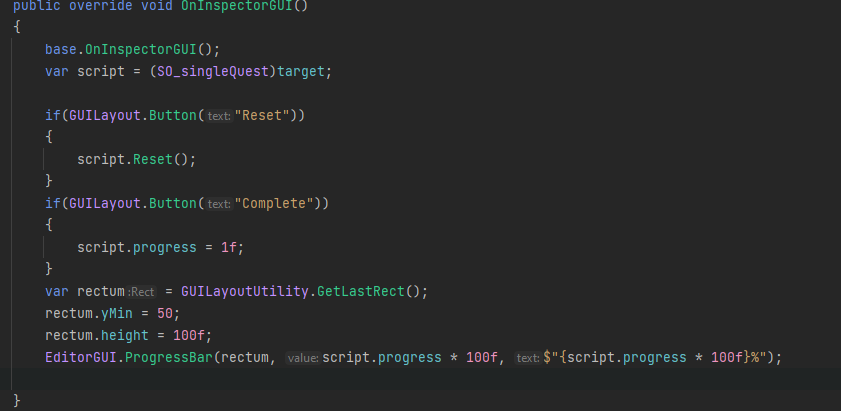


 visual stag
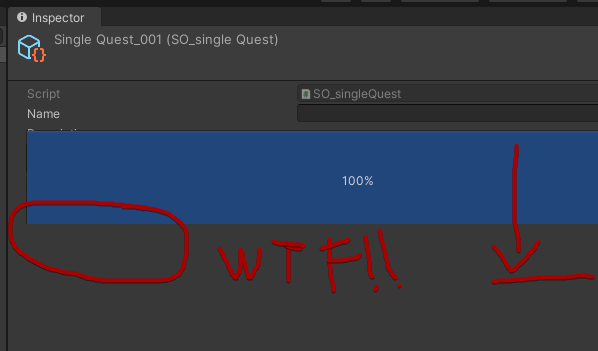
EditorGUI does not allocate space. EditorGUILayout does
robust venture
But I cant do ProgressBar in EditorGUILayout...
robust venture
GetControlRect.. let me check.. Thx @visual stag . You're great
now we're talking ... Thx again
tawdry kraken
What's the correct way to instantiate a prefab instance via code?
Instantiate itself returns an unpacked object.
Found it: PrefabUtility.InstantiatePrefab()
tawdry kraken
Is there a solution for this in 2020 ?
This function doesn't exist there.
https://docs.unity3d.com/ScriptReference/PrefabUtility.FindAllInstancesOfPrefab.html
tawdry kraken
Found it: https://docs.unity3d.com/ScriptReference/PrefabUtility.GetCorrespondingObjectFromSource.html
public static GameObject[] FindAllPrefabInstances(GameObject prefab, bool includeInactive = false)
{
    GameObject[] loadedSceneObjects = FindObjectsOfType<GameObject>(includeInactive);
    List<GameObject> results = new List<GameObject>();
    for (int i = 0; i < loadedSceneObjects.Length; i++)
    {
        if (PrefabUtility.GetCorrespondingObjectFromSource(loadedSceneObjects[i]) == prefab)
        {
            results.Add(loadedSceneObjects[i]);
        }
    }
    return results.ToArray();
}
 light coyote
Hi, I installed some months ago NavMeshComponents via package manager in my Unity 2022.1.3f1. Now I upgraded to 2022.2.10f1 and I got those errors:

I have no clue what those error means T.T can somebody help?
peak bloom
can we display the Game View int a custom editor?

just need a screenshot (representation) of it tbh
light coyote
light coyote
Hi, I installed some months ago NavMeshComponents via package manager in my Unit...
Nevermind, resolved
peak bloom
managed to get the active gameview window
var activeWindow = EditorWindow.GetWindow(typeof(EditorWindow).Assembly.GetType("UnityEditor.GameView"));
screencapping should be easy now
glad cliff
I have a list of objects of abstract C# class, which i cast to one of its derivants when needed. My question is, can I bind editors field to it somehow? So far FindProperty() returns null on this list so I cant bind field to any entry
I remember doing something like this before, but this abstract class derived from SO so it was obviously serializable
now I wander about any walkarounds without storing it as an SO
glad cliff
nvm, I guess the is no "clean way" to achieve it with an abstract class, either I make it non-abstract or make hell of a mess in a way it is stored
 rugged urchin
can i hook into objects being duplicated? for example, when a prefab authored in my library is duplicated in the scene, or another copy of it is dragged and dropped into the scene, i would like to run some editor code. in this case, i would set up layers and change some properties on the object
tawdry kraken
rugged urchin
can i hook into objects being duplicated? for example, when a prefab authored in...
I'm not sure if there is a different approach, but found this:
https://docs.unity3d.com/ScriptReference/EditorWindow.OnHierarchyChange.html
gloomy chasm
rugged urchin
can i hook into objects being duplicated? for example, when a prefab authored in...
I think if you use the SceneView.duringSceneGUi you should be able to hook up to the events if (Event.current.type == EventType.ValidateCommand && Event.current.commandname == "Duplicate" || Event... == "Paste")
A bit different but there is https://docs.unity3d.com/ScriptReference/ObjectChangeKind.html
Another option if you have a script, you could store a unique ID of it. On Enable you could register it to a Dictionary<UniqueID, YourScript> and use that to validate if it is the same instance or a new one.
 lyric hill
I'm looking for a script that automatically creates an animation clip that swaps the material of a set gameObject's Skinned Mesh Renderer slot to the selected material.
I just got a code working that i can right click, and create a new animation clip. But I don't know how to set stuff on the animation.
 atomic sable
how do I stop drawing ui? I have an editor window with a field I've drawn, but when i switch to a different selection in that window if I'm editing the field it stays shown. I guess i need to sort of refresh or stop drawing stuff that uses that rect?


first image: I'm editing the field. Second image: I've switched to the second selection, but the field hasn't updated. Last picture: Upon deselecting the field, it updates to the right number.
figured out a way: when switching selection, i just set the focused control to null
this does bring another question up for me however. How do i make it so that it will be deselected when empty space is clicked? I cannot find a way to do so.
gloomy chasm
atomic sable
this does bring another question up for me however. How do i make it so that it ...
Clear the focus
gloomy chasm
Are you using IMGUI or UITK?
atomic sable
IMGUI
atomic sable
atomic sable
i don't think there's a click event right?
i need to update my statement. There's no way to test if the mouse is over a field it can edit, right?
gloomy chasm
atomic sable
i need to update my statement. There's no way to test if the mouse is over a fie...
The way to do this is to do a rect in the area that is empty and use that to get the mouse down. The other way is to store a list of of rects of each control/field
atomic sable
If i draw a rect over that rect, then use the base rect, will the base rect count as having the mouse in it if the mouse is over the rect drawn over the base rect?
 real spindle
lyric hill
I'm looking for a script that automatically creates an animation clip that swaps...
real spindle
lyric hill
I'm looking for a script that automatically creates an animation clip that swaps...
Look here for methods and properties that interest you:
https://docs.unity3d.com/ScriptReference/AnimationClip.html
You mentioned adding animation events earlier, so maybe you want to look at AddEvent
 versed fern
how can I make a list non editable in inspector? I have a script that make a read only field in inspector, but only works with "unique" types (custom class with properties, int, string, etc)
using UnityEditor;
using UnityEngine;

public class ReadOnlyAttribute : PropertyAttribute {

}

[CustomPropertyDrawer(typeof(ReadOnlyAttribute))]
public class ReadOnlyDrawer : PropertyDrawer {
  public override float GetPropertyHeight(SerializedProperty property, GUIContent label) {
    return EditorGUI.GetPropertyHeight(property, label, true);
  }

  public override void OnGUI(Rect position, SerializedProperty property, GUIContent label) {
    GUI.enabled = false;
    EditorGUI.PropertyField(position, property, label, true);
    GUI.enabled = true;
  }
}
example
// Cooldown class
[Serializable]
public class Cooldown {
  public string name;
  public float time;
  public float cooldown;
  public bool finished;
}

// myScript
public class DeltaCooldown : MonoBehaviour {
  public Cooldown cl1 = new Cooldown();
  [ReadOnly]
  public List<Cooldown> scl = new List<Cooldown>();
  [ReadOnly]
  public Cooldown cl2 = new Cooldown();
  public Cooldown cl3 = new Cooldown();
}
it only makes a read only field inside the list, but i can still edit the list
 visual stag
Property Attributes do not apply to collections, only their members. So this is not possible.
You would have to make a custom editor
 minor swallow
Hello, i'm making a Property Drawer where you have a Type Dropdown. I've made the Type Dropdown, but now i want it so that it draws the Type's fields
Is there a way to automatically draw a Type's fields, or do i have to loop through the fields myself? IF i have to loop through the fields, is there a function that just draws the appropriate EditorGUI based on a Type? or do i have to write and maintain a big Type switch
visual stag
minor swallow
Hello, i'm making a Property Drawer where you have a Type Dropdown. I've made th...
There is nothing that does any of that. What are you intending to use this for?
minor swallow
visual stag
There is nothing that does any of that. What are you intending to use this for?
i have a bunch of structs that i inherit with an interface
I want to make a class that represents any data that implements that interface as json, so i have a class that contains string typeName and string jsonValue
Now i made a CustomPropertyDrawer so you can pick the Type to set the typeName, but now i want to draw the fields of that type so i can turn it into json for the jsonValue
visual stag
So this is just an editor to create JSON values from a type?
minor swallow
yes, i just need to draw the fields based on a type
so say i have
struct PositionData
{
  public Vector3 position;
}

struct DescriptionData
{
  string name;
  string description;
  int version
}
assuming all of them are [Serializable]
If i have Type PositionData it should draw a Vector3 field and if it is DescriptionData it will draw the name and description as text field and version as int field
visual stag
and they implement an interface purely to constrain it so you only pick that interface for the editor?
minor swallow
visual stag
and they implement an interface purely to constrain it so you only pick that int...
yes. I already have the part for the type dropdown, now i just need to let users populate the jsonValue, but instead of just giving them a text field, i want to draw the fields as if it were drawn normally
visual stag
I don't think there is an easy way to do that, but I am trying something that may work, it'll just take me a mo
minor swallow
Essentially, something like this. For now, they are text fields, and i need to draw the correct field based on the type. I'm just wondering if there's a neat function that handles that, or if i need to make and maintain a huge switch case
 minor swallow
visual stag
I don't think there is an easy way to do that, but I am trying something that ma...
minor swallow
visual stag
I don't think there is an easy way to do that, but I am trying something that ma...
i see, that's unfortunate :/
Regardless, thanks for the reply. For now i'll just do a switch case, but if anyone has an idea do let me know
visual stag
minor swallow
i see, that's unfortunate :/
using System;
using Unity.Mathematics;
using UnityEngine;
using Vertx.Attributes;

namespace Core
{
    public interface IExample { }

    [Serializable]
    public struct PositionData : IExample
    {
        public float3 Position;
    }

    [Serializable]
    public struct DescriptionData : IExample
    {
        public string Name;
        [TextArea]
        public string Description;
        [Min(0)]
        public int Version;
    }

    public class CreateJsonBehaviour : MonoBehaviour
    {
        [SerializeReference, ReferenceDropdown(typeof(IExample))]
        private IExample _toSerialize;

        [ContextMenu("To JSON")]
        public void ToJson() => Debug.Log(JsonUtility.ToJson(_toSerialize));
    }
}```
This uses a package of mine to draw the structs.
<https://github.com/vertxxyz/Vertx.SerializeReferenceDropdown>
I couldn't get it to work in an editor window at short notice, but it works fine in a MonoBehaviour

 minor swallow
visual stag
```cs
using System;
using Unity.Mathematics;
using UnityEngine;
using Vertx.Attr...
minor swallow
visual stag
```cs
using System;
using Unity.Mathematics;
using UnityEngine;
using Vertx.Attr...
thanks! i will study and reference your code if you don't mind. From what i see though instead of creating a custom property drawer, you inject a custom method to OnGUI to draw what you need? If i had to do all this i might as well use your package 😂
visual stag
minor swallow
thanks! i will study and reference your code if you don't mind. From what i see ...
I prefer the UIToolkit version because it doesn't require the injection stuff, but yeah it's all a big hack either way. No idea why Unity just doesn't provide their own implementation for SerializeReference. I find it kinda useless/painful to use otherwise
minor swallow
visual stag
I prefer the UIToolkit version because it doesn't require the injection stuff, b...
Noted, thanks 👍
glad cliff
2 questions:
1: Do items in ListView must be Unbinded before binding everytime in binditem Action as visual elements are being pooled and not created every time they appear?
2. Can I make SO unexpandable in a project view if there are nested SOs inside?
Those are just some data containers that user doesnt need a direct access to, so it would be nice if I could make project view a bit cleaner by not letting this main SO to expand and show whats inside. Maybe some hide flags on childrens or smth?
 peak bloom
assuming you're talking about uitk.. Unbind item mostly used for when you want to do something else when it gets reused
e.g: Unregistering callbacks so it won't mess your itemSource when updating things via ValueChanged
also, the pooling in ListView is broken in 2022, and fixed in in 2023
 lilac wave
what is the difference between EditorGUI, GUILayout and EditorGUILayout ?
glad cliff
peak bloom
also, the pooling in ListView is broken in 2022, and fixed in in 2023
OH NO! What you mean? Im using 2021 because of LTS
peak bloom
look it up on Unity forum, there's a chance the fix will be backported to 2022 LTS when it comes out.. most likely
glad cliff
peak bloom
assuming you're talking about uitk.. Unbind item mostly used for when you want t...
and here im not sure if I understand correctly. As I understand, in ListView items in a source collection dont have dedicated visual element in a view, rather there is a fixed amount of them and they are binded dynamically to a corresponding item that should be visable at the moment. Thus one visual element can be passed to binditem delegate multiple times in a window lifetime. Am I getting it right? With this logic (if it is not done automatically) binditem should always start with Unbind() before making any new binding
glad cliff
lilac wave
what is the difference between EditorGUI, GUILayout and EditorGUILayout ?
https://www.youtube.com/watch?v=pZ45O2hg_30&list=PLImQaTpSAdsBKEkUvKxw6p0tpwl7ylw0d
Watch Freya Holmer talking about it, long playlist but i remember her explaining that at some point (probably ina first part)

🔽 click for timestamps & info!
this was originally streamed as a course for students at http://futuregames.se/, who were super kind to let me both stream this live as well as upload it here! so massive thanks to the people at FutureGames!!
💖 Patreon ❱ https://www.patreon.com/acegikmo
🐦 Twitter ❱ https://twitter.com/FreyaHolmer
📺 Twitch ❱ http...
1:44 she explains it ^
earnest talon
i just remember it as two pairs of two different things
GUI and EditorGUI
then there's regular and (automatic) Layout versions.
regular -> you have to place them and track the overall positions of every element procedurally through the drawing process
layout -> unity lays out the control/element based on it's position in the drawing chain, figuring out where to place it relative to the corner of the window whilst taking into account all the previous controls and elements before it
GUI contains general behaviors that any interface can make use of iirc
and EditorGUI is for behaviours that are more specific towards object (and/or asset) manipulation within the Unity Editor itself.
lilac wave
shit is confusing
earnest talon
It is
it really is because it can just have been simplified a bit more
I just concatenate EditorGUI and EditorGUILayout controls into one using polymorphic methods
(i take into account when to have params GUILayoutOption[] dw)
lilac wave
Ah I think I get it tho
earnest talon
yeah
lilac wave
GUI is the overall unity GUI
earnest talon
essentially if you want it done automatically without worry
EditorGUILayout and GUILayout
earnest talon
if you have a specific vision you're hellbent on doing that unity can't do automatically
EditorGUI and GUI
lilac wave
that'S what I've been using tho
earnest talon
I'm trying to concatenate all of Unity's UI tools into an IMGUI-style environment
that way I can use UIElements and IMGUI
just as I always have before
I would also mention, IMGUI's GUI class isn't actually meant for long-term use in a game project (Player-Facing UI and the like)
it's just for developer tools and so on
earnest talon
glad cliff
https://www.youtube.com/watch?v=pZ45O2hg_30&list=PLImQaTpSAdsBKEkUvKxw6p0tpwl7yl...
I will say Freya's good but I personally never get into her tutorials because she communicates in ways that don't click with me
also the fact she just recorded someone eating a snacc at the start is just funny
lilac wave
mm snacc
earnest talon
oh and another thing that's really funny depending on the version of unity you use @lilac wave
glad cliff
but overall I think most of "10 minutes tutorials" are worthless most of the time and its hard to find some videos like that, where someone makes 8 hour tutorial on only one subject
lilac wave
don't get me started on unity versions
earnest talon
oh this is actually really funny though
earnest talon
GUI and EditorGUI class specific methods don't work - more specifically they aren't compatible sometimes
one of them being indentation levels
and I can't tell specifically if it was a bug to begin with or not
but sometimes in earlier versions EditorGUI.IndentLevel affected labels and other objects that weren't fields
it was super handy but doesn't work most of the time
Speaking of, have you ever tried custom attributes?
 rose saddle
Anyone know why asset labels are available to be set for regular assets, but not for any assets in a package?
These ones, to be clear.
 visual stag
Labels are saved to the project aren't they? As in the names are saved in the project settings? I can't really remember as I don't use them personally
rose saddle
I believe they're saved to the assets's meta file. You're probably thinking about "tags", which is a string (exactly one) you can assign to a game object.
earnest talon
lilac wave
I am very much a beginner in unity
fairs
rose saddle
Asset labels are indeed a pretty overlooked feature, but I find them super useful for organization/automatization for assets.
earnest talon
custom attributes can be a rather annoying affair to deal with
lilac wave
idek what they're supposed to do
earnest talon
Well C# Attributes themselves are just metadata
I've been working on a custom attribute system as part of my framework
Common Intermediate Language is just not fun
you can get an attribute system that executes any attributes you want without ever touching CIL but you'd still need reflection
rose saddle
visual stag
Labels are saved to the project aren't they? As in the names are saved in the pr...
Just checked: they're actually in the asset meta file and even saved. The UI button is just not shown for assets in packages. Less of a problem then.
earnest talon
Heyo Lyrc
simple cove

earnest talon
hru doing
simple cove
ahh
earnest talon
I've got to debug a CIL Interpreter/Translator
simple cove
had my full-time headache yesterday xD today's gonna be fun
earnest talon
oof
wanted to do attributes with advanced diagnostic information display
now I'm knee deep in reflection.emit
it does work
it's just refactoring now
and fixing some CIL decompilation issues
simple cove
really cool!
earnest talon
so you know how you have methods that can be called with uhh
simple cove
you're doing it outside of app's runtime right? Emit in runtime can be weird if you later decide to switch to IL2CPP
earnest talon
Unity tells you where you messed up
oh no I'm not doing it for apps
I'm doing it for Editor
visual stag
rose saddle
Just checked: they're actually in the asset meta file and even saved. The UI but...
If you're looking at a non-local package then I imagine it's hidden because they're readonly
The labels appear fine for local packages for me
earnest talon
sorry vert

so I've been working on custom attributes that let me have stages of attribute execution
there's regular attribtues
attributes that require self-knowledge
rose saddle
visual stag
The labels appear fine for local packages for me
Interesting - in this particular case it's a package contained in a git submodule.
earnest talon
then attributes that require external knowledge (CIL Decompilation to figure out what's sending a call to the method with the attribute attached)
I plan to have settings for developers to turn off certain features they don't need
rose saddle
But it's definitely not readonly, given that I can edit anything else.
earnest talon
CIL Decompilation is just something I personally don't mind sacrifcing load times for but it won't be enabled for everyone
right now at most it's adding a few seconds of extra decompile time to the project but it definitely will not be automatically enabled because of how many projects can be massive*
visual stag
rose saddle
Interesting - in this particular case it's a package contained in a git submodul...
I don't really know what that means, either the package is local or its not, if it's hosted elsewhere on your hard drive or directly in the Packages folder then it's a local package. If it's not, and it's imported into the Library/Packages folder then it's readonly and any changes will be reset by Unity
simple cove
earnest talon
CIL Decompilation is just something I personally don't mind sacrifcing load time...
yeah that's cool of you :p I started caring deeply for load times after certain projects started taking 30s+ to reload 😛 and about as much to enter play mode
earnest talon
I need to also
stop it from decompiling cappuccino scripts
because it keeps decompiling itself
ain't recursion a fun one
I had to already put a hard block on it decompiling UnityEngine/UnityEditor scripts
beacuse the first time it ran
simple cove
usually you'd directly control what it decompiles -- like either decompile stuff from within a specific folder, assembly, or specific scripts via drag & drop
earnest talon
simple cove
usually you'd directly control what it decompiles -- like either decompile stuff...
yeah, that's how it's working
I actually also added a custom attribute too on that note
rose saddle
visual stag
I don't really know what that means, either the package is local or its not, if ...
Definitely local. Just means it points to a folder that is itself a git repository (that the main repo depends on), rather than any which folder.
earnest talon

[DecompileToCILAttribute(string filePath)]
allows me to just decompile something but with obvious blocks.
rose saddle
Come to think of it, that same bit of UI also has a dropdown for "AssetBundle", so it seems like that has to do with it as well. Probably an oversight where those two things are coupled in UI when they aren't necessarily.
visual stag
rose saddle
Definitely local. Just means it points to a folder that is itself a git reposito...
I see labels in 2023.1.b7, so maybe it's been fixed some time between your version and mine
rose saddle
Anywho, no big deal. I can work around it. Thanks for the input.
simple cove
on a certain project it was a headache setting up the assemblies because I wanted just that -- to reduce compilation times lol
ended up writing a completely standalone runtime types for myProject.Runtime.dll and tons of IL for myProject.Creator.dll xD
rose saddle
Good call, this 2021.3. I'll check that sometime.
earnest talon
one thing too, Lyrcaxis - if you ever do this kind of multi-stage attribute use
you probably don't want it to decompile the unity engine's files in the assembly either
it can and will and it should be pre-checked when getting all assembly members to see if the member is a child of Unity's UnityEngine/UnityEditor namespaces
mostly for file reasons
simple cove
hmm alright 😛 but I usually just check for attributes via systems when needed -- in which I can control the initialization order
earnest talon
yeah that's how I'm pretty much doing it
simple cove
oh
earnest talon
it's just for any attributes I want advanced diagnostic information to display for
(e.g. what script is calling them)
I go through CIL afterwards and execute that specific attribute for every method calling it.
yknow when there's like
a method you want but you also want to tag it
simple cove
earnest talon
(e.g. what script is calling them)
I had to couple my whole project with an editor/creator (visual scripting) to do that -_-
earnest talon
I just get ILasByteArray
translate it
match based on the IL Operand
it's not performant but it allows me to do some helpful things
simple cove
oh you assign tags to methods via attributes then (?)
simple cove
cool
earnest talon
so that way if anything is called that we don't know works
(example in a mo)
we can say "hey, this might not work. This is the script calling it: {Script method full name}"

CappuccinoMessage is misleading for it's name ngl
it's more suitable as "CappuccinoDiagnosticMessage" or something
simple cove
neat!
earnest talon
found a better name
[CappuccinoMethodUsageAlert]
It's long but it's verbose and clearly indicative of what the issue is.
simple cove
CappucinoCompilerMessage or CappucinoDiagnosticMessage sounds better to me -- since you can pass in parameters on whether it's for warning/error/log, or method/class/member/namespace/whatever
earnest talon
it does
and I do have a plan to add those in separately
CappuccinoMethodUsageAlert is specifically for situations when a method is called
and needs information of what method's calling it before triggering
that way it only errors when applicable
CappuccinoCompilerMessage is what'll be added for sure
earnest talon
yeah I do
Cappuccino is at a state where some at my uni are interested in it's growth
the ByteArrayToCIL translator itself wasn't originally my own
it was by Sorin Serban
I was following his tutorial on CodeProject but it was missing a lot about what he actually did
so I had to reference the source
which also was missing a lot of documentation
so I spent hours reverse engineering it almost
just to figure out what was going on and that's how I learnt more about CIL and how cool it is as a near machine-code language
and I've got to fix some bugs with that
because there's some anomalous behaviour attached to it still
one of those things that are issue prone is that sometimes it will not properly compile a single line in the format of:
[0000] : [Opcode] [Operand]
sometimes it'll take two lines due to qutotations iirc

here's an example
I think I actually know where it's gone wrong
simple cove
I've only used custom ILs so am completely unaware of that but surely good to know
earnest talon
honestly what I'd consider doing is
almost reworking what I did in a sense
and making it a separate library release
Sorin's work was really handy because I want Cappuccino to only rely on Unity Engine and come with everything else it needs out-of-the-box
simple cove
few extra lines coz of quotations should be np lol, looks good
earnest talon
yeah it's just I think the way it handles quotation marks might be to do with string parsing
where it accidentally may be doing "\n"" instead of "\""
if it's not that I can try catch any case where the opcode-as-int is not a four digit numerical
simple cove
I wonder if I should switch to CIL for my IL project... what's the xxxx : good for?
earnest talon
as far as I am aware it's either the line or the opcode
and I'm still figuring that part out
it might just be the line
simple cove
but you're not using it, right? 😛 in your parser/translator
earnest talon
nope
not at all
like it's htere
but I don't have any personal use of it
I believe it's just the line or instruction integer
if you look at 0050
simple cove
ahh.. I see
earnest talon
you can see it's opcode is leave.s.0066
yeah it's
it's just the line number im just tried still rip
simple cove
yeah this looks much more advanced than what I'd need lol.. I'll skip it 😄
earnest talon
I only did it because I really do not want to rely externally on other libraries projects might have
simple cove
just calling methods and reading/writing to variables (by ID) is enough in my case
earnest talon
if Unity doesn't have it, it's not going in if I can't find my own way to do it
earnest talon
simple cove
just calling methods and reading/writing to variables (by ID) is enough in my ca...
like metadata token?
simple cove
very interesting choice though to jump in CIL and translators in uni lol
earnest talon
I love translators.
I've loved them since I was a kid trying to make ROBLOX admin scripts
simple cove
yeah.. basically assigning an ID to everything, and writing some IL to use in runtime
simple cove
it's still not completed but I like the idea of keeping it clean throughout the years (even if it's gonna be abandoned in a few, lol)
earnest talon
many language scripts can be interpreted as parsable text files
.cs / .cpp / .swift / .lua
it's all a semantic designation
harness the system
and parse from there
I will be clear though
glad cliff
any idea how to add funcionality to list view so when i press delete key while having one item in list selected it will be removed? Do I register callback on every item, register callback on root and then check selected, or what?
earnest talon
I'm not explicitly expecting performance through a S2S Transpiler / Translator / etc.
you'd be better off doing things another way I bet
simple cove
glad cliff
any idea how to add funcionality to list view so when i press delete key while h...
are you using Editor/EditorWindow? or just want it to happen on all inspectors?
glad cliff
editor window
visual stag
That seems to be default behaviour on the PropertyField list in 2023
simple cove
in older versions can check for if (Event.current.type == EventType.KeyDown && Event.current.Key == KeyCode.Delete) to get if the delete key is pressed
then manually remove the selected object from the list (you need a reference to both the list and the selected object, though)
glad cliff
thats cool but im using 2021 until new LTS release
simple cove
earnest talon
you'd be better off doing things another way I bet
nah if you do this right and properly create Metadata for each object&var and MethodInfos for each instruction set, you can make IL quite performant as well
earnest talon
yeah I want to do it right
glad cliff
simple cove
in older versions can check for `if (Event.current.type == EventType.KeyDown &&...
yeah old ways would like something like that, but i believe it is better not to use anything related to updating editor every frame with this new ui toolkit, that is why all these callbacks exist
earnest talon
issue would be I still have to decompile every method
I just have to make sure it's not decompiling methods we don't care about (or legally(?) can't)
visual stag
as this has been a rather long convo, might be worth making a thread if you expect it going longer
simple cove
glad cliff
yeah old ways would like something like that, but i believe it is better not to ...
ah, I opted out of the non IMGUI stuff -- UIToolkit included
earnest talon
simple cove
ah, I opted out of the non IMGUI stuff -- UIToolkit included
because of what I'm doing with cappuccino I don't get such rest anymore
What started as a personal framework project to make it easier
simple cove
visual stag
as this has been a rather long convo, might be worth making a thread if you expe...
I'll have to go rn but yeah 😄 fair enough, will keep in mind for next time!
earnest talon
became a quest to produce a toolkit to make it easier for my own peers to learn
which now became it's own Editor UI Engine
all i can say is my life is not going to be easier
and my scope is more variable than the chances a feature unity releases being stable
but now because I've gone into interpreters too
I can't exactly slow down because I know my tutors will be expecting (in some ways) that I keep up this level of performance - (which is mostly my fault i should clarify)
glad cliff
glad cliff
any idea how to add funcionality to list view so when i press delete key while h...
back to my question I got it. Thanks my lovely rubber ducks ❤️ (We need an emoji of a yellow rubber duck)
listView.RegisterCallback<KeyDownEvent>(e => {
                if(e.keyCode == KeyCode.Delete || e.keyCode== KeyCode.Backspace)
                {
                    //its my source data collection, but its cached in an editor window for now
                    controller.Parameters.RemoveAt(listView.selectedIndex);
                    listView.RefreshItems();
                }
            });
oh yeah @simple cove that reminds me
this was one of the script translations I read when the translator first worked

it was a BIG mood
 marsh wedge
hey, I'm trying to make a custom editor and one of the variables is a large string, does anyone know how display large strings appropriately, like if the string is too big for the area's width it breaks a line automatically
 visual stag
marsh wedge
hey, I'm trying to make a custom editor and one of the variables is a large stri...
visual stag
marsh wedge
hey, I'm trying to make a custom editor and one of the variables is a large stri...
If you're using UIToolkit set the TextField to be multiline
and if you're using a Label, set the whitespace to normal
marsh wedge
visual stag
If you're using UIToolkit set the TextField to be multiline
Sorry I'm still very noob at this, how would you apply multiline to this TextField?
card.card_Flavor = EditorGUILayout.TextField(card.card_Flavor, GUILayout.Width(200), GUILayout.Height(50));
visual stag
That's IMGUI not UIToolkit. You want TextArea not TextField
marsh wedge
I changed it to a TextArea and the string is still displayed the same way

I should mention that my string doesn't have any break lines, I merely wanted the editor to "create" them for visual clarity
visual stag
I haven't used IMGUI for a while outside of basic property drawers, but I thought TextArea wrapped fine, or at least displayed a scroll bar
You could try creating a style that you pass to TextArea:
GUIStyle _wrappingTextAreaStyle;
...
void OnGUI() {
  if(_wrappingTextAreaStyle == null) {
    _wrappingTextAreaStyle = new GUIStyle(EditorStyles.textArea);
    _wrappingTextAreaStyle.wordWrap = true;
  }

  ...
  card.card_Flavor = EditorGUILayout.TextField(card.card_Flavor, _wrappingTextAreaStyle, GUILayout.Width(200), GUILayout.Height(50));
}
Apparently wordWrap is a thing ahah
https://docs.unity3d.com/ScriptReference/GUIStyle-wordWrap.html
It solved my issue

Ah nice you found it too, well thanks for the help!
visual stag
I generally just use [TextArea] and PropertyFields, everything is propertydrawers wherever I can
minor swallow
for a property drawer, GetPropertyHeight is called only once
Is there a way to have dynamic height so that you can update the property height OnGUI?
visual stag
minor swallow
for a property drawer, GetPropertyHeight is called only once
Is there a way to ...
Afaik GetPropertyHeight is called every time IMGUI repaints
minor swallow
is there a way to force repaint?
visual stag
If you're making an editor that requires constant repainting for some reason then you can override RequiresConstantRepaint from the Editor. There is no way to do that from a PropertyDrawer, as the inspector should be repainting enough as usual
 torn apex
Hello everyone,
Some here use Visual Studio Code or Visual Studio Codium ? I encounter some issues to start Omnisharp (and obtain code auto-completion and live error detection) on Linux (Pop-OS 22.04).
For VS Code, Omnisharp can't start first because it was searching for Ompnisharp.exe. I found the path to it and paste it in VS code "Omnisharp Path" field. But now, I have this issue : [ERROR] Error: OmniSharp server load timed out. Use the 'omnisharp.projectLoadTimeout' setting to override the default delay (one minute).
(Yes I changed it to 10 minutes but same issue)
For VS Codium, no issue at all, but I don't have Code completion and debugger (I delete a ";" to test and VS codium don't high light the problem: "0 error detected")
In both software I force the path of .Net (7.0.4), I ofrce the path of Mono and for VS Code I force the path of Omnisharp. For VS Codium, when I start Omnisharp (> Omnisharpd : Restart Omnisharp) no message error so I guess it has restarted),
Could someone help me please ?
 lucid lake
Here's an issue, I use Editor progress bars throughout my application. They work fine, but a weird byproduct is that when importing assets, the assets finish importing in seconds, but the progress bar remains there forever near the end. The work is actually done and clicking on any other menu item will make it disappear, any ideas?

 rotund solstice
hi ,
i have ReordableList and Im trying to collect values of changed feilds like a bool for example
is this is the right call back i need to look at ChangedCallbackDelegate(ReorderableList list); ? it doesnt seem to be doing anything when i change the value in the inspector
also after creating custome editor ReordableList is buggy, sometimes it allow me to edit it sometimes it doesnt
real spindle
Probably good to show your code
 mossy arrow
I'm trying to have something follow the mouse in the Unity Inspector. However, it wouldn't update so I tried setting the RequiresConstantRepaint hook to true. However, this has no effect and the object still does not follow the mouse fluidly. How do I solve this?
lament eagle
Anyone know why FindWindowEx doesn't work when looking for EditorWindows?
and if there is a way around it?
 maiden vale
lament eagle
Anyone know why FindWindowEx doesn't work when looking for EditorWindows?
maiden vale
lament eagle
Anyone know why FindWindowEx doesn't work when looking for EditorWindows?
 shell pagoda
Does anyone know if there is any way to override or extend the inbuilt script editor to modify its UI?

or even add more buttons
Is it even possible? what would I need to do?
 wintry trout
How do I call a function when my object's position is changed with in-built handles?
OnSceneGUI doesn't seem to be called at all
tawdry kraken
shell pagoda
Is it even possible? what would I need to do?
Yes, that's what this channel is about - extending the Unity Editor (per project).
Everything is possible, but of course some things are not as straight forward as others.
It's a wide topic, but there are many youtube videos to get an idea of what is possible, and furthermore when reading the documentation.
I probably don't have the answer to which you're looking, but do you have an idea of what you want?
shell pagoda
tawdry kraken
Yes, that's what this channel is about - extending the Unity Editor (per project...
yup^, I want to add 2 buttons to this exact window, in the top bar. Right beside the Trim button.
One of those would be "Rotate CW" and other would be "Rotate Anti CW"
its quite straightforward implementation i think, im just unsure how to go about accessing the existing panel and overriding / modifying its onGui event
tawdry kraken
I've seen examples for how to add buttons in the Scene View, but haven't explored that one yet. (Warped Imagination @ YouTube)
Not sure if that can be done to the Sprite Editor 🤔
lament eagle
maiden vale
https://docs.unity3d.com/ScriptReference/EditorWindow.GetWindow.html
Thanks but i'm after a pointer to the window handle.
tawdry kraken
Requesting feedback:
I have analyzed how Unity 5.6, 2017, 2018, 2019, 2020, 2021, 2022, and 2023 are able to differ between the following:
// My Custom Enum
public enum GameObjectType
{
    SceneObject, PrefabAsset, PrefabInstance, PrefabVariant, PrefabVariantInstance
}
Up to 2018.2 the solution was PrefabUtility.GetPrefabType()
// Unity
public enum PrefabType
{
    None, Prefab, ModelPrefab, PrefabInstance, ModelPrefabInstance, MissingPrefabInstance, DisconnectedPrefabInstance, DisconnectedModelPrefabInstance
}
And from 2018.3 Unity introduces Prefab Variants, marks PrefabType as Obsolete, and states that we should use PrefabAssetType and PrefabInstanceStatus instead.
However, I also found it can be determined by (gameObject.scene == default) && PrefabAssetType.
At least, it satisfies uniqueness for my GameObjectType enum.
https://gdl.space/esorecumuc.cs
For now, it makes sense to me, but before I start sharing this with other people, I wonder if someone with more experience has any feedback to offer.
Among that, if the scene == default approach has any place, or should be ignored.
 rough harbor
Hey there, does anyone know how I could run a specific event inside OnGUI, for example pressing 'Enter' ?
near wigeon
Input.GetKeyDown(Keycode.Return)
rough harbor
near wigeon
`Input.GetKeyDown(Keycode.Return)`
you were too fast, I need to clarify 🙂
I'm thinking something like var e = Event.KeyboardEvent("return"); e.Use();
For the editor, that is
near wigeon
oh, you want to simulate the keypress. Why?
rough harbor
near wigeon
oh, you want to simulate the keypress. Why?
precisely, I just need a hack to exit the "renaming" of a game object
near wigeon
not sure I follow
rough harbor
so let's say you run EditorApplication.ExecuteMenuItem("GameObject/UI/Scroll View");
It would create a new scroll view and you would enter the state of renaming that scroll view
Same happens when you create any game object, it adds a new game object to the hierarchy and automatically enters the renaming state
near wigeon
ok, I think I understand. So are you calling Unity's built in or your custom menu items?
I wonder if calling Selection.SetActiveObjectWithContext(null,null) after object creation would do what you're trying to do.
you can also disable renaming of new gameobjects by deselecting the option in the hierarchy context menu
rough harbor
I am calling both custom and built in
rough harbor
near wigeon
you can also disable renaming of new gameobjects by deselecting the option in th...
wow this is actually very good tip
Selection.SetActiveObjectWithContext(null, null); doesn't do it unfortunately
near wigeon
I'm curious why this is necessary behavior for your editor tool
rough harbor
near wigeon
I'm curious why this is necessary behavior for your editor tool
Sure, so I basically have this editor that helps me build unity UI layouts fast, at least that's the idea
Autorenaming panels, scrollviews, etc it's just neat
I could do wihtout it, don't get me wrong
earnest talon
so - like UIToolkit
rough harbor
not really
it's more like, I use keyboard for it
by the way, you can send custom events to editor windows like so: EditorWindow.SendEvent(Event.KeyboardEvent("x"))
rough harbor
near wigeon
oh, you want to simulate the keypress. Why?
thanks for this, actually, this helped me adjust my search
rough harbor
earnest talon
It sounds a lot like you're making a live-edit version of UI toolkit
I am not there yet with UIElements, unfortunately
near wigeon
rough harbor
by the way, you can send custom events to editor windows like so: EditorWindow.S...
Nice, might need to use some reflection to get the SceneHierarchyWindow.
earnest talon
Reflection is fun
I've managed to create a fully working multi-stage attribute executor with it*
as for UIElements, I feel that
been busy working on few things to alleviate my grievances with it
near wigeon
near wigeon
Nice, might need to use some reflection to get the SceneHierarchyWindow.
nvm, this seems to work var window = EditorWindow.GetWindow(Type.GetType("UnityEditor.SceneHierarchyWindow, UnityEditor"));
earnest talon
one other thing you might be able to do (for other/custom editors that you might want to edit too)
if your editor window is a singleton-style window
you can theoretically store a public static instance of it in it's class and get that - to what extent it would work I think would vary
 jagged hawk
I'm trying to create a custom property, and it appears to display perfectly fine most of the time. However, when I interact with the drop downs, it "freezes" and I have to de-focus it for it to fix itself. Sometimes, the property outright disappears. I'm completely lost, but this is what I have https://hastebin.com/share/xuqodalusu.csharp Any ideas what the problem is?
waxen sandal
I'm guessing the issue is that it's reusing the instance
You can override a method to disable it
There's some internal stuff to do reorderable lists as well, but I'm not sure if they ever exposed it
gloomy chasm
near wigeon
nvm, this seems to work `var window = EditorWindow.GetWindow(Type.GetType("Unity...
Just a small note, GetWindow has a bit of an unexpected behavior where if the window is not open, it will open it and then return that window. You can use Resources.FindAllOfType to get the already open instances (the method is called something like that at least)
rough harbor
So in regards to renaming the game objects... Turns out that if you call rename and then something like SendEvent(Event.KeyboardEvent("return"), then the second event is getting "eaten up" somehow. I am still not sure why that happens, but similar is described here: https://answers.unity.com/questions/644608/sending-a-rename-commandevent-to-the-hiearchy-almo.html
Unity is the ultimate game development platform. Use Unity to build high-quality 3D and 2D games, deploy them across mobile, desktop, VR/AR, consoles or the Web, and connect with loyal and enthusiastic players and customers.
jagged hawk
waxen sandal
I'm guessing the issue is that it's reusing the instance
Vast majority of it worked fine as a custom editor, it's just struggling as a property drawer. What method would I need to override?
rough harbor
However, should you introduce a delay in between (for example, with editor coroutine) and then it just works
 neon birch
I have a class inheriting from UnityEditor.Experimental.GraphView.GraphView. How can I when the selection changes?
peak bloom
if you mean about the nodes, you can override it
    public class MyNode : Node
    {
        public override void OnSelected()
        {
          //When selected
        }

        public override void OnUnselected()
        {
          //When unselected
        }
    }
I already knew how to detect only when a node's selected, but I need to detect when edges are selected as well
peak bloom
you can use manipulators for that
neon birch
peak bloom
you can use manipulators for that
Could you please explain how?
peak bloom
neon birch
Could you please explain how?
either with manipulators or just register a callback.. the latter should be easier
neon birch
peak bloom
either with manipulators or just register a callback.. the latter should be easi...
This might be obvious, but register a callback on what?
jagged hawk
waxen sandal
I'm guessing the issue is that it's reusing the instance
It's actually so much worse than it just "freezing". The editor is a list of condition groups, each group having a list of conditions. I don't modify the editor, just the property drawer for the groups. Adding two or more groups messes with the rect heights, add to the second group and not the first, and it throws a tantrum. This all worked as a standalone editor, but yeah something's amiss here lol will have to try figure out what the issue is specifically tomorrow
peak bloom
neon birch
This might be obvious, but register a callback on what?
what else, the edges 😄
neon birch
peak bloom
what else, the edges 😄
I thought so, but the edges don't have any OnSelected event as far as I'm aware
peak bloom
you can make your own via callbacks (as said)
and here if you want to use manipulator instead https://docs.unity3d.com/ScriptReference/Experimental.GraphView.EdgeManipulator.html
jagged hawk
I was having issues with a property drawer yesterday so I started fresh but already got a height issue. I have a list of lists, and the outer list is the property I'm trying to modify. When adding to the outer list, sometimes the height is not correct and it results in the inner list being cut off at the label despite GetPropertyHeight being a fixed value. Refreshing the inspector forces a recalc and it fixes but why is it failing in the first place? Code is simple as it's basically the skeleton now. https://hastebin.com/share/nirecinila.csharp
Any ideas?
gloomy chasm
jagged hawk
I was having issues with a property drawer yesterday so I started fresh but alre...
Using something that keeps its state from one draw to the next inside of a property drawer is a pain. Something to note, unity reuses the same property drawer instance for all elements in a list. There is an override in the PropertyDrawer to disable caching. But I can't remember if that also applies to list elements. Also, you are drawing the reorderable list as however tall it wants to be, but only drawing the property at a height of 5 lines.
Also, you should call initialize in GetPropertyHeight since Unity calls that one first.
Beyond those things, I would need to see the inspector to really understand what the issue is if it isn't one of those
jagged hawk
gloomy chasm
Using something that keeps its state from one draw to the next inside of a prope...
Ah, unity reusing the same property drawer instance. That makes sense, another person here said a similar thing yesterday but I didn't quite understand at the time. Yes, I'm aware of the heights. I removed most of the logic to take it step by step where the issue is.
I added public override bool CanCacheInspectorGUI(SerializedProperty property) => false; which also didn't seem to make any difference at this stage.
So what is happening is that sometimes the height of the property drawer is a single line, other times it is the expected 5 lines. The result can be something like this:

 indigo pilot
How do I use DLLs?
I placed the DLL in the same folder as my script and I kept getting error CS0006: Metadata file 'Assets/_ProjectFolder/SomeFolder/Shared/External/Accord.Math.dll' could not be found
simple cove
indigo pilot
How do I use DLLs?
I placed the DLL in the same folder as my script and I kept g...
possibly corrupted DLL
Or how exactly did you try to use it?
indigo pilot
simple cove
Or how exactly did you try to use it?
using Accord.Math.Optimization;
        private static MaterialParameter EstimateParameters(AudioFeature[] features, ImpactInfo exampleImpactInfo)
        {
            // Using Nelder-Mead optimization framework and the previously extracted features,
            // Use a parameter estimation algorithm based on psychoacoustic principles,
            // Search of the best material parameters for modal synthesis.
            // ...
            // return optimizedMaterialParameter;

            // Initialize the optimizer
            Func<double[], double> objectiveFunction = (param) =>
            {
                // Some ObjectiveFunction
            };

            var optimizer = new NelderMead(4, objectiveFunction);

            // Set the initial guesses for the optimization parameters
            double[] initialGuesses = GenerateStartingPoints(features);

            // Optimize the objective function with the Nelder-Mead method, starting from the initial guesses
            _ = optimizer.Minimize(initialGuesses);

            // Convert the optimized parameters to material parameters
            MaterialParameter optimizedMaterialParameter = new MaterialParameter
            {
                Alpha = optimizer.Solution[0],
                Beta = optimizer.Solution[1],
                Gamma = optimizer.Solution[2],
                Sigma = optimizer.Solution[3]
            };

            return optimizedMaterialParameter;
        }
In a script, like usual

dll is in the folder along with the script
simple cove
right.. find it in editor and check 'auto-referenced' or smth in the inspector
indigo pilot
Its auto-referenced
simple cove
can u post full screen screenshot of your editor with it selected?