#↕️┃editor-extensions
1 messages · Page 7 of 1
 honest python
 waxen sandal
Maybe fieldWidth? I always confuse them ;P
waxen sandal
wdym stretch?
honest python
Well I set it to 50 and thankfully it stretched to split the horizontal area in 3 parts. Since I've got a sort of a table below it, I was hoping to keep the dimensions, so it does that as expected.

Needs some fiddling but it's all aligned
waxen sandal
Oh, then GUILayout might not be the best solution
Manually calculating layout is a better idea in that case
EditorGUI.LabelFIeld instead of EditorGUILayout
honest python
Yea I see what you mean

 visual stag
Using GUI.Label instead of a label field night be advisable
 vapid prism
How can I change the behaviour of Right Click -> Copy/Pase on a field of my custom type? Atm it's copying some seemingly random int32 but my type is more complex than that
 maiden vale
in this old thread https://answers.unity.com/questions/542890/scene-color-object-marking.html
they are getting the texture of that "Colored Pill" with labelIcons = GetTextures( "sv_label_", string.Empty, 0, 8 );
What would be the current way of getting this texture?
Unity is the ultimate game development platform. Use Unity to build high-quality 3D and 2D games, deploy them across mobile, desktop, VR/AR, consoles or the Web, and connect with loyal and enthusiastic players and customers.
 cold veldt
I want to make an extension so that I can "on demand remap" all of my assets in a folder at once to use ones that already exist instead of their own sub-asset materials, but frankly I have barely any clue where to start with accessing any of that data
 glad pivot
is it possible to make custom editors for structs?
or does it need to be a class? i also tried making an editor for just a basic default c# class and the target didnt want to cast to the class because it was not derived from UnityEngine.Object
waxen sandal
Editors are only for Unity Objects (most commonly monobehaviours)
PropertyDrawers work for normal classes
glad pivot
ok, so i just want to have a popup field within a regular c# class or struct, how would i do that with a property drawer? im reading the documentation and trying stuff out rn
ok i think i have something that may work but im not sure how to apply the property drawer
how do i change the serializedproperty i get from property.FindPropertyRelative("Index"); ?
it seems like the problem is EditorGUILayout.popup
i figured it out no need to reply 👍
 snow summit
Is it possible to feed script variables directly to a shader?
I'm trying to make a custom debug overlays in the scene view that changes the color of the overlay depending on the number of material elements on the mesh renderer.
The two ways I've tried:
-Write the data in the meshes. Unfortunately I cant edit the meshes.
-Using materials and feeding the variables by script. camera.RenderWithShader dosent accept materials of course
What are my options?
glad pivot
snow summit
Is it possible to feed script variables directly to a shader?
I'm trying to make...
this is probably a question for #archived-shaders
but yes you should be able to pass variables to shaders. you can do Material.setFloat() and other things like color and so on
snow summit
Yeah thats the way I would do it but I can render the scene using a material. I need to use a shader to assign it to the camera
 twilit kernel
Hey guys, I created a game object that has no image component on it, and it has two children that do have an image on them.
My question is, how do I make the parent have an image when looking in the assets folder. Mainly so i can tell apart the prefabs by image and not just by name
glad pivot
twilit kernel
Hey guys, I created a game object that has no image component on it, and it has ...
you probably need to elaborate more on what you mean, idk if you mean you have three prefabs and two of them are variants or if these are scripts that derive from a monobehaviour
twilit kernel
there is only 1 prefab that consists of a parent gameobject with 2 children
this is what i see in the assets folder

and this is when the prefab opened

the only thing "Item01" has is a transform and sorting group
Top/Bottom have a transform, sprite renderer, sorting group
I want the Item01 prefab to show me the image of one of the children instead of this gray box
 austere pulsar
anyone have a problem where fps in focused mode is low, i get 40-50 in focused but when i go to maximized i get 200-230
 rigid plover
I'm trying to make sliders in a list of structs not go over a certain total number, however I don't know how to make it check which value has changed without making custom sliders.
What would be a good solution?


 gloomy chasm
rigid plover
I'm trying to make sliders in a list of structs not go over a certain total numb...
gloomy chasm
rigid plover
I'm trying to make sliders in a list of structs not go over a certain total numb...
There is two ways to do it. Either you handle the list drawing yourself, and use a Begin/EndChangeCheck around each item when you draw it. Or before drawing you cache all of the current values and then compare them to the values after drawing to know which changed.
 coral plover
are there any plugins recommended for writing custom inspectors? I have Odin from a bundle but that seems to be focused more around reworking existing inspectors.
 barren moat
rigid plover
I'm trying to make sliders in a list of structs not go over a certain total numb...
barren moat
rigid plover
I'm trying to make sliders in a list of structs not go over a certain total numb...
I hack I've used is to check if it's over some length in OnValidate and delete the excess members
But obviously you could do better with a custom drawer if you wanted to
rigid plover
True, though it would be a pain with a custom one if I ever wanted to add/change the members of the struct
rigid plover
gloomy chasm
There is two ways to do it. Either you handle the list drawing yourself, and use...
Went with the caching solution, works very well, thank you!

 patent venture
how can i access builtin unity overlays through code: specifically the orientation one here?
 honest python
Hey guys, is there any way I can get to size of this gutter/margin/padding/offset...?
I've tried looking it up but I haven't found anything.
My ultimate goal here is to be able to add the same spacing on the right side.
My current code
EditorGUILayout.Space(mapTex.height);
var spaceRect = GUILayoutUtility.GetLastRect();
EditorGUI.DrawPreviewTexture(texRect, mapTex);
Draws the tex all the way up to the right border, which is ugly. 😦
 waxen sandal
It's uhh 16 px
Or did they increase it to 18? 🤔
It's the indent size iirc but that's not publicly available for some reason
 atomic flower
Sorry, I know that's confusing and probably not enough info. Still figuring my way around extending the editor
 granite tartan
Hi there! How would I go about changing the scripts icon to a custom one?

 loud vortex
Why does my ScriptableObject doesnt serialize it's values when i set them through a inspector script, but does serialize when i set them through the inspector on the scriptable object itself
gloomy chasm
granite tartan
Hi there! How would I go about changing the scripts icon to a custom one?
You set the icon on the .cs file in the inspector (top left). If you need more info there is a lot of results on google for doing exactly this.
gloomy chasm
loud vortex
Why does my ScriptableObject doesnt serialize it's values when i set them throug...
You are not dirtying it after changing the values.
 short juniper
Don't know where else to ask,
Using github copilot with VSC for unity, I find I'm able to write a comment i.e //draw debug of overlapcircleall then on the next line copilot suggests me some code, which is fantastic
Though this is hit and miss, sometimes when I write comments copilot just doesnt engage with it. Anyone know why? Any methods to get copilot to be more verbose? An example of a line copilot doesnt engage with is //find which collider is closest to the mouse
granite tartan
gloomy chasm
You set the icon on the .cs file in the inspector (top left). If you need more i...
Thanks for your response. However, I don't want to set the icon of the GameObject rather the "script icon" that you see in the screenshot I posted.:)
gloomy chasm
granite tartan
Thanks for your response. However, I don't want to set the icon of the GameObjec...
I know, you select the .cs file in project browser and then set the icon via the top left of the inspector.
granite tartan
gloomy chasm
I know, you select the .cs file in project browser and then set the icon via the...
Thank you! That was a lot easier than I thought.
 whole steppe
How to make adaptive height for helpBox in this case? EditorGUILayout.Space(previewSize); not working


 vestal sand
In a script I have all these elements that I have to assign, is there a way to create something like a dropdown list so I can reduce the space this takes after I assign all the references?

 torpid elm
vestal sand
In a script I have all these elements that I have to assign, is there a way to c...
torpid elm
vestal sand
In a script I have all these elements that I have to assign, is there a way to c...

 wheat dagger
Any way to fail the build when custom validation fails?
I have a static method with [DidReloadScripts] which validates some important things using Unity's TypeCache. Play mode should be blocked until those issues are resolved, just like compiler errors. I have found the BuildFailedException, but throwing that in that method doesn't fail the compilation.
using CompilationPipeline.compilationFinished, when I throw a BuildFailedException, it just... prints the message as a regular log. Not even as an error.
 earnest trench
Hello guys, I need to know if there is a proper way to evaluate energy cost inside unity, like on profiler or an external tool or plugin? If so how do i do it?
 smoky wave
vestal sand
In a script I have all these elements that I have to assign, is there a way to c...
smoky wave
vestal sand
In a script I have all these elements that I have to assign, is there a way to c...
With OdinInspector, this is possible, see e. g. https://odininspector.com/attributes/foldout-group-attribute , but I guess there is nothing out of the box. What @torpid elm suggested could be used, but this will require editor scripting which then either draws the inspector content exactly as you want it (which requires more work to keep it up to date), which could be used to rebuild what OdinInspector offers here.
Odin Inspector
FoldoutGroup is used on any property, and organizes properties into a foldout.
Use this to organize properties, and to allow the user to hide properties that are not relevant for them at the moment.
gloomy chasm
earnest trench
Hello guys, I need to know if there is a proper way to evaluate energy cost insi...
What do you mean "energy cost"?
 shadow minnow
I'm writing an editor script that generates a palette and an indexed image from a source image, and i need the script to save the texture2Ds i'm building as PNG files
texture2D.EncodeToPng(); gives me a byte[] that i can write to a file, but to do that i need to use System.IO to write that data to a file
but the file system is different between System.IO and unity's AssetDataBase class
is there a clean way to save a PNG as a unity asset using AssetDataBase? I can do CreateAsset(path, texture) to save the generated Texture2D, but this isn't a PNG
Like is there a way i could literally just create an asset from a byte[]
 abstract olive
for some reason, my custom editor window isn't registering any events except for Layout and Repaint in the onGUI() function, does anyone know any common causes of why this might be? I used the UI Builder to create the editor, and then added some code to do some other things for the UI but for some reason I can't get events like MouseDown or MouesDrag anymore (was working before I started using UI Builder)
keyUp and keyDown are working but nothing mouse-related seems to
 short tiger
shadow minnow
Like is there a way i could literally just create an asset from a byte[]
short tiger
shadow minnow
Like is there a way i could literally just create an asset from a byte[]
No, Unity depends on the file extension to recognize which importer to use. The options you've mentioned are the only ones you have, either you save the Texture2D directly with CreateAsset or create a file with System.IO.
You can get the path to the Assets folder with Application.dataPath
glad pivot
im writing a property drawer for a basic c# class which is going to be used within a list. but im having a problem where the list GUI is not in capsuling the class's GUI. where do i change the size of the list GUI?
 waxen sandal
Override GetPropertyHeight
glad pivot
thanky
 limpid lynx
public static class Bootstrapper
  {
    [RuntimeInitializeOnLoadMethod(RuntimeInitializeLoadType.BeforeSceneLoad)]
    private static void OnBeforeSceneLoadRuntimeMethod()
    {
      string address = "Assets/Scenes/PersistentManagers.unity";

      Debug.Log("Bootstrapper: Before scene load 1");
      Addressables.LoadSceneAsync(address, LoadSceneMode.Additive, true).WaitForCompletion();
      Debug.Log("Bootstrapper: Before scene load 2");
    }
  }
This code loads manager scene before I enter play mode. But it does not wait for managers scene to load, how can make it so it waits?


 glad pivot
in a list like with a custom propertyDrawer like this, how can i get the element index?

this number right here
 gloomy chasm
 stuck agate
how do i make the space inbetween these smaller
stuck agate
how do i make the space inbetween these smaller
LabelWidth, or just use a Vector2 field.
https://docs.unity3d.com/ScriptReference/EditorGUIUtility-labelWidth.html
gloomy chasm
glad pivot
in a list like with a custom propertyDrawer like this, how can i get the elemen...
You have to read the propertyPath. If it is a element in an array it will end with [n]. n being the index number.
stuck agate
and why does the indent go away when I use EditorGUILayout.BeginHorizontal();
its doing the indent
but like horizontally
thats weird
gloomy chasm
stuck agate
and why does the indent go away when I use EditorGUILayout.BeginHorizontal();
Because iirc it only indents fields, not all layouts. But I could be misremembering
stuck agate
o
glad pivot
gloomy chasm
You have to read the `propertyPath`. If it is a element in an array it will end ...
thanks 
stuck agate
gloomy chasm
LabelWidth, or just use a Vector2 field.
https://docs.unity3d.com/ScriptReferenc...
how would I change the Y label to a Z
I want X and Z
not X and Y
gloomy chasm
stuck agate
how would I change the Y label to a Z
Ahh, would need to use reflection to get the internal multi field.
stuck agate
reflection?
gloomy chasm
stuck agate
reflection?
Its complicated. Basically a way to access members (fields, methods, properties) from other classes, even if they are private. But again, it is complicated and error prone.
stuck agate
like this looks really good apart from the fact that it says Y

 plucky coral
Hello, this is my class (picture 1). I only want to make prizeAmount appear in the inspector if my dailyRewardType is set to DailyRewardTypes.Item, is this possible and if so then how?
 gloomy chasm
You can use the PreviewRenderUtility to do it. You can also do it manually by creating a preview scene and rendering it with a camera.
gloomy chasm
You just inherit from ScriptableObject. Other option is to handle the serialization/data yourself with a custom file extension and make a custom importer for it.
whole steppe
and when I do this
update!!!:
- I didn't get banned, so there's that!
- the new snippet did what I needed-ish! so cheers! ig...
using UnityEditor; internal sealed class SceneViewFocus : EditorWindow {
    [InitializeOnEnterPlayMode] private static void _() =>
        EditorApplication.delayCall += () => FocusWindowIfItsOpen<SceneView>();
}```
it's like, yea... entering play-mode then switching to the scene-view for a fraction of a second and then immediately goes back to the game-view...
I'm trying to keep the focus on the scene-view even when entering play-mode, this Unity version I'm using doesn't support it by default unlike newer versions I've used before!

any idea how that would be done?and by keeping focus, I don't mean keyboard focus, but like the actual view!
whole steppe
I'm probably gonna get banned, just so you know, I love y'all! 💖
 south beacon
Hii, I'm trying to build a simple custom PropertyDrawer for my serializable class. If I try to draw a list of these classes in the inspector it will pad the list correctly but place the actual fields just below it, instead of inside it. I suspect that EditorGUILayout is not intendet for PropertyDrawers. Is this correct, or is there a simple thing that I'm missing?
public class ConKnockbackHandlerDataDrawer : PropertyDrawer
{
public override void OnGUI(Rect position, SerializedProperty property, GUIContent label)
{
EditorGUI.BeginProperty(position, label, property);
void CreateRect(string field)
{
SerializedProperty child = property.FindPropertyRelative(field);
EditorGUILayout.BeginHorizontal();
EditorGUILayout.PrefixLabel(field);
EditorGUILayout.PropertyField(child, GUIContent.none);
EditorGUILayout.EndHorizontal();
}
EditorGUILayout.BeginVertical();
CreateRect("handlerType");
CreateRect("applyType");
CreateRect("curve");
CreateRect("fixedImpulse");
CreateRect("directionalImpulse");
EditorGUILayout.EndVertical();
EditorGUI.EndProperty();
}
public override float GetPropertyHeight(SerializedProperty property, GUIContent label)
{
return EditorGUI.GetPropertyHeight(property, includeChildren: true);
}
}```
Thanks! whole steppe
south beacon
Hii, I'm trying to build a simple custom PropertyDrawer for my serializable clas...
whole steppe
south beacon
Hii, I'm trying to build a simple custom PropertyDrawer for my serializable clas...
start reading from here: #↕️┃editor-extensions message
it might be helpful!
south beacon
@whole steppe Thank you 🙂 I dumped the EditorGUILayout approach and created my own rects 👍
gloomy chasm
whole steppe
and when I do this
**update**!!!:
> 1) I didn't get banned, so there's that!
> ...
Hmm, try to chain a second EditorApplication.delayCall before setting focus.
whole steppe
you mwean somehting like this?
EditorApplication.delayCall += () => EditorApplication.delayCall += () => FocusWindowIfItsOpen<SceneView>();```???Yeah
whole steppe
oh! mec t'es vraiment mon warrior!!!
 sage sedge
Oui!
atomic flower
I'm creating a property drawer for a custom class - it's a POCO that doesn't subclass anything, but I marked it with the serializable attribute. I'm able to draw it just fine, but when I try to cast the serialized property's target field so I can access a public field on the class, I get an error. Is there a way to cast the target without making the object inherit from a Unity object?
 gloomy chasm
atomic flower
I'm creating a property drawer for a custom class - it's a POCO that doesn't sub...
gloomy chasm
atomic flower
I'm creating a property drawer for a custom class - it's a POCO that doesn't sub...
Only with lots of reflection and complicated code. But 99.5% of the time you should not be accessing it. Instead, use the SerializedProperties.
atomic flower
Cool, thanks
whole steppe
Hello- does anyone know how to set a material here? I'm using the modelImporter to set everything else but can't access this field https://i.imgur.com/Ho7JIJq.png
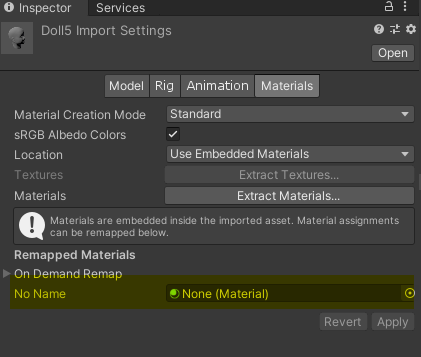 short tiger
atomic flower
I'm creating a property drawer for a custom class - it's a POCO that doesn't sub...
short tiger
atomic flower
I'm creating a property drawer for a custom class - it's a POCO that doesn't sub...
This is possible in Unity 2022, with the SerializedProperty.boxedValue property, though I'm not sure if you get a copy or the actual instance (when dealing with serialized classes, that is)
 tight pine
Hey ppl! Been looking for a hook (event) for when an element is added to an Array or a List on the default drawer (by clicking the + icon or changing the List size on the text box). Any of you done that before?

This is on an editor window, not the inspector (if it makes any difference)
gloomy chasm
short tiger
This is possible in Unity 2022, with the `SerializedProperty.boxedValue` propert...
Unless I am mistaken, you can only get the 'base' types (float, int, string, Vector3 etc.). And not just any old POCO. And even if you could, you still shouldn't.
Edit: Nope, looks like I am mistaken and you can. But still should not in most cases.
gloomy chasm
tight pine
Hey ppl! Been looking for a hook (event) for when an element is added to an Arra...
You will need to handle the drawing of the list yourself with ReorderableList(IMGUI), or ListView(UIToolkit)
tight pine
Ho dang 🤦🏻 whyyyyy 😭
gloomy chasm
tight pine
Ho dang 🤦🏻 whyyyyy 😭
There are other ways maybe depending on what you are doing exactly.
tight pine
Just need to do some edits to the objects when they are added to the list. When the user presses the + button it copies the last element on the list and I need to make sure the edits are done on that element as well.
gloomy chasm
tight pine
Just need to do some edits to the objects when they are added to the list. When ...
A workaround would be to get the array size before drawing and then again after drawing and compare to two.
short tiger
gloomy chasm
Unless I am mistaken, you can only get the 'base' types (float, int, string, Vec...
The example given in the documentation shows it being used to access a serializable struct. I don't agree that it should be avoided. You could argue you shouldn't access vector3Value for the same reason, because you can access xyz through FindPropertyRelative instead.
gloomy chasm
short tiger
The example given in the documentation shows it being used to access a serializa...
Yeah I noticed that.
I should also amend my statement about it being used. The reason I say that is that a lot of the time, SerializedProperty should actually be used, instead. And I fear that for people who are newer to editor scripting will not understand when it should or should not be used and lead to poor use and confusion. SerializedProperty is already confusion enough for people.
A lot of the time people would also use it as a crutch to avoid actually understanding SerializedProperties. That is why I would avoid recommending it.
short tiger
gloomy chasm
A lot of the time people would also use it as a crutch to avoid actually underst...
Okay, I can agree with that. It can be used irresponsibly. So in the future, I will be asking for more clarification on the use case before recommending either boxedValue or FindPropertyRelative.
gloomy chasm
short tiger
Okay, I can agree with that. It can be used irresponsibly. So in the future, I w...
Sounds good. And to be clear, I do find it to be very cool and helpful! Just a bit 'dangerous' too haha
atomic flower
If I want to change a value in a class that’s being drawn by my property drawer, can I somehow use an instance method on the serialized object (eg, AddItemToArray(Item addMe) to mutate an array), or do I need to deserialize/serialize the field I want to modify?
tight pine
I've made an EditorWindow that manages some ScriptableObject. When I make a change and then hit undo, the change is undone on the scriptable object but not reflected on the window. If I close the window and open it again then it shows the right value with the "undone" change... That's weird no? Or do I have to do something specific to "refresh" the window when an action is undone?
gloomy chasm
tight pine
I've made an EditorWindow that manages some ScriptableObject. When I make a chan...
Assuming you are using SerializedObject, in OnGUI, just serializedObject.Update()
gloomy chasm
atomic flower
If I want to change a value in a class that’s being drawn by my property drawer,...
I don't think I quite understand what you mean.
tight pine
ha so I should update it on each OnGUI pass?
gloomy chasm
tight pine
ha so I should update it on each OnGUI pass?
Yup, at the top before drawing any fields for it or mutating it
tight pine
hoooooooooooo..... 🤦🏻♂️
gloomy chasm
tight pine
hoooooooooooo..... 🤦🏻♂️
Basically a SerializedObject is a copy of the 'source' data. That is why you need to do ApplyModifiedProperties. So you need to Update to update the SerializedObject instance to match the source data if it was changed by something else.
atomic flower
gloomy chasm
I don't think I quite understand what you mean.
Basically, I have a private, serialized list that I want to add to/remove from. I would like to do some other things as well (validation, for instance), so using a method on my class would make sense, but I don’t know if it’s possible with a SerializedObject.
tight pine
Thanks a lot man, I have to take a moment and appreciate you, you're incredible! I do not come here very often, but anytime I have a weird problem (or I think I do 😃) and ask here you are always around and come up with a super insightful response on the spot. Are you sure you are not some super advanced AI that doesn't sleep and knows everything?
gloomy chasm
atomic flower
Basically, I have a private, serialized list that I want to add to/remove from. ...
Got it, ask MentallyStable mentioned if you are using a newer version of Unity you can just get it via boxedValue.
The other way (and what I would probably use) is to get the array via SerializedProperty, var arrayProperty = serializedProperty.FindRelativeProperty("m_MyArrayOrListField");
You can add to it via arrayProperty.arraySize++. And there are a number of methods that can only be used on serialized properties for arrays. Like .GetArrayElementAtIndex(..)
gloomy chasm
tight pine
Thanks a lot man, I have to take a moment and appreciate you, you're incredible!...
Aw, well thank you! I am glad I could help, I love editor scripting, so I enjoy helping others here. 😄
There is a non 0 chance that I might be an AI. Just don't tell ChatGPT, I wouldn't want it to get jealous 😛
atomic flower
gloomy chasm
Got it, ask MentallyStable mentioned if you are using a newer version of Unity y...
Thanks a ton! Not the first time you’ve helped me out, so to echo @tight pine , thanks for lending your knowledge and patience here!
 surreal torrent
Is there a way for me to disable variable fields from a class variable?
Essentially, I have a class object with multiple variables in it. I can disable/hide/grey out properties from the main script the editor controls but not individual variables within the class object variable on that script.
The gun property field is the class object.
 surreal torrent
Is there a way for me to disable variable fields from a class variable?
Essenti...
surreal torrent
surreal torrent
Is there a way for me to disable variable fields from a class variable?
Essenti...
I can get the property fields using the following code, but not sure if I can disable those fields using this method?
WeaponManager t = (WeaponManager)target;
        foreach (var property in t.guns.GetType().GetFields())
        {
            if (property.Name == "test")
            {
            }
            else
            {
                GUI.enabled = true;
            }
        }
 tawdry granite
Hello, anyone made an editor extension to fast apply colors to images?
gloomy chasm
surreal torrent
Is there a way for me to disable variable fields from a class variable?
Essenti...
You would draw each field using Property field, so you would get the 'sub properties' of the one containing the one you want to disable.
 alpine bolt
I have these ScriptableObject types MyCustomTypeSO : IMyCustomInterface, ScriptableObject. What should be the most performative way of storing this IMyCustomInterface object and getting the object reference and not a "copy" on Unity rebuild? I'm thinking of saving a GUID and then having a [NonSerialized] object checked. If null, I Resources.LoadAll(savedPathString).FirstOrDefault(x => x.GUID == myGUID)
 smoky plover
what is the difference from [ExecuteAlways] and [ExecuteInEditMode]?
the normal OnValidate method is called less times than ExecuteAlways Update method?
alpine bolt
https://docs.unity3d.com/ScriptReference/ExecuteAlways.html have you read this?
smoky plover
yes
gloomy chasm
alpine bolt
I have these ScriptableObject types `MyCustomTypeSO : IMyCustomInterface, Script...
not needed, it works as is
gloomy chasm
smoky plover
what is the difference from `[ExecuteAlways]` and `[ExecuteInEditMode]`?
Reading the docs. Looks like ExecuteInEditMode does the same thing but is being deprecated. So use ExecuteAlways
smoky plover
it isn't deprecated
gloomy chasm
smoky plover
it isn't deprecated
being deprecated, going to be
smoky plover
Ok, didn't notice that
alpine bolt
smoky plover
the normal `OnValidate` method is called less times than ExecuteAlways `Update` ...
The [ExecuteInEditMode] docs say: To indicate that a MonoBehaviour correctly takes Prefab Mode into account and is safe to have open in Prefab Mode while in Play Mode, the attribute ExecuteAlways can be used instead of the attribute here.. Tbh I just tested a prefab and ExecuteInEditMode worked the same as ExecuteAlways
smoky plover
anyway my code with OnValidate doesn't get executed, while the same code trasmigred to [ExecuteAlways] Update works
Is it correct or i'm missing something?
short tiger
OnValidate is only called when the script is first loaded or when a value changes in the inspector.
 fierce cave
I've been adding a tile properties via inhertiting Tile. I've noticed that the preview is no longer there. Is there any way i can add the tile preview back (and hide all the debug properties of the tile)
 timber stump
I wrote a custom gridBrushBase script that keeps references to prefabs, and it finds all tilemaps parented to the prefab and places them to tilemaps in the scene with the corresponding order in layer.
There is an editor script that makes a preview for that too, including any sprite renderers parented to the prefab.
It was working fine, but now it's very slow. I didn't change anything.
And I'm not sure what the issue is.
Would anyone be willing to see if they can pinpoint an issue with these scripts that might be causing that?
gloomy chasm
timber stump
And I'm not sure what the issue is.
The profiler is great for this sort of thing 🙂
timber stump
Well yes, but that isn't really helpful to me. I did give the profiler a go.
Maybe I can share a screenshot?
I'm not entirely sure how to decipher the issue
The profiler info I mean
gloomy chasm
timber stump
I'm not entirely sure how to decipher the issue
There some great docs on it with a lot of screenshots! 😄 https://docs.unity3d.com/Manual/ProfilerCPU.html
You will probably want the "Hierarchy" view
timber stump
Yeah, so it seems to be mostly SceneView.OnGUI.Layout and SceneView.OnGUI.MouseLeaveWindow
gloomy chasm
I would switch to Deep Profile mode and try again in that case
timber stump
Okay so I tried some things and it was the refreshing of all of the tiles in the scene
If the scene is too large, that will basically crash the editor
I plan on breaking things up into subscenes using anyway, so I'll just keep that in mind
The script does work fine.
Any idea how to prevent a total scene refresh?
 earnest talon
Is there a way to use C# calls directly to add things to menus instead of with Attributes? (e.g. replace MenuItemAttribute with a call directly to UnityEditor's topbar menu?)
 simple cove
earnest talon
Is there a way to use C# calls directly to add things to menus instead of with A...
simple cove
earnest talon
Is there a way to use C# calls directly to add things to menus instead of with A...
I don't think that's supported. Afaik C# is sandboxed in the editor, so it'd have to recompile.
What I'd do is create a 'Open MyEditor' menu item that opens an EditorWindow, which I'd be able to update real-time.
earnest talon
simple cove
What I'd do is create a 'Open MyEditor' menu item that opens an `EditorWindow`, ...
I'm not making an editor window. I'm trying to sandbox the editor window creation process into one namespace, kind of like a redirect of sorts.
Reason being is I want to make Editor Windows easier for others in my university to create though is still fully compatible with Unity's UIElements namespaces, which is why I spend time adding (and extensively documenting) all the changes and additions I do.
simple cove
the related code is hardcoded to work with attributes https://github.com/Unity-Technologies/UnityCsReference/blob/master/Editor/Mono/EditorMode/MenuService.cs#L192
earnest talon
A bit annoying but maybe there's a means to reroute the MenuItem attribute instead, bypassing the sole reason for requiring UnityEditor namespace at all.
simple cove
well.. not really
earnest talon
So it is just one of those really annoying things where you either
A) have to crack open the code directly (somehow, and probably breaking TOS in the process)
simple cove
you could do something like this if the whole goal is to have an external dll extend unity editor, but you'll still need to add a reference to UnityEditor when including the .dll to your project
#if UNITY_EDITOR
using MenuItem = UnityEditor...MenuItemAttribute
#else
using MenuItem = MyLib.MenuItemAttribute;
#endif

#if !UNITY_EDITOR
public class MenuItemAttribute : Attribute { }
#endif
ah
what I'm trying to do is implement a custom attribute
that acts as a reroute to MenuItem
so that it's contained in one namespace without DLLs
It's one framework folder inside Assets > Editor (for now) full of Mono-C# scripts that just make the process abstracted and simpler to pick up
simple cove
earnest talon
A) have to crack open the code directly (somehow, and probably breaking TOS in t...
what's B in this case? I don't see another way 😛
earnest talon
B) require UnityEditor's namespace all the time
It's pretty much just nit picking but despite that
I don't know if there's any security concerns with exposing UnityEditor.MenuService
or even an MainMenu.AddItem(pathString).
simple cove
yeah the code in the link I posted doesn't look like quality code. might be super old or something.. probably passed as 'good enough'
earnest talon
speaking of, I'd like your input on using the dynamic keyword
simple cove
mind that you're probably the first that wants to extend the menu without referencing UnityEditor assembly lol
earnest talon
probably, which sucks for me
simple cove
dynamic? no.. why?
earnest talon
abstracted get-set for SerializedProperty.typeValue
I've done it, it works but it requires specific values

and I'm working on safer GetValue(out valType) and already got a safer SetValue(object value) working
simple cove
meh if you make everything else robust then I wouldn't mind
earnest talon
I'm doing my absolute best to restrict it to only what SerializedProperty can take
at first I thought it didn't work but no that was my fault at the time - specifically because I tried to set a bool value to a string serializedproperty value.
simple cove
but I think manually branching it to a per-type logic would be better.. there are only a couple you need to handle probably
earnest talon
it works, it's just very picky on what it wants to do.
There's 20, technically 26 but 6 I don't handle from SerializedPropertyType because it's too vague for those ones (specifically, what are they setting as they don't exactly have typeValues connected explicitly to a SerializedProperty object)
SetValue right now doesn't check for type compatibility between object value and the serializedProperty.typeValue, which I'm rectifying now
all in all, I just want to make creating editors and filling their contents a lot easier and less longer than the gargantuan lines that can be. Especially with enums - shudder
I'm completely fine with doing the gargantuan lines personally but I know a lot of people at my university do not even want to touch them, one reason being the really long, almost-god-line structure that can be just setting property children.
All I can do is try abstract it, create a owner>parentproperty>childproperty like hierarchical navigation method
and so on, so forth
simple cove
why not object instead of dynamic?
earnest talon
works for set but won't for get.
simple cove
I don't think you should ever be needing 'value' like that (?) I've dealt with editor stuff a lot but never had this need. Are you certain it's necessary?
earnest talon
I can do object technically, with an asterisk but it's got it's own concerns too
sometimes object would error where dynamic wouldn't.
not IL2CPP compatible, which would be a concern if it wasn't an Editor window.
simple cove
simple cove
I don't think you should ever be needing 'value' like that (?) I've dealt with e...
reason is that you usually know the type of the field you're working with, and I can't think of any reasons to want to obtain the value when you don't know the field's type
ah, maybe if creating a custom .meta thing or something 😄
earnest talon
it's definitely weird
object works (again asterisks, I've found use-cases where this is kinda not the case)
dynamic is just object, resolved at runtime (bypassing the compiler)
simple cove
yeah usually dynamic is there to replace unknown types.. and sometimes MAYBE complex generic ones
earnest talon
the part about value and why I include it is
It's meant to be a quicker method if you're absolutely sure on what you're doing
e.g. you know your scripts' types and their data types inside and out, you know what you're expecting to get and what it expects back.
otherwise, there's shorthands if you want to be extra safe
(boolValue > Bool)
even without dynamic I'll still need to keep the warnings (thank god these kinds of changes are one word)
I'm also going to be adding safer methods like I said
object will at least remove some of the overhead caused by using JIT-exclusive functionality.
 peak bloom
dynamic uses Reflection.emit it won't work in Unity
 jovial forge
Unable to find player assembly: \StagingArea\Data\Managed\UnityEngine.TestRunner.dll
How do I get this Test Runnen in Unity 2021?
simple cove
peak bloom
`dynamic` uses Reflection.emit it won't work in Unity
why wouldn't it? System.Reflection is referenced in unity's assemblies
simple cove
earnest talon
e.g. you ***know*** your scripts' types and their data types inside and out, you...
yeah in that case I think object should suffice. Some boxing when wrapping value types won't hurt the inspector's performance anyway :p
waxen sandal
simple cove
why wouldn't it? `System.Reflection` is referenced in unity's assemblies
Probably because of il2cpp
simple cove
mind elaborating? 😛
gloomy chasm
Reflection.emit doesn't work in IL2CPP builds, but should work fine in editor iirc
simple cove
ah, alright, thanks. Yeah it's fine in editor & non-il2cpp builds, so was wondering what was that about
earnest talon
peak bloom
`dynamic` uses Reflection.emit it won't work in Unity
Dynamic does work. It did work with all types when I had .value as dynamic. Because UnityEditor is Mono-based, not IL2CPP, it's able to make use of dynamic values. Though performance is eh.
It's a JIT-Exclusive benefit.
IL2CPP being AOT only.
glad pivot
so ive been trying to figure out why my editor window does not want to open when i load any layouts or reopen the project. The log that appears when it fails to load is this
UnityEditor.WindowLayout:LoadDefaultWindowPreferences ()
I had some help by someone and we figured out that the issue is most likely somewhere with my use of #if UNITY_EDITOR as we tried to compile the c# code outside of unity and it failed, and only successfully reopened the window until we removed enough of the #if UNITY_EDITOR instances and code but now that im trying to pinpoint which part of my code is causing the issue i am unable to do it. I have commented out essentially everything related to the editor window and unity still dont want to load the window. if anyone could check out the code to try and figure it out id be really grateful. (there are definetively stuff in the code that is not good practice so dont worry about that im working on it as this post may show)
https://github.com/HenrysHouses/MultiSceneTools
 astral crown
alright, so I'm trying to make a small change in my script. I'm trying to have two column in a single row of gameobject and strings. GameObject works, but strings always resets and I understand that it's because I need to use serializedObject, but I don't get how to use it in my project for exemple. Could someone help understand it? It would be really appreciated! I tried some random things in the comments section of the code below:
public override void OnGUI(Rect position, SerializedProperty property, GUIContent label)
    {
        EditorGUI.BeginProperty(position, label, property);

        position = EditorGUI.PrefixLabel(position, new GUIContent("Piece"));

        int indent = EditorGUI.indentLevel;
        EditorGUI.indentLevel = 0;

        Rect gameObjectRect = new Rect(position.x, position.y, position.width / 2 - 10, position.height);
        Rect stringValueRect = new Rect(position.x + position.width / 2, position.y, position.width / 2 - 5, position.height);

        SerializedProperty gameObjectProperty = property.FindPropertyRelative("gameObject");
        SerializedProperty stringValueProperty = property.FindPropertyRelative("stringValue");

        // SerializedObject serializedObject = new SerializedObject(stringValueProperty.exposedReferenceValue);
        // serializedObject.Update();
        // serializedObject.ApplyModifiedProperties();

        EditorGUI.ObjectField(gameObjectRect, gameObjectProperty, new GUIContent());
        EditorGUI.TextField(stringValueRect, stringValueProperty.stringValue, new GUIContent("").ToString());


        EditorGUI.indentLevel = indent;

        EditorGUI.EndProperty();
    }
Here is the result:

Right now, the word "Element n" is being replaced by Piece if some of you were wondering (because I didn't like it XD)
gloomy chasm
astral crown
alright, so I'm trying to make a small change in my script. I'm trying to have t...
You need to just pass the stringValueProperty instead of the .stringValue of it. Or, you need to set the .stringValue from the TextField (TextField returns a string of the changed/new value)
astral crown
Well I know that if I only use stringValueProperty it says: [Argument 1: cannot convert from 'UnityEditor.SerializedProperty' to 'UnityEngine.Object' [Assembly-CSharp]] and I can't cast it or anything like that
well In the serializedObject
gloomy chasm
From:
EditorGUI.TextField(stringValueRect, stringValueProperty.stringValue, new GUIContent("").ToString());
To:
EditorGUI.TextField(stringValueRect, stringValueProperty, new GUIContent("").ToString());
Or to:
stringValueProperty.stringValue = EditorGUI.TextField(stringValueRect, stringValueProperty.stringValue, new GUIContent("").ToString());
dynamic requires JIT compilation, which is not possible on AOT, in this case, IL2cpp
astral crown
gloomy chasm
From:
```cs
EditorGUI.TextField(stringValueRect, stringValueProperty.stringValue...
for your first recommendation : EditorGUI.TextField(stringValueRect, stringValueProperty, new GUIContent("").ToString()); it says Argument 2: cannot convert from 'UnityEditor.SerializedProperty' to 'string'
And your second approach didnt do any errors but it's still resets what im writing in my inspector
gloomy chasm
astral crown
for your first recommendation : **EditorGUI.TextField(stringValueRect, stringVal...
Ah yeah, some fields accept SerializedProperty and some don't I forget which ones are which, sorry.
Lol, the reason the second one isn't working is because you need to reverse the value and the GUIContent
It is position, label, value, style
You can also just not use a label
astral crown
gloomy chasm
Ah yeah, some fields accept SerializedProperty and some don't I forget which one...
Oh don't worry. I'm reeeeaally new to that and honestly I'm not sure of what Im doing myself XD... Thanks for looking into it tho
astral crown
gloomy chasm
It is position, label, value, style
I'm not too sure if i follow here
gloomy chasm
astral crown
I'm not too sure if i follow here
stringValueProperty.stringValue = EditorGUI.TextField(stringValueRect, new GUIContent("").ToString(), stringValueProperty.stringValue);
AAAAH
gloomy chasm
Or
stringValueProperty.stringValue = EditorGUI.TextField(stringValueRect, stringValueProperty.stringValue);
Wow!!!!! Thanks! I learnt from that!
 waxen sandal
Reflection
I think you can find some stuff in the SceneView class using reflection
But check the reference source
whole steppe
They should have a simple way to access this kind of stuff atleast 😫
gloomy chasm
whole steppe
They should have a simple way to access this kind of stuff atleast 😫
Do you mean the pivot and local values?
https://docs.unity3d.com/ScriptReference/Tools-pivotMode.html
 worldly echo
Hey guys. I have the following code to create an eazy to edit piece placement for a chess game I'm building. But for now I can't edit the content of the field. Am I missing something ?
[CustomEditor(typeof(PiecePlacementSO))]
public class PiecePlacementSOEditor : Editor
{

    int gridSize = 8;
    int spacing = 5;
    int labelOffset = -50;
    Vector2 cellDims = new Vector2(45, 40);
    Vector2 labelDims = new Vector2(45, 40);
    ChesspieceSO[,] tiles;

    private PiecePlacementSO piecePlacementFile;

    private void OnEnable()
    {
        tiles = new ChesspieceSO[gridSize, gridSize];
        piecePlacementFile = (PiecePlacementSO)target;
    }

    public override void OnInspectorGUI()
    {
        base.OnInspectorGUI();
        EditorGUILayout.BeginVertical();
        EditorGUILayout.Space(10);
        EditorGUILayout.LabelField("PiecePlacement", EditorStyles.boldLabel);

        for (int i = 0; i < gridSize; i++)
        {
            EditorGUILayout.BeginHorizontal();

            for (int j = 0; j < gridSize; j++)
            {
                string tileName = (char)('A' + j) + (gridSize - i).ToString();
                Rect labelField = GUILayoutUtility.GetRect(labelDims.x, labelDims.x, labelDims.y, labelDims.y, GUILayout.ExpandWidth(false));
                EditorGUI.LabelField(labelField, tileName);
                EditorGUILayout.Space(labelOffset);

                Rect boxRect = GUILayoutUtility.GetRect(cellDims.x, cellDims.x, cellDims.y, cellDims.y, GUILayout.ExpandWidth(false));
                tiles[i, j] = (ChesspieceSO)EditorGUI.ObjectField(boxRect, "", tiles[i, j], typeof(ChesspieceSO), false);
                EditorGUILayout.Space(spacing);


            }

            EditorGUILayout.EndHorizontal();
            EditorGUILayout.Space(spacing);

        }
        EditorGUILayout.BeginHorizontal();
        EditorUtility.SetDirty(piecePlacementFile);

    }
}
#endif```Are you aware that piecePlacementFile is never modified, meaning the tiles array will be lost as soon as you select another object in the editor?
worldly echo
I know that yeah ^^ the problem is I can’t even put something in the objectfield :/
Also if you see some nonsense please do let me know, i only started working with custom editor today x)
short tiger
Does it let you pick an object, but then it doesn't get assigned when you select one?
You have EditorGUILayout.BeginHorizontal(); at the end, which should be EditorGUILayout.EndVertical();
worldly echo
short tiger
Does it let you pick an object, but then it doesn't get assigned when you select...
It does not :/
short tiger
worldly echo
It does not :/
So you can't open the object selection menu by clicking the circle?
worldly echo
short tiger
So you can't open the object selection menu by clicking the circle?
Nope :/
short tiger
Ok, then it's likely an issue with the Rects
Something is wrong that is messing with the cursor interaction
Maybe negative scale or overlapping rects.
 errant shale
- Experimenting with my first custom editor window and i struggle to find a list of all built-in visual elements. Is there any?
gloomy chasm
errant shale
- Experimenting with my first custom editor window and i struggle to find a list...
Also there is this
https://www.foundations.unity.com/components
Components are the reusable building blocks of our design system, created to work together to create patterns and intuitive user experiences.
worldly echo
short tiger
Maybe negative scale or overlapping rects.
It was indeed, i didn’t thought about that ! Thanks a lot 🙂
errant shale
- This might be dumb but i struggle to add a horizontal line like those in default inspectors in creategui method, i.e. add it to a visual element. Whatever i google it involves different methods than creategui, and i'm not ready for different ways yet. I discovered this topic literally four hours ago
gloomy chasm
errant shale
- This might be dumb but i struggle to add a horizontal line like those in defau...
Just style the visual element
For example
element.style.height = 2;
element.style.backgroundColor = Color.black;
element.style.flexGrow = 1;
(You can also use a uss file to style it of course)
errant shale
- I saw uss mentions twice or so. Is it related to ui builder?
gloomy chasm
Or if you have a element that is containing controls that you want it below
containerElement.style.borderBottomWidth = 2;
containerElement.style.borderBottomColor = Color.black;
Uss is also called a stylesheet. You can use it to style elements (color, alignment, layout direction, padding, margin, border, text size, etc.) based on rules.
errant shale
- Cool. Now i have a custom window to see all scripts in my project as a list and their content to the right. A slightly changed script from the manual, but first steps are always tiny. I'm very excited to see what opportunities do these editors open, expect me to come here frequently 😄

 unborn wagon
I have a problem with my custom editor. In the UI Builder all looks fine. I have a SplitView that has shrink = 1 & grow = 1. However when opening the editor outside of the UI Builder the SplitView is not expanding vertically. I checked the debugger and it shows me a TemplateContainer whichs height is set to 21 while the parent VisualElement has a height of 594. I never added that TemplateContainer. How can I get rid of it or at least force it's height to match the parent VisualElement?
 gloomy chasm
unborn wagon
I have a problem with my custom editor. In the UI Builder all looks fine. I have...
gloomy chasm
unborn wagon
I have a problem with my custom editor. In the UI Builder all looks fine. I have...
When you create a VisualElement tree from a UXML it puts them all in to a TemplateContainer element unless you specify a parent VisualElement
unborn wagon
gloomy chasm
When you create a VisualElement tree from a UXML it puts them all in to a `Templ...
Ok so the solution is to pack everything into a VisualElement?
unborn wagon
gloomy chasm
When you create a VisualElement tree from a UXML it puts them all in to a `Templ...
I did add a VisualElement but it isn't helping. It seems that Toolbar and SplitView only work with fixed height values instead of auto.

OK I fixed it by adding VisualElement.StretchToParentSize. It seems that in the UI Builder this is done implicitly but not outside of it.
        // Import UXML
        var visualTree = AssetDatabase.LoadAssetAtPath<VisualTreeAsset>("Assets/Editor/CraftingHierarchyEditor.uxml");
        VisualElement editor = visualTree.Instantiate();
        editor.StretchToParentSize();
        root.Add(editor);
Sorry to ping you, but is there a way to make our transform handles use the pivot rotation properly
I tried this but the problem I run into is that the rot variable is returning the full rotation each time so the object keeps on turning when I move the mouse

Just to clarify, if I have the rotation handle turned to 45 deg last frame then according to my I have already rotated the object by 45 deg but I move the handle to 44 deg next frame then instead of rotating -1 deg it will multiply the rotation by 44 deg again
There is no way to have a delayed handle like we delayed fields in the inspector afaik
peak bloom
unborn wagon
I did add a VisualElement but it isn't helping. It seems that `Toolbar` and `Spl...
you can
visualElement.style.width = new StyleLength(new Length(value, LengthUnit.Percent));
Hey guys. I have the following code to create an eazy to edit piece placement for a chess game I'm building. But my tiles and my dictionnary are getting cleared everytime I enter playmode 😦 Did I do something wrong ? (code in thread)
unborn wagon
Short Question: https://github.com/alelievr/NodeGraphProcessor
Is this still "cool" ? I am quite new to Unity and all the fancy things I discover often are outdated. Just want to be sure to jump on the right train here.
GitHub
Node graph editor framework focused on data processing using Unity UIElements and C# 4.6 - GitHub - alelievr/NodeGraphProcessor: Node graph editor framework focused on data processing using Unity U...
short tiger
unborn wagon
Short Question: https://github.com/alelievr/NodeGraphProcessor
Is this still "co...
It was cool, back when it was maintained and GraphView was actively being developed by Unity. Now Unity it working to replace GraphView with GraphTools Foundation (GTF), but it's still probably at least a year until they release a public API. The developer of this package (who also works at Unity, btw) has said they want to migrate over to GTF when it's released, so maybe we'll see that.
https://github.com/alelievr/NodeGraphProcessor/issues/188

GitHub
The Graph Tool Foundation is now at 0.11.2 and seems to be getting along pretty well. Is it maybe stable enough already to port NGP to this new framework? Any ideas or plans for when this will happen?
unborn wagon
short tiger
It _was_ cool, back when it was maintained and GraphView was actively being deve...
Ok about GTF - is this already usable as preview/experimental? Cause I kinda am struggling with thee current Experimental.GraphView API 🫠
 tepid roost
yeah i am just carrying on using graphview for now
short tiger
unborn wagon
Ok about GTF - is this already usable as preview/experimental? Cause I kinda am ...
I think there's an old preview package somewhere, but it's out of date. All development for GTF is now internal, AFAIK.
tepid roost
no point using something more unstable and missing parts because it might be the future
unborn wagon
tepid roost
no point using something more unstable and missing parts because it might be the...
also true
tepid roost
if i have to make a new editor that needs something like this in the future will evaluate the options then, but its not like GraphView will disappear all of a sudden
peak bloom
GraphView deprecation won't happen soon, like tons of Unity's editor tools rely on that... GraphView is much better than GTF currently...
I tried both, GTF apis are a giant mess (based on their released package)
 lone halo
Q: Does OnPostprocessModel in AssetPostprocessor not work on update? It doesn't trigger when I import FBX files the first time, but then when I overwrite them it runs.
 slender meteor
Is there a way to make Unity install a custom package (as in menubar Assets->ImportPackage->CustomPackage) or add a package from git url (via Package Manager) from an externall app, lets say a bat file.
We can assume UnityEditor is running and platform is Windows
waxen sandal
IIRC there's a commandline option to import them but don't think you can do it while running without setting up your own cross process communication
 glacial notch
not sure if this is the place, but is there a way to configure lists in the inspector to assign children of an object that has a specific component or script attatched to them?
I have this tile based system with walls, and its such a pain to extend every object and drag in the ceiling lights I want to assign to a list lol
 surreal torrent
Is it possible to hide variables within a class object using a custom editor? Hide in terms of either not showing or at least grey it out so its not editable.
Because it is a variable inside a class object variable, I can't just not draw it if a variable is false. I think so anyways.
slender meteor
whole steppe
whole steppe
Sorry to ping you, but is there a way to make our transform handles use the pivo...
Anyone?
surreal torrent
slender meteor
https://docs.unity3d.com/ScriptReference/HideInInspector.html
Through custom editor on a conditional basis.
I can't change attributes after initialization and I can't not draw it due to it being in a nested class and I draw the whole top level class at once.
waxen sandal
So you're doing DrawEditor and then want to hide things?
Your only options are to draw the fields yourself or add properties on the Editor instance that you can manipulate to show/hide fields
tight pine
Hey good ppl!! 🙂 Is there a nice way to run some code on the editor every x seconds without having to depend on the EditorCoroutines package? (like for an auto-save function)
waxen sandal
Editor update?
tight pine
That worked perfect of course 🙂
unborn wagon
Hey people!
I have a problem when loading assets via AssetDatabase. See on the left side there is an asset called Foo under Assets/Crafting/Recipes. So it does exist.
When debugging the code and breakpointing @ line 38 I check the result of recipes which is 0 and therefore empty. However when I also evaluate manually in my IDE (Rider) I can see that the logic actually works and yields a value?
What am I missing here? Do I need to refresh anything? It seems the editor does not know about the assets when launching.
 unborn wagon
Hey people!
I have a problem when loading assets via `AssetDatabase`. See on the...
unborn wagon
unborn wagon
Hey people!
I have a problem when loading assets via `AssetDatabase`. See on the...
ah f*** nevermind I had an additional $ in the filter string of FindAssets 🫠
whole steppe
glacial notch
not sure if this is the place, but is there a way to configure lists in the insp...
Could use the [ContextMenu("")] Attribute that is over a function thet just sets the list to be the result of GetComponentsInChildren
makes a button show when you right click on the component
glacial notch
right, but its not possible doing it automatically like unity does for you?
surreal torrent
waxen sandal
So you're doing DrawEditor and then want to hide things?
I am setting a propertyfield OnInspectorGUI().

But that initializes the entire set of nested classes within including my weapon stats.
unborn wagon
I am really going nuts with GraphView Nodes. I simply want to have a listener when another node creates and edge to my target node. I tried this:
            input.AddManipulator(new EdgeConnector<Edge>(new EdgeListener()
            {
                OnConnectedEvent = (_, _) => { Debug.Log("Connected"); }
            }));
However it only works if my target node creates an edge towards another node. But I'd also like to listen if another node connects to my target node. Any idea for that? Just can't find anything browsing through the library
gloomy chasm
unborn wagon
I am really going nuts with GraphView Nodes. I simply want to have a listener *w...
When you mean when a node connects to it vs it connect to a node. Do you mean input/output port. Or do you mean from where the connection action starts in the editor?
 dark roost
Hello all! This is related to UI Toolkit, but I think the main issue is a bit more fundamental. I have commented what I am trying to do in the Inspect method (near the bottom) of the following code... I'm missing something super simple and can't find the search terms to figure it out:
{
    public new class UxmlFactory : UxmlFactory<MapEditorBlackboardVisualElement, UxmlTraits> { }

    public new class UxmlTraits : VisualElement.UxmlTraits
    {
        public override IEnumerable<UxmlChildElementDescription> uxmlChildElementsDescription
        {
            get { yield break; }
        }

        public override void Init(VisualElement ve, IUxmlAttributes bag, CreationContext cc)
        {
            base.Init(ve, bag, cc);
            var ate = ve as MapEditorBlackboardVisualElement;

            VisualTreeAsset vt = Resources.Load<VisualTreeAsset>("UXML/MapEditorBlackboard");
            ve.Add(vt.CloneTree().Children().First());

            MapEditorBlackboardVisualElement blackboardVE = ve as MapEditorBlackboardVisualElement;
            if (blackboardVE != null)
            {
                blackboardVE._selectionScrollView = ve.Q<ScrollView>("SelectionScrollView");
            }
        }
    }

    ScrollView _selectionScrollView;
    IMapEditorClickInspector _inspectorTarget;

    public void Inspect(IMapEditorClickInspector inspectableVE)
    {
        _inspectorTarget = inspectableVE;

        VisualElement target = _inspectorTarget.GetVisualElement();

        MapTileVisualElement mapTileVE = target as MapTileVisualElement;
        if (mapTileVE != null)
        {
            Debug.Log($"Inspecting {mapTileVE.tileNode.locationName}");
            _selectionScrollView.Add(); // Trying to populate with the default editor for mapTileVE.tileNode here
        }
    }
}```

Edit: For context, this is an inspector inside a custom EditorWindow. I'm trying to fill its ScrollView with the default custom editor for a known class.Everything here is boilerplate for building custom VisualElements for UI Toolkit and all code works as intended. It's just the last line where I'm trying to supply _selectionScrollView.Add() with a parameter, but I'm not sure what the correct way to pull in the default inspector is.
The Debug.Log immediately before it is getting reached exactly when it is supposed to be.
gloomy chasm
dark roost
Everything here is boilerplate for building custom VisualElements for UI Toolkit...
dark roost
gloomy chasm
IIRC <https://docs.unity3d.com/ScriptReference/UIElements.InspectorElement.html>
Oh interesting. I had no idea that UI Toolkit had a tool for that. Thanks for sending this!
dark roost
Thanks for the help so far here. Next up, I'm not really sure how I should be handling how the InspectorElement draws. You can see from the following screenshots that I have some things set up properly, but I'm not sure yet how to make the element useable.
Code that draws the InspectorElement:
    {
        _inspectorTarget = inspectableVE;

        VisualElement target = _inspectorTarget.GetVisualElement();

        MapTileVisualElement mapTileVE = target as MapTileVisualElement;
        if (mapTileVE != null)
        {
            Debug.Log($"Inspecting {mapTileVE.tileNode.locationName}");

            InspectorElement inspectorElement = new InspectorElement(new SerializedObject(mapTileVE.tileNode));

            inspectorElement.style.flexGrow = 1;
            inspectorElement.style.flexShrink = 1;
            inspectorElement.style.alignSelf = new StyleEnum<Align>(Align.Stretch);
            inspectorElement.style.display = new StyleEnum<DisplayStyle>(DisplayStyle.Flex);

            _selectionScrollView.Clear();
            _selectionScrollView.Add(inspectorElement); // Trying to populate with the default editor for mapTileVE.tileNode here
        }
    }```
 peak bloom
unborn wagon
I am really going nuts with GraphView Nodes. I simply want to have a listener *w...
peak bloom
unborn wagon
I am really going nuts with GraphView Nodes. I simply want to have a listener *w...
There's another way to detect edges one frame before they are created
     SubScribe() {graphViewChanged = OnGraphChange;     }

     private GraphViewChange OnGraphChange(GraphViewChange change)
     {
         if (change.edgesToCreate != null)
          {
             foreach (Edge edge in change.edgesToCreate)
             {
                 //Your code here to process the edge
             }
         }
          //Do the same with nodes here
      }
you can do the same with nodes etc... basically all graphviewElement
this way you can check/validate which edges will be connected to which port pretty easily
it's less messy than adding custom callbacks to individual port imho
unborn wagon
Ok thanks I will try that out!
unborn wagon
@peak bloom
Hey I have an issue figuring out where I can add a handler to the GraphViewChanged event. I am in my custom GraphView class. Looking through overrides and such but can't find anything called GraphViewChanged etc.
unborn wagon
unborn wagon
<@726512159940411422>
Hey I have an issue figuring out where I can add a handle...
nevermind I just found it...
dark roost
dark roost
Thanks for the help so far here. Next up, I'm not really sure how I should be h...
Shameless plug. 😦
peak bloom
unborn wagon
<@726512159940411422>
Hey I have an issue figuring out where I can add a handle...
The docs for this is pretty much non-existent -> https://docs.unity3d.com/ScriptReference/Experimental.GraphView.GraphViewToolWindow.OnGraphViewChanged.html
just use code completion to see what the api can do
so basically you can just get the nodes without getting those edges and check which out-port match with the in-port of the node during while the edge being created the next frame
unborn wagon
peak bloom
so basically you can just get the nodes without getting those edges and check wh...
Yeah I did that now and it works - for connections so to say. But if an edge is removed I couldn't figure a way out to hook onto that.
Because when I check change.elementsToRemove I receive the Edge that has been removed but since it has been removed it has no input or output. However I have to keep track of nodes connecting and disconnected to my target node so I can update a state according to these changes.
So I managed now to update the state when a new edge connection appears thanks to change.edgesToCreate. @peak bloom thanks for that so far.
However now I need to check if an edge has been disconnected but also from what output the edge became disconnected from - so I can remove that output's node data from my state.
The most annoying this is this:
    internal Action<Port> OnConnect;
    internal Action<Port> OnDisconnect;
These are callbacks I can register on Port. However they are internal  cmon guys listening to a port connection is quite a use-case for a node-graph imho.
Well I will continue crawling through the API to find a way 😄
peak bloom
then you can make custom Port class derives from Port then override these two @unborn wagon
              //I sorta forget if this is correct, you should check
              public void OnDropOutsidePort(Edge edge, Vector2 position)
              {
              }

              //This one pretty sure it's the correct one :)
              public void OnDrop(GraphView graphView, Edge edge)
              {
              }
And cache the connected nodes somewhere or to scriptable asset...
I forget if this was documented at all... at least something along those lines
for Connect and Disconnect you can do this for Ports as well, no need to do it via edges/nodes and they both are public there
...
All and all, just do it you logic in the Port ..you can handle both edges & nodes there pretty easily
gloomy chasm
dark roost
Thanks for the help so far here. Next up, I'm not really sure how I should be h...
Ehh, I think there is a bug in the version of Unity you are on. Try checking it in the debugger, I think you will see the actual fields on the far right side.
 plush mulch
Hi, I'm wondering if there's a way to get custom input fields? I need to access my animations in a custom window.
waxen sandal
What?
plush mulch
I have to make myself a tool that edits animations in a way. However I need an input field method to allow me to even select a different data type
 grand robin


Hello people, does anyone knows a easy way to make the interface in this function a popup like in the image?
public static void ValueChangerMaker(SerializableDictionary<string, float> objArray, string name,
out SerializableDictionary<string, float> newObjArray)
{
newObjArray = new SerializableDictionary<string, float>();
KeyValuePair<string, float>[] objArraySolver = objArray.ToArray();
KeyValuePair<string, float>[] newObjArrayReturner = new KeyValuePair<string, float>[EditorGUILayout.IntField(name + " length", objArraySolver.Length)];
    for (int x = 0; x < newObjArrayReturner.Length; x++)
    {
        EditorGUILayout.BeginHorizontal();
        if (x < objArraySolver.Length)
        {
            string[] split = objArraySolver[x].Key.Split('_');
            EditorLists_Script.affectableValues keyValueAffected = EditorLists_Script.GetAffectableValue(split[0]);
            EditorLists_Script.affectableValues keyValueBasedOn = EditorLists_Script.GetAffectableValue(split[1]);
            newObjArrayReturner[x] = new KeyValuePair<string, float>(EditorGUILayout.EnumPopup("Affected " + x, keyValueAffected).ToString() + "_"
                + EditorGUILayout.EnumPopup("BasedOn " + x, keyValueBasedOn).ToString(), EditorGUILayout.FloatField("Value " + x, objArraySolver[x].Value));
        }
        else
        {
            EditorLists_Script.affectableValues keyValue = 0;
            newObjArrayReturner[x] = new KeyValuePair<string, float>(keyValue.ToString() + "_"
                + keyValue.ToString(), 0);
        };
        EditorGUILayout.EndHorizontal();
    }
    foreach(KeyValuePair<string, float> pair in newObjArrayReturner)
    {
        newObjArray.Add(pair.Key, pair.Value);
    }
}
Anyway with my issue, there's no field type that accepts custom fields
unborn wagon
grand robin
Hello people, does anyone knows a easy way to make the interface in this functio...
format your code with ```cs
unborn wagon
I have a weird issue with created/saved assets.
When working in my custom editor I create and save assets this way:
AssetDatabase.CreateAsset(recipe, $"{_path}/{recipe.RecipeName}.asset");
AssetDatabase.SaveAssets();
When closing the Editor and reopening I load the assets this way:
        public static List<CraftingRecipe> Load()
        {
            var recipes = AssetDatabase
                .FindAssets($"t:{nameof(CraftingRecipe)}", new[] { _path })
                .Select(AssetDatabase.GUIDToAssetPath)
                .Select(AssetDatabase.LoadAssetAtPath<CraftingRecipe>)
                .ToList();
            return recipes;
        }
The weird part
- When I keep Unity open and close/reopen my custom editor it all works fine. The assets are loaded properly including their properties which are also
ScriptableObjects. - When I close Unity and reopen it and then open my custom editor the assets are only loaded shallow having
nullassignments for the mentioned properties this time.
So for some reason when I close Unity the assets aren't really saved. Does that mean that the asset properties are kept in Unity's memory as long as I have it open and are discarded as soon as I close Unity?
Do I save the assets in a wrong way? It seems that serialization is not applied to properties of type ScriptableObject ?
A bit more investigation. The Asset kinda changed from an instance to the base object. As you can see the ID changed from -2812 to 32704 and lost the Receipt Name property value 

 grand robin
unborn wagon
format your code with \```cs
grand robin
unborn wagon
format your code with \```cs
what is " '''cs"
grand robin
unborn wagon
A bit more investigation. The Asset kinda changed from an instance to the base o...
I had a simillar problem and can be many things, first, Lists and Dictionaries do cannot be used to save values modified in inspector if they aren't serialized, and unlike structs you can't simply put [Serialize] to solve that, you need to create a custom script that serializes the thing for you
unborn wagon
grand robin
what is " '''cs"
CSharp code formatting for discord
grand robin
the second thing is that at the end of the code that is controlling the inspector you might need to put
EditorUtility.SetDirty(controller);
serializedObject.ApplyModifiedProperties();
grand robin
unborn wagon
CSharp code formatting for discord
ohhh
unborn wagon
grand robin
I had a simillar problem and can be many things, first, Lists and Dictionaries d...
Ok good point! Well I just realised I don't need assets in that case anyway. Just was curious how the creation worked. I will go use native JSON serialization
gloomy chasm
unborn wagon
I have a weird issue with created/saved assets.
When working in my custom editor...
Uhh, there is a lot to unpack here. The main thing would be, how are you setting the values before saving?
gloomy chasm
unborn wagon
A bit more investigation. The Asset kinda changed from an instance to the base o...
The instance ID of an object is based on the order that it is loaded in. negative numbers are for objects in memory and positive are for objects saved on disk.
gloomy chasm
grand robin
the second thing is that at the end of the code that is controlling the inspecto...
You don't need to do SetDirty on the object if you are using SerializedObject. And you should not be setting values with both SerializedObject and directly. That is a big no, no as it is likely you would lose data and get unexpected values. Also it is just messy.
unborn wagon
gloomy chasm
The instance ID of an object is based on the order that it is loaded in. negativ...
Ahh ok interesting
unborn wagon
gloomy chasm
You don't need to do `SetDirty` on the object if you are using `SerializedObject...
I guess I will make a small test case to fully understand how the saving works 😅
plush mulch
I'm still wondering if there's a way to make custom field entries.
waxen sandal
You can make custom controls to do whatever you want but what you want isn't easy to explain
plush mulch
That's why I'm asking in the first place?
I've been looking for over 6 hours last night for a single answer. Even for a generic use, I can't find a post or documentation that has any explanation.
We program solutions to our problems. This means even having to make complex code in order to make infinitely simpler workflow.
In my case: I'd be forced to make unusual functions both blindly and painstakingly by hand without the tool I'm trying to make.
waxen sandal
plush mulch
We program solutions to our problems. This means even having to make complex cod...
This blog series might have relevant info for you http://leahayes.co.uk/2015/08/25/custom-editor-controls-in-unity-part-2.html

Lea Hayes
I think that a great place to start with custom control development is to re-create the GUI.Button and GUILayout.Button controls since these are straightforward to create and helps to establish some of the fundamentals of custom control development. Our custom button implementation will be used in the exact same way as the regular button controls:
peak bloom
(After reading that) should be much easier in uitk I think
earnest talon
plush mulch
I'm still wondering if there's a way to make custom field entries.
It is possible, just the means of which to do so is... hazy sometimes
You'd have to account for every field type if it's using generic types
(e.g. Serialized Property value and you want a generic, reusable method)
or you'd have to make sure nothing that isn't your specific object type/class can't get through the method.
 vast isle
public class AbilityEditor : PropertyDrawer
{
public override VisualElement CreatePropertyGUI(SerializedProperty property)
{
return base.CreatePropertyGUI(property);
}
} ``` I am trying to show abstract class in scriptable object but I get this (No GUI Implemented ) any ideas? visual stag
your drawer is doing absolutely nothing, so what's unexpected about that?
vast isle
visual stag
your drawer is doing absolutely nothing, so what's unexpected about that?
the base class has public float it should show it in inspector?
visual stag
vast isle
the base class has public float it should show it in inspector?
what is this AbilityEditor drawer doing? Your method does nothing
vast isle
visual stag
what is this AbilityEditor drawer doing? Your method does nothing
return base.CreatePropertyGUI(property); should show default inspector right?
visual stag
No
vast isle
hmm then I am doing something wrong I will research property drawer more ty for info
visual stag
The default drawer is no drawer, so if you implement it and just call the base method, that method just draws No GUI Implemented, because it's the same as just writing:
[CustomPropertyDrawer(typeof(Ability),true)]
public class AbilityEditor : PropertyDrawer {}```
If you want to draw what the default GUI does, then that's just a PropertyField dreamy viper
Hi,
By default, the packages downloaded from the Asset Store are saved in C:/Users/%USER%/AppData/Roaming/Unity/Asset Store-5.x
How can I retrieve this path by code?
(I want to use this path with AssetDatabase.ImportPackage)
vast isle
visual stag
The default drawer is **no drawer**, so if you implement it and just call the ba...
Ty its working now
hmm still showing No GUI Implemented Scriptable object don't know why
visual stag
dreamy viper
Hi,
By default, the packages downloaded from the Asset Store are saved in `C:/Us...
Path.Combine(Environment.GetFolderPath(Environment.SpecialFolder.ApplicationData), "Unity\\Asset Store-5.x")
dreamy viper
visual stag
`Path.Combine(Environment.GetFolderPath(Environment.SpecialFolder.ApplicationDat...
It works, thank you for your quick answer.
vast isle
visual stag
`Path.Combine(Environment.GetFolderPath(Environment.SpecialFolder.ApplicationDat...
I just create new scriptable object and its working now TY For taking time to help
 frail sage
hey all, I tried to extend a button but the Normal Color on the button isn't working not sure what I did wrong here. Any Ideas?

 frail sage
how do you remove a property from the inspector?
 astral crown
idk what I should do, I'm having some problem and I'm limited in knowledge about this:
#if UNITY_EDITOR
[CustomPropertyDrawer(typeof(EnumPieceCoord))]
public class EnumPieceCoordDrawer : PropertyDrawer
{
        // private int selectedOptionIndex = 0;
    public override void OnGUI(Rect position, SerializedProperty property, GUIContent label)
    {
        EditorGUI.BeginProperty(position, label, property);
        int index = int.Parse(property.propertyPath.Split('[', ']')[1]) + 1;
        position = EditorGUI.PrefixLabel(position, new GUIContent("Pièce " + index));

        int indent = EditorGUI.indentLevel;
        EditorGUI.indentLevel = 0;

        Rect enumRect = new Rect(position.x, position.y, position.width / 1.2f, position.height);
        Rect stringValueRect = new Rect(position.x + position.width / 1.2f, position.y, position.width / 5 - 5, position.height);

        SerializedProperty enumProperty = property.FindPropertyRelative("typePiece");
        SerializedProperty stringValueProperty = property.FindPropertyRelative("coordonner");

        string[] enumNames = Enum.GetNames(typeof(DonnéePièces.TypePièce));
        int selectedOptionIndex = Array.IndexOf(enumNames, enumNames[enumProperty.enumValueIndex]);

        enumProperty.enumValueIndex = EditorGUI.Popup(enumRect, selectedOptionIndex, enumNames);
        stringValueProperty.stringValue = EditorGUI.TextField(stringValueRect, stringValueProperty.stringValue);

        EditorGUI.indentLevel = indent;
        EditorGUI.EndProperty();
    }
}
#endif
My EnumPiece is a List inside a variable named Equipe and I made a array: Equipe[] field in my script. When it's not a array it's working as intended but when it's in array it makes my element called the same number (Piece 1,1,1,1 / Piece 2,2,2,2, etc)

Do I need to make a new Drawer from Equipe? or something?
astral crown
Rect sizeRect = new Rect(position.x, labelRect.yMax, position.width, EditorGUIUtility.singleLineHeight);
        EditorGUI.PropertyField(sizeRect, listProperty);

        // Show the elements of the list
        Rect elementRect = new Rect(position.x, sizeRect.yMax, position.width, EditorGUIUtility.singleLineHeight);
        for (int i = 0; i < listProperty.arraySize; i++)
        {
            SerializedProperty elementProperty = listProperty.GetArrayElementAtIndex(i);
            float elementHeight = EditorGUI.GetPropertyHeight(elementProperty);
            elementRect.height = elementHeight;
            EditorGUI.PropertyField(elementRect, elementProperty, true);
            elementRect.y += elementHeight + EditorGUIUtility.standardVerticalSpacing * 2;
        }

        EditorGUI.indentLevel = indent;
        EditorGUI.EndProperty();
I tried to make a property of a list but my elements are on top of each other. I decided to try from scratch on Equipe
Sadly I'm getting this
 visual stag
astral crown
Sadly I'm getting this
dark roost
gloomy chasm
Ehh, I think there is a bug in the version of Unity you are on. Try checking it ...
visual stag
astral crown
Sadly I'm getting this
dark roost
gloomy chasm
Ehh, I think there is a bug in the version of Unity you are on. Try checking it ...
Thanks for the reply! In the debugger, those fields appeared as a single IMGUI element, I believe. I'll take a look at it again tonight.
astral crown
Alright... I think Im getting close to understand the use of GetPropertyheight

Some errors are still there and are weird tho (like my button Rouge being clickable everywhere in the same column area lol)
visual stag
astral crown
Some errors are still there and are weird tho (like my button Rouge being clicka...
You must not have set the height of that control properly then
 atomic sable
How in the world does a GUIStyle control the outline color while hovering? I'm convinced there must be some hidden behavior we can't see. Look at GUI.skin.textField as an example. When hovering over a box drawn with that style, the outline will be highlighted white. Yet I cannot figure out for the life of me what causes that. Is it GUIStyle.hover or GUIStyle.onHover? no. Those don't even have that many fields that could modify anything to cause that, except the image, which doesn't do that because the image is the same as the GUIStyle.normal and GUIStyle.onNormal one. So how does it do it?
visual stag
I imagine it's handled internally using something more global like the StylePainter class
None of which can be overridden
Luckily the advisable way to create editor UI is UIToolkit, where it's all just very clear stylesheets for the most part
atomic sable
hmm, well it's a bit too late to use the UIToolkit for me. Maybe next project.
 barren plinth
idk what happened but after re-enabling gizmos my editor started works bad

ok, i just pushed F and everything is solved
 hoary grove
Anyone know how to create a Prefab Variant via a Menu Item?
[MenuItem("My Menu/Create Arena")]
    static void CreateArenaVariantPrefab() {
        Object source = Resources.Load("Assets/Prefabs/_Arenas/_Shared/Base_Arena.prefab");
        GameObject objSource = (GameObject)PrefabUtility.InstantiatePrefab(source);
        GameObject obj = PrefabUtility.SaveAsPrefabAsset(objSource, "Assets/Prefabs/_Arenas/_New/NewArena.prefab");
    }
Is my current setup, however, no luck.
Better yet, how would I also go about prompting the user for new name?
 dreamy yarrow
Whats a good place to get started if i know NOTHING about editor extensions
 arctic jolt
dreamy yarrow
Whats a good place to get started if i know NOTHING about editor extensions
arctic jolt
dreamy yarrow
Whats a good place to get started if i know NOTHING about editor extensions
- following a tutorial on youtube or somewhere
- copying stuff from unity docs and learning from there
- downloading some free assets in the asset store that have editor extensions in them, and analysing their code, ideally new and small ones
simple cove
dreamy yarrow
Whats a good place to get started if i know NOTHING about editor extensions
imo just start making a simple editor extension and google every step you need to get there
simple cove
hoary grove
Anyone know how to create a Prefab Variant via a Menu Item?
```csharp
[MenuItem...
for the new name, you can create open a new editor window that has a single field and a button, and initialize its 'button' function, like so:
EditorWindow.GetWindow<StringFieldInputter>().Initialize(Title: "Enter name", fieldName: "New Name:", onConfirm: () => { PrefabUtility.SavePrefabAsset(...); });
public class StringFieldInputter : EditorWindow {
    System.Action onConfirm;
    string fieldName;

    public void Initialize(string Title, string fieldName, System.Action onConfirm) {
        this.Title = Title;
        this.fieldName = fieldName;
        this.onConfirm = onConfirm;
    }

    void OnGUI() {
        //..render field
        //..render button, have it invoke OnConfirm when pressed
    }
}
 placid rune
not sure if this is where to go, (i have no idea how to do editor scripting) but how would i go across getting the value of an enum and changing the values you can change?
for example:
if you choose the weapon type "AR" it would only show up the customization for an AR
if you choose the weapon type "Sniper" it would only show up the customization for a Sniper
etc etc.
atomic flower
placid rune
not sure if this is where to go, (i have no idea how to do editor scripting) but...
Enums render as dropdown selection by default
placid rune
atomic flower
Enums render as dropdown selection by default
i'm confused, i know that, but i was wondering if i can get what is chosen from the dropdown and use that to determine what values are shown in the script
atomic flower
placid rune
i'm confused, i know that, but i was wondering if i can get what is chosen from ...
It's difficult to tell you exactly what to do without knowing more about your architecture, but idea would be to have a script with a SerializedField of type YourWeaponEnum. Reference this in Update() or read it from another script.
gloomy chasm
atomic sable
How in the world does a GUIStyle control the outline color while hovering? I'm c...
IIRC it is literally just a different texture. Basically all IMGUI drawing is done via textures. So the text box with a highlighted border? Yup, that is literally a texture of a text field with the border pixels changed.
gloomy chasm
hoary grove
Anyone know how to create a Prefab Variant via a Menu Item?
```csharp
[MenuItem...
That should work as far as I know
hoary grove
Yeah I got it mostly working now with this:
[MenuItem("Kage Menu/Create Arena")]
    static void CreateArenaVariantPrefab() {
        Object originalPrefab = (GameObject)AssetDatabase.LoadAssetAtPath("Assets/Prefabs/_Arenas/_Shared/Base_Arena.prefab", typeof(GameObject));
        GameObject objSource = PrefabUtility.InstantiatePrefab(originalPrefab) as GameObject;

        var allNewLevels = Resources.LoadAll("Assets/Prefabs/_Arenas/_New/");
        float count = allNewLevels.Length;
        GameObject prefabVariant = PrefabUtility.SaveAsPrefabAsset(objSource, "Assets/Prefabs/_Arenas/_New/New_" + count + ".prefab");

        DestroyImmediate(objSource);
    }
However, my count isnt working properly.
gloomy chasm
hoary grove
Yeah I got it mostly working now with this:
```csharp
[MenuItem("Kage Menu/Crea...
AssetDatabase.GenerateUniqueAssetPath() 😉
hoary grove
Perfect.
gloomy chasm
hoary grove
Yeah I got it mostly working now with this:
```csharp
[MenuItem("Kage Menu/Crea...
Also it wasn't working because Resources.Load only works for things that are in a Resources folder, and the path is relative to it.
hoary grove
gloomy chasm
Also it wasn't working because `Resources.Load` only works for things that are i...
Thats what I figured. But also Google was telling me otherwise for some reason.
atomic sable
gloomy chasm
IIRC it is literally just a different texture. Basically all IMGUI drawing is do...
but I can't find that texture at all. I tried setting the normal texture to the hover texture, the onNormal texture to the onHover texture, the normal texture to the onHover texture, and the onNormal texture to the hover texture.... is there another texture it could be using?
atomic flower
I have a SerializeReference field with a serialized list that I'm trying to update in the editor. I call serializedProperty.serializedObject.ApplyModifiedProperties(), but it's not updating. Is there some different way to update a managed reference value to just a serialized property?
unborn wagon
How can I clear a Textfield - text property? I want to reset it after the value has been submitted in my editor. However text is readonly.
 rotund lava
Hi all, question about vertical layout boxes - is there a way to make them look more like the ones used to display lists?
Alternatively, is there a way to replicate the default list graphic?
 gloomy chasm
unborn wagon
How can I clear a `Textfield` - `text` property? I want to reset it after the va...
gloomy chasm
unborn wagon
How can I clear a `Textfield` - `text` property? I want to reset it after the va...
I assume you mean UIToolkit, textField.value
gloomy chasm
rotund lava
Hi all, question about vertical layout boxes - is there a way to make them look ...
I assume you mean using IMGUI, in which case, yes, it is called ReorderableList
rotund lava
gloomy chasm
I assume you mean using IMGUI, in which case, yes, it is called `ReorderableList...
Ah cool, thank you!
 sharp rune
Hey, is anyone familiar with the Hot Reload package?
I am using it on Unity 2019.3.5f1
In this older version of unity, the setting for auto refresh to turn off during play mode does not exist. Auto refresh only has a true or false state.
I find this annoying to manage with hot reload cause it means I constantly have to press Ctrl+R to get any asset folder or script changes made while not in play mode.
So I wrote a script that turns auto refresh off when I click the play button (before play mode is even set to true)
however, this seems to just break hot reload... it no longer catches any of my script changes in play mode, even if I ctrl+R while playing
Anyone know whats going on here or how I can fix this? I just want auto refresh automatically on during edit mode, but turned off for play mode so hotreload can function properly
gloomy chasm
sharp rune
Hey, is anyone familiar with the Hot Reload package?
I am using it on Unity 201...
I would contact support for the Hot Reload package, as it sounds like either a bug or a lack of documentation on their part. Generally people here don't really help with 3rd party specific things as it is best left up to those specific communities or support channels.
(unless there is a Unity created hot reload package which you are referring to that I am not familiar with)
sharp rune
no, its third party
I'm just not understand why this is breaking hot reload, it should be no different than me manually turning off auto refresh then clicking play, in which case hot reload works normally
unless there is some sort of timing issue here, and doing the auto refresh false on if (EditorApplication.isPlayingOrWillChangePlaymode && !EditorApplication.isPlaying) is not early enough to not mess with hot reload
gloomy chasm
Again, no idea. Would really recommend reaching out to support for the package since it is pretty specific to that package
sharp rune
actually I did a bit of debugging and realized its not a hot reload issue I'm having...
my script actually works when I change things in any script except for player script
something wonky is going on with ym player script.... but the error hot reload is spitting out has to do with cinemachine? I'm so confused.
 gloomy chasm
Lol, well to answer your question, assuming that you are the one showing the menu, it only has the check marks because you told it to
rotund lava
Yeah just found the issue as it is, thanks for taking the time lol
I'd used "true" when adding items to the menu, which obviously makes the item checkmarked :)
gloomy chasm
Yup
 frank garnet
So i have an issue where i have 2 objects, i want them both to be on the same Order in layer, but i need to control which one is in front of the other. any ideas?
grand robin
How do I make the length between the Name and the EditableFields on the horizontalLayout a little smaller? I can't show the 3 values side by side without them getting out of the inspector view
WHYYYYYYYYYYYY?????
 visual stag
Temporarily override EditorGUIUtility.labelWidth
grand robin
visual stag
Temporarily override `EditorGUIUtility.labelWidth`
It worked, Thank you, kind sir
dark roost
Hello all - I have a very generic question as I'm looking for a starting point. I'm looking to take a whole lot of ScriptableObjects which live in my project folder and pack them into a smaller number of assets - namely a "map file". I've seen this before, but all searches seem to be pointing me to pages of search engine results on prefabs.
 latent tiger
When you say 'pack', what do you mean by that?
dark roost
latent tiger
When you say 'pack', what do you mean by that?
As I understand, there is a way to add a serialized object to an existing asset file?
latent tiger
Ah. Yes, there is.
https://docs.unity3d.com/ScriptReference/AssetDatabase.AddObjectToAsset.html
However, I believe that if the object in question already exists as an asset in your project (saved on disk), it cannot be added to the other object
dark roost
That interesting to know; and also tells me something new about how serialized objects are referenced. That's actually desirable in my case. Thanks for pointing to that method for me! @latent tiger
latent tiger
👍
If you need to 'reparent' your existing ScriptableObjects into a MapScriptable object, you can Instantiate a copy of the existing ScriptableObjects, and then use AddToAsset to the Map.
Of course, that won't shift the references to the new Instances, but at least it may save you the work of inputing whatever data you've already setup in your scriptable objects.
dark roost
latent tiger
👍
If you need to 'reparent' your existing ScriptableObjects into a MapScriptab...
I appreciate that. At this moment I don't have any data that I really need to save as my "map editor" isn't ready for designers anyway, but that's the way I think I would do it.
Wow, AssetDatabase is very useful in general.
latent tiger
Mhm. There's plenty of good stuff in there.
I'd also tell you to take a look at PrefabUtility, as well as EditorUtilities for some other useful things.
dark roost
So if I understand the anatomy of an asset file, there is always one main asset and then numerous sub-assets that are parented to it.
latent tiger
I've recently discovered an easy check to see if the object is persistent in EditorUtiltiies.IsPersistent, instead of checking the path using asset database 🛌
Yes.
AssetDatabase contains functions for IsMainAsset and IsSubAsset
dark roost
latent tiger
I've recently discovered an easy check to see if the object is persistent in Edi...
That's actually very useful as I have a sort of dynamic dictionary that holds onto design-time values used for other scripts and it would be useful to know what lives within the lifetime of the game and what persists on disk!
dark roost
    {
        _inspectorTarget = inspectableVE;

        VisualElement target = _inspectorTarget.GetVisualElement();

        MapTileVisualElement mapTileVE = target as MapTileVisualElement;
        if (mapTileVE != null)
        {
            Debug.Log($"Inspecting {mapTileVE.tileNode.locationName}");

            InspectorElement selectionInspector = new InspectorElement(new SerializedObject(mapTileVE.tileNode));

            selectionInspector.style.width = 100f; // Trying stuff here
            selectionInspector.style.fontSize = 9;

            _selectionScrollView.Clear();
            _selectionScrollView.Add(selectionInspector); // Trying to populate with the default editor for mapTileVE.tileNode here
        }
    }```
In this script, I am trying to modify the USS of `selectionInspector` to wrangle it's width.  The problem here is that it renders out as an IMGUIContainer of a fixed width and I'm not sure how to contain it to within the calculated width of it's parent ScrollView.  See the animation for an example.

Thanks to anybody who reads!
In the debugger, it is just an IMGUI so there is no deeper view of VisualElements within.
astral crown
dark roost
```public void Inspect(IMapEditorClickInspector inspectableVE)
{
_in...
yo this is cool!
dark roost
astral crown
yo this is cool!
Thanks! But this veil of working on USS within a generated IMGUI is a bit of a struggle...
astral crown
dark roost
Thanks! But this veil of working on USS within a generated IMGUI is a bit of a ...
I dont know any of those terms lol, XD I have so much to learn XD
Oh so USS is Style UI? Unity Style Sheet, I see
By the way I have a question if someone can answer me, I played a lot with override GUI. But is there a way to have a OnGUI parent not overriding it's OnGUI child? Like currently It felt way more easier to change the UI of my "Les Pieces Equipe" because trying to change "PiecesEquipes" used notion I don't understand yet. But I'm curious as how can I used the OnGUI Element inside a OnGUI?
 dark roost
astral crown
By the way I have a question if someone can answer me, I played a lot with overr...
dark roost
astral crown
By the way I have a question if someone can answer me, I played a lot with overr...
I hope I follow correctly... call public override OnGUI() { base.OnGUI(); }?
astral crown
Well I think so, I'll try that
 lyric oyster
how do I design a custom VisualElement with INotifyValueChanged<T> interface that act like a Collection (with value get/set index)?
INotifyValueChanged<T> probably wouldn't be very nice for a collection as it's supposed to represent a singular modifiable field
probably would be better if I make an event myself, but I still want to hear others' opinion about this
vast isle
I am stuck on making Sub menu in UIElement PopupField if I do this "menu1/menu2/item" the Choice Name will be this "menu1/menu2/item" any idea ?
 tawdry kraken
Hello. I have a script which generates another script with MenuItems and methods, based on text files in a specific folder.
I need to re-generate it whenever one of the text files are changed, or a new one is added, or any are renamed.
Is there a good reason to choose either AssetPre/PostProcessor or FileSystemWatcher?
Aiming for low performance impact.
gloomy chasm
tawdry kraken
Hello. I have a script which generates another script with MenuItems and method...
You use the asset processor because the file on disk is not always the same as the in engine representation (the UnityEngine.Object) because the in engine object is not always saved after every changed made to it
tawdry kraken
gloomy chasm
You use the asset processor because the file on disk is not always the same as t...
That's a very good argument ✅
gloomy chasm
Also it is just the right way to do it. The Unity way. The intended way.
tawdry kraken
gloomy chasm
Also it is just the right way to do it. The Unity way. The intended way.
Indeed. If you feel like a dive, let me know if you have any other suggestions.
https://gdl.space/fekunekawo.php (generator)
https://gdl.space/esuvinehef.cs (output)
gloomy chasm
dark roost
```public void Inspect(IMapEditorClickInspector inspectableVE)
{
_in...
Firstly, what version of Unity are you on?
Secondly, you need to keep a reference to the SerializedObject you are creating because you need to call serializedObject.Dispose() on it to clean it up (I am surprised you are not getting any warnings in the console about this)
tawdry kraken
gloomy chasm
Firstly, what version of Unity are you on?
Secondly, you need to keep a referenc...
Some thread mentioned it disposes in the deconstructor.
I'm not an expert, but perhaps this means it's okay?
https://github.com/Unity-Technologies/UnityCsReference/blob/master/Editor/Mono/SerializedObject.bindings.cs
gloomy chasm
tawdry kraken
Some thread mentioned it disposes in the deconstructor.
I'm not an expert, but p...
I was replying to someone else haha
tawdry kraken
I know, but still
I am curious, because I am not calling Dispose() on any SerializedObject* in any of my scripts 😆
Manual control is probably better anyways
gloomy chasm
The thing is that things are GCed at inconsistent times, so you may have them floating around in memory for a bit. So while they will at some point clean them selves up. It is much cleaner and safer to do it yourself. And just better practice.
Especially since SOs are connected to native objects.
gloomy chasm
tawdry kraken
Indeed. If you feel like a dive, let me know if you have any other suggestions....
Looks pretty fine. A few small notes. You can use Path.GetFileName(path) instead of doing the string stuff.
You can then do LastIndexOf('.') to see if it has a second extension.
Also, change the name of the method please to HasTwoExtensions Because if it has more you return false, so it is not "At least two" 😛
It is better to not do file creating and mess with assets in InitalizeOnLoad as those can be expensive and especially if you are generating C# files, it can get called recursively.
unborn wagon
I'd like to have a mesh/model preview here just like the Unity out of the box mesh preview works. Any idea how to do this? I found PreviewRenderUtility and some tutorial to this that are 5 years old. I wonder if there is a "new" way of achieving this?
 gloomy chasm
unborn wagon
I'd like to have a mesh/model preview here just like the Unity out of the box me...
gloomy chasm
unborn wagon
I'd like to have a mesh/model preview here just like the Unity out of the box me...
PreviewRenderUtility is still the way.
tawdry kraken
gloomy chasm
Looks pretty fine. A few small notes. You can use `Path.GetFileName(path)` inste...
Path.GetFileName - That's the one I was forgetting to use 😅
HasTwo vs HasAtLeastTwo - I'm not sure that's correct. It seems to work fine.
It returns false if there are not at least two extensions.
One of the items in the array items is the filename.
 gloomy chasm
tawdry kraken
Path.GetFileName - That's the one I was forgetting to use 😅
HasTwo vs HasAtLea...
gloomy chasm
tawdry kraken
Path.GetFileName - That's the one I was forgetting to use 😅
HasTwo vs HasAtLea...
Oh I missed the not in the if statement. That is what I get for not paying enough attention, my bad!
tawdry kraken
It's barely readable. I some times write == false because of it 😆
gloomy chasm
ew
tawdry kraken
Don't hate me because I'm readable 😉
unborn wagon
Can anybody explain OnGUI to me? I am creating a custom editor for a while now. I stumbled across OnGUI now and the doc says Implement your own editor GUI here. I mean what does that mean? I am creating an editor GUI (graphical user interface) the whole time with the UI Toolkit am I not? I am quite confused 
 shadow granite
unborn wagon
Can anybody explain `OnGUI` to me? I am creating a custom editor for a while now...
shadow granite
unborn wagon
Can anybody explain `OnGUI` to me? I am creating a custom editor for a while now...
There's three ways to make editor GUI's
IMGUI, uGUI and UI Toolkit
OnGUI is for IMGUI (pretty sure you don't use it for UI Toolkit but i've never used UI Toolkit) (Looking briefly through the UI Toolkit docs it seems i'm right)
unborn wagon
shadow granite
There's three ways to make editor GUI's
Yeah ok but what is OnGUI - it's clearly a lifecycle but when does it trigger? When the EditorWindow is launched?
shadow granite
unborn wagon
Yeah ok but what is `OnGUI` - it's clearly a lifecycle but when does it trigger?...
i think it's a bit complicated
It can run multiple times in a frame
if you are using UI Toolkit, ignore OnGUI and follow the UI Toolkit docs
unborn wagon
I am checking out this Code example here: https://github.com/CyberFoxHax/Unity3D_PreviewRenderUtility_Documentation/wiki/PreviewRenderUtility
I see that CreateWindow is referenced to a MenuItem entry. It creates a window with the EditorWindow implementation. So I guess it's launched after that window is called with .Show()
unborn wagon
shadow granite
if you are using UI Toolkit, ignore `OnGUI` and follow the UI Toolkit docs
The problem is that all docs regarding PreviewRenderUtility are showing examples with OnGUI
However I need to render a 3D mesh in here

And I simply can't find any examples to that and it's quite hard to figure out
shadow granite
ah maybe UI toolkit can't do that yet so you have to make a hybrid system
unborn wagon
Well I used UI Toolkit only for layouting
I do the rest with Code
Ah wait a second. OnGUI seems to be some kind of Update. It's called frequently. Maybe I have to put drawing logic in there to properly render the thingie... 🫠
shadow granite
maybe
shadow granite
quack
gloomy chasm
unborn wagon
Can anybody explain `OnGUI` to me? I am creating a custom editor for a while now...
Sure, unity has 2 ways of creating editor UI. 1 is the older way called Immediate Mode GUI (IMGUI). You use the OnGUI, and OnInspectorGUI methods for it. They are called 'every frame' (a bit more complicated than that, but that is okay).
To draw controls you use things like if (GUILayout.Button("My Button")). None of the controls have their own 'state', as in the don't store values. You can think of it sort of how the old input system works, where you would do if (Input.GetButtonDown("Attack")), and the frame the button is down, the code in the if statement runs. Same with IMGUI.
The other, new way is called UIToolkit, it is what is called a Retained Mode GUI. That means it is only created once, and the controls have their own states which they update.
You can use IMGUI inside of UITK by using a IMGUIContainer element.
UGUI is only for runtime GUI.
You can only use one of the methods as the main drawing method. Either IMGUI or UITK. Aka OnGUI or CreateGUI
unborn wagon
Ok I see - however for rendering that 3D Mesh I think I have to use OnGUI since it's the only way to have frequent calls it seems. CreateGUI is only called once.
gloomy chasm
unborn wagon
Ok I see - however for rendering that 3D Mesh I think I have to use `OnGUI` sinc...
Nope, like I just said, you can use a IMGUIContainer element to draw IMGUI inside of UIToolkit
unborn wagon
Ah ok right - will try that asap
honest python
Heyo, how would I go around making a custom inspector for class tagged with a specific attribute? I thought I could simply do something like
[WithCustomEditor]
public class SomeClass : MonoBehaviour {}

public class WithCustomEditorAttribute : Attribute {}

[CustomEditor(typeof(WithCustomEditorAttribute))]
public class WithCustomEditorAttributeEditor : Editor {
  public override OnInspectorGUI() {
    base.OnInspectorGUI();
    GUILayout.LabelField("Hello there");
  }
}
But this doesn't seems to work for me. I'm also unable to find any info about it on the web, or at least nothing that specifically focuses on how to start up custom editors using attributes.
waxen sandal
honest python
Heyo, how would I go around making a custom inspector for class tagged with a sp...
You can only create property drawer based on attributes
honest python
waxen sandal
You can only create property drawer based on attributes
Oh. CustomPropertyDrawers can only target serialized object, right? Because I was hoping to make unity events triggerable basically, e.g., by adding a button to inspector. But unity events aren't serialized so I assume that won't work for them either.
waxen sandal
Unity events are serialized, otherwise they don't show up in the inspector
Iirc it's done using the UnityEventBase class
whole steppe
i install the 2d package but when i close unity its gone
 crude forge
ah, I'll ask here. This code is causing a memory leak error, I have no idea why...
IsFoldoutComputerInfoLists[i] = EditorGUILayout.Foldout(IsFoldoutComputerInfoLists[i], "Computer " + myTarget.computerNetworkIdentityList[i].connectionId);
"A Native Collection has not been disposed, resulting in a memory leak."
 delicate path
Anyone aware of a decently-low-effort way of adding a custom icon texture for an asset file type? I vaguely recall doing that ages ago, but can't for the life of me recall the approach. I have two scenarios to cover: One already has a custom importer and the other does not (so it just gets handled as DefaultAsset). If a solution turns out to involve setting up a custom importer, doing that for the type which currently has none works for me too.
unborn wagon
With my editor I want to create a very simple ScriptableObject:
    [CreateAssetMenu(fileName = "New Item", menuName = "Item Atlas/Item")]
    public class Item : ScriptableObject
    {
        public string Name { get; set; }
    }
I use this logic therefore
        public static void Create(Item item)
        {
            if (!System.IO.Directory.Exists(_path))
            {
                System.IO.Directory.CreateDirectory(_path);
            }

            var path = $"{_path}/{item.Name}.asset";
            AssetDatabase.CreateAsset(item, path);
            AssetDatabase.SaveAssets();
        }
It does save fine. The created asset has a negative instance ID that tells me (according to the documentation) that this asset is an instance. Which is right. It's an instance of Item.
However when I restart unity the asset's instance ID is positive. That does mean it's an origin object? I kinda feel that might become a problem later?
Same happens when I use the CreateAssetMenu to create the asset. At creation its ID is negative and after editor restart it's positive.
shadow granite
unborn wagon
With my editor I want to create a very simple `ScriptableObject`:
```cs
[Cre...
I guess it's a bit weird (assuming you checked after SaveAssets) but as long as it works fine then nothing to worry about?
waxen sandal
delicate path
Anyone aware of a decently-low-effort way of adding a custom icon texture for an...
This might work https://forum.unity.com/threads/custom-asset-icons.118656/#post-2443602
Or maybe the last comment in that thread, been too long tbh since I've looked at it

Unity Forum
So I'm starting to make some custom assets, and I wonder if there's any way I can give them custom icons to distinguish them, instead of that silly...
unborn wagon
shadow granite
I guess it's a bit weird (assuming you checked after SaveAssets) but as long as ...
well for now it works fine. I wonder what happens when I want to load these assets and edit them again. Kinda have a feeling the changes might get lost...
maiden vale
unborn wagon
well for now it works fine. I wonder what happens when I want to load these asse...
you need to make sure you set the scr obj dirty after any changes done in code then everything should work out fine.
tawdry kraken
General question: Is it bad practice to use a folder named Editor for non-Editor folder purposes?
It's also inside a folder named Editor.
The entire thing is an editor tool. No runtime.
 amber valley
Editor only put your code in an Editor-exclusive assembly. Good practice to put your editor tool related stuff there if you don't use custom asmdef
latent tiger
I have a rather beginner question related to serializedObjects and Property in a custom editor:
I have the following:
public class OpenDialogue:ScriptableObject
{
  public Dialogue dialogue;
}

public class Dialogue:ScriptableObject
{
  public int someValue;
}

[CustomEditor(typeof(OpenDialogue))]
public class OpenDialogueEditor:Editor
{
  SerializedProperty dialogueProperty;
  SerializedProperty dialogueSomeValueProperty;

  OnEnable()
  {
    dialogueProperty = serializedObject.FindProperty("dialogue");
    //How do I access "someValue" inside the dialogueProperty?
    //Do I have to create a new serialized object based on dialogueProperty.objectReferenceValue?
    dialogueSomeValueProperty = dialogueProperty.FindPropertyRelative("someValue"); //This returns null apparently
  }
}
Since dialogue is a scriptableobject you have to create a new serialized object out of the objectreferencevalue
Then do find property on that
latent tiger
Ah. So any Object type reference does need a new serializedObject.
Thank you for the clarification
Worked like a charm, thank you Navi ❤️
 unborn wagon
maiden vale
you need to make sure you set the scr obj dirty after any changes done in code t...
unborn wagon
maiden vale
you need to make sure you set the scr obj dirty after any changes done in code t...
Ok so loading, changing, set to dirty and then SaveAssets() again?
That will make sure that the assets are properly updated
maiden vale
yes. this should even work if you work with instances of the scriptable object
waxen sandal
latent tiger
Ah. So any Object type reference does need a new serializedObject.
Thank you for...
Yep exactly!
delicate path
waxen sandal
This might work https://forum.unity.com/threads/custom-asset-icons.118656/#post-...
Thanks 🙂 That is a bit rougher than what I was looking for. I dug up my old Behave project and tracked down how I did it originally with a png in /Assets/Gizmos. That only covers the case where I already have an importer though, so I guess I'm adding an importer for this other type as well.
waxen sandal
delicate path
Thanks 🙂 That is a bit rougher than what I was looking for. I dug up my old Beh...
Ah yeah, I'm not a fan of that method since it requires specific paths
Glad you got it working though
delicate path
The alternative which doesn't involve editing meta files basically has the importer set a per-asset thumbnail reference which I'm also not really a fan of. At least the Gizmos approach is easily tweaked globally.
delicate path
unborn wagon
With my editor I want to create a very simple `ScriptableObject`:
```cs
[Cre...
This is expected behaviour.
unborn wagon
I used EditorUtility.SetDirty(myAsset) now as I changed the loaded asset properties. It immediatly synced the change to the original asset. Does that mean I do not have to use AssetDatabase.SaveAsset() ?
delicate path
SaveAssets is just a force-save-right-now instruction. It isn't required for changes to eventually be saved.
SetDirty is equivalent to Undo.RecordObject - it just notifies Unity that the object holds unsaved data. It is then up to Unity to write those changes to disk whenever it feels like. Like when something calls SaveAssets or you save your scene or enter playmode or build or a bunch of other scenarios.
But like all other changes in the editor the data definitely will get written to disk - so long as the editor does not crash before it gets a chance to do so.
 dreamy grotto
is there a way to merge materials in play time?
like i have the path of material. i change the material at runtime then when i stop playing i want to get that material and merge the actual asset
you can do smth like this with prefabs. prefabutility.mergeprefabinstance smth like this works fine
but i couldnt make it for material
is there a way to do it?

this is the logic i guess but it does not work. any ideas?
 signal thicket
i have a question
When devloping games do u all use JPG's for sprites or PNG's?
a 2D game specifically
oh wait this is editor extensions sorry
 stark flume
trying to create a node-based state machine/behavior tree graph that will execute different scripts depending on different inputs. now im trying to create a field on each node that will let u assign a script (probably based on a BehaviourScript class or something). the closest ive been able to get to this is adding an ObjectField to the node, which accepts any type of object. is there any way i can have it only accept a certain type?

i can move this into a properties window or something if its not gonna work on a node, but even then ill have a similar question of how to get it working
dark roost
gloomy chasm
Firstly, what version of Unity are you on?
Secondly, you need to keep a referenc...
2022.2.4f1, and good to know about .Dispose();
latent tiger
stark flume
trying to create a node-based state machine/behavior tree graph that will execut...
https://docs.unity3d.com/ScriptReference/EditorGUILayout.ObjectField.html
Use the type parameter as a way of filtering out the kind of object you want.
visual stag
stark flume
trying to create a node-based state machine/behavior tree graph that will execut...
But you won't be able to just assign script files (well, you can, but it's not going to be useful), you'll only be able to assign prefab components
dark roost
@gloomy chasm My issue is solved by moving to 2023 beta ver. 
peak bloom
unborn wagon
I used `EditorUtility.SetDirty(myAsset)` now as I changed the loaded asset prope...
Not necessarily, when you use setDirty you're also informing the editor
peak bloom
delicate path
SetDirty is equivalent to Undo.RecordObject - it just notifies Unity that the ob...
they're not the same, setDirty does not create undo entry
dark roost
https://pastebin.com/V39MuzC4
I have a custom VisualElement that I would like to be able to update after adding stuff to it using VE.Add(). Under some circumstances when loading up the Unity Editor it works immediately, but often while I know the VE has been updated in code, I don't see changes in any EditorWindow. Does anyone know what's up? See the last line (and comment).
Pastebin
Pastebin.com is the number one paste tool since 2002. Pastebin is a website where you can store text online for a set period of time.
dreamy grotto
i have material in a gameobject and its instance cause i reference it in the script somewhere. what i want to achieve is before i exit play mode i want to get that material props and overwrite the actual material asset. where i am mistaken

actually thats my mistake lol, i just figured it out. goMaterials[0] is my not instance material so it overwrite same properties. when i did rend.material instaned of gomaterials[0], it works now !
 dreamy grotto
i have material in a gameobject and its instance cause i reference it in the scr...
dreamy grotto
dreamy grotto
i have material in a gameobject and its instance cause i reference it in the scr...
this is happening after i did this
 unborn wagon
Is there a way to have an asset open in a custom editor when double-clicking it? Much like when you click a .uxml file the UI Editor opens?
delicate path
peak bloom
they're not the same, setDirty does not create undo entry
... that would be pretty obvious, no?
dark roost
unborn wagon
Is there a way to have an asset open in a custom editor when double-clicking it?...
Yes! There is an attribute [OnOpenAsset()] in UnityEditor that can mark a default handler method for this.
delicate path
unborn wagon
Is there a way to have an asset open in a custom editor when double-clicking it?...
Yeh you can register a handler: https://docs.unity3d.com/2019.1/Documentation/ScriptReference/Callbacks.OnOpenAssetAttribute.html
dark roost
Example implementation:
    public static bool OpenEditor(int instanceId, int line)
    {
        Map map = EditorUtility.InstanceIDToObject(instanceId) as Map;
        if (map != null)
        {
            MapEditorWindow.Open(map);
            return true;
        }
}```This will however trigger for every asset that is opened right? Cause I have a ScriptableObject asset of type Item. I wonder if I can simply add a header in the class of that ScriptableObject to keep it "typesafe" and non-generic?
delicate path
It will indeed trigger for every asset - that's why the first order of business is to check if it is the right type and then bail if it isn't.
dark roost
unborn wagon
This will however trigger for every asset that is opened right? Cause I have a S...
No, this triggers for every object. If the handler doesn't handle the open case, it should return false.
delicate path
If you want an attribute related to the SO or a function within it, you would need to roll your own.
dark roost
Unity just checks in a round robin all the OnOpenAsset methods that are subscribed to it until something returns true, then it considers the matter settled and stops.
unborn wagon
ok I see - thanks entities of planet earth
delicate path
(This is all documented in the link above)
unborn wagon
var shader = Shader.Find("Standard");
There is this logic - however is there logic to find Material and Meshes the same way 😄 or just privileged shader stuff
unborn wagon
Well I am using AssetDatabase.FindAssets with a bunch of LINQ statements now :S
 daring temple
Is it possible to add a ContextMenuItem to the Transform component in unity?
So like adding something here when i right-click on a Transform
 waxen sandal
// Add a menu item called "Double Mass" to a Rigidbody's context menu.
[MenuItem("CONTEXT/Rigidbody/Double Mass")]
daring temple
Ok thanks @waxen sandal, I'll give it a try
daring temple
Works perfectly, thank you
vapid prism
Is there a callback for when any GameObject is enable/disabled in my scene?
earnest talon
Apparently you can use Handles in [DrawGizmo()] calls. Is this going to cause unexpected behaviour(s) or is it intentional?
waxen sandal
Handles require unity editor so you need to ifdef
earnest talon
yeah I'm doing it in EditorWindows.
doing it so I can draw position gzimos and such
waxen sandal
Then it should be okay
earnest talon
all these gizmo/handles calls are done through editor windows only.

just confused by the fact you can do Handles in DrawGizmos
and thanks for the clarification too
Unity has tons of minutia and intricacies that just sometimes don't feel like they make sense
dark roost
    public class MapDoodadEditor : Editor
    {
        SerializedProperty spPosition;
        SerializedProperty spRotation;
        SerializedProperty spSprite;

        private void OnEnable()
        {
            spPosition = serializedObject.FindProperty("position");
            spRotation = serializedObject.FindProperty("rotation");
            spSprite = serializedObject.FindProperty("sprite");
        }

        public override void OnInspectorGUI()
        {
            serializedObject.Update();
            EditorGUILayout.PropertyField(spPosition);

            // EditorGUILayout.PropertyField(spRotation); // This line throws a NullReferenceException
            spRotation.floatValue = EditorGUILayout.FloatField(spRotation.floatValue); // This line works fine

            EditorGUILayout.PropertyField(spSprite);
            serializedObject.ApplyModifiedProperties();
        }
    }```
I have a custom editor as seen here. When I'm setting up OnInspectorGUI(), I can't seem to use EditorGUILayout.PropertyField() for floats. Is this intentional? Does PropertyField not accept primitive data by design? (Might be repost - Discord wasn't responding a moment earlier)Should work, probably something else going on
dark roost
waxen sandal
Should work, probably something else going on
I'm not sure how, but the exception is cleared now. I had moved on to building out the target mono and this editor class, so upon resetting things for a clean follow-up example I was unable to reproduce the issue. Thanks for your reply!
dark roost
https://docs.unity3d.com/ScriptReference/InitializeOnEnterPlayModeAttribute.html I think this does what you are looking for.
I am adding objects to an existing asset in my project folder, but I'm not sure how to set a name for sub-assets in the hierarchy either before adding or afterward. Does someone know the proper way to do this? I can see AssetDatabase.RenameAsset(), but I'm not sure if that can be used for a sub-asset.
 tawdry kraken
dark roost
I am adding objects to an existing asset in my project folder, but I'm not sure ...
tawdry kraken
dark roost
I am adding objects to an existing asset in my project folder, but I'm not sure ...
If you have tried renaming it, the change might not display until you collapse/expand the asset again.
I'm not sure about the solution for this.
dark roost
tawdry kraken
If you have tried renaming it, the change might not display until you collapse/e...
You cannot modify subassets in the inspector at all, but I need to name objects in the asset database anyway.
tawdry kraken
dark roost
You cannot modify subassets in the inspector at all, but I need to name objects ...
From what I've read, the subasset should have a .name property
dark roost
tawdry kraken
From what I've read, the subasset should have a .name property
Hmm, right. I was actually just looking at that. Here's a demo of how the project view handles subassets:
 tawdry kraken
dark roost
Hmm, right. I was actually just looking at that. Here's a demo of how the proj...
tawdry kraken
dark roost
Hmm, right. I was actually just looking at that. Here's a demo of how the proj...
Pardon, I presumed you were working with code.
If you have a reference to the main asset, you should be able to load all the subassets, and loop through them, setting a new name.
I'm a bit too busy at the moment to divert my main focus, but if you have some experience it should be fairly straight forward.
https://docs.unity3d.com/ScriptReference/AssetDatabase.LoadAllAssetRepresentationsAtPath.html
https://answers.unity.com/questions/997764/how-to-programmatically-change-name-of-sub-assets.html (last post, different method)
dark roost
tawdry kraken
Pardon, I presumed you were working with code.
If you have a reference to the m...
Aha! So this ended up being easier than I expected. My partial solution ended up being serializedObject.targetObject.name = EditorGUILayout.TextField(serializedObject.targetObject.name); on a custom inspector. The project view seems to only show the updated names after reimporting the whole main asset, but it's a start! .name was a good hint and I realized how these assets are actually just UnityEngine.Object files at their core (at least as I've been using them).
tawdry kraken
dark roost
Aha! So this ended up being easier than I expected. My partial solution ended ...
Good stuff!
I'm sure this has been solved numerous times already, so if you're looking to improve upon it, perhaps google a bit and see if there's anything on github.
 hard pine
Is the incremental compiler default in 2022.2b? I can't find the compiler section in Unity preferences, and the package isn't showing up for me in package manager.
visual stag
hard pine
Is the incremental compiler default in 2022.2b? I can't find the compiler sectio...
There is no package, you enable it in the player settings under Other Settings>Configuration
hard pine
Ah I see it. Just a check box.
astral crown
Hi again, I would like to know: Where can I learn how to use OnGUI or how to customize them? I tried youtube videos, but all of those I tried to understand doesn't show anything about enums, List, arrays or things similar to this. Or class within class serialized. How can i learn all of this stuff?
tawdry kraken
astral crown
Hi again, I would like to know: Where can I learn how to use OnGUI or how to cus...
Personally, I find I learn the most when I spend time making small and very specific things.
Searching online for how to do one specific thing is usually easy enough.
One useful tip is to actually create the docs script examples, even if just by copy/paste. They are great demonstrations.
dark roost
Thanks everyone for your help so far! I am trying to build a type of custom Transform drawer that isn't a real property drawer for a transform but instead reads position, rotation and scale from separate SerializedProperties. I have a picture showing the result of this code. What I am trying to figure out is how to design the labels to allow the user to click and drag to increase or decrease their values in the same way that the default property drawers do. The labels currently point to the correct control Ids.

Pastebin
Pastebin.com is the number one paste tool since 2002. Pastebin is a website where you can store text online for a set period of time.
 frank salmon
Hello everyone! I'm curious if anyone else has experience with this, but I'm making liberal use of AssetDatabase.AddObjectToAsset to make scriptable objects neatly parent to some dependent assets (think, an ItemDatabase scriptable object with Item instances parented under it) but I'm concerned about performance impacts once I start hitting potentially hundreds of child assets. I'm mostly curious if Unity loads all sub assets by default whenever its loading/referencing the parent asset or if this is more of a purely organizational thing Unity let's us do?
dark roost
frank salmon
Hello everyone! I'm curious if anyone else has experience with this, but I'm mak...
As I understand, it only loads the main asset unless you use LoadAllAssetsAtPath.
frank salmon
dark roost
As I understand, it only loads the main asset unless you use `LoadAllAssetsAtPat...
Thank you! That was also my understanding but I've been surprised before
daring temple
So i was able to save out all the information of a transform by right clicking and selecting "Copy Transform Matrix" using MenuItem and then using ContextMenuItem on my TransformMatrix Fields i can call "TestFunction" the problem I'm having now though is I need to know which variable is being used in the ContextMenuItem so that I can change it's value. Anyone have any ideas of how to do this?


 daring temple

 cerulean creek
How do i make a customer editor that makes disappear the serialized fields below text or image based on the enum?
[Serializable]
public class DescriptionData
{
    public enum DescriptionType { Text, Image }
    [Header("Options")]
    [SerializeField] private DescriptionType descriptionType;

    [Header("Text")]
    [SerializeField] private string descriptionText;
    [SerializeField] private bool enableOverrideColor;
    [SerializeField] private Color overrideColor = Color.black;

    [Header("Image")]
    [SerializeField] private Sprite image;
}
 brazen kelp
Hi,
I'm currently using Visual Studio 2019 v8.10.20 and I dunno why, but my inline hints look like that
Does someone know why ?
I already tried going to tools, c# and enable inline hints
 cerulean creek
How do i make a customer editor that makes disappear the serialized fields below...
cerulean creek
cerulean creek
How do i make a customer editor that makes disappear the serialized fields below...
using UnityEditor;
using UnityEngine;

[CustomEditor(typeof(DescriptionData))]
public class DescriptionDataEditor : Editor
{
    private SerializedProperty descriptionType;
    private SerializedProperty descriptionText;
    private SerializedProperty enableOverrideColor;
    private SerializedProperty overrideColor;
    private SerializedProperty image;

    private void OnEnable()
    {
        descriptionType = serializedObject.FindProperty("DescriptionType");
        descriptionText = serializedObject.FindProperty("DescriptionText");
        enableOverrideColor = serializedObject.FindProperty("EnableOverrideColor");
        overrideColor = serializedObject.FindProperty("OverrideColor");
        image = serializedObject.FindProperty("Image");
    }

    public override void OnInspectorGUI()
    {
        serializedObject.Update();

        EditorGUILayout.PropertyField(descriptionType);

        if ((DescriptionData.DescriptionType)descriptionType.enumValueIndex == DescriptionData.DescriptionType.Text)
        {
            EditorGUILayout.PropertyField(descriptionText);
            EditorGUILayout.PropertyField(enableOverrideColor);
            if (enableOverrideColor.boolValue)
            {
                EditorGUILayout.PropertyField(overrideColor);
            }
        }
        else if ((DescriptionData.DescriptionType)descriptionType.enumValueIndex == DescriptionData.DescriptionType.Image)
        {
            EditorGUILayout.PropertyField(image);
        }

        serializedObject.ApplyModifiedProperties();
    }
}
I did something like this
 spiral onyx
How do i make it not blank?
 daring temple
So there's no way to pass paramters into ContextMenuItem or get a reference to the variable that has the ContextMenuItem attribute on it?
waxen sandal
daring temple
So there's no way to pass paramters into ContextMenuItem or get a reference to t...
https://github.com/MrBinaryCats/PropyCopy try looking in this Repo

GitHub
Copy Unity Serialized Properties and object and paste them to other objects - GitHub - MrBinaryCats/PropyCopy: Copy Unity Serialized Properties and object and paste them to other objects
unborn wagon
I have this ScriptableObject:
    public class CraftingRecipe : ScriptableObject
    {
        public List<Item> components; // Item is ScriptableObject
        public List<CraftingResource> Resources { get; set; } // CraftingResource is NOT ScriptableObject
    }
When checking the asset in the Inspector (normal mode) the Resources property is hidden.
When checking the asset in the Inspector (debug mode) I can see it.
I'd like to also show it in the "Normal" Inspector view. Any idea how to do this?

 daring temple
waxen sandal
https://github.com/MrBinaryCats/PropyCopy try looking in this Repo
daring temple
waxen sandal
https://github.com/MrBinaryCats/PropyCopy try looking in this Repo
Thanks, i'll have a look
cerulean creek
cerulean creek
How do i make a customer editor that makes disappear the serialized fields below...
Help anyone pleaseee 😦
amber valley
unborn wagon
I have this `ScriptableObject`:
```cs
public class CraftingRecipe : Scripta...
Change it to a field, or a property with a baking field
daring temple
Yeah like Khan-amil said you can just make it a regular field by removing the get and set so it looks like this:
public List<CraftingResource> Resources;
unborn wagon
I have this ObjectField the recipe object there is assigned automatically (by another editor) so I set the field to enabled = false to make sure nobody will play around with the value.
However I'd still like to allow double clicks to open the Recipe Editor for this asset. What's a way to make this work?
 waxen sandal
Not really, you can either check if someone clicks on that recto manually and select the object or just don't use the return value of objectfield
 tiny rover
Is there any extension outside that adds the ability to have Folders in the Hierarchy without childing the object?
waxen sandal
Nope
tiny rover
I feel like i slowly understand more and more why people like unreal engine more
waxen sandal
I don't understand why parent child relations don't work for you
If they allowed grouping randomly then the ui would be quite cursed
E.g. You could have objects with different parents grouped together and you either lose context or it becomes bloated af
tiny rover
waxen sandal
I don't understand why parent child relations don't work for you
This is really incompetent and also needs code changes
Childing is not Folder structure management, since you are interacting with properties and Code
waxen sandal
Either way, I don't think a solution in the hierarchy can be friendly from a ux perspective. It is relatively trivial to make something similar in a separate editor window though
unborn wagon
waxen sandal
Not really, you can either check if someone clicks on that recto manually and se...
It's of type ObjectField is there even a way to listen to a click event for this?
nevermind I put a button behind it - it's way more intuitive than a faded out object field that is clickable (if one would try)
stark flume
what's the best way to save and load graphs made with graph view? I've tried saving and loading from a list of edges and nodes from a scriptableobject but that doesn't seem to work very well
 humble herald
This channel may be overkill, but I'm not sure where else to ask... When I create a prefab with a model, it automatically gives a render of the object with textures as the icon. How do I change that, either by rotating it so it's facing out better, or to something otherwise more representative?
humble herald
This channel may be overkill but I m not

 dark roost
Les oignons ont des couches. @astral crown
We do need a Shrek meme once in a while.
A SerializedProperty holds a property of a SerializedObject, not an object. What is the type of m_LoadParams?
Yeah, it wants to bind on something more fundamental, like a field or property. Try m_LoadParams = m_SerializedObject.FindProperty("theNameOfTheProperty");
Is the object is something you want to target specifically, or are you after it's fields?
I think so... if you're looking to walk across the properties, this would be the way with GetIterator. SerializedProperty is a bridge to send and receive data from a SerializedObject's properties individually - useful if you are binding an object on a class.
The context is: a property is a member of the parent serializedobject. If you aren't trying to work with member data, then SerializedProperty isn't for you.
Specifically connect to and work with remotely from the owning object, I mean. @copper surge
unborn wagon
The "header" of a list element seems to be mapped to the first property of the element type's properties. Is there a way to overwrite this behaviour to for instance use a custom string instead?
 waxen sandal
If you make a propertydrawe you can put anything you want in there
But otherwise not
dreamy grotto

hey heres i have very simple custom inspector
which shows object field when istest true but theres a problem
when i enter play mode
bool is set to false
waxen sandal
Use serializedproperties
waxen sandal
astral crown
I have a small problem with my project. Im using GetPropertyHeight to change it, I'm currently using the array.size to figure out the height. The problem is that array.size doesn't change even if I close the List, any recommandation?
 waxen sandal
check if property.isExpanded is true
Assuming I understand correctly 😛
If you draw an expander then you should also write to that
astral crown
waxen sandal
check if property.isExpanded is true
yes this is what I needed, but now for some reason the height is changed from the last one I clicked on
In this exemple it's either all of them multiplied by 8 or by 1
 waxen sandal
Show code
astral crown
!code
 grave hingeBOT

Posting code
📃 Large Code Blocks
Large code blocks should be posted as links to services like:
https://gdl.space/, https://paste.ofcode.org/, https://hatebin.com/
https://paste.myst.rs/, https://hastebin.com/
📃 Inline Code
Surround code with three backquotes. Not quotation marks.
To get C# formatting the first line should only contain cs or csharp.
Add a comment with a line number if there is an error message.
```cs
// Your code here
```
Do not share screenshots of code unless requested.
astral crown
public class EquipeDrawer : PropertyDrawer {
    SerializedProperty lesPieces;
    float arrayHeight = 0;
    float totalHeight = 0;
    GUIStyle GUIColor = GUI.skin.label;


    GUIStyle bCAnything;
    // int index = 0;
    Color[] couleurs = new Color[2] {Color.black, Color.white*3};
    Color[] couleursContent = new Color[2] {Color.white, Color.black};
    SerializedProperty couleurEquipe;

    public override void OnGUI(Rect position, SerializedProperty property, GUIContent label){
        // GUI.contentColor = Color.white;
        GUIColor.normal.textColor = Color.black;
        EditorGUI.BeginProperty(position,label, property);

        int index = int.Parse(property.propertyPath.Split('[', ']')[1]);
        position = EditorGUI.PrefixLabel(position, new GUIContent("Équipe " + (index + 1)));
        couleurEquipe = property.FindPropertyRelative("couleurEquipe");

        string[] enumNames = Enum.GetNames(typeof(ALLEnum.CouleurEquipe));
        int selectedOptionIndex = Array.IndexOf(enumNames, enumNames[couleurEquipe.enumValueIndex]);
        Rect enumRect = new Rect(position.x, position.y, 100, position.height);
        couleurEquipe.enumValueIndex = EditorGUI.Popup(enumRect, selectedOptionIndex, enumNames);


        GUI.contentColor = couleursContent[couleurEquipe.enumValueIndex];
        GUI.backgroundColor = couleurs[couleurEquipe.enumValueIndex];


        SerializedProperty lesPieces = property.FindPropertyRelative("lesPieces");

        // arrayHeight = lesPieces.arraySize * EditorGUIUtility.singleLineHeight;
        float line = EditorGUIUtility.singleLineHeight;
        // Debug.Log(property.);
        // if(EditorGUI.PropertyField(new Rect(position.x,position.y, position.width, line),property)){
        //     EditorGUI.PropertyField(new Rect(position.x,position.y+25, position.width, arrayHeight),lesPieces);
        // }
        EditorGUI.PropertyField(new Rect(37.5f,position.y+25, position.width*1.5f, totalHeight),lesPieces);
        GUI.backgroundColor = Color.white;
        GUI.contentColor = Color.white;
    }
    public override float GetPropertyHeight(SerializedProperty property, GUIContent label)
    {
        SerializedProperty lesPieces = property.FindPropertyRelative("lesPieces");
        if(lesPieces.isExpanded)totalHeight = lesPieces.arraySize * EditorGUIUtility.singleLineHeight+75;
        // Return the total height of the property control and the box
        return EditorGUI.GetPropertyHeight(property, label) + totalHeight;
    }
}
You shouldn't store data outside of the functions in a propertydrawer
The instance of the property drawer is reused across different fields
(you can disable reusing but I've had some issues with it in the past, iirc it's another override)
astral crown
Alright thanks, I'll change my code and see if there is still problems
unborn wagon
waxen sandal
If you make a propertydrawe you can put anything you want in there
excuse me a what? Never heard of that
astral crown
waxen sandal
You shouldn't store data outside of the functions in a propertydrawer
Noice it works now!
Well I still need my Color[] couleurs = new Color[2] {Color.black, Color.white*3};
It's for changing the color based on the indexValue of one of my enum
to change it's color (mostly for fun)
waxen sandal
If it's static/constant data then that's fine
astral crown
Nice!
astral crown
waxen sandal
If it's static/constant data then that's fine
Can I use methods? Just in case
waxen sandal
Yeah

 astral crown
I don't understand why there's such a big difference between calling it from another script vs attaching it:

We can see the result is very different
There's a huge space for no reason on the first script (Serializing a field of type Equipe) vs below the class itself attached
 astral crown
Oh well good night then, it's alright. I don't think it's my code yet
I think I had to reset the library, for now it works again
dark roost
Hello! I'm struggling with a simple problem: I'm trying to figure out the simplest way to display a list in a custom editor, similar to how Unity displays them by default. I wasn't able to identify a method in GUILayout, EditorGUILayout, etc. to take a (serializable) list and display it.
visual stag
dark roost
Hello! I'm struggling with a simple problem: I'm trying to figure out the simpl...
If you're not modifying it, just use a PropertyField.
Unless you really need to change the layout of an editor completely, PropertyDrawers can handle most things. You should really be using PropertyField for as much as possible when making custom editors.
If you do need to display a list in an IMGUI inspector then ReorderableList is the class for that; you'll probably need to google for some tutorials as it's not straight forward. UIToolkit is easier in this regard imo; though still not completely straight forward.
astral crown
dark roost
Hello! I'm struggling with a simple problem: I'm trying to figure out the simpl...
Yeah PropertyField is indeed the answer that's how I made my Lists
Tho my knowledge is indeed very limited, so correct me if I'm wrong XD

You might have to use override GetPropertyHeight as well to change the height if you get some problem (like ur elements are on top of each others), I think so
spiral onyx
How do i fix that?

 shadow violet
Im trying to persist changes made to a ScriptableObject in the Editor (it only needs to work in the Editor and not for runtime or on any Mono scripts), that ScriptableObject just holds a list of strings representing GUIDs - what im trying to do is basically have Unity remember a list of specific assets for the next time I open the project, I assumed storing those GUID's in a ScriptableObject would help me do that, but it seems GUID's themselves get reset, so I tried a string list instead, and it seems that got reset too? Do I have to call a specific "SaveSOStatePlease" API before Unity exits or something? The SO list persists between recompiles and even re-opening my custom Editor window that reads the SO, but seems to reset if I re-launch the editor
gloomy chasm
shadow violet
Im trying to persist changes made to a ScriptableObject in the Editor (it only n...
You can google why SO changes are not saving, there will be lots of answers as this is a very common thing. Basically, you need to either use SerializedObject or to do EditorUtility.SetDirty(SO)
shadow violet
gloomy chasm
You can google why SO changes are not saving, there will be *lots* of answers as...
Ah, EditorUtility.SetDirty(SO) is what I was looking for, thank you - I had thought that Unity automatically serializes the SO, so changes to it would also automatically get saved/detected as changed when the Editor closes, as it does with non-editor SO's (like if I made a "player stats SO" for example, made a change and re-launched the project, that change would persist, I assumed the same logic applied here), good to know though, thank you again
gloomy chasm
shadow violet
Ah, `EditorUtility.SetDirty(SO)` is what I was looking for, thank you - I had th...
SetDirty is telling it that something changed.
 chrome jacinth
Does anybody know why I get this error:
InvalidOperationException: The operation is not possible when moved past all properties (Next returned false)
UnityEditor.SerializedProperty.get_objectReferenceInstanceIDValue () (at <1ef2856add15407ab99fef0e978737e3>:0)
UnityEditor.EditorGUIUtility.ObjectContent (UnityEngine.Object obj, System.Type type, UnityEditor.SerializedProperty property, UnityEditor.EditorGUI+ObjectFieldValidator validator) (at <1ef2856add15407ab99fef0e978737e3>:0)
im new to untiy and completely lost
abstract olive
For some reason line 44 gets _variants properly, but the next line where it tries to get the array element at the index tells me there isn't an array, even though there is one. It says the array element type properly and how many elements there are, but the next line doesn't execute properly and crashes if I hover over it in VS to check the values. Unity then gives me an error about an overflow in the memory allocator that has to do with the boxedValue property. This is in a custom editor for Room, which is a ScriptableObject. _variants is a list of RoomVariants which is a System.Serializable class. I can't figure out what's going on here
44.  SerializedProperty variants = serializedObject.FindProperty("_variants");
45.  SerializedProperty variant = variants.GetArrayElementAtIndex(_variantIndex);
46.  SerializedProperty allTileData = variant.FindPropertyRelative("_tileData");
47.
48.  for (int i = 0; i < allTileData.arraySize; ++i)
49.  {
50.    SerializedProperty tileData = allTileData.GetArrayElementAtIndex(i);
51.    SerializedProperty names = tileData.FindPropertyRelative("_names");
52.    SerializedProperty types = tileData.FindPropertyRelative("_types");
53.
54.    for (int j = 0; j < tileData.arraySize; ++j)
55.    {
56.      EditorGUILayout.PropertyField(types.GetArrayElementAtIndex(j), new GUIContent(names.GetArrayElementAtIndex(i).stringValue));
57.    }
58.  }


 abstract olive
For some reason line 44 gets `_variants` properly, but the next line where it tr...
abstract olive
abstract olive
For some reason line 44 gets `_variants` properly, but the next line where it tr...
the purpose of this code is to get the variants list, then get a variant at the correct index, then get tile data from that variant and do a bunch of other stuff that isn't relevant because it's crashing before that
to be specific, like 44 works fine but inspecting it shows a few sus values like boxedValue being all messed up (but the array-related ones seem right), but line 45 is where it throws and error and crashes if you attempt to view the values in VS
some relevant code


 abstract olive
I figured it out nvm
dreamy grotto
waxen sandal
https://help.vertx.xyz/programming/editor-issues/serialisation/serializedobject-...
thanks a lot
this works so well
is there a way to cast serializerproperty to a type?
like i have levelcontroller class. i want to cast to this. is that possible?
LevelController levelController = (LevelController)levelPrefab; smth like this(levelPrefab is serializerproperty)
vast isle
I don't know why but I cant Redraw PropertyField I have To click away for changes any ideas ?``` FieldInfo[] fields = serializedObject.FindProperty("Ability").boxedValue.GetType().GetFields(BindingFlags.NonPublic | BindingFlags.Instance | BindingFlags.DeclaredOnly | BindingFlags.Public);
foreach (FieldInfo field in fields)
{
            if (field.IsPublic || field.GetCustomAttribute(typeof(SerializeField)) != null)
            {
                SerializedProperty so = serializedObject.FindProperty("Ability").FindPropertyRelative(field.Name);
                PropertyField propertyField = new PropertyField(so);
                container.Add(propertyField);

            }

        } ```
What are you doing, this looks so cursed...
You can literally use SerializedProperty to do this
vast isle
gloomy chasm
What are you doing, this looks so cursed...
xD yes it cursed
Ability field is field for Abstract class I am changing the value with other ability they have deferent Fields I want to show them in the fly without the need to click away
gloomy chasm
First, you can just do and it will automatically add the property fields and everything for you.
SerializedProperty abilityProperty = serializedObject.FindProperty("Ability");
PropertyField propertyField = new PropertyField(abilityProperty );
container.Add(propertyField);
Or you can do
SerializedProperty abilityProperty = serializedObject.FindProperty("Ability");
foreach (SerializedProperty property in abilityProperty)
{
  PropertyField propertyField = new PropertyField(property );
  container.Add(propertyField);
}
Or you can do
SerializedProperty currentProperty = serializedObject.FindProperty("Ability");
SerializedProperty nextSiblingProperty = currentProperty.Copy();
nextSiblingProperty.Next(false);

if (currentProperty.Next(true))
{
  do
  {
    if (SerializedProperty.EqualContents(currentProperty, nextSiblingProperty))
      break;

    PropertyField propertyField = new PropertyField(currentProperty);
    container.Add(propertyField);
   }
   while (currentProperty.Next(false));
}
Basically, there are so many was to do it that are not cursed
vast isle
gloomy chasm
Basically, there are so many was to do it that are not cursed
ahh that much cleaner ty for information
gloomy chasm
vast isle
ahh that much cleaner ty for information
You're welcome haha
vast isle
I will just do this might fix every thing
ahh same thing still not updating after I change Ability Value not sure why
I just found a fix and its kinda weird if I do this to my root its worksroot.Bind(serializedObject);
 calm grail
how do i make this editor script show the whole item script?
cause i don't want to put all the variables manually
because there is a lot
i want it so that it shows the whole script in the inspector
and in the if statement i want to hide some variables
 real spindle
calm grail
how do i make this editor script show the whole item script?
real spindle
calm grail
how do i make this editor script show the whole item script?
You can call base.OnInspectorGUI() to draw the default inspector also
calm grail
real spindle
You can call ``base.OnInspectorGUI()`` to draw the default inspector also
alright now it shows the whole script
thanks
but how do i
in the else statements
if the enum is for example food the first one
to hide some variables
yeah how do you hide variables from the item script
real spindle
Set them private or [HideInInspector] so that theyre not drawn with the default inspector, then draw them in the if statements
Don't tell me your gun items have some food variables also?
calm grail
what do you mean
calm grail
real spindle
Don't tell me your gun items have some food variables also?
they did
thats why im changing it
🤣
calm grail
real spindle
Set them private or [HideInInspector] so that theyre not drawn with the default ...
i made it private
which means i cant access it
im gonna use the hide in inspector
calm grail
real spindle
Set them private or [HideInInspector] so that theyre not drawn with the default ...
it works now but the variable shows all the way at the bottom
how can i make it show under the item type variable
 real spindle
Reorder your code
 vast isle
calm grail
its under the item type
vast isle
calm grail
its under the item type
what are you trying to achieve ?I might have solution
real spindle
calm grail
the Item code?
If you want to draw it in a certain order, you have to draw it manually
base.OnInspectorGUI will draw everything that is normally visible
calm grail
real spindle
If you want to draw it in a certain order, you have to draw it manually
how would you do this?
would you do it manually
or just keep it at the bottom
real spindle
I dont know, its not my game
real spindle
Answer the other person whos suggesting a solution
real spindle
calm grail
how do i draw the headers though?
Probably just a label idk
calm grail
vast isle
what are you trying to achieve ?I might have solution
so im trying to show the whole script, instead of some of the variables, and then depending on what enum you pick, to show the specific variables which are only meant for that enum
the enum in this instance is the item type
so if i pick axe
i want to display leastDamage, maxDamage, criticalPercentage, and durability
vast isle
calm grail
so im trying to show the whole script, instead of some of the variables, and the...
ok have you ever used interfaces ?
calm grail
and if the enum was lets say gun, to display ammo, leastDamage, maxDamage, and durability
calm grail
vast isle
ok have you ever used interfaces ?
no i havent
vast isle
calm grail
no i havent
ok give me some times to get you simple example
calm grail
alright
delicate path
Anyone aware of a good way to test code generation in an editor test? I have an importer generate some code, but despite refreshing asset db and requesting script compilation, the script does not get compiled & loaded for the test to use when invoked via cli (by ci). The test just searches the app domain for the target type, so however Unity would slap the new assembly in, the test would find it. To be clear: When run manually everything is fine as Unity has plenty of time to spot, compile, and load the script.
vast isle
calm grail
alright
ok is this close to what you want?

 upbeat yarrow
I have a piece of documentation that i remember seeing somewhere, but can't find anymore. It was a list of special editor characters like the play/pause lock/unlock text codes. Does anybody know this offhand?
vast isle
calm grail
i did that
ahh I see that is a way to approach it you can use switch instead of if statement
delicate path
Probably also want to combine that with some local booleans to avoid so much code duplication.
 burnt dove
How can I check if the given Component is from a prefab? And if it is from one, how can I check if I'm currently editing that specific prefab (not one of its variants) in the Prefab editor and not in the Scene editor?
gloomy chasm
burnt dove
How can I check if the given `Component` is from a prefab? And if it is from one...
burnt dove
I saw that, but I'm not figuring out how to check if the component is from a prefab and I'm in the editor of the prefab that added that component.
calm grail

why is this lighting up in red
im trying to show the sprite variable from my script
 abstract solar
My plan is to create an editor tool that lets me enter a mode where I can place a certain kind of object wherever I click. Would Editor or EditorTool be right for that job?
vast isle
abstract solar
My plan is to create an editor tool that lets me enter a mode where I can place ...
yeah its seems like EditorWindow thing
calm grail
vast isle
ahh I see that is a way to approach it you can use switch instead of if statemen...
do you have any idea how to do this?
vast isle
calm grail
do you have any idea how to do this?
you properly typed something wrong in the screen shot it is saying m_sorce don't exist
abstract solar
vast isle
yeah its seems like EditorWindow thing
Right, okay. How do I have it start or stop listening to events?
I have this method here:
void TrySpawnNode()
        {
            if (Event.current.type == EventType.MouseDown && Event.current.button == 0)
            {
                Ray ray = HandleUtility.GUIPointToWorldRay(Event.current.mousePosition); //Since it's from the camera, should probably be camera.current instead
                RaycastHit hit;
                if (Physics.Raycast(ray, out hit))
                {
                    GameObject node = new GameObject("Node", new System.Type[] { typeof(WorldNodePoint) });
                    node.transform.position = hit.point;
                    //TODO: Add to undo, connect nodes
                }
            }
        }
Where do I put this to have it receive mouse events?
 deft canyon
Has anyone successfully made a SerializableHashSet in Unity? I found a few online but they all suffer from similar errors in the OnBeforeSerialization function:
System.Collections.Generic.HashSet`1[T].CopyFrom (System.Collections.Generic.HashSet`1[T] source) (at <1c318258bf0843289b0e2cbe692fee39>:0)
System.Collections.Generic.HashSet`1[T]..ctor (System.Collections.Generic.IEnumerable`1[T] collection, System.Collections.Generic.IEqualityComparer`1[T] comparer) (at <1c318258bf0843289b0e2cbe692fee39>:0)
System.Collections.Generic.HashSet`1[T]..ctor (System.Collections.Generic.IEnumerable`1[T] collection) (at <1c318258bf0843289b0e2cbe692fee39>:0)```
Stepping through, it looks like the HashSet gets corrupted somehow. _buckets and _slots are commonly null.Yeah I have, you can read a partial explanation for it here. Along with the implementation. It is MIT. https://github.com/MechWarrior99/Bewildered-Core/blob/main/Runtime/UHashSet.cs
deft canyon
Great, I'll take a look. Thanks!
// we need to iterate over the items in the HashSet but for unknown
// reasons the enumerator MoveNext() will result in a null reference exception.``` Yeah, I saw the same thing 🙂 weak nacelle
So I had this old project where I used Newtonsoft and now I am not being able to find a way to download the package again. Like I tried installing by name I tried Json .net and Newtonsoft and all. I can't even find any online resources. They just lead to their GitHub page
 weak nacelle
So I had this old project where I used Newtonsoft and now I am not being able to...
weak nacelle
weak nacelle
So I had this old project where I used Newtonsoft and now I am not being able to...
nvm found it
glad pivot
weak nacelle
So I had this old project where I used Newtonsoft and now I am not being able to...
Random question because linux. How is it using unity?
weak nacelle
glad pivot
Random question because linux. How is it using unity?
The Docs have the commands
Is it a bad idea running it in linux?
glad pivot
i dont know, ive asked around some poeple i know and they didnt recomend it. probably because of difficulty with linux stuff not for unity reasons
i've wanted to try it
burnt dove
How can I make the NavMeshSurface bake if there are changes in the geometry of the prefab it contains it?
I mean, I have some prefabs with baked NavMeshSurfaces, and then I place those prefabs in the scene, inside other prefabs, or make variants of them.
If in any of those cases, the geometry inside the surface changes, the data baked in the original prefab is no longer valid... for those cases I would like to rebake. But in cases where no geometry is changed, I would prefer to use the original prefab's bake to reduce build/project size.
tawdry kraken
https://docs.unity3d.com/ScriptReference/SettingsProvider.OnGUI.html
string searchContext
When I search My and repeatedly press Arrow Right (prompting a repaint) the Debug.Log outputs mostly my, but oddly some times m-my.
I suppose the consequences are negligible, but I wonder if there is an explanation for this, or if perhaps it is a bug. (2021.3.16f1)
https://gdl.space/koberatumu.cs <-- Example
 lilac wave
I am trying to make a custom window that lets me call functions from a separate script and also access various scriptable objects so I can edit the values in those objects from that editor window
I haven't really found anything that would let me incorporate more than one scriptable object per editor window
if it's possible any pointers as to where to look would be great
tawdry kraken
lilac wave
if it's possible any pointers as to where to look would be great
It would help to have a more solid idea of what you're trying to make.
Do you have the code for the one-ScriptableObject solution?
lilac wave
all I kind of found was something like this
https://forum.unity.com/threads/reference-scriptable-object-in-editor-script.255011/
https://forum.unity.com/threads/edit-a-scriptableobject-through-an-editorwindow.191355/
Unity Forum
Hi everyone.
I am trying to make and editor window that loads and saves stuff to/from a scriptable object.
The scriptable object contains a list....
Unity Forum
Hello there.
I did a scriptable object to memorize some datas in it, like a database supported by Unity.
The object itself is quite simple, but the...
To ask more simply, how would I reference a specific scriptable object in an editor script to see and change it's values
like, I have a scriptable object that holds a float value, I'd want to display whatever that value is in an input field and if I edit it also apply the change to the scriptable object itself
This is basically all the scriptable object code is
 tawdry kraken
I haven't touched SOs for a long time, but I believe you can expose those methods in the inspector, bypassing the need for an EditorWindow entirely.
ContextMenu or ContextMenuItem
I'm trying to find my example.
lilac wave
I mean I can directly edit the value from the scriptable object in the inspector that's not an issue
tawdry kraken
That was dawning on me right now. What's the need?
lilac wave
I'd just like to put a few of them into the same place alongside functions from a gamemanager so the most crucial values and functions are in the same place
not much need besides some convenience and wanting to gain understanding for editor scripting
I am pretty new to unity and everything
 blissful timber
Is there an easy way to differentiate between None and Missing GameObjects?
I've found this post https://forum.unity.com/threads/how-to-check-if-a-property-is-missing-or-not-set-none.642919/ that implies that ReferenceEquals(gobj, null) should be true when gobj is None and false when it's Missing, but that doesn't seem to be true - it's false in both cases.

Unity Forum
Hello,
I'm trying to figure out how to know if properties, in my case audio clip properties, are missing, meaning the link with the clip has been...
tawdry kraken
lilac wave
I am pretty new to unity and everything
Alright. I think that approach could potentially waste a lot of time in the long run. I'm not sure if it's good practice.
However, I don't discourage exploration of quality of life. It's what I spend a lot of time on myself.
The type of practice I've heard about the most, is having one big/huge game manager with all the important stuff.
lilac wave
yeah that's what I am working on right now
but I use scriptable object architecture to decouple a lot of parts in my code
and the only way to edit the values of them by hand is to go and select each scriptable object separately
other than doing it by code during runtine
When I learned web dev I did a lot of time wasting possibly useless stuff in the beginning for experimentation and it was really useful for learning in the long run 😛
I just can't find any useful information online on this
I can make editor windows with sliders and buttons etc just fine, just no clue how to hook it up to functions from other scripts or scriptable objects
tawdry kraken
lilac wave
I can make editor windows with sliders and buttons etc just fine, just no clue h...
Are you aware of how to reference other scripts in general?
lilac wave
yeah
but trying to do something like
public FloatVariable variable;
and dragging the scriptable object in doesn't really work
maybe inspector references like that don't work and have to find reference differently

Also found solutions to having the window display information of selected objects but that doesn't really work for my usecase
tawdry kraken
If you're going to re-couple decoupled design, I assume you're intending to hardcode some references. I'm not sure how it could be done procedurally. So if that's not an issue, all you'd have to do is either keep a serialized reference (drag and drop) in a field, or identify them by File Path, using AssetDatabase.LoadAssetAtPath<MyScriptableObject>(path)
lilac wave
I don't want to recouple that's the thing
just want to reference specific scriptable objects from an editor window
oh wait
I did it
tawdry kraken
- in order to manage decoupled things. I'm not sure about terminology, but that was my understanding.
You need to access objects scattered around the project.
Nice! How?
lilac wave
unity is giving me an error but it works
tawdry kraken
What's the error?
lilac wave
I can't read from it but I can change the value
lilac wave
lilac wave
this
tawdry kraken
That sounds weird. Can you share the code?
lilac wave
it's literally just this lol
public class GameManagerWindow : EditorWindow
{

    public float test;

    public FloatVariable variable;

    [MenuItem("Window/GameManager")]
    static void Init()
    {
        GameManagerWindow window = (GameManagerWindow)GetWindow(typeof(GameManagerWindow), false, "GameManager");
        window.Show();
    }

    private void OnGUI()
    {
        test = EditorGUILayout.Slider("slider", variable.Value, 0, 100);
        variable.SetValue(test);
    }
}
idk how to do code highlights for c#
grave hingeBOT
Posting code
📃 Large Code Blocks
Large code blocks should be posted as links to services like:
https://gdl.space/, https://paste.ofcode.org/, https://hatebin.com/
https://paste.myst.rs/, https://hastebin.com/
📃 Inline Code
Surround code with three backquotes. Not quotation marks.
To get C# formatting the first line should only contain cs or csharp.
Add a comment with a line number if there is an error message.
```cs
// Your code here
```
Do not share screenshots of code unless requested.
lilac wave
ah
grave hingeBOT
Posting code
📃 Large Code Blocks
Large code blocks should be posted as links to services like:
https://gdl.space/, https://paste.ofcode.org/, https://hatebin.com/
https://paste.myst.rs/, https://hastebin.com/
📃 Inline Code
Surround code with three backquotes. Not quotation marks.
To get C# formatting the first line should only contain cs or csharp.
Add a comment with a line number if there is an error message.
```cs
// Your code here
```
Do not share screenshots of code unless requested.
tawdry kraken
better late than never :P
tawdry kraken
Are you certain the ScriptableObject is being changed via the EditorWindow?
lilac wave
yep
can't conveniently record my screen
but it seems to work
whenever I add a new object I have to relaunch the window though
tawdry kraken
In the code segment you shared, there is nothing connecting variable to anything
 tawdry kraken
Huh, I didn't know those could be used for EditorWindow. Nice
lilac wave
as far as I know you can see public or serialized values on any script
might be wrong though
but yeah this seems to work
do you by any chance know how to define steps for an editor window slider
tawdry kraken
Which Unity version are you on?
lilac wave
2021.3.19f
tawdry kraken
lilac wave
do you by any chance know how to define steps for an editor window slider
No idea.
lilac wave
all g
:D
the value even updates as I play the game and I can edit it on the fly as well
exactly what I wanted
now I have to figure out how to execute functions from button presses
tawdry kraken
lilac wave
I'm unable to reproduce this. What was the exact code?
lilac wave
lilac wave
```cs
public class GameManagerWindow : EditorWindow
{
public float test;
...
also this
although I changed it from sider to IntField
might not work since I am using my custom FloatValue scriptable object
code to that is somewhere above too
now to bring fields and labels in the same line...
so exciting

it works
tawdry kraken
Solved. It wouldn't expose a normal float, but a Transform was fine.
Must be for references only.
lilac wave
interesting
any tips on how I can execute certain functions when pressing a button? I assume I would need references to the script which has the functions I want to call
tawdry kraken
lilac wave
now to bring fields and labels in the same line...
For aligning: EditorGUIUtility.labelWidth
tawdry kraken
lilac wave
<@166300788707164161> well thanks to you
Good stuff.

 tawdry kraken
lilac wave
now I can do all of the dev tooling I want, resetting enemies, my health, score ...
tawdry kraken
lilac wave
now I can do all of the dev tooling I want, resetting enemies, my health, score ...
Personal tip for when the file gets big: I use regions.
Makes it easy to move entire segments of code. Especially useful when it's all visual.
lilac wave
ah yeah, I saw regions in my friends code but have forgotten about them
tawdry kraken
Collapse the region, hold Alt + Arrow Up or Down
lilac wave
good reminder
and I am right to think that classes extending Editor extend what's seen in the inspector, right
gloomy chasm
Yes
lilac wave
tawdry kraken
For aligning: EditorGUIUtility.labelWidth
you mean like so?
GUILayout.Label("Rows", GUILayout.Width(80));
or is there a way to set the width for all labels for this specific window
tawdry kraken
lilac wave
or is there a way to set the width for all labels for this specific window
If you read the exact text to which you replied, there's the answer.
lilac wave
yeah just not sure where I'd put that line of code
in the options for the label like I did
or is yours just a general override for all labels in the given window
I tested it and it only reserves space
tawdry kraken
lilac wave
yeah just not sure where I'd put that line of code
That's easily found by experimenting.
I place it at the top of OnGUI.
It can be changed anywhere down the line.
Just like GUI.enabled
lilac wave
it seems I have to pass the value to each individually
tawdry kraken
GUILayout.Width will override the default
lilac wave
yeah