im not sure if anyone would like to help, but i am a total beginner, i was just gonna follow some tutorials and tweak things. i tried using a plugin called unisense, because i was thinking of making this a ps5 game. little did i know that this was gonna have 0 guides online and no guis. not beginner friendly. so if anyone would like to help me with this, that would be amazing (lol)
#↕️┃editor-extensions
1 messages · Page 3 of 1
 wide plover
 molten crater
Hello,
I am trying to use the GraphView in the Experimental Unity Editor namespace, but I cannot import the library.
I have tried to search it in the Package Manager with no luck, also nothing in the store.
What am I missing to use the experimental library?
I am using the latest alpha release 2023.1
 gloomy chasm
molten crater
Hello,
I am trying to use the GraphView in the Experimental Unity Editor namespa...
gloomy chasm
molten crater
Hello,
I am trying to use the GraphView in the Experimental Unity Editor namespa...
It is just shipped with unity. No need to any additional package or anything 🙂
molten crater
gloomy chasm
It is just shipped with unity. No need to any additional package or anything 🙂
Strange, because I cannot get the namespace import to work. Perhaps it has a different namespace in the nee version and I am looking at old docs?!
molten crater
Installed the LTS version and now it is working. I guess I will stick with the stable version.
 candid bolt
How can I check whether the mouse is currently over the editor application?
I'm getting occasional null reference exceptions when using thiscs if (mouseOverWindow != null && mouseOverWindow.titleContent != null && mouseOverWindow.titleContent.ToString() == "Scene") { mouseOverScene = true; }
gloomy chasm
candid bolt
How can I check whether the mouse is currently over the editor application?
It strikes me that there might be an internal callback or bool for it. I know there is one for if the Unity application is focused.
What are you trying to do? There might be a different/better way to go about it.
candid bolt
gloomy chasm
It strikes me that there might be an internal callback or bool for it. I know th...
I’m working on an editor tool that checks the title content of the mouse over window. It’s basically a mesh painter tool that tracks when the user is painting (holding left click). But if the user leaves the scene window I want to force the painting action to be false regardless of it they are holding left click.
gloomy chasm
candid bolt
I’m working on an editor tool that checks the title content of the mouse over wi...
What... so all you want is to only paint in the scene view window?
candid bolt
Maybe there is a better way to see if the user has left the editor Scene window than checking the title content?
gloomy chasm
candid bolt
Maybe there is a better way to see if the user has left the editor Scene window ...
Yeah there is a number of ways to do it. And this is definitely not one of them haha.
Where are you doing the painting. I mean where are you calling the code?
The basic idea would be to do this
if (Event.current.type == EventType.MouseDown)
  Event.current.Use();
Can you share the code? Or part of it?
candid bolt
Yeah one sec let me snip out the relevant part
The issue is that EventType.MouseUp won't get called if the user has the left the Scene or GUI window since I'm using OnGUI and OnSceneGUI so I need to force the painting action to happen and set painting back to false when the mouse leaves the scene window.
gloomy chasm
candid bolt
Where is this called?
You might try doing Event.current.GetTypeForControl(id) to get the event type instead.
candid bolt
gloomy chasm
Where is this called?
OnGUI and SceneView.duringSceneGui
It's basically working perfectly as is, just getting the occasional null reference thrown when mousing between Unity and other windows. It's not a huge deal but annoying lol.
gloomy chasm
candid bolt
It's basically working perfectly as is, just getting the occasional null referen...
Well, for one, don't check the title, just check the window type 😛
candid bolt
gloomy chasm
Well, for one, don't check the title, just check the window type 😛
For sure! That would be ideal I just couldn't find a way to check the type for the editor window
 gloomy chasm
candid bolt
For sure! That would be ideal I just couldn't find a way to check the type for t...
gloomy chasm
candid bolt
For sure! That would be ideal I just couldn't find a way to check the type for t...
typeof(SceneView)
candid bolt
🙏
 visual stag
or window is SceneView
candid bolt
Worked! However the null reference still happens
@gloomy chasm obviously this is a ridiculous way to show the issue but it still happens quite a bit organically and can be quite annoying to see errors for this
 crude lagoon
I have been trying to make a simple propertyDrawer, but for the life of me, I can't get the PropertyField to align itself with other unmodified properties as the window resizes, it always ends up as this awful mess.

Could anyone help me?
 agile badger
Anyone know if there's a way to add an option to the context menu of a message in the Console? I'd like to right-click on a message and be able to read it aloud through a TTS voice, my eyes are just too damn blind to read error messages without it
gloomy chasm
crude lagoon
I have been trying to make a simple propertyDrawer, but for the life of me, I ca...
Show code please.
crude lagoon
gloomy chasm
Show code please.
[CustomPropertyDrawer(typeof(Optional<>))]
public class OptionalPropertyDrawer : PropertyDrawer
{

    public override void OnGUI(
        Rect position,
        SerializedProperty property,
        GUIContent label
    )
    {
        var valueProperty = property.FindPropertyRelative("value");
        var enabledProperty = property.FindPropertyRelative("enabled");

        EditorGUI.BeginProperty(position, label, property);

        position.width -= 24;
        EditorGUI.BeginDisabledGroup(!enabledProperty.boolValue);
        EditorGUI.PropertyField(position, valueProperty, label, true);
        EditorGUI.EndDisabledGroup();

        int indent = EditorGUI.indentLevel;
        EditorGUI.indentLevel = 0;

        position.x += position.width + 24;
        position.width = position.height;
        position.x -= position.width;
        EditorGUI.PropertyField(position, enabledProperty, GUIContent.none);

        EditorGUI.indentLevel = indent;
        EditorGUI.EndProperty();
    }
}
This is code mostly from a tutorial I was following
gloomy chasm
crude lagoon
```
[CustomPropertyDrawer(typeof(Optional<>))]
public class OptionalPropertyDraw...
Do you have an example of what you want it to look like?
crude lagoon
The modified property is the "Direction Boost Multiplier", I would simply like the actual input field, containing the number to be in line with the other (Unmodified) Values.
 gloomy chasm
crude lagoon
The modified property is the "Direction Boost Multiplier", I would simply like t...
gloomy chasm
crude lagoon
The modified property is the "Direction Boost Multiplier", I would simply like t...
Read my comments and try this.
[CustomPropertyDrawer(typeof(Optional<>))]
public class OptionalPropertyDrawer : PropertyDrawer
{

    public override void OnGUI(
        Rect position,
        SerializedProperty property,
        GUIContent label
    )
    {
        var valueProperty = property.FindPropertyRelative("value");
        var enabledProperty = property.FindPropertyRelative("enabled");

        EditorGUI.BeginProperty(position, label, property);

        position.width -= 24;
        EditorGUI.BeginDisabledGroup(!enabledProperty.boolValue);
        EditorGUI.PropertyField(position, valueProperty, label, true);
        EditorGUI.EndDisabledGroup();

        // You don't want to mess with indentation.
        // If a field of this type was ever shown for example in a foldout (like it is a field of another class), it will show at the far left side instead of being indented properly.
        // int indent = EditorGUI.indentLevel;
        // EditorGUI.indentLevel = 0;

        // I could be doing it wrong in my head. But I think this would start the "enabled" field 24px *after* the end of the "valueProperty" field.
        //position.x += position.width + 24;
        // This is the same as "x + width". Just nicer.
        position.xMin = position.xMax;

        // Don't do this. Not for a technical reason. But it simply makes the code harder to follow and isn't atually what you want. The height *could* be set to another number than the normal line height of 21px.
        // What you really want is for it to be 21px. So set it to that.
        //position.width = position.height;
        position.width = 21;

        //position.x -= position.width;

        EditorGUI.PropertyField(position, enabledProperty, GUIContent.none);

        //EditorGUI.indentLevel = indent;
        EditorGUI.EndProperty();
    }
}
Well there is the userData from the importer. I don't think there is any other way. You could add hidden subassets to the main asset which you can then add whatever metadata you want to.
Maybe with more context I might be able to suggest something else.
crude lagoon
gloomy chasm
Read my comments and try this.
```cs
[CustomPropertyDrawer(typeof(Optional<>))]
...
I agree that the modified code is much better, but it still has the same problem.
 candid bolt
What's the proper way to use Undo.RecordObject / add custom actions to the Undo system? I'm attempting to record the deletion of a game object through my custom editor and recording the object before deletion doesn't add it to the Undo history.
 waxen sandal
IIRC there's a specific delete object call
candid bolt
waxen sandal
IIRC there's a specific delete object call
Not ‘DestroyImmediate’ ?
candid bolt
waxen sandal
https://docs.unity3d.com/ScriptReference/Undo.DestroyObjectImmediate.html
Excellent thank you! 🙌
crude lagoon
gloomy chasm
Maybe with more context I might be able to suggest something else.
Also, I just confirmed, this only happens in my unity 2022.2.0b1 project. I don't know why I didn't try this earlier, but exactly the same code, works fine and lays out correctly in unity 2020.20f1. Could this be a bug?
gloomy chasm
crude lagoon
Also, I just confirmed, this only happens in my unity 2022.2.0b1 project. I don'...
Ah, quite possible. In 2022.2 they changed the inspector to use UIToolkit by default instead of IMGUI. Anyway, isn't 2022.2 out of beta now? Or in late beta? 2022.2.0b1 is a very early beta. For sure update! 🙂
visual stag
b1 is very old
crude lagoon
That's true. I just finished updating to b9, seems to work now. Thanks for all your help.
 dusky lake
So I'm jumping into the deep end and I want to extend the Animator and tinker with it. My base goal is to have a way to make it run scripts, either as a new state object (in the right click menu) or as a State Behavior (which I think would be less than ideal, but I'd still tinker with it). I'm not looking for a hand hold, I'm just looking for the right nudge in that direction to start myself in
 gritty yew
I've been really curious about UI Toolkit as I'm coming from web background. One of the downsides was that it supports only css (uss), so I made custom importer for sass - supports imports, writing css with less code, nesting and in general much easier to read (you can check it out here: https://github.com/LonelyVertex/unity-sass-importer). My problem is that currently I have to use reflection to import the file after the code generation runs because StyleSheetImporter is internal whereas other importers are available. I'm not expecting anyone here to know why, but maybe there is a better way how to achieve something similar - Is there a way how to import sub-asset by a different importer without creating it as a file maybe?
 peak bloom
gloomy chasm
Ah, quite possible. In 2022.2 they changed the inspector to use UIToolkit by def...
peak bloom
gloomy chasm
Ah, quite possible. In 2022.2 they changed the inspector to use UIToolkit by def...
there's a toggle to turn on the IMGUI in the project settings
not following the conversation above just randomly saw the comments 😆
gloomy chasm
peak bloom
there's a toggle to turn on the IMGUI in the project settings
Is there really?? I wonder if they have/will kept it in 2022.3
visual stag
It's all the way at the bottom of the Editor tab
gloomy chasm
gritty yew
I've been really curious about UI Toolkit as I'm coming from web background. One...
Oh that is just a tiny bit of reflection. But no, as far as I know there isn't another way to do it. But also of note, when getting in to editor scripting it s very common to use reflection the deeper you get in to editor scripting. 🙂
gloomy chasm
dusky lake
So I'm jumping into the deep end and I want to extend the Animator and tinker wi...
Not really sure what you are wanting to do tbh, sorry. Maybe you could try explaining it a bit more in-depth what you want to do?
gritty yew
gloomy chasm
Oh that is just a tiny bit of reflection. But no, as far as I know there isn't a...
I know, I don't have necessarily problem with it, I just hoped it could be done in a "nice" way, but I guess not 😄 Especially when there are some importers are accessible 😄
Also I hoped I could trigger importer for sub assets, but couldn't find anything
peak bloom
gloomy chasm
Is there really?? I wonder if they have/will kept it in 2022.3
yes, proly will be there for a while, also see Vertx comments above
lots of their customers would throw rocks at them if they suddenly removed imgui entirely 😆
gloomy chasm
gritty yew
Also I hoped I could trigger importer for sub assets, but couldn't find anything
That would never work because the way importers work is they basically (sort of kind of) recreate the object and all subobjects when (re)imported. So if you made changes to the uss file it would clear whatever subobjects you added to it.
gloomy chasm
peak bloom
lots of their customers would throw rocks at them if they suddenly removed imgui...
All they did is switch from default drawing of the object editors from IMGUI to UITK. IMGUI still works fine 😛
gritty yew
gloomy chasm
That would never work because the way importers work is they basically (sort of ...
I'm doing that already anyway, every time I import the .scss, I recreate the subobjects
peak bloom
it's more of a fallback option I think.. but yeah imgui still working fine
gloomy chasm
gritty yew
I'm doing that already anyway, every time I import the .scss, I recreate the sub...
You recreate the subobjects for the scss file though right? Or are you adding sub-objects to the uss file?
gritty yew
gloomy chasm
You recreate the subobjects for the scss file though right? Or are you adding su...
I don't have .uss file, I have only .scss file that is imported as .uss with importer (calls sass process, creates compiled .css that is then imported with unitys stylesheet importer and that instance (StyleSheet) is added as subobject to the .scss file)
dusky lake
gloomy chasm
Not really sure what you are wanting to do tbh, sorry. Maybe you could try expla...
In a basic sense, I want to be able to use an Animation Controller as a logic loop for a custom API for things to use that is sandboxed to that Animation Controller that the GameObject is a part of, to do things programmically instead of solely animation based
It's probably really dumb, but it's just an idea I had in a haze and I've been tinkering with it in my head for a bit
gloomy chasm
dusky lake
In a basic sense, I want to be able to use an Animation Controller as a logic lo...
Isn't that just a state machine?
 half dune
Hm... I could use pointing in the right direction.
I have a ScriptableObject where I define frames for a sprite animation. I'm creating a custom inspector that will show a preview of that animation running. However, I'm finding OnInspectorGUI doesn't run often enough to show my animation frames.
I'm wondering what I should be doing instead. While researching, I'm stumbling into "HasPreviewGUI" and am wondering if that is the right direction to go.
Here is my code if relevant.
        private void DrawPreviewAnimation(SpriteAnimationConfiguration spriteAnim)
        {
            const float FRAMES_PER_SECOND = 6;

            var time = EditorApplication.timeSinceStartup / (1 / FRAMES_PER_SECOND);
            var frameIndex = (int)(time % spriteAnim.Frames.Length);
            var frame = spriteAnim.Frames[frameIndex];

            if (frame != null)
            {
                DrawPreviewSprite(frame);
            }
        }


        private void DrawPreviewSprite(Sprite sprite)
        {
            var texture = AssetPreview.GetAssetPreview(sprite);
            var rect = GUILayoutUtility.GetRect(GUIContent.none, GUIStyle.none, GUILayout.Height(texture.height), GUILayout.Width(texture.width));

            GUI.DrawTexture(rect, texture);
        }
You can call Repaint() in your OnInspectoGUI to force it to repaint each frame.
https://docs.unity3d.com/ScriptReference/Editor.Repaint.html
half dune
@gloomy chasm That doesn't appear to be changing the behavior.
Correction: that is working (I had a compilation issue elsewhere that threw me)
Thank you.
 short prawn
does anyone know why I get a 0 pixel width from an element with width set to 100% when it says in the layout its pixel size?
I get 0 from debug logging the layout.width
the UITK Debugger says width: 100%, and also shows a pixel width value in the layout style bit
Thoroughly confused

 peak bloom
try getting the worldBound size instead VisualElement.worldBound.size
see what it will say
short prawn
still 0
 visual lynx
Hello! I'm working on a tool to manipulate animations. I'm having a hard time finding how to map a texture change on a UI.Image component. When I loop through the propertynames of the animation this keyframes doesn't show up. Anyone knows where unity stores this info?
gloomy chasm
short prawn
does anyone know why I get a 0 pixel width from an element with width set to 100...
Where/when are debug.logging it?
gloomy chasm
visual lynx
Hello! I'm working on a tool to manipulate animations. I'm having a hard time fi...
What info? The texture used in the UI Image component? that is just imageComponent.sprite.
short prawn
gloomy chasm
Where/when are debug.logging it?
Currently i've got it set in 3 places, all returning 0, all at stages where it is set to have a width
gloomy chasm
short prawn
Currently i've got it set in 3 places, all returning 0, all at stages where it *...
Can you show the code?
short prawn
gloomy chasm
Can you show the code?
Give me 2 mins and I'll try and make it something I can share
 vapid prism
Assuming a property drawer: [CustomPropertyDrawer(typeof(MyReference<>), true)] Can I somehow get what the T would be for this drawer, so I can feed it to an ObjectField? T is guaranteed to inherit from ScriptableObject
gloomy chasm
vapid prism
Assuming a property drawer: `[CustomPropertyDrawer(typeof(MyReference<>), true)]...
fieldInfo.FieldType.GetGenericTypeDefinition()
vapid prism
gloomy chasm
`fieldInfo.FieldType.GetGenericTypeDefinition()`
Oh right, I keep forgetting that fieldInfo is part of the drawer, thanks a lot!
visual lynx
gloomy chasm
What info? The texture used in the UI Image component? that is just `imageCompon...
Sorry I wasn't more specific. I'm going trough the property names of an animation. ex: if you wanna change the position in a recttransform the property is "m_AnchoredPosition" while in the Transform is "m_LocalPosition"
In my animation there's a texture swap and the problem is this info is not showing up when I loop inside the the animation
https://docs.unity3d.com/ScriptReference/AnimationUtility.GetCurveBindings.html
 vapid prism
gloomy chasm
`fieldInfo.FieldType.GetGenericTypeDefinition()`
vapid prism
gloomy chasm
`fieldInfo.FieldType.GetGenericTypeDefinition()`
Actually this returns MyReference`1 and not MyReference<MyType> so the ObjectField doesn't know what to pick. It's recognized however.
also how the heck do you escape a ` in a code block
 glad pivot
random question. Is it possible to render something like particles on top of the editor? like similar to this https://marketplace.visualstudio.com/items?itemName=hoovercj.vscode-power-mode ?

Extension for Visual Studio Code - Your code is powerful, unleash it! The extension made popular by Code in the Dark has finally made its way to VS Code.
gloomy chasm
glad pivot
random question. Is it possible to render something like particles on top of the...
Yup, but not without a good bit of work and maybe some hackery.
There are a couple of ways to do it. Both share the same core idea. You would basically draw a texture over wherever you want the particles to be shown.
One way is to fake the particles in a shader and then draw the texture with that shader. The other is to have a preview scene, play the particles in that scene and have it render to a render texture which you then draw.
glad pivot
Id probably do it through a shader and fake it if i can figure out how to do the shader
Since im learning shaders so i could learn from that
 thorn raptor
does anybody know why my EditorGUI stuff aren't editable when I have variables in the Rect?
they still appear with no flickering I just cant interact with it
it recognises hovering
I somewhat think the cumulativeHeight variable here is the reason it isnt working

I've tried using a temporary variable and doing the EditorGUI.BeginChangeCheck() stuff to no avail
god this is frustrating beyond belief
i havent been able to get this work on/off for 2 days
thats just how it is ig
gloomy chasm
thorn raptor
does anybody know why my EditorGUI stuff aren't editable when I have variables i...
Can you show the inspector? Also, what exactly isn't working?
thorn raptor
sure
hang on ill just post the entire script
cos I think it'll be relevant for this to work
i forgot the name of the website I used to use to dump code
thorn raptor
oh it was hatebin but i suppose that'll work too
thorn raptor
gloomy chasm
https://gdl.space/
it displays fine

but I cant edit anything, nor do the buttons push in
gloomy chasm
thorn raptor
https://gdl.space/iyiruyozek.cs
Okay, firstly I would recommend switching over to using GUILayout as it is much easier to see and follow the code.
thorn raptor
2021.3.9f1 if thats relevant
gloomy chasm
Also, non of your buttons do anything because you haven't set them up to do anything
thorn raptor
gloomy chasm
Okay, firstly I would recommend switching over to using GUILayout as it is much ...
fair, but I did want more control over the look
thorn raptor
gloomy chasm
Also, non of your buttons do anything because you haven't set them up to do anyt...
well they should still click right
and one of them is
the "top" one
and it doesnt do anything
gloomy chasm
Oh I see
thorn raptor
to clarify, it hovers, but clicking down the mouse doesn't register a press
it just stays the same colour as it is when you hover
oh one thing worth noting
the dropdown and button at the top work
these 2
 gloomy chasm
So it is just the stuff in the for loop that doesn't?
thorn raptor
mhm
HUH
I TRIED USING THE TAB KEY ON A WHIM AND IT WORKED
so its just the mouse that isn't working????
gloomy chasm
Tab to do what?
thorn raptor
let me try changing some code and see if it retains what I typed
switch what I had selected
why is the mouse not working then?
yeah I altered the code and it retained all the info
okay so how do I get the mouse to work
theres so little past questions on google about custom editors 
gloomy chasm
Try hitting escape and then trying to use a field using the mouse
thorn raptor
nah
not working
I've tried removing the DrawRect in the past too in case that was relevant
but that didnt do anything either
gloomy chasm
Hmm, what I think is happening is something is grabbing the mouse input.
Have you tried restarting Unity?
thorn raptor
this has been a problem persistent between different computers and days so
including today and I've closed unity since then so
gloomy chasm
Guess I will pop open a unity instance for you and take a quick look
thorn raptor
thank you
gloomy chasm
thorn raptor
thank you
Well I do get the same issue. So that's good at least
thorn raptor
okay so its not an install problem
nor a version specific problem unless ur also on 2021.3.9f1
this is super strange
i dont understand how others havent had this issue before
i presume my approach is beyond unconventional
i tried moving to ReorderableList but i was struggling to understand it and it wasnt working
am I supposed to code my own mouse logic?
gloomy chasm
Well using GUILayout works
thorn raptor
yeah
gloomy chasm
OOOH
thorn raptor
so does EditorGUI at the beginning
gloomy chasm
No, nvm
gloomy chasm
Well yeah it should be working.. no idea why it isn't
thorn raptor
i've noticed something
gloomy chasm
I do feel like there is something off
thorn raptor
when I take the theoretically pointless EditorGUILayout.Space()es out
tab no longer works
gloomy chasm
My spidy sense is tingling when I look at this code. I'm just not sure why
thorn raptor
yeah its really odd
yeah no thats a consistant thing
I can't use tab to switch between these if I take out the EditorGUILayout.Space()es
and those are the only thing I use from EditorGUILayout
aight well if you've given up thank you for the help
gloomy chasm
Nope, I didn't give up. Well now I did. Something funny is going on. Just plain old text field with nothing else isn't working...
Well anyway. Just use GUILayout
thorn raptor
i dont know how to do that tho
because like
then i cant control how it looks
like how do I do this with GUILayout

okay ill summarise the problem for those who dont want to read back
essentially
the problem is that its not letting me interact with it but it displays correctly
buttons respond to hovering but dont click, I cant edit text fields, etc
the only thing that works is the dropdown and button at the top
2 other people havent been able to figure it out yet 
gloomy chasm
GUILayout works fine
thorn raptor
i got the tab thing working again
gloomy chasm
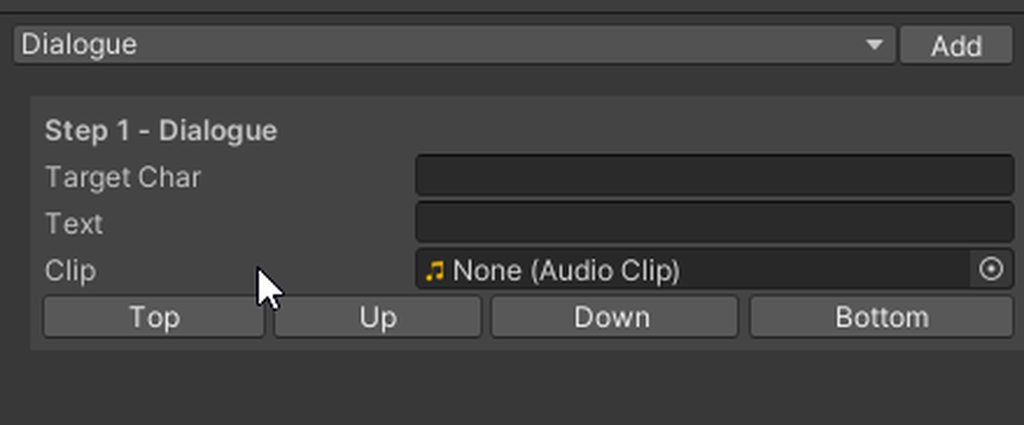 thorn raptor
woah that was some fast gif creation
how did you manage to get that
i didnt think you could have that much control with GUILayout
there didnt seem to be a way to do rects and such
gloomy chasm
Oh, there is
Also, every GUILayout method can take 'layout options'. So you can do things like GUILayout.Button("Example", GUILayout.Width(50), GUILayout.ExpandHeight(true));
thorn raptor
gloomy chasm
Also, every GUILayout method can take 'layout options'. So you can do things lik...
👀
gloomy chasm
thorn raptor
and way easier to read lmao
LOL, that is why I was saying to switch to it 😛
gloomy chasm
Also, I really recommend using SerializedProperty instead of getting and setting the fields of the object directly
thorn raptor
that was the part of the ReorderableList thing I didn't fully understand
i dont fully understand what serializedproperty is, but tbh im not very confident with my understanding of serialization as a whole
i kinda get it
gloomy chasm
Do you know what c# reflection is?
thorn raptor
im bad with terminology
I might be farmiliar with the way to do it but not the word to refer to it
like how earlier i didnt know what polymorphism was until I realised it was something I was already doing
gloomy chasm
No big deal then.
Basically SerializedProperty and SerializedObject allow you to access the serialized fields of the object directly.
thorn raptor
right
is that different from my approach?
like just setting fields of the object variable
gloomy chasm
Yes.
// Find the field we want.
SerializedProperty myFloatProperty = serializedObject.FindProperty("myFloat");

// Set the value of it.
myFloatProperty.floatValue = 5;

// Save the changes
serializedObject.ApplyModifiedProperties();
Doing it this way has a number of advantages. Undo/redo support automatically. Supports prefab overrides automatically. Will always save, so no need to dirty anything.
thorn raptor
👀 that seems ideal
until now the only thing I'd ever use custom editors for was adding buttons to the inspector
so it made sense for just calling functions from the inspector
this seems a better approach
gloomy chasm
Yeah, Unity honestly just shouldn't even allow (or heavily discourage) the setting of fields directly.
Oh, another neat thing is you can just do EditorGUILayout.PropertyField(myFloatProperty);
 twin dawn
Is this the right way to get the scene view camera inside OnSceneGUI?
SceneView.currentDrawingSceneView.camera;
gloomy chasm
twin dawn
Is this the right way to get the scene view camera inside `OnSceneGUI`?
`SceneVi...
Yup
thorn raptor
gloomy chasm
Oh, another neat thing is you can just do `EditorGUILayout.PropertyField(myFloat...
what does this do
as in like
automatically figures out the constraints for a field?
gloomy chasm
thorn raptor
what does this do
It just draws a float field for the property for you. Instead of having to do EditorGUILayout.FloatField(myFloatProperty);
Also, you can just do EditorGUILayout.FloatField(myFloatProperty) instead of myFloatProperty.floatValue = EditorGUILayout.FloatField(myFloatProperty.floatValue);
twin dawn
Ok something really weird is happening with my code then...
I expect this to draw a cube on the X/Z plane. But it's acting weird
https://hatebin.com/ppumvqqqrb
 gloomy chasm
twin dawn
Ok something really weird is happening with my code then...
I expect this to dra...
gloomy chasm
twin dawn
Ok something really weird is happening with my code then...
I expect this to dra...
Try simplifying the code. Try like, from the center of the screen?
gloomy chasm
twin dawn
Ok something really weird is happening with my code then...
I expect this to dra...
I figured it out I think!
In the plane constructor it should be the normal and then the point
You have it the point and then the normal
thorn raptor
gloomy chasm
Yes.
```cs
// Find the field we want.
SerializedProperty myFloatProperty = seria...
one more question sorry
twin dawn
gloomy chasm
You have it the point and then the normal
yep works pefectly now 🤦
thorn raptor
the reason I couldnt figure out how to do ReorderableList was cos I didn't know how to get SerializedProperty in terms of the classes
like
with Dialogue and CameraAction deriving from ConversationSequence
how do I get the serialized fields of a subclass from each object?
 short tiger
twin dawn
yep works pefectly now 🤦
short tiger
twin dawn
yep works pefectly now 🤦
Inline hints have saved me from this headache many times
 thorn raptor
i guess ill just use the class reference for now
twin dawn
Should I be using SceneView.RepaintAll(); ? Seems like if I don't do that, I don't get frequent updates to my handles
visual stag
What are you needing these frequent updates for
Generally if you're interacting with a scene view that should give you all the updates you need
thorn raptor
gloomy chasm
Also, every GUILayout method can take 'layout options'. So you can do things lik...
and is there an option that will make it so these are equally spaced?

this wasnt working for me

actually maybe I need to store that value as a float
instead of recalculating it every time
visual stag
If you're setting widths so aggressively it would be better to avoid GUILayout
thorn raptor
 that was my initial approach
twin dawn
visual stag
What are you needing these frequent updates for
I'm trying to make a custom interaction in the scene view where I can enable/disable certain squares of a grid. Without calling HandleUtility.Repaint() or SceneView.RepaintAll() it seems like it doesn't actually redraw my handle until I stop moving my mouse
thorn raptor
and then my mouse couldnt interact with anything
I could tab-key through the options
only when I added some GUILayout.Space()es as well though
visual stag
twin dawn
I'm trying to make a custom interaction in the scene view where I can enable/dis...
Moving the mouse over the scene view will be already calling a repaint though 👀
thorn raptor
switching to GUILayout made it start working
i dont really mind if they're not equally spaced its just slightly bothering me
so I wanted to know if it was possible to make them of equal widths
twin dawn
visual stag
Moving the mouse over the scene view will be already calling a repaint though 👀
It doesn't 🤔 I only seem to get the mouseMove events until I stop moving. Then I get Repaint at the end

so it looks like that
With manual repainting calls I get this
visual stag
Perhaps HandleUtility.Repaint is what you want then 🤷
twin dawn
The code:
https://hatebin.com/dbcphcvtrg
Yeah I'm using HandleUtility.Repaint now, seems to work as well
just... doesn't seem like I'm supposed to need it? 🤔
 visual stag
twin dawn
just... doesn't seem like I'm supposed to need it? 🤔
visual stag
twin dawn
just... doesn't seem like I'm supposed to need it? 🤔
If you find you need it, you need it
twin dawn
Ok I figured it out:
// This one I run for the Repaint event
private void DrawBox() {
    if (!draw) return;

    Handles.color = Color.green;
    Grid grid = target.Grid;
    Vector3 cellCenter = grid.GetCellCenterLocal(cell);
    Matrix4x4 mat = Matrix4x4.TRS(target.transform.position, target.transform.rotation, Vector3.one);
    using (new Handles.DrawingScope(mat)) {
        Handles.DrawWireCube(cellCenter, grid.cellSize);
    }
}

// This one I run for the mouse move events
void CalculateBoxPos(Event evt) {
    Grid grid = target.Grid;
    Plane p = new Plane(target.transform.up, target.transform.position);
    Ray ray = HandleUtility.GUIPointToWorldRay(evt.mousePosition);
    draw = p.Raycast(ray, out float enter);
    Vector3 worldPos = ray.GetPoint(enter);
    cell = grid.WorldToCell(worldPos);
    HandleUtility.Repaint();
}```when the mouse moves, I recompute the box position and then tell it to repaint
for the repaint event, I only draw the box
thorn raptor
where should I put this

for a custom editor script
its made the compile C# scripts/reload assemblies time notably longer
gloomy chasm
thorn raptor
its made the compile C# scripts/reload assemblies time notably longer
It shouldn't have. Try using AssetDatabase.LoadAssetAtpath<Texture2D>("Assets/Some/Path.png"); since that is what is actually being used. The EditorGUIUtility.Load method just tries a few other loading methods first
gloomy chasm
thorn raptor
🤣 its technically working
Now resize the inspector, and see how well it works 😛
thorn raptor
its okay I made icons
 thorn raptor
gloomy chasm
It shouldn't have. Try using `AssetDatabase.LoadAssetAtpath<Texture2D>("Assets/S...
thorn raptor
gloomy chasm
It shouldn't have. Try using `AssetDatabase.LoadAssetAtpath<Texture2D>("Assets/S...
It shouldn't have
mightve been my laptop - the surface laptop studio dies in like 80 minutes with unity running, even when outside of playmode 💀
im at my desktop at home now so it shouldnt be a concern anymore
idk how but I wish I could make tose icons fill up more of the button
gloomy chasm
thorn raptor
idk how but I wish I could make tose icons fill up more of the button
For that style of icon it is normally (stylistically and UX wise) better to have them without the background that buttons have. Like how buttons in the toolbar look. But to answer your question you would create a custom GUIStyle and change the padding.
thorn raptor
yeah I did try that, it was weirdly stretched though. I personally dont entirely mind the look, it's okay I just made the bin icon read better at small sizes
 gloomy chasm
thorn raptor
yeah I did try that, it was weirdly stretched though. I personally dont entirel...
gloomy chasm
thorn raptor
yeah I did try that, it was weirdly stretched though. I personally dont entirel...
You can change settings whether it stretches (in the texture import settings).
If you want consistent sizing for the icons it is best to make the textures be 16x16 as that is what the default icons are.
thorn raptor
ah i was making them 64x64 but it makes sense that would be way too large
theres no way to change the margins for GUILayout is there
 gloomy chasm
thorn raptor
theres no way to change the margins for GUILayout is there
gloomy chasm
thorn raptor
theres no way to change the margins for GUILayout is there
Margins where?
thorn raptor
its kinda bothering me how it aligns with the edge but has an offset on the left
gloomy chasm
thorn raptor
its kinda bothering me how it aligns with the edge but has an offset on the left
The margins where? Also you use a custom style and change the margins in that.
thorn raptor
oh good point the rect is not being set by GUILayout
but still theres clearly an uneven alignment
 gloomy chasm
thorn raptor
oh good point the rect is not being set by GUILayout
gloomy chasm
thorn raptor
oh good point the rect is not being set by GUILayout
A common pattern for custom styles is to have a nested static class in your editor class.
class MyObjectEditor : Editor
{

  public override void OnInspectorGUI()
  {
    if (GUILayout.Button("My Button", Styles.SmallMarginButtonStyle))
      Debug.Log("Pressed");
  }

  private static class Styles
  {
      public static GUIStyle SmallMarginButtonStyle;

      static Styles()
      {
        SmallMarginButtonStyle = new GUIStyle("Button");
        // I can't remember if this is the exact right API call, but it is close enough to get the idea.
        SmallMarginButtonStyle.margins = new RectOffset(0, 0, 0, 0);
      }
  }
}
What do you mean?
thorn raptor
in every like
GUILayout.Button and EditorGUILayout.TextField
etc
every UI element
gloomy chasm
Well, yeah...
thorn raptor
rip
gloomy chasm
It has to know what style to use
Are you thinking of adding padding to the right side of everything...?
thorn raptor
i just kinda want it aligned in the middle
gloomy chasm
No
thorn raptor
so id want what kinda offset on the right is necessary for it to be in the middle
gloomy chasm
Don't do that. Firstly that make it inconsistent with the entire rest of the editor. Also, it doesn't make sense.
The reason there is more padding on the left is because it is in a foldout
thorn raptor
mmmm
not in the case of this UI ive constructed but it makes sense
idk i just want it to look cleaner if I wanted to create a lot of these
gloomy chasm
If you look at the component header, it's content is all the way to the left. And it has a foldout, so all the properties are within that foldout so are indented
thorn raptor
since there would be a tonne of them in the game
gloomy chasm
You might want to look in to using UIToolkit. It sounds like you might like it better
thorn raptor
i think I tried to learn it a while ago
and stopped because it looked really daunting
gloomy chasm
thorn raptor
and stopped because it looked really daunting
class MyObjectEditor : Editor
{
  public override VisualElement CreateInspectorGUI()
  {
    // This is the object that will hold all the UI.
    var root = new VisualElement();

    // This element will hold all teh buttons and uses it's style to determin how they are layed out.
    var buttonsContainer = new VisualElement();

    // This will make it so the children (buttons) will be arranged horizontally.
    buttonsContainer.style.flexDirection = FlexDirection.Horizontal;
    // This will make the space between the children be even (iirc).
    buttonsContainer.style.justifyContent = Justify.SpaceBetween;

    // Add the container to the root so it will be in the UI.
    root.Add(buttonsContainer);

    var upButton = new Button(() => Debug.Log("Up"));
    upButton.text = "Up";
    buttonsContainer(upButton);

    return root;
  }
}
It isn't too bad. Just different.
thorn raptor
👀
gloomy chasm
It can do some cool style stuff like borders, rounded corners, background color opacity, all without having to create custom textures for any of it.
thorn raptor
thats pretty useful
i feel like it might be a bit pointless to rewrite the entire system custom editor to look a little nicer
but im definitely gonna keep that in the back pocket
gloomy chasm
Also if you use uss files you can create a style in uss
.my-cool-button {
  background-color: rgb(.25, .25, .25);
  margin: 2;
}
In C# you can do upButton.AddToClassList("my-cool-button"); and it will have the styling from the uss
thorn raptor
ah so thats what the documentation meant by having a lot of overlap and shared concepts with web dev
i think
gloomy chasm
Yup
thorn raptor
im pretty sure thats a similar layout to that stuff in inspect element
gloomy chasm
Yep it is basically 1 - 1
thorn raptor
i never really did any web dev related stuff despite how babies-first-steps web dev seems to be
im not sure how accurate that is i just know my friend started that way
theyre not still doing any coding tho
i did have one more question
say I modified one of these classes
one of the subclasses
how would I prevent the serialized data from being read as like unrecognised
cos whenever I'd alter like an enum or something it'd know that there's elements in the serialized list but it wouldnt display them
gloomy chasm
You mean when using SerializeReference?
thorn raptor
mhm
gloomy chasm
yup...
gloomy chasm
No
thorn raptor
if thats the case I can just get the sequences planned out in word or something and wait until the system is essentially finished to add them in
gloomy chasm
The answer is just "deal with it" 😛
gloomy chasm
It was added more recently and has a bunch of issues. Though I think in 2022.1 it is better at handling changes like that
thorn raptor
yeah im on 2021.3
gloomy chasm
At least it doesn't throw exceptions in 2022.1 if you remove/rename a class that you had a instance of serialized 🙃
thorn raptor
ive always been very arbitrary with which version I use for games actively in development
thorn raptor
gloomy chasm
At least it doesn't throw exceptions in 2022.1 if you remove/rename a class that...
yeah lmao
gloomy chasm
Still better than having to use or write a custom serializer for polymorphic serialization
Been there, done that. Not a lot of fun believe it or not lol
thorn raptor
im assuming thats different to polymorphism
lmao
again, awful with terminology
not in university yet so literally everything has been what ive taught myself
which was what was needed to get by
gloomy chasm
Nope, it is the same thing. Polymorphism is the concept, but you have things that are polymorphic
gloomy chasm
thorn raptor
not in university yet so literally everything has been what ive taught myself
All good! I am all self taught too.
thorn raptor
oh so was it a typo or just actually that form of the word polymorphism
thorn raptor
gloomy chasm
All good! I am all self taught too.
 looks like ive got a fair bit of learning to go
lmao
gloomy chasm
thorn raptor
oh so was it a typo or just actually that form of the word polymorphism
You would say "This API uses polymorphism to be easy to extend". And "This class is polymorphic". You use the words sort of like you would use he/him. They refer to the same concept/subject but are used differently
gloomy chasm
oh.. well.. oh...
thorn raptor
yeah sorry i didnt communicate the misunderstanding very well
gloomy chasm
My bad, I didn't see I mistyped it haha
thorn raptor
thats aight i do it all the time
thanks a lot for all the help btw
youve been a huge lifesaver
god knows i wouldnt have been able to navigate these systems otherwise
gloomy chasm
You're welcome! I love editor tooling so always happy to help people with it!
thorn raptor
it is pretty neat having robust tools to make your life easier
gloomy chasm
Yeah!
thorn raptor
uh oh new issue
those scriptableobjects are not saving properly when I close the editor
wait I think i remember seeing the solution to this accidentally when I was trying to solve a different problem
yup
setdirty moment
gloomy chasm
thorn raptor
setdirty moment
Wouldn't be a problem if you were using SerializedObject 😉
thorn raptor
i mentioned what the issue was with that earlier though
I wasnt sure how to like typecast the object as a subclass
unless I dont need to
 full badge
How do I get an AudioClip from a SerializedProperty?
full badge
nvm I figured it out
 arctic island
Hi, I'm wondering if any XR dev here has any experience using the DirectPreview (with the VIVE Focus 3) feature for the Wave XR Plugin
I can get it working without any problems with a project using the build in pipeline but not for a project using URP
From what i can gather from the WaveXR Unity Doc it should work with URP
Any help/ideas regarding this issue would be greatly appreciated :)
candid bolt
How can I toggle these settings via script?

 hollow sigil
it helps in my 2D game, when I zoom in my Game View I stop seeing the whole game, including background pictures
 weak spoke
candid bolt
How can I toggle these settings via script?
weak spoke
candid bolt
How can I toggle these settings via script?
this class should be able to
https://docs.unity3d.com/ScriptReference/Tools.html
 short thorn
is there a way to hook in to the sln file generation for visual studio? (unity 2020 LTS) trying to add an .editorconfig file to the solution automaticly
 peak summit
how hard is it to make an editor extenstion that shows scriptable object properties in the inspector while you're inspecting an object that has a reference to a scriptable object
 crude relic
not especially difficult
try this method using the type of the scriptable object https://docs.unity3d.com/ScriptReference/Editor.CreateCachedEditor.html
and then draw the editor gui
peak summit
awesome thank you
 hardy vault
Having some trouble with understanding ScriptableSingleton. I see that it does survive domain reload, but it doesn't save its state to the file unless I manually call ScriptableSingleton.Save Is that how it works? But how it manages to survive domain reload if it's not saving to file
waxen sandal
You should add a FilePath attribute that lets you tell it where to save it
Not sure what the default is
hardy vault
yeah, I've added one and I see the file in project folder. The thing that I don't understand, do I have to manually save it?
waxen sandal
Yes
hardy vault
cool, just looking at the source, don't understand how it supports domain reloading
waxen sandal
Well it's saved to disk and reloaded magically
hardy vault
probably yeah. it just saves state to different file in domain reload from the file in attribute
looks like it's something happening in this InternalEditorUtility.LoadSerializedFileAndForget
waxen sandal
It shouldn't be
hardy vault
well, it is for me...
waxen sandal
Or do you not call save and it's still surviving?
hardy vault
yeah, I'm not calling Save and it's surviving domain reload
but if I'm not calling it my next session will be with the original state
waxen sandal
Not 100% sure on the internals but other scriptableobjects(like editor windows) also do survive domain reload when the fields are properly serialized
hardy vault
oh, you're right! as it's SO it makes sense
I was just assuming that being static field it should be reset on domain reload
anyways, look like Save is for saving state between unity sessions and nothing for domain reload
(still looks strange, may be it's something with my setup)
waxen sandal
Technically yeah but tbh calling save always is better
 worn marsh
does anyone know what causes horrendous slowdown in editor when in a long session
generally, not regarding any specific extension
 clear kite
worn marsh
does anyone know what causes horrendous slowdown in editor when in a long sessio...
clear kite
worn marsh
does anyone know what causes horrendous slowdown in editor when in a long sessio...
Not #↕️┃editor-extensions question, try to ask on #💻┃unity-talk
 stark ice
Hi, I'm trying to make a toggle which displays whether it's "child" toggles are all true / all false / mixed and allows me to change its children. Basically what you've got in the "Toggle visibility of gizmos" dropdown in the editor (see image).
I couldn't find anything that specifically allows me to draw such a ui object out of the box but I also can't find a way to make a toggle box that can have a minus in it, indicating that it's children are mixed values. So if anyone knows how to do one of these, it would be really appreciated. If you need any more info let me know
 stark ice
Found a slightly sketchy solution
Slightly simplified from actual code:
                    GUI.Toggle(r, curValue, GUIContent.none);
                    if (togglesState == ToggleGroupState.Mixed)
                    {
                        r.y -= 1;
                        GUIStyle guiStyle = new GUIStyle(GUI.skin.label) { fontSize = 20, fontStyle = FontStyle.Bold };
                        GUI.Label(r, "-", guiStyle);
                    }
                    r.x += 15;
                    GUI.Label(r, name);
 gloomy chasm
stark ice
Found a _slightly_ sketchy solution
Slightly simplified from actual code:
```cs
...
stark ice
gloomy chasm
https://docs.unity3d.com/ScriptReference/EditorGUI-showMixedValue.html
gloomy chasm
stark ice
Found a _slightly_ sketchy solution
Slightly simplified from actual code:
```cs
...
stark ice
gloomy chasm
https://docs.unity3d.com/ScriptReference/EditorGUI-showMixedValue.html
That makes it cleaner, thanks!
 willow wadi
i have no idea where to send this so correct me if i'm wrong
i'm trying to make an animation rig but it gets sent all the way over here and plays the cursed falling animation

nevermind i somehow fixed it by selecting legacy
 main radish
Hello, does anyone use I2 localization?
 tight python
main radish
Hello, does anyone use I2 localization?
tight python
main radish
Hello, does anyone use I2 localization?
Just ask the question 😅 .
Also for general "asset" help the #💻┃unity-talk channel might get you better results
main radish
tight python
Just ask the question 😅 .
Also for general "asset" help the <#49787242428144026...
Oh thank you very much yes that was a mistake. There is definitely someone using it on the 90 thousand-person server 🙂 Let me ask the question here, and I will ask it in unity-chat. Thank you so much.
I have such entity in my project but I need to localize it.
Although I have read the documentation in detail, I haven't been able to figure it out yet.
https://gyazo.com/5a6bbff6a865fb185293827b1c29796a
Thanks
I can't localize it as my asset doesn't have "Add component" in it, but there must be a way. I request your help for this.
tight python
Yeah. Your "TheTipList" class probably has an array/List of String @main radish
You should replace that with "LocalizedString". That will allow you to select a term from your language source.
main radish
tight python
Yeah. Your "TheTipList" class probably has an array/List of String <@76042992263...
You are really a sweet friend of the world. Thank you very much, but I don't know how to do this. Could you give me some guidance?
main radish
tight python
Yeah. Your "TheTipList" class probably has an array/List of String <@76042992263...
When I use this way, will it automatically localize according to the available language list?
tight python
main radish
You are really a sweet friend of the world. Thank you very much, but I don't kno...
I am sorry I do not have time for this 😅 . Maybe someone else can help you? It's not that complicated.
main radish
tight python
I am sorry I do not have time for this 😅 . Maybe someone else can help you? It'...
Which script file should I change in I2 plugin? I also need to change it to read it from within google spreadsheet. Because my game uses live translation support. I would really appreciate it if you could at least provide a source for this. I've been researching this since morning. 🙏
tight python
main radish
Which script file should I change in I2 plugin? I also need to change it to read...
You don't need to change anything in the I2 plugin. Just how your data is structured.
http://inter-illusion.com/assets/I2LocalizationManual/LocalizedStrings.html
thorn raptor
does anybody know how to stop EditorGUILayout.TextArea from cutting the edges off

unless the top bit is meant to not turn blue when it's selected
it looks quite awful next to TextField elements
 gloomy chasm
thorn raptor
does anybody know how to stop EditorGUILayout.TextArea from cutting the edges of...
gloomy chasm
thorn raptor
does anybody know how to stop EditorGUILayout.TextArea from cutting the edges of...
Try using the textfield style for it?
 latent bison
Is it possible to pull a project from a Plastic account using the CLI?
weak spoke
latent bison
Is it possible to pull a project from a Plastic account using the CLI?
Now, Plastic's CLI offers you a more readable and intuitive commands.
thorn raptor
gloomy chasm
Try using the textfield style for it?
yeah that did the trick, thanks man
 whole steppe
Hello
I have a editor problem
Version:2021.3.5f1
It would be really helpful if anyone could tell me how to solve this
 waxen sandal
Check the log file, there's usually more info there
And this should probably go into #💻┃unity-talk or #💻┃code-beginner
This channel is for developing extensions and not help with using the editor
peak bloom
how can I filter out if a file is an .fbx or not in custom editor?
it's for uitk ObjectField
uielement.objectType = typeof(whathere!!);
waxen sandal
FBX specifically or models?
peak bloom
waxen sandal
FBX specifically or models?
.fbx in the project folder
waxen sandal
I don't think you can without making a custom object selector
peak bloom
dang it 🥲 .. and thanks 👍
 high pagoda
thorn raptor
and is there an option that will make it so these are equally spaced?
high pagoda
thorn raptor
and is there an option that will make it so these are equally spaced?
Just use icons instead
vapid prism
Is it not possible to use a PropertyAttribute on a struct? I have the attribute like so [MyAttribute] public MyStruct _myStruct; and then I simply draw it using (in a CustomPropertyDrawer) cs public override void OnGUI(Rect position, SerializedProperty property, GUIContent label) { EditorGUI.PropertyField(position, property, label, true); } But for some reason this makes my struct unmodifiable?
 hoary sparrow
Hi! Bit of a noob when it comes to custom editor scripts, how would i make certain fields appear only if a bool is true, or an enum is something
hoary sparrow
hoary sparrow
Hi! Bit of a noob when it comes to custom editor scripts, how would i make certa...
figured it out, turns out there is this neat thing called conditional field!
thorn raptor
high pagoda
Just use icons instead
yeah i did later on in that chain
 vital zephyr
I have an EditorWindow tool that I'm using to generate random game data. One of the things I'm doing it generating textures from a RenderTexture. The problem is that when I make changes to the scene from the EditorWindow script the RenderTexture is not updated unless I'm actively clicking around in the Scene view window.
Is there some way to force the scene view to be "active" in from with the EditorWindow script?
Nevermind i think SceneView.RepaintAll(); is what I'm looking for
candid bolt
I'm trying to hook into the Unity undo system for my custom vertex painter. Undo.RecordObject seems to be what I need. However undoing a paint action using Ctrl+Z doesn't revert the mesh appearance until after I start painting again. Anyone know the proper way to do this?
gloomy chasm
Did you mark them dirty?
Show code pls?
My first recommendation is to use SerializedObject and SerializedProperty. No need for this PrefabUtility stuff.
Second is if you do use it. Make sure you calling it after the modification like the documentation says.
GameObject gameObject = Selection.activeGameObject;
Undo.RecordObject(gameObject.transform, "Double scale");
gameObject.transform.localScale *= 2;
PrefabUtility.RecordPrefabInstancePropertyModifications(gameObject.transform);
Okay
high pagoda
I can now preview audio clips from the inspector directly.
Here's the original repo I've got the inspiration from (https://github.com/samsawyer85/Unity3D_PropertyDrawer_AudioClip)
 wanton sundial
Hello everyone !
I don't know if it's normal but when i'm using EditorUtility.SetDirty(gridData), my cursor is spinning everytime...
Why needed ?
My 4 directions are stores in an enum of directions and when i'm pressing one of this buttons, it's adding or removing the direction from GridDirections enum... And the only solution i found, cause unity erase my data, was to add this function.
Thank's in advance !

 summer obsidian
Just updated Unity versions. What the fuck is this? Why does the play button have graphical artifacts?

 waxen sandal
You're way to passionate about something that doesn't actually matter and you're posting in the wrong channel, actually should be a bug report and not go on Discord at all
whole steppe
summer obsidian
Who knows. I Know one thing though, it doesn’t matter at all lmao
glad pivot
how can i save my custom editor windows into a layout? id rather not keep opening the window every time i need a layout
or just into the current editor settings i suppose would keep the last editor view right?
 primal atlas
Hi, I have a problem with autocompleting and code coloring with vs code
I have followed most of the configuration methods on the tutorial
high pagoda
glad pivot
how can i save my custom editor windows into a layout? id rather not keep openin...
You mean this?
 glad pivot
yeah, my custom window isnt saved when i try doing that
primal atlas
But the autocompletion and coloring only works on one of my projects
glad pivot
neither is it between unity sessions. (closing and opening it)
high pagoda
What version are you using?
glad pivot
i am using Unity 2021.3.9f1
high pagoda
It could be a version related bug or you're doing something wrong with your editor window. Does it affect other custom editor windows as well or just this one?
glad pivot
dont know, i only have this one
high pagoda
Can you share the menu item function section of your script
glad pivot
so there isnt anything extra i need in the script so save its position or anything?
high pagoda
[MenuItem("Windows/Example")]
static void OpenWindow()
{
    var window = GetWindow<ExampleWindow>();

    ...
}
one sec
    [MenuItem("Multi Scene Workflow/Scene Manager")]
    static void Init()
    {
        // Get existing open window or if none, make a new one:
        SceneManager_window window = (SceneManager_window)EditorWindow.GetWindow(typeof(SceneManager_window));
        window.titleContent = new GUIContent("Scene Manager", "Loads, Unloads, and Saves Scene Collections");
        window.Show();
        if(MultiSceneEditorConfig.instance)
            MultiSceneEditorConfig.instance.setInstance();
    }
Hmm.. everything seems fine here.
You don't have to do anything special. Unity just handles itself when derived from the EditorWindow class.
You should try it in a different version of unity, it's probably a bug
glad pivot
weird, i suppose i could. i think i have one other version downloaded
urgh, the other unity version i have is too different so everything breaks if i attempt to
i guess ill have to download a more recent one to the one i havge
glad pivot
ok so i have now tried with Unity 2021.3.11f1 and it still doest remember my window
 sharp glacier
hey everyone, so Ive been doing custom editors for the past week
but I wanted to try to make an abstract class that was a scriptable object, so I created something simple like this

I dont 100% understand the issue, but i get this error on the inspector which won't let me edit it
"multi-object editting not supported"

im not quite sure where I'm editing multiple objects in my code
peak bloom
that happens bcos you're selecting multiple objects
visual stag
Sometimes it happens right after you compile, but you reselect the object and it goes away
 proper harbor
I'm currently working on an inspector ui along with my monobehaviour script. I have an array of strings in there and I managed to access the values by using:
serializedObject.FindProperty
and
GetArrayElementAtIndex
Problem is I wanna change the values inside them. Is this possible somehow? 🥴
proper harbor
sweet, thanks @visual stag I'll have a read through and see if I get any smarter
 ashen delta
how could you get all subfolders inside a folder eg : folder/subfolder but not any folders inside that folder,didn't find anything in the repo that could've helped me
agile badger
Anyone know how to get mouse movement and click events in an EditorWindow? Even checking Event.Current in OnGUI just gets me layout and repaint events
gloomy chasm
ashen delta
how could you get all subfolders inside a folder eg : folder/subfolder but not a...
Use the System.IO.Directory class
ashen delta
gloomy chasm
Use the `System.IO.Directory` class
oh right that thing exists,thanks
gloomy chasm
agile badger
Anyone know how to get mouse movement and click events in an EditorWindow? Even ...
This should work.
public void OnGUI()
{
  var e = Event.current;
  if (e.type == EventType.MouseDown)
    Debug.Log("Clicked");
}
It indeed does. But I'm unable to get MouseMove which I also need
I want to use MouseMove to check if I'm hovering over something inside a RenderTexture
So that I can then click on objects inside that RT, move them around, etc
I looked into using Handles for this but using them outside of Scene View (outside of just drawing them) is impossible
nvm, EditorWindow.wantsMouseMove must be true, fixed
ashen delta
ashen delta
oh right that thing exists,thanks
how would I go about building an asset bundle foreach of those folders?
 dapper olive
I'm modifying variables on a prefab from script in the editor, but I'm having trouble getting instances of the prefab to reflect those changes. I've tried using SetDirty, but it doesn't update the instances of the prefab until I select the prefab in the editor. How can I get it to update from script?
gloomy chasm
dapper olive
I'm modifying variables on a prefab from script in the editor, but I'm having tr...
You should be using SerializedProperty and SerializedObject to set fields in the editor. Especially when dealing with prefabs. Checked the pinned messages for a link to the docs
dapper olive
gloomy chasm
You should be using SerializedProperty and SerializedObject to set fields in the...
I'm sorry for the delayed response, I was working on something and then dug into learning about SerializedProperty and SerializedObject but I'm a little confused on how to use them in this case. I'm not experienced in this area.
I'm trying to sync the data on a prefab with the data on a scriptable object so that when I change data on the scriptable object the data on the prefab is updated. This is for an inventory system and I'm doing it this way because I need the inventory to be able to be modified at runtime (otherwise I'd use the scriptable object directly), but want to be able to modify the inventory on the scriptable object and have it update the inventories of any prefabs using it at editor time.
Currently I keep a reference to each prefab on the scriptable object and when I make changes to it, loop through them and rebuild the inventories. This works, but does not by default update the instances of the prefab.
I've managed to navigate to and iterate over my inventory slots like this:
                   var inventorySO = so.FindProperty("characterInventory").FindPropertyRelative("inventory");
                   Debug.Log("Display name: " + inventorySO.displayName);
                   var inventorySlotsSO = inventorySO.FindPropertyRelative("inventorySlots");
                   Debug.Log("Array size: " + inventorySlotsSO.arraySize);
                   var enumerator = inventorySlotsSO.GetEnumerator();
                   var counter = 0;
                   while(enumerator.MoveNext())
                   {
                       counter++;
                       Debug.Log("Enumerator counter: " + counter);
                   }```
but I'm not sure from the documentation how I would rebuild these inventory slots. Should I do ClearArray and then InsertArrayElementAtIndex and then add a reference to the item to the empty elements somehow?Or am I just completely going in the wrong direction with this whole thing?
dapper olive
dapper olive
I'm sorry for the delayed response, I was working on something and then dug into...
This seems to work as expected as far as modifying the amount value:
                   var inventorySO = so.FindProperty("characterInventory").FindPropertyRelative("inventory");
                   var inventorySlotsSO = inventorySO.FindPropertyRelative("inventorySlots");
                   inventorySlotsSO.ClearArray();
                   for (int j = 0; j < inventory.inventorySlots.Count; j++)
                   {
                       inventorySlotsSO.InsertArrayElementAtIndex(j);
                       var itemData = inventorySlotsSO.GetArrayElementAtIndex(j).FindPropertyRelative("itemData");
                       var amount = inventorySlotsSO.GetArrayElementAtIndex(j).FindPropertyRelative("amount");
                       amount.intValue = inventory.inventorySlots[j].amount;
                   }
                   so.ApplyModifiedProperties();```
but I still have to select the prefab in the inspector to get it to update the instances. I'm also not sure how to set a reference this way for itemData.Didn't find anything about it
Wait I think I found the correct overload
BuildAssetBundles(string outputPath, AssetBundleBuild[] builds, BuildAssetBundleOptions assetBundleOptions, BuildTarget targetPlatform);
But how would I still do it?
 hollow mirage
Hi, I accidentally pressed the Disable All button in Project Settings > Physics > Layer Collision Matric! Is there anyway to restore them? Because ctrl+z does not work!
 waxen sandal
Revert it in your version control
hollow mirage
Thanks got it to work
 vast vault
How can I make a grid of booleans in the inspector? Something that looks like this (which is from the project settings ofc).
What I need to know
1. How do I make a boolean show in the inspector.
2. How do I set its position?
3. How to hide other inspector elements

I just learned about editor scripting, and I am having a hard time finding the right search terms to find the answers myself
I found out that I can use cs GUILayout.BeginHorizontal(); and cs GUILayout.EndHorizontal to put them side by side. Can I make them have a fixed spacing?


This turned it into boolean check boxes
Now I just need to know how I can set their positions
 gloomy chasm
vast vault
**Now I just need to know how I can set their positions**
gloomy chasm
vast vault
**Now I just need to know how I can set their positions**
You can set their width like EditorGUILayout.Toggle(false, GUIlayout.Width(21))
vast vault
gloomy chasm
You can set their width like `EditorGUILayout.Toggle(false, GUIlayout.Width(21))...
Thank you for the answer. I actually just found this out. However, I do need to be able to set their individual positions as I want to arrange them in a circle lol
gloomy chasm
vast vault
Thank you for the answer. I actually just found this out. However, I do need to ...
You would want to use the GUI and EditorGUI methods along with GUILayoutUtility.GetLastRect()
gloomy chasm
vast vault
Thank you for the answer. I actually just found this out. However, I do need to ...
Er, I mean you want GUILayoutUtility.GetRect() https://docs.unity3d.com/ScriptReference/GUILayoutUtility.GetRect.html
vast vault
gloomy chasm
Er, I mean you want `GUILayoutUtility.GetRect()` https://docs.unity3d.com/Script...
Thank you! I will read it now 🙏 🙏
vast vault
gloomy chasm
Er, I mean you want `GUILayoutUtility.GetRect()` https://docs.unity3d.com/Script...
In the example they use OnGUI. Can I ignore that and do it in OnInspectorGUI?
 gloomy chasm
vast vault
In the example they use OnGUI. Can I ignore that and do it in OnInspectorGUI?
gloomy chasm
vast vault
In the example they use OnGUI. Can I ignore that and do it in OnInspectorGUI?
Yeah. It works the same as OnInspectorGUI
vast vault
gloomy chasm
Yeah. It works the same as OnInspectorGUI
This is so cool. Thank you 🙏 🙏
vast vault
My toggles don't seem to be working. Whenever I click them they don't change

How can this be? This is my code

I read something about serialized properties, but I am so confused
tower is the target

I am directly changing its variable sizeOnGrid. Is this wrong? And how do I fix it?
visual stag
I would look at how it's done in the Unity source, and I would avoid GUILayout because you can't control whether it might overlap controls under certain conditions, causing input issues. It's also way more performant
Also, that's not how Toggle works, you should be always assigning the result back to the source
@vast vault
vast vault
visual stag
Also, that's not how Toggle works, you should be always assigning the result bac...
How?
visual stag
Look at the docs
vast vault
Is there a thing like auto scale?
I need something like this
-----------OO---------
(The "-"s simulate empty space)
I know that I can use EditorGUILayout.BeginHorizontal and EndHorizontal to make the two "O"s have the same amount of space
I was thinking that I can put EditorGUILayout.Space on either side to make the "-"s
But can I use auto scale inside the Space()?
gloomy chasm
vast vault
But can I use auto scale inside the Space()?
GUIlayout.FlexSpace()
vast vault
So that they would take up as much space as possible
gloomy chasm
use it on either side
gloomy chasm
Yup, that is why I said it 😛
vast vault
gloomy chasm
Yup, that is why I said it 😛
GUILayout.FlexibleSpace() you mean this right?
gloomy chasm
vast vault
GUILayout.FlexibleSpace() you mean this right?
Pfft yeah that is the one
vast vault
Great, thanks 🙏 🙏
gloomy chasm
Idk why they named it different than everyone else haha
vast vault
gloomy chasm
Idk why they named it different than everyone else haha
Nah, kinda weird. I only know flex from CSS tho.
        int firstWalkable = (tempGridSize + 1) / 2;
        for (int i = 0; i < tempGridSize; i++)
        {
            EditorGUILayout.BeginHorizontal();
            GUILayout.FlexibleSpace();
            for (int j = 0; j < tempGridSize; j++)
            {
                if (j >= firstWalkable && j - firstWalkable <= tempGridSize - 1)
                {
                    // This tile is part of the hexagon
                    tempGrid[j, i] = EditorGUILayout.Toggle(tempGrid[j, i]);
                }
            }
            GUILayout.FlexibleSpace();
            EditorGUILayout.EndHorizontal();
            firstWalkable--;
        }``` There seems to be a problem
They are not centered
gloomy chasm
Set the toggle to expand false
vast vault
gloomy chasm
Set the toggle to expand false
I'm sorry, but how?
gloomy chasm
vast vault
I'm sorry, but how?
Toggle(yourBool, GUIlayout.ExpandWidth(false))
vast vault
gloomy chasm
`Toggle(yourBool, GUIlayout.ExpandWidth(false))`
Thanks. It still looks kinda weird tho
 gloomy chasm
What are you trying to do...?
vast vault
Let me go in MS Paint
vast vault
gloomy chasm
What are you trying to do...?
Something like this

With just one it is not centered either

Now this is sorta it

But if I go any higher there is this line on the left touching the side

It's like the GUILayout.ExpandWidth(false) is being ignored
.
It actually works perfectly if I manually set the width of the toggles with
GUILayout.Width(19)```Instead of
```cs
GUILayout.ExpandWidth(false)``` Thank you again 🙏 🙏
@gloomy chasm
gloomy chasm
Glad you got it figured out! 😄
proper harbor
not sure what I should search for on this one so I'll take a stab here.
When letting the user supply a prefab (gameobject), in the inspector, they can either supply a prefab from disk or from the scene they have opened. Later on I'm instantiating their gameobject which doesn't work unless it's a prefab on disk. Can I filter out so they can only supply that kind of gameobject?
gloomy chasm
proper harbor
not sure what I should search for on this one so I'll take a stab here.
When let...
Only way would be to write a custom editor
proper harbor
I have one already so that's cool
I'm thinking of forcing it to be null if it's "incorrect"
gloomy chasm
proper harbor
I have one already so that's cool
EditorGUILayout.ObjectFeld has a overload that takes a bool parameter for whether scene objects are allowed 🙂
 quasi depot
How do I make a custom inspector for non-monobehaviour classes that are set up inside of the list of a monobehaviour script?
visual stag
quasi depot
How do I make a custom inspector for non-monobehaviour classes that are set up i...
Make a PropertyDrawer
quasi depot
There appears to be like 300 ways to set up a property drawer, Im not sure where to start.
visual stag
Well, if you're familiar with IMGUI, use that, if you're familiar with UIToolkit, use that. If you're not familiar with either... use UIToolkit I suppose
The only difference between the two is whether you're overriding OnGUI (and potentially GetPropertyHeight) and using immediate-mode, or CreatePropertyGUI and having everything stateful
 remote plume
Hey, I'm looking for a Unity extension that can do this https://www.youtube.com/watch?v=bhZvB2TLLtg

Using a custom brush I made, I can easily paint prefabs like vegetation in my scene.
Check out my twitter:
It's exactly what I'm looking for, though I can't find any free extensions for it.
(Apart from polybrush but I've had some bad experiences using that)
peak bloom
you can just use unity's terrain editor
vast vault
So I have this editor script: https://pastebin.com/NV9t7e9a. It controls this ScriptableObject script: https://pastebin.com/yri9EBCY. Everything works great except when I make a change to either of the scripts. In that case it seems that isOnGrid is null again. I don't understand how this could be and would appreciate some guidance
 candid bolt
How can I turn off the cursor visibility in the scene view? I'm using Cursor.visible = false; in SceneView.duringSceneGui and it's not doing anything
gloomy chasm
vast vault
So I have this editor script: https://pastebin.com/NV9t7e9a. It controls this Sc...
That is because Unity can't serialize 2D arrays
vast vault
gloomy chasm
That is because Unity can't serialize 2D arrays
I realize this, hence the custom editor. The problem is that the values get set back to null if I fx. add a variable to the TowerSO script
gloomy chasm
vast vault
I realize this, hence the custom editor. The problem is that the values get set ...
Having a custom editor doesn't change anything. It still won't be serializable. Meaning it won't save when the domain reloads (scripts recompile, or enter playmode). Or when you save the editor, or close the editor, etc.
vast vault
😭
gloomy chasm
Also, in your editor script you never dirty the asset so it will never be saved
gloomy chasm
vast vault
😭
In your ScriptableObject you can implement the ISerializableCallbackReciver and serialize the 2D array to a 1D array and then deserialize it back to 2D
A quick google should show you how if you need more info
vast vault
gloomy chasm
In your ScriptableObject you can implement the `ISerializableCallbackReciver` an...
That's pretty smart. I think I will just make a "normal" 1D array in the TowerSO and convert it in the editor script
visual stag
candid bolt
How can I turn off the cursor visibility in the scene view? I'm using `Cursor.vi...
I would try using https://docs.unity3d.com/ScriptReference/EditorGUIUtility.AddCursorRect.html with a custom blank cursor
vast vault
gloomy chasm
Also, in your editor script you never dirty the asset so it will never be saved
I tried this, but I got confused
gloomy chasm
vast vault
I tried this, but I got confused
What do you mean... what was confusing? If you make a change then you do EditorUtility.SetDirty(target);
vast vault
gloomy chasm
What do you mean... what was confusing? If you make a change then you do `Editor...
Every time? So if I set a variable in the target I do that?
gloomy chasm
vast vault
Every time? So if I set a variable in the target I do that?
Yeah
Though really it would be better if you used SerializedProperty instead of setting the values directly.
vast vault
gloomy chasm
Yeah
Thank you. Can I make changes to multiple variables and then set it as dirtyÅ
vast vault
gloomy chasm
Though really it would be better if you used `SerializedProperty` instead of set...
That's what I got confused about
gloomy chasm
Setting it dirty just tells the editor that the object has changed and will need to be saved to disk when the editor saves later on.
candid bolt
visual stag
I would try using <https://docs.unity3d.com/ScriptReference/EditorGUIUtility.Add...
Sounds like a good idea, thanks! How do you set it to a custom texture/blank? Just see existing options for zoom, arrow, orbit etc
Also unsure of how to set the rect for the mouse position here
vast vault
gloomy chasm
Setting it dirty just tells the editor that the object has changed and will need...
Thanks
candid bolt
candid bolt
Sounds like a good idea, thanks! How do you set it to a custom texture/blank? Ju...
Nvm, this did the trick:
EditorGUIUtility.AddCursorRect(SceneView.lastActiveSceneView.position, MouseCursor.CustomCursor);
Cursor.SetCursor(cursorTexture, Vector2.zero, CursorMode.Auto);
in a TextField in UIBuilder, is there a way to disable newline, tab etc symbols? \t \n \r etc
I'm either going crazy or I can't find anything for this, apart from escaping them myself?
 hoary belfry
Is there a tool or asset on the asset store to merge or layer shaders?
Like for instance let's say I have this outline shader and a matcap shader (I know there's options that have these two built in using this as an example) but I have a million different shaders and would like to combine at least two of them.
gloomy chasm
hoary belfry
Is there a tool or asset on the asset store to merge or layer shaders?
Like fo...
Short answer is no. That is like asking if you can combine two components in to one.
hoary belfry
Not even with vertex painting and assigning a different shader to that or am I thinking of something else?
short thorn
Hey guys, working for a company that makes products aimed at children, working on some automation in our internal framework and I'd like to auto set the coppa compliance in the services section of the Project Settings. Any1 have any idea how I could go about doing this?
 peak bloom
hoary belfry
Is there a tool or asset on the asset store to merge or layer shaders?
Like fo...
peak bloom
hoary belfry
Is there a tool or asset on the asset store to merge or layer shaders?
Like fo...
UnityChanToon shader which is owned by Unity can do both in 1 shader (outline + matcap)

GitHub
Unity Toon Shader ( in progress ). Contribute to Unity-Technologies/com.unity.toonshader development by creating an account on GitHub.
And avoid using the tesselation version, unless you know what you're doing
goodluck
 main scarab
do you have any idea why I can't install ironsource, when I click install I got this error. I delete all module and re-download but not working at all.

 thorny rock
I'm sure there is a more elegant way to solve this. If mode == a draw struct A, else draw struct B is what I am basically doing. What's the more clever way?

 short venture
thorny rock
I'm sure there is a more elegant way to solve this. If `mode == a` draw struct A...
short venture
thorny rock
I'm sure there is a more elegant way to solve this. If `mode == a` draw struct A...
movementData and pauseData are both SerializedProperties so you dont need 2 varaibles
have isMovement return the name of the property to find
thorny rock
That sounds simple and reasonable. Thanks!
 nocturne cypress
hey, is it possible to make a custom editor window with its own scene view displaying a separate scene from the one currently loaded, spawn a gameobject and run animations on it? like, the user wouldn't be able to manually do anything in that scene, it'd just be used to preview animations and do some other stuff with custom tools
hoary belfry
peak bloom
UnityChanToon shader which is owned by Unity can do both in 1 shader (outline + ...
Was mainly using it as an example. I know there are options that include both, but I have a lot of cool shaders like that I would like to be able to experiment with
gloomy chasm
nocturne cypress
hey, is it possible to make a custom editor window with its own scene view displ...
Yup. There is a undocumented class called PreviewRenderUtility that helps do that. You can also do it manually be creating a PreviewScene, adding a camera to it, and having the camera render to a RenderTexture that you then display in your editor window.
nocturne cypress
thanks
is there any doc on preview scenes themselves? I can't find anything about them except a couple functions with unhelpful descriptions
gloomy chasm
nocturne cypress
is there any doc on preview scenes themselves? I can't find anything about them ...
Haha, no. You can look at the source code for the PreviewRenderUtility
nocturne cypress
okay, thanks
gloomy chasm
nocturne cypress
okay, thanks
Here is how you get it up and running. Pretty simple
var scene = EditorSceneManager.NewPreviewScene();

var camGO = EditorUtility.CreateGameObjectWithHideFlags("Camera", HideFlags.HideAndDontSave);
camGO.AddComponent<Camera>();
SceneManager.MoveGameObjectToScene(camGO , scene);
Multi-object editing not supported. It also says 27 Mono Behaviours, but they are ScriptableObjects. Is this because of the editor script I have made for the scriptable objects?

If so, what can I do aboout it? Can I turn off the editor script when I need to use multi-editing?
twin dawn
vast vault
Multi-object editing not supported. It also says 27 Mono Behaviours, but they ar...
Have you added the multiple object editing attribute? https://docs.unity3d.com/ScriptReference/CanEditMultipleObjects.html
 pliant hill
Hiiii i aksed a question about a unity tools based on the timeline and the recorder (with the function ApplyTo() ) :
I get this error : Could not udpate a managed instance value at property path '_accumulationSettings', with value '1'
my code and the details are here : https://stackoverflow.com/questions/74121677/could-not-udpate-a-managed-instance-value-at-property-path-accumulationsetting
ping me if you can help me 🙂

Stack Overflow
I'm a unity tool developper and I want to use the RecorderControllerSettingsPreset (The scriptable object of the settings when you export it in the recorder windows) and convert it into a
vast vault
twin dawn
Have you added the multiple object editing attribute? https://docs.unity3d.com/S...
No, I wasn't aware that I had to do that. Thank you
gloomy chasm
pliant hill
Hiiii i aksed a question about a unity tools based on the timeline and the recor...
Are RecorderControllerSettings or RecorderControllerSettingsPreset your class' or are they part of the Unity Recorder?
pliant hill
Its à class of the unity recorder
gloomy chasm
pliant hill
Its à class of the unity recorder
Looking at the source code I don't see anything. It would be coming from the Unity Preset class. Try to simplify what you are doing. Like, already have a preset created and already have a controller settings created, then just load them and apply
pliant hill
Ok i will try
 floral forum
Hey, I'm trying to package an editor extension into a Unity asset. What should the folder structure look like? Should my asset's folder be under Editor, like Editor/CSVReaderTool? I don't think it will work if it's CSVReaderTool/Editor as I assume there needs to be one Editor folder under Assets in a project that holds all Editor scripts?
gloomy chasm
floral forum
Hey, I'm trying to package an editor extension into a Unity asset. What should t...
They have a handy submission guidelines for this https://assetstore.unity.com/publishing/submission-guidelines#2. Product Content
floral forum
gloomy chasm
They have a handy submission guidelines for this https://assetstore.unity.com/pu...
Thanks 🙂 It doesn't actually mention where Editor scripts should go. I looked it up and you CAN in fact have multiple editor folders, so the folder structure should be [Asset Name]/Editor, not Editor/[Asset name]
gloomy chasm
floral forum
Thanks 🙂 It doesn't actually mention where Editor scripts should go. I looked i...
That is correct because it is not one of the special folders mentioned. you do YourAsset/Editor
 brittle acorn
is there any way to make floating windows act like actual windows? 90% sure this used to be possible on PC but regressed somewhere between 2019 and 2020
eg. open a shadergraph window, do some stuff, minimize it or tab back to main layout, and then be able to go back to the shadergraph window without having to reopen and drag it every time
gloomy chasm
brittle acorn
is there any way to make floating windows act like actual windows? 90% sure this...
Nope
brittle acorn
alright cool
can you validate my feeling that this is kind of a baffling omission from a UX angle
gloomy chasm
Yeah it is something people have asked for for a while
brittle acorn
cool thx @gloomy chasm
 fervent jacinth
How do I check if the editor is in safe mode?
 torn lantern
Editor scripts don't run if the editor is in safe mode, so you can't
 timid torrent
Hey guys, do we have tools like automate collidiers creation from mesh, like a huge castle mesh ?
If I use that 2mil tris mesh for mesh collider I think it will not be good
Placing primitive colliders by hand on that huge castle would be exhausting
gloomy chasm
timid torrent
Hey guys, do we have tools like automate collidiers creation from mesh, like a h...
Nope. Only option is to roll your own solution or to get an asset that would.
timid torrent
gloomy chasm
Nope. Only option is to roll your own solution or to get an asset that would.
Yup I’m asking if the store has something like that
gloomy chasm
timid torrent
Yup I’m asking if the store has something like that
Yeah. Did you try looking for "Collider" on the store. A number of things come up that may work for you.
timid torrent
As far as I see there is not a thing for complex thing like castle, only for individual objects
gloomy chasm
timid torrent
As far as I see there is not a thing for complex thing like castle, only for ind...
This channel isn't really for discussing assets in this manner. That would be better suited for #💻┃unity-talk. And without knowing what you actually need it is hard to make recommendations. Best suggestion after a quick search on the store would be "Easy Wall Collider"
timid torrent
Thanks I’ll migrate
pliant hill
I'm Unity tools developper and i want to create an event when the user import a .FBX file
My code :
using System.IO;
using UnityEditor;
using UnityEditor.Experimental.AssetImporters;
using UnityEngine;

[CustomEditor(typeof(EmptinessImporter))]
[CanEditMultipleObjects]
public class EmptinessImporterEditor : ScriptedImporterEditor
{
    //Let the parent class know that the Apply/Revert mechanism is skipped.
    protected override bool needsApplyRevert => false;

    public override void OnInspectorGUI()
    {
        // Draw some information
        EditorGUILayout.HelpBox("Because this Importer doesn't have any settings, the Apply/Revert buttons are hidden.", MessageType.None);
    }
}

[ScriptedImporter(0, ".fbx")]
public class EmptinessImporter : ScriptedImporter
{
    public override void OnImportAsset(AssetImportContext ctx)
    {
        Debug.Log(ctx.assetPath);
    }
}
Error :
Scripted importers EmptinessImporter and EmptinessImporter are targeting the fbx extension, rejecting both.
UnityEditor.Experimental.AssetImporters.ScriptedImporter:RegisterScriptedImporters()
But that don't work, i'm working on Unity 2019.4.9f1
visual stag
pliant hill
I'm Unity **tools** developper and i want to create an **event** when the user *...
pliant hill
visual stag
<https://docs.unity3d.com/ScriptReference/AssetPostprocessor.OnPostprocessModel....
perfect !! thanks 🙂
 reef hornet
Hello there
does anyone know a way to draw the default inspector of something that isnt an UnityEngine.Object?
I'm trying to create a custom editor that has a list of LocalizedStrings but cant draw the field
waxen sandal
You can't really, you gotta get a serializedproperty somehow
peak bloom
waxen sandal
You can't really, you gotta get a serializedproperty somehow
We can now can't we? New api introduced in 2022 or 2023, there's a post on the forum I think about this
waxen sandal
Oh I don't know about that then
 velvet aurora
hey all, I'm trying to make an editor tool to help with my project, and I need it to make an asset. However, when I run the tool, I get these two errors. How can I fix this?
using UnityEngine;
using UnityEditor;
[ExecuteInEditMode]

public class CardCreator : MonoBehaviour
{
    public static HealthCardSO healthCard;
    [MenuItem("Tools/Create Card/Health Card")]
    public static void CreateHealthCard()
    {
        healthCard = new HealthCardSO();
        if (healthCard != null)
        {
            AssetDatabase.CreateAsset(healthCard, Application.dataPath + "/Scriptable Objects/Health Cards");
        }
        else Debug.LogError("Health card variable is not assigned. Please assign the health card template and try again");
    }
}
 visual stag
You don't create ScriptableObjects with new, you create them with CreateInstance (https://docs.unity3d.com/ScriptReference/ScriptableObject.CreateInstance.html).
Also, scriptable object paths should end in .asset, and you should just do "Assets/Scriptable Objects/Health Cards.asset" instead of using dataPath.
velvet aurora
visual stag
You don't create ScriptableObjects with `new`, you create them with CreateInstan...
so instead of asset database, use Create Instance?
velvet aurora
nope, still getting those same two errors
waxen sandal
You probably need an extension
Anyway, there's also CreateAssetMenuItem or something like that
whole steppe
I'm trying to create a MeshRenderer then add a Material to it from Assets and then apply all of it to a GameObject that already exists in the scene, I'm getting this Unity Message:Component 'MeshRenderer' should not be instantiated directly.Also I'm not sure if this is the way to properly register the change to the Undo Stack
void Setup()
{
    GameObject go = GameObject.Find("foo - bar");
    if (!go.GetComponent<MeshRenderer>())
    {
        MeshRenderer mr = new MeshRenderer
        {
            material = AssetDatabase.LoadAssetAtPath<Material>("Assets/Materials/Material.mat")
        };

        Undo.RegisterCreatedObjectUndo(mr, "Created MeshRenderer");
        Undo.RecordObject(go, "Add MeshRenderer");
    }
}```Like this?
GameObject go = GameObject.Find("foo - bar");
if (!go.GetComponent<MeshRenderer>())
{
    Undo.AddComponent<MeshRenderer>(go);
    Undo.RecordObject(go, "Loaded Material");
    go.GetComponent<MeshRenderer>().material = AssetDatabase.LoadAssetAtPath<Material>("Assets/Foo/Bar.mat");
}```Something like that yeah
whole steppe
waxen sandal
Something like that yeah
Umm... Why do I need to Undo.RecordObject again? Wouldn't Undo.AddComponent be enough to undo the whole change?
waxen sandal
Oh yeah I guess
I assumed you wanted separate steps for them
Since that's what your code looks like it would do (albeit incorrectly implemented since recordObject should go before the change)
whole steppe
waxen sandal
Since that's what your code looks like it would do (albeit incorrectly implement...
Thanks for the info! I didn't know that! As you couldn't tell by now lol, I'm not even sure what I'm doing here, guess just trying to practice here and there in my free time... Thank you Navi : wonderful person, I really like when I get helped by people, helpfully you're receiving a fair amount of support when needed as much as you're helping other lost fellas like me! ❣️
 alpine bolt
Problem:
I've AssetDatabase.AddObjectToAsset and I Undo.RecordObject that action. Whenever I Undo the object added with Undo.AddObjectToAsset remains in that Asset but shows no Inspector data. If I duplicate that Asset, it finally updates to the correct state
gloomy chasm
alpine bolt
Problem:
I've `AssetDatabase.AddObjectToAsset` and I `Undo.RecordObject` that ac...
AssetDatabase.Refresh()
alpine bolt
gloomy chasm
`AssetDatabase.Refresh()`
Figured out (with some help) that it's SaveAssets, to apply unsaved changes
 simple cove
is there a way to reproduce the behaviour of the 'Apply' button under Project Settings --> Project --> Player --> Other Settings --> Script Compilation? 😛

I'm looking to toggle WWISE on and off under some conditions, then apply and force a recompilation
currently doing it like this, which works:

but if there are build errors, RequestScriptCompilation() will not force a recompilation
tldr what I'm looking for is a way to force recompile. Knowing what the 'Apply' button does under the hood would help but I'm very much open to workarounds
gloomy chasm
simple cove
but if there are build errors, `RequestScriptCompilation()` will not force a rec...
If you are in 2021 you just pass the clearbuildcache as the param
simple cove
gloomy chasm
If you are in 2021 you just pass the clearbuildcache as the param
This doesn’t trigger a recompilation either
gloomy chasm
simple cove
This doesn’t trigger a recompilation either
Show code please
simple cove
gloomy chasm
Show code please
it was this but with RequestScriptCompilation(Compilation.RequestScriptCompilationOptions.CleaBuildCache); instead of RequestScriptCompilation(); 😛

gave up actively looking for now since it's late, but I'm still looking for any insight on how to approach this
 I want to change the
 define symbols and trigger a recompilation, even if there are active errors before changing the define symbols
example of something that blocks recompilation but should recompile if symbols are properly updated:
class RandomScript : MonoBehaviour {
#if WWISE
  klaksdjlaksdja; //some nonsense
  void (void(m //that don't compile
#endif
}
I'd like to have a texture on an EditorWindow to display it as part of the UI BG, the texture is in a local directory, I tried thiscs Texture2D tex = new Texture2D(960, 540); tex.LoadImage(File.ReadAllBytes(path)); GUI.DrawTexture(new Rect(0, 0, tex.width, tex.height), tex);And thiscs Texture2D tex = new Texture2D(960, 540); tex.LoadImage(File.ReadAllBytes(path)); EditorGUI.DrawPreviewTexture(new Rect(0, 0, tex.width, tex.height), tex);But for some reason they make the Unity Editor unbearably laggy... I've done it in the past with great result! I just forgot what I did back then, might be the even a different method I used, I remember being able to crop it in a circle shape from within the Editor!
waxen sandal
Well don't load it every frame
whole steppe
waxen sandal
Well don't load it every frame
How?
waxen sandal
OnEnable?
whole steppe
Didn't think of tha, I put it somewhere else just before and it complained about it not being inside the OnGUI but I'll give a try!
waxen sandal
Well yeah you shouldn't DrawPreviewTexture in OnEnable
Also, you can use AssetDatabase to load if it's in the assets folder
whole steppe
waxen sandal
Also, you can use AssetDatabase to load if it's in the assets folder
I'm just extra silly sometimes sorry!
whole steppe
ok now it works great! thanks again Navi!
 safe shore
Hello guys, I would like to work with my teammates using PlasticSCM. I am being provided the Team Edition License by my school, however I am unable to find a tutorial on how to use it. I have set up a repository but I don't know how to share it with my teammates. I need help if anyone knows, much appreciated
vapid prism
How can I get the value of a SerializedProperty as a string? Trying to make some search function so I don't really care what the real value is, I just need the string representation
waxen sandal
I think you need to make your own method that checks the type and then reads the right field
vapid prism
waxen sandal
I think you need to make your own method that checks the type and then reads the...
Dang, luckily it's pretty straight forward
 stable nebula
Are there any callbacks for when an element is added/removed from an array in a custom editor? I'm drawing the array through EditorGUILayout.PropertyField
waxen sandal
Nope
You can make your own ReorderableList instance though and subscribe to the right events
But it's more work
 vagrant bison

 flint garnet
        public override bool CanCacheInspectorGUI(SerializedProperty property)
        {
            return false;
        }
``` what is this CanCacheInspectorGUI in property drawer actually does??, what is they will cache, what condition we override it to become false, original return value is base.CanCacheInspectorGUI and i believe its true, but on many example i see after looking for other github they usually make it to falseWhen true (default) the inspector will only create a single instance of the property drawer, and will just pass different serializedProperty instances to do to draw.
So for example if you want to store a state (like if something that you draw is selected or not), if the PropertyDrawer is cached, all properties would share that state.
flint garnet
gloomy chasm
When true (default) the inspector will only create a single instance of the prop...
oo i think i get it, thanks, and that why most of example i see on people github they make it to false
vast vault
I have an editor like this. cs [CustomEditor(typeof(TowerSO))]. I have another script that derives from TowerSO, but the editor script only works on the TowerSO scriptable objects and not the new ones that derive from TowerSO. How can I change that?
gloomy chasm
vast vault
I have an editor like this. ```cs
[CustomEditor(typeof(TowerSO))]```. I have ano...
[CustomEditor(typeof(TowerSO), true)]
vast vault
Thanks
 errant slate
ok so. I'm having this issue where I have a StorageContainer component that stores inventory items. the inventory items are represented by a serializable standalone class that does not inherit from MonoBehavior. Inside this class there is a serialized field which is a reference to a UnityEngine.Object.
I have an editor script for the storage container that allows me to add UnityEngine.Objects to the component, and if that Object implements the interface IStorageItemTarget (which basically just means that it's a UnityEngine.Object that has a storageItem property that returns a StorageItem instance which represents the object when the property is accessed) or if it's a gameObject that has a component which implements that inferface, then the StorageItem object is retrieved from that implemented property and stored in the container.
This is all well and fine BUT for some reason whenever I add ScriptableObject assets that implement that interface to the storage container, it adds them, however, it loses the serialized field reference to that original asset whenever I do a script reload or close out of unity.
anyone might know what the issue is?
gloomy chasm
errant slate
ok so. I'm having this issue where I have a `StorageContainer` component that st...
My first guess is you are not properly dirtying/saving the changes.
errant slate
Thanks! It's true they weren't being marked dirty properly, but it turns out the issue was that I was actually trying to serialize a reference of an interface
 zinc spoke
Hey, anyone have any clue how to reset prefab variables?
Resetting added / removed GameObjects and Components was supper easy with "PrefabUtility.GetAddedGameObjects", "PrefabUtility.GetAddedComponents" and "PrefabUtility.GetRemovedComponents".
But there is nothing like that for component variables! There is "PrefabUtility.GetPropertyModifications" but it returns "PropertyModification" witch has no "Revert" function and the "RevertPropertyOverride" accepts only "SerializedProperty"!!!!!
I have been trying to do this like 2h now and the Unity documentation is literally useless with all of these functions?!?!?!?
Here is the code: https://pastebin.com/eFQZRG8e
Pastebin
Pastebin.com is the number one paste tool since 2002. Pastebin is a website where you can store text online for a set period of time.
waxen sandal
You make an SO of the target and then findProperty(mod.propertyPath) and revert that
Oh you also asked in #archived-code-advanced ._.
errant slate
Hey so you know how you can add multiple unity objects to a List field in the inspector for a script with a List variable? Is there a way to handle dragging multiple unity objects like that for a custom editor script?
gloomy chasm
errant slate
Hey so you know how you can add multiple unity objects to a List field in the in...
You want to look in to the DragAndDrop class
errant slate
gloomy chasm
You want to look in to the `DragAndDrop` class
thanks man! I think this is what I'm looking for
whole steppe
So there's a few custom method in my editor, and I'd like to use the EditorUtility.DisplayProgressBar() method to display the duration a method is taking to complete, I used the System.Diagnostics.Stopwatch class like so```cs
void SomeMethod()
{
Stopwatch stopwatch = Stopwatch.StartNew();
// Code here...

stopwatch.Stop();

float duration = stopwatch.ElapsedMilliseconds;

for (int i = 0; i < duration; i++)
{
    EditorUtility.DisplayProgressBar("Title", "Info", duration);
}

EditorUtility.ClearProgressBar();
}```However, this will only get displayed when the method has already completed, which is useless, is there a way to display the duration a method is taking from start to finish?
visual stag
whole steppe
So there's a few custom method in my editor, and I'd like to use the `EditorUtil...
show the progress bar while you're doing your "code". If your code doesn't have a point where it loops and you can get a current point in its duration, you can't show a progress bar for it
whole steppe
visual stag
show the progress bar while you're doing your "code". If your code doesn't have ...
Oh does that mean I have to use the while statement with true?
visual stag
No, it means you have to actually have points in your executing code where you can call the progress bar method
if for example your code was just one call to a big method, then there's no place there to tell the progress bar any information
(unless that code was threaded and happening in the background)
whole steppe
visual stag
No, it means you have to actually have points in your executing code where you c...
I think I don't understand what points are in this context, sorry!
visual stag
void SomeMethod()
{
  try
  {
    for (int i = 0; i < work; i++)
    {
       PerformSomeWork();
       EditorUtility.DisplayProgressBar("Title", "Info", i / (float)Mathf.Max(1, work - 1));
    }
  }
  finally
  {
    EditorUtility.ClearProgressBar();
  }
}```Without work having the ability to be broken apart so there's places you can tell the progress bar what you're up to, then there's no way to get a relevant progress bar
whole steppe
visual stag
```cs
void SomeMethod()
{
try
{
for (int i = 0; i < work; i++)
{
...
Is "work" the Action delegate?
visual stag
whole steppe
Is "work" the `Action` delegate?
No, it's a meaningless part of the example as I have no idea what the code you're waiting for is
whole steppe
visual stag
No, it's a meaningless part of the example as I have no idea what the code you'r...
Just a bunch of random code... there's different things foreach method...
Here's an example => ```cs
private void Setup()
{
GameObject go = new GameObject("MutyCon", typeof(MeshRenderer));
go.GetComponent<MeshRenderer>().material = AssetDatabase.LoadAssetAtPath<Material>(MaterialPath);

go.transform.SetPositionAndRotation(new Vector3(0.0f, 1.5f), Quaternion.identity);

Undo.RegisterCreatedObjectUndo(go, "Created MutyCon");

EditorSceneManager.SaveScene(SceneManager.GetActiveScene());

Repaint();
}```
visual stag
whole steppe
Just a bunch of random code... there's different things foreach method...
Here's...
If there's a foreach method then you can increment the progress bar in each iteration
whole steppe
visual stag
If there's a foreach method then you can increment the progress bar in each iter...
I mean sure, but there isn't, if that means I can't get an EditorUtility.DisplayProgressBar() to display a method's progression, it's fine, I just thought it'd be cool to let the user know...
visual stag
If your work isn't threadable, and you can't place the call to DisplayProgressBar in the work somewhere, then there's no place in the execution that would be able to update a progress bar's progress.
You can still pop up a progress bar before you start the work, but it will just be a modal that doesn't show progress, and instead just shows some work is being done.
whole steppe
visual stag
If your work isn't threadable, and you can't place the call to DisplayProgressBa...
I see, thanks for the help so far!
glad pivot
what is the differences between editor windows and scriptable wizards?
vapid prism
glad pivot
what is the differences between editor windows and scriptable wizards?
The wizard is like a pop-up window to help you with something. The Editor is what you see in the inspector. So for instance you could make some "Create new player" Wizard where the user can supply some initial values or similar, then create the object.
glad pivot
Isee
 rotund solstice
hey,
im trying to add a field for a class in an editor script
waxen sandal
Cool, read the file as text and add the field?
rotund solstice
I usually just use something like intFeild = EditorGUILayout.IntField("value:", intFeild);, and that works, but how do U do the same for Book which is a class type instead of int ?
rotund solstice
@waxen sandal i didnt get it , what do I input on the first argument ? bookFeild = EditorGUILayout.PropertyField( ?? );?
no one cares about the editor channel 😄
visual stag
rotund solstice
<@171650322551275520> i didnt get it , what do I input on the first argument ? ...
A serialised property of course. My guide that was linked goes over that fairly quickly.
waxen sandal
rotund solstice
no one cares about the editor channel 😄
Oh forbid me from going to sleep to serve you answers on a silver plate
rotund solstice
visual stag
A serialised property of course. My guide that was linked goes over that fairly ...
Thanks ❤️
rotund solstice
waxen sandal
Oh forbid me from going to sleep to serve you answers on a silver plate
I wasn't directing it at anyone, but since you have mentioned it, it depends, Do you think its ok to give up your support for some silly like sleeping ? "literally doing nothing on a bed for hours ? ... is that is ur excuse ? 😛
 tepid roost
Is there a way to listen for when the Build Settings Window is opened
waxen sandal
You can poll it
tepid roost
assuming you mean just via HasOpenInstances<T> ?
more or less got a window of additional build settings i want to open at the same time as the regular build window
waxen sandal
Yeah
You coudl also use https://docs.unity3d.com/ScriptReference/EditorWindow-focusedWindow.html
Since it opening the window would also focus it
But I guess you don't know when it closes without polling
 median kraken
Hello, how can you change the color of a custom timeline marker?
 iron mica
Has anyone worked on Licensing for extensions?
 shy locust
Hello, I am trying to copy an asset but I don't want to copy it as its own asset, I want to copy and paste it into another object. Anyone willing to help?
 frigid maple
I'm trying to make colapseable inspector categories without writing too much code

but I can't use structs because I can't give them values
any suggestions?
frigid maple
Hmm, it also seems like structs don't make inspector categories
frigid maple
Hmm, is there a way of declaring it, and not needing to reference that every time I need to access the variables?
Like, I want to do playerSpeed = 5 not mySettings.playerSpeed = 5
visual stag
No. You would need to use properties that accessed the struct you declared
frigid maple
damn
visual stag
which means you would have to declare things twice
frigid maple
This all seems like too much work for colapseable categories
surely there's a [header()] thing I can do
visual stag
[Header("Blah"] adds a bold header
frigid maple
Yeah, but it's not collapsible :(
visual stag
If you just wanted a collapsible inspector you can either make a custom editor, or you can use Foldout from https://github.com/dbrizov/NaughtyAttributes noting that NA performs some tricks to make it possible that may be incompatible with other extensions
frigid maple
This is what my script looks like now, and I plan to add a bunch more public variables that I can tinker with
 whole steppe
Is there a way I can check if the console is populated with logs?
whole steppe
didn't think it would've been this easy... thanks to this: https://stackoverflow.com/a/40578161/19919105
did this:```cs
bool CheckForLogs()
{
object hasLogs = Assembly.GetAssembly(typeof(Editor))
.GetType("UnityEditor.LogEntries")
.GetMethod("GetCount")
.Invoke(new object(), null);
if (hasLogs != null) return true;
else return false;
}```
visual stag
Uh, I don't think that logic makes sense
(int)Assembly.GetAssembly(typeof(Editor))
    .GetType("UnityEditor.LogEntries")
    .GetMethod("GetCount", BindingFlags.Public | BindingFlags.Static)
    .Invoke(null, null) > 0;
Makes sense to me
whole steppe
visual stag
```cs
(int)Assembly.GetAssembly(typeof(Editor))
.GetType("UnityEditor.LogEnt...
lol, I just needed any way to get that to work, and since I've had already posted my question here, thought I might as well tinker a bit until something actually works, and that's what I ended up having...
however, I greatly appreciate your logic! making use of it...
 hollow rampart
Is there a way to create an attribute to make some variables of scriptable objects null on build?
or default(T)
public int Damage;
something like this and Damage gets compiled as 0 on client build
public class ServerOnlyAttribute : Attribute
{
    #if !UNITY_SERVER
     /// somehow set property to default value before building
   #endif
}```There's some prebuild events that you can listen to and go through your code to set values to default
hollow rampart
waxen sandal
There's some prebuild events that you can listen to and go through your code to ...
I have tried it but i need to undo the changes after building
Is it possible?
Or not save at all?
waxen sandal
You can save what you changed it from and restore it after build
Or just revert it in your version control
Or not mix your server data with your game data
waxen sandal
Easier to wrk but you have to do hacky things like this
 rough cypress
I'm getting a strange error ive never seen before. I'm updating a custom editor and in the OnEnable method I'm loading a ScriptableObject asset using AssetDatabase.LoadAssetAtPath. Unity is throwing this error :
"UnityException: LoadAssetAtPath is not allowed to be called during serialization, call it from OnEnable instead. Called from ScriptableObject 'CustomStatisticsDatabaseEditor'."
I'm already calling the LoadAssetAtPath from the OnEnable method... Not sure when I should load this SO Asset into my Editor if not in the OnEnable method. I've tried putting it in a few other places and it keeps throwing the error. Anyone know how I can fix this?
waxen sandal
Sounds like you're calling it from the constructor maybe
 barren moat

Anyone know why my text is rendering in black?
      static void Heading(string text) {
        EditorGUILayout.LabelField(text, new GUIStyle { fontStyle = FontStyle.Bold });
      }
      Heading("Cheats");
It's a new style so it has the default value for color
waxen sandal
Use EditorStyles
barren moat
waxen sandal
Use EditorStyles
thank you!
LOLOL


      var headerStyle = EditorStyles.foldoutHeader;
      headerStyle.fontSize += 2;
      void Heading(string text) {
        EditorGUILayout.LabelField(text,  headerStyle);
      }
It grows every time I move the mouse
waxen sandal
Also, that might be a reference
waxen sandal
So you might want to do new GUISTyle(style)

 pseudo dagger
There any way to easily extend the editor to create widgets like the ones here highlighted?
 gloomy chasm
pseudo dagger
There any way to easily extend the editor to create widgets like the ones here h...
pseudo dagger
gloomy chasm
Yuuup https://docs.unity3d.com/Manual/overlays-custom.html
gloomy chasm
pseudo dagger
There any way to easily extend the editor to create widgets like the ones here h...
pseudo dagger
gloomy chasm
Yuuup https://docs.unity3d.com/Manual/overlays-custom.html
my man
 rare surge
Is there any possibility to show icon or something else if there is a tooltip like sometimes unity uses [?].
 grave lintel
why wont it let me install community visual studio 2022? it only shows the 2019 version
 visual stag
grave lintel
why wont it let me install community visual studio 2022? it only shows the 2019 ...
visual stag
grave lintel
why wont it let me install community visual studio 2022? it only shows the 2019 ...
Just install it manually using the instructions in #854851968446365696
Though it says 2022 is already installed, so you don't need to do anything
grave lintel
visual stag
Just install it manually using the instructions in <#854851968446365696>
oh thanks
 long osprey
Hey! I'm looking to build an editor extension that allows a screen reader to read a component. Does anyone know if something like this has ever been done?
gloomy chasm
long osprey
Hey! I'm looking to build an editor extension that allows a screen reader to rea...
What do you mean "read a component"?
long osprey
Like take the text of a component, the name, and read it back to you
weak spoke
this may work or may be worth a look
https://github.com/frastlin/ScreenreaderAccessibleUnityTemplate
GitHub
Clean simple template that requires the editor only to press play - GitHub - frastlin/ScreenreaderAccessibleUnityTemplate: Clean simple template that requires the editor only to press play
stable nebula
I guess this is an editor extension scripting question. About AssetDatabase.FindAssets. I can use it to find assets with a specific type, including types further up the inheritance chain (i.e. "t:ScriptableObject" gets all instances of subclasses of ScriptableObject). I'm trying to find assets with a type that is inheriting from a generic type. So basically TypeA<T> : ScriptableObject, TypeB : TypeA<TypeC>, I have assets of type TypeB and want to find them. Is that possible?
Once again, I'm too dumb to use discords inline code markup, but I guess it's readable enough
Sorry, to be clear, I want to find them without directly having to know of TypeB, just that it's a type inheriting from TypeA<TypeC> (and I have both TypeA and TypeC). Otherwise I could just filter for TypeB of course.
waxen sandal
I don't think you can
Unless you know TypeB somehow
Which you could figure out by going through all types https://learn.microsoft.com/en-us/dotnet/api/system.reflection.assembly.gettypes?view=net-7.0

Gets the types defined in this assembly.
simple cove
stable nebula
I guess this is an editor extension scripting question. About ```AssetDatabase.F...
List<MyBaseType> allObjects = AssetDatabase.FindAssets($"t:{typeof(MyBaseType).Name}", new[] { scannedPath })
    .Select(guid => AssetDatabase.GUIDToAssetPath(guid))
    .Select(assetPath => AssetDatabase.LoadAssetAtPath<MyBaseType>(assetPath))
    .ToList();
you can ditch the second parameter in FindAssets to search the whole project
I guess your MyBaseType can be TypeA<> but the .Name won't look good.
Whether it works or not depends on how Unity's ProjectWindow thingy handles generic type names 😛
stable nebula
simple cove
I guess your `MyBaseType` can be `TypeA<>` but the `.Name` won't look good.
Whet...
That is the point. As far as I can tell, it doesn't handle generic type names at all. Either way, I'm just going through reflection now as Navi suggested.
simple cove
alternatively you could go with
List<MyBaseType> allObjects = AssetDatabase.FindAssets($"t:{typeof(ScriptableObject).Name}", new[] { scannedPath })
    .Select(guid => AssetDatabase.GUIDToAssetPath(guid))
    .Select(assetPath => AssetDatabase.LoadAssetAtPath<MyBaseType>(assetPath))
    .Where(obj => obj.GetType().IsAssignableFrom(typeof(TypeA<>))
    .ToList();
wait.. the opposite -- typeof(TypeA<>).IsAssignableFrom(obj.GetType())
 fresh briar
Is there any way I could add a keyboard command to load certain scenes?
whole steppe
sure, we use alot of stuff like that when our game is in dev mode
whole steppe
visual stag
```cs
(int)Assembly.GetAssembly(typeof(Editor))
.GetType("UnityEditor.LogEnt...
hey, in this line: BindingFlags.Public | BindingFlags.Static, can you explain why you've chosen the | operator rather than ||?
from my understanding, the | operator will check every given argument, even if one evaluates to true, however the || only accept the first argument that evaluates to true. can you explain why you put it that way? just curious...
visual stag
It's how you combine things in binary representation, bitmasks, which enum flags are.
whole steppe
so so so...! your code will return the Method we're looking for if it's Public and Static or either or them?
visual stag
The method is public and static, so I provide a BindingFlags which is both of those
If you don't provide it, sometimes the method will not find anything
whole steppe
alright! uhh, yes thank you! leaving silently without understanding but it's okay lol!❣️
 stray badge
How would I serialize a square for a custom script like with boxCollider2d?
 sterile jay
Anyone know to embed youtube live stream content inside Unity Video Player
 rocky yarrow
Hi, is there a way to AddComponent in an editor script? I can't believe how hard it is to just have a button that'll add a specific component for you.
waxen sandal
You can just call AddComponent on a gameobject
Or use Undo.AddComponent to also support undo
 slender girder
rocky yarrow
Hi, is there a way to AddComponent in an editor script? I can't believe how hard...
slender girder
rocky yarrow
Hi, is there a way to AddComponent in an editor script? I can't believe how hard...
Unity is focused more on using collision/trigger functions to add/change functionality rather than adding entire components at runtime.
I suggest either caution when doing such or to try and change the way your scripts are written.
short tiger
target is probably the Component, not the GameObject
rocky yarrow
omg
yeah, Selection.activeGameOject worked
thank you so much guys. I can finally sleep now
vapid prism
Does anyone know if LoadAsset causes some kind of internal caching? It seems first load is slow but sequential ones are fast. If so does the cache get released at some point?
short tiger
vapid prism
Does anyone know if LoadAsset causes some kind of internal caching? It seems fir...
Probably when Resources.UnloadUnusedAssets is called, which can be done manually, but it's also called automatically during scene loads.
And it will only be unloaded if there are no references to it anywhere
waxen sandal
Even then only on certain moments like entering exiting play mode
They don't follow normal gc rules
vapid prism
Yeah that seems correct, trying to figure out how I can ensure that my custom assets don't get unloaded as they take quite some time to load back in because of their size. But I suppose simply having the reference alive should be fine? If so I'd have to serialize the list that hold the ref in my window I suppose?
vapid prism
I realised that I could manage my objects manually by setting the DontUnloadUnusedAssets flag in HideFlags
 rugged urchin
any perspective on how to author a custom lightmapper (as an alternative to GPU (Preview), CPU, Enlighten, etc.)? my goal is not to make a good lightmapper, but to create a stub that generates black lightmaps instantly
whole steppe
How do you check if an AnimationClip is Humanoid?
I did this:```cs
ModelImporter importer = AssetImporter.GetAtPath(path) as ModelImporter;
if (importer != null)
{
if (importer.animationType == ModelImporterAnimationType.Human)
{
// TODO: Some code here...
}
else
{
Debug.LogWarning("AnimationClip is not Humanoid");
}
}
else
{
Debug.LogWarning("The 'importer' var is null");
}```However, it's always logging that the importer is null... What am I doing wrong here?
whole steppe
This seems to work...```cs
string[] guids = AssetDatabase.FindAssets($"t:{nameof(AnimationClip)}", new[] { "Assets" });
foreach (string guid in guids)
{
string path = AssetDatabase.GUIDToAssetPath(guid);
AnimationClip anim = AssetDatabase.LoadAssetAtPath<AnimationClip>(path);

if (anim != null && anim.isHumanMotion)
{
    Debug.Log($"{path} is Humanoid");
}
}```
 median osprey
Does anyone know why GL calls (red lines) only render in the top right corner of the scene view?
The only reference to an issue like this I could find is this forum post, but my code is being called directly from OnSceneGUI.
https://answers.unity.com/questions/1251058/gllines-renders-in-a-single-quadrant-of-the-screen.html
Unity is the ultimate game development platform. Use Unity to build high-quality 3D and 2D games, deploy them across mobile, desktop, VR/AR, consoles or the Web, and connect with loyal and enthusiastic players and customers.
Here's my code -
// Called from OnSceneGUI
static void RenderTestWireCube(Vector3 pos, float scale)
{
                GL.PushMatrix();

                // NOTE: I am probably misunderstanding how the below works, enabling and disabling this line appears to do nothing.
                //GL.Viewport(new Rect(0, 0, SceneView.currentDrawingSceneView.camera.scaledPixelWidth, SceneView.currentDrawingSceneView.camera.scaledPixelHeight));

                GL.MultMatrix(Matrix4x4.TRS(pos, Quaternion.identity, Vector3.one*scale));

                mat.SetPass(0);

                GL.Begin(GL.LINES);

                GL.Color(Color.red);
                // Vertices For The Cube
                GL.Vertex3(1, 1, 1);
                GL.Vertex3(-1, 1, 1);
                // ...skipping this, Yadda yadda ya, a bunch of GL Vertex3 with various signs , you get it...

                GL.End();
                GL.PopMatrix();
}
As you can see, handles and Gizmos are working fine!
(The shader for 'mat' is "Unlit/Colored Transparent", Unity 2019.4.34f1)
visual stag
median osprey
Here's my code -
```cs
// Called from OnSceneGUI
static void RenderTestWireCube...
If you're rendering to the scene view why not just use https://docs.unity3d.com/ScriptReference/Handles.DrawWireCube.html?
Or gizmos
median osprey
I'm trying to draw more complicated things, this is just a test case to get up and running!
visual stag
well, I just tested it on 2022.2 URP and it seems fine
perhaps try Camera.SetupCurrent on the scene view camera and see if that changes anything
median osprey
It didn't seem to do anything but black out this top toolbar... Hmm. I hope this isn't an unresolvable editor bug.

I appreciate your taking the time, btw
Maybe I should render into a scene view sized RenderTexture and then draw that over the scene view in a GUI call? :/
Seems like overkill but if it's workaround time, it's workaround time
whole steppe
Kinda dumb, but sometimes effective, try restarting Unity lol
median osprey
Yeah I'm gonna do a wacky GUI texture workaround. Thanks for the input, y'all!
I really do appreciate it.
 stone sleet
Does anyone know how to solve this dawn issue in 2021.3.10?
 waxen sandal
Wrong channel
long osprey
GitHub - frastlinScreenreaderAccessible...
 somber cypress
I made an editor script, I want to know how to set a value of a component on a gameobject though my script rather than doing it with the mouse.
Here is my script
 dusty sable
Hi I am looking for an editor tool that would help me create a scriptable object from an existing gameobject component and copy over all the values to an instance of that scriptable object.
i have a script with a fair number of variables - wanted to convert those fields to a scriptable object. Then i wanted to copy the current values from an instance of that script component and assign it to an instance of the new SO
if there was no utility to help create the SO then I could do it manually but wanted to avoid having to reenter all that data in each instance of the SO, I want to copy the values from the script instance in the inspector to the the new SO
Anyone heard of such a utility?
twin dawn
dusty sable
Hi I am looking for an editor tool that would help me create a scriptable object...
No but you can probably fake it with JsonUtility
as long as the two objects have the same or close to the same json representation you can serialize to json then https://docs.unity3d.com/ScriptReference/JsonUtility.FromJsonOverwrite.html to deserialize into the new object.
dusty sable
Thanks for the lead - will check it out.
 errant parrot

 lone halo
Hey, how can loop over the meshes in an fbx in AssetPostprocessor using ModelImporter?
I want to disable Mesh Renderer component for all models with a certain name prefix
waxen sandal
I don't think the gameobjects are generated on import 🤔
lone halo
Thing is if I export an fbx from Maya and some of it's submeshes are hidden, they are hidden by default in Unity, that is their Mesh Renderer is unchecked
So that is the component I want to access
(Models exported from Blender do not get treated this way, but that's probably just Blenders fbx exporter being bad)
waxen sandal
You can do LoadassetAtPath<GameObject> but I'm pretty sure that won't let you save it again
And I don't see (or remember) an api that lets you access the GO from teh modelimporter
https://docs.unity3d.com/ScriptReference/ModelImporter-transformPaths.html there's this but I doubt you can edit the transforms
lone halo
Right ok, so it's kinda limited to just showing the the FBX status
 pliant elbow
Hey, I have accidentally imported a restricted asset in a game I would like to publish. Is there any way I could remove that asset from my project? And is it still illegal to have it there if it is not in use?
waxen sandal
You can just delete the files
whole steppe
How to deal with methods that would take too much time to finish? I'd like to speed up the processing if possible...
I tried the System.Threading.Thread class with lambda, however, almost every method must be called on the main thread, therefore, I can't really make use of it and don't have much knowledge on making things be processed in a an asynchronous style...
What possibly can be done to at least not block the main thread?
waxen sandal
You can't but you can separate it over time, so you do idk 10ms of work each "frame"
 finite agate
hi guys i want to implement this library in unity. Do i need to build the dll?

GitHub
A rectangle packing library for .NET Standard. Contribute to ThomasMiz/RectpackSharp development by creating an account on GitHub.
gloomy chasm
finite agate
hi guys i want to implement this library in unity. Do i need to build the dll?
No, you can just clone or download it directly and use the files. As it says in the top of the description 😉
finite agate
yep i think that's the fastest way, in fact i tried it and it seems to work
ty for your reply btw
 crystal sigil
 whole steppe
waxen sandal
You can't but you can separate it over time, so you do idk 10ms of work each "fr...
whole steppe
waxen sandal
You can't but you can separate it over time, so you do idk 10ms of work each "fr...
Sounds like better than nothing, how the method called? Like, what am I supposed to do in order to get this kinda of procedure?
 grand matrix

GitHub
Unity Parallax based on mouse position. Contribute to IvanMurzak/Unity-Mouse-Parallax development by creating an account on GitHub.
visual stag
grand matrix
https://github.com/IvanMurzak/Unity-Mouse-Parallax
Please don't cross-post. One channel, ie. #archived-resources was enough. #502171717544968212 is also not for things that are not on the asset store!
 jagged mirage
sorry if its a bit of a dumb quesiton, but im having trouble with EditorGUILayout.Slider in a custom shader editor. it's just appearing as a box and not a slider no matter the editor's width, although it does apply the constraints of a slider. here's an example of how I'm using it:
shaderProperty.floatValue = EditorGUILayout.Slider("My Property", shaderProperty.floatValue, 0f, 1f);```
Am I doing something wrong? It works for setting the value on the material and everything, it just doesn't appear as a slider like it does in the docs. (Unity 2019 for reference)How does it look like? Screenshot if possible
jagged mirage
whole steppe
How does it look like? Screenshot if possible
It just shows up as a FloatBox for some reason, although I fixed it by using GUILayout.HorizontalSlider in combination with a bit of formatting in a horizontal row to try and emulate how it should look.
whole steppe
Can you show more of your code? I just don't understand what this is: shaderProperty.floatValue....
jagged mirage
whole steppe
Can you show more of your code? I just don't understand what this is: `shaderPro...
It's a float of the MaterialProperty class in a ShaderGUI
It holds the actual value of the material property, assuming it's a float
A quick example:
// get the property from the material
MaterialProperty myProperty = ShaderGUI.FindProperty("_MyProperty", shaderProperties);
// allow it to be changed
myProperty.floatValue = EditorGUILayout.Slider("My Property", myProperty.floatValue, 0f, 1f);```Everything in regards to that was fine and all. Just the slider didn't wanna slide I guess
whole steppe
oops, seems a little complicated to me...