#✨┃vfx-and-particles
1 messages · Page 37 of 1
 half aurora
 half solar
Result!

 coral tinsel
How did you get it woring that all the stars are shining?
When I use that much particles from a large distance, almost none of them keep its shine
 viral hamlet
im not familiar with turbulence, but you can calculate the vector from particle position to spawn position for each particle, then with that direction vector you can increase the offset over time so the particles spread out
 upper torrent
viral hamlet
im not familiar with turbulence, but you can calculate the vector from particle ...
upper torrent
viral hamlet
im not familiar with turbulence, but you can calculate the vector from particle ...
I just solved it as you wrote 😄 I added a small random relative force on the X and Z axis in the Update
half solar
coral tinsel
How did you get it woring that all the stars are shining?
Postprocessing, lit particle material and hugely out of scale stars, if they were realsize the source wold be less than a pixel probably

 tropic bloom
Hey all ! I'm making a runner game where I need "fog" to hide the pop-in/pop-out of prefabs when they come in the the cameras far clip, I need it to be dense enough to actually hide objects behind (though they can blend in over a short distance). I don't mind it being cartoony if need be. But I tried doing it with shaders using Depth but it always creates a silhouette, and I'd like the fog to only be like a ring around the player as to still be able to change the sky. And I've tried making a ring particle emitter of clouds, but nothing seems to do the trick. Since i'm targeting Mobile i'm looking for something lightweight, though the game is pretty optimised so I could fit it in if the effect is great. Does anyone have any idea ? My research hasn't been fruitful. Thanks !
 sharp latch
https://cdn.discordapp.com/attachments/602917015883350041/953422489986404372/2022031516594801-F1C11A22FAEE3B82F21B330E1B786A39.mp4
How would I go about recreating the little flame trail things on this sword?
sharp latch
I know there's a particle setting for Color by Speed, but is there a way I'd be able to do Color by Velocity?
 warm torrent
sharp latch
I know there's a particle setting for Color by Speed, but is there a way I'd be ...
warm torrent
sharp latch
I know there's a particle setting for Color by Speed, but is there a way I'd be ...
What would be the difference?
sharp latch
warm torrent
What would be the difference?
I basically just need a way for the little flame trails of the sword I'm working on to disappear after it reaches a certain speed
warm torrent
sharp latch
I basically just need a way for the little flame trails of the sword I'm working...
Why not fade it out with Color by Speed
That's the same as "velocity" isn't it
sharp latch
warm torrent
Why not fade it out with Color by Speed
That's the same as "velocity" isn't it
well I thought, but now that I think about it the actual speed of the particle wouldn't change with the speed of the sword
so it has no effect
warm torrent
sharp latch
well I thought, but now that I think about it the actual speed of the particle w...
I guess the solution would be to have the trail as a sub emitter of another particle system that sticks to the blade, then inherit color, size or lifetime from the parent emitter
Or do the whole thing in code with tweening, but I can understand if you want to avoid that
sharp latch
Yeah I know nada about code
Or at the very least I know enough about it to understand how much that would suck
sharp latch
warm torrent
I guess the solution would be to have the trail as a sub emitter of another part...
how do you assign a trail as a subemitter?
warm torrent
sharp latch
how do you assign a trail as a subemitter?
You would use another particle system that has the trail
@sharp latch To track the speed of the parent emitter while keeping its particles fixed it needs to be simulated in worlds space with Inherit Velocity set to Current and 1
sharp latch
warm torrent
<@!97845830165200896> To track the speed of the parent emitter while keeping its...
Sweet, that made the color change for particles, but how would I change it for the trail?
warm torrent
You would have the parent emitter's Color by Speed fade to alpha 0, then set "inherit: color" in the Sub Emitter section
sharp latch
Is there a way to set the alpha? I'm only getting RGB options
warm torrent
You can set alpha in all color gradient fields with the notches on the upper edge
sharp latch
warm torrent
You can set alpha in all color gradient fields with the notches on the upper edg...
Inherit color doesn't seem to do anything, do you need a specific kind of shader on it?
warm torrent
The standard particle shader should work
I believe the color is inherited multiplicatively
sharp latch
doesn't seem to do anything either
I think I'm just confusing myself with the settings at this point, do you have an example you could show me?
warm torrent
sharp latch
I think I'm just confusing myself with the settings at this point, do you have a...
I do have something like that
You could make the scale of parent particles zero to hide it
The important part is that the parent particle's color fades to alpha 0
 sharp latch
I'll copy over those settings once I have time and probably sharpen the alpha transition a bit, but otherwise this is perfect. Thanks man
sharp latch
warm torrent
The important part is that the parent particle's color fades to alpha 0
I copied all of your settings but mine still looks like this

nothing's happening on the transparency side of things either
sharp latch
wait nvm, had the shaders as the wrong type
sharp latch
Now I just need to figure out how to make the thing more than just a single color
 slim fiber
I don't know if this belongs here but I installed the unity particle pack and I think it changed a bunch of setting in my project and I would like to know if it is possible to change them back? If not how to change them back at least what it changes settings wise
 next pendant
I’m trying to create a beam effect that connects between to players via raycast, the issue is whenever the raycast goes too far the texture of the beam stretches and it loses the high intensity beam effect it has. How can I fix this? I thought about tiling the texture but I don’t know how to do that
 slow yew

 vital horizon
Hey! So I'm trying to learn the Unity particle system and I'm trying to reproduce this effect: https://i.imgur.com/O9yC1mp.gif
I understand that its 3 layers of particles (Maybe even 4 one for the "Sparks" coming off of it.) however, I'm struggling to get something even similar. Does anyone have any advice/tips/pointers etc?
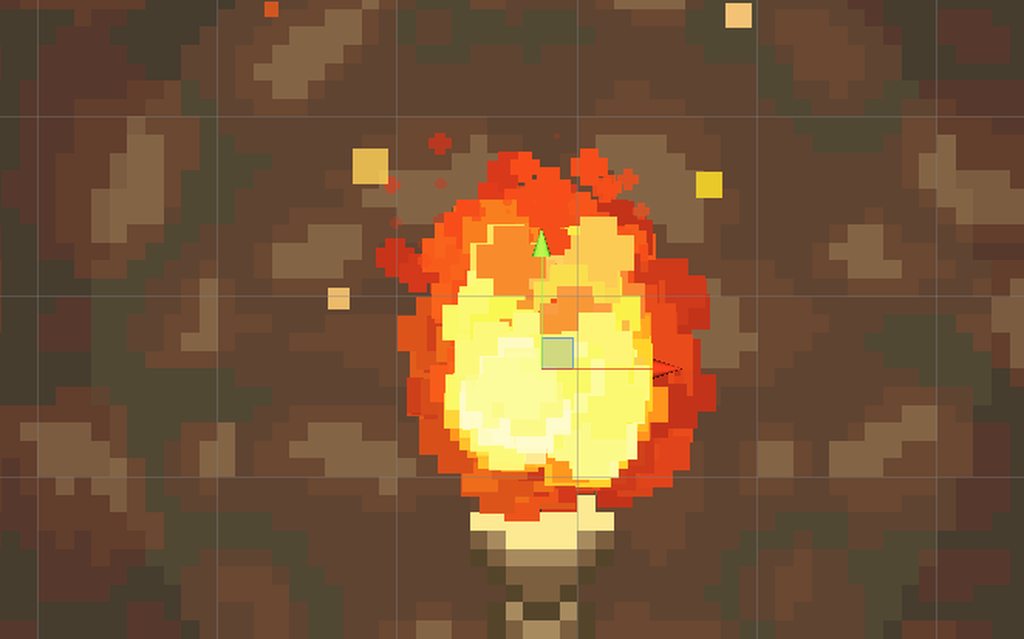
 safe helm
vital horizon
Hey! So I'm trying to learn the Unity particle system and I'm trying to reproduc...
safe helm
vital horizon
Hey! So I'm trying to learn the Unity particle system and I'm trying to reproduc...
how about flipbooks?
vital horizon
safe helm
how about flipbooks?
Do you mean through a texture sheet?
I know for sure that this particle system is only using 1 or 2 static sprites.
safe helm
vital horizon
Do you mean through a texture sheet?
I know for sure that this particle system ...
well in that case i think that's way more than 3 or 4 particles, with randomized position, they fade really quick at the end and there's a bit of speed upwards.
vital horizon
safe helm
well in that case i think that's way more than 3 or 4 particles, with randomized...
Right which I know for sure is the case due to this screenshot as well.
 warm torrent
vital horizon
Hey! So I'm trying to learn the Unity particle system and I'm trying to reproduc...
warm torrent
vital horizon
Hey! So I'm trying to learn the Unity particle system and I'm trying to reproduc...
Looks like there's bursts of particles spawned around a circular radius
The bursts are a sub-emitter with 6 or so round particles spawned in a smaller circular radius with some randomness and negative gravity
There's one of the sorting modes used to keep the brighter flames near the front, but it's also possible that the brighter burst is another sub-emitter
The square embers have some noise and a color by lifetime, spawned in a large rectangular area
vital horizon
warm torrent
Looks like there's bursts of particles spawned around a circular radius
The burs...
Interesting, I havent played around with the Burst yet.
vital horizon
warm torrent
The square embers have some noise and a color by lifetime, spawned in a large re...
Yeah the square embers are just color over time gradient which I deff have working. It was more so the look of the fire itself that I was struggling to do.
warm torrent
I guess the burst is two sub-emitters because the flames in the back are always orange and the flames in the front are always yellow/white, which would be a harder combo using just one system
vital horizon
https://gyazo.com/3efa2a5f8faff6c7408fe12a47e4d204
Sort of the "Best" I can get, but something still looks off.

 atomic magnet
Hey I'm trying to do an expanding ring of fire effect
but I want the front edge of it to be explicitly clear, so particles are out
I'm thinking maybe a donut shaped mesh that renders a tiling material, that is animated via shader... but I dont know how to do that first part
how can I make what is essentially a rectangle bent into a donut shape to apply my texture/material to?
vital horizon
https://gyazo.com/0f9313a9b320cd2875362e140ace42d4
And then with the sparks in place.

 tiny quarry
Nice. I think you want the flame particles to get larger during the middle of their life though, yours are remaining quite small so you can see lots of seperate particles compared to the reference. Also yours are moving a lot faster than the reference.
vital horizon
Yeah I'm trying to figure out how to slow them down? The only thing that I think have thats controlling the speed is really the gravity, and thats already pretty low.
warm torrent
vital horizon
https://gyazo.com/0f9313a9b320cd2875362e140ace42d4
And then with the sparks in ...
Reference uses size over lifetime for round particles and noise for square particles
tiny quarry
vital horizon
Yeah I'm trying to figure out how to slow them down? The only thing that I think...
Just reduce Start Speed at the top, or edit Velocity Over Lifetime.
vital horizon
Hmm, starting to get something I like, but I'm still having issues with the speed of it, even reducing start speed/velocity over life time.
It still looks more like a jet vs a fire.
tiny quarry
Surely you can reduce the start speed all the way to zero? If they're still going too fast you may have a negative gravity or Force Over Lifetime set?
warm torrent
I like to use only one method for force, since there are so many it's easy to get them stacked and mixed up
Negative gravity usually
If that isn't good enough, only then start adding drag or dampening
vital horizon
https://gyazo.com/cec863fe31d4d52bcd28f6d559b87cdb
Iunno. I mean, clearly, I'm new to the particle system and all that Jazz. But I am finding it difficult to get something I'm sold on thats for sure.
 sharp latch
How would I go recreating the swinging trails here? I can't get particle trails to face any other direction than directly at the camera
https://cdn.discordapp.com/attachments/826174989258063878/956307050911109201/2022032317381700-F1C11A22FAEE3B82F21B330E1B786A39.mp4
atomic magnet
vital horizon
https://gyazo.com/cec863fe31d4d52bcd28f6d559b87cdb
Iunno. I mean, clearly, I'm ...
how about this?
https://gfycat.com/achingnicealaskanmalamute

mine could use some additions like smoke, sparks drifting off with noise, etc
but I think its a good start
vital horizon
atomic magnet
how about this?
https://gfycat.com/achingnicealaskanmalamute
Doesnt look bad! Though mines more pixel styled vs yours.
At least from what I can tell from the photo.
atomic magnet
its a gif, I recommend clicking the link and looking in HD, mine is also pixelated
heres a better gif of it

I'm kinda faking the pixels though, using a pixel perfect cinemachine camera to downscale the resolution, snap the pixels, and upscale to my desired resolution
it doesnt look as sharp as doing it naturally with a color ramp, but its one way to do it
 prime ginkgo
i have sub emitter on but its not doing anything
its an explosion particle
and its child to the main particle
viral hamlet
where is the matrix mult operator in vfx graph??
ex. for transforming local to world
nvm the family of Transform operators exist...
next pendant
How could I rotate a vfx graph to go straight out from the camera? I have a beam I'm trying to cast atm that sits between the raycast origin and the raycast hit but I cant figure out how to get the vfx graph to do this, it also keeps rotating with the camera instead of staying in the world space like I would like
 odd drift
How do I get particles to spawn on the surface of a nearby mesh with the VFX graph? the signed distance field doesnt seem to do much.
 surreal elk
odd drift
How do I get particles to spawn on the surface of a nearby mesh with the VFX gra...
surreal elk
odd drift
How do I get particles to spawn on the surface of a nearby mesh with the VFX gra...
you can use the node" Set Position(Shape:Mesh)" or point cache baker
viral hamlet
next pendant
How could I rotate a vfx graph to go straight out from the camera? I have a beam...
Are the coordinates in your vfx graph in local space? Is your visual effect attached to the camera (or a child of it)?
Generally, if you want your effect to be in world space there are buttons within vfx graph to switch your coordinates between local and world space. You can also get the Local to World Transform and manually switch between the spaces

^ just click on these buttons to change the space
for your effect, I'd recommend doing everything in world space. take in raycast origin & hit in world space
next pendant
viral hamlet
Are the coordinates in your vfx graph in local space? Is your visual effect atta...
Whenever I changed the space in the graph from local to world the graph would just stop spawning, but I’ll mess with it some more when I get home thanks
viral hamlet
your bounds might still be in local space
 mild otter
is there a general consensus on using VFX Graph vs. particle system for mobile/2D games?
I'm not familiar with either of them, so I'm trying to figure out which one I'd want to learn first (and hopefully stick with)
 cerulean oyster
can anyone help me out with particle systems rq? Im trying to adjust my particles so they look more defined, like sparks. My only problem rn is that im unable to figure out how to edit this value for the particles. suggestions?
My Editor info^


how they look^

 flat lotus
cerulean oyster
can anyone help me out with particle systems rq? Im trying to adjust my particle...
flat lotus
cerulean oyster
can anyone help me out with particle systems rq? Im trying to adjust my particle...
what value, you want to change? scale or something else
odd drift
surreal elk
you can use the node" Set Position(Shape:Mesh)" or point cache baker
shape:mesh doesnt appear to be an option? Im using 10.8.1 on 2020 by the way, is this a 2021 only feature
 fallow isle
How do I make a particle effect stop emitting after a certain amount of time with unity VFX graph
 fluid lagoon
fallow isle
How do I make a particle effect stop emitting after a certain amount of time wit...
fluid lagoon
fallow isle
How do I make a particle effect stop emitting after a certain amount of time wit...
isn't this all handled in the Emission section
er sorry
fallow isle
fluid lagoon
isn't this all handled in the Emission section
for VFX graph or
fluid lagoon
the Spawn section
fluid lagoon
You can delete that and/or add other blocks there
press space in there to add other blocks
Dunno off the top of my head which one would have a duration but I think there is one..

Oh there's also those like Start/Stop events 🤔
I forget how those work
cerulean oyster
flat lotus
what value, you want to change? scale or something else
i want them to be more capsule shaped and with a glow
rather than just boxes
but also more defined than the sample particle
fallow isle
fluid lagoon
Oh like this https://docs.unity3d.com/Packages/com.unity.visualeffectgraph@7.1/m...
how do i call the on stop event
fallow isle
like do I reference the particle and then .SendEvent()
fallow isle
fluid lagoon
meaning you'd do the timer in C#
How
 calm harbor
this is my first time using unity's particle system and im trying to make it change from white to black over time but when i set it to do that in the inspector it doesn't
cerulean oyster
😭 i just wanna figure out how to make the particle a different shape
like a capsule shape
howww
calm harbor
calm harbor
this is my first time using unity's particle system and im trying to make it cha...
its this thats not working for me well its actually any color i set nothing. i do with colors is working
 odd drift
shape:mesh doesnt appear to be an option? Im using 10.8.1 on 2020 by the way, is...
odd drift
odd drift
shape:mesh doesnt appear to be an option? Im using 10.8.1 on 2020 by the way, is...
what are some alternative sto shape:mesh?
viral hamlet
Is there an elegant way to declare a mutable (fixed length) array inside a vfx graph? basically a uniform buffer that can get updated every frame and that all particles read from
I could use a graphicsbuffer and update the buffer on the cpu side, but that would lead to memory transfer potentially every frame, are there any other options?
vital horizon

These are my old fires I made a while back, and well...
I enabled the one thing I forgot to enable on the pixel perfect camera, and in the end, they look so much ebtter now.
sharp latch

Use the Melee Weapon Trail tool for your next project. Find this and more particle & effect tools on the Unity Asset Store.
I wanna have this specific kind of trail for VRChat, but VRChat doesn't allow custom scripts
Anyone have a clue how to go about recreating this?
warm torrent
sharp latch
https://assetstore.unity.com/packages/tools/particles-effects/melee-weapon-trail...
The main part of this effect is orientating the trail to the blade, but with without expanding trail features with scripting I don't believe this is possible
The next best thing would be to use the existing trail renderers and particle trails to make a line of multiple smaller trails emitters along the blade's length
 rugged hazel
Hi all, I hope im in the right channel with this question. I'm just starting out with unity and the material system is a bit confusing to me - I tried to add a simple wood texture to a cube, but no matter what I do with the materials settings, the texture loses most of its color saturation when I apply it to a cube. I didn't make any changes to the environment or the lighting, its all default. The left side is what the texture should look like, the right is what it looks like applied to a cube. I also attached the materials and texture settings. Any idea what Im doing wrong here?


 warm torrent
@rugged hazel Set compression to none
You can also try disabling mipmap generation to see if that improves the result
rugged hazel
@warm torrent: I tried both, the texture is a bit more sharp now but the colors are still the same
warm torrent
rugged hazel
<@!166982635950702592>: I tried both, the texture is a bit more sharp now but th...
Does your scene have a light source to illuminate the surface, and what do you expect the texture to look like? If you want it to be exactly the same colors you probably should be using an unlit shader for the material
rugged hazel
The scene has the default directional light that comes with a new unity scene, which has a light yellow-ish hue to it. The texture should at least have some of the brown colors to it that the original texture has, in the scene it looks grey rather than brown as you can see in the screenshot.
It doesnt have to be exact but it should at least have some resemblance to the original texture
in terms of color saturation / hue
warm torrent
@rugged hazel If the color looks correct in the texture preview, but not in the scene or material preview it suggests that it's scene lighting affecting its appearance
rugged hazel
I see, then I'll play around a bit with the lighting, thank you
calm harbor
calm harbor
its this thats not working for me well its actually any color i set nothing. i d...
dose anyone know what's causing this problem I've fiddled with it but i still cant get it to work
warm torrent
@calm harbor First thing is to make sure the particle's material is using a particle-compatible shader
calm harbor
warm torrent
<@!711220635921154078> First thing is to make sure the particle's material is us...
which one should i use for a particle that just spawn a group of cubes once
 warm torrent
calm harbor
which one should i use for a particle that just spawn a group of cubes once
warm torrent
calm harbor
which one should i use for a particle that just spawn a group of cubes once
That's up to you
calm harbor
what is the difference between the two
calm harbor
ok thx
 fluid grove
Anyone know what kind of texture that is for the burn mark? I tried edge/cloud noise but wasnt seeing what I wanted
https://img.itch.zone/aW1hZ2UvMjg0NTI5LzEzODM4NzUucG5n/original/uEGqqD.png
 rugged hazel
Does anyone have an idea what could explain this uneven lighting across multiple meshes even though their normals are uniform?
I set up a world made up of voxels which are subdivided into equal sized chunks. Each chunk is a separate mesh in a separate game object. The lighting across chunks is uneven as you can see in the screenshots but the normals of the vertices are uniform across chunks when I visualize them. Any ideas?

Looks great with per pixel lighting but costs a ton of performance. Any way to get this to work with per vertex lighting as above?
 warm torrent
rugged hazel
Looks great with per pixel lighting but costs a ton of performance. Any way to g...
warm torrent
rugged hazel
Looks great with per pixel lighting but costs a ton of performance. Any way to g...
Reducing seams with vertex lighting can be achieved by using Legacy Shaders/VertexLit for the material.
To have performance with pixel lights, you would keep the pixel light limit at around 4 and split the ground into more chunks, or look into "deferred rendering path". It's designed to solve this problem.
This is a #archived-lighting question
prime ginkgo
is there any way to stop the particle after it produced the max particle amount
like make it stand still
after it has produced it
prime ginkgo
like freezing it after it has shot out all particles
warm torrent
prime ginkgo
is there any way to stop the particle after it produced the max particle amount
Using just the Particle System not normally
You could make the particles have a sudden speed limit over lifetime, but if you specifically want to tie the particle speed to particle count you'll need a script to track that variable
 shell crow
does somebody have a good yt video where it explains how to make so when i click on a cube the particals will start
viral hamlet
custom state machine in vfx graph, all particle updates are done on the gpu - state changes based on flood events defined by colliders which are independent of the underlying vfx (one collider can span multiple point caches) https://streamable.com/vzek5v

 lusty raft
Hello Everyone,
I am trying to create spells that require the effects to be visible between 2 or more points.
EG: https://www.youtube.com/watch?v=52nII6q_OXM&t=30s
What would be the right approach ?
are they Particles or Shaders ?
Thanks!

No one escapes.
Get ready to harvest souls with Thresh on August 13, 00:01 UTC.
Learn more at https://wildrift.leagueoflegends.com.
ABOUT THE GAME
Dive into Wild Rift: the skills-and-strats 5v5 MOBA experience of League of Legends, now built from the ground up for mobile and console. With fresh controls and fast-paced games, players of ever...
 mellow fractal
anyone know how I can get this texture to stretch the full length of this line renderer?

this is the texture
 fluid lagoon
mellow fractal
anyone know how I can get this texture to stretch the full length of this line r...
fluid lagoon
mellow fractal
anyone know how I can get this texture to stretch the full length of this line r...
looks like it is stretching to the full length
mellow fractal
fluid lagoon
looks like it is stretching to the full length
yeah, there was just empty space in the texture
ended up using this

and set the line renderer to tile
 bronze idol
how to make zelda like fx where a triangle/face fallow a sword

like here
dose this effect have a name?
 chrome hull
i would like to do a lighting effect over the character when i press something, how could i do that?
or even, the effect when a certain animation is played
 rotund sedge
Hey I'm trying to figure out how I could make particles lay on the ground oriented with the angle they're in, what I mean by this is similar to maybe a blood splatter, if blood spurts all over the place against the wall and the floor, then the particle with then orient so that one portion of blood that hits the ground would be flat on it while the other portion that are on the wall will be vertical to the wall. Is there a way of doing this without scripts?
And another question would be, I saw people doing animated mesh particles with a shader or something. I'm trying to figure out how to do that with my meshes but I can figure out a way to do so, I've seen someone do it but I just dont know a good way that doesnt involve scripting
fluid lagoon
bronze idol
dose this effect have a name?
particle trail?
bronze idol
ya i think that's it
 storm sage
hi ! I wanted to know if there is a possibility to setup a float to switch on/off a block inside the vfx graph ?

 clear spruce
storm sage
hi ! I wanted to know if there is a possibility to setup a float to switch on/of...
clear spruce
storm sage
hi ! I wanted to know if there is a possibility to setup a float to switch on/of...
it seems unity is currently working on it
 storm sage
clear spruce
it seems unity is currently working on it
storm sage
clear spruce
it seems unity is currently working on it
I'll be patient then 🙂
clear spruce
Most likely there's still way to achieve same results with some tricks
viral hamlet
there are pretty straight forward ways to achieve this, imo it's a good little exercise to workaround the vfx graph's limitations
 prime dome
VFX References from Echo of Soul MMORPG

Echo of Soul MMORPG has many mysterious floating devices with cool SFX and VFX that I'd love to have in my games
I hope this material helps you and I'm also looking for similar material if you could share with me. Thanks ^_^
00:00 A Blue Warp Portal
00:33 Purple Teleport Device
01:03 Player Respawn Point
01:33 Blue Stream for Soul Purifica...
 hard compass
hi, how can i stop my effects from disappearing if my player moves outside the camera view?
clear spruce
hard compass
hi, how can i stop my effects from disappearing if my player moves outside the c...
It’s about the bounds
Just increase the bounds size enough
hard compass
clear spruce
Just increase the bounds size enough
thanks, fixed 
viral hamlet
not a single update-loop on the cpu 🙂
vital horizon
Has anyone had any luck taking particleSystem.GetParticles(particles); and applying a angular velocity to them?
I'm trying to make them move towards a target while keeping their current speed but I'm not having any luck at all.
Specifically here is my code:
void Update() {
        // GetParticles is allocation free because we reuse the m_Particles buffer between updates
        int numParticlesAlive = m_System.GetParticles(m_Particles);

        // Change only the particles that are alive
        for (int i = 0; i < numParticlesAlive; i++) {
            Vector2 direction = target.transform.position - m_Particles[i].position;
            direction.Normalize();
            float rotateAmount = Vector3.Cross(direction, transform.up).z;
            m_Particles[i].angularVelocity = -rotateAmount * rotateSpeed;
        }

        // Apply the particle changes to the Particle System
        m_System.SetParticles(m_Particles, numParticlesAlive);
    }
 gray wing
im using a mesh as my particles but for some reason they dont show, anyone know what i did wrong?
 fluid lagoon
gray wing
im using a mesh as my particles but for some reason they dont show, anyone know ...
fluid lagoon
gray wing
im using a mesh as my particles but for some reason they dont show, anyone know ...
did you pick a material?
gray wing
yes
 twilit sail
If anyone here knows anything about VRChat Development/Using the VRCSDK I could use some assistance with effects/animations.
Im trying to set up a Gun in VRC so that it fires whenever I gesture both my hands into fist, but it fire the animation whenever I spawn the object and I'm stumpted as to how to get it to work correctly.
I've tried asking for help in VRC specific discord but none of them have really helped me much so I thought this might be more of a Unity type problem


 green cedar
beginner question: is VFX graph and particle system different things? Is one better than the other?
ah wait I found an article https://blog.unity.com/technology/creating-explosive-visuals-with-the-visual-effect-graph
 clear spruce
green cedar
beginner question: is VFX graph and particle system different things? Is one bet...
clear spruce
green cedar
beginner question: is VFX graph and particle system different things? Is one bet...
They are different things. They are both used for making particle based visual effects tho. Particle system is simulated on CPU and is therefore limited to few thousand particles at a time. Vfx graph on the other hand is simulated on GPU and can handle hundreds of thousands, even millions, of particles. For small amount of particles, both systems should perform fine. Other than performance, there’s few things that makes the two different. With particle system you can use finite number of options to customize the effect but vfx graph is graph based and you can do whatever you want by using as many nodes as you want and connecting them the way you want. I think particle system is easier to work with for beginners tho. One limitation with vfx graph is that it can’t interact with physics colliders. You can use some primitive shapes inside vfx graph but the vfx graph knows nothing about the actual colliders on the scene. Vfx graph can use depth buffer to approximate collisions with the scene geometry but it’s not always working very well (for example it doesnt know anything about the geometry outside of the camera view). With particle system you can make collisions with actual colliders and I believe you can even receive some collision data with c# script. Also I think vfx graph is not supported on mobile platforms (high-end mobile devices should be supported in future). tldr: particle system is good for simple effects and vfx graph is good for complex effects with loads of particles both having their limitations
green cedar
thanks for the thoughtful answer!
Since I'm using URP and need only very simple effects, I think I'll use particle system
clear spruce
Particle system is usually the better one to start with. If you know you need a lot of particles or you need to do something very special that would be impossible/too hard with particle system, vfx graph can be good choise. Particle system is still great tool for making effects overall. For most basic effects, there’s absolutely no need to use vfx graph
 flint anchor
Anyone know why there is always a one second delay between my Constant Spawn Rate which is set to 1? The expected result is one spawned particle per second, instead I am seeing one particle spawn for one second, then a wait one second, then repeat. Is there some sort of hidden delay?
 small dock
I wrote a tool to do hundreds of hours of work in minutes :

I'm streaming live now: https://www.youtube.com/watch?v=KqGUA0EdiZM

Support the stream: https://streamlabs.com/goodnewsjim www.starfightergeneral.com Website down, can't afford to keep website up and survive in this liberal inflationary America at the moment. I choose survival, and code. Lets fight on to make games even when no one funding or kickstartering us.
#1 gamer of all time: Ask for proof or click: h...
This is for certainly exciting to watch, come check it out
green cedar
anyone know how I can access this color custom data in shader graph?

afaik Particle systems by default can't use HDR, and the only way to do that is to use custom data
green cedar
now I'm having an issue with the texture (default particle texture) being applied across all particles
is there a way to have the texture on each individual particle instead?

never mind, I think I got it
clear spruce
flint anchor
Anyone know why there is always a one second delay between my Constant Spawn Rat...
Maybe your system is running out of particles and therefore it has to wait for the old particle to disappear?
viral hamlet
clear spruce
They are different things. They are both used for making particle based visual e...
Imo the biggest drawback of vfx graph currently is the lack of custom operators (custom hlsl code)
so saying that you can do anything you want is a bit of a stretch
clear spruce
maybe, but what are those things you can't do by connecting nodes (and could do with hlsl code)?
viral hamlet
for-loops. I have a graphics buffer of 32 elemets, and each particle should loop over it. what I did is define custom subgraph operators for:
0. operator for sampling graphics buffer at some index
- operator for one iteration
- operator for four iterations at once
- operator for 16x iterations at once
- operator for 32x iterations
problem is the shader compiler just crashes silently when I try the 32x variant, so currently im resorting to 16x variant. In principle I could have a single operator from 1x -> 32x but that's just way too cumbersome.
in general data flow is where node based structure shines, but anything that has to do with control flow is really cumbersome
clear spruce
oh yeah, you're right. completely forgot loops. that's something graph based systems tend to be very bad at (ig it could be possible to make a for loops and stuff same way as it works with bolt but atleast yet that doesn't exist)
prime dome
Is there any way to remove z axis from VFX?
viral hamlet
just set it to 0
 analog lake
Does anyone know why I can't find Set position; arc circle ?

I have the effects thing imported
 slate sable
analog lake
Does anyone know why I can't find Set position; arc circle ?
slate sable
analog lake
Does anyone know why I can't find Set position; arc circle ?
Isn't it just an option on Set position: Circle?
analog lake
ñope
viral hamlet
do you have the experimental blocks/operators enabled
analog lake
viral hamlet
do you have the experimental blocks/operators enabled
no... how would I ggo about doing that
viral hamlet
 grave rune
Can i make particles spawn particles?
I want to make a cloud particle emitter and those clouds spawn rain particles
slate sable
grave rune
Can i make particles spawn particles?
For particle system: https://docs.unity3d.com/Manual/PartSysSubEmitModule.html
VFX Graph: https://docs.unity3d.com/Packages/com.unity.visualeffectgraph@7.1/manual/Events.html
 grave rune
Thanks
 muted musk
would anybody happen to know why the particle system only does same 3 colours (yellow, red, green), it's set to Random Colour

nevermind, something in the shader is messing with it
next pendant
How would I go about making a trail that follows behind a game object with a vfx graph?
 crude flame
Hi everybody. My friends and I are developing one VR project that needs a cool graph VFX. If there are those who want to help on hard enthusiasm, write in a personal 🙏 It will be cool if you are from Russia 🇷🇺
next pendant
How can you remove the drag from adding force to a vfx graph?
 unique hull
Hey guys!
I'm working on an ability for a holy paladin type class in an RPG game. I'm using the Unity Particle System.
What I want to achieve is a beam of light that comes down really fast and when the beam of light hits the ground, it should spawn a holy pool. The part where I'm struggling at is this; I can make the beam of light without a problem and it also "comes" down really fast, no issues here. But I cannot for the love of god "make it stay" when it hits the ground. Like after the beam hits the ground I want it to stay there as if it was generating a pool. I hope I'm making sense.. Anyways, here's two pics:

 warm torrent
unique hull
Hey guys!
I'm working on an ability for a holy paladin type class in an RPG gam...
warm torrent
unique hull
Hey guys!
I'm working on an ability for a holy paladin type class in an RPG gam...
It's usually best to make that kind of effect as a child particle system or a sub emitter
You can use Collision to make sub emitters spawn at a point of contact, or just delay the pool particle's emission for when the beam will be hitting the ground
unique hull
warm torrent
It's usually best to make that kind of effect as a child particle system or a su...
Thanks for your insight, I will definitely look into this. However, I'm still confused as to how this will make the light beam "stay" and not disappear when it hits the ground. The only way I could achieve this effect was if I paused the particle system through scripting, so the beam would stay in place after 0.20 seconds. But I don't know if this is optimal. Sort of like the pic below
So I want the beam to spawn from above, and then fly down fast. When it hits the ground I want the beam to stay and in turn generate that pool, if that makes sense.
I will definitely be using your suggestion to spawn the pool! Thanks a lot.
 warm torrent
Hmm can't quite grasp what type of staying you're thinking of
There's a lot of ways, like controlling emission or velocity over lifetime
unique hull
Basically I want the beam to slow down so much that it looks like it isn't moving. Velocity over lifetime sounds promising, I'll try it out
warm torrent
unique hull
Basically I want the beam to slow down so much that it looks like it isn't movin...
Hard to guess
Your beam could be a stream of particles, a burst of particles, or trails
The approach would be different for each
unique hull
It's a burst of 1 particle. Stretched billboard mode
 knotty panther
5 months later but did you get the vfx graph prewarm to work?
 woeful pollen
@undone torrent your system is playing for 500 seconds (per duration is too long comment from Osteel). It doesn't "loop" until those 500 seconds are over.
Within one loop, it is doing multiple bursts of emission. Every 2 seconds (rate over time = 0.5) it is emitting. Set rate over time to 0 and have a much shorter duration if you want just one burst and no extended emission
 undone torrent
woeful pollen
<@!433856634192789504> your system is playing for 500 seconds (per duration is t...
undone torrent
woeful pollen
<@!433856634192789504> your system is playing for 500 seconds (per duration is t...
yep, that fixed it
thanks!
 heady dragon
hi, ive got a question about shader graph and particles
i have a shader graph here that when applied on a quad looks like this

but when i try to use the shader on a billboard particle the transparency doesnt work

any ideas?
 tame onyx
In a Shuriken particle system, is there a way to make the emissive color on the material use the random color that the particle gets assigned on generation? I'm using random start color with a rainbow gradient. But emissive on the material only lets me pick one color, which just adds to the color I want so they're all pastels.
Actually maybe I don't need emissive. Since it's unlit, I just adjusted the opacity on the base color so it's not blending so much. Still curious if there's a way but I probably won't need it.
flint anchor
clear spruce
Maybe your system is running out of particles and therefore it has to wait for t...
You were correct thanks! I noticed it a few days ago, my max particles was set to 1 lol.
clear spruce
flint anchor
You were correct thanks! I noticed it a few days ago, my max particles was set ...
I was kinda skeptical myself but glad it worked 👍

 severe badge
nvm just gotta set starting spsed to 0
undone torrent
hey so I got this free asset off the store

Add depth to your project with Particle Ribbon asset from Moonflower Carnivore. Find this & more VFX options on the Unity Asset Store.
and it works great for a bullet trail
but I want to make it variable length
and there are so many options I'm not sure which one accounts for length
and length is grayed out in shape
 fluid lagoon
undone torrent
and length is grayed out in shape
fluid lagoon
undone torrent
and length is grayed out in shape
maybe best to contact the asset publisher
 twin basin
Is there anyway to offload Builtin Particle System (Shuriken) to the GPU or another thread/core of the CPU, or to DOTS?
fluid lagoon
no
fluid lagoon
twin basin
Is there anyway to offload Builtin Particle System (Shuriken) to the GPU or anot...
Use VFX Graph if you want particles running on GPU/other cpu cores
twin basin
fluid lagoon
Use VFX Graph if you want particles running on GPU/other cpu cores
Builtin?
fluid lagoon
Not available in built-in no
twin basin
fluid lagoon
Not available in built-in no
Is there any (other) way to offload builtin particle system to GPU and/or threads/cores of the CPU?
fluid lagoon
twin basin
Is there any (other) way to offload builtin particle system to GPU and/or thread...
With shuriken? No.
Your alternatives are make your own particle system or buy/download an asset
clear spruce
twin basin
Builtin?
You mean is it built-in the engine or is it available in built-in render pipeline
Praetor meant it’s not available on birp. On urp and hdrp you can use vfx graph
 cobalt plover
I’m Boutta go to sleep so y’all can tag me or dm me but what’s the best way to make a lightning particle like if I shot a gun that shoots lightning
I’m thinking like a trail that zig zags but idk if that’s possible
viral hamlet
it's possible
 radiant cipher
twin basin
Is there anyway to offload Builtin Particle System (Shuriken) to the GPU or anot...
radiant cipher
twin basin
Is there anyway to offload Builtin Particle System (Shuriken) to the GPU or anot...
The built-in particle system already makes use of the Job system in some way, internally.
Quote from a Unity developer:
It is now vital that it is done in a new MonoBehaviour callback: OnParticleUpdateJobScheduled. This callback occurs after the native built-in particle jobs are scheduled,
https://forum.unity.com/threads/particle-system-c-job-system-support.529284/
warm torrent
cobalt plover
I’m thinking like a trail that zig zags but idk if that’s possible

Создание эффектов электричества с помощью системы частиц на игровом движке Unity. Game effect tutorial.
Вы можете скачать этот эффект бесплатно по этой ссылке -https://www.patreon.com/posts/21393747
Подпишись что б не пропустить новые видео!
Моя в группа в ВК - https://vk.com/hovls...
cobalt plover
warm torrent
https://youtu.be/RdNnbozAPGQ
I’ll check that out thanks
prime dome
I want to spawn a lot of particles with collision enabled but the particle system does not seem to be performant enough. How could I optimize or what else could I use ?
I am spawning simple 2d square particles with 2d sphere colliders
twin basin
prime dome
I want to spawn a lot of particles with collision enabled but the particle syste...
how many?
clear spruce
prime dome
I want to spawn a lot of particles with collision enabled but the particle syste...
It would help if you actually shared the effect you’re trying to make. Vfx graph could work better on some cases
 little solstice
hi guys, I have a laser (currently just a linerenderer) to which I would like to add a moving spiral effect


what tool should I use for this? (I'm using URP if that matters)
viral hamlet
why does vfx graph not have e (euler's constant)? lol
viral hamlet
little solstice
hi guys, I have a laser (currently just a linerenderer) to which I would like to...
working on the vr project too? I think it's achievable with vfx graph, but there might be a better way to do it
little solstice
viral hamlet
working on the vr project too? I think it's achievable with vfx graph, but there...
hahahaha fancy seeing you here
of course I am
I'll look into vfx graph
viral hamlet
let me know if you have any questions, I've become quite accustomed to it
little solstice
thanks
 royal tulip
How do i stop VFX particles re-playing after bounds go outside of camera frustrum then back in?
fluid lagoon
little solstice
hi guys, I have a laser (currently just a linerenderer) to which I would like to...
could use another LineRenderer - or a particle system or VFX graph
rugged hazel
Hi guys, I'm not sure if I'm in the right channel with this question, but I'm trying to stack cameras and I cannot find the option for that. I've been looking at some tutorials that use Unity 2019 where they could set the render type of the camera to "Base" or "Overlay" and the camera had a stacking option. I'm using Unity 2022 and I can't find those options in the camera component. Any idea where that went?
Ohh never mind i found it, its only supported by URP
tame onyx
royal tulip
How do i stop VFX particles re-playing after bounds go outside of camera frustru...
If you're using Shuriken (not VFX Graph) try changing the Culling Mode to "Pause And Catch-up" or "Always Simulate" maybe?
 atomic vapor
hi i have a particle effect as a muzzleflash for a weapon, i want the effect to be with the particles filling the shape instantly, but whenever the effect instantiates, it takes some time for the particles to travel to the entire shape, how can i do that?
 safe nebula
in shuriken particle effects there is a prewarm checkbox, probably something similar for vfx graph
atomic vapor
safe nebula
in shuriken particle effects there is a prewarm checkbox, probably something sim...
i dont understand
warm torrent
atomic vapor
hi i have a particle effect as a muzzleflash for a weapon, i want the effect to ...
use a burst emission
warm torrent
atomic vapor
how should i set up my burst?
What I would do is spawn a bunch of particles at the same time or very close to same time using burst, combine that with a shape which allows them to spawn over a longer area
atomic vapor
warm torrent
What I would do is spawn a bunch of particles at the same time or very close to ...
i want to use a cone and have the particles fill the entire cone on the first frame
warm torrent
atomic vapor
i want to use a cone and have the particles fill the entire cone on the first fr...
Cone as in the Shape only spawns particles on a flat area
If you want to fill a shape, use box, hemisphere or mesh or similar
atomic vapor
warm torrent
Cone as in the Shape only spawns particles on a flat area
If you want to fill a ...
yeah but i want the particles to be in a cone shape
warm torrent
Then you probably need a cone shaped mesh and use that with Mesh Shape
atomic vapor
warm torrent
Then you probably need a cone shaped mesh and use that with Mesh Shape
and after that, what should i do? (im new to particles)
warm torrent
Correction, mesh can't be used to spaw n particles as a volume like box, sphere and hemisphere can
You'll need to experiment with them to see which one best fits
safe nebula
prewarm acts as if the particle system was already running instead of just starting up
 atomic vapor
safe nebula
prewarm acts as if the particle system was already running instead of just start...
atomic vapor
safe nebula
prewarm acts as if the particle system was already running instead of just start...
thanks gonna try rn
atomic vapor
safe nebula
prewarm acts as if the particle system was already running instead of just start...
It worked thank you so much!!
safe nebula
atomic vapor
It worked thank you so much!!
and just to clarify the terms vfx graph is the particle system where you visually arrange nodes and the default particle system that you are using is often referred to as shuriken because it has the shuriken symbols at its base
atomic vapor
ok
royal tulip
tame onyx
If you're using Shuriken (not VFX Graph) try changing the Culling Mode to "Pause...
its VFX graph particles
little solstice
if I have a muzzle flash (as particle system), do I instantiate the prefab whenever I want it, or do I do some "caching" where I have just one muzzleflash instance and activate the particles whenever I need it?
warm torrent
little solstice
if I have a muzzle flash (as particle system), do I instantiate the prefab whene...
You can instantiate and destroy it which works but it's wasteful
You can do what's called "object pooling" and instead of destroying it, deactivate it to be reused as the next muzzle flash
But for muzzle flashes you don't usually need to do either, you can have one persistent muzzle flash attached to the gun which you Play and Stop when needed
 minor wadi
When I spawn particles from a script it is not visible, however it spawns in the hierarchy

 sturdy epoch
hi, i just imported VFX graph into a URP project and created a VFX graph asset and these errors pop up everytime I open the graph. it can be cleared but im not sure what it is. anyone have any idea how to resolve this?
https://media.discordapp.net/attachments/401076282869415946/962351940736536586/unknown.png
 viral hamlet
do you have # in any names?
viral hamlet
is there a way to convert a float to its bytes in vfx graph? I'm pretty sure casting it to an uint is a value based conversion
gray wing
i made a particle system i while ago with a transparent background which worked fine, but now when i added fog it loses its texture when you step back a bit and becomes a almost-transparent rectangle. Can anyone help me? Im using URP


this one has fog disabled, i want that look with fog turned on⏬

 polar lynx
Is there any way to hide a particle system when it is a certain distance away from the camera? Like a special far clipping plane just for particles.
 minor monolith
how can i make unity particle/trail black? it seems unity sees black as transparency
minor monolith
also, how can i make a trail move to the scale of a specific object? basically i'm trying to make a trail follow a character's feet while running, but it lags behind since they're running. something like the trail moving when the animation is playing but the character isn't moving would look good
minor monolith
or is there a way to make a simulation space for trails? i just figured out how to do it for particles, but it works better with trails
 gleaming stream
knotty panther
5 months later but did you get the vfx graph prewarm to work?
gleaming stream
knotty panther
5 months later but did you get the vfx graph prewarm to work?
Nope, Still strugling to make nice Thrusters in VFX
gleaming stream
but i got some ideas from guys making Space Reign
gleaming stream
knotty panther
Oof

Become our patreon and you will gain an access to the latest build of our game!
https://www.patreon.com/propulsivegames?fan_landing=true
Space Reign is a part space sim, part strategy indie game about fleet combat, management, and completing security contracts for resource exploiting corporations in the near future, which are in a state of cons...
URP VFX
royal tulip
Does anyone know how i do VFX particles fly upwards in a spiral-cone?
This doesnt really work
 polar lynx
you can make it a spiral cone by setting the shape to a cone and the velocity over time to orbital z:2
royal tulip
polar lynx
you can make it a spiral cone by setting the shape to a cone and the velocity ov...
this node? in Update
 polar lynx
 royal tulip
we're talking about two different things
polar lynx
this will spawn the particles at a point at the base of the cone and make them move upwards
then the orbital z will make them rotate around the center of the cone
you need to edit it in the particle system, not the shader
royal tulip
this is VFX graph
polar lynx
ah, I am not sure then
minor wadi
minor wadi
When I spawn particles from a script it is not visible, however it spawns in the...
Sent this yesterday, still needing help

 restive horizon
anyone have any idea why the transform gizmo on my vfx graphs are moving around ? almost like theyre tied to the effects updating bounding box
fluid lagoon
restive horizon
anyone have any idea why the transform gizmo on my vfx graphs are moving around ...
you probably have your tool handle position set to Center instead of Pivot
restive horizon
fluid lagoon
you probably have your tool handle position set to Center instead of Pivot
thats it! thanks
driving me insane
flint anchor
Anyone know why Particle Rotation speed, set by Rotate 3D Angle, is different in Play Mode and Editor Mode? .005 looks good in editor but I need to set it to .002 if I want the effect I like in Play Mode.
 fluid lagoon
flint anchor
Anyone know why Particle Rotation speed, set by Rotate 3D Angle, is different in...
fluid lagoon
flint anchor
Anyone know why Particle Rotation speed, set by Rotate 3D Angle, is different in...
multply by deltaTime
otherwise your animation is going to be framerate dependent
unless you set the update mode of the graph to FixedUpdate, which has its own issues
 green snow
Heyo! I've been using a particle system for low poly clouds in my game with the standard surface shader, which gives me the desired effect. The only issue I'm running into is the shadows. The shadow effect on the clouds system looks great, and I don't want to disable it, but since they cast an opaque shadow, it makes the whole world just as dark as if there was a wall over the sun. Is there any way to make specifically the clouds cast a weaker shadow? Basically as if the shadow strength on the sun was set to half for only that system. Thank you in advance, and apologies if I should be asking in #archived-shaders. I will move if it's more suitable for there.
flint anchor
@fluid lagoon beautiful, thank you.
odd drift
I'm using VFX graph 10.8.1. How would I go about making a lightning ball effect- a jagged line extending out from a point to a point within the sphere, preferably one that's colliding with a mesh. Or should I be using the unity particle system?
minor monolith
odd drift
I'm using VFX graph 10.8.1. How would I go about making a lightning ball effect-...
i don't know much about shader graphs, but you can probably make particles with trails that zig zag. not sure if you'll have to script it in or just use the speed curve tho
odd drift
right, that looks a bit better. anyone know if I can set the simulation speed for a VFX graph?
odd drift
ah, there's a play rate property.
 rigid harbor
Hello, I'm building my first android game which will be 2D.
Problem: Particle system won't show in Game View, but it works fine in Scene View.
How did I add the particle system?
Added an empty object, and to its components I had added the Particle System.
How I tried to fix the problem but with no success:
In the particle system i've changed the size, speed and texture but it did not help.
I've added the Particle System to the Canvas
I've set the Canvas Render Mode to Screen Space - Overlay
Any help appreciated.
 royal tulip
am thinking of this correctly? i only want to run this VFX graph if i send this event. i dont want it to trigger by itself. only when i tell it to

then i need to send this event via code?
or i could do a bool, and sent count to 1 or 0, im not sure whats "best" here
or... atleast common practice
slate sable
royal tulip
am thinking of this correctly? i only want to run this VFX graph **if** i send t...
That's exactly how it works. You want to use VisualEffect.SendEvent("AboveWater"); to activate it.
You can also add event attributes to the SendEvent method if you want to trigger the vfx with different properties that you can access in the graph.
You might need to set the Initial Event Name to blank so it doesn't spawn by default. You can find it in the inspector of the Visual Effect Graph Asset
royal tulip
slate sable
That's exactly how it works. You want to use `VisualEffect.SendEvent("AboveWater...
from my limited testing, it required an event attribute, so instead i just made a int property, and set the count to 1 or 0 depending if i wanted to it to spawn or not
hard compass
is there a way to get vfx graph to work along with the urp 2d renderer? i'm using v2020.2.0f1
slate sable
hard compass
is there a way to get vfx graph to work along with the urp 2d renderer? i'm usin...
Support for that is released in the 2021.2 version.
https://portal.productboard.com/unity/1-unity-platform-rendering-visual-effects/c/116-urp-support-compute-capable-devices-only-2d-renderer-support
 shut flame
Oi y'all! Beginner to FX and particle system here! 
My question is, when I am previewing my sprite as it is applied to a Particle System as a Texture (as a Material), why does it look... compressed or squished in some weird way? I have been trying to customize and play with all the settings but it doesn't seem to snap back to its original size?

(to the left; the original sprite sheet being played through an animation recorder | to the right; the Particle System playing it over, looking unlike its original sprite in size)
pls tag me in response 

 shut cliff
@shut flame I haven't used sprites for particle effects, so I'm not exactly sure. You're not using Stretched Billboards in the Renderer module of the particle system?
shut flame
shut cliff
<@372746302137696259> I haven't used sprites for particle effects, so I'm not ex...
I don't even know what that is, so I bet not
I'll show you my modules though
shut cliff
Ok, probably not then.
Is the sprite part of an atlas? Maybe the cropping on it is not 1x1
shut flame
I think it might be because the Particle System in Unity forces all sprites into 1:1
shut flame
shut cliff
Is the sprite part of an atlas? Maybe the cropping on it is not 1x1
yeah, that is what I was presuming and fearing
and I think it is being confirmed as I ask multiple people now

all this newbie work
for nuffin
shut cliff
You can work around that by changing the 3D Start Size
 shut flame
O
WAT
wait no, it is not doing any difference
just rotating it

WAIT NO IM IN THE WRONG CATEGORY WAIT
SORRY WAIT
shut cliff
Probaly in 3D Start Rotation? 😛
shut cliff
xD
shut flame
LOOK WAT I DID
I changed the size to fit my scalings
AAAAAA

Look at her now

THEY'RE IDENTICAL
AAAAAAAAAA
shut cliff
Ooh. That's awesome 😄
shut cliff
Both æ and å here I see. Norsk? 😛
shut cliff
No problem 😄
 lone elbow
- Must be pretty common question here. How to make particles change their color during runtime through the complex gradient with 4 colors? Ideally with that nifty curve editor of unity
safe nebula
are you using shuriken or vfx graph? in both you should be able to simply set color over lifetime and set the gradient in there
whats happening on your end?
lone elbow
- Well, it was intuitive enough. I just didn't notice the "color over lifetime" tab at first
flint anchor
Could anyone give me some advice on how to tackle this VFX idea I have. I want a beam of light to shoot straight down. Almost like a tube of light, like what you might see when an alien abducts a cow, lol. Im not sure how to handle that initial beam part.
Progress so far. https://youtube.com/shorts/QctoLhFi_g0
 rugged mural
I have a particle system using with mesh render and I want to have all the meshes face the same way (forward) so I set the Render alignment to Velocity but they are all facing sideways. The flip X Y Z options below it do not seem to make a difference (only the X flipped the mesh, but Y and Z didn't change anything). Do I need to flip the mesh in blender before exporting FBX and importing into Unity?
Basically I made a 3D version of the Galaxian sprite in blender and using particle cone emitter with mesh render but they are coming out like this instead of the nose facing away from the emitter

 dreamy turtle
Is there a setting to make my Vfx like curve with my object path? The blue one is just always straight when following my circle
 lone elbow
- Can i control particle parameters individually, without affecting those that are alredy created?
shut cliff
flint anchor
Could anyone give me some advice on how to tackle this VFX idea I have. I want ...
If you don't have a custom cylinder mesh with a pivot point set at the top, you could offset the Pivot in the Renderer module so that it will start stretching/scaling from the UFO location down to the ground. I can't tell if you're using a cylindrical mesh or if it's a Stretched Billboard, but you can set this in the Renderer tab as well.
shut cliff
rugged mural
I have a particle system using with mesh render and I want to have all the meshe...
Have you tried using Align To Direction in the Shape module? You can also change the 3D Start Rotation near the top of the particle system if they are facing the wrong way.
prime dome
Am I missing something? I cant seem to output a Texture2D in a branch in VFX-Graph
 rugged mural
shut cliff
Have you tried using Align To Direction in the Shape module? You can also change...
rugged mural
shut cliff
Have you tried using Align To Direction in the Shape module? You can also change...
Thank you! The align to direction didn't seem to make a difference initially, but turning on the 3d start rotation and changing X and Y values to 90 have it coming towards the screen now!
rugged mural
@shut cliff Also do you also know if there's a way to get particles to show up in the preview window on the timeline? I'm referring when in Unity and you can scrub on the timeline and hit spacebar to toggle to play/pause your timeline, all my animations show but when it gets to where I have particles, they don't play. Not sure what the best workflow that way to be able to view/adjust/tweak the particles.
 thorny oriole
hi. i'm considering to create a 2d shooting mechanism where i will use particle for bullet instead of prefab. is it hard to handle collision on particle?
 narrow obsidian
very big noob question, but how do i add child particles to a main particle system?
for instance, i want to add a "beam" effect to the center of this, and that requires making a child particle

 fast fossil
Hey, so uh, I can't find Output Particle Distortion Quad in VFX?
safe nebula
Potentially a experimental node? Have to activate those in the preferences
fast fossil
Hi! I have a question. My gameobject emits steam. How do I make it that when the gameobject is moved, the steam leaves a temporary trail?

Blue is where I want the steam to leave the rail
red is the way the gameobject would move
safe nebula
setting the particle to simulate in world space should do the trick
fast fossil
safe nebula
setting the particle to simulate in world space should do the trick
What do you mean? The steam is automatically attached to the game object
safe nebula
for shuriken as well as vfx graph you have the option to simulate in world space. that means that each particle has a world space position, that is not tied to the effect game object
fast fossil
shuriken?
clear spruce
shuriken is the built-in particle system
fast fossil
safe nebula
for shuriken as well as vfx graph you have the option to simulate in world space...
so I should remove the particle system from the gameobject?
 safe nebula

Simulation Space Controls whether particles are animated in the parent object’s local space (therefore moving with the parent object), in the world space, or relative to a custom object (moving with a custom object of your choosing).
safe nebula
are you hitting the particle cap?
fast fossil
perhaps
safe nebula
or your spawnrate is too low
fast fossil
should I increase it?
I increased it and the effect is the same - it stops smoking from the flask temporarly, only leaving the trail
shut cliff
rugged mural
<@118162677687123976> Also do you also know if there's a way to get particles to...
In the Animation window? I have not tried that, I usually use the Playback controls in the Scene window when I have the particle system in the scene.
rotund sedge
Hey, so I'm trying to make a particle system that when I shoot out little particles like a gun. Wherever it lands itll start to go opposite to wherever the ground is. Example if I shoot it at the wall then itll be 90 degrees going away from the wall. If I shoot it at a slope that's 45 degrees and I shoot it then the particle will be 90 degrees going outward from the slope
 native steppe
skaley
rugged mural
shut cliff
In the Animation window? I have not tried that, I usually use the Playback contr...
No just in the regular scene view, but when I play in the timeline on the bottom it doesn't play unless I actually click on the particle emitter.
 dark terrace
Hello everyone, kinda new here. I just got a question, I'm currently developing a laser harp program in VR for my dissertation. I currently use a line rendered, raycast and a shader to create an effect of a laser which gets interrupted by the hand to play a note. My question is, is the method I'm using the best way to accomplish this goal? I been looking into VFX graph and I made a laser effect but I have no idea how I would be able to get the collision/ interaction that I would need if I were to use a VFX graph. Thank you 🙂
Here's a photo of what I have so far 🙂

 civic ore
 gloomy fern
How do I make particles move in a circle?
shut cliff
You can set radial or orbital velocity in the Velocity module
gloomy fern
shut cliff
You can set radial or orbital velocity in the Velocity module
I don't see a velocity module?
 shut cliff
Velocity over Lifetime, 3rd from top
 zealous orbit
Question, I have a particle trail of some flames coming out of a jetpack but when I stop them the next time I press play it plays from the last location it stopped at it seems as the particles slowly move higher and higher from their starting point. Any ideas on how to fix this?
 dapper gulch
anyone know how to have periodic burst go off for a set amount of times or for a set time window in vfx graph?
Like I want to be able to start it as an event, then have it burst a couple times then stop on its own
dapper gulch
rotund sedge
I wanna do this without scripts but it's very difficult to do
If ur using a particle system i'm pretty sure its in the collision area but you can set the bounciness of the particles to give you a ricochet effect^
rotund sedge
dapper gulch
If ur using a particle system i'm pretty sure its in the collision area but you ...
but to be perfectly going opposite to the wall it hits?
and i mean that its stationary
dapper gulch
Wait could u send a sketch of what you're trying to do?
 summer stream
Does anyone know what could be causing my particles to jitter like that? Its especially noticable towards the end of the clip
 remote hemlock
How can I debug a VFX graph node? Just to read its values on the console.. or any other way
 zinc atlas
Does anyone have any thoughts about how one would animate an emission shape for VFx graph? I want to animate the emission shape along a gradient of a texture.
warm torrent
summer stream
Does anyone know what could be causing my particles to jitter like that? Its esp...
My guess is that your particles do not jitter, but your ship does
Set your ship's rigidbody's interpolation to Interpolate and if you move the camera's position in script, move it in LateUpdate()
 vapid halo
hey, does anyone know how to attach 2d light to particles?
vapid halo
how do you mean that?
ah ok
do you mean like make a screenshot of a scene with particles and light and want to have the background transparent?
cause the particles and the lights are white?
or has your recorder a transparent function i don't really understand.
why can't you use a green background or blue idk and then key it out in gimp or Photoshop?
but if you go into gimp take a screenshot and add an alpha layer and key out the back it is transparent or isn't it?
you can send me the picture and i can try it
i hve done this in the past so i cna try
is it only in discord so bad quality?
cause if it is use this instead: https://workupload.com/
Upload documents, images and files for free - without registration.
cause now it is more pixelstyle
ok
its done
look in chats
rotund sedge
hey, im curious if its possible to animate editing the starting color as a gradient in particle systems? cause im seeing that im able to animate every single different part of the particle system but im not seeing it animating the start color?
prime ginkgo
when using size over lifetime how do I make it so when it goes in the Z Axis it only goes in one direction not both Z directions
summer stream
warm torrent
My guess is that your particles do not jitter, but your ship does
Set your ship'...
This fixed it. Thankyou!
 cobalt swift
Hey I’m making a 2D game I would like to make it so things in the background get blurry as they get further in the distance and I don’t know how is do that
mellow fractal
anyone know how to use vfxs from scripts? I have this in the beginning but it's greyed out, and I can't use VisualEffects


 hearty flare

your IDE should suggest namespaces. If it's not doing that inline, it can at least do it at the point of the error
mellow fractal
hearty flare
yeah I figured it out, everything online was out of date, had to use UnityEngine.VFX instead of experimental
 still sierra
I'm new to particles in general and I was wondering how I should approach creating butterflies with the shuriken system?
just a few 5-10 butterflies hovering above a spot
to my surprise, i wasnt able to find a decent tutorial for something like that - butterflies, moth, etc
do i need to have an animated mesh as an input? or is there a better way of approaching this? Thanks in advance!
warm torrent
still sierra
I'm new to particles in general and I was wondering how I should approach creati...
There's many ways
Simplest would be to have a flipbook animation for the butterfly and spawn them as sprites
You could also have a "3d" flipbook as detailed here https://realtimevfx.com/t/animated-mesh-for-particle-system-question/3024
Also in that thread there's animating the mesh vertices on shader level which is what I'd go with
Probably also possible to spawn each wing as a child particle system which quickly rotates the wing particle back and forth
still sierra
Thanks for the resources, Spazi. It's given me an idea of how I can go about with this. As you advised, i'll be going with animating the vertices in shader graph, and importing the mesh as a particle in the shuriken system. Got to figure how to do that, now.
 vast birch
How would anyone approach getting the eye's fx?

Okay, this guy's voice lines were a little hard for me to understand...
I am trying to see if I could recreate it on unity for VRC.
 quartz musk
sorry if this is the wrong spot to asset I grabbed a particle sys pack from the asset store and im having trouble with the way the colors are coming out
heres the the color in the scene in editor it looks right

but in game

any ideas on how to fix would be appreciated
mellow fractal
I have this blood splatter particle system that generates a random pattern based on noise, but every particle in the system has the exact same pattern, is there a way to change the offset of the noise when a particle is created?
 vast birch
Does anyone have an idea how to make a particle system shoot out two directions?
 short birch
Hey guys i have a problem, i use a script to start and stop particle
After i stop() particles there are some still there(which is intended) if i play() while other particles are alive , nothing will e emitted until previous particle dies... i need to emit particles before previous particles died
I have decided to:
if particle suposed to emit then enable emission
else disable emission.
It works for me
 signal axle
Anyone has an example on how to have a particle system inside a button?
 finite vine
Is there any advantage to handle particle coloring/scaling/... inside the shader vs in the particle component itself?
prime ginkgo
how do I make a stretched billboard inherit rotation
flint anchor
@vast birch Create one that shoots left, then duplicate and change the direction the second one shoots.
fluid lagoon
prime ginkgo
how do I make a stretched billboard inherit rotation
"Billboard" implies that whatever this object is, it automatically faces the camera at all time. So that would conflict with the idea of "inheriting rotation" from another object.
warm torrent
I wonder if there are examples somewhere for the render modes and alignments
I never got them to work quite right
vast birch
flint anchor
<@394240299460984844> Create one that shoots left, then duplicate and change the...
Thanks!
prime dome
Does anyone know why my VFX-Graph HDRP Lit Decal wont show black? it just treats it as transparency for some reason?


the texture used doesnt even have transparency...
 daring lantern
can someone in here confirm if VFX graphs (optimized ) work in Quest 2 untethered?
mellow fractal
I have this particle system with multiple particles, how can I instantiate an object at the location each particle collides with?

 pastel obsidian
How do I make these look better?
 inner topaz
pastel obsidian
How do I make these look better?
inner topaz
pastel obsidian
How do I make these look better?
the rotation of the particles looks wired
and the sudden plop out at the end is not so nice
small dock
Yo, this program I wrote saves hundreds of hours of professional particle effect maker time and can be run by an amateur.
Say a particle effect maker makes 80$ an hour, and you save 100 hours, that's like 8,000$ of work done just a few minutes. If you use it for hours, you could be producing a million dollars worth of assets.
To top this off, you need no training, just hit play and look around in amazement to the pretty fireworks. Your kid could use this and collect awesome looking particle effects for games.
https://www.youtube.com/watch?v=mTofAjLEdAQ&list=PLOQ-J23AJUfSMF9hRejVPyjTc0Wc9JozM

OFFER ME IF YOU WANT TO BARTER! ANY OFFER CONSIDERED!
Comic books/physical video games/Magic the Gathering Cards/Whatever!!!
Offer me anything! Even boring money and crypto.
Once on UNITY ASSET STORE soon for 147.50$, I can't sell for less! Its actually worth thousands of dollars to the right people... Since it generates hundreds of hours...
 midnight grove
I'm confused, is this an asset you're sharing or just something you're showcasing that you made? Can't really sit through 49 minutes of incoherent slurring to figure out what the video's purpose is lol.
Also how does this differ from other popular particle packs already on the asset store? Or is just something that's auto generated, or?
small dock
This is a particle generator.
Every time you hit play, you get new ones. Future ones will allow genetic algorithms for breeding two or asexually.
Hit play, drag and drop em into save em for later. Even children can game dev now!
I'm so stoked I couldn't take coherant, its that fun, beyond living up to hype.
1980 fractals craze revisited!
midnight grove
What if you need a specific particle effect, do you have control over what gets generated?
small dock
After it is generated, its just like a normal particle effect you can adjust.
I want to add an update where you contrain parts of it, and asexually genetically breed it
like rerolls from that particle
or don't constrain at all and asexually reproduce it by genetic algorithms
This seriously is beyond control, it wouldn't be hard to mod if you got excited
Has 21,000 pngs and about over 1/2 are unique, some overlap in copy
I'm having my rev workers give it to their kids to make effects for my upcoming MMO
Even for pros, lets you brain storm and rapid prototype at a rate never seen before. This is almost a must use tool almost now like Photoshop or Gimp.
I could live demo it now if any interested people, otherwise I game some relaxing LOL before I go into my scientific research job
midnight grove
That's kind of an outrageous claim. I get that it's generating a particle system, but the fact you would still have to go in a tweak it to be as you actually want it, you'd do just as well using an existing particle pack maker.
I get that all the children can press a button and "wow, lots of effects" , but they're not likely useable out of the box.
small dock
they are
Want to see a couple?
I'll close out my stream
I'll show you

Support the stream: https://streamlabs.com/goodnewsjim Blizzard themselves shouted me out, proof: https://www.crystalfighter.com/achieve/starcraft/achieve.html
www.starfightergeneral.com
#1 SENNA MASTERY NA
Banned on Twitch for saying terrorism, drug cartels and execution of Hong Kong peaceful protestors are evil. Three strikes, no appeals ...
Hey I'm live
see how easy it is
I'm streamin for you Osteel
one button, you see this?>

This is straight insane
This is not over hyped. This is underhyped. I'm just so freaking stoked, I can't hype it enough properly.
Some of these particles are legit BETTER than pro made ones lolz!
its crazy how cool this is!
Watch that video lol
midnight grove
I ... guess? Maybe we just need to see these being used in the context of a game to decide whether they are actually better than professionally made particles. Because, yeah, I'm not feeling that. Either way, good job on the procedural generation behind it.
small dock
You watchin this bro?
This is insaaaaaane! Edit: Also dumb my mic muted half of it
I'm trippin out how good this is
I'm doing a live stream just for you Osteel!
If you not watching, I'll go into work, lolz
midnight grove
Sorry, I'm at work, so I can't be watching a live stream.
I get the jist of it from the videos. Still would need to see how these are used in the context of actual production to agree that these are better then professionally created particles, and that it's a must have have tool like Photoshop.
small dock
Nearly all of them are professional
If you click one at random, odds are high it is awesome!
I'm straight trippin
Well watch that video when you get a chance. It will be saved froever
from live stream
I almost wish I didn't have to finish a MMORPG at this point
I want to see what I can do to the shaders!
Randomized Particle Effect maker first, Randomized professional Shaders next
Stuff you just hand off to your 6 year old, lol
When does education cross the boundary to child labor, lolz
prime dome
starting out on vfx graph and i'm having a bit of trouble. I haven't found anything online that helps;
I'm trying to connect a designated AABox inside of the Vfx graph window to a movable and controllable object, though all ive been able to find on how to do so is that i need to expose the property's reference name and link it to character transform.position.

specifically, I want to attempt to have the box in the vfx graph follow / position itself with the test player
warm torrent
 cinder pewter
Does anyone know what causes this weird behavior ??
cinder pewter
Does anyone know what causes this weird behavior ??
The Renderer module defines a Max Particle Size, presumably to protect against excess overdraw if a player sticks their head deep into the campfire
cinder pewter
Max particle size is 1 though in this case
so maxed out
I don't care so much however anymore, after realising that it's only an issue in the editor
game view does not show this issue
warm torrent
cinder pewter
so maxed out
1 is not the maximum value
Game camera adheres to the same max size limit
 wooden hawk
guys, I'm making a game similar to the thing and I would like somebody to make an animation for my character when he starts imitating and become a monster
imitation
midnight grove
wooden hawk
guys, I'm making a game similar to the thing and I would like somebody to make a...
This isn't the discord to ask for free work.
wooden hawk
midnight grove
This isn't the discord to ask for free work.
im not asking for free work
im gonna pay 500 dollars
 cobalt scarab
@wooden hawk Read #📖┃code-of-conduct for forum job posts link.
small dock
live streaming Rano Particulo, watch how amazing proceedural generation makes instant professional particle effects, no work at all: https://www.youtube.com/c/GoodNewsJim/live

Blizzard themselves shouted me out, proof: https://www.crystalfighter.com/achieve/starcraft/achieve.htmlwww.starfightergeneral.com #1 SENNA MASTERY NABanned...
This Rano Particulo is an industry shift, all professionals will need it, and non pros can become pros with it.
 empty folio
Yeah, Embergen had better watch out before you knock the market out from under them. 
empty folio
small dock
This Rano Particulo is an industry shift, all professionals will need it, and no...
How about show the stats/profiler? I wanna see the draws on that bad boy.
small dock
Have some free particle effects you can use in games, from the sessions. Do you like em?
warm torrent
I'm not so sure about the "professional" claim
slate sable
They have a texture and they move. Clearly a professional work.
half aurora
Is there a way to make a trail that aligns with the parent object's rotation at each point during its lifetime?
Something like this

 winged vapor
half aurora
Is there a way to make a trail that aligns with the parent object's rotation at ...
winged vapor
half aurora
Is there a way to make a trail that aligns with the parent object's rotation at ...
i dont know the exact code for it but if you just take the worldspace position/rotation of the parent during each frame its needed and use them for the trail i think it should accomplish what your looking for
half aurora
winged vapor
i dont know the exact code for it but if you just take the worldspace position/r...
The Trail Renderer component?
winged vapor
my bad, didnt know that was a part of unity. looking at the docs for it it should do it naturally for the parent object if im reading this correctly. ive never used the trail renderer
https://docs.unity3d.com/Manual/class-TrailRenderer.html
 mental shoal
how can i create Wind Trail Particles?
warm torrent
half aurora
Is there a way to make a trail that aligns with the parent object's rotation at ...
As far as I know the trail renderer cannot be aligned to a sword at least not without causing the whole trail to rotate retroactively as the sword moves
There are third party assets to solve this problem, otherwise you may have to create your own trail by generating mesh geometry
warm torrent
mental shoal
how can i create Wind Trail Particles?
Spawn particles in a large area using Shape, give them a trail using Renderer and Trails and move them using Noise
 rose oriole
hey, i was trying to make a fog system. this fog system should make fog around the player. the player will be climbing a tall tower. this tower goes on forever. How can i only generate new fog around the same y level as the player? i am not trying to make the fog transform follow the player, but rather move the volume that generates the particles while leaving old particles to despawn below
how should i go about this? anything i try also moves previous particles
RESLOVED! i changed simulation space to global
 ruby gust
I'm trying to make it look like one of those slash attack from games, but those shaders aren't moving

nvm, the png was backward
 terse ore
update the materials
 foggy cedar
anyone know how to make a parrticle system from a texture sheet but its not animated, it just makes each particle a single frame of the animation
warm torrent
foggy cedar
anyone know how to make a parrticle system from a texture sheet but its not anim...
You can set frame over time to 0 and start frame to whichever you wish (or a random value)
 quick pawn
I am learning VFX Graph but am having trouble getting anything to appear when I add a VFX Graph to my scene (URP).
I have my URP set in the general project settings, go to Create-> Visual Effect-> Visual Effects Graph and then add it to the scene.
The official Unity tutorial I am following then shows particles emitting from the VFX Graph but I do not have the same...
This is on Unity 2021.3.0f1
Any ideas?
I also have the standard starting graph
There is a console warning:
 carmine vine
how do I make my particles stick to the 2D plane?

cuz this way theeyre not visibile in game
cobalt scarab
carmine vine
how do I make my particles stick to the 2D plane?
You control if they use z axis, send them only on x,y. Alternatively you can set its renderer to another layer with render priority.
carmine vine
its renderer?
cobalt scarab
Renderer module is on the bottom of the particle system
carmine vine
do u mean render mode?
cobalt scarab
This covers everything https://docs.unity3d.com/Manual/2DSorting.html
 bold summit
Hello guys hope everything goes well with y'all
Can somebody surgery the 2.5D water system and explain it in detail - mostly gaps between two planes if used plane technic ( all assets in the asset store and docs ,tuts vid from anywhere,been watched )
 astral niche
how do i make a particle's trail live longer than the particle that created it?
i've got destroy with particle turned off, but i can't increase the trail lifetime above 1
umm
???
this is really confusing
there's a checkbox 'die with particles' for the trail
this can be set to off
except: the trail lifetime is documented as being a multiplier of the particle lifetime
and can't exceed 100%
so like uhhh
under what circumstances exactly do they expect a trail to have a longer lifetime than the particle itself,
where this checkbox can be used,
if they clamp it to 100% at the maximum?
like, huhhhhhhh????? what?
this seems like a design miscommunication or some kind of mistake
why is it clamped at all like
that
seems
completely unnecessary and pointless
 rancid osprey
how do i make particles fade in and out
 slate radish
change the color alpha on the color over lifetime gradient
 next ginkgo
Quick question what settings do i change to make the particles go in each direction similar to an explosion?(2D)
warm torrent
next ginkgo
Quick question what settings do i change to make the particles go in each direct...
Sphere or hemisphere (and similar) emission shapes point their start speed outward
rancid osprey
slate radish
change the color alpha on the color over lifetime gradient
it doesnt let me change the colour alpha
warm torrent
rancid osprey
it doesnt let me change the colour alpha
Doesn't "let" you?
slate radish
the alpha is the handles on the other side of the gradient editor
it's not in the color handles
it's independent
rancid osprey
wdym
slate radish

 azure delta
oops, i posted this in the wrong channel
 hidden canyon
My particle system doesn't stop unchecked looping and on awake plss help once I click the fire button its and like an endless loop


 vagrant ruin
so i have it so my particles for a certain effect are briefly frozen at the start, however stretched billboard does not work with this
However stretched billboard seems to be the only way for particles face the direction they move in
basically im trying to do a similar effect to how enemies die in killer7
like this

is there a way to have streched billboard not effect the scale?
vagrant ruin
just realized the particles in k7 are circles which dont really have a "rotation"
atomic magnet
Hey, how can I get the world position of a particle in a particlesystem?
I need to instantiate an object at the particles position when it expires
private void OnParticleSystemStopped()
    {
        if (!bursted)
            Instantiate(shockwave, ???particlePosition???, Quaternion.identity);
}```I would just have the frozen particles, and the particles that are in a different, moving position later be two seperate systems. and make the expiration of the 1st system start the 2nd one
vagrant ruin
idk i was just experimenting
As shown they dont move at first
now im curious if it's possible for the particles to head to a part of the hud
atomic magnet
sure, if A. your HUD is in world space, or B. you particles are rendered to the UI (not recommended)
or option C
have a dedicated camera that can only see the particles, render that out to a render texture, put it through a shader to mask them out and make the rest transparent, put the render texture on your UI, and have the particles, in world space, move to where your HUD objects are in its relative space
option C is how I do my game over camera 😛
 vagrant ruin
atomic magnet
or option C
have a dedicated camera that can only see the particles, render that...
vagrant ruin
atomic magnet
or option C
have a dedicated camera that can only see the particles, render that...
oh cool, i just love suda 51s particle effects (made killer7 and no more heroes)
I know he probably doesn't do the particles
but its common in his games
atomic magnet
How do I get a particle burst to play in game???
Its playing in the editor, but in game the particle burst just never happens
I even tried doing ParticleSystem.Stop() followed by .Play() and that did not work
 opaque basin
atomic magnet
opaque basin
atomic magnet
https://i.imgur.com/nHjDQTr.png
I am completely stumped on this... no matter what I do I cannot seem to get this burst to play in game... it plays in the editor just fine when I simulate, but in game it just never emits the burst
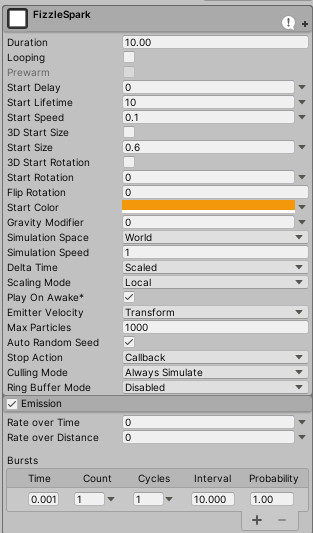 atomic magnet
is the burst component just useless???
I dont understand why I cannot get it to play no matter what I do
hearty flare
I mean, create a new particle system, turn off rate over time, looping, and add a burst, (change culling mode if it's off-screen)
it works fine
atomic magnet
why isnt this one working...
I even tried changing rate of time to 20
and its still not emitting anything
atomic magnet
I give up for now....
not finding any info online
no one here seems to know
nothing I try is working
warm torrent
atomic magnet
https://i.imgur.com/nHjDQTr.png
I am completely stumped on this... no matter wh...
According to these settings you're spawning one particle every 10 seconds, not something you need a burst for
Well without looping it just spawns one particle
atomic magnet
that is what I want actually
I just want one particle, but I want it to start instantly
I'm getting the collission events from the particle system, and that was working before, when the particles was actually coming out
but it just stopped working at some point and no matter what I do I cant get it to emit particles again
 ripe flame
Hello, I don't understand why my fresnel does nothing

When I go up my fresnel nothing happens and when I go down it does this ...

I'm supposed to get this, I don't understand where I went wrong...
 ripe flame
Well i guess it's because im using HDRP and the tuto is for URP, kekw . . .
warm torrent
ripe flame
Well i guess it's because im using HDRP and the tuto is for URP, kekw . . .
They're not in most cases so different that it breaks stuff, at least in that direction
Hard to read the screenshot but either way when in doubt you would test parts of the node network, such as does the fresnel node alone work when plugged to emission
...or to base color
warm torrent
@ripe flame iirc HDRP uses different units for intensity, so you need to increase the emission a lot depending on exposure
For an outdoor scene you might need to multiply it by a factor of 100000 or smth
ripe flame
uhh okok i try
not working in Hdrp, i try it in URP and it's ok 😦
Same thing here it is not the same nodes between HDRP and URP, I searched a little but I do not see an equivalent... @warm torrent

 half aurora
Anyone know of a way to create sword trails that follow the local rotation of the parent object during its path? The Particle System trails and Trail Renderer has billboarding which I can't seem to disable (if there IS a way to disable it, please let me know"
 magic kraken
How do I make my particles glow?
I have my emissive material already set up, but when I apply it to things it doesn't seem to make it glow:

This is a 2D game
half aurora
magic kraken
This is a 2D game
Try adding a Post Processing effect and then add bloom
magic kraken
half aurora
Try adding a Post Processing effect and then add bloom
post processing effect to what exactly (sorry new to unity)
half aurora
magic kraken
post processing effect to what exactly (sorry new to unity)
If you're using URP, https://m.youtube.com/watch?v=oXNy9mszKxw&t=80s
If standard,
https://m.youtube.com/watch?v=_PzYAbPpK8k&t=226s

Let's explore the New Post Processing System in Unity's Universal Render Pipeline(URP).
▬▬▬▬▬▬▬▬▬▬▬▬▬▬▬▬▬▬▬▬
👉Note : In Unity 2019.3 the LWRP or Lightweight Render Pipeline is renamed to Universal Render pipeline (URP) along with lots of graphical and performance improvements.
👉Note : This video is mainly for Unity 2019.3 or newer version b...

In this video we take a look at how to use the Post-Processing Stack in Unity to drastically improve the look of our visuals in our project.
We take a look at how to get started using post-processing and work to create a realistic auto-exposure effect.
We also take a look at how to use the depth of field effect to create a tilt-shift effect on...
magic kraken
thanks
astral niche
slate radish
change the color alpha on the color over lifetime gradient
this doesn't seem to work on the material emissive colour
slate radish
@astral niche pretty sure emission doesn't have an alpha component
slate radish
yep
hidden canyon
hidden canyon
My particle system doesn't stop unchecked looping and on awake plss help once I ...
Plss help
prime dome
half aurora
If you're using URP, https://m.youtube.com/watch?v=oXNy9mszKxw&t=80s
If standar...
URP > Normal
 opaque knoll
Anyone tried Effekseer? And tried to import to unity?
https://github.com/effekseer/EffekseerForUnity

GitHub
Contribute to effekseer/EffekseerForUnity development by creating an account on GitHub.
 astral stump
Hey guys, I am trying to make a particle effect in which particles explode outwards and then fall to the ground. I am trying to use force over lifetime but that changes the orientation too quickly. Is there a component I am missing that would be along the lines of change force after a certain amount of time?
warm torrent
There are many ways such as gravity, velocity- and force over lifetime
warm torrent
astral stump
Hey guys, I am trying to make a particle effect in which particles explode outwa...
which you can all set to type "curve" so you can make their influence increase gradually
astral stump
🤦♂️ I did not see the option curve on force over lifetime... Thanks!
warm torrent
astral stump
🤦♂️ I did not see the option curve on force over lifetime... Thanks!
It was a game changer when I realised that almost anything can be set to curve ^^
astral stump
A literal game changer in deed, it works just like I want it now thank you!!
 sharp ridge

Hi I cant get particles to play when the first of 2 health bars of the object has been depleted.
Theres meant to be smoke-like particles emitting from the building top
random particles puff out sometimes, its almost like its trying to emit, but it ooks nothing like the simulation
fluid lagoon
sharp ridge
random particles puff out sometimes, its almost like its trying to emit, but it ...
running Play() every frame will restart it every frame
sharp ridge
its okay I did it as instantiate prefab
sharp ridge
fluid lagoon
running Play() every frame will restart it every frame
dont know if you can help with my other post in the 'physics' thread
there is a slight issue ive run into, it instantiates hundreds of clones, i guess i need to destroy them in the script?
atomic magnet
Hey, having trouble figuring out how to do what I want to do this this particle emitter
https://gfycat.com/FantasticHauntingHeron

I want the particles to quickly burst out of the center, but lose their momentum quickly
force over lifetime isn't quite accomplishing this
effectivley, I want the particles to have high drag
how can I accomplish this?
oh wait I got it actually, didnt notice Velocity over lifetime
astral stump
Hey guys, any Idea why my trails disappear when I set the colour to black but work fine with every other colour?
warm torrent
atomic magnet
I want the particles to quickly burst out of the center, but lose their momentum...
It could be enough to add high start speed with a high-ish drag
But you can also set drag/ speed limit to curve to have it start low but ramp up over duration
 vapid wagon
Hi everyone, is there any tutorials that you can recommend me to learn of to do some Fx using unity and Houdini ? I would love to learn it but I can't find any tutorial to do it.
atomic magnet
warm torrent
It could be enough to add high start speed with a high-ish drag
there is nowhere to set drag on particles, thats not a thing afaik
atomic magnet
aah I guess in 2021 onward
I'm on 2019 still
in 2019 that tab is called Velocity over time
which is the same thing I guess, its just more aptly labelled in newer versions of unity
warm torrent
atomic magnet
in 2019 that tab is called `Velocity over time`
which is the same thing I guess,...
Dampen was added to Limit Velocity Over Lifetime was added in unity 2017.2. so I think you're good on that
..possibly even earlier than that but other stuff changed around it
Anyway you do have it somewhere in there
fast fossil
so, I have collisions on in the particle system. I set it to collide only with gameobject with LabEq layer, but this happens... Anyone knows why?
warm torrent
fast fossil
so, I have collisions on in the particle system. I set it to collide only with g...
You may have to be more specific what "this" is
But anyway the Collides With says "Everything" so it's probably not restricted to one layer as you believe
fast fossil
okay so the fact that the particle system is on the gameobject with that layer itself could also be responsible for this effect, right?
yeah it partially solved the issue but

I dont want it to pass through
this

it would be great if it dispersed throught this plate
although I doubt this is possible
warm torrent
fast fossil
okay so the fact that the particle system is on the gameobject with that layer i...
I would guess not, every gameobject can select their own layer
The part that matters is that the object with the collider is on the correct layer and that the particle system specifically collides against that layer
But last I saw it was set to collide against everything
warm torrent
fast fossil
although I doubt this is possible
I don't know what the issue is currently but I can say it's definitely possible
 wicked yew
Hi ! I'm trying to use VFX Graph with an openGl Build but it seems to not work. I saw that it could be related to compute shader that is not supported by WebGL. Is there really no way to use VFX graph with open Gl ?
 grave scaffold
Hello guys, for some reason the trigger event block in the update particle node is missing
Anyone knows whats happening?
 grave scaffold
grave scaffold
grave scaffold
Needed to set it in Edit/Preference/visual effects and checking the first two boxes if anyone faces this problem
 twilit lagoon
Hi all, when I change the Rate of some VFX particles, say I slow them down to 10%, if I click away on some other object in the scene the speed goes back to 100%.. Is there a way to prevent this?

 umbral quarry
hi, when i add particlesytem.stop, nothing happen if i switch the toggle. If i just use particlesytem.play, it works when i click the button. but theres no way to stop the particles?

 rigid island
is there any way to get my particles to not have this terrible compression (or whatever it is) in game view?

in scene view it looks fine

 gloomy geyser
Hi I'm new to the particle system, could anyone tell me how to lower the radius of how far the particles go? Currently they explode from the center and go outwards way too much.
 umbral quarry
@gloomy geyser have you lowered the lifetime of the particles? You can also adjust the speed at which they are generated, having a random range between two values will give a more natural effect!
gloomy geyser
umbral quarry
<@273162750161715203> have you lowered the lifetime of the particles? You can al...
hey thanks I was playing around with the particle system for a few hours and I got it working how I want it now, the random range in speed definitely helped a lot
twilit lagoon
anyone has experience with KLAK, and vfx graph? I want to modify other properties that I promoted in the vfx graph but it won't show up, only the default playRate
 royal tulip
https://streamable.com/jvdcg8 im using a particle system with Trails ticked.
the trails have to have World Space ticked in order for it to actually do anything.
i only want the trails to have the forces of its own movement. but my camera / player is affecting it also. how do i stop this from happening?

(please @ me when replying <3)
 daring zephyr
I have some vfx particles that emit from a gameobject childed to a projectile. I want the particles to persist after the projectile is destroyed, without keeping the gameobject in memory (or at least remove it after all current particles have despawned). How can I do this?
wicked yew
@daring zephyr Maybe you find out but you can detach the child just before destroying the parent object
shut cliff
@royal tulip Maybe not the answer you're looking for.. But couldn't you disable the particle system when the sword is back in idle state?
prime dome
how can i spawn ALL particles at the time? normally they are spawning slowly
royal tulip
shut cliff
<@272528080826793985> Maybe not the answer you're looking for.. But couldn't yo...
Yep I already do this. The particles are only active if I'm swinging the sword
warm torrent
@royal tulip Did you look into simulation space: custom
Sounds like using the camera object as your custom simulation space would be exactly the ticket
royal tulip
warm torrent
<@272528080826793985> Did you look into simulation space: custom
Yea. Its because they are the trail node. Trail node has to be set to world space or else they don't do anything when swinging
warm torrent
royal tulip
Yea. Its because they are the trail node. Trail node has to be set to world spac...
If only we had a custom space field for trails as well
Looks like others have run into a dead end doing this exact things 😓
royal tulip
warm torrent
If only we had a custom space field for trails as well
Looks like others have r...
I would of thought this is a common functionality, No idea how it was missed
Do you know of any alternitives? I've googled but i cannot find any forums on it, i guess im just using the wrong keywords
warm torrent
royal tulip
Do you know of any alternitives? I've googled but i cannot find any forums on it...
Which offers what looks to be a very limited workaround
Weird, seems like custom space would've been incredibly easy to implement
Both particle systems and trail renderers seem shockingly lackluster for implementing sword trails
I guess that's why Ara Trails still sells for $30
twilit lagoon
I was wondering if you any of you could perhaps help me. I'm struggling to hook values coming from OSC Klak into vfxgraph exposed parameters. I only see the built-in "playRate" in the list. Is it not possible to bind arbitrary parameters? Any help is really appreciated.
 royal tulip
warm torrent
Both particle systems and trail renderers seem shockingly lackluster for impleme...
royal tulip
warm torrent
Both particle systems and trail renderers seem shockingly lackluster for impleme...
👀 i will look at this
daring zephyr
wicked yew
<@192413389912276993> Maybe you find out but you can detach the child just befor...
the problem is, I dont know how to delete the child when all of the current particles have dissapeared (also how to stop the child from spawning particles once unchilded)
daring zephyr
I was able to achieve something I wanted with another script attatched to the vfx object childed to the projectile:

I simply unchild the gameobject when the projectile collides, and use vfx.Stop(); to keep it from spawning anything else
 uneven magnet
ok I have this particle system and all I want to do is change the alpha of all the particles based on another parameter (not the lifetime)

and I can't figure it out
for the life of me
uneven magnet
anyone?
warm torrent
uneven magnet
ok I have this particle system and *all* I want to do is change the alpha of all...
As the first thing you probably should use a particle shader for the particle material
What is the "another parameter"?
uneven magnet
I've figured it out!
uneven magnet
warm torrent
What is the "another parameter"?
it was time btw
 elder widget
rotund sedge
elder widget
rotund sedge
hey, anyone know of any swarm or locust insect like particle sprite sheets? i wanna make an optimized swarm looking kind of particle effect but cant find a good texture sheet for it
dapper gulch
is there a way to swap between 2 texture 2d variables in vfx graph?

I tried running them through a branch with a bool but it doesn't let me haha. My current solution is just having 2 separate spawn systems with branches that choose which to use, but this looks super messy and I feel like there is probably a better way to do this lol. Any thoughts?
 desert saffron



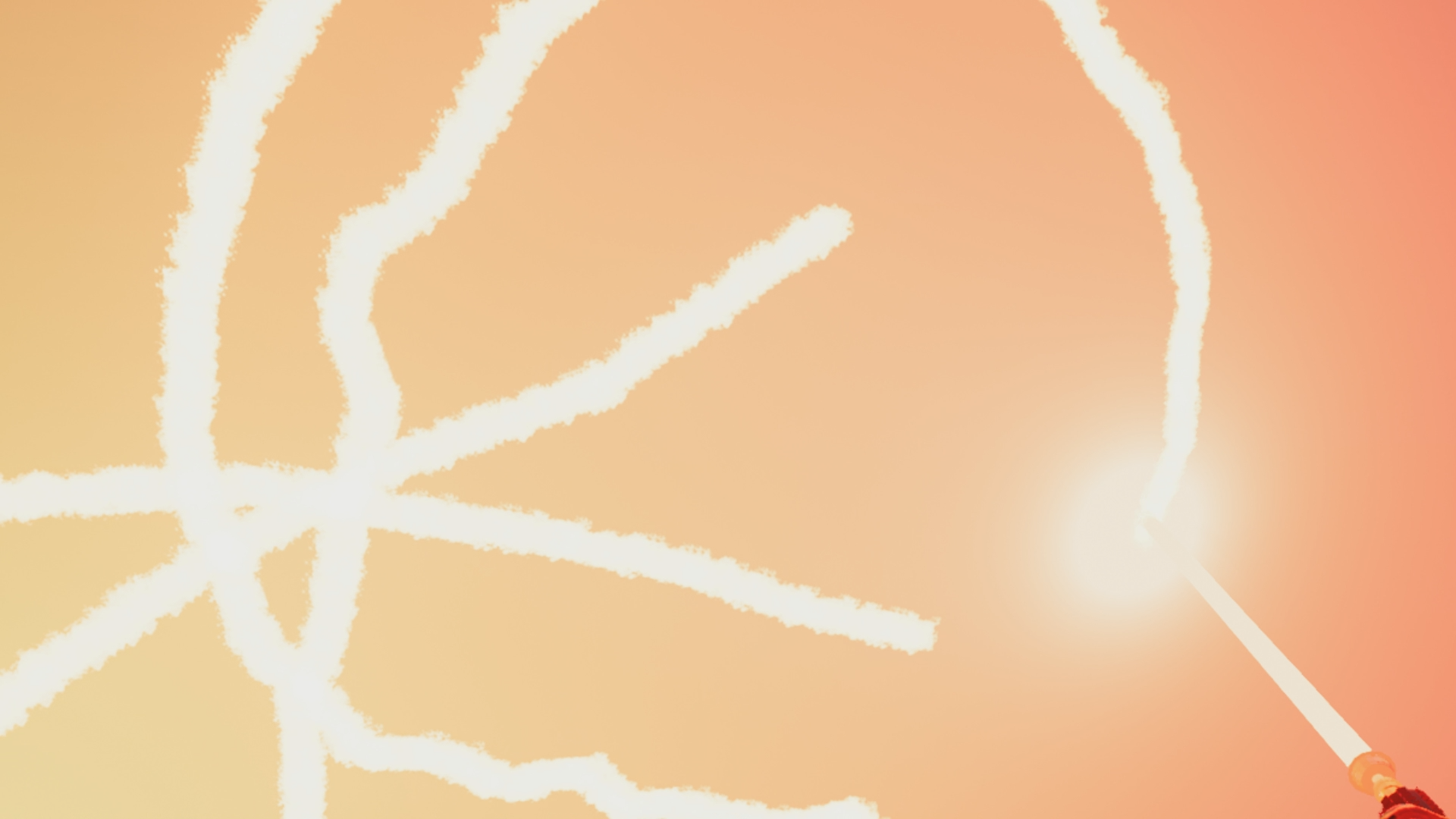
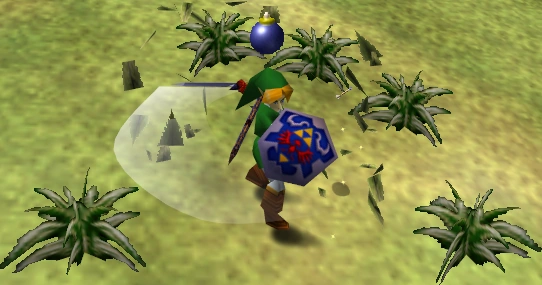


 opal star
dapper gulch
I tried running them through a branch with a bool but it doesn't let me haha. My...
opal star
dapper gulch
I tried running them through a branch with a bool but it doesn't let me haha. My...
You can create a flipbook texture from the two sprites and just hard set the frame to 0 or 1 when you want to swap
prime dome
when creating a GPU spawn event from a trigger event on die, is it possible for that gpu spawn event to have a spawn burst or is that not possible?
dapper gulch
opal star
You can create a flipbook texture from the two sprites and just hard set the fra...
Yo that actually sounds like a nice workaround! Tysm!
dapper gulch
prime dome
when creating a GPU spawn event from a trigger event on die, is it possible for ...
Single burst or periodic?
If you need a single burst just adjust the amount of particles it spawns from the on trigger die node. If you need it to burst periodically after I'm not sure how to do that cleanly and can only think of janky solutions
prime dome
i just settled with single set spawning with inherited positions for this, it works pretty well
 high gorge
really nooby question here. i am currently trying to use some of the particles from unitys particle collection. in game view it works fine but in scene view, where i need to see it to place it correctly, it is invisible
high gorge
my own work fine
 undone garden
so im working on some explosions and I use this setup to make the particles only spread out on the x and z axis. This works if the particle emitter it self doesnt rotate. If I rotate it, the particles go really messy and i dont know why. Does anyone know how to fix this ?

no rotation


with 45 degrees on the y axis
 tawny crystal
Hi, I am having trouble with the particle system not showing properly (IDK what I done wrong)
 half roost
Hi guys, is there a way to make VFX graph work for web gl?
I am trying to create particle effects to launch on our website
inner topaz
half roost
Hi guys, is there a way to make VFX graph work for web gl?
The VFX graph Requires Compute shaders to work and Webgl does not support it in the current browsers without some command line options so even if unity would support it it will not work for any user of your website
half roost
inner topaz
The VFX graph Requires Compute shaders to work and Webgl does not support it in ...
Thank you for the reply!
dapper gulch
How would I go about scaling the life of particles over the total active time of a vfx graph? Like when the event is first started I want the particles to last 1 second, but when the event is 5 seconds old I want the new particles that are being spawned to last for 3 seconds. Any thoughts?
 tawdry juniper
is it possible to get the particle index in vfx ?
also is it possible to store/retrieve the starting value of a property (eg velocity) for each particle?
*found particle id
surreal elk
tawdry juniper
also is it possible to store/retrieve the starting value of a property (eg veloc...
Use the block "Set Custom Attribute" then modify attribute name & type in Inspector. You can access the attribute by using the operator "Get Custom Attribute". Remember to enter the same name & type.
 dim siren
Just made some fireflies using the partcle system, but how do I make them actually glow?
this is for a 2D game btw
warm torrent
dim siren
Just made some fireflies using the partcle system, but how do I make them actual...
Bloom post processing is used to make bright objects glow, but if you just want the fireflies to shine you can give them a glowy sprite, either as a one-particle sub-emitter or add it directly into the texture
 cloud zealot
Does anybody know how I can add, ground marks, in my case, trails that appear on the ground from tank tracks? like the ones in Wii Play - Tanks
prime ginkgo
is it possible to make a mesh trail on particles?
warm torrent
prime ginkgo
is it possible to make a mesh trail on particles?
Depends what you mean
Particle trails are meshes, technically, but you there are limitations to what you can do with them
small dock
You wouldn't think a randomly generated particle system maker would be good, but every other one is good and every other one past that is great: https://www.youtube.com/watch?v=M_0Chh8H0hU

Proof of Achievements no other gamer has: #1 world ladder Starcraft #1 World ladder Broodwar, #1 World ladder Warcraft3 at 200-0, first to 1500 wins Warcraft3, #1 World Diablo2 Hardcore experience ladder, #1 score Pittsburgh without Turtle Tip 1989 Nintendo World Championships, #1 world C&C3, #1 World SC2v2/l https://www.crystalfighter.com/achie...
clear spruce
small dock
You wouldn't think a randomly generated particle system maker would be good, but...
They may look cool but what is the usecase of randomly generated effects? Usually you have very specific effect in mind when designing vfx for a game.
small dock
clear spruce
They may look cool but what is the usecase of randomly generated effects? Usuall...
There's two ways to make a game. One way is to design your game up front then demand assets and this is difficult. The other way is to take what you got, and cook with the ingredients in your kitchen(aka download free assets off the Asset Store and see what you got). I made an actual 10v10 functional 3d starfighter MOBA right after only doing rollaball tutorial first learning Unity by cooking with the ingredients in my kitchen... Yes, 2 weeks, fully functional multiplayer space MOBA, but couldn't find beta testers. So you sit around gathering these particle effects, and even people with no skill can do it. A guy who never used Unity before hung out at my place, was awe struck by this program and was literally harvesting professional quality particle effects in a minute. I'm still awe struck by it every time I use it. Kids 4 and above can be helping your game and learning Unity. After a little bit of time of your appointed particle effect harvester(maybe yourself), you will have an assembly of particle effects, much like your own personal asset store cache, which you can then cook with those ingredients. Also they're in particle effect format which means you can modify ones close to what you might want, but never been able to imagine it.
small dock
The fact people in this forum would be biased towards experts in the field means... "OH I COULD MAKE THAT PARTICLE EFFECT BY HAND". Sure, but could your little brother, your aunt, your grandmother? No, they're not helping you make your game now, but they could be and they'd love it since it is fun to use. Its like marketing fix a flat to people who like changing tires, "Fixaflat, who would use that? We all know how to change tires here." This is a huge idea brainstorm product too for those who are professional... Since it throws randomness into everything, you'll see particle effects maybe you couldn't imagine up front, but once you see something cool and new, you can then polish it up with your professional skills.
rotund sedge
does anyone know how to do mesh animated particles? basically having say a bug model that is show from a particle system and has a slithering animation for it? or walking/running
opal star
Well since you can have skinned meshes you will have to do vertex animation on the mesh from a shader. For a slither you can get away with a sin wave "waving" the mesh ,but for a more complee animation like a walk you will need to resesrch how to bake vertex animation textures and use that
 plucky path
Hey Im making this waterfall, though whenever it intersects with my terrain it looks very weird like this 😦 . Can anyone help please?
 warm torrent
plucky path
Hey Im making this waterfall, though whenever it intersects with my terrain it l...
warm torrent
plucky path
Hey Im making this waterfall, though whenever it intersects with my terrain it l...
There's a "soft particles" option ...somewhere
in the particle material I think
plucky path
warm torrent
There's a "soft particles" option ...somewhere
in the particle material I think
I couldn't find it anywhere
warm torrent
Google?
plucky path
I saw that option in a tutorial as well, though it didn't show in my material options
Im using urp btw
warm torrent
plucky path
Im using urp btw
URP particle shaders should have it
 plucky path
Let me check
plucky path
warm torrent
URP particle shaders should have it
Ah it's probably because Im using alpha blenderer shader instead of the particles one
 plucky path
warm torrent
URP particle shaders should have it
plucky path
warm torrent
URP particle shaders should have it
But still, even when I select that shader I can't find it

Ok I found it
Doesn't really help though
 warm torrent
Soft particles effect is based on depth texture
The render pipeline needs to have depth texture enabled, and logically I would assume it only works against surfaces which write to depth buffer
Which water won't do unless it's opaque
plucky path
Hey again. I found these trees online and wanted to use them in my project. I found that they also include a "mask" texture. What slot should I put this in? It looks like this...
 warm torrent
plucky path
Hey again. I found these trees online and wanted to use them in my project. I fo...
warm torrent
plucky path
Hey again. I found these trees online and wanted to use them in my project. I fo...
A mask texture could be used for potentially any number of things
Usually as metallic or smoothness mask but that doesn't look like either one of the two
warm torrent
I'm having a mandela effect moment
Absolutely convinced I used to have sub emitters with no motion stay attached to their parent particles using local space
Now I'm reading on forums that it's explicitly impossible
E.g. using mesh particles with a billboard particle attached to each
 analog locust
Hey everyone, is it possible to have particles spawn from a mesh but using the direction of face normals like this without scripting cuz I can't seem to figure it out in the particle editor

The whole idea is to use 1 custom made shape emitter particle as the outline of a map so that on the edges of this custom shape it spawns waves
a curve would do as well, doesn't have to be a mesh
There's a sphere option that spawns from a point
there's edge optionn that spawns from the edge
But I don't see a curve option in the particle editor?
ty
 quick glacier
analog locust
Hey everyone, is it possible to have particles spawn from a mesh but using the d...
quick glacier
analog locust
Hey everyone, is it possible to have particles spawn from a mesh but using the d...
You want something like this ?
 warm torrent
analog locust
Hey everyone, is it possible to have particles spawn from a mesh but using the d...
warm torrent
analog locust
Hey everyone, is it possible to have particles spawn from a mesh but using the d...
This is how it works when you use "mesh" or "mesh renderer" as the Shape
Meshes will by default emit in the normal direction
quick glacier
warm torrent
This is how it works when you use "mesh" or "mesh renderer" as the Shape
Meshes ...
Though I am using sprite and that is on the canvas. Why it creates a weird polygon like shape while my sprite was something like Archon's edges ?
Will that also be the case with mesh/mesh renderers ?
warm torrent
quick glacier
Will that also be the case with mesh/mesh renderers ?
Sorry, could you reiterate the question?
quick glacier
I mean this is my sprite but when I use sprite as a shape. It creates a polygons like that which is completely unrelated to the shape itself.
 warm torrent
quick glacier
I mean this is my sprite but when I use sprite as a shape. It creates a polygons...
warm torrent
quick glacier
I mean this is my sprite but when I use sprite as a shape. It creates a polygons...
This is a sprite, not a mesh
The particle system won't have any idea of the pixels on the sprite, so it uses the sprite outline which is an automatically generated mesh
You can view or edit the outline in sprite editor
quick glacier
Oh nice. So that wouldn't be the case with meshes right ?
warm torrent
Meshes work as-is, as long as they have existing normals data
quick glacier
Ok thanks 👍
 rugged willow
Hello! Does anyone know how to fix the problem with dissapearing particles when the emitter is out of view? Made it in the VFX graph

For some reason when I just create a Particle system (non VFX graph) it doesn't have this problem
Was looking on Google everywhere, but no proper solution
rugged willow
warm torrent
<https://docs.unity3d.com/Packages/com.unity.visualeffectgraph@12.1/manual/visua...
Thank you so much, it worked! Dunno why Google showed dozens of other useless articles, but not this one
analog locust
quick glacier
You want something like this ?
Hey thanks for taking the time to help!
I'm not sure exactly what the behaviour of the screenshotted system is
The idea is not that I have an irregular shape of emission but rather multiple emissions from one mesh
driven by the difference in direction from angle
here's a direct example of what I want to achieve


red being the mesh/ curve emitter whatever
white being the particles
and their respective direction
warm torrent
analog locust
red being the mesh/ curve emitter whatever
You need a mesh in that shape, since there's no curve emitter
analog locust
the problem with the mesh is that it just uses the mesh as a volume and doesn't look at individual faces as emitters
warm torrent
Quite on the contrary
You can choose vertex/edge/triangle to be the emissive part, in normal direction
Using a mesh as a volume is not one of the options at all
A mesh that's just an edge doesn't have any volume anyway
VFX probably can also use meshes as volumes but I assume you're talking about the particle system
analog locust

@warm torrent
here's my mesh
angled
waves spawn from it just using the volume
warm torrent
analog locust
angled
And where are the normals pointing to?
analog locust

where they should be
there's a allign to direction option in the particle system but when I tick it the waves just disappear >.>
warm torrent
@analog locust I can verify that the particles are emitted in normal direction
A one sided mesh wouldn't even have volume to emit from

If you want to align the wave sprites to also face away/towards the shoreline, that's a separate challenge
warm torrent
analog locust
doing what you have on that screenshot is already a challenge enough..
If the particles are not being emitted in normal direction, then you must have added randomization somewhere or the normals are not correct
analog locust
.> I tried on a new version of unity and it works
our project is unity v 2019 >.>
it still doesn't rotate the waves in the direction,just emits them in the proper one but
I`ll drop the idea or figure something else out I guess
warm torrent
I don't think there's a way to rotate the particles without some tricks, since horizontal billboard doesn't allow rotation
But meshes do
@analog locust you can have the one I made to test
It wasn't so tricky when using a quad mesh instead of billboards
URP shaders
 gentle gazelle
I have a particle system in my scene that plays when something touches the box collider on its parent. I then set a cube up so that it touches the box collider every 2 seconds, playing the particle system.
99% of the time this is perfectly fine, but I found out that if I slow down the speed so it touches it slower, it actually destroys the particle system right BEFORE the collider is touched the second time. I don't destroy anything in any of my scripts anywhere.
Does anyone have any ideas?
warm torrent
gentle gazelle
I have a particle system in my scene that plays when something touches the box c...
Destroys the whole particle system or resets the particles when you play it again? 🤔
gentle gazelle
it destroys the entire particle system and I get a missingreferenceexception
warm torrent
gentle gazelle
it destroys the entire particle system and I get a missingreferenceexception
A particle system can destroy itself using "stop action: destroy" but not sure what else could be doing it
gentle gazelle
I think thats it!
How does that work?
warm torrent
gentle gazelle
I think thats it!
How does that work?
When all the particles belonging to the system have finished, it is possible to make the system perform an action. A system is determined to have stopped when all its particles have died, and its age has exceeded its Duration. For looping systems, this only happens if the system is stopped via script.
Destroy destroys the whole gameobject
gentle gazelle
That was it! Thank you so much Spazi!
It would have taken me forever to figure that out.
 dark kestrel
Hey for VFX graph is there a way to set the render queue? I have an opaque shape but I want to render it at the same time as transparents. Similar to when you set the render queue per material.
 mint rampart
Hey guys so I have this particle system that I want to create where if you shoot one of its particles, it destroys the particle you shot. So far, I have it successfully destroyed these particles with a projectile, but when I set the projectile's collider type to a trigger(The type that I want), collisions are no longer registered. Is there something else I need to change? I have a rigidbody2D on my projectile
 fallow temple
when I turn on canvas, particle system is blocked. how do i make them show up?
 mint rampart
I remember having an issue with the canvas not rendering particles because "render mode" option on the canvas. I think I had to put it as screen-space camera for it to work
prime dome
hey I have 3 particle systems I want to combine into 1, is there a good way to do that?
rugged willow
Heya! A simple question, but again having troubles finding a particular tutorial. I want to emit particles in this kind of shape in VFX graph. Using a standard particle system for example

Want them to spread to sides like that. But with VFX graph they just go upwards, even if I select circle shape
ah, actually I think I found

This is a good way to do it, right?
 sour canopy
So, i have a quick question. I've tried doing this with both the normal particle system and vfx graph but i can't seem to get it exactly as i want. So i have the system inside the player prefab. I want it to cast a mesh particle whenever I do a specific action, however, I wanted it to be cast into the world in the direction of the player and have it stay "static" in both position and rotation after being casted in the same direction as they were casted.
However this is proving harder then i though. Whenever i do it with the particle system, it will always try to either face the particle system/player after being casted or it will simply not rotate to the proper direction that the player is facing and always point north.
With the vfx graph i seem to have found the same issue where it will face always north and never get the angle of the player. I've even tried to use the Get Angle, but since the system is parented to the player, its rotation will always be 0,0,0. So it will always cast it with the rotation 0,0,0 (at least that's what i think is happening)
Anyone got any insight on how i might be able to fix that
 fringe temple
hey folks, I'm having an issue where whenever a mesh particle effect plays, it shows a single instance of its mesh at world-space 0, 0, 0 (although the particle effect itself plays at its correct position). The single mesh appears/disappears whenever the particle effect starts/stops. The setup on the particle system is:
• render mode: mesh
• shader: unity/particles/standard unlit
Any ideas why this happens?