#✨┃vfx-and-particles
1 messages · Page 11 of 1
 ashen robin
 jaunty tree
How do starting color and color over lifetime in shuriken affect each other? I always thought color over lifetime just completely overwrites it, but I just saw a tutorial where the person uses both settings
ashen robin
I specifically keep track of the index myself by keeping them in a list
ashen robin
jaunty tree
How do starting color and color over lifetime in shuriken affect each other? I a...
if it's over a gradient I'd expect it to overwrite but if colors are from 0 to 1 then I could see it working
jaunty tree
what do you mean with colors from 0 to 1?
its from this tutorial https://www.youtube.com/watch?v=J_EiYk2eynM&t=222s

Join this channel to get access to perks:
https://www.youtube.com/channel/UCUqIetx0scoe79qZTovn9BA/join
Warning: old Unity version, and I am using paid plugins (ShaderForge, which you should absolutely buy someday anyway, and BetterTrails, which is my favorite trails plugin).
This second episode explains how to make a very simple sparks partic...
and that guy is a riot game vfx guy, so I imagine he knows what he is doing
he sets color over lifetime as well as a random starting color sometimes ... maybe they are multiplied or added or something?
 warm torrent
jaunty tree
How do starting color and color over lifetime in shuriken affect each other? I a...
warm torrent
jaunty tree
How do starting color and color over lifetime in shuriken affect each other? I a...
Multiplied, like all color affecting modules
jaunty tree
warm torrent
Multiplied, like all color affecting modules
both of them affect the vertex color of the shader right?
what do you mean by all color affecting modules?
in the particle system or in general?
do you mean that always when I have two colors, I'll get multiply?
also do they take the square root after they multiply or just multiply (which would darken it right?)
warm torrent
jaunty tree
both of them affect the vertex color of the shader right?
Yes
Each part of Shuriken/PS that can be enabled to affect particle properties is a "module"
I'm quite sure every color-affecting module's result is multiplied together for the final result without any other adjustments
So if one of them sets color or alpha to zero, there's no coming back
jaunty tree
Yup, ok thank you!
Ok, and multiply means res = a * b, not res = sqrt(a * b) right?
or res = nth-root(a_1 * a_2 * ... * a_n)
warm torrent
jaunty tree
or res = nth-root(a_1 * a_2 * ... * a_n)
What would be the practical result of these?
jaunty tree
warm torrent
What would be the practical result of these?
so maybe the most straightforward and intuitive result is that a = sqrt(a * a), so if you have the same color twice, you just get that color, it's more what I expect of something that "combines" colors
whereas how it is if I combine a with a I get a darker version of it
warm torrent
The result is definitely darker than all the colors below white so I'm quite sure it's simple multiply
jaunty tree
ok yup, thank you! maybe one last question: it seems the particle shaders are mostly set to alpha-additive
is there a reason for this? it means that if you have many particles you will just get white right?
but yeah hmm maybe have to think about this
thanks for the help!
ashen robin
with PS you can probably get away with just alpha
unless it doesn't sort on a per particle basis
I'd expect it does though since it does have collisional modules
warm torrent
jaunty tree
ok yup, thank you! maybe one last question: it seems the particle shaders are mo...
The default particle shaders let you choose the type of blending
jaunty tree
ashen robin
with PS you can probably get away with just alpha
yes I was more thinking about the reason that many of the tutorials I have seen use additive
warm torrent
Up to your preference
jaunty tree
but then I thought I should maybe first read more tutorials which use other stuff and see how it looks to understand it
warm torrent
Additive acts more like "light", and has the advantage that the render order doesn't matter at all
 fiery robin
ashen robin
they do spawnindex mod total
fiery robin
ashen robin
they do spawnindex mod total
I think they just do that in case their spawnpoints array is higher than the number of particles
it would be the same length for me so it won't do anything
ashen robin
fiery robin
I think they just do that in case their spawnpoints array is higher than the num...
Just to test, try setting the position once in initialize instead of update
been a minute since I touched this stuff but just doing it by current index breaks my particles
ashen robin
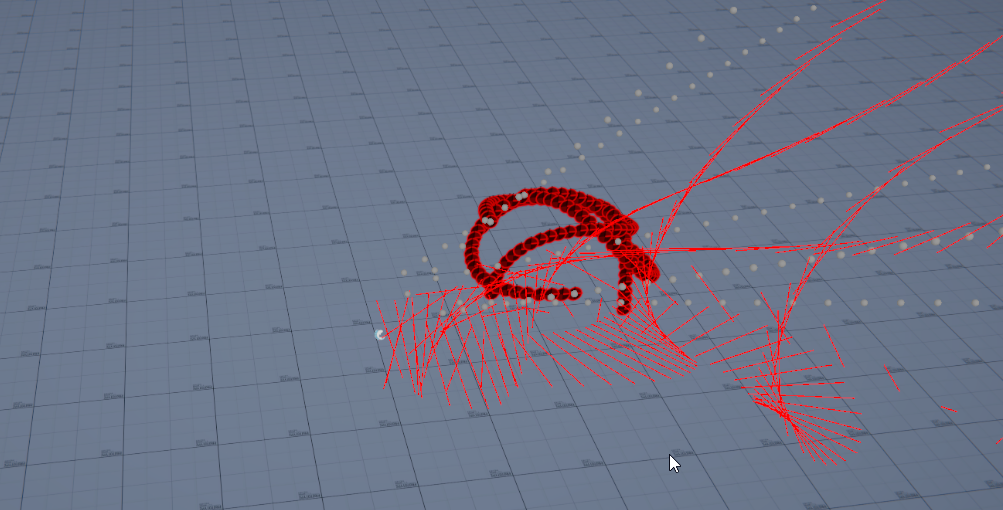
https://i.imgur.com/nvZghil.png
Using current index only updates so many of my particles (should be matching with the white spheres) some are wrongly positioned and sometimes it stops even producing particles
 fiery robin
well it spawns every particle I'm pretty sure but all of them at world center
ashen robin
if you don't really need to change data in update btw, you can just use the custom events
aka the direct link feature
ashen robin
same page^
I use the buffer stuff to change values in update, but otherwise you can probably just feed it through initialize without them
ashen robin
fiery robin
well it spawns every particle I'm pretty sure but all of them at world center
it defaults to 0 if not position is set but it'll still spawn them, so I think the problem does stem from reading wrong buffer values (or non existing indices)
fiery robin
oh yeah I remember trying this before, and calling the event for every particle, but I don't think that's correct
I remember reading somewhere that you can't call the same event twice in one frame or something
ashen robin
they added support for that
Unity Forum
Hello,
I would like to follow up on this thread and I think it’s more appropriate to centralize a message in a dedicated post.
We have some updates...


https://i.imgur.com/6i3MOF9.png
Storing the indices myself and sending them in with the buffer works for me
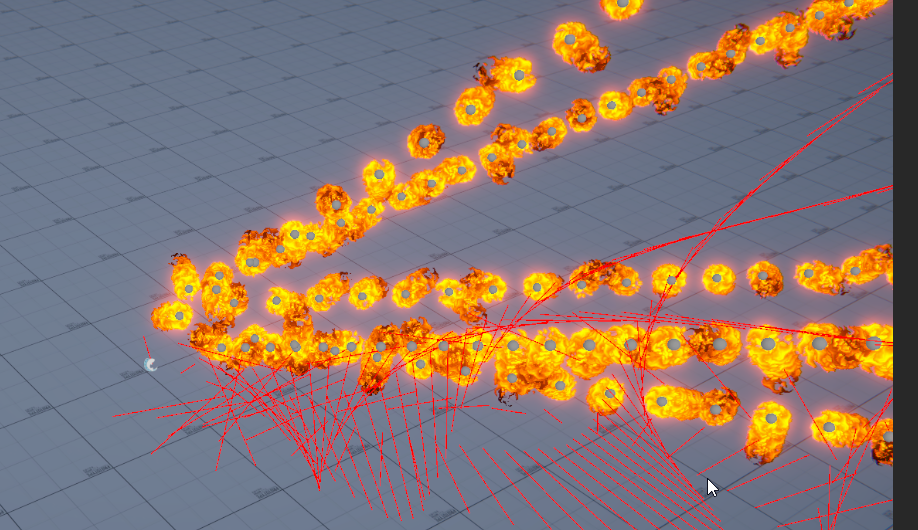
this way you can be sure you're always dealing with the same particle (not that this is the only way I can get it to work, but tracking the actual particle id had proven to be a problem for me in other scenarios)
jaunty tree
I am trying to replicate a very simple trail renderer in vfx graph (is that stupid?). This is my attempt until now:

the shader I am using is also set to additive blending mode, and works in other contexts (for the trail renderer, and the shuriken particle system for example)
however here it renders fully transparent, I see nothing
fiery robin
ashen robin
https://i.imgur.com/6i3MOF9.png
Storing the indices myself and sending them in w...
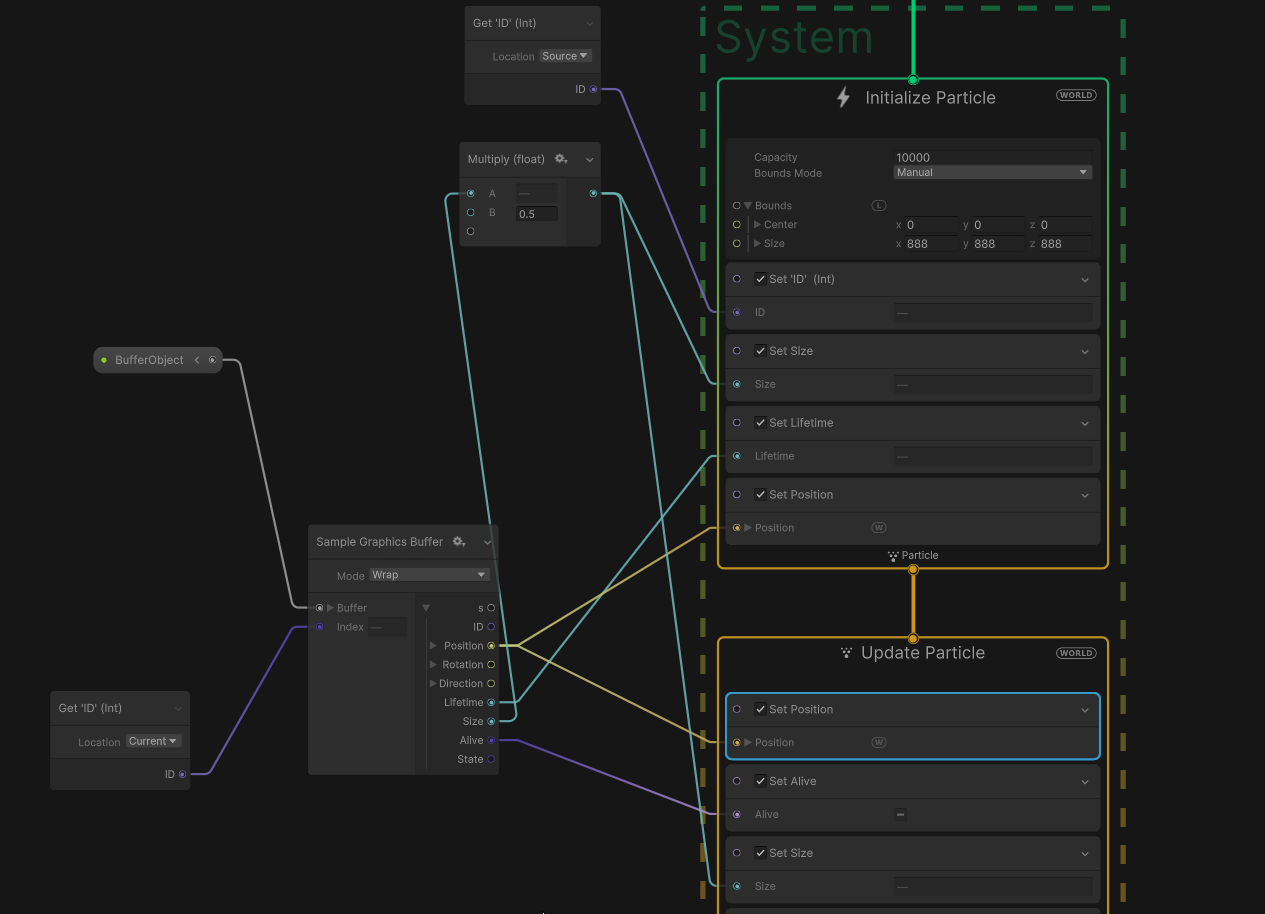
it works with by sending the event for each position, but it's really slow, how exactly do you store and access the indices in the graph?
 ashen robin
fiery robin
it works with by sending the event for each position, but it's really slow, how ...
ashen robin
fiery robin
it works with by sending the event for each position, but it's really slow, how ...
https://hatebin.com/jmhjdgqkhk
Here's my current script (still playing around with ideas) but it works for the most part
AbilityObject is the object of data that I keep track of
but as you can see I use hashsets to keep track of everything
iterate over them every update and update the buffers
ashen robin
jaunty tree
I am trying to replicate a very simple trail renderer in vfx graph (is that stup...
Usually you control the blending inside of the shader itself, so I'm not sure why you can select the blending on the interface here
fiery robin
so you basically have a single particle per ability?
 ashen robin
fiery robin
so you basically have a single particle per ability?
ashen robin
fiery robin
so you basically have a single particle per ability?
Yeah, for the most part. This is how I get around having no collisional control for particles; basically control the movement on the CPU side
and do callbacks when it does collide
it can be expensive, but not any more then say shuriken
you can always just not update the buffers too if you just care about instantiation of values
fiery robin
Yeah I know
ashen robin
but I actually do both here (direct link into buffer updates)
fiery robin
Basically the end goal is to just instantiate particles at like 200k positions, and then handle it from there
So I'm not sure if your approach would get me to that
jaunty tree
is the trail renderer doing stuff on the GPU or CPU (creating the mesh etc)?
ashen robin
all gpu
jaunty tree
or to ask otherwise: if I replicate the functionality in vfx graph, can I hope to get a more performant trail renderer?
ah ok
ashen robin
oh you mean not on the vfx
the normal trail render populates mesh data on the cpu side as opposed to the vfx graph where the data is defined by the initialization and calculated inside (continous readback vs set once basically)
jaunty tree
yes, ok then I need to get that shader working somehow
but changing blend mode also changes stuff ...
for example going to alpha I get a black trail (also not what I want)
If I do Set Color in the vfx graph, what color does it set? Vertex color?
ashen robin
jaunty tree
If I do `Set Color` in the vfx graph, what color does it set? Vertex color?
right, you need to expose the shader in the shader graph if you want to modify its color
jaunty tree
ashen robin
right, you need to expose the shader in the shader graph if you want to modify i...
Expose the shader? You mean the color?
So it sets the shader property with the name 'Color', that's it?
ashen robin
in the shader graph you have to create a property
and connect into your nodes controlling color
jaunty tree
Ah so the set color are useless?
ashen robin
you can enable vertex color in the shader too
jaunty tree
Ah OK so they do do vertex color!
ashen robin
but usually I just use shader coloring
jaunty tree
That's OK i am using vertex color anyways
ashen robin
jaunty tree
ashen robin
https://docs.unity3d.com/Packages/com.unity.shadergraph@6.9/manual/Vertex-Color-...
Yup I know the node! Thanks
I'll try again tomorrow
ashen robin
ah, yeah maybe I need to double check on that then. I'd assume it's using vertex coloring but now that I think about it, it could be just using a color buffer of new values
for the most part, I don't use set color in initialize if I am using a shader, and most that I would do with the graph (like curves) can be done in output with simple curves and such
warm torrent
I don't recall if VFX Graph uses vertex color or some other type of color property, but either way you can't write to that in the shader, as it's generated by the VFX
You can read it though, and use it to produce the final fragment output color
Because the VFX graph already procudes colors, you usually don't need to touch those in shader anyway
The exception is when you want to do some rather complex remapping to them, or use them for some non-color purposes
jaunty tree
warm torrent
I don't recall if VFX Graph uses vertex color or some other type of color proper...
But what does the Set Color do then?
How do I write shaders that make use of it?
checking the docs it just says "particle color" which is hard to understand haha
warm torrent
jaunty tree
But what does the `Set Color` do then?
VFX particles have "attributes" which are any type of per-particle data
Color is one of them and used for the display color by the default VFX shader
jaunty tree
Yes, I found a forum thread now
Ok so the default VFX Shader does something hacky to use the particle attribute, which I probably could only do in code, not in the shader graph right?
so for me I read the color attribute and feed it to the shader input
warm torrent
I haven't done it but at a glance it looks like VFX graph uses vertex streams to pass particle data to shader, just like Shuriken does
So, UV channels and maybe vertex color
jaunty tree
Ok, thanks. Yeah its not that I need to use the property so badly, I just wanted to understand how it works
Will expose color now and feed my attribute
Thank you!
warm torrent
Far as I know shader properties are per-shader, not per particle which is why vertex streams are used instead
jaunty tree
warm torrent
Far as I know shader properties are per-shader, not per particle which is why ve...
hmm but by doing Get Property(Color) or something like that I can make it per-particle or not?
ashen robin
warm torrent
Looks like vfx graph properties, just like shader properties are shared per-graph
ashen robin
You can modify them by sending them through custom event calls
only in the initialize context
warm torrent
ashen robin
You can modify them by sending them through custom event calls
Still, they won't be per-particle, even if they're easily readable from outside the system?
ashen robin
attributes you can modify per particle, but custom properties must be set in initialize and then be read in the output
some whacky thing about properties
warm torrent
Makes sense if they're CPU-side data attached to the asset
ashen robin
not exactly sure why the property data (if set by event) can only be read in the output though; this is why I use those buffer structs because you can read read the data sooner
though stuff like position and color can be set directly in the initialize, meaning you can pretty much use a single graph for a lot of different effects
such as fireball, blue fireball, green fireball ;)
warm torrent
I think the question was originally how to read per-particle attributes in a shader
ashen robin
Ah, you can't really read from the shader outside of the output context, but you can always modify its properties like using simple curves or other time modules
jaunty tree
Hmm if this is still about my question I think I have it answered now haha
ashen robin
jaunty tree
Hmm if this is still about my question I think I have it answered now haha
https://forum.unity.com/threads/how-use-vertex-colors-with-vfxgrapth.834481/
Ah, ok so you can grab it earlier from a sample mesh operator instead of the output
Unity Forum
I want to use the vertex alpha of the imported FBX Mesh.
 warm torrent
I expect it doesn't really matter "when" you read it
The particle simulation happens first and the shader rendering after anyway
ashen robin
otherwise you can pass the data via attributes using an event call
well, the thing with getting a lot of the information in the output context is that you wouldn't be able to send it to subsystems which is usually done in the update context
but other than the vertex coloring, yeah it wouldn't matter when the shader is read.
jaunty tree
Does anyone know why the particle strip is lacking behind here:

So these are two VFX effects:
- particle strip for the trail
- "head glow"
Both are initialized at position (0, 0, 0)
However, the head is always ahead a bit, instead of overlaying the trail
warm torrent
jaunty tree
So these are two VFX effects:
1. particle strip for the trail
2. "head glow"
Bot...
The tail begins at the center point of the head, so it seems to match
It seems that the texture you're using for the head is not center-aligned, but positioned towards one end of the quad
You could fix the offset in the texture itself, or also move the particle pivot to move the head part back a bit
jaunty tree
warm torrent
It seems that the texture you're using for the head is not center-aligned, but p...
I am quite sure the textures are more or less aligned ... they are differently stretched though. But that should not make such a difference should it?
these are the textures
ah sorry for tga
 warm torrent
It's not centered
jaunty tree
 warm torrent
So, move the pivot of the head particle or center of the head texture
jaunty tree
yes but they are kind of aligned to each other - the trails even are a bit "ahead" of the head
if anything, this should make the trails render in front of the head, not the other way around
and also not by such a huge distance anyways?
warm torrent
jaunty tree
yes but they are kind of aligned to each other - the trails even are a bit "ahea...
I don't quite understand
jaunty tree
Ah ok sorry
So the two pictures I just sent (the pngs which are rendered inline) are
- Head
- Trails
The trails actually even touch the right border of the image, so in some sense they should for sure be above the head, when both are rendered at the same position
I see a slight problem due to the stretching in the horizontal axis being different, but that should not make the trails render behind the head completely
which is the case in my image though
warm torrent
It will
jaunty tree
Hmm you're sure this doesn't have anything to do with the trails being a particle strip, while the head is a particle quad?
I thought it is maybe because the strip has some delay until the geometry is actually created
warm torrent
It has to do with it that trails / particle strips are attached by the edge of their texture, the particle quad is attached by its center
That combined by the offset baked into your head texture makes them seem disconnected
So, center the graphic of the head on its texture or alter the pivot of the particle quad accordingly
jaunty tree
warm torrent
It has to do with it that trails / particle strips are attached by the edge of t...
Ah, now I understood it! Thank you!
altering the pivot would be done via set position in the initialize context?
jaunty tree
is particle id just a uint counter that loops around or how does it work?
ok yes looks very much like thats what it is
 carmine bone
I have a particle system that has simulation world space and I move it over time, but it seems like it isn't evenly distributing the particle creation.

I've tried setting the max particles to a ridiculously high number but it still doesn't seem to impact it so not sure what else I should be looking at?

Even when I set the rate to a super high number, it still doesn't seem to evenly create the particles. There's always little lumps in between.
 jaunty tree
carmine bone
I have a particle system that has simulation world space and I move it over time...
jaunty tree
carmine bone
I have a particle system that has simulation world space and I move it over time...
maybe send a picture of your graph?
what does the red thing do? just move left and right at an even space, with the graph attached?
carmine bone
The red thing is just a random static object, sorry.
Here's the whole thing, but I've been editing values to try and get it to consistently emit the particles
 carmine bone
No worries.
jaunty tree
max particles is only twice your rate though, thats on purpose?
carmine bone
Well, I originally had the emission rate substantially lower
like I said, I've been tweaking values to try and get it to not skip, but originally it was around 50-150 range.
Even when I increase the max particles again, it still skips
 warm torrent
carmine bone
Even when I increase the max particles again, it still skips
warm torrent
carmine bone
Even when I increase the max particles again, it still skips
So, what does it report as your number of active particles?
carmine bone
So when I set it back to normal numbers (around 100 emission rate)

It gets to 100, but my max particles is still larger than this so...?
warm torrent
carmine bone
So when I set it back to normal numbers (around 100 emission rate)
How are you moving the particle system?
If you're dragging it with the mouse cursor in scene view, that'll be choppy regardless
carmine bone
I have a script attached to objects that are supposed to be a projectile that will move them over time when released.
Simple stuff just grabbing a rb, calculating the vector, normalizing it, and multiplying by speed desired.
warm torrent
carmine bone
Simple stuff just grabbing a rb, calculating the vector, normalizing it, and mul...
Ah, rigidbody
Try setting its interpolation mode to Interpolate
Also be sure to move it only by addforce, moveposition or with rb.velocity
I assume that's what speed means in this case but good to confirm
carmine bone
Ah, it seems to make it much more consistent.
Ty.
I'll play around with it and see if I can produce things properly but that immediately seems to help it not produce particles in patches any more.
warm torrent
carmine bone
I'll play around with it and see if I can produce things properly but that immed...
That points to how non-interpolated rigidbodies update their position only in each FixedUpdate timestep, which by default is only 50 times per second
carmine bone
Nice, thanks.
 limpid jolt
just started using the VFX Graph.. How do I make sure I render the graph on top of other mesh renderers?
I wrote a simple Unlit shader for the meshes

the trail is from the vfx graph
they are on the same gameobject is that the reason, sorting order doesnt work?
okay having them on different gameobject doesnt solve the issue
fixed it 😄
Enabled Depth Write in Shader graph and gave it a -1 sorting
limpid jolt
another doubt, when i spawn the object with the vfx graph it takes a while for desired state of vfx to play
i mean it starts slow for some reason?
what component do i add to start the vfx with lot of particles at initialization itself?
ashen robin
limpid jolt
what component do i add to start the vfx with lot of particles at initialization...
usually you use burst for that, and you can loop it too if you want
limpid jolt
oh okay ty 😄
ashen robin
really just mess around with the spawn context
there's a few extra options that appear on the editor when selecting the context too
limpid jolt

this the kind of effect im going for and periodic burst doesnt seem to be proper since it spawns multiple objects
of the texture at one time
@ashen robin got the above effect using Constant Spawn

and this is how it starts off the animation
ashen robin
You've got some size over time curve going?
or alpha overtime, ect
just remove those and maybe even the lifetime (or add something like a minute just in case)
 ashen robin
limpid jolt
ashen robin
limpid jolt
unless you want the glow to start out small, then you kinda need to adjust everything to compensate for your bullet speed and stuff
could also do multiple events to trigger different stages, but it's a pain in the butt
 ashen robin
particle systems pool their own objects
in this case, a bunch of buffers so you usually want to add some warming time instead of creating thousands of buffers in a single update cycle
jaunty tree
is one frame of dots synced up with one frame of the vfx graph? If I have a periodic burst with 0 delay, which spawns Count new particles, can I just set Count to n for one frame, and then get n new particles?
 light veldt
Set Position (Mesh) is not working with my imported meshes for some reason. It's working correctly with the Unity engine meshes (tested with capsule and cube), but not with my own meshes that I have in my Project.
Any idea why?
ashen robin
light veldt
Set Position (Mesh) is not working with my imported meshes for some reason. It's...
https://docs.unity3d.com/Packages/com.unity.visualeffectgraph@11.0/manual/Block-SetPosition(Mesh).html
There's some limitations with it at the bottom of the page
could also bake a point cache onto the mesh and use that if still a problem
 languid palm
is there a way to render a visual effect (vfx graph) infront of everything else in the scene?
ashen robin
languid palm
is there a way to render a visual effect (vfx graph) infront of everything else ...
How much infront are we talking about? Also 2D or 3D?
 torpid harness
anyone good with particle systems? I wanna make a falling leaves system like in the game "Muck" by Dani
warm torrent
torpid harness
anyone good with particle systems? I wanna make a falling leaves system like in ...
I can give you my full go ahead to make one
languid palm
ashen robin
How much infront are we talking about? Also 2D or 3D?
3d, in front of the ground to prevent clipping
 steady wedge
languid palm
3d, in front of the ground to prevent clipping
steady wedge
languid palm
3d, in front of the ground to prevent clipping
you could if (im not mistaken) render it on a extra layer thats infront
thats how i render my weapon in my game, so it doesnt clip into walls
warm torrent
languid palm
3d, in front of the ground to prevent clipping
Are you sure you want the particles in front of everything? That rarely works well in 3D space unless it's basically an overlay effect
warm torrent
languid palm
it did not work
There are many ways to force something render in front of other things, and they definitely do work
But the choice of best method may depend on other technical or practical constraints your scene may have
languid palm
warm torrent
Are you sure you want the particles in front of _everything_? That rarely works ...
it’s an overlay effect
languid palm
warm torrent
There are many ways to force something render in front of other things, and they...
what are some of the methods?
warm torrent
languid palm
what are some of the methods?
- Manually setting render queue
- Render objects feature if URP or Custom Pass if HDRP, though I've those used only for meshes, I think VFX Graph should work just as well
- Overlay camera if URP
languid palm
i will try these, thank you
warm torrent
languid palm
i will try these, thank you
The best method depends on what your needs are
Setting render queue might be kind of hacky but if you just need to do it for one object it should require least setup
Overlay cameras are URP only but give you all the power you expect when using a wholly new camera for them
Render objects gives you a lot of precise control over rendering but is the most technical one of them
 cloud stream
hey, can anyone tell me how to squish a particle like this


im trying to squish em
squishy
also im a complete noob
warm torrent
cloud stream
hey, can anyone tell me how to squish a particle like this
Is there a more detailed, perhaps animated view of this example?


 warm torrent
cloud stream
warm torrent
cloud stream
I'm quite sure the particles themselves aren't squashed, but that it's a texture that's drawn in an already squashed-out shape
In images 2 and 3 you see precisely the same shape
overlayed multiple times in 2
cloud stream
warm torrent
I'm quite sure the particles themselves aren't squashed, but that it's a texture...
well, to me it looks like its sumply a circle thats squashed on the surface of a sphere
warm torrent
cloud stream
well, to me it looks like its sumply a circle thats squashed on the surface of a...
It does look like it, but it seems to be made that way before getting to the particle system
Squashing the graphic itself is fairly easy
Distorting a particle spherically is fairly complex, and you can't do it with particles alone
They can only squash in width or height (or depth with 3D particles)
cloud stream
what if they are over the surface of the sphere and im just seeing them squished cause im looking at them from the side
warm torrent
cloud stream
what if they are over the surface of the sphere and im just seeing them squished...
It's possible to do it that way, by doing that part of the effect with a shader that distorts it spherically using math or projects it to a spherical mesh
Or using a whole render target camera for that part of the effect, which would let you use multiple particles but is really not a very scalable system
Easier to fake it with premade graphics, you can get far with flipbook animations
cloud stream
yeah but the assignment said that its really basic and i should be able to do it with a simple circle
and said i shouldent use shaders
warm torrent
cloud stream
and said i shouldent use shaders
So the particle is not actually distorting, but the texture is shaped like that to begin with
You won't get real spherical/circular distortions without doing something fancy and complex
cloud stream

i somehow think im missing something
cause i can do it pretty easy on my main engine
which is far less optimal than unity
and also
if in unity i set it to stretching bilbord
warm torrent
cloud stream
cause i can do it pretty easy on my main engine
What is your main engine and do what precisely
cloud stream
warm torrent
What is your main engine and do what precisely
roblox, i can add a simple stretch to the particle after its emited
cause, in unity u can use stretching bilbord to stretch a particle
so its logical if you can stretch it in a different direction right ?
warm torrent
cloud stream
cause, in unity u can use stretching bilbord to stretch a particle
The stretching that's possible is in width or height directions, this is likely true for roblox too
cloud stream
so how can i stretch it width wise
warm torrent
(There's also what's referred to as "shearing" which is a simple directional stretch inherited from a rotated parent transform, but it's not directly possible to do with particles) (and not even that can do any spherical distortions)
warm torrent
cloud stream
so how can i stretch it width wise
Could do stretched billboard and tweak length scale, it was called iirc
cloud stream
warm torrent
Could do stretched billboard and tweak length scale, it was called iirc
yeah but that only stretches it towards the center of the emmiter
warm torrent
cloud stream
yeah but that only stretches it towards the center of the emmiter
I think it controls the particle's length along its direction of motion
Which could be used to make the kind of scaling towards middle effect you seem to be after
From experince though I would say that will not look very good
One directional scaling starts feeling very rectangular when you try to make something circular out of it
Again, drawing the graphics as they appear is the best options here
cloud stream
 warm torrent
If you can link the tutorial I can take another look to try to confirm if my guess about them using premade circles seems wrong or not
cloud stream
warm torrent
If you can link the tutorial I can take another look to try to confirm if my gue...
not a tutorial, its an assignment
ashen robin
cloud stream
hey, can anyone tell me how to squish a particle like this
Try removing the minimum radius and increasing particle count. Could try the sphere too as further away particles will give the illusion of them being smaller
also the glow of these particles uses post processing and bloom which is another module you can toss on after so don't fret over the coloring
Unless you mean the outter particles, and if there's nothing on the system that warps it like that for you, open the material you are using and play around with the tiling and offset.
https://docs.unity3d.com/2022.1/Documentation/Manual/PartSysSizeOverLifeModule.html
Actually, Lifetime module has non-uniform scaling you can mess with

As for the orientation, I think facing towards the direction would be the idea assuming you can define the direction the particle travels from the pivot
maybe shape module related
languid palm
warm torrent
The best method depends on what your needs are
Setting render queue might be kin...
overlaying cameras seems to work pretty well, thank you 👍
torpid harness
warm torrent
I can give you my full go ahead to make one
wdym?
warm torrent
torpid harness
wdym?
A lot of us are good with particles, and the custom is that we'll try to help you out if you get stuck
But first you'll want to get started with the effect you want to make so you can get to that point
torpid harness
warm torrent
A lot of us are good with particles, and the custom is that we'll try to help yo...
alright then
 spark knot
Hey guys could someone help me with getting OnParticleTrigger to work?
I checked the Triggers module on and all the options to callback.
But the OnParticleTrigger function doesn't actually trigger.
 warm torrent
spark knot
Hey guys could someone help me with getting OnParticleTrigger to work?
I checked...
warm torrent
spark knot
Hey guys could someone help me with getting OnParticleTrigger to work?
I checked...
Can you show the trigger module as well?
spark knot
warm torrent
Can you show the trigger module as well?
Hey yeah, here:
 warm torrent
spark knot
Hey yeah, here:
warm torrent
spark knot
Hey yeah, here:
The array of triggers in the module is empty, so it's not checking the particles against any triggers
spark knot
warm torrent
The array of triggers in the module is empty, so it's not checking the particles...
wdym against any triggers? I want the particle to detect collision with an enemy but not obstruct its way. So like a trigger collider
Do I need to put something in the array in this case?
warm torrent
spark knot
Do I need to put something in the array in this case?
Yes, every trigger collider that you want the particles to be tested against
Would be rather nice if it could use any triggers in the scene rather than predefined ones, but it's what we seem to have to work with
spark knot
warm torrent
Yes, every trigger collider that you want the particles to be tested against
so, if I want to collide with the enemy's gameobject, which has a collider without the "isTrigger" checked, I need to drag its collider component inside the array?
warm torrent
spark knot
so, if I want to collide with the enemy's gameobject, which has a collider *with...
No, particle collision module in "world" mode works against all non-trigger colliders
Particle trigger module will only call OnParticleTrigger* upon contact with trigger colliders in the array
spark knot
warm torrent
No, particle _collision module_ in "world" mode works against all non-trigger co...
So assuming the enemy gameobject doesn't have a trigger collider, How would I go about having the particle system collide with it, without obstructing its way?
warm torrent
Mixed up there
OnParticleCollision is for collision callbacks of the Collision module, OnParticleTrigger is for trigger callbacks of the Trigger module
warm torrent
spark knot
So assuming the enemy gameobject doesn't have a trigger collider, How would I go...
What do you mean by collide without obstructing?
Collide as in event, or collide as in impart physical forces
spark knot
event
like when trigger colliders go through each other
or one trigger collider goes through a non trigger collider
warm torrent
You use the Collision module and have the particles bounce off (or die)
Or you use the Trigger module with predefined trigger array and have the particles go through (or die)
spark knot
But if I use the Trigger module, I have to put trigger colliders inside the array for the particle system to interact with.
Or have I misunderstood?
warm torrent
spark knot
But if I use the Trigger module, I have to put trigger colliders inside the arra...
Correct
I have no idea why it works that way
spark knot
So the enemy doesn't have a trigger collider
it has a regular collider
which means I can't put it inside the array
warm torrent
Sure
Maybe explain a bit more what you're trying to make
spark knot
I have an ice attack coming up from the ground, from underneath the enemy.
The gameobject of the ice attack includes multiple children with all of them having a particle system attached to them. Each of the children is a different part of the overall particle system which make up the ice attack.
I want the child which has the particle system of the actual ice spikes, to collide with the enemy and fire an event once it does, I don't want the enemy to stop its movement when it collides with the ice. I want it to keep moving through the ice.
The enemy has a non trigger collider attached to it.

in the event of the ice spikes colliding with the enemy's non trigger collider, I would make him stop. But I don't want the spike colliders to physically stop the enemy
warm torrent
spark knot
I have an ice attack coming up from the ground, from underneath the enemy.
The ...
I would give each spike burst its own collision check in code using Overlap methods or a separate Trigger collider entirely
Particle triggers/collisions just don't bend very well into this kind of use
spark knot
warm torrent
I would give each spike burst its own collision check in code using Overlap meth...
problem is that I don't think I have access to each spike.
The particle system of the spikes is just one particle system, spawning them all
That's why I've gone to the particle trigger route
warm torrent
spark knot
problem is that I don't think I have access to each spike.
The particle system o...
I would rework it into a chain of individual bursts each with its own collider, or keep the effect as is but create colliders separately to approximate its path just to avoid having to use particle triggers/colliders
spark knot
I have no idea when it comes to particle systems I bought this one off the asset store lol
warm torrent
If using particle triggers I would give each character a trigger collider and fill the particle system's trigger array in code by proximity
A problem you have with that is that particle colliders are spherical, not pointy like your spikes
warm torrent
spark knot
I have no idea when it comes to particle systems I bought this one off the asset...
Then your best option is likely to not deal with the particles, instead create colliders at runtime to approximate their path for detecting contact
spark knot
it looks something like this

9 Stylized Ice Attacks done entirely with Visual Effect Graph.
This package includes:
-9 Stylized Ice Attacks (3 customizable VFX Graphs)
-Highly Customizable (change texture, mesh, rate, color, size, etc. in the inspector)
-Textures (smoke flipbook, impacts, flares etc)
-Shaders (1 ice dissolve shader)
-HDRP and URP only
-Limited Mobile suppor...
ashen robin
if it comes out all at once you can just do a single sphere cast and then a ray cast to detect if it falls within the sphere
spark knot
ashen robin
if it comes out all at once you can just do a single sphere cast and then a ray ...
it doesn't come out at once, unfortunately
warm torrent
So do it progressively along with the effect
Overlap methods work well
Like OverlapSphere
spark knot
So you're saying to expand spherecolliders at every point of the particle systems and have it match the speed of the particle effect and its forward movement? all through code?
warm torrent
Sure
spark knot
There's gotta be a better way lol
This sounds way harder than it should be
ashen robin
well, looking at it again, you do have it in clusters, so doing per particle may not be too bad.
I'd try it out because I am kinda lazy with my own systems and have a bunch of particle colliders and seem to do fine
warm torrent
spark knot
There's gotta be a better way lol
This sounds way harder than it should be
You'l likely only need like five collision checks
Or basically repeating one with an offset to position, scale and start time as many times as needed
spark knot
warm torrent
You'l likely only need like five collision checks
Or basically repeating one wit...
What if I use the collision module on the particle system and disable the collider once it detects a collision? is this possible? this way it doesn't obstruct the enemy
warm torrent
spark knot
What if I use the collision module on the particle system and disable the collid...
Particle collisions don't obstruct rigidbodies (unless you use the Force option), but they bounce
Or are obstructed themselves, rather
Let me know how it turns out
ashen robin
I've not implemented any cone stuff yet because of this
even though like I said you can do a sphere and a ray cast to approximate it
spark knot
ashen robin
even though like I said you can do a sphere and a ray cast to approximate it
don't really get what you mean by this
ashen robin
I am content with big round danger circle areas
ashen robin
spark knot
don't really get what you mean by this
As far as casting goes, there's no easy way to get colliders in a cone like area that easily.
but if you cast a large sphere on the area, grab the colliders, then approximate with a raycast, you can find the angle relative to the caster.
Similar to how you would do enemy line of sight
spark knot
ashen robin
but if you cast a large sphere on the area, grab the colliders, then approximate...
Yeah that solves the cone issue, but not the attack coming forward issue
ashen robin
Right, but if you're going to use spherecasts here and still want to specify that they must be in the cone area that you set, then you need to check angle relativity
Actually, you don't need the raycast as you already get a direction vector from their position, so you calculate off that. The raycast idea is for obstruction like walls, which is more of a line of sight issue.
^ which is another issue if you just let the particle system do all the work
You'd dislike this idea even more, but I think the best way to resolve all your cases is to forgo subemitters and spawn a new particle system for each cluster.
This is why I've went ahead and made my own particle controller because these systems can only do so much when it comes to particle targeting and movement for abilities.
Like, Gabriels stuff on youtube is great and all, but their implementations aren't practical for usage if you're trying to meld it with gameplay. Especially those on the VFX graph since you've even less options for collisional callbacks.
warm torrent
ashen robin
even though like I said you can do a sphere and a ray cast to approximate it
Worth pointing out that spherecasts are raycasts with a radius, so in the shape of a capsule more so than a sphere and is relatively expensive
OverlapSphere simply checks for colliders in a sphere
 round gyro
hello

I did something and particle stopped appearing

I dont know what I did
I pressed ctrlz many times but it wouldnt appear again
it would appear like this before I made something on accident

 fast cedar
i wanna make a spaceship takeoff and i wanna put smoke coming from the engine, is there any way to make it so the particles stay behind the ship but it still spawns particles from the ship? The sprites are temporary
I want something like this: https://www.youtube.com/watch?v=AguGLAgqhSE
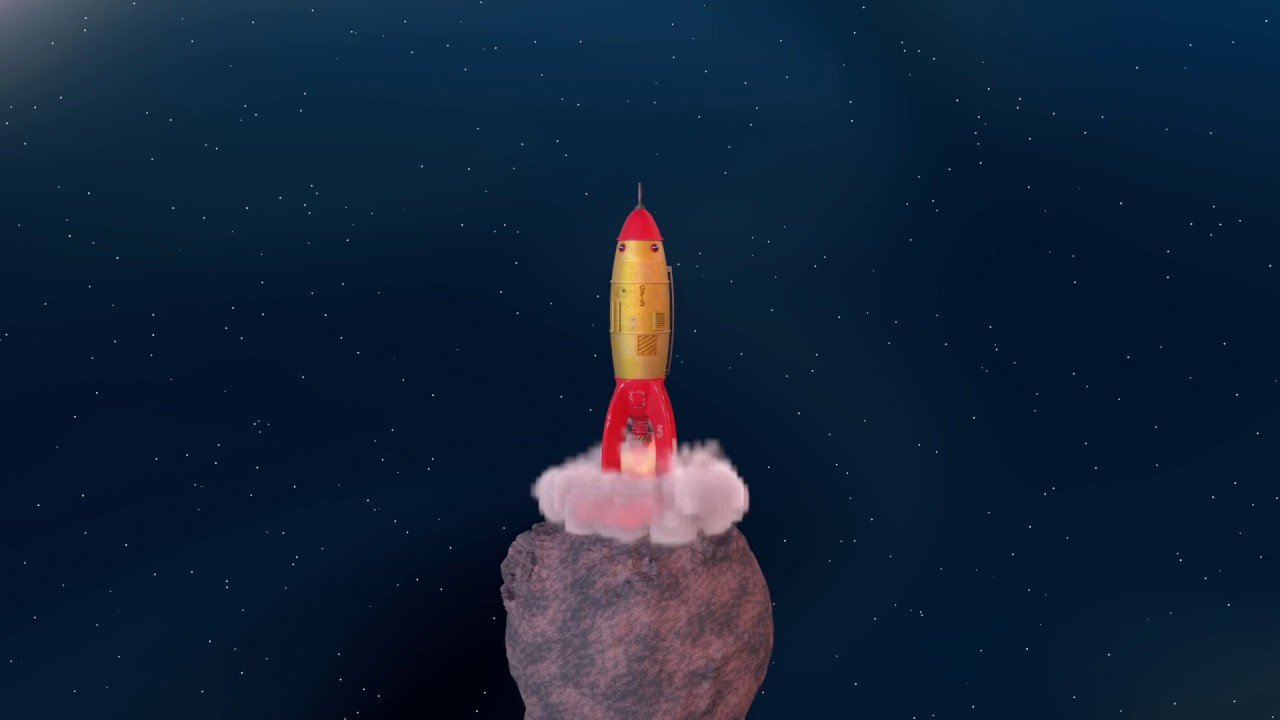
Course project using Maya, Substance Painter and Photoshop.
ashen robin
you spawn the particles at object position, but you want to keep their positional values in world space
should be an option for that in the particle system
https://docs.unity3d.com/ScriptReference/ParticleSystemSimulationSpace.html
I think that may be in the shape module?
 sage adder
Apparently, this is done with Unity
⭕️ We're back!
It's been a while, but the turn of the year has been quite inspiring! I decided to create my first Open Edition artwork on @objktcom for only 1 ꜩ, which will last 48h starting now.
🎁 RT will enter a raffle to win 2 of my older artworks. Type your wallet below. ⬇️

 Twitter
·
Twitter
·
I wonder, does someone have any idea how it could can be done ? I mean other than the particles. side, the shading and the optics effects are crazy
warm torrent
sage adder
I wonder, does someone have any idea how it could can be done ? I mean other tha...
Looks like the particle color is a gradient mapped to speed, nothing more to it
When apply vector fields to that or other type of forces, you get fancy color patterns
Probably no more than a few minutes of work if you're familiar with the tools
sage adder
Wow ok, thanks @warm torrent It looks super complexe thats why I was asking
warm torrent
+some post processing bloom additionally
 hearty flare
sage adder
https://twitter.com/ribponce/status/1746251179749769713
hearty flare
sage adder
https://twitter.com/ribponce/status/1746251179749769713
Imo this is just Stephen Mangiat's work but enshittified into NFT garbage https://www.instagram.com/smangiat/
Welcome back to Instagram. Sign in to check out what your friends, family & interests have been capturing & sharing around the world.
Though he does it too, at least the style started with him
As Spazi says, the optics effects are just particle color, by reading various values out of the simulation like particle speed and applying an appropriate gradient
sage adder
yeah both have similar pieces and workflow, he is not the fact he got inspired by Stephen work @hearty flare
 sudden moth
is there a way I can smooth out the edge between black and white so it smoothly transitions betwen the two instead of an abrupt border?

I'm basically trying yo do this, but with the shap of the oval isnted of just a circle
hearty flare
sudden moth
is there a way I can smooth out the edge between black and white so it smoothly ...
You'd have to create it yourself, there is no node for that. There's a link to distance functions pinned to #archived-shaders that has all sorts of shapes
 lunar cargo
I want the shield to turn so that only the front face faces outwards when turning, how can I do it?
 ashen robin
lunar cargo
I want the shield to turn so that only the front face faces outwards when turnin...
ashen robin
lunar cargo
I want the shield to turn so that only the front face faces outwards when turnin...
there's particle orientation with camera relativity options I think in the render tab if you're using the particle system, or is this more related to how the particle should move?
seems like you've got some camera facing though already
lunar cargo
ashen robin
there's particle orientation with camera relativity options I think in the rende...
When looking at the effect, you will notice that when the shield turns, the edges, the front side is on the other side, the back side is facing outwards. I want to fix this, let's say only the cover part of the shield when turning, so that it looks outwards. If we say there are 3 shields here (I used particle system), the cover part of the 3 should look out while turning full, the edge part or the back part should not look.
ashen robin
lunar cargo
When looking at the effect, you will notice that when the shield turns, the edge...
it would be a mix of how it's oriented with the camera and how you decide to rotate it locally
lunar cargo
ashen robin
it would be a mix of how it's oriented with the camera and how you decide to rot...
When rotating around the circle, it will always face this surface forward. It will not look at the side where the camera is.
 ashen robin
yeah, I feel like all you need here is the camera facing for it to work, but I think the problem is you're rotating them locally so the forward is different
it's more that they should be child to a empty in space that rotates them around it (could be a solution but that may present other problems but changing positional locally I think is the idea here)
technically you're just moving them around a point, so there's no need for actual object rotation
unless you mean you don't want the front of it to always face the camera, then all you need is to disable any camera orientation on the system
lunar cargo
ashen robin
yeah, I feel like all you need here is the camera facing for it to work, but I t...
I guess what I said was not fully understood (or understood, but I may not have fully understood because I am new, I apologise for that) if I want to explain in a little detail. If I start from the camera, the camera angle will be like isometric and it will look at 45 degrees or so. When rotating, all of the shields will face forward at the point where the shield is in the circle where it rotates independently of the camera angle. the back part will face inward. if you want, let me throw the things I did in the partl system? maybe with one capsule (if we base it as a character), maybe what I said can be understood more easily. I apologise for taking your time.
ashen robin
lunar cargo
I guess what I said was not fully understood (or understood, but I may not have ...
https://i.imgur.com/Fpc2ADi.png
Play around with these settings if you havent
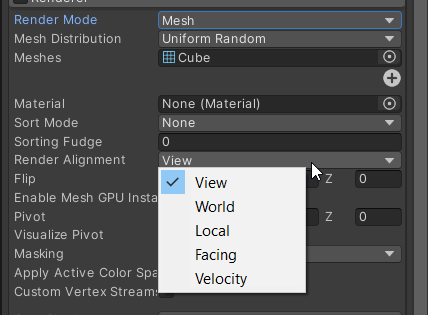
your answer is between this and how the mesh is being rotated
lunar cargo
I understand that I have selected the world, so I need to select it in view ?
 manic sluice
Anyone know what happened to the particle system mini-window thing with 'Play' and 'Stop' commands?
Like, where to find it, if it still exists in 2021.3+
 zealous wing
Is there a way in VFX to make the particles that spawn from Trigger Event On Die to inherit their parent orientation from Orient: Along velocity?
 warm abyss
I have many particle system on my prefab. Do guys know how can I improve performance of that? I heard about materials and layers could reduce the batch calls..
warm torrent
warm abyss
I have many particle system on my prefab. Do guys know how can I improve perform...
Optimization is a whole field of science and much depends on what render pipeline you're using and what platform you're building for
warm abyss
warm torrent
Optimization is a whole field of science and much depends on what render pipelin...
hdrp
warm torrent
warm abyss
hdrp
https://forum.unity.com/threads/mega-runtime-performance-tips-thread-unity-hdrp-guide-to-better-runtime-unity-performance.1169837/
In my experience this post overstates the need for traditional batching, since SRP Batching is so incredibly powerful, but you should test the performance of every part
warm abyss
do you have any advice to improve performance of it? I just heard about put different p.syst. in different layers
 tepid wraith
did you click the link
warm abyss
yes I'm reading it. It talks about performance in general in hdrp. It's very usefull. I apreciate.
Particle system is not metioned. I just have to deal with it.
Some videos say it is better to use different material for different part. sys. , some video say the opposite .
Use just one texture with spreadsheet of textures on it and call the the frame/frames you need could be a nice improvement too
warm torrent
warm abyss
yes I'm reading it. It talks about performance in general in hdrp. It's very use...
Particle Systems are procedural meshes, I expect they benefit from SRP Batching just the same, but the frame debugger should reveal if that's the case nonetheless
VFX Graphs can give you a significant performance improvement with many particles and many effects, as it can instance duplicates of itself together for quicker rendering
warm abyss
right.
My problem is that I have small emissions( meant to be the number of particles) but many particles systems .
Vfx graph is usually recommended for big amount of particles (emission). So that's why i chose the p.syst. and I need to improve performance of them because there are a lot.
Each prefab has 8 p. systems that work simultaneously. during the game many prefabs are activated altogether
warm torrent
warm abyss
right.
My problem is that I have small emissions( meant to be the number of part...
How many?
warm abyss
it could be 20 prefabs + more p.syst effect for explosions so the number of p. syst. simultaneously it increase even more
warm torrent
warm abyss
it could be 20 prefabs + more p.syst effect for explosions so the number of p. s...
Doesn't sound too terrible, have you profiled the performance to confirm the impact?
warm abyss
not yet. but I know that it could be improved some how
warm torrent
Doesn't seem so obvious to me
It's possible that you may be able to benefit from VFX Graph and its instancing features, a VFX Graph can even have multiple different Systems in it I believe
But it's all something you need to test rather than assume
 oak gull
Hello people 🙋♂️
Could someone enlight me on vfx graphs and how the rendering works behind it ?
If I create a vfx graph with millions of particles, are those particles prerendered of something ?
In my actual projects using vfx graphs, my tris count is going crazy even with no vfx running on the moment. Like if the tris counter was already counting the vfx before they spawn.
I have also a strangely high gpu usage even without any vfx running when in the scene view, and even with the visual effect graph layer visibility turned off. I describe more in depth my issue here : https://forum.unity.com/threads/high-gpu-usage-in-editor-even-w-vfx-graphs-not-running-huge-tris-count-bug-or-normal-behavior.1544312/
Unity Forum
Hello people,
I'm on Unity 2022.3.16f1 using ECS and a single graph with multiple systems that handles every vfx in my scene. As always, I start by...
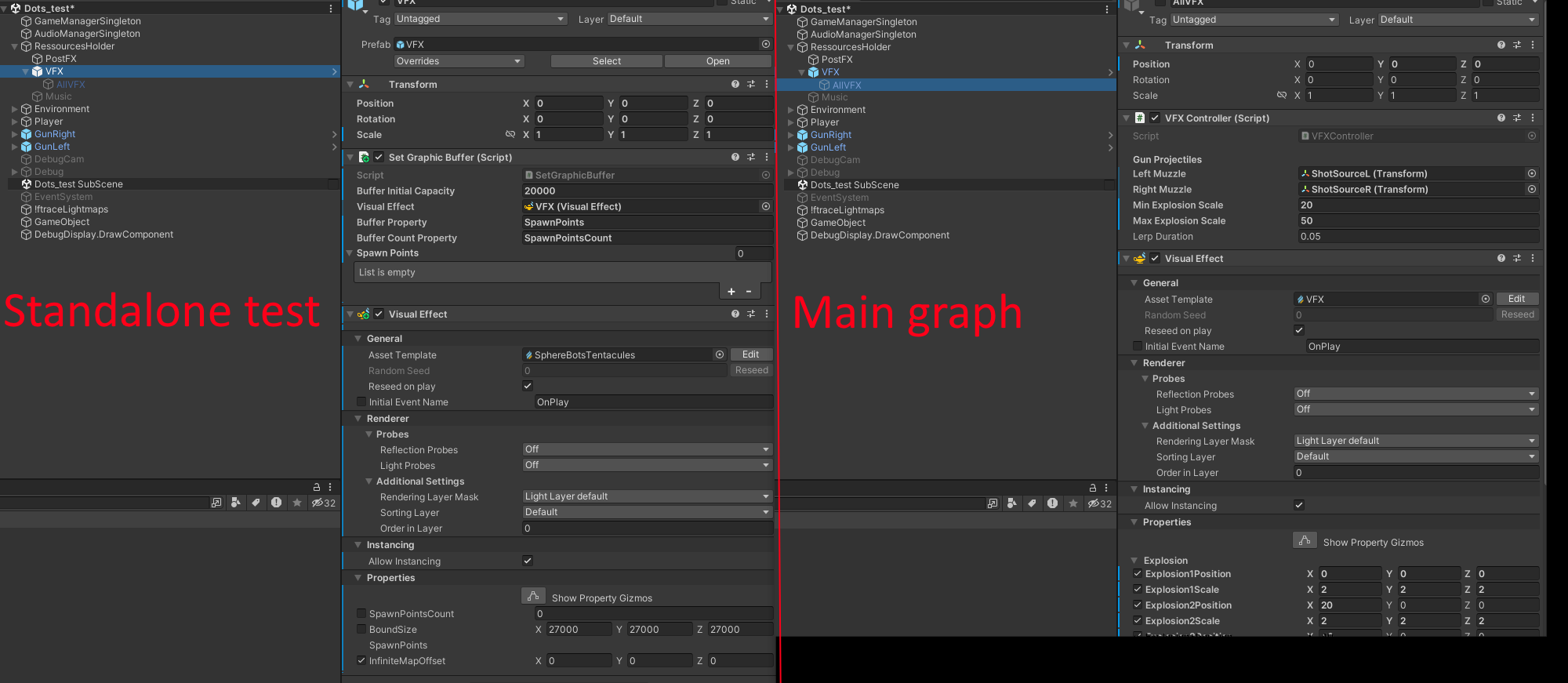 ashen robin
oak gull
Hello people 🙋♂️
Could someone enlight me on vfx graphs and how the rendering...
ashen robin
oak gull
Hello people 🙋♂️
Could someone enlight me on vfx graphs and how the rendering...
It's not to say it's pre-rendered but rather a lot of these systems are cached on the GPU side of things, limiting the amount of communication needed from the CPU. Not too sure why your tri counter would be so high though, perhaps you've systems currently being rendered and aren't expiring, which could mean your bounding box may not be configured correctly and/or the lifetime isn't configured correctly.
oak gull
ashen robin
It's not to say it's pre-rendered but rather a lot of these systems are cached o...
I see. Thanks a lot.
Indeed the head particles doesn't have a set lifetime. Because they have to follow the enemies (5 to 20k physic bodies using ecs). I send their position via a graphic buffer and update the head of the particles with it. It works well. The trails have a lifetime of 0.2 second. And the tris count rise when I rise the strip capacity, so the trails
ashen robin
Ok so a few things, your first system doesn't have a lifetime, so how does it expire?
oak gull
I haven't implemented the death of the heads yet. I have to find a way to keep track with the graphic buffer
ashen robin
second, you constantly read and update your buffers which is a big nono when you're going for this amount of particles
oak gull
ashen robin
second, you constantly read and update your buffers which is a big nono when you...
I heard about that, but haven't found clear numbers so I decided to try. And it works pretty good so I'm not sure
gpu usage is around 40% with 20k enemies and trails
But I know I'll have to optimize it or find another way for sure at some point
Or lower the amount of enemies
ashen robin
yeah it can probably do fine, but when it's advertised as millions of particles that usually means millions of quads without touching the buffers beyond the initial context
oak gull
Yea I figured so too. I saw a unity devs saying that would be fine for like thousand of particle but not for thousands. But well, it works solidely in my case even at 20k
But yea, that tris count is weird
and the gpu usage in editor is also.
ashen robin
you can try recompiling the systems after each playthrough
oak gull
It's like my main vfx graph (so not the one with the trails) is forcing the scene view update

even though every systems needs a manual event to be triggered

 ashen robin
are you clearing the buffers after exiting playmode
could be related if they're not being cleaned up correctly
oak gull
Hmm, I clear the buffer each frame on a late update. Could it miss that when exiting ?
ashen robin
I wouldnt worry too much about editor performance and just profile it in the build
oak gull
Aight. You're probably right. But my GC acts as a room heater because of that lmao. And my electricity bill won't be fun too
But well, I guess I can just disable the gameobjects containing my graphs when I'm not working on it
But what bothers me more is that tris count. I never noticed it before. I shoud try it in another clean project to see if the trails are increasing the tris count that way
ashen robin
private void ReleaseBuffer(ref GraphicsBuffer buffer)
{
    // Buffer memory must be released
    buffer?.Release();
    buffer = null;
}
I usually use that before exiting playmode
usually recompiling the systems fixes problems too if they persists
but otherwise I do sometimes notice that reseting unity is a solution
oak gull
I fact, I confused with something else. I have indeed wrote something to clear the buffer on destroy :
void OnDestroy()
 {
     ReleaseBuffer(ref graphicsBuffer);
 }


private void EnsureBufferCapacity(ref GraphicsBuffer buffer, int capacity, int stride, VisualEffect vfx, int vfxBufferProperty)
 {
     // Reallocate new buffer only when buffer is null or capacity is not sufficient
     if (buffer == null || buffer.count < capacity)
     {
         // Buffer memory must be released
         buffer?.Release();
         // Vfx Graph uses structured buffer
         buffer = new GraphicsBuffer(GraphicsBuffer.Target.Structured, capacity, stride);
         // Update buffer referenece
         vfx.SetGraphicsBuffer(vfxBufferProperty, buffer);
     }
 }

 private void ReleaseBuffer(ref GraphicsBuffer buffer)
 {
     // Buffer memory must be released
     buffer?.Release();
     buffer = null;
 }
}
I tried it too without success : /
oak gull
ashen robin
but otherwise I do sometimes notice that reseting unity is a solution
reseting unity ?
Wdym ?
ashen robin
the editor itself
oak gull
I tried updating to latest update, and tried deleting the library folder
oak gull
ashen robin
the editor itself
The menus layouts ?
oak gull
Like, deinstalling the install of the unity version, and reinstalling it ?
Aight
I'll look it up. Thanks a lot for the help 🙋♂️
oak gull
ashen robin
```cs
private void ReleaseBuffer(ref GraphicsBuffer buffer)
{
// Buffer memo...
Last silly question, how do you format code block with the colors in discord ? 😅
ashen robin
add cs or c# after
oak gull
Ooooh aight
ashen robin
'''cs
oak gull
thanks : )
ashen robin
oak gull
thanks : )
One more thing too since you're changing buffers in update I noticed you're using the currentID identifier, and I've noticed that this was creating issues on updating those exact buffers. More explained in this thread: https://forum.unity.com/threads/vfx-graph-projectile-position-update-from-cpu-collection.1479444/#post-9511105
Unity Forum
I have a VFX graph of simple (prototype) projectiles shot out of a gun rendering simple particle Quad outputs.
I have one instance of VFX graph to...
Maybe it's just an issue on my end, but I was following that exact page you were and I came upon this problem.
since your particles don't seem to expire it may not be apparent right now, but if you do run into that issue then probably refer back to this
oak gull
Hey that's exactly the post I was refering too when I said I saw a unity dev saying it should be ok for thousand but not millions of particles 😄
Thanks dude. Actually, yes it's precisely what I'm working on right now. The graph works well but when I kill one or several enemies, the entity position order in the graphic buffer and the particle id isn't right anymore and I assist to a huge spaghetti plate visually lmao
This is how it looks when it's fine
 ashen robin
Yeah, kinda thought so, and so what I've done is keep track of the IDs like what that user is doing in that post to get around w/e fuggly way they store the IDs
oak gull
And this is the spaghetti plate lmao :
 ashen robin
that is quite a lot lol
oak gull
ashen robin
Yeah, kinda thought so, and so what I've done is keep track of the IDs like what...
Nice. I'll go that way too then, thanks
oak gull
ashen robin
that is quite a lot lol
And it was only 10k here. But I pushed it to 20k without issue
Spent 3 month optimizing the shit out of these swarms 😅
I'm glad with the results
 ashen robin
pretty cool, I've not check but any way to include levels of detail?
considering you're using a lot of mesh types of this stuff
oak gull
I tried it, the cpu overhead wasn't worth it
ashen robin
interesting
oak gull
I was better off using a middle lod as the one and only model
https://www.youtube.com/watch?v=MNwSmcHp_bY
I even reached to push the physic entities to 200k and keep a framerate above 30 lmao

A few footages of a stress test done today. 113k physic entities for the first part of the video, 200k for the second.
But yea, no, it won't be playable for a released game 😅
ashen robin
oh damn, just give it another decade for gpus
oak gull
ashen robin
oh damn, just give it another decade for gpus
Can't wait. If I reach to make a fun game out of my project, I think I'll add a toggle to disable hard limits for the number of enemies spawn. That way I could go back in it and benchmark the new hardware lmao
oak gull
ashen robin
pretty cool, I've not check but any way to include levels of detail?
Forgot to answer properly, but yes, with the entities rendering package you can use lod as you would do normaly on mesh renderers. But yea if you have too much entities to check, it adds a lot of overhead
I hope the new gpu occlusion culling they plan to add on URP will be able to help mitigate that, even if it's not really lod related
 night oxide
Is there any reason to choose moving a VFX Game Object's transform vs having the VFX component move via blocks in the VFX Graph itself (e.g adjusting velocity + direction)?
oak gull
Can be useful. For muzzle flash for example, it would be easier to just put the vfx graph on the gun and let it follow the gameobject
oak gull
ashen robin
Yeah, kinda thought so, and so what I've done is keep track of the IDs like what...
I think I miss something on what you and the guy from the unity forum did.
I have the entities positions, and a unique ID to identify which position goes with which entity. But I can't figure how to use the entityID in the vfx graph. I could use that entityID as the particleID but I don't see how. Any idea ?
carmine bone
With vfx graph's periodic burst, is there way to adjust the interval at which it will periodically spawn?
oak gull
carmine bone
With vfx graph's periodic burst, is there way to adjust the interval at which it...
yep, the delay box in the block does exactly that
carmine bone
Oh, weirdly named then I guess. Ty.
oak gull
carmine bone
Oh, weirdly named then I guess. Ty.
I guess it was to keep the naming consistant with all the spawner block. For single burst, the delay is a correct name imo. And the periodic burst does the same thing but repeating indefinitely.
ashen robin
oak gull
I think I miss something on what you and the guy from the unity forum did.
I ha...
https://hatebin.com/jmhjdgqkhk
This is what I currently do with my script when it comes to the IDs
by using hashsets I manually keep track of them
I forget the exact issues I was having without this, but I think it has to do with how the particles indices are added back to the systems queue after they expire
oak gull
Hoooy I see thanks a lot. I guess I could use a Vector 4 graphic buffer and set the entityID as the 4th value then
oak gull
ashen robin
I forget the exact issues I was having without this, but I think it has to do wi...
Yea, it looks like what the guy on the forum said. The particleID aren't constant
ashen robin
before I was using this, I had to not let my particles expire and hide them to reuse them or something
oak gull
ashen robin
before I was using this, I had to not let my particles expire and hide them to r...
I see
ashen robin
some jank
ashen robin
night oxide
Is there any reason to choose moving a VFX Game Object's transform vs having the...
you can use a single system to simulate a bunch of particles in game space instead of having a bunch of gameobjects with a system on each of them. Meaning you can technically forgo colliders, and instead query physics methods like overlap sphere instead of relying on trigger methods.
But for the most part, if you just want particles that don't interact with your world beyond just existing, then you'd do it all in the vfx graph by setting the values once in the initial context
and this can be all done in a single system which you can stick in your scene (like if you were making a singleton manager)
oak gull
ashen robin
https://hatebin.com/jmhjdgqkhk
This is what I currently do with my script when i...
Hoy. It works ! And it's freaking gorgeous 😍
Thanks again
https://www.youtube.com/watch?v=-DnwGWspkIQ

20k physic bodies, 60k trails for the tentacules, 1k trails just for some pleasing visuals, all positions sent via the graphic buffer updated each frame, and still 90 fps in VR. ECS and vfx graphs are breathtaking !
 marble nymph
VFX/Particles aren't showing up when playing a build.
Left is playing in the Editor, right is Windows build.
Any suggestions? I'm not sure where to even begin looking.
Using URP, and Camera is Orthographic.
WebGL also has same behaviour.
If relevant, the VFX is from 3rd party asset-
KriptoFX / Realistic Effects Pack v4

 torn tiger
The frame debugger when connected to a development build will tell you if the particles are rendering at all.
Connecting your console to the development build is probably helpful too.
What's the graphics api for windows?
I know WebGL is very limited in terms of its capabilities. So if it's using the vfx graph it might not work Bc of a lack of proper compute shader support.
marble nymph
torn tiger
The frame debugger when connected to a development build will tell you if the pa...
I'll check the frame debugger tomorrow when I start this again.
However, I'm pretty sure some particles are showing up - since the swirl and some other effects are there.
Also, curiously, I did another build and those 'cracks' showed up now. But the pink 'wave' is still missing (which is one of the best parts of that effect)
I'll see if I can get any info from the debugger, though; just will be tomorrow morning.
 wide snow
How could I make a visual Indicator for a gun firing? Can you animate a line?
warm abyss
VFX graphs are activated when you enter in play mode.
Is it possibile to activate a vfx graph just when is activated the parent prefab and not on play as default?
warm abyss
I noticed there's a stop and play node at the top.
Should I work with those?
or can I just dectivate the object and then activate when the prefab is activated
What's the right way and best way to use play on stop for vfx graphs in the game?
 minor glen
how can i make a distortion effect in vfx graph like this? i tried to do it with the distortion quad output but it has these weird lines on the edges of the quad


its not really visable in these pictures but i can see them and they annoy me
 torn tiger
Two things: are you outputting more than one? & have you double checked that that's not in the texture itself?
minor glen
torn tiger
Two things: are you outputting more than one? & have you double checked that tha...
the texture is transparent on the edges. and there is only one particle
torn tiger
By transparent do you mean the normals are flat?
warm abyss
can anyone help me to activate and deactivivate vfx graph in play mode? when I enter in play mode all my vfx graph are activated..
marble nymph
torn tiger
The frame debugger when connected to a development build will tell you if the pa...
This investigation lead me to realize the specific VFX missing, were in fact not particles, but an animated texture that uses collision to display... no collision, no display.
I expanded the 'collision area' and the VFX is now showing in Win-build.
I have no idea why it'd work in Editor, and not in Win-Build .. but, workaround-found at least.
Thanks for pointing me at Frame Debugger - indirectly got me there, heh.
ashen robin
minor glen
how can i make a distortion effect in vfx graph like this? i tried to do it with...
havent seen that particle output yet, but if you want, these shaders are pretty easy to make in the shader graph if you want more control over it
torn tiger
marble nymph
This investigation lead me to realize the specific VFX missing, were in fact not...
Glad that worked!! I'm still not 100% why that would be a platform difference either. Glad you've got something showing though!
minor glen
torn tiger
By transparent do you mean the normals are flat?
i mean i erased the texture at the edges in photoshop
torn tiger
Into alpha or into the color of the up vector in normals?
My current guess is that node isn't using transparency to modulate the normal map strength and you need to double check that the edges are painted to be the same as perfectly flat. Should be a color like this: (.5,.5,1)
 ember delta
hey! for some reason my particle system isn't rendering when it's behind a transparent object, how would I go about fixing this?
 tired cobalt
i'm still figuring out the bascis of the VFX graph

i set the color node to "Overwrite", but the black rim of the default particle is still there. any idea why?
this doesn not seem to happen in one of the tutorials i was watching
warm torrent
tired cobalt
i set the color node to "Overwrite", but the black rim of the default particle i...
Default particle texture has a gradient from 1 to 0 on all channels
That means that as it fades to transparent, it also fades to black at the same rate
tired cobalt
yeah, but shouldnt my color node completely overwrite the color channel?
 warm torrent
It overwrites the color data of the particle, not the color of the pixels of the texture
How the particle color data is blended with the texture is the shader's business, not the particle simulation's
tired cobalt
so there's no way to change this in the shadergraph directly?
warm torrent
tired cobalt
so there's no way to change this in the shadergraph directly?
Use a particle texture that doesn't have a fade to black on its color channels
You don't need a shader for that
Or use blending mode: additive instead of alpha which is a blend mode that ignores dark pixels
torn tiger
There's also a default particle built into unity that looks white in the preview that doesn't have black.
I forget the name
carmine bone
When using the built in particle systems, if I have particles spawning in a sphere is there a way to have them all orient to the center of that sphere?
Basically, I want to have each one that spawns pointed towards the center.
 tiny sage
Hey all, just wondering if there is a setting to use the sprite's original size somehow in the particle system? How do I prevent them from all being squished squares?
 warm torrent
tiny sage
Hey all, just wondering if there is a setting to use the sprite's original size ...
warm torrent
tiny sage
Hey all, just wondering if there is a setting to use the sprite's original size ...
Try using the flipbook module
Even if you do not use the flipbook feature, it gives you the option to use a sprite
tiny sage
warm torrent
Try using the flipbook module
Even if you do not use the flipbook feature, it gi...
Thanks Spazi, is that in one of these?
 warm torrent
tiny sage
Thanks Spazi, is that in one of these?
warm torrent
tiny sage
Thanks Spazi, is that in one of these?
yes, it seems to go by the name of "texture sheet animation"
tiny sage
perfect ty! I will pass this on
carmine bone
carmine bone
When using the built in particle systems, if I have particles spawning in a sphe...
Just to ask again since it didn't get answered. Would be very appreciated if someone wouldn't mind helping. 🥺
warm torrent
carmine bone
Basically, I want to have each one that spawns pointed towards the center.
Do they need to do more than that? There's the direction and velocity options for renderer orientation which could be utilized
tired cobalt
i'm trying to understand how trails work by recreating VFX graph presets. Why cant i spawn a "ParticleStrip Quad" Node here?

i can duplicate it just fine, but it doesnt make sense to me why i cant create oen from scratch
ashen robin
tired cobalt
i'm trying to understand how trails work by recreating VFX graph presets. Why ca...
Do you got the experimental package enabled from project preferences?
tired cobalt
ah yeah that might be it
 kind hedge
I'm using vfx graph for rain and snow (chose it over particle effects because of the awesome tiling/wrap component). I'm using URP and the "output particle URP List Quad" facing towards the camera. Now when the camera is aligned with the main scene light direction the snow is white, but when looking the opposite way it's black.
There is no URP Unlit Quad? how should I display my urp particles so they're always white?
kind hedge
kind hedge
I'm using vfx graph for rain and snow (chose it over particle effects because of...
just changed it to "output particle quad" (without urp) and it's fine now
kind hedge
Can I somehow control the "Update Particle" simulation space from a script?
 oblique plinth
hii, i've got some questions about trailrenderer does that fit in here?
ashen robin
oblique plinth
hii, i've got some questions about trailrenderer does that fit in here?
I'd consider it as some vfx controller
ashen robin
kind hedge
Can I somehow control the "Update Particle" simulation space from a script?
https://qriva.github.io/posts/how-to-vfx-graph/
Some information on modifying buffers and other utility methods
kind hedge
ashen robin
https://qriva.github.io/posts/how-to-vfx-graph/
Some information on modifying bu...
Thanks, can't find a section on referencing stuff from scripts. What I did learn is that what I want to get a hold of from a script is a "context". I can't find a way to an exposed variable.
ashen robin
kind hedge
Thanks, can't find a section on referencing stuff from scripts. What I did learn...
Initial context variables can be modified per system using a script through string lookup, or per system call via events (direct link feature explained in the link)
Modifying when in the Update context is a little trickier such that you need to use simple buffers to manage that data.
Also explained in that link.
kind hedge
I was looking at the docs, before, this is a great guide, with things I'll use in the future for sure, still I can's see a way to switch a context from world to local and back. (For now I just duplicated my vfx graph, so I have one effect with local simulation and one with world) and switch them instead of modifying one)
ashen robin
kind hedge
I was looking at the docs, before, this is a great guide, with things I'll use i...
Totally fine if it works for you. If you do want to keep everything as a single system, you'd probably do the calculations outside of the context and use a bool to determine if you want to use world or local instead of ticking the system to local.
It's a pain to effectively use the vfx graph to continuously readback transform data as the particles persists, and the easiest way to do that is just add a visual effect component onto those gameobjects.
kind hedge
It's probably tied to the internal implementation, from a usability perspective I just with the simulation space param was "connectable" to en exposable variable like the other attributes.
 silent sierra
why aren't shuriken particle systems visible in the scene view in 2022.LTS? they show up in 2017
... need to be selected but they show up in game view
 livid heath
Do you have Particle Systems visible here?

Or do you mean that their Gizmos are missing, in that case there's settings in the gizmos menu next to it (upper right on the picture)
Questions: Is there any way to check the duration of a VisualEffect from code without knowing anything about the VisualEffect in question? I need it for some pooling/destruction when done code. For ParticleSystem, I figure it out from essentially startLifetime + duration, but I don't see anything like that on the VisualEffect
ashen robin
livid heath
Do you have Particle Systems visible here?
not that I know of, but if you're keeping track of a single system of particles then you could probably do the estimations on the cpu side of things
livid heath
hmmm. Is there any way to at least check if it's currently playing?
Can't find that either
ashen robin
You have this: https://docs.unity3d.com/ScriptReference/VFX.VisualEffect.HasAnySystemAwake.html
It's not 100% time accurate and it can return false if you've got delay on particles from the spawn context
livid heath
Thanks!
I'll try some other approach: I've got some enemies, and they have ParticleSystems, AudioSources, VisualEffects, and/or other feedback effets attached to them. When the enemy is killed, all of those effects are unparented, played, and then destroyed when they're finished.
For every other kind of effect system, it's pretty straightforwards to check how long I need to wait until destroying. I really don't want to force the designers to have to remember to write down a "this is how long this VisualEffect is" float in a field somewhere every time they need to tune something. How does other people handle things like this (eg. killing off or returning objects to a pool) with VisualEffects?
ashen robin
You'd have a single vfx system in the scene for the kill effect and for each enemy that dies it would make a call to the particle system vfx system to spawn particles on their location
that's the most intended way to use them, and you can reduce a lot of pooling this way
livid heath
Hmmm, how do you deal with that if enemies are supposed to have a VFX system attached to them? As in, I have a prefab of an enemy, I want the visual effect to exist in the scene when that enemy's prefab is dragged into the scene.
ashen robin
the only reason you'd attach vfx systems to individual objects is if you want locality and transform data that's constantly updating the buffers, which you can actually just do it by script if you wanted to.
but if say an enemy requires a system of particles, then you check their requirements and spawn one in the scene which will serve as a supplier to all future enemies of that type
or can just prewarm your scene with the systems
livid heath
Ooof, that's clunky.
I essentially have to teach all the artists that there's this one system that they have to use in a completely different way than every single other system in Unity.
Because now "make the asset, add it to the prefab" is wrong
ashen robin
livid heath
Ooof, that's clunky.
I mean, you can pool individual systems if you want, and they did recently added some pooling support between systems of similar types, but a lot of vfx example projects are shown using a master system to control most of the particles.
but like one of the problems is culling individual particles when you return an enemy back to the pool which isn't as easy as doing it like the particle system.
when you simply can let them expire themselves and let them return to the master system
livid heath
My biggest worry is that it won't be possible to see the system on the prefab if I'm going for an approach with a centralized owner of the VisualEffect. So if the designer wants to edit a visual effect that belongs to an enemy, they can't open the enemy prefab, tweak the settings, and then press the Play() button in prefab mode to see how it looks, since I'm now dissallowing attaching the VisualEffect to the prefab because otherwise I can't do any cleanup
ashen robin
right, you need to make some edit time scripts to really debug and modify stuff doing it this way
livid heath
I guess I could have the thing that eventually plays the VisualEffect also hook up the master system - so I have VisualEffects with assets assigned to them on the enemy prefabs, it's just that those VisualEffects' only job is to a) be played in prefab mode and b) supply the VisualEffect asset to the master system at runtime. It's a bit of bloat, but at least there's minimal workflow disruption?
Essentially something like:
public VisualEffect effect;
private VisualEffectPool pool;

void Awake() {
    pool = VisualEffectPool.GetFor(effect.visualEffectAsset);
    Destroy(effect);
}
For the most part I use these master systems for stuff like floating combat text and item drop rarities, mostly things that are more global, but for single enemy type effects it shouldn't be a problem with keeping independent systems, assuming you've an idea for a capacity each system should have.
You can also just keep the particles in world space and not disable the systems on the enemies when returning to the queue.
livid heath
Thanks for the help!
What's the most straightforwards way to setting up a VisualEffect to "play at position"? Expose a Vector3 in the graph and set it's value?
ashen robin
Yeah, you use those custom events to send in data into the initial context so you can give it information where the next particles should spawn, ect
specifically the direct link feature shown here in this link
also sample graphic buffers is another way
livid heath
👍
I mean, tbh, right now I'm going to punt and just say that all VisualEffects lasts at most 5 seconds, but I'll read your link and put a proper way of pooling these things on the @todo list
tired cobalt
Made a heat distortion shader and used it on a VFX graph trail
 agile basin
i edited a projectile in unity and its far from what the effect originally was, i like how it looks paused in this video, how do i get it to stay inplace instead of moving forward like a projectile would when i press play
got it was velocity over lifetime to 0 lol
tired cobalt
cool stuff, can recommend any tutorials that show how to make this kind of effects?
 round narwhal
Hey everyone! I have an issue with my effects graph when upgrading from unity version 2021 to 2023 (to support SRP batcher for sprite renderers) where my effect has completely changed it's appearance. Was wondering if anyone else have encountered an issue where their effect changes between versions like this?
First one is after the upgrade, second one is before
 stuck timber
tired cobalt
cool stuff, can recommend any tutorials that show how to make this kind of effec...
stuck timber
tired cobalt
cool stuff, can recommend any tutorials that show how to make this kind of effec...
I worked with VFX for a while now so it's a lot of combined work experience, but I think the closest you can get is with VFX Apprentice courses
Added some more smoke
silent sierra
livid heath
Ooof, that's clunky.
i did my own pooling and yes it's limited, for example i wasn't able to do emit by unit. the new vfx graph auto pools as long as you don't use events which limits things a lot, dunno if 2023 lifted that limitation
warm torrent
@stuck timber You can make a #1180170818983051344 thread to show your progress
These channels would be flooded if everyone used them for showcasing
 blazing hinge
Hey people, I am trying to use a curve to change the spawn rate for the duration of my spawn event (3 seconds), but I am a bit stuck, I can't figure out how to pass a three-(or whatever)-second timer to my inv. lerp... Any ideas?
 limpid jolt
had a doubt
i want to use only one vfx graph object to spawn particles
in this requirement, how do i spawn particles at different locations
if i call the VisualEffect.Play inside a for loop?
for context
here's the piece of code
ashen robin
blazing hinge
Hey people, I am trying to use a curve to change the spawn rate for the duration...
Using a curve is technically already doing linear interpolation, no? I'd assume you want to ditch the lerp node all together and change up your curve to meet your requirements
oh, but you do need to run some sort of timer through it eh
https://docs.unity3d.com/Packages/com.unity.visualeffectgraph@10.2/manual/Operator-TotalTime.html
That's one way of accumulation of time I guess
It's a little tricky because you're not doing it per particle, but instead trying to accumulate time for the systems specifically.
or maybe you can constantly pingpong the time, meaning it's actively changing spawnrate even when not in use
ashen robin
limpid jolt
had a doubt
https://qriva.github.io/posts/how-to-vfx-graph/
Refer to the many ways to spawn particles from this link
limpid jolt
thank you 🙂
ashen robin
custom attributes and direct link features are probably what you're looking for
limpid jolt
👍🏻
limpid jolt
@ashen robin when i use a OnPlay event how i do pass the number of particles to be spawned?
oh nevermind
its there in the example
ty
blazing hinge
limpid jolt
in this requirement, how do i spawn particles at different locations
I came across this today, maybe it's relevant? https://www.gamedeveloper.com/design/unity-visual-effect-graph---how-to-use-the-point-cache-property-binder-component
Unity’s Visual Effect Graph system can be a powerful tool. But for spawning a large number of effects, performance quickly becomes an issue. Visual Effect graph DOES allow input of 2d texture maps so we can use that to transfer positional data for spawn
limpid jolt
thank you, will go through it
blazing hinge
"Visual Effect graph DOES allow input of 2d texture maps. And there is a way to convert a list of 3d positional data into a 2d texture map. This way the positional data can be loaded into the graph and used to spawn multiple particle effect systems at the same time."
limpid jolt
@ashen robin would it still work in a for loop?
effect.SendEvent("OnPlay", eventAttribute);
since it would be called multiple times in one frame
buffer makes more sense im guessing
blazing hinge
ashen robin
or maybe you can constantly pingpong the time, meaning it's actively changing sp...
I tried using "loop" and then using Total Time, then I found out about "Periodic Total Time", which simplifies things a bit. What I'm actually missing is making sure that on Start/Play, total time should reset to 0, so that the curve always starts from 0. I think I will have to do this by code.
 ashen robin
limpid jolt
<@288886727555284995> would it still work in a for loop?
ashen robin
limpid jolt
<@288886727555284995> would it still work in a for loop?
Without using direct link you are limited by frames, but if you check the forum post linked it'll go more in detail how you can help bypass it. But otherwise, yeah you'd use simple buffers if that does not work for your requirements.
limpid jolt
oh okay, ty
 pine copper
Don't suppose anyone knows of a readily available fix for making the particle system work with recording 360 ?
 warm torrent
pine copper
Don't suppose anyone knows of a readily available fix for making the particle sy...
warm torrent
pine copper
Don't suppose anyone knows of a readily available fix for making the particle sy...
This is likely caused by the particles being camera plane -facing billboards rather than camera facing billboards so particle vertex positions are dependent on camera rotation
VFX Graph might let you choose between camera facing and camera plane facing but I know Particle System does not
It's also fairly simple to do with shaders for meshes, but not for particle systems because each particle is arbitrary geometry rather than a rotateable object
pine copper
This guy has done it, but hasn't shared the shader.. and I'm not gonna attempt to copy it from the video, to find out hours later there's loads missing 😄

First video in hopefully part of a series with Pete & Tim where we cover some of the more obscure problems we encounter. It's all with the aim of sharing knowledge so let us know how we can improve and what would be good to see in more/less detail. There are a few small technical issues we'll improve on in future videos and Pete will also be joi...
I had a very quick check using the VFX samples , the bonfire specifically. The smoke didn't show up in the recording at all, and the light from it had the same cubemap issue. As I've never touched the VFX graph before, I've left it there unfortunately
warm torrent
pine copper
This guy has done it, but hasn't shared the shader.. and I'm not gonna attempt t...
Ah, this method uses code which I suppose works just as well for this purpose anyway
Nevermind there's also the shader
I suppose you could rotate the particles using just a script
Maybe not as cheap to rotate towards camera in C# over shaders but probably not a big deal
pine copper
I may have magically sorted it, by re-doing something I swear I tried earlier
warm torrent
pine copper
I may have magically sorted it, by re-doing something I swear I tried earlier
What'd seem to work?
pine copper
I'm not entirely sure, I'm using a class (this one, but edited because it doesn't work C&P'd https://gist.github.com/PatHightree/b2839d03b3b642ad412326907a1c6293). It worked , but was placing the particles behind the camera , I did something to the particle system and then it started working in a test record
currently transferring the full recording of 105GB to find out .. expecting it to be fucked though 😄
It's not perfect, but much better than it was. The cubemap is visible for a few frames, and if you turn round 180, it's not visible at all - but the viewer is very unlikely to be turning around

this'll have to do
limpid jolt
i cant seem to wrap my head around Direct Link
in the unity thread it mentions, you can do it by sending Event
but here the vfx particles are emitted only in the positions[0]
@ashen robin could you have a look?
Property_vs_EventAttribute.unitypackage this one works fine 😮
limpid jolt
now i need this to work in ECS
effect.SendEvent(const_fire, eventAttribute);
can be called only from the main thread right?
I've noticed it doesnt work in a ISystem struct
 tame turtle
Is it impossible to efficiently get the current color/sizes of all particles in a shuriken particle system? I see there's GetCurrentColor and GetCurrentSize which can be called on individual particles, but I'm operating on particle data in an IJobParticleSystemParallelFor which cannot reference the particle system component.
I would like to at least get all of the colors/sizes in one batch so I can store it myself for use by my job, but I don't see any methods that expose this functionality
 iron nymph
what goes in this box?
none of the lights i've made, light 2ds or prefabs can go in here

 oblique flare
is there a way to prevent looping particle systems from playing in scene when not selected? (not in play mode)
searched online but for some reason cant find a similar question
 stark crest
iron nymph
what goes in this box?
none of the lights i've made, light 2ds or prefabs can go...
stark crest
iron nymph
what goes in this box?
none of the lights i've made, light 2ds or prefabs can go...
spot/point lights
 strange sky
Hi guys i'm trying vfx for first time and i'm following a tutotial but i'm on hdrp and the tuto is on URP and for the shader i don't have Universal for active target and if i try HDRP i can't select the shader on the vfx someone can help pls
ashen robin
strange sky
Hi guys i'm trying vfx for first time and i'm following a tutotial but i'm on hd...
https://i.imgur.com/U6XfsOw.png
May need to click that at the bottom there
 strange sky
ashen robin
https://i.imgur.com/U6XfsOw.png
May need to click that at the bottom there
strange sky
ashen robin
https://i.imgur.com/U6XfsOw.png
May need to click that at the bottom there
i have this
 ashen robin
scroll down
strange sky
ashen robin
scroll down
 ashen robin
Should work with that's there
strange sky
i can't drag the shader on the Output particle Mesh
ashen robin
strange sky
ashen robin
https://docs.unity3d.com/Packages/com.unity.visualeffectgraph@13.1/manual/sg-wor...
damn thank you for help
strange sky
now i can drag but its like my shader image is working but its not moving like the tutorial x)
its scrolling on the shader but not on the vfx
strange sky
mb its just not moving on the scene but work in game, someone know how to see the effect of shader in the scene ?
 stoic token
when i set the particule material to transparent and alpha to 255 i got this weird glitch where the particle dont know if they should show or not
the only difference between the two screen shots is the camera angle


 atomic storm
stoic token
when i set the particule material to transparent and alpha to 255 i got this wei...
atomic storm
stoic token
when i set the particule material to transparent and alpha to 255 i got this wei...
show your material and shader
stoic token
atomic storm
show your material and shader
I replaced those particules by something else so i dont have this issue anymore, ty for responding tho
 slow vessel
Hey guys, can someone help me with this please? Why is this particle system colliding with those objects when I set his mask only to ground??

 warm torrent
slow vessel
Hey guys, can someone help me with this please? Why is this particle system coll...
warm torrent
slow vessel
Hey guys, can someone help me with this please? Why is this particle system coll...
No reason
Triple-check the mask, the layers of all colliders involved and the presence of any unexpected extra colliders
slow vessel
warm torrent
No reason
Triple-check the mask, the layers of all colliders involved and the pr...
how can I do that? with a custom script? or with the particle system config
warm torrent
slow vessel
how can I do that? with a custom script? or with the particle system config
I'd just go through all the gameobjects involved and settings in the Collision module to make it super sure there are no mistakes
Then look at hierarchy and try to select stuff around the problem area to try to find unintended collider objects
night oxide
How can I make the ring flat? I used a ribbon VFX Graph to make this but I want to place it on the ground with no height (like a 2d disc). Do I need to mess with camera orientation? Or perhaps I should have just made a shader instead? I've tried using Set Scale and Set Size but it doesn't seem to affect the height of the strips
 ashen robin
yeah, it's camera orientation you need to modify since at the moment it's billboarding towards the camera
night oxide
Ah okay thanks!
 vernal glade
if i changed the trail color i cannot change the color overlifetime trail how do i do this
 crimson zealot
vernal glade
if i changed the trail color i cannot change the color overlifetime trail how do...
crimson zealot
vernal glade
if i changed the trail color i cannot change the color overlifetime trail how do...
keep the 'color' white and just use color over lifetime only (they get multiplied together)
vernal glade
crimson zealot
keep the 'color' white and just use color over lifetime only (they get multiplie...
 crimson zealot
see that 'inherit particle color' checkbox? you probably want to uncheck it
or do your color stuff in the particles and let the trails inherit, leaving their colors alone
vernal glade
meh ill just keep it like this its not workig

 lean patio
does anyone know how to connect/sync a particle system to a health bar in VR?Im making a simulation type of thing and I want the particles to stop when the health bar reaches 0
warm torrent
lean patio
does anyone know how to connect/sync a particle system to a health bar in VR?Im ...
Particle system has many modules that can be controlled via scripts
How you want to tie them to your health bar is up to your imagination
 late moon
Heyas,
I have a LineRenderer with a slight emmision effect. However, since this line is used to indicate an area, I'd like it to have a bit of depth to it by giving it some upwards glow, lines, or smoke.
What would be the best way of achieving this? And what would be good terms for an googling effect like this? (googling anything Unity related together with 'glow' or 'fade' will give a whole lot of nothing useful. :p)
 ashen robin
late moon
Heyas,
I have a LineRenderer with a slight emmision effect. However, since this...
ashen robin
late moon
Heyas,
I have a LineRenderer with a slight emmision effect. However, since this...
I'd do some quads and some animated textures, otherwise maybe some vertex shader with some wavey vertices
crimson zealot
late moon
Heyas,
I have a LineRenderer with a slight emmision effect. However, since this...
you probably need to make a mesh for that. the same basic techniques are used here:
https://www.youtube.com/watch?v=FzzGB5gwUtA

Unity Game VFX - Dragon Ball Aura Ki Charging Effect Tutorial
This time we are going to see a classic effect. It’s the Dragon Ball Charging Ki power up VFX. We are going to use our usual suspects, Unity Shader Graph, Blender and Photoshop.
It's a complex effect that is open to a lot of possibilities, so I tried my best to show you the most im...
 strong lance
Is there any performance benefit to making all these glowsticks as particles with a mesh attached, versus using copies of the same mesh with animator attached to animate them?
it's for a VRchat world so I am limited on what I can use.
 crimson zealot
strong lance
Is there any performance benefit to making all these glowsticks as particles wit...
crimson zealot
strong lance
Is there any performance benefit to making all these glowsticks as particles wit...
If you can get away with using the particle system you should --animators are comparatively quite heavy
ashen robin
if they move then using sprite renders or particles systems would be the easiest way to batch em
strong lance
ashen robin
if they move then using sprite renders or particles systems would be the easiest...
what about a single mesh with them all that moves by animating a blend shape? This was the 3rd option I was considering
ashen robin
probably better culling options with unity's particle systems though
single mesh works but then you've got to deal with the culling yourself
strong lance
you'd mostly see all of them or none of them, so I'm not sure if I would see much benefit when culling
crimson zealot
it's hard to say without profiling it, but I would still use a particle system
it should be plenty performant and this is exactly what they're for
ashen robin
particle system and sprite render technically does the whole single mesh thing for you anyway
crimson zealot
yeah ideally you would have them be sprites and not meshes, but i know in vr that doesn't always fly so well
strong lance
I think i've heard of people using sprites in vr? but haven't tried it before
ashen robin
or however it exactly does the drawcall but it tries to do it in very minimal drawcalls
crimson zealot
strong lance
I think i've heard of people using sprites in vr? but haven't tried it before
they certainly can work and are probably worth looking into if your mesh is simple, but i tink billboarding can have issues in vr since you have 'two cameras'
if stuff isn't close to the player's face though it might not matter? i donno i havent' done any vr stuff
strong lance
crimson zealot
they certainly can work and are probably worth looking into if your mesh is simp...
ah true!
I'll definitely have to do some tests, thanks guys!
is there a good resource to understand how the particle system works on a more technical level?
crimson zealot
strong lance
is there a good resource to understand how the particle system works on a more t...
only one i can think of is this, which isn't about unity but should be roughly analogous:
https://guide.handmadehero.org/code/day155/
(particle system stuff starts at 4-6min in)
strong lance
crimson zealot
only one i can think of is this, which isn't about unity but should be roughly a...
ooh! thank you!!!
stark crest
VFXgraph/custom pass ^^
 umbral sedge
Do we still need to install VFXGraph separately like we used to in 2020 versions or its installed by default now?
warm torrent
umbral sedge
Do we still need to install VFXGraph separately like we used to in 2020 versions...
I think it's included
(or I installed it to every project immediately forgot I did)
umbral sedge
oh ok, I'll check that later
thanks!
I think it used to be in the same package as HDRP
so you need to install that to have vfxgraph installed
warm torrent
The philosophy of the package manager is to reduce bloat in the way that every project doesn't have to start with every feature
warm torrent
umbral sedge
I think it used to be in the same package as HDRP
That must've been a long ago
VFX Graph does require you to have URP, HDRP or any SRP as a prerequisite though
Since it's built upon their rendering backend and BiRP is on its way out
umbral sedge
ah ok, will check it after this for sure 👍
 umbral axle
guys question: is there a way to make a fire particle but make it a single particle and make it large and with an animated texture? like minecraft zombies when they burn?
and that its rotation is static and not the object itself, meaning that the parent object would only affect its position and not its rotation
warm torrent
umbral axle
guys question: is there a way to make a fire particle but make it a single parti...
Yes, you can use a Particle System's Texture Sheet Animation module, Renderer module's Billboard or Vertical Billboard render mode, and simulation space: local
You don't need to give the particles any speed when using it this way, or even use the shape module at all
Instead of texture sheet animation (also called flipbook animation) shader animation is also an option here
It doesn't even have to be a particle system but since particle system comes with flipbook animation and billboarding it's pretty practical for it
 vague carbon
i need some help fellas, so im willing to start learning about vfx for games in unity but i couldn't find any recourses to learn from
could someone give any helpful places to start as a complete beginner ?
vfx for games
umbral axle
warm torrent
Yes, you can use a Particle System's Texture Sheet Animation module, Renderer mo...
can you show me how would be the configs?
its a 512x512 image with 20 sprites
warm abyss
is it possible to fake a bullet with a shader graph? I need just a texture that always faces to the camera with the right angle.
I do not want to use vfx and trails/ and particle systems bilboards or "look camera" scripts because I need great performances, since I have a lot of bullets simultaneously in the game. I post it here because it's something that could know just someone that has experience with vfx with good performance.
I hope you guys can help me
stark crest
warm abyss
I do not want to use vfx and trails/ and particle systems bilboards or "look cam...
Trails particle , RenderModer : Stretched BillBoard , RenderAligment : view + use GPUinstancing property on your shader to limit the cost
warm abyss
do you mean particle system so?
could you show an exemple?
warm abyss
stark crest
Trails particle , RenderModer : Stretched BillBoard , RenderAligment : view + us...
Let me know
stark crest
Ah you are using VFXgraph? i was thinking about particle system yes
it should be doable for you to have this kind of setup
*
jaunty tree
how does orient: advanced work? If I put axes XZ and then enter values for XZ, will it just rotate the old thing such that its old X and Z axis are now aligned to what I enter?
(in case I enter orthogonal vectors ofc)
how do I find out what the original XYZ axes of my mesh are?
is it just that x and y axis are like in a coordinate system? which point would [0][0] be? upper left or lower left?
ashen robin
probably uses world and the identity quaternion of your meshes
oh, I guess it can depend on the system coordinates (if set local)
jaunty tree
but if I just output a quad not a mesh?
how do I know what its original XYZ axis were?
 vernal surge
Can anyone guide me on what it will take to make this kind of effect ?.
Not the character or slash but outer area.
Also what is it called ? Screen space effect ?
I see bloom but except that I dont know what is it or what the terminology for it is.
THank you!


 lilac locust
guys i have a problem. i have a pooling system for spells. most use particles. on the particle itself i use play on awake. but everytime i run the game play on awake its disabled. any idea why?
 lyric pine
Hey everyone.
We're currently working on a 3D Tower Defense. For indicating weapon ranges and selecting targets, we are using the decal projector system. However, this doesn't seem to work on linux/opengl/vulkan.
What is the usual/common way to achieve this kind of effects? Projecting it on a plane with usual shaders wouldn't work well, as the indicators would disappear behind elevations etc. I can't figure out a way how to transform some mesh to fit over the terrain to achieve this.
As you can see in the video, our current solution isn't the prettiest one neither.. kinda looks odd on bridges etc.
Anyone some tips for what we could look into further? Or some tutorials?
ashen robin
lyric pine
Hey everyone.
We're currently working on a 3D Tower Defense. For indicating weap...
URP decals won't work at all? Your solution there looks pretty fine, but otherwise perhaps one of those shaders that changes the color of pixels where two meshes intersect.
https://www.youtube.com/watch?v=Uyw5yBFEoXo
Gabriel has a video on the idea

Let's see how we can make an object glow when intersecting geometry around it. Very useful technique for shields, barriers, force fields, among other effects!
00:00 Intro
00:37 URP Setup
01:00 Scene Depth
02:26 Screen Position
03:40 Intersection
04:50 Color
06:42 Render Face
07:11 Intersection Shader - Noise Example
07:34 Intersection Example ...
could probably do stencils too
have a secondary mesh on a different stencil ref that's slightly shaded differently then use a mask to reveal it
or instead of a mesh use a transparent texture overlay
lyric pine
ashen robin
URP decals won't work at all? Your solution there looks pretty fine, but otherwi...
Other team members tested it on their devices, but didn't work. But there's also a warning regarding those shaders while building. This video was recorded on my windows machine.
The video you linked looks promising. I did not learn anything about those other topics so far, but will take a look into them. Thank you for your suggestions.
 upbeat vale
vernal surge
Can anyone guide me on what it will take to make this kind of effect ?.
Not the...
upbeat vale
vernal surge
Can anyone guide me on what it will take to make this kind of effect ?.
Not the...
It looks like a post processing shader that samples the camera color target, applies directional blur, then blends it on top of the screen with a small alpha. Maybe the blur direction is coming from partices writing distortion direction into a screenspace distortion texture.
 jagged wind
hey guys, fairly new to unity, first project really, i want to make this sphere into a star, to look like a sun basically, how can i do this so it is animated and looks fairly nice, i want to make it seem like it is giving off the light for the entire solar system as well
 ashen robin
jagged wind
ashen robin
jagged wind
Using one of unity's lit shaders you can apply emissive properties to it, then you can throw on some post proccessing and bloom to make it burn bright like a star. But, if you want to take it further then you'd dive into custom shaders and learn how to scroll a texture across your meshes to give it that molten churning effect.
night oxide
Does PreWarm not work in VFX Graph if you're using infinite duration/loops?
vernal surge
upbeat vale
It looks like a post processing shader that samples the camera color target, app...
Thank you!
I’ll research this stuff further.
carmine bone
Is there any good resources for free textures? I wanna focus on making vfx and particles in engine right now not so much focus on making the textures and images to use.
ie - particles, glows, ground cracks, splats, rings, etc.
ashen robin
carmine bone
Is there any good resources for free textures? I wanna focus on making vfx and p...

Download this package (80 assets) for free, CC0 licensed!
usually I grab what vfx assets are on sale and rip them apart
carmine bone
Yeah, think I found that one previously. Ty though.
umbral axle
guys how i do for fix the fire particles?
warm torrent
umbral axle
guys how i do for fix the fire particles?
"Fix" is not specific enough
umbral axle
sorry
umbral axle
warm torrent
"Fix" is not specific enough
can you forgive me? here are the configs


 warm torrent
umbral axle
can you forgive me? here are the configs
warm torrent
umbral axle
can you forgive me? here are the configs
You would have to elaborate what needs to be fixed about it
umbral axle
warm torrent
You would have to elaborate what needs to be fixed about it
I need the particle stay quiet
And not changing of pos
warm torrent
umbral axle
I need the particle stay quiet
Stay quiet? Like as in sound?
umbral axle
Yep
umbral axle
umbral axle
guys how i do for fix the fire particles?
I need the fire particle stick to the object
warm torrent
umbral axle
I need the fire particle stick to the object
Particles don't make sound so I would have to guess you want to disable the audiosource
Currently you are spawning each new particle within the radius of a sphere, which you can prevent by disabling the Shape module
If the simulation space is local and you have parented the particle system to the gameobject, it'll stick to it
 crystal coyote
I'm not sure if this is the correct channel, if it isn't could someone redirect me to the correct one but, I am currently trying to use Unity's built in Lens Flares and I am having 2 issues. The first issue is that the flares are not being occluded, and secondly when I go far enough away, there is a giant cloud that covers where the flares are. Any help will be greatly appreciated!


 crystal coyote
I'm not sure if this is the correct channel, if it isn't could someone redirect ...
crystal coyote
crystal coyote
I'm not sure if this is the correct channel, if it isn't could someone redirect ...
Figured out the cloud was from "Draw Halo"
 shy pulsar
anybody use the substance plugin for realtime texture changes?
i saw you can use it for vfx but updating is really slow
silent sierra
what's the VFX Graph equivalent to niagara's tessellation? i cannot get smooth lines and ribbons for fast particles
 native wraith
first time encountering this issue, the game view material is not updating
do anyone knows how to fix it?
 thorny minnow
that looks really nice!
ashen robin
native wraith
first time encountering this issue, the game view material is not updating
do an...
probably check the camera that it has the correct pipeline settings
seems like the problem is the texture, so if you're doing it by fragment shader then eye around that
native wraith
but everything is fine when i click play
it's just won't work when i am previewing my particle system and playing timeline
ashen robin
oh huh
probably some setting somewhere
now that I think about it, I do notice unity doesn't always refresh my game scene when im not playing so that's maybe related
native wraith
i've been doing vfx in unity for 3 years and I have 0 clue on this at all😂
native wraith
ashen robin
now that I think about it, I do notice unity doesn't always refresh my game scen...
normally when your mouse hover on the game scene will just be fine
ashen robin
yeah, seems like when my camera is at a standstill my wrapping textures don't update until I move around
but you do some some particles moving so that should flag the scene as dirty and should update so idk lol
silent sierra
there is a setting for live material update in the effect button of your scene view
spark knot
Hey guys I bought a particle system from the unity store which fades out after 8 seconds.
How can I make it so the particle system keeps playing?
looping just makes it play again after fading
 quartz forge
hey guys?
i try now a lot of time...but i dont get the effect what i want...
so maybe anyone from here can help me...
i want to create a sand/dust storm
It should be close enough to make it difficult for the player to see...
quartz forge
spark knot
Hey guys I bought a particle system from the unity store which fades out after 8...
play a little bit with the lifetime
spark knot
it just makes it so the fade in time is slower
ashen robin
quartz forge
hey guys?
i try now a lot of time...but i dont get the effect what i want...
...
depends on what scale we're talking about, but volumetrics can work but are expensive. Try making a system of multiple quads first and see how that turns out, and if you need to obscure vision you can try rendering textures over your player's camera too.
quartz forge
Well... The terrain in this world is 4 terrains as one group...
quartz forge
ashen robin
depends on what scale we're talking about, but volumetrics can work but are expe...
How you mean the texture rendering over the player camera? How i do that?
And... Is it possible to manage the speed of the storm in the camera texture rendering?
Bcs... I work with follow path to show the player where he walk...
And the dust storm should be sometimes very strong (so the follow path refill fast) and sometimes very light, then the follow path need time to refill...
Like a real desert...
ashen robin
you can probably make something nice looking with just quads and meshes then by scrolling textures of them. The problem however is when a player enters the storm it becomes harder to simulate the depth of a storm.
So as far as particle systems go, you've got volumetrics, otherwise fog + render textures/post processing to give the illusion of being in the middle of the storm.
 ripe frigate
Here I have an object that will move up / down as long as it's between a certain height.
I need to duplicate this functionality in a different system in the same graph so am trying to output the object's position so I can read it elsewhere, I thought this what Custom Attributes may be for but it isnt working, unless i'm setting it up wrong


then in the other system:

anyone know how I would go about reading that object's position from a different system?
ashen robin
custom attributes can only be set once per event, but that's what it looks like here is it? May want to show spawn context
and probably the script
quartz forge
ashen robin
So as far as particle systems go, you've got volumetrics, otherwise fog + render...
thank you...i solved with these volumetrics 🙂
ashen robin
aye that looks breddy good
 fallen valley
hey all 👋 im using the shuriken particle system to create some dust motes and i'd like for more particles to appear at the bottom.
im pretty sure i can achieve this with a combination of custom data, custom vertex streams, and a vertex shader, but i can't figure out how to have each particle sample a random point on a curve. a custom data curve samples over the particle's lifetime, which isn't quite what i want.
im able to replicate the desired effect with multiple particle systems on the left
what i currently have with custom data/vertex streams is on the right
any ideas?
warm torrent
fallen valley
hey all 👋 im using the shuriken particle system to create some dust motes and i...
Can you explain more about how you plan to achieve the effect with a vertex shader?
(And any reason why not use multiple particle systems or a vfx graph for this? seems easier)
fallen valley
the video on the right shows how a vertex shader can be used to transform the y position of the particles based on values from a custom vertex stream. however, the curve im trying to use (particle system custom data) to sample a random value is over each particle's lifetime, not a random value per-particle
id like to avoid multiple particle systems because it's more to manage (i change certain values at runtime nearly every frame), and why bother using multiple when one will do. wary of VFX graph because im targeting mobile, and i dont enough particles to justify it
warm torrent
fallen valley
the video on the right shows how a vertex shader can be used to transform the y ...
Seems reasonable
I think you'll need to have the curve in the shader instead of as the custom data
You'd pass a random per particle value through vertex streams (or particle ID and use that as a seed to calculate randomness in shader) and use that to sample the curve for the position offset
Shaders don't exactly have curves properties though so you'd instead calculate the curve with math, or sample a gradient texture that stores your curve
Note that bounds aren't updated based on vertex shaders, so particles outside of the particle system's bounds aren't accounted for when frustum culling
fallen valley
warm torrent
Seems reasonable
I think you'll need to have the curve in the shader instead of ...
yeah i was worried id have to end up doing that 😅
ended up using a texture ramp in combination with the custom vertex stream "stable random", which generates a random value for each particle
the camera doesnt move much so the particles are always in frame, but thanks for the heads up 👍
thanks for your help!

 loud thistle
Any idea why just sometimes all my particles in the burst are sending out this error?

 woven patrol


 soft pelican
Can I change this BlendMode at runtime? If not- is there a better way to create a VFX variant than copy/paste the VFX, and make the setting change?

(copy paste method needs to be re-done every time I modify the original)
 outer sparrow
Hello so im trying to figure out how to do something probably ridiculous, I have an Image that im lerping to a random position on my screen the idea is that this image is moving through water so I want to add a ripple effect around the image in the direction of its movement. Not really sure where to even start does anyone know how id go about achieving something like this?
ashen robin
soft pelican
Can I change this BlendMode at runtime? If not- is there a better way to creat...
changing blend modes require recompiling the shader
soft pelican
ashen robin
changing blend modes require recompiling the shader
duh, I've SEEN it recompile when I change that setting, shoulda realized that wouldn't fly at runtime. But I found the subgraph option- so I'll use a subgraph for the main stuff (one thing to maintain), and create the alpha/opaque variants to use it manually. Thanks @ashen robin
 abstract rapids
Hi guys i have a question , is there a way that Visual Effect be affected by wind zone like particle system ?
 upper fern
can anyone recommend me a VFX tutorial course for someone who never touched unity before?
ashen robin
abstract rapids
Hi guys i have a question , is there a way that Visual Effect be affected by win...
Sounds like something you'd have to implement if the shuriken system doesn't have a specific module for it. For minor particles and smaller, quicker changing wind zones I'd probably just use the shuriken system, but for something like a large terrain and thousands of particles I'd probably do it with the vfx graph using some vector field / texture to sample
VFX graph does already have a lot of utility for similar concepts so there could be more tools available for it
ashen robin
upper fern
can anyone recommend me a VFX tutorial course for someone who never touched unit...
gabriel on youtube has a ton of tutorials you can pick at and follow. There's two different systems though, the shuriken system (the default), and the newer vfx graph. Worth researching up on those two.
upper fern
I'm interested in VR development
does that impact the decision of whch one to pick from them?
ashen robin
I've not really touched VR, but ideally you use the VFX graph for more numerous, ambient type particles, while one-off particle systems like say a player's abilities are more suited for shuriken.
upper fern
the reason I want to try thing is to create magic spells
as a player, casting them
Maybe that helps
ashen robin
right, you'd probably look more into the shuriken, otherwise there's a lot more setup for the vfx graph for that
upper fern
Thanks!
ashen robin
aka the "particle system"
upper fern
if you have any links to good resources, please share 🙂
ashen robin
mostly w/e is on youtube, but having the API docs will prove useful for when you're confused by the 500 tabs
expand classes on the tab
upper fern
Thanks again, will check it all out
abstract rapids
ashen robin
VFX graph does already have a lot of utility for similar concepts so there could...
its a smoke for a ship , i want to use visual effect
 misty panther
How could I remove the effect where there is a line that looks like it's splitting the thruster in half?
 ashen robin
misty panther
How could I remove the effect where there is a line that looks like it's splitti...
ashen robin
misty panther
How could I remove the effect where there is a line that looks like it's splitti...
could try some softer edges on one edge of the texture, otherwise use a mesh for depth
warm torrent
misty panther
How could I remove the effect where there is a line that looks like it's splitti...
"Soft particles" option also helps this
tired cobalt
Hi, i need some help migrating my particle system to the vfx graph
i want my vfx gameobject do die once it stopped playing
i previously did that with
if (_particleSystem.isStopped) { Destroy(gameObject); }
the new vfx system doesnt have such a isStopped boolean, so i don't quite now what to do
ashen robin
tired cobalt
Hi, i need some help migrating my particle system to the vfx graph
Ideally you dont want to readback from the system data, and if you did it may be inaccurate, so what you can do it estimate the time on the cpu side and then destroy the system.
warm torrent
<@&502884371011731486> spamming multiple channels
shy pulsar
i just had unity crash on me while editing a vfx graph and now the whole thing is gone. it was saved before it crashed and i had closed and opened it fine before the crash
any way to get it back?
 nocturne yarrow
Is there a way to omit VFX graph from motion vectors? I swear this was an option at one point
It looks like it's supposed to be in the shared output settings? https://docs.unity3d.com/Packages/com.unity.visualeffectgraph@16.0/manual/Context-OutputSharedSettings.html
Can't find it though....
I swear I'm taking crazy pills... it's just not there...

 full light
I have color over time set to make the particles fade out, but they don't change color. I'm using a material to get an image for the particles, maybe it's not set up properly?


 full light
damn they're just rendering as black cubes in the actual level

 keen void
not speaking light component, but can u add emissive glow to particles

or any loop holes to make it glow & pop
lights only effect the floor as it has no walls arround it
ashen robin
looks emissive to me already
keen void
ashen robin
looks emissive to me already
the ring is, sorry should have clarified
the actual beam
currently it’s just a gradient with transparency over lifetime
ashen robin
it should be there
keen void
but just wondering if i could make it ‘glow’ a bit more to match the ring
does URP particles support HDR colours too
ashen robin
Even built in has HDR now too I believe
 lethal frigate
I'm using Set Position (Skinned Mesh) in order to spawn particles on a mesh, but keep getting the error "Cannot cast from object to SkinnedMeshRenderer" and it doesn't really let me select which SkinnedMeshRenderer to use. Would anyone know what the issue is?
This happens when I try to select a skinnedmeshrenderer
 jagged wadi
Why does my particle texture remain a pink square even though I added a texture?

Here is a general overview

 torpid mortar
hiya folks ,help needed
so for some reason my visual effect showed up on scene
but it did not show up in game
am i doing something wrong?
it was working quite well in the scene
oh bother, nevermind
it clipped through the floor lmao
anyways have a great day yall
 prime dome
jagged wadi
Here is a general overview
prime dome
jagged wadi
Here is a general overview
Check the rendering module, you might not have a material attached
prime dome
:DD
 viscid bridge
I'm trying out the VFX-graph's LOD feature (currently in 2022.3.20f1), and I think I'm experiencing a bug?
I've got LOD set to two meshes, and the feature does work to some extent.
Some of the graphs that use the exact same graph with no discernible difference in their settings will start flickering if I change the base mesh (best LOD level). Video shows what happens.
Even if I set the same mesh to both LOD's, the flicker STILL occurs, even though there should be no difference between the two meshes.
 stark crest
I ported the good old particle pack asset to unity HDRP : https://github.com/Far-From-Here-studio/HDRP-ShurikenVFX-Library
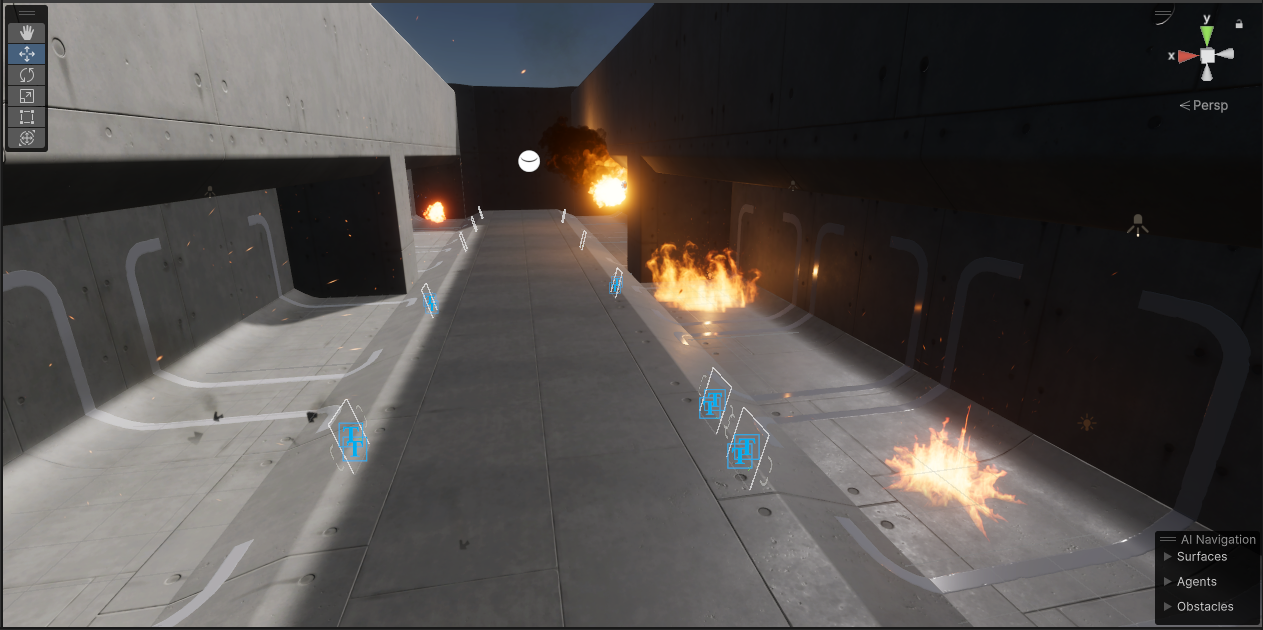
GitHub
Unity HDRP VFX library. Contribute to Far-From-Here-studio/HDRP-ShurikenVFX-Library development by creating an account on GitHub.
jaunty tree
I have a relatively complicated VFX graph with 6 systems, it spawns at the vfx graphs location.
Now I want to embed that vfx graph as a subblock into another vfx graph and be able to spawn that effect from there
How would do I do that? In particular, how do I set the position for the spawned events to not all be equal to the game objects position?
stark crest
jaunty tree
How would do I do that? In particular, how do I set the position for the spawned...
there is some samples that show that, let me find the most relevant
jaunty tree
stark crest
there is some samples that show that, let me find the most relevant
Thanks!
stark crest
do you trigger on spawn event from the original block from the update block?
jaunty tree
stark crest
do you trigger on spawn event from the original block from the update block?
So yes what I planned to do is to trigger the minor vfx graph from the main's vfx graph update block
maybe sometimes initialize even but update is fine
stark crest
so if you trigger this event here thesubblock have an initlization module that will react fine, you can just set a new pos in the init subblock for new (sub)particles, you can use a mask or a noise to influence the new pos
jaunty tree
stark crest
I ported the good old particle pack asset to unity HDRP : https://github.com/Far...
oh nice, but you ported them to shuriken, not to the vfx graph right?
I recently ported one of the explosions to vfx graph as an exercise
stark crest
it's shuriken samples for hdrp
jaunty tree
stark crest
so if you trigger this event here thesubblock have an initlization module that w...
yes, but with this workflow I have to edit all of the 6 systems in my minor graph
or not?
What I am trying to achieve is to easily use complex vfx graphs and spawn them as a whole from a major vfx graph
Would like not to have to modify the complex ones so much all the time
stark crest
depends, you can setup one init block here, then various updates blocks after that to influence each subsystem
if I follow your idea you would have at least two init blocks right after the event trigger, on that follow the object postion, the other that don't
so "not all" particle would be equal to the original pos
jaunty tree
Ok, maybe let me try to setup something and see if it works and come back with a better defined question
Maybe it will also just work
 strange ledge
how can i make a trail renderer (light) emissive?
i've tried making a custom material but some of the trail renderer settings, like color wont apply to it, seems like only certain shader types can be used
managed to get close to what i wanted with a particle standard shader, but doing an emission fade over time seems impossible
(with that technique)
jaunty tree
Ok I maybe now have understood what my question is.
Is there a way for a particle and its spawned particles to sync some data?
I know that I can spawn new particles from particles and pass on information while doing so by using inherit source X
But instead I want to have one main particle which has some data which changes over time (using compute buffers) and then have it spawn particle strips etc and keep its data in sync with that
an easy example would be: what if in a firework I want the main rocket to change colors and its sparks to change colors synchronously?
ashen robin
GPU event that spawns another particle that uses another compute buffer?
secondary buffer would run parallel data and keep track of what indicies it's grabbing data from
jaunty tree
ashen robin
GPU event that spawns another particle that uses another compute buffer?
what I am doing now is that the main particle gets particleDataId. It can access the computer buffers via color[particleDataId]. If this particle now spawns another particle strip or whatever, each particle in that strip will inherit the particleDataId and can use that to access the same data in the compute buffers as its "parent" particle
I'd just like to know if there is an easier way to achieve what I'm doing
ashen robin
sounds like the idea
jaunty tree
can I have a spawn event in the initialize context of a particle?
so basically a spawn event that just happens once?
ashen robin
jaunty tree
can I have a spawn event in the initialize context of a particle?
Not too sure about that, you can probably just make another spawn context
and do single burst or w.e
 grim dust
Is there a way to do a unity equivalent of Blenders cast modifier?
Basically something like this
ashen robin
not out of the box, but you can modify your mesh data directly through its vertex data using the Mesh class API or using vertex shaders.
grim dust
Oh yeah, how would that work?
I'm aware of what vertex shaders but would it be possible to do on a shadergraph or would I have to do it via code?
ashen robin
grim dust
I'm aware of what vertex shaders but would it be possible to do on a shadergraph...
You can probably do it in shader graph, but usually mathy stuff I like to do with HLSL because it's usually more than a few logic nodes unless there's some shortcut logical nodes for this.
 rugged sierra

Hi, I am trying to create a mesh particle to emulate a swarm of locusts attacking crops. As far as you can see, I have managed to get there and it is not the result I expected. I would like to get the locusts to just jump up (from the ground) and back down, all on that axis but not to rotate around it.
ashen robin
rugged sierra
https://streamable.com/r3835s
I'd probably design this using a plane to spawn them, setting a velocity and using gravity in the update context, and probably a kill plane but a duration should suffice.