#🔊┃audio
1 messages · Page 11 of 1
 wintry creek
Nope, not worth
 stuck frost
aight thanks
wintry creek
Not because the program is that unusable, but due to most of the content it comes having extremely draconian copyright clauses. You are better off using a "real" daw
 whole pewter
lol 😆
 past tendon
My advice would be to start with www.reaper.fm . It's a serious DAW with a lot of features that are handy for video game development. Batch exporting, etc.
 crisp trail
Here’s ambiance for my game
 surreal breach
well if anyone ends up wanting to help pls DM me, i need some help with resource files
whole pewter
nobody's going to DM you ; just formulate the question
 rancid imp
😅
 rich merlin
Hi guys, is there someone who have experience integrating Wwise with Unity?
wintry creek
@rich merlin usually is the other way around
You install wwise and set up the events on unity then use wwise to fill those
surreal breach
well my question is more to do with modding an existing game rather than making my own one
i wanna be able to access the games resource files and change the audio
but im a unity noob so i have no idea what software to use to even get started
whole pewter
well that software ain't here so.. good luck
surreal breach
so what can i do then,
 deep pelican
nobody knows, you havent provided any details
surreal breach
i want to access the resource files and change the already existing sounds in the game
like how i would with an fsb or is that not possible ?
deep pelican
it's possible, but it depends on how the game manages it's resources
if you're lucky you can just find them on your harddisk and replace them. If you're not you still have to find the data on your computer and figure out how to unpack it and repack it so you can replace things
surreal breach
i know someone who managed to do it but that person is MIA rn
wintry creek
@surreal breach you could get away with decompiling the source code and hooking your own stuff there
surreal breach
oh
 stable snow
Does anyone have hardware / device suggestions for recording your own sound effects?
 full veldt
@stable snow id love to help but idk :(.
stable snow
♥ thanks
full veldt

Here's a track for my upcoming pc indie game :D
heres a track I made for my game 😄
what yall think
my fav part is after 1:40s
 half storm
I'm not really into audio, i hope someone here is: can someone recommend an microphone for recording game sounds and voice acting in really good quality? Do i need an sound card or is an onboard card enough with a good microphone ? i know i'm not getting studio quality but i want to get as near as possible to it
stuck frost
why is my audio always 2d? I want it to have a falloff but it doesnt wanna cooperate
deep pelican
@half storm getting the best quality has a lot to do with the recording environment too. You can get decent results with a SM-58 and a room full of stuff that absorbs vibrations though. After that you do your best to edit out any noise and make the voice shine
half storm
ok @deep pelican but i can't connect it to the pc without an audio interface right?
deep pelican
right, that's easy enough with converters unless you have the juice for a nice soundcard
half storm
ok thanks, i think i give that a try
half storm
yeah, i've seen that. I think i try the audio device, didn't read much good about the xlr to usb
wintry creek
@half storm if you wanna go cheap a SM57 or SM58 will do it with a cheap usb interface like the Lexicon Alpha, shouldnt set you back more than 100$
or maybe a cheap condenser like the Samson C01 or C03
you can even skip the usb interface if you go directly with a usb version of this condenser mics, like the Samson C01u or C03u
half storm
that looks interesting too thanks @wintry creek
 obtuse venture
Summer GDC encourages self-promotion on Twitter! https://twitter.com/Official_GDC/status/1286667954806034435?s=20

Do you work in game music or audio design? Are you looking for work? Reply to this thread and show off your portfolio! #GDCSummer

 Twitter
wintry creek
Twitter
wintry creek
Any Megaman X fans around? Made something inspired by X4 for a stage select kind of level
wintry creek
thanks!
 cunning rain
It's nice to do covers of video-game tracks from time to time. Been working on this one, still yet to do the percussion.
Here's one I finished not too long ago as well (from Crisis Core: FFVII)
 crisp zodiac
sick!
deep pelican
wow the compression
 sage latch
Those sound nice!
Just a quick question... I need to make some music for my game and idk what software I should use. If there's a good free ones perfect! But if not, that's fine as long as it ain't too expensive. (and feel free to ping me)
sage latch
alright thanks I'll take a look into it!
I also just saw Brackey's Bosca Ceoil video so I'll probably decide between the 2
wintry creek
that barely qualifies as a daw tbh
 sacred root
reaper...
whole pewter
bosca ceoil definitely qualifies as something - only not sure as what ]
wintry creek
@whole pewter deff classifies as "tool people who dont wanna learn music and dont wanna make music but need music to use"
 elder warren
Does anyone know know how to use a midi drum pad in a DAW? I cant figure it out and looking online does nothing. I want to use my drum sounds with my drum pads, Is there a vst I can just use that allows that?
I need some drums but I dont know how to use my pads
wintry creek
@elder warren your pads are just piano keys
they will just trigger a preset midi note
elder warren
But how do I set them?
Like I want one type of drum on one key and a different type on another
 hollow charm
wintry creek
hollow charm
wintry creek
@elder warren You will need whats called a sampler
a ton of free options online
specifically, a drum sampler
elder warren
Will that allow multiple sounds?
rancid imp
is there an effect in audacity to turn a voice clip into a choir? so it sounds like multiple people are saying it at the same time?
stuck frost
need some opinions on this its for a horror game (WIP but still)
I like it, seems ominous.
rancid imp
Need opinions: Is this easily understandable at what is being said?
deep pelican
yes but you should lower the volume of pitched down ones because they're too loud. It's like he's right in front of you and there's a few others way off in the distance
rancid imp
Like dis?
wintry creek
Chiptune Math Rock 😄
 ionic hearth
Lovely.
 rain thicket
Hey there! I have a problem with Audio.PlayOneShot, it's super loud. It's a simple script where I click Mouse1 and it should play it once and clearly, but it's super loud and overlapping. Any ideas?
deep pelican
maybe your gameobject is duplicated
 vague salmon
it may also be playing every frame you have the mouse button down
rain thicket
How can I have it played once when I have the mouse button down?
It's GetButton, because it's an automatic weapon.
stuck frost
rancid imp
Spooky. Need to remove the static noise tho
@stuck frost that sounds amazing, but i think it would take it to the next level to try make your bass hits sound like heart beats abit more!
 plucky sun
Hello everyone, I was wondering if any of you ever tried doing some audio recognition and if so how would you go about, example I want to detect when someone claps. Is it a complex thing to accomplish?
Thanks!
stuck frost

No Escape will be releasing onto all major streaming platforms on the 19th of August!
0:00 - Inferno
2:33 - Fatique
5:47 - Perfect Spiral
7:01 - Cancer (MCR Cover)
9:25 - Street Cry
11:08 - Storm in A Sunrise
 hearty stag
Does anyone have any advice on how to structure AudioMixerGroups? It is really tempting to create separate AudioMixerGroup for ever sound-emmiting object/prefab in the game just for the sake of being able to easily manipulate it's volume. With this approach I currently have about 40 AudioMixerGroups. Won't it become too expensive if I continue to add groups in this fashion? Mind that I am developing a mobile game to it is really easy to get performance problems there
wintry creek
@hearty stag \ dont do that
you will lag your game out
use an audio manager to instantiate audiosources and manipulate them instead
hearty stag
@wintry creek All right, makes sense. Thanks for quick answer
stuck frost
Hey, how can I add an sound whenever the player presses a key?
 floral ledge
 spare gust
i don't think so. that's why it is named Play One Shot
deep pelican
although documentation makes it sound like oneshot means playing at a particular volume 🤮
spare gust
I think the design thinking behind PlayOneShot is that so you can reuse one AudioSource multiple times. And because different clips may require different volumes, they added the volume parameter there.
 stark kindle
ummm i am doing .Play and there is a weird delay to my audio do you know how to fix it
explosion.Play();
 neat peak
elder warren
neat peak
elder warren
Doe anyone know of a free VST where I can take a part of a song and turn it into a midi instrument? I think its called a sampler
elder warren
I use CakeWalk
deep pelican
lol
 inland rune
@stark kindle does your audio clip have a long attack?
whole pewter
that's called lazy explosion
 silent cloak
idk anything about making sounds, but could someone give me a tip on what software to use for making sound effects (free of course xd)
whole pewter
sfxr
 calm shore
I am trying to get my enemy to shoot at my player but the projectiles are just going towards to initial point of the player
can someone help me?
Also, here is the script for my enemy bullet
 hollow briar
What would you guys say is the best music genre to use for any game (other than orchestra). I know that any genre when used properly could give any emotion you wanted, but I want to know which genre do you guys think could give the most emotion, with the least amount of tinkering, without taking away a large amount of attention from the game?
Other than orchestra what would be your go to music genre for most games you'd make?
whole pewter
death metal
deep pelican
drum & bass, happy hardcore :D
if you want the real sauce though look at old nes games like megaman. you'll find that it's less about genre and more about matching the theme
hollow briar
I've also gotten that answer a lot
Ever hear an answer that makes perfect sense and answers your question completely but you hate it because that's not the answer you wanted?
stuck frost
dose anyone know how to get the Float of the Audio Level(decibels) on the audio listener or something? wanted to add a realistic feature where the ears start to ring when it gets loud enough
deep pelican
welcome to science
the answer will probably start here
https://docs.unity3d.com/ScriptReference/AudioListener.GetOutputData.html
vague salmon
@hollow briar it's highly subjective and the way you decide to answer that question is part of what makes your game unique
There is no genre that is strictly easier or harder to produce than any other genre (btw I wouldn't call orchestral a genre per se)
But there are different styles that can vary in levels of production
Like it's really easy to make professional sounding chiptune
It's really hard to make professional sounding marching band music
But either style can support a lot of different genres, both will allow you to do jazz for example
hollow briar
What is the difference between a style and a genre
wintry creek
completely unrelated things
wintry creek
cursory google search

Music: Practice & Theory Stack Exchange
Is there anybody in the world who knows what's the difference between genre and style in music? In wikipedia there are articles: list of music genres and list of music styles, but when we go to a
hollow briar
Thank you
 spring shard
Sorry if this question has been asked before, does anyone have any recommendation of free audio-editing software? For cutting and filtering voice assets for a sci-fi game (i,e make them electronic sounding and so on )
whole pewter
audacity
 prime stirrup
hwo does this sound?
 worthy zinc
anyone good at composing organic anthems?
inland rune
@hollow briar It really depends on the emotion you want to convey. DnB gets a vote from me. Lots of old boss music has a DnB vibe. Happy Hardcore is great but I don't see it being usable for a lot of games plus it's a pretty difficult to produce genre. Though Artcore, a mix of HH and Orchestral, would be a good substitute for plain Orchestral if you want something a lot more intense and if you're really good at music production. Look up xi.
hollow briar
Thank you for your wisdom @inland rune
inland rune
What emotion are you going for btw @hollow briar
hollow briar
Nothing atm. I do music as a hobby and haven't yet gotten good enough to confidently apply said music to my games. Unfortunately, the only genre that I am any good at happens to be Lo-Fi and despite having some good sounding Jazz music, it isn't Jazz music I can see people listening to more than once. While it may be fine to put into a game I doubt it'd be memorable.
I've been thinking that maybe I should expand my horizons a bit more and see if I can get good at another genre since Jazz and Lo-fi (which is pretty much just nostalgic Jazz) is probably a bit too complicated for me to continue sinking my teeth into. I want to see if there's something simpler that I can do so that I can learn more about music production and thus apply what I know to the genres that I already know.
Thus the question was aimed towards finding the best genre to play with for a while. @inland rune
inland rune
Certain more energetic genres of ambient music can be a good idea @hollow briar
Ambient DnB even if you want to transition that way
Also techno is pretty light on the music theory but heavy on sound design and mixing
If you want to improve melody and such then chiptune is a pretty pure genre
hollow briar
Yeah I've been looking into things like techno and I'm finding myself very over my head
I learned Music Theory first and it's the only thing I'd say I'm confident enough in to even label myself as advanced
everything else is where I suck
So being thrown into a genre where everything else is being used more than music theory sends me for a loop
I'm still trying it out though
deep pelican
try making different styles with the sounds you're used to making/using
hollow briar

inland rune
Improving your mixing and sound design skills will take the mud off your songs and let your other skills shine
Take a look at You Suck At Producing
hollow briar
I love that channel
I haven't dug too deep into it
but I'll look into it more
Also I'll try out that style thing you suggested MICKEN
inland rune
You're on the right track then :) It comes down to YouTube and experimenting really
Perhaps try emulating a song or an artist
hollow briar
I've thought about that and have been very VERY on the edge about it
The main thing is that I don't see how that helps
deep pelican
making a cover of a song you really enjoy is a great way to improve your technical skills.
the fact that you like the song helps keep you motivated and inspired
hollow briar
what would you refer as technical skill?
inland rune
Yeah plus having a reference for how you want a drum to sound will teach you a lot about how to make drums sound good
inland rune
KSHMR Vol 1 Tight Snare 03 :)
Might be off on the exact sound name
But just layer a few KSHMR snares and you're good to go
video unrelated
====================================================
"A little less nothing" by Kaktusz // Lyrics
This song is about meeting somebody that is cool and they will always be cool even if you move to the Net...
wintry creek
@inland rune I am jk music is my main job haha
wintry creek
haha
wintry creek
Talking about audio, I scored this!

SOMETHING EVIL LURKS AT WINTERLAKE
While investigating the disappearance of twin girls at Winterlake - something terrible happens to Caroline Walker.
Waking in the dead of night, naked in a bathtub - and hooked up to some decrepit medical equipment, Caroline must fight for he...
Expect more Resident Evil/Silent Hill inspired track ^^
 south mica
So i have a question !
if anyone here familiar with Simulacra he/she will probably know the ringtone that plays in the game
anynways.. i wanna ask how do we make something simple like that ringtone and what should i use ?
wintry creek
I think its easier if you link to the source
I have never heard of Simulacra before
 wintry creek
thats annoying AF lol
thats sounds so amateur haha, so checking that out
you will need a DAW
like FL Studio, Cubase, Ableton, etc
if you wanna go free, Cakewalk
the ringtone itself are just a couple of synths playing a couple of arpeggios + a snare drum sample for some reason
south mica
Exactly that what i want lmfao
thats annoying AF lol
@wintry creek
Well thanks for the help
inland rune
Reaper best free DAW (speaking from experience only with reaper xd)
For free synths, there's synth1 and a 10000 presets zip on Reddit
wintry creek
@inland rune I mean its "free", to evaluate. Forever
haha
cakewalk is actually free
for commercial and use and all
inland rune
Oh yeah Reaper is like WinRar lol
The only cost is your morality
Cakewalk looks nice though
inland rune
Yeah, Camellia makes all his stuff in reaper and that's some very full music lol
hollow briar
Yeah, I used Reaper a lot (abusing the guiltware feature)
After a while I just decided, this thing is awesome, so I bought it
It's really nice
inland rune
@south mica if you're still trying to replicate that god-awful ringtone here is what you'd need:
-clap, snare(maybe?) and ride cymbal simultaneously for the percussive hit
-simple saw synth for the main melody
-saw w/ some unison+detune or hoover synth, with a lot of (free) TAL bitcrusher for the other melody
-synth plucks with a decent amount of lowpass filter for the background arps or whatever
rancid imp
https://streamable.com/njmkyx What can i add audiowise to this sequence to give it more... Idk... Umpf i guess

i tried adding some speech to the imp dude. but it doesnt fit with the cackle
 grim bridge

 fierce olive
Is there a forum/video/documentation of text to speech in unity?
whole pewter
yes here https://cloud.google.com/text-to-speech or here https://azure.microsoft.com/en-us/services/cognitive-services/text-to-speech/ (and aws possibly)
IIRC System.Speech.Synthesis is not directly usable in unity [and it has limited languages support] but it's possible to call it as external process
 misty flicker
what are the current options for audio spatializers on unity 2020?
I just saw that resonance audio package got deprecated last year
it could potentially still work but kinda sucks to use unsupported thing
I'm guessing there's oculus audio spatializer
misty flicker
is there spatializer for Unity that does?
oculus seems to be mobile and pc
microsofts is uwp and win10
I wonder if they still do xbox
as for the deprecation: https://docs.unity3d.com/Packages/com.unity.google.resonance.audio@2.0/changelog/CHANGELOG.html:
###[2.0.0] - 2019-11-04

Deprecate package```this of course doesn't mean the whole integration is deprecated but upm package for sure is
whole pewter
they deprecated the package hm interesting
misty flicker
that being said https://github.com/resonance-audio/resonance-audio-unity-sdk has been last updated Apr 6 2018
so it sure doesn't look good
whole pewter
resonance itself should be supported by google still given last commit they have is just few months old
that unity package haven't changed since forever
misty flicker
unreal, wwise and fmod sdk's are also all from 2018
if the unity SDK/old upm package ships with full c# integration, it should be somewhat trivial to keep it updated with the regular resonance sdk
altho I dunno how audio spatializer api works in unity in the first place
whole pewter
bingo
misty flicker
if it needs native plugin designed specially for it, then it gets a whole lot more complicated
like for example current Unity XR plugins fall into this category
(and unity doesn't have public XR SDK for native side, they only hand those upon request)
whole pewter
the way you do it is you keep your external audio plugins up to date manually and they use unity spatializer API ( which they won't be deprecating soon ) - there might be changes but I think they will keep spatialization interface - hard to tell why/if/when/ maybe @strange spire could tell if he wants D
misty flicker
just to be clear, I don't know how the native plugin in current resonance audio plugin works, like is it sdk independent dll or native plugin specifically interfacing with unity's spatializer API. There's a huge difference between these two things as for latter case we'd need plugins unity specific native source code to be able to maintain it.
if it's the former case and we just drop in new native dll from regular sdk and then update the wrappers, it's somewhat trivial
anyway, I guess best way to tell is to just look around it
but the original thing I was interested here was... what are current options for unity audio spatialization? my google fu gave me:
- resonance audio (which doesn't have maintained unity integration anymore)
- oculus spatializer
- microsoft spatializer (only win10 & uwp)
I know nvidia used to have some vr audio tech but I haven't seen unity integration
official doc page says oculus and microsofts spatializers are included natively but I only see empty list on my project settings->audio>spatializer plugin selection
whole pewter
i won't get into technical specific there's no point, but resonance audio is not deprecated by google and unity package haven't changed in two years doesn't mean it doesn't work
yea you have to install them
misty flicker
I've seen the sdk installers (and can manually put that deprecated package in place), docs are just outdated I guess
(I checked both 2019.4 and 2020.2 alpha docs, same text)
whole pewter
📰 < that's not surprising
btw by "install" I mean import their respective integration into the project - they all inlcude their respective native plugins which you might use separately / manually if you wish I guess
 static viper
Hey guys, I want to play an audio file when one of my variable in animator window becmes true
How should I do that?
Basically, I wanna play an audio only when particular animation also is playing
I tried this
 queen knot
 thorn brook
Hey guys. I'm running into a problem playing multiple sounds at the same time. You see, I have an "explosion" prefab. It has a particle generator and an audio source. Then, when a "big boss" explodes I instantiate hundreds of these explosion prefabs sequentially (but randomly). The first 10 or 20 explosion sounds play correctly, but then all following explosion sounds don't play. Have you experienced something like this?
thorn brook
@static viper I would add that to a behavior inside the animator state that calls the animation clip. Or even add an event to the animation clip.
inland rune
@static viper your code should work if you also make sure the audio isn't already playing before you call Play. Otherwise it will try restart it every frame.
deep pelican
@thorn brook the audio engine has a limited number of voices, you probably ran out.
I'd check to make sure your explosion sound is short enough (cut out any silence at the end)
Try using a smaller number of audio sources as well
 agile linden
Hey guys, what keywords should I use when searching for a "reward" sound when you kill an enemy player, like in Valorant that surprised, tense, satisfactory tnnn?
 radiant plaza
Haven't played that one so I don't know what it sounds like, but my spitball guess for SFX like that would be words like 'tension,' 'victory,' 'pulse', 'thrum', 'hum'
agile linden
@radiant plaza Thank you for helping, but I still wasn't able to find it 😦
 void light
hi everyone i have had a problem for a while now which means i have not been able to play audio in my game. in the inspector my audio listener is set to active and everything was setup properly but it was not playing music. after looking around for a bit i found out that in the stats bar in the corner of the game tab it said that the audio was muted. i have tried to fix this but still have not been able to find an answer if anyone has any suggestions that would be greatly appreciated thank you.
 deep pelican
make sure your audiosource is actually playing.
make sure your listener is close enough to your audio source
make sure your sound asset actually has sound in it
make sure audio is turned on in your project settings (disable unity audio checkbox)
make sure audio global volume is not 0
make sure you have more than 0 voices
make sure your audio components are actually enabled
make sure your speakers/headphones are plugged in
 loud ember
Sup with the audio source volume control. Is the slider expected to work linearly?
Volume at 0.5 is not half the volume at 1. Am i missing something in here?
 small sinew
@loud ember it is logarithmic. In the mixer at least.
loud ember
is there any exact mathematical function representing the curve from 0-1? @small sinew
i dont see much in the docs
small sinew
For 0-1 value v, 'Mathf.Log10(v)*20' I believe?
Probably want to clamp v to some very low nonzero value to avoid errors if it is actually set to zero.
loud ember
okay so clipping to a very less value say 0.01 might prevent any exception from the Mathf.Log function but
log of any number less than 1 becomes negative
small sinew
More like .001
loud ember
how do i achieve a linear mapping with this?
loud ember
I see
small sinew
And higher of course
But usually the baseline is set at zero.
I'm on my phone at 7:30 am so I might have it slightly off but pretty sure that is right
loud ember
so say i want the audio to be played at 20%. how do i achieve that.. with the above function
20% isnt obviously 0.2 float value
loud ember
and i set this volume to the audio source?
audio source is limited from 0-1
All what the doc says
small sinew
If you're using ghe audio mixer, you'd set that to a float to drive a group volume
loud ember
no im just concerned about the audio source in here
small sinew
I actually am not totally sure about using it for the audiosource directly. It is likely, but I prefer not to assume
You could try it and see how it works
loud ember
Mathf.Log10(.2f)*20 this value comes as -14 somewhat in a standard calculator. but volume values are clamped from 0-1
despite that i just tried the audiosource is at 0
small sinew
Ah. Ok, they aren't taking db
loud ember
yeah seems so
small sinew
You're sure that .5 isn't giving a roughly 50%
A quick googling imples that the audio source itself should be linear if you don't use a mixer. Is it a 3d sound? Distance from the audio listener might be affecting it?
loud ember
no its a 2d sound completely
a background music actually
You're sure that .5 isn't giving a roughly 50%
pretty sure i am
 light sable
can someone recommend a software to make music for games?
whole pewter
gpt-3
re: volume interval on unity audiosrouces: i think they just do lerp over the actual decibel interval [ 0 = -inf/-80dB, 1 = max dB ] - that's why it doesn't scale/sound linearly
loud ember
@whole pewter so do you know of a way to represent them linearly?
I tried logarithmic scale using Mathf.Log10(value) * 20 where value ranges from 0.001 to 1, which results into -80db to 0db
And then I tried using linear scale for calculating gain as (value*80) - 80 where value ranges from 0 to 1, which results into -80db to 0db again but even this doesnt look right. For the first one until the sliderapproaches near 0, it sounds as if its playing at the high volume.
And for the second one, until the slider approaches near 1, it sounds as if its playing at a very low volume
Isnt there anyway to get a proper slider like the one windows has? 😂
with linear scale i mean
 meager storm
Hello all I am new here
deep pelican
howdy
hollow briar
How would you guys come up with a music direction for your game?
and would you do this pre-production or no?
a-asking for a friend 😳
deep pelican
First work out the theme and overall sound style of the game. The keys and chord progressions you use are what uniquely identify your game or brand. So many games miss this entirely.
Once you've got that settled it's a matter of producing enough pieces to find the ones that are just right for each scene
If you want inspiration check out Hanz Zimmer's work
that guy can take a theme and do wonders with it
hollow briar
What games has he worked on?
deep pelican
he does movies
hollow briar
ah
I'll look him up
I'm currently pretty much on the step of trying to figure out the overall sound style of the game
but I'm a bit unsure of just wandering about youtube and just listening to whatever music
deep pelican
just like when you hear "bada bap bap baaah" you know it's mcdonalds. you want the same for your game 😄
hollow briar
lmao
I get it
Actually
I think that might've just indirectly answered my main question
Thank you
stuck frost
s
whole pewter
@loud ember well, instead of getting direct log value maybe compensate the log curve with its inverse a.k.a. exponential, I guess
loud ember
@whole pewter I didnt mean exactly what you're trying to say.
Current known eq:
y = 20log10(x)
y/20 = log10(x)
10^(y/20) = x
You mean this?
loud ember
yeah thats the exact same thing i showed you up
after the second step i basically took the inverse log (raise both sides to the power of the base of log. 10^(log10(x)) becomes x)
but thats not what i want. I want to control a linear term and vary the y component logarithmically so that when I vary the linear component linearly, the logarithmic component feels correct
loud ember
also why am i hearing the sound as if its at maximum volume even at a distance like this (spatial blend is at max)
listener is literally near the end and the graph literally shows audio at around 0.1
whole pewter
Akash: yeah thats the exact same thing i showed you up
no that's not exact thing you showed up
meager storm
@hollow briar I've worked in music production professionally for 7 years before I started in game audio. It's very common to use references (of other peoples completed music from games or film) to help establish a palate of examples for your game. You should use these references in your game. You want to answer the question 'does this music work in the gameplay ?' Once you have this question answered for yourself (the developer) internally you can have much better quality communication with a composer or music provider. Having done this (adding references to gameplay) can save you a lot of time and money. Asking a composer to write original music to support your discovery process it very very expensive. That's like telling someone to paint you a picture and keep changing it until you decide that you like it. No one does that. Same goes for music production.
hollow briar
Yeah, originally, when I was asking the question, the main thing I wanted to figure out was what was the best way to find a good reference for what music direction I want. Micken gave me an answer about melodic motifs and it reminded me of a channel called 8-Bit Music Theory. I decided that the best way to find a direction was by scouring some of his videos and I found the direction I want.
Thank you for the response @meager storm
wintry creek
@hollow briar I dont work without references
if the client doesnt know what they want neither I do lmfao
but speaking seriously, referencing is a standard in the industry
hollow briar
I'm not referencing anything for anyone else
I'm getting a feel for what I want
It's a solo man project
hollow briar
In that case, I know what I want
rancid imp
Does anyone know where i can find an audio clip of a demonic creature crawling?
 cinder pasture
try freesound.org
but it seems a bit specific so there might not be anything there
meager storm
yeah that's something an audio designer would make for you
 nova glade
Are there any audio engineers in the room? Just curious what tools you are using. I've seen people work with WWise, and FMods official unity plugin for audio mastering in actual audio editing tools vs the unity interface. I was curious what other options were out there.
meager storm
The asset store has smaller tool packages like Master Audio , Sectr , Audio Toolkit .These all rely on extending Unity audio features. Something like https://www.fabric30.com/ is a much lower level tool like Wwise or FMOD but just a smaller developer and niche product.
fabric-3.0
whole pewter
the in-editor/asset store tools are not fit for any authoring (if you want to stay in sane spectrum that is), except Audio Helm maybe
 novel gyro
Does anyone know if its possible to create an undertale / animal crossing type speech engine?
meager storm
Yeah it would be a lot of work but it's possible. >> https://github.com/Acedio/animalese.js

GitHub
A JavaScript approximation of the villager speech sounds from Animal Crossing. - Acedio/animalese.js
whole pewter
i know how those games should sound only from the link above since i've never played them myself, but it looks like klattersynth has similar voice if robotic is kind of the target [yes it's asset store]
wintry creek
Undertale speech engine are like 4-5 samples played at random short intervals per char with pitch randomizations
wintry creek
New thingy 😄
 queen basalt
Does anyone know how to do Foley? Trying to make a cape flapping sound for my trailer but I've got nothing 😅
Also holy crap @wintry creek that sounds fricking insane
wintry creek
You could try flapping some kind of towel or paper, sounds like a good place to start haha
also thanks!
heck even putting your mic with a pop filter on the breeze should yell a similar effect @queen basalt
whole pewter
i'll ask you about those chorus samples some time @wintry creek
stuck frost
@wintry creek thats amazing man
wintry creek
@whole pewter Hollywood Choirs from Eeast West! they are insane, composer cloud is having a sale right now, I heavily recommend the subscription, the best option for a budget orchestral suite
@stuck frost thanks!
 warped ice
@wintry creek wow thats a fantastic tune
wintry creek
thank you ^^
void light
@deep pelican i know this was a while ago but i would just like to say thank you my audio now works and i do not have anymore issues thanks
deep pelican
no problem 😄
 tawdry spoke
https://www.youtube.com/watch?v=LHIP6oKzet4 This was one of our best soundtracks ever done. I can't describe it in words how good it is, just listen for yourself..

An unbelievable end of the world theme that can represent 2020. Epic Intense Emotional Soundtrack for Destructible.
EliteMusic -
YouTube: https://www.youtube.com/channel/UC-9l8WNuNsZUTUQzaoE5Yjg
SoundCloud: https://soundcloud.com/elitemusicofficial
Me (Jordan) -
YouTube: ht...
 royal bridge
WoW
wintry creek
New Thingy 😄
 coarse scaffold
Does anybody else's windows explorer crash when you right click .OGG files?
coarse scaffold
Some sounds for my monster game.
inland rune
@coarse scaffold try reinstalling VLC
 static nova
I have a question, I'm working on a visual novel and my plan is to have everything voice acted, however, I'm concerned as I know that the game will easily have ~10 hours of audio.
In that case, should I save the voice lines as OGG files and then compress them or is there a more efficient way of saving my voice lines?
wintry creek
OGG should suffice, yeah
static nova
Oh, so I don't need to compress them?
wintry creek
OGG is your compression
 grand mortar
meager storm
grand mortar
meager storm
Hey @static nova I hope this clarity helps. Record and edit your voice as .wav . Deliver the .wav into Unity project. Then use the Unity import settings to set to ogg. Experiment with setting ogg quality to 50% and use the sample rate option 'set sample rate' and choose 22,050. Audition in unity and see if that quality works well enough.
Do not not deliver .ogg into Unity. That's like importing a highly compressed .jpeg where the quality is too low. Use the Unity import settings on the .wav source to do that ogg compression for you in Unity.
Regarding dialogue edit , make sure longer natural pauses in the dialogue are silent. Most audio editors let you set a selection to mute or silent. This will improve the data compression savings when Unity does the .ogg compression for you.
 sinful bison
So i have 0 knowledge around audio and this is my first unity project that got serious enough for me to care about audio. I have machinegun turrets shooting and i playoneshot for each turret shot(around 3 per second) when one turret is shooting it sounds ok, but when multiple turrets are shooting simultaneously it sounds like my speakers and pc got stuck(it is not its just an accurate depiction of the sound). I also have trimmed the gunshot audio so it doesnt get culled. Can someone help me with this?
cunning rain
been working on a cover of a track from Halo CE
meager storm
@sinful bison using one 'shot' clip has multiple problems 1) not enough variety so when multiple shots play at the same time it sounds bad 2) fire rate (3 per second) is too many play calls the audio system will get flooded and run out of voices 3) the timing of the fire rate will not sound constant because you're using the main game loop
here's the fixes 1) get more variety of clips so you're not playing the same single shot every time 2) & 3) machine guns need steady timing, this is achieved by playing a looping longer burst of shots (5 - 10 seconds for example). You'll need to stitch a 'tail' clip on the end so when the player let's go of the trigger they hear the last shot ring out naturally
sinful bison
here's the fixes 1) get more variety of clips so you're not playing the same single shot every time 2) & 3) machine guns need steady timing, this is achieved by playing a looping longer burst of shots (5 - 10 seconds for example). You'll need to stitch a 'tail' clip on the end so when the player let's go of the trigger they hear the last shot ring out naturally
@meager storm Thank you Joel this is very useful information. The first part(different shot clips) i ended up figuring it out but even with random shots it still sounds weird after 3-4 turrets are shooting simultaneously. Do you happen to know of any guides, tutorials or any kind of hands-on information on the 2nd solution. As i said i'm oblivious to sound editing and such. Thank you for your time 🙂
meager storm
@sinful bisonUsing a pool of audio clips that are each a bit different helps a single instance of a gun firing. Add a second instance and you'll run into almost the same problem. Audio (just like visuals) requires a lot of design work before it sounds good to the player. Have a look on you tube for some simple examples of building machine gun sounds. There's lot's of audio demos or 're-design' videos but what you're looking for is a breakdown on how someone can solve this 'machine gun' problem. It's not something you are doing 'wrong' trust me people in AAA have exactly the same issue, they just have a lot more resources to design around it 🙂
meager storm
Here's a link to using PlayScheduled in Unity >> https://gamedevbeginner.com/10-unity-audio-tips-that-you-wont-find-in-the-tutorials/#playscheduled
My TEN most useful tips and tricks for working with AUDIO in UNITY.
sinful bison
@sinful bisonUsing a pool of audio clips that are each a bit different helps a single instance of a gun firing. Add a second instance and you'll run into almost the same problem. Audio (just like visuals) requires a lot of design work before it sounds good to the player. Have a look on you tube for some simple examples of building machine gun sounds. There's lot's of audio demos or 're-design' videos but what you're looking for is a breakdown on how someone can solve this 'machine gun' problem. It's not something you are doing 'wrong' trust me people in AAA have exactly the same issue, they just have a lot more resources to design around it 🙂
@meager storm I see. i will start researching around the subject and try the "burst" approach you suggested. Thank you for taking the time to help , i really appreciate it! 🙂
meager storm
no problem audio is a deep topic
you will still need a variety of burst clips, so if you have on average 6 machine guns firing consider a solution where you made 6 unique loop and tail clips. keep in mind it's a common problem that many similar sounds overlapping become blurred and at some point you cannot tell one from the other.
 whole zinc
Could you put an audio effect like a low pass filter on a sound in unity?
 static pecan
Pretty much done. It's not a perfect piece but I feel like I have experimented a lot and learned a ton from this piece and practice!
It's mainly a practice where I have taken an already existing melody and put own composition underneath it.
One thing that I definitely think is kind of bad is brass playing this fast melody, brass players need to breathe.
Anyways hit me, your feedback is always welcome even if it doesn't add up in the piece, it helps the next piece to even be better.
 spiral kettle
Does anyone have a recommendation for a piece of software to manage sound effects and audio snippets?
PC, and obviously would like something that makes my life in Unity easier
inland rune
@whole zinc yes https://docs.unity3d.com/Manual/class-AudioLowPassFilter.html
 whole zinc
Thank you
 alpine salmon
I released a new albuuuuum
https://www.youtube.com/watch?v=x0bBu9hAHkM

Download / Stream the album:
https://wangleline.bandcamp.com/album/index
Please consider supporting me on:
https://www.patreon.com/WangleLine
Tracklist:
0:00 Kissing Ancaps feat. mit.chi
2:11 I was still asleep when the taco fell
5:10 Patty Patty
6:56 Sweet Mary, Sweet MIDI
...
 astral beacon
how does the "pitch" sliders on mixer groups work? it feels like it's sending a multiplier to audiosources routed into it like a macro control, instead of a pitchshift audio effect?
i can't find any mention of how exactly it works in the docs, just stating the obvious that it makes things sound higher or lower
what difference is there if i Mixer.SetFloat() a group's pitch as a exposed parameter, versus if i set AudioSource.pitch to everything that's routed into it?
alpine salmon
Does anyone have a recommendation for a piece of software to manage sound effects and audio snippets?
@spiral kettle I use the ADSR sample manager, it's also free
spiral kettle
Thanks! I'll look into it
 sonic cedar
Hello, I have no idea how to get started with making game audio, and I was wondering if anyone had any recommendations for making audio as a beginning. Preferably a free program or low cost, as I am on a tight budget.
 outer rune
If it has to be free try look into LMMS. Focus on getting understanding on how to use the basic soundtypes like sinewave/squarewave/triangle/sawtooth, how to combine them to make a more interesting sound, how to shape the volume (amplitude) profile of it with an ADSR envelope (attack/decay/sustain/release), how to change the pitch of the sound and how changing pitch over time alters the sound as well. Look into lowpass/highpass/bandpass/whatever type of filters and equalizers to change the sound even more, how and when to apply reverb/delay/chorus etc
LMMS is to make music but you can obviously create sound with it, and it's free
Personally I prefer FLStudio but it costs money
Just check youtube for tutorials on how to design sounds, don't just stick to videos specifically about LMMS, it's about getting the basics
sonic cedar
Okay great thank you
 gentle citrus
Lmms will soon have a native Wavetable Synthesizer
The dev who's working on them also made these
https://www.youtube.com/watch?v=8vq0gFMO3z0
https://www.youtube.com/watch?v=j-i0gY_KmVk

Back again with a new video of that Phaser I programmed for LMMS!
I added many new features to it, most of which are shown briefly in this video.
If you would like to play around with it, use the BuildBot links here:

This took a few months to make, the visualizer in the back taking the bulk of the development time. I wanted to make this the best audio compressor in the world... and while it's entirely subjective which compressor is the best, I'm very satisfied with how this turned out.
I...
sonic cedar
cool!
 crimson stag
Hi everyone. Its my new released track about turning the feeling of grief and sadness to feeling of confidence and happiness
https://open.spotify.com/track/63wzJpkn08Bjx33BGiUgTG?si=8xxP-jr6SvuG7j3Jia7HaQ

 covert granite
wtf
 sacred hazel
I want to share you my work as a Unity Audio Implementer: https://www.youtube.com/playlist?list=PL_w-v80hrjMJSnTuSzULB6KoJJLazH-uC

YouTube
whole zinc
Here's some boss music. It's in drive because the file is pretty heavy. Opinions on it? https://drive.google.com/file/d/14Vjypfd2aIZR5-AT6DHqX5NneK4UMaRN/view?usp=drivesdk
Google Docs
 dark moat
I like it, it sounds like it's a boss music from one of those pixel art / retro platformers. Is that the case?
whole zinc
Thanks, it is pixel art but not a platformer
 tender helm
where can i find some good free ui sfx things?
i am specifically looking for one sound that would make a tck type of sound
like i can hear the sound that i want in my head but i do not have the ability to create it
 silent hazel
Do you need a cheap/freelance chiptune artist for your game or project? Then I'm your man! I've been making tunes for about 5 years, and would love to work on any project, even for free!
Heres my most recent song: https://soundcloud.com/replay-368202368/a-lovely-day-at-the-beach?ref=clipboard

I hope you consider me!
 edgy siren
Anyone know what causes audio to continue to play when you hit the home button? (Seems like an issue with Android players)
 regal jay
That's because the game is still running in the background
deep pelican
any mac audacity user got libmp3lame.dylib laying around?
stuck frost
Is there any way to do a cube 3d sound zone as opposed to spherical?
outer rune
Interesting but sound quality is terrible. It's not about making things louder to get a powerful sound, it's about balancing all sounds in the frequencyspectrum
It's like there's some weird compression on the kick and clap. I'd remove it, then level the sounds so things aren't sticking out too much and the kick actually comes out more and then apply some mild compression that doesn't mess it all up
static pecan
@heavy condor I'm sorry but this is just too chaotic, I woudn't even be able to dissect parts of it. Focus more on balance and spectrum than loudness
Allright so this is fakebit/chiptune, I usually focus on orchestral nowadays but I feel like I have reached a level where I can start to compose both. Thoughts?
 heavy condor
@static pecan you are indeed right
tho frequencies are all in the middle as treble//bass is preserved for gameplay stuff like gunshots or alarms
how it is even still audible after compressing a reverb on master i cant tell : ^ )
wintry creek
Preview on something I will release tomorrow 😄
placeholder ending, will finish it tomorrow
sacred hazel
Hello! I'm a sound designer and implementer for Unity, you can see my work here: https://www.youtube.com/playlist?list=PL_w-v80hrjMJSnTuSzULB6KoJJLazH-uC

YouTube
meager storm
Hello, I have no idea how to get started with making game audio.
@sonic cedar Here's a few tips - Avid Pro Tools Free , Reaper , Freesound.org
Is there any way to do a cube 3d sound zone as opposed to spherical?
@stuck frost Yes you can do this two ways. 1) Play (&stop) audio source set to 2D on collider enter / exit. You have to manually handle the fades . 2) Bind a 3D audio source to a collider and make it to follow the player when they are in the collider. The 3D volume roll off max distance handles fading the sound in/out based on distance. Both these rely on listener position as a general dependency.
 opaque hearth
i need a good free website for sound effects for my game?
please mention me if u have an answer thank ❤️
 twin needle
walking what do people think?
 stray estuary
hi, i suck at everything audio. i need someone to help me add audio reverb to my project in a way that fits it. i need gunshot sounds/ trails/ echos to change based on a room that you are in
i saw the audio reverb zone, but the issue with that is it can only be used as a sphere
i also need audio to sound right as if it were being played from several rooms away
wintry creek
You really cant with stock unity
stock Unity audio is really bad, if you wanted complex room reflections you would need a middleware
like FMOD or WWise
stuck frost
@meager storm How would you do the 3D one?
 stone ridge
Hey guy, I'm in a game jam with a team and we're looking for a musician / sfx guy
meager storm
@stray estuary you can DM me and I can try and help you drill down on a solution. You can do it but it's non trivial meaning that it will require a few solutions combined.
@stuck frost that's as much info as I can give sorry , it's a common way to handle this kind of need to bind 3D behaviors to an area or even a complex collider. Everyone's implementation will be different based on their needs. My point is that it's possible, we have it implemented here internally and it works great.
 quasi fern
Been interested in creating music for games for a while and just music in general. Only problem is that I don't have a lot of experience working with music software or with instruments. Picking up Reaper, I had some issues where I couldn't watch tutorials on how to use the software because installing the drivers disabled my ability to watch the tutorials and work along to it. I'm looking for some kind of synthesizer/music production software that doesn't require any new drivers.
queen basalt
Well @quasi fern it might not be as advanced as Reaper, but Cakewalk is a good option. It's free, and it can load a good amount of vsts.
sacred hazel
Hey guy, I'm in a game jam with a team and we're looking for a musician / sfx guy
@stone ridge did you find that guy?
stone ridge
Nope, still looking
sacred hazel
I could help you with that, please give me more details about your game and the jam.
 midnight yacht
anyone know how to change volume videoplayer by script ?
 harsh jacinth
anyone know a resource with a custom lowpass filter implemented in OnAudioFilterRead? We want to apply the filter to a specific channel, so we can't use the built in one
meager storm
@harsh jacinth Unity had a package of pre-built mixer effects available for free so people could learn from them. It was available shortly after they rolled out the audio mixer feature. They are up on the site somewhere.
harsh jacinth
@meager storm I got a custom one working, but good to know! https://forum.unity.com/threads/custom-low-pass-filter-using-onaudiofilterread.976326/#post-6347139
Unity Forum
I'm looking to apply a low pass filter to some audio sources, but we cannot use the built in Audio Low Pass Filter, since we want to be able to apply...
 dire holly
alright so footstep sounds
how do most games go about culling them?
my enemies make footstep sounds but if you're in a room with say, 5 enemies, it sounds ridiculous
i can think of a variety of methods for deciding how to cull them but i'd like to know what most other games do
twin needle
how does one make a audio proximity listener in unity, my audio source are playing cousinly. i want to make a system where as there player goes near it gets louder.
 ancient fern
So... this might be a bit of a noob question but I'm getting a warning about there being more than 1 audio listener, anyone know how to find the second one?
ancient fern
Ah!
whole pewter
@meager storm you mean native audio plugins 'SDK' they put on bitbucket initially ? (they're now moved to UT github) - those IIRC don't contain their editor audio mixer effects
but i'll have a look
twin needle
@ancient fern i was the same earlier i was wtf???
ancient fern
It looks like one of the assets I imported after setting it up in another frame I'd used the main camera on.
twin needle
what one the imported files put in on?
ancient fern
I set up an object to play Youtube videos on. It had a camaca that output it's view to a render texture that was on an in game TV. That was the culprit.
twin needle
oh ok]
ancient fern
Anyway, thanks a lot @twin needle
whole pewter
closest to low pass is probably multiband filter - https://github.com/Unity-Technologies/NativeAudioPlugins/blob/master/NativeCode/Plugin_Multiband.cpp
though i couldn't find it being used in sample scenes 😉
twin needle
Anyway, thanks a lot @twin needle
@ancient fern no probs my guy
harsh jacinth
@ancient fern if you type a component name fully in the search bar at the top of the hierarchy, it will only display objects with that component
ancient fern
@harsh jacinth Hmm... so you have to type the full name of the component? Because the first thing I tried was typing Audio and it didn't like it.
ancient fern
Thanks, good to know
whole zinc
@stuck frost To your first question, I'd just say tons of practice and research on music itself. It doesn't have to be in-depth to start off with but it takes time to figure that stuff out and make anything close to professional levels. Don't be discouraged by this though. For the second there's a lot of options. Ones I might recommend or have heard recommended is stuff like Cakewalk(free), LMMS(free), Reaper($60), FL Studio($100), and Ableton($100). Any of the paid ones have demos and have more expensive versions. Really which one you pick is all up to what you want to do so you should check them all out to see what fits you best
stuck frost
Ok Thank you!
whole zinc
The only real problem I ever have with LMMS is support for midi keyboards
 fleet jetty
hey I have this sound effect I made using some stuff at home
and wondering what kind of effects , I can put on it , so it sounds like a good gun shot
astral beacon
these might help
https://www.youtube.com/watch?v=vGM7dFFfmJ4
https://www.youtube.com/watch?v=6dqU6JbubJQ

This video is all about creating FAT hand-to-hand combat sounds from scratch. Is it worth it to go the extra mile and record your own punches? ... probably not but I did it anyway.
Website:
http://marshallmcgee.com/
Soundcloud:
https://soundcloud.com/marshallmcgee
Sound De...

This video is all about the misconceptions about gun sounds, and the behind the scenes in making gunshots sound as amazing as they do.
Website: http://marshallmcgee.com/
Soundcloud: https://soundcloud.com/marshallmcgee
All the clips in this video are protected from copyright...
 vital basin
deep pelican
vital basin
deep pelican
no problems here
i think you can ignore that warning i guess. My version is 2020.1.6f1
vital basin
Same version i have
It's not warning it's error
i think you can ignore that warning i guess. My version is 2020.1.6f1
@deep pelican As i said no problem about playing it but i didn't understand why it's calling this error
deep pelican
i bet if you close unity, delete Library, and re-open it will go away
this version of unity is buggy as hell
if it sticks around i'd go back to 2019 lts
vital basin
It's my dream zero buggy unity version..
deep pelican
at this rate it's only gonna get worse 🤣
vital basin
Hahahaha
deep pelican
bokken is gonna be famous
 cyan swift
Guys
Can anyone give me a tip
On how to create music with aucostic guitar and piano?
Like
Which chords are the best out of those 2
vital basin
fl studio is best way i think
 oblique cove
Hello, anyone knows how to make diferent zones with diferent songs on the same scene?
stray estuary
Does anyone have experience using steam audio in unity? its not working for me (could it for some reason be because im in hdrp?)
MS acoustics was super appealing until i saw u had to pay for azure servers to bake audio
it was easier to setup partly because of the demo scene, are there any steam audio demo scenes?
 summer light
anyone know if theres anything wrong with sounds that have a lot of dissonance for an unsettling feeling?
not gonna make anyone think "omg this guy sucks at making audio"
deep pelican
it only works when it's very gentle
stray estuary
to those using steam audio, what settings are you changing to get longer trails (that keep playing after the clip is over)
also, what settings are you using to make real time spacial audio more performant?
 timber dew
wondering if anyone knows why unity is making audio files on RAM way bigger than the uncompressed files. In unity if I select all the files together says 137MB uncompressed and 112MB compressed. yet if I switch the load type from "Decompress on load" to "Compressed in Memory" for all those files the RAM usage goes from 1.4GB to 186MB. I'm going to stick with compressed in memory anyway, but the difference in size seems to indicate there's a problem somewhere
deep pelican
that's smaller..
plus, unity does a lot more than just load audio into memory
i'd also recommend checking on a release build
 exotic cedar
So I need help. I have a first level and it has a custom music track.
But the second scene uses the exact same file.
How would I make a second custom music track?
If I modify the track which appears here, it changes the audio for the first scene too.
timber dew
oh by RAM usage I meant the profiler Audio section, it was specifically 1.4GB of audio
deep pelican
maybe it has them both compressed AND uncompressed in memory?
 oblique prism
is there any good free music programs ?
 sudden pike
LMMS maybe? If you're looking for a free FL Studio equivalent https://lmms.io/download#windows
LMMS is a free, open source, multiplatform digital audio workstation.
spare gust
wondering if anyone knows why unity is making audio files on RAM way bigger than the uncompressed files. In unity if I select all the files together says 137MB uncompressed and 112MB compressed. yet if I switch the load type from "Decompress on load" to "Compressed in Memory" for all those files the RAM usage goes from 1.4GB to 186MB. I'm going to stick with compressed in memory anyway, but the difference in size seems to indicate there's a problem somewhere
@timber dew you can take a look on my take why that is so. here you go! https://www.youtube.com/watch?v=T6Uag8VlMck&list=PLaTdxrbUcR8IcWkBEvOc9yJ-vD54AxmEb&index=3

What do Load Types do exactly and why is selecting the right Load Type important for your game? Today we'll be talking about the different Load Types in Unity's Audio Import Settings and what they mean for your audio assets.
00:18 - Intro
01:12 - What does "Load" Mean?
01...
and by the way, never profile in editor. I always get the wrong reading when i profile there. always try to build a development build and then profile them there, it will be accurate 😄
timber dew
ah I didn't know decompressing also converted it to PCM, and didn't know PCM makes my files about 10 times bigger 😬 . thank you for the info!
whole pewter
@timber dew set format of the files to ADPCM
it's more efficient CPU wise than other codecs and keeps uncompressed quality since it's 'just' PCM compressed
spare gust
@timber dew set format of the files to ADPCM
it's more efficient CPU wise than other codecs and keeps uncompressed quality since it's 'just' PCM compressed
@whole pewter sadly not true. ADPCM is lossy and not uncompressed. Bonus point because it can create artifacts in sounds with lots of high freq content. Watch the youtube link above :p
whole pewter
I won’t watch 15 min long video for one liner tl;dr no; ADPCM as editor import setting for an audioclip is lossless compressed PCM so i have no idea what you’re talking about tbh
spare gust
ah, i was referencing to the wrong video anyway. https://youtu.be/4dr_1Yie4Os

What are the differences between audio compression formats and why is this information important for your game? We take a look at the audio compression formats on offer in Unity, what effect they have on file size and performance, and provide lots of listening examples and hel...
Here I went total in depth about compression formats with sound examples.
whole pewter
@spare gust so you can source like a civilized human see (except another video)
but you're right about ADPCM - I'm sorry - it's applicable even to Unity importer compression
spare gust
😄
No problem! Glad I could help clear up the confusion 😉 that‘s one of the most misunderstood concept in Unity Audio. Just because people see "oh its PCM" then they automatically assume it is lossless 😄
whole pewter
yea.. though for 87.4% of population are missing two harmonics in their 1.5 sec long fx clips a complete non issue (myself included)
 hybrid temple
I've added an audio source to my world, but I hear it everywhere i the world within the editor when I turn the audio on. Is that normal?
deep pelican
yes
alpine salmon
https://www.youtube.com/watch?v=CCNUj_YAa-c
I did all the sound design for this animation

What would you do if a penguin disrespected you?
Animated by Rustnuttie! - https://twitter.com/RustNuttie
Sound by WangleLine! - https://twitter.com/WangleLine
Original video - Game grumps, Pokemon Part 61
https://www.youtube.com/watch?v=V_-EE-9XGU8&ab_channel=GameGrumps
 lethal wolf
does anyone know what GetSpectrumData() was replaced by?
deep pelican
GetData?
whole pewter
GetSpectrumData was... replaced ? what train of thought brought to such realisation ? )
GetData and GetSpectrumData are two rather different things
deep pelican
how are they different?
 abstract sky
How do I prevent audio clicking/popping? I have a consistent looping engine grumbling sound, but when I stop it I get a high clicking noise. I tried pause/unpause but that didn't help either.
I somewhat fixed it by fading the volume out instead of calling Stop() directly, but the problem comes back when the player Starts the engine up again before the fadeout is complete.
deep pelican
that usually means your RAM/CPU is struggling or your sound is actually clipping
changing your import settings is likely to give you clues
 trim sigil
What are websites that can be used to make sound effects. I cant use bxfr or download sound effect makers and i dont want retro sound effects such as the ones that can be made in leshy. Please ping me
abstract sky
Any tips for audio in a 2d top-down game where the player can zoom in and out? I want sounds to be quieter the further the player zooms out while also only playing sounds that are inside (or close to) the players field of view. And I want sounds to be quieter when they are farther away from the player.
My current approach: Linear Rolloff and moving the AudioListener closer to 0 on the Z axis the further the camera is zoomed out while also reducing the Audio Mixers volume.
deep pelican
that's a good approach
I'd have the camera zoom level in charge of audio mixer level, and tweak the rolloff.
put listener on character.
Tweak the rolloff so that spatial effect is desireable.
Determine the lowest possible level of the mixer when sound is far away.
Determine the highest possible level of mixer when sound is close.
tie it all together
 river oxide
Does anyone know how to make Unity stop crying about Audio Listeners EVERY frame when I have two at once. Right now, the issue Im fixing is the activation of two cameras, and because of the issue, Unity screams "you cant have two audio listeners" ALL the time, when Im actually trying to debug things
The worst part is, it's a warning, not an error, so there's nothing actually wrong, but it insists on screaming anyway
Im trying to watch the console as my scene loads up, and I get this shit
 inland heart
@river oxide You are getting that warning because Unity can only have 1 active audio listener at a time and the 2 cameras come with one. Disable or remove the listener from the camera that isn't your 'main' camera
deep pelican
@river oxide you can also collapse your log messages
river oxide
Im aware that unity can only have one at a time, I'm trying to get rid of it, but I need to watch a sequence of debug logs to figure it out
And collapsing it, will mess up my debug sequence too
The point is, can I suppress the warning till I deal with it
deep pelican
temporarily put your audiolistener on something else
if what you are testing is literally swapping listeners than this is a sign that you're doing it wrong. you need to turn the old one off before turning the new one on.
summer light
how much thought should you put into sound design?
is it as important as visuals?
is just throwing together sounds generally acceptable?
deep pelican
it's every bit as important as visuals.
 worthy nova
Hey do you guys have any tutorials on how to do non-voicing? Like the way characters in Undertale or LISA: The Painful talk.
Or like in LISA: The Painful, cause it's more subtle there
If someone knows, pls @ me
wintry creek
Its just a singular sample / multiple samples played in a row with some timing, pitch and volume differences
usually really short
 rancid viper
https://cajmoney.itch.io/interface-sounds free but credit me
itch.io
 river canyon
Hiho! Any1 knows of a good 8D audio framework for Unity?
river canyon
Well https://resonance-audio.github.io/resonance-audio/develop/unity/getting-started does the trick! 😉
river canyon
scratch that. Use Oculus plugin instead! 👌 much, much better!
https://developer.oculus.com/downloads/package/oculus-spatializer-unity/
 magic barn
Here is a 2d adventure Audio if anyone want : )
 waxen sonnet
Just did our first track! Check it out!
https://youtu.be/5cd1N4-WP3Y

A new track that you'll be able to relax and chill to when playing AnantaAnga. Demo coming soon!
 tawdry siren
idk if this is good enough to be here but enjoy ig
 wheat oyster
Sorry this isn't strictly unity related but do any of you guys have experience with Genesis/Megadrive era FM songs? I've been trying my hand and dont want to over/underdo the automation
https://www.youtube.com/watch?v=z-piMnP7bp8
lethal wolf
is there any way to change the volume settings for the unity program without using the audio mixer? I am working on a piece of audio visualization, and when I change the volume in the settings menu, it actually messes with my audio visualization. I was just curious if it was possible to change volume without using the audio mixer.
deep pelican
there are loads of ways.
change the volume of the AudioSource
change the AudioListener
change level in mixer
change level in project settings.
you can also try getting the data from each of these components too.
I'd bet the data coming from AudioSource is unaffected by mixer volume.
coming from AudioListener probably is.
lethal wolf
i will give these a try! tyvm!
 lofty crater
sorry for this begginer question
how do I import a sound effect into unity
WAIIT
I believe I have done it
deep pelican
pretty much drag + drop
or move it into Assets folder via operating system and refresh assets
 foggy coyote
Just joined this server. I've been having fun with this track but I'm wondering what I can do to improve it. Any ideas?
2nd attempt at DnB lol
 noble perch
Hello, How can I detect when an AudioSource playing from an Audio Track is currently playing? audioSource.isPlaying doesnt work on this scenario
silent hazel

i made a song about autumn, which i like very much
Follow me on twitter for more of me: twitter.com/tohomoko
i made a song
hope u enjoy
deep pelican
what do you mean "isPlaying doesnt work"
foggy coyote
Could you send the song in .mp3 or .wav form?
stuck frost
why?
stuck frost
just use online midi player
foggy coyote
I mean yeah, but I'm lazy lol
wintry creek
I would never ever download a midi and play it for the record
just be normal and send an accessible format next time lol
stuck frost
midi to mp3 converters are not good, the clear midi file sounds the best
deep pelican
rofl "clear" midi
 viscid abyss
Is there discord channel for wwise?
i need help with it
Wwise + unity
 jade jetty
I'm sure it's been said a million times but it's amazing how much life you can get from one bland common audio clip by some little randomization each play
hitSound.pitch = Random.Range(0.8f, 1.3f);
hitSound.volume = Random.Range(.8f, 1f);
as a basic example
rancid imp
@stuck frost age? and male?
stuck frost
15
male
rancid imp
Do you have a snippet of past work? DM me if you sont want it public
stuck frost
Which software to use for sound design ?
stuck frost
How to create sfx for cars
stuck frost
Record your car
stuck frost
Well
you might be able to edit your pc fan sound into something shat sounds like a car
But you can always just take royalty free sound effects y'know
deep pelican
@stuck frost check out fmod
it will help you modify your sound based on vehicle behaviour and properties
stuck frost
Thx i will check that out
Problem is i dont have a good mic lol
I just a one person studio trying to do all things 😂
 mortal raven
anyone available ? I wanted to input some sound tracks
viscid abyss
Weirdly I can't post the invite here.
@spare gust how can I get invite?
 ruby mural
silent hazel
ruby mural
silent hazel
i make chiptune music, and made a song for halloween
https://soundcloud.com/replay-368202368/psychotic
pls listen 🥺

a song to celebrate halloween!
i hope you enjoy it as much as i did making it
wanna get updated whenever i release something new? follow me on twitter! ==>> https://twitter.com/tohomoko
 short meadow
@silent hazel noice music
 lament spruce
Oh right i also do music on youtube, haven't done original work in years bc that doesn't get views haha... yeah https://www.youtube.com/djklzonez

YouTube
I'm a retro musician from Mexico, I've done videogame styled music on YouTube for the past 10 years, which can be listened here. If you like my work you can ...
 shrewd prawn
Might not be exactly what this channel is for but can someone recommend some good bluetooth headphones with noise cancellation
Around 200
stuck frost
so I am making this game, and I recently added audio. It's all working fine for me, but my not for my friend. He doesn't hear some sounds properly when they are repeated too shortly after eachother (0.2s repeat seems to bug, but 0.4s repeat works fine for him). Any idea why this could be?
 sudden coyote
Does anyone know how to add cut-scenes to a game? If you do, please respond.
 slender field
I have an audio clip that plays on awake, but i do not know which one it is anymore as it was setup a long time ago. It is far too loud when the project is put into playmode and i would love to either decrease the audio or just delete it altogether. Is there a way i can identify it without knowing the script name that calls for it nor the audioclip name?
deep pelican
listen to all your audioclips till you find the right one, right click it, find references in scene
in fact i think you can even type "AudioClip" into the hierarchy search bar to find anything with an audioclip on it
abstract sky
Why is audio mixers volume so strange? How am I supposed to map a slider to the mixers volume? with -10 dB some sounds are faint while others are silent. Why can't it be a 0% - 100% slider? ._.
 outer ether
Because the mixer is in fullscale Db which is standard for audio. You need to convert your linear slider to a logarithmic.

A Simple Method for Creating a UI Volume Control in Unity that Actually Works: Using a Slider and a Simple Logarithmic Conversion.
wintry creek
haha I saw that yesterday
 wind condor
Hey guys. Anyone knows a good sfx asset pack i could buy? I'm looking for some basic, slightly cartoony sounds that would cover stuff like :
- door/chest opening
- taking dmg
- dealing dmg with various metarials (like iron sword, wooden stick)
- walking/dashing/jumping
- ambient sounds like fire cracking, wind
- talking (something like sims with made up world)
I'm not a sound person so I don't even know where to start. I found some free sfx on the web and while they're great and I appreciate that people give those for everyone to use freely, I don't think they match that well with my game and actions that my character performs.
Here's a video of the gameplay - you can hear some of those effects. I think I want to replace all except maybe the ambient melody :S
https://www.youtube.com/watch?v=icbt3cT1DBw&ab_channel=krisx2S

 visual meteor
I’m still struggling to understand wwise integration.. I have a unity project which links to wwise ie the wwise picker updates when I generate soundbanks but the sounds which are already implemented in game are not currently updating.. is it the case that each time you want to update an event have to drag the new one from the picker? I currently have calls to the wwise api in code so how would I go about updating these.. thank you to anyone who can help
 robust jungle
What hardware you use for recording your audio and voice acting for Unity? Audio knowledge is pretty low on my part, trying to get some experience in.
stuck frost
I use a Tonor 2030 Mic.
robust jungle
@stuck frost and being honest, with that price range, what kind of quality you can pull off?
stuck frost
Quite good quality, I record Videos for YT too.
If you want to hear how the sound is, you can find a link to my Youtube channel in my Profile.
robust jungle
German, perfect mic testing language 😄
stuck frost
@robust jungle
But that doesn't make any difference, right?
The microphone sounds the same way, it doesn't make any difference If you speak German, English, Spanish or whatever.
You've asked for Sound quality and not for finding the best dialogue.
The technical side of the Micro is the same.
 maiden silo
how hard would it be to make a pseudo audio listener component that takes sound waves and does something like this to it https://miro.medium.com/max/700/1*RdCnVIMwPm1jxHUHtj_XFg.png

I need to have, if possible, hundreds of them per scene 🙂
deep pelican
what is that doing?
maiden silo
vectorizing
deep pelican
you are trying to make an oscilliscope?
maiden silo
basically just turning a sound wave into a histogram
actually i need vectorized ears for learning agents
reinforcement learning
deep pelican
GetSpectrumData
maiden silo
interesting
so i might be able to build my own listener then!
is there some kind of audio system and manager that contains a list of currently playing sounds?
or is that handled by the one listener per scene?
whole pewter
@maiden silo get PCM data in OnAudioFilterRead on each listener - that's actual time correct waveform which gets played on outputs ( GetSpectrumData has nothing to do with this )
but for 'hundrends' you'd need to use Burst for meaningful performance
maiden silo
im willing to thread everything
i can even pre-bake the sound data as 2d vectors with time stamps to granularize it if necessary
whole pewter
not talking about threads you need raw pefromance which you won't get with threads
although you could go up to 10s of listeners depending on what you'r doing
maiden silo
ultimately i need realtime collision and vibration/ or sound detection (awareness) for potentially hundreds of ears from potentially thousands of collisions and rigidbodies
im prepared to go down to very few frequency channels if necessary
scability is the main concern
I have an existing dynamic vector field that i am using to simulate heat, air pressure, wind, and even smell; I wanted to avoid it but i guess throwing sound in there is the only way to do it at the scale I'm interested in...
whole pewter
you might be disappointed - you quickly reach virtual voices limits where unity/fmod will start to attenuate and/or completely silence voices which it considers not important for scene audition
if you have your dynamic vector field in 3d you have spatialization for free already and i'd say forget about audio and do your signal propagation/detection/... in burst - that's what's it's for i'd say
[although there's DSPgraph which might seem to help you get the voices limitation with it too most likely]
 hoary sierra
@slate jackal ask in general code or beginner code
viscid abyss
gitignore for wwise?
stuck frost
hey
stuck frost
morning
 true horizon
yo
stuck frost
how are people this fine day
stuck frost
i love vst/sound sales
 versed snow
ikr
rain thicket
Can somebody recommend me good and/or cheap sound effects for vehicles?
stuck frost
hmmm i dont remeber any rigth of the head
 green flicker
Anyone have an issue where you import music or sound and you get this error: Unknown platform passed to AudioImporter.ContainsSampleSettingsOverride (WSA), please use one of 'Web', 'Standalone', 'iOS', 'Android', 'WebGL', 'PS4', 'XboxOne' or 'WSA'
UnityEngine.GUIUtility:ProcessEvent(Int32, IntPtr)
stray estuary
can someone with steam audio experience help me out? i cannot get it to work right for the life of me
 sterile pebble
Could you give me some feedback for this game soundtrack? It's going to loop
 still sail
dope
robust jungle
How does the Audio Quality in this sample sound? Was a really steep learning curve, as I am just beginner and just end up playing around 😄 Constructive Criticism Always Welcome
stuck frost
Could you give me some feedback for this game soundtrack? It's going to loop
@sterile pebble Amazing 😄
Hey how can i make my own music?
robust jungle
@stuck frost If you don't play any instruments, DAW?
There is free Digital Audio workstation called Cakewalk, I guess it's great for starters
stuck frost
thanks @robust jungle i really apricate it 😄
robust jungle
Does this sound good enough for a War Horn?
sterile pebble
Hey how can i make my own music?
@stuck frost I sketch a melody with Beepbox.co, then I move that over to bandlab.com where I refine it
lethal wolf
are there any assets that take desktop audio and allow it to be read through an audioclip? been trying to figure this out for a while now but I am limited in my programming knowledge.
stuck frost
@stuck frost I sketch a melody with Beepbox.co, then I move that over to bandlab.com where I refine it
@sterile pebble thanks mate
Does this sound good enough for a War Horn?
@robust jungle amazing 😄
 ionic forge
is there a way to limit audio distance in unity 2d
summer light
i love the doppler effect with bullets so much omg
 maiden ivy
Anyone have experience converting a normal female voice to a "Granny" voice (need it for my game)? I use Audacity.
summer light
thats a bit difficult
as you age your voice box just gets weaker
and i don't know how one could replicate that with an already existing sound
 pulsar lily
i'm having an issue getting audio to play in unity for my vr game. basically i've followed every tutorial i can but something is very wrong, i've added an audio source to the object and in the Start method i've done audioSource = this.GetComponent<AudioSource(); on update when the logic is triggered i've an audiosource.play() but i get no audio when running the game on my machine.
deep pelican
is your listener in range?
pulsar lily
yes, I've just confirmed this specifically is an issue with unity, debugging my code on my device via link i'm able to hear the sound effects trigger as expected
meager storm
@ionic forge yes it's possible to do this using a custom script where you change audio source volume based on distance and leave the audio source spatial blend set to 2D
 ember nova
Hiya - any recommendations on cheery monitor speakers for game work on PC, as well as a bit of production and occasional jacking in ipad guitar rig stuff?
 agile sage
how do i turn down the volume of the walking sound
stuck frost
Hey am I allowed to post my music here to look for opinions?
 naive thicket
@stuck frost Sure.
stuck frost
Ok
What are your opinions on this short track I made? My friend said it's eerie, Even though it sounds kinda cheerful imo
 gilded lake
When I don't have an audio listener, it spams it in console, when i add one, it says i have 2
anyone know why
 halcyon frigate
Please tell me how to find out the output power of the speaker (in dB) from the script?
naive thicket
@halcyon frigate Mixer tutorial pinned in this channel, there's one on Unity Learn as well. They show how to work with exposed parameters.
 inland raven
Hello good people. We are in the process of making sfx for a game. What format would you suggest we use and why ? Kinda of a audio noob here.
 tacit barn
 west moat
Does anyone know a good way to change the 3D sound settings on all the audiosources in your scene at once?
deep pelican
in the hierarchy view search for AudioSource.
It will filter all the gameobjects that have that component.
You can select those gameobject all at once and change the AudioSource in the inspector
wintry creek
t:ClassName in the search bar will let you search for any object with that class btw
super useful
 wispy urchin
Anyone here want to be the Audio designer in my game?
 karmic steeple
Anyone here can help me with audio
I need to change the audiolisteners volume with a slider
Since I have so many audio sources on different gameobjects
 cursive osprey
hey guys can anyone help on how to make a footstep noises when player walks?
stuck frost
how to add audio in footsteps?
stuck frost
hello
 rancid elbow
it can be bought on the asset store
silent hazel
i make chiptune music, heres one i just made: https://soundcloud.app.goo.gl/aVrRBue2B3TwaCbE6

Bending space and reality, one gear shift at a time...
If you like what you hear, consider following me on twitter!
twitter.com/tohomoko
stuck frost
cool
 opaque tulip
nice!
stuck frost
What's the difference between ambient and adaptive in audio? I have music looping and character sounds implemented
 unborn hedge
stuck frost
What's the difference between ambient and adaptive in audio? I have music loopin...
unborn hedge
stuck frost
What's the difference between ambient and adaptive in audio? I have music loopin...
Ambient can be something that plays in the background and is used to set the tone of your scene. Think of a meadow and all the sounds that you would hear there.
Adaptive is something that changes based on the player's actions/time of day/other events that happen in-game
Both are very flexible definitions as your ambiences can be adaptive. It all depends on the context of your project
stuck frost
But there's also "looping" which is my background music
Wouldn't ambient be something other than that
unborn hedge
What do you mean "there"? I presume you have some sort of project that has specific requirements
So your BG music can be classed as looping. Ambient and Adaptive also fall in that category but play different roles
Adaptive will have to change based on the scenario
Without knowing more about your project, I can't tell you any more
stuck frost
Those are the "sounds" that are required
I only wanted to know the difference between ambient and adaptive so I can properly implement them. Looping is already crossed off bc that's my background audio
unborn hedge
Ok. Did you understand my explanation about the difference?
stuck frost
Adaptive, yes. But ambient has to mean something else
unborn hedge
Why must it?
 copper oar
does anyone know any free software (or really cheep) but good to make music for games?
 opal gyro

Soundtrap
Music making, audio editing, loops, autotune, beat maker, all you need to create music free. It's online and collaborative - sign up for your free account now!
 dusky flint
Use your microwave https://www.youtube.com/watch?v=-V6cV1wwp54
You don't know the power of the dark side!
If you enjoyed this video be sure to subscribe for more!
http://www.youtube.com/subscription_center?add_user=Henry00guy
Although on a more serious note, you can also try https://openmpt.org/ for Tracker Music and https://www.ohmstudio.com/ (even though they have HTTPS issues it seems).

OpenMPT is a popular tracker supporting many module formats.
wintry creek

BandLab
The cloud platform where musicians and fans create music, collaborate and engage with each other across the globe.
this is the goto option now
its a full fledged daw for free
this should be pinned tbh lol
 summer canyon
Does anyone know where I can find audio files with the individual notes for a 17 key kalimba?
astral beacon
summer canyon
Does anyone know where I can find audio files with the individual notes for a 17...
https://github.com/sgossner/VCSL
under idiophones > plucked idiophones
GitHub
Open CC0 sample library. Contribute to sgossner/VCSL development by creating an account on GitHub.
 royal garden

Listen to Lockdown Thoughts feat GD by LindonPeasley #np on #SoundCloud
summer canyon
Thank you so much Satellite!
 north pollen


Ethereal atmosphere work in progress. 🔊 #Indiedev #Gamedev #gamemusic #soundtrack #ost #gameaudio #gamesound #videogamemusic #music #composer #sounddesign #vgm https://t.co/snDLZ2zQOK
Twitter
·
naive thicket
!warn 272528080826793985 There's no job advertisement or posting ads outside of specified channels.
 karmic boneBOT
 Thomas09#7109 has been warned.
rancid imp
Wasn't a job offer, but sure
 idle pine
Anyone used speech recognition in Unity? I'm wondering if there is some way that I can push incoming audio to an AudioSource (e.g. from a multiplayer game voice chat) through the phase recognition system? Perhaps there is some way to feed raw data or does it have to come from the PC microphone?
deep pelican
nope, that system hooks into the OS
however you could probably find a software plugin to do it 🤔
yeah, plenty of options (azure even has their own)
whole pewter
yes you of course can provide your own PCM data into an AudioSource (either with some limitations using OnAudioFilterRead callback, or more in the line on common AudioSource
the using clip's PCMRead callback)
how you get that data is unrelated to unity audio however
 left musk
Question: I have a music loop that I wanna start after an intro. Currently I use the PlayDelayed method with a delay in seconds equal to the duration of the intro (I use two audiosources). However this seems inconsistent, sometimes it starts a little early which is kinda jarring.
I've also tried this with a coroutine, however that results in the music starting quite a bit too late. Does anyone know what the best method to achieve this is?
Ah, I think I found my problem: I had playOnAwake enabled for the intro, starting it manually at the same time as the other sources fixes the small delay I think
deep pelican
it will still be off if it is not played at a constant framerate.
consider using timeline or animation event. what you really need is some way to detect when the intro is finished.
whole pewter
timeline and animation events don't run at sample precise accuracy wrt audio, if you want that, use PlayScheduled
(I suppose you wouldn't though since few frames difference is enough to start/play audio events)
 quick zephyr
hey im new to game dev can enyone pls tell me of a music composing app : )
for free
quick zephyr
???
rancid imp
quick zephyr
thank you mr helpful
rancid imp
public void SetAudioOutput(int audioIndex)
{
AudioConfiguration config = AudioSettings.GetConfiguration();
switch (audioIndex)
{
case 0:
config.speakerMode = AudioSpeakerMode.Mode7point1;
break;
case 1:
config.speakerMode = AudioSpeakerMode.Mode5point1;
break;
case 2:
config.speakerMode = AudioSpeakerMode.Stereo;
break;
}
//AudioSettings.Reset(config);
PlayerPrefs.SetInt(PREFS_SOUNDSETTING, audioIndex);
Debug.Log(AudioSettings.GetConfiguration().speakerMode);
}```
f i uncomment AudioSettings.Reset(config);, Upon changing speaker mode, The game no longer has audio.
Closeing application and restarting fixes it. But i'd prefer not to do this. Is there a way to make it work without restarting the game? :/ exotic zodiac
quick zephyr
hey im new to game dev can enyone pls tell me of a music composing app : )
exotic zodiac
quick zephyr
hey im new to game dev can enyone pls tell me of a music composing app : )
https://boscaceoil.net/ very simplistic music maker, most would use for retro games
quick zephyr
Thanks
 gritty birch
hey, having a strange bug where AudioSource.PlayOneShot() does not work via Unity Events
anyone ever heard of such a thing? can't seem to find any other reports on the web
gritty birch
Ah, looks like it’s a regression with the latest build of 2020.1. Reverting to the previous build fixed the issue.
 lilac crater
Hey guys 🙂 I have more of a general question. I'm currently looking for some background music for a puzzle game and I have trouble finding some good stuff. It would need to be quite calm, relaxing and not take the attention away. I tried looking for meditation ambient music, relaxing music, but I didn't find much useful tracks yet.
Any tips where I could look for this kind of music or someone has an idea what other keywords I could use to search?
https://www.youtube.com/watch?v=m6gL065Sq9I this is the kind of background music I would like to have

Hey guys, this is a cool game to train your brain's thinking abilities. Try to solve these problems as fast as you can. The game Infinite Loop energy is about connecting the light bulbs to an energy source. The puzzle gets harder at every level. I have solved 10 levels of Infinite Loop Energy for you.
▬▬▬▬▬▬▬▬▬▬▬▬▬▬▬▬▬▬▬
This game is available ...
 fallow thunder
how to make your own sounds into play? using any application on pc?
 blissful quarry
Guys, does royalty free music means, we can use the music for free but we have to credit the owner ?
 odd osprey
Good afternoon everyone! I have an issue with audio not playing. I just want a play audio on awake setup, when the scene starts it plays audio but it doesn't seem to be working, am I missing something or is this a bug?
I am currently trying audio in a prefab and in the environment, neither work currently
settings of the player are all defaults, except I have loop on
whole pewter
no it's not a bug ;]
 echo tree
lilac crater
Hey guys 🙂 I have more of a general question. I'm currently looking for some ba...
echo tree
lilac crater
Hey guys 🙂 I have more of a general question. I'm currently looking for some ba...
Hi Bunjes, looks and sounds cool. I've had a little look around, perhaps try keywords
Chillwave Ambience
Synthwave Ambience
SpaceWave Ambience
To go a bit further, I'd suggest if any of those styles in particular are your cup of tea, to pick a few of the songs which stand out in the playlists - find out who the composer/producer of that music is - and go and look at their discography, and see if the style matches up to what you want. The music you've selected is quite familiar/common in terms of the instrumentation choices, so I have no doubts you'll find what you're looking for (if you haven't already!)
echo tree
odd osprey
settings of the player are all defaults, except I have loop on
Hi Phen, I had a similar issue but mine I solved by just going through everything step by step and doublechecking my code, FAQs from the internet etc. It could be a number of things, mine was that I bound Play.x to the wrong gameObject and was using OnTriggerEnter2D instead of OnCollisionEnter2D. Yours might be similar but I'd suggest going over the code with a fine tooth comb. My attitude is that if it's worked for hundreds of others (working Audio!) it should therefore work for me if I find the right order to execute everything in. Have learnt as much from scrutinizing my own newbie-ness as I have from watching FAQ tutorials etc
 unique pewter
What do you guys recommend for SFX creation?
Looking for something that creates something for realistic, non 8-bit games lol.
wheat oyster
I just finished the OST for a small project (christmas game) and was really happy with how it turned out!
Merry Christmas and Happy Holidays all you music people
echo tree
wheat oyster
I just finished the OST for a small project (christmas game) and was really happ...
Awesome dude!
deep pelican

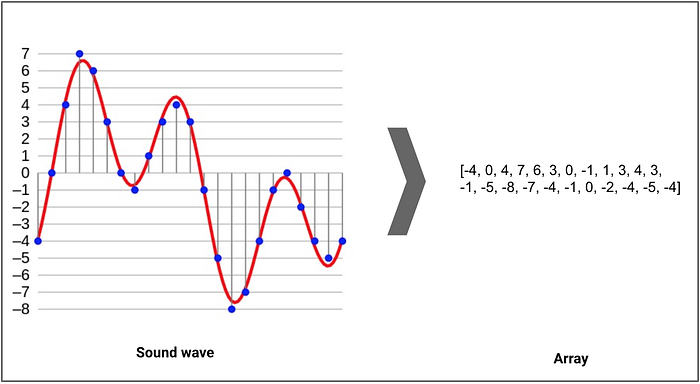
 terse field
That's the most useful website I've seen.
 zinc obsidian
Can someone tell me what features of the AudioMixer work with the WebGl build and which dont?
I couldnt find anything on the docs
odd osprey
Is it best to compress audio files before going into Unity or using their in engine tools for compression?
The aim is to have the smallest possible file size, within reason
whole pewter
what is best is to have your original media as high quality as possible (i.e. uncompressed) and set (any) compression in the importer
odd osprey
that makes sense! I will take a look at what they recommend for compression within Unity 🙂
 inner pebble
can anyone point me to royalty free tracks similar to this please https://youtu.be/ImCml8KDO1s?t=10
You can hear this song in the latest version of Trackmania² Canyon.
 sweet nacelle
Check it out, I released this 26 track compilation of all my latest music experiments. Beats, songs, raps and much more, give it a listen and tell me what you think, I am sure there is something for everyone in there.
https://m.soundcloud.com/riorock1/sets/el-color-rojo?ref=clipboard&p=i&c=1

E estado trabajando en mucha musica nueva los pasados meses, y quiero enseñarles de que se trata la cosa. Esta compilacion de pistas, experimentos, melodias y canciones, sirven de maqueta para la elaboracion de versiones oficiales para la plataforma de AntonioMabs (https://open.spotify.com/artist/4H5jTYkLzonE2lYN9MC2t9)
Featuring:
Erika Huertas...
stuck frost
Hello!
Can anybody recommend me a free program that is good to make varying music and Sound effects?
naive thicket
LMMS, Audacity, Music Maker I think as well has free version.
whole pewter
garageband
cakewalk, waveform, reaper, bosca ceoil, sfxr
trackers... probably minority of people make tunes in them nowadays
also sunvox, virtual ANS are free synths on desktop and they have pixitracker / https://warmplace.ru/soft/pixitracker/
whole pewter
no idea the script looks sound do you have some gain in there at all
you have out of bounds error, it doesn't log exception from that callback
make that termination condition in for cycle i < data.length - 1
stuck frost
@naive thicket @whole pewter @boreal furnace
Thanks for the tips.
whole pewter
@boreal furnace i know i either didn't have enough of coffee or had too much ( i can't tell anymore ), i'll pop them codes into editor in a while
whole pewter
well that phase looked suspicious and sure enough : just remove its wrapping i.e. remove if (phase < (Mathf.PI * 2)) { phase = 0.0; } in your first script and it will sine
i haven't looked at the rest
in your 2nd case you have to spread the sum over the whole waveform going into the callback
you're conflating it into single number and then assigning the same single number to the whole wave output so you're getting basically nothing on output
so forget the sum basically i'm assuming you want to replicate that graph
whole pewter
why wouldn't it be
but you're computing the sum for each sample
i would have to program some more which is not possible right now
whole pewter
yea well that's what i was talking about... - good to know it works lol
whole pewter
looks like starting from simple oscillators and learning about how synthesis actually work would be more fruitful tbh
north pollen
I wrote an article on Diablo's infamous Tristram village theme!
https://www.raredigsmusic.com/post/why-diablo-s-soundtrack-is-so-memorable-and-what-we-can-learn-from-its-success
Rare Digs Music
I'm Acer, also know as "Rare Digs", a composer and sound designer for video games. Ah, Blizzard's notorious Diablo. Sporting arguably one of the most compelling soundtracks ever created in video games. Originally composed by Matt Uelman, a personal favourite of mine is the main 'Tristram village theme'. I'll be focusin
whole pewter
post what you found, anything in old versions can be made to work
whole pewter
that's perfectly reasonable Unity-contemporary code which will run on anything between 4.6 and 2021 alpha
but it's not realtime oscilloscope
whole pewter
you can (re)use texture creation from that post, don't get audio data from clip.GetData pull it in OnAudiofilterRead into your own (circular) buffer instead and then do texture.Apply in Update
whole pewter
it's name of a class (or namespace)
they didn't post the whole source but you care only about PaintWaveformSpectrum method
whole pewter
dude that method will not work as is it's not an oscilloscope
i should have said "you care only about concepts in PaintWaveformSpectrum method" will know better next time - maybe
 slate jackal
hello there, anyone knows how to make one audio source (which is a button) to know what soundfile should be played if i want to differ files to be played when an object is pressed
in this case, every object has different sounds which i want the button to know which sound it should be playing
hope my question makes sense tho haha
 molten marsh
hey guys! i'm andrej, sound guy. 🙂 i'm mostly familiar with middleware and unreal engine, but now working on a unity project.
my biggest problem right now is that when i tweak the volume of a specific sound during runtime, after i quit playing, the value of the audioSource gets reset. a part of me gets that, things have to be reset. but i'm wondering how you guys do it.
how do you mix / save values in real time?
whole pewter
molten marsh
hey guys! i'm andrej, sound guy. 🙂 i'm mostly familiar with middleware and unre...
only audio mixer [button w/ the red circle and 'Edit in playmode'] can save value across playmode reloads, normal components can't
plus there are new settings for entering the playmode in 2020x which i haven't used yet
^but in any case those are for entering playmode only i should have prob not even mentioned them
molten marsh
@whole pewter thank you for the information!
yeah the mixer is great, just cant create one for each sound, heh.
and im stuck with an old unity version.
god. damn. so i guess i'll have to keep screenshotting...
😄 🤦
but thanks a lot for the reply! i was sure i was missing something.
there are thousands of audio assets. 😄
whole pewter
molten marsh
<@!94817958341128192> thank you for the information!
yeah the mixer is great, ju...
you usually create mixer for many sounds
plus scriptable objects can save at runtime and carry over values back but you'd have to do some scripting (to pull required values from them and update audiosoruces accodingly) - which isn't beginner topic in itself too
molten marsh
i got a typical mixer setup, ambiences, foley, each with subGroups etc. but im not creating one mixer for every sound. 😄 it'll probably work, and snapshots might help, but damn it would be dirty AF.
@scripted: hmm. like - attach script to the audioSource, every .5 sec or so get the volume value, store it, at game start set audioSource to that value?
that's actually... pretty cool... ill ask our programmer!
whole pewter
you don't have to periodically update it ( but you can of course ) but yea pulling at scene start and updating SO when quitting is the idea
molten marsh
you can update when quitting? 😮
whole pewter
well OnDestroy is called not only then but then too so yea when playmode exits the scene is unloaded
molten marsh
hmm. im not familiar with unity scripting at all.
i'd think that trying to get a falue from something that is being destroyed would be impossible.
but ill ask our programmer. thanks for the great tip!
@whole pewter "ratio 618" - fibonacci related btw?
and onDestroy is being called for the whole scene or just for the component? just so i know what to tell our programmer. hes like "youre a sound pain in the ass." so i'd love to prepare as much info for him as possible...
whole pewter
molten marsh
<@!94817958341128192> "ratio 618" - fibonacci related btw?
and onDestroy is bein...
https://docs.unity3d.com/ScriptReference/MonoBehaviour.OnDestroy.html
yea the number (also) from there
there is rather important note on the page btw Note: OnDestroy will only be called on game objects that have previously been active. so yea people rather use some manager for this stuff usually
molten marsh
whole pewter
https://docs.unity3d.com/ScriptReference/MonoBehaviour.OnDestroy.html
yea the nu...
thank you! :)
aah man, fibonacci is great. so cool to see a fibonacci knowing person helping out in audio. 🙂 i hope the CryptoSpace and everything else fib governed is good to you!
whole pewter
molten marsh
thank you! :)
aah man, fibonacci is great. so cool to see a fibonacci knowing p...
not sure how or why it is crypto related but i picked it because there are no numbers
molten marsh
nevermind. 🙂 .618 is special to my heart so yeah.
i learned about fibonacci during crypto research and then discovered how fascinating it is and how it governs so much in natural life.
whole pewter
🙃
whole pewter
do you think i + t is an array ?
https://docs.unity3d.com/ScriptReference/AudioSource.GetOutputData.html
whole pewter
they deprecated static method on AudioSource already - you have to use class instance method of an AudioSource component
attach AudioSource on the game object, get reference to it in the script and call GetOutputData on it
read some blogs watch some videos https://pyramind.com/game-audio-basic-programming-part-2-unity-c/ ( this is from pinned items of this channel )
 devout sail
So I'm working with Audio Mixers for the first time and I think I'm doing this right, I made two Mixers, one for Music and one for FX, how do I attach actual sounds to the Music mixer and FX mixer to differentiate them
spare gust
devout sail
So I'm working with Audio Mixers for the first time and I think I'm doing this r...
you have to assign your AudioSources to the corresponding output.
 floral dagger
how to add walk sound on this script
 wraith island
How should I play audio like a charging sound for a player?
Should I use a specific audio component for it with the charge clip set to it, or should I change the reference in code at runtime and then play?
 slender pagoda
Are there any issues related to a slight delay at the start of an audio clip playing? The "pick up" sound in my game doesn't play immediately and I cannot figure out why.
 gleaming ingot
Thats the problem with all audio, but can you get any other sound to work differently?
You will notice it more with fast sounds that have a sharp/sudden start to the audio, for example, on my computer I know that my audio buffer is set to 192, so together with the 44.1khz sample rate, it determines how fast any given sound can start playing
I think that combination is around 5 milliseconds lag
slender pagoda
Its a significant delay; I'm not sure how to measure it but it seems to be 200+ milliseconds.
Maybe I can do something different, like have the Game Object remain on-screen until the audio begins/ends.
 radiant creek
float to int error... is rpobably this
i, new Vector3(i * 0.5f, Mathf.Sin(i + t), 0.0f)
needs to be (float) i
Vector3( (float)i * 0.5f...)
 simple plover
Peekaboo. I'm kind of trying to figure out how to properly design audio, so for example, if an enemy is standing to my left and plays a sound, I hear it like the enemy was standing to my left. If the enemy is standing a bit further away, I want the sound to sort of, echo. Thus I've set the Spread to 45 and Spatial Blend to 1.
The sound sort of sounds, low though, compared to the audio file, even though the mixer group is set to a high volume.
I was wondering if anyone knows of a tutorial that goes through these things from a sound design perspective rather than just, "This is how you get basic sound working for your game"
 bright palm
Exposing Audio Mixer 'send levels' to code seems to be buggy - awesome if anyone would like to check this on their computer (I've tested on 3 computers and stuck on this roadblock).
On a group in the Audio Mixer, I create a send, and assign this send to a receive on a second group. Then I Expose the send level, and can see it listed in the Exposed Parameters as 'MyExposedParam Send (of Track 1) - which is good. But once I enter Play mode, the Exposed Parameter changes to 'MyExposedParam Send (of Master)' - which is the problem. The problem means it's not possible to control the send level on group 1 from code. I need to expose around a dozen sends on different groups via code, and the issue occurs each time.
stuck frost
anyone has a audio footstep script for me? im kinda new and i could not find a good toturial
stuck frost
?
 rotund wadi
How do u make a loopable 2D Audio clip?
deep pelican
same way you make a repeatable texture
deep pelican
make the end match the beginning
sudden coyote
nice
wintry creek
hey guys, random question
is there any way to visualize the rolloff range for a 3d audio source?
I am doing some sound design for big scenes but I am having a hard time trying to figure the correct rolloff ranges
wintry creek
Just made an sphere gizmo for the record, works nicely
misty flicker
did a quick port of Keijiro's old Granular Synth from JS to C#: https://github.com/0lento/unity-granular-synth
it's based on 2018.4.0 atm but it works up to latest 2021.1 beta
stuck frost
hay has anyone here dabbled with onset detection - im trying to understand what i need (like functions, data) in order to have a running onset detection system but the most i've found is 2 fairly outdated github pages of which i can't make much sense of
 earnest cedar
Hi all, can someone help me know where I can find someone that can work on sound effects for a project?
Like another discord or something for a paid gig?
silent hazel

happy new year
Follow me on twitter for more of me: twitter.com/tohomoko
most recent song, pls listen and thank u
earnest cedar
silent hazel
https://soundcloud.com/replay-368202368/beginning-of-the-end-of-the
it's great i love it
whole pewter
earnest cedar
Like another discord or something for a paid gig?
they should have forums up for this "in january" ) you can try also slack meanwhile [unitydevs.slack.com] or generic jobs websites [e.g. reddit.com/r/gameDevClassifieds/comments/fpnnr2/job_boards_other_resources_a_community_driven_list/] (which had increased traffic last months i imagine)
earnest cedar
Thanks for the suggestion
whole pewter
misty flicker
did a quick port of Keijiro's old Granular Synth from JS to C#: <https://github....
good find ! (even better w/o playback speed)
misty flicker
I've been researching for vehicle audio via granular synthesis, just saw keijiro had that sample (for granular synthesis itself). It wouldn't take a lot to get vehicle audio done quickly with this setup (Unreal 4.26 just added MotoSynth plugin that does bare bones engine audio using this concept) but it does take a lot more to do it properly. Currently trying to automate some way to analyse the audio itself to see what all could be done with it
north pollen
Wrote an article about Jak & Daxter's OST. Dive for those orbs Jak dive! https://www.raredigsmusic.com/post/why-the-simplicity-of-jak-daxter-s-soundtrack-was-so-effective

Rare Digs Music
A composer's in depth breakdown of Jak & Daxter: Precursor Legacy's soundtrack, and how its simplicity hit the nail on the head. "Every bone in my body tells me that the answers rest on the shoulders of a young boy. Oblivious to his destiny, uninterested in the search for truth, and rejecting of my guidance! And why wo
 finite siren
Hello. Which one is the good practice? Making auido-things over AudioMixer, or the AudioManager we had?
 wintry spoke
Hey, is anyone aware of any issues integrating fmod with Unity? More on the runtime end for players, or is it usually pretty reliable?
whole pewter
finite siren
Hello. Which one is the good practice? Making auido-things over AudioMixer, or t...
yes
whole pewter
wintry spoke
Hey, is anyone aware of any issues integrating fmod with Unity? More on the run...
what
they make it so it is completely unreliable of course what would you expect them to do
wintry spoke
Not a particularly useful comment, but sure
whole pewter
yea terrible.. any time !
wintry spoke
I know they used to have issues with certain Mac OS releases, but not sure about anything more recent
whole pewter
what "Mac OS releases"
wintry spoke
Pretty old releases, snow leopard I think
whole pewter
no they don't have issues on macOS except i don't know how it runs on apple silicon but then you would be asking different questions
wintry spoke
Ahh okay, yeah the issues I found were pretty old on their forums (like 2014) but remained unresolved.
Any idea about platforms like Switch? I'd imagine heaps of games use it there as well
whole pewter
they support all consoles